Must-Have Features While Designing A PrestaShop Store

Running an eCommerce store isn’t a piece of cake, that too with numerous goals & outcomes to achieve. Regardless of the products you sell, there will surely be challenges waiting for you. When it comes to designing PrestaShop store website, it’s all about having a well-functioning interface (UI) to provide a great user experience (UX). It’s a good thing that some of the popular eCommerce platform solutions like PrestaShop come up with such feature-rich backend to achieve that.

The PrestaShop eCommerce platform helps to launch and run an online website in the most seamless and fluid manner. With proper planning in the right direction, an online retail store can be made more promising and enjoyable.

But, the question is, what are those prime features that one must keep in mind while designing an eCommerce PrestaShop website? Well, this article aims to elaborate on a few of them along with their implementation & optimization.

Prime Features To Add In PrestaShop eCommerce Store:

#1. Navigation & Category Placement:
It’s not ideal to have the products listed without setting them under proper categories & subcategories. Apart from just categorizing the products, each category/ sub-category must be arranged on the navigation-bar/ toggle- menu in a way that the customers don’t need to make more than 4 to 5 clicks to reach their choice of page. Also, have all other necessary links in the navigation bar /menu with the motive to make this more seamless on the front-end for your shoppers.

Keep the category URLs SEO friendly & have relevant thumbnail images with relevant alt-tags on images source code. This further enhances your on-site SEO & makes your category image discoverable on Google search results.

#2. Product Page Design:
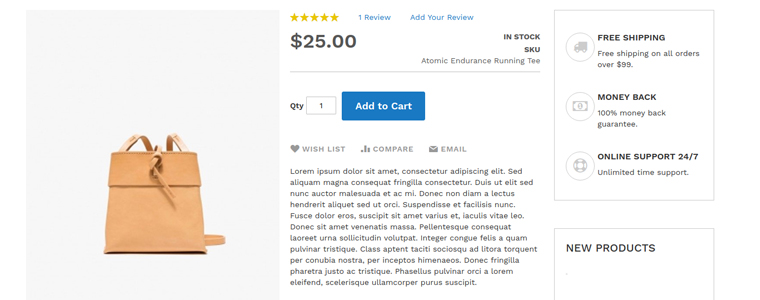
The PrestaShop store admin must design the product page keeping following things in mind:

  • Depending on the product you are selling, add necessary fields like SKU, dimensions /weight, expiry date, stock availability, minimum quantity per order, shipping charges & taxes, deliverability in specific areas (Pincode), etc.
  • Add quick links to suggest the customers to related products /accessories.
  • Have the option to add a product to wishlist. Some eCommerce websites also allow users to create multiple wishlist folders which they can also share with their respective friends. This is an amazing approach to encourage new visitors to set up an account & contribute to boosting conversions on your eCommerce site.
  • Add the social sharing quick links for popular platforms like Facebook, WhatsApp, Pinterest, Instagram, Custom URL, etc.
  • Apart from product images, adding a video with the product details is also in the trend. It helps the customers to get a better view of various details about the product. This further helps to boost sales for that particular product. For instance, the assembly video of a DIY Wardrobe.

#3. Design for Convenient Browsing:
Add relevant filter & sorting options for easy product finding. For eCommerce giants like Amazon, different product categories require different filtering options. For example, the apparel category can have filters like brand, color, size, fit, cloth material, etc. On the other hand, the smartphone category may have filters like brand, color, dimensions, operating system, RAM, etc. If your PrestaShop eCommerce website sells a wide range of different categories of products, have the right set of filtering parameters for each such category.

Some of the very common sorting options are – popularity, price (low to high or high to low), customer ratings/ reviews, etc. Based on the products you are selling, you must design your PrestaShop eCommerce website to have sorting options according to the user needs & choices.

#4. Offering Discount Coupon & Vouchers:

Setting up coupons & vouchers with all sorts of discounts isn’t enough these days. Their availability & benefits must be smartly designed to be introduced to online shoppers. Some eCommerce websites tend to display it on the home page & checkout pages, while some websites have those coupon codes displayed all the time by attaching a sticky tab on the bottom of the screen. Such factors must be considered while displaying coupon codes & other discounts.

#5. Seamless Checkouts & Payments:
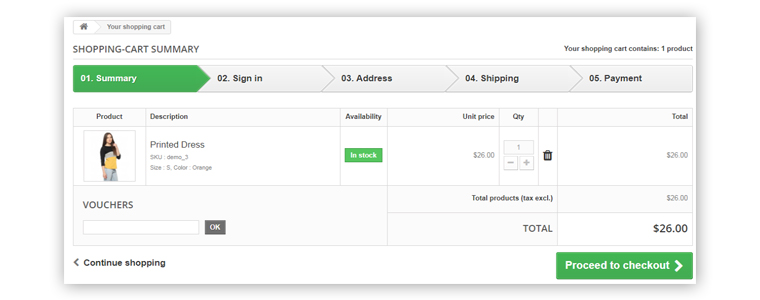
Checkout pages can be differentiated as two different designs. One of them involves having more detailed user entries making it a bit lengthier & time taking. While the other one is with one-page checkout with limited yet necessary entries making the checkout procedure really quick. Make your checkout pages encouraging users for more purchases.

Design your checkout pages to have some entries pre-filled during the checkout. For instance, have all the previous delivery addresses saved so that customers don’t have to manually type the entire address again each time they purchase anything.
Add all the relevant payment options according to the audiences you are serving. Set up your payment gateways with reliable robustness and security in consideration. Keep the processes simple so that customers don’t back out from checkout & payment without successful purchases.

#6. User-Friendly Backend:

A good PrestaShop website must not only be designed to keep the customer-centric factors in mind but also aim for the website admin’s convenience. For eCommerce website owners on the PrestaShop platform, it’s kind of a necessity to have the right set of tools in order to manage the website, inventory, user data, payment gateways, & other online retail factors.
For instance, if you want customers visiting websites to purchase a particular product in limited quantities, the admin may set those limits in a matter of minutes via the admin panel without spending hours on coding. That’s just a nominal functionality out of all of them. In simple words, complete website design and working can be controlled over a few mouse clicks.

Most of the elements in a PrestaShop website can be added/ enabled with utter ease because of in-built backend features. And, in addition to that, other ones can be added via 3rd party PrestaShop Modules or custom coding. Hence, the store owners are not bound to the availability of templates & extensions.

Conclusion:

These above-discussed potent features & even others can be designed & implemented in a PrestaShop web-store. If you are, in any form, associated with an eCommerce business or planning to launch one, choose PrestaShop and keep these points in mind.
We, at KnowBand Plugins, offer all sorts of plugins/extensions to enhance and improve the functionality of your PrestaShop store. Our leading eCommerce plugin & development services have assisted a wide range of retail store owners worldwide running their business on any the following eCommerce platforms:

PrestaShop Plugins
OpenCart Plugins
Magento Plugins
Magento 2 Plugins
WooCommerce Plugins

Got any query? Feel free to reach us at support@knowband.com or visit KnowBand Plugins.
How eCommerce Mobile Apps enhance Customer Loyalty?

The revolution in the mobile app space has created a significant buzz in our lives. Almost every sector has been digitized with the impact of mobile apps & the eCommerce industry isn’t an exception to this. After online commerce, mobile commerce has changed the perception of how users shop products these days. Various research & studies are confirming the fact that users prefer eCommerce mobile app & are more loyal to that as compared to desktop websites. The simple factor behind it is that the users get all relevant product information at their fingertips.

Mobile commerce & customer loyalty go hand-in-hand. When it comes to bonding of your online store with worldwide users, mobile apps are the best solution. Those days are gone when marketing through websites was enough to bring potential users to your store. Currently, mobile apps are the bridge between your business & the user. Technically, an app takes your store straight to user’s pockets, compel them to browse & purchase products.

Here, I am discussing a few points which will hopefully clear the value of launching mobile shopping apps. Read them:

#1 Keep users updated about latest happenings

In online shopping, the users are always keen to get the best products at reasonable prices. If you can adapt this strategy, it will make a huge impact on your sales. At times, the users keep on spending their valuable time in searching best offers. Don’t let them struggle. Try to keep them fully notified & updated about the best deals on your store along with upcoming sale or offers. You can even let specific users pre-sales offer before it’s available in general.

Marketing store deals & offers is much easier with a handy push notification tool. It not only builds your brand reputation but also notifies users about the offers even when they are not using the app. The personalized push notifications will deliver the right information to the users & compel them for instant purchase.

Also Read:

#2 Personalize App Home Screen for better Experience:

The home screen has its importance for a shopping app as the basis interaction begins here only. Try to highlight daily deals, best offers, new arrivals, seasonal discounts, etc. with attractive banners & graphics. This will compel the users to browse the selected product grouping & has the high chances of successful purchase as well. The store admin can even go for Flash Sale or Timer sale to create the necessary spark.

More you personalize the app, more it gets able to connect with users. The users even feel more valued with the availability and ease of everything required. Keep other screens of your app simple & intuitive offering better user experience gaining customer loyalty in return.

Also Read:

#3 Offer Discount Coupons & Rewards to boost sales

Coupons had been a strengthening factor in increasing the conversion rate of your online store. That too for the long past back. It will also work with mobile apps. Make sure the coupons running on your website also work on mobile apps & allow users to avail the valid discount. It will even reduce the rate of cart abandonment.

Everyone around us loves to get a price drop or something extra while shopping products. You can use your mobile app to build the right strategy for that. Offer reward points for their previous purchases or let them earn points by app referral system. It will also invite other users to your app & will maintain a sense of excitement about the purchase.

Also Read:

#4 Provide 24*7 User Support to gain trust

Customer interaction is a must for an online business. Often, the users need some sort of confirmation or having doubts before making payment. We should have a relevant medium to curb out their queries. Mobile Apps are the best suited for this job. They allow the users to directly contact you with inbuilt WhatsApp or Zopim chat options.

The prompt response to their queries will make them satisfied & increase customer engagement as well. Moreover, it brings you the best chance to improve user retention & gain loyalty. This is also one of the leading factors behind satisfactory feedback for your products.

Also Read:

#5 Strengthen your positive brand image

The mobile apps improve the visibility & reach of your online store & thus strengthen your brand presence worldwide. Nowadays all the leading eCommerce giants are majorly accessed through their mobile apps. That big is the scope of mobile apps in today’s market branding.
Your app icon in the user’s devices, brand logo in apps makes sure that whenever users browse the mobile, your app will notify them about the brand. Keeping all your online store details readily available for users, the mobile apps form a positive image for your brand improving user retention & loyalty.

Also Read:

Conclusion:

With the above-discussed points, it must have been clear that mobile Commerce app can be a potential source of engagement & loyalty for your eCommerce business. It connects well with the right audience & hits where it should. Thus, to build strong user-base with increased revenues, creating an eCommerce mobile app should be your very next move.

How Affiliate and Referral program helps online businesses during Holiday Season?

Did you know 81% of the marketers and 84% of the publishers leverage the power of affiliate marketing? (Source: Web Market Support) Also, according to Business Insider, 15% of the total digital media advertising revenue is attributed to Affiliate Marketing. Consumers trust referrals from people they know 92% of the time. Consumers who have been suggested by a friend are four times more likely to make a purchase.

People have a 37 percent greater retention rate when they are suggested by other customers. Leads from referrals convert at a 30% higher rate than leads from any other source. 65% of new business is generated through referrals. B2B enterprises that receive referrals have a 70% greater conversion rate.

Talking about the referral programs, a report by Nielsen says that 92% of the consumers trust referrals from people they know and 77% of the consumers are likely to buy a new product if they hear about it from their friends or families.

What is Affiliate Marketing?

When an online retailer pays some commission to its affiliate for promoting their products/brand and bringing traffic or sales through their affiliate link, the marketing is said to be affiliate marketing.

Affiliate programs have proved to be very effective for marketers as well as retailers. It helps e-retailers in customer acquisition and boosting sales. This can do wonders if marketed properly during the holiday season.

How do Affiliate Programs work?

Affiliates promote the link of your store products on their website, blog, or YouTube channel, etc. When the visitors/followers of the affiliate use that link to make a purchase on your store, you pay a small commission of the product amount to the affiliate for generating sales for you.

Why you should use Affiliate Marketing for your online business?

The affiliate and referral programs benefit your business in multiple ways. If you consider this during holiday season sales, there are chances that you end up getting huge conversions and a lot of new leads.

Boost sales

The main motive of any online business is to drive sales and to keep the sales graph always high. Affiliate Marketing ensures increased sales by driving more potential customers towards your website.

Enhance product visibility

Make your products reach a wider audience with Affiliate Marketing. If your affiliate gets a handsome amount of traffic on his website, the visibility of your product enhances. When more and more new visitors use the affiliate link to get some discount on your products, you capture more sales.

Increase Brand Awareness

Affiliates highlight your brand in front of a new audience. This creates brand awareness and brings more traffic to your store.

What is Referral Marketing?

Referral marketing or Referral Programs are considered amongst the most successful marketing tools. With this type of marketing, you encourage people to refer your products or services to their friends, family, associates, etc. in exchange for some rewards. Rewards can be gift vouchers, discounts on products or cash. It is also known as word-of-mouth marketing. You can promote your brand with discount vouchers during holiday season.

How do Referral Programs work?

In this type of marketing program, a visitor or customer shares your products to their people and when the people referred by the customers make a purchase from your store, you provide them some kind of referral reward. A customer can choose to share the product link or voucher code.

Why you should use Referral Marketing for your online business for Holiday Season Sale?

People trust referrals

When a customer recommends a product to his/her friends, a sense of trust develops among the referred persons. It creates more chances for sales than conventional advertising.

Improves customer acquisition and customer retention

The referred persons already get a positive response about your brand/products when they are being recommended by someone. This makes them loyal to your brand, increasing customer retention. When new visitors come to your store through referrals, you improve customer acquisition.

Increases user engagement

Referral Marketing can bring you high user engagement on your website. When your product gets circulated among people through referrals, the visits to your online shop increase significantly. You get more engagement, which could lead to increased sales.

Is there any difference between Affiliate and Referral Marketing?

There’s not much difference. For an e-retailer, both Affiliate Marketing and Referral Marketing are a way to promote their brand and get sales by offering some incentives to the affiliates, it is just the process that varies. The key difference between both is that Affiliate Marketing requires third-party websites to promote your business on their channel whereas Referral Marketing focuses on providing rewards to your existing customers for referring your products to others.

Checkout:

Affiliate and Referral program- Prestashop addon

Magento Affiliate and Referral program extension

Conclusion

Both Affiliate and Referral Programs are effective at inflating sales and growing brand awareness. You can try out the Affiliate and Referral program module by Knowband if you run a store on Prestashop or Magento platform. This module incorporates the Affiliate and Referral program on your store and helps you manage both programs quite comfortably.

How to Increase Holiday Season Sales?

Holiday Season Sale – Amazing Offers on Android and iOS Mobile App Builder

Add Gamification to give Holiday Season Flair to your Ecommerce Website Design

How to Prepare Online Store for Holiday Season- Module Guide

Tips to design beautiful eCommerce Mobile Apps!

E-commerce Mobile Apps and their growth:

Developing your own eCommerce mobile app has its own perks that too on a very high scale. We all are into online shopping nowadays. No one wants to struggle with going market, search products and then come back holding a bunch of bags. Instead, we all go for the online product purchase for our own comfort. Actually, the reason behind this is why to waste our energy when there is a better option to purchase products?

That’s exactly what modern shoppers think. Being an eCommerce merchant you can use this approach to improve the sales for your store. But, along with selling products online, what if there is another way which can get you far more benefits.

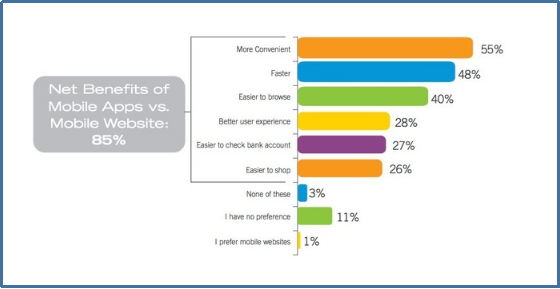
Yeah, that’s right! I am talking about eCommerce mobile apps. We all know that the mobile app industry has seen a huge growth in the past decade. Today, almost every major field needs mobile apps and so is the eCommerce industry. As per a marketing report, 85% of smartphone users prefer mobile apps over mobile websites. This percentage is more than enough to boost the sales and conversion for your store.

So, if you are an online store owner and quite serious about increasing visibility and revenue of your store, you must consider the option of eCommerce mobile app for PrestaShop, OpenCart, Magento, Magento 2, WooCommerce, Shopify platforms. Further, let’s dig up in this article how can you design the perfect eCommerce app of your own?

Need for designing an eCommerce Mobile App:

As they say, the first impression is the last impression. Your eCommerce mobile app voice out your brand among the worldwide mobile audience. Crafting a beautiful and flawless mobile app will definitely portray your professionalism and lure mobile shoppers. So, apart from incorporating other technicalities in eCommerce mobile app development, designing also holds a major spot which shouldn’t be ignored in any case.

Although it seems like all the shopping apps are a look alike, but trust me they aren’t. There are many such factors which if used properly would provide an impressive app to the front end shoppers.

Considerable factors for eCommerce Mobile App Design:

Here are a few major aspects to be kept in mind while designing an eCommerce mobile app of your own:

1. Clutter-free User Interface

The user interface is the soul of a mobile app. While designing the app UI you should keep a check on the screen-size support and effectiveness of the design. These two factors are responsible for making the app interface interactive and responsive.

You must make sure that your app doesn’t get affected by multiple screen sizes of various devices. As far as screen sizes are concerned, either manage the content on the app or create the one which supports multiple screen sizes.

Also, your app interface should be crafted as such it doesn’t create an issue for the user’s while creating an order. Many apps have loads of attributes which makes it tough for the users to select the right product and place the order. Thus, your well designed mobile apps could easily relight the user experience of your store.

2. Home Screen Personalization

The home screen of your app is the first thing which an online shopper experience on entering the app. Try to keep it simple and clutter-free along with highlighting the top products. There must be a proper search functionality on the home screen for the new visitors.

Your eCommerce mobile app should also have the functionality to offer flash sale or time-based sale on the home screen. So, try to optimize the app screen as per various events and occasions without making it messy.

3. Simple Sign-up and Checkout Screen

Users never prefer a multi-page sign-up or login option in the shopping apps. Instead of testing their patience the better approach is to offer them an easy and quick login process. Social media login(Google and Facebook) along with OTP and Fingerprint authentication are few such sign-up options which let the users access the app in a few taps.

Same goes for the checkout page, it shouldn’t be lengthy and multi-screen at all. Your app checkout screen should be that easy to use which compel the users to submit the order. So, once you have thought of developing an eCommerce mobile app you must be sure about keeping both these screens seamless.

4. Better Product Visuals

All the products must be displayed in a nice and effective manner. The product image quality must be up to mark and always have a prominent ‘Add To Cart’ button. You can also decide the navigation of this button by either redirecting users to the shopping cart screen or keep them on the product page for additional browsing.

The product images should load instantly even in an average broadband network. Often it happens that the users leave the app because images take time to load and they lose their patience.

5. Rich Color Schemes

Your app color choice says it all. Try to choose the color which suits your business. While choosing the right colors make sure it doesn’t affect the product visibility at all. Don’t forget that your prime requirement is to highlight the products on the app.

Moreover, you must not opt for very vibrant colors in the apps and try to maintain the right contrast between the theme and background color of your app.

6. Thumb-Friendly Zone

Your mobile app users could be both left and right-handed. Incorporating a thumb-friendly zone on the app screen wouldn’t harm anyone. Instead, it eases the app usability for both sorts of users.

Your eCommerce mobile apps should use this feature in such a way that all the important tasks related to product purchase must lie in this zone. It also helps in enhancing the conversion rate of your store.

7. Proper Filters and Sorts

Product filters are very important for an eCommerce shopping app as they help the users to find the right product from the huge catalog. The filter options in the app should be both broad and specific based on price, size etc. Product sorting is also an important factor which enhances the shopping experience. Whenever any shopper wants to view the lowest price products on your app, he/she can easily opt for the low to high sort option.

8. Simplified Menu Bar

Keeping your menu bar simple and to the point would definitely impact the user’s purchase decision. The right categorization displayed under the menu section allows the users to get along with the complete product catalog easily.

Over to you

Till now, you must be aware that mobile apps are the inevitable need of your eCommerce business. Designing your app beautiful and user-oriented would definitely benefit your eCommerce business. So, it is better to analyze and choose such eCommerce mobile app solution for your online website which provides a tailored and effortless shopping experience to the users. Keep all the above-listed points in your mind while app designing and hopefully it would shine out as a star for your store.

Read some more articles related to mobile app designing:

10 essential tips to create icons for your mobile app.
How to create right splash screen for your app?
The Mobile App Effect in eCommerce industry during Holiday Season


How to build an eCommerce Mobile App?

Mobile Commerce and its growth:

We all can witness the impact of digitization in this tech-centric world. Along with all the major sections, the eCommerce industry has witnessed tremendous growth and advancements in the past few years. Earlier the shoppers were only limited to the websites for product purchase. But, as the majority of online sellers took their website business to the mobile platform, the mobile shopping app is a kind of necessity rather than just a luxury.

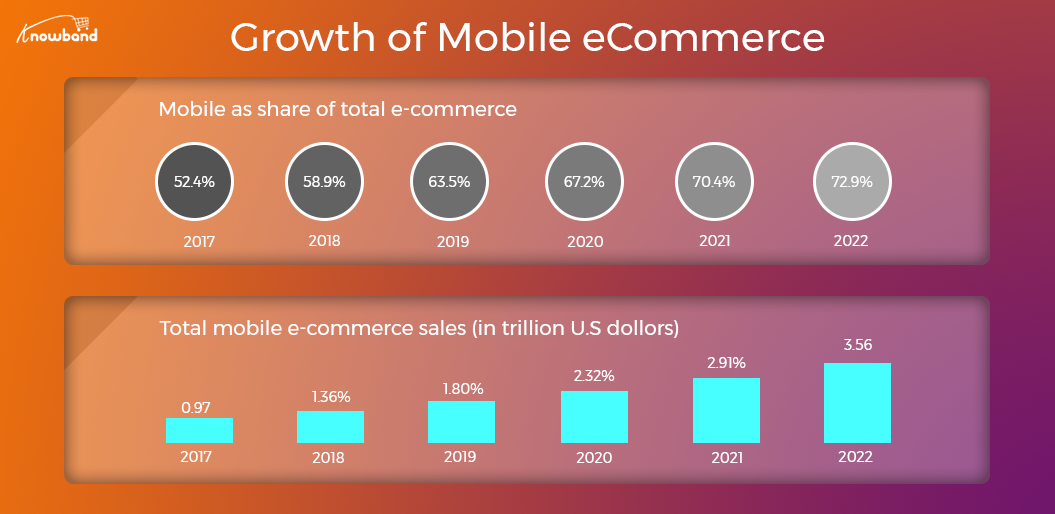
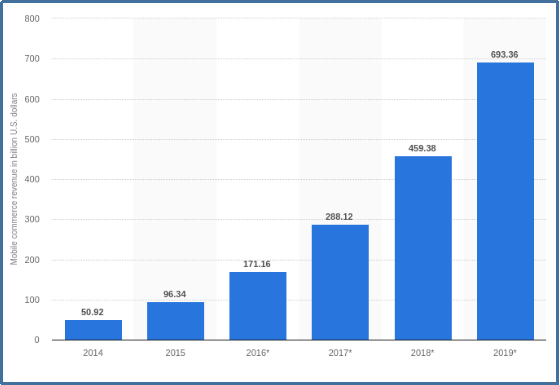
First of all, let’s narrow down the exact difference between eCommerce and m-commerce. Mobile commerce is selling products on various handheld devices while eCommerce is selling products through online websites. Many marketing experts are quoting that worldwide mCommerce is about to reach around $693B by the end of 2019.

Mobile Apps are a kind of inevitable need nowadays with the constant increase in mobile users on daily basis. The shoppers want everything at their fingertips to which they can easily reach. But, the need for eCommerce mobile apps often get ignored by online merchants and ultimately faces a huge loss.

How eCommerce mobile apps came out as a trend?

Creating a mobile app for your eCommerce website isn’t just limited to code one. You need to make sure that the app should be matching exactly with your website in terms of both look and functionality. Instead of providing some simple programmable apps to your users, think of a better approach and offer them one with all the help and assistance.

Who doesn’t want to opt for such eCommerce apps which can boost their website revenue? Mobile apps enhance the reach of your regional online business among the worldwide audience. They take your business to every corner of the world where you ever want to reach physically. But, you must be sure about the kind of mobile app which is being offered to your users. Let’s begin with a few basic questions which you should ask for your app:

1. Is your mobile app capable of targeting the right audience?
2. Does your mobile app support the products you sell?
3. How can you manage the inventory with the apps?
4. Can your app expand your business on a global scale?
5. Is your app interface enough seamless and appealing?
6. Is product purchase simple for the shoppers?
7. Can you manage the app functionalities on your own?
8. Can you optimize the home screen UI as per various occasions?
Last but not least,
9. How will you manage the app and store simultaneously at the same time?

These are some basic queries which should be considered before going for coding or non-coding way to create an eCommerce mobile app. There are various other aspects to be analyzed as well while creating eCommerce mobile app.

Key essentials for flawless mobile app creation:

1.  User Experience:

Your app design should be user-centric. All the features and functionalities of your eCommerce mobile app should be crystal clear for mobile shoppers. Try to use the right color selection and correct usage of other designing elements to lure the user’s attention just with the perfect designed app. Often it happens that the mobile app visitors access the app because of the awesome designs and end up as a potential user.

Moreover, you should try to keep a brand touch in your apps. Your app portrays your business to the users so, try to keep it as effective as it can. The app screens should be crafted nicely and the transactions between them must be smooth. Display your store logo on the app and promote your brand as well along with the store products.

2. Audience Analysis

Being an eCommerce store owner you must analyze your target audience. This research has its own significance as it lets you make the decision based on user’s likes, dislikes, purchase behavior etc. It will help you in providing the exact mobile app which your user needs.

Your marketing strategies actually rely on this core aspect of eCommerce business. In this age of sternest competition, you don’t afford to make any error as it can make you lose loads of conversions and leads. Keeping your app features as per the audience taste and preference will definitely be a silver bullet for your business.

3. Track Competition

List down your competition who have already gone mobile or looking forward to doing so. Analyze their move and check what makes them a better choice for the users than you. Research their best features and benefits and try to make up the most out of this analysis.

4. Right Technology

Choosing the right technology for your app is the prime requirement for eCommerce mobile app development. Your app must be updated with all the latest advancements and should work without any flaw. Try to opt for the native eCommerce mobile apps in order to provide sustainability. Similarly, you also need to decide whether you want to develop an Android app or an iOS app or both as per your targeted audience.

These were some of the core aspects of understanding and analysis before actually going for app development. Now let’s take a look at some of the must-have features of your eCommerce Mobile App.

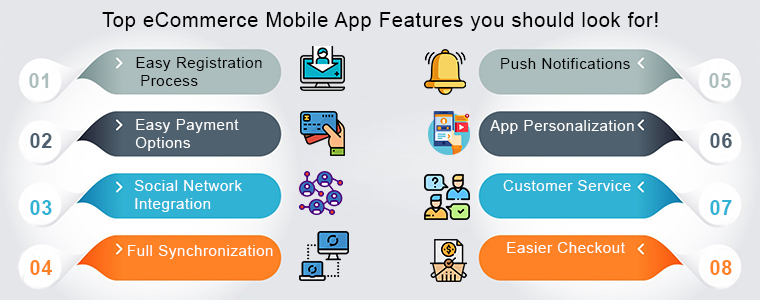
Top eCommerce Mobile App Features you should look for!

1. Easy Registration Process

In this paced day to day lives no one wants to fumble with the lengthy login forms when it comes to access your app. Many eCommerce store owners ignore this fact and eventually it doesn’t end well. You must not make this mistake and incorporate quick login options in your app in the first place.

Moreover, there must be at least 2-3 login options in your apps including social media networks. Providing one or two tap login option in your app could not only motivate them to open the app and browse the store but also boost sale for your business.

2. Easy Payment Options

Let’s take an instance that a user has visited your app and added products in its cart. But, when he/she tried to make the payment there weren’t enough payment options. This will surely make the user leave without successful product purchase.

You should be serious about providing multiple reliable and user-favorite payment options in your app. With Amazon Pay, PayPal, COD, Braintree, Stripe etc. you can easily push your users to make the purchase.

3. Social Network Integration

No one can deny the power of social media. If you are running a business, social media could be a game changer for you if used properly. Your eCommerce mobile app also needs social integration in order to popularize it.

Right from one-tap login to social sharing of products, the mobile apps will spread your word of mouth among potential buyers. So, you must connect the basic social networks in your app for improved benefits.

4. Full Synchronization

Being an eCommerce store owner managing both apps and the store simultaneously could be hectic for you. So, why not connect both with each other? Offer 100% synchronization between your store and the mobile apps and speed-up your inventory management process.

Once the apps and your online website are in synchronization, all the updates made on the website are automatically get reflected on the mobile apps. This halves your workload and saves plenty of time to focus on the competition and improve sales.

5. Push Notifications

Your app is the major communication source between you and the buyer if it has the right tool. Push notifications are the perfect marketing tool for an eCommerce mobile app. Sending personalized notifications to the app users would increase the app engagement. Notifying the users regarding discounts, sales, offers, and other store-related details would definitely enhance your eCommerce store sales.

6. App Personalization

All the top eCommerce mobile apps offer the best shopping experience to the app users. You should opt for the eCommerce mobile app solution which allows you to personalize the home screen on your own.

Your app’s home screen is responsible for the first impression on the users. So, you must make sure it certainly meets the user’s expectation. This will even help the store admin to drive more sales to your store. There is various automated eCommerce mobile app solution for PrestaShop, OpenCart, Magento, Magento 2, WooCommerce and others that allow you to present the desired layout in your apps. You can even read various tips to design beautiful eCommerce mobile apps.

7. Customer Service

Customer satisfaction is an important aspect which shouldn’t be ignored at any cost. While shopping online through your app there is a chance that user might be in doubt regarding the purchase. So, there must be reliable contact options in your app. This will not only let your users directly contact you regarding any query or problem but also brings their loyalty to your store.

8. Easier Checkout

The simpler is your checkout screen, more are the chances of a successful purchase. Easy checkout screen often motivates the users not to abandon the cart without making payment.

Wrap Up

This tour of developing eCommerce mobile app would have hopefully cleared that the mobile apps are better than online websites. So go ahead, do all your research and analysis and choose the right eCommerce mobile app development solution.

Looks good? Find some more articles on how these mobile apps can benefit your eCommerce business:

How eCommerce mobile apps can boost your small business?
Reasons why eCommerce business needs a mobile app?

How to improve sale for your ecommerce store in 2019?

2019 is here and we all are loaded with fun and excitement. But, do all the eCommerce store owners are really prepared enough to welcome the coming year and all the opportunities with it? In this challenging eCommerce industry, the only way to stand out from the rest is by providing a top-notch customer experience. Well, the major reason behind raising this question is the upcoming technical advancements and trends which would directly impact your eCommerce sale and revenue. With the rising competition in the eCommerce industry, looking out for new trends and their benefits is the best way to expand your business. You all would agree with me that customer experience is the top priority for the growth of any eCommerce store.

It plays a vital role in differentiating your business and keeping you stand out from the rest. So, in this article, I would share some best eCommerce practices which would surely help you in keeping your customers happy and improve your sales consistently.

10 best practices to improve the sale of  your eCommerce industry in 2019:

1. Make your website trustworthy:

Most customers won’t know what your brand is all about. Brand recognition is one of the effective approaches to lure the users to your store. There are many websites out there with the same features as of yours. So, you have to be professional in making your website more respectful and trustworthy for the customers. The trust level can also be elevated by making positive press coverage and adding suggestions like reviews/testimonials etc.

2. Attractive and detailed images!

Images of any product are also important with customer reviews or product descriptions. That’s why it’s essential to choose the most attractive images to grab the customer’s attention. And for that, you can create your own content instead of relying on third party images. It improves your conversion rate drastically.

3. Cover FAQs for every possible query!

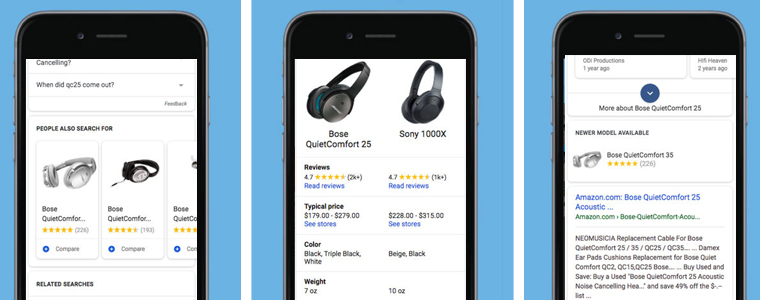
Since it is not possible to answer each and every query of all the customers physically. So, the better approach is to keep some FAQs on your website and let the users get every possible support from your end. With FAQ’s the customers could solve minor issues by themselves and it even makes your website shopping friendly as well.

4. Live chat support for direct assistance!

FAQs are important to solve the users’ minor queries, but, there are cases when the store owner have to solve the issue by yourself. So, our next practice is to create customer valued personalized interactions in the form of chats and calls. Customers are more satisfied with the store providing instant support and always prefers them. By providing chat option on your eCommerce website, you allow your visitors to ask queries related with products directly from you. Instant user support paints you as a professional among the users.

5. Improve your website loading speed!

If your website takes time to load, this could affect you in loss of sales. The slow loading website frustrates the customers and he/she ultimately ends up in leaving the website. Your website loading time is the deciding factor for your professionalism and reliability. As per Statista, 73 percent of mobile users in China expect websites to load in 3 seconds or less. A single second delay could lead to decreasing the conversion rate of the website. It can potentially cost a $100,000 per day eCommerce site to lose $2.5 million in sales every year. So, you should work on the loading speed of your website, if required.

6. Scarcity has its own perks!

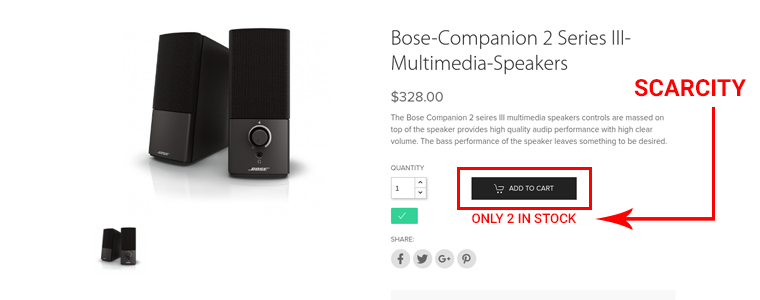
Customers hop on the things that are hard to find and are exclusive. The scarcity of things makes them more valuable. This is why creating scarcity or urgency of the product or service, tends to be one of the most effective conversion optimization strategies. The sense of scarcity encourages your customers to buy that product at that instant of time. Often “Selling Out!”  is highlighted to get the users to buy faster.

7.  Provide Free Shipping!

Free shipping is a blessing. If we believe Statista,  73 percent of respondents stated that free delivery greatly impacts their decision to purchase an item online. Shipping charges are the top reason behind cart abandonment as customers don’t want to pay delivery charges. So try to provide free shipping and grab the maximum leads.

8. Make the products search more seamless!

There are customers who visit your online store because they already know what they want to buy. But many of them have no idea and for them, product filters are important as the users might need to see what’s new in trend and what could be more suitable for them. Filter option helps visitors focus on the items that they really wish to buy. So keeping everything clutter-free could help you in increasing your online sales.

9. Detailed product descriptions!

Product descriptions are also important as complete detail can lead to the sky-high conversion rate of your website. So it’s better to explain your product in detail to avoid exchange and returns after purchase. Giving a description of your product will increase its value to your customers, thus encouraging higher conversion rates.

10. Keep the checkout page simple!

According to Statista, 69.23 percent of digital shopping carts and baskets were abandoned in the year 2017 and the purchase was not completed. Many a time it is because of a complicated checkout process. You can reduce your cart abandonment rate by making the check out process easier for the customer. You can apply PrestaShop one page checkout addon on your eCommerce store.

Conclusion:

Although there are various other eCommerce practices that should also be considered by entrepreneurs, However, if you incorporate these above-mentioned practices, your web store will begin to experience profitable results.

Coding Or Non-Coding: What to choose for eCommerce mobile app?

Looking for the number of bucks required to get a pair of native eCommerce mobile apps? Read on to find the answer.

Why eCommerce mobile app is a big deal today?

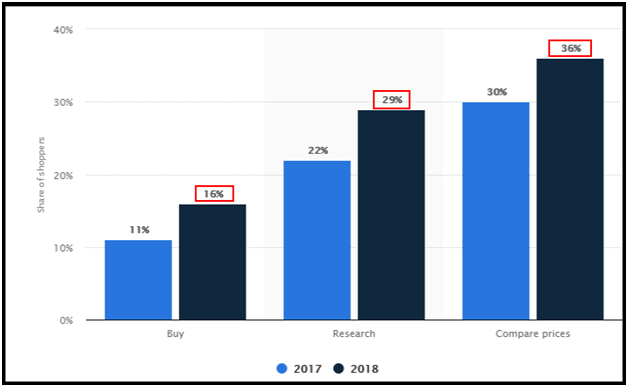
Digitization has touched our lives in the past few years in ways we never imagined. With the ever-growing mobile app market and the ease of shopping provided by mobile devices, the apps have made their mark in the eCommerce industry. The mobile apps for shopping have overtaken the desktop websites with their motive of ‘Shop on the go’. If we believe to the following stats, in the year 2018, 16 percent of worldwide shoppers used their smartphones to buy products. This data was earlier 11% in the year 2017.

All the eCommerce store owners would have dreamed of their store getting crowded with the users. E-Commerce mobile apps could make it true by targeting the majority of mobile users worldwide. Additionally, the ease of doing business with eCommerce mobile apps has no comparison at all. All of these facts and figures are that mobile apps are leading the debate on mobile apps Vs mobile websites.

How should be your eCommerce mobile app?

The exact cost is determined by the aspects that you take into consideration while app development. And, that’s totally up to you! You should get your eCommerce mobile app developed as per your choice and need. But, before that, the basic step is to keep all the concerned factors crystal clear. There are a few key aspects which are a must if you are really sighting your app as a game changer. Let’s have a glimpse of them:

1. Audience Analysis will let you know where to hit!

While developing an eCommerce mobile app, the user analysis is the most essential and basic thing, to begin with.  The success of your business exactly depends on whether you are fulfilling buyer requirements or not.

The fundamental step in the buyer analysis is determining to whom are you selling the product with the app? Their shopping behavior and patterns must be analyzed to know the buyer likings and disliking. Carrying out this research in the précised manner will ultimately get you a relatable approach for your app.

2. Choosing the right technology will get your app far!

Another major aspect is using the right technology while developing your eCommerce mobile app. Along with keeping an eye on the budget of app development, you should go for the solution that offers you maximum benefits. From keeping the perfect synchronization between app and website to multiple language integration are few such technological advancements that you must opt for your app.

Actually, in my opinion, you should go for the native mobile app development solution.  Determine the platform/OS that you will target, whether it will be Android or iOS or both. This is directly based on the preference of the user’s devices and that will be acquired from user analysis.

3. The well-designed app would voice out your brand loudly!

Try to craft your app design soothing and intuitive without getting it cluttered in any possible way. The appealing app visuals, seamless transactions from one app screen to another, alluring color themes and font styles are some designing factors which can provide an unmatchable shopping experience to your users.

Your app is your business identity. So, it should be kept as user-friendly as it could. Your mobile app should present your store to the users with the motive to create an ever-lasting impression.

There are various other such factors as well, but these above discussed must be considered before developing the eCommerce mobile app. Let’s move on to how much does it will cost?

What is the cost involved in eCommerce mobile app development?

Cost required for creating a mobile app is technically narrowed down to two main factors:

  1. Who will be your app developer?
  2. How much amount are you planning to invest?

You should be certain about the money and approach regarding the mobile app development. From here, you can go for either of the choices.

1. Coding:

The first one is to hire a developer for the job which could cost much as you have to make him permanently available for your app. You would have to pay the person every time for even small changes in your app.

2. Non-coding:

The much better and seamless option is to choose a pre-configured mobile app solution. There are various such readymade frameworks available in the market which can get the desired apps for you without any change in the code. The best part about this option is that you would be the boss of your app as its functionalities can be managed over a few clicks and button toggles from the admin panel.

Also, the mobile apps provided by the readymade solution are fully featured and have all the required functionalities for your business. These eCommerce mobile app solutions even provide free support to developed apps. So, if any issue happens in future you wouldn’t need to worry about that.

Conclusion:

Till now, you have got the idea that developing an eCommerce mobile app is a tough decision and requires a lot of analysis and research in the first place. But, there are the ways discussed above through which you can get the job done without any hassle. Knowband understood this concern of all the eCommerce store owners of different platform and came up with the easiest and cost-effective solution Mobile App Builder for Prestashop, OpenCart, Magento, WooCommerce and Magento 2 platforms.

Please do drop us your reviews and comments regarding eCommerce mobile app development. We would love to hear from you.

Find our other articles on eCommerce mobile apps:

E-Commerce mobile apps: Just a fad or an unavoidable Trend!

Why does your eCommerce business need its own mobile app?

7 reasons why mobile apps are better than mobile websites?

Google Express: A Complete guide

The way ecommerce business is growing with pace, the approach of selling and purchasing goods is also changing. Today, customer demands are increasing, so the sellers always try to surprise the users and lure them to keep themselves always ahead of the curve. We all demand a variety of products on all the platforms around us. The shift of eCommerce website business to the mobile phone is because of the quick, fast and effortless shopping experience it offers. Retailers, on the other hand, need to be updated about all the latest eCommerce trends so that they can grab the advantages and grow their businesses to new heights.

Google express like Amazon is one of the largest online selling platforms which enables the retailers to capitalize on low competition and high volume. The reason behind this is that only a few retailers are selling their goods on this platform, unlike Amazon and Google shopping.

Google express: Intensify your shopping actions with new Google’s platform

The Prefix “Google” is not itself enough for uplifted sales and growth of your business. Before embracing the Google shopping action, there are a few things that one needs to know about.

Google express is the online shopping platform that allows the customers to buy products from mobile phones through Google express app, this app is available for the Android and the iOS platforms, Google Voice assistance and google.com/express (Desktop). Google Express brings a great opportunity for the sellers to get themselves enrolled and grow their business. Google express as only a few retailers have enrolled yet, which makes it a growing platform with the least competition. As of now, this service is only confined to the US continental. Retailer’s products will earn better visibility with Google express. Google express enables the display of retailer products on Google search, Google Home devices, Google voice search, the Google express mobile app and the Google assistance for mobile.

For the List of enrolled retailers, click here.

Want to sell products on Google Express?

 Follow these simple and easy 9 steps:

  1. Selling on Google Express is much simpler! Before starting to sell products on the Google express, the sellers need to fill a sign up Google Shopping Actions. Sign up form is the entry form of the Google Shopping Actions program.
  2. After the approval, the sellers need to set up their storefront. In the Shopping Action tab of the Google’s Merchant Center, choose the product feed you would like to sell through Google Shopping Actions.
  3. Then upload all your banners, color and logo. These brandings will appear on the Google Express storefront and marketing material.­­ Provide your payment details for receiving payments and for invoicing.
  4. In your tax settings, make sure you’re collecting the right amount of sales tax for each of the places you deliver. Set up your shipping details, the price to the customer, any rate settings or rules, default return policy and return address.
  5. Don’t forget to provide your email address. In case of any issue, Google customer support team will contact you on that mail address.
  6. Adjust or restrict the admin rights granted by the Google Shopping Actions as per your convenience.
  7. Provide your URL for your privacy policy. Google will review it and ensure that your policy meets their requirements for sharing user email addresses.
  8. Review and accept the Shopping Actions Merchant Program Addendum. The Shopping Actions Merchant Program provides the Commission Rate Schedule.
  9. Orders in the Shopping cart platform can be viewed from the Google Merchant Center Orders page or use GoDataFeed’s Order Sync tool to get the orders in the shopping cart platform.

Once all the steps are completed, you can request for Final Validation to enter Google’s Final review.

Google Shopping Action enables the retailer to display their products on different platforms like Google search, Google voice search, the Google express mobile app and the Google assistance for mobile.

At present only a few retailers have enrolled in Google Shopping Action, it’s the right time to get yourself enrolled in Google express if you are really looking for a larger audience and low competition. For selling the products on Google express the retailer needs to setup the storefront and request a final validation.

Google Express brings various merchant benefits!

In addition to the enhanced visibility of your products over multiple platforms, Google express offers various other benefits as well:

  • Local Integration: Google express offers a local integration option to the local store owners. A local physical store needs to fulfill all the products and inventory details via the product and inventory feeds. Shipping of these items is managed by the Google itself. So, if you are a small business owner even you can increase its reach easily.
  • Customer Service: Customer service support is also offered by Google. All the customer service issues are handled by the Google customer support channels.
  • Google training:  Google offers training regarding the process of uploading the inventories and order packing.
  • Cost: Unlike Google shopping where the retailer was supposed to pay for every click, here Google will be charging them for sale only. A monthly commission invoice will be delivered to the retailer for completed sales.
  • Centralized cart: Unlike Google shopping where while shopping from different retailers the customer is being taken to the individual retailer’s website to complete a purchase. The Google express makes it more seamless and offers a Centralized cart to add items. The customer will be automatically redirected to delivery address page on clicking the checkout option available on the cart page.

Google Express makes shopping hassle-free for users!

That’s It!

Google express lets the customers purchase from different retailers with very little efforts. The customers can shop from multiple stores using mobiles and desktop through Google Express.  Google express will enhance the visibility of the retailer’s product, boost the sale and in return sellers needs to pay commission only for the conversions.

How to Read the File in PHP Language?

Objective

After reading this blog, you will be able to read files in PHP language. In the blog, you will get enough information about different ways used in PHP to read a file.

Let’s Learn About the File Reading Method in the PHP

PHP provides various type of methods to read the file as follow:

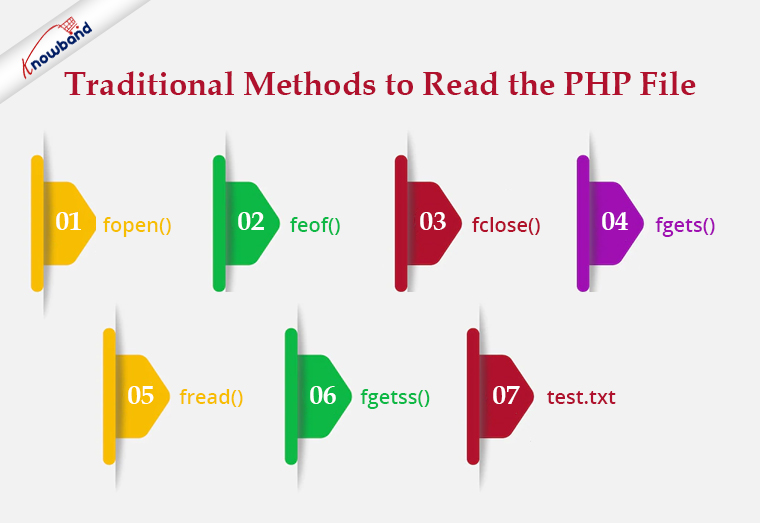
Traditional Methods

In this type of method to read a file, we have to follow 3 steps.

  1. Open the file.
  2. Read the file.
  3. Close the file.

Let’s see some traditional methods:

Recommended Read: Export PHP data to the .xls file

fopen():

To read a file we need to open a file using fopen(). In fopen(), we have to pass to 2 parameters i.e. first is the file path and the next one is filed open mode. To read a file we will use “r” as file open mode, “r” denotes “read mode”.

$file = fopen("test.txt", "r") or die("Unable to open file!");

feof()

This method checks whether you have already read to the end of the file. This returns true till the last line of the file gets read and once we cross the last line it returns false. We use this method in a loop to read a file from the first line to the last line.


$file = fopen("test.txt", "r") or die("Unable to open file!");

while(!feof($file)) {

//your processing

}

fclose()

We use this method to close a file after reading the file. After closing a file we will no longer be able to read that file.

$file = fopen("test.txt", "r") or die("Unable to open file!");

while(!feof($file)) {

//your processing

}

fclose($file);

fgets()

We use this method to read a file line by line. It collects a single line of data from your file and returns it as a string. And from there either you can print the line or you can process the same as per your requirement.

<?php

$file = fopen("test.txt", "r") or die("Unable to open file!");

while(!feof($file)) {

echo fgets($file) . "<br>";

}

fclose($file);

?>

<strong>Recommended Read:</strong><a href="https://www.knowband.com/blog/tips/generate-qr-code-using-php/">Generate QR Code Using PHP</a>

fread()

We use this method if we want to read a file in a limited size. We have to pass a size limit in bytes in this method and then this method read the file up to a given size limit and ignores the rest part of the file.

If we want to read a file up to4,096 bytes (4 KB), we will write the code as –

$file = fopen("test.txt", "r") or die("Unable to open file!");

$data = fread($file, 4096);

Note: No matter what number you specify, fread will not read more than 8,192 bytes (8 KB). Assuming that the file is no bigger than 8 KB, the code below should read the entire file into a string.

<?php

$file = fopen("test.txt", "r") or die("Unable to open file!");

$data = fread($file, filesize("test.txt"));

fclose($file);

?>

fgetss()

This function is similar to the fgets() functionbut strips away any HTML or PHP tags it finds, leaving only plain text.

Code:

<?php

$file_handle = fopen("test.txt”, "r");

while (!feof($file_handle)) {

echo fgetss($file_handle);

}

fclose($file_handle);

?>

test.txt

<html>

<head>

<title></title>

</head>

<body>

<div class="editor-content" style="text-align: left">

<p>Knowband is one of the leading name as an e-commerce plugin development and marketing firm.</p>

<p> </p>

<p>Our team of highly skilled and experienced IT professionals.</p>

</div>

</body>

</html>

Output:

Knowband is one of the leading names of an e-commerce plugin development and marketing firm. Our team of highly skilled and experienced IT professionals.

Recommended Read: How to Integrate Google reCAPTCHA with PHP?

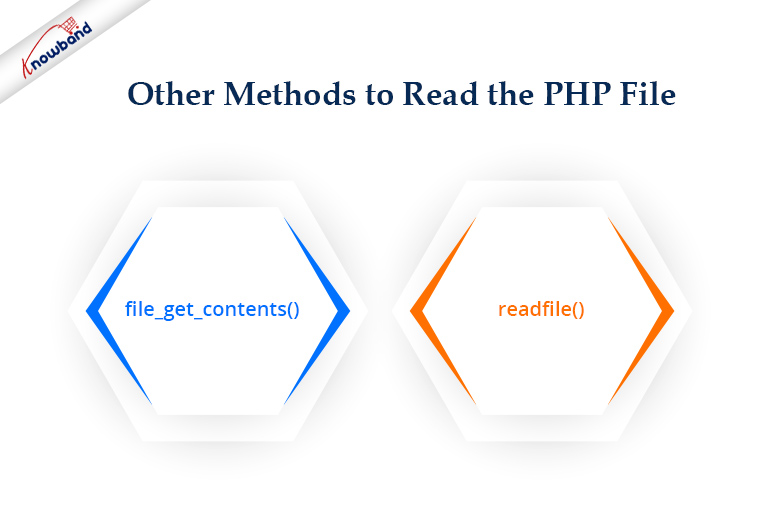
Other Methods

PHP also provides various other methods for file handling that we can use for different purposes.

file_get_contents()

This method can be used to collect all the data from a file as a string. For example, how can we collect all the data from our webpage? You have seen the fgets() example using a loop. But how we you make this more straightforward? We can easily do the same with the file_get_contents(). We do not need to open or close a file to read. On failure, file_get_contents() will return false.

<?php

$file= file_get_contents("https://www.knowband.com/");

echo $file;

?>

readfile()

The readfile function dumps the entire contents of a file or Web page to the default output buffer. By default, this command prints an error message if it fails. To avoid this behavior we use @readfile()

Let’s see the difference between readfile&& @readfile.

Let’s try to open the wrong file by readfile:

<?php

$file= readfile("wrong_test.txt");

if(!$file){

echo 'File not found.';

} else{

echo $file;

}

?>

Output

( ! ) Warning: readfile(wrong_test.txt): failed to open stream: No such file or directory
Call Stack

File not found.

Now replace readfile with @readfile and we will get the output as:

File not found.

Recommended Read:  Auto Loading in PHP

Good Practice!

If we are a programmer then we should always keep in mind our code can handle the error or condition. There might be a chance the file that we are going to read was moved from the path or permission for the file has been changed and hence you are unable to get the content. So good practice says before reading a file we should check if the file exists and the file has read permission.

<?php

$file = "test.txt";

if (file_exists($file) && is_readable($file)) {

$f = fopen($file, "r");

# Processing

fclose($f);

}

?>

Summary

If have any PHP eCommerce application like PrestaShop, OpenCart, Magneto, etc. you can use the codes to reading the file as per your requirements.

For all aspects related to eCommerce, we also offer custom development. Additionally, the top modules for Prestashop, Opencart, Magento, and Magento 2 are also available. A few of the top modules that Knowband offers are One Page SuperCheckout, Multi-Vendor Marketplace, Mobile App Builder, Spin and Win Module, Abandonded Cart and so on.  If you have any questions, contact us at support@knowband.com.

PrestaShop SEO Optimizer- Clean URLs & 301/302/303 Redirection Module- User Manual

1.0 Introduction

A higher ranking on the search result page of the search engines like Google, Bing, and others is the biggest challenge for an online business. With a higher ranking, the chances of better sales also increase. In order to improve the search ranking, it is mandatory for the store owners to follow the guidelines issued by the search engines. SEO (Search Engine Optimization) is the way to increase your online presence for a better ranking on the SERPs. The On-Page SEO activities involve – website optimization, meta tag optimization, SEO-friendly URLs, keyword density and more. Among these factors, one factor is the SEO-friendly URLs which play an important role in the ranking. As per Google guidelines, Google recommends that the URL structure of a website should be as simple as possible. SEO-friendly URL is also useful for indexing process flow by the search engine bots.  In clear words, comprising SEO-friendly URLs for a website increases the chances for a website to get higher ranks in the search results. The default URL structure of PrestaShop SEO Optimizer Module includes the product id in the product page URL, Category page URL in the category page URL.

To help the store admin to create SEO-friendly URLs, Knowband has developed the URL Cleaner (SEO-friendly) Module. This PrestaShop SEO Optimizer – URL Cleaner Addon automatically generates the SEO-friendly URL by removing the ID from the URLs of products, categories, suppliers, manufacturers, CMS and all other pages of your store. It allows the admin to implement the 301, 302 or 303 redirection as per the requirement.

1.1 Features of the Prestashop URL Cleaner (SEO-friendly) Addon:

1. PrestaShop SEO-friendly URL Addon is a module that automatically converts the default URL into SEO-friendly URL.

2. The Knowband PrestaShop Rewrite URL Module removes the auto-generated ID from the URLs of the products, categories, suppliers, manufacturers, CMS and all other pages of your store.

3. With the help of this PrestaShop Fixed Duplicate URL Addon, the admin can view the duplicate URL list and modify or remove the URL as per the need.

4. PrestaShop URL Cleaner Module provides an option to the store merchant to redirect the old URL to the new URL. The Store admin has 3 choices on redirects i.e. 301 redirects, 302 redirects, and 303 redirects.

5. SEO URL PrestaShop extension is a module that helps the store merchant in improving SEO.

6. This PrestaShop URL Rewriting Module by Knowband helps the eCommerce owner to improve the website SEO.

7. The PrestaShop store admin can set the URLs to end with or without .html by using this Prestashop URL Cleaner Addon.

8. PrestaShop URL Id Remover Module is multi-store compatible.

9. SEO-friendly Prestashop URL Cleaner Module back-end interface extremely easy to use.

10. With this PrestaShop 301/302/303 Redirect Module, the admin can redirect the N no. of the old URLs to new URLs.

Technology for Development

Language: PHP

FrameWork: PrestaShop

2.0 Steps For Installation

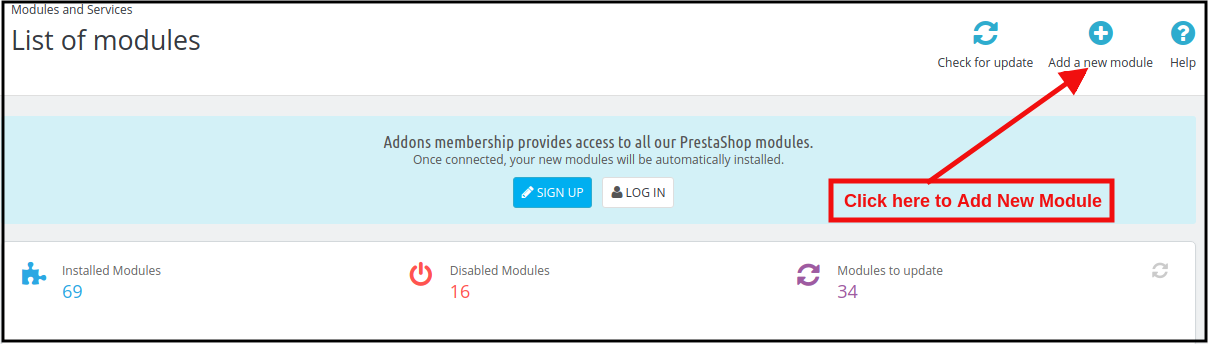
1. To upload the module click on the “Add a new module” button.

2. After clicking on Add New Module now select the module zip file.

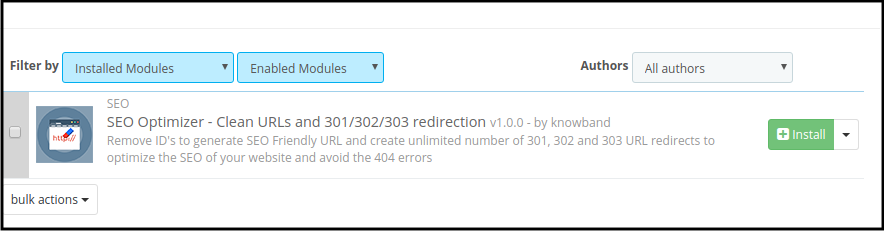
3. Now, You can find the PrestaShop SEO Optimizer Module in the module list and Click on the Install link to install the plugin.

4. After installing the module, the admin will be able to configure the module.

3.0 Admin Interface

After installing the module in the PrestaShop store, the store owner can make the changes without any hassles. There are the following sections available to the admin interface:

1. Module Configuration
2. Duplicate URL Rewrite Products
3. URL Redirection List

Each interface of this PrestaShop URL Cleaner (SEO-friendly) Module is explained below.

3.1 Module Configuration

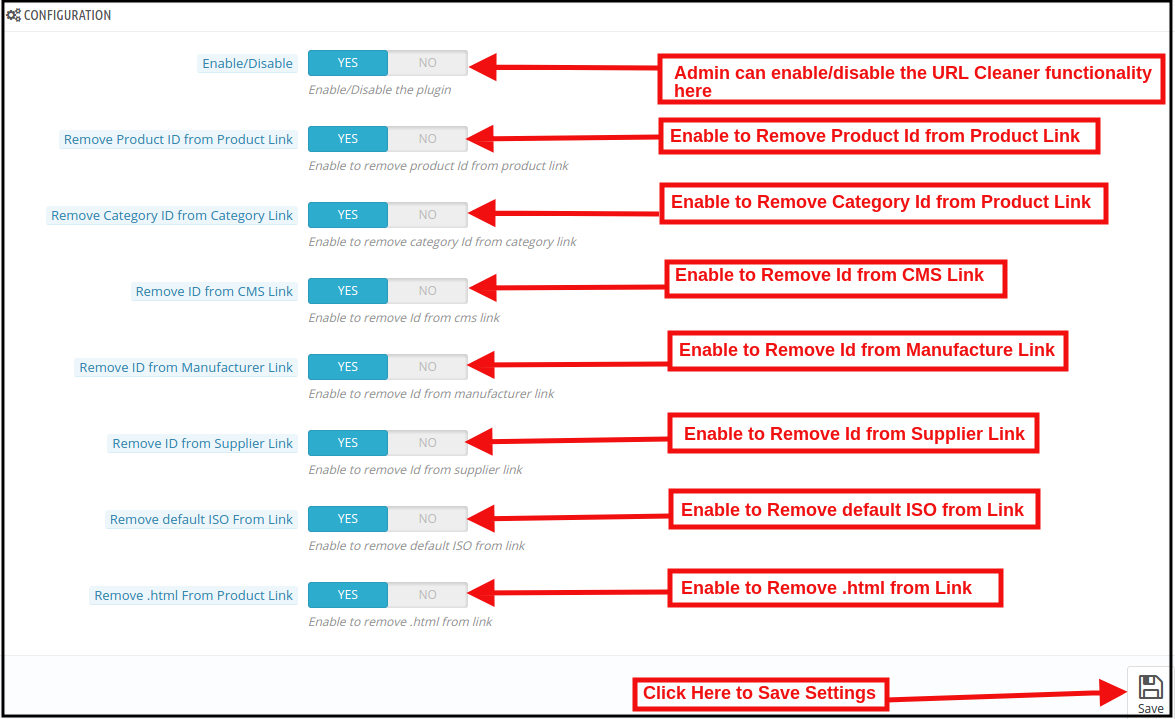
On clicking on the configure link on PrestaShop 301/302/303 Redirect Module, the system will open Configuration tabs of this Prestashop plugin by default as shown in the screen below:

Initially, the fields of this PrestaShop URL Cleaner(SEO-friendly) Addon in the above form will be already filled with their default values.
Enable/Disable: This field will enable the URL Cleaner feature. If enabled, the PrestaShop URL Cleaner will automatically convert the default store URL to SEO-friendly URLs.

Remove Product ID from the Product Link:

The default URL structure of the PrestaShop product page contains a product id and a URL like https://psm.knowband.com/urlcleaner/16/en/casual-dresses/3-printed-dress.html. As you can see the default product URL has the product id. After enabling this feature, the PrestaShop URL Cleaner Module will automatically remove the product id from the product link and the updated link will appear like this:

https://psm.knowband.com/urlcleaner/16/blouses/blouse

https://psm.knowband.com/urlcleaner/16/casual-dresses/printed-dress.html

Remove Category ID from the Category Link:

The default category page link contains the category id and a URL like https://psm.knowband.com/urlcleaner/16/8-dresses. This URL is complex and not SEO-friendly. By enabling this remove category option, the PrestaShop URL Id Remover Module removes the category id from the category link and after removing the category, the updated URL will appear like this:                  https://psm.knowband.com/urlcleaner/16/women/dresses

Remove ID from the CMS Link

The standard URL structure of the PrestaShop CMS page contains numeric values like

https://psm.knowband.com/urlcleaner/16/content/4-about-us. Using this option of PrestaShop SEO-friendly URL Module, the admin can enable this setting to remove the id from the CMS link and the automatic generated URL would look like:

https://urlcleaner16.knowband.com/content/about-us

Remove ID from Manufacture Link

By default, the Manufacture URL contains the Manufacture id in the manufacture URL. With the help of this extension, the admin can remove the id from the manufacturing link.

Remove ID from Supplier Link

PrestaShop does not have the feature to remove supplier link from the URL. After enabling this option, PrestaShop URL Cleaner Module automatically removes the id from the Supplier link.

Remove default ISO from Link

PrestaShop URL Cleaner (SEO-friendly) Module removes the default language’s ISO code from URLs and removes the language ISO code from shop’s default language. So, in this case, it will remove /es/ from all Spanish URLs, but other languages in your shop will still have ISO code in the URL.

For example: By default, the product URLs are like

https://urlcleaner16.knowband.com/en/casual-dresses/printed-dress after enabling the option URL would look like:

https://urlcleaner16.knowband.com/casual-dresses/printed-dress

Remove .html from Product Link: By enabling this option, the PrestaShop SEO Optimizer – Clean URLs & 301/302/303 redirection module remove the .html from the default product URL.

3.2 Duplicate URL Rewrite Products

In case after removing the product ID from the product’s URL, if there are any two product’s URLs are same.

For example, The two product’s URL contains different Id like:

https://psm.knowband.com/urlcleaner/16/en/casual-dresses/3-printed-dress.html
https://psm.knowband.com/urlcleaner/16/en/casual-dresses/4-printed-dress.html

After enabling the remove product id option, the module removes the product id from the URL and product URL like:

https://psm.knowband.com/urlcleaner/16/en/casual-dresses/printed-dress.html

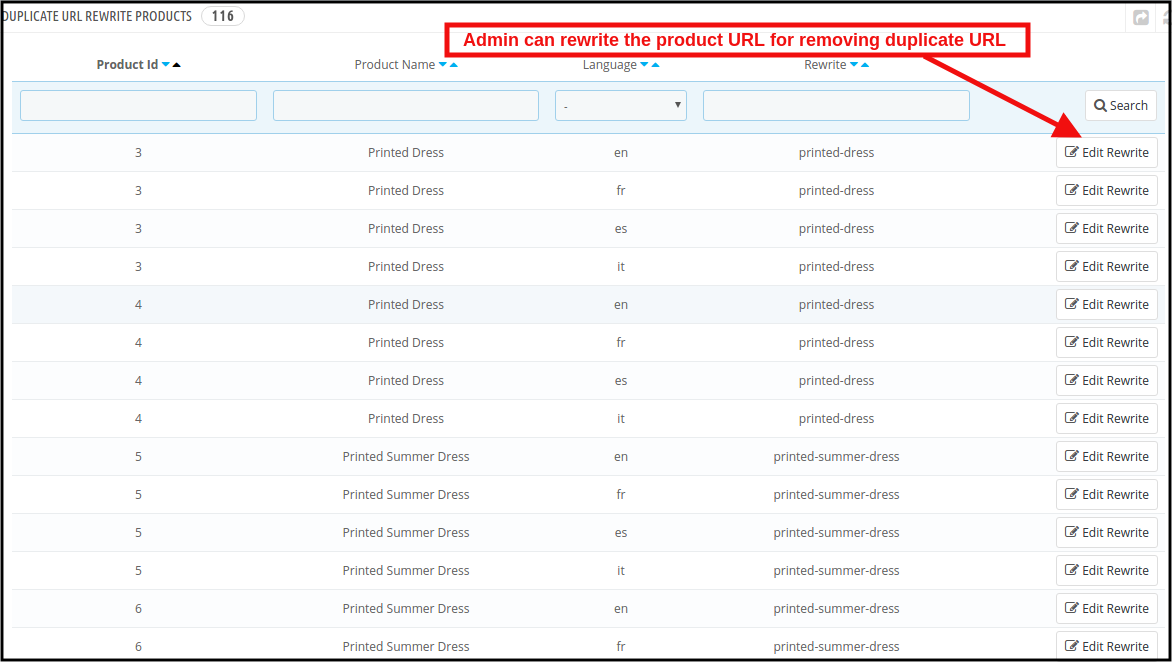
Then this product’s URL list will show on this tab. Find below the attached image:

In this tab, the admin can view all the Duplicate URLs and they can update rewrite value the products as per their convenience.

3.2.1 How to edit the Duplicate URL?

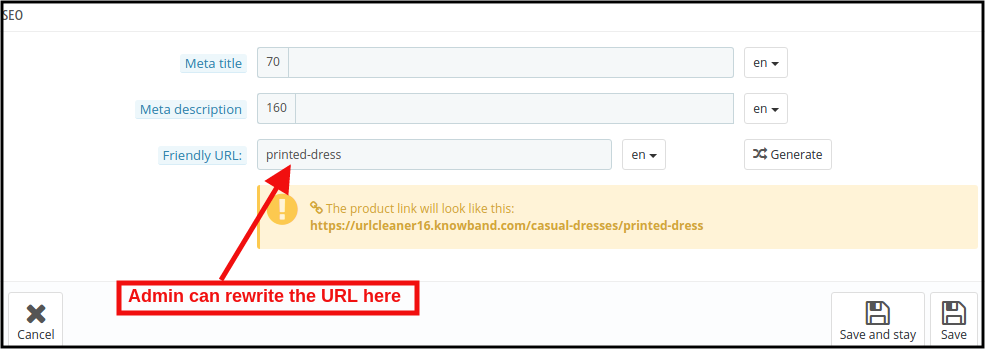
When the store admin clicks on the rewritten link, the PrestaShop URL Redirects Module will redirect the admin to the below-mentioned page:

Here, the store admin can rewrite the duplicate URLs. As soon as the admin will make changes to the URLs, these URLs get removed from the duplicate URL list.

3.3PrestaShop SEO Optimizer Module URL Redirection List

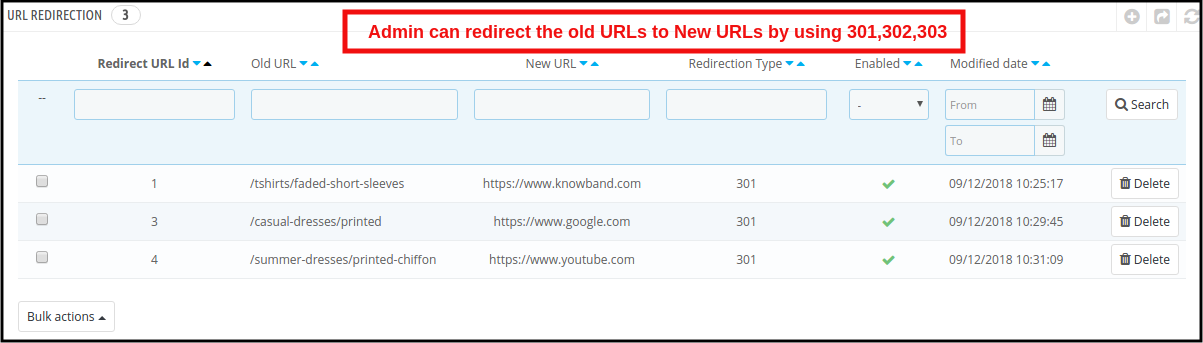
If the store admin changes the URL of any particular product page, the online retailer needs to redirect the old URLs to the new URLs. This PrestaShop 301/302/303 Redirect Module allows the PrestaShop store admin to redirect the old URLs to new ones. This PrestaShop SEO Optimizer Module offers the three redirection options including 301, 302 and 303 to the store owner.

3.3.1 How can Admin Redirect the Old URLs to New URLs?

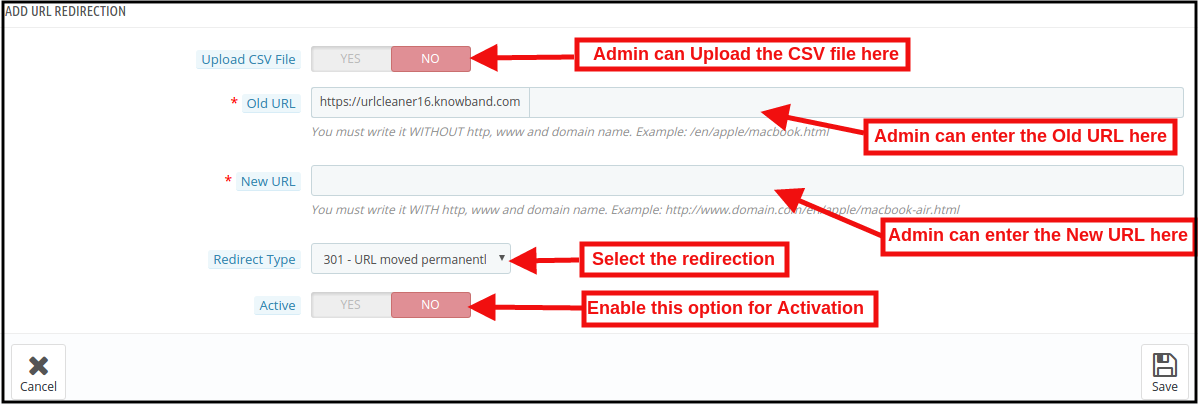
For the redirection of the old URLs to the New URLs, the store admin needs to click on the “Add New” button. After clicking on the Add New button, the below mentioned page open:

Here, the store admin can enter the Old URLs and New URLs, select the redirection from 301 (for permanent redirection), 302 (for temporary redirection) and 303 (to get the method used to retrieve information).

The admin can easily redirect the Old URLs to the New URLs.

URL Redirection through CSV file

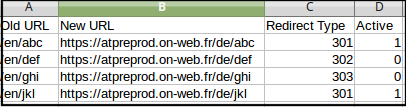
Upload CSV file: In order to redirect the multiple URLs. You can enable the Upload CSV file option. After enabling this option, the admin will be able to download sample CSV file and as per the fields defined in CSV file, the admin needs to enter the details in the CSV and upload the same.

After enabling CSV upload option, the below mentioned page open:

Choose CSV File: The Store admin can upload the sample CSV here for redirecting the products page.

Sample CSV File Format:

4.0 Front End

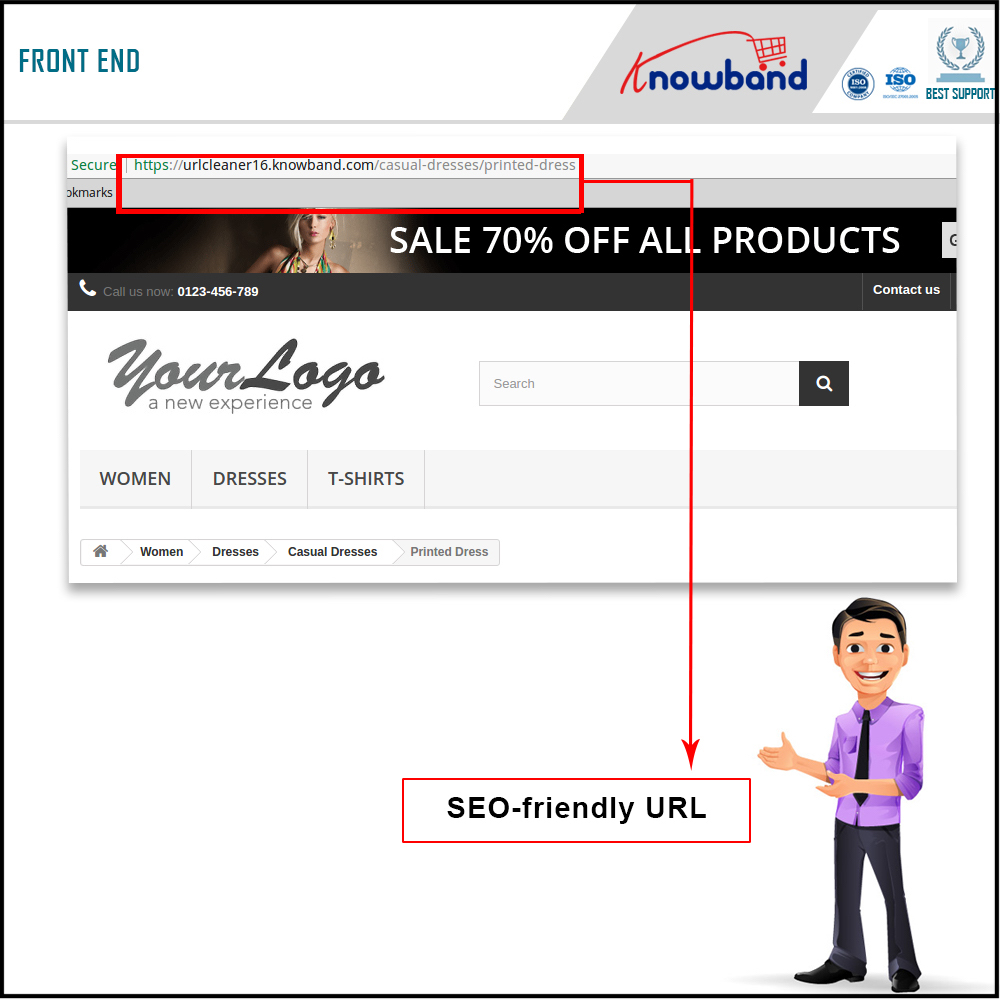
After enabling the PrestaShop URL Id Remover Module by Knowband at the front-end, the users will be able to see an SEO-friendly URL that will clearly highlight the purpose of the page. Google also recommends “A site’s URL structure should be as simple as possible. Consider organizing your content so that URLs are constructed logically and in a manner that is most intelligible to humans (when possible, readable words rather than long ID numbers).” This will also help the admin in improving the search results of the website.

The SEO-friendly URL would appear as follows:

For more information about PrestaShop SEO Optimizer- Clean URLs &301/302/303 Redirection Module:

PrestaShop SEO Optimizer- Clean URLs &301/302/303 Redirection Module Admin Demo

PrestaShop SEO Optimizer- Clean URLs &301/302/303 Redirection Module Front Demo