Emails are omnipresent and their impact has been mammoth in the business world due to their high utility. It is still one of the most reliable medium of formal or business communication at the most competitive price. In the course of extending its scope, email marketing is now actively used in the fields like business promotion, product sales, customer targeting and retargeting, customer retention, finding out new prospects and other such critical tasks.
The field of email marketing needs to be utilized in the best manner for grabbing higher conversion rates and sales among your competitors. Let us explore this email marketing in detail with this interactive infographic shown below:
By understanding the role of email marketing in a business environment, it will not be difficult for any business to grab its share of conversion rates and sales. These promotional and marketing emails have the potential to improve your business fortunes without burning a major hole in the pocket of various businesses. Do follow the tips mentioned in the infographic above and reinvent your email marketing strategy for a quick turnaround.
Marketplace like Amazon, eBay, Alibaba are known to everyone today. It was a time when these sites had their dominance in their home country only. But looking at the stats for the reach of these sites in the global context shows us the figures that shout their presence in almost every country on the globe.
The globalization of eCommerce sites has only been seen in the past decade when a new model of eCommerce was introduced. It’s the marketplace model of eCommerce. eBay was the first entrant here. A series of development has been noticed in the past few years with the growth of the marketplace model. But what is a marketplace model of eCommerce? Before discussing that, I would like to illuminate a few points on the eCommerce scenario before the introduction of the marketplace model.
What is/was the case before the marketplace hit the floor?
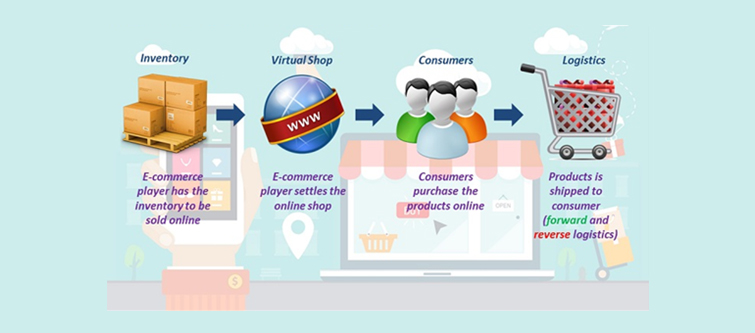
The inventory model of eCommerce has been on the market for long enough. We can say the actual eCommerce started with the inventory model. According to the FDI policy “Inventory model of eCommerce means an eCommerce activity where the inventory of goods and services is owned by the eCommerce entity and is sold to the consumers directly”.
It clarifies the inventory model that all the products are brought directly from the eCommerce firm itself and it is the firm itself who manages the shipping of the items to the consumers. Taking the case of Flipkart which has evolved from an inventory model to multi-vendor model of eCommerce. An Indian eCommerce firm based in Singapore, which was started as an inventory model, later in 2013 it also took the path of the marketplace model.
Inventory model of eCommerce indicates a direct B2C relation between the firm and the consumers.
Earlier before the marketplace joined the game, firms were in direct relation to the consumers. The orders were received by the eCommerce firm through its site interface and then fulfilled only by the firm itself. The firms had a direct partnerships with the delivery services who were responsible for delivering the dispatched item to the consumers. One of the major characteristics of the inventory model was that firms have to manage their own inventory of products in their warehouses and this was also one of the major drawbacks of the inventory model of eCommerce. Managing such a large inventory of products was a risky task and even a complicated one.
What happened when the marketplace finally arrived?
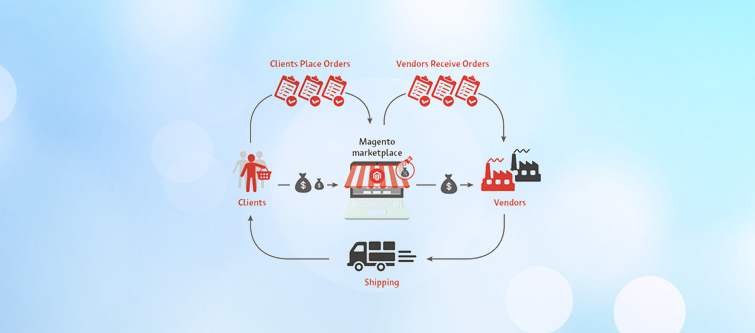
It was the arrival of the multi-vendor model, which completely revolutionized the way eCommerce firms worked by then. In order to extend their reach to the corners of the world, eCommerce firms adopted a new B2B layer between the firms and the consumers where the consumers directly contact the firm but the fulfillment is done by the new layer which is also called as vendors or sellers. The eCommerce sites started accepting the seller/vendor registration and allowed them to sell on the firm’s site.
The official definition laid by FDI for marketplace site says”Marketplace model of eCommerce means providing an information technology platform by an eCommerce entity on a digital and electronic network to act as a facilitator between buyer and seller”
Multi-vendor sites are the firms that allow a huge, distributed population of buyers and vendors to find prices, products and transact with each other on a third-party platform that is trusted, safe, reliable, and transparent. In return, these marketplace sites charge some commission from the sellers on each sale. Some of the multi-vendor platforms like Amazon, Flipkart, and others provide the services and products as fulfilled by the firm itself. If you have noticed, you might see certain lines in the description of certain products like “Fulfilled by Amazon”. These lines mean that the particular product will be delivered to the consumers by the inventory of the firm itself and the delivery will be too handled by the firm itself. If we consider the marketplace model in technical terms then these kinds of products are also called “Admin’s product”.
Marketplace model of eCommerce provides a platform to different vendors and sellers to sell from a third party website.
Marketplace sites provide more options to choose from- It is not only the availability products that matter but the prices of those products also matter. On this site, when vendors see a large number of other sellers also selling the same product at a different price, then it generates a competitive environment that encourages the improvement in product quality, service quality, reduction in price, etc. Therefore marketplace sites are often preferred by the buyers.
Perfect UX for users- The competition does not only exist between the sellers, but also the marketplace sites compete with each other too. This competition encourages the marketplace sites to offer tempting deals and additional offers. In addition to this, marketplace sites keep experimenting with their UI and UX optimization in order to provide the convenient user experience to the buyer so that they remain stacked to their site only.
It takes away the burden of pure inventory- Now the firms do not have to necessarily manage their own inventory. The inventory is maintained by the sellers and also the delivery in most of the cases. There are certain sites that operate as hybrid ones and manage their own inventories too. However, the pure form of the marketplace does not include inventory management by marketplace firms.
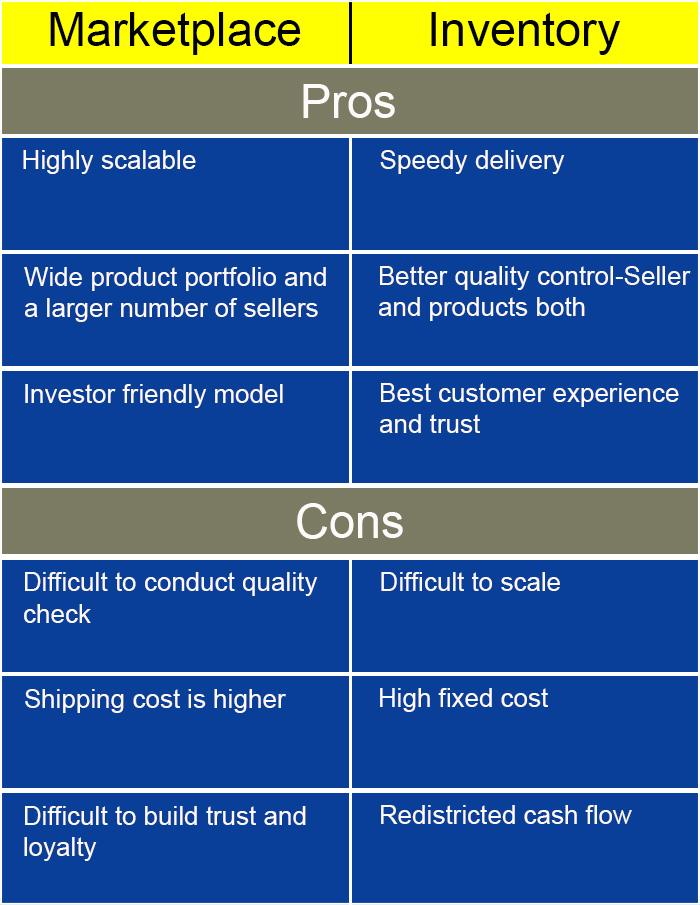
A small comparison with both pros and cons.
This model is overall a new trend which was introduced a long ago but has gained popularity in the past few years. With some of the pros, it also has its cons, but overall it is still in a developing phase where new ideas and innovation are introduced each day. PrestaShop Marketplace module is a similar innovation by knowband that can easily convert an inventory model PrestaShop site to a marketplace site. You can find more about how to convert an eCommerce store into a marketplace site in “How to get a marketplace site in 8 easiest steps?“.
When you have a limited number of customer base and sales, it is important to think big and go for a major store overhaul. Getting just an eCommerce store will not guarantee you maximum conversions and sales as there are other players in the race. You would not have to lag behind now as there is a golden opportunity to transform your online store into a marketplace store. The term Marketplace is not new to the eCommerce marketplace. It was a time when someone has to go through a lot technical coding and planning for implementation of an eCommerce site. With the introduction of CMS platforms like Magento, PrestaShop, OpenCart, Magento 2 the gap between an excellent business mind and an online site is now has been reduced to the minimal. Now, you would not have to suffer the market pressure due to the absence of an effective eCommerce store that has a much larger customer base and site traffic. All you need to do is just install the Multi seller Marketplace extension for a major transformation of your eCommerce store. Let us now discuss the various ways by which the Marketplace module can be of great help to your online business.
3 Easy Steps to get your own Marketplace site and start accepting seller registrations:
Step 1: Choose and install a marketplace extension for your eCommerce store.
Choosing a Marketplace extension is even a tougher task. A large number of developers are already offering their competent Multi seller extensions and some are very popular too.
Look for the basic features in the Marketplace module:
a). Which is competent to accept seller registrations.
b). Which is competent to manage even a large number of sellers.
c). Which allows admin to approve and disapprove sellers registrations and even block the already approved sellers at any time.
d). Which allows the approved sellers upload and manage their own products.
e). Which allows the sellers to control manage their own delivery and shipping process.
f). Which has an efficient reporting system that allows the admin and sellers both to track all the respective sales and transactions?
g).Most of all, which allows the extension of the marketplace functionalities by able to choose from a large number of already available Marketplace addons.
However, you can also try the free version for Prestashop, Magento, etc platforms and later upgrade to the paid version when you find it satisfying. It’s a demo version to check the compatibility and testing, has some restrictions but can be useful in testing the compatibility with your online site. There are a large number of expectations you can make with a marketplace Magento extension, but these are some basics that all marketplace extension should possess.
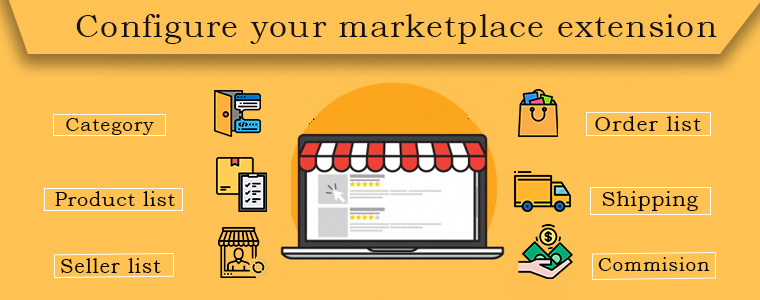
Step 2: Configure your marketplace extension
After installation, a configuration panel is provided by these extensions where you can personalize and set up the extension for use.You have to enable the extension from the back end and then perform the configurations. You can set the commission rate or fixed commission price you want to take from the Sellers.
Step 3: Enable the seller registration access on the front end
After configuration, your new Multi seller extension is ready to use. Now you are ready to accept the seller registrations. The front end customer registration panel will now show an option to the users to also register as a seller. Any registration request will now be notified to the admin. You can set your email id to receive the notification when one arrives.
Final words
Now you need to review and accept the seller registration requests. Any seller who is approved will be allowed to show his products on your site and upload any number of products. All the products uploaded will be first reviewed by you and after you approve them they will be visible on your site.These are the 3 simple steps you can take to get a marketplace site for you. Take the advantages of a large number of modules and extension that are already available. Always choose a CMS platform whose modules and extensions are easily available.
WannMarktplatz?is? not? new? to?the? eCommerce?marketplace.?It?was?a?time?when?someone?has?to?go?through?a?lot?technical?coding?and?planning?for?implementation?of?an?eCommerce site. With?the introduction?of?CMS platforms?like?Magento,??PrestaShop,?OpenCart,?Magento 2?the gap between an excellent business mind?and an?online site?is?now?has?been?reduced?to?the?minimal. Now, you?would not have to?suffer the?market pressure due to the absence? of an effective eCommerce?store?that has?a?much larger customer base?and? site?traffic. All you need?to do is just install?the Multi Seller Marketplace Erweiterung?for a major?transformation of?your eCommerce store. Let?us now discuss the various ways by which the Marketplace module?can?be?of?great?help?to?your?online?business.
3 Easy Steps, um Ihre eigene Marketplace-Site zu erhalten und Verkäufer-Registrierungen zu akzeptieren:
Schritt 1: Wählen Sie eine Marktplatzerweiterung für Ihren E-Commerce-Shop aus und installieren Sie sie.
Auswahl
Aussehen
ein). Welches ist für die Annahme von Verkäuferregistrierungen zuständig. b). Welches ist fähig, selbst eine große Anzahl von Verkäufern zu verwalten. c). Dadurch kann der Administrator die Registrierung von Verkäufern genehmigen und ablehnen und sogar die bereits genehmigten Verkäufer jederzeit blockieren. d). Dadurch können die zugelassenen Verkäufer ihre eigenen Produkte hochladen und verwalten. e). Dadurch können die Verkäufer ihren eigenen Liefer- und Versandprozess steuern. f). Welches verfügt über ein effizientes Berichtssystem, das Administratoren und Verkäufern ermöglicht, alle jeweiligen Verkäufe und Transaktionen zu verfolgen? G).?Vor allem, was die Erweiterung der Marktplatzfunktionalitäten ermöglicht, indem aus einer großen Anzahl von bereits verfügbaren ausgewählt werden kann Marktplatz-Add-ons. Jedoch, Prestashop, Magentousw. Plattformen
quandoMercato?is? not? new? to?the? eCommerce?marketplace.?It?was?a?time?when?someone?has?to?go?through?a?lot?technical?coding?and?planning?for?implementation?of?an?eCommerce site. With?the introduction?of?CMS platforms?like?Magento,??PrestaShop,?OpenCart,?Magento 2?the gap between an excellent business mind?and an?online site?is?now?has?been?reduced?to?the?minimal. Now, you?would not have to?suffer the?market pressure due to the absence? of an effective eCommerce?store?that has?a?much larger customer base?and? site?traffic. All you need?to do is just install?the Estensione per più venditori?for a major?transformation of?your eCommerce store. Let?us now discuss the various ways by which the Marketplace module?can?be?of?great?help?to?your?online?business.
3 Facili passaggi per ottenere il tuo sito di Marketplace e iniziare ad accettare le registrazioni del venditore:
Passo 1: scegli e installa un'estensione marketplace per il tuo negozio eCommerce.
scelta
Guarda
un). Quale è competente per accettare le registrazioni del venditore. b). Qual è competente per gestire anche un gran numero di venditori. c). Che consente all'amministratore di approvare e disapprovare le registrazioni dei venditori e persino bloccare i venditori già approvati in qualsiasi momento. d). Che consente ai venditori approvati di caricare e gestire i propri prodotti. e). Che consente ai venditori di controllare gestire la propria consegna e il processo di spedizione. f). Quale ha un sistema di reporting efficiente che consente all'amministratore e ai venditori di tenere traccia di tutte le vendite e le transazioni rispettive? g).?Soprattutto, che consente l'estensione delle funzionalità del mercato grazie alla possibilità di scegliere tra un gran numero di funzionalità già disponibili Addon del Marketplace. Però, Prestashop, Magento, piattaforme ecc
Gdyrynek?is? not? new? to?the? eCommerce?marketplace.?It?was?a?time?when?someone?has?to?go?through?a?lot?technical?coding?and?planning?for?implementation?of?an?eCommerce site. With?the introduction?of?CMS platforms?like?Magento,??PrestaShop,?OpenCart,?Magento 2?the gap between an excellent business mind?and an?online site?is?now?has?been?reduced?to?the?minimal. Now, you?would not have to?suffer the?market pressure due to the absence? of an effective eCommerce?store?that has?a?much larger customer base?and? site?traffic. All you need?to do is just install?the Rozszerzenie Marketplace dla wielu sprzedawców?for a major?transformation of?your eCommerce store. Let?us now discuss the various ways by which the Marketplace module?can?be?of?great?help?to?your?online?business.
Łatwe kroki 3, aby uzyskać własną witrynę Marketplace i rozpocząć rejestrację sprzedawcy:
Krok 1: Wybierz i zainstaluj rozszerzenie rynku dla swojego sklepu eCommerce.
Wybór
Popatrz
za). Który jest kompetentny do akceptowania rejestracji sprzedawcy. b). Który jest kompetentny do zarządzania nawet dużą liczbą sprzedawców. do). Dzięki temu administrator może zatwierdzać i odrzucać rejestracje sprzedawców, a nawet blokować już zatwierdzonych sprzedawców w dowolnym momencie. re). Co pozwala zatwierdzonym sprzedawcom przesyłać i zarządzać własnymi produktami. mi). Dzięki temu sprzedawcy mogą kontrolować własny proces dostawy i wysyłki. fa). Który ma skuteczny system raportowania, który pozwala administratorowi i sprzedawcom zarówno śledzić całą sprzedaż, jak i transakcje? sol).?Przede wszystkim, co pozwala na rozszerzenie funkcjonalności rynku poprzez możliwość wyboru spośród dużej liczby już dostępnych Dodatki do Marketplace. Jednak, prestashop, Magento, itp. platformy
QuandoMercado?is? not? new? to?the? eCommerce?marketplace.?It?was?a?time?when?someone?has?to?go?through?a?lot?technical?coding?and?planning?for?implementation?of?an?eCommerce site. With?the introduction?of?CMS platforms?like?Magento,??PrestaShop,?OpenCart,?Magento 2?the gap between an excellent business mind?and an?online site?is?now?has?been?reduced?to?the?minimal. Now, you?would not have to?suffer the?market pressure due to the absence? of an effective eCommerce?store?that has?a?much larger customer base?and? site?traffic. All you need?to do is just install?the Extensão de mercado para vários vendedores?for a major?transformation of?your eCommerce store. Let?us now discuss the various ways by which the Marketplace module?can?be?of?great?help?to?your?online?business.
3 Easy Steps para obter seu próprio site do Marketplace e começar a aceitar registros de vendedor:
Etapa 1: escolha e instale uma extensão de mercado para sua loja de comércio eletrônico.
Escolhendo
Veja
uma). Qual é competente para aceitar registros de vendedor. b). Qual é o competente para gerenciar até mesmo um grande número de vendedores. c). Que permite ao administrador aprovar e reprovar registros de vendedores e até mesmo bloquear os vendedores já aprovados a qualquer momento. d). O que permite que os vendedores aprovados enviem e gerenciem seus próprios produtos. e). O que permite que os vendedores controlem gerenciar seu próprio processo de entrega e envio. f). Qual tem um sistema de relatório eficiente que permita que o administrador e os vendedores localizem todas as vendas e transações respectivas? g).?Acima de tudo, o que permite a extensão das funcionalidades do mercado, podendo escolher entre um grande número de já disponíveis Addons do Marketplace. Contudo, Prestashop, Magento, etc plataformas
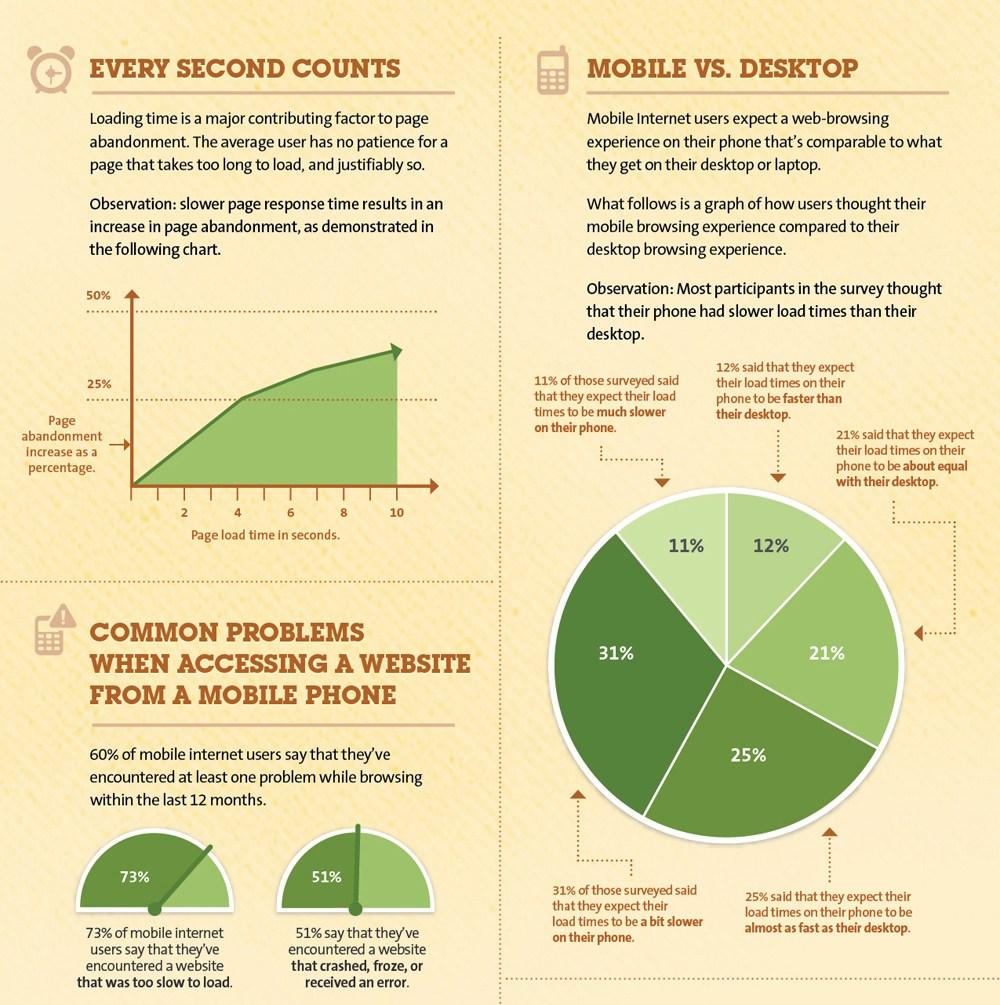
In an online business, keeping a customer waiting for more than 3 seconds is an “unpardonable crime” that invites harsh penalties from Google and loss in terms of online search rankings. A slow loading website is the biggest roadblock for higher conversions and sales on an eCommerce site.
As per a survey done by Akamai and Gomez.com, some startling facts came into notice. Some of these are discussed below:
47% of consumers want a web page to load in 2 seconds or less.
Around 40% of people leave or abandon a site if it takes more than 3 seconds to load properly.
Moreover, a 1 second delay in the response time of a web page often results in a 7% loss in the conversions of a website. To understand it in a better way, it is time to take a quick look at the statistical image given below:
Analyzing the above picture, a slow performing website is a matter of serious concern as it can affect your business chances severely. If you continue to ignore this issue, it can cost your eCommerce site heavily in terms of conversions and sales. For those who are dedicated to improving the loading speed of their website, here are the few website speed optimization tips that can guide them in the right direction.
Reduce the HTTP requests on the server-
Reducing the HTTP requests on a website can improve the site speed to a great extent.
As per the website speed optimization insights by Yahoo, around 80% of the web page loading time is spent on downloading the various parts of a web page such as images, stylesheets, scripts, Flash media files and such others. In a normal scenario, individual HTTP request is sent to each element of the web page that slows down the server response time. To minimize the number of HTTP requests on your site, you need to perform the following steps:
Take required steps to streamline the number of elements on your web page.
Utilize optimized images or CSS sprites in your website for speed optimization.
Integrate multiple style sheets into a single sheet.
Minimize the number of java scripts and place them at a bottom location of the web page.
Apply compression techniques on your website-
Compress the media files and web pages for optimizing the performance of a website.
Larger web pages on a website typically in the size of 100 kb often takes much time to load, thereby slowing down the entire website. The compression technique can reduce the overall size of a page and can increase the website speed. According to the varvy, the use of compression techniques can remove around 50-70% HTML and CSS related files which in turns improves the website performance tremendously. There are tools like Gzip that can reduce the bandwidth of your pages that helps in reducing the HTTP response. Below are some of the compression settings for various servers that can help in optimizing your site speed.
For Apache, use the mod_deflate function for compressing data.
In the case of Nginx Server, utilize HttpGzipModule settings.
Similarly, with the IIS server, it is recommended to configure HTTP Compression for optimizing the store performance.
Take steps to optimize the CSS Delivery-
Optimize the CSS files for achieving a fast performing website.
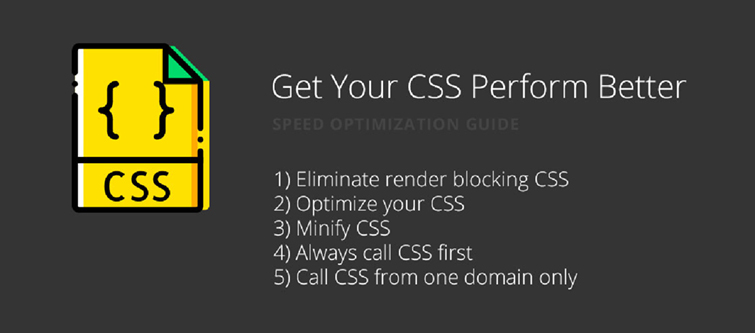
CSS are the files that load before the actual website is loaded. The more time required in downloading the CSS files has a direct impact on the loading time of a website. You need to eliminate the extra spaces in your CSS files to decrease their size for increasing the speed of your website. If your CMS does not have any option for the minimization of CSS files, you can take the help of free online service such as csscompressor.com to minimize CSS files. Site owners just have to paste their CSS files in the required space on the website and then press the “Compress” button to achieve the reduced CSS stylesheet. Some helpful tips that can help in the crucial task of CSS minimization are explained as below:
Don’t use CSS in the HTML coding such as divs, headings, and other such areas.
Add all the CSS files in your external stylesheet for achieving cleaner CSS files coding.
In case, you are facing problems in customizing the CSS files on your PrestaShop store, you can also avail the PrestaShop Addons from Knowband store.
Optimize your site loading time-
Take the help of speed optimization tools to improve the loading speed of your website.
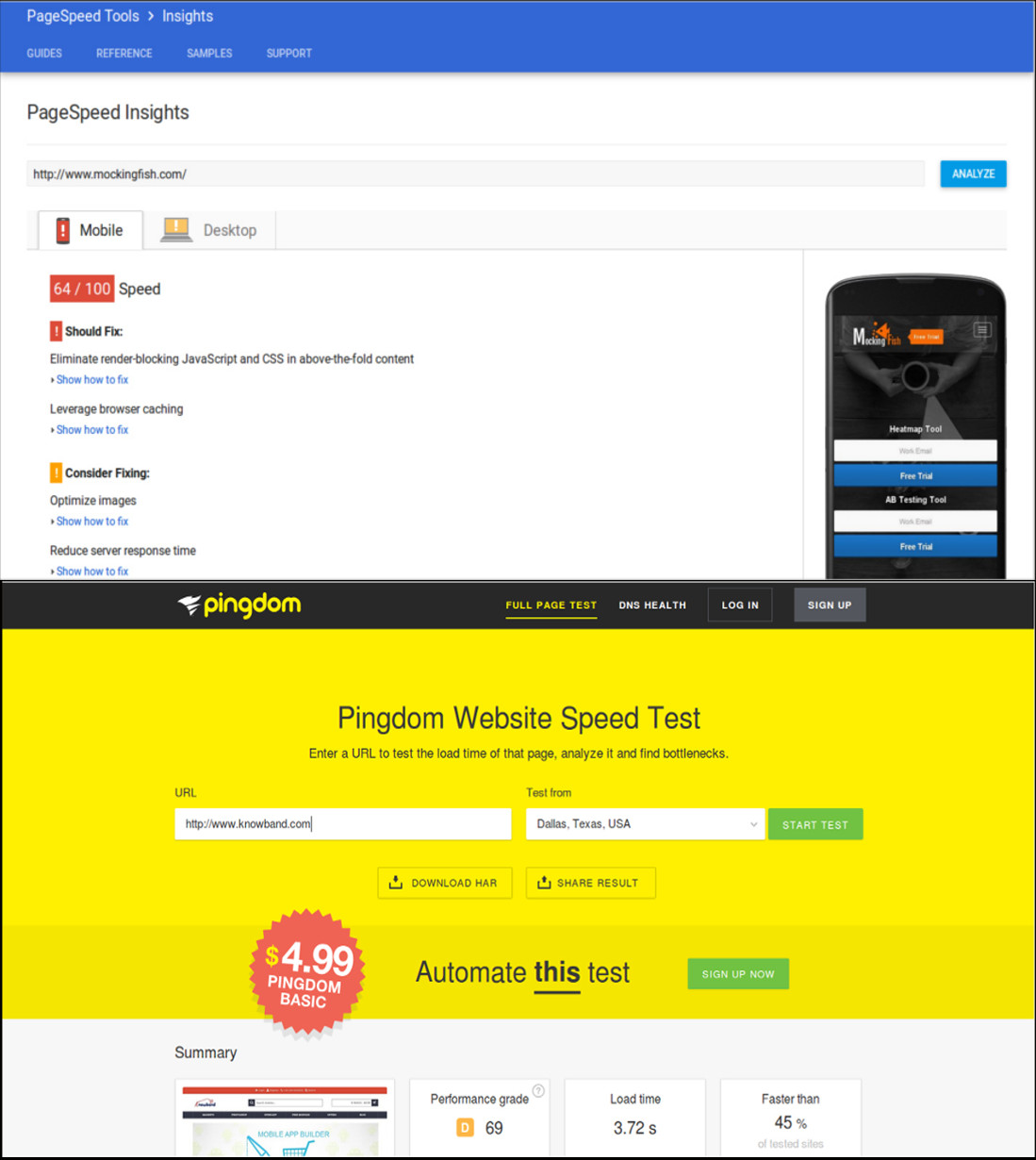
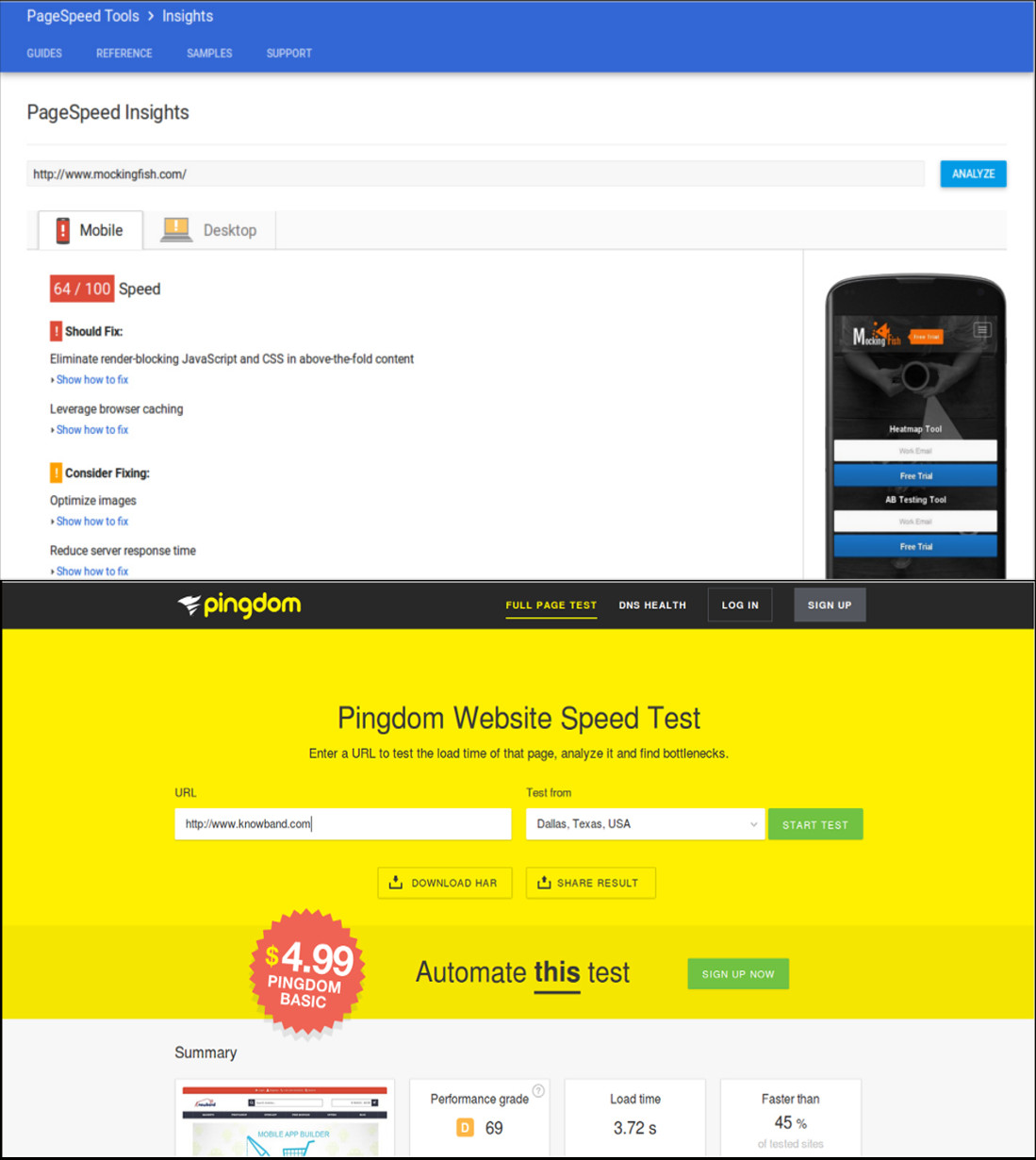
If your website is not able to load properly within 3 seconds, it is definitely going to hurt your business in a big way. In order to get a proper idea about the loading time of a website, it is important to take the help of various speed optimization tools like PageSpeed Insights, Pingdom, and others.
In the real time scenario, customers are not interested in waiting for a website to load properly. According to the speed statistics by PageSpeed Insights from Google, a score of 85 and higher during speed check is said to be a sign of fast loading website. Here is some of the data about various eCommerce sites regarding their performance on a website speed optimization tool.
So, check the score of your website and take the required steps to optimize its loading time. You can remove heavy background elements/graphics, flash player, non-optimized images or videos and other such elements that tend to affect the loading time of your website.
Conclusion
It is definitely the right moment to spend some time on your website to check the areas that are affecting its performance and loading speed. Once, it is clear which are the grey areas, it will be easier for site owners to take required steps for improving the site speed. Remember, time is money and if you don’t value the time of customers while doing online shopping, it is going to hurt your sales badly. So, be active now and start focusing on this crucial area.
Shopping cart abandonment is a global issue that has been creating problems for online retailers all over the world. Cart abandonment has a huge impact on the sales and conversions of any eCommerce store. Even with the passing time, the problem looms large over the eCommerce platforms.
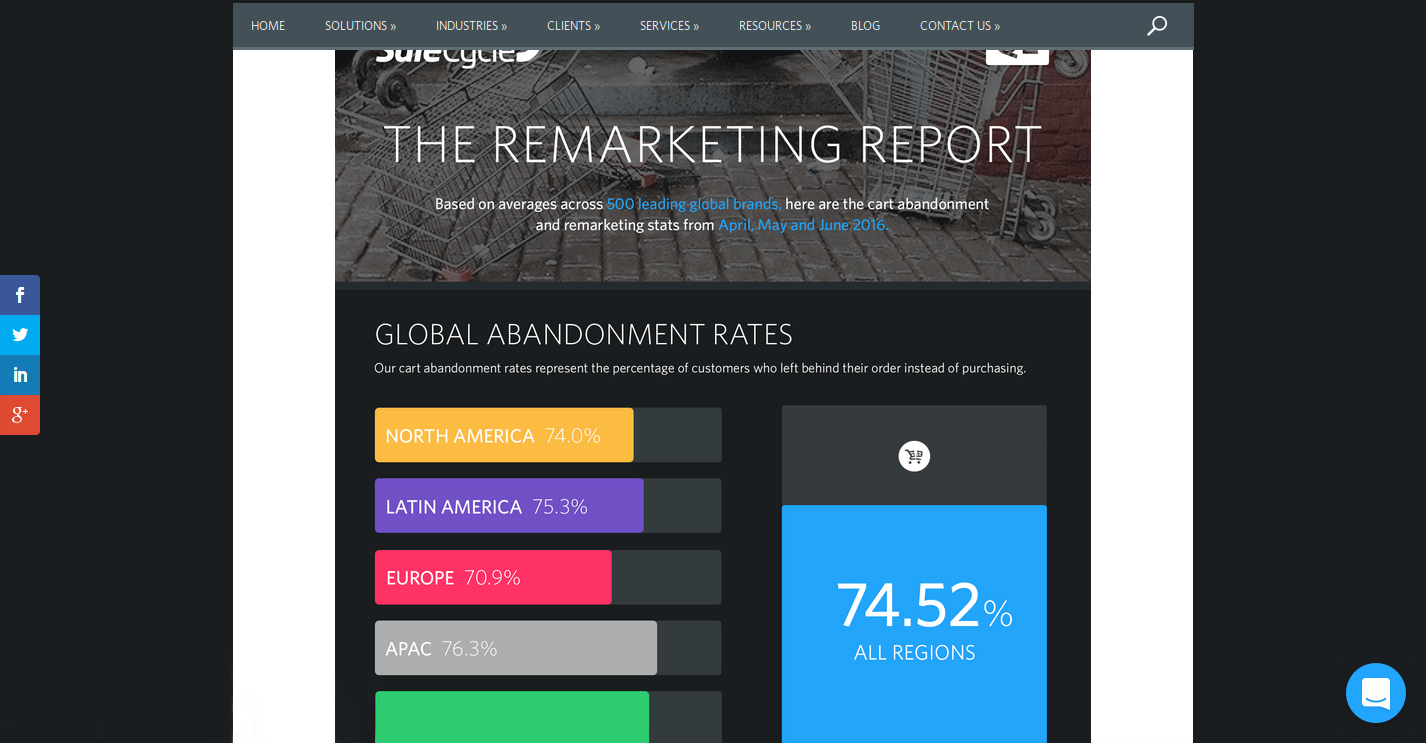
“The Remarketing report” prepared by the SaleCycle, a behavioral marketing company, shows the graveness of the situation. Here are the important insights regarding the same report.
The report shows the shopping cart abandonment trends across regions and industries.
As per the SaleCycle’s research on 500 leading global brands in the second quarter of the year 2016, the following crucial trends were observed.
The shopping cart abandonment was seen to be different for different regions of the world. While it was 74.0% for North American countries, the figure went a little higher for Latin American countries with 75.3%. Similarly, for European countries, the cart abandonment rates were found to be 70.9% while it was 76.3% for the APAC countries.
The overall cart abandonment rate comprising of all the regions was found to be 74.52%.
Apart from the region, the shopping cart abandonment varied considerably as per the industries involved. The rate of shopping cart abandonment for retail was found to be 74.6%, 80.1% for travel related industry and 68.8% for fashion-specific industries.
For the first quarter of 2018, the global cart abandonment rate was found to be 75.6% across all sectors.
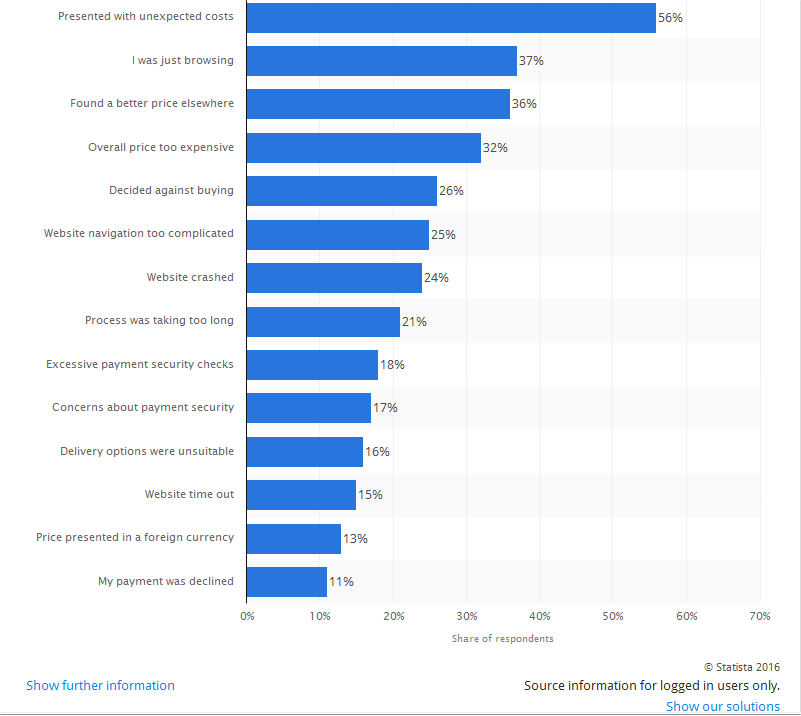
According to another eCommerce report by Statista, a statistics portal company, the shopping cart abandonment is based on a number of factors and problems faced by the online shoppers on an eCommerce store. The list of all the factors that lead to abandoned carts on an online store is explained in the statistical graph as shown below:
Take action against all the factors mentioned in the graph for reducing shopping cart abandonment.
Considering the reasons for shopping cart abandonment and the cart abandonment rate across regions among a wide range of industries, the problem can’t be left ignored at all if a retailer wishes to avoid cart abandonment and improves sales and conversions on their eCommerce store. Here are some of the tips that can help in reducing the shopping cart abandonment on an online store.
1. Reduce overhead expenses on your store
In a competitive business environment, the availability of products at an appealing price is the only thing that can drive conversions and sales in bulk. However, the cost of a product is often increased by the unknown overhead expenses that are present on an eCommerce site.
Some of the common examples of the overhead expenses on an online store are online transaction charges levied by third-party payment gateways, credit card transaction fees, order processing fees, commission amount charged by online marketplaces.
No doubt, it is impossible to run a business on a non-profit basis for any online store but certainly, you can cut down the additional costs in order to avoid cart abandonment. Be precise about the product price. Do not compel your consumers to abandon their cart with hidden charges. Specify your product pricing prominently for grabbing maximum customer engagement and sales.
2. Add Exit-intent popup
Exit popups provide you an excellent opportunity to reduce the cart abandonment rate and maximize conversions. Exit popups work when it is detected that a user is intending to exit the store and presents them a popup containing a deal or an offer.
Let’s say a user is trying to abandon his/her cart and almost ready to take an exit from your store, you can, then, make the user stay by offering them the discount on that product, encouraging them to complete the purchase.
3. Provide Guest checkout
A majority of the consumers bounce back from the store if they are presented a mandatory sign-up during the checkout. This isn’t a great move if you wish to reduce the cart abandonment rate on your store.
Avoid the mandatory sign-up and provide a Guest checkout option to your visitors so that they do not face any hurdle in between their checkout.
4. Establish trust with security badges
When customers provide you their confidential payment details, they put their trust in you. Similarly, you can win their trust by displaying the security badges/logos somewhere on the payment page to give them an assurance that their data is secure.
5. Enhance the functionality of your shopping cart
It is important to have a shopping cart that is capable of performing cart changes in a quick manner. Some of the key features that need to be present in an eCommerce platform for enhancing the functionality of a shopping cart are described below:
It needs to offer large, detailed and functional images of the products.
Easy and quick navigation facility for a better online shopping experience.
Functionality to include product reviews from customers.
Ability to apply discount coupons and gift cards.
E-commerce platform like OpenCart offers a wide range of above-mentioned shopping cart functionalities to improve the online shopping experience of customers. Utilize the functionality of this shopping cart for encouraging more customers towards your online store. Take a dashboard view of the OpenCart platform that allows store owners to perform desired functions on their eCommerce store.
Use an eCommerce platform that can improve the functionality of your online store. Try to enhance the experience of your customers. If you are on standard shopping carts, you may use Shopping Cart extensions and Checkout Extensions, or, you may get the custom implementation for your website.
6. Improve the loading time of your online store
As per the recent report of Hosting Facts, “A single second delay in your website loading time can result in a 7% loss in conversion, and 40% of web users will abandon a website if it takes longer than 3 seconds to load”. This statement itself explains that people are not patient enough when it comes to the website loading time. The average loading time of a website is said to be around 2–3 seconds which can keep the customers engaged, otherwise, the visitor is likely to leave the website.
This is definitely a huge setback for eCommerce store owners as a slow loading website can hurt their conversions and sales. In order to improve the loading time of your eCommerce site, the following site optimization techniques need to be implemented at the earnest level.
Minimize the number of HTTP requests to avoid delay in website loading.
Compress and optimize large size images for your eCommerce site with the help of image and data compression tools/programs like Gzip, JPEG Optimizer, TinyJPG, Caesium, and such others.
Enhance the utility of your CSS files by eliminating browser specific codes and applying shorthand codes.
7. Enhance the website design and accessibility across multiple devices
The global pattern of online shopping has changed drastically with the more number of purchases on an online store made through mobile devices instead of desktops and laptops.
To understand the above scenario, the number of mobile devices (smartphones and tablets) shipped worldwide is estimated to a total of 343.3 million as per the Worldwide Quarterly Mobile Phone Tracker report of International Data Corporation (IDC) for the second quarter of the year 2016. To target such a huge mobile based users, you need to take the required steps to make your website accessible and user-friendly on various devices and screen types. Below are some of the quick fixes that can make your site more accessible and user-friendly.
Use mobile web development technologies like HTML5, CSS3, JavaScript and mobile responsiveness for better site reach and performance.
Enhance the usability of the CTA button on mobile devices by selecting an appropriate size and placement.
Include optimized and reduced page size for mobile content.
If you want to understand the importance of web design in eCommerce, here is the example for you. Take a look at these two mobile designs that provide a complete insight into a good and bad mobile website design and their impact on the conversions of a website. A good mobile website design encourages customers to browse a website whereas a bad mobile website design completely deviates a visitor and results in shopping cart abandonment along with an increase in the bounce rate.
Focus on the design of your mobile website for grabbing maximum conversions and sales from your customers.
8. Make the checkout process simplified
Make your checkout process more simplified by restricting the number of checkout fields.
People prefer to shop online due to the ease of purchasing products, a variety of options available at a place, the option of product delivery at the customer’s premises and much more. However, if this is robbed from online shoppers, it is certainly going to affect the sales of an online store.
An easy and quick checkout process encourage online shoppers to make a product purchase through a particular eCommerce site. So, ignoring it would be the biggest mistake for any eCommerce store owner.
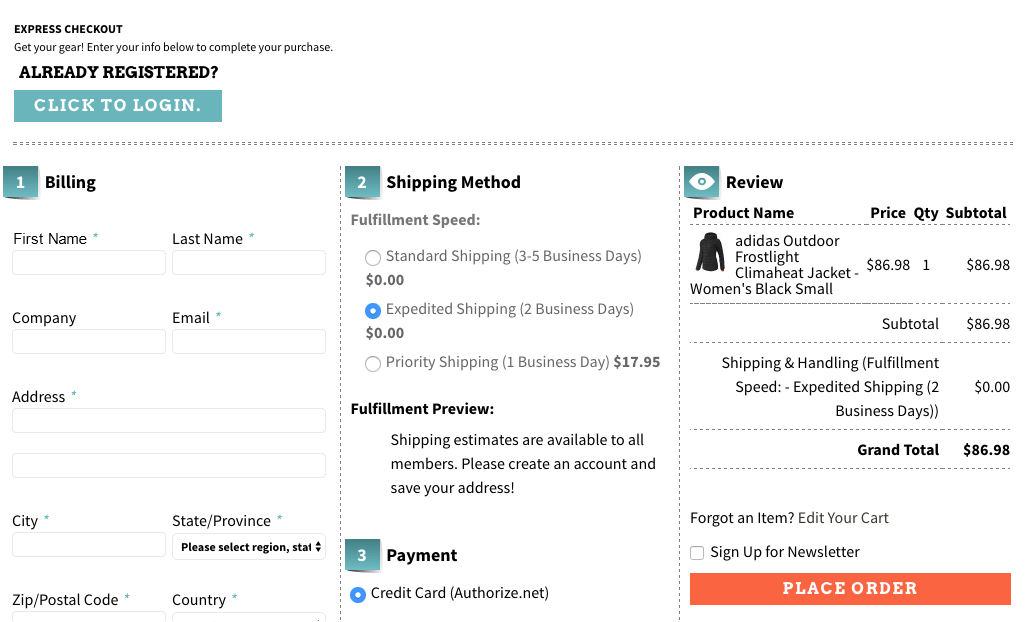
To improve the checkout process, you need to provide accurate product status, one page checkout process, quick cart customization facility, availability of contact details, easy product return requests, social login facility, the addition of security and trust badges and other such perks to customers.
Here is a checkout page of the website Art.com that simplifies the online shopping experience of the customers by providing various features and functionalities.
Offer a simplified checkout process to your customers for improving conversion rates and sales.
9. Bring back abandoned carts through customer re-targeting
Email Marketing can take your business to a long way by encouraging customers to complete their pending shopping orders and can provide you promising results in terms of conversions. These emails are also an important tool for customer re-targeting provided they are engaging, sent at a regular interval of time and provide customers enough reasons to complete their pending shopping orders. E-Commerce store owners need to schedule reminder emails to customers at a regular interval of time in order to remind them about their abandoned shopping carts. They can take the help of email marketing software like MailChimp, ConstantContact, GetResponse, AWeber, etc. that can provide contact details of customers for better customer re-targeting.
10. Offer products at an affordable price
Drive more revenue to your store by pricing your products more effectively. When the competition is too high in a particular business segment, it makes sense to present your products in the most competent manner. You need to have a clear idea about the price of your competitors and should reprice your products accordingly. Once, the customers find your products as most affordable, they will love to buy from your online store irrespective of the competitors available in the market, providing you are not compromising with the quality.
In case, you wish to involve customers directly in the pricing strategies, there are certain eCommerce Extensions that can help customers make a wish about their product price. Make an offer that they can’t resist. In this way, eCommerce store owners can directly know about the interested price segment of their targeted customers.
11. Add multiple payment and shipping options
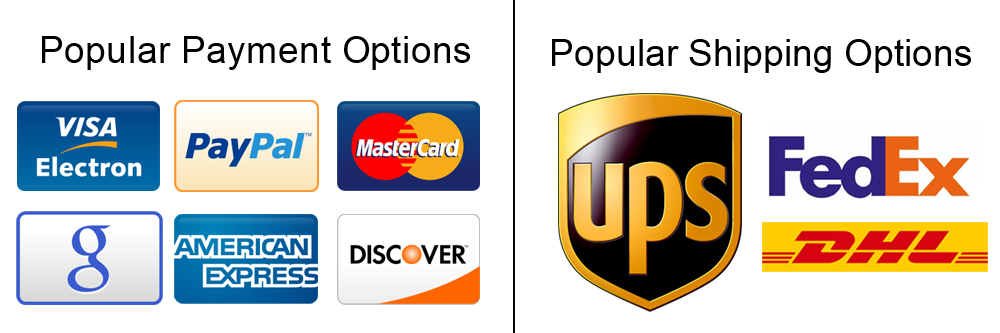
Include multiple payment and shipping options on your eCommerce store for improved checkout experience.
At the final checkout process, numerous online shoppers leave the site when they are unable to find their required payment and shipping options. This is a serious issue and has reduced the conversion rates and sales on various online stores to a significant level.
To overcome this critical situation, store owners need to offer multiple payment and shipping options to reduce the rate of eCommerce abandoned carts. Make a list of the popular payment and shipping options by taking insight from the customer surveys and include them in your online store. Some of the well-known payment methods are PayPal, Visa, MasterCard, Google Checkout, Wire Transfer, SagePay, Boleto. Similarly, you need to include these shipping options such as USPS, DHL, FedEx, USPS to improve the online shopping experience of your store visitors.
12. Use Web Push Notifications
Web Push Notifications is the latest approach followed by online businesses to target the users abandoning their cart. With the help of web push notifications, you can send the abandoned cart notifications to the users not completing their purchase and remind them about the items pending in the cart.
There are many more ways to avoid the cart abandonment on an e-commerce store, however, you will find the above-mentioned methods as the right approach. Take the proactive steps now and perform some major makeover of your eCommerce site to reduce abandoned carts. It’s difficult to get the customers to your website in the first place, and then seeing them leave without buying is even more painful. The best time to act on Abandoned Carts is now, do not miss it.
Are you eager to push your eCommerce sales to new horizons? Is your online store offering limited features and functionalities to your customers? Or Are you thinking about migrating the back end platform of your eCommerce store? If the answer to these questions are in affirmative, it is certainly time to think about a power packed eCommerce store.There are plenty of options available in the form of eCommerce platforms for fulfilling your customer expectations and business aspirations. However, the problem arises due to the steep prices that arrive with these platforms.
If the price of the platform is your ultimate concern, here are the list of free open source eCommerce platforms that can help out the sagging fortunes of your online store. Take a look at them one by one.
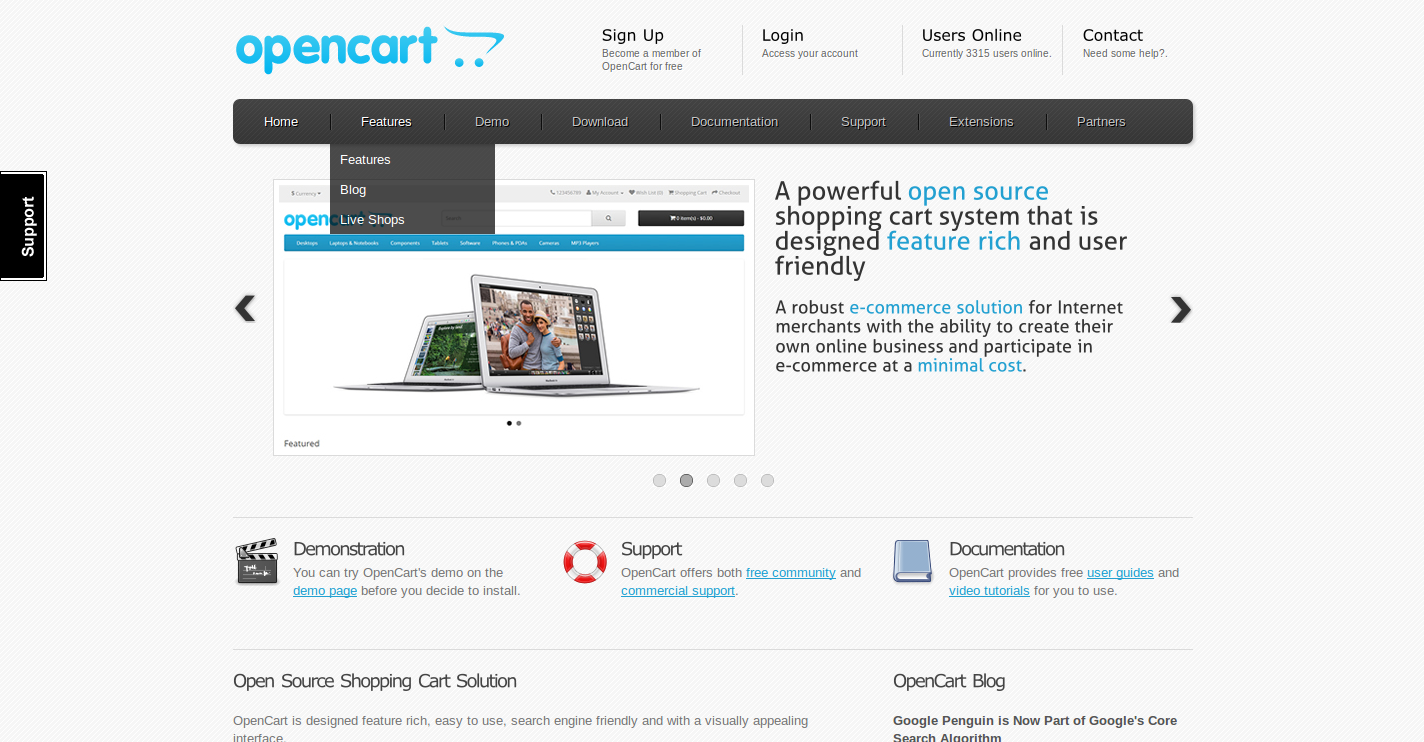
Manage your eCommerce store in a seamless manner with OpenCart platform.
If you are an owner of a small company who don’t have a staff with an expert programming knowledge, OpenCart is the ideal platform for you. The eCommerce platform comes with a simple easy to use interface and functionalities for any beginner involved in the field of eCommerce business. It is a PHP based open source eCommerce software that can offer amazing services to online merchants. Some of the wonderful features of this OpenCart platform are as follows:
It is easy to manage, install and configure.
The platform has an active community of OpenCart developers and users that can provide the support for various issues on your site.
It ensures secure and easy online payment through its more than 20 payment gateways.
The platform can ensure quick and timely product delivery to customers through multiple shipping options.
It has the capability to handle multiple stores through a single admin interface.
This open source platform can enhance the functionality of your OpenCart store with around 2,700 themes and numerous other OpenCart extensions.
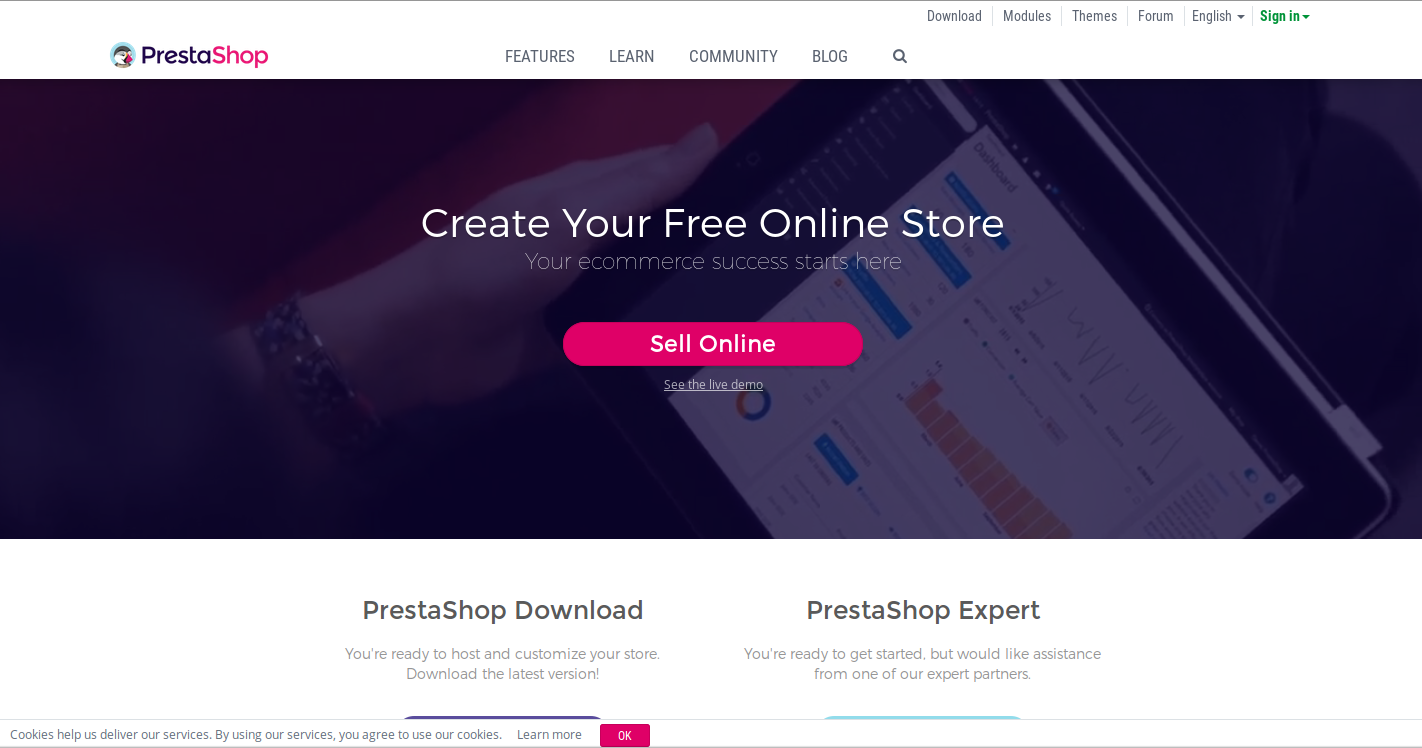
Make your online store with PrestaShop platform for utilizing wide range of templates and PrestaShop Addons.
PrestaShop is an open source eCommerce platform which is based on the PHP and Smarty template engine. This open source platform is very popular in the field of online business as it is used by over 250,000 stores around the world. Take a look at some of the wonderful features and functionalities of this PrestaShop platform.
This open source eCommerce platform is easy to install and configure.
The platform has a bundle of 310 integrated features along with 3,500 PrestaShop Addons and templates.
It offers multiple features like cross selling, downloadable products, one page checkout, exporting of product, shipping discounts and much more.
It is one of the widely used open source software among various eCommerce platforms with around 4 million downloads and an active 600,000 community members.
This open source PrestaShop platform supports translation facility in 63 languages and has been used in around 160 countries worldwide.
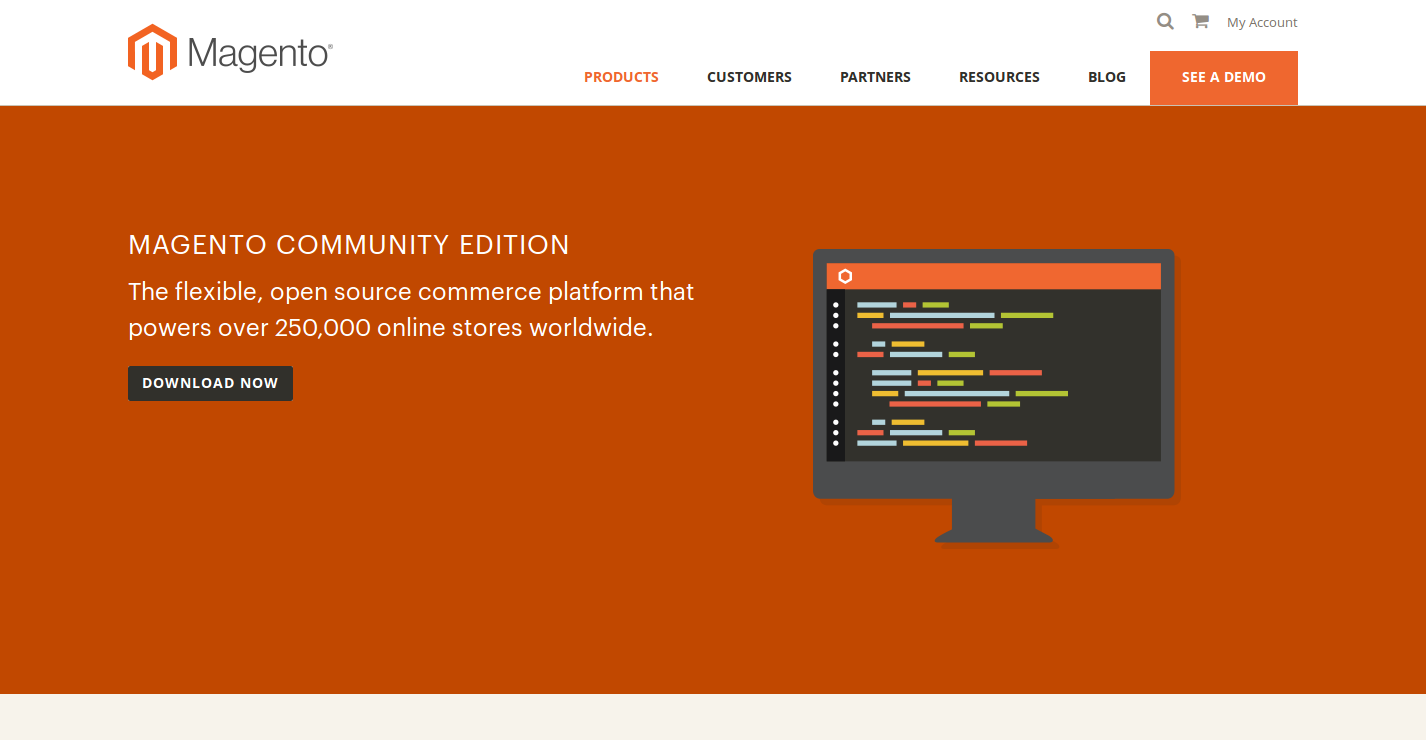
Magento Community Edition is an open source eCommerce platform that contains a wide range of functionalities.
It is one of the most popular open source and free eCommerce platform that has made a significant impact on the online businesses around the world. This platform is definitely a major step ahead from its competitors when it comes to wonderful features and functionalities. It is constantly expanding due to its flexible structure, high scalability and diverse range of Magento extensions. Inspite of the wide range of functionalities of this free version, if you are looking for more advanced features for your business, you can avail the expert services of Magento Enterprise Edition. Here is a brief study of the various features and functionalities of this Magento platform.
It provides a wide range of themes and Magento extensions to Magento store owners with the help of Magento Connect marketplace store. For other third party extensions for Magento site, you can avail the help of various Knowband extensions that are packed with wide range of features and functionalities.
Although, Magento Community Edition does not offer technical support but Magento users can find their solutions through Magento user forums.
It is one of the most preferred eCommerce platform that supports more than 200,000 customer sites.
This platform provides a wide range of features like easy store management, compatibility with multiple languages/currencies and other such features.
Utilize the features of osCommerce platform for enjoying a powerful online store.
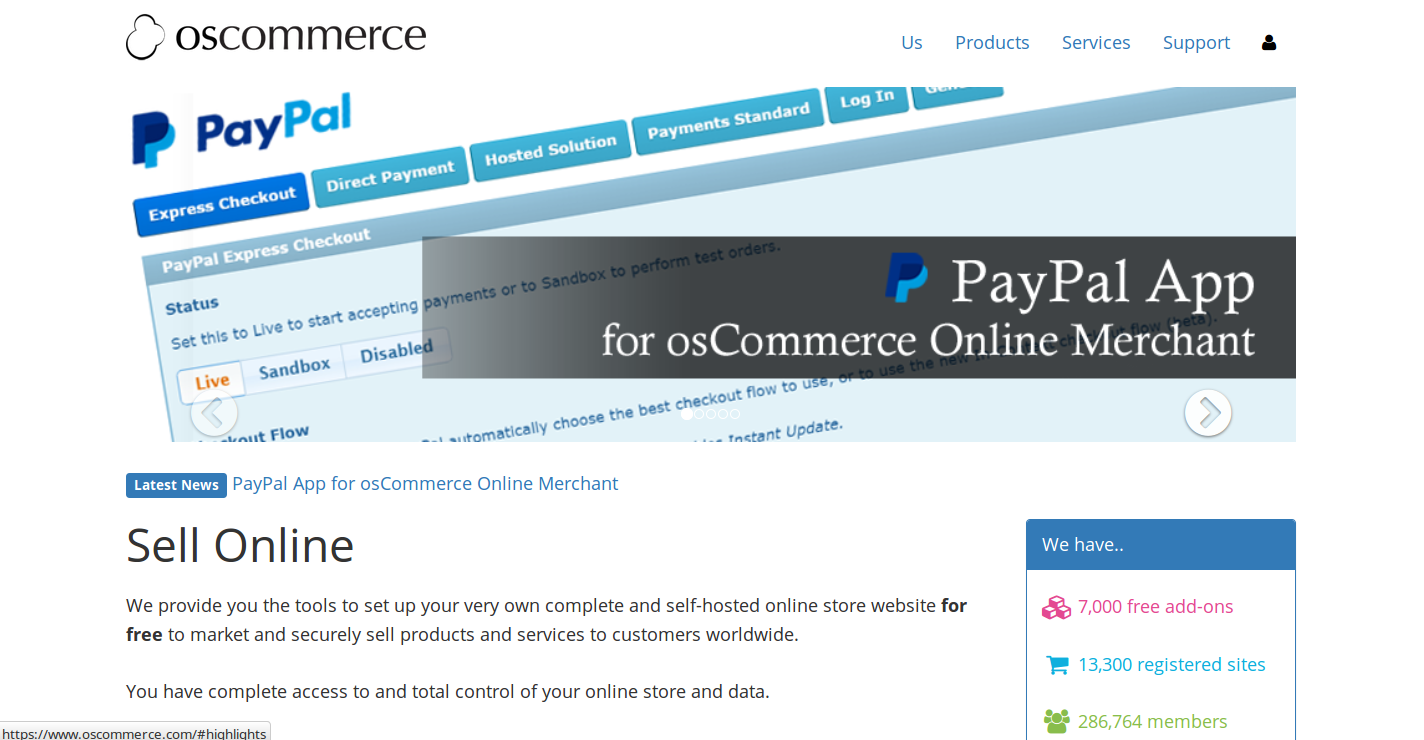
This osCommerce is one of the most trusted open source eCommerce platform that has gained much popularity in the last fifteen years. It consists of more than 7,000 addons created by the osCommerce community that can help in improving the performance of your eCommerce store. Some of the amazing features of this eCommerce platform are:
The platform has become the first preference for more than 260,000 store owners, developers and service providers due to the presence of its extensive support.
It has a vast community strength of approximately 280,000 members that have made their contribution in 1.5 million forum postings for ensuring a quick issue resolution.
The platform is used by around 13,000 registered sites and the number is continuously increasing.
It also offers direct communication with other osCommerce community members with the help of Live Chat room facility.
Build your eCommerce store on Zen Cart for easy product management facility.
It is another open source eCommerce platform that is based on the PHP language. This eCommerce platform is a sub division of the osCommerce platform that was launched in year 2003 and arrived with a more template based solution. The platform offers a good product management facility to its numerous store owners around the world. Some of the various features that are provided by this Zen Cart platform are as follows:
This eCommerce platform arrive with more than 1,800 addons that are available in 16 categories for optimizing the performance of Zen Cart store.
It can provide a quick solution to customer issues with its huge 150,000 community support members and 200,000 threads.
The platform can help in handling an online store in a better way through facilities like easy inventory control, creation of special sales and other such store activities.
Don’t just choose anything in the name of eCommerce platform for giving a new direction to your online store. You need to be vigilant, informed and sensible enough to make a quiet introspection of the various available eCommerce platforms to make the right choice.
For any added functionality in your eCommerce store based on Magento, PrestaShop or OpenCart platforms, you can grab the amazing Magento extensions, PrestaShop Addons and OpenCart extensions from our Knowband store. Do send us your valuable comments about this blog.