Magento 2 Product Size Chart – User Manual

1.Introduction

Customers, while shopping at an e-commerce store, often remain confused about the size of the product he/she is willing to purchase. As they shop online, a doubt always remains in their mind that whether the product is of appropriate size or not. Every brand manufacturer creates his products according to his own measurement criteria which are either based on some general standard or just an assumption based on the age and demographics. The doubt regarding the size of the products may lead to cart abandonment. Therefore, products size issues also increase the website’s bounce rates and they play a huge role in reducing revenue for any eCommerce online store.

To get past these problems, Knowband offers Magento 2 Product Size Chart extension for store owners which provides Magento 2 store owners a facility to set the size charts on the product pages of the online store. These size charts can be created with the help of the Magento 2 size chart extension for multiple categories as well as for a specific product. The size chart will be displayed on all the product pages of the selected category. Different measurement units are also used to provide correct size measure of products in Magento 2 size guide extension. The size chart will illustrate the exact measured size in desired measurement units for customer ease. In this way, Magento 2 size catalog module provides proper product size to customers and thus increases the chances of the conversions for the store.

Magento 2 Size Chart Popup extension allows Magento 2 store owners to prepare size charts and associate them with available products on the store as per market requirement. Size charts mainly offer clear specification about the product in terms of size, area etc and help in maintaining hassle-free shopping experience for users.

1.1 Features of Magento 2 Product Size chart Extension:

  1. Magento 2 product size chart extension allows e-commerce store owners to show size charts for various available products on their website.
  2. Size guide addon by Magento 2 is very easy to install and configure for store owners.
  3. E-commerce store owners need not have any technical knowledge for using Magento 2 size catalog module.
  4. Magento 2 product size table extension allows the online store owners to preview, edit size charts and can also add images and guidelines to them if required.
  5. Product size chart extension for Magento 2 store merchants offers the simplest way of creating size charts just by entering required values of attribute sets.
  6. It’s very easy to enable or disable this Magento 2 product size chart extension.
  7. The product size chart module is highly customizable.
  8. The admin can implement the functionality without any code changes.
  9. The Magento 2 product size chart module allows the admin to add size chart on the product pages without any complicated process.
  10. The Magento 2 size chart pop-up extension allows the admin to create multiple size chart and showcase them for a single product or any category of products.
  11. This Magento 2 product size chart plugin allows the e-merchant to add unlimited rows and columns on the size chart without any restrictions.
  12. The Magento 2 size chart popup extension offers a user-friendly interface.

1.2 Admin Benefits

  1. Magento 2 size catalog extension provides online sellers the easiest way of creating size charts for various products available on their website.
  2. Store admin can assign size charts with single products as well as with multiple product categories.
  3. Magento 2 Size Chart addon is fully customizable. It allows Magento 2 merchants to add images and necessary content to size charts. Rows and columns can be added easily by the seller if needed.
  4. Magento 2 Product Size chart extension by Knowband allows store owners to preview size charts before implementation.
  5. Size catalog module of Magento 2 marketplace offers multi-lingual support and increases the conversion rate of the website.
  6. Magento 2 Product Size chart extension reduces website’s bounce rate which results in increased revenue of the store.
  7. Product return requests get reduced with the use of size charts extension of Magento 2 e-commerce platform.

1.3 Customer Benefits

  1. Magento 2 product size catalog module provides a friendly and attractive interface to users with which they can check the size of the products.
  2. Magento 2 Product Size chart extension reduces confusion of customers regarding product size and also increases their decision making while purchasing.
  3. It provides a better shopping experience to users.

2. Installation

After purchasing Magento 2 size catalog module extension, the store admin will get following files:
1.Sizechart.zip which contain source code of the Magento 2 Size Chart link Module extension.
2.User Manual which includes all the details and help regarding extension.
Follow the following steps to install Magento 2 Size Chart Popup extension:

The steps to install the Magento 2 product size chart plugin are mentioned below:

1. Buy the Magento 2 product size chart module from Knowband. You can download the extension package.
2. The package has a zipped file that contains the user manual and the source code of Magento 2 size chart module. Unzip the package.
3. Create a folder{Magentoroot}/app/code/Knowband/Sizechart
4. Upload the extracted content in the above folder via FTP manager (like Filezilla or WinSCP – download here: https://filezilla-project.org/).
5. Now run below commands to install the plugin:
php -f bin/magento module:enable –clear-static-content Knowband_Sizechart
php -f bin/magento setup:upgrade
php -f bin/magento setup:di:compile
php bin/magento setup:static-content:deploy
6. The extension is now installed and ready for use. In Admin Panel go to “Knowband Extensions >Size Chart”.
You can now configure and use the Knowband Magento 2 size chart for product module.

3.Extension Interfaces

There are two ways in which user will interact with Magento 2 size catalog module functionality:
A.Admin Interface (Can be accessed only by Magento 2 store admin)
B.Customer Interface (any customer can view and access on Product Page)
Each interface has been explained with proper detailing in following sections.

4. Admin Interface

The admin interface of Magento 2 size guide extension by Knowband can be managed and accessed by Magento 2 store admin from the backend. After installing Magento 2 Product Size Chart extension, different sub-menus will appear under ‘SIZE CHART’ menu as displayed in below snapshot:
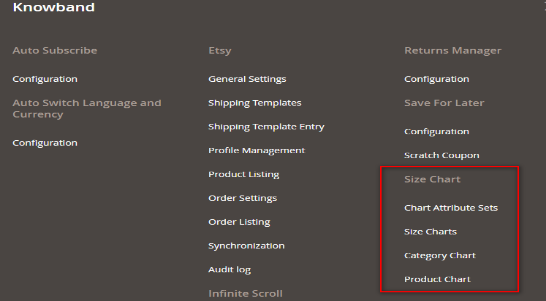
Admin Interface

Using functionality of these four sub-menus Magento 2 store merchants can easily create and manage size charts for the products available on the store.

4.1 Chart Attribute Sets

In Chart Attribute Sets submenu of Magento 2 product size chart extension by Knowband, online sellers can prepare various attributes sets and their concerned measurements units related to product size charts. Chart attributes basically means Rows and Columns of product size chart.

4.1.1 Chart Attributes Set Listing

On opening the “Chart Attribute Sets” submenu of Magento 2 Size Chart Popup addon, store merchants will be automatically redirected to the page where all the attributes sets which are created earlier will be displayed. If there are no previous attribute sets present, then server will display empty list as shown in below snapshot:
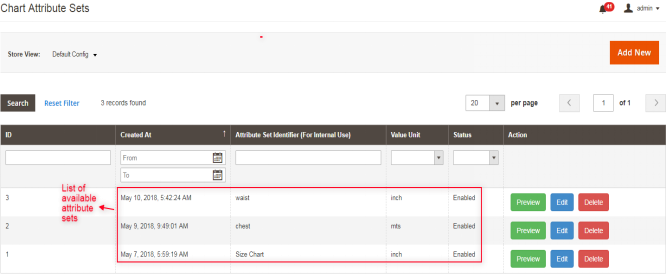
List Columns:

1.ID: Denotes unique id of every attribute set.

2.Created At: Exact date and time when attribute set was created.

3.Attribute Set Identifier: This identifier column is used for identifying attribute set. It contains the label or name assigned to the corresponding attribute set.

4.Value Unit: Depicts various associated measurement units like cms, mm, mtr etc.

5.Status: Status displays current enabled/disabled situation of the corresponding attribute set.

6.Actions: There are different actions available, related to edit, delete and preview for available attribute sets.

4.1.2 How to add New Chart Attributes Set Listing?

There is a ‘ADD NEW‘ button present on the top right corner of attribute set listing webpage of Magento 2 product size guide module. The store merchants can easily add new attribute sets whenever they need by clicking on the button. Further details about its functionality are described in next section.
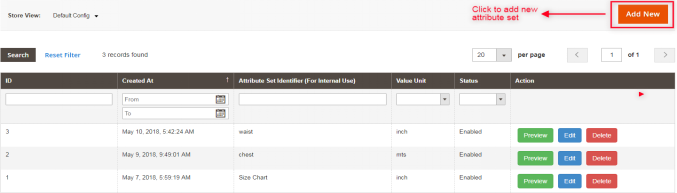
For creating new attribute set, ‘Add New’ option is used. By clicking on this, server will redirect store merchants to the attribute set configuration form as displayed in the below screen:
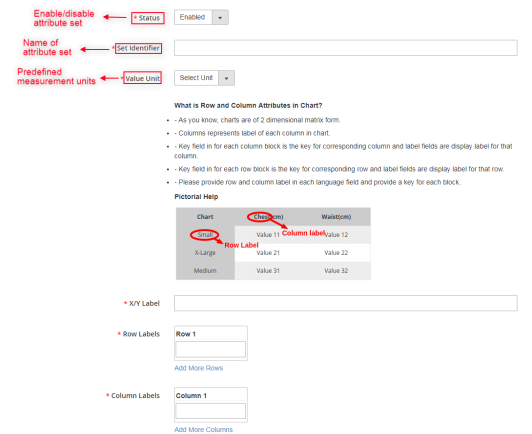
Fields:

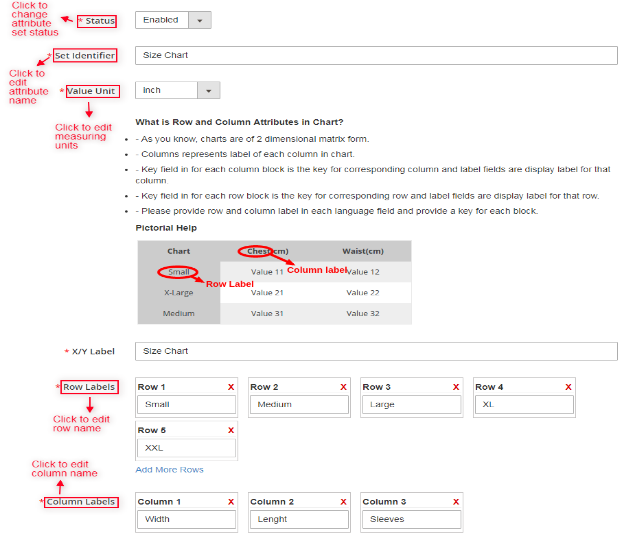
A.Status: This option includes a dropdown list of the status. It is a required field and will be set as disabled by default. Select enable in order to incorporate the functionality.

B. Set Identifier: It is also a required field used for labeling/naming attributes sets.

C. Value/Measurement Unit: This field displays drop down list containing various predefined units. If store admin wants to add more units, please contact our support.

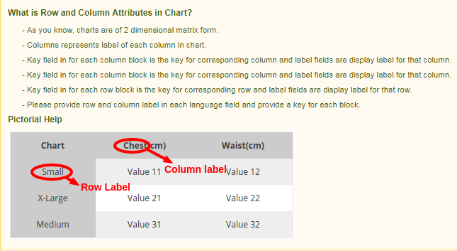
D. Help Guide: This section provides all the help that the store admin needs for creating the attribute sets for size chart.
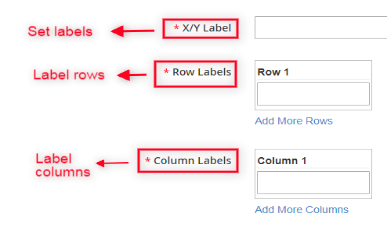
E. X/Y Label: This field allows e-commerce admin to set the labels in multiple languages. Admin can input different label/text for each size chart display. This label will be displayed for common x-y axis of the chart.

F. Row Labels: Row labels are used for labeling the rows of size chart. Enter a unique name for the rows of the chart. The store merchant can add or delete rows as per the requirement.

G. Column Labels: This label is used for labeling columns of product size chart, that is, the admin can enter the name of the columns here. Magento 2 store merchants can add or delete columns as per their choice.
4.1.3 How to Preview available attribute sets?

Using preview action of Magento 2 Size Chart link extension, server will display a snapshot of size chart according to current attributes set as shown below:
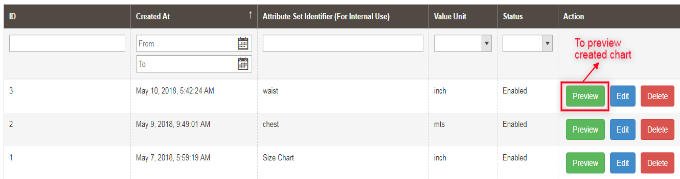

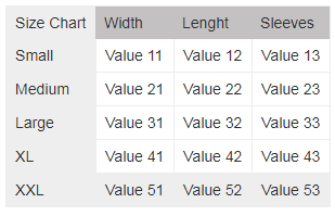
Once Magento 2 store owner clicks on the Preview button, a matrix format pop up will appear displaying created size chart:
4.1.4 How to edit available attribute set?

In Magento 2 size catalog module, edit action lets Magento 2 store admin to edit the already created attributes. The store admin is authorized to make any changes in available attribute sets.


After opening edit action, following webpage will appear having attribute set editing fields:
4.1.5 How to Delete any existing attribute set?

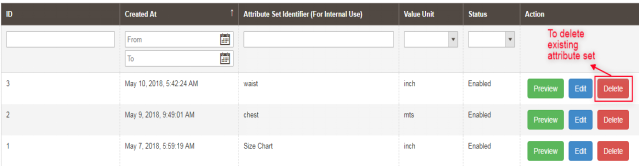
Attributes set can be deleted either from attribute set listing page or from attribute set editing page. Delete action provided by Magento 2 Size Chart Popup addon is used by store owners to permanently delete any attribute from the system.

Note: E-commerce sellers should keep it in mind that if attributes sets are deleted then size charts associated with those attributes will also be deleted. This is done to prevent any issue of data inconsistency.
4.2 Size Charts

Knowband provides Magento 2 size guide extension which offers ‘Size Charts’ submenu where store owners can easily create and customize the size charts by using any of the attributes set created in last section ‘Chart Attribute Sets’.

4.2.1 Size Charts List

Whenever Magento 2 e-commerce merchant opens ‘SIZE CHART’ submenu, he/she will be redirected to a web page where all the size charts created earlier will be displayed as shown in below snapshot:
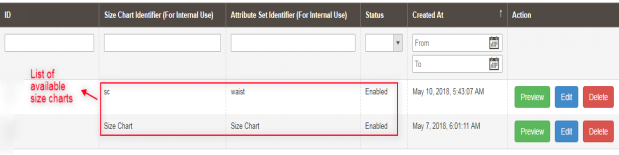
4.2.2 How to add new Size Chart?

There is a ‘ADD NEW’ button on top right corner of size charts listing page of Magento 2 product size table extension. Click on this button in order to add a new chart. Adding and updating size charts have been described with proper detailing in next section.
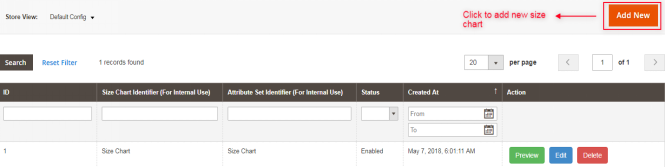
On clicking on this link, Magento 2 online sellers will get size charts configuration form as shown in below snapshot:
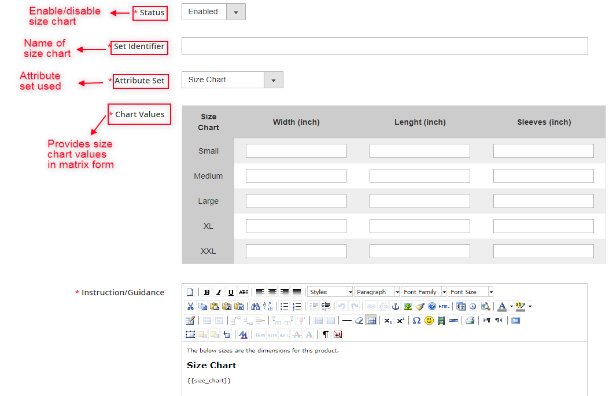
Fields:

A.Status: This field contains a dropdown list of status. It is a mandatory field and will be disabled by default.

B.Set Identifier: Identifiers are basically used for providing names/ labels to size chart.

C.Attribute Set: This field is also mandatory for store owners and is used for selecting attributes set related in creating size chart.
D.Chart Values: Once the attribute sets is selected in the above point, Magento 2 store admin can enter the values of the chart in this section.
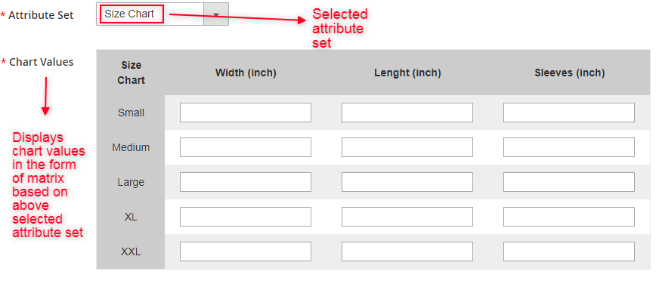
Magento 2 online sellers have to fill corresponding values of other store view. The chart with the values and specifications as entered by the admin will be displayed in the front-end.
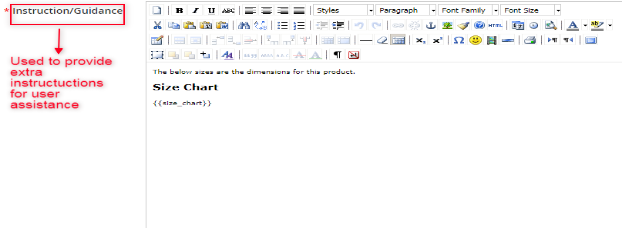
E.Instruction/Guidance: This field is a required field and size chart will be displayed under the content store admin will provide by writing into this field. Magento 2 store merchants can provide some extra guidance or instructions as pictorial help about size chart to customers. This field is specific to store view and admin need to provide proper content for each fields.
Note: A variable “{{size chart}}” is written in instruction field. This variable will be replaced by with the corresponding size chart displayed on the front end. Removing this variable from instructions field will cause issues, but its position can be changed into instruction field as per the requirement.
4.2.3 How to preview available Size chart?

Using preview option available on Magento 2 Product Size chart addon, server will display a pop up window having preview of created size chart. Any size chart available in size chart list can be previewed by store admin.
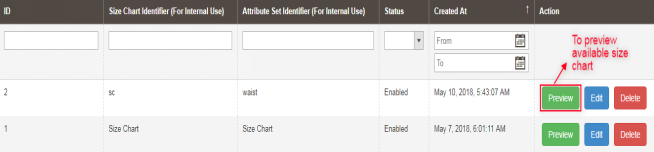
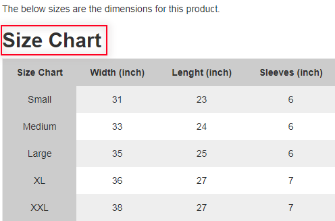
Once the store admin clicks the preview button, a matrix format pop up will appear displaying the created size chart with available rows and columns measurements as displayed in below screen:
4.2.4 How to edit existing Size chart?

Magento 2 Size Chart Popup addon also allows editing of existing size charts. Magento 2 store owners can click on the Edit action as shown in the snapshot below in order to edit already created size charts –
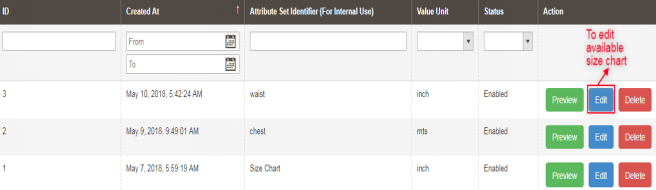
This edit option will redirect online sellers to an interface from where size charts can be configured accordingly. This size charts editing form is displayed in following snapshot:
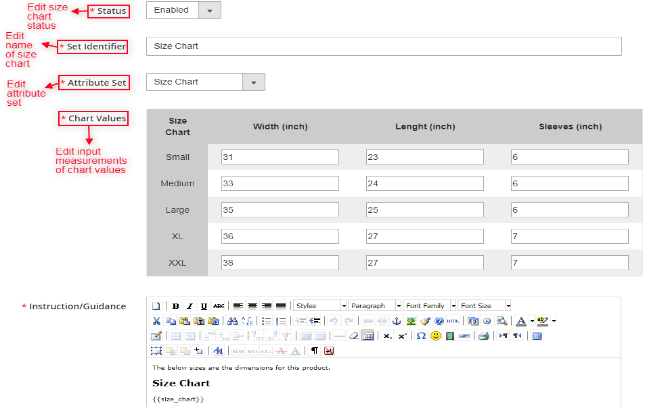
4.2.5 How to Delete existing Size Chart

If Magento 2 store admin wants to delete any size chart created earlier, it can be done using Delete action as shown in the snapshot below:

4.3 Category Charts

Magento 2 store owners can easily create and update mapping of product size charts with multiple categories of products available on the website using Magento 2 Product Size chart plugin by Knowband. Store admin can assign/map created size chart in the required product categories from the provided interface:
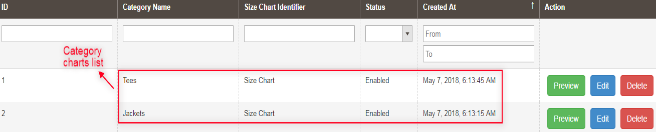
4.3.1 How to assign size charts to new product category?

Knowband provides Magento 2 size guide extension enables e-commerce merchants to map size charts with new available product category. There is an “Add New” button present on top right corner of category chart listing page. With this button, admin can assign any size chart to a new category. The various fields of this section are described below:
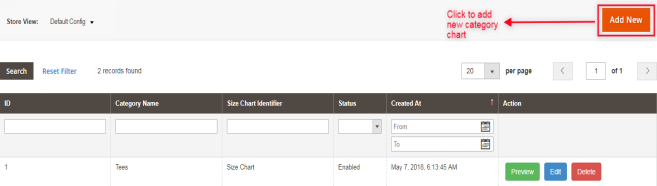
Whenever Magento 2 store owner clicks on “Add New” button, he/she will be redirected to the mapping page where any charts can be assigned to new product category or can be edited accordingly as shown in below snapshot:
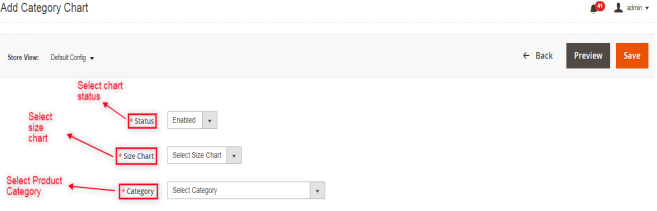
Fields:

A.Status: It contains dropdown list of available status. Select enable in order to use this feature but by default will be set as disabled.

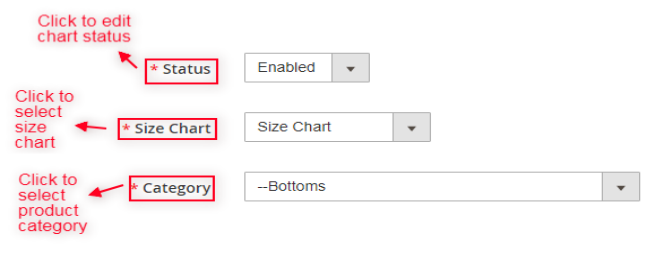
B.Category: It is also a required field and contain list of available product categories. Initially, no category will be selected. Admin can choose the category for mapping the size chart. The size chart will be displayed on the product pages of the selected category.

C.Size Chart: This required field contains list of active size charts created by Magento 2 store owners. Select the size chart that you want to display in the products pages of the selected category.

4.3.2 How to Preview Category Chart?

By using preview action of Category charts of Magento 2 size guide extension, e-commerce sellers can check preview of the selected category chart with detailed instructions.

Whenever Magento 2 store owners uses preview action, it displays a pop up window with attached size chart of associated category as shown in below snapshot:
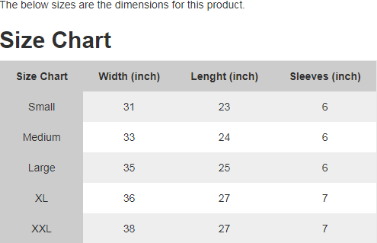
4.3.3 How to edit existing Category Chart?

Magento 2 store owners can edit category chart mapping by clicking on the Edit button available on category chart listing web page of Magento 2 Size Chart link extension as displayed in following snapshot:
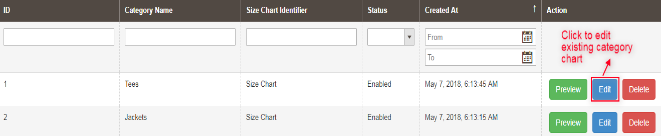
Whenever Magento 2 store merchant opens Edit Link, he/she is redirected to following category chart editing webpage. Here, status of chart, size chart, product categories are selected as shown through following snapshot:
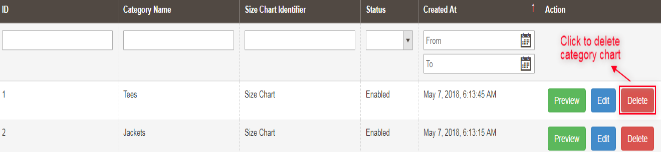
4.3.4 How to delete Category Size Chart from listing page?

Magento 2 Size Chart Popup extension enables delete option to Magento 2 store owner in order to delete size chart from category chart listing page at any time. Chart mapping cab be deleted from both either from listing page or from edit page.
4.4 Product Charts

Magento 2 store merchants can create as well as update mapping of size charts with the corresponding products using Magento 2 size catalog addon.

4.4.1 Product Chart List

Knowband provides Product size chart extension, through which Magento 2 store admin can access “Product Chart” submenu, which redirects to a page where all the mappings of size charts are done with multiple product categories and is displayed as shown in below snapshot:

4.4.2 How to Add New Product Chart or Assign Chart to New Product?

For adding new Product chart, an “Add New” button is provided on the top right corner of product listing page through which store admin can add new mapping of size chart to a product whenever desired as displayed in following snapshot:
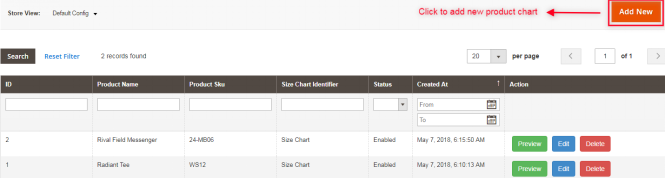
In Magento 2 size guide extension, Add New button is basically used for assigning size charts with new products as displayed in below snapshot:
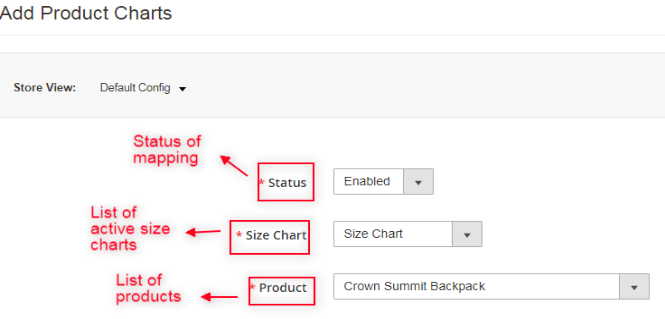
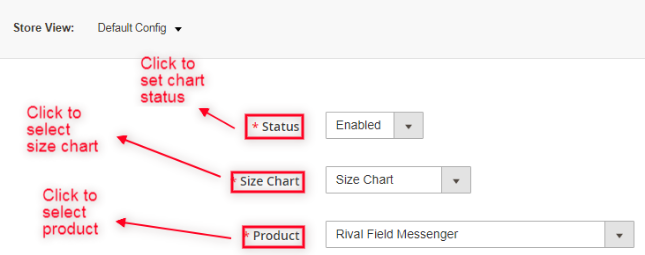
Fields:

A.Status: It is a dropdown menu of status and a required field which is set as disabled by default.

B.Product: Select the product to which you want to map the size chart. Initially, no product will be selected, but admin can choose one from the menu.

C.Size Chart: It is also a drop down list of active size charts created by admin and also a required field. Select the size chart that you want to display on the product pages.

4.4.3 Preview of Existing Product Chart

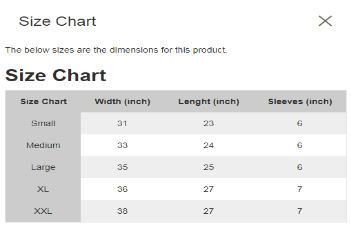
Magento 2 size catalog module has preview action, server will display preview of selected product charts to Magento 2 store owners with detailed instructions.
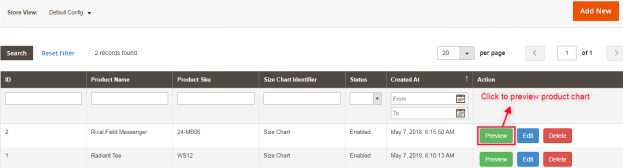
Provided preview action will display the preview of size chart with instructions set to Magento 2 online sellers as shown in below screenshot:
4.4.4 Edit Product Size Chart

Magento 2 product size table extension provides ‘Edit link’ on product chart listing page through which Magento 2 e-commerce merchants can edit available product size charts very easily. Magento 2 store owners can use this action also for altering any existing mapping with available products.
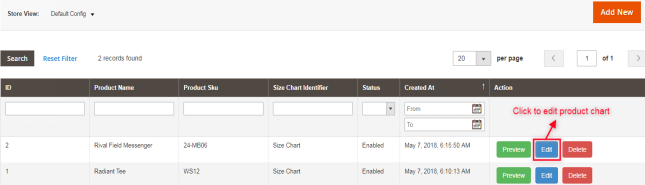
Using Edit Product Size Chart action, store admin can check preview of the selected charts with detailed instructions as shown in below snapshot:
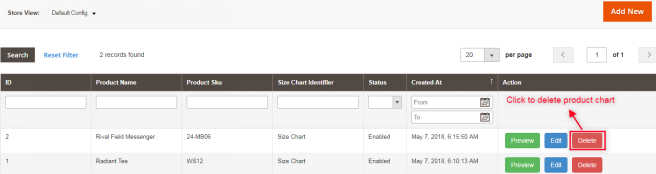
4.4.5 Deleting Product Size Chart

Magento 2 Size Chart link addon allows online merchants to delete any size chart mapping from product whenever required. This purpose could be fulfilled using delete option provided on the backend of website.
4.4.6 Size Chart Mapping on Product Page

Size charts can also be mapped with products on product edit page. Magento 2 store admin can also edit size charts mapping from Products section through “Size Chart” tab.

With the help of Magento 2 Size Chart Popup extension, Magento 2 online sellers can easily assign any size chart with the corresponding products. If there are no changes in the field value, no size charts will be assigned with the products. If admin don’t want to assign chart to any product he/she can leave it without changing any value in this section.

5.Customer Interface

Magento 2 customers can only access size charts through product page available on the front end of the website.

5.1 Size Chart on Product Page

When Magento 2 store admin enables size charts with products, ‘View Size Chart’ option will be appeared just below the product details. Customer can easily access the size charts associated with different products and enhance their shopping experience.

After full configuration of Magento 2 Product Size chart extension, ‘View Size Chart’ option will appear below product name with which user can check size of product before its purchase.
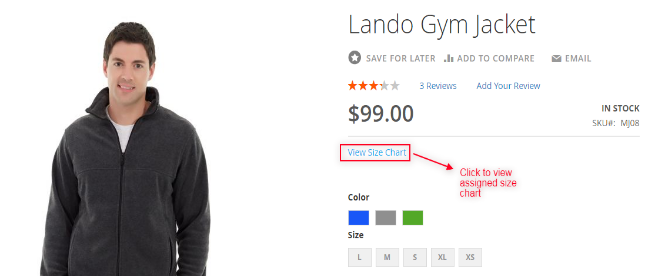
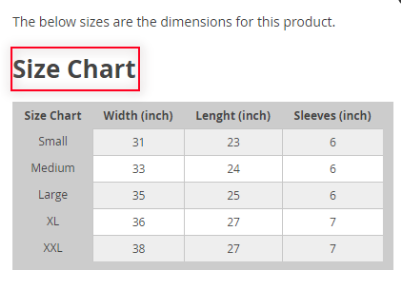
When customer opens ‘View Size Chart’ option, following window will be displayed containing size chart assigned for that product:
For more information about this Magento 2 size catalog extension:

Knowband Magento 2 Product Size chart Module Link: https://www.knowband.com/magento-2-product-size-chart

Knowband Magento 2 size catalog extension Admin Demo Link: https://ma2demo1.knowband.com/manager/admin/index/index/key/685175744e8c9a674b5ef27a0ea689fbb127f083393a74cc8ca98004cb707ded/

Knowband Magento 2 Product Size chart Front Demo Link: https://ma2demo1.knowband.com/

Please contact us at support@knowband.com for any query or custom change request as per your business requirement.


Knowband Prestashop Addons are now verified as PrestaTrust

We are glad to share the news that Knowband’s Prestashop addons have now been verified as PrestaTrust by Prestashop.

What is PrestaTrust?

As explained, on the Prestashop official blog “PrestaTrust is the first Trust Label for modules sold on PrestaShop Addons. The authenticity of all PrestaTrusted modules is 100% guaranteed.

PrestaTrust creates a bond of trust between module developers and module users, by authenticating the code of the module and safely keeping track of its sales data in the blockchain.

Traceability is based on the Ethereum blockchain and guarantees a secure and irrefutable authentication of open source code. Module developers will be able to:

  • build direct trust with their customers
  • do support real customers and avoid doing support for not purchased module licences
  • give access to module updates only to real module buyers
  • increase their visibility thanks to the Trust Label stamped on their module.”

For the detailed information regarding the Presta Trust please visit the link below:

https://build.prestashop.com/news/everything-you-always-wanted-to-know-about-prestatrust/

Currently, following modules have received the PrestaTrust Badge:

Knowband- Marketplace Module:

The Prestashop Marketplace addon by Knowband allows the sellers to convert their Prestashop store into a fully-functional marketplace. The third-party sellers can list their products in the marketplace and start selling without any hassle. By converting their Prestashop store into the marketplace, the store admin can offer more product options, competitive pricing, and better services to the customer. To know more about the Prestashop Multi-vendor Marketplace, please click here.

Knowband – Search Auto Suggest Addon:

For the Prestashop store owners, it is really important to offer the best search features. The search feature helps the eCommerce store owners to offer the better customer experience which in turn improves the customer loyalty. This results in an improved conversion rate of the site. To know more about the Search Auto Suggest Prestashop addon, please click here.

Knowband – Reward Points Addon:

Reward points are one of the best tools for customer retention. Reward point program helps the store owners to improve the customer loyalty and also helps to acquire new customers. To know more about the Prestashop Reward Points module please click here.

Knowband – FB Store Addon:

The FB Store addon allows the sellers to integrate their Prestashop store with the Facebook page. By integrating the Prestashop store with the Prestashop store, the admin can easily allow the customers to browse the store products on the Shop section of the Facebook Page. To know more about the FB Store addon please click here.

You may also Like:

GDPR: All you need to know about the law and it’s effect on eCommerce

GDPR: All you need to know about the law and it’s effect on eCommerce

PrestaShop & GDPR: New update from PrestaShop regarding GDPR

Prestashop has released a white paper in order to inform the merchants regarding the GDPR which will be applicable in EU from May 25, 2018. Prestashop has also declared that they are going to release a GDPR module for the Prestashop versions 1.5, 1.6 and 1.7 to help the merchants to comply with the GDPR. The official Prestashop GDPR module will be available free of cost for the Prestashop version 1.7. The official Prestashop GDPR addon for the Prestashop version 1.5 and 1.6 can be downloaded from the Prestashop Addon store.

Here are the key points highlighted in the article shared by PrestaShop:

“As you are probably already aware, in a few weeks (May 25th of this year) the new European law on personal data protection will come into effect.

As an e-commerce software, our goal is to help merchants all around the world to sell their products while complying with legal regulations. This is why it is important for us to provide a tool which will allow your shop to become GDPR compliant.

Many are concerned about this new regulation (especially in view of possible financial penalties) and what PrestaShop plans to do about it. This article aims at providing answers to the most frequent questions we have received and sharing more details about our forthcoming actions.

What is GDPR?

The General Data Protection Regulation (GDPR) which will come into effect on May 25th aims at unifying regulations related to data privacy policies in the European Union. This text reinforces people’s rights and imposes a new accountability logic on entities involved by requiring them to take the necessary, appropriate measures to ensure a suitable level of security when processing personal data.

GDPR is intended to apply to all processing of personal data, whether automated or manual. Processing of data is defined as an operation or set of operations carried out and applied to personal data or data sets (e.g. Collection, storage, modification, extraction, viewing, use, communication, destruction, etc.).

Personal data comprises all information relating to a natural person and enabling that person to be directly or indirectly identified (E.g. full name, email address, IP address, telephone number, location data, consumer habits, etc.).

The main requirements of this law include:

For the merchants’ customers
The right to access their personal data;
The right to data portability;
The right to obtain rectification and/or erasure of their personal data;
The right to give and withdraw consent.
For the merchants
The obligation to keep a record of processing activities (especially for access, consent and erasure).
For more information, you can read our GDPR white paper here.

Who is concerned?

Given the extent of these concepts and your e-commerce business, it is highly likely that you process personal data. Furthermore, the GDPR affects not only every european companies, but also companies located outside of Europe which collect european citizens’ personal data. Needless to say that no merchant can avoid it and store compliance upgrade is not an option.

Modules which collect and stock personal data are also affected as they must be updated to be GDPR compliant, so module developers, this applies for you too!

What is PrestaShop doing to help you comply with GDPR?

In addition to the work being done to ensure our own compliance, we are currently developing new features to help both merchants and module developers comply with the main regulation’s requirements listed above.

More precisely, a specific GDPR module will bring those new features, available for 1.5, 1.6 and 1.7 versions. It should have no impact on the core software and should be compatible with most themes (custom ones included).

Our objective for this module is to handle customers’ personal data collected by the PrestaShop software, native modules and also community modules installed on PrestaShop stores. As a module developer, it will require some work on your side, but our module will bring the necessary tools to make updates easier.

This module will provide new features for both store merchants and their customers and tools for modules’ developers to help them update their module for GDPR.

As a community developer

The GDPR module will provide:

New hooks that will enable you to automatically add a new checkbox and a specific text on the front-office of your module (if needed);
A new hook to select and display the personal data being collected by your module.
More information will be provided in a few days!

As an e-commerce merchant

PrestaShop’s official GDPR Module will allow merchants to:

Make it easier for their customers to give their consent by adding a consent confirmation checkbox to different forms of your store (account creation, newsletter subscription, etc.). You will be able to customize the consent request message for each checkbox and refer to the CMS page of your choice to give more information to your customers.
Easily manage your customers’ requests related to their personal data erasure and modification. If your customer requests to delete his account, you will be able to:
Download all of his invoices in one click (if he has any);
Delete his customer account and his personal data in one click;
If he has made one or several orders on your website in the past, they will be automatically transferred to a GDPR anonymous account. This will enable you to keep exact order results, reportings and accountability while deleting your customers’ personal data.
Keep track of the effective exercise of their right to access and manage their consent actions (obtainment and withdrawal) regarding marketing emails (newsletter).

As a customer Eventually, the module will also allow customers to:

Manage access their personal data, as well as the portability of it (through a automatic download of a csv file including all their personal data collected on the website) – directly via their customer account.
Contact you through your contact form for erasure / modification purposes.
Our Official GDPR module – currently being developed by our team due for release at the beginning of May will be:

Provided for free for all 1.7 versions
Available as a paid plugin on the Addons PrestaShop marketplace for 1.5 and 1.6 versions.

Click on the link below to find the details:
https://build.prestashop.com/news/prestashop-and-gdpr/

Click on the link below to download the White paper from the Prestashop Addon store:
https://addons.prestashop.com/en/free-prestashop-modules/31944-gdpr-whitepaper-.html

How can Prestashop GDPR Module by Knowband help you?

Knowband has also released the Prestashop GDPR module. The Prestashop GDPR addon by Knowband handles the rights of the customers. GDPR provides the rights to the customers to protect their personal data. By using the Prestashop GDPR extension launched by Knowband, Prestashop store admin can easily provide an interface to the customers so that they can access their GDPR rights and if the required customer can also request for the detailed report. The Prestashop GDPR Compliance Addon can help the store admin to provide following rights to the customers:

  1. Right to access
  2. Right to the data rectification
  3. Right to data erasure
  4. Right to object
  5. Rights related to the automated decision making

Additional features of the Prestashop GDPR Addon:

  1. EU Cookie law: The Prestashop GDPR addon allows the store admin to display a cookie notice banner on the website. Admin can add the “More Information” link to the cookie notice. The customer has the option to accept the cookies or deny.  We are in the process to make the required changes in the Cookie law feature so that it can meet the GDPR requirements.
  2. Data anonymization request: Prestashop GDPR Compliance module allows the store admin to handle the data anonymization request. Customer will be able to request for the data anonymization and after getting the customer request Prestashop store admin has the options to anonymize the customer name, email id and order details.
  3. Email templates: Prestashop GDPR compliance module comes up with the readymade email templates. For each customer request, an email will be sent to the customer as well as admin will also be notified regarding the same over email. Prestashop GDPR compliance addon has the following email templates:
  • Personal data request
  • Data anonymization request
  • Data deletion request

4. Admin reports: Prestashop GDPR compliance addon allows the admin to keep the track of all the requests processed under GDPR rights. Admin can easily track all the GDPR requests from the back-office.

Prestashop GDPR addon, Prestashop GDPR update, Prestashop update regarding GDPR, Latest update of Prestashop regarding GDPR,

Get the Prestashop GDPR Module:
https://www.knowband.com/prestashop-gdpr-addon

Front Demo of Prestashop GDPR Module:
https://psm.knowband.com/gdpr/16/en/

Admin Demo of Prestashop GDPR Module:
https://psm.knowband.com/gdpr/16/admin1/index.php?controller=AdminLogin&token=ffa17b0c72ff8c0ab7cf3e344c5ae4fc&redirect=AdminModules

User Manual of Prestashop GDPR Module:
https://www.knowband.com/blog/user-manual/gdpr-module-user-manual/

Useful links:

GDPR: All you need to know about the law and it’s effect on eCommerce


GDPR: All you need to know about the law and it’s effect on eCommerce

The General Data Protection Regulation is not a revolution but it represents a big change for retailers. ~ Giovanni Buttarelli

One of the best things about eCommerce is that it allows even a small enterprise to expand their reach beyond the borders. The recent boost in the industry has definitely brought the entire globe at the fingertip of the e-sellers. However, trading across the border comes with its own complexity. The General Data Protection Regulation of European Union is the latest concern of the industry.

It is mandatory for all the eCommerce that collects or processes the data of EU citizen to comply with the new law. Even if the company is not a part of the EU, but deals into the personal details of the EU citizens is required to adapt to the GDPR. Is the concept of GDPR bugging you? Then, let us start with the basics of the same.

What is GDPR?

GDPR is the new data privacy law of European Union. The law can impact the ways by which the companies collect the personal data of the customers and handle them. GDPR will come into force throughout the European Union on May 25, 2018. GDPR will replace existing data protection laws. The introduction of the regulation will bring about significant changes and will have a wide impact on the organizations worldwide that collects and uses customer’s data.

In case, any company fails to comply with the legislation, it will be fined 4% of turnover or 20 Million Euro, whichever amount is higher. In case of data breaches, the company should report it within 72 hours. Such company can demonstrate their security and data privacy procedures at a moment’s notice.

In short, GDPR gives more rights to the customers on their personal data. People will now get the right to access, correct, delete, and restrict the processing of their data.

What are rights offered to the customers under GDPR?

Listed below are some of the rights that the customers will get once this law comes into force.

The right of access to personal data – The customers can retrieve their personal details that the eCommerce store has by sending a request for the same.

Right to erasure – The customers get an option to have their data anonymized/deleted from the database of the eCommerce site.

Right to data portability – This right facilitates the customers to export their account data in a CSV format and get the same transferred to another data processor.

Email Opt-ins in Form – A lot of companies use a pre-checked ‘Policy acceptance’ box in order to gain the consent of the users. As the customer registers or checks out from the site with the pre-checked box, the site gets the permission use their personal details. The silent or soft opt-in will not be acceptable for GDPR consent after the commencement of the law. Your website forms should ask the customers to check the boxes and provide you the permission.

Right to restrict processing – This option allows the customers to restrict the site from using their personal detail anymore for any purpose.

Right to be Informed – The companies need to inform the customers what are planning to do with the data at the time of collecting their information. The details of ‘where that data will be processed’, ‘how long you plan to hold on to the data’ and ‘the details of their rights under the GDPR’ and other related details should be clearly written in simple language. In short (under Article 13), you need to specify the source and purpose of collecting the customer’s personal data.

Right of Data Rectification – (Under Article 16) The customers can request the rectification of their data if required. You need to know everywhere in the organization where the personal data of an individual is saved, so that, it can be updated if requested by the customer. You should stay of aware of the third-parties that are sharing the information. If the rectification request is initiated by the customer, then, you’ll have to inform the third-parties the rectify the same.

Right to Object – In case, the customer objectifies, the company should immediately stop the direct marketing. A person should not be marketed to is a non-trivial undertaking. Hence, it can be probably achieved by a centralized CRM or by creating a single master list of objectors that all systems can refer to.

Rights relating to automated decision-making and profiling – (Article 22) The processes that use profiling must also allow manual override.

GDPR makes it the responsibility of the site to protect the data of the customers. The organization has to make sure that the store visitors, as well as the customers, can exercise all the rights they have. In order to do this, the eCommerce sites are required to provide a dedicated GDPR account page to the customer. For the Prestashop eCommerce store owners, Knowband offers an easy means to incorporate such a page on their site.

How can Prestashop GDPR plugin help you?

Prestashop GDPR addon allows the store admin to add a webpage on their site that allows the customers to access all their rights. With the help of Prestashop GDPR extension, the customers can request a report of their personal report, ask the admin to rectify or delete the data or limit the access of the details for the site.

The features offered by Prestashop GDPR individual right plugin are mentioned-below:

Right to Access Data: The Prestashop GDPR extension optimizes the eCommerce site and offers a feature to the site’s customers to access the data saved. The customers can request the site to provide the details of their personal information that is saved in the database of the site.

Right to Data Portability: The customers can even request the site to take the data saved with your Prestashop site elsewhere.

Right to be Forgotten: With Prestashop GDPR module, the customers can request the site to delete their personal details from the database.

Right to Rectification: The Prestashop GDPR addon even allows the customers to update the data if necessary.

Right to Restrict Processing (Coming Soon): This feature allows them to restrict the processing of the data. If the customer denies, the site will not be allowed to process the personal data of the customer.

Having discussed the basics of GDPR and the ways Prestashop GDPR extension helps you, it is now time to discuss the impact it can have on the eCommerce industry.

Impact of GDPR on eCommerce industry

GDPR can turn out to be a real game-changer for the eCommerce industry. The online shopping sites collect a wide range of personal data.

Territory Scope
The GDPR applies to every company that processes personal data. Even if the organization that is established outside the European Union, but is indulged in any sort of trading with any individual in the EU, then, it will have to comply with the data protection law. Prestashop GDPR plugin allows you to incorporate you the basic features offered to the customers regardless of your location.

Legal Basis for processing the data
The eCommerce companies regardless of the place from where they operate will have to identify a legal ground for using the data. Valid consent of the customers is required before they process their personal details. As mentioned above, the pre-ticked opt-ins will no longer be acceptable. Hence, the store owners are required to change the UI accordingly.

Transparency in data collection and handling
Under the GDPR, the companies are required to keep the entire process transparent. The eCommerce companies are required to specify the source from where they have obtained the personal details of the customers. Information must be provided about the third-parties with whom the data is being shared. Not just this, the eCommerce companies will have to provide data privacy notices at the time the data are being obtained.

Customer Right
The General Data Protection Regulation empowers the customers of the online shopping sites to have a better control on their personal details. Under the new rule, the customers can ask for their details that the company has. The customers can even ask the site to delete the information or restrict them from using the same. The eCommerce companies have to adapt their site for all these rights. Prestashop GDPR module is one of the ways that can help these companies to stay in sync with the new rules.

Final Say

Prestashop GDPR is one of the ways for the Prestashop store owners to optimize their sites accordingly. It is high time that the companies to kick off their GDPR compliance that deals in the EU or are planning for the same.

Opencart Google reCaptcha Module – User Manual

1.0 Introduction

Does your website really need a captcha? In this web world where there are new visitors at a frequent rate, it is important that your website must be working with Google captcha. Captchas are important in validating human and suspicious bot activity at your store. With Knowband’s OpenCart Google reCaptcha extension, you can allow your customers to pass human verification test without entering any extra inputs on the website. Like the websites Gmail, Hotmail, Facebook, Twitter, Yahoo, and others, you also offer free registration to your customers. Therefore, it is important to secure the registration and login procedure at your store. By incorporating Opencart Google Captcha, you can make sure that certain activities are actually committed by humans not bots.

1.1 Striking Features of Opencart Google reCaptcha Module

  • Opencart human verification extension is easily customizable without requiring any coding skills for implementation or modifications.
  • Opencart Google reCaptcha module displays a security captcha to safeguard your website from spam entries or harmful bots.
  • Opencart Google Captcha can be incorporated to registration page, login page, Contact page or forgot password page at your store.
  • You can enable or disable the complete functionality of Opencart Google reCaptcha module without any extra efforts.
  • OpenCart Google reCaptcha extension is compatible with both v2 and v3 reCaptcha systems.
  • With Opencart Google Captcha module, you can easily set the site key and the secret key for your website domain.
  • Opencart human verification allows you the option to select the reCaptcha type for different pages at your website.
  • This Opencart Google reCaptcha module is compatible with SSL enabled stores.
  • Opencart human verification offers multi-store and multi-lingual compatibility.

What’s new in the Recent Enhancements?

Our latest update to Knowband’s OpenCart Google reCaptcha plugin introduces the “Look and Feel Setting” tab. This enhancement allows you to customize reCaptcha with custom CSS and switch between light and dark themes, offering a personalized and visually appealing user experience.

2.0 Installation Guide of Opencart Google reCaptcha Module

Before starting the installation process, you have to buy the Opencart Google Captcha module from the Knowband store. Once purchased, you will receive the following files on your registered email.

  • Source code of Opencart Google Captcha in zipped file format
  • User Manual of Opencart Google Captcha extension

Now in order to install this Google reCaptcha on your website, follow the given steps:

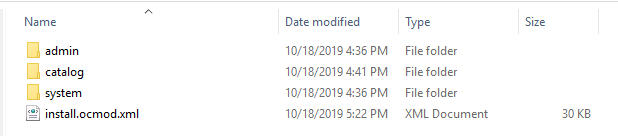
1. Unzip the zip file. You will get the folders as shown in the image below:

2. Copy all the folders of the zip file in the Root Directory of OpenCart setup via FTP manager.

Steps to install Ocmod file using Extension Installer

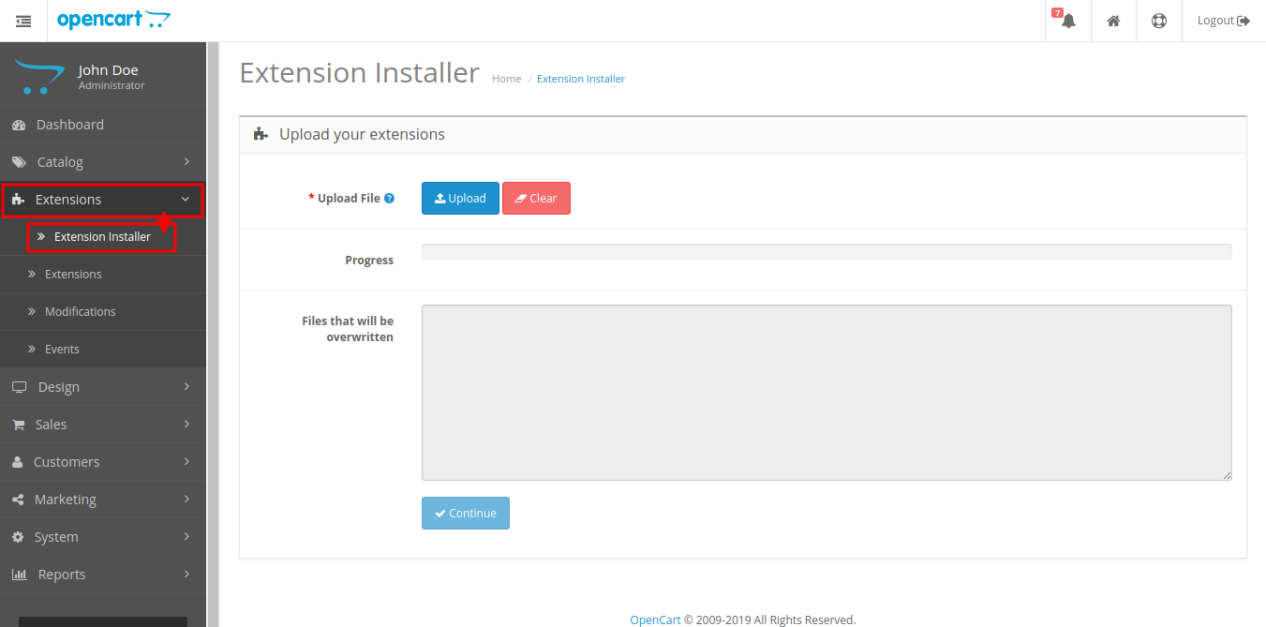
1. Open the Extension Installer window from the admin panel.

2. Click on Upload button to browse and upload the install.ocmod.xml file.

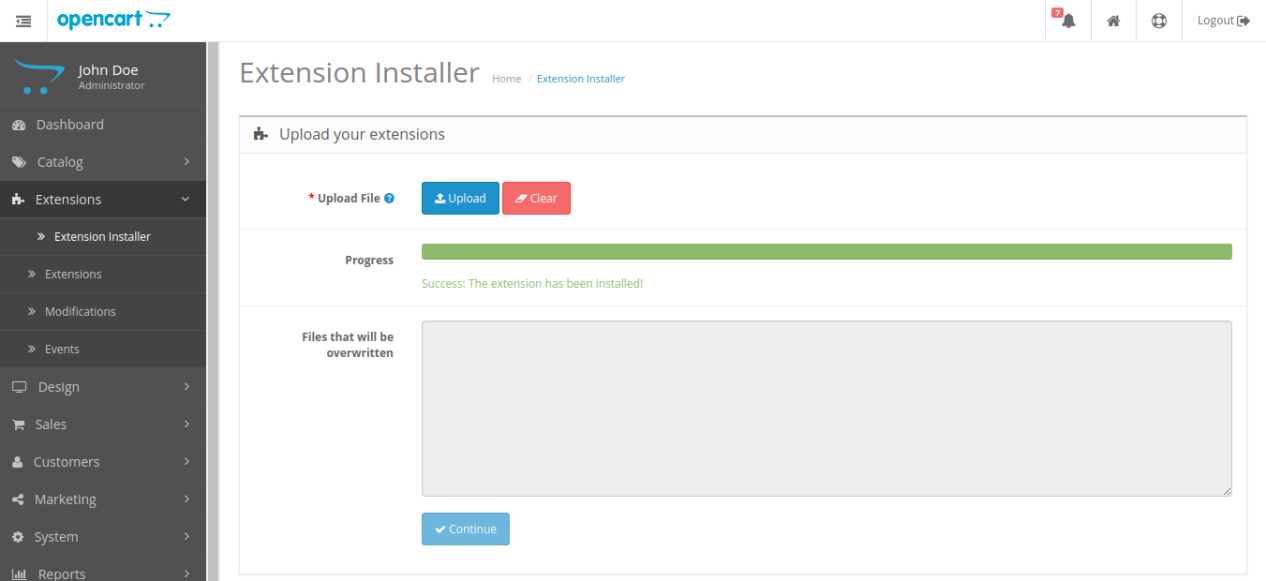
3. Once uploaded, you will see a success message on your screen as shown below.

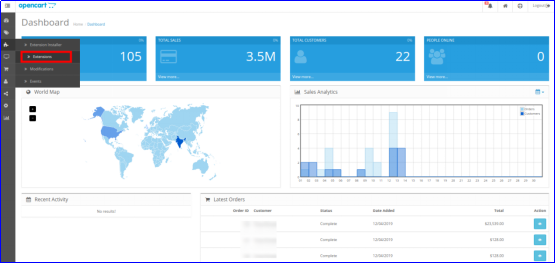
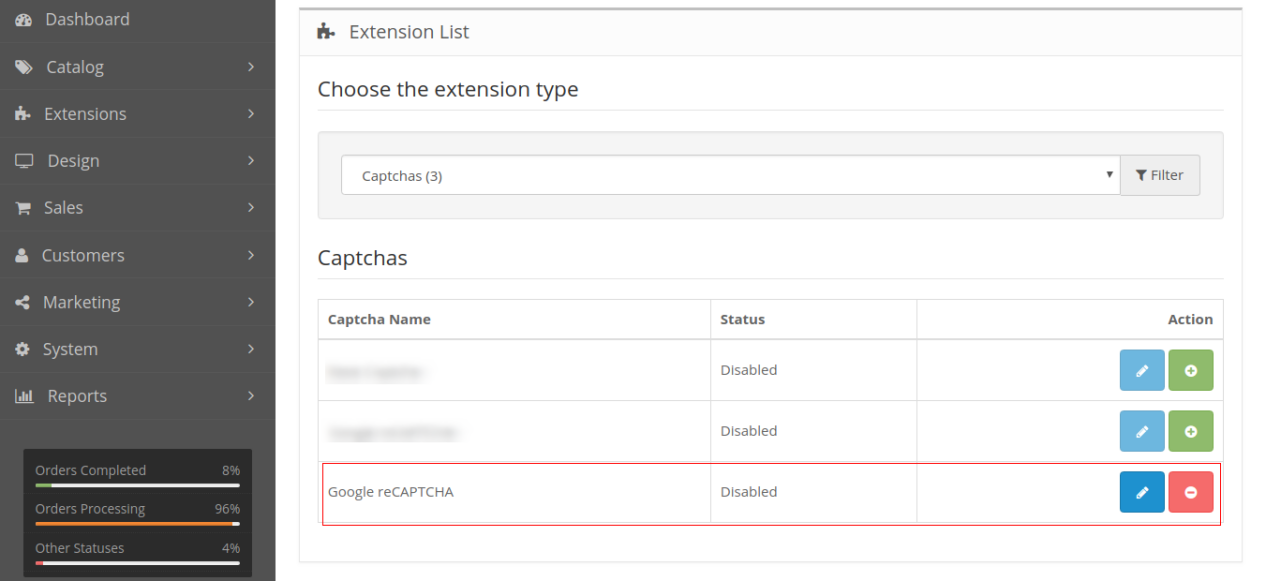
So, Opencart Google Captcha is now installed and is ready to use at your store. Go to the admin menu and click on the extensions. Then, click on Captchas and thereby click on the Edit button next to Google reCaptcha.

OpenCart Google reCaptcha Extension

Protect your OpenCart store from spam and bots with Knowband’s Google reCAPTCHA module, ensuring secure and human-only access.

SHOP NOW

3.0 Admin Interface of OpenCart Google reCaptcha Extension

After the successful installation of Opencart Google reCaptcha module for your website, you can implement version 2 and version 3 reCaptcha as per your business requirements. Navigate the settings in the given order: Admin Panel > Extensions > Captchas > Google reCaptcha.


The simple to understand admin interface of Opencart human verification extension is divided into four sections as:

  1. General Settings
  2. v2 reCaptcha Settings
  3. v3 reCaptcha Settings
  4. Look and Feel Settings

3.1 General Settings

  • Status: This option enables or disables the complete reCaptcha system from your website.
  • Enable Google reCaptcha for: With this option, you can choose the pages for which you want to enable reCaptcha feature.
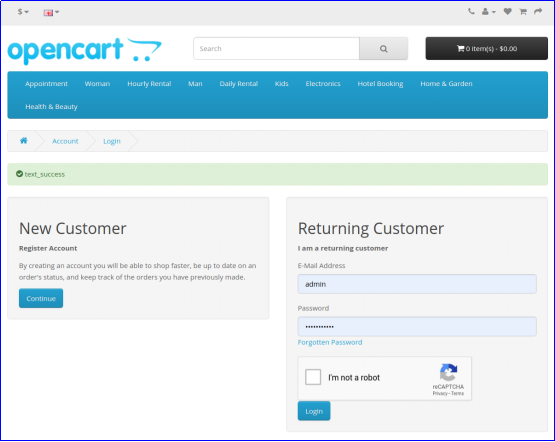
  • reCaptcha for Login Page: This option allows you to select the type for login page as v2 reCaptcha or v3 reCaptcha.
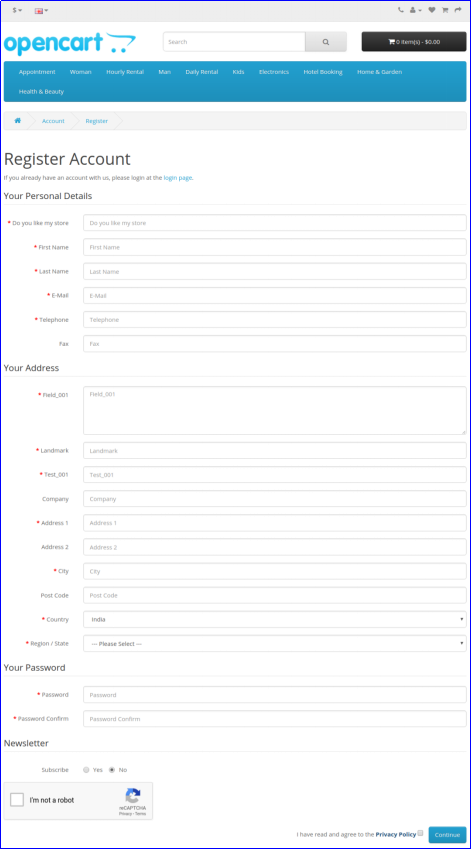
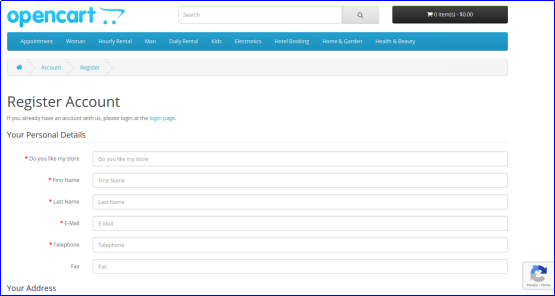
  • reCaptcha for Registration Page: This option allows you to select the type for registration page as v2 reCaptcha or v3 reCaptcha.
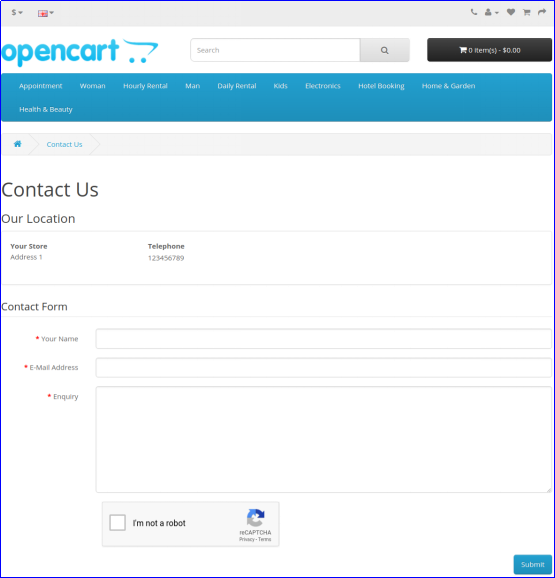
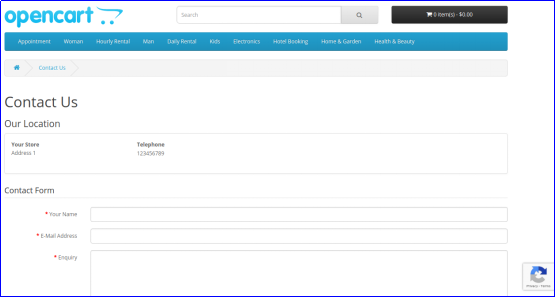
  • reCaptcha for Contact Page: This option allows you to select the type for contact page as v2 reCaptcha or v3 reCaptcha.
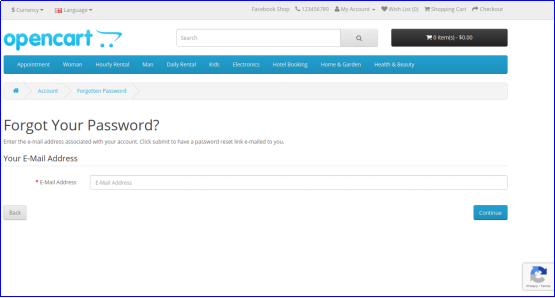
  • reCaptcha for Forgotten Password Page: This option allows you to select the type for forgotten password page as v2 reCaptcha or v3 reCaptcha.

3.2 v2 reCaptcha Settings

Under this section of Opencart Google Captcha module, you can set the site key and secret key for v2 reCaptcha system.

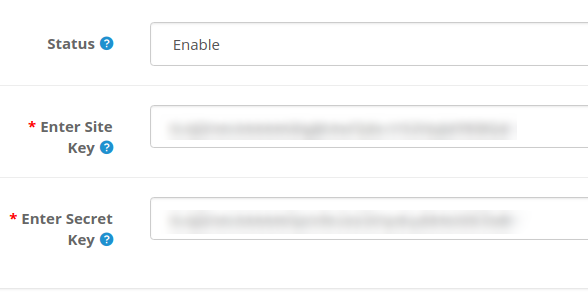
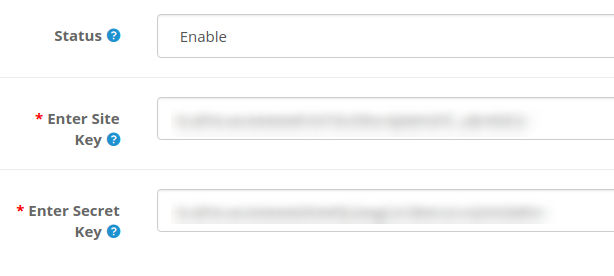
  • Status: You can enable or disable status of reCaptcha version 2 using this option.
  • Enter Site Key: This option allows you to enter the key of version 2 reCaptcha.
  • Enter Secret Key: With this option, you can enter the secret client ID of version 2 reCaptcha.

In order to get site site key and secret key for v2 reCaptcha, follow the steps discussed in the 3.2.1 section.

3.2.1 Steps to generate API keys for v2 reCaptcha

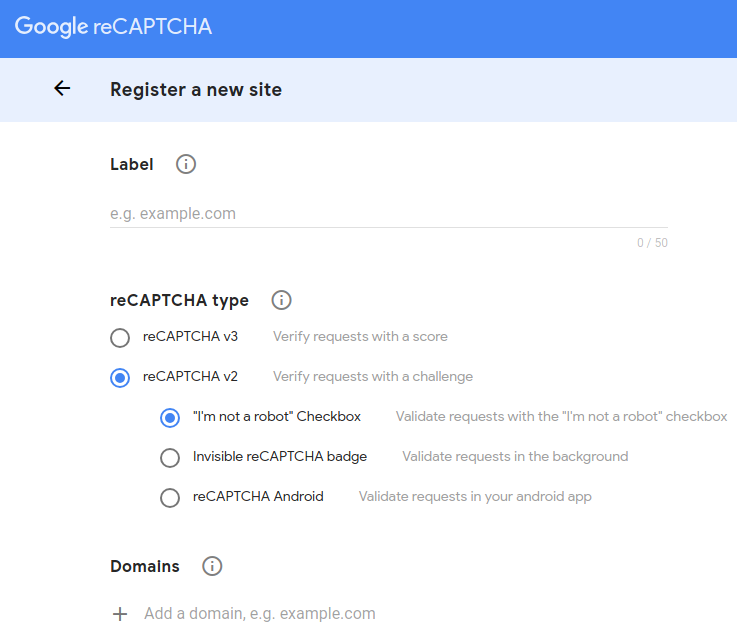
1. Visit https://www.google.com/recaptcha/intro/v3.html
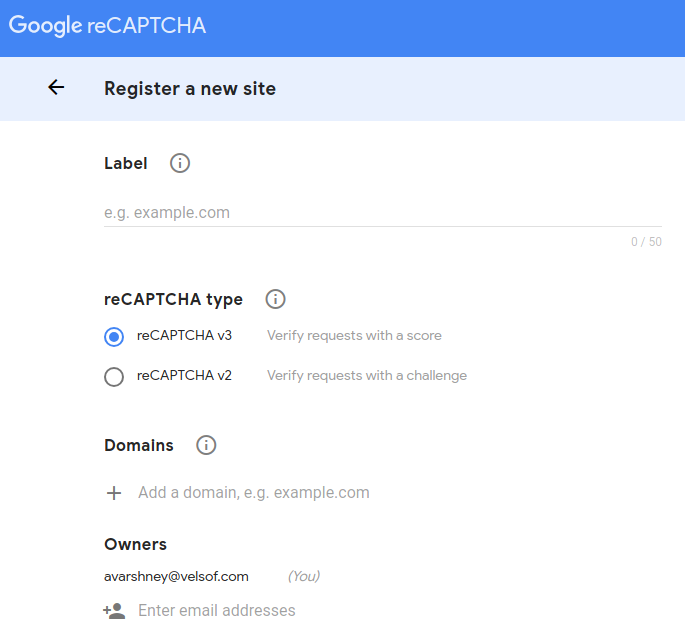
2. At the top ride side, click on “Admin Console”. Here, you can register your own website.


3. Set a desired label which will be used to identify your site in future.


4. Choose the reCAPTCHA type you want to add for your site. Here, you have to select reCAPTCHA v2 and then select the desired sub-type.
5. Enter a valid domain required for reCaptcha registration.
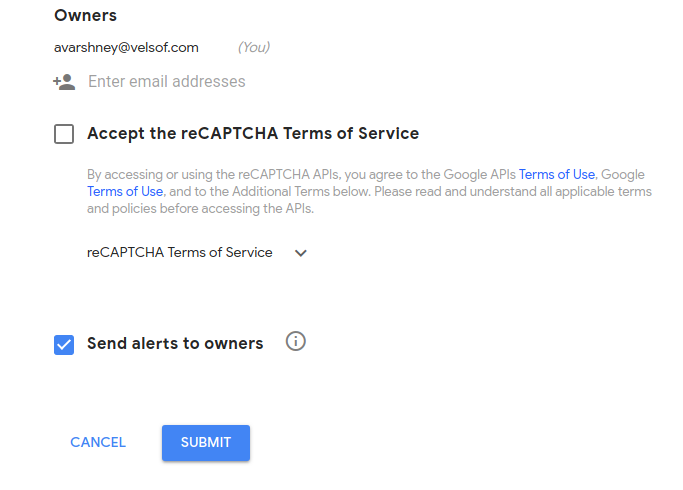
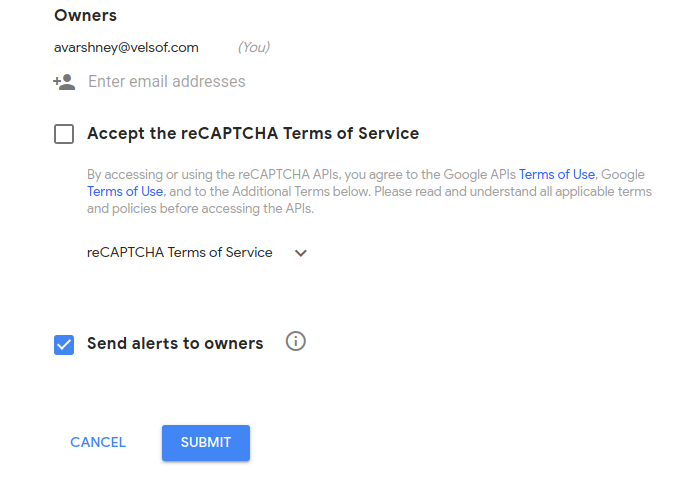
6. You can optionally add other email addresses to manage the site settings.


7. Accept the reCAPTCHA Terms and Conditions and click on “Submit” button.
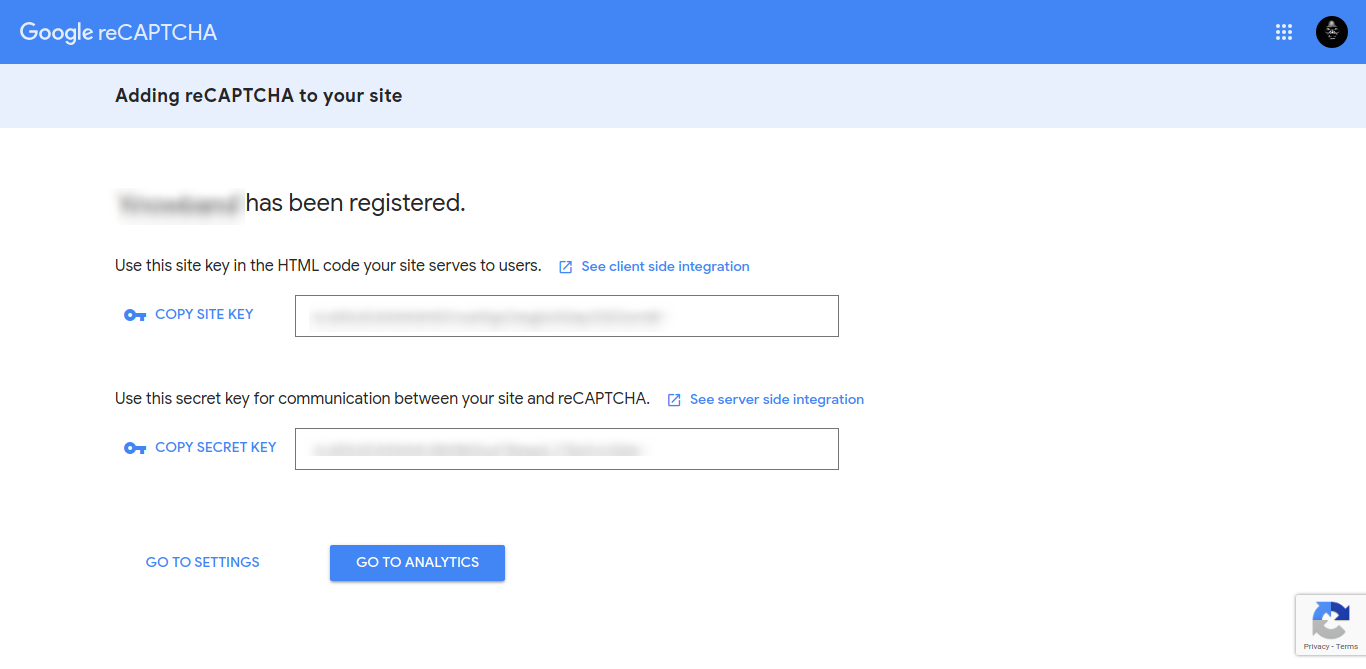
8. You will be redirected to the next page where you will find the Site Key and Secret Key. Copy both the keys to the back-office.

3.3 v3 reCaptcha Settings

Under this section of Opencart Google Captcha module, you can set the site key and secret key for v3 reCaptcha system.

  • Status: You can enable or disable status of reCaptcha version 3 using this option.
  • Enter Site Key: This option allows you to enter the key of version 3 reCaptcha.
  • Enter Secret Key: With this option, you can enter the secret client ID of version 3 reCaptcha.

In order to get site site key and secret key for v3 reCaptcha, follow the steps discussed in the 3.3.1 section.

Note: If you have selected the reCaptcha type as version 2, then site key and secret key for version 2 reCaptcha should be filled into fields, else it gives an error message. Similar thing applies to version 3 reCaptcha.

3.4. Look and Feel Settings:

The Look and Feel settings tab provided in Opencart Google Captcha Verification Extensions allows the store admin to add custom CSS and reCaptcha theme color, providing more control and enhanced functionality.

Theme Color: The Opencart reCaptcha module provides “Dark” and “Light” theme color options. You can modify the theme color from this option. 

Custom CSS: The admin can modify the reCaptcha’s appearance by adding customized CSS in this section.

3.3.1 Steps to generate API keys for v3 reCaptcha

1. Visit https://www.google.com/recaptcha/intro/v3.html
2. At the top ride side, click on “Admin Console”. Here, you can register your own website.

3. Set a desired label which will be used to identify your site in future.


4. Choose the reCAPTCHA type you want to add to your site. Here, you have to select reCAPTCHA v3.
5. Enter a valid domain required for reCaptcha registration.
6. You can optionally add other email addresses to manage the site settings.


7. Accept the reCAPTCHA Terms and Conditions and click on “Submit” button.
8. You will be redirected to the next page where you will find the Site Key and Secret Key. Copy both the keys to the back-office.


4.0 Front Interface of Opencart Google reCaptcha Module

A) Login Page

v2 reCaptcha

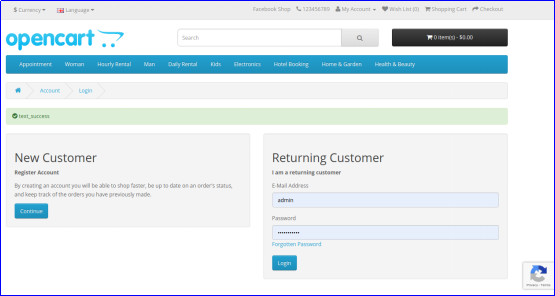
v3 reCaptcha

B) Registration Page

v2 reCaptcha


v3 reCaptcha


C) Contact Page

v2 reCaptcha


v3 reCaptcha

D) Forgot Password Page

v2 reCaptcha


v3 reCaptcha

Also, you can check our Opencart Block Bot module here:

Opencart Block Bot Module

OpenCart Block Bot by IP, Country, User Agent: Secure your OpenCart store by blocking unwanted bots based on IP, country, and user agent.

SHOP NOW

Full Tutorial of Human Verification Extension for Opencart

This OpenCart Google reCAPTCHA tutorial provides a complete step-by-step guide on installing and configuring the Google reCAPTCHA extension, adding reCAPTCHA to login, registration, forgot-password, and checkout pages (including guest, login, and registration steps), selecting between light and dark themes for a seamless user experience, protecting your store from spam, bots, and automated abuse, and enabling both reCAPTCHA v2 and v3 across multiple store pages for improved security and flexibility.

Check out the tutorial here:

Recommended Read:

Protect your OpenCart Store from Bots and Spammers

How to optimize your presence on jet marketplace?

Did you know that Jet.com is the fourth largest online marketplace in the USA? With a business model that lets the e-merchants sell their products in the store easily and also lets the customers pick their favorites at discounts that they won’t be able to say no to. Every e-store wants to integrate the marketplace because of the innumerable benefits that the same would do for their business.

Once you register yourself on jet.com as a seller, you have to integrate the Jet platform into your store. Then, you can do the product listing, upload items, download orders, control the returns and do a lot more than that. Though you might be an expert in handling all the different integrations on your stores like Walmart integration or Facebook integration, it is always better to have the task outsourced to a service provider who would give you the best work done. After all, what professionals integration service provider would do for you, you cannot go up to that level.

This blog lets you know the different steps with which you can optimize your business on jet marketplace. If you want to skyrocket your business with the jet integration, go ahead and indulge in reading this until the very end.

Register yourself

The very first step while integrating your online store with the Jet marketplace, you would be asked to complete the seller registration. Whether you are an entrepreneur who already has a business set up or a manufacturer interested in selling first-party on the marketplace, you can do it here by choosing the option. By filling in the details like Primary Contact, Business Information, and other information, you would be able to successfully get through this stage of jet marketplace integration.

Do the product listing and syncing

Why would you hire or outsource your work when you can easily integrate your business on Jet effortlessly? The next step of jet marketplace integration for you would be to list out your products in the correct categories on the marketplace. Moreover, the entire process of uploading them in the right categories and letting them sync with the other products in the marketplace is spot-on when you are taking care of the entire procedure.

Higher visibility

You might just say that we’ve already integrated our products and there’s nothing else to be done, you should stop and look at the visibility of your products. Are your products even being shown in a place where they should be? The experts will help you be promoted to the jet marketplace. This way, the visibility will go up of your products and the conversion rate will increase with this jet marketplace integration module. Whether you’re selling home decor, food, clothing or anything else, jet integration service experts will guide you to the best.

Revising the costs – time-to-time

You might have a fixed pricing structure of products in your store. However, you would surely have a difference in the prices on the various other marketplaces. The experts will handle the revising pricing structure depending on the consumers’ demands and the market scenario. After all, you cannot afford to lose customers because of your rigid pricing. Hence, having a service provider is a good idea.

Have updates on selling

When it comes to selling on the Jet marketplace and you’ve already hired an expert, the last of the benefits of the jet marketplace integration is that you get to have is regular updates on the products that are being sold. Are they up to the expectation or below that? With the updates, you will be able to change your pricing and other things in accordance with the customer’s demand.

With the jet marketplace integrator, you can effortlessly configure and map the jet products on your Magento, Prestashop. Opencart and Shopify store.

5 of the Best Apps for Exit Popup

Don’t we all as e-merchants want our customers to shop some or the other thing from our stores? Even after a providing a seamless experience to the visitors, it gets difficult to convince them to buy products from your website. If you are looking for a fix that can help reduce your bounce rate and convert the visitors into customers by making them hit the buy button, there are a number of module extensions that you should check out. The exit popup is one of the best ways that can help you save your visitor from leaving your store.

If you want to control the exit rate from your website, you should go ahead and read the blog. The following popups are designed to provide the visitors with offers when they’ve made up their mind to leave the site that will make them re-think about their exit.

Wheelio

This is the world’s first interactive exit intent popup that lets the visitors spin the virtual wheel and grab attractive offers. The spin the when appears on the page just when the visitor is leaving and lets them have their last chance to stay back and shop with the discount coupon that they get after spinning the wheel. The admin is responsible to put in the different offers on the wheel and can also give away free gifts of spending a certain amount. Being a fun and interactive way to engage your customer as well as stopping them from leaving your store, you can actually witness your conversion rate increasing with this exit popup plugin. Designed to be responsive to the laptops as well as smartphones, tablets and more, this Spin the Wheel supports multiple languages. The Prestashop spin and win module is available for the Prestashop stores. There are similar Magento spin & win and OpenCart spin wheel plugin available for Magento and OpenCart respectively.

Easy exit popup

The easy exit popup is a perfect exit popup plugin that you can use on your website to share promotional texts, discount coupons and also special offers. The exit popup plugin serves as a seamless way for the shoppers to have an optimized buying experience. For the merchants, you can also customize the background images of this exit popup in order to provide a personalized look to the visitors. What more? You can also customize the size of the fonts as well as windows, colors of the buttons, and much more in this exit popup module. If you want your visitors to subscribe to your newsletter and signup, this is the best exit popup. Prestashop exit popup is one such solution available for Prestashop eCommerce stores.

Make an offer

Did you know that some businesses have started to engage customers by providing them the bargaining technique? The “Make an Offer” is one such exit popup plugin that allows the customers to make their offer on the respective product they want to buy. For example, when a visitor come looking for a product and is about to leave the website without buying the same, the e-merchants let them put forward their buying price. Make an Offer is an offbeat and interactive exit popup that lets the merchant and the visitor interact and settle on a price that’s feasible for both of them. Moreover, this exit popup module reduces cart abandonment.
With a responsive design, the exit popup module works for every device including laptops, mobile phone, and tablets also.

Exit coupon – Coupon Popups

One of the simplest ways to stop your visitor from leaving the website is to offer them an exit coupon. The Exit Coupon – Coupon Popups will popup on the screen as soon as the shopper is on the way to leave your website without buying anything. In addition, this exit popup plugin comes with numerous popup window styles for you to choose from. This way, you can pick the one that works for your store. These exit popups can even be used as email subscription popups.

Popups, Promos & Banners – Pixelpop

In order to stop your customer from leaving empty handed, the Popups, Promos & Banners – Pixelpop will let you share a coupon code, free shipping or even the latest promotion. The exit popup module offers a responsive design and comes with a full-screen editor. Some other features of the exit popup module include – live preview, analytics to let you track the clicks and conversions and much more.

Which app would you prefer to have on your website?? Do let us know in the comments below.

Related Stories:

Is eCommerce Conversion your Problem?

With the right SEO strategy and website optimization, bringing the traffic to the website becomes easier. Even the task of finding the right target audience is achievable. However, most of the eCommerce companies complain about low conversion. If you are getting the desired traffic, but the visitors are not converting, the
your bottom line will suffer for sure.

Is your online shopping site suffering from any such issue? The very first step to deal with such an issue to find the root cause.

From the outside, CRO might look like a daunting task but the same as what’s generating your revenues by 2% or 3%. There are areas in your website that require expert recommendations and improvements and that’s exactly where ecommerce SEO services step in.

Invest in high-resolution images

We know what they all say – a picture can say a thousand words. Well, they are not wrong. When you are investing in practices like social media optimization with blogs and rich content, investing in high-resolution images is what you would want to take a closer look at. Not only in the content, but the product images used on the product pages should be of high quality. After all, the customers would not be able to touch what you’re selling so they have to feel it by the eyes. In accordance with the product description available on the same page, the image should come across as a worthy product to be purchased. Depending on the detailing that you want the customers to get to, make sure that your image resolution is high.

Free shipping is the key

Who doesn’t like free things? Every customer does. Every online shopper keeps an eye on a few things and free shipping is one of them. When you keep such policies (shipping, return, delivery and more) in accordance with what the shoppers like, you’re in for high conversions. You would find some store giving free shipping on “order of x or more” whereas; there are those which don’t have a respective amount as well. When you offer free shipping to your customers, there are lesser chances of the customers bouncing back abandoning the cart.

Coupon codes work miracles

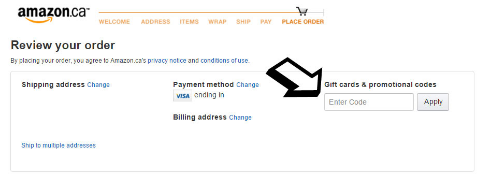
Why do you think the coupon companies are earning so good? Because they offer discounts from all the big online stores. If you take a look at the image below, you’ll find that the women’s clothing store offering a section where you can apply the coupon code and the customer will get a hefty discount. And, when you talk about discounts – it is one of the best ways to please the shoppers and get your visitor to convert to a customer.

Tailor-make the prices

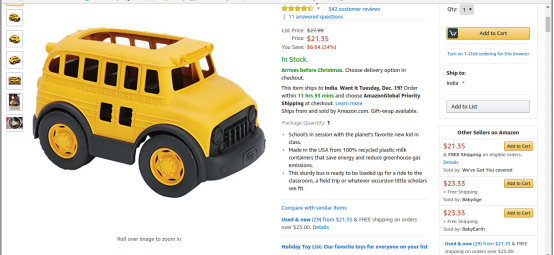
With a store like Amazon that offers a gamut of brands under the same roof, you would have to cut-down the prices or at least adjust the same in order to be visible to the customer. In today’s time, you know how the competition among the stores is and the awareness among the shoppers has made given them the freedom to compare the prices on all the respective stores in order to get the best buy. Don’t keep a specific price all the time. Keep fluctuating within the limit and also keep a check on the competitor stores. This would make your online store come across as a credible one resulting in being the solution to the conversion problem.

Modify your checkout process

Or

Image source: Awake

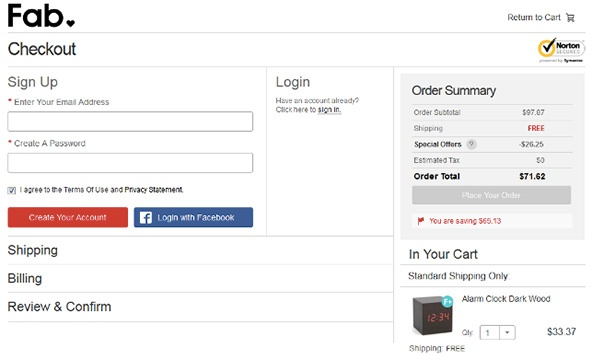
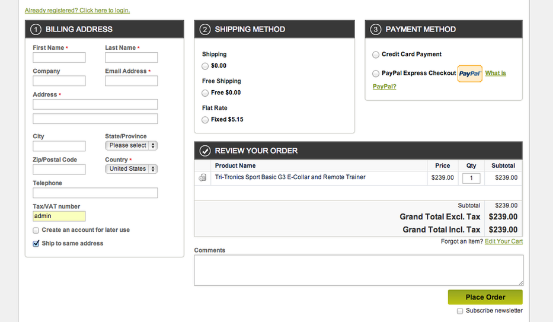
Gone are those days when you would give lengthy forms to the customers to fill before they make the payment for the purchase. Now, if you indulge in such practices, your rate of the abandoned cart will go up a level. Now’s the time to modify your checkout page and adopt one-page checkout module in order to retrieve the basic information that you need from the customer and get them to make the payment without wasting any time. This is the step where you can look for the better option with the advantages of A/B testing or any other method that lets you get to know your visitors better.

Incorporate the abandoned cart tool

Low conversions are when your visitor didn’t convert. Whether it by leaving the items in the cart or by not filling the details on the checkout page, or any other way, the result is a high bounce rate. Now, specifically talking about abandoned carts – it is when a customer lands on your site, adds products to the cart and then leaves without converting Send notifications to the customer about the items in the cart with the options of you providing them a special coupon to buy the product that they forgot in the cart.

Use chatbots

Chatbots are one of the most upcoming ways to keep your customers engaged at the store. Whether in a form of providing help in their search-hunt or by giving them the desirable option based on their likes, chatbots have come quite handy in eCommerce SEO. The availability when your customer needs you provides a sense of credibility towards your store and that’s exactly where you get a bonus point from your customer.

If you are all set with someone or the other to be available to handle the questions that pop up from the customer’s end, this module can help you in the long run.

With these ways, you can turn your low conversion rate into high conversion rates.

Related Stories:

The Pros and Cons of a Facebook Store

This comes as no surprise that Facebook serves to be the largest social media platform in the world. Moreover, do you doubt that the Facebook store continues to be the top consideration when businesses think of a social media platform where they can connect with their customers. Facebook lets the merchants come online and sell their products and services to the potential buyers after creating a eCommerce store on their Facebook Page.

If you take a look at the platform from a business point of view, you’d see that a lot of businesses have invested their time and efforts on Facebook, and are quite content with the same as well. From the individual entrepreneurs to the small vendors and the big brand names, everyone is busy making a strong customer relationship on Facebook by targeting the bigger masses.

Here are some of the stats that may help figure out the prominence of a Facebook marketplace:

  • There are 2 billion monthly active users on Facebook. Out of this, over 1 billion daily active users. Thus, if you are looking to boost the visibility of your products, then, this is an ideal platform for you.
  • 60+ million businesses have a Facebook Page. No just this, 39% of the FB users like or follow a Facebook page to receive a special offer.
  • In addition to this, 32% of Facebook users engage with brands regularly.

However, everything comes with its advantages and disadvantages. So, what are the pros and cons of using F-commerce?

Pros

Multitudes of users

The biggest social network has about 1.74 billion active users every month. This itself says it all about the very first advantage of selling your products and services on the Facebook Store. For the Prestashop store owners, Prestashop FB store module is an effortless means to sync their store with the the Facebook shop. The best part of Facebook store is that all the users are interconnected some or the other way whether it is through the mutual friends or groups that they follow, shared content liked posts and more. Doesn’t this sound like a perfect place to set up a business?

Think of it as a busy street with numerous people and you being there in the middle promising to show something unusual. People would want to stop by and see what you’re showing off. Likewise, when you signup as a seller on the store, you bring the attention to your products and users will be compelled to see what you offer.

Customized page design

The very first thing after you do all the setup of Facebook store is to do things that will attract the visitors to come and see what you’ve in stock for them. If you have a customized page that is attractive and visually very appealing, visitors will surely stop by at your Facebook store. After all, the very first thing that you need to focus is on getting users to come to your Facebook store. You can do that by sending out catchy messages or sneak-peek of what you deal in and let the users do the rest.

Wider exposure

The options of “like”, “share” and “comment” is not just there for the pleasure purpose, but the hidden meaning of the same is very useful for the sellers. You might have seen sellers posting status updates and images of their products that they want to sell online. The users can like your images, comment on them and also share them with their friends by which the popularity will increase. Hence, your reach widens and so does the exposure for your products.

Direct contact with the consumers

Being a platform that lets both seller customers come together under the same roof, Facebook lets the consumers directly contact the sellers with the help of messages, video chat, voice call and even commenting on the posts updated in the thread. This is the way that consumers clear the doubts that they have regarding the product that is being showcased in the post.

Better analysis

When you update your seller page with rich content is useful for the potential customers, you will be able to get a better insight about the activities that your customers are indulging in on your page with the help of the on-site suite of analytic reporting. The different information that you are accessible to is where did your consumer log in, how long did they interact with your store, their age, and other demographics.

Integrate your website with Facebook

Facebook integration can greatly improve your search engine optimization. When you update content on your website and share the same on the social media platform, it will drive the traffic to your website in the form of backlinks.

Cons

The development cost

One of the biggest drawbacks of selling your goods on the Facebook store is the freaking expensive development cost. If you have the capability to set up the Facebook shop yourself, very well or else you would have to spend your riches to get it done.

The loading time

We all know that Facebook app is extremely heavy and takes a while to load properly. This is one thing where the consumers can change their minds and leave your store that very moment.

The store owners, these days, tend to delve in the ventures that are more fruitful. The discussion whether Facebook store is better than an online marketplace has become prominent with the increasing competition in every field. If you are in the same dilemma of choosing one, then, here are some key consideration point for you.

Which one is better: An online marketplace or a Facebook Store?

Easy of setting up

If you consider the ease of setting up, then, the latter one for sure has an upper hand. Creating a marketplace involves a lot of complexities. Even the process of setting up the basic infrastructure is easy with the availability of multi vendor marketplace extensions like Prestashop marketplace addon, Magento multi vendor marketplace extension, OpenCart marketplace module and others. Yet, the process of motivating the sellers to your site is difficult. However, with F-commerce you get a larger customer base and ease of management.
Traffic

Name any site and the traffic of Facebook will definitely be higher than it. Hence, if you are looking to expand your audience base, then, Facebook is definitely one of the ideal platforms for you.

Better customer interaction

Interacting with your customers is the key to build a lasting relationship. Whether you own an online marketplace or you sell your product as a third-party vendor on any other site, customer interaction is a must. Even in this aspect, my vote goes for Facebook marketplace. The target customers are more likely to raise a query and interact with you when they are scrolling their social media account. Moreover, creating a personal connect becomes way more easier when you interact with them on such platforms.

How can you create a Facebook Shop?

Knowband offers a feature-rich solution for the various CMS platforms in the form of Prestashop FB Store module, Magento Facebook shop extension, and other. You can integrate your store with the Facebook page of your site.

Let’s take a look at some of the edgy features of these Facebook integrators by Knowband:

  • The extension offers configurable navigation menu that is easily displayed on the FB page.
  • Provides the search field to search categories and products.
  • The plugin also allows the e-merchants to track the performance of the pages using Google Analytics ID.
  • The admin to add homepage image and logo as per his choice.
  • The store admin can display featured products and categories on the FB store with great ease.
  • The entire product listing is synced with the FB store at a button click.
  • Clicking on the products will automatically redirect the users to the online site.

F-commerce is for sure the future of online selling. All you got to do is take a look at the pros and cons of selling at the Facebook store.

Related Stories:

The Pluses and Minuses of becoming a Walmart Marketplace seller

If you would have noticed, earlier in 2017, Amazon inaudibly dropped their shipping prices to match up with Walmart and Jet. To remain in the competition, it’s mandatory to be aware of the latest marketing techniques used by your competitors. As a consequence of this, the biggie store gave free shipping on orders above $49, the price dropped to $35. However, every action reacts to it and that’s when Walmart Marketplace announced its membership-free 2-day free shipping model. If you take a closer look, you’ll understand that Amazon is the biggest online store worldwide believes Walmart, the biggest retailer to be its competitor.

However, despite being the biggest marketplace that gives competition to Amazon, sellers are usually cynical about selling their products at Walmart. Well, that certainly has a lot of reasons for the reputation that Walmart has earned to the seller’s licensing agreements with brands and more.

So, it is always better to assess the ifs and the buts of selling your products at the Walmart marketplace.

If you are planning and thinking about becoming a seller on Walmart, you should go ahead and read the pros and cons of selling on Walmart below.

The PLUSES

If you do your homework properly, you’ll find that Walmart adds about a million products every month and out of which a huge chunk is by the new third-party sellers. Every e-seller, small or big, can now showcase their products to the Walmart visitors and tap a larger customer base now. Knowband compliments this quest of expansion of the e-sellers with a user-friendly solution for the CMS-based site. Walmart integrators are one such that allows the store owners to connect their site with Walmart.com and list their products with great ease and also they should rank high in the search results of customers.

Followed are the positives of selling your item on the Walmart marketplace.

Wide exposure

With 344 monthly visits of customers, Walmart.com has established itself to be the second most trafficked eCommerce site. With such stats, you would benefit from enormous exposure for your products. The exposure would let you reach out to newer customers as well as increase your loyalty. Our Walmart integration plugins can help you upload and manage the inventory in bulk. The profile-based listing option offered by Walmart integration extension allows you to upload the products and related details in bulk. Even automation or cron options allow the admin to edit, remove or relist the products with ease.

Higher credibility

Walmart has been in business for quite some time. Hence, if you are an e-merchant who deals in products like electronics, home appliances, decor, and more, you have a fair chance to be the credible one at the store and you’ll fit in well.

Walmart API integrator supports all types of products. Moreover, to stay ahead of the co-sellers, you can even offer products with promotional discounts with the help of Walmart  API integrator. The sellers can even win the Buy Box with the repricing option offered by  Walmart integration Extension.

Low investment

When you invest as a seller at Amazon or eBay, you pay monthly charges whereas; at Walmart marketplace, you only pay a certain amount of money when you start a sale on your products. Furthermore, the amount is decided to depend on the category of products that you choose to avail of the sale on.

Effortless transactions

You all hear a lot about businesses investing in eCommerce SEO services for a seamless shopping experience. Walmart invests a lot of money in providing a smooth shopping experience to the shoppers with faster checkouts and uninterrupted payment services. Hence, the bounce rates are low and the conversion rate is high.

Knowband makes marketplace transactions easier for the e-sellers. The cron options offered by the Walmart integration module sync the marketplace orders with the eCommerce store and allow the admin to process them from the back-end itself.

Return policies that suit you

One of the best aspects of selling at Walmart marketplace would be that the store allows its sellers to set their return policies. Now, they can choose whether the product can be returned within 30 days or a week.

Best customer support

BuyBox option

The marketplace is jam-packed and the number of sellers is increasing day-by-day. However, there is still an opportunity for the vendors to boost their presence and the visibility of their products at the marketplace. Walmart offers a BuyBox option where the sellers can compete for their product price. In case, the same products are being offered by multiple vendors, then, the products are displayed in the same place. The seller that wins the price gets the top position in the BuyBox. This way the customers can find the product at competitive prices. At the same time, it increases the chances of conversion for the sellers who win the BuyBox.

With the marketplace integrator like Prestashop, Magento, OpenCart, Magento 2 or Shopify Walmart Integrator Extension, the process of tracking the BuyBox report has become effortless. The report can be synced with the help of cron options and the sellers even get an option to reprise the product in order to win the BuyBox.

If you are to rate the best marketplace in terms of customer support, the Walmart marketplace would be on the top of the list. Wherever the Walmart marketplace feels that there are product issues, they would let the buyer contact the seller directly in order to resolve the issue or further assistance.

No thefts

Walmart.com has been in business since 2000 and security measures offered by the same are top-notch for both the sellers as well as the buyers.

The MINUSES

On the flip side, the following are the issues faced by the sellers on the Walmart marketplace:

Low prices reduce the chances of bigger profits

The Walmart marketplace has the reputation of being one of the most cost-effective marketplaces. That’s how the customers are in billions. However, for a seller to sell his product at a minimal price reduces the chances of the bigger margin of profit. Hence, a seller has to wait for a wide number of products in order to see the profit. And selling more products will only happen when you have high visibility among the customers.

Walmart integrator allows the admin to display the products at custom prices, that is, without changing them from the store.

Getting the opportunity at first place

Walmart believes in selecting only the best sellers to be a part of Walmart.com. If you have a credible selling history and a transparent track record, you are eligible to be selected by the Walmart marketplace but if you are unable to prove your worth, your application will be rejected.

Walmart favors brands over retailers

You have lesser chances to get in because Walmart gives priority to brands over the retailers.

Keeping the positives and negatives of selling the products on the popular marketplace, the e-sellers can probably now make up their mind whether they want to delve into the same or not. However, if these points are to be considered, the pluses of selling on Walmart has the upper hand.

How can Knowband’s Walmart Integrator help you?

Having discussed the pros and cons of Walmart’s shop, here are some of how Knowband’s Walmart integration extension can help you in the same.

The Walmart integration plugin offers an effortless means to set up the connection between the two stores. Follow the below mentioned steps for the same:

  • Install the Walmart integrator in your eCommerce site.
  • Establish the connection by sharing the API details in the back-end of the Walmart integrator.
  • Create profiles in the admin interface of the Prestashop Walmart integration plugin. Map the categories of the store with the category of the marketplace. The products of the selected category will be listed on the marketplace by executing cron in the back-end of the Walmart connector.

This integrator module is also available for various CMS platforms like Magento 2, Magento, OpenCart, PrestaShop and Shopify and serves all the functions listed above:

Here are some of the features offered by Walmart integration plugins that can take the burden off your shoulder:

  • The admin gets an option to connect their store with the marketplace just by sharing some API details in the back-end of the Walmart integrator.
  • The product listing and detail synchronization become effortless with seamless integration.
  • The admin can create profiles for mapping the categories and listing the products. This profile-based listing allows bulk product upload option.
  • The inventory, the details, and the pricing of the products are updated just by executing cron from the back-end.
  • The store admin can even relist or remove the products in bulk. These changes are synced with the marketplace by executing cron in the back-end.
  • The admin can synchronize the Walmart store order details to the store’s order details with the help of the cron job of Walmart Integration extension.
  • The admin can keep a check on the various feeds in the audit log section.
  • The Walmart BuyBox report is tracked from the back-end and the sellers can reprice the products in order to win the same.

So should you sell at the Walmart marketplace? The decision is left totally to you! The Walmart marketplace is doing everything to be the best in the industry and certainly, a good opportunity for you get on the bandwagon. If you want to become a seller, Walmart Marketplace Integration Module by Knowband would your sure shot way to higher conversions.

Watch Video of Prestashop Walmart connector

 Find more related articles:

  1. How to sell on Walmart Canada?
  2. 9 tips to help you sell more on Walmart Marketplace
  3. 5 eCommerce tips and tricks to ensure fast growth
  4. 8 tips to drive more customers on a Marketplace