Essential Features In eCommerce Mobile Apps To Cover Up Loss Faced Amid Covid-19

E-Commerce businesses regularly face challenges to make the online shopping experience pleasant & personalized for the mobile audience. Amid the COVID-19 pandemic, keeping such business efficiently operational has been even more challenging for the store managers. The pandemic has been reformed online/mobile trading for both sellers and buyers. A thing of note is that online shopping has gained more momentum these days as shoppers have to maintain social distancing. Such unforeseen opportunities in these hard times can help in keeping your business running and stable with the eCommerce mobile app.

As I said, both online selling and purchasing norms are changed and we need to reform our standards as well. Launching an eCommerce mobile app is a sort of necessity than a luxury. Users around us are concerned for their safety and well beings. To achieve the same, one major step is to avoid visiting physical stores for any sort of online shopping. Be it grocery, apparel, electronics, food  & drinks, etc. all eCommerce merchants are somewhere struggling with fewer sales and revenue.

The situation demands more, so we provide more. We have narrowed down some essential features which can be helpful in providing value to users shopping through mobile. These tips will surely be a helping hand in keeping your business on foot and efficiently functioning amid COVID-19.

#1. Secure Online Payment:

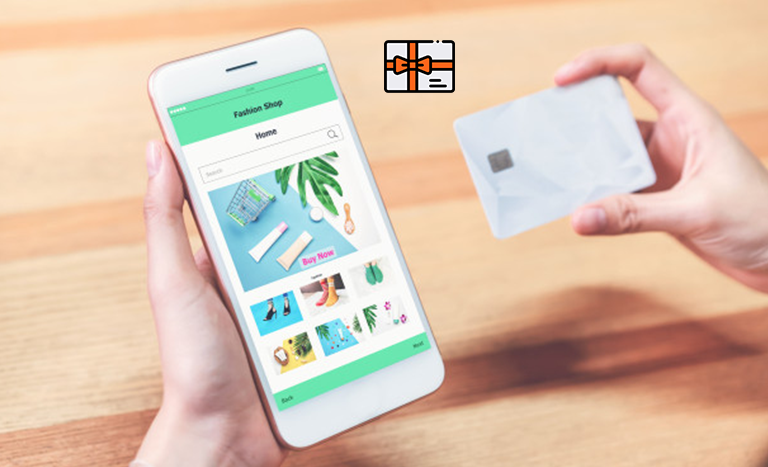
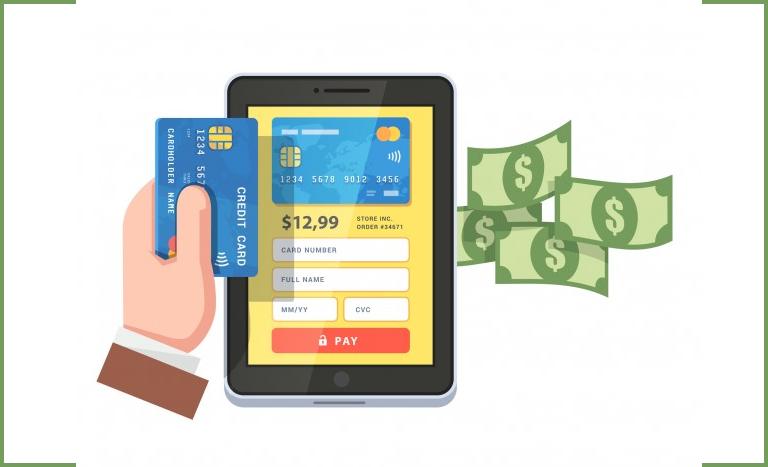
To follow the social distancing guidelines, Cash-On-Delivery (or any sort of payment method that involves physical contact) is disabled for the safety of customers as well as delivery personals. Instead, store owners must have in-built secure payment options in their eCommerce Mobile App.

To win the trust of the audiences who don’t trust online payments, the mobile app must have secure payment gateways. Also, try to include multiple payment options like credit/ debit card, net banking, wire transfer, PayPal, & some of the popular e-wallets. This will allow the app users to make payments using the options that they prefer the most. For the good part, integrate the same payment methods on the app as of store in order to bring the online payment flexibility and ease.

FYI: KnowBand Mobile App supports all sorts of website payment options available on eCommerce store on PrestaShop, OpenCart, Magento & WooCommerce platforms.

#2. Push Notifications:

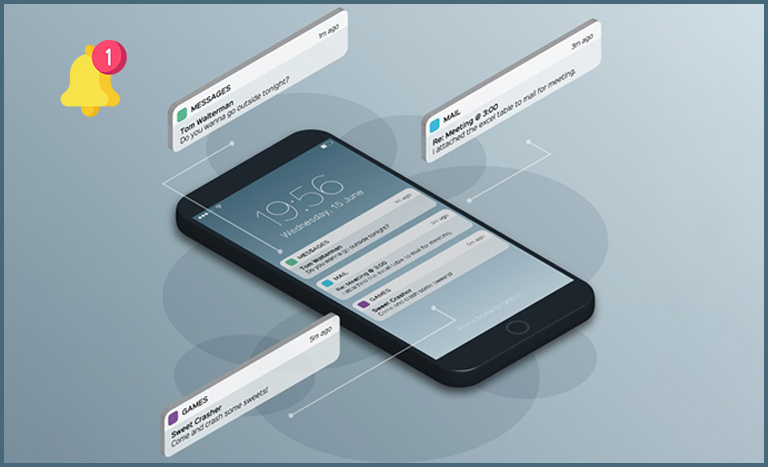
Keep your app users well informed about your services being resumed in specific/all locations. Also, during the COVID-19 pandemic, stores may run out of stocks sometimes. In that case, it’s ideal to inform the same of the customers to maintain transparency. If the app users left some products in their cart/wish list, inform them about the deals on them and availability.

The push notifications are helpful in both informing users or promoting sales/deals. Offer additional discounts or cross-sale offers to boost sales and revenue through your eCommerce Mobile Application.

FYI: KnowBand Mobile App offers both automatic and custom notifications which store admin can configure from the admin panel of  Mobile App Maker on PrestaShop, OpenCart, Magento & WooCommerce platforms.

#3. Reviews & Ratings:


Reviews have always been an easy means to win customer’s trust. When app users add a review and give start ratings on an eCommerce store or mobile application, not only it helps in getting honest feedback but also serves as a source of new leads. Genuine reviews always help in boosting sales if the products & services are good. This also encourages the sellers to keep their products & services at par to get good reviews.

Offering View Review & Write review functionality on the eCommerce Mobile App improves the brand credibility and allows indirect comparison of products before purchase. Star ratings implicate the worth of the product and helps customers in making their decisions.

FYI: KnowBand Mobile App for PrestaShop, OpenCart, Magento & WooCommerce platforms has inbuilt star rating and review feature. The users are allowed to both View and Write reviews from the application.

#4. Wishlist & Simplified Checkout:


Some app users may want to shortlist multiple products on an easily accessible page within the app. That’s when the wishlist comes into play. Wishlist allows online shoppers to finalize the buyable products later from the list of shortlisted products.

The checkout page of an eCommerce mobile app must not be time-consuming to fill. Enable name & address auto-fill options for nonfirst time shoppers on the store. Ask for only the necessary details on the checkout page. It is recommended to have a one-page checkout so that users won’t have to navigate to multiple pages while placing orders.

FYI: KnowBand Mobile App Builder comes with inbuilt wishlist and one-page checkout in both Android and iOS apps. 

#5. Easy Registration:


E-Mail login & signup options can get too hectic. Instead, use simpler options in your eCommerce Mobile App like Facebook & Google social media. Also, you can offer another log in options like OTP (one-time-password) & fingerprint authentication.

Simpler is the onboarding, more are the chances of a successful purchase. Offer more than one login option in the app and that too keep them one-tap or such that allow users to access apps in seconds. This will improve the usability and performance of the app.

FYI: KnowBand Mobile App offers four types of login options: Google, Facebook, Phone Number (OTP) and Fingerprint. 

How Can You Get Such an eCommerce Mobile App?

For eCommerce businesses that are willing to build & launch their Mobile Apps for Android &/or iOS devices, get your hands on the eCommerce Mobile App Builder extension. Such an extension builds customizable apps that are feature-rich on the backend as well as the user-end. If you have a multi-vendor marketplace website, then this extension is compatible with that also.

PrestaShop Mobile App Builder

OpenCart Mobile App Builder

Magento Mobile App Builder

Magento 2 Mobile App Builder

WooCommerce Mobile App Builder

We also offer Marketplace Mobile Apps ( Multivendor Marketplace + Mobile Apps) for the above-mentioned platforms. Check them out from below links:

PrestaShop Advanced Marketplace with Mobile App

OpenCart Advanced Marketplace with Mobile App

Magento Advanced Marketplace with Mobile App

Magento 2 Advanced Marketplace with Mobile App

Conclusion:

Keep your eCommerce businesses relevant & well-prepared to resolve the issues & uncertainties that you may encounter during this COVID-19 pandemic. Follow the essential features described above as it can help your eCommerce business in succeeding even during such difficult times.

Drop your queries on support@knowband.com for a quick discussion or connect with us on skype at support@knowband.com.


[Version 2.0.2 Released] New Features Added To PrestaShop Mobile Apps

Having all the latest features in a mobile app is something that every business is concerned about these days. The same is the case with eCommerce businesses too. To cater to the app users in the best possible way, shopping apps must be laced with the latest features as they help improve the UI & UX of the app.

For PrestaShop, a popular open-source eCommerce platform, mobile applications have become more efficient now. With the addition of 3 new features described below, KnowBand Plugins have rejuvenated their PrestaShop Mobile App Builder module.

Simple Steps To Launch A PrestaShop Mobile App:

1. Purchase PrestaShop Mobile App Builder module.

2.  Fill the app pre-requisite form. (We need these details to create apps)

3. Review your final app before confirm to publishing it on the app stores.

Note: We only publish apps with your developer accounts (Google Play and Apple App store) without any extra charges at our end.

Quick Glance to New Feature Additions:

#1. ‘Add-To-Cart’ Quick Access:

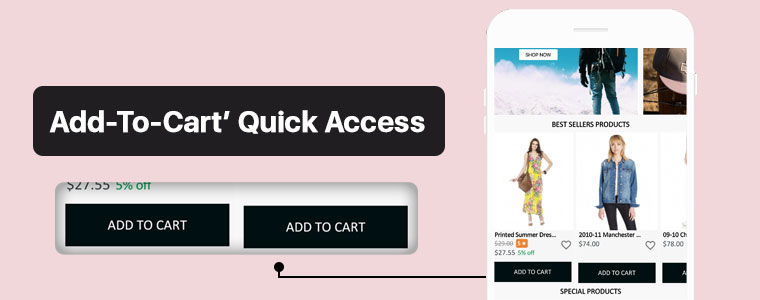
This new feature adds the ‘Add-To-Cart’ button on the Category Page & also on the Home-Page wherever product blocks are used. This way, app users won’t have to open the individual product pages in order to add that product to their cart. App users can quickly add their choice of products from the category or home-page.

Now, the user can simply browse the app and keep on adding products into cart seamlessly.

#2. Related Products On Product Screen:

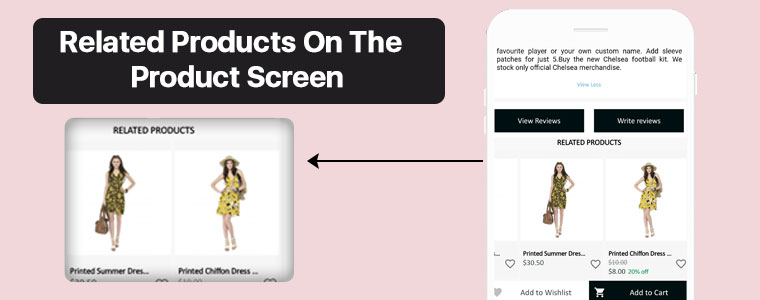
On an eCommerce product page, one great way to motivate the customers’ to shop more is to show some products related to the main product on that page. To serve this purpose, now the PrestaShop Mobile App Builder is compatible with our Automatic Related Products module.

Now, it’s way simple to showcase related products on both website and apps and improve revenue through cross-selling.

#3.  Product Reviews and Ratings:

On the product page, app users can rate the products & write & submit their product reviews. Upon approval, they are displayed on the product page so that others can view it for reference. The PrestaShop Mobile App Builder is compatible with the default Product Comments Module.

Now, showcase user reviews & ratings for products on app and motivate new buyers for more purchases.

Compatibility With Other PrestaShop Modules:

1. Multi-vendor Marketplace Module:

With the use of this module, store owners can easily transition their single-vendor PrestaShop App to a multi-vendor PrestaShop App. Because the Mobile App Builder module is compatible with the Marketplace module (both by KnowBand Plugins), all of the processes are automatic. All you need to do is install the marketplace module on your PrestaShop website.

Having a marketplace allows the store owner to have multiple sellers on his/her store, each with a unique vendor panel. Store owners can sell their own products too on a marketplace & also make profits by taking commissions from the vendors.

–> Check out combo pack of (Multi-vendor Marketplace + Mobile App) below:

https://www.knowband.com/prestashop-advanced-marketplace-with-mobile-app

2. Booking & Rental Module:

This module by KnowBand allows eCommerce stores to have all the functionalities & layout of a booking or a rental app/ website. Now, this module is also compatible with the PrestaShop Mobile App Builder module by KnowBand.

–> Check out combo pack of (Booking and Rental + Mobile App) below:

https://www.knowband.com/prestashop-booking-and-rental-mobile-app

3. Image Search Module:

The Image Search module allows the app user to search for products of your e-store using any reference image that they either clicked with their phone camera or using any reference image from their phone’s gallery. You can also enable this feature automatically in your PrestaShop App by installing this module on your PrestaShop website.

–> Check out Image Search Module from below:

https://www.knowband.com/prestashop-image-search

4.‘Spin & Win’ Module:

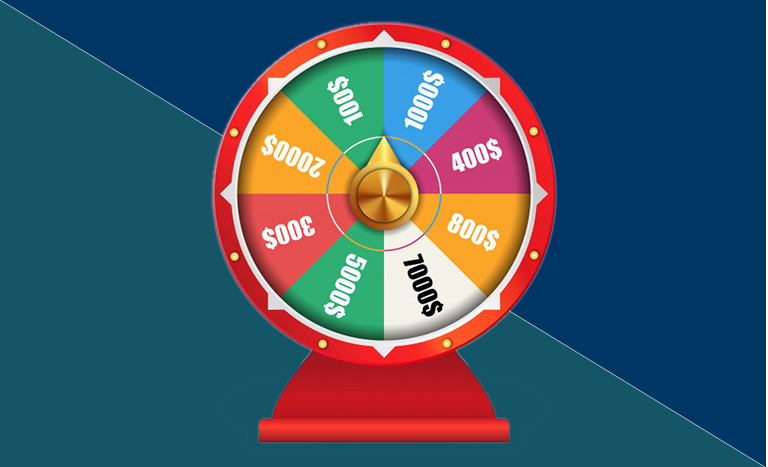
Using this module, store owners can show a ‘spin & win’ discount wheel which the customers can spin to avail any one of the discounts mentioned on the pie wheel. Enable this feature on your PrestaShop App by installing this ‘Spin & Win’ module on your PrestaShop website & configure it & then simply set its toggle switch to ‘ON’ (from the App Builder module).

–> Check out Spin-win module from below link: 

https://www.knowband.com/prestashop-spin-and-win

5. Related Products Module:

This PrestaShop module, by KnowBand, displays a list of products related to the main product (on the product page). When an app user is shopping for a particular product, he/she will be able to see related products when they scroll down on that product page. Equip your PrestaShop Mobile App with this feature by simply installing the ‘Related Products’ module on your PrestaShop website.

–> Check out Related Products from below link: 

https://www.knowband.com/prestashop-automatic-related-product

Now that all the new features, compatible modules & installation steps are covered, let’s take a look at core features of the PrestaShop Mobile App Builder module & learn how it can benefit your business.

Core Features & Benefits Of The PrestaShop Mobile App Builder:

#1. Multi-Lingual & Multi-Currency Support:

This app maker module is great for businesses who are willing to launch a PrestaShop App that supports multiple languages & currencies. It can help with localization & even with expansion to multiple countries.

#2. DIY Home-Page Editor:

This feature allows the store admins to design their app’s homepage without having to code. All the tools provided in the DIY Homepage editor of this module are easy-to-use. Admins can add, rearrange & configure various components like sliders, banners, grids, recent product tab, count-down timer, etc. Admins can make multiple layouts & enable anyone of them at a time. This again saves them from designing at the last moment.

Regularly updated & re-designed homepage keeps the app users engaged & allows the business to display the most relevant & in-trend content on their homepage.

#3. Unlimited Push Notifications:

Your app users who have enabled push notifications on your app will be able to receive the notifications that you (admin) create & send from the backend of this PrestaShop Mobile App Builder module.
There is no limitation with this module because store admins can send an unlimited number of push notifications to their app users. Push notifications help to re-engage the app users & remind them about any abandoned cart items, order status, upcoming sale & its benefits & a lot more.

#4. Offline Mode Working:

The PrestaShop Mobile Apps are made to work in offline mode as well i.e. under slow internet or no internet connectivity. Online shoppers get to browse apps with pre-loaded screens without actually needing the internet.

#5. Admin Panel Control:

The mobile apps for PrestaShop can be fully controlled by the friendly admin panel. The store admin can make a few clicks and button toggles and make the app work as per the requirement. The flexibility and customizable options with this extension make it the most preferred choice for store owners.

Drop us an email at support@knowband.com or check all such amazing features in detail from:

https://www.knowband.com/prestashop-mobile-app-builder

[Success Story – Goldengrocery] Grocery Mobile App for E-Commerce

Online shopping has now become a major part of almost everyone’s life. Be it apparels, or electronics, or even groceries, more & more netizens are preferring to shop online now. One major reason for this preference is mobile applications. Mobile devices like smartphones & tablets have become a staple for almost every person worldwide. This factor makes it high time for eCommerce businesses to bring their store to a mobile app.

In this write-up, we will elaborate on a Grocery Shopping Native Mobile App that has been built using an eCommerce Mobile App Builder plugin developed by KnowBand. This plugin is meant to be installed on the eCommerce website. Using the data of that website, the app builder plugin automatically builds a shopping app & its APK & IPA files are published on the Google Play Store & Apple App Store.

One of the grocery shopping apps built using KnowBand’s eCommerce Mobile App Builder is ‘Golden Grocery’. The ‘Golden Grocery’ mobile app is a feature-rich native application both on the frontend as well as the backend. Take a look at the user-end of the ‘Golden Grocery’ Native Mobile App.

Website Link: https://goldengrocery.in/

Mobile App Link: https://play.google.com/store/apps/details?id=com.goldengrocery.androidapp&hl=en_US

Home-Page, Menu & Category Page:


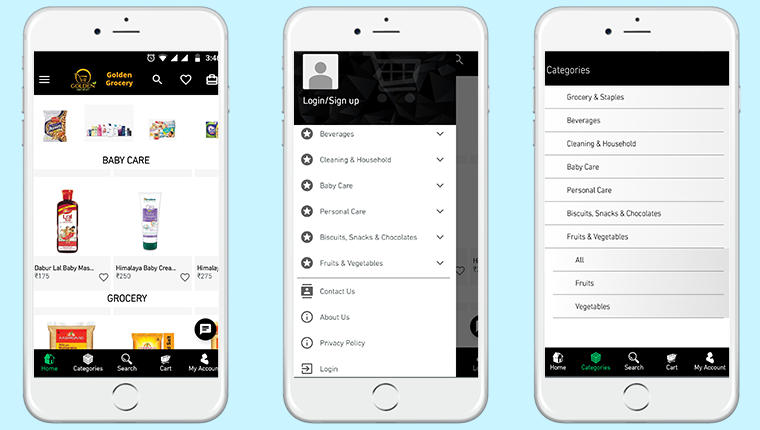
These app screens are of ‘Golden Grocery’ Mobile App. The 3 screens above display the HomePage, Navigation Menu & the Category Page respectively. Using the eCommerce Mobile App Builder plugin, store owners get a customizable app. They can easily design their home-page of their app using various home-page editor tools provided on the backend of the eCommerce Mobile App Builder plugin.

Product Page:


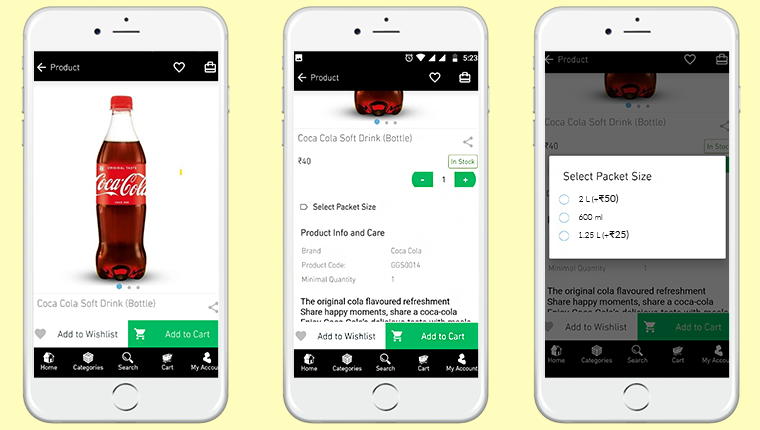
Shown above is the product screen of the ‘Golden Grocery’ Native Mobile App. It includes multiple product displays, page sharing icon (for multiple platforms), product quantity stepper, product specifications, description, wishlist button, ‘Add-to-Cart’ button & much more.

From the backend of the eCommerce Mobile App Builder, store admin can even select whether clicking the ‘Add-to-Cart’ button would send the app user directly to the cart page or whether it would keep the user on the same product page for break-free shopping.

We are grateful to have received great feedback about our eCommerce Mobile App Builder extension from our client (Golden Grocery). We are glad that they found our plugin easy to use & were able to launch their new app without any hassle & in the least time possible.

As a leading eCommerce solution provider, we, at KnowBand, will continue to provide the best tools & services to various eCommerce businesses around the world. Take a look at our range of Native eCommerce Mobile App Builder extensions:

PrestaShop Mobile App Builder 

OpenCart Mobile App Builder 

Magento Mobile App Builder 

Magento 2 Mobile App Builder

WooCommerce Mobile App Builder 

Features Of The E-Commerce Mobile App Maker Extension:

#1. Multi-Lingual Support:

This feature makes your shopping app support various international languages. It is ideal for businesses that serve internationally or in a language other than English. RTL languages like Arabic, Persian are also supported.

#2. Support For Multiple Currencies & Payment Gateways:

This feature allows your app to support various international currencies & payment gateways. As the eCommerce Mobile App builder plugins by KnowBand are open-source solutions, even more currencies & payment gateway support can be added as per business requirements.

#3. Live Chat Support:

This equips your Shopping App with in-app Whatsapp/ Zopim Chat Support. It connects your app users to your chat support team.

#4. Push Notifications:

From the backend of the eCommerce Mobile App Builder, store admins can create, automate & send an unlimited number of Push Notifications to their app users. It’s highly useful for e-retailers as these notifications play a huge role in boosting customer retention & to reduce the cart abandonment rate.

#5. Simplified Logins:

For a smoother onboarding, visitors can be made to sign-in into your app via fingerprint authentication or via their social accounts i.e. Google, Facebook, etc.

#6. Live Synchronization:

Both the website & the app remain in-sync with each other because Mobile App, created using this shopping app maker plugin, uses the same database as that of its equivalent website. This also ensures automatic inventory management.

#7. Complete Technical Support:

With the paid version of this extension, you get a free 3 month support period. This support includes assistance in building, optimizing, & launching your eCommerce App. If required, your app can further be customized according to your needs- such as setting up returns & refunds, etc.

#8. Simplified Backend:

Store admins can instantly make changes in their app by editing/ re-configuring the App Builder plugin from their website backend. This helps a lot with instantly customizing the app’s home page, or to create/ automate/ send push notifications, customize the tab-bar, etc. All these re-edits take just a minute to make & they instantly show up on the mobile app as well..

Conclusion:

Apart from all the features mentioned above, a lot more features are provided by default. Some of them are- one-page checkout, Offline accessibility, pre-saved addresses, social sharing options for multiple platforms, compatibility with ‘Spin & Win’ plugin, compatibility with Image Search Plugin, etc.

Hence, if you own a Grocery store on PrestaShop, OpenCart, Magento, or WooCommerce, drop us an email at support@knowband.com to discuss more.

30 Days Money Back Guarantee for eCommerce Mobile Apps | KnowBand

Mobile apps are of great importance especially for online businesses (eCommerce) that are willing to launch their new mobile application. Having the right eCommerce mobile apps with all the right set of features & functionalities is something that every such business wishes to have. Although in some scenarios, some businesses may not feel satisfied with their mobile application & may want to modify it or they may even wish to get their money refunded.

Well, that’s what this write-up is about. On all of our eCommerce Mobile App Builder extensions, we are offering a 30-day Money-back Guarantee. The extension is available for following eCommerce platforms: 

PrestaShop Mobile App Builder

OpenCart Mobile App Builder

Magento Mobile App Builder

Magento 2 Mobile App Builder

WooCommerce Mobile App Builder 

Based on the feedback from a few of our clients, we realized that some clients may need some time to figure out if the app builder extension is right for their needs. We have various guides in the form of articles, video tutorials, admin demo links & free version of our eCommerce Mobile App Builder extensions. Despite that, some unawareness may still persist which may lead to dissatisfaction with the app builder. This 30-day money-back guarantee will be favorable to them.

For some clients with a different or unique business model, the generalized layout of our e-commerce app builder extensions may not be suitable or it may not be suitable for them to get their general layout app modified to turn it into a mobile app suitable for their needs. This 30-day money-back guarantee can also help to a huge extent.

Note: With this offer, we will create and send APK to you for review. Money-back is only valid if you are not satisfied and don’t publish it on Google Play Store. If the app is published, we won’t offer you a refund.


We have been regularly updating & upgrading our eCommerce Mobile App Builder extensions to equip it with the latest technologies & features. Both on the frontend as well as the backend, we intensively test our extensions to avoid any bugs or glitches so that we serve the best to our clients. This has left us with positive reviews & feedback from the majority of our clients.

It’s not just us but our clients who have labeled our eCommerce mobile app builder extensions as one of the most efficient & cost-effective app builder solutions for eCommerce domains. We are proudly confident in all of our eCommerce Mobile App Builder extensions & introducing a money-back guarantee proves it even more.

[Great Deal] Top Features You Will Get In Shopping Apps:

The shopping apps for websites built on PrestaShop, OpenCart, Magento 2 & WooCommerce comes with all basic and necessary eCommerce features and functionalities. Here are listed some of the major ones to thrive your business with no hindrance:

#1. Unlimited Push Notifications:

For any sort of eCommerce mobile apps, push notifications are kind of a must. Their dominance over traditional email marketing approaches and growing sales figures are solid reasons for how mobile push notifications are worthy of every business. 

In shopping apps as well, push notifications to play a huge role in boosting customer engagement, retention & sales. This feature is something that you will get in our eCommerce app & many of these notifications can also be configured to be scheduled or automated. Some examples of those are abandoned cart notifications, order status notifications, etc.

KnowBand’s Mobile App Builder even offers custom notification in the admin panel which can be sent to the users and motivate them for more sales. All running deals and offers can be promoted via mobile push notifications.

Read More: How easy is it to send Push Notifications on PrestaShop Mobile Apps?

#2. Multi-Lingual & Multi-Currency Support:

To expand the audience reach, more & more online shopping businesses are including support for multiple languages & currencies. To cater to such businesses & to make app launching more convenient for them, most shopping apps nowadays support these features.

It wasn’t facile to take your business to cross borders and sell products like your store was there only. Our Mobile Apps helps in achieving the same. The native eCommerce Apps come with all languages support including RTL ones like Arabic, Hebrew, Urdu, Persian, etc. Hence, whatever languages on your eCommerce store, same will be on the mobile apps as well.

Read More:  RTL (Right to Left) Language Support for Mobile Apps – The need of the hour?

#3. Real-Time Synchronization:

It’s a must-have feature for any sort of app including shopping apps. With this feature, both the mobile as well as the website always remains in live synchronization with each other. This way store admins don’t have to manage their mobile app separately. 

Often, eCommerce store owners complain of problems managing their huge inventory on both websites and apps. To reduce the manual efforts, we have offered 100% synchronization in our apps allowing automatic realtime updates in the app inventory whenever any new additions or changes done on the store.

Read More: Coding Or Non-Coding: What to choose for eCommerce mobile app?

#4. One-Page Checkout:

No eCommerce business wants its customers to get frustrated due to lengthy checkout processes. To aid that the ‘One-Page Checkout’ feature is common in almost every online shopping app these days.

The users get a simplified checkout experience with easy order submission with quick review of details related to purchase.

Read More: One Page Checkout vs Multi-Page Checkout

#5. Live-Chat Support (Zopim & WhatsApp):

Live-Chat options are the frontline of customer support for every online shopping application. In the eCommerce Mobile App Builder extensions, Whatsapp & Zopim Chat Support is provided by default. These are two very popular platforms. Especially, Whatsapp is something every netizen uses these days.

All of the features mentioned above and even more are available in our E-Commerce Mobile App Builder extensions for platforms like PrestaShop, OpenCart, Magento & WooCommerce. We aim to put the best & the latest in our extensions & will continue to do so to cater to our clients in a better way.

We hope you find our eCommerce Mobile App extensions even more helpful & convenient. As always, you can reach out to us at support@knowband.com for any of your queries or assistance.

Top PWA apps for PrestaShop developed by KnowBand in 2020

Nowadays almost every online business is transitioning its mobile website to a Progressive Web App for all the good reasons. For online shopping, the usage of mobile devices has already surpassed desktops & laptops. Globally, on an average 52% of netizens used their smartphones to shop for something online, based on a report by Statista. To cater to such audiences, Progressive Web Apps are a great medium.

Building & launching Progressive Web Apps is comparatively more convenient than doing the same with Native Mobile Apps. This is also because PWAs are compatible with every kind of mobile device. KnowBand offers a readymade tool to transform your regular eCommerce store into featured PWA shopping apps with:

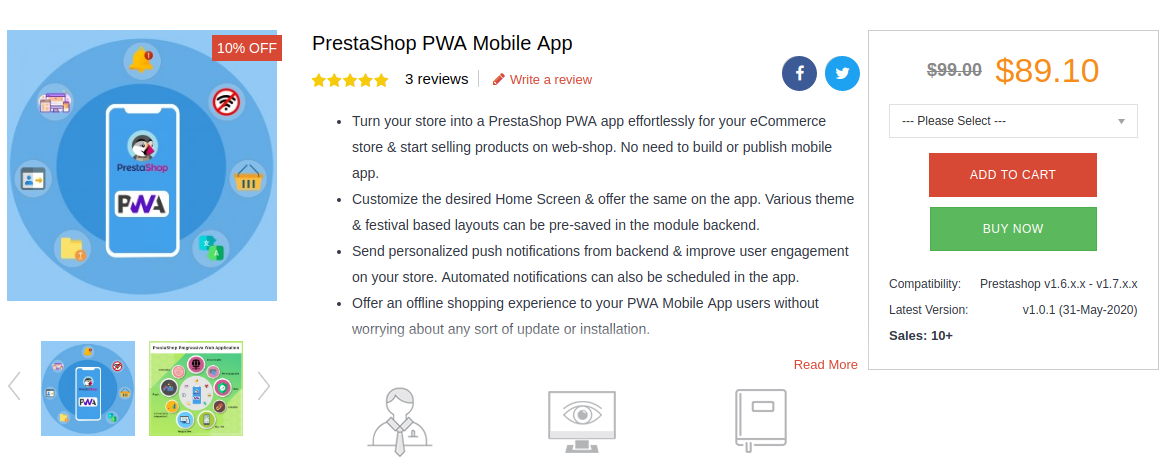
–> PrestaShop PWA Mobile App

Available for other platforms as well:

–> OpenCart PWA Mobile App

–> Magento 2 PWA Mobile App

–> WooCommerce PWA Mobile App

KnowBand, a leading eCommerce solution provider, has developed & launched a bunch of eCommerce PWA Mobile Apps for its clients & in this writeup, we are briefing on some of the top PrestaShop PWAs that have been developed by KnowBand in 2020. Here are those web apps:

1. Bony Liquors:

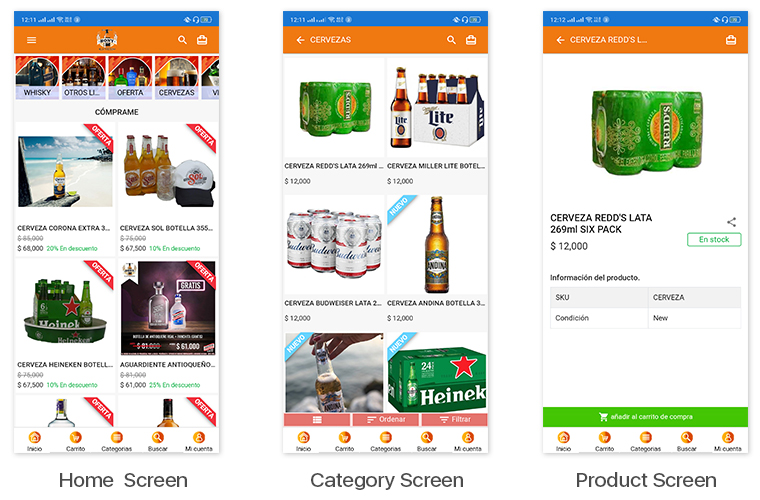
Bony Liquor is an online store based in Spain selling beverages, drinks, cigarettes & complimentary snacks to its customers. With the help of experts at KnowBand, they launched their PrestaShop Progressive Web App on their mobile website. Their PWA has many of the latest UI elements that keep the user experience at par. It also has social login options via Facebook & Google accounts. App users can easily shop for the products they need & pay via various payment modes.

The best thing about PWA is that mobile website visitors can install their web app from their mobile website itself. The installed PWA then looks & appears to work just like every other app on users’ mobile devices.

Check out PWA from below link: 

https://www.licoresbony.com/ (Copy and paste URL in the mobile browser and “Add To Home Screen”)

2. LibrairieZbookstore:

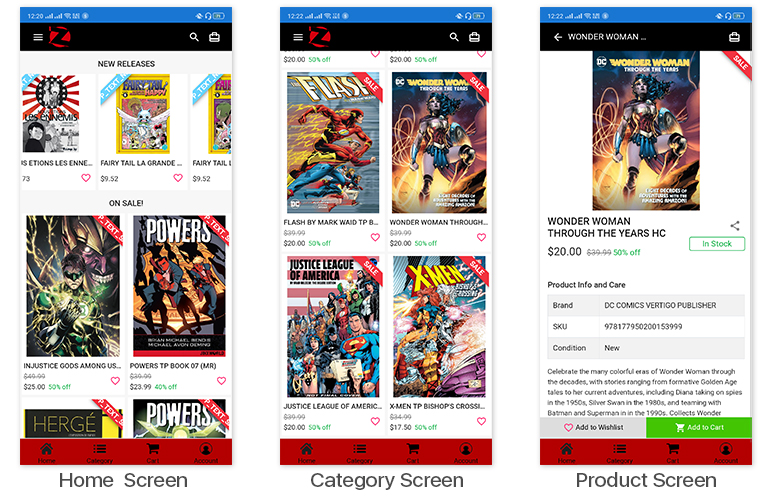
LibreairieZbookstore is an online PrestaShop store where customers can buy books & comics from a wide range of collections available at their store. KnowBand’s PWA module helped them launch their PrestaShop PWA that their store admin can customize anytime as per their needs. The PWAs built using KnowBand’s modules are white-label apps that allow the store owners to modify their apps by themselves without the need for coding.

Check out PWA from below link: 

https://librairiezbookstore.com/ (Copy and paste URL in the mobile browser and “Add To Home Screen”)

3. Orient Fashion:


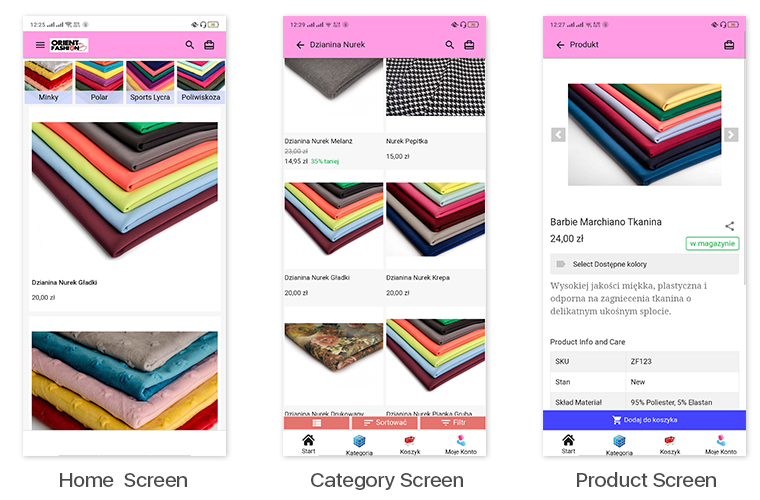
This eCommerce store is a multi-lingual & multi-currency store that sells fabrics & its cutouts to its customers. Their Progressive Web App built by KnowBand also supports all of the languages & currencies of their website. All of their coupons & vouchers on their website are also supported on their PrestaShop PWA.

Check out PWA from below link: 

https://orientfashion.pl/ (Copy and paste URL in the mobile browser and “Add To Home Screen”)

4. WowFresh:

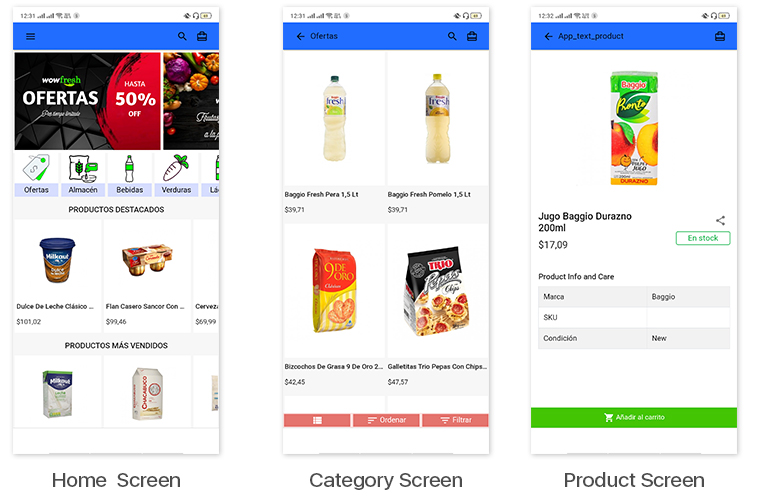
WowFresh is an online store built on PrestaShop that sells groceries, snacks & beverages. The store is mainly in the language Spanish. Its mobile site visitors can download its PWA from the ‘Add To Homescreen’ popup /tab on the mobile website.

Check out PWA from below link: 

https://wowfresh.com.ar/ (Copy and paste URL in the mobile browser and “Add To Home Screen”)

5. Kittags:

Kittags is a UK based eCommerce website that sells regular & customizable tags that can be attached to backpacks, strolley bags, luggage, etc. Its website is built on PrestaShop & the store admins at Kittags used the PrestaShop PWA Builder module, developed by KnowBand, on the backend of their website to automatically build & launch their Progressive Web App.

Check out PWA from below link: 

https://www.kittags.co.uk/ (Copy and paste URL in the mobile browser and “Add To Home Screen”)

PrestaShop PWA Builder Module By KnowBand:


The PrestaShop PWA Mobile App Maker module is an automated plugin that can be used on a PrestaShop website just like any other regular module. Upon installing the PrestaShop PWA module, the store admins get a full-fledged PWA on their mobile website (frontend) & its configuration dashboard on the website backend. They can hence customize their web app using the DIY tools provided on the backend dashboard.

Once the PWA mobile app is made live on the website, mobile website visitors can simply install the Progressive Web App on their mobile device by clicking on the ‘Add To HomeScreen’ button displayed on that mobile website.

The PrestaShop PWA Mobile App module is laced with a number of frontend & backend features. Some of those features include-

#1. Multi-Lingual & Multi-Currency App:

The web apps built using this PrestaShop PWA Maker module by default support multiple international currencies & languages including the RTL scripts like Arabic.

#2. Offline Mode Accessibility:

App users can seamlessly use your PWA even when they are unable to connect to the internet. This allows offline browsing of the pages & even the category pages that users had already visited before.

#3. Unlimited Push Notifications:

The PrestaShop PWA module by KnowBand keeps no limitations on the Push Notifications. Store admins can send an unlimited number of notifications to their app users. These notifications can be created from the backend of this module (installed on the website).

#4.  DIY Home-Page Layout Editor:

This DIY tool gives immense control to the store owners & admins when it comes to changing the home-page layout. Multiple components like sliders, banners & grids for product display & banner images are provided. Even the countdown-timer banner tool & recently accessed products slider is included in the list of components. Just drag & drop them to rearrange & configure each of the components without a hassle.

#5. Live-Synchronization:

This module keeps your PWA as well as your PrestaShop website in real-time synchronization with each other. It exempts you from having to manage your PWA manually.

#6. Social Login & Sharing:

App users can login into the app using their Facebook or Google accounts. Also, on every product page, quick sharing links are provided for multiple social media platforms.

#7. All Payment & Shipment Methods Support:

All of the Payment & Shipment methods active on your PrestaShop website will by default be active on your eCommerce PrestaShop PWA.

#8. One-Page Checkout:

To make the checkout experience convenient for the app users, a single page checkout screen is provided on which the app users can even select a pre-saved address. They can easily update the quantity of the product & add or remove coupon codes etc without having to navigate to any other page.

#9. Order Tracking:

This PrestaShop PWA Creator module even offers an order tracking feature to the app users. They can track their active orders from within the web app.

How easy is it to design Home-Page of PrestaShop Mobile App?

With the growing use of mobile apps, more businesses are willing to make extra efforts to stand out from their competitors. For eCommerce businesses, having a mobile app with regularly updating home-page design helps them to keep their customers engaged in a profitable way. Every time, a new offer/ new-arrival/ sale/ etc. is put up on their shopping app, making the customers aware of it can naturally boost their sales. This can be done by optimizing the home-page design as well (apart from push notifications & other campaigns) in PrestaShop Mobile App.

To make the home-page designing & re-editing easier for business owners, KnowBand offers eCommerce Mobile App Builder extensions. It not only helps eCommerce businesses with building their eCommerce Mobile Apps without a hassle & but also offers feature-rich backend & frontend for the benefit of businesses as well as app users. This article will shed light on how to use the PrestaShop Mobile App Creator Module to create, design & edit the home-page layouts.

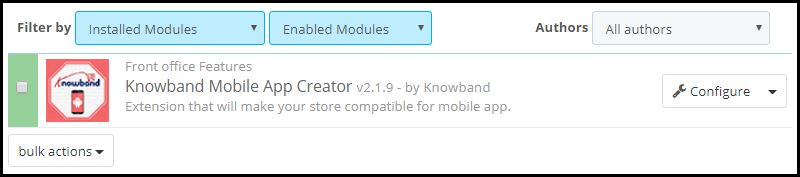
Once the PrestaShop Mobile App Builder module, by KnowBand, is installed on your PrestaShop website backend, the home-page of the app can be easily customized anytime from the backend of this module.

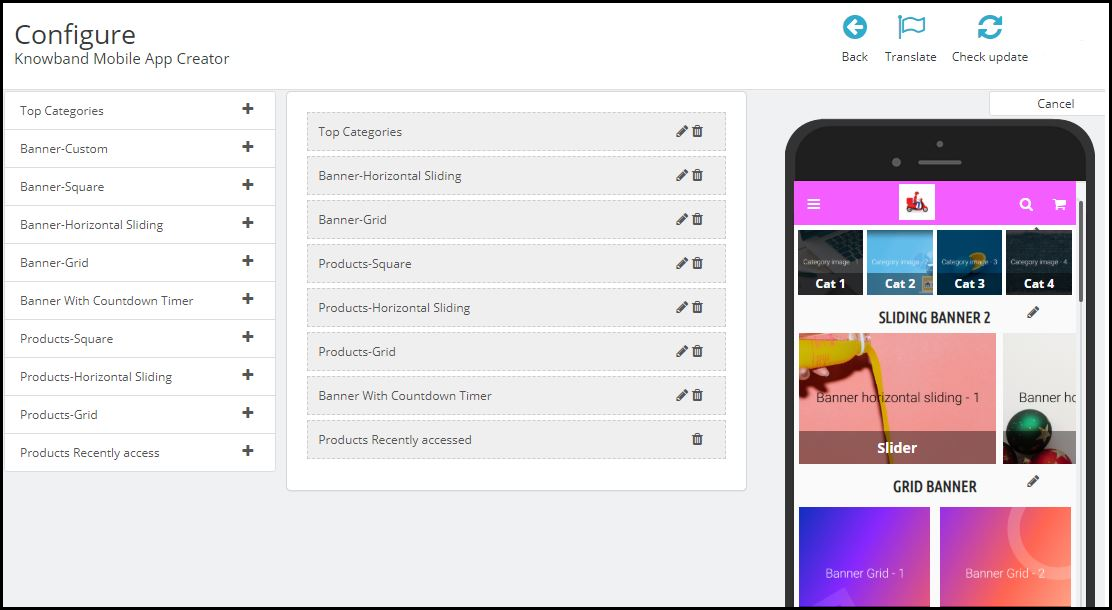
On clicking ‘configure’ on this app maker module, you are presented with various editing options.

-Select ‘Home-Page Layout’ from the side menu.

-To create a new layout, click the ‘add new layout’ button. You can also re-edit the existing layouts. Also, you can pre-design multiple layouts & keep any one of them active on your Mobile App (from the general settings on the side menu).

-While designing or editing your app home-page layout, you can use a maximum of 20 components out of the complete list of different components shown in the side menu on the left. Hence, you can also use a single component multiple times in your layout

-Upon adding these components, you can edit each one of them & organize them using the drag & drop feature.

The best thing is that all the edits that you make, instantly reflect on the demo app screen within the home-page customization tab itself.

Components To Design Your PrestaShop Home-Page Layout:

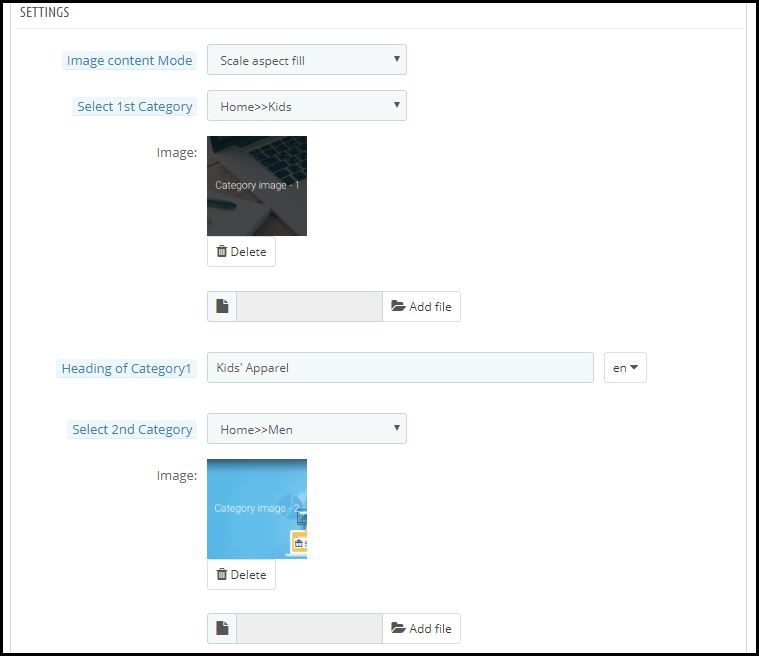
1. Top Categories:

In a slider form, you can display small image icons with redirect links to relevant categories on your eStore. You can add a total of 8 of such categories in a single ‘top category’ component.

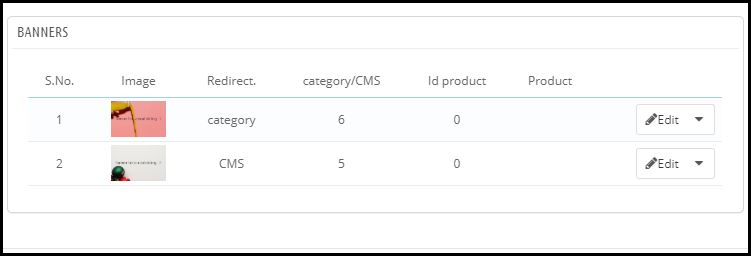
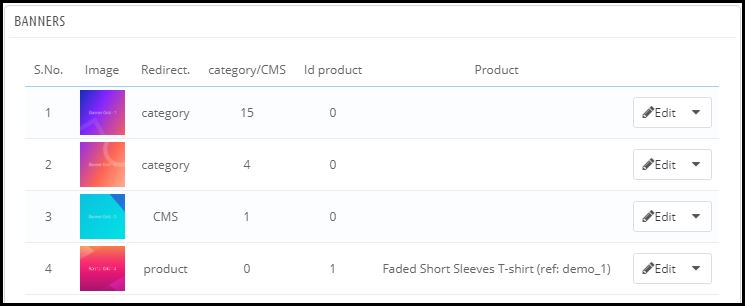
2. Square, Grid & Horizontal-Sliding Banners:


For all these 3 banner types, you can choose the redirect options among category pages, product pages, home-page & even any of the CMS pages. Add single or multiple elements under such banners according to your needs.

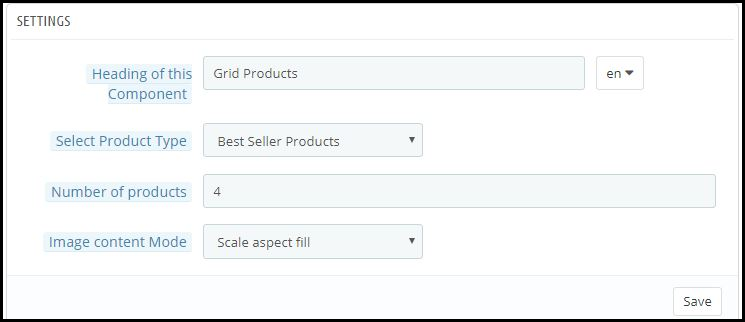
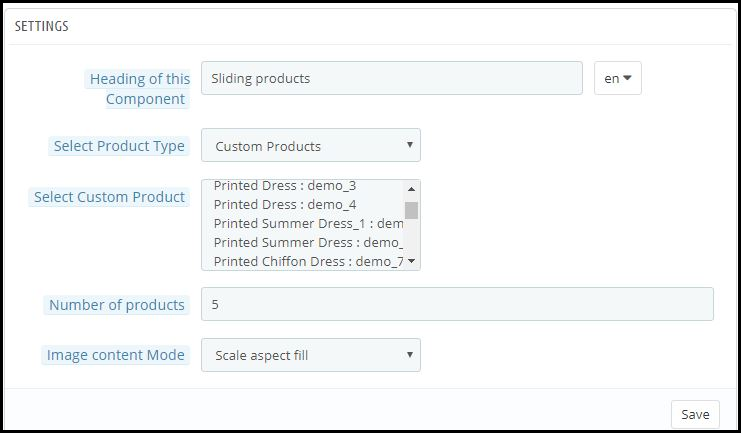
3. Square, Grid & Horizontal-Sliding Products:

With these 3 components, you can display singular products redirecting the app user straight to the specific product page. Because this PrestaShop App Builder Module also lets you set featured product listings. You can choose among following options to display the products:

● Best Seller Products
● New Arrivals
● Featured Products
● Special Products
● Products from a category
● Custom Products

4. Recently Accessed Products:

Including this component anywhere on the layout simply creates a horizontal slider for products displaying only the products that an app user has recently viewed. It is ideal to add this component only once in a home-page layout.

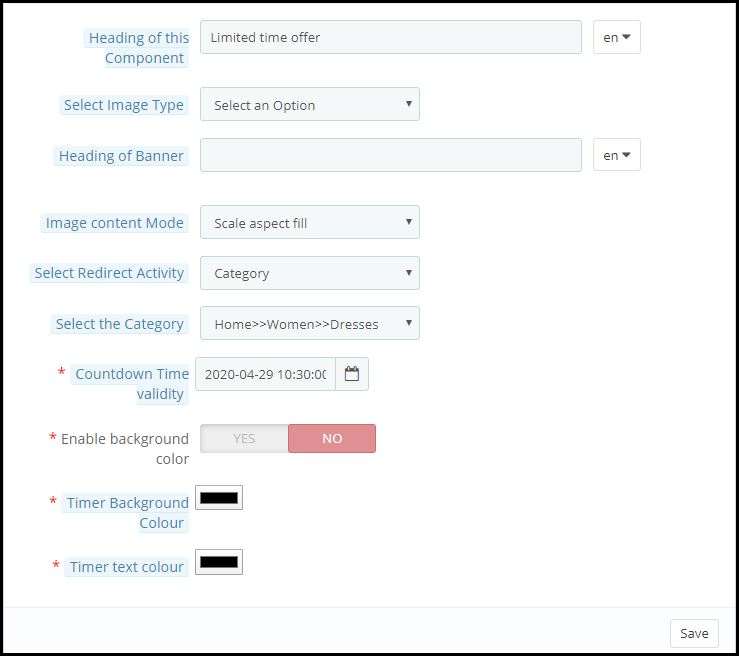
5. Countdown-Timer Banner:

This banner has an in-built countdown timer with all the necessary settings to make it your own. You can use it to inform your app users about an offer that is ending in a specified time. Having the timer running helps to engage the customers & to make successful purchases until the clock is running. Refer to the screenshot below for its settings.

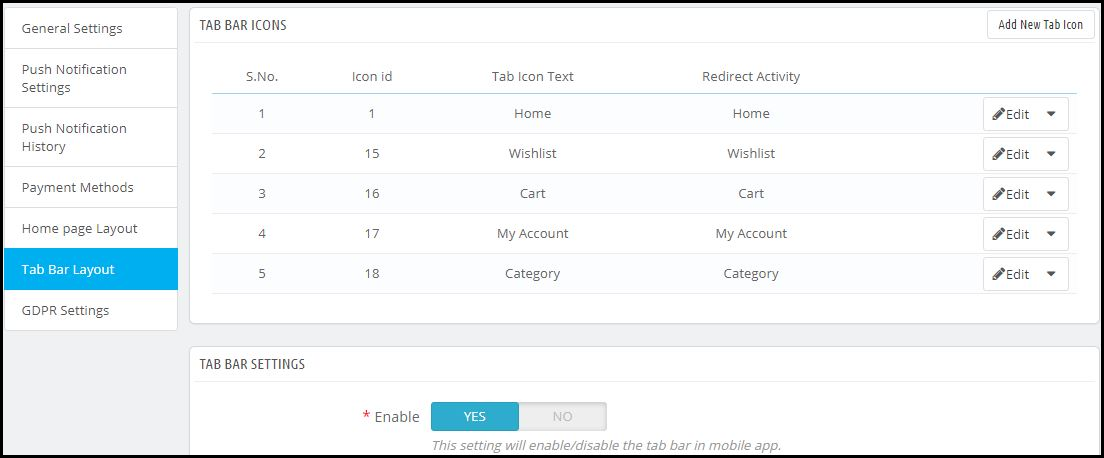
Apart from all the edits, you can make to design your PrestaShop App’s home-page, there is one more useful thing that’s present all the time on your app’s screen. It is the tab bar.

Tab Bar-Designing:

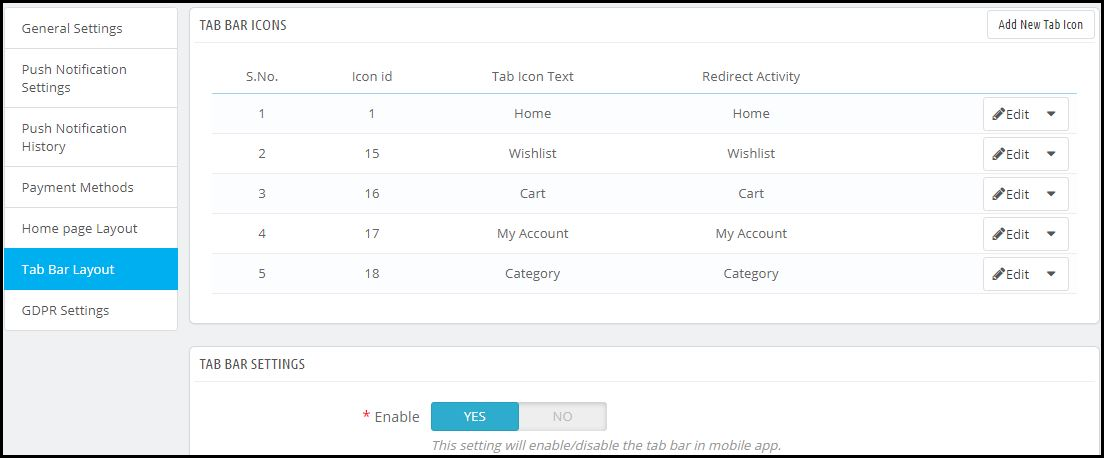
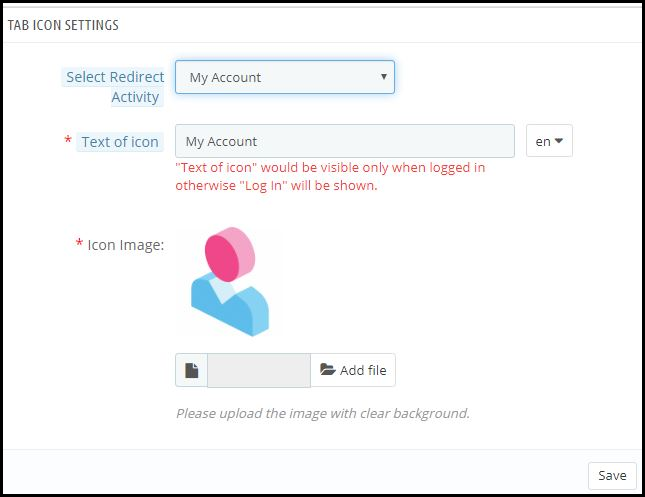
From the side menu of the PrestaShop Mobile App Maker module backend, you can also design the tab-bar. This design remains common for all the home-page layouts. Add 3 to 5 elements in your tab-bar with necessary links to make your PrestaShop App look more professional & user friendly.


Here is how the ‘My Account’ tab-bar setting looks like:


By now, you must have gotten an idea of how user-friendly it is to create, design & edit the home-page layout of a PrestaShop Mobile app using the PrestaShop Mobile App Maker module.

From time-to-time, eCommerce apps do have to change their home-page layout to complement different offers, seasonal sales, new arrivals & whatnot. Hence, to make it easier yet effective for the eStore owners, our experts at KnowBand have developed this PrestaShop Mobile App Maker Module. Those who wish to test out this module before purchasing can even try out its free version.

Some of our beautifully designed client app:

A) Body Organics App:

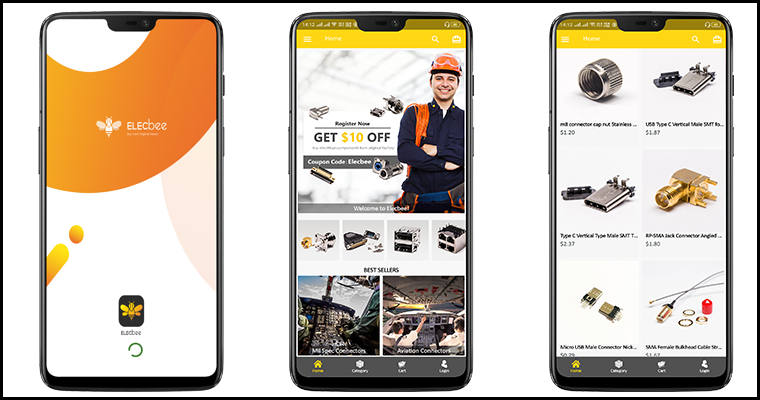
B) Elecbee App:

C) ChirulliShop App:

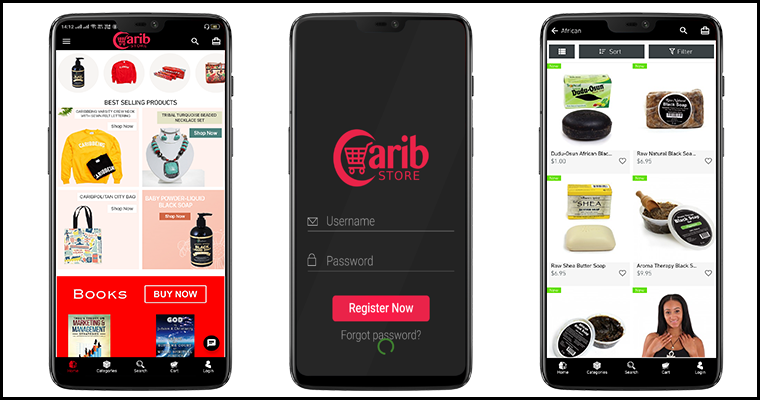
D) Caribstore App: 

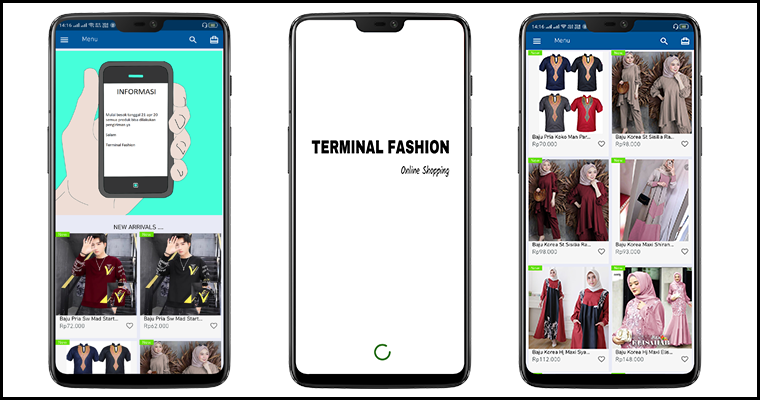
E) Terminal Fashion App:

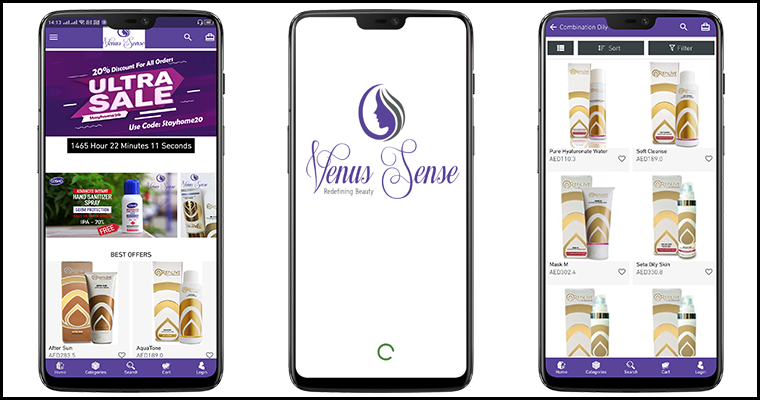
F) VenusSense App:

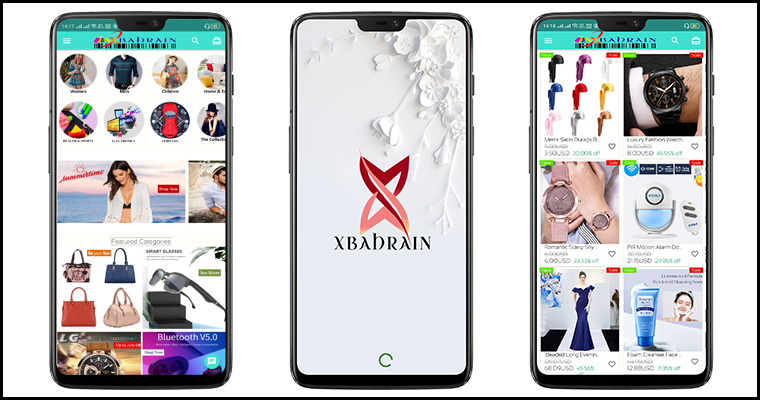
G) Xbahrain App:

If you still have any queries related to this, feel free to email us at support@knowband.com. We would be more than happy to assist you.

Also Read: 

How easy is it to send personalized Push Notifications in PrestaShop Mobile App?

How easy is it to send Push Notifications on PrestaShop Mobile Apps?

Keeping the customers always interested & engaged is what every online eCommerce business wishes for. Having a native mobile app (Android/iOS) is gonna ease the online shopping for users. User engagement has always been a prime requirement and to fulfill the same mobile apps have come up with the Push Notification tool.

Push notifications are directly received by the app users on their mobile devices. The only condition is that the app must be installed on the device. Push Notifications have been noted to perform way better in terms of engaging app users and retaining them when compared to email reminders/ newsletters & campaigns.

Push Notifications with PrestaShop Mobile App Builder

KnowBand offers personalized push notifications feature in PrestaShop Mobile App Builder. The module aims to launch Android and iOS apps for running PrestaShop store without any coding knowledge. This write-up will introduce you to the backend settings to configure and send Push Notifications on the user’s devices.

While keeping your app in sync with the website, this app maker module provides a wide array of front-end & back-end features. The ones for Push Notifications are stated below. Follow this article to know how you can create, automate & send these notifications with utter ease.

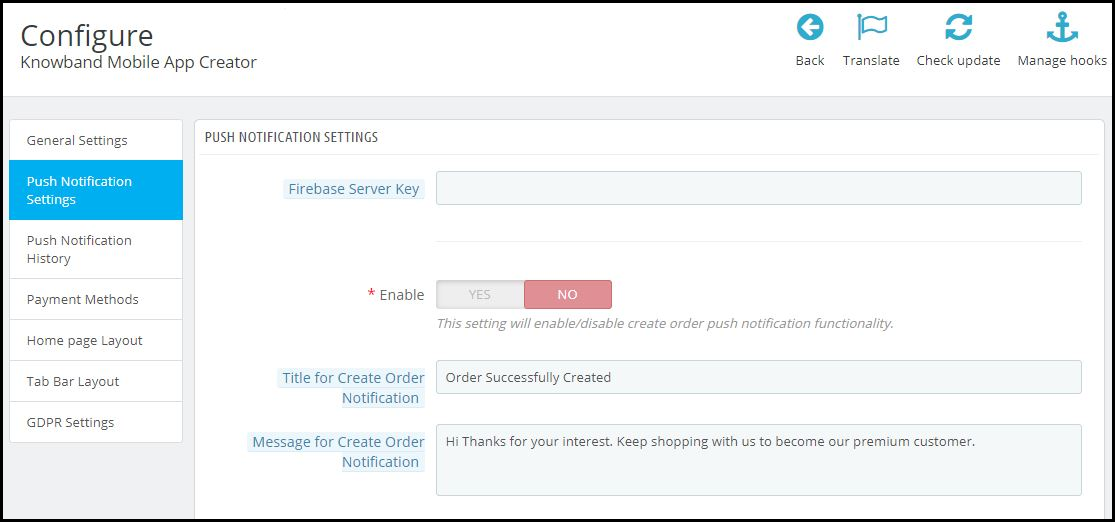
On the backend of your PrestaShop website, where you have the Mobile App Builder installed, hit ‘configure’. Now, from the backend of this module, navigate to the Push Notification Settings Tab from the side menu.

Push Notification Settings:

From the backend, you only need to enter your Firebase Server key (which will be provided along with apps), the rest is set for you to proceed. The PrestaShop Mobile App Builder by KnowBand provides an unlimited number of push notifications that e-merchants & admins can send to their app users.

Some of the automated Push Notifications are already provided by default for your convenience. These notifications can even be disabled/ enabled with just a toggle switch. Apart from those, you can create any other kind of Push Notification from this backend as well. Here is how you can configure them.

A) Successful Order Notification:

Using this notification setting, the store owner or the admin can set the title & message for successful orders. Each time an app user successfully places an order on the app, he/she will be greeted with this notification.

B) Order Status Push Notification:

This informs your customers about any status update on their active orders. Some examples of these are ‘order packed’, ‘order shipped’, ‘on the way’, ‘delivered’, ‘canceled’, etc.

Use the variable ‘{{STATUS}}’ anywhere in the message body to form your order status push notification.

C) Abandoned Cart Push Notification:

Automate the abandoned cart notification by setting the timer provided in this push notification setting. Every time an app user leaves his/her cart abandoned, then automatically this push notification is sent to him/her after the specified time.

Custom Push Notifications:

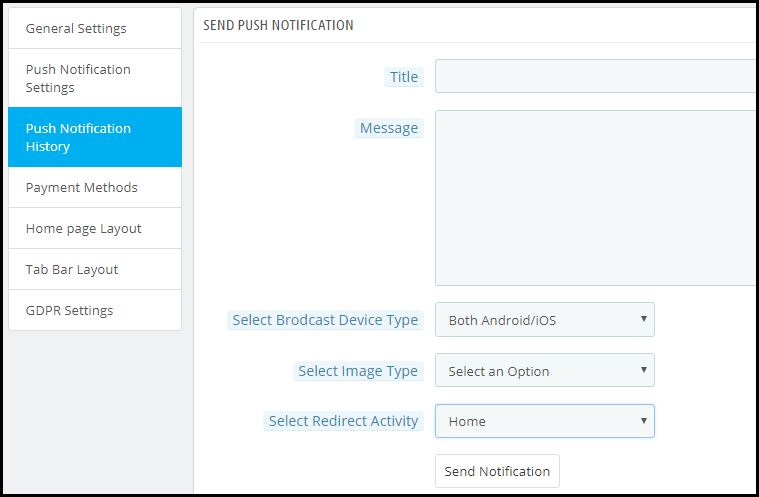
Apart from the above three pre-defined notifications elaborated above, admins can create any kind of self-designed Push Notification from this setting. From the side menu of this app maker module, select ‘Push Notification History’. Then using the ‘Send Notifications’ button on the top right of the page, create a new notification according to your needs.

You can even choose to selectively send these notifications to any of android/ iOS devices. Use attractive images to get more customer engagement using these notifications. Choose the redirecting activity to be any of the categories/ subcategories/ products or even the homepage of the app. These notifications get sent to all the app users once you hit send.

Push Notification History:


Keep a record of your previously sent notifications & their configurations by accessing the ‘Push Notification History’. You can even filter out the ones you want to view from the advanced search bar as shown in the screenshot above.

Conclusion:

Mobile push notifications are a major feature that makes an app stand out from the website. When used properly, these can lead to an exponential increase in customer retention & engagement rate. They help store owners to effortlessly boost their sales.

To make it even more convenient & effortless for the app admins, this PrestaShop Mobile App Maker module, by KnowBand, has most of the settings automated. Hence, the store owners don’t need to make even the slightest effort to yield great results.

For any further queries related to this module, reach out to the experts at KnowBand by emailing us at support@knowband.com. We would be delighted to assist you.

Also Read:

How easy is it to design Home-Page of PrestaShop Mobile App?

List of Other Modules Compatible with PrestaShop Mobile App Builder

Going by the name, PrestaShop Mobile App Builder is a readymade tool to convert your online eCommerce store into mobile apps. The plugin offers a chance for all PrestaShop store merchants to switch their website business on mobiles.

Every eCommerce business is somewhere in the struggle to improve their online presence among the surrounding competition. Having a mobile commerce application can simply help in targeting the huge audience & boost sales.

Creating Native Apps With This Extension

You will be amazed to know that PrestaShop Mobile App Maker is completely code-free. If you’re not a coder or more of a technical person, this is the perfect solution. The PrestaShop Mobile App extension allows anyone with a running PrestaShop website to own a pair of native apps. All you need to follow these 3 steps:

Step 1: Purchase the PrestaShop Mobile App Builder extension from KnowBand.

Step 2: Fill pre-requisite app details.

Step 3: Review apps & get them published on app stores.

Easy, right? Free of cost initial support & one-time payment with this plugin are cherry on the cake.

Other Compatible Modules

Every online business has a different set of audiences with separate requirements. This thought has been well kept in mind while designing the PrestaShop Mobile App Creator. The result of this is the module comes with endless possibilities of customization and integration. All you need is to just ask & our developers will make that work in apps.

Note: All sorts of custom changes are subject to additional costs based on the involved time & efforts. Although, the prices will be kept as reasonable and fair as possible.

Here is the list of a few modules which can be made compatible with PrestaShop Mobile App-

1. Product Size Chart

When it comes to purchasing a clothing item, online shoppers often have doubts regarding product size. They are not sure which size would be a perfect fit for them. This eventually leads to customers placing a return request later because of the size issue.

Let finding the appropriate size product not be a problem anymore for your visitors. The Product Size module adds a “View Size Chart” section on your product pages, with the help of which shoppers can check the measurements of a product for every size type. This ensures that your customers do not face trouble with the product size.

Get to know more from here.

Rough Cost Estimation: $80

2. Return Manager

One of the major concerns for eCommerce businesses is product returns. They cannot be eradicated, however, if managed well, can be reduced by a significant margin. Manage your returns without any hassle with the Return Manage module.

The module offers three types of return choices to your customers: Store Credits, Refund and Replacement. You can set up the return policies, set up the return terms and conditions, track your returns and do much more. The module not only helps you reduce your eCommerce return rate but also improves customer retention.

Get to know more from here.

Rough Cost Estimation: $300

3. Automatic Related Products

E-commerce businesses benefit a lot from cross-selling. It is one of the effective strategies implemented by them to increase their store sales. If you run an online business, you should follow it too.

Encourage cross-selling on your website with Related Products module. The module lets you display top-visited products, best sellers, new products and products based on a user’s history. You can customize the display position and filter the products to be displayed as per keywords and attributes.

Get to know more from here.

Rough Cost Estimation: $180

4. Preferred Delivery Time

Many times customers demand the product to be delivered at a specific date and time. Allow this facility to your customers with Preferred Delivery Time module.

The module lets you define a minimum delivery gap to allow customers to choose the preferred date and time. You can specify the time slots, the time cycle for delivery, and also exclude days on which the delivery won’t take place.

Get to know more from here.

Rough Cost Estimation: $180

5. Loyalty Points

A majority of online businesses run loyalty programs today. Loyalty Points module aims to improve customer retention on your website and also builds customer loyalty. It lets you provide loyalty points to your customers on some certain tasks like when they have shopped for more than the specified amount, when they have chosen a specific payment or shipping method, when a user successfully registers, or when a user places an order, etc.

Get to know more from here.

Rough Cost Estimation: $200

6. Product Availability Check by Zip Code

Let customers check right on the product page whether the product they desire to purchase is available for delivery at their location or not.

The module adds a Zip Code verification check on your product pages, using which the visitors can enter their area zip code and verify whether the item is eligible for delivery for the specified Zip Code.

Get to know more from here.

Rough Cost Estimation: $180

7. Store Locator

The store locator module encourages the self pick up facility on your website. Many a time, a product reaches the shipping centre on time but takes too long for the delivery. In such cases where customers want the product to reach them as soon as possible, they can choose for a self pick up.

The module lets you add your store addresses from the back-end which are available to the customers on the checkout page. They can filter the stores as per the distance and choose the nearby store accordingly.

Get to know more from here.

Rough Cost Estimation: $50

8. Auto Switch Language and Currency

If your business is set up internationally or you are planning to do so, the Auto Switch Language and Currency module is a must-have module for you.

The Auto Switch Language and Currency module change the language and currency as per the visitor’s location. It tracks the IP address of the visitors and automatically converts the website content into the native language.

The module helps you expand your business on a global level and makes it easy for outsiders to shop from your website.

Get to know more from here.

Rough Cost Estimation: $90

9. Affiliate and Referral Program

Affiliate and Referral Marketing has helped brands gain a lot of new customers and sales. What’s exciting about these programs is that they create a win-win situation for both the customer and the brand. The affiliate brings you customers and you offer them some incentives in return.

With Affiliate and Referral Program module, you can start a similar program on your store. The module allows users to register as an affiliate on your website. Once successfully registered, they can start referring your website to others and earn some exciting incentives for a successful referral. The affiliate can share the referral code, share a direct link, share the link via email, share the link on social media or share the voucher code with other people.

Get to know more from here.

Rough Cost Estimation: $250

10. Shipping Cost by Zip Code

This module lets you charge different shipping prices for different zones. The admin can specify the shipping price for different countries from the back-end. When a shopper enters the zip code in the address fields, he or she will be charged the shipping cost as per defined by the merchant.

Get to know more from here.

Rough Cost Estimation: $100

11. Search Auto-Suggest

The Search Auto Suggest module enhances the search functionality of your website. With the help of this module, you can display the product price right in the search suggestions (in the drop-down list) and also the product category under which the product falls.

You can customize the search bar and also track the searches performed by the user. You can also limit the number of products to be shown on the search results and also specify the minimum letters that need to be entered for the search system to work.

Get to know more from here.

Rough Cost Estimation: $270

12. Price Alert

Many times it happens that customers drop the purchase idea because they feel the product price is too high. Now with Price Alert module, the customers can specify the desired price for that product on the product page and get price alert over their email whenever there is a reduction in the product price as per what they wanted.

Get to know more from here.

Rough Cost Estimation: $100

13. Back in stock Notification

Online shoppers often get disappointed when they visit a website to purchase a product but find it out of stock. And they have to keep checking back multiple times to check its availability. Reduce this hassle with Back in stock notification module.

The module allows shoppers to subscribe to the product availability alert. Hence, if subscribed, the user will be immediately alerted about the product availability that it is back in stock so that they do not miss out on the purchase.

Get to know more from here.

Rough Cost Estimation: $100

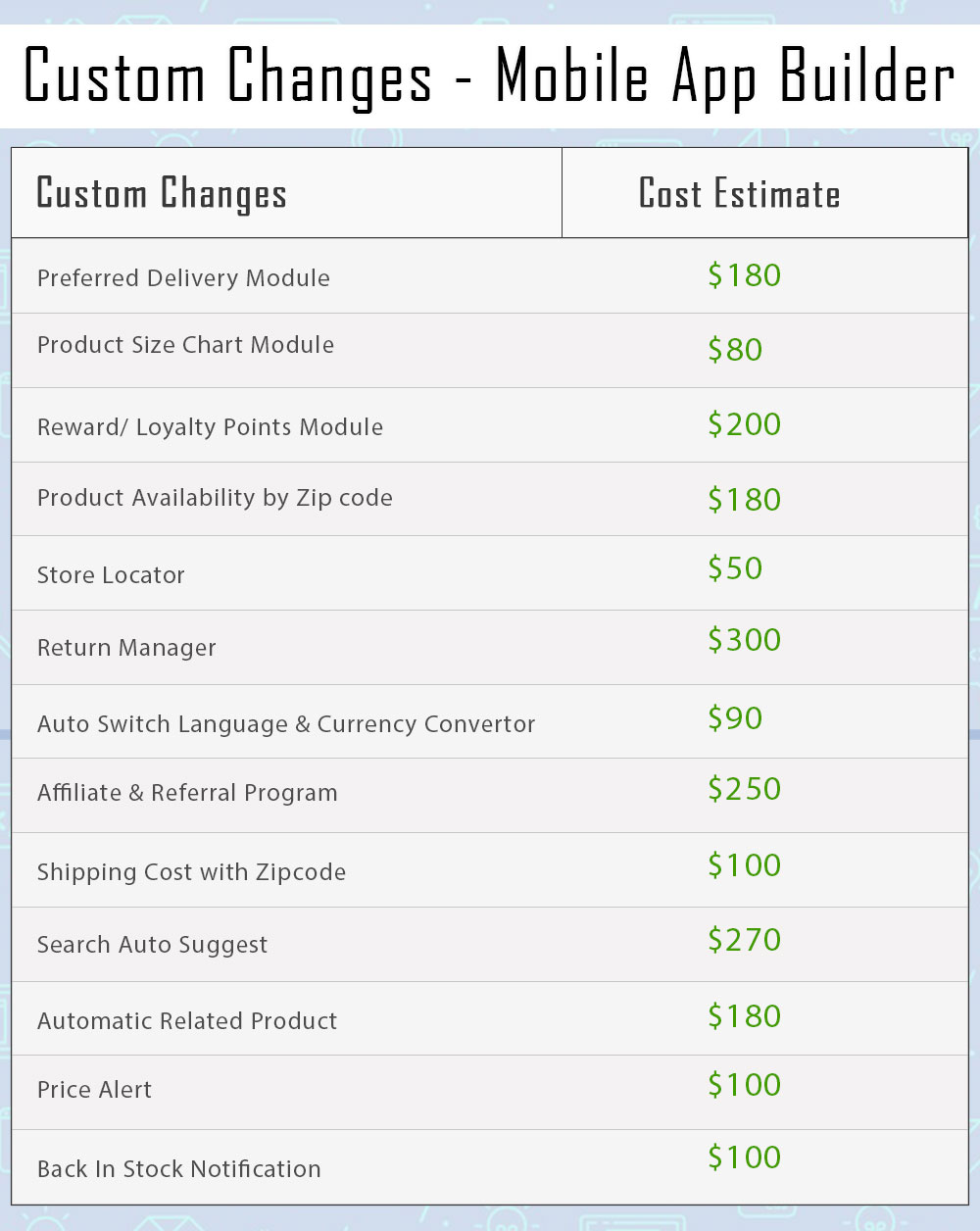
Summary of Custom Changes

Any confusion? Discuss with us on support@knowband.com

Make Online Booking System Convenient with PrestaShop Booking and Rental Mobile App

Transform your online booking PrestaShop website into a Mobile App, make your booking and reservation system easier than ever, and manage your online bookings effortlessly with the help of PrestaShop Booking and Rental Mobile App.

Mobile Apps have made the online experience way too smooth and convenient for customers. Today, people desire an app for every small need.

Why?

Because apps are easy to use and most importantly, time-saving. Unlike a website where a user has to first open Google, enter the URL and then do the required work, the mobile app makes it a one-click task.

Feeling the importance and high demand of mobile apps, Knowband has recently launched the PrestaShop Booking and Rental Mobile App for those PrestaShop website owners who are running an online booking website and require a mobile app for the same to make the online booking experience even better for their customers.

What is PrestaShop Booking and Rental Mobile App?

PrestaShop Booking and Rental Mobile App is a combination of our PrestaShop Booking and Rental system addon and the PrestaShop Mobile App Builder.

So instead of purchasing both the modules separately, we have formed it into one single module so that the merchants can enjoy the overall benefits by just purchasing the PrestaShop Booking and Rental Mobile App.

What does PrestaShop Booking and Rental Mobile App offers?

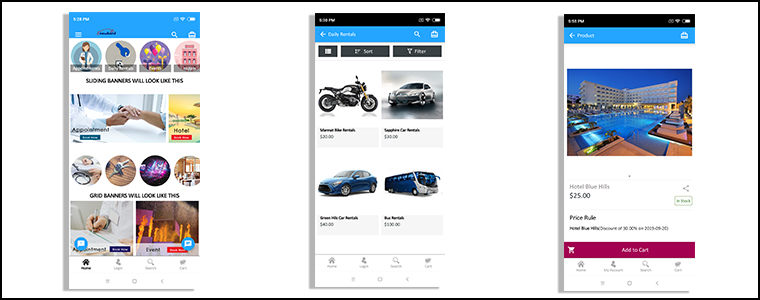
The PrestaShop Booking and Rental App helps you manage your online booking services, ranging from appointments and hotel bookings to daily and hourly rental services.

People are using online booking services on a daily basis. Booking a cab or a room or an appointment requires just a few taps. If you want to provide a similar booking convenience to your customers, PrestaShop Booking App is the one-stop solution for you.

Let’s look at the key features of PrestaShop Booking and Rental Mobile App.

Manage your Appointments

Taking appointments over the call can be hectic. Even if you have hired an assistant, the task can be daunting.

Get rid of the manual bookings and let your customers book an appointment as per their convenience right from the app with the help of PrestaShop Appointment Booking App.

Appointment configurations:

1. Allow customers to pick Home Service or Branch visit.

2. Specify the number of appointments that can be generated in a single day.

3. Set an initial price for the customers to avail the booking facility.

4. Mark your location on the map so that customers face no trouble in reaching your place.

5. Select the days for which the customers can generate an appointment.

6. Similarly, you can define the time slot as per your availability.

7. Adjust the booking price for different time slots.

Manage your Hotel Bookings

Let people book rooms without any inconvenience and manage your bookings comfortably with PrestaShop Hotel Booking App.

Hotel booking configurations:

1. Add your rooms without any hassle.

2. Define the room type, for example, if it is a single bedroom or double bedroom.

3. Provide a category to your rooms.

4. Set an initial price for the customers to book a room.

5. Mention the date range within which customers can book a room.

6. Adjust the booking price for different days.

7. Adjust the booking price for different room types.

8. Add hotel amenities so that customers get a clear idea of what they can expect in your hotel and rooms.

9. Specify the check-in and check-out time.

10. Mention the minimum and the maximum number of adults and children allowed.

11. Display hotel ratings to help customers make a better choice.

12. Mention the minimum and maximum numbers of days for which the customers can book rooms.

Manage your Rental Bookings

Rental bookings are always high in demand, be it a car rental for a vacation, bike rental for a small trip or costumes rental on Halloween. If you have a rental business, going digital with the mobile app will add a huge sum to your revenue.

Daily Rental configurations:

1. Specify the number of bookings for a day.

2. Set an initial booking price.

3. Mark the days on which the daily rental service can be availed.

4. Specify the time slot for booking a daily rental.

5. Adjust the booking price as per the time slots.

6. Mention the facilities that would be provided.

Hourly Rental configurations:

1. Specify the number of bookings for a day.

2. Set an initial booking price.

3. Specify the minimum and maximum hours to book an hourly rental service.

4. Mark the days on which the hourly rental service can be availed.

5. Adjust the booking price for different days.

Conclusion

PrestaShop Booking and Rental Mobile App is a perfect solution to deal with the difficulties in managing your online bookings.

Delight your customers by announcing your mobile app and enhance their booking experience. It also makes the perfect opportunity for you to double up your sales.

Try out the PrestaShop Booking and Rental Mobile App today!

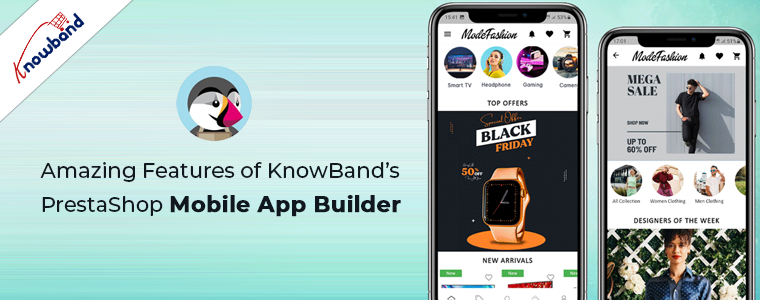
Amazing Features of KnowBand’s PrestaShop Mobile App Builder

Want to create apps for your PrestaShop website? We got a complete no-code App Builder for you!

There were times when PrestaShop Mobile Apps were only for big brands or flourished ones. E-commerce newbies & startups used to rely on their website only. But, time has changed now. Every PrestaShop website owner is looking forward to own mobile apps irrespective of their size. The Mobile Apps are playing a vital role in strengthening the brand & building a loyal customer base with minimal efforts. Every store owner is looking to grab this opportunity & grow their business on another level.

KnowBand, in this concern, has brought an automated solution with PrestaShop Mobile App Builder. It is a readymade framework designed to build native Android & iOS apps for your PrestaShop website without coding. The PrestaShop Mobile Apps are connected with your website in real-time. Moreover, the module provides complete backend panel control into your hands & thus you can manage the app functionalities with ease. Now let’s take a glance at some of the outstanding & sale-boosting features of PrestaShop Mobile App Builder:

1. Easy Installation:

Our PrestaShop Mobile App Builder is very easy to install & configure. All you need to do is to upload the zip file on your website & configure the backend panel from there.

2. Completely Native Mobile Apps

The performance of your PrestaShop Mobile App among worldwide mobile shoppers matters a lot as it would be a deciding factor for them to purchase or not. We all want shopping apps to be smooth & fast. The PrestaShop Mobile App Builder offers 100% native Android & iOS app which ensures hassle-free performance on all sorts of user’s devices.

Furthermore, the apps are built with the most advanced mobile app development technology Flutter, which ensures advanced compatibility and smooth user experience for the customers.

3. Customizable Home Screen Layout

The PrestaShop Mobile App Maker offers a dynamic home screen whose layout can be customized & configured from backend. The store admin can create & save multiple themes & festive based layouts in the backend. The positioning of various elements can be altered with just drag & drop feature.

4. Alluring Color & Font Options

Match your app colors & font styles with the website from backend panel of PrestaShop Mobile App Maker. Our Module allows you to choose theme color, background color, button color & button text color for your app.

5. Compatible with All Handheld Devices

Our PrestaShop Mobile App Creator provides error-prone & fully tested apps which run perfectly on all sorts of Android & iOS smartphone as well as tablets.

6. 100% Website & App Synchronization

Your PrestaShop Mobile Apps will be fully connected with your website & thus any change you make on the store will be reflected on the Mobile App in real-time.

7. Multi-lingual & RTL Support

The Mobile App Builder offers both multi-lingual & RTL writing support in the Android & iOS apps. The e-merchants can easily enhance the scope of their business worldwide.

8. Instant Login Options

The PrestaShop Mobile App Creator offers easy & quick options for user sign-in & registration. The mobile shoppers can login using Google, Facebook, Phone Number & Fingerprint verification. Moreover, the iOS App users can log in using Face ID which makes the login process hassle-free and simpler than ever.

9. Simplified Checkout

Few relevant details on a single screen of PrestaShop Mobile App Maker make the order submission easier for the users.

10. Shipping Methods Support

The PrestaShop Mobile App Supports all sorts of website shipping methods. This makes the trade between seller & buyer completely effortless.

11. All Product Type Support

The mobile apps for PrestaShop eCommerce website support all types of products on the Mobile Apps like single, bundled, grouped, configurable & virtual (downloadable) products.

12. Unlimited Push Notifications

Sending push notifications to your app users about deals/offers/discounts would definitely grab their immediate attention & close more sales for your store. The PrestaShop Mobile App Maker offers the option to send push notifications on the apps from module backend. The store admin can send following sorts of notifications on the Apps:

Automated Order Creation Notification
Automated Order Status Update Notification
Automated Abandoned Cart Notification
Custom personalized Notification

Moreover, the users can check all the previous notifications in the newly added notification tab in the app. This will make sure your customers are up-to-date concerning all the offers and informational notifications.

13. 24*7 Chat Options

Keep your users close to you with the WhatsApp chat option in your PrestaShop Mobile Apps. The users can directly contact you regarding any query/concern & get assistance 24*7.

14. Mobile Coupons & Vouchers Support

The PrestaShop Mobile App Maker offers support to all sorts of website coupons & vouchers on mobile apps as well. The amazing deals & discounted price would definitely keep the app users engaged & even compel them to re-visit app for more purchases.

15. Website Payment Experience on Mobile App

Offer the website payment experience on your PrestaShop Mobile App as well. The PrestaShop Mobile App Maker supports all sorts of website payment options on the mobile app.

16. New Payment Method Integration

The PrestaShop eCommerce Mobile App Creator comes with the flexibility to add new payment methods in the apps. All sorts of native payments can be integrated over a fair amount of fee.

17. Real-time Order Tracking

The Mobile Apps with PrestaShop Mobile App Creator offers effective real-time order tracking options. The updated status of previous order delivery gets updated in real time.

18. White Label Apps

The PrestaShop Mobile App Builder for Android & iOS allows the store owners to display the website logo on the header of the apps. This will make your app branded & popularize the same among worldwide mobile shoppers.

19. Social Sharing

The products from the app can be shared on multiple social networks by the users. It will grow the social reach of your store & lure potential leads.

20. Gamified E-Mail Subscription Pop-Up

Offer a gamified e-mail subscription pop-up on the mobile apps with an interactive spin-wheel interface. You need to install KnowBand’s PrestaShop Spin & Win module on your website.

21. Layered Navigation

The PrestaShop eCommerce Mobile App Maker makes the product search easier with multiple filters & sort options. The users wouldn’t face any issue while searching the right product.

22. Login-Sign up Pop-up:

The mobile apps encourage the customer to complete the login process in the app. The users can login via the login/sign-up pop-up available on the home screen of the app.
Furthermore, this not only ensure easy login process for the customers but also helps the E-merchants to get the customers’ emails for marketing purposes.

👉Explore the Module with Our Video Guide