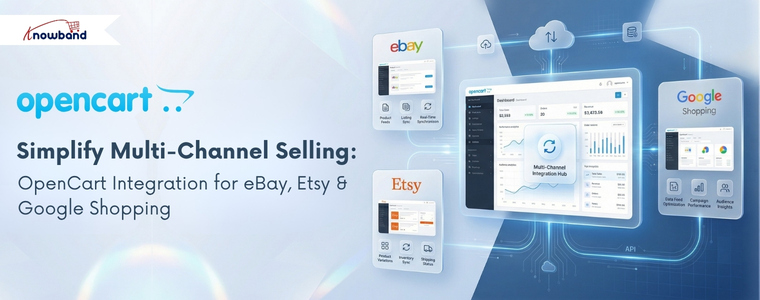
OpenCart Multi-Channel Integration: Sync Google Shopping, Etsy, and eBay from One Store

Introduction: One Store, Three Powerful Sales Channels

Research from Shopify’s 2024 Commerce Report confirms that merchants selling on three or more channels generate significantly more revenue than single-channel sellers. The logic is simple that more visibility means more buyers. But managing separate platforms manually leads to stock errors, missed orders, and wasted hours.

So here is the real question: What if you could manage Google Shopping, Etsy, and eBay all from your OpenCart backend without logging into each platform separately?

That is exactly what the right set of OpenCart integration modules makes possible. Knowband builds each of these connectors specifically for OpenCart merchants who want reliable, low-maintenance multi-channel selling.

Marketplace selling has become an important part of the multichannel ecommerce strategy. According to a 2024 DHL report, 63% of ecommerce businesses sell on at least three online platforms, showing how common it has become for merchants to reach customers through more than one sales channel. In the case of OpenCart, while the opportunity to explore existing marketplaces may help reach a wider discovery of products, it also presents the problem of maintaining consistency in listings, inventory, and orders. This is where selling on the top marketplaces with an OpenCart store can be considered as part of a multichannel selling approach.

OpenCart Google Shopping Integration Module

The OpenCart Google Shopping Integration module connects your product catalog directly to Google Merchant Center. This module auto-generates a Google-compliant XML feed, maps your categories to Google’s taxonomy, and keeps prices and stock levels updated in real time.

Key Highlights

  • Automated feed generation: No manual XML exports needed
  • Real-time price and inventory sync: Supports real-time updates from your store to Google Shopping
  • GTIN, MPN, and brand field support: improves product eligibility and visibility
  • Feed scheduling: submit updates hourly, daily, or weekly automatically

Why Google Shopping  Matters for your Opencart Store

Google Shopping targets buyers who are already searching for your product. A clean, accurate feed from the OpenCart Google Shopping Module puts your listings in front of high-intent shoppers without requiring a large ad budget. Furthermore, free listings alone can drive consistent, qualified traffic back to your store.

OpenCart Etsy Marketplace Extension

The OpenCart Etsy Marketplace Extension bridges your OpenCart catalogue with Etsy’s marketplace, which attracts over 90 million active buyers looking for unique, handmade, and vintage products. It handles Etsy’s specific listing requirements,  custom variations, renewal cycles, and category tags, all managed from OpenCart.

Key Highlights

  • Product variation sync: Maps OpenCart options like size, color, and material to Etsy listing variants
  • Listing renewal management: Provides many synchronisation features like relisting, listing, and many more
  • Tag and category mapping: Pulls relevant keywords from OpenCart to improve Etsy search visibility
  • Order import: Etsy orders flow directly into your OpenCart dashboard

Why Etsy Marketplace Matters for Your Opencart Stores

Etsy’s audience actively searches for products they cannot find on mainstream platforms. If your store carries handmade, customizable, or niche items, this extension puts them in front of exactly the right buyers. Moreover, centralised order management means you never lose track of an Etsy sale again.

OpenCart eBay Marketplace Connector

The OpenCart eBay Marketplace Connector, also referred to as the OpenCart eBay Marketplace Extension,  links your OpenCart store to eBay’s global marketplace, one of the highest-traffic e-commerce platforms worldwide. Furthermore,  automates product listing, bidirectional inventory sync, and order management between both platforms.

Key Highlights

  • Bulk product listing: List your entire OpenCart catalogue to eBay in one action
  • Bidirectional inventory sync: A sale on eBay instantly updates stock in OpenCart
  • Automated order import: Ebay orders appear in your OpenCart backend without manual entry
  • Pricing rules: Apply platform-specific markups to account for eBay fees automatically

Why eBay Matters for Your Store

eBay draws buyers who compare prices across sellers before purchasing. Getting your products listed there increases competitive visibility significantly. Furthermore, the OpenCart eBay Marketplace Extension ensures your stock numbers stay accurate across both platforms, eliminating the risk of overselling.

Why Running All Three Together Makes Sense

Each platform serves a different buyer intent. Google Shopping captures search-driven traffic. Etsy attracts niche and handmade product seekers. eBay pulls in price-conscious, high-volume shoppers. Together, they cover a wide spectrum of the buying journey.

When all three connect to a single OpenCart store, inventory updates once and syncs everywhere. Orders from all channels land in one dashboard. There is no switching between platforms, no spreadsheet reconciliation, and no overselling risk.

Conclusion

Multi-channel selling is no longer optional for growing OpenCart stores; it is the standard. The OpenCart Google Shopping Integration Extension, the OpenCart Etsy Marketplace Extension, and the OpenCart eBay Marketplace Connector each solve a specific visibility problem. Together, they turn your OpenCart store into a fully connected, automated sales hub.

Start with the channel that fits your product type best. Then expand. The infrastructure is already there

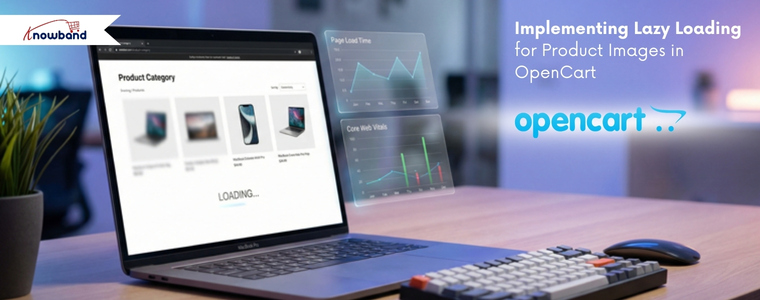


Implementing Lazy Loading for Product Images in OpenCart

In today’s internet-driven world, users expect websites to load instantly. Customers want pages to load quickly when they visit your OpenCart website. Customers may become irritated, and your business may lose revenue if your product pages take too long to load, especially on mobile devices where internet rates may be slower.

Large or numerous graphics are frequently the primary cause of slow page loading. Product photos might be big files, but they are an essential component of any e-commerce website. Lazy loading can help with it.

The Performance Challenge in eCommerce Sites

Moment’s eCommerce spots are veritably visual. A standard order runner can have

  • 20-50 pictures of the product
  • Banners
  • Thumbnails and icons
  • Sections on related products

The browser will need to load each image before the page is completely interactive if all of these are loaded at once. This leads to:

  • First Contentful Paint (FCP) at a slower pace
  • Increased Interactive Time 
  • Poor performance on mobile devices
  • A higher server load
  • Increased rates of bounce

The user experience will be significantly impacted by this, particularly on slower networks.

What Is Lazy Loading?

The technique known as “lazy loading” delays the loading of images (or other content) until they are truly required, which is typically when a user is ready to view them by scrolling into view. Lazy loading waits until the user is ready to view the image before loading it, as opposed to loading all the images at once.

Lazy loading has the following advantages:

  • Bandwidth conservation
  • Better performance on mobile devices
  • Improved SEO and essential web elements
  • Quick loading of the first page

When many of the images may load simultaneously on product pages, lazy loading is especially helpful.

Why Lazy Loading Matters

Imagine looking through an item catalogue. Even if the product images are far below the fold, your browser will try to load them all at once when using traditional loading. Only the images that are in or near the viewable portion of the screen will load initially when using lazy loading. The remaining images will gradually load as the viewer scrolls.

Both your clients and search engines like Google, which like websites that load quickly, will benefit from a quicker and more seamless experience.

Real-World Example: Category Page Without Lazy Loading

Consider this example:

24 products on a category page, Each thumbnail = 150 KB, Total image weight = 3.6 MB

Before even loading banners, CSS, and JavaScript, the browser has to download close to 4 MB of images.

Now consider that the visitor only scrolled halfway through the page. Half the images were never viewed – but downloaded anyway. Therefore, this is wasted bandwidth and 0This is where lazy loading comes in.

Lazy Loading and Core Web Vitals

Web Vitals. The following are directly impacted by large images:

  • Paint with the Largest Content (LCP)
  • Shift in Cumulative Layout (CLS)
  • Next Paint Interaction (INP)

Correctly loading images slowly will enhance performance metrics, particularly on product and category listing pages.

Still, there’s one important thing to keep in mind

 Images above the pack, like the primary product image on a product detail runner, should n’t be lazy loaded.

When to Apply Lazy Loading?

Lazy loading is best suited for:

  • Product listing pages
  • Category pages
  • Blog listing pages
  • Manufacturer pages
  • Upsell sections

It might not be the best fit for:

  • Hero banners above the fold
  • Main product image on the product page
  • Critical branding visuals

How to Implement Lazy Loading in OpenCart

Method 1: Lazy loading in native browsers

Modern browsers use the loading=”lazy” property to provide built-in lazy loading

Example:

<img src=”image.jpg” loading=”lazy” alt=”Product Image”>

OpenCart Steps:

  • Open your theme file:
Version File Path
OpenCart 2.x catalog/view/theme/your_theme/template/product/category.tpl
OpenCart 3.x catalog/view/theme/your_theme/template/product/category.twig
OpenCart 4.x catalog/view/template/product/category.twig
  • Locate the product image <img> tag.
  • Change it as follows:

Before:

<img src="{{ product.thumb }} alt="{{ product.name }}"  width="300"  height="300"

     title="{{ product.name }}">

After:
<img src="{{ product.thumb }}"loading="lazy"  alt="{{ product.name }}"  width="300"  height="300"     title="{{ product.name }}">

That’s all. JavaScript is not necessary. Furthermore, this is the most easy and cleanest way.

Method 2: Using lazysizes (Best for Older Browser Support)

Steps:

  1. Add the lazysizes script:
    <script src="https://cdnjs.cloudflare.com/ajax/libs/lazysizes/5.3.2/lazysizes.min.js" async></script>
  2. Open your theme file based on the OpenCart version mentioned in Method 1 and update the image markup:
  • Before:
    <img src="{{ product.thumb }}" class="lazyload" width="300" height="300" alt="{{ product.name }}">
  • After:
    <img data-src="{{ product.thumb }}" class="lazyload" width="300" height="300" alt="{{ product.name }}">

Method 3: Using Intersection Observer API (Advanced Control)

Modern JavaScript API for better control.

Example:

const images = document.querySelectorAll(“img[data-src]”);

const observer = new IntersectionObserver((entries, observer) => {

  entries.forEach(entry => {

if (entry.isIntersecting) {

   const img = entry.target;

   img.src = img.dataset.src;

      observer.unobserve(img);

}

  });

});


images.forEach(img => observer.observe(img));

This method gives full control over loading behaviour.

Important: AJAX-Based Product Filtering

When products are loaded dynamically via AJAX:

Native loading=”lazy” works automatically.

However, ifyou are using lazysizes, Intersection Observer then You must re-trigger lazy loading after AJAX content loads.

Example:

document.addEventListener('ajaxComplete', function() {

    lazySizes.autoSizer.checkElems();

});

Otherwise, newly injected images may not load correctly.

The Best Methods for Lazy Loading in OpenCart

✔ Avoid loading the images above the fold.

✔ Make sure your images are the right size; avoid using thumbnails that are too big.

✔ Always use PageSpeed Insights to test; optimiseoptimize images to WebP format.

✔ Always test with PageSpeed Insights

✔ After making changes to the template, clear the OpenCart cache.

Measuring Performance Before and After Implementation

To evaluate the impact of lazy loading, follow these steps:

Before Implementation

Test your category page and record the following metrics:

  • Page size
  • Page load time
  • Core Web Vitals scores

After Implementation

Run the same tests again and compare the results. You should observe:

  • Reduced initial load time
  • Lower Total Blocking Time (TBT)
  • Improved Lighthouse performance score

The implementation options outlined in this guide, from native HTML attributes to lazysizes and the Intersection Observer API, offer solutions for every level of technical complexity. Whether you are maintaining a small boutique store or managing a high-traffic multi-category catalogue, there is an approach that fits your needs. Start with Method 1 for instant results, and build up to more advanced methods as your requirements grow.
Performance optimisation is not a one-time task as it is an ongoing commitment. Pair lazy loading with image compression, WebP conversion, and proper caching to unlock the full potential of your OpenCart store’s speed.

About Knowband

Knowband is a trusted eCommerce plugin and extension provider with years of experience helping online merchants build faster, smarter, and more feature-rich stores. Whether you run your store on PrestaShop, OpenCart, Shopify, WooCommerce, Magento, or any other major platform, Knowband offers a wide range of ready-to-use plugins and extensions that help you enhance functionality, improve performance, and deliver a better shopping experience, without needing to build from scratch.

Beyond plugins, Knowband also offers comprehensive website development and mobile app development services. Whether you need a fully custom eCommerce storefront built from the ground up, a tailored mobile shopping app for iOS and Android, or a bespoke integration with your existing systems, Knowband’s team of developers has the expertise to bring your vision to life.

If you are looking to optimize further your OpenCart store, or any other eCommerce platform, explore Knowband’s plugin marketplace or get in touch with our team to discuss a custom solution tailored to your business goals.

Contact us at support@knowband.com for custom plugin development, website development, and mobile app development services.

Expand Your Store’s Reach by Integrating eBay, Etsy, and Google Shopping with Knowband’s Connectors

In the fast-paced world of eCommerce, reaching the right audience is crucial for the success of your online store. With fierce competition on platforms like Prestashop, OpenCart, WooCommerce, and Magento 2, relying solely on your website may limit your sales potential. That’s where multichannel selling comes into play, allowing you to expand your store’s visibility across leading platforms like eBay, Etsy, and Google Shopping.
If you’re looking to seamlessly integrate your online store with these platforms, Knowband offers powerful solutions. Our eBay Connector for Prestashop, Etsy Connector, and Google Shopping Connector extensions enable effortless integration, helping you unlock the full potential of multichannel selling.

Let’s explore how these connectors can help you scale your business and maximize profits.

Why Multichannel Selling Matters!

Before diving into the benefits of Knowband’s connectors, it’s essential to understand why multichannel selling is a game-changer for eCommerce stores.

Increase Visibility:

Listing your products on multiple platforms increases your store’s exposure. Moreover, platforms like eBay, Etsy, and Google Shopping attract millions of shoppers daily, ensuring your products reach a broader audience.

Diversify Revenue Streams:

Relying on a single sales channel can be risky. On the other hand, by expanding to multiple platforms, you reduce the risk and tap into new revenue streams.

Build Trust and Credibility:

Established platforms like eBay and Etsy offer a trusted shopping experience. Thus, by listing your products there, you gain instant credibility with potential buyers.

Targeted Audiences:

Each platform has its own user base. Instance, eBay attracts bargain hunters, Etsy appeals to handmade and vintage enthusiasts, while Google Shopping is ideal for comparison shoppers. By listing on these platforms, you can target different segments of shoppers.

Streamline Your Multichannel Selling with Knowband’s Connectors:

At Knowband, we understand the challenges of managing products, inventory, and orders across multiple platforms. That’s why we’ve developed easy-to-use connectors for eBay, Etsy, and Google Shopping that seamlessly integrate with your Prestashop, OpenCart, WooCommerce, and Magento 2 stores.

Let’s look at each connector and how it can help you grow your business.

eBay Connector: Unlock the Multi-channel Selling on eBay!

eBay remains one of the most popular online marketplaces globally, with over 180 million active buyers. Therefore, by integrating your store with eBay using Knowband’s eBay Connector for Prestashop, you can tap into this vast marketplace without the hassle of managing two separate platforms.

Key Features:

  • Bulk Product Upload: Save time by uploading multiple products at once from your store to eBay.
  • Automated Sync: Sync product details, pricing, and inventory between your store and eBay in real time.
  • Order Management: Manage all your eBay orders directly from your eCommerce platform’s back office which eliminates the need to switch between multiple dashboards.
  • Customization: Tailor product listings for eBay with custom pricing and inventory rules.

By using the eBay Connector, you’ll be able to maintain a unified inventory, avoid overselling, and effortlessly expand your store’s reach to millions of eBay shoppers.

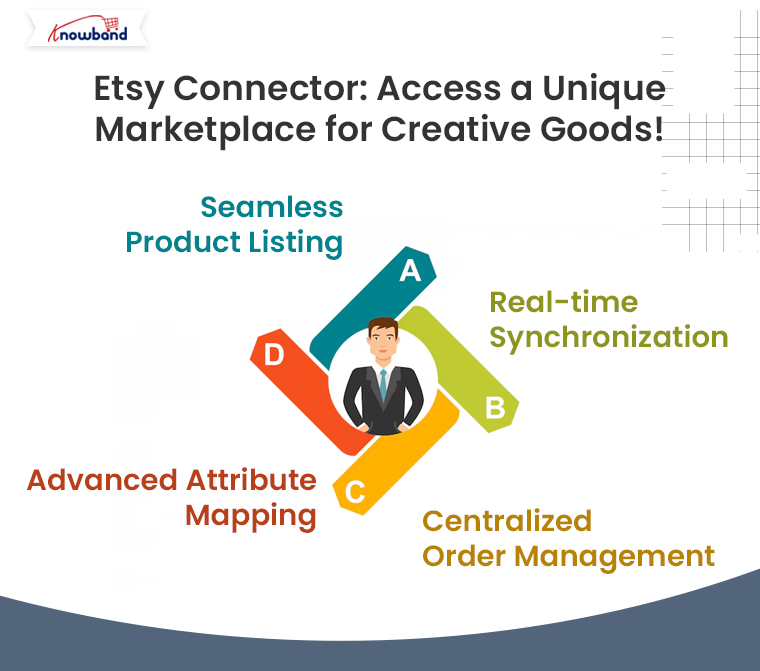
Etsy Connector: Access a Unique Marketplace for Creative Goods!

Etsy is the go-to platform for buyers seeking unique, handmade, vintage, and craft items. If your store specializes in these types of products, the Etsy Connector is a perfect solution to showcase your goods to Etsy’s dedicated audience of more than 80 million active buyers.

Key Features:

  • Seamless Product Listing: Effortlessly upload your store’s products to Etsy, complete with titles, descriptions, and pricing.
  • Real-time Synchronization: Keep your store’s product data in sync with Etsy, ensuring accurate inventory and pricing across platforms.
  • Centralized Order Management: Process all Etsy orders from your eCommerce store’s backend for streamlined order fulfillment.
  • Advanced Attribute Mapping: Map your store’s attributes with Etsy’s specific product requirements to ensure proper product categorization.

With the Prestashop Etsy Connector Addon, your store can tap into Etsy’s niche market, helping you reach customers who appreciate craftsmanship, artistry, and creativity.

Google Shopping Connector: Boost Your Product Visibility on Google!

With Google Shopping, your products can appear in front of millions of shoppers actively searching for items like yours. Moreover, Knowband’s Google Shopping Connector for Prestashop helps you showcase your store’s products on Google Shopping effortlessly.

Key Features:

Product Feed Management: Easily create and upload a Google Shopping product feed with all the necessary data (product titles, descriptions, prices, etc.).

  • Automated Sync: Ensure real-time updates for product information and pricing across your store and Google Shopping.
  • Category Mapping: Map your store’s categories with Google Shopping’s requirements for better targeting.

By using Knowband’s Google Shopping Connector, you’ll increase your product’s visibility across Google’s powerful shopping ads, driving more traffic to your store and boosting your sales.

How Knowband’s Connectors Simplify Your Multichannel Selling?

Using Knowband’s connectors offers numerous advantages for businesses of all sizes:

  • Time Efficiency: No need to manually upload products or update inventory. Furthermore, the automated synchronization keeps everything in order, freeing up time to focus on other aspects of your business.
  • Accuracy: Eliminate the risk of overselling with real-time inventory updates.
  • Improved Order Management: All orders, whether from your store or other platforms, are managed in one place, simplifying fulfillment and customer service.
  • Easy Setup: Our connectors are designed for ease of use. With intuitive interfaces, you can quickly set up the integration without technical expertise.

Take Your Store to New Heights with Knowband’s Connectors!

If you want to expand your store’s reach and tap into the enormous potential of platforms like eBay, Etsy, and Google Shopping, Knowband’s connectors offer the perfect solution. By integrating your eCommerce store with these platforms, you can increase your visibility, reach more customers, and ultimately, grow your sales.

You may also like to read:
See how this free connector simplifies Etsy integration for your PrestaShop store and enhances marketplace reach. Read More

Why choose OpenCart Etsy Integration Extension for selling on Etsy?

Looking for a viable point of interaction to deal with the product listing, inventory, and orders? OpenCart Etsy Integration Extension presented by Knowband is the right tool. The OpenCart Etsy Integration deals with the exercises on the stage. For example, product listing, inventory, and orders. As a matter of fact, the administrator can do this from the administrator board of the OpenCart Etsy Marketplace Integration.

In this blog, we will investigate the justifications for why you should pick the OpenCart Etsy Integration Extension by Knowband. Will we go forward and look at them?

Why use OpenCart Etsy Integration Plugin to sell on the Etsy marketplace?

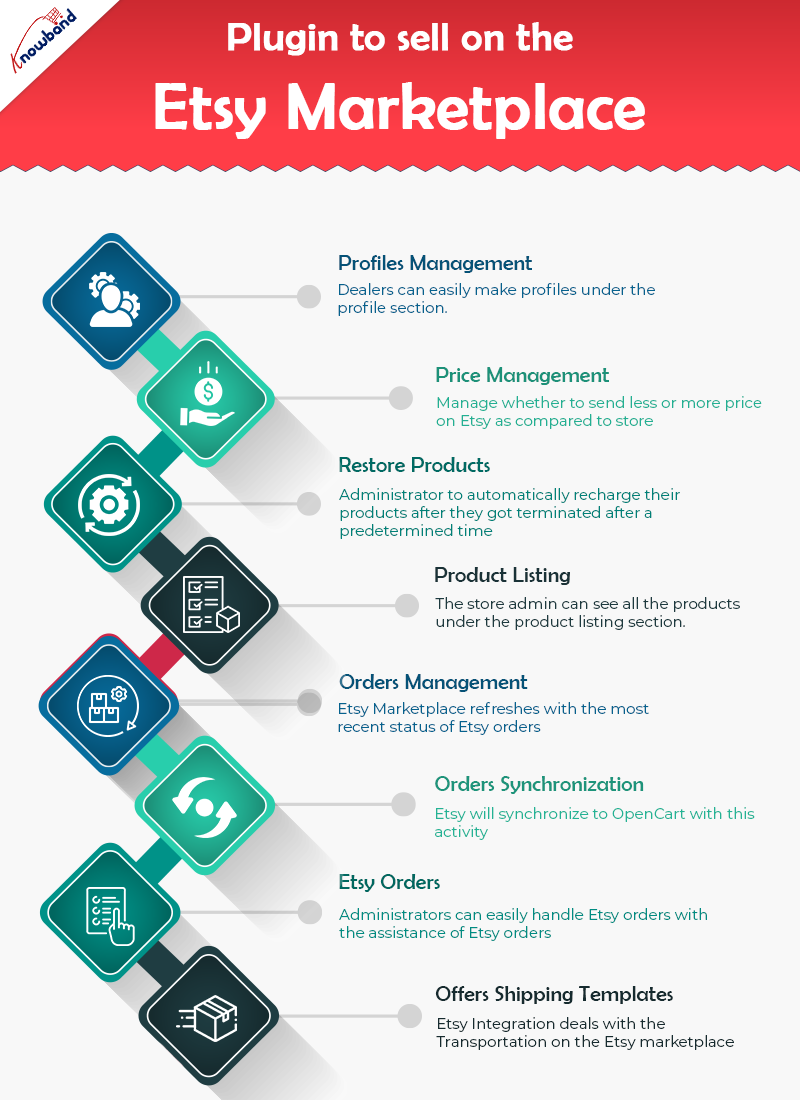
OpenCart Etsy Connector oversees profiles easily

The profile component of the module helps dealers in making profiles. In addition, select the essential settings to list the product. Moreover, the necessary strides to make a profile are – the Select Shop Section, Auto-Renew Option, and a couple of different fields. Further, to plan the OpenCart store class to the Etsy Marketplace classification.

Price Management is a highlight in the Etsy OpenCart Connector

The OpenCart Etsy Integrator permits administrators to put their products on the Etsy marketplace. Further, at an unexpected cost in comparison to the one in their OpenCart store. The Etsy OpenCart Integration incorporates the capacity to list products in light of a fixed or rate-based sequential cost.

Automatically restore products

The OpenCart Etsy API integration gives an auto-recharge highlight. Further, that allows the administrator to automatically recharge their products after they got terminated after a predetermined time. Also, you will track down this element under the Profiles tab of Etsy OpenCart API integration.

Product Listing

Administrators can see every one of the products including those which should be listed on the Etsy marketplace. Further, it is under the product listing tab of the OpenCart to Etsy Synchronization. Besides, products that are right now distributed on Etsy can likewise be seen under the product listing tab. The administrator can see the product picture and that’s just the beginning, in fact. For instance, Etsy Listing Id, Name, Profile to which the product coordinates, Listing Status, and Date Added. By tapping on the product name on the Etsy store page, administrators can see their listed product.

Orders Management

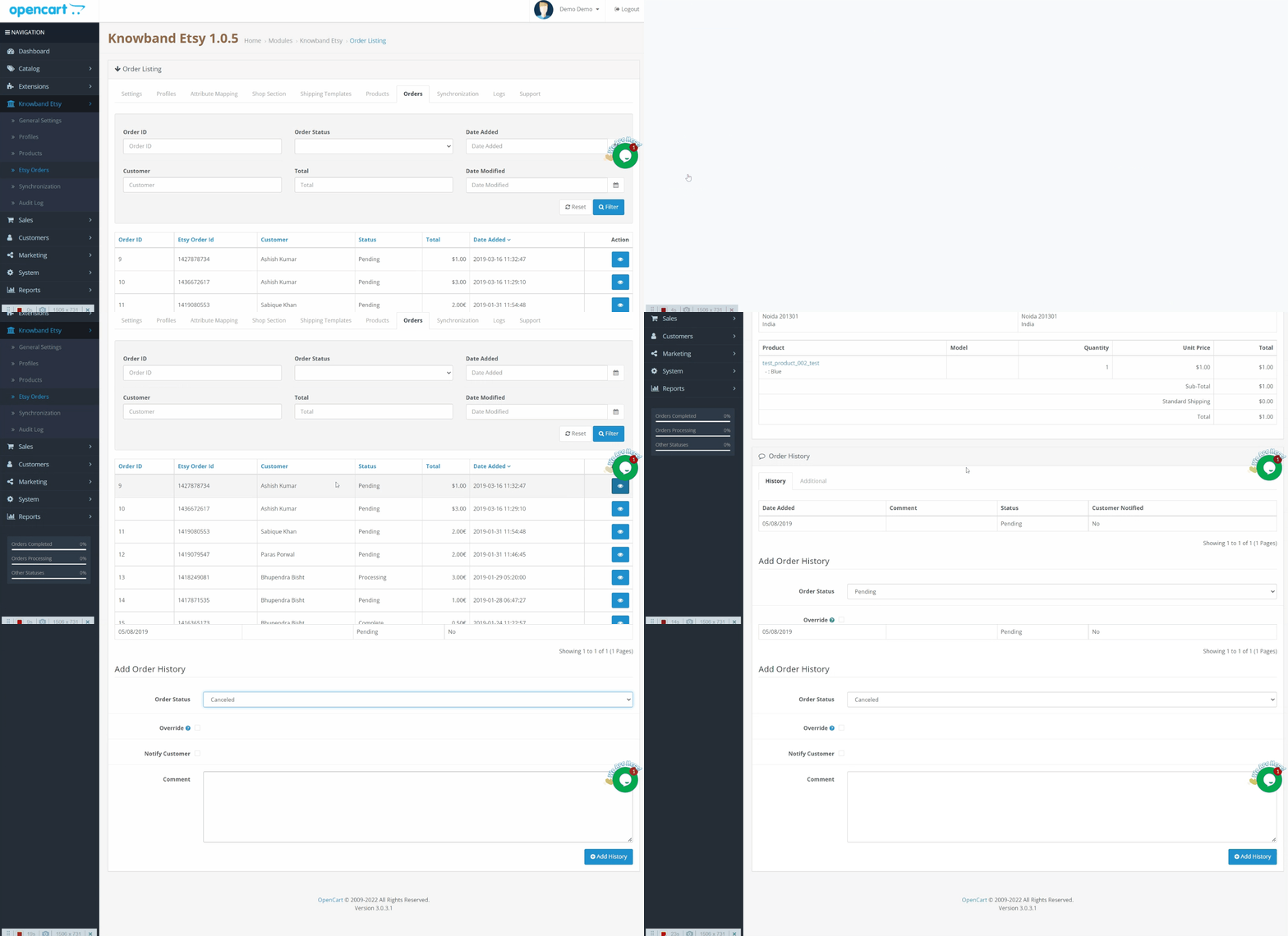
The order executives component of OpenCart Etsy Integration Extension assists vendors with synchronizing the Etsy store orders to the Opencart store. The element even cycles the orders from the Opencart store itself. Further, the Etsy Marketplace refreshes with the most recent status of Etsy orders.

OpenCart Etsy Integration gives Orders Synchronization

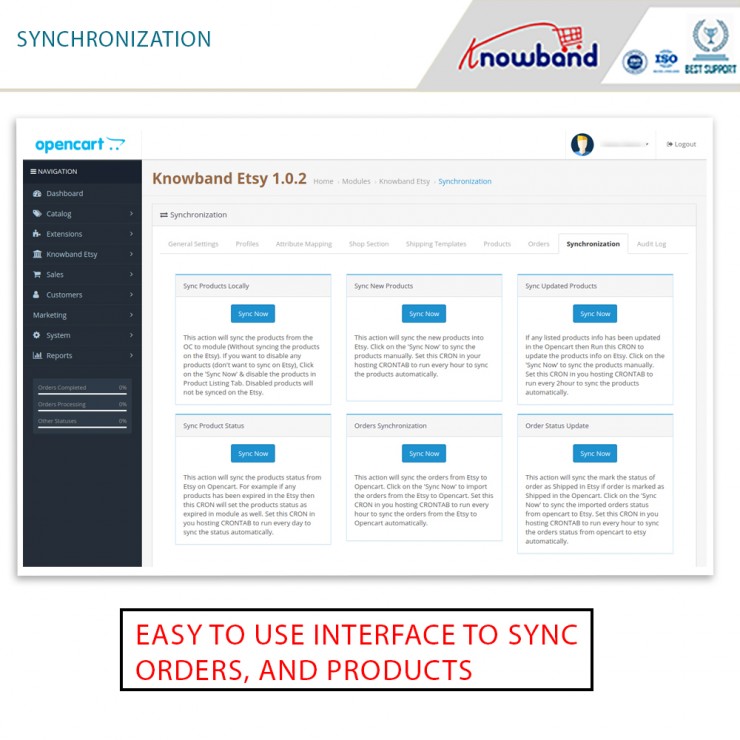
The orders from Etsy will synchronize to OpenCart with this activity. To import orders from Etsy to Opencart, click the ‘Orders Synchronization’ button. This element is available under the OpenCart Etsy Marketplace Integration’s Synchronization tab.

Etsy Orders

Etsy orders make it more straightforward for the store administrator to oversee orders from inside the OpenCart stage. This capacity is advantageous in saving time and exertion. Store administrators can easily handle Etsy orders with the assistance of Etsy orders.

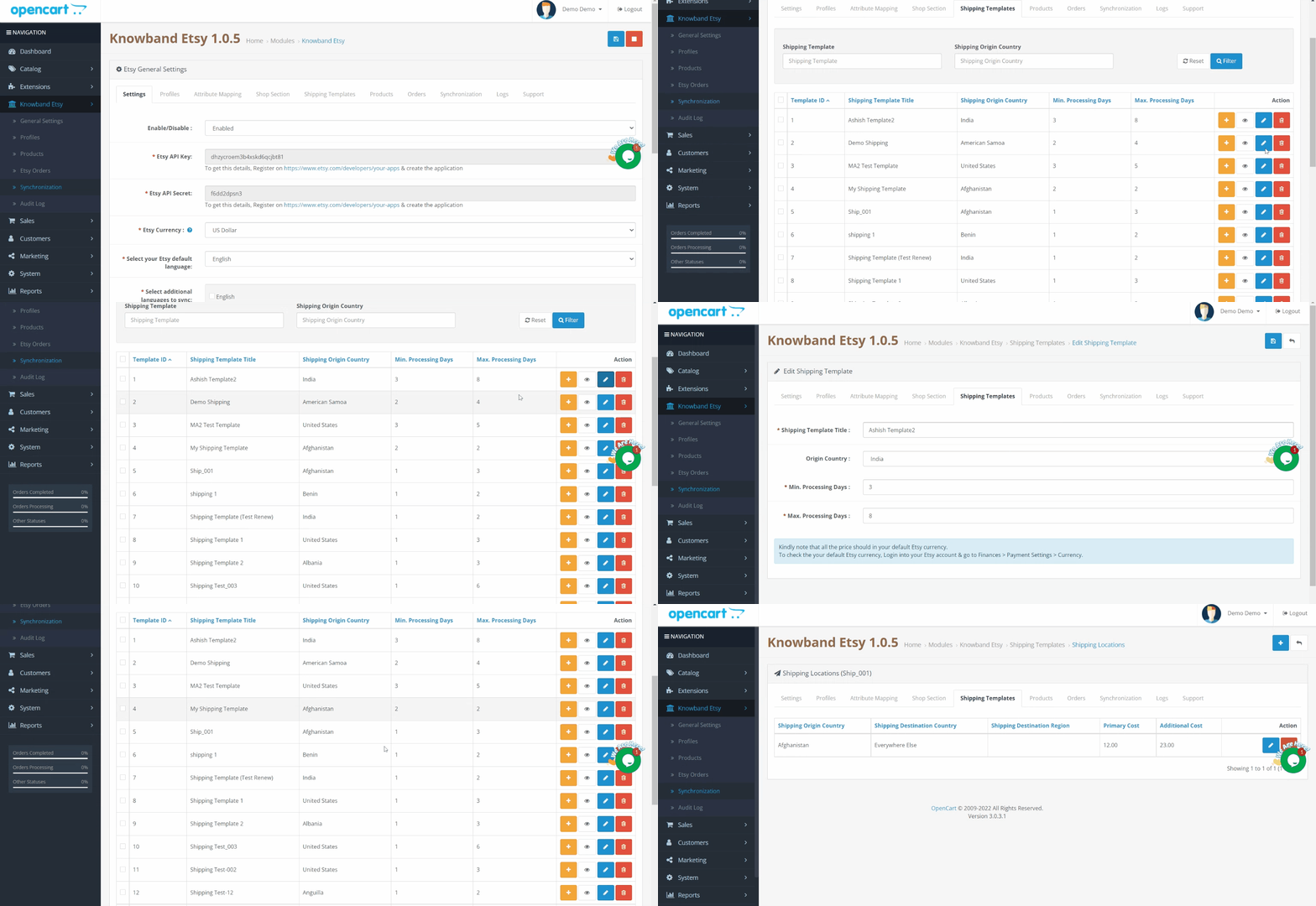
OpenCart Etsy Integration Extension offers Shipping Templates

The delivery formats element of Opencart Etsy Integration deals with the transportation on the Etsy marketplace. The Etsy OpenCart Connector permits the OpenCart shop administrator to configure delivering formats. Further, that will synchronize to Etsy, very much like the Etsy Marketplace.

Finally!!

Therefore, now you know why the OpenCart Etsy Integration Extension by Knowband is a must. If you have any kind of queries related to the OpenCart extension, let us know at support@knowband.com.

Real Life Example of Knowband’s Opencart Mobile app – Online Manglore Store

To cater to a hassle-free experience, give users a responsive shopping app that is accessible and convenient. For every store owner, creating a digital presence and relishing the shopping experience is the topmost priority. Through a Mobile App, you can offer a better shopping experience to customers.

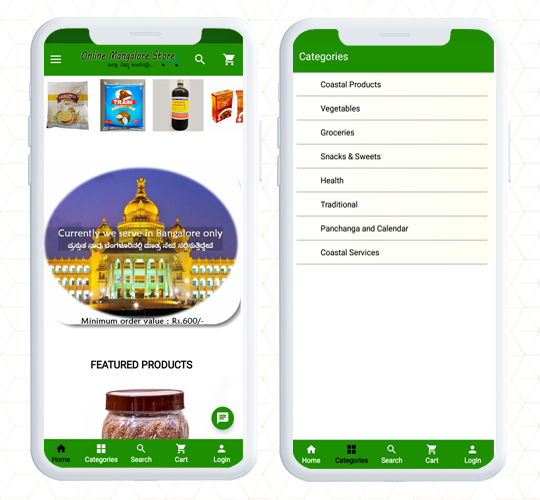
The Online Mangalore Store is an online marketplace for things that are unique from the Coastal, Konkan, Malnad, and Malabar regions. The products in the store are preferred for nutritional value, health benefits, and, of course, their origin.

To create the mobile app, the Mangalore store opted for OpenCart Mobile App Builder developed by KnowBand. This application provides convenience to find products with in-built features and gives a personalized shopping experience.

Home Page

While optimizing the mobile app, the first element every store owner ask for is an engaging home page design. Online Mangalore Store has a home page with a green color theme and they have utilized the white spaces beautifully. All the categories are listed as well as displayed on the home page.

Navigation and Search

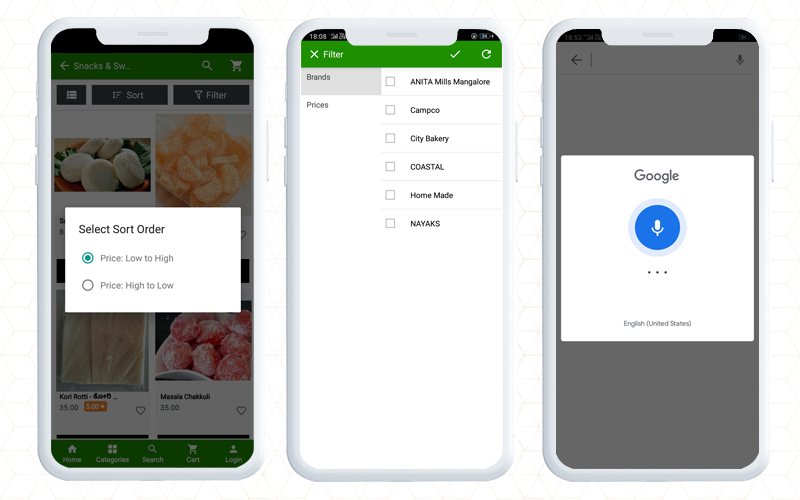
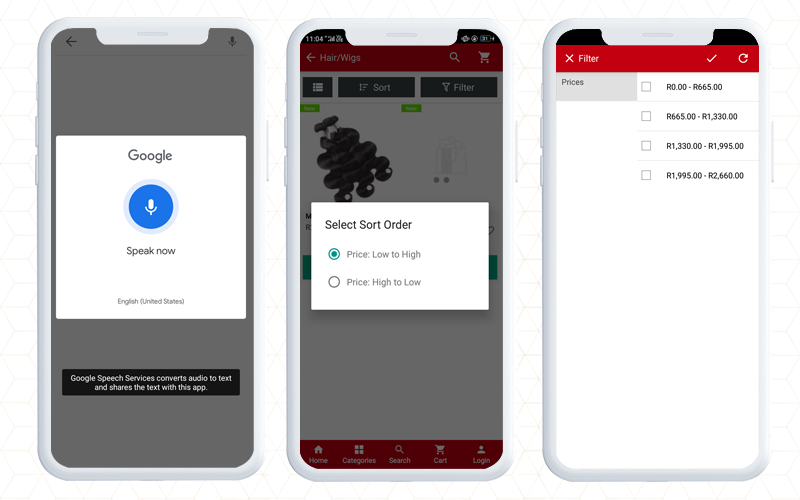
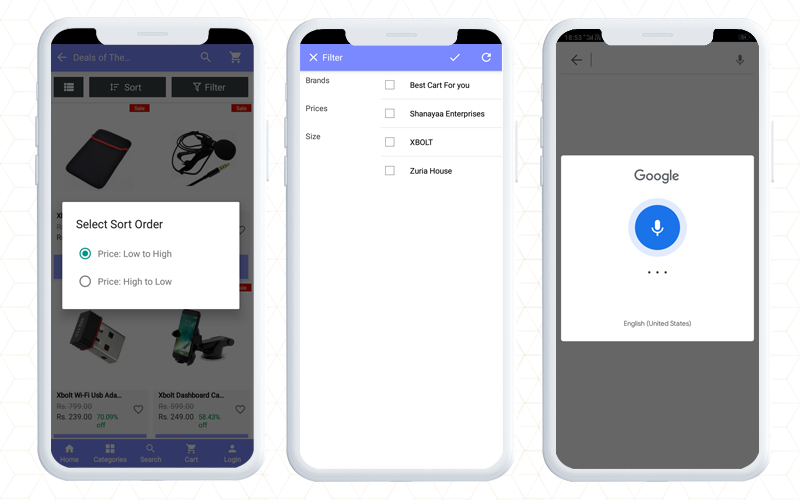
For quick product search and to find your favorite product, KnowBand’s Opencart mobile app provides facilities like voice search and product view grid and list options. Additionally, on the Mangalore app, customers can easily apply filters based on brands, prices, etc, and sort them for relevance and price.

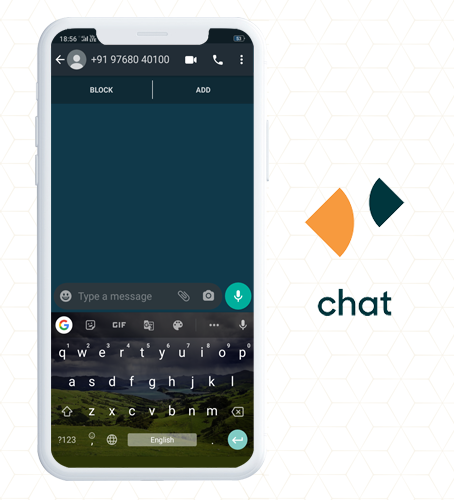
It also allows customers to connect with store owners using WhatsApp chat and Zopim chat. The live chat support helps customers to get immediate results for their queries.

Various Sign In Options for users

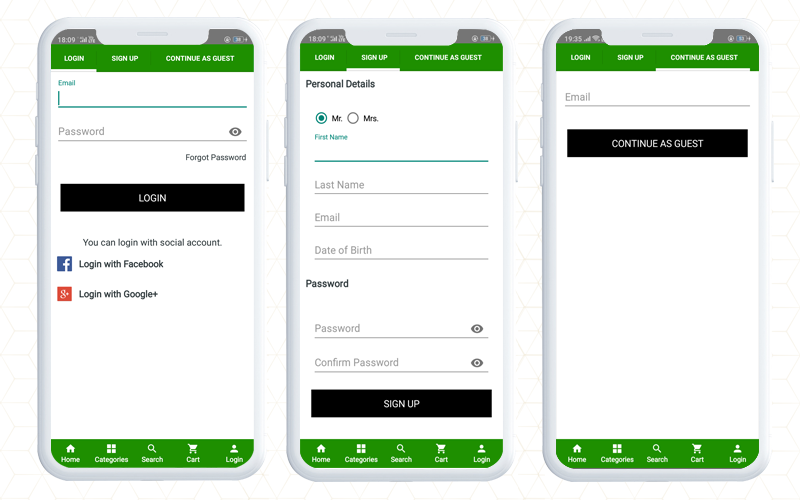
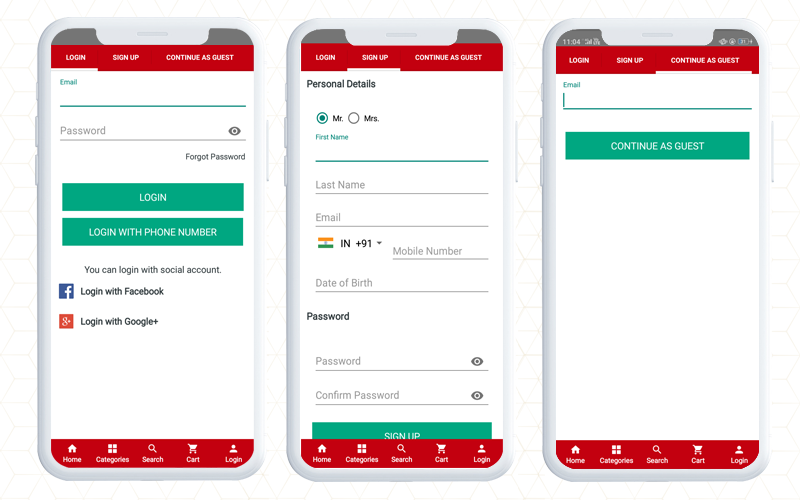
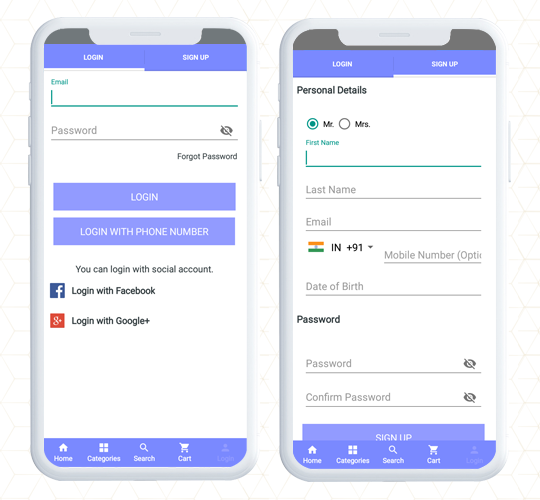
When login into a new store, customers look for easy options. In this OpenCart mobile app, you will find social login option on Facebook and google+. Along with that, the registration process is easy with limited fields. Also, a user who intends to make the checkout quickly can sign in as a Guest.

Effortless Checkout experience

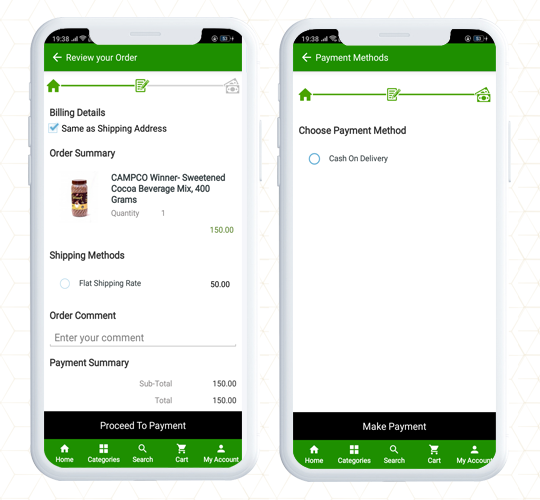
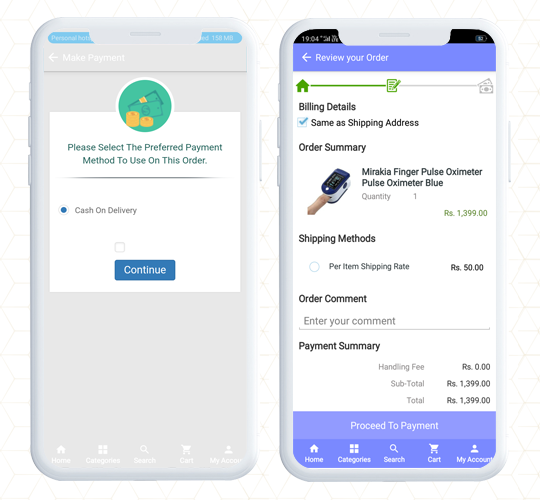
The checkout page is the last point when you have to keep an eye on because most of the cart abandonments happen at the checkout page. To streamline the checkout experience for customers, the OpenCart Mobile app has a convenient checkout page design and offers One Page Checkout.

The complete data of the store website will be synchronized to the mobile app. For example, in the Online Mangalore Store, the delivery option provided is Cash on Delivery.

Check out the Live Demo of KnowBand’s OpenCart Mobile App Builder

Finally, A mobile app plays an important role in a better shopping experience. It creates brand identity and provides a hassle-free shopping experience. OpenCart Mobile App Builder allows the store owner to configure the settings from the back end. The most appealing elements are the website design and theme. You can apply the same color palette to the mobile app theme as your website and add images, logos, store titles, etc on the mobile app.

The mobile app builder is available for both iOS and Android systems. It is also compatible with KnowBand’s marketplace module and supports multiple languages. You can use it for all the OpenCart themes including Journal.

For any eCommerce, assistance contact KnowBand that has been serving clients from 2010 for various platforms, website design, and module-related queries.

Also read:

OpenCart Mobile App Builder- User Manual

Simple Steps for Obtaining an Engaging OpenCart Mobile App

Celebsto- OpenCart Mobile App provides Exclusive Shopping Experience

Celebsto- KnowBand’s OpenCart Mobile App provides Exclusive Shopping Experience

A company associated with the fashion industry is an ever-changing and consumable sector. Website and mobile app designs matter to such a flourishing industry where the product demands customization and the latest trends. Celebsto is a fashion company with an online website created on the OpenCart Journal theme. An app for a fashion company should have that spark that can keep customers engaged.
Great online shopping starts with a great Mobile App! Celebsto Mobile App is fully functional with ultimate UI/UX having a responsive design. The Celebsto have created their unique mobile application using KnowBand’s OpenCart Mobile App builder Extension that allows creating an app for OpenCart store in simple steps.
Celebsto- KnowBand’s OpenCart Mobile App provides Exclusive Shopping Experience

Home Page Design

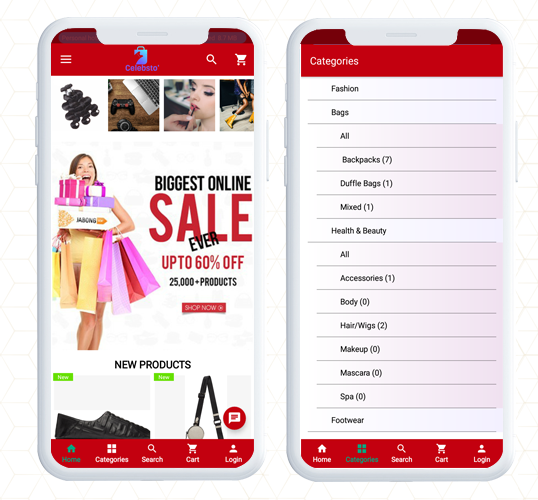
For a fashion store mobile application, the theme, design, placement of banners and images play an important role to keep up with the trend. The OpenCart Mobile App Builder gives freedom to the customer to change the look and feel by displaying logos, product banners, sales, and discount templates, highlight best seller products, new arrivals, and other elements of the home page.

Along with the home page design, the app has a button to explore the categories where all the product categories are listed.

Product Voice Search

For better assistance on the application, the voice search option gives a better shopping experience to the customers. As you search for a product, it displays all the relevant search results. Google voice search is an effective tool to enhance the shopping experience on the mobile app.

Sort and filter the products

Make the search easier and appropriate with sort and filter options. On the Celebsto, the sort and filter option facilitates quick product browsing.

Shopping Cart

The shopping cart of the application is personalized and shows all the details like product description, amount, and product image. Moreover, the shopping cart page has two CTAs, one that allows you to jump to the checkout page directly and another option will redirect to the product page.

Registration and Login Options

It is really amazing that the application gives several options to login and register.

Login: Within this Opencart Android Mobile App, you will find multiple login options like email login, social login with Facebook and Google, and with phone number.

Sign up: To sign up and register on Celebsto, the customer will have to share personal details like name, email address, contact number, and DOB. Set a password and registration is done.

Guest Signup: This application also provides an option for guest checkout. This checkout option is very effective in conversion as it only requires an email address and saves time.

Payment and shipping

On the OpenCart Celebsto App, they have added multiple payment and shipping choices. The checkout page and other pages are in real-time synch with the website.

Include WhatsApp and Zopim chat

Customer service is another crucial part if you want to provide an exclusive shopping experience to customers. Add a live chat option to assist your customers for OpenCart mobile app users.  It supports WhatsApp and Zopim live chat.

Finally, to create this app, Celebsto chose the Opencart Mobile App builder because it gives flexibility and convenience to the user. With the facilities it provides, it is easier to personalize the details and configure the interface as per the theme of the store. The app does not depend on any website theme but it supports all the Opencart themes. It is simple to publish the apps on the Apple store and Google Play store.

Learn more about the Opencart Mobile App:

An OpenCart Extension to Create Mobile Apps for Your Business

Simple Steps for Obtaining an Engaging OpenCart Android and iOs Mobile App

Mobile App Builder- Transform your OpenCart Store into an Android Mobile App

How can you get feature loaded Mobile Apps for your OpenCart site?

Check out KnowBand’s OpenCart One Page Checkout Plugins in Action

To make the online store more engaging, you need a great checkout page design. Not just the home page needs optimization but the checkout page desires more of it. Online shoppers get pissed with a clumsy design when they have already invested most of their time in finding their favorite product. For OpenCart stores, KnowBand has been developing solutions for a decade. We are presenting some of the best KnowBand’s OpenCart One Page Checkout examples that are live worldwide.

OpenCart One Page Checkout Demo

Why Should you have One Page Checkout?

OpenCart platform leverages several clients worldwide. There are different plugins free or paid that stores use to increase conversions, engagement, design, and other website elements. Many of the stores only focus on home page design, product page design, and shopping cart development and forget to optimize another major part, the checkout page. As a result, they lose conversions on the checkout page leads to shopping cart abandonment.

Hence, it is crucial to add a checkout page that is easy to operate with effortless configuration settings. OpenCart One Page Checkout Extension is solving these problems for many businesses.

Check out these OpenCart One Page Checkout Plugin in Action

If you are here to find out how this exclusive OpenCart One Page Checkout extension works, we won’t make you wait

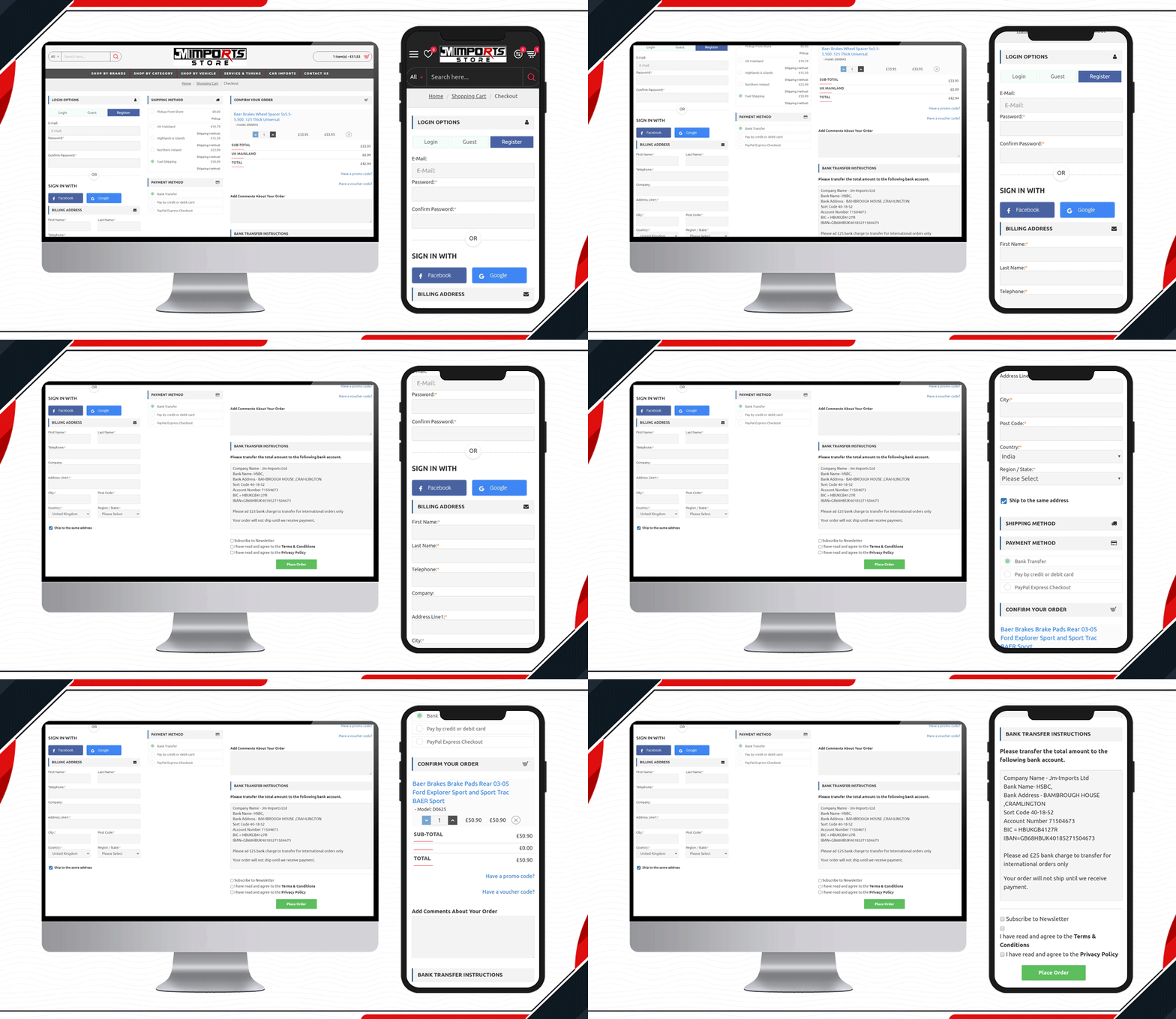
1.     JM Imports Checkout Page is live

JM Imports is a cart import company in the UK. Their auto-parts selling platform is using KnowBand’s OpenCart One Page Checkout Pro extension. They have been using a 3-column layout that includes a registration column facilitating Facebook login, Google login, and Guest checkout. It has several payment and shipping methods for customers giving them a quick checkout experience.

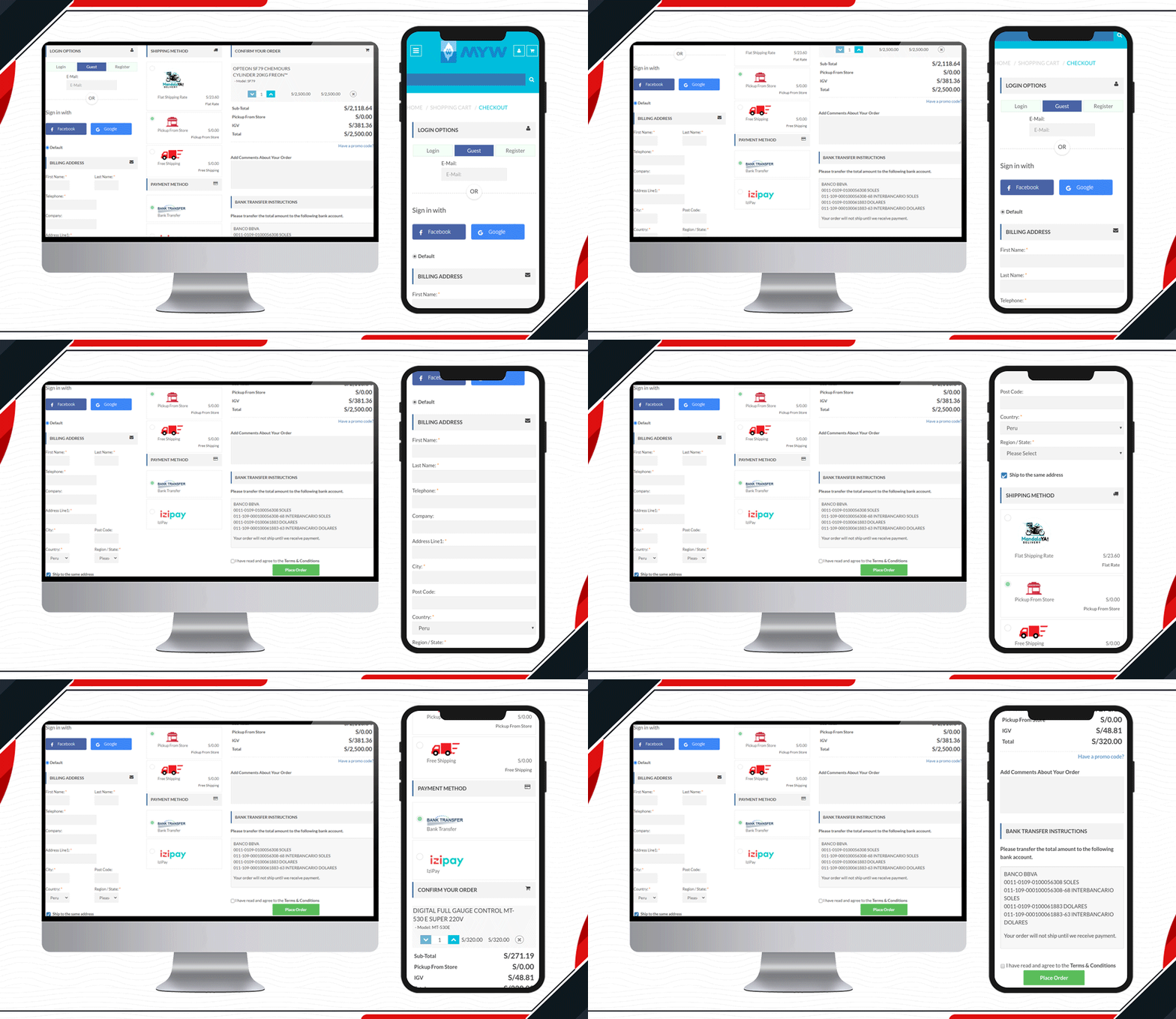
2.     Check out the MYW Checkout Page

The sole purpose of MYW is to provide a satisfactory shopping experience to their customer from quotation to shipment. To meet their purpose, they have installed KnowBand’s OpenCart One Page Checkout extension for smooth and easy checkout. MYW are the importers for refrigerating products.

The icon display in the shipping methods and shopping cart product image display makes the checkout page appealing.

3.    Placasur is using OpenCart One Page Checkout

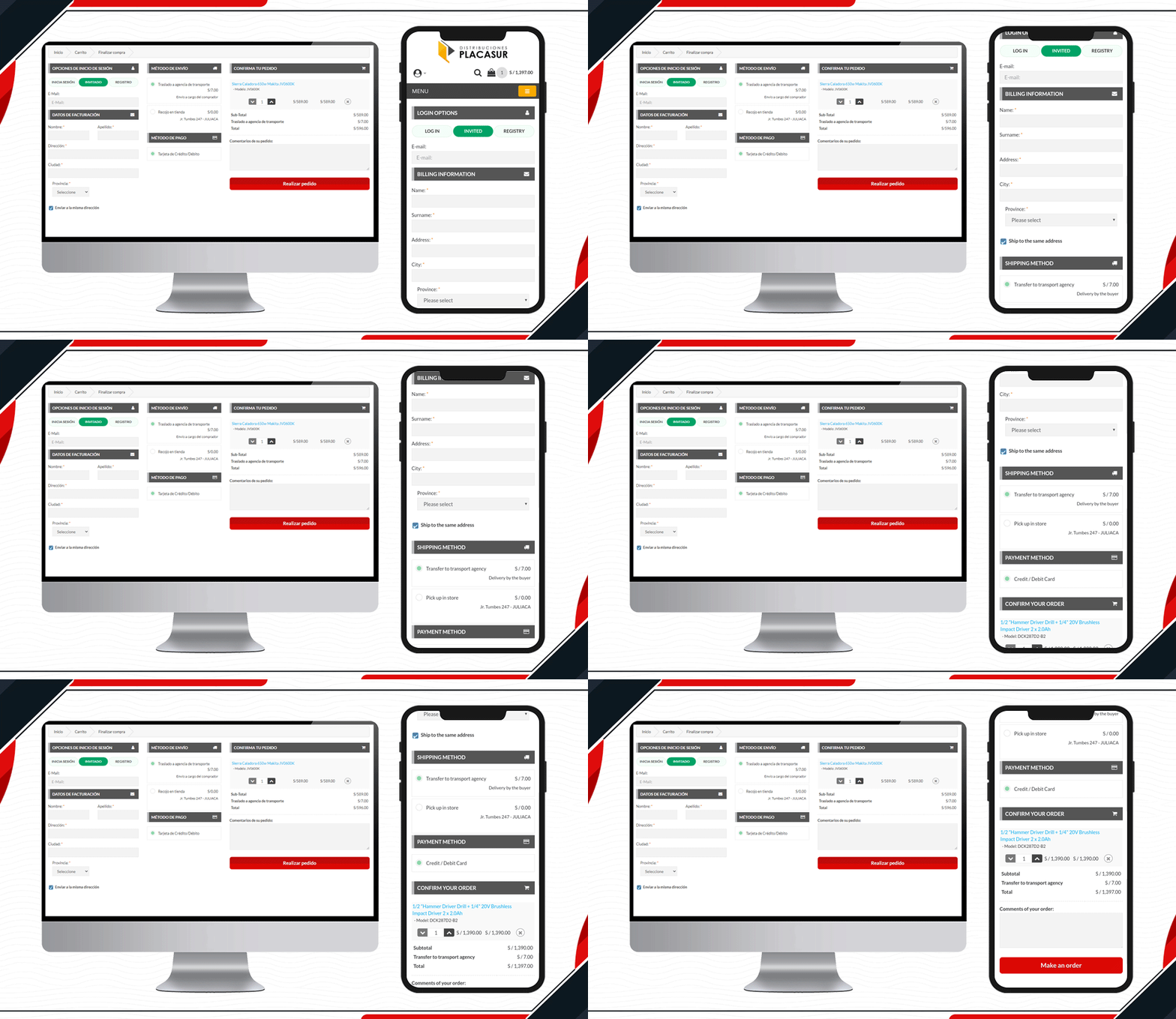
To keep customers engaged, a good checkout practice is removing unnecessary fields. The KnowBand’s OpenCart One Page Checkout Plugin allows users to keep some fields optional that can be skipped by customers. Pleasure has customized its checkout page beautifully. It has limited fields and looks clear and engaging.

4.     Trailer Stuff Checkout page in action

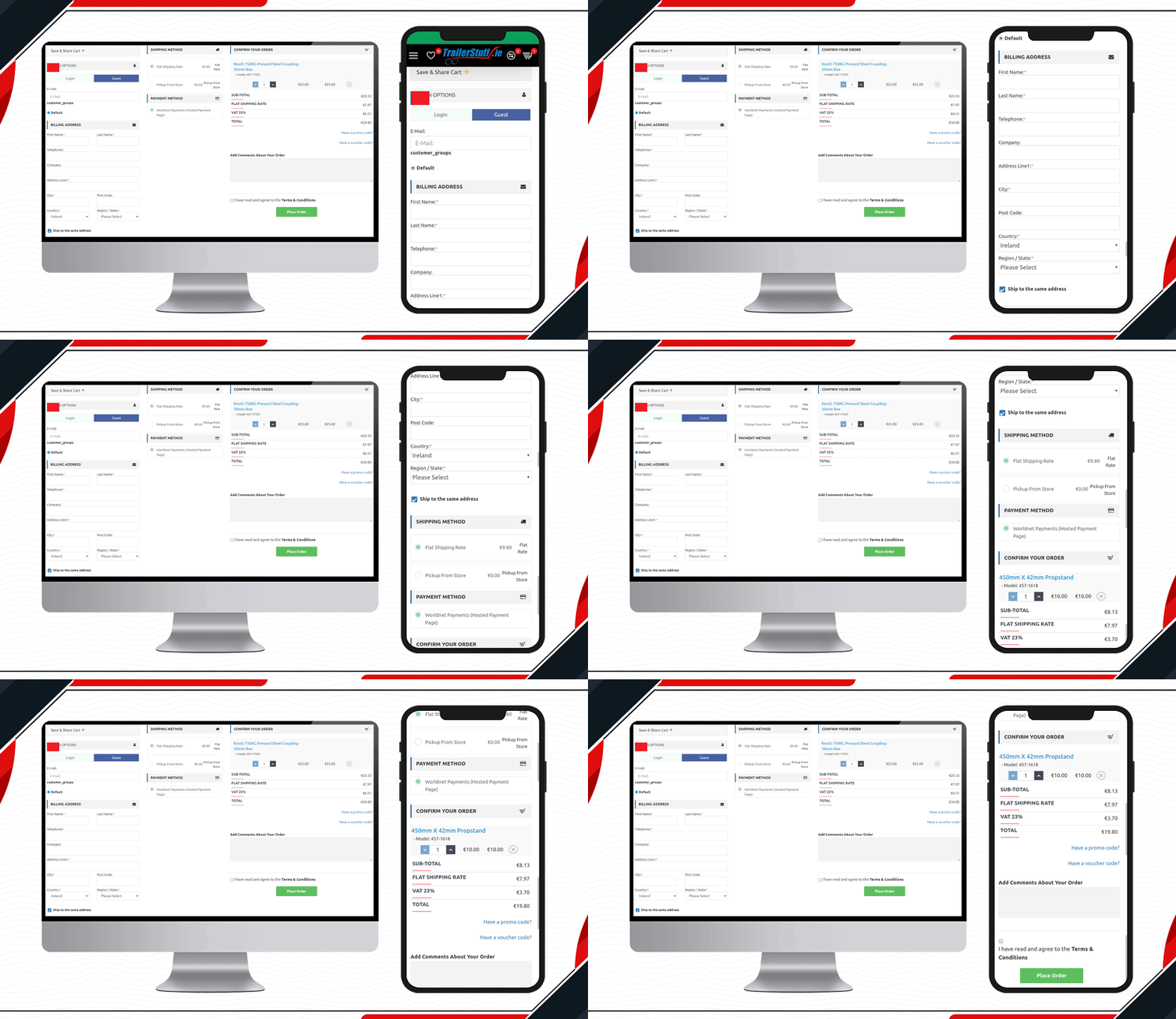
Trailer Stuff delivers products in Ireland. Their shipments require on-time delivery and to make the ordering process smooth, they are using One Page Checkout Extension in their Opencart store. From registration to payment, every field on the checkout page is configured. Moreover, they have also added a save the cart option on the checkout page.

5.     Look at this Yeonhi Checkout Page

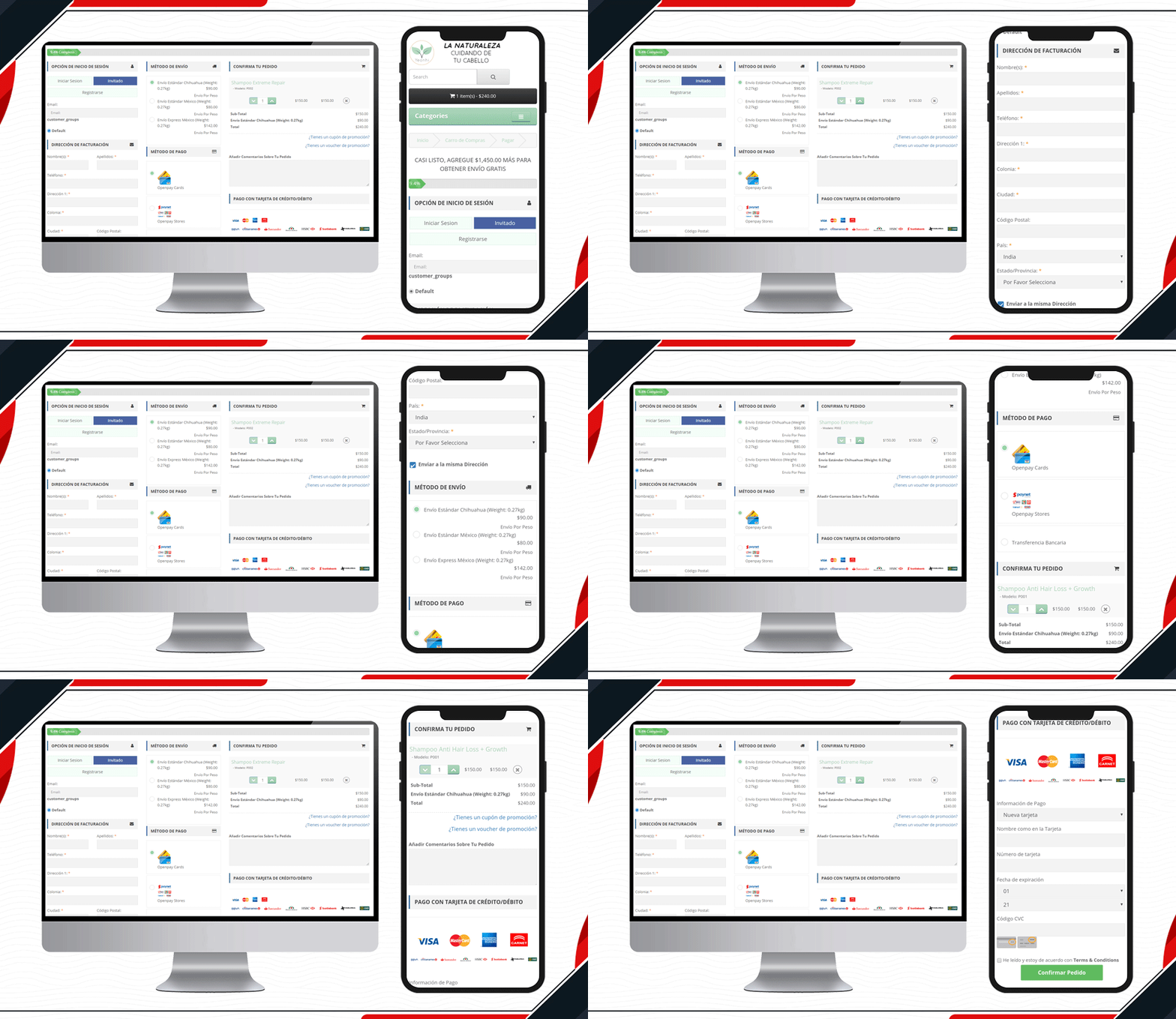
Yeonhi’s checkout page is very sleek with a great design. It appears that the checkout process is simple and quick. They have been using KnowBand’s OpenCart One Page checkout plugin with a shipping bar at the top. This indicates the free shipping progress, which means the customer will get free shipping if the progress bar reaches 100%. Follow these tips to reduce shipping cost.

6.     Custom Made Casino Checkout page

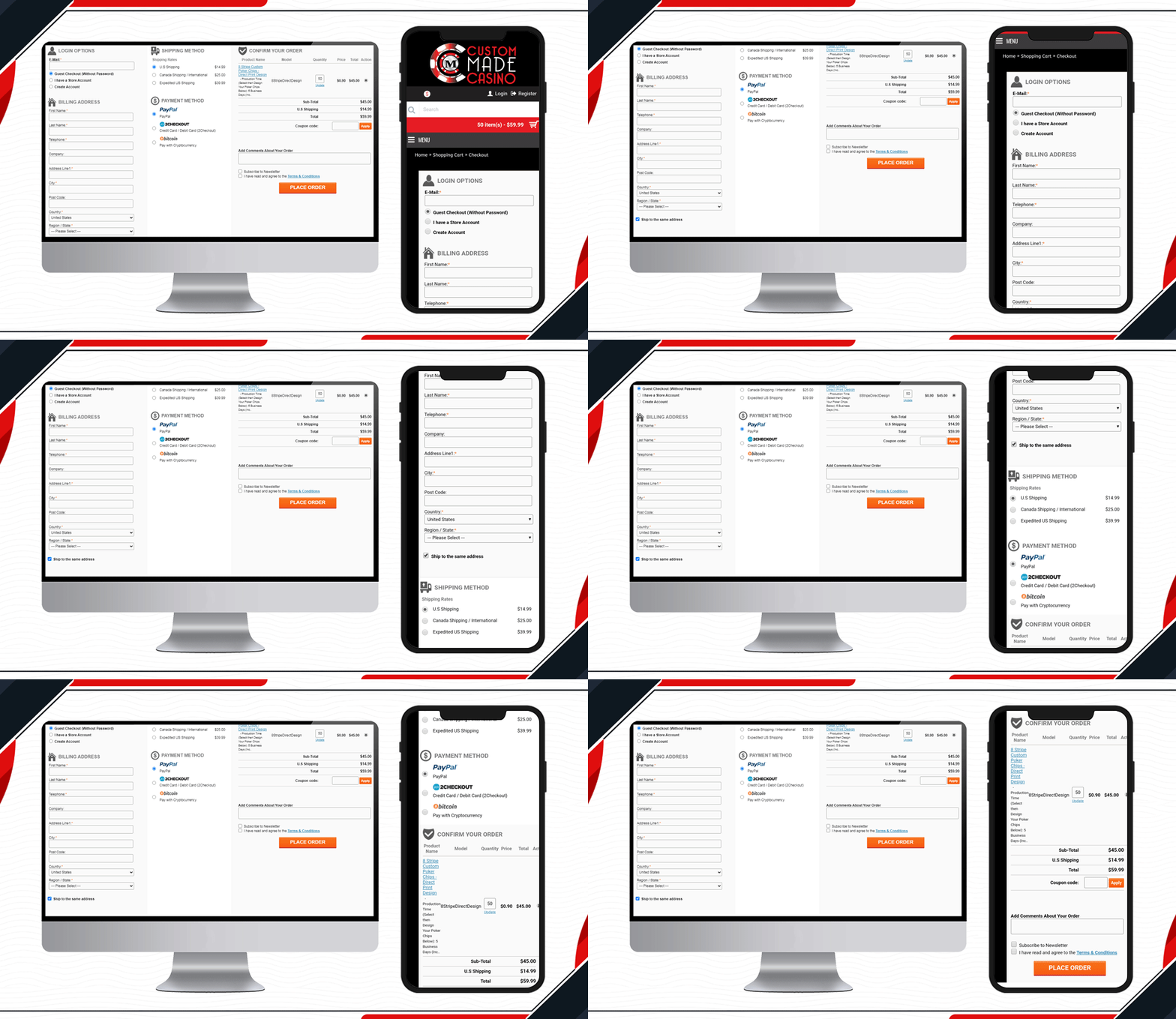
Custom Made Casino website is a treat if you like playing Casino. Let’s not dig much into its services, instead, go straight to its checkout page design. They have been using One Page Checkout on their OpenCart website to make the transactions easy-peasy.

When buying chips in the store, the customer will have to provide printable details like the name that you want on the chips, color, printable font colour, etc. Along with other checkout page elements, you will find all these details on the shopping cart section.

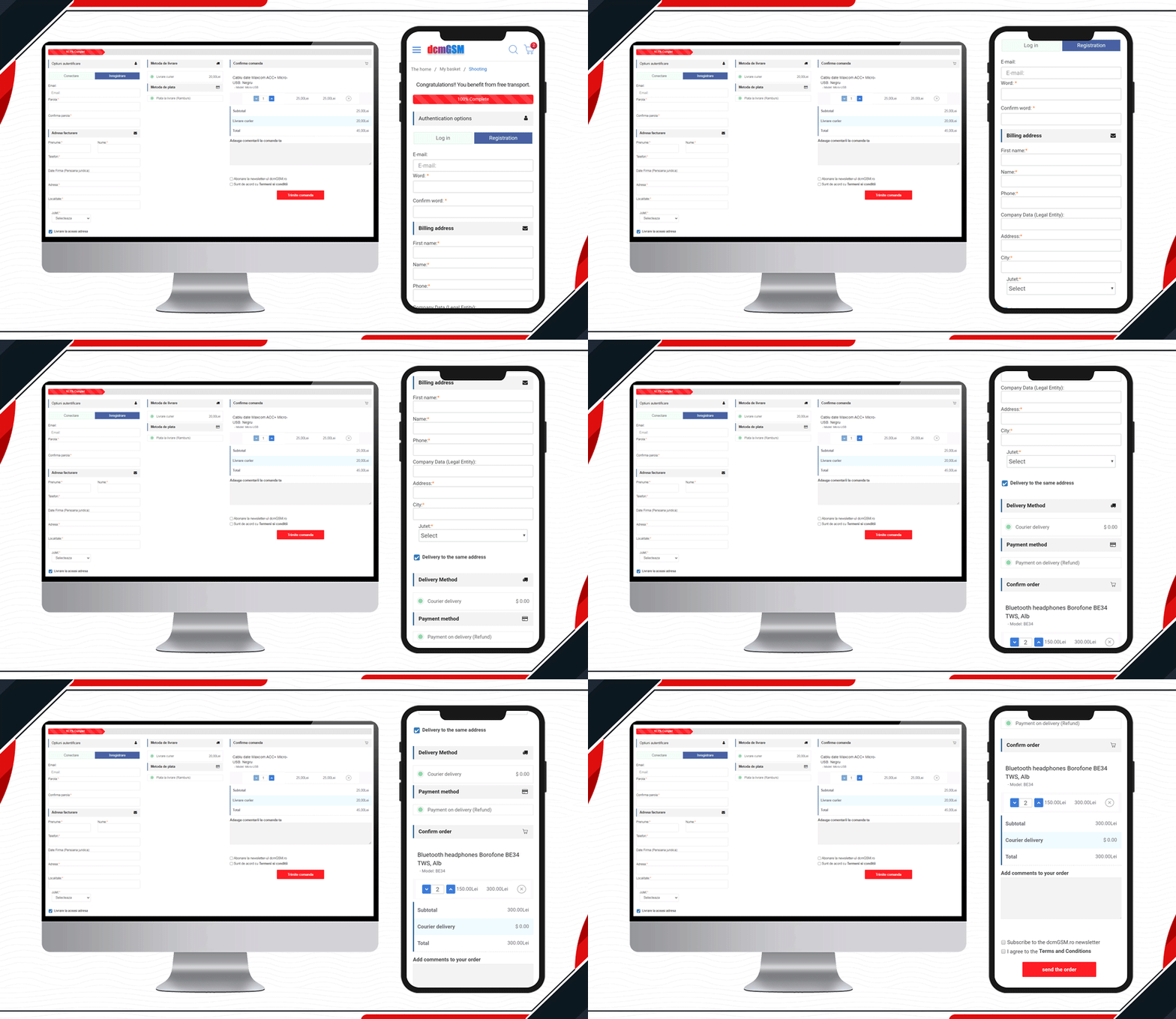
7.     DcmGSM Considered One Page Checkout

One-stop for any phone accessories.  DcmGSM is a company that provides a solution for all your phone-related gadgets from USB cables to mobile cases. It is an OpenCart website and to provide a wonderful checkout experience, they are using KnowBand’s OpenCart One Page Checkout.

Free shipping bar to Facebook login and optional fields to the extra comment field, all features are used on the website checkout page. Have a look!

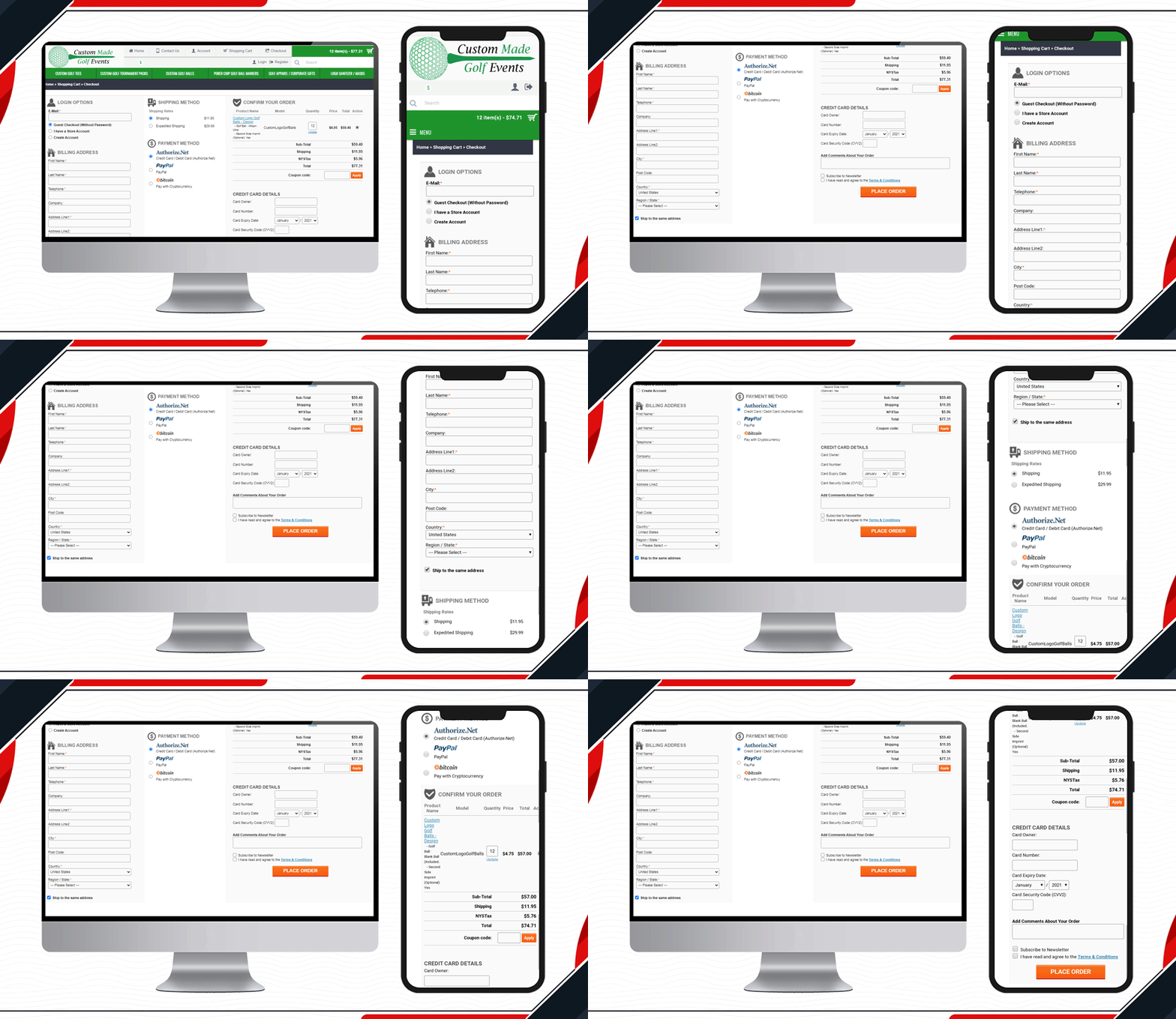
8.     Custom made Golf Events Checkout Page

All golf-related items are available on this website. To make the checkout process simpler and quicker for the golf lover, Custom-made Golf Events is using KnowBand’s OpenCart One Page checkout.

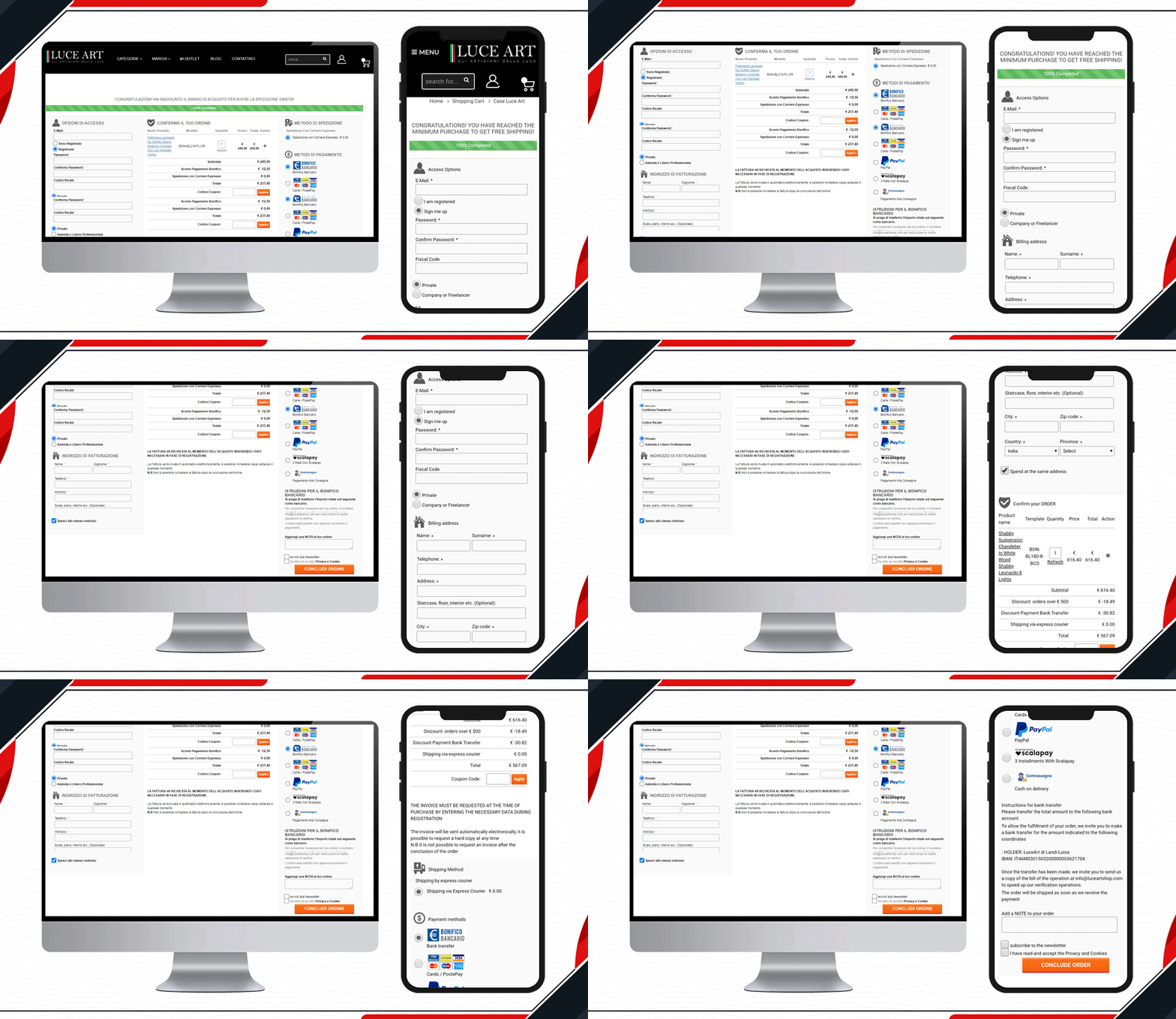
9.     Look at Luce Art Shop Checkout Page

Luce Art is a hub for creative lights. They have been using a single-page checkout for their checkout page. You can see your orders in the shopping cart of the checkout page. It has a free shipping bar, social login, guest checkout, multiple shipping methods, payment gateways, and all the other informative fields clubbed in a single page with a three-column layout.

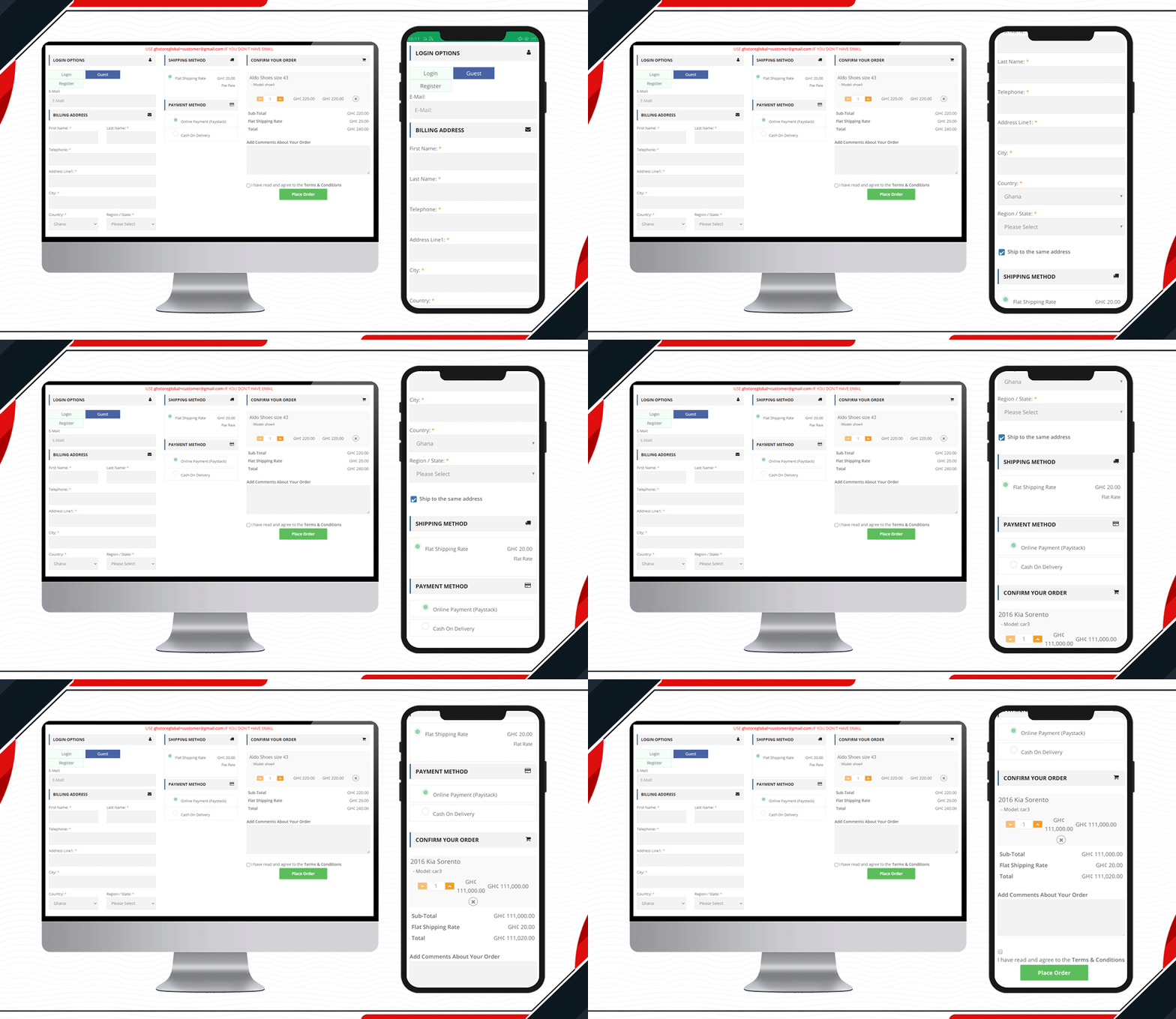
10. Live One Page Checkout on GH Store

Another live example of Knowband’s One Page Checkout is available on the GH Store website. It is a general store where you can find everything that a household requires in everyday routine. They have streamlined the checkout page design by using KnowBand’s One Page Checkout.Ffree

Checkout page elements that every OpenCart owner should look for

  1. Single Page Checkout
  2. Guest checkout
  3. Social login
  4. Cart display section
  5. Custom payment methods
  6. Add Custom Shipping methods
  7. Customizable layout and design
  8. Security badge options

Finally, to get a better understanding of the checkout page design and layout follow this blog.

For OpenCart or any other eCommerce website-related requirements visit the KnowBand store. Several plugins are available that can help you optimize your store from the landing page to the final transaction.

KnowBand’s OpenCart Extensions live on UK based JM Imports

JM Imports is a high-performance and exotic car specialist in the UK, serving from 2002. They stock brand new parts as well as aftermarket parts in a wide range. Anything from air intakes to turbos is available for every brand in the market. They import auto parts from Japan and other countries. You will find everything from simple upgrades to bespoke solutions for your vehicle under one roof. They have created their digital store on the OpenCart platform. The KnowBand’s OpenCart extensions like One Page Checkout, Abandoned cart, Infinite scroll, Facebook Share and Win and PDF invoice are live on the JMImports Parts store.

For a company like JM Imports, customer satisfaction and customer experience are of prime importance. Therefore, they have to use plugins that provided the ultimate shopping experience to their client. Thus, they have been using KnowBand’s OpenCart extensions. Every plugin designed and developed by KnowBand is quality tested and provides an excellent shopping experience to customers.

We have discussed here all the live extensions installed on JM Imports along with their benefits:

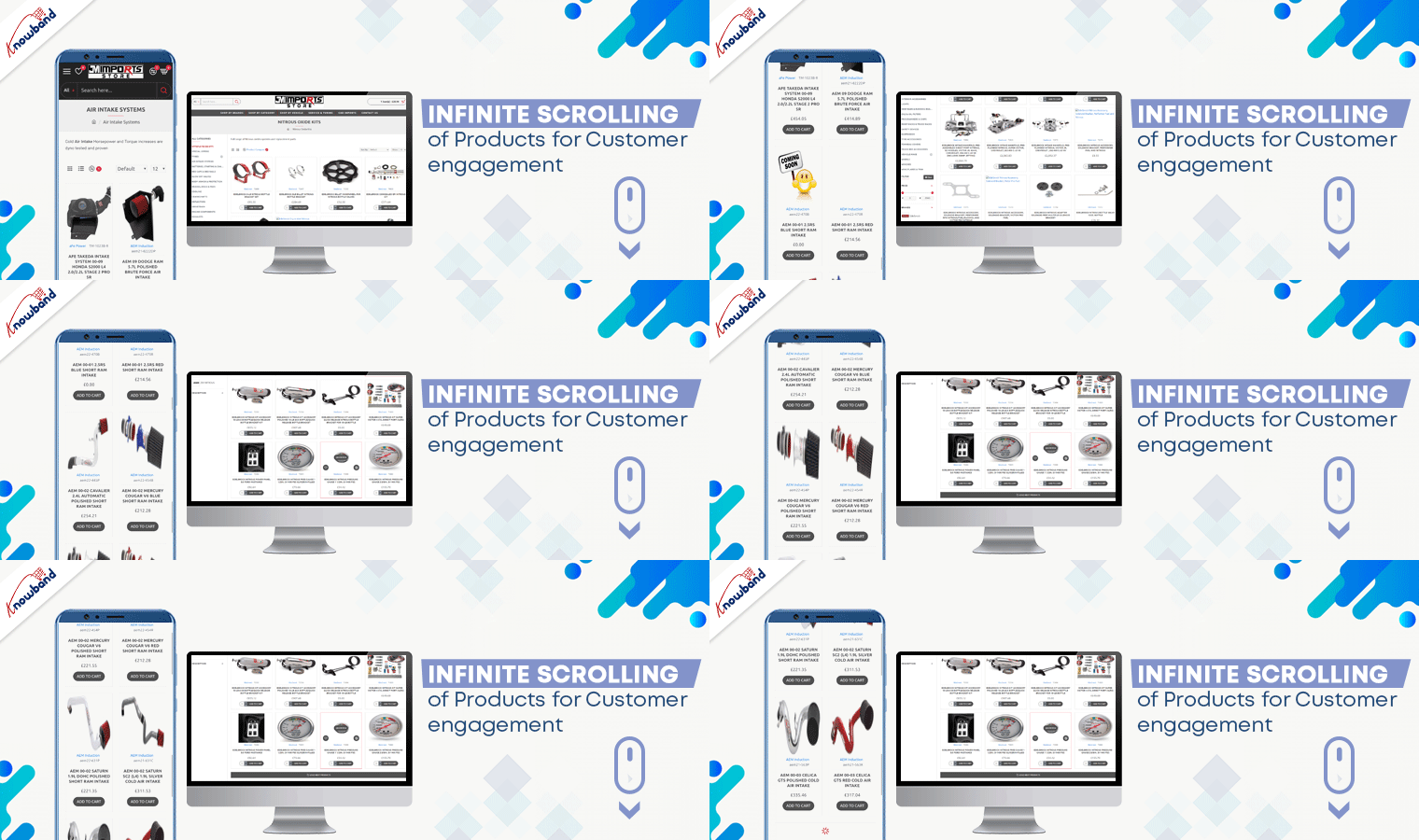
Infinite Scrolling of Products for Customer engagement

The product page optimization technique includes not just the look and appearance but also the UX. Product infinite scrolling improves customer experience and engagement rate on the product page.

On JM Imports, products get loaded continuously when the user scrolls down. However, after certain products get a load, a bar with the message ‘Load More’ appears. Admin can decide the product display quantity for this.

Benefits:

  • Effortless product scrolling
  • Higher Customer Engagement
  • Better User Experience

Facebook Share and Win to increase Brand Awareness

Users can share products on various social media platforms from the JM Imports website. This functionality is applicable with Facebook Share and Win. Additionally, it allows customers to win rewards, discount coupons, and incentives after sharing the product on their user profile page.

Benefits:

  • Increases Brand Awareness
  • Improves Customer retention rate
  • Get Potential Customers

Great Checkout Experience with One Page Checkout Pro

OpenCart is an open-source platform with thousands of clients globally. Knowband’s OpenCart extension One Page Checkout- Pro is live on JM Imports auto-parts store.

It has a Three-Column Layout that clearly displays all the fields. The design of the checkout page is elegant. The One Page Checkout is more user-friendly than a Multi-Page Checkout.

Features of KnowBand’s One Page Checkout Pro: Facebook and Google login options, Guest Checkout, multiple shipping methods, several payment gateways including PayPal, Shopping cart display, update product quantity on the checkout page, and additional field with a message.

Check out the Demo Here: OpenCart One Page Checkout Pro

Benefits:

  • Reduces Cart Abandonment
  • Time Saving and effortless
  • Authentic Data for email marketing

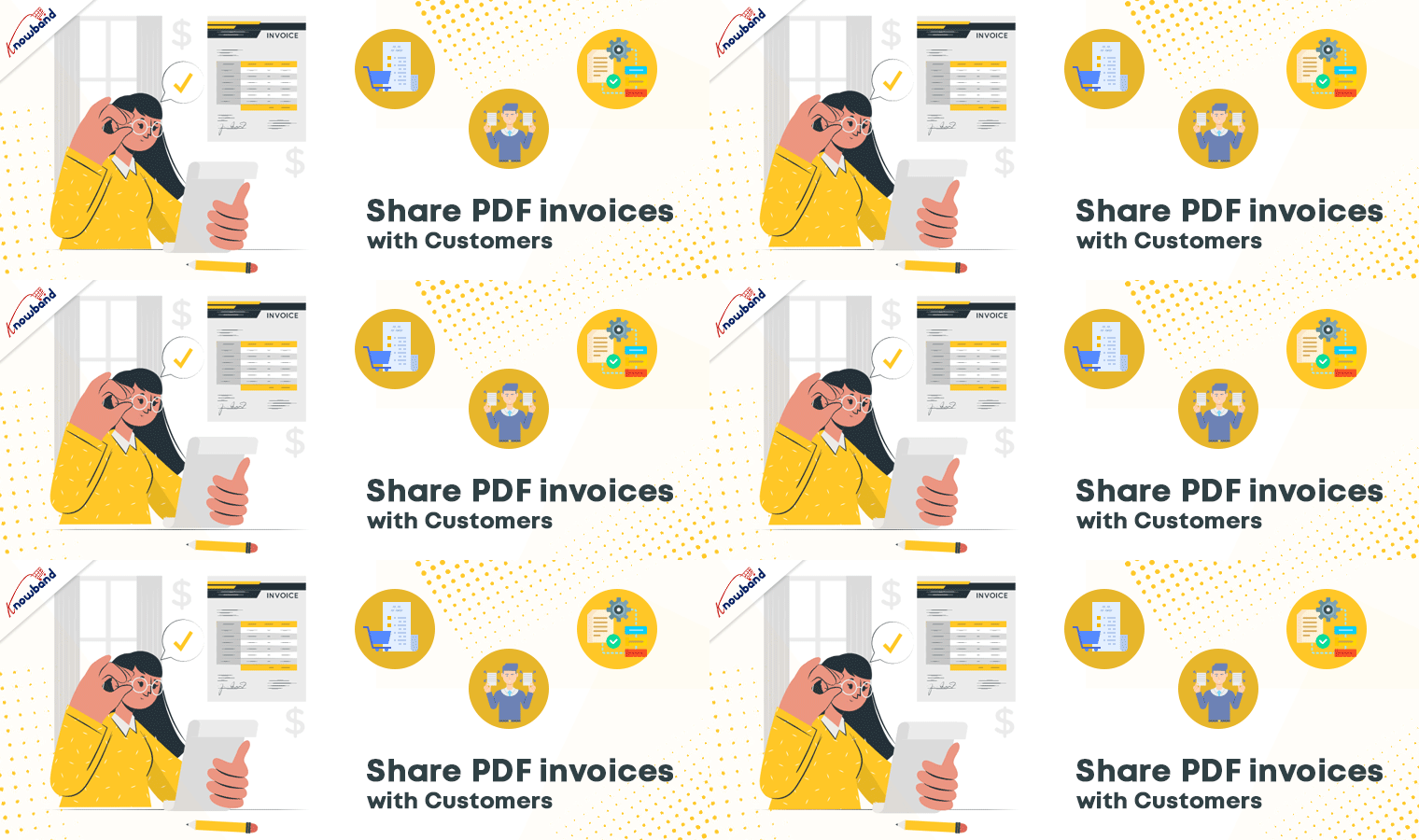
Share PDF invoices with Customers

When placing an order on JM Imports, the customer receives a PDF invoice along with the order email. For these features, JM Imports downloaded KnowBand’s Opencart Extension ‘PDF Invoice’. The invoice contains the header logo, store title, header title along payslip.

Admin can add some additional details such as shipping address, order info, and store details in the PDF invoice.

Benefits:

  • Looks professional
  • Fully customizable
  • Easy to track the purchase history

Abandoned Cart Serial emails

Cart abandonment is a threat to eCommerce businesses. To overcome this, store owners send abandoned cart emails which are very effective. JM Imports is using Opencart Abandoned Cart extension for sending serial emails to customers. The auto cron functionality makes it effortless.

Benefits:

  • Higher Conversion Rate
  • Less Abandoned Cart
  • Tracking the

Why Choose KnowBand for Your OpenCart Solutions?

KnowBand is working in the eCommerce domain since 2010 and has thousands of international clients. We believe in customer satisfaction and deliver products that uplift your sales on your digital platform. Here are some extra advantages that make KnowBand’s OpenCart Extensions superior to the others:

  • Mobile responsive
  • Multi-lingual compatible
  • Multi-store compatibility
  • SSL Compatible
  • Theme compatible

We have several extensions for your Opencart store and other major eCommerce platforms. Do drop a comment or send us an email to discuss your requirements.

You may like to read more success stories: 

OpenCart Android App is a Hit for MumbaiShoppers

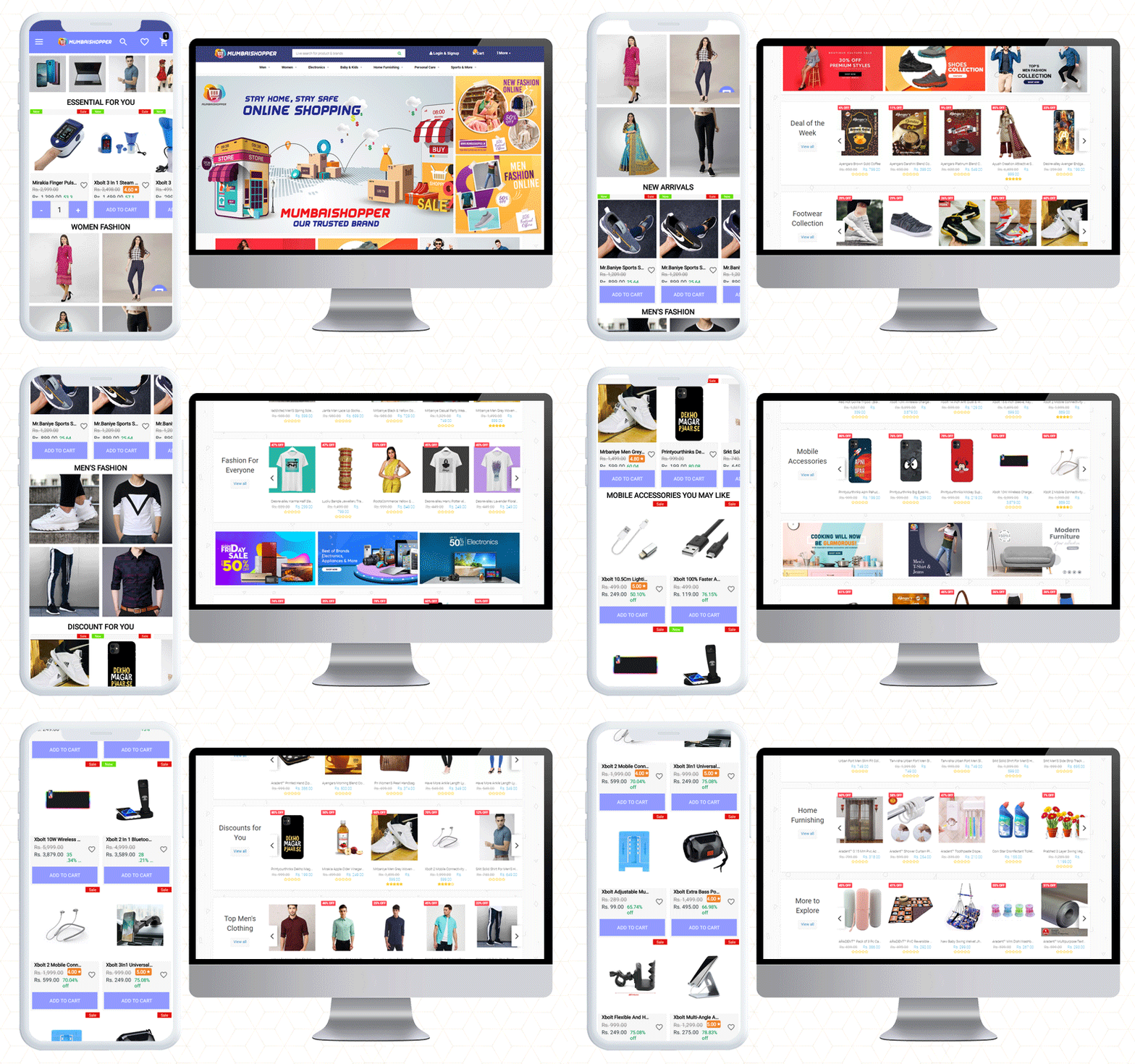
Do you have a count on the mobile apps you are using right now? Two, three, or maybe 10 at a time! The increase in the usage of mobile applications cannot be ignored. As mobile users are increasing rapidly, so is the demand for mobile apps. MumbaiShopper is a Marketplace for Mumbaikars. They have built their website on the OpenCart platform. To design their OpenCart Android App, they have used KnowBand’s OpenCart Mobile App Builder plugin.

From a fashionable home page design to a checkout page, it is personalized for sophisticated UI/UX. The CTAs, cart design, customer support, and many other features are a part of this mobile app builder plugin. This mobile app offers more exclusive facilities to customers and the admin. Let’s dive in to explore!

MumbaiShopper OpenCart Android Mobile App

As said before, the MumbaiShopper is a marketplace where you will find everything from fashion to furniture. If you want to shop baby products, fashion, electronics, or sports ranges, you will find everything at Mumbaishopper.

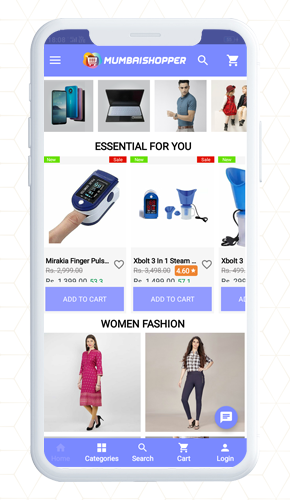
MumbaiShopper OpenCart Mobile App supports multiple currencies. You can see the prices in USD and INR. The categories, product listings, home page design, cart design; everything is up to the mark.

Have a look at the attractive home page!

The theme of the MumbaiShopper OpenCart Android app is similar to the website which is exceptional.

In midst of tough competition, the application needs to be user-friendly and appealing. It is quite certain to add color pallets, graphic images, banners, and logos that match your website theme.

For instance, the banner display is completely customizable. On the home page, show top categories, square banners, sliding banners, or products in the grid pattern. It is all up to you.

Have a look at the app design and its theme colors.

Isn’t it engaging!

About the Shopping Cart

Customers can add products to the cart quickly. The shopping cart of the app has two options:

  1. Shop more
  2. Proceed to checkout

It has clear navigation because the CTAs in the app are bold and aloud

Every change on the website is in Real-Time synch

The changes and updates that are made on MumbaiShopper Website are reflected directly on the Mobile App. It has real-time synchronization.

Finding the right product is easy

Find out the product you want by sorting and using the filter. Decide first and then apply filters. Sort it as relevancy, price, or bestseller.

It gives a satisfactory customer experience to OpenCart Android App users. It helps them in finding a product of their choice.

Voice search makes it easier.

Whatsapp and Zopim for live chat support

The customers can get quick support from the MumbaiShopper team using WhatsApp chat and Zopim chat support options. WhatsApp live Chat is available because Customer service is the topmost priority of every brand.

Quick Login and Sign up saves time and efforts

While most of the world population is connected via social media, why shouldn’t we take advantage? The OpenCart Mobile app has Google login and Facebook sign-up options for netizens.

Along with this, customers can register using their mobile number. This allows them to log in using OTP.

Additionally, a fingerprint login option is also available for the customers.

Multiple Payment and Shipping Support for every customer

As the user completes the registration process, they will have to make the payments first, then choose the shipping method for their product delivery on MumbaiShopper Store.

More conversion with One Page Checkout

The MumbaiShopper OpenCart Android App has a single-page checkout screen, as a result, it makes product purchase easier for front-end users. One Page Checkout provides quick checkout that refects in the reduction of abandoned carts. This also improves the app’s usability for order placement.

It is possible to run promotions on the OpenCart mobile App

Yes, you can run promotions on your OpenCart store if you have KnowBand’s OpenCart mobile app builder. The MumbaiShopper product range is wide and to entice customers, they run deals and discounts.

Deals of the Day, Deal of the Week, and Discounts for you are some listed categories in the MumbaiShopper OpenCart Mobile App.

The app allows the store owner to run promotions and coupons that are applicable on the website.

You can add Spin to Win promotional gamified element to your mobile app only if the same is available on your website.

Bring new customers to store

Wondering how? The MumbaiShopper store has a social sharing option for products.

The OpenCart Mobile App allows customers to share products on their social media profiles. This also attracts more attention from their friends and family. Hence brings you, new potential visitors.

Feature to track the traffic

With Google Analytics integration, OpenCart Android App allows tracking app performance standards, in short, you can set new goals. On the mobile app, the store administrator can monitor traffic and plan marketing campaigns accordingly.

To sum up, like the MumbaiShopper store, you can also make your mobile app using the Opencart Mobile App builder plugin. The application has almost everything that you need for a mobile app. Check out the live demo or get the free OpenCart mobile app to have a preview of your store.

We believe in customer satisfaction. If you want any custom feature that is not included in the Mobile App Builder, let us know in the comment below.

Read more Mobile App Sucess Stories  

Best Free Shipping Manager Extension for OpenCart Store

The Opencart Free Shipping Manager module is a feature-rich module that enables online merchants to offer online users free shipping. Conditions and guidelines for the management of free shipping may be enforced by the store merchant.

Shipping costs are the biggest component of the price of your order fulfillment, worse if you sell huge bulky goods. But the thing is the delivery service providers raise their rates every year when you have to keep prices low to remain competitive. As a small businessman, giants like Amazon can afford to subsidize their deliveries, so what do you do to get free shipping? My previous blog on ‘How to reduce shipping cost‘ might help you with this alarming issue.

In this article, I am going to discuss the OpenCart Free Shipping Manager extension that can help you handle the costs in a hassle-free manner. This comes with several benefits that make it an effective tool for shipping management.

Reasons to offer free shipping on your store?

  • Free shipping increases sales
  • It influences customers to add more products to their carts. Hence, increases the average cart value.
  • It reduces cart abandonment rate
  • You get more loyal customers

Free Shipping Manager Extension for OpenCart Store

Customers get encouraged to shop more with a free shipping option on their orders and this module is the top-notch option for that.

#1- Define the minimum amount

You can specify from the back-end configurations the minimum amount a customer needs to shop for if he or she wants to get free shipping on his or her order.

#2- Display the Free Shipping tab on the home screen

The online users will display a free-shipping block on the cart summary tab.

#3- Set the minimum order quantity and weight

Offering free shipping to the customer increase sales and decrease cart abandonment rate.The Opencart Free Shipping Manager plugin enables administrators to set the minimum order quantity and weight for free shipping.

Similarly, if the customer wants to enjoy the free shipping benefit, you can specify the weight that must be looked at.

#4- Location filters to offer free shipping

Free shipping greatly increases the probability of conversion and lets you increase your average order value as well. For specific countries, the extension also allows you to disable the free shipping facility.

#5- Allows you to define rules and guidelines

OpenCart Free Shipping Manager only allows you to offer free shipping to customers if they meet the back-end eligibility criteria set by you.

Conclusion:

Your company needs to pick the right shipping extension. If you do not adopt the right strategy at the right time in the right condition, your customers will be driven away easily and might go to the competitors. I am sure that doesn’t sound good.

Get the Free Shipping Manager extension for your OpenCart store today and entice your customers by offering free shipping.

We hope that the above information about shipping software has helped you to easily select the best one for your company.

Check Free Shipping Manager Extension Demo:

Admin Demo: Click Here

Front Demo: Click Here