In recent years, mobile commerce, or M-commerce, has taken the eCommerce world by storm. With the proliferation of smartphones and the convenience they offer, consumers are increasingly turning to their mobile devices to shop online. Furthermore, this mobile shopping revolution presents a golden opportunity for businesses to expand their reach and boost sales. Following the same, in this article, we’ll explore how Knowband extensions can play a pivotal role in enhancing M-commerce for your online store.
The Rise of M-commerce:
Mobile devices have become an integral part of our daily lives. From browsing social media to checking emails, and, most importantly, shopping, our smartphones are always within arm’s reach. For the same reason, the number of mobile users is far more than the number of desktop ones. Moreover, according to recent statistics, mobile devices now account for a significant portion of eCommerce sales. As a savvy eCommerce business owner, it’s crucial to tap into this growing trend to stay competitive.
Why M-commerce Matters:
Accessibility:
Mobile shopping allows customers to browse and purchase products from anywhere, at any time. Therefore, this level of accessibility is unparalleled and can lead to increased sales.
User Experience:
Smartphones offer touchscreens, making navigation and product selection more intuitive. A seamless user experience is vital for keeping customers engaged and encouraging repeat business. Therefore, user experience is the second most important factor that makes investing in M-commerce a must.
Speed:
With high-speed mobile networks and responsive websites, the loading times for mobile stores have drastically improved. This contributes to a positive shopping experience and reduces bounce rates.
Push Notifications:
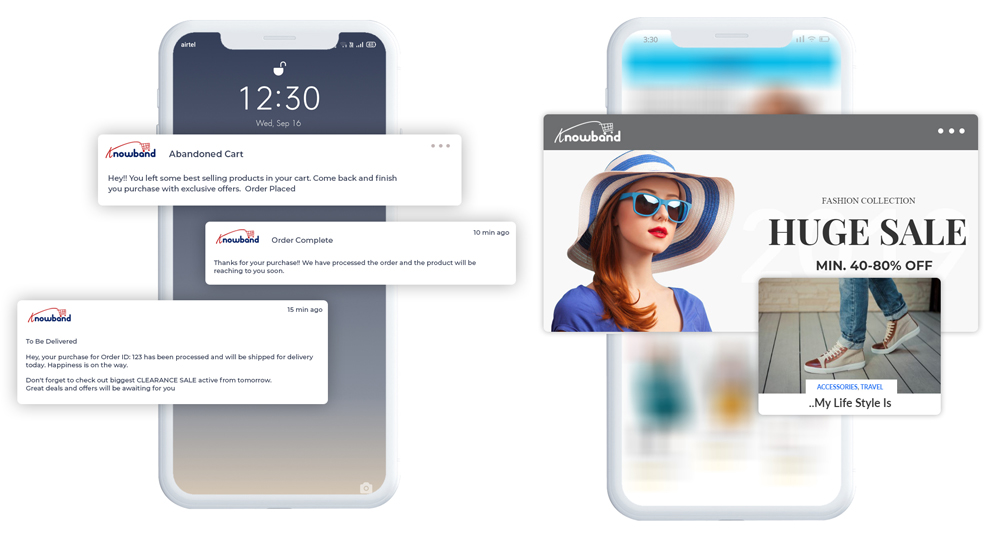
M-commerce apps can send push notifications to users, notifying them of discounts, promotions, or abandoned carts, further boosting sales opportunities.
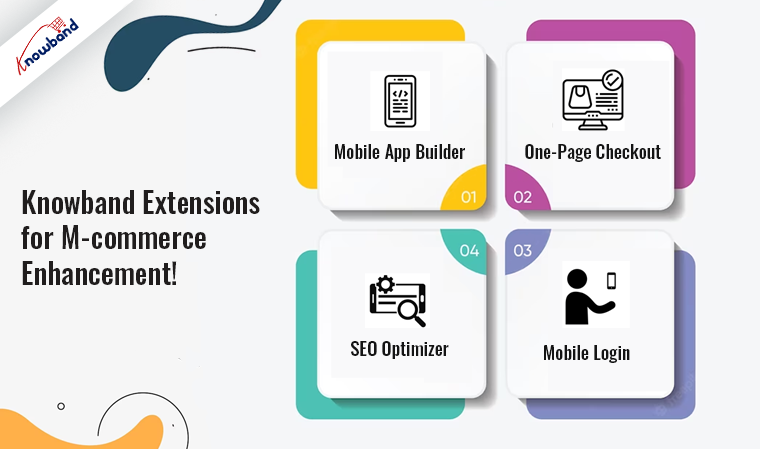
Knowband Extensions for M-commerce Enhancement!
Knowband offers a wide range of eCommerce extensions designed to optimize your online store for M-commerce. These extensions are tailored to various eCommerce platforms, ensuring compatibility with popular systems like PrestaShop, WooCommerce, Magento, and Opencart. Let’s delve into how these extensions can benefit your M-commerce strategy:
1. Mobile App Builder:
The first step you should take as an eCommerce store admin for enhancing M-commerce is to create a mobile app for your online store. Providing a dedicated shopping experience for mobile users. At Knowband, we offer no-code mobile app builders for eCommerce platforms Prestashop, Opencart, WooCommerce, Magento, and Magento 2. This extension enhances user engagement and allows you to send push notifications, and many more incredible features, increasing customer retention.
2. One-Page Checkout:
Simplify the checkout process on mobile devices with Knowband’s one-page checkout extension. Reduce cart abandonment rates and boost conversions.
3. Mobile Login:
Streamline the login and registration process for mobile users, enhancing user convenience and security. Also, visit Mobile Login Extension.
4. SEO Optimizer:
Improve your store’s visibility on mobile search engines with the SEO Optimizer extension by Knowband. Because the higher mobile search rankings can lead to increased traffic and sales.
Conclusion!
In the era of the mobile shopping revolution, adapting to the preferences and behaviors of your customers is essential. Knowband extensions provide a comprehensive suite of tools to enhance your M-commerce strategy. By optimizing your online store for mobile devices, you can tap into the growing M-commerce market, increase customer satisfaction, and ultimately boost your sales.
Stay ahead in the eCommerce game by embracing M-commerce with Knowband extensions. Transform your online store into a mobile shopping destination that captures the attention and loyalty of mobile-savvy customers. Don’t miss out on the mobile shopping revolution – take advantage of Knowband’s M-commerce solutions today!
In the world of eCommerce, staying connected with your customers is paramount. One of the most powerful tools at your disposal is email marketing. When executed effectively, email marketing can boost sales, increase customer retention, and drive engagement. Whether you’re running your eCommerce store on platforms like OpenCart, PrestaShop, WooCommerce, or Magento 2, implementing the right email marketing strategies can make a significant difference. In this article, we’ll explore effective email marketing strategies tailored for eCommerce businesses, with a special nod to Knowband.
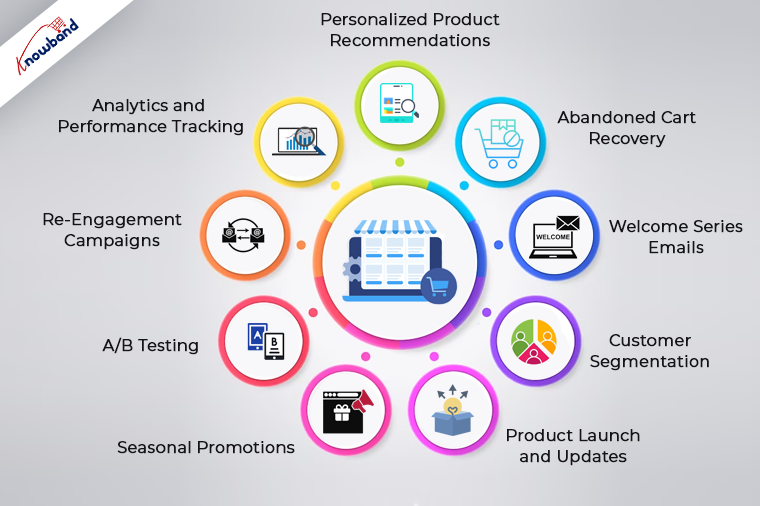
1. Personalized Product Recommendations:
Personalization is the cornerstone of successful email marketing for eCommerce. Furthermore, you can leverage customer data and behavioral insights to recommend products tailored to each recipient’s preferences.
2. Abandoned Cart Recovery:
Cart abandonment is a common challenge in eCommerce. Send automated emails to users who abandon their shopping carts, reminding them of their pending purchases. Include enticing product images and clear calls to action to encourage them to complete the checkout process. Furthermore, if you have your eCommerce shop based on OpenCart or Prestashop, you can also check Knowband’s Abandoned cart email plugins to automate your abandoned cart recovery process.
3. Welcome Series Emails:
Make a strong first impression with new customers through a welcome email series. Use these emails to introduce your brand, highlight your best-selling products, and offer exclusive discounts.
4. Customer Segmentation:
Segment your email list based on customer behavior, purchase history, and demographics. Knowband’s segmentation tools can simplify this process and ensure that your emails resonate with each group.
5. Product Launch and Updates:
Keep your customers informed about new product arrivals, restocks, and updates. Moreover, you can use email marketing to create excitement and anticipation around your offerings. Highlight unique features and benefits to entice purchases.
6. Seasonal Promotions:
As an eCommerce shop admin, you can leverage holidays and special occasions to run targeted email campaigns. Moreover, you can offer holiday-specific promotions, discounts, and gift guides. These campaigns can drive higher conversion rates and boost revenue during peak seasons.
7. A/B Testing:
Optimize your email campaigns through A/B testing. Experiment with different subject lines, email designs, and calls to action to determine what resonates best with your audience. Knowband’s email marketing tools provide A/B testing capabilities.
8. Re-Engagement Campaigns:
Identify inactive subscribers and create re-engagement campaigns to win them back. Offer exclusive incentives or personalized content to reignite their interest in your products.
9. Analytics and Performance Tracking:
Regularly analyze the performance of your email campaigns. Knowband’s email marketing tools can provide comprehensive analytics to help you refine your strategies.
Incorporating Knowband into Your Email Marketing Strategy
Knowband, a leader in eCommerce plugins and extensions, offers a range of tools to enhance your email marketing efforts on platforms like OpenCart, PrestaShop, WooCommerce, and Magento 2. With Knowband’s plugins, you can streamline personalized product recommendations, automate welcome emails, segment your audience effectively, and track campaign performance seamlessly.
In conclusion, effective email marketing is a game-changer for eCommerce businesses. It allows you to build lasting relationships with your customers, drive sales, and improve customer loyalty. By implementing these strategies and leveraging Knowband’s plugins and extensions, you can take your email marketing efforts to the next level, ensuring your eCommerce business thrives in a competitive online market.
Selecting the right eCommerce platform is a crucial decision when launching your online store. OpenCart and Prestashop are two popular choices that often come into consideration.
Both platforms have their unique features and benefits, making it essential to conduct a comprehensive comparative analysis. In this article, we will delve deeper into the features and benefits of OpenCart and Prestashop to help you make an informed decision.
OpenCart:
OpenCart has earned its reputation for being one of the most user-friendly eCommerce platforms available. It’s particularly well-suited for those who are new to eCommerce and want to get their online store up and running quickly. Here are some of OpenCart’s key features and benefits:
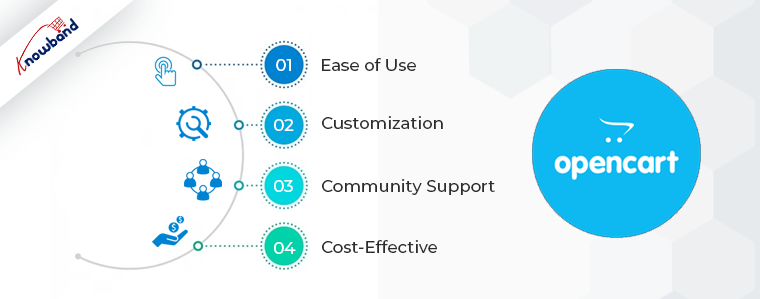
1. Ease of Use:
OpenCart boasts an intuitive and straightforward user interface. Setting up your store and managing products, categories, and orders is relatively easy, even for beginners. Furthermore, this simplicity is a significant advantage for small business owners or startups looking to establish an online presence rapidly.
2. Customization:
OpenCart offers a wide range of themes and extensions in its marketplace. This flexibility allows you to customize your store’s appearance and functionality to align with your brand and meet specific business needs. Whether you need a sleek and modern design or advanced inventory management, OpenCart’s marketplace has you covered. Moreover, at Knowband, we also offer a wide range to use Opencart extensions to take care of all your selling needs.
3. Community Support:
OpenCart has a robust community of users and developers. This means you’ll find plenty of resources, tutorials, and active support forums to help you address any issues or questions you may encounter while using the platform. Moreover, the power of community support cannot be underestimated when running an eCommerce business.
4. Cost-Effective:
OpenCart is an open-source platform, which means it’s free to download and use. This cost-effectiveness is particularly appealing for startups and small businesses with limited budgets. While there may be expenses associated with themes and extensions, the core platform itself is a budget-friendly option.
Prestashop:
Prestashop is another formidable player in the eCommerce platform arena. It’s known for its extensive list of features right out of the box, making it an attractive choice for businesses of all sizes. Let’s explore some of Prestashop’s key features and benefits:
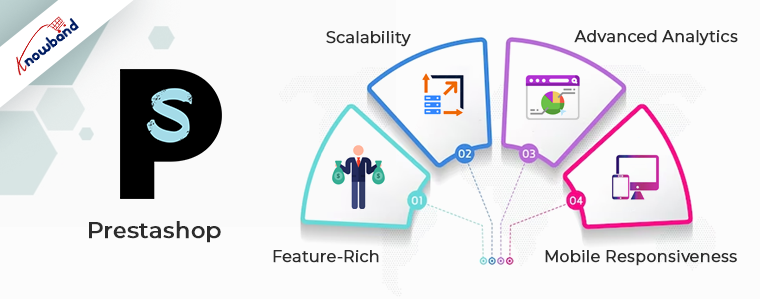
1. Feature-Rich:
Prestashop comes with an impressive array of features, including multi-language support, SEO optimization, and compatibility with a wide variety of payment gateways. These built-in features mean you can get your store up and running quickly without the need for extensive customization.
2. Scalability:
Prestashop is highly scalable, making it suitable for both small businesses and large enterprises. Whether you’re just starting or planning for significant growth, Prestashop can accommodate your needs. This scalability is particularly valuable for businesses with ambitious expansion plans.
3. Advanced Analytics:
Prestashop provides advanced analytics and reporting tools. These tools allow you to gather critical data on your store’s performance, customer behavior, and sales trends. Moreover, armed with this data, you can make informed decisions to optimize your store and enhance its profitability.
4. Mobile Responsiveness:
In today’s eCommerce landscape, mobile responsiveness is a must. Prestashop prioritizes this aspect, ensuring that your store looks and functions flawlessly on all devices, from smartphones to tablets and desktops. This mobile-friendly approach can significantly improve the user experience and boost conversions.
Comparative Analysis:
Now that we’ve highlighted the key features and benefits of both platforms, let’s perform a comparative analysis to help you make a well-informed choice:
Price: OpenCart has a clear advantage in terms of cost. It’s an open-source platform, which means the core software is free. Prestashop, while feature-rich, may require a more substantial initial investment, especially if you opt for premium themes and extensions.
Ease of Use: OpenCart is known for its user-friendly interface, making it an excellent choice for beginners. Prestashop, while not overly complex, has a steeper learning curve. However, mastering Prestashop can lead to a more powerful and feature-packed store once you’re familiar with it.
Scalability: Prestashop shines in terms of scalability. It can accommodate businesses at various stages of growth, from small startups to large enterprises. OpenCart is better suited for businesses with modest growth expectations.
What to Choose!!
In conclusion, the choice between OpenCart and Prestashop depends on your specific needs and priorities. If you’re seeking a cost-effective, user-friendly solution for a small to medium-sized store with a limited budget, OpenCart is likely your best bet. On the other hand, if you anticipate significant growth, need a feature-rich platform with advanced analytics, and are willing to invest in your eCommerce venture, Prestashop might be the right choice for you.
Ultimately, the decision should be based on a thorough analysis of your business requirements and goals. Both OpenCart and Prestashop have their merits, so choose the one that aligns most closely with your eCommerce ambitions. Remember that the success of your online store ultimately depends on factors beyond the platform, such as product selection, marketing, and customer service.
When we were little, we all remember receiving gifts for special occasions such as birthdays or holidays such as Christmas. However, as time passes, so do people’s preferences. It’s impossible to forecast what someone will like these days, given the enormous array of options accessible both online and offline. A Gift Card from any business or brand is one of the top gift options these days.
How does Gift Card work for eCommerce?
A gift card is a type of payment that may be used to make purchases at the eCommerce store that issued it.
If you buy a gift card from Starbucks or Amazon, you or the recipient can only spend it at the store that issued the card.
Digital gift cards can be used from anywhere and if it belongs to an eCommerce store, then anyone with the card can make a purchase and use it.
Perks of selling a digital Gift Card
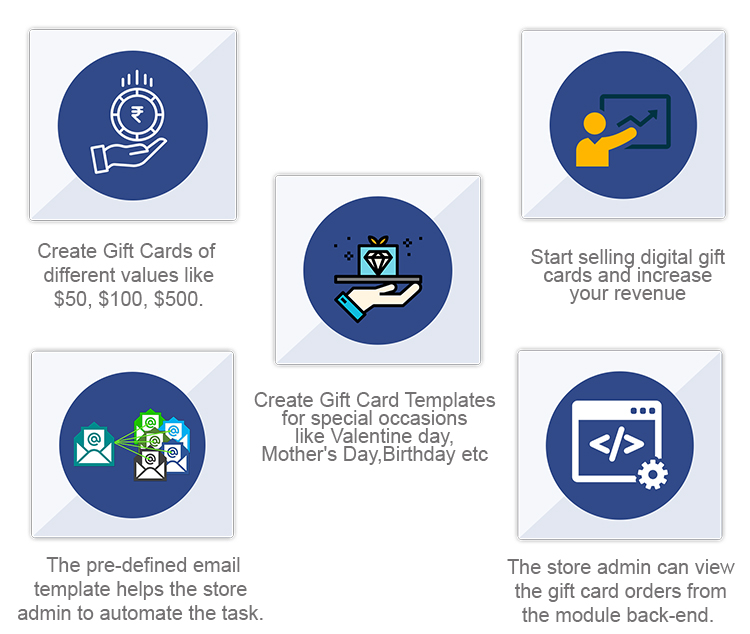
Customers find it a more convenient gift option. Gift cards can be physical (i.e., a plastic card) or digital (i.e., a digital file). Digital gift cards do not have a physical form; instead, you are given a unique gift code number that you may use to make purchases at online stores. The most common type of gift card is still physical cards, although this is projected to alter shortly.
Knowband’s Digital Gift cards are tailored for eCommerce and allow sellers to use them as Physical as well as the digital card. Scroll down for real-life examples of OpenCart Digital Gift card managers and explore more.
Why do customers like giving gift cards?
Purchasing a Gift Card, whether for a wedding or a birthday, is a very straightforward process. In truth, purchasing a Gift Card on the internet requires very little work. The procedure is simple and convenient, and it saves you time when purchasing a gift.
People who receive gift cards have the option of purchasing whatever they choose.
Sending gift cards physically or digitally is far less expensive than mailing items.
When shopping with gift cards during peak sale times, the individual getting the gift card can get more bangs for their cash.
Unlike getting a gift and having to go to great lengths to return it, redeeming a Gift Card is a breeze. Offline cards and vouchers must be redeemed in person, but online/digital cards and vouchers can be used with a few mouse clicks. Hence, Gift Cards become even more appealing.
How OpenCart Sellers can sell Gift Cards on their website?
Step by step guide to install and customize the Opencart Gift Card Manager Extension before making it live:
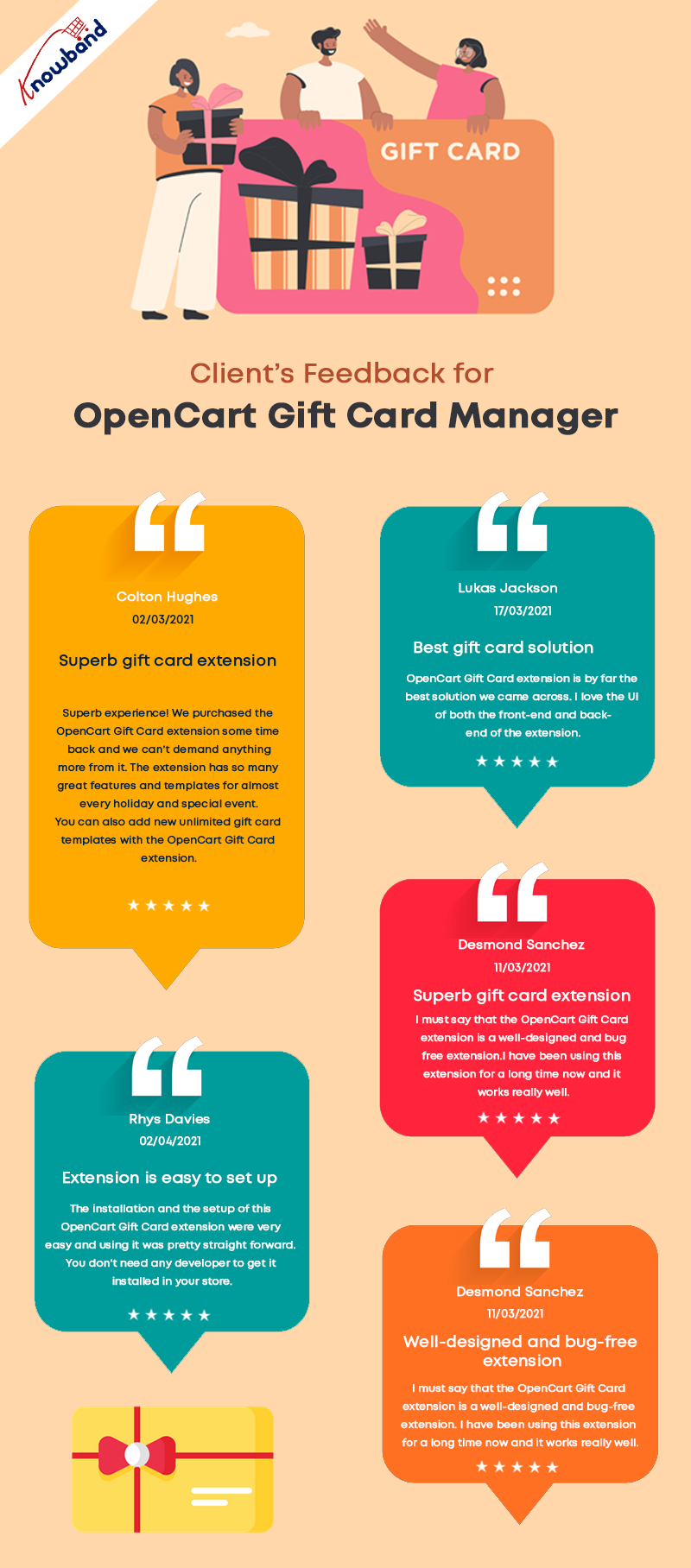
Seller’s Feedback on KnowBand’s Gift Card
The OpenCart Gift Card Manage extension allows you to display the gift card link in a variety of locations to draw attention to it. It can be placed in the website’s header, footer, or center-left. The Gift Card link can also be found in the My Account section.
What customization is possible and how you can use it in your eCommerce OpenCart store is explained in detail.
Offer Gift Cards for a Variety of Occasions
The Gift Card module has gift card templates for a variety of holidays and events, including Valentine’s Day, Halloween, Christmas, New Year’s Eve, Birthday, Anniversary, Father’s Day, Mother’s Day, and so on. You can make changes to the existing Gift Card templates as well as create new ones.
Image Printed Gift Cards are unique
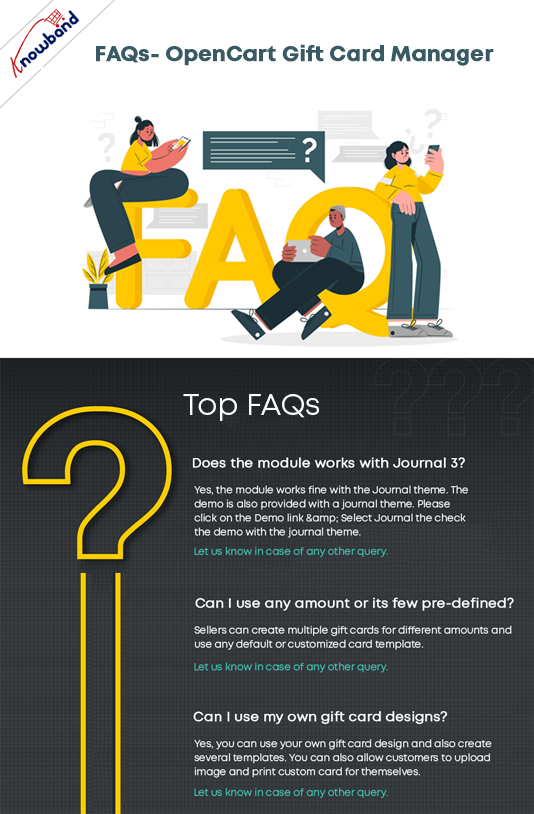
With the OpenCart gift card manager, you can allow customers to create image gift cards by uploading a photo. Such gift cards will have a personal touch and will make the receiver feel more attached. Gift Card extension is also compatible with the Opencart Journal theme.
Custom Price Gift Cards for different budgets
The OpenCart Gift Voucher extension allows you to create gift cards with a fixed value or a range of values. You can set the value for which gift cards are accessible when the fixed amount status is activated, for example, 100, 200, or 500. You can select the minimum and maximum gift card amounts for which a user can shop if this option is deactivated.
Allow virtual gift cards to be sent.
Customers would be able to send the gift card to the recipient’s email address if this option was enabled. This can be done for each and every gift card.
Allow actual delivery of gift cards.
Customers would be able to mail the gift card to the recipient’s home address if this option was enabled. Each form of gift card might have its own functionality.
Use it to create your brand identity
A gift card prefix is typically made to promote a brand. You can also establish a prefix for your gift cards, which will be used in all of your gift card codes.
Custom email for virtual gift card delivery
You can create an eye-catching subject line and customize the email content to your liking. Email templates are available in the upgraded version for sending an email notification to gift card senders as well as to print the card.
Select the Date and time to send the email
Specify the gift card order status on which the gift card will be given to the recipient. You can choose from a variety of order statuses to choose which order state the gift card will be sent to the recipient. Customers would also be able to print the coupon based on the order status they chose.
Mention Eligibility Criteria and Validity date
You can select a minimum gift card delivery gap between placing a purchase and receiving it with the OpenCart Gift Card Manager plugin.
Allow for the download of a Gift Card in PDF format.
You may provide clients the opportunity to download the gift card in PDF format using OpenCart Gift Card Manager. You can customize the PDF content as well as the gift card pdf prefix.
Keep track of your gift card purchases.
The OpenCart Gift Card extension allows you to keep track of the status of your gift cards orders. You may look up client information; verify the gift card’s expiration date, and much more.
Support for Cron
Because CRON is supported on your site server, the gift card can be sent to the addressee right away without the need to run any CRON files.
Real-life examples of Gift Card Manager on OpenCart stores
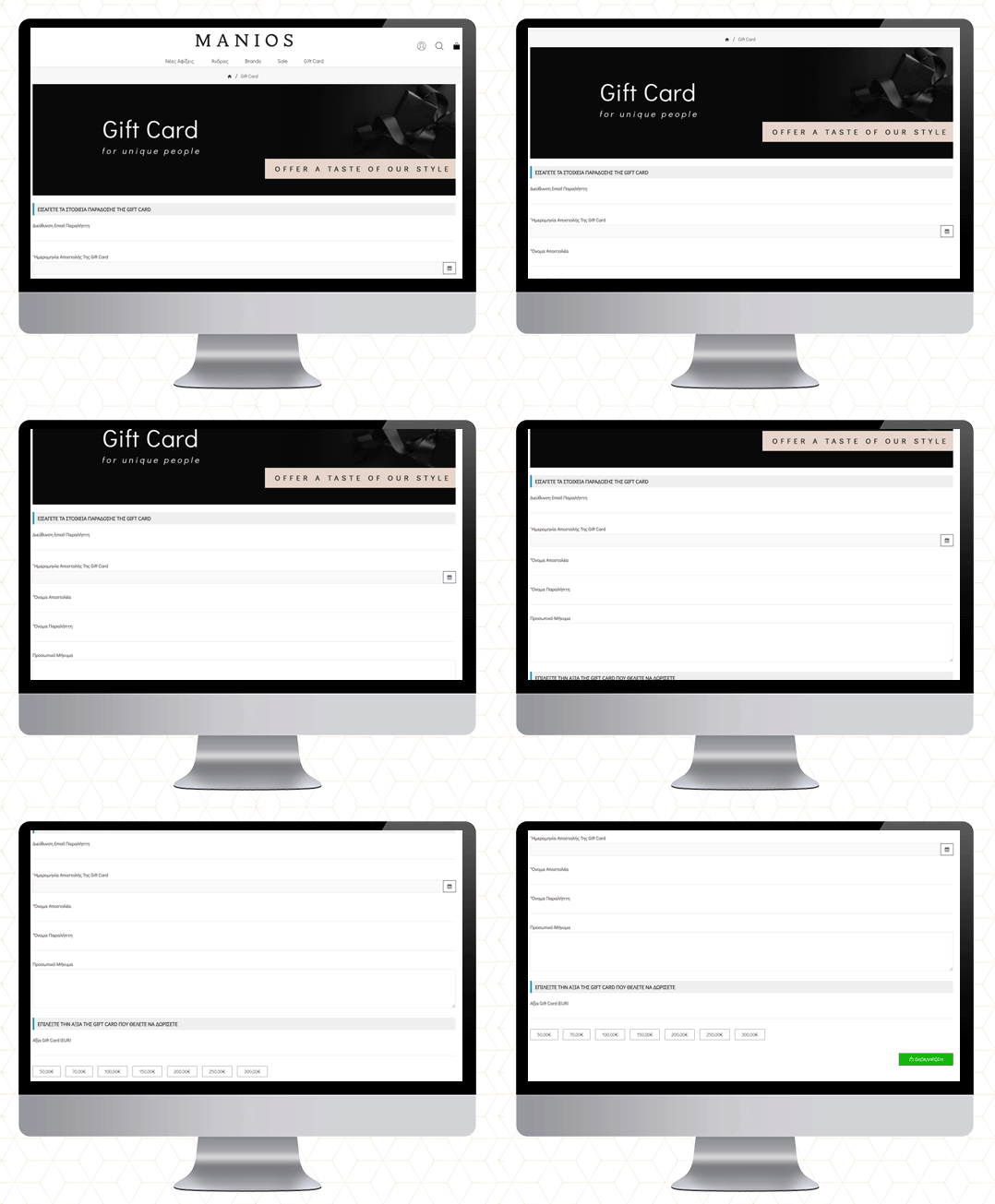
MANIOS Men’s Clothing
The MANIOS is a clothing brand for men and it delivers products in Greece and Cyprus. The website is built on the OpenCart platform. MANIOS believes in customer satisfaction. They have been using Gift Card Manager on their OpenCart store to deliver a great shopping experience to their customers.
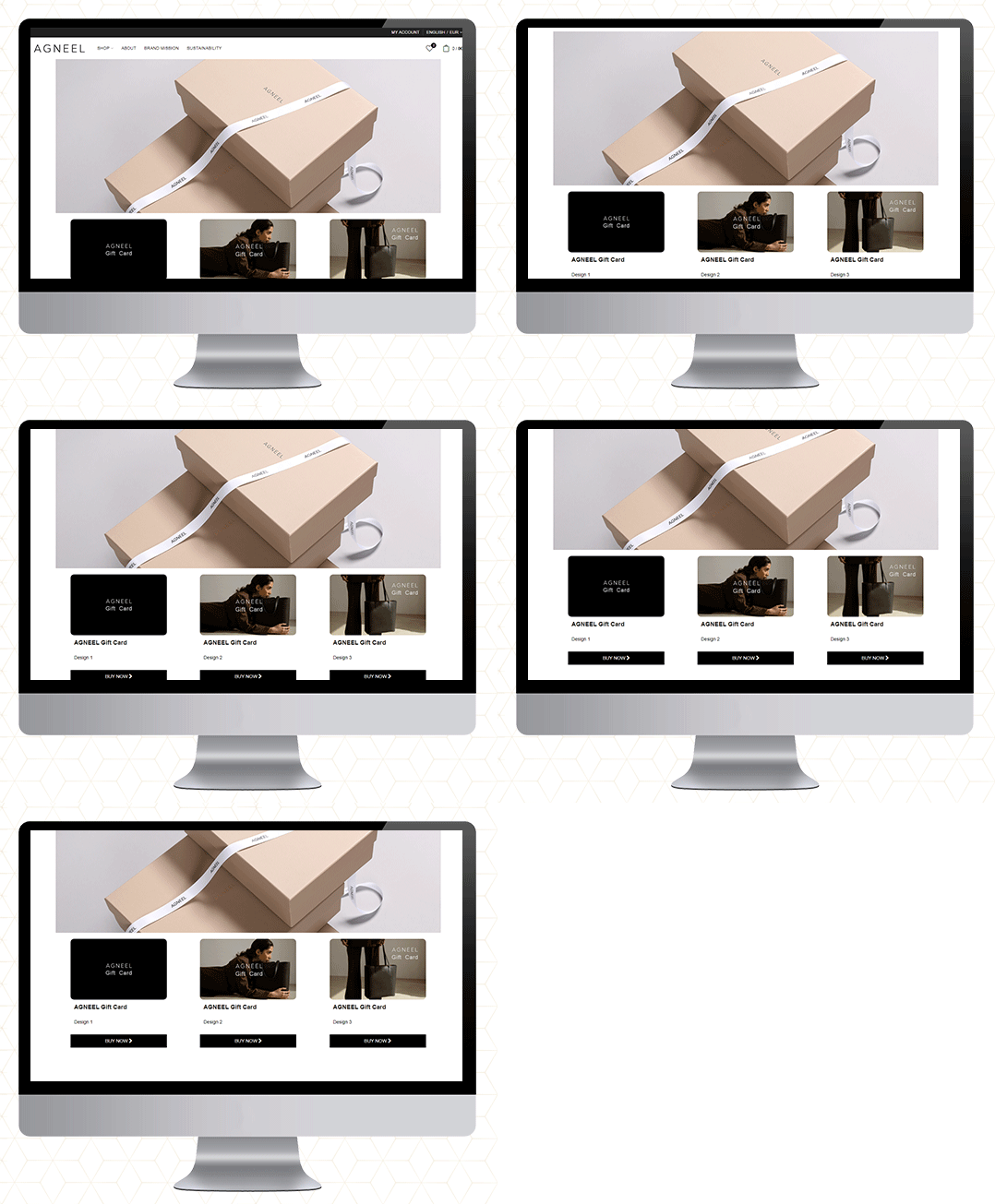
AGNEEL Handbags
A luxury leather handbag brand delivering in Berlin, Europe. They are also using the OpenCart Gift Card Manager on their website. They have created some custom gift cards with attractive images.
UZI Sports
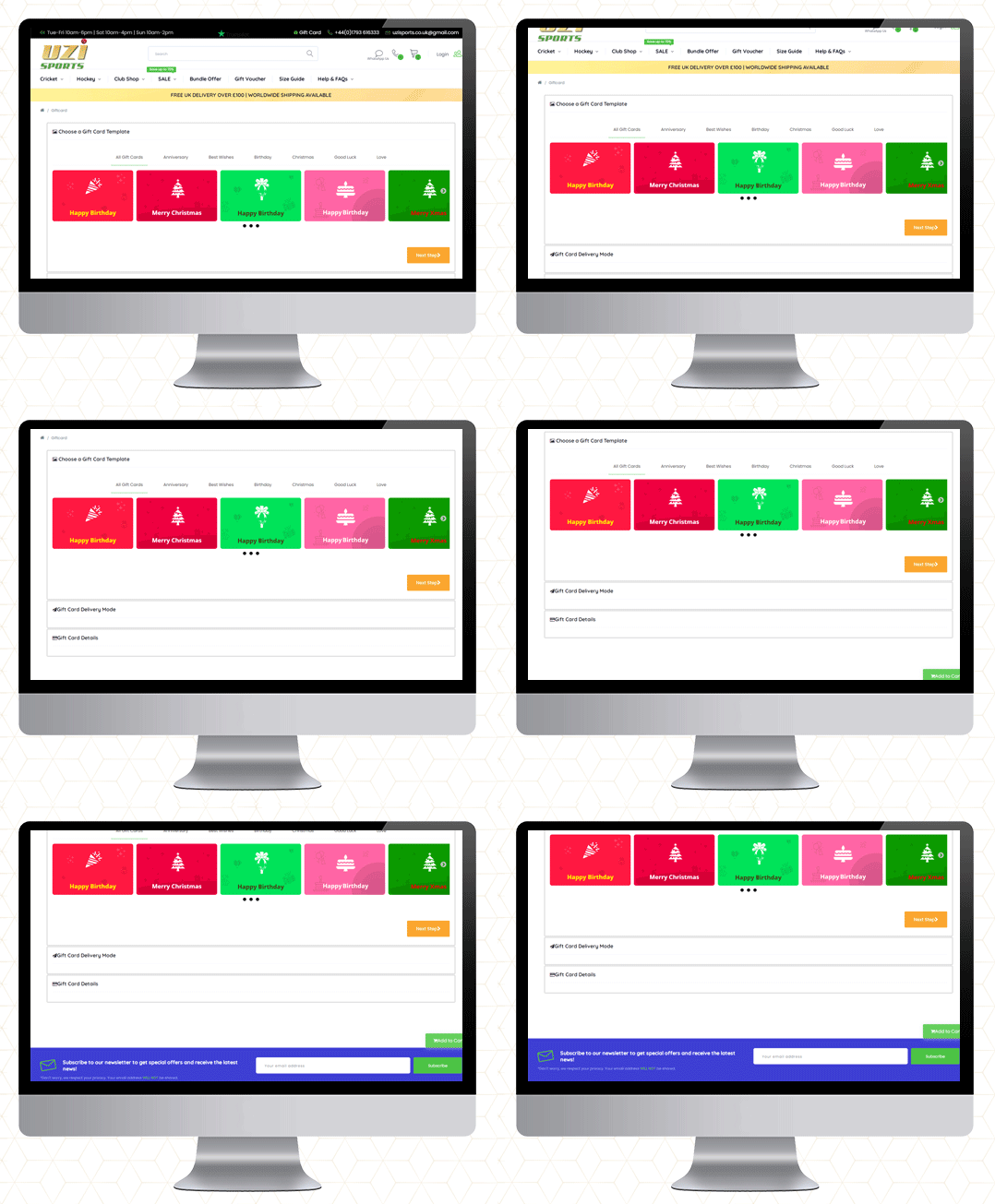
UZI Sports is one of the UK’s Hockey & Cricket equipment stores and approved suppliers of major cricket and Hockey equipment brands. Moreover, they are experts in providing custom sportswear across the country. They also use the OpenCart Gift Card Manager plugin.
Cose che cero
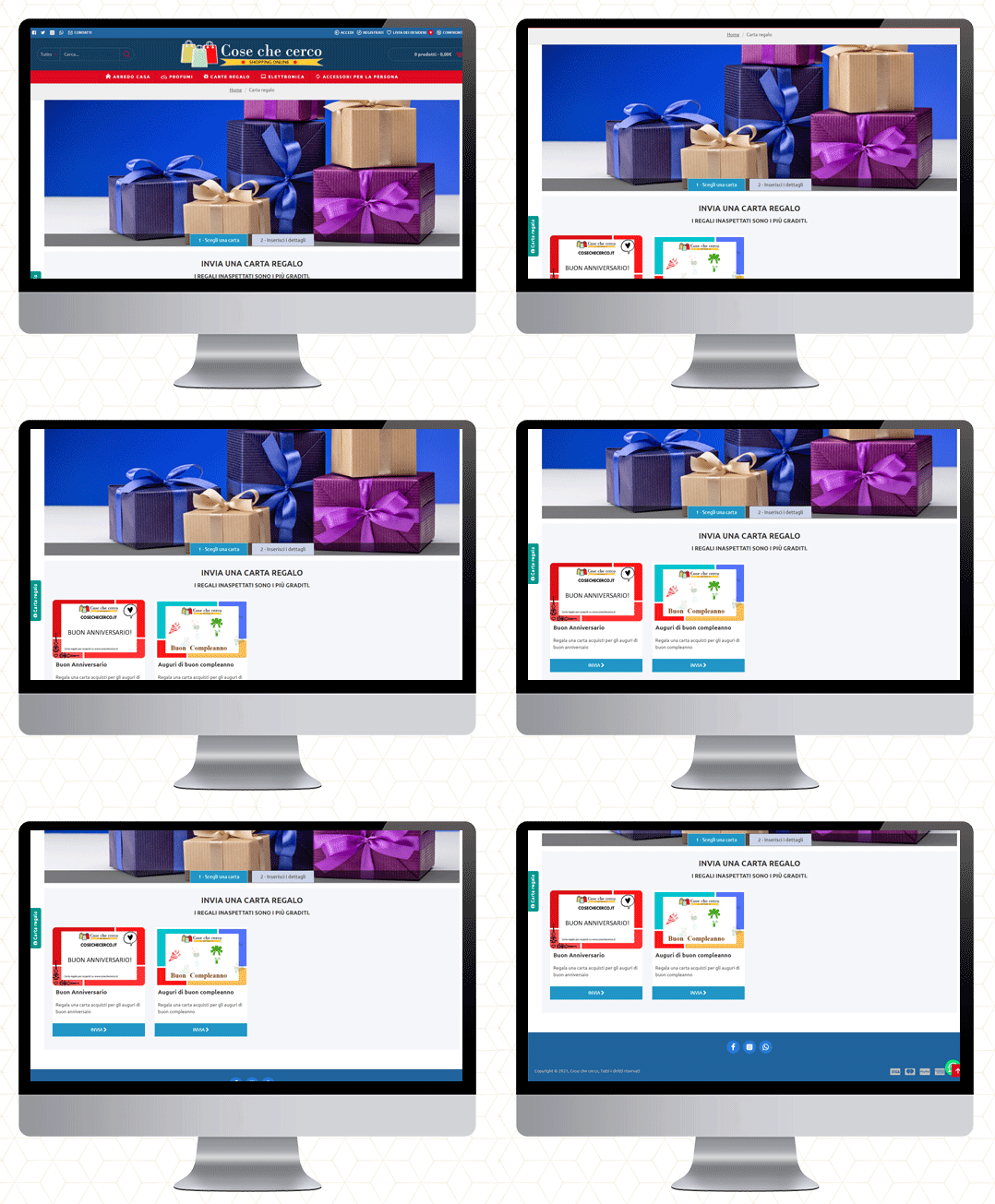
They deliver in Italy. You will find furniture, perfumes, electronics, and a wide variety of accessories. The gift cards are also available on their website.
QMarjan
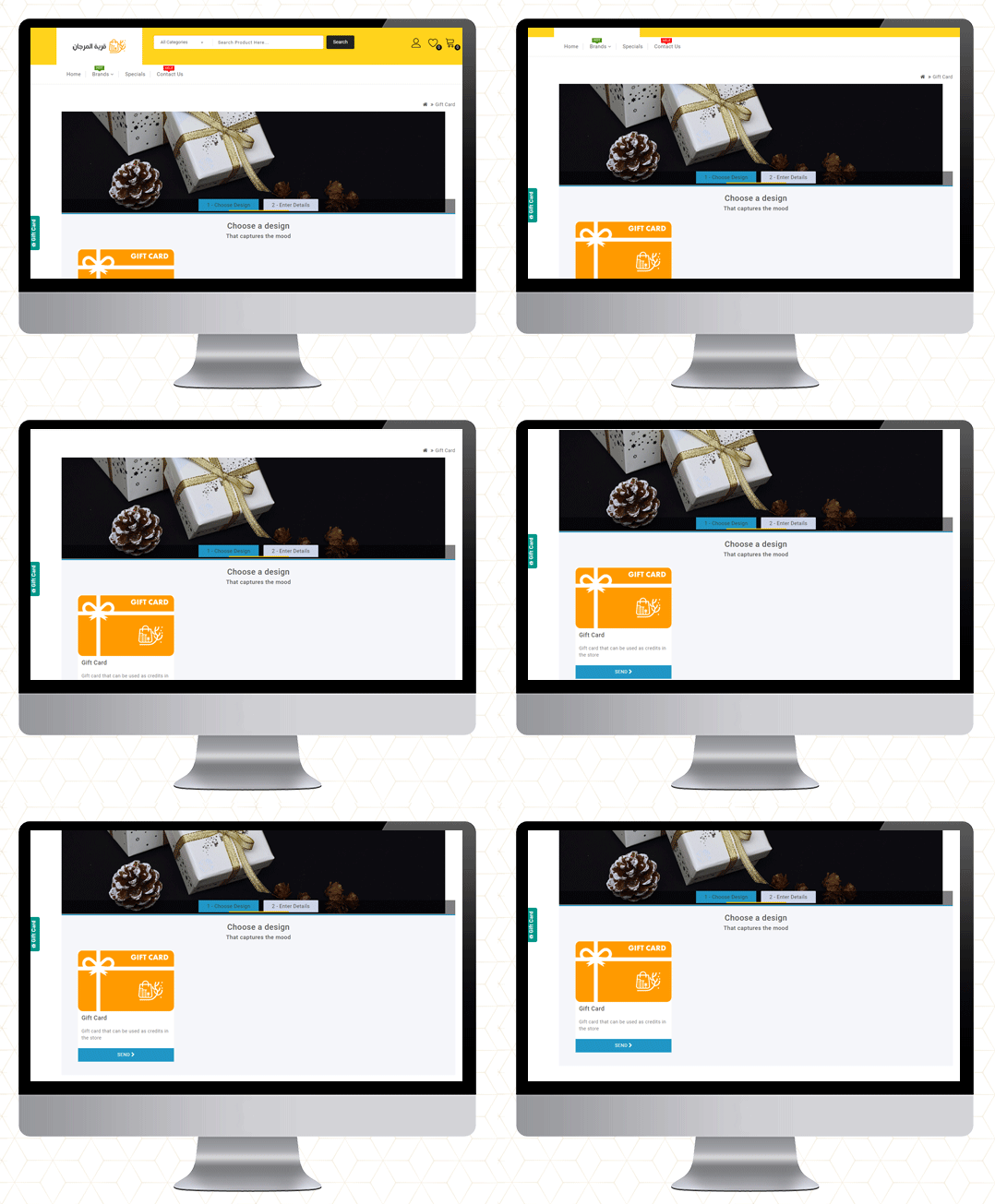
Al-Murjan store always strives to provide your needs at reasonable prices. Their location is in the beloved city of Qatif. They deliver in all regions. To improve the shopping experience as well as for customer acquisition, the Opencart Gift Card Manager is live on their store too.
Final Thoughts
Gift cards are similar to any other type of gift. Consider the person you’re gifting the card to and their likes and dislikes before making your selection. Make an effort to choose a card that will be liked and used.
So, if you’ve never considered a Gift Card as a product in your store, this guide will explain why they’re ideal.
If you want to start selling an e-Gift Card on your OpenCart store, go here to get started!
More information on KnowBand’s Digital Gift Card can be found here.
Check out the Video for OpenCart Gift Card Manager
Better customer experience can increase customer retention. The sole requirement that every business owner has is that the buyer returns to the site after making a single transaction. Thanks to Knowband! It provides some excellent extensions for your eCommerce store which can enhance customer satisfaction and customer experience.
10 Customer experience solutions for your OpenCart store
I am sharing a compiled list of 10 smart solutions for your eCommerce store that boosts the online shopping experience on your OpenCart store.
1. Smooth communications with Auto Switch Language And Currency- Opencart Extensions
Communication is what builds the bond between two things or individuals. But, if the language and currency become the barrier, the customer will be unable to shop from your store. Make it a multilingual store with OpenCart Auto Switch Language and Currency extension provided by Knowbandand add some value to the customer experience. Key features of this module include:
Allowing your customer to choose a delivery time will amend their experience at your store. With the Preferred delivery time extension, users can select the desired delivery date and time on the checkout tab. The store administrator can provide a better customer experience by providing personalized service.
Admin can send a push notification or email for delivery details
With the OpenCart Store locator, online users can view the physical store’s location in the shop area. They can now pick the product as per their comfort. This store locator makes it easy for the customer to set their schedule and allows them easy pick-up. Customers can save money on shipping charges.
This Store Locator helps a customer with this new feature of order pick-up. You can add a Store locator to your OpenCart store to enhance the customer experience. After the COVID-19 outbreak, the OpenCart Store locator by Knowband seems to be a good addon for your store.
Rewards and discounts have an important role to play in attracting consumers and making shopping interesting. Knowband provides Opencart Loyalty Points Extension, which handles the Admin’s reward points scheme. The Extension provides loyalty points for both new and current customers. This increases customer retention. With loyalty points, the admin can earn the trust of the customer.
Who doesn’t want a loyal customer? Knowband store is a one-stop solution for all your eCommerce store issues. With Loyalty points, the Opencart extension by Knowband helps your customer getting a satisfying customer experience.
The customers get different reward points based on many conditions set by the admin.
The Loyalty points can be offered for Sign-Ups, first-order, etc.
5. Improve checkout experience with One Page Checkout
Ecommerce stores that have a one-page checkout allow their customers to make fewer clicks than their customers to check out a store that has a multi-page checkout. It seems simpler than multi-step checkout which makes it user-friendly and augments the customer experience.
The concept of a one-page checkout can initially seem easier to complete, as fewer steps will appeal to time-conscious customers. Some key features of One-page checkout by OpenCart are:
Saves Customers time with a faster loading speed
Improves Conversion rate
Appealing appearance of the user interface attracts more customer
Comes with social login options
Knowband’s One-page checkout for Opencart is one of the best-sellers as it improves the online shopping experience and conversions. Also, it reduces the abandoned cart rate.
Get an additional 20% off on the instant purchase of plugins with Code NEW20 on the KnowBand store.
6. Build Mobile Application for OpenCart website
OpenCart Mobile App Builder by Knowband comes with many distinct features. Its User-friendly interface makes it a must-buy OpenCart extension for your OpenCart store.
A registration form looks boring and discourages your customer from making the checkout. With social login options, you can now motivate your customer to log in quickly on the OpenCart store. Social Loginizer extension for OpenCart by Knowband comes with 8 different login options including Facebook, Google+, and Twitter.
8. Customers can Save for Later with Advance Wish List
Advance Wish List / Save for Later – OpenCart Extensions allows users to move the product from cart to wishlist. Sometimes customer changes their mind while shopping and they move their products to the wishlist. This extension allows your customer to do so in just one click. This extension increases customer experience and customer retention.
Allows customer to maintain a private wishlist
Admin and analyze the product demands with statistical data available on the backend
Advance Wish List / Save for Later – OpenCart Extensions by Knowband allows the customer to move their favorite product to the wishlist which they can buy later. This way it increases the customer experience.
9. Easier to find the right fit with Product Size Chart
How can a product size chart be helpful to improve the eCommerce customer experience? Maximum product return is observed in the clothing industry. This takes extra effort and time of the store owner. Stop wasting your time and add this Knowband’s OpenCart Product Size Chart – Extension to your store which can help you create multiple size charts and map them to the product pages. This Opencart product size chart module offers a user-friendly interface
It helps you create multiple size charts and map them to the product pages.
Store admin can also map the size chart with a Manufacturer.
Admin can add images, HTML content, text, and guidelines for supporting the size chart.
A product with perfect fit and quality will give joy to your customers and will jack up the customer experience.
10. Customers feel valued with Better Thank You page
Knowband’s Better Thankyou Page extension for the Opencart store turns your usual order success page into a marketing page where you can show relevant items to consumers along with a discount coupon for their next purchase. The Better thank you page benefits the user and the store merchant in many ways:
Use Thank you page to collect Feedback or you can add promotional banners with greetings.
With Knowband’s Better Thank you page, ensure Customer Retention by offering a Coupon Code which will anyway add to the better customer experience.
Also, check out our other OpenCart extensions for your eCommerce store which can help you increase customer retention and customer engagement.
As things are moving in eCommerce, many shopping websites are creating their marketplaces. If you are giving it a thought then OpenCart Marketplace Plugin can be the right choice. It has a separate admin panel and seller dashboards to manage customers, orders, and inventories. Click here to get a better understanding of the features that you should consider before selecting the marketplace plugin.
For any eCommerce solutions, you can always rely on our expert team. Drop us an email at support@knowband.com and our team will get in touch with you right away.
Certainly, coupons are an enticing way to maximize volume and revenue. It can easily build your customer data and temporarily improve your conversion rates by integrating them into your marketing mix. Although there is no real substitute for offering quality goods and reasonable pricing, when the market heats up or customer expectation determines it, coupons do a great job supporting those efforts. To automate the coupon discounts on your OpenCart store, you can add ‘Sales Coupon Enhancer – OpenCart Extensions’ developed by KnowBand.
Coupons and discounts enhance sales by increasing conversions. Let’s explore the functionalities and learn how to use coupons to create discounts on the OpenCart store.
In creating coupon code, the sales coupon enhancer plugin offers admin all the options he ever wanted. It has several helpful features that are not available by default in OpenCart.
The OpenCart Sales Enhancer Extension makes it possible for the store administrator to create several coupons based on different categories. Through the OpenCart coupon code generator extension, store admin can generate coupons for a particular brand, client, payment method, shipping methods, etc.
This OpenCart Extension gives the administrator the ability to display all coupons produced without any trouble. The store administrator will set the coupon code rules and create random coupon codes through the OpenCart coupon code generator.
It allows setting conditions to apply to the coupon at the checkout page. One Page Checkout extension has a field for coupon code entry and the Coupon Code Enhancer is compatible with One Page Checkout.
Key features of OpenCart Sales Coupon Enhancer
Create Coupon Codes
You can create several coupon codes for customer groups, shipping methods, and payment methods using the OpenCart promotional vouchers. For instance, choose XYZ bank payment and avail a 10% discount’
Set Coupon Code Validity Rules
The number of rules to validate the coupon code can be applied through the OpenCart coupon generator will be defined by the store manager.
Generate random coupons with OpenCart coupon code generator
The OpenCart coupon code generator extension has a choice for generating random coupon codes, or you can enter your own code as well. Like for Christmas, the coupon code be SANTA25′
Create Code for Categories and Brands
The OpenCart sales coupon enhancer gives you the option of creating coupon codes specifically for a brand, category, consumer, shipping method, payment method, etc.
Compatibility
The OpenCart coupon code generator extension is compatible with Multi-Store. The default coupon code scheme does not interfere with the OpenCart coupon code generator extension.
Detailed Data Reports
OpenCart coupon generator gives you various reports to give you a glance over the coupon used orders and who did not use coupon codes while placing the orders.
The difference in the default coupon creation and coupon creation from the module:
Some benefits of offering Coupon Code discounts:
It has a fantastic interface that helps clients to quickly access and understands where code can be applied.
Easy to create coupon codes: Generate coupon codes for every occasion and event. Like on a particular product, category, shipping method, specific payment gateway, etc.
Apply rules: Apply rules based on products, cart quantity, type, etc., and configure your coupons with the OpenCart coupon code generator extension accordingly.
Fully customizable: The extension of the OpenCart coupon code generator can be completely modified from the backend.
Increase sales: 96% of consumers use coupons when making an order, which will increase the web store’s sales.
Display Reports: You can easily view reports and statistics of the total coupons generated and the number of coupons discounted. With the support of OpenCart coupon code generator extension graphs, you can also view the orders that used coupon codes and which did not use them.
Wrap-up: The coupon code extension can be easily applied to any of the OpenCart stores and is compatible with the journal theme. The coupon code generator extension is super easy to install and configure. Adding coupon codes The OpenCart coupon generator gives you free support and free updates for the future. KnowBand provides free installation of the OpenCart coupon generator.
The success story of e-commerce has its way of encouraging people to turn their business more towards the internet. More than 50 percent of shopping takes place online, current figures say. Therefore, more people are tilting towards creating their own marketplace with the latest trend of online shopping. The Cottageemporium is one such online store that has chosen OpenCart Marketplace to become a full-fledged marketplace.
The world-famous Central Cottage Industries Emporium firm has all the handcrafted and handloom products that reflect the culture and traditions of India. Velocity builds Cottage Industries’ online presence by creating a marketplace on the OpenCart platform using KnowBand’s OpenCart Marketplace Extension where various sellers can sell their quality products with aesthetic designs.
About Cottage Emporium
The Central Cottage Industries Emporium (A Government of India undertaking Ministry of Textiles) was established in 1952. Seeing the adverse effects of industrialization on the Indian economy and social culture, post-colonialism felt a need to give Indian crafts their rightful position and excite millions of craftsmen across the country’s parched creative spirits and help them gain a decent livelihood.
The Central Cottage Industries Emporium has been a favorite among clients in India and around the world as a showcase of the creations of Indian craftsmen, weavers, and folk artists. It has taken special care to make sure that through its goods, décor, exhibits, and everything else that goes with it, you get a sense of what the real India is all about.
The Cottage Emporium stands high, allowing India and the world to access the finest crafts with an assurance of authenticity, elegance, and value, setting aesthetic and design standards. Anyone can register as a seller on the Cottage Emporium Marketplace.
Services offered by Cottage Emporium:
Under one roof, the emporium displays the finest crafts from all over India, ranging from exquisite sculptures, paintings, objects, metalware, woodcraft, pottery, stoneware & marble craft, Bankura silver branded, carpets, furniture, furniture, home linen, sarees, ready-to-wear, shoes, jewelry, craft pieces, herbal products and much more. Every product is distinctive, representing India’s traditional myths, legends, religious beliefs, cultural ethos, and rich heritage.
On multiple fronts, the emporium promoted handicraft and handloom, embracing market analysis, handpicked choice, design growth, impeccable quality, varieties, fixed prices, creative promotions, a basket of auxiliary services such as personalized corporate gifting items, interior design services, packing/shipping facilities, specialist gift wrapping, ATM, foreign exchange counters, etc.
Click here to Visit Central Cottage Industries Emporium Marketplace.
How does Cottage Emporium Marketplace work?
The Velocity Software Solutions have created the Central Cottage Emporium’s digital Marketplace on the OpenCarteCommerce platform using KnowBand’s OpenCart Marketplace Extension. The website is attracting users from all across the world and there are 56308 visitors so far. The marketplace is rich in features and functionalities. By converting their online store into a Marketplace the store admin can allow multiple sellers to register on the marketplace so that they can list their products on the marketplace to reach out to the new audience. The Marketplace admin can charge a commission to the sellers that will be paid on each sale of the seller products. Marketplace admin can also offer a variety of products at a competitive price to the customers, which will increase the customer experience and they can explore a huge variety on a single platform.
The marketplace features can be further customized based on the business needs and as per the requirement of the Cottage Emporium Marketplace, all the required changes have been done by Velocity.
It has a curated admin panel and seller dashboard. The seller registration can be done from the customer registration field.
Front End at a Glance:
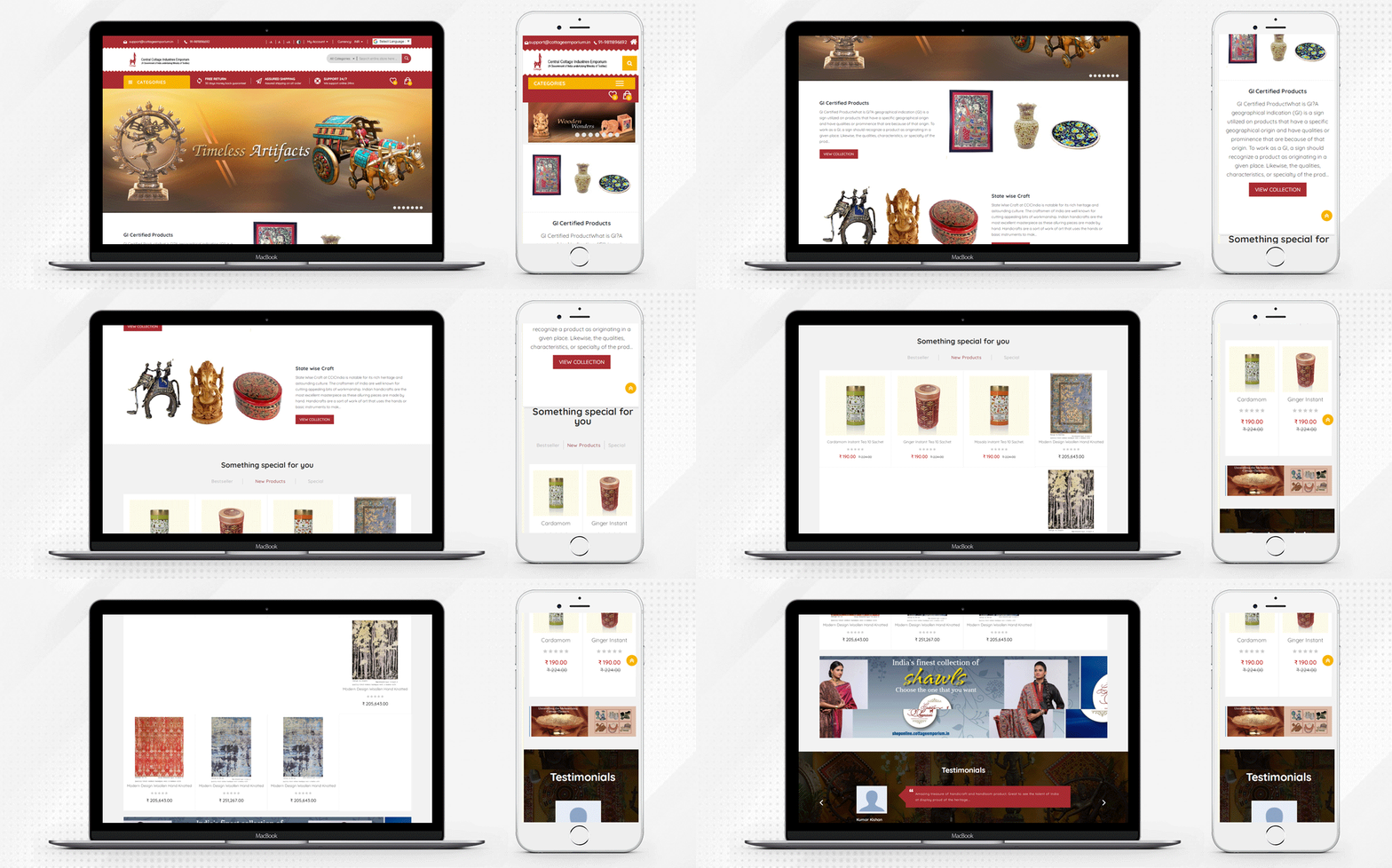
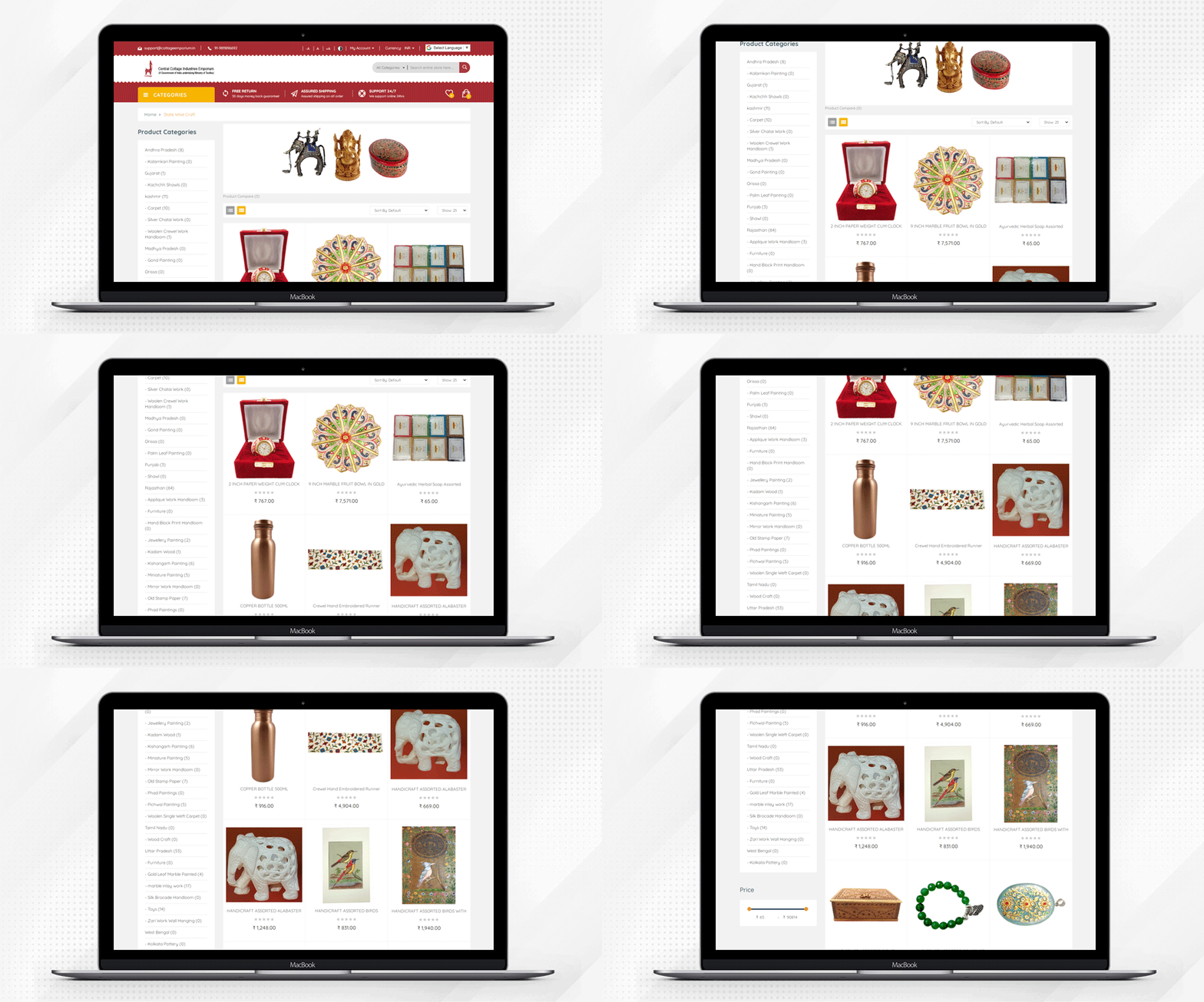
Cottage Emporium for Indian Handicrafts and Handlooms is actually one of the most trusted shopping marketplaces. The marketplace consists of a variety of common categories, all of which include the latest set of famous Indian culture and traditions. Here is a summary below of the full marketplace.
The Landing Page:
Discover the beauty of Indian culture from the comfort of your home. The home page is simple and it has a clean and clear design that is smooth and user-friendly. The products can be found with ease by selecting the category.
Shopping Cart:
With just a few taps, choose your favorite & all the new items and add them to the cart. The marketplace is considered to be the most relevant and accessible marketplace for everyone. Customers can add one or more products to the cart.
Product Page:
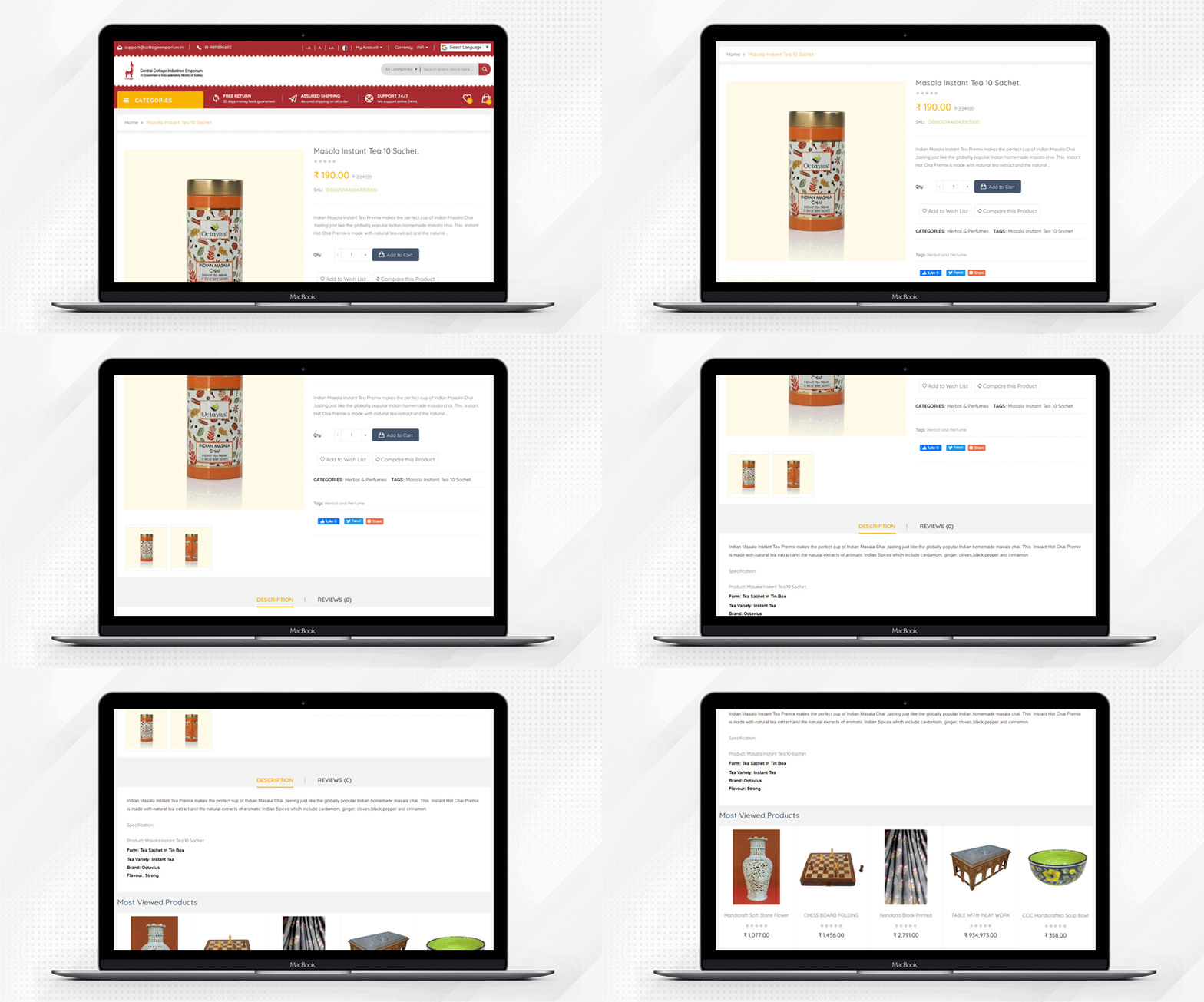
For the product page, there are various categories and the crafts are available as state-wise and certified products collection as well. There are some special categories:
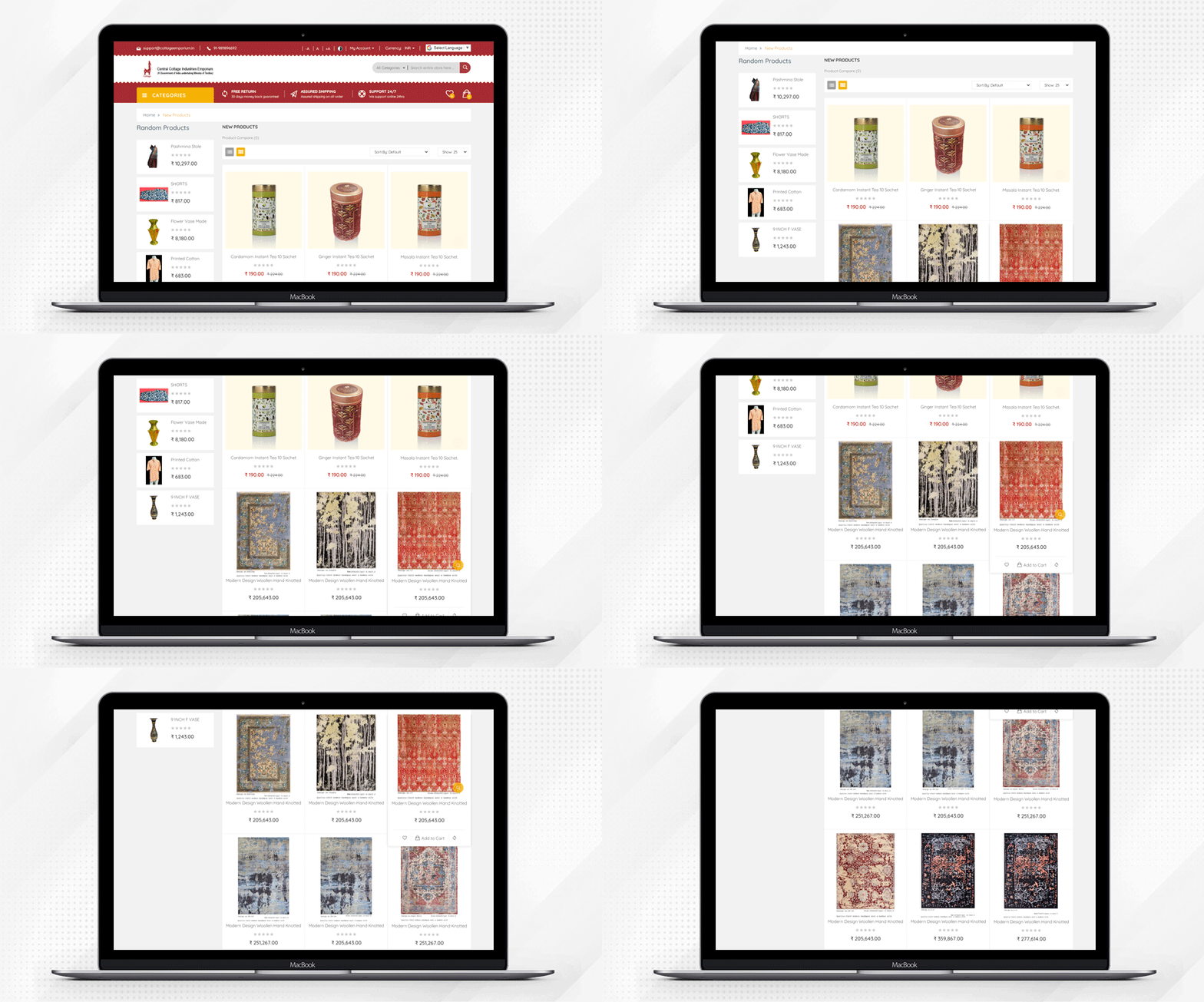
New Products: New products are constantly updated, so explore the Cottage Emporium website to stay updated and become a trendsetter with all the trendy & stylish products.
Best Seller: In the ‘Best In’ tab, get all the best-selling products and enjoy shopping to your fullest potential with the highest product quality provided on Cottage Emporium’s Online Website.
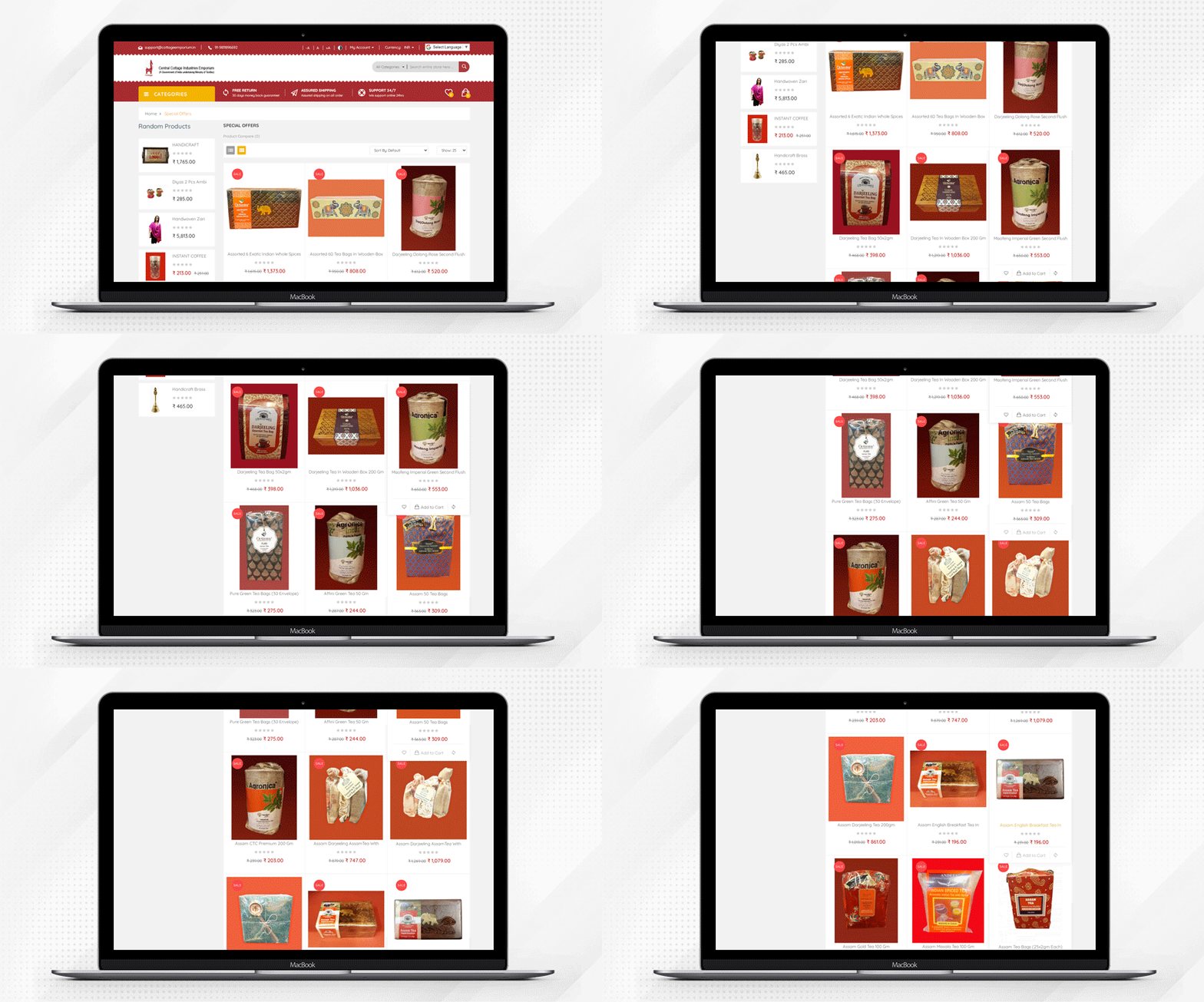
Special: In the ‘Special’ tab, the number of unique items is compiled together to make your shopping friendly and fun-filled. The sellers can run discounts and promotions on the store.
Customer Account Registration:
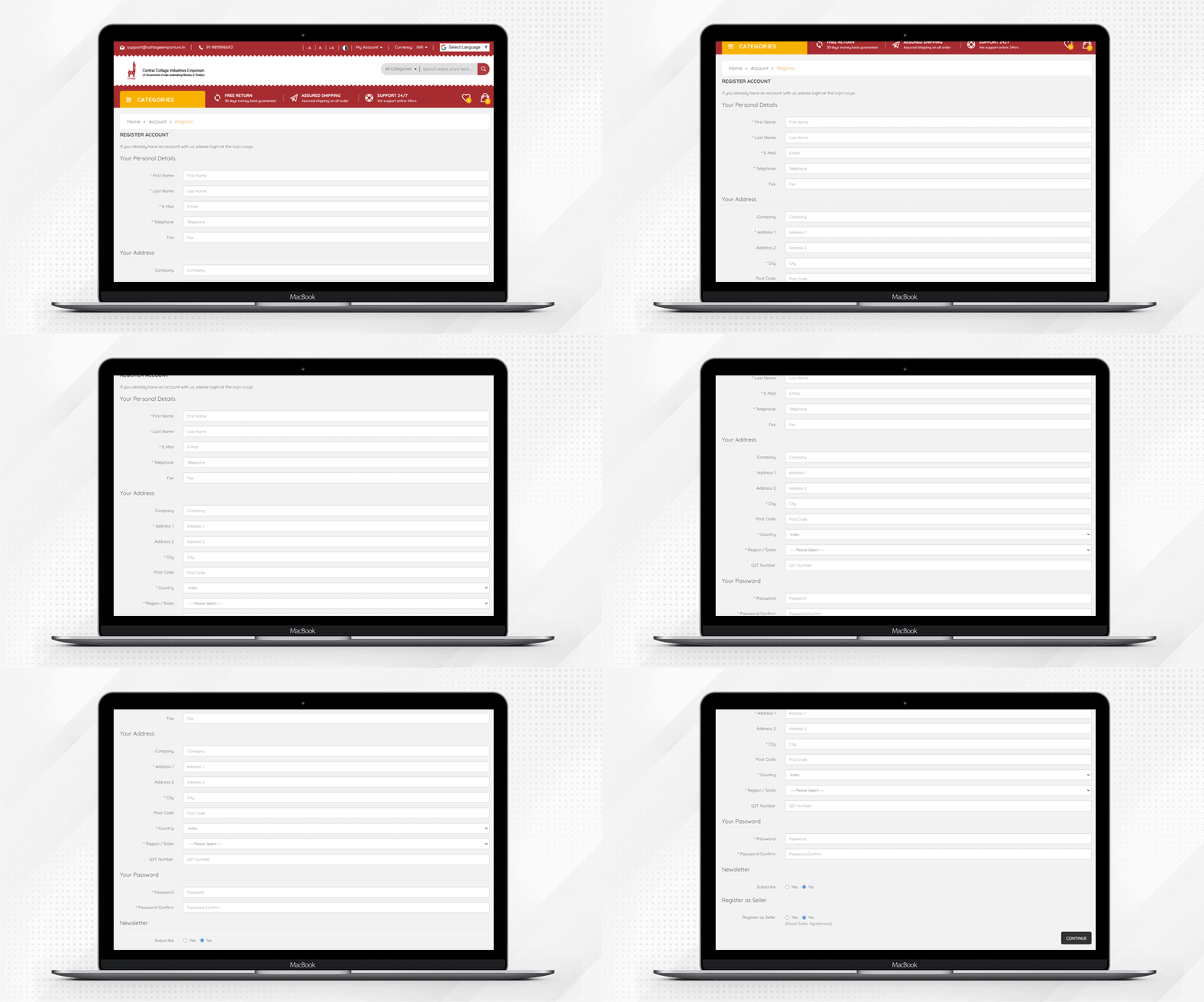
The customer account registration is easy and can be completed in few simple steps.
Register as Seller:
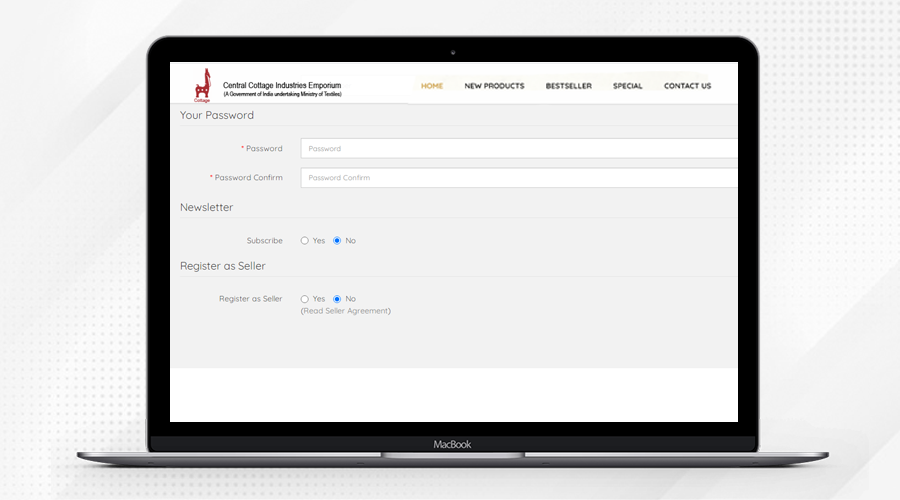
Any customer can register as a seller by selecting the ‘Register as Seller’ option in the registration form.
Return Policy:
Easy return policy for the customers with 30 days money-back guarantee. They offer 24/7 online support and they offer assured shipping on all orders.
Multiple Language and Currency Support:
The website supports Euro, Indian Rupee, and US Dollar. Along with that, customers from all over the world can access the website in their native language.
Social Media Links:
Multiple social media handles are linked to the marketplace where customers can follow Cottage Industries Emporium’s social media pages and stay updated.
Testimonials:
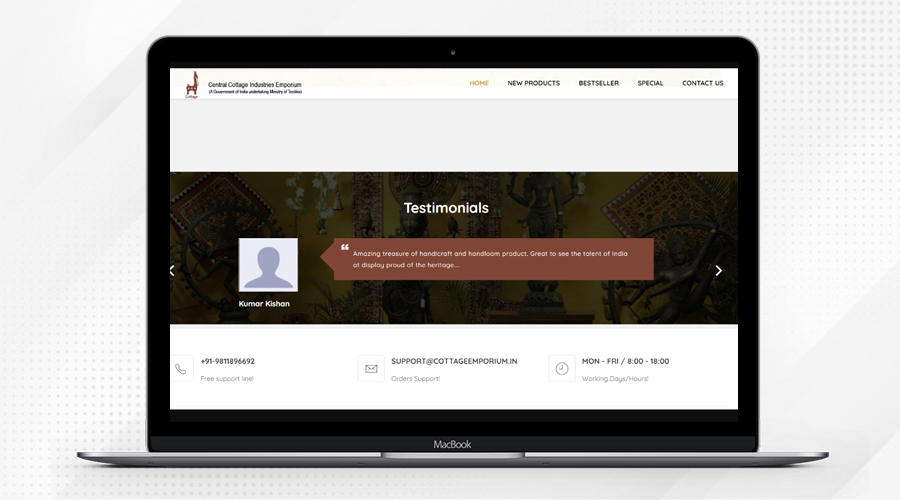
The Testimonials are the most important element of a marketplace as they help new visitors to trust the website sellers and product quality. There are various testimonials displayed on the website that can influence the shopping decision of the user.
Message from the Central Cottage Industries Emporium:
After exploring various eCommerce platforms and speaking with several developers, we (‘Central Cottage Industries Emporium’) settled on the ready-made marketplace solution for our handloom and handicraft website- The OpenCart Multi-vendor Marketplace.
Velocity Software Solution team transformed our website into a fully-functional Marketplace using KnowBand’s OpenCart Marketplace Extension.
The extension made our tedious work simple!
This is a no-coding solution and it has all the functionalities that help us in seller management, product quality assurance, and inventory management.
We can easily set commissions for the sellers and all the payouts are managed by us with ease. Moreover, I am thankful to team Velocity who is always available to help us with any issues coming on the way.
About OpenCart Marketplace (Multi-vendor):
The OpenCart Marketplace extension by Knowband will easily transform your single-vendor website into a fully functioning marketplace. The admin can create a marketplace like Amazon, eBay, Etsy by using the Multi-vendor Marketplace module so that many vendors can sell their goods on the market.
The OpenCart marketplace module’s admin interface makes the management of sellers simple. The extension of the OpenCart Multi seller marketplace makes commission management simple for the store administrator. For all updates, personalized email templates are available. With just a click of a mouse, product and category management can be done and
The Opencart mobile app builder plugin is also compatible with this module. Knowband also offers the Mobile App for the marketplace so it will be easy for the marketplace owner to offer the best mobile experience to the customers using the mobile app.
You can explore the OpenCart Marketplace Extension on the KnowBand’s or Click here to see the demo. Our team is always available to provide custom website development services. To discuss, write us at support@knowband.com
Do you want to add infinite scroll to your OpenCart store?
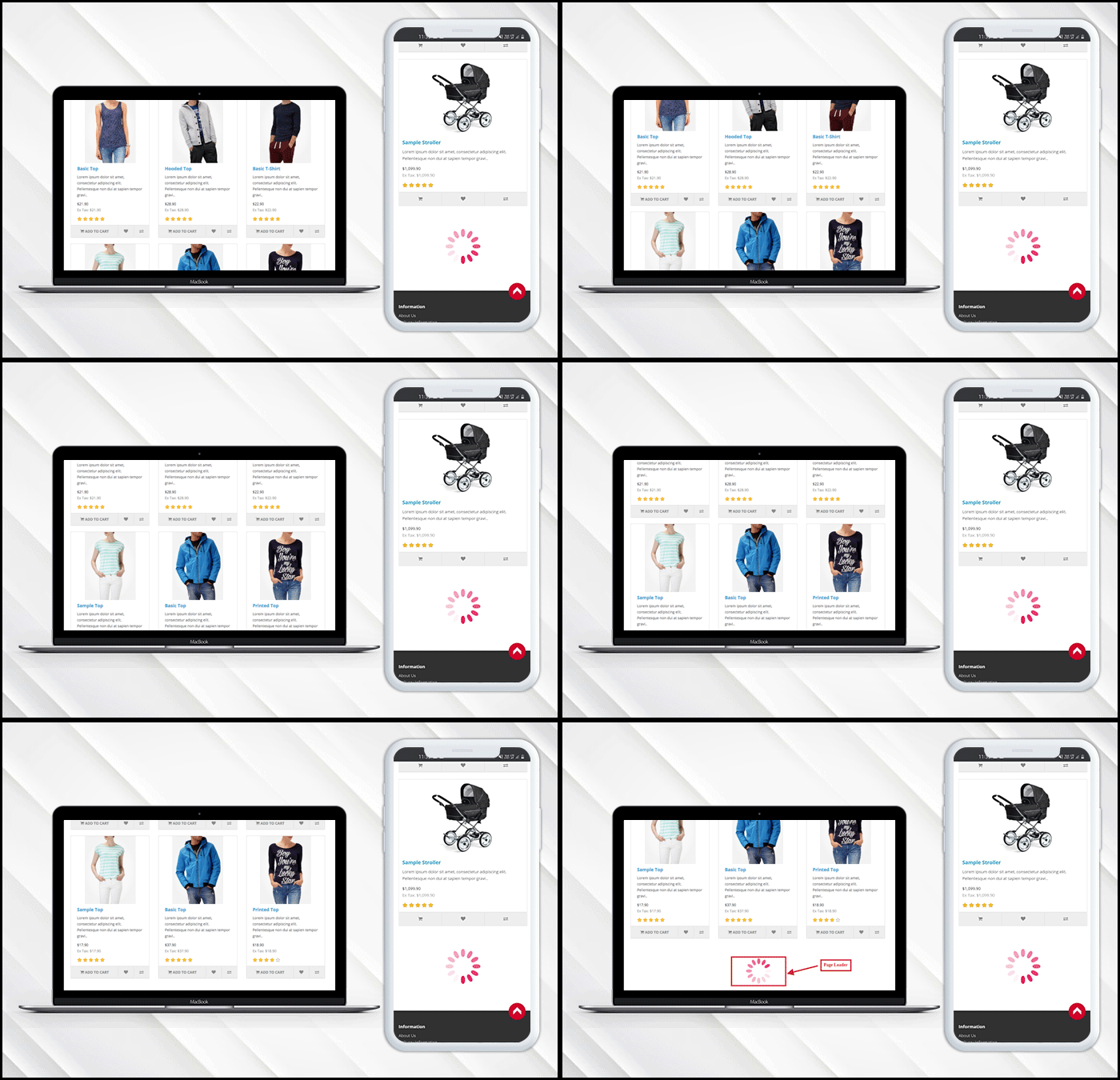
Infinite scroll saves users from switching tab by loading the products automatically after they reach the bottom of the page. In eCommerce, when a user is browsing and exploring products on the store, it is good to show the products in a continuous manner without breaking the flow.
Endless scrolling can be added to the category page, brand page, product page or wherever required. The OpenCart Infinite scroll extension by KnowBand is completely mobile responsive. Besides, it is compatible with the Journal theme and other OpenCart themes.
This article is a complete step by step guide to install and configure the infinite scroll extension in your OpenCart store.
Introduction to infinite scroll
What is the infinite scroll? For instance, you are shopping on a website and after sliding for a few seconds the content stops loading and there appears a button ‘Load More’. Now without clicking the tab you leave the online store then and there.
On the other hand, when you are exploring news feeds on Facebook it never asks you to switch tabs and you just explore the feeds for a long time without keeping the time record. Facebook is using infinite scroll.
Similarly, eCommerce websites like Amazon are using infinite scroll. In infinite scroll, all the products get loaded on the same page without switching tabs or clicking on any button, unlike pagination.
Is infinite scroll useful for eCommerce?
Infinite scroll, especially on mobile devices, can create a more seamless feel for users. Swiping is what it seems like mobile devices have been made for. Pagination consumes more time in loading may kill exploration, which is a common incentive for users on tablets and phones with infinite scroll. Ad slots can also be found in more suitable locations, as well as on infinite scrolls.
OpenCart Infinite scroll module improves conversion and increases customer engagement to a greater extent. It lowers the bounce rate and increases your on-site time by offering a more streamlined way for users to interact with content.
How to add Infinite Scroll Module on OpenCart store?
The infinite scroll extension allows endless scrolling and is easy to install and configure. OpenCart infinite scroll module enables continuous page loading and customers can navigate to the new page without switching the tab.
With OpenCart Infinite Scroll Extension by KnowBand you’ll receive the following files:
A zipped file containing the OpenCart Infinite Scroll module source code
OpenCart Infinite Scroll plugin user manual
Please follow the steps below to install this OpenCart Infinite Scroll Module:
Unzip the zipped piece. As seen in the image below, you’ll get the folders:
Copy all the zip file files and directories to the OpenCart Setup Root Directory via FTP Manager.
The Infinite Scroll module for OpenCart is now built and ready for use. As the image below shows, go to Admin -> Main Menu -> Extensions
Select Infinite Scroll from the list of plugins and, as shown in the image below, you are ready to edit.
What you can do with OpenCart Infinite Scroll Module?
The infinite scroll module enables infinite scroll
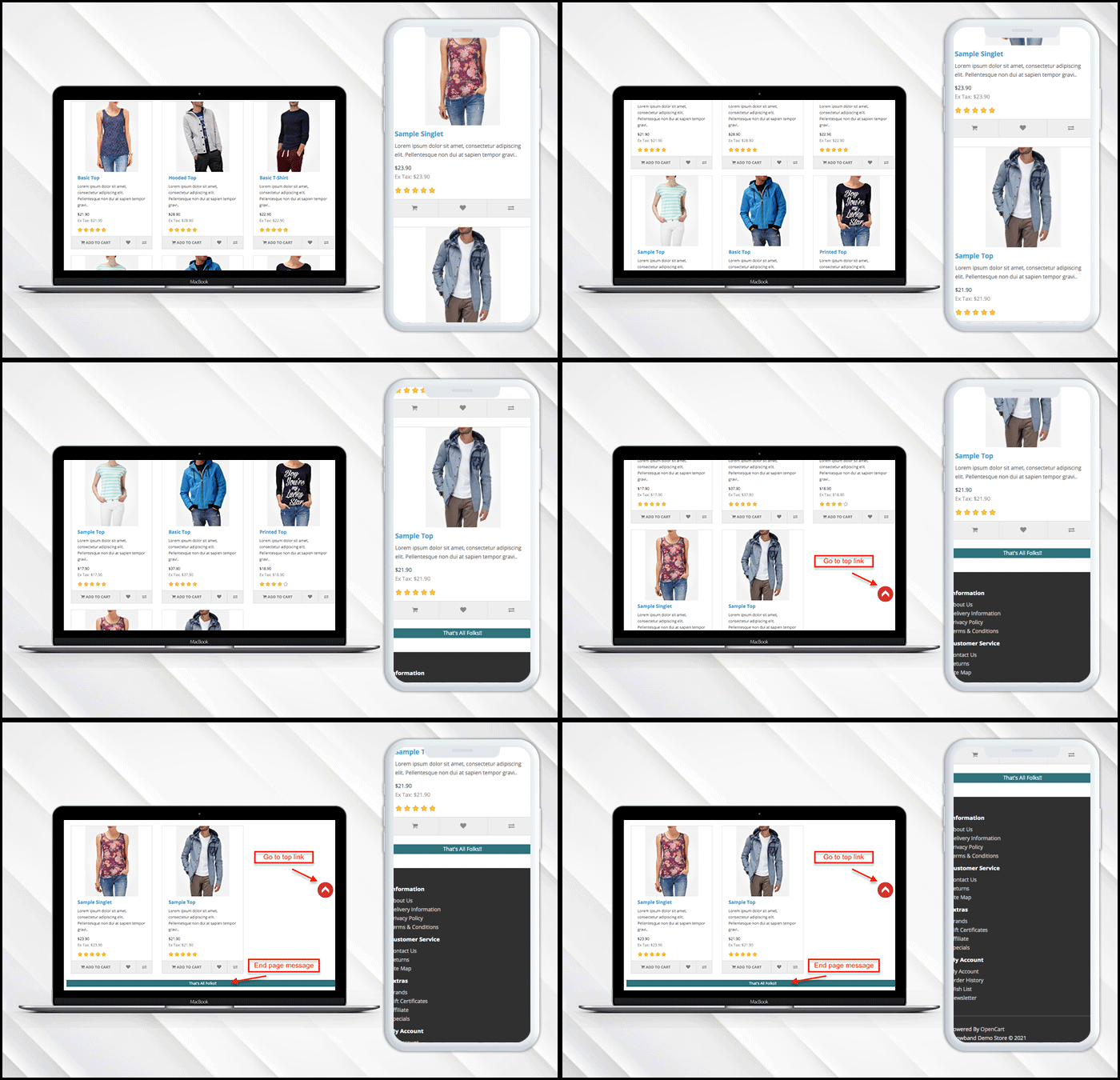
If you have a limited inventory then it lets you display a message at the end of the page.
Users can go to the top of the page directly by clicking the ‘Go to Top’ button.
Additionally, it allows the admin to put a loading browser if products are taking time to load.
Want to show loading browser?
You can display a loading browser in the product page of the OpenCart store in a button toggle.
‘Go to top’ link is needed
When a user reaches the end of the product page, a go-to top link will be displayed on the window.
Admin Panel Settings
How to add a message in the end?
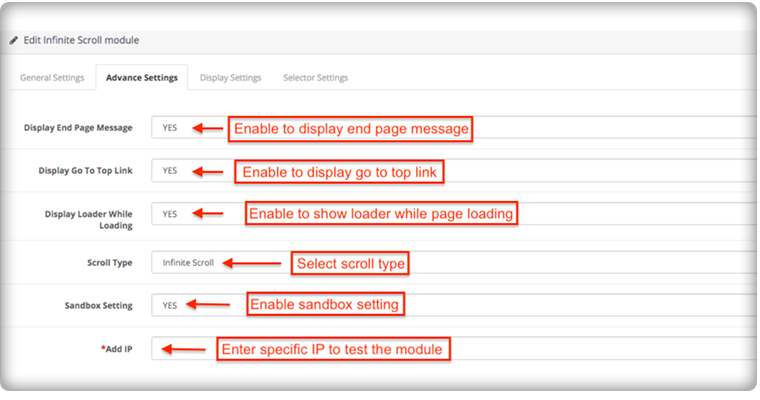
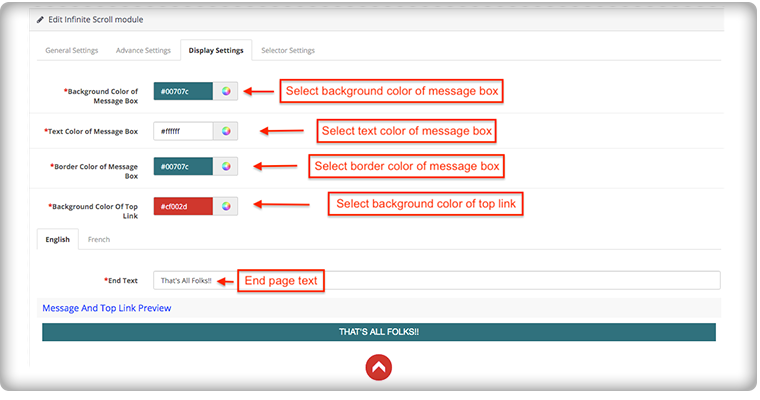
To add the end page message you have to go to the advanced settings of the module, there you can add a text to display the ‘End of Products’ message.
The message can be customized in English and French language. You can edit the color and text from the display setting.
How it appears on the front-end of the OpenCart store:
The OpenCart infinite scroll plugin’s admin panel is extremely simple to use and does not require the implementation of coding skills. Using the OpenCart Fast Scroll module, the admin may choose to display product lists in a grid or list view format.
Compatibility with all OpenCart themes
The OpenCart infinite scroll module is compatible with Journal and other OpenCart themes, so the administrator can configure the look and feel of the infinite scroll according to the theme of their site.
Compatibility: Opencart 2.0.x – 3.0.x
Finally, for your OpenCart online shopping store, infinite scroll can help you boost sales by increasing customer engagement and conversion rate. Infinite scrolling or endless scrolling for eCommerce is suggested by many experts because it has more pros than cons. It is completely responsive and doesn’t conflict with any other installed software or module in your OpenCart store.
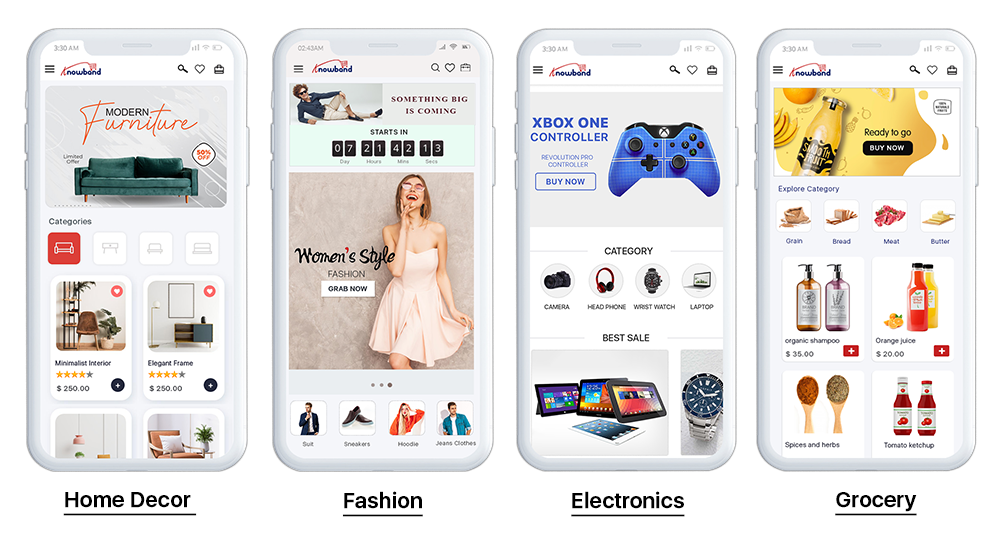
This automated OpenCart extension is built with the motive to provide ease for online store owners to transform their store into a Progressive Web Application. The eCommerce store into PWA is one of the major advanced technologies that every eCommerce business should look for. The OpenCart PWA Mobile App is actually a web application that doesn’t rely on the third-party App stores (Google Play and Apple App Store). Online shoppers can easily “Add PWA App To Home Screen” and shop products on the go like any other application.
1.1 How OpenCart Progressive Web App (PWA) Works?
Once the eCommerce store is converted to OpenCart PWA Mobile App, whenever any user opens the store URL in the mobile browser, users will be asked to “Add PWA To Home Screen”. It’s that simple to install and use OpenCart Progressive Web App.
–> iOS devices (iPhone, iPad, etc.) do not offer any inbuilt “Add To Home Screen” prompt. Hence, the PWA Mobile App users need to manually add OpenCart PWA Mobile App to the home screen of iPhone or iPad.
–> iOS does not support web push notifications. Hence, the store admin can only send the push notifications to the Android device, not on iOS.
[NEW UPDATE] OpenCart PWA supports RTL Languages (Arabic, Hebrew, etc.):
The OpenCart PWA Mobile App Creator now supports multiple languages including RTL (Right To Left) scripts like Arabic, Hebrew, Persian, etc. All languages of the OpenCart store will be on the Progressive Web App and other required languages can also be added. The users can choose the language on the Progressive web app and the entire app content will be translated accordingly.
Fully Compatible With KnowBand Multi-vendor Marketplace:
Our OpenCart PWA Mobile App is compatible with OpenCart Multi-vendor Marketplace. Convert your OpenCart eCommerce store into a full-fledged marketplace and launch PWA mobile app for the same. The marketplace sellers will be available on your Progressive Web App and users can simply browse them as well.
Note: OpenCart PWA Mobile Apps are only customer-centric i.e. the users can visit the browse PWA app along with sellers. There won’t be any seller dashboard or management via OpenCart Progressive Web App. The admin can manage the sellers from marketplace web and same will be updated automatically on the PWA Mobile App.
1.3 View OpenCart PWA Demo:
Explore module and PWA app features from the below demo links:
(Copy-paste URL in the mobile browser and “Add To Home Screen”)
2.0 Admin Panel Screens:
Explore all settings of Admin panel of OpenCart PWA Mobile App extension along with functionality and work with the below-shared snapshots :
2.1 General Settings:
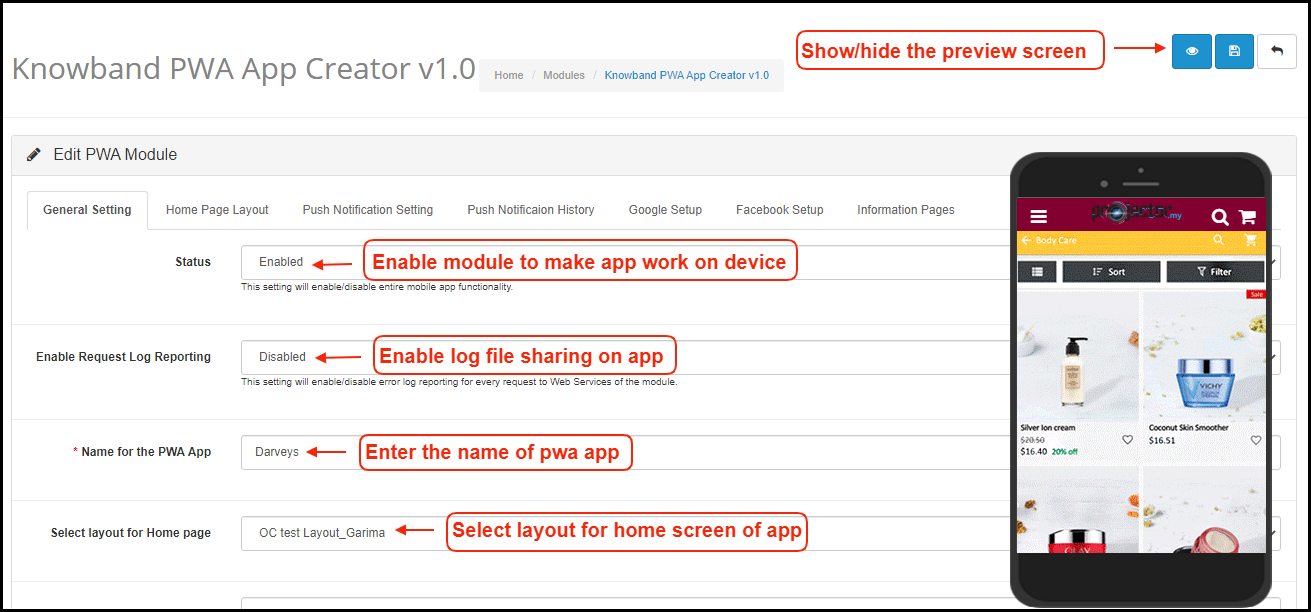
a) Show/hide Preview: Tap on the eye button to display/hide preview phone in the admin panel. b) Status: Enable the module to PWA work on mobile devices. c) Enable Request Log Reporting: Enable error log on mobile. d) Name for PWA App: Enter name for OpenCart PWA App. e) Select Layout for Home Page: Choose from pre-added home screen layout for OpenCart Progressive Web App.
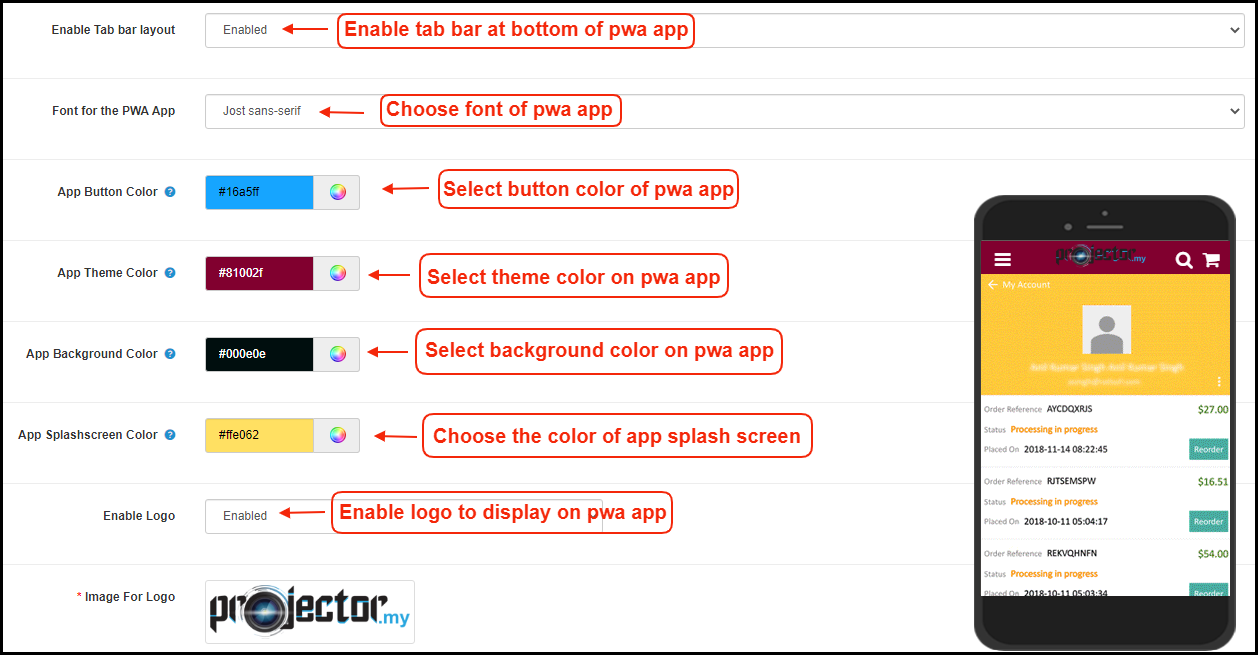
f) Enable Tab Bar: Enable tab bar on the bottom of the OpenCart PWA App for seamless navigation. g) Font for PWA App: Choose a font for OpenCart Progressive Web App(PWA). h) App Button Color: Choose button color for PWA Mobile App. i) App Theme Color: Choose theme color for PWA App. j) App Background Color: Choose the background color for the PWA App. k) App Splash Screen Color: Choose a splash screen for PWA Mobile App. l) Enable Logo: Add your brand logo on the header of the OpenCart PWA Mobile App.
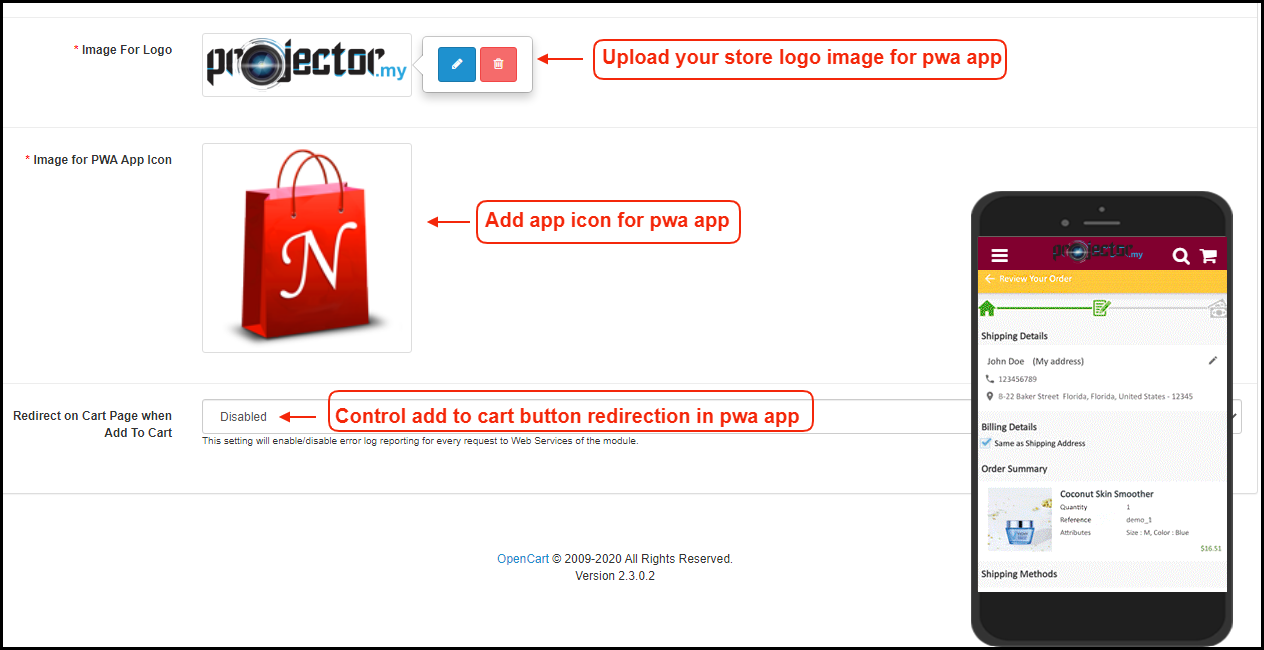
m) Image for App Icon: Add app icon image in the admin panel of OpenCart PWA extension. n) Redirect on Cart Page when Add To Cart: Control redirection of Add To Cart button whenever any user taps Add To Cart button.
2.2 Push Notifications Settings
Push notifications are the best marketing tool for the Progressive Web App(PWA) for OpenCart. The store admin can simply promote the store products and deals to app users and bring more sales and revenue. Enter all details in push notification settings by creating a Firebase project:
How to set up a Firebase Account?
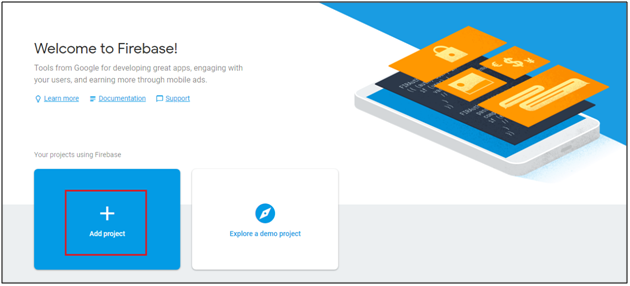
Step 1: Login Google Firebase
Step 2: Create a New Project
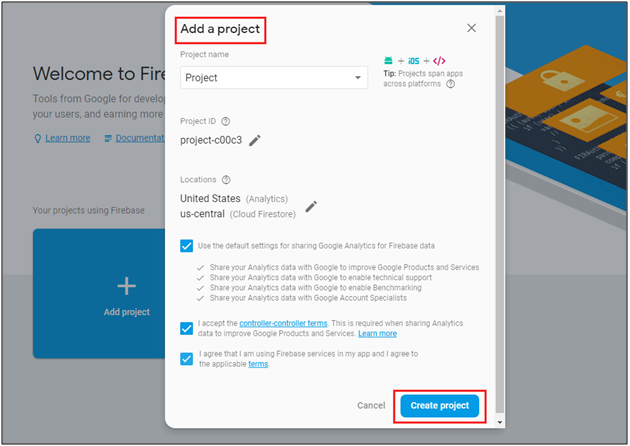
As you click on Add Project, the following dialog box will pop up:
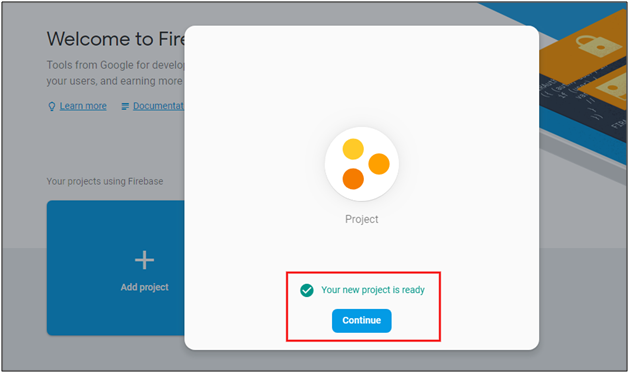
It will take a few seconds to create the project. Once the project is ready, click continue.
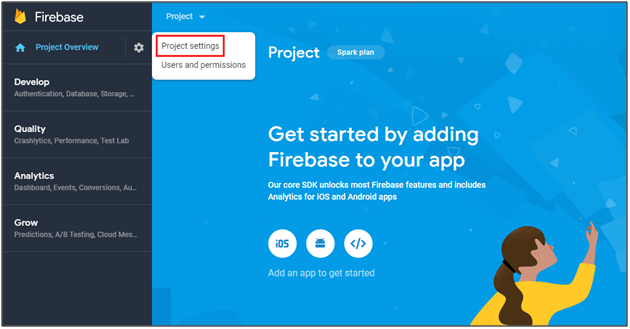
Step 3: Manage Project Settings
Once the project is created, click on Project Settings.
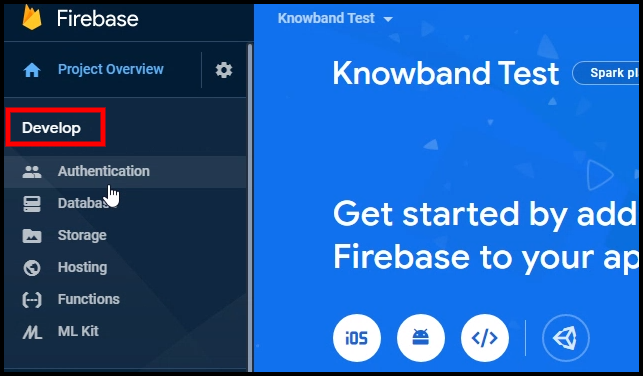
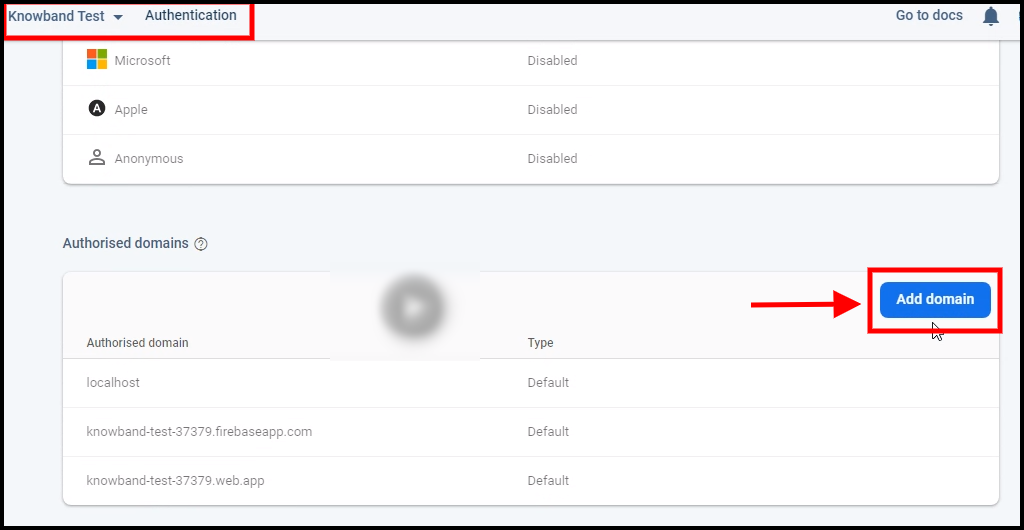
Step 4: Go to Authentication options:
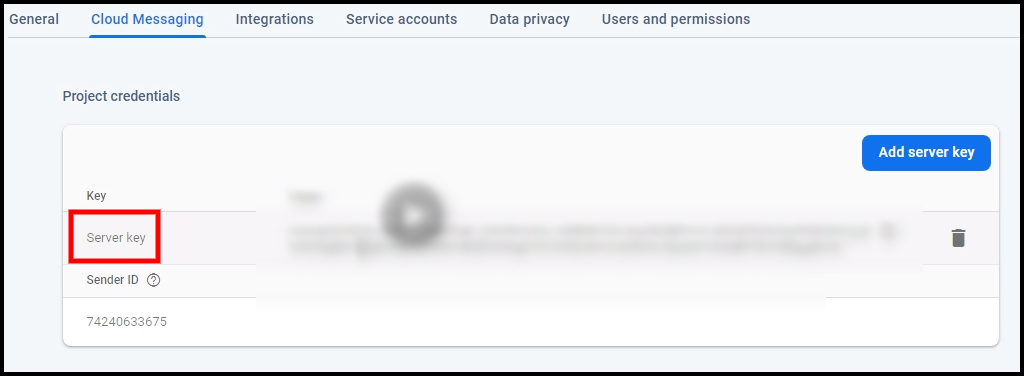
Step 5: Find Firebase Keys
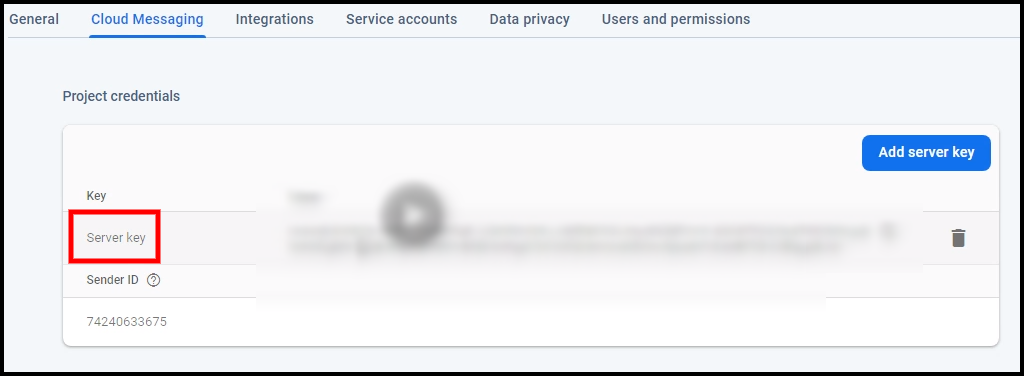
In the project settings, click on Cloud messaging settings. From here, you can directly get the server key.
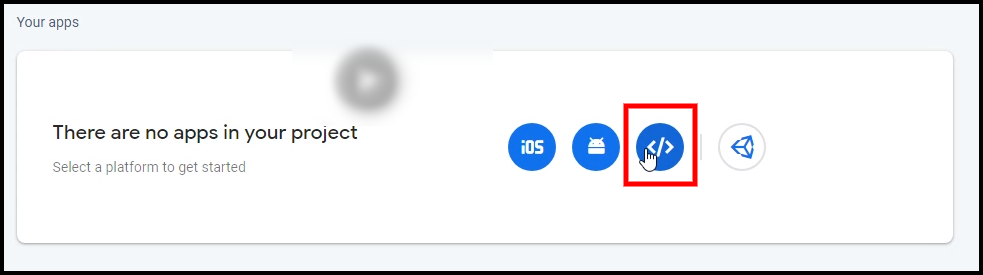
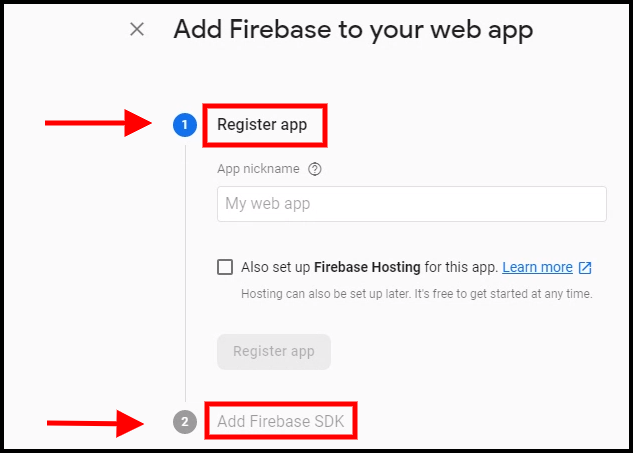
Step 6: Add your Web-App to Firebase
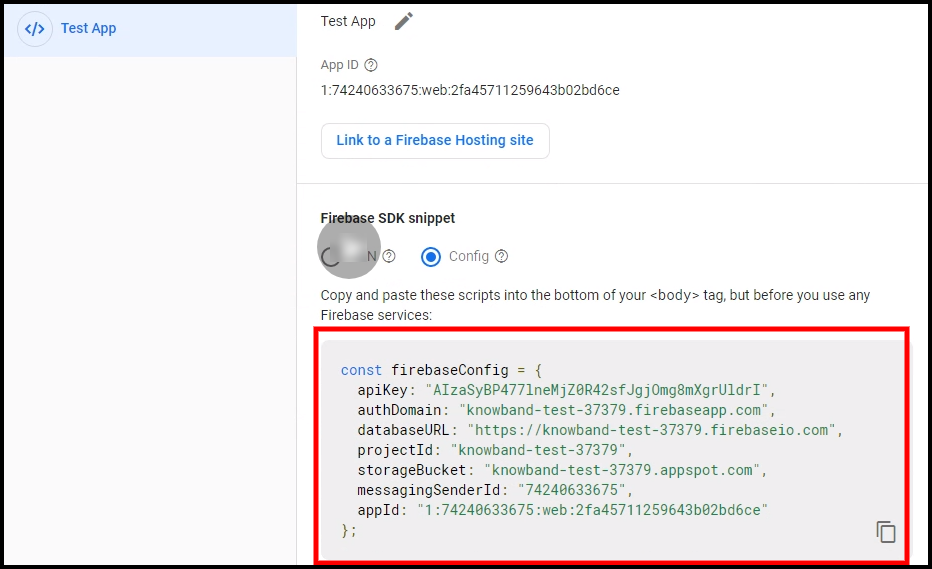
Step 7: Get other firebase related details and paste the same in PWA module admin panel.
Step 8: Get firebase server key from cloud messaging tab in Settings:
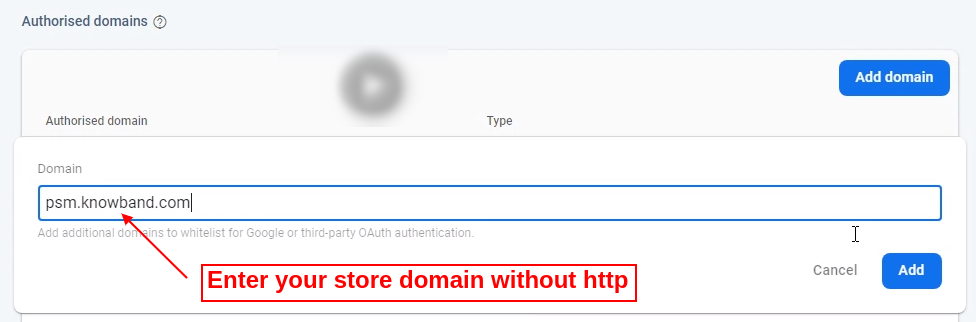
Step 9: Add your domain in authentication>>sign-in.
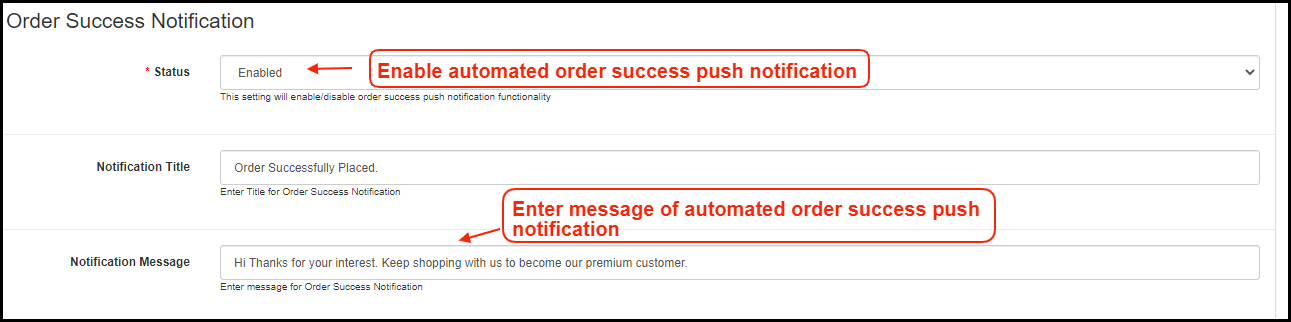
A) Successful Order Push Notification:
Enable/Disable automated Push Notification to be sent to app users whenever they place successful order from the OpenCart Progressive Web App (PWA).
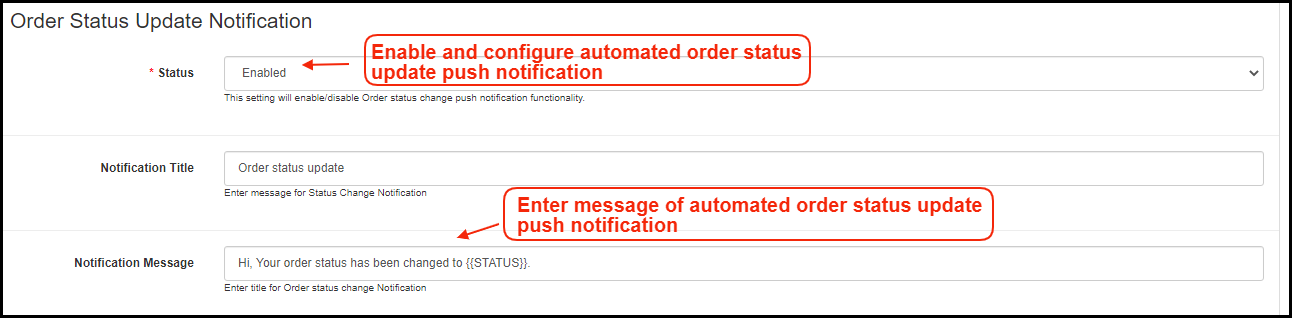
B) Order Status Update Push Notification:
Enable/Disable automated Push Notification sent whenever order status from the app gets updated. The OpenCart PWA mobile app users can keep an eye on the details of previous orders.
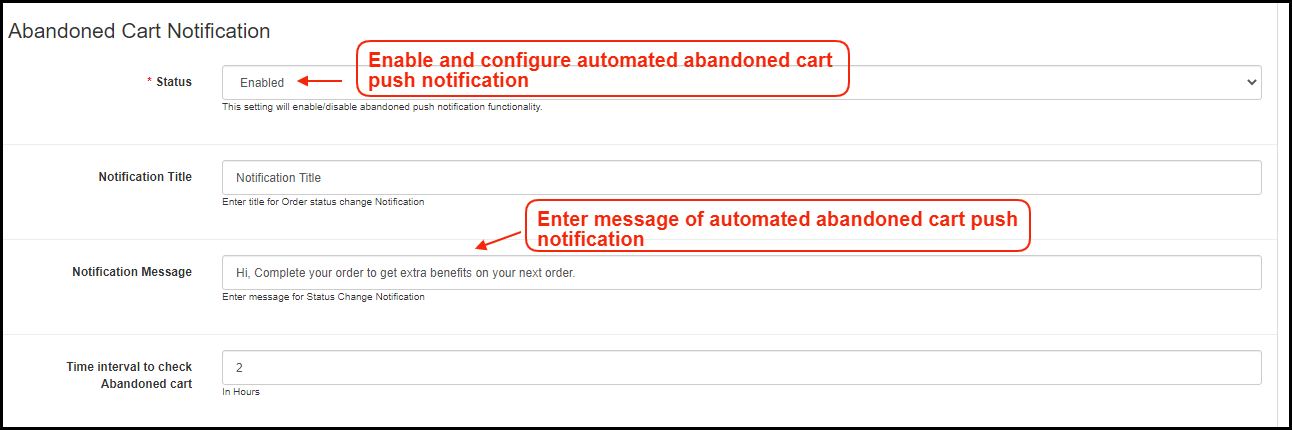
C) Abandoned Cart Push Notification:
Enable/Disable automated push notification sent to users abandoning products in cart without successful purchase. This push notification will be sent to users automatically after the entered time interval.
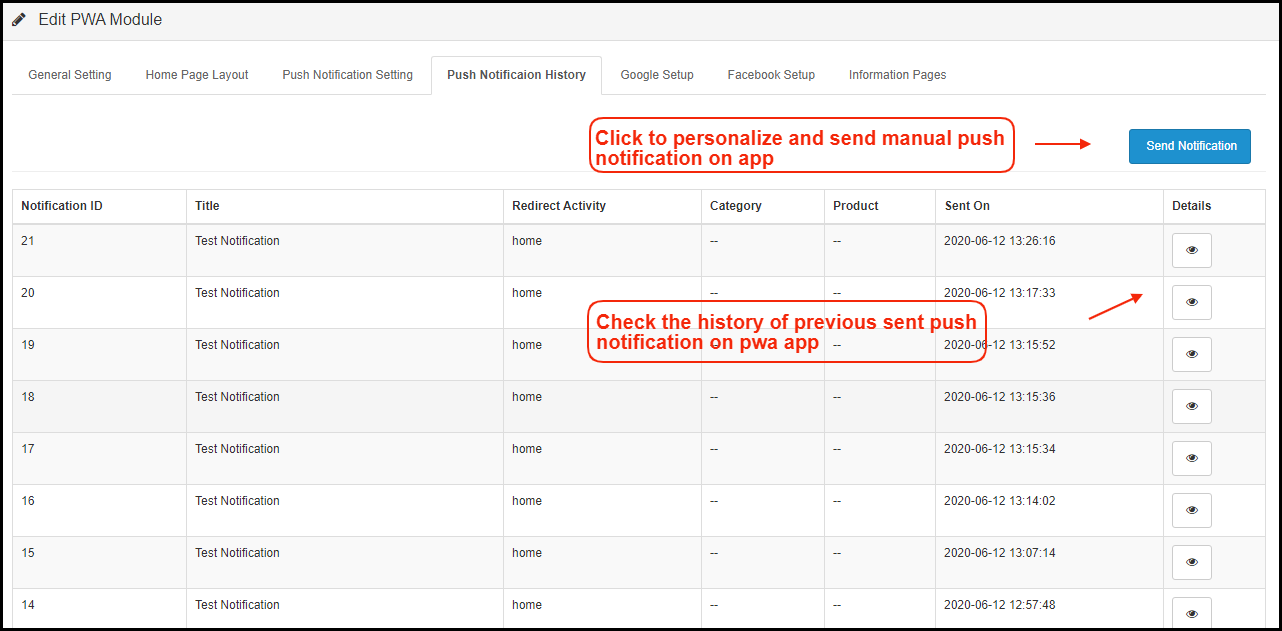
2.3 Push Notifications History
Complete push notification history of successfully sent push notifications will be seen here. The store admin can keep a track of previously sent push notifications from here.
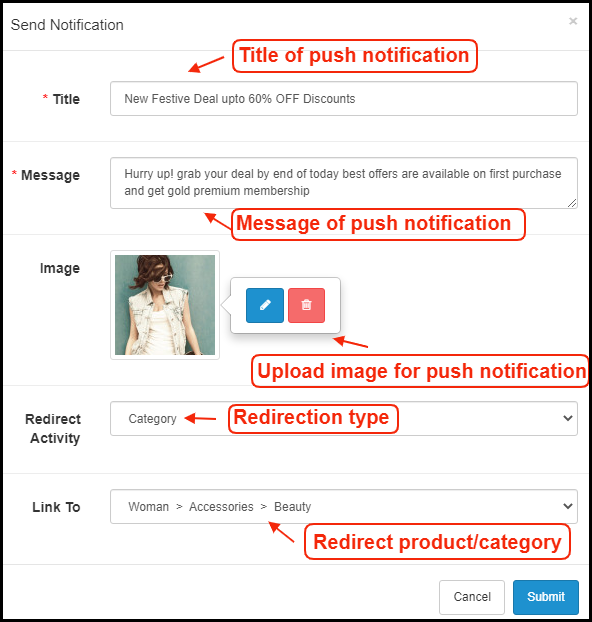
A) Send Notification:
Personalize and send push notification manually to OpenCart Progressive Web App(PWA) users as per the need. The store admin can configure these notifications on their own & send it to OpenCart Progressive Web App (PWA) users.
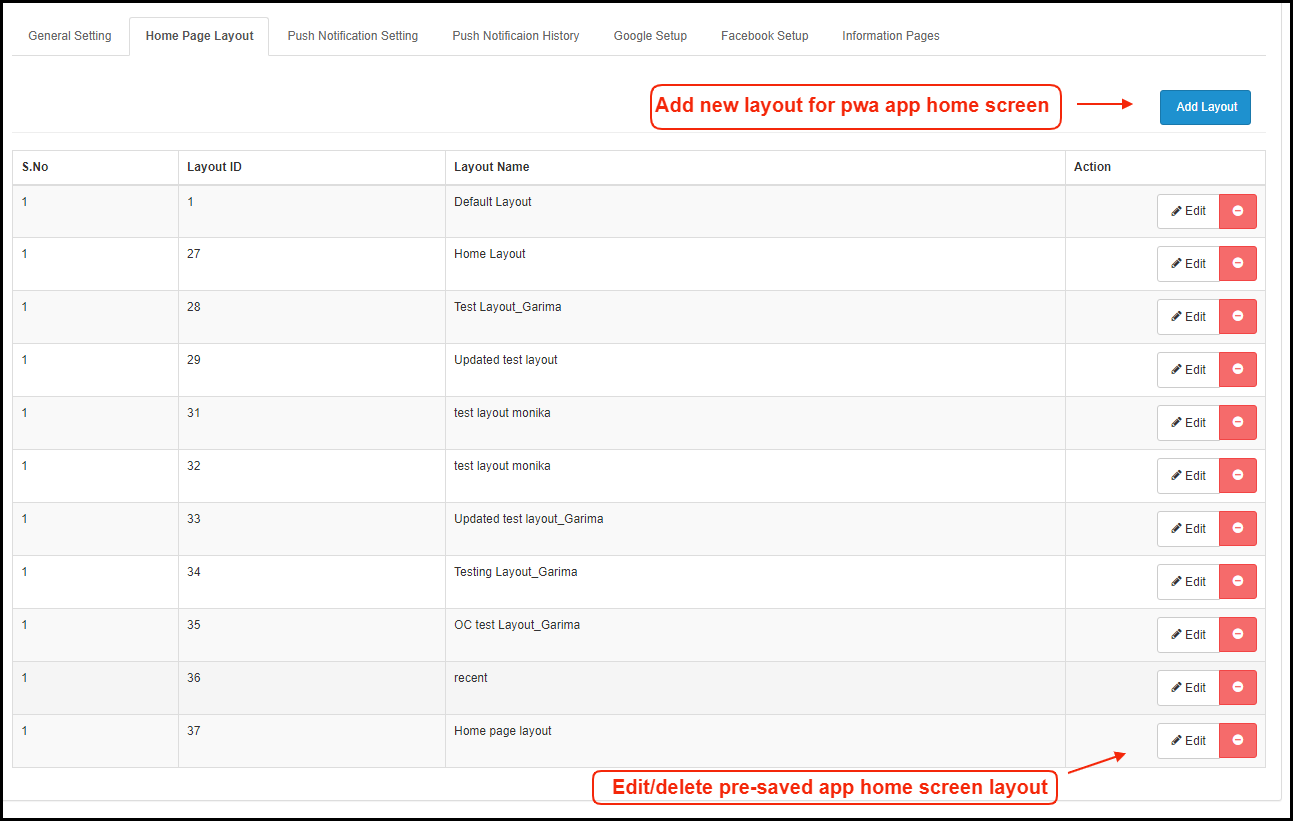
2.4 Home Page Layout:
Design and save multiple layouts designs (sale, festivals etc.) and just choose right one from admin panel to update on OpenCart Progressive Web App.
The OpenCart Progressive Web App(PWA) offers a customizable Home Screen whose layout can be designed from the admin panel with a few mouse clicks and drag-drop. The attractive layout as per running festival, sale, occasion, etc. can surely help in improving sales through OpenCart PWA Mobile Apps.
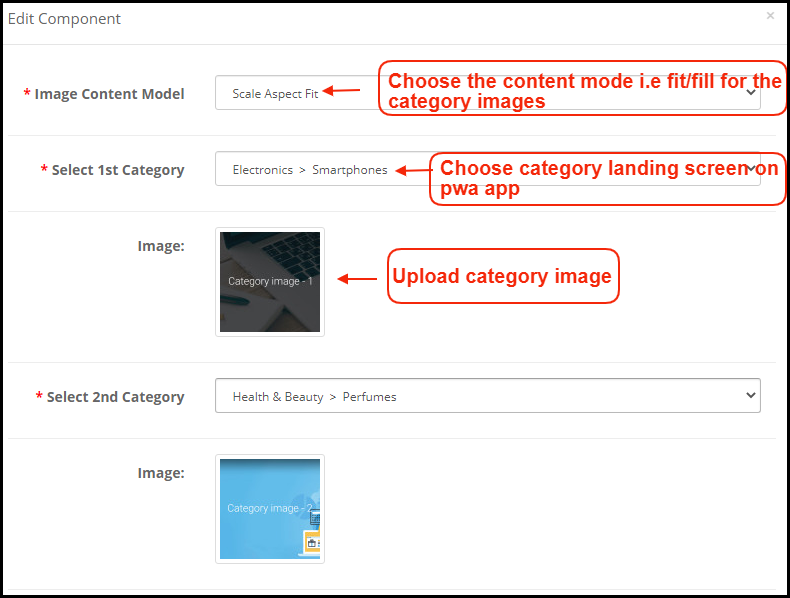
Add a new layout from this tab or edit the previously added ones. The home page configuration settings offer the following elements:
Top Categories:
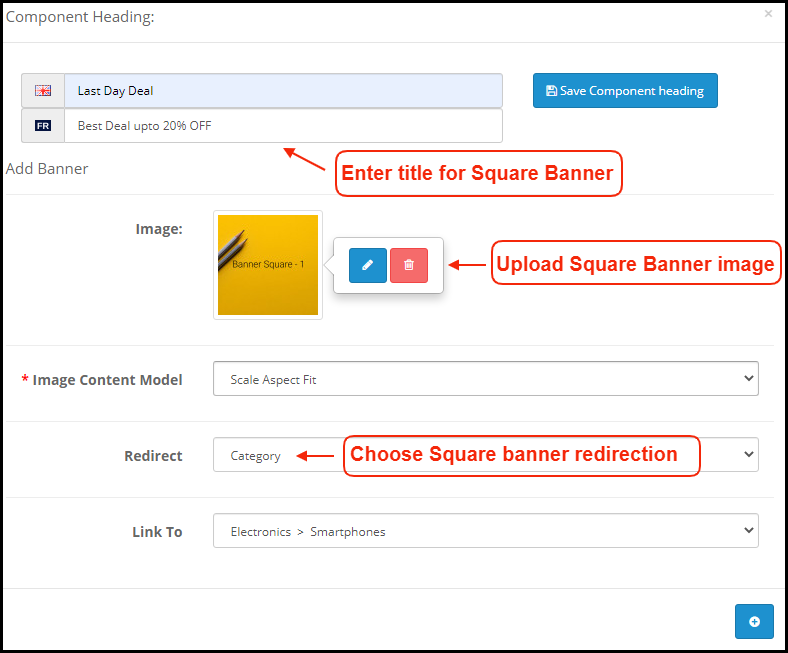
Square Banner:
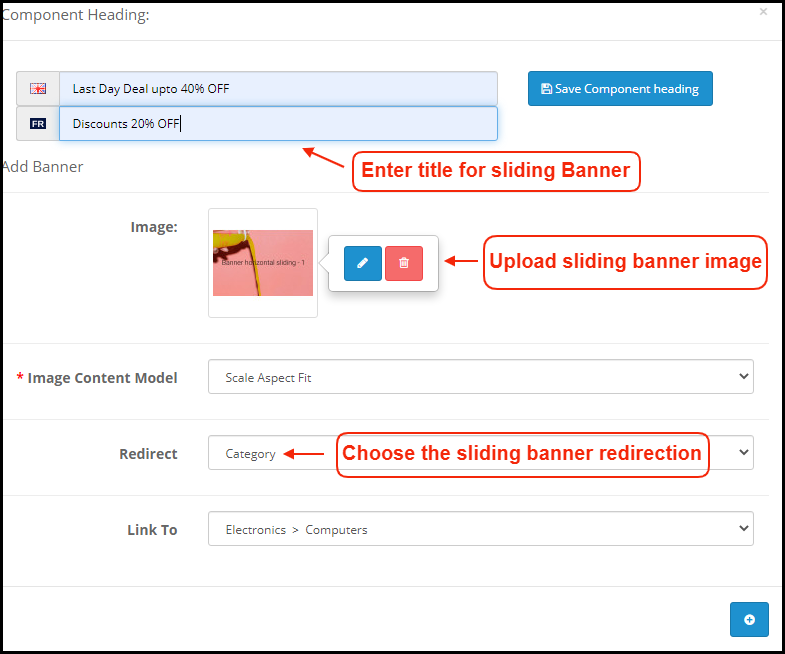
Horizontal Sliding Banner:
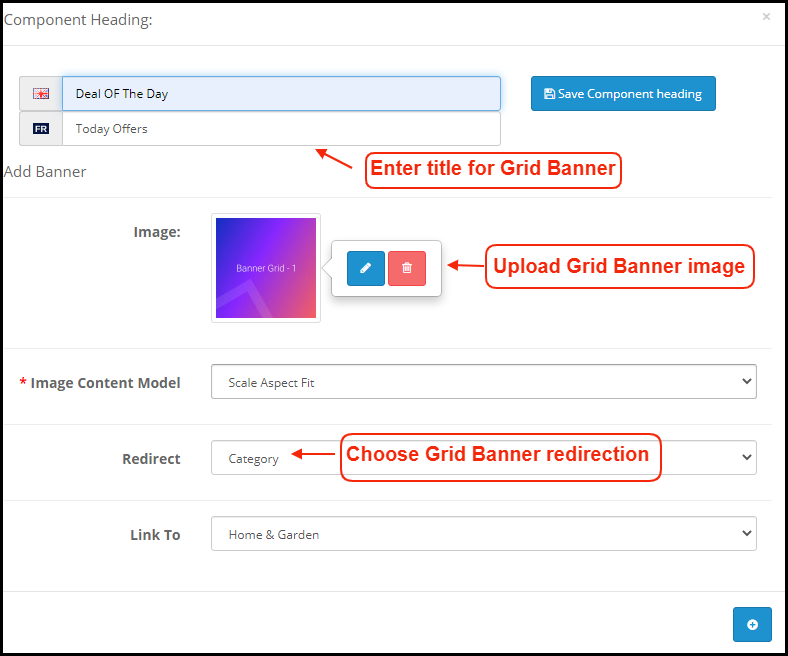
Grid Banner:
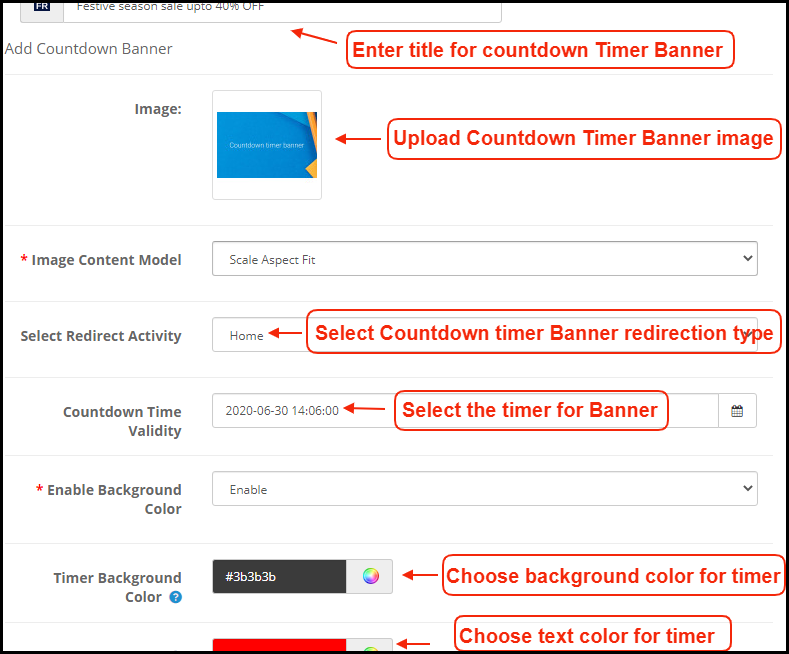
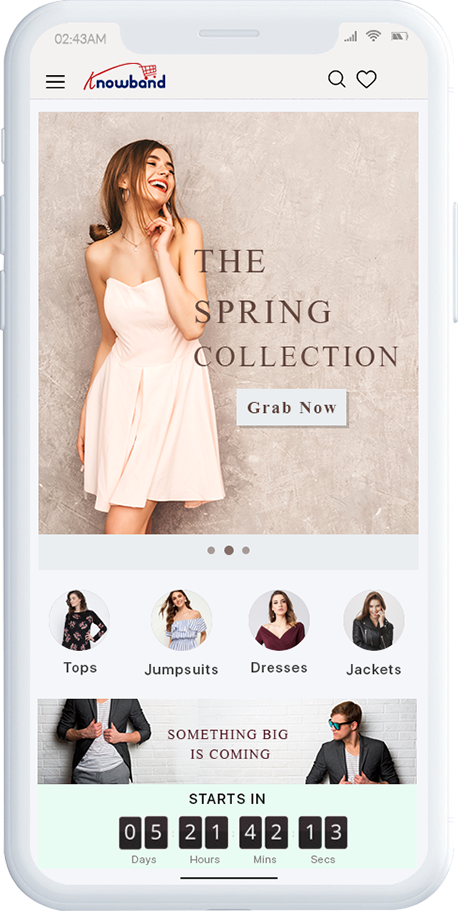
Countdown Timer Banner:
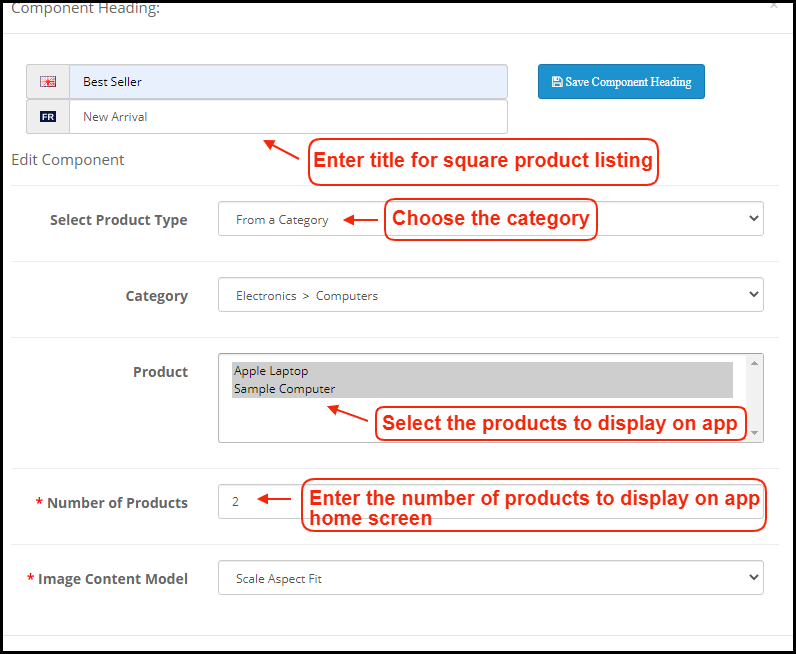
Square Products:
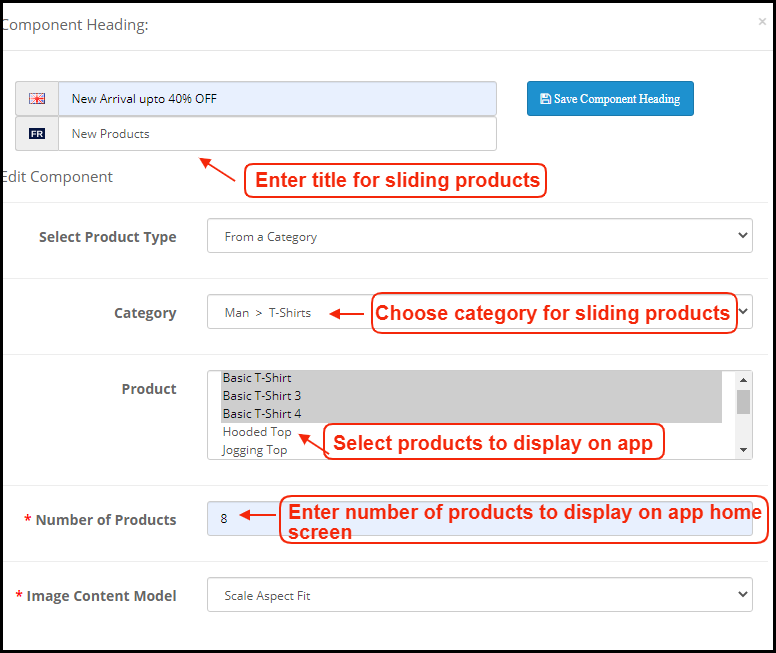
Sliding Products:
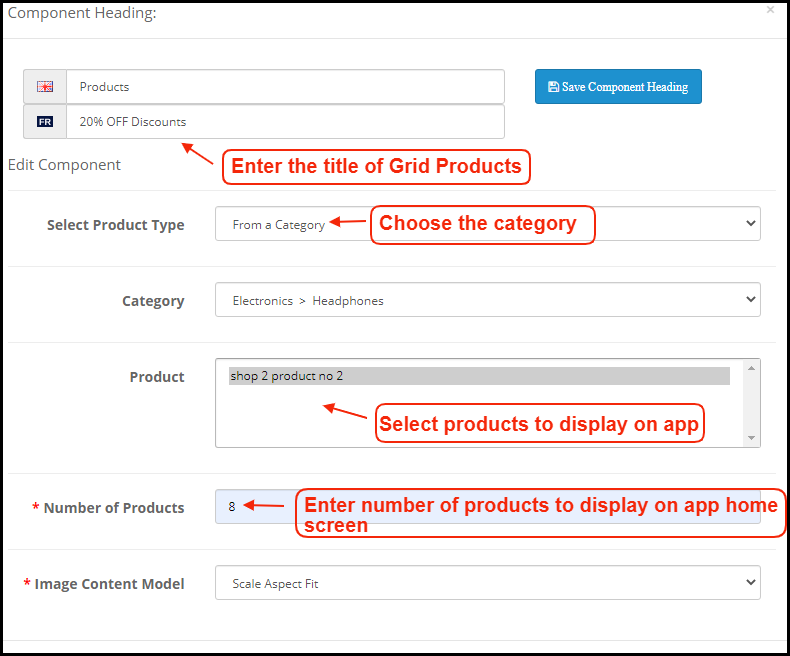
Grid Products:
How to get Facebook App details?
Facebook App can be created by following below-mentioned steps:-
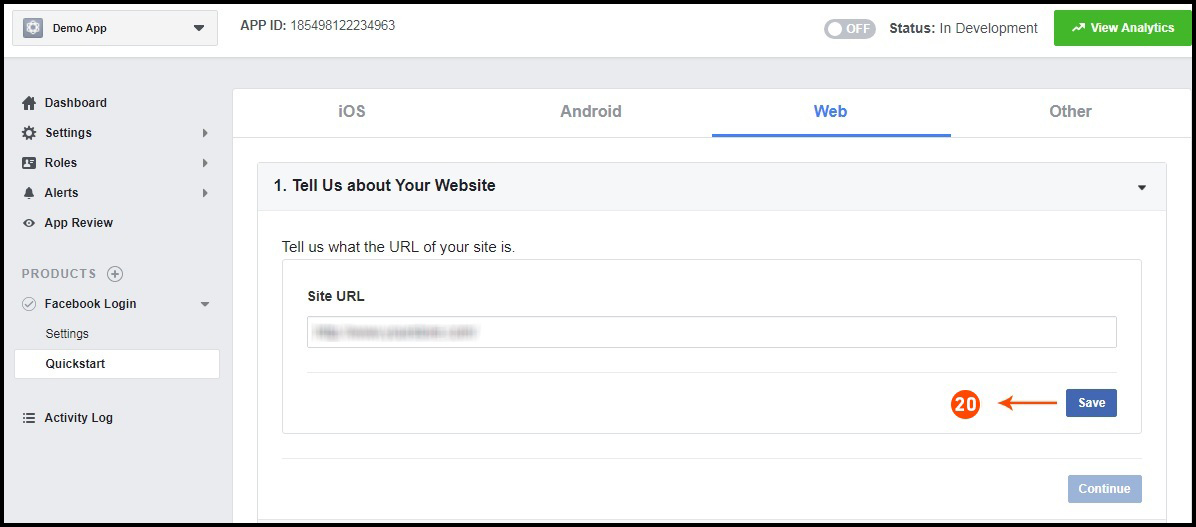
Step 1: Go to given URL: https://developers.facebook.com/apps/
Step 2: Click on the “Add a New App” button.
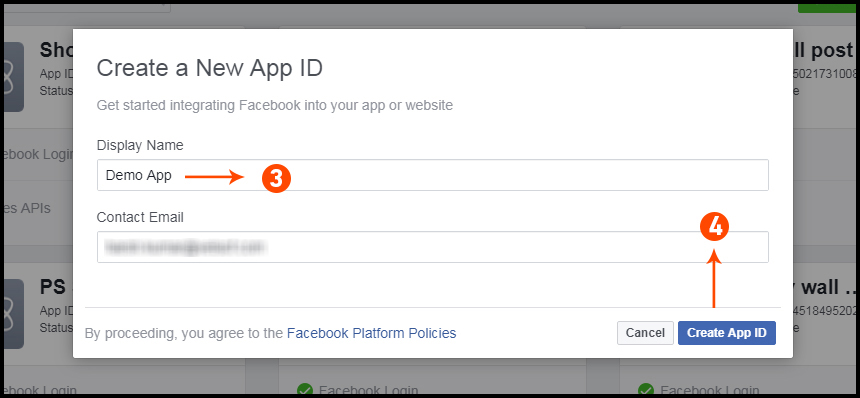
Step 3&4: Enter your App name and email id, then click on “Create App ID” button.
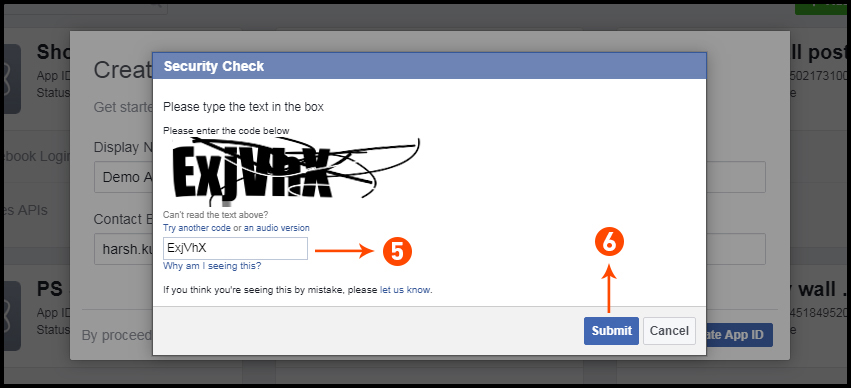
Step 5&6: After clicking on Create App ID you will have to go through a security check as shown:
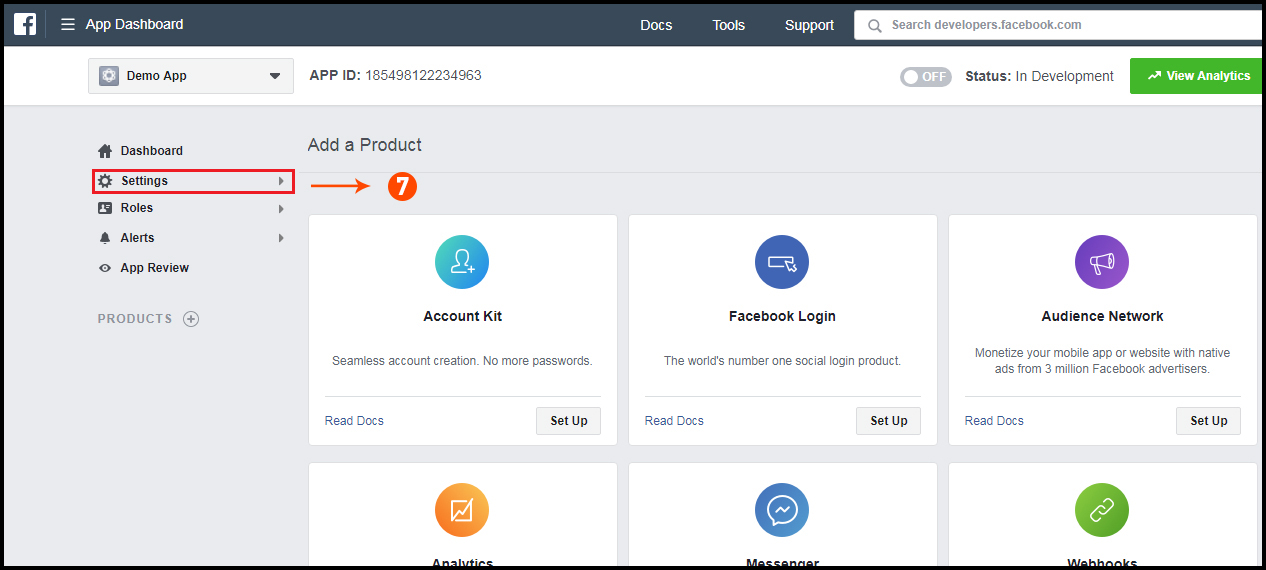
Step 7: Click on “Setting” tab.
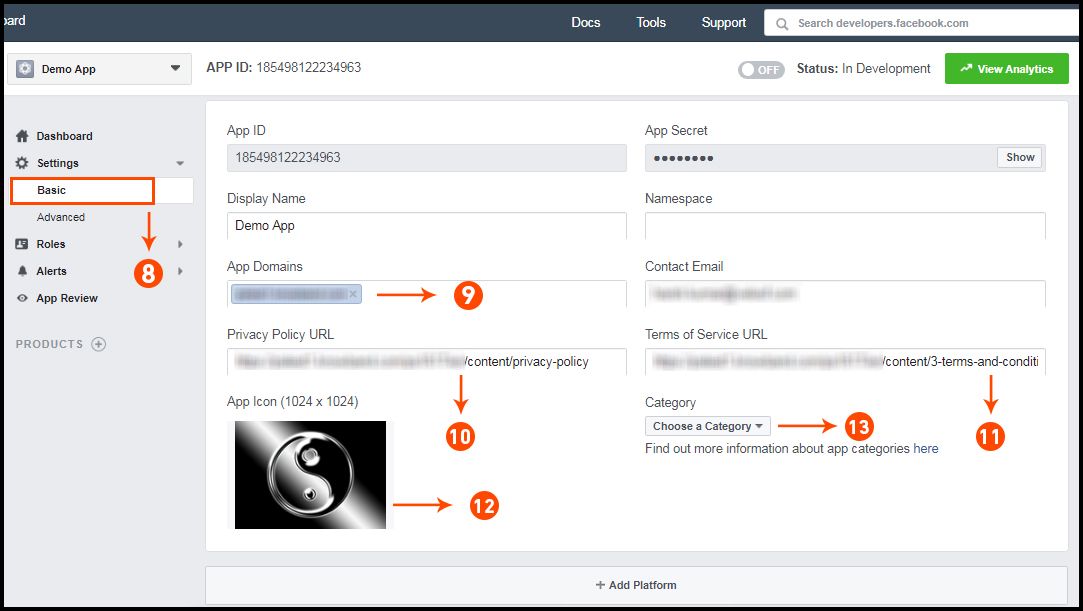
Step 8-13: Two option will be available in the dropdown, Basic and Advanced, click on “Basic”. And then enter your “App Domain”, “Contact Email”, ”Privacy URL”, ”Terms and Conditions URL”, ”Add Logo”, ”Select Category” and click on “Save Changes” button.
App Domains:
yourdomain.com is correct
yourdomain.com/store is incorrect
www.domain.com is incorrect
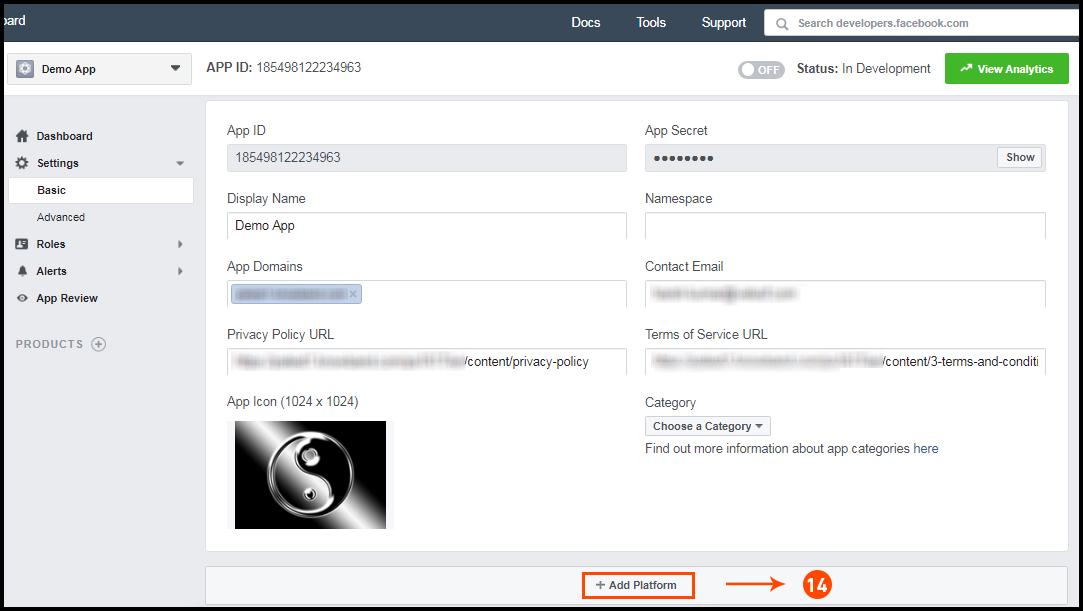
Step 14: Now click on “+Add Platform”.
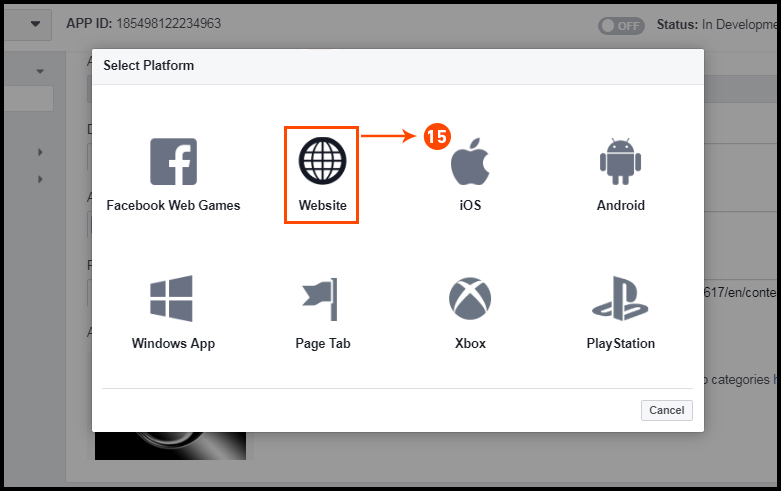
Step 15: And select Website as Platform.
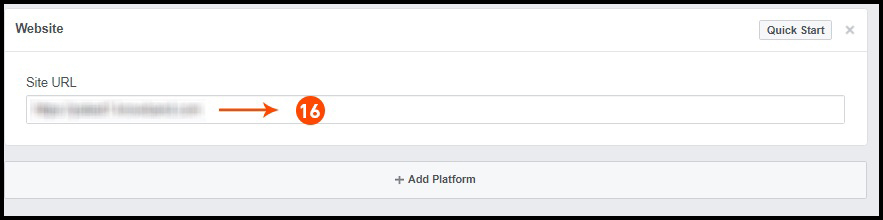
Step 16: Now Enter your site URL.
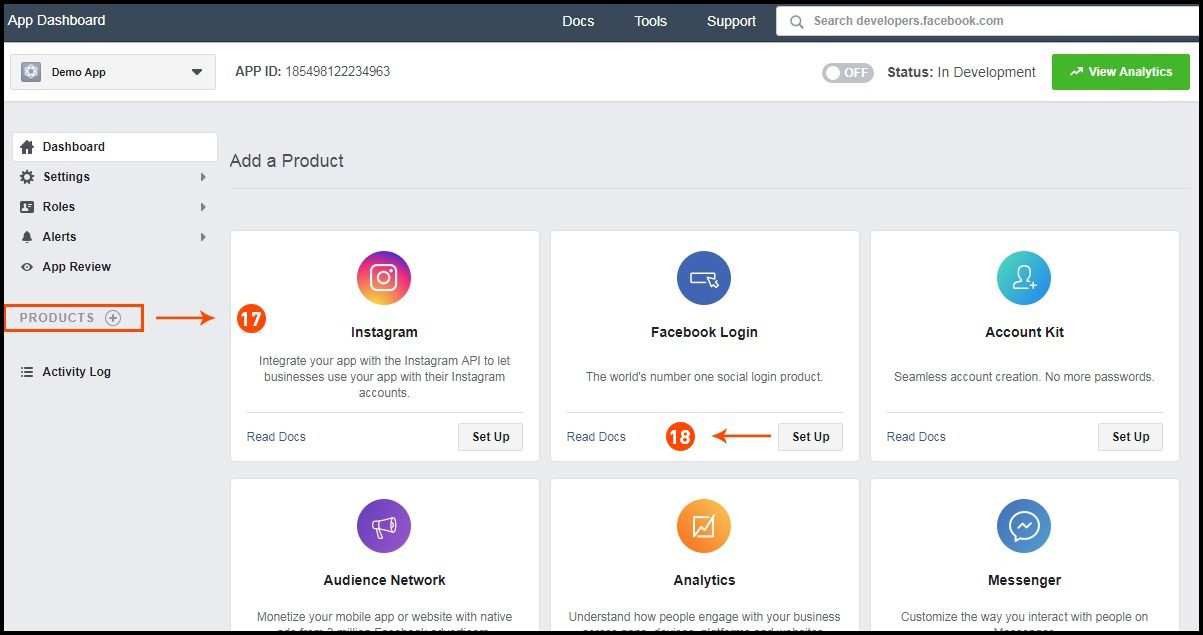
Step 17&18: Click on “Products+” and select Facebook login.
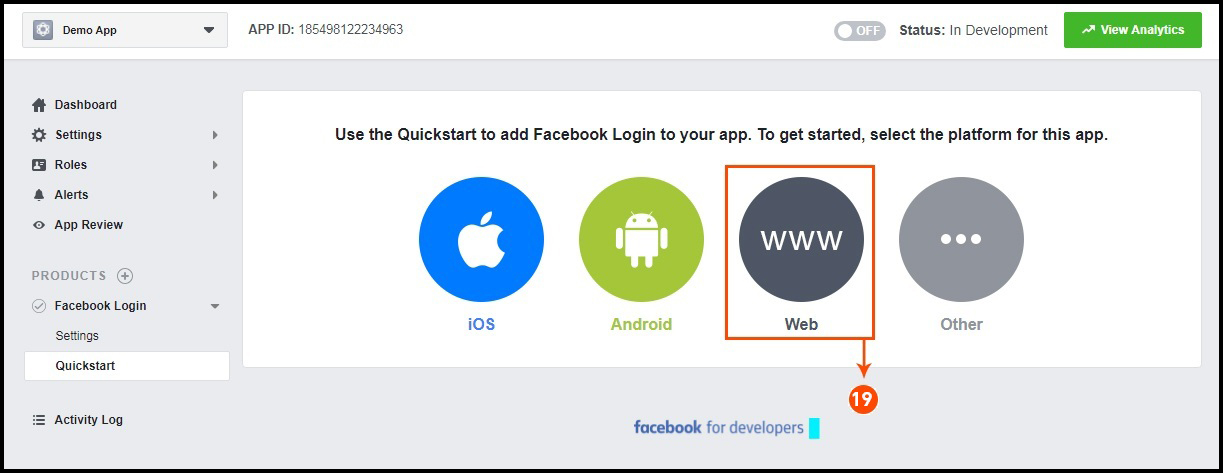
Step 19: Select web as the platform for the app.
Step 20: Now click on save.
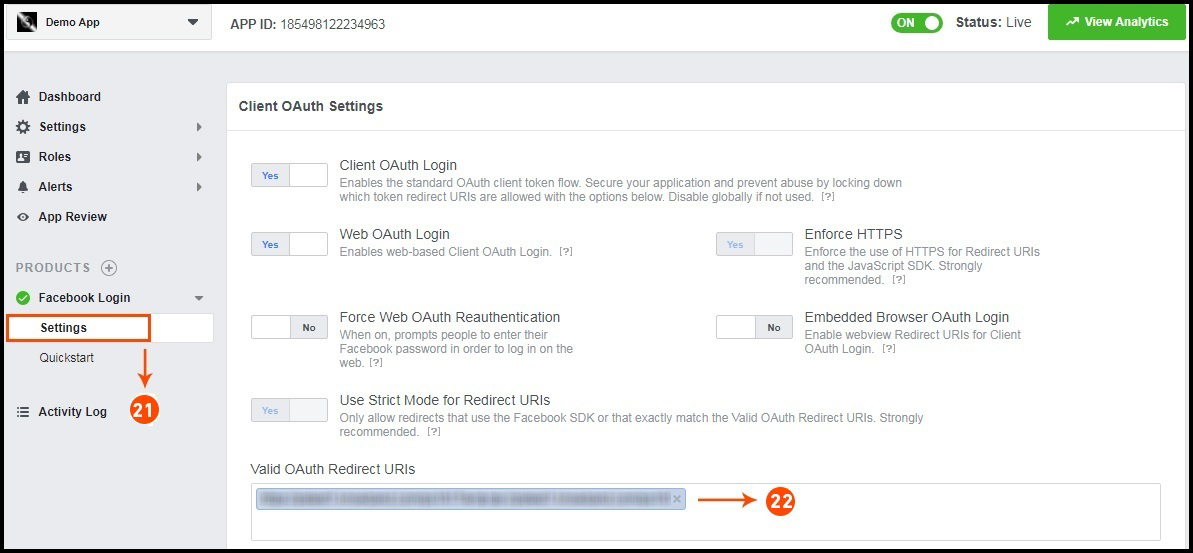
Step 21&22: Click on Settings and add a Valid OAuth Redirect URIs.
Valid OAuth Redirect URIs:
https://example.com/pwa-app/login
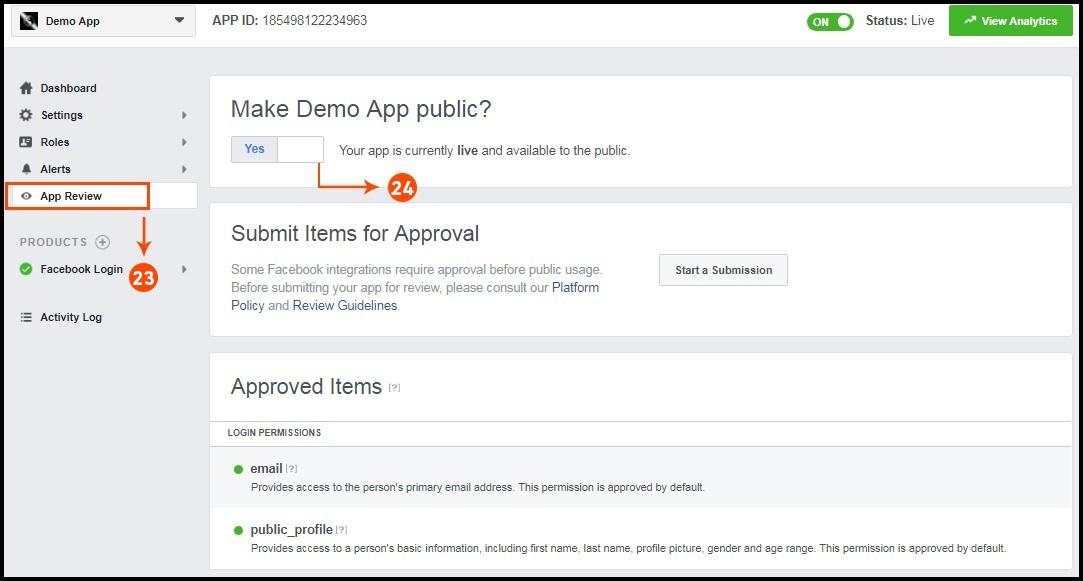
Step 23&24: Click on “App review”. And mark “Make ‘your app name’ Public” to Yes.
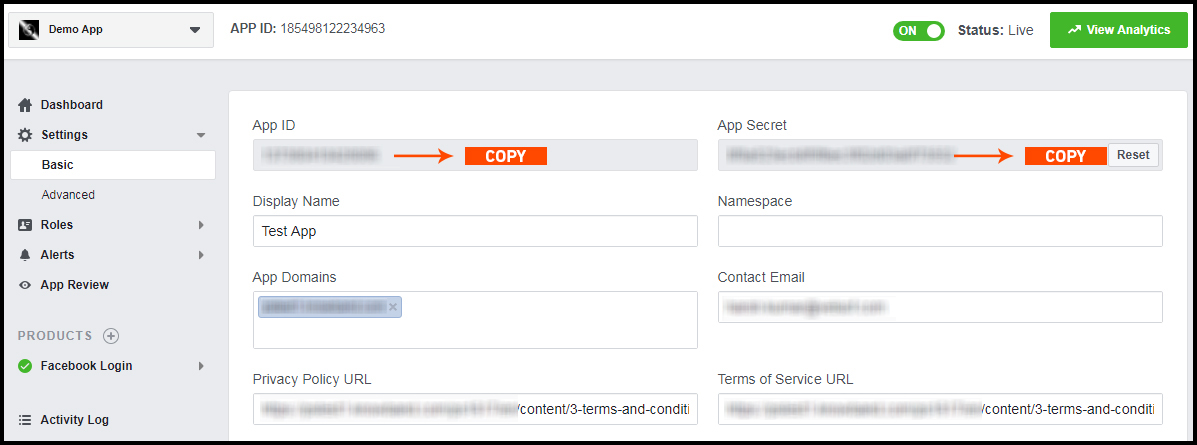
Final Step: Copy the App ID and App Secret and paste it into the fields provided in the module.
How to get Google App details?
Go to Google Developers Console
(https://console.developers.google.com/project) or click on link given top right of the respective tab in module configuration page.
Now click on Create Project on the left of the page.
Enter a name for your project and proceed to the next step.
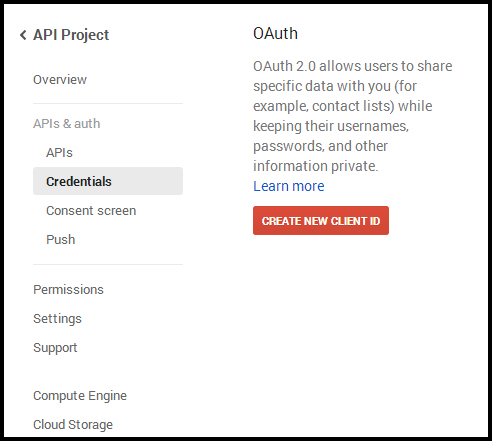
Now click on APIs and auth-> Credentials from the left menu as shown below.
Click Create New Client ID button from the right panel of the screen.
You may have to fill the form for Consent Screen before proceeding. To do so, that you have to click on Consent Screen in the left menu as shown in the image above.
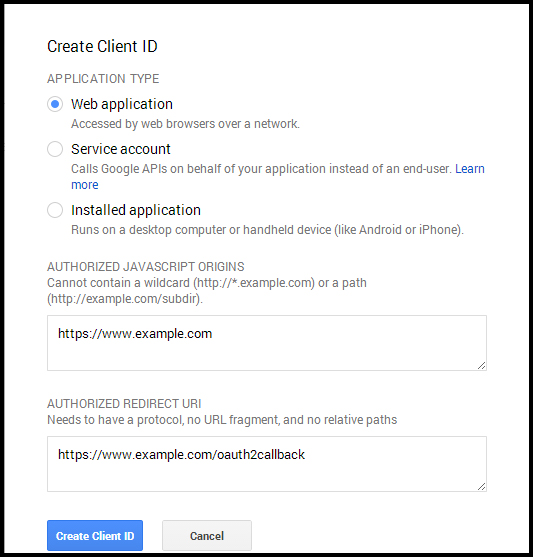
Fill the pop-up form with below details:
Application Type: Web Application. Authorized JavaScript Origins: Your store domain name (https://www.yourstore.com). Authorized redirect URI or URI of Loginizer redirect page:
https://example.com/pwa-app/login
Now click Create Client ID button to get your Client ID and Client Secret Key.
Now you can use the client secret and client ID to let your customers login to your store using their Google account.
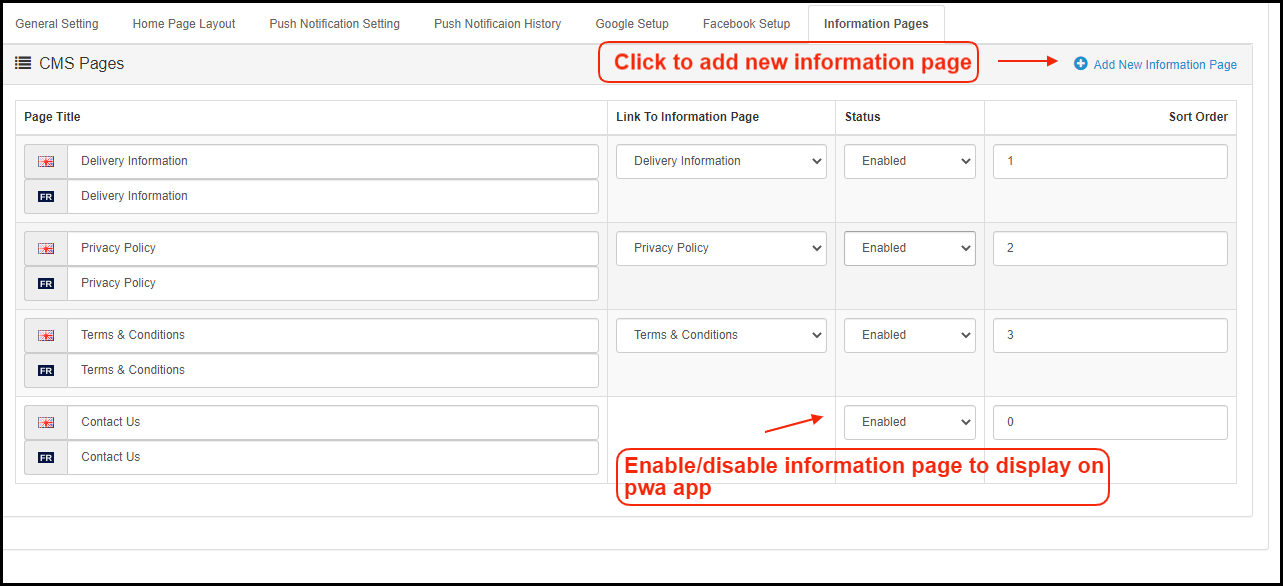
2.7 Information Pages:
Add CMS pages on the app and offer informative content to OpenCart PWA Mobile App users.
3.0 Front End PWA App Screens:
3.1 Home Screen:
The home screen of the OpenCart Progressive Web App (PWA) is fully customizable with a DIY editor as explained above in Admin Panel screens. Change app home screen look & feel anytime and offer more user-friendly & sale driven appearance.
1. Custom Layout:
Using various banner, slider, product elements, the store admin can create a dynamic layout as per the need.
2. Brand Logo:
Use your store logo on the top header of the OpenCart Progressive Web App(PWA).
3. Shopping Cart Bag:
The shopping cart icon on the top-right corner of the home screen allows users to access cart screen and check added products.
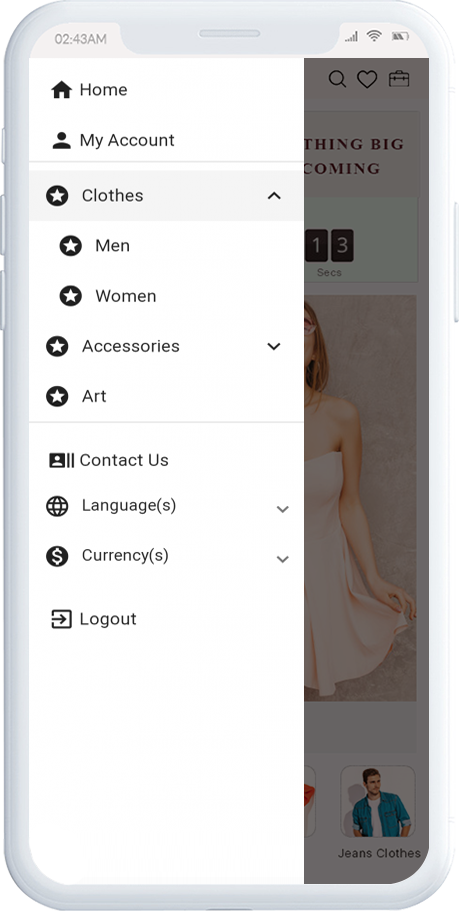
4. Left Navigation Menu:
Browse the categories displayed in the PWA app with left navigation menu browsing.
3.2 Accordion Menu (Navigation Bar)
The OpenCart PWA Mobile Apps comes with seamless and proper categorization available. The users can find relevant categories from the left navigation menu and browse products. Various CMS pages can also be added to the menu offering relevant content on the App.
1. My Account:
My Account option contains all the users’ personal information including shipping and order. The OpenCart Progressive Web App shoppers can view and update the saved information.
2. Categories:
Categories displayed in the left navigation menu of the OpenCart Progressive Web App are the same as available on the eCommerce store.
3. CMS Pages:
Various CMS pages like About Us, Contact Us, Terms & Conditions, etc. can be accessed from here. These information pages can be added from the admin panel of the extension.
4. Language(s):
The language option allows PWA app users to view the web-app in their desired language.
5. Currency(s):
All available currencies on your website are displayed here on the OpenCart Progressive Web App (PWA) app.
6. Login/Logout:
Users can easily sign-in/sign-out form the OpenCart PWA app via this option.
3.3 Category Screen:
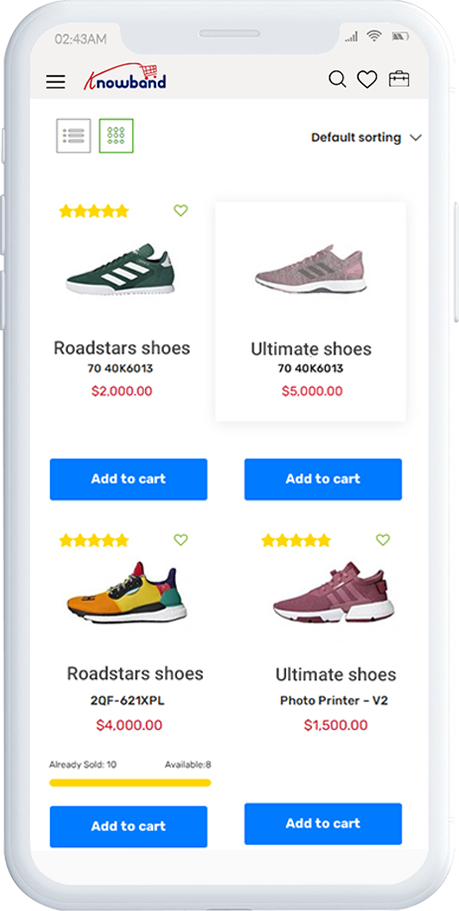
Clutter-free category screens with the list and grid view allow the users to choose what’s best for them from a specific category. The entire store inventory will remain in-sync with OpenC Progressive Web App(PWA) Mobile App and new additions and changes even get updated in real-time.
1. List & Grid View:
The categories on the PWA app for OpenCart can be browsed in both list and grid view.
2. Product Sorting:
The sorting option allows online shoppers to narrow down the products in the desired sort order and find the right one.
3. Product Filter:
The OpenCart PWA Mobile App offers the option to filter products simplifying the product search. Online shoppers can find the desired products under categories using filters for various attributes like size, color, price, etc.
3.4 Product Screen:
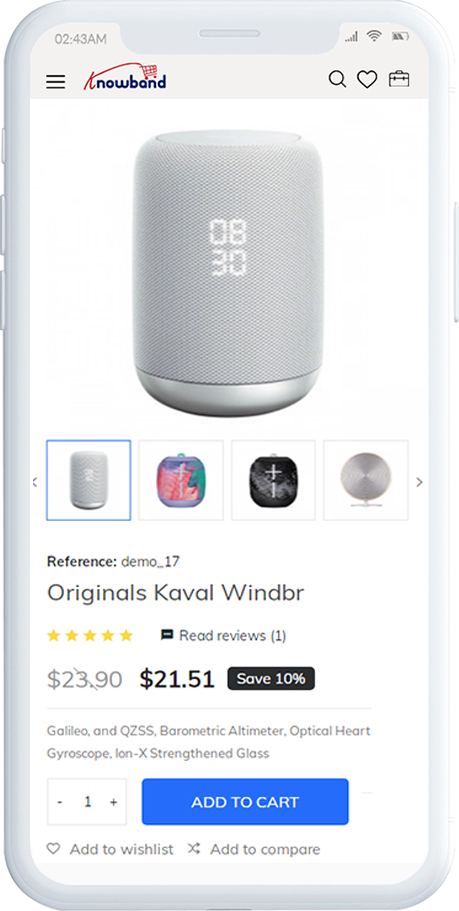
The product screen of the OpenCart Progressive Web App is as simple & intriguing as it could get. With all the necessary options and information about the product, it becomes a matter of minutes for users to be sure about the product which he/she is about to purchase. Multi-images are available for the product with In stock and Out of stock options.
1. Product Info & Care:
The complete product information as available in the inventory will be displayed here.
2. Short Description:
Users get to read the short description of your product to quickly make up their minds about the purchase.
3. Product Options:
All the options related to the product like size, color, etc. are displayed here.
4. Add To Cart:
This button allows users to add products into the cart. The users can further process the cart for purchase.
5. Product Social Sharing:
The sharing option for the product allows users to share products on multiple social channels.
3.5 Login Screen
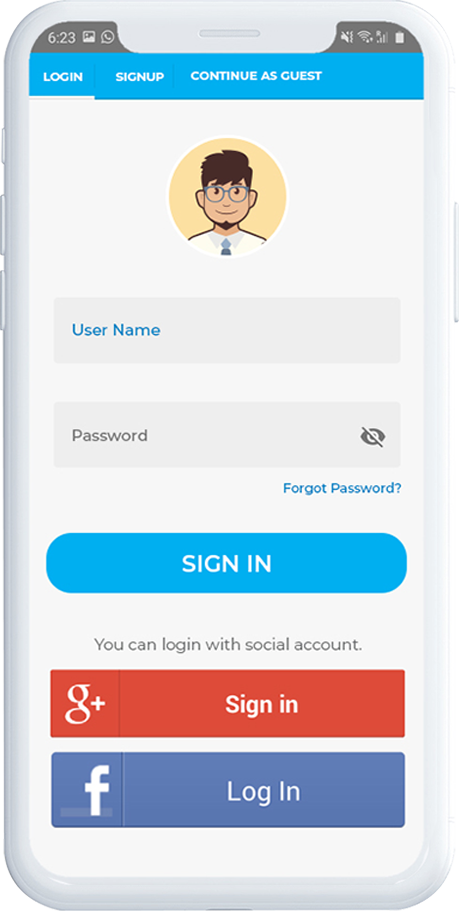
The OpenCart PWA Mobile App offers one-tap social login options & make the sign-in/registration process more seamless. The OpenCart Progressive Web App offers Google and Facebook login.
1. Login:
The app users can easily authenticate & login to PWA apps using their previous email login credentials.
2. Sign Up:
All the new app users can sign-up & create their account on the store from the OpenCart PWA App. The sign-up form asks for only the necessary details to create an account.
3. Login with Facebook:
The users can log in to the PWA app using their Facebook Account Credentials.
4. Login with Google:
The users can log in to the PWA app using their Google Account Credentials.
3.6 Shopping Cart Screen:
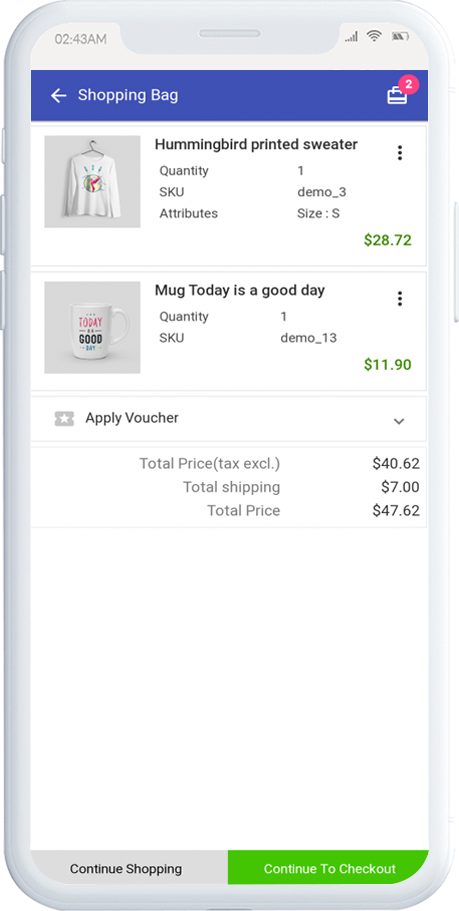
The Shopping Cart screen of the OpenCart PWA Mobile App will display all products added into the shopping cart. The app users can view Product name, quantity, total price & shipping cost. This screen has the following options:
1. Apply Voucher:
This option allows users to use website coupons and grab discount offers.
2. Total Product Price:
The users get to view the complete cost of their shopping bag before proceeding further. It is automatically updated according to any update with product quantity or new addition.
3. Update Product Quantity:
The PWA app users can even update the product quantity with the “Update Quantity” option.
4. Remove Product:
The app users can simply remove the product from the cart by simply tapping the “Remove” option.
5. Continue Shopping:
The app users can leave the cart to browse more products on your app.
6. Continue To Checkout:
The PWA app users can proceed further to the checkout & payment screens just by tapping the “Continue To Checkout” option.
3.7 Checkout Screen
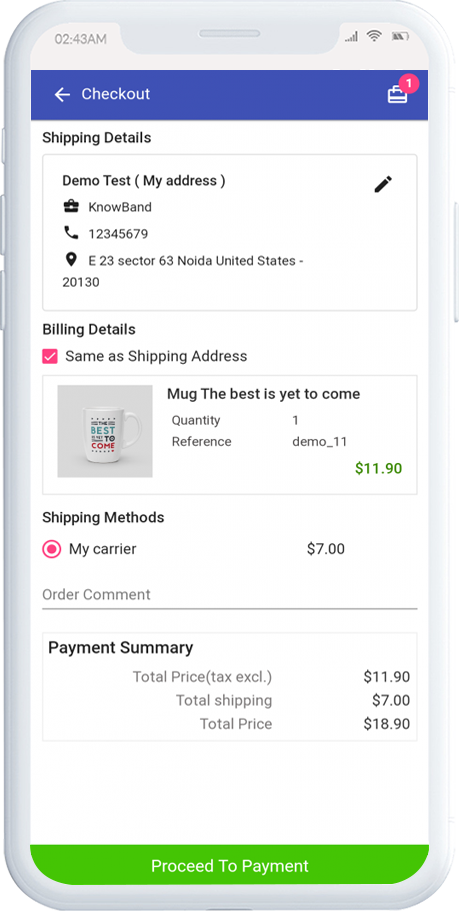
The Progressive Web App for OpenCart has a simplified single-screen checkout with only relevant information. The app users can view complete checkout details like shipping details, billing details, order summary, order comment, payment summary.
1. Shipping & Billing Details:
This screen provides details of the shipping & billing addresses saved by the user. The user can also edit/save the new shipping address if needed.
2. Order Summary:
The app users get to view product details before making payment.
3. Shipping Methods:
All available shipping methods are displayed here. Users can choose the one suiting their needs.
4. Order Comment:
Users can also add any comment related to their order which will be visible to store admin on the order web-page in the backend.
6. Payment Summary:
This section displays the complete breakdown payment details involved with the purchase.
7. Proceed To Payment:
The PWA app users will be re-directed to the Payment screen after tapping the “Proceed To Payment” button.
3.8 Payment Screen:
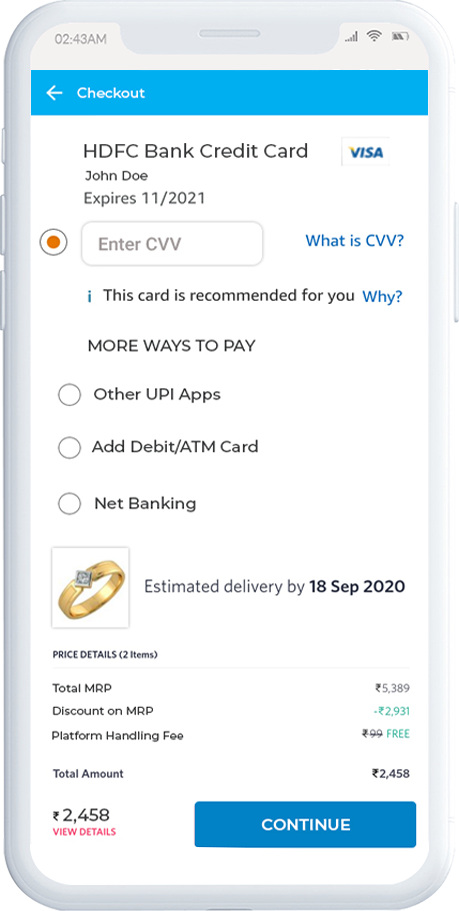
The payment screen of the OpenCart PWA App has all web-view payments available on the store. Online shoppers can find similar payment experiences on both websites and apps.
3.9 My Account Screen
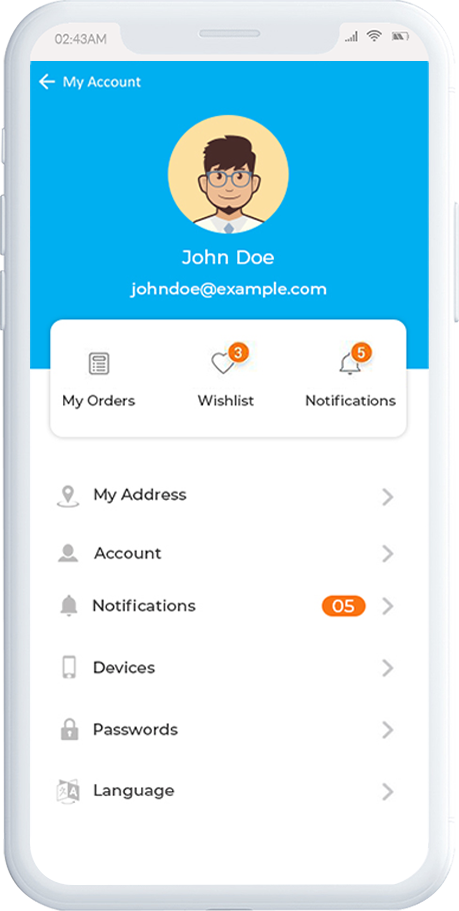
My account screen of the OpenCart PWA Mobile App allows online shoppers to view their complete details saved on the Progressive Web App. This screen also displays a list of previous app orders as well.
1. Personal Details:
Users get to view & update their pre-saved personal details on PWA Mobile App.
2. Shipping Address(s):
The app users can see the complete list of pre-saved shipping addresses in the PWA app.
3. Order Details:
The app users can get to view the complete list of the previously placed orders from the PWA app and their details.
4. Re-order feature:
There is a direct re-order button on the My Account screen of the OpenCart Progressive Web App (PWA). All the previous products under this order will be added into the cart with just a single button.
3.91 Order Detail Screen
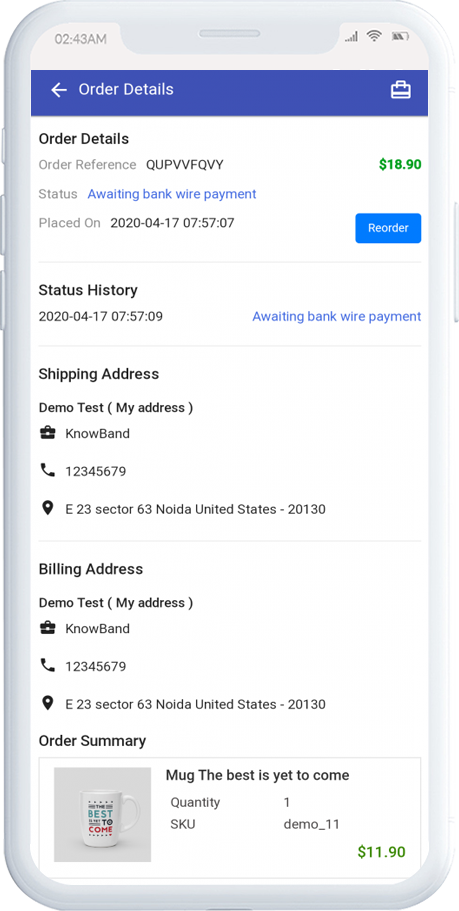
The order details screen of the OpenCart Progressive Web App provides complete details of specific orders from the PWA app. Users can easily view shipping address, product summary, shipping and payment method, and total cost summary, etc. It even offers the option to keep a track of status of order and delivery.
Opencart Free Shipping Manager module is a feature-rich module which allows the online merchant to offer free shipping to the online users. The store merchant can apply conditions and rules for free shipping benefits.
The online users can show a free-shipping block on the cart summary page. Opencart Free Shipping Manager plugin allows admin to set the minimum order amount and weight for availing free shipping. By offering free shipping to online users, admin can increase sales and reduce cart abandonment cases.
Admin can also select countries where he wants to implement any free shipping rule. This way, online users can shop for their desired products without paying any shipping charges.
1.1 Features offered by Opencart Free Shipping Manager plugin
As a store merchant, you can offer free shipping to the consumers.
This Opencart Free Shipping Manager module allows setting terms and conditions for offering free shipping. Admin can add multiple free shipping rules.
The Free Shipping Price module for OpenCart allows setting the minimum order price and order weight for availing the discount.
Admin can also set the look and feel of the shipping block OpenCart module admin interface.
Admin can enable or disable any free shipping rule anytime. There is an option to select countries from the list for offering free shipping.
Free Shipping Price module for OpenCart provides an option to the store admin for setting the priority of free shipping rules.
Online consumers can check the cart summary page for getting exact detail for meeting the free shipping conditions.
The OpenCart Free Shipping extension is multilingual compatible and also compatible with all the OpenCart themes.
2.0 Installation Steps
Purchase Opencart Free Shipping Manager plugin from the Knowband store. You will receive these files after purchasing it:
First, you will get a source code zipped file.
User Manual
Follow below-mentioned steps to install Free Shipping Price module for OpenCart:
1. Unzip the received zip file. You will get the folders.
2. Copy all the folders of the zip file in the Root Directory of OpenCart setup via FTP manager.
3. There will be a file named kbpdf_free_Shipping.ocmod.xml (In case of Openvar v3.0.x file name would be kbfree_shipping.ocmod.zip). Upload the same file from the page “Admin -> Extension -> Extension Installer -> upload”.
So, the OpenCart Free Shipping Manager extension is now successfully installed and ready to use at your store.
3.0 Admin Settings
After installing the OpenCart free shipping module, the e-merchant can apply the settings for offering free shipping.
There are following sections available to the admin interface:
Module Configuration
Free Shipping
3.1 Module Configuration
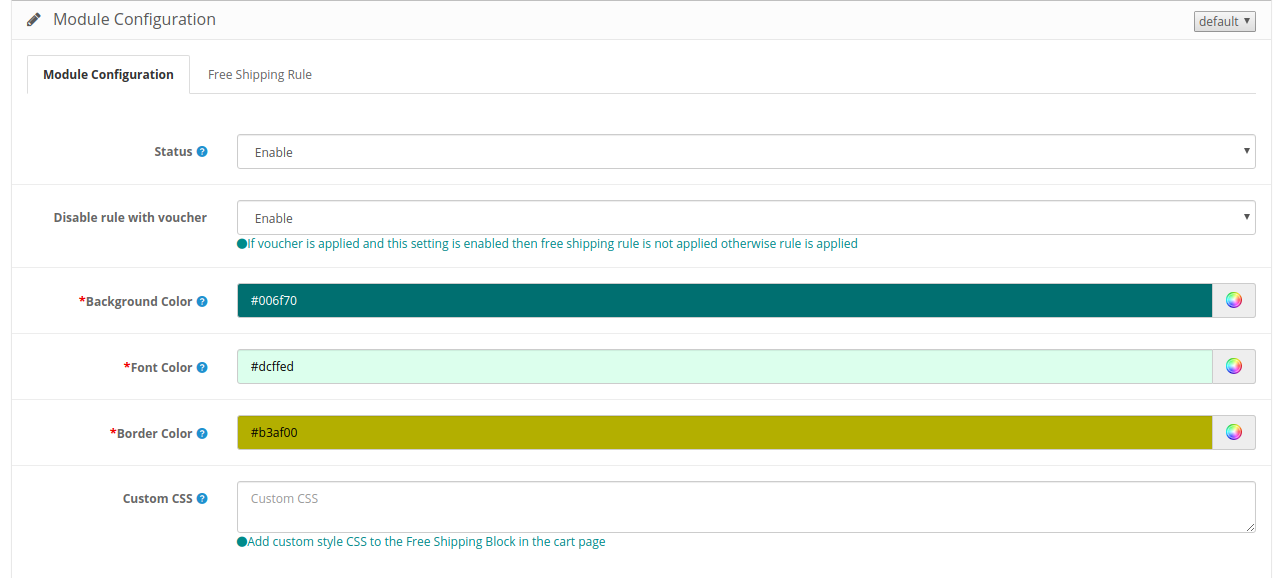
In the module configuration section, the online merchant can set up a general configuration of the Opencart Free Shipping Manager module.
Check the customization options here:
Status: Activate or deactivate the module functionality from here.
Disable rule with voucher: Once this setting is disabled, the free shipping offer will not be applicable even when the voucher is applied.
Background Color: Select the background color.
Font color: Choose the font color from here.
Border Color: Select the border color here.
Custom CSS: Enter the Custom CSS code here.
3.2 Free Shipping
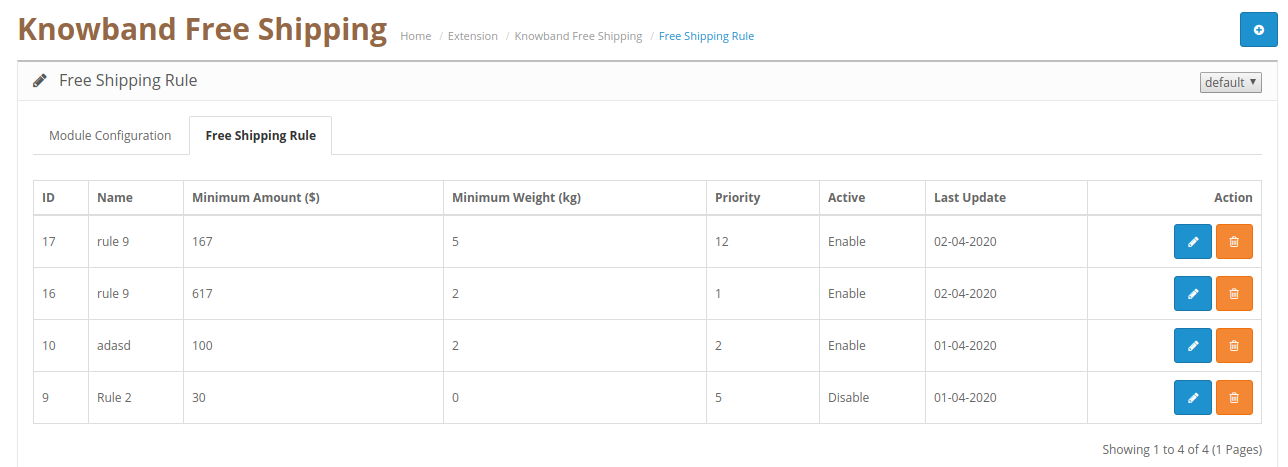
In the free shipping rule section, the online merchant can set up free shipping rules. The OpenCart free shipping module allows creating multiple free shipping rules.
3.2.1 Steps to add new Free Shipping Rule
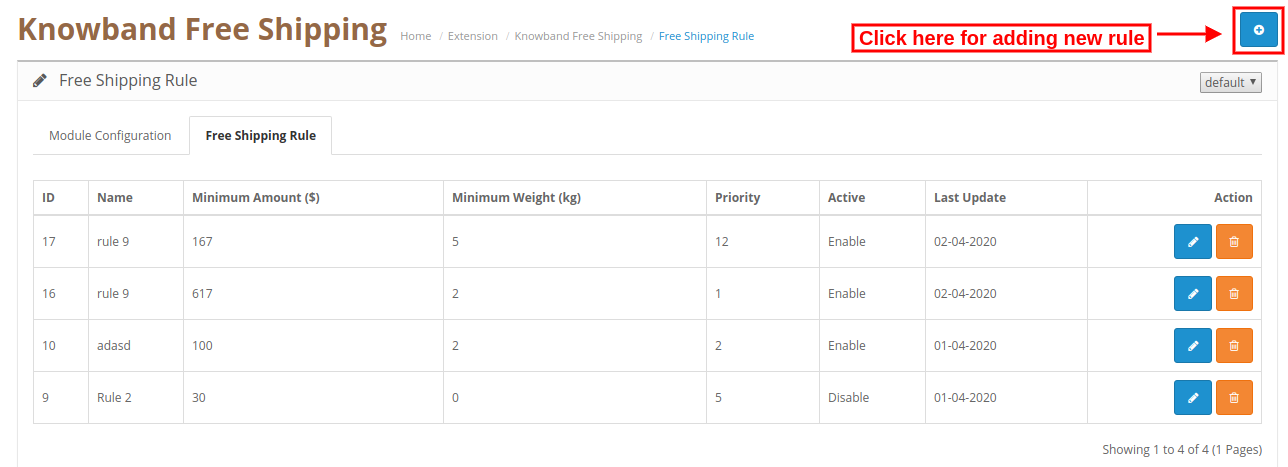
Admin can add new rules from the admin interface. For adding a new rule, the admin needs to click on the “+” button.
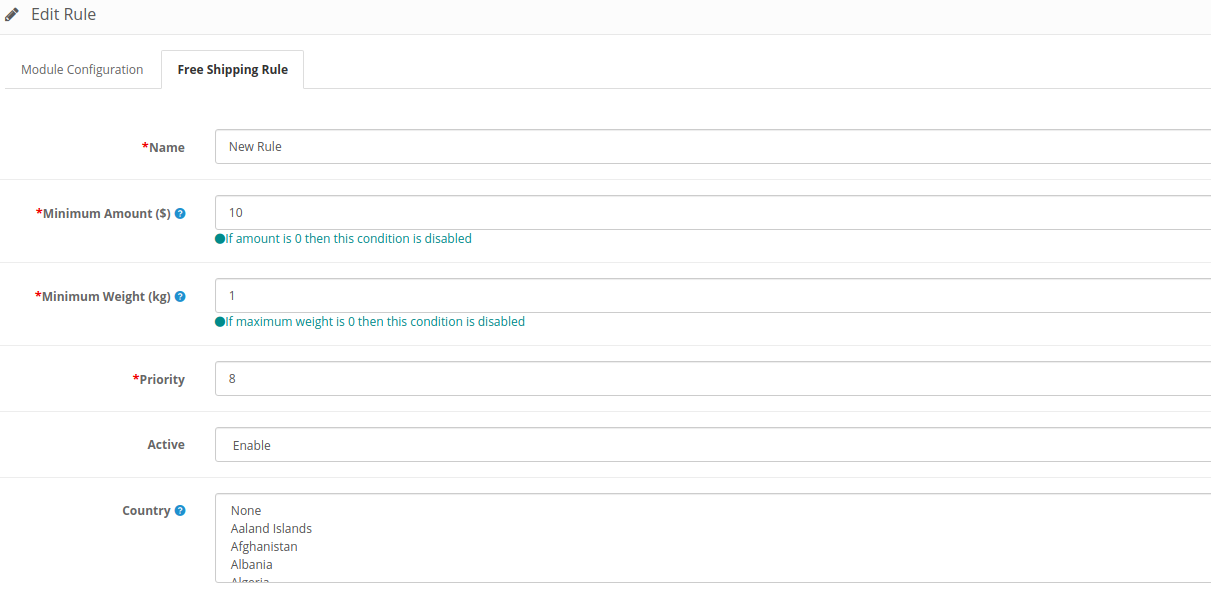
After clicking on this button, enter these details as shown below:
Name: Enter Rule name here.
Minimum amount: Set the minimum amount for availing free shipping.
Minimum Weight: Enter the minimum weight of the overall order for which you can offer free shipping. If the maximum weight of the order is 0 then this condition will not work.
Priority: Admin can set the priority of the free shipping rule.
Activate: Activate the rule from here.
Country: Admin can select the country from the list for which he doesn’t want to implement any particular rule.
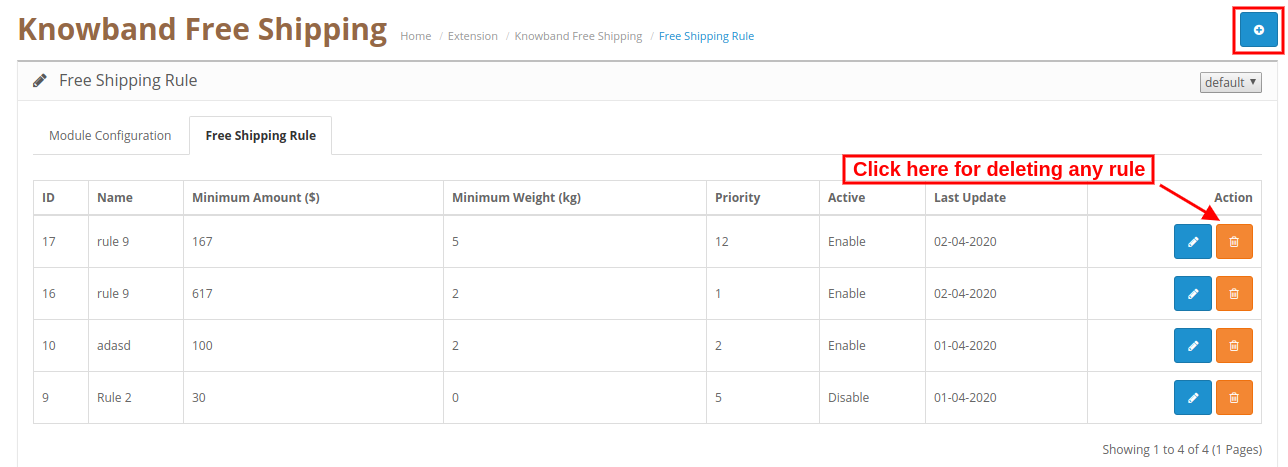
3.2.2 Steps to Delete free Shipping Rule
Admin can click here for deleting any free shipping rule. Check the below screenshot for more details:
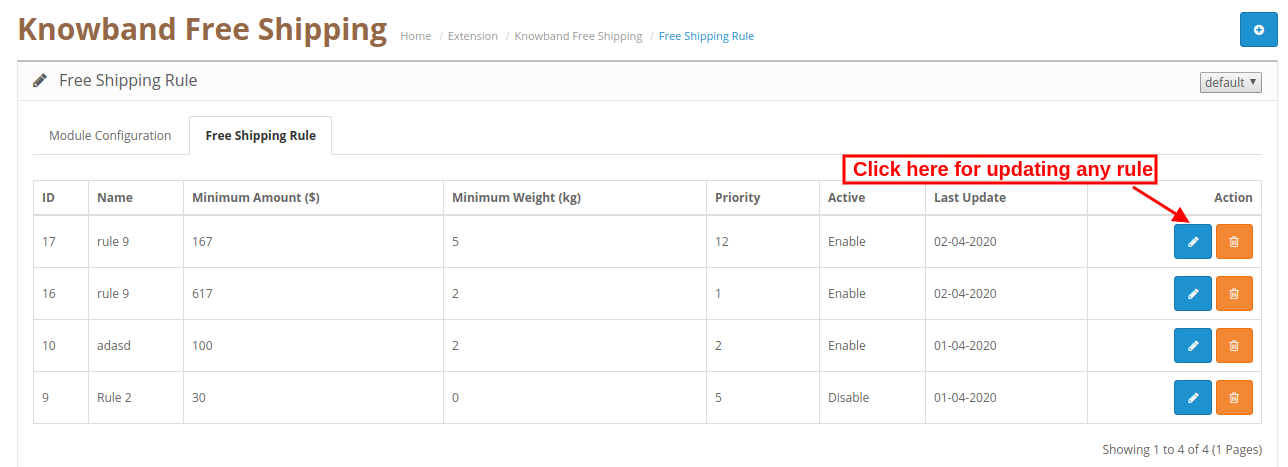
3.2.3 Steps to Update free Shipping Rule
Admin can click here for updating any free shipping rule. Check this screenshot:
4.0 Website UI
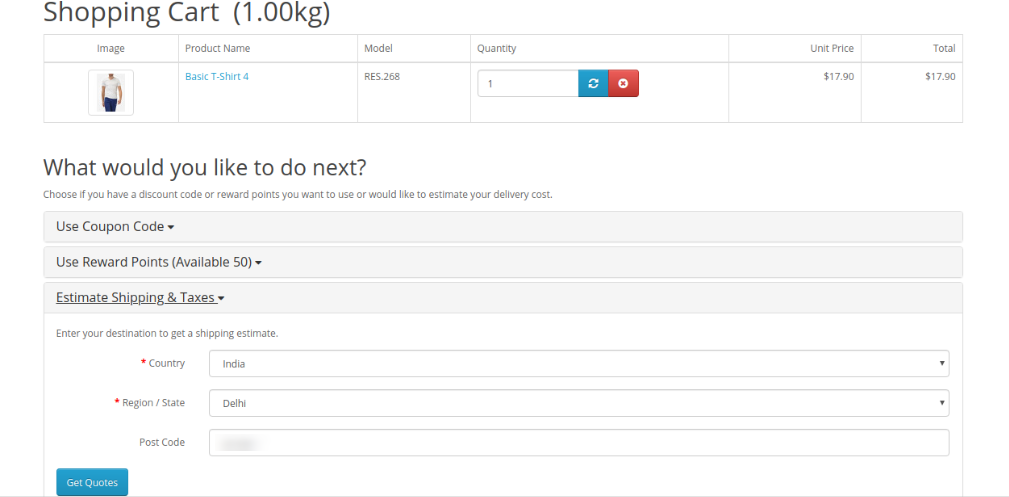
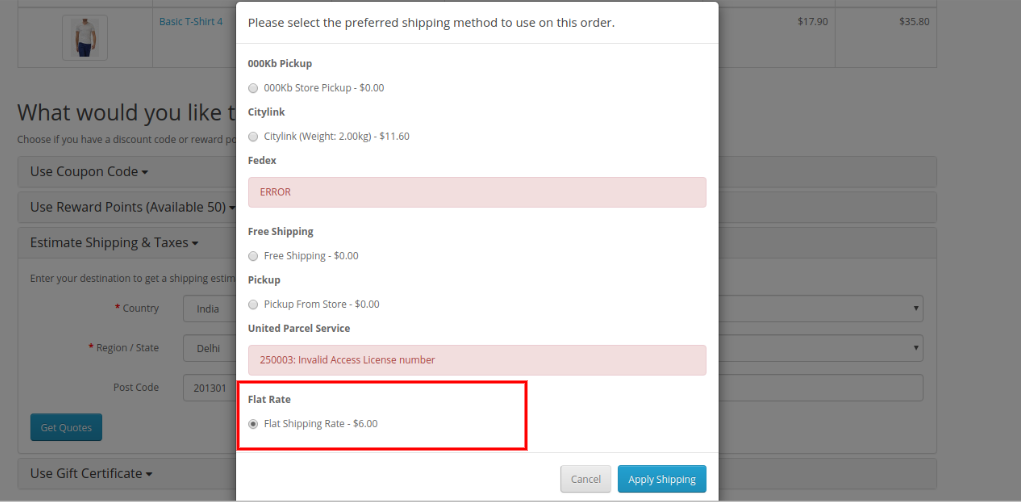
In the website front-end interface, the online users can view the impact. After adding any product in the cart, online users can select the “Estimated Shipping and taxes” option and enter country and area details here. Check the below-mentioned screenshot:
After submitting all details, online users can select shipping fat rates as shown below:
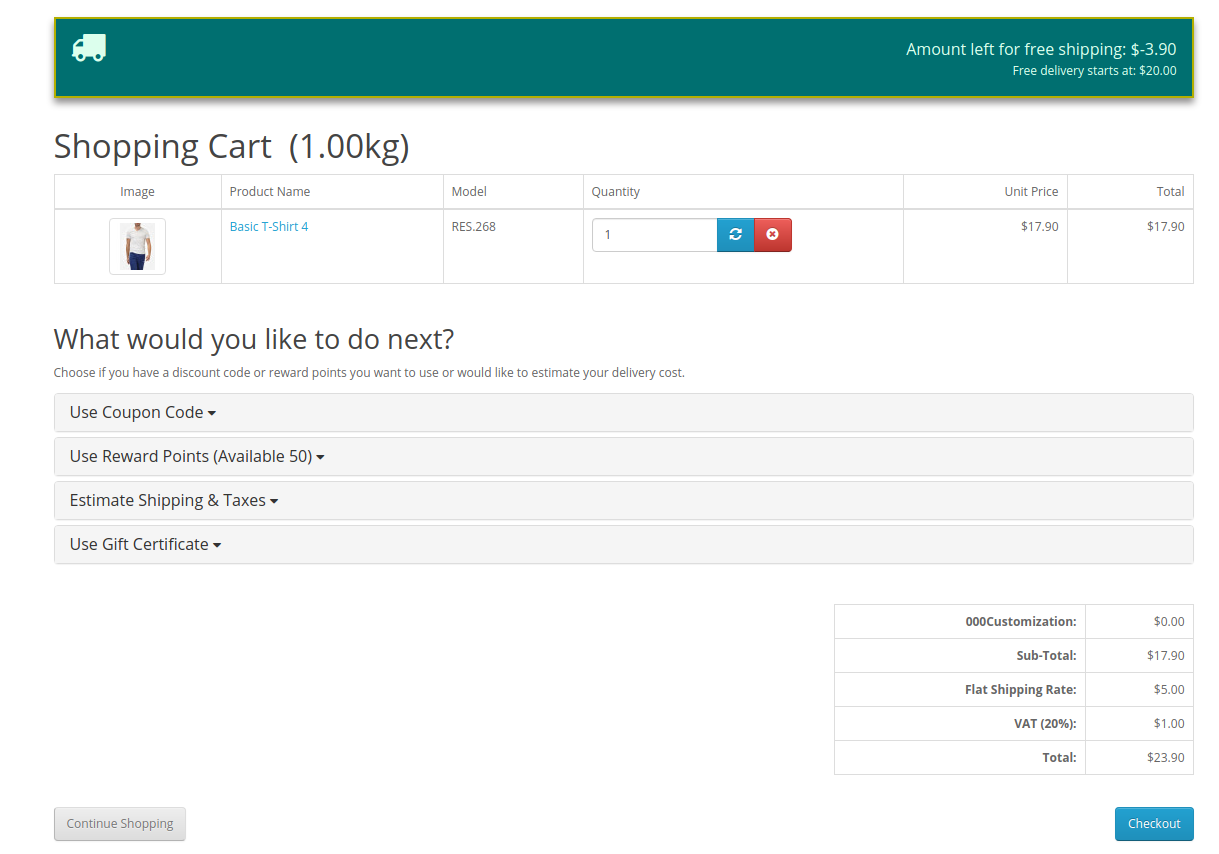
After selecting shipping flat rates and clicking on apply shipping, the online users can view a free shipping block on the cart review page. They can get exact information about the remaining amount for availing free shipping.
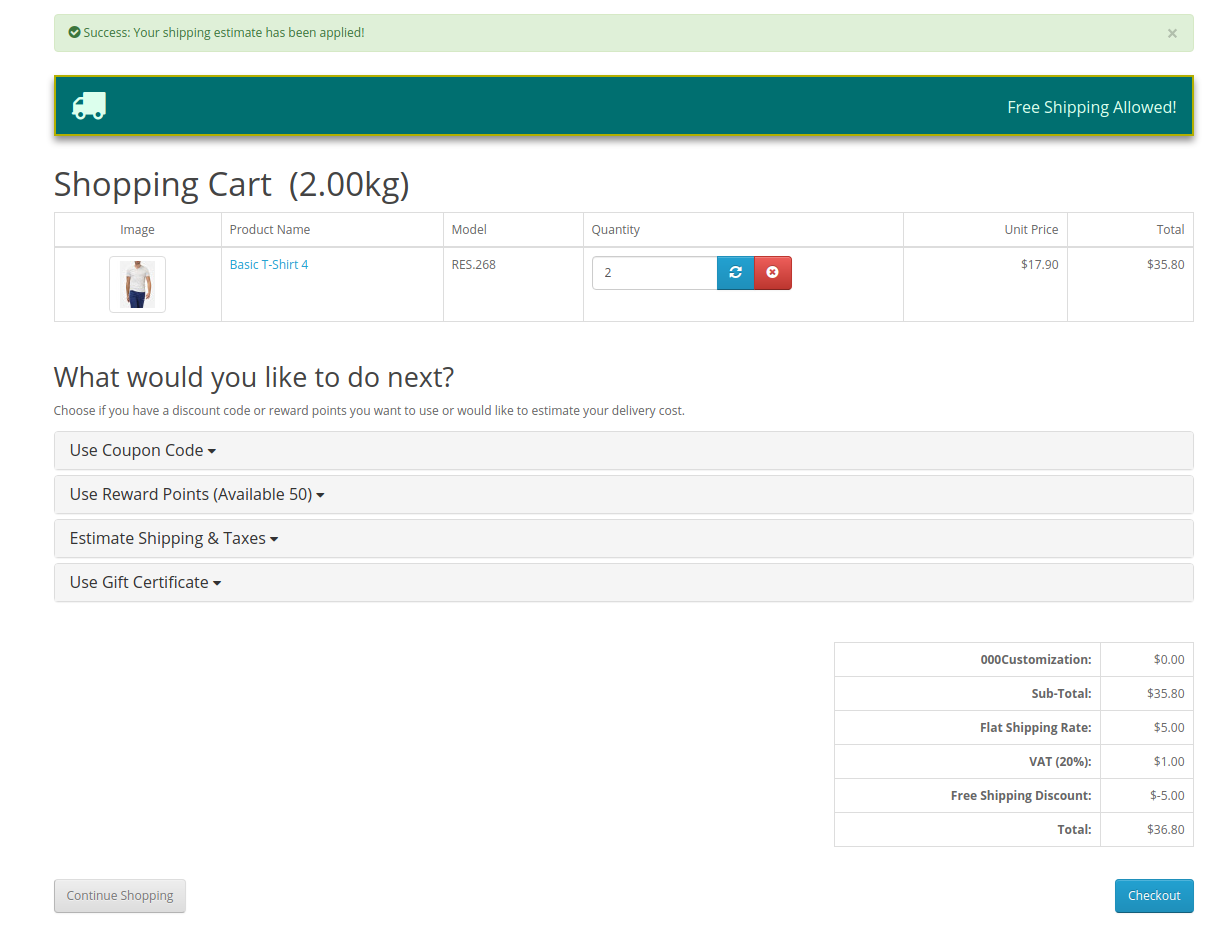
As shown here, $3.90 remaining for availing free shipping. After adding another product, online users can view the free shipping message as shown below:
The online users can avail free shipping only if they fulfill all the conditions applied by store admin.
This way, the online users can avail free shipping while shopping for their desired products from your online store.