Hey all eCommerce store owners, the holiday season is about to begin and what are your plans? This is the time for more conversions & sale opportunities for your business”. Right? According to the previous reports, last year in US holiday season sale surpasses 1 trillion mark for the very first time. This wasn’t just from the online store, but mobile apps were also the leading pillar behind this growth.
So, what’s your game plan for this holiday season sale? Make sure tapping into mobile space is in the list. Why? Let’s find out in detail.
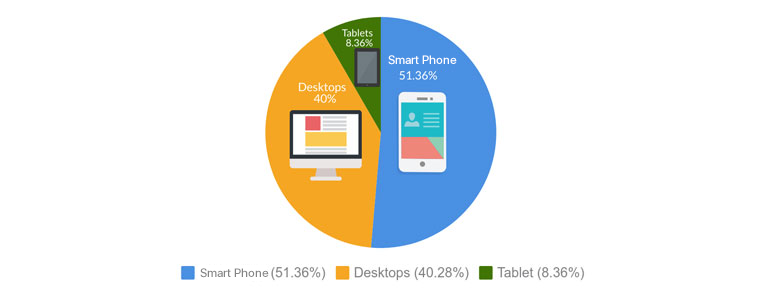
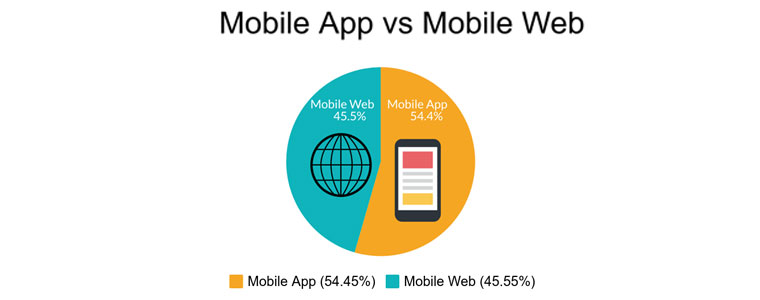
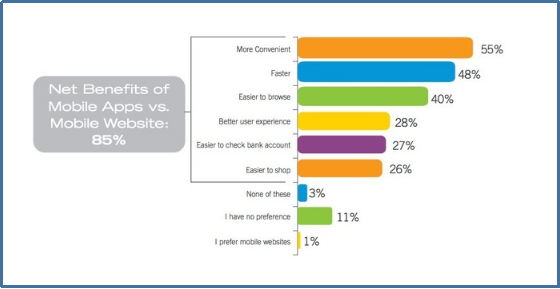
Well, if you look into the usage of mobile apps versus website, mobile apps are always one step ahead of websites. Online shoppers prefer mobile apps rather than websites. As you can see mobile app completely dominated the market and this is the main reason behind mobile app started take over on desktops and tablets.
These numbers clearly indicate the impact of mobile apps during holiday season. Smartphones becoming more popular and an important part of this holiday season. After seeing this impact many marketers predicted this would be the best year for online retailers.
1. Mobile Apps installation during Holiday Season
According to reports, In this holiday season the number of mobile app install increased as compared to an average day of any month. Because people looking forward to get their hands on year best offers & deal.
The reason behind this huge growth of app installation is offers and deals offered by eCommerce store provider. Also,
Result : After going through all this research, we can definitely
say that Mobile apps are clear winner here. Final comparison between mobile app vs mobile websites:
Growth of your business during holiday season
You will see a huge growth in the holiday season in mobile app industry. From spending time on mobile apps to transaction, the numbers are increasing and its not slowing down. This is the most awaited time period in eCommerce industry for both users & merchants.
How can you make the most of it? Simple, go mobile! And it’s so easy beyond your imagination. You can get it done in just a few days without technical knowledge. Knowband offers a module to build mobile app for your eCommerce store in just a few clicks for the following platforms:
Most awaited season for online shoppers is holiday season. In this time, user engagement reach to its peak and this data is increasing year-over-year with very huge margin. Well if we are talking about user engagement, then its unfair to not mention the name of push notifications.
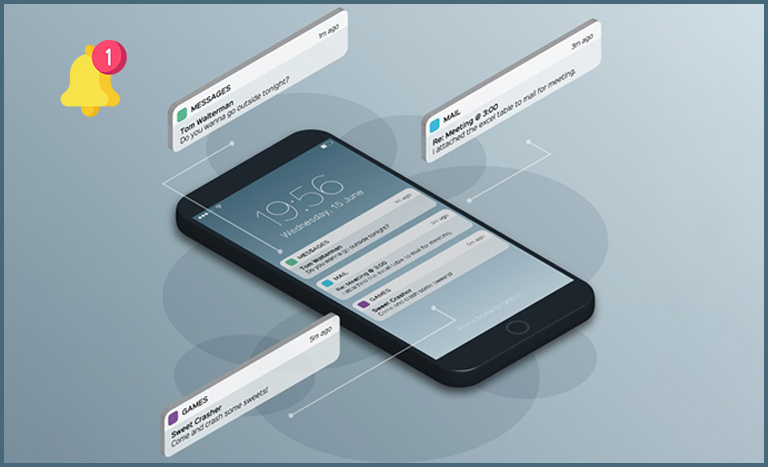
Turning point: Push notification is one of the best tool to boost your user engagement during holiday season sale. These push messages works like a source which bring more users to your store. Push notifications claims higher open-rate as compared to email. Knowband offers unlimited push notifications in their mobile app.
Also, by offering free shipping and flash sale you can create an urgency in your user’s mind and encourage them to shop instant from your store.
2. Increase Sale
From last few years, the number of sales of every store changing in this time period. No doubt mobile app has a big hand in this huge shift which continuously changing the number of sales. The more you spend in attaining user’s attention the more you will get benefit of it which result in increasing the sales number of your store.
During this environment a lot of transactions occurring. Adapting this new advancement in technology can gives you the opportunity to get a piece of this revenue.
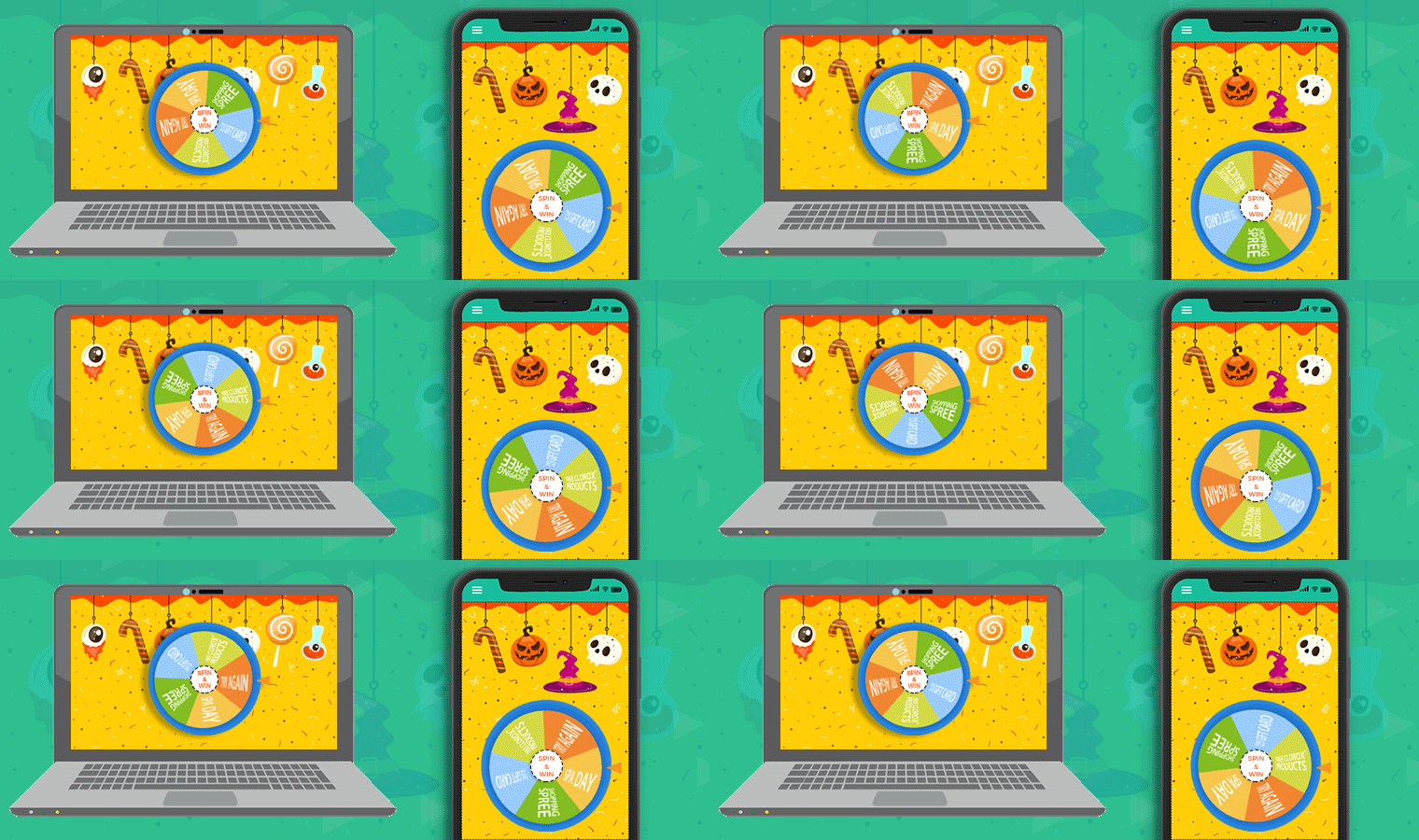
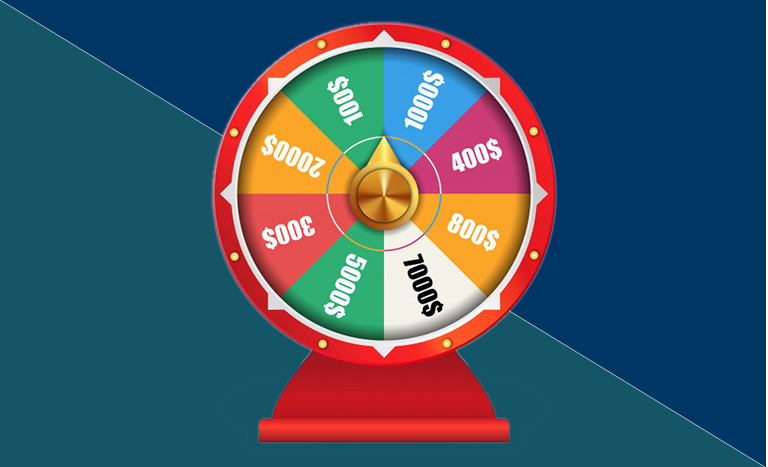
Well, don’t worry we got you this time. KnowBand provides you an opportunity to get a piece of this revenue in your bucket-list by offering Spin and Win module for this holiday season. You can display a Spin-wheel pop-up to your user’s in this holiday season. This module is specially designed for these kinds of occasions. So, whether it’s a Halloween or Christmas Eve you can present special themes for every occasion.
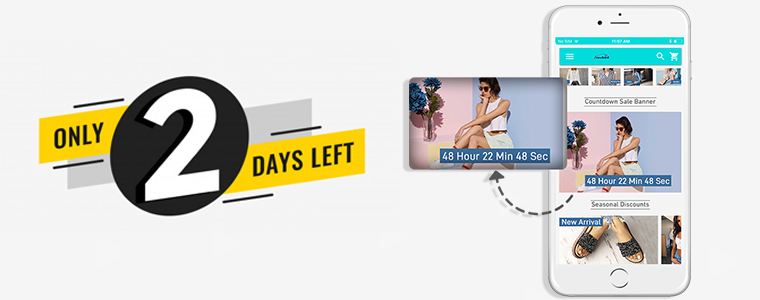
Flash sale is also one of the essential ways to boost the sales during the holiday season because it creates an urgency in user’s mind to get their hands on the special offer. This urgency can make them to go for purchase. In short Flash sale can be a game-changer for your business in this holiday season.
All Types of Coupons & Vouchers Support:
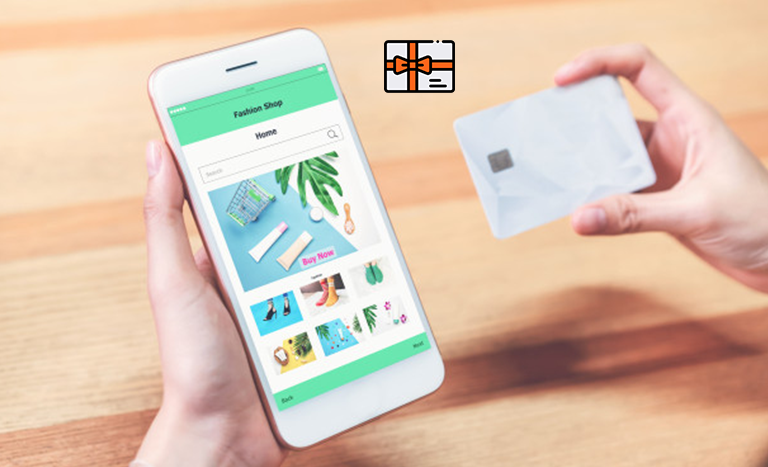
Your store sales will automatically increase if they get multiple coupons & vouchers while shopping. So, this holiday season provides multiple coupons & vouchers to your user’s and get ready to witness the highest revenue of your store.
Conclusion
Retailers should now focus on mobile apps because they are constantly changing the numbers every year. Also, they have to be prepared for huge peaks during these holiday season. This is the high time to stand out your business different from crowds. So, are you ready for this Holiday Season?
Successfully launched an eCommerce Mobile App & start selling products on shopping apps along with the website. Now, what’s next?
Getting your native Android & iOS shopping app to overcrowded Google Play Store & Apple App Store is just the beginning in the world of mobile commerce. There is much more beyond from here. Being an eCommerce merchant, now two options left for you. One is to wait & let the users discover about your app on their own and the other one is to do something about it & promote the app in the right manner. The later one can be a game-changer for you.
Nowadays, the majority of developers are facing the problem of fewer downloads, after the app is published on App stores. The eCommerce industry itself has huge competition and is growing with each passing day. To get expected downloads will require some efforts & understanding from you. Before getting into that detailing first, let’s discuss how marketing exactly works in the world of mobile apps.
You probably would be aware of the term ASO (App Store Optimization) which is responsible for ranking/position of your app in app stores. App stores have their own ranking criteria which are quite similar to search engine rankings algorithms. Let’s know more about ASO:
#1 App Store Optimization
ASO works like SEO. It handles the ranking of apps in app store search results. This fact is quite obvious that the better ranking of your app will rise both visits & downloads. Developers should optimize the right keywords for the app to make it rank higher in search results. Here are some checklist points for this technique:
1. App Title:
The name of a mobile app plays a vital role in its success. You should go for some catchy yet descriptive title without missing the core value of the brand. Always remember that the name will have an everlasting impression on users. Before finalizing the app name, you should always have a look at the name of your competitor apps. And, the keyword with the highest search volume should be used in the app name.
Apple App Store provides 255 characters to write a title. Whereas, Google Play Store has lowered title limit to 30 char & allows putting keywords in the description instead of the name.
2. Keywords/Tags:
Choose the right keyword for your app & use them in the tags/keywords field of app listing. Apple store allows 100 char limit to insert keywords while the Google Play store allows to add them the long description of 4000 characters.
Just like SEO, keywords will only be beneficial if they are well-suited & match your business domain. So, do proper keyword research & analysis & sneak into some competitor as well if required. It would not harm.
Also, there should be a check on keyword performance as well. If they aren’t able to give downloads after some time, it’s a signal to update them.
2. App Description:
The description for the app plays the same role as a landing page for a website. Description could be a compelling factor for the user reading it to end up with app installation. Both Google Play & Apple App store offers 4000 char description to put them wherever you like.
You should write the description with the thought-process that user isn’t aware of the app at all. For an eCommerce store, the app would have no download charges yet users hesitate to download it for free, why? That’s where your description plays its role to impact their decision.
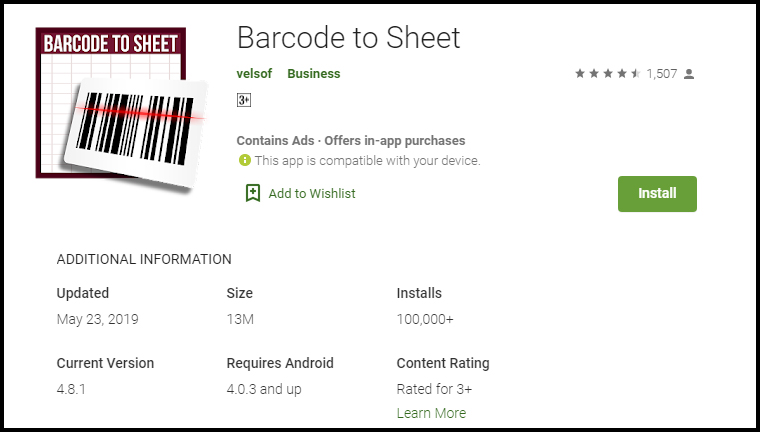
Try to list down all the features & benefits with proper keywords to make the most out of it. For the visual part, make sure the screenshots are appealing and have relevant information. For instance, take a look at how clear & self-explanatory screenshots are of Barcode To Sheet mobile app. The interactive app preview video gives complete info in just 2 minutes.
4. App Downloads:
You should always keep a track of the downloads of your app. It should always keep increasing. The more downloads you will get the higher ranking you will get. Even, the app store also shows the visitors ranking of the tops app In their respective category which majorly depends on the app downloads.
Somehow, if your app is lacking downloads in the initial launch phase, you can even try some third-party promotion to get a rise. The downloads depict the authenticity of your app & help in ranking as well.
5. App Ratings & Reviews:
Being in the retail industry, you would be aware of the potential of ratings & reviews. That works for your app as well. Keep your user reviews positive & ratings higher for better ranking.
Launching a beta version of your app is a way to make sure that it is user-friendly & match expectations. You can even get happy & satisfied reviews from the beginning. In order to simplify this task, try to get fully genuine & real reviews.
Yes, Google search it is. You can use it to rank the app in Google searches & get it installed in the user’s devices. The process is quite simple, you just need to optimize app listing page & link it to your website.
1. Interlink Store & Apps:
There should be a proper interlinking between store & app listings. Keep the brand name in app title & description which should have a back-link to your website.
Also, highlight app links on your website homepage for better usability & increased downloads.
2. Allow App Indexing:
Indexing signals Google Bot to crawl the content of a specific web-page. Make sure that indexing is allowed for your app listing page as well.
This will let crawlers go through app description & keywords which will ultimately help in Google ranking of apps. You should even keep an eye on the content of app web-page & update it from time to time.
Actually indexing of application is slightly different from the web-pages. Along with app description, the content available on app screens can also be brought to crawling with deep linking app indexing & firebase app indexing.
3. QR code for App Install:
Display compressed QR codes on your website & let users land straightly to app download option on scanning. This not only improves usability, but also it is a future trend which could affect rankings in coming time.
These QR codes on the home page of the website will grab the user’s attention & straightly lead them to apps for better browsing & hassle-free purchase. Click here to create a low-density QR code.
#3 App Promotion on Social Platforms
As far as eCommerce mobile apps are concerned, social media networks are an effective channel for promotion. You can increase the visibility of your app & get potential no of downloads from there.
Majorly there are two ways to do that. One is to promote the app through your social business profiles on Facebook, Twitter, Instagram, etc. Another one is to run Facebook ads for your app.
Often it happens that developers focus is just on the download numbers. It’s good, but there should be a check on the user’s behavior & app performance as well. Your app will be uninstalled from user’s devices whenever they face any sort of abnormal behavior.
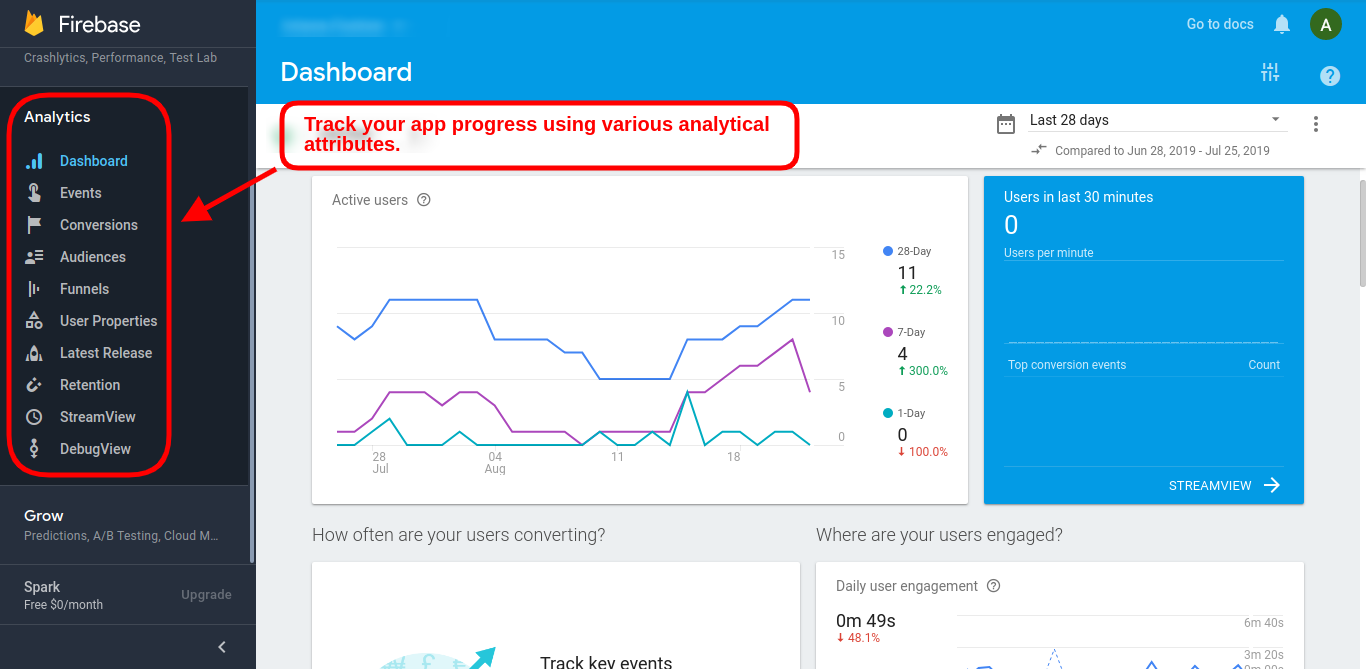
You can use Google’s Firebase Analytics to learn more about user’s demands in real-time & plan on how to deliver them accordingly.
Similarly, the Apple store has also its analytics tool with App Analytics which also used to measure performance & set new goals. The Google Firebase tracking can also be added in Google Analytics in order to keep a check on app performance & growth.
#4 Press Releases for App Launch
Before launching an eCommerce Mobile App for the online store, you should release a press release on different digital media networks as an announcement. This campaign will voice out about future app presence & get initial downloads in beta version as well.
The developers can even go to influencers & reviewers to get genuine feedback/review for their apps. The reviews get published on multiple websites which grabs user attention with a quality back-link to your app listing web-page. This approach has worked for various leading names when it comes to increasing downloads.
A pre-launch campaign can gain exposure for your app. Pre-announcement about ongoing app development & will be available soon is the best thing to do instead of just waiting for launch day. A blog post about development updates maybe even published for better interaction with users. It will help in building eagerness in users regarding your app.
For all the eCommerce merchants out there, if you haven’t taken your store to the mobile platform & start generating heavy leads, here is the most advanced & automated Mobile App Builder plugin available for all major platforms. Check them out:
The answer to successful app downloads lies in the preliminary strategies we choose. The above-discussed tips will be a booster for your app downloads, but you can also opt for any other technique as well if it works for you. In the wide eCommerce industry, multiple domains have a variable audience, so there isn’t any foolproof way to get numbers. But, yeah these points have worked for a majority of developers in the past & would hopefully bring recognition & downloads for your app as well.
Want to create apps for your PrestaShop website? We got a complete no-code App Builder for you!
There were times when PrestaShop Mobile Apps were only for big brands or flourished ones. E-commerce newbies & startups used to rely on their website only. But, time has changed now. Every PrestaShop website owner is looking forward to own mobile apps irrespective of their size. The Mobile Apps are playing a vital role in strengthening the brand & building a loyal customer base with minimal efforts. Every store owner is looking to grab this opportunity & grow their business on another level.
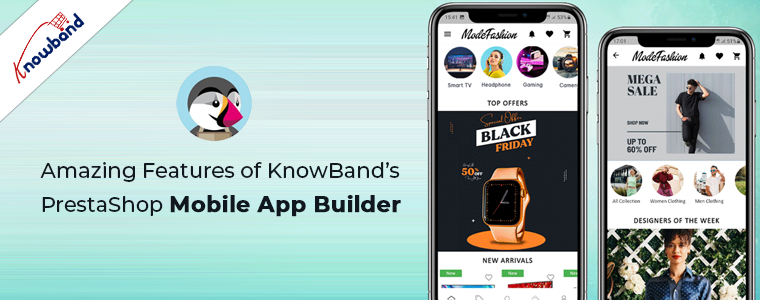
KnowBand, in this concern, has brought an automated solution with PrestaShop Mobile App Builder. It is a readymade framework designed to build native Android & iOS apps for your PrestaShop website without coding. The PrestaShop Mobile Apps are connected with your website in real-time. Moreover, the module provides complete backend panel control into your hands & thus you can manage the app functionalities with ease. Now let’s take a glance at some of the outstanding & sale-boosting features of PrestaShop Mobile App Builder:
1. Easy Installation:
Our PrestaShop Mobile App Builder is very easy to install & configure. All you need to do is to upload the zip file on your website & configure the backend panel from there.
2. Completely Native Mobile Apps
The performance of your PrestaShop Mobile App among worldwide mobile shoppers matters a lot as it would be a deciding factor for them to purchase or not. We all want shopping apps to be smooth & fast. The PrestaShop Mobile App Builder offers 100% native Android & iOS app which ensures hassle-free performance on all sorts of user’s devices.
Furthermore, the apps are built with the most advanced mobile app development technology Flutter, which ensures advanced compatibility and smooth user experience for the customers.
3. Customizable Home Screen Layout
The PrestaShop Mobile App Maker offers a dynamic home screen whose layout can be customized & configured from backend. The store admin can create & save multiple themes & festive based layouts in the backend. The positioning of various elements can be altered with just drag & drop feature.
4. Alluring Color & Font Options
Match your app colors & font styles with the website from backend panel of PrestaShop Mobile App Maker. Our Module allows you to choose theme color, background color, button color & button text color for your app.
5. Compatible with All Handheld Devices
Our PrestaShop Mobile App Creator provides error-prone & fully tested apps which run perfectly on all sorts of Android & iOS smartphone as well as tablets.
6. 100% Website & App Synchronization
Your PrestaShop Mobile Apps will be fully connected with your website & thus any change you make on the store will be reflected on the Mobile App in real-time.
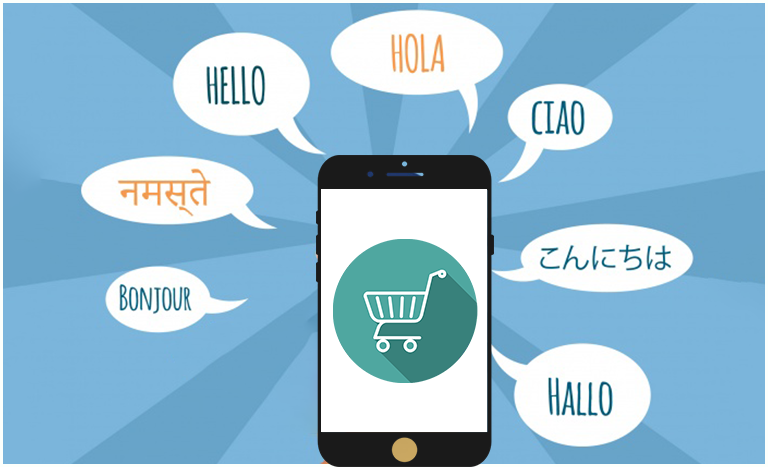
7. Multi-lingual & RTL Support
The Mobile App Builder offers both multi-lingual & RTL writing support in the Android & iOS apps. The e-merchants can easily enhance the scope of their business worldwide.
8. Instant Login Options
The PrestaShop Mobile App Creator offers easy & quick options for user sign-in & registration. The mobile shoppers can login using Google, Facebook, Phone Number & Fingerprint verification. Moreover, the iOS App users can log in using Face ID which makes the login process hassle-free and simpler than ever.
9. Simplified Checkout
Few relevant details on a single screen of PrestaShop Mobile App Maker make the order submission easier for the users.
10. Shipping Methods Support
The PrestaShop Mobile App Supports all sorts of website shipping methods. This makes the trade between seller & buyer completely effortless.
11. All Product Type Support
The mobile apps for PrestaShop eCommerce website support all types of products on the Mobile Apps like single, bundled, grouped, configurable & virtual (downloadable) products.
12. Unlimited Push Notifications
Sending push notifications to your app users about deals/offers/discounts would definitely grab their immediate attention & close more sales for your store. The PrestaShop Mobile App Maker offers the option to send push notifications on the apps from module backend. The store admin can send following sorts of notifications on the Apps:
Automated Order Creation Notification
Automated Order Status Update Notification
Automated Abandoned Cart Notification
Custom personalized Notification
Moreover, the users can check all the previous notifications in the newly added notification tab in the app. This will make sure your customers are up-to-date concerning all the offers and informational notifications.
13. 24*7 Chat Options
Keep your users close to you with the WhatsApp chat option in your PrestaShop Mobile Apps. The users can directly contact you regarding any query/concern & get assistance 24*7.
14. Mobile Coupons & Vouchers Support
The PrestaShop Mobile App Maker offers support to all sorts of website coupons & vouchers on mobile apps as well. The amazing deals & discounted price would definitely keep the app users engaged & even compel them to re-visit app for more purchases.
15. Website Payment Experience on Mobile App
Offer the website payment experience on your PrestaShop Mobile App as well. The PrestaShop Mobile App Maker supports all sorts of website payment options on the mobile app.
16. New Payment Method Integration
The PrestaShop eCommerce Mobile App Creator comes with the flexibility to add new payment methods in the apps. All sorts of native payments can be integrated over a fair amount of fee.
17. Real-time Order Tracking
The Mobile Apps with PrestaShop Mobile App Creator offers effective real-time order tracking options. The updated status of previous order delivery gets updated in real time.
18. White Label Apps
The PrestaShop Mobile App Builder for Android & iOS allows the store owners to display the website logo on the header of the apps. This will make your app branded & popularize the same among worldwide mobile shoppers.
19. Social Sharing
The products from the app can be shared on multiple social networks by the users. It will grow the social reach of your store & lure potential leads.
20. Gamified E-Mail Subscription Pop-Up
Offer a gamified e-mail subscription pop-up on the mobile apps with an interactive spin-wheel interface. You need to install KnowBand’s PrestaShop Spin & Win module on your website.
21. Layered Navigation
The PrestaShop eCommerce Mobile App Maker makes the product search easier with multiple filters & sort options. The users wouldn’t face any issue while searching the right product.
22. Login-Sign up Pop-up:
The mobile apps encourage the customer to complete the login process in the app. The users can login via the login/sign-up pop-up available on the home screen of the app.
Furthermore, this not only ensure easy login process for the customers but also helps the E-merchants to get the customers’ emails for marketing purposes.
In this competitive and revolutionary eCommerce industry, having your own eCommerce mobile app could easily enhance the visibility and engagement of your store. Earlier, you either need to struggle with learning programming or hire a professional and spend a huge amount of money for the same. But, now creating a mobile app is simpler than ever with KnowBand’s PrestaShop Mobile App Builder. This plugin is designed in such a way to provide native eCommerce mobile apps along with complete web-admin panel access. But, before going for any such decision, let’s take a glimpse of the simplest process through which you can test your own store on PrestaShop Demo App:
Step 1: Download Module:
Download the PrestaShop Mobile App Builder free version for Android and iOS from KnowBand store. After successful download, you would receive a zipped file consisting of the source code of module which is to be installed on your web-store.
Step 2: Upload Module and Configure:
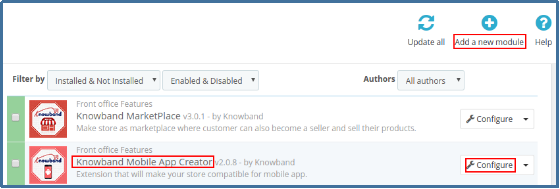
Install the downloaded zipped file on your PrestaShop store and you would see the option to configure the module. Open module backend and enable the plugin to link your store with the mobile app.
Step 3: Download Demo App & enter store URL:
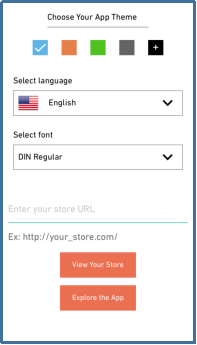
Download our PrestaShop Nautica Demo App on your test device from Google Play Store and Apple App Store. On opening the app, the above-shown splash screen will appear. All you need to do is to enter your website URL and tap ‘View Your Store’. For instance, if your store URL is https://www.knowband.com then, enter it as https://www.knowband.com/ and start testing your app.
That’s it! Now, you can experience your app working on the mobile app. This is the default view of your website on the app and can be customized accordingly with multiple backend options and functionalities. Once you are successfully satisfied with the working of the mobile app, you can go for the paid version of the module for app development with unlocked features.
KnowBand has brought this featured automated Mobile App Builder module for various other eCommerce platforms as well, like OpenCart, Magento, Magento 2 & WooCommerce. The testing process and the features are the same for every platform.
What to test in PrestaShop Demo Mobile App?
Once you start testing the functioning of PrestaShop Mobile App, here are 10 important points which must not be missed:
1. The home screen layout of the app is the default view which can be customized accordingly along with color options from module backend.
2. Multiple social login options(Google & Facebook) along with OTP and Fingerprint Authentication.
3. Add your store logo on the header of mobile app and showcase your brand as well.
4. Seamless product categorization with clutter-free product page. Layered navigation along with product swiping makes the search easier.
5. Social sharing of products on different social platforms directly from the product screen.
6. Add products in the wishlist and Shopping Cart with multiple size and color based options.
7. Simplified checkout screen with easy order creation.
8. Complete details of the placed order along with live tracking facility.
9. Send both automated and custom Push Notifications from the backend panel along with complete history.
10. Experience the flawless functioning of the mobile app right from entering the app to making the purchase.
Conclusion:
If testing your eCommerce website on the demo app is so easy with KnowBand, it’s a quite better option to go for it before actually making up your mind in choosing the right mobile app solution.
For any query or issue regarding testing of PrestaShop Mobile App kindly raise a ticket or contact us at support@knowband.com. Our prompt support team would be honored to assist you.
Developing your own eCommerce mobile app has its own perks that too on a very high scale. We all are into online shopping nowadays. No one wants to struggle with going market, search products and then come back holding a bunch of bags. Instead, we all go for the online product purchase for our own comfort. Actually, the reason behind this is why to waste our energy when there is a better option to purchase products?
That’s exactly what modern shoppers think. Being an eCommerce merchant you can use this approach to improve the sales for your store. But, along with selling products online, what if there is another way which can get you far more benefits.
Yeah, that’s right! I am talking about eCommerce mobile apps. We all know that the mobile app industry has seen a huge growth in the past decade. Today, almost every major field needs mobile apps and so is the eCommerce industry. As per a marketing report, 85% of smartphone users prefer mobile apps over mobile websites. This percentage is more than enough to boost the sales and conversion for your store.
So, if you are an online store owner and quite serious about increasing visibility and revenue of your store, you must consider the option of eCommerce mobile app for PrestaShop, OpenCart, Magento, Magento 2, WooCommerce, Shopify platforms. Further, let’s dig up in this article how can you design the perfect eCommerce app of your own?
Need for designing an eCommerce Mobile App:
As they say, the first impression is the last impression. Your eCommerce mobile app voice out your brand among the worldwide mobile audience. Crafting a beautiful and flawless mobile app will definitely portray your professionalism and lure mobile shoppers. So, apart from incorporating other technicalities in eCommerce mobile app development, designing also holds a major spot which shouldn’t be ignored in any case.
Although it seems like all the shopping apps are a look alike, but trust me they aren’t. There are many such factors which if used properly would provide an impressive app to the front end shoppers.
Considerable factors for eCommerce Mobile App Design:
Here are a few major aspects to be kept in mind while designing an eCommerce mobile app of your own:
1. Clutter-free User Interface
The user interface is the soul of a mobile app. While designing the app UI you should keep a check on the screen-size support and effectiveness of the design. These two factors are responsible for making the app interface interactive and responsive.
You must make sure that your app doesn’t get affected by multiple screen sizes of various devices. As far as screen sizes are concerned, either manage the content on the app or create the one which supports multiple screen sizes.
Also, your app interface should be crafted as such it doesn’t create an issue for the user’s while creating an order. Many apps have loads of attributes which makes it tough for the users to select the right product and place the order. Thus, your well designed mobile apps could easily relight the user experience of your store.
2. Home Screen Personalization
The home screen of your app is the first thing which an online shopper experience on entering the app. Try to keep it simple and clutter-free along with highlighting the top products. There must be a proper search functionality on the home screen for the new visitors.
Your eCommerce mobile app should also have the functionality to offer flash sale or time-based sale on the home screen. So, try to optimize the app screen as per various events and occasions without making it messy.
3. Simple Sign-up and Checkout Screen
Users never prefer a multi-page sign-up or login option in the shopping apps. Instead of testing their patience the better approach is to offer them an easy and quick login process. Social media login(Google and Facebook) along with OTP and Fingerprint authentication are few such sign-up options which let the users access the app in a few taps.
Same goes for the checkout page, it shouldn’t be lengthy and multi-screen at all. Your app checkout screen should be that easy to use which compel the users to submit the order. So, once you have thought of developing an eCommerce mobile app you must be sure about keeping both these screens seamless.
4. Better Product Visuals
All the products must be displayed in a nice and effective manner. The product image quality must be up to mark and always have a prominent ‘Add To Cart’ button. You can also decide the navigation of this button by either redirecting users to the shopping cart screen or keep them on the product page for additional browsing.
The product images should load instantly even in an average broadband network. Often it happens that the users leave the app because images take time to load and they lose their patience.
5. Rich Color Schemes
Your app color choice says it all. Try to choose the color which suits your business. While choosing the right colors make sure it doesn’t affect the product visibility at all. Don’t forget that your prime requirement is to highlight the products on the app.
Moreover, you must not opt for very vibrant colors in the apps and try to maintain the right contrast between the theme and background color of your app.
6. Thumb-Friendly Zone
Your mobile app users could be both left and right-handed. Incorporating a thumb-friendly zone on the app screen wouldn’t harm anyone. Instead, it eases the app usability for both sorts of users.
Your eCommerce mobile apps should use this feature in such a way that all the important tasks related to product purchase must lie in this zone. It also helps in enhancing the conversion rate of your store.
7. Proper Filters and Sorts
Product filters are very important for an eCommerce shopping app as they help the users to find the right product from the huge catalog. The filter options in the app should be both broad and specific based on price, size etc. Product sorting is also an important factor which enhances the shopping experience. Whenever any shopper wants to view the lowest price products on your app, he/she can easily opt for the low to high sort option.
8. Simplified Menu Bar
Keeping your menu bar simple and to the point would definitely impact the user’s purchase decision. The right categorization displayed under the menu section allows the users to get along with the complete product catalog easily.
Over to you
Till now, you must be aware that mobile apps are the inevitable need of your eCommerce business. Designing your app beautiful and user-oriented would definitely benefit your eCommerce business. So, it is better to analyze and choose such eCommerce mobile app solution for your online website which provides a tailored and effortless shopping experience to the users. Keep all the above-listed points in your mind while app designing and hopefully it would shine out as a star for your store.
Read some more articles related to mobile app designing:
We all can witness the impact of digitization in this tech-centric world. Along with all the major sections, the eCommerce industry has witnessed tremendous growth and advancements in the past few years. Earlier the shoppers were only limited to the websites for product purchase. But, as the majority of online sellers took their website business to the mobile platform, the mobile shopping app is a kind of necessity rather than just a luxury.
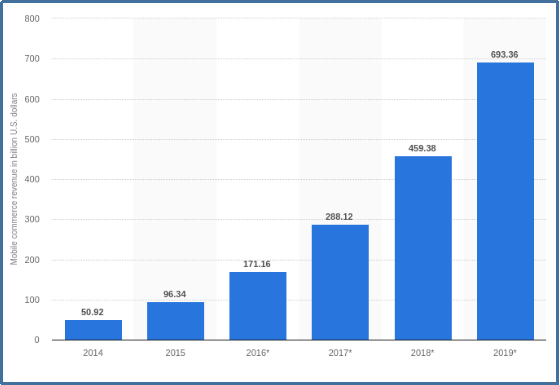
First of all, let’s narrow down the exact difference between eCommerce and m-commerce. Mobile commerce is selling products on various handheld devices while eCommerce is selling products through online websites. Many marketing experts are quoting that worldwide mCommerce is about to reach around $693B by the end of 2019.
Mobile Apps are a kind of inevitable need nowadays with the constant increase in mobile users on daily basis. The shoppers want everything at their fingertips to which they can easily reach. But, the need for eCommerce mobile apps often get ignored by online merchants and ultimately faces a huge loss.
How eCommerce mobile apps came out as a trend?
Creating a mobile app for your eCommerce website isn’t just limited to code one. You need to make sure that the app should be matching exactly with your website in terms of both look and functionality. Instead of providing some simple programmable apps to your users, think of a better approach and offer them one with all the help and assistance.
Who doesn’t want to opt for such eCommerce apps which can boost their website revenue? Mobile apps enhance the reach of your regional online business among the worldwide audience. They take your business to every corner of the world where you ever want to reach physically. But, you must be sure about the kind of mobile app which is being offered to your users. Let’s begin with a few basic questions which you should ask for your app:
1. Is your mobile app capable of targeting the right audience?
2. Does your mobile app support the products you sell?
3. How can you manage the inventory with the apps?
4. Can your app expand your business on a global scale?
5. Is your app interface enough seamless and appealing?
6. Is product purchase simple for the shoppers?
7. Can you manage the app functionalities on your own?
8. Can you optimize the home screen UI as per various occasions?
Last but not least,
9. How will you manage the app and store simultaneously at the same time?
These are some basic queries which should be considered before going for coding or non-coding way to create an eCommerce mobile app. There are various other aspects to be analyzed as well while creating eCommerce mobile app.
Key essentials for flawless mobile app creation:
1. User Experience:
Your app design should be user-centric. All the features and functionalities of your eCommerce mobile app should be crystal clear for mobile shoppers. Try to use the right color selection and correct usage of other designing elements to lure the user’s attention just with the perfect designed app. Often it happens that the mobile app visitors access the app because of the awesome designs and end up as a potential user.
Moreover, you should try to keep a brand touch in your apps. Your app portrays your business to the users so, try to keep it as effective as it can. The app screens should be crafted nicely and the transactions between them must be smooth. Display your store logo on the app and promote your brand as well along with the store products.
2. Audience Analysis
Being an eCommerce store owner you must analyze your target audience. This research has its own significance as it lets you make the decision based on user’s likes, dislikes, purchase behavior etc. It will help you in providing the exact mobile app which your user needs.
Your marketing strategies actually rely on this core aspect of eCommerce business. In this age of sternest competition, you don’t afford to make any error as it can make you lose loads of conversions and leads. Keeping your app features as per the audience taste and preference will definitely be a silver bullet for your business.
3. Track Competition
List down your competition who have already gone mobile or looking forward to doing so. Analyze their move and check what makes them a better choice for the users than you. Research their best features and benefits and try to make up the most out of this analysis.
4. Right Technology
Choosing the right technology for your app is the prime requirement for eCommerce mobile app development. Your app must be updated with all the latest advancements and should work without any flaw. Try to opt for the native eCommerce mobile apps in order to provide sustainability. Similarly, you also need to decide whether you want to develop an Android app or an iOS app or both as per your targeted audience.
These were some of the core aspects of understanding and analysis before actually going for app development. Now let’s take a look at some of the must-have features of your eCommerce Mobile App.
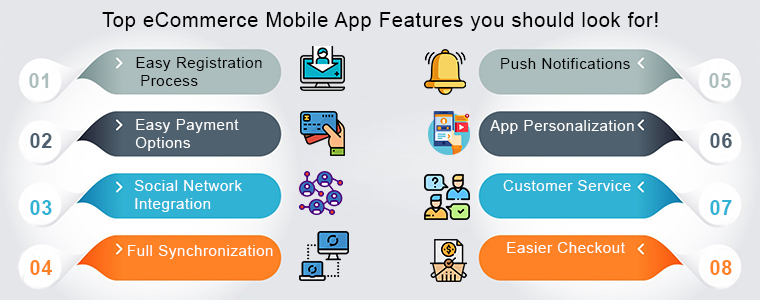
Top eCommerce Mobile App Features you should look for!
1. Easy Registration Process
In this paced day to day lives no one wants to fumble with the lengthy login forms when it comes to access your app. Many eCommerce store owners ignore this fact and eventually it doesn’t end well. You must not make this mistake and incorporate quick login options in your app in the first place.
Moreover, there must be at least 2-3 login options in your apps including social media networks. Providing one or two tap login option in your app could not only motivate them to open the app and browse the store but also boost sale for your business.
2. Easy Payment Options
Let’s take an instance that a user has visited your app and added products in its cart. But, when he/she tried to make the payment there weren’t enough payment options. This will surely make the user leave without successful product purchase.
You should be serious about providing multiple reliable and user-favorite payment options in your app. With Amazon Pay, PayPal, COD, Braintree, Stripe etc. you can easily push your users to make the purchase.
3. Social Network Integration
No one can deny the power of social media. If you are running a business, social media could be a game changer for you if used properly. Your eCommerce mobile app also needs social integration in order to popularize it.
Right from one-tap login to social sharing of products, the mobile apps will spread your word of mouth among potential buyers. So, you must connect the basic social networks in your app for improved benefits.
4. Full Synchronization
Being an eCommerce store owner managing both apps and the store simultaneously could be hectic for you. So, why not connect both with each other? Offer 100% synchronization between your store and the mobile apps and speed-up your inventory management process.
Once the apps and your online website are in synchronization, all the updates made on the website are automatically get reflected on the mobile apps. This halves your workload and saves plenty of time to focus on the competition and improve sales.
5. Push Notifications
Your app is the major communication source between you and the buyer if it has the right tool. Push notifications are the perfect marketing tool for an eCommerce mobile app. Sending personalized notifications to the app users would increase the app engagement. Notifying the users regarding discounts, sales, offers, and other store-related details would definitely enhance your eCommerce store sales.
6. App Personalization
All the top eCommerce mobile apps offer the best shopping experience to the app users. You should opt for the eCommerce mobile app solution which allows you to personalize the home screen on your own.
Your app’s home screen is responsible for the first impression on the users. So, you must make sure it certainly meets the user’s expectation. This will even help the store admin to drive more sales to your store. There is various automated eCommerce mobile app solution for PrestaShop, OpenCart, Magento, Magento 2, WooCommerce and others that allow you to present the desired layout in your apps. You can even read various tips to design beautiful eCommerce mobile apps.
7. Customer Service
Customer satisfaction is an important aspect which shouldn’t be ignored at any cost. While shopping online through your app there is a chance that user might be in doubt regarding the purchase. So, there must be reliable contact options in your app. This will not only let your users directly contact you regarding any query or problem but also brings their loyalty to your store.
8. Easier Checkout
The simpler is your checkout screen, more are the chances of a successful purchase. Easy checkout screen often motivates the users not to abandon the cart without making payment.
Wrap Up
This tour of developing eCommerce mobile app would have hopefully cleared that the mobile apps are better than online websites. So go ahead, do all your research and analysis and choose the right eCommerce mobile app development solution.
Looks good? Find some more articles on how these mobile apps can benefit your eCommerce business:
Looking for the number of bucks required to get a pair of native eCommerce mobile apps? Read on to find the answer.
Why eCommerce mobile app is a big deal today?
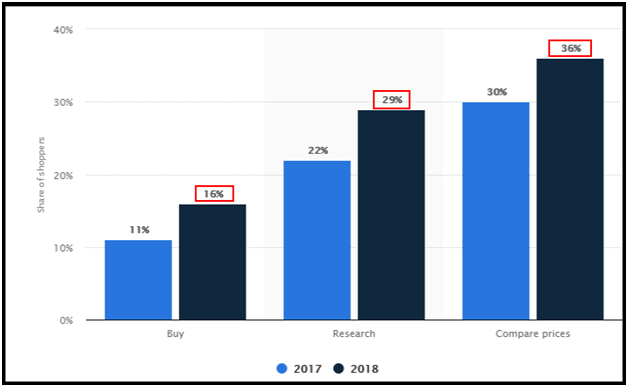
Digitization has touched our lives in the past few years in ways we never imagined. With the ever-growing mobile app market and the ease of shopping provided by mobile devices, the apps have made their mark in the eCommerce industry. The mobile apps for shopping have overtaken the desktop websites with their motive of ‘Shop on the go’. If we believe to the following stats, in the year 2018, 16 percent of worldwide shoppers used their smartphones to buy products. This data was earlier 11% in the year 2017.
All the eCommerce store owners would have dreamed of their store getting crowded with the users. E-Commerce mobile apps could make it true by targeting the majority of mobile users worldwide. Additionally, the ease of doing business with eCommerce mobile apps has no comparison at all. All of these facts and figures are that mobile apps are leading the debate on mobile apps Vs mobile websites.
How should be your eCommerce mobile app?
The exact cost is determined by the aspects that you take into consideration while app development. And, that’s totally up to you! You should get your eCommerce mobile app developed as per your choice and need. But, before that, the basic step is to keep all the concerned factors crystal clear. There are a few key aspects which are a must if you are really sighting your app as a game changer. Let’s have a glimpse of them:
1. Audience Analysis will let you know where to hit!
While developing an eCommerce mobile app, the user analysis is the most essential and basic thing, to begin with. The success of your business exactly depends on whether you are fulfilling buyer requirements or not.
The fundamental step in the buyer analysis is determining to whom are you selling the product with the app? Their shopping behavior and patterns must be analyzed to know the buyer likings and disliking. Carrying out this research in the précised manner will ultimately get you a relatable approach for your app.
2. Choosing the right technology will get your app far!
Another major aspect is using the right technology while developing your eCommerce mobile app. Along with keeping an eye on the budget of app development, you should go for the solution that offers you maximum benefits. From keeping the perfect synchronization between app and website to multiple language integration are few such technological advancements that you must opt for your app.
Actually, in my opinion, you should go for the native mobile app development solution. Determine the platform/OS that you will target, whether it will be Android or iOS or both. This is directly based on the preference of the user’s devices and that will be acquired from user analysis.
3. The well-designed app would voice out your brand loudly!
Try to craft your app design soothing and intuitive without getting it cluttered in any possible way. The appealing app visuals, seamless transactions from one app screen to another, alluring color themes and font styles are some designing factors which can provide an unmatchable shopping experience to your users.
Your app is your business identity. So, it should be kept as user-friendly as it could. Your mobile app should present your store to the users with the motive to create an ever-lasting impression.
There are various other such factors as well, but these above discussed must be considered before developing the eCommerce mobile app. Let’s move on to how much does it will cost?
What is the cost involved in eCommerce mobile app development?
Cost required for creating a mobile app is technically narrowed down to two main factors:
Who will be your app developer?
How much amount are you planning to invest?
You should be certain about the money and approach regarding the mobile app development. From here, you can go for either of the choices.
1. Coding:
The first one is to hire a developer for the job which could cost much as you have to make him permanently available for your app. You would have to pay the person every time for even small changes in your app.
2. Non-coding:
The much better and seamless option is to choose a pre-configured mobile app solution. There are various such readymade frameworks available in the market which can get the desired apps for you without any change in the code. The best part about this option is that you would be the boss of your app as its functionalities can be managed over a few clicks and button toggles from the admin panel.
Also, the mobile apps provided by the readymade solution are fully featured and have all the required functionalities for your business. These eCommerce mobile app solutions even provide free support to developed apps. So, if any issue happens in future you wouldn’t need to worry about that.
Conclusion:
Till now, you have got the idea that developing an eCommerce mobile app is a tough decision and requires a lot of analysis and research in the first place. But, there are the ways discussed above through which you can get the job done without any hassle. Knowband understood this concern of all the eCommerce store owners of different platform and came up with the easiest and cost-effective solution Mobile App Builder for Prestashop, OpenCart, Magento, WooCommerce and Magento 2 platforms.
Please do drop us your reviews and comments regarding eCommerce mobile app development. We would love to hear from you.
Get fully Flutter Android & iOS apps for your WooCommerce website & start selling your products on Mobile Apps!
1.0 Introduction
This is the user manual for WooCommerce Mobile App Builder’s cutting-edge and ready-made Flutter mobile app solution. This eCommerce website plugin was created and expertly crafted to help you create flawless and feature-rich Android and iOS shopping apps.
1.1 Introduction to WooCommerce Mobile App Builder
The most sophisticated and automated way to expand your online business to mobile platforms is with the WooCommerce Mobile App Builder. It turns your entire website into a mobile app with features and enables you to sell products on mobile devices in addition to the traditional website. The app’s features and operation perfectly mirror those of the website and are compatible with both Android and iPhone devices.
The pre-configured framework used by our WooCommerce Mobile App Builder was created by experts and professionals to create two Flutter eCommerce apps (Android and iOS). The apps can bring every item in your store to the user’s fingertips and increase sales and revenue. Therefore, this is your best opportunity if you are a WooCommerce store merchant looking for a complete mobile app solution. To get complete information on WooCommerce Mobile App Development, read the article in its entirety.
Additionally, the Multi-vendor Marketplace plugin is fully compatible with our WooCommerce Mobile App Builder extension. The same Mobile Apps can be used to access the entire marketplace listing. Even better, we provide a bundle that includes both WooCommerce Advanced Marketplace With Mobile App and WooCommerce Multi-Vendor Marketplace.
Moreover, You would be persuaded to choose this Flutter app solution if you considered the following advantages of WooCommerce Mobile App Maker:
A mobile app solution with no coding.
A welcoming administrative panel with full access.
Free assistance for three months
Completely Flutter remedies (Android & iOS)
Synchronization of your apps and website at all times
Extremely flexible in terms of design and operation.
Uses practical marketing tools to boost user engagement.
Increases your store’s revenue and traffic.
Top Qualities of the WooCommerce Mobile App Builder:
The following is a list of some of the major features that your apps with WooCommerce Mobile App Builder will include:
The layout of the home screen can be changed (Complete Flexibility)
Store Identities
(24/7) WhatsApp Chat Support
OTP and fingerprint login for both tablets and smartphones with Google and Facebook
Support iOS 9 and subsequent iOS versions, as well as Android 4.2, and up versions support.
automatic inventory updates.
Numerous Font & Color Options
bilingual and RTL (Right To Left)
Support All Product Types
Support Multi-currency
Support Website Shipping Method Supported on Apps
Support Website Payment Method
Push Notifications indefinite
Options for Product Social Sharing
Numerous options for sorting and filtering
Wishlist Functionality
Internet coupons or vouchers backed by apps.
Checkout Screen with Fewer Details
Live Order Monitoring
Unbroken Accordion Menu
Clear-cut Category & Product Screen
Latest Version Updates in WooCommerce Mobile Apps:
With an integrated “Add To Cart” button for products on the Home & Category screen, the WooCommerce Mobile App has been made more usable for online shoppers. By simply tapping the cart button, users can quickly add products to the cart.
The category screen of mobile apps also features an Add To Cart button. Users only need to scroll to the bottom of the page to browse the products and keep adding items to their shopping cart by tapping the Add To Cart button.
A) App Reviews for Products
Our WooCommerce Mobile App is currently compatible with WooCommerce’s built-in Product Comments module. The user can now post product reviews on the website, and those reviews will also show up on the app. The user has access to both read and write reviews on the app.
b) Related App Store Products
The Automatic Related Products module is now compatible with the WooCommerce Mobile App Builder. On the product page of the website and mobile app, related products can be shown. This compatibility can be a wonderful tool for your company to increase cross-selling.
C) Deep Linking: A deep linking feature is built into the WooCommerce Mobile App. Now, when a link is shared, the user will be taken to the application rather than the website. Installing the app on the mobile device is the only requirement. The user will even be directed to the appropriate app screen by the shared link.
D) Accessibility in Offline Mode: With this extension, eCommerce mobile apps will now function even when there is no internet connection. Users are able to browse any time the pages that were loaded while the internet was active. Products, categories, the cart screen, etc.
The WooCommerce Spin & Win extension is also compatible with the WooCommerce Mobile App Creator. On the web store, a spin-wheel interactive pop-up that can be scheduled for entry or exit display is provided by the gamified email subscription pop-up. The same pop-up will now be automatically displayed on the apps thanks to this integration. The extension only needs to be installed on your website.
F) Video Banner Elements: Knowband’s WooCommerce Mobile App Builder now supports video banners on the home page. Store admins can upload videos directly or embed YouTube videos, making the home page more visually appealing and improving the user experience.
G) List/Grid View: Knowband’s WooCommerce 2 Native Mobile App Builder for Android and iOS allows app users to easily switch between list and grid views while browsing products. This feature improves the shopping experience by providing a flexible and attractive way to explore products. Users can toggle between views using the list/grid button on the product listing pages.
H) Automated Banner Sliders: The latest Knowband Magento 2 Mobile App Builder includes an automated banner slider feature. Store admins can easily set the sliding interval from the module’s backend. This is especially helpful for “Banner Horizontal Sliders” on the home page, allowing admins to add both video and image banners for a more dynamic and engaging display.
I) Enhanced Review Section: The Knowband mobile app features an improved review section. Approved reviews are displayed with a better user interface, offering a more visually appealing and seamless experience for both Android and iOS users.
This is not the end of the list. Learn more about the features in-depth from this page.
2.0 Demo of the WooCommerce mobile app
KnowBand is aware of your hesitation to use the solution and has provided all owners of eCommerce stores with a free demo in order to allay your worries. The merchants can see their store operating on our demo apps as well as our demo store operating on mobile devices.
2.1 Check Out Our Demo Store for Apps
Want to see the features of the eCommerce app? In order for you to explore the app and see all of its features, we have integrated our demo store with it. Just adhere to the guidelines below:
Step 1: Your mobile device can be used to download and install the Nautica WooCommerce Mobile App. The following are links to download trial versions of the following apps:
Secondly, the Click the view demo button after launching the Nautica WooCommerce App.
I’m done now! On the demo app, you will see our demo store operating. You can browse it, test out every feature, place orders, etc.
Note: Click here to access the KnowBand Mobile App Builder Admin Panel on our demo store.
2.2 Watch Your Store Operate with Demo Apps
Not content? Do you wish to test the demo apps on your store? We have everything covered for you, though. On our demo app, you can also experience your store, and at no cost. You only need to follow these 3 steps to achieve the same results:
Install the Demo Apps on your mobile device in step 2 (links are in the previous section). Open the app and type in the store URL.
Click “View Your Store” to begin using demo apps to explore your store.
Type your store’s URL into the box that appears.
For instance, see https://www.example.com/
Note: No APK or IPA files will be provided with this module; this Free version of Mobile App Builder is only for demonstration purposes. You must buy the WooCommerce Mobile App Builder’s paid version in order to obtain your own APK/IPA files.
3.0 Create a mobile WooCommerce app in 3 easy steps
We hope you enjoyed the WooCommerce Mobile Apps demo and discovered what you were looking for. So now is the perfect time to add a pair of Flutter apps to your store. An eCommerce mobile app can be created in the most straightforward manner possible. Your app will be ready in just 3 easy steps and 1-2 working days.
First, add the module to your website.
Install WooCommerce Mobile App Builder on your store after downloading it.
Step 2: Share the details of your application
Use our prerequisites form to share your app’s specifications.
Step 3: In 1-2 days, receive your apps
Our knowledgeable and experienced developers create your apps precisely in accordance with the shared details. In 1-2 days, we would reply with APK/IPA files.
Note: These APK/IPA files can be published on the appropriate app stores.
Still a problem? Tell us, and we’ll help you publish the apps. Furthermore, you can contact us at support@knowband.com if you have any questions or suggestions.
4. Installation of Module
You will receive the files listed below once you have purchased the WooCommerce Mobile App Builder module:
1. ZIP-formatted compressed file (contains the source code of the addon)
2. User Guide
You can now continue the installation process in one of the two ways listed below:
Details of module installation via FTP
Installing a module using admin details
5.0 Screens for the admin panel
It’s time to set up the WooCommerce Mobile App Creator’s Admin Panel after it has been successfully installed on your website. You will see the following tab with user-friendly interfaces as soon as you select the “Configure” option on the KnowBand Mobile App Builder. Let’s eliminate each one individually.
5.1 General settings:
The settings needed for users’ devices to run your mobile app are all covered under the General Setting tab. This tab has every generalized option required to sync the app.
A) Enable Plugin: To make your mobile app functional on users’ devices, enable the WooCommerce Mobile App Creator plugin.
B) Enable Spin and Win: When any user opens the app, enable the display of a gamified spin-wheel pop-up on the home screen. It can be used to provide discounts and deals in exchange for their email addresses, which are then used for marketing. The Spin and Win module from Knowband must be installed on your website in order for this functionality to function.
The Spin and Win Module will only function if the plugin has been installed in your store end.
C) Redirect on Cart Page when Add To Cart: This feature enables you to manage the “Add To Cart” button’s navigation. When a user taps the Add To Cart button, you have the option of sending them to the shopping cart or keeping them on the product page. This increases the likelihood of making additional purchases.
D) Display Short Description: Allow the short description of the product to appear on the product screen alongside the full description and other information.
E) Choose Layout: Pick the Home Page Layout you want for your WooCommerce app. According to different holidays and themes, you can create a variety of home screen layouts in the backend and use them as needed for your store.
Choose the preferred button color for your WooCommerce Mobile App under Option
F) App Theme Color: Pick your WooCommerce Mobile App’s preferred theme color.
G) Logo image: Put your store’s logo on the app’s top header by uploading it. This helped your brand gain recognition among global mobile customer s.
H) Disabled Shipping Methods: Select the shipping options you want to be hidden from the WooCommerce Mobile App.
I) Enabled CMS Pages: Select the CMS pages you want to appear on mobile apps.
J) Enable Request Log Reporting: Enable the log feature on mobile apps to learn more about any unusual behavior exhibited by your app.
K) Enable WhatsApp Chat Support: On your WooCommerce Mobile Apps, enable the WhatsApp chat option. Your WhatsApp number entered in the backend can be used by users to get in touch with you directly.
L) Enable/disable Phone Number Registration: In your WooCommerce Mobile App, enable the Phone Number login option and enable OTP authentication for your users.
M) Enable URL encoding for Image Links: Turn on this feature to allow the app to support characters other than ASCII.
N) Show Add to Cart Button on Product Block: The admin can show/hide the “add to cart” button for the product listing pages with the help of this button.
O) Enable Notification List Feature: The button allows the admin to enable the notification listing features for the app users. If this option is disabled, the notification tab will not appear in the app.
P) Enable Sign In Login Popup: The admin can enable or disable the login/sign-up pop-up for the new customers with this option.
5.2 Settings for Push Notifications
The Google Primary Services for the Push Notification to Mobile Devices are used by the WooCommerce Mobile App Creator for Android and iOS to harness the power of push notifications. It provides this practical marketing tool to increase sales by grabbing users’ attention right away. With the help of your WooCommerce Mobile App, you can easily highlight your current specials and offers. WooCommerce Mobile App Maker offers both automated and customized notifications.
A) Service Account JSON: With the deprecation of the traditional Firebase push messaging API, it has been replaced by a Service Account JSON file. In this section, admins can configure the JSON file from their Firebase account. You can either set it up yourself, or we can provide the Service Account JSON file during the app creation process for your convenience.
B) Order Creation Notification Enable/Disable: Enable/Disable automated Push Notification sent to app users upon successful order creation.
–> Title and Message for Push Notification: To create an order successfully, enter the title and message in the push notification setting.
C) Order Status Changed Notification: Users of the app can choose whether to receive automated Push Notifications when their previous order’s delivery status changes.
-> Title and Message for Push Notification: Enter the title and message whenever the delivery status of an earlier order is updated on the push notification setting.
D) Enable/Disable Abandoned Cart Notification: Enable/Disable automated push notifications that are sent to users whose carts have been abandoned but no successful purchase has been made.
Enter the title and message for the push notification sent to app users who have abandoned their carts.
E) Time Interval: The amount of time (in hours) between which app users who have abandoned their carts without making a purchase will receive Push Notifications.
5.3 History of Push Notifications
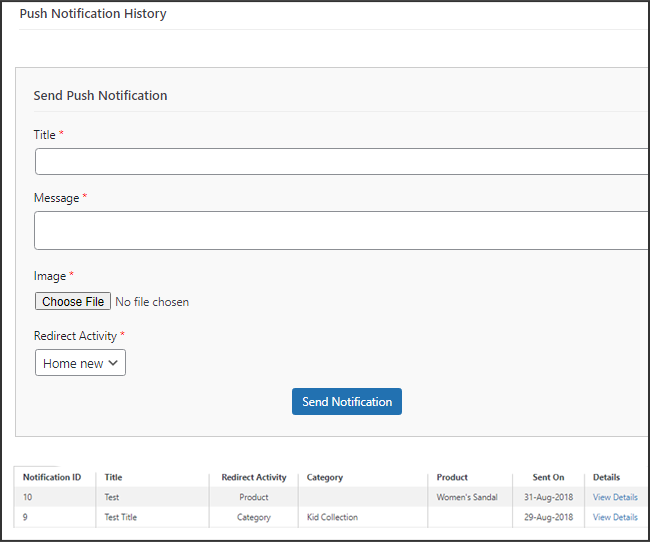
This tab includes a history of each type of push notification that was sent to a user with relevant information. The retailer has access to all previously sent notifications. Additionally, a custom notification created in the backend can be sent to the users using this tab. Through manually sent notifications, you can easily inform customers about any information or discounts pertaining to the store.
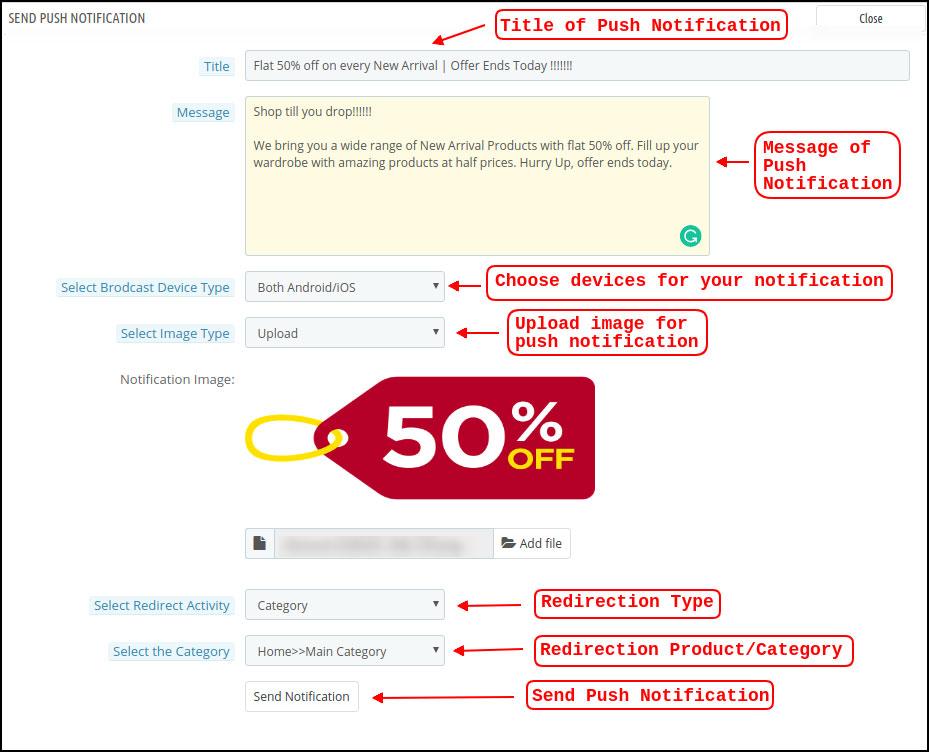
Send Notification: You can choose to manually send a notification to app users using this option. According to the screenshot below, you can customize the notification’s title, message, landing page, image, etc.
a) Push Notification Title: This is the name of the manual Push Notification you will be sending to app users.
b) Push Notification Message: The text of your manual notification that needs to be sent to app users.
c) Device Type: You can specify which users on Android, iOS, or both platforms you want to receive your manual push notification.
d) Image Type: You are able to upload the banner or image you want to use to support your notification. The banner image can be used directly through a URL or uploaded.
e) Notification Image: The store administrator is given the opportunity to preview the notification image and assess how it will appear on users’ apps.
The actual URL of the notification image that will be sent to app users is listed under item f.
f) Redirection Activity: Here, you can select from the Home Screen, Any Category, or Any Product to redirect your notification. Your users will be directed to whatever you specify when they tap the push notification.
g) Choose the Category/Product: For your notification, you can select any relevant category/product screen.
h) Send Notification: After creating and previewing your notification, it’s time to send it to your apps.
5.4 Payment Procedures
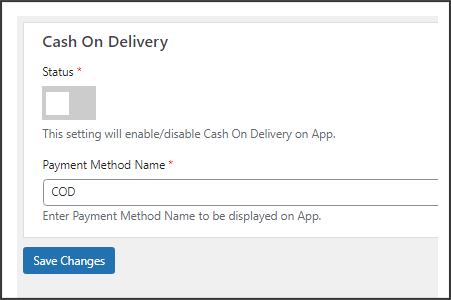
All types of website payment methods are supported by the WooCommerce Mobile App Creator for Android & iOS apps. It also includes the option for COD payments and the flexibility to include additional Web-View payment methods.
In our mobile app, the only available payment option is cash on delivery by default. Disable the COD method from the module’s back end, though, if you want to add the same payment methods as on your WooCommerce store. All of the payment options that are available on your website will work as intended in your mobile apps after the COD method is disabled.
.
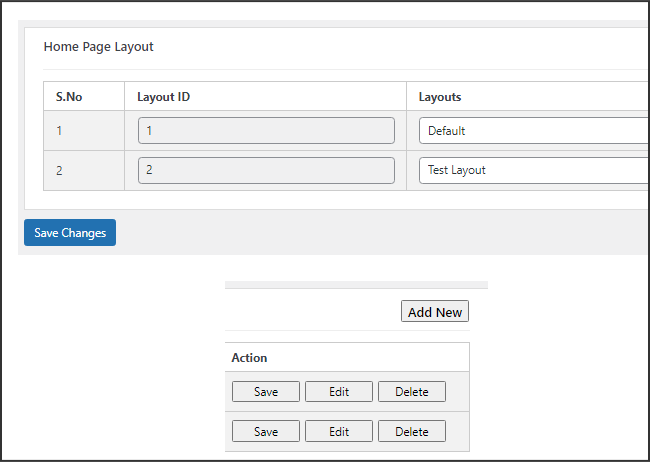
5.5.1 Home Page Design
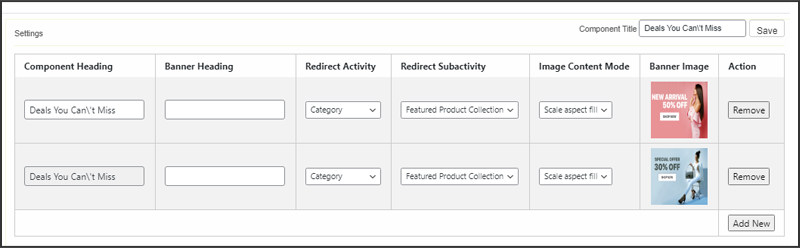
The WooCommerce Mobile App Builder plugin’s ability to design and create multiple home screen layouts using different designing attributes and elements is one of its most amazing features. As can be seen in the screenshot below, this tab contains a list of home screen layout that has been previously configured using different themes & fonts:
The following elements are available in the back-end to configure the home page layouts:
Top categories
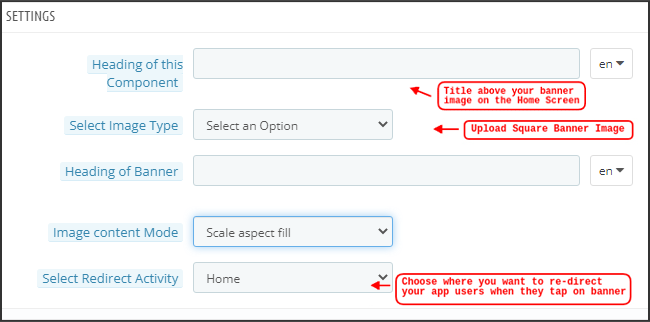
Square Banner
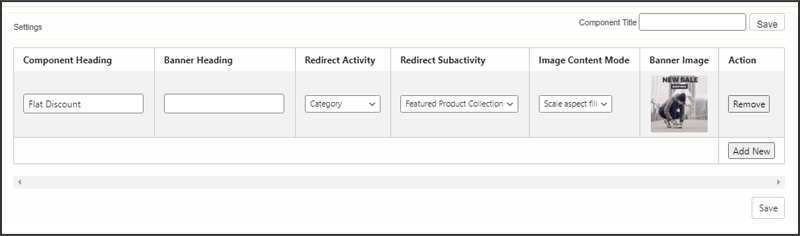
Horizontal Sliding Banner
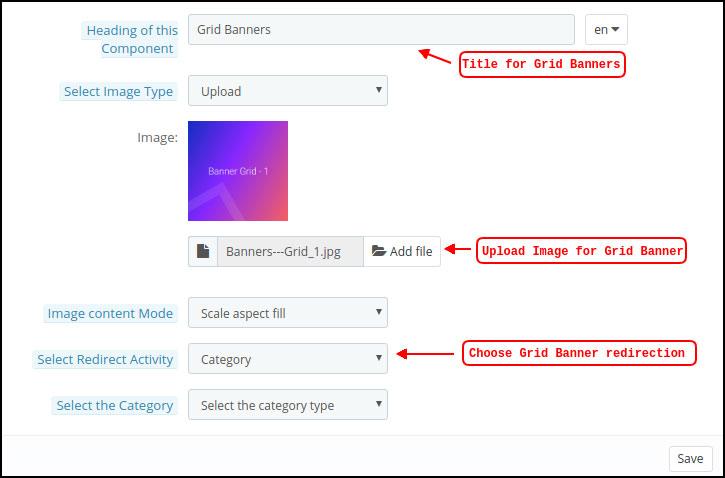
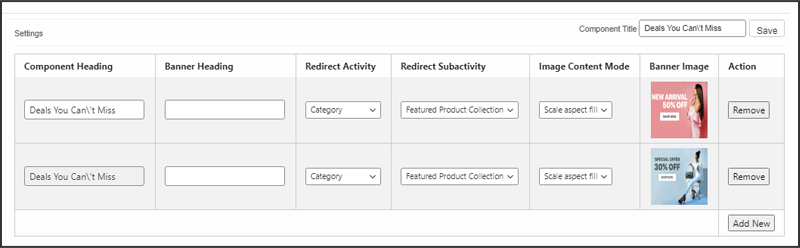
Grid Banners
Countdown Banner
Grid Products
Horizontal Sliding Products
Recently Accessed Products
Add YouTube videos/upload videos on the home page layout.
Login/sign-up pop-up for the non-logged-in users.
Add custom banners with custom dimensions.
Any of these attributes can be set up by the store merchant and used to create and save multiple layouts. These layouts can be utilized based on the theme and specifications. Additionally, using just a drag and drop functionality, different elements’ positions can be changed.
Top Categories:
Top categories can be configured, including their image and landing categories or products, and are shown as small squares on the home screen. Maximum categories available through the WooCommerce Mobile App Maker are 8, with a minimum of 4 required.
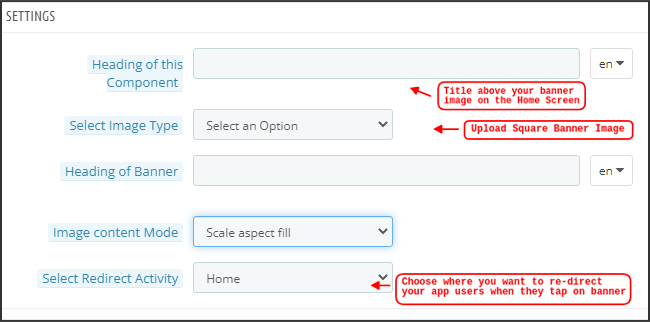
Square Banner:
Top categories can be configured, including their image and landing categories or products, and are shown as small squares on the home screen. Maximum categories available through the WooCommerce Mobile App Maker are 8, with a minimum of 4 required.
In the recent updates, we have also provided the option to showcase different videos with the YouTube Video/Video Upload section added in the “Select Image Type” section.
Horizontal Sliding Banner:
These rectangular sliding doors are available and fully customizable from the backend. Like banner squares, the admin can also highlight the banner sliders by adding video elements. Furthermore, now the admin can get the option to enter the time that he wants to set for the automated banner sliding.
Grid Banners:
These are square-shaped banners that are listed in a grid format on the home screen. On the home screen, you can place as many banners as you like. You can also change the landing page’s image as needed.
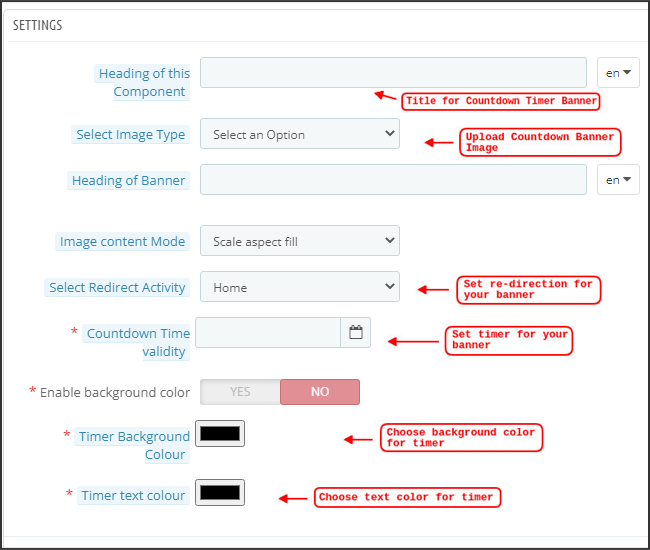
Countdown Timer Banner:
A countdown timer is available on the banner provided by the WooCommerce Mobile App Builder. You can choose the landing page and banner image, as well as set a timer for when you want to display the banner. The banner will automatically disappear when the timer expires.
Square Products:
Regarding banners, the WooCommerce Mobile App Creator provides products to show as square listings on the home screen.
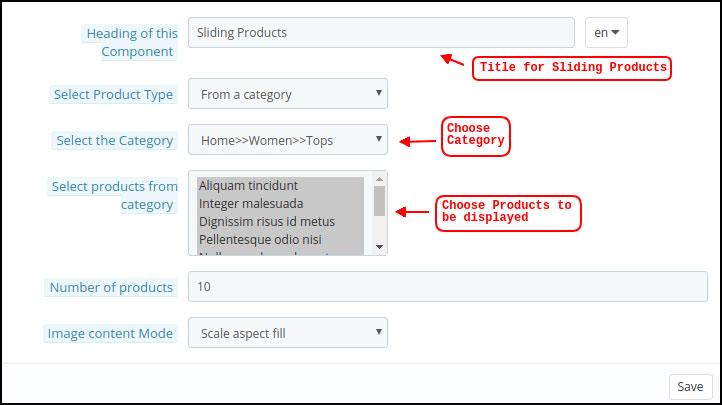
Horizontal Sliding Products
The products can be added as horizontal sliders. The products chosen may fall under any one particular category or may be highlighted as Best Sellers, Featured Products, etc.
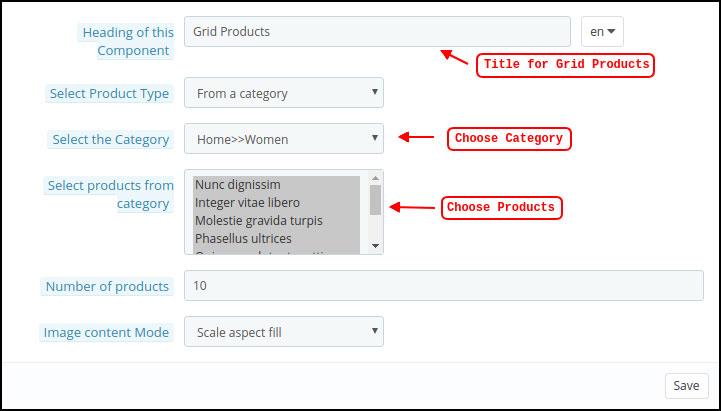
Grid Products:
Grid listings of the products can also be added to the home screen. Any category can be used to select the goods.
Products Recently Viewed: The WooCommerce Mobile App Creator offers the recent tab element, which shows the most recent products the user has viewed. To display the element on your home screen, simply include it in your layout.
Sign-Up Pop-Up: Capturing visitors’ emails is a major challenge in eCommerce. To simplify this, the latest version of the Magento 2 Mobile App Builder includes a login/sign-up pop-up feature. Store admins can add a pop-up that appears for non-logged-in customers, making it easier to collect emails by offering simple login options and increasing the chances of email opt-ins.
Note: When designing a layout in the backend panel, the store administrator can add up to 20 elements.
6.0 Screens for Mobile Apps
6.1 Home Screen
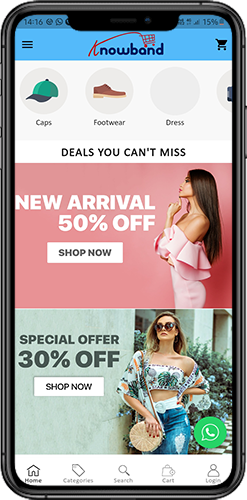
Your WooCommerce Mobile App’s Home screen will be exactly how you want it to be. You have complete creative control over how to design and create a home screen with the WooCommerce Mobile App Maker. You can create user-friendly home screen layouts using a variety of banners (Square, Grid, Sliding), products (Square, Grid, Sliding), countdown timer banners, and recent products tabs in the backend.
Additionally, different design elements’ placements can be changed based on the situation.
1. Dynamic Layouts: You can create and save different layouts in the backend and reuse them for different events and festivals by using a variety of elements. Your app’s home screen can be created and customized dynamically.
2. Brand Logo: The WooCommerce Mobile App’s top header’s left-middle section displays your store’s logo. The logo can be enabled or disabled, as well as having its image changed, from the module backend.
3. Search: The search feature enables mobile app users to find what they’re looking for quickly and easily. The WooCommerce Mobile App offers two ways to search for products: On the WooCommerce Mobile App’s bottom tab bar layout, there is a search option.
–> Text: Users of your app can search for desired products by entering a few relevant keywords. The WooCommerce Mobile App will display results for that keyword that are pertinent.
4. Wishlist Bag: The wishlist bag, which contains all bookmarked products, is visible on the top header of your WooCommerce Mobile App. Users of the app can store their wishlist items in a bag for potential future purchases.
5. Shopping Cart: The Shopping Cart can be found on the app’s home screen in the top-right corner.
The users can get to know about the products added to their cart right from there.
6. WhatsApp:
A live seller-buyer chat option can be found at the bottom right of the home screen. Customers who use your mobile app can easily and directly message you with any questions, and you can answer them right away.
6.2.1 An Accordion Menu (Navigation Bar)
On the website, there are WooCommerce Mobile Apps for Android & iOS that have been developed with accurate product categorization. Mobile shoppers can browse a variety of products with ease. The Accordion Menu is also available for all CMS pages. It offers the following alternatives:
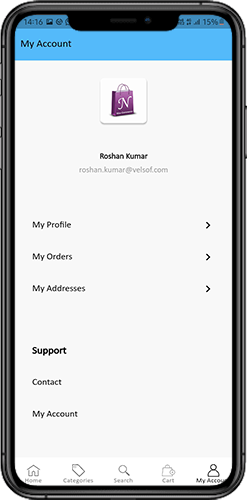
1. My Account
All user data, including personal details, shipping addresses, and order details, can be found on the My Account screen. The customers have access to all of their information and can update both their login credentials and personal information.
2. Categories
These categories match those on your website exactly. For easy browsing, you can map them appropriately and provide a 3-level categorization to app users.
3. CMS Pages
Here, a variety of CMS pages from your website, including About Us, Contact Us, Terms & Conditions, etc., are displayed. From the WooCommerce Mobile App Builder backend, you can select the one you want to be shown on the mobile app.
4. Language
Your users can view the WooCommerce Mobile app in their native language using the language selection option.
5. Currencies(s)
The WooCommerce Mobile App also shows all currencies that are offered on your e-commerce website. Customers can view and buy products for the price in the currency of their choice.
6. Sign in/Sign out
This option makes it simple for your users to log in and out of the WooCommerce Mobile App.
6.3 Category Screen:
Your WooCommerce Mobile App includes all of the associated categories, parent categories, and subcategories. The category screen is created with minimal clutter in
1.Two fundamental views:
Grid and List. In every listing, the product name, image, price, and discount are shown along with a button to add them to your wishlist bag. Layered navigation on mobile apps created with the WooCommerce Mobile App Builder makes finding products much easier. The category screens offer the following choices:
2. Sort:
Customers can choose the preferred order for sorting the category product pricing using this option. Your apps have two sorting options: Price: Low to High and Price: High to Low.
3. Filter:
The users can filter out the products using various selection options provided under the filter tab.
6.4 Product Screen:
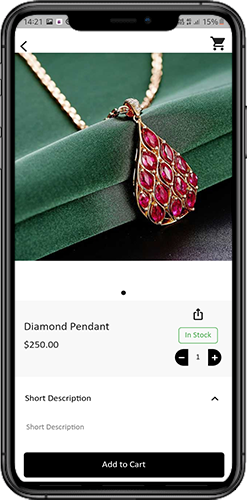
Your WooCommerce Mobile App’s product screen is straightforward and interesting. Along with the name and price, various images of the same item are displayed. Depending on inventory status, the product availability is also indicated as “In Stock” or “Out Of Stock”. It includes the next additional items.
1. Options
Product Options: This screen shows all available options for the product, including size, color, and so forth. The product choices here match those on the website.
2. Brief Description
Users can quickly decide after reading the brief description of your product.
3. Product Details and Care
This page displays all of the product information that is listed on the website. Users of the app can access this page for detailed product information.
4. Add To Wishlist: By tapping “Add To Wishlist” on the left bottom of the product screen, users of the mobile app can directly bookmark the product.
5. Add To Cart: As the name implies, clicking the “Add To Cart” button adds the product directly to the shopping cart, allowing users to continue with the transaction.
6. Product Social Sharing
On this screen, you have the option to share your product on various social networks, including Bluetooth and email. Users of the app can invite many users to your app by sharing the products with their friends and family on various social media platforms.
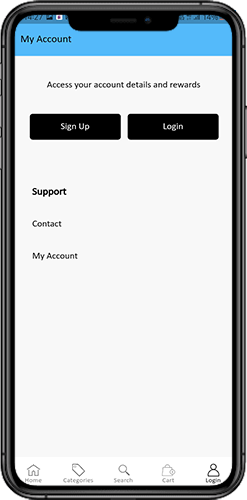
6.6 Login Screen
The WooCommerce Mobile App Creator streamlines the sign-in/registration process and provides a variety of one-tap login options:
1. Login
Using their email addresses as sign-in credentials, app users can authenticate and access apps.
2. Register
The mobile app allows all new app users to register and create an account on the store. Only pertinent information is requested on the WooCommerce Mobile App sign-up form.
3. Use Phone Number to Log In
The easier and more reliable phone number login option that your mobile app offers makes it simpler for users to login and verify their OTP.
4. Use your fingerprint to log in
Additionally, your users have the option of using fingerprint authentication to sign in. Users can now quickly access apps thanks to this.
5. Login with Facebook
Users can access the app by logging in with their Facebook credentials.
6. Login with Google
The users can log in to the app using their GoogleAccount within no time.
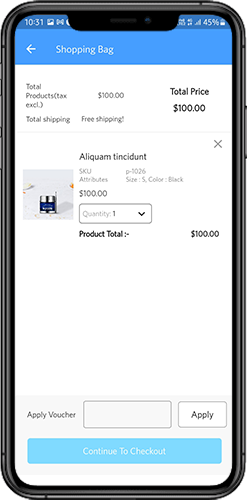
7. Shopping Cart Screen:
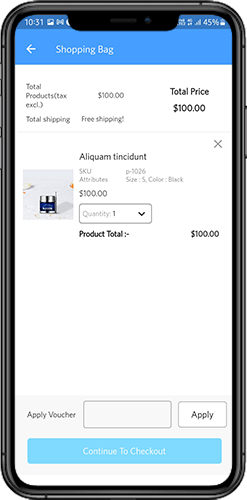
All of the items in your shopping cart are displayed on the WooCommerce Mobile App’s shopping cart screen. The product’s name, quantity, total price, and shipping cost are all visible to app users.
1.Use Voucher
By entering active coupons and vouchers that are currently active on your website, this option enables users to receive discounts and offers.
2. The full product cost
Users can access this page to view the full cost of their shopping bag. It is automatically updated whenever there is a change in the quantity of a product or an addition.
3. Revision of Product Quantity
With the “Update Quantity” option, app users can even change the product quantity.
4. Remove the item
Users of the app can easily remove a product from their cart by selecting “Remove” from the menu.
6. Continue To Checkout
By selecting “Continue To Checkout,” front-end mobile app users can continue to the checkout & payment screens. On the checkout screen, they will receive a redirect.
6.8 Checkout Process
The checkout process in the WooCommerce mobile app Builder is made simple. In the mobile app’s checkout process, front-end users have the option to choose the shipping details, billing details, order numbers, order comments, and so forth.
Orders can be placed using just a few easy steps on the Android and iOS apps.
1. Customers can choose and add the desired item to their shopping carts. When the shopping bag is clicked, the user can also choose the desired product quantity. Users of the mobile front-end app can also view the total number of products and shipping costs.
At the bottom of the same page, the customer can also choose to use any coupon or coupon code.
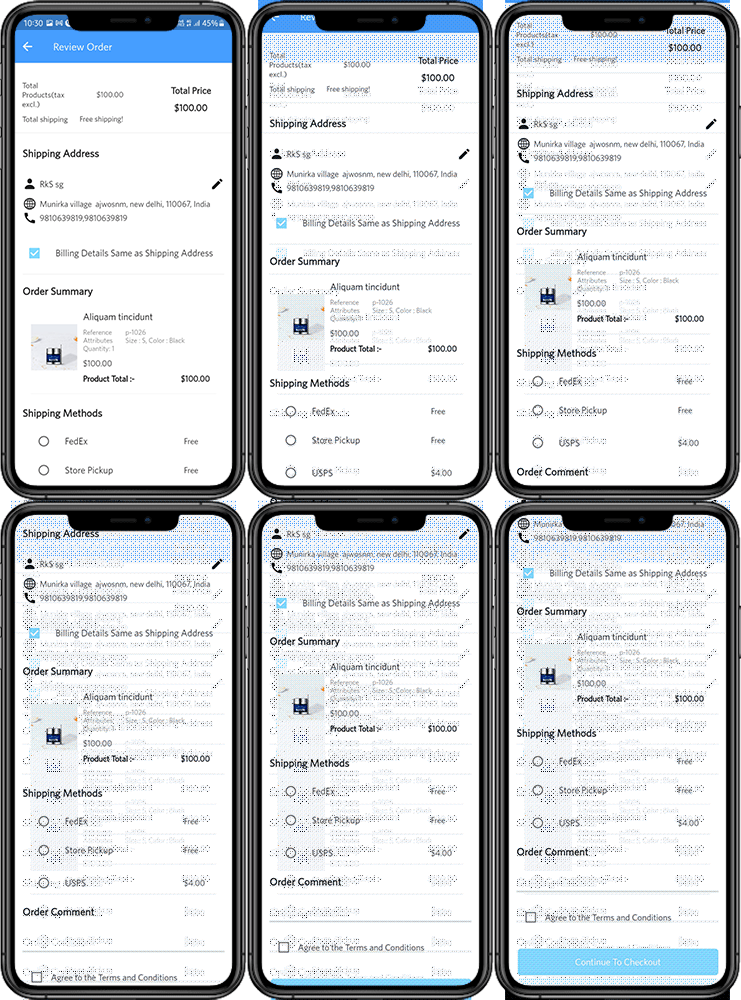
2. The user can review the order and see several details after selecting the Continue to Checkout option. such as the cost of the product, the cost of shipping, the shipping address (which can be changed on the same page), the order summary (the number of products), the total cost, and so forth.
On the same page, the customer can also choose their preferred method of shipping. The order comment option that appears at the bottom of the screen allows the user to also include any special requests or requirements.
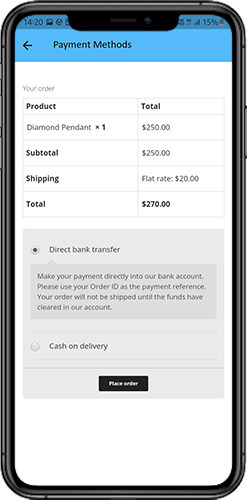
3. After selecting the option to “continue to checkout,” the user will be taken to the screen that asks for their payment method.
Users can choose from all of the website’s payment options on this screen. The shopping app includes a cash-on-delivery option as a standard form of payment.
The user will be taken to the order summary screen after completing the payment activity. where the customer can view the status, cost, and other information regarding their orders. Users of the front-end mobile apps will receive the order confirmation popup messages on their mobile phone screens as well.
6.9 My Account Screen
Users of the Android/iOS eCommerce app can view all account information, including a history of previous orders, on the My Account screen. The following options are available on the My Account screen:
Order History
The users learn all the details of the earlier-placed order. The date the order was submitted, the order number, the price, and the delivery status are all visible to the users screen.
2. Update Profile:
Users can also update their previously saved profile information, such as their first or last name, phone number, and password.
3. Delivery Address (s)
Users of the app have access to the full list of saved shipping addresses. From here, you can also add a new shipping address.
4. Order Details:
The complete list of previously placed app orders is available to app users.
5. Reorder function
By selecting the “Reorder” button, you can directly reorder a product. By pressing a single button, all previous orders will be added to the cart.
6.10 Order Detail Screen
The WooCommerce eCommerce App’s order details screen shows every aspect of the order, including the shipping address, a summary of the products, the shipping and payment options, and the total cost. From this screen, users can even follow the delivery of previously placed orders.
Although there are various app markets available nowadays, Google Play Store is the most popular and the largest of all. Google play not only allows you to distribute your app to a wide range of users but also allows you to manage the advertisement and selling of the app. Are you planning to publish an app on the Google Play store? Here, we have discussed some requirements for a seamless app submission on Play Store.
1. Create a Developer Account
First of all, the user who is intending to go live with the Play Store needs to have a developer account to release the application. There is a one-time $25 payment required to open this account, which can only be done once. The user can follow the steps mentioned below to register as a developer using his/her Gmail account.
Steps to Create a Google Play Developer account
First, create a Google Play Developer account.
Next, authorize the Developer Distribution Agreement.
Then, pay the enrolment cost.
Finally, finalize your account information.
For Detailed Step-by-Step information, please visit the link
2. Pre-requisites for Publish App on the Google Play Store.
Application Package:- apk file which is to be released on the Play Store.
Short Description of the application: – The short description should not be more than 80 characters.
Long Description of the application: – The long description should not be more than 4000 characters.
App Icon:- Hi-resolution icon in png format. (512*512). Here, a few tips are discussed for making an effective app icon.
Feature Graphics: – Feature graphic of resolution 1024px(width) * 500px(height). A nice featured graphic usually attracts more users and get downloads for your app.
Promo Video URL: – YouTube tutorial video showcasing the use of the application (if any). It should be 30 seconds to 2 minutes long.
It’s time to publish the app in the store after getting everything prepared for submission of the app. The steps discussed below illustrate how you can distribute your app on the Play Store –
Select All applications and then click on the Create application.
In the pop-up screen, enter the name of your application. Google allows 30 characters for the title of your Android application.
Now, you will be redirected to the Store Listing under the Store presence page, add the following details here:
Short App Description
Long App Description
App Icon
App Screenshots
Featured graphics
YouTube Video
On the store listing page itself, you will be asked to select the Application type whether it is an App or a Game.
Select the category of your App or Game to which it belongs.
Enter the contact details and privacy policy URL for the app. The privacy policy is mandatory for app distribution.
Now click on the ‘Save Draft’ option and move to the ‘App Releases’ option under the ‘Release Management’ option.
Select Create Release option in the production tab if you want to release your application to production. The application can also be released under beta and alpha testing before being moved to production.
Select the Application Package to be uploaded to Play Store.
Update the release notes for the application and click on Save Draft.
As we have now uploaded the application package (APK), you can now apply for submitting a Content Rating for the application.
Now open Store Presence and select Content Rating.
Fill in the questionnaire and you will receive a content rating based on the entered details.
Now, move back to the ‘App Releases’ tab
Under the Production track, select Manage
Click on the Review button at the bottom of the screen. You will be redirected to details of the application package and release note.
To release the application package on Play Store, select the option “Rollout to Production” to make the application available for release.
When Google has processed your request, you can download your application from the Play Store.
This readymade tool by Knowband will create and publish an app on the Google Play Store. The mobile app creator for iOS and Android securely connect your store with the mobile apps. The Android and iOS mobile apps automatically roll back any changes you make on the website. Therefore, flawlessly synchronised mobile apps manage the entire workload without the need for manual synchronisation. The plugin comes with 3 months of free support including a free cost app release.
Conclusion
These were some of the pre-requisites for the distribution of the app on the Google Play Store. You can also find detailed info about app publishing on Google Store. Once Google approves your app, your app will join the Play Store. However, Google frequently rejects apps for common reasons that are disregarded at the time of app submission. However, you can curb the reasons for rejection and republish it with ease. You can also create a perfect mobile app and publish the same, just keep above mentioned pre-requisites in your mind.
Mobile app icon might just seem a negligible factor in app development, but they may have a great impact on the user’s purchase decision. App icons are the very first thing that a user comes across while searching for an app.
Your goal is to make your app noticeable among the competitors. App icons play a major part in it. A well-crafted and clear icon can give the users an idea of you being a professional and your app being reliable.
Here are a few tips about how an app icon could be made creative and better:
1. Keep app icon simple and clear
A lot of colors or images make the icon visually crammed up. Even if there is a need for colors and graphics in it, try to keep the focus on the core concept of your application. Also, try to make a simple icon. Jamming up every app feature in a single icon wouldn’t look good for your app.
2. Keep app icon recognizable
Create an app icon that can easily become the face of your brand and makes you stand out in this overcrowded environment of mobile apps. Using a unique shape or symbol in the icon would make your app recognizable for the user. Using the first letter of your organization or your brand logo as icons are advisable as well.
3. Keep app icon scalable
Your icon should look great in different sizes, as screen sizes of devices vary. Android devices are available in huge variety as compared to iPhone devices. Therefore, their icon size dimensions are a bit complex. Apple and Google icon size guidelines should be considered before making an app icon.
4. Design your icon bold
To make a bold app icon, you must try some vibrant colors on a simple icon design. Using shadow effects in them could also make them visually appealing. The choice of color should be such that they look good on different backgrounds.
5. Use moderate text in the app icon
If you want to use text on the app icon, it shouldn’t contain unnecessary details. Usually, the text is not that much help in the app icon, but in some cases, it can do the job. But, keeping descriptive text on the app icon would dilute the overall impact of your app. Try to keep it limited to one or two words.
6. Create an app icon of high resolution
Your app icon is the first thing a customer will see of your application. If it is of bad quality or of low resolution, it wouldn’t make a nice impact on the users. The quality of your app icon to some extend signifies the quality of your application to potential users.
7. Keep your app icon as per your audience
Icons must be unique, attractive and memorable, but it should also work for your audience. You must know who is your audience and what will get them to tap on your icon. This is all the science needed for connecting with users through an app icon.
To know, how to create an app icon, go ahead and check out the information shared below.
How can you create the app icons for all sizes with Makeappicon?
There are various app icon designers which conveniently develops icons for all sizes. Makeappicon provides one such platform which helps the designers, developers and project managers to make and resize icons for iOS and Android apps. It automatically optimizes the design of your icon and generates icons of all sizes required during submission in the app stores. Let’s see the complete process of how you can create icons for all sizes with makeappicon:
Step 1: Go to Makeappicon web page and choose the icon image which is to be resized. This web version of icon resizing is free of cost, but for offline (heavy) usage with improved functionalities, Makeappicon offers its paid version.
Step 2: As the image is selected for resizing, processing begins and it takes a few seconds to complete.
Step 3: That’s it! Your icon is resized in different sizes. You can download them now. Makeappicon resizes your app icon for both Android as well as iOS applications and classifies them according to Google and Apple app size regulations.
a) Icon resizing for iOS platform:
b) Icon resizing for the Android platform:
Step 4: These icons could be easily downloaded through your e-mail id. After entering mail ID, a few minutes later icons will be in your mail inbox in a zip file.
Final Words
One thing is clear that icons along with other factors of the app UI, like Splash screen and others, play a huge role in making your app popular and creating a brand recognition. So, whether you planning to hire an app development company or using a mobile app maker, make sure that the app design is taken care of. You are now a few steps away from making the coolest icon ever. Just make sure all the above-discussed points are considered before app icon’s creation and get a refined one for your application.