The initiation of a mobile app in order to promote the eCommerce store is one of the latest trend followed by store owners. It is one of the most propounding analysis that is proven to be more effective than desktop sites. The eCommerce store owners are ready to pace heavy bet in order to grow the web stores and improve store popularity. The launching of a mobile app is something which must be taken care of by the web store owners. They need to research on several factors before making sure, how they want their mobile app to look like.
The eCommerce store owners can easily launch the mobile app for their web store by making use of Mobile app creator. The module can easily assist the web store owner to launch the mobile app without any technical assistance. It is one of the simplest steps in the launch of the mobile app. The tough part is making it viable for the customer to make use. The establishment of a stable and successful mobile app that can be a strong demonstration of the web store and the customers are likely to engage themselves with the mobile app.
The eCommerce store owner needs to make some strong decisions which can help the web store owners for successful mCommerce establishment. In order to get through the tough part where the web store owners may go in the wrong direction, the following points discuss below may help the store owners to get a better insight of the features that must be included in the web store, so that it would be a better experience for the customers and help the web store to reach out to customers through the mobile app.
1. A better platform
One of the important factor that must be considered in mind before launching the mobile app is the selection of the extension in which the mobile app must perform. There is a list of various extensions such as Prestashop, Magento, OpenCart, Shopify which can be opt by the eCommerce store owners to set their mobile app. If we take a better look at the statistics we can see that the use of Magento as the platform for most of the store is quite popular. It covers almost 25% of the market, hence has the better chances of providing better assistance and chances of growth to the eCommerce store owners. Therefore, the web store owner needs to make a survey what they want to improvise in their web store as all these extensions have different features and which may be helpful in one or other way depending upon the owner’s preferences.
2. Admin control
The eCommerce mobile app maker makes sure that the store owners has full design control. The web admin interface helps them customize the application as per the requirement. The total control of the admin panel is with the owner, therefore, they need to make sure about the inclusion of various options in the control section. Admin panel holds one of the strongest point in the better working of the web store, it acts as the backend from where the owner can control every functioning of the web store using the mobile app. Therefore, the owners must take a better look at some of the other mobile apps and their functioning so that they are able to decide what they want to incorporate in the admin panel of their mobile app. The better options that the owner provides from the admin end will highly affect the customer satisfaction on the mobile app.
3. Mobile apps flow
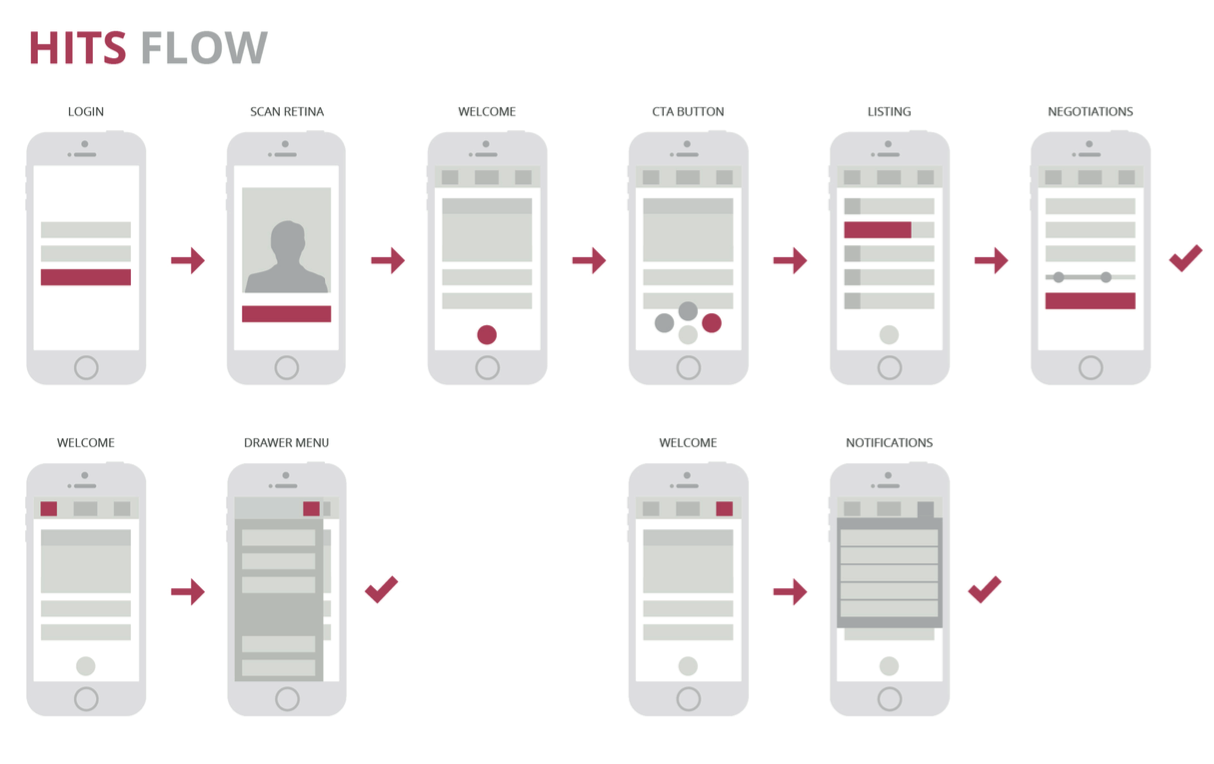
The flow of mobile app holds an important process, as they are one of the building block of the interaction between the mobile app and the customers. The owner must have a profound understanding about the basic layout about the mobile app. Right from the homepage where the owner wants the customer to look at the content and its presentation. The owner needs to decide the utility of various applications on the mobile app which may affect the customer’s behavior on the store. The placement of order, delivery assistance, checkout options apps like this highly affect the conversion rate on the mobile app, thus, a clear insight will help in making the better availability of these options.
4. Back up care
Mobile app development is meant to fulfill a specific cause. If a web store owner is launching a mobile app than they must be sure about the future prospects of the app. The performance of the mobile app is one of the concern for the store owners. As the time passes, there may be some instances where the customers might face difficulty in accessing the mobile app r the performance of the mobile app may go down. In this case, the web store owners need to take proper care of the problem and resolve the issue as soon as possible.
5. Marketing
The launch of a mobile app is not an assurance for the web store owners that it is going to be a huge success. In order to drag the customers to the mobile app, the eCommerce store owners need to make several changes. They need to throw multiple offers and gifts using the mobile app. This will make the mobile app more engaging and better. The mobile app serve as a better medium of marketing of the web store. The web store can incorporate various sections and categories in the mobile app, which may be able to attract the customer’s attention and at the same time be able to encourage them to make a purchase using the mobile app.
6. Freedom to Design
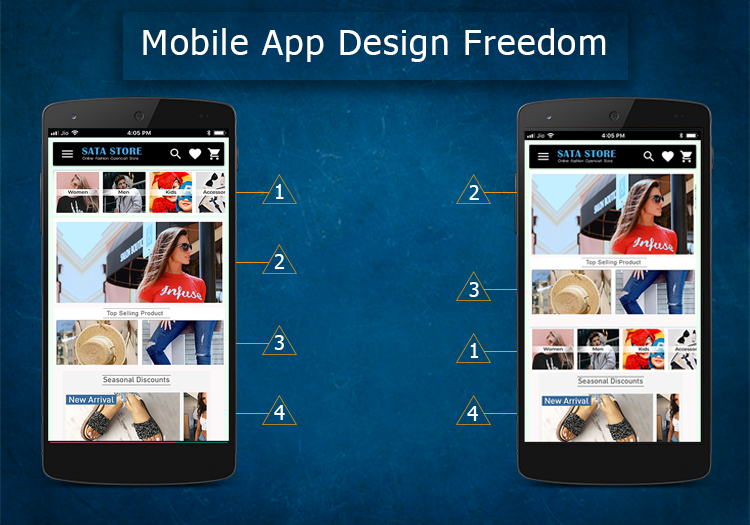
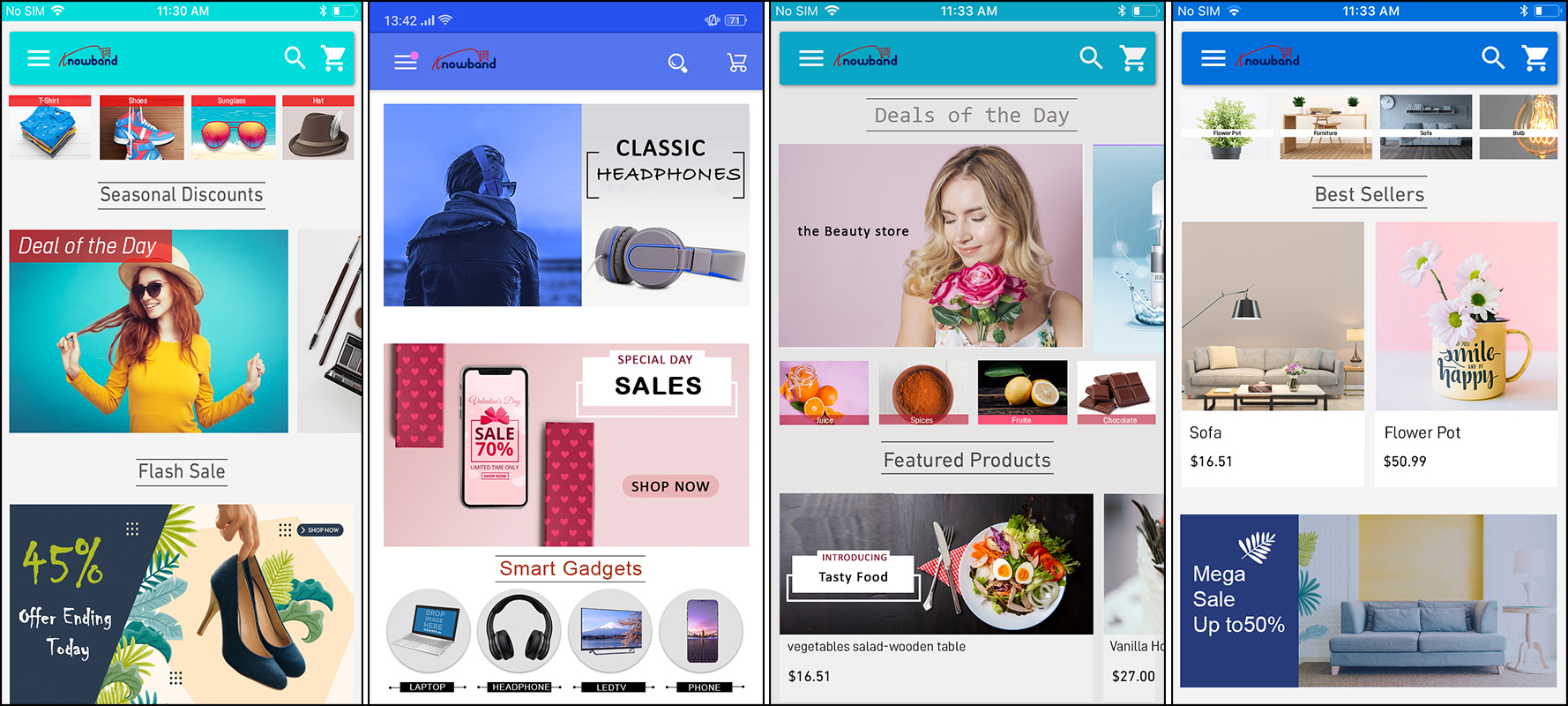
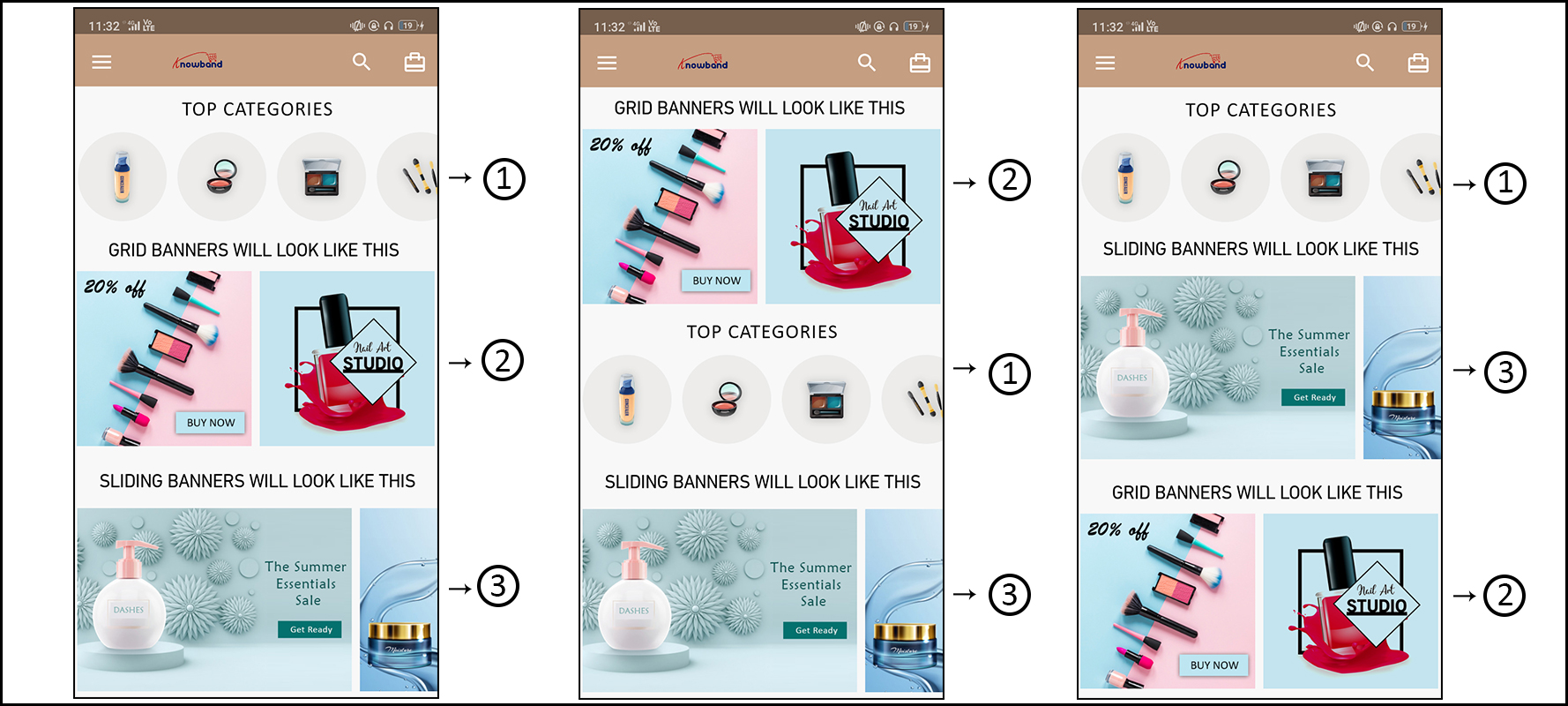
Your mobile app should be as per your choice. The designing and configuration of the mobile app play a vital role in luring users to your store. You must be sure about the home page layout of a mobile app as it is the very first thing user experiences on opening the app. All the top products and deals must be highlighted on the main screen of the app. Also, you must go for the automated eCommerce mobile app module which comes with the full flexibility to adjust the home screen and color options based on various themes and occasions.
Over to You
The mCommerce has brought a revolution to the eCommerce world. With the better feature and engaging content advantages of mobile apps are more likely to reach out to the customers and make them shop more from the web store.
The introduction of mobile apps has made the concept of marketing way too easy for the sellers. With more than 4 billion people having access to mobile phones, it has made it easy for the eCommerce store owners to grow their store and get better sales. The better advantages to introduce mobile apps in order to grow business is due to the easy accessibility to the users. The visitors don’t need to access the web store using the desktop site and at the same time, a large number of mobile users makes it easy for the seller to improve their product visibility.
The idea of adapting to mobile apps in order to get better growth and sales of the web store is trending Most of the eCommerce stores have either shifted towards mobile apps or are shifting towards them. They provide a better platform to grow the store. Meanwhile, the seller can always be sure that the convenience that the customers have while accessing the web store by using the mobile app is quite better rather than accessing web store from desktop sites.
One of the better approach to shift your Prestashop store to the mobile app is by using Prestashop mobile app builder. It helps the stores to get a mobile compatible app for better growth of the store. According to a survey, “Almost 76% of the customers prefer to make an online purchase by using mobile apps”. Thus, it shows the effectiveness of mobile apps in boosting the sales of the store. Moreover, mobile apps prove to have a better rate of conversion than desktop sites. This factor compels most of the web store owners to get a mobile app for their eCommerce store.
While there are many hidden facts about the mobile app which are not commonly known by everyone. Let us discuss some of the facts that may encourage you to get a mobile app for your store.
1. Compatibility
One of the best features of the mobile app is compatibility. The mobile apps redesigned in such a way that they can work with any platform. According to research, “Android and iOS contribute to 99% of the total mobile phone UI”. Thus, mobile apps are designed in such a way that the seller can get the compatibility with any of the OS. It helps the store to gain the required customers irrespective of the OS their mobile phones work on. Hence, mobile apps serve the purpose of all mobile users. Mobile app helps in improving product visibility to every customer.
2. Customizable Design
Most of the time, a store owner would want to develop a mobile app which showcases the best features of the web store. Thus, the seller would want to customize the app in their own way. While the mobile apps are fully customizable and allow the seller to edit every single feature of the mobile app. The seller can decide the color of the font to the display picture of the mobile apps. It helps the seller to be expressive and at the same time, the better appearance encourages the customers to explore the web store as per their needs to find better products.
Nowadays, there are various automated modules which allows you to design the home screen on your own. The store admin can easily showcase a desired theme/occasion just by adding various attributes (Banners, Sliders, Products, Categories etc.) from the module backend. Moreover, you even get the full access of web-admin panel to configure every functionality of mobile app. Further, more info about mobile app designing could be found here.
3. Responsiveness
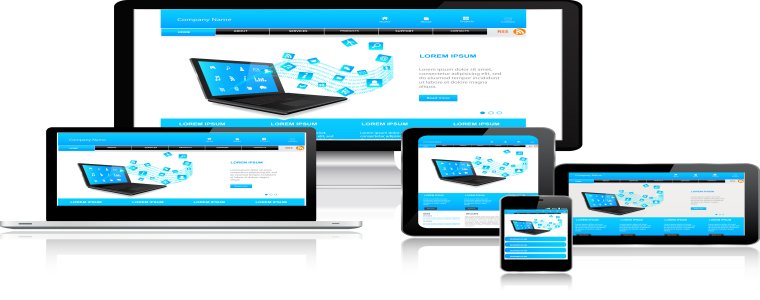
The response generated by the mobile app builder is quite large as compared to the desktop sites. Hence, this makes a plus point for the seller to get a mobile app for the web store. The mobile app catches the customers quite precisely and offers them various features which were not accessible using desktop sites. The responsive feature of the mobile app helps the seller to grow the store in a unique way and generate better sales and at the same time gets immediate conversions. The eCommerce mobile apps with multiple screen-size support work effectively on all the handheld devices and enhnaces the shopping experience of the users.
4. Enhanced Visibility
Mobiles are quite popular in comparison to desktops or laptops. Most of the people have access to the mobiles which makes it a better medium to promote the products. Thus, the seller can be ensured that the visibility of the products is not compromised using mobile apps. At the same time, mobile apps prove to be more effective in engaging customers. The customers are more likely to visit a web store from their mobile phones as compared to desktop sites. The additive feature of reachability of the customers to mobile phones rather than to desktops proves to be an added advantage of having a mobile app for the web store.
5. Interactive User Interface
One of the immediate advantages of using eCommerce mobile apps is because of better interaction with the customers. Most of the time a customer is looking for a better platform in order to make a purchase. Thus, mobile app proves to be more interactive as compared to desktop sites. The customer could get better deals and offers using the mobile app. In the meantime, mobile app builder provides the feature of social sharing and instant purchase which helps the customers to make a purchase without having to spend a considerable amount of time. This helps the customers to make a better purchase and at the same time have fun and good experience with the web store. The mobile app builder ensures the seller about the re-arrival of the customers to the web store for their future purchases.
Conclusion
Mobile apps are one of the advanced methods to promote the eCommerce store. The sellers need to provide the customers with a better and portable approach to make the purchase and with the growing popularity of mobile phones, it has become quite easy to do so. The mobile apps can be molded as per the seller’s convenience and in the meantime providing the customers with better services and experience which encourages them to visit the store again.
KnowBand is offering the pre-configured Mobile App Builder solution to convert your store website into a native mobile app in a few clicks. Even, if the eCommerce store admin is not having any specialized knowledge or technical knowledge he/she need not worry! This Mobile App Maker module is also providing the mobile app in the easiest and cost-effective manner. KnowBand provides the best Mobile App Builder plugin for various platforms like – PrestaShop, Magento, Magento 2, OpenCart, WooCommerce, and Shopify.
The mobile app creation process with Mobile App Builder plugin is just a matter of a few steps:
Step 1: Purchase the automated Mobile App Builder module from the KnowBand store.
Step 2: Share all the specifications/requirements regarding the app with us.
Step 3: Get the APK/IPA in one day for publishing on app stores.
With a change in the eCommerce business scenario, the revenue of online stores has also been affected. Mobile optimization has become quite an essential requirement for eCommerce website sites nowadays. From conversion rate optimization to search engine optimization, no expert will tell you that targeting mobile customers is not beneficial. In fact, you will remain in a disadvantage against your rivals by not considering mobile customers in your marketing plan. In this write-up, I am going to tell you the easiest way to own a pair of native mobile apps. Earlier, you either required to learn the coding/programming or hire a professional to create eCommerce Mobile App. But, now all you need to go for automated solutions and launch fully synced eCommerce apps for your business.
KnowBand has brought one such solution with Mobile App Builder plugin. This is a readymade solution to provide you native Android/iOS apps for your store. It is designed in such a way that all the functionalities of the app can be controlled from the backend panel without making any code changes. The eCommerce Mobile App Creator is available for following CMS platforms:
How to create eCommerce mobile app in a few steps?
In order to utilize the services of Mobile App Builder extension, you need to follow the following steps:
Step 1: Purchase the Module
Visit the above links as per your eCommerce website platform. Purchase the module and install the zip file on your store. Once installed you get the complete admin panel access to control the app. Open it and enable the respective Mobile App Builder.
Step 2: Share your App Specifications
After purchasing the module, you will receive an email having a small questionnaire that you need to fill and respond back. In the questionnaire, you will be asked to share some information regarding your app. Based on which, the development team will develop and customize the app.
Step 3: Publish APK/IPA on App Stores
After the development is complete, the team will share the APK file of the app with you. Now, you need to publish this APK on Google Play to make your App available to your customers. You can publish the app by yourself, or it can also be done by Knowband for a small fee.
That’s all with the process to create your own mobile app with KnowBand. You can even test your store on our demo app before going for the actual module purchase. Let’s find out how?
How to test your store on our demo Mobile App for free?
In case you want to see how your mobile app would look like, there are free versions of the Mobile App builder that you can try. The free version of the Mobile App Builder lets you see how your eCommerce store will look and work on the App. You need to implement the following steps that are mentioned below for having a free demo:
Step 1: Visit any of the links below according to your eCommerce platform:
Step 4: Open the App and enter your store URL in the field. Make sure you enter the full store URL of your store i.e. https://www.example.com/
Step 5: You have successfully completed the initial setup of the demo app. Now you can experience your store as a mobile app and test it as you want.
That’s all! Now, analyze your app functionalities. You can even find the detailed testing process from here.
Why own a pair of native eCommerce mobile app?
In addition to having a mobile responsive site, mobile apps have come up as a more advanced way to target mobile users. No doubt you still need a mobile site to come in the good eyes of Google and your mobile customers. But, all of your rival sites know this too, and that’s why they have already started the mobile optimization for their stores. So, what else do you need to have an upper hand against your competitors? A mobile app for sure. Let’s take a look at some of the major benefits of tapping into mobile commerce:
1. Improved Usability for online shoppers-
Downloading and installing the app is a one-time process. After that, your customers can visit your store anytime in just a single click. This ease of visiting your store improves the interactivity of the customers with your business and ensures a 24X7 availability. The exclusive mobile app interface makes navigation through your store quite easy, quick, and interactive. Furthermore, mobile apps can be presented as per your will. You can design the home screen and highlight popular products of your store as well.
2. Leverage built-in Smart Phone features-
The Android and iOS platforms provide a number of built-in features on smartphones. Mobile apps can adapt to these built-in features and leverage them for providing a more engaging user experience to the customers. For example, you can use the GPS location tracking to present the location-based shopping experience to your customers. You can leverage microphone to provide voice-based app search for faster-searching experience.
3. Users always prefer mobile apps over the mobile site-
Apps make the shopping experience faster, interactive, more secure, and reliable. Users don’t have to remember an URL or log in each time they visit the store. Sites having both mobile apps and mobile sites receive more qualified traffic on the mobile app than on the mobile sites.
4. Mobile app push notifications is a boon-
You don’t have to depend only on email marketing for communicating with your customers. Through mobile apps push notifications, you can always and instantly send messages to your users that too in a more personalized way. You can’t integrate push notifications to boost sales if you don’t have an app. Push notifications are more hardware features that are based on GPS, secure connection and some API and it’s not available for websites.
5. Brand loyalty will enhance user engagement-
Nothing can be more useful for putting your products and brand in the center of attraction than a mobile app. Apps are the shortest route to your business available for 24X7. Just a single click on the app icon and customer is on your business center. Mobile apps are useful tools for creating a more loyal section of customers who love online shopping anytime from anywhere. Showcasing your brand logo on the mobile app leave your professionalism on the shoppers.
Over To You
So, this is how you can get a mobile app for your eCommerce store without doing much of the complex tasks. KnowBand’s Mobile app builder is the easiest way to get a native Android/iOS app for your store. Moreover, I have also explained how you can try a free demo of the app to experience your store as a mobile app. Leverage this useful service and get your app developed today by the expert eCommerce and mobile app developers.
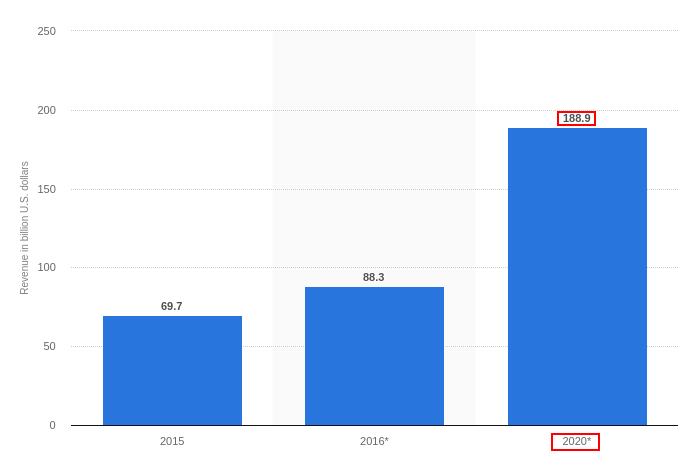
PrestaShop websites are getting popular day by day. PrestaShop has released its latest version 1.7 with more new and advanced features. We might observe an increase in the number of PrestaShop sites in the near future soon. For the time being, this eCommerce platform has already gained popularity and is expected to even become more popular in the upcoming years. A large number of PrestaShop website owners who are competing with each other and other eCommerce platforms to secure their shares of conversions can be highly be benefited with the adaptation of a mobile app for their site. This is a statistics report that suggests the mobile app revenue would grow up to $188.9B by the year 2021.
KnowBand makes PrestaShop App development easy for you!
KnowBand has brought this automated PrestaShop Mobile App Builder plugin to own a pair of the native mobile app. This module is designed as such to provide mobile apps in a pure non-coding way. All you need to do is to follow a few simple steps and get your apps in no-time.
Step 2: Once the module is installed, we will share a pre-requisites form through the mail. You can share all the specifications and requirements with us.
Step 3: Once all the required information is received, our skilled development team will develop an APK/IPA file and share with you to which you can host on the PlayStore/App Store. Your customers will download the App from respective stores and install on their phone.
So, these are the three easiest steps that can help to get a mobile app for your PrestaShop website in a much economic manner.
Here are some benefits of using PrestaShop Mobile App builder :
1. Real-time Synchronization:
The PrestaShop Mobile App and the website are two entities of your eCommerce business, that need to run in proper sync. Using a Mobile app developed with PrestaShop Mobile App Builder, you will get an API (web service module) which will synchronize the mobile app with the website in much much quicker manner.
Every inventory (Product, category addition), order details and other store-related details are automatically reverted on the mobile app. This does not let store admin make the changes on a manual basis.
2. Tablet & Mobile Support:
Your apps are fully native and work flawlessly on all the handheld devices. With multiple screen-size support, your users can browse the app on all sorts of tablets, smartphones, iPad, and iPhone. Moreover, taking your app to the Android and iOS platform targets almost every mobile users around the world effortlessly.
3. Multi-lingual & RTL Support:
The Mobile Apps for PrestaShop supports all sorts of languages like English, French, Spanish, Italian, Polish etc. The module even supports various Right To Left scripts like Urdu, Hebrew, Arabic etc.
4. Brand Presence:
The eCommerce Mobile App for PrestaShop provides complete white label app to enhance your store branding strategies. The module allows you to display the store logo on the header of the app and strengthen your brand loyalty.
5. Rich Color Choices:
Right color schemes play a very vital role in luring potential users to your app. The PrestaShop Mobile App Maker provides various color options in the module backend like the theme, background, button, button text etc. Now, you can choose the desired color for your app and change them whenever required.
6. Flexible Home Screen:
Provide impeccable design to the home screen of your app. The PrestaShop Mobile App Creator has simplified the home screen by making it fully flexible to all sorts of customization. You can create multiple layouts based on various festivals & events. They can be easily used from the backend whenever required.
Furthermore, this feature brings various attributes for home screen customization like banners, sliders, countdown banner, recent products etc. You can provide whichever look you feel right for your app.
7. Quick Login Options:
Your PrestaShop Mobile App should have the perfect login screen in the mobile app as it is responsible to massive users retention on your store. With this module, your users get Google, Facebook, OTP, Fingerprint login options. It enhances the UX to another level.
8. Simplified Checkout:
The multi-screen and lengthy checkout screen often becomes the reason behind the user abandoning the cart. The PrestaShop Mobile App Builder provides simplified single-page checkout screen and makes the order submission easy for the users.
9. Easy Payment Options:
Making online payment with PrestaShop Mobile App is easier than ever. The PrestaShop Mobile App Creator supports all sorts of website payment methods along with custom payment method like Stripe, Braintree, PayU etc. The robust and easy payments in app motivate the users to make the purchase.
10. Effortless Trade:
The PrestaShop Mobile App Creator supports all sorts of shipping methods on the eCommerce app. All placed order deliveries can be easily handled by store admin without any hassle.
11. Social Sharing:
Promoting your store products on different social networks could be the sale booster for your business. The PrestaShop Mobile App Builder allows the users to share your products with their family and friends with their product screen.
12. Coupons & Vouchers Support:
Mobile coupons are the modern way to offer discounts and deals to app users. The PrestaShop Mobile App Creator support all sorts of coupons and vouchers on the mobile app.
13. Gamified E-mail Subscription Pop-up:
The PrestaShop Mobile App Creator provides the gamified e-mail subscription pop-up in the mobile app. The store admin can offer various deals and discounts with the same and capture the user’s e-mail as well. This spin-wheel responsive interface will only work on an app if KnowBand’s PrestaShop Spin and Win module is installed on the store.
14. Unlimited Push Notifications:
Deliver all sorts of information and notifications to the app users with unlimited push notifications service and grab their immediate attention. The PrestaShop Mobile App Builder provides both automated as well as manual notifications to mobile shoppers.
15. Web-admin Interface:
The PrestaShop Android/iOS Mobile App Builder provides complete admin panel access to the store admin. This allows them to manage the app functionalities on their own.
Conclusion
That’s all! Having a PrestaShop Mobile App would definitely prove to be one of the strides to enhance the reach and visibility of your online business. In lieu of it boost the sales and conversions of your store. KnowBand even provides the Mobile App Builder for other eCommerce platforms as well. Get to know more from here.
The mobile Commerce has come way ahead than online eCommerce in the past few years. It has proved its worth as the most effective way to drive your business conversions and sales. We can witness today that every individual has access to the smartphones and internet facility, new doors of business opportunities and growth have opened. So, if you are currently running an OpenCart store but have not yet geared up for mobile shopping apps as well, you need to consider KnowBand’s OpenCart Mobile App Builder.
How Mobile App Builder extension is the right solution for you?
The OpenCart Mobile App Builder is an innovative & automated framework through which you can easily create native Android & iOS shopping apps. This extension saves you from any sort of technicalities or coding involvement neither for developing or managing.
This native eCommerce Mobile App Maker keeps your website sync with apps in real-time. Thus, you need not manage the app inventory on a manual basis. All the website details & info will be automatically fetched on apps. Moreover, the friendly module backend allows you to control the designing & workflow of apps on your own. Let’s explore more about how this plugin works.
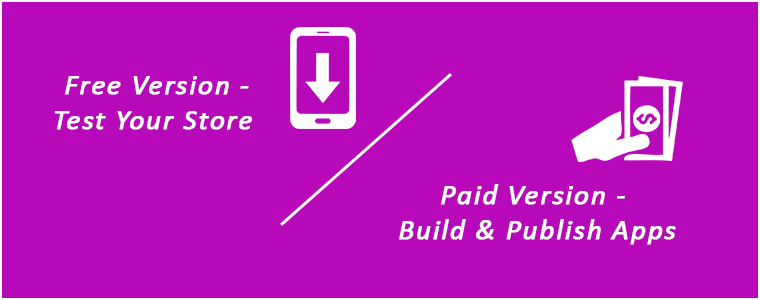
OpenCart Mobile App Builder: Free Vs Paid Versions
FREE Version – To Test Your Store on Demo Apps:
Want to check how your store will look on mobile apps? Use KnowBand’s OpenCart Mobile App Maker free version & get satisfied even before purchase. Follow these simple steps in order to test the same:
Step 1: Install module on your store
You just need to get a FREE module from here. You will receive a zipped file in your downloads section. Install the same on your store using FTP details. After successful installation, enable the module from backend.
Open the app & enter your website URL. That’s it, now your store will run on our apps.
PAID Version – To Build & Publish Your Own Apps:
Creating and getting Android & iOS App was never this easy as it is now with OpenCart Mobile App Builder. Its just a matter of 3 simple steps:
Step 1: Purchase our Module from here. Step 2: Fill our pre-requisites form. Step 3: Get final apps in 2-3 days.
Apart from this, the module provides a complete backend control along with 3 months of free support. We would even publish the apps free of cost for you.
Top Features with Mobile App Builder Extension:
1. Customize & Design App Home Screen:
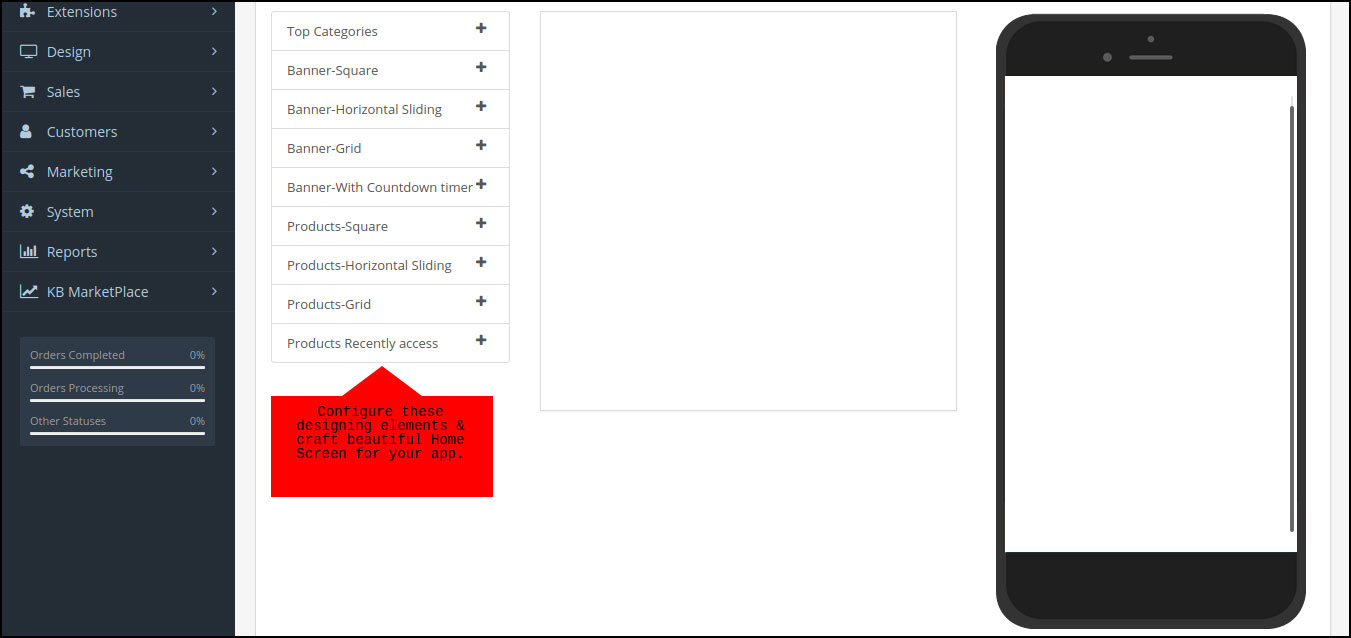
The OpenCart store admin gets the option to customize & create multiple layouts in the module backend. With this functionality, you can design the home screen as per various occasions & festivals. You can even edit the pre-saved layouts whenever required. Here, is the list of available designing elements in the backend:
Top Categories (Square shaped category icons)
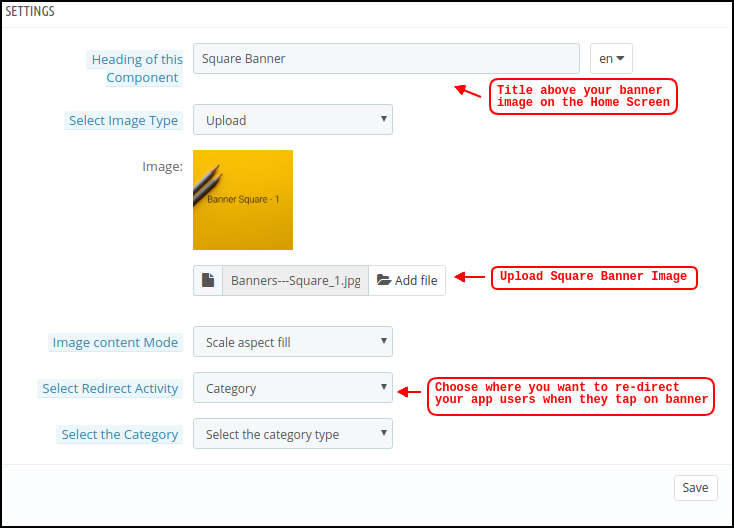
Square Banners (Square shaped banners)
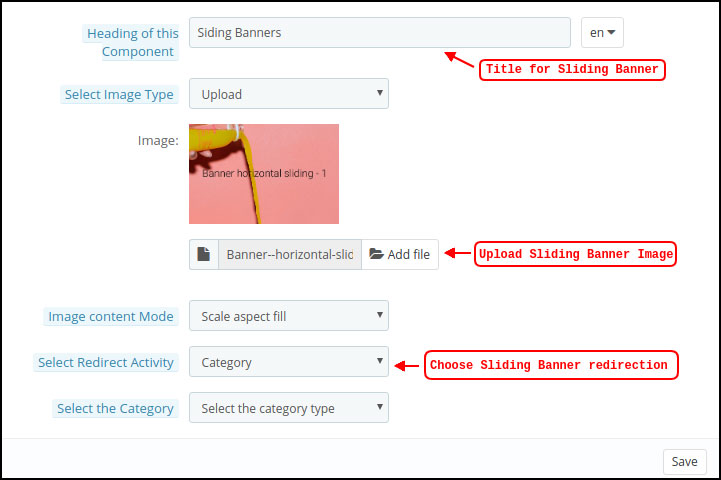
Horizontal Sliders (Rectangular sliders)
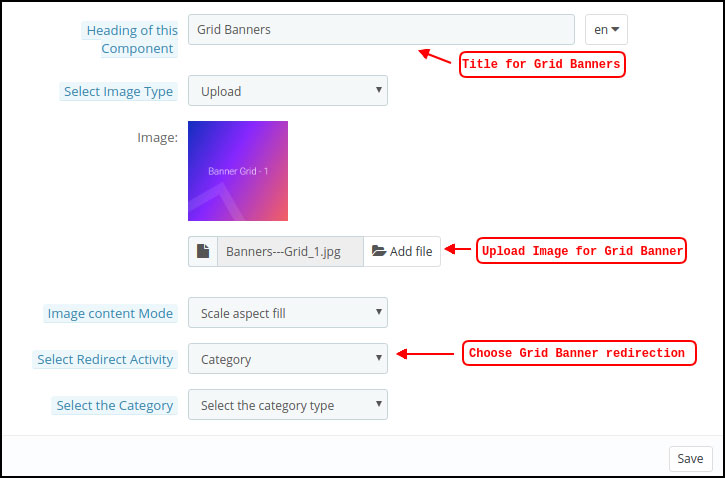
Grid Banners (Multiple banners in Grid form)
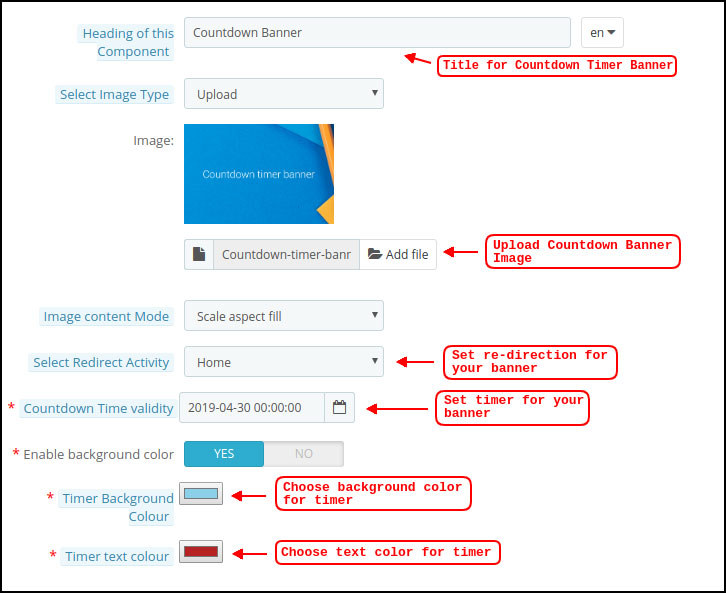
Countdown Timer Banner (Timer-based flash sale banner)
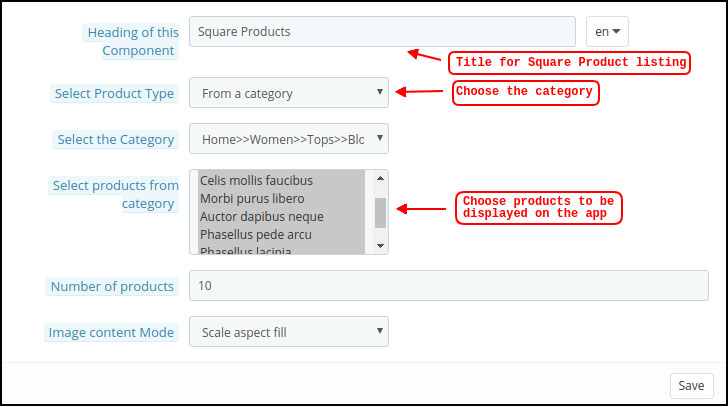
Square Products (Square shaped product listings)
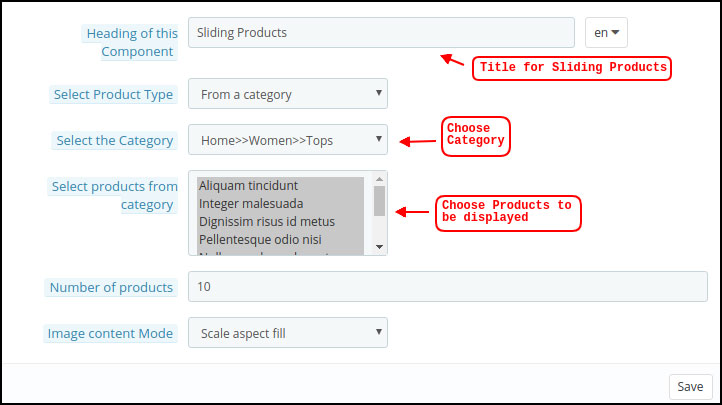
Horizontal Sliders (Rectangular shaped product sliders)
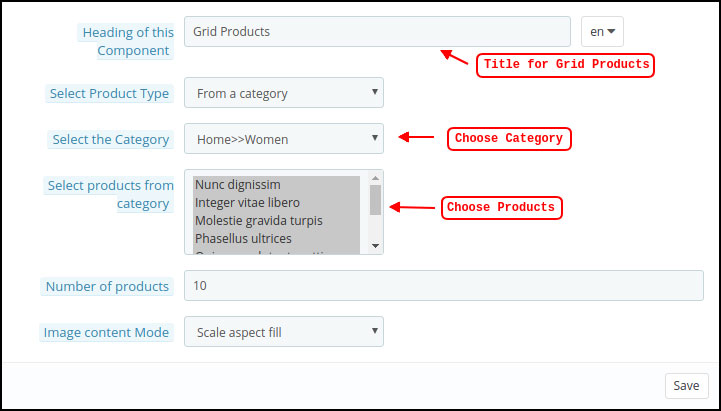
Grid Products (Multiple products in Grid form)
Recent Products (Products which user visited recently)
2. Real-time Synchronization:
Keeping everything synced is a tough yet necessary task for an eCommerce store admin. Our OpenCart Mobile App Builder establishes perfect sync between website & apps which brings the entire inventory on mobile apps.
3. Complete Backend Access:
The OpenCart Mobile App Builder gives you the complete backend control to make the changes in app & manage it on your own. You can easily customize the design of your mobile Apps and other functionalities over a few mouse clicks.
4. Simplified login Process:
The Mobile App Builder for OpenCart comes up with various login options like Google, Facebook, Phone number(OTP) and Fingerprint which makes it easier for the users to enter your app & browse products.
5. Provide Direct Zopim & WhatsApp Chat:
Solving your user queries promptly is much easier with inbuilt Zopim(formerly known as Zendesk) & WhatsApp chat in your mobile apps.
6. Multi-lingual & RTL Support:
It is difficult to develop different Apps in different languages. By developing the Android & iOS apps with OpenCart Mobile App Maker, you can easily expand your reach worldwide. The mobile apps support both multiple languages including RTL ones.
7. Personalized Push Notifications:
You can easily send unlimited manual and automatic push notifications to app users from the backend of OpenCart Mobile App Builder. This promotional tool helps in driving engagement, sales, and revenue on your store.
8. Shipping Methods Support:
The OpenCart Mobile App Builder supports all sorts of website shipping methods on mobile apps. You can offer the same shipping to app users as of website.
9. Complete White Label:
Your OpenCart Mobile Apps will be branded as per your website. You can use your own splash screen, icon etc. on app. The store logo can also be added on the header of mobile apps.
10. Easier Mobile Promotions:
The OpenCart Mobile App Builder module brings personalized push notification feature through which the store admin can send sale & promotional push notifications to the users & improve user retention & revenue.
11. Enhanced Layered Navigation:
The OpenCart Mobile Apps offers the easiest navigation with filter/sort, keyword/voice search. The smooth screen flow guides the users to the desired products in no time.
12. Include Multi-payments:
The OpenCart Mobile App Maker brings all your website payment methods on mobile apps along with Paypal & COD in addition. Furthermore, any other native payment can also be integrated into the app over a fair price. The apps even support multiple currencies as well.
13. Coupons & Vouchers Support:
Every discount/offer coupon or voucher code which is active on your website will also work on mobile apps as well.
14. Simplified Checkout for Easy Orders:
With a single screen checkout process, the OpenCart Android & iOS apps make the order submission seamless for mobile shoppers. This helps in improving the shopping experience of the users & ultimately sales.
15. Real-time Order Tracking:
The Mobile Apps with OpenCart Mobile App Builder have the functionality to view the previous app order delivery status. The order status gets updated on the app as of website automatically.
You can offer an e-mail subscription pop-up on your app having a gamified spin-win interface. This helps in capturing the user data which can be used for re-marketing purposes afterward. You need to just install OpenCart Spin & Win extension on your store. The same pop-up will also work on your website as well.
Our mobile apps are even compatible with OpenCart multi-vendor marketplace plugin. The entire marketplace can be brought on the same mobile apps without any effort. You can visit this combo module (Marketplace + Mobile App) for more details:
It’s time to catch up the speed & mobile apps could be the missing accelerator for your website. So, go ahead & launch a full-fledged pair of shopping apps today.
Holen Sie sich native Android- und iOS-Apps für Ihre PrestaShop-Website und starten Sie den Verkauf Ihrer Produkte über mobile Apps!
1.0 Einführung
Dies ist die Bedienungsanleitung der fortschrittlichen und vorgefertigten nativen mobilen App-Lösung PrestaShop Mobile App Builder. Hierbei handelt es sich um ein E-Commerce-Website-Plug-in, das entwickelt und hergestellt wurde, um perfekte und vorgestellte Android- und iOS-Shopping-Apps für Sie zu erstellen.
1.1 PrestaShop Mobile App Builder: Eine kurze Einführung
Der PrestaShop Mobile App Builder ist die fortschrittlichste und automatisierteste Lösung, um Ihr Online-Website-Geschäft auf die mobile Plattform zu bringen. Es verwandelt Ihre gesamte Website in eine vorgestellte mobile App und ermöglicht es Ihnen, Produkte auf Mobilgeräten zusammen mit der traditionellen Website zu verkaufen. Die Funktionen und Funktionen der App sind genau auf die Website abgestimmt und funktionieren sowohl auf Android- als auch auf iPhone-Geräten einwandfrei.
Unsere PrestaShop Mobile App Builder ist das vorkonfigurierte Framework, das von Experten und Fachleuten zum Erstellen von nativen eCommerce-Apps entwickelt wurde. Die Apps sind in der Lage, alle Ihre Geschäftsprodukte den Fingerspitzen des Benutzers zuzuführen und Umsatz und Ertrag zu steigern. Wenn Sie ein PrestaShop-Händler sind und nach einer vollwertigen mobilen App-Lösung suchen, ist dies Ihre beste Chance. Lesen Sie den vollständigen Artikel, um vollständige Informationen zur Entwicklung der PrestaShop Mobile App zu erhalten.
Außerdem ist unsere PrestaShop Mobile App Builder-Erweiterung voll kompatibel mit Marktplatz mit mehreren Anbietern Plugin. Sie können den gesamten Marktplatzeintrag auf denselben mobilen Apps bereitstellen. Wir bieten sogar ein Kombipaket an PrestaShop Mobile App BuildermitPrestaShop-Marktplatz für mehrere Anbieter in PrestaShop Advanced Marketplace mit mobiler App.
Außerdem,
A?no-code?Mobile?App?solution.
Freundlich
3-Monate
Völlig
100%
Höchst
Erhöht sich
Erhöht sich
Erstklassige 1.2-Funktionen von PrestaShop Mobile App Builder:
Nachfolgend finden Sie eine Liste der wichtigsten Funktionen, die Sie mit Prestashop Mobile App Builder in Ihren Apps erhalten:
Anpassbares Layout des Startbildschirms (vollständige Flexibilität)
Store Branding
Zopim- und WhatsApp-Chat-Unterstützung (24 * 7)
Google- und Facebook-Login
OTP & Fingerprint Login
Tablet- und Mobile-Support
Unterstützung für Android 4.2 bis Android 8.0 (Oreo)
Unterstützung für iOS 9 bis iOS 11
Automatische Bestandsaktualisierung
Mehrere Farben und Schriftarten
Unterstützung für mehrere Sprachen und RTL (von rechts nach links)
Unterstützung für mehrere Währungen
Unterstützung für alle Produkttypen
Website-Zahlungsmethode Wird von Apps unterstützt
Versandart der Website für Apps
Integration von benutzerdefinierten Zahlungsmethoden
Unbegrenzte Push-Benachrichtigungen
Social Sharing-Optionen für das Produkt
Mehrere Filter- und Sortieroptionen
Erweiterte Sprachsuche (nur Android)
Wishlist Funktionalität
Auf Apps unterstützte Website-Gutscheine.
Vereinfachter Checkout-Bildschirm
Echtzeit-Auftragsverfolgung
Nahtloses Akkordeon Menü
Übersichtlicher Bildschirm für Produkte und Kategorien
Die Liste der erstaunlich vielen Funktionen geht weiter und weiter. Lesen Sie weiter, neue Überraschungsvorteile dieses Plugins stehen noch aus.
Erfahren Sie mehr über die Funktionen im Detail von hier.?
2.0 PrestaShop Mobile App
KnowBand versteht Ihre Bedenken hinsichtlich der Ungewissheit, dass Sie sich für die Lösung entscheiden. Die Händler können unseren Demo-Store in der mobilen App und sogar ihren Store in unseren Demo-Apps anzeigen.
2.1 Sehen Sie sich unseren Demo-Shop an, der an Apps arbeitet
Möchten Sie die Funktionen der eCommerce-App sehen? Wir haben unseren Demo-Store in die App integriert, in der Sie die voll funktionsfähige App erkunden und alle ihre Funktionen sehen können. Befolgen Sie einfach die folgenden Anweisungen:
Schritt 1: Laden Sie die Nautica PrestaShop Mobile App aus einem der App Stores auf Ihr Mobilgerät herunter und installieren Sie sie. Hier finden Sie die Links zum Herunterladen von Demo-Apps:
Schritt 2: Öffnen Sie die App und tippen Sie im Begrüßungsbildschirm auf die Schaltfläche "Demo anzeigen". Geben Sie einige relevante Details wie Name, E-Mail & Store-URL ein. Das ist es! Sie werden sehen, dass unser Demo-Shop in der Demo-App ausgeführt wird. Sie können das gleiche durchsuchen, alle Funktionen überprüfen, eine Bestellung erstellen usw. Hinweis: Um auf das Admin-Panel von KnowBand Mobile App Builder in unserem Demo-Store zuzugreifen, besuchen Sie hier.
2.2 View Your Store arbeitet an Demo-Apps
Nicht zufrieden? Möchten Sie Ihren eigenen Shop mit den Demo-Apps testen? Nun, wir haben dich mit allem bedeckt. Auch das können Sie in unserer Demo-App kostenlos erleben. Sie müssen nur 3-Schritte ausführen:
Schritt 1: Laden Sie das KOSTENLOSE PrestaShop Mobile App Builder-Plugin herunter und installieren Sie es in Ihrem Geschäft.
Schritt 2: Installieren Sie die Demo-Apps (Links im vorherigen Abschnitt) auf Ihrem Mobilgerät. Öffnen Sie die App und geben Sie Ihre Store-URL ein.
Schritt 3: Tippen Sie auf "Shop anzeigen" und erleben Sie Ihren eigenen Shop mit Demo-Apps. Sie können das installierte PrestaShop Mobile App Creator-Modul im Backend Ihrer Website konfigurieren. Erfahren Sie mehr über das Testen von PrestaShop Mobile App Maker in hier.
3.0 Erstellen Sie Ihre PrestaShop Mobile App in 3 Simple Steps
Wir hoffen, dass Ihnen die Demo unserer PrestaShop Mobile Apps gefallen hat und Sie gefunden haben, wonach Sie gesucht haben. Nun ist es an der Zeit, ein natives Paar Apps für Ihren Shop zu erwerben. Der Prozess zum Erstellen einer mobilen eCommerce-App ist so einfach wie möglich. Befolgen Sie einfach die einfachen Schritte von 3 und Ihre App ist in 1-2 Werktagen fertig.
Schritt 1: Installieren Sie das Modul auf Ihrer Website
Herunterladen
Schritt 2: Teilen Sie Ihre App-Spezifikationen
Teilen Sie Ihre App-Details / Anforderungen in
Schritt 3: Holen Sie sich Ihre Apps in 1-2 Tagen
Unsere erfahrenen und professionellen Entwickler erstellen Ihre Apps so, dass sie genau den gemeinsam genutzten Details entsprechen. In 1-2-Tagen werden wir uns mit APK / IPA-Dateien bei Ihnen melden.
Hinweis: Sie können diese APK / IPA-Dateien in den jeweiligen App Stores veröffentlichen. Siehe auch folgende Links:
Immer noch ein Problem? Sagen Sie uns, wir würden die Apps für Sie veröffentlichen. Wenn Sie Fragen haben, wenden Sie sich bitte an support@knowband.com.
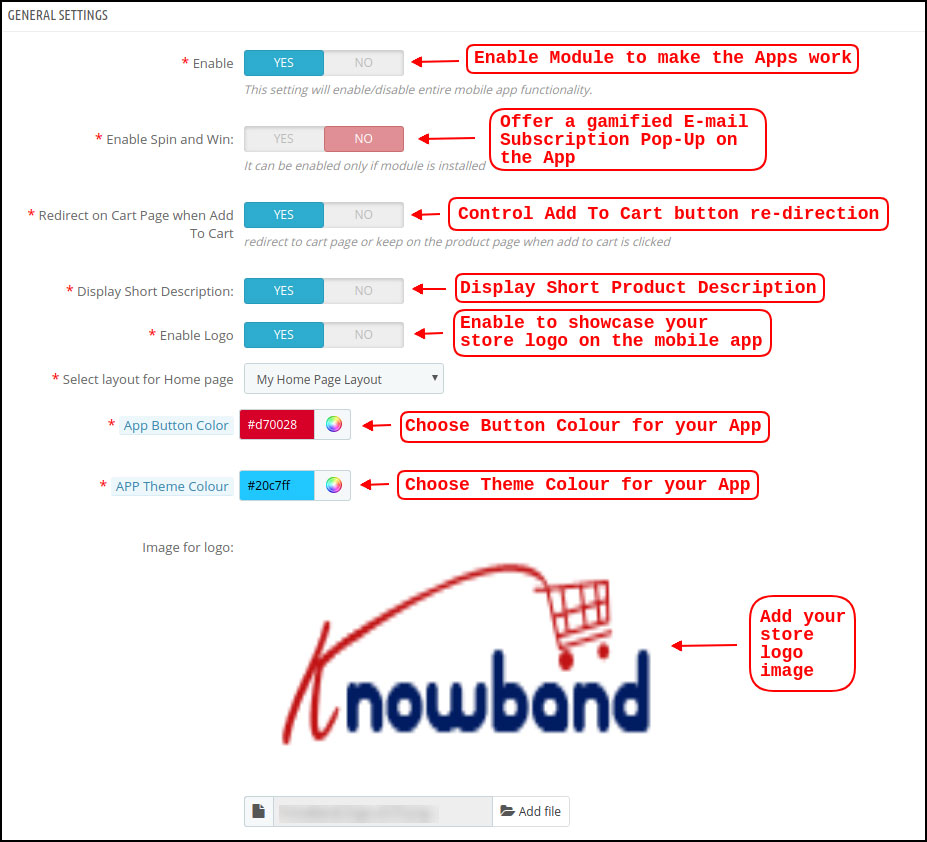
Sobald der PrestaShop Mobile App Maker erfolgreich auf Ihrer Website installiert wurde, ist es Zeit, das Admin-Panel von PrestaShop Mobile App Creator zu konfigurieren. Wenn Sie in KnowBand Mobile App Builder auf die Option "Konfigurieren" klicken, wird die folgende Registerkarte mit benutzerfreundlichen Oberflächen angezeigt. Lassen Sie uns sie eins nach dem anderen eingrenzen.
5.1 Allgemeine Einstellungen
Auf der Registerkarte Allgemeine Einstellungen werden die Einstellungen angezeigt, die zum Ausführen Ihrer mobilen App auf den Geräten des Benutzers erforderlich sind. Diese Registerkarte enthält alle erforderlichen allgemeinen Optionen, um die App mit Ihren make it-Funktionen auf Geräten zu synchronisieren.
a) Plugin aktivieren: Aktivieren Sie das PrestaShop Mobile App Creator-Plugin, damit Ihre mobile App auf den Geräten der Benutzer funktioniert.
b) Aktivieren Sie Spin und Win: Aktivieren Sie diese Option, um ein gamifiziertes Popup-Fenster auf dem Startbildschirm anzuzeigen, wenn ein Benutzer die App öffnet. Es kann verwendet werden, um Rabatte / Angebote anzubieten und deren E-Mails als Gegenleistung für Marketingzwecke zu erfassen. Damit diese Funktionalität funktioniert, müssen Sie das Spin and Win-Modul von Knowband auf Ihrer Website installieren.
c) Auf der Warenkorbseite umleiten, wenn in den Warenkorb: Mit dieser Funktion können Sie die Navigation der Schaltfläche "In den Warenkorb" steuern. Sie können Ihre Benutzer entweder in den Warenkorb umleiten oder sie auf der Produktseite belassen, wenn sie auf die Schaltfläche In den Warenkorb tippen. Dies erhöht die Chancen auf einen Zukauf.
d) Kurzbeschreibung anzeigen: Aktivieren Sie diese Option, um die Kurzbeschreibung des Produkts zusammen mit der vollständigen Beschreibung und anderen Details auf dem Produktbildschirm anzuzeigen.
e) Layout auswählen: Wählen Sie das gewünschte Startseitenlayout für Ihre PrestaShop-App. Sie können im Backend mehrere Startbildschirm-Layouts für verschiedene Festivals und Themen erstellen und diese gemäß Ihren Anforderungen im Geschäft verwenden.
f) Farbe der App-Schaltfläche: Wählen Sie die gewünschte Tastenfarbe für Ihre PrestaShop Mobile App.
g) Farbe des App-Themas: Wählen Sie die gewünschte Designfarbe für Ihre PrestaShop Mobile App.
h) Bild für Logo: Laden Sie Ihr Geschäftslogo hoch, damit es in der oberen Kopfzeile der App angezeigt wird. Dies förderte Ihre Marke unter den weltweiten mobilen Käufern.
i) Deaktivierte Versandmethoden: Wählen Sie die gewünschten Versandarten aus, die nicht in Ihrer PrestaShop Mobile App angezeigt werden sollen.
j) Aktivierte CMS-Seiten: Wählen Sie die gewünschten CMS-Seiten aus, die in den mobilen Apps angezeigt werden sollen.
k) Aktivieren Sie das Anforderungsprotokoll-Reporting: Aktivieren Sie die Anmeldung bei den mobilen Apps, um Details zu ungewöhnlichem Verhalten Ihrer App abzurufen.
l) Live-Chat-Unterstützung aktivieren: Aktivieren Sie die Chat-Option Zopim (Zendesk) in Ihren PrestaShop Mobile Apps. Damit die Chat-Funktionalität funktioniert, ist ein Chat-API-Schlüssel erforderlich, der Ihnen zusammen mit Ihrer App zur Verfügung gestellt wird.
m) WhatsApp Chat-Unterstützung aktivieren: Aktivieren Sie die WhatsApp-Chat-Option in Ihren PrestaShop Mobile Apps. Die Benutzer können Sie direkt über Ihre im Backend eingegebene WhatsApp-Nummer kontaktieren.
n) Aktivieren / Deaktivieren der Rufnummernregistrierung: Aktivieren Sie die Anmeldeoption für die Telefonnummer in Ihrer PrestaShop Mobile App und lassen Sie Ihre Benutzer mit der OTP-Überprüfung authentifizieren.
o) Aktivieren Sie die URL-Codierung von Bildlinks: Aktivieren Sie diese Funktion, um Nicht-ASCII-Zeichen in der App zu unterstützen.
5.2 Push-Benachrichtigungseinstellungen
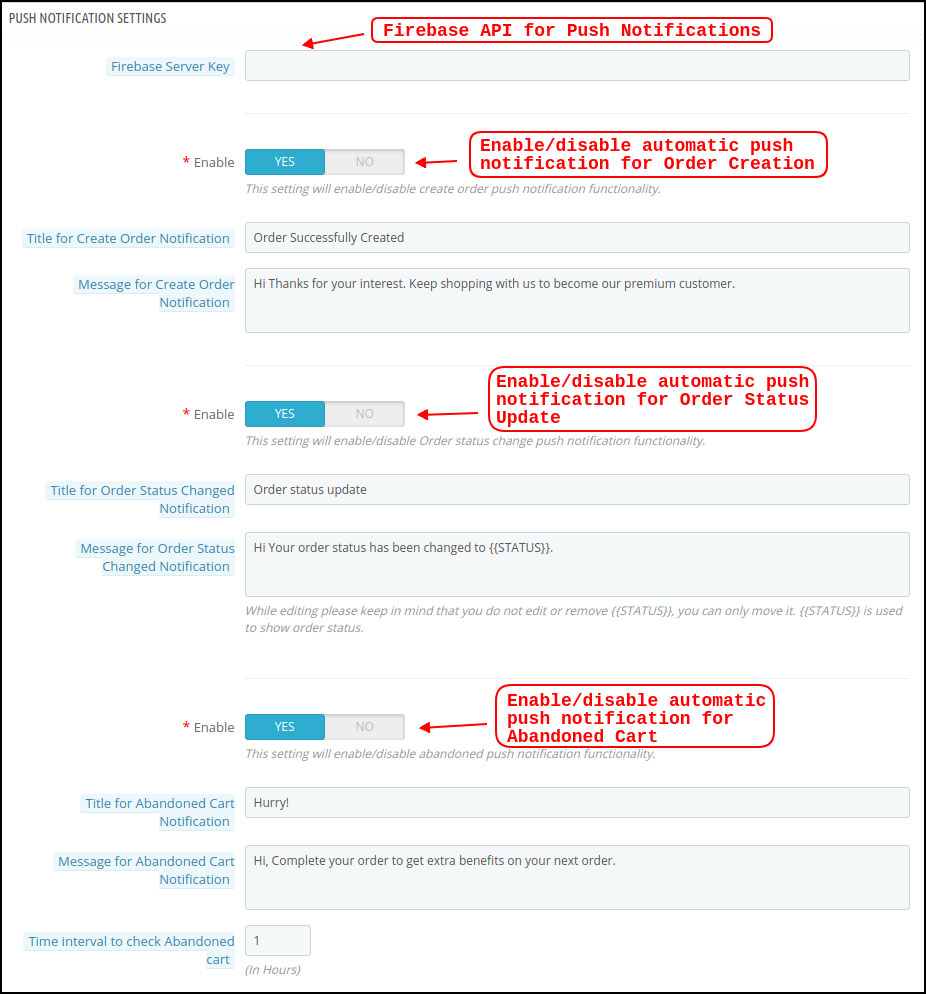
Der PrestaShop Mobile App Creator für Android / iOS nutzt die Push-Benachrichtigungsfunktion mithilfe der Google Primary Services für die Push-Benachrichtigung für Mobilgeräte. Dieses praktische Marketing-Tool sorgt für sofortige Aufmerksamkeit und steigert den Umsatz. Mit Ihrer PrestaShop Mobile App ist es nur eine Nachricht entfernt, Ihre täglichen Angebote hervorzuheben. Mit PrestaShop Mobile App Maker sind sowohl automatische als auch benutzerdefinierte Benachrichtigungen verfügbar.
a) Firebase-Server-Schlüssel: Der Firebase-Serverschlüssel wird zum Konfigurieren der Push-Benachrichtigungen für die Anwendung verwendet. Dieser Schlüssel stellt sicher, dass die Benachrichtigungen von all Ihren App-Benutzern weltweit empfangen werden.
b) Benachrichtigung zur Auftragserstellung aktivieren / deaktivieren: Aktivieren / Deaktivieren Sie die automatische Push-Benachrichtigung, die an die App-Benutzer gesendet wird, um die Bestellung erfolgreich zu erstellen. -> Titel und Nachricht für Push-Benachrichtigung:?Enter title and message of push notification for successful order creation.
c) Benachrichtigung über Statusänderung der Bestellung aktivieren / deaktivieren:Aktivieren / Deaktivieren Sie die automatische Push-Benachrichtigung, die an die App-Benutzer gesendet wird, um Aktualisierungen ihres vorherigen Bestellzustands zu erhalten. -> Titel und Nachricht für Push-Benachrichtigung:?Enter title and message of push notification whenever there is an update in previous order delivery status.
d) Benachrichtigung über verlassenen Einkaufswagen aktivieren / deaktivieren: Aktivieren / Deaktivieren Sie die automatische Push-Benachrichtigung, die an Benutzer gesendet wird, die den Einkaufswagen ohne erfolgreichen Kauf verlassen haben. -> Titel und Nachricht für Push-Benachrichtigung:?Enter the title & message of push notification for abandoned cart app users.
e) Zeitintervall:?Interval (in hours) for sending Push Notification to app users who have abandoned their cart without successful purchase.
5.3 Push-Benachrichtigungsverlauf
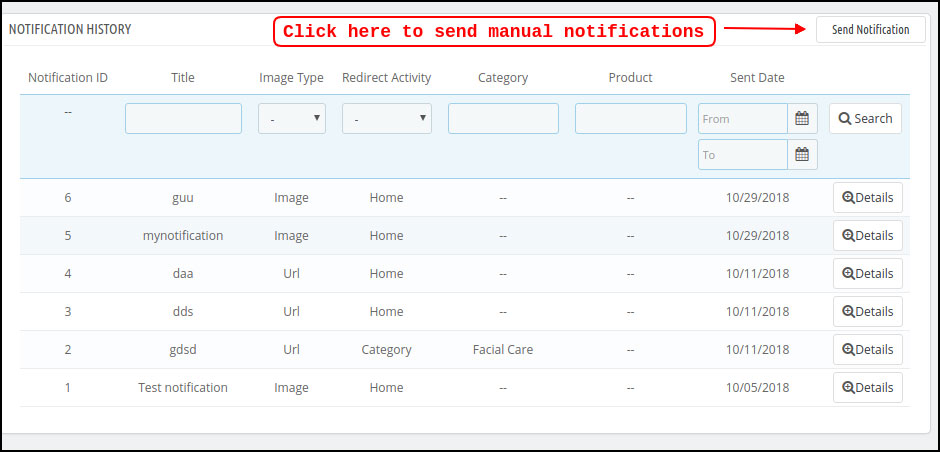
Diese Registerkarte enthält den Verlauf aller Arten von Push-Benachrichtigungen, die an jeden Benutzer mit den entsprechenden Details gesendet wurden. Der Händler kann sich über jede früher gesendete Benachrichtigung informieren. Diese Registerkarte bietet auch die Möglichkeit, eine benutzerdefinierte Benachrichtigung an die vom Backend gestalteten Benutzer zu senden. Sie können sie durch manuell gesendete Benachrichtigungen einfach auf geschäftsbezogene Details oder Rabatte aufmerksam machen.
Benachrichtigung senden:
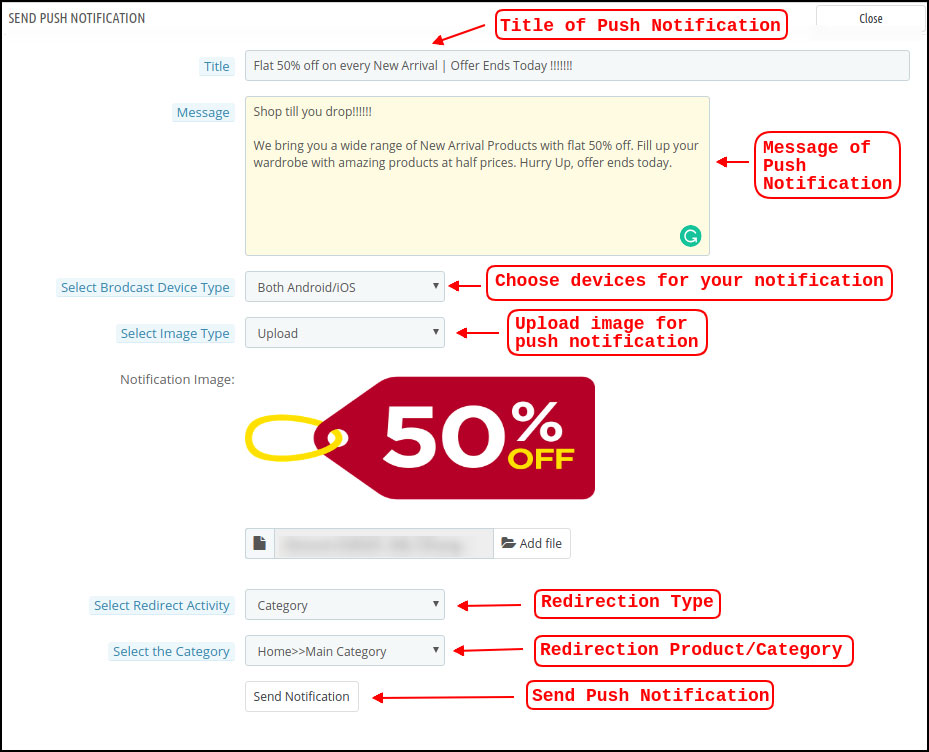
Mit dieser Option können Sie eine manuelle Benachrichtigung an die Benutzer der App senden. Sie können den Titel, die Nachricht, die Landing Page, das Bild usw. und die Benachrichtigung Ihrer Wahl wie im folgenden Schnappschuss gezeigt konfigurieren:
a) Titel der Push-Benachrichtigung: Der Titel Ihrer manuellen Push-Benachrichtigung, die an die App-Benutzer gesendet werden soll.
b) Nachricht der Push-Benachrichtigung: Die Nachricht Ihrer manuellen Benachrichtigung, die an die App-Benutzer gesendet werden soll.
c) Gerätetyp: Sie können die Benutzer auf Android / iOS oder auf beiden auswählen, an die Ihre manuelle Push-Benachrichtigung gesendet werden soll.
d) Bildtyp:?You can upload the desired image/banner justifying your notification. The banner image can be uploaded or used through an existing URL.
e) Benachrichtigungsbild: Der Store-Administrator kann eine Vorschau des Benachrichtigungsbilds anzeigen und analysieren, wie es auf den Apps der Benutzer angezeigt wird.
f) Bild-URL: Die tatsächliche URL des Benachrichtigungsbilds, das an die App-Benutzer gesendet werden soll.
g) Umleitungsaktivität:Sie können die Weiterleitung Ihrer Benachrichtigung wählen, indem Sie hier unter Startbildschirm / Beliebige Kategorie / Beliebiges Produkt auswählen. Unabhängig davon, was Sie einstellen, werden Ihre Benutzer beim Tippen auf die Push-Benachrichtigung an dieselbe Adresse umgeleitet.
h) Wählen Sie die Kategorie / das Produkt:?You can choose any relevant category/product screen for your notification.
i) Benachrichtigung senden: Sobald Sie Ihre Benachrichtigung erstellt und in der Vorschau angezeigt haben, ist es an der Zeit, diese auf Ihren Apps zu senden.
5.4-Zahlungsmethoden
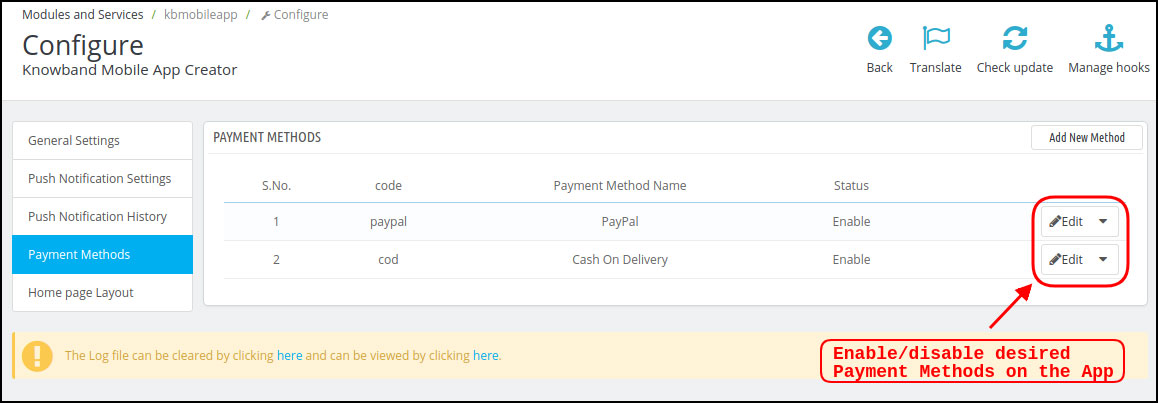
Der PrestaShop Mobile App Creator für Android und iOS unterstützt alle Arten von Website-Zahlungsmethoden für Android- und iOS-Apps. Darüber hinaus bietet es PayPal- und Nachnahmezahlungsoptionen sowie die Flexibilität, auch andere native Zahlungsmethoden hinzuzufügen.
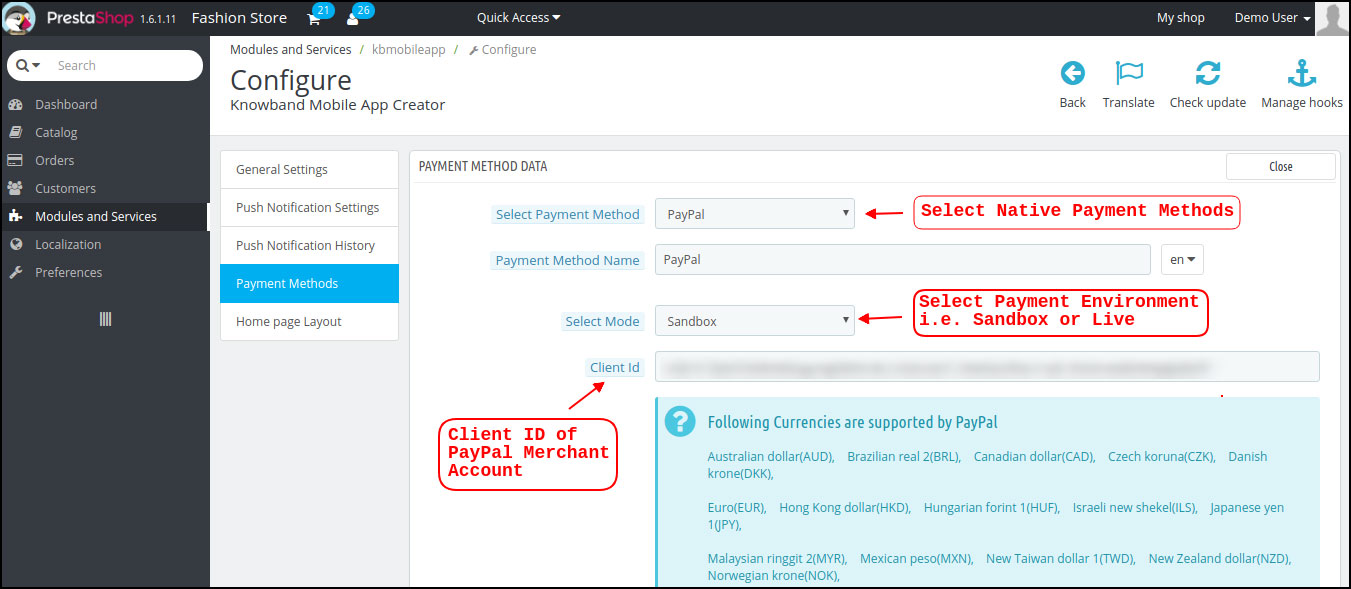
Sie können die folgenden Parameter in den Standardzahlungsmethoden (PayPal) bearbeiten:
a) Name der Zahlungsmethode: Bearbeiten Sie den Namen der Zahlungsmethode, die in der App angezeigt werden soll.
b) Modus auswählen: Wählen Sie die Zahlungsumgebung aus, z. B. Sandbox oder Live. Diese Einstellungen sind nur für den Fall verfügbar, dass der Store-Administrator die Zahlungsmethode testen möchte, bevor er fortfährt.
c) Kundennummer:?This is used in the case of PayPal Payment in order to identify the Merchant Account to which the Payment has to be made while placing the order.
5.5-Homepage-Layout
Dies ist eine der erstaunlichsten Funktionen des PrestaShop Mobile App Builder-Plugins zum Entwerfen und Erstellen mehrerer Startbildschirm-Layouts unter Verwendung verschiedener Designattribute / -elemente. Diese Registerkarte enthält die Liste aller zuvor konfigurierten Startbildschirm-Layouts basierend auf verschiedenen Themen und Schriftarten, wie im folgenden Schnappschuss gezeigt:
Um die Layouts der Startseite zu konfigurieren, stehen im Backend die folgenden Elemente zur Verfügung:
oben
Quadrat
Horizontal
Gitter
Countdown
Gitter
Horizontal
Vor kurzem
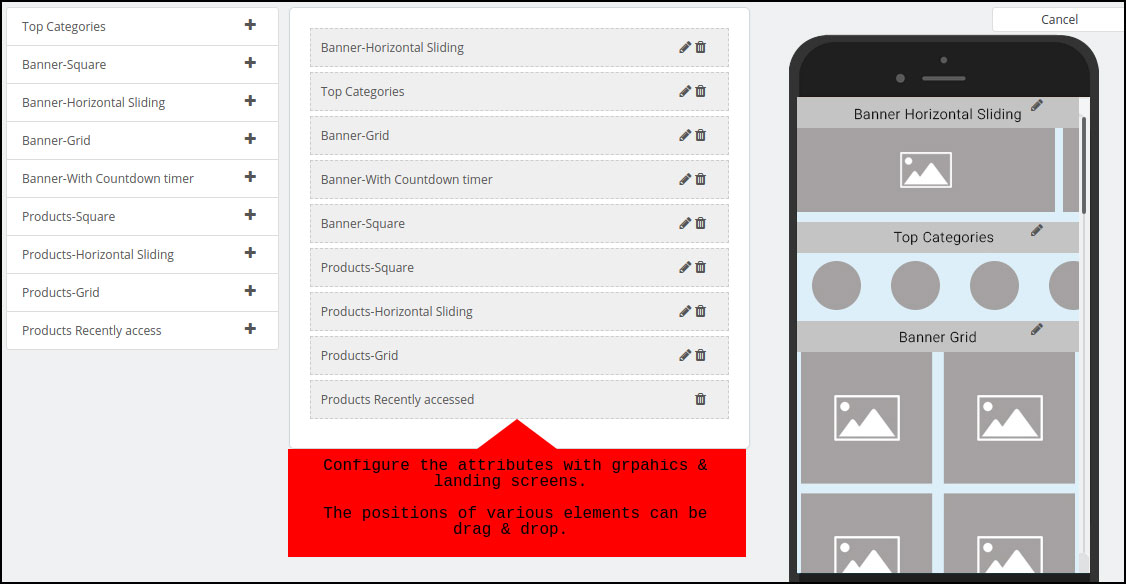
Der Händler kann eines dieser Attribute konfigurieren und verwenden, um mehrere Layouts zu erstellen und zu speichern. Diese Layouts können gemäß dem Thema und den Anforderungen verwendet werden. Auch die Positionierung verschiedener Elemente kann mit einer einfachen Drag & Drop-Funktion geändert werden.
oben
oben
Quadrat
Ein weiteres Attribut ist die quadratische Bannerliste, mit der ein quadratisches Banner auf dem Startbildschirm der App angezeigt wird. Sie können das Banner anpassen, indem Sie das richtige Bild und den richtigen Startbildschirm auswählen.
Horizontal
Dies sind die rechteckigen Elemente, die beim horizontalen Schieben verfügbar sind und die vom Backend aus vollständig angepasst werden können.
Gitter
Hierbei handelt es sich um quadratische Banner, die auf dem Startbildschirm in der Rasterform aufgelistet sind. Sie können auf dem Startbildschirm so viele Banner einstellen, wie Sie möchten, und das Bild und die Zielseite entsprechend anpassen.
Countdown
Das
Quadrat
Ab Banner bietet der PrestaShop Mobile App Creator Produkte zur Anzeige auf dem Startbildschirm in Form einer quadratischen Auflistung an.
Horizontale Gleitprodukte
Sie können die Produkte in Form von horizontalen Schiebereglern hinzufügen. Die ausgewählten Produkte können einer bestimmten Kategorie oder anderen Höhepunkten wie Bestsellern, Vorgestellten Produkten usw. angehören.
Rasterprodukte:
Die Produkte können auch in Form von Rasterauflistungen auf dem Startbildschirm hinzugefügt werden. Die Produkte können aus jeder Kategorie ausgewählt werden.
Kürzlich aufgerufene Produkte:
Der PrestaShop Mobile App Creator bietet das Element "Zuletzt verwendet", auf dem die zuletzt verwendeten Produkte angezeigt werden, die vom Benutzer angezeigt werden. Sie können das Element einfach in Ihr Layout einfügen, um es auf dem Startbildschirm anzuzeigen.
6.0 Mobile App Bildschirme
6.1-Startbildschirm
Der Startbildschirm Ihrer PrestaShop Mobile App ist genau so, wie Sie es möchten. Der PrestaShop Mobile App Maker bietet umfassende Flexibilität, um den Startbildschirm in Ihre Hände zu legen. Mit mehreren Bannern (Quadrat, Gitter, Schieben), Produkten (Quadrat, Gitter, Schieben), Countdown-Timer-Bannern und der Registerkarte "Neueste Produkte" im Backend können Sie intuitive Layouts für Ihren Startbildschirm erstellen. Auf dem Startbildschirm der App stehen folgende Optionen zur Verfügung:
Darüber hinaus kann die Positionierung verschiedener Gestaltungselemente je nach Anforderung geändert werden.
1. Dynamische Layouts:
Mit verschiedenen Elementen können Sie verschiedene Layouts im Backend erstellen, speichern und für verschiedene Events und Festivals wiederverwenden. Sie können Ihren App-Startbildschirm dynamisch entwerfen und gestalten.
2. Markenlogo:
Ihr Geschäftslogo wird im linken mittleren Bereich der oberen Kopfzeile Ihrer PrestaShop Mobile App angezeigt. Das Logo ist im Modul-Backend vollständig konfigurierbar und kann einschließlich Bildwechsel aktiviert / deaktiviert werden.
3. Suche:
Mit der Suchoption können die Käufer von mobilen Apps einfach und schnell das finden, was sie möchten. In Ihrer PrestaShop Mobile App gibt es zwei Möglichkeiten für die Produktsuche:
-> Mit Text: Ihre App-Benutzer können nach gewünschten Produkten suchen, indem Sie einige verwandte Stichwörter eingeben. Die PrestaShop Mobile App zeigt relevante Ergebnisse für dieses Keyword an.
-> Mit Stimme: Sie müssen nichts eingeben, Ihre PrestaShop Android App ist mit der erweiterten Sprachsuchfunktion ausgestattet. Die Benutzer können die Produkte nur nach relevanten Stichwörtern durchsuchen.
4. Wunschzettel Tasche:
Die Wunschliste wird in der Kopfzeile Ihrer PrestaShop Mobile App mit allen mit Lesezeichen versehenen Produkten angezeigt. Die App-Benutzer können ihre gewünschten Produkte für den zukünftigen Kauf in der Wunschliste speichern.
5. Einkaufswagen:
Der Warenkorb ist in der oberen rechten Ecke des Startbildschirms der App verfügbar. Dort können sich die Nutzer über die Produkte informieren, die sie in ihren Warenkorb gelegt haben.
6. WhatsApp / Zendesk-Chat:
Rechts unten auf dem Startbildschirm befindet sich eine Live-Chat-Option für Verkäufer und Käufer. Die Käufer mobiler Apps können Ihnen einfach und direkt eine Nachricht zu ihrer Anfrage senden und Sie können sie sofort lösen.
6.2-Akkordeonmenü (Navigationsleiste)
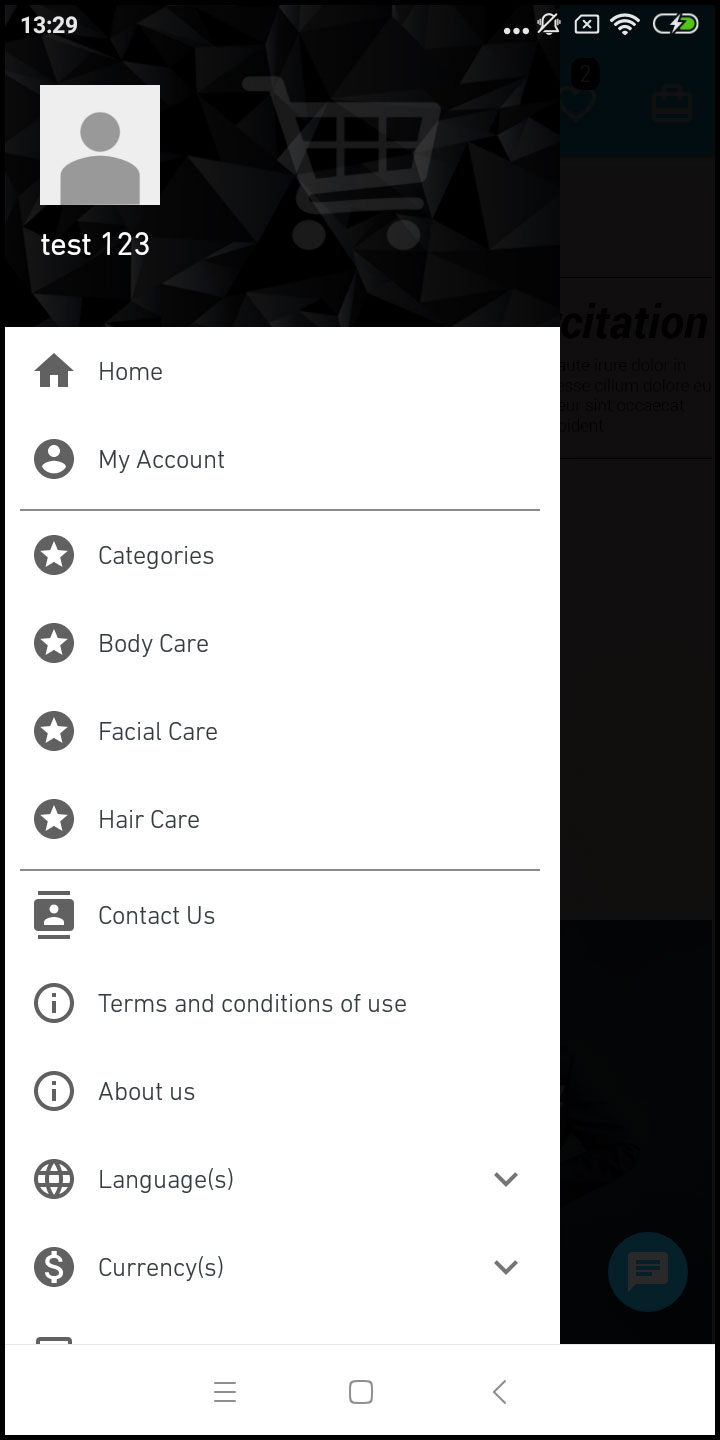
Die PrestaShop Mobile Apps für Android und iOS bieten eine ordnungsgemäße Kategorisierung der auf der Website verfügbaren Produkte. Mobile Käufer können problemlos Produkte aus mehreren Kategorien durchsuchen. Alle CMS-Seiten sind auch im Akkordeon-Menü verfügbar. Es bietet die folgenden Optionen:
1. Mein Konto
Der Bildschirm "Mein Konto" enthält alle Benutzerinformationen wie persönliche Daten, Lieferadresse (n) und Bestelldaten. Es gibt sogar eine Option für die Benutzer, um ihren Fingerabdruck zu registrieren. Die Käufer können alle mit ihnen verbundenen Informationen einsehen und ihre persönlichen Daten sowie das Anmeldekennwort aktualisieren.
2. Kategorien
Diese Kategorien entsprechen denen Ihrer Website. Sie können sie dementsprechend zuordnen und Ihren App-Benutzern eine Kategorisierung auf 3-Ebene zum problemlosen Browsen anbieten.
3. CMS-Seiten
Verschiedene CMS-Seiten wie Über uns, Kontakt, Allgemeine Geschäftsbedingungen usw., die auf Ihrer Website verfügbar sind, werden hier angezeigt. Sie können aus dem PrestaShop Mobile App Builder-Backend das gewünschte auswählen, das in der Mobile App angezeigt werden soll.
4. Sprachen)
Mit der Sprachoption können Ihre Benutzer die PrestaShop Mobile-App in ihrer Muttersprache anzeigen. Alle verfügbaren Sprachen werden nur unter dieser Option angezeigt.
5. Währung (en)
Alle auf Ihrer E-Commerce-Website verfügbaren Währungen werden auch in der PrestaShop Mobile App angezeigt. Die Käufer können den Produktpreis in ihrer gewünschten Währung anzeigen und kaufen.
6. Einloggen Ausloggen
Ihre Benutzer können sich mit dieser Option ganz einfach bei PrestaShop Mobile App an- und abmelden.
6.3-Kategoriebildschirm:
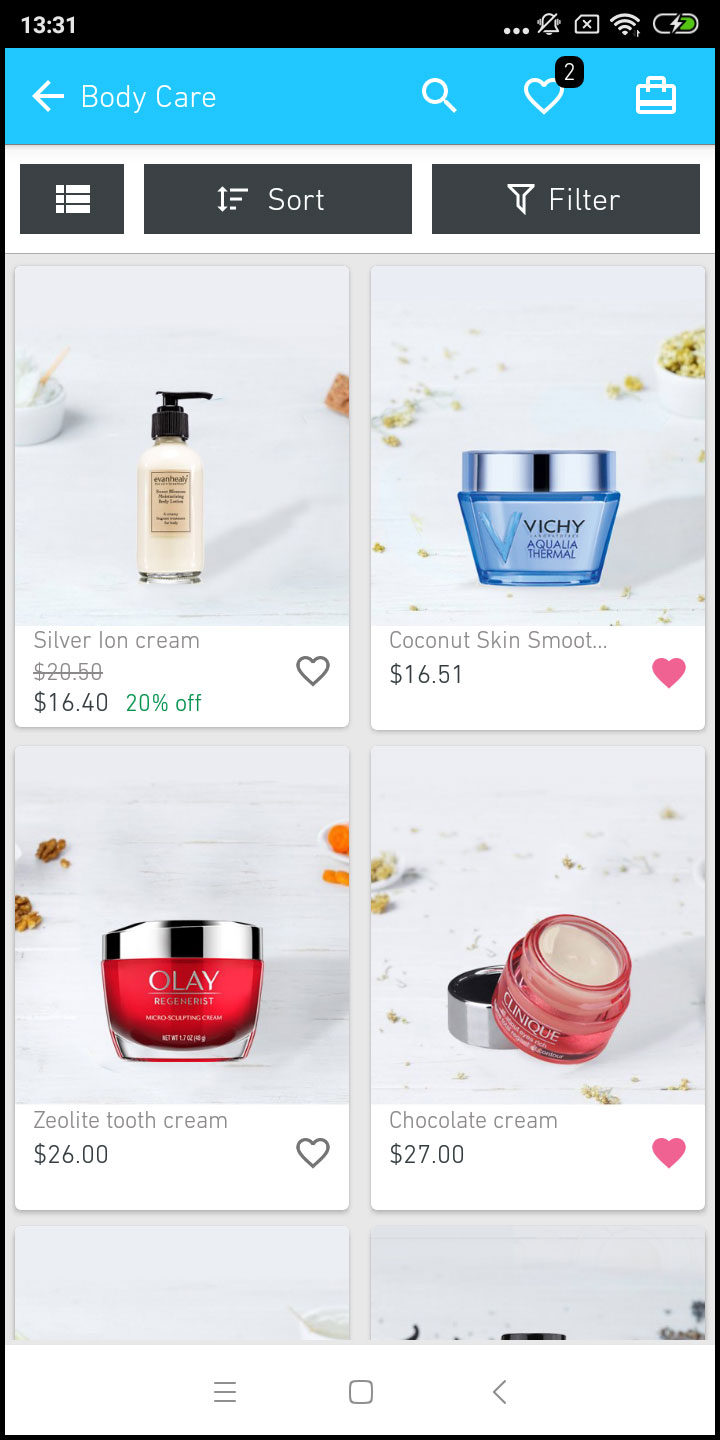
Alle Unterkategorien, übergeordneten Kategorien und anderen zugehörigen Kategorien sind in Ihrer PrestaShop Mobile App verfügbar. Der Kategoriebildschirm ist in zwei Richtungen übersichtlich gestaltet Grundansichten: Gitter & Liste. Das Produktbild, der Name, der Preis und der Rabatt werden in allen Auflistungen mit der Option angezeigt, sie auch in die Wunschliste aufzunehmen. Die mobilen Apps mit PrestaShop Mobile App Builder verfügen über eine mehrschichtige Navigation, die die Produktsuche vereinfacht. Folgende Optionen stehen auf den Kategoriebildschirmen zur Verfügung:
1. Sortieren:
Mit dieser Option können die Käufer die gewünschte Reihenfolge auswählen, in der die Preise für die Kategorieprodukte sortiert werden sollen. In Ihren Apps sind zwei Sortierreihenfolgen verfügbar: Preis: Niedrig zu Hoch und Preis: Hoch zu Niedrig.
2. Filter:
Die Option zum Filtern von Produkten vereinfacht die Produktsuche. Die App-Benutzer können die Produkte in Ihrer PrestaShop Mobile App anhand verschiedener Attribute wie Größe, Farbe, Zusammensetzung, Zustand, Hersteller, Preis usw. filtern. Mit diesen Filtern können die Benutzer innerhalb von Minuten ihr Lieblingsprodukt suchen.
6.4-Produktbildschirm:
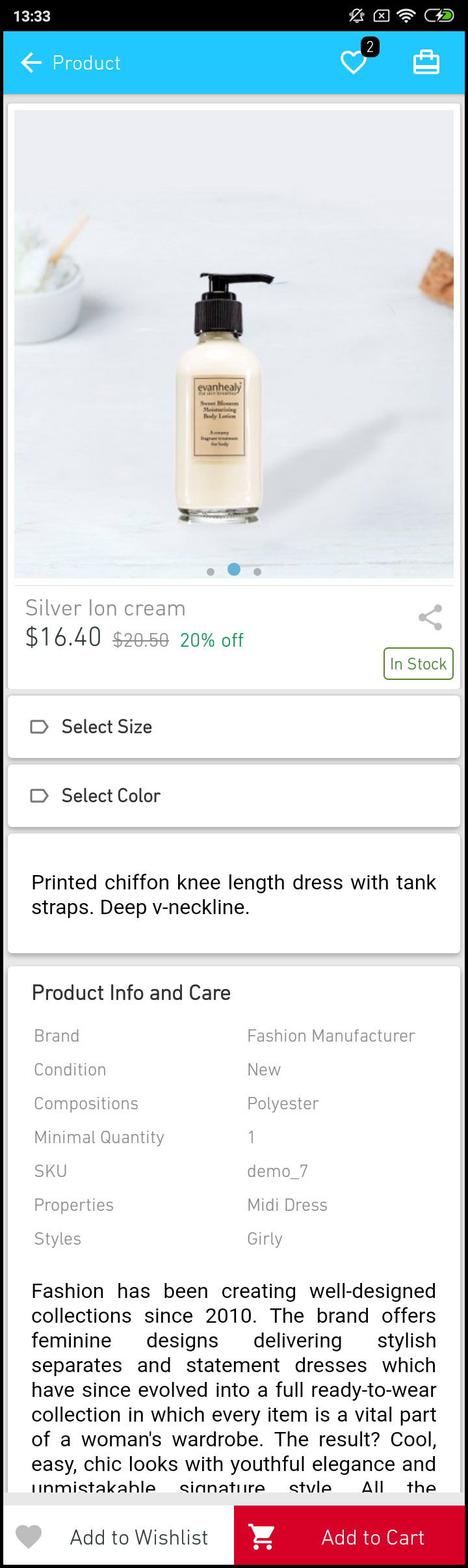
Der Produktbildschirm Ihrer PrestaShop Mobile App ist einfach und faszinierend. Es werden mehrere Bilder desselben Produkts zusammen mit Name und Preis angezeigt. Die Produktverfügbarkeit wird je nach Lagerstatus auch als "Auf Lager" oder "Nicht auf Lager" angezeigt. Es enthält die folgenden anderen Optionen:
1. Produktoptionen:
Auf diesem Bildschirm werden alle produktbezogenen Optionen wie Größe, Farbe usw. angezeigt. Diese Produktoptionen entsprechen denen auf der Website.
2. kurze Beschreibung
Benutzer können die Kurzbeschreibung Ihres Produkts lesen, um sich schnell zu entscheiden.
3. Produktinfo & Pflege
Die vollständigen Produktinformationen, wie sie auf der Website aufgeführt sind, werden hier angezeigt. Die App-Benutzer können hier vollständige Produktdetails abrufen.
4. Zur Wunschliste hinzufügen:
Die Benutzer der mobilen App können das Produkt direkt mit einem Lesezeichen versehen, indem sie links unten auf dem Produktbildschirm auf "Zur Wunschliste hinzufügen" tippen.
5. In den Warenkorb legen:
Wie durch den Namen "In den Warenkorb" Button wird das Produkt direkt in den Warenkorb gelegt und der Benutzer kann mit dem Kauf fortfahren.
6. Produkt-Social-Sharing:
Auf diesem Bildschirm besteht die Möglichkeit, Ihr Produkt auf mehreren sozialen Plattformen, Bluetooth und E-Mail, freizugeben. Die App-Benutzer können die Produkte auf mehreren sozialen Plattformen für ihre Freunde / Verwandten freigeben und viele Benutzer zu Ihrer App locken.
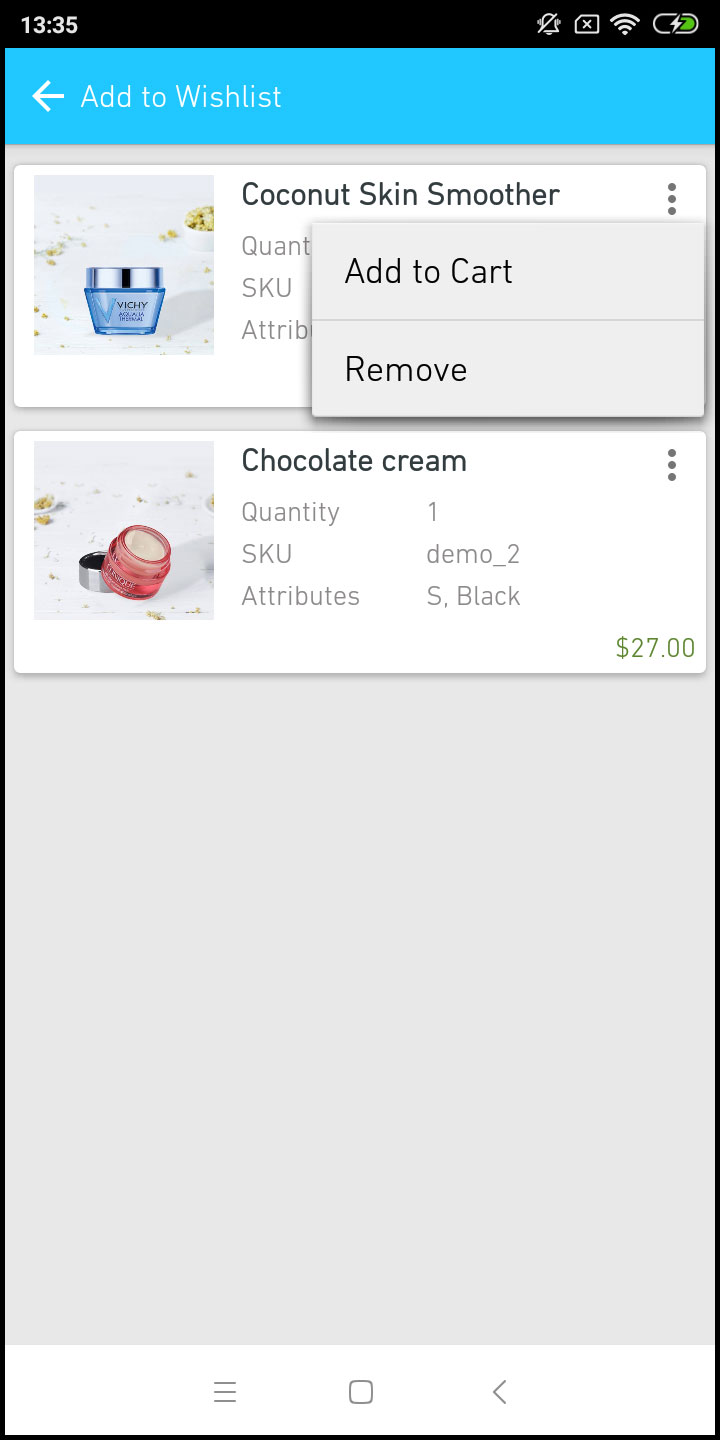
6.5 Wishlist Screen:
Ihr PrestaShop Mobile App Creator verfügt über eine Wishlist-Tasche, mit der Benutzer Produkte für zukünftige Einkäufe als Lesezeichen speichern können. Die Benutzer können von hier aus die Liste aller mit Lesezeichen versehenen Produkte anzeigen. Es gibt zwei Möglichkeiten:
1. In den Warenkorb legen:
Die App-Benutzer können das mit einem Lesezeichen versehene Produkt direkt in den Warenkorb legen, indem sie die Option In den Warenkorb wählen.
2. Von Wunschliste entfernen:
Die Benutzer können sogar jedes Produkt aus der Wunschliste entfernen, wenn sie dies nicht kaufen möchten.
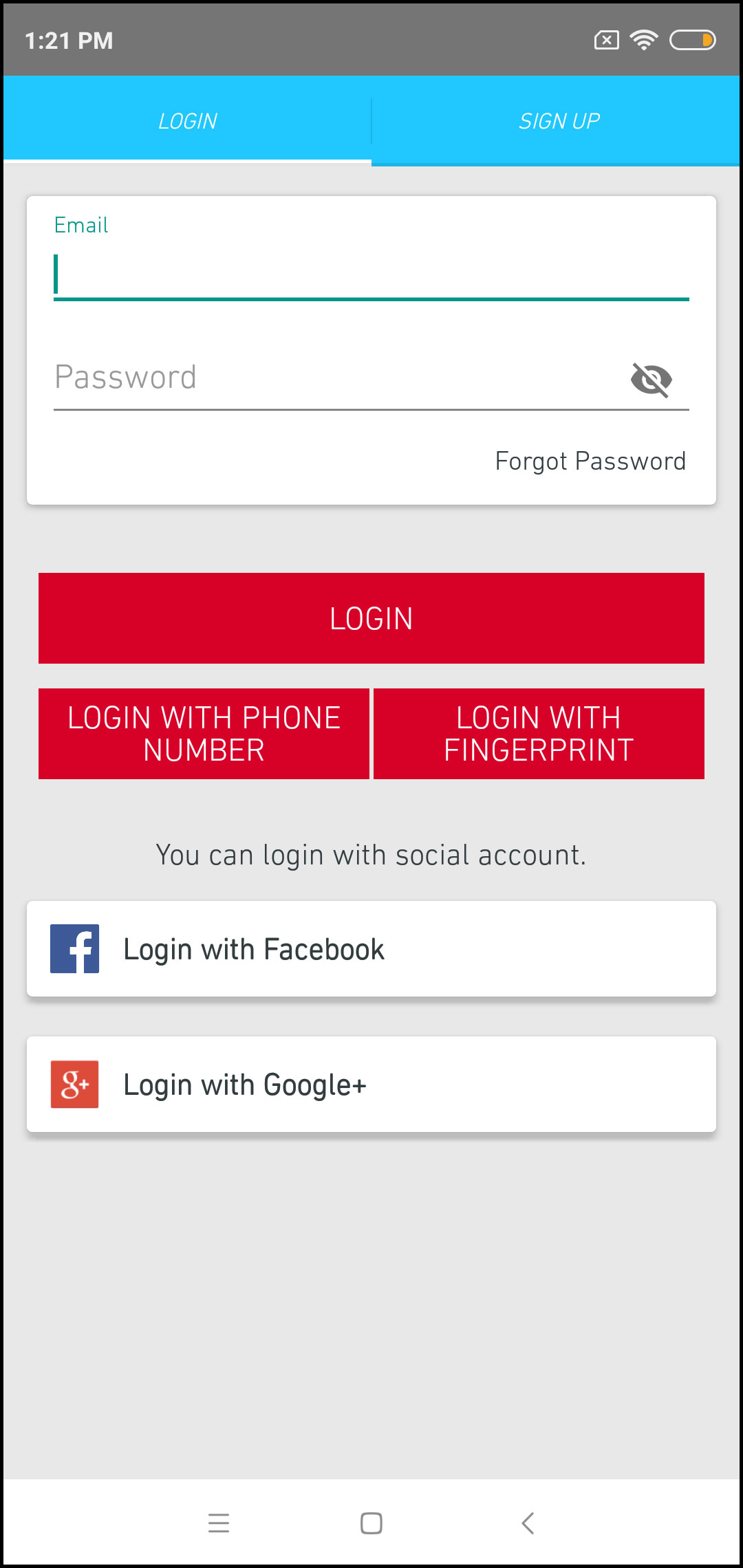
6.6-Anmeldebildschirm
Der PrestaShop Mobile App Creator bietet verschiedene Ein-Tipp-Anmeldemöglichkeiten und vereinfacht den Anmelde- / Registrierungsprozess:
1. Anmeldung
Die App-Benutzer können sich mit E-Mail-Anmeldeinformationen authentifizieren und auf Apps zugreifen.
2. Anmelden
Alle neuen App-Benutzer können sich über die mobile App anmelden und ihr Konto im Store erstellen. Im Anmeldeformular der PrestaShop Mobile App werden nur relevante Details abgefragt.
3. Einloggen mit Telefonnummer
Ihre mobile App bietet eine einfachere und zuverlässigere Anmeldeoption für Telefonnummern, mit der die Benutzer die OTP- und Anmelde-App leichter überprüfen können.
4. Loggen Sie sich mit Fingerabdruck ein
Ihre Benutzer haben auch die Möglichkeit, sich mit Fingerabdruck-Authentifizierung anzumelden. So können Benutzer in Sekundenschnelle auf Apps zugreifen.
5. Mit Facebook einloggen
Die Benutzer können sich mit ihren Facebook-Zugangsdaten bei der App anmelden.
6. Mit Google+ anmelden
Die Benutzer können sich mit ihren Google+ Konto-Anmeldeinformationen bei der App anmelden.
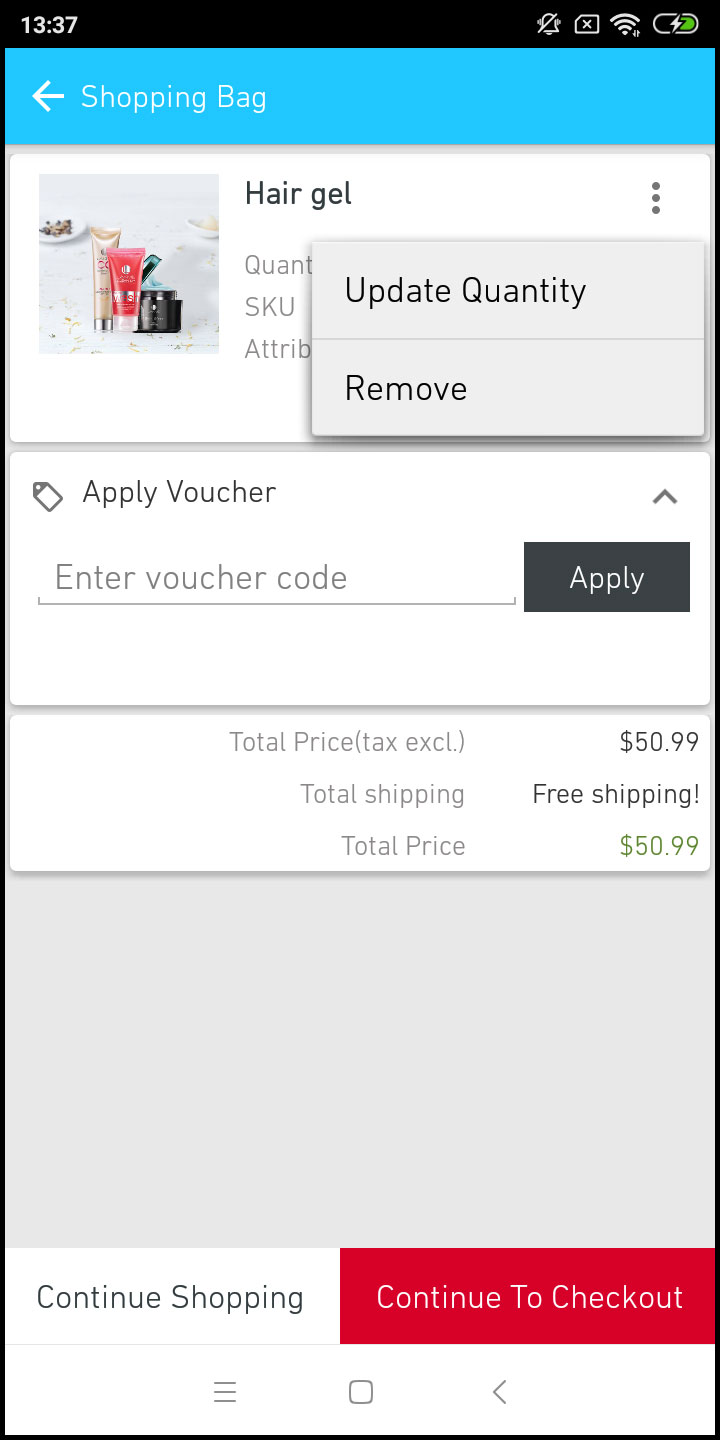
6.7-Warenkorb-Bildschirm:
Auf dem Warenkorb-Bildschirm Ihrer PrestaShop Mobile App werden alle Produkte angezeigt, die dem Warenkorb hinzugefügt wurden. Die App-Benutzer können den Produktnamen, die Menge, den Gesamtpreis und die Versandkosten anzeigen. Dieser Bildschirm bietet folgende Optionen:
1. Gutschein einlösen
Mit dieser Option können die Benutzer Rabatte und Angebote erhalten, indem sie einen gültigen Coupon und Gutschein eingeben, die auf Ihrer Website ausgeführt werden.
2. Gesamtproduktpreis
Die Benutzer können die vollständigen Kosten ihrer Einkaufstasche von hier aus einsehen. Es wird automatisch nach jeder Aktualisierung mit Produktmenge oder Ergänzung aktualisiert.
3. Produktmenge aktualisieren
Die App-Benutzer können sogar die Produktmenge mit der Option "Menge aktualisieren" aktualisieren.
4. Produkt entfernen
Die App-Benutzer können das Produkt einfach aus dem Warenkorb entfernen, indem sie einfach auf die Option "Entfernen" tippen.
5. Mit dem Einkaufen fortfahren
Die App-Benutzer können den Warenkorb verlassen, um weitere Produkte in Ihrer App zu durchsuchen. Die Käufer mobiler Apps werden beim Tippen auf die Option Einkauf fortsetzen zum Startbildschirm weitergeleitet.
6. Weiter zur Kasse
Die Benutzer der mobilen Front-End-App können mit der Option "Weiter zur Kasse" zu den Bildschirmen "Kasse & Zahlung" wechseln. Sie werden auf dem Checkout-Bildschirm umgeleitet.
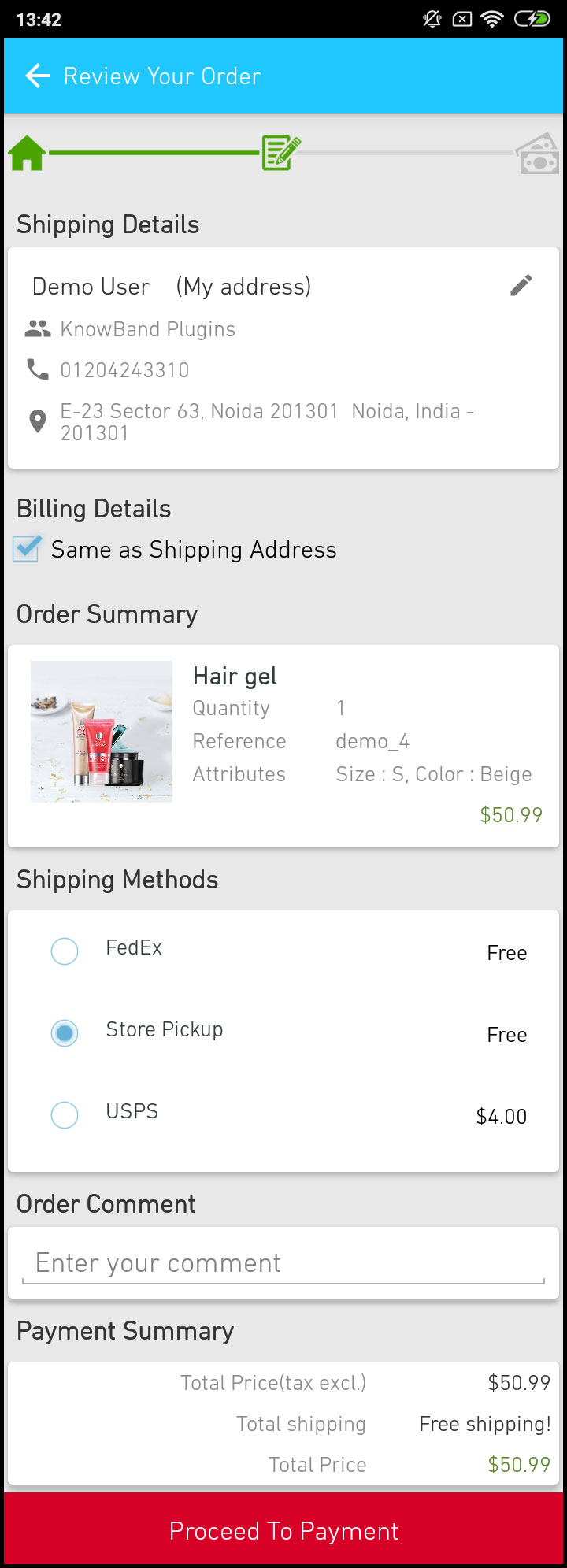
6.8 Checkout-Bildschirm
Die mobilen Apps mit PrestaShop Mobile App Maker verfügen über einen vereinfachten Einzelbildschirm-Checkout mit nur relevanten Informationen. Die Benutzer können vollständige Checkout-Details wie Versanddetails, Rechnungsdetails, Bestellzusammenfassung, Bestellkommentar und Zahlung anzeigen Zusammenfassung.
1. Lieferanschrift
Dieser Bildschirm enthält Details zu den vom Benutzer gespeicherten Lieferadressen. Bei Bedarf kann der Benutzer auch die neue Lieferadresse bearbeiten / speichern. Die Gesamtkosten Ihres Produkts werden gemäß der ausgewählten Versandmethode aktualisiert.
2. Rechnungsdetails
Mit dieser Option können die Benutzer Rechnungsdetails für ihren Einkauf eingeben. Sie können auch die Lieferadresse so wählen, dass sie mit der Rechnungsadresse übereinstimmt. Die gespeicherte Rechnungsadresse kann ebenfalls bearbeitet werden.
3. Bestellübersicht
Die App-Benutzer können die in diesem Abschnitt gekauften Produktdetails anzeigen, bevor sie den endgültigen Kauf tätigen.
4. Versandarten
Alle verfügbaren Versandmethoden werden in diesem Abschnitt des Checkout-Bildschirms angezeigt. Die Benutzer können hier den gewünschten auswählen.
5. Kommentar bestellen
Die App-Benutzer können auch Kommentare zu ihrer Bestellung hinzufügen, die auf der Bestellwebseite im Backend angezeigt werden.
6. Zahlungsübersicht
In diesem Abschnitt wird die vollständige Aufschlüsselung der gesamten Zahlungsdetails angezeigt.
7. Weiter zur Zahlung
Die App-Benutzer werden nach dem Tippen auf die Schaltfläche "Weiter zur Zahlung" zum Zahlungsbildschirm weitergeleitet.
6.9-Zahlungsbildschirm:
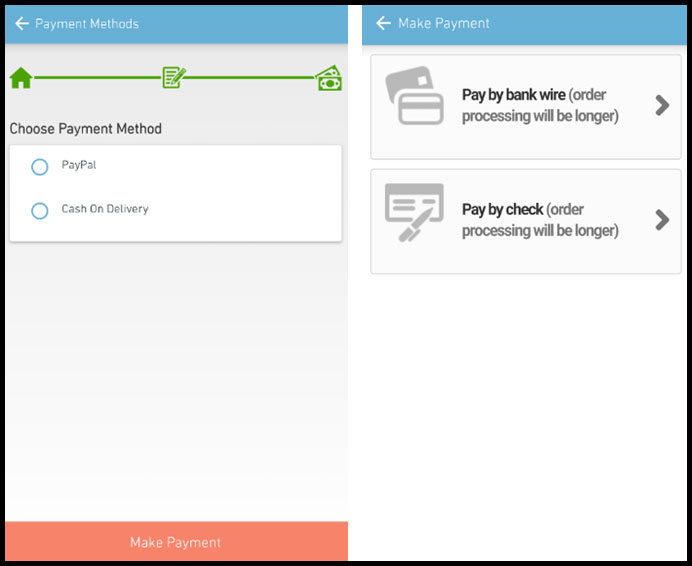
Der Zahlungsbildschirm in Ihrem PrestaShop Mobile App zeigt sowohl native Web-View- als auch App-Zahlungsmethoden an. Der PrestaShop Mobile App Maker unterstützt alle Arten von Website-Zahlungsoptionen in der App. PayPal- und Nachnahmezahlungsmethoden sind in den Android- und iOS-Apps verfügbar. Darüber hinaus können verschiedene andere native Zahlungsoptionen wie PayU, Apple Pay, Amazon Pay, Braintree, Stripe usw. auf Anfrage auch in die App integriert werden.
6.10 Mein Konto-Bildschirm
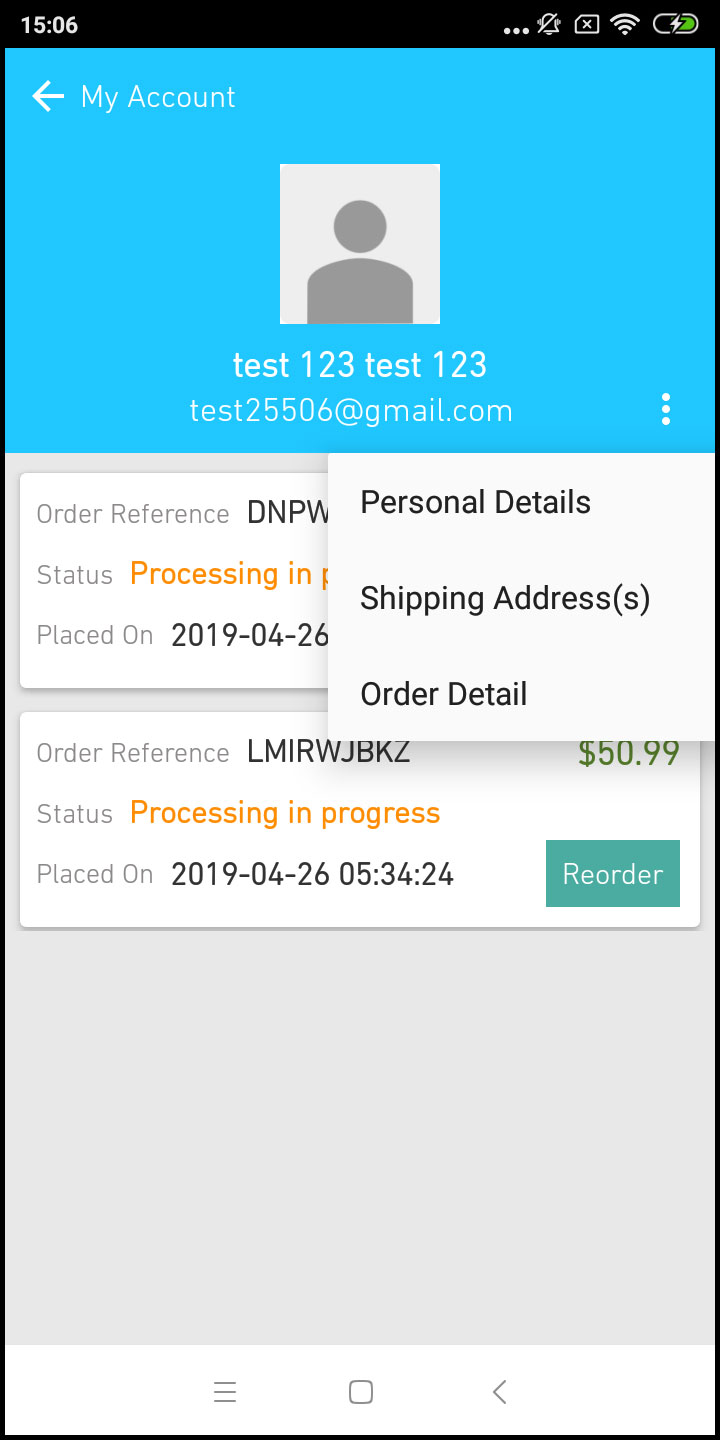
Auf dem Bildschirm Mein Konto der Android / iOS-E-Commerce-App können Benutzer die vollständigen Kontodetails einschließlich einer Liste früherer Bestellungen anzeigen. Mein Konto
1. Bestellverlauf
Die Benutzer erfahren, dass die vollständigen Bestelldaten früher eingegeben wurden. Das Datum der Bestellung, die Bestellnummer, der Preis und der Lieferstatus werden angezeigt.
2. Profil aktualisieren
Benutzer können auch ihre vorab gespeicherten Profildetails wie Vor- oder Nachname, Telefonnummer und Passwort aktualisieren.
3. Lieferadresse (n)
Die App-Benutzer können die vollständige Liste der gespeicherten Lieferadressen anzeigen. Hier kann auch eine neue Lieferadresse hinzugefügt werden.
4. Bestelldetails
Die App-Benutzer können die vollständige Liste der zuvor aufgegebenen App-Bestellungen anzeigen.
5. Nachbestellungsfunktion
Sie können ein Produkt direkt nachbestellen, indem Sie auf die Schaltfläche "Nachbestellen" klicken. Die gesamte vorherige Bestellung wird mit nur einem Knopfdruck in den Warenkorb gelegt.
6.11-Auftragsdetailbildschirm
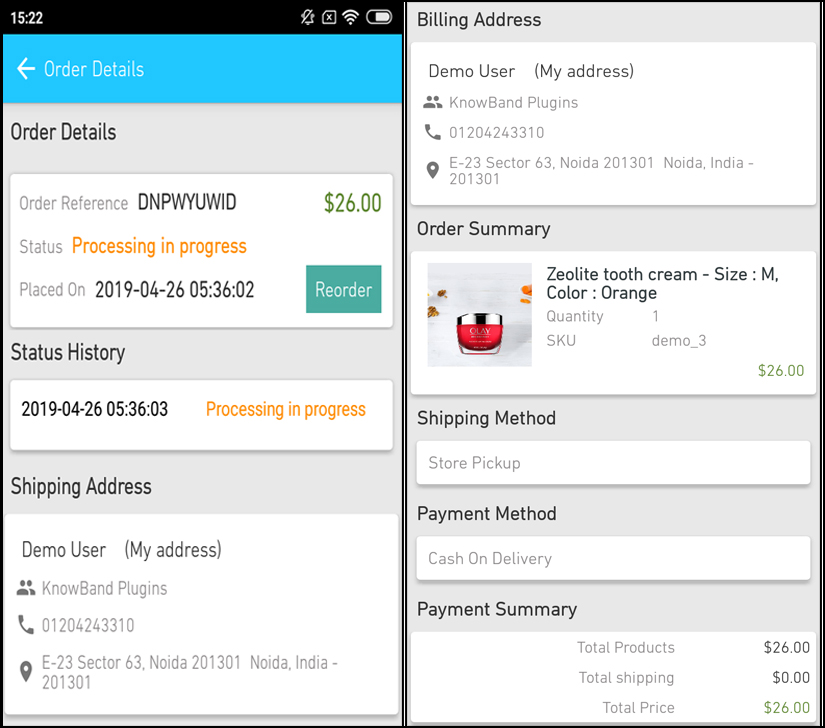
Der Bestelldetails-Bildschirm der PrestaShop eCommerce App bietet vollständige Bestelldetails wie Versandadresse, Produktübersicht, Versand- und Zahlungsmethode sowie Gesamtkostenübersicht. Die Benutzer können sogar die Zustellung zuvor aufgegebener Bestellungen direkt von diesem Bildschirm aus verfolgen.