Success Formula for Etsy Sellers in 2022: A Beginner’s Guide

Etsy is one of the most well-known online marketplaces globally. It distinguishes itself from other eCommerce marketplaces by specializing in providing exclusively handmade, artisanal, antique, and custom-made goods.

Etsy has become a top marketplace for arts and collectibles because of its capacity to unite these small-business vendors selling unusual and distinctive things. Customers commonly turn to Etsy for inspiration when choosing unique gifts, and many come there specifically to look for items that aren’t offered on other online marketplaces.

Etsy is one of the leading online marketplaces in the globe in 2021 among other e-commerce sites that specialize in antique or handmade goods. Handmade, vintage, and craft items should be your top objectives for selling and stocking up on supplies.

Etsy distinguishes out from other marketplaces because of its extensive selection of products like fashion, photography, health & beauty items, gourmet goods,  art, wedding essentials, jewelry, and many more, Additionally, Open Source platforms like PrestaShop, Magento 2, OpenCart and WooCommerce are all compatible with Etsy.

Vendors are ready to connect their online stores created on these platforms with an Etsy store as a result. You will understand how to successfully sell on Etsy in 2022 by the time you finish reading this article.

Recommended Read: How to Sell on Etsy Marketplace?

Selling on Etsy: A Seller’s Guide to Best Practices
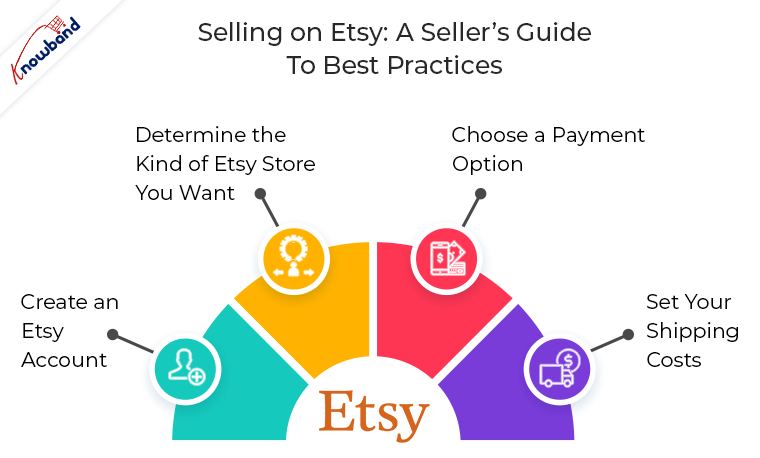
This guide is a starting point for those sellers who want to sell on Etsy or who are currently Etsy Sellers. It seeks to address all the common questions to streamline the selling process and boost profitability. It’s simple to sign up to sell on Etsy. You must follow three simple steps to sell your goods on Etsy:

1. Create an Etsy Account

Setting up your Etsy account is the first step in the selling process on the website. By going to the Etsy homepage, selecting Sell on Etsy, and then selecting Open Your Etsy Shop, you can accomplish this. You will receive instructions on how to set up your store’s settings, including the language, currency, and location.

2. Determine the Kind of Etsy Store You Want

After registering, you must customize your shop’s preferences and settings to decide how it will appear on the website and function. First, provide the name, language, and location (country or region) of your shop.

Recommended Read: Automate Product Listing and Manage Orders on Etsy Marketplace with ease

3. Choose a Payment Option

You must select the payment option you wish to use after creating your Etsy store and provide Etsy with your billing information so they can recognize you and approve your purchase.

You can offer your customers the choice to make purchases from you and pay using PayPal or Etsy Payments. Etsy Payments, which is user-friendly and provides a range of payment alternatives, is the payment method that Etsy sellers use the most frequently.

4. Set your Shipping Costs

Setting fair delivery costs is also crucial when signing up as a business on Etsy. Consider topics like if you’ll be selling your products only domestically or also internationally to clients in different countries. If so, be sure to account for varied shipping charges, including duty and shipment processing time.

Which Etsy Products Receive the Most Searches and Purchases?

Etsy is a global marketplace where makers from all over the world come together to create, sell, and buy one-of-a-kind goods. You must be unsure of what to sell on Etsy specifically. The following are the principal top categories on Etsy for sellers:

Items that are handmade, vintage (at least 20 years old), and supplies for crafts

According to Etsy’s 2019 study, 87 percent of Etsy sellers are women, which leads us to the realization that customized, handmade items like stickers, bespoke jewelry, crafts, and supplies are the most popular.

How much does Etsy Sellers charge?
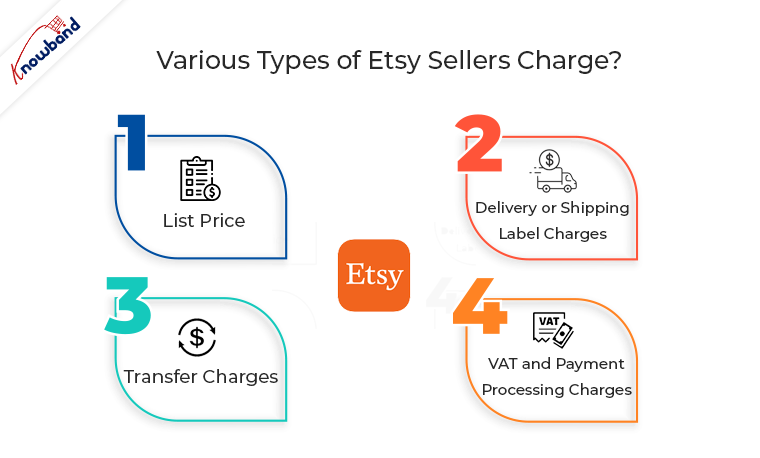
When you sell on Etsy, various types of fees are imposed. These are listed below:

  • List price
  • Delivery or Shipping Label Charges
  • Transfer Charges
  • VAT and Payment Processing Charges

Recommended Read: 5 Simple Steps to activate/deactivate listing in Etsy Marketplace

Requirements for selling on Etsy (Permits and Licenses):
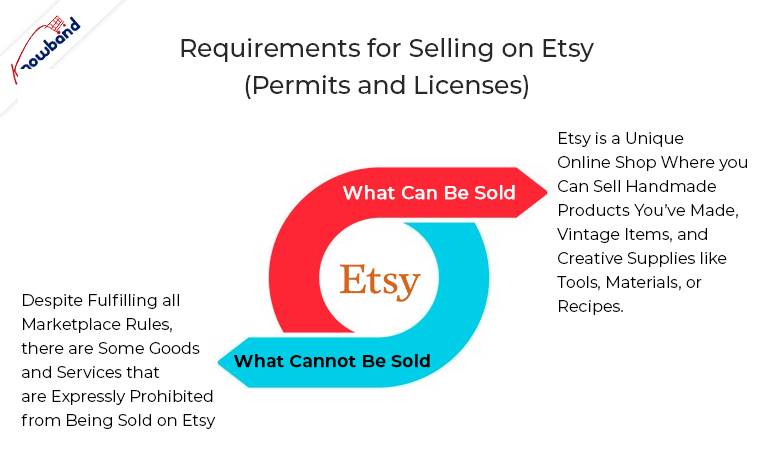
The basic goal of Etsy as a marketplace is to offer a space where users can finally have wonderful encounters. It makes an effort to give customers something only available to them today. There are numerous categories listed for what an Etsy seller may and may not sell.

A) What Can Be Sold: Etsy is a unique online shop where you can sell handmade products you’ve made, vintage items, and creative supplies like tools, materials, or recipes.
B) What Cannot Be Sold: Despite fulfilling all marketplace rules, there are some goods and services that are expressly prohibited from being sold on Etsy.

Strategies to Boost Sales of Your Etsy Postings

Using the aforementioned advice, get your Esty shop up and operating so that you may start making sales. You will undoubtedly generate some sales naturally, so you won’t need to do much more than, as already indicated, optimize your listing. Here are some extra strategies you may use to assist your sales to go from good to great if you’re trying to expand your company and your store’s sales potential.

Use Social Media to Market your Listings

Social media may be a very successful tool for marketing a business. Displaying social media posts from satisfied customers might help you build credibility with new customers. If you sell jewelry on Etsy, for example, uploading an Instagram snapshot of a happy client wearing one of your pieces may be compelling proof that your products are lovely and of a high caliber. Instagram and Pinterest are your best options when it comes to social media because they both have a strong visual component and practical search and discovery tools.

Enhance your Listing with Expert Photos

Without a question, expert photography may significantly alter how consumers view your products. Due to proper placement of the lighting, background, and camera angles, the same product photographed by a professional might appear considerably higher-quality. Even though utilizing a smartphone to take nice DIY photographs is doable, investing in professional product photography will always help your listings.

Recommended Read:  How to Add or Update Shipping Profile in Etsy Marketplace?

Optimize your Pricing

Make sure your Etsy listing’s pricing is competitive with those of your competitors while still leaving room for a fair profit margin. As a result, it’s crucial to keep an eye on market changes and trends.

An item you sell, for instance, can unforeseen become the most sought-after gift throughout the Christmas season. In this case, you should unquestionably increase prices to keep up with consumer demand, but not to the point where you turn away customers in favor of a competitor. Similar to this, if the market demand for a product you’re selling starts to diminish, you’ll need to change your prices.

Identify the Etsy Algorithm

An important advantage is the vast number of prospective customers who use Etsy. You have the opportunity to communicate with a sizable audience of potential buyers as a seller! You must still be careful how you offer yourself to the right clients, though.

Here, keyword optimization and mastery of SEO, particularly as it relates to the search engine on Etsy, are essential. Use the search terms that Etsy users who represent your ideal customers are using. 
In the End:

Etsy is the ideal place for you to think about listing your goods if you’re a small business or a solopreneur with a unique, homemade, or eccentric product. You can potentially integrate with other platforms and reach a huge, highly targeted audience without having to invest a lot of money. It’s easy to register, and as a vendor, you’ll join a dynamic and unique eCommerce marketplace.

Knowband offers Etsy API Connector plugins for various platforms like PrestaShop, OpenCart, Magento 2, and WooCommerce. The Etsy Integration module by KnowBand, which is also providing three months of free service. Choose the appropriate Etsy integration module for your store from the list below: Shopify, Opencart, Prestashop, Magento, and Prestashop. The main advantage of the Etsy Integration is that it lessens the manual labor involved in listing products using a CSV file and enables the store administrator to quickly and easily upload a large number of items to the Etsy marketplace.

What you must know to sell on Amazon and increase your sales

Ecommerce has been responsible for about half of all retail growth since 2016, and it is expected to keep growing through at least 2023. The fact that over half of all eCommerce sales occur on Amazon each year is perhaps the most crucial statistic for a company to be aware of.

Amazon accounted for 49.1% of all e-commerce sales in 2018, which is more than the following nine top e-commerce channels put together.

Also read: Amazon became the second company to hit the Trillion Dollar mark

Therefore, finding ways to boost sales on Amazon should be a top priority for retailers going forward. The following article offers some straightforward suggestions to help you accomplish this and create an Amazon sales plan that will increase your profits.

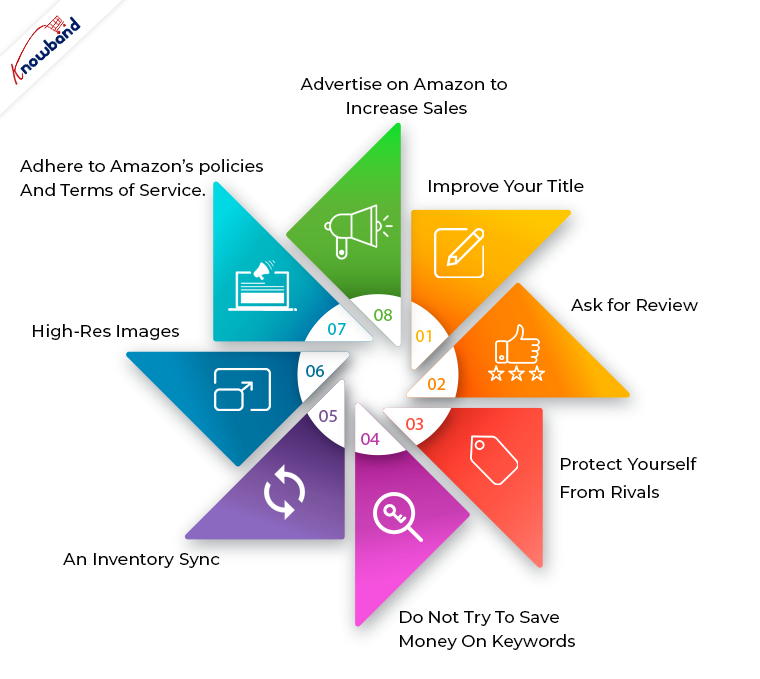
Improve Your Title

Make the most of your titles because they are one of the best methods to capture a buyer’s attention. You should be fine if you apply the usual formula of brand name + product name + attributes (such as color, size, gender, usage, etc.).

Not only will you be able to capitalize on high-ranking keywords, but you’ll also be able to promptly inform customers what your product is.

Ask for Review

Even though getting reviews can be challenging, it’s important to never give up. 

For example, I recently considered upgrading my worn-out backpack, and the choice ultimately came down to two. Both were almost comparable in terms of price and functionality, but I ultimately decided based on reviews.

Protect Yourself from Rivals

SKUs are a requirement for selling on Amazon, although they are not always necessary for your campaigns. SKUs might operate as a flag for competitors to take note and undercut you when you’re creating custom labels for tiering products.

Do not try to save money on keywords

Staying on top of the trends can help you boost sales on Amazon as the search terms that consumers use are constantly changing. Using tools like SEMRush, Ahrefs, CamelCamelCamel, or whatever else you prefer, there are many ways to improve your SEO.

Every product should be optimized with dozens, if not hundreds, of relevant keywords! By doing this, you have the best chance of customers finding your products and increasing your Amazon sales.

High-Res Images

Using high-quality photos is one of the quickest ways to catch a buyer’s attention. The best part is that you don’t even need to be an expert or invest a lot of time in it. You can enter the look-at-me level of photography by simply adhering to a few simple rules:

  • Use as much natural light when photographing as you can. When shooting near the window, the light is softer and the shadows are darker; when shooting farther away, the light is more even and the shadows are lighter but sharper.
  • Avoid using the flash and leave the white balance on auto.
  • Even if you’re using a smartphone to take the photo, mount your camera on a tripod to prevent camera shake.
  • Use a backdrop that is white or light-neutral. 
  • Take several pictures of the item.
  • Put your product in real-world scenarios so that customers can see how to use it.

Adhere to Amazon’s policies and terms of service

Breaking Amazon’s rules is one of the quickest ways to reduce product sales. You can’t sell if you’re shut down or suspended, right? You’re giving yourself the best chance of success by taking the opposite course.

Knowing what Amazon demands of sellers allow you to set up your listings in a way that meets their high standards, which increases buyer confidence and your chances of making more sales.

Advertise on Amazon to increase sales

It’s almost certain that running ads will increase your sales on Amazon, but it’s simple to just spend money on them and hope for the best. You’re capable of more! Pay close attention to your advertising cost of sales (ACOS) metric, which represents the amount of advertising spend required to generate a sale.

You can reduce your ACOS and make sure you get the most out of your advertising budget by using it more effectively. You can develop a strategy for how you run your ads as you gain experience and learn what works. An insight-driven strategy for Amazon advertising leads to a more lucrative Amazon business!

An Inventory Sync

It is much simpler to sell on all of the marketplaces if your inventory is synced across all of the major platforms where you sell. It will be simple for you to keep track of your inventory, maintain a consistent tone in your descriptions, and seamlessly update changes. Additionally, you’ll be able to save a tonne of time by not having to repeat yourself, time that you can use to implement the other suggestions on this list.

We at Knowband provide such modules to sync your eCommerce store’s inventory and orders with popular marketplaces like eBay, Etsy, Google Shopping, and Walmart. These modules are available for all major CMS platforms like Prestashop, Opencart, Magento and Magento 2. Know more here:


7 Amazing Tips and Tricks to Boost Alibaba Sales in 2022

Alibaba is the largest B2B firm in the world. If you have chosen to target a global audience, chances are high that you will be selling on the Alibaba platform. Alibaba is the largest directory that links suppliers with international business people. Suppliers and manufacturers that offer their own-brand products, as well as wholesalers who buy manufactured goods in large quantities, are the most common sellers on Alibaba.com.

Before you jump into Tips and Tricks to Boost Sales, let’s first get familiar with some of the perks of selling on the Alibaba Store.

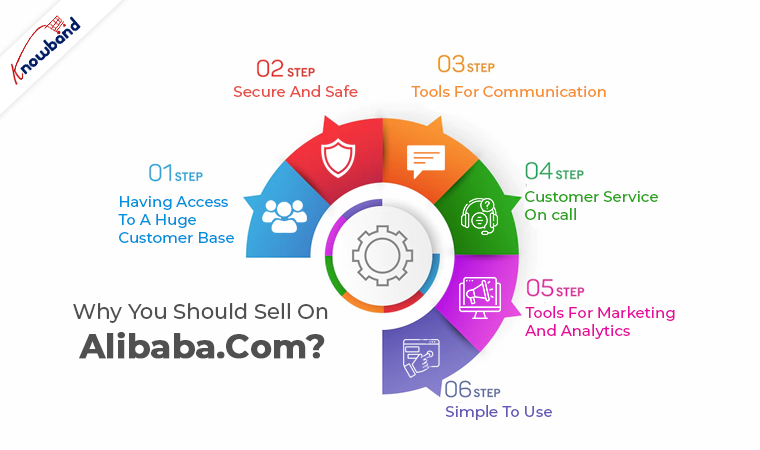
Why you should sell on Alibaba.com?

Having Access to a Huge Customer Base

You should be aware that using Alibaba.com will give you access to a sizable customer base. Millions of people use Alibaba.com, so you can reach a worldwide audience there. You have the advantage of generating a lot of sales and profit with a worldwide audience base. It’s like having all of your customers together without having to move an inch.

Secure and Safe

The fear of being scammed is one of the reasons why many people are hesitant to sell anything online. Fortunately, Alibaba.com is a trusted website that facilitates quick and simple purchases. There are several ways to pay on this platform, including credit cards, debit cards, and wire transfers. Trade Assurance, an order protection service that guarantees your product is of the greatest quality and your payment is secure, is another payment feature. This indicates that this platform will safeguard you against scammers, so you don’t have to worry about it.

Recommended Read:  Why you should sell on an eCommerce Marketplace?

Tools for Communication

A messaging feature included in the Alibaba.com app makes it simple to communicate with buyers and sellers. Buyers and sellers can now interact and communicate without problems. You can conduct business with Alibaba.com without integrating with any third parties.

Customer Service on Call

The expert services that are always available at Alibaba.com to assist customers at every turn are yet another fantastic feature. On this platform, experts and professionals can help you make the most of your time on Alibaba.com.

Tools for Marketing and Analytics

Alibaba.com provides users with a variety of marketing tools to help them strengthen their efforts and increase revenue. As a vendor, you may raise your profile, gain customer information, and perform inexpensive targeted advertising.

Simple to Use

The user interface of Alibaba.com is excellent, making it simple for vendors and customers to move throughout the site. Every action on Alibaba.com is simple, whether you wish to post your products or place an order.

Recommended Read: 8 tips to drive more customers on a Marketplace

Let’s Get into Tips and Tricks to Boost Sales in 2022

To begin your online business, you must create an account on Alibaba.com. Alibaba offers several packages based on where you are. Visit Alibaba.com and select “Seller” as your role to create an account. You should go above and beyond if you want your Alibaba eCommerce campaign to be truly effective. Here are a few strategies to increase your Alibaba sales!

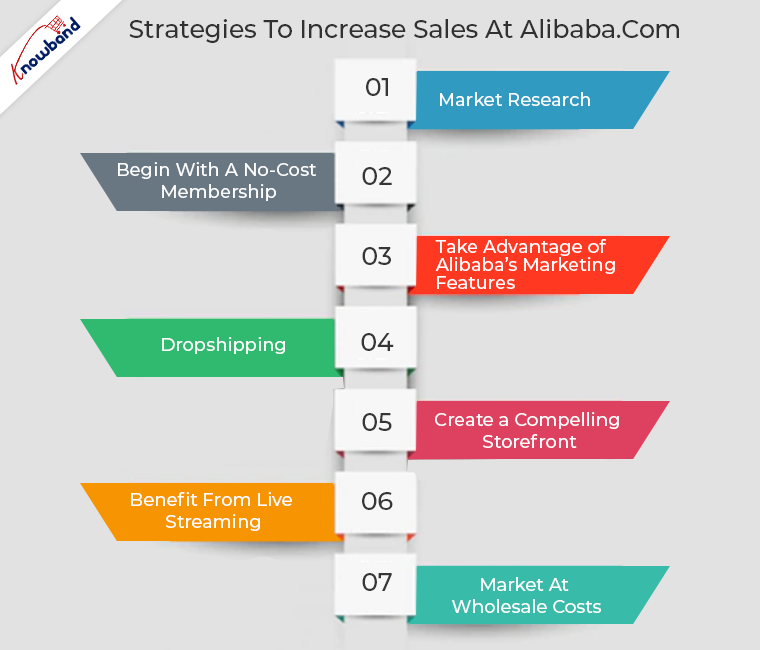
1. Market Research

When you open an Alibaba account, one of the first things you should do is look into the state of the market.  What are people looking for exactly? Would you stand to gain the most by selling? What price range do consumers seem to be prepared to accept?

Your grasp of how to put up your store, including what products to list, how much they should cost, and who you should target with your marketing, will be improved as a result of your research.

2. Begin with a No-Cost Membership

A free membership will be another useful piece of advice for selling on Alibaba if you have just started your account. You may have big ideas for Alibaba and want to sell far more than the 50 products that the free account allows. You shouldn’t, however, put yourself in a dangerous position initially.

Do not immediately sign up for a Premium Gold membership after creating your account. Upgrades to your account are always available later! But initially, it’s best to be more cautious until you completely understand how the platform operates and whether you can successfully market it.

It is advised to spend money on becoming a verified or gold supplier once you are comfortable with the business. Why?

Being a verified supplier demonstrates your dependability and reliability to potential customers. Because of this, people are more inclined to buy from you than from a seller who lacks a verification badge.

3. Take Advantage of Alibaba’s Marketing Features

There is one thing you must always do if you want to sell anything: market it. Nobody will purchase your goods unless you first inform them of their existence and persuade them to do so. Fortunately, Alibaba provides several tools to assist you in marketing your products, so it would be wise to make the most of them.

Recommended Read: Benefits of Selling on Multi-Vendor Marketplace

4. Dropshipping

Dropshipping is a successful online business concept on Alibaba.com. With this company strategy, you can generate income without making big investments. Without stock management, online product listings are used. Instead, you make purchases from a third party to carry out customer orders.

5. Create a Compelling Storefront

You must create a store where customers may browse your products and profile. Setting up a captivating storefront on Alibaba.com is a terrific approach to generating sales there. Make sure to update your business profile, post a lot of products, and use high-quality images. If people find your online store intriguing, they are more likely to purchase from you.

6. Benefit from Live Streaming

Live streaming is one form of digital media that enables you to engage with and reach a larger audience. A live streaming function on Alibaba.com allows vendors to show off their goods in real-time. You can put your products on display, demonstrate how they function and respond to questions from potential buyers.

7. Market at Wholesale Costs

People shop on Alibaba.com because they can find a broad range of things to buy and because the prices are competitive. Sellers should deal in wholesale products and make sure that their prices are reasonable and competitive. When purchasing the goods they require, consumers constantly search for the best deal.

Recommended Read: Why Marketplace is in trend?

In the End:

Are you a manufacturer or a retailer with goods to sell? Using Alibaba.com to find millions of shops and customers is a terrific method to increase your company’s revenue. Open a seller account on Alibaba.com, list your products, and begin fulfilling orders to start earning money there.

Knowband an eCommerce plugin development offers various multi-seller marketplace modules to transform your Online shop into Amazon, or Etsy-like Marketplace. Also, the Knowband store provides marketplace connector modules to lessen the burden of online sellers catering for customers at both marketplace and online shops. In addition to the marketplace modules, Knowband offers a list top selling modules to its customers. Some of the Bestselling modules are One Page Checkout, Mobile App Builder, Abandonded Cart, Spin and Win Module and the list goes on. To know about these modules or have any queries related to eCommerce modules, feel free to get in touch with us at support@Knowband.com

Popular Prestashop modules that need to be on your wishlist

If you run a Prestashop shop, you are aware of how fortunate you were to pick this platform. Prestashop is a well-liked option, so picking it as the foundation for your website was a sensible move on your part. Prestashop is an open-source platform with its own themes and plugins that are utilized by more than 700,000 companies worldwide.

Have you installed any of Knowband’s popular Prestashop modules? Knowband has the Gold Agency designation and is a Premium Partner agency. Additionally, based on its experience, customer service, and favorable reviews, it has been given the Superhero seller ranking by the Prestashop Addons Store ranking system. So the next step to success is having the popular Prestashop modules.

Popular Prestashop modules by Knowband


  • Prestashop Multi-Vendor Marketplace Addon

You can convert your business into a marketplace. How? With the Prestashop Multi-Vendor Marketplace addon. By allowing vendors to sell on your platform, it helps you increase sales and income. Additionally, the module helps you increase your consumer base and give them much-needed diversity. You will have the power because you are the admin.

You can approve or reject vendor requests, follow their transaction, establish the commission rate, and do a lot more. So, if you intend to take your organization toward success, you need this.


  • Prestashop Etsy Integrator Addon

Another strategy for growing your eCommerce business is to use the Prestashop Etsy Marketplace Integration Addon. If your business isn’t yet ready to become a marketplace, pick one and begin selling there instead. You may actually sell on the platform from your store using the Etsy Prestashop Connector. You may manage all your product listings and sales reports from the Prestashop module’s back end. Well, there’s so much more to the plugin by Knowband than this brief description. Furthermore, you can upload the products in bulk. Moreover, handle the pricing, alter the images, and do so much more using the module.


  • Prestashop Abandoned Cart Addon

The primary goal of the Prestashop Abandoned Cart module is to recover lost revenue. The Prestashop Email Follow up module delivers email notifications to consumers who left the website with items in their cart to make things easier for you. As a result, it prompts them to return and complete their transaction. The administrator has the option of sending emails with or without discount coupons to do that. Additionally, the module aids the administrator in notifying them via popups and push notifications. Well, with the email notifications, the admin can also send popup notifications while the user is in the store. In addition, send web browser alerts as well. The reminder emails are customizable as well. Thus, there’s a lot to this popular option that helps reduce cart

  • Prestashop One Page Supercheckout Addon

Prestashop One Page Supercheckout and multi-page checkouts have long been at odds with one another. However, the Prestashop One Page Supercheckout is essential if you want to take advantage of one-page checkout. The Prestashop One Page Checkout enables you to design a simple, easy-to-use checkout page for your consumers. The addon lowers your store’s exit and abandoned cart rates. In fact, the stunning module allows the admin to customize the custom fields, choose the layout from the three options available, and do more. Moreover, he can create customer profiles for easy filling of the checkout page.

P.S. the One Step Checkout Prestashop Module by Knowband has been sold more than 10000 times.


  • Prestashop eBay Integration Addon

One solution that makes selling on eBay easier is the Prestashop eBay Integration Addon by Knowband. In fact, it aids the seller in seamlessly integrating his shop with the marketplace. The Prestashop eBay Integration Module also makes it simple for the seller to control anything on the site. We are certain that the Prestashop eBay Marketplace Integration Module is a good choice for your result.


  • Prestashop Google Shopping Feed Integration

The Prestashop Google Shopping Integration by Knowband is a stylish and useful tool. The store administrator may also list and showcase their products on campaigns offered by Google. In reality, the Prestashop Google Shopping Integration Addon is your greatest option when considering what might make things easier for you. Additionally, you may use the platform to display your goods. Additionally, draw a wide range of fresh, prospective consumers to your online shop. A straightforward tool is the Prestashop Google Shopping Integration Module. Additionally, to quickly identify your website and products. Store owners may link their item feeds to Google Shopping by using the Prestashop Google Shopping Integrator.


  • Prestashop Spin and Win Addon

There is no better email subscription pop-up module compared to Knowband’s Prestashop Spin and Win Module. So, in this blog post, we’ll discuss the many features of the Prestashop Interactive pop-up add-on. Additionally, the Prestashop subscription pop up addon is what makes customers spend more time in your business. You may use the Email Subscription pop up plugin to increase the mobility and functionality of your website. A quick method for getting website visitors to enter their email addresses is the Spin Wheel. Customers’ account information that they enter in the email subscription pop-up contains links to several accounts.

In the End

So, which of these popular Prestashop modules would you like to invest in first? In fact, which of these popular Prestashop modules are already on your wishlist? Knowband offers 3 months of free customer support with every plugin. If you have any questions about any of these modules, let us know at support@knowband.com.

Is the Prestashop Gift Card Manager integral for your store? Know more!

Prestashop gift card manager from Knowband is an essential tool for eCommerce marketers. In actuality, it is a highly helpful plugin for your business. With the Prestashop gift card, you can quickly add a section for gift certificates to your Prestashop store. Additionally, the Prestashop send gift card addon enables you to easily construct as many gift vouchers as you like. Customers may easily find the event for which they need a gift card as a consequence. You should also place an order for the same. Moreover, sales and revenue from your eCommerce firm will increase as a consequence.

We’ll look at some of the factors in this post to help you comprehend why the Prestashop gift module is essential for your store. Additionally, you may choose whether or not you want to install the addon.

How important is the Prestashop gift card manager by Knowband?

  • The simplicity with which gift cards may be bought and sold

The initial aspect of the Prestashop gift voucher module must be its ease of usage. You might also say that selling vouchers are simple thanks to the Prestashop module. From installing the Prestashop gift card module to enabling customers to buy gift cards, the entire process is easy. Furthermore, the module makes it simple to set the parameters. In fact, make any modifications you believe are required for the growth of your shop. Make as many gift cards as you’d like, place the portion where it will be seen the most, and so on.     

  • Partial use of the gift card

Without a doubt, this new enhancement changes the game. Additionally, customers may no longer use all of their gift cards. In actuality, they can use the same card for two different purchases. Additionally, the administrator has control over the voucher’s quantity and duration. It’s easy and simple to track orders.

  • Cron capability

Due to the possibility of mailing the gift card on the day of the event, customers will find it enticing. The Prestashop store manager can schedule the email distribution using Cron.

  • Compatibility with several stores and a variety of languages

The Prestashop gift card manager is multilingual. The administrator has the option of selecting a language for the email and communication layouts. In terms of eCommerce, it closes the communication gap that occurs between nations. The module supports several stores.

  • Order tracking with Gift Cards

If you can’t monitor a module’s performance, what good is it having one? As a consequence, the administrator may evaluate and monitor orders using the Knowband Prestashop gift card. He has access to the backend of the plugin to achieve that.

Now, let us take a look at the options that you can make to be the best options for marketing gift vouchers.

How can we better market the gift cards?

  • Boost the prominence of gift cards

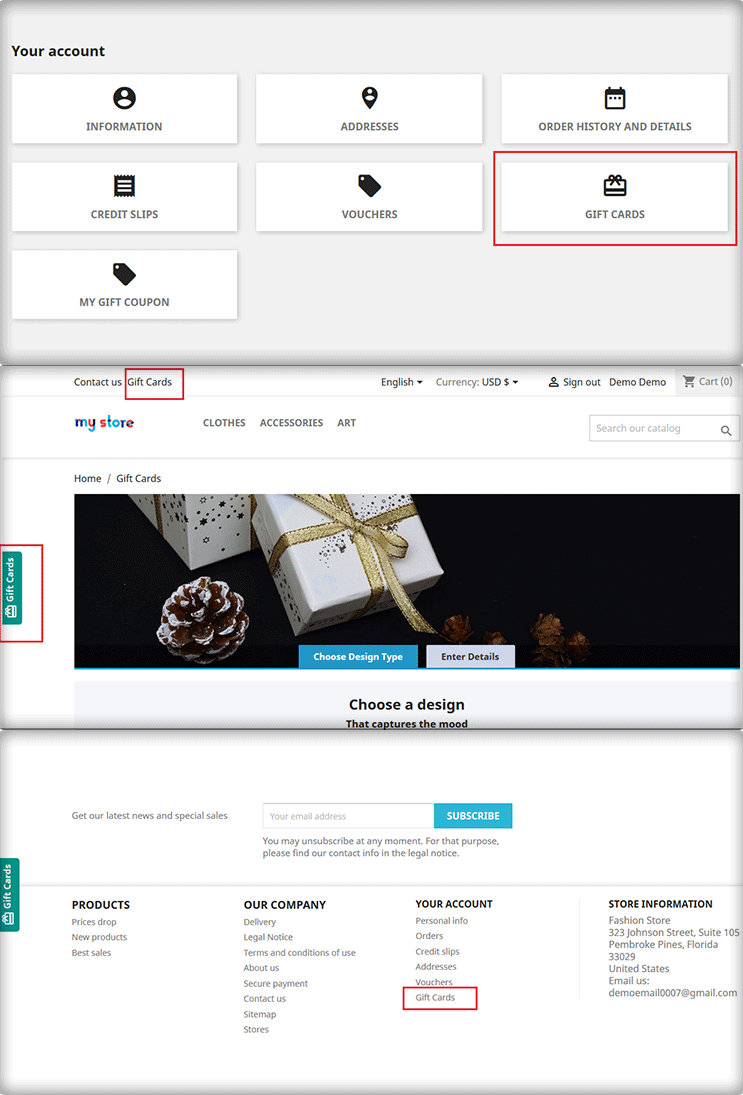
Do your clients have quick access to gift cards from the home page? Do gift cards fall under the navigation tree? Are you familiar with the gift card choices that are accessible to you as a consumer? Make sure to conspicuously display e-cards on your site and spread this data to your visitors via a variety of marketing methods. You should also give the customer a variety of design choices.

You can easily position the gift card choice where you think it will be seen the most by using the Prestashop gift card Addon by Knowband.

  • They are accessible on several devices

Make sure all of your customers are aware of gift cards if you’re just starting to use them. Additionally, they choose regardless of the communication or purchase channel. If you’ve been using this marketing mix for a while, you might want to think about creating channel-specific, one-of-a-kind promos. Making gift cards for certain marketing channels wouldn’t harm. For instance, social media, Google ads, and newsletters.

You may position the Prestashop gift module on your front end to make it more noticeable. Additionally, blog about them, mention them on your social media accounts and do more.

  • Digital cards with a festive theme can be made

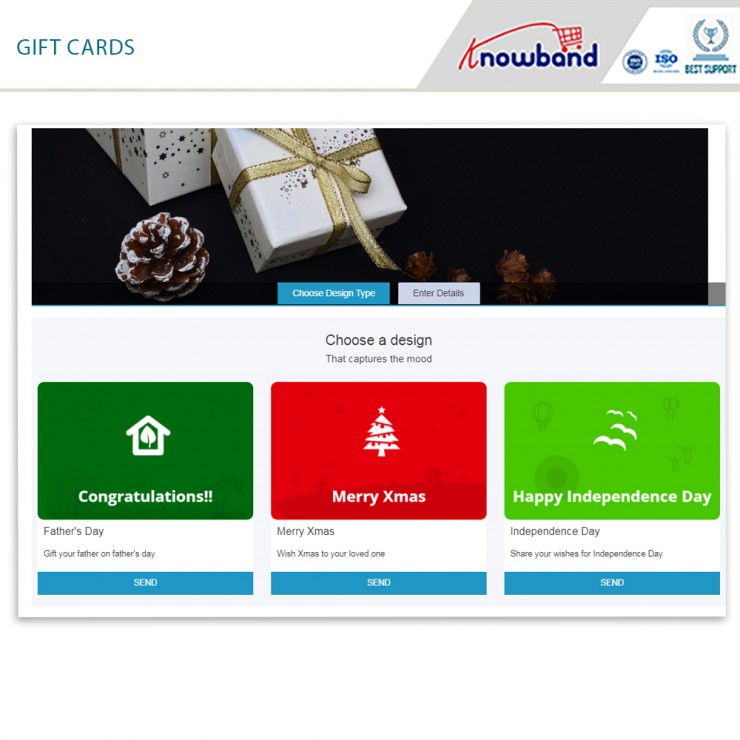
Gift cards tend to sell like hotcakes over the holidays. Simply have the appropriate gift cards on hand for the appropriate times. In fact, you might market it as a limited supply of gift cards. Customers like receiving personalized service and providing accessibility to one-of-a-kind deals and promotions. The use of gift cards for promotional events is brilliant. In fact, make yourself noticeable and draw the audience’s attention.

  • Partner with other businesses

When and where do customers use your services the most commonly? Think about partnering with a non-competitive business and trading gift cards. Along with being a fantastic method to sell your goods or services, it’s also a successful approach to get new customers to come out and raise interest in your gift cards.

In the End

So, here we are!! The Prestashop gift card manager by Knowband is a stunning way to bring more customers to your store. Moreover, increase the sale and revenues of your store. What do you think? Do you wish to have a gift card section on your website? You can connect with us at support@knowband.com with all your questions.


Everything you need to know about Prestashop Abandoned Cart Addon is here

A re-marketing strategy called the Prestashop Abandoned cart addon aids eCommerce site owners in recouping and regaining lost purchases. It directs toward customers who abandon their shopping carts before making a buy. Typically, buyers add the perfect items to their shopping carts and then look for a better value or product at a different retailer. Low site revenues and cart abandonment result from this. The Prestashop Abandoned cart module sends clients reminder prompts about the items still in their cart to handle this problem.

In this blog, we will take a look at the stunning features and benefits of the Prestashop plugin by Knowband. Are you ready? Let us go ahead and check them out now.

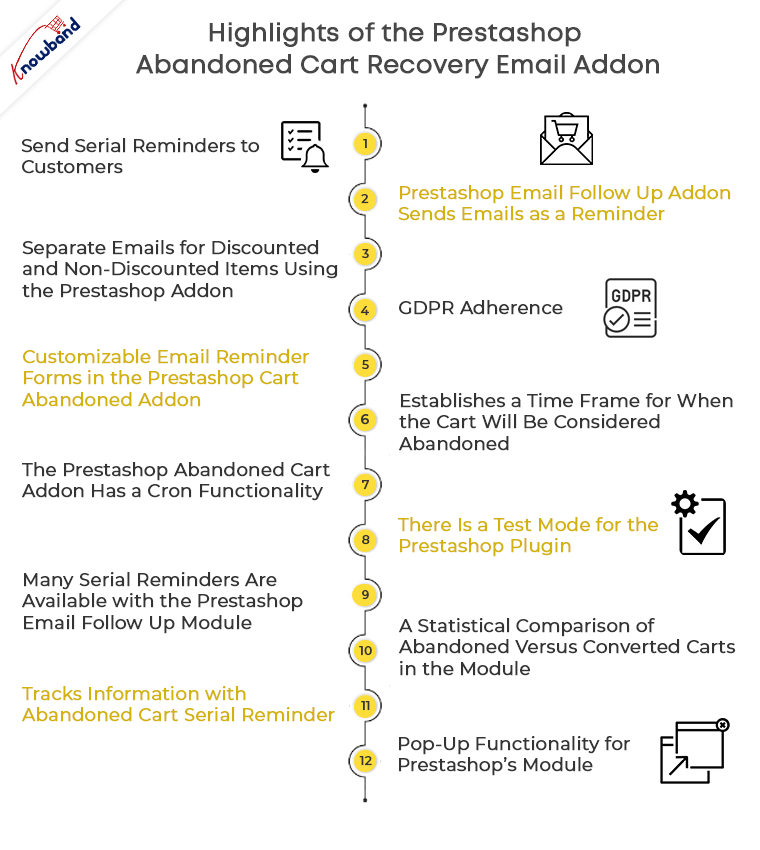
Highlights of the Prestashop Abandoned cart recovery email addon

  • Send serial reminders to customers

The Prestashop Email Follow up module emails potential customers who have abandoned their carts to remind them to come back. The Prestashop Abandoned cart email follow-up addon allows emails that may deliver in an automated way or manually by the store shipper at certain predetermined intervals. Additionally, you may encourage buyers by giving enticing offers in the email that follows the transaction.

  • Prestashop Email Follow up addon sends emails as a reminder

Prestashop Abandoned cart addon informs shoppers of the items still in their cart so they can swiftly finish their transaction utilizing the discount coupon included in the email reminder.


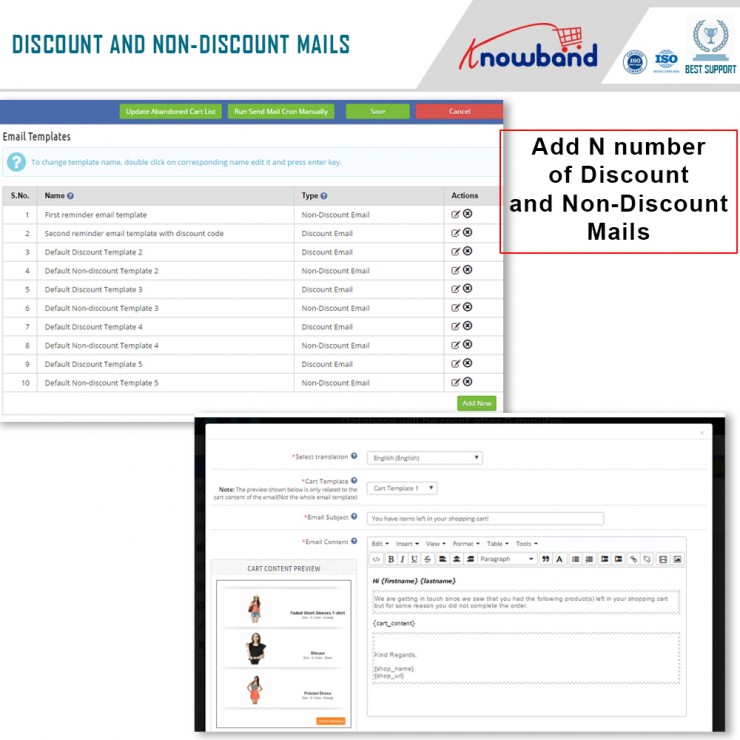
  • Separate emails for discounted and non-discounted items using the Prestashop addon

Administrators may easily change and replace the discounted and non-discounted emails independently from the backend interface with the Prestashop Reduce Cart Abandonment addon. They have the option of changing the email’s structure, content, and promotional offer.

  • GDPR adherence

The Prestashop module complies with GDPR.

  • Customizable email reminder forms in the Prestashop Cart Abandoned addon

To save the admin time, the Prestashop abandoned cart reminder provides pre-characterized and fully adjustable reminder discount email templates.

  • Establishes a time frame for when the cart will be considered abandoned

The duration of time after which the cart includes in the abandoned rundown defines by the Abandoned Cart Serial Reminder plugin.


  • The Prestashop Abandoned cart addon has a cron functionality

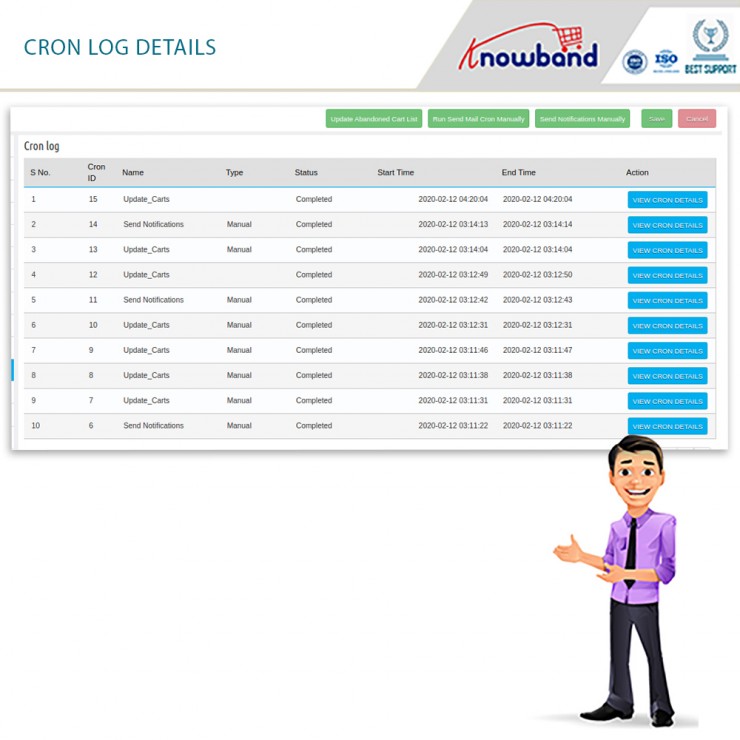
The Prestashop module’s Cron feature allows the admin to automatically schedule and send reminder emails to specific customers once the predetermined period has passed. The cron log tabs allow the business owners to determine whether the cron is being used.

  • There is a test mode for the Prestashop plugin

The Prestashop Abandoned cart addon’s Test mode feature enables the admin to test the reminder cart emails on the specified email address.

  • Many serial reminders are available with the Prestashop Email Follow up module

You have the option to create and change N serial reminders using the admin board’s customizable Abandoned Cart Serial Reminder.

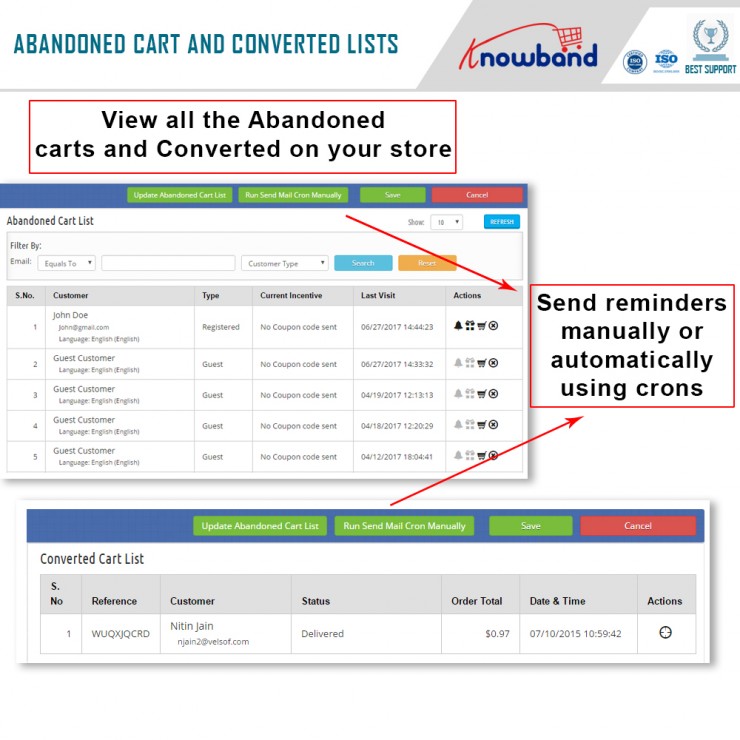
  • A view of the Converted Cart List and Abandoned Cart List is provided by the Prestashop plugin on the back end

The Abandoned Cart List and Converted Cart List, which are accessible from the backend, can both be viewed clearly and in detail, thanks to the Prestashop Abandoned Cart Email Follow Up Module.


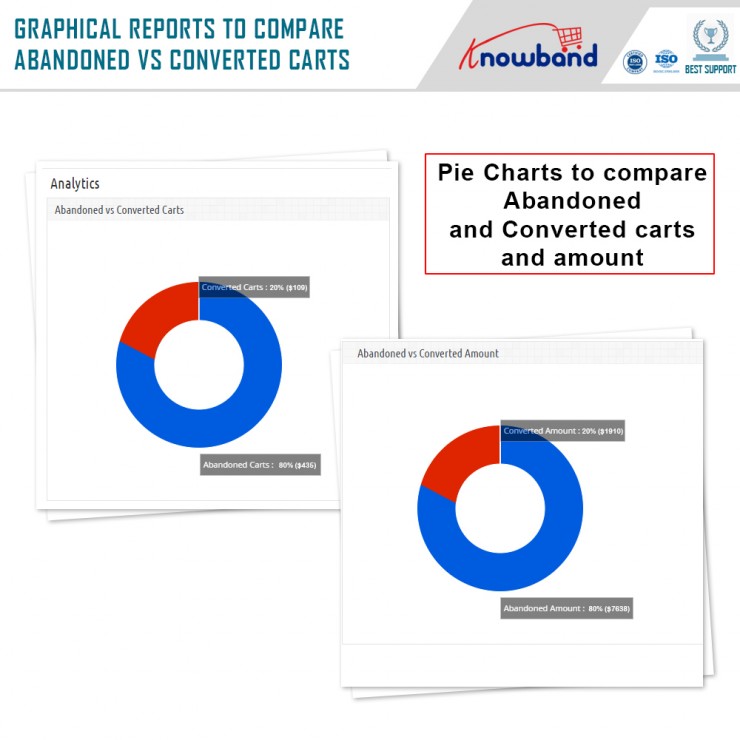
  • A statistical comparison of abandoned versus converted carts in the module

In addition to the filter option, the Prestashop Reduce Cart Abandonment addon provides a statistical breakdown of abandoned vs converted carts in the form of charts and tables.

  • Tracks information with Abandoned Cart Serial Reminder

The Prestashop Abandoned cart addon module keeps track of information for both shop visitors and customers who have logged in.

  • Pop-up functionality for Prestashop’s module

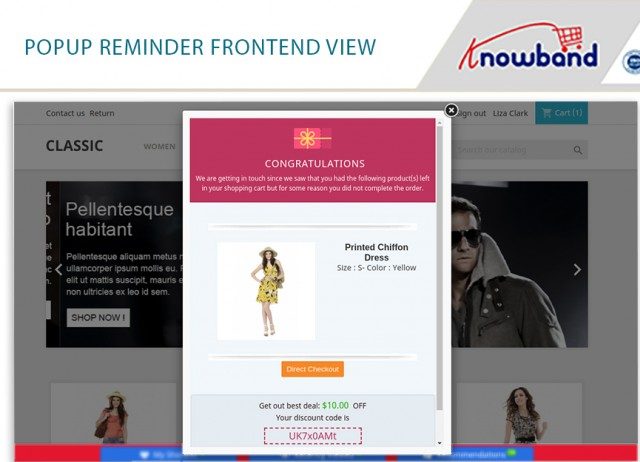
An additional feature of the Prestashop addon allows consumers who have abandoned their carts to receive popup notifications. Additionally, the store owners may lower the prices of their goods. The discount information will also be stored for the popup whenever it is provided.

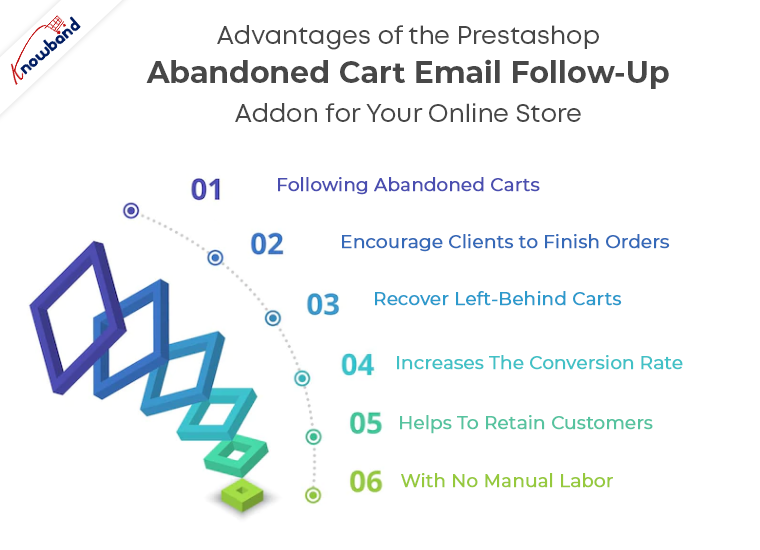
Advantages of the Prestashop Abandoned cart email follow-up addon for your online store

  • Following abandoned carts

The plugin understands and indicates the lost carts on your store and displays all of them in the back end. 

  • Encourage clients to finish orders

By using the module, you can give your customers a discount on your goods, which will without a doubt encourage them to finish their orders and increase your online store’s conversion rate.


  • Recover Left-Behind Carts

You may easily persuade your customers to complete their orders and bring back your store’s abandoned carts by sending them reminder messages about their incomplete orders.

  • Increases the conversion rate

You increase your conversion rate while also raising the overall revenues of your company when you make up the lost sales brought on by abandoned shopping carts.

  • Helps to retain customers

The module is a wonderful resource for keeping consumers once you’ve recovered them through follow-up messaging. 

  • With no manual labor

The entire process of creating and sending follow-up messages is quite simple, which reduces the manual work required by the business owner.

Let us wind up!

So, here we are! Thus, if your business suffers a high cart abandonment cart, the Prestashop abandoned cart addon by Knowband is your answer. Further, it helps you reduce cart and increase sales as well as customer satisfaction. Also, if you want to more about how to make the most of the module, you can check out this blog. What do you think of the module? Do let us know in the comments below. In case you want to get in touch with any questions or queries, let us know at support@knowband.com.

Get to know the Membership functionality of the Prestashop Marketplace Addon better

This comes as no secret that the Prestashop marketplace addon by Knowband is a stunning option. Moreover, it is a tool that can help you grow your eCommerce business. How? By simply converting your store into a marketplace. Furthermore, where multiple sellers can come and sell their products effortlessly. In the end, you, the admin is the one who benefits from the entire transformation. All you have to do is configure the settings of the Prestashop Multi-seller Marketplace module and get set to earn big.

The Prestashop Multi-vendor Marketplace Plugin has numerous settings that the admin can configure. However, when it comes to earning, there are three different options. They are:

  1. Commissions
  2. Product Listing fees; and
  3. Membership plans

Well, there are different settings for the different revenue models. However, we will focus on the last option – Membership Plans.

What is the Membership functionality in the Prestashop Multi vendor Marketplace Module?

If you want a sneak peek at the membership functionality in detail, you can read it here. Membership or subscriptions are everywhere these days. Starting from your favourite OTT platform to online shopping portals like Zomato, and others. Therefore, using the subscription format, the admin can earn every time a seller joins the platform. Moreover, for a limited period. Further, once the membership plan expires, they can either choose to renew it or discontinue selling on the platform.

Now, that you know the functionality, let us take a look at the different settings that you can find under the Membership Tab. Shall we?

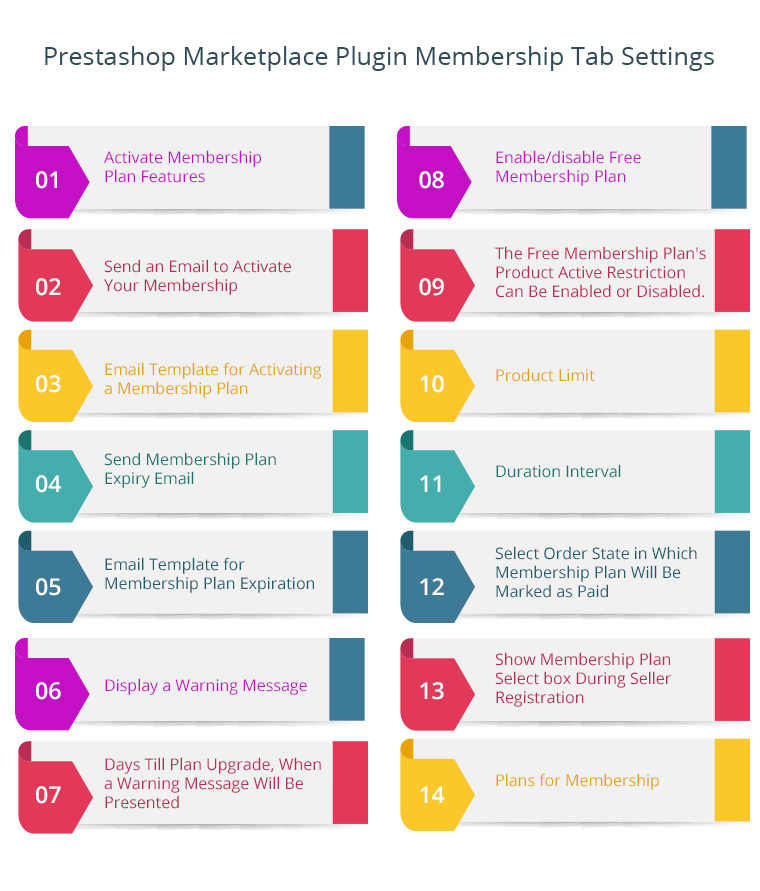
Membership tab Settings of the Prestashop Marketplace Plugin

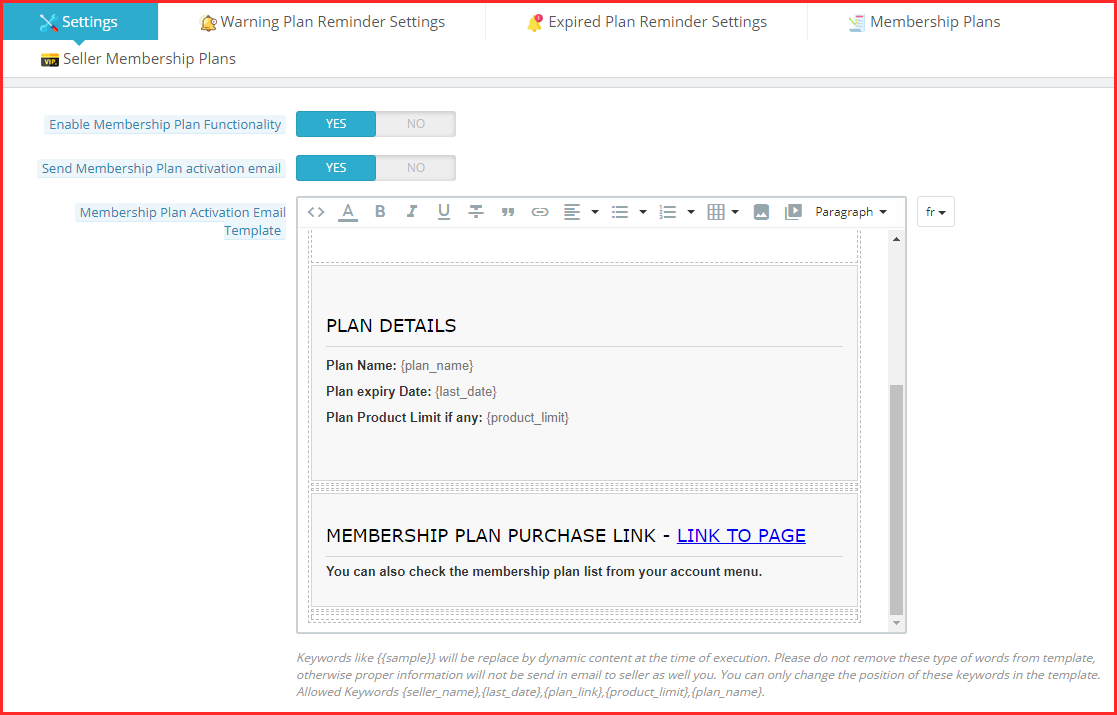
  • Enable Membership Plan Functionality

With this functionality of the Prestashop Marketplace Module, the admin can activate or deactivate the membership plans on the platform. Further, once activated, the sellers can choose from the different membership plans you create.

  • Send membership Plan Activation email

With this setting, the admin can choose either to send an email notifying the sellers about the activation of their subscription or not. Therefore, when you enable it, the activation email goes to the seller and if disabled, it doesn’t.

  • Membership Plan Activation Email Template

This setting has a membership plan activation email template for the admin. In fact, the admin can customize it as per the need.

Note: Keywords like {{sample}} will be replaced by dynamic content at the time of execution. Please do not remove these types of words from the template, otherwise, proper information will not be sent in an email to the seller as well you. You can only change the position of these keywords in the template. Allowed Keywords {seller_name}, {last_date}, {plan_link}, {product_limit}, {plan_name}.

  • Send Membership Plan Expiry Email

With this setting, the admin can choose either to send an email notifying the sellers about the expiration of their subscription or not. Therefore, when you enable it, the expiration email goes to the seller and if disabled, it doesn’t.

  • Membership Plan Expiry Email Template

This setting has a membership plan expiration email template for the admin. In fact, the admin can customize it as per the need.

Note: Keywords like {{sample}} will be replaced by dynamic content at the time of execution. Please do not remove these types of words from a template, otherwise, proper information will not be sent in an email to the seller as well you. You can only change the position of these keywords in the template. Allowed Keywords {seller_name}, {last_date}, {plan_link}, {product_limit}, {plan_name}.

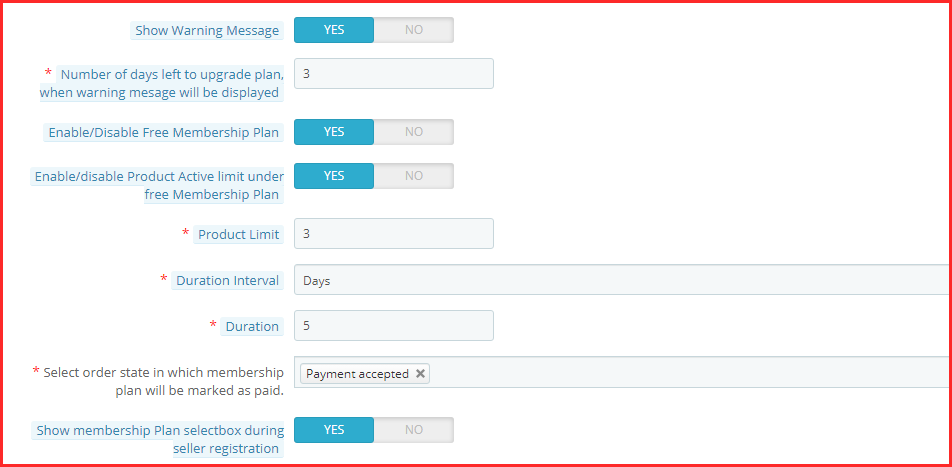
  • Show Warning Message

With this setting, the admin can easily show a warning message once the membership plan is about to expire. In fact, with this, the sellers are well informed about either renewing or discontinuing their subscriptions.

  • Number of days left to upgrade plan, when warning message will be displayed

This setting of the Prestashop marketplace addon by Knowband allows the admin to set the number of days left for the membership plan to expire.

  • Enable/Disable Free Membership Plan

Want to allure new sellers? You can easily offer them a free membership plan by activating this setting.

  • Enable/disable the Product Active limit under the free Membership Plan

This setting is connected with the setting mentioned below. Further, the admin can set the number of products the admin is allowed to list under Free Membership. Thus, the admin can enable or disable this setting.

  • Product Limit

Under this setting, the admin can set the product limit as mentioned in the last setting.

  • Duration Interval

This setting of the Prestashop marketplace plugin allows the admin to set the number of days for Free Membership.

  • Select order state in which membership plan will be marked as paid

Under this setting of the Prestashop Multi-seller Marketplace module, the admin can choose the order status that marks the membership plan as marked paid.

  • Show membership Plan select box during seller registration

If this setting is enabled, the admin can show the membership plan in the seller registration form.

  • Warning Plan Reminder Settings

Under this setting of the Prestashop Multi vendor Marketplace Module, the admin can view and create warning reminders. Furthermore, when you create a new reminder, the following are the settings under the ‘Add’ tab.

  1. Enable/Disable this reminder
  2. The number of days before the plan expiry warning mail should be sent to the seller.
  3. The subject of the warning reminder email that goes to the sellers.
  4. The email template of the warning reminder goes to the sellers.
  • Expired Plan Reminder Settings

Under this setting of the Prestashop Marketplace Addon, the admin can view and create expiration reminders. Furthermore, when you create a new reminder, the following are the settings under the ‘Add’ tab.

  1. Enable/Disable this reminder
  2. The number of days after the plan expiration warning mail should be sent to the seller.
  3. The subject of the expiration reminder email that goes to the sellers.
  4. The email template of the expiration reminder that goes to the sellers.
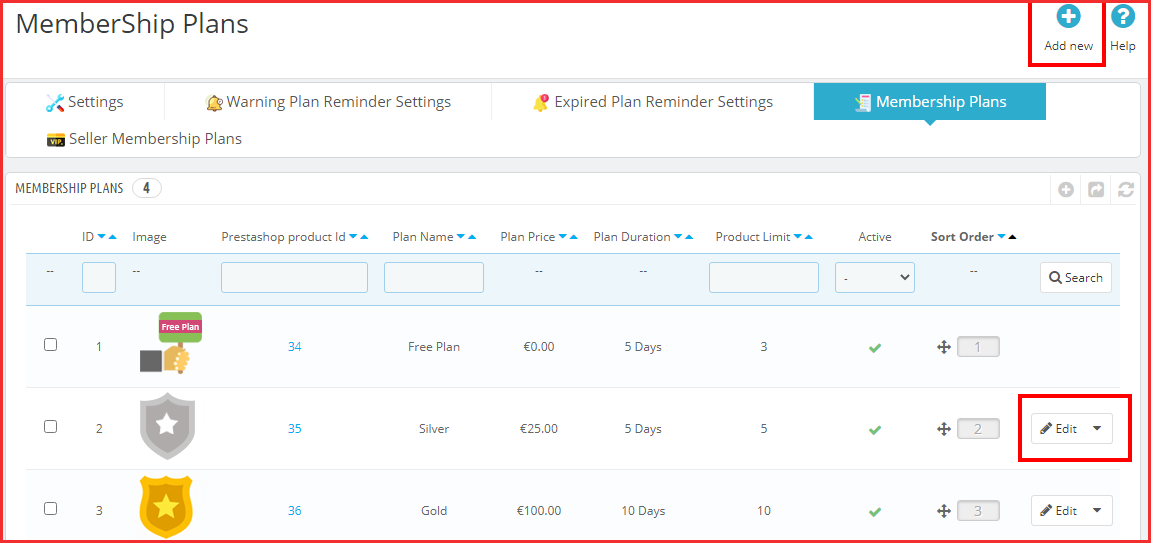
  • Membership Plans

Under this setting of the Prestashop marketplace module, the admin can view all the membership plans. Further, the plans are listed with the image, product ID, plan name, price, duration, and other settings. Moreover, under this tab, he can also create a new membership plan. The following are the settings:

  1. The Name of the Plan
  2. The Plan Price that the seller has to pay for this specific subscription plan.
  3. Enable/Disable the product active limit. Further, with these settings, the admin can set the number of products that will be active under this plan.
  4. Pick the duration interval for the membership plan. Further, the options include days, months, and years.
  5. The exact duration of the membership plan.
  6. Enable or disable this membership plan.
  7. The admin can add an image to the membership plan.
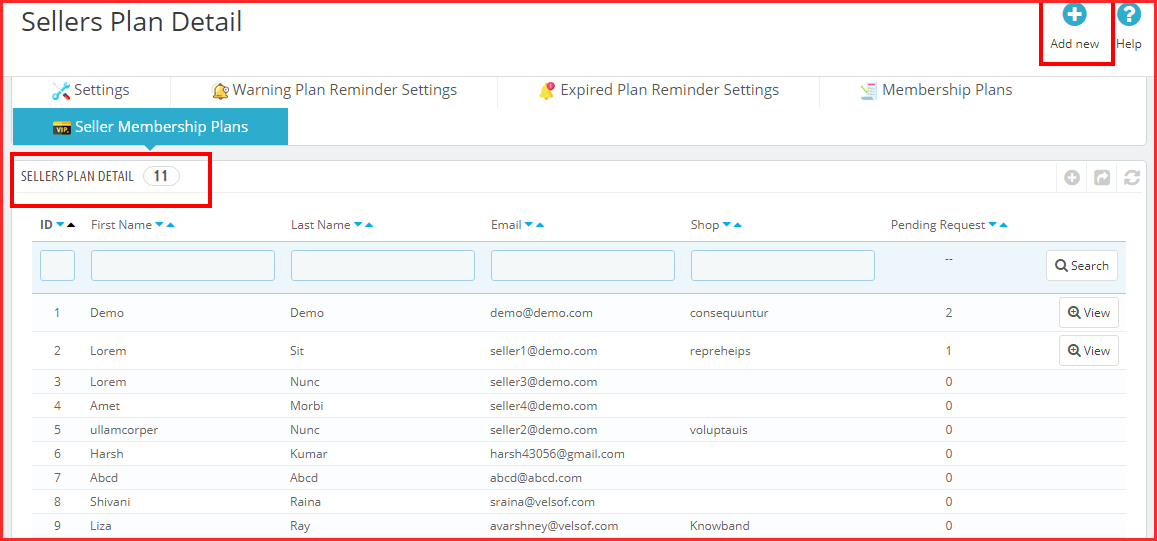
  • Seller Membership Plans

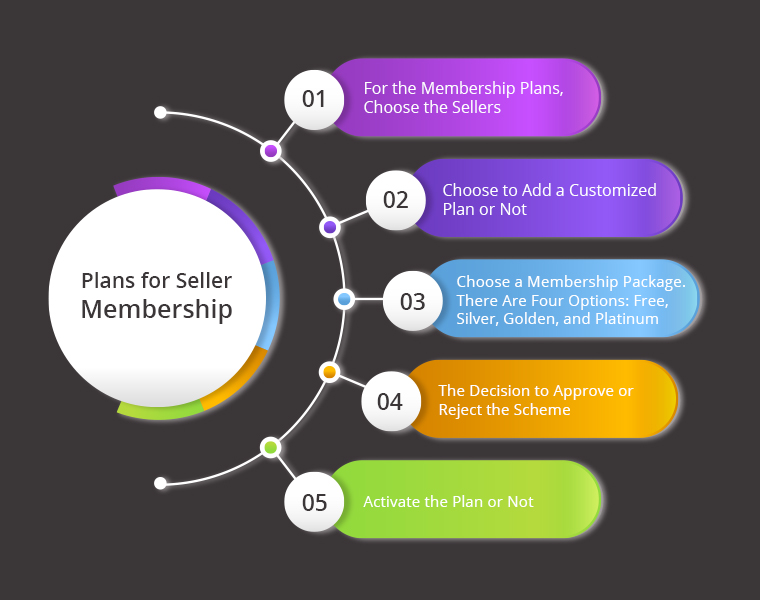
Under this setting of the Prestashop Multi-seller Marketplace module, the admin can view the different sellers and their membership plans. Further, he can view all the settings. Moreover, the admin can also create new memberships for sellers. Following are the different settings under the “Add” tab:

  1. Select the Sellers for the membership plans.
  2. Choose to add a customized plan or not.
  3. Select the membership plan. The options include Free, Silver, Golden, and Platinum.
  4. The option of marking the plan as approved or not.
  5. Activate the plan or not.

In the End

This is all that the Prestashop marketplace addon by Knowband’s Membership Plan setting has. Further, the membership plan functionality is an integral option of the marketplace. What do you think of it? Do you want to know more about the Prestashop Marketplace? Do let us know your queries at support@knowband.com.