Get, Set, Sell! Économisez sur vos vacances avec les packs de modules PrestaShop de Knowband: Partie 2

Avez-vous lu notre dernier blog sur Knowband?Ensemble de modules Prestashop vous pouvez économiser gros cette saison de vente? Eh bien, les célébrations ne sont pas encore terminées! Il y a plus à venir votre chemin. Soucieux de doter votre site de commerce électronique de fonctionnalités et de fonctionnalités exceptionnelles, Knowband propose des ensembles de modules Prestashop encore plus économiques. Nous dévoilons de lourdes réductions sur les packs Prestashop Addon. Profitez de l'occasion lucrative instantanée car les offres expirent bientôt. Laissez-nous faire une promenade à travers les offres de Knowband.

Pack mobile – Application mobile, AMP, Commande Look Up

Dans l'environnement d'achat centré sur le mobile, vous devez maintenir votre magasin synchronisé avec les besoins des utilisateurs qui sont d'abord mobiles. C’est à ce moment-là que les extensions exceptionnelles et les meilleures de notre catégorie de notre pack Mobile sont spécialement conçues pour répondre aux besoins des acheteurs mobiles.

Extension AMP de Prestashop

Le module Prestashop Accelerated Mobile Addon vous permet de créer des pages mobiles accélérées pour les sites mobiles. Outre la réduction du temps de chargement des pages Web avec AMP, voici quelques fonctionnalités que vous obtenez avec le module.

  • Crée une URL alternative selon le format AMP
  • Permet d'afficher les meilleurs vendeurs, présente les produits et les nouveautés
  • Afficher l'option de partage social sur la page du produit
  • L'administrateur peut afficher les bannières sur les sites mobiles
  • Contrôle de l'apparence des pages AMP
  • Incorporer Google Analytic pour suivre le rapport des pages AMP

Module de recherche d'ordre Prestashop Mobile

Avec le module de recherche de commande mobile pour Prestashop, les propriétaires de magasin peuvent offrir aux clients une option simple pour suivre l’état de leur commande en utilisant simplement leur numéro de téléphone mobile et leur numéro de commande.

  • Autoriser les clients à afficher l'état de la commande sans se connecter
  • Donne à l'administrateur du magasin la possibilité de surveiller le nombre de clients ayant consulté l'état de leur commande
  • Interface personnalisable simple

Plugin de connexion Prestashop Mobile

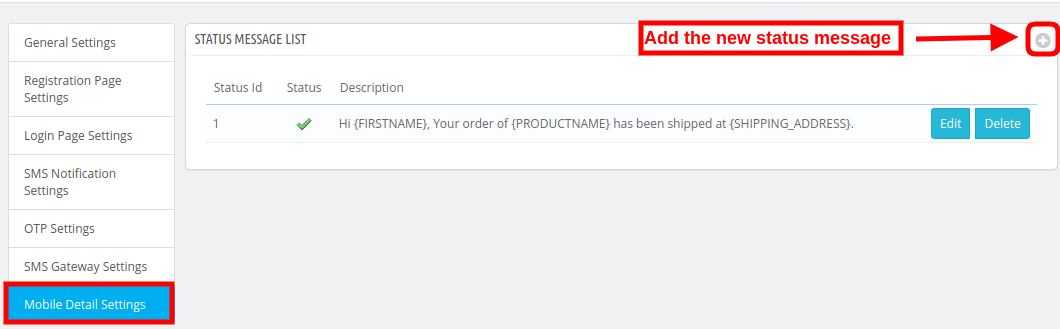
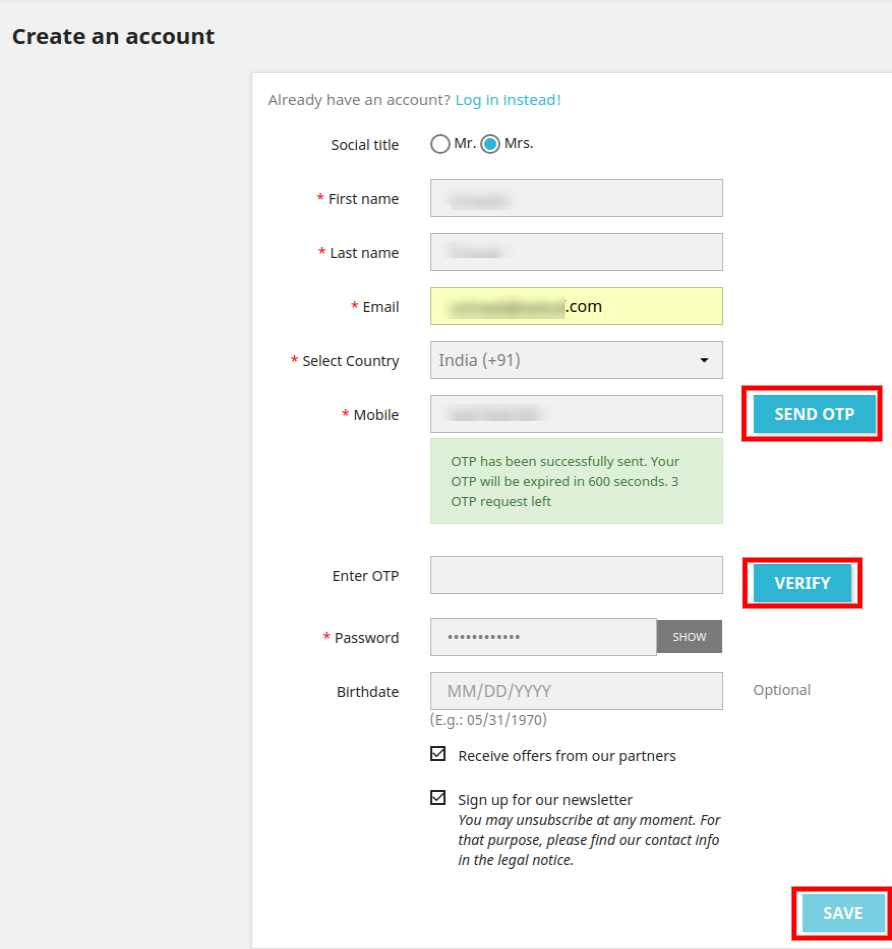
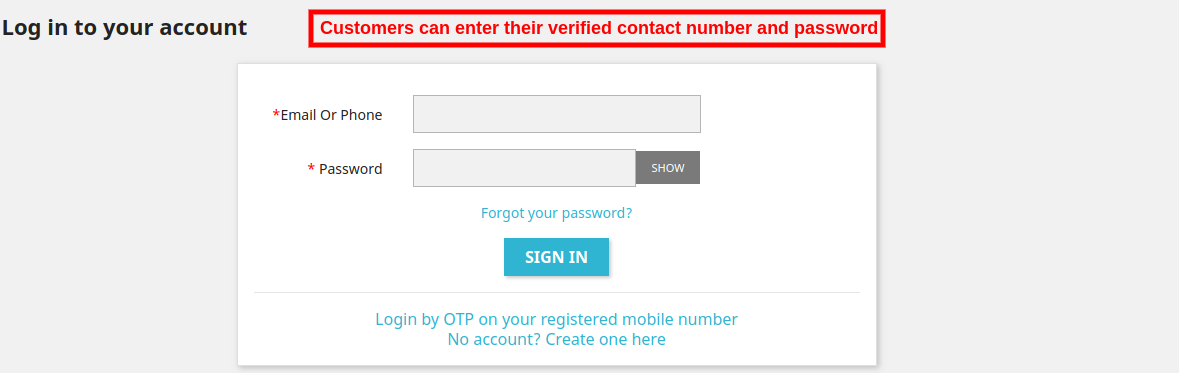
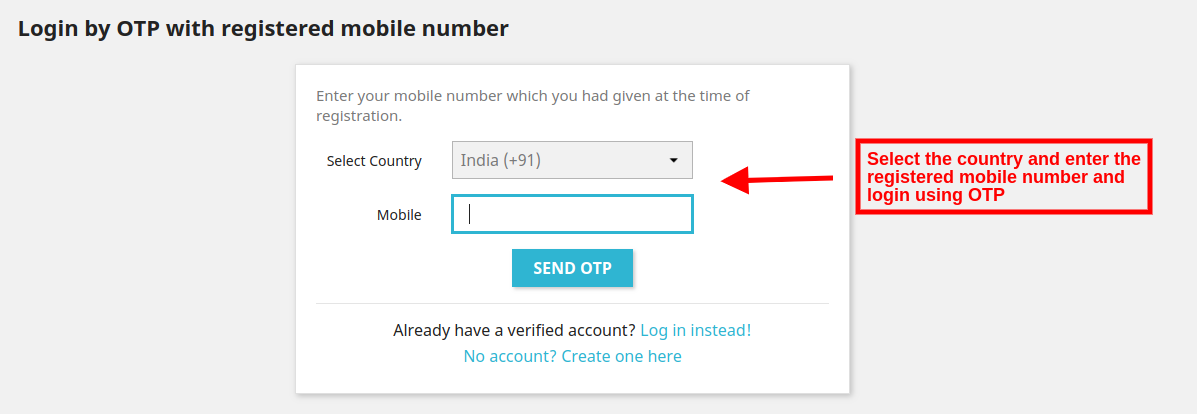
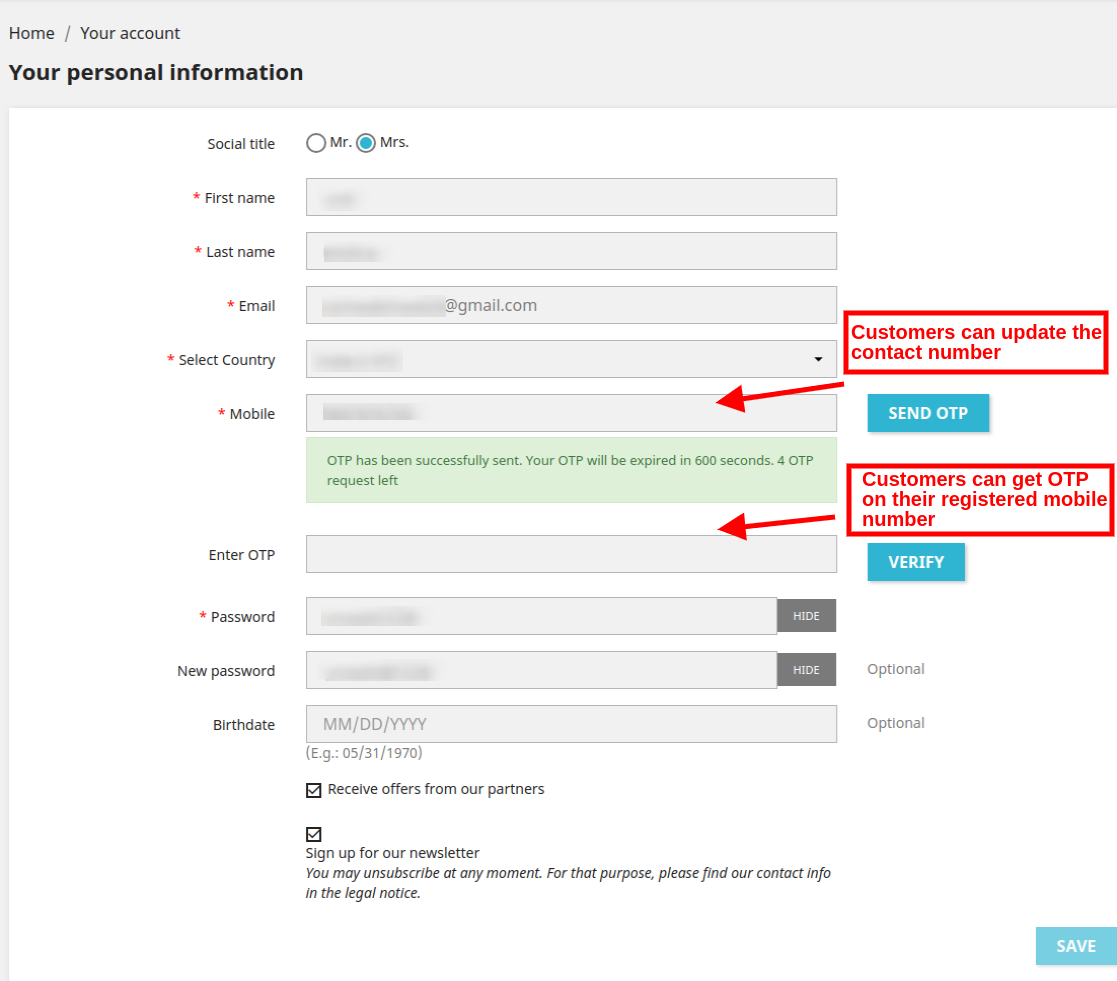
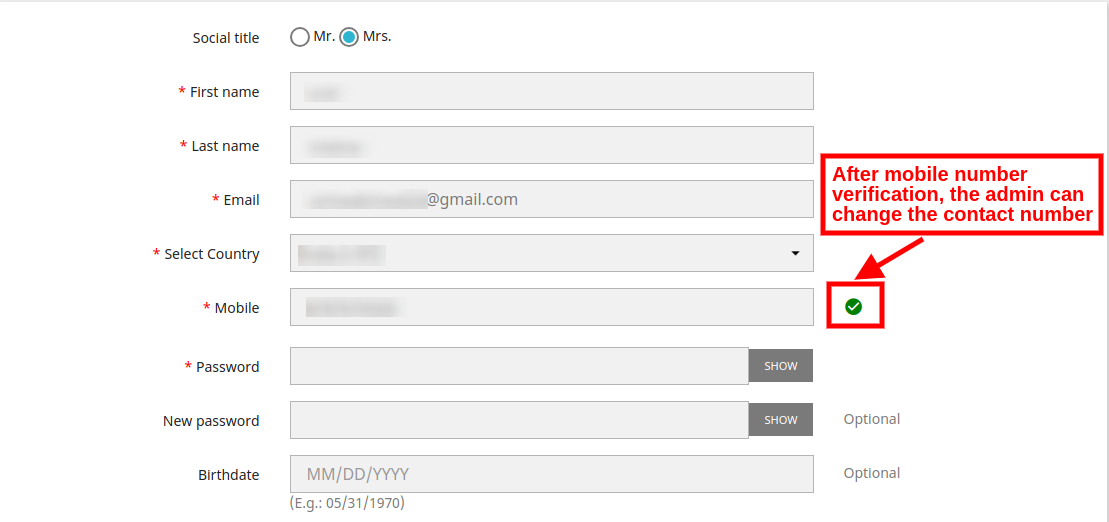
Le module de connexion de PrestaShop Mobile comprend une fonctionnalité qui permet aux clients de s’inscrire sur votre site à l’aide de leur numéro de téléphone mobile avec vérification SMS OTP. Les fonctionnalités du module Prestashop sont énumérées ci-dessous:

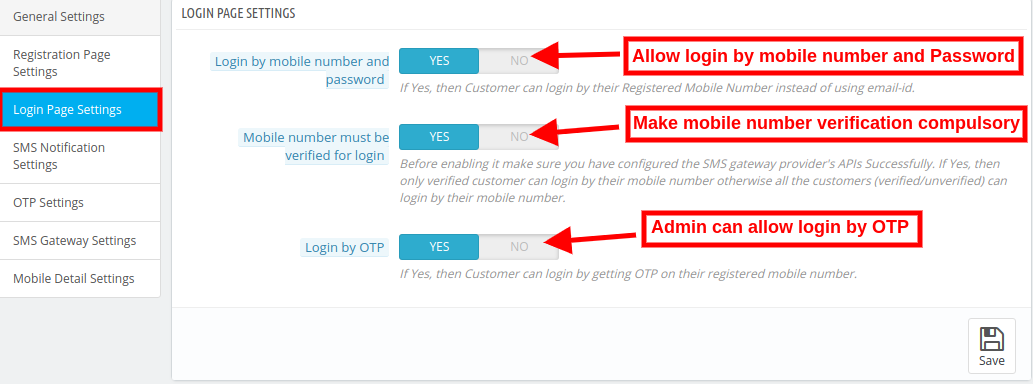
  • L'administrateur peut permettre aux clients de se connecter et de s'inscrire en utilisant leur numéro de téléphone mobile
  • Active la vérification d'OTP
  • Interface d'administration conviviale pour un contrôle facile
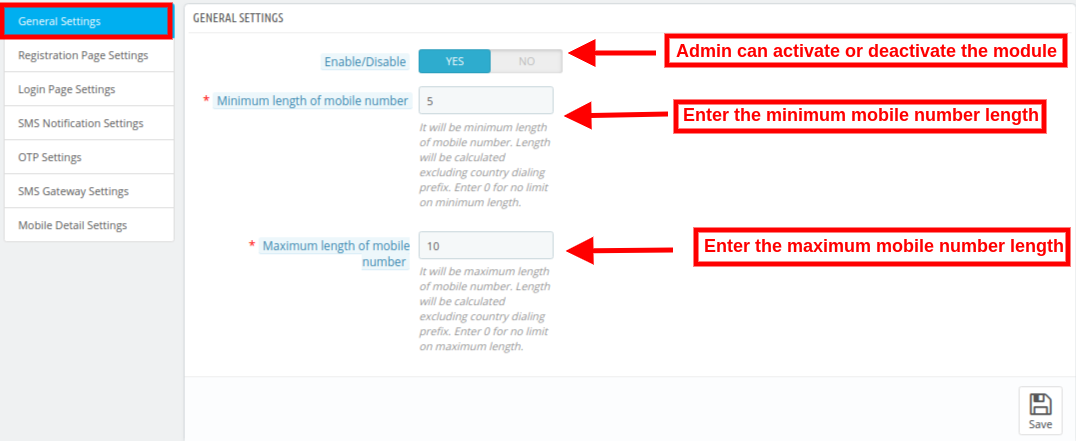
  • Le commerçant électronique peut définir la longueur minimale et maximale du numéro de mobile requis

Ne laissez pas vos concurrents s’améliorer. Il suffit d'aller mobile en ajoutant les extensions ci-dessus dans votre panier. Pour un pack d'extensions 3 Prestashop, vous bénéficierez d'une réduction pratique de 15%. Appliquez le code du coupon: MOBILE15 et profiter de l'offre.

Booster Pack de confiance des clients

Créez une relation durable et fiable avec votre client avec le Trust Booster Pack de notre client. Saisissez le pack d'extensions 3 exceptionnellement bien personnalisées et optimisez la rétention de vos clients.

Extension de compteur Prestashop Viewers

Présentez le nombre de visiteurs de magasin visualisant actuellement un produit particulier avec notre Add-on de compteur de pages de page Prestashop et obtenez les fonctionnalités ci-dessous.

  • Le client et l’administrateur peuvent voir le nombre de lecteurs actuels.
  • L'administrateur peut définir la position du compteur
  • Personnaliser l'apparence du texte du message

Compte de ventes de produits Prestashop

Extension du nombre de ventes de produits Prestashop vous permet d'afficher le nombre de fois qu'un produit particulier a été acheté, c'est-à-dire le nombre de ventes du produit de votre site.

  • Option pour afficher le nombre de ventes sur les pages de produits
  • Option CSS et JS personnalisée pour personnaliser l'apparence
  • Option permettant de définir un nombre de ventes minimum à afficher aux clients

Module de test de site Web Prestashop

Ajoutez du contenu généré par les consommateurs sur votre site avec notre outil convivial. Extension de témoignage client Prestashop. Voici d'autres fonctionnalités offertes par l'addon.

  • Permet aux clients d'écrire des témoignages et d'ajouter des images
  • Interface mobile
  • Peut montrer les témoignages, page d'accueil, colonne de gauche et colonne de droite

Plus besoin de coder pour ajouter de telles fonctionnalités à votre site. Ajoutez simplement le kit de modules Prestashop riche en fonctionnalités dans votre panier et obtenez un rabais de 10% supplémentaire avec le code de coupon: TRUST10.

Coupon Code:?TRUST10

User Experience Pack amélioré – Défilement infini, Connexion rapide, Changer de langue

Traitez vos clients efficacement avec une interface frontale conviviale. En proposant 15% à plat sur le groupe d’extensions Prestashop, Knowband veille à ce que vous atteigniez votre cible avec précision.

Prestashop Infinite Scroll Addon

Prestashop Endless Scroll Addon remplace le système de rechargement de page et de pagination par une option de défilement infini répertoriant tous les produits de la même page. Voici quelques-uns des avantages d'utiliser cet addon:

  • Permet un défilement infini sur les pages avec une liste de produits sur tout le site
  • Compatible avec les URL conviviales pour le référencement
  • Ajoute la fonctionnalité 'Charger plus' pour mettre en pause le défilement infini après un certain intervalle de pages
  • Ajoute le lien 'Go to Top'
  • Personnalisez l'apparence de l'interface frontale en quelques clics

Extension Popup de connexion rapide Prestashop

Fonction de connexion Facebook et Google intégrée du Module popup de connexion rapide Prestashop facilite l'enregistrement et la navigation dans les magasins pour votre client potentiel.

Module de changement de langue et de devise Prestashop Auto Switch

Module de langues et de devises Prestashop Auto Switch détecte automatiquement l'adresse IP des visiteurs du magasin et convertit le contenu du site Web dans la langue maternelle des visiteurs. En plus de cela, la devise est également changée dans la devise respective du lieu depuis lequel le site est consulté. Achetez toutes les extensions proposées dans ce pack et appliquez le code coupon: BETTERUX15, à

Code de coupon:BETTERUX15

Pack d'options d'expédition

Offrez à vos clients le meilleur envoi de leur vie et ne manquez aucune conversion. Vous pouvez maintenant le faire à des prix abordables avec notre pack d’expédition. Voici les plugins que vous obtenez avec le bundle de modules.

Prestashop Store Locator et Pickup Addon

Les clients ont la possibilité de trouver le magasin le plus proche et leur permettent également de définir la période de cueillette des produits avec Module de recherche et de localisation de magasin Prestashop. Vous trouverez ci-dessous des avantages supplémentaires liés au module.

  • Activer facilement la fonctionnalité de recherche de magasin et de ramassage
  • Afficher le localisateur de magasins sur n'importe quelle page du site
  • Afficher le chemin des magasins sur Google map
  • Option pour le client de réserver un emplacement de prise en charge

Module de délai de livraison préféré de Prestashop

Permettez à votre client d’indiquer la date et l’heure de livraison de son choix sur la page de paiement avec Knowband. Addon de délai de livraison préféré pour Prestashop.

Coût d'expédition Prestashop par extension ZipCode

Coût d'expédition Prestashop par module Zipcode permet à l’administrateur du magasin d’appliquer des frais d’expédition différents en fonction des codes postaux du client. La transaction transparente augmente les chances de rétention de la clientèle.

  • Ajouter des zones avec une plage de codes
  • Frais de port fixes pour différentes zones en un clic
  • Restreindre la livraison du produit pour une zone particulière
  • Télécharger les conditions d'expédition

Module de minuterie d'expédition Prestashop

Addition de temporisateur d'expédition de Prestashop crée un sentiment d'urgence dans l'esprit des visiteurs du magasin et les motive à passer la commande. La minuterie incorporée par le module affiche le délai dans lequel le produit sera livré le même jour.

Prestashop COD avec Fee Addon

Offrir à leurs clients en ligne la possibilité d’envoyer en espèces et facturer un montant supplémentaire pour la fonction COD avec notre Prestashop COD avec Fee Addon.

  • Fixer sans effort les termes et conditions
  • Définir les frais pour la fonctionnalité de paiement à la livraison
  • Créer un nombre N de conditions COD
  • Fixer la limite de commande minimale et maximale pour l'utilisation de l'option COD

Si vous ajoutez 4 à partir des modules 5 Prestashop du pack d’expédition, vous bénéficierez d’une remise de 15%. Pour bénéficier de cette offre, appliquez le code de coupon: SHIP15. Cependant, si vous achetez tout le module 5, vous bénéficierez d'un rabais attrayant de 20% avec le code de coupon: SHIP20

Coupon Code:?SHIP15 (Pour un pack de modules 4)

Coupon Code:?SHIP20??(For a pack of 4 modules)

Pack de sécurité – reCaptcha, boutique privée, blocage du spam

Assurez la sécurité de votre site de manière rentable avec notre pack de sécurité et obtenez un rabais de 10%.

Module Bot / utilisateur Prestashop par IP, pays et module d'agent utilisateur

Bloc Bot / utilisateur Prestashop par addon IP, pays ou utilisateur est un moyen facile de garder les robots malveillants à l'écart de votre site en bloquant l'accès à votre site Web pour un utilisateur ou un bot particulier.

  • Vous aide à interdire le trafic indésirable des robots et des utilisateurs de spam
  • Ajouter la restriction par IP, pays ou agent utilisateur
  • L'administrateur peut même montrer l'en-tête et le pied de page aux utilisateurs bloqués
  • Les utilisateurs peuvent envoyer une demande de suppression du bannissement
  • La demande est traitée à partir du back-end

Addon Prestashop Google reCaptcha

Ajoutez Google reCaptcha dans votre boutique Prestashop sans modifier la base du site avec Extension Prestashop Google reCaptcha. Les fonctionnalités indispensables de la page d'inscription et de la page de paiement permettent aux gens réels de passer facilement et de protéger le site des spammeurs et des robots. Incorporer ces contrôles de sécurité dans votre site à un% 10 à plat. Utilisez le code coupon: SECURE10.

Coupon Code:SECURE10

Créateur d'applications mobiles Android et iOS Prestashop

Ce n'est pas ça! Notre leader du marchéCréateur d'applications mobiles Android et iOS Prestashop? is now available only for $199. Create your own mobile store for both Android and iOS platforms with a handy discount of 50%. Here is the list of the features that you get along with the eCommerce mobile app.

  • Lot de thèmes et de polices à choisir
  • Tablette et mobile responsive
  • Synchronisation en temps réel
  • Support multilingue et RTL
  • Compatibilité avec toutes les méthodes de paiement et d'expédition
  • Option de connexion sociale
  • Navigation facile
  • Recherche vocale (pour les utilisateurs Android)
  • Mes favoris
  • Assistance par chat Zopim
  • Prise en charge de tous les coupons et bons
  • Commander une page
  • Notification push illimitée
  • Suivi de commande

Assurez-vous de ne pas manquer l'occasion en or. Visite Connaître maintenant et mettez à niveau votre site conformément aux besoins actuels de l’industrie.


Magento Custom Registration Field Extension- User Manual

1.0 Introduction

In order to get more details of the online users, the Magento store admin can now show additional information fields on the registration field. The customers can enter their details which will be further used by the store admin for promotion and marketing. Magento Custom Fields module by Knowband is a feature-rich module which allows the e-merchant to display unlimited fields on the registration page of the website.

With the help of this Magento Custom registration form plugin, the store admin can display extra fields on the registration page and also set the look and feel of the fields. The Magento Custom Fields plugin allows adding the text box, radio button, check boxes, date, select, textarea and a file field on the registration page without even a single change in codes.

1.1 Salient Features

  1. The Magento custom registration form extension allows the admin to add, delete and update the custom fields.
  2. The e-merchant can create a separate section for showing extra custom fields on the registration page.
  3. The Magento custom registration form module offers multiple fields like text field, text-area filed, radio buttons, checkboxes, select, file and date.
  4. The admin can effortlessly add validation rules on the custom fields with the help of Magento custom registration field extension.
  5. Any invalid information entered by the customers will throw an exception notifying the customer about the mistake.
  6. The admin can enter their CSS code in the back-end of the Magento custom registration field extension and change the look and feel of the front-end.
  7. The admin can show the information of the custom fields in the invoice of the customers.
  8. The Magento Custom Registration Fields extension is easy to use and can be configured in a few simple steps.
  9. The Magento Custom registration attribute extension allows the admin to apply Email, URL, Number, Digits, Only Letters, Letter and digits, Date validations.

2.0 Installation

The online store merchant can install the Magento Custom registration attribute extension easily by following these steps:

  • Admin needs to download the extension package from the Knowband store.
  • After downloading the extension package, the store owner will get a zipped file. Unzip the package on the root folder of Magento setup via FTP manager (like Filezilla or WinSCP – download here: https://filezilla-project.org/). The admin will find the files and folders as shown in the image below:


  • The extension is now installed and ready for use. In the Admin Panel, go to “System > Knowband Extensions >Magento custom field registration”.

Now the store admin can now use and configure the Magento Registration Fields extension.

3.0 Admin interface

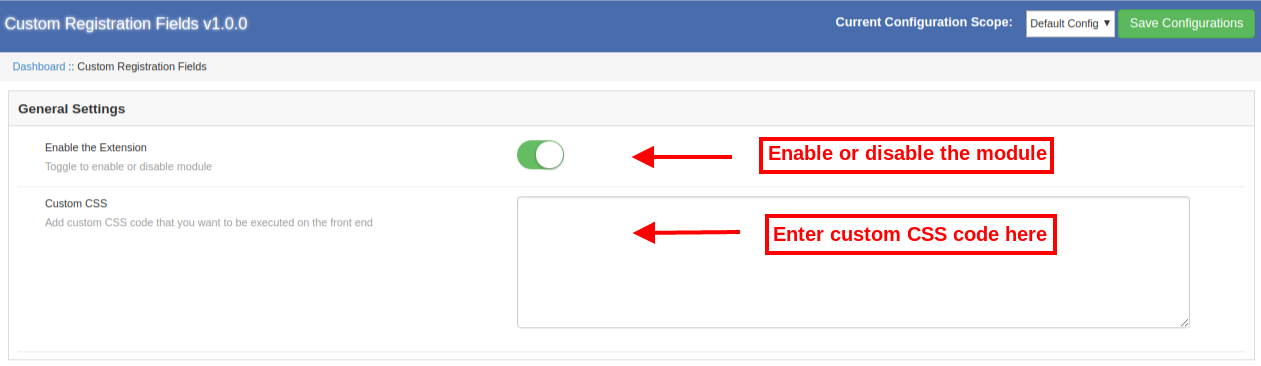
The online store admin can show extra custom fields on the registration page. The configuration options are shown below:

  1. General Configuration
  2. Custom Field Section
  3. Custom Fields


3.1 General Configuration

  • Enable the Extension: The Magento Custom Registration Fields allows the e-merchant to activate or deactivate the functionality anytime just by a button toggle.
  • Custom CSS: The online store owners can enter custom CSS code for the look and feel customization.


3.2 Custom Field Sections

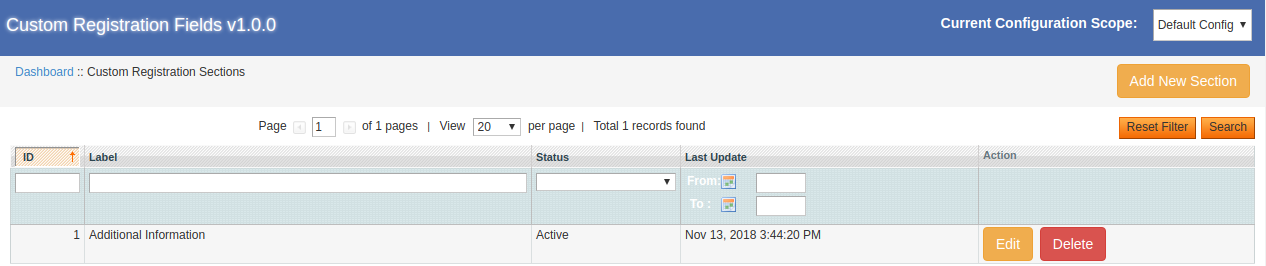
Specific sections can be created for showing the custom registration fields. The Magento Registration Fields module allows adding multiple sections easily. Admin can add, delete and update the custom fields as per the requirement.

3.2.1 How to Add a new Custom Field Section?

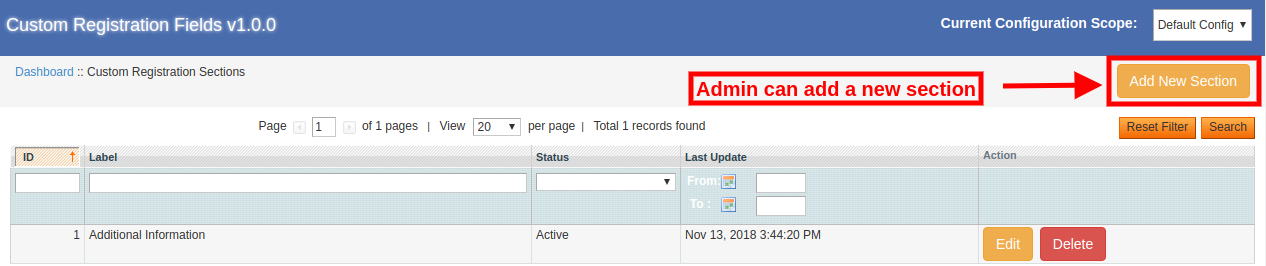
For adding a new custom registration section, the store admin can click on the “Add New Section” button. After clicking this button, the admin will get customization options for the creation of a new section.

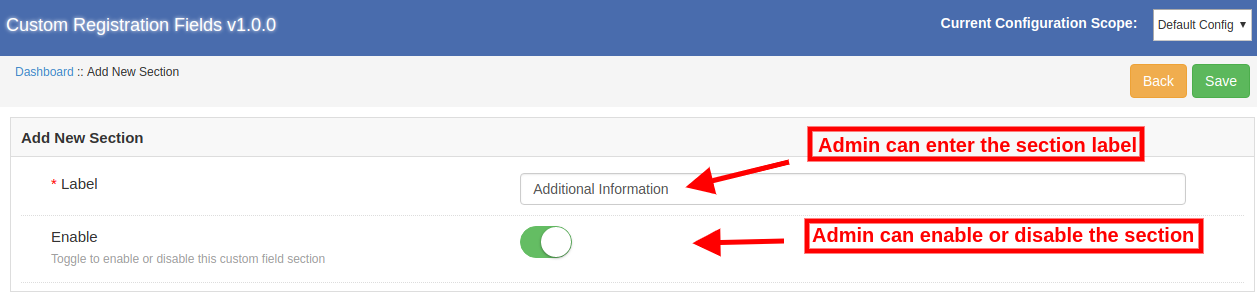
The admin can follow these customization options in order to create a new section:

  • Label: The e-merchant can set the label for the new custom field.
  • Enable: The Magento Custom registration form extension allows the admin to activate or deactivate this custom field as per the requirement.

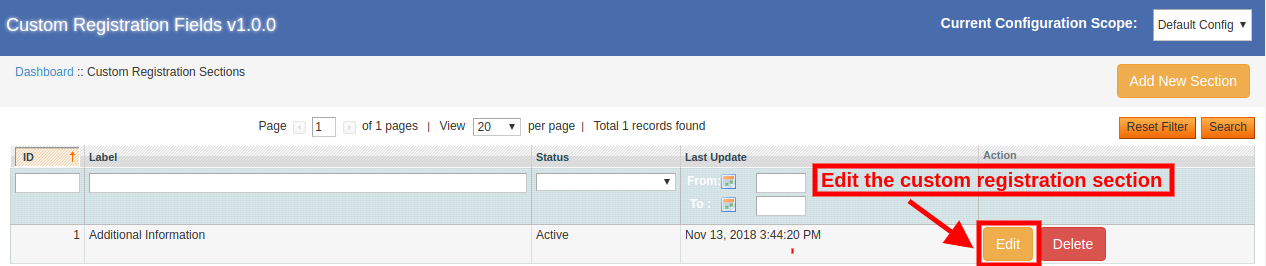
3.2.2 How to Edit the Custom Field Section?

The store admin can click on the “Edit” button for modifying the custom field section details. Here, the store owner can edit the Label name and activate/deactivate that section.

3.2.3 How to delete the Custom Field Section?

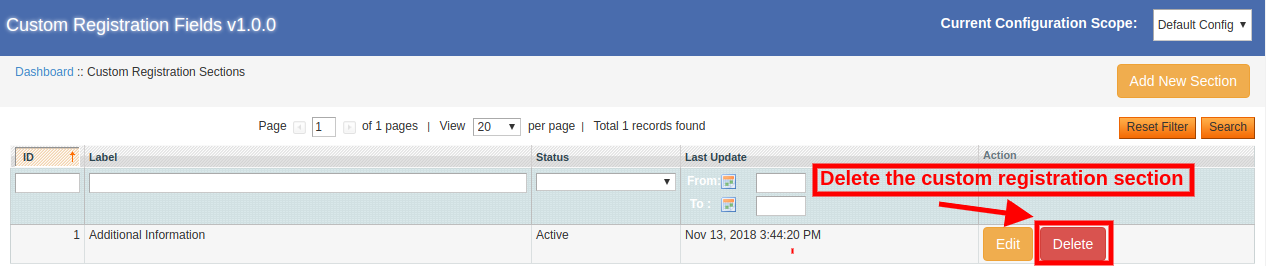
The Magento Custom registration attributes plugin allows the eCommerce store admin to delete the custom registration section. For deleting any section, the store admin needs to click on the “Delete” button as shown below:

3.3 Custom Fields

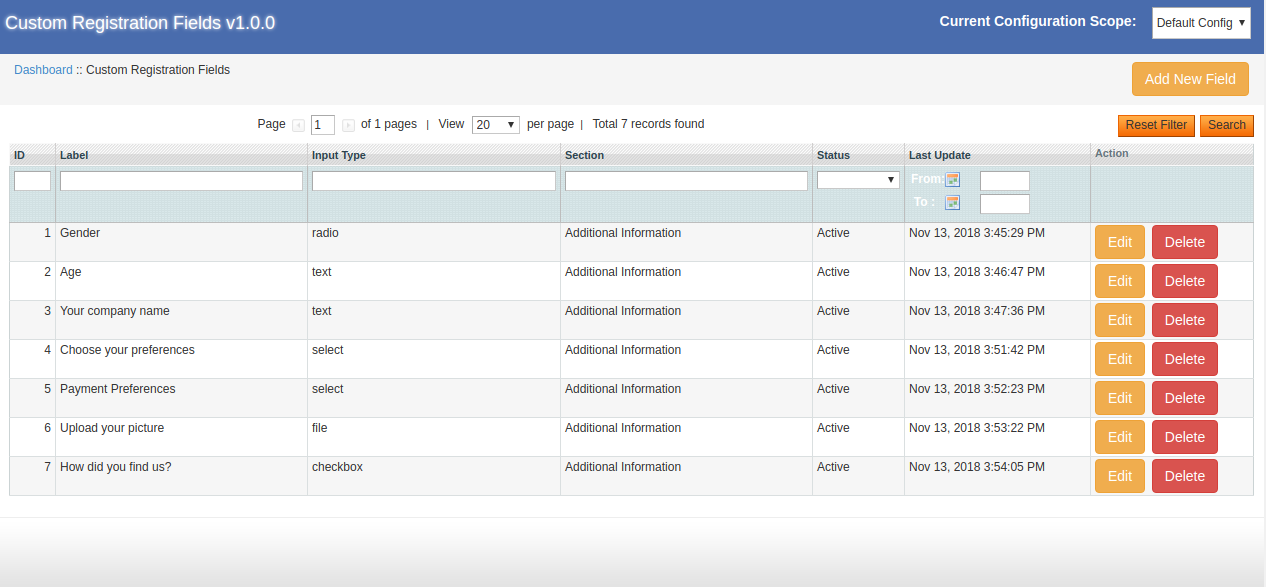
The store owner can add multiple custom fields from the admin interface of this Magento Custom registration form extension. The Magento Custom registration attributes plugin allows the admin to Add, Update and Delete the custom field easily without any hassle.

3.3.1 How to add a new custom field?

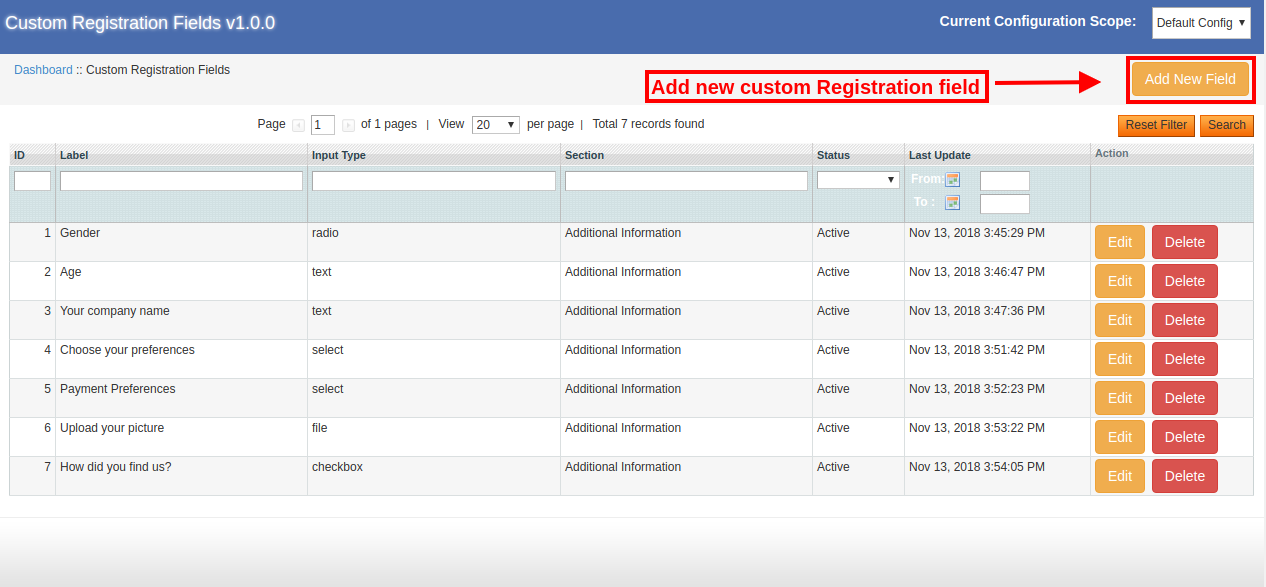
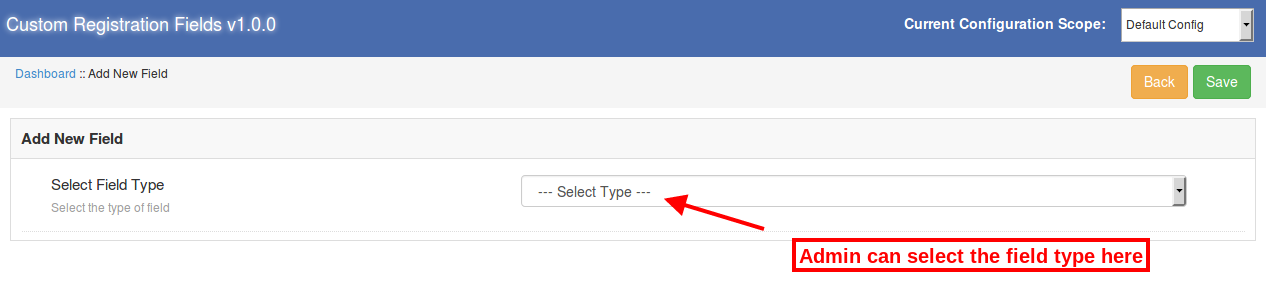
The store admin can add a new custom attribute from the admin interface of the Custom registration attributes module. Admin just needs to click on the “Add new” option for adding a new custom field.

  • Select Field Type: The Magento Registration Fields module allows the admin to select text, select, radio button, checkbox, textarea, file and date field. The store admin can select the field from the available drop-down list.


There are multiple field options available in the field selection section:

  1. Text
  2. Select
  3. Radio
  4. Checkbox
  5. textarea
  6. File
  7. Date

The store owner can select the field as per the requirements.

3.3.1.1 Text field

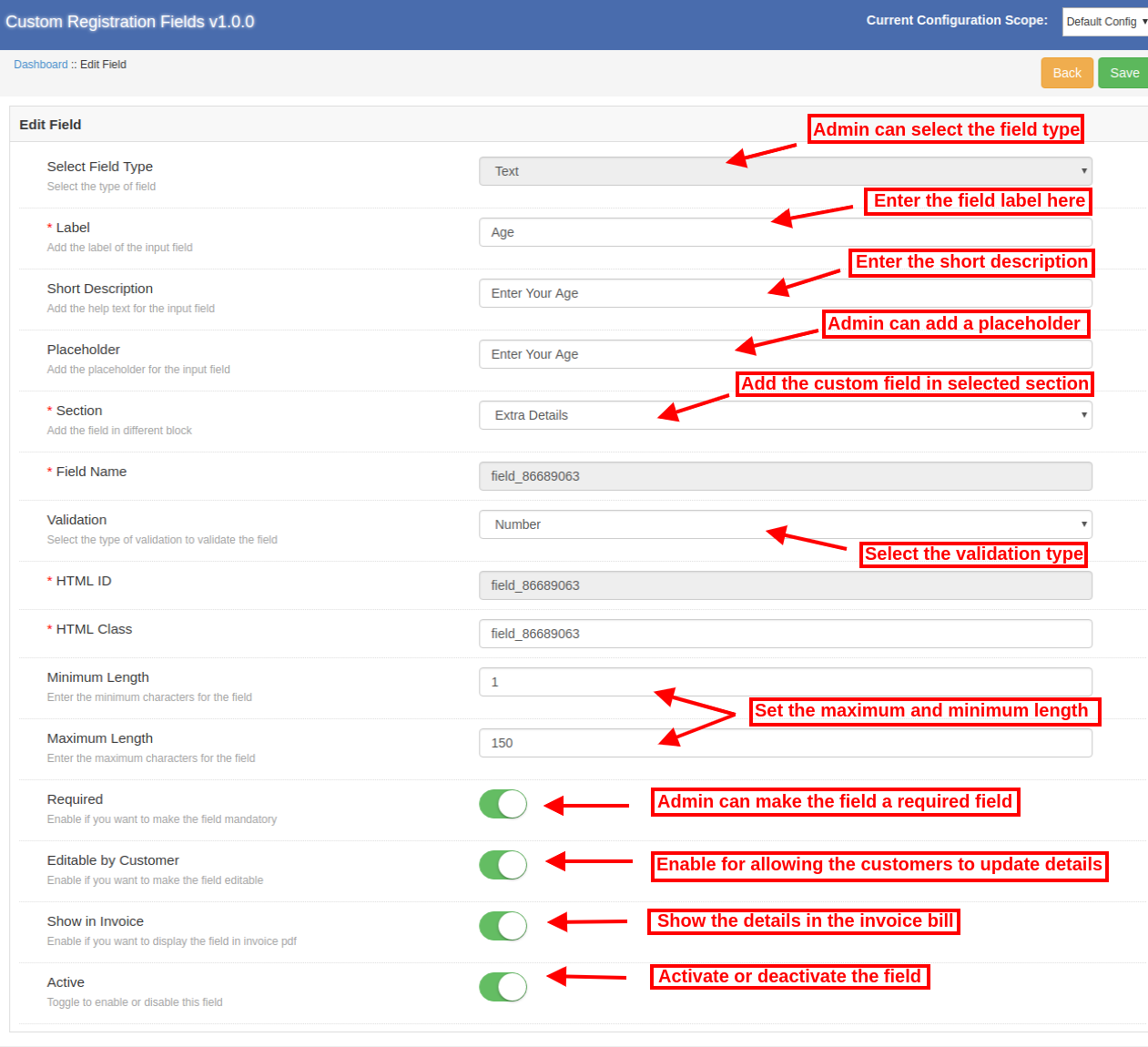
The online users can enter their personal details like name, address and age in the text box. Apply the text field settings for showing it on the website registration page.

Admin can apply the settings in the below-mentioned options:

  • Label: Enter the label of the selected field. The label refers to the name of the field that will be displayed in the front-end of the site.
  • Short Description: Enter the short description of the field here. With this short description, the customers can understand the field well.
  • Placeholder: Set the Placeholder text in this menu option. Placeholder specifies the watermark that is displayed in the text-box.
  • Section: Select the registration field section in which you want to display the particular field.
  • Field Name, HTML ID, HTML Class: This section will provide a unique identity to this field. It will be the same for all the three sections.
  • Validation: The Magento Custom registration attributes plugin provides an option to set field validation. The store admin can apply different validations easily. Available validation options are mentioned below:
    • Email
    • URL
    • Number
    • Digits
    • Only Letters
    • Letter and digits
    • Date

An error message will be displayed in case of wrong information. The customers need to follow the validation rules.

  • Maximum and Minimum Length: The store admin can set the maximum and minimum character length from the admin interface of this Magento Custom Registration Fields module.
  • Required: The admin can set any custom Registration field as a required field. An exception message will be displayed if the customer leaves the required field empty.
  • Editable by the Customer: The customers can edit the details only if the customer makes this field editable. The admin can enable this option for allowing the customers to edit the field details.
  • Show in Invoice: The store admin can enable this option if they want to show these details in the customer’s invoice.
  • Active: The store admin can activate or deactivate this field from the admin interface of this Magento Custom registration form.

3.3.1.2 Select field

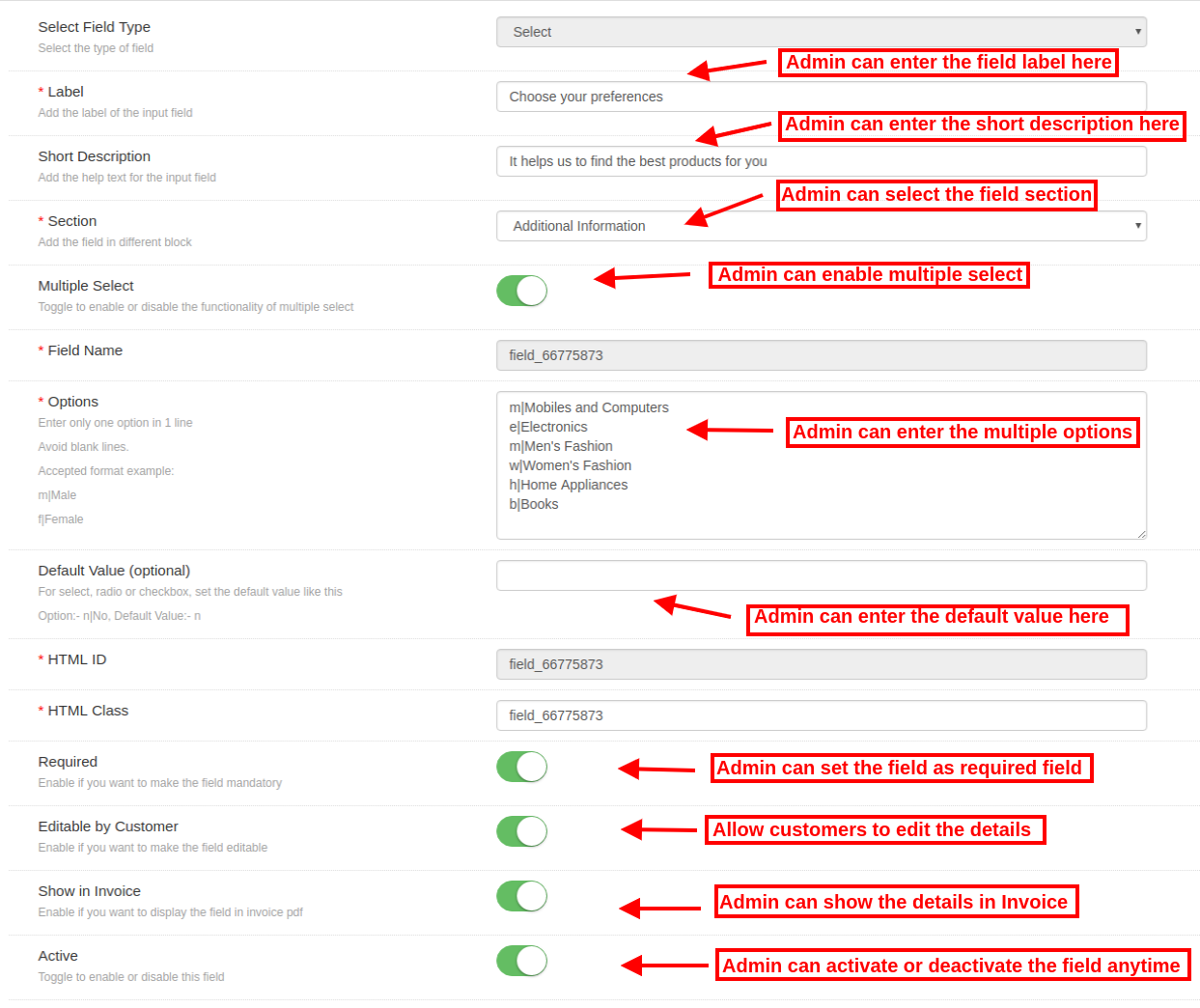
“Select Field” provides a facility to the customers to select the option from various choices. For example, the customers can select the Gender and Payment Preferences.

The Label Name, Short Description, Section selection are same as the other ones. Here are the customization options offered to the store admin.

  • Multiple Select: The Magento Custom registration attribute extension module allows the admin to provide multiple selection options. If the admin enables the “multiple selection” option, then the customers can select more then one option.
  • Options: The store admin can enter different options in this field. There should be one option in a single line and no gap is allowed.
  • Default Value: The admin can set the optional default value if he wishes to do so.

3.3.1.3 Radio

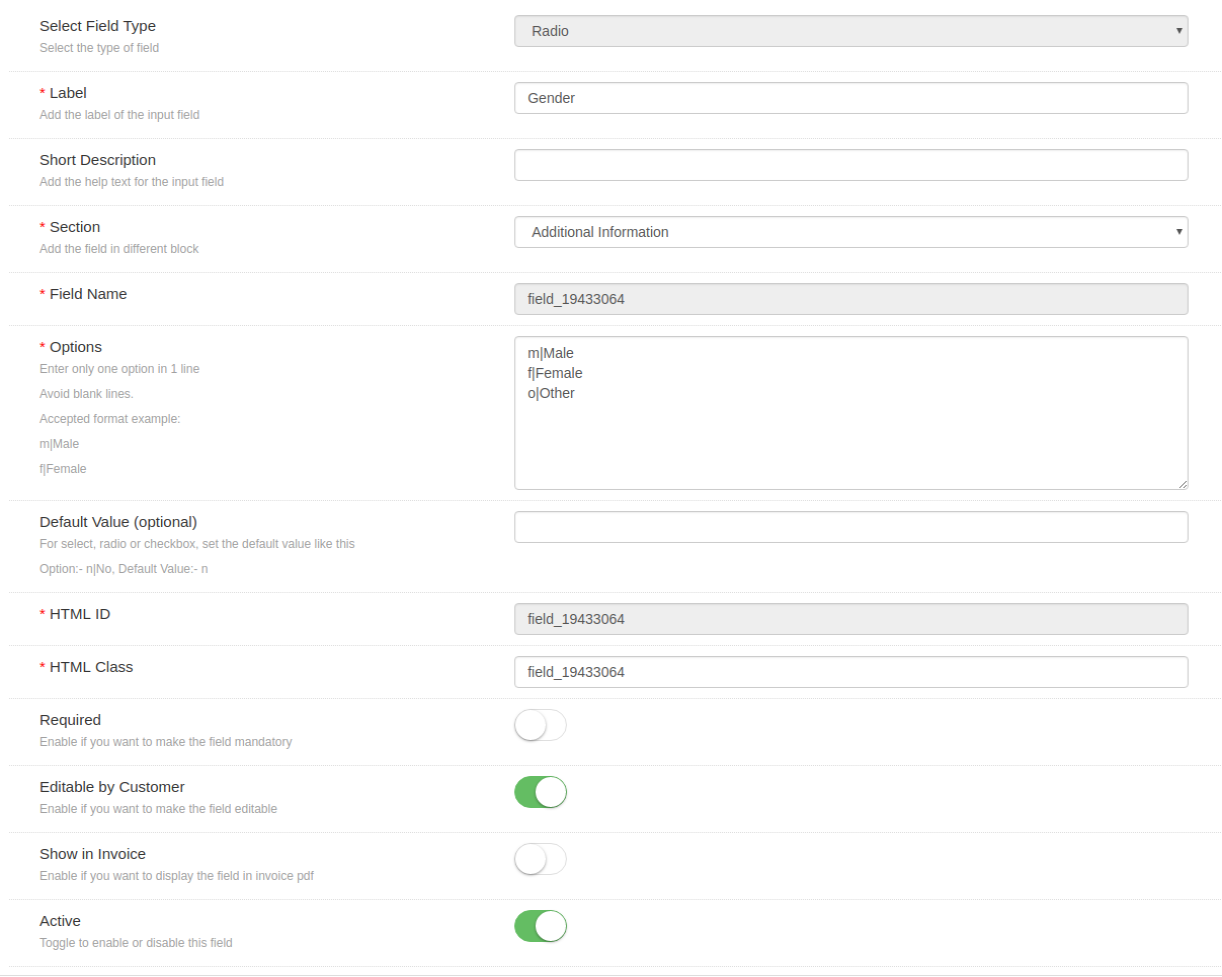
The Magento Custom registration attribute extension plugin provides radio button field. The admin can use this field where only one option is to be selected at a time. The customization options are the same as described above. Multiple Selection options is not available in the radio field.

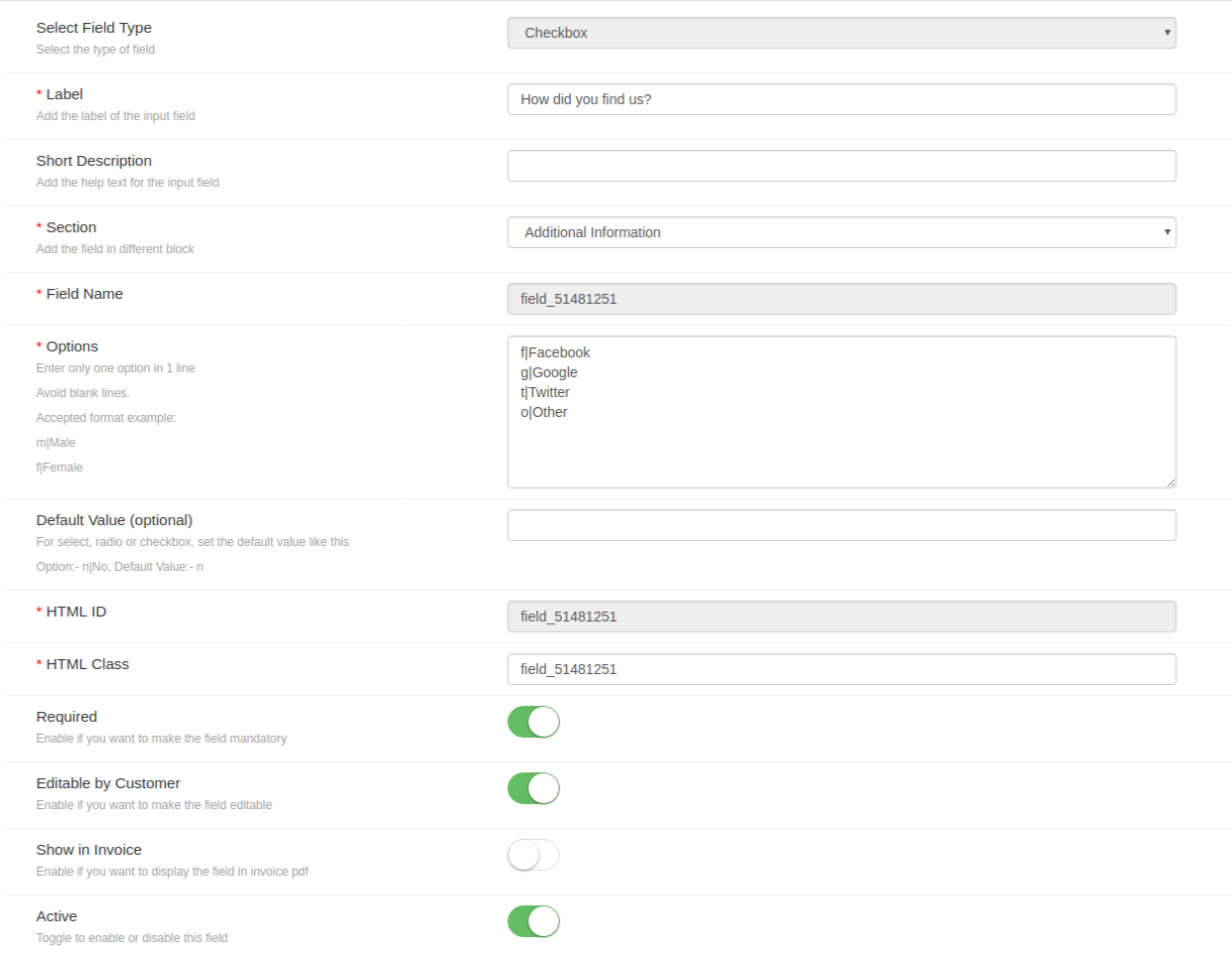
3.3.1.4 Checkbox

The Magento Registration Fields module allows the admin to select check-box field for providing an option to selecting by checking the box. Its functionality is the same as radio button and select field. Same menu options are provided for applying the settings.

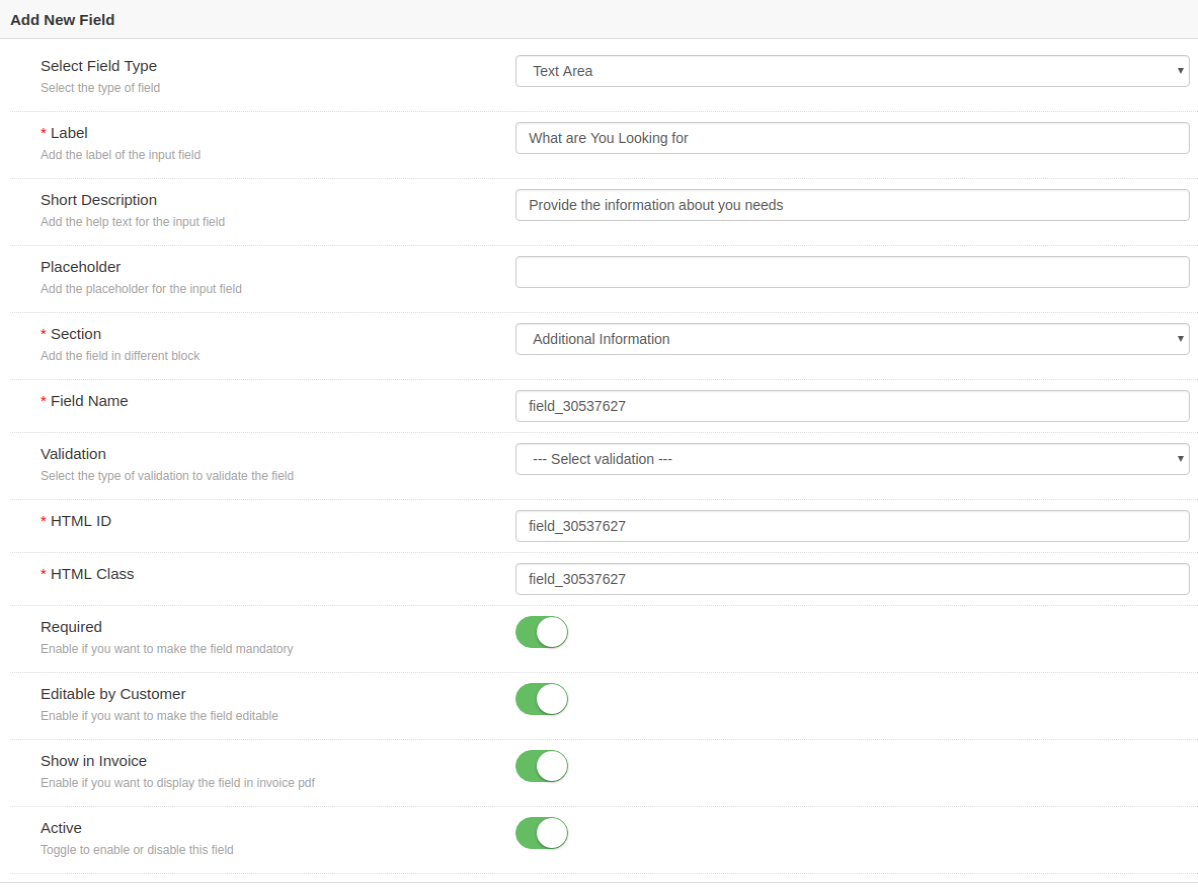
3.3.1.5 textarea

Text are the field is used when detailed information is required from the customers. The admin can show this Text field on the website if they want the customers to provide details in the paragraph, not just one-liners.

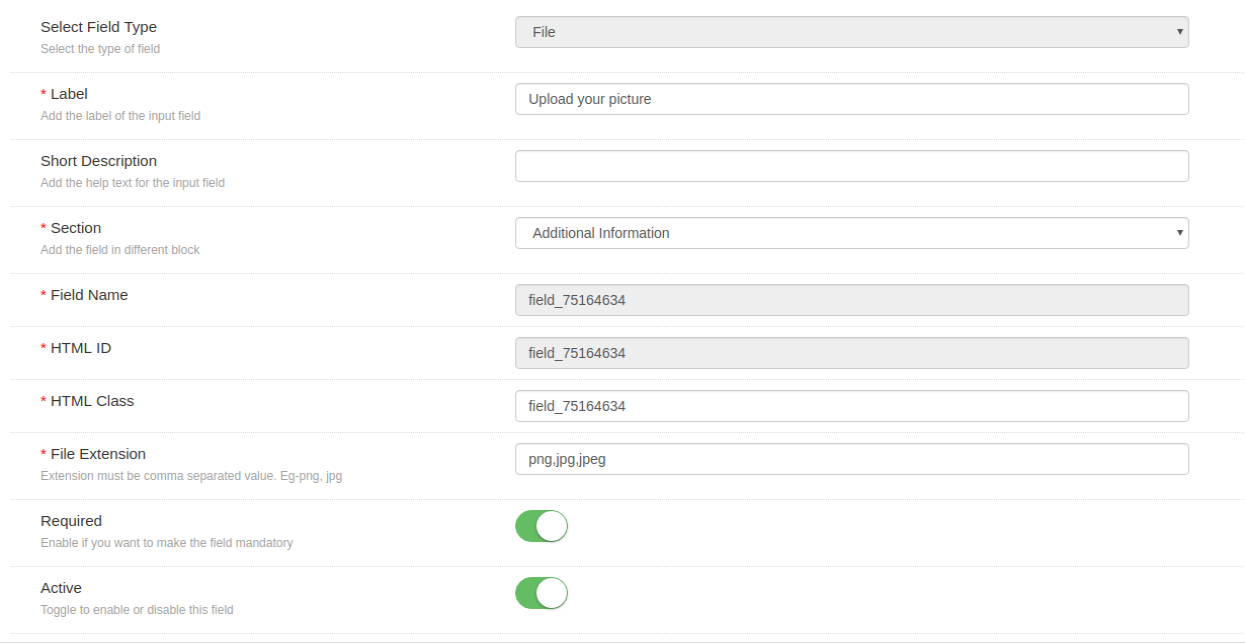
3.3.1.6 File

The admin can show this field for allowing the customers to upload an image or document. The admin can enter the file type and also make it a required field. There is no need to change even a single line of codes for providing this option.

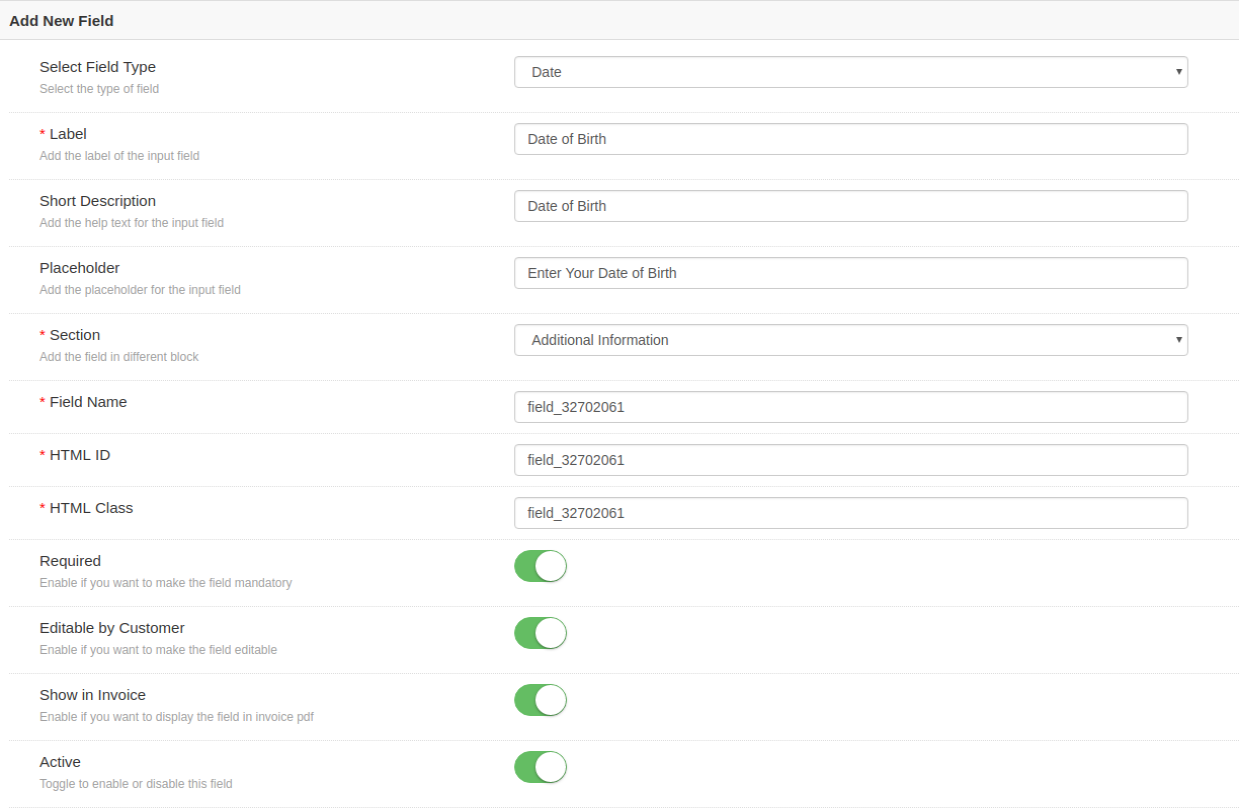
3.3.1.7 Date

Customers can enter the date in a proper format with this date field. The Magento Custom Registration Fields module allows the store owner to show this field on the registration field. The store admin can enter the label, short description, placeholder as discussed before.

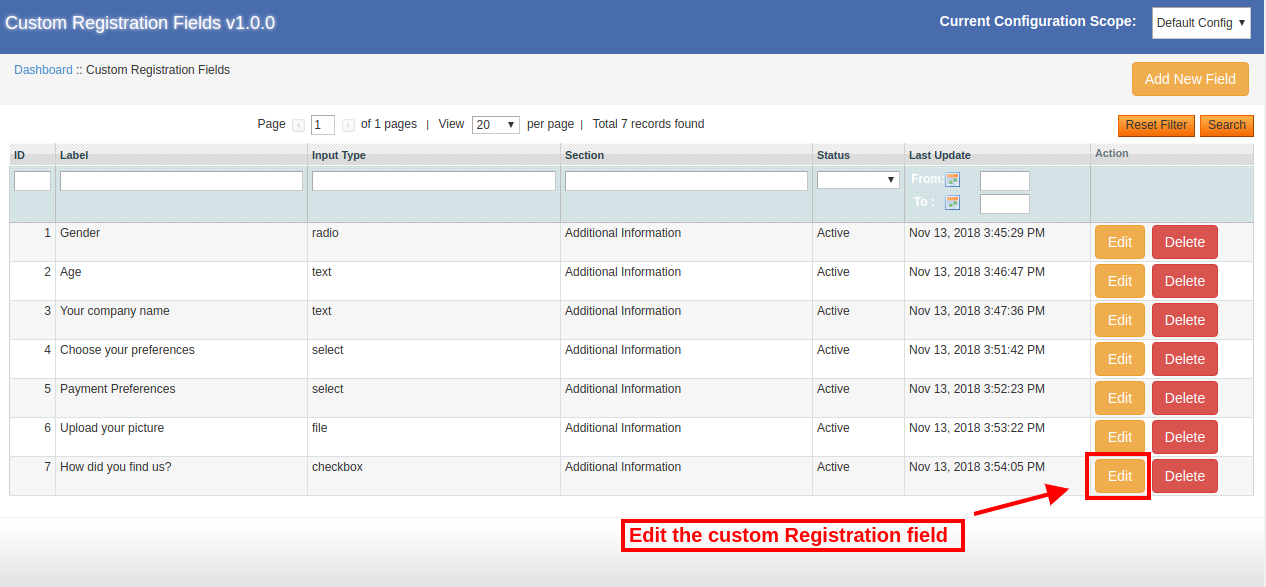
3.3.2 How to Update the Custom Field Details?

The Magento Custom Fields extension provides a facility to update the previously created custom fields. The store merchant can click on the edit button in order to update the details.

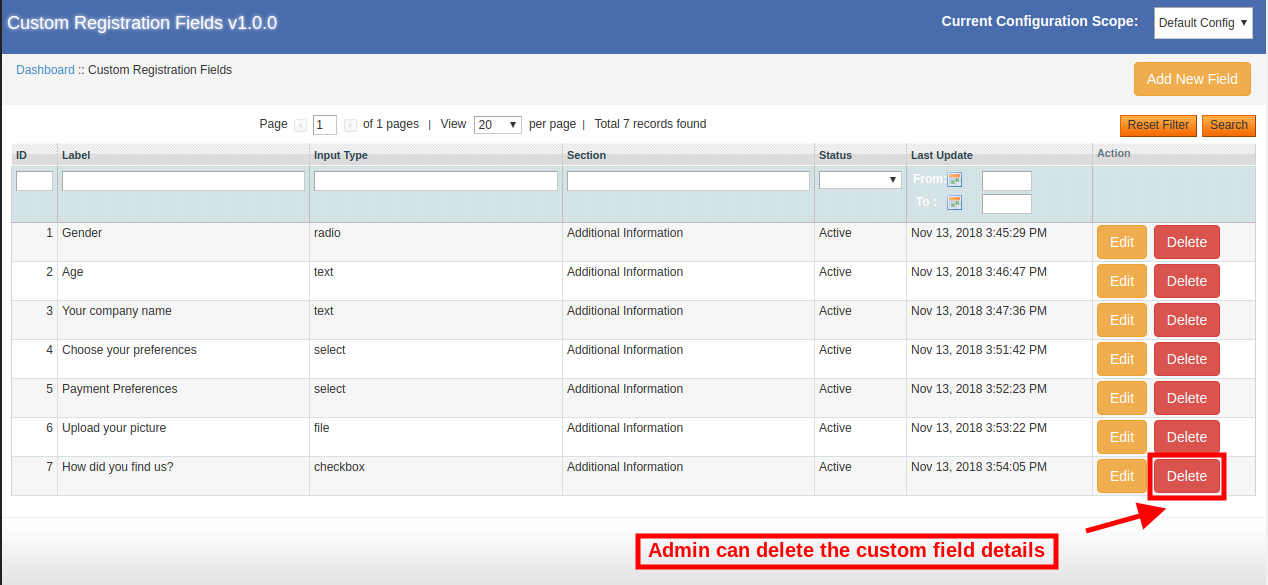
3.3.3 Admin can Delete the Custom Field Details

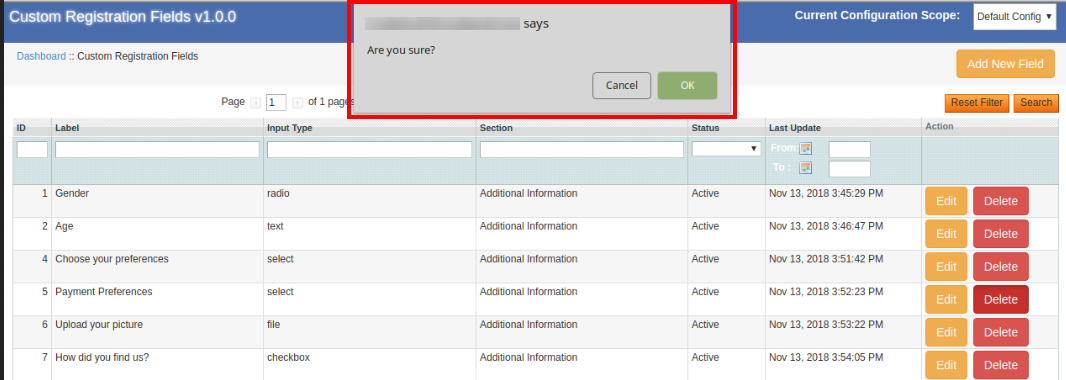
The e-merchant can delete the custom fields anytime just by clicking on the “delete” button. After clicking on the “delete” button, admin can view a pop-up message for confirmation.

After confirmation the module will delete the particular custom field.

4.0 Website Registration Form User Interface

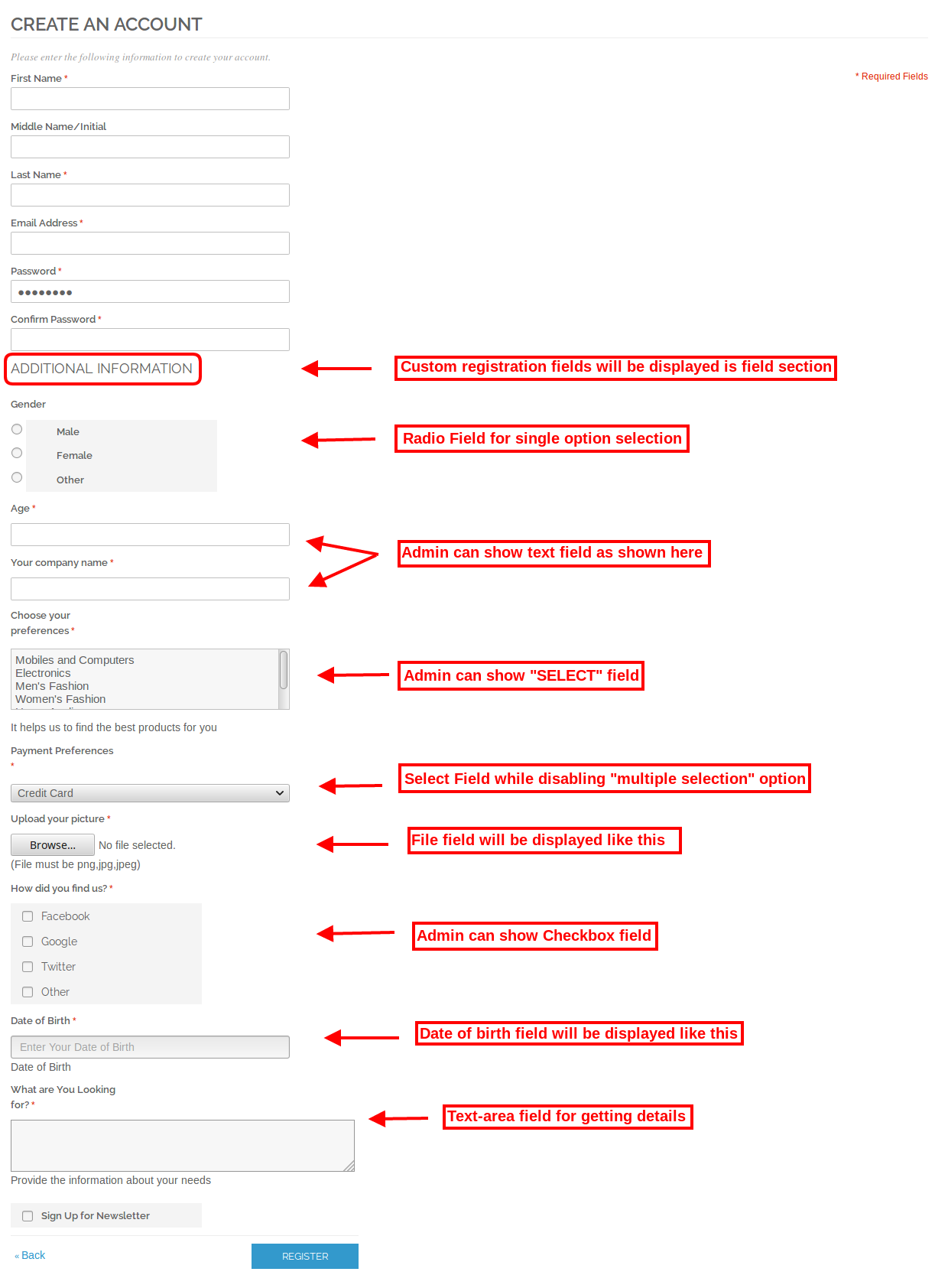
The online store merchant can apply the settings from the admin interface of the Magento Registration Fields extension. After applying the settings, the admin can show the custom fields on the registration page of the website. The customers can enter the details in various fields and thus the admin can get more and more details about the online users without any difficult process.

If The customers skip the required field then an error message will be displayed on the registration page.  The error will be thrown only on the fields that have required field validation.

Get, Set, Sell! Save Big this Holiday with Knowband’s PrestaShop Module Packs: Part 1

With the holidays waiting at the threshold, Knowband is all set to assist the eCommerce merchants in the quest of hitting the bull’s eye. Anticipating the joyful holiday mood, Knowband offers a yet another to celebrate with the best-ever remunerative deals. You can now buy the Pack of Extensions and get additional discounts of 10% to 20%. E-retailers can avail the lucrative offer for the Prestashop store.

Save by choosing our module bundles at discounted products and leverage a seamless online transaction. Take a glance at the various Prestashop addon bundles with discount and products on promotion designed to simplify your eCommerce.

E-commerce Pack – Easy Checkout, Win back Customers, Offer Discount

Since the festive seasons are around the corner, leverage the splendid features in your eCommerce site with these top-notch Prestashop Extensions:

Prestashop One Page Checkout Extension:

The Prestashop one step checkout addon can incorporate a single page checkout in your site without making any changes in the base code. Additional features offered by the Prestashop addon are as follows:

  • Compatibility with all types of products
  • GDPR compliance
  • Social Login options
  • Easy way to customize the layout of the checkout page
  • All shipping and payment type support
  • Drag-and-drop feature customize the front-end interface
  • MailChimp Integrator
  • Option to add required field validation
  • Complete cart summary

Prestashop Exit Popup Addon

Prestashop exit-intent email subscription popup extension detects the mouse-movement of the user and displays a popup whenever he/she is about to exit the site. You can showcase discount and other attractive call-to-action and motivate the visitors to reconsider their exit.

Listed below are some of the additional features of Prestashop exit popup module:

  • Fully customizable interface
  • MailChimp Integration
  • Option to set the fixed/percentage discount at button click
  • Customize the text displayed on the popup with ease
  • Get a full report of coupons generated and used in tabular and graphical format

Prestashop Abandoned Cart Module

Track all abandoned carts of your Prestashop store and convert them to sales by regular email follow up with Prestashop abandoned cart addon. Features of Prestashop abandoned cart addon are listed below:

  • Capture abandoned cart of both Guest and logged-in customers
  • Pre-designed email templates to send follow up emails
  • Schedules the follow up emails based on minimum cart value
  • Increase conversion by sending serial reminders
  • Send fixed or percentage based coupons at a button click

Prestashop Multi Vendor Marketplace Addon

Prestashop Marketplace Module by Knowband can help you create an advanced marketplace by upgrading your eCommerce site. The marketplace owner gets to manage the sellers, products, categories, order and other transaction from the back-end of the Prestashop marketplace addon. The third-party sellers can upload their products and sell them to your customers. While the products management and approval can be done from the back-end.

Other features offered by the Prestashop extension are:

  • Set the global as well as order-wise commission with great ease
  • GDPR complaint
  • The admin can approve and manage the products and categories of the marketplace
  • Admin can enable auto or manual-approval for the seller’s profiles
  • Sellers can list their products and admin to add/remove the products to be listed on the marketplace
  • Admin can even approve/disapprove the reviews of the customers
  • Option to add seller’s shipping methods
  • Option for the sellers to request for the payout
  • Default email templates
  • Add custom CSS code in order to change the look and feel of the site

In order to avail the offer, add all the extension of the eCommerce pack in your cart and apply the coupon code. You’ll get an amazing discount of flat 15% if you add any three of the above mentioned modules in your cart and apply the coupon code: COM15.

For a pack comprising of all the four extensions, get an additional 20% off on your cart value. Add the products in your cart and apply coupon code: COM20 and get sky-rocket your eCommerce site at budget-friendly price.

Coupon Code: COM15 (For a pack of 3 PrestaShop module)

Coupon Code: COM20 (For a pack of 4 PrestaShop module)

Social Pack – Offer easy login, Social Shop, Increase social presence

The social is your one-stop destination for boosting your social presence and bring your site at the finger-tip of your prospective customers.

Prestashop Social Login Addon

The Prestashop social loginizer addon incorporates multiple social login options like Facebook, Twitter, LinkedIn and various other platforms in your checkout and registration page of the site.

  • 14 Social login options
  • Mobile, Tablet and Desktop Responsive
  • Easy installation
  • Drag-and-drop option for positioning social login icons
  • Complete tracking reports

Prestashop Social Shop Integrator Addon

The Prestashop FB Store extension by Knowband integrates your Prestashop store with the Facebook page and allows you to display your products on the FB store. The visitors are redirected directly from the Facebook page to the eCommerce site at a button click.

  • Integrates your FB page with your Prestashop site
  • Offers the auto listing options
  • Option to display featured products
  • Creates a Shop tab on your Facebook fan page
  • Retrieve Google Analytics report
  • Change the look and feel of your FB shop
  • Displays the desired products and categories on your Prestashop Facebook Store

Prestashop Share and Win Discount Module

The module adds a social sharing option on the website’s product pages. The customers can share the products and discounts in return. Take a run through the basic feature of the Prestashop share and win discount addon.

  • Allow the online customers to share the product on their Facebook wall
  • They get discounts in return of the share
  • Set the discount in percentage or fixed amount
  • Select the layout of the sharing button to be displayed
  • Add custom CSS and JS codes
  • Admin can view Product Stats

Add all the three Prestashop extensions in your cart and apply the coupon code: SOCIAL10 to get additional 10% discount.

Coupon Code: SOCIAL10

Customer Retention Pack – Increase subscriber base, Affiliate marketing

Boost the subscription base of your site and amplify the chances of conversions by increasing customer retention. Here are the feature-packed plugins that you in this Customer Retention Pack.

Prestashop Spin and Win Exit Popup

The Prestashop Spin and Win Email Subscription addon takes the process of increasing the subscription base of the site and offering giveaways to the next level with a gamified approach. Here are some of the features offered by the best-in-class module.

  • Configured at a few button clicks
  • Subscription popup can be displayed when the visitors enter the site or when they intend to leave. It depends on the choices made by the store admin
  • An alluring replacement of the conventional subscription pop-up
  • built-in MailChimp and Constant Contact integrator
  • Offers a statistical report of the coupons generated and used
  • Pre-designed holiday themes

Prestashop Affiliate & Referral Program Extension

Boost the popularity of your website by arranging a multi-level affiliate program with Prestashop Affiliate and Referral program addon which allows the e-merchant to manage affiliate system on the eCommerce store. The key highlights of the addon are:

  • Allows participation of affiliate
  • Display affiliate registration field on the website
  • Offer different ways of referring the store, that is, viz social media, link sharing via email
  • Customer will get the referrals from the assigned code
  • Set the fixed referral rate and percentage based referral rate for order completion
  • Graphical report of the commission and referrals

Prestashop Reward Points Addon

Offer rewards to the customers each time they purchase a product from your site with our Prestashop reward point extension. Make your customers feel special and increase the chances of customer retention. Here are some of the admin features offered by the module:

  • Generate new as well as repeat sales with ease
  • Increase customers loyalty with attractive discounts
  • Keeps your customers engaged with reward point

Wanna add these features in your site? You can now do it with an additional discount of 15%. Just add the extensions in your site and apply the coupon code: CUS15

Coupon Code: CUS15

Helpdesk Support Pack – Offer best services to the customers

One of the biggest factors that may cripple some easy conversions is the lack of customer support, especially during the busy sale season, is lack of adequate customer support and return policies. You can grab an outstanding pack of three plugins at an additional 15% discount and leverage the astounding features for your valued customers.

Prestashop Deskoid Helpdesk Module

Prestashop desktop helpdesk addon offers an easy-to-use interface that allows effortless tracking and management of the tickets raised by the customers.

  • Incorporates and interface in the front-end that allows the customers to raise tickets for their complaints and queries.
  • Tickets are viewed from the back-end
  • Admin to set the priority of the tickets and update the ticket status
  • Displays instant notification whenever a message is received

Prestashop Return Manager Addon

Create return/replacement policies and manage the return request of the customers with great ease with the intuitive Prestashop Order Return Manager extension. Some of the standout features offered by the modules are listed below:

  • Admin can create N number of return policies
  • Online customer to place return/refund/replacement request
  • Customers get an option to attach the image of the defected product
  • Admin can deny or approve a return request of the customers

Prestashop Social Messenger Extension

The social messenger addon for Prestashop integrates your Prestashop store with the Facebook messenger and allows you to offer chat support to your customers via your messenger account. Here are some of the other features that your get along with the module:

Incorporates the messenger chat option in the front-end
Set the color of the social messenger icon
Multi-lingual compatible
Option to set the messages for auto-responder

Just add all the extension of this bundle in your cart and apply the coupon code: SUPPORT15, to get an additional 15% off.

Coupon Code: SUPPORT15

Legal Pack – GDPR, Age Verification

Make your site complaint with GDPR and incorporate age verification at a button with an additional 10% discount.

Prestashop GDPR Module

Make your store GDPR compliant and offer all the rights under the GDPR to the EU customers with Prestashop GDPR Addon. Here are the rights that you get with the extension:

  • Right of access
  • Right to data rectification
  • Right to erasure
  • Right to data portability
  • Rights related to the automated decision making

Prestashop Age Verification Module

Restrict the audience base of a particular age bracket from browsing your site by adding age restriction with our feature-rich Prestashop Age Verification extension. The key highlights of the module are:

  • GDPR compliance
  • Displays a popup in the front to confirm the age of the visitor
  • Customizable front-end interface
  • Allows the admin to set the opacity of background easily
  • Display/hide the note for the customers
  • Set and display the terms and condition
  • Option to add custom CSS and JS

Buy both the plugins together and avail an additional discount of 10% discount by applying the coupon code: LEGAL10

Coupon Code: LEGAL10

So, what are you waiting for? Just get the Prestashop Addon Bundle that suits your business and get your holiday sales going.

This is not it! There are many more such bundles of extensions yet to come. Stay tuned for more such PrestaShop Module Bundles.

How to Use Actions in Adobe Photoshop?

As a graphics designer, it is very much important to deliver our product with a better UI. We also to do the work in more efficiency and with more speed. But any time we have to do the same task in the repeatedly in Adobe Photoshop. As a human nature, we lose our interest to do the same task repeatedly. We always try to create something new every time.

Adobe Photoshop can give us relief from that continuous repetitive work. We can use Actions in Adobe Photoshop to do so.

Let’s learn about the Action in Photoshop

Action in Photoshop is some pre-defined work that we have recorded before.

Photoshop actions come in the.ATN file format. It allows us to record the actions for our repetitive tasks.

Suppose we have 1000 photo and on those, we want to add some watermark then the best way to do it is to make an action for it.

Process to record actions

Step 1:

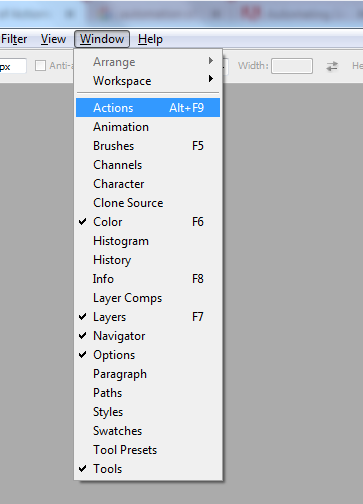
Open your Photoshop application -> Go to Windows -> Action

Then a window will open:

Step 2:

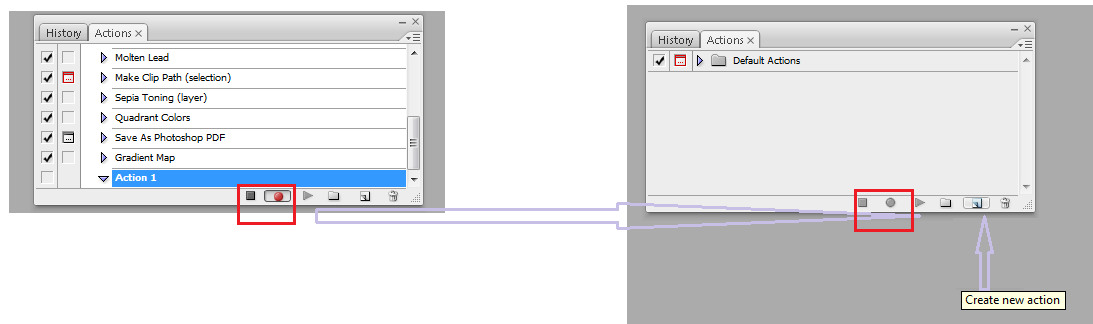
Click on the "Create New Action" icon to start the recording.

Step 3:

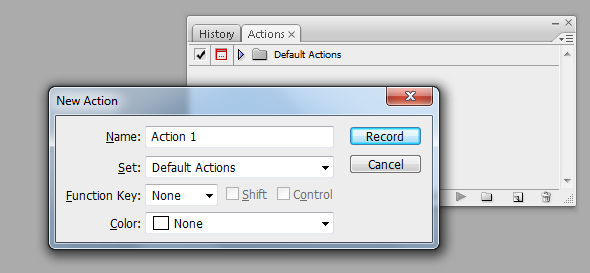
Name the action so, you can easily recognize it for future use..

After we click on that “Record” button you’ll notice that a recording gets started.

Step 4:

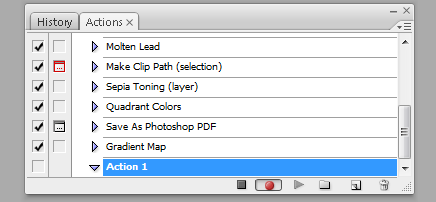
Now do your work in Adobe Photoshop and it gets recorded.

Step 5:

Now after getting work done we stop the action from getting recorded.

Process to implement the recorded action

To implement the recorded action for the bulk images Photoshop has given a wonderful option for that and we call is as “batch process”. Let’s go step by step to implement the action.

Step 1

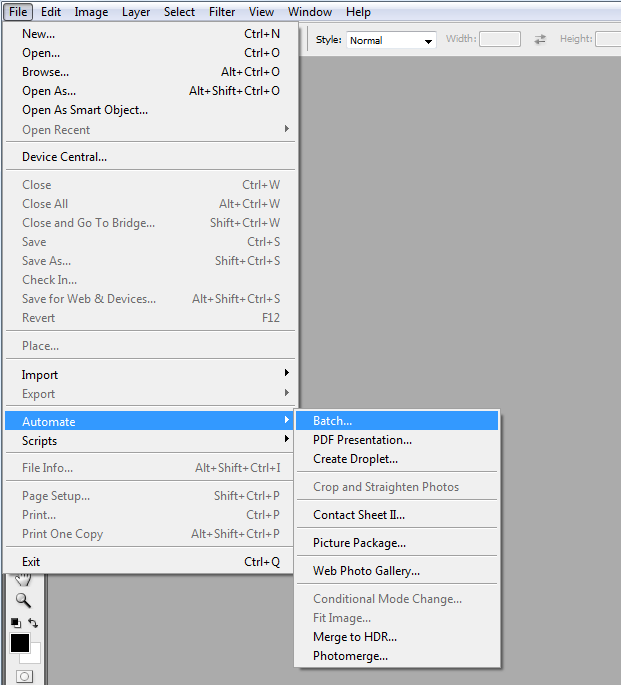
Click on the File => Automate => Batch

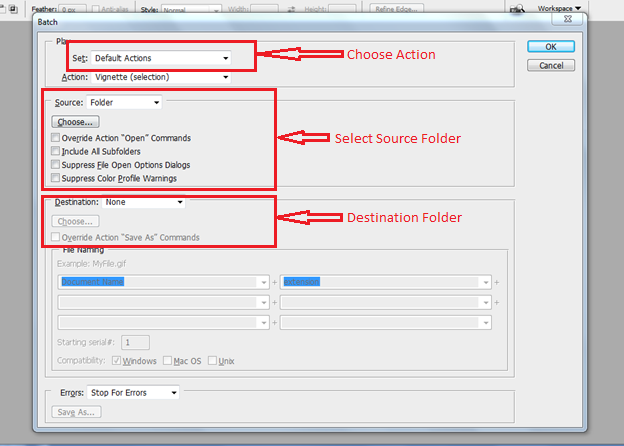
When we click on “Batch” option we will get a pop up window with the option of “Batch Process”.

From the Pop Up we can select our action, source folder of image and destination folder to render the image. When we click on “OK” button Photoshop will do the operation in bulk and our images will be saved in the destination folder.

I hope you get all my points, if I am wrong at some point, please let me know in the commenting section, I will for sure take a look at it.

How to Use Actions in Adobe Photoshop?

En tant que graphiste, il est très important de livrer notre produit avec une meilleure interface utilisateur. Nous devons également faire le travail de manière plus efficace et plus rapide. Mais chaque fois que nous devons faire la même tâche dans Adobe Photoshop à plusieurs reprises. En tant que nature humaine, nous perdons notre intérêt à faire la même tâche à plusieurs reprises. Nous essayons toujours de créer quelque chose de nouveau à chaque fois.

Adobe Photoshop peut nous soulager de ce travail répétitif continu. Pour ce faire, nous pouvons utiliser Actions dans Adobe Photoshop.

Apprenons-en plus sur l'action dans Photoshop

Action dans Photoshop est un travail prédéfini que nous avons enregistré auparavant.

Actions Photoshop?come in the.ATN file format. It allows us to record the actions for our repetitive tasks.

Supposons que nous ayons une photo 1000 et que sur celles-ci, nous souhaitons ajouter un filigrane, alors le meilleur moyen de le faire est de faire une action pour cela.

Processus enregistrer des actions

Étape 1 :

Ouvrez votre application Photoshop -> Allez à Windows -> Action

Ensuite, une fenêtre s'ouvrira:

Étape 2 :

Cliquez sur l'icône "Créer une nouvelle action" pour lancer l'enregistrement.

Étape 3 :

Nommez l'action de manière à pouvoir la reconnaître pour une utilisation future.

Après on clique dessus "Record"bouton vous remarquerez qu'un enregistrement commence.

Étape 4 :

Maintenant, faites votre travail dans Adobe Photoshop et il est enregistré.

Étape 5 :

Maintenant, après avoir terminé le travail, nous empêchons l'action d'être enregistrée.

Processus pour mettre en œuvre l'action enregistrée

Pour mettre en œuvre l'action enregistrée pour les images en vrac, Photoshop a donné une excellente option pour cela et nous l'appelons en tant que "traitement par lots". Allons pas à pas pour mettre en œuvre l'action.

Étape 1

Cliquez sur le fichier => automatiser => batch

Quand on clique sur "Lot"option nous allons obtenir une fenêtre pop-up avec l'option de"Traitement par lots“.

À partir du menu contextuel, nous pouvons sélectionner notre action, le dossier source de l’image et le dossier de destination pour restituer l’image. Quand on clique sur "OK"Le bouton Photoshop fera l’opération en bloc et nos images seront sauvegardées dans le dossier de destination.

J'espère que vous comprendrez tous les points, si je me trompe à un moment donné, merci de me le faire savoir dans la section commentaires, je vais certainement y jeter un coup d'oeil.

How to add Google reCaptcha in your Magento Store?

As the name suggests, Captcha (“Completely Automated Public Turing test to tell Computers and Humans Apart”), is a service provided by Google that prevents the sites from spam and bots. Incorporating Captcha is one of the ways of identifying whether the visitor trying to register in your site is a human or a bot.

Despite it’s extensive use in almost every industry that has their online presence, the exact difference between Captcha and reCaptcha is not known to some. Moreover, some of the site owners are still baffled regarding which one should they choose. If you are all bailed up with these questions, then, this article can help you out. The write-up even brings forth the way to incorporate Captcha and reCaptcha in Magento sites.

What is the difference between Captcha and reCaptcha?

Both Captcha and reCaptcha serves the purpose of protecting the site from robots.


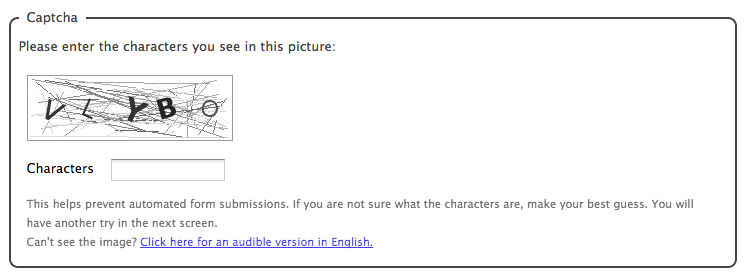
Captcha shown in the registration of the site shows up an equation using numbers and ask the user to complete the math equation like addition, subtraction, or multiplication. Thus, bots and spammers have no chances.

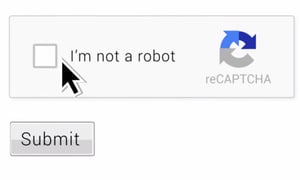
On the other hand, ReCaptcha is similar to captcha, but it supports two versions. The first offers you to enter some words or digits from the image, and the second offers you to mark the checkbox “I’m not a robot”.

Which one should you choose – Captcha or reCaptcha?

While both the system serves the same purpose for you, the latter is a more preferable option. From the customer point-of-view, reCaptcha is considered to be a more feasible option. The complicated Captcha and it’s fuzzy text are considered annoying by the users. In some of the cases, it has even cost some conversions to the sites. However, reCaptcha protects your site from spam without annoying your authentic users. Hence, the security constraints coupled with the ease of navigation of the site users provide a plus point to reCaptcha over Captcha.

How to incorporate Captcha and reCaptcha on your Magento store?

Magento 1.9 and 2 support CAPTCHA, but it is disabled by default.

In order to enable Captcha protection for the administration login page on Magento 1.9, follow these steps:

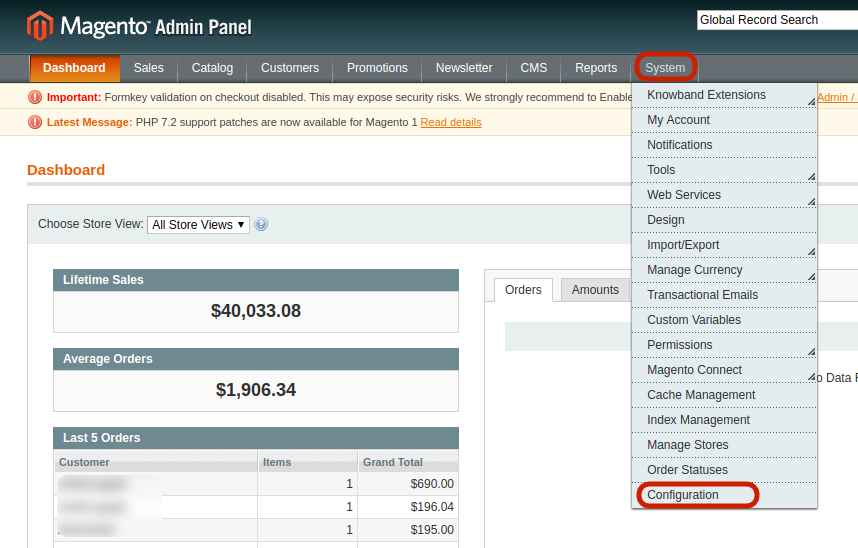
Log in to your Magento store and navigate to the top menu bar.

Click System -> Configuration.

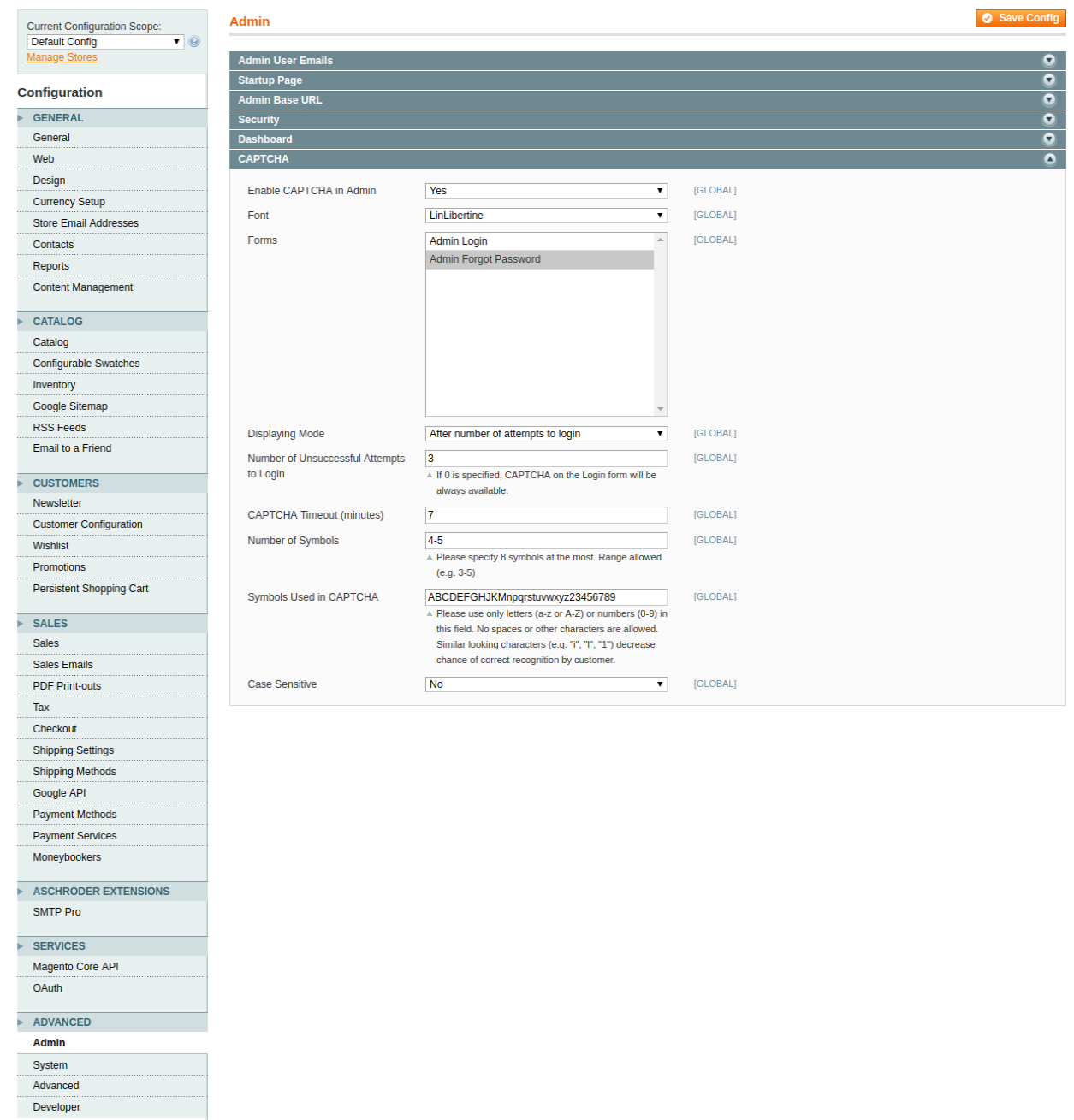
In the Configuration tab, you’ll find a number of options on the left side. Scroll down and click on Advanced -> Admin -> CAPTCHA.

By default this option is disabled, enable it by selecting ‘Yes’.

Fill the configuration options that comprises of the following:

Font: select the font that appears in the CAPTCHA.
Forms box: select the forms where you want to display the Captcha protection.
Displaying Mode: Select whether you want the CAPTCHA to appear always or after a certain number of failed login attempts.
CAPTCHA timeout: Fix the timeout session for the Captcha.
Number of Symbols: Specify the range of symbols that you want to allow.
Symbols used in Captcha: Specify the symbols that you want to include in Captcha

Click Save. This will enable the Captcha on the login form of the site.

Making the job of site protection even easier, Knowband offer an easy-to-use, Magento Google reCaptcha extension that can help you incorporate reCaptcha not just on the login page, but on the checkout page and other such web forms of your site. For this, you are required to obtain Google Site Key and Secret Key.

Here’s how it works.

Get the Magento Google reCaptcha module from the Knowband and install it in your Magento store. Share the retrieved Site and Secret key, select the web pages where you want to display it and the reCaptcha will be incorporated in your store.

How to Create Breadcrumb in PrestaShop 1.7?

Introduction

The Breadcrumb allows a user to maintain the location on the websites. One can easily create the Breadcrumb on the Prestashop. If you are creating a module which has a separate page on the front then you would create a front controller by extending the ModuleFrontController file and this ModuleFrontController file extends FrontController which has the following function:

protected function getBreadcrumbLinks()
{
$breadcrumb = array();

$breadcrumb['links'][] = array(
'title' => $this->getTranslator()->trans('Home', array(), 'Shop.Theme.Global'),
'url' => $this->context->link->getPageLink('index', true),
);

return $breadcrumb;
}

How to Add?

Now, To create the Breadcrumb for your page you just have to create the same function in your front controller (Which you must have created by extending the ModuleFrontController) and append your Breadcrumb title and link with the parent Breadcrumb. Please look into the following code to understand it better:

protected function getBreadcrumbLinks()
{
 $breadcrumb = parent::getBreadcrumbLinks(); /* Get the Breadcrumb array from the parent function which is situated in the FrontController.php */
 
 $breadcrumb['links'][] = array(
 'title' => $this->module->l('level1', 'Current_controller_name') , /* Title which you want to give to the location */
 'url' => $this->context->link->getModuleLink('module_name', 'Current_controller_name', array() , (bool)Configuration::get('PS_SSL_ENABLED')) , /* URL which you want to provide for a location */
 );
 
 $breadcrumb['links'][] = array(
 'title' => $this->module->l('level2', 'Current_controller_name') , /* Title which you want to give to the location */
 'url' => $this->context->link->getModuleLink('module_name', 'Current_controller_name', array() , (bool)Configuration::get('PS_SSL_ENABLED')) , /* URL which you want to provide for a location */
 );
 
 $breadcrumb['links'][] = array(
 'title' => $this->module->l('level3', 'Current_controller_name') , /* Title which you want to give to the location */
 'url' => $this->context->link->getModuleLink('module_name', 'Current_controller_name', array() , (bool)Configuration::get('PS_SSL_ENABLED')) , /* URL which you want to provide for a location */
 );
 
 return $breadcrumb;
}

How it will look like on your page?

You have to add the above-mentioned function in the front controller you created. After adding the above code in the Front Controller, the Breadcrumb will be shown on the front page like below screenshot:

Bonus Tip:

If you want to make some changes (Like remove) in the Breadcrumbs then you can do the same using the following file:
/themes/classic/templates/_partials/breadcrumb.tpl

How to Create Alert Dialog box in Android?

The alert dialog box can be used to display a message in a popup dialog box or display a text field for user input or show any custom view in the dialog box.

For the view to be displayed in the popup dialog, the view has to be created programmatically or via XML. Then the view has to be set in the dialog so that this view is visible to the user in the dialog box.

Find the steps below to create a dialog box in which there will be a field for user input.

1. Create a view to be displayed in the dialog box.

final EditText userInput = new EditText(this);

2. Creating and displaying a dialog box.

new AlertDialog.Builder(this)
                .setTitle(“Title of the dialog box goes here”)
                .setView(userInput)
                .setPositiveButton(“Submit”, new DialogInterface.OnClickListener() {
                    @Override
                    public void onClick(DialogInterface dialog, int which) {
                        // Handle your action here when “Submit” button is clicked
                    }
                })
                .setNegativeButton(“Cancel”, new DialogInterface.OnClickListener() {
                    @Override
                    public void onClick(DialogInterface dialog, int which) {
		// Handle your action here when “Cancel” button is clicked 
                    }
                })
                .show();