Magento Review Reminder and Incentives Extension – User Manual

1.0 Introduction

In the present time, customer belief is utmost important for higher business growth. Well many users want to buy a product but are not sure about its quality. But how exciting it would be for them if a customer posts his experience after purchasing a product so that new visitors can get full assurity about the product quality. So are you finding a way to promote your store products and encourage more customers to write reviews for the purchased product. Knowband offers Magento Review Reminder and Incentives extension that reminds your customer to write the review for the purchased product and helps to keep your customers engaged on the website.

The Magento Review Reminder and Incentive Extension is highly customizable module loaded with many features and can be used without investing any coding efforts or technicalities.This module offers admin to motivate their customers to give their reviews and ratings on the products purchased by them.

1.1 Striking Features of Review Reminder and Incentives Extension for Magento

The Magento review reminder and incentives extension provides you multiple features which are fully customizable and easy to configure from the backend interface without requiring any coding knowledge. The various striking features of the Magento review reminder and incentives extension have been listed below.

  • The Magento review reminder and incentives module allows the admin to keep a check on the reminder triggers as well as the incentives offered. The admin can set the timing when they want to send the reminder and fix the incentive criteria from the back-end.
  • The Magento review reminder and incentives module allows you to evaluate review before posting on product page. If you select automatic then reviews will be automatically approved and if you select manual then admin can approve or disapprove it.
  • This module allows admin to give incentives and reminders to selected group i.e either customer or buyer or both.
  • Admin has the full authority to set a custom title for subject line and custom template on email when a review is accepted/not accepted and incentives are included/excluded.
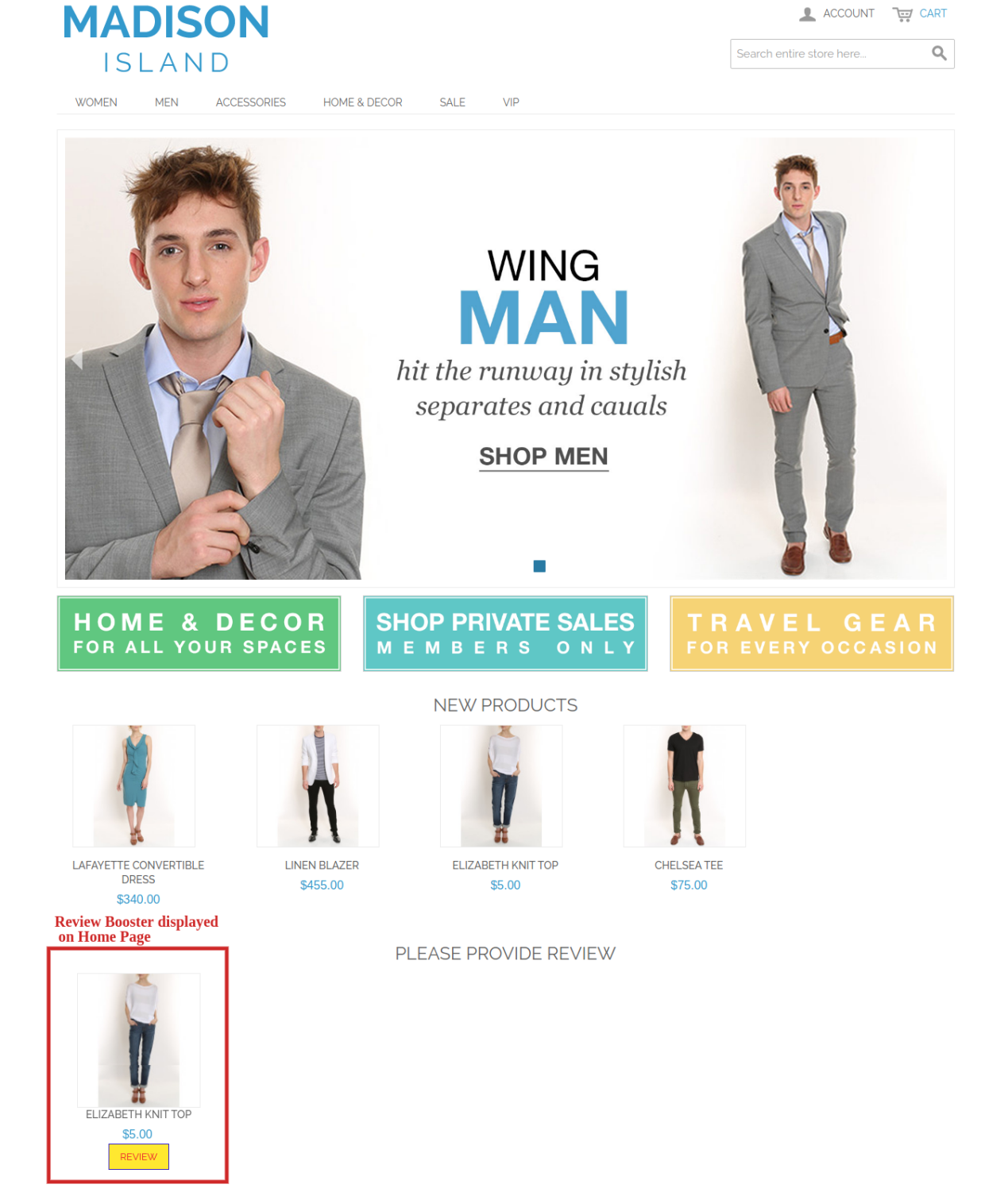
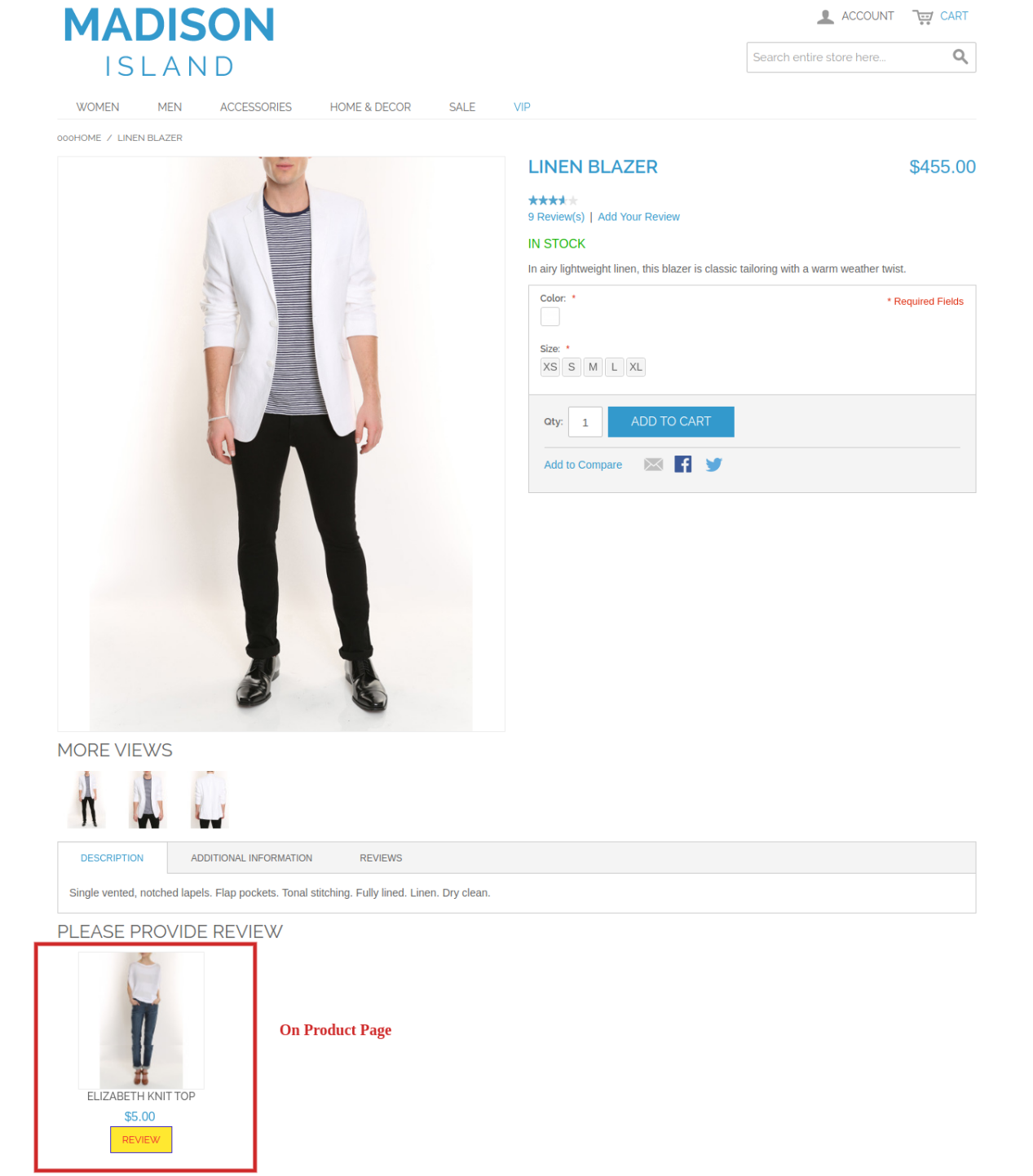
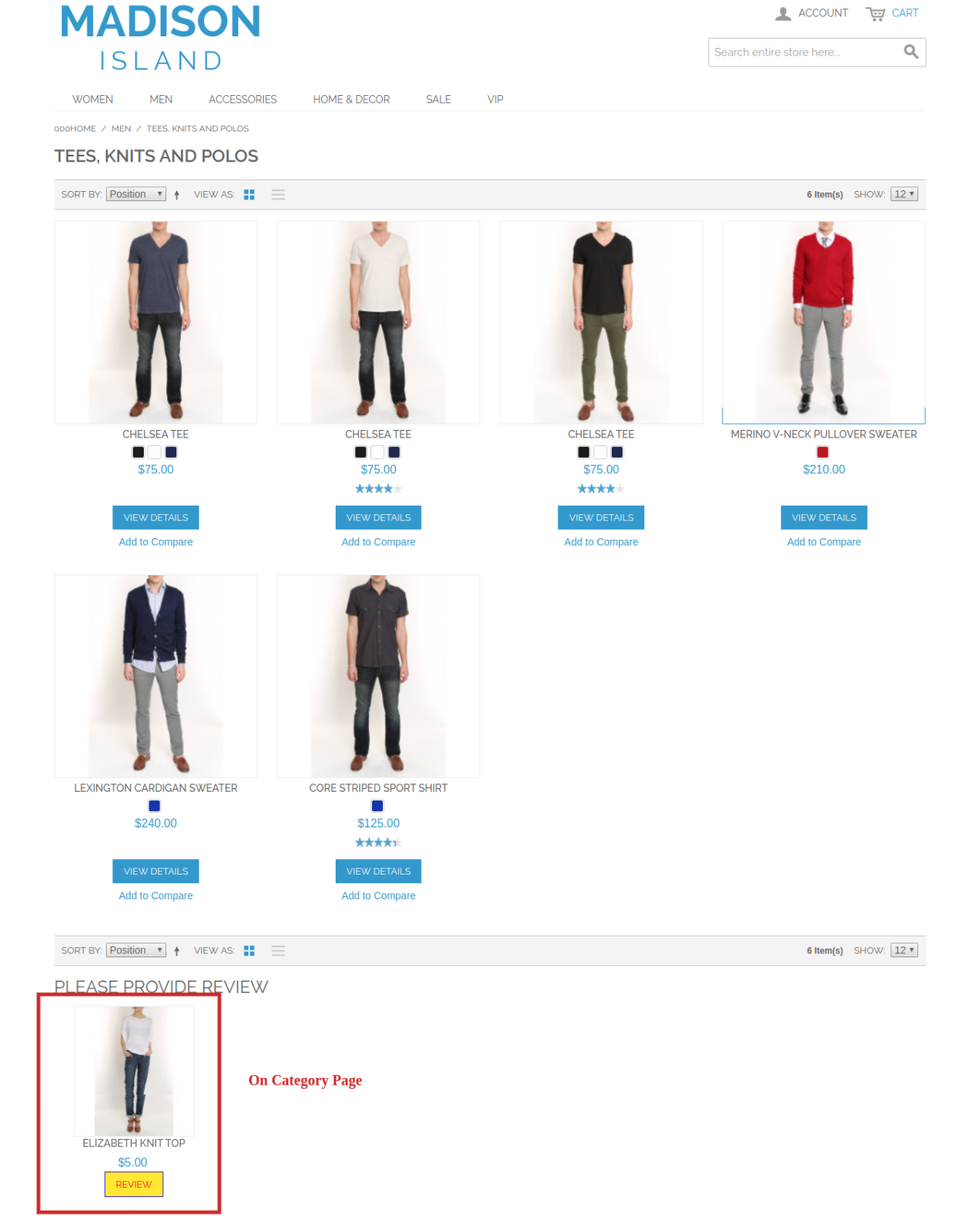
  • The functionality of Magento review reminder and incentives plugin can be enabled/disabled for the complete site or each separate pages like Homepage, Product page, Category page etc.
  • Magento review reminder and incentives extension offers SSL compatibility and mobile responsive interface.
  • Magento review reminder and incentives module works flawlessly with multiple languages.
  • This module allows admin to change the color of background, border or text at front end.
  • The Magento review reminder and incentives module allows admin to select from the list of products and exclude it from review booster system.
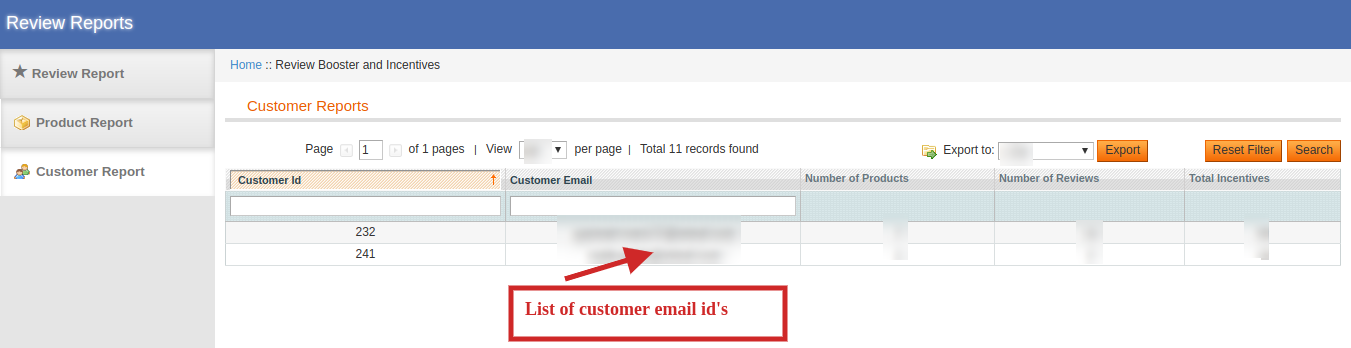
  • The Magento review reminder and incentives module allows admin to keep a check on customer ID and email along with the no. of reviews posted and total incentives given to them.

1.2 Technology for Development

Language: PHP
Frame Work: Magento

2.0 Installation Guide

The store admin can follow these simple steps for installing the Magento Review Reminder and Incentives extension on their store:

  • First of all purchase the extension package from the Knowband store.
  • After purchasing the Magento review reminder and incentives extension  from the Knowband website, install it on your system.You will get a zip extension containing the source code of the module.
  • Install it on your website. It would show a pop-up for your confirmation.
  • Click on “Proceed with the installation” option. This step will install the module and show notification – “Module(s) installed successfully”.
  • After installation, enable the same from the admin panel.

3.0 Admin Interface of Magento Review Reminder and Incentives Extension

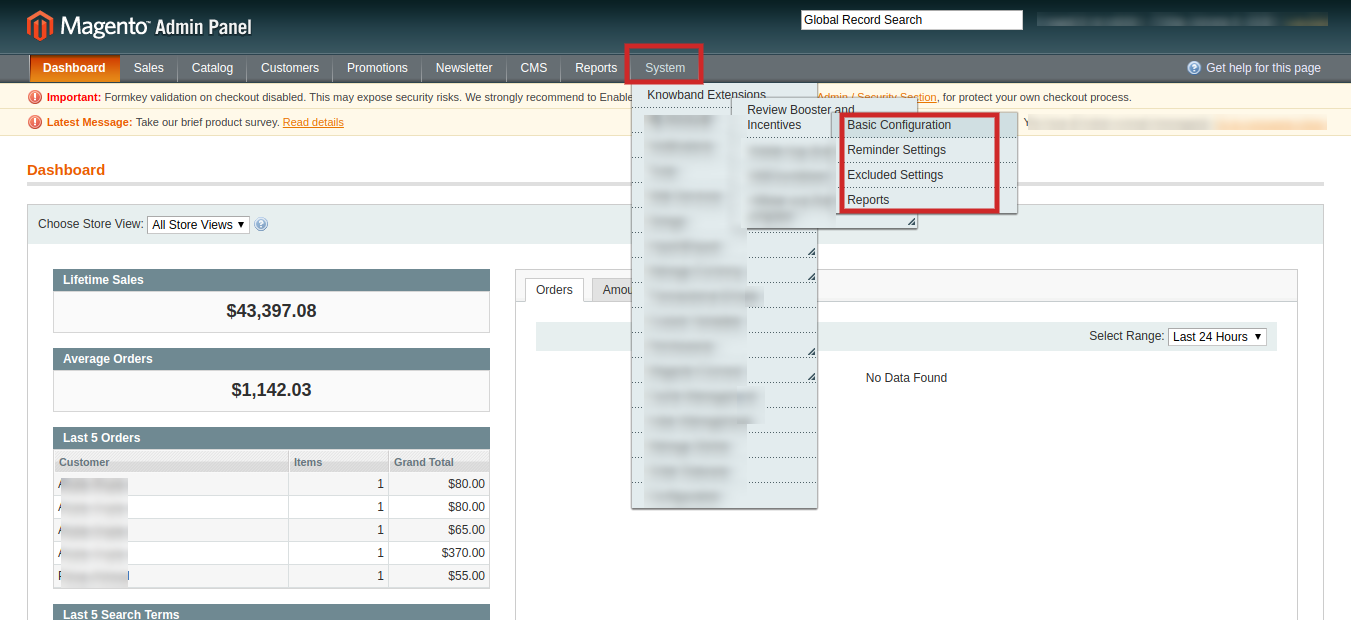
After successful installation of Magento review reminder and incentives module on your website, you can configure the review reminder setting as per your needs. In the Admin Panel, go to System > Knowband Extensions > Review Booster and Incentives.
picture2

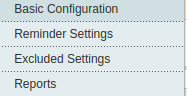
This Knowband extension offers you the following four sections.

1.Basic Configuration
2.Reminder Settings
3.Excluded Settings
4.Report

Each Tab for the Magento Review reminder and Incentives is explained below:

Initially the fields are set to their default values.

3.1 How to set Basic Configuration

In order to set reminders admin needs to enable this functionality from the back end. It can be done by 2 ways:

General Settings:

The General Settings tab of basic configuration extension for Magento offers the following configuration option.
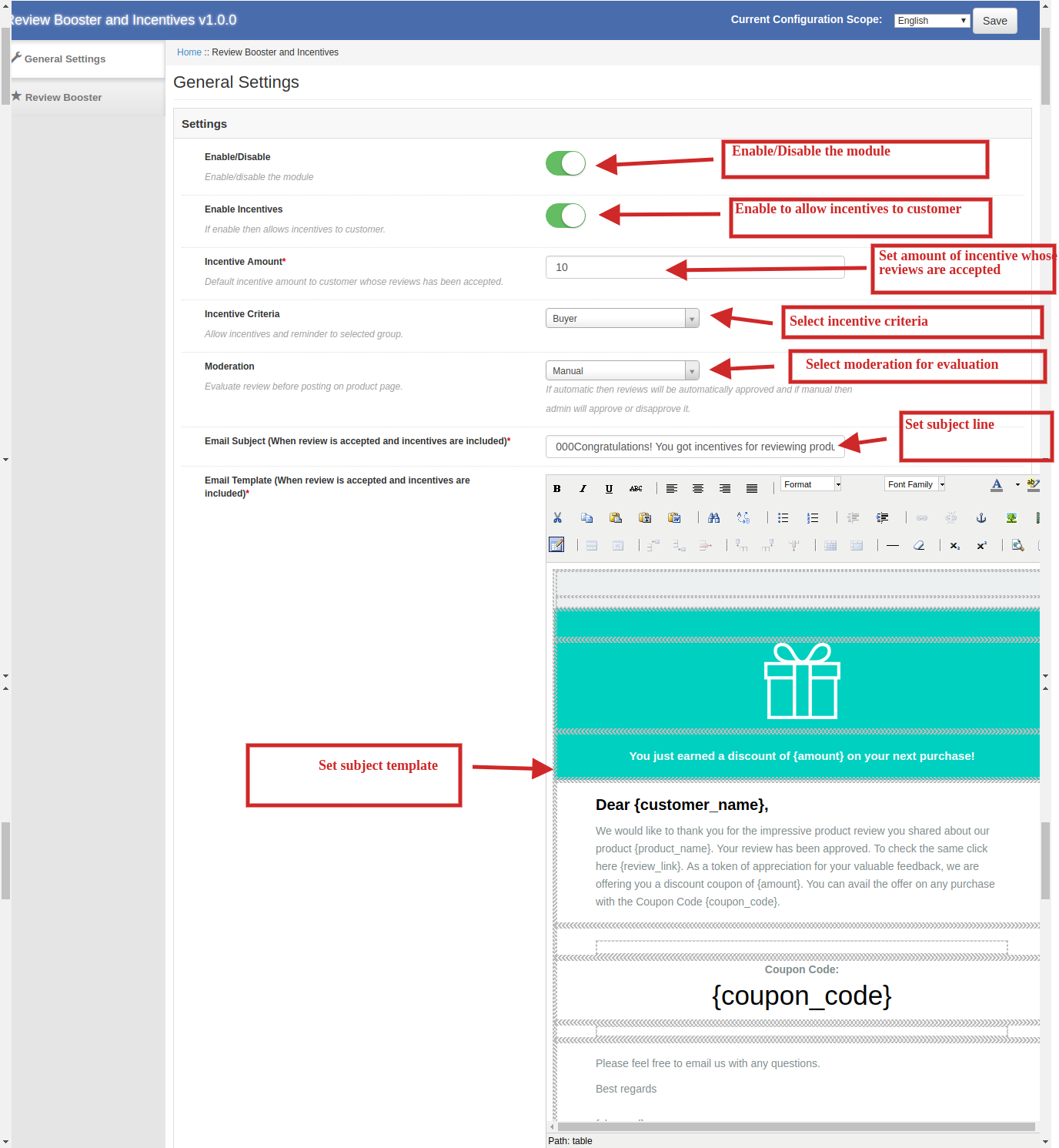
1.Enable/Disable: Admin has the authority to enable or disable the functionality of Magento review reminder and incentive module by simply toggling the switch provided in the admin interface.
2.Enable Incentives: Admin has the authority to enable incentives to customers and can set a default incentive amount of customers whose reviews have been accepted. If disabled, then there is no need to set a default incentive amount.
3.Incentive Criteria: you can allow incentives and reminders to selected group i.e either customer and buyer or both.
4.Moderation: You can evaluate review before posting on product page. If you select automatic then reviews will be automatically approved and if you select manual then admin will approve or disapprove it.
5.Email Subject (When review is accepted and incentives are included): Admin can change the subject line on email when a review is accepted and incentives are included.
6.Email Template (When review is accepted and incentives are included): You can change the template of the mail sent to a customer when review is accepted and incentives are included.
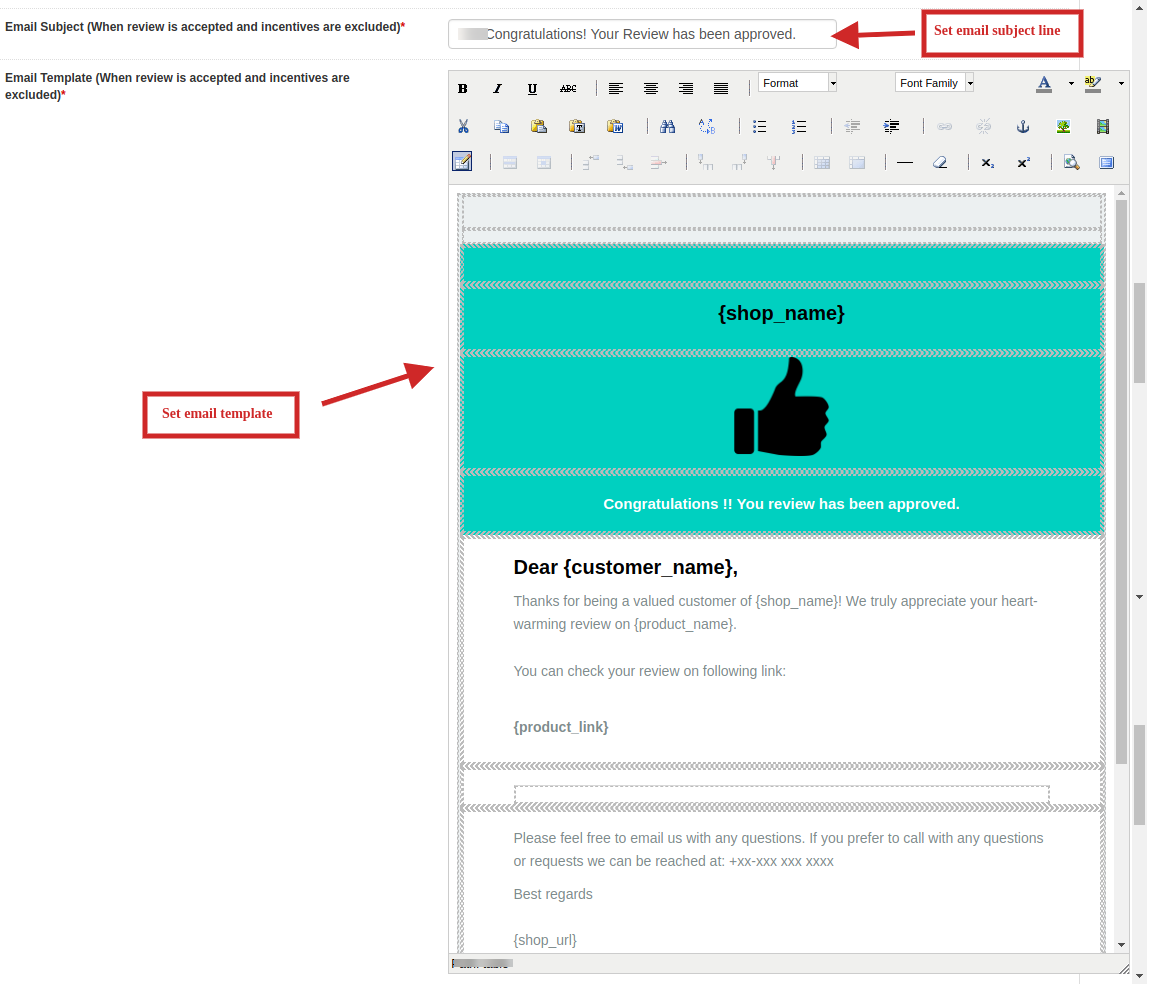
7.Email Subject (When review is accepted and incentives are excluded): Admin can change the subject line on email when a review is accepted and incentives are excluded.
8.Email Template (When review is accepted and incentives are excluded): You can change the template of the mail sent to a customer when review is accepted and incentives are excluded.
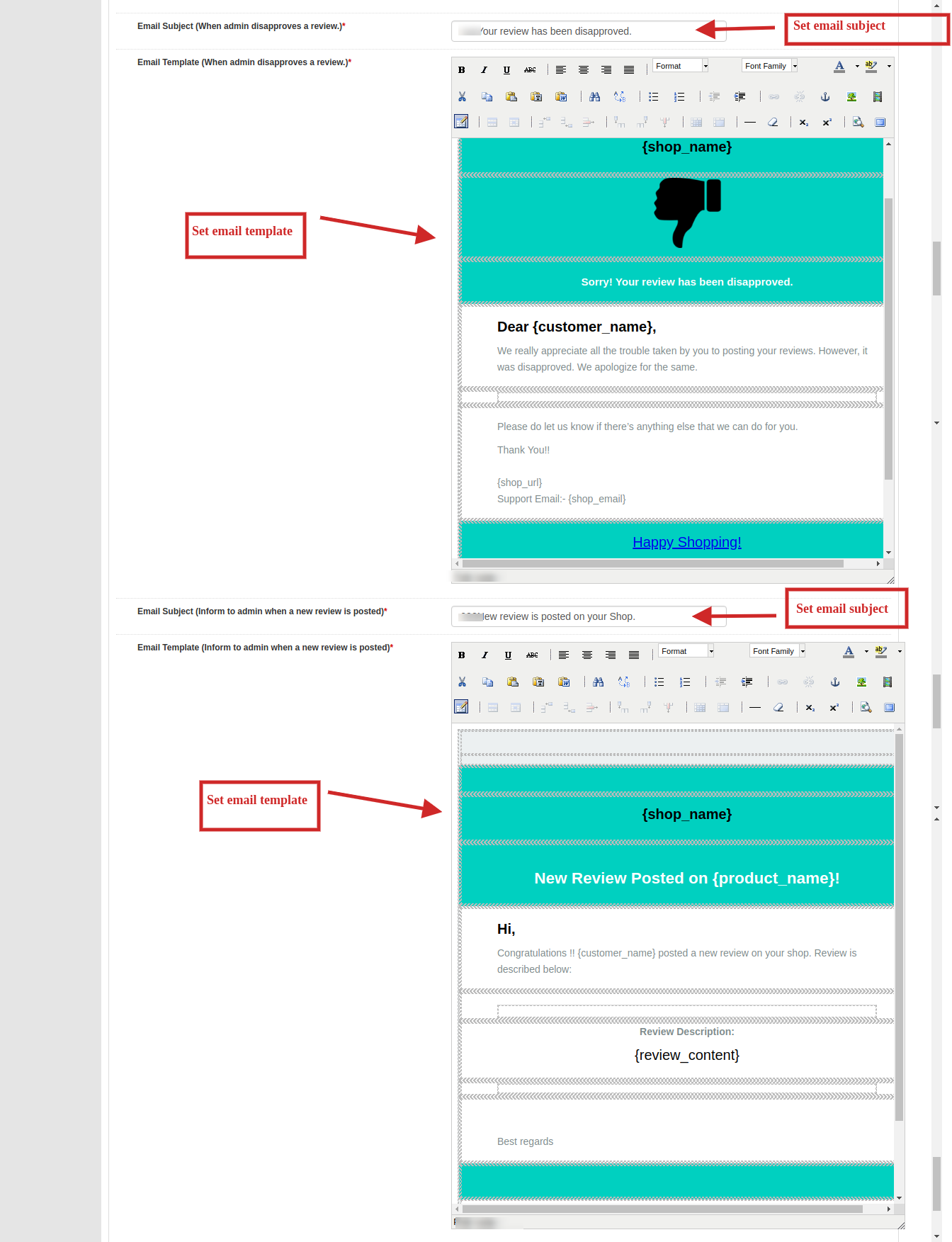
9.Email Subject (When admin disapproves a review): You can change the subject line of mail accordingly when a review is disapproved.
10.Email Template (When admin disapproves a review):  You can change the template of the mail sent to a customer accordingly when review is disapproved.
11.Email Subject (Inform to admin when a new review is posted): You can add or change the subject line to keep yourself informed about a new review posted on your website.
12.Email Template (Inform to admin when a new review is posted): You can change the template accordingly to keep yourself informed about a new review posted on your website.

After all the settings of Magento related products extension have been configured, click on the “Save” button shown at the top right corner of admin panel to save the module settings.

Review Booster Settings:

The review booster settings tab of basic configuration extension for Magento offers the following configuration options:
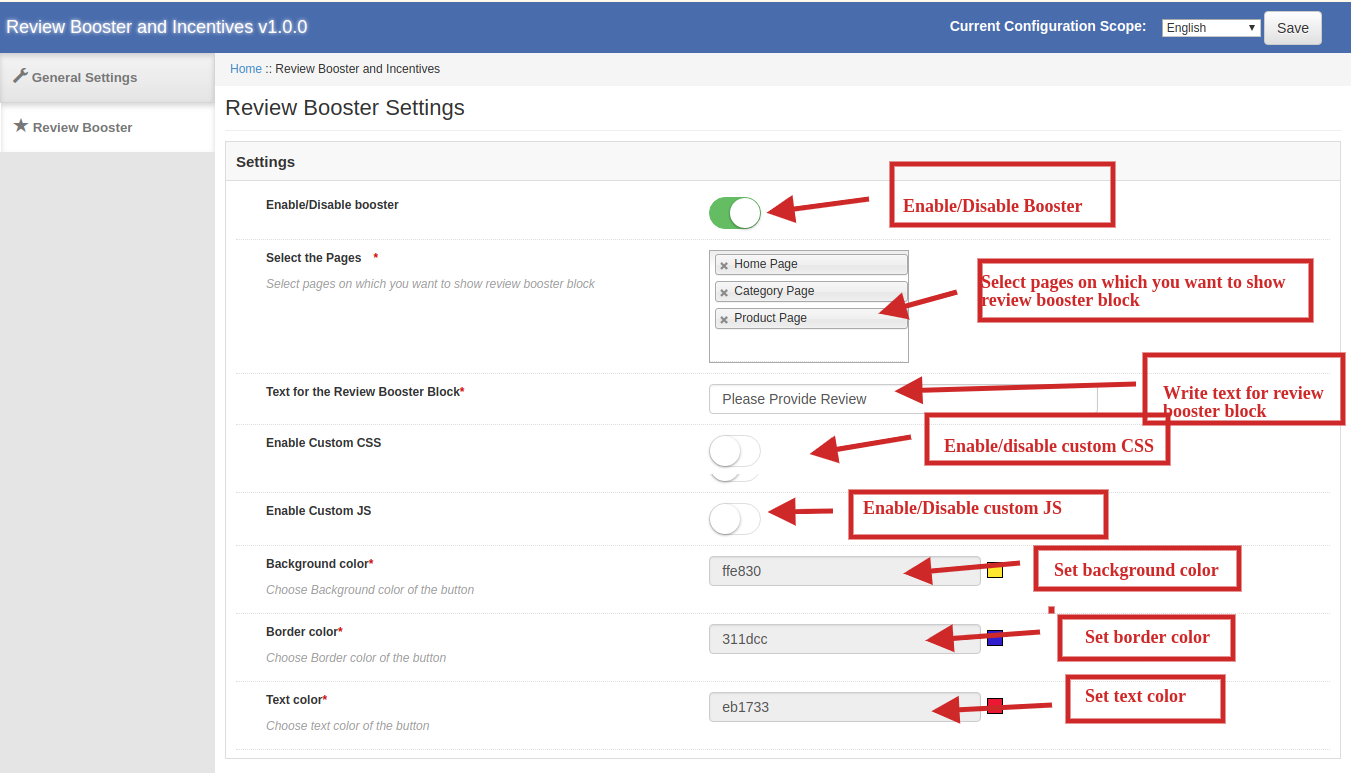
1.Enable/Disable Booster: Admin can enable or disable the functionality of  review booster extension by simply toggling the switch provided in the admin interface.
2.Select the pages: You can select pages on which you want to show review booster block. You can choose one more than one from home page, category page and product page.
3.Text for the review booster block: You can write text accordingly which you want to publish for the review booster block.
4.Enable Custom JSS: Admin can enable and write custom JSS accordingly. You cannot use style tag for JSS.
5.Enable Custom CS: Admin can enable and write custom CS accordingly. You cannot use script tag for CS.
6.Background Color: You can choose background color of the button
7.Border Color: You can choose border color of the button.
8.Text Color: You can choose text color of the button.

After all the settings of Magento related products extension have been configured, click on the “Save” button shown at the top right corner of admin panel to save the module settings.

3.2 Reminder Settings

The admin can even send the reminder automatically after a certain duration from the day of order creation. The number of days after which the reminder is to be sent can be entered.

You can edit pre existing reminders or can simply click on Add Reminder button if you want to add reminder and a list of various settings will be shown as image below:
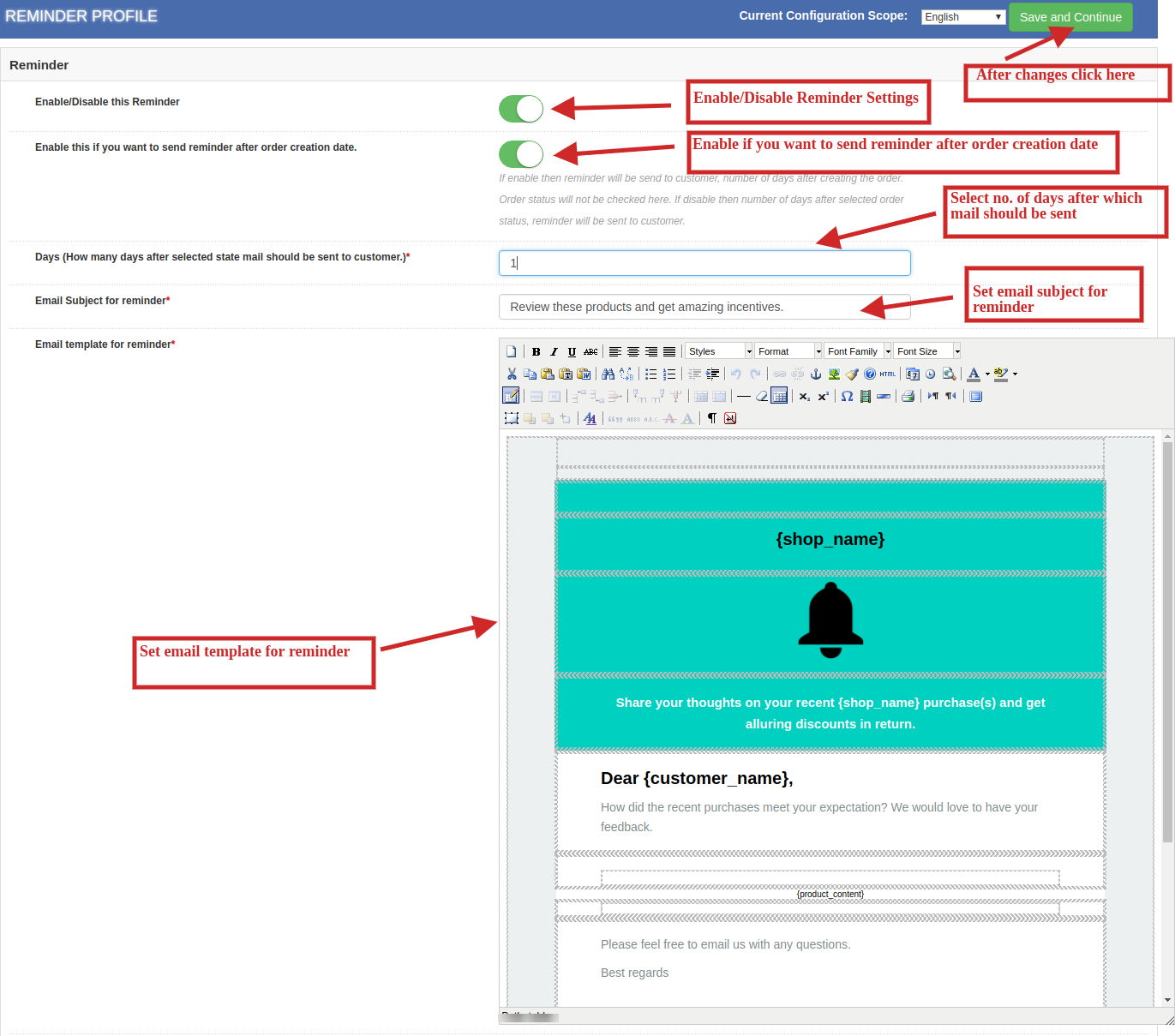
1.Enable/Disable this reminder: You can enable or disable the reminder module by simply toggling the switch provided in admin interface.
2.Enable this if you want to send reminder after order creation date: Admin can enable or disable this plugin accordingly. If enable, then reminder will be send to customer in number of days selected by admin after creating the order. Order status will not be checked here. If disable then reminder will be sent to customer after number of days selected for order status.
3.Select Status: You can select order status when you are sending a reminder to the customer.
4.Days (How many days after selected status, mail should be sent to customer): Admin can select the no. of days to send reminder mail to the customers.
5.Email subject for Reminder: You can add a subject line in reminder emails of your choice.
6. Email Template for reminder: You can change the template in reminder emails as per your choice.
After all the settings of Magento related products extension have been configured, click on the “Save and Continue” button shown at the top right corner of admin panel to save the module settings.

3.3 Excluded Settings

The reminder and incentive criteria includes all the products and categories of the store. However, if the admin wants to exclude any of the product or category from the same, this can be done from the ‘Exclude Settings’ tab. There are 2 types of exclude settings:

Exclude Products

This extension has following configuration options:
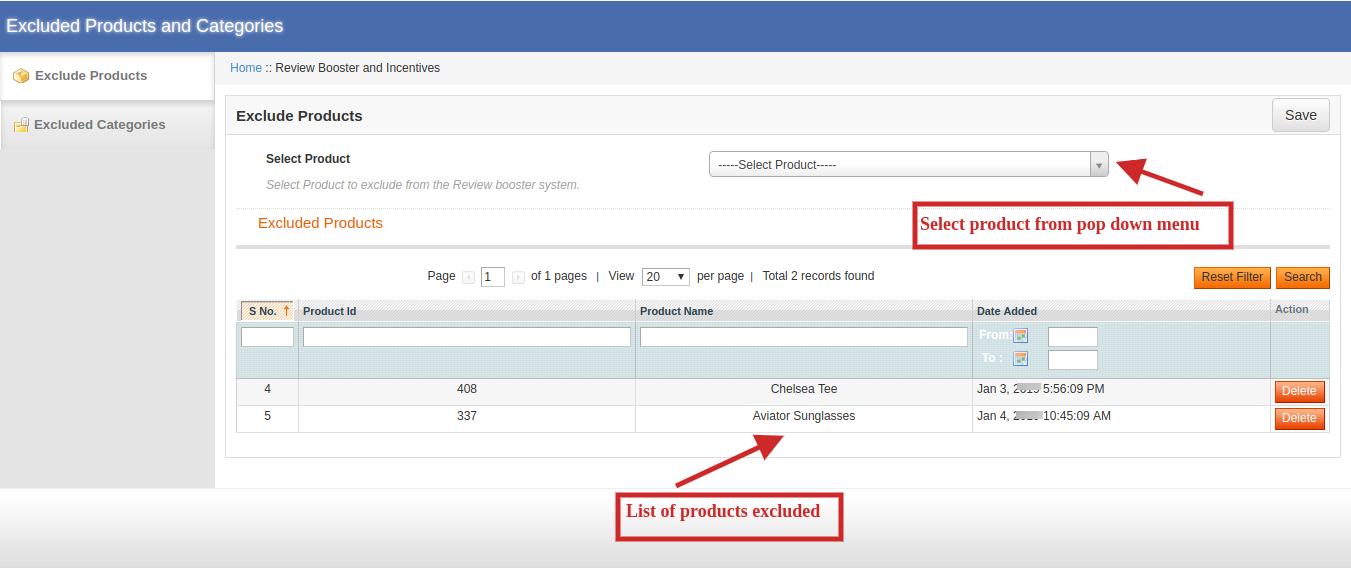
1.Select Products: Go to the product tab and add the product name you want to exclude. The products can be excluded easily by entering the name manually also. The list of excluded products would be seen just below this settings as shown above.

Exclude Categories

This extension has following configuration options:

1.Select Category: Go to the Category Tab and add the category name you want to exclude. The categories can be excluded easily by entering the name manually also. The list of excluded products would be seen just below this settings as shown.
2.After all the settings of Magento related products extension have been configured, click on the “Save” button shown at the top right corner of admin panel to save the module settings.

3.4 Reports

The customers can enter their reviews in the front-end of the website by entering their Name and Email IDs. If the setting is Automatic, then the review will be automatically posted on the website, but if it’s Manual, then, it will be posted after the approval of the admin.

1. Review Report:
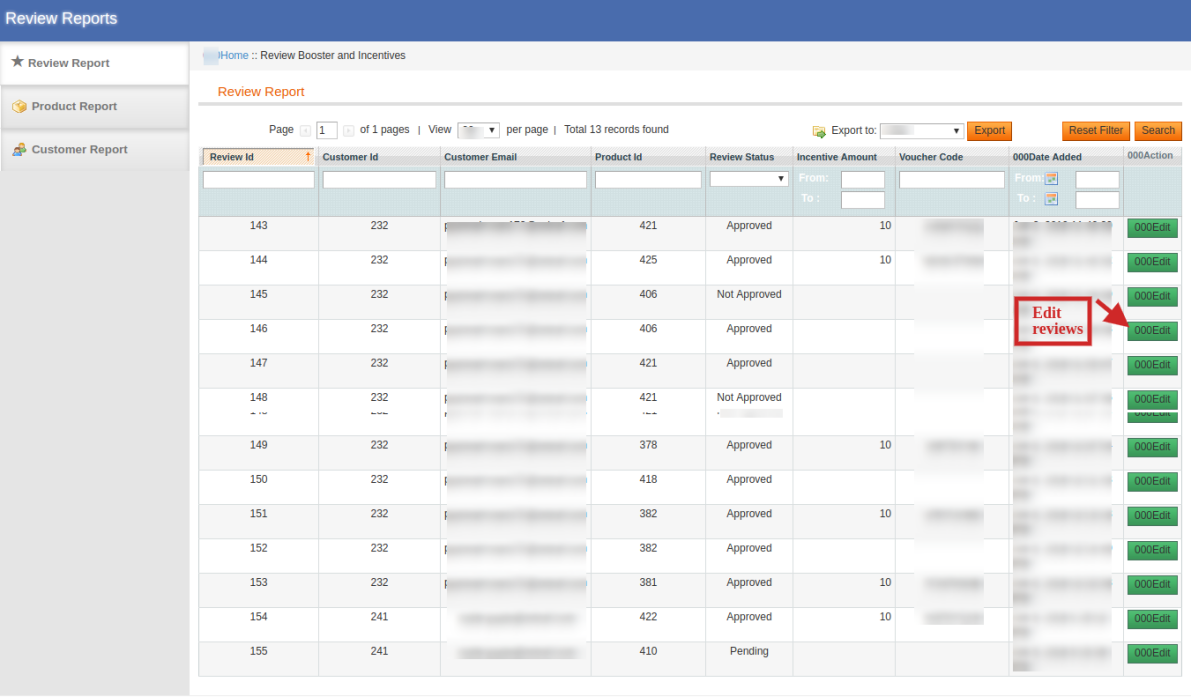
In this tab, admin can view the entire list of reviews for the products at the back end. You can approve or disapprove a review by changing the pending status.

2. Product Report:

In this tab, you can see the no. of reviews on each product along with the no. of customers and total incentives given to customers.

3. Customer Report:
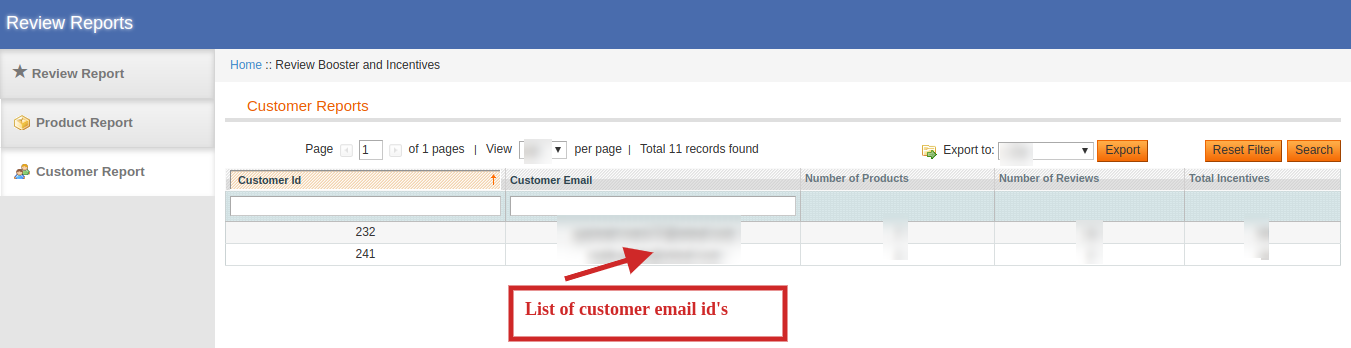
The reviews and the incentives can be easily tracked from the admin interface. By this tab, admin can keep a check on customer ID and email along with the no. of reviews posted and total incentives given to them.

4.0 Front Interface of Magento Advance Related Product extension

4.1 Review Reminder on Home Page:
4.2 Review Reminder on Product Page:
4.3 Review Reminder on Category Page:

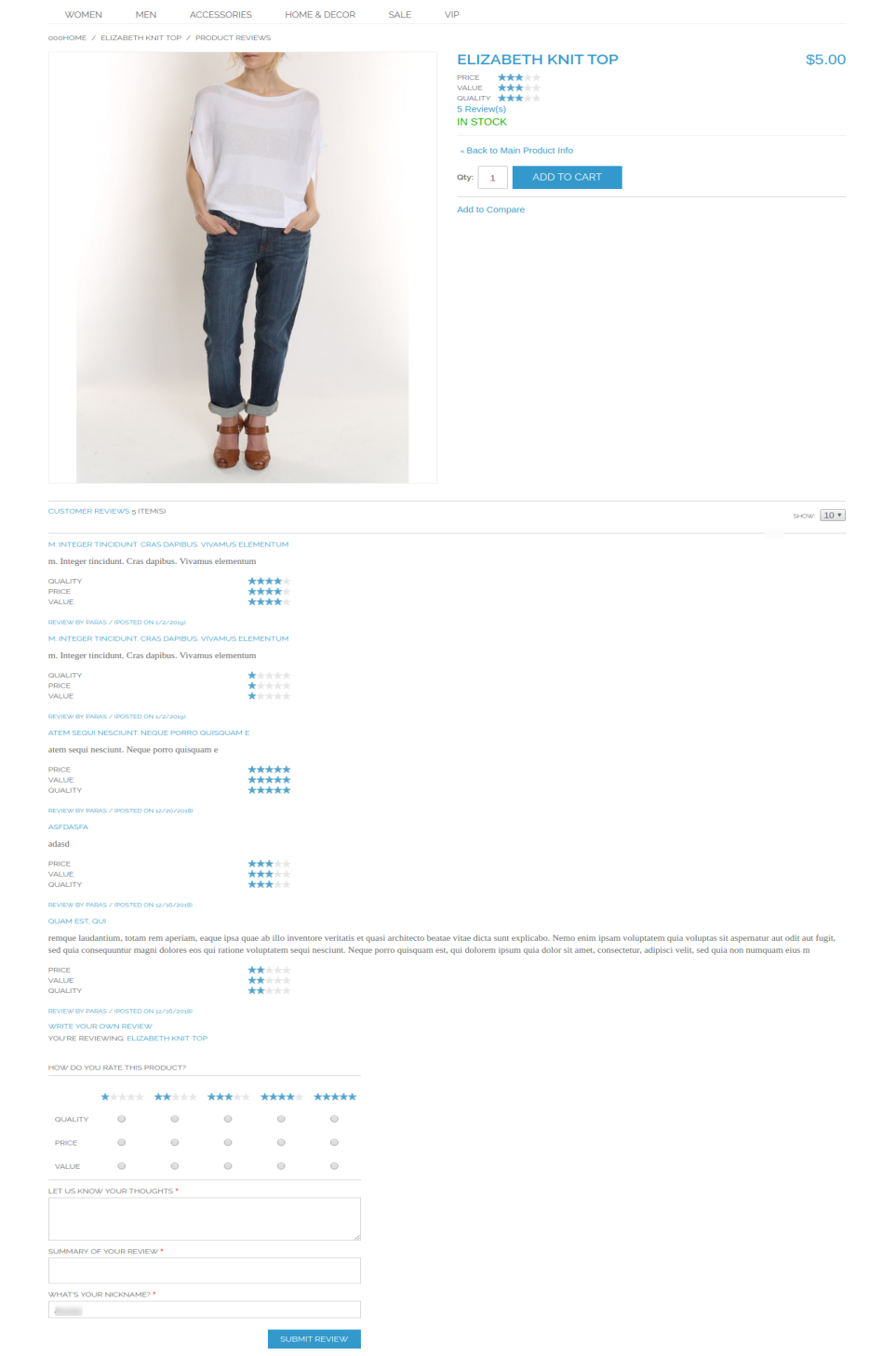
4.4 Review Page:
Why you should sell on an eCommerce Marketplace?

With the huge involvement of the internet in daily lives, a large number of customers are buying products online globally. The advancement of the eCommerce industry is flourishing day by day. If you are a retailer then the idea to sell online could never go wrong.  Selling online expands your reach globally. This helps the online marketplace to make more profits than usual.

There are numerous ways of selling online apart from starting an online website. Retailers can even sell their products through renowned marketplaces. The growing competition among sellers encourages them to implement some new strategies to attract more customers to your product. Selling on Marketplace like eBay, Etsy, Walmart, etc could be a bet as they can easily give a brand more exposure. and get you instant access to a vast number of potential customers.

If you create your own eCommerce website, you can get full control, large profits, higher scalability. It can become costly for you as setting and promoting a niche brand requires high investments. But if you choose a marketplace, you could sell your products online with certain control but will be able to leverage the global reach and services of a Marketplace. Customers often prefer buying products from Marketplaces because of the wide variety of products and the ease of all-in-one shopping. Apart from this, selling products on Marketplace could offer you much more.

Marketplace statistics to give a clear idea

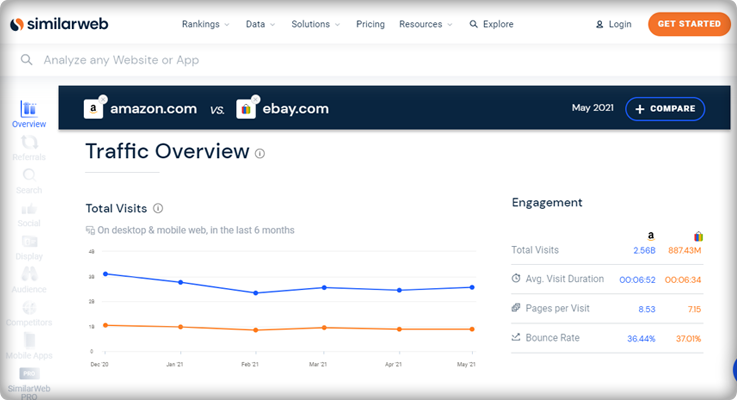
  1. Here is a graph from a similar Web representing the total visits of two famous marketplaces Amazon and eBay. 
  2. In a recent blog, published by the webretailer, Amazon is still on the top, surpassing every other marketplace. It gets around 5.2B visits every month.
  3. The report includes data for 155 most visited marketplaces with more than one million visitors per month. And eBay ranks 2nd globally in the similarweb reports.
  4. The top 20 marketplaces have a collection of general merchandise except 3 that sells specific product categories, eg. Etsy.
  5. General, Fashion, Arts, crafts and gifts, Homewares, and Electronics are the top five product categories among the popular marketplaces.

Top 5 Marketplaces in India

  1. Amazon India
  2. Flipkart
  3. Snapdeal
  4. Myntra
  5. Shopclue

Top 5 Marketplaces in Spain

  1. Amazon Spain
  2. Milanuncios
  3. El Corte Ingles
  4. Ali Express
  5. eBay Spain

Top 5 Marketplaces in Italy

  1. Amazon Italy
  2. eBay Italy
  3. Mediaworld
  4. Unieuro
  5. AliExpress Italiano

Top 5 Marketplaces in Poland

  1. Allegro
  2. Ceneo
  3. Chrono24
  4. Showroom
  5. Domodi

Top 5 Marketplaces in France

  1. Amazon FR
  2. Cdiscount
  3. eBay FR
  4. Leroy Merlin
  5. Fnac

Top 5 Marketplaces in Germany

  1. Amazon Germany.
  2. eBay Germany.
  3. eBay Kleinanzeigen.
  4. Otto
  5. Idealo

Below are some of the reasons to start selling products on Marketplace:

1. Huge audience access:

The huge popularity of Marketplace like Etsy, eBay, Walmart, etc. for online shopping automatically provides you the accessibility to all its customers  without having to spend any money on marketing. It’s a good opportunity for small business owners to gain good profits without any advanced investments.

2. Low Startup Cost:

As Marketplace has all things set up in one place, the retailer has to hardly make any investments other than some few expenses. Thus, the minimal cost is involved in selling on a Marketplace in comparison to selling on your own eCommerce website. For example Marketplaces like Amazon, Walmart, etc charges:

  • Monthly Subscription Fee for selling on their platforms
    And,
  • Listing Fee or Commission which is a standard amount for every product they listed on the Marketplace’s catalog.

3. To increase trust level:

It usually happens that the users buy the same product as yours from the Marketplace due to a lack of trust. Once your product reaches Marketplace, it will get more exposure and this will definitely motivate the users to go for instant purchase. It’s also beneficial in getting high sales and revenues too.

4. To reach Global Market:

Marketplaces provide you an option to expand your business reach globally with minimal effort. Sellers can access millions of potential customers globally without making any advance investments. This would definitely boost up your cross-border sales and overall business growth. For example, Amazon, Walmart, Etsy eBay are top leading Marketplaces serving millions of online customers all over the world

5. Enhance your brand’s visibility:

If you are a newbie in the eCommerce industry, it’s obvious that customers are unaware of your brand and products. You surely need recognition in the market. Marketplaces like eBay, Etsy, and Walmart help you to boost up your brand and visibility by listing all your products on their web page.

6. Deliver outstanding customer service

There are similar options to help sellers fulfill customer standards for quick, free delivery. They have their customer care teams that work 24/7 for customer service and to resolve their real-time issues.

For example, with programs such as Fulfillment by Amazon (FBA) and eBay Global Shipping, you can choose to have on your behalf the marketplace warehouse, pick, prepare, and ship product.

7.     Provides a broad variety of payment and shipping options

For quick purchases, the marketplace offers different payment and shipping methods. A seller does not have to worry about shipping while selling over different marketplaces.

Dropshipping is another trending feature provided by many marketplaces. While some allow the sellers to add their shipping methods or the seller can use the marketplace shipping services.

8.     Extremely authoritative and trustworthy

Many eCommerce experts may contradict this but some may take the favor. Marketplace like Amazon is a safe and reliable place for the transaction. They provide secured options for payments and are integrated with various payment gateways.

Similarly, many online marketplace platforms are secured with PayPal security. It is the most trustworthy payment method worldwide.

Expert Sayings:

1. Yasuhiro Fukushima, Japanese business executive -“Thus, in the future, instead of buying bananas in a grocery store, you could go pick them off a tree in a virtual jungle.”

2. Paul Graham, Y COMBINATOR – You can’t wait for customers to come to you. You have to figure out where they are, go there and drag them back to your store.”

3. Mudit Khosla, CEO, Tradus:  If one chooses to sell through a Marketplace, then there is very less requirement of working capital unless there is a deal; there are no rentals involved.

4. Ankur Sethi, Founder & CEO, Nupinch.com: If any local retailer wants to reach a million customers to just showcase the products, he’ll end up spending some fairly huge cash. Whilst, these Marketplaces act as a channel partner & help you reach millions of users, to some really deep parts of the countries & in turn push your sales exponentially.

Make more out of Marketplaces:

  • Sellers should register themselves on all possible Marketplaces and make more ways of earning revenues.
  • At the initial level, try to provide some discounts and offers to attract more customers to your product.
  • Keep a check on the customer reviews about your product and try to appreciate them or address their concerns. This strategy helps in making loyal customers.
  • Always remain aware of the latest trends and technical advancements of selling online.

Choosing the right Marketplace:

Selling through online Marketplaces like Walmart, eBay, Etsy is definitely a great option for an eCommerce retailer but choosing the right one for your business is the basic step to lead. Well, it totally depends on the product type and category of your store. Every Marketplace has its own standardized process of registration, requirements, terms, and conditions, etc. Sellers must go through these instructions and understand that which website will provide the right positioning and brand value to their product. One of the main things on which retailers should keep a check while choosing the right Marketplace is the traffic of the website. The more is the traffic, the more numbers of orders he can get for his products.

6 points to check about a Marketplace:

Although each Marketplace works differently there are some points that are similar in between them and are also a must check for a seller. They are:

  • Website Traffic
  • Reputation between customers
  • Stability
  • Checkout process
  • Policies and Guidelines
  • UI of Marketplace

The most important feature of a Marketplace is that it must provide a user-friendly interface to the customers. Sellers need to keep a check on this feature as they may face an issue in case the product is returned. Many times, the marketplace does not hesitate to accept the product which is returned without even questioning the buyer, thus this may incur a loss for the seller. So, it’s important for a seller to make the right choice for massive sales and overall business growth.

Start a Hyperlocal Marketplace that serves locally

With the clear idea of marketplace selling benefits, you can choose the right platform for your brand. Multichannel selling is profitable and builds your brand identity. Along with that, you can start selling your products locally. To make it painless, start with an online website using KnowBand’s hyperlocal marketplace module. You can deliver the products to your customers at their doorstep. You will need a delivery boy app that will allow you to manage the package delivery process.  There is more to learn about it.

Over to you:

The less complexity involved with selling on a marketplace is inevitable for sellers. It’s really necessary to give an enhanced recognition to your business and Marketplace suits perfect for the job. So, regardless of the marketplace, you choose to sell on, it’s important to be aware of the latest trend going on in the eCommerce industry and implement it for a profitable business in the future.
This was all from my end, now it’s totally up to you to select a Marketplace according to the products of your store for the overall growth of your business.

Selling on Marketplace was not that easy before. Integrate your eCommerce store with the Marketplaces like Etsy, eBay, Walmart, and others in just a few simple steps. KnowBand offers Marketplace Integrators for various CMS platforms like PrestaShop, OpenCart, Magento, and Shopify which allows you to present your products to a larger audience and encourage brand awareness as well.

Find out more articles here:

How to get a Marketplace site: a step by step guide
Ecommerce Marketing Calendar 2021
Best eCommerce platforms for starting a multi-vendor marketplace
5 Ways to Attract Sellers on your Online Multi vendor Marketplace

How to rank your products up in Walmart search results?

Walmart is an American multinational retail corporation operating a chain of hypermarkets globally. It offers a variety of services, like retail goods, pharmacy, financial, wireless and photo lab services. It is one of the most popular online marketplaces in the world.

Being a Walmart seller, this query would have often come to your mind. Now, you need to understand the depth of it as the high ranking of your products can easily keep you stay ahead of others. Well, in today’s market the competition between the retailers continues to heat up. As an eCommerce store owner, you need to get noticed by your audience. The only way to make it happen is to boost the visibility of your products on the Internet. And for that, sellers should consider their SEO strategies. Walmart’s growing marketplace comes with huge opportunities for sellers to boost up their business growth. With over 344 million visits of customers, it’s very important to seize this opportunity and beat the competition by staying at the top of our fellow competitors.

Now, the point arises that is it easy to rank your products on top of it will require loads of effort. Many Walmart sellers still don’t have any idea about the fact that Walmart’s product ranking algorithm does exist. It’s important to keep the listing strategies of Walmart in mind to make your listed products visible and provide you an extra edge over others.

Here are some of the factors for your listing optimization on Walmart:

1) Right Product Title:

The most influencing factor for Walmart’s product ranking is the title of the product. Try to use the right keywords and make sure to include all key attributes to enhance visibility and brand promotion. It is important to be consistent with the product title as it benefits to create a seamless brand image for your business. Product title could be proved the best strategy to take advantage of high sales and revenues.

2) Relevant Attributes:

Attributes play a major role in the search results of customers. The attributes are the deciding factors of the queries written by customers such as red shoes or Black dress.

After choosing a relevant category, attributes like color, size or pattern should be used for each product specifically. This will make easier for consumers to search your products and go for instant purchase. Sellers can also map the categories of their store by easily integrating it with the Walmart Marketplace too.

3) Correct Product Description:

A specific and informative description is the first step towards the popularization of your products on Walmart. Walmart allows you to write a 1000 words description for a particular product and that’s quite enough. So, it’s totally up to you how you can make the most out of it. Using facts and figures in the description shows your authority and expertise in knowledge. Try to create a catchy product description that attracts consumer’s trust and compels them to make the purchase.

4) Right Selection of Category:

Be specific to choose the best category suited for your product. Opting a wrong category will surely affect the product visibility and thus, limit sales. The more accurate is your product category the higher is your product ranking on the product search page. This will surely help the users to find your product easily and go for instant purchase.

5) Effective Pricing:

Offering competitively priced products certainly doesn’t hurt when it comes to rank your products. If you want to beat the competition, you better be nosy and look into your competitor’s price lists. For winning a BuyBox, you need to adjust your prices accordingly and this will certainly rank your products high and will improve sales of your business.

6) Genuine Customer reviews:

Customer reviews play a vital role in leaving a huge impact on the user’s decision regarding the purchase. It’s important to motivate customers to leave reviews for your products but there should be a check on negative reviews as well if there are any A negative review from a customer will directly influence your product ranking so it’s better to ensure customer satisfaction by providing them a great shopping experience. This will also help in building the user’s trust in your product and increase sales.

7) Artificial Intelligence:

AI is the most advanced technique used to understand user demand and behavior on the website. It works by bringing out the most relevant result for a specific customer. This helps shoppers to get accurate results and save their time too. However, this could be a hurdle for vendors as they would be unable to see the same results for the same products.

8) Role of linkage:
Links can stand out as a beneficial method in boosting up the ranking of products. Sellers can link their own website page to a particular product for more detailed information about the product and seller too. The information on the shop page would lead to enhancing the brand image between shoppers resulting in good sales and traffic on the store.

Conclusion:

Getting an item listed on top of the market place is quite tricky but if you try to implement the above-mentioned factors it would certainly be the top-notch approach to get your product ranking in top search results. However, product quality is still the most essential asset for product sales and marketing. So, you need to keep a check on the same.

Now, you can easily list your products by integrating with the Walmart marketplace in just a few simple steps. KnowBand offers Walmart integrators to help retailers sell their goods on Walmart Marketplace in a hassle freeway. Knowband provides integrators for all the major CMS platforms like Prestashop Walmart Integration Addon, Magento Walmart Integrator, Walmart Magento 2 connector, as well as OpenCart Walmart Integration plugin.

Find our more related articles:

Password Protection with htaccess

Introduction

It is always a good idea to add password protection to any of the folders/webpages of your website if you want to restrict access on them. The method for applying the same is more important. We can use PHP for authorizing the information on each page, but that doesn’t protect your images or any other media, does it? So we can use another method known as htaccess password protection or htaccess authentication. It is reliable and much easier.

Objective

This blog help you know about how to restrict the access to the website from unauthorized users.

Please follow the steps mentioned below:

Step 1. To use htaccess password protection we need to create two files in the directory in which you want to restrict access:-

1) .htaccess file
2) .htpasswd file

Step 2. Add the following code in .htaccess file that you have created in step 1.

The .htaccess Code

AuthType Basic
AuthName"No Access"
AuthUserFile C:/wamp64/www/test_project/self_stitch/.htpasswd
require valid-user

Note: You can replace “C:/wamp64/www/test_project/” with your own directory structure.

The above code (directives) is described below:
i.) AuthType

From AuthType directive you can select the method that is used to authenticate the user.

ii.) AuthName

Replace “No Access” to any name as per your requirement. This name will be displayed in the alert box, when the user attempts to open a htaccess protected page.

The AuthName directive sets the domain to be used in the authentication.

Once a client has passed the authentication in the “No Access” zone, then there is no need to enter the password to access any other file in the same zone on the same server. Therefore, to prevent a user from entering the password again and again by letting multiple restricted areas to share the same domain.

iii.) AuthUserFile

  • You need to add your .htpasswd path in place of “C:/wamp64/www/test_project/self_stitch/.htpasswd”.
  • The “AuthUserFile” value is always specific to your host configuration.
  • If you don’t know what the value should be, do a phpinfo() and check the DOCUMENT_ROOT value.
  • For this you just need to add the line “<?php phpinfo(); ?>” in phpinfo.php file. You can find phpinfo.php file at your root folder (www for localhost) and then run the phpinfo.php file on the browser. For Example, on localhost, run localhost/phpinfo.php

NOTE:

1. To password protect more than one file in the same folder, just create more <Files></Files> blocks within the same .htaccess file – for example:

AuthUserFile /full/path/to/.htpasswd
AuthType Basic
AuthName "My Secret Page"

<Files "mypage.html">
Require valid-user
</Files>

<Files "myotherpage.html">
Require valid-user
</Files>

2. To Allow only the specific types of files to be accessed by the users, you need to add the following code:

AuthUserFile /full/path/to/.htpasswd
AuthType Basic
AuthName "My Secret Page"

# deny *everything*
<FilesMatch ".*">
Order Allow,Deny
Deny from all
</FilesMatch>

# Allowing just *certain* necessary files:
<FilesMatch ".*\.(php|html|css|js|JS|CSS)$">
Order Allow,Deny
Allow from all
</FilesMatch>

Here, first we are restricting access to everything using <FilesMatch “.*”> and after that we are allowing only certain files (php, html,css,js) to be accessed using <FilesMatch “.*\.(php|html|css|js|JS|CSS)$”>

Our example does not allow access to other files for eg. .jpg, .png, etc.
You can also allow access from a specific IP address using “allow from 12.34.56.78” instead of using “allow from all“.

3. To add htaccess password for only the specific types of files you need to add the following code:

AuthType Basic
AuthName "restricted area"
AuthUserFile C:/wamp64/www/test_project/self_stitch/.htpasswd

# but now allow just *certain* necessary files:
<FilesMatch ".*\.(txt)$">
require valid-user
</FilesMatch>

Using the above code all the files will be accessed without a password but the files with extension .txt will need username and password to be accessed.

4. If you need to apply htaccess password for all the files except one than add the folllowing code:

AuthType Basic
AuthName "restricted area"
AuthUserFile C:/wamp64/www/test_project/self_stitch/.htpasswd

<FilesMatch ".*">
Require valid-user
</FilesMatch>

# but now allow just *certain* necessary files:
<FilesMatch ".*\.(txt)$">
Require all granted
</FilesMatch>

In the above example, except .txt files all the other files will need the username and password to be accessed.

iv.) require

The line “require valid-user” means that any user specified in your .htpasswd (ie, password) file will be able to access your website.

If your password file contains many users, but you only want specific users (Like John and Pamela) to be able to access the website then, change the “require valid-user” to:
“require user John Pamela”
Step 3. Add the username and password in .htpasswd file as described below:

The .htpasswd Code

john:$apr1$DObQIej5$0ZmEaLN42GEz/XJEiJXh9.

i.) The .htpasswd file contains the usernames and passwords of allowed users.

ii.) The passwords are encrypted using MD5 for security purposes.

iii.) As you can see above, only 1 user is allowed i.e. john with the password:

Actual password: egypt4721

Encrypted password: $apr1$DObQIej5$0ZmEaLN42GEz/XJEiJXh9.(encrypted using MD5).

iv.) To generate .htpasswd file use the link given below:

https://www.htaccesstools.com/htaccess-authentication/

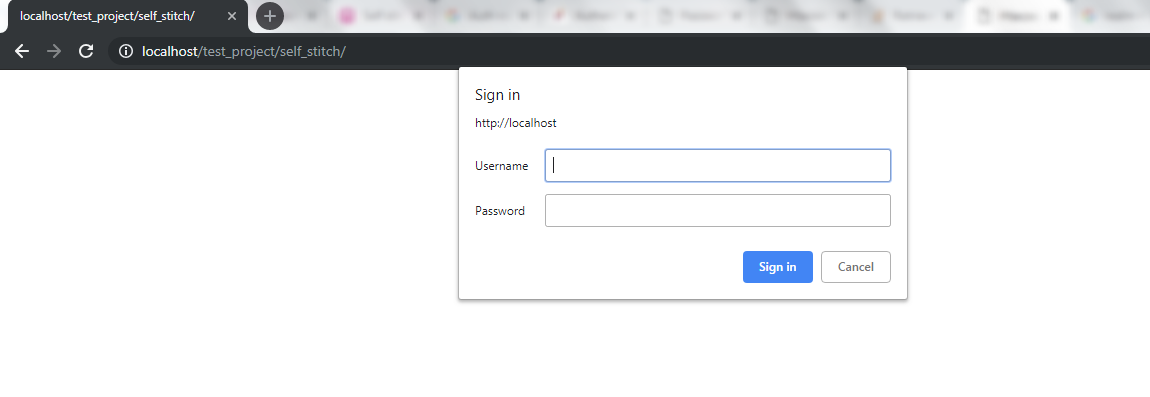
After creating .htaccess and .htpasswd file in the directory you want to protect, an alert will be displayed when you open your website. Please refer to the screenshot below:


Click Here to download a sample project with .htaccess password protected.

Why you should integrate your eCommerce store with a Marketplace?

The growth of eCommerce isn’t hidden from us. Online shopping is spreading with pace and its influence can be witnessed all over the world in almost every field. The modern users have already shifted their preference from physical stores to the mobile screens and this has lead to the growth of online Marketplace with each passing day.

Big Marketplaces have millions of daily visitors. Many shopaholics visit the renowned marketplaces because of their brand popularity, vast variety of product choices and many more. One of the reasons behind online commerce expansion are the unmatched offerings and benefits. The Customers might be checking small eCommerce websites too, but they still buy the same product from these renowned Marketplaces. This definitely clears the scenario that if you haven’t thought of integrating your store with a marketplace, you must be losing most of the online leads and potential customers.

Integration with a Marketplace offers numerous benefits to small as well as large businesses. Here, I am listing down 5 solid reasons to integrate your website with an online Marketplace:

1. To Beat the Competition:

Beating the competition isn’t easy in this ever-growing retail market. This makes it prime requirement why you should start selling on a Marketplace. There are numerous websites as of yours and even they are selling the same product. Thus, it might be hard for you to stand out between all these webshops. So, you should compete with all these websites by integrating with a Marketplace to encourage your brand name and increase your business growth.

2. To Reach huge audiences:

The major benefit of integrating with a Marketplace is to attract their huge audience towards your product. Many shoppers don’t buy products from small websites due to lack of trust. Marketplace is the perfect spot to get noticed between the potential customers and compel them to buy your product. Even a little bit of attention could turn out into huge sales and revenues.

3. To save time and money:

Promoting your brand name separately through various marketing processes can sometimes be not fruitful for you. In that case it could lead to huge loss of revenues and waste of time too. The basic approaches to popularise your brand doesn’t come with any surety. That’s where Marketplaces comes into picture. They not only provide a bigger platform to build a digital storefront but also lures the heavy consumer traffic too. This hassle free approach will definitely save your time and money and will result in massive sales.

4. To improve your SEO:

It’s really important that your products are placed on the top shelf of search results to divert customer’s attention towards them. If a product is not visible to the shoppers then there is no point of its sale. Marketplaces also helps to increase your brand exposure and SEO strategies. Product listing on an online Marketplace helps you improve your SEO results by bringing it to more user’s visibility. The website’s excellent SEO practices turns out in huge sales and revenues.

5. To ease international sale :

Marketplaces let you navigate into international markets and helps you to increase your cross-border sales. Besides attracting customers in your country only, you can reach out to millions of more customers worldwide with just a single platform. Your sales will most likely increase and this will let you to be a conventional seller all over the world. Being a global third party seller will eventually boost up your sales and business growth.

6. IT infrastructure already in existence:

There is no need to invest in the IT infrastructure and other related resources for selling a product. Sellers can take advantage of Marketplace structure without any hassle. By this, sellers can earn huge chunk of profits without even investing a single penny on technical advancements.

7. Hassle free product shipping and delivery management:

There are many marketplace sites that own a courier service for shipping and delivery purposes. If you are at your initial stage of business, you can take advantage of the delivery service owned by Marketplace. This will let you save your revenues from investing on delivery services. This will let sellers to provide free shipping to customers and will go for instant purchase.

8. Test a new product:

If you have launched a new product, you could not assume that it must be acceptable in between customers or not. In this case, you can test your product by launching it on a reputed Marketplace as it could be visible to millions of customers worldwide. This will give you the acceptance of your product all over the world and if customers are satisfied, you could import more stock of the same and sell it without any hassle.

Conclusion:

Integrating an eCommerce store with an online Marketplace is definitely a great option for both small and large sized businesses. It’s really necessary to give an enhanced recognition to your business and Marketplace suits perfect for the job. This was all from my end, now it’s totally up to you to select a Marketplace according to your website and products and integrate the same as soon as possible.

Integrate your store with the Marketplaces like Etsy, eBay, Walmart, Newegg, Google Shopping and others. In order to provide an effortless listing and inventory management process to store owners, KnowBand offers Marketplace Integrators for various CMS platforms like Prestashop, OpenCart, Magento and Shopify. This helps in showcasing your products among larger audience and enhance the brand awareness as well.

Find out more articles:

  1.  How to sell your product on Walmart Marketplace?
  2.  How to Rank Higher and Get Your Listings Seen in eBay Search?
  3.  How to rank your products up in Etsy search results?
  4.  How to rank your products up in Walmart search results?

How to sell on Walmart Marketplace?

Walmart being a vast marketplace has emerged as one of the largest online shopping destinations all over the world. With over 344 million visits of customers, selling your products on Walmart can directly lead you to higher sales. Although Walmart began accepting third-party eCommerce sellers back in 2016, still it’s a dream for many sellers to list their products on Walmart. So, if you are unaware of the procedure of selling products on Walmart, this guide will make you walk through each step starting from application till launch.

Getting a shelf to showcase your products at Walmart is a huge opportunity for your business. Just behind Amazon, Walmart has established itself as the second largest online retail destination in the U.S.A.

So, now let’s start exploring each step one by one on how to sell your products on this renowned marketplace. The steps are listed below:

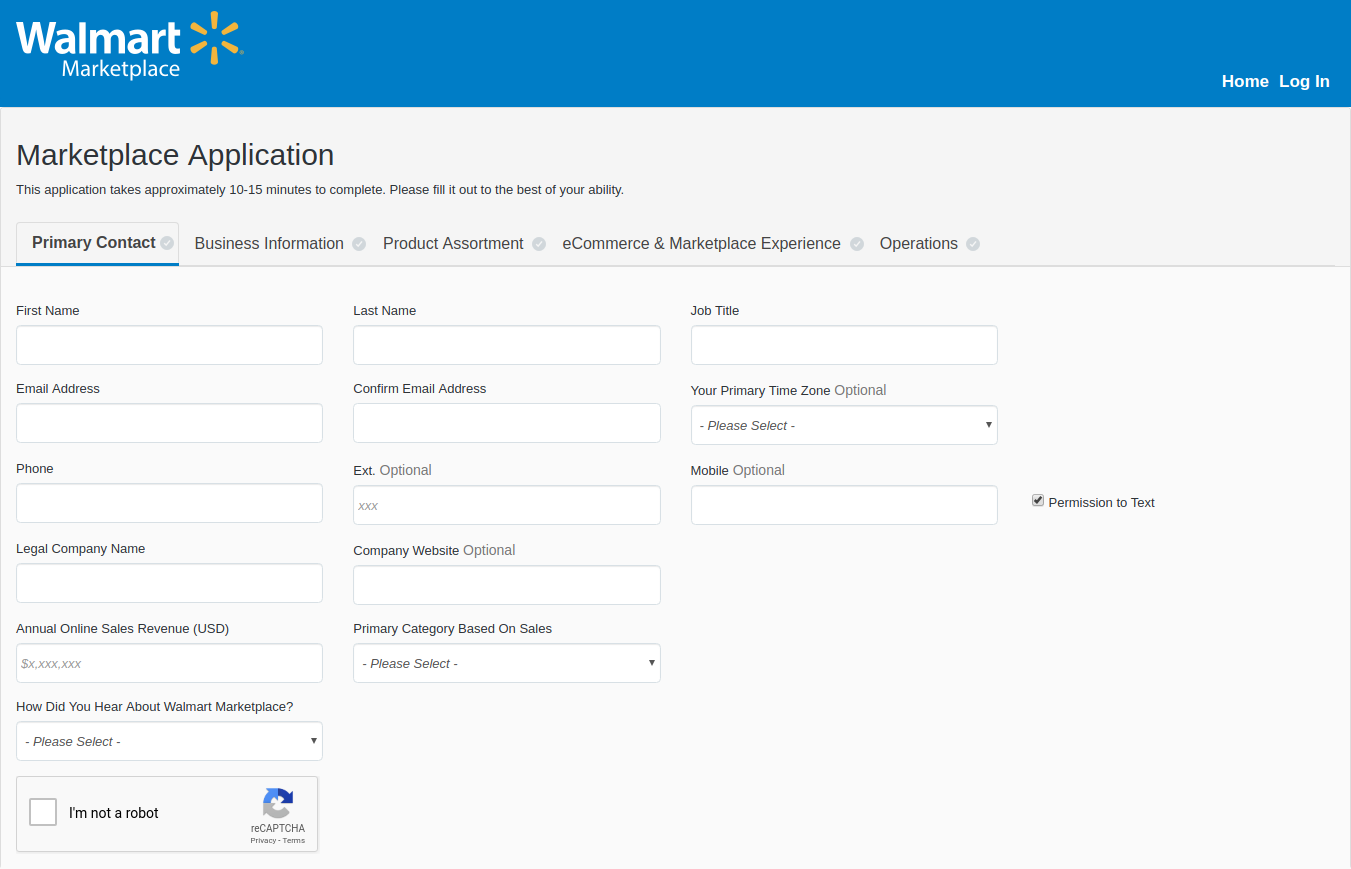
Step 1: Apply online to be a Walmart seller!

To become a Walmart seller, visit marketplace.walmart.com and click on the “Apply Now” button and fill all the required fields in the form. This process will take approximately 10 minutes to be complete if all the information is available with you.

Once you have shared the required information, click on the “Save” button, if you want to complete the process after some time or click on the “Apply Now” button to continue. Be sure to recheck all the given information thoroughly before moving further.

Sellers should prepare themselves to wait for 2-3 weeks for their response. You will receive an email invite to set up a Walmart seller account.

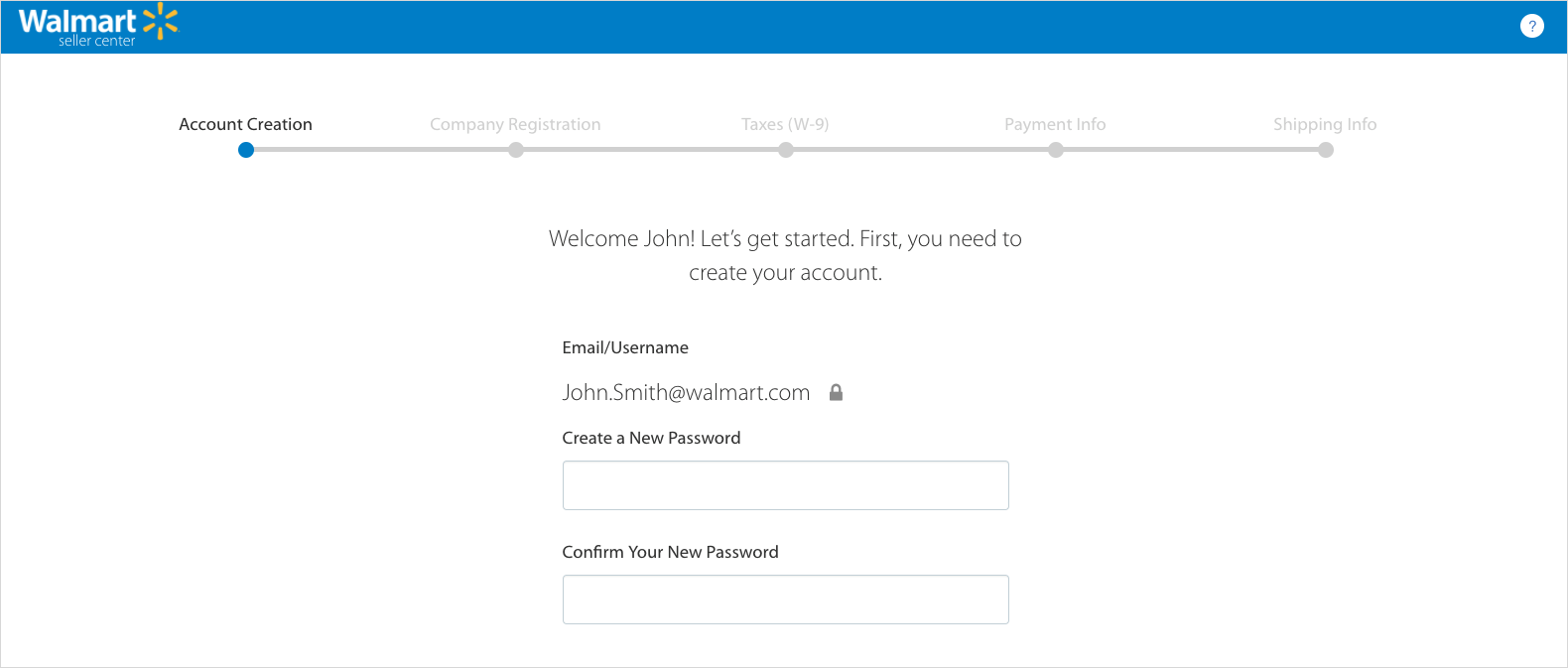
Step 2: Complete the Registration process!

Once you have received the invite mail and created your account, upload all your relevant certificates including your bank account information to meet the minimum requirements to be a vendor. Sellers have to provide information related to taxes, payment, shipping, etc. You can also be asked to share some more information about your company and products. This is done with the motive to increase the trust level of your business brand name. Once you are done with the process, you are finally ready to list your products on Walmart.

Step 3: Complete your Partner Profile:

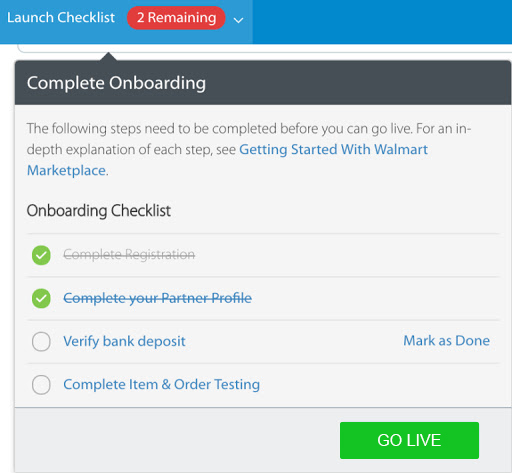
After creating your profile, sellers have to access the seller account. Sellers will get a “Launch Checklist” option which basically contains the requirements needed to launch an account. Partner Profile is a public page through which the customers are able to know more about the seller i.e.

  • Company Info
  • Customer Service
  • Shipping
  • Returns
  • Privacy Policy
  • Tax Info

After you complete your partner profile, the success bar will reach 100% and the account would be ready for launch.

Step 4: Verify the Bank Deposit:

Before moving further, verify your bank deposit by logging in to your bank account that you used in the registration process and check the transaction which states a deposit of 0.01$ from the “Walmart Marketplace Penny Test”. Click on “Mark as Done” in your checklist table for deposit confirmation.

The bank deposit nearly takes 2-3 business days to appear in the account. However, if you still can’t see the deposit, check your account details and enter them correctly.

Step 5: List and preview your items on the Walmart marketplace!

Walmart lets sellers manually list the products in Walmart’s product catalog. It also lets you upload the products in bulk quantity via bulk upload or product feed option.

You can upload or list your products in 3 ways:

1. Create CSV File:

Sellers can create a CSV file upload by using an Excel or Google Sheet spreadsheet, following Walmart’s file upload guidelines. This mainly helps sellers to upload a small collection of products to the Walmart Marketplace. But, if sellers have to upload large collections, the other 2 methods would be a better choice.

2. API Connection:

If you know how to manage an API connection, You can connect Walmart’s marketplace to your eCommerce platform or inventory database for free via Walmart API. This method requires some technical knowledge but is the best way for uploading products on Walmart Marketplace.

3. Integration Partner:

If you are already a store owner on an eCommerce platform like PrestaShop, Magento, OpenCart and Shopify, and others, an integration partner can link your products in your existing catalog directly to Walmart. It is one of the easiest ways to list or can say import your products to the Walmart marketplace. However, this integration could be costly for you. The integration cost starts around $30/month and reaches up to $500/month depending upon your product and sales volume.

After listing all your products, click on the “Preview Item” button for any of your products you listed. This step will show you how exactly your product will look to customers on the front-end of the Walmart Marketplace. If you are not satisfied with the look, you can modify it accordingly and resubmit it.

Step 6: Test your product feed and order management functions:

Walmart even provides you the facility to set up and test your order management connection and other features. You are just required to send your products to feed for testing either in bulk or under any specific products and categorization.

Once you have sent the products for testing, a seller needs to keep an eye on all order processing, shipping, exchanges, returns, and customer services. You need to keep track of the order status as well.

Step 7: Launch your request and start selling:

After testing all the management functions check off from the seller setup list. Click Yes on the confirmation pop-up and you are ready to launch. The Walmart team will review all your account setup, products, and settings and will finally make them live.

Congratulations! You are now an official Walmart Marketplace Seller.

In order to be an established marketplace seller, it’s important that your Walmart Marketplace orders should fall into your normal workflow and for that, you have to always keep a check on these points mentioned below:

  • Keep a check that product price is on target to win the Walmart buy box.
  • Product description should be relevant, clean and error free.
  • Ensure that all orders are updated and retrieved accordingly.

How to work with Walmart?

As the buyer places the order on Walmart.com, it pays sellers after the goods are shipped. Walmart does not provide an in-house order shipping program, so sellers have to handle the shipping process for the products. Unfortunately, sellers might face loss due to less efficiency and scalability. However, there are many shipping companies that can save your profits. Sellers can work with them in their initial phase of business without killing their profit margins.

Cost to Sell on Walmart:

Although selling on Walmart Marketplace could make you earn a huge chunk of profits but Walmart also takes advantage of the same. Walmart charges sellers a referral fee ranging from 6% to 20% of the product’s selling price, depending on the category. Walmart charges a very less referral fee as compared to Amazon. So, being a seller on Walmart can make you a billionaire one day.

Conclusion:

The Walmart marketplace is a huge and fast-growing marketplace every day by day. There are numerous third-party sellers who want to register themselves as Walmart marketplace sellers. With the growing competition, becoming a third party seller on Walmart is definitely not a cakewalk. The seller’s market does not entertain the sellers who are not meeting up the parameters set by them. So, keep a check on the requirements and there’s a quite good chance that Walmart will accept you as a marketplace seller. Hopefully, you will witness the increased number of orders and sales for your business.

With the help of Walmart Integrator by Knowband, you can now sell and manage the inventories at the Walmart Marketplace from the backend of your store. Walmart integrator is available for various CMS platforms like Prestashop, Magento, OpenCart, and Shopify.

Find out more articles on Walmart marketplace seller:

  1.  How can a vendor optimize his presence on Walmart Marketplace?
  2. How to sell on Walmart Canada?
  3. 9 tips to help you sell more on Walmart Marketplace
  4. The Pluses and Minuses of becoming a Walmart Marketplace seller
  5. How to create Seller Account in eBay Marketplace?

How to Rank Higher and Get Your Listings Seen in eBay Search?

Getting an item listed on top of the market place is not a cakewalk. Many factors are responsible for the ranking of products on eBay. It’s very important to keep the listing strategies in mind to rank your items on the top in the search results otherwise, the listed products will remain unseen by the customers which will lead to the loss of sales of your product.

Earlier it was easy to optimize listings for ranking higher in the search results, but in the present era where technology is innovating every day, sellers need to keep themselves updated with the latest trends and techniques to enhance their listing accordingly. Many eCommerce platforms have already started using artificial intelligence like techniques as their algorithms. With the involvement of the smart engines in the eCommerce business, it is now necessary for sellers to stay in sync with these new technologies to prevent future suffering.

If you want to grow your business and sell more on eBay, you have to opt for some of the best practices. Some of the best practices that play a key role in your selling strategy are:

1) Keywords and Titles should be a priority!

Being able to identify the correct keywords is the most important task to perform. The product keyword should be user-friendly so put yourself in customer’s shoes and try to think like them and search any product using the keywords that come to your mind first.
Titles should be nice and user-friendly and it’s important to use the relevant keywords. A title will help to attract the huge amount of traffic to your eBay listings.
Although it has set its algorithm this strategy is inevitable and could work to rank your product listings.

2) Include multiple, high quality and detailed images:

Its search engine analyses product images by analyzing the number of photos and the product information conveyed by them. So if you want to rank your product on top of the list, it’s important to use high-quality photos with detailed information about the product.

Avoid using overly bright colors and click a picture in light background with high resolution to get a clear image of the product. Always try to click multiple photos of the product from different angles as it helps the customers to know more about the product. The image should be uncluttered and should not be overlayed with other text or line art.

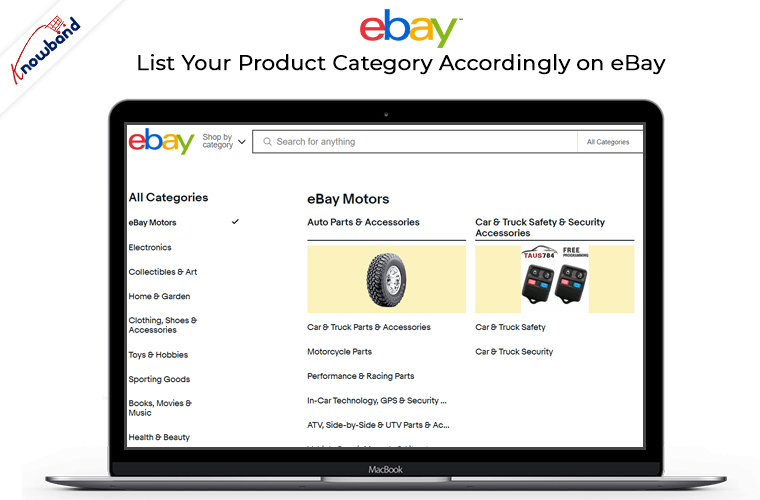
3) List your product category accordingly on eBay:

Selecting a relevant category is incredibly important as this directly influences the search results and helps the buyer to find your products. Opting a wrong category will limit you from being found by customers. So list your products accordingly in the category and your listings should comply with algorithms.

4) Detailed product descriptions:

Avoid using non-relevant information as its search engine would only read a certain amount of information per page. eBay suggests you write a 200 words description for a particular product. So it’s important to write about your product in detail so that the buyer gets to know more about your product and instantly go for purchase. You can use texts such as visit my store or see more to attract customer’s attention.

5) Hassle-free shipping and return policies:

Free shipping and return policies are considered as an important factor for eBay’s search ranking system. Some of the best practices suggested by eBay to provide hassle-free shipping and return policies are as under:

  1. It recommends providing free shipping to buyers.
  2. Handling time should not be more than one day.
  3. There should be a 30-day return policy according to the eBay recommendation.
  4. It suggests avoiding restocking fees.

6) Presentation of listing format:

Whether you apply all the strategies mentioned above but if you are unable to present your list appealingly, it’s of no use. A poorly designed list can limit your success as an eBay seller. So it’s really important that your list looks professional and trustworthy and also make sure that the listed products are unique and the quality you are providing to the customers is high. The quality of listing can truly impact your eBay’s ranking.

Conclusion:

Although it’s not possible for sellers to implement all these strategies at once, if you try to implement any two out of these, it would affect your product rankings. The more strategies you will accommodate, the higher your listings will rank in the eBay search. You can now list the products and the descriptions at a few button clicks with the help of eBay integrators by Knowband. Knowband provides integrators for the various CMS platforms like Prestashop eBay Integration Addon, Magento eBay Integrator, eBay Magento 2 connector, as well as OpenCart eBay Integration plugin.

So try to accommodate all these strategies and keep yourself updated about the latest trends and techniques and very soon your listings will start ranking well on eBay.

Find out more related articles here:

  1. How to rank your products up in Etsy search results?
  2. How to Launch a Marketplace like Etsy and Ebay?
  3. How to create an eBay Sandbox Account?
  4. How to Create eBay Application to Get Required API Keys and User Token?
  5. What are sandbox sites in eBay Marketplace?
  6. How to revise and relist in eBay Marketplace?
  7. How to list a product in eBay Marketplace?
  8. 4 Ultimate Tips To Increase Sales On eBay

How can you make your startup successful in India?

Making your startup successful is quite a tough job with the ever growing competition in almost every field. India is witnessing a brand new generation of startups and making a remarkable presence not just in the domestic country, but also worldwide. The previous year has been a roll on for the Indian entrepreneurs. There are many inspiring stories of people who created their own paths of innovation which lead them to be inspiration for many newbie.

We all are aware how online shopping has proved its dominance in the past few years. The following report by statista depicts that the rate of eCommerce sales is projected to grow to 4.88 trillion US dollars by the year 2021. This data clearly says that today’s generation is spending more and more time online especially for shopping various products online.

However, in today’s business a lot of money is going to online store owners which earlier used to go to physical store businesses. With majority of shoppers heading to screens instead of physical stores you need to provide better customer experiences on which they can easily rely.

So, it’s high time for these retail stores owners to make their business online by making an eCommerce website for better sales.

But, do you really know that many startups in India survived successfully?
Well, according to Statista.com, there are many reasons which leads to downfall of any startup. Some major ones are:

  • No need of the product in market
  • Pricing/cost issues
  • Poor product quality
  • Poor marketing and others.

So, for making an eCommerce store successful, here are 5 tips to be considered at the initial stage of startup:

1) Keep an eye on your competitors:

Its very important to know about your competitor’s steps. You can check out with your competitor’s marketing strategies so that you can get some idea and can implement them less or more the same on your website too. Think out of the box and apply some new business tactics which your competitor hasn’t applied till yet.

2) Decide on how you will fund your business:

The way you fund your business decides its growth! Focusing on development is crucial, but keeping a look at funding is also one of the key factor for the growth of your business. It’s necessary not to do everything at once as many startups work with less resources initially until and unless the demand increases for the same. The better way is to go with the flow. This makes it quite crucial to work more in less resources.

3) Maintaining relationships with your customers is valuable:

Once you have officially launched your eCommerce website , the key to getting success is to gain customer loyalty and happiness. The cost of building relationships with new customers can be high as it requires you to provide free gifts or discounts to them. But, in the bigger picture, it would be helpful. You can even ask the customers to share their feedback after successful product purchase.

4) Get out of your comfort zone!

A quote stated that “The enemy of progress is comfort, so learn to enjoy being uncomfortable”. At the initial stage of the startup, it is important to make big goals for your business. You should try to build customer base steadily and do keep a check on your progress with an active management role.

5) Be patient:

Success won’t happen overnight, neither for couple of years. Companies should invest carefully and plan ahead strategically for continued efficiency and profitability in the upcoming years of their business. Sometime success comes to you easily and sometimes it takes you to follow the hard path.
Eg. Jeff Bezos established Amazon.com in 1994, but it wasn’t famous for many years but he struggled enough for years and now stays among one of the most successful eCommerce industries around the globe.

Have you heard about Amazon Effect?

It is a term which is used to describe the success rate of the biggest eCommerce platform i.e amazon over the past few years.
Announcing an additional $2 billion investment into India, Amazon founder and CEO Jeff Bezos recently said: “At current scale and growth rates, India is on track to be our fastest country ever to billion dollars in gross sales.”
Effectively, in just few years, Amazon has established itself perfectly and became a leader in one of the largest markets in the world along with local champions like Flipkart and Snapdeal.
Amazon effect has provided completely friction-less shopping process to consumers with immediate results. However, It has also marked its presence into traditional spaces also. Customers now want the same experience, in front of their computers as well as inside a shopping mall also.

Conclusion:

I would sum up by saying that, as a founder, it’s important to know the difference between a great idea and great company. If you are a physical retail store owner you should look forward to take your business online. The easiest way to do so is to create an eCommerce store. So, start preparing from today itself, and don’t give up when things gets tough.

Find out other articles for successful eCommerce sales:

How to improve sale of your eCommerce store in 2019?

Secret keys to success for eCommerce platforms in 2019


Secret keys to success for eCommerce Platforms in 2019

So we have landed in 2019 and the competition in the eCommerce market seems to be growing more with each passing day. Well, this fact is more clear than ever that staying ahead in this industry wouldn’t be everyone’s cup of tea now.  Keeping your business to the list of successful ones would require some extra efforts from your end.  The market growth of the past few years and upcoming advancements in the eCommerce industry leads us straight to the need of some popular and dynamic trends. So, if you are keeping a track of these trends, you can never go wrong in giving a sky-high growth to the eCommerce platforms.

5 secret keys to the success of an eCommerce business:

1. Augmented Reality:

Augmented reality helps eCommerce sites to improve the customer shopping experience. AR helps in connecting the best of both worlds together. But wait, do we exactly know about this secret mantra? Well, when you connect the real world with digital elements via any mode like smartphone, cameras etc. that’s when you create Augmented reality (AR). Right from offering better product view to enhancing the overall shopping experience for the user, both technologies have their own significance.  For example:

  • Lenskart is one of the leaders in the spectacles market and also an eCommerce giants company based in India. Their unique feature known as ‘3D Try on’(based on AR) allows users to check how a frame looks on their face with a photo perception before actually making the purchase. It is easy to use and has continued to evolve its offering. This feature can be used on both web and app formats.
  • Another example we can see of Sephora. This company uses the AR feature on its website to let users check how a dress look on them or how they look after applying full face make up before purchase. This helps them to get the right product and can confidently buy it for themselves.

Augmented reality has already benefitted the mobile app market. Today’s generation is more advanced and demanding when it comes to new technologies. So, if you want your business to stand out, think about incorporating augmented reality or virtual reality.

2. Voice Search:

Easier navigation is a must-have in your eCommerce business. There is no doubt that voice search was a boom in 2018 and will be significantly growing in 2019 as traditional search is breaking down more use of voice search. Online store owners have already adopted the voice search functionality for their online eCommerce business. According to statista, 35 percent of users stated that they would consider purchasing food via their voice assistant in the future. Some latest gadgets for voice search like Google Play, Alexa by Amazon, Amazon Echo etc. are some of the best innovations for eCommerce platforms. Both, AR and voice search will definitely grow eCommerce industries to the next level in terms of business growth and opportunities.

3. Artificial Intelligence:

Artificial intelligence will definitely be pulling its weight in the marketing world this year as AI is now powering customer segmentation, retargeting, push notifications, click tracking etc. Visual search techniques are already boosted in eCommerce.

But What is Artificial Intelligence?

Artificial Intelligence refers to the intelligence showcased by machines. AI boosts machines to think, respond and perform tasks like human beings. It also helps machines learn from experience and adjust to new input. It increases precision and accounts for more accuracy and fewer errors, which means greater work efficiency. The AI analyses more and deeper data for valuable insights and can add to the capabilities of various devices with its smart, useful algorithms.

For example:

  • Flipkart, one of the biggest e-commerce companies in India, is turning to Machine Learning and Artificial Intelligence to solve the complicated address puzzle, the most unique problem in India, as many customers write the same address in different ways. So AI helps to detect the exact location by understanding different formats of address and makes this complicated process easy.
  • Amazon is the first one to use this technology to generate product recommendations according to customer views on a product. This trend helped Amazon to grow to the next level in terms of business growth.

4. Mobile Applications:


As we all know, smartphones and tablets are the unavoidable need of eCommerce industry as they provide connectivity with the huge mobile audience. The steady shift from internet access on desktops and laptops to browsing on smartphones has been rather swift. An online store owner who has not developed a mobile app for their eCommerce website should consider the increasing demand of smartphones and must take their website business to app market if they are really looking forward to expanding their business. There is an efficient way to create a mobile app without any technical or coding knowledge. It’s a hassle free way to upgrade your eCommerce website into mobile apps(Android and iOS).

Moreover, if you already own eCommerce mobile apps then keep a check that whether the apps are updated to the latest trends and innovation. This could be a boom for enhancing the revenue of your store. Thus, 2019 is likely to bring about a brighter future for mobile app development, either we will see some brand new mobile app development trends or a huge upgrade from what users are already using.

5. Dropshipping:

The newbie eCommerce businesses can think about this trend as it can prove profitable to them with small capital. Dropshipping is the process in which the store owner doesn’t physically store the product but could manage the purchase as the shipment is been processed directly to the buyer via third party vendor. It has great advantage for small and medium sellers, that is no inventory. Seller doesn’t require to purchase a large number of goods and keep them in stores. It increases the revenue of small businesses thus gives sellers more confidence to continue using this technique.

  • Amazon: If you get to know that an order is coming from a third party supplier and not Amazon.com, then they are utilizing the drop shipping technique. Amazon is a partially using the drop shipping method which helped in fulfilling its own product shipments.
  • Zappos is an example of a company that started as a drop shipping company then transitioned to handle their own inventory after they wanted more control over their business.
    So, the steady growth of global e-commerce by dropshipping is profitable for sellers who are engaged in the e-commerce business.

Conclusion:

Well, one thing is for sure that these tricks aren’t a secret to you anymore. The above-listed tips and their concerned examples would surely help you in uplifting your eCommerce business. Each trend has its own importance and requires to be used wisely for abundant growth and success if used wisely.

Magento Affiliate and Referral program extension – User Manual

1.0 Introduction

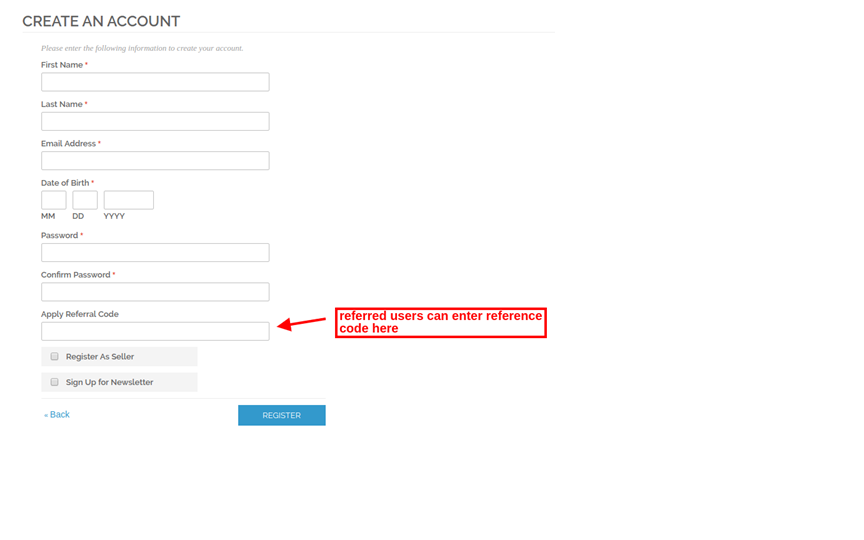
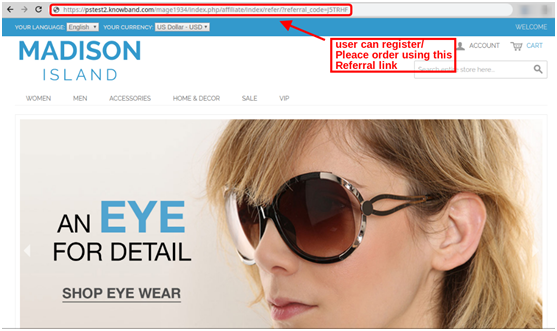
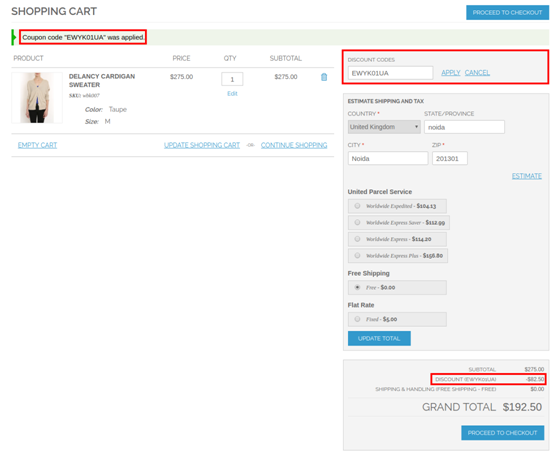
Knowband offers Magento Affiliate and Referral program extension which allows the online store admin to get more customers and traffic also. The online store admin can allow the customers to register as an affiliate and create referrals for the store. The online affiliate users can earn money for every referral. The admin can apply the settings in order to provide a referral commission. The admin can provide commission on new customer registrations or on order placed by the referred customers. The referred customers can place their order using referral code, coupon code or referral link provided by the affiliate customer.

This way the online store admin can improve website sales and traffic easily just by offering a commission to the affiliate customers. The eCommerce store admin can easily promote the store without any extra efforts. The affiliate customers can also get benefits by referring new customers. They can get commission by new customer registrations and order placed by the customers. The Magento Referral Program plugin provides an easy way to promote the website.

1.1 Basic Features of this Magento extension

  1. The online store admin can allow the customers to register their account as an affiliate and create referrals for the store for getting an exciting commission.
  2. The Magento Affiliate and Referral program extension allows the admin to activate or deactivate new affiliate registrations anytime.
  3. The Magento Affiliate and Referral program plugin provides various methods to share for the referral.
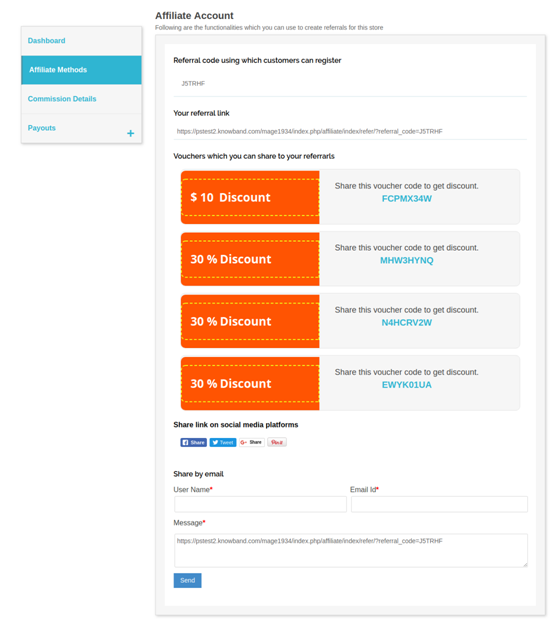
  4. The affiliate customers can send referral code, share a link, share discount voucher, share a link on social media platforms and share a link by email.
  5. The online store admin can show an option to share the link on Facebook, Google plus, Twitter and Pinterest.
  6. Admin can set a global referral rate for the order placed. This value will be in percentage. Admin can also set referral rate for particular affiliate customer.
  7. The admin can also set the global referral rate for user registration. This will be a fixed value. Admin can also set specific referral rate for affiliate customers.
  8. The Magento Referral Program plugin provides an option to select the global voucher type and set it’s value accordingly.
  9. The online store admin can also select the action on which the referral will be counted.
  10. The online user can get the referral commission on new user registration or when the order is placed.
  11. The online users can register as an affiliate and create referrals for the store in order to get a commission.
  12. The Magento Referrals module provides a dashboard for showing referral and commission-related details easily.
  13. The Magento Affiliate Program extension provides functionality for the affiliate customers to redeem their commission by sending a request for payout.

2.0 Installation

The online store merchant can install the Magento Affiliate and Referral program extension by following these steps:

  1. Admin can download the extension package from the Knowband store.
  2. After downloading the extension package, you will get a zipped file. Unzip the package on the root folder of Magento setup via FTP manager (like Filezilla or WinSCP – download here: https://filezilla-project.org/). The admin will find the files and folders as shown in the image below:

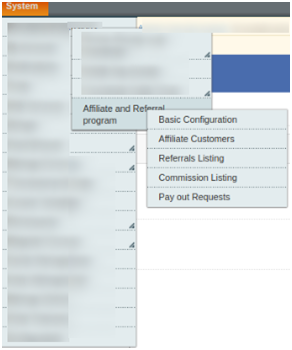
3. The extension is now installed and ready for use. In the Admin Panel, go to “System > Knowband Extensions >Magento Referral Program plugin”.

Now, the store admin can use and configure the Magento Affiliates extension.

3.0 User Manual

Admin will get various customization options after installing the Magento Affiliate and Referral program extension successfully. Admin can configure the Magento extension in order to implement the affiliate functionality on the eCommerce website.

Below-mentioned are the configuration options:

  • Basic Configuration
  • Affiliate Customers
  • Referrals Listing
  • Commission Listing
  • Pay Out Requests

3.1 Basic Configuration

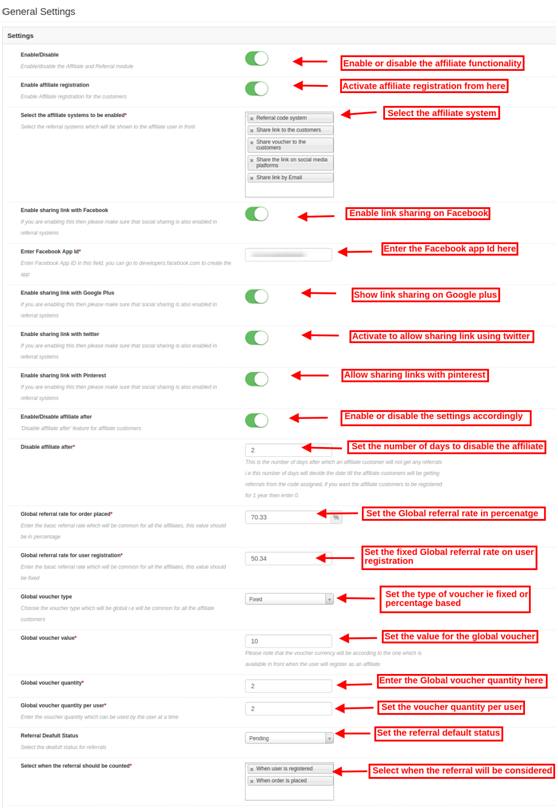
In the Basic settings field, you can apply the settings for showing affiliate system functionality on the website. The store owner can apply the settings as per the requirement.

These are the configuration options:

  1. Enable/Disable: Activate or deactivate the Magento Affiliate and Referral program extension just by a single button toggle.
  2. Enable Affiliate registration: Activate the settings in order to show affiliate registration options on the website front-end.
  3. Select the Referral System to be enabled: Select the referral system from the provided options. The admin can choose from the referral code system, share the link to the customers, share voucher to the customers, share the link on social media platforms, and share the link by email.
  4. Enable sharing link with Facebook: Activate this option in order to allow affiliate customers to share the link using their Facebook account. “Share the link on social media platform” option should be selected for this implementation.
  5. Enable Facebook App ID: You need to enter Facebook app id in this configuration option. Follow the steps described in 3.1.1 section in order to create a Facebook app ID.
  6. Enable Sharing Link With Google Plus: Show/hide the option of link sharing with Google plus. The affiliate customers can share the link with their Google plus account.
  7. Enable Sharing Link With Twitter: In order to provide an option to share a link with Twitter, the admin can enable the settings.
  8. Enable Sharing Link With Pinterest: Enable/disable the settings for showing/hiding link sharing using Pinterest.
  9. Enable disable affiliate after:Activate or deactivate the settings as per the requirement. After enabling this option, a new configuration option will be displayed.
  10. Disable affiliate after: Set the number of days after which you don’t want to provide any referrals to the affiliate customers. Set the days after which the affiliates will not get any referrals from the assigned code.
  11. Global referral rate for order placed: Set the Global referral rate i.e., a common referral amount for all the affiliates. This value will be in percentage.
  12. Global referral rate for user registration: Here, you can set the referral rate for the user registration which will be common for all the affiliates. This value will be fixed.
  13. Global voucher type: Select the type of voucher i.e., fixed or percentage based. This will be the type of voucher which will be common for all the affiliates.
  14. Global voucher value: Enter the value for global voucher.
  15. Global voucher quantity: Set the number of the vouchers for providing all the affiliate customers. The affiliate customers can share the vouchers with the referrals.
  16. Global voucher quantity per user: Enter the number of times, a user can apply these vouchers.
  17. Referral Default status: Here, you can set the default status for the referrals. It can be accepted, rejected and pending.
  18. Select when the referral should be counted: Magento Affiliate and Referral program extension provides an option to consider referral on new user registration or while the order is placed.

3.1.1 Steps to generate the Facebook app ID

Follow these steps in order to generate Facebook app ID:

  • First of all log-in into your Facebook account. After that, click on the below mentioned link: https://developers.Facebook.com/
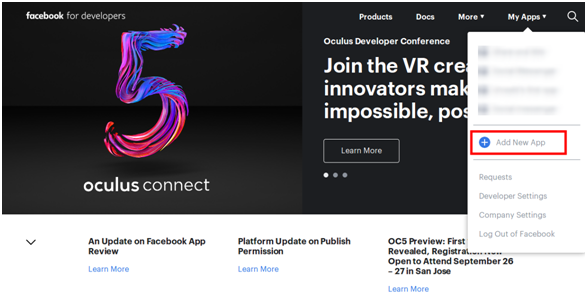
  • Go to the “MY APPS” and click on ”ADD NEW APP” option.

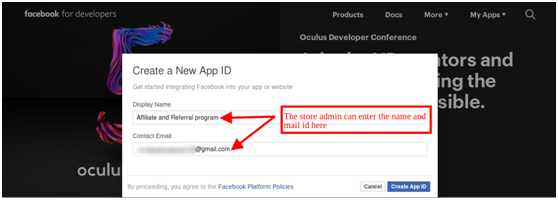
  • Enter the “Display Name” and “contact email ID” details. After that, click on the “Create App ID” button.

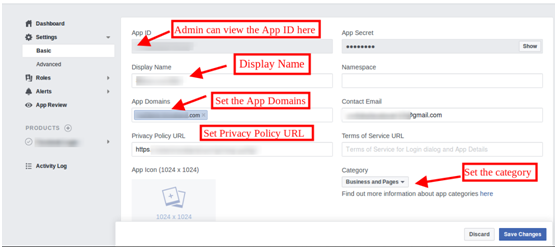
  • Now, go to the “Settings” and select the “Basic” option. Here, you can get the APP ID. Now, you need to insert app domains, category, privacy policy URL here.

Thus, you can get the Facebook app ID.

3.2 Affiliate Customers

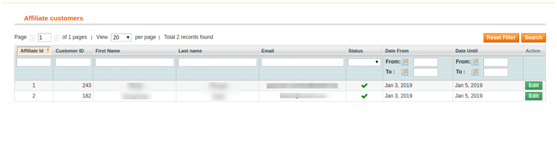
Here, in this configuration option, the online store admin can view the affiliate customer’s list. The Magento Affiliate and Referral program extension provides affiliate customers list in the admin interface.

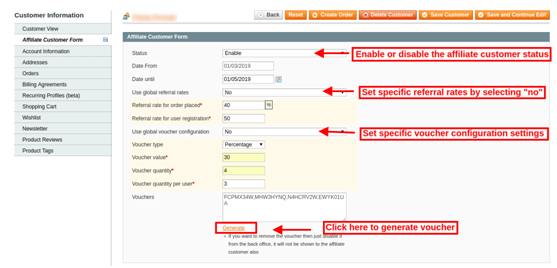
3.2.1 How to Edit Affiliate Customer details?

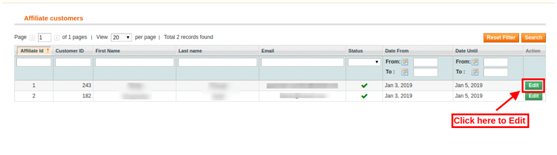
Admin can click on the “Edit” button, in order to change the details of any affiliate customer.

After clicking on the “Edit” option, the online store admin can modify the details related to the affiliate customers.

Magento Affiliate and Referral program module provides these configuration options as shown below:

  • Status: Activate or deactivate the affiliate customer’s status from the admin interface of this Magento Affiliate and Referral program plugin.
  • Affiliate From: Here, you can view the date from which the customer has registered as an affiliate.
  • Affiliate Until: You can set the date till the customer will be an affiliate.
  • Use global referral rates: The online store admin has an option to use Global referral rate or set specific referral rates for the particular affiliate customer.
    • Referral rate for order placed: Set specific referral rate which you want to offer on order placement.
    • Referral rate for user registration: Set the fixed amount of referral on new user registration.
  • Use global voucher configuration: As a store owner, you have an option to use a global voucher or configure a specific voucher for any customer.
  • Voucher type: Select the percentage or fixed voucher type.
  • Voucher value: Set the value of the voucher.
  • Voucher quantity: Set the number of vouchers.
  • Voucher quantity per user: The admin can set the number of vouchers per users.
  • Vouchers: Here, you can view the generated vouchers.
  • Generate: Admin can click on the Generate button in order to generate new coupons as per the applied settings.

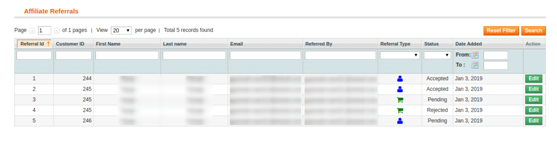
3.3 Referrals Listing

In referrals listing, the online store owner can view the referrals and their details also. The Magento Affiliate and Referral program extension provides a list of all the referral customers.

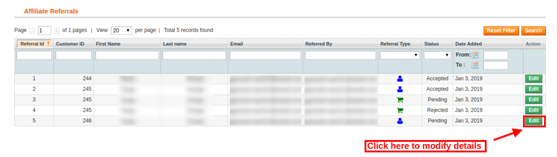
The store owner can also edit the affiliate’s status. The admin just needs to click on the “Edit” button.

After clicking on the “Edit” button, you will get these customization options:

  • Affiliate: Here, you can view the email id details of the affiliate customers.
  • Description: View the activity performed by the affiliate customer.
  • Commission value: Here, you can view the commission value as per the configuration.
  • Commission currency: Here you can view the currency type.
  • Order reference: Order reference will be displayed here if any referral places an order.
  • Referral status: Set the status of the referral as accepted, rejected and pending.
  • Referral date: You can also change the referral date from the admin interface.

3.4 Commission Listing

Here, in commission listing the online store admin can view the affiliate commission. The store admin can view the overall commission offered to the affiliate customers.

Admin can click on the view button in order to get the commission details. Here, the online store admin can view the email id details, commission value and it’s status.

3.5 Pay Out Requests

Magento Affiliate and Referral program extension provides an option to handle payout requests. The affiliate customers can send payout requests in order to redeem the commission. The affiliate customers can request to generate a voucher or directly ask for the payout.

The online store admin can view all the “payout requests” in this section and accept or reject the payout requests.

The store admin can view the payout request in the “Payout requests” option and then accept or reject the request.

4.0 Front-end Interface

After creating an account the online users can click on the “Affiliate and Referral Program” in order to register as an affiliate customer.

After clicking on this “Affiliate and Referral Program” option, the online users can register as affiliate customer.

Now, the online users are registered as an affiliate and they can view the details as shown below:

There are several methods to share the referral codes. The affiliate customers can share the referral codes in order to get the commission.

The affiliate customers can share referral code, share referral link, share vouchers, share the link on social media platforms and share the store link via email.

Referred users can register using referral code as shown below:

The online users can register using referral link shared by the affiliate customers or place an order with the referral link. The affiliate customer will get the referral amount as per the action performed by the referred online user.

The online users can also use voucher codes shared by affiliate customers in order to get discount. The affiliate customers will get referral commission for such orders.

This way the affiliate customers can refer the online users and get the referral commission easily.

The affiliate customers can view the rewarded commission on every referral. They can also view the status of the commission on the website front-end interface. In “Commission Details”, the online users can view each and every detail easily.

 The online users can request for payout by clicking on ”Payouts” option. The online users can click on the “vouchers” in order to request for generating a voucher. The online user can also request for payout.

In order to generate vouchers, the online store admin can click on the “voucher” option. After that click on the “+” sign and enter the amount to generate voucher of that value. After that, click on the “request” button. A success message will be shown on the top of the eCommerce website.

In order to send payout request, the affiliate customers can click on the payout option. After that, they need to click on “+”. Here, the affiliate customers can enter the payout amount and enter the description. After clicking on the “Payout” button, the affiliate customers can send their request successfully.

Initially, the payout requests status will be ”pending”. The online store admin can accept or reject the “payout” request.

In the Dashboard, the affiliate customers can view the total accepted commission, pending commission, redeem commission and payable commission. A graphical representation is also available for viewing total commission, redeem commission and total referral easily.

This way, the online store merchant implements Magento Affiliate and Referral program extension module and allows the online users to refer the store to get a reward for it. The Magento Affiliate and Referral program module is highly customizable and offers smooth functioning. The e-merchant can provide multiple ways of referring to the website. The Magento Affiliate and Referral program plugin allow viewing all the affiliate customers list from the admin interface. The online merchant can also apply specific settings for each customer. The Magento Affiliate Program extension provides an option to set a referral amount from the admin interface. The online merchant can offer a specific amount on new registration and order confirmation. You can generate discount vouchers for affiliate customers for referring to the store. The online affiliate customers can refer store and get the exciting reward which can be converted in discount vouchers or the users can request for payout.

For more details please visit here:

Magento Affiliate and Referral program extension Module Link

Magento Affiliate Program extension Admin Demo Link

Magento Referrals module Front Demo Link

Magento Affiliate and Referral program extension User Manual

Magento Affiliate Program extension Marketplace Link

For more support and information, feel free to contact us via email at support@knowband.com anytime.