A re-marketing strategy called the Prestashop Abandoned cart addon aids eCommerce site owners in recouping and regaining lost purchases. It directs toward customers who abandon their shopping carts before making a buy. Typically, buyers add the perfect items to their shopping carts and then look for a better value or product at a different retailer. Low site revenues and cart abandonment result from this. The Prestashop Abandoned cart module sends clients reminder prompts about the items still in their cart to handle this problem.
In this blog, we will take a look at the stunning features and benefits of the Prestashop plugin by Knowband. Are you ready? Let us go ahead and check them out now.
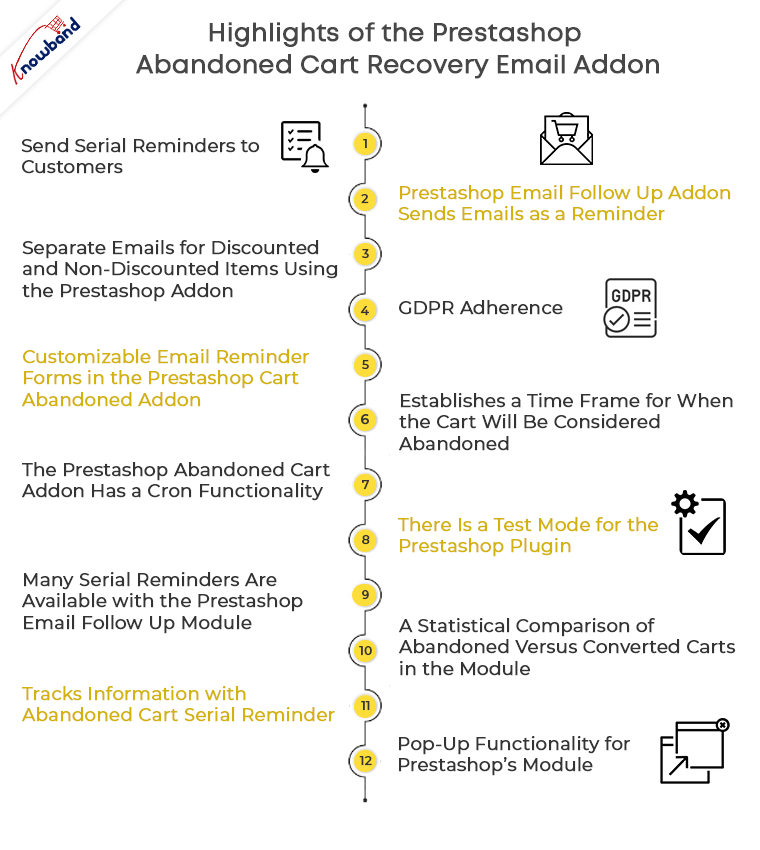
Highlights of the Prestashop Abandoned cart recovery email addon
Send serial reminders to customers
The Prestashop Email Follow up module emails potential customers who have abandoned their carts to remind them to come back. The Prestashop Abandoned cart email follow-up addon allows emails that may deliver in an automated way or manually by the store shipper at certain predetermined intervals. Additionally, you may encourage buyers by giving enticing offers in the email that follows the transaction.
Prestashop Email Follow up addon sends emails as a reminder
Prestashop Abandoned cart addon informs shoppers of the items still in their cart so they can swiftly finish their transaction utilizing the discount coupon included in the email reminder.
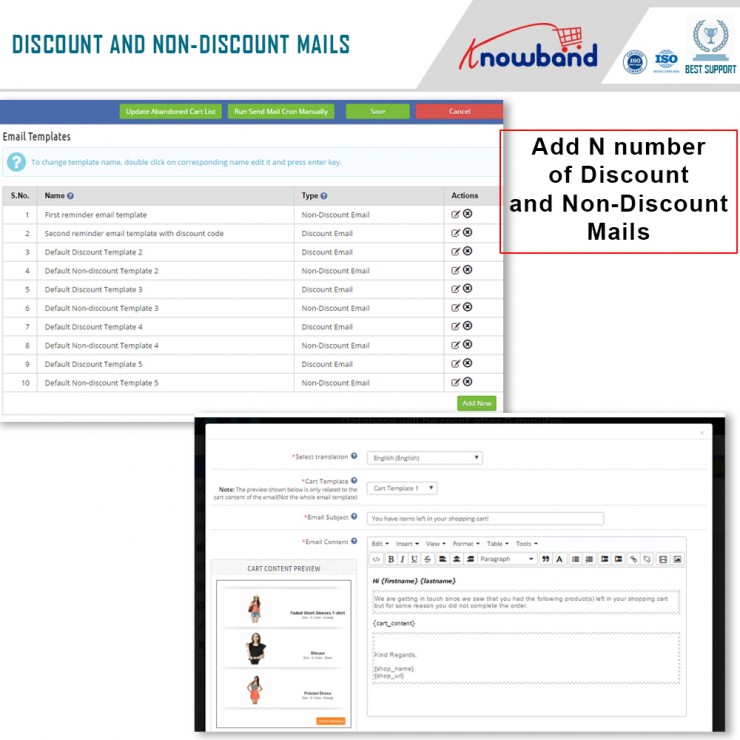
Separate emails for discounted and non-discounted items using the Prestashop addon
Administrators may easily change and replace the discounted and non-discounted emails independently from the backend interface with the Prestashop Reduce Cart Abandonment addon. They have the option of changing the email’s structure, content, and promotional offer.
GDPR adherence
The Prestashop module complies with GDPR.
Customizable email reminder forms in the Prestashop Cart Abandoned addon
To save the admin time, the Prestashop abandoned cart reminder provides pre-characterized and fully adjustable reminder discount email templates.
Establishes a time frame for when the cart will be considered abandoned
The duration of time after which the cart includes in the abandoned rundown defines by the Abandoned Cart Serial Reminder plugin.
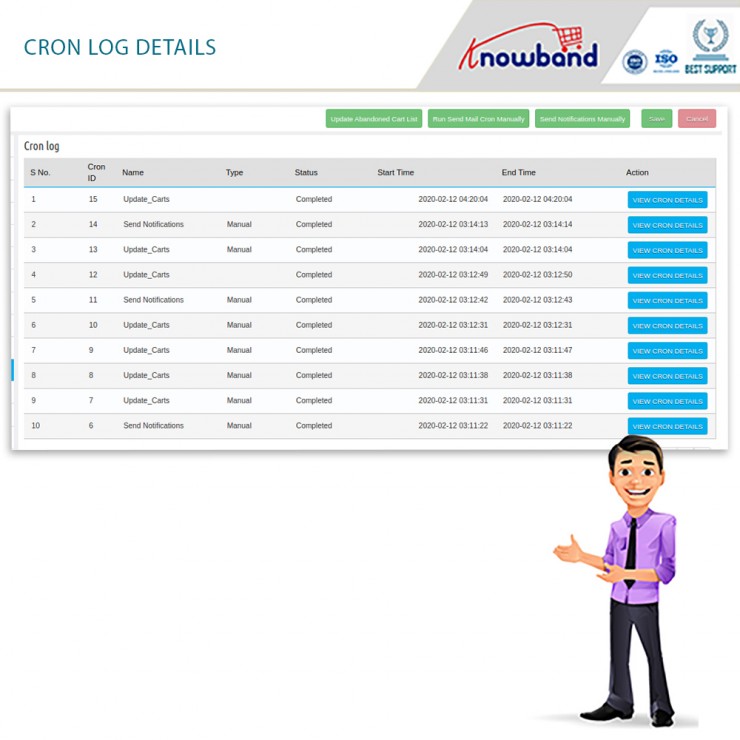
The Prestashop Abandoned cart addon has a cron functionality
The Prestashop module’s Cron feature allows the admin to automatically schedule and send reminder emails to specific customers once the predetermined period has passed. The cron log tabs allow the business owners to determine whether the cron is being used.
There is a test mode for the Prestashop plugin
The Prestashop Abandoned cart addon’s Test mode feature enables the admin to test the reminder cart emails on the specified email address.
Many serial reminders are available with the Prestashop Email Follow up module
You have the option to create and change N serial reminders using the admin board’s customizable Abandoned Cart Serial Reminder.
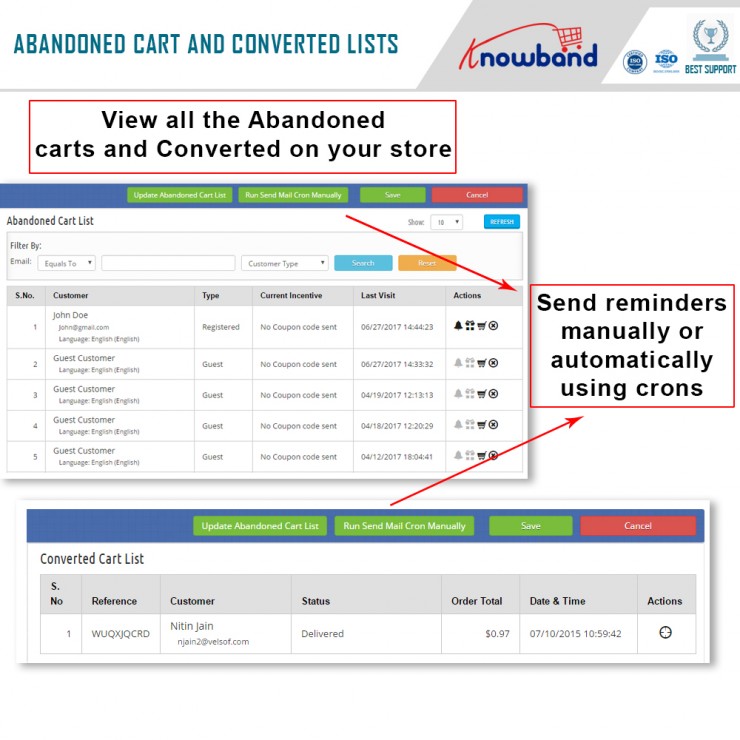
A view of the Converted Cart List and Abandoned Cart List is provided by the Prestashop plugin on the back end
The Abandoned Cart List and Converted Cart List, which are accessible from the backend, can both be viewed clearly and in detail, thanks to the Prestashop Abandoned Cart Email Follow Up Module.
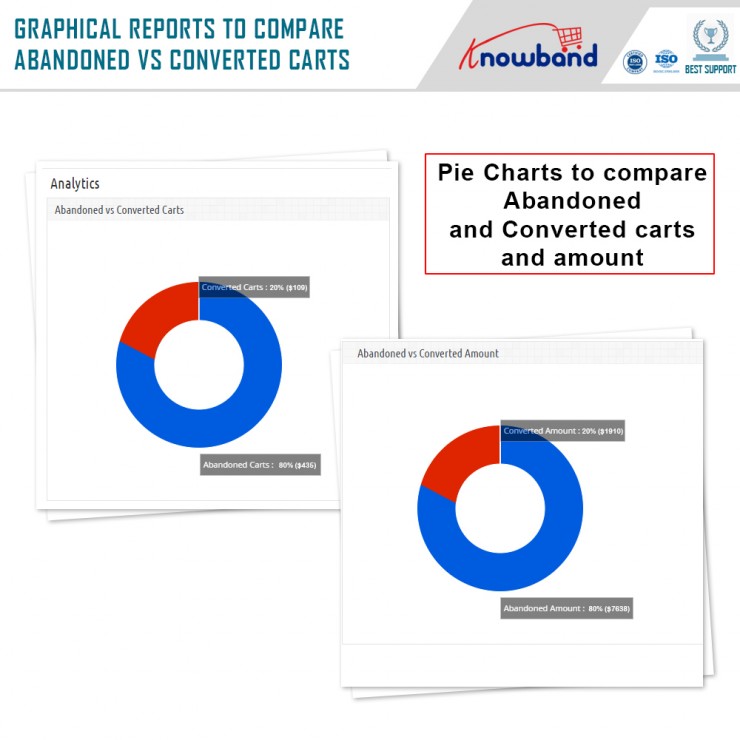
A statistical comparison of abandoned versus converted carts in the module
In addition to the filter option, the Prestashop Reduce Cart Abandonment addon provides a statistical breakdown of abandoned vs converted carts in the form of charts and tables.
Tracks information with Abandoned Cart Serial Reminder
The Prestashop Abandoned cart addon module keeps track of information for both shop visitors and customers who have logged in.
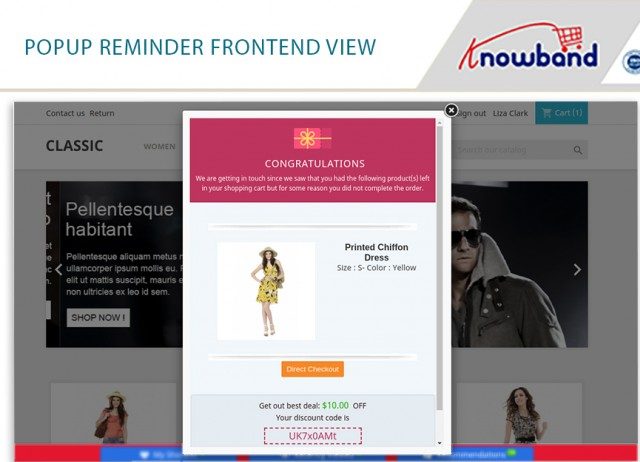
Pop-up functionality for Prestashop’s module
An additional feature of the Prestashop addon allows consumers who have abandoned their carts to receive popup notifications. Additionally, the store owners may lower the prices of their goods. The discount information will also be stored for the popup whenever it is provided.
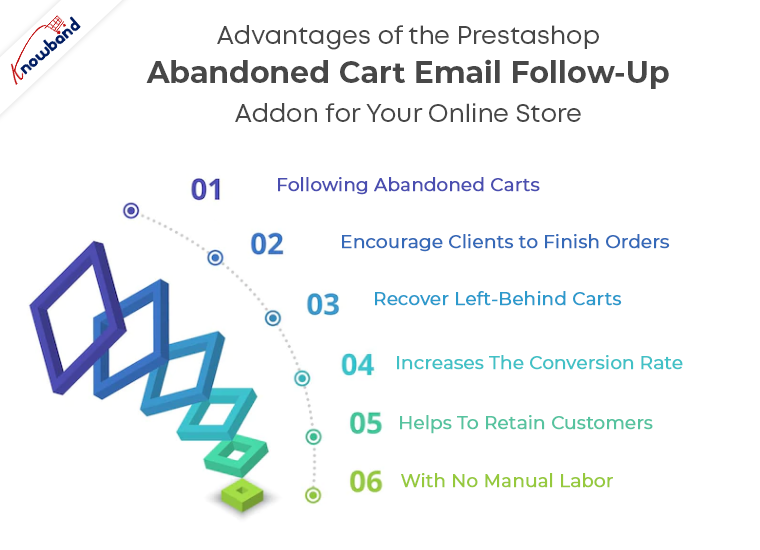
Advantages of the Prestashop Abandoned cart email follow-up addon for your online store
Following abandoned carts
The plugin understands and indicates the lost carts on your store and displays all of them in the back end.
Encourage clients to finish orders
By using the module, you can give your customers a discount on your goods, which will without a doubt encourage them to finish their orders and increase your online store’s conversion rate.
Recover Left-Behind Carts
You may easily persuade your customers to complete their orders and bring back your store’s abandoned carts by sending them reminder messages about their incomplete orders.
Increases the conversion rate
You increase your conversion rate while also raising the overall revenues of your company when you make up the lost sales brought on by abandoned shopping carts.
Helps to retain customers
The module is a wonderful resource for keeping consumers once you’ve recovered them through follow-up messaging.
With no manual labor
The entire process of creating and sending follow-up messages is quite simple, which reduces the manual work required by the business owner.
Let us wind up!
So, here we are! Thus, if your business suffers a high cart abandonment cart, the Prestashop abandoned cart addon by Knowband is your answer. Further, it helps you reduce cart and increase sales as well as customer satisfaction. Also, if you want to more about how to make the most of the module, you can check out this blog. What do you think of the module? Do let us know in the comments below. In case you want to get in touch with any questions or queries, let us know at support@knowband.com.
This comes as no secret that the Prestashop marketplace addon by Knowband is a stunning option. Moreover, it is a tool that can help you grow your eCommerce business. How? By simply converting your store into a marketplace. Furthermore, where multiple sellers can come and sell their products effortlessly. In the end, you, the admin is the one who benefits from the entire transformation. All you have to do is configure the settings of the Prestashop Multi-seller Marketplace module and get set to earn big.
The Prestashop Multi-vendor Marketplace Plugin has numerous settings that the admin can configure. However, when it comes to earning, there are three different options. They are:
Commissions
Product Listing fees; and
Membership plans
Well, there are different settings for the different revenue models. However, we will focus on the last option – Membership Plans.
What is the Membership functionality in the Prestashop Multi vendor Marketplace Module?
If you want a sneak peek at the membership functionality in detail, you can read it here. Membership or subscriptions are everywhere these days. Starting from your favourite OTT platform to online shopping portals like Zomato, and others. Therefore, using the subscription format, the admin can earn every time a seller joins the platform. Moreover, for a limited period. Further, once the membership plan expires, they can either choose to renew it or discontinue selling on the platform.
Now, that you know the functionality, let us take a look at the different settings that you can find under the Membership Tab. Shall we?
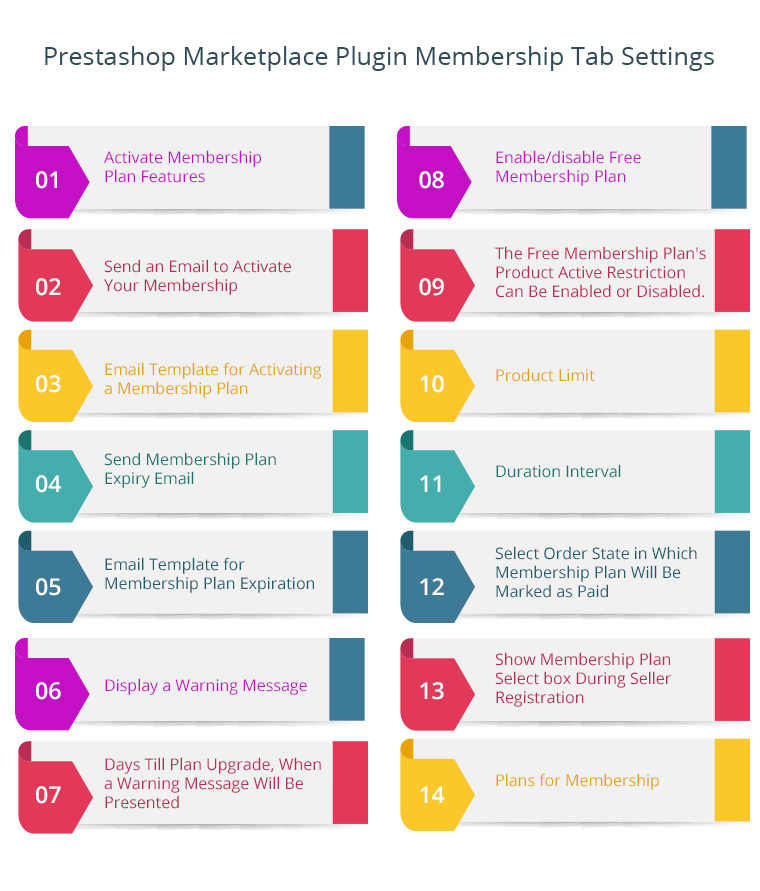
Membership tab Settings of the Prestashop Marketplace Plugin
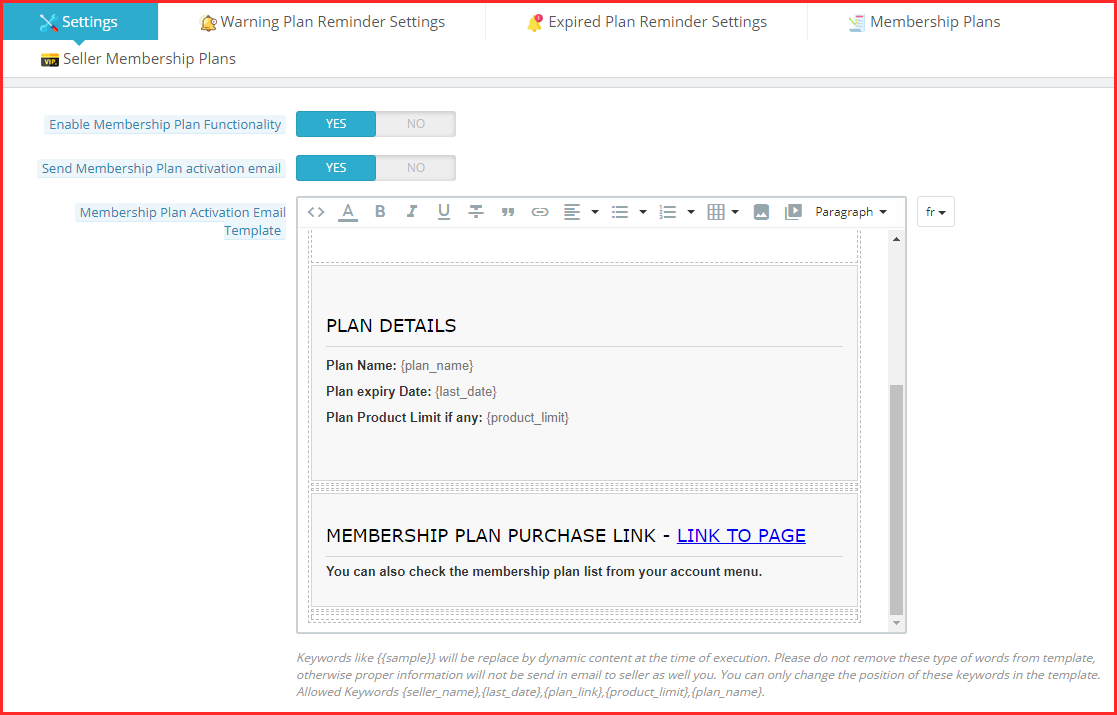
Enable Membership Plan Functionality
With this functionality of the Prestashop Marketplace Module, the admin can activate or deactivate the membership plans on the platform. Further, once activated, the sellers can choose from the different membership plans you create.
Send membership Plan Activation email
With this setting, the admin can choose either to send an email notifying the sellers about the activation of their subscription or not. Therefore, when you enable it, the activation email goes to the seller and if disabled, it doesn’t.
Membership Plan Activation Email Template
This setting has a membership plan activation email template for the admin. In fact, the admin can customize it as per the need.
Note: Keywords like {{sample}} will be replaced by dynamic content at the time of execution. Please do not remove these types of words from the template, otherwise, proper information will not be sent in an email to the seller as well you. You can only change the position of these keywords in the template. Allowed Keywords {seller_name}, {last_date}, {plan_link}, {product_limit}, {plan_name}.
Send Membership Plan Expiry Email
With this setting, the admin can choose either to send an email notifying the sellers about the expiration of their subscription or not. Therefore, when you enable it, the expiration email goes to the seller and if disabled, it doesn’t.
Membership Plan Expiry Email Template
This setting has a membership plan expiration email template for the admin. In fact, the admin can customize it as per the need.
Note: Keywords like {{sample}} will be replaced by dynamic content at the time of execution. Please do not remove these types of words from a template, otherwise, proper information will not be sent in an email to the seller as well you. You can only change the position of these keywords in the template. Allowed Keywords {seller_name}, {last_date}, {plan_link}, {product_limit}, {plan_name}.
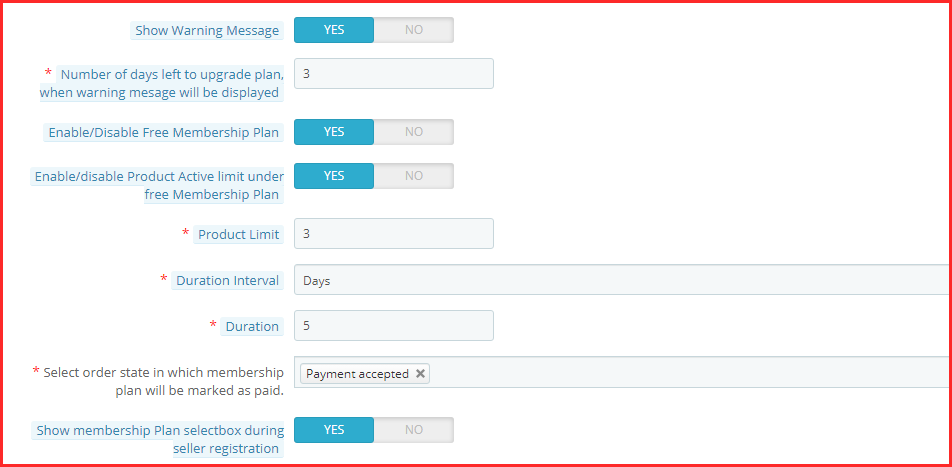
Show Warning Message
With this setting, the admin can easily show a warning message once the membership plan is about to expire. In fact, with this, the sellers are well informed about either renewing or discontinuing their subscriptions.
Number of days left to upgrade plan, when warning message will be displayed
This setting of the Prestashop marketplace addon by Knowband allows the admin to set the number of days left for the membership plan to expire.
Enable/Disable Free Membership Plan
Want to allure new sellers? You can easily offer them a free membership plan by activating this setting.
Enable/disable the Product Active limit under the free Membership Plan
This setting is connected with the setting mentioned below. Further, the admin can set the number of products the admin is allowed to list under Free Membership. Thus, the admin can enable or disable this setting.
Product Limit
Under this setting, the admin can set the product limit as mentioned in the last setting.
Duration Interval
This setting of the Prestashop marketplace plugin allows the admin to set the number of days for Free Membership.
Select order state in which membership plan will be marked as paid
Under this setting of the Prestashop Multi-seller Marketplace module, the admin can choose the order status that marks the membership plan as marked paid.
Show membership Plan select box during seller registration
If this setting is enabled, the admin can show the membership plan in the seller registration form.
Warning Plan Reminder Settings
Under this setting of the Prestashop Multi vendor Marketplace Module, the admin can view and create warning reminders. Furthermore, when you create a new reminder, the following are the settings under the ‘Add’ tab.
Enable/Disable this reminder
The number of days before the plan expiry warning mail should be sent to the seller.
The subject of the warning reminder email that goes to the sellers.
The email template of the warning reminder goes to the sellers.
Expired Plan Reminder Settings
Under this setting of the Prestashop Marketplace Addon, the admin can view and create expiration reminders. Furthermore, when you create a new reminder, the following are the settings under the ‘Add’ tab.
Enable/Disable this reminder
The number of days after the plan expiration warning mail should be sent to the seller.
The subject of the expiration reminder email that goes to the sellers.
The email template of the expiration reminder that goes to the sellers.
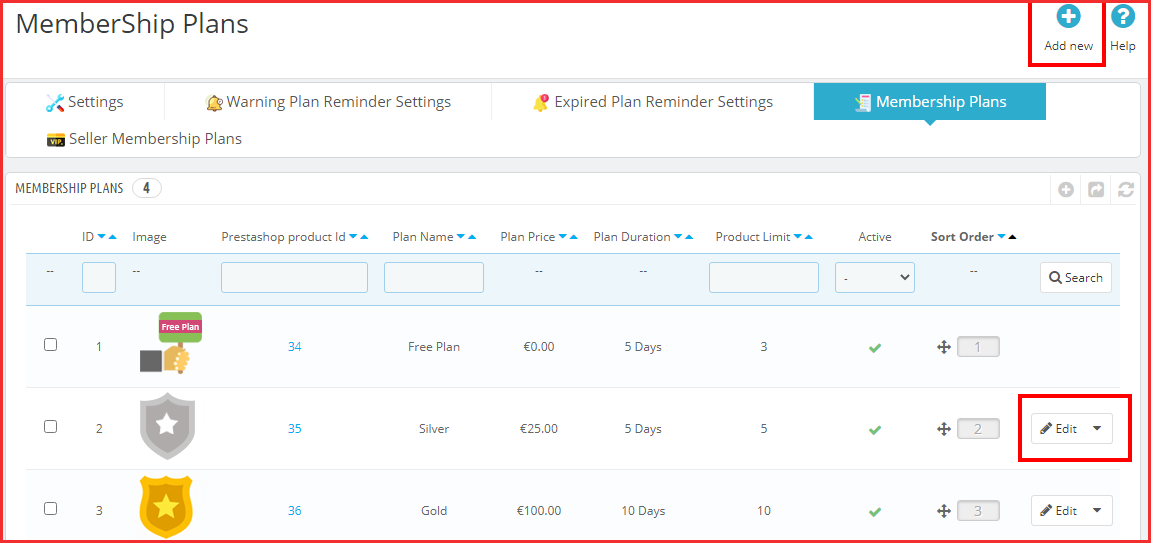
Membership Plans
Under this setting of the Prestashop marketplace module, the admin can view all the membership plans. Further, the plans are listed with the image, product ID, plan name, price, duration, and other settings. Moreover, under this tab, he can also create a new membership plan. The following are the settings:
The Name of the Plan
The Plan Price that the seller has to pay for this specific subscription plan.
Enable/Disable the product active limit. Further, with these settings, the admin can set the number of products that will be active under this plan.
Pick the duration interval for the membership plan. Further, the options include days, months, and years.
The exact duration of the membership plan.
Enable or disable this membership plan.
The admin can add an image to the membership plan.
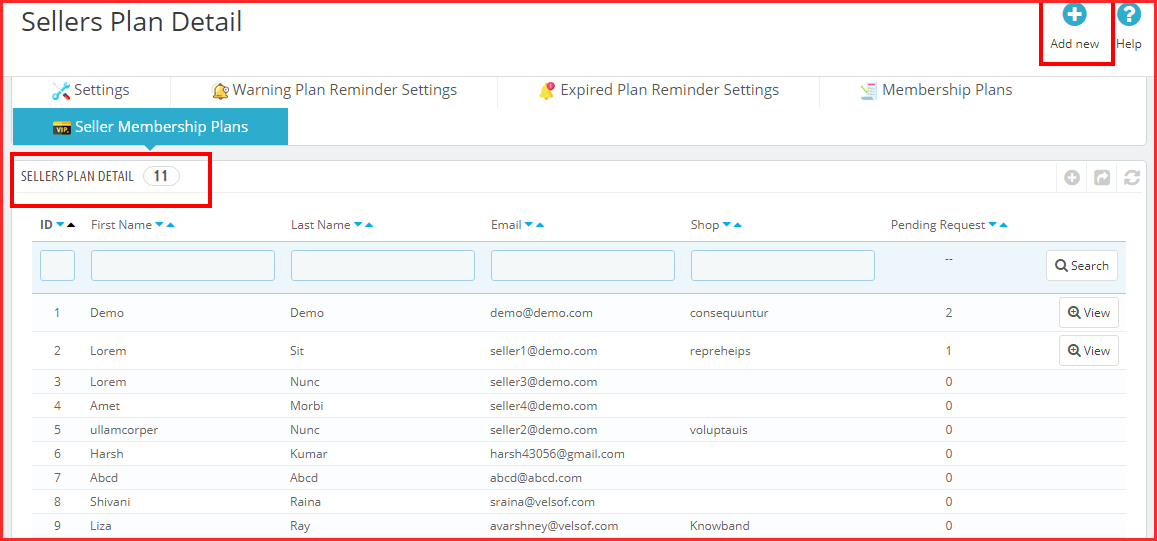
Seller Membership Plans
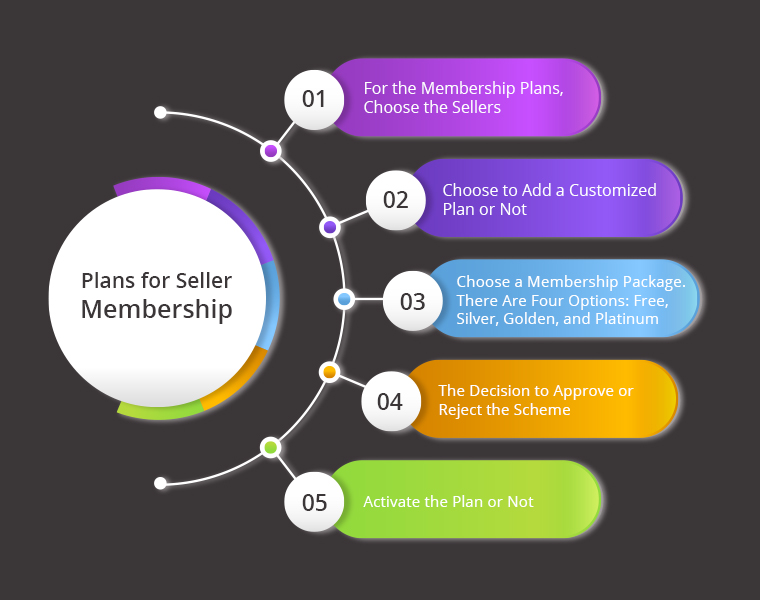
Under this setting of the Prestashop Multi-seller Marketplace module, the admin can view the different sellers and their membership plans. Further, he can view all the settings. Moreover, the admin can also create new memberships for sellers. Following are the different settings under the “Add” tab:
Select the Sellers for the membership plans.
Choose to add a customized plan or not.
Select the membership plan. The options include Free, Silver, Golden, and Platinum.
The option of marking the plan as approved or not.
Activate the plan or not.
In the End
This is all that the Prestashop marketplace addon by Knowband’s Membership Plan setting has. Further, the membership plan functionality is an integral option of the marketplace. What do you think of it? Do you want to know more about the Prestashop Marketplace? Do let us know your queries at support@knowband.com.
Have you ever thought about having the Prestashop One Page Checkout for your store? A checkout process is of great value. Further, you must pay attention to your website’s checkout process if you want to increase revenue for your company. It is one of the most important factors that might influence whether a shopper converts or leave the shopping cart empty. Any eCommerce store’s cycle is regarded as a crucial component that addresses getting greater conversion rates.
If you are unable to improve the checkout process, it will undoubtedly have a significant impact on your conversion rates and sales. One Page Checkout Prestashop is receiving support from several website marketers. Furthermore, to reduce the growing number of abandoned carts.
Here are some of the several arguments in favour of using the Prestashop One Page Supercheckout to increase sales. Moreover, increase conversions to your store.
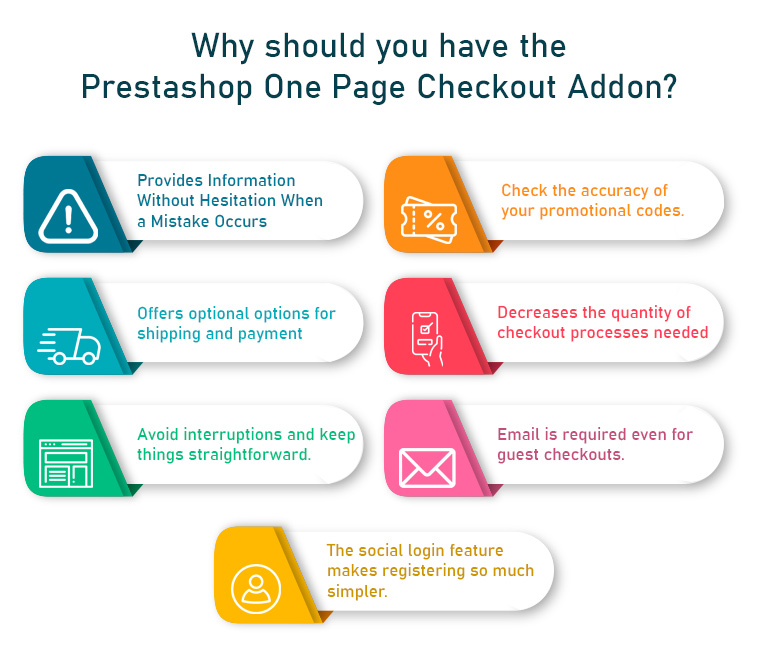
What makes the Prestashop One Page Checkout Addon a Must-Have?
Doesn’t hesitate to Provide Details When a Mistake Happens
It would be a brilliant idea to let customers know about errors they made on the checkout page itself. This error reporting will aid in completing your checkout process right away, decreasing the likelihood of shopping cart abandonment.
Introduce the corresponding One Step Checkout Prestashop Module to your shop. A perfect checkout module should be capable of telling customers about checkout-related errors.
Investigate the validity of your promotional codes
An excellent way to boost the sales of your online shop is to attract customers with enticing discount coupons or promotion codes. It is common human behaviour to pay close attention to coupon restrictions while making an online purchase.
The availability of excellent discounts or promotion codes motivates the customer to complete a recent buy.
Choose a One Step Checkout Prestashop Module that enables you to share discount coupons with your customers so that they can use them at checkout.
Provides Optional Payment And Shipping Options
It has been observed that offering customers a variety of shipping and payment options enhances customer loyalty to an online retailer. Do not force customers to use your present shipping and payment options to make an online purchase. This preoccupation is best addressed by this Prestashop One Page Checkout from the Knowband store, which streamlines the online purchasing process for Prestashop websites.
It gives customers the option to select any of the available payment and transportation options for a simple checkout process. Having a variety of payment options increases product sales and conversions and builds customer confidence in an online company.
PayPal, Advanced PayPal, Boleto, PayU, Stripe, and 2Checkout are a few of the payment gateways offered by Responsive one-page checkout Prestashop.
Reduces the number of checkout procedures required
When making an online purchase, customers choose this way of buying over going door to door since they are too busy to do so. They would not want to waste their time on pointless check-out procedures, but this is not the case in the current circumstances.
The opportunity of increasing sales with a single-page checkout process is finally squandered due to the confusing checkout procedures. If you want to increase sales and the consumer experience throughout the checkout process, it is essential to have everything on one page.
Eliminate any interruptions and keep things simple
The primary goal of creating a checkout page is to persuade the consumer to finish the process of buying. To provide clients with the only fields they need to fill out to make the process simple and distraction-free, the Prestashop Responsive One Step Checkout Addon allows you to remove superfluous processes and distractions from the checkout page.
With the necessary CTA buttons, the procedure also becomes engaging and functionally simple.
Even for guest checkouts, demands an email
Customers leave their shopping carts because they have to register for an account to check out. Clients find that annoying. Why do you think that would irritate them? It’s because if they filled out the registration form and provided all the necessary information, they would get a barrage of daily, multiple-day, or even hourly advertising emails from the website.
The guest checkout option is available in the Prestashop responsive one-step checkout addon’s design. Thus, website users who would like to purchase without signing up for anything can do so.
The social login option makes signing up so much easier
Signing up or logging in on a website can be very tricky and lengthy. Therefore, social login comes as a handy option for customers. Furthermore, if you allow your customers to signup or log in using social media, there can be more conversions. Well, that is why the Prestashop one-page check has the option to use their social login accounts to sign up or login on to the website.
Faster Checkouts, Higher Sales: The OpenCart One Page Advanced Checkout Extension
Running an OpenCart store? The One Page Supercheckout by Knowband is available for OpenCart too, social login, Ship2Pay linkage, drag-and-drop field management, Mailchimp and Klaviyo integration, guest checkout, and a fully responsive layout, all in one place.
Without implementing a necessary checkout measure, there isn’t a single online store that can increase sales and conversions. It is a crucial component of any eCommerce shop that may immediately achieve success in terms of revenue and clients. Using the Prestashop one-page checkout might help you attract more consumers and increase conversions. Furthermore, do everything it takes not to waste a second in putting them into place. Your eCommerce store’s success depends on maintaining a flexible and user-friendly checkout process.
For store owners looking to improve checkout performance without additional costs, you can also explore modern solutions like the Prestashop free quick checkout addon, designed to simplify the checkout process, improve speed, and enhance overall user experience.
Lessen the possibility of cart abandonment and bounce rate of your Prestashop store with this Prestashop One Page Checkout by Knowband. Which replaces the default checkout usefulness of your Prestashop store and offers the online store owners to put every one of the steps on a single page.
This gives a lot less difficult checkout process to the clients and gives them a better shopping experience too.
The Prestashop One Page Checkout by Knowband is one of the most famous modules. It has been sold more than multiple times on Knowband and the Addon Store. Along these lines, there’s even more requirement for the Prestashop One Step Checkout Addon to your store.
Must-have features of the Prestashop One Page Checkout by Knowband
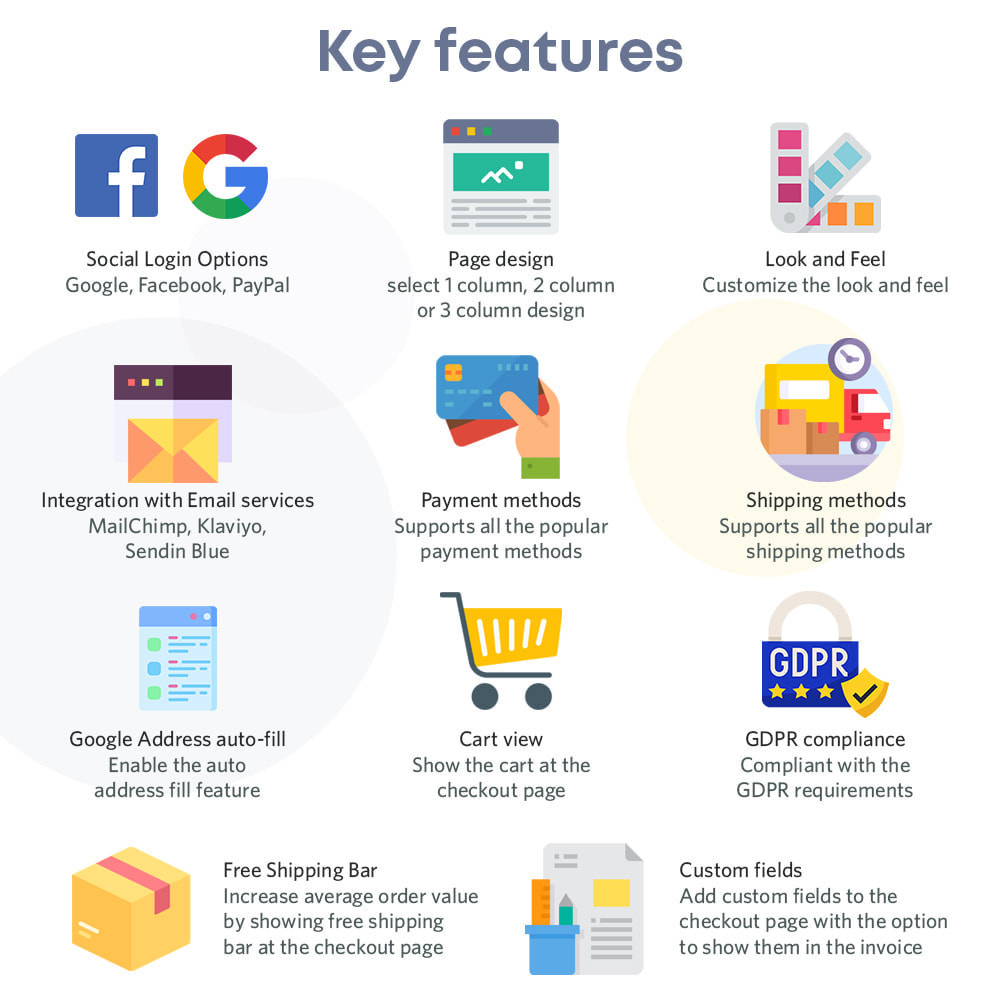
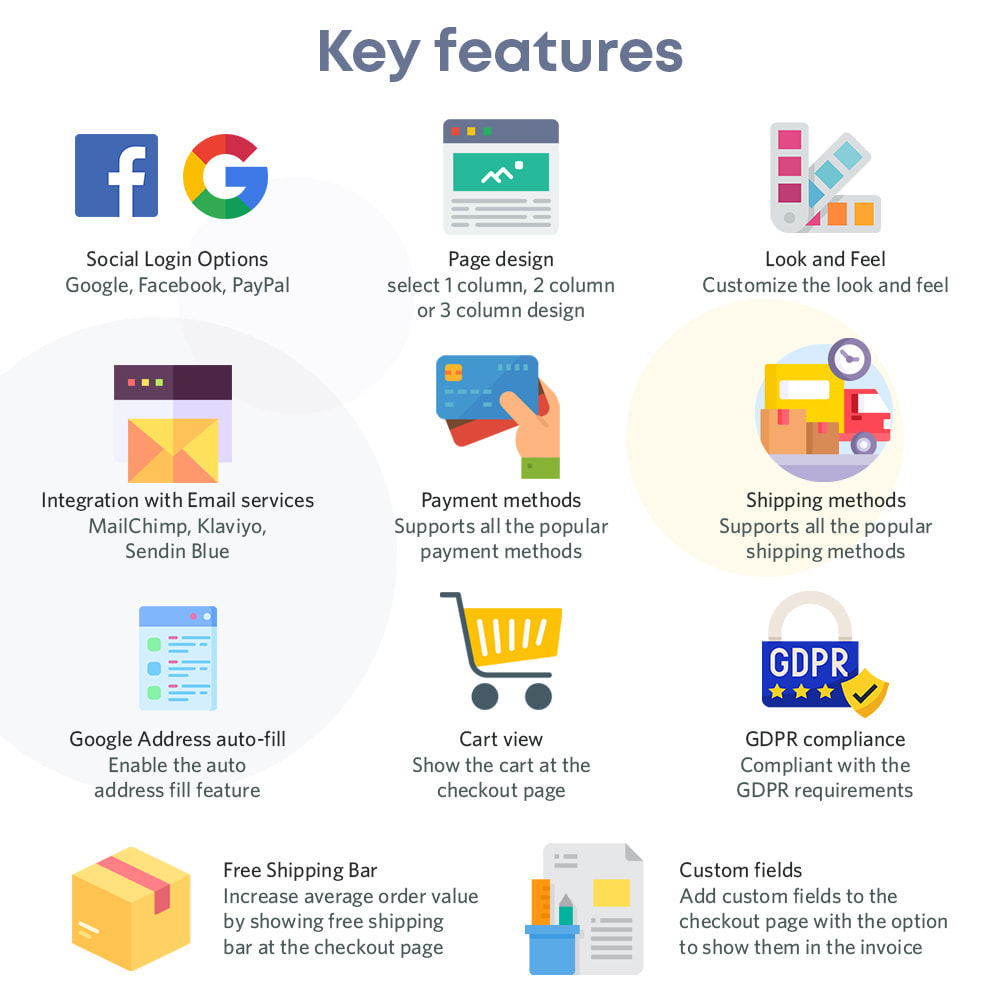
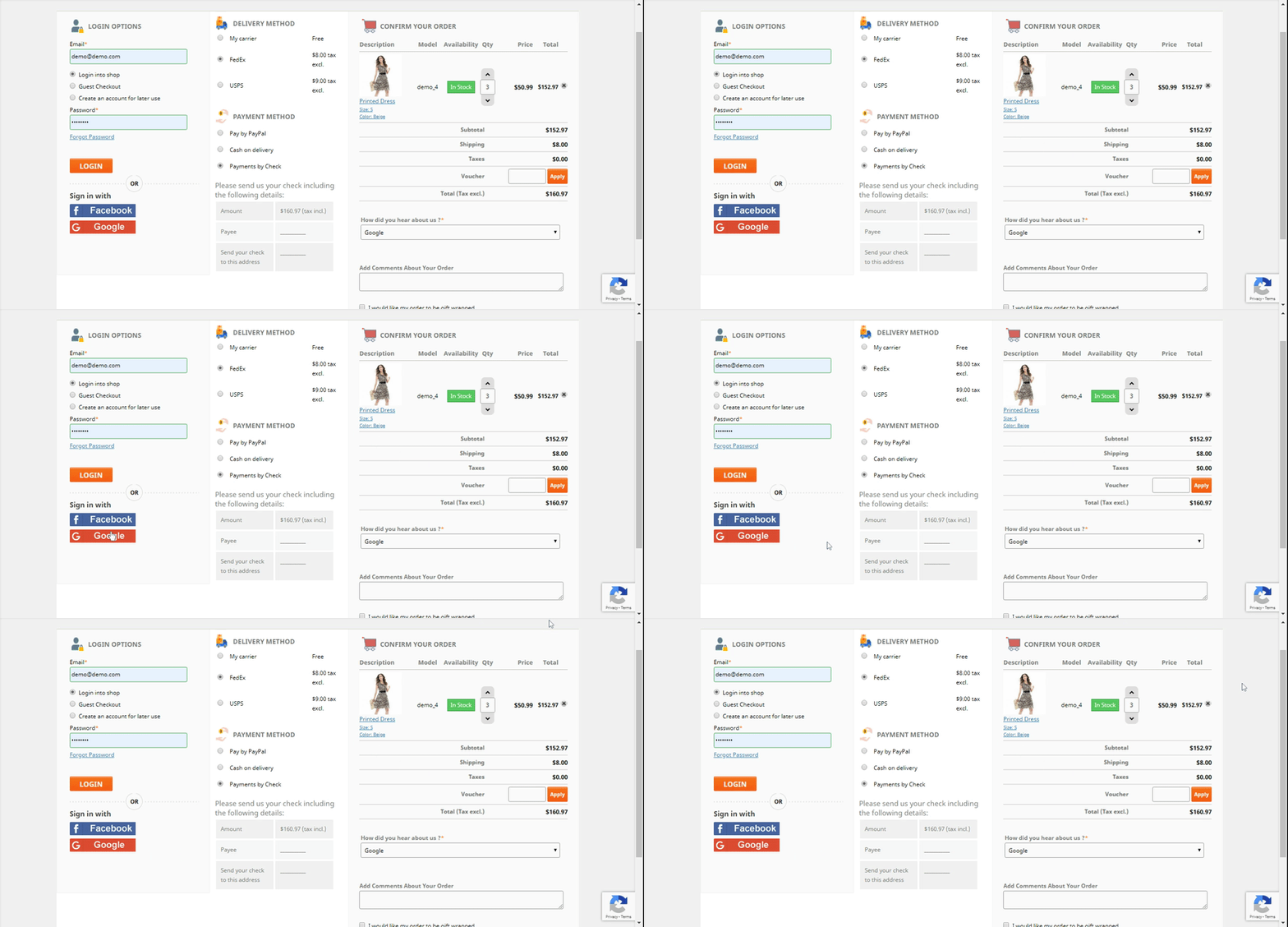
Complete the buy as a visitor
One of the best components that make Single Page checkout an absolute requirement is the Guest Checkout choice. Utilizing the visitor checkout highlights, new customers might complete their buys without enlisting in the business.
Utilize your informal communication record to sign in
Clients may effectively sign in or register thanks to the accompanying capacities. They might sign in or register involving social login choices in Prestashop’s One Page Checkout. Take, for instance, a Google, Facebook, or another social account.
Prestashop offers an assortment of installment choices
Assuming your clients like to pay through a specific strategy, he/she can do that. The choices accessible are PayPal, PayU, or Braintree, for example. You ought to have the option to oblige them. In actuality, Prestashop offers a wide scope of installment techniques.
There are many shipping choices accessible
The One-Page Responsive Checkout Prestashop offers a few conveyance choices. Mondial Relay, So Colissimo, Ulozenka Delivery, Zasielkovn Delivery, LP Express 24 Delivery, and others are a couple of models.
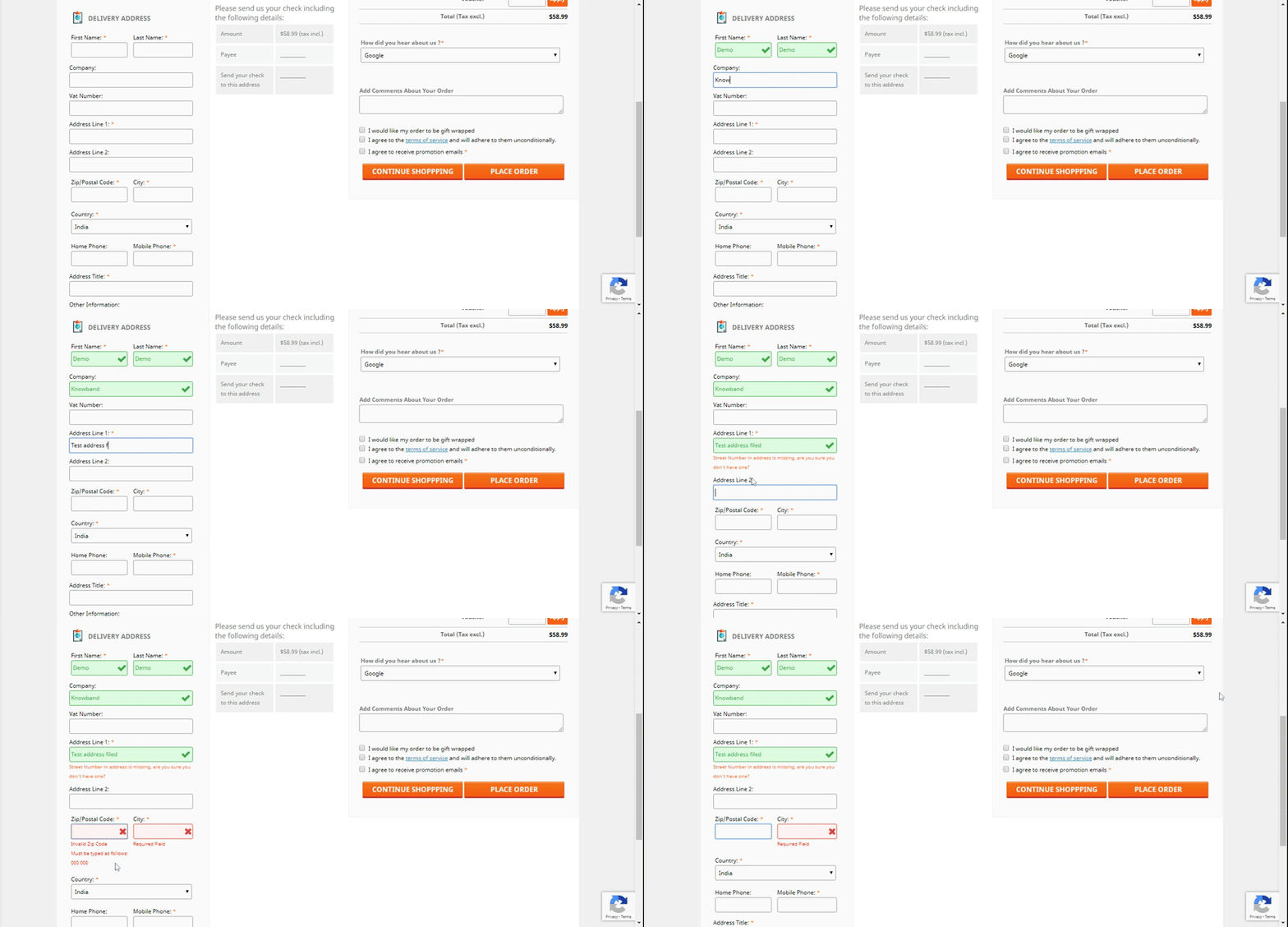
One will see the issues quickly with Inline Validation
Suppose a client commits an error while finishing up the data on the checkout page. The ongoing capacities of the Prestashop One Page Checkout feature the issue at a similar second. Subsequently, clients will want to cure it.
The pieces of the checkout procedure streamline
The store administrator can rapidly move the subtleties of the checkout page all over because of their need. Moreover, the Single Page Checkout administrator can without much of a stretch achieve a similar errand from the backend.
Item amount refreshes
Customers can without much of a stretch change the rundown of components on the checkout page by using the Prestashop One Page Checkout choice. Therefore, Prestashop’s One Page Checkout permits you to change something very similar on the checkout page.
Finishing out the Google auto-address structure
At the point when a client starts entering his area data, Google Auto-address fill gives address proposals. The postal district and city segment are naturally delivered when you pick the proposed address.
Various layout formats
Three different layout formats are accessible in Knowband’s Prestashop One Page Supercheckout. Besides, the store chairman might pick the one that best suits the subject of the eCommerce firm.
MailChimp, SendinBlue, and Klaviyo integrators
Clients’ exact subtleties go straightforwardly into your various records. For example, MailChimp, SendinBlue, or Klaviyo accounts. Further, when they utilize the Prestashop One Step Checkout Addon.
Information on abandoned checkouts is accessible
The One Page Responsive Checkout Prestashop likewise offers an extremely valuable capacity to the entrepreneur. They can likewise screen transformation rates at the checkout. Besides that, there are abandoned checkouts, abandoned incomes, the number of orders put in, and the money acquired from such exchanges.
Checkout Behavior Report
The administrator will right now need to know the number of fields their clients are finishing up. It provides the overseer with a decent comprehension of which checkout stage the clients skipped and abandoned their shopping baskets.
The finished marker with the expectation of complimentary shipping
A free shipping progress bar is accessible in the most recent variant of the Prestashop One Page Checkout. Clients may likewise perceive the amount they need to add to their shopping to fit the bill ‘with the expectation of complimentary conveyance.’
Making a new customer profiles
Besides the abilities recorded over, the new version currently permits you to make unmistakable client profiles. The director can characterize custom profile type fields on the checkout page utilizing this ability.
Thusly, with this multitude of elements, the Prestashop One Page Checkout by Knowband is an unquestionable requirement. In addition, there are various advantages of introducing the plugin in your store. What do you think of the addon? Do you have any queries related to the module? Do let us know at support@knowband.com.
It is only at the point when you really think something is missing, that you understand what will actually make a difference. In fact, that’s something true with all genres and fields – eCommerce is no different. When you have a Prestashop store, you certainly include different addons with time you think, it’s time to make some changes.
In this blog, we will look at 3 Prestashop modules that make a vast difference for any eCommerce business that they have associated with. Further, we will talk about what these 3 Prestashop modules do. Later, we’ll lay down the signs that you really need to install these 3 Prestashop modules in your eCommerce store for better results.
Let’s get down to the 3 Prestashop modules below.
Prestashop module One Page Supercheckout Addon
The Prestashop One Page Supercheckout addon is one of the maximum beneficial modules in your business. The Prestashop One Page Checkout Addon is supposed to lessen the variety of superfluous fields on the checkout page. By simplifying the page, you may easily reduce your store’s departure rate as well as the abandoned cart rate. Furthermore, you can boost your store’s conversions, sales, and income. It is feature-rich and guarantees positive outcomes.
You’re in for a successful conversion with features like social login, guest checkout, custom field prioritization, and more.
Signs that you need the Responsive one page checkout Prestashop
Increased abandoned cart rate – customers exiting on the checkout page
Decreased sales and revenues
Prestashop module Abandoned Cart Module
Knowband’s Prestashop Abandoned Cart plugin is a great way to minimize your store’s abandoned cart rate. You can easily send reminder emails to your customers with the Prestashop abandoned cart email follow up plugin.
Furthermore, those who abandoned their shopping carts. It is entirely up to you whether or not to include the promo code in the mail. The discount code works as a motivator for buyers to complete their transactions.
The following are some of the features that make the Prestashop abandoned cart reminder plugin a must-have. For example, you may recover lost purchases, issue reminder popups, and send web push alerts, among other things.
Signs that you need the Prestashop Abandoned cart recovery email addon
Increased abandoned cart rate
Customers are not willing to complete the purchase even when online.
Knowband’s eBay PrestaShop Integration Module lets the admin promote his commodities on eBay. How? It simply connects your shop to eBay. Furthermore, it enables you to map your items on the marketplace and begin selling.
However, that is only the first impression. In fact, having the eBay Marketplace Connector module has a slew of other advantages.
Bulk product listing, pricing control, order management, and other capabilities are among the highlights.
Signs that you need the Prestashop eBay API Integration Module
You want to expand your business
You see the potential of growing your customer base
When you’re willing to increase the sales and revenues.
In the End
Hence, these were the 3 Prestashop modules by Knowband that you really should invest in. Further, when you see these tell-tale secrets for sure. Get in touch with us at support@knowband.com for any information about these 3 Prestashop modules or any eCommerce solutions.
Further reading for the most useful Prestashop addons available for you:
Knowband’s Prestashop One Page Checkout is an astonishing option for your eCommerce business. Truly, a superb apparatus can help your eCommerce organization in an assortment of circumstances. In this article, we will investigate why the Single Page checkout is an absolute requirement. Above all, how about we examine how Responsive one page checkout Prestashop functions.
Presently, how about we look at the reasons you want to purchase the Prestashop One Step Checkout Addon.
Why is Prestashop One Page Checkout by Knowband popular?
The motive of the Prestashop responsive one step checkout addon
Knowband’s One Step Checkout Prestashop Module assists you with smoothing out the checkout page. Besides, it helps the owner in diminishing cart relinquishment and expanding incomes. It further develops purchaser fulfillment. Besides, the administrator can add or erase custom fields from the checkout page. Therefore, to ensure that clients do not worry while finishing the information. Besides, finish the buying system effortlessly. Since checkout is a crucial point in time when most carts abandon.
The Prestashop one page checkout is a consistent arrangement
Knowband guarantees that the Prestashop module is a simple choice for you. In fact, beginning from the establishment to its working, everything occurs easily. Moreover, update the boundaries from the administrator connection point to guarantee that it runs well. Therefore, you can rapidly help your organization’s development.
The Prestashop One Page Supercheckout incorporates a visitor checkout choice
Visitor checkout is a fabulous other option. A checkout technique ought to likewise contain. Truth be told, this capacity permits clients to shop without first enrolling on the site. Besides, people can undoubtedly complete their exchanges in the store without giving an excessive number of subtleties. Thus, the Prestashop One Page Checkout sparkles with the visitor checkout.
There is a social login highlight
The meaning of social login usefulness is not generally hidden. Besides, customers can easily join or sign in utilizing social login. Truth be told, Facebook and Google are two of the most famous potential outcomes. The Prestashop One Page Checkout Addon from Knowband, then again, gives buyers two other options.
Additional features of Knowband Prestashop One Page Supercheckout
Prestashop One Page Supercheckout acknowledges an assortment of installment and conveyance techniques.
The in-line validation system guarantees that no mistakes happen. As a general rule, if the buyer commits a blunder while finishing up the structure, the strategy will fall flat.
The administrator can lay out many profiles for clients utilizing the client profile’s usefulness. For instance, businesses, individuals, etc. Accordingly, when the customer chooses the profile, every one of the information under that profile will be accessible. For instance, the location, contact data, etc.
Integrators for MailChimp, Klaviyo, and SendinBlue are accessible in the module. You can catch a shopper’s information in your MailChimp, SendinBlue, or Klaviyo account when they enter their data.
There is a back-end choice where the custom CSS and JSS might be acquainted with the checkout page. The store executive might use this part of the Prestashop One Page Checkout to roll out important improvements without changing the code of the Prestashop one page checkout module.
This element of the Prestashop One Page Checkout addon permits the store administrator to concentrate on the way of behaving of customers. Further, who forsakes the bin while on the checkout page. The module shows a rate worth of the data. Moreover, given by online clients who abandoned their bins. This permits the overseer to discard superfluous areas. That of the checkout cycle and abatement cart surrender.
The Prestashop module permits the store head to effectively modify delivering/installment strategies and that’s just the beginning. Further, the name, or the thumbnail picture without changing the code.
The Prestashop addon incorporates a setting that permits store chairmen to make any field discretionary or compulsory.
The store administrator can likewise sort out some way to orchestrate all area fields utilizing the Prestashop module’s worked-on component.
Advantages of Prestashop One Page Checkout
The checkout cycle becomes straightforward
The module consolidates the entire checkout process onto a single page. This way simplifies it for clients to fill in their data.
Customers’ time is saved
Clients don’t need to finish out such a large number of fields or burden a few pages to buy with Knowband’s Prestashop responsive one step checkout addon. They can finish up the structure quickly and easily, and their exchange will finish in a matter of moments.
There will be lesser abandoned carts
It requires a great deal of work to draw in clients to the checkout page, and assuming he passes on the site without completing the exchange because of solid and tedious checkouts, he feels upset. The Responsive one page checkout Prestashop takes out this obstruction by making the checkout page perfect and simple. Further, permitting clients to rapidly complete their shopping.
The conversion rate increases
The Prestashop One Page Checkout from Knowband further develops your customers’ checkout experience. Moreover, assists you with expanding your web-based company’s change rate.
Mobile-friendly
Customers can likewise finish orders utilizing their smartphones on account of the addon’s versatile checkout interface.
Conclusion
There is a long way to go about the One Step Checkout Prestashop Module. For sure, these are the reasons that make Knowband’s Prestashop one page checkout an unquestionable requirement. What is your take? If it’s not too much trouble, reach us at support@knowband.com assuming that you have any inquiries. You could look at additional insights concerning the module on the Knowband store.
Further sources for most useful Prestashop addons:
One page checkout infers a client can purchase a product using one page checkout module specifically. It is interesting and fundamentally better than the old checkout structure. Further, that had endless pages to go to first before the admin receives the total installment. In fact, it demonstrates that the eCommerce destinations utilizing this component have visibly seen sales expand. Moreover, keep on doing likewise. On the other hand, multi-page checkout features many insignificant fields that the customer has to fill. Therefore, the customer runs away seeing the various fields. There is no great explanation to put resources into long checkout measures since it has everything required for an installment trade on a single page.
In this blog, we will take a look at various components that make the Single Page Checkout addon a must. In fact, we will also focus on Knowband’s One Page Checkout Extension. Let us go forth and have a better understanding of the Fast Checkout addon.
How does Single Page Checkout plugin work?
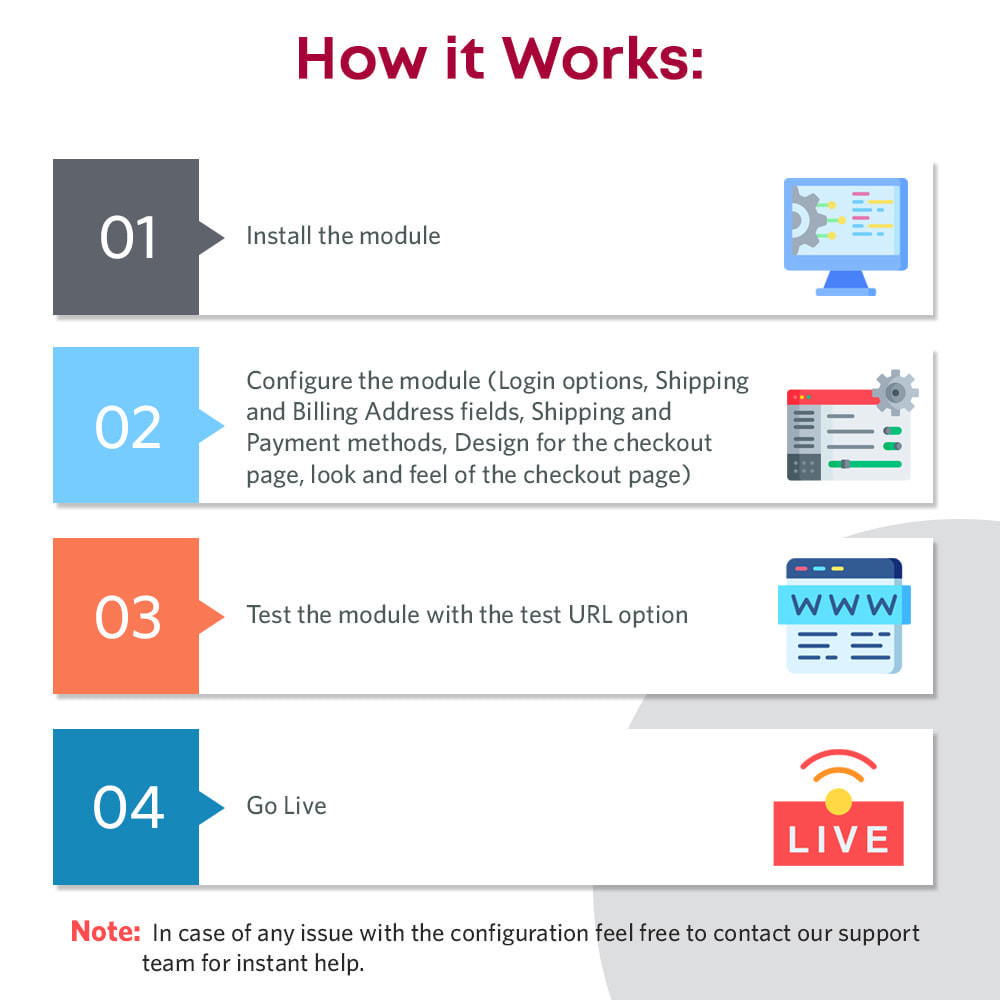
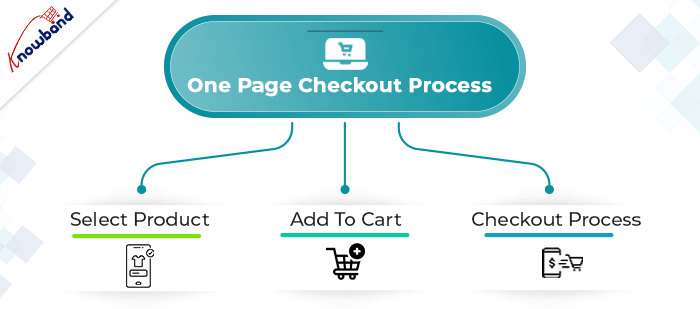
The working of the One Page Checkout Extension is absolutely simple. The admin has to buy the module and install it in his eCommerce store. Further, configure it as per the need of the business. In fact, he starts by choosing the layout that he seems fit for the store. Moreover, add or delete the custom fields.
The next step is that a customer comes to the online store looking for a product. Further, finds what he/she’s looking for and adds the product(s) to the cart. Then, moves to the checkout page which is finally the last step to completing the purchase. Therefore, how you optimize the checkout page decides whether the customer buys the products or abandons the site. Hence, optimize the checkout page well to increase sales of your store.
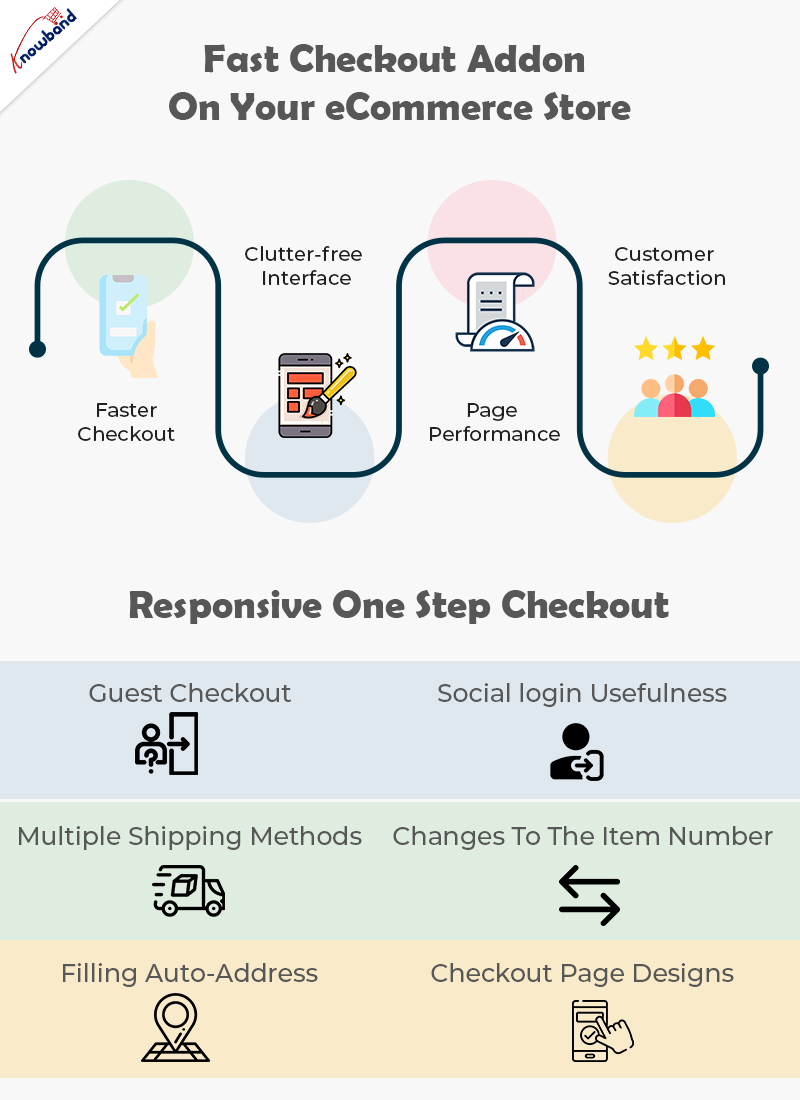
Why pick the Fast Checkout addon on your eCommerce store?
Faster Checkout
Suppose, you visit a shopping store and have the sum of your ideal items in the shopping basket. Further, you start looking for the most basic checkout line. Moreover, get baffled when you see one that is really long and bothering. Also, online customers don’t like to hold on while they make the last installment; they moreover need the checkout cycle to be fast and quick. In case it’s not, they will undoubtedly leave it without buying anything. Being a web-based retailer, you needn’t bother with this happens.
Luckily, a quick checkout elective is available with the Quick Checkout addon. Further, it diminishes the time to fill in all the data on a singular page while purchasing on the web.
Right when online customers see that their checkout experience will be done upon only one page the open door that they make the trade is unquestionably higher.
Clutter-free Interface
A One Page Checkout addon is easy to understand. With a foreordained number of data fields and steps, the page remains clear and easy to go through. Additionally, quick checkout hinders disarray on the grounds that eCommerce buyers see promptly what data they are expected to give. Likewise, they don’t have to go through numerous means and pages which furthermore saves time.
Without a doubt, with one-adventure checkout, you don’t need to worry about whether your route is befuddling to site guests. Customers can without a doubt investigate through the checkout association as they comprehend what data is required, where it should be placed, and when it will be submitted.
Overhauled Page Performance
Customers don’t like to sit and believe that different pages will stack, a long checkout collaboration might make your customer disappointed, provoking cart surrender. One Page Checkout module makes web-based shopping steady since everything is kept in that overall area.
Rather than keeping it together for stacking of pages in continuation, customers get a fundamental page to fill and make the installment. There is no reserve time, just basically fill in the subtleties and press submit unequivocally.
Increase Customer Satisfaction
Customer fulfillment is a basic component that you really want your web-based store to convey. Single page checkout measure urges you to give an issue-free experience to the customers. Everything is manageable by a single page checkout. Further, to convey an overall shocking UX.
In case you really want to grow the change paces of your internet-based store, you should pick the one-page checkout measure. You can without a doubt add a quick checkout decision to your ongoing online store subject to the stage you are utilizing. For sure, you ought to just invigorate your eCommerce site with an extension or modules available to convey the fast shopping experience. That is where One Page Checkout Extension comes into the image.
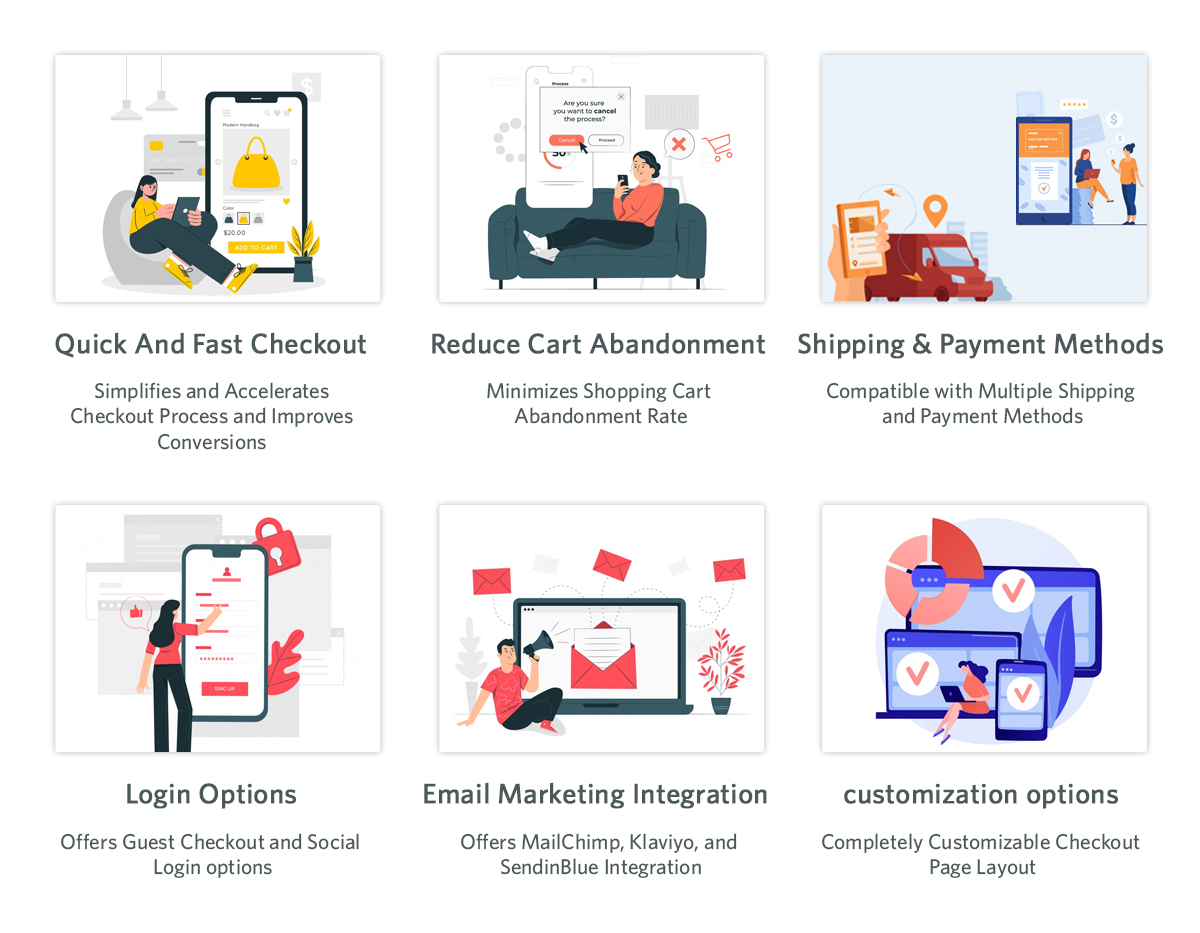
What makes Responsive One Step Checkout addon by Knowband stunning?
Guest Checkout
New customers might utilize the guest checkout capacities to finish their exchanges without enrolling with the site. This is an incredible method for furnishing clients with a faster method for buying without constraining them to enroll on the site.
Social login usefulness
The following component, social login, absolutely makes it simpler for clients to sign in or enlist. Purchasers may handily sign in or make a record on the eCommerce store. Moreover, to finish the exchange by buying what they have in their bin sans making a record. With the utilization of social login choices like Google, Facebook, or another social organization profile.
All installment strategies are viable
Whether or not your buyers need to finish the buy through PayPal or another strategy, the One Page Supercheckout can oblige them. Accordingly, the customer won’t leave the business without finishing the exchange.
Multiple shipping methods
Checkout in One Step Multiple shipping activities are supported by the plugin. Ulozenka Delivery, Zasielkovn Delivery, LP Express 24 Delivery, and others are a couple of choices out of a large number.
With Inline Validation, you can see the mistakes immediately
Assuming clients commit an error while entering out the data on the checkout page, the proceeding with a component of the One Step Checkout Extension springs up as an elective where they might address it.
Fields in the checkout cycle can be focused on
Depending on the need for anything very comparable, each eCommerce business administrator can slide and drop the components of the checkout page all over. From the back-finish of the Responsive one-page checkout, the head may effortlessly achieve something similar.
Changes to the item number
Purchasers may effortlessly alter the number of things on the checkout page with the assistance of this element of the responsive one-stage checkout addon. Changing to the item page to adjust the number of products further develops proficiency.
Filling in Google’s auto-address
Whenever a buyer begins filling in his location information, Google Auto-address fill gives address ideas. It gets the made characters and presents striking results. When you select the proposed address, the postal district and city segment is accessible.
3 Checkout Page designs
Knowband’s Single Page Checkout offers three different plan choices from which the business overseer can undoubtedly pick the one that best suits the subject of the eCommerce site.
Integrator for MailChimp, SendinBlue, and Klaviyo accessibility
With the assistance of the One Page Supercheckout, gather customer data straightforwardly into your MailChimp, SendinBlue, or Klaviyo account when they show their installment.
GDPR consistence
The One Page Checkout follows GDPR prerequisites.
Details on Checkouts that have been abandoned
The One Page Checkout currently furnishes the retailer with a truly significant component that permits them to follow an assortment of insights. For instance, transformation rates at the checkout, the number of abandoned checkouts, abandoned pay, etc. The entrepreneur has the choice of seeing the recently alluded visuals for a specific day, week, month, or year.
Advantages of One Page Checkout Module
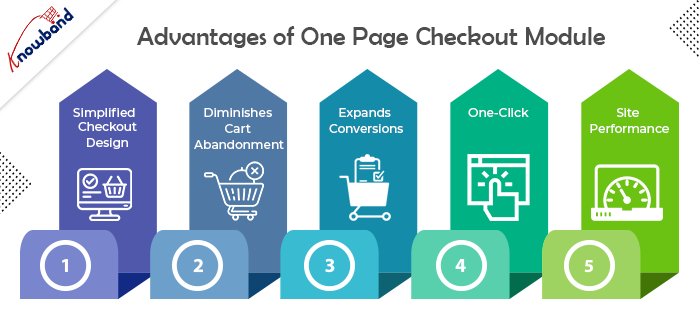
Simple, Simplified, and Convenient
The essential advantage of having a One Page Checkout is that it offers a simplified format. It looks advantageous and energizes a simple and quick checkout. Since it puts all the checkout components on one page, customers are very much aware, in advance, of how they need to finish checkout. It transforms a drawn-out checkout into a lovely and bother-free checkout.
Diminishes Cart Abandonment
Adding to the advantages of One Page Checkout is that it assists with diminishing cart abandonment. According to Baymard Institute, 23% of cart abandonments happen because of a long and confounded checkout. One-step checkout has ended up being exceptionally helpful for this situation. It brings down your cart abandonment by a good edge and assists you with recuperating lost sales.
Expands Conversions
This point intently connects with the subsequent point. Cart abandonment is contrarily corresponding to conversions. So when you face low abandoned carts, conversions consequently increment. Online customers show a higher goal to buy when given a single-page checkout which at last prompts higher conversions. However cart abandonments can never be killed, even a little improvement in conversions can bring you immense income.
All it requires is One-Click
One of the significant advantages of a One Page Checkout is that it dodges various snaps. Not at all like a multi-step checkout where a client needs to go through a few steps or pages before they could affirm their request, a single page checkout makes it a one-tick process. It offers a straightforward route and allows customers to submit their requests inside a single tick.
Further develops Site Performance
An extensive checkout urges customers to leave the checkout page. Trusting that the following page will stack over and again can in some cases be enraging for the customers and they might skip off from your site, destroying your site’s presentation.
What makes One Page Checkout Module by Knowband popular?
There are several reasons why Knowband makes a popular company for eCommerce plugins. However, when it comes to the Simplified Checkout addon, Knowband has its expertise. Let us understand the reasons why Knowband is the best place to buy the module.
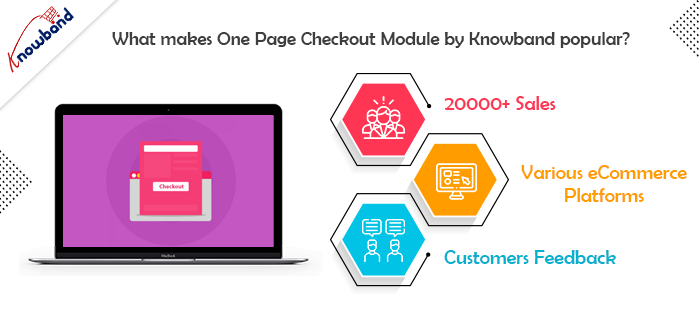
20000+ Sales
Knowband proudly announced earlier last year that the One Page Checkout Module has been sold more than 12000 times in 2021 only on the Knowband store. Moreover, by April 2022, the company celebrates 20000+ sales. In fact, the sales are a combination of both the Knowband store and the Addon store. Therefore, you know that there are 20K+ merchants out there who are satisfied with their purchases from the company.
One for every CMS system
The company offers a One Page Supercheckout extension for various eCommerce platforms. Further, you have the plugin for Prestashop, OpenCart, Magento, and Magento 2. Thus, no matter which platform you have, you can easily shop the module and install it in your store.
Stunning feedback from the customers
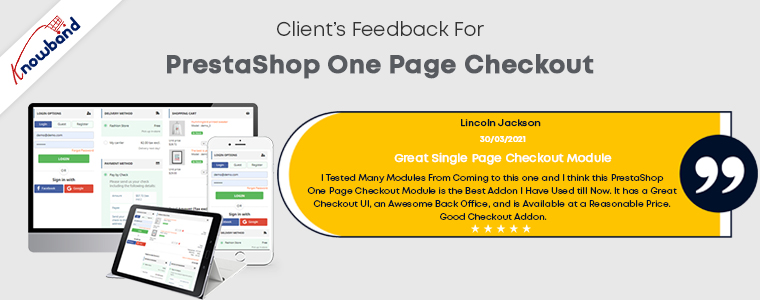
Knowband boasts about the eCommerce plugins it offers. However, it is of no use if the customer feedback states otherwise. Further, you can go on and read the reviews and ratings offered by happy customers of the One Step Checkout Addon.
In the End
So, if you are looking for an option that can optimize your checkout page, there’s no better option than one page checkout module. Knowband is definitely the best place for you to browse your option. I have tried to elaborate on all the details of the plugin to the best of my ability. In case you still have any doubts, let us know at support@knowband.com.
Today’s world appears to run on applications. If it’s anything that people can engage with, there’s a good chance it’ll be available as an app. Applications that are well designed attract your eye and make you want to use them, whereas apps that are poorly designed are frustrating and don’t do what we want them to.
You want to create a straightforward and intuitive user experience for the first edition of your eCommerce mobile app. Any element that detracts from the experience’s intuitiveness isn’t worth having. A Poland Fashion App has completed its 1000+ downloads, delivering an exclusive user experience. This blog will grab your attention to its features and how they have developed it.
Wieszakshop. pl – Premium Brands Outlet
Wieszakshop. pl is an online store that sells women’s, men’s, and children’s clothing, as well as shoes and accessories from popular brands, at up to 70% less than typical retail pricing in Poland and around the world. If you adore well-known brands and one-of-a-kind designer finds, you’ve arrived at a veritable haven of fashionable events.
How can you place an order on this eCommerce Mobile App?
Every mobile app has basic features like product listing, product page, shopping cart, checkout page, and transaction page. Wieszakshop. pl is a Fashion focused PrestaShop mobile app created using KnowBand’s Mobile App builder Plugin which is specially designed and developed for eCommerce.
Users in Poland may now purchase top brand clothing with ease. Allow me to take you on a shopping spree over PrestaShop Mobile App. For instance, consider buying black denim from your favorite brand:
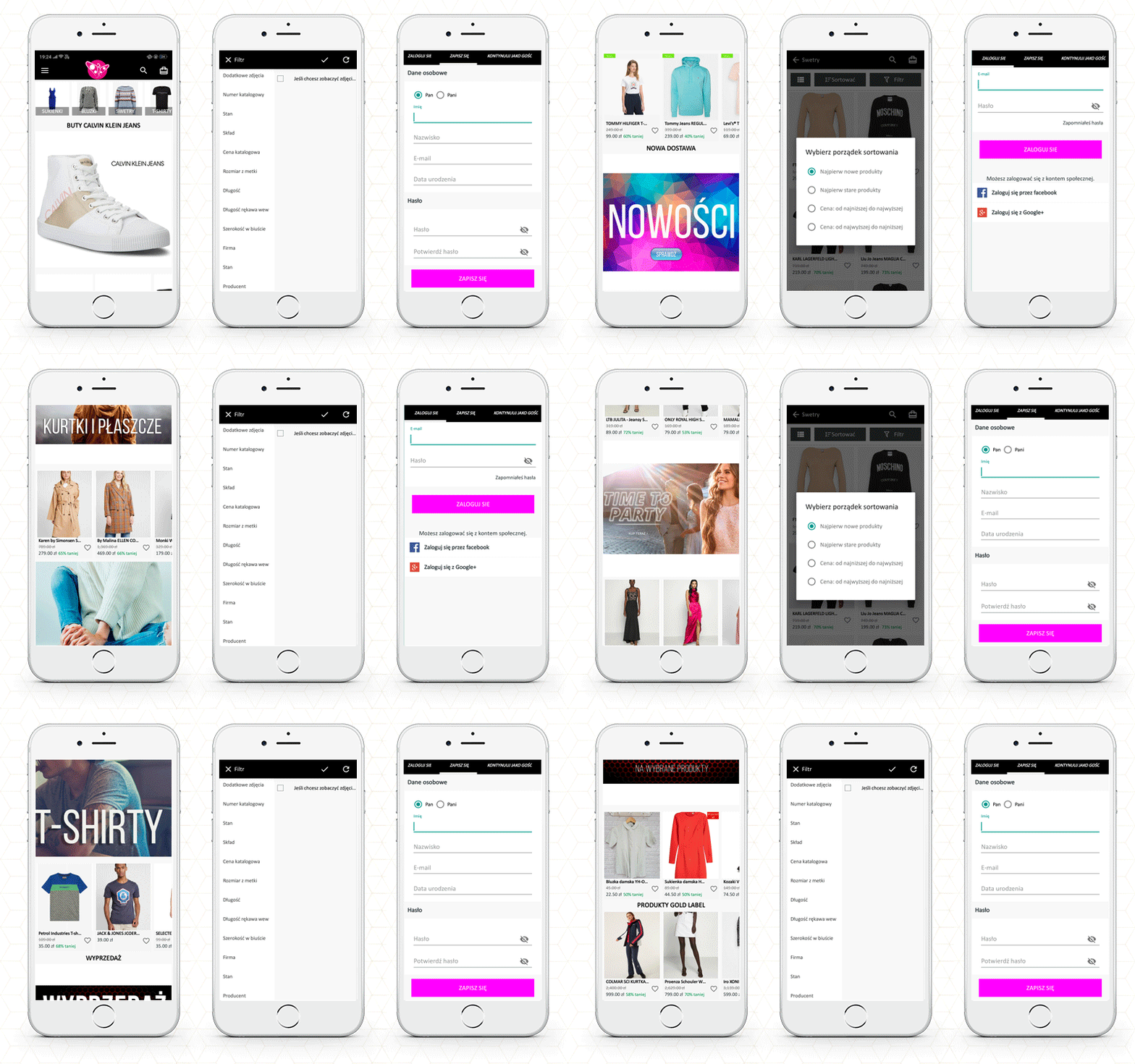
The Home Page
The app’s primary screen provides customers with access to the new arrivals, best sellers, etc. Also, the brand logo appears on the landing page.
The function of basic search and voice search
Now, to buy a pair of denim, you will have to search for it. It allows users to search the products within the app; from the product page as well as the home page.
Add to cart or wishlist
Once you find the black denim, you can add it to the cart or the wishlist. Pushing the checkout button will redirect you to the checkout login page.
Customer Login Page
The shopper can purchase by signing up for the app from here. You can also checkout as a guest if this feature is enabled.
With successful signup, you can log in with your email address, Google+ or Facebook. It also allows fingerprint login.
Payment and Shipping Address
Now the app will take you to the shipping page where you need to fill up the delivery address. You will also have to select the payment methods.
Your order will be placed successfully!
Other features of the PrestaShop Mobile App
Push Notifications
App sends push notifications to customers. It can be a text that the user may be interested in. They are easier to send than emails and are less likely to end up in spam folders.
In-App Chat Support
The mobile app provides in-app chat support to customers. It has a WhatsApp chat option integrated.
Store admin can add or remove the features from the mobile app. It is easy to customize the app’s home page, add new banners, put a logo and add colorful windows to the app.
It works in real-time synchronization with the fashion store website.
Now you have a mobile app that allows you to take orders online but do you have a smooth delivery management system? If your answer to this question is ‘no’, then read ahead.
How to manage your local on-time deliveries?
In eCommerce, local deliveries/shipping enables consumers to purchase the products online and deliver them directly to their doorstep. Local delivery acts as an alternative to both carrier and in-store pickup.
It has had a particular effect on retailers and consumers alike in an environment where shipping companies are facing increased delays and in-store shopping also carries risks. To ensure, on-time delivery and manage them, you can use Knowband’s effective module- ‘The Delivery Boy App‘.
This application provides functionality that establishes a connection between the Admin and the Delivery Boy. Through this application, the admin can allocate an order to the delivery boy and monitor them. This helps to provide a better shipping service, as it is monitored by the admin, too with the help of an application that works on your eCommerce platform.
The delivery boy application is available for PrestaShop and OpenCart platform.
KnowBand is helping eCommerce organizations for a decade and we have 100+ plugins for various eCommerce platforms. Visit the KnowBand store or write an email to our support team for your module or website development requirements.
There’s no doubting that smartphone apps have revolutionized our lives. There is an app for everything, whether you need to travel, buy groceries, order food, chat, or do a banking transaction.
Entrepreneurs are seeking for new markets to penetrate and strategies to engage clients to normalize their situations. E-commerce app development is one of these possibilities. When done correctly, a mobile app can help you increase your e-commerce presence for years to come.
Tajikistan’s first online pharmacy app has exceeded 1000+ downloads on Google Play Store. The app is developed using Knowband’s PrestaShop Mobile App Builder module which is multilingual and is available in Russian and English.
In this blog, we will be explaining its features and also help you with how you can manage your local on-time deliveries? And how to make a website for clinical appointment bookings?
The PrestaShop Mobile App- Apteka24
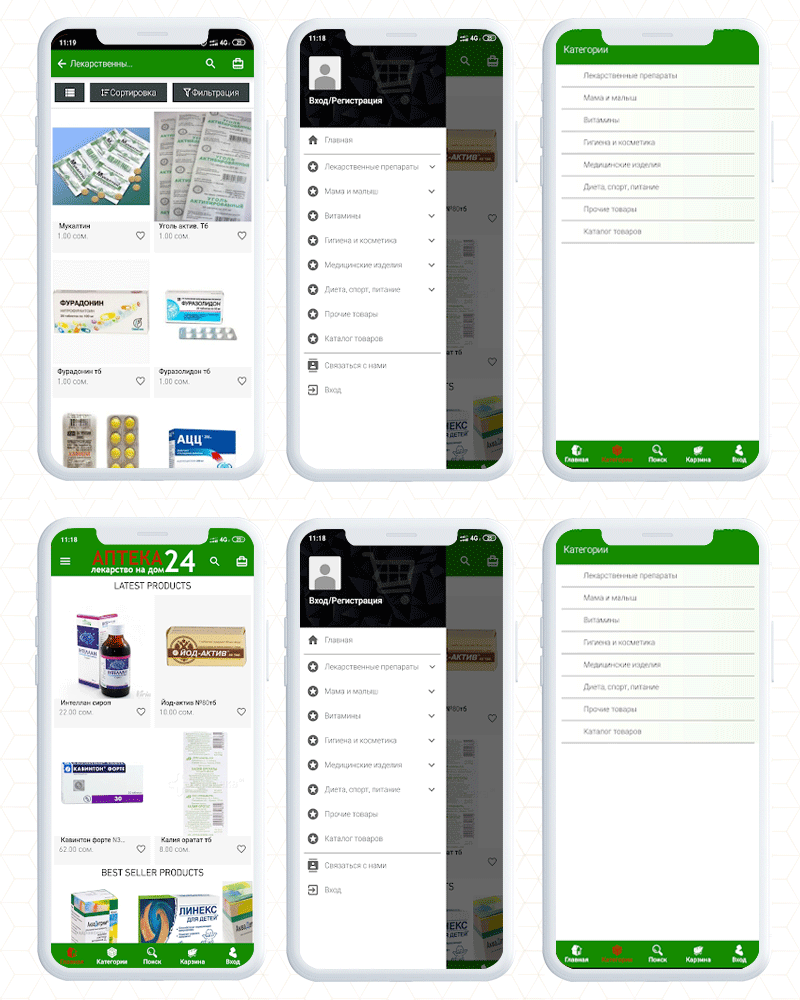
The Apteka 24 is a pharmacy app that allows users to order medicines in Tajikistan. For a fully functional app, it is required to have an engaging UI and KnowBand’s Mobile App Builder gives that personalized shopping experience to every app user.
Having a mobile app is beneficial over a website as it allows users to access things from their fingertips. It’s speed and ease of browsing, as well as a well-thought-out design that seems natural and seamless.
Notifications can be very effective in terms of remarketing if done correctly. The app allows the store owner to send endless notifications to ensure they will keep coming back to your store.
A customer can reorder the medicines with a button click. Voice search, chatbots, push notifications, advanced support, and marketing analytics are all available.
Customers can save lists of things they’d like to have in wishlist. The product page and landing page allow buying things based on images.
The accessibility and convenience of mobile payments are a bonus. These are the basic features of the app and every mobile app created using PrestaShop Mobile App Builder can be customized for its look and theme by incorporating your brand logo and other marketing elements.
How to make a mobile app for your dental medicine website?
To create a mobile app just like Apteka 24, you only need KnowBand’s PrestaShop Mobile App Builder plugin.
It is completely customizable like you can add banners, change theme colors, add colorful buttons, provide live chat support, etc.
It lets you bring your website to the hands of every mobile phone user. With a button click, anyone can get their medicines or products at their doorstep.
This module is available for many other popular eCommerce open-source platforms. Also, you can launch it for both Android and iOS operating systems.
You have to make a one-time payment and our expert team will provide post-purchase 3-month support.
How to add an appointment booking feature to your pharmacy website?
Doctors who consult patients in their clinic find it difficult to manage their demanding schedules. This is where Knowband’s Appointment Booking System module comes in handy.
The Appointment Booking System module allows you to list your clinic on your website and let consumers (patients) book an appointment. In addition, the module provides a number of configuration options for you to customize your bookings to your liking.
What are the features of the Appointment Booking System Module?
Easily add your business/clinic (You can add multiple clinics as well)
Specify if the service is a clinic visit or a home visit
Determine an Upfront Booking Fee
Allow the patient to select the desired day and time
Indicate any day that is not available for booking
Keep the minimum number of reservations for each day
Include your company’s location, contact information, and images
Keep an eye on your appointments and track them
The Appointment booking system makes your job easier while providing your consumers with a hassle-free booking experience.
To make it more convenient, you can also use the booking and rental mobile app.
Here is an in-depth blog on the Appointment booking system, especially for the clinics.
Best way to manage doorstep medicine deliveries
To manage the doorstep deliveries and to assign orders to the delivery boy, you can use a delivery boy mobile app. This app helps you in creating a delivery boy profile, tracking the order status, sending notifications to the delivery boy, and facilitates many other tasks.
It also shows the location info of the customer where the order is to be delivered. Check out the live demo of the Delivery boy and read this blog which includes some real-life examples of eCommerce merchants who are using Knowband’s Delivery Boy Mobile App.
Visit the KnowBand store to find the desired plugins for your eCommerce store or you can write to us at support@knowband.com for any custom eCommerce development assistance.
A mobile app increases business opportunities as it allows you to handle information in real-time. To create an app, a developer has to do a lot of research based on platform, product type, niche, target audience, etc. The work does not stop here, but it also requires an accessible user interface. Your eCommerce app should provide a delightful user experience to everyone regardless of the demography or the region.
KnowBand has developed several apps considering the user’s needs for various eCommerce clients worldwide. We have designed and developed an Application Builder module that only requires updating the configuration settings and your app will be ready to go live on the play store.
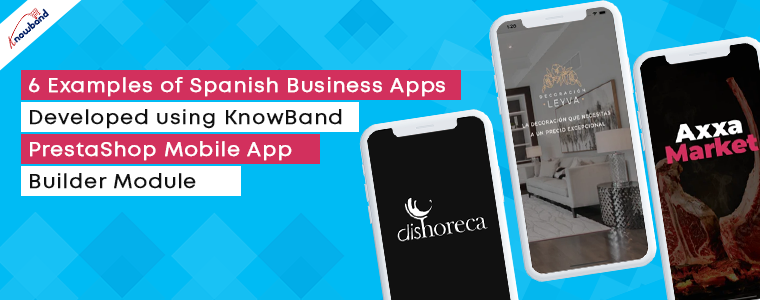
In this blog, we have compiled some examples of Spanish Mobile Business Apps developed using PrestaShop Mobile App Builder Module.
PrestaShop Business App Builder Module
From conversion to customer retention, mobile apps are the most effective tools for every eCommerce business. It has several features to improve the online shopping experience of your store.
The App builder is available for both iOS and Android.
It works in real-time synchronization with the website
The merchant can add or change the banners to redesign the home page
For the product page, it has sort and the filter feature
Simple and easy checkout process with social login, OTP login, and mobile number login
Supports multiple payment and shipping options
Let’s examine these features of the app builder module with some real-life examples of Spanish eCommerce.
6 Examples of PrestaShop Business Apps Developed for Spanish eCommerce
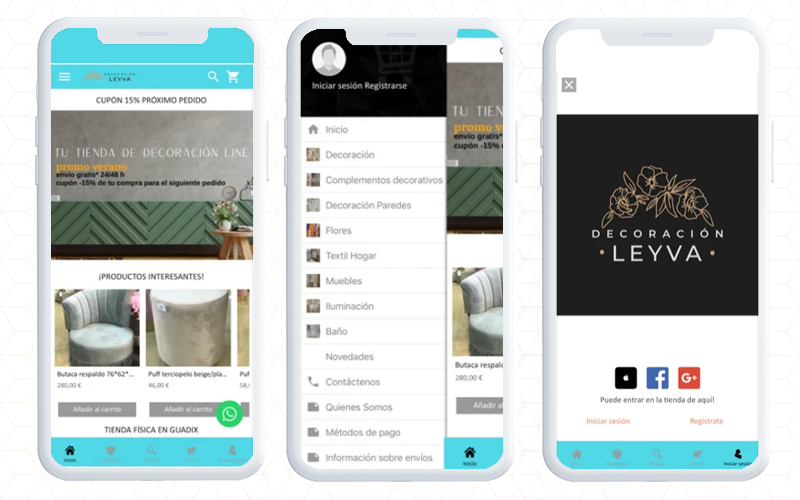
1. Leyva Decoration- eCommerce mobile App
If you’ve recently shifted to a new apartment or want to renovate one, Leyva Decoration can assist you in designing and redecorating it to achieve excellent results. With a new design and a large choice of items, get inspired and buy anywhere and whenever you want with Leyva Decoration App developed and designed using PrestaShop Mobile App Builder Module.
You can use the app to: -View decorative products by category -Use an advanced search engine to conduct searches, Pay quickly and securely, Pay with cash or credit card at the time of delivery, Track orders, Log in to Facebook and Google. Choose a shipping address for your products, Receive updates about discounts and special offers, Compare products, etc.
Download the app for free and take advantage of Decoration Leyva’s daily specials.
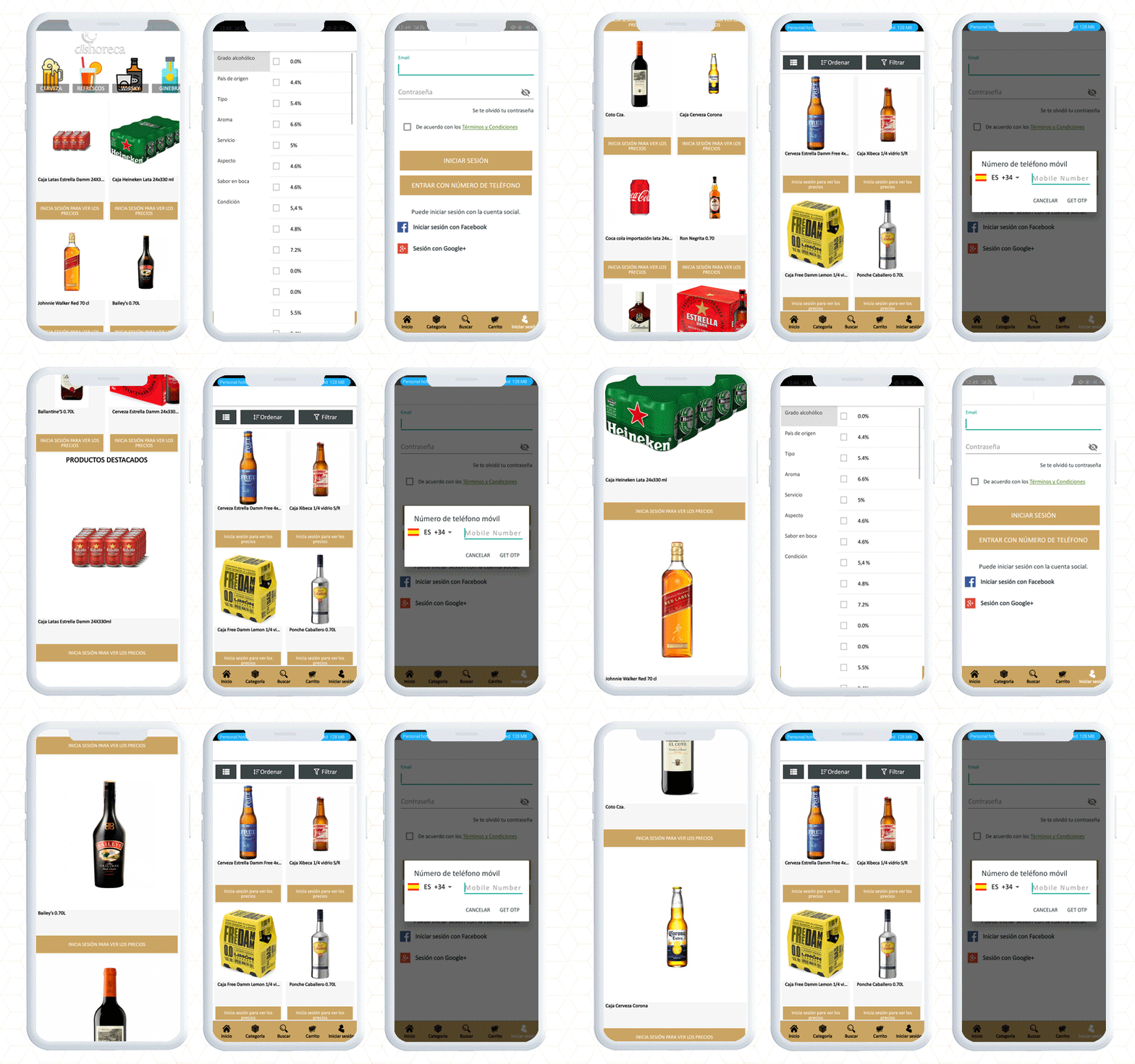
2. DISHORECA- PrestaShop Mobile App
DISHORECA is a mobile application that allows you to order drinks 24 hours a day. The app also allows you to place orders within few seconds, saving you time and allowing you to focus on your business. Dishoreca is a popular website in Spain and to make their App, they used KnowBand’s Mobile App Builder.
This PrestaShop mobile app is designed for HORECA professionals, convenience stores, and supermarkets. You can use the app to place orders, repeat purchases with a single click, review historical data, and receive news, offers, special deals, and other features that will make your company purchases easier.
Have a look at the app features:
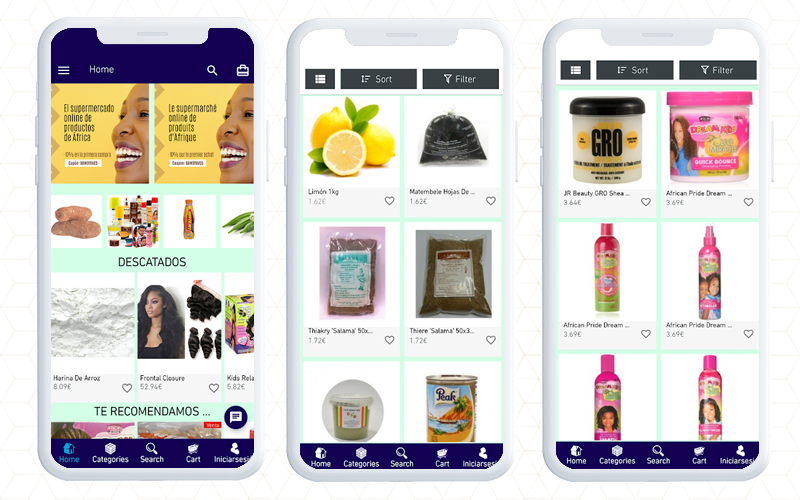
3. bawone- PrestaShop eCommerce Mobile App
Bawone is an online African and Latin goods superstore where you can find any product from any country and save time and money.
Bawone is built on the PrestaShop platform and to create the mobile app for android users, they have used KnowBAnd’s PrestaShop Android app builder.
You will find all the groceries and with filters, you can easily find the desired products.
4. AXXA Market- PrestaShop Business App
At AXXA Market, you can get the best culinary supplies without leaving the convenience of your own home. Install it now and start having fun!
The app sends push notifications with the latest information on the local market on high-quality, healthy, and dietary products.
As a user of this app, you will be notified of our specials as soon as they are published. For customer service, they respond to your concerns from WhatsApp, mail, or by phone.
App filters can help you identify and sort products that meet your diet and lifestyle, such as Paleo, Keto (ketogenic), vegan, and more. We’ve covered all you need to know about caring for and protecting your health.
Have a look at the app features with checkout page and payment gateways.
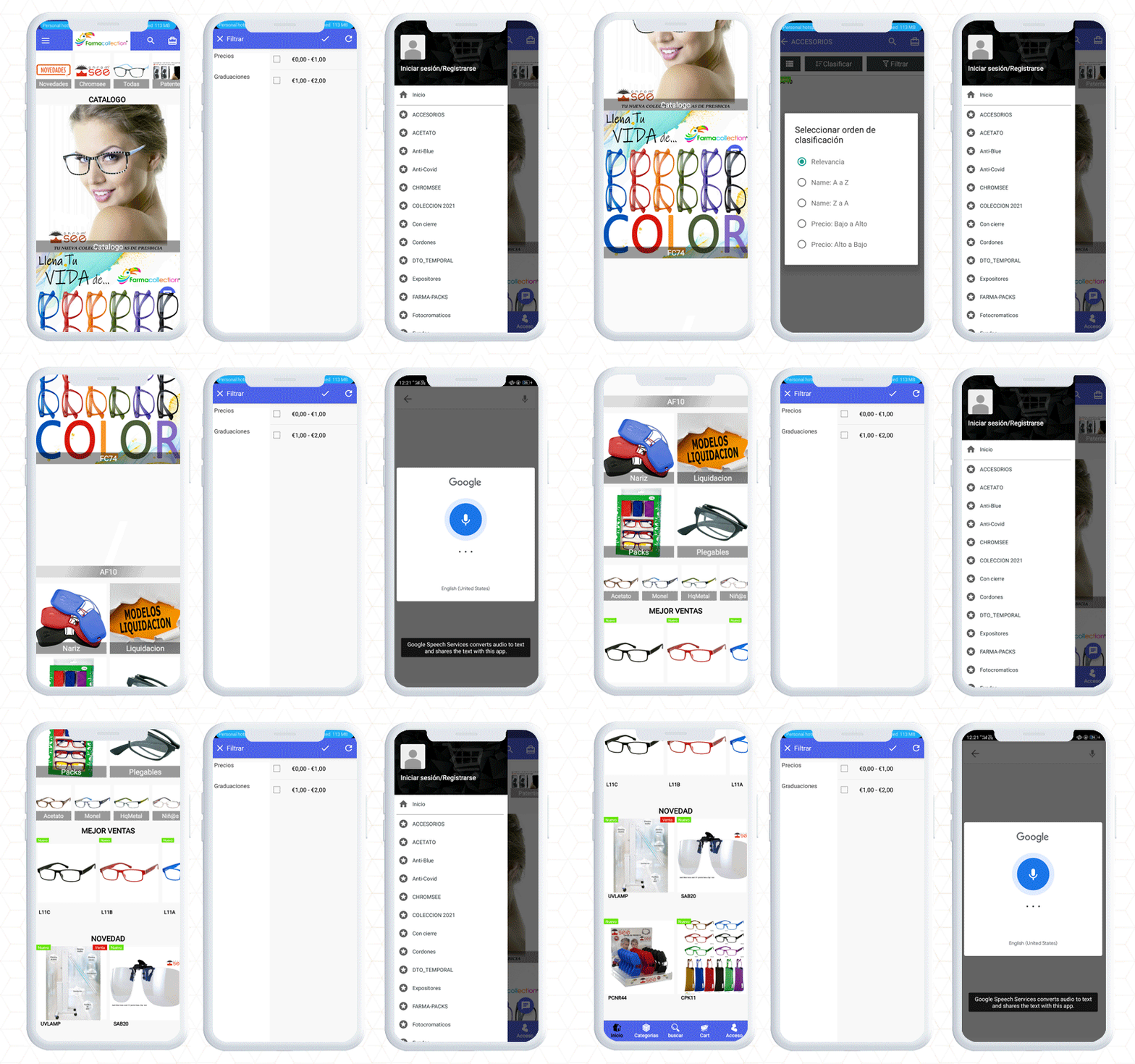
5. Farmacollection- Mobile App for Android
The Next Mobile eCommerce app on the list is the Farmacollection mobile app. They have a wide range of eyewear for every face type. The app is build up using KnowBand’s PrestaShop Mobile App builder facilitating easy search to find the right spectacles for you.
A customer can purchase a suitable product by applying filters and sorting features. To complete the purchase on Farmacollection mobile app, the user will have to register first by providing a mobile number and email address.
Once a customer gets registered, they can log in with email, phone number, or using the fingerprint sensor.
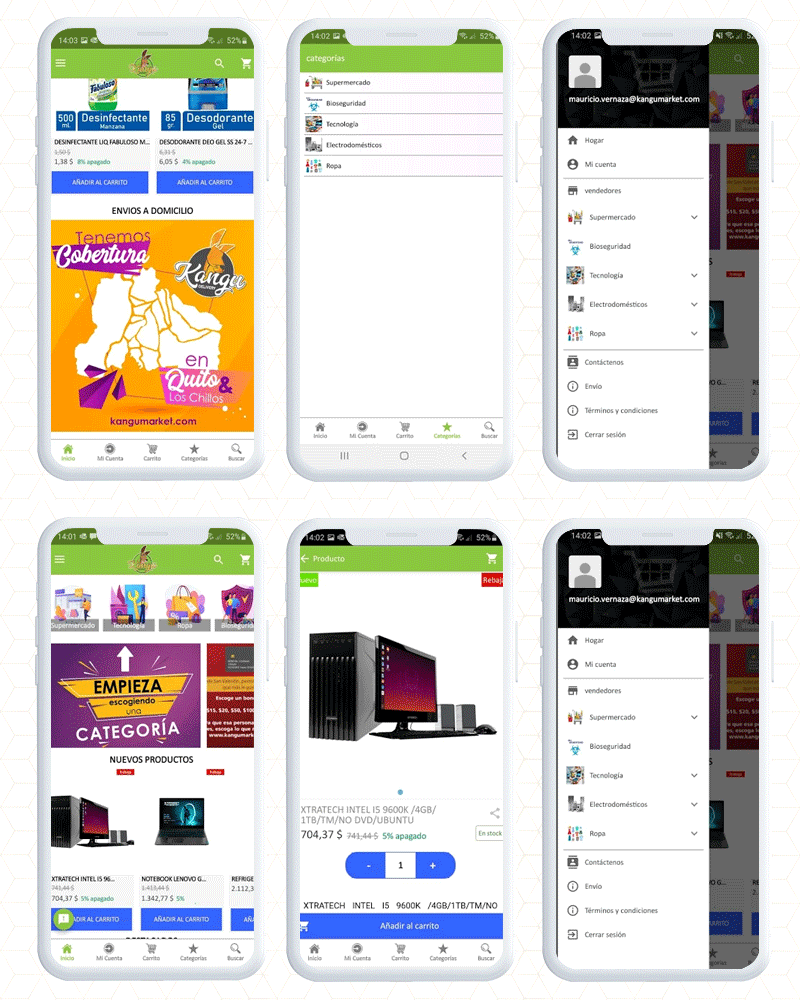
6. Kangumarket Android Mobile App
Kangumarket is another real-life example of Spanish PrestaShop business apps created by KnowBand using the PrestaShop mobile app builder module. It encompasses all the features. The app also provides easy access to products, is findable, and builds credibility with the customers.
Final thought
For the time being, an eCommerce mobile app will stay in a long run and as an eCommerce business owner, having a mobile app for the store will be a thoughtful decision. Click here to get your mobile app builder and our expert team will help you set up and configure it for your eCommerce business. If you are looking for delivery management software then the delivery boy app might help you.