JM Imports is a high-performance and exotic car specialist in the UK, serving from 2002. They stock brand new parts as well as aftermarket parts in a wide range. Anything from air intakes to turbos is available for every brand in the market. They import auto parts from Japan and other countries. You will find everything from simple upgrades to bespoke solutions for your vehicle under one roof. They have created their digital store on the OpenCart platform. The KnowBand’s OpenCart extensions like One Page Checkout, Abandoned cart, Infinite scroll, Facebook Share and Win and PDF invoice are live on the JMImports Parts store.
For a company like JM Imports, customer satisfaction and customer experience are of prime importance. Therefore, they have to use plugins that provided the ultimate shopping experience to their client. Thus, they have been using KnowBand’s OpenCart extensions. Every plugin designed and developed by KnowBand is quality tested and provides an excellent shopping experience to customers.
We have discussed here all the live extensions installed on JM Imports along with their benefits:
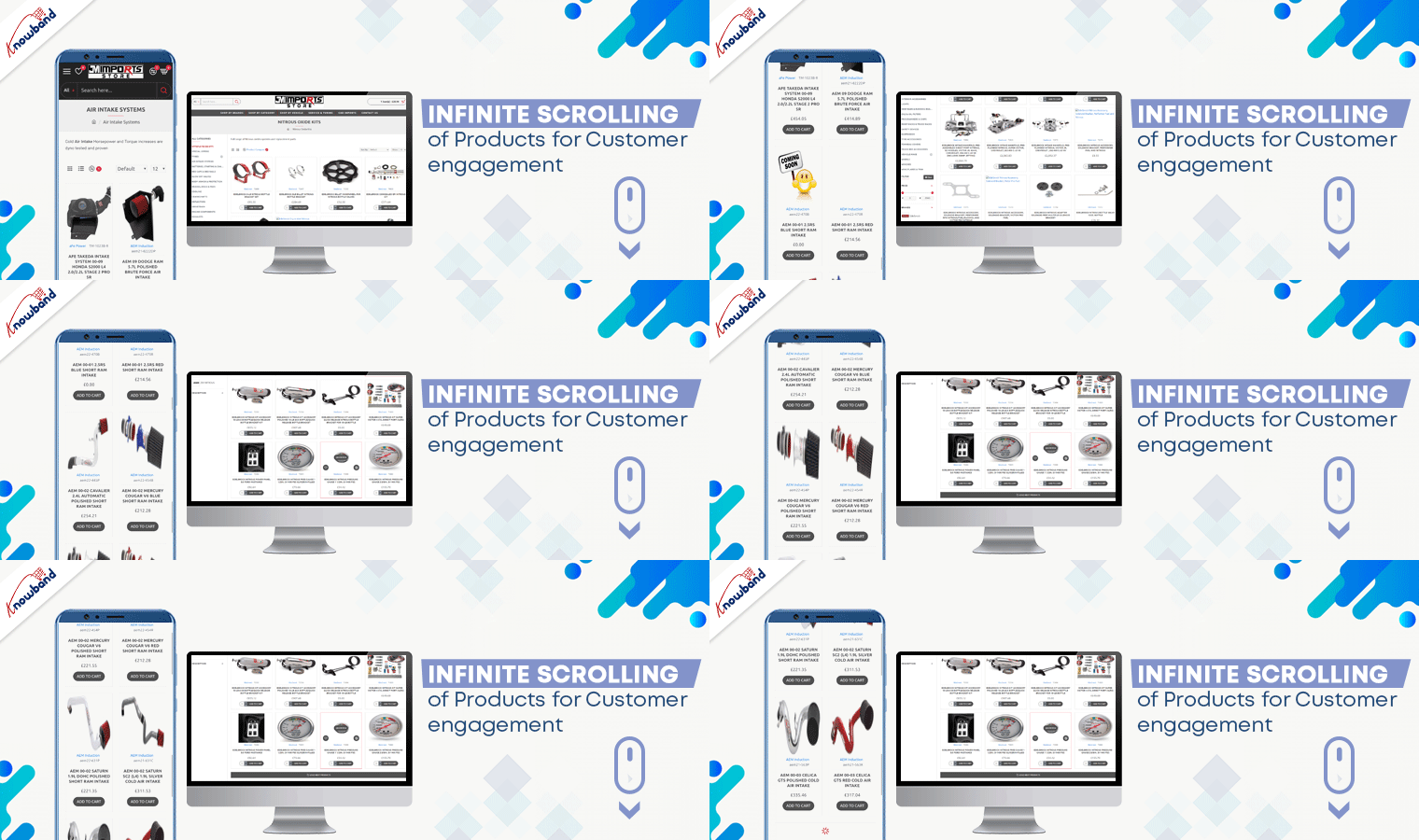
Infinite Scrolling of Products for Customer engagement
The product page optimization technique includes not just the look and appearance but also the UX. Product infinite scrolling improves customer experience and engagement rate on the product page.
On JM Imports, products get loaded continuously when the user scrolls down. However, after certain products get a load, a bar with the message ‘Load More’ appears. Admin can decide the product display quantity for this.
Benefits:
Effortless product scrolling
Higher Customer Engagement
Better User Experience
Facebook Share and Win to increase Brand Awareness
Users can share products on various social media platforms from the JM Imports website. This functionality is applicable with Facebook Share and Win. Additionally, it allows customers to win rewards, discount coupons, and incentives after sharing the product on their user profile page.
Benefits:
Increases Brand Awareness
Improves Customer retention rate
Get Potential Customers
Great Checkout Experience with One Page Checkout Pro
OpenCart is an open-source platform with thousands of clients globally. Knowband’s OpenCart extension One Page Checkout- Pro is live on JM Imports auto-parts store.
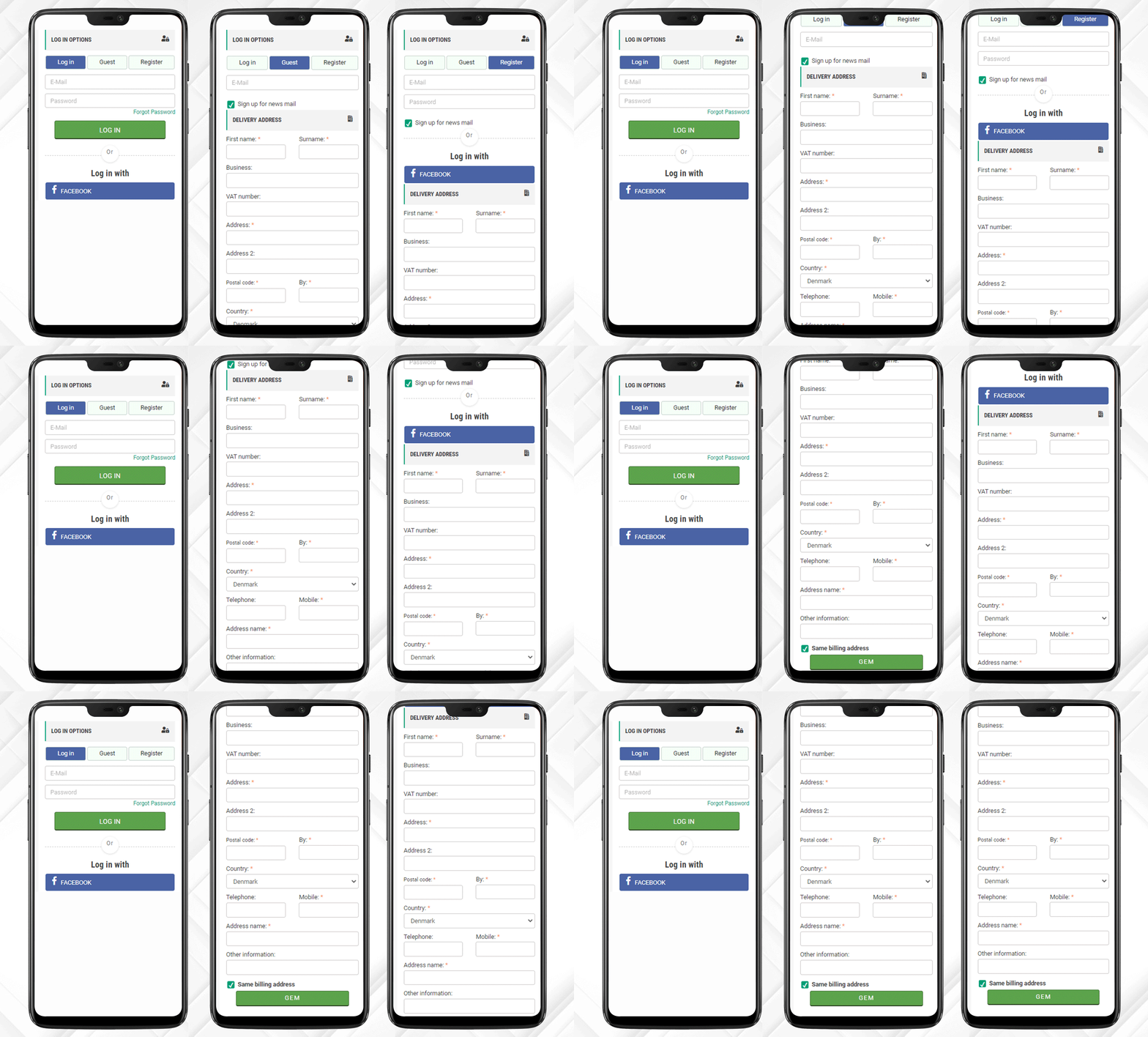
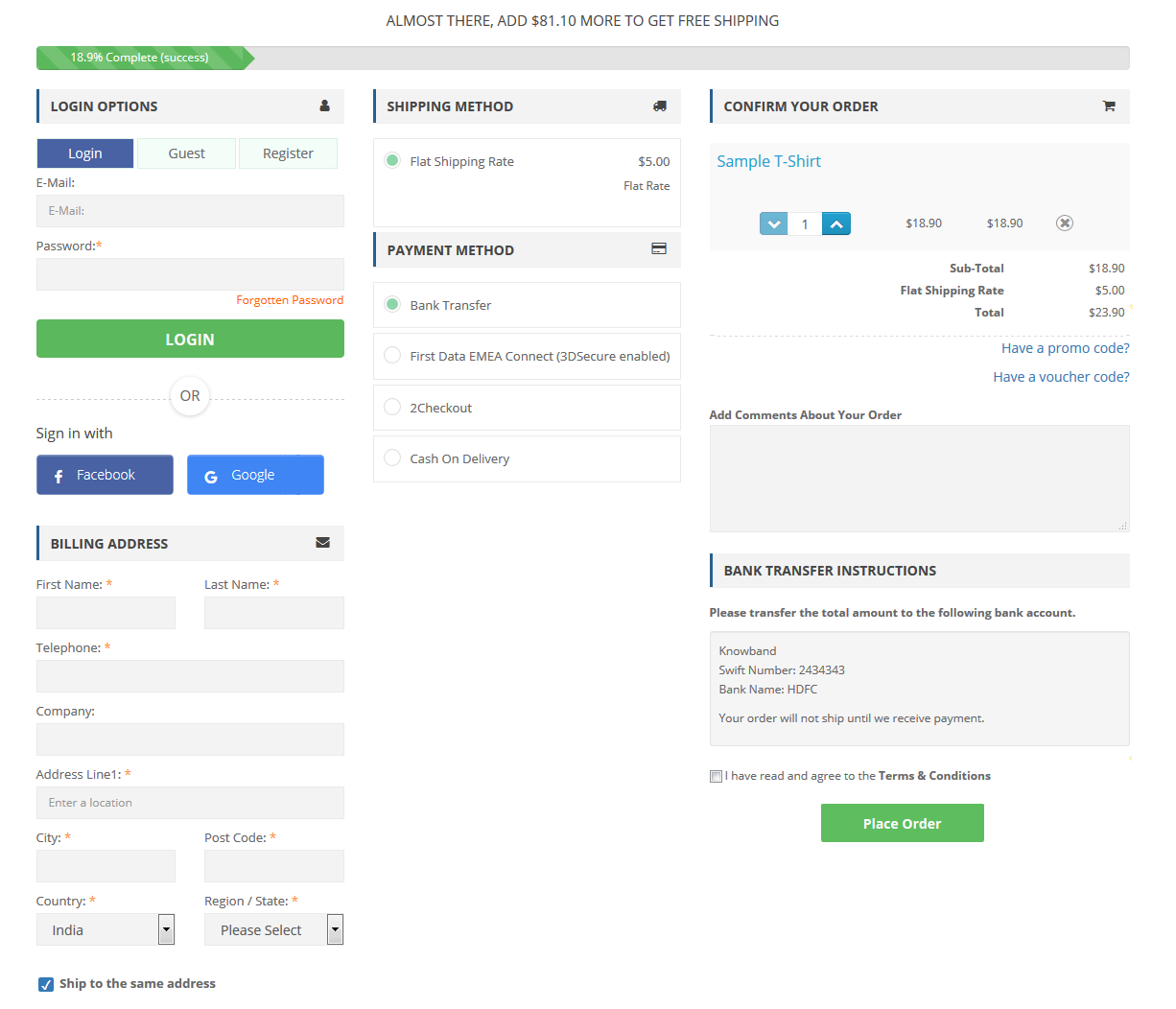
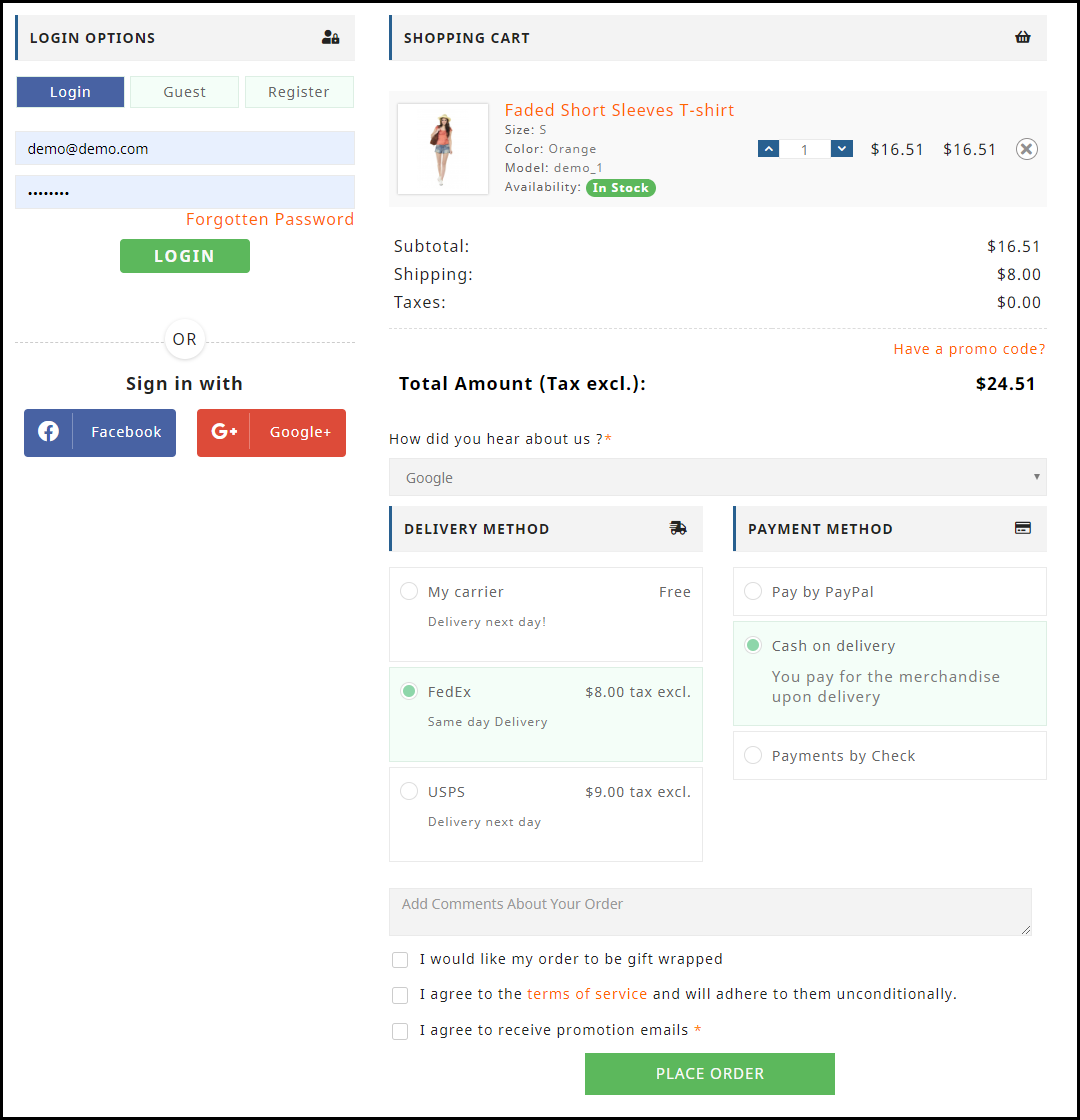
It has a Three-Column Layout that clearly displays all the fields. The design of the checkout page is elegant. The One Page Checkout is more user-friendly than a Multi-Page Checkout.
Features of KnowBand’s One Page Checkout Pro: Facebook and Google login options, Guest Checkout, multiple shipping methods, several payment gateways including PayPal, Shopping cart display, update product quantity on the checkout page, and additional field with a message.
When placing an order on JM Imports, the customer receives a PDF invoice along with the order email. For these features, JM Imports downloaded KnowBand’s Opencart Extension ‘PDF Invoice’. The invoice contains the header logo, store title, header title along payslip.
Admin can add some additional details such as shipping address, order info, and store details in the PDF invoice.
Benefits:
Looks professional
Fully customizable
Easy to track the purchase history
Abandoned Cart Serial emails
Cart abandonment is a threat to eCommerce businesses. To overcome this, store owners send abandoned cart emails which are very effective. JM Imports is using Opencart Abandoned Cart extension for sending serial emails to customers. The auto cron functionality makes it effortless.
Benefits:
Higher Conversion Rate
Less Abandoned Cart
Tracking the
Why Choose KnowBand for Your OpenCart Solutions?
KnowBand is working in the eCommerce domain since 2010 and has thousands of international clients. We believe in customer satisfaction and deliver products that uplift your sales on your digital platform. Here are some extra advantages that make KnowBand’s OpenCart Extensions superior to the others:
Mobile responsive
Multi-lingual compatible
Multi-store compatibility
SSL Compatible
Theme compatible
We have several extensions for your Opencart store and other major eCommerce platforms. Do drop a comment or send us an email to discuss your requirements.
One Page Checkout is a smart way to put all the fields into a single page and present it to the customer in a sleek and clear format. It is like a box designed to keep your accessories separately but together. A Denmark-based company, CEP Sport added the One Page Checkout Module to their website and they have configured it in a well-designed manner.
The layout customization is quite simple and the addition of the progress bar keeps the user engaged. This article describes how beautifully you can create the Checkout page with One Page Checkout Module and implement the same on your eCommerce website like CEP Sport just did on their website.
What is CEP Sport?
CEPsport.net is a distributor of the German brand CEP and is operated by SportSupport ApS. CEP has the best sportswear on the market in terms of design, feature, and compression. They are even athletes who enjoy being able to move. It is well-supported by the most cutting-edge sports products in the market.
Implementation of One Page Checkout module in CEP Sport Website
From product page to checkout page, every eCommerce website design requires the best UI and UX. It is important to optimize the landing page but more needful to have a checkout page that does not add up to cart abandonment. CEP Sport has chosen KnowBand’s One Page Checkout module for their checkout page and we are glad that they trusted our module for the best Checkout Page Solution.
One Page Checkout has several features that make it best among the other available choices.
-> Visit CEP Sports Store and have a look at their Checkout Page Design by yourself: Click Here
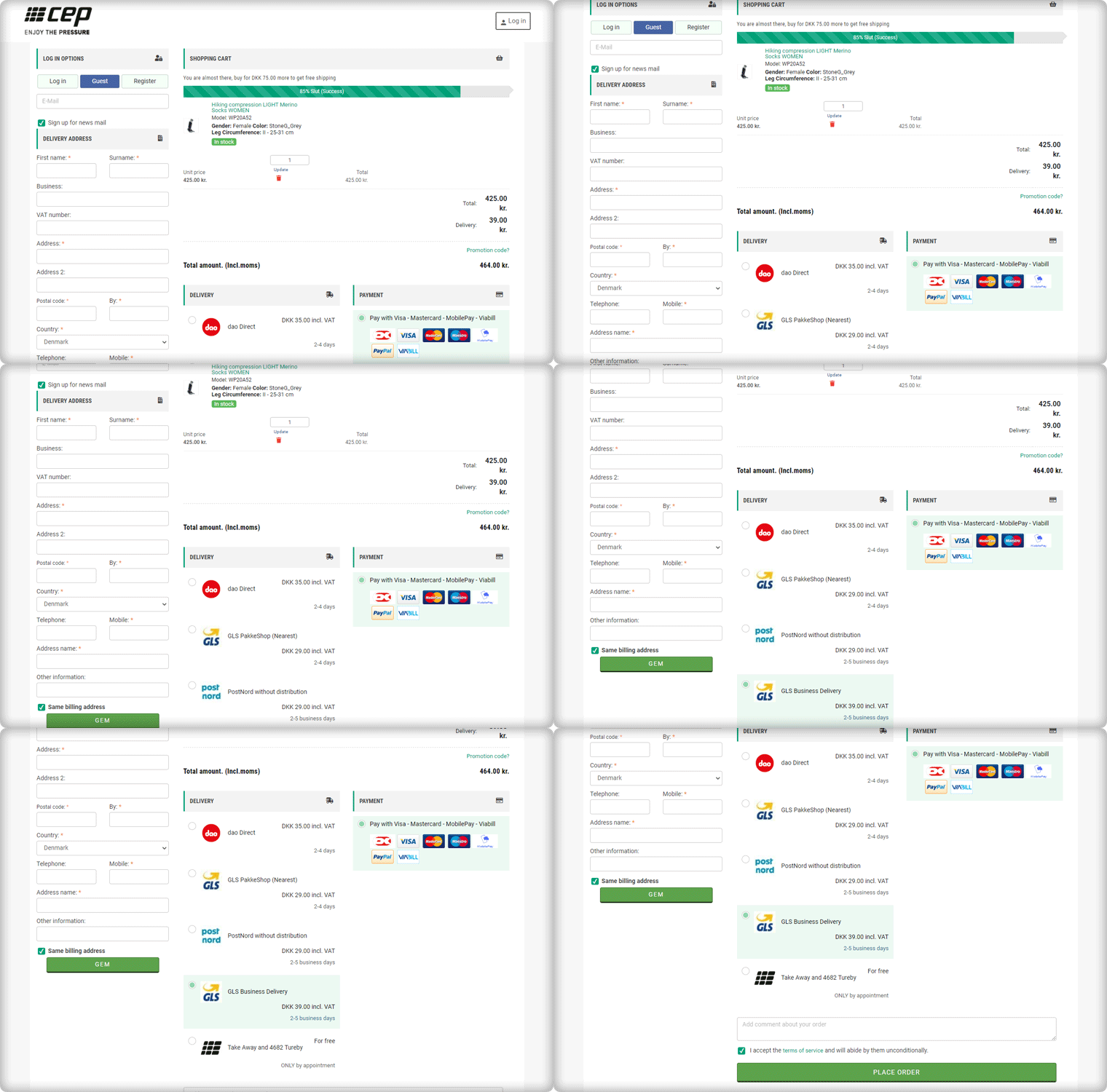
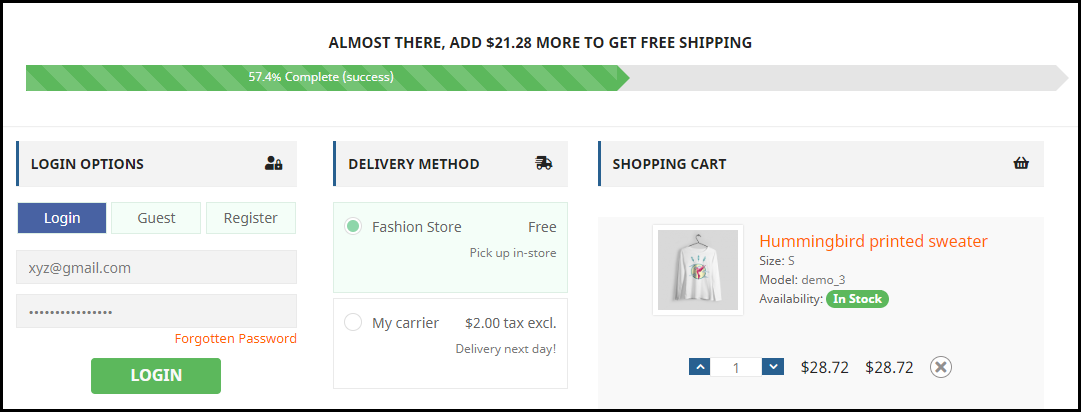
It has a 3-Column Layout with a custom layout design
The Checkout page of CEP Sport has a 3-column layout design and the module provides customization features for the layout.
How layout can be customized? It allows you to choose a layout design (1-column, 2-column, 3-column). And, you can shuffle the fields and reposition them with drag and drop functionality.
In the picture below, you can see that the checkout page is customized and CEP Sport has designed it according to their requirement.
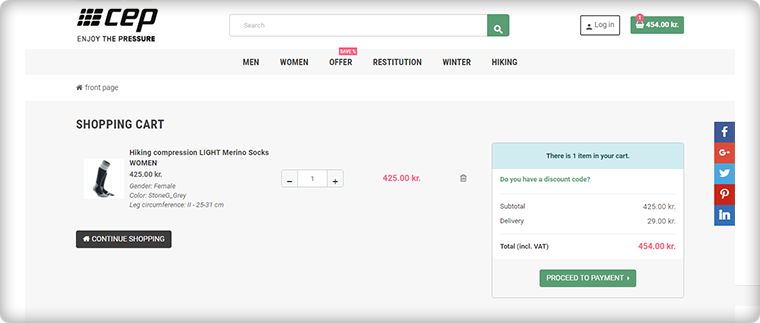
Shopping Cart CTA
To reach the checkout page, it is important to have clear CTA (Call-to-action) buttons. The website is incorporated with proper CTAs.
Customers can proceed to the checkout page by clicking on the button ‘Proceed to Payment’ and it will redirect them to One Page Checkout.
Login, Guest Checkout, New Registration
Once, the customer reached the checkout page he/she has to register himself and if he is in rush then Guest Checkout is also available.
One Page Checkout has three options:
Log-in via email
Guest Checkout
Register as a New User
Log-in and Register with Social Media Account
Registration with a Social Media account like Facebook is quite handy and one does not have to remember the password for every eCommerce site. If a customer is registering via Facebook then he only has to provide the delivery address.
And, Checkout Process is sorted!
After registration, login can be done by entering the E-Mail Address and Password or a user can log-in by Facebook account.
Just one click and you are done!
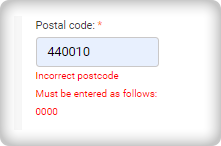
I am Mandatory* and You just filled in the wrong details
The mandatory fields can be highlighted with the Asterisk mark (*). Also, it immediately indicated the errors made by a user during the form filling process, called inline validation.
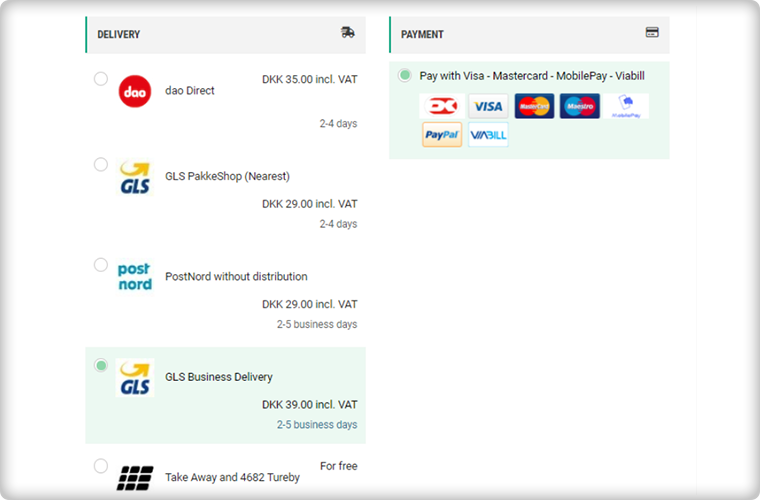
Delivery and Payment Methods
The Single Page Checkout of the CEP Sport website has several shipping choices and Payment Gateways. Along with every shipping method, extra charges (if applicable) are displayed. It is also possible to specify a particular payment gateway with a specific shipping method.
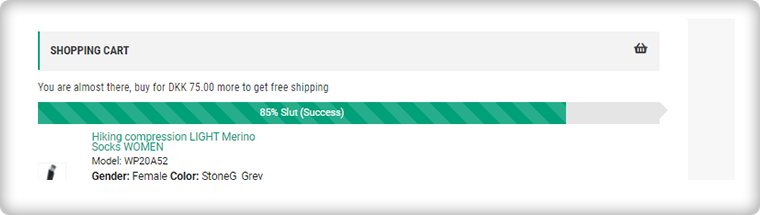
Progress Bar shows the user’s success
This helps the customer to measure the registration progress. If you think this is not necessary then you should know that a human brain works better if it knows how much work is left.
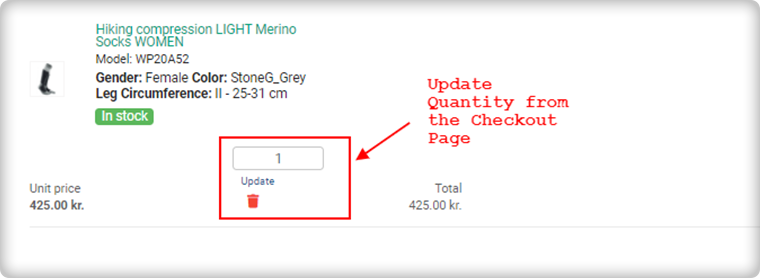
Update product quantity on Checkout Page
Another feature that makes it the client’s choice is the quantity update option. One Page Checkout allows customers to update the product quantity on the checkout page itself.
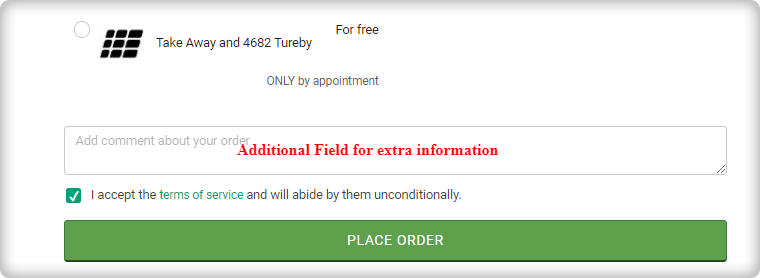
Add an extra field to collect more information
If a customer wants to add any comment about the order then he has an additional field for the same. Admin can add custom fields in the checkout page to collect information from the customer that can be used during email marketing for personalized email.
Since all the information is added correctly by the customer or the guest visitor.
Now, he/she can place the order!
Why do you need One Page Checkout in your online store?
We have had a successful tour of the CEP Sport website’s One Page Checkout. Now, it is time to understand the value of a single page checkout over the default multiple Page checkout available on eCommerce platforms. The One Page Checkout appears to be simpler because it displays all the fields on a single page before the form filling process. Guest checkout and social media login options are proven methods that increase registrations on the online store. It has a statistics analysis tab that shows the conversion rate and bounce rate of the checkout page. Several features make the One Page Checkout Module the client’s first choice for the checkout page.
KnowBand team is always available to help you with eCommerce solutions. We have 100+ modules available for eCommerce platforms like OpenCart, PrestaShop, Magento, WooCommerce, and Shopify. Visit KnowBand Store to explore more.
Get in touch at support@knowband.com and discuss your website requirements with our experts.
The week of love is just around the corner. On one hand where the love birds would be searching a perfect gift for their partner, Brands, on the other hand, would love to make their shopping experience better and smoother.
Have you done your preparations for Valentine’s Day? Is your marketing strategy ready to be implemented? Well, even if you haven’t, it is still not too late.
OpenCart Extensions for Valentine’s Day
If you have a website on the OpenCart platform, here are the 7 must-have OpenCart extensions that you can consider implementing on your website to catch the spirit of Valentine’s Day. Check them out.
1. OpenCart Gift Card Extension
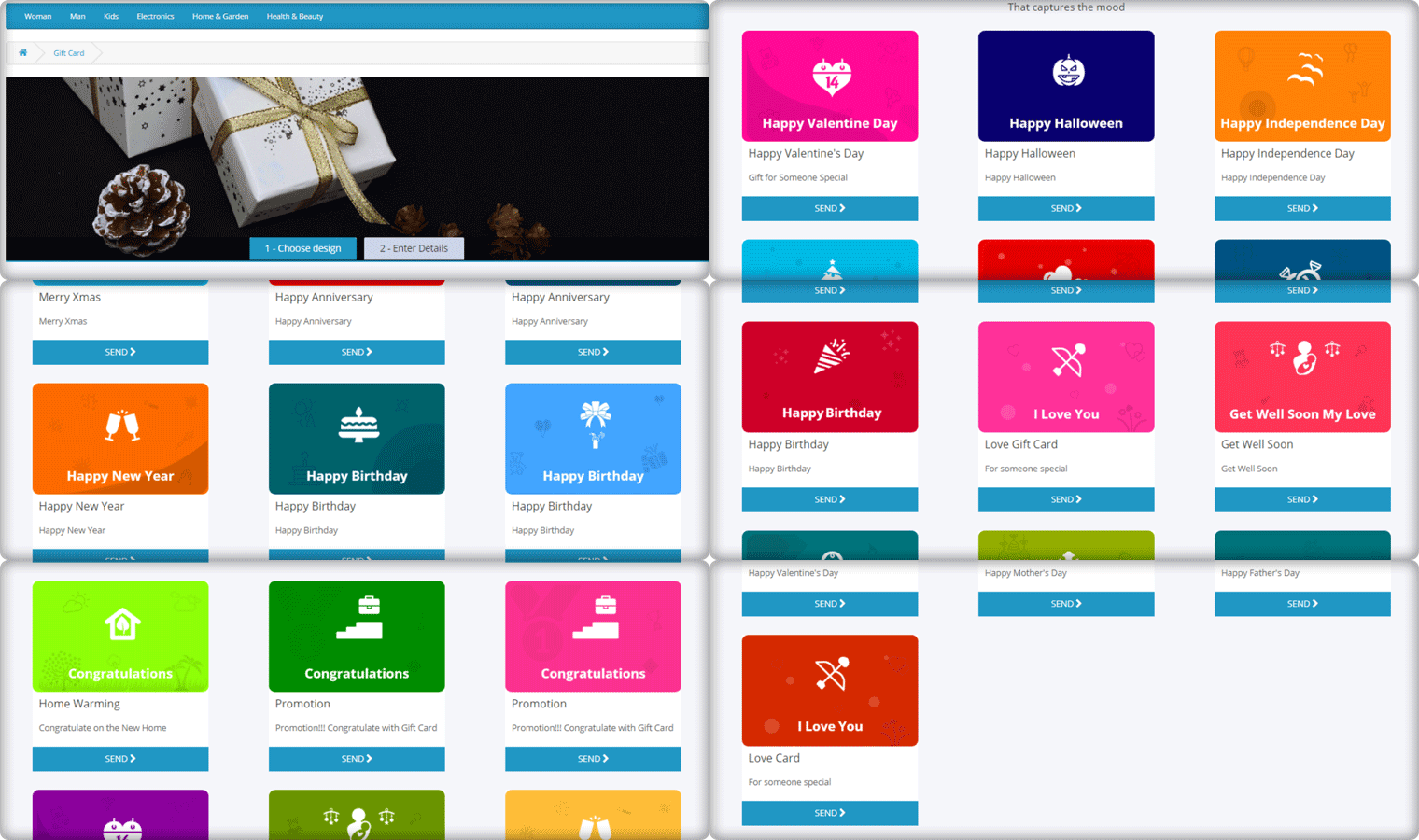
Gift Cards purchases are seen in high numbers during Valentine’s week and there is no doubt shoppers would be looking for some Valentine’s theme-based Gift Cards on your website too. Reduce this hassle with OpenCart Gift Card Extension.
The Gift Card module adds a gift card section on your OpenCart website and provides you with pre-existing gift card templates for multiple occasions including Valentine’s Day. It allows the users to print personalized gift card by uploading a custom image. You can customize these templates, add new ones, and do many more customization with the help of this OpenCart Gift Card Extension.
2. OpenCart Spin and Win Extension
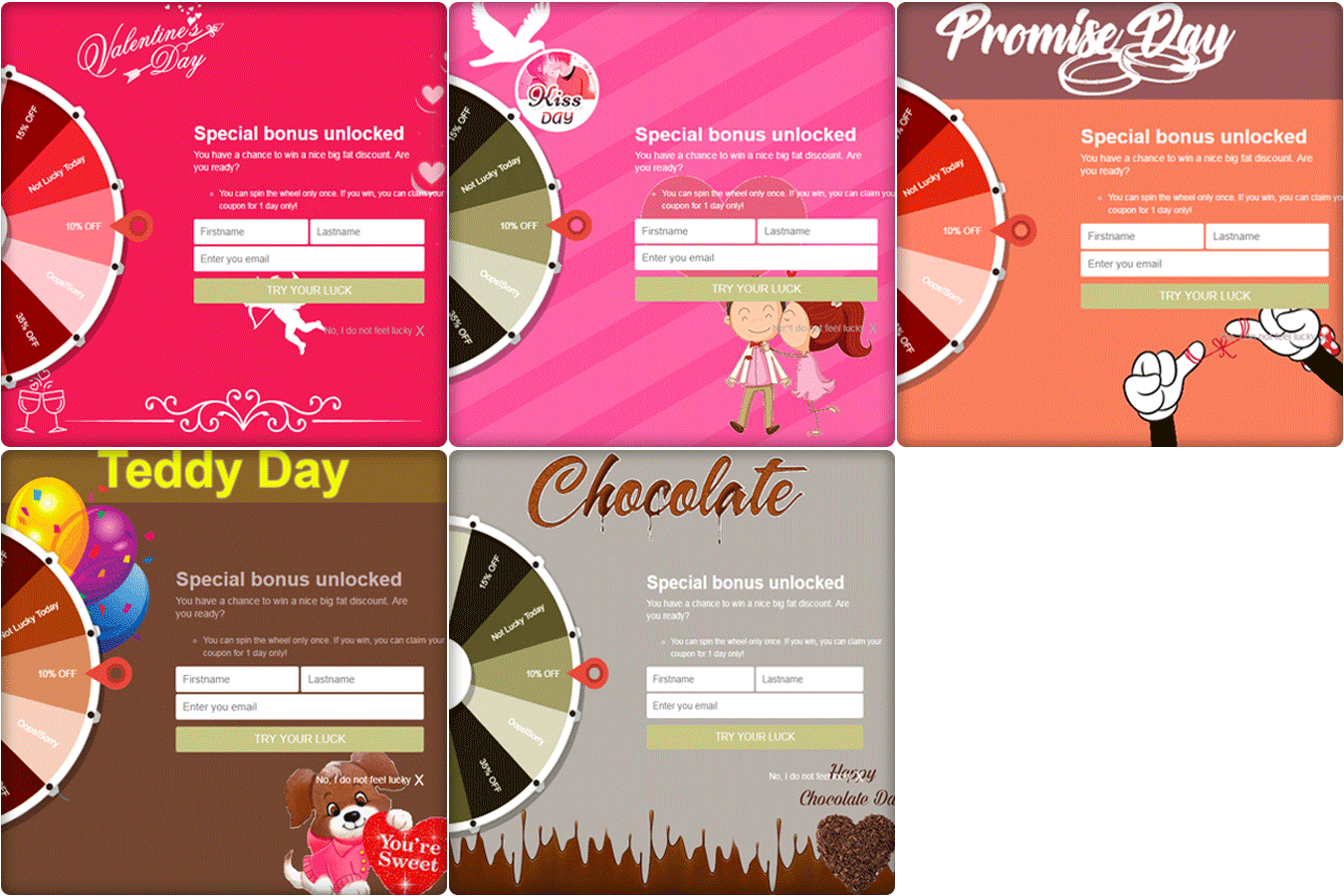
How about giving your visitors Valentine’s feel as soon as they enter your website? The OpenCart Spin and Win extension has multiple themes designed for Chocolate Day, Hug Day, Rose Day, Kiss Day, Promise Day, Propose Day, Teddy Day, and Valentine’s Day, to give your popup an amazing look.
The Spin and Win Popup extension adds a gamified Spin 2 win wheel on your website. Besides keeping Valentine’s feel, it tends to generate higher user engagement, helps you grow your email list, and boosts your conversions.
It lets you encourage your visitors to spin the wheel and earn some enticing discounts.
This OpenCart module helps you set a countdown timer on the front end of your website for your upcoming sales so that your store visitors are very well aware of the commencement of your sales day and do not miss out on it later.
It is a perfect module to highlight your future sale offers without disturbing the user experience. By implementing this module on your OpenCart website, you can expect an increase in your sales when the actual sale season starts.
4. OpenCart One Page Checkout
Though this might make you think as to how one page checkout can be helpful during Valentine’s, it is something that you should definitely consider using.
Many cart abandonments take place due to a long and complicated checkout process. And you can lose out on huge conversions when the visitors count on your store is high but they are not making past the checkout page.
Remove the multi-step checkout barrier with the simple OpenCart One Page Checkout. The extension puts all the checkout fields on a single page and helps your prospects take a quick exit. A user can fill the entire checkout related information in any particular order and check out quickly.
Guest checkout, Social login, checkout field customization, multiple shipping and payment modes support are some of the amazing features of OpenCart One Page Checkout.
5. Print-on-demand Products
Print-on-demand services provide an alternative way to bypass inventory management time, investment, and risk, letting you go from creating to selling custom items at a fraction of the cost.
You can put your original spin on everyday items and sell them online, from t-shirts to posters, backpacks to books.
You can always graduate from using a print on demand platform to keeping your inventory if one of your online business ideas pans out and you start making a large number of sales or continue to use these services while exploring new ways to expand your audience.
This Valentine’s Day, to achieve this you can add a Product Customization Module to your eCommerce store. The users surprise their loved ones with custom, personalized gift items. The choice is yours!
6. OpenCart Preferred Delivery Time Extension
There will be many last-minute shoppers on your store this Valentine who would want to order an item and get it as soon as possible or at a specific date and time. Make this possible for those shoppers with OpenCart Preferred Delivery Time extension.
Through this module, shoppers can specify the date and time on which they want to get their order delivered. They can choose their preferred delivery time on the checkout page. This would prove very beneficial to those users who want to receive a product at a certain occasion and at a certain time.
From the backend configurations, you can make certain changes in the module functionality.
7. OpenCart Cash on Delivery with Fee Extension
With OpenCart Cash on Delivery with Fee extension, you can ask your customers to pay an additional fee when they choose COD option on the payment page. The cash on delivery method is the widely adopted payment method as the majority of the shoppers do not like paying the product price until it reaches them.
The extension helps customers feel more secure and relaxed as they do not need to worry about sharing their card details online.
Over to You
Make the best of this Valentine’s week with these 7 OpenCart Extensions. You will surely witness a boost in your conversions.
If you face any issue with any of these modules or need any kind of assistance, reach out to us at support@knowband.com
It often happens that customers get stuck on the checkout page and do not proceed further. Do you know why that happens? Once customers have decided what they want to purchase, they prefer to check out as quickly as they can, yet many e-commerce stores have put up some barriers on the checkout page that breaks the flow of a customer’s purchase.
If you are an OpenCart store owner, we have a solution for this, OpenCart One Page Checkout Pro by Knowband eliminates multiple steps of checkout and gives pleasing UX to your customers.
Update Alert(January 8, 2026): The Knowband Opencart Page Checkout Extension now supports OpenCart 4.x.x, offering a faster and smoother checkout experience for your customers
The Knowband Opencart One Page Checkout Extension now allows the stores to effortlessly integrate all major payment gateways. From PayPal, PayU, Stripe, Authorize.Net, Square, and Razorpay to Buy Now, Pay Later (BNPL) options, your customers can select the payment method that suits them best, making checkout faster and more convenient.
For more information visit: https://www.opencartmarketplaceapp.com/
OpenCart One Page Checkout Pro
OpenCart One Page Checkout Pro extension is one of the best OpenCart extensions that focus on making the customer purchase quick and easy. It is a dynamic multi-lingual extension with multi-store compatibility, compatible with all themes, and is fully mobile responsive. Opencart One Page Checkout Plugin Pro is easy to install and set up.
What’s new in OpenCart One Page checkout?
OpenCart One page checkout comes with some striking most demanded features and this is a must buy plugin if you are an OpencCart eCommerce store owner. Let’s sneak into it.
Google Auto Address Fill option
The updated version of Opencart One Page Checkout has the functionality of the address auto-fill by Google. By reducing customer’s check-out time it encourages customer conversion. Google Auto-Address Fill displays the address suggestions when a customer enters the address information. It collects the typed characters and displays related data. The Zip Code and the City Column will be extracted automatically when the proposed address is selected.
Dynamic layout with new customizer settings
No theme is similar and as a store owner, an attractive look for the website is what we desire for. You don’t need to be a coder for this. Now an OpenCartStore owner can customize the checkout page buttons by changing background and text color according to the theme. All can be accomplished from the OpenCart single page checkout Plugin without changing the base code.
Social login with Google+, Facebook, and PayPal
Let your customers sign up or sign in to your store directly with their social media accounts. OpenCart One Page Checkout offers Facebook and Google+ login for quick registration. PayPal login is one of the most demanding features for OpenCart Checkout. This updated version of the OpenCart One Page checkout plugin allows the customer to login by their PayPal account.
Add Subscribers to your Newsletter
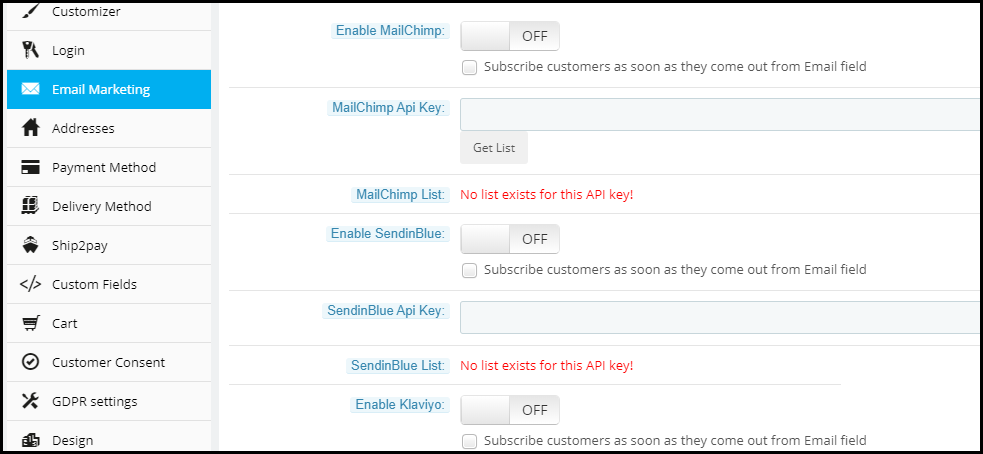
In this One Step Checkout OpenCart Extension, a built-in MailChimp, Klaviyo, and SendinBlue integrator is included so you can save time and money. It sends customer email IDs directly to your account either when the customer comes out of the email field or when they place an order after choosing a newsletter subscription checkbox. If you log in via Google or Facebook, your email will also be sent to your email marketing tool which helps you grow your subscribers.
Key features of OpenCart One Page Checkout Pro
Guest Checkout
OpenCart One Page Checkout Pro extension provides a Guest checkout option to customers who do not want to create an account on your e-commerce store. In fact, they do not even need to set a password. A customer just needs to provide his/her email address and a password will be automatically sent over their email.
Multiple payment modes
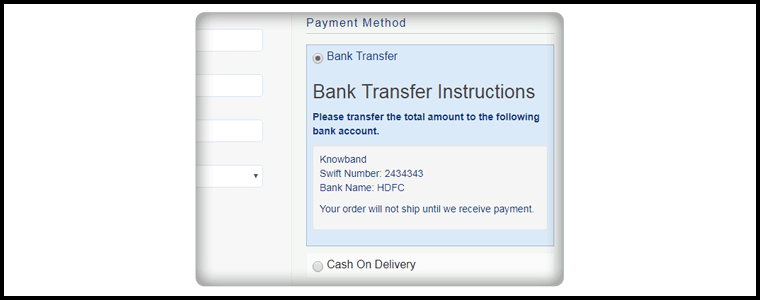
OpenCart single page checkout extension supports multiple payment modes like Credit Card, Debit Card, PayPal, PayU, PayZippy, Boleto, etc. You can set a default payment method.
Multiple shipping services
OpenCart quick checkout extension supports all the major shipping services that include USPS, UPS, FedEx, RoyalMail, Citilink, etc. You can set a default shipping service.
Set the payment modes for a particular shipping service
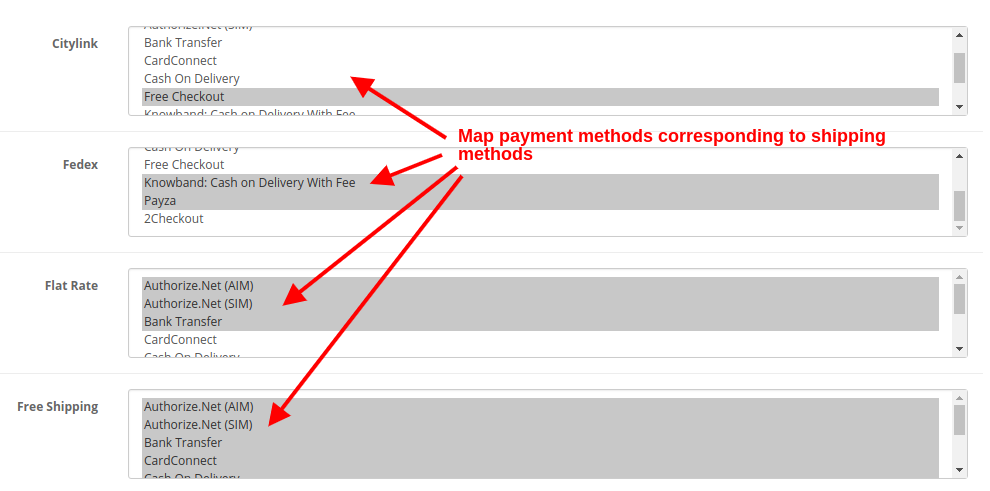
OpenCart one step checkout extension comes with a Ship2Pay feature, under which you can mention which payment modes do you support for a particular shipping method.
Drag and Drop fields
OpenCart fast checkout extension provides the drag and drop functionality, with the help of which, the store admin can prioritize the checkout fields. Just pick a field and place it where you want to get it displayed.
Decide which field you want to keep mandatory and which as optional
OpenCart simplified checkout extension provides you the option to keep a field mandatory or optional. For example, on the checkout page, you can keep “First name” as mandatory and the “Last name” is optional. Try to keep only important fields as mandatory.
Multiple layouts
The design of your checkout page matters a lot for an amazing user experience. OpenCart One Page Checkout Pro offers 3 layout designs; 1-column, 2-columns, 3-columns. With this option, you can choose to display all the checkout information in a single column or segment it into two or three columns.
Customize cart fields
It is up to you to decide which cart details do you want to display on the checkout page. You can choose to show or hide the product image, product name, product description, model, quantity, product price, etc.
Benefits of OpenCart one page checkout extension
1. Fast and quick checkout:
OpenCart Single Page Checkout has the new user interface, Autofill address functionality, and social login options which allow the guest or logged in customers to make quick checkout.
2. Reduce abandoned cart:
The simple and fast checkout process encourages the customer to make the checkout process quickly without turning back. Study shows that more than 60% of abandoned carts are due to a complex or slow checkout page. One page Checkout helps in reducing abandoned cart rates.
3. Increase Sales and Conversion rate:
Our OpenCart Single Page checkout extension makes the checkout process effortless which increases the conversion rate of their eCommerce store.
4. Newsletter and Voucher Field:
One Page Checkout plugin of OpenCart by Knowband has the option to provide a newsletter subscription tab and voucher field on the checkout page. Now your customer can put the voucher code during the checkout process.
5. Complete Cart Summary
OpenCart One Step Checkout extension displays full Cart Summary, displays the product image directly, or when the customer moves the cursor over the product name. Customers can change the quantity directly on the checkout page.
6. Mobile Responsive
With more than half of the shopping done through mobile, it is extremely important to have a mobile responsive website. The OpenCart One Page Plugin is fully mobile responsive and compatible with all browsers and devices.
Final word
No matter how appealing you have made your e-commerce website, if you cannot deliver a great checkout experience to your users, you may lose out on conversions. Try out the OpenCart One Page Checkout Pro today that includes all the above-mentioned features and much more!
The checkout page is the most crucial part of a customer’s journey on your eCommerce store. A lengthy and complicated checkout process takes no time in turning away the focus of the customer from your store. To be very honest, customers do not like to go through a number of steps before they could make their purchase. What if all the checkout steps could be put together on a single checkout page? This is exactly what One Page Checkout does. It makes the checkout process easy for the customers and persuades them to complete their purchase, hence reducing the abandoned cart possibility. Considering the importance of a single page checkout, Knowband comes up with the OpenCart One Page Advanced Checkout extension for OpenCart store owners to make their checkout process convenient for their users.
OpenCart One Page Advanced Checkout
In the list of the OpenCart extensions, OpenCart One Page Advanced Checkout extension is considered to be the finest. OpenCart One Page Advanced Checkout adds a responsive checkout popup to your OpenCart store and makes the checkout process hassle-free for the customers. Customers can make changes to their checkout page without getting redirected to a different URL.
This checkout extension has multi-lingual support and is multi-store compatible. It is a fully mobile responsive extension, that is compatible with all OpenCart themes. Also, the OpenCart One Page Advanced Checkout module is easy to install and configure.
Features of OpenCart One Page Advanced Checkout-
Guest Checkout
OpenCart One Page Advanced Checkout extension provides a Guest checkout option that avoids the mandatory sign-up process on your store. Users can check out as a guest if they do not wish to create an account. Moreover, they are not even required to set a password. Once a customer provides his or her email address, a password is generated and automatically sent over their email.
Social login facility
OpenCart One Page Advanced Checkout extension allows customers to register on your store directly with their Facebook or Google+ account for quick and easy registration.
Multiple payment modes
OpenCart One Page Advanced Checkout module supports multiple payment options like Debit Card, Credit Card, Sage Pay, PayPal, Mollie, etc. You can set any of the payment modes as the default payment method.
Multiple shipping services
OpenCart Advanced quick checkout extension supports various shipping services like FedEx, Smart Send, USPS, RoyalMail, Collisimo, etc. You can set any of the shipping services as the default shipping method.
Define the payment modes for the shipping services
OpenCart One Step advanced checkout extension has a Ship2Pay option, under which you can mention which payment modes do you want to provide for a particular shipping service.
Rearrange fields with Drag and Drop
Opencart simplified checkout extension offers the drag and drop functionality, through which, the admin can prioritize the checkout fields. Just pick a field, drag and drop it to the place where you want to display it.
Make a field mandatory or optional
OpenCart fast checkout extension provides you the option to make a field mandatory or optional. For example, you can keep fields like First name or Address as mandatory and Company name or postcode as optional.
Newsletter subscription and MailChimp Integrator
You can display the newsletter subscription option to the customers and ask them to subscribe to your future updates or marketing campaigns. Following this, when a user provides the email address and subscribes to your newsletters, the information is instantly transferred to your MailChimp account.
Remove unwanted cart fields
OpenCart One Page Advanced checkout contains a “Cart” tab under which you get options like Display product image, Display Product quantity, Display price, etc. You have the option to choose which cart field do you want to display and which cart field do you want to avoid on the checkout page.
Benefits of OpenCart One Page Advanced Checkout-
1. Easy and fast checkout
2. Quick user registration
3. Reduces the cart abandonment rate
4. Increases conversions
5. Enhances the user experience by simplifying the checkout process
Final Word
Let your users enjoy a seamless checkout experience. Optimize your checkout process by implementing OpenCart One Page Advanced Checkout. This OpenCart extension can make a significant impact on your conversion rate.
Every 1 out of 10 online users compel to abandon their cart just because of the long and complicated checkout. Further, you can optimize your site checkout to an interesting one by incorporating OpenCart One Page Advanced Checkout Extension from Knowband. In fact, the OpenCart responsive checkout popup module turns up the entire checkout process to a single ajax based popup. Furthermore, which triggers over the screen as the customer opts to purchase a product from the store. Thus, this One Page Checkout for OpenCart reduces cart abandonment by offering the entire purchase process on a single popup, without loading the next page.
1.1 Features of One Page Checkout for OpenCart
Incorporating One Page Checkout for the OpenCart store is no big deal as it offers simple customization without involving any technical skills or existing code modifications. So, quickly allow your customers to purchase the product through a single popup, giving them faster checkout. Moreover, a less interruption experience. Thus, below listed are the striking highlights of this OpenCart One Page Checkout extension.
1. OpenCart One Page Checkout module displays the total checkout fields in the form of a responsive ajax based checkout popup on the frontend. Further, of the website without redirecting to another URL.
2. This One Page Checkout for OpenCart provides a seamless way to boost the newsletter subscriptions for the online business.
3. The responsive checkout popup incorporated using the OpenCart simplified checkout module can be easily enabled or disabled using the toggle button given at the backend.
4. The guest registration feature of the OpenCart responsive checkout popup automatically registers the customer with the site. In addition, send them the login password on their email.
5. You have the flexibility to enable or disable the guest checkout functionality of the OpenCart One Page Checkout module.
6. Using this OpenCart Single Page checkout extension, you can add CSS code to the advanced checkout page.
7. OpenCart Single Page checkout module offers a testing mode feature that lets you test the advanced checkout page functionality on a specific IP.
8. With OpenCart simplified checkout module, give customers the benefit of social login options. For instance, Google and Facebook over the checkout page.
9. OpenCart fast checkout extension allows you to show/hide payment and shipping address fields differently for logged-in and guest customers of the store.
10. The custom address field marks are needful or optional with the help of this OpenCart One Page Supercheckout module.
11. Using One Page Checkout for the OpenCart site, you can provide multiple shipping and payment methods to the customers which are configurable from the backend.
12. OpenCart responsive checkout popup module eases you in setting a desired logo image and title for each of the payment and shipping methods displayed on the supercheckout page.
13. The ship2pay feature of OpenCart quick checkout extension automatically selects the payment method corresponding to each shipping method selected by the customer.
14. OpenCart responsive checkout popup extension offers a configurable cart whose fields can be fixed as per business needs.
15. OpenCart One Page Checkout module is multi-store and multi-lingual compatible.
16. OpenCart quick checkout extension offers a mobile responsive layout to the customers.
17. The MailChimp Integrator feature of OpenCart Single Page checkout automatically syncs the customer data with the connected MailChimp account of the seller.
1.2 Front Interface of OpenCart Responsive Checkout Popup Module
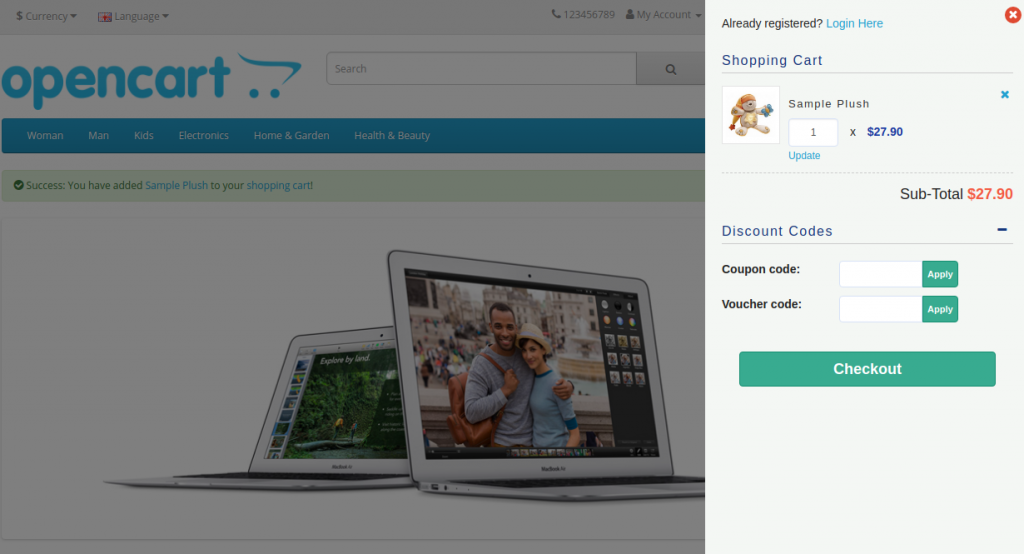
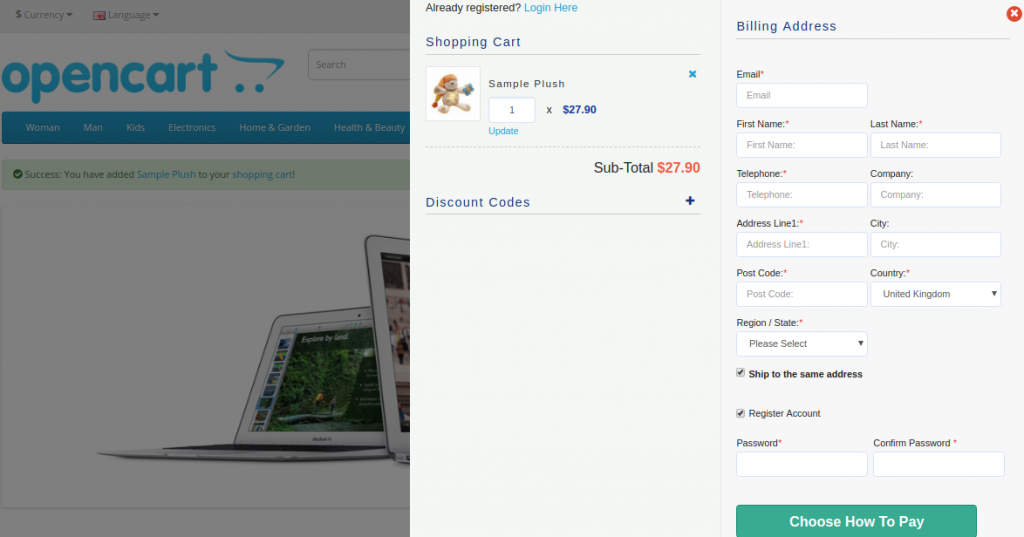
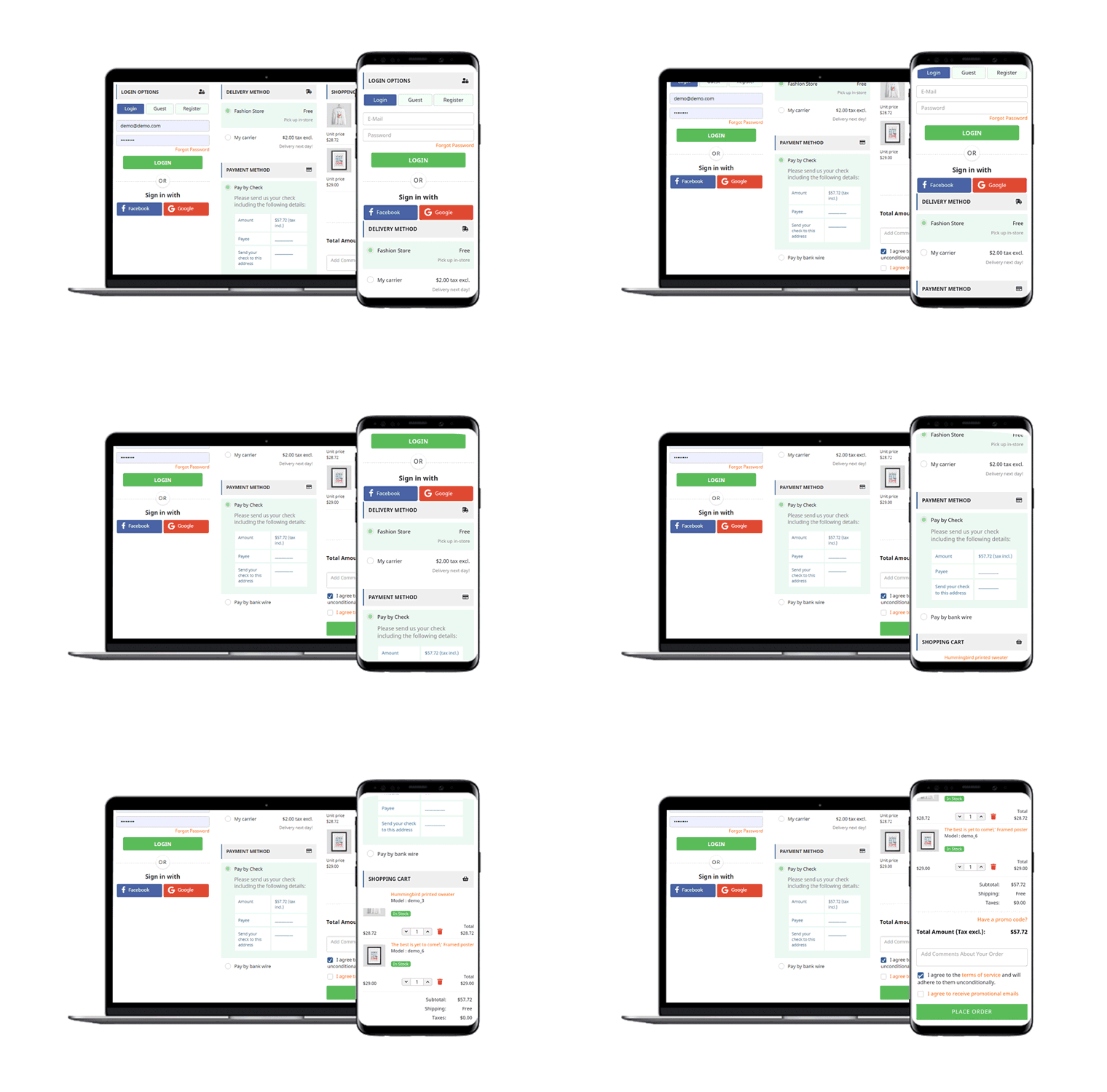
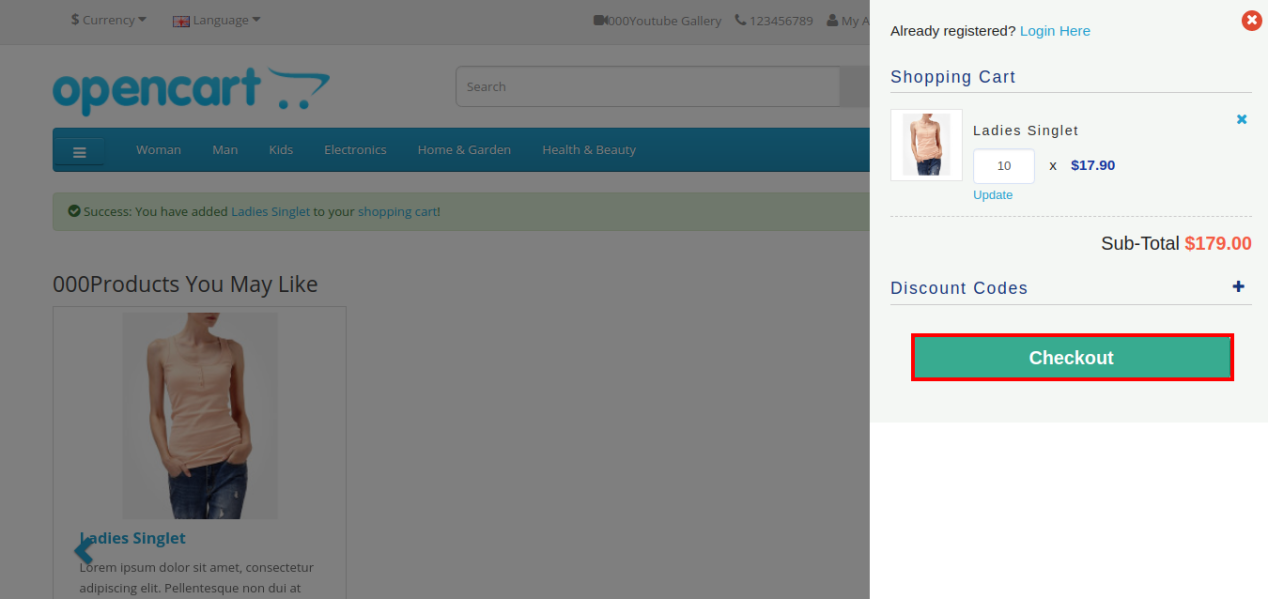
When the user clicks on the “Add to Cart” button corresponding to a product, they will see the following responsive checkout slider on their screen.
Cart Summary Section of OpenCart One Page Advanced Checkout
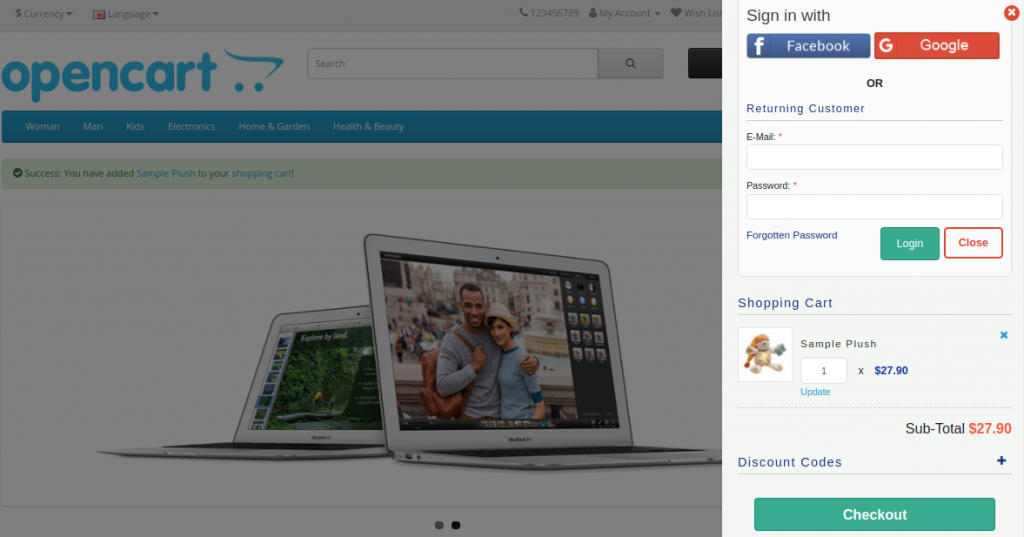
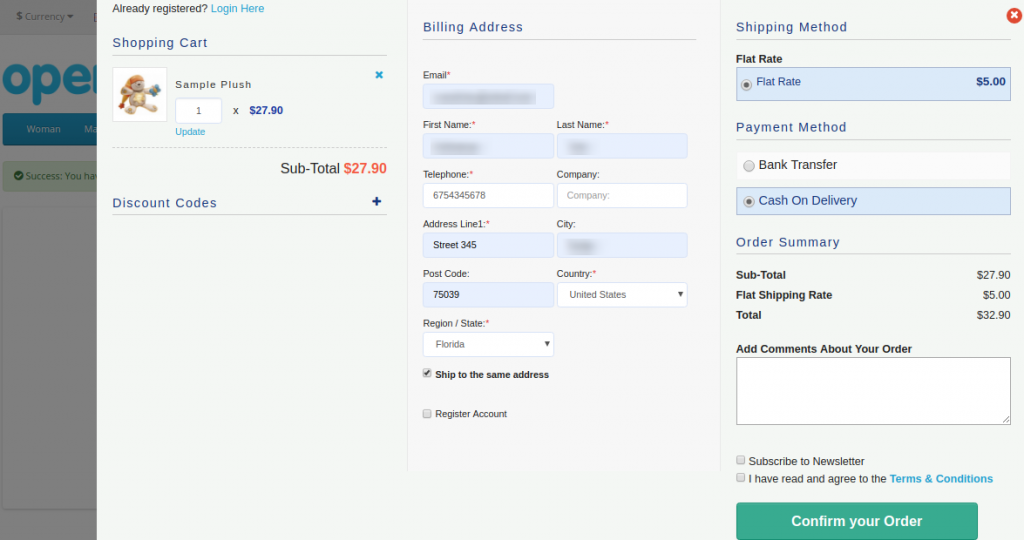
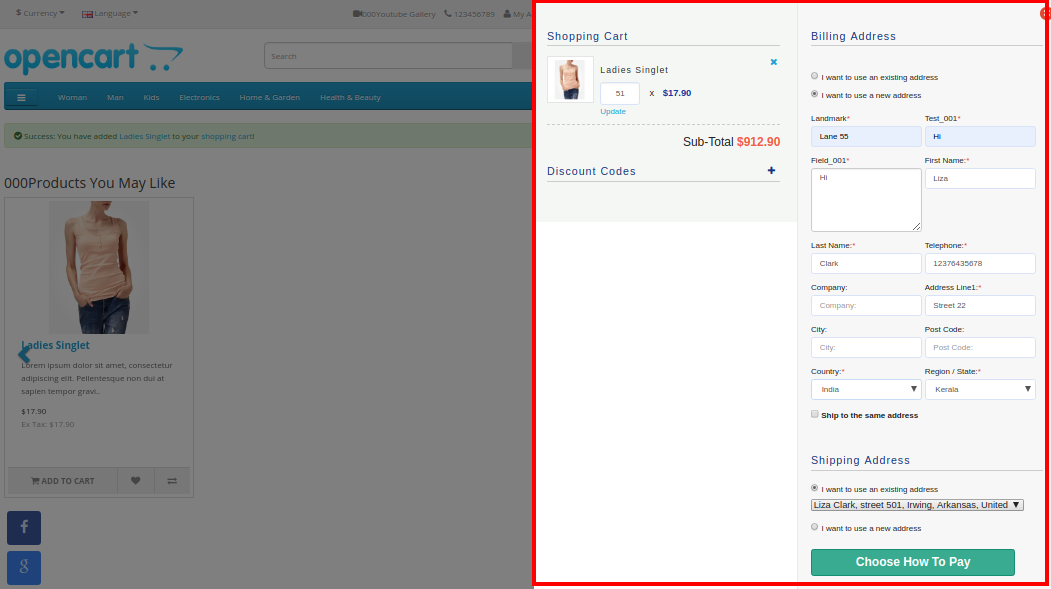
Further, as they click on the “Checkout” button, they can view and complete the complete advanced checkout form in a single go as shown in the images below:
Account Login Section
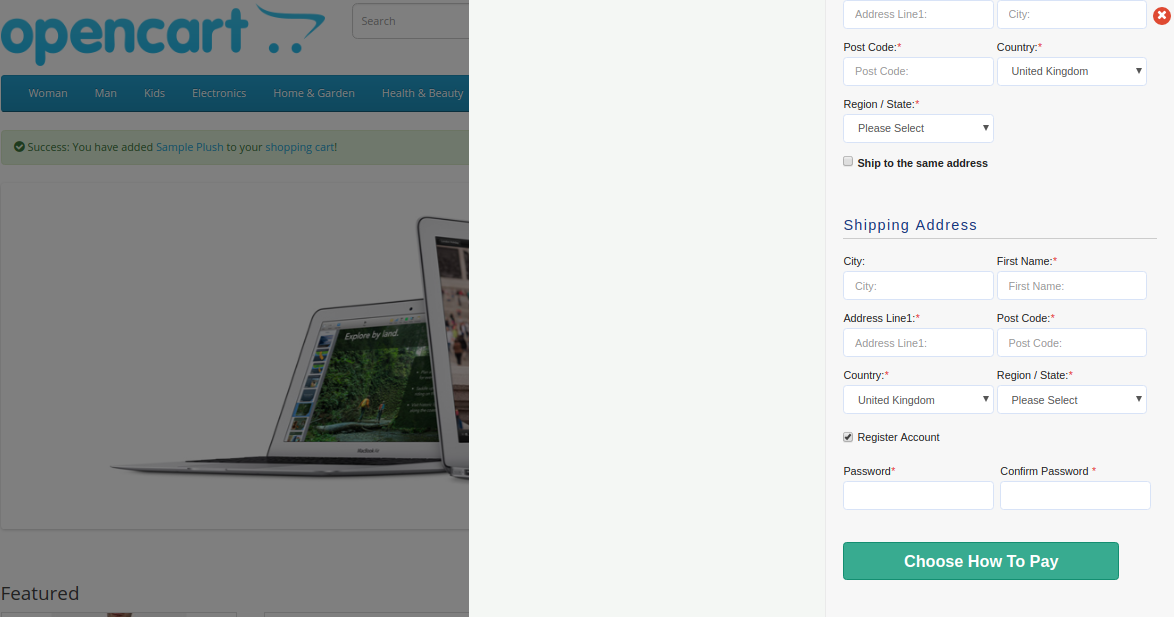
If the customer unchecks the “Ship to same address” checkbox, then they will see the shipping address section as shown below:
Shipping and Payment Method Section
2.0 Installation Guide of OpenCart One Page Advanced Checkout Extension
Before starting the installation process, you have to buy the OpenCart One Page Checkout module from the Knowband store. Further, once purchased, you will receive the following files in your registered email.
Source code of OpenCart One Page Advanced Checkout Extension in zipped file format.
User Manual of OpenCart One Page Checkout extension.
Now, to install this OpenCart Advanced Checkout on your online shop, follow the given steps:
1. Unzip the zip file. You will get the folders as shown in the image below
2. Copy all the folders of the zip file in the Root Directory of OpenCart setup via FTP manager.
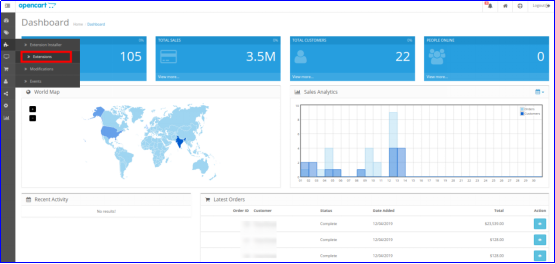
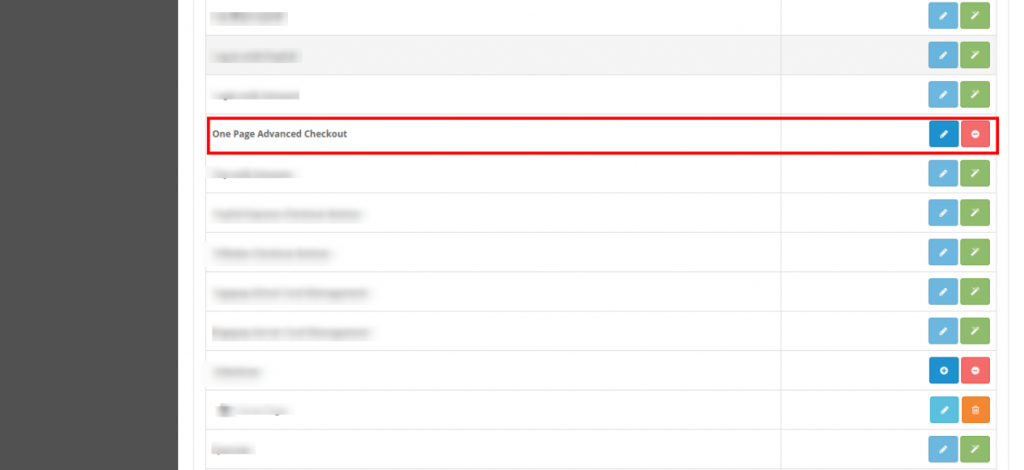
So, OpenCart One Page Advanced Checkout is now successfully installed. In addition, is ready to use at your store. Further, go to the admin menu. Moreover, click on the extensions and thereby click on configure button next to One Page Advanced Checkout.
3.0 Admin Interface of OpenCart Responsive Checkout Popup
Just after successful installation of One Page Checkout for OpenCart the website, you can configure the checkout form fields as per your requirements. Furthermore, you have to navigate the settings in the given order: Admin Panel > Extensions > Modules > One Page Advanced Checkout
The simple to understand admin interface of OpenCart fast checkout extension is divided into nine sections namely:
General Settings
Login Settings
Payment Address
Shipping Address
Shipping Method
Ship2Pay
Payment Method
Cart
Newsletter
3.1 General Settings
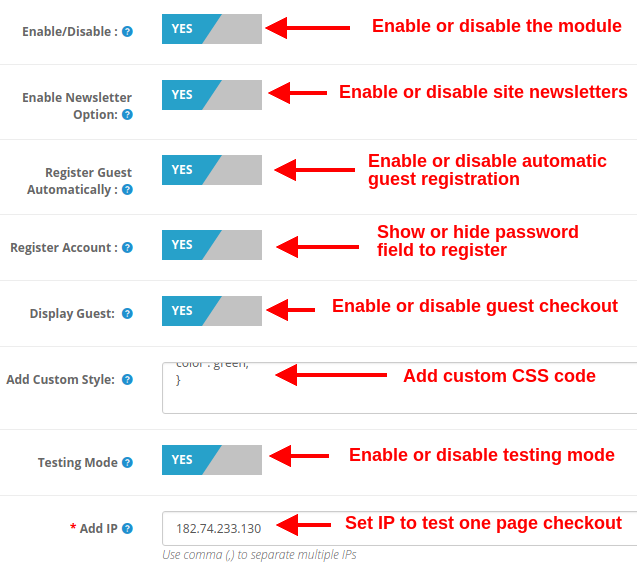
Enable/Disable: This option lets you enable or disable the complete functionality of One Page Checkout for Opencart the website. If disabled, the standard Opencart checkout is shown to the customers.
Enable Newsletter Option: Using this option, you can show or hide the newsletter subscription box for your site. If the customer checks the newsletter option, they will subscribe to site updates(newsletter).
Register Guest Automatically: You can enable automatic registration for your guest customers (users who perform guest checkout). This option will automatically send a password to the customer for further use of the account.
Register Account: By enabling this option, you can give password fields on single page checkout where the user can enter their password to register.
Display Guest: This option will show or hide the guest option in the login section of checkout. Using this option, users can perform guest checkout for their items.
Add Custom Style: This option allows you to include additional custom style (CSS code), displayed on the front of their website.
Testing Mode: You can enable this option to test the one page checkout module functionality before making it live for the customers.
Add IP: This option allows you to enter the specific IP address where you want to test the advanced supercheckout features.
3.2 Login Settings
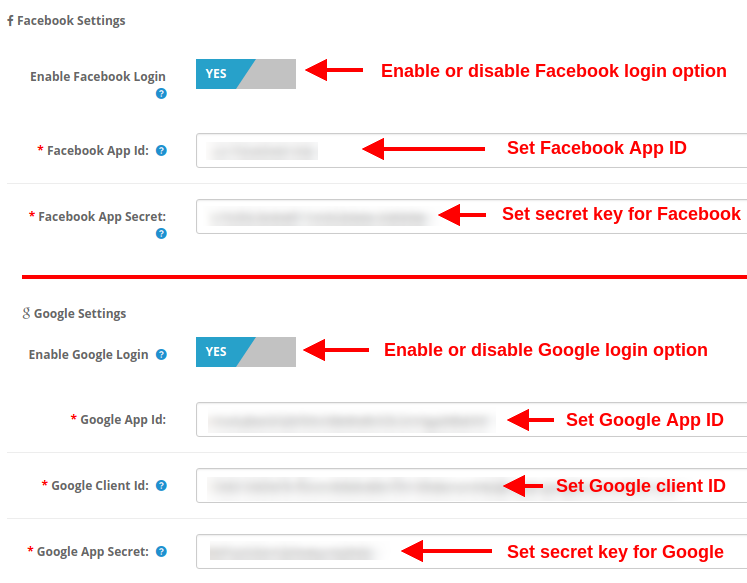
Enable Facebook Login: This option will enable or disable the Facebook login option displayed on the front of one page checkout form.
Facebook App ID: This option allows you to set the Facebook App ID required to connect with your Facebook account.
Facebook App Secret: This option will set the Facebook App Secret Key.
Note: You can get the Facebook app ID and secret key from https://developers.facebook.com/ which has been discussed in section 3.2.1
Enable Google Login: This option will enable or disable the Google login option displayed on the front of one page checkout form.
Google App ID: This option allows you to set the Google App ID required to connect with your Google account.
Google Client ID: This option allows you to set the Google client ID.
At last, Google App Secret: This option will set the Google App Secret Key.
Note: You can get the Google app ID, client ID, and secret key from https://code.google.com/apis/console which has been discussed in section 3.2.2
3.2.1 How to setup Facebook Login
Facebook App can be created by below-mentioned steps:-
1: Go to the given URL: https://developers.facebook.com/apps/
2: Click on the “Add a New App” button.
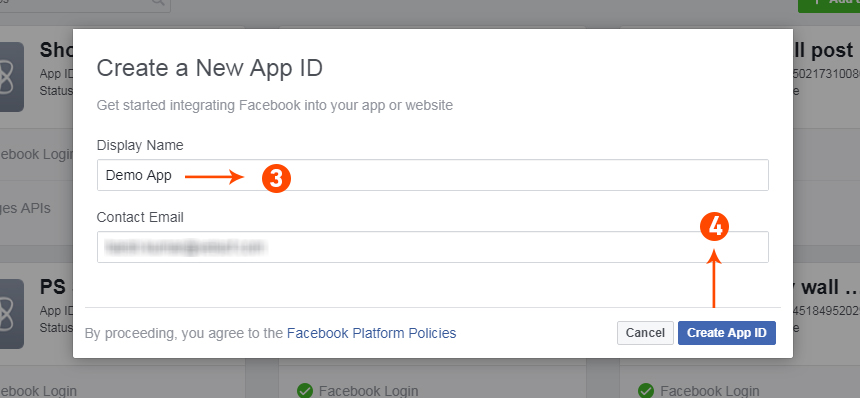
3&4: Enter your App name and email id, then click on the “Create App ID” button.
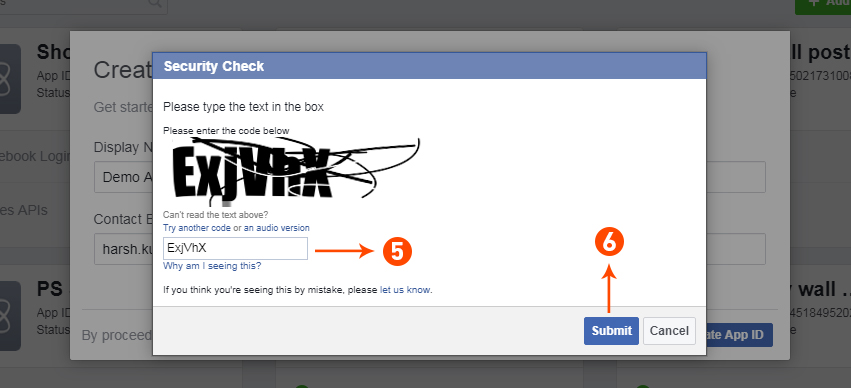
5&6: After clicking on Create App ID you will have to go through a security check as shown:
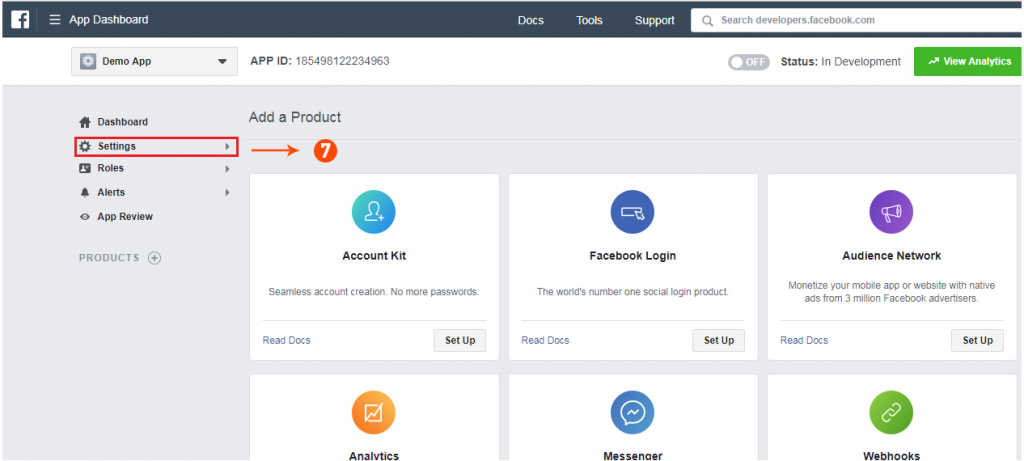
7: Click on the “Setting” tab.
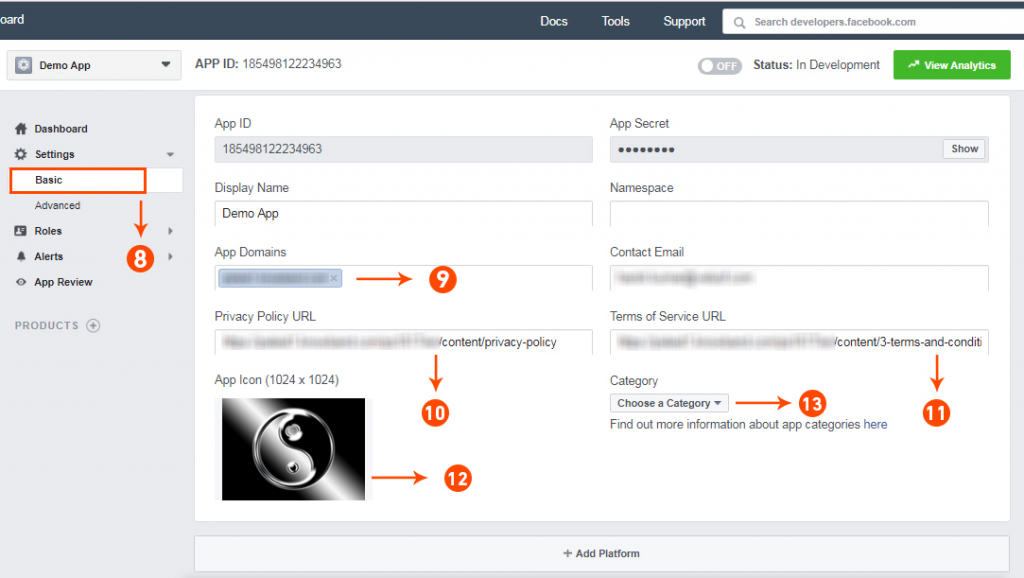
8-13: Two options will be available in the dropdown, Basic and Advanced, click on “Basic”. And then enter your “App Domain”, “Contact Email”, ”Privacy URL”, ”Terms and Conditions URL”, ”Add Logo”, ”Select Category” and click on the “Save Changes” button.
App Domains:
yourdomain.com is correct
yourdomain.com/store is incorrect
www.domain.com is incorrect
14: Now click on “+Add Platform”.
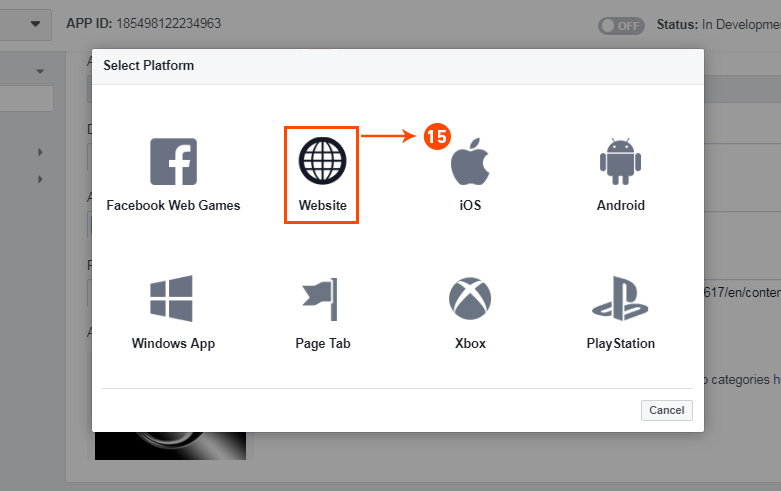
15: And select Website as Platform
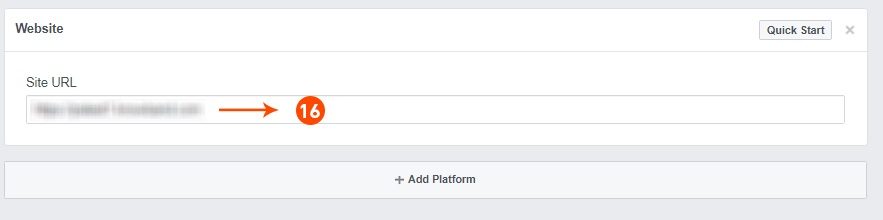
16: Now Enter your site URL.
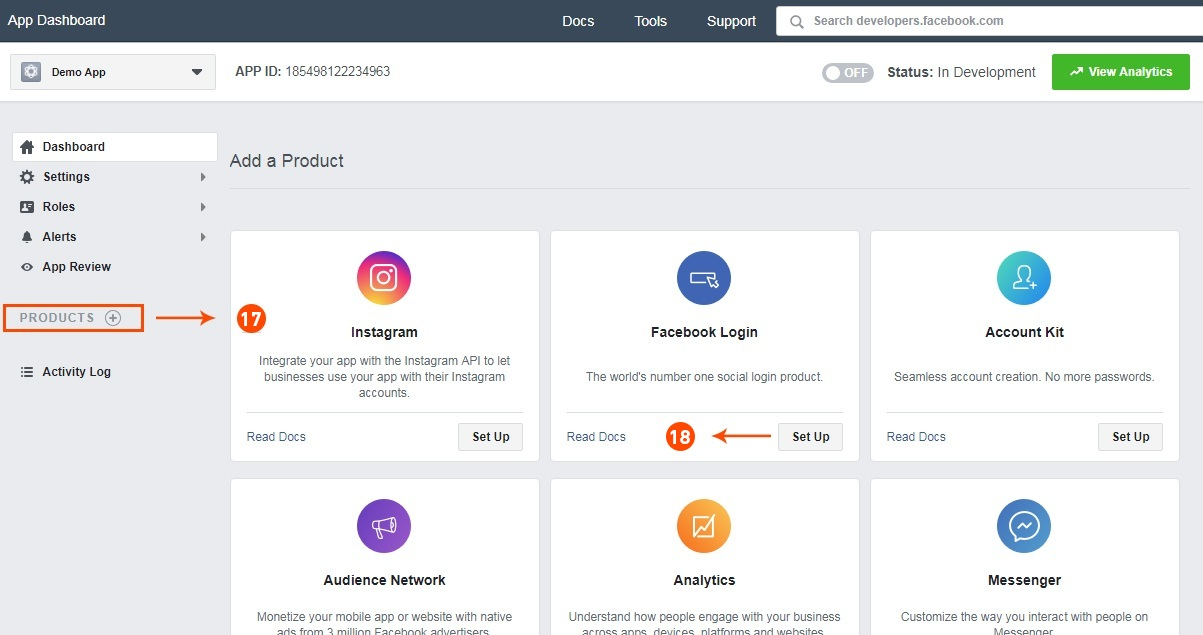
17&18: Click on “Products+” and select Facebook login.
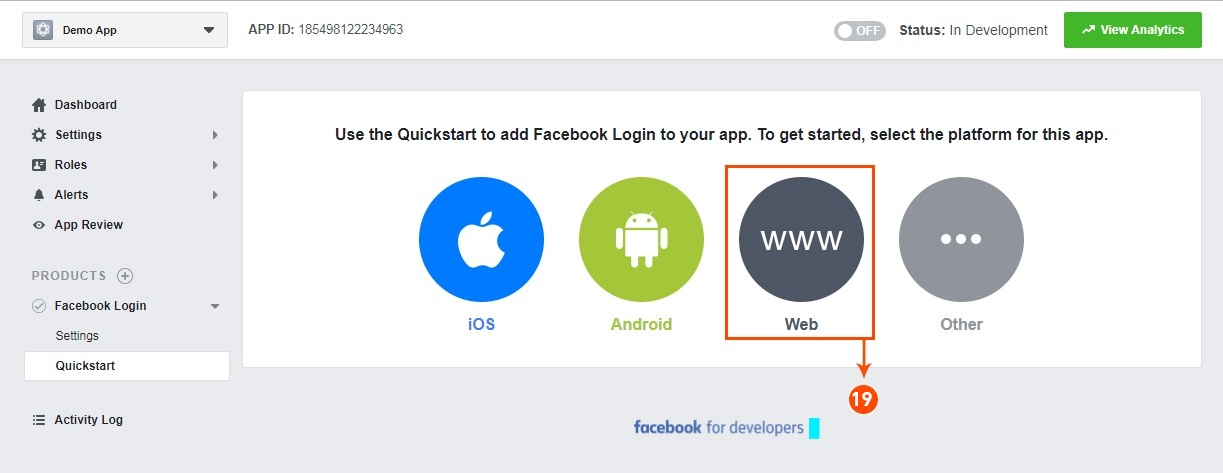
19: Select web as the platform for the app.
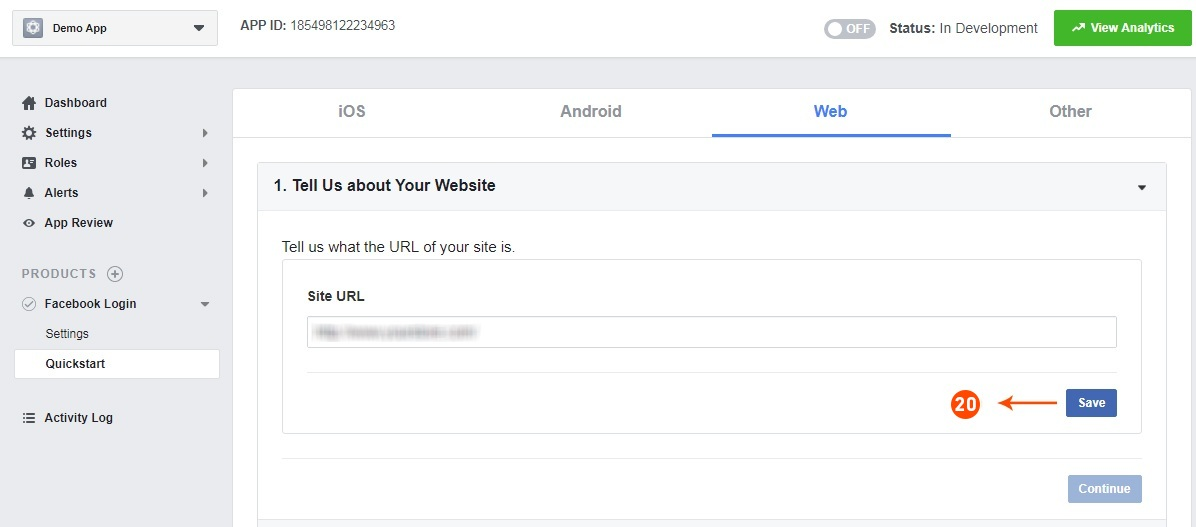
20: Now click on save.
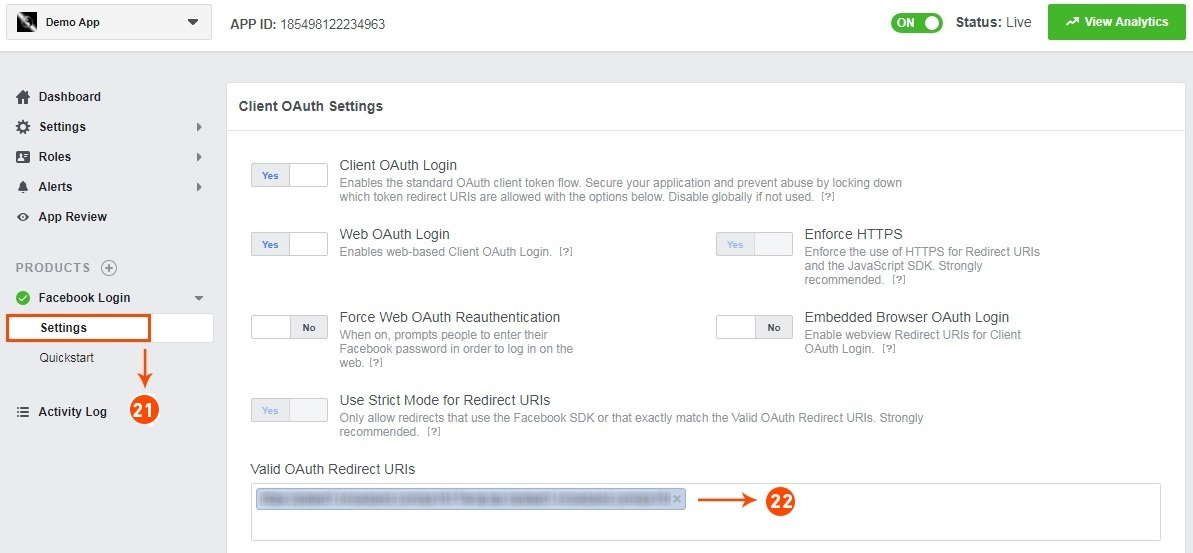
21&22: Click on Settings and add a Valid OAuth Redirect URIs.
Valid OAuth Redirect URIs:
https://your_store_url/index.php?route=kbstepcheckout/kbstepcheckout&fblogin=1
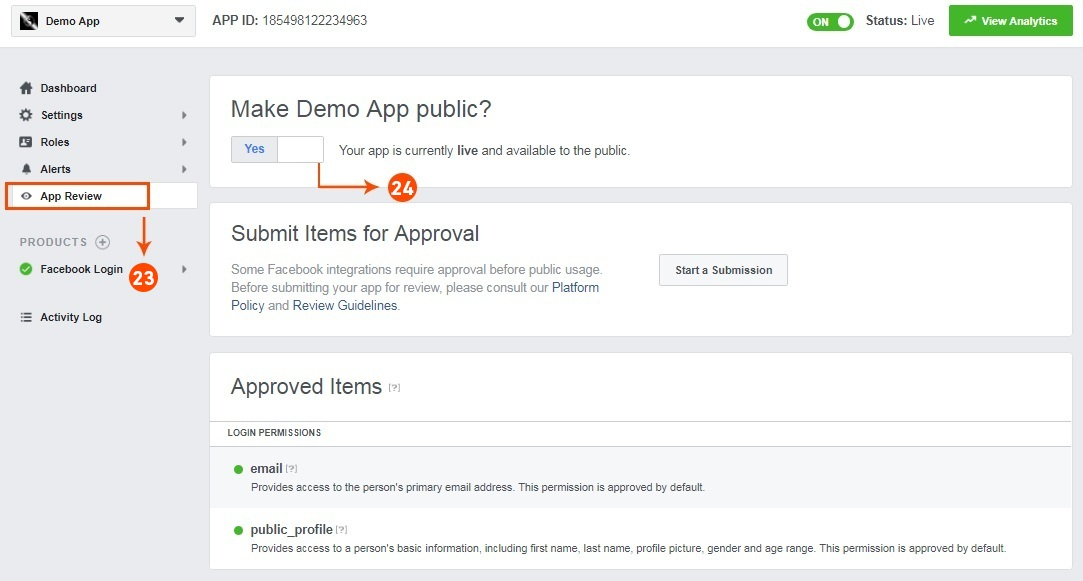
23&24: Click on “App review”. And mark “Make ‘your app name’ Public” to Yes.
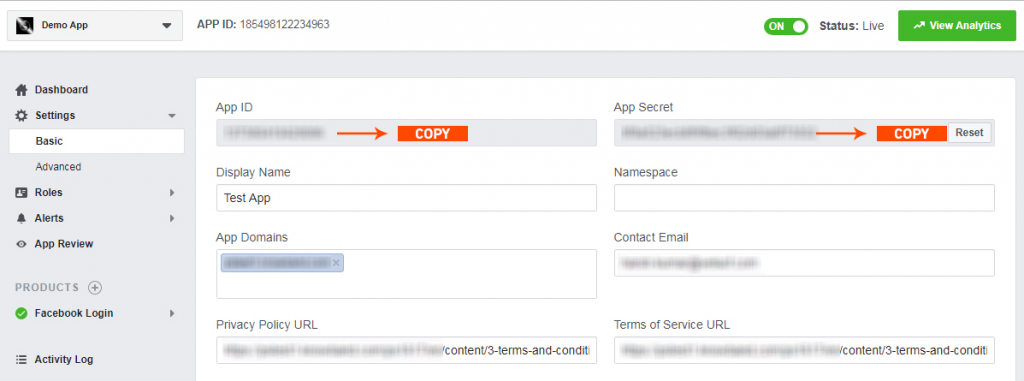
Final Step: Copy the App ID and App Secret and paste it into the fields provided in the module.
3.2.2 How to setup Google Login
Follow the below steps to get the client id and client secret.
1. Go to the link “ https://console.developers.google.com/project ”.
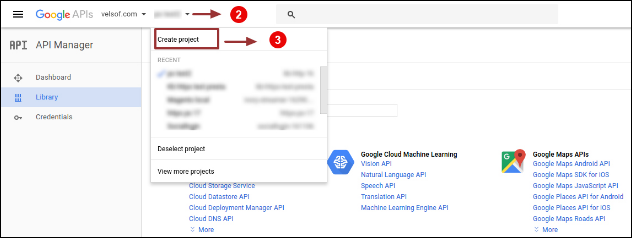
2. Click on the drop-down option highlighted in button “ 2 ” and then click on “Create a project”.
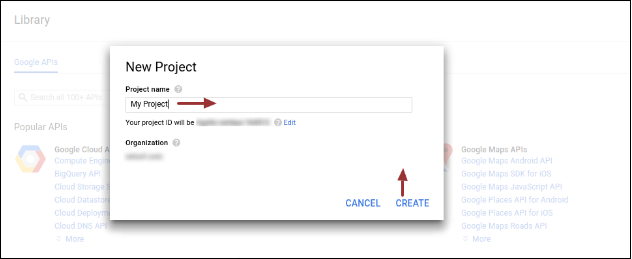
3. Enter your desired Project Name and click on “Create”.
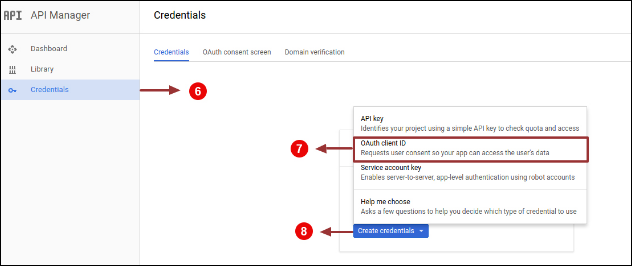
4. Go to API Manager, click on Create Credentials and select the OAuth client ID option.
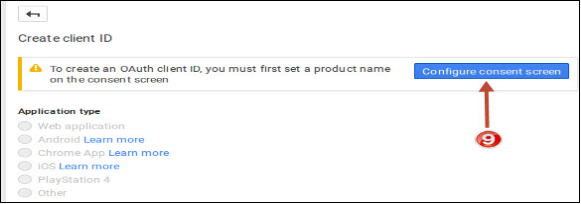
5. Click on the “Configure consent screen” button.
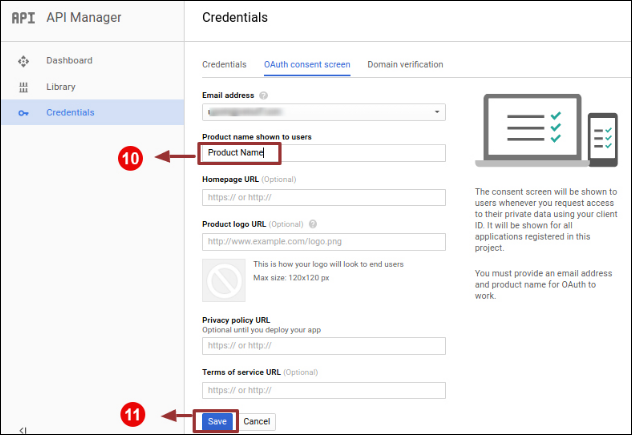
6. Enter “Email Id”, “Product Name” and then click on the “Save” button.
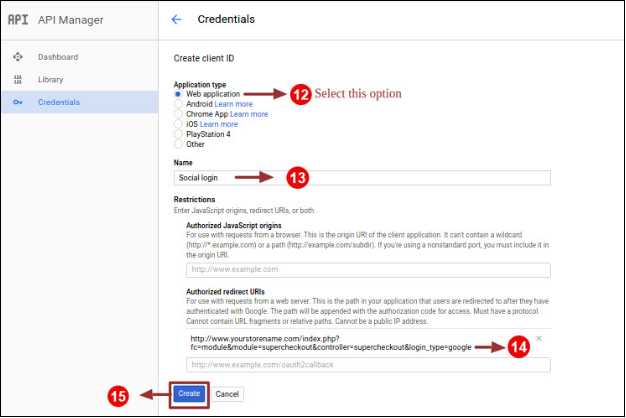
7. Select “Web application”, Enter “Name “, “Authorized Redirected URIs“ as mentioned below and click on the “Create” Button,
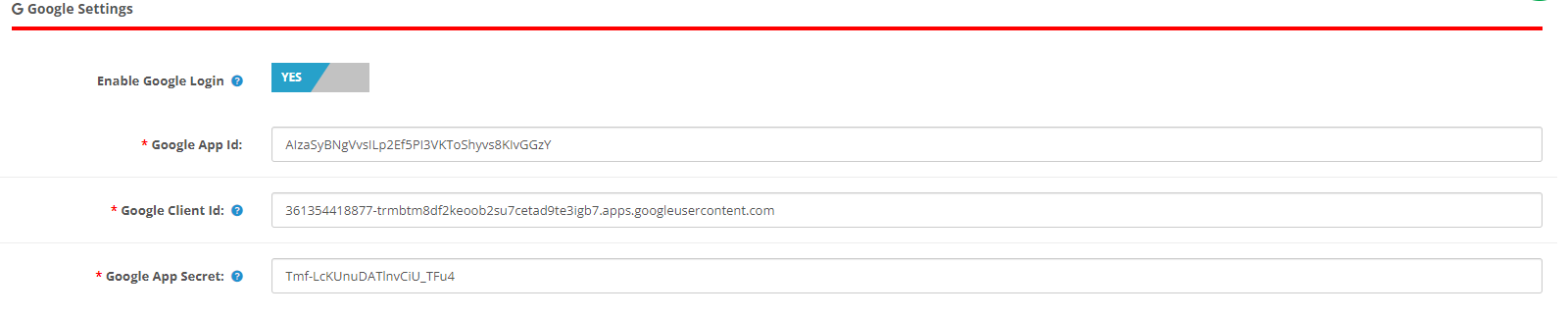
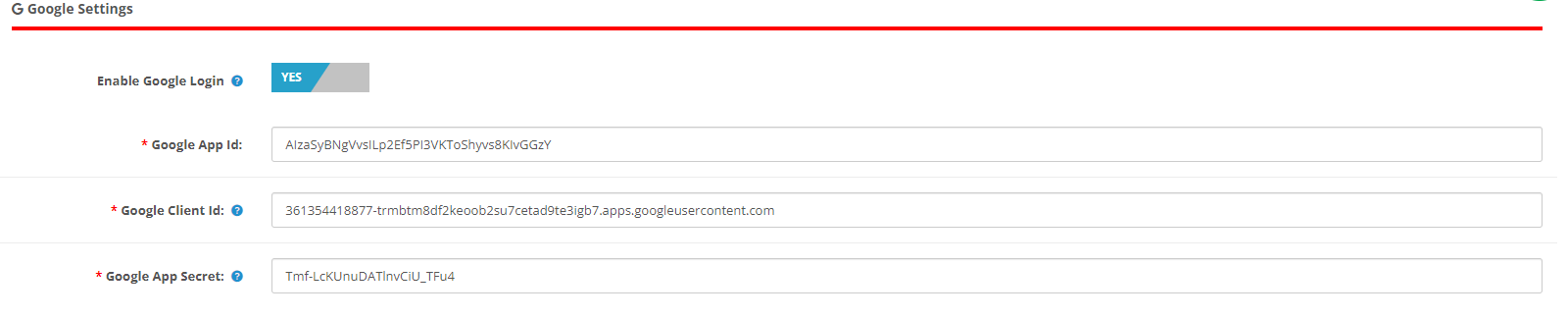
9. Paste Client ID and Client Secret in the Text Field shown below in the Prestashop one-page checkout module’s admin panel.
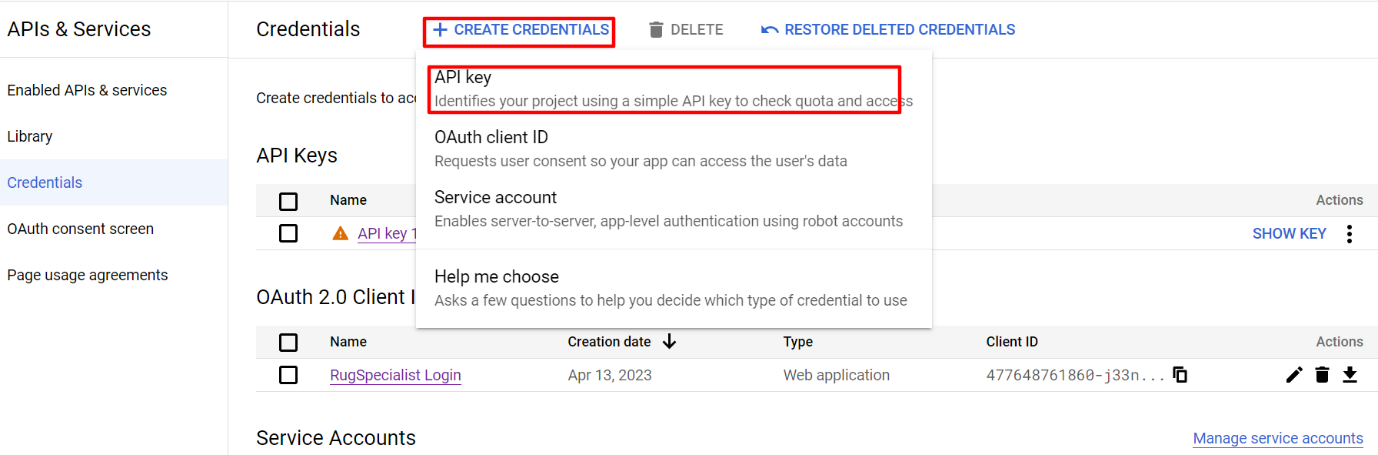
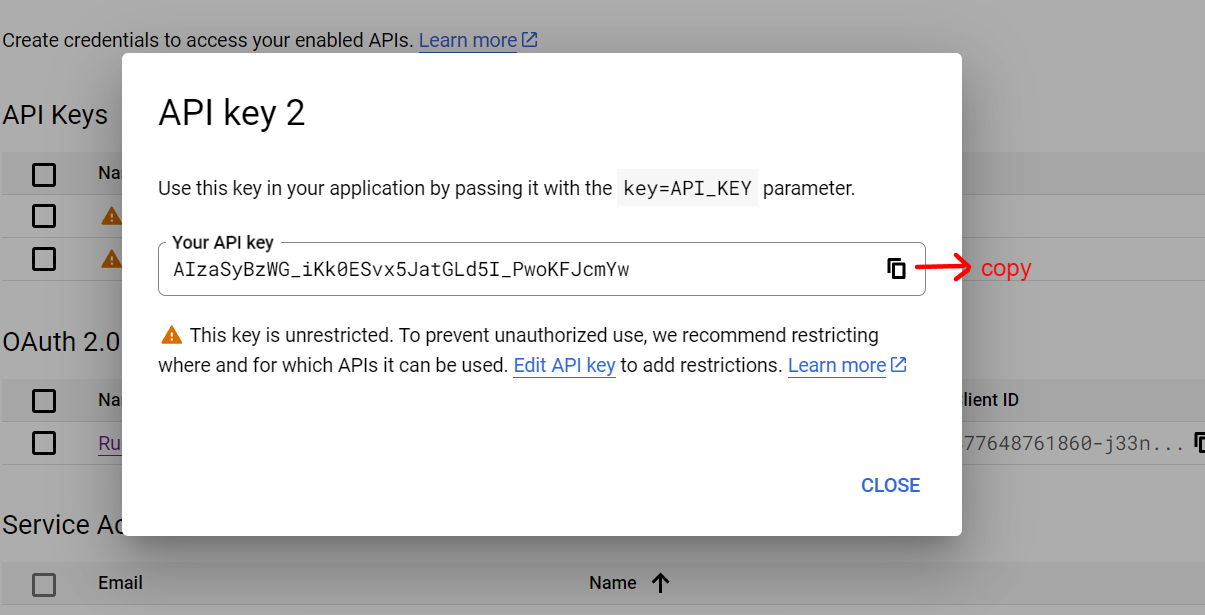
How to Generate the Google API key:
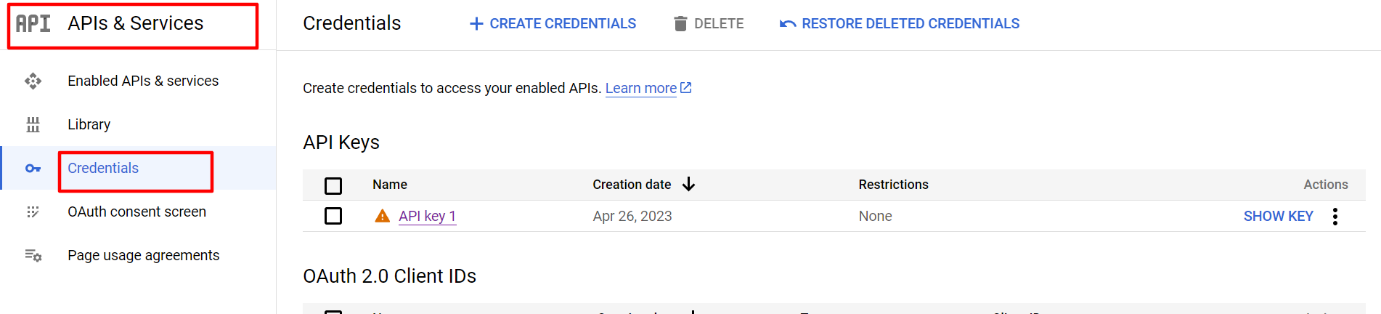
1) Go to API Manager, click on the left menu, click on API & Services, and then click on Credentials.
2) Click on Create Credentials & then select the API key.
3)Copy the API key and enter the same into the Google App Id field of the admin end module’s login page
3.3 Payment Address
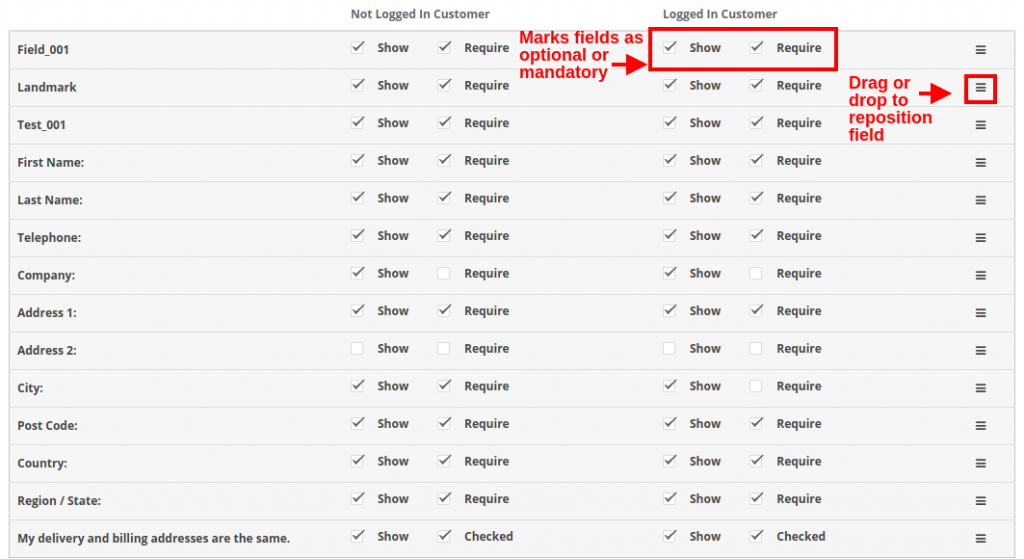
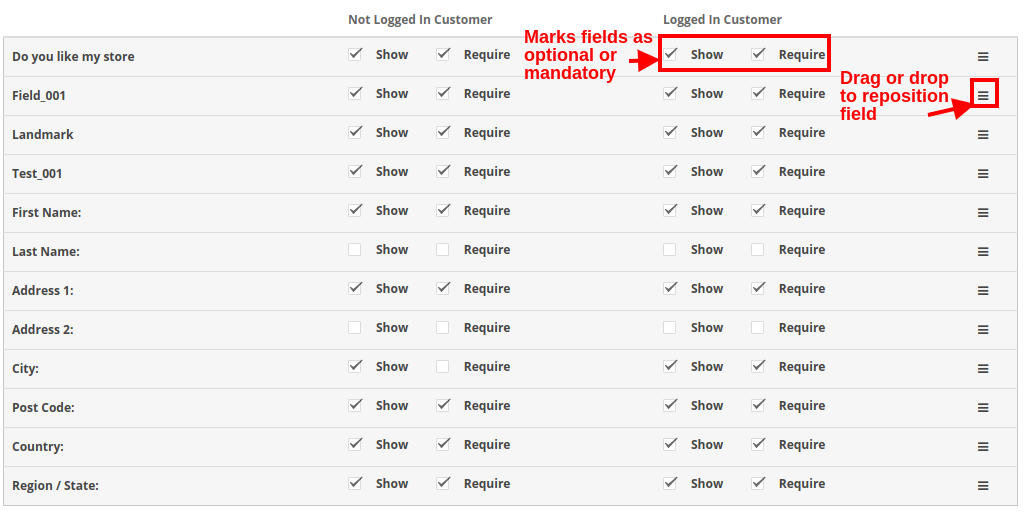
OpenCart One Page Checkout allows you to show or hide any field for payment address. The fields can be separately enabled or disabled for logged-in and logged-out customers. You can mark any field as required, differently for logged-in and logged-out customers of the store. Additionally, you can reorder the address fields using a simple drag and drop action.
3.4 Shipping Address
OpenCart responsive checkout popup module allows you to show or hide any field for the shipping address. The fields can be separately enabled or disabled for logged-in and logged-out customers. Using OpenCart One Page Advanced Checkout, you can mark any field as required, differently for logged-in and logged-out customers of the store. Additionally, you can reorder the address fields using a simple drag and drop action.
Note: To include and show more custom fields in the Payment Address, Shipping Address, cart section, or account section of the checkout, you can refer to section 3.10
3.5 Shipping Method
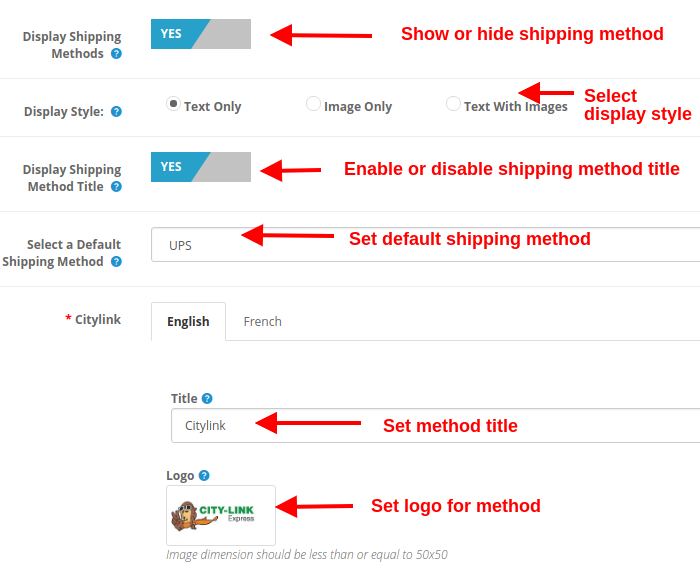
Display Shipping Methods: This option will show/hide the complete list of shipping methods provided on the advanced checkout page.
Display Style: With this option, you can select the display style for the shipping methods. It can be only logo image, only text, or both.
Display Shipping Method Title: This option will enable or disable the title for the particular shipping method.
Select Default Shipping Method: With this option, you can select any shipping method as the default method.
Title: This option sets the desired title for the shipping method.
Logo: This option sets the logo image for the shipping method.
Likewise, you can modify the title and logo image for all the shipping methods using this OpenCart One Page Advanced Checkout module.
3.6 Ship2Pay
3.7 Payment Method
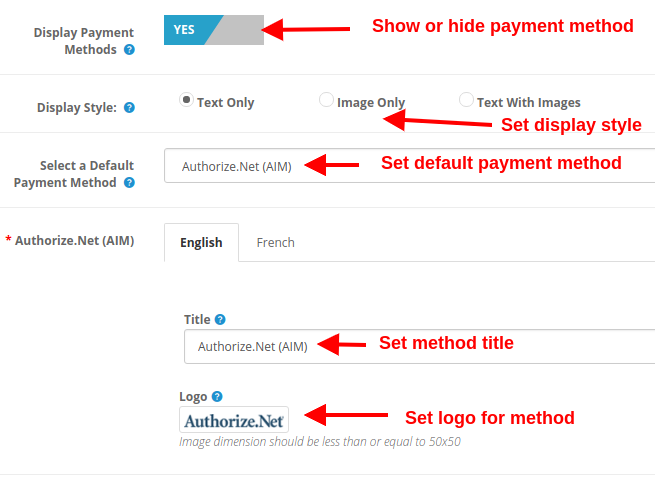
Display Payment Methods: This option will show/hide the complete list of payment methods provided on the advanced checkout page.
Display Style: With this option, you can select the display style for the payment methods. It can be only logo image, only text, or both.
Select Default Payment Method: With this option, you can select any payment method as the default method.
Title: This option sets the desired title for the payment method.
Logo: This option sets the logo image for the payment method.
Likewise, you can modify the title and logo image for all the payment methods with the help of one page supercheckout.
3.8 Cart
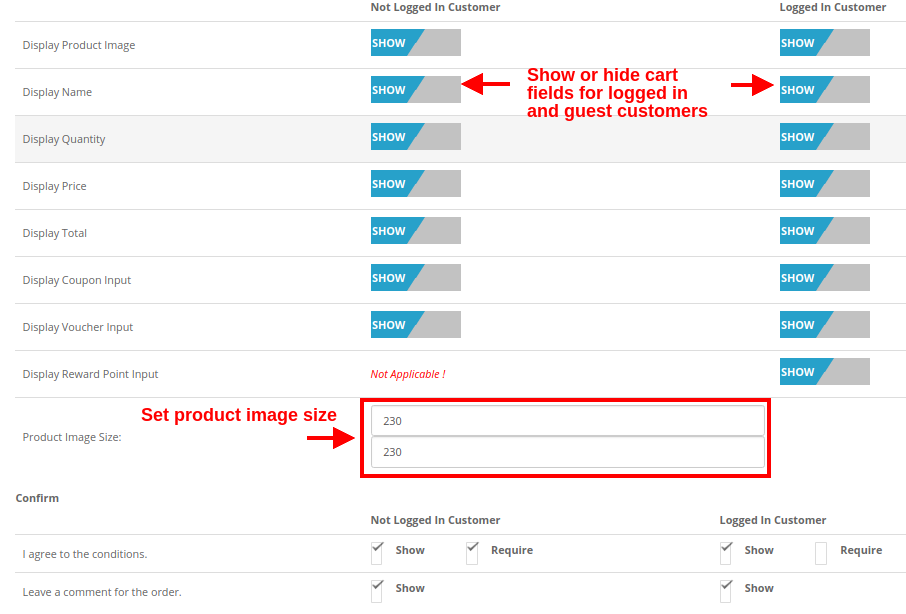
Under this section of OpenCart One Page Supercheckout, you can customize the cart and display it the way you want at your store. The image size of cart items can be easily modified by setting the image height and width.
Product Image Size: This option allows you to set the image size for the products shown in the cart section of the one page checkout.
Moreover, you can show or hide the various cart fields to log in and log out customers of the store. Fields like “Agree to the Conditions”. Moreover, order comments marked as optional or optional as per your site requirements.
3.9 Newsletter
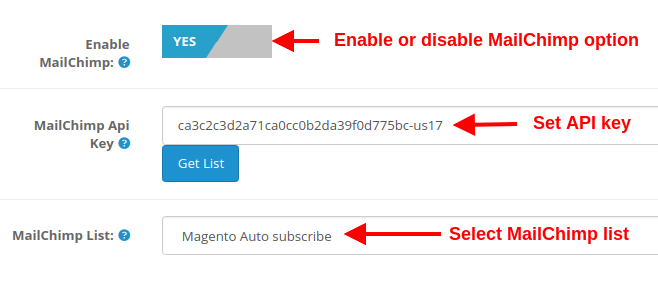
Enable MailChimp: This option of Opencart one page supercheckout, allows you to enable or disable the MailChimp Integration functionality for your store.
MailChimp API Key: With this option, you can set the MailChimp API key which will connect your site to the MailChimp account of the seller.
MailChimp List: Using this option, you can fetch and select the particular list connected to the MailChimp account.
3.9.1 How to configure MailChimp
Login to your Mail Chimp account.
Click on the right corner tab > Choose Profile > Extras > API Keys.
Here Admin Can Create an API key by clicking on the “Create a Key” button.
Copy the API key.
Admin can also make a Different list for Each Social login customer by clicking on “List” in the Top Menu Bar.
Now Paste the API Key in the Provided Mail chimp API Key section and click on the “Get List” Button.
Select the list from the Dropdown menu.
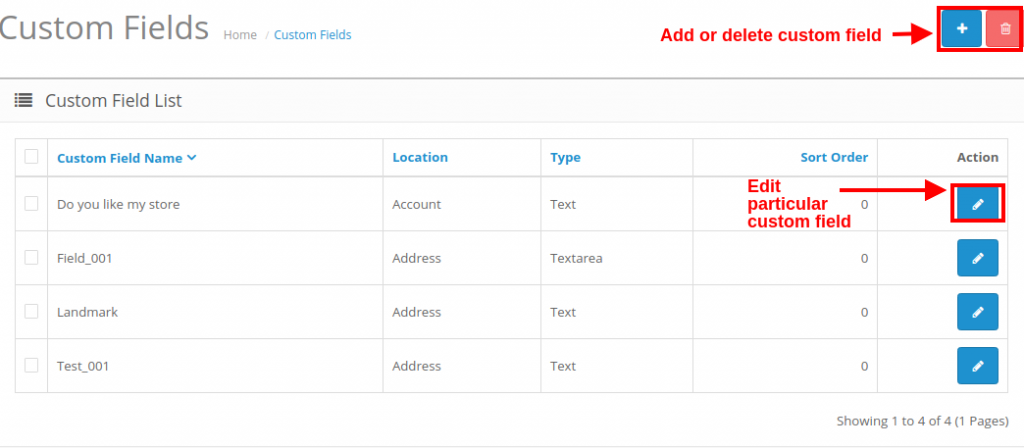
3.10 How to add edit or delete custom fields to the Supercheckout page
In order to add custom fields to any section of One Page Checkout, you can go to the “Custom Fields” option under the “Customers” tab at the left side section of the admin interface.
The success of your eCommerce business does not depend on how many people visit your website but on how many of them convert. The more conversions you get, the more revenue you make and it majorly depends on your checkout page.
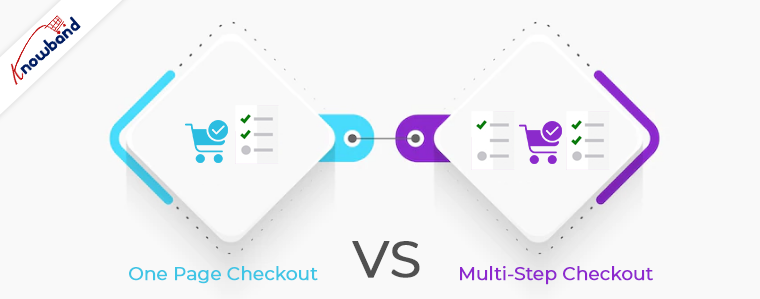
Which checkout process do you follow? One Page Checkout or Multi-Page Checkout?
Customers desire a simplified checkout experience. A long and complicated checkout hampers the shopping experience which eventually results in cart abandonment. For a convenient checkout process, website owners are shifting towards one-step checkout, leaving the traditional multi-step checkout process behind.
The debate revolving around a One-page checkout vs Multi-page checkout is never-ending. While some eCommerce professionals prefer one-step checkout, some feel a multi-step checkout is a better option.
In this article, I will put forward the differences between the checkout process and help you make a better choice.
One Page Checkout
One Page Checkout puts up all the elements of a standard checkout process on a single page and lets the customers fill out the checkout fields in any particular order.
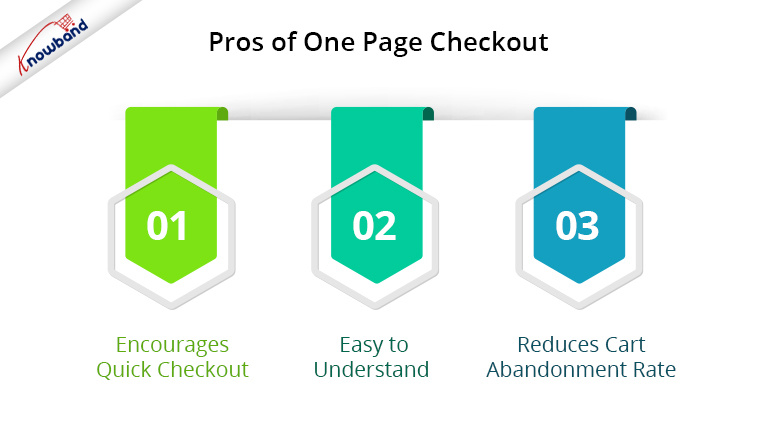
Pros of One Page Checkout
1. Encourages Quick Checkout
With all the checkout-related details upfront, it allows customers to check out quickly. They get rid of clicking multiple times to head towards the next step (in the case of multi-step checkout) and can enter all their details regarding billing, shipping, and payment on the same page.
2. Easy to Understand
A one-step checkout makes the page design simple and easy to understand and presents a clear picture in front of the customers. This also makes it easy for them to verify their details since they do not need to switch between pages.
3. Reduces Cart Abandonment Rate
An intricate checkout is one of the main reasons for shopping cart abandonment. It is therefore important to optimize your checkout process and provide customers with a smooth checkout experience- One Page Checkout is the best way to do that.
Displaying a high volume of content on a single page can cause slow loading on your website. A slow checkout can turn away your visitors and make them search for the product on your competitor’s store.
2. Uncomfortable
Customers who are familiar with a multi-page checkout might not find the one-page checkout comforting. A long checkout form can seem clunky and might discourage a customer from making the purchase.
Multi-Page Checkout
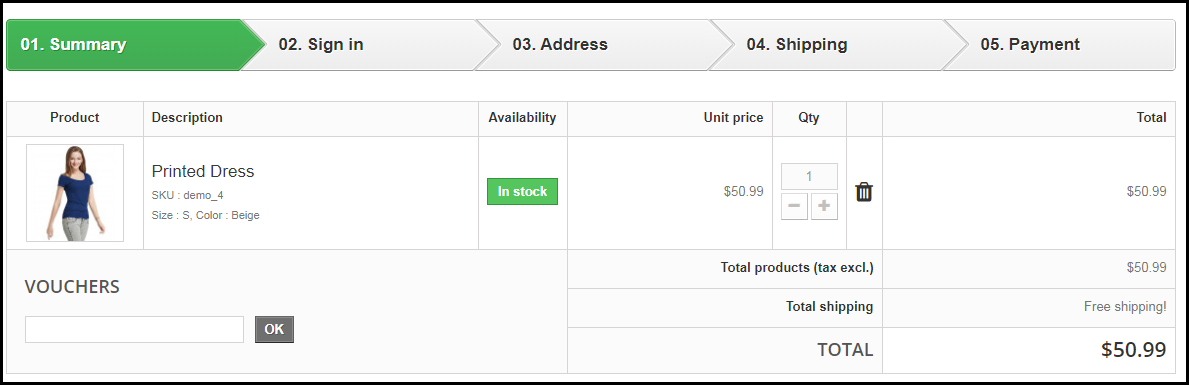
A multi-page or multi-step checkout breaks down the entire checkout process into several pages. Customers have to fill in their details on each page separately to finish the checkout process.
Pros of a Multi-Page Checkout
1. Customers Feel More Secure
Filling all the required details step by step makes customers feel more secure about their purchase, especially if they are purchasing something expensive.
2. Layout Looks Clean
The layout of a multi-step checkout does not look bulky since the checkout fields are divided into several pages which makes the layout clean and uncluttered.
Because of more number of pages, shoppers find multi-page checkout a lengthy and time-consuming process. Ultimately, customers run out of patience and are compelled to abandon their shopping carts. What’s worse is they decide to purchase from a different store.
2. Difficulties in Correcting Information
Mistakes happen very often while filling out the checkout fields. In a multi-page checkout, customers are left with no choice except to return to the previous page and correct the information. On many e-commerce websites, there is no option to edit and customers are asked to fill in the entire details again. This causes frustration among customers and creates a high chance of cart abandonment.
One Page Checkout vs Multi-Step Checkout: Which one to choose?
If you are in a dilemma about which one has better benefits, I would say- Go with a single-page checkout. These days, a single-page checkout is overtaking multi-page checkout because store owners are more focused on providing customers with a way to complete their transactions in one go rather than asking them to follow several steps.
Consider this: You go to an offline store. After you are done picking what you want, you go to one of the billing counters to make the payment. Tell me which counter do you look for? The counter is less crowded and takes less time for you to make the payment and check out from the store, right? Similar is the case with online stores. Shoppers want to check out as early as possible.
One Page Checkout by Knowband
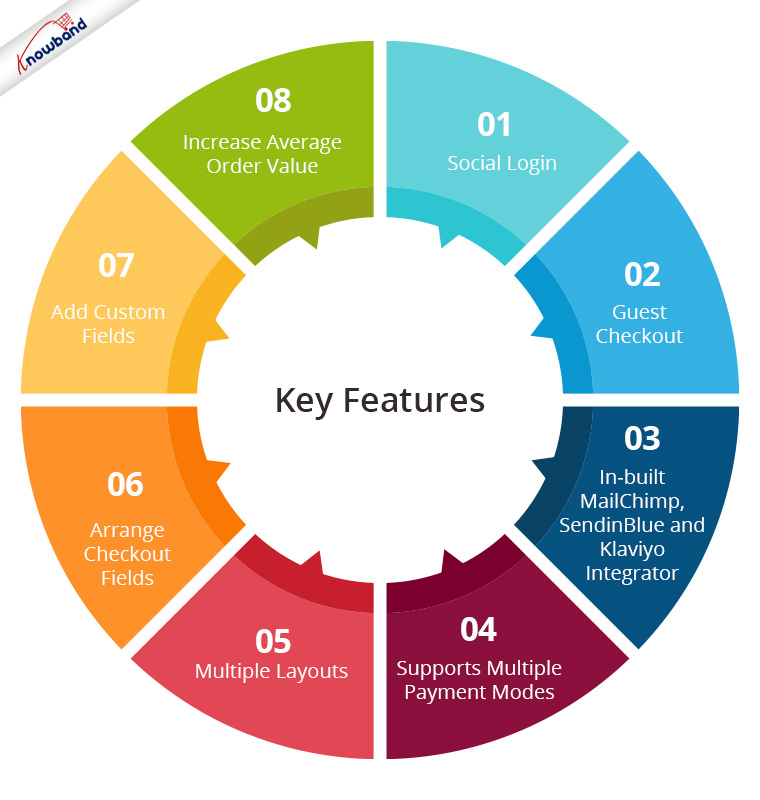
Our One-page checkout offers various rich features that enhance your store’s checkout process and make it fast and convenient. The module is available for PrestaShop, OpenCart, Magento and Magento 2.
One page Quick Checkout offers social login options that allow users to register on your store with their Facebook, Google and PayPal accounts
2. Guest Checkout
Visitors who want to shop from your store without getting registered can make a purchase easily with the Guest Checkout option.
3. In-built MailChimp, SendinBlue and Klaviyo Integrator
You can collect the email address of your subscribers directly from the respective email service providers as soon as they log in to your store or subscribe to your newsletters.
4. Supports Multiple Payment modes and Shipping Services
Apart from Credit and Debit cards, Our Quick Checkout module supports various payment methods such as PayPal, PayU, Stripe, Sage Pay, Mobilpay, Ogone, Pago Facil, QuickPay, First Data, Paysera, Braintree, Checkout, etc.
Besides, it supports various shipping services such as Mondial Relay, So Colissimo, Ulozenka Delivery, LP Express 24 Delivery, Webshipr, Zasielkovn Delivery, Paczkomaty InPost, Paczka w Ruchu, etc.
5. Multiple Layouts
One Page Fast Checkout module offers 3 layout designs: 1-column, 2-column, and 3-column. You can customize the layout accordingly.
6. Arrange Checkout Fields
Set the checkout fields’ priority with the drag and drop feature. Pick a checkout field and drop it to the desired position.
7. Add custom fields
If you want to add some additional fields to your checkout page, you can do it easily with the One Page Fast Checkout module.
8. Increase Average Order value by displaying a Free shipping banner
This feature is specifically for the PrestaShop platform where the admin can specify the minimum amount for the customers to avail of the free shipping facility. If the customer’s cart amount is lesser than the specified amount, he or she will be displayed the extra amount they need to shop for if they want to get free shipping. This eventually increases your average order value.
9. Choose Total Price Display Methods
The e-merchant can now select from a variety of approaches for how to show the total cost of the items on the checkout page. From the One Page SuperCheckout addon’s back office, the store admin can select the PrestaShop default price, price inclusive of tax, price exclusive of tax, or both inclusive and exclusive of tax.
10) Track Customer Checkout Behaviour
In order to eliminate the pointless processes that are annoying the clients, the admin can evaluate the percentage of data filled or skipped by online users who abandoned their cart.
One page checkout is GDPR compatible and has a fully mobile responsive layout. It has multi-lingual support.
Final Thoughts
Whether you follow one step checkout or a multi-step checkout process, make sure to maintain the checkout flow. Ask for relevant information only. Get into the zone of your customers and try to figure out what changes you can make to improve the customer experience.
At the end of the day, it is totally your call. If you have some more points to add to this article, do let me know in the comments below. I would like to know your take as well. What do you prefer for your eCommerce website?
Online businesses come across numerous tools or plugins to optimize their store and improve sales. If you run a store on the OpenCart platform, this article will help you in taking your store sales to the next level. In this article, we will brief you about the 3 must have OpenCart extensions for increasing sales on your OpenCart store.
Any business, be it offline or online, requires sales to survive in the competitive e-commerce market. To grow as a brand, e-retailers look for various ways to increase sales on the digital commerce platform. There are a number of factors that merchants look after to boost up sales, for example, reducing cart abandonment and e-commerce returns, improving user experience, etc. OpenCart extension.
Check out the 3 must have OpenCart extensions for your OpenCart store:
1. OpenCart One Page Checkout
OpenCart One Page Checkout extension is designed to reduce the number of steps in the standard multi-step checkout process. This OpenCart extension puts together all the checkout steps in one single page and makes the checkout flow convenient for the online shoppers.
Important Features of OpenCart One page checkout
Guest checkout- Store visitors can check out from your store as a guest, hence no need to follow the mandatory sign-up process.
Social login- Allow your users to log in or sign-up on your store with the help of social login. This avoids the manual process of filling out the account registration form.
Multiple layouts to customize the look of your checkout page.
Responsive Design- Works on all devices including smartphone, tablet, desktop and laptop
Easy to use– OpenCart one-page checkout is easy to integrate and fully compatible with your OpenCart store
Supports multiple shipping and payment method– OpenCart Advance checkout extension supports multiple payment modes (Credit Card, Debit Card, COD, Bank transfer, etc) and shipping services (FedEx, USPS, etc.)
Benefits for customers
Customers can log in via their social network profiles like Facebook and Google+
Opencart Abandoned Cart extension allows you to send emails to those customers who abandon their carts, thereby allowing you to recover sales. This works as a reminder to make a user complete his/her purchase. Add restore links, promotions, discount coupons in abandoned cart emails to motivate customers to come back and finish the incomplete purchase.
Features of OpenCart Abandoned Cart extension
Set a time period after which the cart is assumed to be abandoned.
Send reminder emails to your store visitors who abandon their carts by creating appealing personalized emails featured with coupon codes, discounts and a link to the product page. This helps you in increasing the number of returned customers and encourages sales on your website.
Select the type of discount that you want to provide to abandoned cart users, for example, some flat discount or some percentage off in the product amount.
Convert abandoned carts into sales by a single-click recovery feature with this OpenCart extension. Consumers can review the entire content of their cart with just a single click. It removes the hassle to add items to the bag again from scratch.
View complete details regarding the abandoned cart users under “View Abandoned Cart.”
Check how many of the abandoned cart users got converted under the “View Conversion rate”.
OpenCart Abandoned Cart extension provide amazing analytics view to compare your abandoned carts and converted carts
Benefits of OpenCart Abandoned Cart extension
Increase user engagement on your site by offering discounts and coupons in your abandoned cart mails.
Reduce cart abandonment rate by sending follow up email automatically within the minutes of abandoned carts
Increase successful orders by sending a reminder of pending orders, cancelled orders, closed orders, etc.
3. OpenCart Social Loginizer
The OpenCart Social Loginizer extension provides you the functionality to enable the social login facility on your OpenCart store to enhance the user experience, acquire customers and increase sales. The functionalities of this extension allow your customers to log in or sign-up to your site using Facebook or Google+ social networks.
Features of OpenCart Social login
Increase conversions by simplifying the registration process
Get rid of long and complicated forms by allowing users to sign up with their existing social networking account.
Gather rich and real-time demographic details about your customers without requiring them to fill out any lengthy form. By asking users to sign up with social logins, you will be able to increase user sign-ups, utilize their social data to personalize your email marketing campaigns and increase sales.
Eliminates the issues of forgotten usernames and passwords
Failing to provide a social login option to your visitors might make them reluctant to leave your store if in case they forget their password, but now with the social login option, consumers get rid of remembering passwords.
Conclusion
For capturing more sales on your OpenCart store, make sure to keep a strict check on the possibilities that could hinder your sales. Figure out the points that you can work upon, and most importantly, keep the user experience your topmost priority. Always remember to have those features which people wish for their convenience. If consumers are not converting into customers, figure out ways to convert them. Installing the above OpenCart extensions will surely help you increase your store sales.