In the ever-evolving world of e-commerce, staying ahead means embracing strategies that not only enhance your reach but also diversify your sales avenues. Multi-channel selling is one such strategy that has proven to be highly effective, particularly with powerhouses like eBay and Etsy in the mix. As we step into 2024, here are five compelling reasons why you should consider expanding your online presence to multiple marketplaces. Furthermore, we are also going to spread light on how tools like the PrestaShop Etsy Marketplace Connector and PrestaShop eBay Marketplace Connector can streamline this transition.
1. Expanded Customer Base:
One of the most significant advantages of multi-channel selling is the substantial expansion of your potential customer base. Moreover, eBay and Etsy both have their unique audiences, with eBay being a global marketplace known for its vast and diverse product range. On the other hand, Etsy is renowned for handmade, vintage, and unique items. Thus, by listing your products on platforms having such potential and huge customer base, you’re not just waiting for customers to find your shop; you’re putting your products directly in front of millions of potential buyers who are ready to purchase.
2. Increased Brand Visibility:
Selling on multiple channels naturally increases your brand’s visibility. When customers see your products on eBay and Etsy, it not only boosts your chances of making sales on these platforms but also enhances your brand’s overall online presence. Moreover, highlighting the fact that you are also providing services on platforms like eBay and Etsy on your shop can help you draw the attention of your customers too.
Therefore, this increased visibility can lead to higher traffic to your website and can boost your brand’s credibility and trustworthiness in the eyes of consumers.
3. Risk Diversification:
Relying on a single sales channel can be risky. Changes in marketplace policies, algorithm updates, or unexpected downtrends can significantly impact your business. On the other hand, multi-channel selling mitigates these risks by spreading your presence across several platforms. Thus, if one channel experiences a downturn, sales from other channels can help compensate, ensuring your business remains stable and continues to grow.
4. Insights into Consumer Behavior:
Each marketplace comes with its analytics and insights, allowing you to understand better and cater to your target audience. Furthermore, by selling on eBay and Etsy, you can gather data on what works best on each platform and tailor your strategies accordingly. Therefore, this data can be invaluable in refining your overall marketing and sales tactics, ensuring you meet your customers’ needs more effectively.
5. Leverage the Power of PrestaShop Connectors:
To seamlessly integrate your PrestaShop store with eBay and Etsy, leveraging Knowband’s PrestaShop Etsy Marketplace Connector and PrestaShop eBay Marketplace Connector can be a game-changer. Moreover, these connectors simplify the process of listing your products on these marketplaces, synchronizing inventory, and managing orders directly from your PrestaShop dashboard. This means you can enjoy the benefits of multi-channel selling without the added complexity of managing each platform separately, making it easier to scale your business.
Conclusion
In conclusion, multi-channel selling in 2024 is not just a trend but a strategic necessity for e-commerce businesses aiming for growth and sustainability. Platforms like eBay and Etsy offer unique opportunities to reach a broader audience, increase brand visibility, and gain valuable consumer insights. Thus, by leveraging the capabilities of the PrestaShop Etsy Marketplace Connector and PrestaShop eBay Marketplace Connector, you can streamline your operations and ensure a cohesive and efficient multi-channel selling strategy. Embrace the power of multi-channel selling and watch your e-commerce business soar to new heights in 2024.
Being an online seller is not an easy one. In the present era, the competition in the online business industry is running to its peak. Thousands of start-ups are taking place in the market. Especially on major marketplaces like eBay and Etsy. The number of eCommerce merchants selling their products on the marketplace is considerable. Thus, for the same reason, it takes some tricks and strategies to overcome the busy market competition.
On the other hand, Etsy is one of the well-known online marketplaces. Not only Etsy is famous for its product varieties but also the platform provides a native website-like experience to the sellers. Moreover, if we put Etsy and the other marketplaces on the same comparison table. Etsy wins the game not because of the buying-selling process but also because of its popularity. Exclusively for Etsy sellers, in the below article, we are going to point out 5 of the most trusted tips and tricks to boost Etsy sales.
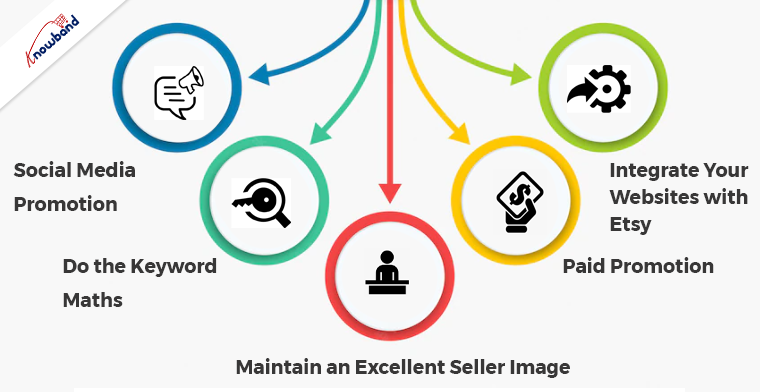
5 Most Trusted Tips and Tricks to Boost Etsy Sales
Social Media Promotion
Although Etsy has a dedicated marketing and promotional department that works for getting traffic on the platform. Yet, you can also play your part with the help of social media marketing.
For example, if you already have an Instagram account for your business you can post your Etsy image on your official account. The following method will not only help you to get traffic on your Etsy shop. But also, will help you to enhance your brand recognization. Although the following trick might seem a bit new to you yet, it comes under the list of the worthiest but fewer familiar ones.
Do the Keyword Maths
Keywords are one of the major sources that play an important role in bringing custom traffic to any website. Likewise, the same thing applies to the Etsy marketplace. Because even on Etsy the customers sometimes do not know the actual product names. Instead of searching with the product name, in most cases, they try to search with the appropriate keywords.
During the entire process, the merchants that have added the proper keywords win the game. For example, if you are a seller that deals in handcrafted items, you can find various others. All you need to do is do a keyword study on some of the top-ranked sellers. Likewise, you can add relative keywords to your products to grow more customer traffic.
Maintain an Excellent Seller Image
Along with selling the other important factor for getting the most out of marketplaces, is having a positive seller image. Not only do the customers prefer sellers who have a good refund, returns policies, and ratings while ordering. But also, it puts you on a plus against the competitors.
For example, if you are selling a product at a price point of $10 and another seller John is selling the same at $8. The only difference you both have is John has 4-star ratings and you have 5. The chances for the customers to consider your products over John’s are much more because of the seller’s image.
Thus, while selling on the marketplaces, maintaining a positive seller image is an important part of the business.
Paid Promotion
Paid promotion is one of the quickest ways for generating customer traffic. Although you will have to spend a bit extra on the paid promotion. Yet, if you are looking for building your brand name in a short period. This might be the best option you can go with.
Moreover, if you running a bit tight on the budget, you can also give a go to paid promotions on special occasions. Instance, you can run Offsite Ads on festivals such as Christmas, Thanksgiving, Cyber Monday, etc.
Integrate Your Websites with Etsy
If you are selling on Etsy Marketplace along with your website, you must have gone through problems while managing two admin dashboards. Not only you will have to maintain two separate dashboards while keeping up with the orders but also, it becomes difficult to manage the stock on both platforms.
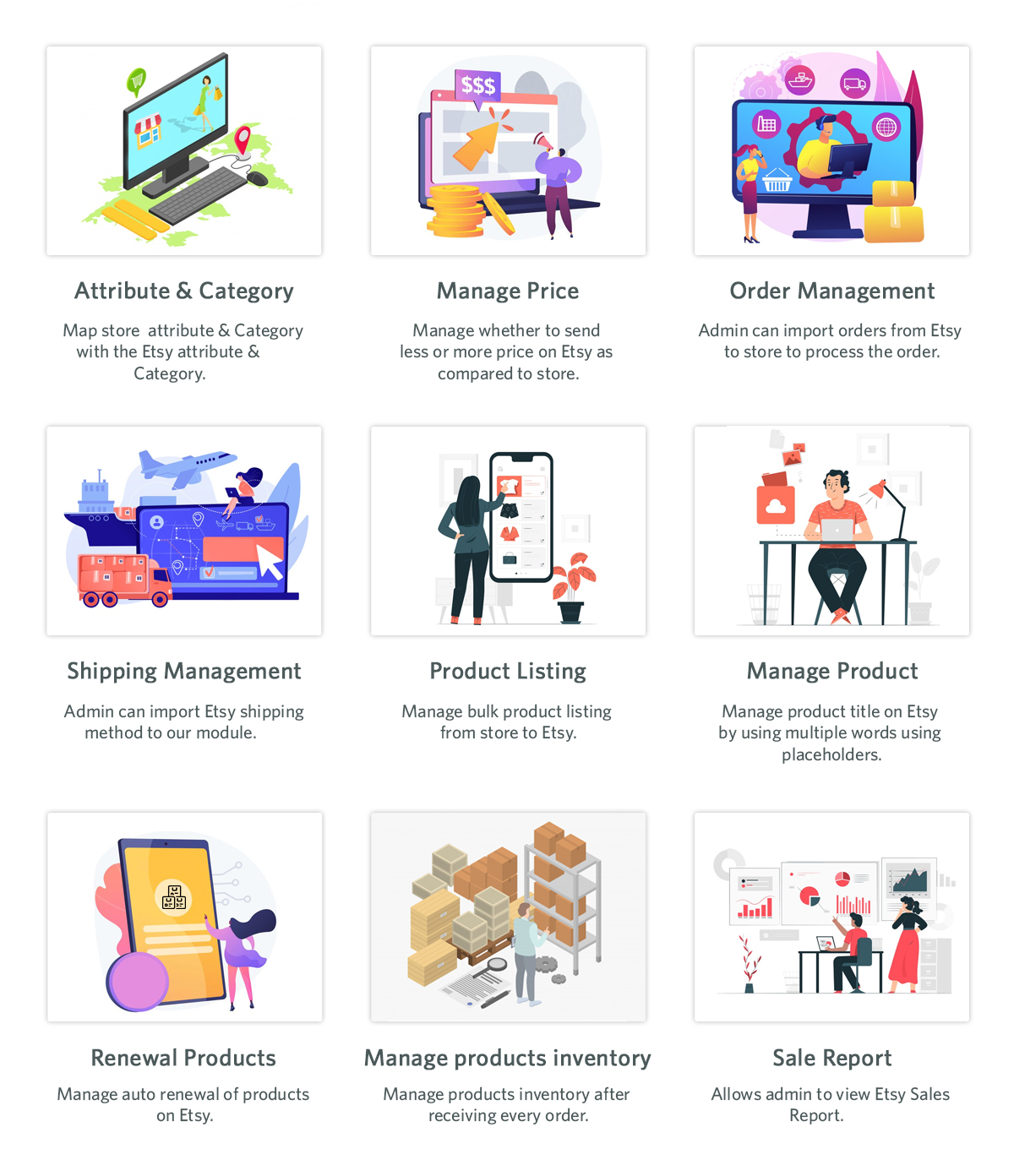
For the mentioned problem our tech team has designed the most advanced Etsy Marketplace connectors. The Etsy Integration plugins are now available for the OpenCart, PrestaShop, Magento 2 and WooCommerce platforms. Moreover, using the PrestaShop Etsy Integration Addon, the sellers can not only sell the same stock on both the PrestaShop store and Etsy at the same time. But also, PrestaShop Etsy Connector allows the merchants to keep the track of all the Etsy orders right on their shop admin panel.
On top of that, Etsy is a well-known platform for its charges and commission. To overcome this fact, we have added a price management feature in the PrestaShop Etsy Marketplace Module. With the help of the same, the PrestaShop sellers can sell their products on Etsy at an increased/decreased price from their PrestaShop shop. Likewise, OpenCart, Magento 2, and WooCommerce online sellers can also sell on the Etsy marketplace and still can manage everything from their shop admin panel. Moreover, the Knowband Etsy Marketplace integrator comes with a single-time payment option. Thus, for taking joy in the services, you will not have to renew your subscription every year. Moreover, in case you are having queries or suggestions about selling on Etsy, find us at support@knowband.com.
Due to the marketplace’s dynamic nature, it is necessary to continuously improve and update your marketing plan. Your brand might acquire a competitive edge by looking for ways to enhance your marketplace approach. The most popular locations for today’s online shoppers are still online marketplaces like eBay, Etsy, and many others. Online marketplaces are now used by around half of US businesses and European ones to sell their products.
Making the proper online marketplace decisions is crucial for brands all around the world. To be sure you’re on the right path, we have listed 2 the Advantages of two Marketplaces to enhance your online marketplace approach.
eBay Marketplace
One of the most popular online marketplaces in the world is eBay Marketplace thanks to its huge user base. Concurrently operating eBay businesses and internet stores may be challenging. The handling of orders and inventory on the eBay Marketplace takes a lot of time and effort. For owners of e-commerce businesses, this eBay plugin is an excellent option. Owners of online stores can easily link them with eBay storefronts by using eBay Integration. To manage both your eBay store and your offline business, use eBay integration.
The following are the benefits of using eBay:
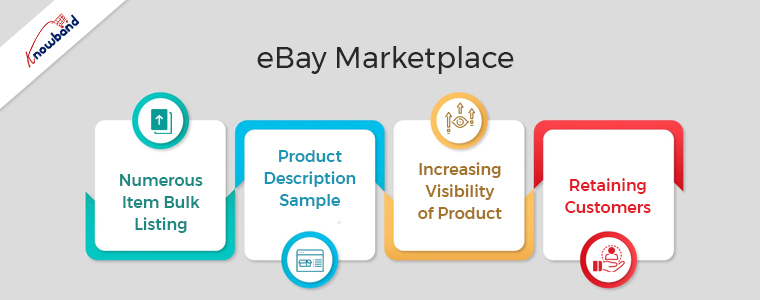
Numerous Item Bulk Listing
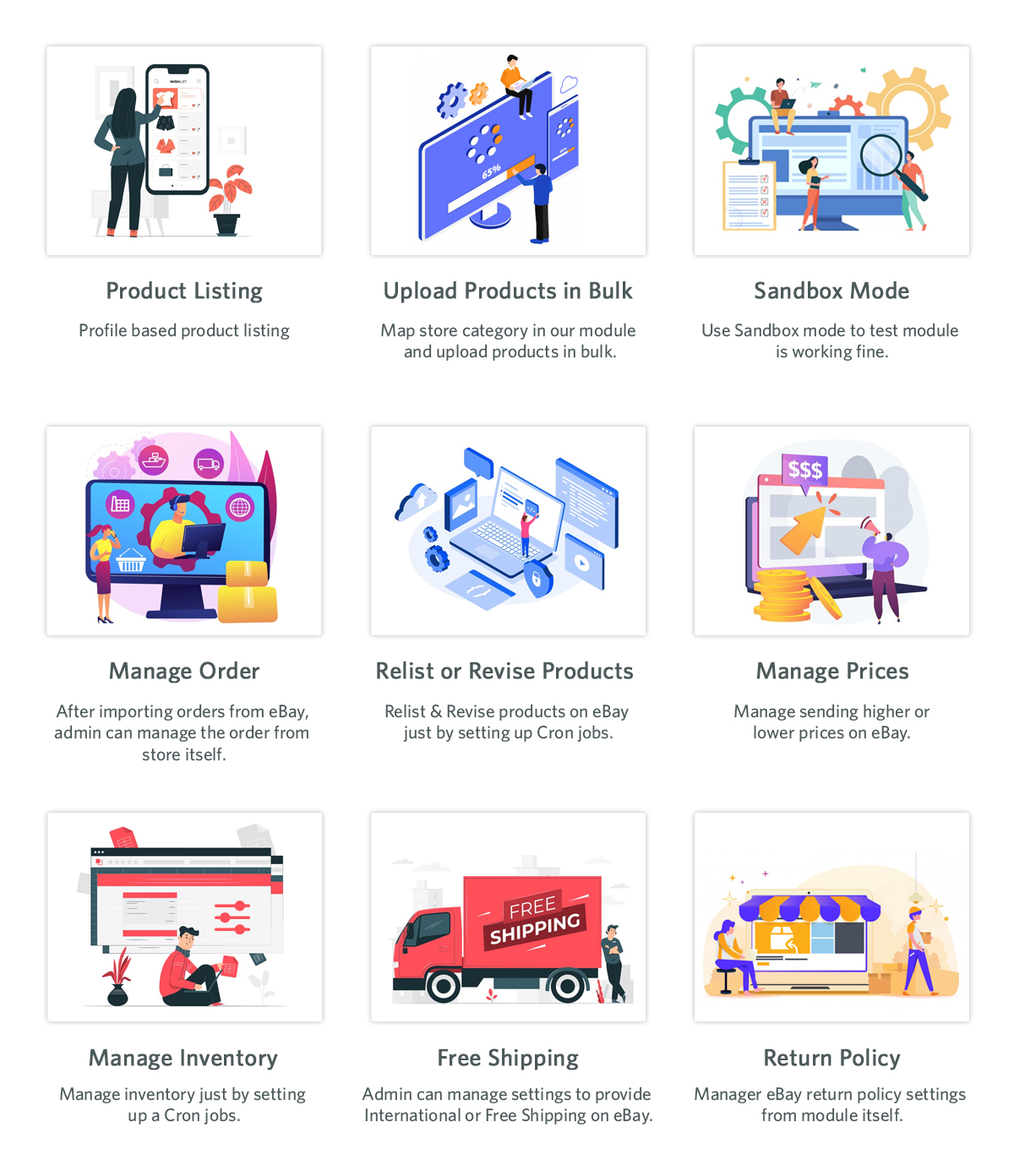
The bulk product listing feature of the eBay Integration plugin is very beneficial. The admin can also link the shop category to the eBay Marketplace category. The eBay Marketplace will never run out of the shop class products in that particular eBay category. Furthermore, a single eBay category connection to the administrator is possible with several courses.
Product Description Sample
To reflect the presence of the HTML layout, the shop administrator might apply this plugin. The API Integrator for eBay works with HTML layouts. Shop owners may track eBay product descriptions more easily with the help of this plugin.
Increasing Visibility of Product
By subscribing to an eBay store, more people can see your stuff. You can draw in more customers by being subjected to more crowds. Sales for sellers who switched to eBay store subscriptions significantly increases over the period.
Retaining Customers
When you stock your store with standout goods, people will return to you because they will remember you. They’ll contact you again the next time they need that thing. You can successfully improve your client experience and service if you operate an eBay store. One of the most important elements that affect customer retention is excellent customer service.
Etsy Marketplace
Utilizing the Etsy marketplace is essential for companies offering handmade goods, antique goods, and creative supplies. The US’s fourth-most popular eCommerce site is Etsy. Even though it has a limited user base, there are several advantages for merchants using Etsy Marketplace.
To sell their goods, effectively manage inventory, and process orders, Etsy offers retailers APIs. The Etsy Marketplace Integration module utilizes these APIs, which eliminates the requirement for a store administrator. The Etsy Marketplace is not required for sellers who have separate listings for their products on each platform. Your products need only be present in your store for the Etsy Integration module to immediately list them on the Etsy Marketplace.
Following are the advantages of Etsy Marketplace:
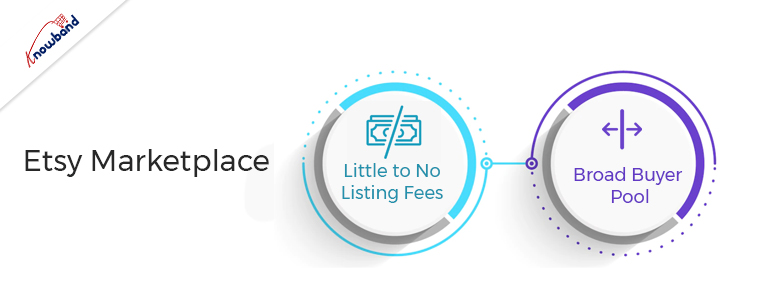
Little to No Listing Fees
You can get access to a variety of tools and the knowledge of a seller community by opening an Etsy shop, which is free to do. When you list items, a small fee of $0.20 per listing applies. It is less expensive to open a shop because there are no ongoing expenses, unlike other possibilities. A minor commission fee and a standard payment processing fee are there for the completion of a sale. To encourage the success of small businesses, Etsy generally maintains moderate fees.
Broad Buyer Pool
One of the main benefits of the website is that it is widely known. This shows that you already have a market for your products. Compared to larger eCommerce sites, Etsy is more frequently visited by customers looking for authentic goods. Etsy has distinct products rather than a product with numerous entries that are comparable.
If your company shares Etsy’s mission of offering customers unique, handcrafted, vintage items, then this is the place for you. This helps you attract visitors who are currently spending time on the website.
Wrapping Up
In this article, we have explained the advantages of two marketplaces and why they are useful for eCommerce businesses. If you want our help with the same, please contact us at support@knowband.com. For specific developments for your company also you can get in touch with us. We will also help you to add additional functionality to the plugins. Kindly let us know in case you need our help regarding any concerns or issues related to our modules.
The first term that springs to mind when we consider purchasing homemade goods online is Etsy. A professional seller community called Etsy Marketplace primarily focuses on handcrafted or vintage goods and craft-related products including jewelry, apparel, health and beauty products, and many others. Because the majority of the merchants listed on Etsy are small business owners, it can also be regarded as a C2C platform. One of the most well-known Marketplaces in the world is Etsy owing to the great purchasing experience.
Etsy’s ability to bring together these small-business vendors offering uncommon and unique items has helped it grow into a leading marketplace for arts and collectibles. When choosing unusual gifts, customers frequently seek Etsy for ideas, and many go there particularly to look for items that aren’t available on other online markets.
Among other e-commerce sites that focus on vintage or handcrafted goods, Etsy is one of the top global online marketplaces. For those aspiring sellers who are interested in selling on the Etsy Marketplace, this seller’s handbook provides a doorway.
A unique online store called Etsy focuses mostly on handmade, vintage, and custom-made products and supplies. It’s crucial to keep an eye on your products’ placement in search results if you want to sell something on Etsy.
Look at the top-selling items on Etsy Marketplace before we get started:
Jewelry.
Tools and supplies for clothing crafts.
Baby and children.
Old Things
Personalized or homemade candies.
decorations for a party.
supplies for heat transfers and vinyl.
While a wide range of categories, including jewelry, purses, apparel, home décor and furniture, toys, art, as well as craft supplies, and tools, are among the top sellers on Etsy Marketplace.
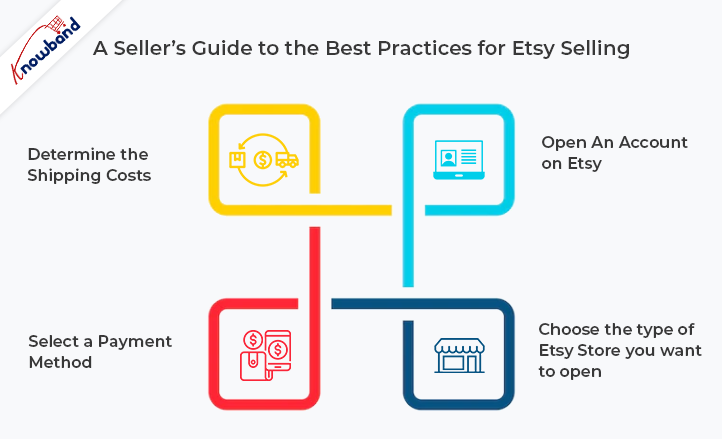
A Seller’s Guide to the Best Practices for Etsy Selling
For those sellers who want to sell on Etsy or who are already Etsy Sellers, this guide is a good place to start. To speed up the selling process and increase profitability, it aims to answer all frequently asked questions. Registering to sell on Etsy is easy. To sell your products on Etsy, you must adhere to these three easy steps:
Open An Account on Etsy
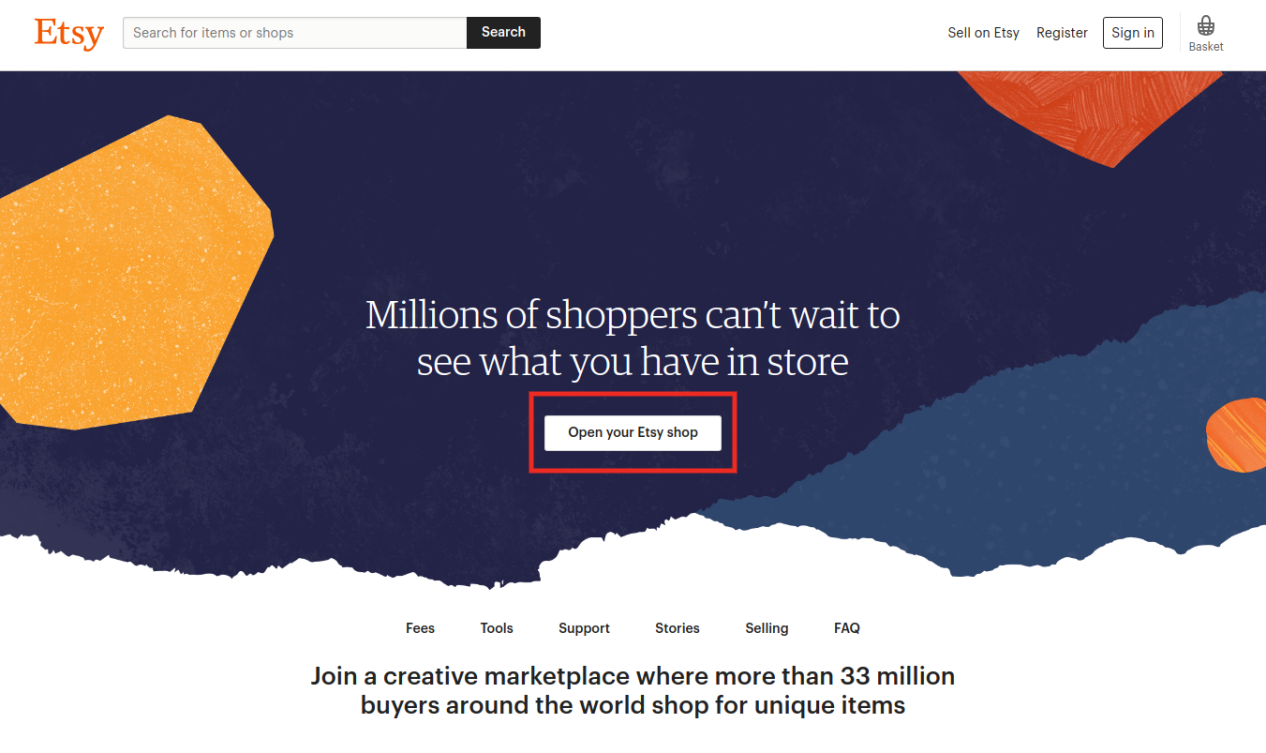
The first step in using the website to sell items is to set up an Etsy account. You can do this by visiting the Etsy homepage, choosing Sell on Etsy, and then choosing Open Your Etsy Shop. You will be given instructions on how to configure the language, currency, and location of your store.
Choose the type of Etsy Store you want to open.
You must personalize your shop’s choices and settings after registering to choose how it will look and work on the website. Give your shop’s name, language, and location (country or region) in the first place.
After creating your Etsy store, you must choose the payment method you want to use and give Etsy your billing information so they can identify you and approve your transaction.
You can provide customers the option to buy from you and pay with either PayPal or Etsy Payments. The most popular payment method used by Etsy sellers is Etsy Payments, which is user-friendly and offers a variety of payment options.
Determine the Shipping Costs
When registering as a business on Etsy, establishing reasonable delivery costs is also essential. Think about things like if you’ll offer your products solely domestically or also worldwide to customers in various nations. In that case, remember to budget for various shipping costs, such as duty and shipment processing time.
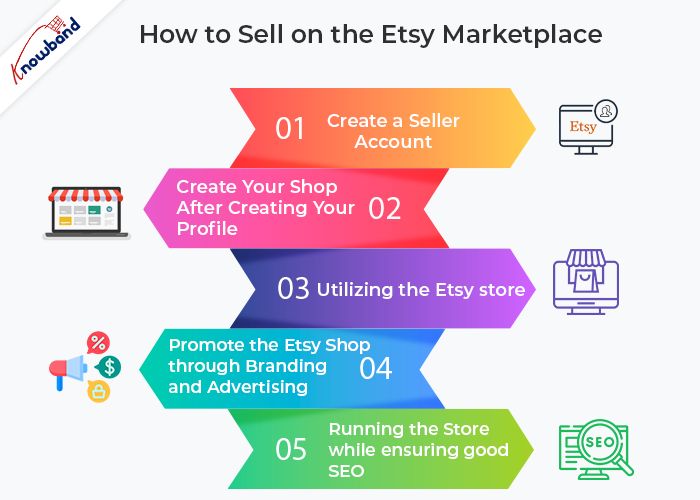
So let’s continue to talk about How to Sell on the Etsy Marketplace:
Step 1: Create a Seller Account
Create an Etsy seller account first, read the Etsy policies, and decide whether the Etsy Marketplace is right for your company.
Following the creation of your Etsy account, sign up for a profile by providing your email address, username, and password. Alternatively, you can sign up directly through a social media account.
Step 2: Create Your Shop After Creating Your Profile
Select the “Sell on Etsy” option. After selecting this, you will be taken to your shop page, where you must now provide the following information:
a) Preferences in Retail
b) Give your business a name;
c) stock it;
d) decide on a payment method;
e) establish billing;
Step 3: Utilizing the Etsy store
This part has several procedures where sellers must upload their store’s logo, cover photo, etc. Sellers must also update the business’s “About” section. Utilize the functionality of your shop’s segments to encourage customers to find and buy your products right away.
Step 4: Promote the Etsy Shop through Branding and Advertising
Making your brand shop popular on Etsy is incredibly crucial because opening an Etsy shop is not the end of the journey. The optimization of a seller’s shop information for Etsy Search should be checked. Sellers can go one step further and provide their store’s address so that customers in the area can find it. Sellers should concentrate on promoting their store through either free or paid advertisements. They might provide fantastic deals and discounts to their clients to encourage quick purchases.
Step 5: Running the Store while ensuring good SEO
After going over all of the aforementioned steps for Etsy’s Dealer Insurance Approach, sellers should make sure they comply with all the requirements. Sellers need to be familiar with Etsy’s survey methodology and have a plan for their first transaction.
Maintaining strong SEO is crucial for a successful online business on Etsy since it can boost website optimization and consumer engagement.
Sellers need to be aware of the following:
How frequently do customers interact with your Etsy store?
The opinions of your clients, whether favorable or unfavorable.
Etsy is a global marketplace, to finish. Sellers who wish to profit financially from their skills and creativity can sell here. These artisans can sell their goods on Etsy Marketplace and make a significant portion of the proceeds. Additionally, they have the opportunity to reach a sizable portion of the global audience, which boosts your international sales as well.
For a variety of platforms, including PrestaShop, OpenCart, Magento 2, and WooCommerce, Knowband provides Etsy API Connector plugins. The KnowBand Etsy Integration module is also offering three months of free service. From the list below, select the proper Etsy integration module for your store: Prestashop, Opencart, Magento 2, and WooCommerce. The main benefit of the Etsy Integration is that it reduces the amount of manual work required to list products using a CSV file. Also, it is possible for the store administrator to swiftly and simply upload a substantial number of items to the Etsy marketplace.
Etsy is one of the most well-known online marketplaces globally. It distinguishes itself from other eCommerce marketplaces by specializing in providing exclusively handmade, artisanal, antique, and custom-made goods.
Etsy has become a top marketplace for arts and collectibles because of its capacity to unite these small-business vendors selling unusual and distinctive things. Customers commonly turn to Etsy for inspiration when choosing unique gifts, and many come there specifically to look for items that aren’t offered on other online marketplaces.
Etsy is one of the leading online marketplaces in the globe in 2021 among other e-commerce sites that specialize in antique or handmade goods. Handmade, vintage, and craft items should be your top objectives for selling and stocking up on supplies.
Etsy distinguishes out from other marketplaces because of its extensive selection of products like fashion, photography, health & beauty items, gourmet goods, art, wedding essentials, jewelry, and many more, Additionally, Open Source platforms like PrestaShop, Magento 2, OpenCart and WooCommerce are all compatible with Etsy.
Vendors are ready to connect their online stores created on these platforms with an Etsy store as a result. You will understand how to successfully sell on Etsy in 2022 by the time you finish reading this article.
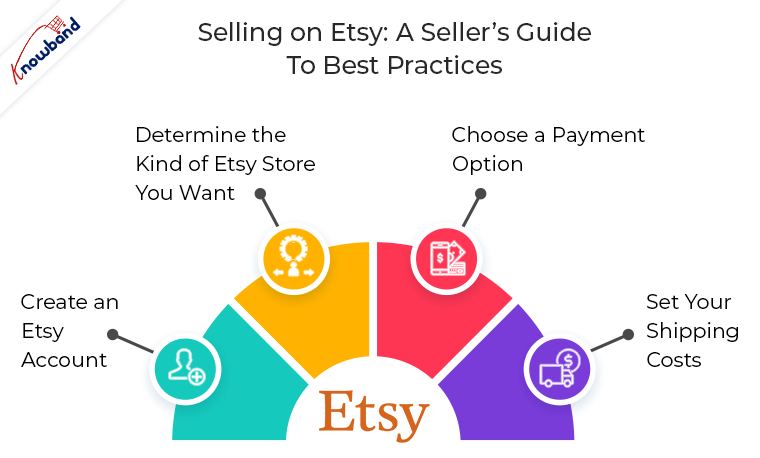
Selling on Etsy: A Seller’s Guide to Best Practices
This guide is a starting point for those sellers who want to sell on Etsy or who are currently Etsy Sellers. It seeks to address all the common questions to streamline the selling process and boost profitability. It’s simple to sign up to sell on Etsy. You must follow three simple steps to sell your goods on Etsy:
1. Create an Etsy Account
Setting up your Etsy account is the first step in the selling process on the website. By going to the Etsy homepage, selecting Sell on Etsy, and then selecting Open Your Etsy Shop, you can accomplish this. You will receive instructions on how to set up your store’s settings, including the language, currency, and location.
2. Determine the Kind of Etsy Store You Want
After registering, you must customize your shop’s preferences and settings to decide how it will appear on the website and function. First, provide the name, language, and location (country or region) of your shop.
You must select the payment option you wish to use after creating your Etsy store and provide Etsy with your billing information so they can recognize you and approve your purchase.
You can offer your customers the choice to make purchases from you and pay using PayPal or Etsy Payments. Etsy Payments, which is user-friendly and provides a range of payment alternatives, is the payment method that Etsy sellers use the most frequently.
4. Set your Shipping Costs
Setting fair delivery costs is also crucial when signing up as a business on Etsy. Consider topics like if you’ll be selling your products only domestically or also internationally to clients in different countries. If so, be sure to account for varied shipping charges, including duty and shipment processing time.
Which Etsy Products Receive the Most Searches and Purchases?
Etsy is a global marketplace where makers from all over the world come together to create, sell, and buy one-of-a-kind goods. You must be unsure of what to sell on Etsy specifically. The following are the principal top categories on Etsy for sellers:
Items that are handmade, vintage (at least 20 years old), and supplies for crafts
According to Etsy’s 2019 study, 87 percent of Etsy sellers are women, which leads us to the realization that customized, handmade items like stickers, bespoke jewelry, crafts, and supplies are the most popular.
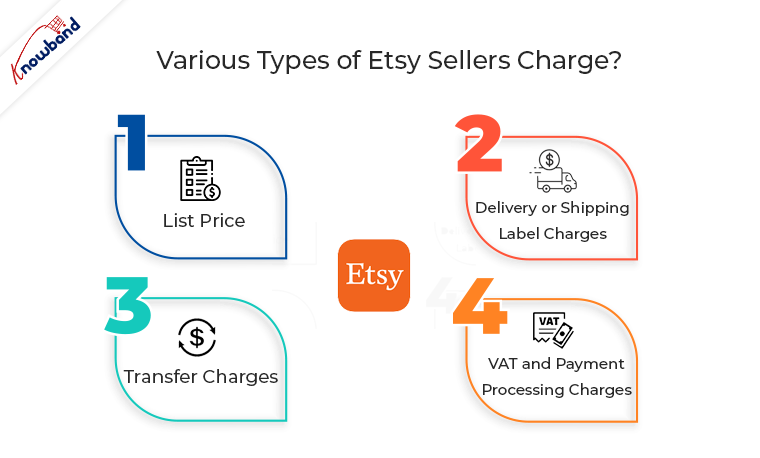
How much does Etsy Sellers charge?
When you sell on Etsy, various types of fees are imposed. These are listed below:
Requirements for selling on Etsy (Permits and Licenses):
The basic goal of Etsy as a marketplace is to offer a space where users can finally have wonderful encounters. It makes an effort to give customers something only available to them today. There are numerous categories listed for what an Etsy seller may and may not sell.
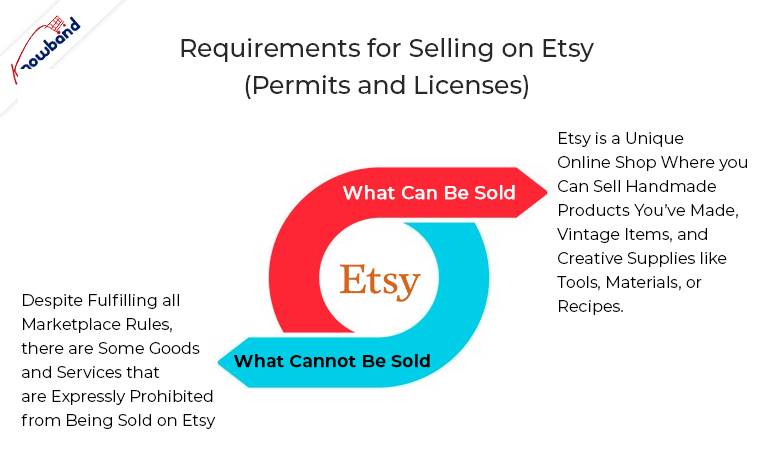
A) What Can Be Sold: Etsy is a unique online shop where you can sell handmade products you’ve made, vintage items, and creative supplies like tools, materials, or recipes. B) What Cannot Be Sold: Despite fulfilling all marketplace rules, there are some goods and services that are expressly prohibited from being sold on Etsy.
Strategies to Boost Sales of Your Etsy Postings
Using the aforementioned advice, get your Esty shop up and operating so that you may start making sales. You will undoubtedly generate some sales naturally, so you won’t need to do much more than, as already indicated, optimize your listing. Here are some extra strategies you may use to assist your sales to go from good to great if you’re trying to expand your company and your store’s sales potential.
Use Social Media to Market your Listings
Social media may be a very successful tool for marketing a business. Displaying social media posts from satisfied customers might help you build credibility with new customers. If you sell jewelry on Etsy, for example, uploading an Instagram snapshot of a happy client wearing one of your pieces may be compelling proof that your products are lovely and of a high caliber. Instagram and Pinterest are your best options when it comes to social media because they both have a strong visual component and practical search and discovery tools.
Enhance your Listing with Expert Photos
Without a question, expert photography may significantly alter how consumers view your products. Due to proper placement of the lighting, background, and camera angles, the same product photographed by a professional might appear considerably higher-quality. Even though utilizing a smartphone to take nice DIY photographs is doable, investing in professional product photography will always help your listings.
Make sure your Etsy listing’s pricing is competitive with those of your competitors while still leaving room for a fair profit margin. As a result, it’s crucial to keep an eye on market changes and trends.
An item you sell, for instance, can unforeseen become the most sought-after gift throughout the Christmas season. In this case, you should unquestionably increase prices to keep up with consumer demand, but not to the point where you turn away customers in favor of a competitor. Similar to this, if the market demand for a product you’re selling starts to diminish, you’ll need to change your prices.
Identify the Etsy Algorithm
An important advantage is the vast number of prospective customers who use Etsy. You have the opportunity to communicate with a sizable audience of potential buyers as a seller! You must still be careful how you offer yourself to the right clients, though.
Here, keyword optimization and mastery of SEO, particularly as it relates to the search engine on Etsy, are essential. Use the search terms that Etsy users who represent your ideal customers are using.
In the End:
Etsy is the ideal place for you to think about listing your goods if you’re a small business or a solopreneur with a unique, homemade, or eccentric product. You can potentially integrate with other platforms and reach a huge, highly targeted audience without having to invest a lot of money. It’s easy to register, and as a vendor, you’ll join a dynamic and unique eCommerce marketplace.
Knowband offers Etsy API Connector plugins for various platforms like PrestaShop, OpenCart, Magento 2, and WooCommerce. The Etsy Integration module by KnowBand, which is also providing three months of free service. Choose the appropriate Etsy integration module for your store from the list below: Shopify, Opencart, Prestashop, Magento, and Prestashop. The main advantage of the Etsy Integration is that it lessens the manual labor involved in listing products using a CSV file and enables the store administrator to quickly and easily upload a large number of items to the Etsy marketplace.
Etsy is a unique marketplace that mainly deals in the online trading of handmade crafts and vintage items which includes jewelry, toys, sports items, etc. It is a platform where sellers can make money out of their art and creativity and can earn a huge chunk of profits. Selling on Etsy Marketplace is still a dream for many sellers so to know the process of selling on Etsy, you can have a look at how to sell on Etsy Marketplace.
mCommerce popularity of Etsy:
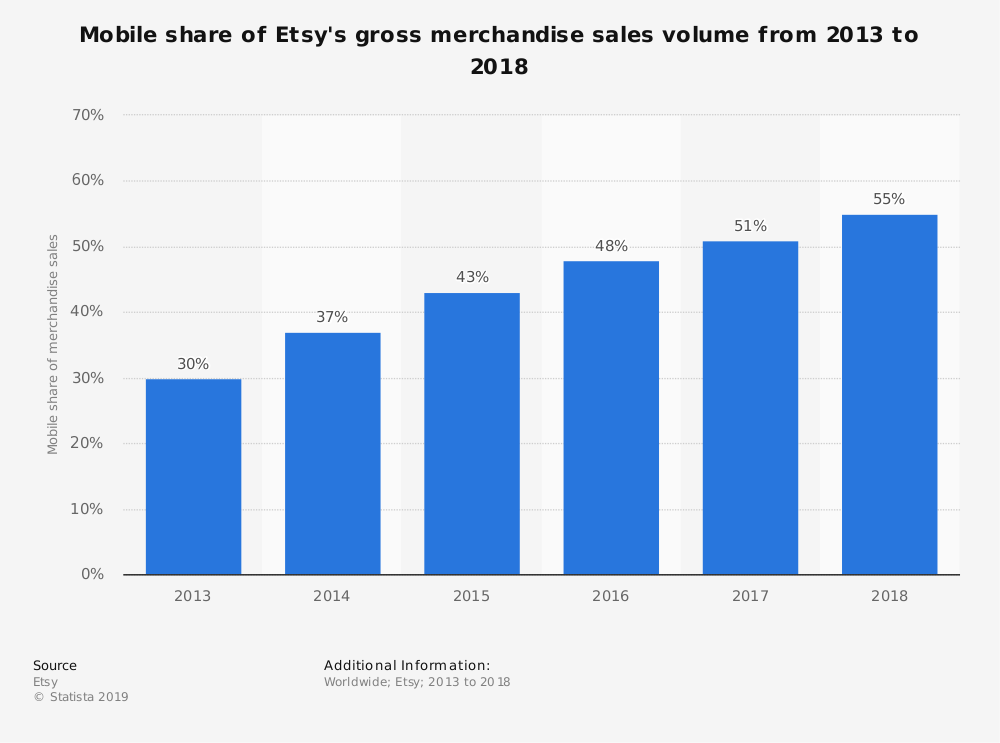
The usage of mobile apps is continuously increasing day by day. Etsy has a great mobile app that works efficiently and is been used by many customers worldwide. In 2018, 55% of the company’s gross merchandise sales were generated through mobile devices. Therefore, it’s the mobile app is offering good sales and profits.
However, the increased usage of mobile apps does not assure you of massive sales and profits. For that, it’s important to rank your products high on the Etsy search results. Sellers need to be patient and should implement the best practices to achieve their goals. However, if you’re concerned more about the product ranking on search results, you can have a look on “How to increase the sales of the Etsy Shop, It contains strategies to skyrocket your product ranking on Etsy and acquire more customer attention which will compel them to go for instant purchase.
Benefits of selling on Etsy Marketplace:
Earlier, there was no way for small vendors to sell their hand made products among huge no. of audience. These craftsmen used to sell their products in fairs, open markets, or under consignment. However, the introduction of Etsy Marketplace helped these small merchants to sell their products online as it is a quick, moderate, and easy way to access millions of customers worldwide resulting in good profits. It enabled sellers to set up their brand shop with all the facilities provided without any advanced investments. Being an eCommerce store owner for any CMS platforms like PrestaShop, Magento, Shopify, and OpenCart, they can sell on Etsy and leverage the following benefits.
Benefits are listed as follows:
1. Personalize your store:
The chance to personalize your storefront is given by fewer Marketplaces only like Etsy. Etsy gives sellers a golden opportunity which enables merchants to list their products accordingly, put the brand logo, and create personalized taglines and product-related policies. This will help sellers to enhance their brand image and become popular among customers which in result will provide immense sales.
2. Attract to a huge audience:
As we already got to know above that Etsy has 39.5 million active buyers. Undoubtedly, sellers have high chances to make good sales and profits as customers testimonials are showing their love towards Etsy. Also, it automatically provides sellers the accessibility to millions of customers all over the world. This enables them to increase their cross border sales too.
3. Customer Engagement:
It is another flexibility offered by Etsy to its third-party sellers. Etsy allows their sellers to:
Leave their social media handles,
Offer discounts and coupons on their products,
Collect emails to send reminder notifications.
These strategies help in engaging the targeted audience and also put sellers in charge of their product listings. On the other hand, it increases customer engagement on Etsy Marketplace which can compel customers to go for instant purchase.
4. Low cost of Startup:
As Etsy Marketplace has all things set up in one place, the retailer has to hardly make any investments other than some few expenses. Thus, the minimal cost is involved in selling on a Marketplace as a comparison to selling on your eCommerce website. Etsy will only charge:
Monthly Subscription Fee for selling on their platform and, listing fee or commission which is a standard amount for every product they listed on the Marketplace’s catalog.
5. Increased Brand visibility of your store:
If you are a newcomer in the eCommerce industry and trying your best to mark your presence on customers, Etsy Marketplace will help you to enhance your brand visibility and gain customer’s trust which will directly compel customers to go for instant purchase and this will result in increased sales and revenues.
6. Marketplace’s Powerful and supportive community:
Etsy makes you feel like family which indirectly brings you immense sales. Etsy has its forums and teams which always remain connected to the sellers and help in every possible way. This helps in building up the confidence of sellers which in total makes the whole Etsy Marketplace strong.
Finally,
Selling on Etsy is the least complex way to ensure good sales and revenues. Selling on Etsy Marketplace is not an easy goal to achieve so luckily if sellers get a chance to sell on Etsy, then the above-mentioned benefits will help them to ensure good profits. Regardless of the marketplace, you choose to sell on, it’s important to be aware of the latest trend going on in the eCommerce industry and implement it for a profitable business in the future.
Selling on Etsy Marketplace was not that easy before. KnowBand offers Etsy Integrators for various CMS platforms like PrestaShop, Magento, Shopify, and OpenCart, which allows sellers to integrate their eCommerce store with Etsy Marketplace via API integrator. With its seamless technology, sellers can easily present their products among the larger audiences and encourage brand awareness as well.
Whenever we think of buying handcrafted products online, the first word that comes in our mind is Etsy. Etsy Marketplace is a professional seller community that mainly focuses on handmade products or vintage items and craft-oriented products like jewelry, clothing, health and beauty and many more. It can also be considered as the C2C platform because the merchants listed on Etsy are majorly small business owners. The amazing shopping experience on Etsy makes it one of the most popular Marketplaces all over the world.
This seller’s guide is a doorway for all the aspiring sellers who are looking forward to selling on Etsy Marketplace.
Top-selling items on Etsy
Etsy is a unique e-commerce website mainly focused on handmade or vintage items and supplies, as well as unique factory-manufactured items. To sell an item on Etsy, it’s important yo keep a check on the ranking of your products too in the search results.
Before we start we should have a look at the top-selling items on Etsy Marketplace:
Jewelry.
Clothing
Craft Supplies and Tools.
Kids and Baby.
Vintage Items
Homemade or Specialized Candies.
Party decorations.
Vinyl and heat transfer supplies.
While the best sellers on Etsy Marketplace includes a wide range of categories, like jewelry, bags, clothing, home decor and furniture, toys, art, as well as craft supplies and tools.
Cost to Sell On Etsy
There are 4 various types of fees applied when you list your products for sale on Etsy Marketplace. These are as follows:
a) Listing Fee:
Listing your products online on Etsy Marketplace costs sellers an amount of 0.20 $ (excluding variations) for 4 months. For example, if you sell vintage items of which belong to 4 different categories or variations, it will cost you 0.80 dollars(4 x $0.20).
After 4 months, sellers have to renew the listings either manually or they can set an auto-renew option, and again the cost applied would be 20 cents per listing
The additional quantity is also charged by $0.20 that sells for only one transaction. It means if there are more than 1 listing in 1 order then, $0.20 will be charged on each item. For more information, you can go through the following link: Multi-Quantity Fees
b) Shipping Process Fee:
The shipping charges are set as it is used to deliver the product on a given address. Shipping charges are variable depending upon the weight of the product, location distance and shipment carrier company.
c) Transaction fee:
Under this, 2 types of fees are included. First is the shipping transaction fee and constitutes 5% of the shipping process fees.
Then the second fee comes is the transaction fee which constitutes 5% of the total value of the product. An additional 3% fee is imposed for choosing Etsy’s “Immediate Checkout”.
Apart from being reasonable, Etsy Marketplace provides you the flexibility to sell products from your online store. Thus, if you have a Magento store, you can easily sell Magento products on Etsy.
d) VAT:
Firstly we should know that there are 2 types of VAT fees: Processing fee VAT and seller services VAT.
After charging all kinds of fees, VAT is imposed if sellers use them They will only be imposed if you use fees like Etsy payment processing fee, deposit currency conversion, promoted listings, Google Shopping ads, and Targeted offers.
Now all the Manufacture related information is been given. So, let’s move further to discuss the process of selling on Etsy Marketplace:
Step 1: Get Started
Firstly, create your seller account on Etsy and go through the Etsy policies and ensure whether Etsy Marketplace is ideal for your business or not.
After creating your Etsy account, register your profile by entering the email address, username and password or you can directly signup through your social media account.
Step 2: After Creating Profile Create Your Own Shop
Click on the “Sell on Etsy” option, After clicking on this option, you will be redirected towards your shop page and now you have to enter some information as follows:
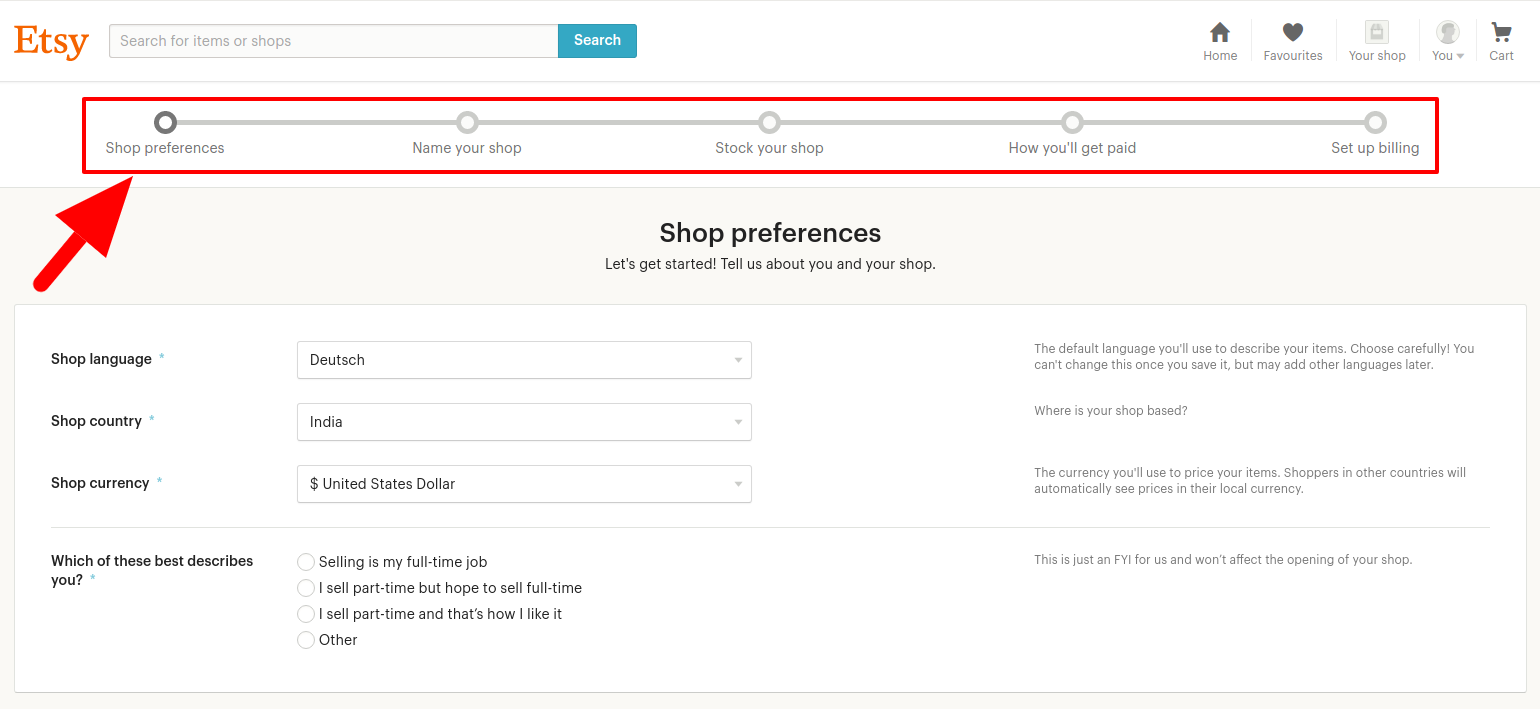
a) Shop Preferences
b) Name your Shop
c) Stock your shop
d) How you’ll get paid
e) Set up billing
Step 3: Section utilization of Etsy shop
This section is been included with various steps in which sellers have to upload a shop logo and cover photograph, etc. Sellers have to also update the shop’s “About” section. Leverage the facility of your shop segments to make your customers discover your shop products and go for the instant purchase.
Step 4: Branding and advertisement for the advancement of the Etsy shop
Creating an Etsy shop is not a complete process, it’s really important to make your brand shop popular on Etsy. Sellers should ascertain their shop details optimization for Etsy Search. Sellers can take a step forward and include a shop location so that your shop could be located by nearby customers. Sellers should focus on promoting their shop either through free or paid ads. They can offer great offers and discounts to their customers so that customers can go for instant purchase.
Step 5: Managing the shop by maintaining good SEO
Sellers should ensure to meet all the requirements after you cover all the above procedures for Etsy’s Dealer Insurance Approach. Sellers should be in contact with Etsy’s Survey framework and should have an idea to make their first deal.
For a good online business on Etsy, maintaining good SEO is very important which can help to increase customer engagement and optimization of the website.
Sellers should keep an eye on the following points:
The rate of customer engagement in your Etsy shop.
The reviews (either positive or negative) by your customers.
Product Listing Quality factor
Inbound links
For more information in one picture, you can have a look at the tips to rank your products up on the search results on the Etsy Marketplace.
Who pays for Shipping on Etsy buyer or seller?
Shipping charges vary from product to product. Some products are delivered without delivery charges where sellers bear the shipping cost while some products have added delivery charges and customers have to pay for it It varies from product to products. Some of the products are offered free shipping where sellers bear the cost of shipping whereas, some require buyers to pay for shipping. It depends upon the order value, shipping destination, and the shipment method chosen by the buyers.
Finally
Etsy is a global marketplace. Selling here is an opportunity for sellers who want to make money out of their talent and creativity. Etsy Marketplace is the one-stop solution for these artists and they can sell their products to earn a huge chunk of profits. They also get a chance to access a huge no. of the audience all over the world which increases your cross border sales too.
How KnowBand can help you to sell on Etsy Marketplace?
Knowband offers Etsy Integration Extension which is a smart solution for an eCommerce store owner to clear out the complexities of selling products on Walmart. It works by providing an API Integrator between an eCommerce store and the Walmart marketplace. It bridges the gap between your eCommerce store and Etsy with the help of which sellers can easily map their product listings on the Marketplace website. Once the integration is successful, the admin can update all the product listings on Walmart Marketplace from the back-end without even visiting the Marketplace site. Available for different CMS platforms like PrestaShop, Magento, Shopify, and OpenCart, sellers can easily download and install it on their website without any inconvenience.
With an increase in customer’s demand and advancement in technology, Marketplaces like Etsy, eBay, etc have already started gaining popularity. Creating an Online Marketplace like these Marketplaces requires lots of efforts and strategies. The marketplace is one of the most profits generating business. An online merchant can earn a huge profit from the commissions paid by the sellers. The store admin need not invest in inventories of products.
Why should we create an online Marketplace?
The Marketplace is an eCommerce platform where multiple buyers and sellers are connected on a single platform. Multi-vendor store bridges the gap between users and retailers. Multiple retailers integrate to sell their valuable items on the Marketplace. Retailers need to get themselves registered at the Marketplace and be a part of the large shopping organization. The marketplace can help an admin to increase the customer retention rate and earn from listing seller products, seller services, seller commission in addition to its sale.
The demand and reach of the Marketplaces are expanding every millisecond. It’s never too late to build your Marketplace.
B) If the admin is having an eCommerce store then there are various Marketplace extensions available in the Market to simply upgrade the store into a fully-featured Marketplace.
2. Merchant Panel:
Progress of a Marketplace mainly depends on its two main stakeholders i.e buyers and retailers. Details of buyers and sellers are very sensitive and need to be secured and protected. A Merchant panel to manage the seller list and listing of products is mandatory for running a Marketplace.
3. Effective Notification system:
A Notification system is required to keep the sellers and customers updated about any change at the Marketplace.
4. Feedback panel:
Review and Rating platform to monitor the customer’s valuable feedback needs to be there. Feedback sent by the customers is important for the growth of the eCommerce store.
5. Seller dashboard:
A dashboard for sellers to manage their product listings is required in a Marketplace.
How to build your Marketplaces like Etsy and eBay?
There is no denial in this fact that Marketplace is a great source of revenue for store owners. But to run a successful multi-vendor store is not a cup of tea for everyone. The total cost of building a fully-fledged Marketplace may vary from place to place. In various places, the cost of building a Multi vendor store is too lengthy and costly but the availability of the Marketplace modules has lessened the pain and it’s now easy and cheap to build a Marketplace like Etsy and eBay. To start building your Marketplace like Etsy and eBay you must keep the two basic pillars of the Marketplace in mind i.e., seller and buyers. A Marketplace can never run without its sellers and customers.
1. Patience and a plan
Patience is the key mantra in the way of your Multi vendor business. Patience is required in the initial stages of setting up the multi-vendor store. Keep your patience with you till both sides’ sellers and customer communities have established. The period required for the establishment is somewhat greater than an inventory based eCommerce startup where we build our supply chain. However, in the marketplace, both the customer and seller communities are required to build which eventually requires more time to run. The multi-vendor store may take a few months to prove their real worth in the meanwhile the admin needs to look for the target area and start focusing on that.
Etsy is one of the examples which started from a niche market (Vintage, handmade products, and books respectively) and later widened its target area. Thus the admin needs to stay focused, steady and patient with its plan.
2. Emphasis on the initial investment
Never rush for the initial investment decision. The online merchant needs to give himself some time to calculate the worth of its own business as everybody is not a Microsoft owner who has no scarcity of dollars. Some businesses show huge success with early big deals but it’s not possible to buy the speed while building a Marketplace. Emphasis on the initial investments would take your business furthermore on the runway.
Plans like big teams and big offices in the early stages of the multi-vendor store launch can be avoided. Initial marketplace investments are mostly required in two functions:
A. Building the marketplace site, and
B. Building the supply chain with the buyers and sellers community.
3. Target on the niche market
Etsy marketplace started as an eCommerce platform for Vintage and handmade crafts and later expanded its target area to other categories. As of now, Etsy even accepts the integration and the merchants can sell their goods on the oldest and successful multi-vendor store from their stand-alone eCommerce sites. Successful business though may provide you with diverse and rich quality stuff in one place but none of them has started from there where they are now. This narrowly targeted approach steadily grew up into a diverse market and the result is a successful online place like Etsy.
Action plans for targeting certain types of product categories and sellers can be adopted to gradually expand outside the niche of the circle.
4. Niche users utilities
From the above point, it’s clear that successful marketplaces are built from a niche to the masses. During the initial period, the emphasis is required to provide better user experiences to the early on-boarders. Before making plans to appeal the masses focus on user engagement for both the early sellers and customers.
Etsy in its budding stages did a superb job as a marketplace for handmade crafts which ultimately led to its expansion to other categories. Thus before focusing on the broader section first make sure the marketplace is doing justice in the narrow section which ultimately will take you to the enhanced section automatically.
5. Build a community with your Niche users
Focus on the utilities of the targeted Niche users and support them from time to time. Various social media platforms are available that can be used to build a community. Online Merchants can approach these platforms to expand their reach and build a healthy community. Like the Meowing tons that focused on the women who like cats and started selling the cat accessories, cat utilities, and cat theme accessories for women. Women Cat lovers shared a major part of the US population and thus it turned out to be a successful startup with more than 500 thousand followers on different social media platforms.
6. Focus on Stats
While building your Multi-vendor business the online merchant needs to have a vision and trust in himself. Having a vision is important to achieve success in the business but blind faith leads often leads to falling. Tracking your progress and reassessing these steps from time to time will enable you to calculate what is working for you and what is not.
If the stats are not in favor, the admin can rethink them and find measures to turn the result in its favor. Moreover, you can’t run a successful marketplace just with your vision, the online merchant needs to stay tuned with the latest stats and facts.
Measures to be taken care of in your online marketplace.
If you have been a vendor ever that experience can help you to get the best from the third-party sellers. Similarly having practical experience as a customer will help you to address the issues faced by the customers on the eCommerce site. For running a successful multi-vendor store equal attention must be paid to both the sellers and customers. Build a personal connection not only with your sellers but also have a strong customer relationship. A strong customer base will help you to approach the sellers for your multi-vendor store, in the same way, a large number of sellers and product variety can compel the visitors to shop from your site. Moreover, advertisements involving celebrities can play a major role in attracting both sellers and end-users.
How to get the customers?
As discussed earlier, some of the strategies the merchant needs to follow to bring the traffic on their site are:
1. Focus on the niche market.
2. Create a strong customer base
3. Take measures for customer retention.
4. Pay attention to the follow-up emails and social media engagements.
How to get the retailers on your site?
Once the Marketplace is established and you are clear about the niche, things will turn to be fruitful in your way. After you have conquered a place in the market, attracting the sellers will be easier.
Finally,
The steps discussed above will guide you in giving a correct start to your business. Building your own Marketplace business is a hard job as compared to a one-sided inventory model, but once the Marketplace is properly established and is going in the planned direction then things would start kicking and would setup your footwell and firm in the Market. Till then stay in touch with the latest trends and techniques to give your business new wings to fly high with both sides being well established.
For any query, feel free to contact support@Knowband.com
With the huge involvement of the internet in daily lives, a large number of customers are buying products online globally. The advancement of the eCommerce industry is flourishing day by day. If you are a retailer then the idea to sell online could never go wrong. Selling online expands your reach globally. This helps the online marketplace to make more profits than usual.
There are numerous ways of selling online apart from starting an online website. Retailers can even sell their products through renowned marketplaces. The growing competition among sellers encourages them to implement some new strategies to attract more customers to your product. Selling on Marketplace like eBay, Etsy, Walmart, etc could be a bet as they can easily give a brand more exposure. and get you instant access to a vast number of potential customers.
If you create your own eCommerce website, you can get full control, large profits, higher scalability. It can become costly for you as setting and promoting a niche brand requires high investments. But if you choose a marketplace, you could sell your products online with certain control but will be able to leverage the global reach and services of a Marketplace. Customers often prefer buying products from Marketplaces because of the wide variety of products and the ease of all-in-one shopping. Apart from this, selling products on Marketplace could offer you much more.
Marketplace statistics to give a clear idea
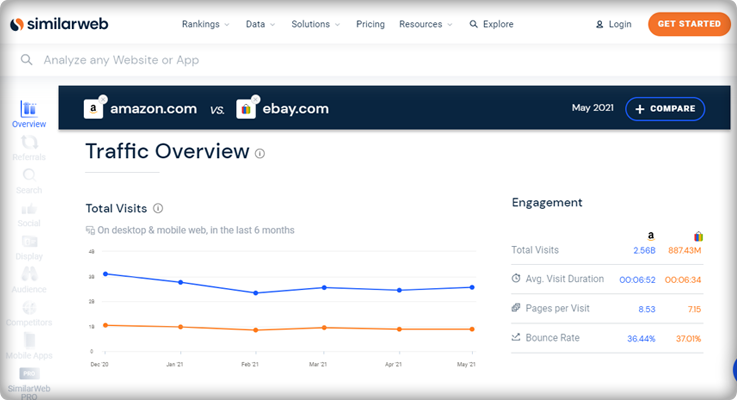
Here is a graph from a similar Web representing the total visits of two famous marketplaces Amazon and eBay.
In a recent blog, published by the webretailer, Amazon is still on the top, surpassing every other marketplace. It gets around 5.2B visits every month.
The report includes data for 155 most visited marketplaces with more than one million visitors per month. And eBay ranks 2nd globally in the similarweb reports.
The top 20 marketplaces have a collection of general merchandise except 3 that sells specific product categories, eg. Etsy.
General, Fashion, Arts, crafts and gifts, Homewares, and Electronics are the top five product categories among the popular marketplaces.
Below are some of the reasons to start selling products on Marketplace:
1. Huge audience access:
The huge popularity of Marketplace like Etsy, eBay, Walmart, etc. for online shopping automatically provides you the accessibility to all its customers without having to spend any money on marketing. It’s a good opportunity for small business owners to gain good profits without any advanced investments.
2. Low Startup Cost:
As Marketplace has all things set up in one place, the retailer has to hardly make any investments other than some few expenses. Thus, the minimal cost is involved in selling on a Marketplace in comparison to selling on your own eCommerce website. For example Marketplaces like Amazon, Walmart, etc charges:
Monthly Subscription Fee for selling on their platforms
And,
Listing Fee or Commission which is a standard amount for every product they listed on the Marketplace’s catalog.
3. To increase trust level:
It usually happens that the users buy the same product as yours from the Marketplace due to a lack of trust. Once your product reaches Marketplace, it will get more exposure and this will definitely motivate the users to go for instant purchase. It’s also beneficial in getting high sales and revenues too.
4. To reach Global Market:
Marketplaces provide you an option to expand your business reach globally with minimal effort. Sellers can access millions of potential customers globally without making any advance investments. This would definitely boost up your cross-border sales and overall business growth. For example, Amazon, Walmart, Etsy eBay are top leading Marketplaces serving millions of online customers all over the world
5. Enhance your brand’s visibility:
If you are a newbie in the eCommerce industry, it’s obvious that customers are unaware of your brand and products. You surely need recognition in the market. Marketplaces like eBay, Etsy, and Walmart help you to boost up your brand and visibility by listing all your products on their web page.
6. Deliver outstanding customer service
There are similar options to help sellers fulfill customer standards for quick, free delivery. They have their customer care teams that work 24/7 for customer service and to resolve their real-time issues.
For example, with programs such as Fulfillment by Amazon (FBA) and eBay Global Shipping, you can choose to have on your behalf the marketplace warehouse, pick, prepare, and ship product.
7. Provides a broad variety of payment and shipping options
For quick purchases, the marketplace offers different payment and shipping methods. A seller does not have to worry about shipping while selling over different marketplaces.
Dropshipping is another trending feature provided by many marketplaces. While some allow the sellers to add their shipping methods or the seller can use the marketplace shipping services.
8. Extremely authoritative and trustworthy
Many eCommerce experts may contradict this but some may take the favor. Marketplace like Amazon is a safe and reliable place for the transaction. They provide secured options for payments and are integrated with various payment gateways.
Similarly, many online marketplace platforms are secured with PayPal security. It is the most trustworthy payment method worldwide.
Expert Sayings:
1. Yasuhiro Fukushima, Japanese business executive -“Thus, in the future, instead of buying bananas in a grocery store, you could go pick them off a tree in a virtual jungle.”
2. Paul Graham, Y COMBINATOR – You can’t wait for customers to come to you. You have to figure out where they are, go there and drag them back to your store.”
3. Mudit Khosla, CEO, Tradus: If one chooses to sell through a Marketplace, then there is very less requirement of working capital unless there is a deal; there are no rentals involved.
4. Ankur Sethi, Founder & CEO, Nupinch.com: If any local retailer wants to reach a million customers to just showcase the products, he’ll end up spending some fairly huge cash. Whilst, these Marketplaces act as a channel partner & help you reach millions of users, to some really deep parts of the countries & in turn push your sales exponentially.
At the initial level, try to provide some discounts and offers to attract more customers to your product.
Keep a check on the customer reviews about your product and try to appreciate them or address their concerns. This strategy helps in making loyal customers.
Always remain aware of the latest trends and technical advancements of selling online.
Choosing the right Marketplace:
Selling through online Marketplaces like Walmart, eBay, Etsy is definitely a great option for an eCommerce retailer but choosing the right one for your business is the basic step to lead. Well, it totally depends on the product type and category of your store. Every Marketplace has its own standardized process of registration, requirements, terms, and conditions, etc. Sellers must go through these instructions and understand that which website will provide the right positioning and brand value to their product. One of the main things on which retailers should keep a check while choosing the right Marketplace is the traffic of the website. The more is the traffic, the more numbers of orders he can get for his products.
6 points to check about a Marketplace:
Although each Marketplace works differently there are some points that are similar in between them and are also a must check for a seller. They are:
Website Traffic
Reputation between customers
Stability
Checkout process
Policies and Guidelines
UI of Marketplace
The most important feature of a Marketplace is that it must provide a user-friendly interface to the customers. Sellers need to keep a check on this feature as they may face an issue in case the product is returned. Many times, the marketplace does not hesitate to accept the product which is returned without even questioning the buyer, thus this may incur a loss for the seller. So, it’s important for a seller to make the right choice for massive sales and overall business growth.
Start a Hyperlocal Marketplace that serves locally
With the clear idea of marketplace selling benefits, you can choose the right platform for your brand. Multichannel selling is profitable and builds your brand identity. Along with that, you can start selling your products locally. To make it painless, start with an online website using KnowBand’s hyperlocal marketplace module. You can deliver the products to your customers at their doorstep. You will need a delivery boy app that will allow you to manage the package delivery process. There is more to learn about it.
Over to you:
The less complexity involved with selling on a marketplace is inevitable for sellers. It’s really necessary to give an enhanced recognition to your business and Marketplace suits perfect for the job. So, regardless of the marketplace, you choose to sell on, it’s important to be aware of the latest trend going on in the eCommerce industry and implement it for a profitable business in the future.
This was all from my end, now it’s totally up to you to select a Marketplace according to the products of your store for the overall growth of your business.
Selling on Marketplace was not that easy before. Integrate your eCommerce store with the Marketplaces like Etsy, eBay, Walmart, and others in just a few simple steps. KnowBand offers Marketplace Integrators for various CMS platforms like PrestaShop, OpenCart, Magento, and Shopify which allows you to present your products to a larger audience and encourage brand awareness as well.
Marketplaces have played a vital role in the growth of e-commerce. Amazon and eBay are some of the well-known platforms, but in recent years a number of new marketplaces have marked their presence in the eCommerce ecosystem. Etsy is one of the most popular marketplaces for handmade goods and vintage items. Etsy allows people from around the globe to buy and sell unique goods. This platform invites the sellers to showcase their creativity to the new audience, thus, helping them to reach out to potential customers globally. Etsy is a great place to extend the reach of your business. The process of starting a business in the Etsy marketplace is quite easy. Please click on the link below to know more about the rules and regulations of trading: https://www.etsy.com/in-en/sell. Opencart Etsy Marketplace Integration can help you reach your business goals effectively.
KnowBand, an eCommerce plugin, and marketplace integration development company offers the OpenCart Etsy integration module. The Opencart Etsy Marketplace Integrator allows the seller to synchronize their OpenCart store with the Etsy marketplace in a few simple steps. We do understand that being ready to start selling on the Etsy marketplace, it is also important for the store owner to analyze their business method and process so that they can be able to keep up with the new challenges. After starting to sell on multi-channel sellers have to keep proper track of their inventory status, product listings, shipping methods, delivery time, and customer support. To overcome all the major challenges of selling on a marketplace, KnowBand has developed the Opencart Etsy Marketplace Connector.
With the help of the Etsy OpenCart Integration extension, OpenCart store owners can effectively manage the inventory, orders, and shipping for the Etsy shop orders from the OpenCart store admin. OpenCart Etsy marketplace integration module offers the following advantages to the sellers:
Easy installation and user-friendly interface: The user-friendly interface of the OpenCart Etsy Marketplace Integration offers an effortless interface to list the products to the Etsy marketplace.
Bulk uploading of the products: OpenCart Etsy Marketplace Integrator Module allows the sellers to upload products in bulk. Sellers can create a profile to upload the entire category of the OpenCartstore to the Etsy marketplace.
Category and product attribute mapping: Sellers can easily map the product attributes and category of the OpenCartstore products with the Etsy store attributes and category via the OpenCart Etsy Marketplace Connector Extension.
Shipping templates: Create shipping templates from the OpenCartstore admin panel and sync these templates to the Etsy shop via OpenCart Etsy Marketplace Integration Plugin.
Order Management: Manage and keep track of Etsy shop orders from the OpenCartstore admin panel.
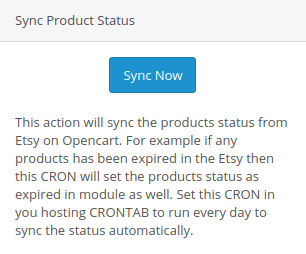
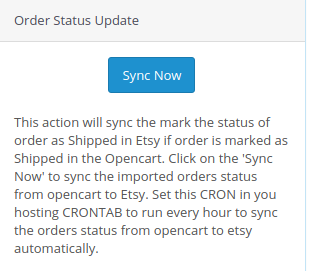
Order status: Admin can update the order status of the Etsy marketplace orders from the OpenCart store admin panel through a cron job.
Inventory management: Manage inventory for the Etsy store products from the OpenCart admin panel. After making any changes in the product inventory or attributes in the OpenCart store, the admin can easily synchronize the changes to the Etsy marketplace.
Secondary language: Admin can select a secondary language for the store and easily synchronize it with the Etsy marketplace shop through a cron job.
What’s New in the Recent Enhancements of Opencart Etsy Extension v2.0.4?
[New]Aligned with Etsy OpenAPI Standard
The OpenCart Etsy Extension has been enhanced to support OpenAPI authorisation headers, ensuring secure authentication and full compliance with Etsy’s current API standards. Furthermore, this update helps maintain uninterrupted connectivity between OpenCart and Etsy while aligning the extension with Etsy’s evolving security and policy requirements.
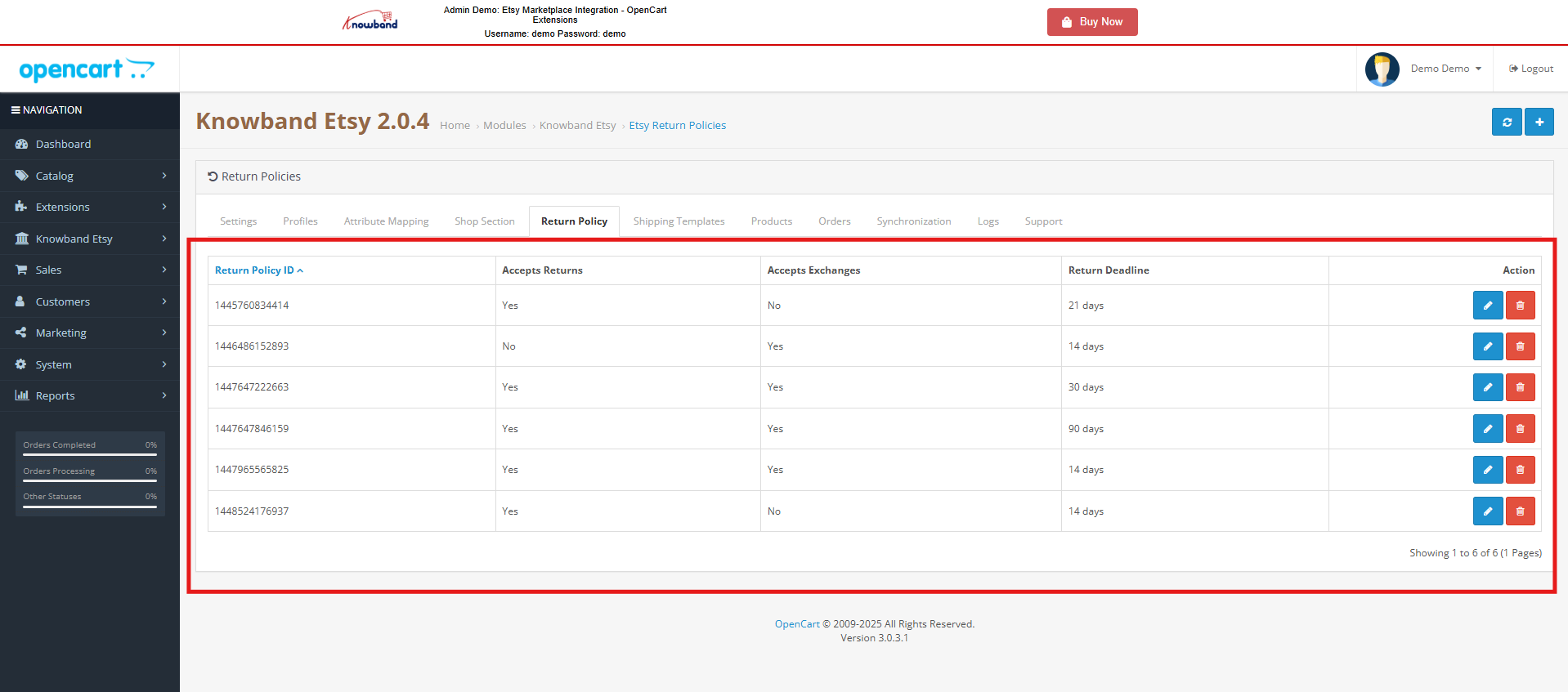
[New]Return Policy Synchronisation
In addition to the authentication header format update, Knowband’s Etsy Marketplace extension now includes Return Policy Synchronization, allowing merchants to seamlessly sync their return policies between their opencart store and Etsy. This ensures consistency across both platforms, reduces manual effort, and helps provide a clear and unified return experience for customers.
Profile Level Product Synchronization:
The enhanced Knowband’s Opencart Etsy marketplace connector extension now features profile-level product synchronization. This allows admins to list products from specific categories, offering a more targeted and efficient listing process compared to bulk product listing. This feature enhances inventory management and improves the accuracy of product listings on Etsy.
Product Listing with Custom Details:
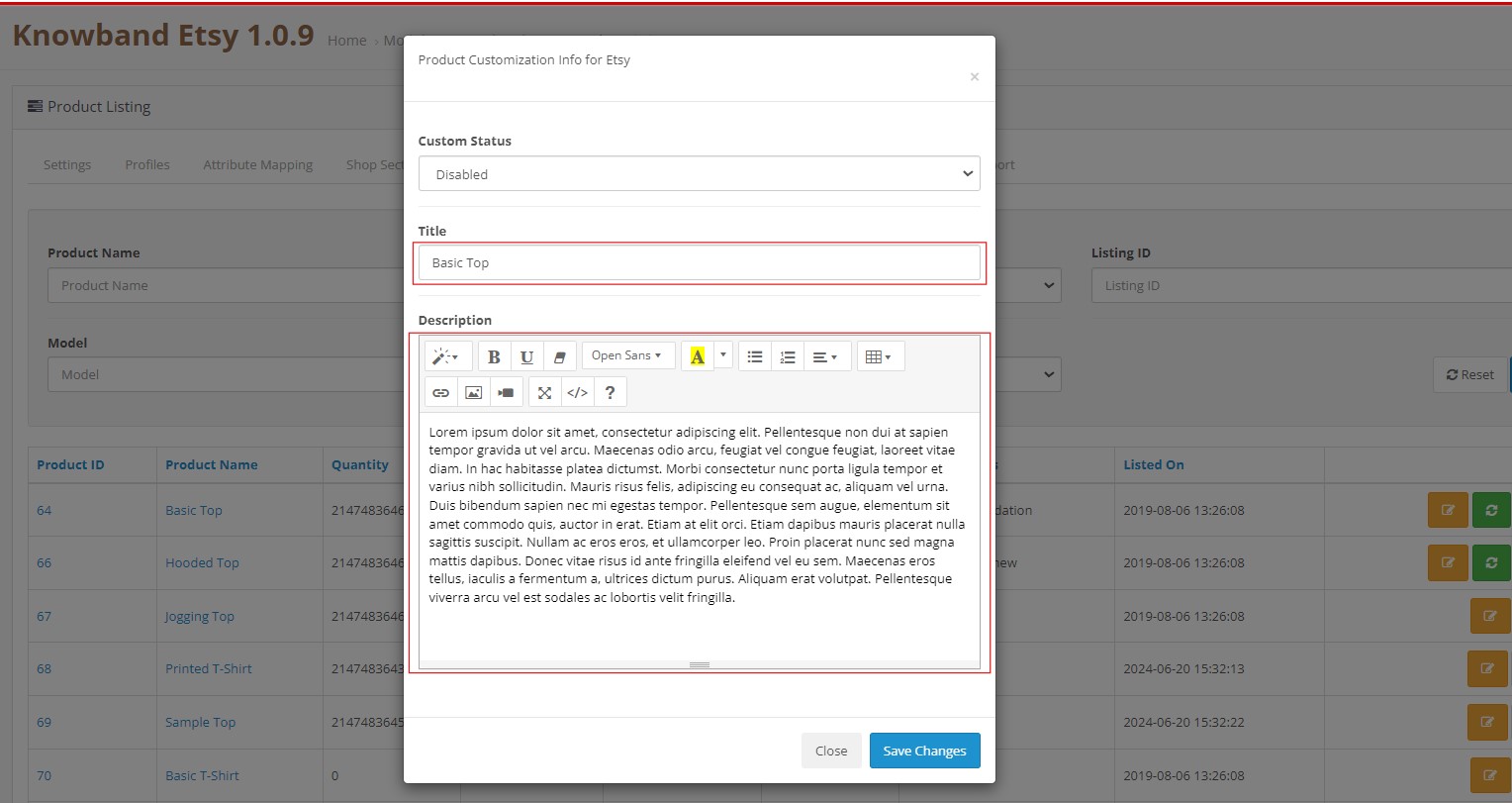
The updated extension also includes a feature for product listing with custom details. Admins can now list products with unique titles and descriptions, differentiating their products and enhancing visibility on Etsy. This flexibility allows for better product presentation and marketing, tailored to attract specific customer segments.
You can watch our video on “New Features in Knowband’s Opencart Etsy Connector v1.0.9”:
2.0 Installation
After purchasing the module, you will get the following files as below:
1. zip (contains the source code of the module)
2. User Manual
Follow the following steps to install the extension:
Unzip the zip file. It would contain files and folders as shown below –
2. Copy all the files and folders of the unzipped folder into the root folder of the website.
3. Now module is ready to be installed on your store and you can find that in Store Admin -> Modules and Services. It would be shown as below –
Etsy OpenCart Integration Extension
Knowband’s OpenCart Etsy Marketplace Integration plugin facilitates seamless integration between your OpenCart store and Etsy marketplace, streamlining product listings and order management.
Before proceeding ahead, it is important to know the correct flow of actions to set up this system as several things are dependent on other things. If we do not take care of them then it would become difficult to process smoothly or it may be error-prone.
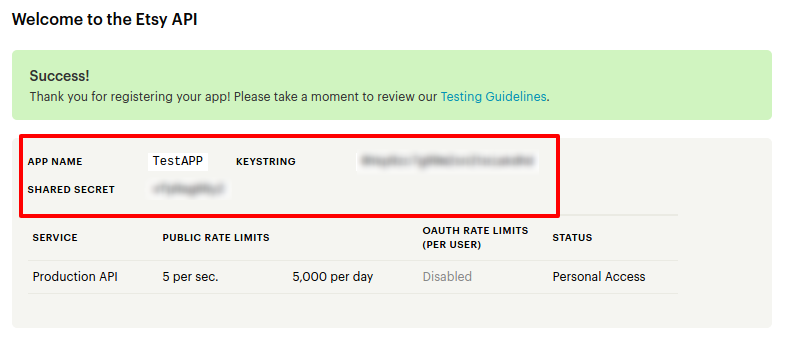
Seller account setup: This section will help you to set up the shop on the Etsy marketplace and in the next steps you will learn about the Etsy API key. Etsy API key and API Secret are required to integrate the Opencart and Etsy marketplace.
Admin Interface: This section will help you to understand the complete working of the Etsy Opencart Integration plugin.
4.0 Etsy Marketplace – Seller Account Setup
To start selling on Etsy Marketplace you need to have a seller account on Etsy. In this section, we are listing all the steps to create a seller account on Etsy. Please find them below –
Click on the “Sell on Etsy” button present at the top right corner.
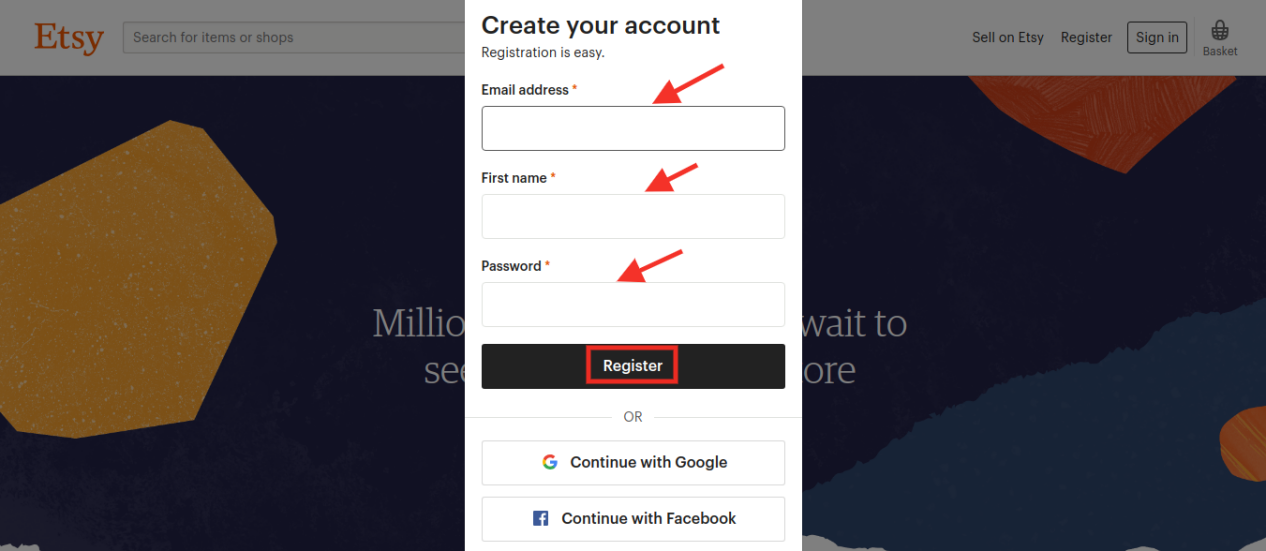
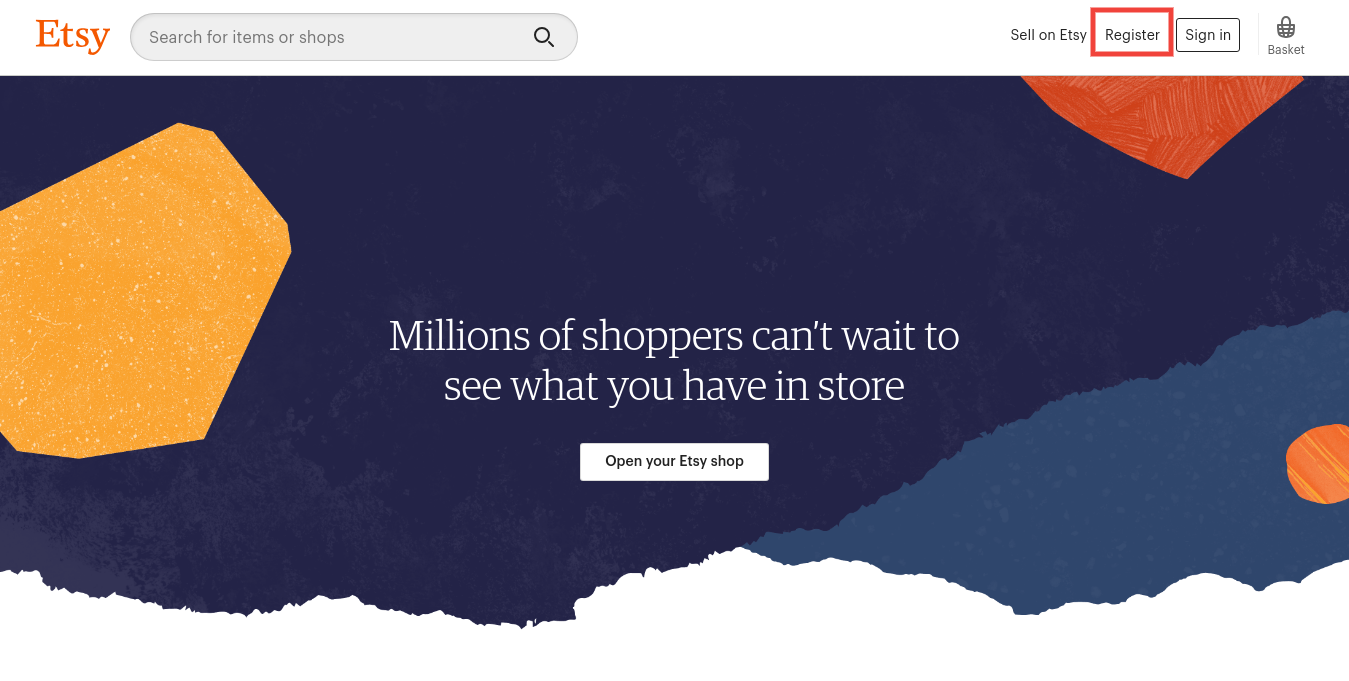
Click on the “Register” button on the page you are visiting now. Refer to the screenshot given below.
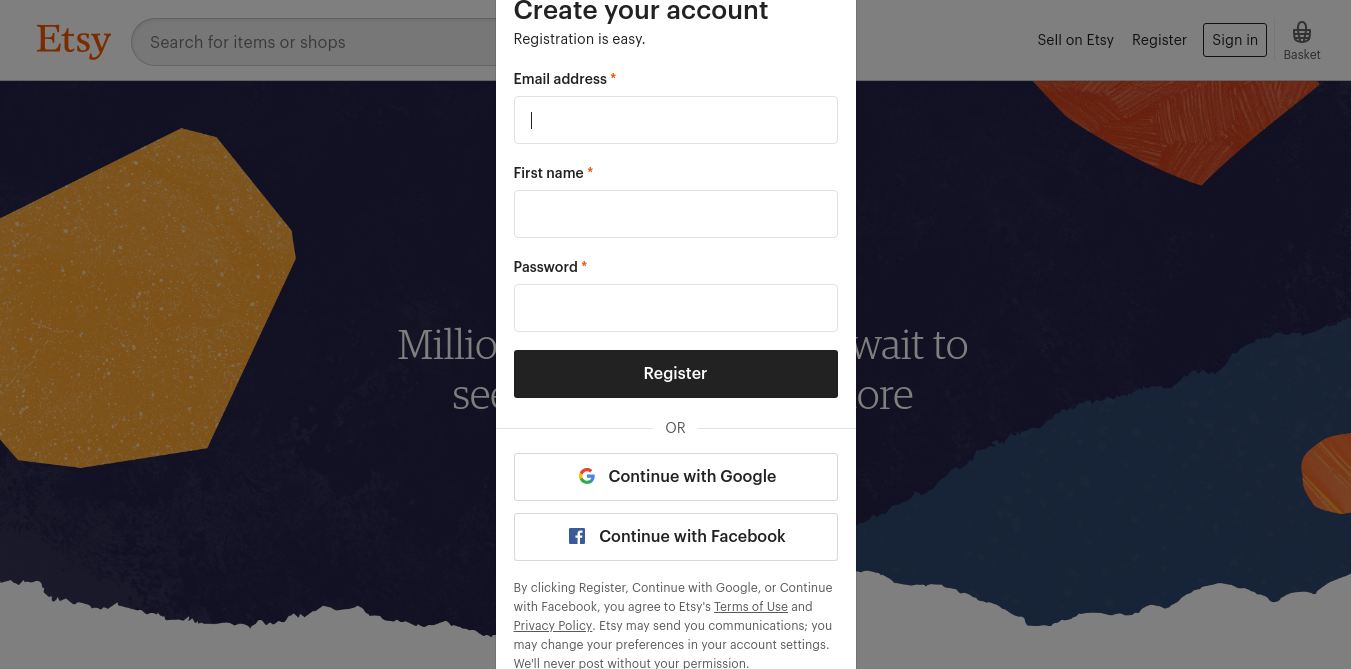
Fill up the registration form and click on the “Register” button. It would create your seller account and send a verification email to the provided email address.
Now, it would also redirect you to another page as shown below.
5. Now, it is asking to set up your shop preferences. Complete all the highlighted sections – Shop Preferences and Name your shop, Stock your shop, how you will get paid, and Set up Billing.
5.0 Etsy Marketplace – Setup an App
To start communication between OpenCartStore and Etsy Seller Account, you need to create an App on Etsy Marketplace. Following are the steps to create an App on Etsy –
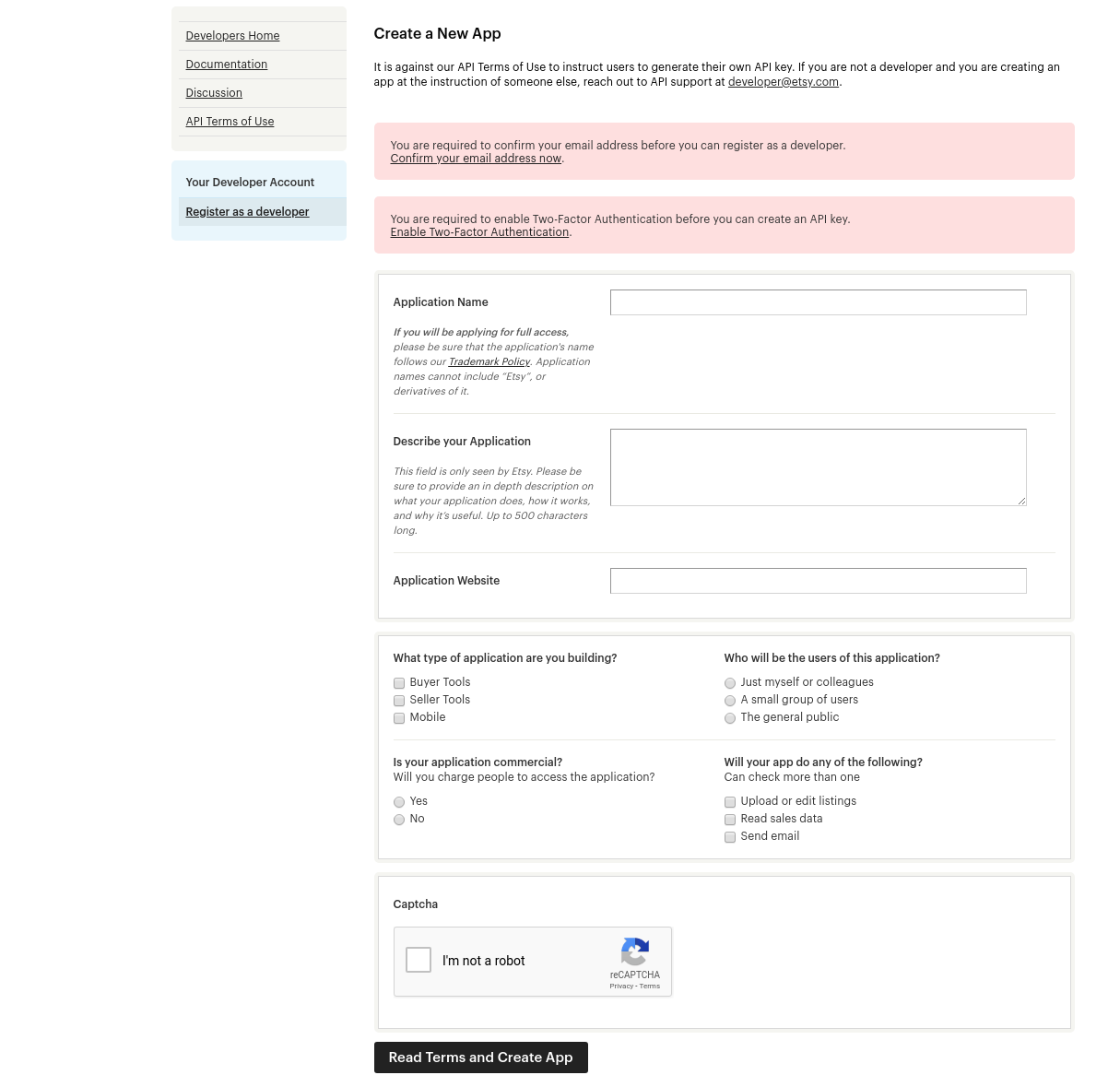
It would open a page where a form will be shown with a few input fields as shown below.
Fill up the form and click on “Read Terms and Create App”. Please make sure that you left the “Inventory Management Compatibility” checkbox is checked.
It would ask to accept “terms and conditions”. Accept and click on the “Create App” button.
It would register your App on Etsy Marketplace and provide API details as shown below.
Note: “The term ‘Etsy’ is a trademark of Etsy, Inc. This application uses the Etsy API but is not endorsed or certified by Etsy, Inc.”
6.0 Admin Interface
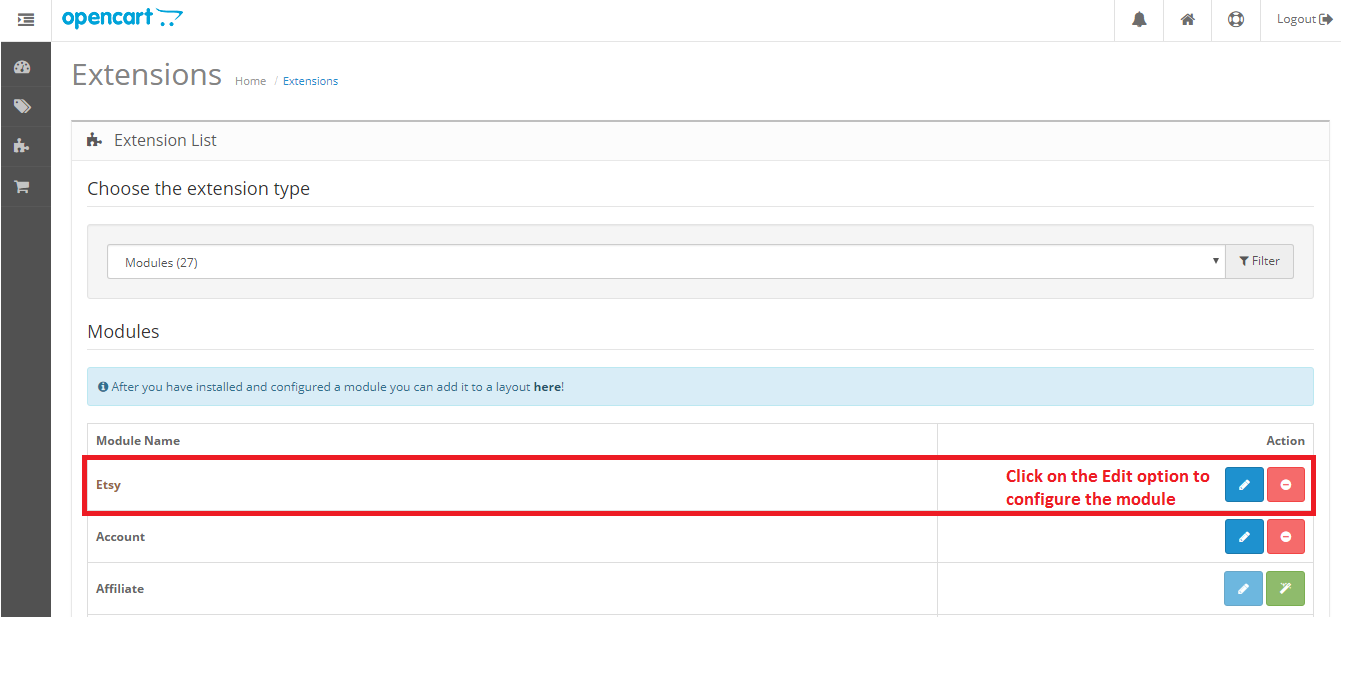
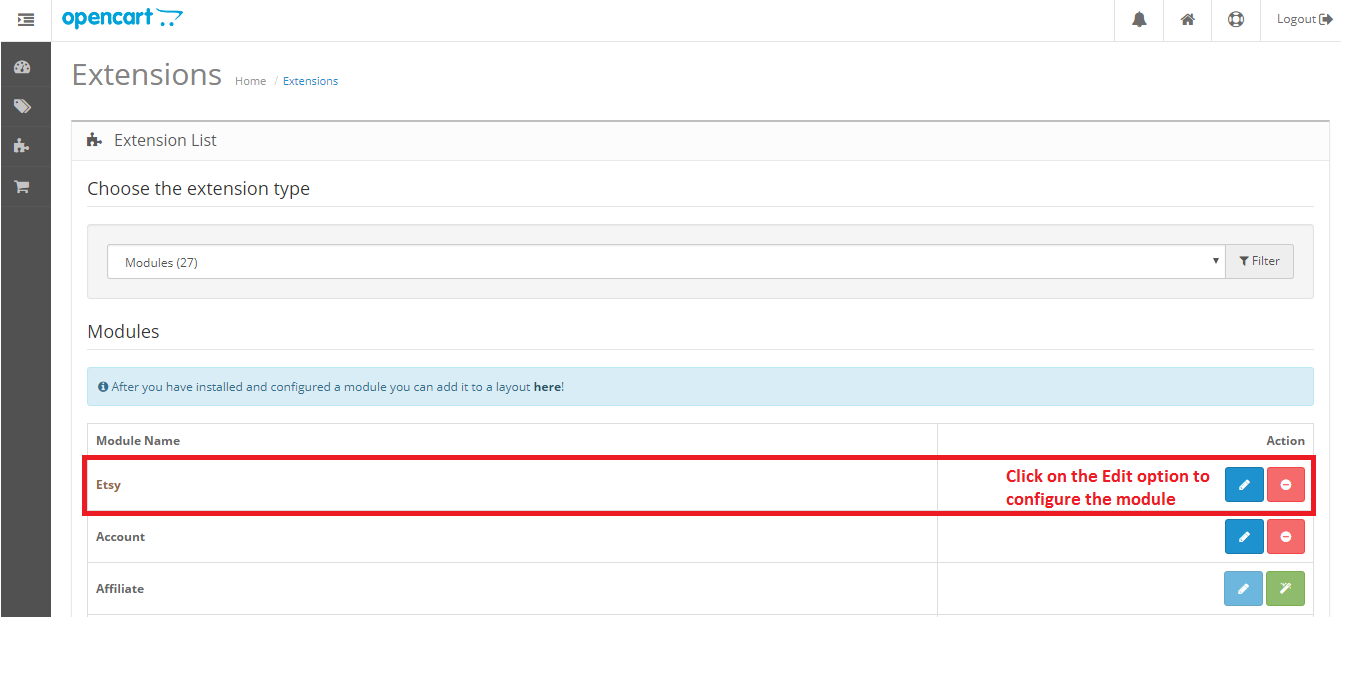
Opencart Etsy Marketplace connector is easy to configure. The configuration settings can be managed via the admin interface. After installation, the store admin can find the “Etsy” module in the Extension List under the “Extensions” tab.
The Etsy integration extension will display as shown below:
On clicking the Edit button next to the Etsy module, it will redirect to the admin interface. Here admin can see all the options to configure the Etsy module:
Etsy Marketplace extension offers the following options –
General Settings
Profiles
Attribute Mapping
Shop Section
Shipping Templates
Products
Orders
Synchronization
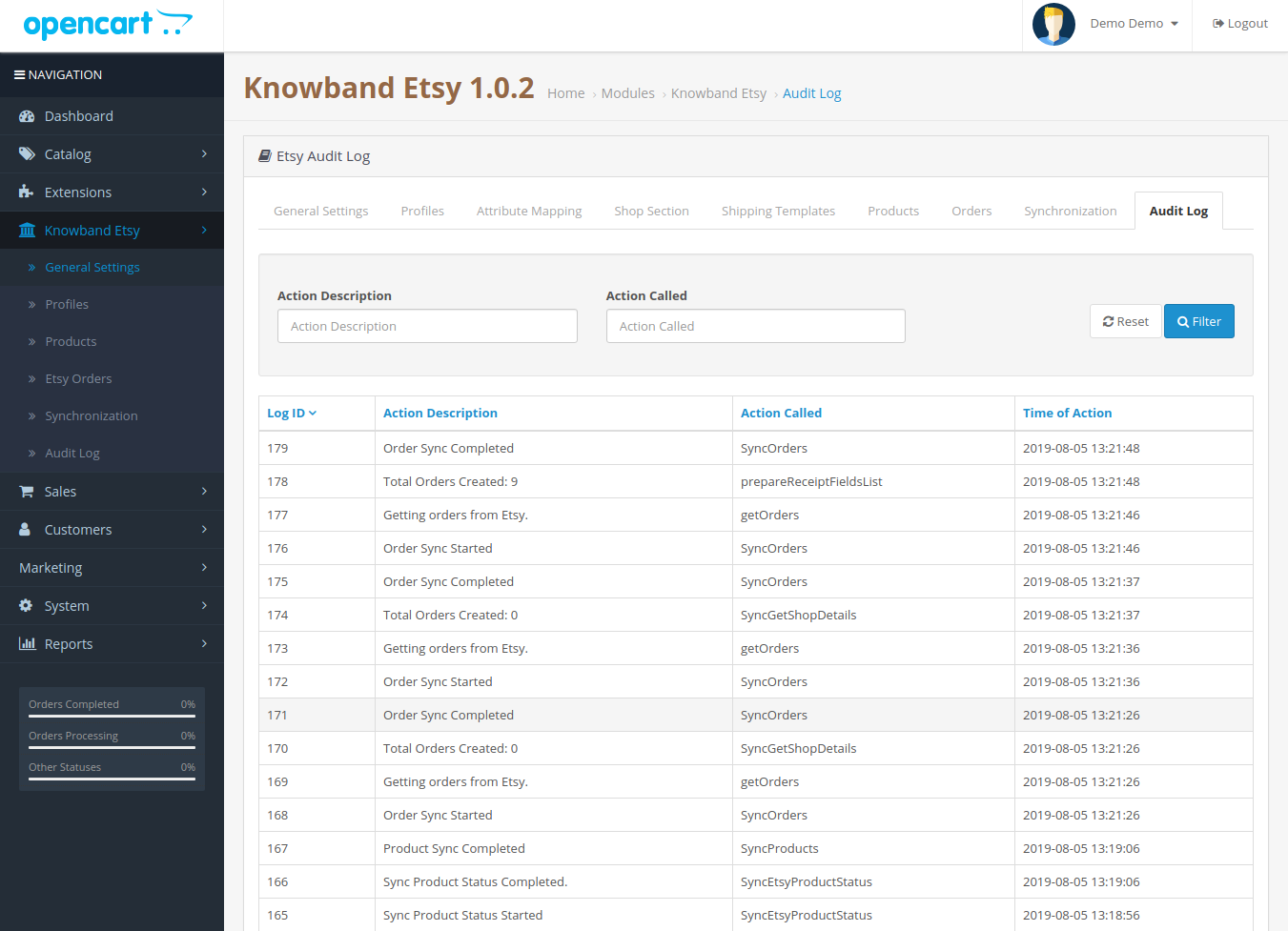
Audit Log
Each tab is explained below.
6.1 General Settings
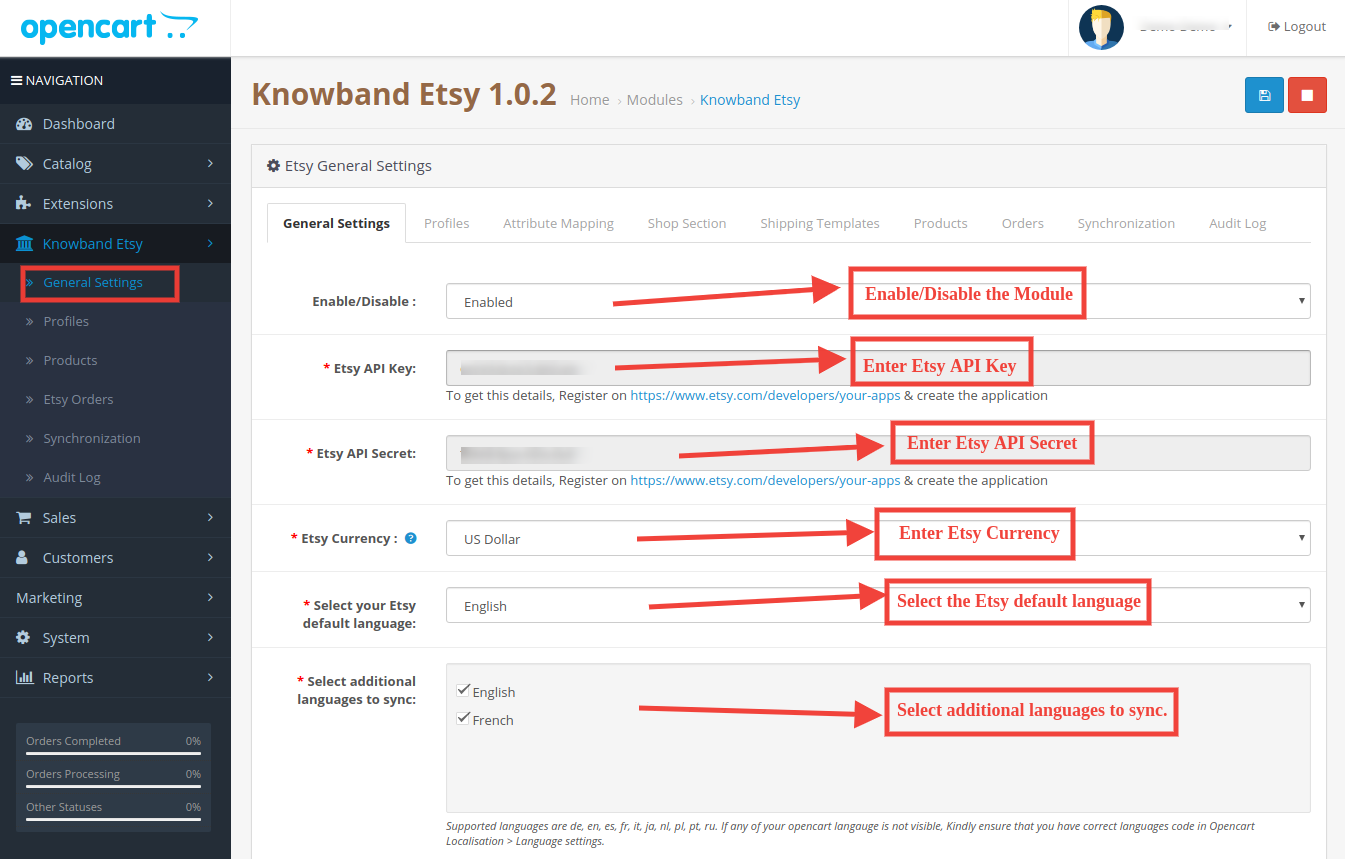
You can find the screenshot of the “General Settings” page below –
General Settings tab is there for capturing details of Etsy Marketplace API like API Key, Host, etc. This helps the admin to connect the OpenCart store with the Etsy marketplace. Please find the description of each input field below –
1. Enable/Disable
Admin can Enable/Disable Opencart Etsy Marketplace Integration by using this option. If enabled, then only this module and all its settings will be working otherwise there will be no impact of this module on the store.
2. Etsy API Key
Enter Etsy API Key which will authenticate the connection being established between OpenCartstore and Etsy Marketplace.
3. Etsy API Secret
Admin needs to enter Etsy API Secret mandatory for authentication between OpenCartstore and Etsy Marketplace.
4. Etsy Currency
Admin can select the Etsy currency from the menu.
5. Select your Etsy default language:
Admin can select the Etsy default language from the menu.
6. Select additional languages to sync:
Admin can select additional languages to sync with the Marketplace.
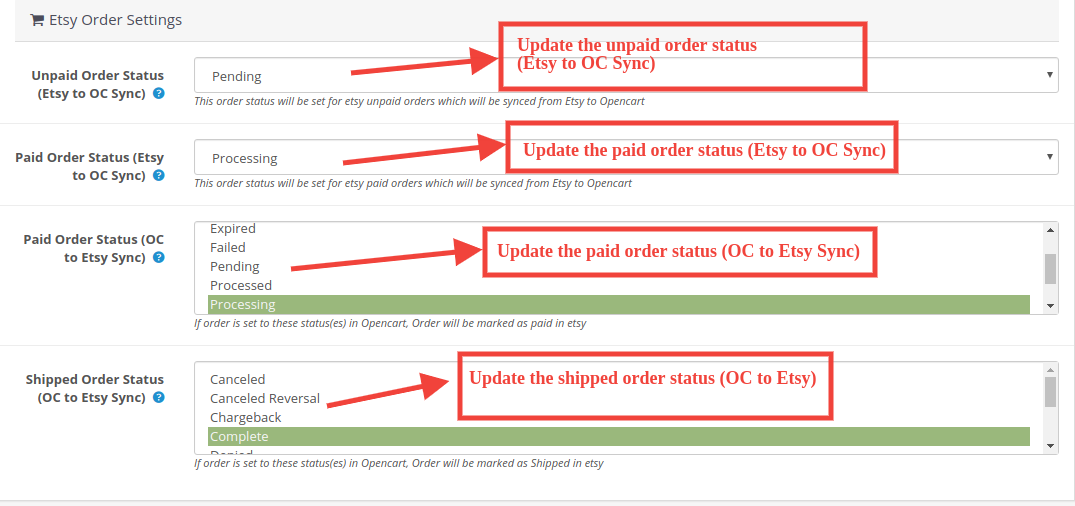
6.1.1 Etsy Order Settings:
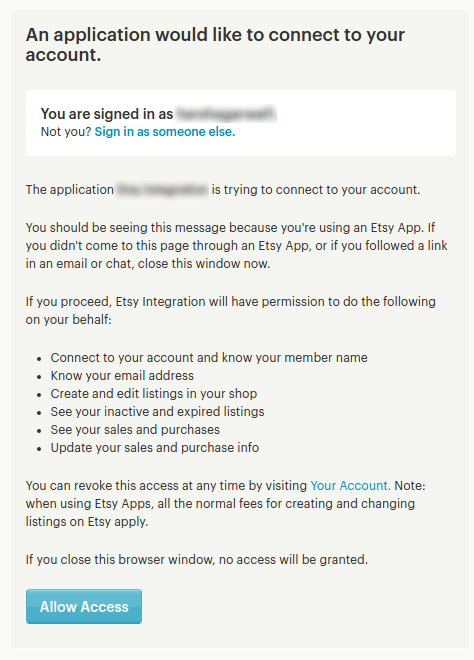
After providing these details, click on the “Save” button in the top right corner. It would redirect the admin to the Etsy Marketplace to allow the App Access for the store. Click on the “Allow Access” button as shown below and it will establish the connection between the store and Etsy Marketplace.
It would also redirect the admin back to the same page of “General Settings” and show the “Disconnect” button as the connection has now been set up with Etsy Marketplace.
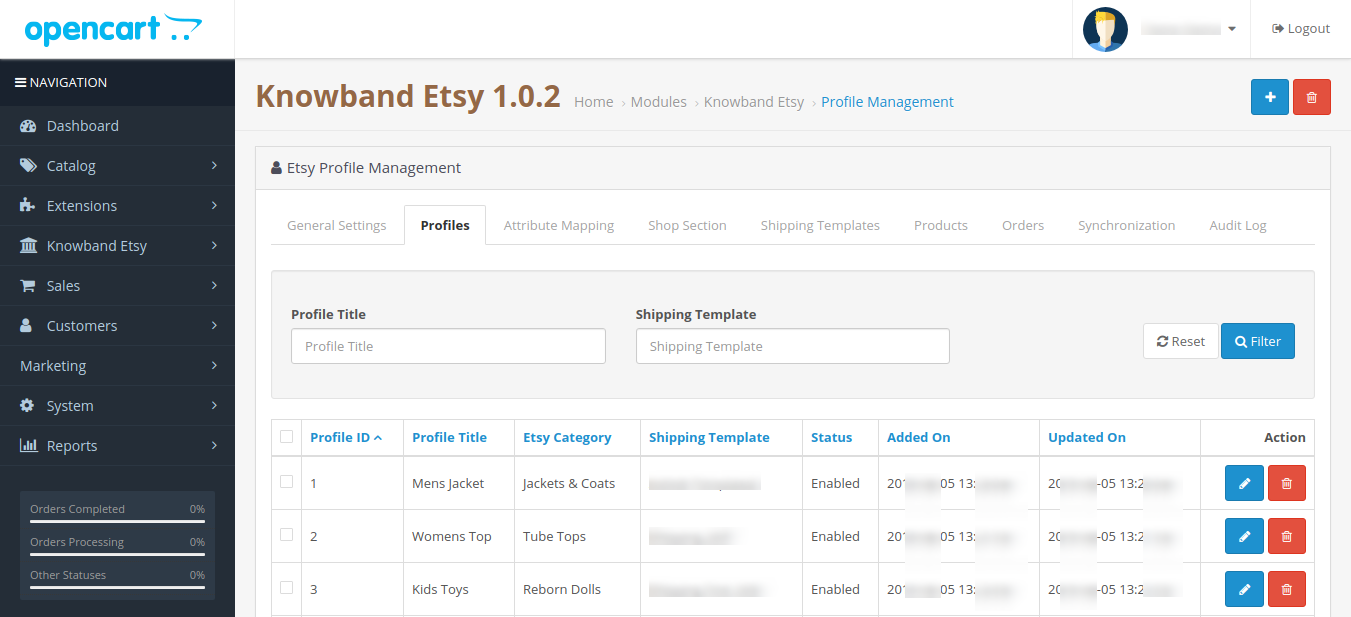
6.2 Profiles
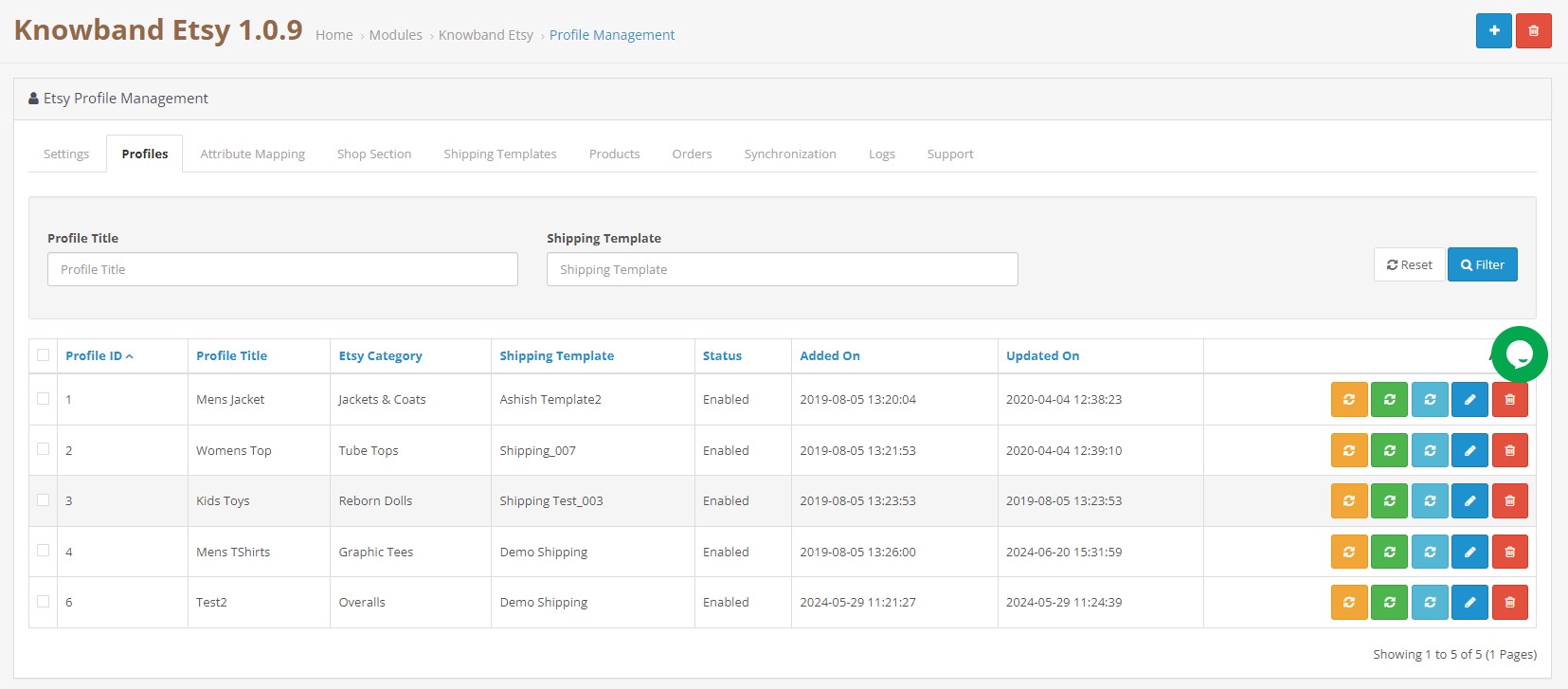
The profile Management tab provides options to create the profile for product listing. In this section, the admin will be able to map OpenCart store product attributes and categories to Etsy Marketplace. Opencart Etsy Marketplace Connector allows the seller to select multiple store categories to sync with the one Etsy category.
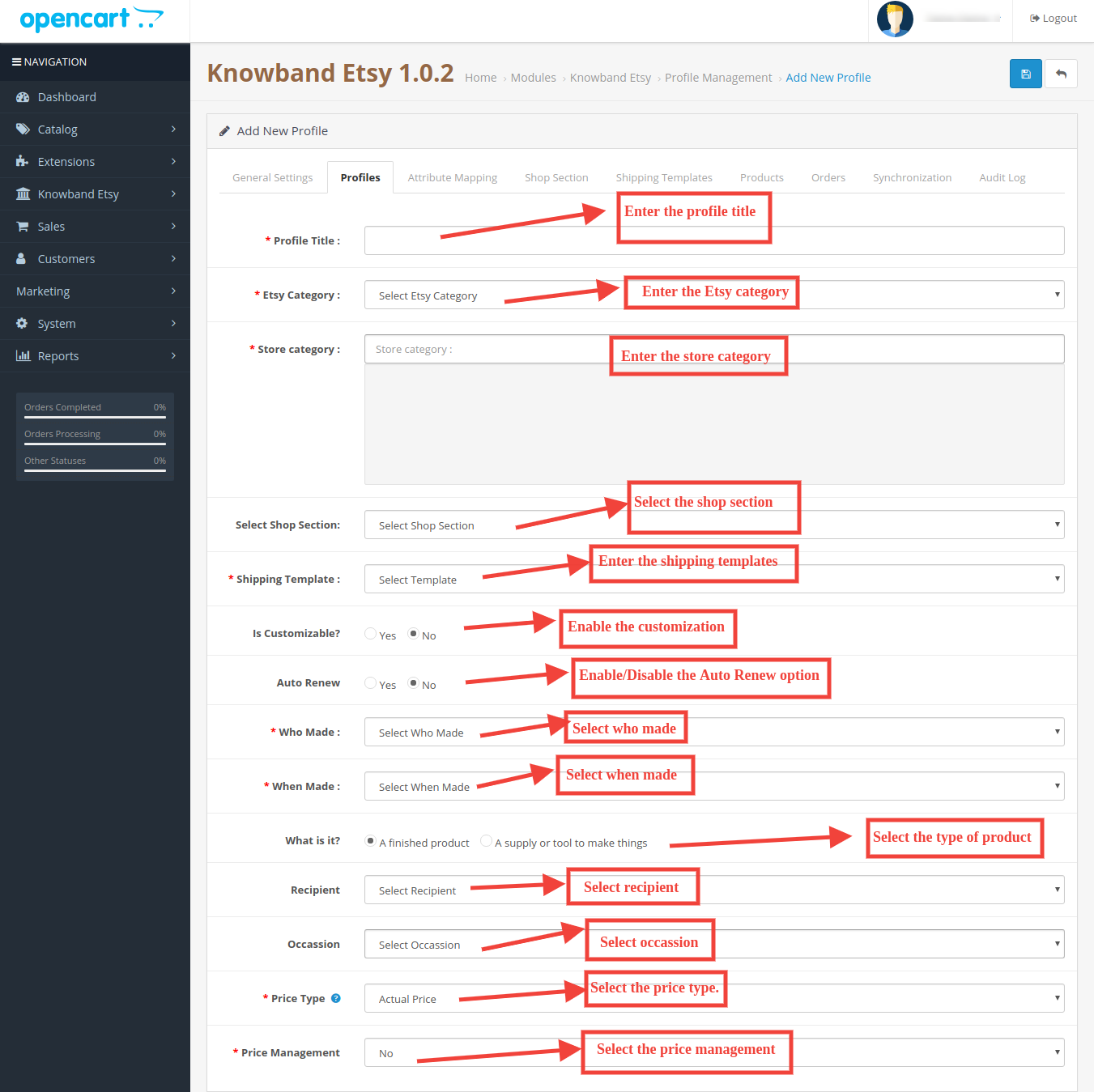
Admin needs to enter all the mandatory details as per the instructions are given in the below screenshot. After entering all the details click on the Save button at the top of the form.
6.2.1 How to Add New Profiles?
Following are the steps to add new profiles-
Go to the Etsy Marketplace module-> Profiles(Menu Option)
It would redirect the admin to a page where already added profiles will be listed (If any). Click on the “+” (plus icon as shown in the screenshot below) and it will redirect the admin to a new page where a form with some input fields will be shown.
Fill up the following input fields –
Profile Title: Enter the Profile Title as per your choice.
Etsy Category (List of Etsy Marketplace categories): Select the correct category from the drop-down list.
Store Category (Lists of Store Categories): Select the OpenCart store category for the products. The selected category will be mapped with the Etsy category (as selected in the Etsy Category) field.
Select Shop Section: Select the shop section from the drop-down list.
Shipping Template (List of Shipping Templates): Select the shipping template from the drop-down list.
Is Customizable?: Select from the drop-down list.
Who Made: Select from the drop-down list.
When Made: Select from the drop-down list.
What is it?: Select from the drop-down list.
Recipient: Select from the drop-down list.
Occasion: Select from the drop-down list.
Price Type: Select from the drop-down list.
Price Management: Select from the drop-down list.
6.2.2 How to Edit/Delete Profile?
Admin can easily update the profile entries; the Opencart Etsy Marketplace Connector allows the admin to sync the changes to the Etsy shop in simple steps. Following are the steps to edit/delete a profile from the system –
1. Go to the Etsy Module -> Profiles (Menu Option)
2. Click on the “Edit/Delete” button corresponding to each profile as shown in the above screenshot.
3. If an admin has clicked on the “Edit” option, then, it will redirect the admin to a new page where a form with some already filled input fields will be shown. Admin can simply update values and save the details by clicking on the “Save” button.
4. The admin can click on the “Delete” option to delete the selected Profile from the system.
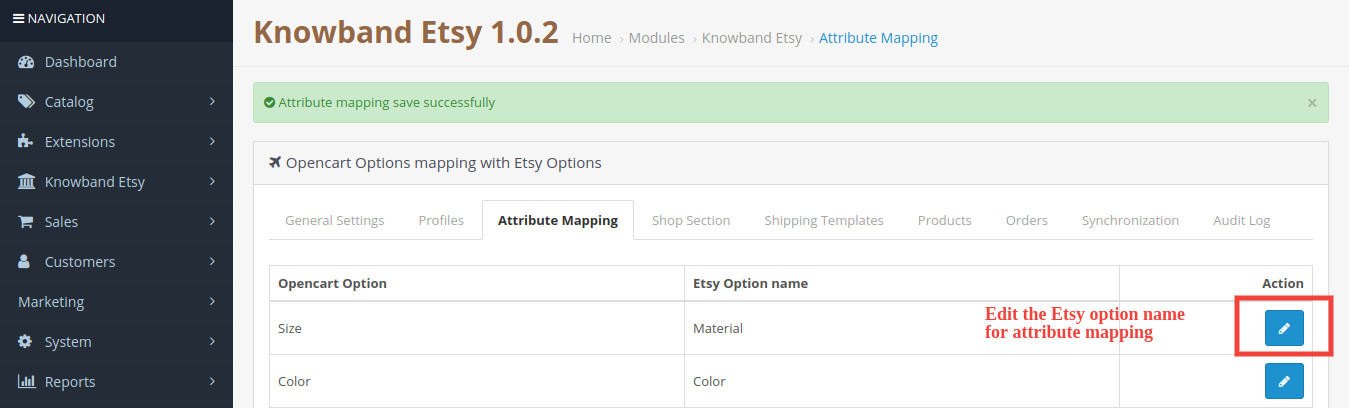
6.3 Attribute Mapping
This option helps to upload the Variation products. Select the correct attribute and save it.
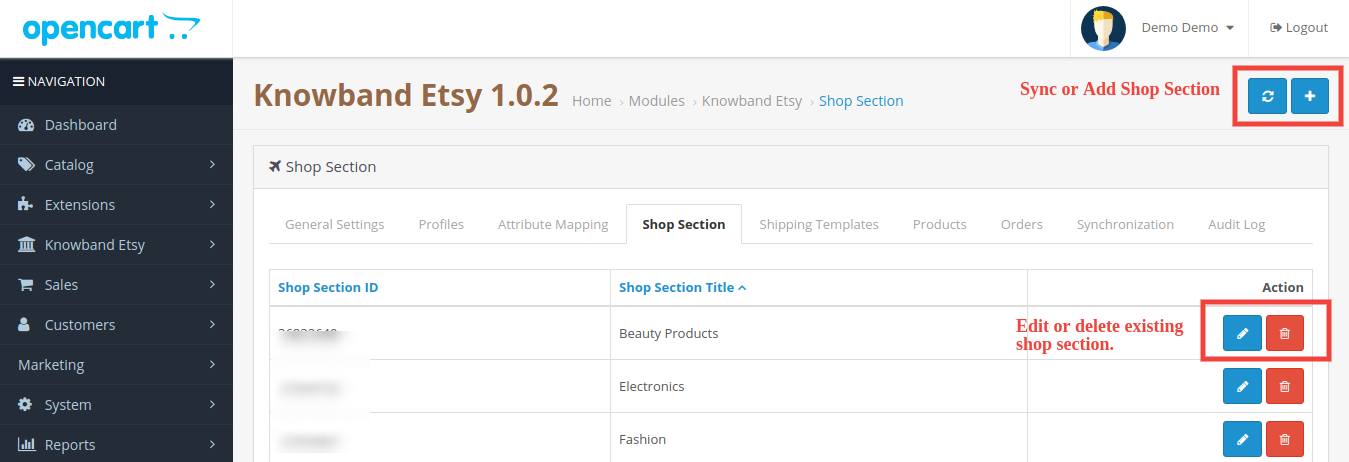
6.4 Shop Section
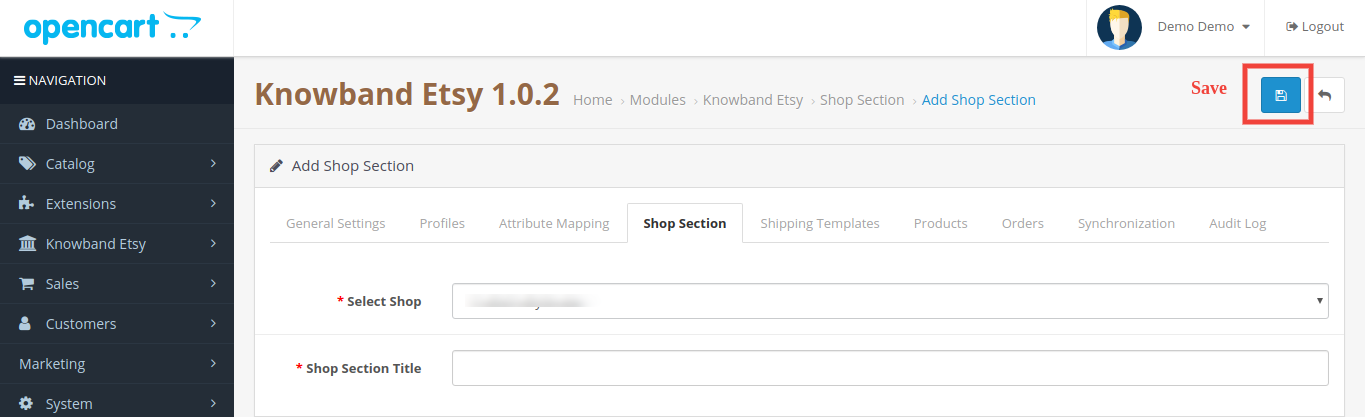
Under this tab, the admin can view the shop sections and their titles. You can edit, and delete the existing profile while you can add the new shop section too from the top right corner. You will be directed to the window below. The same window will open for editing the shop section with filled details.
6.5 Shipping Templates
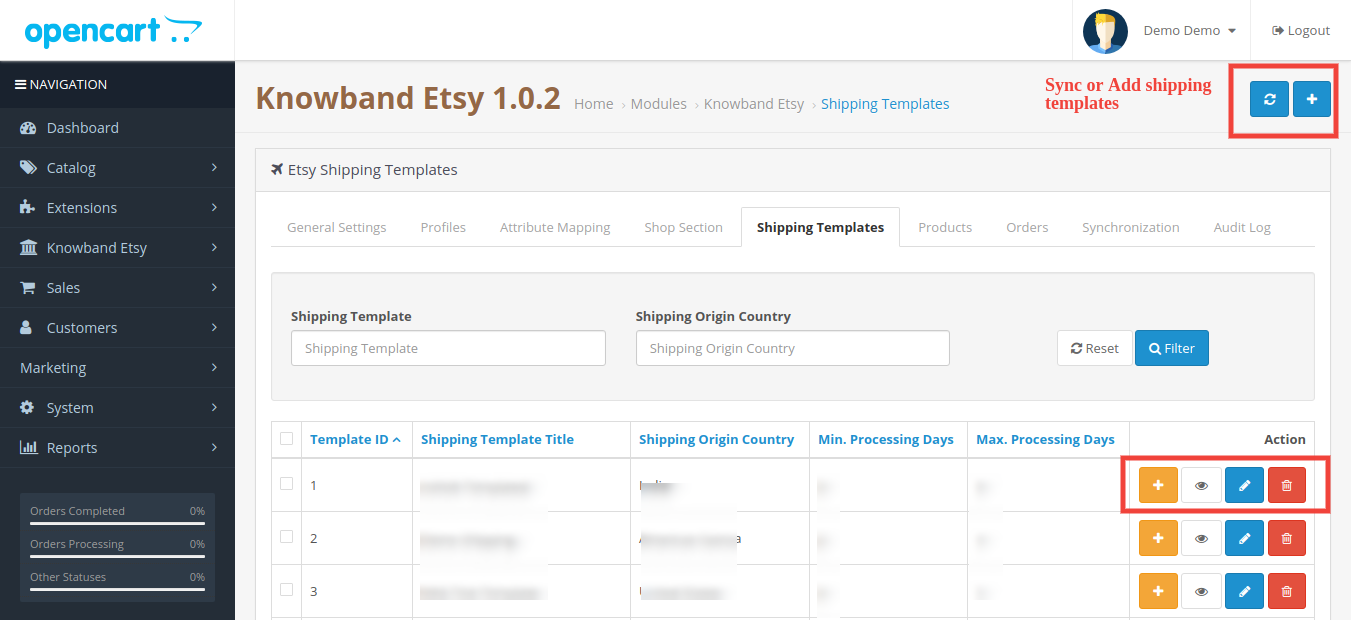
The shipping Templates tab is there to manage shipping options. In this section, the admin can create Shipping Templates along with other options for the existing shipping template like Add Shipping entry, View shipping entry, Edit Shipping Template, and Delete. Admin can create multiple shipping templates by using the EtsyOpenCart Integration module. Please refer to the next screenshot:
Admin can easily modify the existing shipping template or add new shipping templates. After creating new shipping templates, the store admin must sync the shipping templates to the Etsy shop by clicking the “Shipping Template Synchronization” option under the “Synchronization” tab.
6.5.1 How to add Shipping Templates?
Following are the steps to add a Shipping Template into the system –
Go to the Etsy Marketplace -> Shipping Templates (Menu Option)
It would display the page where already added Shipping Templates will list (If any). Click on the “+” (Plus Icon – as shown in the above screenshot).
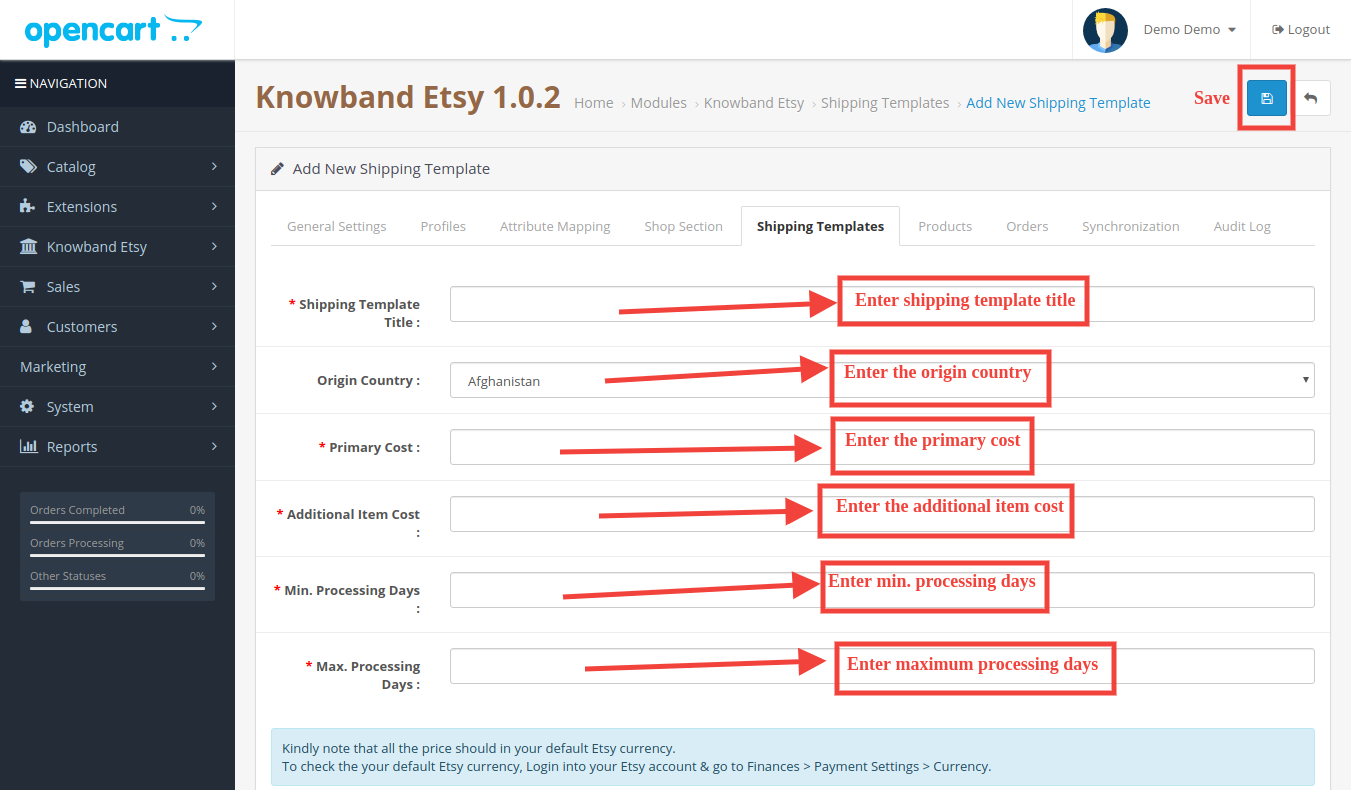
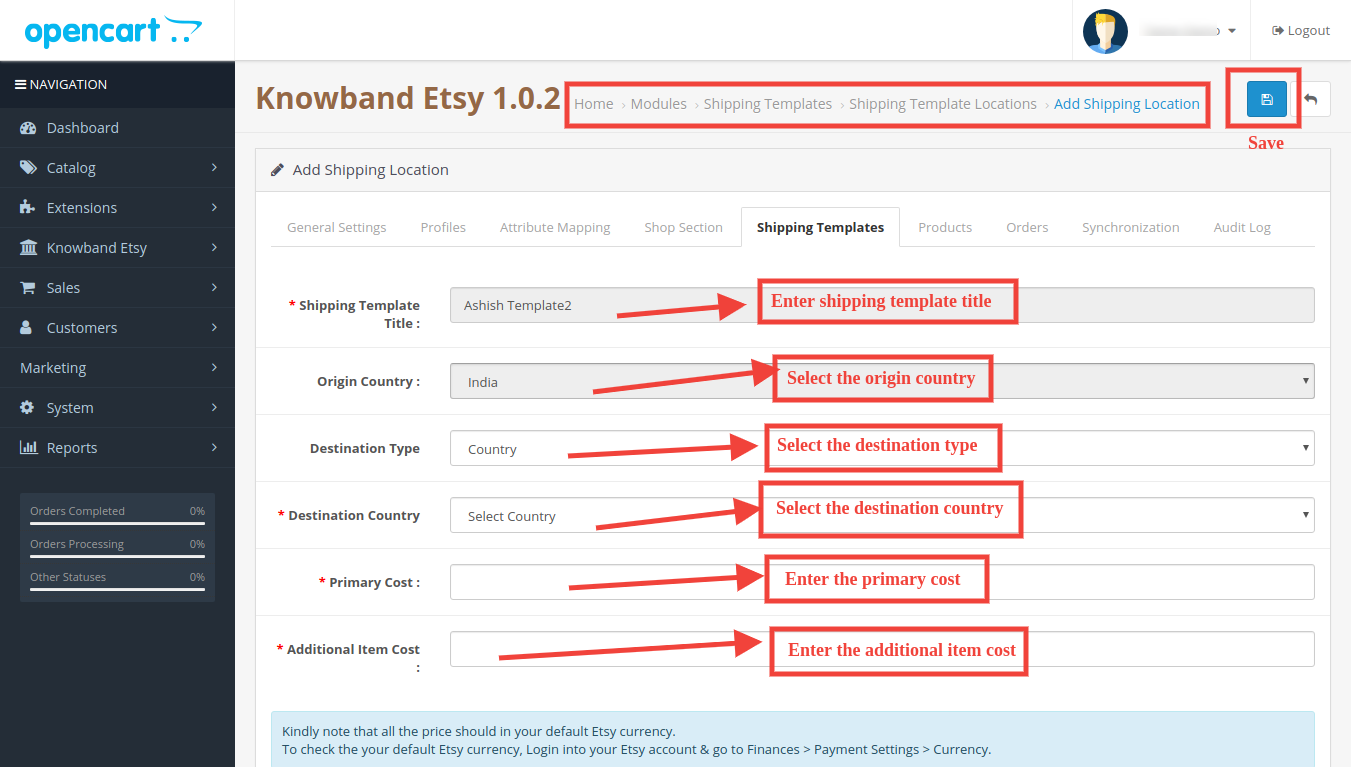
It would redirect the admin to the new page where a form with some input field will be shown (Screenshot is shown below).
Fill up the following input fields of form –
Shipping Template Title: Enter the shipping template title as per your choice.
Origin Country: Select the origin country from the drop-down list.
Primary Cost: Enter the primary shipping cost for the shipment.
Additional Item Cost: Enter the additional item cost for shipment. It is the additional cost if the customer adds a second product to the package.
Min. Processing Days: Enter the minimum processing days. This field accepts only numeric values.
Max. Processing Days: Enter the minimum processing days. This field accepts only numeric values.
Click on the “Save” button to add the new shipping template.
You can find the screenshot of the “Add New Shipping Template” form below –
6.5.2 How to Edit/Delete Shipping Template?
Following are the steps to edit/delete Shipping Template from the system –
1. Go to the Etsy Marketplace -> Shipping Templates (Menu Option)
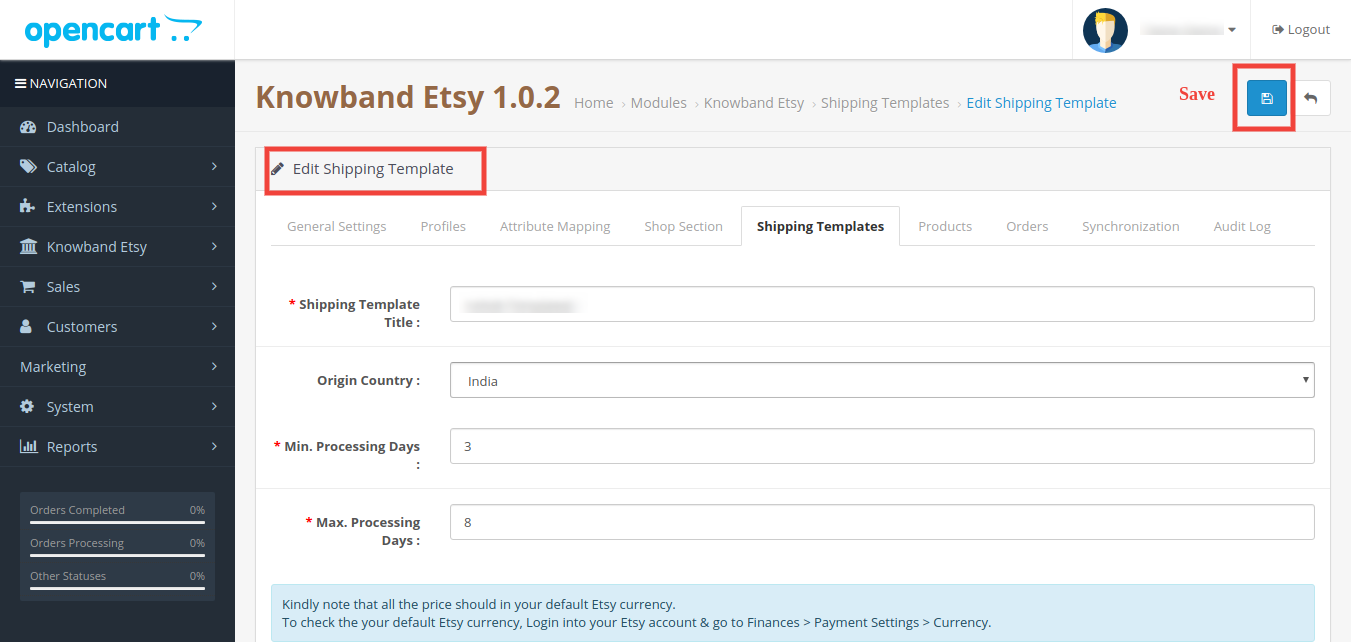
2. It would display the page where already added Shipping Templates will list (If any). Click on the “Edit/Delete” buttons corresponding to each Shipping Template.
3. Admin can update the values as per the requirement and save the details by clicking on the “Save” button.
4. If an admin has chosen the “Delete” option then it would delete the Shipping Template and all its Shipping Template Entries from the system.
Admin can modify the shipping template details by using the Edit option. After making the changes in the shipping template details, the admin needs to save the changes and synchronize the shipping templates with the Etsy marketplace.
6.5.3 How to Edit/Delete Shipping Location of a Shipping Template?
The shipping Entry tab of the Etsy OpenCart module allows the admin to define the destination country and the standard shipping cost for the selected destination. Admin can create only one shipping entry for a particular destination (country/region). Following are the steps to view the Shipping Template location into the system –
1. Go to the Etsy Marketplace Connector module -> Shipping Templates (Menu Option)
2. It would display the page where already added Shipping Templates will list (If any). Click on the “+” button given corresponding to each Shipping Template listed.
3. It would display the page as the screenshot given below:
Shipping Template Title: Enter the shipping template title.
Origin Country: Select the country of origin.
Destination Type: Select the country of destination for the shipping template.
Destination Country: Select the destination country.
Primary Cost: Enter the Primary Cost.
Additional Item Cost: Enter the additional item cost.
6.6 Products
In the Etsy OpenCart integration extension after creating the profile, the admin needs to sync the products which are selected in the profile to the Etsy marketplace. Admin can also check the status of the listed products from the OpenCart store admin panel. The product listing tab of the Etsy Marketplace Integration shows a list of all the products that are to list on Etsy Marketplace with their status and values as shown in the screenshot below –
Please note that after creating a profile the admin must click on the “Product Synchronization” option under the “Synchronization” tab of the Etsy module to list the selected products to the Etsy marketplace. Admin can click on the Revise/Relist button to activate it on the Etsy Marketplace. Admin can also delete the product listing by clicking on the “-” button.
6.7 Order Settings
The order Settings tab is there for mapping store order status with Etsy Marketplace order status which will be used during capturing orders from Etsy Marketplace. The screenshot below will show you the order listings and the admin can also create a filter to search for a particular order.
6.5.1 How to view Order Details and Status?
Following are the steps to map order status –
Go to the Etsy Marketplace Integration module -> Orders (Menu Option)
It would display a page the same as shown in the above screenshot.
Click on the View Button given below the “Action” tab.
It would display the page with all the Order details as shown below.
6.8 Synchronization
All tabs defined above are basically for saving the settings and options into the system which are used during synchronization between OpenCart Store and Etsy Marketplace. There are the following jobs to synchronize content between OpenCart Store and Etsy Marketplace which you can find below –
6.8.1 How to sync products locally?
Following are the steps to synchronize sync products locally on Etsy Marketplace –
1. Go to the Etsy Marketplace ->Synchronization (Menu Option)
2. It would redirect admin to a new page where all synchronization actions list as shown in the above screenshot.
3. Click on the “Sync Now” button shown below.
This action will sync the products from the OC to the module (Without syncing the products on Etsy). If you want to disable any products (don’t want to sync on Etsy), click on the ‘Sync Now’ & disable the products in the Product Listing Tab. Disabled products will not be synced on Etsy.
6.8.2 How to Sync New Products on Etsy Marketplace?
Following are the steps to get Countries and Regions from Etsy Marketplace –
1. Go to the Etsy Marketplace Integration module->Synchronization (Menu Option)
2. It would redirect admin to a new page where all synchronization actions list as shown in the above screenshot.
3. Click on the “Sync Now” button shown below.
This action will sync the new products into Etsy. Click on the ‘Sync Now’ to sync the products manually. Set this CRON in your hosting CRONTAB to run every hour to sync the products automatically
6.8.3 How to sync Updated Products on Etsy Marketplace?
Following are the steps to synchronize Products Listing on Etsy Marketplace –
2. It would redirect admin to a new page where all synchronization actions list as shown in the above screenshot.
3. Click on the “Sync Now” button shown below.
If any listed product info has been updated in the Opencart then Run this CRON to update the product info on Etsy. Click on the ‘Sync Now’ to sync the products manually. Set this CRON in your hosting CRONTAB to run every 2hour to sync the products automatically.
6.8.4 How to sync Products Status on Etsy Marketplace?
Following are the steps to synchronize Products Variations Listing on Etsy Marketplace –
2. It would redirect admin to a new page where all synchronization actions list as shown in the above screenshot.
3. Click on the “Sync Now” button shown below.
This action will sync the status of the products from Etsy on Opencart. For example, if any products have been expired in Etsy then this CRON will set the status of the products as expired in the module as well. Set this CRON in your hosting CRONTAB to run every day to sync the status automatically.
6.8.5 How to Synchronize orders from Etsy Marketplace?
Following are the steps to synchronize Products Variations Listing on Etsy Marketplace –
Goto the Etsy Marketplace Integration module -> Synchronization (Menu Option)
It would redirect the admin to a new page where all synchronization actions are listed as shown in the above screenshot.
Click on the “Sync Now” button shown below.
This action will sync the orders from Etsy to Opencart. Click on the ‘Sync Now’ to import the orders from Etsy to Opencart. Set this CRON in your hosting CRONTAB to run every hour to sync the orders from Etsy to Opencart automatically.
6.8.6 How to update Orders Status on Etsy Marketplace?
Following are the steps to update the status of orders on Etsy Marketplace –
2. It would redirect admin to a new page where all synchronization actions are listed as shown in the above screenshot.
3. Click on the “Sync Now” button shown below.
This action will sync the mark the status of order as Shipped in Etsy if the order is marked as Shipped in the Opencart. Click on the ‘Sync Now’ to sync the status of the imported order from OpenCart to Etsy. Set this CRON in your hosting CRONTAB to run every hour to sync the status of the order from OpenCart to Etsy automatically.
6.8.7. How to Synchronize a Particular Profile on the Etsy Marketplace?
All the crons available in the “Synchronization” tab of the Opencart Etsy Connector plugin provide support for all the categories in bulk. However, if you want to list/update a particular profile only, you can handle this task from the “Profile Management” tab itself.
In this section, we have provided the “Local Sync”, “Sync Products”, and “Sync Product Status” crons to provide the Opencart admin with the flexibility of managing the category-level synchronization between Opencart and Etsy.
6.8.8 How to List the Products with Custom Details on Etsy Marketplace.
Knowband’s Opencart Etsy Marketplace Integration Extension comes with a custom product details listing option. This feature allows the Opencart store admin to list the products on the Etsy marketplace with different names and product descriptions.
If you want to list the product as it is, you can keep the custom status disabled. However, if you want to list the products with different details as in the screenshot above, save the same.
These details will be updated in the next product synchronization.
6.9 Audit Log
The audit log helps the admin to keep track of all the tasks performed. Please refer to the attached screenshot below.
6.10 [New] Return Policy Synchronisation
The OpenCart Etsy Module allows the admin to efficiently manage and synchronize return policies between their Opencart store and Etsy. Admins can create, edit, or delete multiple return policies within the module and assign them to specific profiles. Once a return policy is mapped to a profile, all categories associated with that profile are automatically updated on Etsy with the selected return policy, ensuring uniform policy application across listings.
Add New Return Policy
Admins can create new return policies or modify existing ones directly from the OpenCart Etsy Marketplace Module. Moreover, this provides flexibility to manage different return rules based on business requirements without needing to log in to Etsy separately.
Sync Return Policies
Using the Return Policy Sync cron, admins can fetch all available return policies from Etsy into the OpenCart store. Moreover, the synchronization process includes important details such as return and exchange acceptance, the number of allowed returns or exchanges, and return deadline dates, ensuring accurate and up-to-date policy data.
Profile Mapping
Within the profile mapping section, admins can select and assign a return policy to products under a specific category. This makes it easy to manage return rules in bulk rather than applying them individually to each product.
Automatic Updates
When a category is added or updated within a mapped profile, the assigned return policy is automatically applied to the product of the categories mapped on Etsy. This ensures consistency between the OpenCart store and Etsy listings, reduces manual work, and helps maintain compliance with Etsy’s policies.
Watch the Tutorial of the Etsy Marketplace Integration Extension
This OpenCart Etsy Marketplace Integration tutorial provides a complete step-by-step guide on installing and configuring the Etsy integration module, connecting your OpenCart store with your Etsy seller account, synchronizing products, categories, prices, and inventory in real time, managing Etsy orders directly from the OpenCart admin panel, enabling automated product listing with customizable template controls, mapping store attributes with Etsy product requirements for accurate listings, organizing products into Etsy Shop Sections for better storefront management, and handling active, drafted, or expired Etsy listings seamlessly from your OpenCart store.