7 Ways to Increase Your Website Traffic

Website traffic is an integral part of any eCommerce business. Without it, the business holds little to no value. Is there any point of having a website if it is not receiving any traffic?

No web traffic means no customers, and hence no sales.

What is Web Traffic?

Web Traffic or Website Traffic is the number of web users who visit your website. Any time a visitor lands on your website, it counts as a visit or a session.

Website owners or marketers try various strategies to increase the traffic on their website, and today in this article, we will be talking about those tactics. I will be covering 7 simple yet effective ways to increase website traffic.

How to Boost Website Traffic?

Take a quick look at the 7 important tips that I will be sharing with you.

  1. On-Page SEO

  2. Social Media

  3. Paid Advertisement

  4. Start a Blog

  5. Write Quora Answers

  6. Guest Blogging

  7. Email Marketing

1. On-Page SEO

This might seem an obvious one but cannot be overlooked. If there’s one thing that matters the most when it comes to increasing the website traffic, it is the On-Page SEO. I mean SEO is all about driving traffic to your website.

If your website is SEO-optimized, you can expect quality organic traffic. So, make sure that all your web pages are optimized for search engines which will make it easier for the search engine bots to crawl your website, understand your niche and put your website in front of those web users whose queries match your business offerings.

2. Social Media

Promoting content is as important as creating it. How would people know that your brand even exists if you are not promoting it much or not leveraging the platforms which could help you in driving traffic to your website?

Social media is arguably the best platform to boost your website traffic. Facebook and Instagram can prove ideal if you are into B2C business whereas Twitter and LinkedIn are more beneficial for B2B businesses.

If you haven’t marked your presence yet on social media, now is the time. Your competitors there are already driving a handsome amount of traffic on their website through social media.

Related: Social Media Marketing for eCommerce: Strategies and Best Practices

3. Paid Advertisement

Paid advertisement is also one of the ways to promote your website in front of a large audience and driving them to your website. It becomes crucial if you have just started out your online business because you need to spend some bucks to get your brand noticed.

Google Adwords is one of the best tools that will help you with search engine marketing. You will have to bid for the keywords that you want your website to rank for, on the top in the search engine.

Besides you can also take help of social media ads such as Facebook Ads and Instagram Ads. Make sure to target the right audience, which means the right age group and the right regions where you want to display your ads.

4. Start a Blog

A majority of websites have a blog section, and you should have it too. Start a blog as soon as possible.

When you focus on topics around your niche and start writing about them, you have a very good chance of ranking your blog posts on the search engine and driving traffic through it, considering that the content is of high quality and contains the required keywords.

Later, you can promote your posts on various platforms and bring the audience to your blog.

5. Write Quora Answers

Quora is one of the popular Q&A platforms where people ask different types of questions and seek answers for them. It is very likely that your niche’s audience is already there and looking for some answers which you could provide.

Create a Quora profile, search questions related to your niche and start answering them. One thing to keep in mind that Quora is a platform to discuss, not to promote, So, keep your answer as genuine as you can. Write detailed answers, add a link to your website without sounding promotional.

If Quora identifies that you are there just to promote your business, they will block you from their platform.

6. Guest Blogging

There are many websites over the Internet that allows Guest Blogging. It provides a great opportunity for you to attract the audience of those platforms to your website. Besides, it enhances your brand image as well.

Reach out to a guest blogging website. Tell them that you want to create content on their platform. Just follow their guidelines and you won’t find any problems.

7. Email Marketing

Every small business follows email marketing. If you have a good number of email subscribers, you can drive a decent amount of traffic on your website.

Focus on building your email list. Acquire email address of your visitors and then send them newsletters, marketing emails, offers and promotions or other important information and bring them on your website.

Final Thoughts

There is no fixed limit to the number of ways to increase your website traffic. As I earlier said, businesses try and implement multiple strategies to boost the traffic on their website.

Keep looking for different ideas and do whatever you feel can be helpful in bringing users to your website.

PrestaShop Starter Pack: Must-Have PrestaShop Modules To Start Your Store

If you have just built your eCommerce website on the PrestaShop platform, you would be looking around for some PrestaShop plugins that you should integrate on your website as a beginner. Your search ends here.

In this article, I have put forward some of the basic yet effective PrestaShop modules to start with. We also call this the PrestaShop starter pack. Check them out.

1. One Page Checkout

PrestaShop One Page Checkout converts the default multi-step checkout process of your PrestaShop based website into a One Page Checkout. It aims to improve the checkout experience of your customers besides boosting your conversions by encouraging a quick and hassle-free checkout.

The module provides Guest Checkout, Facebook, Google and PayPal Login, option to customize checkout fields, multiple shipping services and payment methods support, layout customization, and much more. You can also display a free shipping banner on the top of the checkout section that helps to increase the average order value. It is a GRPR compatible module.

One Page Checkout has been downloaded 5000+ times on the official addon store and more than 2500+ times on our Knowband store.

2. Abandoned Cart

PrestaShop Abandoned Cart addon lets you track the abandoned carts on your website and provides you with the opportunity to convert those users into customers. The module aims to recover lost sales and helps you reduce the cart abandonment rate on your website.

Talking about some of its key features, it lets you create an abandoned cart alert; you need to specify the duration after which the cart is automatically assumed to be abandoned and a reminder email is sent to the user. The email functionality can be customized from the back-end configurations.

It also offers different types of discount email templates through which you can persuade the abandoned cart users to complete their purchase by providing a discount code inside the email.

3. Spin and Win

PrestaShop Spin and Win adds a Gamification element to your website in the form of a Spin and Win popup. The module focuses on certain aspects like increasing user engagement, reducing website’s bounce rate, boosting the average site time but most importantly, it is an email subscription popup that helps you grow your email list and scale-up your conversions.

With the help of this module, you can customize the look and feel of the popup and the text on it. Besides, you can configure the popup display settings like the display frequency, when to show, where to show, on which pages to show the popup, etc. It also provides you with the option to customize the popup slices as per the way you want.

4. Affiliate and Referral Program

PrestaShop Affiliate and Referral Program addon is an exciting way to boost your brand awareness and acquire new customers. The module allows users to register as an affiliate on your website, after approval of which they can earn rewards/incentives upon referring the website to others.

The user can share his/her referral code with others which they can use during the sign-up process. They can also share a direct referral link to sign-up and also share the link directly on their social media platforms or on someone’s email address.

The referral is considered successful if a new user has registered or made a purchase; depending on the configurations set from the back-end. Upon successful referral, the rewards are provided to the affiliate which can be claimed in the form of a discount voucher or the affiliate customer can raise a payout request.

5. SEO Optimizer

PrestaShop SEO Optimizer also referred to as URL redirect or URL cleaner module helps you convert the URLs of your website into SEO-friendly URLs. You can rewrite duplicate URLs and perform three types of redirect; 301 redirect, 302 redirect and 303 redirect. The module helps you improve the performance of your website on the search engine.

It’s a multi-lingual module, is SSL compatible, and also has multi-store compatibility.

6. SEO Wizard

PrestaShop SEO Wizard addon helps you manage the SEO of your web pages. The module automatically updates interlink and metadata on your website after the cron is executed from the back-end. The optimization is offered for four different web pages that include Product pages, Category pages, CMS pages and Manufacturer pages.

For any kind of assistance or query, reach out to us at support@knowband.com and our support team will reach out to you to the earliest.

You May Also Like:

10 Must-have Addons to Optimize Prestashop Product Pages

6 Must-Have Social Media Addons For Your PrestaShop Store

Top 10 PrestaShop addons to boost your Holiday sales

5 Email Marketing Tips during the COVID-19 Pandemic

The COVID-19 Pandemic has forced online businesses to modify their email marketing strategies. The ongoing crisis has put them in a dilemma whether or not they should send promotional emails to their clients or customers.

When you have a pre-planned strategy, it’s difficult to make sudden changes and adjust the email program accordingly. The schedule gets disturbed, besides you also have to figure out what needs to be done.

If you are being too promotional instead of being supportive in this time, it can spoil your brand image and you may lose out on some loyal customers.

In this write-up, I have shared a few helpful email marketing tips that you can apply in your business and retain your customers during this COVID-19 pandemic.

Email Marketing amid Coronavirus outbreak

One of the major problems marketers are facing currently is communicating with the subscribers. Email marketers are finding it tough to analyze how to keep the communication going. While some do have a plan, they are struggling as to how they should approach their email subscribers.

Let’s try to understand what changes you should make in your email marketing strategy.

1. Regular Communication

When an outbreak or pandemic happens, a lot of chaos is created not only among the businesses but customers as well.

At this time, you need to be calm and make your customers calm as well. And for that, you need to communicate frequently with your customers via email.

The last thing you would want is to bring in the communication gap, which can break down the credibility that you have built over time.

Your customers need to be informed at regular intervals about how you are responding to the current situation and what sorts of changes have your brought or planning to bring into your business.

When you communicate often, you can land some promotional emails as well in their box, but the percentage of it should be less. Do keep an eye on the open and click rates and other important metrics.

2. Change the tone of your Emails

The lockdown has taken a toll on people. People are getting frustrated and even depressed sitting at home and thinking about the current situation of the world.

During this pandemic, the way you communicate has a lot of significance, and this is why you need to adjust the tone of your emails.

Identify the pain points of your customers. Add an emotional touch to your emails. Be motivating and empathetic. Create a friendly conversation and ask them how they are doing.

Never forget to lend a helping hand. Tell them you are with them in this difficult phase. Do whatever you can from your end to make your customers happy.

3. Express Gratitude

Customers love to be appreciated. A thanks message is always a great way to express gratitude to your customers for their continued love and support.

Reach out to them in their inbox and thank them for being a valued and loyal customer. Tell them that it’s all because of their continuous support which has kept them going.

We all are going through a rough patch, be it businesses or consumers. So it is important to create a cheerful environment and put a smile on your customers’ faces.

If you ran a donation campaign, you can let your customers know about it, like how much amount you collected and how you are trying to help the needful.

Again, do not forget to thank them for their contribution. They will also feel happy knowing that they could contribute to helping poor people.

4. Educate Customers

Apart from informing your email subscribers about the impact of COVID-19 on your eCommerce business, it is also important to educate them and tell how critical the situation is, how they can get themselves going and what precautions they should take.

Though consumers would be very well aware of it, it is your responsibility as well to show concern towards your customers so that they do not get carried away.

Besides, if you could relate your offerings with a message, that would make a great email. For example, we at knowband, have a Free Covid-19 Information Popup for PrestaShop and Magento 2, through which brands or marketers can educate customers as well as specify their offerings on the popup.

For more details, you can click here.

5. Inspire People

People are frightened, demotivated, and whatnot. They are fearing about their survival, their jobs, and their family. Be a pillar of strength for them.

Inspire them with motivational thoughts and boost up their energy. Give them peace of mind.

The confidence that seems shattered needs to be rebuilt. Console them that we would be over the COVID-19 pandemic soon and everything would resume to normal.

This can build a strong bond between your brand and your customers, and they will remember you for the lifetime.

Final Thoughts

If you haven’t given serious thought to email marketing during the COVID-19 pandemic, you could miss out on some loyal customers. It is still not too late.

Your current email marketing strategy will decide how customers interact with your brand in the future.

But, as of now, let’s just hope we get rid of this Coronavirus soon. Plan your email marketing tactics and do keep in mind the above-mentioned points.

I hope you enjoyed reading these 5 tips for email marketing during COVID-19 pandemic.

How To Quickly Build WooCommerce Mobile App for eCommerce Store?

WooCommerce is the leading eCommerce platform and one of the most favorable choices of online merchants. Also, the features and integration also add more to the benefits of having a WooCommerce online shop. Various third-party plugins enhance the features of the online store and allow users to shop online products with ease.

Launch WooCommerce Mobile App With Zero Coding

Yes, it’s possible now. Even without writing a single line of code, non-techie business owners can develop Android & iOS (native) shopping apps for their store. KnowBand offers ready-to-go automated WooCommerce Mobile App Builder to do the job for you.

The WooCommerce Mobile App Creator for online retail stores is a fully automated tool to launch apps for the e-shop. Just follow these 3 quick steps:

Step 1: Purchase the extension.

Purchase WooCommerce Mobile App Builder with just one-time payment. No subscription or hidden charges for app development and management.

Step 2: Pre-requisite Form.

Fill the required details in the pre-requisite form. These details will be required for app development and release.

Step 3: Review developed APK/IPA Files

Our team will develop and share APK/IPA files with you for review. Once you feel everything is fine with apps, confirm us to release apps.

Note: Both Android and iOS apps will be launched on Google Play Store and Apple App Store using your developer accounts.

What’s Best With This Extension?


Though the extension comes with numerous features, yet here are some of the major ones to quickly walk you through the working of extension and apps:

1. Customizable Home Screen Layout:

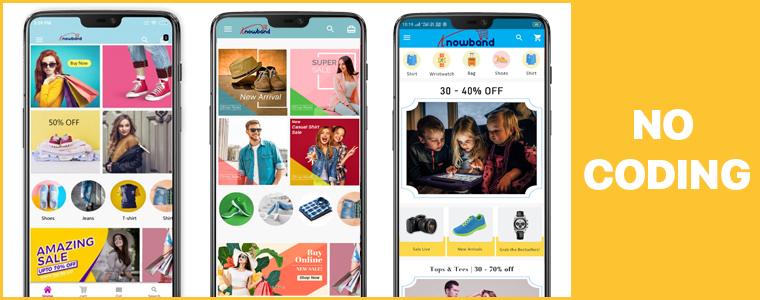
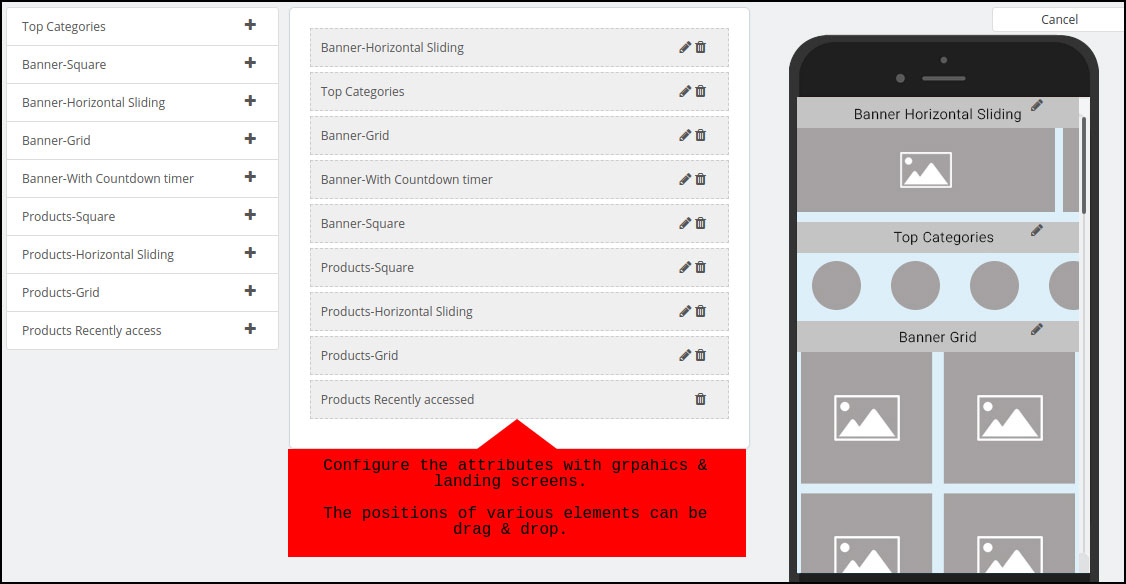
Gone are the days, when we used to stick to the fixed home screen layout of the eCommerce shopping app. The Mobile Apps for WooCommerce allow the e-merchants to change the look and feel of the home screen as per the requirements. Be it Black Friday, Christmas, New Year, or anything, change the entire app home screen with just a few tweaks.

In order to make your WooCommerce Mobile App home screen more appealing and compelling, use relevant graphics and images with intuitive color schemes.

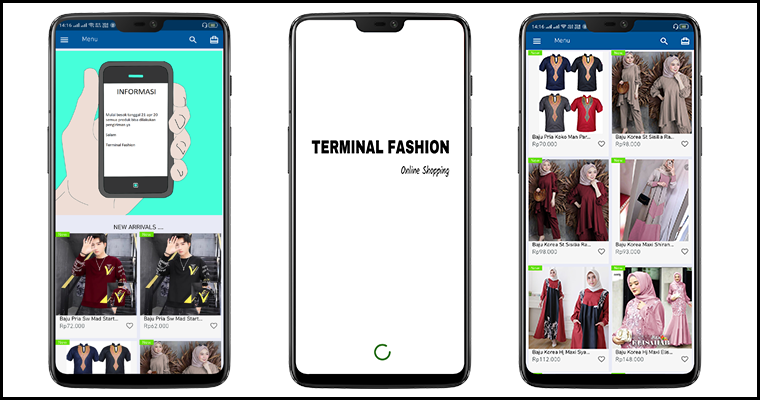
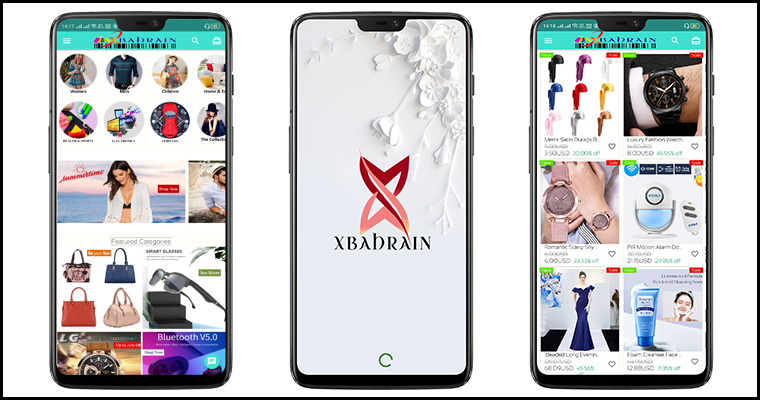
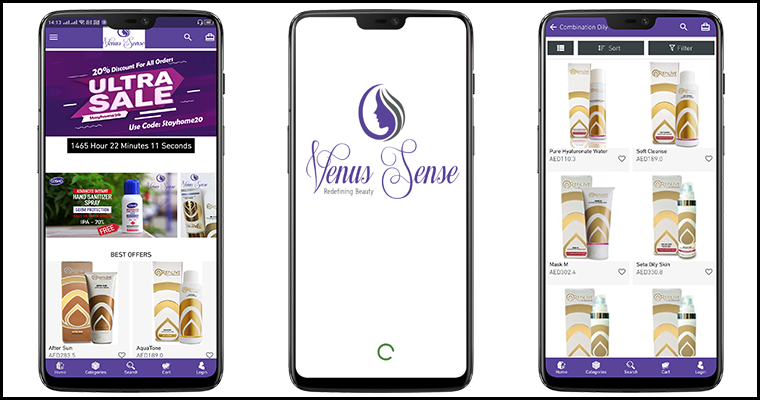
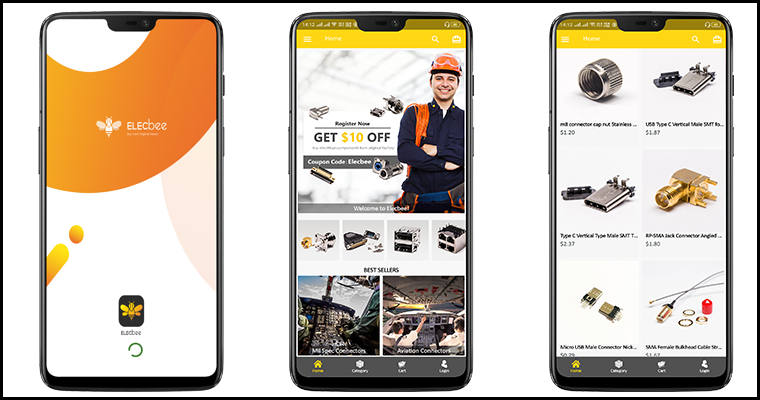
Here are the few beautiful app UI’s developed by us:

Note: We can also improvise and beautify your app home screen with the help of our skilled designer team.

2. Unlimited Push Notifications:

Customize and send unlimited push notifications on the mobile devices where your app is installed. You would’ve seen push notifications from various eCommerce biggies like Amazon, Walmart, etc. and being in the retail business, also be aware of the potential they carry.

The WooCommerce Mobile App Maker offers both automated and manual(Editor) push notifications in the admin panel. The store admin can just enable the following notification for automatic deploy on the Android and iOS apps:

– Successful Order Creation
– Order Status Update
– Abandoned Cart Notification

Along with these, the store merchant can even draft and send manual promotional or sale based push notification with relevant graphics and redirection. All is required from you is to spend a few minutes and handle marketing from your app like a pro.

3. Website Payment & Shipping Support

You must have been looking for the same payment options in the app that are available on the website. This WooCommerce Mobile App Creator is designed keeping that fact in mind. It allows all your website payment methods to be activated on the apps.

Along with payment methods, all shipping methods actively running on the eCommerce store will be there on the app as well. Users get to choose their favorable choice easily and make the purchase.

4. Multi-lingual & RTL (Arabic, Urdu, etc.)

The mobile apps for WooCommerce support all sorts of worldwide languages including the RTL scripts like Arabic, Hebrew, Persian, etc. The users will find the app content in their desired language and shop products.

Along with multiple languages, all sorts of currency options available on the website will be there on the apps. All currencies will be there on the final apps.

5. WhatsApp & Zopim(Zendesk) Chat

With inbuilt WhatsApp and Zendesk chat support, the online shoppers can directly remain in touch with the store owner and get answers to their queries in the minimum time possible. Often it happens that front end users stuck with any problem or doubt and ultimately leave with no available contact medium.

The WooCommerce Mobile App Builder offers a prominent communication channel between buyer and store admin to improve purchase flow. All you need to enable the chat from the admin panel to make it work on your apps.

That’s not all. There are still loads of features to discuss. Check all of them from the below link:

WooCommerce Mobile App Builder

Conclusion:

It would have been crystal clear till now how easy we have made the app development with this tool. All you need to purchase and install on your store, rest everything will be handled by our skilled and professional developers.

Engage more users in this mobile era by offering them an efficient and sale booster shopping app today. That’s all for this write-up. If you wish to explore more connect with us on Skype (support@knowband.com) or drop us an email at support@knowband.com

Looking forward to reading valuable comments!!

Also Read:

[New Version Release] Magento 2 Mobile App Builder : v1.0.6

7 Ways to Increase Average Order Value

Every brand wants its customers to shop more. When they will shop more, you will have more sales, and hence more money. This will ultimately result in a higher average order value.

Online businesses often look for ways to increase the average order value on their store. There are some smart tactics which we will discuss in this article that will help you generate more sales from an order.

What is Average Order Value?

Average order value is defined as the average amount spent per order on your website/store.

How to Calculate the Average Order Value?

To calculate your store’s average order value, you simply divide the total revenue generated by the total number of orders. For example, a shopper purchasing three pieces of denim worth $12, $18, and $21 will set the average order value to be $17.

How to Increase Average Order Value?

Let’s try to understand what steps you can take to increase the average order value on your website.
1. Set a Free Shipping Threshold

Free shipping threshold is one of the best and the popular ways to increase the average order value on your store. For example, free shipping or orders above $100.

How to get benefited from this? Okay, once you have calculated your average order value, increase the bar. Let’s say the calculated AOV is $85, set the value to $100 for a customer in order to get free shipping. A 15-25% increase is considered to be ideal.

Now imagine, a shopper comes to your store, adds the product worth $85 or nearby to his/her cart, at the checkout, he/she will be encouraged to shop for extra $15 to avail the free shipping facility.

With our One Page Checkout module, you can place a free shipping barrier on the top of your checkout page, set a threshold from the backend configurations, following which shoppers would be displayed how much more do they need to spend to receive free shipping on their order.

2. Increase Average Order Value by offering Discount

This might put you in confusion at first as to how offering discount can lead to an increase in the average order value when it actually reduces the price.

So, the tactic here is whenever you are offering a discount to your customers, set a minimum spend limit such that the AOV after discount remains more than the current calculated AOV, and at the same time, your profit margin is not much compromised.

For example, if the AOV is $50 currently, offer a $5 discount on orders above $65. You can increase the discount value for higher value orders.

3. Upsell and Cross-sell

E-commerce businesses rely mostly on Upselling and Cross-selling to increase their store’s average order value. You should replicate the same.

To be specific about these two terms, cross-selling involves products that complement the existing product (the product which the customer is buying). For example, if a person is purchasing a smartphone, a mobile case and a screen guard would fit well with the purchase. So, instead of just buying the phone, the person would most likely purchase all the three, and hence the order value will go up.

Upselling, on the other hand, involves products that are either a better version of the current product or has more benefits, which obviously means it would come at a slightly higher cost. People do not hesitate to spend a bit extra if they can get more features and better quality, ultimately resulting in the higher-order value.

Many popular eCommerce brands use terms like “Frequently bought together”, “Related Products”, “Similar Products”, “You may also like”, etc. to represent cross-selling and Upselling.

Related: A complete guide to Cross-selling and Upselling in eCommerce

4. Offer Bundle Deals

Providing a bundle of products is also one of the smartest ways to increase your average order value. For example, you can run deals like buy 2 and get 1 free or something like if a shirt is priced at $40, you can offer- buy 2 at worth $75 or buy 3 at $110.

When shoppers see that they can get a bundle of three at a lesser cost than the sum of their separate individual cost, they are likely to spend on buying the package. Just make sure that you are still able to make some profit out of it.

5. Launch a Loyalty Program

Customer loyalty programs can be very effective when it comes to increasing the average order value on your website.
The benefit of having a loyalty program is that it ensures repeat purchases. Besides, you can also improve the customer retention rate on your store.

Every time you reward something to a user on their purchase, you encourage them not only to return to your store but also push them to spend more.

It is very obvious that when customers have loyalty points in their wallet, more often than not they will spend or redeem them on higher purchase.

6. Provide Gift Cards

Gift Cards are a valuable asset for your brand and can help you achieve more sales and higher average order value.

If the AOV is $50, you can offer your customers a gift card of $5 on orders above $70 or $80. Besides, you can also set the gift card threshold, which obviously should be more than the current AOV. For example, shoppers can redeem the gift card on a purchase made over $80.

In this case, setting a minimum spend amount also becomes important because it can make customers purchase a product of the same amount as that of the gift card, which will give you no profit.

Well, even if you decide not to set the threshold, it is commonly seen that the customers usually spend the gift card amount on purchasing an expensive product.

Related: Why Digital Gift Cards are important to your eCommerce Business?

7. Run a Limited-Time Deal

Limited-time deals not only create urgency but provide you with an excellent opportunity to increase the average order value on your website.

For example, you can run a limited-time offer on your website where customers would be able to claim a few benefits like free shipping, a gift card, a coupon code for next purchase, or anything that is beneficial for them.

But for that to happen, customers would have to shop within that limited time and also match the terms and conditions defined, which could be anything like shopping for a certain amount, certain quantity of products, etc.

When shoppers know they have limited time to shop and avail the benefits, they act quickly.

Final Thoughts

That’s it. These are the seven best ways to increase the average order value on your website. High average order value is an indication that your business is performing exceedingly well. It also reflects higher revenue.
Taking a quick look back, it includes setting a free shipping threshold, offering a discount, encouraging Upselling and cross-selling, offering bundle deals, launching a loyalty program, providing gift cards, and running a limited-time deal.

Were these tips helpful for you? Do let me know in the comments below, and if you have some more points to add, do not forget to mention them.

Build A Lightweight PWA App For Your PrestaShop Store | Benefits & How-To’s?

Lightweight apps are a need for almost every industry, especially eCommerce; whether they are an established organization or a startup. Irrespective of the demographics of consumers/ audiences they are targeting, lightweight apps are a boom. This article focuses mainly on building a PrestaShop PWA Mobile App while introducing you to the more benefits of Progressive Web Apps.

You must be aware of the basic nature of a lightweight app that consumes less space on app users’ devices without compromising on the quality & functionality of the app. Also, lightweight apps load the content faster, & in general perform all the tasks faster, when compared to native apps. These two factors help the lightweight apps thrive even in the areas which don’t have a very high-speed internet connection.

Progressive Web Apps or PWAs are a great solution to that. PWAs are not only faster & less space-consuming but also offer a wider array of benefits to both the store owners & the app users. Having a PrestaShop PWA (web app) can do wonders for a business. And building one for your business is now as easy as a pie using a ready-made extension i.e. a PrestaShop PWA Builder module. Before you dive into that, you must skim through the benefits that come with a PWA (web app) for your PrestaShop Store.

Building A Lightweight App Using The PrestaShop PWA Builder:

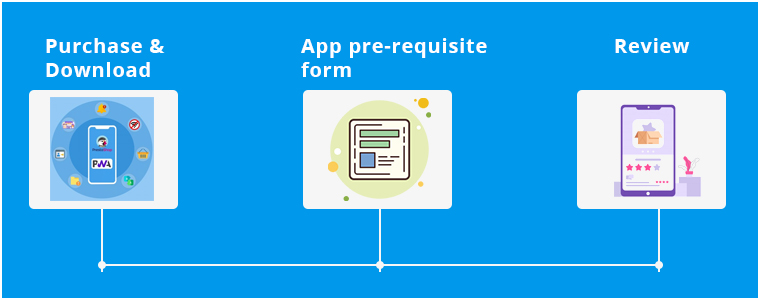
Step 1: Purchase PrestaShop PWA Mobile App Builder from the KnowBand. Install this module on your PrestaShop website.

Step 2: Fill the app pre-requisite form provided by KnowBand.

Step 3: Review your developed PrestaShop web-app & confirm to make it live.

This PWA Mobile App for PrestaShop easily builds a Progressive Web App derived from your own PrestaShop eCommerce website. No sort of coding is required with this extension. The friendly admin panel allows the store admin to make changes and manage Progressive Web Application. Even the home page of the PWA app can be designed via various layouts. The layouts can be crafted and designed using intuitive color schemes, attractive banners, images, etc.

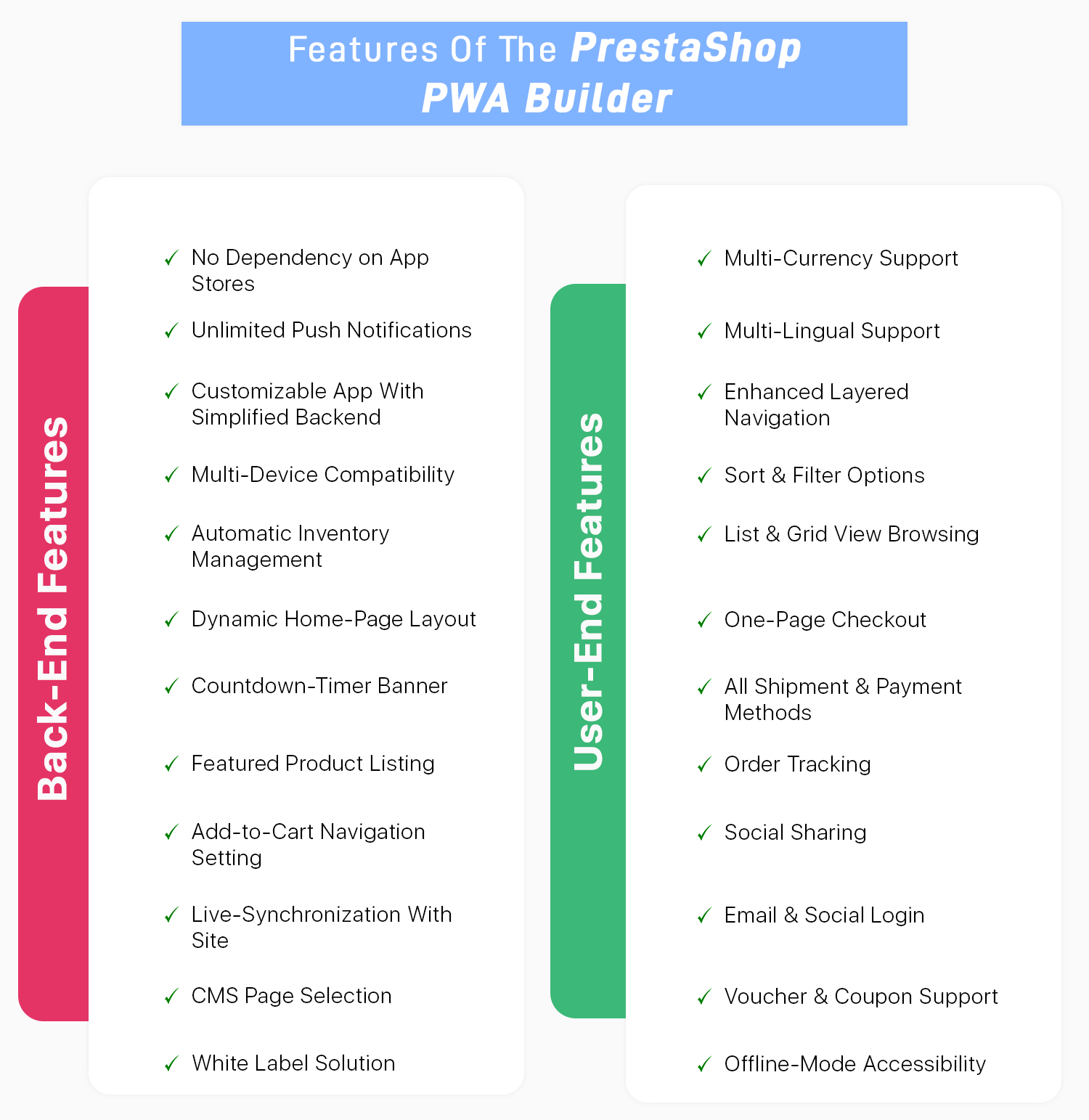
Features Of PrestaShop PWA Mobile App:

Because of its rich features & possibility for customizations, Progressive Apps are gaining more popularity among businesses every year. PWAs & its hybrid versions have in fact been labeled as the future of apps & eCommerce businesses can thrive the most out of it.

Other Advantages Of A PrestaShop PWA App:

  • Progressive Web Apps (PWAs) are less space-consuming & faster than traditional mobile apps (native apps). PWAs are faster, even for eCommerce sites like on PrestaShop, because the content of the page progressively downloads as the user keeps browsing. Also, note that PWAs are web-based applications coded in HTML, CSS & javascript, hence the name ‘Progressive Web App’.
  • A single PrestaShop PWA app can run on every operating system i.e. on Android, iOS, Windows, etc. This is because PWAs run on internet browsers. The same is not possible with Native Apps because you would need to build 2 native apps- one for android & another for iOS, both in different programming languages.
  • PWAs appear exactly like a native mobile app once the visitors browsing your PrestaShop site add the PWA to their home screen.
  • Because PWAs are web applications, you do not need to publish your PrestaShop PWA on play store or app store in order to make it available to your audience. Hence, there is no dependency on mobile app stores with PWAs.
  • Progressive Web Apps can be easily shared by your site/ app users using just a URL. New users do not need to download & install your app before using it. They can directly access your PrestaShop web app from their browsers & then choose to directly add it to their home screen. And that’s when it would start to act like a native app with the app icon on their devices home screen & in their menu.
  • Progressive Web Apps can also use most of the features of the device (smartphones/ tablets) like cameras, microphones, etc. Although, the use of geofencing & NFC in PWAs is still to come in near the future.
  • PWAs also allows you to send Push Notifications to your app users just like a native app would.
  • PWAs use secure URLs (https://) hence you do not need to worry about the security concerns.
  • Progressive web apps are easier to update & maintain. Your PrestaShop web app users won’t need to manually update their PWAs. That’s a task involved with native apps, not with PWAs.

Conclusion:

As owning a PWA app for your PrestaShop store has become easier & affordable, it’s a great time to go for these web apps. Utilizing the PrestaShop PWA Builder module is a smart way to build your web app. We, at KnowBand also offer native (Android and iOS) apps for PrestaShop. Check them out from below:

PrestaShop Mobile App Builder

PrestaShop Advanced Marketplace With Mobile App

If you have any queries related to this app maker module, feel free to email us at support@knowband.com. We would love to hear your valuable comments!!

Mark Zuckerberg Introduces Facebook Shops To Help Small Businesses Sell Online

Facebook is one of the favorite social media platforms for brands to market their products and boost brand awareness. Now with Facebook Shops, the social media giant is making a new push into eCommerce.

Due to the COVID-19 pandemic, many local stores have been shut. Some businesses have been permanently closed while some have stopped operating temporarily, and if the current crisis continues, a lot more businesses are going to fail.

Thus, primarily to help small scale businesses, CEO Mark Zuckerberg announced Facebook shops on Tuesday. In his live stream, he said that it is important to rebuild the economy while the pandemic continues.

“If you can’t physically open your store or restaurant, you can still take orders online and ship them to people. We are seeing a lot of small businesses that never had online businesses get online for the first time,” said Zuckerberg.

He also mentioned that small businesses make up the vast majority of Facebook’s more than 8 million advertisers.

Everything you need to know about Facebook Shops

Facebook Shops make it easier for businesses to set up a single online store on both Facebook and Instagram.

From their Twitter handle, Facebook also announced that the facility will soon be available for WhatsApp and Messenger as well.

Creating a Facebook shop is really simple and involves no cost. Mark explained this by saying-

“Our business model here is ads, so rather than charge businesses for Shops, we know that if Shops are valuable for businesses they’re going to in general want to bid more for ads. We will eventually make money that way.”

Though the company has earlier allowed businesses to list their products on Facebook and Instagram, Facebook Shops has taken the online shopping experience to the next level.

It lets businesses upload their catalogs once and then they can choose the products they want to feature from their catalog. The look and feel of the shop can also be customized; brands can set a cover image and choose colors for their shop that reflect the brand.

People can explore shops on a brand’s Facebook page or Instagram account, or find them through stories or ads. From there, they can browse the brand’s total collection, save products and checkout.

The order can be placed directly from Facebook or the customers will be redirected to the business’ website. Direct checkout will only be allowed for businesses participating in Facebook’s Checkout. Facebook charges a small fee for checkout made through their platform.
With Facebook shops, users will be able to get support by dropping a message to the brand through WhatsApp, Messenger, or Instagram Direct. They can also track their order delivery from there.

The company has partnered with Shopify, BigCommerce and other platforms to support small scale businesses.

Facebook to Introduce Instagram Shop this summer

Another tweet by Facebook revealed that they would be introducing Instagram Shop in the US this summer. They will also be adding a “Shop” tab in the navigation bar later this year. It will be a brand new way for Instagram users to discover and buy products.

Brand or Influencers have been using live streaming to showcase or promote a product. Now, Facebook is making it easy to purchase products in real-time. Soon, businesses will be able to tag products from their Facebook shop before they go live, and those tagged products will be displayed at the bottom of the video, making it easy for users to tap on the product and purchase.

Want to integrate your Facebook business page to your website? Try out our FB Store module available for PrestaShop and Magento that lets you list your products on your Facebook shop and provides various customization options.

A No-Code Trick To Affordably Build Your Magento Mobile App

Whenever an eCommerce business decides to build a mobile application for themselves, the first few things that come to their consideration is app designing, development & deployment. To make a feature-rich & customer-centric Magento mobile app, all these factors must be expertly handled.

This can make the app-building project quite expensive, especially for eCommerce businesses. Fortunately, businesses with their website built on Magento don’t have to worry about any of these. All of the steps i.e. development, design & deployment is collectively offered by a Magento Native App Builder extension developed by KnowBand.

Check out the extensions from below links: 

Magento Mobile App Builder

Magento 2 Mobile App Builder

This extension is a non-coding solution that can automatically create your own Magento Mobile App (APK/IPA files) using your own Magento website. It is very affordable for store owners as it costs only $169. Apart from that, store owners are also offered a free 3-month support period.

Using an app builder extension for building & launching an app is the latest trend. This Magento Mobile App Maker plugin is a secure & reliable approach that provides you with great user-end as well as backend features. Building a native Magento mobile app using such an app builder extension is easy for even a non-tech savvy person. Mentioned below are its 3 simple steps.

Quick Steps To Build & Launch A Magento Mobile App:

Step 1: Purchase the Magento Mobile App Maker extension from the KnowBand.

Step 2: Install the downloaded extension & install it on your Magento website. Then, simply fill the app pre-requisite form provided by KnowBand.
Step 3: Review your app & get it published on Google Play Store/Apple App Store.
If you want to test out this extension before purchasing, you can download its free version from the KnowBand Store & use it to design your demo app.
Highlighted Features Of Magento Mobile App Builder:

1. Unlimited Push Notifications:

Store owners are provided with an unlimited number of push notifications. They don’t need to worry about any such limitations. Some of these notifications can even be automated & scheduled such as the abandoned cart message, order status messages.

2. Home-Page Customization:

The complete home-page can be edited live using the visual home-page editor in the backend settings. Store owners can add interactive banners, sliders, countdown timer sale banners, etc all with just a few simple clicks & drag-&-drops.

3. Fully Customizable App:

This Magento app maker extension builds apps that are fully customizable. All of the customizations can be made easily from the backend of this extension. All of the at-a-glance features listed below are totally customizable. Store owners & admins can also take any sort of assistance from the experts at KnowBand. The possibilities with this extension are endless.

4. Deep Linking:

Deep linking is the latest feature addition with this app builder plugin. It effortlessly brings your mobile site visitors to the equivalent page on your Magento mobile app.  For such a case, your app must be already available on users’ devices. This helps to boost the user retention rate of your app.

5. Multi-lingual & Multi-Currency Support:

With this extension, your native Magento Mobile App would by default support multiple languages (including RTL scripts and languages) & currencies.

6. WhatsApp & Zopim Chat Support:

Two of the popular chat support platforms are integrated with your app using this extension. These are WhatsApp & Zopim Chat Support. Its sticky icons are present on the lower end Magento App. You can even enable/disable them from the backend if required. 

7. Social Sharing & Social/Fingerprint  Login:

Login & sharing is made easier for your app users. They can log in to your app using their Facebook/ Google accounts. Also, multiple social sharing options are also integrated with the app by default. App users can share any product on whichever platform they want. OTP(Phone Number) and Fingerprint login will be available in mobile apps. 

8. Shipment & Payments:

All of the payment & shipping methods active on your Magento website are by default supported & active on the mobile app as well. Admins can even deselect a few particular options on the app if they wish.

9. Real-Time Synchronization:

Because this extension derives a native mobile app right from your Magento website, all the data on both your app & site are in real-time synchronization with each other. This also keeps the catalog management automatic.

Conclusion:

The popularity of mobile apps has been growing among netizens. Almost every eCommerce business is taking a step towards having a mobile app with all the latest features. With smart & affordable solutions such as this Magento Mobile App Builder, it only a matter of a couple of days to get the Magento app up & running.

Feel free to check out its demo version & its feature-list as it is packed with a lot more than the ones described in this write-up. For any queries or consultation, email us at support@knowband.com. We would be more than delighted to assist you.

Opencart Free Shipping Manager extension- User Manual

1.0 Introduction

Opencart Free Shipping Manager module is a feature-rich module which allows the online merchant to offer free shipping to the online users. The store merchant can apply conditions and rules for free shipping benefits.

The online users can show a free-shipping block on the cart summary page. Opencart Free Shipping Manager plugin allows admin to set the minimum order amount and weight for availing free shipping. By offering free shipping to online users, admin can increase sales and reduce cart abandonment cases.

Admin can also select countries where he wants to implement any free shipping rule. This way, online users can shop for their desired products without paying any shipping charges.

1.1 Features offered by Opencart Free Shipping Manager plugin

  • As a store merchant, you can offer free shipping to the consumers.
  • This Opencart Free Shipping Manager module allows setting terms and conditions for offering free shipping. Admin can add multiple free shipping rules.
  • The Free Shipping Price module for OpenCart allows setting the minimum order price and order weight for availing the discount.
  • Admin can also set the look and feel of the shipping block OpenCart module admin interface.
  • Admin can enable or disable any free shipping rule anytime. There is an option to select countries from the list for offering free shipping.
  • Free Shipping Price module for OpenCart provides an option to the store admin for setting the priority of free shipping rules.
  • Online consumers can check the cart summary page for getting exact detail for meeting the free shipping conditions.
  • The OpenCart Free Shipping extension is multilingual compatible and also compatible with all the OpenCart themes.

2.0 Installation Steps

Purchase Opencart Free Shipping Manager plugin from the Knowband store. You will receive these files after purchasing it:

  • First, you will get a source code zipped file.
  • User Manual

Follow below-mentioned steps to install Free Shipping Price module for OpenCart:

1. Unzip the received zip file. You will get the folders.

2. Copy all the folders of the zip file in the Root Directory of OpenCart setup via FTP manager.

3. There will be a file named kbpdf_free_Shipping.ocmod.xml (In case of Openvar v3.0.x file name would be kbfree_shipping.ocmod.zip). Upload the same file from the page “Admin -> Extension -> Extension Installer -> upload”.

So, the OpenCart Free Shipping Manager extension is now successfully installed and ready to use at your store.

3.0 Admin Settings

After installing the OpenCart free shipping module, the e-merchant can apply the settings for offering free shipping.
There are following sections available to the admin interface:

  • Module Configuration
  • Free Shipping

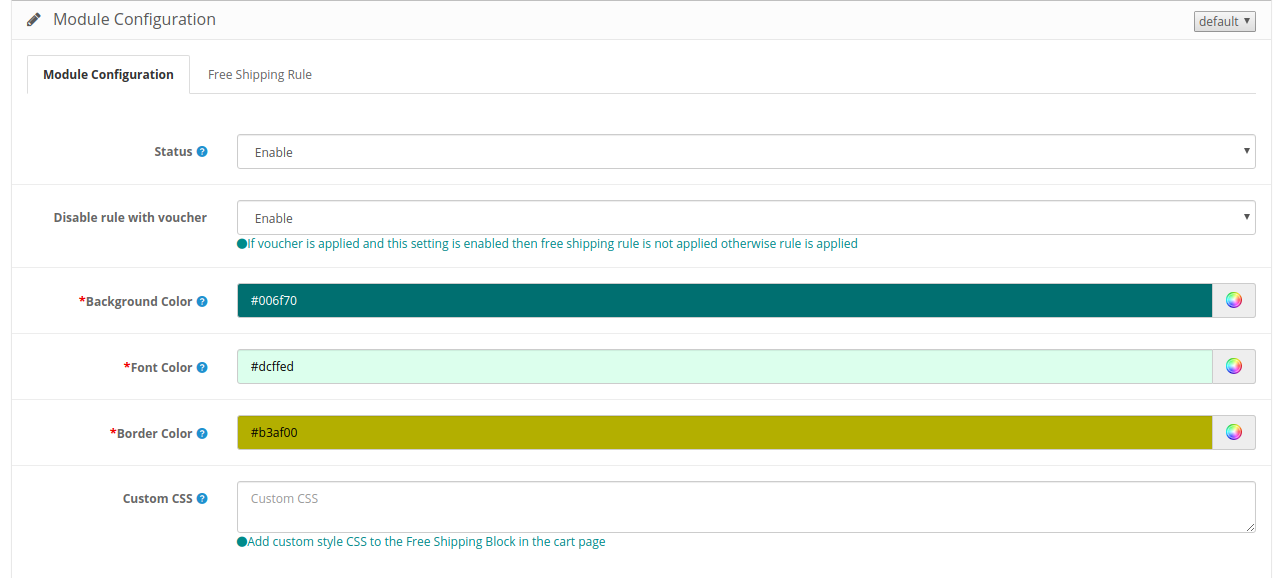
3.1 Module Configuration

In the module configuration section, the online merchant can set up a general configuration of the Opencart Free Shipping Manager module.

Check the customization options here:

  • Status: Activate or deactivate the module functionality from here.
  • Disable rule with voucher: Once this setting is disabled, the free shipping offer will not be applicable even when the voucher is applied.
  • Background Color: Select the background color.
  • Font color: Choose the font color from here.
  • Border Color: Select the border color here.
  • Custom CSS: Enter the Custom CSS code here.

 3.2 Free Shipping

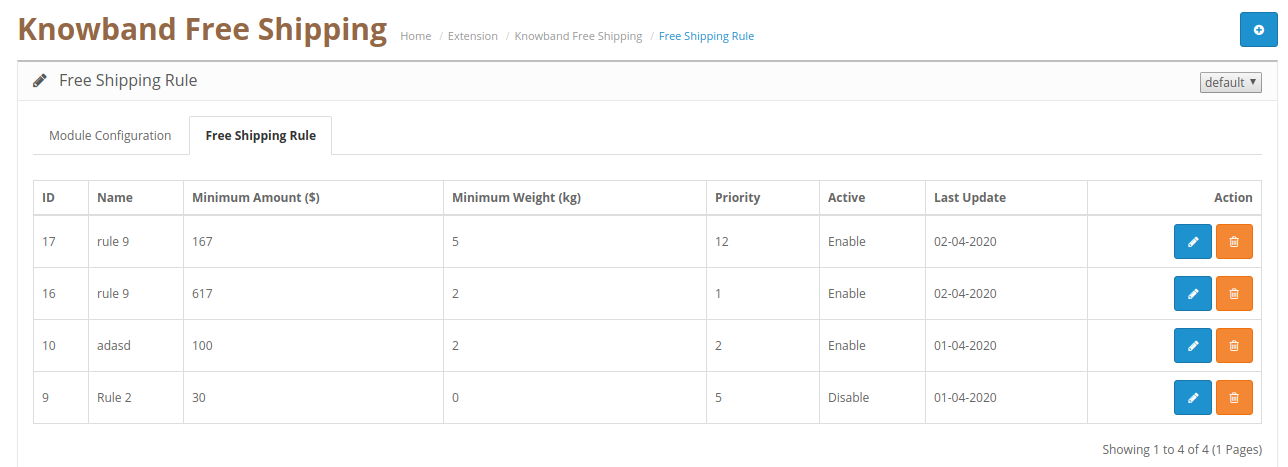
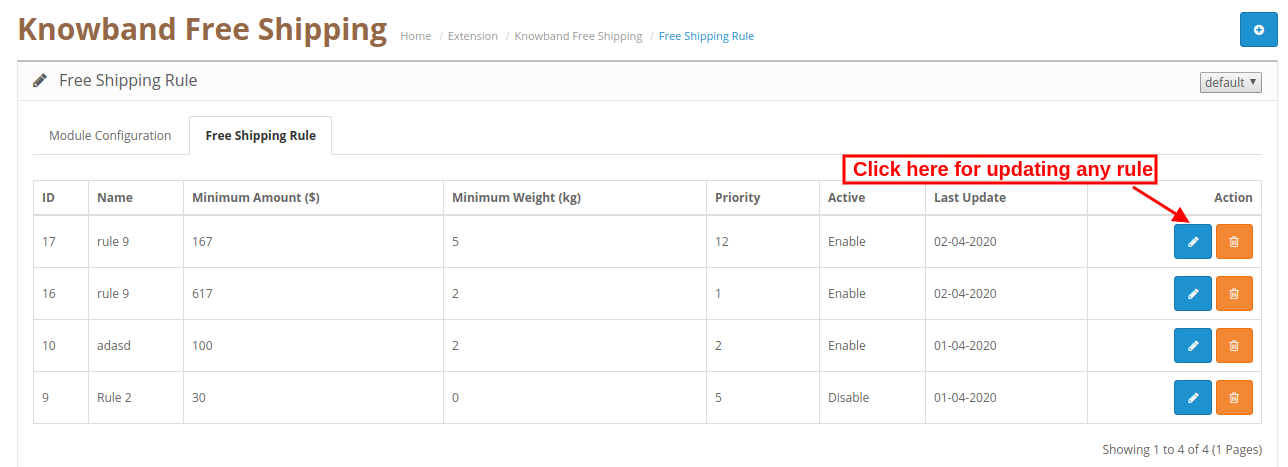
In the free shipping rule section, the online merchant can set up free shipping rules. The OpenCart free shipping module allows creating multiple free shipping rules.


3.2.1 Steps to add new Free Shipping Rule

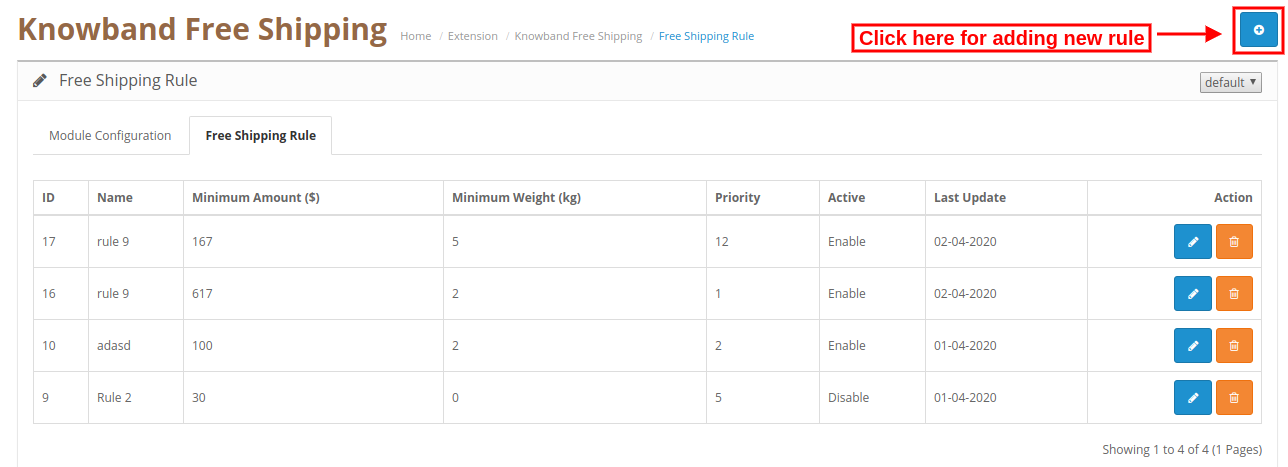
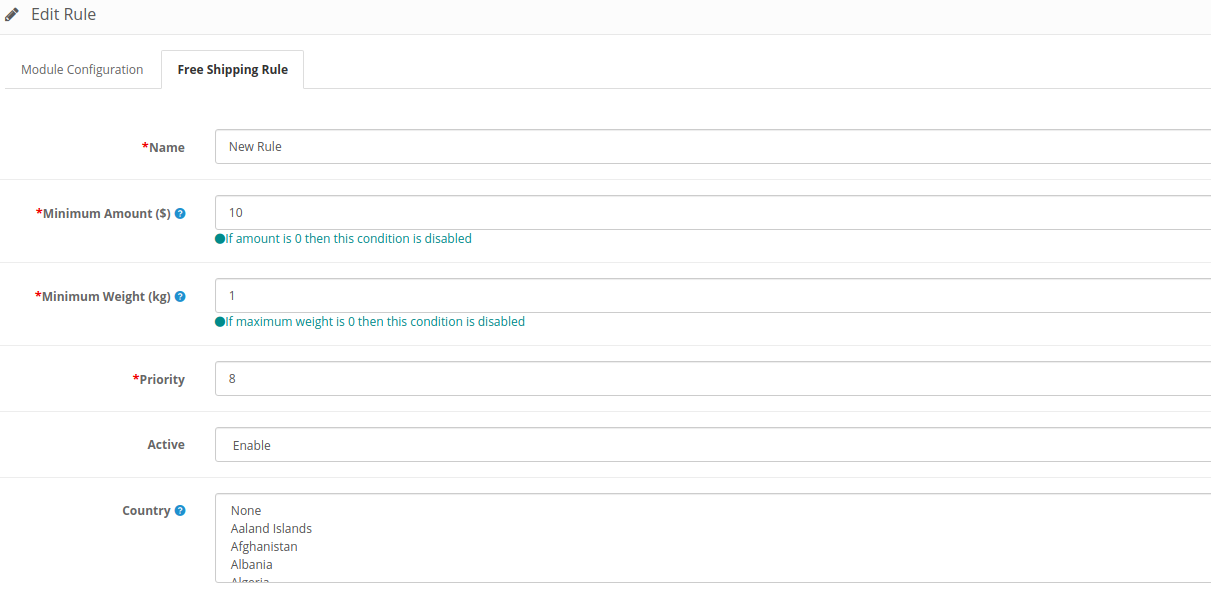
Admin can add new rules from the admin interface. For adding a new rule, the admin needs to click on the “+” button.

After clicking on this button, enter these details as shown below:

  • Name: Enter Rule name here.
  • Minimum amount: Set the minimum amount for availing free shipping.
  • Minimum Weight: Enter the minimum weight of the overall order for which you can offer free shipping. If the maximum weight of the order is 0 then this condition will not work.
  • Priority: Admin can set the priority of the free shipping rule.
  • Activate: Activate the rule from here.
  • Country: Admin can select the country from the list for which he doesn’t want to implement any particular rule.

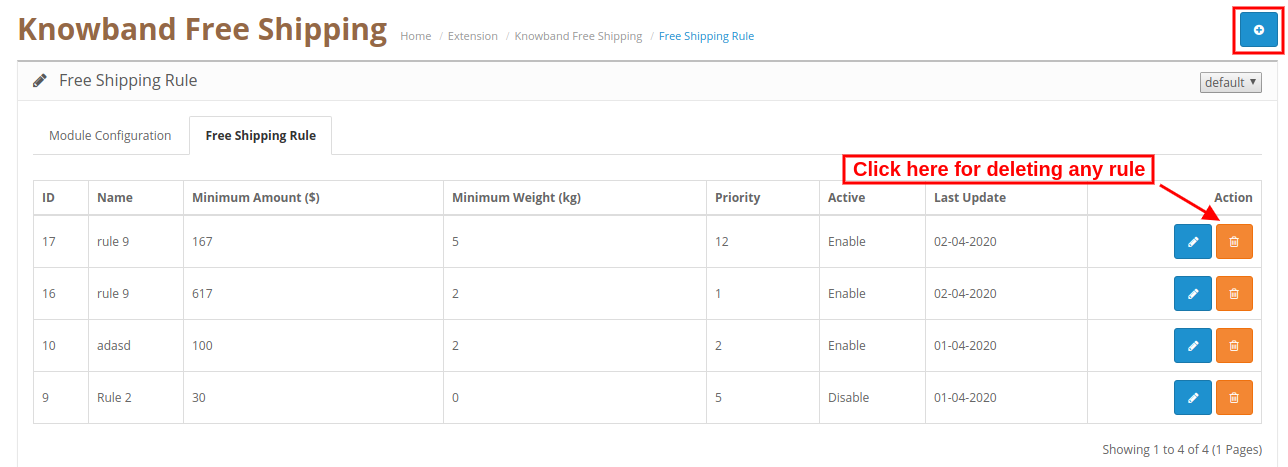
3.2.2 Steps to Delete free Shipping Rule

Admin can click here for deleting any free shipping rule. Check the below screenshot for more details:

3.2.3 Steps to Update free Shipping Rule

Admin can click here for updating any free shipping rule. Check this screenshot:

4.0 Website UI

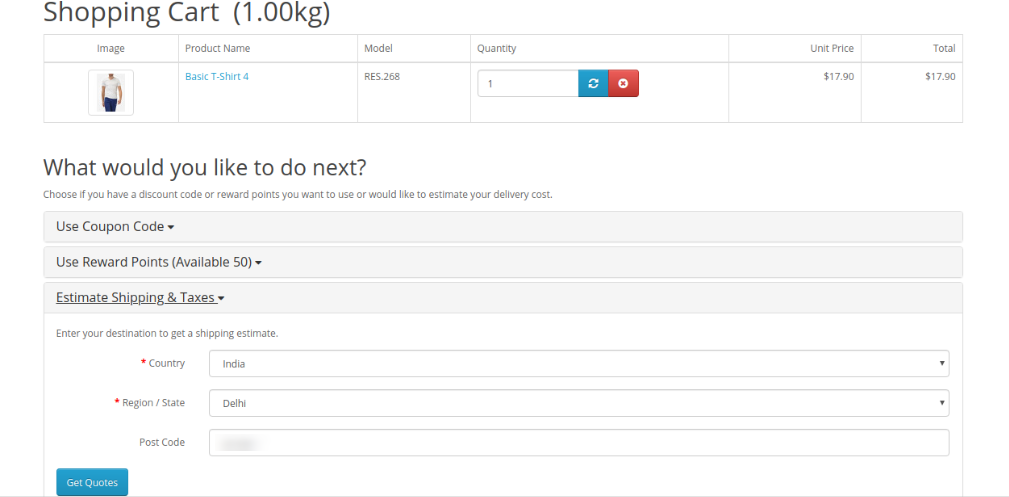
In the website front-end interface, the online users can view the impact. After adding any product in the cart, online users can select the “Estimated Shipping and taxes” option and enter country and area details here. Check the below-mentioned screenshot:

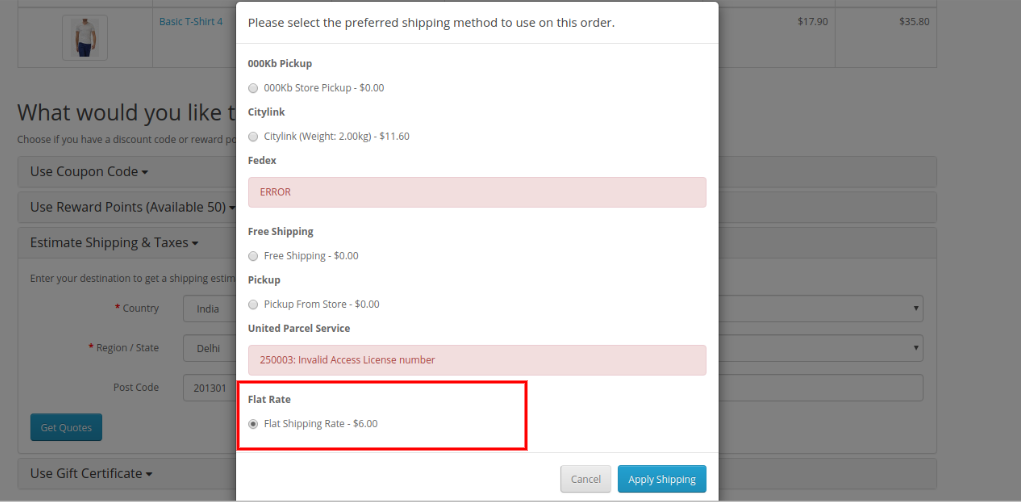
After submitting all details, online users can select shipping fat rates as shown below:

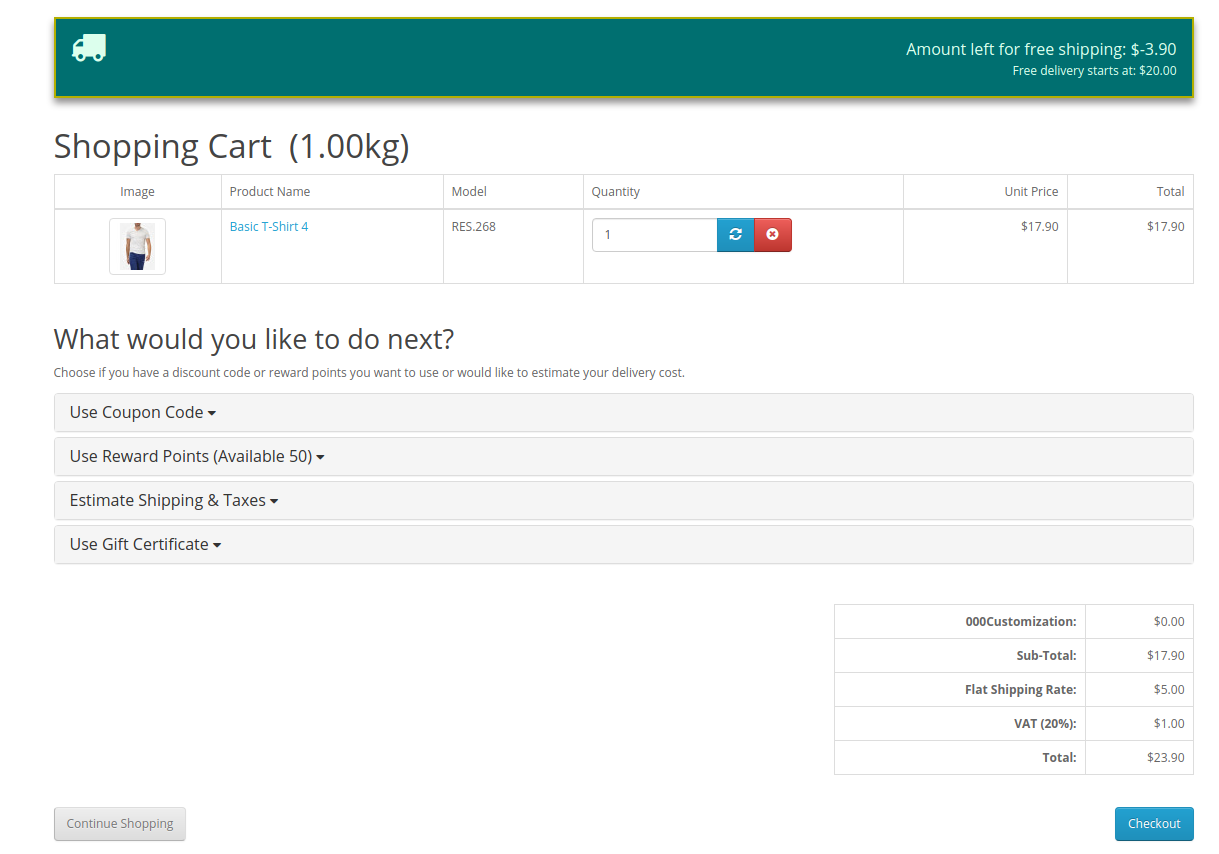
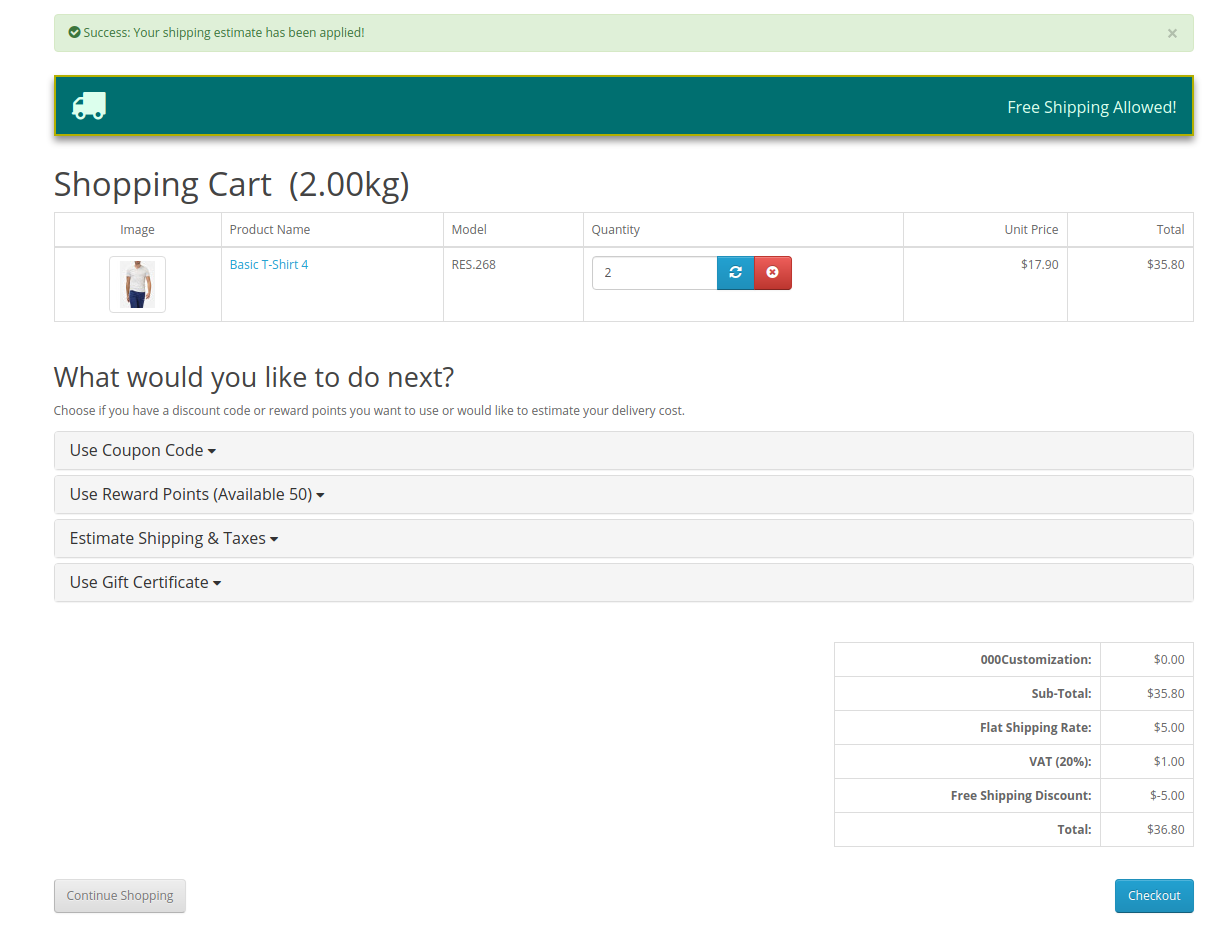
After selecting shipping flat rates and clicking on apply shipping, the online users can view a free shipping block on the cart review page. They can get exact information about the remaining amount for availing free shipping.

As shown here, $3.90 remaining for availing free shipping. After adding another product, online users can view the free shipping message as shown below:

The online users can avail free shipping only if they fulfill all the conditions applied by store admin.

This way, the online users can avail free shipping while shopping for their desired products from your online store.