Benefits of Selling on Multi-Vendor Marketplace

If you have been selling online for a long and now if you want to take your business to new heights of success, why aren’t you thinking of a multi-vendor marketplace? Converting your store into a multi-vendor marketplace is not only beneficial for your business but your budget as well because you don’t have to invest too much. 

According to research, 95 percent of online customers have made a purchase on one of the markets, 31 percent of eCommerce shoppers making their first purchase prefer to do so, and 54 percent of online purchasers think marketplace purchasing has changed the way they shop.

Why you should start your own multi-vendor eCommerce store?

The key to success in any business is Innovation. Furthermore, the multi-seller model comes with several benefits over a regular online store. 

  • You can sell a variety of products

A multi-vendor eCommerce store gives you the freedom to add any number of vendors to your store. These vendors can have their inventory. As a result, your store will come close to the physical world marketplace, a place where various vendors can provide a huge variety of products to the customers. 

  • Streamlined And Smooth Operations

It’s all about optimizing processes to manage as well as distribute things as quickly as possible when running an online store. Further, Individual vendors manage inventories, introduce new products, as well as provide product catalog updates when you turn your online store into a multi-vendor marketplace. As a result, activities run smoothly and without hiccups, and the burden of management is shared among various actors. Also, you can simply relax, even think about how to improve your operations as well as expand your business.

  • Budget-friendly

Having an online marketplace can significantly reduce the cost of managing the multiple teams required to keep the inventory side of the business running well. Furthermore, you can concentrate only on your sales and customer service staff. Moreover, this division of labor not only reduces prices but also improves efficiency and service quality on your multi-vendor e-commerce store.

  • You get more control

Selling on a multi-vendor marketplace comes with lesser responsibility as well as more control. Furthermore, store merchant of an online marketplace gets complete control as well as the authority of choosing, allowing as well as restricting or rejecting any vendor. Once a vendor is listed on your multi-vendor marketplace, the vendor is also responsible for order fulfillment. Further, this relieves the administrator of several obligations while allowing him to continue to monitor and assist suppliers with the fulfillment process.

Multi-vendor marketplace modules offered by Knowband

Prestashop Marketplace Addon

For Prestashop owners, Knowband offers Prestashop Marketplace addon which is beneficial for Prestashop store merchants as it helps in creating their marketplace. Further, the module allows multiple sellers to sell their products.

Key features of PrestaShop Marketplace module:

  • The module allows managing sellers.
  • Prestashop Marketplace module offers an approval configuration feature.
  • Allows managing the commission from the sellers.
  • For notification, the addon can customize templates.
  • Module is compatible with  PrestaShop Mobile App for Multi-Vendor Marketplace.

PrestaShop Multi-Vendor Marketplace Gold Plan

PrestaShop Multi-Vendor Marketplace Gold Plan launched by Knowband for e-store owners. Further, this plan includes various modules. Including Marketplace CSV import/export plugin, Marketplace Customer-Seller Ticket Addon, Marketplace Deal Manager module, etc. Furthermore, the plan permit owners to create a fully-functional marketplace similar to Amazon.

Key features of Prestashop Multi-Vendor Marketplace Gold Plan:

  • Provide basic features of the PrestaShop Marketplace module as well as other features of other supportive marketplace modules. 
  • Via CSV, it allows bulk uploading of the products for the sellers.
  • To resolve queries, it offers seller customer ticket systems.
  • Allows sellers to run deals as well as discounts for their items with the help of deal managers.
  • Allows sellers to customize the invoice for better branding with the seller invoice module.

OpenCart Marketplace extension

Opencart Marketplace Extension offered by Knowband is capable of transforming your single-vendor website into a fully-functional marketplace swiftly. Further, with the assistance of a multi-vendor marketplace module, store merchants can build a marketplace similar to Amazon, eBay, etc. This even helps multiple sellers to sell their items on the marketplace.

Key features of Opencart Marketplace Extension:

  • Opencart’s Multi-vendor marketplace’s new admin interface makes seller management effortless.
  • Makes commission management effortless for the store admin.
  • Offers email templates customization for all the notifications.
  • With a button click, the product as well as category management can be done.
  • Compatible with  Opencart mobile app builder plugin. 

Magento 2 Marketplace addon

Magento 2 Marketplace addon provided by Knowband helps Magento 2 store owners to build their own marketplace. Further, the addon permits various sellers to sell their items.

Key features of Magento 2 marketplace:

  • Magento 2 marketplace helps manage sellers.
  • Addon provides approval configuration.
  • Helps in managing the commission from the sellers.
  • Helps in product management.
  • Offers management of the orders without any hassle.
  • Offers multi-language functionality.
  • Compatible with Magento 2 Mobile App Builder.

Magento Marketplace Addon

Magento Marketplace Addon is a KnowBand extension that allows Magento store owners to create their own marketplace where numerous merchants can sell their products.

Key features of Magento marketplace:

  • Manage sellers
  • Approval configuration
  • Manage the commission from the sellers
  • Customized e-mail templates for notification
  • Product management
  • Compatible with Magento Mobile App for Multi-Vendor Marketplace.

If you face any difficulty in any of the above modules, hence feel free to write us at support@knowband.com


Benefits of Cash on Delivery (COD) When Shopping Online

COD stands for Cash on Delivery, the most familiar word we see while we shop. Cash on Delivery means the customer will pay the amount of the package or product he/she ordered after he/she received it. Now the biggest question is, how beneficial is Cash on Delivery to eCommerce? 

Benefits of Cash on Delivery

You might have enough cash on hand or perhaps a credit card to pay for your item right away. Why, therefore, do online and offline retailers offer payment upon delivery as a payment option? As I previously stated, some stores or enterprises want to increase their business by providing COD options. However, there are several advantages for you as well.

  • You can check your order before payment

Cash on Delivery is beneficial because it lets the customer get assured of the product he/she received. In case the product they order isn’t the correct one, the money will be in their hands. No more complaining about the product and asking for a refund.

COD gives you the freedom of buying the product from somewhere else in case you find the quality of the item inappropriate. Furthermore, you don’t lose anything if the order is messed up for whatever reason. You also don’t have to wait for the merchant to refund your money or force you to accept a substitute instead of canceling the order entirely.

  • Payments security 

As a person, I prefer going with the COD option. In case you are purchasing something from online sellers such as  Facebook Marketplace, Etsy, or Shopify, availing of COD facilities is always better. 

Though there is nothing wrong with these platforms, it’s just their online payment systems might not be as secure as one would desire. Furthermore, I have come across online marketplaces, in some cases, as a marketplace they only accept payments only from a specific payment portal or app for their orders. 

Therefore, it’s better to go with the cash on delivery option because then you don’t need to download another mobile wallet or app just to pay for a single order. 

  • You have time for getting cash 

Cash on Delivery gives you the freedom to cancel the order when you are out of cash. There must be times when you ordered something and you ran out of money, though such situations are rare but they’re not uncommon. There may be moments when our resources, particularly money, will be stretched thin. COD allows us a much-needed break in these situations, allowing us to arrange for the money or reconsider the order. 

Cash on Delivery Modules offered by Knowband

  • Prestashop Cash on Delivery with fee addon

Prestashop Cash On Delivery with fee add-on offered by Knowband permitting the Prestashop store admin to offer the option of cash on delivery to all their online clients. Furthermore, with the help of this add-on admin can now encourage customers to finish their order regardless of whether they want to go via the entire process of online payment. This module even permits eCommerce merchants to fix the terms and conditions and even fees for the COD.

Features of Prestashop Cash on Delivery with fee addon 

  • Allows store admin to provide the COD option to their clients with an additional fee
  • Addon allows the admin to charge a fee for the cash on delivery option which can be managed from the back-end.
  • Without sharing the bank details customers can shop from the site.
  • Boosts overall conversion of the website.
  • Increases the entire revenue of the website.
  • OpenCart Cash on Delivery with Fees extension

Keeping the requirement of COD, Knowband has offered OpenCart Cash on Delivery with Fees extension for Opencart merchants. This extension helps in eliminating the payment dependency on shopping cards. Moreover, it offers custom COD functionality to the customers. Customers can flexibly opt for cash on delivery payment during any product purchases from the store with this OpenCart extension.

Key features of OpenCart Cash on Delivery with Fees extension:

  • Permit COD option for items at your eCommerce store with an additional charge.
  • Allow clients to pay for their orders using the cash on delivery module for an additional cost.
  • With the OpenCart Cash on the Delivery plugin, you can add your payment gateway to your site so that clients can make purchases without having to provide their credit card information.
  • Create several COD profiles for different order quantities and shipping types.
  • With the COD option, the OpenCart Cash on Delivery module charges your customers a flat or percentage cost.

In case you find any trouble with the above module, feel free to write us at support@knowband.com

Prestashop Wallet System module_User Manual

1.1 Introduction

The Prestashop Wallet System module is an addon that enables the customer to make the payment for the product purchased at the time of check-out using the e-wallet system. Thus, simplifying the customer buying experience by providing them with a simple and easy-to-use digital payment method.

2. Installation Guide

The folder structure of the Prestashop Customer Wallet System module folder.

Copy the module folder under the “root_directory/modules/” of the admin store via FTP or use the Prestashop interface to upload the plugin.
Further, after copying, the Prestashop module will be listed on the module listing page in the admin panel as given in the below screen.

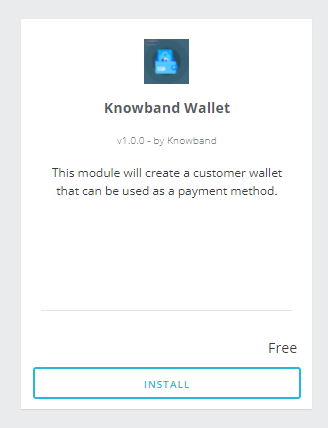
The admin will be able to find the Prestashop Wallet System ready to be installed in the Modules in the admin PrestaShop store as shown below.
Therefore, click on the Install link to install the plugin.

3. User Manual

This User Manual provides the admin with the guidelines of this Prestashop Wallet System Addon. In fact, this e-wallet module contains 2 interfaces:

  • Admin Interface
  • Front-End Interface

3.1 Admin Interface

To access this module, click on the “Wallet Module” button of Prestashop Customer Wallet Addon. Further, on clicking, the admin will get three different options:

  • General Settings
  • Customer Wallets
  • Orders

3.1.1 General Settings

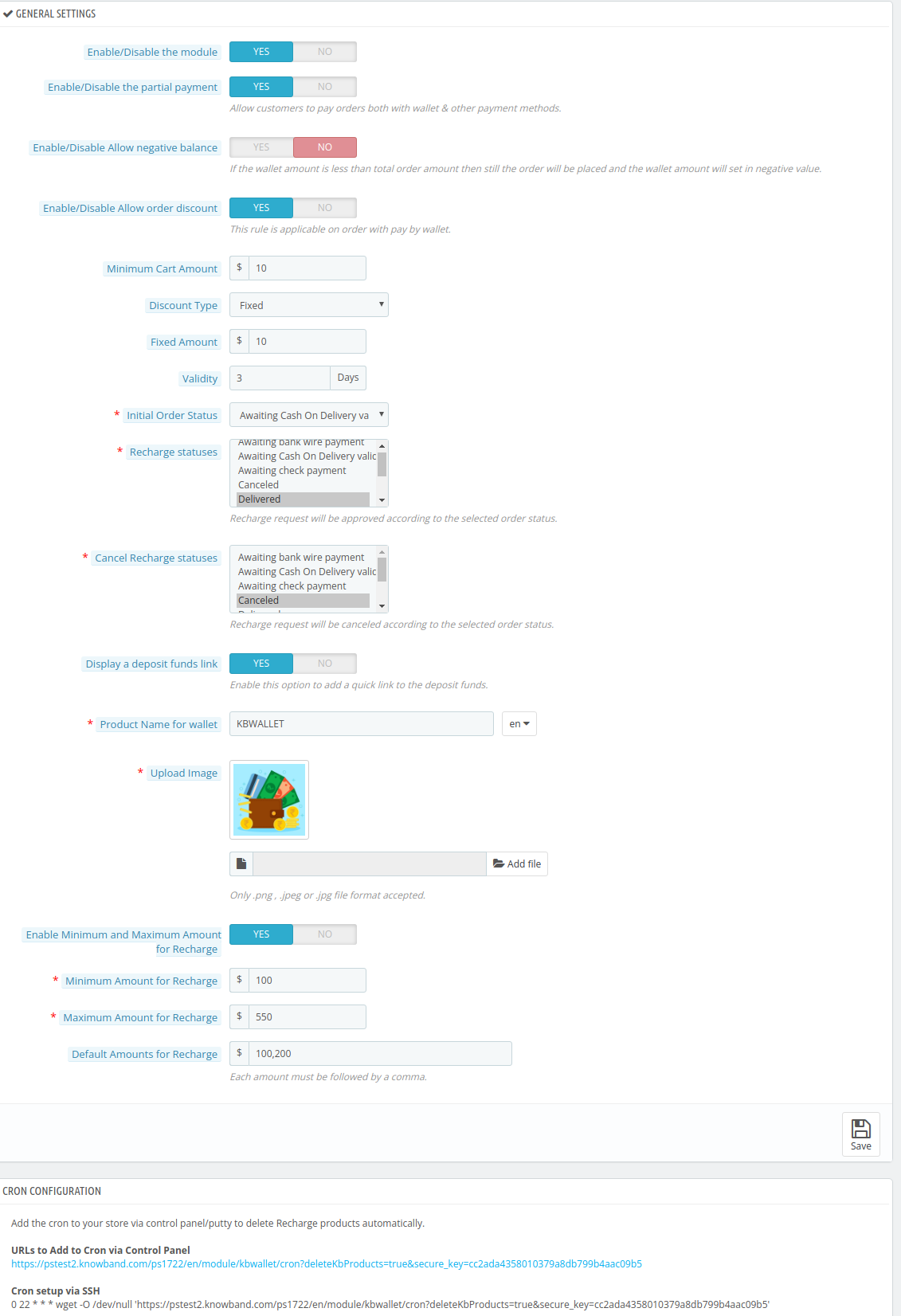
3.1.1.1 Enable/Disable the Module

Using this button the admin can easily enable the Prestashop Customer Wallet plugin. In fact, the admin just needs to toggle from No to Yes.

Note: The default value will be “No.”

3.1.1.2 Enable/Disable the partial payment

This Prestashop Customer Wallet Addon will help the admin empower the customer to make a part payment using the digital wallet. In addition, the remaining payment is usable from the other payment options. In fact, to enable this option the admin just needs to switch the Enable button from No to Yes.

3.1.1.3 Activate/Deactivate Allow negative balance

Through this option, the admin can simply allow the negative balance in the e-wallet. Further, the default option selected here will be No. In fact, if the admin wants to enable it, he needs to toggle the button to Yes.

Note: If the wallet amount is less than the total order amount then still the order will be placed and the wallet amount will be set in negative value.

3.1.1.4 Enable/Disable Allow order discount

Using this option, the admin can either enable or disable the option to permit a discount on placing an order using the wallet. However, the customer will be able to enjoy the discounted price of the product only when they choose Wallet as their payment option.

In addition to this, if the admin enables it, he will get different options

3.1.1.5 Minimum Cart Amount

This will help the admin to set the minimum order amount on which the discount will be applicable. For Instance, $100.

3.1.1.6 Discount Type

Using the Prestashop customer wallet addon, the admin will be able to choose between two different types of discounts:

a. Fixed: For Instance $10

b. Percentage: For Instance 10%

On the basis of this, the customer will be able to reap the benefits of discounts under this e-wallet system plugin.

3.1.1.7 Validity

This option of Prestashop Customer wallet addon will help the admin to set the time period for which the discount will be valid.

3.1.1.8 Initial Order Status

The admin can choose the initial order status to display when the customer chooses to pay from the wallet. The following are the options:

  • Awaiting Bank Wire Payment
  • Awaiting Cash on Delivery Validation
  • Canceled
  • Awaiting Check Payment
  • Delivered
  • Mobile App Awaiting PayPal Payment
  • Mobile App PayPal Payment Accepted
  • On Back Order (Not Paid)
  • On Back Order (Paid)
  • Payment Accepted
  • Payment Error
  • Processing in Progress
  • Refunded
  • Remote Payment Accepted
  • Shipped
3.1.1.9 Recharge Statuses

Depending on the Order status, the admin can set the recharge statuses. The options available are:

  • Awaiting Bank Wire Payment
  • Awaiting Cash on Delivery Validation
  • Canceled
  • Awaiting Check Payment
  • Delivered
  • Mobile App Awaiting PayPal Payment
  • Mobile App PayPal Payment Accepted
  • On Back Order (Not Paid)
  • On Back Order (Paid)
  • Payment Accepted
  • Payment Error
  • Processing in Progress
  • Refunded
  • Remote Payment Accepted
  • Shipped
3.1.1.10 Cancel Recharge Statuses

Depending on the Order status, the admin can cancel the recharge statuses. The options available are:

  • Awaiting Bank Wire Payment
  • Awaiting Cash on Delivery Validation
  • Canceled
  • Awaiting Check Payment
  • Delivered
  • Mobile App Awaiting PayPal Payment
  • Mobile App PayPal Payment Accepted
  • On Back Order (Not Paid)
  • On Back Order (Paid)
  • Payment Accepted
  • Payment Error
  • Processing in Progress
  • Refunded
  • Remote Payment Accepted
  • Shipped
3.1.1.11 Display a deposit funds link

By utilizing this option, the admin can easily enable or disable the static quick link. If this option is enabled the customer will be able to recharge the wallet while staying on the product page.

3.1.1.12 Product Name for the wallet

As the option suggests, the admin can easily set the e-wallet name. For instance, PSWALLET.

3.1.1.13 Upload Image

By using this option of the Prestashop customer wallet plugin, the admin can easily upload and set the image for the e-wallet.

3.1.1.14 Enable Minimum and Maximum Amount for Recharge

This option will allow the admin to set the minimum and maximum range for recharging the e-wallet. To enable this feature Switch the option from No to Yes.

  • Minimum Amount for Recharge: For instance $100
  • Maximum Amount for Recharge: For instance $500

Note: If you disable this option, the admin needs to set the default values for digital wallet recharge. Moreover, the admin needs to keep in mind that he needs to separate the default recharge values by comma.

3.1.1.15 Executing Cron functionality

The admin can add the cron to the store via control panel/putty to delete Recharge products automatically.

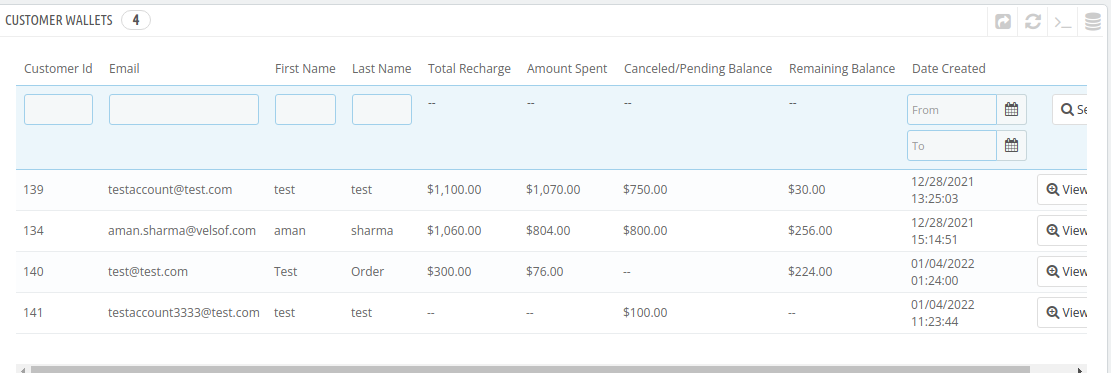
3.2 Customer Wallets

In this section of the Prestashop Customer Wallet System addon, the admin can track all the customers using the wallet. In fact, he can even view the following details of the customers:

  • Customer ID
  • Email
  • First Name
  • Last Name
  • Total Recharge
  • Amount Spent
  • Canceled/Pending Balance
  • Remaining Balance; and
  • Date Created

In fact, the admin can view a detailed report of every customer in this section. In addition, he can also edit the same. For instance, he can recharge the customer’s wallet. Further, he can even debit an amount from the same.

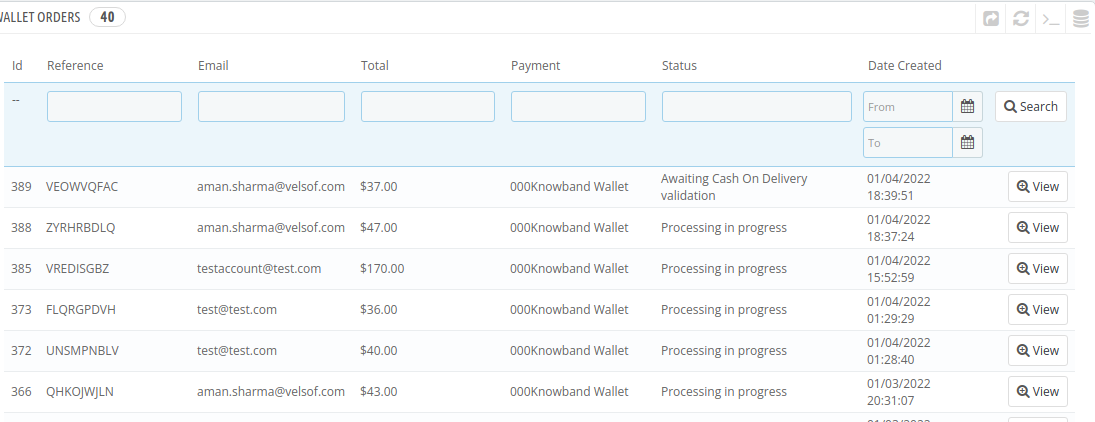
3.3 Wallet Orders

In this section of the Prestashop Customer Wallet Addon, the admin can view all the transactions made with the wallet. In addition, he can apply filters as per the date the orders were placed.

Please contact us at support@knowband.com for any query or custom change request as per your business requirement.

The importance of age verification for online businesses

Daily transactions are taking place online because of which young people can shop for products has become easier for them. Furthermore, young people can have access to services and age-restricted content. For the safer side, online businesses include basic age checks such as ‘tick boxes’ for users. It is the customer’s responsibility to be truthful to affirm that they are old enough to buy products and access services.

One of the biggest reasons for online businesses to go for this feature is because it can save our younger generation. Furthermore, it’s unreliable and can even lead to children accessing damaging products as well as the content. Online businesses should recognize the necessity of the feature similar to real-world’s retail stores and gaming establishments.

In this blog, we will discuss the importance of age verification, especially for online businesses.

Benefit 1: It helps filter visitors

This feature helps owners to filter the visitors. Owners can get to know or filter eligible visitors for their products. Furthermore, once the visitor validates the age, they are informed that the content is restricted to those of a certain age. As a result, knowing the fact the content is inappropriate, a wise teen shall leave the store.

Benefit 2: Comply with the law

If you sell things, supposed to be purchased by people over a certain age, having an age verification method is a must. This is permissible under the law. Furthermore, failure to comply with the age verification system may result in legal consequences, including jail.

Benefit 3: Prevent minors

With the assistance of this feature, e-merchant can keep minors away from their store. Hence, you can stop children from getting exposed to inappropriate goods online. Also, they will not have a bad effect on their mentality. With the increase in Internet users, age verification is mandatory.

Does Knowband offer Age Verification Module for every platform?

Yes. Whether you use Magneto for building up your eCommerce store or Opencart or Prestashop, Knowband has developed the Age Verification module for every platform. With the help of these modules, you can keep away underage users from exploring explicit content. 

Age Verification Prestashop Addon

Prestashop store owners with explicit products on the store must use Age Verification Prestashop Addon. This add-on helps merchants to hide their products from customers they want. In simple words, with this addon, Prestashop owners can display these products to specific customers under a certain age.

Features:

  • Enables a popup on the website for age verification.
  • The module even provides a user-friendly interface.
  • Easy to Install.
  • Allows designing the entire popup and even customizing it. 
  • From images to easy to change the popup text, font, background color, and verification text, etc. everything can be modified.

OpenCart verification extension

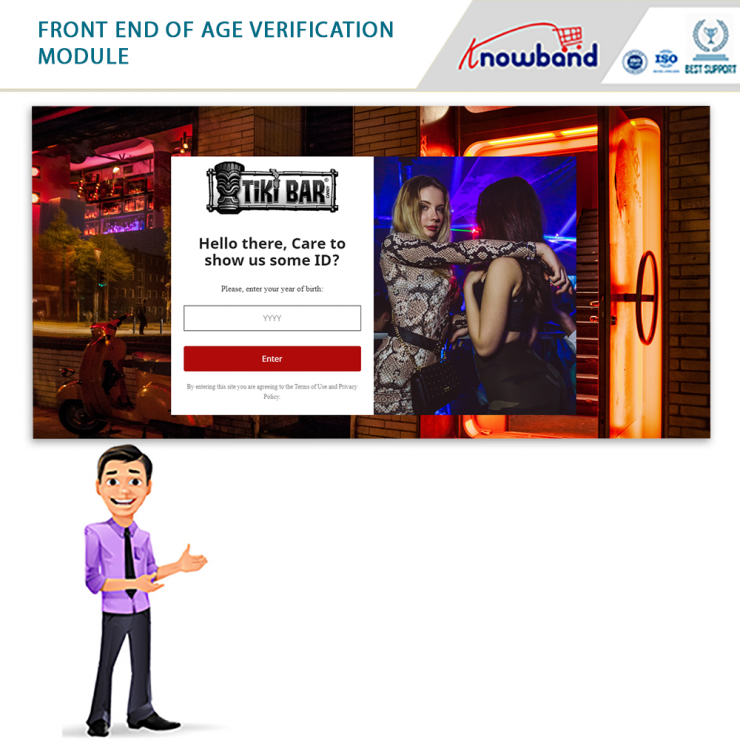
To showcase an age verification popup on the website’s front-end, Knowband offers an age verification module for Opencart owners. Furthermore, store visitors must enter their age and if they are 18+, they can access the store. 

Features:

  • Allows admin to restrict online visitors to enter their age for accessing the store content.
  • Displays an age verification popup on the website once the age of the user gets confirmed.
  • From the admin interface, the admin can enable as well as disable the DOB field.
  • Permit setting age verification popup title as well as description in multiple dialects.

Magento age verification module

Implementing the Magento age verification module on your eCommerce site asks the visitors to verify their age for accessing the site products. Furthermore, the module requires the store visitors to verify their age as well as agree to specific rules as well as conditions. Once you agree to these rules and conditions, you can browse the website. 

Features:

  • Displays an age verification popup on the frontend.
  • Asks visitors to mention their age and to access the website, ask the visitor to agree with the terms and conditions.
  • Admin can pick themes for the age verification popup, displayed randomly to the visitor. 
  • Allows admin to enable/disable DOB field on the website front. 
  • Allows the merchant to set the title for the verification popup window.

Along with such efficient modules for different platforms, Knowband offers post-sales support. Hence, feel free to write us at support@knowband.com

Abandoned Cart Email Best Practices to Win Back Shoppers

An increase in abandoned cart rates can have a negative impact on your business. Usually, an abandoned cart happens when the client adds an item to their cart as well as does not purchase it. For instance, the client may want to purchase, however, the high shipping cost does let him or her do that. As a result, this leads to cart abandonment.

What is the reason behind the high cart abandonment rate?

The reasons that can cause a high cart abandonment rate are listed below:

  • Lack of trust

One of the biggest drawbacks of an online store is that you cannot hold your product physically. Moreover, you can identify the quality of the product you are purchasing. Furthermore, shoppers cannot try them as they hand over their hard-earned cash. Hence, this situation has somewhere led to an equal increase in fraudulent activity. If you can’t get your online shoppers or store visitors to trust your business, they are likely to abandon their carts.

  • Unexpected shipping costs

Another common reason for users abandoning the cart is higher or unexpected shipping costs. This has to do with something called price shock i.e. learning about hidden costs. For instance shipping, taxes, and other fees, etc. However, there is a way of minimizing price shock, a very good way and that is displaying shipping costs on product pages. This also creates transparency between your store as well as customers. Moreover, this does not lead to abandoning carts because they don’t have to face unexpected costs that have been added to the checkout process. 

  • Pricing

Online shoppers are a very picky bunch. The word picky means liking specific things and are difficult to please. Furthermore, online shoppers can and will compare your prices with just a click of a few buttons. Buyers can compare prices with their competitors. And if they find a special deal elsewhere, in no time they will purchase it. 

Like we mentioned before, shipping rates, import taxes, as well as unforeseen costs can lead to a price shock situation that can again give birth to the situation of cart abandonment.

How to solve cart abandoned rate issues?

Being a store merchant you need to look for different ways for solving cart abandoned rates. If we talk about solving the trust issues, being a merchant you need to use high-quality images, good copywriting, and need to go for lots and lots of social proof. You can even display social proof on your website. 

Another solution is, using Knowband abandoned cart modules which can do all the work needed to solve this problem for you. And according to us, using Knowband plugins is the best solution.

Why Knowband?

Knowband is known for providing efficient plugins for different eCommerce platforms. Including Prestashop, Opencart, WooCommerce, and Shopify. Keeping the requirements, Knowband offers plugins for enhancing the functionality of your store.

Knowband modules for resolving abandoned cart issues

Module 1: Prestashop Abandoned Cart Addon

Store owners having their eCommerce store on Prestashop can opt for Prestashop Abandoned cart addon. By regular email follow-up, the module helps merchants to convert these abandoned carts into sales. Furthermore, the module is very effective when it’s about reducing shopping cart abandonment.

Features:

  1. Analyzes the behavior of the online shoppers as well as tracks as well as marks the abandoned carts on the online store.
  2. Permit admin to modify the follow-up email templates.
  3. Allows the merchant to create new templates as many as he/she wants from the admin interface.
  4. Offers discounted and non-discounted email templates.
  5. Allows admin to highlight an attractive discount and coupon code in the email.

Module 2: Magento 2 Cart Serial Reminder

Want to recover all the customer’s forgotten carts? Magento 2 Abandoned cart extension by Knowband helps you with that. The module even allows your customer to finish their order by clicking the cart link in the reminder email. Furthermore, Magento 2 abandoned cart reminder encourages the consumer to return to the store to simply complete their pending checkout.

Features:

  1. Automatically sends reminder notifications to the customer who forgot to complete checkout successfully.
  2. Allows creating unlimited email templates for customers according to the conditions of their abandoned cart.
  3. Tracks pending or abandoned carts on the store after customers add a product in their cart and exit.
  4. Helps scheduling the timing of Cart Serial Reminders from the backend.
  5. Offers flexibility to send a custom email notification to customers.
  6. Offers flexibility to send customized email notifications to customers with or without discount coupons.

Module 3: OpenCart Abandoned Cart extension

With the assistance of the OpenCart Reduce Abandoned cart extension, merchants can significantly see the reduction in your shopping cart abandonment rate. Moreover, by sending reminder emails, you can follow up with those prospects who have abandoned their shopping cart because they were unable to complete their transaction.

Features:

  1. Helps merchants to track and recover abandoned carts on their site.
  2. With regular email follow-ups, convert abandoned cart users into customers.
  3. Allows admin to analyze the cart of the store visitors as well as send them reminders via email.
  4. Reduces cart abandonment rate.
  5. Boost entire conversions on the store.

Module 4: Magento Abandoned Cart Extension

Magento Abandoned Cart Extension permits the admin to make use of cart details and then convert them into leads. Furthermore, this helps in reducing the abandoned cart rate on the website as well as increase the conversions.

Features:

  1. Tracks store visitors who save the product in their cart as well as leave the site without placing the order.
  2. Cron can be used to refresh the list of abandoned carts in the Magento abandoned cart notifications module’s backend.
  3. Allows admin to track incomplete orders.
  4. Send reminders to the customers.
  5. Allows admin to send offers discounts or even send reminders without any discounts.

Final Thought

So, when you have modules that can make your work easier as well as offer great results, it’s time to install them and get the benefits. 

What are different ways of reducing Post-Holiday Returns?

It is very essential to reduce post-holiday returns. Industry, sales channel, product type, and how to return data are collected and counted all affecting return rates. Further, the younger customers are driving the trend according to the reports. The reason is, they see internet purchases as rentals. Moreover, returns might rapidly undo your holiday success if you don’t account for them and discover:

  1. Sales are lower than expected
  2. Converted fewer clients than the originally
  3. Compared to sales cost and profit margins, sales cost is higher and profit margins are lower.

Therefore, in this blog, we will be discussing ways of reducing holiday returns and automating the returns process. However, before that, we will understand why it’s important to reduce the returns?

Why it’s important to reduce the returns?

The first step is to analyze why do people are returning products as this will give you valuable insights and even make you understand the real problem. Furthermore, it is to everyone’s best advantage to reduce the number of returns you receive. 

You might not be aware but lesser returns can save a lot of money on replacement items, shipping, as well as other factors. Moreover, it provides a better as well as efficient customer experience which is again good for eCommerce business. As a result, trust is created between your business and potential buyers.  

Henceforth, keeping the rate of return lower can result in better business. 

What are the ways of reducing returns?

  • Begin with quality control

The first way that helps in reducing post-holiday returns is “Begining with quality control”. Furthermore, 23% of returns happen as companies ship an incorrect item. Mis-ship happens usually when businesses grow.

Being a small retailer, you can wrap as well as send every order. It would be great if you double-check the order before shipping. When you adopt a hands-on approach, it’s easy to ensure that shipments are proper. Whereas larger businesses can opt for automation that can help you in resolving the issues. Furthermore, the Inventory management software includes a warehouse management feature that helps in reducing the number of returns your receive. 

  • High-Quality Photos

High-quality photos can even help in reducing post-holiday returns. Furthermore, such photos help customers understand the product better. Make sure you take pictures from different angles to make customers understand each feature of the product. 

In case you are not good at photography, feel free to hire a professional photographer. Money spent on getting good pictures will pay for itself with a reduced return rate. 

  • Better Product Descriptions

Writing better product descriptions can help customers understand the product well. Speaking about better product descriptions, make sure you include everything about the product. For example, if you have been selling furniture, make sure your product descriptions consist of measurement of the product, color, and material. This way customers can decide better and this will create transparency which is liked by customers a lot. 

  • Represent Sizing Correctly

Products that do not fit are one of the most common reasons for returns in the apparel industry. Because online buyers can’t try on garments before buying them, it’s understandable that products be returned because they don’t fit.

With the assistance of resources like size software and sizing charts, you may limit the number of returns you receive due to sizing concerns.

Knowband Modules assist in reducing post-holiday returns

Knowband, known as an eCommerce solution provider and module development company. Furthermore, Knowband has earned a reputation for offering efficient development services and post-sales support. Moreover, it offers a boost to your business by offering best-in-class plugins for different eCommerce platforms such as Magento, Prestashop, OpenCart, Shopify, and others. 

Knowband even offers some great modules for reducing post-holiday returns as well as reading the specifications of these modules helps in reducing the chances of return.

Module 1: Product size chart

The product size chart module helps in reducing post-holiday returns. Knowband offers this module for different eCommerce platforms such as:

Prestashop Addons

Magento 2 ® Extensions

Magento ® Extensions

Opencart Extension

Module 2: Product Video

The product video module is highly beneficial for eCommerce businesses. This helps customers to understand the product better. As a result, the return chances get reduced. Knowband even offers the module for different eCommerce platforms:

Magento 2 ® Extensions

Magento ® Extensions

OpenCart Extensions

Prestashop Addons

Module 3: Gift Card

Digital Gift Cards are a blessing for eCommerce stores. These enable customers to purchase accordingly from the specific store. Gift cards even provide freedom to permit them to purchase what they need. Furthermore, this offers the satisfaction of having gifted well.

PrestaShop Addons

Opencart Extensions

Magento 2 ® Extensions

Magento ® Extensions

Module 4: Product Review

Product review also helps customers make decisions better and feel more confident. Furthermore, the more reviews you have, the more confident a customer is that they’re making the right choice. Reviews can also assist a store’s internet visibility.

Product Review Reminder And Incentives – Prestashop Addons

Review Reminder And Incentives – Magento 2 ® Extensions

Review Reminder And Incentives – Magento ® Extensions

Final Note

Analyzing as well as testing your approach to returns and ways of measuring up to your peers is a great way of generating a return on your post-holiday returns. Along with that, another way of generating a return on post-holiday returns is by utilizing these modules.

In case you face trouble, feel free to write us at support@knowband.com
Sell Gift Vouchers Using Knowband’s OpenCart Gift Card Extension

KnowBand’s OpenCart Gift Card extension makes it easy for you to sell gift cards on your website to provide your customers with customized options like a Photo Gift Card.

For a shopper, finding a perfect gift for their friends or family for events like Christmas, New Year, Holiday season is always a difficult choice as there are thousands of options available. Thanks to Digital Gift cards that have put an end to the long hour’s gift search.

Digital Gift Cards

Digital gift cards have made it convenient for people to purchase a gift card anytime, anywhere, and send it to their special ones within no time. This is the reason why many eCommerce businesses offer gift card facilities to their customers. If you are also looking to incorporate a gift card section on your OpenCart website, OpenCart Gift Card Manager Extension by Knowband is all you need. KnowBand’s OpenCart Gift Card extension makes it easy for you to sell gift cards on your website to provide your customers with customized options like a Photo Gift Card.


Best Time to sell Gift Cards on Opencart store

The best time to sell gift cards at the Opencart store is the holiday season. The holiday season is the time when eCommerce and retailers achieve the highest sales of the year. The 4th quarter of the year brings a lot of traffic to the website and this is the best time when you can start selling Gift Cards on your online store. There is no time when you can’t sell a gift card but a few occasions must call for it. Include some most common gift cards like Birthday Gift Vouchers, Congratulation Gift Certificates, and Anniversary gift cards.

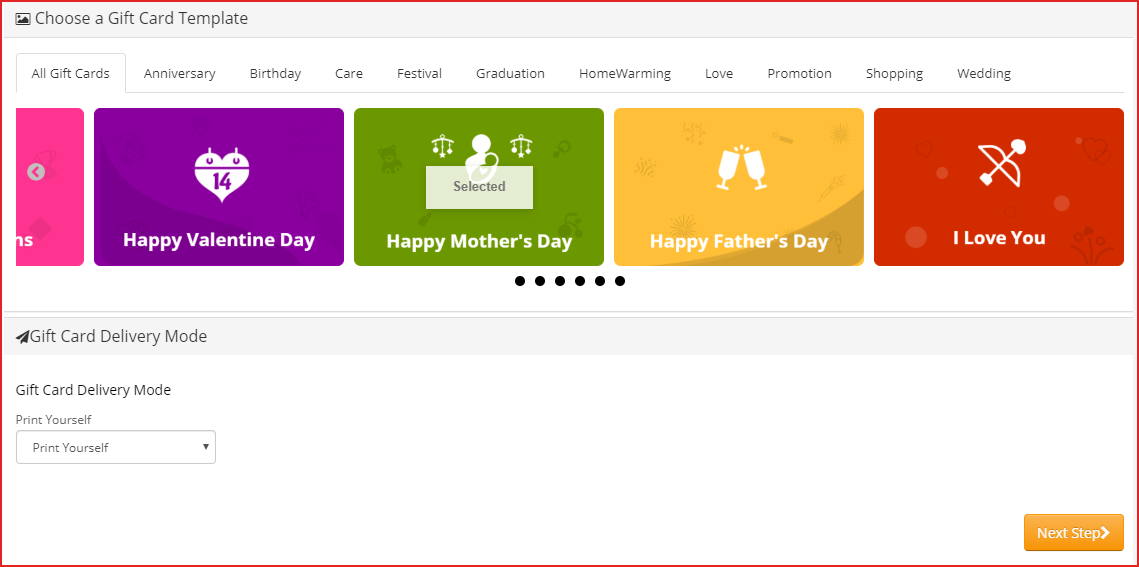
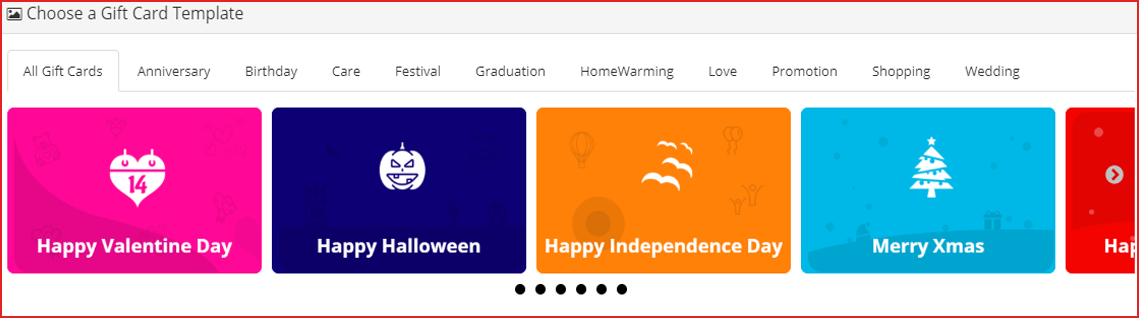
You can create custom gift cards for occasions like Christmas, New Year, Halloween, Diwali, Holi, Independence Day, Valentine’s day, and other festivals based on your target audience. For instance, have a look at the mother’s day gift voucher and how easy it is to customize its template. In the US, the Mother’s Day Gift voucher spending was around 21 billion U.S. dollars which is remarkable.


Benefits of Selling Digital Gift Cards

  1. Increase your store sales

Anyone looking for a gift card will shop from your store in the future. Henceforth, Gift Cards bring more revenue to your store and increase advance sales.

  1. Boost brand awareness

Digital gift cards, along with sales, also help in increasing brand awareness. Furthermore, the Gift Card recipient will come to know about your store when they receive it from their loved ones. Moreover, you can add the logo as well as the brand name on the physical card and even in the email.

  1. Capture new customers

Every time a sender buys and sends a Gift Card will bring you a new customer. Digital gift cards are the best way to capture new customers to store during the holiday season.

Overview of OpenCart Gift Card Manager

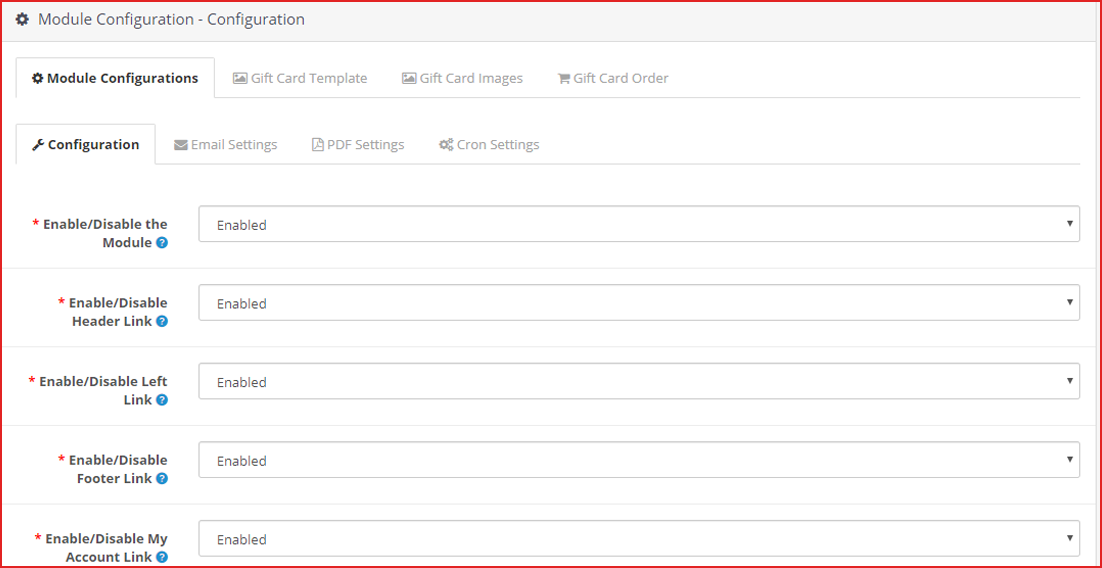
  1. Place the gift card link in multiple places.
  2. Set up gift cards of multiple price ranges.
  3. Allow customers to create personalized Gift Card by uploading an image
  4. Set the gift card delivery gap
  5. Customizable gift card templates for multiple occasions
  6. View all ordered gift cards in one place
  7. Multi-lingual support, GDPR, and multi-store compatible
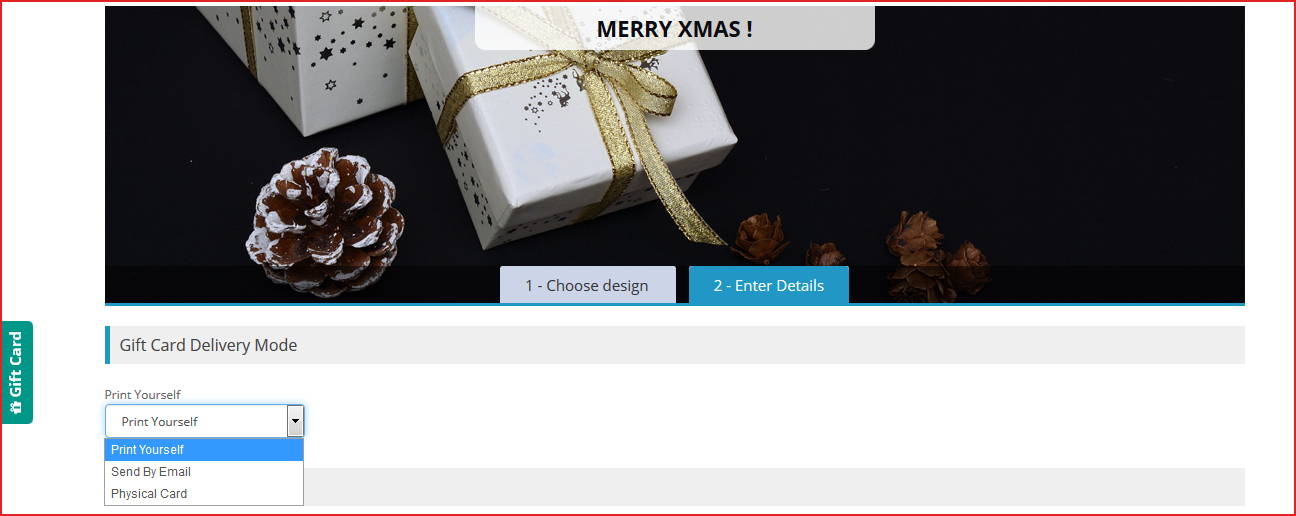
  8. 3 Gift Card Delivery options:
  • Print yourself,
  • Send by email,
  • Physical card

How to sell gift vouchers on Opencart?

Features of OpenCart Gift Card extension [Detailed]-

As the store owner, you must know the facilities a gift card plugin can offer because you have to provide the best possible options. Thus, know how you can configure it for increasing the Gift card sale. Let’s dive in.

Ways to create Gift Certificate with Opencart Gift Card Plugin

1. Customized Photo gift cards & templates

  • Customizable default templates:

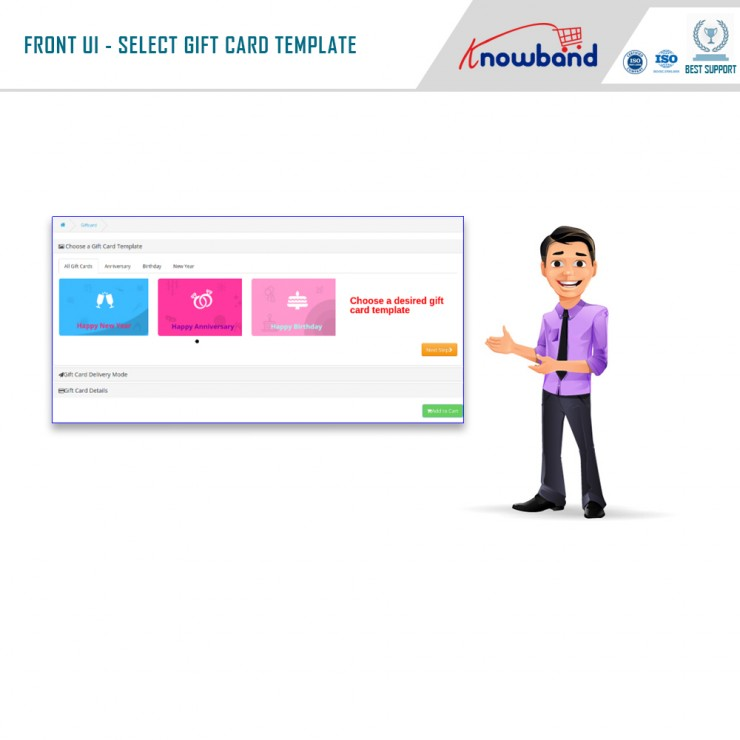
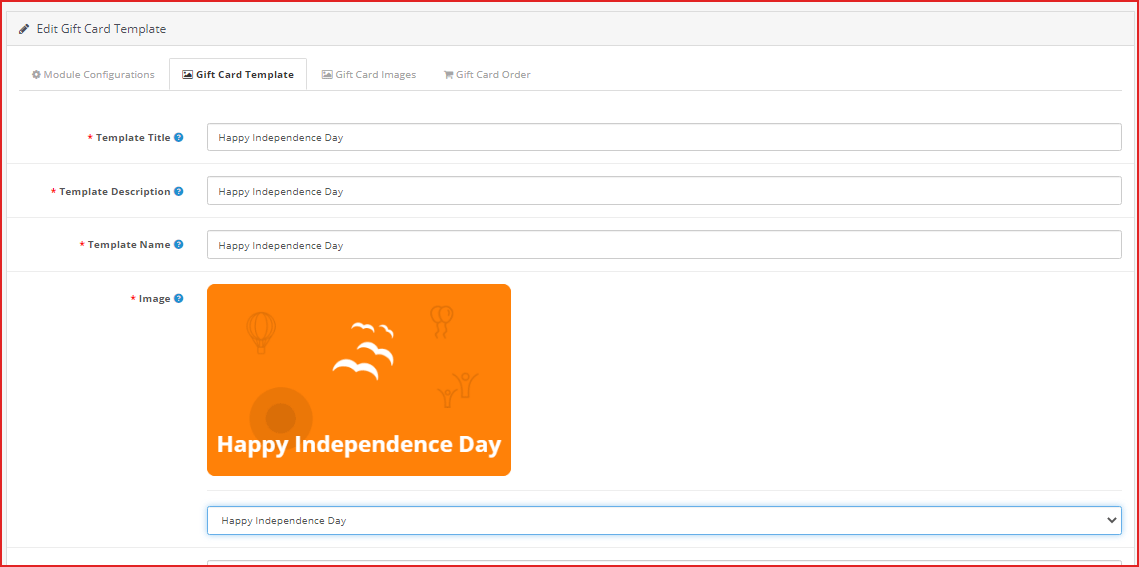
OpenCart Gift voucher extension provides you with gift card templates for multiple occasions like Valentine’s, Halloween, Christmas, Easter, Birthdays, Anniversaries, Father’s Day, Mother’s Day, etc. The templates can be customized as per your choice.

  • Personalized Photo Gift Card–

With the OpenCart Gift Certificate plugin, now you can let your shoppers create their own customized gift card by uploading an image. The sender can also add a custom message for the email and PDF.

Advanced Admin Configuration

2. Offer Gift Cards of variable Amounts:

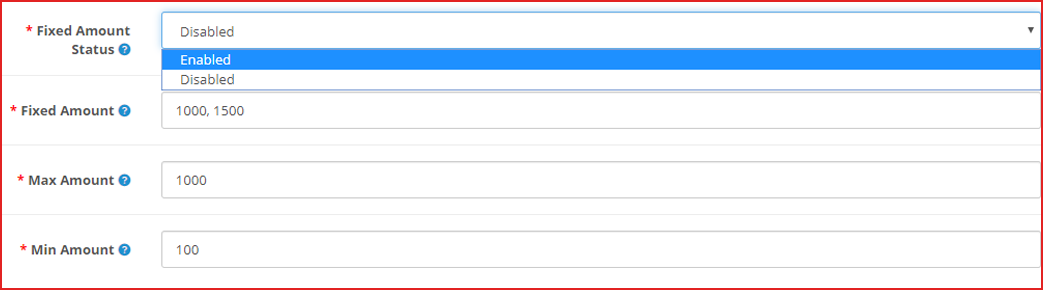
OpenCart Gift Card Manager extension enables you to set up gift cards in different price ranges. For example, you can have gift cards of $100, $200, $500, etc. If you do not want to provide fixed-value gift cards, you can specify a range within which a customer can shop for the gift card. For example, if the specified range is between $100 and $1000, then a customer can buy the gift card for any amount in between.

3. Add gift vouchers product link to multiple places on the website

OpenCart Gift voucher extension allows you to place the gift card link on various places on your website such as the Header, Footer, My Account section, and on the center-left of the website.

The image shows the Gift card link present on the left-most of the web page.

4. Categorize the Opencart Gift certificates by Occasion

In Opencart Gift Card manager settings, you can also define a category for gift cards to make it easy for the customers to find the relevant gift card.

For example, put the gift cards for the holiday season like Christmas, Halloween, New Year under one category.

Follow the eCommerce marketing calendar to plan your gift card categories.

5. Send Custom email and PDF to sender and receiver

OpenCart Gift voucher extension also lets you customize your email templates that would be sent to the recipient and the sender when the gift card has been delivered. The email subject and the inside email content can be customized as per your choice.

Customers can also download the gift card in PDF format.

6. How to make the Gift Card Delivery?

  • Frame Delivery Rules

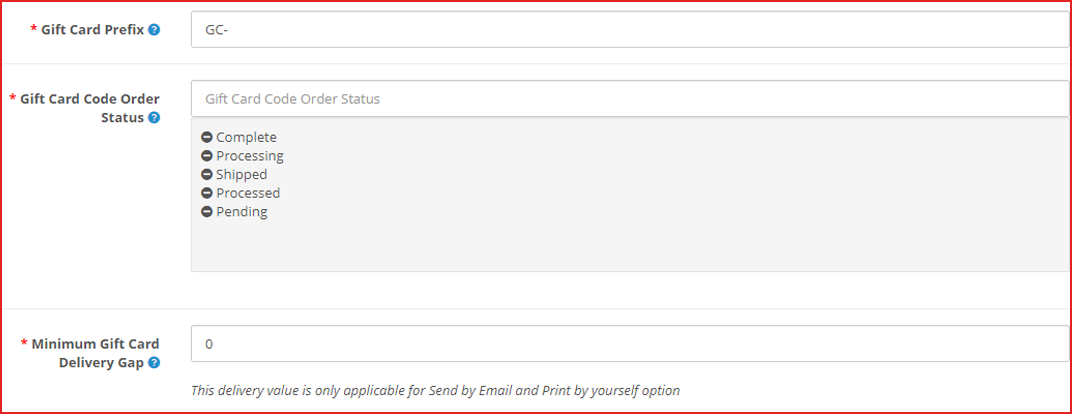
OpenCart gift certificate extension lets you specify the order status for which the gift card would be generated and would be sent to the recipient.

You can define the minimum number of days within which the customers can expect the gift card delivery.

7. Offer Multiple Gift Card Delivery Options

Sometimes customer likes to send gift card physically. There are three options available for the delivery of the Opencart Gift cards. With the help of the OpenCart Gift Card extension, you can specify whether a particular gift voucher should be allowed to send

  1. physically deliver the Gift Card
  2. Print the Gif Certificate by Yourself
  3. Send virtual gift card via email

8. OpenCart Gift Certificate builds brand identity

You can set a prefix for your gift cards to promote your brand.

For example Knowband-12XZ

9. Track redeemed Gift Card Coupons

OpenCart Gift certificate plugin lets you track your gift card orders. It contains details like the recipient’s email address, Order reference ID, sending date of the gift card, and the current status of the gift card. This helps you manage the stocks and inventory.

10. Store and theme compatibility

OpenCart Gift voucher module is GDPR compatible, multi-store compatible, and provides multi-lingual support. You can use the Gift Card module for the OpenCart Journal theme as well.

What kind of features can we expect from the updated version of the Opencart Gift Card Extension?

Opencart Gift Card Vouchers Plugin’s updated version offers some special features for a better user experience.

  1. When online users select the “Print by yourself” option, an additional email template is available for sending an email notification to them. This email will be forwarded to the person who sent the gift card.
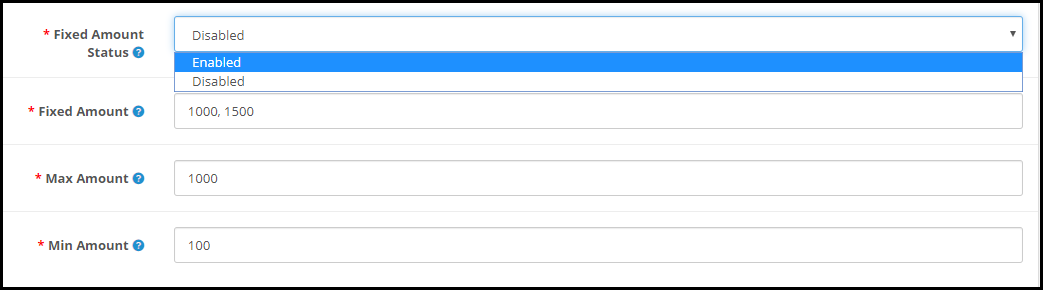
  2. On the website front end interface, the fixed amount to drop-down can be displayed. Moreover, online users can select the amount for the gift card and the amount can be separated by comma by the store admin.
  3. From the admin interface, online merchants can efficiently set the minimum and maximum gift card value. Furthermore, users must select gift card value in between max and min amount.
  4. While selecting a virtual Gift card option, there is no need for clients to pay shipping charges.

In the end

With the festive season around the corner, now is the perfect time to have a gift card section on your eCommerce store. Start selling the exclusive gift cards which are most recommended for personal and corporate giftings. Knowband is offering the module at $28.79 and Year-End Sale – Min 20% Off Sitewide + Extra 20% Off | Use Code: KBOFF20

Have any query? Feel free to ask in the comment section below. Or you can contact us at support@knowband.com for any kind of assistance regarding this module.

Live Demo:

KnowBand OpenCart Gift Card Voucher/Certificate Extension

You may also like:

Why Digital Gift Cards are Important to your eCommerce Business?

Get more Holiday sales by setting up a Gift Card section on your store

Give Some Holiday Season Flair to an Ecommerce Website Design

13 Holiday Marketing Ideas and Tips to Boost Sales This Holiday Season

The holiday season is about to arrive and it’s the best time to pay attention to such marketing ideas which can generate more sales.

The festive season brings plenty of opportunities for brands to scale up their sales graph. Looking to make the best use of this holiday season? Here are the 13 Holiday Marketing Ideas and Tips for 2021 to kick-start your holiday season journey and boost sales.

1. Focus on planning

The foremost holiday marketing tip would be to plan your offers early. Customers do know that brands would be competing to outperform each other to attract more people with their exciting rewards and offers and be ahead in the competition.

Think and try something different. Keep an eye on what your competitors move and figure out what they aren’t doing or haven’t done before. Furthermore, plan your promotions, get the customers excited. And when the holiday season begins, keep bringing changes in your offers at regular intervals to surprise your customers.

Capturing more holiday sales would require unique as well as enticing offers.

2. Decorate your store as per the occasion

Besides decorating your houses, you should also decorate your website in the holiday spirit following the coming festivals. For example, change the theme, give it a new look & feel so that your customers get the holiday feel by visiting your website.

For instance, if you have implemented a Spin and Win popup on your website, you can customize it as per the occasion. You can even add addons like Spin and win depending upon the eCommerce website you are using.

Knowband’s Spin and Win popup module provide several attractive themes for almost every important occasion like Christmas, Halloween, New Year, Black Friday, Valentine’s Day, Mother’s Day, etc. For every platform, Knowband offers a Spin and Win popup module hence you can.

Check out Spin and Win for PrestaShop, OpenCart Spin and Win extension, Magento Spin and Win extension, Magento 2 Spin and Win extension, Spin and Win for WooCommerce.

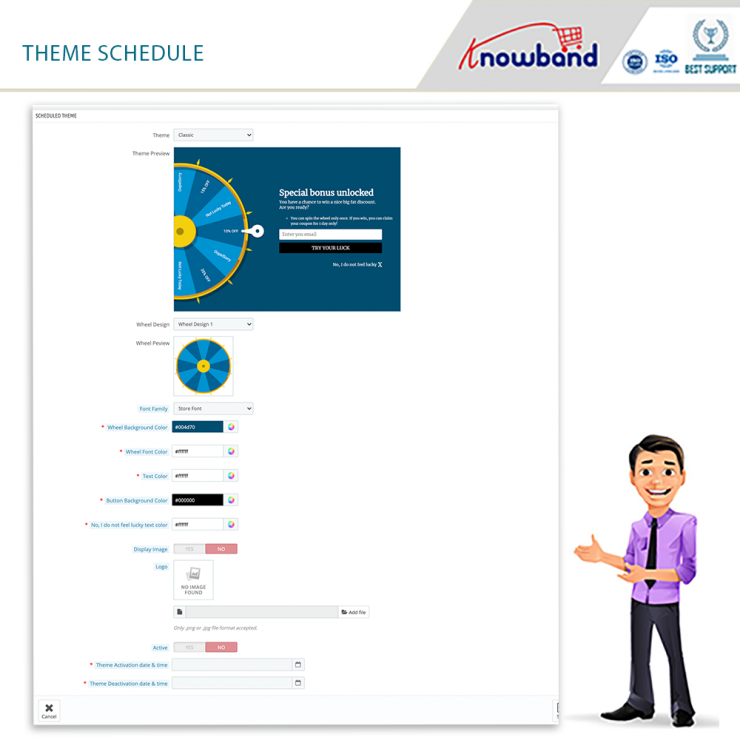
Spin and Win for Prestashop has recently launched incredible features such as Theme scheduling and customizing slice for the wheel.


The number of slices in the wheel can be changed to suit your needs. By simply pressing a few buttons, the administrator can change the look and feel of the spin wheel. The merchant can control the spin’s display location, frequency, and gravity from the module’s backend.


With the assistance of the theme scheduling feature, the store admin can set a date and even time validity for a specific theme that will be shown for the duration of that time.

3. Provide Gift Cards

What’s best than offering gift cards in the holiday season? Digital gift cards can boost sales. Having occasion-based gift cards would be an effective holiday marketing idea as Gift cards capture huge sales during the holiday season. In 2016, around $26 billion were spent on gift cards during the winter holidays.

The upcoming months are going to be hectic for online shoppers as they would have to buy a number of gift cards for their loved ones. You can lessen the burden on your customers’ shoulders by providing them with the Gift card facility.

Get your gift cards ready for the coming holiday season. Give your digital gift cards a look at the festival. For example, you can make theme-based Gift Cards for Christmas, New Year, etc. Gift Cards will have the upper hand in your holiday sales.

Read: Why Digital Gift Cards are important to your Business?

Want to add the gift card section to your store? Try out our Gift Card Manager module for PrestaShop, OpenCart, Magento and Magento 2.

Have a look- PrestaShop Gift Card Manager, OpenCart Gift Card Manager, Magento Gift Card Manager, Magento 2 Gift Card Manager

4. Make your loyal customers feel special

We understand that acquiring new customers is important. However one should even focus on retaining existing customers as they are equally important for the website. Bring them back to your store and show that you care.

Offer a special gift to your loyal customers. Make them feel that you miss them in your store. Existing customers contribute to 40% of your sales. So, do not go behind the new customers only.

Read: 6 customer retention strategies

5. Optimize for Mobile

Adding to the holiday marketing tips would be optimizing your eCommerce website for mobile.

Mobile commerce accounted for more than $35 billion in revenue in the 2017 holiday season. (Source: Marketing Land) The numbers went higher in 2018 and it is expected that mobile sales are going to outpace desktop sales in 2019.

Whatever ideas you have, plan them keeping mobile users in mind. Make sure that your site is mobile-friendly. If it isn’t, optimize it today! Failing to do so can cost you a huge loss in your e-commerce sales.

It would be great if you have a mobile app for your Brand.

6. Run contests, offer giveaways

Launching holiday campaigns is another holiday marketing idea. Host contests related to festivals. Ask users to share user-generated content. For example, on Christmas, you can ask your customers or followers to tell how they celebrated Christmas during Covid-19 and provide giveaways to the people coming up with the most interesting stories.

In this way, you will be able to witness maximum participation and keep up with the festival spirit, at the same time. It is one of the best ideas to grab user attention and catch more user engagement.

7. Create Urgency

Active online shoppers wait eagerly for the festive seasons to collect heavy discounts and offer on products. Though customers show the intent to purchase when the holiday season arrives, they take a lot of time while making a purchase decision.

Create a sense of urgency by setting up a timer for the sale. Let customers feel that they have a limited time to grab this opportunity. Highlight the timer clearly on the top of your website. This will help you in scaling up your conversions graph.

8. Leverage the power of Social Media

Customers are highly active on social media networks during festivals. Set a plan as to how you are going to utilize Facebook, Instagram or Twitter to shout out about your holiday sales. Promote and advertise your campaigns. It is the best time to get noticed by the people. Come up with some interesting and creative posts.

9. Start doing Email Marketing

Start sending emails to your subscribers. Get them ready for the coming holiday season. Let them know what is waiting for them this festive season.

Push your emails at regular intervals but do not spam. An effective email marketing campaign can bring you a lot of customers.

This might interest you: How to grow your email list using popups and make them effective?

10. Launch a Referral or Loyalty program

There is no better way to boost your holiday sales than a referral or loyalty program. When the shopping fever is high, it will help you maximize your sales.

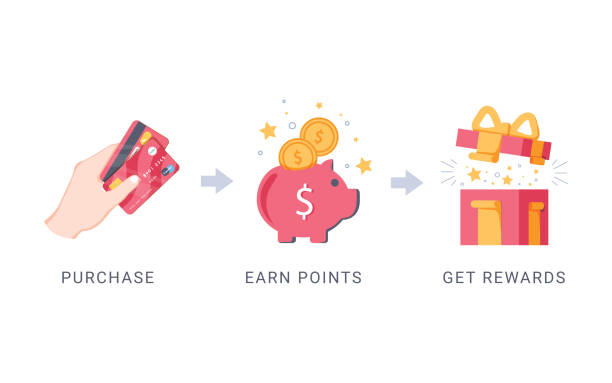
Offer loyalty points every time a customer makes a purchase during the holiday season. Apart from a loyalty program, start a referral program. Ask users to refer your store products to their friends or family and reward them with a gift or cashback on a successful referral.

With KnowBand’s Affiliate and Referral Program module, you will not only get the option to set a referral program but you can also allow customers to be your affiliate partner to earn gift vouchers.

Check out: PrestaShop Affiliate and Referral program addon, Magento Affiliate and Referral Program extension, Magento 2 Affiliate and Referral Program extension

11. Free Shipping

A study by Invesp reports that 9 out of 10 consumers say that free shipping is the primary reason to shop online.

If not on other days, you should definitely consider the idea of providing free shipping during the festive season. Feed it in the mind of customers by reminding them repeatedly about free shipping.

If you are worried about the profit, you can adjust the shipping cost in the product amount. The tag of “free shipping” shifts the focus from the increased product price. This would make a smart holiday marketing idea.

12. Make use of Hashtags

Hashtags provide you with a high organic reach and increase your product visibility.

Set an occasional hashtag for your brand and start using it actively on the major social media platforms, mainly Instagram and Twitter. But make sure the hashtags are relevant.

Your brand hashtags will allow your followers to easily look around your brand, products, or info just by searching with the defined hashtag.

Read: 4 reasons why you should start using Instagram Hashtags

13. Prepare a video

It is the trend of Video marketing. Videos grab a lot more attention and engagement than images or texts. Use this to your advantage. Brands try to share happiness by creating a short, funny, and message-giving video clip.

You can follow a similar approach to make your brand stand out from the rest. A video can make a personal connection between your brand and your followers.

Final word

E-retailers rejoice the second half of the year as this is the time when the sales graph rises drastically. If you follow the right approach in implementing your holiday marketing ideas, you can earn huge profits too.

There are many more ideas that you can get, however, I find these 13 Holiday Marketing Ideas and Tips to be the most effective to boost your holiday sales.

If you have some more points to add, do let me know in the comments below.

Clients find Knowband’s PrestaShop Gift Card Module Impactful on Holiday Sales

Do you also get confused while choosing the gifts for your friends and family? When I purchase a gift, what bothers me the most is if they will like it or not. If you’re anything like me, you’ll be able to relate to this. It does affect the buying decision. But, I am grateful for the unique gifting choice of ‘Gift Cards.’

These days many eCommerce websites and retailers sell gift cards in their stores. You can easily send the card to your friends and they can buy whatever they like using the Gift Card amount. If you are a PrestaShop store owner and want to sell Gift Certificates in your store then I will explain how easy it is to add a Gift Card to your store. This blog will be your complete end-to-end guide with real-life examples and client feedbacks.

How Do Gift Card Works & PrestaShop stores make money on them?

Gift cards are like prepaid debit cards that have money loaded on them for future usage. These are commonly utilized both online and in person. Many eCommerce stores offer Gift Cards on their store with fixed or custom amount options.

There will be a minimum and maximum initial loading amount on many gift cards. The receiver will have the freedom of spending the loaned amount in buying products from that store. Some eCommerce also allow partial usage of the card while most of the cards are for a one-time purchase.

As a sender (existing customer) purchase a gift card, it generates advance revenue for the store. Once the card is sent, there are high chances that the receiver will be a newbie for your store. Hence, increases advance sales and customer acquisition rate.

Any customer with the gift card must check its eligibility and validity when they buy or receive a gift card.

Boosting sales is easier with Prestashop gift card addon

Not only digital gift cards are beneficial for customers because it saves their time in searching for the right gift but for merchants as well as it increase your online business’s sales, especially during the Christmas or New Year season, or the holiday season. You might not be aware but more than half of customers enjoy sending gift cards to their friends and family.

With the PrestaShop Gift Card Addon,

you can increase your earnings while also bringing new clients to your online store. The module’s ability to sell gift vouchers also aids brands in promoting their labels without having to spend additional money on marketing.

It’s a Smart Move if you Sell Gift Cards on PrestaShop Store

  1. Advance Revenue
  2. Acquire new Customers
  3. Promote Brand Identity
  4. Personalized Shopping Experience

This gift card captures new orders, particularly during the holiday season when they are sold in greater numbers. Selling gift cards on the PrestaShop store also enhances the entire holiday season’s earnings.

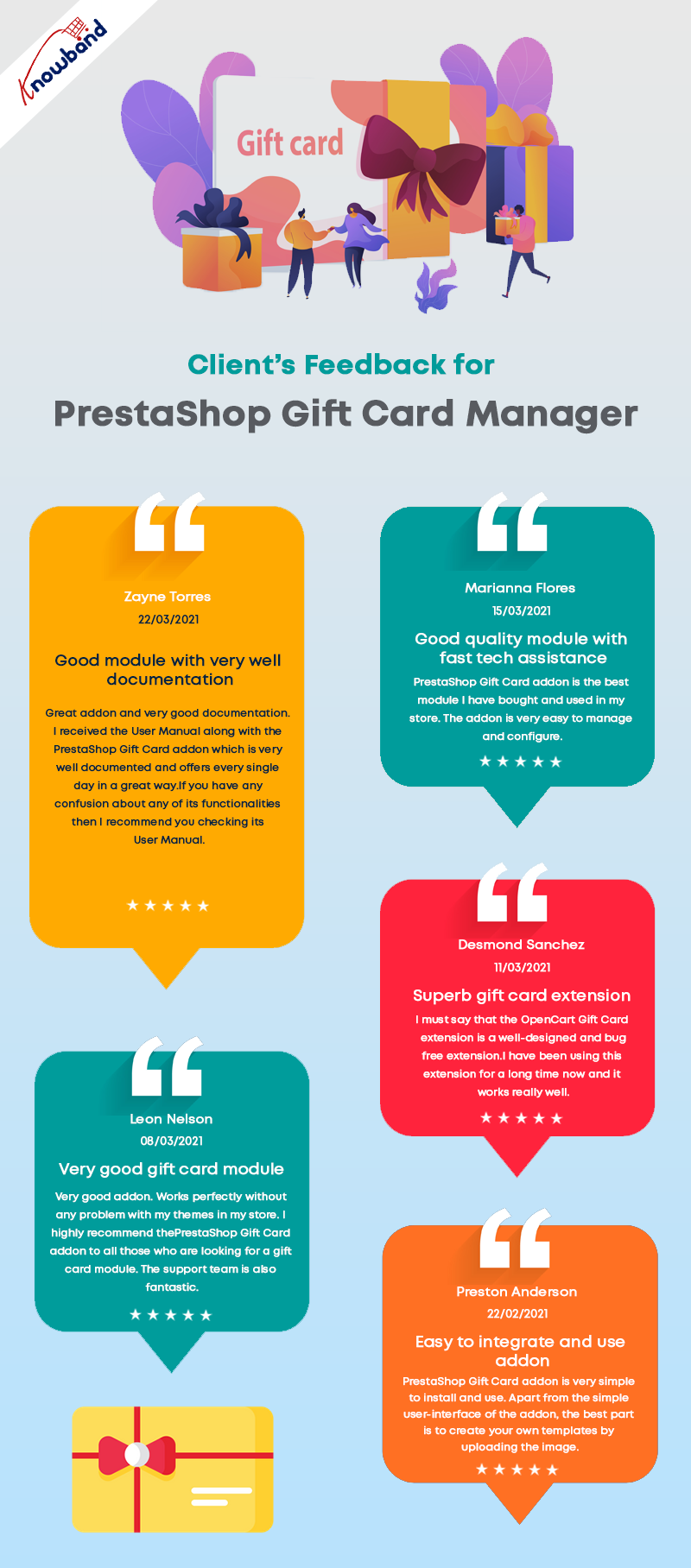
Clients love this fancy module- Feedback

Why KnowBand’s Gift Card is their first choice for Holiday Sales

The gift card area can be installed and easily added to your PrestaShop eCommerce store. These gift certificates/cards can be sold with festive themes like Christmas, New Year, Mother’s Day, Valentine’s Day, etc. Clients have experienced that the PrestaShop Gift Card Manager leads to a rise in sales in a short period of time.

Better UI

The module’s installation is extremely straightforward and requires no high-level coding skills. With that, it comes with a great UI design for the admin panel as well as the front-end view.

Better accessibility of Gift Card feature on PrestaShop Website

The Prestashop Gift Voucher Module by Knowband allows you to add a gift voucher button to several parts of your website, including the header, footer, and left section of the page.

Fancy Themes for every occasion

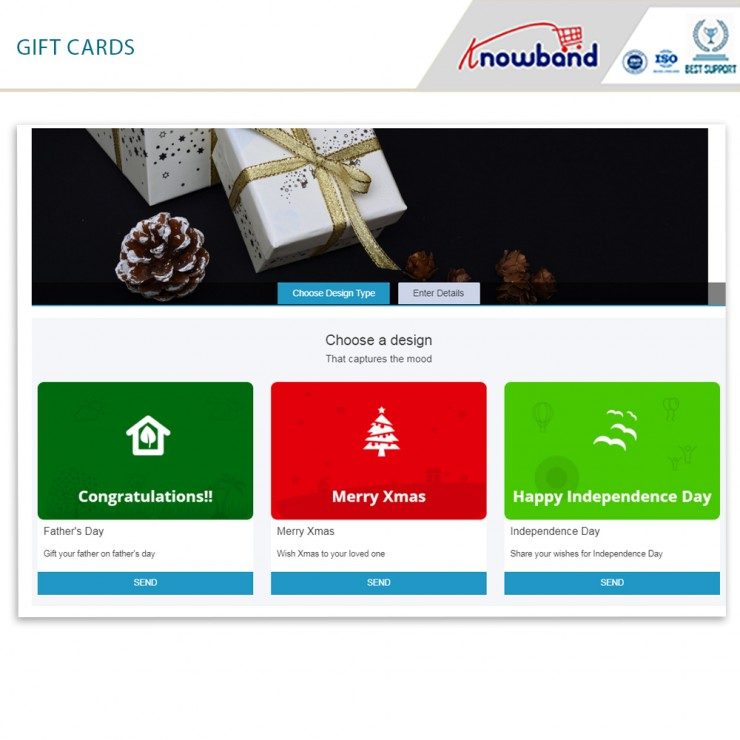
Not every person likes to have a similar design gift card for every occasion. This module gives enough freedom to merchants to customize their gift cards for different occasions such as birthdays, Christmas, anniversaries, Halloween, New Year’s Eve, Father’s Day, Mother’s Day, and so on. Similarly, store owners can create new templates with immediate subjects from the back office.

Upload an image and create custom gift cards

Visitors may create and send a personalized gift card using the PrestaShop Gift card manager, which includes a picture upload feature. A sender can now send a gift card with a personalized image. One way of sending gift card is via email with a custom note and one is, you can print the gift card by yourself.

Custom emails and ready-made templates

The Prestashop Gift Card Addon by Knowband includes a note email template for informing the giver and recipient on the status of their gift cards. From the module’s back office, the admin can quickly change the text of this email. On the receiving end of the gift card, customers can include a note for their loved ones.

How do customers send Gift Card to friends and Family

The module allows two methods:

  1. Send the gift card over email with a custom note
  2. Print it yourself and send it to your loved ones

Track Gift Card Order History

The use of the gift voucher code in the checkout is displayed on the coupon history tab. The following information will be displayed: Order ID, Customer Name, Amount, and Date Added.

Cron Functionality

Customers will appreciate the ability to send gift cards on the day of the event. Cron allows the PrestaShop store administrator to schedule the email’s delivery.

Knowband’s PrestaShop Gift Card Module enhances your customers’ buying experience in your business by making events more memorable for their friends and family. It aids in the retention of current clients as well as the acquisition of new clients for your company.

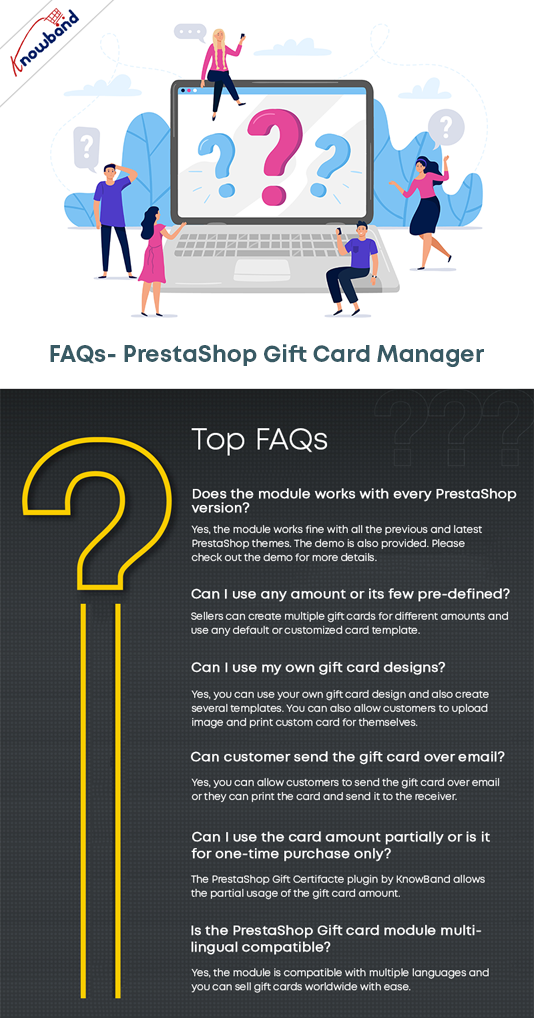
FAQ – PrestaShop Gift Card Manager Module

To Wrap up

So, what are your thoughts on the subject? If you own a Prestashop store and want to grow your business faster and want to attract more and more clients this Christmas and New year, this is something you should look into. For your business, digital cards are critical. The PrestaShop Send Gift Card extension is a highly functional, configurable, and handy module that will help your eCommerce store increase sales and conversions. Knowband is offering Prestashop Gift Card Module at $42.40. Further, the Knowband is offering Year End Sale- Min 20% Off Sitewide + Extra 20% Off. Use Code: KBOFF20.


Click here to explore the module and learn why digital gift cards are a must-have on every eCommerce store?

If you are unaware of the benefits of selling gift cards then click here.