One Page Checkout module for PrestaShop

Adopt a feature-loaded PrestaShop One Page Checkout module for your PrestaShop 1.7 store.

PrestaShop is one of the widely used eCommerce platforms that has grabbed worldwide attention due to its amazing features and functionalities. It is used all across the world by the people who are involved in the field of eCommerce business and is growing every year. This eCommerce platform has the bulk of features, themes, and extensions that can effortlessly improve the performance of any PrestaShop store.

It is a proven fact that 70% of your customers abandon their cart while checking out of the site. This is when the customers find the checkout process to be long and tedious. It won’t be wrong to state that with easy access to so many choices, the online shoppers won’t bother going through the lengthy checkout forms. The lengthy process may prove hazardous especially when the customers are already on the fence about making the purchase. This is when a single-page checkout scores over the multi-page checkout processes.

PrestaShop One Page Checkout module is one of the ways of optimizing the checkout process of the eCommerce store. The Prestashop addon has made another major step towards improving customer experience and boosting eCommerce performance with its latest PrestaShop 1.7 version. With its latest offering that was available for PrestaShop clients since 7th November 2016, people are increasingly embracing this new PrestaShop version. This PrestaShop 1.7 platform has new exciting features like the introduction of Symfony2 framework, a rebuilt Theme system, Starter theme, a  revamped product creation page, a modified modules page, a reorganized main menu and other such functionalities.

However, if you still feel the need to optimize the checkout experience of your PrestaShop 1.7 store, here is the brilliant PrestaShop 1.7 One Page checkout addon for you. If you think that this PrestaShop Addon is not worth your attention, do take a quick look at these features mentioned below:

1. Guest Checkout and Social login facility
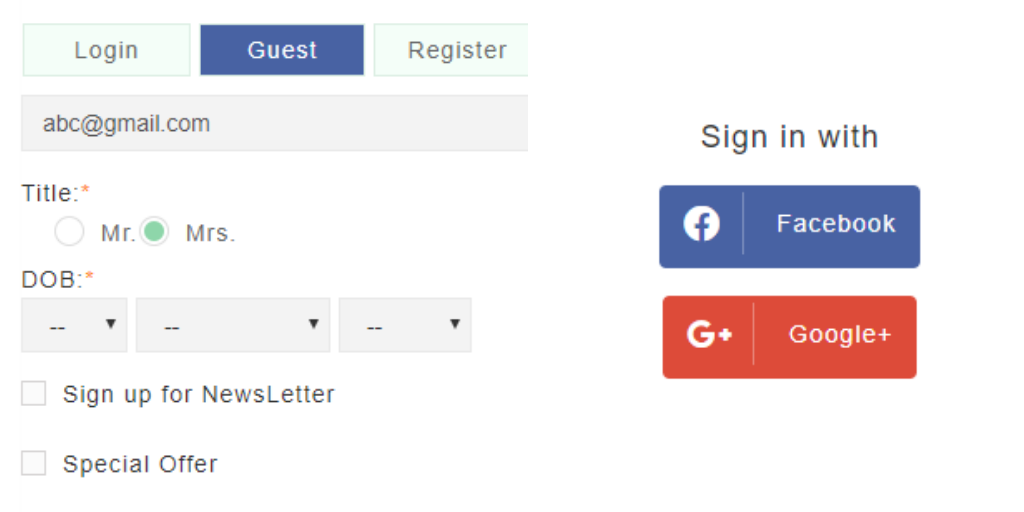
Customers on your PrestaShop 1.7 store don’t require any separate checkout accounts for making a quick online product purchase. The Prestashop module offers easy account login facility with the help of social media sites like Facebook and Google+ thereby improving the overall customer engagement. In fact, users can now log in/sign-up using their Paypal account too. Along with the social login options, the customers can even complete the transaction as a Guest user. The online shoppers can even register via their email account.

PrestaShop One Page Checkout module also offers the Guest Checkout facility, hence allowing your store visitors to checkout without getting registered.

2. Error reporting to customers
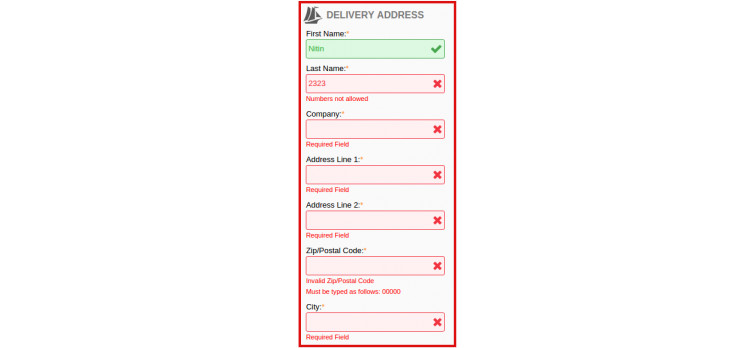
Now, the customers making an online purchase on your site can easily know where he/she has actually committed the mistakes on the checkout page. This PrestaShop 1.7 checkout extension offers immediate error messages along with the inline validation facility for helping out customers during the checkout process.

3. Easy for field customization
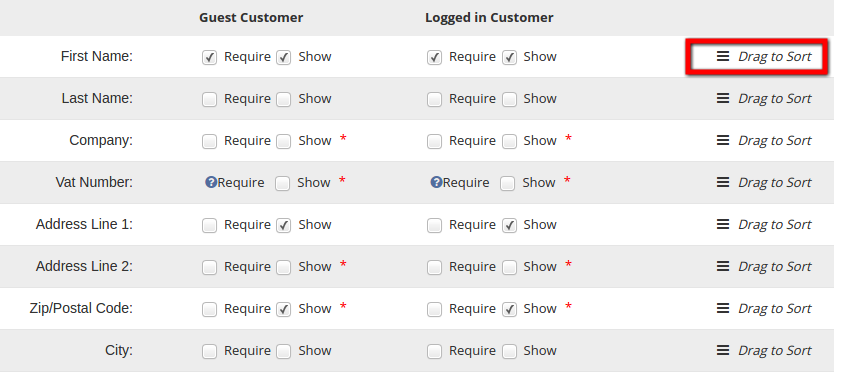
The checkout form includes a large number of fields which at times may become difficult to handle. You get a number of already created fields in the admin interface. All you need to do is to select the ones that you are looking to display in the front-end. The admin can display different fields to the customers who are logged in and to the ones who are not. There is an option to select the fields for different customer groups. In addition, the robust Prestashop One Page Checkout module makes it easier for the store owners to rearrange the various fields. This can be simply done by dragging and dropping the various fields.

4. MailChimp Integration
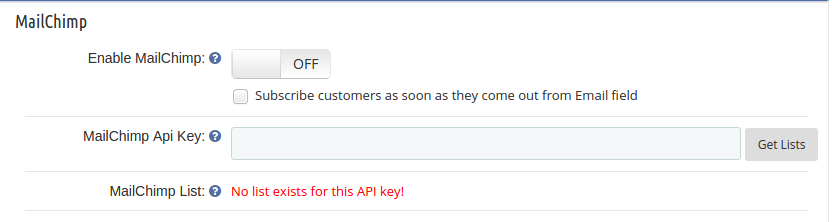
The Prestashop plugin comes with an inbuilt MailChimp integrator. The integrator sends the email ids of the customers captured on the checkout page directly to the MailChimp account of the store admin. This can be done either when the customer selects the checkbox for newsletter subscription. Even if the customer logins via their Google account, the email id will be sent to the MailChimp account. This makes it easier for the e-marketers, to design their marketing strategies and reach out to the customers for re-marketing.

5. Presence of multiple payment and shipping methods
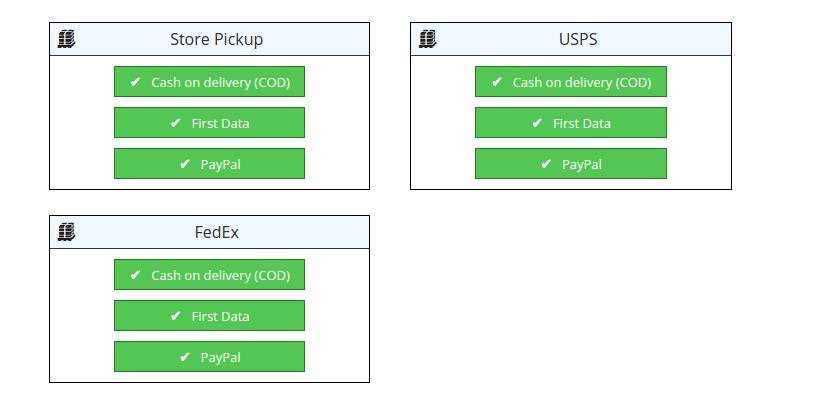
Now, your customers arriving at the PrestaShop 1.7 store will not be forced to fill all information first to be able to view shipping and payment methods. With one page checkout layout of this PrestaShop extension, customers will be able to view available shipping and payment methods as soon as they come on the checkout page. The feature-packed module is even compatible with the Mondial Relay like shipping methods.

6. Offers the wide range of customer base

This PrestaShop One Page Checkout module is fully responsive in nature that makes it ideal to be used on multiple platforms for desktops, laptops, smartphones, and tablets. By targeting multiple device users at the same time, you can effortlessly improve your chances of product sales and conversion rates. The fully-customizable interface makes it easier for the store owner to retain the customers and reduce the cart abandonment rate of the shopping site.

7. Custom fields
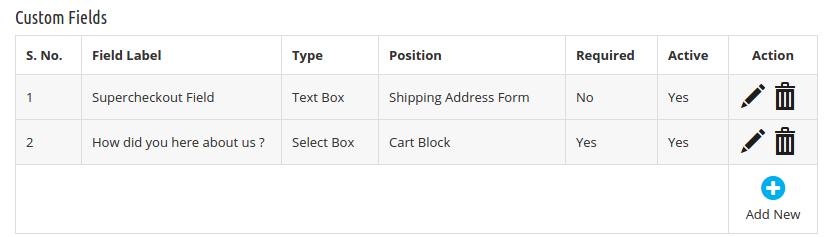
Versatility is the key when it comes to this module. The admin interface offers a number of form field to the store owner. In addition, he can add custom fields on the checkout page. The already created fields can be edited or deleted as per the requirement of the admin. Hence the extension, squeezes the checkout process for your store visitors, at the same time it even allows you to get additional information about your potential customers.

8. Shopping cart customization
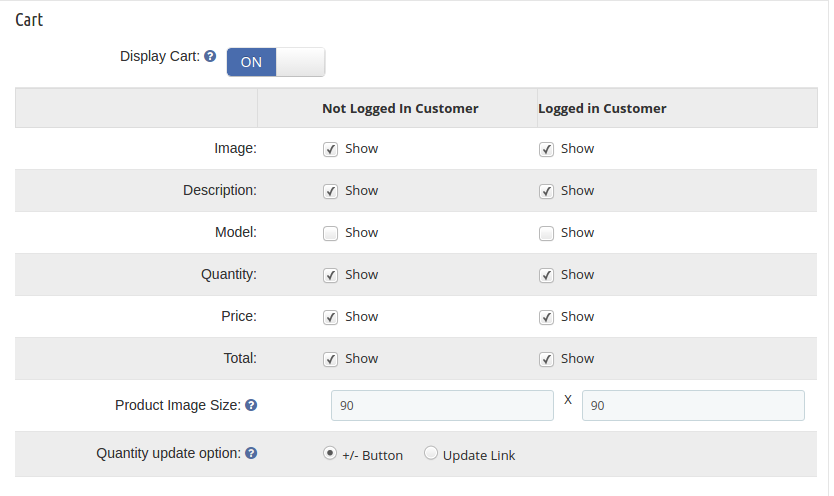
The module is a one-stop-solution for the Prestashop store owners when it comes to optimizing the shopping experience of the customers. The store admin can select the fields that he wants to display in the shopping cart of the site. The various information fields can be arranged in the front-end as it was done in the checkout page. Besides the information fields, the admin can even display the order details of the customer in the cart.

9. Front-end optimization

The module allows you to squeeze multiple steps of the checkout into a single page without affecting the front layout. The best part of the addon is that there are no code changes required to be done. The frontal layout can be changed by just dragging and dropping the various elements.

10. PrestaShop One Page Checkout module is GDPR compliant

In addition to all the features, the Prestashop one step checkout extension offers compliance with EU’s GDPR as well. The Prestashop addon has been upgraded as per GDPR standards. You can now include multiple opt-ins in your site. There is an option to create multiple policies for this compliance. You can enable the policy that you want to display in the front-end.

In case you site deals into the European Union countries in any way, then, you need to take the consent of the customers before using their personal details for any purpose. The PrestaShop One Page Checkout module allows you to check the consent of the customer from the back-end.

11. Mobile-friendly Interface

With the increasing dominance of mobile sites and mobile-first users, providing a responsive interface to the prospective customers is the key. Keeping this in mind, Prestashop one page checkout addon has been designed to be mobile-friendly. The single-step checkout process will work flawlessly on mobile devices. Thus, you can now offer at-par services to your target customer base whether they are using a desktop site or mobile devices. All the features offered by the Prestashop one page checkout plugin will be compatible with your mobile site as well.

12. Track Abandoned Carts during Checkout [New]
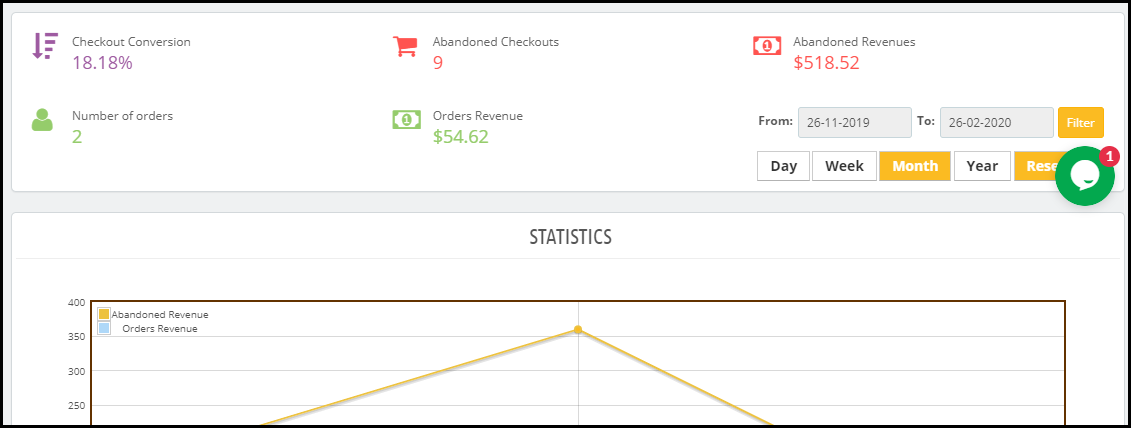
PrestaShop One Page Checkout module now displays statistics around checkout abandonments under the “Abandoned Checkout Statistics.” This section displays how many orders have been placed, how many checkout abandonments have happened alongside the checkout conversion, abandoned revenue, and revenue generated from the orders. The data can be filtered out for a specific period.

The statistics are represented in graphical as well as tabular form.

13. Track User Behaviour on the Checkout [New]
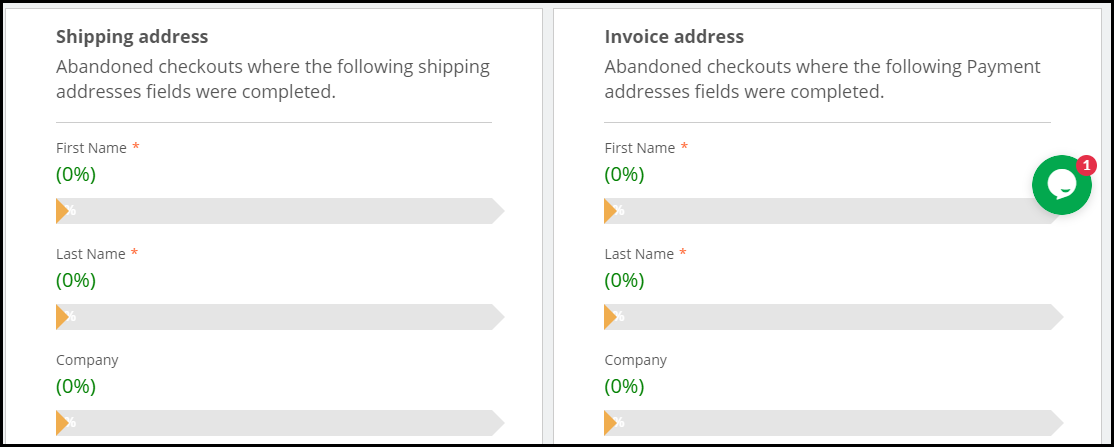
This option in the PrestaShop One Page Checkout module lets you check which specific fields are causing checkout abandonment. It displays the entire checkout fields and shows a percentage bar for each. Field having higher percentage means they are not causing any trouble to the visitors whereas the fields having low percentage means it is the actual cause of checkout abandonment.

This particular feature gives you the option to optimize your checkout fields so that you could improve your conversions.

14. CIF/DNI/NIF Validator [New]

Enabling CIF/DNI/NIF validation on the checkout page verifies the identification number of the shoppers coming to your website from Spain.

15. Free Shipping Banner [New]

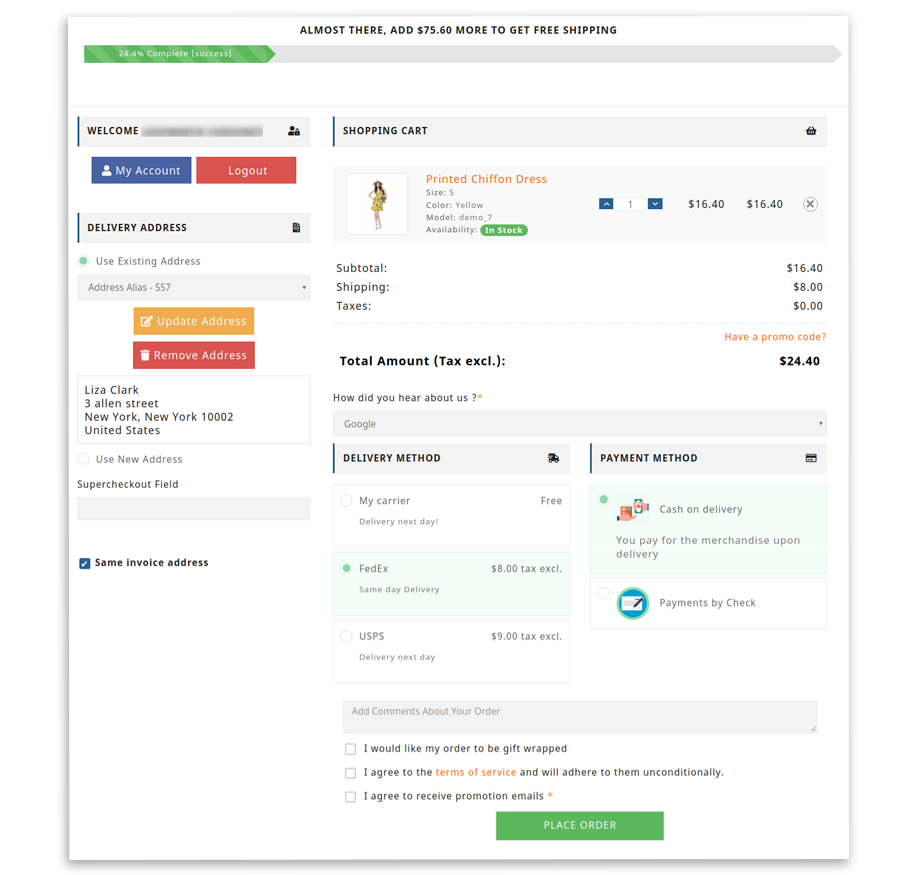
PrestaShop One Page Checkout module also allows you to display a free shipping banner on the top your checkout page. You can specify the minimum amount on or above which the free shipping banner would be displayed to the user. This helps you increase the average order value since customers would be tempted to get free shipping.

16. Easy customization facility
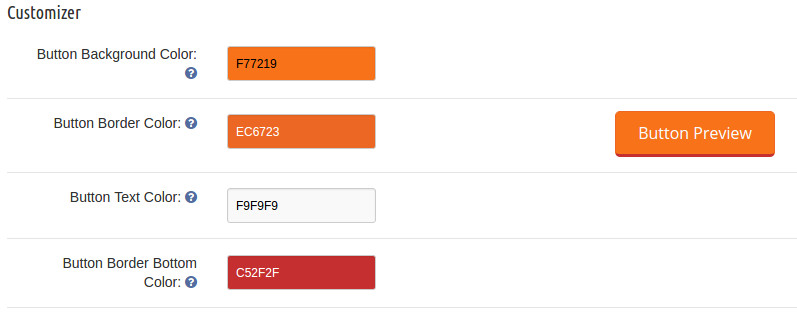
This PrestaShop addon allows easy customization in the checkout process.

This Prestashop addon allows easy customization in the checkout process. Every checkout process on a PrestaShop site that claims to be simplified still contains a wide number of unnecessary checkout fields and steps. It is important to remove these irrelevant checkout steps from your checkout process to grab maximum customer attention and sales. The PrestaShop One Page Checkout module allows site admin to perform quick customization on the checkout page of their website. The store admin can even change the look and feel of the checkout page by incorporating the custom CSS code and JavaScript. With easy customization option, the admin can easily upgrade their site as per the need and requirement.

Over to You

Just upgrading the version of your store is not enough. You need to keep every single aspect in sync with the changes. The checkout process is one of the most important aspects that contribute to the overall conversions. So, don’t compromise with the ineffective checkout process on your PrestaShop 1.7 store, but take the right steps now. You just need to install this feature-packed PrestaShop checkout extension from the Knowband store to stay ahead of your business rivals. For more information, do visit the Knowband store without any further delay.

PrestaShop One Page Checkout module has been downloaded 7000+ times on the official addon store and over 5000 times on the Knowband store.

Check the Prestashop One Page Checkout User Manual to get step by step guide on how you can install this module.

Related Stories:

How to setup Maintenance mode in PrestaShop with a Customized Look?

Let it be your first exposure to the PrestaShop, or you want to customize, modify, or repair your existing live PrestaShop site. You might not want your customers to shop on your site while you are playing with it. The tweaks and modification you perform on your live site would directly bother your customers and, trust, me you don’t want to bother them at all. Even a small deviation or disruption to your customer’s user experience can result in some serious after effects that would directly impact the conversion optimization and UX optimization of your beloved eCommerce site. So, whenever you want to play around with your site, it is always recommended that you enable maintenance mode in PrestaShop, so that, the user experience of your site is nor affected.

The blog shares the steps to enable the maintenance mode in Prestashop 1.6 and 1.7. Read on to know.

How to setup a Maintenance Mode in PrestaShop 1.6?

Here, I am explaining the steps based on the PrestaShop 1.6 architecture:

Step1: You need to log in to your Admin Panel. Some might even call it the PrestaShop Back Office.

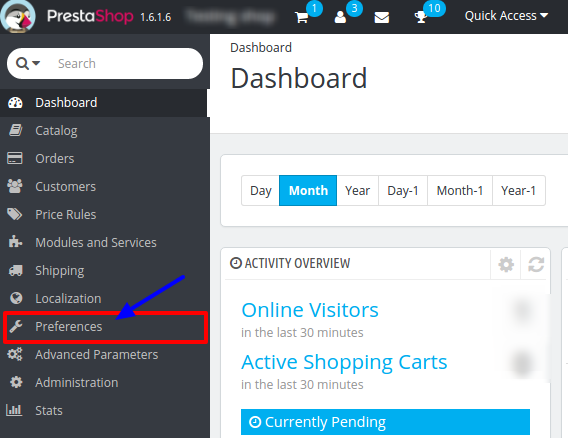
Step 2: Find the menu tab “Preferences” at the left side in default PrestaShop admin panel in the interface. Click on it.

PrestaShop maintenance menu

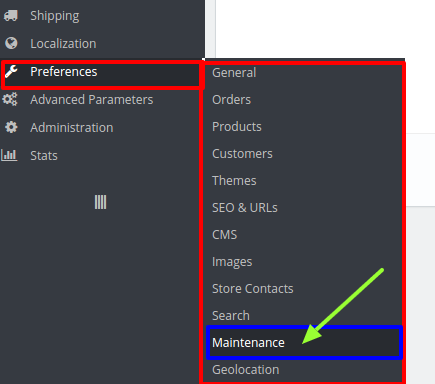
Step 3: It will open a list of sub menus. Click on “Maintenance” in the sub menu.

PrestaShop maintenance mode in sub menu option

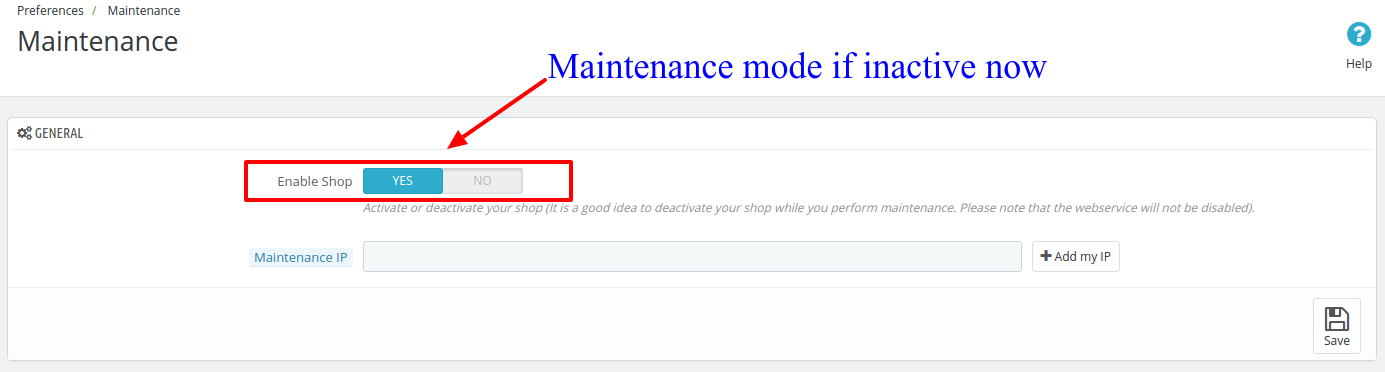
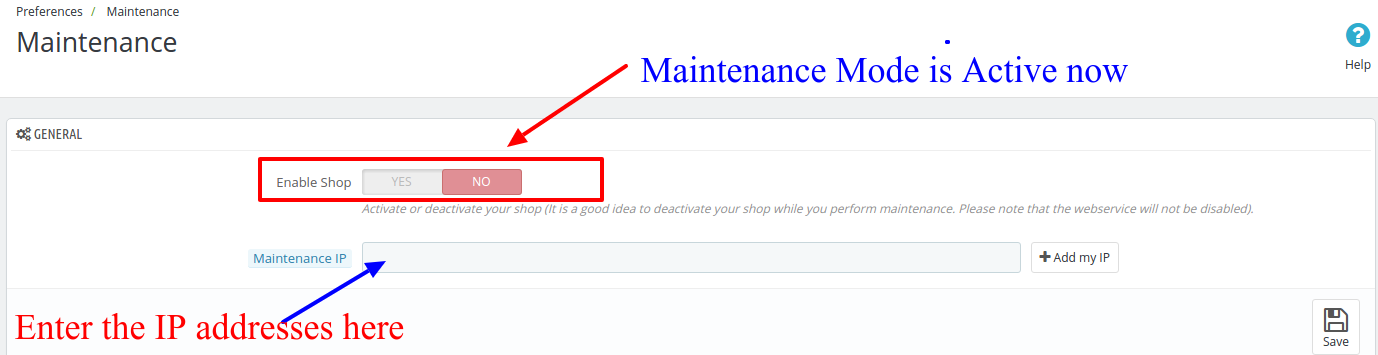
Step 4: It will open a new window. There is a tab with two fields. The first field consist a toggle to turn ON or OFF the PrestaShop maintenance mode. When you click on the Enable Shop to switch it to blue, it means that the PrestaShop Maintenance mode is Switch OFF right now.

How to setup a PrestaShop maintenance mode with a customize look

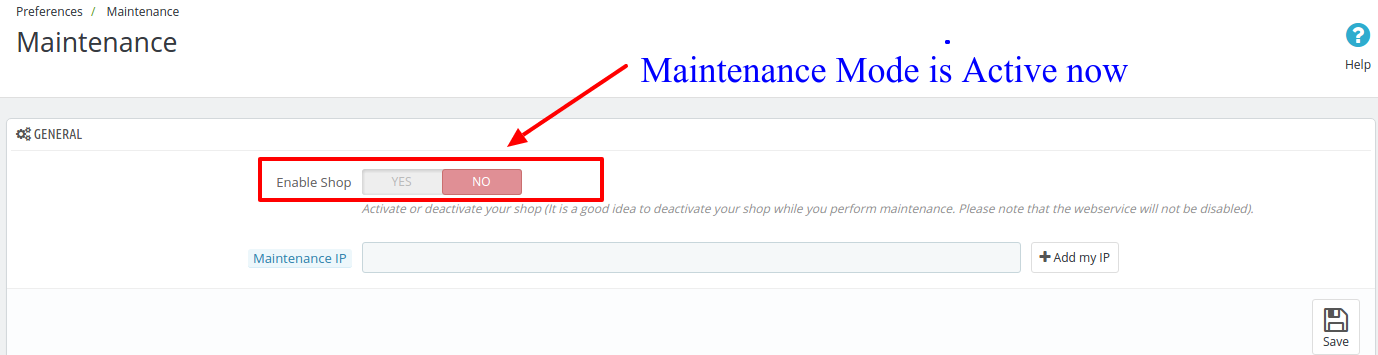
To enable the PrestaShop Maintenance mode, click on the toggle to turn it red in color.

PS: when your modification is finished and the site is ready for live users, you should toggle back the button Blue to disable the PrestaShop maintenance mode.

How to setup a PrestaShop maintenance mode with a customize look

Step 5: By turning the PrestaShop Maintenance mode on, you are restricting your users to access your site from the front end. If you want any developer or your employee to still be able to see your site, enter their IP address the field below the toggle before saving the setting.

PrestaShop maintenance mode IP white list

PS: You can also enter multiple IP addresses in this field by separating them with comma.

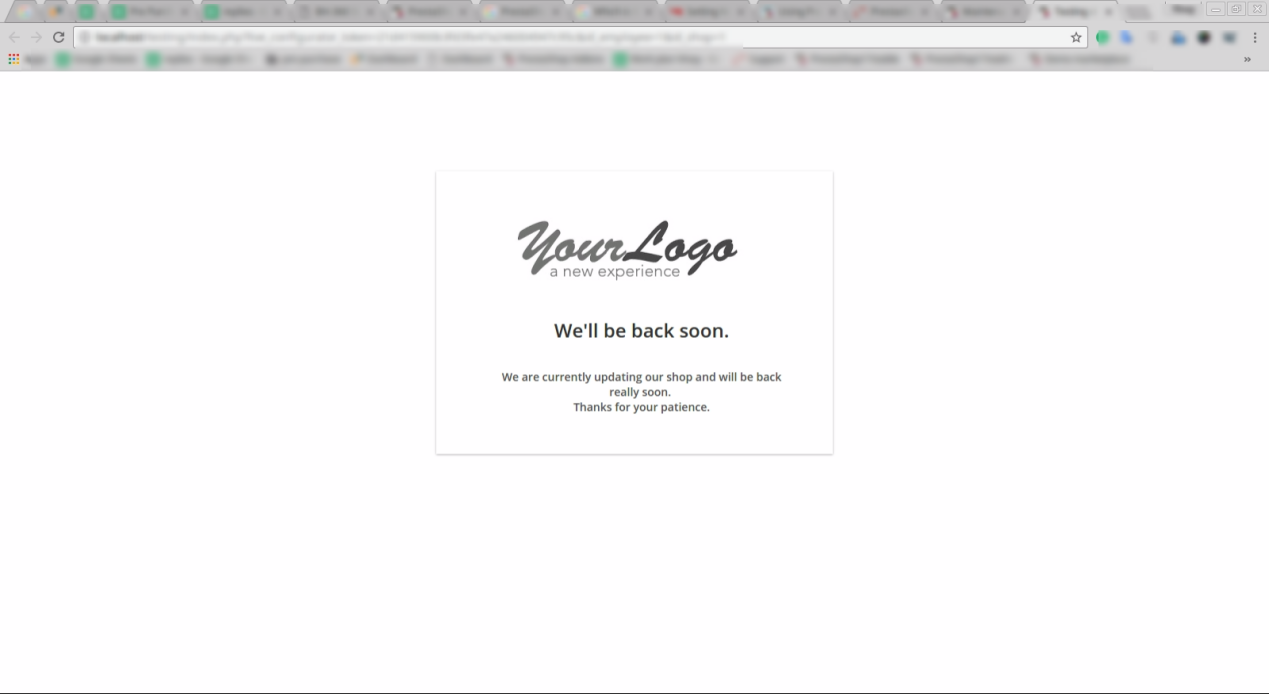
Default PrestaShop maintenance mode active page

Step 6: Now, click on the Save button to save your setting and turn on the PrestaShop Maintenance mode. It will activate the Maintenance mode on your PrestaShop site and whatever changes you perform would not bother your customers.

How to enable Maintenance mode in Prestashop version 1.7?

Just like v1.6, the process of enabling maintenance mode in Prestashop version 1.7 is effortless. Follow the steps mentioned below for the same:

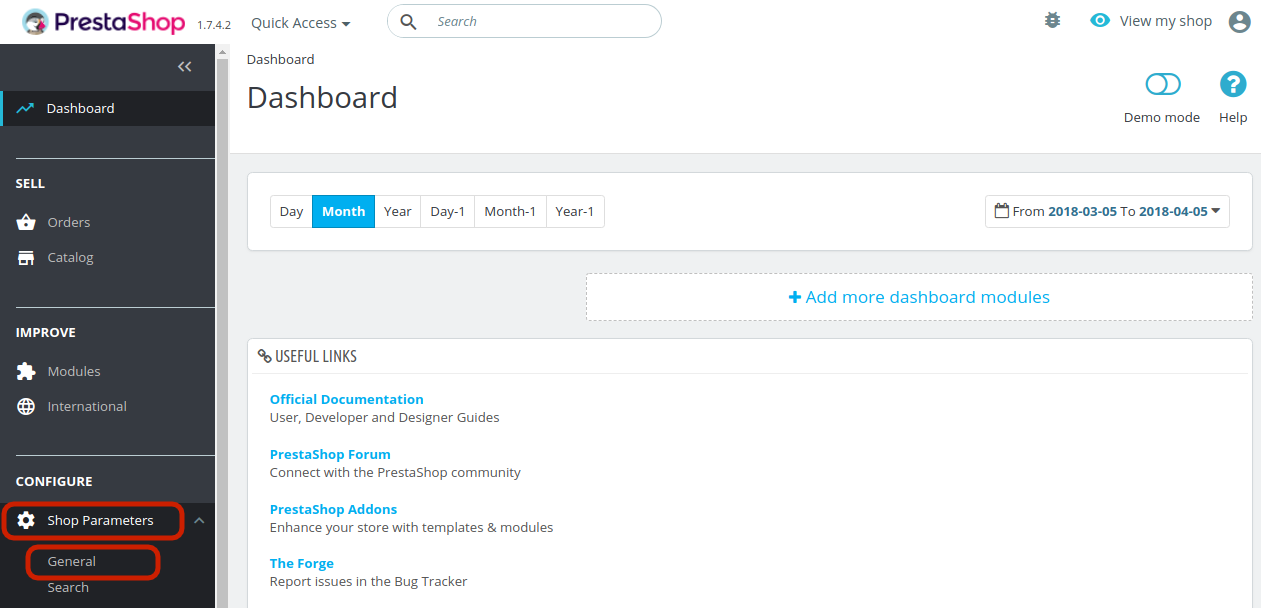
1. In the Prestashop admin interface, go to the Dashboard and navigate the menu options in the left-hand side.
2. Go to Shop Parameter -> General.


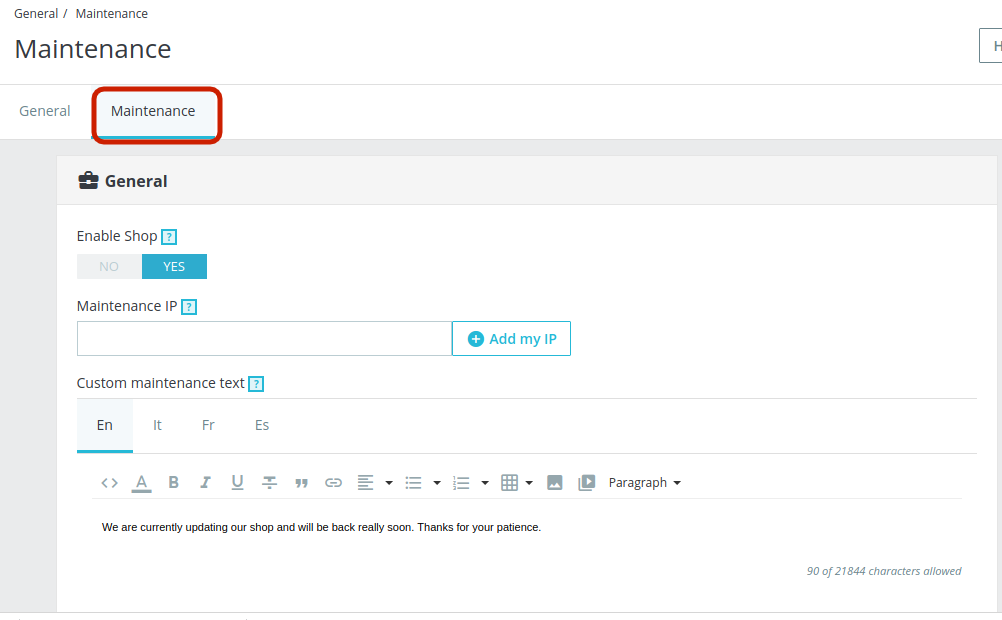
3. This will take you to the interface as shown below. Go to the Maintenance tab.

The various information fields are discussed below:

Enable Shop: Disable the shop in order to enable the maintenance mode.
Maintenance IP: Add the IP address for the user to whom you want to show the maintenance mode. You can add multiple IPs separated by commas.
Custom Maintenance Text: You can enter the text that will be displayed in the front-end to the store visitors. You can even add images if required.

The page showing above is a PrestaShop default Maintenance page. You can customize this Page to look something engaging that will convey your message to the customers in a more defined way. To do this, you will have to edit in some codes of the PrestaShop’s core files.

How to Customize Maintenance Mode Page without Changing the Default Codes?

Instead of going by the default method for the same, you can even try an easier and optimized means to show maintenance mode at your site. The no-cost approach by Prestashop is easy, but showcases a simple and non-engaging interface to the site visitors. Why should you go for it when you can make the maintenance page attractive without making any code changes? Knowband offers an alternative method in the form of PrestaShop Maintenance page module which is a Cron based module that does not only customize the look and feel of the PrestaShop Maintenance page but also setup the automatic switch ON and switch OFF of the Maintenance mode.

With Prestashop maintenance page addon You can display a custom message to your customers on the maintenance page, plus fully customize the background and fonts on the page. Wonder why you should try the Prestashop maintenance page customizer extension? Well, the reasons are ample. Some of them are listed below:

  1. The Prestashop maintenance mode addon enables the maintenance mode just by toggling a button.
  2. Additionally, you can even fix the duration in date and time for the same. The maintenance mode will automatically be disabled after the fixed duration.
  3. You get an option to customize the text to be displayed in the header as well as the footer.
  4. The customers get an option to be notified when the site is back in the working mode with the Prestashop maintenance page customizer module.
  5. Above this all, the Prestashop maintenance mode extension allows you to change the look and feel of the webpages. You can change the page color, font color and size.
  6. If required, you can even add a background color in the webpages displaying the maintenance mode with the help of the Prestashop custom maintenance page addon.
  7. Addition of a countdown timer that showcases the duration in which the site will be back in the working mode is the most alluring feature of the Prestashop addon.
  8. It’s a mobile-responsive module, so, you do not have to worry about how the message will look like on a mobile phone.

Liked This? You’ll Like These Too

What does PrestaShop 1.7 brings for its eCommerce customers?

PrestaShop is one such platform that has generated a lot of buzz and excitement in a short span of time due to its amazing features and functionalities. This eCommerce platform has grabbed the immediate attention of various PrestaShop site owners and has been adding new functionalities with every stable PrestaShop release. In order to offer more exciting features to eCommerce customers, PrestaShop is about to arrive with the new PrestaShop 1.7 version which is currently under the development phase. Its trial version PrestaShop 1.7.0.0 Beta 1 is however available for the download at this link.

This latest release aims to change the eCommerce business scenario with a lot of exciting new features and functionalities. If you are still working with the older version of PrestaShop platform, it is time to upgrade your online store for this latest PrestaShop 1.7 version. It is packed with a wide range of features, functionalities and PrestaShop plugins that can help in optimizing your store performance. Let us know discuss the various features that are expected to be included in this latest PrestaShop version.

A faster and clean core due to the presence of features as modules-

With the increase in the coding of PrestaShop platform, it is getting slower day by day. In order to improve the performance of PrestaShop, this new PrestaShop 1.7 version will make the core lighter by removing the various features and adding them back as modules. The new PrestaShop 1.7 platform has removed these features and added them back as modules under the new PrestaShop version. Let us check out these features.

  • Multiple store.
  • Warehousing and supplier information.
  • The whole shipping system.
  • Multiple currency support.
  • Multiple language support.

Provides better password security-

Earlier PrestaShop versions used to have password security that was based on the md5 algorithm which has become outdated in the current eCommerce scenario. With this new PrestaShop 1.7 platform, password security would be enhanced a lot with the availability of a more advanced algorithm.

Presence of a revamped product page-

With this PrestaShop 1.7 platform which is currently under the development stage, it will be easier for PrestaShop store owners to perform module management in a better way. There will be inclusion of tabs that will help you in checking out the installed modules, management of PrestaShop Addons that are waiting for an action and also discover the other helpful plugins for your online business.

Offers better product configuration-

Before the release of this PrestaShop version, earlier PrestaShop versions had a limited capability for product management and configuration. The product configuration was earlier limited to enable or disabling of products, providing them for sale or not along with the filling of general information. This new version will offer a revamped product page for ensuring quick product addition, refreshed interface, shortcuts, automatic management for combinations and much more. Some of the essential features that are expected to be incorporated into this PrestaShop 1.7 platform for product configuration are:

  • ISBN field for book sellers.
  • ASIN field for syncing with Amazon.
  • The ability to show the pricing information in the cart. This is an important element for store owners that sell below the MAP pricing.
  • The presence of configurable product tabs that are present globally or on individual product.

Allows back office access to error messages and debugging profiling-

The features in this new arriving PrestaShop 1.7 platform consists of various built- in features in the Advanced setting configuration for ensuring easy enabling or disabling without any coding. It is really an amazing feature for PrestaShop developers as they help in resolving issues on a store quickly.

Comes equipped with blog integration-

The inclusion of blog was not available with the earlier PrestaShop version which is one of the essential component of an eCommerce store for SEO purposes. However, with this new PrestaShop 1.7 platform, this critical issue would be resolved.

Consists of clean URLs-

With this arriving PrestaShop 1.7 platform, there is no need for id numbers to be removed from the product, category and CMS URLs. The new version will incorporates the friendly URL into the PrestaShop setting panel which can be easily enabled or disabled for better SEO performance.

So, till now we are keeping our fingers crossed for this upcoming PrestaShop 1.7 version which can surely change the eCommerce scenario after its launch. Let us wait for the completion of the development phase so that the “rabbit is finally pulled out of the hat” to improve the functionality of your PrestaShop store.

This Would Also Interest You

Convert your Online Store into Marketplace Store with Free PrestaShop Modules?

When you have a limited number of customer base and sales, it is important to think big and go for a major store overhaul. Getting just a PrestaShop store will not guarantee you maximum conversions and sales as there are other players in the race. You would not have to lag behind now as there is a golden opportunity to transform your PrestaShop store into a marketplace store.

Now, you would not have to suffer the market pressure due to the absence of an effective eCommerce store that has a much larger customer base and site traffic. All you need to do is  just install the PrestaShop free Marketplace extension for a major transformation of your eCommerce store. Let us now discuss the various ways by which this PrestaShop extension can be of great help to your online business.

Allows multiple sellers to sell their products at one place-

This amazing PrestaShop extension engages multiple sellers on an eCommerce site for providing them an easy business opportunity. Now, sellers can quickly and effortlessly manage their account without any hurdle for ensuring a smooth product access to their targeted customers. Furthermore, there is no need for any inventory management by various eCommerce sellers which makes the setting up an eCommerce store much simplified than before.

Provides timely information about marketplace decisions and activities-

One of the USP of this PrestaShop free Marketplace extension is that it consists of a flexible email notification system that can inform involved parties like sellers, buyers and store admin about any updates regarding the marketplace store. This notification system send alert messages, notifications and emails about various marketplace events such as registration of a new seller, addition of new product, approval of seller product requests and other such activities.

Offers detailed seller information in the form of feedback and review system-

To facilitate a better customer purchase, this free Marketplace extension provides detailed information about various sellers in a smooth manner. Customers can get seller information in the form of seller feedback and reviews along with the star ratings and can choose the best seller for making their online purchase. In this way, this extension helps in enhancing eCommerce sales.

Can offer payment facility in multiple currencies-

E-Commerce business is all about providing products to your customers residing in different areas and using different currencies for better sales. It is good to listen that it is now possible with the presence of this free marketplace extension that supports multiple currencies. Now, your targeted customers can make online payment in their native currency only that can improve your conversion rates and product sales.

Works with various devices and screen sizes-

Online purchase is all about making purchase through various devices like desktops, laptops, smart phones and tablets. With the help of this PrestaShop Addons with mobile responsive feature, it is now easier to provide the same user experience to your customers on multiple devices. By targeting such a huge customer base with multiple devices, it is now much easier to achieve bumper sales and conversions.

If you are thinking about a while for transforming your PrestaShop store into an online marketplace store, you need to grab this PrestaShop free marketplace extension store without any further delay. Come to our Knowband store now and grab this module for free of cost for improving the store performance.

This Would Also Interest You:

Stock these PrestaShop Free Modules for a Promising Business

For any price conscious customer, getting any module for free of cost is always a good news. People are always looking for product that are packed with amazing features and yet are available for free of cost. Price is one of the crucial priority which makes a tremendous impact while purchasing a product. I have seen that often numerous customers are unable to avail the services of a reputed company or module due to the high price that come along with it.

Now, PrestaShop store owners can now have a sigh of relief due to the presence of various PrestaShop free modules that has the potential to improve the functionality of a store. Knowband understands that there are numerous PrestaShop store owners that are often deprived of amazing eCommerce features due to the high cost of the PrestaShop modules. Let us take a quick look at some of the free plugins for any PrestaShop store.

1. PrestaShop Free Marketplace module–

It is a common scenario which many PrestaShop store owners have witnessed regarding a significant drop in their sales and conversion rates. With a tough competition in the eCommerce business segment, the situation becomes too difficult to handle for small and medium sellers. If you are one of the victims of the eCommerce business environment, it is actually time to install this PrestaShop module which is one of the most acclaimed PrestaShop free modules in the online business scenario. Some of the features of this PrestaShop Free Marketplace module are as given below:

  • The module allow buyers to register themselves as seller for providing a smooth online purchasing experience.
  • Offers a wide range of powers for store admin for deciding the number of products for purchase, product categories, restrictions on product categories and much more.
  • Provides a large variety of products to buyers to make a judicious purchase due to the availability of multiple sellers.
  • Transforms any PrestaShop store into an online marketplace store for bringing buyers and sellers together.
  • The module allows numerous sellers to manage their seller accounts without any hurdle.
  • The module can be installed with any PrestaShop extensions and themes.

2. PrestaShop Free Social Login–

If your PrestaShop store is unable to get the required login from its targeted customers, it is time to install this PrestaShop Free Social Loginizer 15 in 1 plugin on your site. It is a remarkable PrestaShop plugin to improve social engagement on a site for higher conversion rates and sales. Here are some of the excellent features and functionalities of this Knowband extension.

  • Offers a quick login facility through interactive login popup in the form of multiple social media sites like Facebook, Twitter, Google+, Instagram, Linked in and such others.
  • The module comes with a mobile responsive design that ensures same level of user experience on devices like desktops, laptops, smart phones and tablets.
  • Allows site admin to make desired customization in the social buttons, links and social bar heading.
  • Compatible with various PrestaShop extensions and themes.

3. PrestaShop One Page Checkout Free version–

Checkout process has the ability to bring customer traffic and sales to any PrestaShop extension. It has been often seen that a complicated checkout process can affect the conversion rates and sales to a great extent. Take a look at some of the various features which makes it one of the best PrestaShop free modules for your online store:

  • Helps in reducing shopping cart abandonments and improves product sales.
  • Offers multiple payment and shipping methods to PrestaShop customers.
  • Works with multiple stores, devices, themes and PrestaShop extensions.
  • Provides complete cart summary with various product images.
  • It helps in simplifying the checkout experience of your PrestaShop site by converging multiple pages checkout process into a single checkout page process.

If you have to bear with the inadequate store performance due to the high prices of the eCommerce modules, the situation is going to change soon. PrestaShop store owners can now avail the various PrestaShop free modules to optimize the store performance without any strain on their pocket. Come and avail these wonderful PrestaShop extensions by visiting our site at knowband.

This Would Also Interest You

PrestaShop Marketplace Extensions that are a Must for any Online Store

Marketplaces are seen as the new medium of business engagement among numerous buyers and sellers community around the world. They are one place where people can simultaneously purchase as well as sell their products online. It is a wonderful platform to boost online business in a smooth manner without any hurdle. Apart from this, marketplaces are a wonderful option for small and medium eCommerce store owners for improving their sales among numerous competitors.

If you have not seen significant growth in your sales and conversions for a long time, it is time to avail of the expertise of various PrestaShop Marketplace extensions for a quick business makeover. These extensions are built on responsive web design that makes them suitable to be used on various devices like desktops, laptops, smartphones and tablets for targeting a large groups of users. Let us discuss various features and functionalities of these Knowband extensions that make them the perfect choice for numerous eCommerce store owners.

1. PrestaShop Marketplace Module–

This PrestaShop module is meant for supporting various small and medium eCommerce store owners to boost their sales to a great extent. With the help of this marketplace extension, it is now possible to connect directly with the seller and buyer community without any middlemen involved. Although, there are multiple marketplace stores to explore it has carved out a niche place for itself among various available PrestaShop Marketplace extensions. Here are some of the various features that make this PrestaShop extension for conversions as the best choice for eCommerce stores.

  • Supports various themes, stores, and browsers for maximum customer attention.
  • Offers easy seller registration facility for buyers for a quick selling opportunity.
  • Provides detailed information about seller list, seller reviews, and seller profile for quick decision making.
  • Ensures various facilities like commission customization, seller profile setting, the inclusion of social URLs, and other such components for increasing sales.
  • Store admin can create various membership plans for the sellers as per their requirements.

2. PrestaShop Marketplace Low Stock Alert Addon–

It is now easier to keep track of the product quantity and get a timely alert regarding a low quantity on the marketplace store with the help of this PrestaShop Marketplace Addons. Some of the features of this PrestaShop Marketplace plugin are as explained below:

  • Provides facility to enable/disable low stock product notification.
  • Supports easy installation and configuration.
  • Compatible with multiple languages, SSL and other eCommerce stores.
  • Option to change product quantity for receiving low stock notification.

3. PrestaShop Marketplace Seller Invoice Addon–

Now, customers on marketplace stores are now able to download invoice for their orders with seller information in a quick and flawless manner. By installing this PrestaShop Marketplace Seller Invoice Addon, you can get invoice quickly. Here are the few features that makes them as one of the best PrestaShop Marketplace extensions without any second opinion.

  • Option to choose multiple invoice layout.
  • Functionality to disable module for selected sellers.
  • Provide customization facility to change invoice prefix, hide store name or logo and other such functions.
  • Works with multi stores, SSL and multiple languages.
  • Easy installation and configuration facility.

If you are having a PrestaShop Marketplace store, these Knowband extensions are the perfect complement for a promising online business future. With the assistance of these PrestaShop Marketplace extensions, it is now an easy task to increase the performance and popularity of your marketplace store. Visit this Knowband store and embrace these PrestaShop extensions for marketplace stores to get the required site traffic, conversions and sales in a simple manner.

This Would Also Interest You:

Bring Customers Back to your Online Store with PrestaShop One Page Checkout

Getting customers on an online store is a challenging task and to actually convert these visitors into potential customers is even more difficult. According to various studies and analytics report, it has been observed that the checkout process acts as one of the major obstacles in eCommerce conversions. Moreover, online shoppers have become more impatient and are not willing to make online purchase from an eCommerce store which does not have a simplified checkout process.

Store owners need to remove the various bottlenecks that have been affecting customer engagement on your online store. Make sure that customers don’t have to scratch their head while making an online purchase and checkout process can play a key role in it. Here is a great news for PrestaShop store owners as they can transform their eCommerce store in a big way with the emergence of this PrestaShop One Step checkout module. Let us now check out the various features that can help you in achieving higher conversions and sales for your online store.

Offers ability to design your own checkout page- With this checkout addon for PrestaShop stores, it is now much easier to design and customize the checkout process with great ease. Store admin can choose from available layouts like 1 column design, 2 column design or 3 column design for ensuring a faster online purchase. You can customize your checkout fields and add fields like Guest Checkout and Social Login that provides login/ sign-up support through Facebook, Google and PayPal. In this way, you can transform your multi- page checkout formality into a single page checkout process for grabbing higher conversions and sales.

Comes with multi platform and device compatibility- People now a days are using multiple devices like desktops, laptops, smart phones and tablets to make online purchase. Due to availability of multiple devices, you need to select a checkout addon for multiple devices and screens for better customer targeting. If your eCommerce module can’t address your customers that are using different devices, you will certainly have a hard day in terms of customer engagement, sales and conversions.

Effectively targets multi- lingual customers- Online business is expanding at a rapid rate which consists of numerous customers that hail from different geographical and linguistic regions. It is the USP of this PrestaShop One Step Checkout module that can help in targeting customers of different spoken languages with the help of its efficient translation feature. Now, store owners can improve their conversions to a great extent by providing services or products in the native language of customers.

Does not interfere with any other modules or themes- This PrestaShop One Step Checkout extension is built in such a way that it can work independently with other available eCommerce modules and themes without any hurdle. Store owners can install this checkout module for any PrestaShop theme and can utilize its amazing features and functionalities in a smooth manner. Apart from this, Knowband module does not interfere with the working of any other existing PrestaShop module on your eCommerce store so as to ensure better synchronization and coordination on your PrestaShop store.

Offers free after sales technical support- Number Extension development company can claim a trouble free service of an eCommerce module in the long term business operations. However, thanks to the cost free PrestaShop technical support services of Knowband that can resolve every other issue without any problem. You don’t have to pay a single penny and can report your problem at here for a quick issue resolution. We have a dedicated technical support team that work round the clock to resolve customer and customization related issues in a smooth manner.

If the abandoned carts and bounce rates have a common phenomenon for your online store, you can now reverse the business fortunes with the help of this PrestaShop One Click Checkout module. Come and grab this checkout module for higher conversions by visiting our Knowband store at the earnest level.

Related Stories:

8 PrestaShop Checkout Modules to Improve your Checkout Process

Online shopping is all about ease of a product purchase as people don’t have time to roam every shop in search of a product or service. With the busy lifestyles of people and the option of home product delivery, online shopping has been growing with leaps and bounds. People are continuously involving with eCommerce stores to save themselves from the task of visiting multiple shops and handling multiple shopping bags. There are numerous factors that can act as barriers to your online shopping experience.

Among these factors, a complicated checkout process is seen as one of the prominent reasons that can affect the conversions and sales of an online store. If you are not having an engaging checkout process on your PrestaShop store, it is time to take the help of these Prestashop checkout modules to optimize your checkout page and bring more conversions. Take a quick look below:

1. Prestashop One page Super Checkout

Prestashop one page checkout puts together all the steps of a standard checkout on a single page and allows your consumers to complete their transactions quickly. It speeds up the checkout process and reduces the possibilities of cart abandonment. Prestashop’s one-page checkout helps you boost your sales by a good margin.

  1. Prestashop one-page checkout allows social login options to consumers to make the registration process easy and fast.
  2. Prestashop One page checkout addon provides the option of a Guest checkout for visitors who do not want to get themselves registered on your platform.
  3. This addon has Mailchimp Integrator that sends a visitor’s email address directly to your MailChimp account.
  4. The module offers multiple shipping and payment methods.
  5. Prestashop fast checkout addon allows customers to update the product quantity right from the checkout page.
  6. Prestashop one page checkout offers multiple layouts to display the cart details.
  7. This module also contains the Google auto-address fill feature, enabling your visitors would be suggested the address when they start filling the address field.
  8. One Page checkout addon is GDPR Compatible, Mobile Responsive, and has multi-lingual support.

2. Prestashop One click checkout

Prestashop one-click checkout is a great option for those online shoppers who wish to do an instant purchase without disturbing their existing cart. This addon avoids the process of adding a product to the cart before purchase. Store visitors can simply click on the Buy Now button and buy a product instead of adding the product to the cart and removing the existing cart items.

  1. Prestashop one-click checkout addon displays a “Buy Now” button on your store products to trigger impulse buying, ensuring higher sales.
  2. Prestashop one-click direct checkout is time-saving. By not interfering with the existing shopping cart, visitors can place an order quite comfortably. This improves your conversion rate.
  3. The one-click checkout module is fully responsive and multi-store compatible.

3. PrestaShop Gift the product

If you are unable to entice your visitors to your PrestaShop store, you can take the help of this PrestaShop “Gift the product” module from the Knowband store. Also, this PrestaShop checkout extension is very helpful for improving your conversions as it offers free products based on your cart price. Here are some of the wonderful features of this PrestaShop Gift product module.

  1. Prestashop Gift the Product addon provides a great range of freedom to store admin for accomplishing various tasks like display of products at the front end, ability to show listed gift products, ability to control the display of gift products at the front end, and much more.
  2. The module can be quickly installed and configured without any technical assistance.
  3. Prestashop gift the product module works perfectly with various mobile devices and screen sizes.
  4. The module also provides customers the freedom to choose the free gift as per his/her interest.

4. PrestaShop checkout payment fee addon

It is one of the amazing PrestaShop checkout modules that allows merchants to include various payment fees that are involved with various payment methods on a site. With this clear information, it is now possible to improve the checkout process on your site without any glitches. Apart from this, it will also help in improving customer engagement and conversions on your PrestaShop store. Some of the exciting features of this PrestaShop module for including payment fees are:

  1. Prestashop checkout payment fee addon provides information about the payment methods that charge additional fees.
  2. The checkout payment fee addon comes with a simple installation process and configuration facility.
  3. Displays the percentage or fixed price of the products.
  4. It offers a facility to enable or disable currency conversion.
  5. Prestashop checkout payment fee addon works with various payment methods that charge additional payment fees.
  6. Additionally, it offers free technical support.

5. PrestaShop Cash On Delivery with Fee

To keep up with the trend, you have to offer services that are in demand. Cash on delivery is the most demanding and needful feature for digital commerce. It streamlines the delivery process and reduces abandoned carts. Wondering how? Many customers feel intimidated while sharing their credit/debit card details on a new website. The COD module helps in optimizing the PrestaShop checkout process.

  1. Customers can get COD without any extra fees otherwise store owners can charge extra for the same
  2. Customers do not have to share any bank details with the store owner
  3. The COD option can be applied to selected products or categories
  4. It boosts conversion and overall revenue of the PrestaShop store

6. PrestaShop Store locator

For the PrestaShop Checkout optimization, you can also install the store locator addon. It can help you provide services like Buy Online and Pay In-Store (BOPIS). This is another in-demand facility that customers look forward to. It displays a map to the customer and shows all the nearby stores to visit and shop. below are the features that the module provides:

  1. Easy and effortless to implement buy online and pick up in-store facility
  2. Displays the store locations on google map with the list of nearby stores
  3. The module is multi-store compatible and supports multiple languages

7. PrestaShop Delivery Boy App

Manage your deliveries effortlessly with PrestaShop Delivery Boy Application. This application allows delivery boys to choose their consignments.  Along with the PrestaShop Mobile App Builder, the delivery boy app can provide real-time product tracking to customers. This application makes the delivery process seamless.

  1. It has a separate login option for both the delivery boy and the store owner.
  2.  The app can be published to Google Play Store and the iOS store.
  3. It provides order acceptance and rejection options to the delivery boys but they have to mention the reason for rejecting the order
  4. Customers will receive an email notification when the delivery boy picks up the order. Moreover, they will have to provide OTP to the delivery boy on order delivery
  5. The app is compatible with KnowBand’s Mobile App Builder.

8. Prestashop Checkout page analytics

Keeping a constant track of customer’s activity is important. It can provide you crucial information about the purchasing behavior of your site visitors. Once, you are aware of the checkout journey of the visitors, you can take the required steps to improve conversions on your PrestaShop store. Take a look at the various features that makes this Knowband extension as one of the most popular PrestaShop checkout modules for your online store.

  1. Prestashop checkout page analytics addon provides complete statistical information about your site visitors while making an online purchase.
  2. It helps in maintaining the email addresses and cart details of your customers.
  3. Prestashop checkout page analytics provides seamless recovery of abandoned carts on a PrestaShop store.
  4. Prestashop checkout page analytics provides customer details, cart details, analytical data for ensuring higher conversions and product sales.
  5. Easy search facility through email.

Conclusion

Don’t take your customers for granted while they are making an online purchase from your PrestaShop store. With the help of all these PrestaShop checkout modules, you can remove the various hurdles that may be affecting your conversions to a great extent. It is time to visit our Knowband store and grab your share of conversions with these feature-packed eCommerce modules.

You Might Also Like:

Some PrestaShop Addons to Assist your Online Marketplace Store

Online marketplaces are the current flavor of the eCommerce industry as they provide huge business opportunities to buyer and seller community. In this era of high market volatility and unpredictability, eCommerce stores need to explore additional sales option in the form of marketplace for achieving bumper conversions. No eCommerce store can go alone in this tough competitive business environment without having a huge customer base and sales revenue. If you are still ignoring this sales channel, it will prove to be a huge setback for your business chances in the long run.

E-Commerce stores need to avail the marketplace services for getting the adequate presence and visibility among their business rivals. If you are still unaware about the importance of marketplace in eCommerce business, you need to take a close look towards these PrestaShop addons. They have the potential to make a drastic change in your business fortunes and can assist the marketplace store where you are involved as a participant.

PrestaShop Marketplace Admin to Seller PayPal Payment Addon-

If PayPal has been your preferred payment option, you need to utilize the performance of this Knowband extension for optimum business results. This module helps in adding the PayPal payment method to seller account through an easy interface in admin panel. Here are the various features that can be incorporated into any marketplace store with the help of this PrestaShop marketplace extension.

  • It provides freedom to admin for making payment into the seller PayPal account.
  • It saves time by avoiding admin redirect to PayPal page.
  • It allows admin to request reverse payment from seller account.
  • Offers an easy and interactive payment option with the ability to check the respective balance amount.
  • Can be quickly installed and configured.
  • Supports multiple stores and languages.

PrestaShop Marketplace Sellers-Customer Ticket System Addon-

Handling customer grievances and issues are an important concern for every online store as they can impact the performance of a website. However, this problem has been dealt with the presence of this PrestaShop module that resolve customer issues on a site in a smooth manner. The module can simplify and improve the rate of customer grievance redressal for better customer engagement on a site. Let us discuss the various features that are provided by this Knowband extension which makes it one of the amazing PrestaShop addons for any eCommerce store.

  • Provides email notification facility to both seller and customer.
  • Offer contact seller option on seller profile and product pages.
  • Great freedom to seller for managing various tasks like disabling of ticket system, email and contact link configuration.
  • Comes with simple installation and configuration facility.
  • Compatible with multiple stores, SSL and languages.

PrestaShop Marketplace Deal Manager Addon-

Getting customer attention is a crucial aspect that can help in getting maximum conversion rates and product sales for your PrestaShop store. Appealing shopping deals helps in achieving the immediate attention of customers towards a seller account. Take a look below that can inform you about the various features that are provided by this PrestaShop module for providing engaging marketplace deals.

  • The module provides engaging ‘n’ number of deals.
  • It offers amazing discount through coupon codes, fixed or percentage based.
  • Simple installation and configuration facility.
  • Provides option to generate random coupon codes while creating marketplace deals.
  • Works with multiple stores, themes and languages.

Now, you can improve the business fortunes of your eCommerce store with the help of these PrestaShop addons that offer high conversions and sales. If you are still missing out these feature packed eCommerce extensions, you need to be better prepared to handle low conversions, customer engagement and sales on your PrestaShop site. So, don’t take chances with your business and visit our Knowband site at www.knowband.com for grabbing these PrestaShop modules.

This Would Also Interest You:

How can you Analyze the Checkout Behavior of your PrestaShop Customer?

For optimizing the performance of your online store, it is important to keep a check on your store activity from time to time. Apart from the various activities that are performed on the store, checkout process is the most critical one as it guide the visiting customers to the conversion funnel. It is important to track the checkout behavior of your customers for reducing shopping cart abandonments and to improve sales.

Although, you might have understood the importance of tracking the checkout behavior but now the big question arises- How can you perform the tracking of checkout behavior in a smooth manner? Well, this is a serious question that deserves your immediate attention. Understanding the importance of tracking and analysis for your online business, Knowband has come up with this PrestaShop checkout Addon that is packed with multiple features. This PrestaShop Addon can analyze the checkout behavior of your visitors in a seamless manner. Here are the various ways in which PrestaShop checkout page analytics can help you out in the critical task of conversion rate optimization.

It helps in keeping a track on the customer behavior-

Tracking customer behavior for better conversions and sales is not a naive exercise as you need to be aware about the loopholes in your checkout process. With the effective knowledge about your checkout process, you can effortlessly grab more conversions and sales for your PrestaShop store. Besides, it will help in quick resolution of the weak areas of your checkout process for a promising future ahead.

Ensures effective collection of email addresses and cart details of customers-

With the support of this PrestaShop checkout addons, it is now much easier to collect the email addresses and cart details of your targeted customers without any hassle. With the help of these email addresses, you can avail the services of email marketing for better customer targeting and acquisition. This situation can then be exploited effectively by sending personalized emails to customers regarding the completion of their pending shopping orders.

Offers detailed statistical data for increasing store productivity-

Having a proper glance at your statistical data regarding checkout behavior can help in improving your sales, customer engagement and conversions to a great extent. This PrestaShop checkout addons can provide detailed statistical information in the form of weekly, monthly and yearly based statistical report about your online store. Apart from this, store owners can also set the dates to view reports about their online store. Thus, better understanding of analytical data can boost conversions for your store in a smooth manner.

Quick recovery of the abandoned carts-

When you are in an eCommerce  business segment, it is important to grab the maximum sales by recovering the lost abandoned carts on your site. This PrestaShop checkout addons for quick recovery of abandoned carts can be a major factor for improving your business fortunes. It can inform you about the abandoned carts on your store for their effective targeting in terms of conversions and sales.

You can’t afford to overlook the checkout process of your PrestaShop store if you are thinking about grabbing more sales and conversions for your online store. For better understanding and simplification of the checkout process, you need to embrace this PrestaShop checkout addons without any second thought. Do visit our Knowband store to avail the wonderful features and functionalities of this PrestaShop checkout page analytics for your store.

You Might Also Like: