
Your shopping cart is empty!

-740x740.webp "WooCommerce LLMs txt Generator Plugin")
-740x740.webp "WooCommerce LLMs txt Generator Plugin")
-740x740.webp "WooCommerce LLMs txt Generator Plugin")

The WooCommerce LLMs.txt Generator helps make your WooCommerce store content easier for AI platforms and AI crawlers to understand
Make Your WooCommerce Store Easier for AI Systems to Understand
llms.txt file without manual effort.llms.txt file.

Integrate the WooCommerce LLMs.txt Generator to help AI bots such as ChatGPT, Gemini, Claude, Perplexity and DeepSeek index your catalogue and recommend your products. You get a built-in dashboard with WooCommerce AI crawler analytics that shows how many AI crawlers visited your store.
Automated llms.txt generation for products, categories and pages, with AI crawler control and analytics.
More shoppers now begin product searches by asking an AI assistant instead of typing into Google. If your store isn't easy for those assistants to read, it is easy to overlook.
The WooCommerce LLMs.txt Generator plugin builds a structured llms.txt file from your catalogue and serves it from your site root. AI crawlers get an organised summary of what you sell, which gives your products a better chance of being understood and referenced when someone asks a related question.
You don't write or maintain anything by hand. Your WooCommerce llms.txt file updates automatically as your catalogue changes. And unlike a plain file generator, this WooCommerce AI crawler plugin also gives you analytics that show how many AI bots visit your store, so you can measure whether your efforts are working.
| 1 | Automatic llms.txt Generation The plugin creates your llms.txt file from your WooCommerce products, product categories and pages, then keeps it current as prices, stock and content change. |
| 2 | WooCommerce AI Crawler Analytics Dashboard See exactly how AI platforms interact with your store, right from the WordPress admin. The dashboard turns every AI bot visit into a clear report:
|
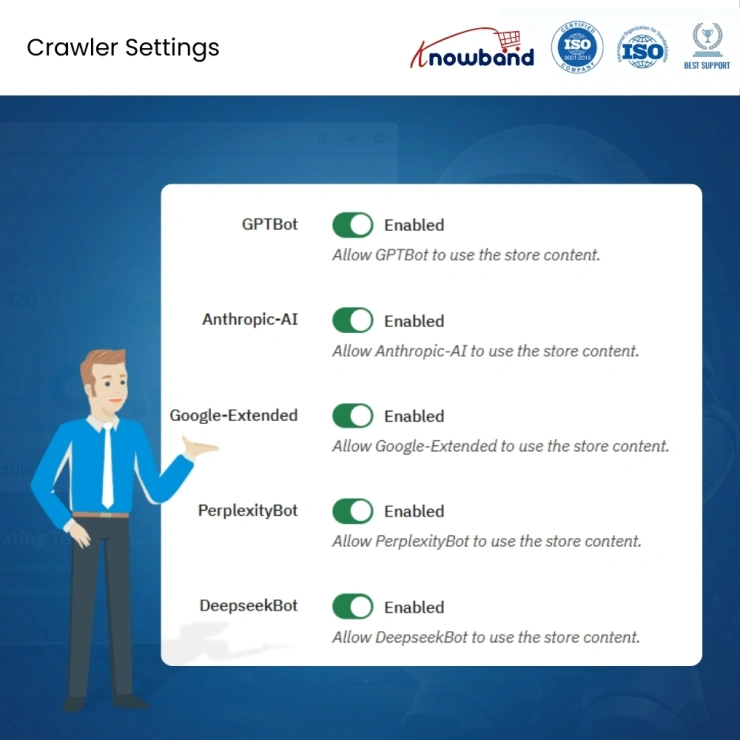
| 3 | WooCommerce AI Crawler Control Decide which AI bots can access your store. Enable or disable each WooCommerce AI crawler from the admin panel: GPTBot (OpenAI/ChatGPT), ClaudeBot (Anthropic/Claude), PerplexityBot, DeepSeekBot and Google-Extended (Gemini). Want visibility on Perplexity but not on another platform? It's one toggle, with no coding. |
| 4 | Selective Content Inclusion Choose which content types appear in the file: products, product categories and pages. Anything you don't select stays out. |
| 5 | Advanced Content Filtering Include or exclude specific products, categories and pages. Limit the file to published, in-stock or featured products, and keep it focused on what you want AI platforms to know. |
| 6 | Custom Content and File Boundaries Add your own text before and after the store description, product, category and page sections. Use global notes at the very top and bottom of the file to explain what your store sells, how the catalogue is organised, or any guidance you want AI models to follow. |
| 7 | Batch Generation for Large Catalogues The file is built by WP-Cron or a server cron job in small batches, so stores with thousands of products generate without straining hosting. Batch sizes are adjustable. |
| 8 | Multilingual and Multisite Ready Serve content in multiple languages, and generate a separate llms.txt file per site in a WordPress multisite network. |
| 9 | Built for What's Next The plugin is designed to adapt as AI search and recommendation engines evolve. |
Knowband, a leading name in the eCommerce development industry, provides WooCommerce development services to enhance the functionality of your eCommerce stores. For providing WooCommerce plugin development, we have hired experienced WooCommerce developers who work with full dedication to offer WooCommerce development and support services.
If there is a feature you want on your WooCommerce site, chances are that a WooCommerce plugin will allow you to do it. If you don't find any such plugin you can always contact us for your custom plugin development requirements.
Q1: What is the WooCommerce LLMs.txt Generator plugin?
The plugin generates the llms.txt file with the structure of your WooCommerce store including the information about products, categories and pages in the way AI crawlers will be able to perceive. Besides, you can track AI crawler visits using the integrated dashboard.
Q2: What is an llms.txt file in WooCommerce?
It is a simple text file placed in the root directory of your site (yourstore.com/llms.txt). It provides a concise readable description of your products, categories and pages for the large language models.
Q3: How does the llms.txt differ from a sitemap and robots.txt?
Sitemap file lists the URLs for the search engine bots to crawl. Robots.txt file informs the crawlers about the restricted areas on your website. Llms.txt file provides readable descriptions for the AI systems so that they could perceive them.
Q4: Will this LLMs TXT plugin make my products recommended in ChatGPT?
It increases the likelihood of this by making your catalogue AI crawler-friendly. Large language models independently choose what sources to use, so no plugin can guarantee the recommendation of your products.
Q5: What is WooCommerce AI visibility?
It describes how easily AI platforms can find, understand and reference your store and products. This plugin improves it with a structured llms.txt file and controlled crawler access, and helps you measure it with crawler analytics.
Q6: What are AEO and GEO, and how do they differ from SEO?
SEO aims to rank your pages in traditional search results. AEO (Answer Engine Optimisation) and GEO (Generative Engine Optimisation) aim to have your content used and cited in answers from AI platforms. All three are worth doing.
Q7: Which AI crawlers does the plugin support?
GPTBot, ClaudeBot, PerplexityBot, DeepSeekBot and Google-Extended. You can enable or disable each WooCommerce AI crawler from the admin panel.
Q8: What is WooCommerce AI crawler analytics?
It is the plugin's dashboard, which shows how many times AI crawlers visit your store, split by bot, plus the pages they crawled, how often they requested your llms.txt file, and trends over time.
Q9: How does the plugin know which bots are crawling my site?
It identifies AI crawlers from the user-agent information in incoming requests and logs each visit to the dashboard. No extra setup is needed after activation.
Q10: Can I see which products or pages AI bots crawl most?
Yes. The dashboard lists your most crawled URLs, so you can see which products, categories and pages AI platforms read.
Q11: Can I filter the crawler data by date or export it?
Yes. View today, the last 7 or 30 days, or set a custom range, and export the results as a CSV file.
Q12: Will the analytics slow down my store?
No. Visits are logged with lightweight entries, and old logs can be cleared automatically after a retention period you set.
Q13: Can I control which products and pages appear in the file?
Yes. Select the content types to include, then filter by specific products, categories and pages. You can keep the file limited to published or featured products and leave out anything you don't want AI to see.
Q14: Is this WooCommerce AI crawler plugin suitable for stores with thousands of products?
Yes. The file is generated in batches by cron, and you can raise or lower the batch size to match your hosting. Large catalogues may take a few runs to complete the first file.
Q15: Does it work with multilingual or multisite stores?
Yes. Multilingual content is supported, and each site in a multisite network gets its own llms.txt file with separate settings.
Q16: Which parts of the generated file can I customise?
Customisations are possible before and after store descriptions, products, categories, and pages, as well as global notes above and below the file. Many merchants utilise this to describe the content of the store and its catalogues.
Q17: Does it conflict with SEO plugins like Yoast or Rank Math?
No. It generates a separate file and doesn't change your existing SEO settings or sitemaps.
Q18: How do I install the WooCommerce LLMs.txt Generator plugin?
After purchase, download the zip file. In WordPress, go to Plugins → Add New → Upload Plugin, upload it and activate. Open the plugin settings, enter your store details, choose your crawler and content settings, then run the cron job to generate your llms.txt WooCommerce file.
 Sale
Sale
Enhance your WooCommerce store with the VideoMate Plugin by Knowband. ...
$55.99 $69.99
Sale
Boost your store with the Knowband WooCommerce AI Content Generator Pl...
$47.99 $59.99
Sale
With the help of Knowband WooCommerce ChatGPT content generator extens...
$39.99 $49.99
Sale
The WooCommerce Age Verification module allows admins to verify the ag...
$31.99 $39.99


