
Your shopping cart is empty!

 Watch Video

The Knowband Catalogue Import Export Pro is developed for store owners who manage real catalogs, hundreds or thousands of SKUs, and need transfers that actually work.
The PrestaShop Bulk Import Export Module supports CSV, XLSX, JSON, and XML for products and categories. Multi-language. Product combinations. FTP and SFTP. Scheduled automation via cron. Everything is managed from your PrestaShop admin panel without coding, additional plugins, or desktop software.
Admin can import and export PrestaShop products and categories in CSV, XLSX, JSON, and XML, all from the backend of the PrestaShop Bulk Product Import Export Module. Most import export tools support one or two formats.
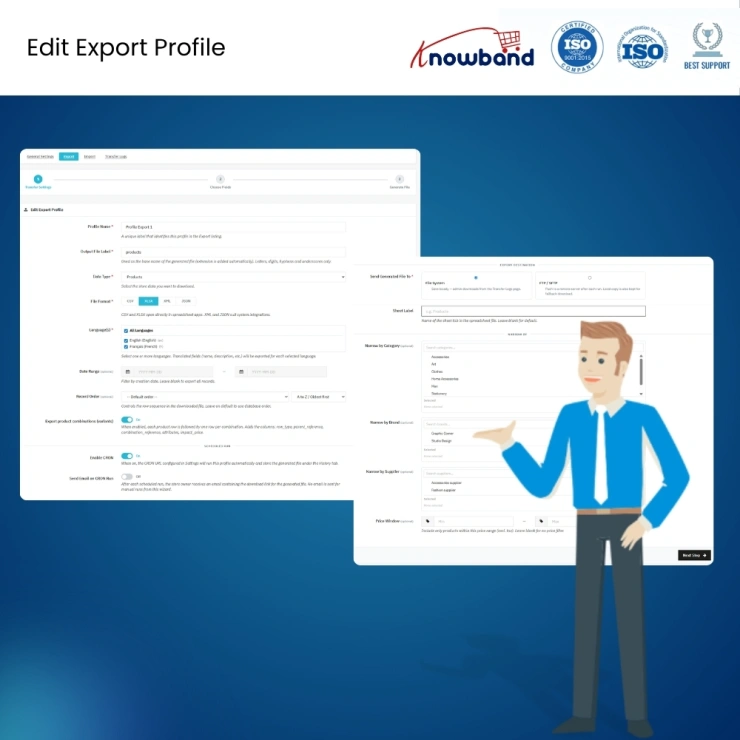
Create reusable import and export profiles for any catalogue transfer. Choose the file format, columns, language, filters, and destination, then save the configuration for future use. Run profiles with one click anytime or automate them with scheduled cron jobs using the PrestaShop Catalog Automation Module.
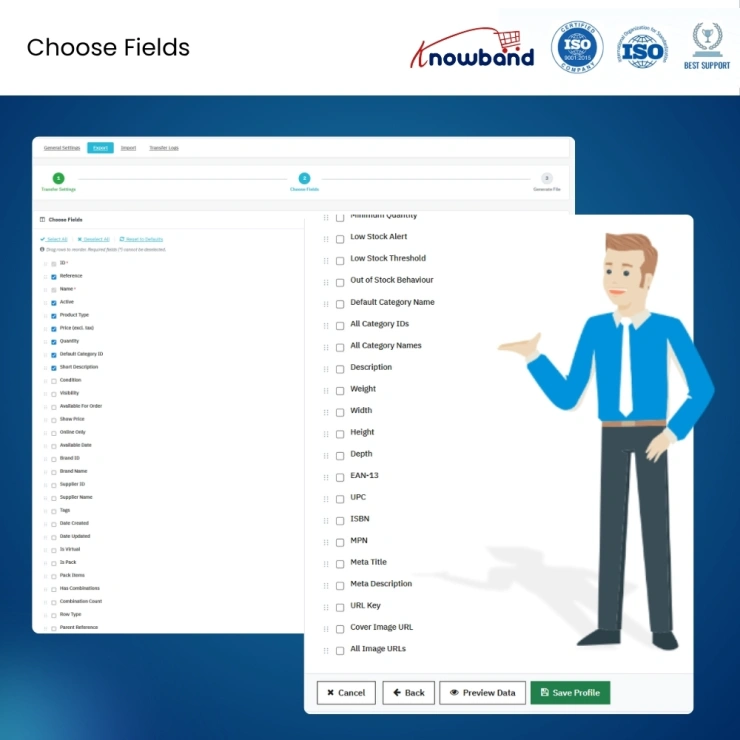
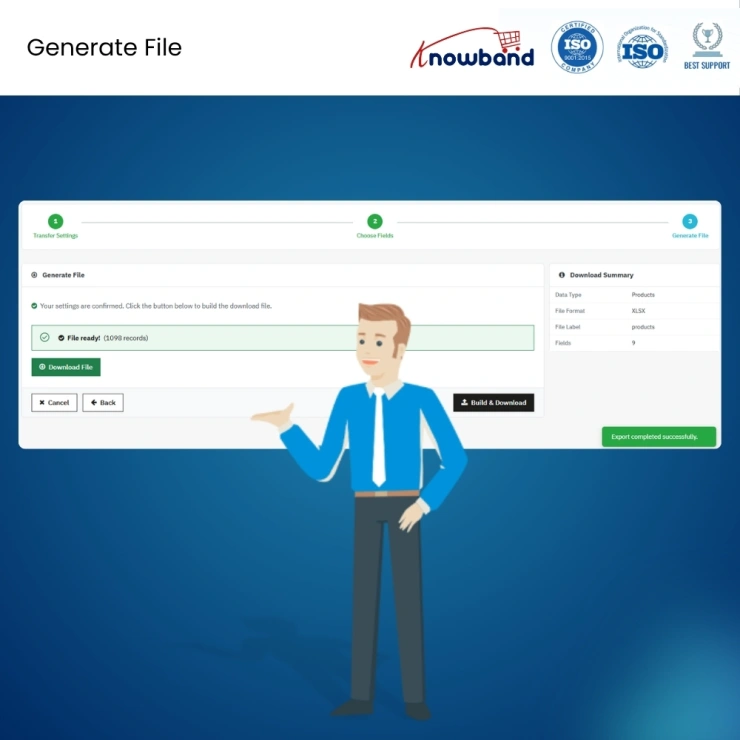
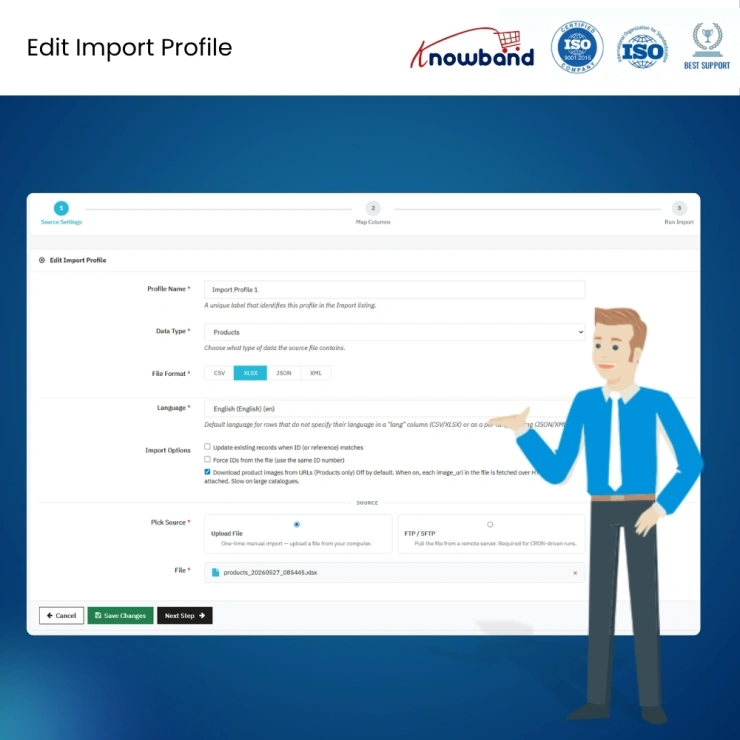
Both import and export use a guided three-step wizard so non-technical staff can complete a full transfer without training or documentation:
Export: Choose the data and format > select columns and preview > download or push to FTP.
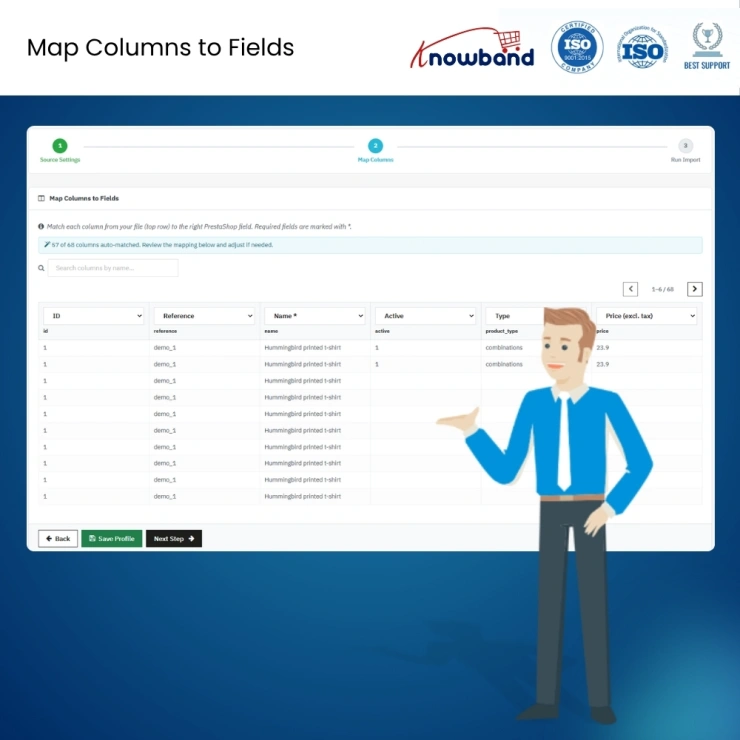
Import: Choose the file and format > map columns with a live preview of your file's first rows > run.
The import mapping screen loads the first rows of your file inline so the admin can see actual data while assigning columns. The module recognises common header variations automatically, SKU maps to Reference, id_product maps to ID, and pre-fills where it can.
Products with size, colour, or material variants export as individual rows linked to their parent product, with attributes written in a human-readable format. On re-import, missing attribute values and attribute groups are created automatically if they do not already exist.
Push export files directly to a remote FTP (port 21) or SFTP (port 22) server from inside the profile setup. A built-in connection test in the PrestaShop Import Export Module lets the admin verify credentials before the profile is saved, with no failed runs on the first execution.
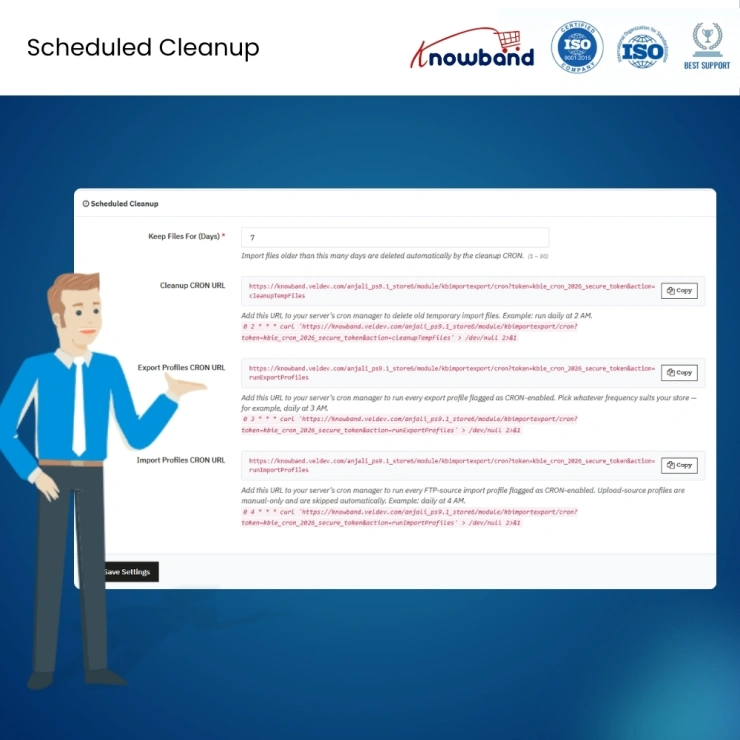
Any profile can be set to run automatically on a schedule using the PrestaShop Automated Catalog Manager. Three ready-made cron URLs are generated on the Settings page, one for export profiles, one for import profiles, and one for file cleanup, and copied directly into the server's cron manager or PrestaShop's built-in scheduled tasks module.
Admins can manage multilingual product catalogues with ease. CSV and XLSX exports generate separate rows for each product language along with a clearly labelled language column. JSON and XML exports organise all translations under the same product structure to simplify data handling.
Each profile can send a completion email when the job finishes. The email includes a clear success or error headline, a record count summary, a download link for the generated export file, and a specific reason line if anything went wrong.
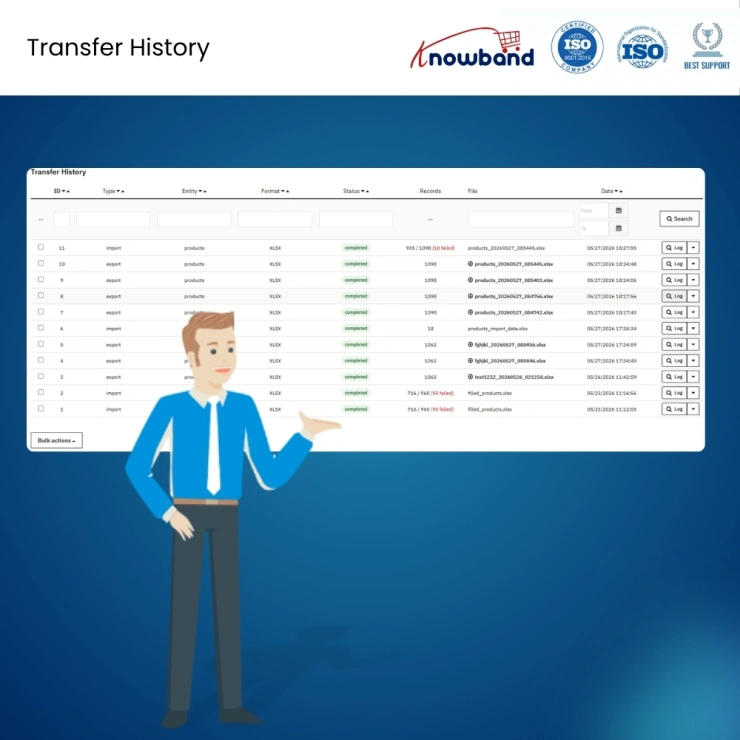
Every import and export in the PrestaShop Bulk Data Manager creates a permanent record on the Logs page: date, file name, entity type, status, and record counts that distinguish complete runs from partial ones.
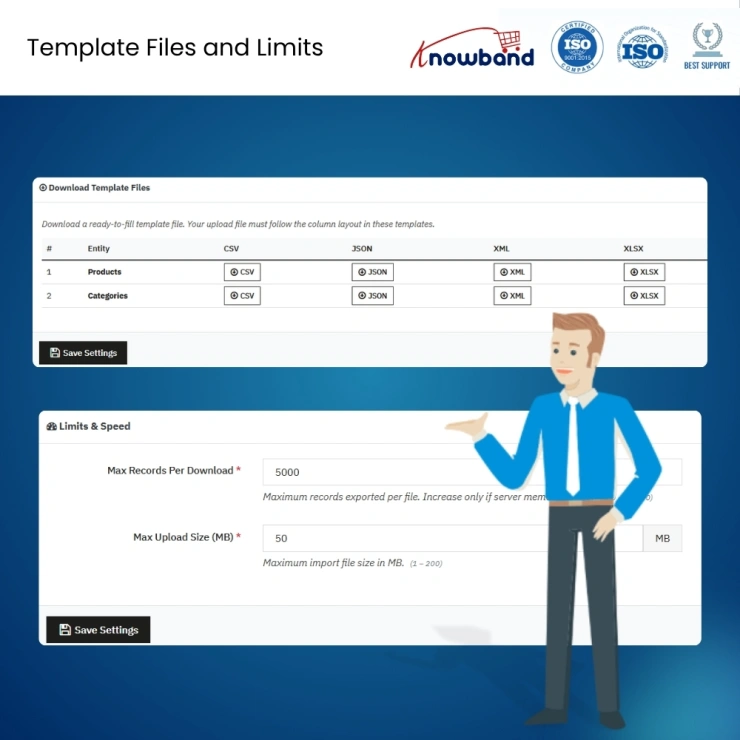
The PrestaShop Import Export Module provides ready-to-fill sample templates for products and categories in every supported format. Templates include every column the importer recognises, use safe placeholder data, and are generated live from the current importer column list. Download one, fill it in, import it back.
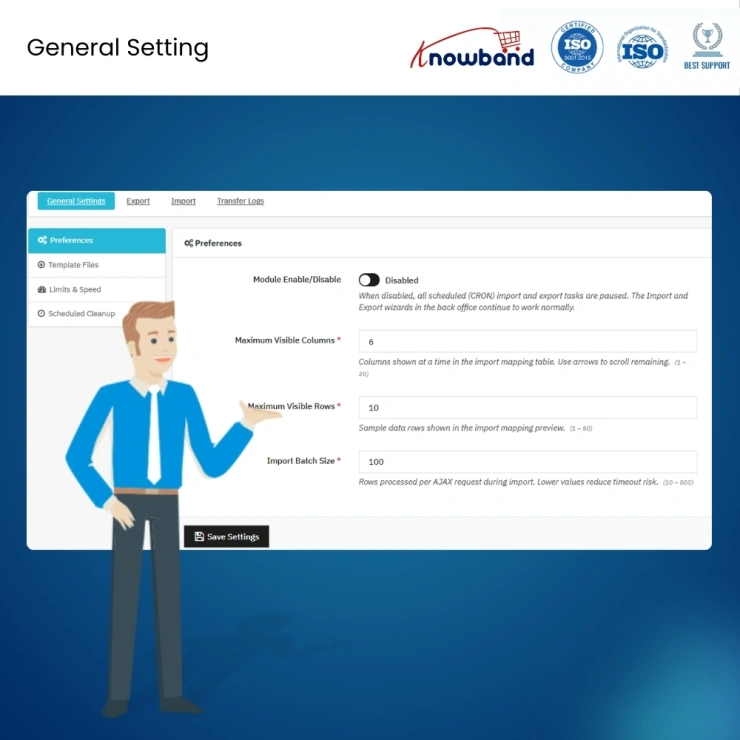
The admin can set how many file rows are processed per import pass using the PrestaShop Import Export Module. On shared hosting, where large import times out, smaller batches keep the transfer running cleanly. Upload size limits and export row caps are both configurable with safe defaults already in place.
Files stored in the PrestaShop Automated Catalog Manager module folder are deleted automatically once they exceed a configurable time (default: seven days). This runs alongside scheduled profiles, so no one has to manage disk space manually.
Downloading a product file, editing prices or stock, uploading it back, this workflow runs in minutes with a saved profile instead of taking half a morning.
Export your full catalogue from one PrestaShop store and import it directly into another. Furthermore, combinations, translations, and categories all carry across cleanly. No developer needed, no manual re-entry, no starting from scratch.
The three-step wizard and live column preview mean a content manager or merchandiser can run imports and exports without IT involvement. New staff can complete their first transfer the same day without any complications.
Set up a cron-enabled profile for each supplier or partner, and the transfers run on schedule, pull the file from their SFTP, import it, send a completion email, and clean up the local copy. No manual involvement required after initial setup.
A scheduled export profile pushing to FTP with timestamp-appended filenames creates a daily backup history automatically. Every file is dated, none overwrite each other, and any version can be pulled back if needed.
Knowband , a leading name as an eCommerce development company, provides Prestashop Addons Development Services to enhance the functionality of your eCommerce stores. For providing Prestashop addons development, we have hired experienced Prestashop developers who work with full dedication to offer Prestashop development and support services.
If there is a feature you want on your Prestashop store, chances are that a Prestashop plugin will allow you to do it, if you don't find any such plugin you can always contact us for your custom plugin development requirements.
It is a PrestaShop Catalogue import export module that lets merchants import and export products and categories using CSV, XLSX, JSON, and XML files. It includes reusable profiles, column mapping with validation, FTP and SFTP file transfer, cron-based scheduling, email notifications, and transfer logs, all managed from the PrestaShop admin panel. Compatible with PrestaShop 1.7 through 9.x.
Install the module, go to the Import tab, create a new import profile, upload your CSV file or pull it from FTP, use the mapping screen to assign your file's columns to PrestaShop's product fields, and run the import. The mapping screen shows a live inline preview of your file so you can verify the assignment before committing. Sample CSV templates for products are available from the Settings page.
Yes. Products with combinations export as individual rows linked to their parent product, with attributes in a readable format. On re-import, the module creates missing attribute values and groups automatically. This covers full round-trip combination handling, export from one store, import to another, and combinations are preserved correctly.
Yes. Export profiles can push the generated file to a remote FTP or SFTP server directly. Import profiles can pull files from FTP or SFTP at scheduled times. A connection test is built into the profile setup, so credentials are verified before the profile is saved. Port 21 is used for FTP, and port 22 for SFTP.
Enable cron on any import or export profile. The Settings page generates three ready-made cron URLs, one each for imports, exports, and file cleanup. Copy the relevant URL into your server's cron manager or PrestaShop's scheduled tasks module and set the interval. The profile runs automatically at every tick without any manual involvement.
Yes. Every export profile lets you choose the format: CSV, XLSX, JSON, or XML. JSON and XML preserve multi-language translations bundled under each product for programmatic use. CSV and XLSX produce one row per language with a labelled column for easier spreadsheet editing. The format is selected per profile, so different profiles can export the same data in different formats.
Export the catalog from the source store using the export profile, choose all columns, all languages, and combinations enabled. Take the generated file and import it into the destination store using an import profile with the mapping screen. Categories, combinations, translations, and product references all carry across. No developer or database access is required for the transfer itself.
Yes. Export your product catalog to CSV or XLSX, edit the price columns in any spreadsheet application, and import the file back using an existing import profile. The module updates only the mapped fields, prices change, and everything else stays untouched. For stores updating prices from a supplier feed on a schedule, the entire cycle can be automated with a cron-enabled profile.
Yes. All four formats preserve multi-language data. CSV and XLSX use one row per language with a language column. JSON and XML bundle all translations under each product. The importer handles both structures automatically. No separate translation module or manual re-entry is needed after a transfer involving a multilingual catalog.
Create an import profile, set the file source to FTP or SFTP, point it at the location where your supplier deposits the feed, enable cron, and set the schedule. The module pulls the file at the configured time, runs the import, and sends a completion email. Row-level error logs show any records that failed so they can be corrected without re-importing the entire file.
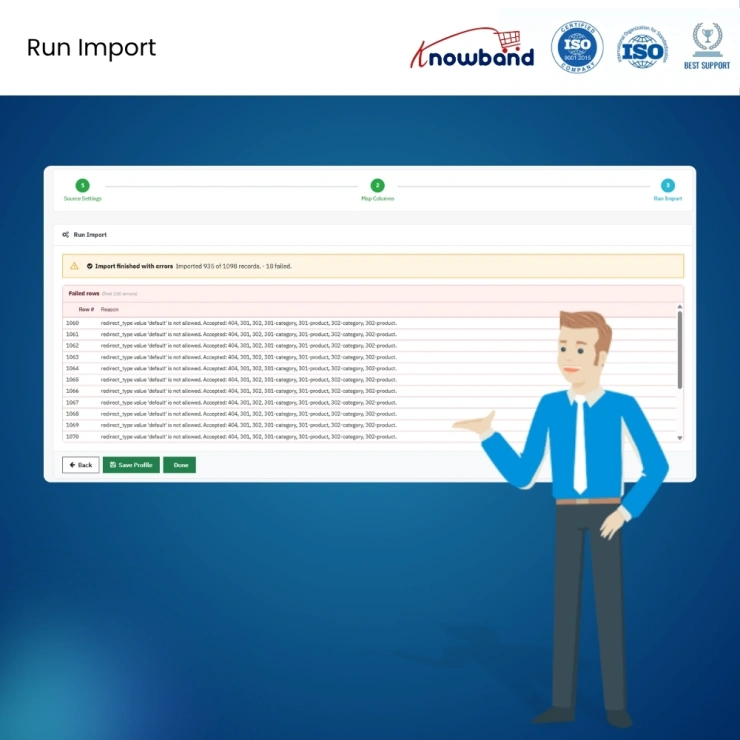
The module does not fail silently. Every run creates a record on the Transfer Logs page with a full record count, how many were imported successfully and how many failed. Failed rows include a specific error description at the row level. The admin fixes the affected rows in the source file and re-imports only those rows. A completion email is sent for scheduled runs, so the admin is notified without logging in.
For stores running medium to large catalogs, roughly 100 to 50,000 SKUs, the Knowband Bulk Data Manager covers the full transfer workflow: multi-format support, reusable profiles, FTP and SFTP, cron automation, combination handling, multi-language preservation, column validation, and a logged run history. Batch size controls prevent timeout failures on shared hosting. It is designed specifically for catalogs where the native PrestaShop importer is not a viable option.
Create an export profile for products in your preferred format, set the FTP destination to a backup server or remote storage path, enable cron, and set a daily schedule. The module appends a timestamp to each filename automatically, so daily backups accumulate without overwriting each other. Previous export files can also be re-downloaded from the Transfer Logs page at any time.
 Sale
Sale
Having mobile apps for your site can increase your sales and customer ...
$199.99 $249.99
PrestaShop Auction Module to run live product bidding with scheduled a...
$69.99
Sale
Run in-store and online sales from one PrestaShop back office using Pr...
$79.99 $99.99
Sale
The Prestashop LLMs TXT Generator for AI Search Engines like ChatGPT, ...
$39.99 $49.99


