The trend of online shopping is at its peak, therefore, the idea of making sales to a potential buyer along with the idea of customer retention requires efforts and strategies. With numerous options available, customers are not restricted to a single store in order to make a purchase.
Thus, the process of customer retention is quite a task for eCommerce owners. Focusing on customer retention along with customer acquisition can offer great returns for any business in a long run. Below discussed are some of the ways in which shopping sites can make sure that their customers are retained and get satisfied with the overall shopping experience.
1. Subscription services
One of the better ways to make sure that the customers are retained in the web store is by getting more subscribers. It helps in increasing the average number of sales per customer. Subscriptions are the bread and butter of retention marketing. Once a customer is subscribed then they can be bought back to the store for making more sales. There are numerous ways of getting subscriptions and if the online websites follow the right approach then they can easily make more retained customers. Instead of sticking to the conventional subscriber pop-ups, the online shopping sites can go for the gamified pop-ups that can lure the visitors back to the store.
2. Optimize the website
It is difficult to gain higher traffic as it would be a costly process but the web store can be personalized in a better way so that the visitors who take a look at the website would like to make a purchase. The eCommerce stores need to provide the visitors with a better experience by working on important aspects of the website. They could make use of high-quality images to provide better information about the product, making the predictive search bar better, including the trust elements in the web store so that the customers may build better trust on the store and would be engaged in a better manner. This helps in attracting new customers and at the same time, the old customers are retained.
3. Reward the customers
The web stores need to make sure that their customers are being rewarded at a definite time interval. Rewarding the customers by various means helps in maintaining a better relationship between the customer and the online store. The customers who make purchases from your store are likely to demand something in return. If the eCommerce store doesn’t reward the loyalty of the customers then the factor leading them to make more purchases is lost. Therefore, the websites must make sure that they offer some kind of rewards either in form of reward points or discount coupons must be provided timely. This will surely encourage them to make more purchases from your store. Click here to know how you can reward your loyal customers.
4. Collect feedbacks and reviews
There is no doubt that the customers have their own level of understanding of the website. Thus, you must provide them with the chance to speak up and let them understand their problems or suggestions. This makes the customer believe that the website cares for their opinions. The use of honest reviews from the customers should also be used and attached to the product page. If you want to increase the conversion rates of your eCommerce website, interact with your customers. Talk to them directly. Having a Live Chat feature within your website will just do the job for you perfectly. Emails take time to get drafted. Moreover, the customer’s testimonial on the website can build a trust factor in the minds of other visitors. Thus, motivating them to make more purchases.
5. Provide better process flow
Customer retention is followed by a process. If the eCommerce store wants to make better customers purchase they need to provide them with better process flow. Some of the ways would be providing easy login and quick checkouts. The customer needs to make better and fast purchases and the one-page checkout enables them with the same. The customer doesn’t need to move from page to page in order to complete the purchase. The one-page checkout extension for Magento, Prestashop, OpenCart, and other eCommerce platforms can be used to enable this feature. Options like this not only enhance the customer’s experience but also provides better purchase options for retention. Cross-selling the product while the customers are checking out of the page is another way to retain the customers.
6. Improve website performance
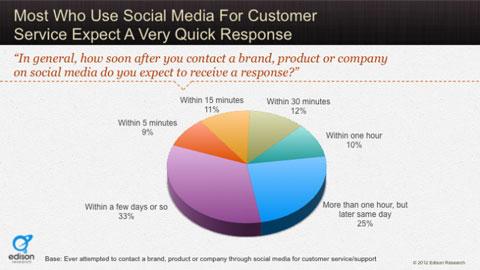
Don’t make your customers wait too long. The buyers have a definite amount of time in order to make a purchase and with every second they start to lose trust in the website. Therefore, making sure that the customers are responded at an expected rate will help in building better trust. Moreover, the involvement of the customers in making a purchase from the eCommerce store declines at a very rapid rate with increasing response time. Website performance plays an important role in determining the retention of the customer in the store.
Over to You
The eCommerce store wants to grow at a rapid rate and acquire new customers but it is equally important to retain the old customers as they serve the basis for regular purchase. Therefore, the online store must make sure that they incorporate various strategies and features so that the customers are entertained and obliged to make a purchase from the shopping store more often.
Click here to ensure customer retention on the eCommerce store
Knowband is an eCommerce solution provider, serving clients worldwide for more than a decade. For any eCommerce website development solution and module requirements, visit the KnowBand store. You can write to us at support@knowband.com and our team will be happy to help you.
One of the biggest aspects of eCommerce that sums up their success rate is the way they influence the customers. The entire process of taking the visitors from the landing page to the checkout page is all about user engagement. In order to be more productive with the shopping site, various other areas must be covered apart from the product quality and service assurance. The customers has now moved on from the traditional form of making a purchase to online purchases. Therefore, it becomes quite important for the eCommerce store owners to present the sites in best way and try to reach out to the customer.
In order to get better understanding of the customer’s decision of making a purchase, we can discuss some of the points that can help the stores to get better conversions.
1. Product placement
It is quite important for the web stores to know the fact that the buyers are not going to make a purchase on the products which are dig deep in the store. The chances of making a purchase on the product that is available in the 6 page of a particular product are quite low as compared to the same product that has been presented in the page 1. Thus, the placement of the product plays a very crucial role in determining the behavior of the customers and making a better sales to them. the customer wouldn’t like to spend their time in searching for the product and digging deep into the website. Moreover, refreshing the web page every time may even be time consuming. This is when the infinite scroll can help you out. There are module available for adding such functionality in the websites. For instance, Prestashop infinite scroll, Magento infinite scroll and others. Showcasing the products in the single page can make the visitors delve into the site in a better way.
👉Explore the Module with Our Video Guide
2. Easy purchase options
Why bother to make a purchase from your store when the online transaction is easier on other sites? This question must be taken into consideration by the store owners when trying to provide the customers with better services. The customers always look for some kind of assistance when it comes to making a purchase as most of the stores provide the product from the same brand. In this regard, the shopping site can provide the customers with assistance when it comes to different aspects. One of the way to provide customers with easy purchase option could be by providing the one page checkout option. There are extensions available for the various eCommerce platforms such as Magento one page checkout module or Prestashop one page supercheckout. It saves the customers a lot of time and saves the extra efforts they need to put in order to complete the purchase.
3. Marketing campaigns
Keeping the customers informed about your offerings is the best way to aid the purchase decision of the customers. Advertisement play an important role in influencing the visitor’s decision to make a purchase. The eCommerce stores must always try to keep the customers informed about the various activities going in the web store. It helps in creating an awareness among the users and also helps in attracting a better crowd to the store. To commence a successful marketing campaign the online stores must first do a research and try to figure out the various concerns of the potential buyers and then target the audience. The increasing trend of promoting the products through blogs and post is also catching attention. The eCommerce store can use this strategy to improve the product understanding among the customers and encourage them to make a purchase.
4. Better branding of the products
The most common customer behavior that has been observed is the pattern in choosing a product. Majority of the customers prefer to make a purchase on the product that is directly related to a bigger brand or a self-established brand. Creating a brand image of not just the site, but even of the products being catered is must. This not only entrusts the customers that they are receiving a quality product, but also ensure the trust elements in the product.
5. Solve their queries
The availability of a chat support system in a website highly motivates the visitors to make a purchase. As, the visitors look onto the web store than the chances may arise where the users may find some complications with the products or their understanding is not developed. In that case if the online store provides them with the required assistance than the chances of making sales are improved. In other case, the users can use this feature to get their other doubts cleared. The customers like to get a response on their queries as soon as possible. If they are provided with the immediate response than they may be influenced to make a purchase from the store else the website is more likely to lose a potential buyer which could have been a paid customer otherwise.
Over to You
The customer behavior is highly complex and to completely figure out the best ways to tackle the customer decision, one needs to dig deep. The general points which are experienced as common traits that are shown by the visitors can be worked on by the online stores. The web stores can make use of additional addons to gain better conversions from the visitors.
The key to improve the web store traffic would be by providing better alternatives for the customers in order to shop from the web store. In addition to this, one of the most important aspects of enhancing the conversions from the eCommerce store is to provide flawless checkout options to the visitors. This is because, the checkout page is where most of the exits happen. Thus, a single page checkout is one way to make the shopping experience simple and smooth for the customers of the websites.
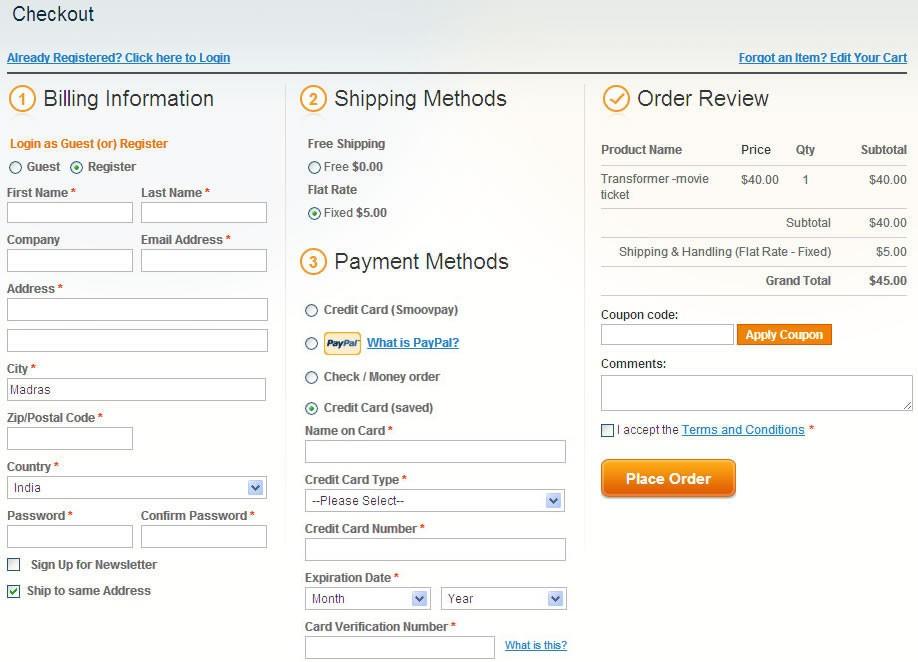
Magento one page checkout module is one solution for all the Magento store owners who are looking to make the online transaction flawless for their customers. Prestashop one page supercheckout is a similar extension for the Prestashop platform. The plugin helps the customers to make a simple checkout process. It is the better alternative to the traditional method of multi-page checkout where the customer has to go through a series of pages and fill out the information a lot of times before completing the purchase on the web store.
In order to discuss the feasibility of the one page checkout and its immediate advantages let us throw a better light on some of the important aspects.
1. Easy and fast processing
The inclusion of the one page checkout is one stop solution for all your issues. It makes sure that the customer gets an easy and fast way to make the checkout from the page. One of the important point to be kept in mind while providing better approaches for the customer to improve their shopping experience would be prioritizing the customer’s preference. The customer wants to exit the store as soon as they are done with the shopping process. Thus, making the use of one age checkout reliefs the customer about the further process involved with the checkout process. Thus, making the one page checkout a must have module for the web store owners to get instant and better conversions. The multi-page checkout can be annoying and may be one of the reason for the low conversion rats due to the irritation and annoying nature of the multi-page exit checkout.
2. Easy re-marketing
The one page checkout method is not only a way to get instant checkout from the store, but it even provides the store owners to collection the customer data. While checkout page offers the guest login option as well, the customers is required to enter their email address and basic information. The admin can make use of these information for further remarketing. The feature of one step checkout makes the concept of email marketing a feasible option for the store owners. The collected data of the customers can be further utilized in order to make the customers aware about any upcoming product sales on the web store or any ongoing sale. This helps in luring the customers back to the store and also helps the web store to get a better traffic and also make better conversions using the feature.
3. Smooth process flow
The flow of online transaction of the eCommerce store must be smooth enough to lead the visitors to the payment gateway. The process flow is highly controlled as the customers don’t have to fumble upon a number of web pages. Therefore, it is one of the option for optimizing the web store and also helps in improving the performance of the web store when given an overall look.
4. Better web store navigation
The customers want a web site which could help them with better and clear insight of the products and the contents in the web store. If the web store doesn’t assist them with the checkout process than the customers won’t be able to get the navigation features per the web store wants to bring out to the customers. Thus, one page checkout s one of the best feature that supports the navigation process to the customers for a better customer interaction. The simple and fast checkout will make it easier for the web store to divert the attention of the customer on the other aspects of the web store.
5. Satisfied customers
One of the important thing that the customer’s lookout in the web store is the feedback received by the web store from the customers. If the web store is not incorporated with innovative and better options. Thus, if the web store wouldn’t makes use of traditional method of multi-step checkout than the customers might be annoyed by the web store and may give a low rating to the web store. This creates a wrong impression of the web store among other customers who make use of the store reviews to make a purchase. Thus making use of the single page checkout might create a positive impact on the customers and the chances of receiving the positive feedback from the customers is more likely to improve.
Over to You
One of the important thing to incorporate in the web store would be the Magento one page checkout. If we give a proper study then this option holds a significant advantage over the multi-page checkout option. Thus, the chances of getting better conversions by using the one page checkout from the web store increases considerably.
The composition of various features are collectively responsible for the success of any website. If a website wants to grow and get better engagement then it be developed keeping in mind the need and requirement of the consumer. The customers will readily agree to interact with a website if it takes the customer’s interest into consideration and at the same time, also makes shopping a better experience.
Though the need for optimizing a website on regular basis may seem less concerning, but if we look at the larger picture then we can realize that the web traffic received by the website is able to produce only 2-3% conversion. Thus, an immediate need rises to check the points where the performance of the website is lagging. Most of the time, the admin can make the process of shopping a better experience for the customers by providing them with better methods to access the website. It can be done either by incorporating new features to the website or by removing the pitfalls from the website.
The availability of multiple modules in the market has made it easy for the website to perform better. The website can utilize the several addons for different extensions such as Prestashop, Magento or Shopify. The approach to improving the marketing of the products using the websites have become way too easy. The customers are also benefited due to the availability of these plugins. It makes their shopping experience far better and also helps them to save a lot of time and effort which would have otherwise been consumed to a very large extent.
Let us discuss some of the pitfalls where the website can use the available plugins to get better results.
1. Complex login process
One of the initial steps for any customer to access the website would be login. Most of the time the website ask the visitor to fill out the lengthy forms which can annoy the visitor and the chances are that they may not login to the website. Thus, in order to avoid the fleeing away of the visitors, the websites can use the Magento Social loginizer. This module helps the visitors to enter the web store without entering any personal details. All they need to do is use the details of their social media account and get an instant access to the website. The website can use the information from their social media account to make better sales to the customer.
2. Lack of motivation to stay
The website may be failing to make better sales due to lack of interactive contents. In order to eliminate this problem, the website may always make use of interactive contents such as pop ups. One of such pop up is Magento Spin and win. The spin and win pop up is roulette type game, where the customers get a chance to spin the wheel and avail offers according to the needle landing. The customers are more likely to make a purchase using the offers through spin and win as they have a strong feeling of availing the offer though the gaming platform.
3. Social media influence
One of the trending approach in order to improve the influence of the website would be Social media. Most of the website have started to approach the social media marketing in order to grow their marketing. As, the social media like Facebook and twitter has a very large fan base thus it becomes quite easy for the websites to reach out to maximum potential buyers. The Magento Facebook post is one of the options that enables the websites to make a sale on Facebook. It is even used for promotional purposes.
4. Low descriptive content
The absence of the complete information or description about the product also kills the urge inside the customer to know the product more. Therefore, the website must try to provide a brief insight of the product using the images and videos. In order to make use of the video the website can always use the Magento product video module. It helps in attaching a video to the product. The ratio of the pick u rate of the product with video description is lot higher than the ones lacking it. Thus adding a product video helps in better marketing of the product.
5. Lengthy checkout process
As most of the customers have already sent a better amount of their time in making a purchase. In any case, if the website comes up with lengthy checkout process then the customer is very liable to cancel the transaction and quit the store. It will lead on to losing a potential buyer. Thus, the website may use the Magento one page checkout module. The module enables the customers to make easy checkout without having to fill out any separate information and also making a quick purchase. It helps in making the shopping process better.
6. Shipping Assistance
One of the expectations that the customers have formed the website is shipping assistance. The customer always appreciates the help provided to them through the delivery system but meanwhile, the website must also look out in order to check out the feasibility of providing the delivery to the customers. Thus, the web stores can always sue the Prestashop Free Shippping manager module in order to provide shipping assistance to the customers. The module can be made to happy the charges or deliver the product for free using the information regarding the weight of the product or the location of the delivery. It is one of the most convenient methods to have a transparency with regards to the delivery of the product.
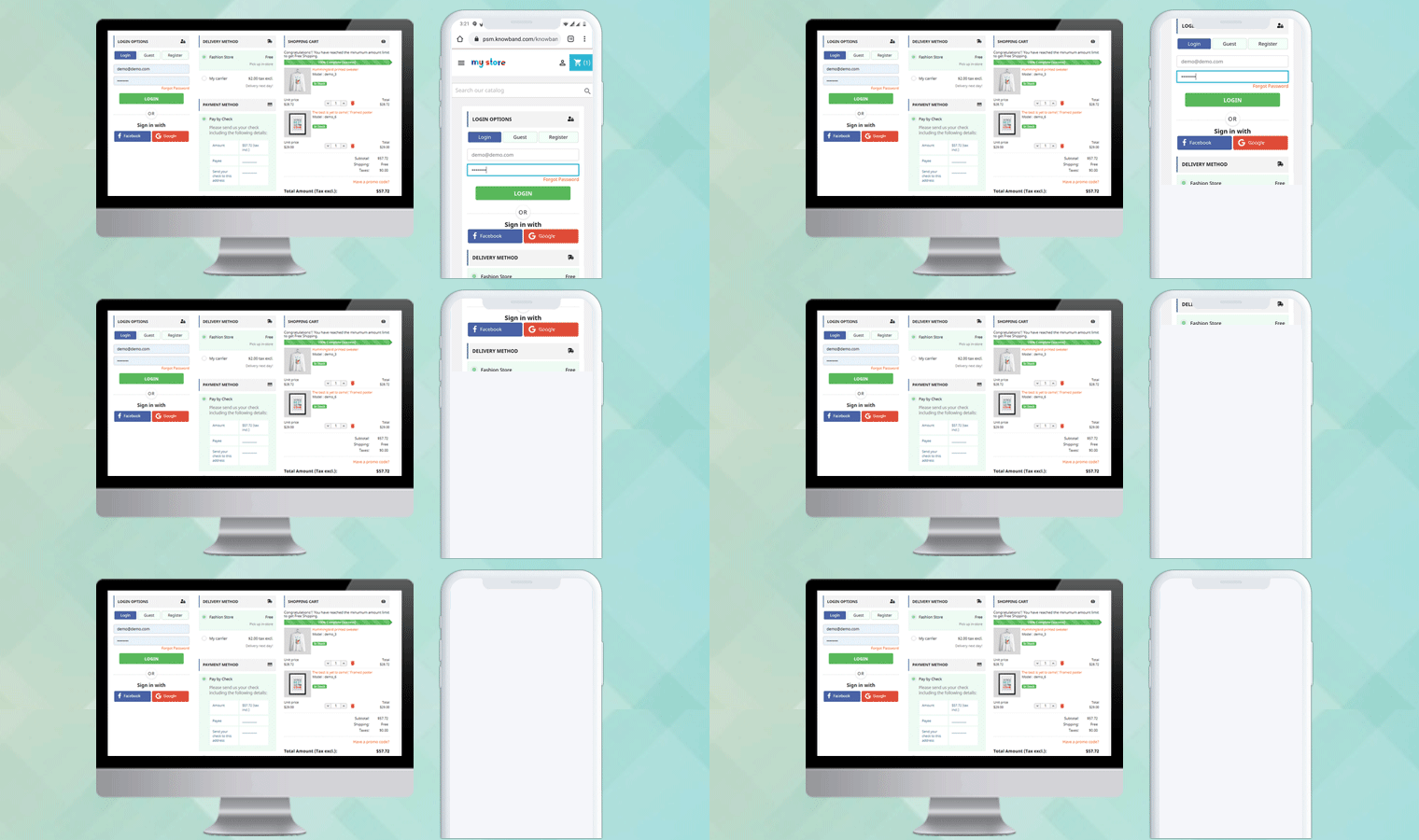
How to optimize the checkout process for your Magento store to make it responsive yet simple for the online users? By reducing the multiple checkout steps involved in a checkout process of a website, customers are more likely to purchase and thereby increase the conversion rate for your store. To simplify the checkout process of your Magento store, Knowband offers Magento One Page Checkout extension which incorporates a single step checkout page on your website, referred to as Magento Supercheckout. This supercheckout page gathers and displays all the checkout fields on a single page easing customers to fill information and complete checkout for their product.
The checkout page and layout has been optimized to show all necessary steps needed to complete the order on a single page to the customer. Magento one step checkout is fully responsive for desktop, tablet, and mobile views and is perfectly compatible with all native Magento payment and shipping methods which are configurable from the backend interface.
Features of Responsive checkout for Magento
1. Magento one page checkout extension simplifies the multi-step checkout process by incorporating a single step checkout on the store.
2. Ajax based loading of Magento one step checkout eliminates the delayed loading time consumed by multiple checkout pages.
3. Magento quick checkout extension gathers and merges all the checkout field information into a single page checkout form which is convenient to fill for the customers while performing order checkout.
4. The mobile responsive feature of Magento one page supercheckout makes it compatible with all kinds of devices(mobiles or tablets), screen sizes and designs.
5. Store merchant can also enable the guest registration option for their customers which automatically generates and sends a random password to the user for further account use.
6. If guest registration with password is enabled, admin can allow their customers to fill the desired password for their account while performing guest checkout.
7. Magento one page checkout extension offers an option to enable or disable newsletters for the eCommerce store.
8. Magento fast checkout extension offers two easy social login options like Google and Facebook so that the customers can conveniently login and perform checkout on the store.
9. This one step checkout Magento extension offers customizable address fields for payment address and shipping address. Admin can show or hide the fields differently to guest and logged in customers of the store.
10. With Magento one step checkout module, admin can configure and display multiple payment and shipping methods for their shop on the frontend.
11. This Responsive checkout for Magento offers a configurable cart to the store merchants. Admin can show/hide any cart description field as per their site needs.
12. Magento one page checkout extension offers two intuitive and appealing layouts including 2-column and 3-column which are fully customizable from backend panel of the module.
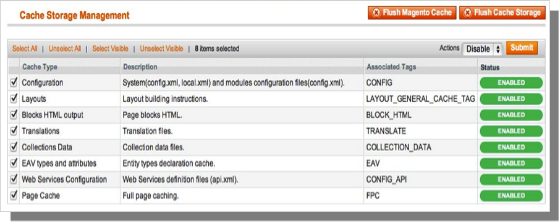
The Magento front end relies heavily on caching to provide a faster experience to customer. This is a wonderful tool, but can wreak havoc during the installation process. To ensure that the cache is not the cause of any problems, we should turn it off. This can be done from the admin console by navigating to the cache management page (System->Cache Management), selecting all caches, clicking disable from the drop-down menu, and submitting the change.
2. Disable Compilation Mode
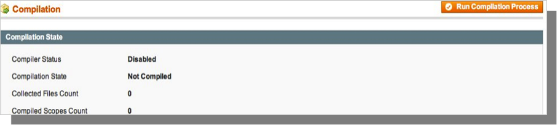
This may not be an issue for many readers, but if you are using Magentos compilation mode on your store, it is important that you remove it. Without going into to many details, compilation mode takes many files spread out over the system and condensing them into a single file that can be run very quickly. If an extensions files are not in the system when this single file is compiled, they will not be included. To check that this is disabled, go to System->Tools->Compilation. If the compiler status is Disabled, you are ready to go. If not, simply click the Disable button on the right hand side of the screen.
Choose An Installation Method
There are two different methods used to install extensions.The first involves taking advantage of the Magento Connect Manager, while the second involves manually installing the files via ftp or command line. The first option is generally used by store owners and is a relatively automated process, the problem is that if there is a problem with this process, you are at the mercy of the connect manager to tell you where the problem is coming from. Option two involves getting your hands on the files yourself and manually dropping them into the Magento installation.
Option 1: Using Magento Connect
Required Materials:
User account for Magento Connect
Magento Admin account with access to Magento Connect Manager
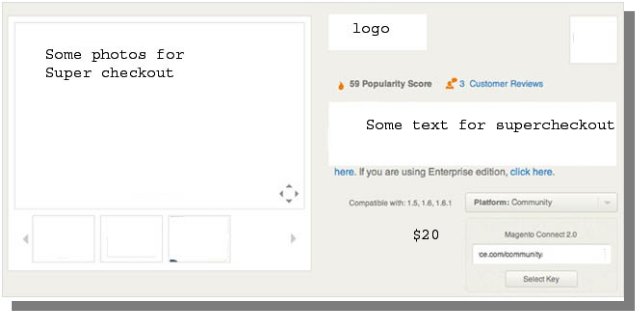
As stated before, this option is relatively easy to implement. The first step is finding the link on Magento Connect for the extension you wish to install. Once there click install now. If you are not currently logged into the site you will be prompted to do so. Next, select the version of Magento connect you are using (if in doubt, select 2.0), accept the extensions license agreement, and copy the extension key.
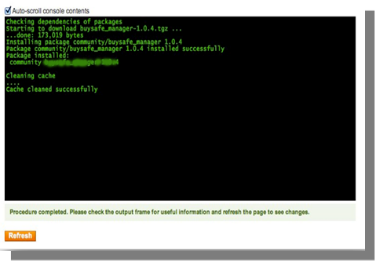
Log into your stores admin console and navigate to System->Magento Connect->Magento Connect Manager. At this point you will be prompted to re-enter your administrator credentials. In order to install an extension from the connect manager; you must have an account with full access to the administration console. If you were given limited access, Magento will not allow you to proceed. Once you are logged into the manager, simply paste the extension key into the text box and click install. A system window will appear towards the bottom of the page that will display the progress of your installation.
Congratulations, you have successfully installed the extension on your store. Be sure to test thoroughly before re-enabling the cache/compilation. If you found no problems both before and after these features have been re-enabled, you should be ready to repeat the installation process on your live site. DONT FORGET TO BACKUP ALL FILES AND DATABASES BEFORE INSTALLATION!
Option 2: Manual Installation
Required Materials:
All files used by the extension.
FTP access to your website.
The connect manager is a useful tool for installing extensions, but prefer hands-on method when it comes to installations. It feels more comfortable when you are personally in control of the process.
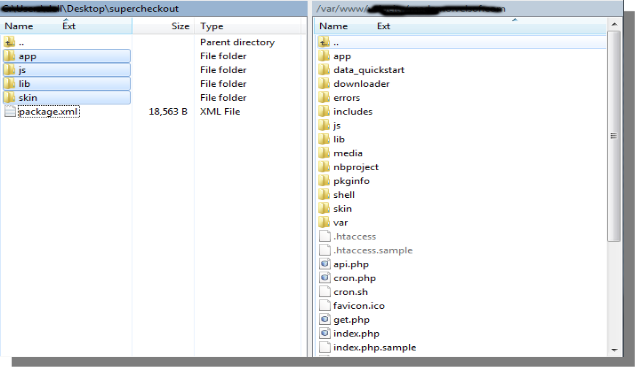
Do you see an app-code directory there, what about app-etc-modules? If you dont see these directory paths and files contained within them chances are that the extension download was faulty. Take a look at the package.xml file, this is the blueprint used by Magento Connect to arrange the files in the proper places. You may need to use this to ensure that everything is as it should be. Once you have reviewed the extension files you are ready to perform the last step. Using your ftp client, drag all of the files onto the store root of the Magento instance. Depending on the number of files in the extension, this may take a few moments.
Now go to the admin console and click Flush Cache Storage. This is the requirement for any extension that adds pages to the admin console. Logging out and back in is also required to ensure that everything loads properly. If you cannot clear the cache via the admin console for any reason, you will need to clear the cache manually via your FTP client (see the first FAQ question for assistance). That is the final step. Congratulations on a successful installation.
Troubleshooting & FAQs
I loaded all files onto my Magento store, and now get a white screen for some or all of the admin console.
This is a fairly common problem, and 99% of the time it is cache related. If you can get to it, go to System->Cache Management and click Flush Cache Storage. This will ensure that everything cached by Magento is deleted and will to be regenerated. Log out and back in to complete the process.
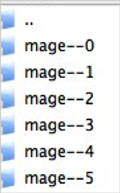
If you are completely cut off from the admin console, navigate to the var-cache directory of your website. You should see a series of directories named mage*. Delete all of these directories (DO NOT DELETE var-cache). This is the equivalent of flushing the cache storage from the admin console.
I am receiving a Magento error when accessing certain pages. How can I debug this?
This question really deserves a blog post all to itself, but a good start would be to go into the errors directory of your store. Locate the local.xml.sample file and rename it local.xml. The next time you see the error detailed information will be provided explaining where the error took place. Dont forget to change this back when you are finished troubleshooting!
I have a critical error with my webstore and need to turn off an extension I cannot access the admin console. What do I do?
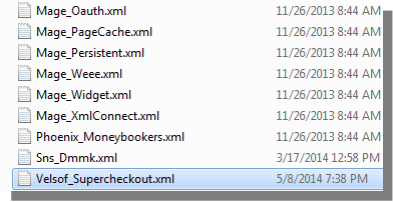
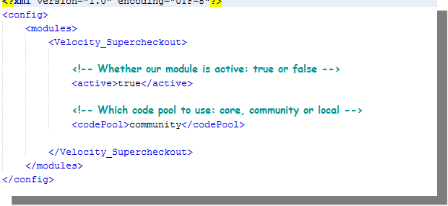
Go to the app-etc-modules directory and open the file that goes with your extension. The naming convention is generally DeveloperName_ExtensionName.xml. In this case it would be Velsof_Supercheckout.xml.
Look for the active tags in the file, change the value from true to false and save your changes. This tells Magento that the extension is disabled and not to run any code associated to it. Deleting the Magento cache is recommended (and most likely required) for this change to take effect.
General Settings
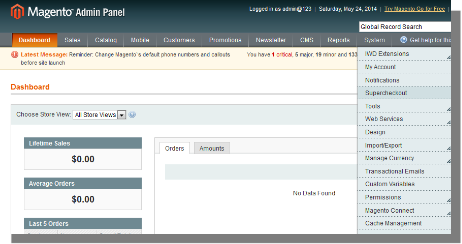
To excess Super Checkout plugin, Click on supercheckout option appearing as a sub menu in navigation menu under System main menu as shown below.
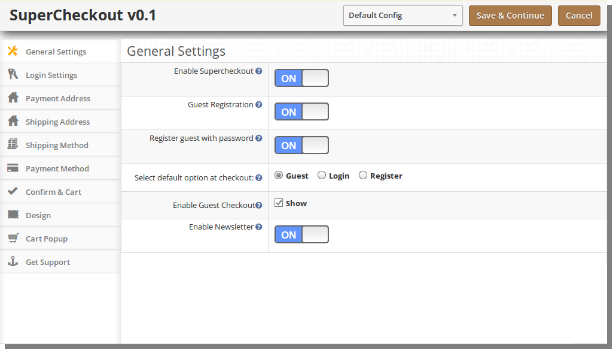
On clicking sub menu Supercheckout the module for plugin will open. It contains navigational bar at the top, menu at the left and main content in the center as shown below. To enable the plugin, switch the enable button from OFF to ON which is just to the right of Enable/Disable label.
To enable guest registration, switch the button from OFF to ON which is just to the right of Register Guest Automatically label. Enabling this would result in registering the guest to your store and an automatically generated password would be mailed to that user.
To enable registration, switch the button from OFF to ON which is just to the right of Register Guest With Password label. On enabling this password and confirm password fields will appear so that customer can register from the checkout page itself.
To change the default option from Guest, Login or Register in Login section of checkout page, select an option from given radio button. The selected option will be set as chosen option by default.
To enable or disable guest checkout by the user check/uncheck the checkbox which is just to the right of Display Guest label.
Login Tab
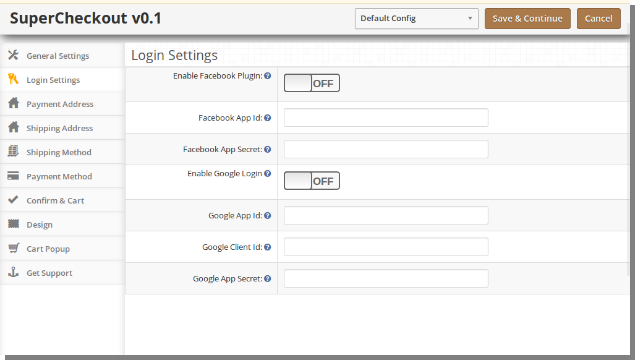
This tab of Magento One Page Checkout basically contains setting to enable /disable Facebook and Google registration & login as shown below.
To enable Facebook Registration & Login switch the button from OFF to ON which is just to the right of Enable Facebook Login label. But before you do that do get facebook APP ID and APP SECRET from https://developers.facebook.com.
Enter the APP ID and APP SECRET in their respective fields and save. You will find Facebook login button on your checkout page.
To enable Google Registration & Login switch the button from OFF to ON which is just to the right of Enable Google Login label. But before you do that do get Google APP ID, CLIENT ID and APP SECRET from https://code.google.com/apis/console. For detailed instructions to get the APP ID, download the Facebook & Google Setup guide from oepncart accout.
Enter the APP ID, CLIENT ID and APP SECRET in their respective fields and save. You will find Google login button on your checkout page.
Payment Address Tab
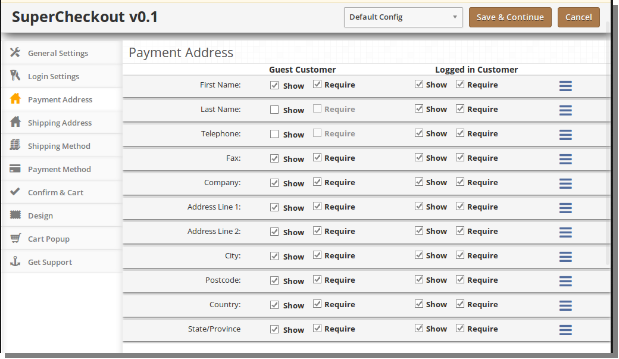
This tab of Magento One Page Checkout contains setting for the fields which is to be shown in Payment or Billing Address section in checkout page as shown below.
It consists of two sections. The one in the left is for Guest Customers and the right one for registered customers.
To make a field display/hide in the checkout page check the checkbox just to the left of Show label.
To make a field as mandatory (required field) check the checkbox just to the left of Require Label.
The fields can also be rearranged according to the requirement. To rearrange just move the cursor to the drag icon and drag & drop the field wherever it is required as shown below.
On saving, the fields will be rearranged as per the changes.
Shipping Address Tab
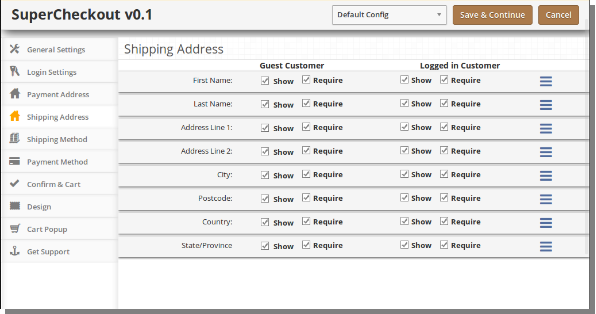
This tab of Magento One Page Checkout contains setting for the fields which is to be shown in Shipping Address section in checkout page as shown below.
It consists of two sections. The one in the left if for Guest Customers and the right one for registered customers.
To make a field display/hide in the checkout page check the checkbox just to the left of Show label.
To make a field as mandatory (required field) check the checkbox just to the left of Require Label.
The fields can also be rearranged according to the requirement. To rearrange just move the cursor to the drag icon and drag & drop the field wherever it is required which is same as payment address.
Shipping Method Tab
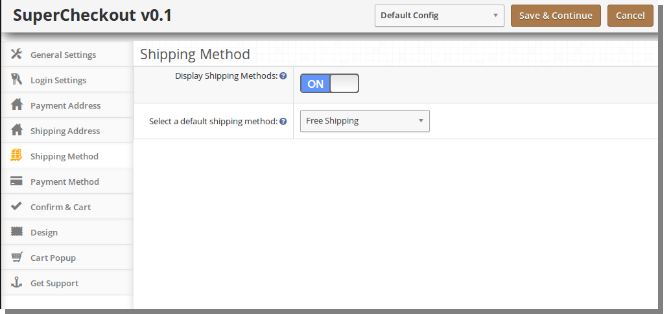
This tab of Magento One Page Checkout contains settings for shipping method which is shown in checkout page. It basically contains settings for enabling/disabling and setting the default shipping method as shown below:
To Enable/Disable the shipping methods from the checkout page switch the button from ON to OFF or vice-versa. This will disable the shipping method block from checkout page. But you should select a default shipping method (if any installed) to apply shipping charges to the order.
To get a default shipping method selected in the checkout page select the default shipping method from the dropdown. If the selected shipping method is not installed it will automatically select from installed shipping method.
Payment Method Tab
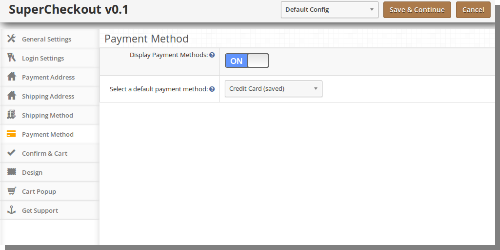
This tab of Magento One Page Checkout contains settings for payment methods shown in checkout page like enabling/disabling or selecting a default method.
To Enable/Disable the payment methods from the checkout page switch the button from ON to OFF or vice-versa. This will disable the payment method block from checkout page. But you should select a default payment method (if any installed) to get a payment method in the checkout page.
Confirm Tab
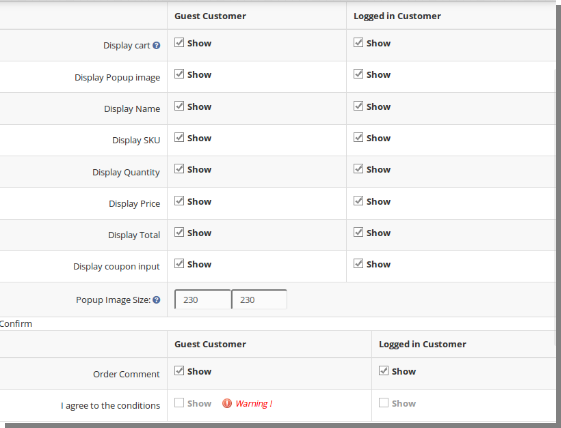
This tab contains setting of Magento One Page Checkout is for the cart and confirming the order as shown below:
Its divide in two section
a. Cart
b. Confirm
Cart
1. This tab is again divided into two sections, the left one is for Guest Customers and Right one for Registered or Logged in customers.
2. To Display/Hide cart from the checkout page check uncheck the checkbox present in front of Display Cart label.
3. To enable/ disable any column in the cart check/uncheck the checkbox in front of that respective column.
4. To enable/disable the popup images for the product check/uncheck the checkbox in front of that respective column.
5. To change the size of popup for images Enter the width and height of the popup in textbox in front of Pop Image Size label.
6. Coupon and Voucher options can also be disabled or enable by checking/unchecking the checkbox in front of that respective field.
Confirm
1. This tab is again divided into two sections, the left one is for Guest Customers and Right one for Registered or Logged in customers.
2. To enable the comment box for the order by customer check the checkbox in front of that Leave a comment for the order label & to disable uncheck the same checkbox.
3. To enable agree to the term or any other information saved in the admin for the store check/uncheck the checkbox in front of I agree to the conditions label.
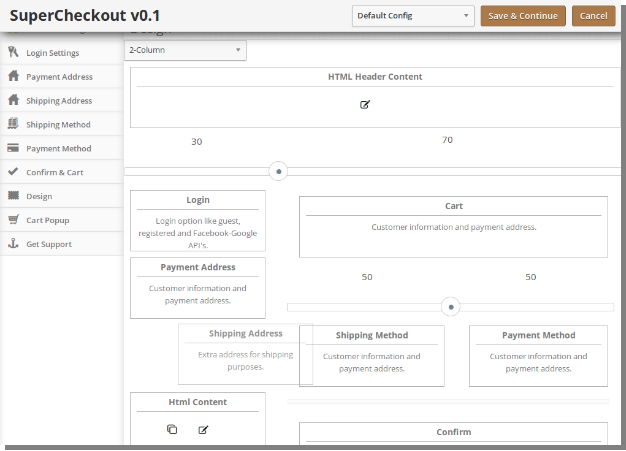
Design Tab
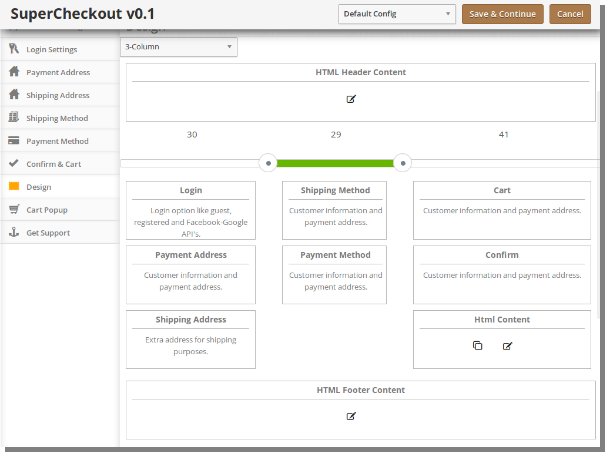
This tab contains the settings for the design of checkout page in the catalog as shown below
To change the width of any column adjust the slider present at the top as shown below :
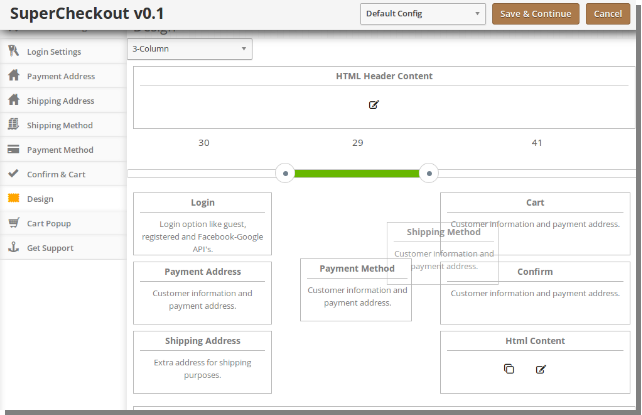
Block of different steps can also be rearranged from one column to the other or in the same column as shown below:
On saving, the block will be rearranged in the checkout page as per the changes
The same goes for layout with two columns as shown below:
Confirm and Cart Tab
This tab contains the settings for pop up cart that appear on adding any product to the cart.
To enable the popup cart on frontend, you can show/hide the complete cart or you can show/hide the selected cart fields only.
Admin can select and unselect the different cart fields for logged in and guest users of the store.
Admin can also set the Popup Image Size which is shown over the product shown in the cart section of the checkout.
Store merchants can also grab cutomer’s comment regarding the product by enabling and disabling the order comment field on supercheckout page.