An enthusiast of everything digital. Still processing how e-Commerce has taken the world by storm in the last decade. Gradually improving day by day in bringing you the most helpful content to grow your own brand.
As soon as visitors enter an eCommerce website, they are frequently presented with a sign-up form. Users are put through a difficult experience as a result, which is made worse if they are not given the choice to skip the signup process. However, social login has made the registration process quick and easy. In terms of user experience and conversions, social login is essential for eCommerce.
As a netizen, you have probably seen the social login option on many e-commerce websites or in the corresponding mobile app.
What do we mean by Social Login?
With social login, also known as social sign-in, users can sign up on a third-party platform without having to create a new account by using their existing login credentials from social media networks like Facebook, Instagram, Twitter, etc.
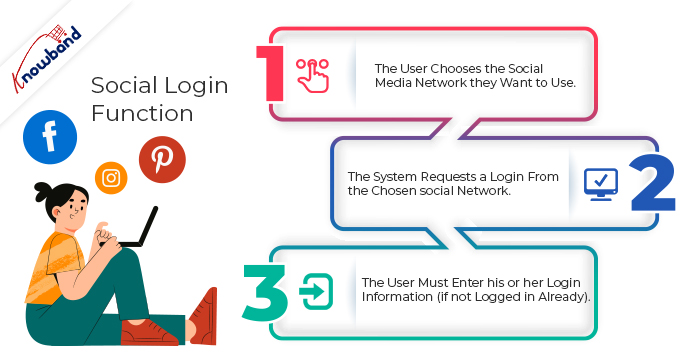
How does Social Login function?
The user chooses the social media network they want to use.
The system requests a login from the chosen social network.
The user must enter his or her login information (if not logged in already). The user is registered through his or her social media account once the user approves the permission.
Advantages of Social Logging
Have you ever given the benefits of social login on your e-commerce website any thought? You’ve already lost out on a sizable portion of potential customers if you haven’t offered social login options to your visitors.
I’ve outlined the top advantages of social login in eCommerce in this article.
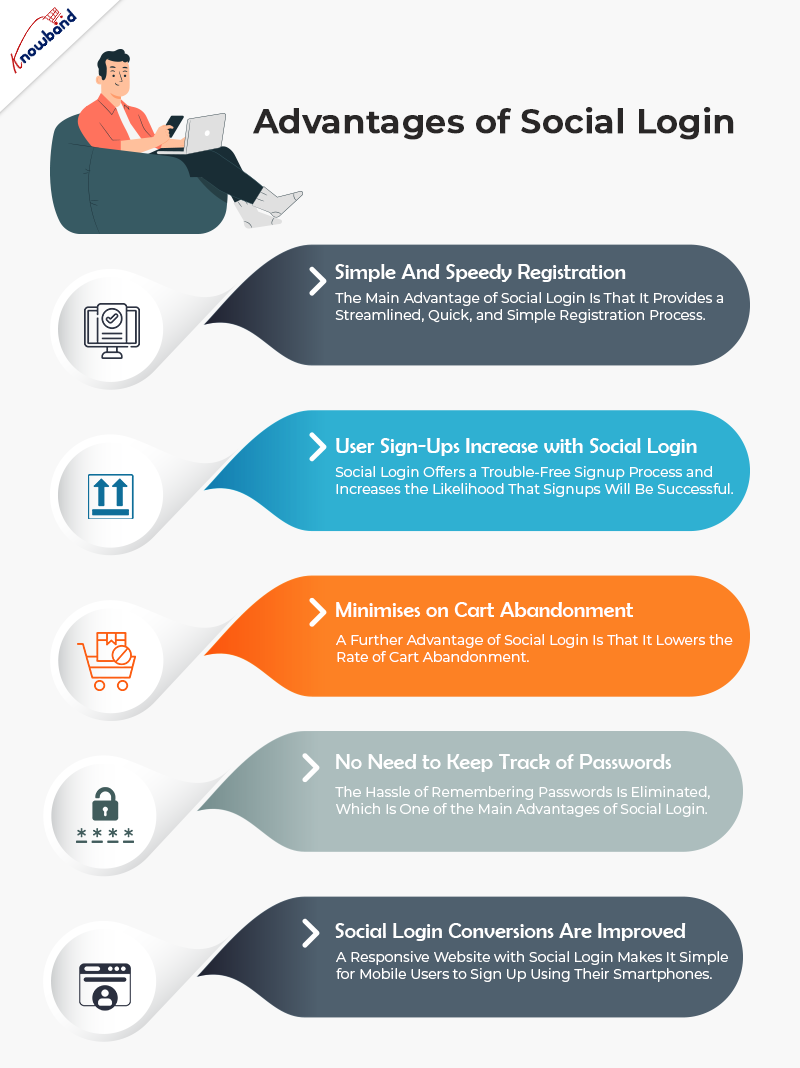
Simple and Speedy Registration
Users find it very annoying to open a brand-new account each time they go to a different eCommerce site. Social login comes in handy in these circumstances. It provides convenience and enables users to quickly and easily complete the registration process.
User sign-ups increase with social login
Social login offers a trouble-free signup process and increases the likelihood that signups will be successful. This is the first step toward a better user experience that motivates visitors to register for an account on the website they are currently visiting.
People are also more likely to sign up because they don’t care about creating a new account.
Minimizes on cart abandonment
A further advantage of social login is that it lowers the rate of cart abandonment. It transforms a laborious checkout process into one that is user-friendly.
Online shoppers are often required to fill a mandatory registration process. It may act as a roadblock to effective conversion and result in cart abandonment.
It is also among the most effective techniques for improving checkout.
No need to keep track of passwords
The hassle of remembering passwords is eliminated.
When they have to make a new password for a new website, people get password fatigue. Additionally, remembering multiple passwords becomes incredibly challenging. According to a study, 86% of users find it annoying to have to create a new account because they have to remember yet another password.
By enabling users to sign up using their preferred social account on various platforms, social login lessens password fatigue. It saves you from having to make a new password.
Mobile conversions
Today, more than half of compulsive shoppers prefer to shop online using their mobile devices. Therefore, you must not undervalue the significance of having a mobile-friendly eCommerce website.
A responsive website with social login makes it simple for mobile users to sign up using their smartphones. It boosts your mobile traffic and enables you to convert more mobile visitors.
Knowband Social Login Addon
This module can be used to integrate up to 15 login options. The website allows users to register and log in using Facebook, Google, Twitter, Instagram, LinkedIn, Amazon, Yahoo, PayPal, Live, WordPress, Dropbox, Vkontakte, FourSquare, Github, and Disqus.
Additionally, you can add the social login block to a variety of pages, including the home page, product page, checkout page, etc.
I hope the advantages of the social login I’ve listed above convinced you to implement it on your website. Don’t limit yourself to Facebook and Google Login.
I don’t think it would be a good idea to restrict the number of signup options on your website. For instance, the Facebook login option would be useless for a user who has an Instagram account but does not use Facebook.
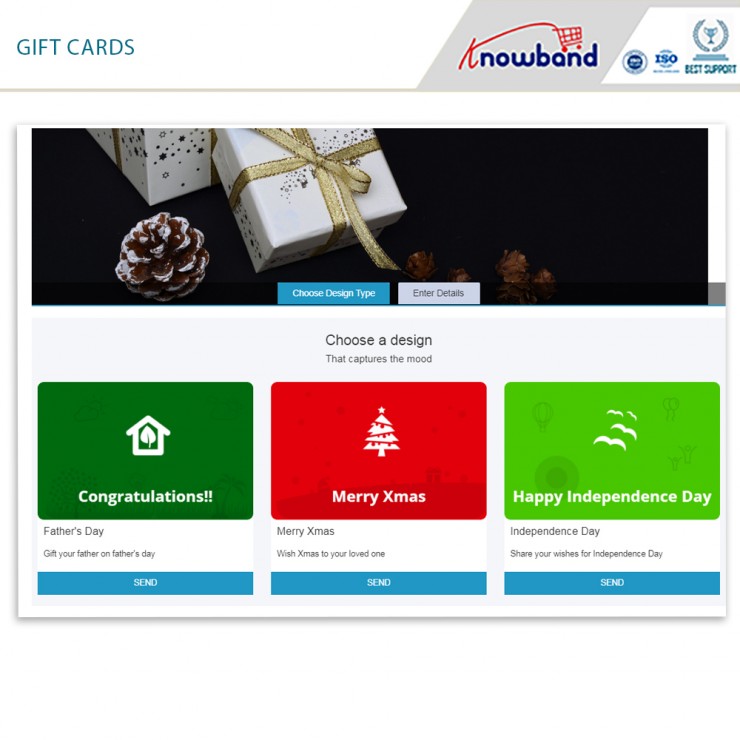
Prestashop gift card manager from Knowband is an essential tool for eCommerce marketers. In actuality, it is a highly helpful plugin for your business. With the Prestashop gift card, you can quickly add a section for gift certificates to your Prestashop store. Additionally, the Prestashop send gift card addon enables you to easily construct as many gift vouchers as you like. Customers may easily find the event for which they need a gift card as a consequence. You should also place an order for the same. Moreover, sales and revenue from your eCommerce firm will increase as a consequence.
We’ll look at some of the factors in this post to help you comprehend why the Prestashop gift module is essential for your store. Additionally, you may choose whether or not you want to install the addon.
How important is the Prestashop gift card manager by Knowband?
The simplicity with which gift cards may be bought and sold
The initial aspect of the Prestashop gift voucher module must be its ease of usage. You might also say that selling vouchers are simple thanks to the Prestashop module. From installing the Prestashop gift card module to enabling customers to buy gift cards, the entire process is easy. Furthermore, the module makes it simple to set the parameters. In fact, make any modifications you believe are required for the growth of your shop. Make as many gift cards as you’d like, place the portion where it will be seen the most, and so on.
Partial use of the gift card
Without a doubt, this new enhancement changes the game. Additionally, customers may no longer use all of their gift cards. In actuality, they can use the same card for two different purchases. Additionally, the administrator has control over the voucher’s quantity and duration. It’s easy and simple to track orders.
Cron capability
Due to the possibility of mailing the gift card on the day of the event, customers will find it enticing. The Prestashop store manager can schedule the email distribution using Cron.
Compatibility with several stores and a variety of languages
The Prestashop gift card manager is multilingual. The administrator has the option of selecting a language for the email and communication layouts. In terms of eCommerce, it closes the communication gap that occurs between nations. The module supports several stores.
Order tracking with Gift Cards
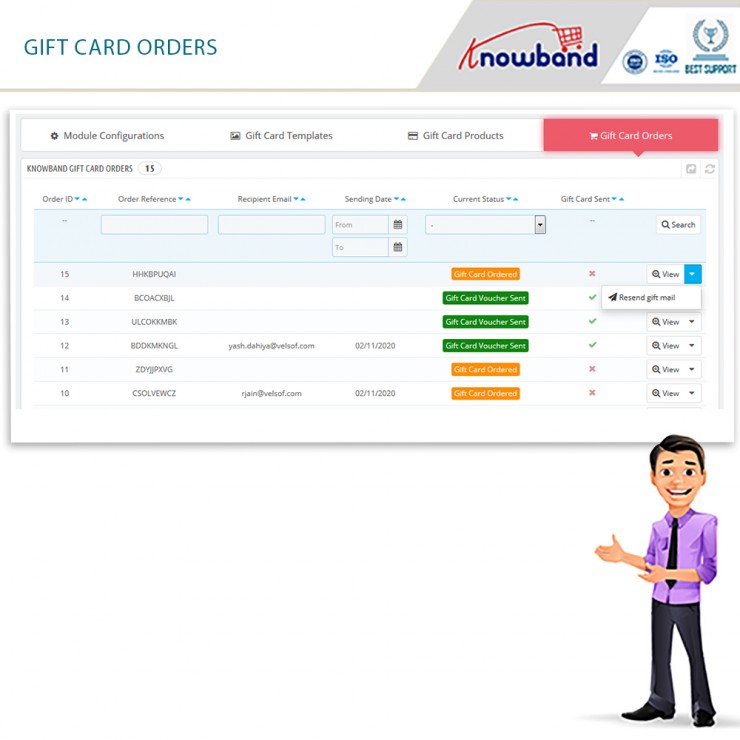
If you can’t monitor a module’s performance, what good is it having one? As a consequence, the administrator may evaluate and monitor orders using the Knowband Prestashop gift card. He has access to the backend of the plugin to achieve that.
Now, let us take a look at the options that you can make to be the best options for marketing gift vouchers.
How can we better market the gift cards?
Boost the prominence of gift cards
Do your clients have quick access to gift cards from the home page? Do gift cards fall under the navigation tree? Are you familiar with the gift card choices that are accessible to you as a consumer? Make sure to conspicuously display e-cards on your site and spread this data to your visitors via a variety of marketing methods. You should also give the customer a variety of design choices.
You can easily position the gift card choice where you think it will be seen the most by using the Prestashop gift card Addon by Knowband.
They are accessible on several devices
Make sure all of your customers are aware of gift cards if you’re just starting to use them. Additionally, they choose regardless of the communication or purchase channel. If you’ve been using this marketing mix for a while, you might want to think about creating channel-specific, one-of-a-kind promos. Making gift cards for certain marketing channels wouldn’t harm. For instance, social media, Google ads, and newsletters.
You may position the Prestashop gift module on your front end to make it more noticeable. Additionally, blog about them, mention them on your social media accounts and do more.
Digital cards with a festive theme can be made
Gift cards tend to sell like hotcakes over the holidays. Simply have the appropriate gift cards on hand for the appropriate times. In fact, you might market it as a limited supply of gift cards. Customers like receiving personalized service and providing accessibility to one-of-a-kind deals and promotions. The use of gift cards for promotional events is brilliant. In fact, make yourself noticeable and draw the audience’s attention.
Partner with other businesses
When and where do customers use your services the most commonly? Think about partnering with a non-competitive business and trading gift cards. Along with being a fantastic method to sell your goods or services, it’s also a successful approach to get new customers to come out and raise interest in your gift cards.
In the End
So, here we are!! The Prestashop gift card manager by Knowband is a stunning way to bring more customers to your store. Moreover, increase the sale and revenues of your store. What do you think? Do you wish to have a gift card section on your website? You can connect with us at support@knowband.com with all your questions.
A re-marketing strategy called the Prestashop Abandoned cart addon aids eCommerce site owners in recouping and regaining lost purchases. It directs toward customers who abandon their shopping carts before making a buy. Typically, buyers add the perfect items to their shopping carts and then look for a better value or product at a different retailer. Low site revenues and cart abandonment result from this. The Prestashop Abandoned cart module sends clients reminder prompts about the items still in their cart to handle this problem.
In this blog, we will take a look at the stunning features and benefits of the Prestashop plugin by Knowband. Are you ready? Let us go ahead and check them out now.
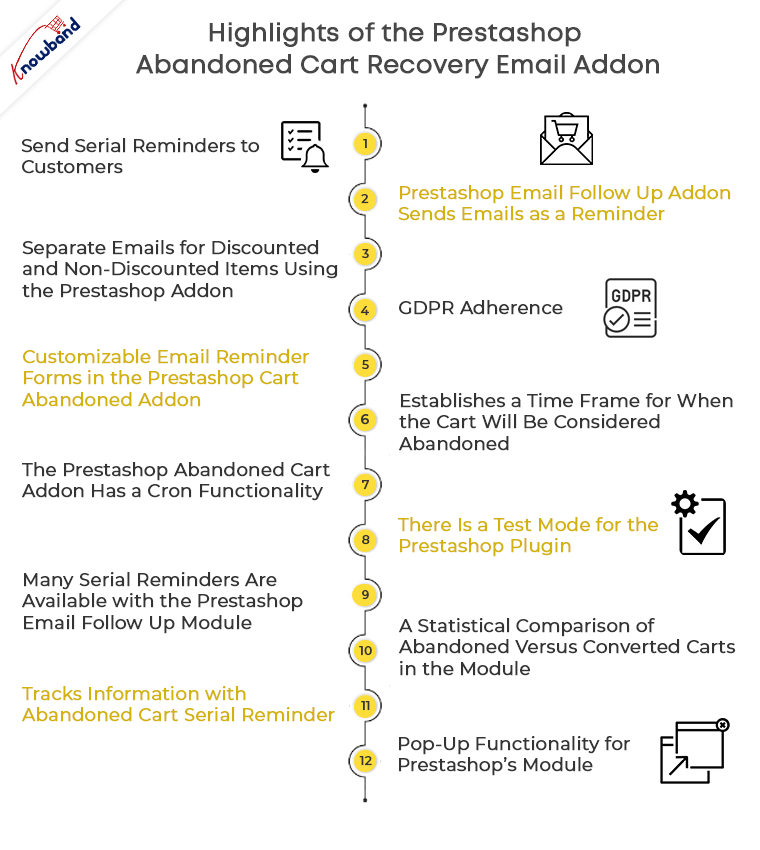
Highlights of the Prestashop Abandoned cart recovery email addon
Send serial reminders to customers
The Prestashop Email Follow up module emails potential customers who have abandoned their carts to remind them to come back. The Prestashop Abandoned cart email follow-up addon allows emails that may deliver in an automated way or manually by the store shipper at certain predetermined intervals. Additionally, you may encourage buyers by giving enticing offers in the email that follows the transaction.
Prestashop Email Follow up addon sends emails as a reminder
Prestashop Abandoned cart addon informs shoppers of the items still in their cart so they can swiftly finish their transaction utilizing the discount coupon included in the email reminder.
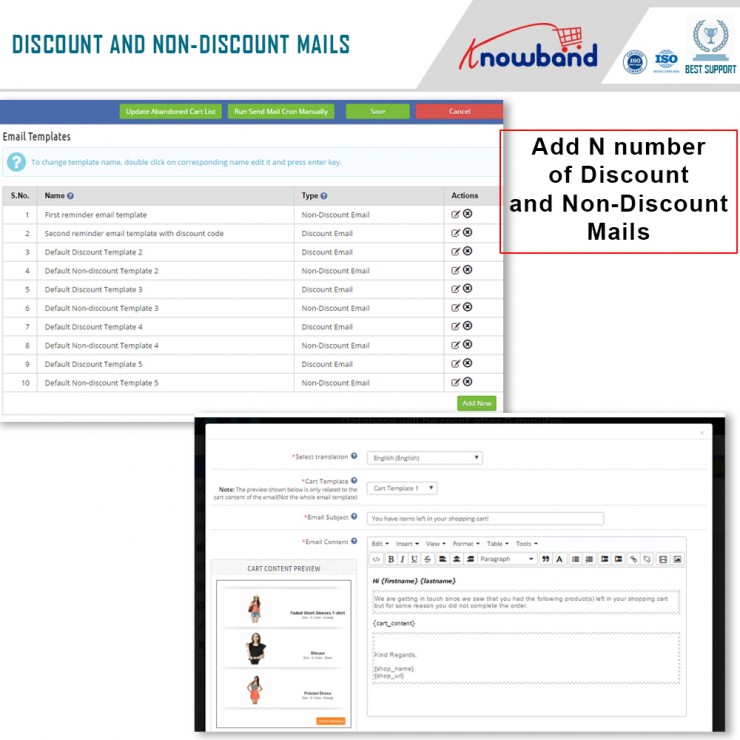
Separate emails for discounted and non-discounted items using the Prestashop addon
Administrators may easily change and replace the discounted and non-discounted emails independently from the backend interface with the Prestashop Reduce Cart Abandonment addon. They have the option of changing the email’s structure, content, and promotional offer.
GDPR adherence
The Prestashop module complies with GDPR.
Customizable email reminder forms in the Prestashop Cart Abandoned addon
To save the admin time, the Prestashop abandoned cart reminder provides pre-characterized and fully adjustable reminder discount email templates.
Establishes a time frame for when the cart will be considered abandoned
The duration of time after which the cart includes in the abandoned rundown defines by the Abandoned Cart Serial Reminder plugin.
The Prestashop Abandoned cart addon has a cron functionality
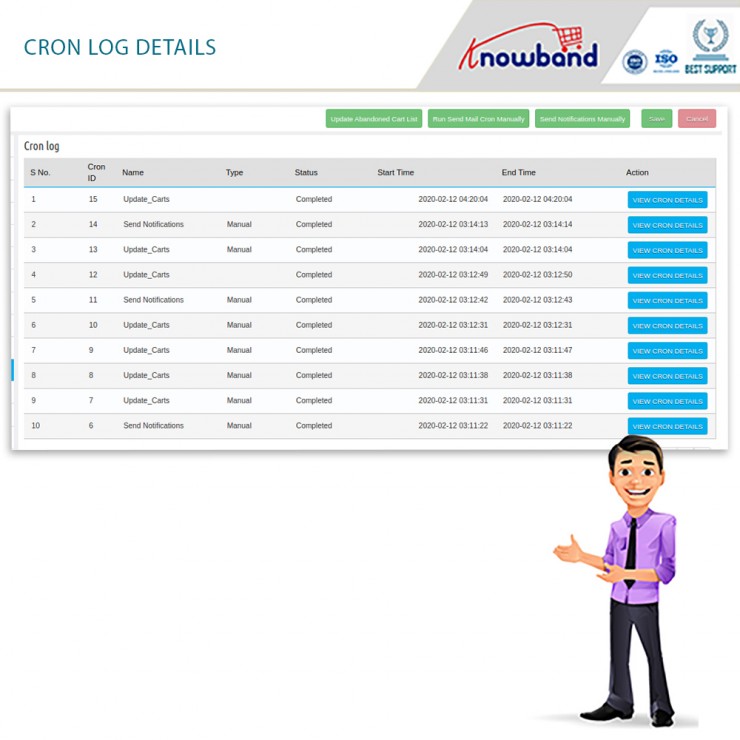
The Prestashop module’s Cron feature allows the admin to automatically schedule and send reminder emails to specific customers once the predetermined period has passed. The cron log tabs allow the business owners to determine whether the cron is being used.
There is a test mode for the Prestashop plugin
The Prestashop Abandoned cart addon’s Test mode feature enables the admin to test the reminder cart emails on the specified email address.
Many serial reminders are available with the Prestashop Email Follow up module
You have the option to create and change N serial reminders using the admin board’s customizable Abandoned Cart Serial Reminder.
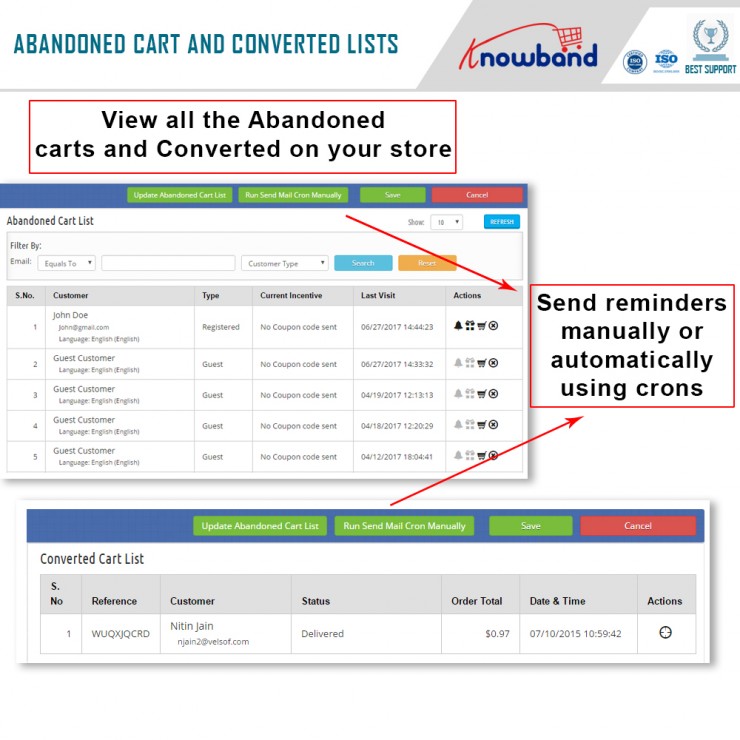
A view of the Converted Cart List and Abandoned Cart List is provided by the Prestashop plugin on the back end
The Abandoned Cart List and Converted Cart List, which are accessible from the backend, can both be viewed clearly and in detail, thanks to the Prestashop Abandoned Cart Email Follow Up Module.
A statistical comparison of abandoned versus converted carts in the module
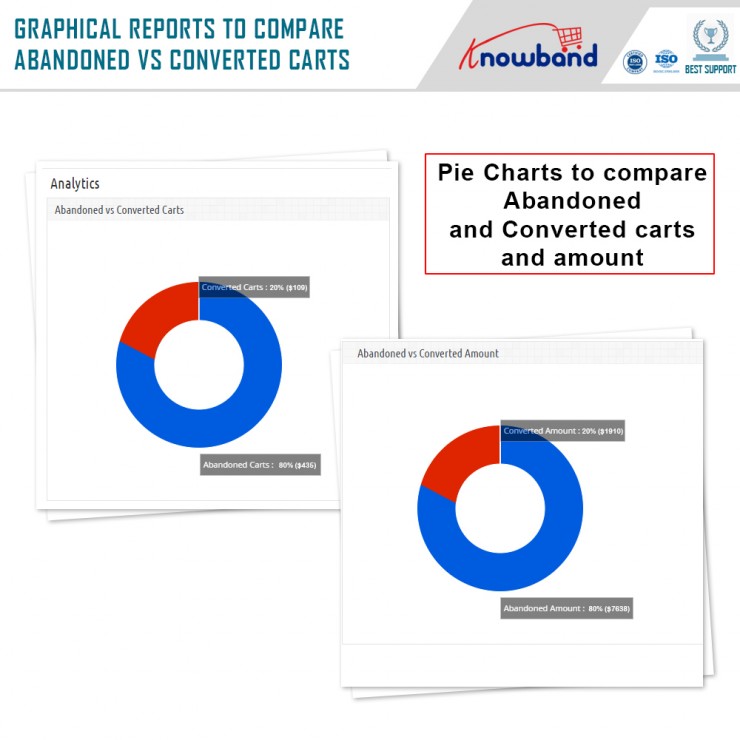
In addition to the filter option, the Prestashop Reduce Cart Abandonment addon provides a statistical breakdown of abandoned vs converted carts in the form of charts and tables.
Tracks information with Abandoned Cart Serial Reminder
The Prestashop Abandoned cart addon module keeps track of information for both shop visitors and customers who have logged in.
Pop-up functionality for Prestashop’s module
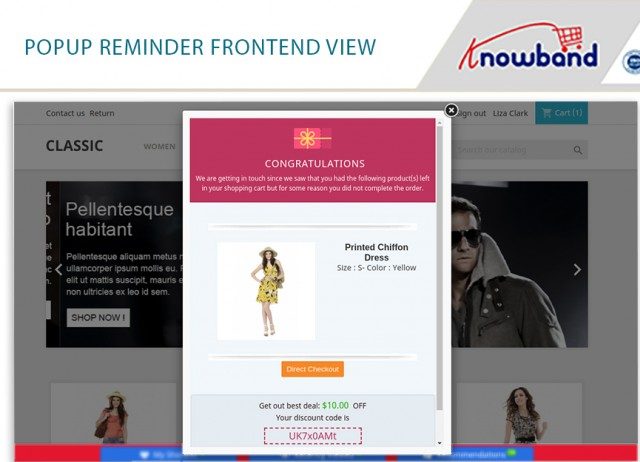
An additional feature of the Prestashop addon allows consumers who have abandoned their carts to receive popup notifications. Additionally, the store owners may lower the prices of their goods. The discount information will also be stored for the popup whenever it is provided.
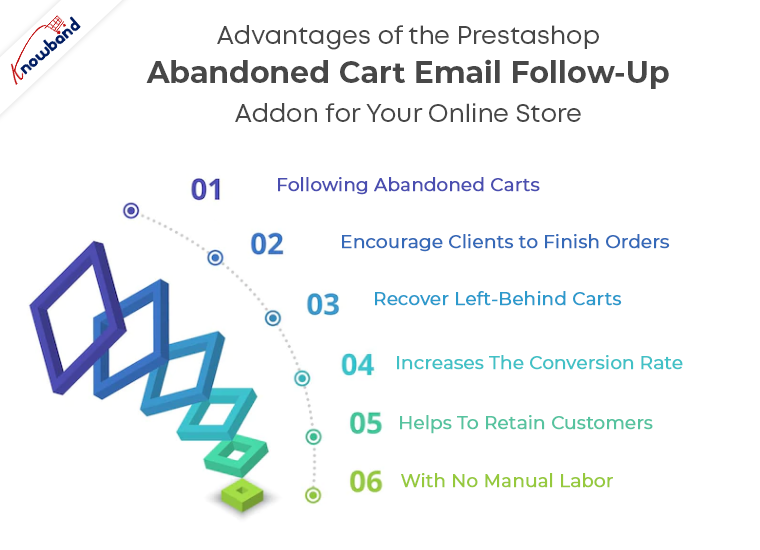
Advantages of the Prestashop Abandoned cart email follow-up addon for your online store
Following abandoned carts
The plugin understands and indicates the lost carts on your store and displays all of them in the back end.
Encourage clients to finish orders
By using the module, you can give your customers a discount on your goods, which will without a doubt encourage them to finish their orders and increase your online store’s conversion rate.
Recover Left-Behind Carts
You may easily persuade your customers to complete their orders and bring back your store’s abandoned carts by sending them reminder messages about their incomplete orders.
Increases the conversion rate
You increase your conversion rate while also raising the overall revenues of your company when you make up the lost sales brought on by abandoned shopping carts.
Helps to retain customers
The module is a wonderful resource for keeping consumers once you’ve recovered them through follow-up messaging.
With no manual labor
The entire process of creating and sending follow-up messages is quite simple, which reduces the manual work required by the business owner.
Let us wind up!
So, here we are! Thus, if your business suffers a high cart abandonment cart, the Prestashop abandoned cart addon by Knowband is your answer. Further, it helps you reduce cart and increase sales as well as customer satisfaction. Also, if you want to more about how to make the most of the module, you can check out this blog. What do you think of the module? Do let us know in the comments below. In case you want to get in touch with any questions or queries, let us know at support@knowband.com.
This comes as no secret that the Prestashop marketplace addon by Knowband is a stunning option. Moreover, it is a tool that can help you grow your eCommerce business. How? By simply converting your store into a marketplace. Furthermore, where multiple sellers can come and sell their products effortlessly. In the end, you, the admin is the one who benefits from the entire transformation. All you have to do is configure the settings of the Prestashop Multi-seller Marketplace module and get set to earn big.
The Prestashop Multi-vendor Marketplace Plugin has numerous settings that the admin can configure. However, when it comes to earning, there are three different options. They are:
Commissions
Product Listing fees; and
Membership plans
Well, there are different settings for the different revenue models. However, we will focus on the last option – Membership Plans.
What is the Membership functionality in the Prestashop Multi vendor Marketplace Module?
If you want a sneak peek at the membership functionality in detail, you can read it here. Membership or subscriptions are everywhere these days. Starting from your favourite OTT platform to online shopping portals like Zomato, and others. Therefore, using the subscription format, the admin can earn every time a seller joins the platform. Moreover, for a limited period. Further, once the membership plan expires, they can either choose to renew it or discontinue selling on the platform.
Now, that you know the functionality, let us take a look at the different settings that you can find under the Membership Tab. Shall we?
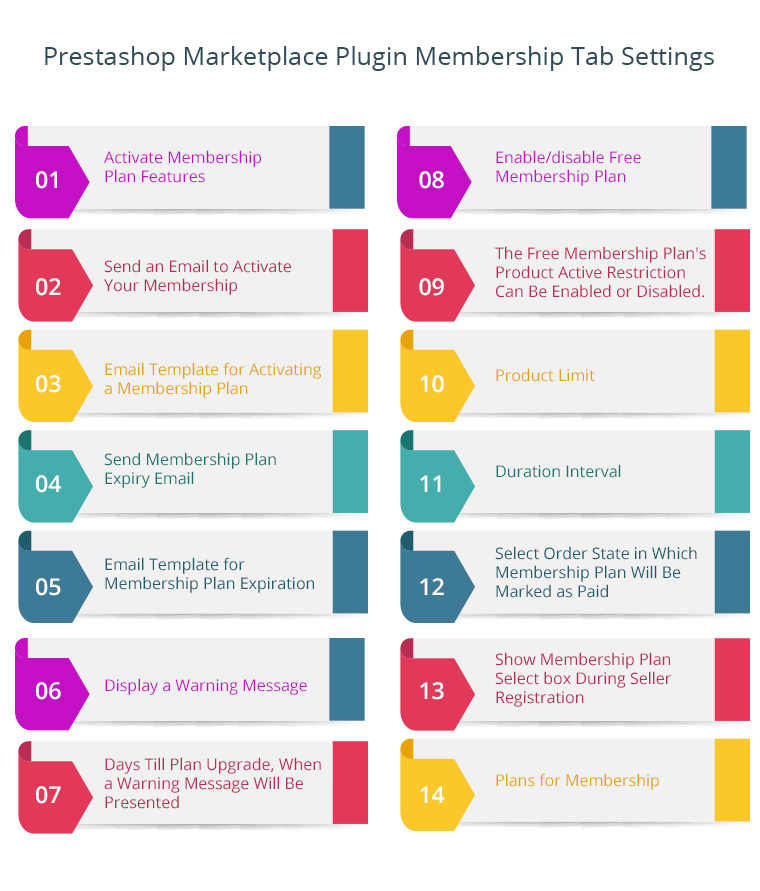
Membership tab Settings of the Prestashop Marketplace Plugin
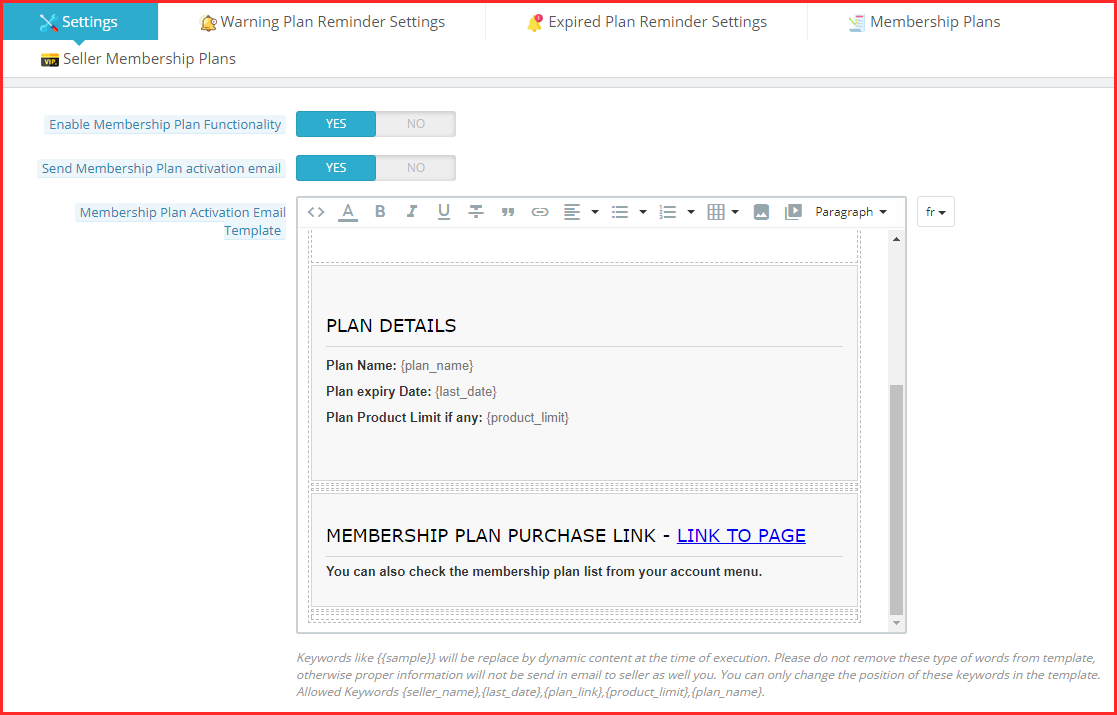
Enable Membership Plan Functionality
With this functionality of the Prestashop Marketplace Module, the admin can activate or deactivate the membership plans on the platform. Further, once activated, the sellers can choose from the different membership plans you create.
Send membership Plan Activation email
With this setting, the admin can choose either to send an email notifying the sellers about the activation of their subscription or not. Therefore, when you enable it, the activation email goes to the seller and if disabled, it doesn’t.
Membership Plan Activation Email Template
This setting has a membership plan activation email template for the admin. In fact, the admin can customize it as per the need.
Note: Keywords like {{sample}} will be replaced by dynamic content at the time of execution. Please do not remove these types of words from the template, otherwise, proper information will not be sent in an email to the seller as well you. You can only change the position of these keywords in the template. Allowed Keywords {seller_name}, {last_date}, {plan_link}, {product_limit}, {plan_name}.
Send Membership Plan Expiry Email
With this setting, the admin can choose either to send an email notifying the sellers about the expiration of their subscription or not. Therefore, when you enable it, the expiration email goes to the seller and if disabled, it doesn’t.
Membership Plan Expiry Email Template
This setting has a membership plan expiration email template for the admin. In fact, the admin can customize it as per the need.
Note: Keywords like {{sample}} will be replaced by dynamic content at the time of execution. Please do not remove these types of words from a template, otherwise, proper information will not be sent in an email to the seller as well you. You can only change the position of these keywords in the template. Allowed Keywords {seller_name}, {last_date}, {plan_link}, {product_limit}, {plan_name}.
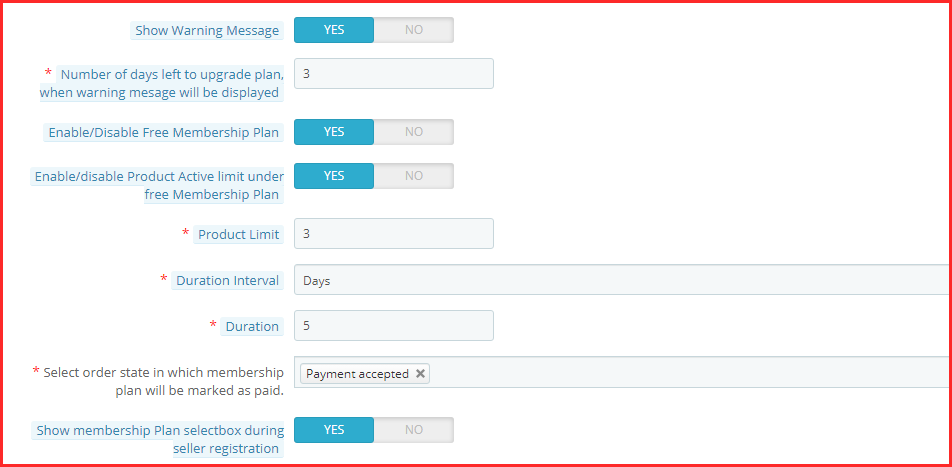
Show Warning Message
With this setting, the admin can easily show a warning message once the membership plan is about to expire. In fact, with this, the sellers are well informed about either renewing or discontinuing their subscriptions.
Number of days left to upgrade plan, when warning message will be displayed
This setting of the Prestashop marketplace addon by Knowband allows the admin to set the number of days left for the membership plan to expire.
Enable/Disable Free Membership Plan
Want to allure new sellers? You can easily offer them a free membership plan by activating this setting.
Enable/disable the Product Active limit under the free Membership Plan
This setting is connected with the setting mentioned below. Further, the admin can set the number of products the admin is allowed to list under Free Membership. Thus, the admin can enable or disable this setting.
Product Limit
Under this setting, the admin can set the product limit as mentioned in the last setting.
Duration Interval
This setting of the Prestashop marketplace plugin allows the admin to set the number of days for Free Membership.
Select order state in which membership plan will be marked as paid
Under this setting of the Prestashop Multi-seller Marketplace module, the admin can choose the order status that marks the membership plan as marked paid.
Show membership Plan select box during seller registration
If this setting is enabled, the admin can show the membership plan in the seller registration form.
Warning Plan Reminder Settings
Under this setting of the Prestashop Multi vendor Marketplace Module, the admin can view and create warning reminders. Furthermore, when you create a new reminder, the following are the settings under the ‘Add’ tab.
Enable/Disable this reminder
The number of days before the plan expiry warning mail should be sent to the seller.
The subject of the warning reminder email that goes to the sellers.
The email template of the warning reminder goes to the sellers.
Expired Plan Reminder Settings
Under this setting of the Prestashop Marketplace Addon, the admin can view and create expiration reminders. Furthermore, when you create a new reminder, the following are the settings under the ‘Add’ tab.
Enable/Disable this reminder
The number of days after the plan expiration warning mail should be sent to the seller.
The subject of the expiration reminder email that goes to the sellers.
The email template of the expiration reminder that goes to the sellers.
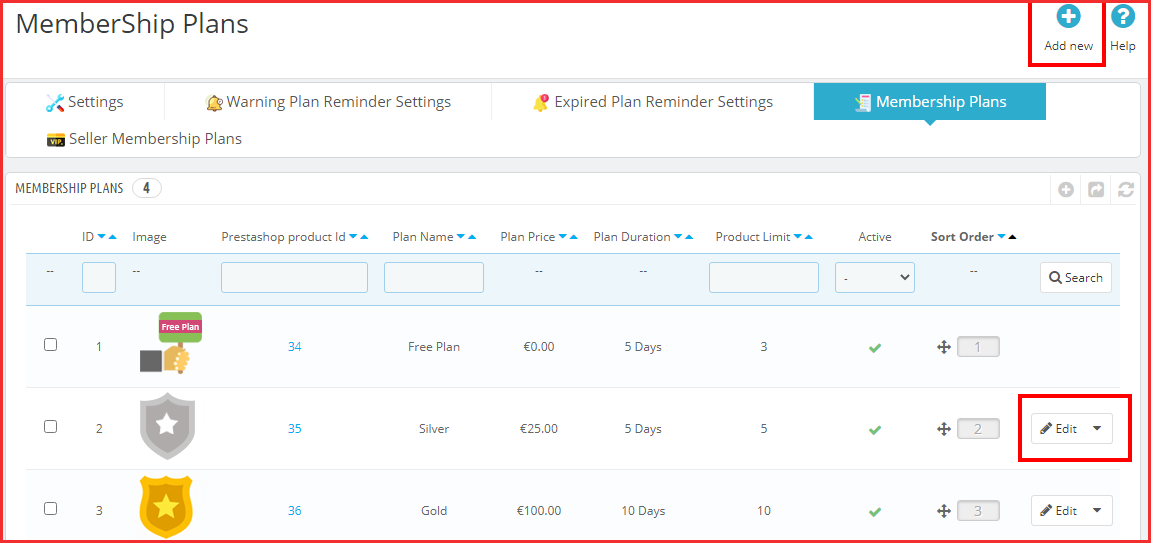
Membership Plans
Under this setting of the Prestashop marketplace module, the admin can view all the membership plans. Further, the plans are listed with the image, product ID, plan name, price, duration, and other settings. Moreover, under this tab, he can also create a new membership plan. The following are the settings:
The Name of the Plan
The Plan Price that the seller has to pay for this specific subscription plan.
Enable/Disable the product active limit. Further, with these settings, the admin can set the number of products that will be active under this plan.
Pick the duration interval for the membership plan. Further, the options include days, months, and years.
The exact duration of the membership plan.
Enable or disable this membership plan.
The admin can add an image to the membership plan.
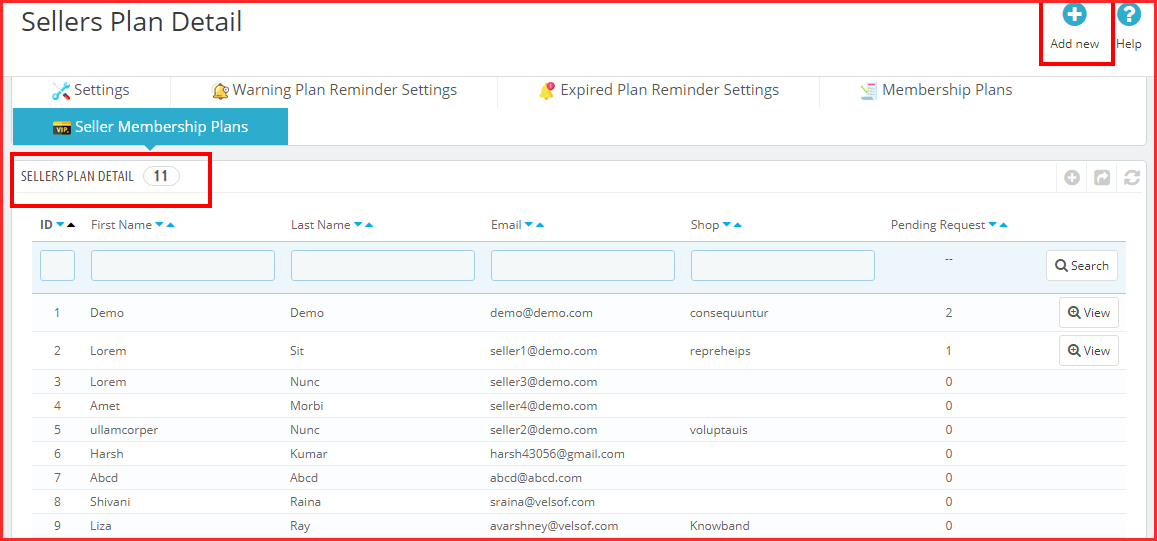
Seller Membership Plans
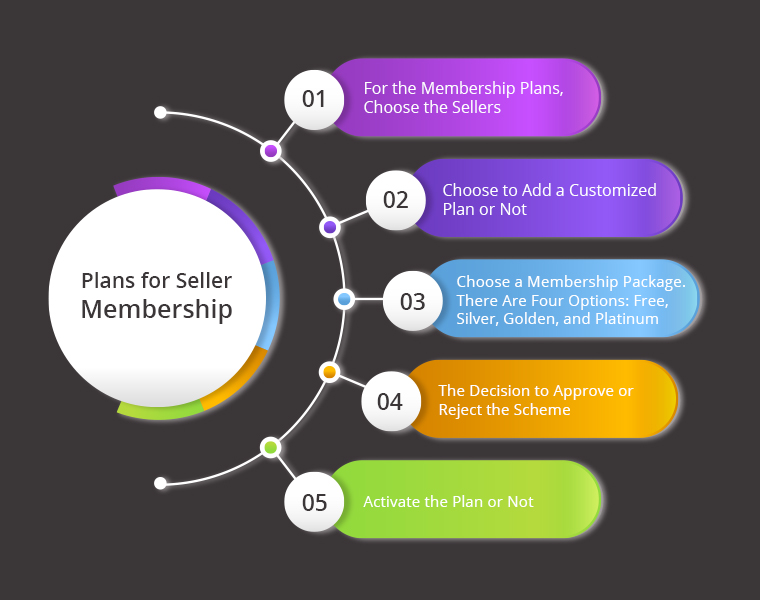
Under this setting of the Prestashop Multi-seller Marketplace module, the admin can view the different sellers and their membership plans. Further, he can view all the settings. Moreover, the admin can also create new memberships for sellers. Following are the different settings under the “Add” tab:
Select the Sellers for the membership plans.
Choose to add a customized plan or not.
Select the membership plan. The options include Free, Silver, Golden, and Platinum.
The option of marking the plan as approved or not.
Activate the plan or not.
In the End
This is all that the Prestashop marketplace addon by Knowband’s Membership Plan setting has. Further, the membership plan functionality is an integral option of the marketplace. What do you think of it? Do you want to know more about the Prestashop Marketplace? Do let us know your queries at support@knowband.com.
People now use mobile devices substantially more often than desktop computers to access the internet. In addition, they browse twice as much material on them. That also applies to internet buying norms. When your online network is unstable, using an eCommerce website to generate revenue might be challenging. Additionally, asking customers to download a mobile app is another way to execute conversions. eCommerce progressive web app sits in between browser-based websites and native mobile apps. Moreover, it is most likely created to boost mobile conversions for eCommerce companies.
A new must-have format for your company’s mobile branding is the eCommerce PWA. Further, the most troubling distribution problem solves using the eCommerce PWA Mobile App.
The Progressive Web App for eCommerce is directly generated from the website’s mobile browser. In fact, there is no compelling need to download the app from an external app store or other location. In fact, all things considered, a quick notification requesting to “Add App To Home Screen” appears. Further, whenever a user views a PWA active website on a mobile browser.
PWA for eCommerce is created by app developers and administrative staff. Further, to provide a dynamic and seamless user experience while accessing the content through a website/web app.
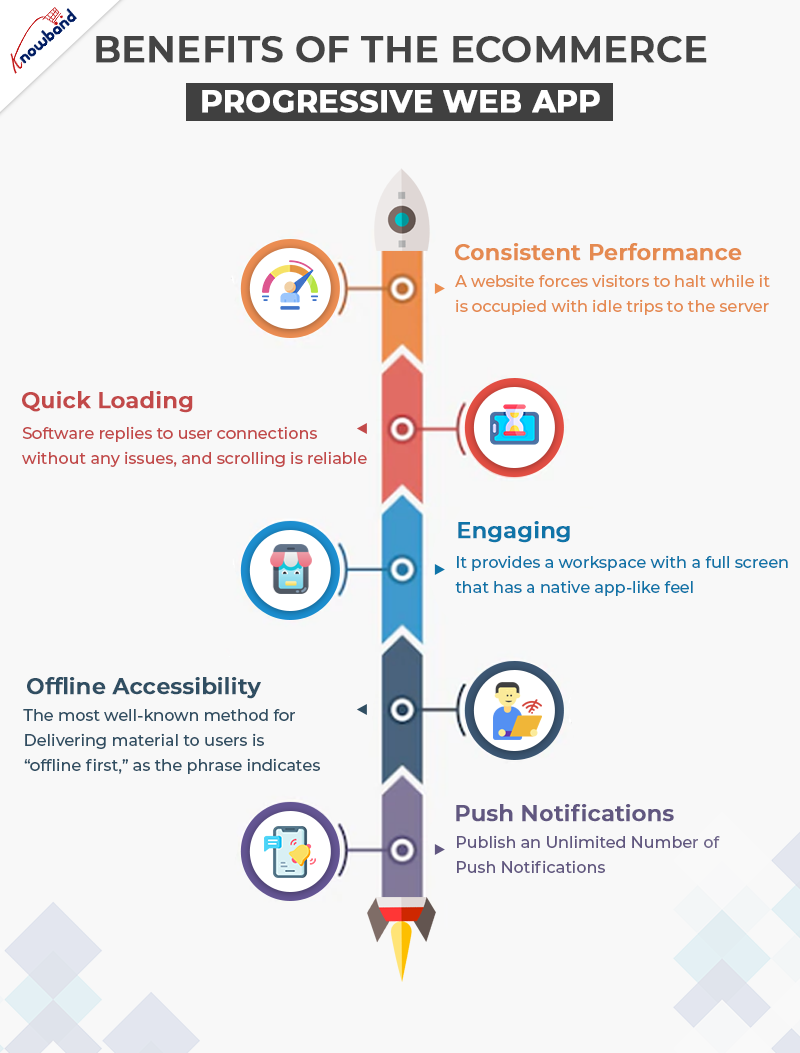
Major Benefits of the eCommerce Progressive Web App
PWA Mobile App is an approach that combines a variety of technologies to create a successful online application. People can spend longer time on websites and view more serious advertisements if the user experience is enhanced. In fact, they like making larger purchases and are compelled to return frequently despite alerts.
Consistent performance
A website forces visitors to halt while it is occupied with idle trips to the server. Further, each request for a resource or piece of information from the network is routed via a service provider. Who first determines if the answer to the specific request is already in the reserve. Users have greater faith in the app and perceive it to be more reliable in terms of performance since they swiftly receive authentic material, even on a poor connection.
Quick Loading
This UI is not hackable. The software replies to user connections without any issues, and scrolling is reliable. Because it is lightweight and has a quick loading component, your Progressive Web App will often launch apps faster than native ones. This provides an exceptional user experience for app users while maintaining the quality of the services.
Engaging
The eCommerce mobile app mimics a native app very much. An area can be acquired by a PWA above the user’s home screen. It provides a workspace with a full screen that has a native app-like feel. It uses push alerts to keep consumers active.
Offline accessibility
The most well-known method for delivering material to users is “offline first,” as the phrase indicates.
Push Notifications
Your eCommerce store’s conversion rate is effectively increased through push notifications. The eCommerce PWA enables store owners to create and publish an unlimited number of push notifications. They are already handy for scheduling and digitizing. Making use of eye-catching names and graphics in your alerts might work wonders.
Cross-Sell is a new advantage
The PWA Mobile App now helps the admin cross-sell your products. How? It is because of the Automatic Related Products plugin compatibility. Therefore, you can display related products on the website to help the customers shop more. Thus, it increases sales.
The PWA Mobile App is recommended for you, why?
Even if an eCommerce Progressive Web App is not a must for usefulness. In fact, it is a way to strengthen your bonds with both present and new consumers while also overcoming the challenge of users leaving the website.
Many people ignore the requests to join email lists and occasionally don’t take the next step to open and read the messages, but on the odd chance that you can persuade a client to use your eCommerce PWA Mobile App, you can build real brand exposure.
Since 2015, Google has supported PWAs. Moreover, as of right now, iOS is also allowing them in its web browser. Google gives applications a higher rating when creeping and engaging in other activities.
On the off chance that you are launching a new website, PWA might be a wise decision. Before creating a responsive app, it becomes sensitive to first adapt your online app to users and solicit their comments.
Although the responsive mobile app cannot completely replace the Progressive Web App, it is a good starting point for launching your mobile app. You may select from Knowband’s eCommerce PWAs for Prestashop, Magento 2, and WooCommerce in addition to the OpenCart PWA Mobile App.
The eCommerce Progressive Web App is a stunning option. In fact, there’s a lot more to the plugin than you find in the blog. Thus, you can choose to check out the module on the Knowband store. Moreover, let us know your concerns at support@knowband.com.
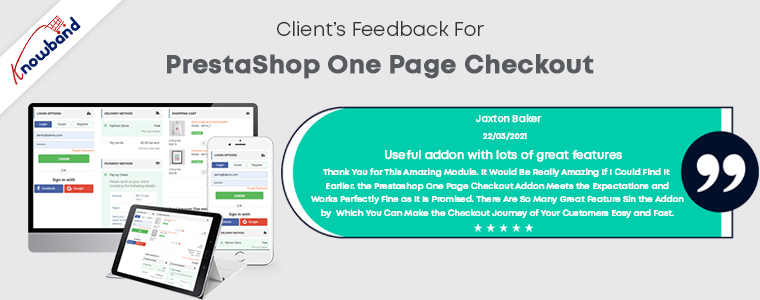
Have you ever thought about having the Prestashop One Page Checkout for your store? A checkout process is of great value. Further, you must pay attention to your website’s checkout process if you want to increase revenue for your company. It is one of the most important factors that might influence whether a shopper converts or leave the shopping cart empty. Any eCommerce store’s cycle is regarded as a crucial component that addresses getting greater conversion rates.
If you are unable to improve the checkout process, it will undoubtedly have a significant impact on your conversion rates and sales. One Page Checkout Prestashop is receiving support from several website marketers. Furthermore, to reduce the growing number of abandoned carts.
Here are some of the several arguments in favour of using the Prestashop One Page Supercheckout to increase sales. Moreover, increase conversions to your store.
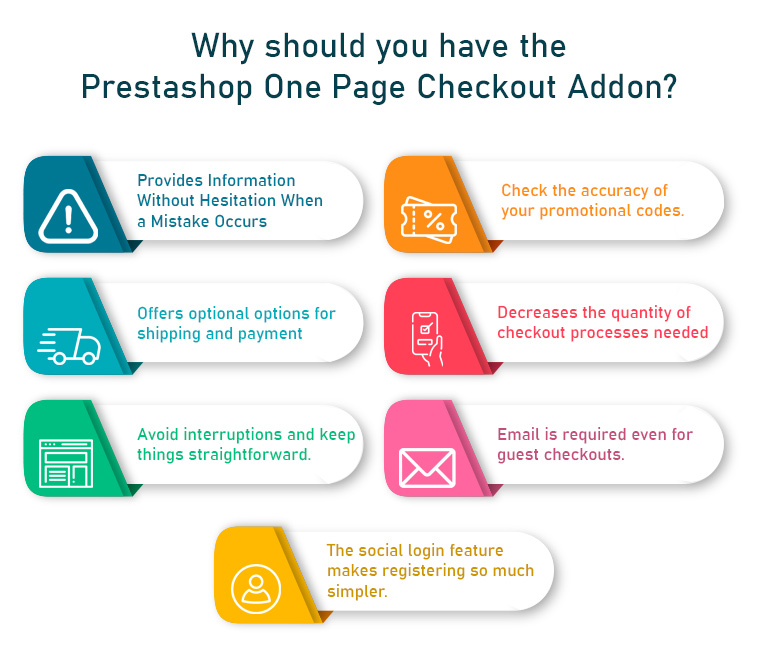
What makes the Prestashop One Page Checkout Addon a Must-Have?
Doesn’t hesitate to Provide Details When a Mistake Happens
It would be a brilliant idea to let customers know about errors they made on the checkout page itself. This error reporting will aid in completing your checkout process right away, decreasing the likelihood of shopping cart abandonment.
Introduce the corresponding One Step Checkout Prestashop Module to your shop. A perfect checkout module should be capable of telling customers about checkout-related errors.
Investigate the validity of your promotional codes
An excellent way to boost the sales of your online shop is to attract customers with enticing discount coupons or promotion codes. It is common human behaviour to pay close attention to coupon restrictions while making an online purchase.
The availability of excellent discounts or promotion codes motivates the customer to complete a recent buy.
Choose a One Step Checkout Prestashop Module that enables you to share discount coupons with your customers so that they can use them at checkout.
Provides Optional Payment And Shipping Options
It has been observed that offering customers a variety of shipping and payment options enhances customer loyalty to an online retailer. Do not force customers to use your present shipping and payment options to make an online purchase. This preoccupation is best addressed by this Prestashop One Page Checkout from the Knowband store, which streamlines the online purchasing process for Prestashop websites.
It gives customers the option to select any of the available payment and transportation options for a simple checkout process. Having a variety of payment options increases product sales and conversions and builds customer confidence in an online company.
PayPal, Advanced PayPal, Boleto, PayU, Stripe, and 2Checkout are a few of the payment gateways offered by Responsive one-page checkout Prestashop.
Reduces the number of checkout procedures required
When making an online purchase, customers choose this way of buying over going door to door since they are too busy to do so. They would not want to waste their time on pointless check-out procedures, but this is not the case in the current circumstances.
The opportunity of increasing sales with a single-page checkout process is finally squandered due to the confusing checkout procedures. If you want to increase sales and the consumer experience throughout the checkout process, it is essential to have everything on one page.
Eliminate any interruptions and keep things simple
The primary goal of creating a checkout page is to persuade the consumer to finish the process of buying. To provide clients with the only fields they need to fill out to make the process simple and distraction-free, the Prestashop Responsive One Step Checkout Addon allows you to remove superfluous processes and distractions from the checkout page.
With the necessary CTA buttons, the procedure also becomes engaging and functionally simple.
Even for guest checkouts, demands an email
Customers leave their shopping carts because they have to register for an account to check out. Clients find that annoying. Why do you think that would irritate them? It’s because if they filled out the registration form and provided all the necessary information, they would get a barrage of daily, multiple-day, or even hourly advertising emails from the website.
The guest checkout option is available in the Prestashop responsive one-step checkout addon’s design. Thus, website users who would like to purchase without signing up for anything can do so.
The social login option makes signing up so much easier
Signing up or logging in on a website can be very tricky and lengthy. Therefore, social login comes as a handy option for customers. Furthermore, if you allow your customers to signup or log in using social media, there can be more conversions. Well, that is why the Prestashop one-page check has the option to use their social login accounts to sign up or login on to the website.
Faster Checkouts, Higher Sales: The OpenCart One Page Advanced Checkout Extension
Running an OpenCart store? The One Page Supercheckout by Knowband is available for OpenCart too, social login, Ship2Pay linkage, drag-and-drop field management, Mailchimp and Klaviyo integration, guest checkout, and a fully responsive layout, all in one place.
Without implementing a necessary checkout measure, there isn’t a single online store that can increase sales and conversions. It is a crucial component of any eCommerce shop that may immediately achieve success in terms of revenue and clients. Using the Prestashop one-page checkout might help you attract more consumers and increase conversions. Furthermore, do everything it takes not to waste a second in putting them into place. Your eCommerce store’s success depends on maintaining a flexible and user-friendly checkout process.
For store owners looking to improve checkout performance without additional costs, you can also explore modern solutions like the Prestashop free quick checkout addon, designed to simplify the checkout process, improve speed, and enhance overall user experience.
Nowadays. it can get hectic for people to choose gifts for their friends and family. What they could appreciate and what they’ll give as gifts from their finish to other people, is something that irritates the provider. Consequently, they began giving gift cards instead of actual gifts. This is when e-gift cards come into the image.
What is a Digital Gift Card or eGift Card?
A computerized card is an electronic gift card that includes an extraordinary code that can be benefited from an internet-based store (of which the gift card has a place) to purchase something of the very esteem as that of the gift card.
For instance, on the off chance that it is an Amazon gift card worth 1000 rupees, the provider can gift it to any individual who emails the code to the beneficiary. Consequently, the beneficiary can add a result of a similar worth ($100) to the truck and enter the code while on the checkout page to shop the item.
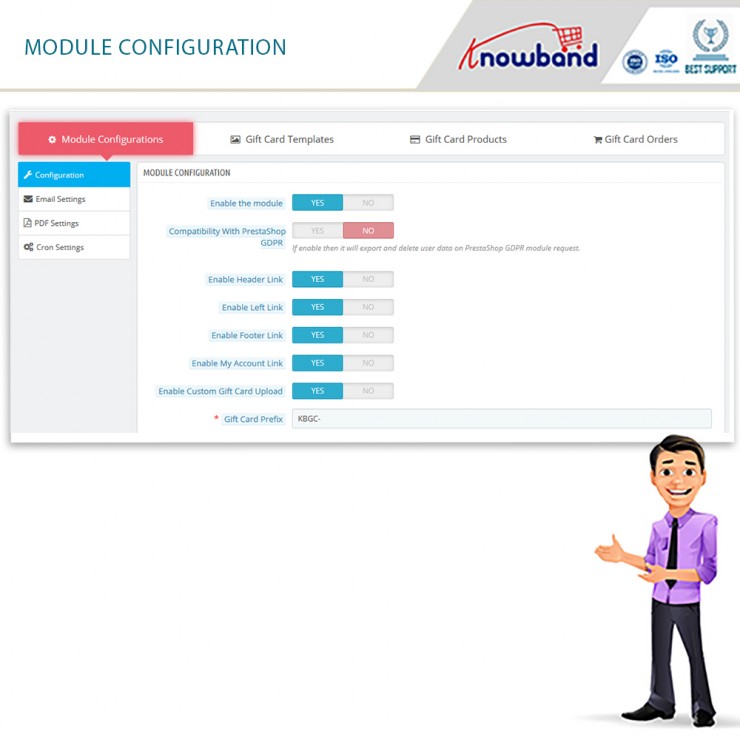
The Prestashop gift card manager by Knowband is a stunning tool for your eCommerce business. In fact, there are several settings where you can configure the plugin without any hassle. In this blog, we will take a look at the various settings under the Configure Tab of the Prestashop send gift card addon.
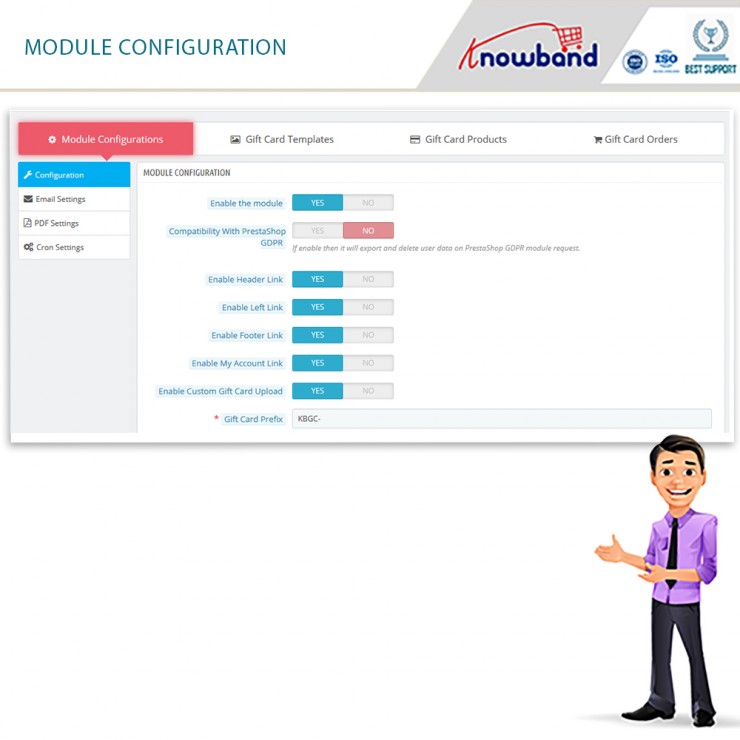
Configure Tab settings of the Prestashop Gift Card Manager
Enable the Module
The main functionality is where you enable or disable the whole existence of the Prestashop gift card addon on the front end of the website.
Compatibility with Prestashop GDPR
Once you enable this function, then it will export and delete user data on the PrestaShop GDPR module request.
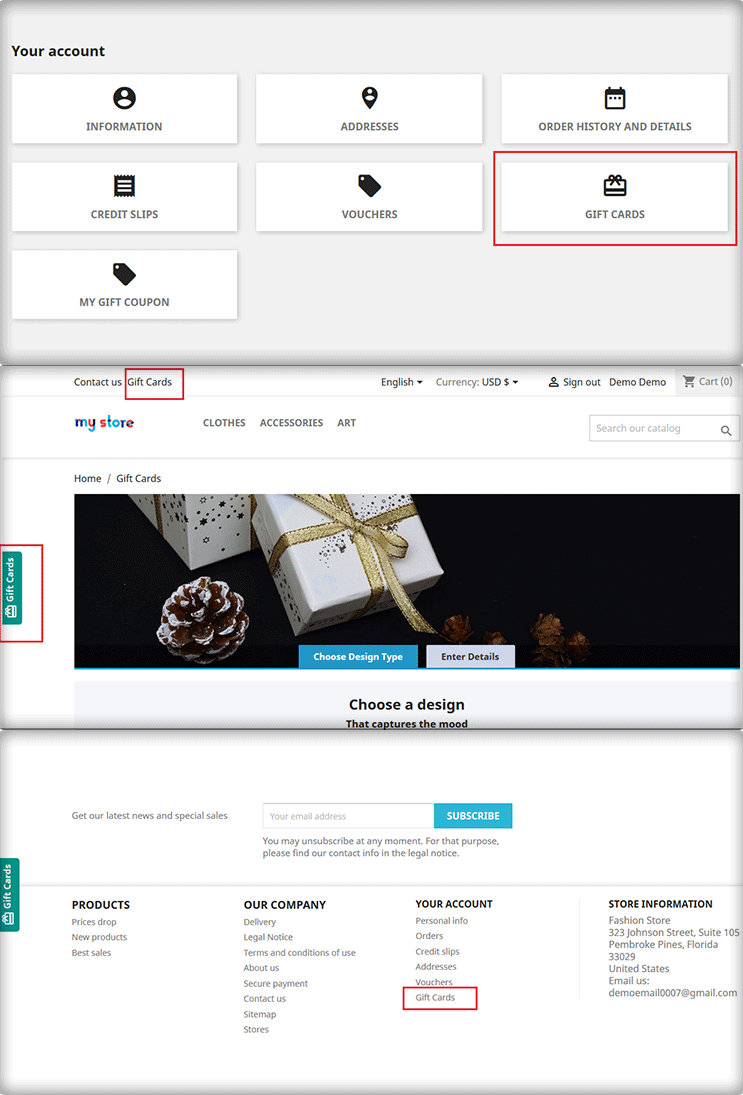
Enable Header Link
With this functionality, the admin can enable the module’s function on the header of the website.
Enable Left Link
With this functionality, the admin can enable the module’s function on the left sidebar of the website.
Enable Footer Link
With this functionality, the admin can enable the module’s function on the footer of the website.
Note: Our Module adds a Gift Card Link in the footer if the footer contains the displayMyAccountBlock Hook. Also, if the Theme editor is present in the store then Admin can add a gift card link in the footer using the theme editor.
Enable My Account Link
With this functionality, the admin can enable the module’s function on the My Account page of the website.
Enable Custom Gift Card Upload
Do you wish to allow your customers to make custom gift cards? You can allow them to use this functionality.
Gift Card Prefix
This option enables the store owner to input the prefix for the gift voucher code through the module.
Gift Card Code Order Status
This setting of the Prestashop gift card module allows the admin to update the order status when the gift card will be marked delivered and the gift card code will generate.
Minimum Gift Card Delivery Gap
Under this tab of the Prestashop gift voucher module, the admin can set the delivery gap. Further, between the order placement and delivery of the gift card.
Email Setting
Under this setting of the Prestashop gift card manager, the admin can easily select the language of the email settings. Furthermore, the options include English, French, Italian, and Spanish.
Once the admin selects and saves the language, more settings unfold further. The segregated settings include the following:
Recipient Email Subject
This email template will be sent to the recipient of the Gift Card. In fact, this contains the subject of the email.
Recipient Email Content
In this option of Prestashop Gift Card Manager, the admin can add the content or the body of the email for the receiver of the gift card.
Sender Email Subject
This email template will be sent to the sender of the Gift Card. In fact, this contains the subject of the email.
Sender Email Content
In this option of Prestashop Gift Card Addon, the admin can add the content or the body of the email for the sender of the gift card.
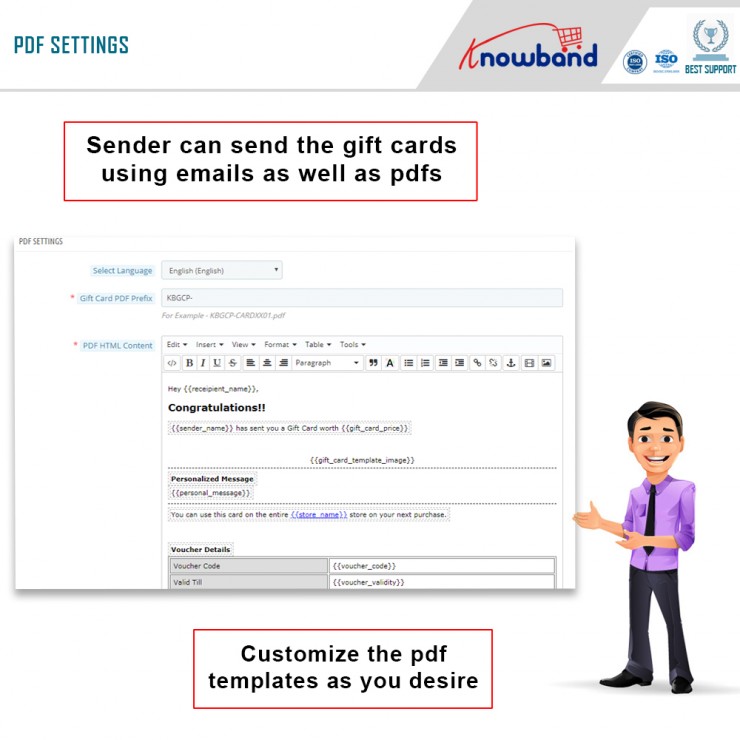
PDF Setting
Under this setting of the Prestashop gift card module, the admin can easily select the language of the PDF settings. Furthermore, the options include English, French, Italian, and Spanish.
Once the admin selects and saves the language, more settings unfold further. The segregated settings include the following:
Gift Card PDF Prefix
In this option, the admin should enter the prefix of the PDF file. Furthermore, that will generate gift cards.
PDF HTML Content
NOTE: Keywords like {{sample}} will replace by dynamic content at the time of execution. Please do not remove these types of words. Otherwise, proper information will not be displayed. You can only change the position of these keywords in the HTML.
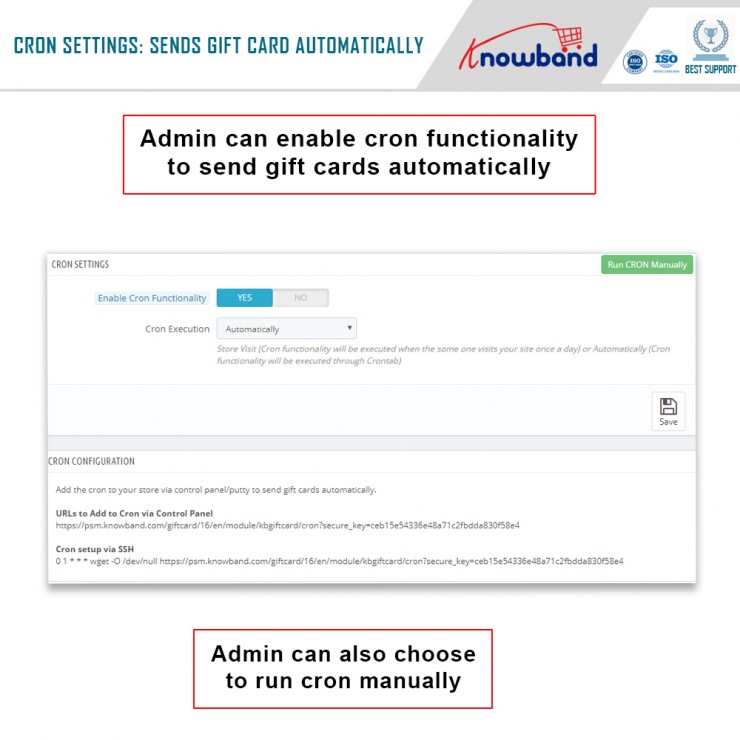
CRON Setting
Under this setting of the Prestashop send gift card addon, the following options are available:
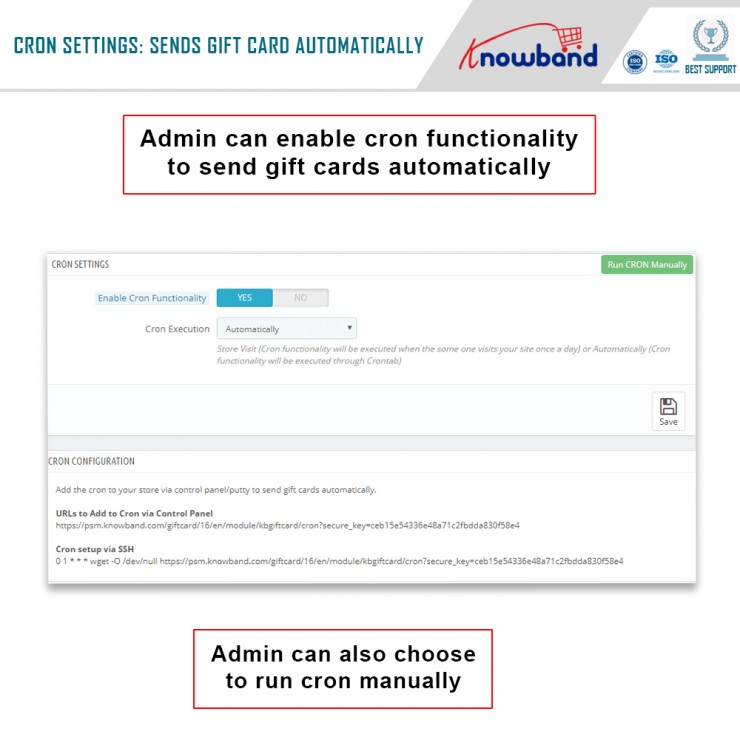
Enable CRON functionality
With this setting, the admin can enable or disable the cron functionality. Moreover, send gift cards automatically.
Cron Execution
With this setting, the store owner can run CRON automatically or set it to Store Visit.
Note: Store Visit (Cron functionality will execute when someone visits your site once a day) or Automatically (Cron functionality will execute through Crontab).
In the End
Thus, this is what the main settings of the Prestashop Gift Card Manager look like. Furthermore, there are other settings like Gift Card Templates, Gift Card Orders, and Gift Card Products. Would you like to invest in the Prestashop plugin by Knowband? In case you have any doubts or queries, please let us know at support@knowband.com.
We’ve always been looking for an alternative to Google Play and Apple Store publications. PWA (Progressive Web Apps) appear to be the best option for the same. This trend is becoming increasingly popular with the ease of breathing. To be sure, many qualified professionals and computer gurus are predicting PWA as the future. Well, if you have a Prestashop store, you can easily invest in the Prestashop PWA Mobile App Builder by Knowband.
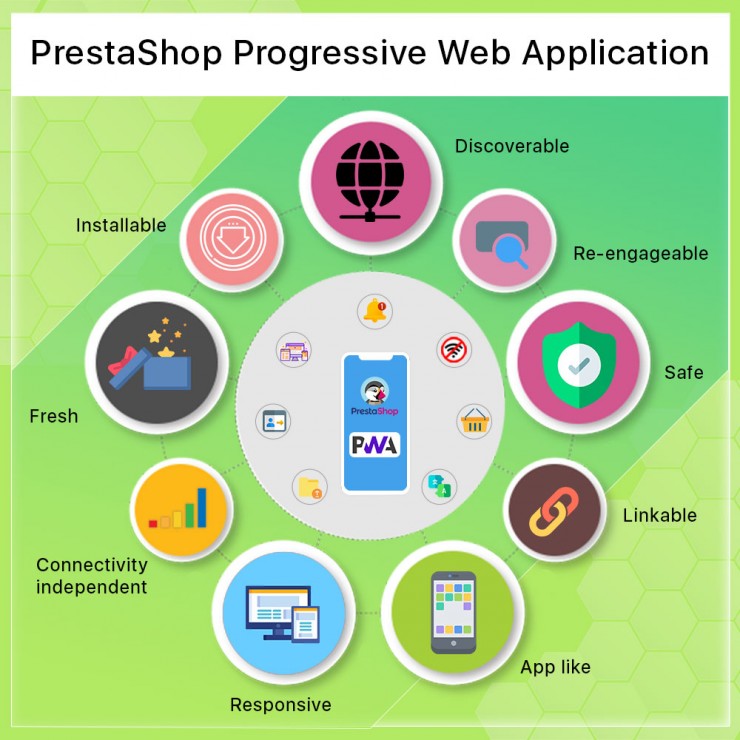
The Prestashop PWA Mobile App helps to replicate the specific native-like relationship with program apps. The main advantage is that the shop owner does not have to deal with App Store or Play Store publications. Instead, the Prestashop Progressive Web App may be provided by simply opening the website URL on a mobile application. When customers open the store URL on mobile, they have the option of adding the eCommerce PWA to their home screen.
If you own a Prestashop store, this article will explain the benefits of having a Prestashop PWA Mobile App. Are you ready to know more about them? You can go forth and check them out yourself for a better understanding.
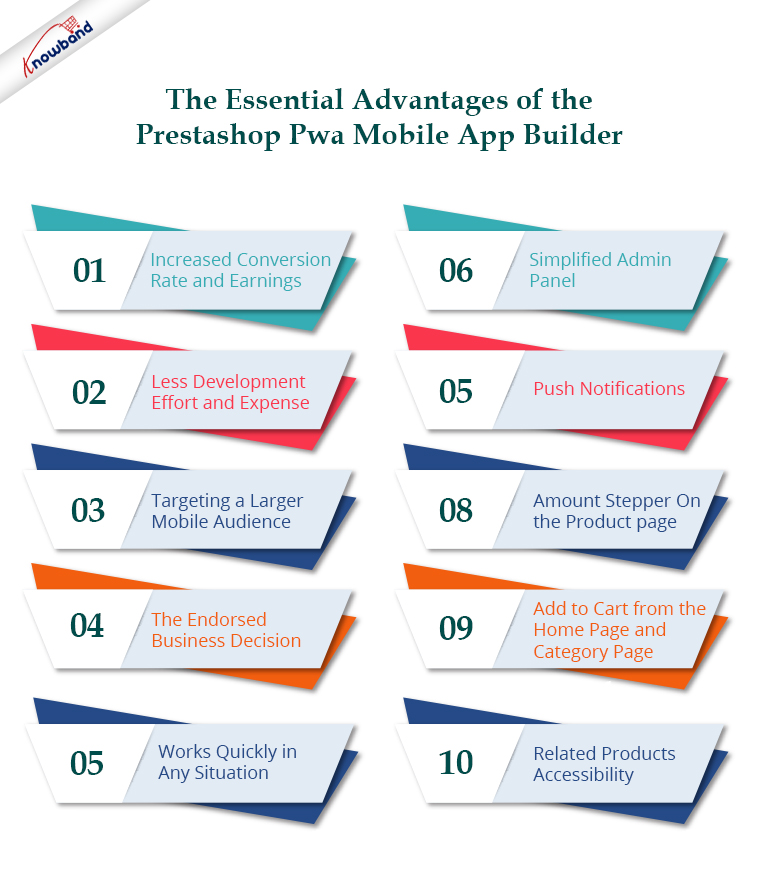
The Essential Advantages of the Prestashop Pwa Mobile App Builder
Increased Conversion Rate and Earnings
The Prestashop PWA Mobile App Maker may help eCommerce firms enhance mobile conversions. Further, providing a chipped away at cycle to provide the app directly from the mobile website directs consumers to the Progressive Web App. The applications, with their layered navigation and single-page checkout, have the potential to be a big pay focus point for eCommerce organizations.
Less Development Effort and Expense
With native shopping apps, eCommerce retailers must incur significant expenses and effort to create and distribute Android and iOS apps. The publication cycle on Google Play and the Apple App Store is fascinating. However, it occasionally turns into a problem for business owners who don’t understand the subtleties. In the current situation, Prestashop PWA Mobile App Creator comes to the rescue. The Prestashop PWA mobile app is easily resolved by accessing the shop URL on a mobile application and adding the logo to the cell phone’s Home Screen. Your mobile form will be converted into a PWA app while the desktop transition remains active.
The Prestashop PWA Mobile App Builder is an excellent alternative for eCommerce companies since it works flawlessly with both Android and iOS. You may use the Prestashop eCommerce PWA App to target the entire world or certain regions. The more users that visit the website, the more Progressive Web App foundations there will be. Further, the apps will be put in the app cabinet with other apps. The functionality will be completely native, and users will just need to launch the app to search for items and other store data.
The Endorsed Business Decision
If you believe that a model will help you grasp the eCommerce PWA, you should consider Twitter, Alibaba, and many others. These are a few of the various firms that are using the Progressive Web App trend to enhance conversions and pay. PWA Mobile Apps may be used by both small and large Prestashop eCommerce businesses to immediately increase sales from mobile customers.
Works Quickly in Any Situation – Even While Offline
eCommerce PWAs are exceptionally light and seldom crash or stop on mobile devices. The development of the Prestashop eCommerce PWA App is sophisticated, ensuring that the items load and run faster when compared to native apps. Faster loading and seamless operation can improve mobile consumers’ purchasing experience at all times. Another important feature is that PWA for Prestashop may run in offline mode – with a weak or non-existent web connection.
Simplified Administration Panel Monitoring in Prestashop Pwa Mobile App
The eCommerce Progressive Web App creates a simple admin panel (backend) for managing and customizing the live Progressive Web App. There is no compelling reason to contact customer support or figure out how to code. The shop administrator only needs to make the necessary changes. Moreover, the live eCommerce PWA will be automatically updated. The landing page design option enables the store administrator to modify the appearance and feel of the live Knowband Progressive Web App for Prestashop at any time without changing the code.
Push Notifications Are an Excellent Way to Advertise
For a long time, push notifications have been an important part of marketing for any eCommerce site. We would have all received push alerts on our mobile phones for installed native shopping apps. This is also possible in your PWA apps thanks to the Progressive Web App for Prestashop. The shop owner will be able to plan and deliver bespoke and predefined push alerts to mobile devices.
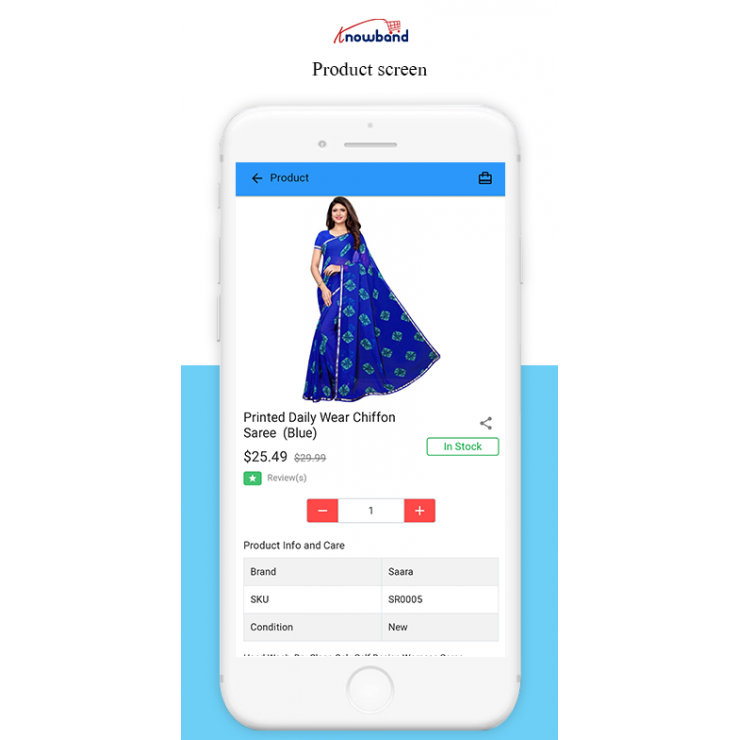
Amount Stepper On the Product page
The amount stepper is another expansion that lets clients of the Prestashop PWA Mobile App Builder raise or lowers the number of individual products before submitting them to their container. The +/ – button on the item screen of the Prestashop addon is everything necessary for purchasers.
Add to Cart Button the Home Page and Category Page Eases the Work
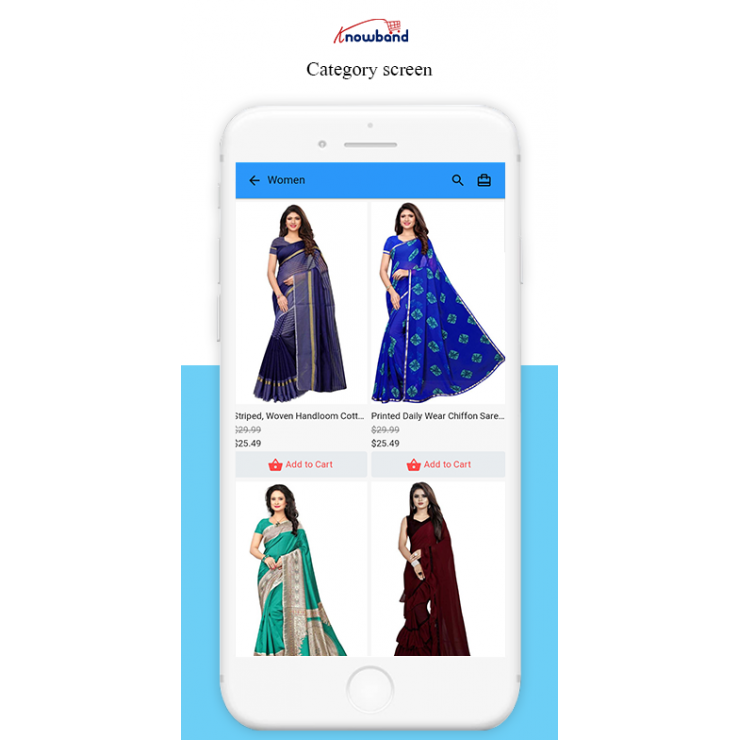
The clients can easily add products to the cart from the Homepage and Category pages. Utilizing the module, the clients don’t need to reconsider adding the products because the home screen and class pages currently have the Add to Cart button accessible.
Related Products Accessibility Helps in Cross Selling
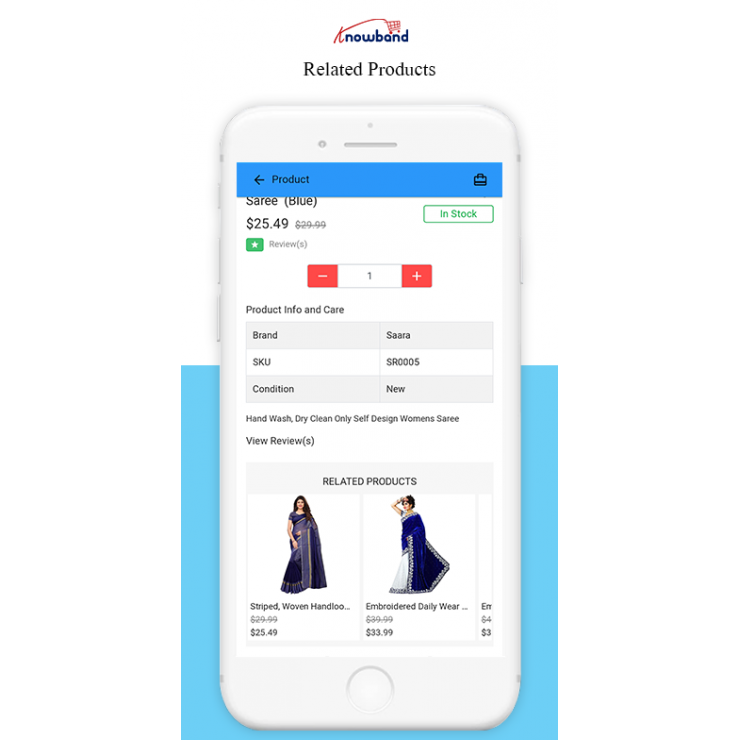
With the similarity to the Prestashop Automatic Related Products addon, the Prestashop Progressive Web App permits the administrator to upsell things. Besides, he can show related products on the site for the clients to pick and shop more. Subsequently, more expected sales and incomes.
If you want to stay ahead in the eCommerce market, use Prestashop PWA Mobile App Builder to help you get there. Given the large number of PWA, now is an excellent time to convert your Prestashop store into a mobile application. Provide a perplexing purchasing experience with enhanced features such as quick speed, offline operating, push alerts, SEO, and much more.
Giving users access to an optimised PrestaShop PWA app would improve their mobile purchasing experience. With the help of this PrestaShop PWA App module, you can turn your online store into a user-friendly web application that can be maintained from the backend. These apps offer a number of extra capabilities not found in native apps, including offline mode and platform independence, making them a hassle-free and seamless purchasing option for customers. You can even get in touch with the support team for all your queries at support@knowband.com.
Woocommerce Google Shopping Integration addon offers a way to upload the products of the store on Google Shopping. Further, displaying the product ads on the search result is one of the ways to get thousands of visitors to your site.
Google Shopping allows e-merchants to display its product on Google’s search result page. Further, it is powered by AdWords and Google Merchant Center. This is one of the ways to allow users to search for the products. Further, on online shopping websites. Moreover, compare prices between different vendors. Therefore, the Woocommerce Google Shopping Integration makes it easier for store owners to display their products on Google’s SERP.
The Woocommerce Google Shopping Integration module automatically syncs feed from the Woocommerce store to the Google Merchant Center Account. Additionally, the store admin can sync the product status back to the store’s database. How? By executing cron in the back-end of the Google Shopping Woocommerce Feed Synchronization plugin.
Features that Knowband’s Woocommerce Google Shopping Integrator Offers Are:
The Woocommerce Google Shopping Integration addon automates the entire process of listing the products. Further, on Google Shopping from the eCommerce site.
The store admin can automatically update the product inventory between the two stores. This happens from the back end of the Google Shopping Woocommerce Integration extension.
The Woocommerce Google Shopping API integration offers real-time synchronization. For instance, of products, and inventory. Furthermore, this happens between the Google Shopping API and Woocommerce store. It is an easy means to excel in online businesses.
The store admin gets an option to create an N number of profiles. Further, this happens in the back end of the Woocommerce module.
The profile-based upload allows the admin to list the products in bulk. Moreover, any changes in the product details happen by making changes in the profile. Further, this happens in the back-end of the Google Shopping Woocommerce API integration addon.
The store admin gets an easy option to keep a track of the products listed in the Google merchant center. Further, in the ‘Product Listing’ tab of the Woocommerce Google Shopping connector.
The expired products are renewable just by executing cron in the back-end of the Woocommerce Shopping Integration plugin.
Woocommerce Google Shopping Feed synchronization plugin even allows the admin to delete the products.
The real-time synchronization offered by the Woocommerce Google Shopping Integration module makes tracking easier. Moreover, it also makes feed management easier for the store admin.
1.1 Project Objectives
Listed below are the project objectives:
1. The Woocommerce Google Shopping Integration module installation and configuration.
2. The method of the Woocommerce Google Shopping Integration extension connection with the Google Merchant Center.
3. Profile management, Category mapping, and feed management.
4. Product listing and synchronization.
2.0 Installation
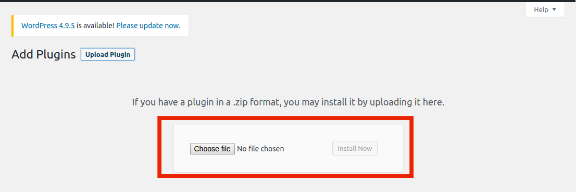
Purchase the Woocommerce Google shopping integration plugin from the Knowband store. Further, you will get the zipped file along with the user manual. Moreover, please follow the below steps to install it:
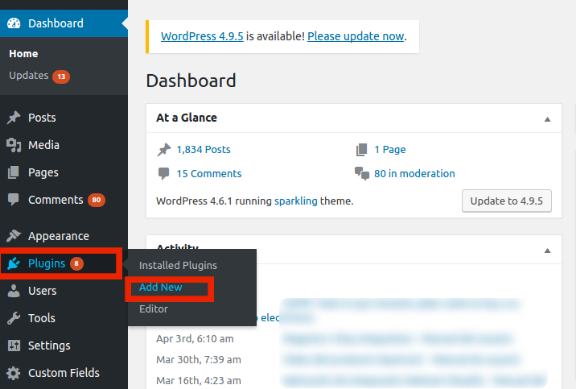
Step 1: Go to the Dashboard of WordPress -> Plugin -> Add New
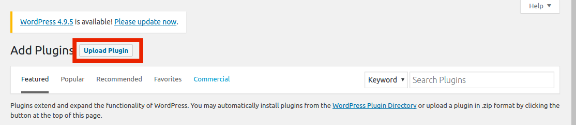
Step 2: You’ll be redirected to an interface. Click on Upload Plugin.
Step 3: Click on Choose File and upload the zipped file.
3.0 Admin Interface
After installing the Woocommerce Google Shopping Integration extension, it will list on the plugin listing page. Further, kindly see the screen below:
Now, the Woocommerce Google Shopping Integration extension add-on is installed. Further, it will display 6 sections in the main menu of the admin interface. Each tab explains one by one in the next section.
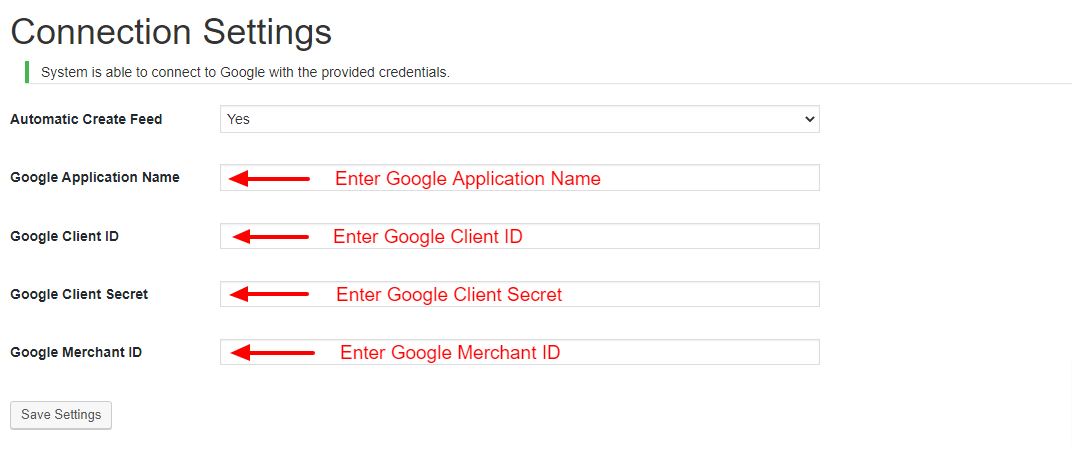
3.1. Connection Setting
This section of the Woocommerce plugin allows the store admin to connect their store with Google Merchants. Here are the information fields that you need to mention for setting up the connection.
Google Application Name: Enter the name of the project/application that you created for Google Shopping.
Google Client ID: Enter the Client ID that will authenticate the connection between the store and Google Merchant. By default empty but required field. (See Appendix A)
Google Client Secret: Enter the client’s secret to set up the connection. By default empty but required field. (See Appendix A)
Google Merchant ID: By default empty but required field. Here, you will provide the merchant ID of your Google merchant center account.
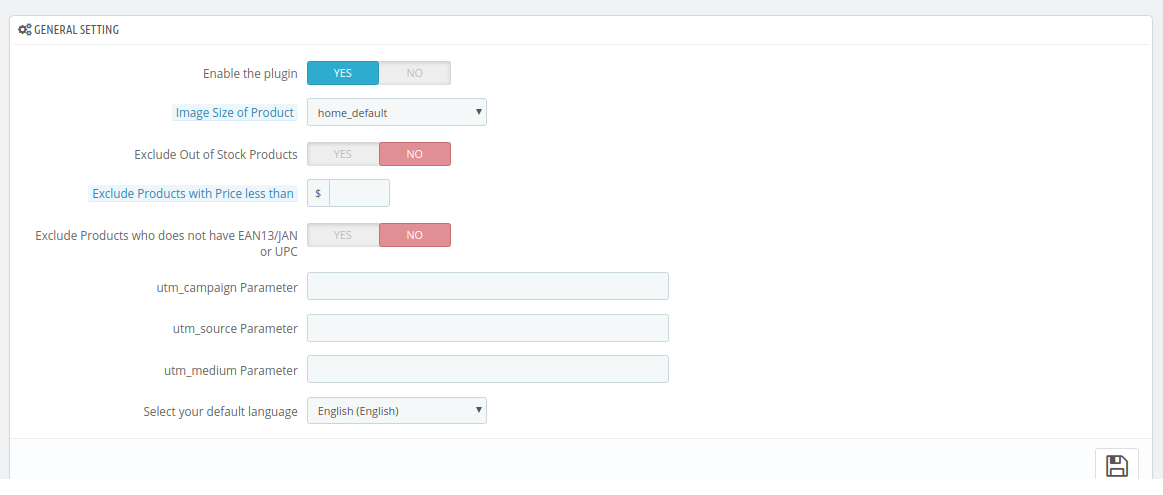
3.2. General Settings
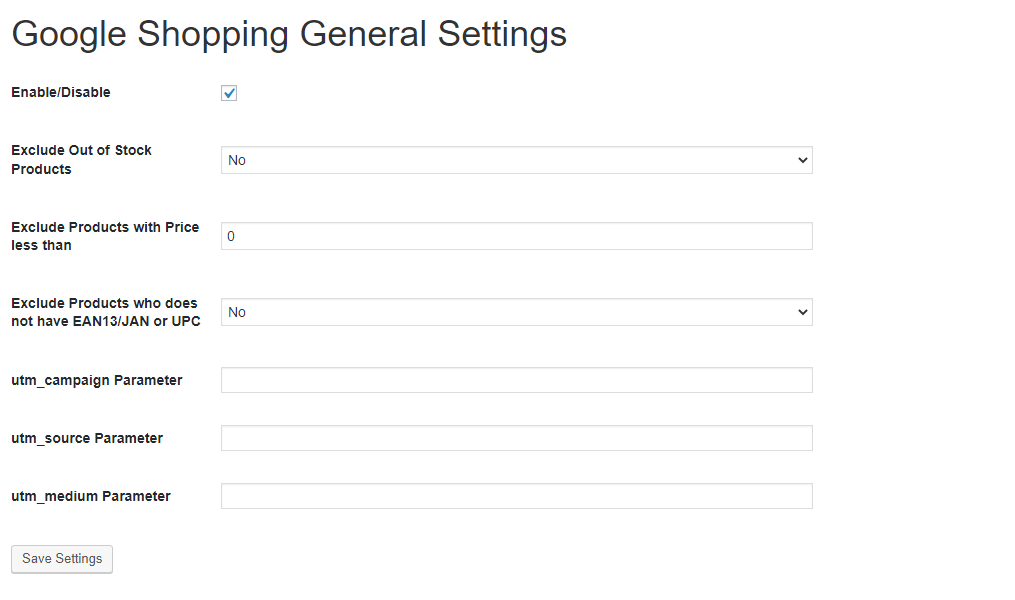
This section of the Woocommerce Google Shopping API integration allows the store admin to set up the basic features.
Enable the plugin: By default, this setting will be OFF. The Woocommerce Google Shopping Integration module will sync the products to Google shopping if this setting will be ON.
Exclude Out of Stock Products: If disabled, only the in-stock product will be displayed in Google search results. Additionally, enable the display of out-of-stock products.
Exclude Products with Prices less than Enter a fixed amount. Further, the products below this amount will not display in the search results only.
Exclude Products that do not have EAN13/JAN or UPC: If the admin disables this, the products that don’t have the EAN13/JAN or UPC will not display.
utm_campaign Parameter, utm_source Parameter, utm_medium Parameter: Enter the UTM for tracking the traffic received via Google Shopping.
3.3. Profile Management
The admin can create, edit or delete profiles from this tab of the Woocommerce Google Shopping Integration extension
3.3.1 How to Create a New Profile?
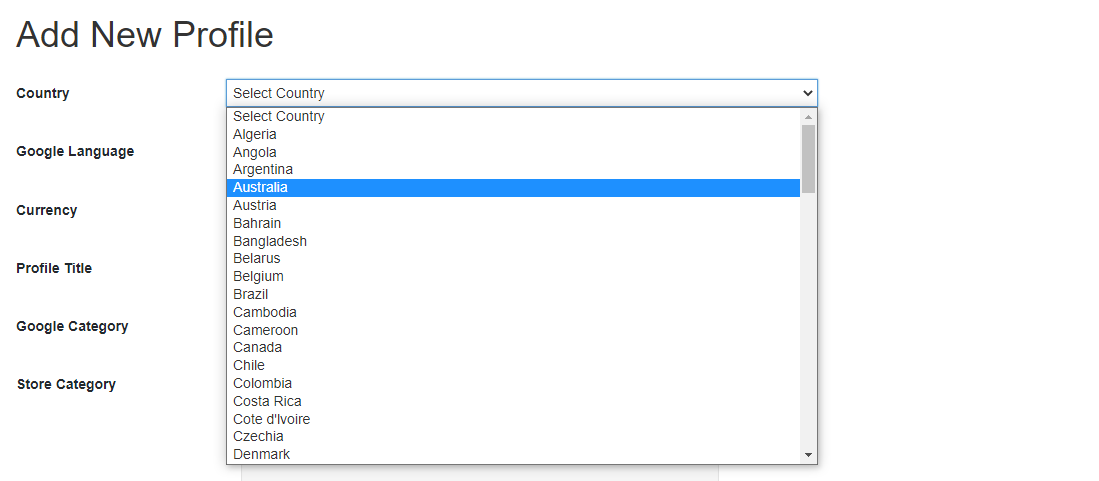
Click on the “Add New” button to create a new profile.
You’ll be redirected to the profile creation page of the Google Shopping Woocommerce Integrator.
Select the Country from the drop-down list.
Google Language: Select the language for profile creation.
Currency: Select the desired currency for the selected location.
Project Title: Enter the name of the project.
Google Category: Select the Google category where you want to map the category of the store.
Store Category: Expand the category and check the categories that you want to map in Google Shopping.
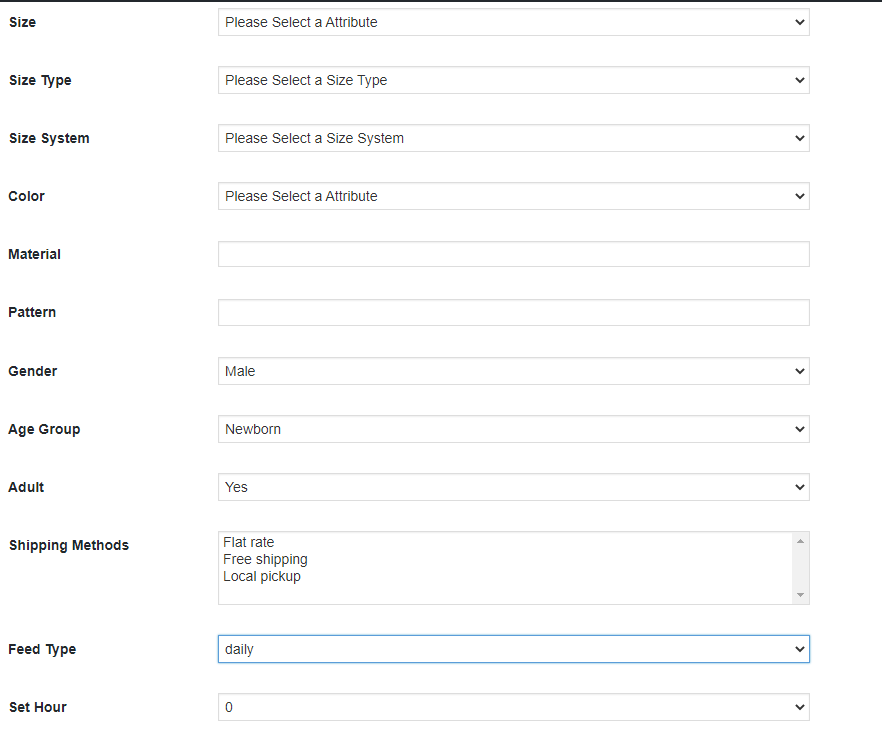
GTIN: Here, you will map the product’s unique field. Further, the Woocommerce Google Shopping Connector module can identify products according to the mapped attribute. You must also have to provide unique field mapping for product attributes as well. Furthermore, the various options to choose from include SKUs. Thus, the mapping can then be done based on the selected attribute.
Size: The size attribute describes the standardized size of your product. Your product ad will appear in the results that are filtered by size.
Size Type: The attribute describes the cut of your product. Further, the supported value for this field includes a variety. For instance, regular, petite, plus, big, tall, and others. Therefore, this helps create accurate filters.
Size System: With this attribute, you can explain which country’s sizing system your product uses.
Color: Use the color attribute to describe your product’s color. Further, this information helps create accurate filters, which users can use to narrow search results.
Material: Select the material of the product.
Pattern: Choose the pattern from the drop-down menu.
Gender: Select the Gender for which the product is intended. Further, the options are Male, Female, or Unisex.
Age Group: Select the age group that is expected to use the product.
Adult: Specify if the product has any adult content or not.
Shipping Methods: Select the shipping method for the particular product.
Feed Type: Select the frequency when you want to upload the feed.
Set Hour: Select the number of hours in which you want to schedule the feed.
Google Adsense
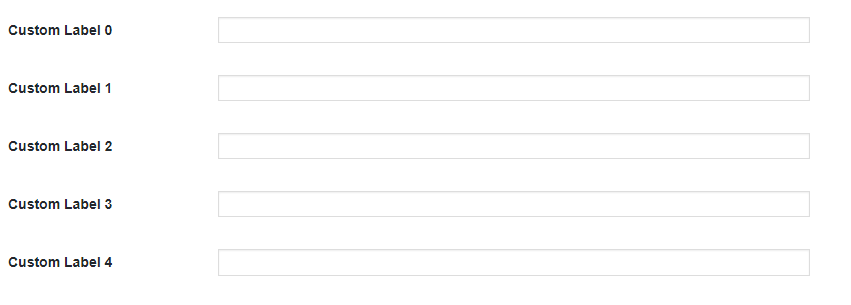
Google Adsense refers to the campaign that you’ll run on Google Adwords. Further, Custom Labels, Custom Label 0 through Custom Label 4, allows you to create specific filters to use in your Shopping campaigns. Use these filters for reporting and bidding on groups of products. Furthermore, the information you include in these attributes won’t be shown to users.
3.3.2 How to Edit the Existing Profile?
The created profile in the Woocommerce Google Shopping Synchronization addon can be viewed in the admin interface. Further, click on ‘Edit’ to edit the profile or Click on ‘Delete’ to delete the profile
3.4. Product Listing
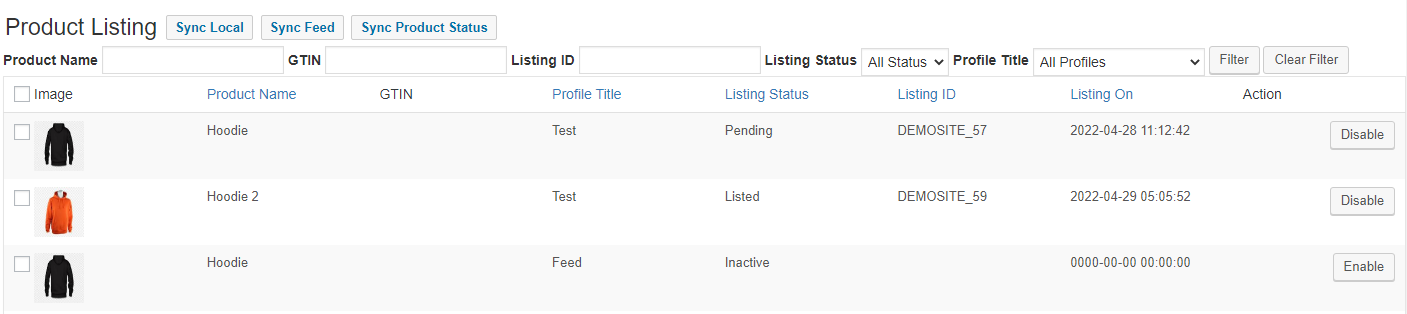
The listed products can be viewed in this section. Further, the Google Shopping Woocommerce Connector is shown in the image below.
The admin can disable the product by clicking on ‘Disable’.
The Enable button will mark the products for listing.
3.5. Feed Management
In this tab of the Google Shopping Woocommerce Integrator, the admin will be able to get the details of the feed and profile mapping. The admin can check which profiles are mapped with feeds.
3.6. Synchronization
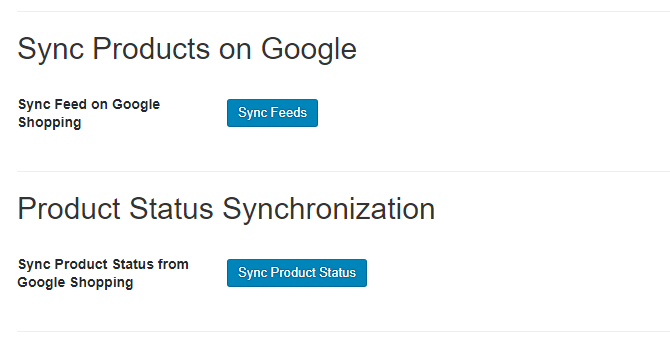
The Synchronization tab of the Woocommerce Google Shopping Integration extension offers easy integration with the help of cron jobs. Additionally, the Woocommerce Google Shopping Feed synchronization allows the admin to sync the feeds to Google Merchants. Moreover, syncs the product status back to the store.
Sync Feed on Google Shopping: ‘Sync Feed’ cron will synchronize the feed on Google Shopping.
Sync Products Status from Google Shopping: This button can sync the product status from Google shopping to the web store.
4.0. Appendix
How to Create Google Shopping Account?
Before uploading your products on Google shopping, you must have your Google merchant account. If you don’t have then please follow the below URL:
Follow the instructions given on the above URL and create your account.
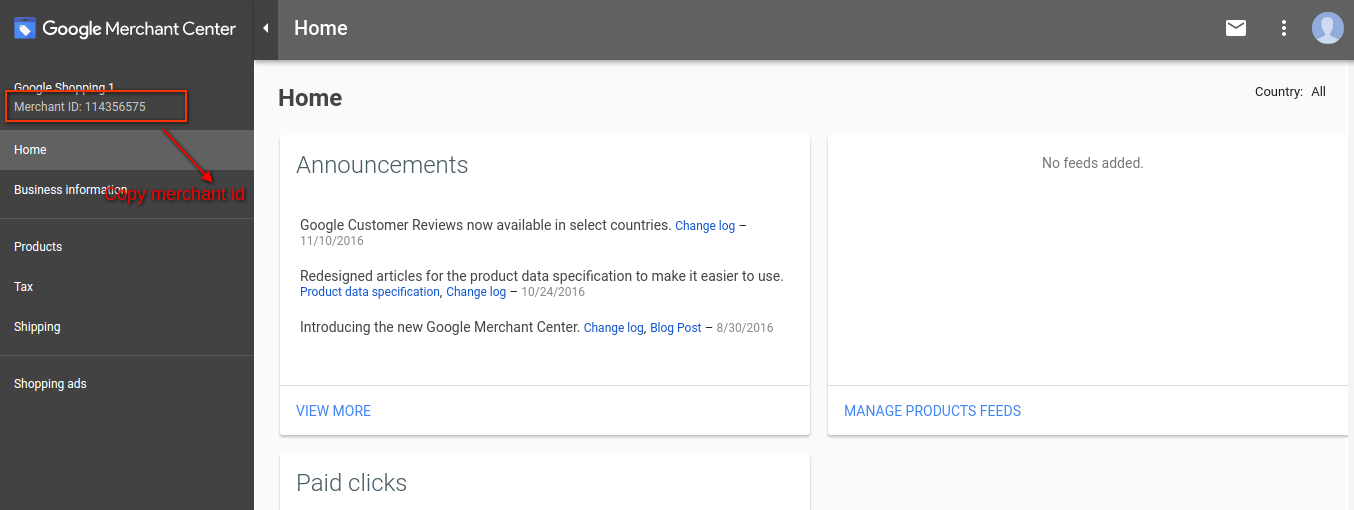
After creating your account, you will be redirected to your merchant center homepage as shown in below screen:
Copy your merchant id highlighted in the above screen and save it in module configurations.
After this, click on the Connect button so that your module gets integrated with your PrestaShop store, In addition, you will be able to fetch the report details.
Verify your Website for Google Merchant Account
This verification process is a compulsory process to upload your products to Google Shopping. If you do not verify your site then the module will not be able to upload products and may result in an error.
To Verify Your Website, Please Follow the Below Instructions:
Step 1: Go to the “Business Information” tab in your Google Merchant Account.
Step 2: Under the “About Your Business” tab, provide the URL of your store. For instance, https://www.example.com. Save URL.
Step 3: After saving a website URL, Under the “Website” tab, click on the “Claim Your Website” link. This will show you the link to an HTML file. Hence, download this file. In addition, upload it to your root directory of the store.
Step 4: After uploading the HTML file, execute the URL given by Google in step 3.
Step 5: Click on the “Verify & Claim” link.
After this, you can fetch your product report under the product tab of your Merchant store.
How to get the Client ID and Secret?
To get a Google client id and secret you need to create a project in a Google developer account. In fact, please go to the below URL to sign in to the Google developer account.
https://console.developers.Google.com
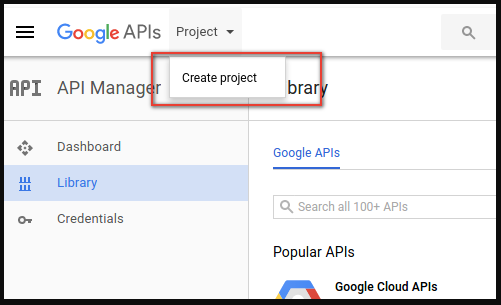
On the above URL, create a project by clicking the link shown in below screen:
1: Name your Project Name. Moreover, click on the “Create” link. In fact, after creating a project, Google will redirect you to the same page and your new project will be selected.
2: Go to the library tab, and search for “Content API for Shopping ”. Further, enable this API for this project.
3: Click on the “Credentials” tab. This tab will show 3 tabs.
4: Set your application name in the “OAuth Consent Screen” and save it.
5: Click on the “Credentials” tab and click on the “Create Credentials” button.
6: After clicking the “Create Credentials” button, Google will be shown credentials type options. Therefore, choose “OAuth client ID”.
Step 7: Set the application type as “Web Application”.
Step 8: Set the “Authorized Redirect URIs” field. Additionally, your redirect URI is given on the module configuration page. Further, please copy from there and paste it into this field.
Step 9: Click on the “Create” button. Further, after saving credentials, Google will generate the client id and secret for you. Copy and paste them into the corresponding field in the module configuration.
Note: For more detailed instructions, follow the URL https://developers.Google.com/identity/sign-in/web/devconsole-project
Note: If you are getting an error while getting your refresh token. Further, please also try after “Allowing Less Secure App” in your Google account.
In fact, for more values, please follow the below URL and read the documentation:
Knowband’s Prestashop gift card Addon is a practical and excellent option for marketers. In reality, it only facilitates the sale of gift cards on your website. Additionally, boost your company’s sales and profits. You can easily allow your consumers to buy digital gift cards, thanks to their growing popularity. Furthermore, send them to the recipients at the specified time.
We’ll look at the features of the Prestashop gift card in this blog. Furthermore, as you conclude the article, you will have a better knowledge of the plugin.
Knowband’s Prestashop gift card Addon incredible features
It’s easy to get started
The Prestashop gift card manager is a straightforward module. It’s simple to integrate into your eCommerce business. To complete the installation, the shop administrator does not need any specific skills. The user manual and customer support are available to assist you if you get stuck.
Set the top and lower limits
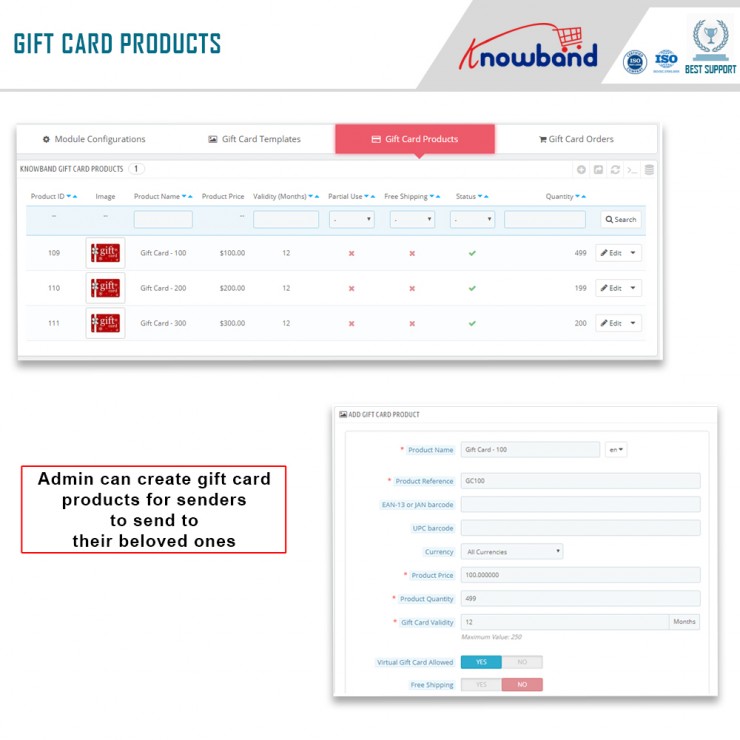
A gift card’s standard amount and greatest limit are set by the shop administrator. Customers may now use the Prestashop module to buy a gift card up to a specified value.
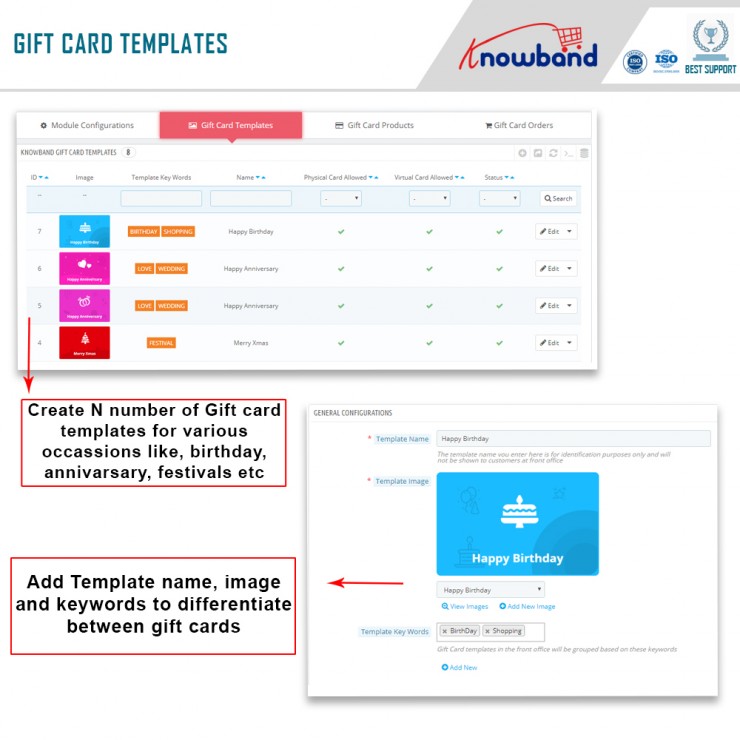
‘N’ number of gift cards can be made
The Prestashop send gift card addon allows the business administrator to create an unlimited number of gift cards. Also, with the Prestashop plugin, the store administrator may produce as many gift cards as he likes.
Choosing the intervals between deliveries
In the Prestashop gift card Addon’s interface, you may set the number of days between Gift Card delivery.
The PDF format is available
The gift card will repair to us the new form using a simple yet thorough pdf.
A unique prefix code appears on gift certificates
The Prestashop gift module may be used by the business administrator. Further, to apply a custom prefix password to the gift certificate.
You can use the module to update the status of your orders
The admin may update the order status for Gift Card orders using the Prestashop gift voucher module. Furthermore, only once the order status has been updated to the mentioned condition will the gift card be provided to the designated recipient.
Purchases of gift cards can be trackable
From the backend, the store administrator has access to order information, status, delivery date, and other order data.
Users must submit specific information to gift the gift card
A consumer must enter the value of the gift card as well as the sender and receiver’s names for it to be sent to the intended recipient. Furthermore, while purchasing a gift card for a recipient, the latter’s email address is required.
Important keywords should be included
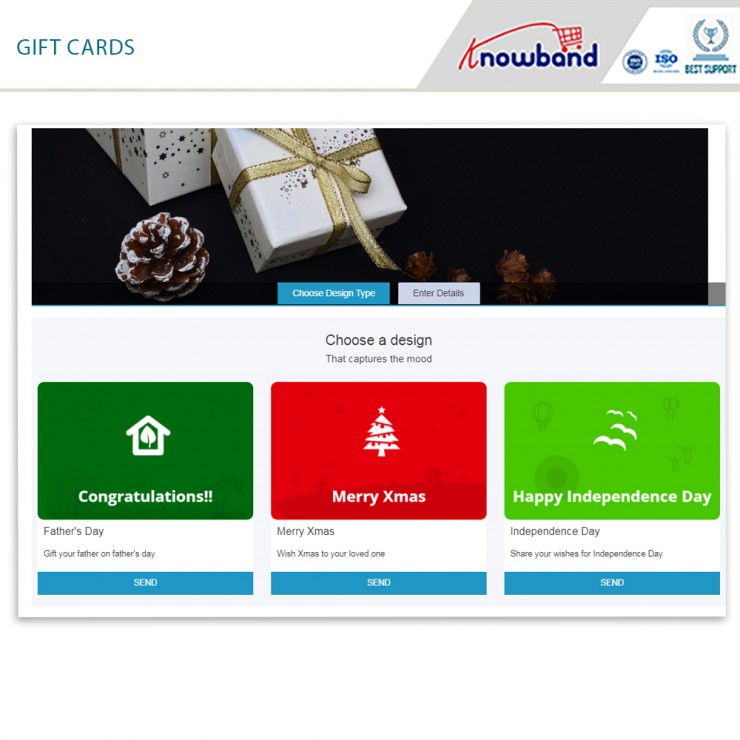
They map to any categorization by putting relevant keywords in the design of the Prestashop gift voucher module. Like, Valentine’s Day, Anniversaries, Birthdays, and Holidays (Christmas, New Year’s, Halloween, Thanksgiving, and so on) are just a few examples.
Gift cards may now have pictures added to them
Another new feature in Knowband’s Prestashop gift card module is the ability for customers to attach photos to gift cards.
Partial use of gift voucher is available
Customers may use a portion of their gift certificates using Knowband’s Prestashop addon. Also, by sending an email, the administrator can create a new gift card item with a number and an expiration date.
Multiple languages are supported
Prestashop gift card Addon is multilingual. Further, customers will now be able to discover gift vouchers in their native language. In reality, depending on the location, the language for interactions and email layouts may be customized.
Access to several different retailers
The Prestashop module works with a broad selection of retailers.
A gift card symbol is available in a variety of places
When using the Prestashop gift card module, you may position the gift card button anywhere on the website where you think buyers would see it. For example, a site’s header, footer, or left sidebar.
The user interface
The way a user interacts with the features determines whether a business succeeds or fails. Customers may also utilize Prestashop’s mobile-friendly and user-friendly interface to explore, pick, and purchase digital gift cards from your store.
Customization
The Prestashop Gift module offers a feature that allows the business owner to send a customized picture to the front end from the backend. Customers may use this to make a photo-based personalized gift card.
Email templates are customizable
To make things easier for the business owner/admin, the Prestashop Gift Card Addon includes customizable email templates. When a client puts an order or the status of an existing purchase changes, the administrator simply selects a design from the options and sends it to them.
Working with cron is a plus
Customers have the option of choosing when their physical and digital gift cards will be delivered (via mail).
Include a catchy title as well as a personal message
The administrator can now add a title and a representation to the Gift Card layout. Also. this revised version of the Prestashop plugin allows you to send gift cards. In addition, the title, representation, and images will all be visible to the customer.
Buying stock
The Prestashop Gift module now has a lot of new features. Additionally, it allows the administrator to keep track of all gift cards in one place. You may also order gift cards using the Gift Card Orders website.
In the End
The Prestashop gift card addon by Knowband is a functional option that brings in new customers, sales, and more revenues. In fact, it helps you engage customers as well. If you want to grow your eCommerce business, this is one of the best options. What are your thoughts on the Prestashop addon? Would you want to invest in the plugin as well? Do let us know your thoughts and queries at support@knowband.com.