
Your shopping cart is empty!

-740x740.webp "SocialAI Pro - PrestaShop AI Social Media Post Generator")
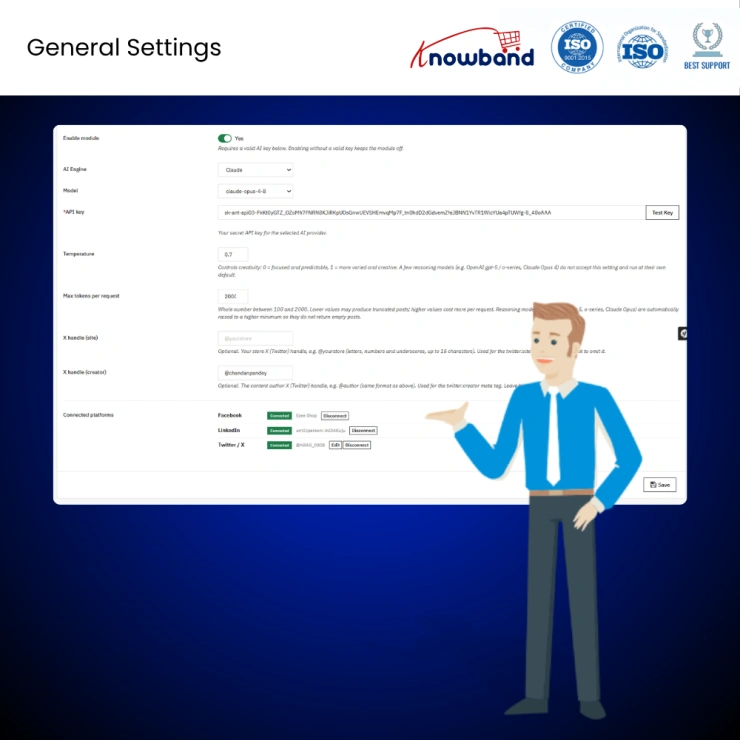
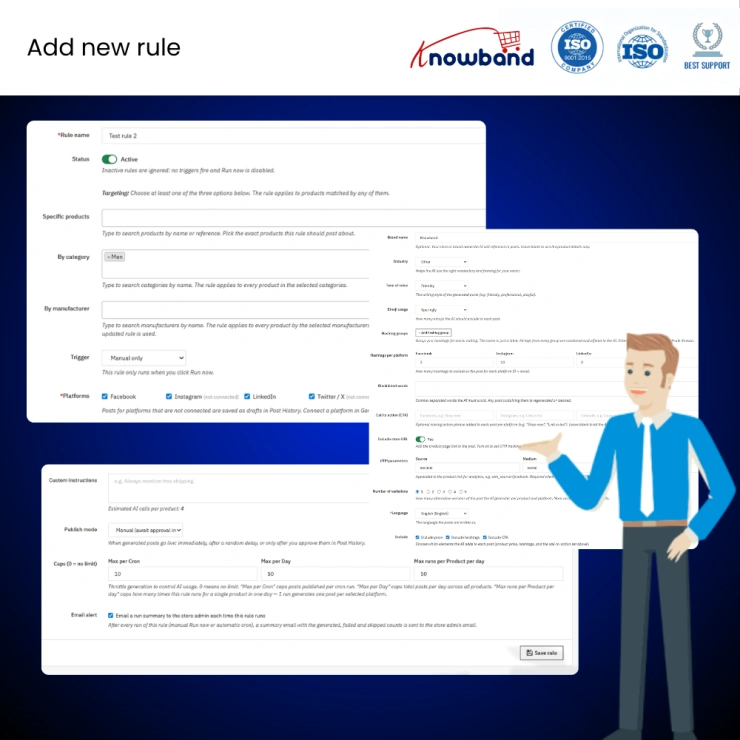
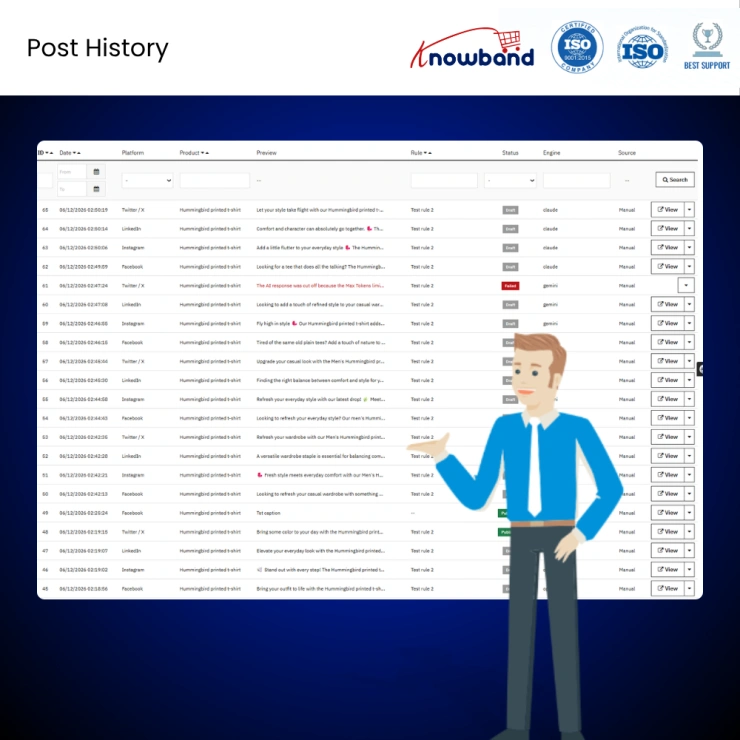
The PrestaShop AI Social Media Post Generator Module - SocialAI Pro packs every capability a store admin needs to run a consistent, automated social presence into a social media platforms like Facebook, Instagram, Linkedin and X.
 Watch Video

SocialAI Pro is an AI social media post automation module built exclusively for PrestaShop stores. It connects your product catalogue to three major social channels, including Facebook, LinkedIn, and X (Twitter), and uses your choice of AI engine to write, schedule, and auto-publish posts with zero manual effort.
Where most social media tools ask you to generate copy and paste it yourself, SocialAI Pro completes the full loop: AI writes platform-tuned content for each channel, your rules decide when and where it posts, and the module handles publishing automatically through native OAuth connections. The result is a live, consistent social presence that runs itself, even while you sleep.
Whether you're launching a new product, restocking inventory, or pushing a catalogue of hundreds, SocialAI Pro turns those events into ready-to-post, on-brand social content the moment they happen. Backed by OpenAI ChatGPT GPT-5, Google Gemini, and Anthropic Claude, the three leading AI engines, you choose the model that fits your quality bar and budget, and swap it any time.
Prestashop AI Social Media Post Generator Addon Pro gives you direct integration to OpenAI (GPT-5, GPT-4.1, GPT-4.1 Mini, GPT-4o), Google Gemini (Gemini 3 Pro, 2.5 Pro, 2.5 Flash), and Anthropic Claude (Opus 4.8, Sonnet 4.6, Haiku 4.5), the most comprehensive AI engine selection available in any PrestaShop social media module. Paste your API key, click "Test Connection," and every post from that point is generated by the model you chose. No lock-in. Deprecated models are filtered out automatically so you never accidentally call a retired endpoint.
Unlike tools that generate content and leave the posting to you, SocialAI Pro auto-publishes natively to all three platforms through a guided one-click OAuth flow. You paste two app credentials per platform, authorise in a pop-up, and the module handles token exchange, account detection, and, for Facebook, Page selection when you manage multiple Pages. From that point on, every post the rules generate goes live on the channels you chose, automatically.
Rules are the engine of SocialAI Pro. Each rule defines which products to post (specific items, whole categories, or all products from a manufacturer), when to trigger (new product published, back in stock, or manual), where to publish, and how the copy should sound. The same rule handles Run-now clicks, automatic event triggers, and cron-scheduled runs, one definition, every path covered. For ecommerce stores with large or fast-moving catalogues, this is the automation layer that makes a consistent social media presence genuinely achievable.
Every post PrestaShop AI Marketing Content Generator Module generates reflects your brand, not a generic template. Each rule carries a full voice configuration, brand name, industry, tone (Professional, Friendly, Playful, Urgent, or Inspirational), emoji usage policy, hashtag groups, a word blacklist, per-platform call-to-action phrases, and a custom instructions field where you can inject anything ("Always mention free shipping"). These settings are woven directly into the AI prompt before each call. The copy reads like your marketing team wrote it because it was briefed like your marketing team would brief it.
Prestashop AI Social Media Post Generator Module does not write one caption and blast it to every channel. It generates distinct, platform-optimised content for each network: conversational, benefit-led copy for Facebook (up to 63,206 characters); emoji-forward posts with hashtags on their own line for Instagram; measured, professional tone for LinkedIn (up to 3,000 characters); and tight single-line copy for X/Twitter that fits within the 280-character limit. Character limits are enforced after generation, a post that runs over is caught before it ever reaches the publisher.
SocialAI Pro watches two high-value moments and fires rules automatically when they occur. The new product trigger fires while the item sits within your store's configured new-product window, ensuring every launch gets an announcement without anyone needing to remember. The back-in-stock trigger fires the instant quantity crosses from zero to positive, generating urgency-led copy that turns a restock into a sales event. Product combinations are handled correctly; restocking one variant does not accidentally trigger posts for a different variant's stock.
When you run a rule across a large product catalogue, you don't want fifty posts hitting three feeds in the same minute. Prestashop AI Social Media Post Generator Scheduled publish mode holds generated posts and releases them at a random point within a configurable min-to-max day window, so your content trickles into followers' feeds naturally, at intervals that look human. Immediate and Manual (draft) modes are also available per rule, giving you full control over urgency versus oversight.
Not every post needs AI generation or a rule trigger behind it. The PrestaShop Social Media Automation Module lets store admins create a completely custom post from scratch, write your own copy, pick your platforms, and publish or schedule it manually without running any automation. This is the feature that covers one-off announcements, flash sales, event promotions, or any post where you want full control over every word rather than an AI-written draft to start from.
Every post PrestaShop Social Media Automation Module by Knowband generates is logged permanently in Post History, with platform, status, AI engine, source (Auto or Manual), and the rule that created it. Failed posts show the exact provider error, a 403 from X, a quota exhaustion from OpenAI, a truncated response from Claude, right in the preview column, so you know the real reason without digging into logs. Status pills (Draft, Scheduled, Published, Failed) make the board readable at a glance. Posts are never auto-deleted; the history is your audit trail.
Each post gets its own clean, public landing page, slug-routed, stripped of theme headers and footers, with the correct social meta tags for its platform (Open Graph for Facebook and LinkedIn, Twitter Card for X). This means every link you share from PrestaShop Auto Publish Facebook LinkedIn Module renders a rich preview card on the channel it was made for, and carries a canonical link back to your product page for SEO continuity. It is a feature found in no comparable PrestaShop social media module.
PrestaShop Social Media Automation Module supports multilingual PrestaShop stores, allowing you to generate social media content in the language assigned to each product or shop. AI-generated posts can reflect local language preferences, helping you engage customers more effectively across different regions and markets. Whether you operate a single store with multiple languages or manage international storefronts, PrestaShop Social Media Auto Scheduler Addon helps maintain a consistent brand voice while adapting content for local audiences.
1. Save hours every week without compromising quality. Creating platform-specific captions for every new product across multiple social channels, while maintaining brand consistency, selecting relevant hashtags, and including accurate links, can consume valuable time and resources. PrestaShop AI Social Post Content Generator reduces it to a one-time rule setup. After that, the module writes and publishes every post while you focus on running the store.
2. Never miss a product launch or restock moment. The most effective social posts are timely, a new product announcement the day it goes live, a back-in-stock alert before customers move on. SocialAI Pro's event triggers automate within the window that matters, automatically, without anyone needing to watch a dashboard.
3. Sound like your brand on every channel, every time. Generic AI-generated content is immediately recognisable, and it erodes trust. SocialAI Pro focuses your tone, vocabulary, CTAs, and banned words into every AI call, so the output reflects your brand identity rather than a default template.
4. Scale your social presence without scaling your team. Whether you have 10 products or 10,000, PrestaShop Social Media Marketing Automation Module Pro handles them at the same effort level. A single Run-now click generates platform-tuned posts for every product in a rule. Scheduled mode trickles them out naturally. No extra headcount required.
5. Control spend with hard per-rule caps. AI API calls and social platform posts both carry a cost. PrestaShop Twitter Auto Post Addon three per-rule caps, maximum posts per cron run, per day, and per product per day, give you a hard ceiling on both. Set them once per rule, and the module never exceeds them.
Stay informed without opening the back office. Email run summaries land in your inbox after every automatic or manual run, including generated, published, failed, and skipped counts with the rule name and any issues. You know what happened without logging in.

Knowband, a leading name as an eCommerce development company, provides Prestashop Addons Development Services to enhance the functionality of your eCommerce stores. For providing Prestashop add-ons development, we have hired experienced Prestashop developers who work with full dedication to offer Prestashop development and support services.
If there is a feature you want on your Prestashop store, chances are that a Prestashop plugin will allow you to do it, if you don't find any such plugin you can always contact us for your custom plugin development requirements.
SocialAI Pro, the PrestaShop Social Media Marketing Automation Module, automatically publishes product posts to Facebook, LinkedIn, and X (Twitter) through a native OAuth connection with no copy-pasting, no manual scheduling, and no third-party bridge required. Once your platform credentials are connected via a one-click OAuth flow, every rule you create sends posts live to your chosen channels the moment the trigger fires. Store admins managing large catalogues across multiple social channels get a fully automated publish loop that runs independently of any manual input.
The PrestaShop AI Marketing Content Generator Module supports three leading AI engines: OpenAI (GPT-5, GPT-4.1, GPT-4o), Google Gemini (Gemini 3 Pro, 2.5 Pro, 2.5 Flash), and Anthropic Claude (Opus 4.8, Sonnet 4.6, Haiku 4.5), giving store admins full control over which model generates their social media content. You connect your own API key, test the connection directly from the admin panel, and switch engines at any time without reconfiguring your rules. Deprecated models are filtered out automatically so your store never calls a retired endpoint mid-campaign.
The PrestaShop Back In Stock Social Media Module generates an automated social media post the instant a product's inventory crosses from zero to positive, capturing the exact moment when urgency is highest and customers are most likely to act. The trigger generates urgency-led, platform-native copy for each connected channel and publishes immediately without any manual intervention. Product variants are handled correctly, meaning restocking one size or colour does not accidentally trigger posts for unrelated variants in the same product group.
The PrestaShop Auto Post New Product Addon detects every newly published product while it sits within your store's configured new-product window and automatically generates and publishes a platform-tuned announcement post to your connected social channels. Each post is written by your chosen AI engine using the brand voice, tone, hashtags, and call-to-action phrases defined in your rule, so every product launch gets a consistent, on-brand social announcement without anyone needing to monitor the dashboard or trigger it manually. Moreover, you can also edit it directly from all the post history. No launch goes unannounced and no admin time is spent writing copy.
The PrestaShop Auto Publish Twitter X Addon Pro publishes to X (Twitter), Facebook, and LinkedIn simultaneously from a single rule, with platform-native copy generated separately for each channel rather than one caption blasted everywhere. X posts are written within the 280-character limit and enforce that ceiling after generation, so a post that runs over is caught before it ever reaches the publisher. The same rule that fires a tight, single-line X post also sends a longer benefit-led Facebook post and a measured professional LinkedIn update, all from one trigger and one AI call.
The PrestaShop Brand Voice AI Content Addon embeds your brand identity directly into every AI prompt before a single word of copy is generated, including your brand name, industry, tone of voice (Professional, Friendly, Playful, Urgent, or Inspirational), emoji usage policy, hashtag groups, per-platform call-to-action phrases, and a word blacklist for terms you never want published. These settings are woven into the AI instruction layer, not applied as a filter after the fact, which means the model writes from your brief rather than producing generic output that gets adjusted later. The result is copy that reads like your marketing team wrote it because it was briefed exactly the way your marketing team would brief it.
The PrestaShop Social Post Scheduling Addon distributes bulk product posts across a configurable random delay window, so when a rule runs across a large catalogue, posts are released gradually over a minimum-to-maximum day range rather than hitting all three feeds in the same minute. This scheduled publish mode makes your content appear at natural human intervals, which improves organic reach and avoids the appearance of automated spam. Immediate mode and Manual draft mode are also available per rule, giving you the choice between fully automated distribution and hands-on post approval depending on the campaign.
The PrestaShop Multi Store Social Media Module fully isolates every setting, API connection, social platform token, rule, post history, and cron schedule per individual shop, meaning each store in your network operates its own independent social media automation with no data shared between stores. One module installation serves an unlimited number of PrestaShop stores, and each store owner sees only their own posts, connections, and rules. Agency operators managing multiple client stores get complete separation without running separate installs or maintaining separate admin environments.
The PrestaShop Product Announcement Automation Addon Pro solves the core challenge of large catalogue management: the fact that manually writing and posting social content for every new or restocked product is simply not sustainable beyond a handful of SKUs. By defining a single rule that targets a category, manufacturer, or your entire catalogue, every qualifying product gets a platform-tuned social post generated and published automatically the moment its trigger condition is met. Three per-rule caps (maximum posts per cron run, per day, and per product per day) give store admins a hard ceiling on output volume so automation never exceeds the planned content cadence.
SocialAI Pro is fully compatible with PrestaShop versions 1.7.x, 8.x.x, and 9.x.x, making it the most version-inclusive PrestaShop Social Media Automation Module currently available for stores that have not yet migrated to the latest release. Beyond compatibility, it is the only PrestaShop module that completes the full social media loop: AI writes platform-native copy, rules decide when and where it posts, and the module publishes directly to Facebook, LinkedIn, and X through native OAuth without requiring any third-party scheduler, copy-paste step, or external tool. For stores that need consistent social output without adding headcount or daily manual effort, no comparable PrestaShop addon covers the same ground.
 Sale
Sale
Having mobile apps for your site can increase your sales and customer ...
$199.99 $249.99
PrestaShop Auction Module to run live product bidding with scheduled a...
$69.99
Sale
Run in-store and online sales from one PrestaShop back office using Pr...
$79.99 $99.99
Sale
The Prestashop LLMs TXT Generator for AI Search Engines like ChatGPT, ...
$39.99 $49.99


