
Your shopping cart is empty!

-740x740.webp "PrestaShop LLMs TXT Generator Addon")
-740x740.webp "PrestaShop LLMs TXT Generator Addon")
-740x740.webp "PrestaShop LLMs TXT Generator Addon")

The Prestashop LLMS TXT Generator allows Popular AI like ChatGPT, Gemini, Perplexity, DeepSeek and Many more to recommend your products.
Automatic LLMs TXT file Generator for Product, Categories and CMS Pages.
Key Highlights of Prestashop LLMS TXT File Generator for AI Search Engines
 Watch Video
The PrestaShop LLMs TXT Generator helps store owners to automatically generate an llms.txt file for the store’s catalogue. This eCommerce llms.txt file generator is designed to add the AI crawlers to crawl the store content and recommend it to the customers who ask the related query on the AI search engines like ChatGPT.
By generating a structured llms.txt file on the server, your store becomes more accessible to modern AI engines like ChatGPT, DeepSeek, Gemini, Perplexity and Claude to fetch. This in turn helps in AI recommendation optimisation for your store to all customers who will ask a query regarding the product or store’s content.
Thus, this helps in increasing the chances of your products being discovered, recommended, and referenced in AI-generated responses from the AI models.
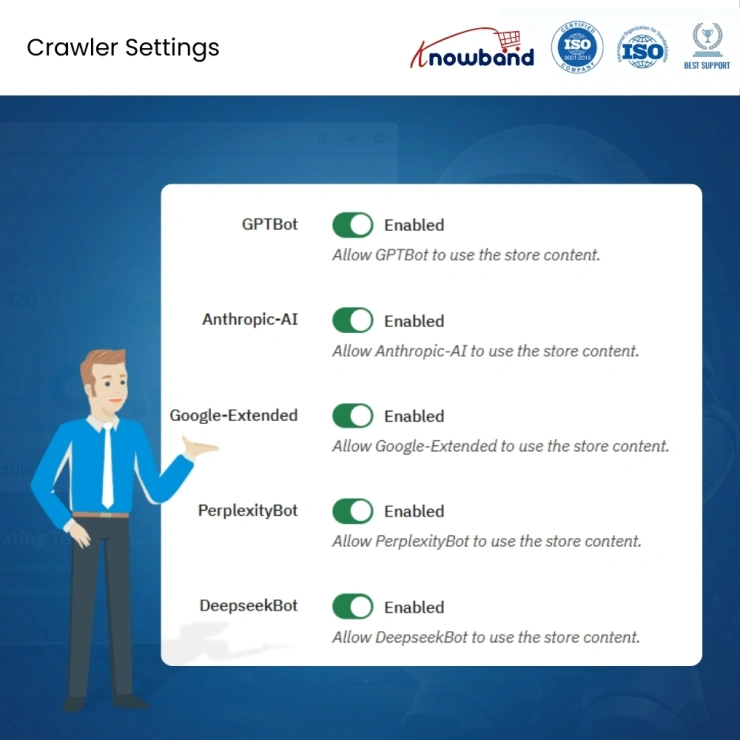
This PrestaShop llms.txt generator module provides ChatGPT product recommendations, allowing crawling from multiple advanced AI Models bots which include: DeepseekBot, GPTBot, Anthropogenic AI PerplexityBot, and Google Extended
This Knowband PrestaShop module for AI crawler access control manage which AI bots can access your store content. Additionally, you will have all the control of access on your hand using this generative AI search module
The AI LLMs File Generator allows the store admins to add additional content for AI Models to understand.
This customisation in llms.txt file generator addon files like categories, product and CMS Pages files is integrated to so that store AI Models can better understand and index your store.
This LLMs TXT Generator for AI Search Engines allows the admins to select which content types (product pages, category pages, and CMS pages) are included in the llms.txt file to ensure accurate AI targeting and avoid unnecessary content exposure.
This llms.txt generator module is designed to support evolving AI capabilities, making your store ready for next-generation AI search and recommendation engines.
This Prestashop LLM Txt Generator allows the store admin to select and filter products, categories, and CMS pages to include in the llms.txt file.
This PrestaShop llms.txt file generator addon can interpret your product and category pages effectively on AI platforms, your products get a better chance of being featured and suggested in AI responses to shopper inquiries.
The structured file created by the this module to generate llms txt enables AI crawlers to accurately understand Product details and specifications, Category pages and CMS Pages
The AI answer engine optimisation module creates and refreshes the llms.txt file automatically as your product catalog evolves. There's no need for manual file management or technical upkeep with this eCommerce AI bot access control system.
Designed for global ecommerce operations, this ChatGPT product recommendations module allows crawlers to fetch content in multiple languages, scaling your potential customer base worldwide.
The llms.txt generator for e-commerce gives you a competitive advantage while others continue using only traditional approaches with superior product recommendation optimisation.
Knowband, a leading name as an eCommerce development company, provides Prestashop plugin development services to enhance the functionality of your eCommerce stores. For providing Prestashop plugin development, we have hired experienced Prestashop developers who work with full dedication to offer Prestashop development and support services.
If there is a feature you want on your Prestashop store, chances are that a Prestashop plugin will allow you to do it, if you don't find any such plugin you can always contact us for your custom plugin development requirements.
The Knowband PrestaShop LLMs.txt Generator module builds a structured llms.txt file for your store that platforms like ChatGPT, Gemini, Claude, and Perplexity can read. It organises your products, categories, and CMS pages into a format AI crawlers actually understand, so when someone asks an AI where to buy something you sell, your store has a real shot at showing up.
AEO is the practice of structuring your store content so AI-powered platforms like ChatGPT, Perplexity, and Google SGE can pull and cite it directly in their answers. Instead of just ranking as a link, your products get referenced in AI-generated responses. For e-commerce stores, this means more visibility where shoppers are increasingly starting their product searches.
SEO helps you get ranked in Google's traditional search results. GEO (Generative Engine Optimisation) is about getting your content cited inside AI-generated responses. AEO focuses on AI answer engines like ChatGPT and Perplexity specifically. All three matter today, but AEO and GEO are quickly becoming essential as more shoppers skip Google and ask AI platforms instead.
A sitemap tells search engines where your pages are. Robots.txt tells crawlers what to skip. An llms.txt file serves a different purpose altogether. It is written for AI answer engines, giving them actual readable content about your catalogue so they can form accurate product recommendations rather than just crawling and indexing page URLs. It is a foundational part of any AI search visibility strategy for eCommerce.
Yes, that is exactly what it is built for. GPTBot needs a clean, well-structured llms.txt file to pull meaningful product data from your store. Once it has that, ChatGPT can reference your products when users ask relevant questions. Without this file AI models tend to skip your store entirely, particularly when bigger competitors have already set up their AI product discovery properly.
The module supports five major AI crawlers: GPTBot (ChatGPT/OpenAI), DeepSeekBot, Google-Extended (Gemini), PerplexityBot, and Anthropic-AI (Claude). From the admin panel, you can easily enable/disable these models individually. So if you only want certain AI platforms indexing your store content, you have full control over that without any coding required.
Absolutely. The Content Filtering section lets you pick specific products, categories, and CMS pages to include or exclude. You can limit it to active or featured products, skip CMS pages, and keep the file focused and relevant. This stops sensitive or unnecessary content from being indexed by AI crawlers without your knowledge.
SEO is about ranking in Google's search results, where users still have to click through to your store. AEO works differently. AI platforms like ChatGPT and Perplexity skip the link list and pull answers directly. If your store is not structured for that, you simply do not appear in those results. As more shoppers turn to AI before opening Google, relying only on SEO leaves a growing gap in your store's visibility that this PrestaShop AI answer engine optimization addon directly addresses.
Yes. The PrestaShop LLMs.txt file generator addon runs on a cron-based batch system, processing 30 products and 5 CMS pages per execution by default. You can increase or reduce those numbers based on what your hosting can handle. Big stores might need a few cron runs to fully generate the file, but it gets the job done without straining your server.
Yes, it does. If you run multiple shops under one PrestaShop installation, each of them gets its own separate llms.txt file. Admins can easily configure settings like content filtering and file customisation individually per store. If your shops serve different regions, languages, or product lines, this helps keep everything clean.
You can add custom text before and after the store description, product listings, category sections, and CMS pages. On top of that, the File Boundaries feature lets you add global notes at the very top and bottom of the file. Store owners mostly use this to give AI crawlers extra context about what the store sells, how the catalogue is structured, or any instructions they want the bots to follow.
Installation is straightforward. After purchase, you get a zip file that you upload directly through PrestaShop's Module Manager. Once installed, click Configure, and you are taken to the settings panel. Enable the module, set your store name, configure your crawler access settings, apply content filters, and run the cron job to generate your first llms.txt file.
 Sale
Sale
Having mobile apps for your site can increase your sales and customer ...
$199.99 $249.99
Sale
Check SEO and readability analysis on your PrestaShop ecommerce store ...
$55.99 $69.99
Sale
Secure your PrestaShop store with 12 protections in one Prestashop Sec...
$39.20 $49.00
Sale
SocialAI Pro is the Prestashop AI Social Media Post Generator develope...
$55.20 $69.00


