
Your shopping cart is empty!

-740x740.webp "Opencart Advanced Security Manager Extension")
-740x740.webp "Opencart Advanced Security Manager Extension")
-740x740.webp "Opencart Advanced Security Manager Extension")
-740x740.webp "Opencart Advanced Security Manager Extension")
-740x740.webp "Opencart Advanced Security Manager Extension")
-740x740.webp "Opencart Advanced Security Manager Extension")
A complete OpenCart security extension that protects your store's login, admin panel, and checkout process from hackers, bots, and brute-force attacks, without slowing down your team.
Key Highlights of Opencart Advanced Security Manager
 Watch Video

An online store with no dedicated security layer is essentially running on the honour system. Scripts enter admin login forms, contact forms get buried under spam submissions, and bots quietly populate shopping carts to throw off your sales data. None of that requires a skilled attacker but just patience and a bit of automation. Yet most OpenCart installs still guard their entire backend with a single username and password.
This Opencart Advanced Security Manager, also knowband as Opencart Security Extension, wraps both the admin side and the front end of an OpenCart store in a layered set of protections, managed entirely through one settings page, and it deals with a recovery mechanism specifically designed so a misconfiguration can never strand you outside your own dashboard.
| 1 |
Two-Factor Sign-In
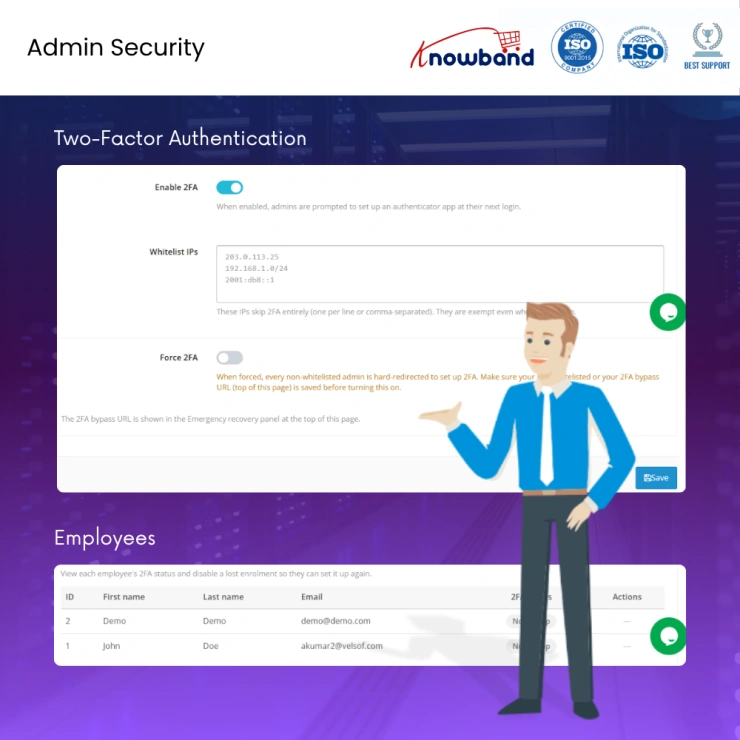
A second authentication step integrates a correct password and actual access: a rotating six-digit code generated by any authenticator apps like Google Authenticator, Authy, Microsoft Authenticator, whatever your team already uses. The opencart 2FA extension allows the user to set up seconds per user (copy a key into the app, done with no scanning required). Store owners can flip on a store-wide enforcement mode, maintain a list of trusted IPs that skip the prompt, and check a Users panel showing exactly who has it active, with the ability to reset it instantly when someone replaces their phone. |
| 2 |
Login Throttling
Repeated failed login attempts from the same IP trigger an automatic, temporary block using the Opencart Login Security Extension once a threshold you define is crossed. The block lifts on its own after a set window, and addresses on your trusted list are never affected, so your own staff never gets caught in the net. |
| 3 |
Restricting Admin Access by IP
You can shrink the admin login down to a short list of permitted IPs, for example, your office, a VPN, a home connection and everything outside that list simply can't reach the login screen. The moment this is switched on, your current IP is added automatically, removing the most common way people accidentally fence themselves out. |
| 4 |
Camouflaging the Admin Path
You can move the login screen to a URL of your own choosing using the e-commerce security extension, so that when someone adds /admin, it shows 404 errors. So, scanners and bots looking for a standard OpenCart admin path find nothing |
| 5 |
A Second Login Wall
Places an independent username-and-password layer in front of the regular admin login which effectively a second locked door with its own trusted-IP exemptions, separate from your normal credentials. |
| 6 |
Visibility Into Login Activity
Using the OpenCart security extension, store admins can get notified by email on failed logins, successful ones, or both, and pull a full record (timestamp, IP, outcome) any time they want to review who's been trying to get in. |
| 7 |
Anti-Malware Scanning
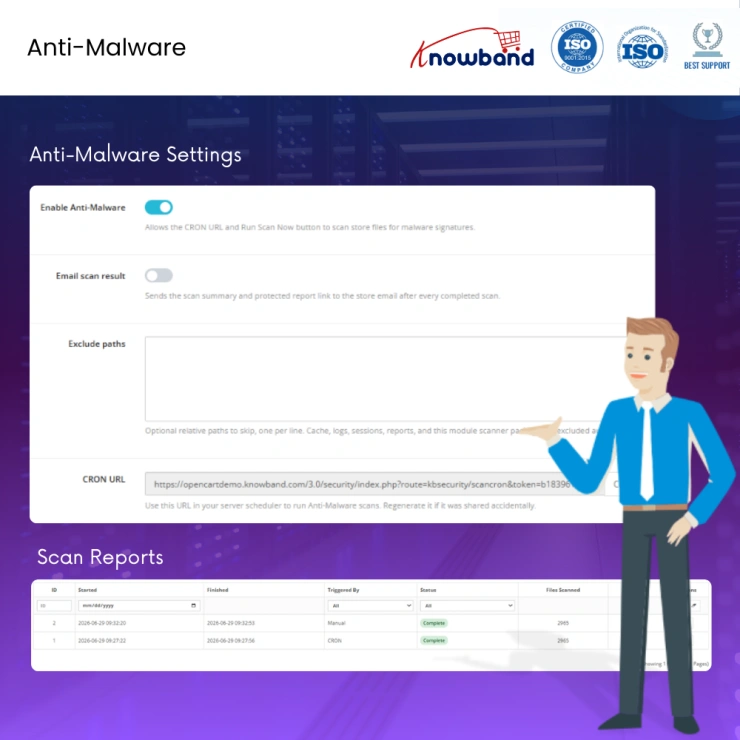
A scheduled scan runs in the background, checking for new or altered files that match known malware signatures, with email alerts when something turns up and a way to exclude specific paths so legitimate file changes don't trigger false positives. |
| 8 |
Request Filtering (Firewall / WAF)
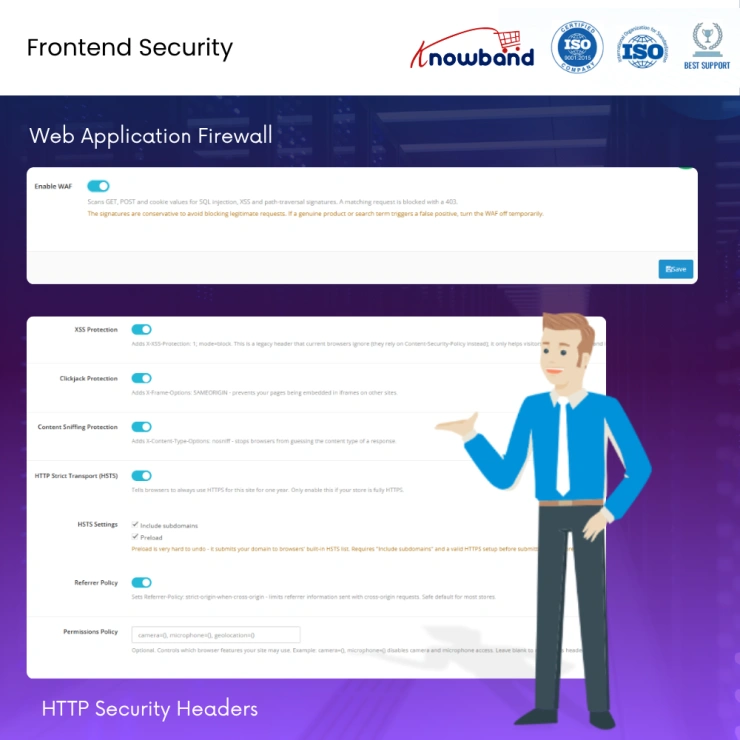
Incoming traffic is screened against known malicious request signatures before it ever reaches your store's code. The OpenCart Firewall Extension requires no configuration beyond a single on/off switch; protection runs continuously in the background with zero ongoing maintenance. |
| 9 |
Zero-Config Security Header Injection
Hardened response headers are applied with a single toggle; no server configuration file required. This opencart storefront security extension includes anti-clickjacking protection, MIME-type enforcement, and HSTS, browser-level defences that are typically reserved for sites with dedicated DevOps support. |
| 10 |
CAPTCHA Across Public-Facing Forms
Login, registration, contact, and other customer-facing forms are protected with a CAPTCHA challenge. Cloudflare Turnstile is supported natively for a fast, largely invisible visitor experience, alongside hCaptcha and Google reCAPTCHA in the Opencart ReCAPTCHA Module for Frontend. A built-in "Test Keys" tool lets you verify your configuration before it goes live. |
| 11 |
Content Scraping Deterrence
Right-click, copy/paste, and text selection can be disabled across the frontend, preventing content scraping from the spammy traffic. A trusted-IP exemption list using the Opencart Content Scrapping Preventive Extension ensures your own team's workflow is never affected. |
| 12 |
Full-Storefront Password Protection
A separate login screen in the OpenCart Security extension can be placed in front of the entire storefront, not just the admin panel, ideal for pre-launch builds, staging environments, or stores intended to stay private. This runs on independent credentials with its own IP exemption list. |
| 13 |
One-click emergency recovery
A single link instantly disables every active protection across all stores in a multi-store install, giving you an immediate way out if anything is ever misconfigured in the Opencart Advanced Security Manager Extension. |
| 14 |
Automatic self-lockout prevention
Your current IP is whitelisted the moment IP restriction is enabled, and a bypass link is generated as soon as 2FA is activated, removing self-lockout as a realistic risk. |
| 15 |
Fully reversible controls
Every feature operates as an independent toggle and can be switched off at any time, with no dependencies between settings. |
Knowband, a leading name as an eCommerce development company provides Opencart plugin development services to enhance the functionality of your eCommerce stores. For providing Opencart plugin development, we have hired experienced Opencart developers who work with full dedication to offer Opencart development and support services.
If there is a feature you want on your Opencart site, chances are that an Opencart plugin will allow you to do it, if you don't find any such plugin you can always contact us for your custom plugin development requirements
The OpenCart Security Manager covers both the admin panel and the frontend of the store. On the admin side, that means 2FA, login throttling, IP restriction, and a disguised admin path. On the storefront side, it covers the firewall, security headers, CAPTCHA, fake-cart filtering, and content-scraping deterrents.
Yes. The OpenCart Security Manager by Knowband works with any TOTP-based authenticator app, including Google Authenticator, Authy, and Microsoft Authenticator. There's nothing proprietary about the 2FA setup.
No. Every option in the security extension is a plain-language toggle designed for store owners managing their own settings — no code required.
Store admins can use Cloudflare Turnstile, supported natively for a fast, low-friction experience, alongside hCaptcha and Google reCAPTCHA. A "Test Keys" button lets you confirm your setup before it goes live on the storefront.
Yes. The Frontend Password Gate feature puts a login wall in front of the whole store — handy for staging environments, pre-launch builds, or private/members-only setups.
Yes. The extension is built for multi-store environments, and the emergency recovery link can disable protections across every store in the install at once.
No. It's a lightweight settings layer that only adds scripts for the specific features you turn on (like CAPTCHA). The HSTS and security headers it enables are generally considered SEO-neutral to mildly positive, not harmful.
Yes. The interface supports multiple languages, which makes it a practical choice for international stores and agencies running non-English storefronts.
 Sale
Sale
Getting Opencart Mobile App for online stores has never been so easy u...
$159.99 $199.99
Sale
Automate the content generation and translations on your Opencart eCom...
$55.99 $69.99
Sale
Effortlessly create unique, SEO-friendly content and translate product...
$39.99 $49.99
Sale
Enhance your customer engagement with Knowband's OpenCart WhatsApp Liv...
$31.99 $39.99


