Wie kann ein Anbieter seine Präsenz auf dem Walmart Marketplace optimieren?

Walmart ist eines der größten Einzelhandelsunternehmen. Zahlen lügen nicht und die statistischen Zahlen mit diesem Marktplatz bieten definitiv eine positive Stimmung für die E-Vendoren. Der Online-Händler hat sich in fast alle Segmente unter der Sonne eingearbeitet. Als einer der größten und erfolgreichsten Einzelhändler bietet die Plattform auch kleinen Anbietern und Verkäufern die Möglichkeit, ihre Geschäftsreichweite zu erweitern.

Walmart hat 11,000 + Stores weltweit. Wenn Sie also Ihr Geschäft international ausweiten möchten, dann ist dies ein One-Stop-Ziel für Sie. Der weltweite Nettoumsatz des Unternehmens betrug ungefähr $ 481.32 Milliarden. Während für das Geschäftsjahr 2018 der Umsatz auf $ 500.3 Milliarden angestiegen ist.

Diese Zahlen werden in den kommenden Jahren voraussichtlich noch größer werden. Daher ist die Integration der E-Commerce-Shops mit Walmart.com ein Muss für die Online-Anbieter. Möchten Sie Ihren Online-Shop in den Marktplatz integrieren? Sind Sie durch die technischen Details angedeutet? Du brauchst dich nicht mehr zu sorgen. Walmart Integration Extension kann die eCommerce-Besitzer helfen, ihren Web-Shop mit Walmart.com zu integrieren.

Obwohl der Marktplatz den E-Sellern eine einfache Möglichkeit bietet, ihre Geschäftsreichweite zu erweitern, hat sie auch einige Nachteile. Der harte Wettbewerb kann Ihre Nerven in Anspruch nehmen, um aufzufallen. Erhöhen Sie Ihre Präsenz auf dem beliebten

Wie können die Third-Party-Verkäufer ihre Präsenz auf walmart.com optimieren?

Hier sind einige der Möglichkeiten, wie Sie Ihre Präsenz auf dem überfüllten Marktplatz optimieren können. Lesen Sie weiter, um mehr zu erfahren.

Ein Bild sagt mehr als tausend Worte

Da der gesamte Prozess des Online-Kaufs dem Kunden kein Look and Feel des Produkts bietet, ist es sinnvoll, an den visuellen Grafiken zu arbeiten. Der ganze Zweck des Herausragens besteht darin, die Kunden zu motivieren, Ihr Produkt gegenüber dem Wettbewerb zu wählen. Dann kommt Visual Merchandising ins Spiel.

Organisieren Sie Ihre Produkte, um ihre Sichtbarkeit zu maximieren. Erleichtern Sie Ihren Kunden den Zugriff darauf. Die weißen Hintergründe von Walmart Marktplatz bieten eine sehr saubere und professionelle Schnittstelle für die Verkäufer, um das Display zu optimieren.

Walmart Marketplace Integrator bietet hochauflösende Bilder und die 3-dimensionale Ansicht der Produkte.

Detaillierte Beschreibung

Der beste Weg, sich von der Masse abzuheben, wenn es um Online-Shopping geht, ist, den Kunden die richtigen Informationen zur Verfügung zu stellen. Eine Möglichkeit, dies durch detaillierte Produktbeschreibungen zu erreichen.

Die Kunden suchen nach dem Produktnamen. Daher ist es ratsam, dass die Verkäufer den Produkttitel intelligent kuratieren. Der Walmart-Marktplatz ermöglicht es Ihnen, bis zu 200-Zeichen in einem Produkttitel zu verwenden, um das Beste daraus zu machen. Die Schlüsselattribute des Titels sind Marke, Artikelname, Stil, Farbe, Material und andere.

Die Produktspezifikation ist ein Muss. Fügen Sie alle Informationen hinzu, nach denen die Kunden suchen.

Fügen Sie die Keywords, Long-Tail-Keywords und Suchanfragen auf der Produktseite hinzu. Dies wird es den Produkten erleichtern, einen höheren Rang in Google SERP einzunehmen.

Konzentrieren Sie sich auf den Aufbau von Kundenbeziehungen

Das braucht der E-Merchant lerne aus dem Ladengeschäft. Engagieren Sie Ihre Kunden und steigern Sie den Wert, indem Sie eine emotionale Verbindung aufbauen. Wie bei jedem anderen Unternehmen oder jeder Marke ist die Kundenbeziehung der Schlüsselaspekt für die Kundenbindung. Unabhängig davon, ob es sich um einmalige Einkäufer oder Langzeitkäufer handelt, die Pflege von Kundenbeziehungen kann Ihnen dabei helfen, im Wettbewerb zu überleben. Den Kunden eine nahtlose Online-Transaktion zu bieten, ist der Schlüssel. Bieten Sie transparente Rückgabe- / Rückerstattungsrichtlinien an. Lösen Sie ihre Probleme und die Probleme effektiv. Nehmen Sie ihr Feedback und arbeiten an den negativen Bewertungen können sie sich geschätzt fühlen.

Perfekte Kategorisierung

Schaffen Sie eine gute Kauferfahrung für Ihre Kunden. Produktkategorisierung kann ihnen helfen, das gewünschte Produkt zu finden. Halten Sie die ähnlichen Produkte auf der gleichen Liste, so dass die Käufer alle möglichen Produkte anzeigen können, ohne viel zu navigieren. Dies erleichtert den Kaufprozess und führt zu einer höheren Conversion-Rate. Walmart Marketplace Integrator bietet über 24 verschiedene Kategorien. Platzieren Sie Ihre Produkte in der richtigen Kategorie, um die Produktattribute zu beschreiben. Vermeiden Sie die Auswahl der Kategorie "Andere". Je mehr Attribute Sie bereitstellen, desto höher wird Ihr Produkt auf einer Produktsuchseite eingestuft.

Dies ist eine knifflige Angelegenheit, da sich die Kategorien des Online-Shops und des Marktplatzes unterscheiden können. Die manuelle Integration ist jedoch nicht so schwierig. Für die CMS-basierte E-Commerce-Seite wie Prestashop, Magento, OpenCart und andere gibt es außerdem Plugins, die den gesamten Prozess automatisieren. Die Kategoriezuordnung erfolgt durch einfaches Klicken auf einige Schaltflächen aus dem Backend der Erweiterung, wodurch das Auflisten der Produkte in der entsprechenden Kategorie erleichtert wird.

Experimentiere mit dem Inventar

Halten Sie sich nicht an die herkömmlichen Verkaufsmethoden. Experimentieren Sie mit dem Produktmix, den Sie auf dem Walmart-Marktplatz anbieten. Der Schlüssel zum Erfolg in einem überfüllten Markt wie Walmart ist hohes Volumen und niedrige Preise. Attraktiv verpackte Low-Cost-Artikel können Ihnen helfen, die Aufmerksamkeit der Zielgruppe zu gewinnen. Führen Sie ab und zu neue Artikel ein. Verfolgen Sie das Kundenverhalten, um zu sehen, wie schnell sie verkaufen. Verwalten Sie den Stapel der alten effizient. Versuchen Sie, den Schmerzbereich der Kunden herauszufinden. Das anlassbasierte Inventar kann Ihnen dabei helfen, die passende Lösung bereitzustellen, nach der Sie suchen.

BuyBox
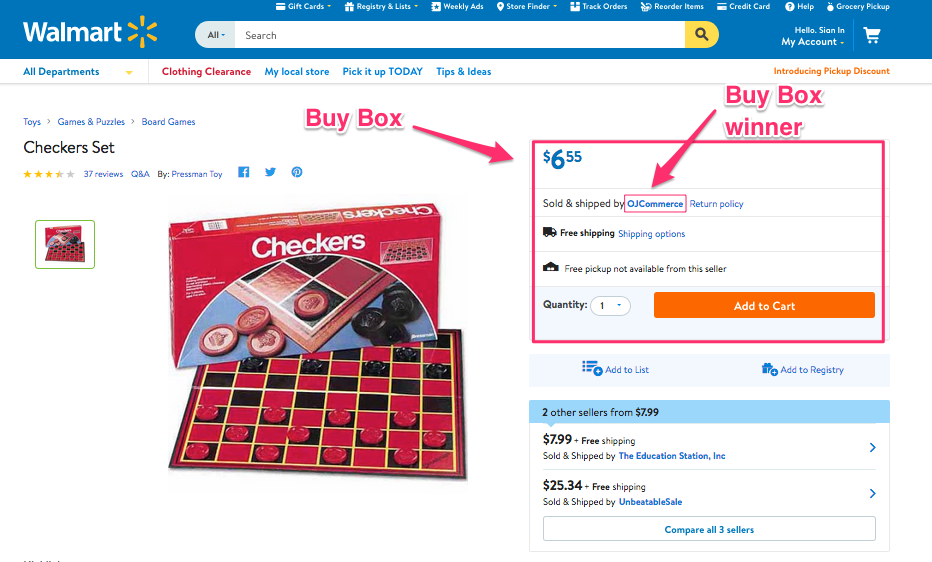
Walmart bot eine Option von Buy Box an, wo die Verkäufer leicht mit einem anderen Verkäufer um ihren Produktpreis konkurrieren können. Die miteinander konkurrierenden Produkte sollten in derselben Kategorie aufgeführt sein. Das Produkt, das die Kaufbox gewinnt, wird oben in der Liste der gesuchten Artikel aufgeführt. Dies erhöht die Sichtbarkeit der Produkte und erhöht letztendlich die Chancen der Konvertierung. Mit Prestashop Walmart Integration AddonDas Gewinnen der BuyBox ist jetzt ein Kuchenspaziergang für die Prestashop-basierten E-Commerce-Ladenbesitzer. Das Plugin bietet den Verkäufern einen vollständigen BuyBox-Bericht, der ein einfaches Tracking ermöglicht. Sie können die Preise vergleichen und das Produkt über das Admin-Interface selbst neu bewerten. Ähnlich, Magento Walmart Integrator und Magento 2 Walmart-Anschluss kann für die jeweiligen Plattformen die gleiche Funktion erfüllen.

Anzeiger des Verkäufers

Die Seller Scorecard im Walmart Seller Center verfolgt die Kontoleistung eines bestimmten Anbieters. Diese Bewertung basiert auf der Erfüllungsmethode und den Fähigkeiten der Anbieter. Pflegen Sie Ihre Anzeigetafel und passen Sie die von Ihnen angebotenen Dienste entsprechend der Punktzahl an.

Walmart Anzeigen

Der Walmart-Marktplatz bietet den Drittverkäufern sogar ein Medium, um ihre Produkte auf Walmart zu verkaufen, ohne sie sogar aufzulisten. Die Markeninhaber haben die Möglichkeit, direkt mit Walmart für Werbung zu arbeiten. Der Walmart-Marktplatz ist ein weiteres Mittel, um die Sichtbarkeit des Produkts zu verbessern. Der Bereich Gesponserte Produkte befindet sich auf der linken Seite der Suchergebnisseiten. Immer wenn der Nutzer ein Keyword in die Suchleiste eingibt, können Anzeigen, die von diesen Keywords ausgelöst werden, im Bereich "Gesponserte Produkte" erscheinen. Wenn Sie auf diese Anzeigen klicken, werden die Shop-Besucher von Walmart.com auf eine Website von Drittanbietern weitergeleitet.

Schlussworte

Selbst wenn Sie die eCommerce-Giganten wie Amazon, eBay und andere beiseite lassen, Märkte wie Walmart und Jet.com bietet viele Attribute Das macht es zu einem Muss für die E-Händler. Alles, was Sie tun müssen, ist, das Kundenverhalten zu überprüfen und das Merchandising zu kuratieren, um den Wettbewerbsvorteil zu finden.

Die Arbeit der Marktintegration ist müheloser geworden, jetzt, da Knowband die verschiedenen intuitiven anbietet Marktplatz-Integratoren mögen eBay-Integrator, Etsy Integrator und andere zusammen mit dem Walmart Integrator. Finden Sie die passende Lösung für Ihr E-Commerce-Geschäft und nutzen Sie die globale Reichweite eines dieser beliebten Online-Marktplätze.
Comment un fournisseur peut-il optimiser sa présence sur Walmart Marketplace?

Walmart est l'une des plus grandes entreprises de vente au détail. Les chiffres ne mentent pas et les chiffres statistiques de ce marché offrent une atmosphère positive aux vendeurs en ligne. Le détaillant en ligne a exploré presque tous les segments sous le soleil. Étant l’un des plus gros distributeurs et des plus gros distributeurs, la plate-forme offre aux petits vendeurs et aux vendeurs la possibilité d’étendre leur activité.
Walmart a des magasins 11,000 + dans le monde entier. Donc, si vous cherchez à développer votre activité à l'international, il s'agit d'une destination unique pour vous. les ventes nettes mondiales de la société ont atteint environ $ 481.32 milliards. Alors que pour l’exercice 2018, le chiffre d’affaires a atteint un milliard de dollars.

Ces chiffres devraient encore augmenter dans les années à venir. Par conséquent, l'intégration des magasins de commerce électronique avec Walmart.com est indispensable pour les fournisseurs en ligne. Cherchez-vous à intégrer votre boutique en ligne au marché? Êtes-vous informé par les aspects techniques impliqués dans le même? Vous n'avez plus besoin de vous inquiéter. L'extension d'intégration Walmart peut aider les propriétaires de commerce électronique à intégrer leur boutique en ligne à Walmart.com.

Même si le marché offre aux vendeurs en ligne une opportunité simple d’étendre leur champ d’activité, cela présente également des inconvénients. La rude concurrence pourrait nuire à votre nerf dans la quête de vous démarquer. Renforcer votre présence sur le populaire

Comment les vendeurs tiers peuvent-ils optimiser leur présence sur walmart.com?

Voici certaines des façons dont vous pouvez optimiser votre présence sur le marché bondé. Lisez la suite pour en savoir plus.

Une image vaut mille mots

Étant donné que l’ensemble du processus d’achat en ligne ne fournit aucun aspect du produit au client, il est logique de travailler sur les graphiques visuels. Le but principal de se démarquer est de motiver les clients à choisir votre produit par rapport aux concurrents. C'est à ce moment que le merchandising visuel entre en jeu.

Organisez vos produits pour maximiser leur visibilité. Facilitez l'accès à vos clients. Les fonds blancs du marché Walmart offrent une interface très soignée et professionnelle aux vendeurs pour optimiser l'affichage.

Walmart marketplace intégrateur fournit des images haute résolution et la vue dimensionnelle 3 des produits.

Description détaillée

La meilleure façon de se démarquer en matière de shopping en ligne est de fournir aux clients les bonnes informations. Une des façons d'y parvenir grâce à des descriptions de produits détaillées.

Les clients ont tendance à rechercher le nom du produit. Par conséquent, il est conseillé aux vendeurs de gérer le titre du produit intelligemment. Walmart marketplace vous permet d'utiliser jusqu'à 200 dans un titre de produit, alors profitez-en au maximum. Les attributs clés du titre incluent la marque, le nom de l'article, le style, la couleur, le matériel et autres.

La spécification du produit est un must. Inclure toutes les informations que les clients recherchent.

Incluez les mots-clés, les mots-clés longue queue et les requêtes de recherche dans la page du produit. Cela facilitera le classement des produits dans le SERP de Google.

Focus sur la construction de la relation client

C'est quelque chose dont l'e-commerçant a besoin apprendre du magasin de briques et de mortier. Engagez vos clients et ajoutez de la valeur en développant un lien émotionnel. À l'instar de toute autre entreprise ou marque, la relation client est l'élément clé pour fidéliser les clients. Qu'il s'agisse d'acheteurs ponctuels ou d'acheteurs de longue date, le maintien de relations avec les clients peut vous aider à survivre dans le scénario concurrentiel. Fournir aux clients une transaction en ligne transparente est la clé. Offre des politiques de retour / remboursement transparentes. Résoudre leurs problèmes et les problèmes efficacement. Prendre leurs commentaires et travailler sur les critiques négatives peuvent les faire se sentir valorisés.

Catégorisation parfaite

Créez une bonne expérience d'achat pour vos clients. La catégorisation des produits peut les aider à trouver le produit souhaité. Conservez les produits similaires sur la même liste, afin que les acheteurs puissent voir tous les produits possibles sans trop naviguer. Cela facilite le processus d'achat et conduit à un taux de conversion plus élevé. L'intégrateur Walmart Marketplace fournit plus de catégories différentes 24. Placez vos produits dans la bonne catégorie pour décrire les attributs du produit. Essayez d'éviter de sélectionner la catégorie «Autre». Plus vous fournissez d'attributs, plus votre produit sera classé sur une page de recherche de produits.

Cela semble une affaire délicate car les catégories de la boutique en ligne et du marché peuvent différer. Cependant, l'intégration manuelle n'est pas si compliquée. De plus, pour le site de commerce électronique basé sur le CMS, comme Prestashop, Magento, OpenCart et d’autres, il existe des plug-ins disponibles pour automatiser tout le processus. Le mappage des catégories se fait simplement en cliquant sur quelques boutons du back-end de l'extension, ce qui facilite la liste des produits dans la catégorie concernée.

Expérimenter avec l'inventaire

Ne vous en tenez pas aux moyens classiques de vente. Continuez à expérimenter la gamme de produits que vous proposez sur le marché Walmart. La clé du succès dans un marché bondé comme Walmart est le volume élevé et les bas prix. Des articles à faible coût et emballés de manière attrayante peuvent vous aider à attirer l'attention du public cible. Continuez à présenter de nouveaux articles de temps en temps. Suivre le comportement du client pour voir à quelle vitesse il vend. Gérez efficacement la pile des anciens. Essayez de trouver la zone de douleur des clients. L'inventaire basé sur les occasions peut vous aider à trouver la solution appropriée qu'ils recherchent.

BuyBox

Walmart a fourni une option de Buy Box où les vendeurs peuvent facilement concurrencer leur vendeur pour obtenir le prix de leurs produits. Les produits en concurrence les uns avec les autres doivent figurer dans la même catégorie. Le produit qui remporte la boîte d'achat apparaîtra en haut de la liste des articles recherchés. Cela augmente la visibilité des produits et augmente les chances de conversion. Avec Addon d'intégration Prestashop Walmart, gagner le BuyBox est maintenant une étape importante pour les propriétaires de magasins de commerce électronique basés sur Prestashop. Le plugin offre un rapport complet BuyBox aux vendeurs, ce qui facilite le suivi. Ils peuvent comparer les prix et réévaluer le produit à partir de l'interface d'administration elle-même. Similaire, Intégrateur Magento Walmart et Connecteur Magento 2 Walmart peut servir la même fonction pour les plates-formes respectives.

Tableau d'affichage du vendeur

La fiche d'évaluation du vendeur dans le centre de vente Walmart suit les performances du compte d'un fournisseur particulier. Ce score est basé sur la méthode d'exécution et les capacités des fournisseurs. Maintenez votre tableau de bord et ajustez les services que vous proposez selon le score.

Publicités Walmart

Walmart marketplace offre même un moyen aux vendeurs tiers de vendre leurs produits sur Walmart sans même les énumérer. Les propriétaires de marques ont la possibilité de travailler directement avec Walmart pour la publicité. Le marché Walmart est un autre moyen d'améliorer la visibilité du produit. La section Produits sponsorisés est présentée dans la partie gauche des pages de résultats de recherche. Chaque fois que l'utilisateur entre un mot clé dans la barre de recherche, les annonces déclenchées par ces mêmes mots clés peuvent apparaître dans la section désignée "Produits sponsorisés". En cliquant sur ces annonces, vous redirigez les visiteurs de Walmart.com vers un site tiers.

Mots finis

Même si vous laissez de côté les géants du commerce électronique comme Amazon, eBay et autres, des marchés comme Walmart et Jet.com offre de nombreux attributs cela en fait un must pour les e-commerçants. Tout ce que vous avez à faire est de vérifier le comportement du client et de gérer le merchandising afin de trouver l’avantage concurrentiel.

Le travail d’intégration sur le marché est devenu sans effort, maintenant que Knowband propose les différentes intégrateurs de marché comme Intégrateur eBay, Intégrateur Etsy et d'autres avec le Intégrateur Walmart. Trouvez la solution adaptée à votre activité de commerce électronique et tirez pleinement parti de la portée mondiale de ces marchés en ligne populaires.

¿Cómo puede un vendedor optimizar su presencia en Walmart Marketplace?

Walmart es una de las corporaciones minoristas más grandes. Los números no mienten y las estadísticas con este mercado definitivamente ofrecen una vibra positiva a los vendedores electrónicos. El minorista en línea ha profundizado en casi todos los segmentos bajo el sol. Al ser uno de los minoristas más grandes y más taquilleros, la plataforma brinda la oportunidad de igualar a los pequeños vendedores y vendedores para expandir su alcance comercial.

Walmart tiene tiendas 11,000 + en todo el mundo. Entonces, si está buscando expandir su negocio internacionalmente, entonces, este es un destino único para usted. las ventas netas globales de la compañía acumularon aproximadamente $ 481.32 billones. Mientras que para el año fiscal 2018, los ingresos se dispararon hasta $ 500.3 mil millones.

Se espera que estas cifras sean aún mayores en los próximos años. Por lo tanto, la integración de las tiendas de comercio electrónico con Walmart.com es una necesidad para los vendedores en línea. ¿Está buscando integrar su tienda en línea con el mercado? ¿Está insinuado por los tecnicismos involucrados en el mismo? No necesitas preocuparte más. La extensión de integración de Walmart puede ayudar a los propietarios de eCommerce a integrar su tienda web con Walmart.com.

Aunque el mercado ofrece una oportunidad sencilla para que los vendedores electrónicos amplíen su alcance comercial, también presenta algunos inconvenientes. La dura competencia puede afectar tu valor en la búsqueda de destacar. Impulsando tu presencia en el popular

¿Cómo pueden los vendedores de terceros optimizar su presencia en walmart.com?

Estas son algunas de las formas en que puede optimizar su presencia en el abarrotado mercado. Siga leyendo para saber más.

Una imagen vale más que mil palabras

Dado que todo el proceso de compra en línea no proporciona ninguna apariencia del producto al cliente, tiene sentido trabajar en los gráficos visuales. El objetivo de destacar es motivar a los clientes a elegir su producto por encima de los competidores. Esto es cuando la comercialización visual entra en juego.

Organice sus productos para maximizar su visibilidad. Facilite el acceso de sus clientes. Los fondos blancos del mercado de Walmart proporcionan una interfaz muy cuidada y profesional para que los vendedores optimicen la pantalla.

El integrador del mercado Walmart proporciona imágenes de alta resolución y la vista dimensional 3 de los productos.

Descripción detallada

La mejor manera de diferenciarse de la multitud en lo que respecta a las compras en línea es brindar a los clientes la información correcta. Una de las formas de lograrlo a través de descripciones detalladas de productos.

Los clientes tienden a buscar el nombre del producto. Por lo tanto, es aconsejable que los vendedores controlen inteligentemente el título del producto. El mercado de Walmart le permite usar hasta caracteres 200 en un título de producto, así que, aproveche al máximo. Los atributos clave del título incluyen Marca, Nombre del artículo, Estilo, Color, Material y otros.

La especificación del producto es imprescindible. Incluya toda la información que los clientes están buscando.

Incluya las palabras clave, palabras clave de larga cola y consultas de búsqueda en la página del producto. Esto hará que sea más fácil que los productos tengan una clasificación más alta en el SERP de Google.

Centrarse en construir una relación con el cliente

Esto es algo que el e-comerciante necesita aprender de la tienda de ladrillo y mortero. Involucre a sus clientes y agrega valor mediante el desarrollo de una conexión emocional. Al igual que cualquier otra compañía o marca, la relación con el cliente es el aspecto clave para garantizar la lealtad del cliente. Ya sean compradores únicos o compradores a largo plazo, mantener relaciones con los clientes puede ayudarlo a sobrevivir en el escenario competitivo. Proporcionar a los clientes una transacción en línea sin problemas es la clave. Ofrezca políticas transparentes de devolución / reembolso. Resuelva sus problemas y los problemas de manera efectiva. Tome sus comentarios y trabajar en las críticas negativas puede hacer que se sientan valorados.

Categorización perfecta

Crea una buena experiencia de compra para tus clientes. La categorización de productos puede ayudarlos a encontrar el producto deseado. Mantenga los productos similares en la misma lista, de modo que los compradores puedan ver todos los productos posibles sin tener que navegar mucho. Esto facilita el proceso de compra y conduce a una mayor tasa de conversión. El integrador de Walmart Marketplace ofrece más de 24 diferentes categorías. Coloque sus productos en la categoría correcta para describir los atributos del producto. Intenta evitar seleccionar la 'Otra categoría'. Cuantos más atributos proporcione, mayor será el ranking de su producto en la página de búsqueda de un producto.

Esto suena complicado ya que las categorías de la tienda en línea y el mercado pueden diferir. Sin embargo, la integración manual no es tan complicada. Además, para el sitio de comercio electrónico basado en CMS como Prestashop, Magento, OpenCart y otros, hay complementos disponibles que pueden automatizar todo el proceso. El mapeo de categoría se realiza simplemente haciendo clic en algunos botones del extremo posterior de la extensión, lo que hace que sea más fácil enumerar los productos en la categoría correspondiente.

Experimente con el inventario

No se adhiera a los medios convencionales de venta. Siga experimentando con la combinación de productos que está ofreciendo en el mercado de Walmart. La clave del éxito en un mercado abarrotado como Walmart es el alto volumen y los precios bajos. Los artículos atractivos de bajo costo pueden ayudarlo a captar la atención del público objetivo. Sigue presentando nuevos artículos de vez en cuando. Haga un seguimiento del comportamiento del cliente para ver qué tan rápido se venden. Administre la pila de los antiguos de manera eficiente. Pruebe y descubra el área del dolor de los clientes. El inventario basado en la ocasión puede ayudarlo a proporcionar la solución apta que está buscando.

BuyBox

Walmart proporcionó una opción de Buy Box donde los vendedores pueden competir fácilmente por el precio de su producto con otro vendedor. Los productos que compiten entre sí deben enumerarse en la misma categoría. El producto que gana el cuadro de compra se mostrará en la parte superior de la lista de elementos buscados. Esto aumenta la visibilidad de los productos y, en última instancia, aumenta las posibilidades de conversión. Con Complemento de integración de Prestashop Walmart, ganar el BuyBox ahora es una caminata para los propietarios de la tienda de comercio electrónico basada en Prestashop. El complemento ofrece un informe completo de BuyBox a los vendedores que permite un seguimiento sencillo. Pueden comparar los precios y cambiar el precio del producto desde la interfaz de administración. Similar, Integrador de Magento Walmart y Conector Magento 2 Walmart puede servir la misma función para las plataformas respectivas.

Marcador del vendedor

La Tarjeta de puntuación del vendedor en el Centro de vendedores de Walmart rastrea el rendimiento de la cuenta de un vendedor en particular. Este puntaje se basa en el método de cumplimiento y las capacidades de los proveedores. Mantenga su marcador y ajuste los servicios que ofrece según el puntaje.

Anuncios de Walmart

El mercado de Walmart incluso ofrece un medio a los vendedores de terceros para vender sus productos en Walmart sin siquiera enumerarlos. Los propietarios de las marcas tienen la opción de trabajar directamente con Walmart para publicitar. El mercado de Walmart es otro medio para mejorar la visibilidad del producto. La sección de Productos patrocinados se muestra en el lado izquierdo de las páginas de resultados de búsqueda. Cada vez que el usuario ingresa una palabra clave en la barra de búsqueda, los anuncios activados por esas mismas palabras clave son elegibles para aparecer en la sección designada de "Productos patrocinados". Al hacer clic en estos anuncios se redireccionará a los visitantes de la tienda de Walmart.com a un sitio de terceros.

Ultimas palabras

Incluso si deja de lado los gigantes del comercio electrónico como Amazon, eBay y otros, los mercados como Walmart y Jet.com ofrece muchos atributos que lo hacen imprescindible para los e-comerciantes. Todo lo que necesita hacer es verificar el comportamiento del cliente y seleccionar el merchandising para encontrar la ventaja competitiva.

El trabajo de la integración en el mercado se ha vuelto sencillo, ahora que Knowband ofrece los diversos servicios intuitivos. integradores de mercado como el integrador de eBay, Integrador Etsy y otros junto con el Integrador de Walmart. Encuentre la solución adecuada para su negocio de eCommerce y aproveche al máximo el alcance global de cualquiera de estos populares mercados en línea.

How can a vendor optimize his presence on Walmart Marketplace?

Walmart is one of the largest retail corporations. Numbers don’t lie and the statistical figures with this marketplace definitely offer a positive vibe to the e-vendors. The online retailer has delved into almost all the segments under the sun. Being one of the biggest and the highest grossing-retailer, the platform provides an opportunity to even the small vendors and sellers to expand their business reach.

Walmart has 11,000+ stores worldwide. So, if you are looking to expand your business internationally, then, this is one-stop-destination for you. In the year 2017, the company’s global net sales amassed approximately $ 481.32 billion. While for the fiscal year 2018, the revenue has shot up to $500.3 billion.

These figures are expected to get even bigger in the coming years. Hence, integrating the eCommerce stores with Walmart.com is a must for the online vendors. Are you looking to integrate your online store with the marketplace? Are you intimated by the technicalities involved in the same? You need not worry anymore. Walmart integration extension can help the eCommerce owners integrate their web store with Walmart.com.

Although, Walmart Marketplace offers an easy opportunity for the e-sellers to expand their business reach, getting a shelf on Walmart is not an easy goal to achieve. While there are many advantages of becoming a seller on Walmart, it comes with some drawbacks as well. The tough competition might take a toll on your nerve in the quest of standing out. Boosting your presence on the popular marketplace is the most difficult task to be achieved So, the question arises, how to stay ahead of the competition at Walmart marketplace?

How can the Third-party Sellers Optimise their Presence at Walmart.com?

No one is aware of Walmart’s search algorithm, but still, there are some points a seller could consider to optimize their presence on the same. Here are some of the ways by which you can optimize your presence at the jam-packed marketplace. Read on to know more.

 An image is a worth a thousand word

Since the entire process of buying online does not provide any look and feel of the product to the customer, it makes sense to work on the visual graphics. The whole purpose of standing out is to motivate the customers to choose your product over the competitors’. This is when visual merchandising comes into play. Product images are crucial as buyers can see the product and can satisfy themselves. Sellers can provide multiple images with different angles of the product as it creates Customer’s trust and they can go for instant purchase.

Organize your products to maximize their visibility. Make it easy for your customers to access them. The white backgrounds of the Walmart marketplace provide a very neat and professional interface for the sellers to optimize the display.

Walmart Marketplace integrator provides high-resolution images and a 3-dimensional view of the products.

Detailed Description

The best way to stand apart from the crowd when it comes to shopping online is to provide the customers with the right information. One of the ways to achieve it through detailed product descriptions. Detailed description lets customers know about the product in detail so that they can clear their doubts or queries regarding the same. This helps in increasing the trust of consumers resulting in good leads.

The customers tend to search for the product name. Hence, it is advisable for the sellers to curate the product title smartly. Walmart marketplace allows you to use up to 200 characters in a product title, so, make the most of it. The key attributes of the title include Brand, Item Name, Style, Colour, Material, and others.

The product specification is a must. Include every information that the customers are looking for.

Include the keywords, long-tail keywords and search queries in the product page. This will make it easier for the products to rank higher in Google’s SERP.

Focus on building customer relationship

This is something that the e-merchant needs to learn from the brick-and-mortar store. Engage your customers and adds value by developing an emotional connection. Just like any other company or brand, the customer relationship is the key aspect to ensure customer loyalty. Whether they’re one-time shoppers or longtime buyers, maintaining relationships with clients can help you survive in the competitive scenario. Providing customers with a seamless online transaction is the key. Offer transparent return/refund policies. Solve their issues and the problems effectively. Take their feedback and working on negative reviews can make them feel valued.

Perfect categorization

Create a good buying experience for your customers. Product categorization can help them find the desired product. Keep similar products on the same listing, so that, the buyers can view all the possible products without navigating much. This eases out the buying process and leads to a higher conversion rate. Walmart Marketplace integrator provides over 24 different categories. Place your products in the right category to describe the product attributes. Try to avoid selecting the ‘Other category’. The more attributes you supply, the higher your product will be ranked on a product search page.

This sounds a tricky affair since the categories of the online store and the marketplace might differ. However, manual integration is not that tricky. Additionally, for the CMS-based eCommerce site like Prestashop, Magento, OpenCart and others, there are plugins available that can just automate the entire process. The category mapping is done just by clicking a few buttons from the back-end of the extension which makes it easier to list the products in the relevant category.

Experiment with the inventory

Do not stick to the conventional means of selling. Keep experimenting with the product mix that you are offering in the Walmart marketplace. The key to success in a crowded marketplace like Walmart is high volume and low prices. Attractively packaged low-cost items can help you grab the attention of the target audience. Keep introducing new items every now and then. Track the customer behavior to see how quickly they sell. Manage the stack of the old ones efficiently. Walmart Seller Center offers easy tracking options. Try and find out the pain area of the customers. The occasion based inventory can help you provide the apt solution that they are looking for.

With the change in demand for customers on a regular basis, it’s very difficult to invest in inventories at a high scale. Instead, sellers can switch to the dropshipping business in which sellers own a virtual inventory without investing even a single penny.

BuyBox

Walmart provided an option of Buy Box where the sellers can easily compete for their product price with another seller. The products competing with one another should be listed in the same category. The product that wins the Buy Box will be listed at the top of the searched item list. This boosts the visibility of the products and ultimately increases the chances of conversion.

With Walmart Integration Extensions, winning the BuyBox is now a cake-walk for the eCommerce store owners. The plugin offers a complete BuyBox report to the sellers which enable easy tracking and is available for CMS platforms like PrestaShop, Magento, Magento 2, OpenCart and Shopify. They can compare the prices and reprice the product from the admin interface itself.

Seller’s scoreboard

The Seller Scorecard in the Walmart Seller Center tracks the account performance of a particular vendor. This score is based on the fulfillment method and the capabilities of the vendors. Maintain your scoreboard and adjust the services you offer as per the score.

Walmart Advertisements

Walmart marketplace even offers a medium to the third party sellers to sell their products on Walmart without even listing them. The brand owners have an option to work directly with Walmart for advertising. The Walmart marketplace is another means to enhance the visibility of the product. The Sponsored Products section is featured on the left-hand side of the search results pages. Whenever the user enters a keyword in the search bar, ads triggered by those same keywords become eligible to appear in the designated “Sponsored products” section. Clicking on these ads will redirect the store visitors away from Walmart.com to a third party site.

Final words

Even if you leave aside the eCommerce giants like Amazon, eBay and others, marketplaces like Walmart and Jet.com offer many attributes that make it a must for the e-merchants. All you need to do is to check out the customer behavior and curate the merchandising in order to find a competitive advantage. In order to stay abreast to the developments and pitfalls, you need to keep a check on the Walmart Seller Center.

The work of marketplace integration has become effortless, now that Knowband is offering the various intuitive marketplace integrators like eBay integrator, Etsy integrator, and others along with the Walmart integrator. Find a suitable solution for your eCommerce business and make full use of the global reach of any of these popular online marketplaces.

Find out more articles here:

  1. How to sell on Walmart Canada?
  2. Dropshipping – Future of eCommerce
  3. 8 tips to drive more customers on a Marketplace
  4. 9 tips to help you sell more on Walmart Marketplace

How to manage multi-store in Prestashop?


Are you facing the hurdles when it comes to managing the multi-store from the single admin interface? Prestashop offers the easiest way to handle multiple stores from the single admin interface. Here’s how you can do it:

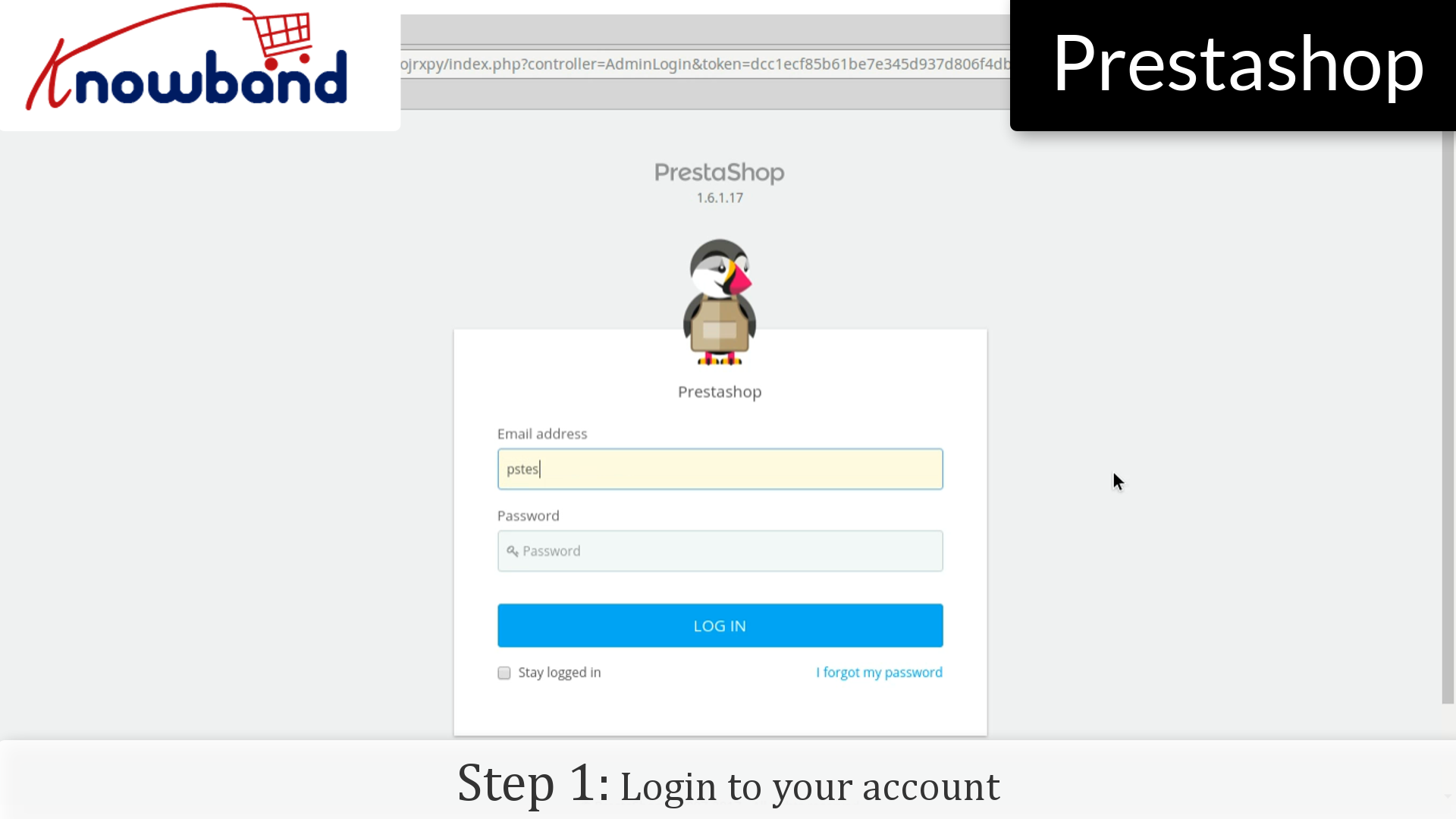
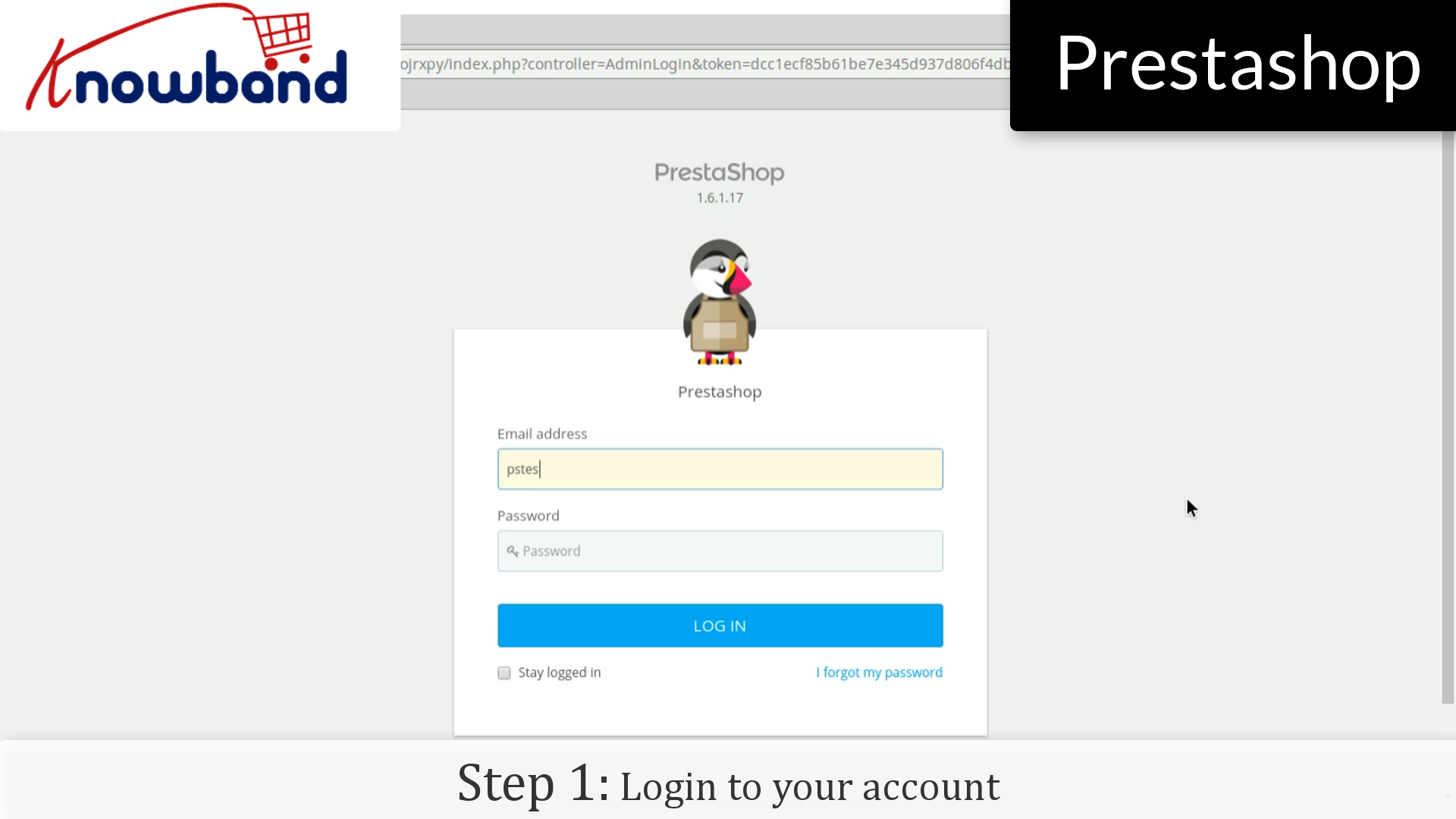
Step 1: Login to your admin panel.


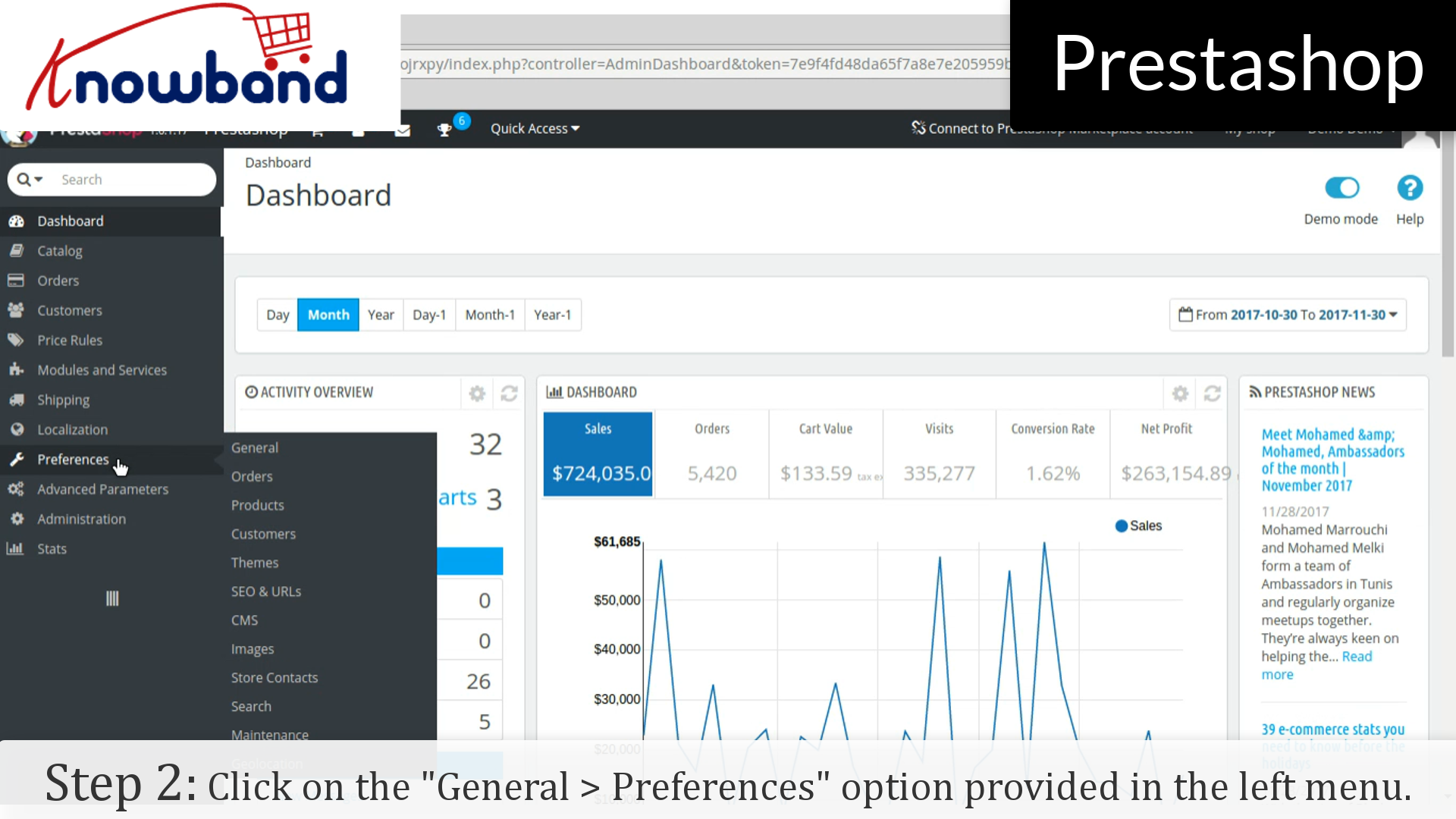
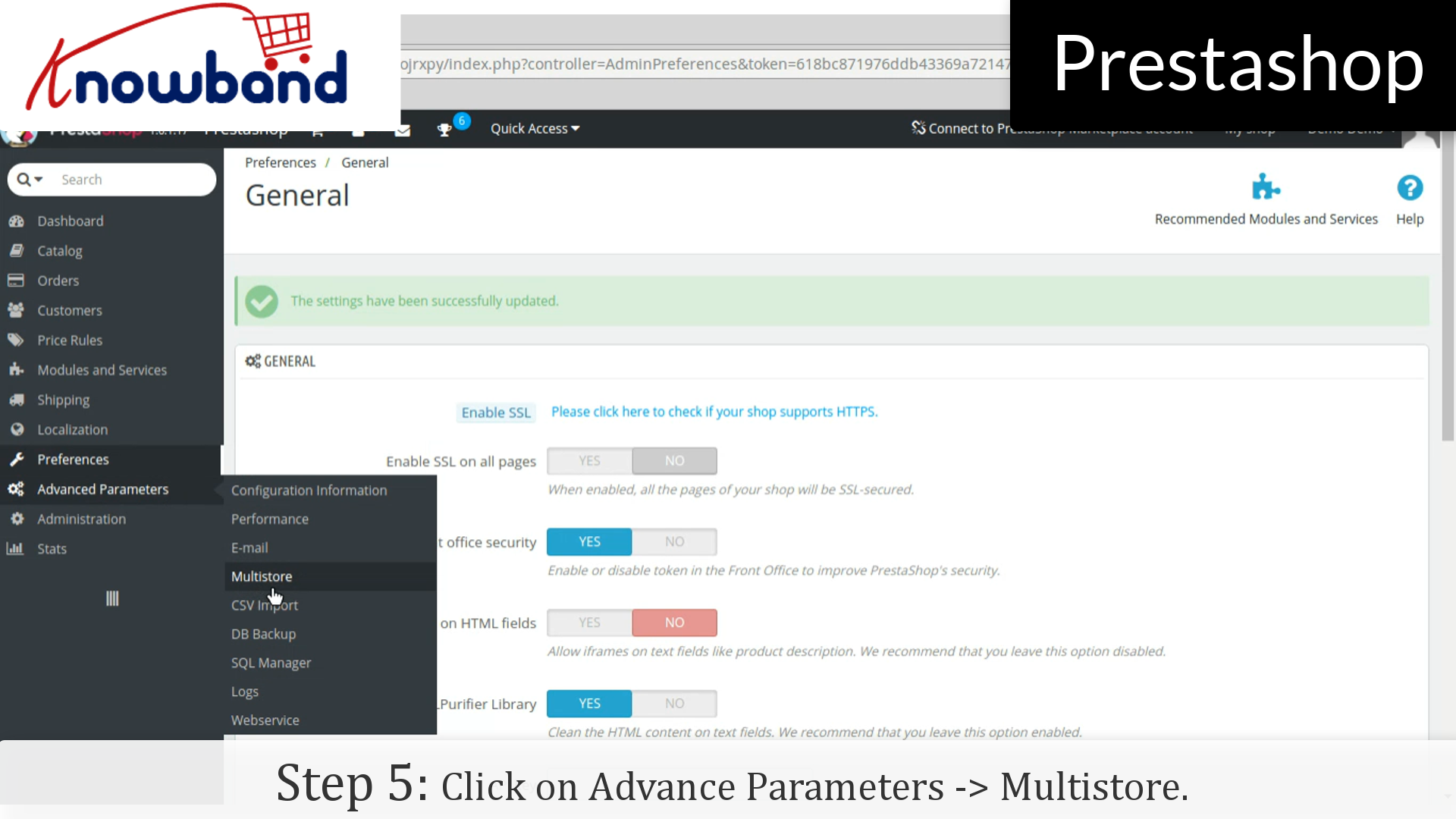
Step 2: After you have successfully logged in, click on the Preferences->General option provided in the left menu.


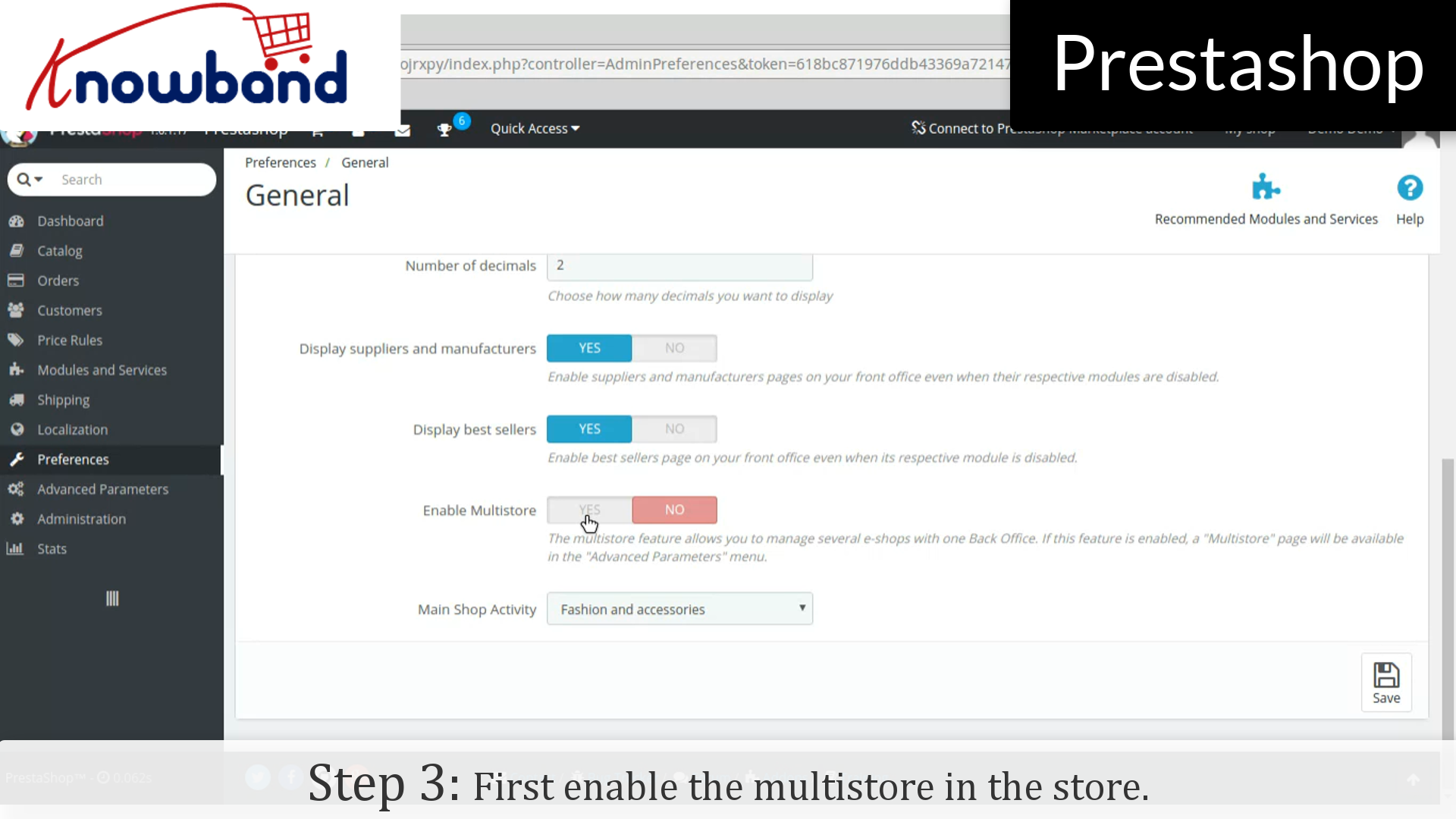
Step 3: Now, enable the Multistore in the store.


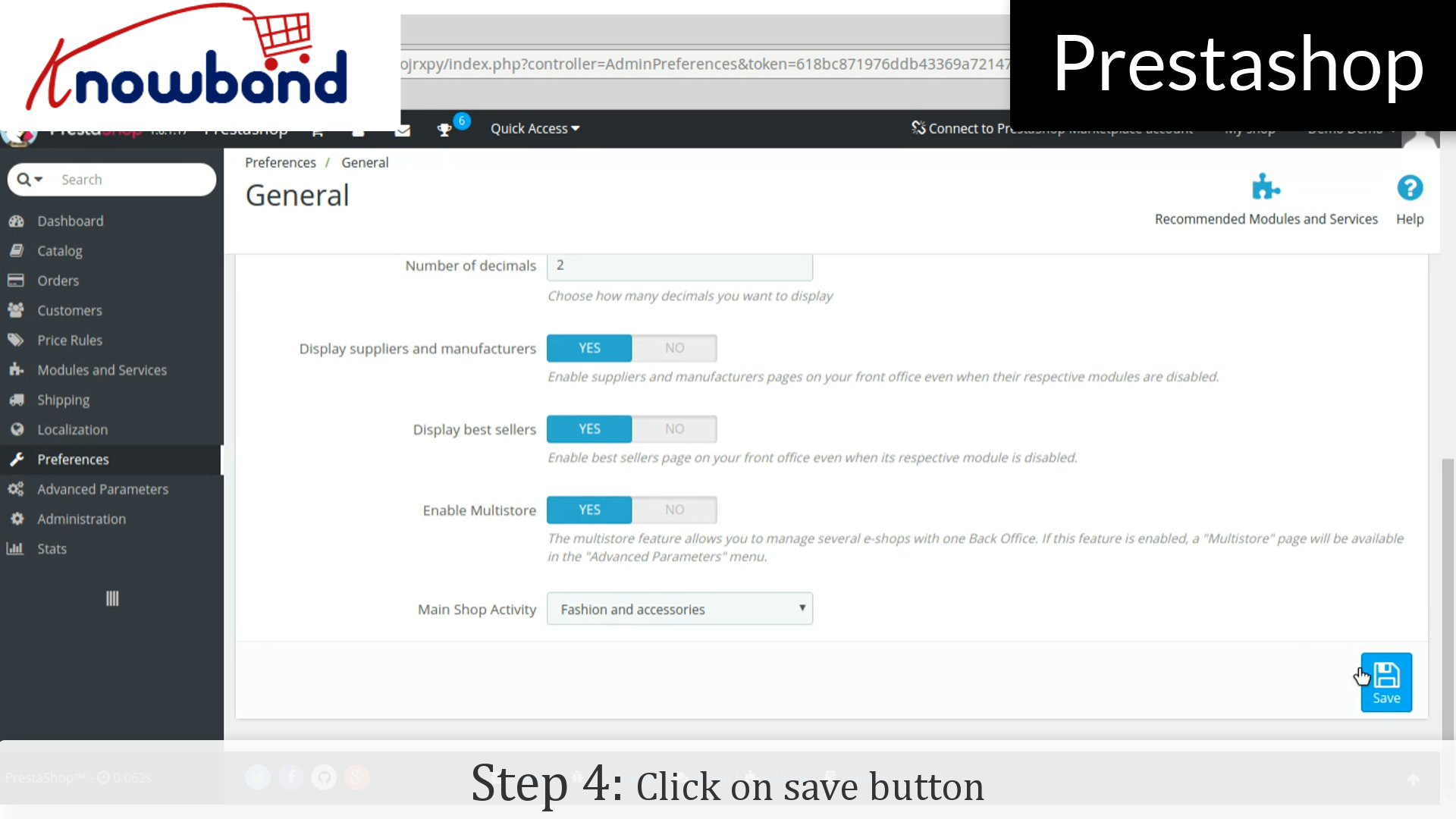
Step 4: Then, click on the save button.


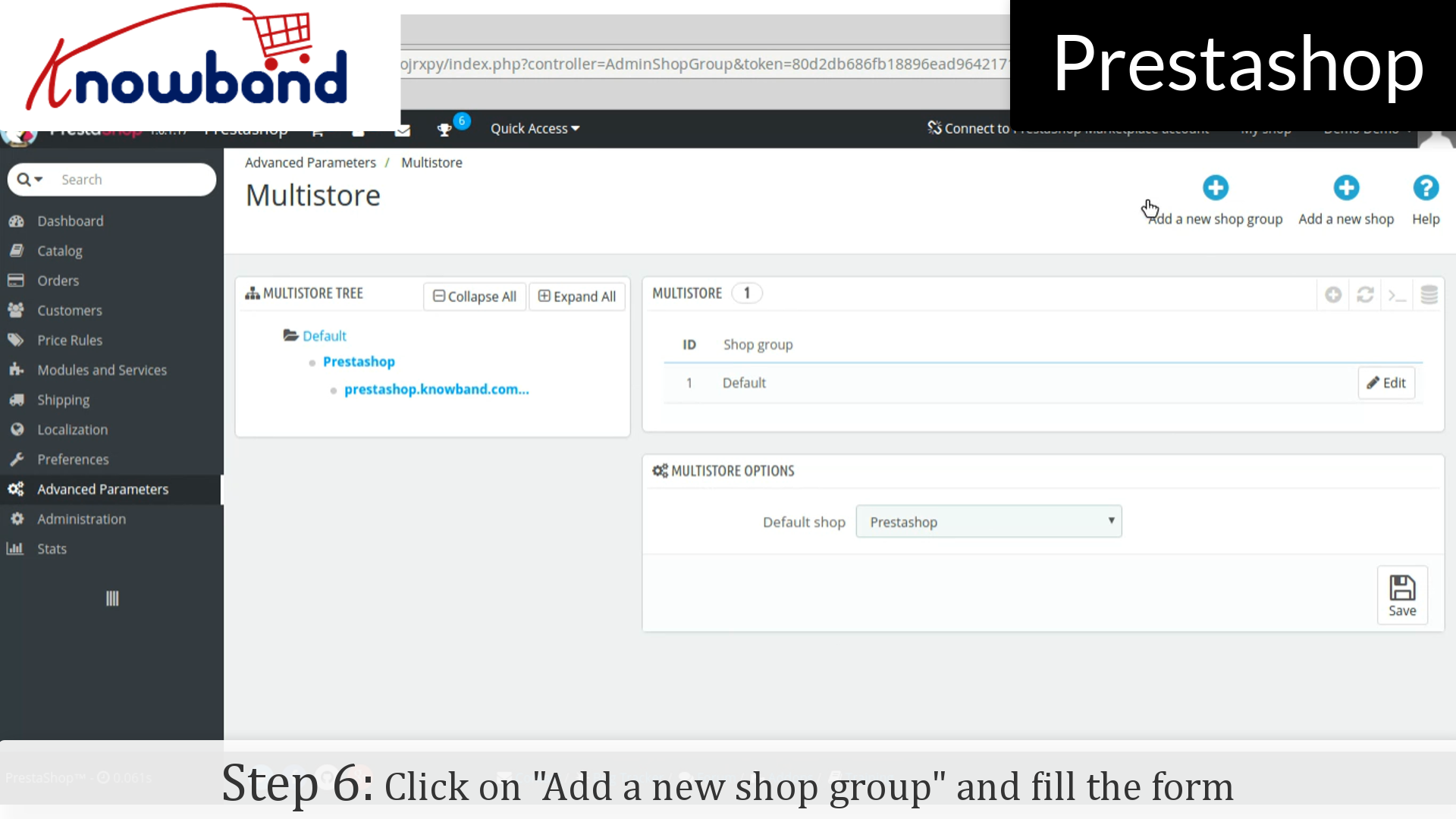
Step 5: After that, click on Advance Parameters->Multistore option provided in the left menu and add multistore.


Step 6: Click on “Add a new shop group” button in the top right corner on the dashboard. Fill the form and save the form to create new shop group.


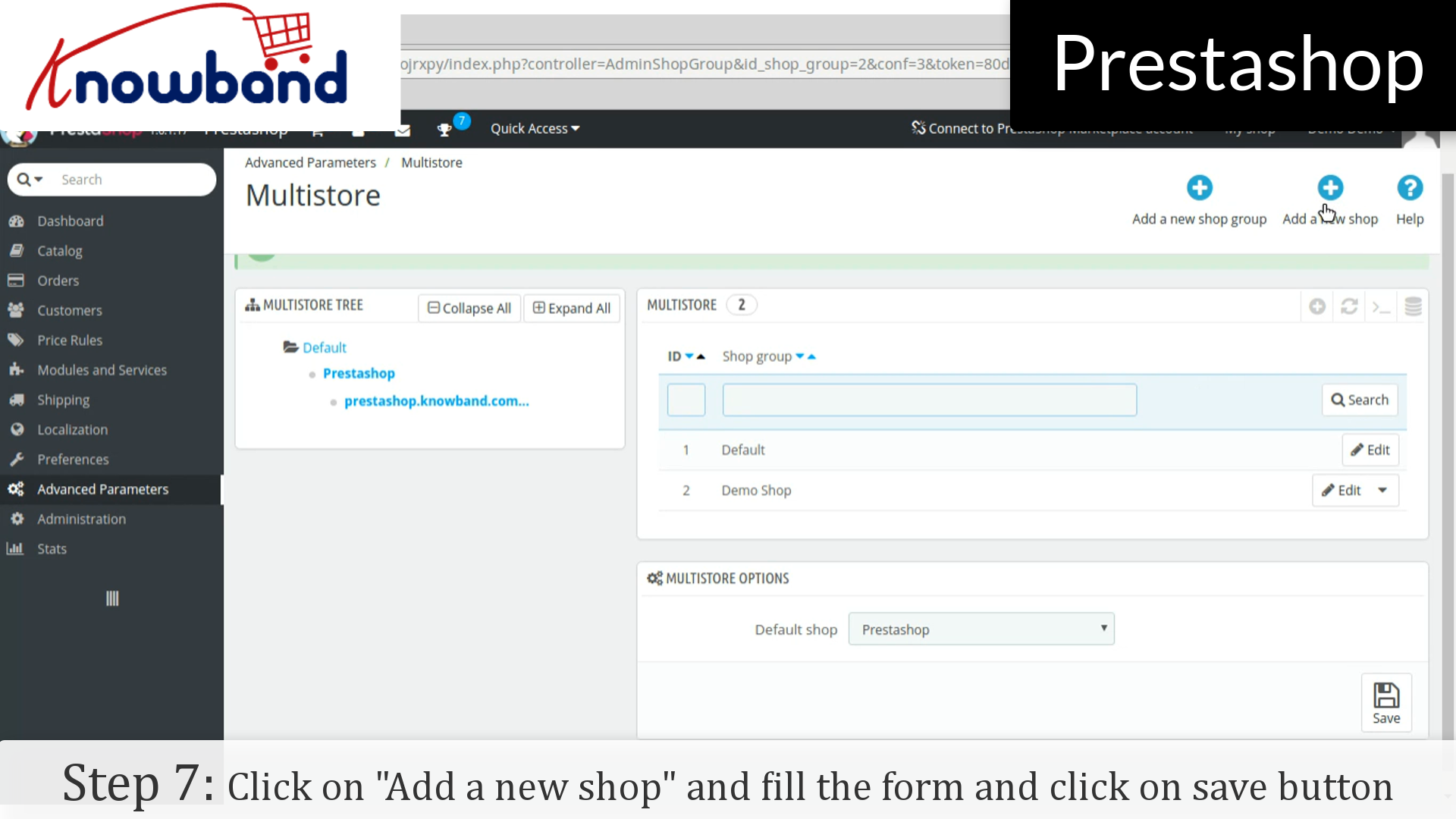
Step 7: After that, click on “Add a new shop” button next to the “Add a new shop group”. Fill the form and click on save button.


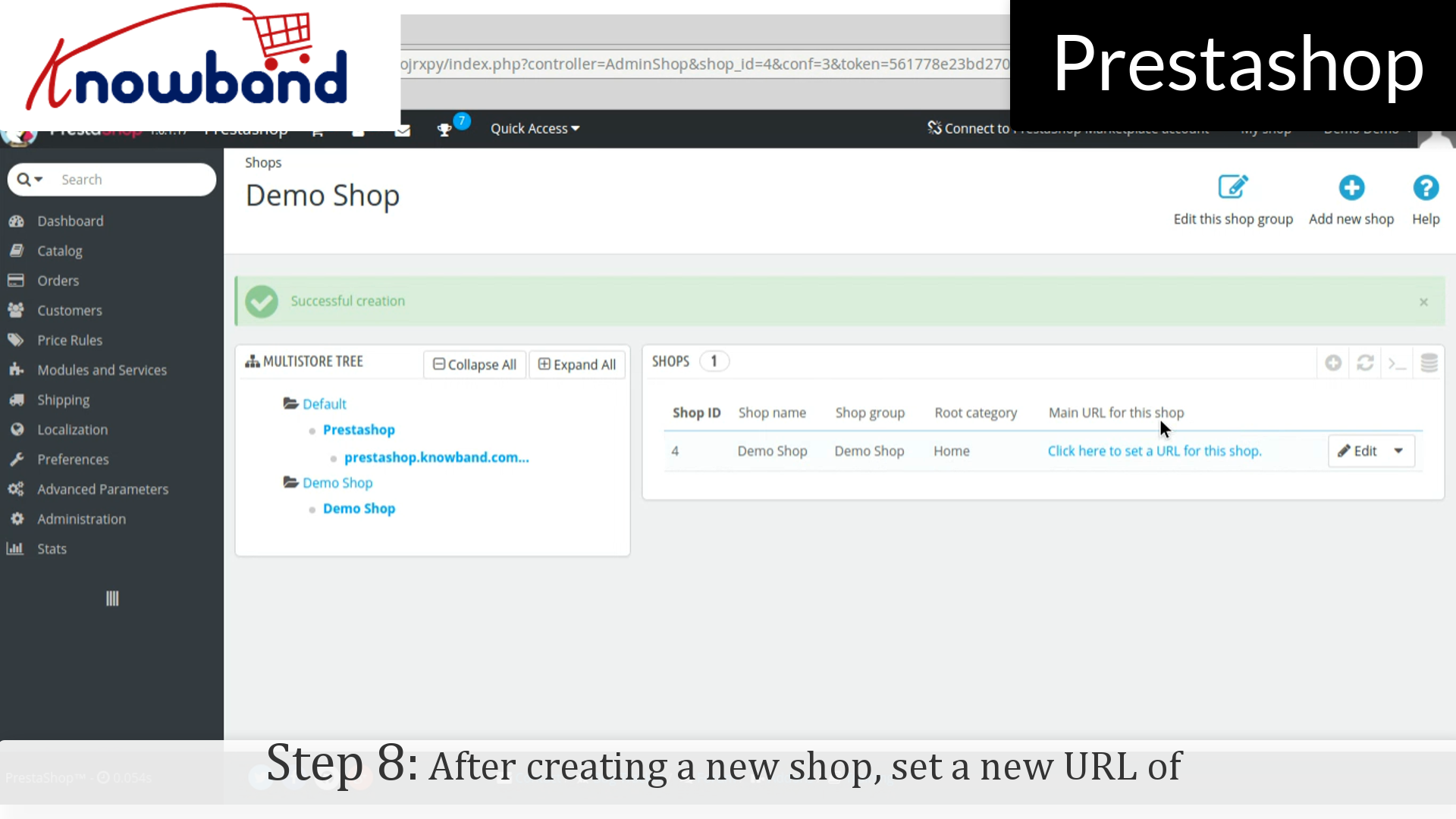
Step 8: After creating a new shop, set a new URL of the shop by clicking on “Click here to set a new URL for this shop”. A new form is open in which enter the desired url.


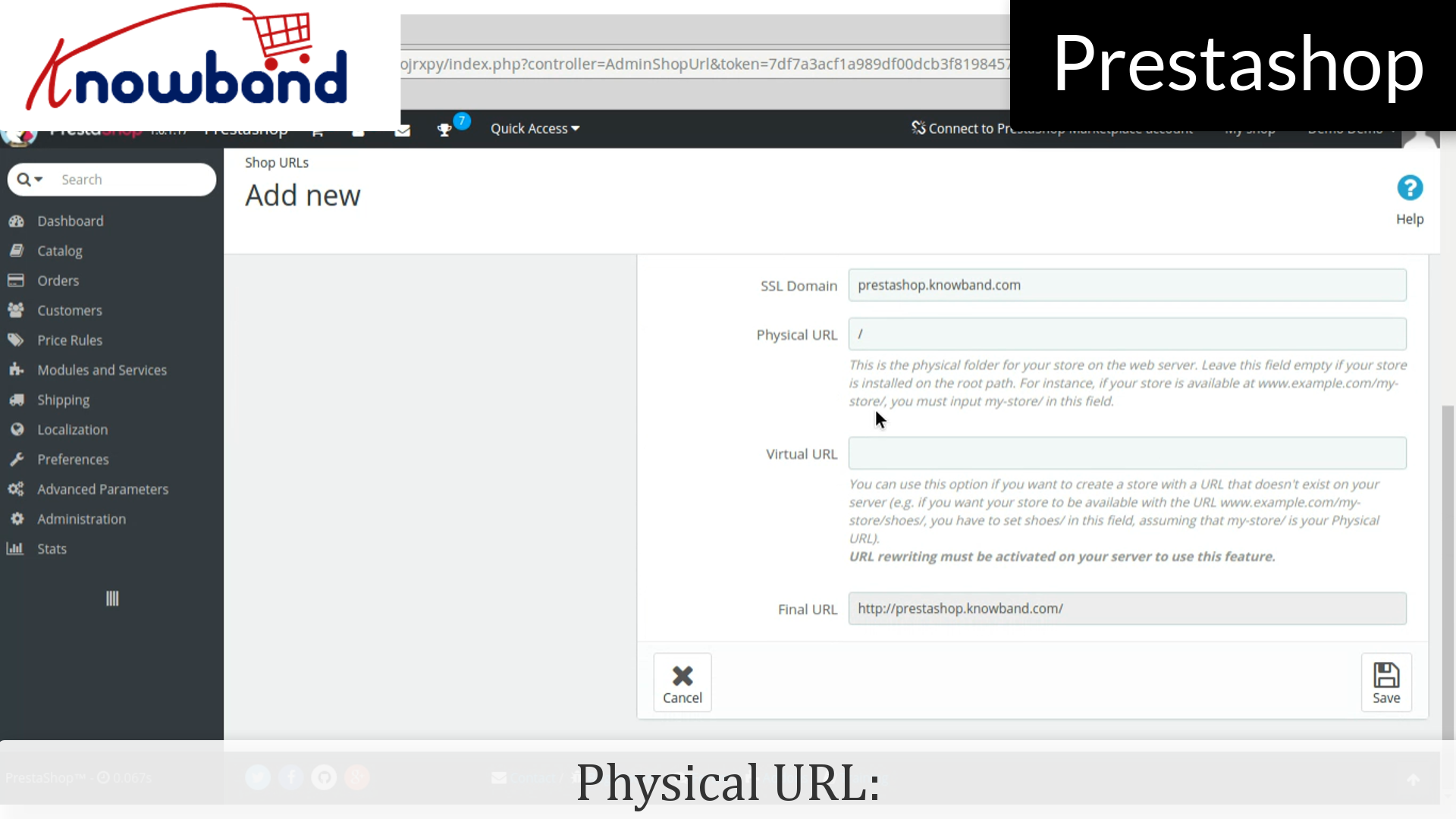
Physical URI: You must set the physical path to your actual installation on your server. If the shop is at the root of the domain or subdomain, leave this field empty. Example: / or /kids/.


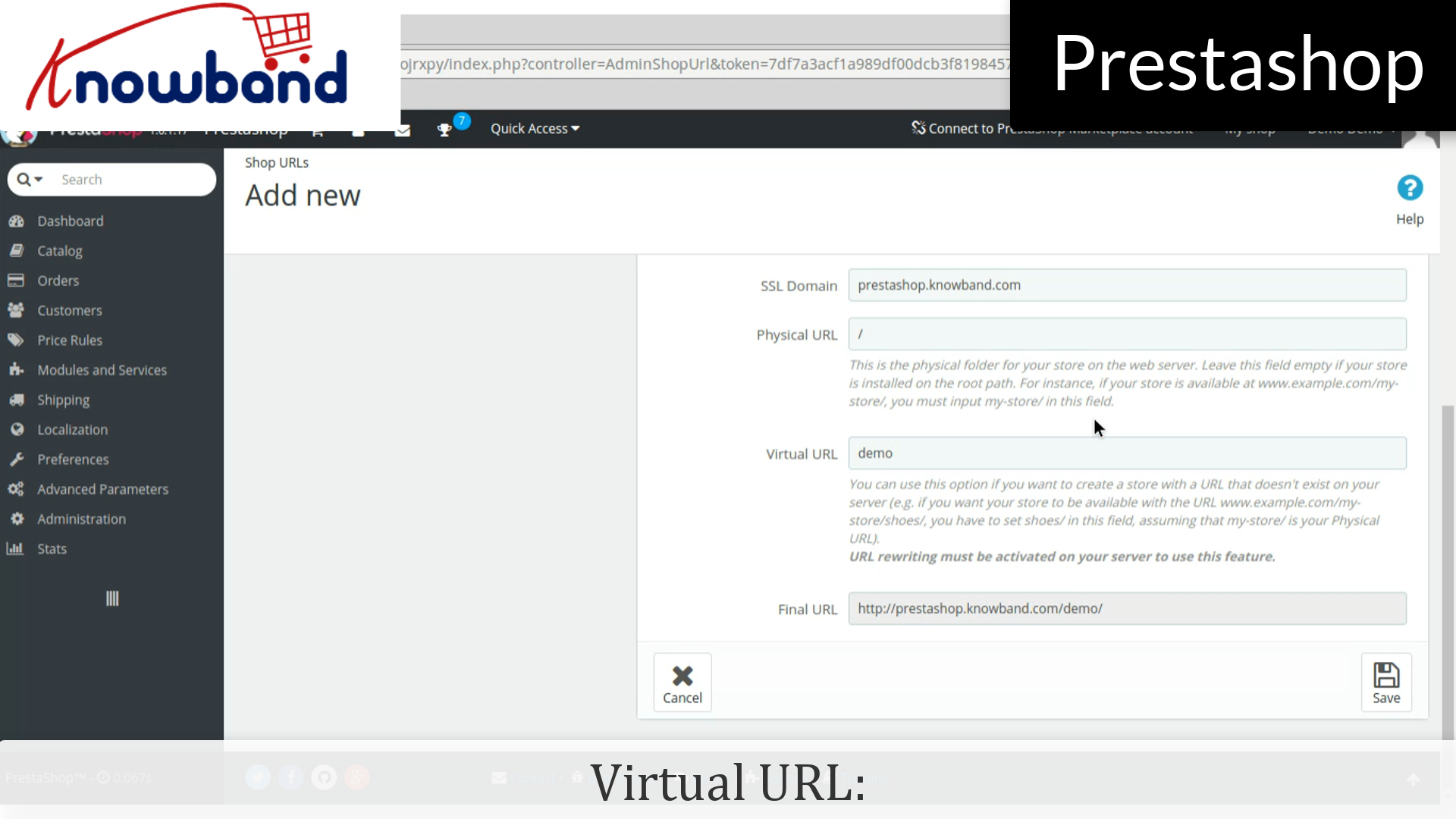
Virtual URI: URL rewriting must be enabled in PrestaShop (meaning Friendly URLs, Preferences->SEO & URLs). Example: /shoes/. Note that this only works for subfolder shops, not subdomain shops.


If 404 error is occured then, enable mod_rewrite.

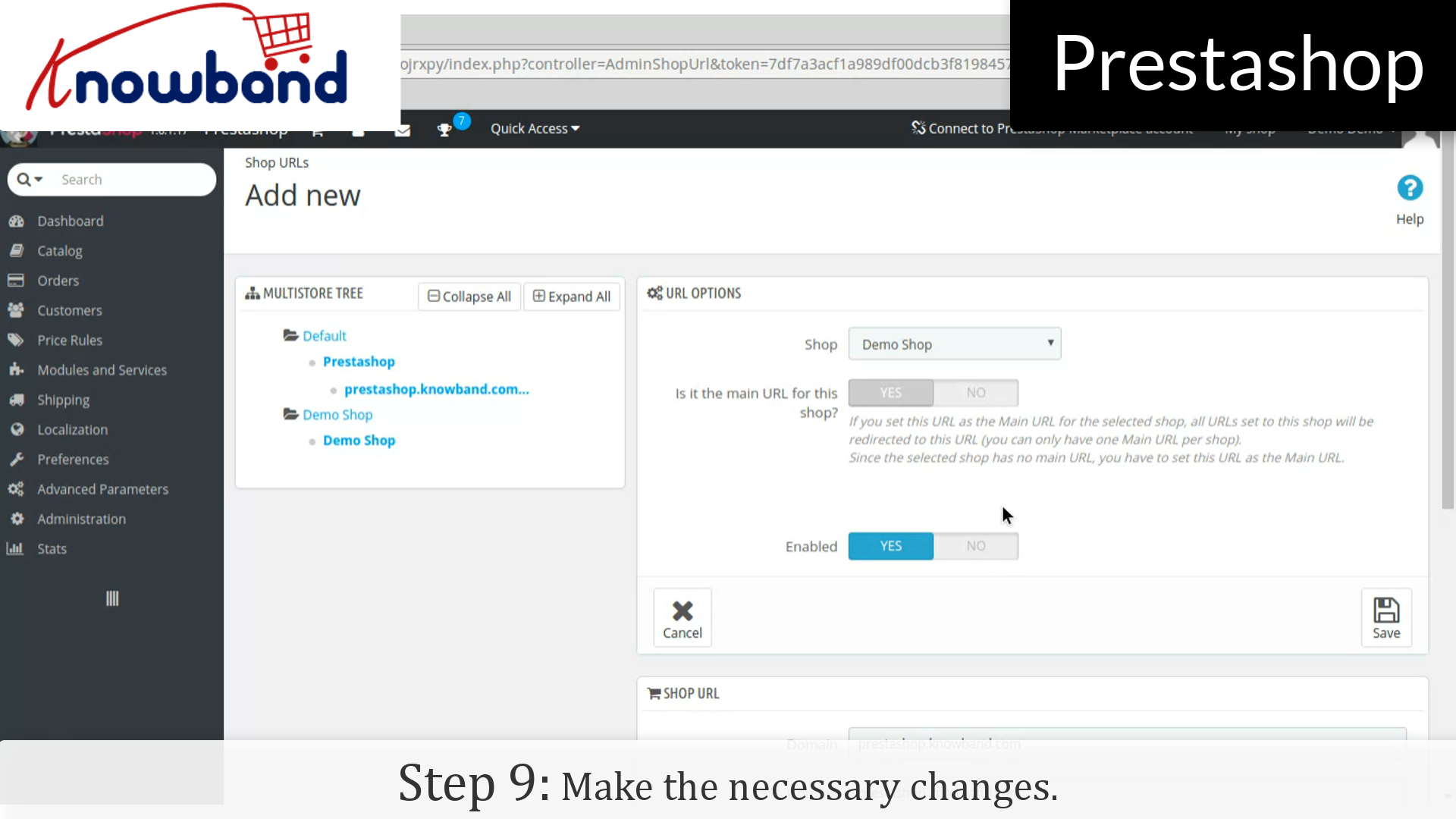
Step 9: Make the necessary changes.


That’s it, now you can manage the multiple store just following the above mentioned steps.

For any query, please contact us at support@knowband.com.

Related Stories:

How to manage shipping profile in Prestashop?


Shipping methods is one of the most important factor for the customers when it comes to online shopping. Adding shipping profile in Prestashop store is the easy and simple process. Here’s how you can do it in just a few simple steps:

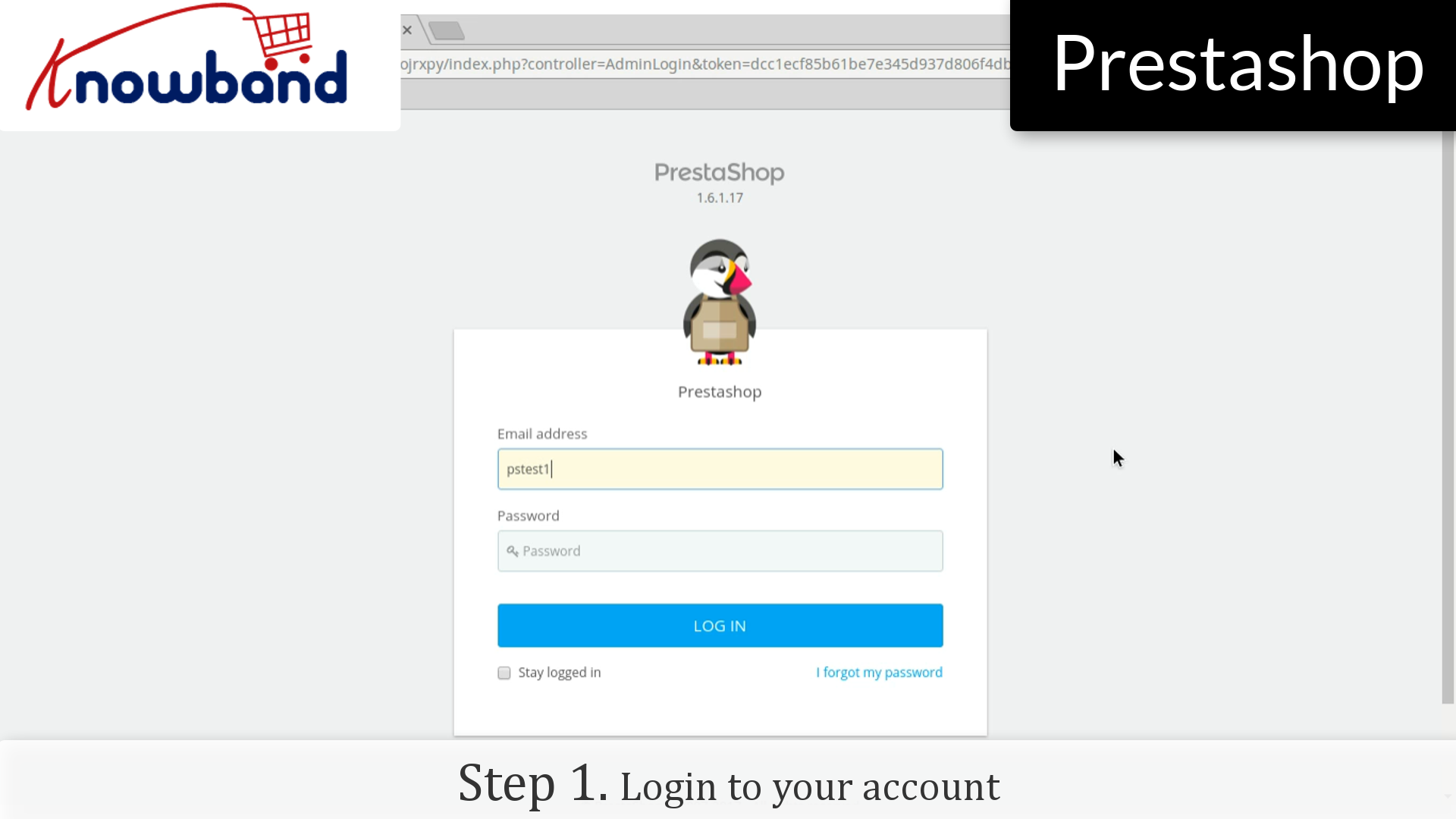
Step 1: Login to your admin panel.

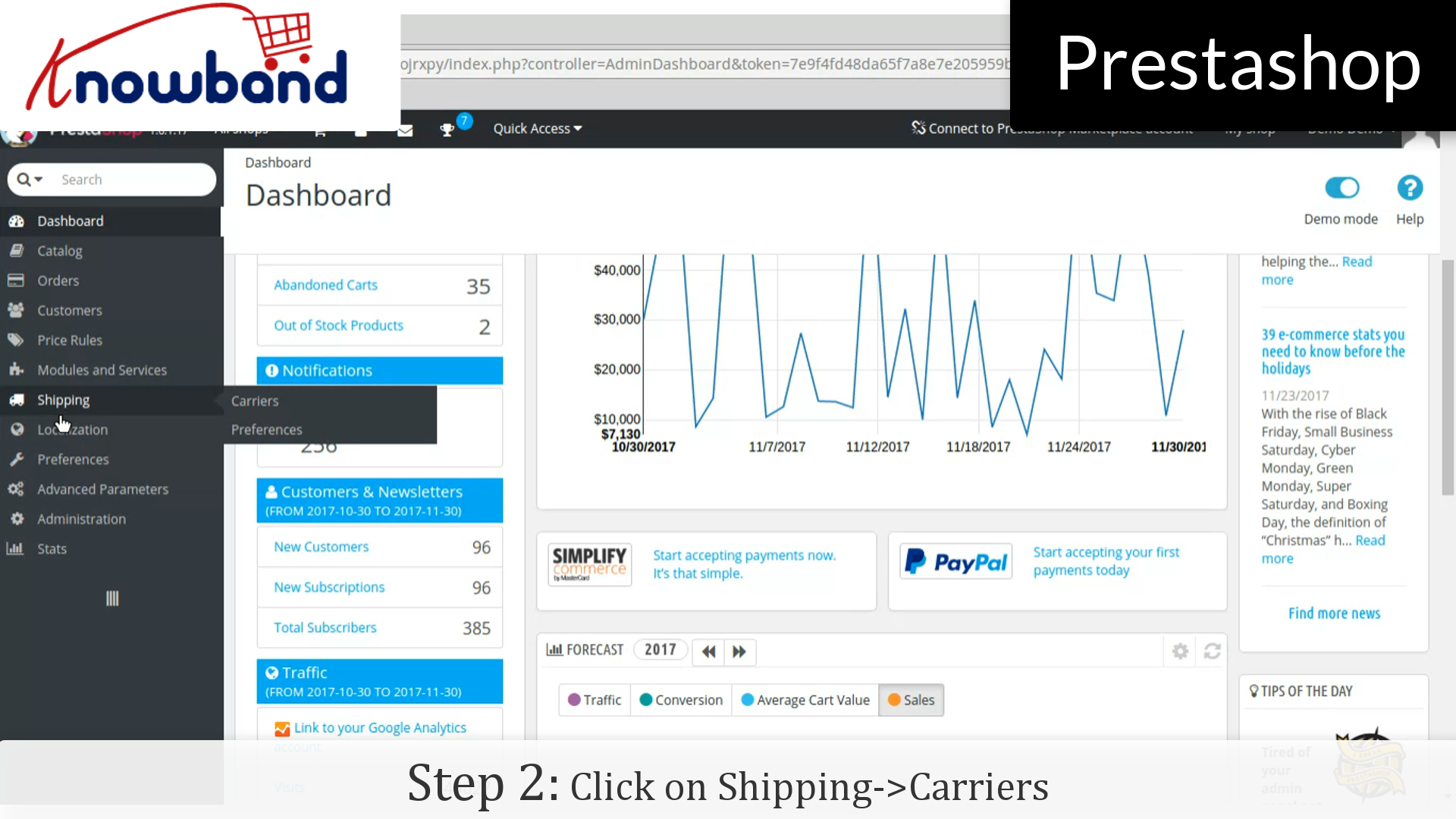
Step 2: After you have successfully logged in, click on the “Shipping->Carriers” option provided in the left menu.

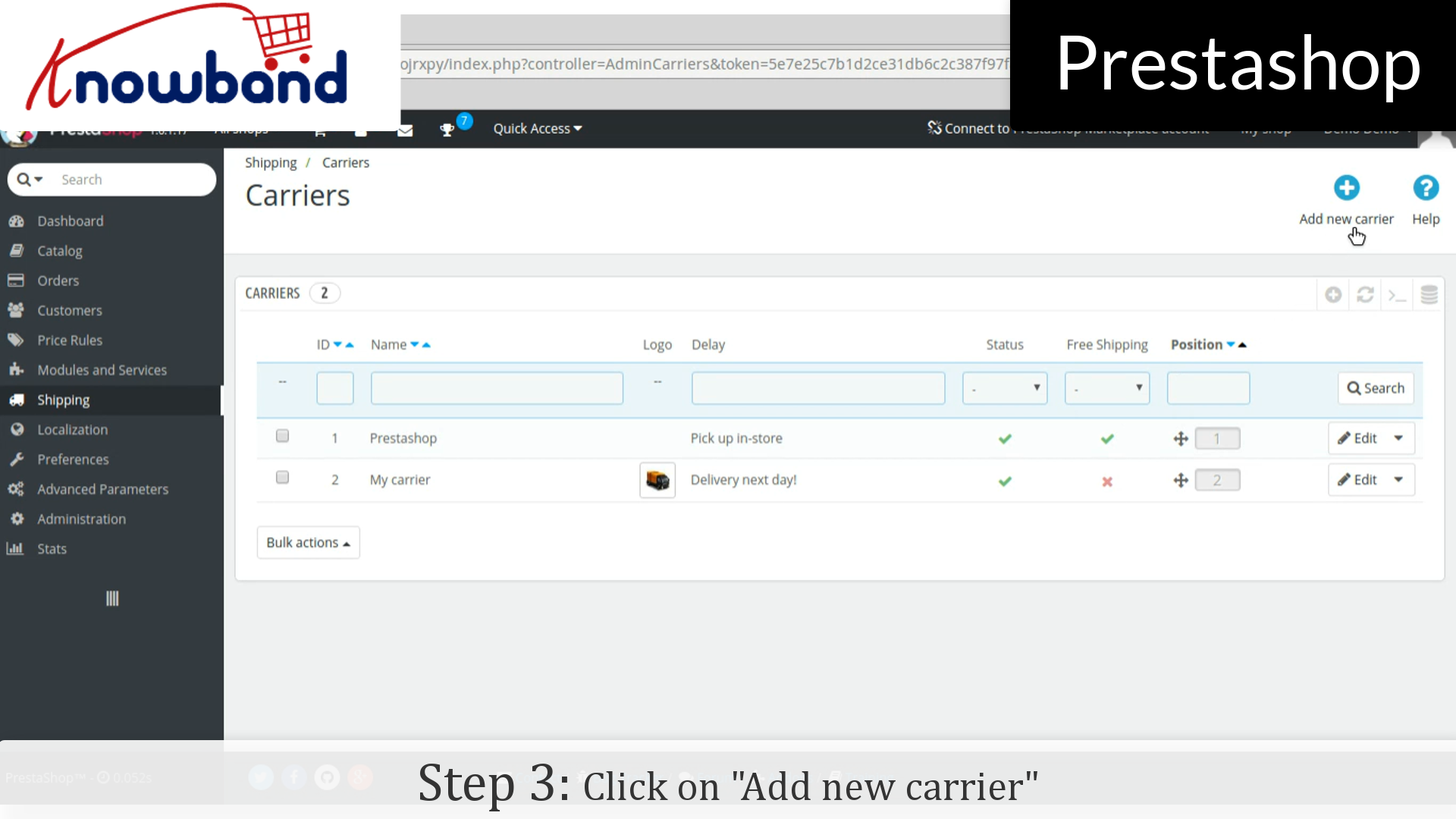
Step 3: After that, click on the “Add new carrier” button in the top right corner of the dashboard.

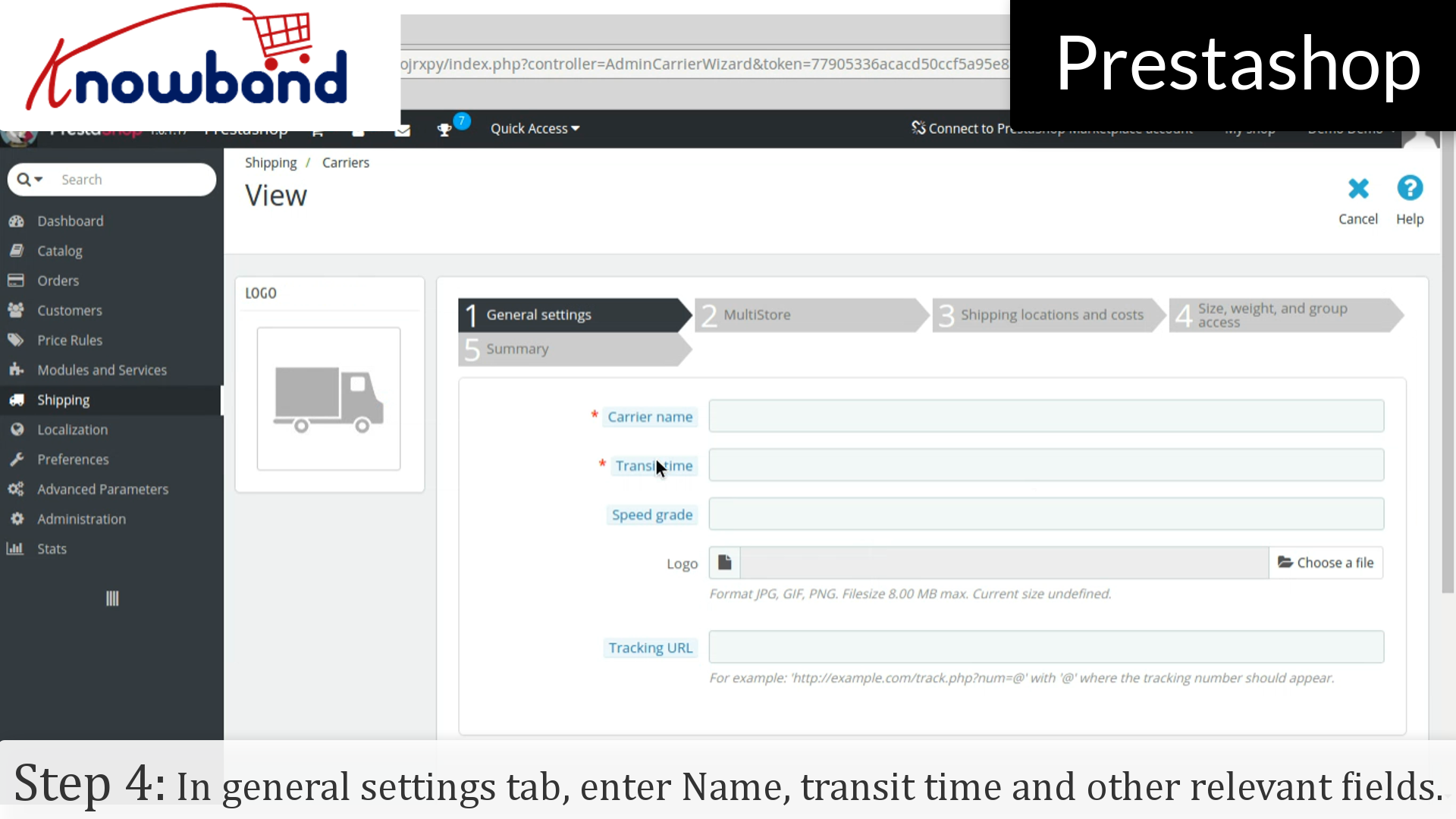
Step 4: In “General Settings” tab, fill out all the required details like Name, Transit time and other relevant fields. Click on the next button.

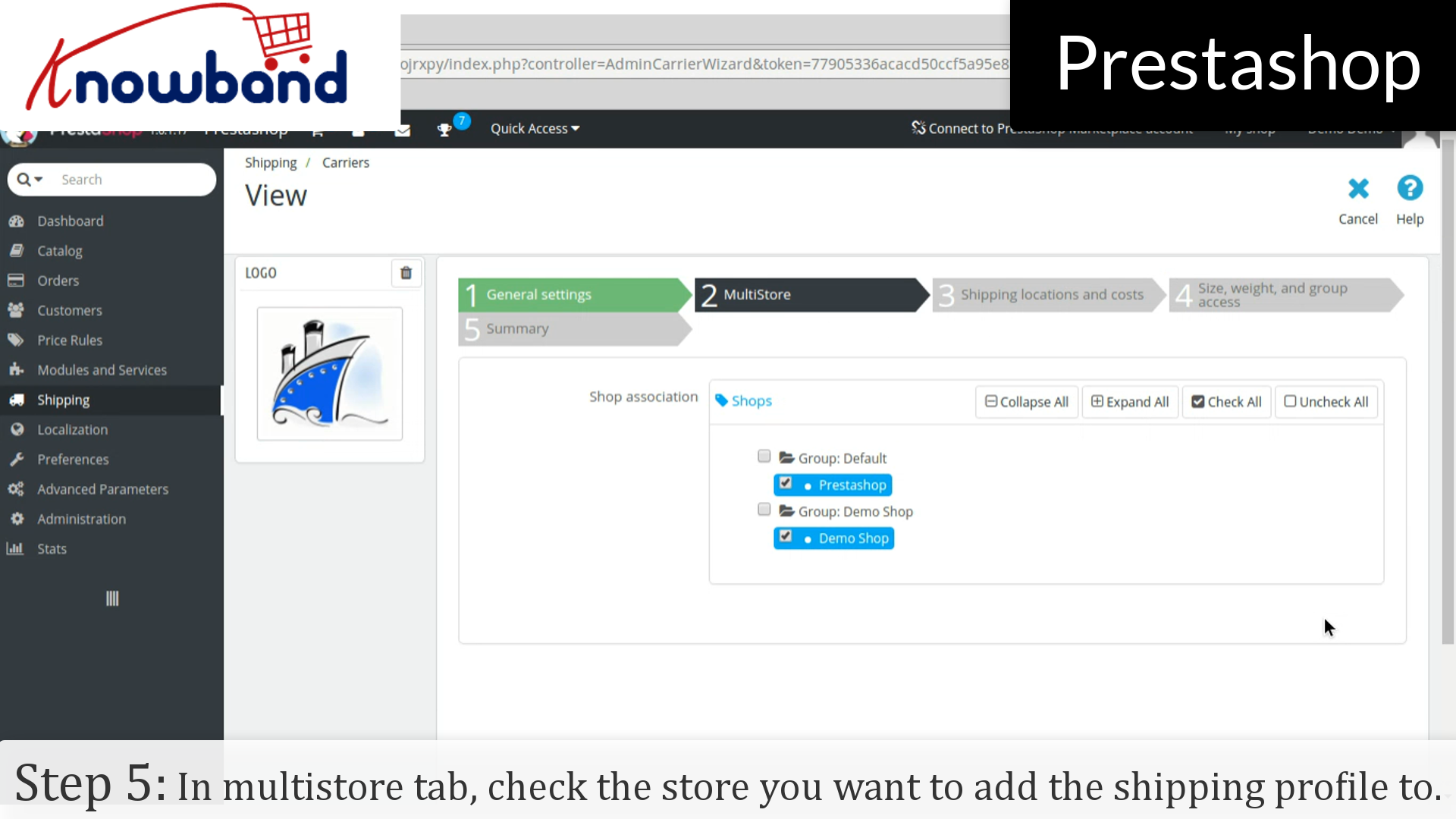
Step 5: In “Multistore” tab, check the store in which you want to add the shipping profile and click on the next button.

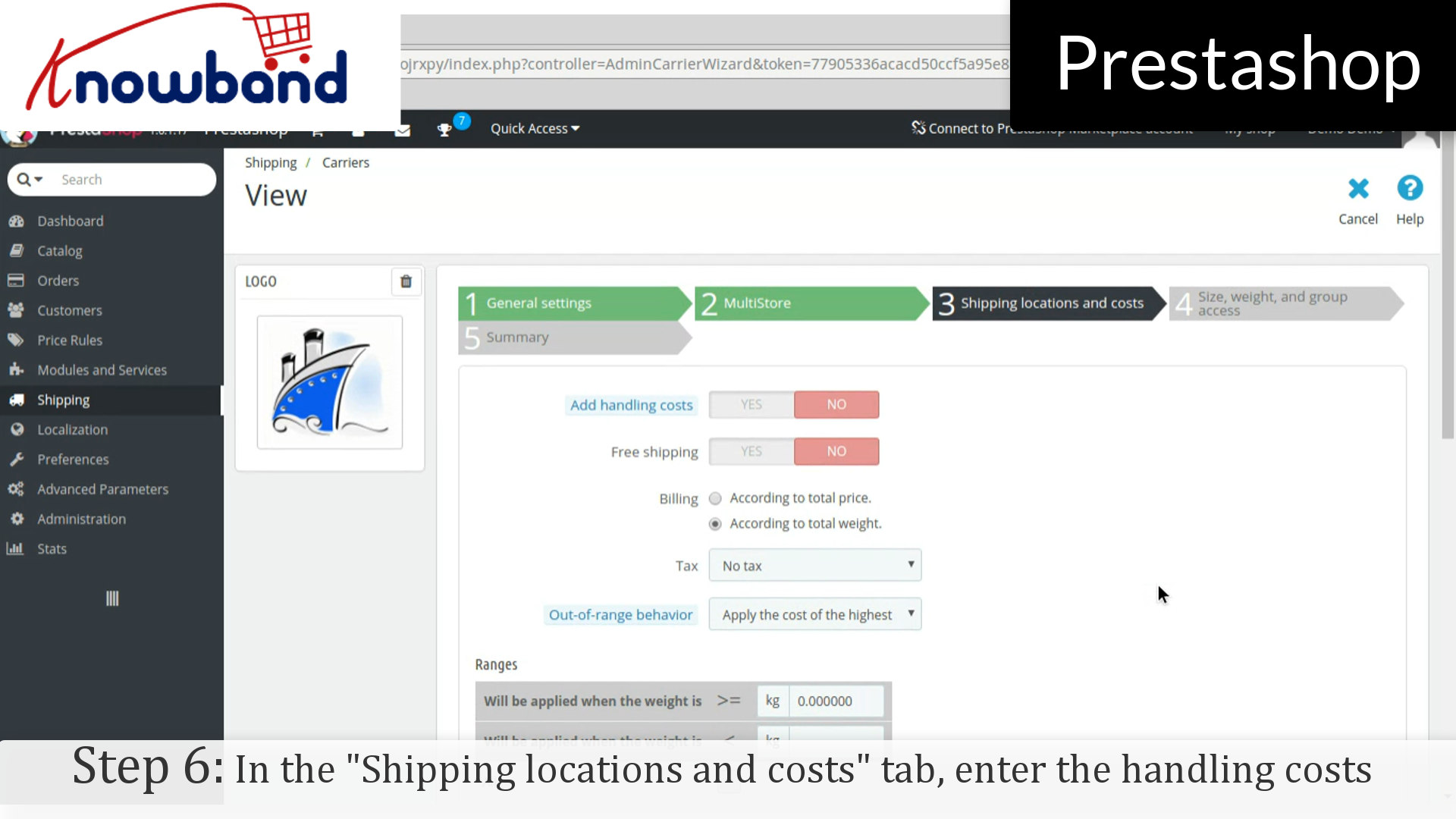
Step 6: In the “Shipping locations and costs” tab, enter the handling costs and other required details and click on the next button.

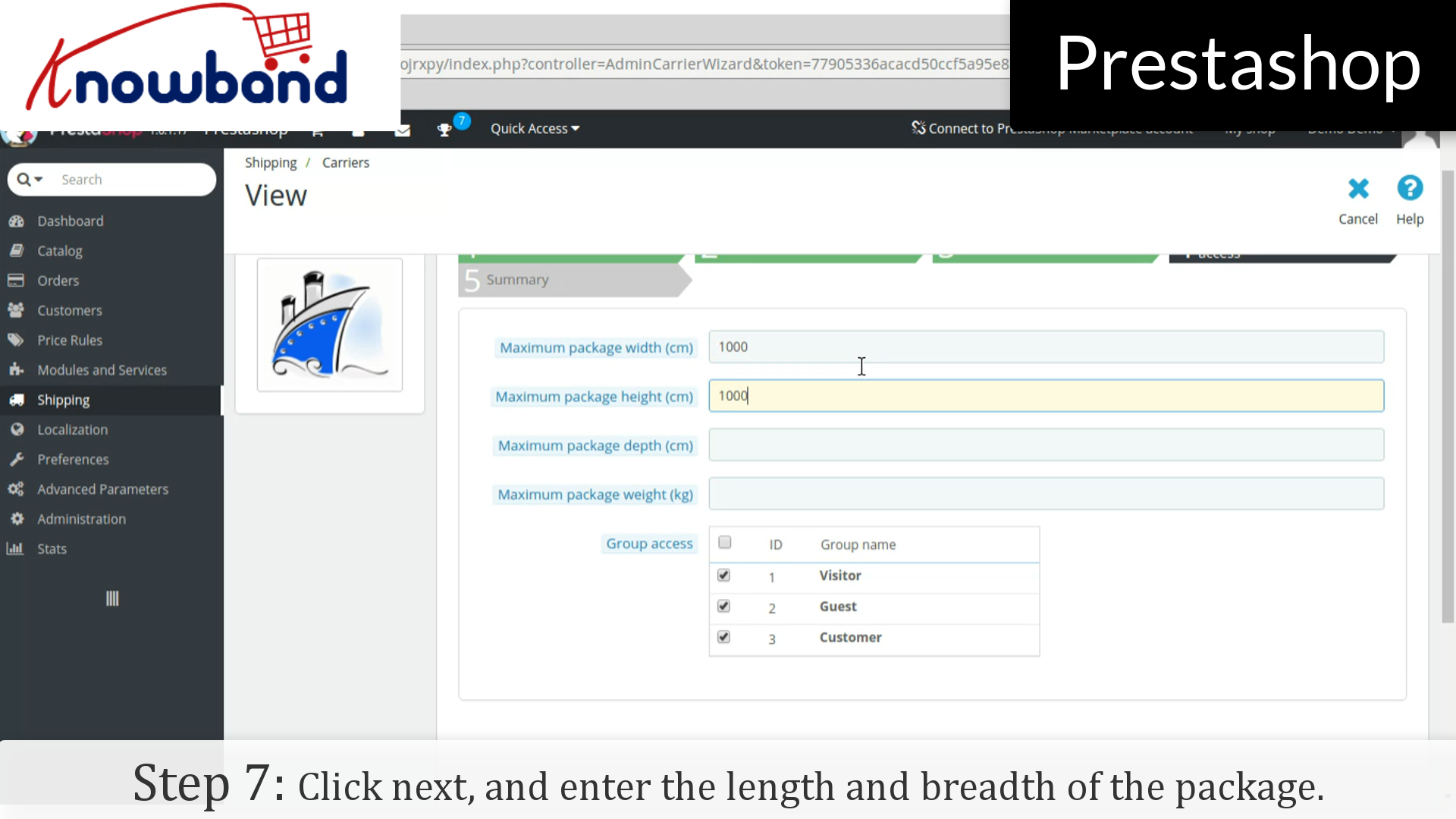
Step 7: In the next tab, enter the length and breadth of the package and click on the next button.

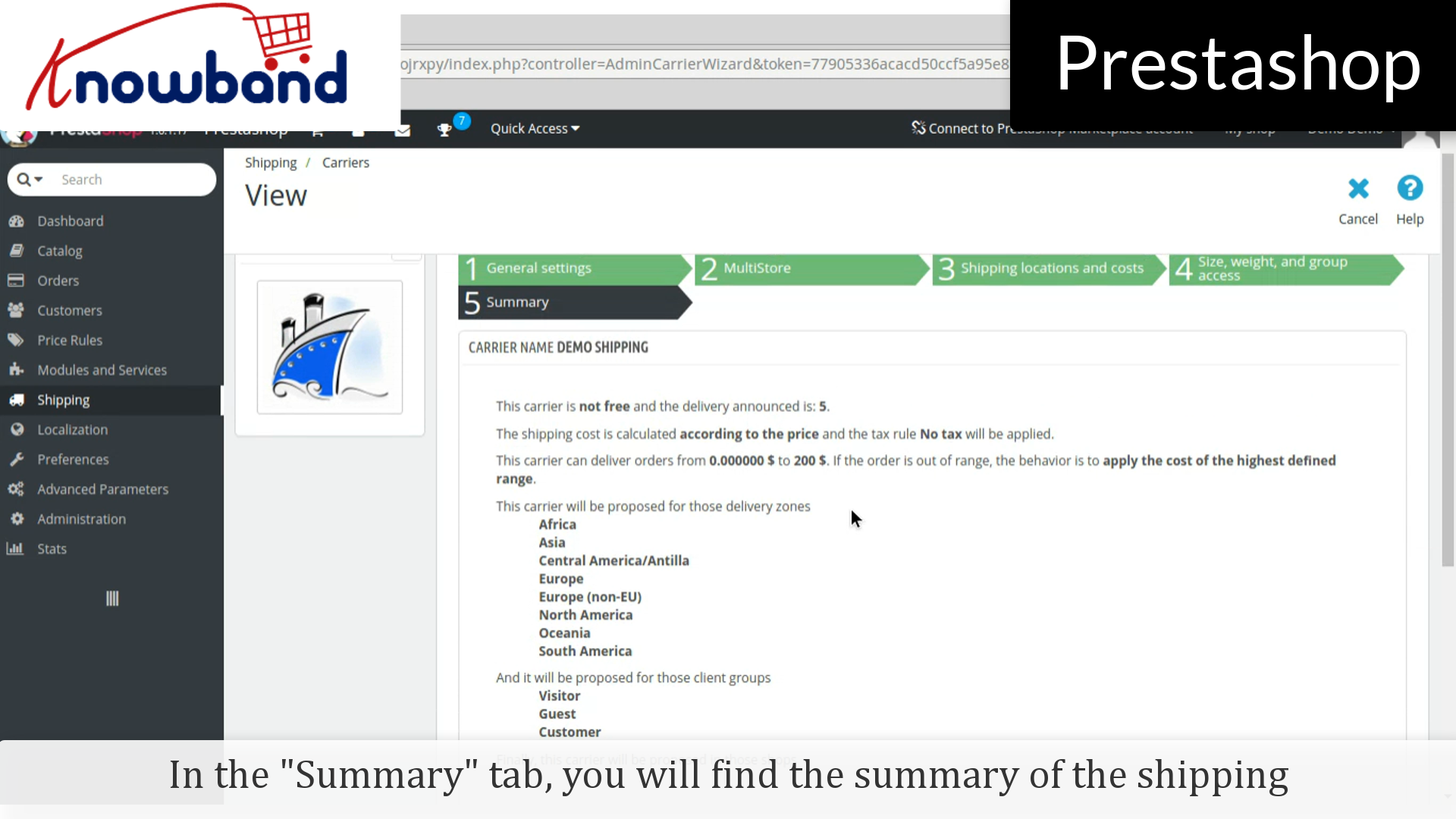
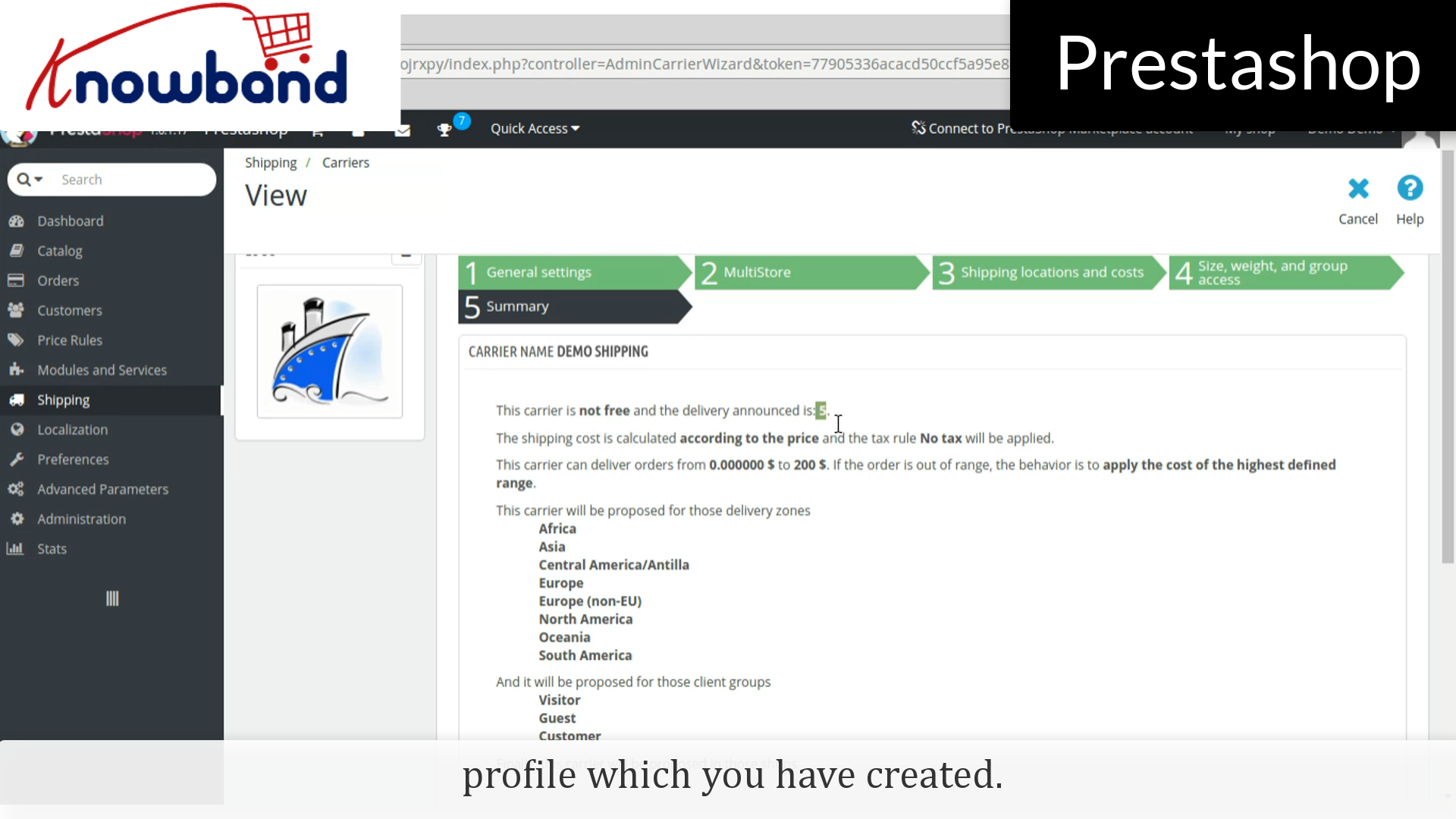
In the summary tab, you will find the summary of the shipping profile which you have created.

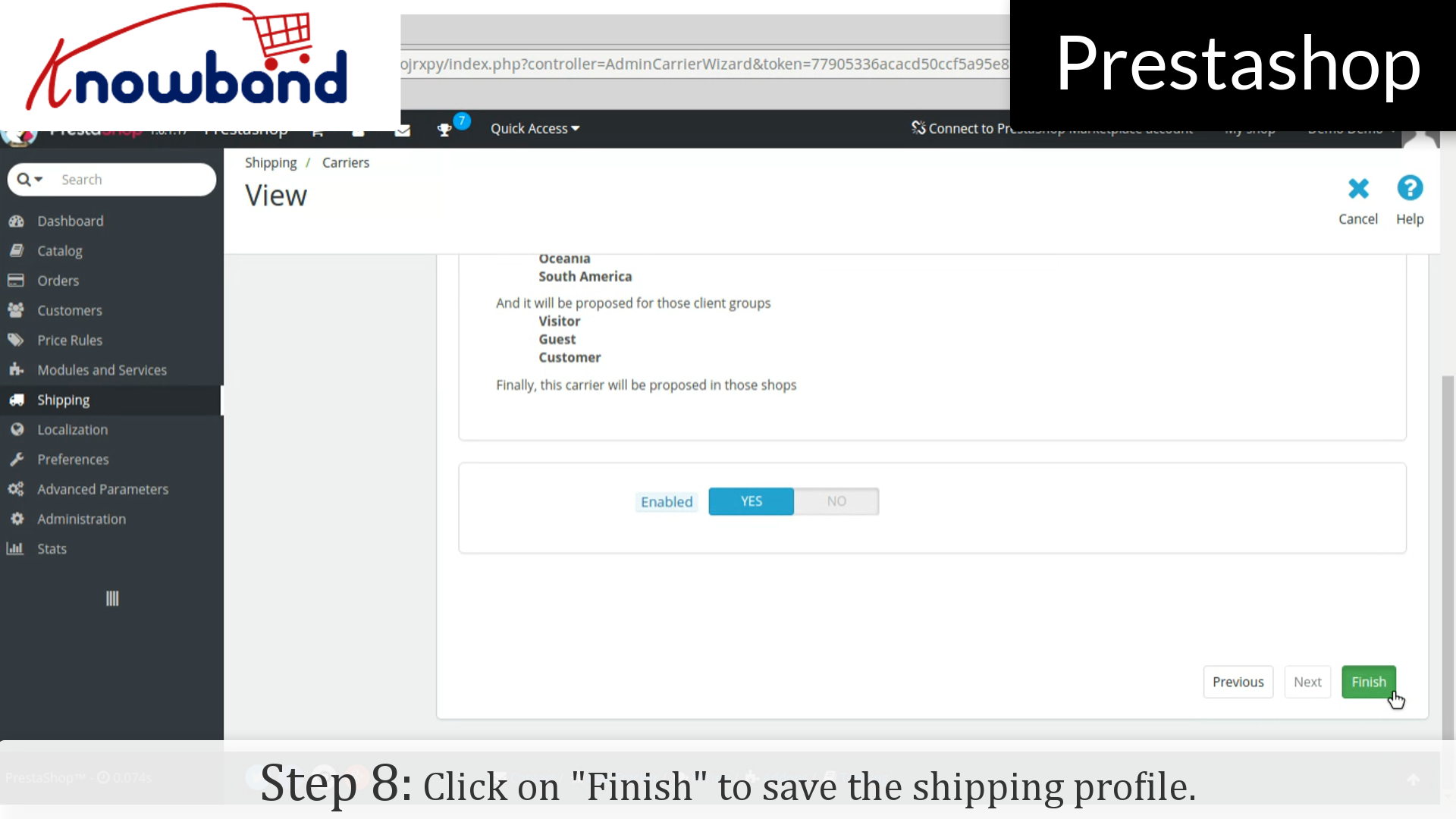
Step 8: Hence, click on the Finish button in the bottom right corner to save the shipping profile.

That’s it, the shipping profile has been created.

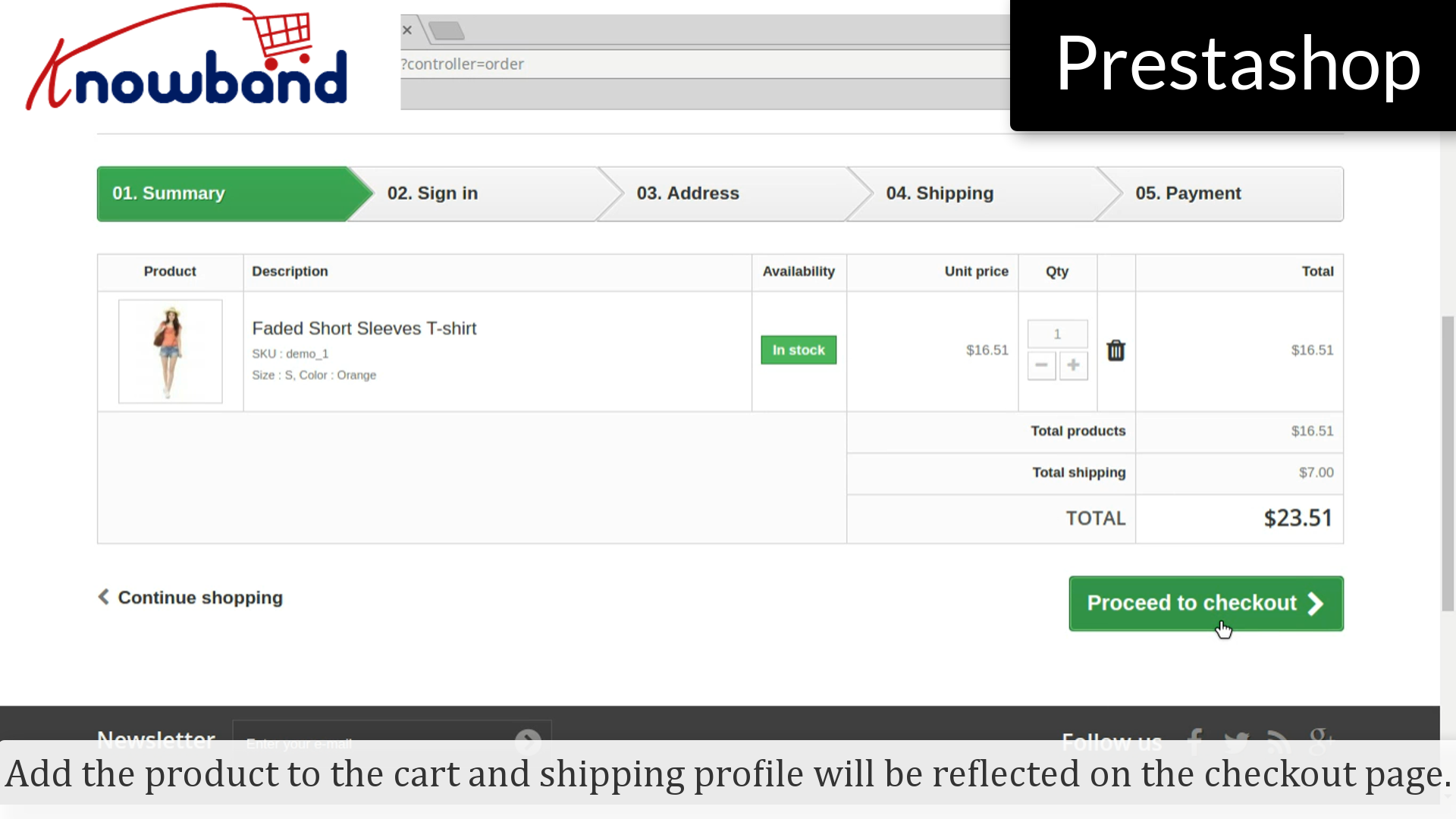
Add the product to the cart and shipping profile will be reflected on the checkout page.

For any query, please contact us at support@knowband.com.

Related Stories:

How to add category in Prestashop?


It’s been an inevitable task for the store owners to add categories on their store for the new launching/existing products. Here’s how you do it in just a few simple steps:

Step 1: Login to your admin panel.


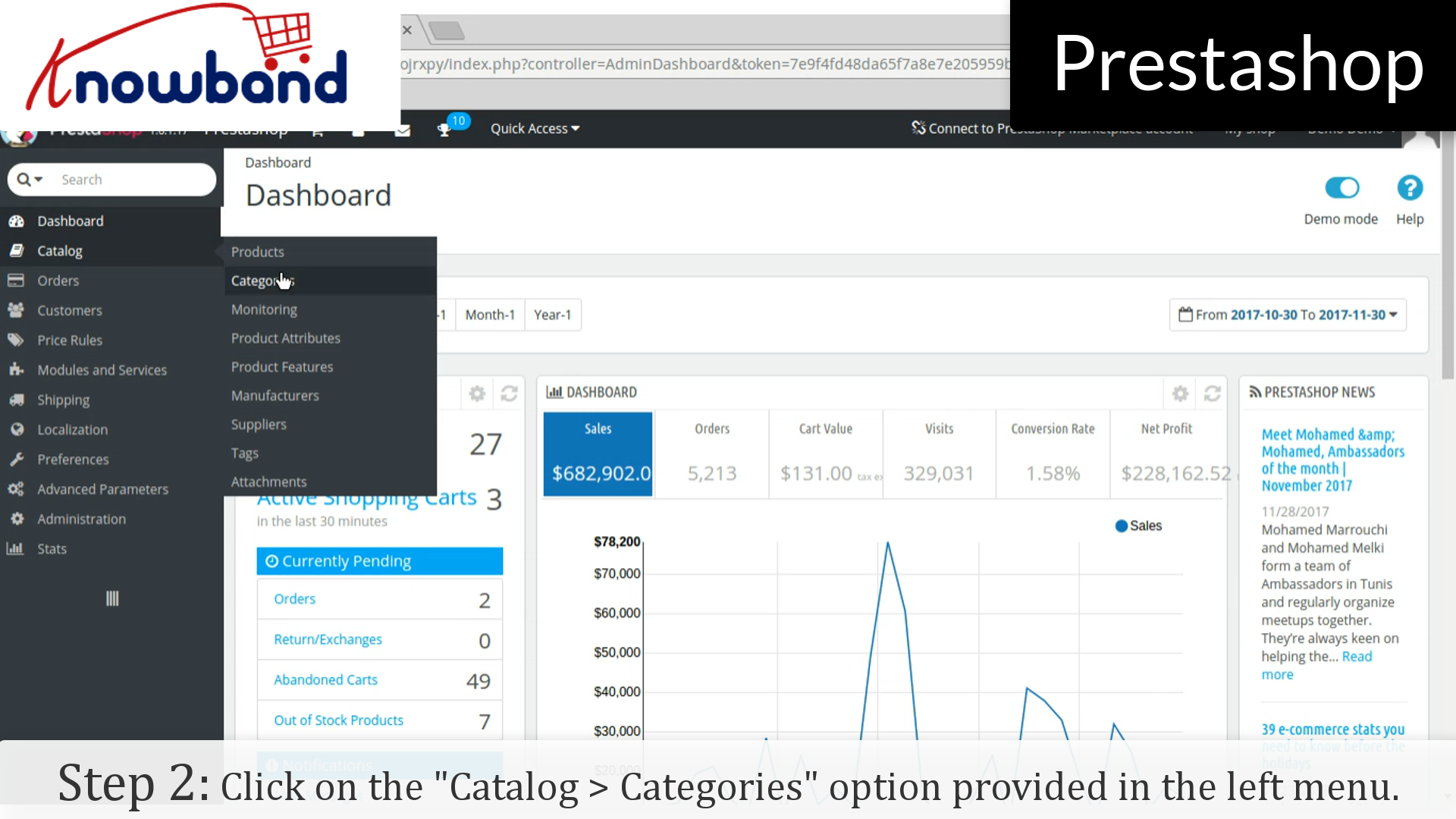
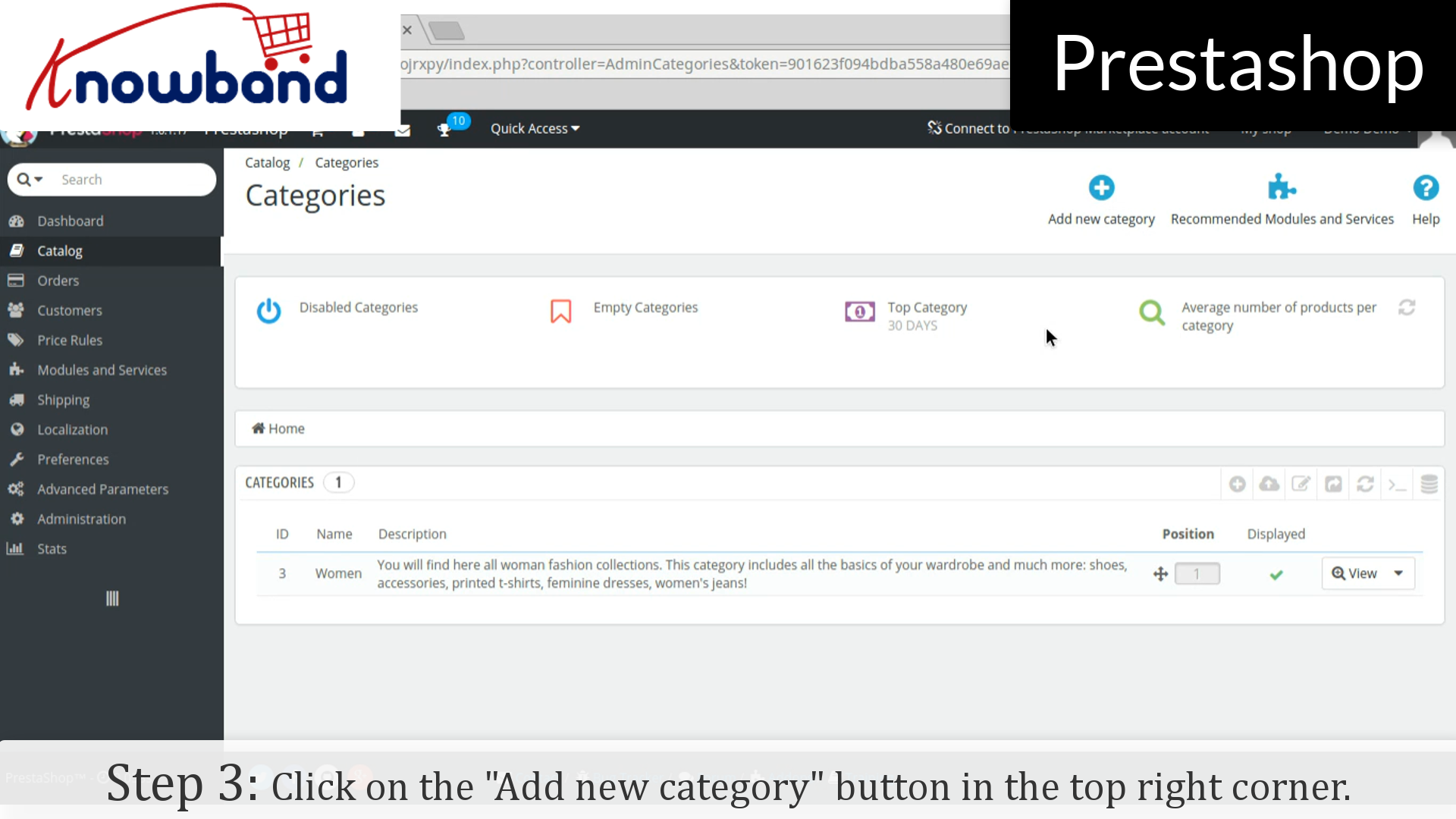
Step 2: After you have successfully logged in, click on the “Catalog > Categories” option provided in the left menu.


Step 3: After that, click on the “Add new category” button in the top right corner of the dashboard.


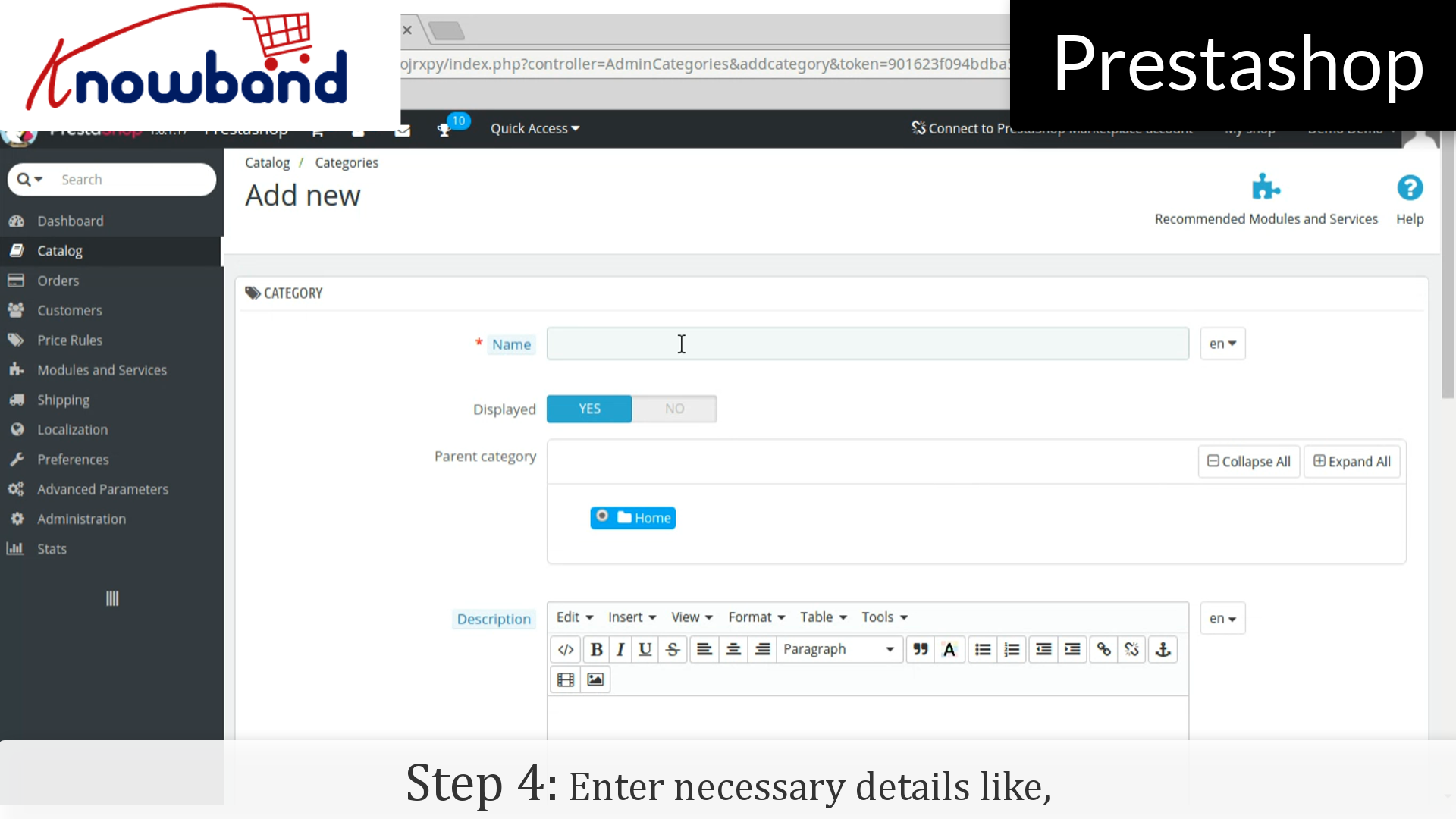
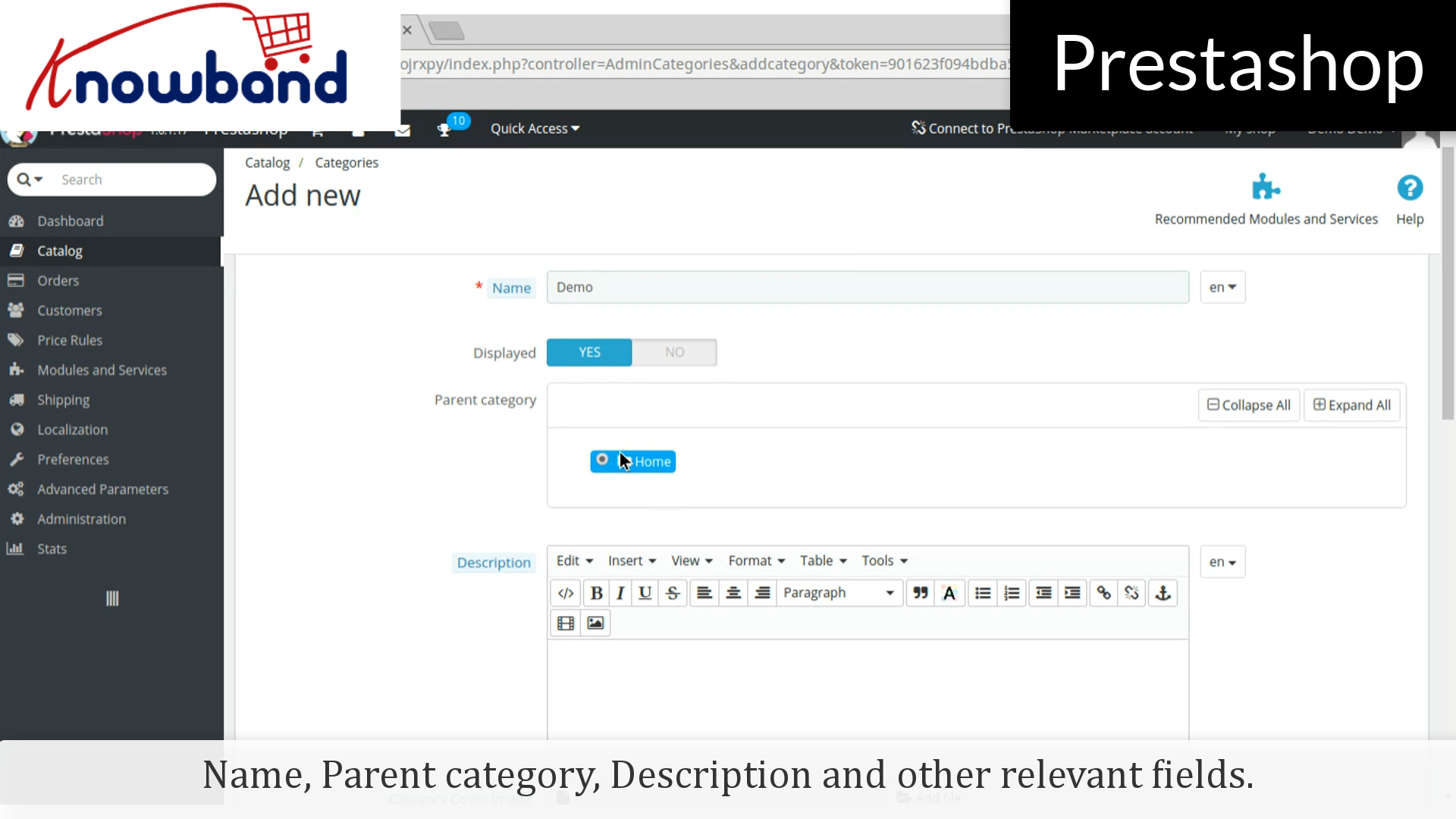
Step 4: Then, enter the required details like, Name, Parent category, Description and other relevant fields.


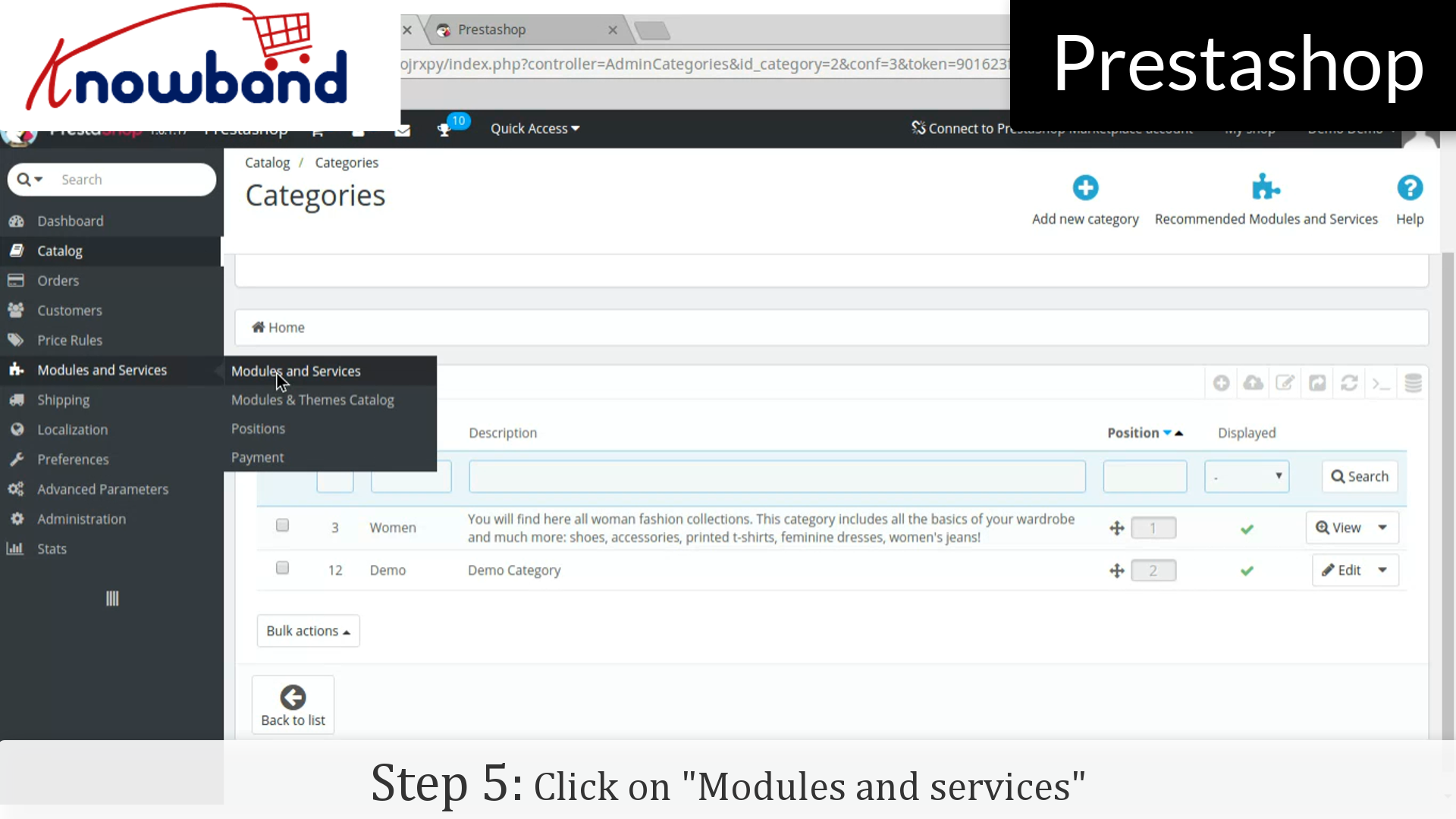
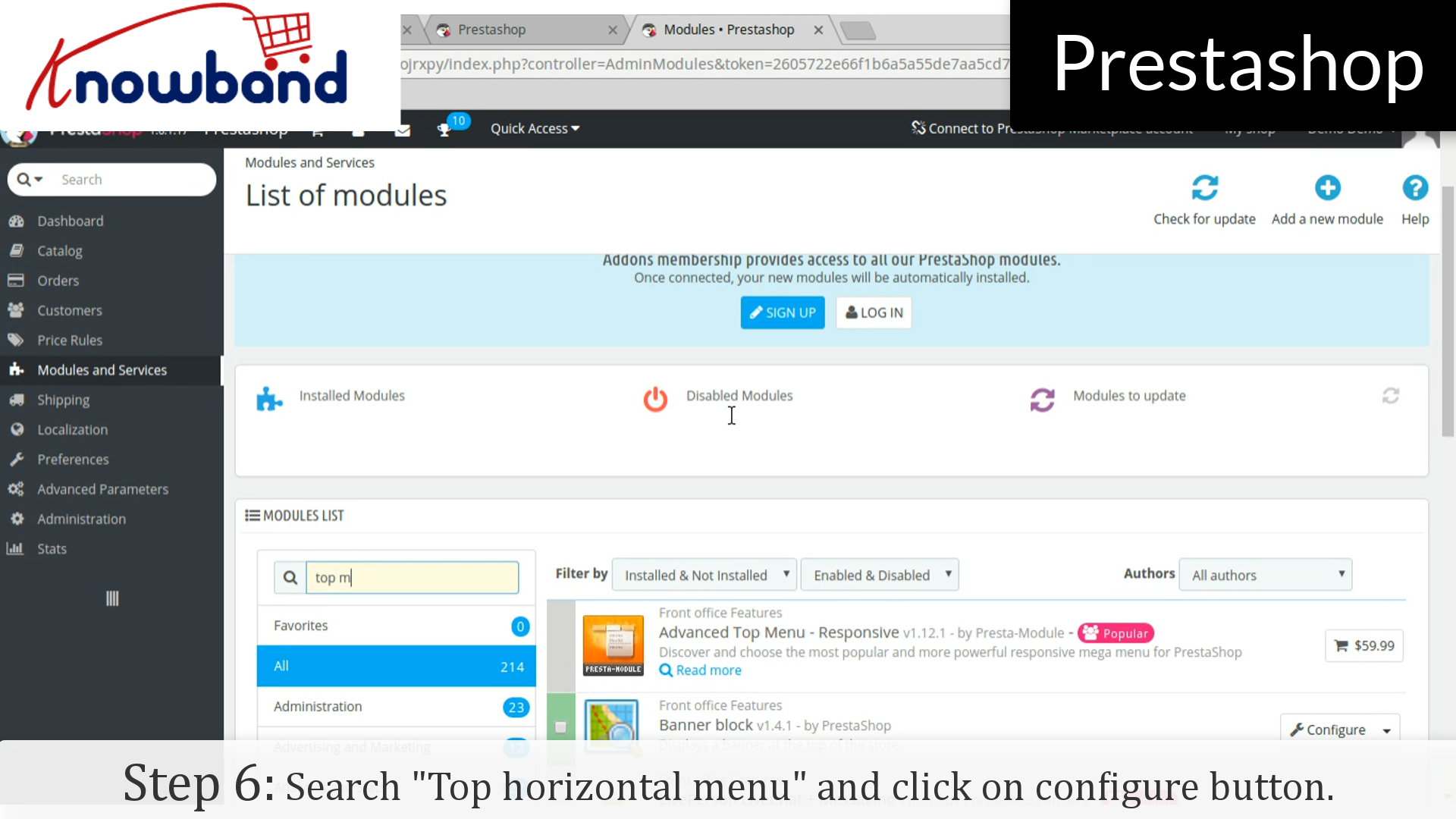
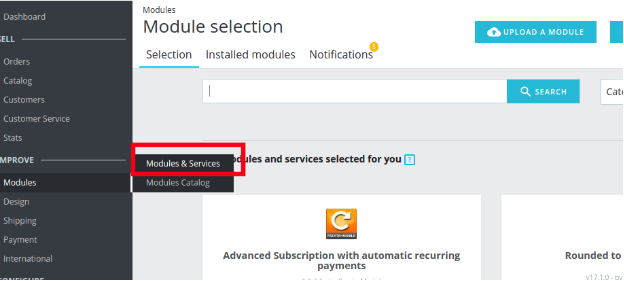
Step 5: Click on “Modules and services” on the left side menu.


Step 6: In the module list, search “Top horizontal menu” and click on the configure button.


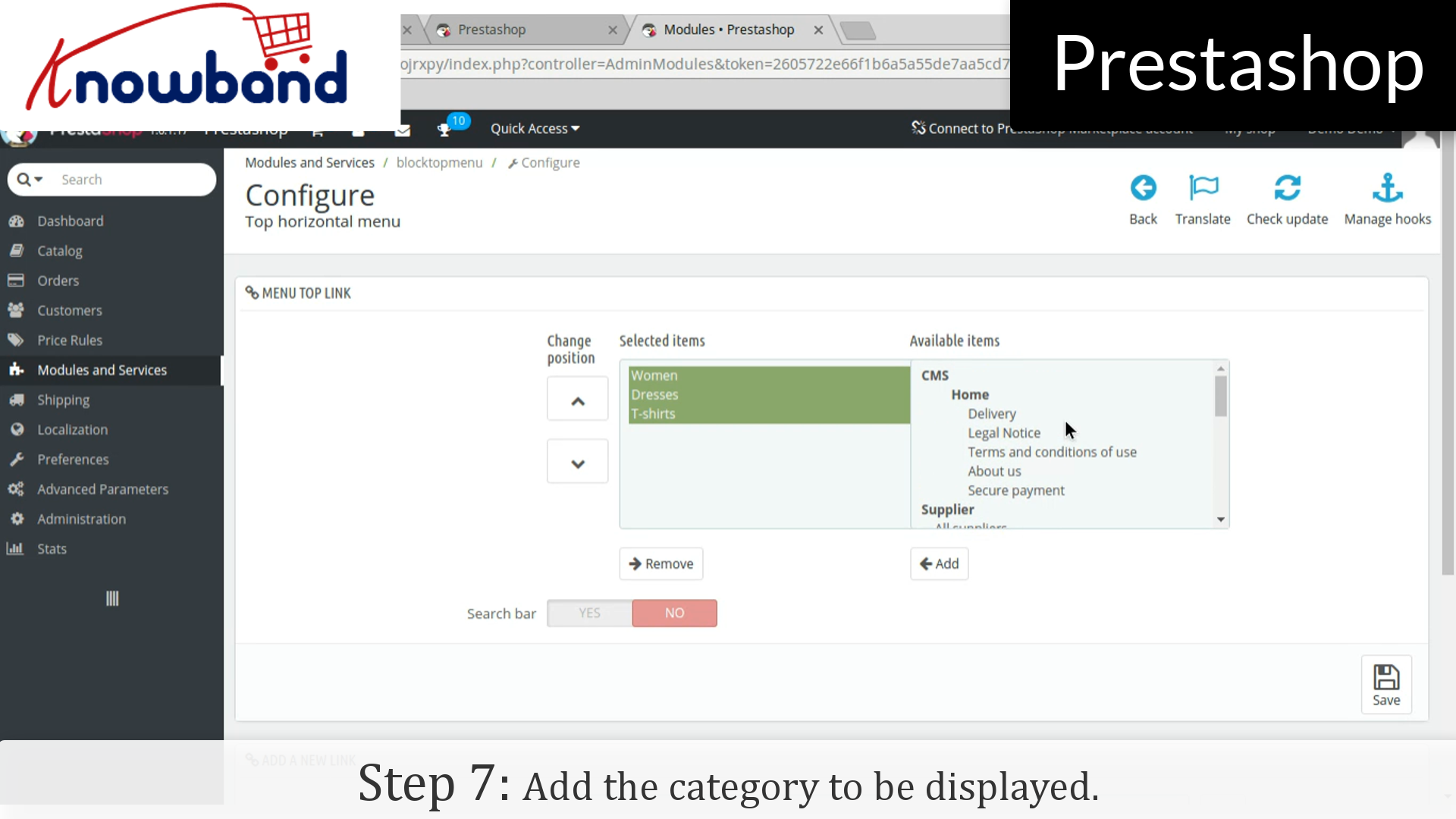
Step 7: After that, add the category to be displayed.


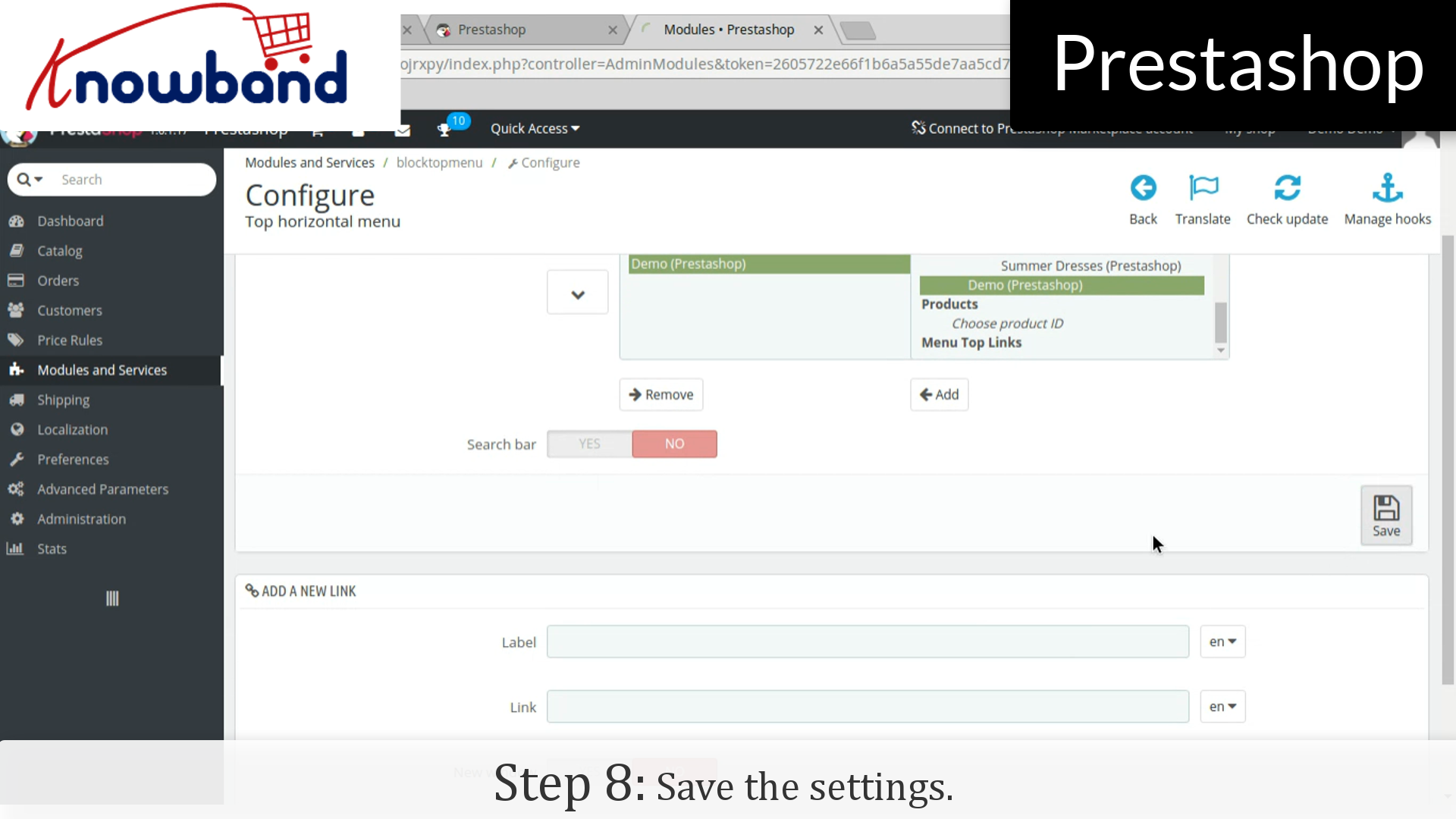
Step 8: Hence, click on the save button in the right corner on the dashboard and save the settings.


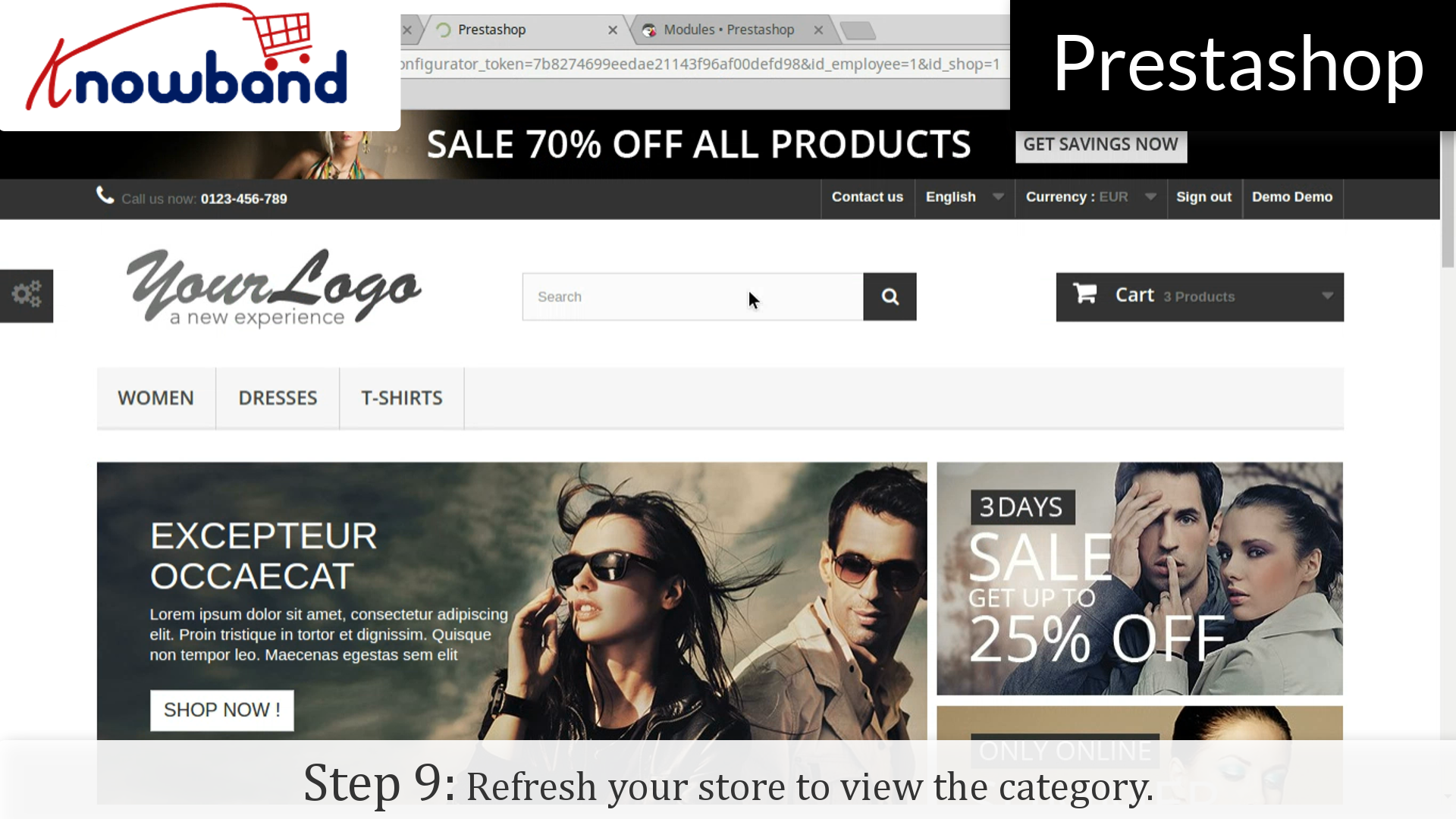
Step 9: Refresh your store to view the category which you have added.


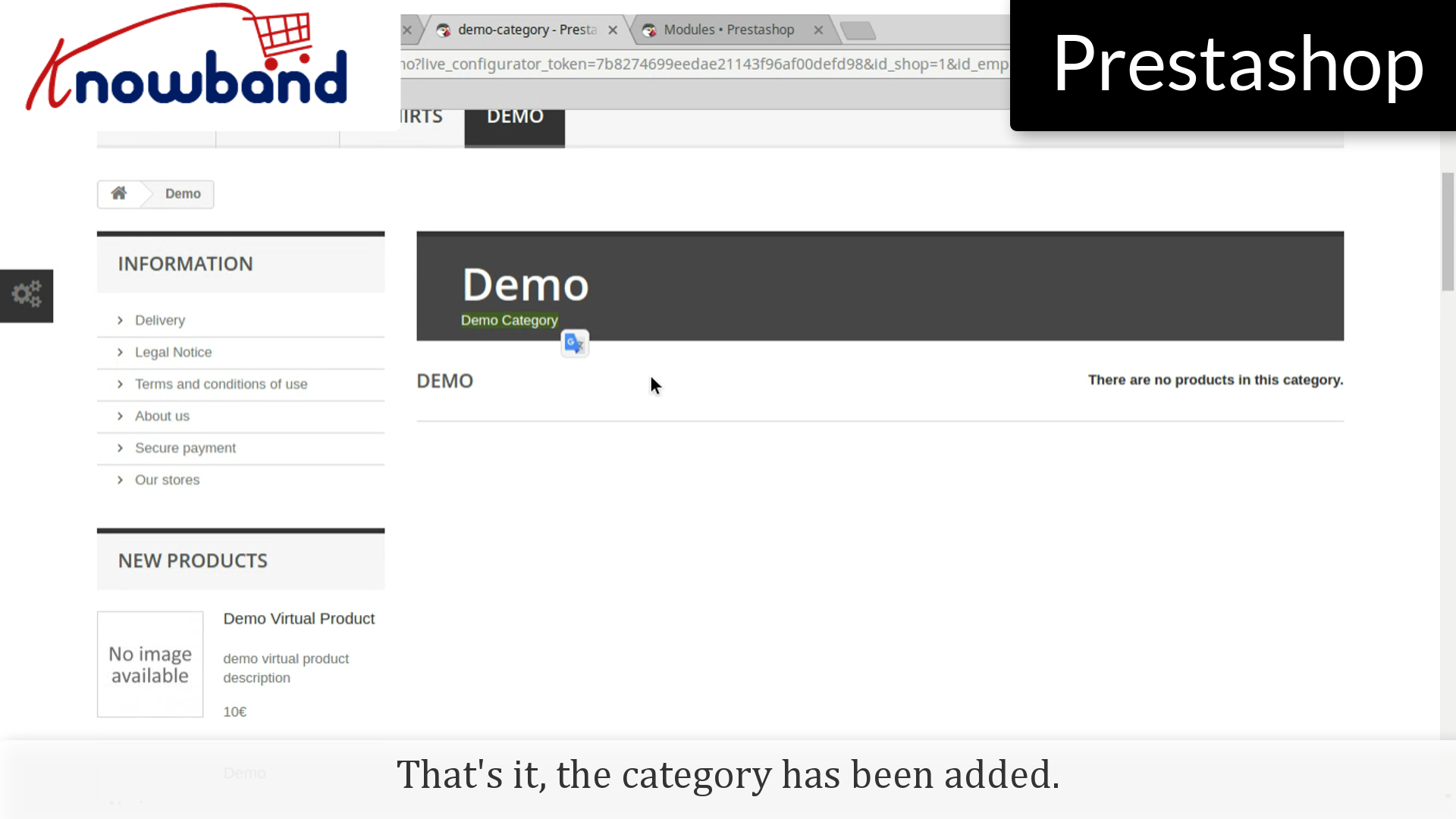
That’s it, the category has been added. However, you will see that the products are not showing in the category.


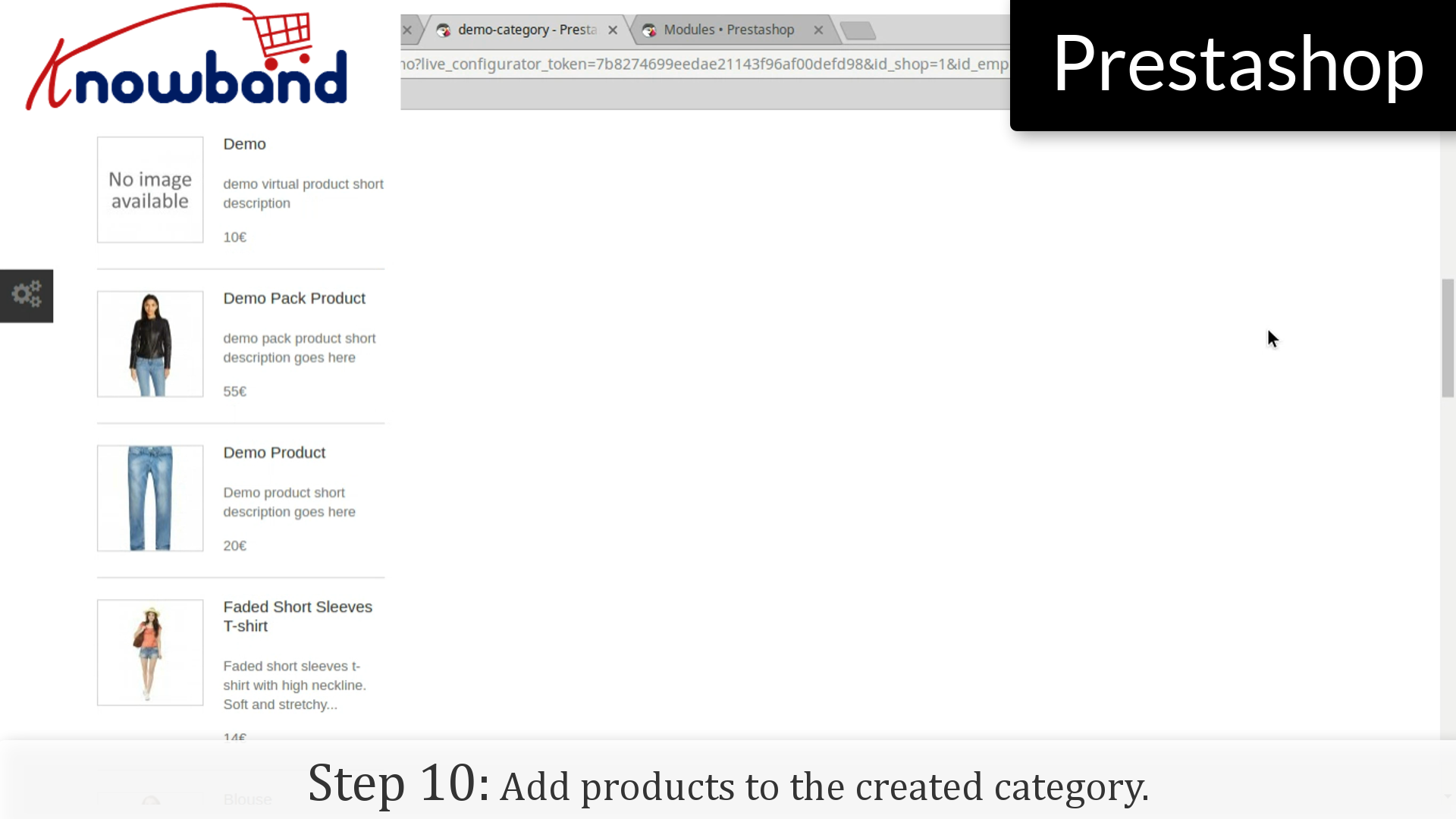
Step10: Add products to the created category.


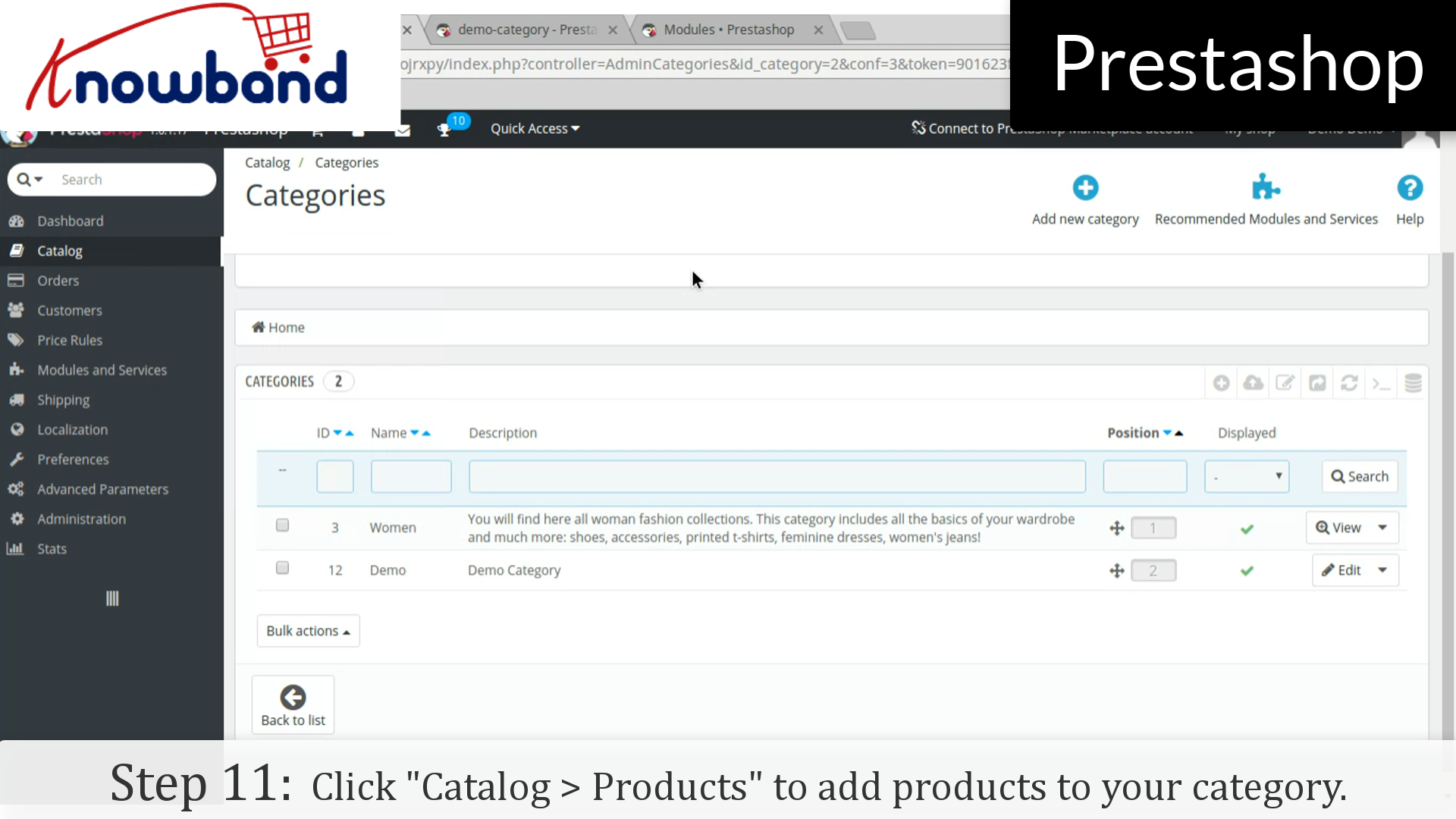
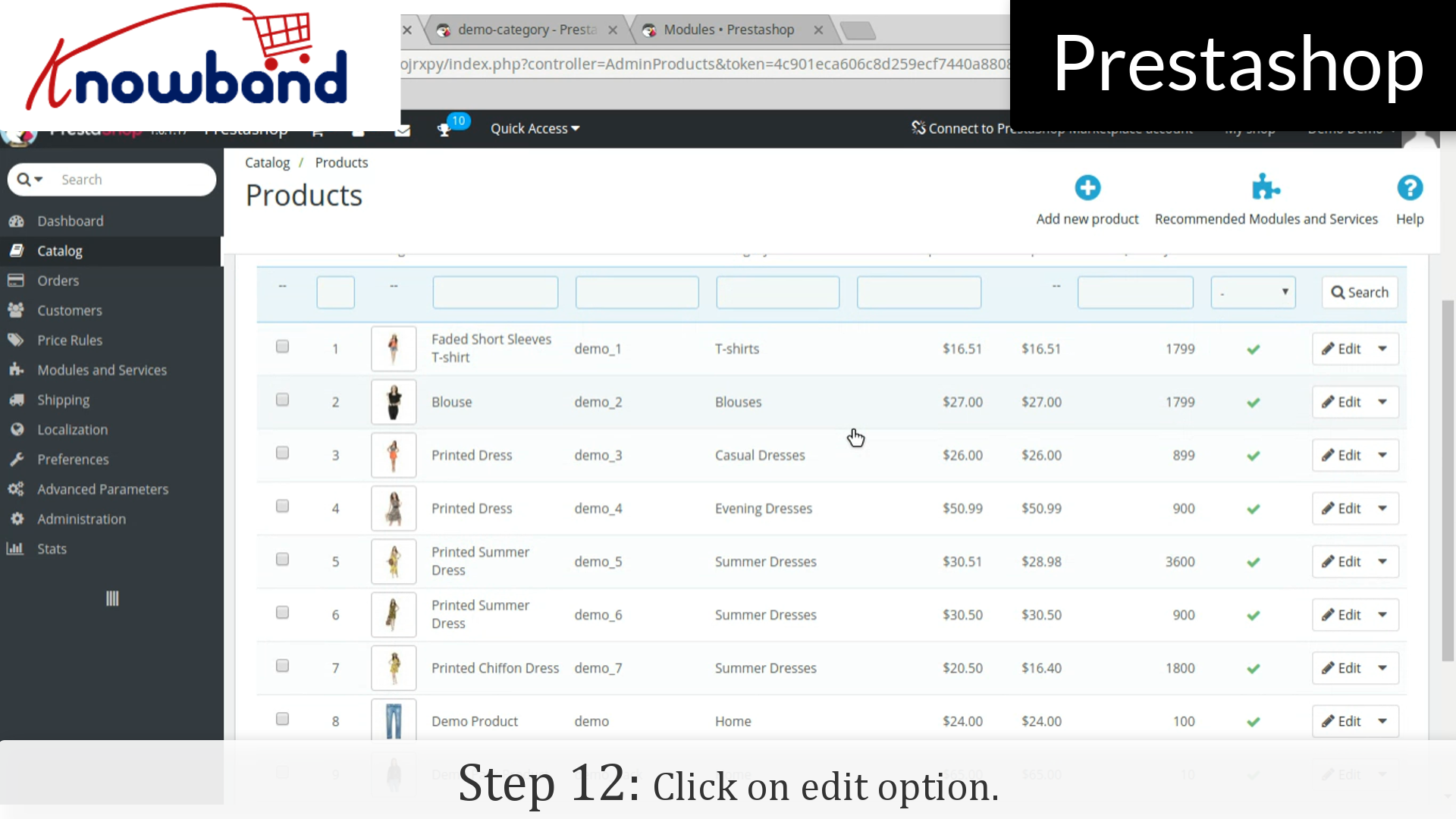
Step 11: Go to the dashboard in admin panel and click on “Catalog > Products” to add products to your category.


Step 12: Click on “Edit” option of the products which you want to add in the category.


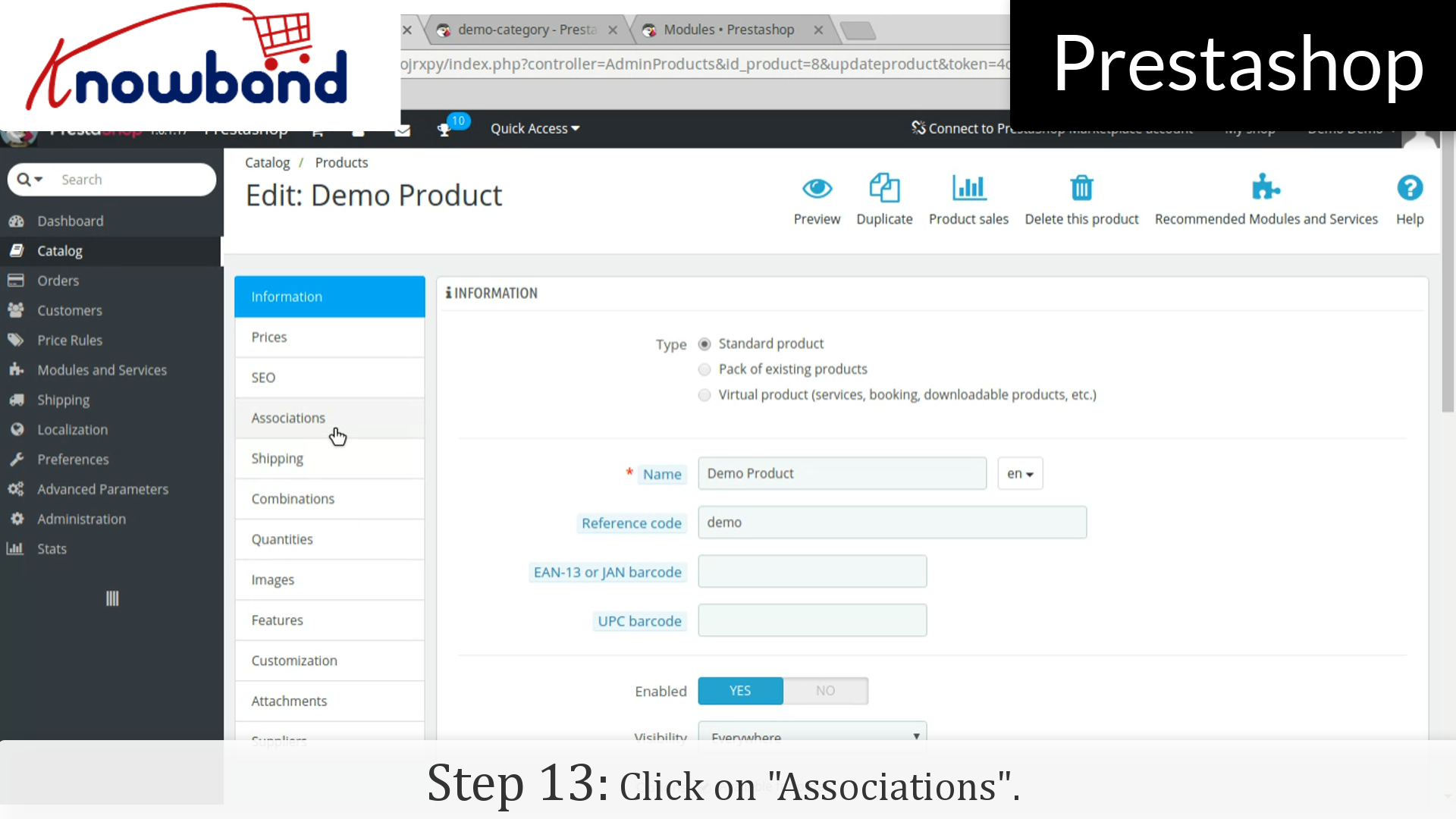
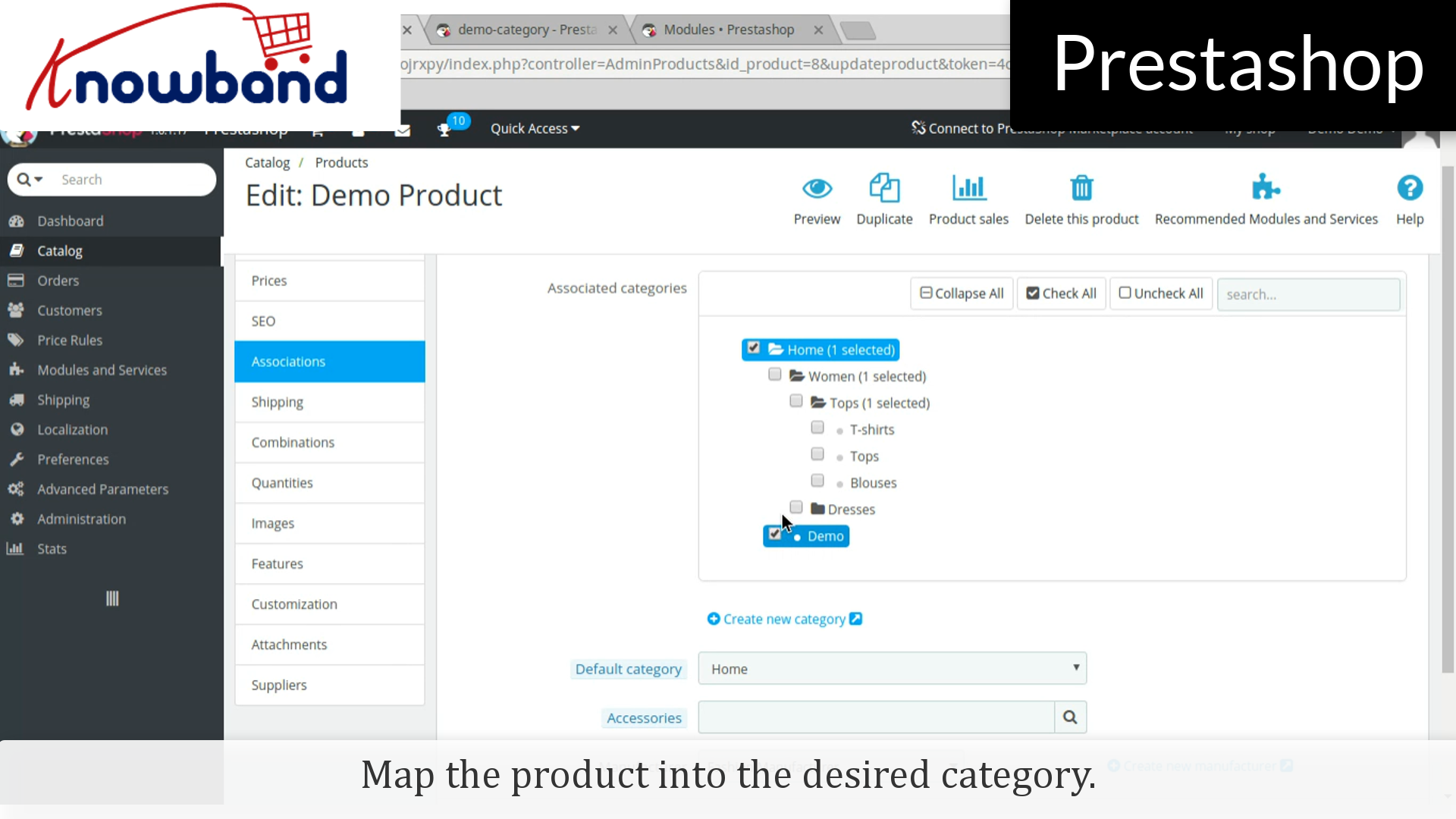
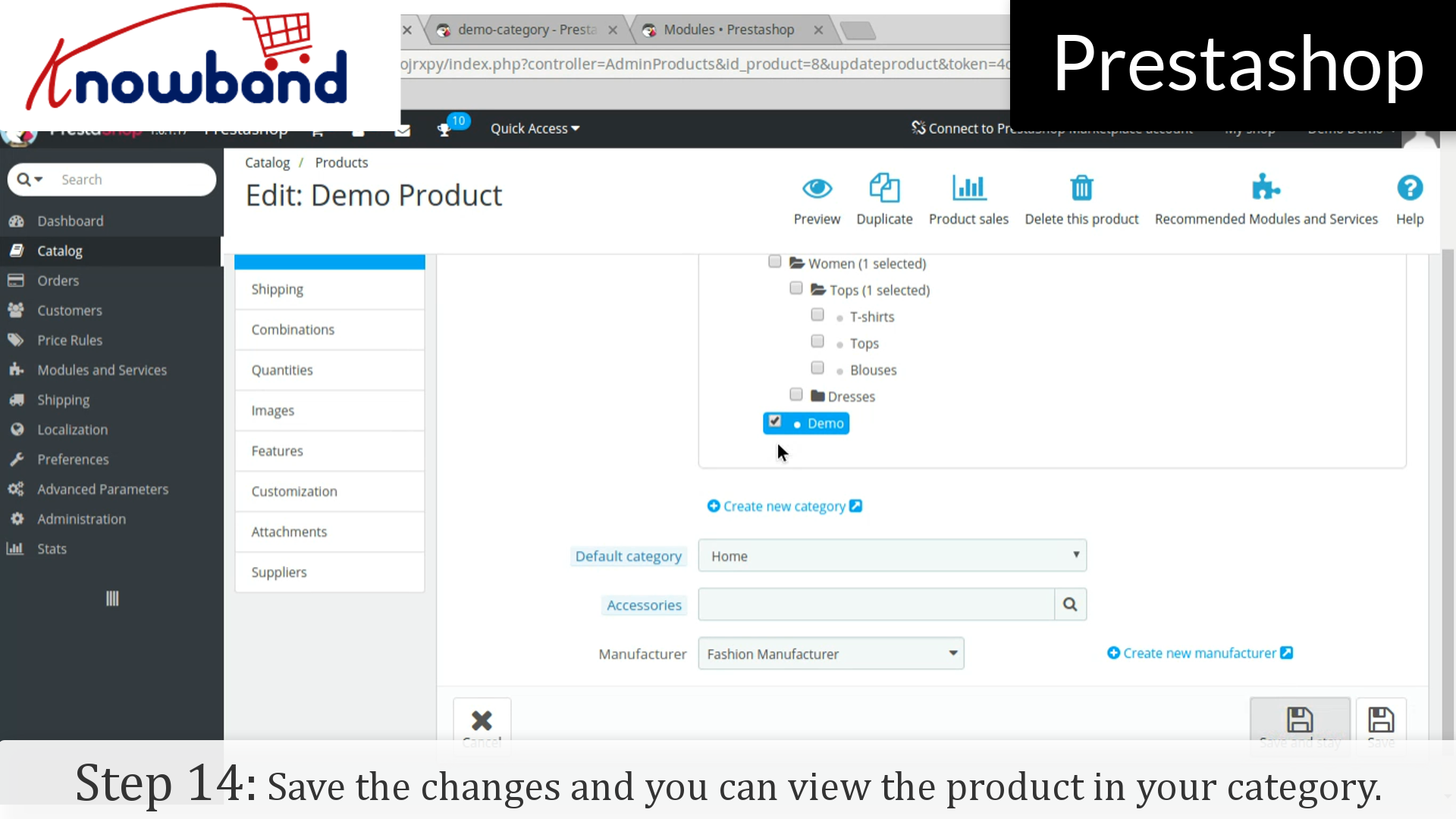
Step 13: Click on “Associations” in the product details and map the product into the desired category.


Step 14: Click on the save button to save the changes and you can view the product in your category.


For any query, please contact us at support@knowband.com.

Related Stories:

PrestaShop: A Valuable eCommerce Platform or a Wrong Turn?

Today, when only the biggest eCommerce sites like Amazon, Alibaba, eBay, Etsy, etc are the only ones with huge global acknowledgment, why it is still said that eCommerce is a hit?

The reason is, despite only a few big sites are in the global limelight, the niche based inventory model sites are doing so well in their limited local market. The brick and mortar based business owners are budding into eCommerce entrepreneurs by adopting easiest solutions to make their retail an online shop.

The easiest solutions that I am talking about are the various eCommerce platforms that provide a ready-made eCommerce site on the go. PrestaShop is one such eCommerce platform which is becoming popular among the eCommerce entrepreneurs day after day. A large number of eCommerce business aspirants has chosen this platform to launch the eCommerce site of their dreams and claim their share in the huge profit that eCommerce generates each second.

Current stats about PrestaShop

  • PrestaShop was launched on 31st July 2008, in France.
  • Currently, it is powering more than 250,000 eCommerce sites worldwide in 60 different languages.
  • PrestaShop Shares the total market share of 9% for open-source eCommerce platforms.
  • According to W3Techs, there are total 0.5% PrestaShop websites out of all the websites on the internet.

This is an impressive stat. 0.5% of total websites on the internet is a huge share. So, PrestaShop is very popular I guess.

In all these good talks about PrestaShop, haven’t we ignored the fact that PrestaShop is not the most popular eCommerce platform? I mean if PrestaShop is the best that you can have for your startup, why Magento, Shopify, WooCommerce etc are being chosen by several other entrepreneurs?

The reason is, none of the eCommerce platforms can be said to be a perfect solution. Factors that differentiate these platforms and allow them to survive parallelly highly depend on requirements, usability, flexibility, modules, ease of use and a lot more.

This is where you need to ask yourself “Is PrestaShop a perfect solution for your eCommerce stratup?” Let’s examine it.

Factors that make PrestaShop better than others

1. Ease of use

Usability is one factor that makes PrestaShop better than most of the eCommerce platforms. Most of the entrepreneurs come from a non-technical background. They hardly have the knowledge of coding and other technical stuff.

Luckily PrestaShop has been designed to be used by any kind of user. It doesn’t matter if you are a tech savvy user or have zero coding skills, You can setup a store and manage it all without any hassle.

From installation to configuring the whole website, from product uploads to managing the orders from your customers, you get the easiest interfaces to do it all.

You can install PrestaShop using the guided interface that clearly explains everything you need to do in the process. In fact, the cloud version of PrestaShop saves you from the hassle of installation and directly provides the ready-made store, waiting for you to upload the products and start selling on the go.

2. Highly extensible

PrestaShop possesses a number of built-in features to get a ready made store for you. These features include:

  • Store personalization
  • SEO friendly URLs
  • Product upload management
  • Shipping management
  • Supply management
  • Customer management
  • Discount management
  • Order Management etc.

Apart from these features, the platform allows the addition of any number of new features through PrestaShop modules. By simply installing a PrestaShop module, you can add a functionality that has not been given in the default system. Moreover, you can also enhance the built-in functionalities through these modules.

For example, Social Login is a quite important requirement for the eCommerce website to improve their site’s usability for their customers but is not present in default PrestaShop system. The good news is, you can easily integrate this functionality by installing a social login module.

The extensiveness in PrestaShop is not limited to the modules only. It saves you from the cost and effort of designing your new eCommerce store by simply allowing third party PrestaShop themes to be installed.

Frankly, every other eCommerce platform allows the module and theme extension, then how it makes PrestaShop better than them? This question takes me to my next point.

3. Huge number of modules and themes

PrestaShop has a huge community of users, developers, and website owners. It is one of the most active communities where you can find the solutions for everything about PrestaShop.

This highly active community consist of a very big population of third-party PrestaShop developers. These developers contribute to the community by developing the PrestaShop modules, themes, and templates for every trending need and requirement.

The official PrestaShop marketplace is a hub of all your modules, themes, and template requirements. Moreover, some big community developers also sell their modules and other developments on their own official sites. You need to just Google your requirement, and a large number of PrestaShop modules fulfilling them would be shown to you in the SERPs.

This is where PrestaShop beats most of the eCommerce platforms available today. As compared to other eCommerce platforms, PrestaShop modules and themes are so easily available and at a very lower cost than others. It is because of the massive competition among the developers, you can get some pretty fair deal in modules, themes and other custom developments from these developers.

4. Mobile Friendliness

Mobile Optimization is not an option, it has become a necessity today. If your eCommerce site is not optimized for mobile viewing you will loose your business in no time.

PrestaShop is a mobile-ready platform, which has been fully optimized for responsive viewing. The well optimized mobile responsive shopping cart allows your customers to easily shop on your site from their mobile phones.

Not just the shopping cart, the default PrestaShop theme is also fully mobile responsive. That means, your shoppers can browse anything and everything on your site without having an irritating experience on their mobile phones.

Moreover, almost all of the third-party modules and themes are also mobile responsive as the developers too know that mobile is important for your business. This mobile friendliness of PrestaShop is enough to make it one of the best eCommerce platforms in terms of usability for the customers.

5. A guided and well-supported platform

PrestaShop is one of the best platforms in terms of user support and guidance to use the platform. You can get all the valuable documentations and support whenever you need them. In fact, you can find all the documentations about all the PrestaShop versions on the website of PrestaShop itself.

This mainly includes comprehensive information about installation, features, settings, version upgrade, and much more. There are official as well as third-party forums and communities that support the website owners in various tasks and issue resolution activities.

The PrestaShop forums or community officially support the users by answering their queries. Moreover, they also provide paid support and training courses whenever you require. This also includes custom module development as per your requirement.

6. It’s highly flexible

There is very little left to talk about the flexibility as I have talked a lot about it when I mentioned about the modules and themes to extend the functionalities. Something that I would like to add in this would be the possibility of developing a module for almost every requirement you can think of. Other platforms also allow modules and themes to be installed, so what’s the difference here?

The difference is there in the feasibility to develop modules for a wide variety of needs and requirement. In fact, with a single module installation, you can even get even the most complex functionalities.

A perfect example of one such module is the “Marketplace Module”. A single PrestaShop module that can convert your whole PrestaShop store into a fully-fledged marketplace site.

Before the first marketplace module was introduced, no one would have thought that an originally inventory based eCommerce platform can also be used to develop a huge marketplace site. A site where you can add and manage new sellers/vendors.

This is the kind of flexibility that PrestaShop provides which is not found in most of the other eCommerce platforms.

7. It’s free to use

PrestaShop is fully open-source and free eCommerce platform. This means you don’t need to spend a penny if you want to use PrestaShop platform to build your online store. You can download the PrestaShop file for free and install it on your web server. As soon as you install it, you are ready to start selling from your store without spending a single amount.

Unlike various other hosted eCommerce platforms like Shopify, BigCommerce, Volusion etc, PrestaShop does not charge you for using it as a platform to build your site.

The places where you will need to spend some money are:

  • Installing a paid PrestaShop theme
  • Installing a paid PrestaShop module
  • Getting a custom theme or module
  • Hosting your website with a paid web host and
  • Paid training courses

These expenditures are important, necessary, and you will happily pay for them if you require them. With PrestaShop, at least you can save the money that would have been spent it getting an access to the platform itself.

8. I didn’t miss the basic features

The features and benefits of PrestaShop that I have mentioned in the above points are the ones that make PrestaShop stand out from the rest. However, I have not mentioned the basic functions because it’s understandable that PrestaShop does not omit these basic features either. PrestaShop seamlessly provides these features too:

  • Fully functional and easy to use Back-end interface.
  • Flexibility to support a large number of payment options.
  • Flexibility to Provide multiple payment options to customers at a time.
  • SEO friendly URLs for any controller or page on your store.
  • CMS page management.
  • Extensive shipping management.
  • Multi-lingual platform- more than 60 languages.
  • Multi-store feature.
  • Easily available latest security patches and upgrades.
  • Comprehensive reporting system etc.

Places where you might find PrestaShop difficult

As mentioned in the beginning, PrestaShop is not the most popular platform. What could be the reasons? Is it a wrong turn to adopt PrestaShop?

I can certainly say, it would not be a wrong turn to choose PrestaShop. It is just that not all the eCommerce platforms have everything you would need. The needs and requirements for a perfect and highly competitive eCommerce platform are changing day by day. The platform which can match up with the changing trends can only become the entrepreneurs choice.

1. It highly depends on the modules

Despite PrestaShop already provides all the essential features by default, it lags some important trends that have become a necessity for today’s entrepreneur. For example, It has been ages when social login feature was introduced to the websites and developers.

Even after so many upgrades and updates, PrestaShop has not included this feature in the default installation. A website owner seeking this very basic feature has to purchase a third party module for the same.

PrestaShop depends on third party and official modules for most of the trending features. Probably they do not want to burden the default installation with the features that can be easily achieved by installing a simple module.

2. The major upgrades do not support carry-forward

By carry-forward I mean the ability of the PrestaShop modules to be used with all the major versions without any change in the module.

The recent major upgrades still supported by PrestaShop include:

  • PrestaShop version 1.5
  • PrestaShop version 1.6
  • PrestaShop version 1.7

Each time when a new major upgrade is released and if you decide to upgrade to the new version you will not be able to use your old PrestaShop modules or theme on the new version. That is, either you need to upgrade your module according to the new PrestaShop version or buy a new module developed for the new major version.

Luckily, there is not much to worry as a PrestaShop store owner. Third party developers are highly active and they make their modules compatible with the new version as soon as it is released. If you are lucky you need to just ask your module developers for the upgrade they will provide you the new module version without any cost.

3. Scalability could be a problem

PrestaShop is best suited for small to medium sized businesses. When it comes to scaling it as a fully-fledged giant eCommerce site, it is not the best option. With a massively increased scale of the store, you may notice lags in the various aspects like page loading time, back-ends performance, database overload etc.

By a fully fledged website, we mean the very big eCommerce sites that can be compared with the biggest eCommerce giants. If you have the intention to build another Amazon, probably you must look for an enterprise level solution like Magento Enterprise edition or build your own framework.

Scalability limit on PrestaShop is not that small as it seems. You can handle thousands of SKUs, Sellers, and Customers without any hassle. In case if you have millions of SKUs in your mind then PrestaShop could be a wrong turn.

To Roundup

PrestaShop has proven to be an efficient eCommerce platform and is still trying its best to prove better on various grounds. Of course, it’s not a perfect solution, and there are limitations with major upgrades, scalability. However, considering its target users, it has got everything they would need to launch a successful medium sized eCommerce site.

Nevertheless, it offers various benefits and greater flexibility with a competitively lower investment cost. It cannot be termed as a perfect platform but would not be a wrong turn either.

I can say that Magento is a better solution than PrestaShop for large scale eCommerce sites. While PrestaShop could be a great choice for small to medium sized business which is comparatively more in number.

Prestashop Free Shipping Manager Addon- User Manual

1.0 Introduction

There are many aspects to manage the online business like: marketing strategy, social media optimization, email marketing- the list goes on and on. Present time most of the online merchants offering free shipping to their customer & they see the result free shipping generates more sale. Knowband offers you a Prestashop Free Shipping Manager Addon.

The Knowband Prestashop Free Shipping manager addon allows the admin to offer free shipping to the customers. Not just this, the admin can even apply shipping charges when the cart value is below a certain limit. All this can be done following few simple customization option at the back end of the admin interface of the module.

The shipping charges are determined by two factors. They are listed below:

  1. The cart value or the total price of the order: The store admin can determine the shipping charges as needed when the cart value of the shopper is below a certain limit. This limit can be set by the store owner himself.
  2. The total weight of the order: The store admin can even charge shipping amount when the weight of the parcel exceeds beyond a certain permissible limit.

1.1 Benefits of Merchant

The Prestashop free shipping manager addon is aimed at making it easier for the store owner to manage the shipping cost of their website. Listed below are some of the objectives that can be achieved by the Prestashop extension:

  1. Terms & Conditions: It allows the store owner to set the terms and conditions for the shipping of the eCommerce store. The admin can offer free shipping or charge an amount as per his wish.
  2. Free Shipping by Price: It allows the store owner to set the price of cart value below this price admin won’t be allowed the Free shipping by price.
  3. Free Shipping by Weight: It allows the store merchant to set the minimum and maximum limit of the weight of the package below this weight they can charge the shipping cost.
  4. Free Shipping by Zone: It allows the PrestaShop admin to select the country where they want to offer free shipping by zone.
  5. Free Shipping by Carrier: It allows the owners to select the carrier option which his/her want to provide the free shipping option.
  6. Look and Feel Settings: In this option admin can change the background color, button color and border color of the free shipping block.
  7. Customer Selection: In this option, Prestashop store merchant can select the customer according to the need.
  8. The Free shipping comples customer to add more product to the shopping cart.
  9. These Prestashop addons motivate customers to spend more time on your website and your customers will feel in control of what they’re spending on.

1.2 Benefits of Customer

  1. This Prestashop Free Shipping manager module shows a block on cart summary which gives the exact information about the condition.
  2. This Prestashop Free Shipping manager extension gives them access to a customer to buy the product with free shipping.

2.0 Installation

After purchasing the Prestashop Free Shipping manager addon, you will get following files as listed below in the apk folder:

  1. freeshipping.zip (contains source code of the module)
  2. User Manual

In order to install the extension in your Prestashop store follow the below mentioned steps:

  • Unzip the freeshipping.zip file. It would contain a number of files and folders as shown below

  • Copy the entire content, that is, the files and folders of the unzipped folder. Paste the same into the “Modules” folder of your store’s directory. Follow the below-mentioned address path – Root Directory/modules/.
  • The plugin is all set to be installed in the store. Go to the Store Admin and then to‘Modules and Services’. Your module will be shown as below –

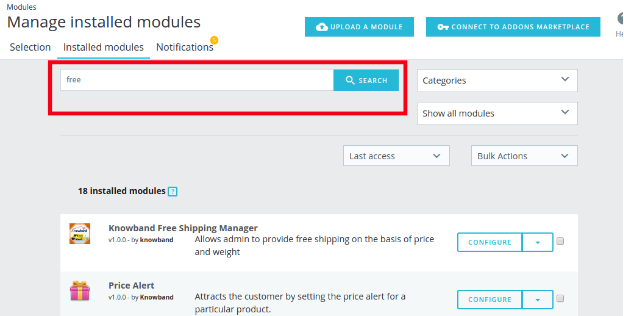
In case, you are not able to find module in admin modules list, you can do so by searching for it with the details mentioned below-

Keyword – Free Shipping

Category – Front office

Filter By – Installed & Not Installed / Enabled & Disabled

  • Click on the “Install” button just next to your module. It would show a pop-up for your confirmation. Click on “Proceed with the installation” option. This step will install the module and show notification – “Module(s) installed successfully”.

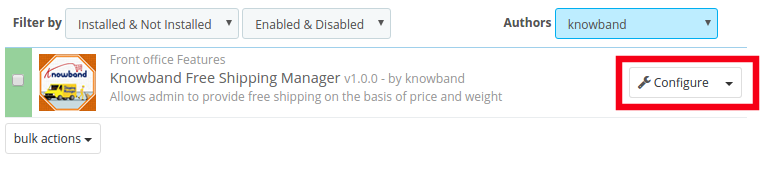
Once the installation is complete, you can get an access to the admin interface of the module by clicking on the “Configure” button.

3.0 Admin Interface

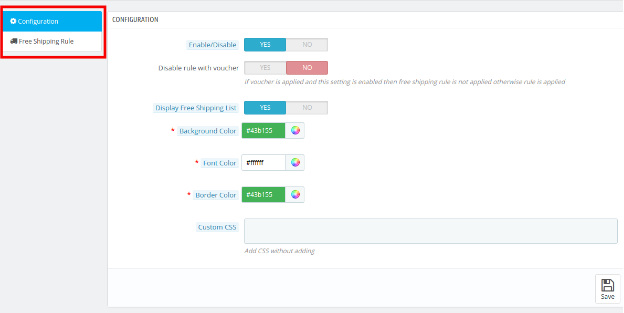
The Prestashop Free Shipping Manager addon is fully configurable. The best thing is the configuration settings can be updated via the admin interface by just clicking the buttons. No code changes are required for the same. The admin interface of the extension has two customization options. They are listed below:

1- Configuration
2- Free Shipping Rule

These options are discussed in detail below:

3.1 Configuration Settings

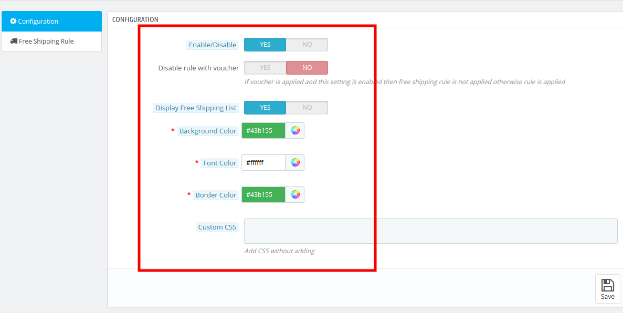
The ‘configuration’ tab of the Prestashop Free Shipping Manager extension offers the seven options to admin that are shown on image below:

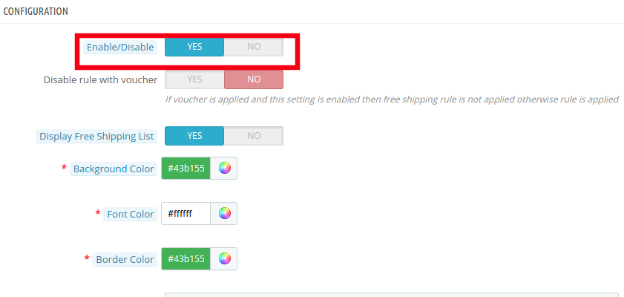
3.1.1 Enable the module: In this section admin can enable/disable the module. This can be done with a button toggle as shown below.

Listed below are some of the options that are offered to the store owner by Prestashop Free Shipping Manager Module.

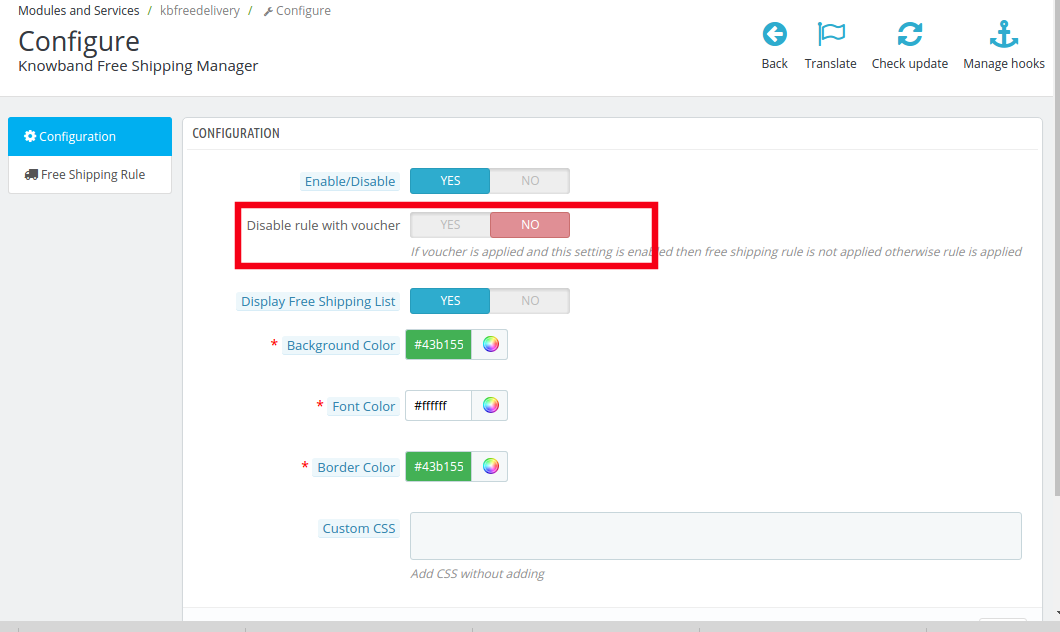
3.1.2 Disable Rule With Voucher

Once this setting is disabled, the free shipping offer will not be applicable even when the voucher is applied.

As it is disabled, the free shipping rule will not be applicable if the voucher is applied on any purchase.

In case, you want to offer free shipping even if any voucher code is applied, then, you can do so by enabling the button.

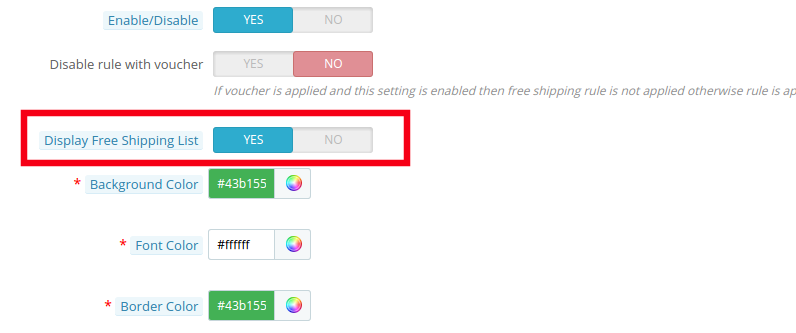
3.1.3 Display Free Shipping List

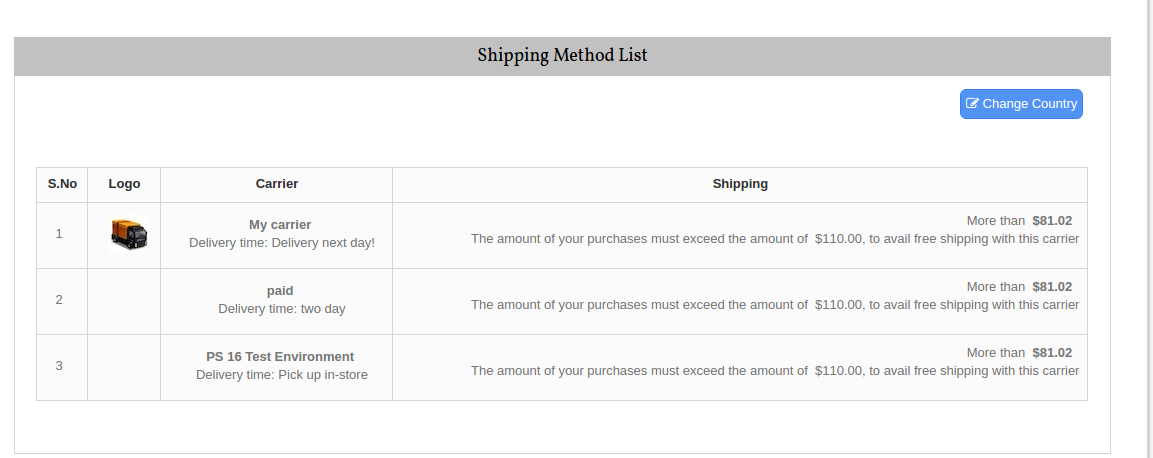
The various free shipping methods can be displayed to the visitors on the website. The list will be shown as mentioned in the image below.

However, if the Prestashop store admin wants to remove the feature, he can do so by disabling the button mentioned below.

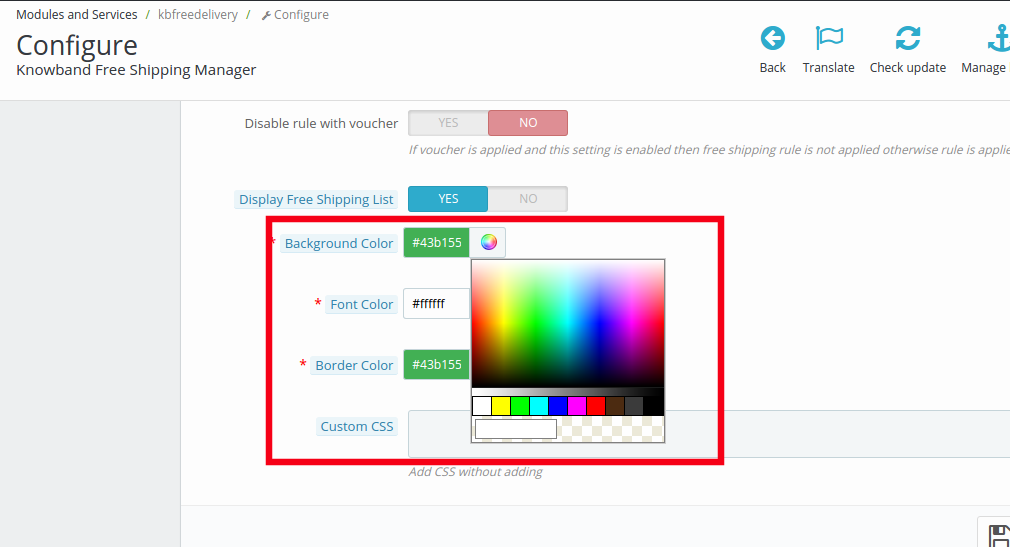
3.1.4 Background Color

The color picker can help you change the background color of the free shipping display.

You may the color that suits the theme of your Prestashop store.

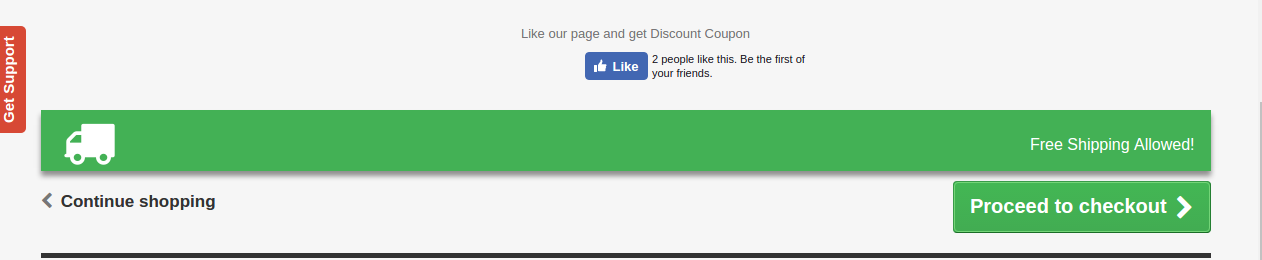
The message will be displayed in the front end of the website as shown in the image below.

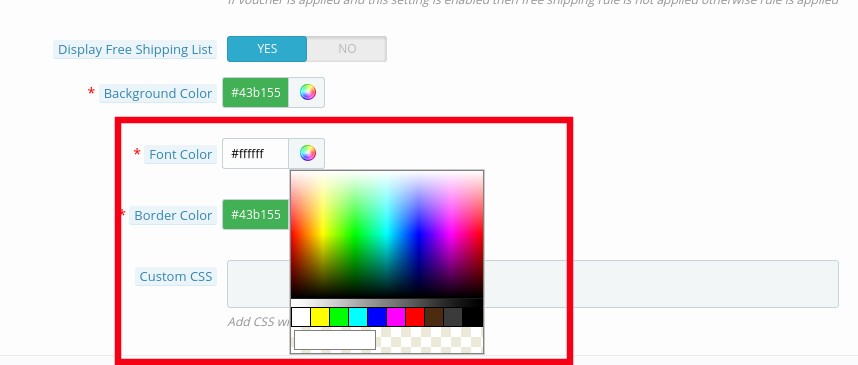
3.1.5 Font Color

The font color of the message that is to be flashed on the website can be picked and set from here.

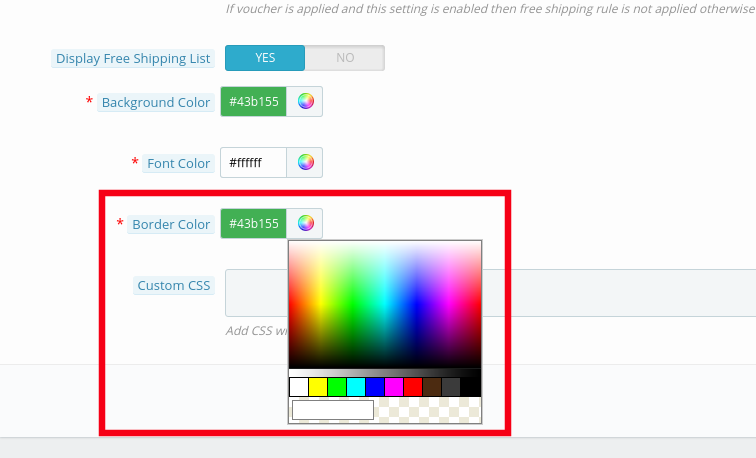
3.1.5 Border Color

The entire block can be customized as per the requirement of the website. The border color of the box can be selected and changed from color picker as shown in the image below.

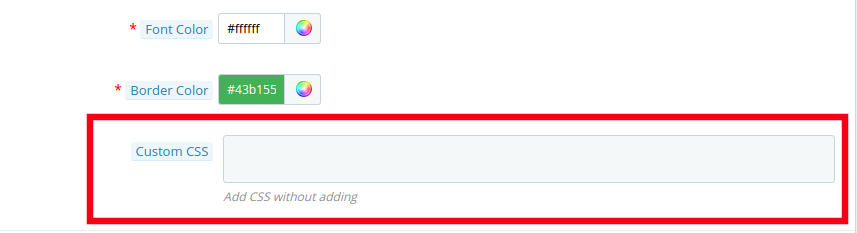
3.1.6 Custom CSS

Any custom change in the look and feel of the module can be done from here. The store admin can customize it by entering custom CSS code in the block shown below.

3.2 Free Shipping Rule

The online merchants get full access to change and modify the terms and conditions of shipping method on their website. All this can be done by just filling up few information.

Follow the steps mentioned below in order to make the changes:

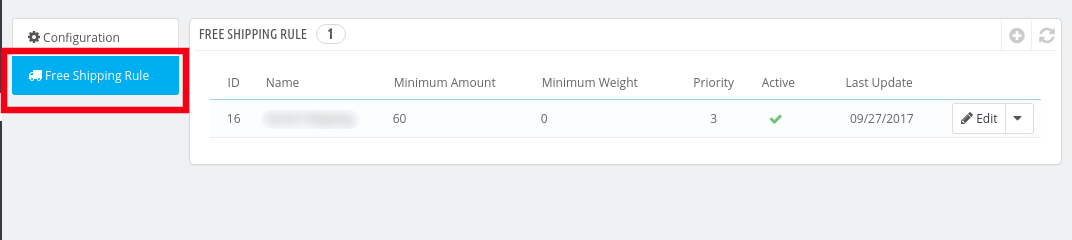
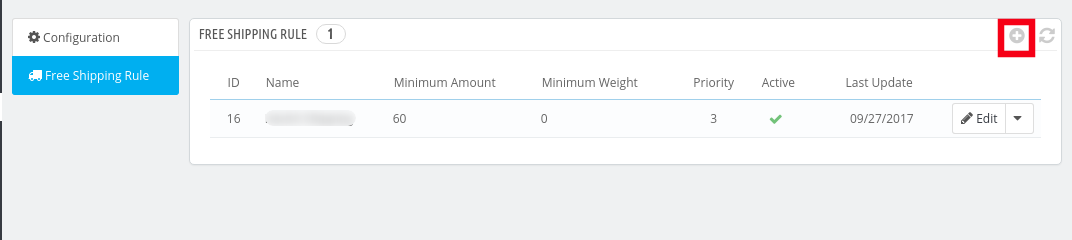
Go to “Free Shipping Rule”. You’ll be redirected to the interface where you will get the list of the rules already fixed by you.

In order to add new rules click on the ‘+’ sign on the right end of the page as shown in the image below:

You’ll be redirected to “Add Free Shipping Rule” page.

Listed below are some of the information that you need to enter in order to set the free shipping rules.

  • Enter the Name: Enter the name of the shipping rule. It can be anything as per your convenience.

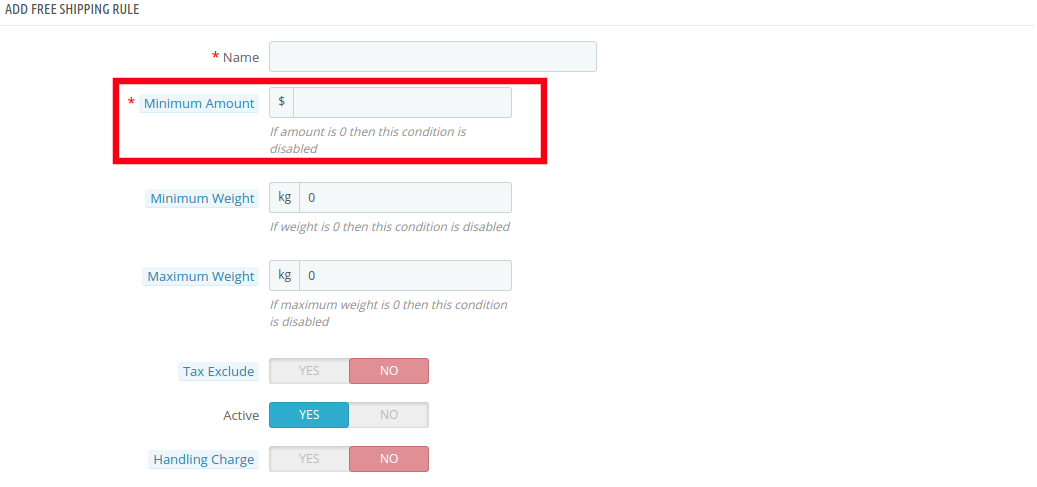
  • Minimum Amount: Enter the minimum cart value at which you want to offer the free shipping by price options. This facility will be disabled at the store if the minimum amount is ‘0’.

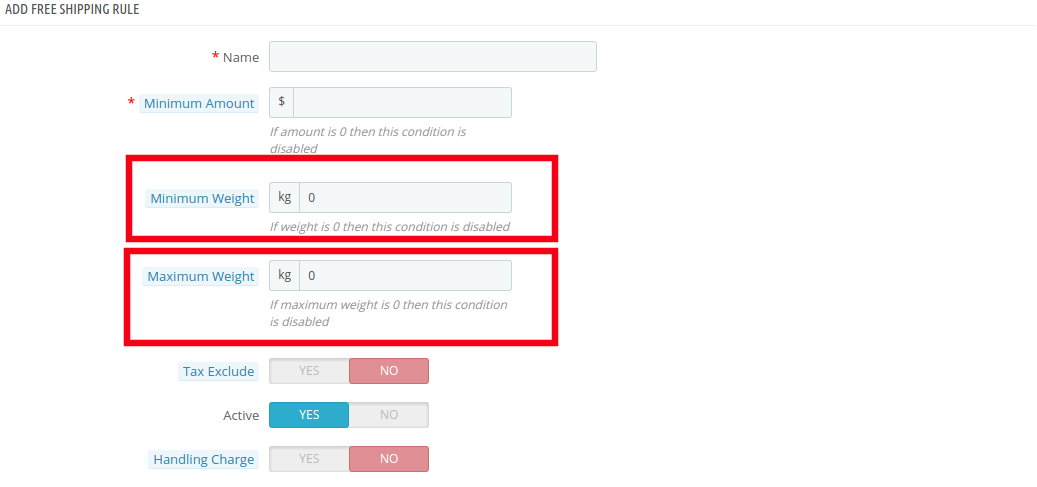
  • Minimum Weight and Maximum Weight: Set the minimum and maximum weight of the parcel beyond which you are looking to charge the shipping cost. Below this limit, the site will by default offer free shipping facility. The weight is to be entered in Kilogram.

  • Tax Exclude: You can include the tax or exclude it from the shipping charges by enabling or disabling the button mentioned below.

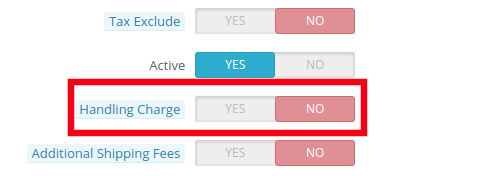
  • Handling Charge: The merchant can even include the handling charge in the shipping cost by enabling this button. Otherwise, he can leave it disabled.

  • Additional Shipping Charge: In case of any additional shipping charge, the store owner can enable the button shown in the image below.

  • Zone: The Prestashop Free Shipping Manager Addon even allows the store admin to set free shipping facility as per the geographical location of the customer. The admin can choose the zones where he wants to offer this facility and give the facility to customer to buy the products free shipping by zone.

  • Carrier: In this section prestashop store admin can select all the carrier options in which you would like to include this facility.

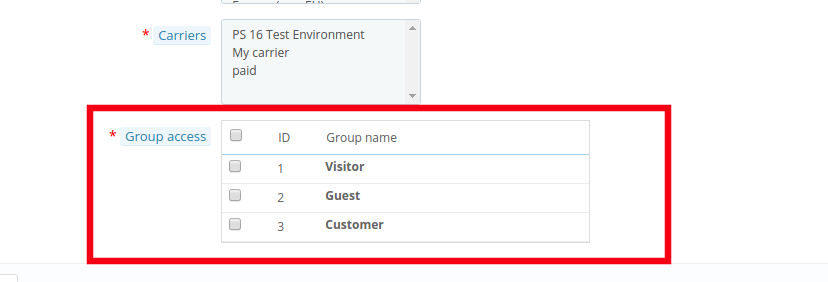
  • Group Access: The store admin can offer the free shipping facility to the Registered Customer, the Visitors or the New Customers as per his wish. Just check the options that you want to include in the feature.

4.0 Website UI

The changes done in the prestashop store back-end will be reflected in the front-end of the website.

4.1 Free Shipping Block

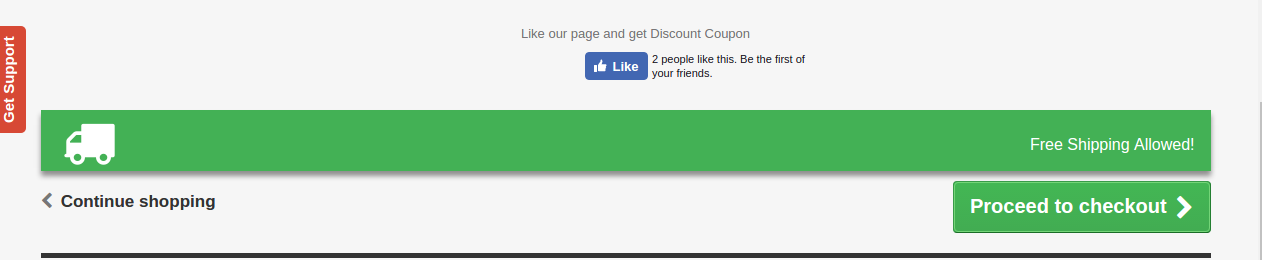
The free shipping block will be shown as mentioned below.

4.2 Free Shipping Limit

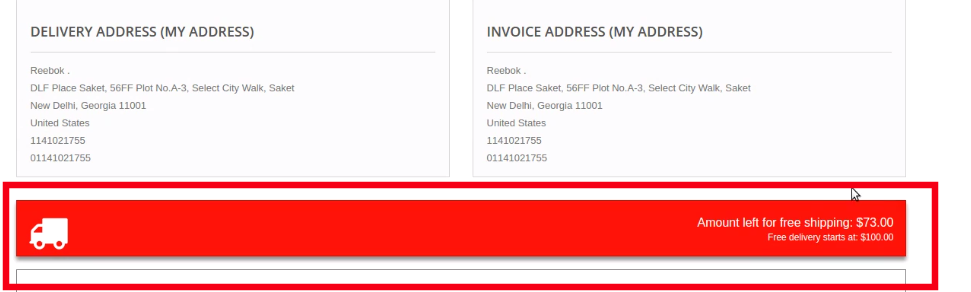
In case you have fixed any limit for the offering free shipping than the same will be shown on the cart of the shopper. If the customer select the product below the cart limit this block shows a block on cart summary which gives them the exact information on the condition to fulfill.

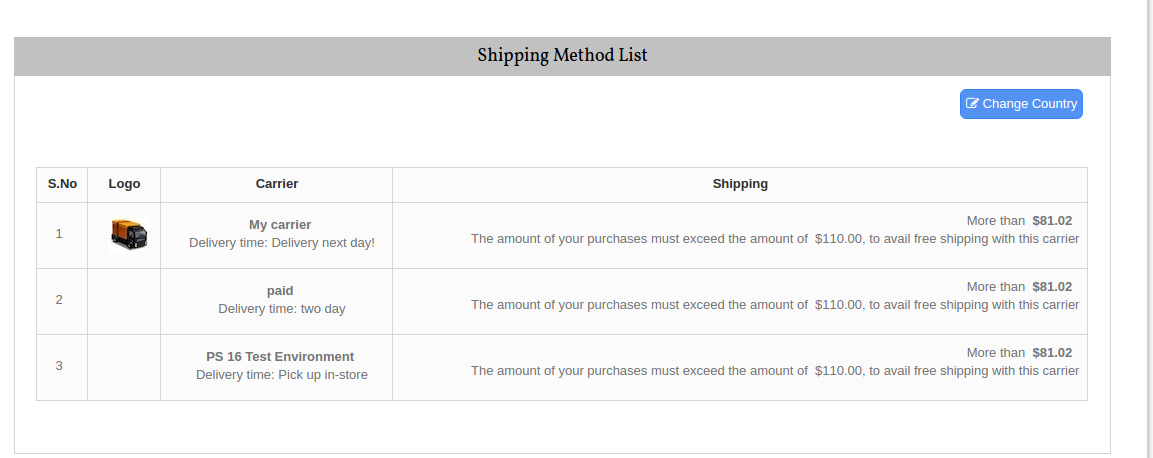
4.2 Free Shipping List Display

The entire list of the free shipping methods will be displayed on the website if the functionality is enabled by the store admin. This can provide a better user experience and ensure more transparency during the transaction.

Now you can try Prestashop free shipping manager module for on your Prestashop website. KnowBand Prestashop Free Shipping Manager Addon helps you enagege more customer to your store & increase the customer base.

Module Link: https://www.knowband.com/prestashop-free-shipping-manager
Video Link: https://www.youtube.com/watch?v=6EoU6ckZfHI
Admin Demo Link: https://goo.gl/wtA43b
Front Demo Link: https://ps.knowband.com/demo4/16/en/

This Would Also Interest You

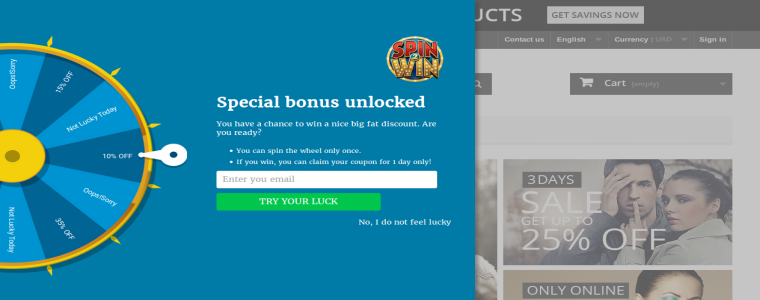
Keep Spinning, Keep Winning

Most of the customers prefer to shop online rather than visiting the physical store. The best part about online shopping is the deal and discounts that customers can avail on their favorite products. The convenience, ease of shopping and alluring discounts has led to a tremendous increase in the number of online buyers. This has opened new opportunities for the eCommerce store owners to grow their business. Now, the main task for the store owners is to divert the customers to their web stores. In order to do so, most of the sellers have come up with different offers, combo products and discounts.

The customer doesn’t seek for offers solely. In order to attract huge traffic to your website, the store owners must come with better options to engage their customers. The traditional ideas of email subscription has become appears to be a bit boring for the customers. Therefore, the seller must come up with better alternatives to attract the customers to their web stores.

The Prestashop Spin and Win Module is one such way to increase the web traffic to your Prestashop Site. The spin and win module generates a very playful pop up. Also, the spin and win module ensures high sales as well as satisfied customers.

If your Prestashop website is facing low customer engagement or some interactive addons, then, Prestashop Spin and Win plugin is made for you. Try the spin and win module and you will see a boom in the web traffic of your website.

The following features of the spin and win will help you to determine, how this spin and win module can help in generating high sale and immediate conversions.

Increased Web Traffic

The customer seeks for a better experience and this spin and win module provides them with it. The spin and win module is a better alternative to the classic annoying pop ups. Spin and win presents the offers and discount to the customers in a much creative and playful way. Most of the users would love to spin the wheelio and avail offers, rather than getting discounts by some subscription email. The annoying messages popping up in the screen can annoy the visitor out of the store, however, spin and win is one of the way to keep them hooked to the site. The playful way of spinning the wheel can make shopping and browsing fun for the online shoppers. Thus, spin and win can effortlessly reduce the exit rate and enhance the website traffic.

Better UI And UX

The customer would love to be enrolled in your website, if they are provided with better interface and at the same time a good experience. The interactive exit pop up works collectively in that direction. The spin and win plugin generates a pop up, which can be used as entry, exit or time-out pop up. Thus, making it easier for the seller to interact more with the customers. The spin and win enables the buyers to check all the standing offers from the seller in an enticing way.

Email Integrator

The spin and win module enables the customers to spin the roulette after entering their email ids. This spin and win module provides the seller with the customers email id, which can be used in the future for promoting other products. The store admin can customize the spin and win module as per his convenience. The visitor can spin the wheel with a single email id only once. Thus, spin and win increases the customer base of the store owner. Not just the Prestashop email integrator even integrates the ids with MailChimp and other marketing platforms. Thus, spin and win module even facilitates email marketing by increasing the number of subscribers.

Increased Customer Interaction

The Prestashop Spin and Win plugin is a better option to provide customers with deals and discounts. It presents the offers in a much creative way rather than the old ordeal manner. The customer avail the offers instantly. The responsive popup generates the coupon code automatically that can be further used for shopping. The code can even be send via email to the customers. The code is generated instantly and the customers can use the code for shopping at the same time. The spin and win module increases the website interaction with the customers.

Boost The Sales

The presence of such a creative pop up tempts the customers to spin the Wheel named spin and win module. The main idea behind the pop up is the presentation. The spin and win module is a pleasing way to give offers and discounts to the customers. Moreover, spin and win module can make even a small discount appear as if they won a bargain. The spin and win module helps in boosting the sales. The pop up can be used as an exit pop up too, therefore, in case customer is willing to leave he may be engaged with the fun experience of spinning a wheelio.

Conclusion:

The customers like to shop smartly and with the availability of multiple choices, the seller needs to provide them with better alternatives for shopping. The best thing is that the spin and win module is easy to use and requires not technical help. A Tutorial Video about Prestashop Spin and Win Module. Thus, Knowband has come up with the spin and win module that fits with the idea for creating an effective promotion campaign on Prestashop.

You Might Also Like: