The most pressing question for an eCommerce is how many platforms should they start selling on? Obviously, if you are expanding then you need to start selling on different platforms like Amazon, ETSY, etc. Facebook is the most popular platform and a social network with the highest user base worldwide. Then why not start selling on Facebook?
Facebook introduced a Facebook shop for small businesses after the COVID crises and is flourishing! Recently, Facebook added a Facebook Page Shop feature to it which might rule the marketplace industry in the coming future for small businesses.
The new Facebook interface is clean and has a lot of white space in day and night mode. But, it is receiving a lot of criticism as the settings are quite difficult to navigate; also, many people are calling it a nightmare! To cope up with the competitors you must know how to use the latest version and must take the advantage of its popularity as an eCommerce business merchant.
It took me some effort in navigating and understanding the Facebook Page Shop functionality. Now, I am going to share everything about it that you need to know.
What is Facebook Page Shop?
The Facebook page shop allows a business to sell their physical products through the Facebook marketplace platform by creating a shop on the business page. This shop features best serves merchants, retail, and e-commerce advertisers.
Facebook recommended it for companies selling clothes, accessories, home furnishings, and baby or children’s items. But a Facebook page store can also be used by other businesses to attract more users on Facebook.
It helps you to meet your prospective customers, create ties, and bind your goods to their network. In addition, the advantages of the different features provided by the Page Shop can be leveraged to help you grow your company and navigate shoppers to your website and drive further sales.
Who can create and add products on the Facebook Page Shop?
Any merchant who has a business page with Facebook and is the admin of that page can easily create or add a Facebook page shop.
The main requirements for selling on Facebook Page Shop are:
You must sell a physical product
You must agree to the Merchant terms and conditions of the Facebook
The merchant can add products in two ways:
In your catalog, which is connected to your Page Shop and contains your goods
The Product listing on the Facebook marketplace cannot get easier:
If you face issues in managing your existing Facebook marketplace and in enlisting the products then Knowband’s FB-store module can help. The Facebook store extension helps you integrate your PrestaShop and Magento 2 shops to Facebook Marketplace with ease.
You can start selling on the Facebook channel by directly linking your Shopify store.
Advantages of selling on a Page Shop
Depending on your location, Facebook Page Shop has various features. Some of the fringe benefits of selling on Facebook Page Shop and Facebook Marketplace are enlisted below:
Add as many products as you like: First of all, you don’t need to upload a product list somewhere else, and there’s no limit to how many products you can add.
Customize product inventory: You can arrange your items into various collections so that your customers can search your shop by category on the Facebook page.
Communicate with customers: Customers can send questions to your page.
Get Insights: For each of your items, you will see customer ratings and reviews, page clicks, and track the transactions.
If you are using a commerce manager then Facebook allows you to set up a checkout page. Isn’t it amazing! You don’t have to navigate your customers for payments but the customers can do the transactions directly on Facebook Shop.
Other irresistible functionalities offered:
To increase brand awareness and popularity a Facebook Page Shop should appear enticing and attractive to the users. To do that, you need to style it, stock it up, and put some extra effort into handling the customers. Once you achieved this, you can share the Facebook Page Shop link with your customers.
The Facebook Page Shop is easy to customize and configure. Also, you can change the style of the page shop to make it look more attractive.
The Commerce Manager by Facebook can help you set up the Facebook Page Shop. It gives you a personalized digital storefront to exhibit and sell the products on FB and IG.
The products and collection of products can be added or removed from the Page Shop.
After completing the store shopping setup, you can create a custom shopping audience. For instance, you can create one who has shopped already or who have items in their cart, etc.
You can delete or hide the Facebook page shop in few simple steps.
The platform has a lot to offer but the important part is how you take advantage.
Wrap-Up:
The Facebook Shop has many tempting features to expand your small business and increase your customer base. You only need to have a business page and in a few simple steps, you can create the Facebook Page Shop on the world’s largest social media platform with the greatest user base. The thought is even more tantalizing!
If you want to take your eCommerce business to great heights then the Facebook Marketplace is the best choice for some of the businesses. And, if it is not the best one for you still it will help you grow. Create your Facebook Page Shop today and get to work.
KnowBand has come up with yet another useful update in eCommerce mobile apps for PrestaShop by making them compatible with Delivery Boy Apps. Now, the PrestaShop eCommerce store owners can get complete shopping apps solution and delivery boy apps.
What’s the Catch?
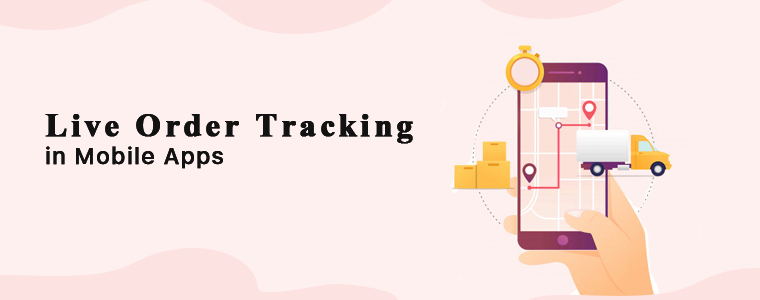
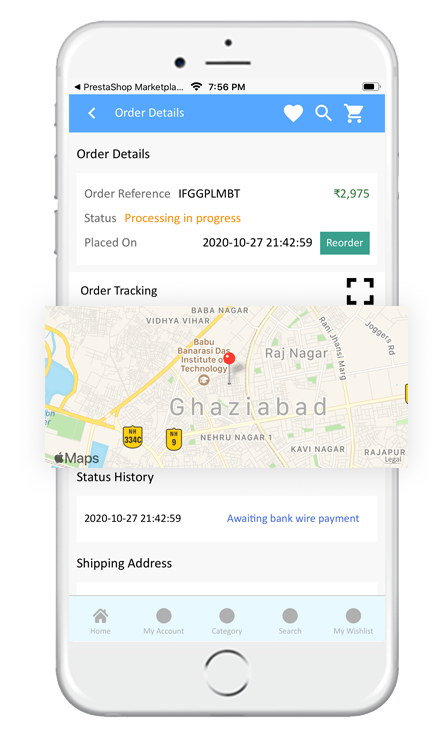
In simple words, if both the PrestaShop Mobile App Builder and PrestaShop Delivery Boy App module are being used on the same store, the store admin can offer live real-time tracking in eCommerce mobile apps.
The store owner can launch shopping apps, delivery boys with real-time order tracking for front end shoppers. This feature will improve the app usability and reliability making the app a top-notch mobile shopping solution among your targeted audience.
Now, let’s analyze both modules and check the working & features they offer:
1. PrestaShop Mobile App Builder
A readymade framework to launch native Android and iOS apps without coding
The Mobile App Creator extension has helped 1000+ PrestaShop store owners to launch native shopping Android and iOS apps. The admin panel of the extension comes with handy configuration settings allowing the merchant to make changes in the live app without any code change or developer’s assistance. The Android and iOS apps remain in 100% sync with store inventory. All product categories, subcategories, new additions, changes, etc. will be automatically updated on the app on its own.
Core Features of the extension and apps:
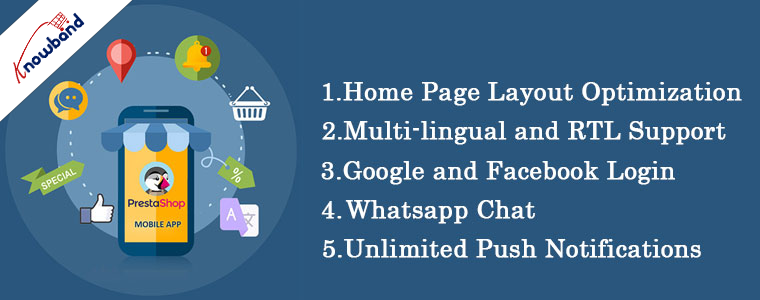
Custom Home Screen Layout
Zopim & WhatsApp Chat Support
Unlimited Push Notifications
Multi-lingual & RTL Support
White Labeled Apps
All Website Payments & Shipping Support
All Coupons/Vouchers Support
GDPR Compliance
Deep Linking
Offline Mode Working
Product Reviews & Ratings
Google, Facebook, Phone Login & Fingerprint login
One Page Checkout
Live Order Tracking… And many more. Visit here for complete details and demo.
Seamless delivery management & order tracking with delivery boy apps.
The PrestaShop Delivery Boy App extension is for offering delivery boys for your eCommerce store and makes the delivery management simple and automatic. The extension will be installed on the store and admin can add & manage delivery boys via the admin panel.
The admin can add the delivery boy and the person will receive his own login credentials for delivery boy app. The PrestaShop Delivery Boy App will show the complete order details with other necessary informations. The delivery agent can accept or reject orders and manage the deliveries accordingly.
Core Features of the extension and apps:
Delivery Agent Login Authentication
Order Dashboard Screen
Order Listing Screen
Quick Navigation Menu
OTP Verification
Push Notifications Screen
Settings
Delivery Boy Details
Delivery Boy Ratings
Accept/Reject Orders
Delivery Management
Delivery Boy Management
Delivery Location Management….and many more. Visit here for more details.
The trends in mobile shopping are ever-changing. No user wants to order products and wait for days to get the delivery. Instead, everyone expects the delivery to be as early as possible. Setting up Delivery Boy App for your PrestaShop store will surely be a boon for managing deliveries and make them quicker than customer’s expectations. Faster deliveries are a prime feature to earn the user’s trust and will definitely result in improved conversions.
We have stepped into the 2021 Holiday Season and this is the best time to generate revenue for your eCommerce store with a native eCommerce mobile app(Android and iOS).
Mobile shopping apps are always known to provide a better shopping experience when compared to websites. That’s one of the prominent reasons to take your online business to mobile. Also, more and more people are now using their mobile devices to shop online, it becomes crucial for eCommerce businesses to have their own shopping app in the market.
Launch a pair of eCommerce mobile app today. First, let’s explore the readymade solutions to launch apps. KnowBand has been a leading eCommerce plugin and Mobile App provider for the past decade. Here are some of the prominent app solutions for your business:
Android & iOS Mobile App Builder
The native Android and iOS mobile apps will be published on Google Play and the Apple App store available for public download. The customers will be able to install the app directly from there and purchase products on the go. Mobile apps prove to be very useful especially during the sale & festive seasons. E-Commerce businesses can leverage huge profits by increased sales and revenue. All you need to do is to choose the right solution and launch eCommerce mobile apps. In addition, complete technical support will be provided from app creation to publishing on app stores. Check our modules from:
A complete coding-free tool is not the only perk of choosing Knowband’s App Builder. Here are some of the prominent features and benefits for both store admin and front-end mobile shoppers:
#1. DIY Home-Page Layout Editor
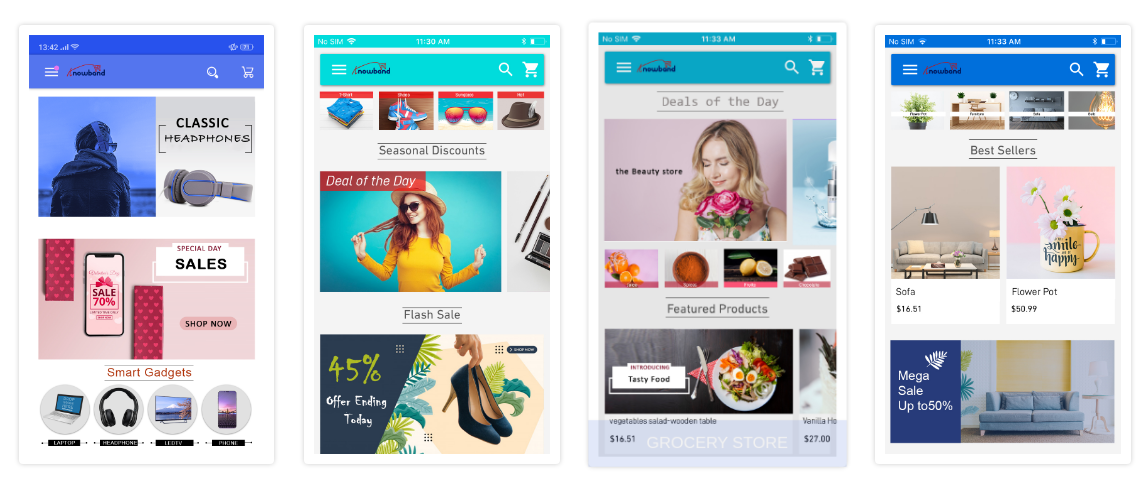
The admin panel of the eCommerce Mobile App Maker extension offers a fully customizable home page editor with various customizable elements (banners, sliders, products, countdown timer, category, etc.) The store admin gets a bunch of easy-to-use editing tools using which they can re-design the home-page layout.
The best thing about this is that the store admin can change the look and feel of the eCommerce Android and iOS app anytime even after the app is live on app stores. Use the right set of banners, images, colors, logos, etc., and launch your own branded apps for your business.
Note: Our Mobile Apps are also compatible with Spin win gamified email subscription pop-up. Offer an appealing pop-up on mobile apps and promote sales and deals with ease.
The apps built using eCommerce app builder support multiple international currencies and languages (including the RTL scripts like Arabic). This is very helpful for businesses that are willing to go global or local. Technically, all languages and currencies available on the website will be automatically supported on mobile apps.
Provide all currencies and languages popular in your business area or choose to go global. Sell products across borders like you’re actually taking your shop there. The shopping apps will be available on the Play Store and Apple App store for worldwide download and usage.
#3. Inbuilt Live Chat Support
The app users also get to easily connect with the chat support team via Whatsapp or Zopim (Zendesk) chat options. All you need to do is to enable the live chat option from the admin panel. The customers on the mobile app will be able to message you directly and get answers to your queries.
Having prompt support for mobile app users will definitely increase trust for your business and motivate users to shop more. To know the advantages of Live Chat for eCommerce, click here.
#4. Live Synchronization (Inventory and Payments)
All the data on the eCommerce website remains in real-time synchronization with its Mobile App. This also allows automatic inventory updates and management on the app. No need to do hours of work just to add products and categories in the app. The eCommerce Mobile App Builder will automatically fetch the categories and products on the apps without any manual work requirement.
Along with inventory, the payment methods on the website will also remain in sync with the apps. No need to go for any sort of extra charges to get reliable payments on the app. All website payment options will be automatically fetched on the app & function flawlessly.
#5. Unlimited Push Notifications:
Push Notifications are very useful to re-engage app users in a personalized manner. From the admin panel of the module, store admin can send an unlimited number of Push notifications to their app users as per their needs. The template, link, image, etc. can be also be chosen for the push notification.
The push notifications can also be scheduled for automatic deployment or can be sent manually to Android and iOS app users. The condition is only that the app should’ve been installed on the device. The push notifications are unlimited and no charges or limitations to promote products, sales, deals, etc.
Conclusion
A lot more features are available on the eCommerce Mobile App Builders by KnowBand. Such apps are also compatible to easily become a Multivendor Marketplace because the app builder extensions are compatible with the marketplace extension.
So, why wait longer? If you are willing to launch an eCommerce Mobile Apps, give these extensions a try. Try out the demo apps and admin panel demo link to know more.
Check out the mobile app portfolio of client’s apps created using Knowband’s Mobile App Builder.
Remember that for this Holiday Season, the eCommerce App Maker Extensions (Android & iOS) by KnowBand are available at a discounted price. Feel free to drop us an email at support@knowband.com for any queries or assistance.
Some successful Mobile App Case Studies for your reference:
The PrestaShop Hyperlocal Marketplace Mobile App Builder is for converting online hyperlocal multi-vendor marketplace into native Android and iOS shopping app without any coding/programming knowledge. The readymade plugin is a pre-designed framework for all PrestaShop store owners out there who are somewhere willing to launch mobile apps.
1.1 What is a Hyperlocal Multi-vendor Marketplace?
A Hyperlocal Marketplace Module is a simple way to turn a regular PrestaShop marketplace into a multi-vendor marketplace with an inbuilt hyperlocal system. Hyperlocal functionality allows the store owner to allow himself or sellers on the marketplace to sell in a specific location. On a PrestaShop Hyperlocal Marketplace store, the owner can define the radius value (to be evaluated on the map) and set the location for product availability. Once customers onboard the e-store website or mobile applications, they will be asked to choose the location and browse products as per the availability. Based on the entered location of each individual user, they are presented with the products and sellers that are available nearby to them (as per the radius circle specified in the admin panel).
Hence, in simple words, a hyperlocal marketplace is a local ecosystem allowing peoples of a specific zone to shop or order products. These kinds of online shopping medium are great for ‘same-day delivery’ or ‘one-hour delivery’ kinds of models. Examples of some of such online marketplaces are online grocery stores, food delivery stores, medicine stores, gift shops, malls, etc.
1.2 What is a Hyperlocal Marketplace Mobile App?
The majority of the online shopping audience is on mobile. Considering the same, we have created a complete Hyperlocal Marketplace and Mobile shopping apps package for the PrestaShop e-store owners. Android and iOS shopping apps will be in sync with the PrestaShop hyperlocal marketplace. Both Admin and seller products will be available on the PrestaShop Hyperlocal Mobile App for customer browsing and purchasing products. Offering a localized PrestaShop Marketplace Mobile App in your native language will attract a wide range of users from the local market.
The users just need to choose a current location with inbuilt GPS in the app and view products and sellers available in that location.
Here are some of the snapshots for a better idea:
2.0 Hyperlocal Marketplace Admin Panel
Refer below link for PrestaShop Hyperlocal Module admin panel configurations:
The below snapshots with a detailed explanation will make the module configurations and settings more clear. Check the step by step settings tab with details. After installing the PrestaShop Mobile App Builder module on the store, click on the “Configure ” option. You will get the following tab with simple-to-use interfaces.
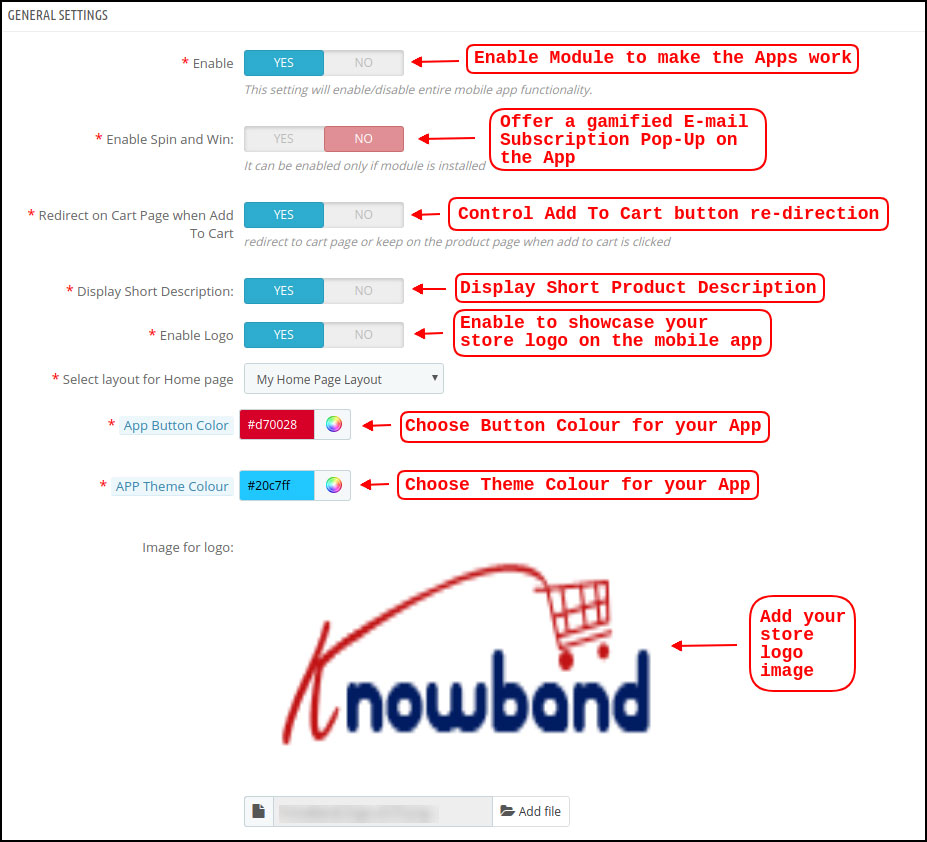
3.1 General Settings
a) Enable/Disable Plugin: Enable PrestaShop Hyperlocal Marketplace Mobile App Builder to make mobile apps work on mobile devices. In case, you ever need to stop the app working, just disable this option.
b) Enable Spin and Win: This option is to display a gamified spin-win email subscription on the home screen of the PrestaShop Nearby Shopping App. The spinning wheel pop-up interface will be displayed on the home screen once the user opens the app. The store admin can set the discounts and other settings in spin-win extension and capture user emails for remarketing purposes and promotional strategies.
Note: To use the spin win functionality, you need to add the KnowBand Spin win extension on the Prestashop store.
c) Redirect on Cart Page when Add To Cart: This tab lets the store admin control the “Add To Cart” functionality in PrestaShop Hyperlocal Marketplace Mobile App. The users can be redirected directly to the cart screen or can stay on the product page for more shopping.
d) Display Short Description: Enable to display the short description on the product screen along with full description & other details. The short description will only be displayed if the same is added to the website inventory.
e) Select Layout for Home Page: Create a home screen look & design of the PrestaShop Hyperlocal Marketplace Mobile App as per your choice. (Same can be added from the Home Page Layout section). In this option, there will be all layouts available in the dropdown and chosen as per the requirement. Multiple app home screen layouts can be pre-designed and saved as per various festivals, sales, offers, deals, etc.
f) App Button Color: Choose the desired button color for PrestaShop Hyperlocal Marketplace Mobile App. This color will be for all the buttons available on the Android and iOS apps.
g) App Theme Color: Choose the desired theme/header color for PrestaShop Hyperlocal Marketplace Mobile App.
h) Image for logo: Upload your website/marketplace logo image to be displayed on the top header of hyperlocal shopping apps. This will be a simple way to offer apps branded to your business only. Our PrestaShop Hyperlocal Marketplace Mobile App Maker is a complete white label solution.
i) Disabled Shipping Methods: This option allows you to disable the shipping methods from PrestaShop Hyperlocal Marketplace Mobile App. (In case any shipping methods needs to be disabled from the app)
j) Enabled CMS Pages: Add desired CMS pages like About Us, Terms & Conditions, Privacy Policy, etc. (available on the website) on PrestaShop Hyperlocal Marketplace Mobile App.
k) Enable Request Log Reporting: Add an option on the PrestaShop Mobile App to enable error log. The log file can be used to identify and rectify any abnormal behavior of your app.
l) Enable Live Chat Support: Enable/disable Zopim (Zendesk) chat option on PrestaShop Hyperlocal Marketplace Mobile Apps. The chat API key will be provided with the final app that can be used to activate the live chat on mobile apps.
m) Enable WhatsApp Chat Support: Enable/disable WhatsApp chat option on your PrestaShop Nearby Shopping Mobile Apps. This option simply allows the users to connect with the store admin via Whatsapp chat option.
Note: Either Zopim chat or Whatsapp chat can be enabled from the admin panel.
n) Enable Fingerprint Login: Enable/disable Fingerprint login option in PrestaShop Hyperlocal Mobile App.
o) Enable/disable Phone Number Registration: Enable phone number login option (OTP) in PrestaShop Hyperlocal Marketplace Mobile App & allow users to authenticate using OTP verification.
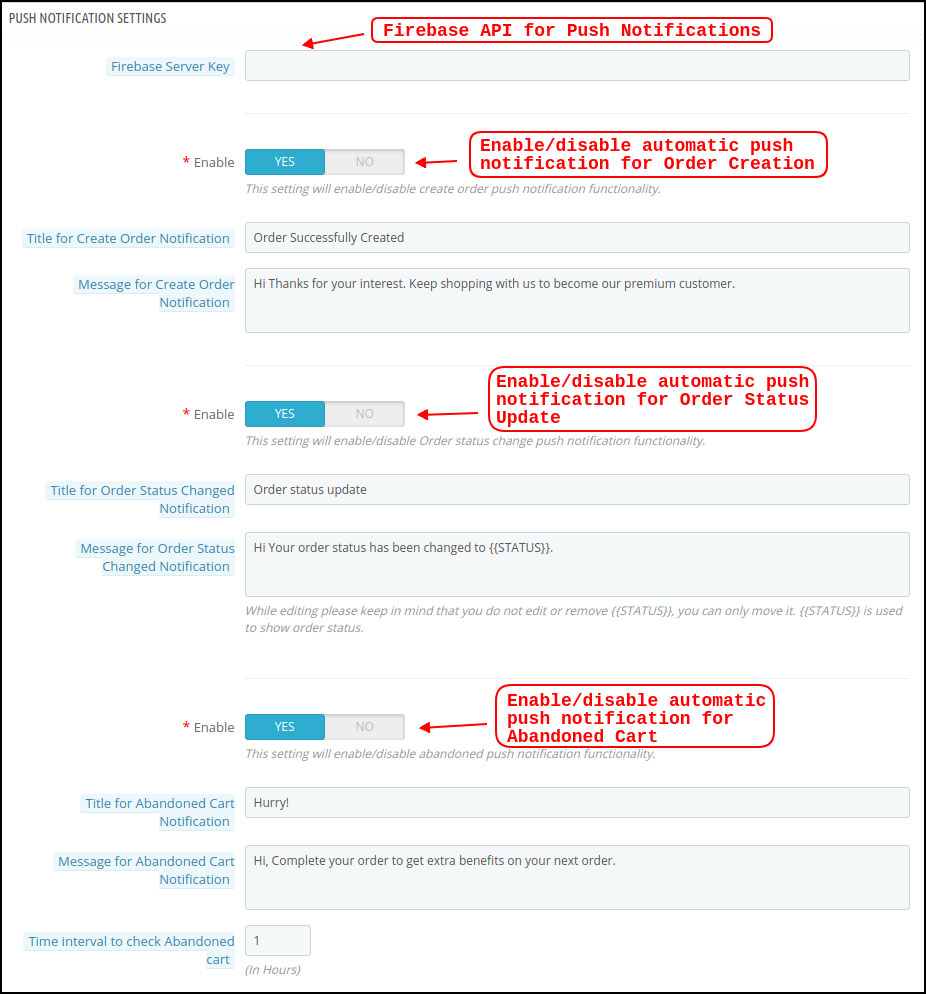
3.2 Push Notifications Settings
The Hyperlocal Marketplace Mobile App Creator offers unlimited push notifications to be sent from the admin panel of extension. The store admin can configure the push notifications template (Use own text, image, redirection link) and send it to Android and iOS app users. This can be an effective tool to market or promote the store deals, offers, and boost sales in the store.
a) Firebase Server Key: This key can be used to send the push notifications on PrestaShop Hyperlocal Mobile App. The firebase project will be created while marketplace mobile app development. Once entered, it makes sure that the push notifications will be received to all mobile app users.
b) Create Order Notification: Enable/Disable automated successful order push notification sent to the app users. The template for the notification is fully editable like title, message, image, etc.
c) Order Status Change Notification: Enable/Disable automated order status change push notification sent to the app users. The template of the notification can be edited like title, message, image, etc.
d) Abandoned Cart Notification: Enable/Disable automated abandoned cart push notification sent to the users who have left products in the cart without successful purchase. Enter the title & message of the push notification. For Abandoned cart notification, enter the time interval (in hours) after which push notifications will be sent.
3.3 Push Notification History
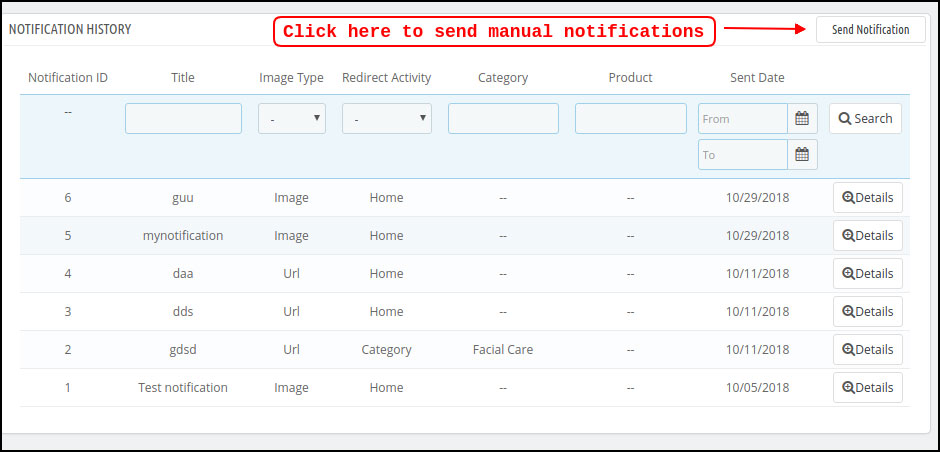
This settings tab contains the history of all push notifications sent to the PrestaShop Hyperlocal Marketplace Mobile App. The store admin can view the details of every sent notification.
Send Manual Notification:
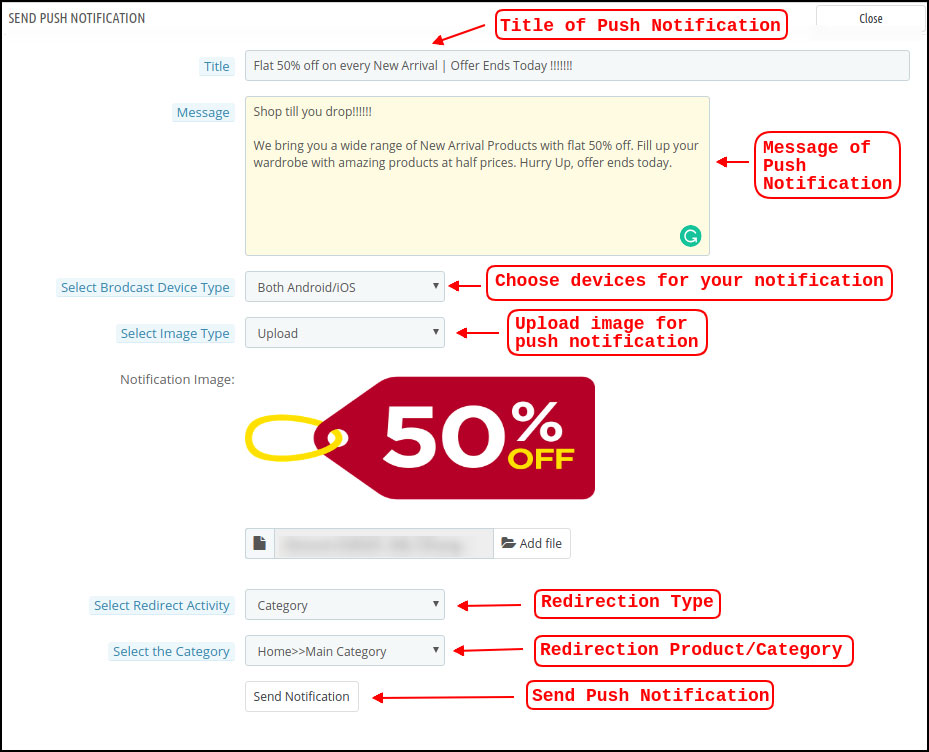
The store owner can craft and design push notification and sent it manually to app users. Configure the title, message, redirection link, image, etc. and send a push notification of choice:
a) Title: Enter the title of Push Notification that is to be manually sent to the app users.
b) Message: Enter the message of manual notification to be sent to the app users.
c) Select Device Type: Choose an Android or iOS device on which push notification is to be sent.
d) Image Type: Upload the push notification image as per the requirement. Image URLs can also be used instead of uploading images.
e) Select Redirect Activity: Set redirection of push notification on the app by choosing Home/Category/Product. Whatever redirection is set from the admin panel, app users will be redirected to the same screen.
f) Send Notification: Once configured, tap this button and send the push notification.
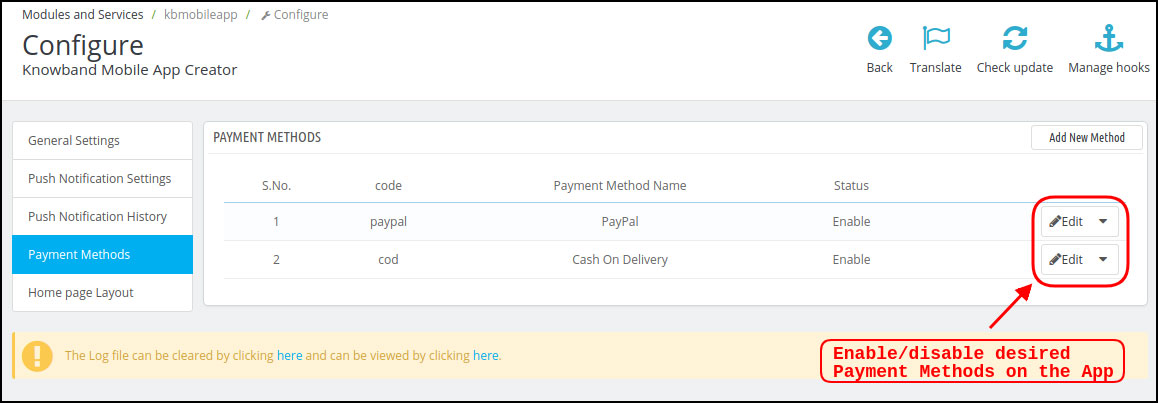
3.4 Payment Methods
The PrestaShop Hyperlocal Marketplace Mobile App Creator supports all sorts of website payment methods. If you disable payment options (COD & PayPal) from the module, all website payments will be enabled on the Android and iOS apps.
3.5 Home Page Layout
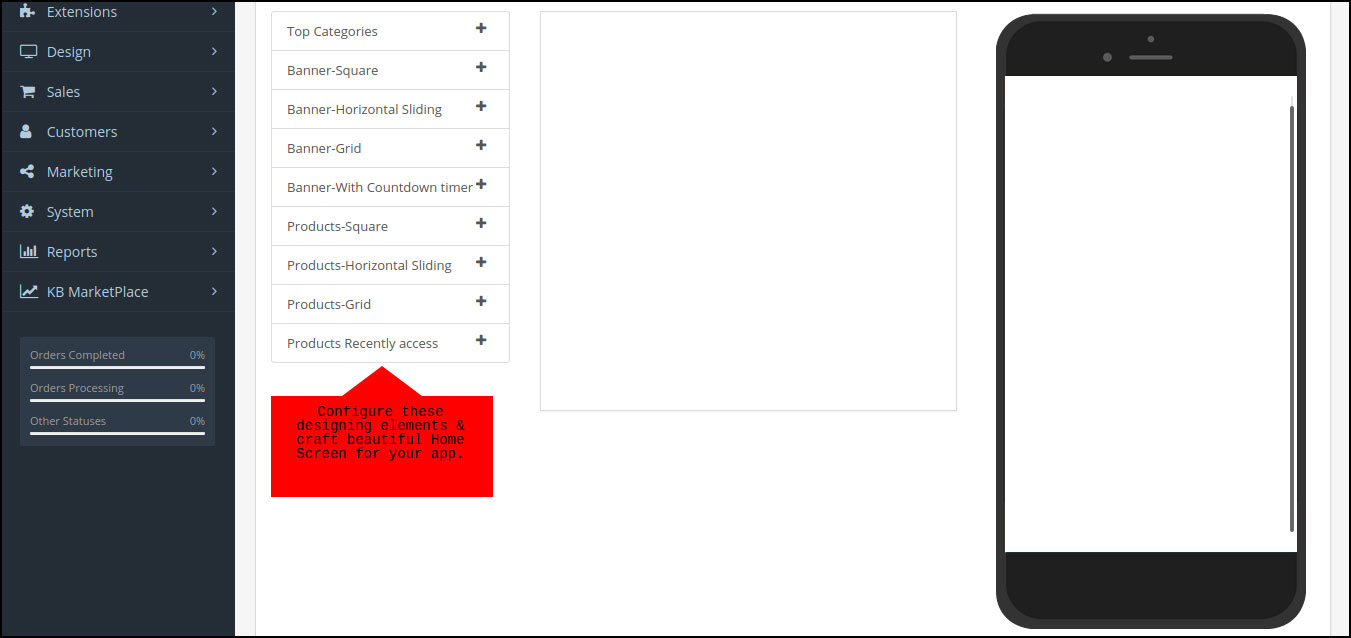
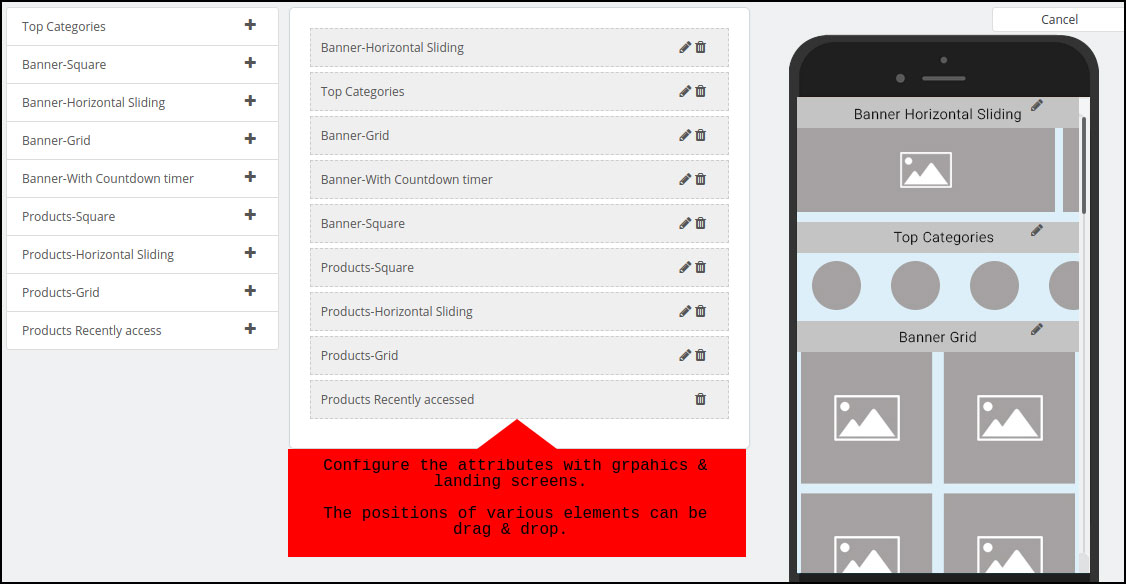
The PrestaShop Hyperlocal Marketplace Mobile App comes with a flexible home screen layout allowing store admin to use predefined elements and configure the look of the home screen. Multiple festivals, sale, promotional, etc. layouts can be created and saved in the admin panel and also used on the app as per the requirement. Here is the step by step process to create their own layout:
Top categories
Square Banner
Horizontal Sliding Banner
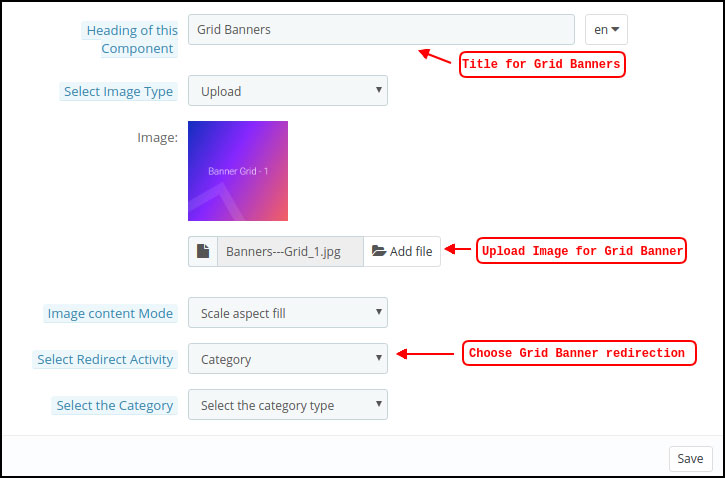
Grid Banners
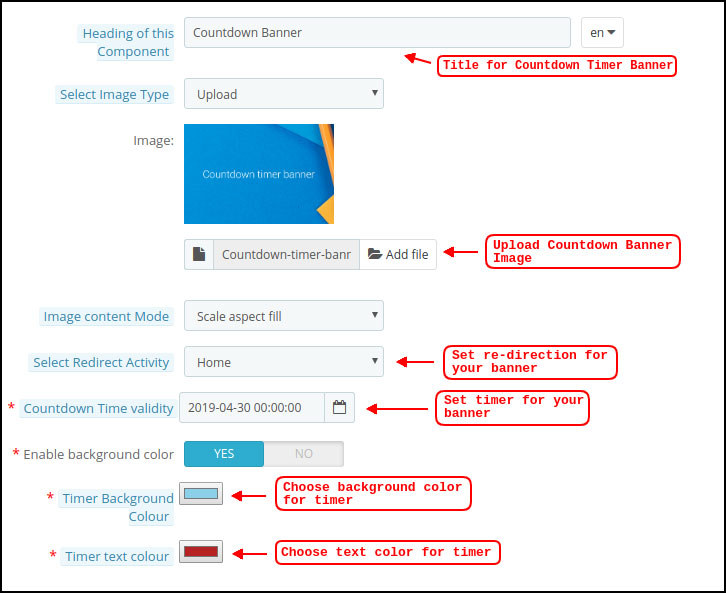
Countdown Banner
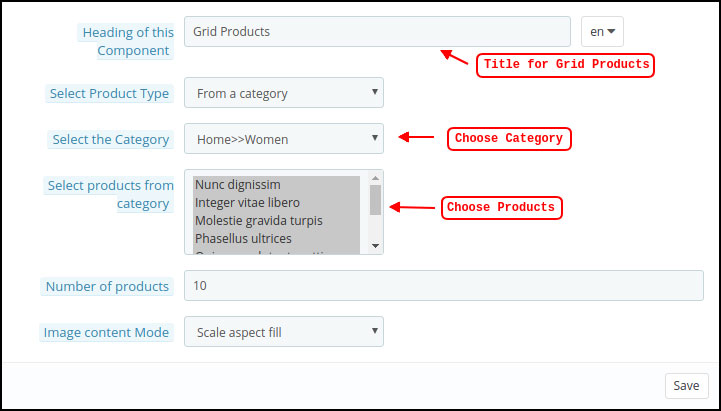
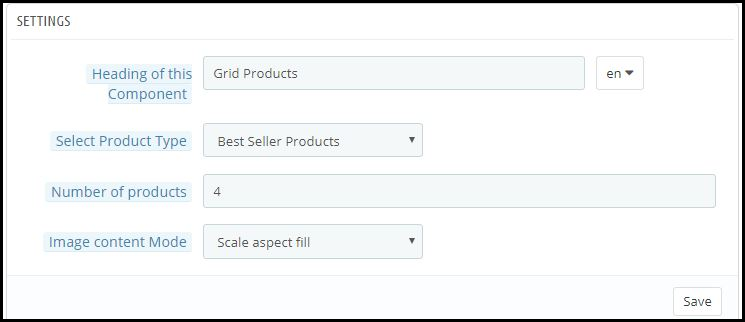
Grid Products
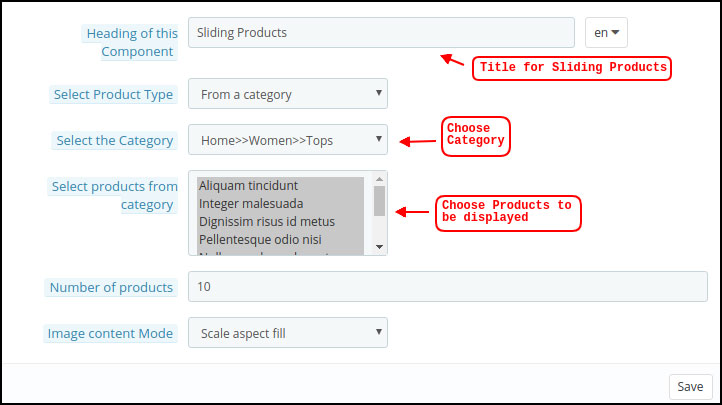
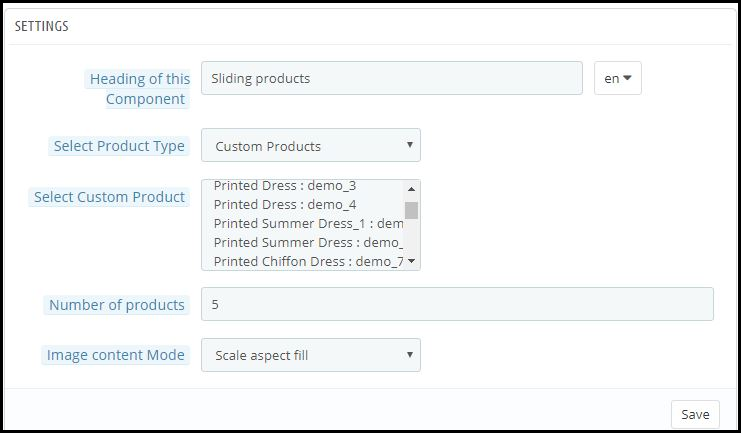
Horizontal Sliding Products
Recently Accessed Products
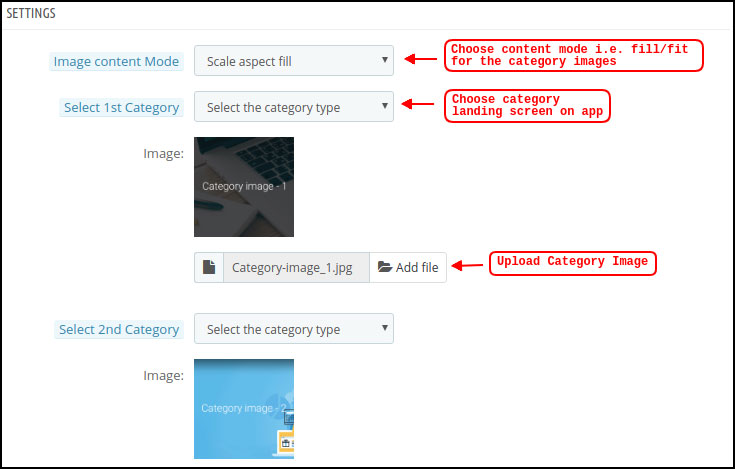
Top Categories:
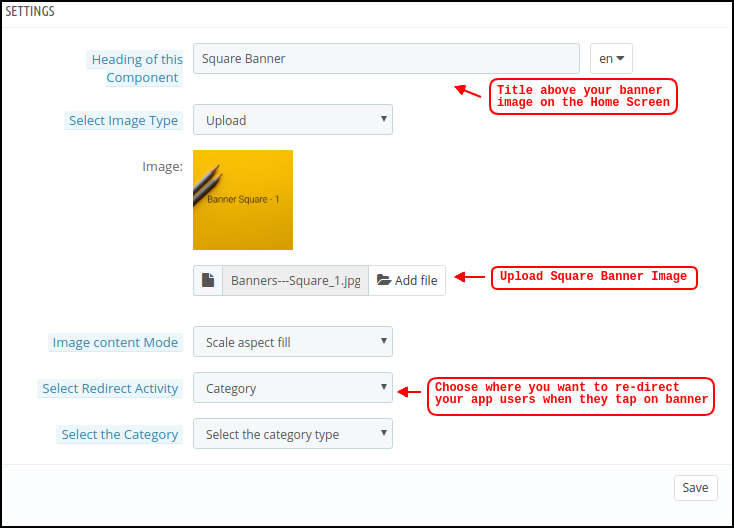
Square Banner:
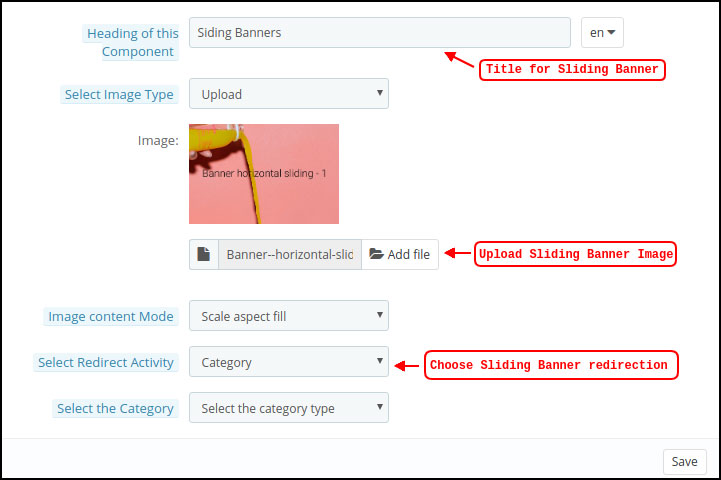
Horizontal Sliding Banner:
Grid Banners:
Countdown Timer Banner:
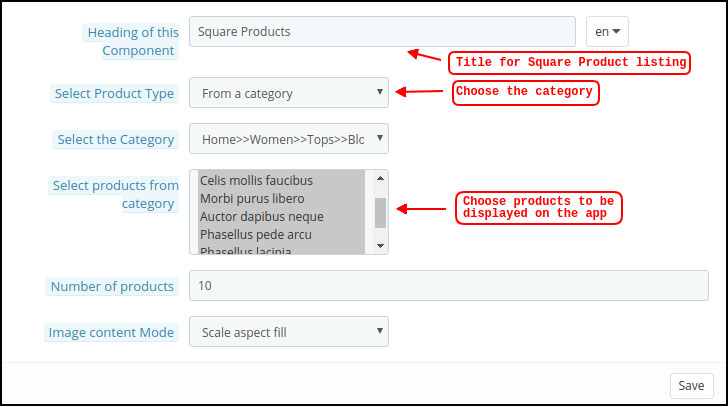
Square Products:
Horizontal Sliding Products
Grid Products:
3.6 Tab Bar Layout
Customize & showcase the bottom Tab Bar on Hyperlocal Mobile App (Android & iOS). This tab has the following options:
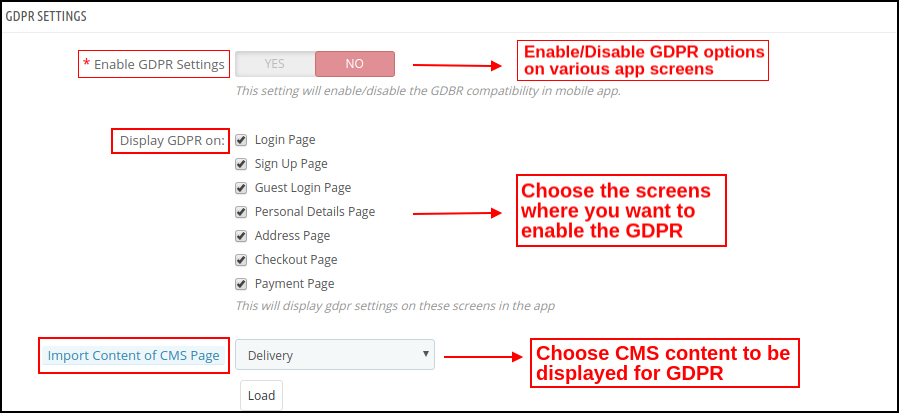
3.7 GDPR Compliance
The PrestaShop Hyperlocal Multivendor Mobile App comes with inbuilt GDPR compliance. The store admin can even GDPR settings to stop GDPR functionalities in mobile apps.
4.0 Hyperlocal Marketplace Mobile App Screens
4.1 Home Screen
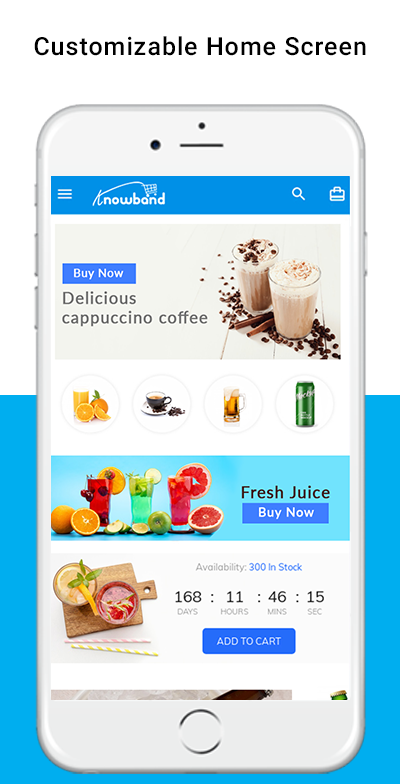
The PrestaShop Hyperlocal Marketplace Mobile App home screen consists of editable banners, images, blocks, colors, fonts, etc. With DIY editor in the admin panel, the entire home screen design can be changed anytime even after the apps are live.
The colors can be chosen from the admin panel. The store logo can be added to the header of the app. The following elements can be used for designing the home screen:
Top Categories
Square Banners
Grid Banners
Horizontal Sliding Banners
Square Products
Grid Products
Horizontal Sliding Products
The customizable home screen of the PrestaShop Nearby Marketplace Mobile App can be transformed into general stores, food delivery, grocery delivery, medicines, or any local level marketplace business. No matter what you sell, the app can fit perfectly for all sorts of business domains.
4.2 Choose Location
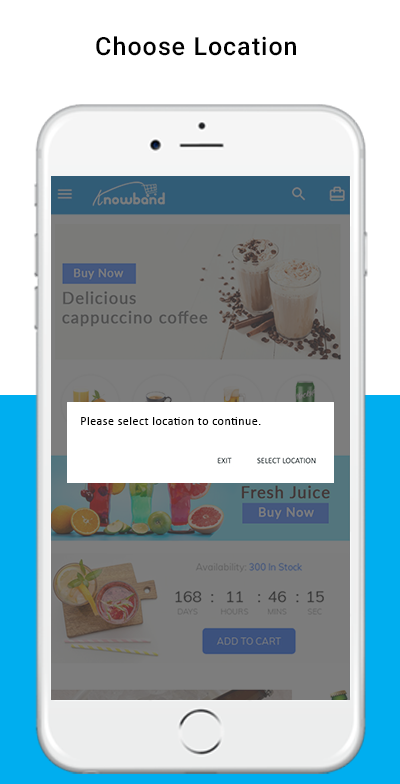
The Hyperlocal Mobile App for PrestaShop comes with the option to choose the location in the front end. The mobile app users can simply set the current location or enter the same manually.
Select Current Location
Enter Manual Location
Once the location is selected, the users can browse the products available in that location and place orders. Also, they can access nearby products at one screen from the navigation menu.
The mobile app user taps the Select location button, another screen opens with Google map and pointer. In case of choosing the current location, the pointer automatically selects the location and asks for confirmation.
Once the location is confirmed by the user of the PrestaShop Hyperlocal Marketplace Mobile App, the app will be redirected to the home screen. All the products under that location will be available for browsing and purchase.
4.3 Category Screen
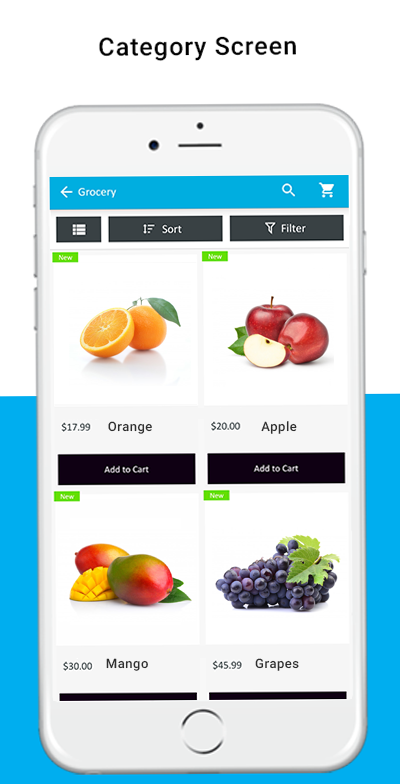
The Hyperlocal Multi-vendor Mobile App comes with an impressive design with “Add To Cart” and “+/- Quantity Stepper” for all product blocks. The users can simply browse the products with infinite scrolling functionality. No need to hassle between pages with regular pagination. Browse simply by navigating from top to bottom and products will be loaded gradually.
List/Grid View
Sort Option
Filter Option
With the sort option, the users get to narrow down the products based or available sorting options like – High to Low, Low to High, etc.
With the inbuilt filter option, the user gets to filter down the products based on the category, brand, price, etc. This layered navigation in PrestaShop Hyperlocal Marketplace Mobile App can be much fruitful in finding the right product for purchase.
A green color “New” badge will be stuck on the product blocks for all new products added in website inventory.
4.4 Product Screen
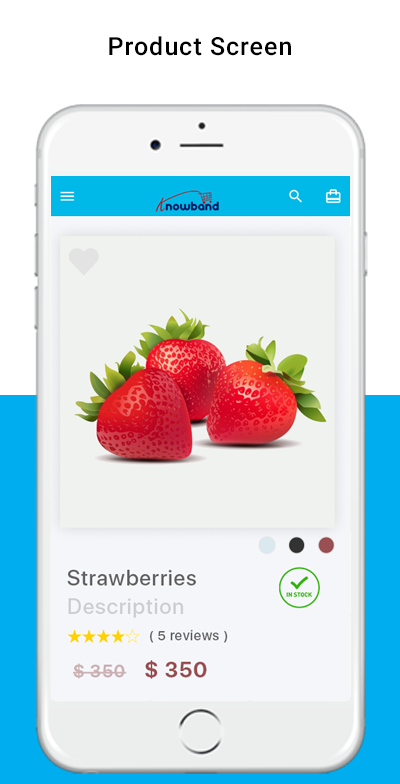
The product screen of the PrestaShop Hyperlocal Marketplace App is simple yet very appealing. Right from showcasing multiple product images to name and both short as well as the long description. The availability of the product is displayed with the “In Stock” and “Out Of Stock” label. This label will be automatically set on the Android and iOS apps based on inventory status.
Product Options
Wishlist Functionality
Short Description
Long Description
Quantity Stepper
Continue Shopping
Add To Cart button
Social Sharing of Products
The users can simply go to the product screen, choose the option, select quantity, and tap the Add To Cart button to add the product in the shopping bag. There is also an option to share products on various social media channels like Whatsapp, Facebook, Email, etc.
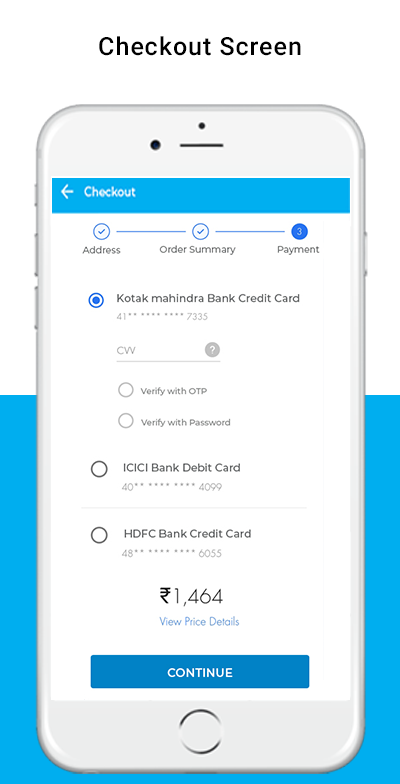
4.5 Checkout Screen
The Hyperlocal Multivendor Mobile Apps for PrestaShop comes with a one-page simplified checkout screen with all requiring information. The mobile shopper can view the complete order and product-related details on a single screen like –
Shipping Details
Billing Details
Order Summary
Shipping Methods
Order Comment
Payment Summary
This screen shows the selected shipping & billing details for the purchase. The user gets to edit the addresses if required and even add a new one. The total cost of the chosen product will be shown as per the shipping methods.
The app users get to view purchased product details in this section before making the final purchase. All available shipping methods are displayed under this section of the checkout screen. The users can choose the desired one from here.
This section displays the complete breakdown of the total payment details. The app users will be re-directed to the Payment screen after tapping the “Proceed To Payment” button.
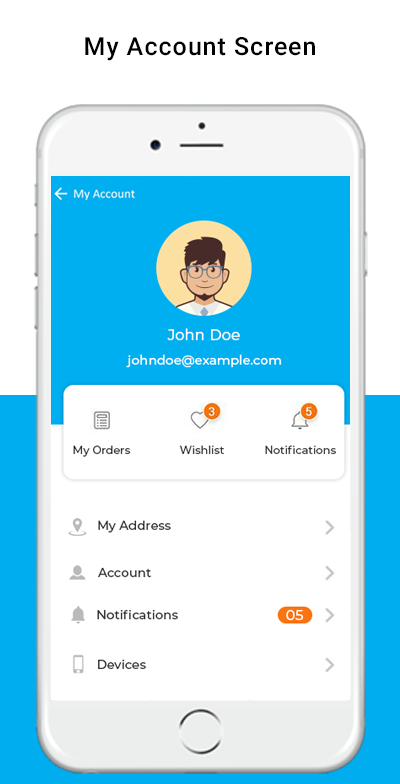
4.6 My Account Screen
My account screen of the PrestaShop Hyperlocal Marketplace Mobile App allows app users to view the complete account details including a list of previous orders. My Account screen offers the following options:
Order Details
Personal Information
Shipping Addresses
Order Details
Reorder
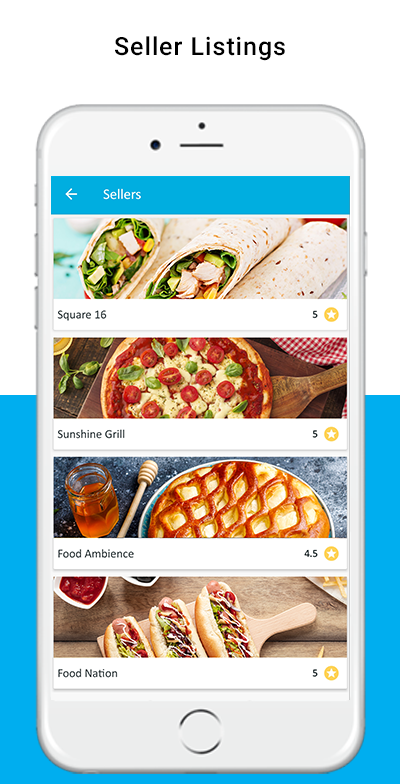
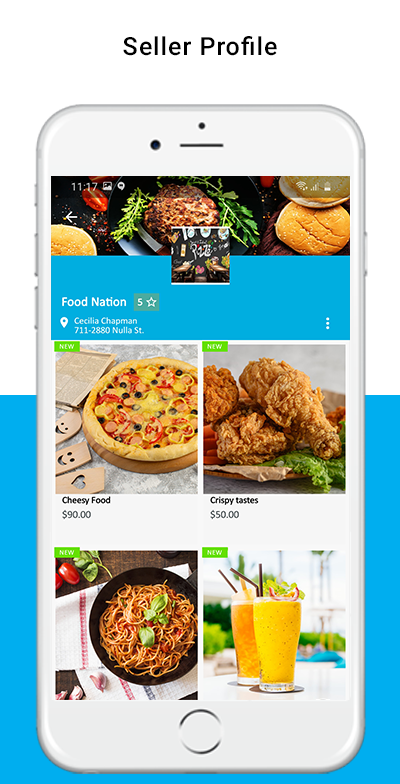
4.7 Seller Screens
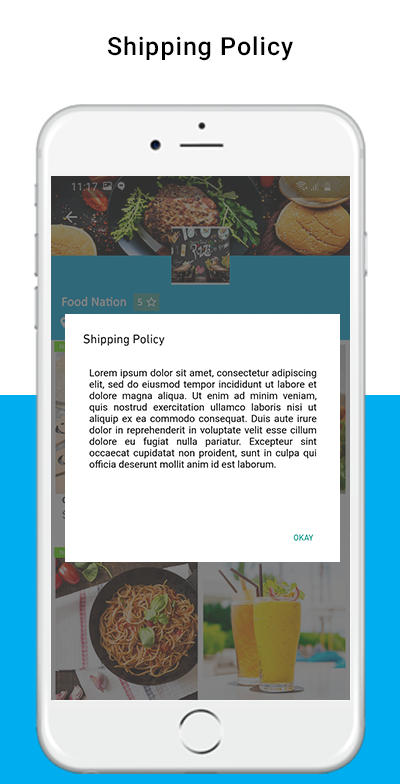
The seller panel on PrestaShop Hyperlocal Mobile App allows the users to access all available sellers on the marketplace. The listing shows all sellers on the single screen and users can simply make the choice. Once the seller is accessed, the user is redirected to the seller profile where all products under the seller are displayed. Even seller reviews, shipping policy, return policy is displayed for sellers on the app.
No one can deny or ignore the paced growth of eCommerce (retail) industry. With Mobile Phones stepping into the online commerce, the trends of online shopping has fully revamped. With the growing use of smartphones & mobile devices, m-Commerce has grown exponentially in the past decade. Almost every eCommerce business has released their own mCommerce shopping apps by now. So, to be relevant and to be ahead of the competition in the market, e-retailers must be aware of various mCommerce trends.
Although, we all are aware of the growth in smartphone usage and mobile apps preference when it comes to online product purchase. Yet, not all the e-merchants are achieving its full advantage for the online business. Mobile Commerce is a must have for every eCommerce website in 2020. The more you delay, more sales and conversions are losing. Taking your website business to the mobile platform isn’t any sort of luxury anymore, but merely a basic necessity. Don’t go for my word, just take a look at the below statistics:
In year 2017, the mobile eCommerce sales accounted for around 34.5% of total eCommerce sales. [Source: Statista]
By the end of 2021, the growth in this data is expected to be 54% of total eCommerce sales. [Source: Emarketer]
In this write-up, we will elaborate the top 4 eCommerce trends that have been extremely useful for the store owners.
#1. Multi-Platform Shopping Applications
Targeting both Android and iOS smartphone using audience will definitely bring more conversions for you. Offer a pair of native mobile apps for eCommerce website and let users shop from the applications as well. Native eCommerce Mobile Apps are the ones that are published on the app stores (Google Play Store & Apple App store). With a featured shopping app, the users won’t be just limited to the browsing products but keeping them everything available at their fingertips will increase more sales.
Choose a reliable ready-to-launch Mobile App Builder and get everything ready in 2-3 days. The readymade eCommerce Mobile App Maker extension allows the store admin to create apps without any coding or programming. Nor they need to hire a programmer and spend a huge money for the same. Just purchase the right plugin for your eCommerce and rest everything will be automatically handled from creation to publishing on App stores.
E-Commerce Progressive Web Apps are the ones that are made live on the website (of the store). Whenever mobile website visitors visit a PWA active website, they see a button/tab which says ‘Add-To-Home-Screen’. Upon clicking it, the PWA mobile app gets instantly installed on user devices. That’s it, now the Progressive Web App will work like any other shopping application.
There are a few readymade extensions have the capability to provide fully customizable mCommerce PWA App for online store. The store admin get a very admin friendly dashboard from where they can edit and manage mobile app, send push notifications, etc. These days, to reach out to all possible target audiences, most eCommerce businesses are utilizing both native (Android and iOS) & PWA mobile apps.
Store owners that wish to have multiple sellers on the store usually opt for a complete package of Multi-vendor marketplace website and mobile applications. This process is simplified by Advanced Multi-vendor Marketplace with Mobile App extensions. Check out them from below links:
Using these, store owners instantly convert their store into full fledged marketplace & mobile app. On such a marketplace, store owners get a very optimized admin panel which let’s them manage every thing like-
Vendor Management
Seller Request Approval
Seller Commission Management
New Category Request Approval/ Disapproval
Tax Rule Settings
Rating & Review Management
Seller Order Tracking & Management
Sellers’ Transaction Tracking
Payout Management
All of the approved sellers on the store get their own unique vendor panels on which they can get following features:
Manual & Bulk Upload of Products
Order Management
Order Tracking
New Category Request
Commission Based Payout & more.
#4. Digital Payments & Transactions:
There was a time when online shoppers hesitated to make online payments & always opt for ‘Cash On Delivery’ options. But with the passing time & advancements in technologies & cyber securities, more & more shoppers have started to prefer digital payments over other options. In fact, nowadays the users first approach is to choose mobile payments over other options.
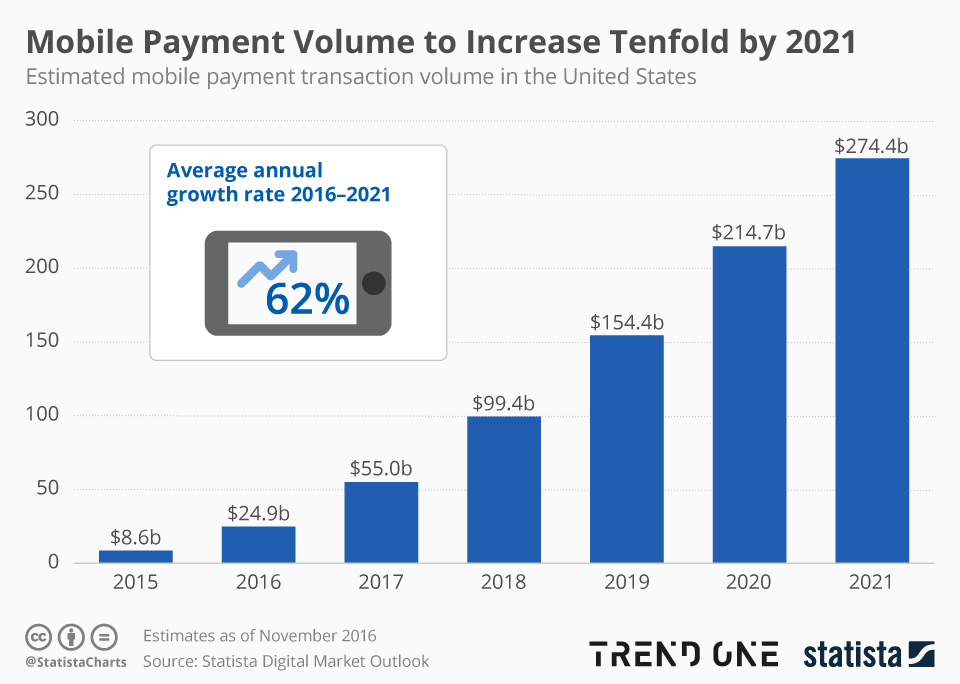
And reason is pretty simple for that. Mobile Payments offers much seamless and quick medium to pay for online product purchase. Just a few taps and the money is paid. Over the past few years, various advanced digital payments have been introduced in the market like e-wallets, Apple Pay, Google Pay, Braintree, Stripe, PayPal, Bank transfer etc. The eCommerce store owners can now opt for any payment options on their website and mobile application. As per Statista, mobile payments is expected to increase tenfold by 2021.
Its good to have e-wallets and UPIs integrated in eCommerce Mobile Apps. The users shopping through mobile applications (Android or iOS or PWA) can choose their preferable option to pay and make secure transactions. So, for businesses who have already stepped into mobile commerce or looking for a way to do so, choose a solution offering various digital payments to cater all sorts of mobile using audience.
Closing Comments
These were a few examples of how online shopping behavior is transforming. The store owners who are running their business on online eCommerce platforms should be in check with these trends. Ignoring the need of eCommerce mobile apps will only be a losing factor in matter of sales or revenue or growth.
So, if you are thinking of launching shopping apps for your website, its high time to act upon the same. Check the readymade solutions shared above or discuss more on support@knowband.com. We, at KnowBand offer readymade native (Android and iOS), PWA (Progressive Web App) & Marketplace Mobile Apps for the eCommerce websites build using any of the below platforms:
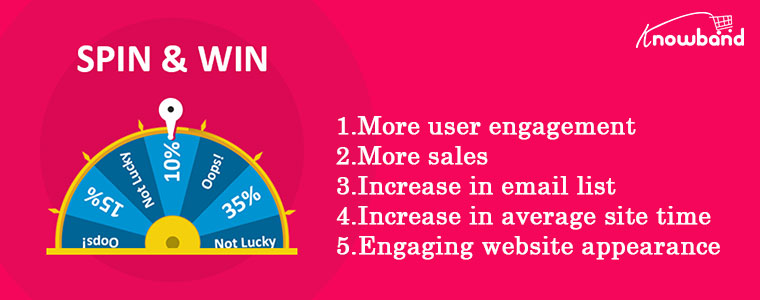
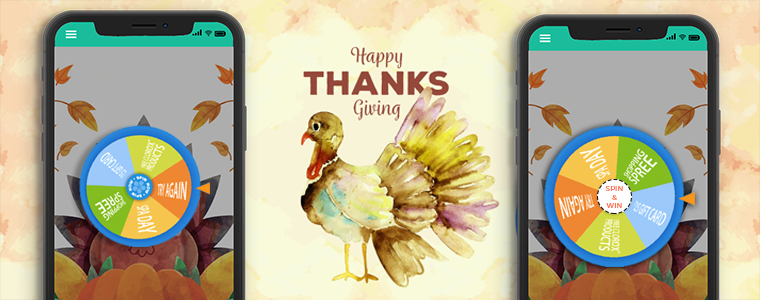
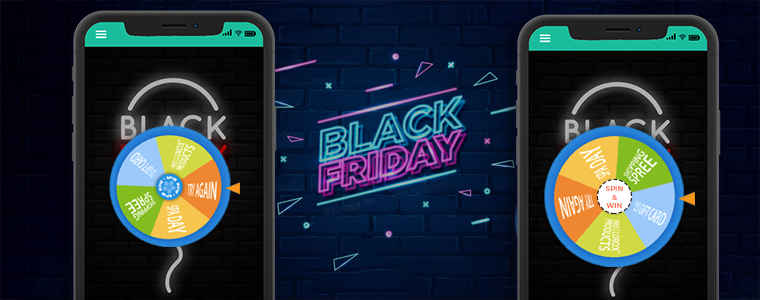
While shopping on eCommerce online stores, we sometimes come across interactive CTAs/gamified interfaces which excites us to interact & avail discounts. One such common interactive way is to offer Spin to win the wheel on the store. But, have you ever thought of expanding the same to mobile apps. Yes, that’s right. Spin wheel discount on the eCommerce mobile apps. When netizens spin such a wheel, they get anyone out of all the discounts mentioned on the wheel. For online shoppers, this is like a lottery for discounts that can excite them to shop more.
Mobile devices are the most commonly used gadgets across the globe and mobile applications have already proven to be the best platform for customers to shop online. A huge number of online shoppers use mobile applications, instead of websites, to shop online. Hence, introducing a gamified ‘Spin-n-Win’ thingy on the eCommerce Mobile app can benefit both customers and the store owners. ‘Spin-n-win’ helps with increased user engagement & user satisfaction.
1. The store admin can make any sort of customization to the ‘Spin-n-Win’ popup. Its look and feel & also its placement can hence be customized. They even get to decide where, when, and who to display the pop-up. The timer can also be set for the pop-up, its display frequency can be adjusted, etc.
2. The store owners can personalize the offers that would be displayed in each section of the wheel.
3. To catch the holiday spirit, many themes are also provided to choose from such as for Halloween, Thanksgiving, Black Friday, Christmas, etc.
Brief Introduction of Mobile App Builder extension:
The eCommerce mobile app builder by KnowBand is a no-code tool that automatically builds a customizable eCommerce Mobile app (Android &/or iOS apps). This extension is a no-code solution yet store admins can make many customizations on their mobile app using the simplified admin panel provided on the backend of this app builder extension. Some features of the eCommerce Mobile app builder include:
Home Screen Layout customization
Fully white-label App
Multi-lingual & Multi-Currency Support
Unlimited Push Notifications
Live Synchronization with website inventory
Quick social login and product sharing
WhatsApp chat and many others.
Recent New Updates
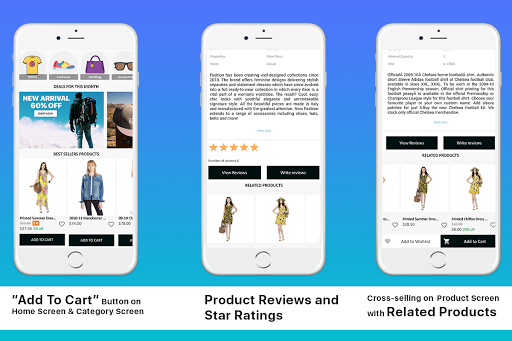
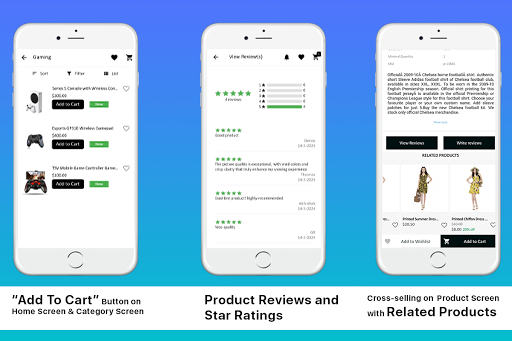
1. Add To Cart button on Home Screen & Category Screen: The users shopping via the eCommerce mobile app won’t need to navigate to the product screen just for adding it into the shopping bag. Instead, a quick tap on the “Add To Cart” button would do the job for you. This quick button is available for all product blocks on Home Screen & Category Screen.
2. Reviews & Ratings for Products: The users can rate any product or submit their valuable feedback about the product from the eCommerce mobile app. Also, the already submitted reviews from the website will be displayed on the app by means of real-time synchronization.
3. Related Products for cross-selling & up-selling: Improve cross-sell and up-sell for your store by showcasing the related products on the app. Offer suggested products to users and motivate them to buy more along with the usual purchase.
Plan For Upcoming 2020 Holiday Season:
The holiday season for 2020 is around the corner. Most eCommerce websites have already begun their preparations & promotional strategies to increase revenue. If you haven’t started yet, both the Spin win extension & Mobile App Builder extension combo pack can do the job without any sort of burden or hassle. This is much awaited time for store owners as they are looking forward to increased sales in the upcoming months of October, November & December. Trust me, the netizens are going to get crazy with online shopping for Halloween, Christmas, New Year, and other events.
Here are some snapshots to prove why these modules are a must-have:
Thanksgiving Day
Black Friday
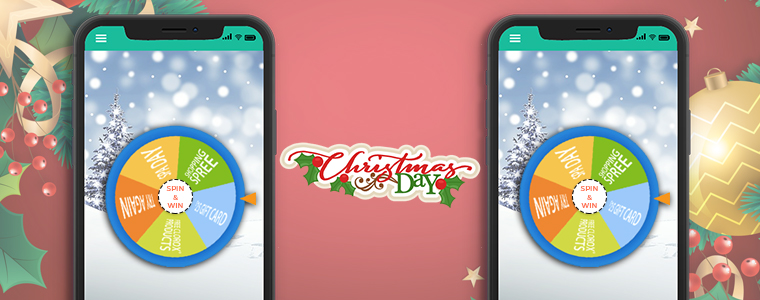
Christmas Day
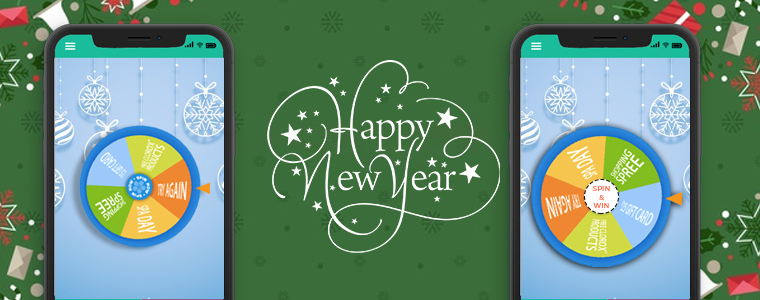
Happy New Year
So, waste no more time & get your eCommerce Mobile App ready with a spinning wheel. Drop us an email at support@knowband.com in case of any discussion.
E-Commerce businesses regularly face challenges to make the online shopping experience pleasant & personalized for the mobile audience. Amid the COVID-19 pandemic, keeping such business efficiently operational has been even more challenging for the store managers. The pandemic has been reformed online/mobile trading for both sellers and buyers. A thing of note is that online shopping has gained more momentum these days as shoppers have to maintain social distancing. Such unforeseen opportunities in these hard times can help in keeping your business running and stable with the eCommerce mobile app.
As I said, both online selling and purchasing norms are changed and we need to reform our standards as well. Launching an eCommerce mobile app is a sort of necessity than a luxury. Users around us are concerned for their safety and well beings. To achieve the same, one major step is to avoid visiting physical stores for any sort of online shopping. Be it grocery, apparel, electronics, food & drinks, etc. all eCommerce merchants are somewhere struggling with fewer sales and revenue.
The situation demands more, so we provide more. We have narrowed down some essential features which can be helpful in providing value to users shopping through mobile. These tips will surely be a helping hand in keeping your business on foot and efficiently functioning amid COVID-19.
#1. Secure Online Payment:
To follow the social distancing guidelines, Cash-On-Delivery (or any sort of payment method that involves physical contact) is disabled for the safety of customers as well as delivery personals. Instead, store owners must have in-built secure payment options in their eCommerce Mobile App.
To win the trust of the audiences who don’t trust online payments, the mobile app must have secure payment gateways. Also, try to include multiple payment options like credit/ debit card, net banking, wire transfer, PayPal, & some of the popular e-wallets. This will allow the app users to make payments using the options that they prefer the most. For the good part, integrate the same payment methods on the app as of store in order to bring the online payment flexibility and ease.
FYI: KnowBand Mobile App supports all sorts of website payment options available on eCommerce store on PrestaShop, OpenCart, Magento & WooCommerce platforms.
#2. Push Notifications:
Keep your app users well informed about your services being resumed in specific/all locations. Also, during the COVID-19 pandemic, stores may run out of stocks sometimes. In that case, it’s ideal to inform the same of the customers to maintain transparency. If the app users left some products in their cart/wish list, inform them about the deals on them and availability.
The push notifications are helpful in both informing users or promoting sales/deals. Offer additional discounts or cross-sale offers to boost sales and revenue through your eCommerce Mobile Application.
FYI: KnowBand Mobile App offers both automatic and custom notifications which store admin can configure from the admin panel of Mobile App Maker on PrestaShop, OpenCart, Magento & WooCommerce platforms.
#3. Reviews & Ratings:
Reviews have always been an easy means to win customer’s trust. When app users add a review and give start ratings on an eCommerce store or mobile application, not only it helps in getting honest feedback but also serves as a source of new leads. Genuine reviews always help in boosting sales if the products & services are good. This also encourages the sellers to keep their products & services at par to get good reviews.
Offering View Review & Write review functionality on the eCommerce Mobile App improves the brand credibility and allows indirect comparison of products before purchase. Star ratings implicate the worth of the product and helps customers in making their decisions.
FYI: KnowBand Mobile App for PrestaShop, OpenCart, Magento & WooCommerce platforms has inbuilt star rating and review feature. The users are allowed to both View and Write reviews from the application.
#4. Wishlist & Simplified Checkout:
Some app users may want to shortlist multiple products on an easily accessible page within the app. That’s when the wishlist comes into play. Wishlist allows online shoppers to finalize the buyable products later from the list of shortlisted products.
The checkout page of an eCommerce mobile app must not be time-consuming to fill. Enable name & address auto-fill options for nonfirst time shoppers on the store. Ask for only the necessary details on the checkout page. It is recommended to have a one-page checkout so that users won’t have to navigate to multiple pages while placing orders.
FYI: KnowBand Mobile App Builder comes with inbuilt wishlist and one-page checkout in both Android and iOS apps.
#5. Easy Registration:
E-Mail login & signup options can get too hectic. Instead, use simpler options in your eCommerce Mobile App like Facebook & Google social media. Also, you can offer another log in options like OTP (one-time-password) & fingerprint authentication.
Simpler is the onboarding, more are the chances of a successful purchase. Offer more than one login option in the app and that too keep them one-tap or such that allow users to access apps in seconds. This will improve the usability and performance of the app.
FYI: KnowBand Mobile App offers four types of login options: Google, Facebook, Phone Number (OTP) and Fingerprint.
How Can You Get Such an eCommerce Mobile App?
For eCommerce businesses that are willing to build & launch their Mobile Apps for Android &/or iOS devices, get your hands on the eCommerce Mobile App Builder extension. Such an extension builds customizable apps that are feature-rich on the backend as well as the user-end. If you have a multi-vendor marketplace website, then this extension is compatible with that also.
Keep your eCommerce businesses relevant & well-prepared to resolve the issues & uncertainties that you may encounter during this COVID-19 pandemic. Follow the essential features described above as it can help your eCommerce business in succeeding even during such difficult times.
Drop your queries on support@knowband.com for a quick discussion or connect with us on skype at support@knowband.com.
The usage of mobile devices has increased quite a lot in the past decade. That too, when we consider online shopping, everyone prefers to shop from the app on their smartphone. Hence, more businesses are willing to make extra efforts to be available on mobile platforms. For eCommerce businesses, having a mobile app with a dynamic & customizable home-page design helps them to keep their customers engaged in a profitable manner. Every time, a new offer/ new-arrival/ sale/ etc. is put up on the shopping app, making the customers aware of it can naturally boost their sales. The most organic way to do so is by optimizing the home-page design of the shopping app (apart from push notifications & other campaigns).
To make the home-page designing & re-editing easier for store owners, KnowBand has developed eCommerce Mobile App Builder extensions. It helps the eCommerce businesses with building their eCommerce Mobile Apps & also offers feature-rich backend & frontend to benefit the app users as well as the businesses. This tutorial write-up will elaborate on how to use the WooCommerce Mobile App Creator plugin to create, design & edit the dynamic home-page layouts of the Mobile Apps.
Once this WooCommerce Mobile App Builder plugin is installed on your WooCommerce website backend, you can easily customize the home-page of your app from the backend of this plugin.
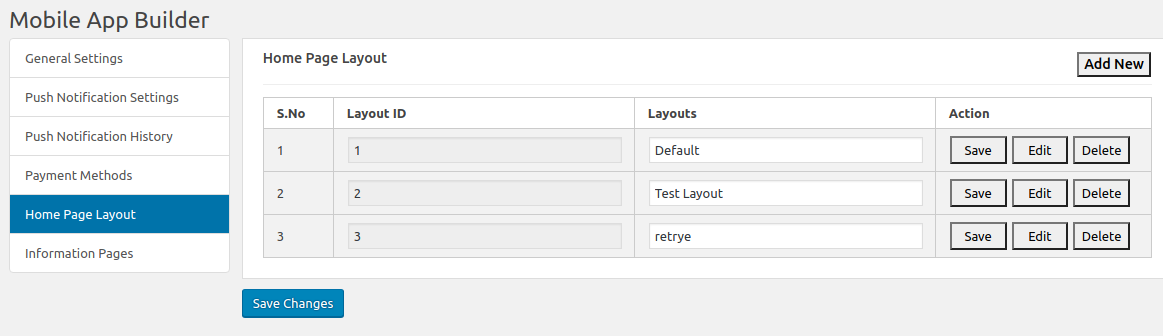
Select ‘Home-Page Layout’ from the side menu.
To create a new layout, click the ‘add new layout’ button. You can also re-edit the existing layouts. Also, you can pre-design multiple layouts & keep any one of the active (from the General settings on the side menu).
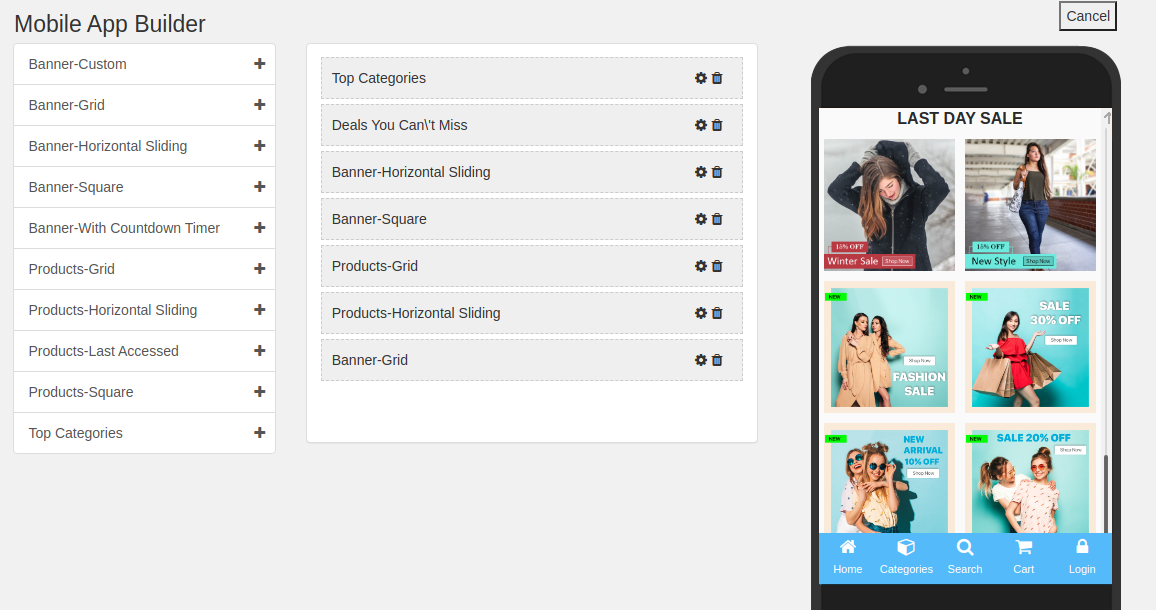
While designing or editing your app home-page layout, you can use a maximum of 20 components (from the complete list of different components shown in the side menu on the left). Hence, you can also use a single component multiple times in your layout
Upon adding these components, you can edit each one of them & organize them using the drag & drop feature.
All the edits that you make instantly reflect on the demo app screen as shown in the screenshot above.
Components To Design Your WooCommerce Home-Page Layout:
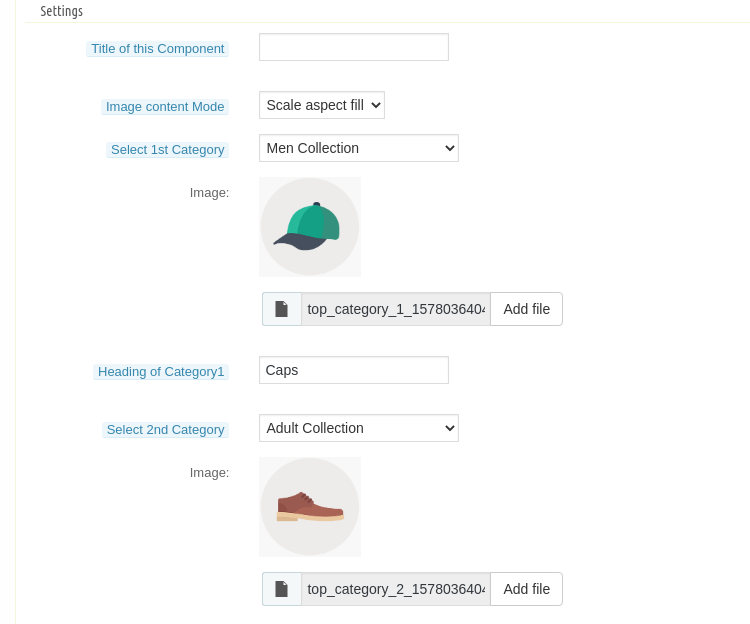
1. Top Categories:
In a slider form, you can display small image icons with landing page links to relevant categories on your app. You can add a total of 8 of such categories in a single ‘top category’ component.
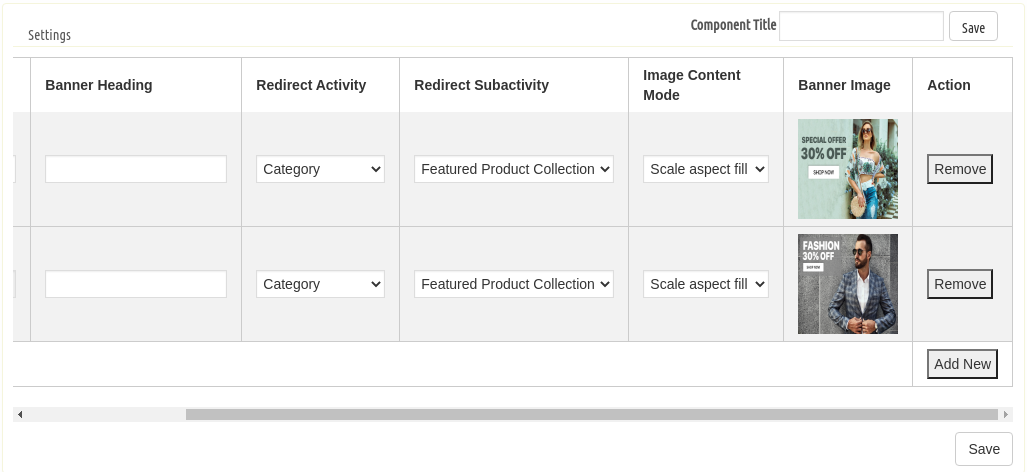
2. Square, Grid & Horizontal-Sliding Banners:
For all these 3 banner types, you can choose the landing page options among category pages, product pages, home-page & even any of the CMS pages.
3. Square, Grid & Horizontal-Sliding Products:
With these 3 components, you can display singular products redirecting the app user straight to the specific product page. Because this WooCommerce Mobile App Builder plugin also lets you set featured product listings. You can choose among the following options to display the products:
Best Seller Products
New Arrivals
Featured Products
Special Products
Products from a category
Custom Products
4. Recently Accessed Products:
Including this component anywhere on the layout simply creates a horizontal slider for products displaying only the products that an app user has recently viewed. It is ideal to add this component only once in a home-page layout.
5. Countdown-Timer Banner:
The count-down-timer banner has an in-built countdown timer with all the necessary settings to make it your own. You can use it to inform your app users about an offer that is ending in a specified time.
Apart from all the edits, you can make to design your WooCommerce App’s home-page, there is one more useful thing that’s present all the time on your app’s screen. It is the bottom tab bar navigation in shopping apps.
Wrap Up:
By now, you must have understood how user-friendly it is to create, design & edit the home-page layout of a WooCommerce Mobile app using the WooCommerce Mobile App Maker plugin by KnowBand.
From time-to-time, eCommerce apps do have to change their home-page layout to complement different offers, seasonal sales, new arrivals, etc. Hence, to make it feature-rich yet easy for the store owners, our experts at KnowBand have developed this WooCommerce Mobile App Maker plugin. You can even go through the demo of this plugin before you decide to purchase it.
Explore more on detail from below Video & drop us your message on support@knowband.com in case of any query:
Having all the latest features in a mobile app is something that every business is concerned about these days. The same is the case with eCommerce businesses too. To cater to the app users in the best possible way, shopping apps must be laced with the latest features as they help improve the UI & UX of the app.
For PrestaShop, a popular open-source eCommerce platform, mobile applications have become more efficient now. With the addition of 3 new features described below, KnowBand Plugins have rejuvenated their PrestaShop Mobile App Builder module.
2. Fill the app pre-requisite form. (We need these details to create apps)
3. Review your final app before confirm to publishing it on the app stores.
Note: We only publish apps with your developer accounts (Google Play and Apple App store) without any extra charges at our end.
Quick Glance to New Feature Additions:
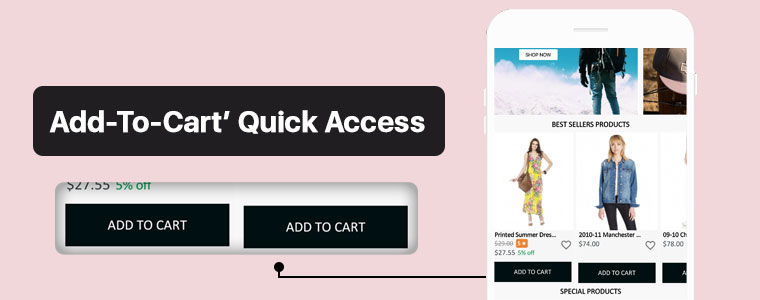
#1. ‘Add-To-Cart’ Quick Access:
This new feature adds the ‘Add-To-Cart’ button on the Category Page & also on the Home-Page wherever product blocks are used. This way, app users won’t have to open the individual product pages in order to add that product to their cart. App users can quickly add their choice of products from the category or home-page.
Now, the user can simply browse the app and keep on adding products into cart seamlessly.
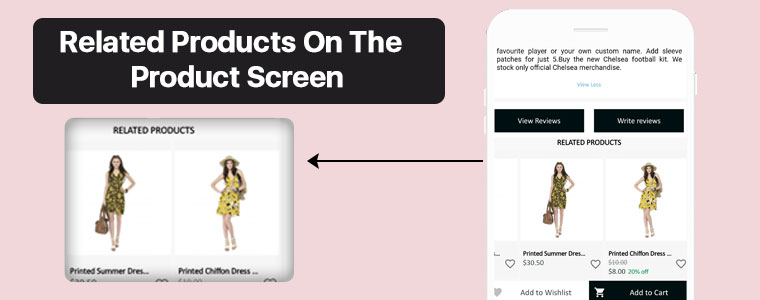
#2. Related Products On Product Screen:
On an eCommerce product page, one great way to motivate the customers’ to shop more is to show some products related to the main product on that page. To serve this purpose, now the PrestaShop Mobile App Builder is compatible with our Automatic Related Products module.
Now, it’s way simple to showcase related products on both website and apps and improve revenue through cross-selling.
#3. Product Reviews and Ratings:
On the product page, app users can rate the products & write & submit their product reviews. Upon approval, they are displayed on the product page so that others can view it for reference. The PrestaShop Mobile App Builder is compatible with the default Product Comments Module.
Now, showcase user reviews & ratings for products on app and motivate new buyers for more purchases.
Compatibility With Other PrestaShop Modules:
1. Multi-vendor Marketplace Module:
With the use of this module, store owners can easily transition their single-vendor PrestaShop App to a multi-vendor PrestaShop App. Because the Mobile App Builder module is compatible with the Marketplace module (both by KnowBand Plugins), all of the processes are automatic. All you need to do is install the marketplace module on your PrestaShop website.
Having a marketplace allows the store owner to have multiple sellers on his/her store, each with a unique vendor panel. Store owners can sell their own products too on a marketplace & also make profits by taking commissions from the vendors.
–> Check out combo pack of (Multi-vendor Marketplace + Mobile App) below:
This module by KnowBand allows eCommerce stores to have all the functionalities & layout of a booking or a rental app/ website. Now, this module is also compatible with the PrestaShop Mobile App Builder module by KnowBand.
–> Check out combo pack of (Booking and Rental + Mobile App) below:
The Image Search module allows the app user to search for products of your e-store using any reference image that they either clicked with their phone camera or using any reference image from their phone’s gallery. You can also enable this feature automatically in your PrestaShop App by installing this module on your PrestaShop website.
Using this module, store owners can show a ‘spin & win’ discount wheel which the customers can spin to avail any one of the discounts mentioned on the pie wheel. Enable this feature on your PrestaShop App by installing this ‘Spin & Win’ module on your PrestaShop website & configure it & then simply set its toggle switch to ‘ON’ (from the App Builder module).
This PrestaShop module, by KnowBand, displays a list of products related to the main product (on the product page). When an app user is shopping for a particular product, he/she will be able to see related products when they scroll down on that product page. Equip your PrestaShop Mobile App with this feature by simply installing the ‘Related Products’ module on your PrestaShop website.
Now that all the new features, compatible modules & installation steps are covered, let’s take a look at core features of the PrestaShop Mobile App Builder module & learn how it can benefit your business.
Core Features & Benefits Of The PrestaShop Mobile App Builder:
#1. Multi-Lingual & Multi-Currency Support:
This app maker module is great for businesses who are willing to launch a PrestaShop App that supports multiple languages & currencies. It can help with localization & even with expansion to multiple countries.
#2. DIY Home-Page Editor:
This feature allows the store admins to design their app’s homepage without having to code. All the tools provided in the DIY Homepage editor of this module are easy-to-use. Admins can add, rearrange & configure various components like sliders, banners, grids, recent product tab, count-down timer, etc. Admins can make multiple layouts & enable anyone of them at a time. This again saves them from designing at the last moment.
Regularly updated & re-designed homepage keeps the app users engaged & allows the business to display the most relevant & in-trend content on their homepage.
#3. Unlimited Push Notifications:
Your app users who have enabled push notifications on your app will be able to receive the notifications that you (admin) create & send from the backend of this PrestaShop Mobile App Builder module.
There is no limitation with this module because store admins can send an unlimited number of push notifications to their app users. Push notifications help to re-engage the app users & remind them about any abandoned cart items, order status, upcoming sale & its benefits & a lot more.
#4. Offline Mode Working:
The PrestaShop Mobile Apps are made to work in offline mode as well i.e. under slow internet or no internet connectivity. Online shoppers get to browse apps with pre-loaded screens without actually needing the internet.
#5. Admin Panel Control:
The mobile apps for PrestaShop can be fully controlled by the friendly admin panel. The store admin can make a few clicks and button toggles and make the app work as per the requirement. The flexibility and customizable options with this extension make it the most preferred choice for store owners.
Drop us an email at support@knowband.com or check all such amazing features in detail from:
Online shopping has now become a major part of almost everyone’s life. Be it apparels, or electronics, or even groceries, more & more netizens are preferring to shop online now. One major reason for this preference is mobile applications. Mobile devices like smartphones & tablets have become a staple for almost every person worldwide. This factor makes it high time for eCommerce businesses to bring their store to a mobile app.
In this write-up, we will elaborate on a Grocery Shopping Native Mobile App that has been built using an eCommerce Mobile App Builder plugin developed by KnowBand. This plugin is meant to be installed on the eCommerce website. Using the data of that website, the app builder plugin automatically builds a shopping app & its APK & IPA files are published on the Google Play Store & Apple App Store.
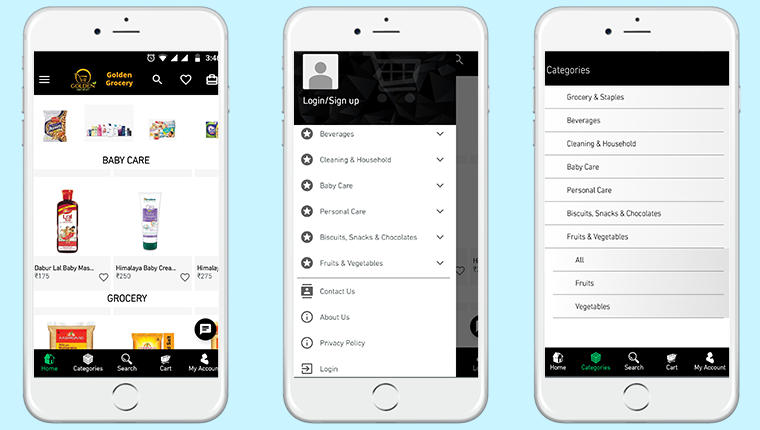
One of the grocery shopping apps built using KnowBand’s eCommerce Mobile App Builder is ‘Golden Grocery’. The ‘Golden Grocery’ mobile app is a feature-rich native application both on the frontend as well as the backend. Take a look at the user-end of the ‘Golden Grocery’ Native Mobile App.
These app screens are of ‘Golden Grocery’ Mobile App. The 3 screens above display the HomePage, Navigation Menu & the Category Page respectively. Using the eCommerce Mobile App Builder plugin, store owners get a customizable app. They can easily design their home-page of their app using various home-page editor tools provided on the backend of the eCommerce Mobile App Builder plugin.
Product Page:
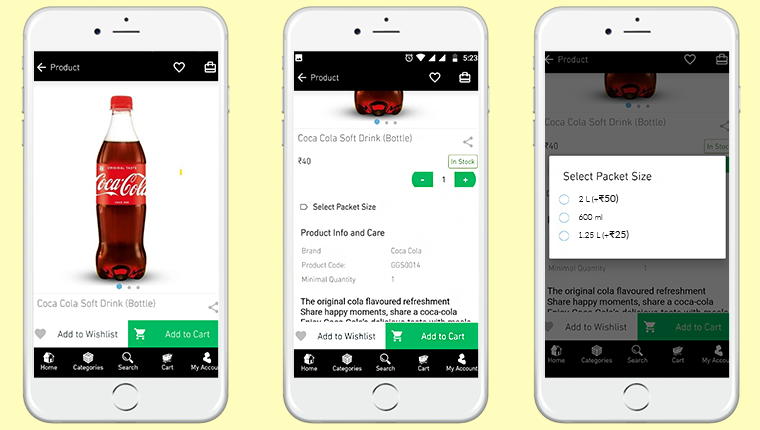
Shown above is the product screen of the ‘Golden Grocery’ Native Mobile App. It includes multiple product displays, page sharing icon (for multiple platforms), product quantity stepper, product specifications, description, wishlist button, ‘Add-to-Cart’ button & much more.
From the backend of the eCommerce Mobile App Builder, store admin can even select whether clicking the ‘Add-to-Cart’ button would send the app user directly to the cart page or whether it would keep the user on the same product page for break-free shopping.
We are grateful to have received great feedback about our eCommerce Mobile App Builder extension from our client (Golden Grocery). We are glad that they found our plugin easy to use & were able to launch their new app without any hassle & in the least time possible.
As a leading eCommerce solution provider, we, at KnowBand, will continue to provide the best tools & services to various eCommerce businesses around the world. Take a look at our range of Native eCommerce Mobile App Builder extensions:
Features Of The E-Commerce Mobile App Maker Extension:
#1. Multi-Lingual Support:
This feature makes your shopping app support various international languages. It is ideal for businesses that serve internationally or in a language other than English. RTL languages like Arabic, Persian are also supported.
#2. Support For Multiple Currencies & Payment Gateways:
This feature allows your app to support various international currencies & payment gateways. As the eCommerce Mobile App builder plugins by KnowBand are open-source solutions, even more currencies & payment gateway support can be added as per business requirements.
#3. Live Chat Support:
This equips your Shopping App with in-app Whatsapp/ Zopim Chat Support. It connects your app users to your chat support team.
#4. Push Notifications:
From the backend of the eCommerce Mobile App Builder, store admins can create, automate & send an unlimited number of Push Notifications to their app users. It’s highly useful for e-retailers as these notifications play a huge role in boosting customer retention & to reduce the cart abandonment rate.
#5. Simplified Logins:
For a smoother onboarding, visitors can be made to sign-in into your app via fingerprint authentication or via their social accounts i.e. Google, Facebook, etc.
#6. Live Synchronization:
Both the website & the app remain in-sync with each other because Mobile App, created using this shopping app maker plugin, uses the same database as that of its equivalent website. This also ensures automatic inventory management.
#7. Complete Technical Support:
With the paid version of this extension, you get a free 3 month support period. This support includes assistance in building, optimizing, & launching your eCommerce App. If required, your app can further be customized according to your needs- such as setting up returns & refunds, etc.
#8. Simplified Backend:
Store admins can instantly make changes in their app by editing/ re-configuring the App Builder plugin from their website backend. This helps a lot with instantly customizing the app’s home page, or to create/ automate/ send push notifications, customize the tab-bar, etc. All these re-edits take just a minute to make & they instantly show up on the mobile app as well..
Conclusion:
Apart from all the features mentioned above, a lot more features are provided by default. Some of them are- one-page checkout, Offline accessibility, pre-saved addresses, social sharing options for multiple platforms, compatibility with ‘Spin & Win’ plugin, compatibility with Image Search Plugin, etc.
Hence, if you own a Grocery store on PrestaShop, OpenCart, Magento, or WooCommerce, drop us an email at support@knowband.com to discuss more.





























![[Version 2.0.2 Released] New Features Added To PrestaShop Mobile Apps](https://www.knowband.com/blog/wp-content/uploads/2020/07/2020-07-27-2.jpg)







![[Success Story – Goldengrocery] Grocery Mobile App for E-Commerce](https://www.knowband.com/blog/wp-content/uploads/2020/07/Success-Story-%E2%80%93-Goldengrocery-Grocery-Mobile-App-for-E-Commerce.png)