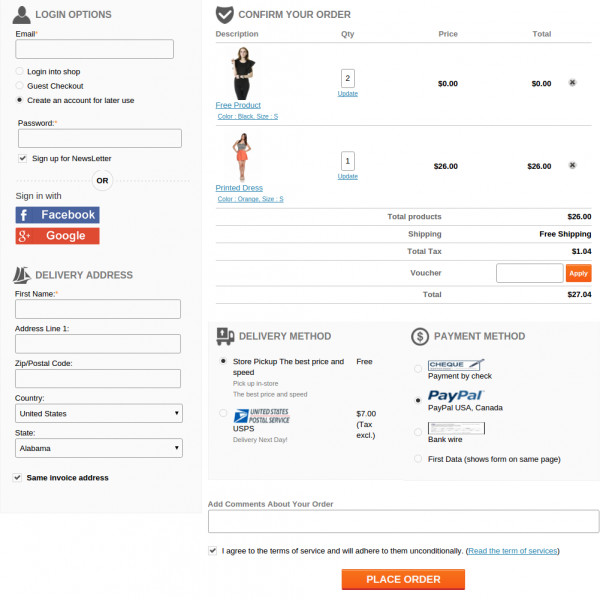
One Page Checkout for PrestaShop v1.7

Adopt a feature loaded PrestaShop checkout addon for your PrestaShop 1.7 store.

PrestaShop is one of the widely used eCommerce platforms that has grabbed the worldwide attention due to its amazing features and functionalities. It is used all across the world by the people who are involved in the field of eCommerce business and is growing every year. This eCommerce platform has the bulk of features, themes, and extensions that can effortlessly improve the performance of any PrestaShop store.

It is a proven fact that 70% of your customers abandon their cart while checking out of the site. This is when the customers find the checkout process to be long and tedious. It won’t be wrong to state that with an easy access to so many choices, the online shoppers won’t bother going through the lengthy checkout forms. The lengthy process may prove hazardous especially when the customers are already on the fence about making the purchase. This is when a single-page checkout scores over the multi-page checkout processes.

Prestashop one page checkout addon is one of the ways of optimizing the checkout process of the eCommerce store. The Prestashop addon has made another major step towards poprawa jakości obsługi klienta oraz zwiększanie wydajności e-commerce dzięki najnowszej wersji PrestaShop 1.7. Dzięki najnowszej ofercie, dostępnej dla klientów PrestaShop od X X XUM, ludzie coraz częściej korzystają z nowej wersji PrestaShop. Ta platforma PrestaShop 7 ma nowe ekscytujące funkcje, takie jak wprowadzenie frameworka Symfony2016, przebudowany system motywów, motyw Starter,

Jeśli jednak nadal czujesz potrzebę optymalizacji zakupów w sklepie PrestaShop 1.7, oto genialny Dodatek do kasy PrestaShop 1.7 One Page dla Ciebie. Jeśli tak uważasz PrestaShop Addon nie jest warta twojej uwagi, spójrz na te funkcje wymienione poniżej:

1. Łatwe dostosowanie obiektu

[Caption id = "attachment_1939" align = "aligncenter" width = "749"] Ten dodatek do prestashopu pozwala na łatwe dostosowanie do procesu realizacji transakcji. [/ Caption]
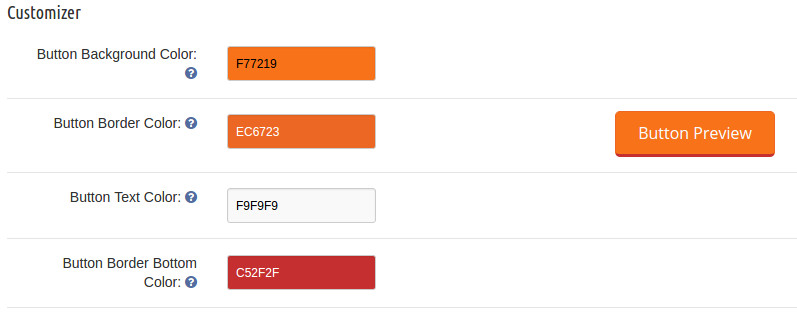
Ten dodatek Prestashop pozwala na łatwe dostosowanie w procesie realizacji transakcji. Każdy proces kasowania w witrynie PrestaShop, która twierdzi, że jest uproszczony, wciąż zawiera wiele niepotrzebnych pól i kroków związanych z realizacją transakcji. Ważne jest, aby usunąć te nieistotne etapy realizacji transakcji, aby uzyskać maksymalną uwagę klientów i ich sprzedaż. To rozszerzenie na jedną stronę w Prestashop umożliwia administratorowi witryny szybkie dostosowanie na stronie kasy swojej witryny. Administrator sklepu może nawet zmienić wygląd strony kasy, włączając niestandardowy kod CSS i JavaScript. Dzięki łatwej opcji dostosowywania administrator może łatwo zaktualizować swoją witrynę zgodnie z potrzebami i wymaganiami.

2. Prosta funkcja logowania

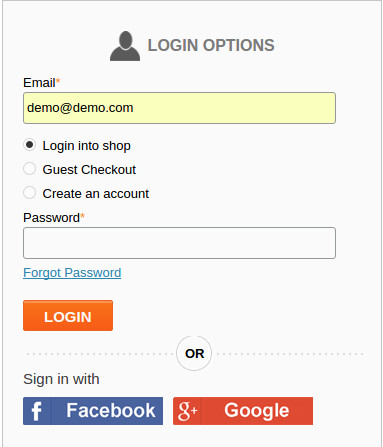
[Caption id = "attachment_1935" align = "aligncenter" width = "383"] Zaoferuj szybkie logowanie do klienta za pomocą tego dodatku do kasy PrestaShop. [/ Caption] Niektórzy kupujący online zaakceptowali fakt, że opuszczają witrynę, gdy zostaną poproszeni o utworzenie konta. W związku z tym oferowanie opcji łatwej rejestracji zawsze może pomóc administratorowi zmniejszyć liczbę porzuconych koszyków. Moduł kasowania pojedynczej strony Prestashop oferuje funkcję szybkiego logowania do klienta. Klienci korzystający ze sklepu PrestaShop 1.7 nie wymagają osobnych kont do kas do szybkiego zakupu produktu online. Moduł Prestashop
3. Zgłaszanie błędów klientom

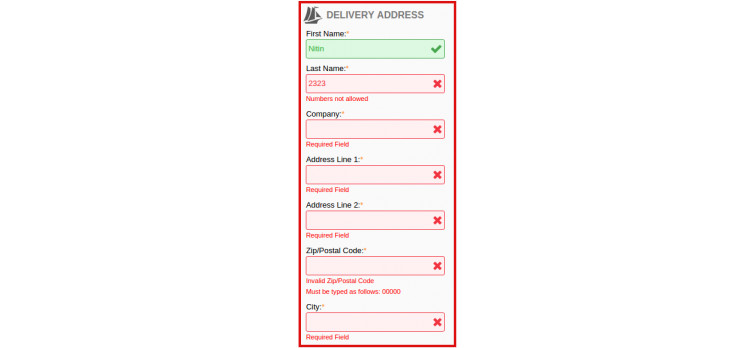
Teraz klienci dokonujący zakupów online na twojej stronie mogą łatwo wiedzieć, gdzie popełnił błędy na stronie kasy. To rozszerzenie do kasy PrestaShop 1.7 oferuje natychmiastowe komunikaty o błędach wraz z wbudowanym mechanizmem walidacji, który pomaga klientom podczas procesu realizacji transakcji.

4. Łatwe do dostosowywania w terenie
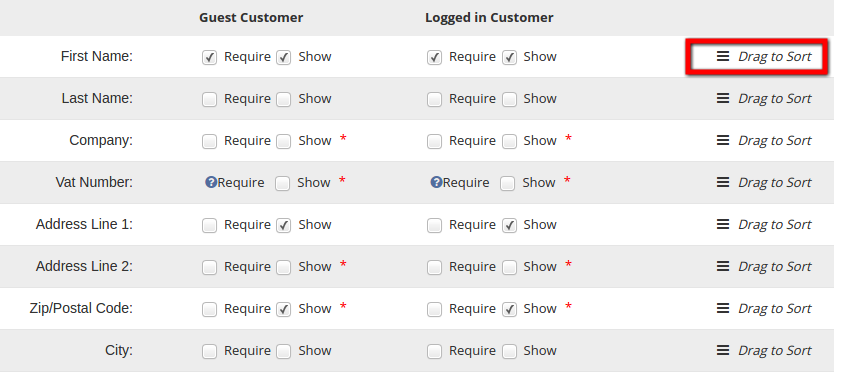
Formularz kasowy obejmuje dużą liczbę pól, które czasami mogą być trudne do obsługi. Otrzymujesz liczbę już utworzonych pól w interfejsie administratora. Wszystko, co musisz zrobić, to wybrać te, które chcesz wyświetlić w interfejsie użytkownika. Administrator może wyświetlać różne pola klientom, którzy są zalogowani, i tym, którzy nie są zalogowani. Istnieje możliwość wyboru pól dla różnych grup klientów. Ponadto solidne rozszerzenie Prestashop ułatwia właścicielom sklepów zmianę rozmieszczenia różnych pól. Można to łatwo zrobić, przeciągając i upuszczając różne pola.

5. Integracja MailChimp
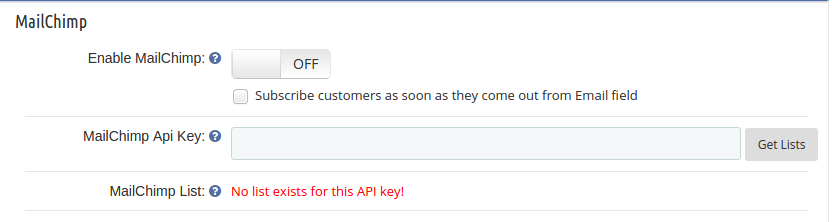
Wtyczka Prestashop jest dostarczana z wbudowanym integratorem MailChimp. Integrator wysyła identyfikatory e-mail klientów przechwyconych na stronie kasy bezpośrednio do konta MailChimp administratora sklepu. Można to zrobić, gdy klient wybierze pole wyboru subskrypcji biuletynu. Nawet jeśli klient zaloguje się za pośrednictwem swojego konta Google, identyfikator e-mail zostanie wysłany na konto MailChimp. Ułatwia to e-marketingowcom tworzenie strategii marketingowych i dotarcie do klientów w celu ich ponownej sprzedaży.

6. Obecność wielu metod płatności i wysyłki
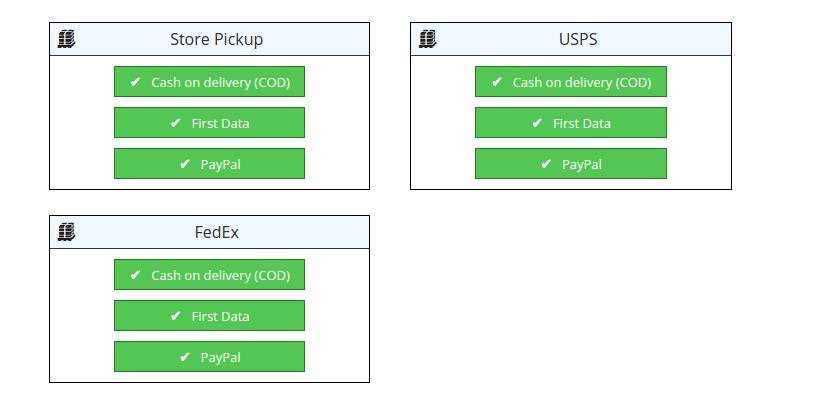
Teraz twoi klienci przybywający do sklepu PrestaShop 1.7 nie będą musieli najpierw wypełniać wszystkich informacji, aby móc zobaczyć sposób wysyłki i płatności. Z jednym układem zamówienia strony tego rozszerzenia PrestaShop, klienci będą mogli zobaczyć dostępną wysyłkę i

7. Oferuje szeroką bazę klientów

Ten dodatek do kasy Prestashop jest w pełni responsywny, dzięki czemu idealnie nadaje się do stosowania na wielu platformach do komputerów stacjonarnych, laptopów, smartfonów i tabletów. Kierując reklamy na wielu użytkowników urządzeń jednocześnie, możesz bez wysiłku zwiększyć swoje szanse na sprzedaż produktów i współczynniki konwersji. W pełni konfigurowalny interfejs ułatwia właścicielowi sklepu zatrzymanie klientów i zmniejszenie wskaźnika porzucania koszyka w witrynie zakupowej.

8. Pola niestandardowe
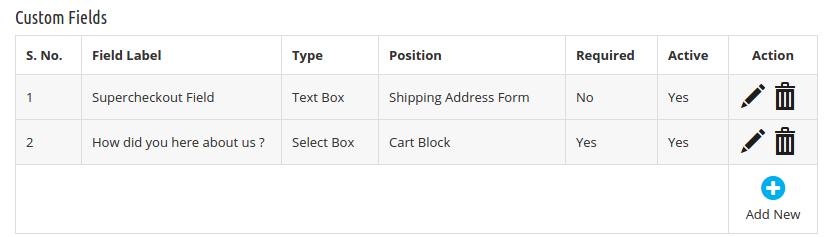
Wszechstronność jest kluczem do tego modułu. Interfejs administracyjny oferuje właścicielowi sklepu kilka pól formularza. Dodatkowo może dodać niestandardowe pola na stronie kasy. Utworzone pola można edytować lub usuwać zgodnie z wymaganiami administratora. W związku z tym rozszerzenie, wyciska proces kasowania dla odwiedzających Twój sklep, a jednocześnie pozwala uzyskać dodatkowe informacje o potencjalnych klientach.

9. Dostosowywanie koszyka na zakupy
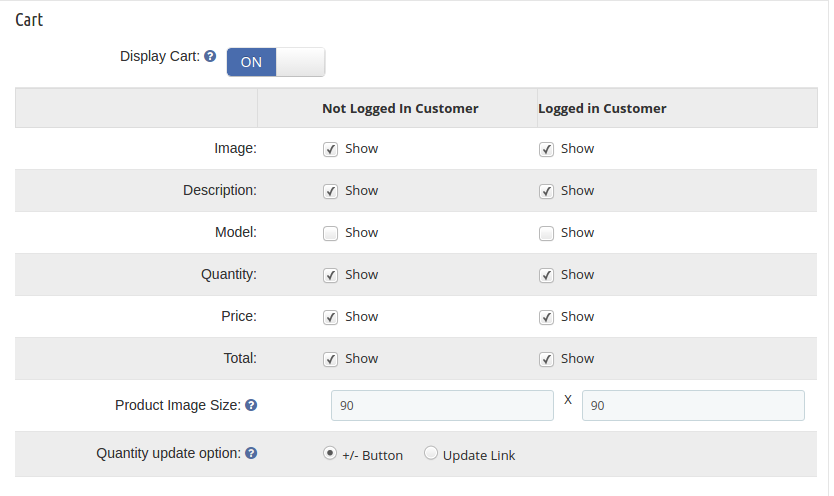
Moduł to kompleksowe rozwiązanie dla właścicieli sklepów Prestashop, jeśli chodzi o optymalizację zakupów klientów. Administrator sklepu może wybrać pola, które chce wyświetlić w koszyku na stronie. Różne pola informacyjne mogą być ułożone w przedniej części, tak jak zostało to zrobione na stronie kasy. Oprócz pól informacyjnych administrator może nawet wyświetlać szczegóły zamówienia klienta w koszyku.

10. Optymalizacja front-end

The module allows you to squeeze multiple steps of the checkout into a single page without affecting the front layout. The best part of the addon is that there is no code changes required to be done. The frontal layout can be changed by just dragging and dropping the various elements.

11. GDPR compliance

In addition to all the features, the Prestahop one step checkout extension offers compliance with EU’s GDPR as well. The Prestashop addon has been upgraded as per GDPR standards. You can now include multiple opt-ins in your site. There is an option to create multiple policies for this compliance. You can enable the policy that you want to display in the front-end.

In case you site deals into the European Union countries in any way, then, you need to take the consent of the customers before using their personal details for any purpose. The Prestashop one page checkout addon allows you to check the consent of the customer from the back-end.

12. Mobile-friendly interface

With the increasing dominance of mobile sites and mobile-first users, providing a responsive interface to the prospective customers is the key. Keeping this in mind, Prestashop one page checkout addon has been designed to be mobile-friendly. The single-step checkout process will work flawlessly on mobile devices. Thus, you can now offer at-par services to your target customer base whether they are using a desktop site or mobile devices. All the features offered by the Prestashop one page checkout plugin will be compatible with your mobile site as well.

Just upgrading the version of your store is not enough. You need to keep every single aspect in sync with the changes. The checkout process is one of the most important aspects that contribute to the overall conversions. So, don’t compromise with the ineffective checkout process on your PrestaShop 1.7 store, but take the right steps now. You just need to install this feature-packed PrestaShop checkout extension from the Knowband store to stay ahead of your business rivals. For more information, do visit the Knowband store without any further delay.

Sprawdź Prestashop One Page Checkout Podręcznik użytkownika?to get?step by step guide on how you can install this module.

Powiązane historie:

Your license is inactive or expired, please subscribe again!

One Page Checkout for PrestaShop v1.7

Adopt a feature loaded PrestaShop checkout addon for your PrestaShop 1.7 store.

PrestaShop is one of the widely used eCommerce platforms that has grabbed the worldwide attention due to its amazing features and functionalities. It is used all across the world by the people who are involved in the field of eCommerce business and is growing every year. This eCommerce platform has the bulk of features, themes, and extensions that can effortlessly improve the performance of any PrestaShop store.

It is a proven fact that 70% of your customers abandon their cart while checking out of the site. This is when the customers find the checkout process to be long and tedious. It won’t be wrong to state that with an easy access to so many choices, the online shoppers won’t bother going through the lengthy checkout forms. The lengthy process may prove hazardous especially when the customers are already on the fence about making the purchase. This is when a single-page checkout scores over the multi-page checkout processes.

Prestashop one page checkout addon is one of the ways of optimizing the checkout process of the eCommerce store. The Prestashop addon has made another major step towards melhorando a experiência do cliente e impulsionando o desempenho do comércio eletrônico com sua versão mais recente do PrestaShop 1.7. Com sua última oferta disponível para clientes da PrestaShop desde o 7 de novembro, 2016, as pessoas estão cada vez mais adotando essa nova versão da PrestaShop. Esta plataforma PrestaShop 1.7 possui novos recursos interessantes, como a introdução do framework Symfony2, um sistema Theme recriado, o tema Starter,

No entanto, se você ainda sente a necessidade de otimizar a experiência de checkout da sua loja PrestaShop 1.7, aqui está o brilhante PrestaShop 1.7 One Page checkout addon para voce. Se você acha que isso Addon da PrestaShop não vale a sua atenção, dê uma olhada rápida nesses recursos mencionados abaixo:

1. Facilidade de personalização fácil

[Caption id = "attachment_1939" align = "aligncenter" width = "749"] Este addon prestashop permite fácil customização no processo de checkout. [/ Caption]

Este addon Prestashop permite fácil customização no processo de checkout. Todo processo de checkout em um site da PrestaShop que afirma ser simplificado ainda contém um grande número de etapas e etapas de checkout desnecessárias. É importante remover essas etapas de checkout irrelevantes do seu processo de checkout para obter o máximo de atenção e vendas do cliente. Esta extensão de pagamento de uma página do Prestashop permite que o administrador do site realize uma personalização rápida na página de check-out do site. O administrador da loja pode até mudar a aparência da página de check-out, incorporando o código CSS personalizado e o JavaScript. Com a opção de personalização fácil, o administrador pode atualizar facilmente o site de acordo com a necessidade e a necessidade.

2. Instalação de login simples

[Caption id = "attachment_1935" align = "aligncenter" width = "383"] Ofereça um recurso de login rápido para o cliente com este addon de check-out prestashop. [/ Caption] Alguns dos compradores on-line aceitaram o fato de deixarem o site quando solicitados a criar uma conta. Por isso, oferecer uma opção de inscrição fácil sempre pode ajudar o administrador a reduzir alguns desses abandono de carrinho. Módulo de check-out de página única Prestashop oferece facilidade de login rápido do cliente. Os clientes da sua loja PrestaShop 1.7 não precisam de contas de verificação separadas para fazer uma rápida compra on-line do produto. O módulo Prestashop

3. Erro ao relatar para clientes

Agora, os clientes que fazem uma compra on-line em seu site podem saber com facilidade onde realmente cometeram os erros na página de checkout. Esta extensão de pagamento PrestaShop 1.7 oferece mensagens de erro imediatas juntamente com o recurso de validação em linha para ajudar os clientes durante o processo de checkout.

4. Fácil para personalização de campo

O formulário de check-out inclui um grande número de campos que, às vezes, podem se tornar difíceis de manipular. Você obtém vários campos já criados na interface de administração. Tudo o que você precisa fazer é selecionar aqueles que deseja exibir no front-end. O administrador pode exibir campos diferentes para os clientes que estão conectados e para aqueles que não estão. Existe uma opção para selecionar os campos para os diferentes grupos de clientes. Além disso, a robusta extensão Prestashop torna mais fácil para os donos de lojas reorganizarem os vários campos. Isso pode ser feito simplesmente arrastando e soltando os vários campos.

5. Integração MailChimp

O plugin Prestashop vem com um integrador MailChimp embutido. O integrador envia os IDs de email dos clientes capturados na página de checkout diretamente para a conta MailChimp do administrador da loja. Isso pode ser feito quando o cliente seleciona a caixa de seleção para assinatura de boletim informativo. Mesmo que o cliente faça login via conta do Google, o ID do email será enviado para a conta do MailChimp. Isso torna mais fácil para os e-marketers projetar suas estratégias de marketing e alcançar os clientes para o remarketing.

6. Presença de vários métodos de pagamento e envio

Agora, os clientes que chegarem à loja PrestaShop 1.7 não serão obrigados a preencher todas as informações primeiro para poder visualizar os métodos de envio e pagamento. Com o layout de checkout de uma página desta extensão da PrestaShop, os clientes poderão visualizar o envio e

7. Oferece a ampla gama de base de clientes

Essa extensão de check-out do Prestashop é totalmente responsiva por natureza, o que a torna ideal para uso em várias plataformas para desktops, laptops, smartphones e tablets. Ao segmentar vários usuários de dispositivos ao mesmo tempo, você pode melhorar sem esforço suas chances de vendas de produtos e taxas de conversão. A interface totalmente personalizável torna mais fácil para o dono da loja manter os clientes e reduzir a taxa de abandono do carrinho do site de compras.

8. Os campos personalizados

Versatilidade é a chave quando se trata deste módulo. A interface administrativa oferece vários campos de formulário para o proprietário da loja. Além disso, ele pode adicionar campos personalizados na página de checkout. Os campos já criados podem ser editados ou excluídos de acordo com o requisito do administrador. Daí a extensão, aperta o processo de checkout para os visitantes da sua loja, ao mesmo tempo permite que você obtenha informações adicionais de seus clientes em potencial.

9. Personalização do carrinho de compras

O módulo é uma solução completa para os donos de lojas Prestashop quando se trata de otimizar a experiência de compra dos clientes. O administrador da loja pode selecionar os campos que deseja exibir no carrinho de compras do site. Os vários campos de informação podem ser organizados no front-end como foi feito na página de checkout. Além dos campos de informação, o administrador pode até exibir os detalhes do pedido do cliente no carrinho.

10. Otimização de front-end

The module allows you to squeeze multiple steps of the checkout into a single page without affecting the front layout. The best part of the addon is that there is no code changes required to be done. The frontal layout can be changed by just dragging and dropping the various elements.

11. GDPR compliance

In addition to all the features, the Prestahop one step checkout extension offers compliance with EU’s GDPR as well. The Prestashop addon has been upgraded as per GDPR standards. You can now include multiple opt-ins in your site. There is an option to create multiple policies for this compliance. You can enable the policy that you want to display in the front-end.

In case you site deals into the European Union countries in any way, then, you need to take the consent of the customers before using their personal details for any purpose. The Prestashop one page checkout addon allows you to check the consent of the customer from the back-end.

12. Mobile-friendly interface

With the increasing dominance of mobile sites and mobile-first users, providing a responsive interface to the prospective customers is the key. Keeping this in mind, Prestashop one page checkout addon has been designed to be mobile-friendly. The single-step checkout process will work flawlessly on mobile devices. Thus, you can now offer at-par services to your target customer base whether they are using a desktop site or mobile devices. All the features offered by the Prestashop one page checkout plugin will be compatible with your mobile site as well.

Just upgrading the version of your store is not enough. You need to keep every single aspect in sync with the changes. The checkout process is one of the most important aspects that contribute to the overall conversions. So, don’t compromise with the ineffective checkout process on your PrestaShop 1.7 store, but take the right steps now. You just need to install this feature-packed PrestaShop checkout extension from the Knowband store to stay ahead of your business rivals. For more information, do visit the Knowband store without any further delay.

Verifique o Prestashop One Page Checkout Manual do Usuário?to get?step by step guide on how you can install this module.

Histórias relacionadas:

Your license is inactive or expired, please subscribe again!

E-Commerce Apps that are a must in this demonetization scenario

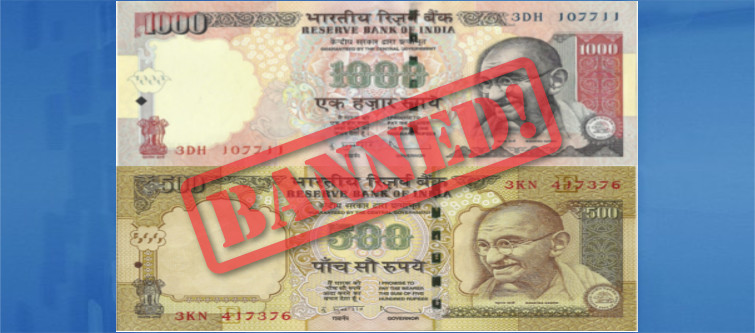
The demonetization drive which was historically announced by Prime Minister Narendra Modi on the evening of 8th November, 2016 was a game changer in the Indian economy. It was a bold economic reform step that changed the entire political, social and economic landscape. With a single stroke, the higher demonetization notes of 500 and 1000 value were suddenly reduced to a waste paper within the midnight of 8th November.

The wide range of businesses across India was affected significantly with this demonetization drive. Most of the businesses were either having a great day or crashed badly with this ban on 500 and 1000 notes. However, eCommerce is one such business area that had a mixed day due to this recent demonetization drive. While there are certain eCommerce players that faced tough days due to decrease in CoD (Cash on Delivery) orders, others had an unusual great business with the rise in digital payments.

Here are the certain eCommerce apps that can help in improving conversion rates for your business. Take hints from this blog that can explain how demonetization affect eCommerce services in India and which are the apps that can be your savior.

1. Transportation-

E-Commerce apps have made the booking of transportation rides easier without any hard cash requirement.

While businesses are hit with the sudden ban on 500 and 1000 notes, eCommerce companies related to the transportation have mostly remained unaffected. If you are short of cash and want to travel somewhere, you need to have the apps like Ola, Uber and others on your smartphone. These eCommerce transport companies follow mostly the digital modes of payment through their closed wallets, Paytm, and other such mediums. Recently, Uber has also launched the special wedding traveling services for Indian customers considering the wedding season around.

Apart from the cab services, there are eCommerce apps like Jugnoo and Ola for availing auto rickshaw ride facility.

2. Groceries- 

Install eCommerce apps for the quick online grocery purchase.

With busy lifestyles of people, buying groceries manually through a local market or supermarket chain has become a thing of past. Like other things, eCommerce companies are now cashing on the groceries market with their apps. With these apps, people can easily purchase grocery items irrespective of the deficient cash supply due to this demonetization drive.

There are eCommerce mobile apps like Grofers, BigBasket, Nature’sBasket, ZopNow, and others that allow easy grocery purchase through digital payment options. Flipkart, a major eCommerce player in India is also planning to venture into the grocery operations from next year. Thus, if you are short of currency due to this demonetization drive, these are the grocery mobile apps at your rescue.

3. Recharge and payment options-

Perform payment of utility bills and other tasks easily with the help of eCommerce recharge mobile apps.

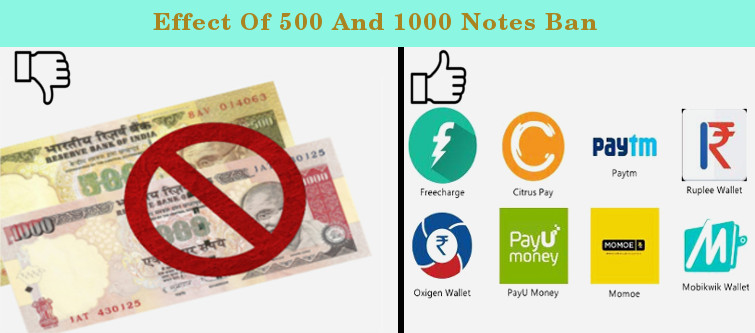
With the cash payments becoming difficult due to this financial reform, digital payment companies are having the last laugh. More and more people are now opting for cashless transactions through the help of various digital payment options. This is the blog which will help you to understand the impact of demonetization on eCommerce digital payment options. Most of the people are now using cashless methods for mobile recharge, utility bills, movie tickets, hotel booking, online shopping, food ordering, flight/train and bus tickets instead of direct cash payment.

The digital payment companies like Paytm, MobiKwik, PayUmoney, FreeCharge, and others have seen a tremendous increase in their customer base along with the daily customer transactions.

4. Food-

Order food easily with eCommerce mobile apps during this demonetization scenario.

Don’t worry if you are having a scarcity of hard cash due to the demonetization move, you can still order food online. People can sacrifice their other luxury splurges and expenditure, but the food is the basic requirement of every individual. There is a host of eCommerce mobile apps such as Zomato, Swiggy, Foodpanda, and others that can help in ordering online food through digital payment options.

5. Medicines-

With eCommerce mobile apps, customers can purchase medicines through cashless transactions.

We all know that demonetization drive was relaxed for the hospital, petrol pumps, railway stations and other places but still it was not implemented fully across pan India. With the demonetization drive, it was a bit difficult to buy prescribed medicines with old currency notes of 500 and 1000 value. To ease out the suffering of these people, there are eCommerce mobile apps like Netmeds, Zigy, and others that allow people to buy medicines online. These apps don’t require hard cash but provide credit/debit or other digital payment options for buying medicines online.

6. Household services-

Avail any household services quickly with the help of these eCommerce mobile apps.

There are virtually mobile apps for every other household facility be it  plumbing requirements, pest control, car washing or any other services. You don’t need to roam around and look for the solution of your household problems with the presence of various mobile apps. There are eCommerce mobile apps such as UrbanClap, Helpr, and others that can offer household services through digital payment options. So, don’t run with hard cash in your hand to resolve various household problems.

In the nutshell

Demonetization is the current flavor in the present business scenario as the recent ban on 500 and 1000 notes have made a gross impact on the purchasing power and behavior of people. Well, the situation may continue for some more days but your business can’t be on the “wait and watch” mode till then. If you are indulging in any of the above eCommerce business, it is time to avail the eCommerce plugin development services of Knowband for a quick business makeover.

The eCommerce extensions of Knowband are packed with multiple features and offer digital payment options to boost your conversion rate optimization efforts. So, contact our eCommerce site for developing feature packed extensions for your Magento, OpenCart, and PrestaShop stores.

Liked This? You’ll Like These Too

OpenCart MockingFish Heatmap and A/B Testing Tool – User Manual

Installation Guide of OpenCart Heatmap and AB Testing Tool

  1. Copy “upload” module folder to your OpenCart root directory.
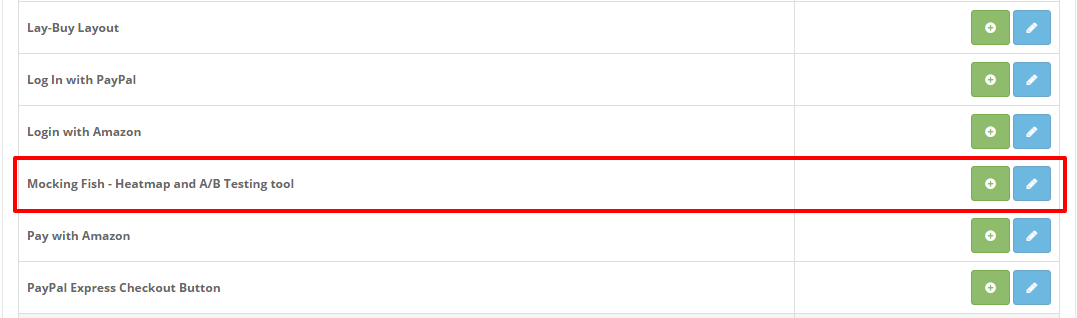
  2. After upload, module will be listed on module listing page in admin panel as shown given below screen.

Note: 

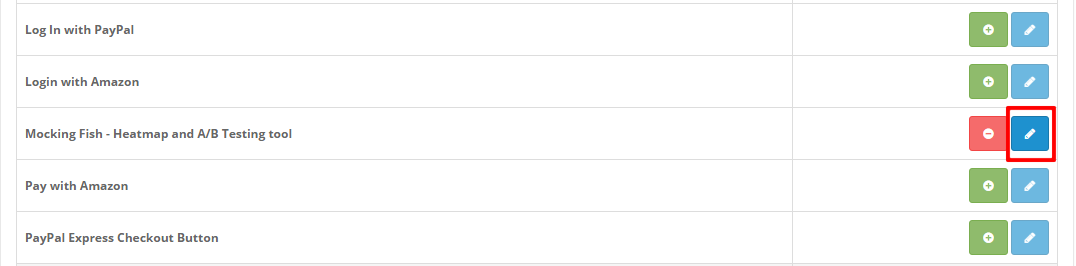
Install the module and a “Edit” button will be there in front of this plugin on module listing page as shown in screen below:

User Manual

To access this module, Click on “Edit” button. On clicking, module interface will be opened and following screen will be display as given below:

Module back end has 1 tab:

  • General Settings

General Settings

This tab has following two options: Enable/Disable:

  1. When enabled is selected module will insert added script in the front end.
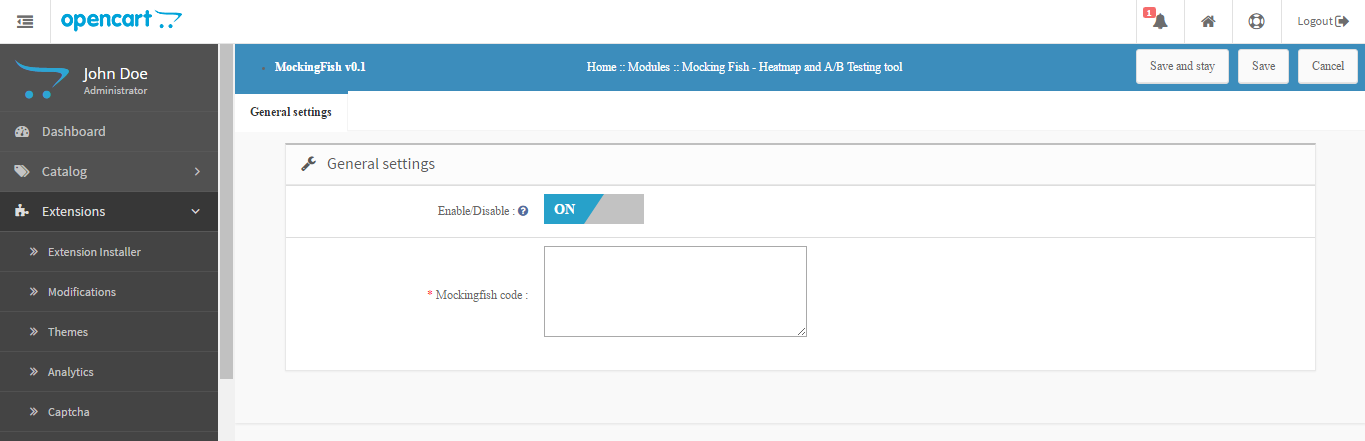
  2. MockingFish Script: This field will contain the script which needs to be inserted in website header. If you do not have any script, click on application details tab which lists down all steps to get MockingFish script.

How can you boost eCommerce Conversions with your site deals?

Shopping deals are a great way to grab the instant attention of your targeted customers towards your eCommerce store. Remember that “You are not the only one in the race” and thus you need to take required efforts to boost your store sales. If you are unable to get customer focus at the first instance only, your sales are bound to suffer.Having promising shopping deals on a site does not guarantee you more product sales and eCommerce conversions. There can be numerous reasons that can be the hindrance for the success of your shopping deals on your eCommerce store.

1. Reveal your shopping deals prominently on your website-

Display shopping deals prominently on your site for higher sales and conversions.

If you can’t feature your shopping deals in a better way, it will be good for nothing. Your targeted customers will only engage with your site for a product purchase only if it contains some exciting shopping deals for them. Create a home page banner about your shopping offers and deals for better customer engagement and sales.

The home page of a website is the first thing where any visitor lands and hence they are the best place to feature your shopping deals.

2. Include only available products on your shopping deals-

The redirecting page of your shopping deals should be functional for your site visitors. It would certainly be a nightmare for your Magento site if it can’t deliver you desired conversion rates and sales. Don’t blame your Magento One Page checkout process for its inefficiency as there could be the number of reasons for the low product sales and conversions.

One common mistake that I have found on numerous sites is that the site deals are leading to “page not found” or “end of product stock” pages that immediately turn off a site visitor. If your visitors are unable to find out the product mentioned in the shopping deal, they will leave a site in the middle causing shopping cart abandonment.

3. Give a personalized touch to your customer orders-

Customers are selecting your eCommerce site for a product purchase among other available sites, so make them feel special about the same. You need to give a personalized touch to your customer orders by providing them free gift wraps, personalized message/sticker, free/upgraded shipping services, and other such facilities.

This personalization will make your customers feel more valued and will make them loyal to your eCommerce store. It will further help in boosting your product sales and eCommerce conversions.

4. Show urgency on your shopping deals-

Urgency on your shopping deals persuade customers for a quick product purchase.

Your site visitors will engage immediately with your online store if your displayed shopping offer/deal is available for a limited time period. Don’t forget to include phrases like “Limited offer”, “Offer expires on ….”, “2 more left in the stock” or any other such statements. All these CTA statements can not only grab immediate attention of your customers but can also arouse customer attention towards your store. Once, the customer know the limited time period of your shopping deals, they will be encouraged to go for higher product purchase on your site.

5. Offer multiple payment and shipping options with your deals-

It will certainly be in the interest of your customers if you can offer them multiple shipping and multiple payment options. Don’t force them to make payment through a specified option only but include more payment options with the help of feature packed checkout extensions. Add popular payment options on your site that can make customers more comfortable while doing an online purchase through your site.

6. Show important updates about shopping deals to your customers-

Customers will appreciate the fact if you can provide timely price related alerts about your shopping offers, new products or any other crucial product update notification. Providing regular updates to your customers will help in building a loyal customer army within a short time. Moreover, it will compel your visitors to make a quick product purchase on your eCommerce site.

Finally….

It is important to showcase your displayed shopping deals in the most engaging manner for getting instant customer attention and sales. Remember, visitors on a site are always looking for great shopping deals and offers, so don’t disappoint them at all. Deals are the first step towards achieving eCommerce conversions and the checkout process is the last step in the final destination. So, take the first step wisely to make the maximum business impact.

Liked This? You’ll Like These Too

How to setup Maintenance mode in PrestaShop with a Customized Look?

Let it be your first exposure to the PrestaShop, or you want to customize, modify, or repair your existing live PrestaShop site. You might not want your customers to shop on your site while you are playing with it. The tweaks and modification you perform on your live site would directly bother your customers and, trust, me you don’t want to bother them at all. Even a small deviation or disruption to your customer’s user experience can result in some serious after effects that would directly impact the conversion optimization and UX optimization of your beloved eCommerce site. So, whenever you want to play around with your site, it is always recommended that you enable maintenance mode in PrestaShop, so that, the user experience of your site is nor affected.

The blog shares the steps to enable the maintenance mode in Prestashop 1.6 and 1.7. Read on to know.

How to setup a Maintenance Mode in PrestaShop 1.6?

Here, I am explaining the steps based on the PrestaShop 1.6 architecture:

Step1: You need to log in to your Admin Panel. Some might even call it the PrestaShop Back Office.

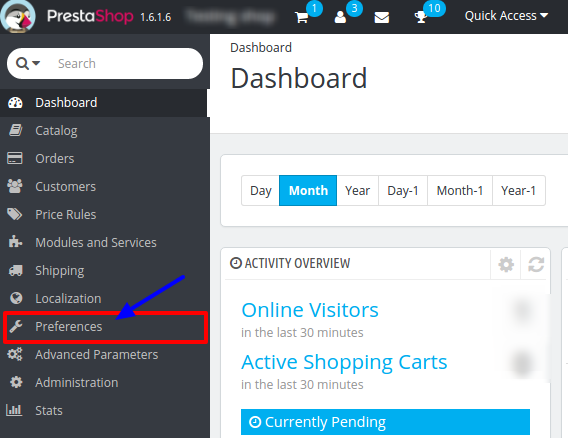
Step 2: Find the menu tab “Preferences” at the left side in default PrestaShop admin panel in the interface. Click on it.

PrestaShop maintenance menu

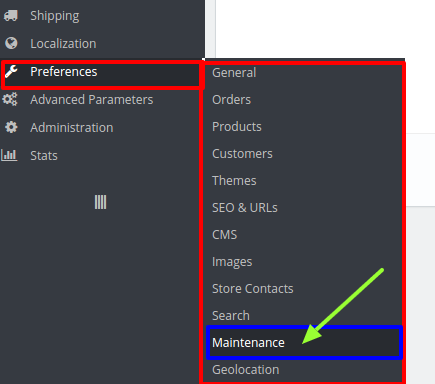
Step 3: It will open a list of sub menus. Click on “Maintenance” in the sub menu.

PrestaShop maintenance mode in sub menu option

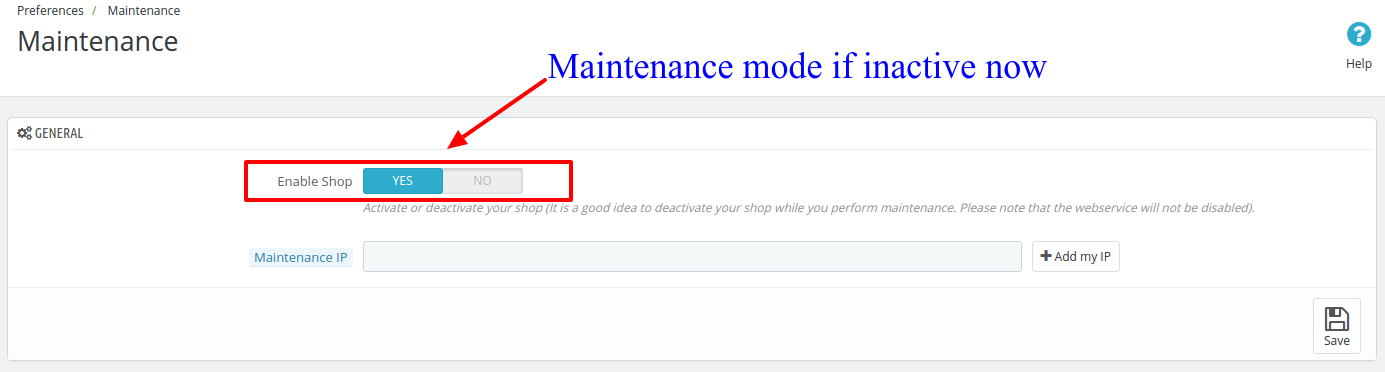
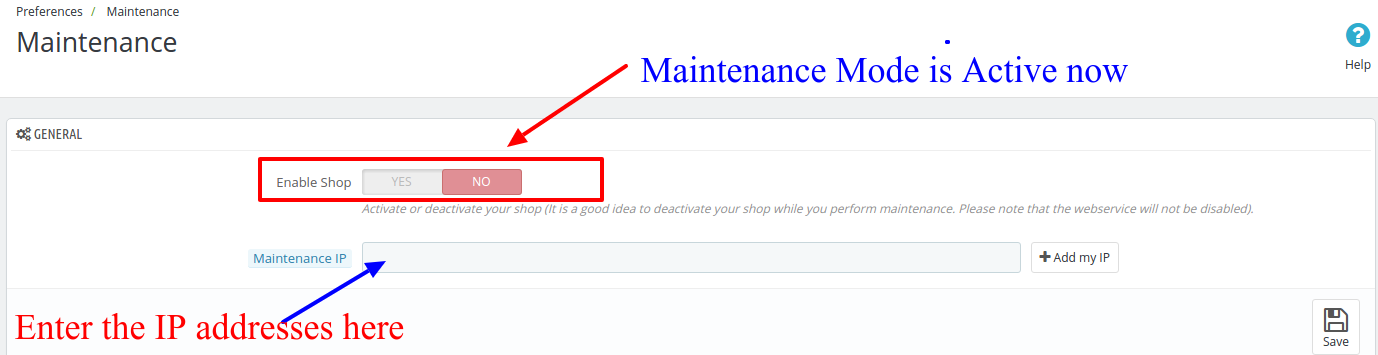
Step 4: It will open a new window. There is a tab with two fields. The first field consist a toggle to turn ON or OFF the PrestaShop maintenance mode. When you click on the Enable Shop to switch it to blue, it means that the PrestaShop Maintenance mode is Switch OFF right now.

How to setup a PrestaShop maintenance mode with a customize look

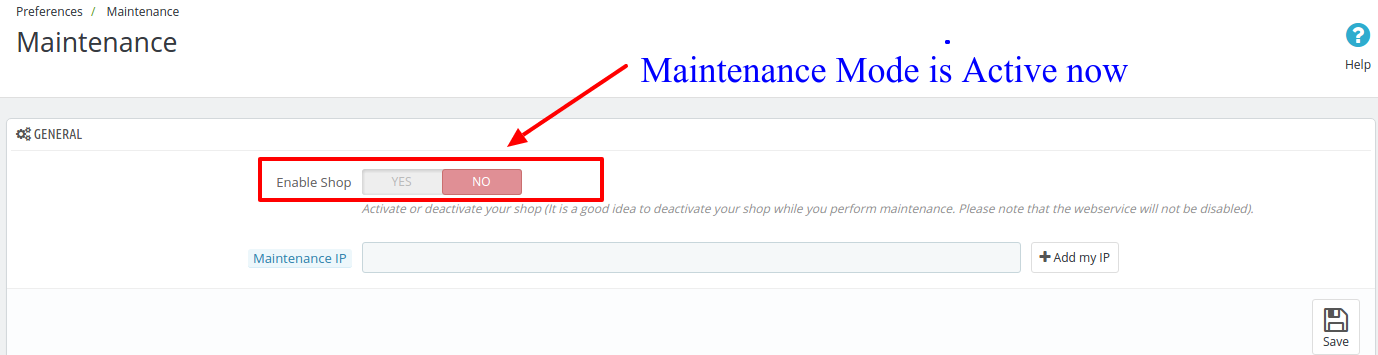
To enable the PrestaShop Maintenance mode, click on the toggle to turn it red in color.

PS: when your modification is finished and the site is ready for live users, you should toggle back the button Blue to disable the PrestaShop maintenance mode.

How to setup a PrestaShop maintenance mode with a customize look

Step 5: By turning the PrestaShop Maintenance mode on, you are restricting your users to access your site from the front end. If you want any developer or your employee to still be able to see your site, enter their IP address the field below the toggle before saving the setting.

PrestaShop maintenance mode IP white list

PS: You can also enter multiple IP addresses in this field by separating them with comma.

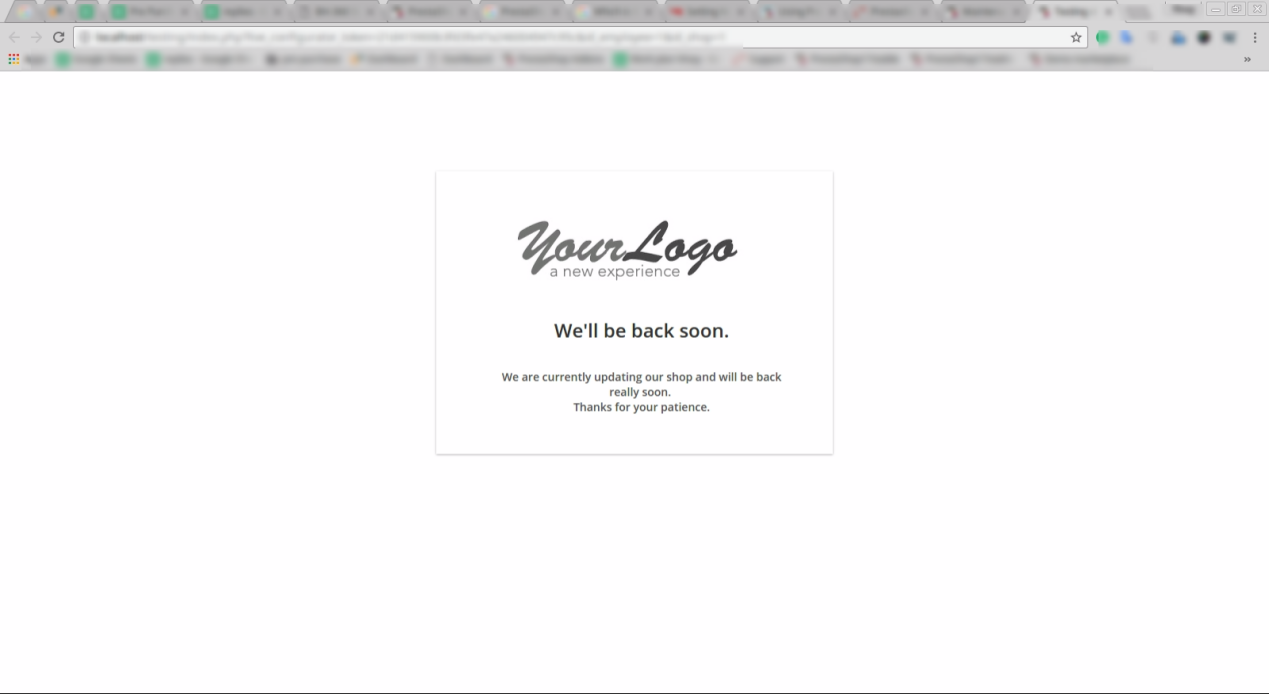
Default PrestaShop maintenance mode active page

Step 6: Now, click on the Save button to save your setting and turn on the PrestaShop Maintenance mode. It will activate the Maintenance mode on your PrestaShop site and whatever changes you perform would not bother your customers.

How to enable Maintenance mode in Prestashop version 1.7?

Just like v1.6, the process of enabling maintenance mode in Prestashop version 1.7 is effortless. Follow the steps mentioned below for the same:

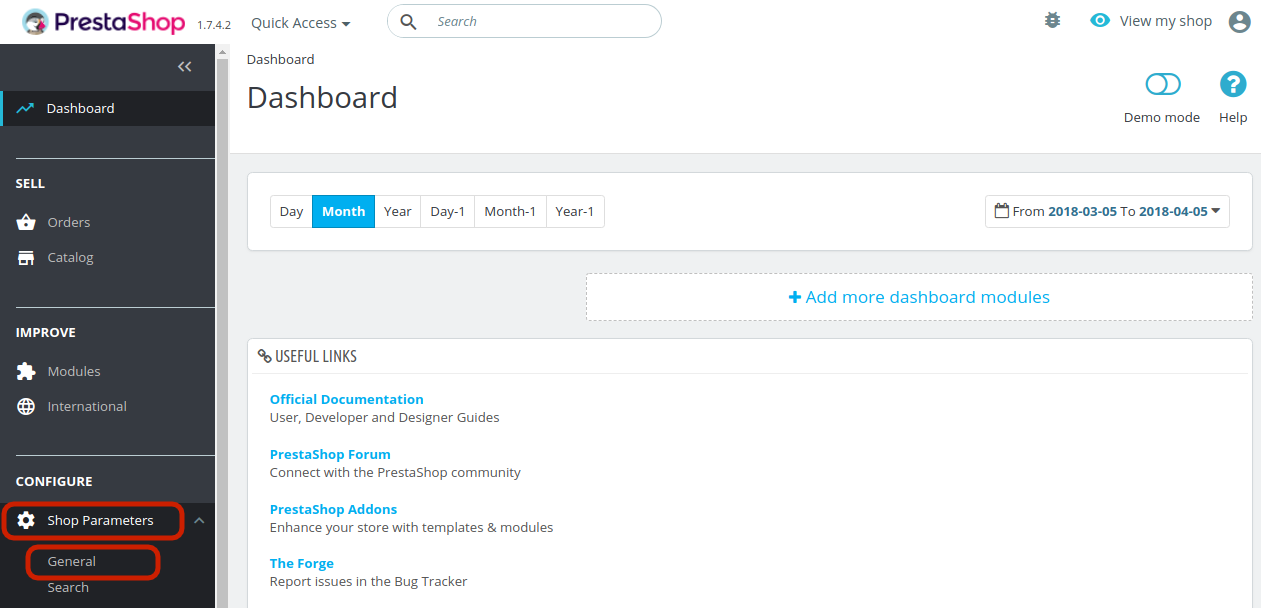
1. In the Prestashop admin interface, go to the Dashboard and navigate the menu options in the left-hand side.
2. Go to Shop Parameter -> General.


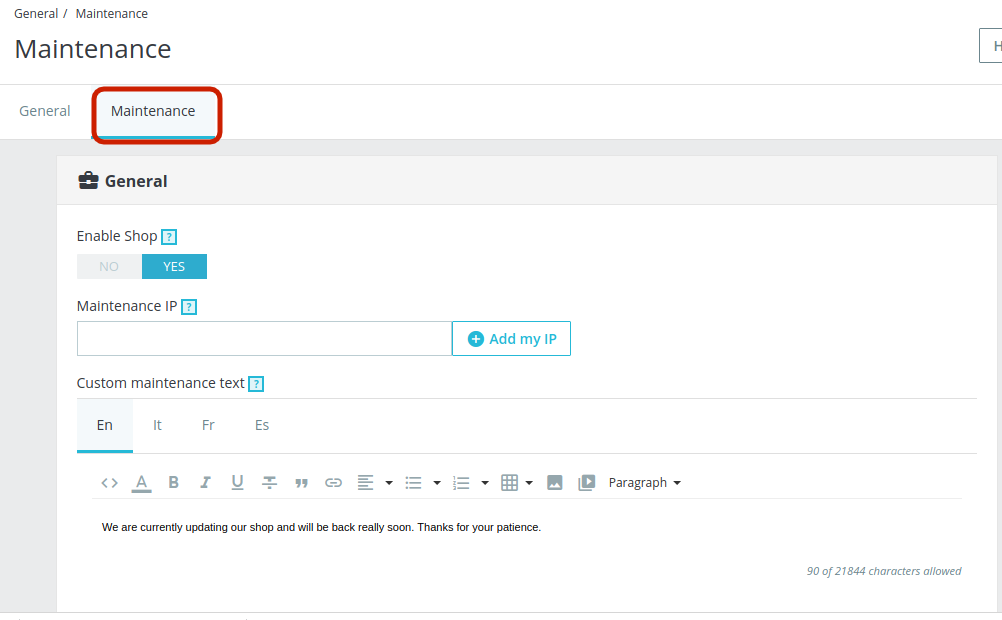
3. This will take you to the interface as shown below. Go to the Maintenance tab.

The various information fields are discussed below:

Enable Shop: Disable the shop in order to enable the maintenance mode.
Maintenance IP: Add the IP address for the user to whom you want to show the maintenance mode. You can add multiple IPs separated by commas.
Custom Maintenance Text: You can enter the text that will be displayed in the front-end to the store visitors. You can even add images if required.

The page showing above is a PrestaShop default Maintenance page. You can customize this Page to look something engaging that will convey your message to the customers in a more defined way. To do this, you will have to edit in some codes of the PrestaShop’s core files.

How to Customize Maintenance Mode Page without Changing the Default Codes?

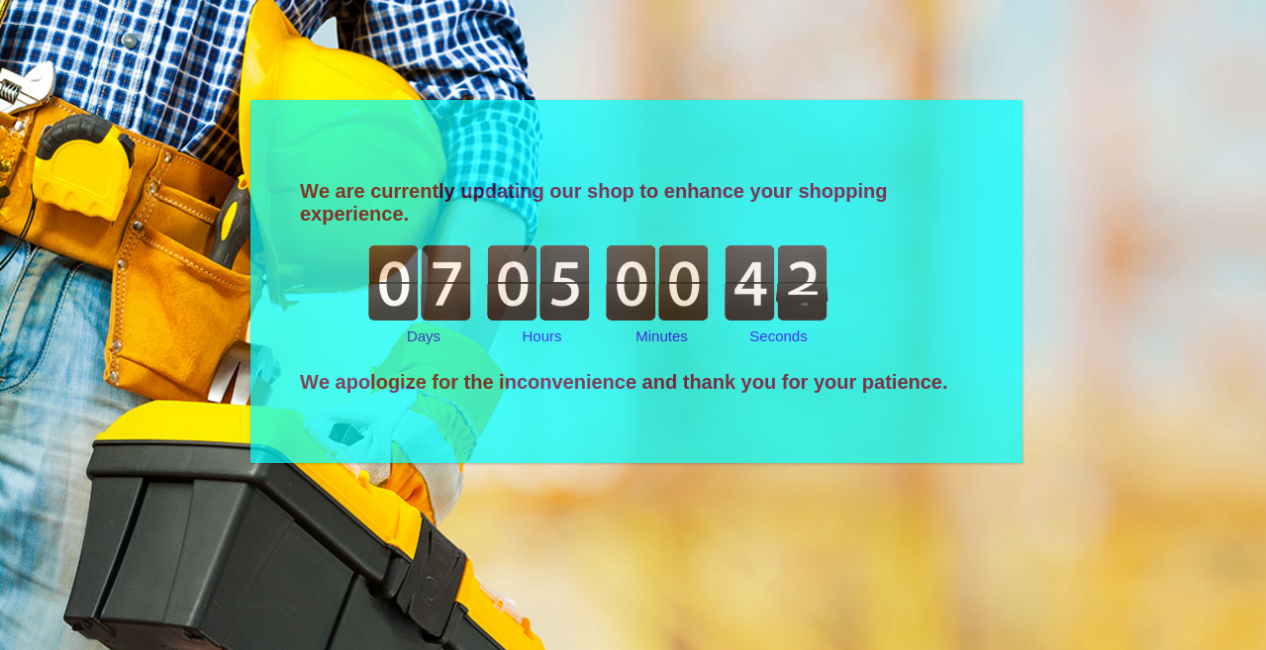
Instead of going by the default method for the same, you can even try an easier and optimized means to show maintenance mode at your site. The no-cost approach by Prestashop is easy, but showcases a simple and non-engaging interface to the site visitors. Why should you go for it when you can make the maintenance page attractive without making any code changes? Knowband offers an alternative method in the form of PrestaShop Maintenance page module which is a Cron based module that does not only customize the look and feel of the PrestaShop Maintenance page but also setup the automatic switch ON and switch OFF of the Maintenance mode.

With Prestashop maintenance page addon You can display a custom message to your customers on the maintenance page, plus fully customize the background and fonts on the page. Wonder why you should try the Prestashop maintenance page customizer extension? Well, the reasons are ample. Some of them are listed below:

  1. The Prestashop maintenance mode addon enables the maintenance mode just by toggling a button.
  2. Additionally, you can even fix the duration in date and time for the same. The maintenance mode will automatically be disabled after the fixed duration.
  3. You get an option to customize the text to be displayed in the header as well as the footer.
  4. The customers get an option to be notified when the site is back in the working mode with the Prestashop maintenance page customizer module.
  5. Above this all, the Prestashop maintenance mode extension allows you to change the look and feel of the webpages. You can change the page color, font color and size.
  6. If required, you can even add a background color in the webpages displaying the maintenance mode with the help of the Prestashop custom maintenance page addon.
  7. Addition of a countdown timer that showcases the duration in which the site will be back in the working mode is the most alluring feature of the Prestashop addon.
  8. It’s a mobile-responsive module, so, you do not have to worry about how the message will look like on a mobile phone.

Liked This? You’ll Like These Too

How is demonetization affecting the eCommerce and other business sectors?

With the big announcement that came on 8th November, 2016 regarding the ban on Rs 500 and Rs 1000 currency notes, there were widespread tremors experienced by the people in India. While most of the people were hailing it as a “masterstroke” move against black money, currency counterfeiting, and terrorism. There were certain sections of people in society, which were making hue and cry about the move that has brought unnecessary problems for them. Here is our detailed study about the impact of demonetization on various types of businesses in India. The ban on Rs 500 and Rs 1000 currency notes have restricted the shopping ability of people through cash. Along with this, the ATM withdrawal limit of Rs 2,500 has complicated the entire matter further. Let us take a quick look at the various business sectors that are affected by this demonetization move. The decision has definitely hurt the conversion rate optimization practices in a big way.

E-Commerce- 

E-Commerce sales are affected due to the ban on currency notes of 500 and 1000 notes.

With the ban on Rs 500 and Rs 1000 currency notes, eCommerce players were forced to stop “cash-on-delivery” payment modes on their site. Certain eCommerce players like Flipkart and Snapdeal made restrictions on the order purchase value to below Rs 1000. While Amazon India stopped CoD orders from Wednesday, a day after the big announcement.

These eCommerce companies also stopped receiving old denomination notes of Rs 500 and Rs 1000 notes and paid more emphasis on other means of digital payments. The demonetization move has hurt the eCommerce conversions of various companies from Flipkart to Zomato, which is a food discovery and delivery portal with other companies that mainly generate revenues through hard cash that accounts for around 60-70% of total orders. With fall in CoD orders, demonetization has led to jump in digital payment options for making online transactions.

As per a research done by the Forrester Research, “The cash on delivery share will come down and it will force customers to make payments online. Initially, in the next 1-2 months it may hurt ecommerce companies.”

This drop was further attributed to the curb on black money due to this demonetization move which was used to make the purchase through various eCommerce stores. According to the statement of Amrish Rau, CEO of PayU India, “About 40% of CoD was driven by black money according to a study done two years ago.” He further stated that “This will have a serious impact on GMV as not all CoD will move digital payments. In the rural economy where consumers are still not that comfortable with digital money yet and who are still adapting to the internet will stay away.”

With the scarcity of cash, it is definitely taking a toll on the conversion rate optimization practices and eCommerce sales are eventually dropping.

Real estate- 

Hard cash is one of the reasons for the downfall of the real estate sector.

It is one of the business segment that is hard hit with this current financial crunch. The hard cash offers an effective working capital for builders and thus this financial constraint can be a severe blow to this aspiring business sector. The demonetization move could hurt the customer demands for home and could force builders to decrease the price of their real estate properties.

This real estate fall is mainly attributed to the cash paying tendency of the customers. Vinay Khattar, who is the head of research at Edelweiss Securities stated that “But, in the long run, due to affordable prices and low supply, this sector will experience positive demand scenario.” Apart from this, housing finance companies are also witnessing pressure on their credit quality as well as growth. All this has been happening due to the fall in real estate prices that will affect the loan against property (LAP) business.

Steel, fertilizers and agrochemicals- 

                    Fertilizers and agrochemicals are the items that are affected by the demonetization move.

The impact of currency ban on Rs 500 and Rs 1000 notes is having an adverse effect on a number of business areas. The demonetization is causing problems for the sectors like steel, fertilizers and agrochemicals. This is because the transactions in these areas are mainly done on the cash basis and not through online payment methods. In addition to this, metal companies related to steel will also be affected severely as they handle transactions through cash basis currently.

Final words of wisdom

With this current currency ban on Rs 500 and Rs 1000 notes, the businesses that are solely dependent on cash payments are bound to suffer. Whereas, the businesses like eCommerce that offer other online payment options will have a limited impact. So, it is entirely your business decision to choose which side of the fence after this demonetization step.

Those involved in the eCommerce business can take the help of eCommerce plugin development services of Knowband store. The company can help in developing customized eCommerce extensions for your Magento, PrestaShop and OpenCart stores for better business growth.

Liked This? You’ll Like These Too

How is the demonetization move a boon for digital payment companies?

Since the Indian independence in the year 1947, the demonetization move to ban 500 and 1000 Indian currency notes is one of the biggest economic overhauls. The Indian Government headed by Prime Minister, Narendra Modi has decided to ban the old 500 and 1000 currency notes from the midnight of 8th November, 2016. The issued notification also informed people about the introduction of new currency notes and the selected use of old currency notes at various places till the midnight of 11th November, 2016.

The new currency denomination will be in the form of 500, 1000 and 2000 notes. Additionally, the people having the old currency notes of 500 and 1000 value can get them exchanged for new currency notes from 10th November onwards.

Well, the move has been hailed as the “masterstroke” move against black money, fake currency, and corruption, there have also been certain murmurs around. The tremors of demonetization were felt across the wide range of business spectrum but it was really a golden opportunity for eCommerce companies. Due to the ban on 500 and 1000 notes, people are having a hard time in buying groceries, dresses, cosmetics, electronic durables, and a host of other items through hard cash. In situations like this, online payment and digital wallet options have suddenly gained the huge attention. Let us offer you a quick tour of how the eCommerce companies reacted and took this bold decision in their strides.

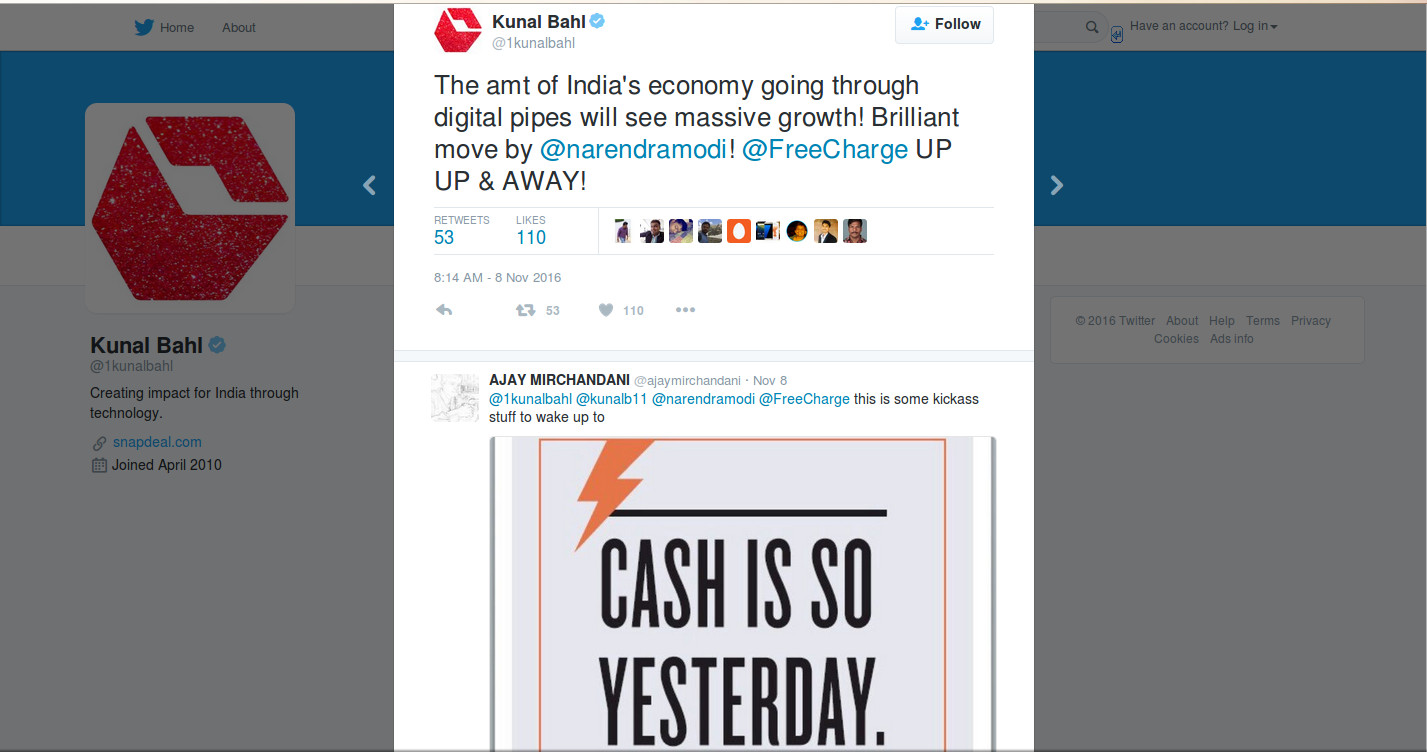
Kunal Bahl, who is the co-founder and CEO of Snapdeal, an eCommerce marketplace platform expressed his opinion about this announcement through his tweet mentioned below:

Apart from Snapdeal, digital companies, as well as other eCommerce startups, have appreciated this big-bang move. Kunal Bahl further added that

“With this, the quantum of India’s economy moving through the digital pipes will witness massive growth. Both Snapdeal and FreeCharge are committed to supporting all such initiatives.”

Naveen Surya, who is the chairman of Payment Council of India (PCI) and the managing director of ItzCash stated,

“We welcome this extremely bold and much needed step by Prime Minister Modi and the government to cure us from disease of cash in our society. I along with Payment Council and India and ItzCash greatly admire this move and provide our full support.”

Trupay, a unified payments interface (UPI) company, which offers bank to bank payment solution was all praise about this great move. In the words of Rahul Gochhwal, a co-founder of Trupay,

“During the changeover period of phasing out old currency notes we really believe that a lot of people will move towards digital payments options due to curbs on roll out of new currency. People will now look at and embrace new age digital payments systems which are far more efficient to enable direct bank to bank retail payments.”

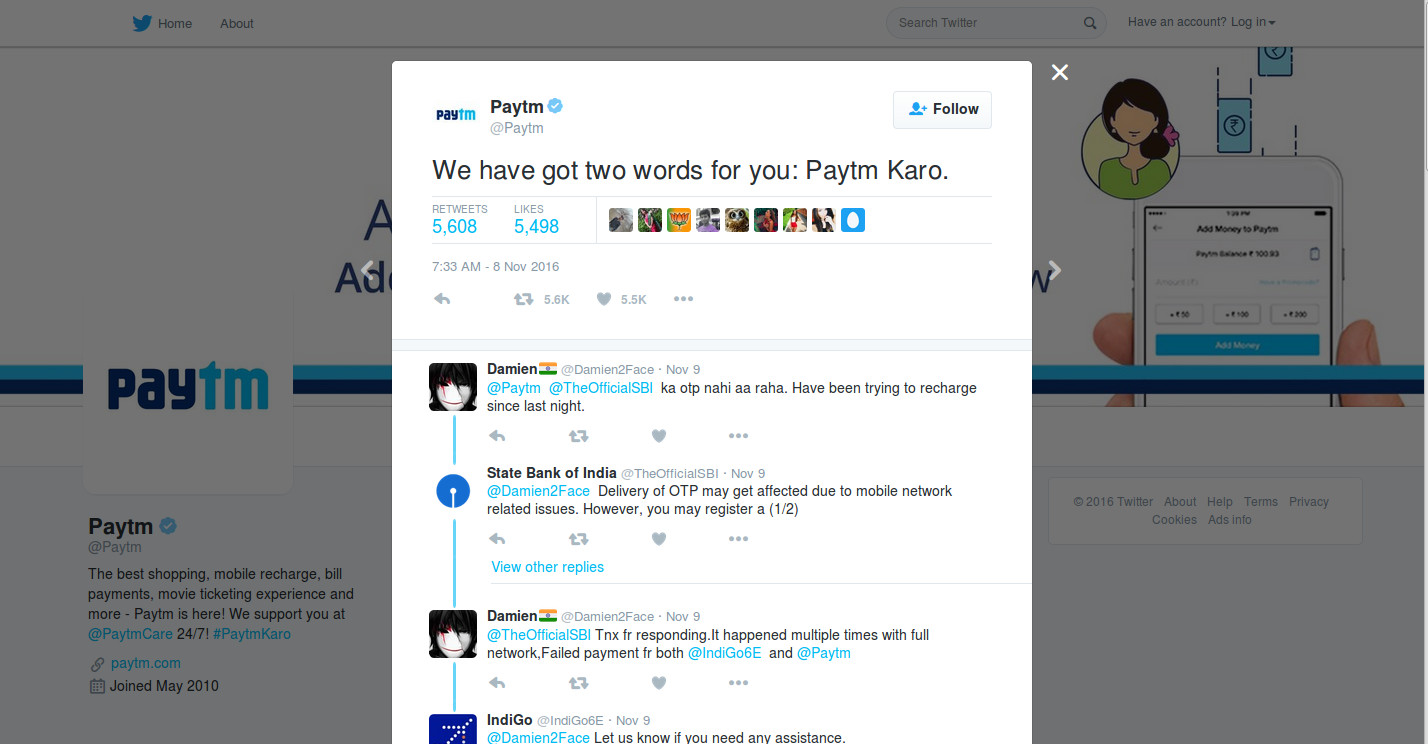
Paytm, a popular digital wallet company took it Twitter to convey their reaction by pushing forward their famous tagline.

Speaking with The Economic Times, Paytm founder, Vijay Shekhar expressed his views as

“In ecommerce, we will see more consumers do digital payments, CoD will reduce which means ecommerce will become more scalable in the long term. This is the best time to build a financial tech company in India. Every part of the country now wants digital to be successful.”

He also welcomed the decision whole heartedly.

Similar sentiments were echoed by Bipin Preet Singh, CEO and co-founder of MobiKwik, another digital wallet company. He considered the present economic reform as a milestone in the history of India. He said,

“Within a 50 day period, a billion Indians will change their payments behaviour – we will move from cash only to a cash-free economy. This a strong step taken by the Modi government and will benefit the growth of digital payments and digital banking in India.”

Digital payment and eCommerce companies are finding the present economic situation as the most lucrative option for their business and want to fully capitalize it. E-Commerce companies like Snapdeal, ShopClues and others are launching their own digital wallet payment option to offer a streamlined transition for customers who were earlier opting for “Cash on Delivery” (COD) method.

This is definitely a big radical change that will surely transform the way billions of Indians make their regular payments for various day-to-day services. If you are one of the eCommerce store owners, it is the ideal time for you to get involved in this marathon of digital payment. Start offering multiple digital eCommerce payment options and encourage customers for a quick online product purchase.

You can avail the wonderful eCommerce plugin development services of Knowband in this regard. The company can deliver you feature packed customized eCommerce plugins for digital payment on Magento, PrestaShop, and OpenCart platforms. So, be a part of this financial reform and achieve big with your eCommerce store.

Liked This? You’ll Like These Too

How to get a cost-effective PrestaShop Mobile App in just 3 steps?

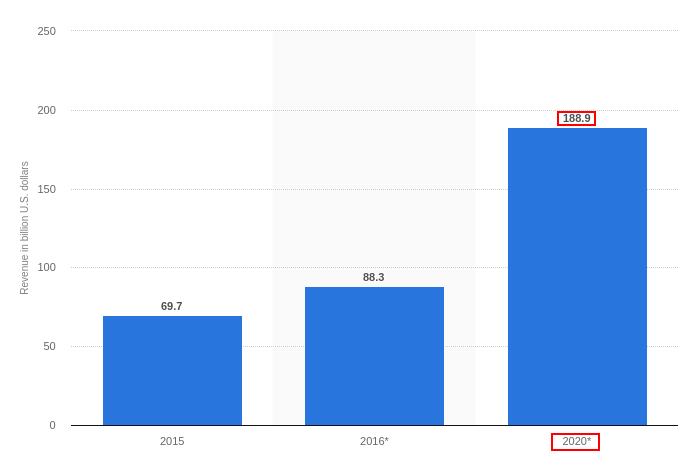
PrestaShop websites are getting popular day by day. PrestaShop has released its latest version 1.7 with more new and advanced features. We might observe an increase in the number of PrestaShop sites in the near future soon. For the time being, this eCommerce platform has already gained popularity and is expected to even become more popular in the upcoming years. A large number of PrestaShop website owners who are competing with each other and other eCommerce platforms to secure their shares of conversions can be highly be benefited with the adaptation of a mobile app for their site. This is a statistics report that suggests the mobile app revenue would grow up to $188.9B by the year 2021.

KnowBand makes PrestaShop App development easy for you!

KnowBand has brought this automated PrestaShop Mobile App Builder plugin to own a pair of the native mobile app. This module is designed as such to provide mobile apps in a pure non-coding way. All you need to do is to follow a few simple steps and get your apps in no-time.

Step1: Purchase the PrestaShop Mobile App Builder module and install the zip file on your PrestaShop store.

Step 2: Once the module is installed, we will share a pre-requisites form through the mail. You can share all the specifications and requirements with us.

Step 3: Once all the required information is received, our skilled development team will develop an APK/IPA file and share with you to which you can host on the PlayStore/App Store. Your customers will download the App from respective stores and install on their phone.

So, these are the three easiest steps that can help to get a mobile app for your PrestaShop website in a much economic manner.

Here are some benefits of using PrestaShop Mobile App builder :

1. Real-time Synchronization:

The PrestaShop Mobile App and the website are two entities of your eCommerce business, that need to run in proper sync. Using a Mobile app developed with PrestaShop Mobile App Builder, you will get an API (web service module) which will synchronize the mobile app with the website in much much quicker manner.

Every inventory (Product, category addition), order details and other store-related details are automatically reverted on the mobile app. This does not let store admin make the changes on a manual basis.

2. Tablet & Mobile Support:

Your apps are fully native and work flawlessly on all the handheld devices. With multiple screen-size support, your users can browse the app on all sorts of tablets, smartphones, iPad, and iPhone. Moreover, taking your app to the Android and iOS platform targets almost every mobile users around the world effortlessly.

3. Multi-lingual & RTL Support:

The Mobile Apps for PrestaShop supports all sorts of languages like English, French, Spanish, Italian, Polish etc. The module even supports various Right To Left scripts like Urdu, Hebrew, Arabic etc.

4. Brand Presence:

The eCommerce Mobile App for PrestaShop provides complete white label app to enhance your store branding strategies. The module allows you to display the store logo on the header of the app and strengthen your brand loyalty.

5. Rich Color Choices:

Right color schemes play a very vital role in luring potential users to your app. The PrestaShop Mobile App Maker provides various color options in the module backend like the theme, background, button, button text etc. Now, you can choose the desired color for your app and change them whenever required.

6. Flexible Home Screen:

Provide impeccable design to the home screen of your app. The PrestaShop Mobile App Creator has simplified the home screen by making it fully flexible to all sorts of customization. You can create multiple layouts based on various festivals & events. They can be easily used from the backend whenever required.

Furthermore, this feature brings various attributes for home screen customization like banners, sliders, countdown banner, recent products etc. You can provide whichever look you feel right for your app.

7. Quick Login Options:

Your PrestaShop Mobile App should have the perfect login screen in the mobile app as it is responsible to massive users retention on your store. With this module, your users get Google, Facebook, OTP, Fingerprint login options. It enhances the UX to another level.

8. Simplified Checkout:

The multi-screen and lengthy checkout screen often becomes the reason behind the user abandoning the cart. The PrestaShop Mobile App Builder provides simplified single-page checkout screen and makes the order submission easy for the users.

9. Easy Payment Options:

Making online payment with PrestaShop Mobile App is easier than ever. The PrestaShop Mobile App Creator supports all sorts of website payment methods along with custom payment method like Stripe, Braintree, PayU etc. The robust and easy payments in app motivate the users to make the purchase.

10. Effortless Trade:

The PrestaShop Mobile App Creator supports all sorts of shipping methods on the eCommerce app. All placed order deliveries can be easily handled by store admin without any hassle.

11. Social Sharing:

Promoting your store products on different social networks could be the sale booster for your business. The PrestaShop Mobile App Builder allows the users to share your products with their family and friends with their product screen.

12. Coupons & Vouchers Support:

Mobile coupons are the modern way to offer discounts and deals to app users. The PrestaShop Mobile App Creator support all sorts of coupons and vouchers on the mobile app.

13. Gamified E-mail Subscription Pop-up:

The PrestaShop Mobile App Creator provides the gamified e-mail subscription pop-up in the mobile app. The store admin can offer various deals and discounts with the same and capture the user’s e-mail as well. This spin-wheel responsive interface will only work on an app if KnowBand’s PrestaShop Spin and Win module is installed on the store.

14. Unlimited Push Notifications:

Deliver all sorts of information and notifications to the app users with unlimited push notifications service and grab their immediate attention. The PrestaShop Mobile App Builder provides both automated as well as manual notifications to mobile shoppers.

15. Web-admin Interface:

The PrestaShop Android/iOS Mobile App Builder provides complete admin panel access to the store admin. This allows them to manage the app functionalities on their own.

Conclusion

That’s all! Having a PrestaShop Mobile App would definitely prove to be one of the strides to enhance the reach and visibility of your online business. In lieu of it boost the sales and conversions of your store. KnowBand even provides the Mobile App Builder for other eCommerce platforms as well. Get to know more from here.

You Might Also Like:

eCommerce Mobile Apps: Just a Fad or an unavoidable Trend?
Step by step tutorial to test and create eCommerce Mobile App!

Magento Marketplace Return Manager Addon

What is MarketPlace?

In general terms a MarketPlace is ‘an open space where a market is/ was formerly held.’ It means that a space with relation between sellers and customers. There are several sellers selling goods to several customers.

An online marketplace (or online e-commerce marketplace) is a type of e-commerce site where product or service information is provided by multiple third parties, whereas transactions are processed by the marketplace operator. Online marketplaces are the primary type of multi channel e-commerce.

In an online marketplace, consumer transactions are processed by the marketplace operator and then delivered and fulfilled by the participating retailers or wholesalers (often called drop shipping). Other capabilities might include auctioning (forward or reverse), catalogs, ordering, wanted advertisement, trading exchange functionality and capabilities like RFQ, RFI or RFP.

In general, because marketplaces aggregate products from a wide array of providers, selection is usually more wide, availability is higher, and prices are more competitive than in vendor-specific online retail stores.

Examples of online marketplaces are Amazon.com, etsy, eBay, Snapdeal, Flipkart, Kaymu, Rakuten, and NASDAQ.

MarketPlace Extension

MarketPlace extensions for Magento is developed for simply converting a simple Magento store to a MarketPlace with lots of features to customers, sellers and store owner. Any customer can register as a seller and can enjoy the features of a seller as well as customer of the store.

The seller sells products on the store and in return the store owner gets a commission by percentage from the total sale made by the seller. The commission percentage that the store owner gets can be modified and the store owner can set percentage to any desired value.

Magento Marketplace Return Manager Extension

Introduction

Return Manager addon adds the functionality to manage return requests for any order placed by a customer as well as a guest customer. The plugin adds a link to the front-end through which any customer/guest customer can apply for return of any product contained in a order placed earlier.

This is a very flexible plugin and the customer can return any product in a order completely or partially, that means the customer can also return half or less quantity of any product in the order.

Installation Manual

Follow the following steps for installing Magento Marketplace Return Manager Extension

1. Download the extension package.

2. Unzip the package on your root folder of Magento setup via FTP manager (like Filezilla or WinSCP – download here: https://filezilla-project.org/).

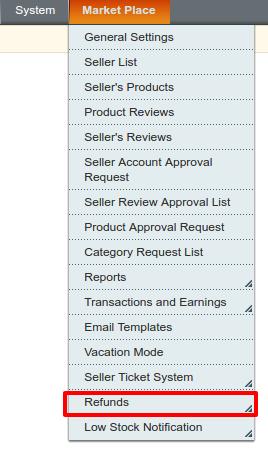
3. In Admin Panel under the Menu “Market Place” next to System menu, you will see a new menu option “Refund”. In case you are not able to see the link under System, please clear Magento Cache first then check again.

4. With this the extension gets installed on your system.

Admin Module

After installing plug-in into store, the plug-in will provide following interface:

1. Admin Panel

a) Configuration

  1. Marketplace Refund Configurations

b) Refund Request

2. Front end

a) Customer interface

b) Seller Interface

  1. Refund Request

Each interface is in form of a tab and each tab contains some specific settings/functionality that can be changed according to the need. Each tab is explained below.

Marketplace Refund Configurations

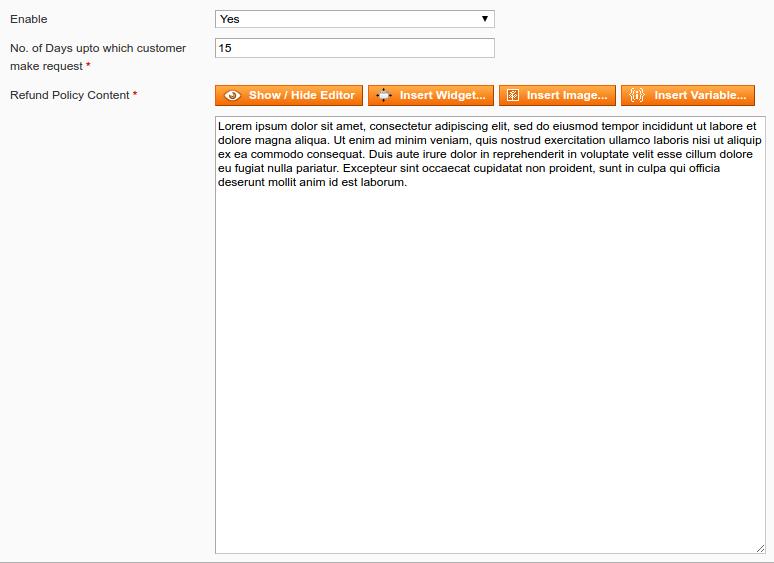
After clicking on configure link on MaketPlace>>Configuration (link will automatically appear once you install the plugin), system will open Marketplace Refund Configurations tabs by default as shown in screen below:

Initially fields in above form will be already filled with their default values.

1. Enable/Disable: Initially, this will be “OFF”. Admin can enable/disable plug-in by turning ON/OFF this setting by selecting “Yes” or “No”

2. Refund Policy Content : This option enables the admin to change the text as well as the format (HTML Design) of the text that will be displayed on successful submission of a return request by any customer.

3. No. of Days up to which customer make request : This option enables the admin to set the maximum number of days up to which the return of purchase is allowed.

Actions

1. The admin can edit any policy content and settings using the configuration link in the admin panel.

2. The second link in the actions column is for viewing the Refund request of the products for the sellers.

Return conditions

A return request can only be placed by a customer if the order status is changed to complete from pending.

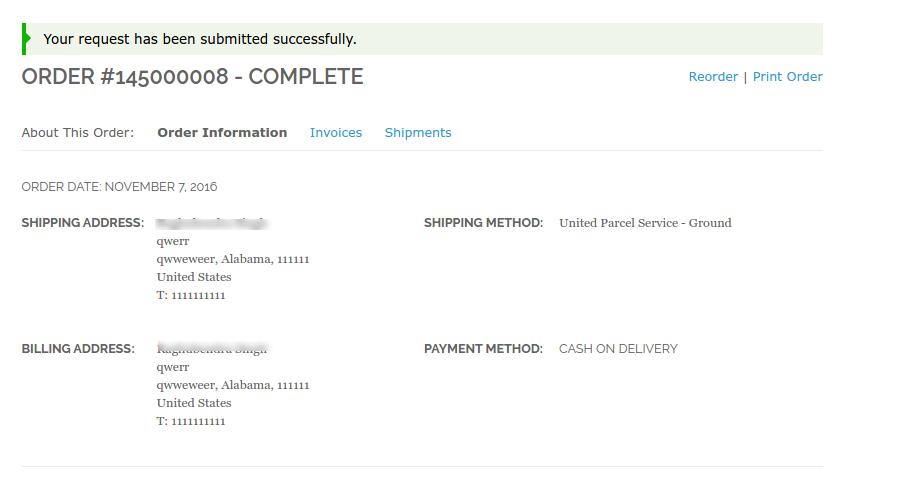
The customer has to fill the above form and then click on submit then a success form will appear showing the successful submission of the return request as shown below :

CUSTOMER’S REFUND REQUESTS

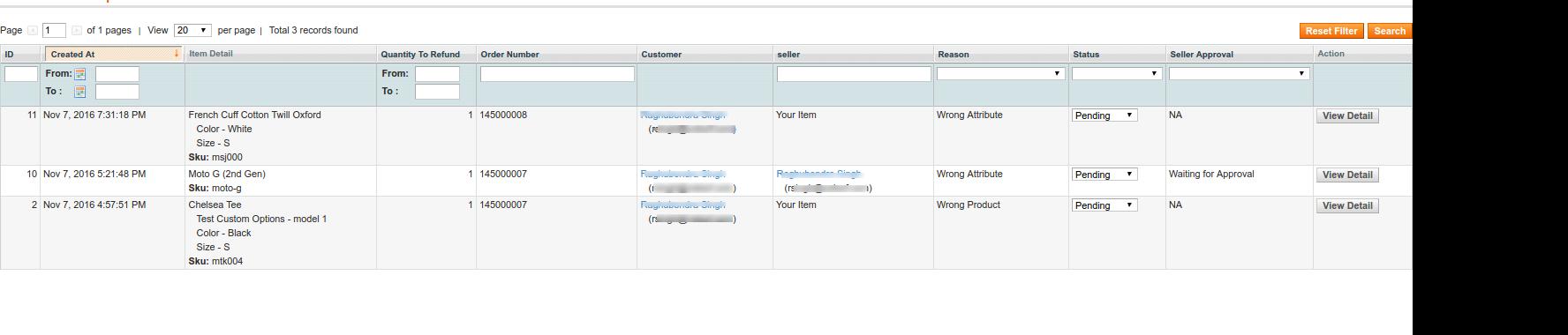
This tab contains a list of all the returns that are pending i.e. are not approved by the admin. The admin has to approve a return request in order to perform several operations on the return request like changing the status and completing the return process.

The admin can approve or deny a return request using the actions available in front of the list.

Once the admin approves a return request then it is moved to the Active Returns List.

On the other hand if the admin denies a return request that it is removed from the list and this action can not be undone.

The admin can view the detail of the product, the details of the order and also the details of the customer by clicking on the respective links from the list of the pending return.

SELLER INTERFACE FOR RETURN MANAGER

The Seller can also approve or deny a return request using the actions available in front of the list.

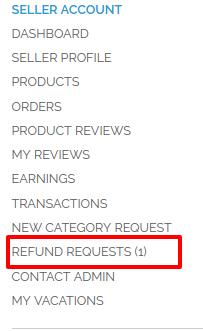
The seller interface can be seen in the Account>>REFUND REQUEST tab

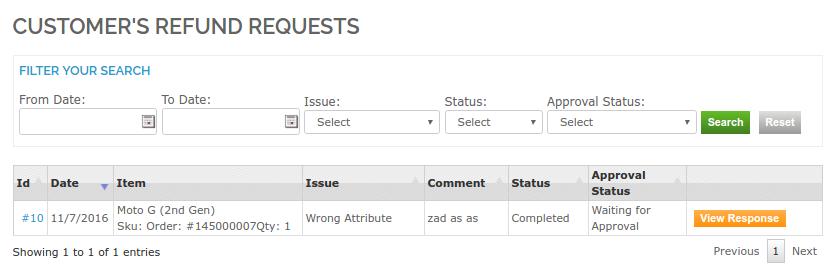
After clicking on Refund Requests, a new window will open as shown in the screen print below:

The seller can either approve or disapprove a request. If the return request is already approved by the admin, then the option to View Response would be available in Yellow button as shown in the screen print above.

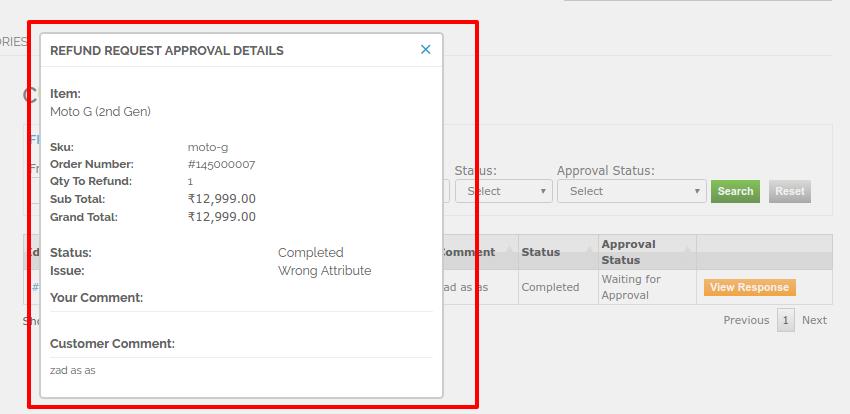
After clicking on View Response, new pop up will appear with the details of the return request by the customer.

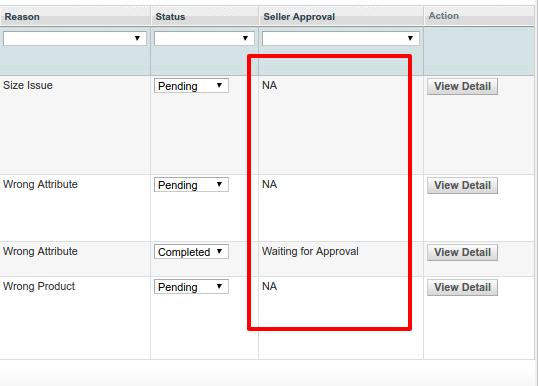
Please note: The admin has the access to accept or deny a return request. A return denied by the admin cannot be approved by the seller. The response of the seller can be seen on the Return request listing on the admin panel in Marketplace>>Refunds>>Refund Requests tab

In this listing the admin products will show the column for Seller Approval as N/A if the return request has been placed for an admin product;not the Sellers product.

Front End Module

The link for the Returns link will appear on the ‘My Account’ page of any customer in View Order page. This link only appears to a logged in customer on the ‘My Account’ page.

When the customer clicks on this link than a new page will open on the basis of logged in status of the customer.

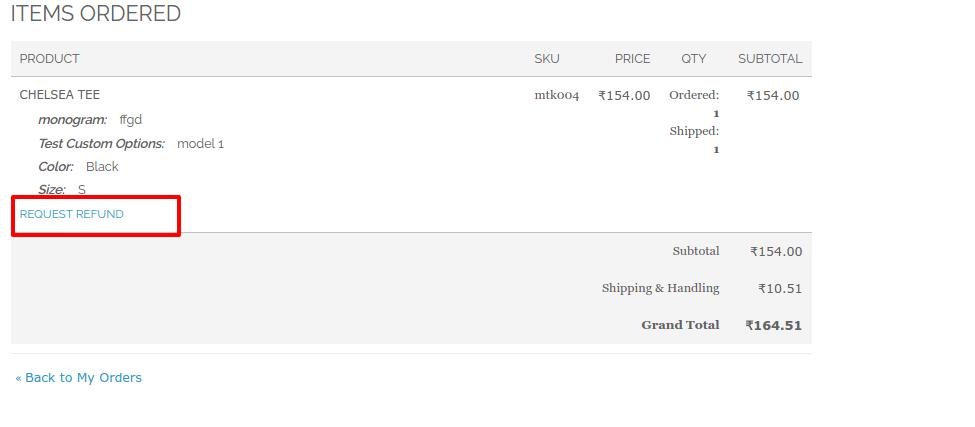
The products that are eligible for return in that particular order will have a return button. Through this button the customer can apply for return of that particular product.

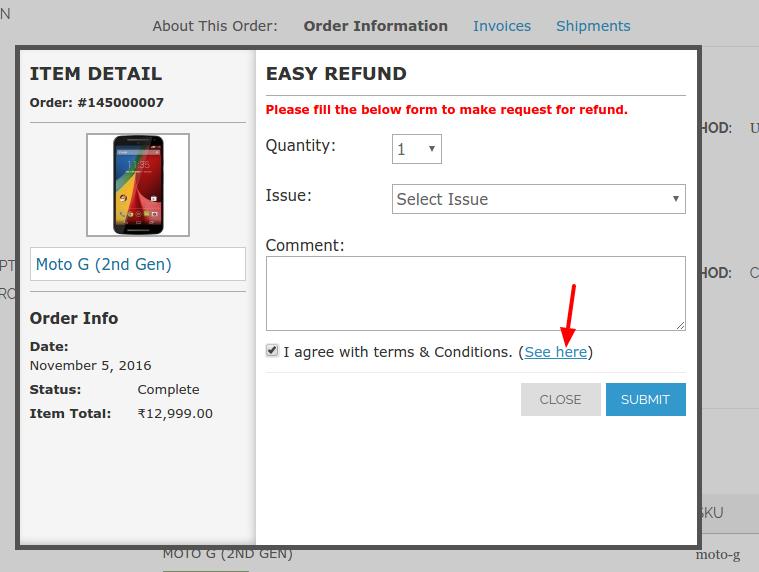
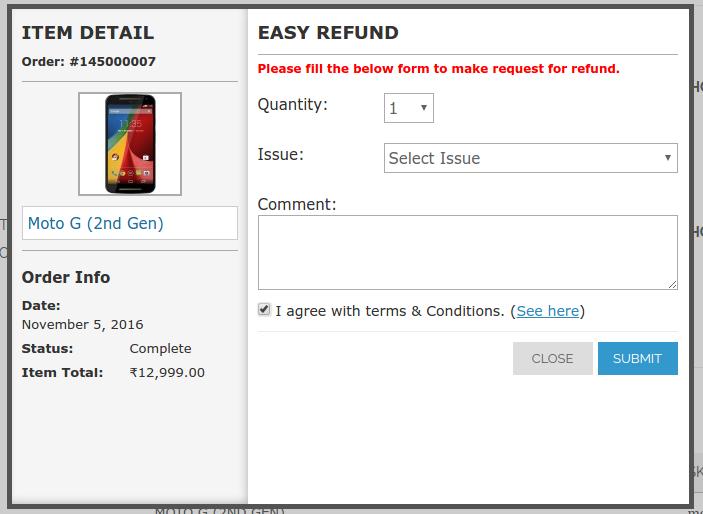
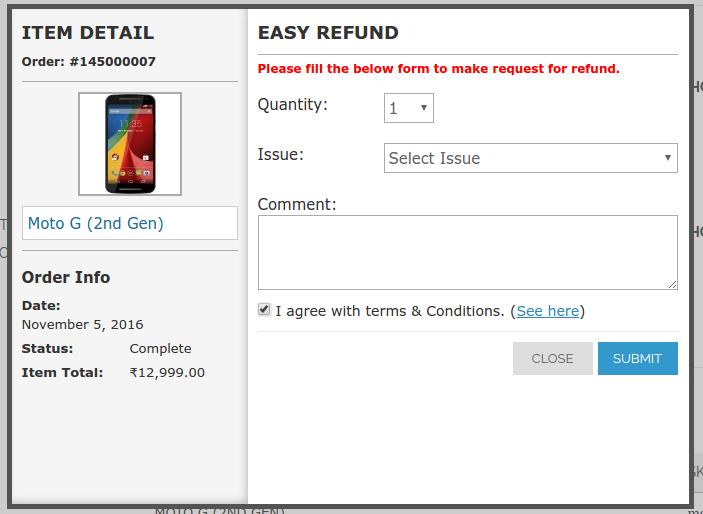
On clicking on the ‘ Request Refund’ button a pop-up will appear containing the form for return of that particular order. The form will appear as follows:

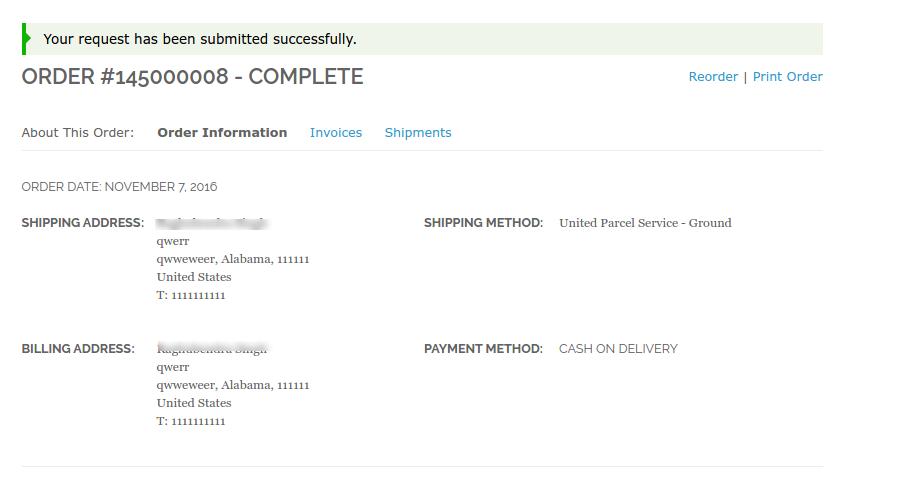
The customer has to fill the above form and then click on submit then a success form will appear showing the successful submission of the return request as shown below :

Liked This? You’ll Like These Too