
Your shopping cart is empty!


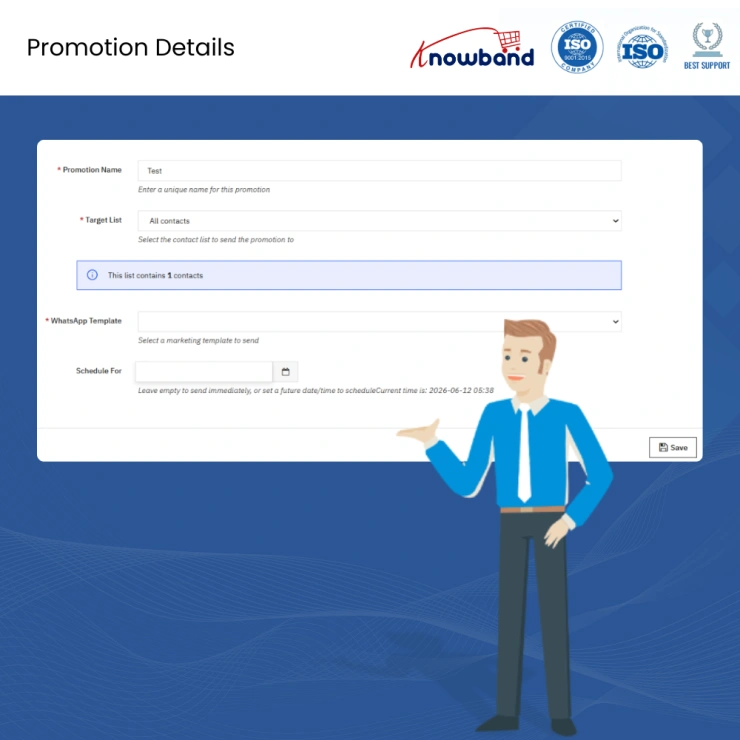
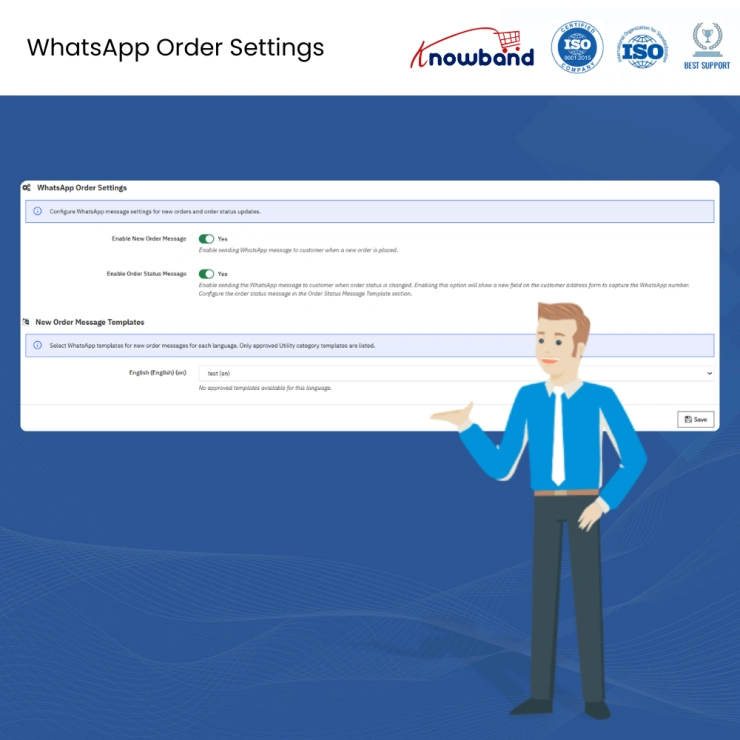
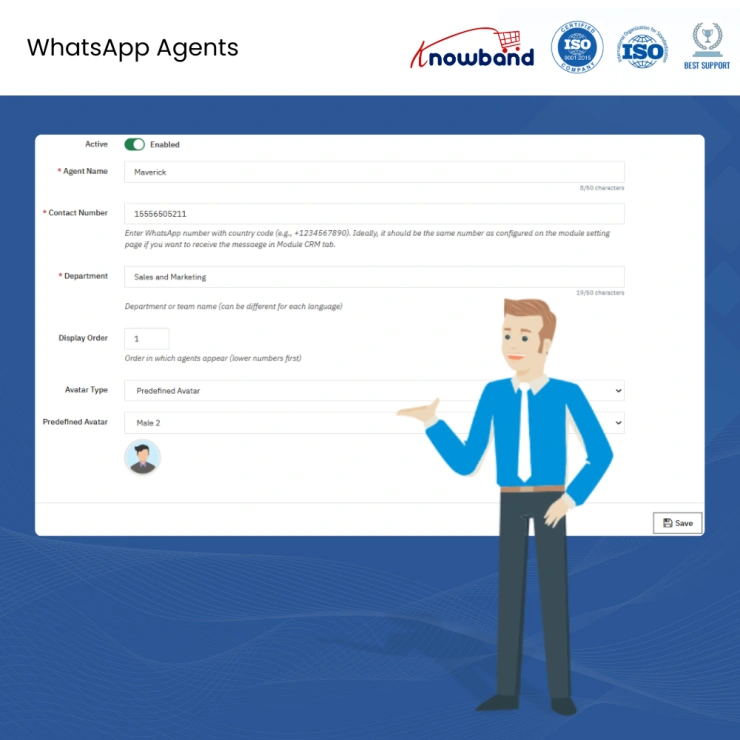
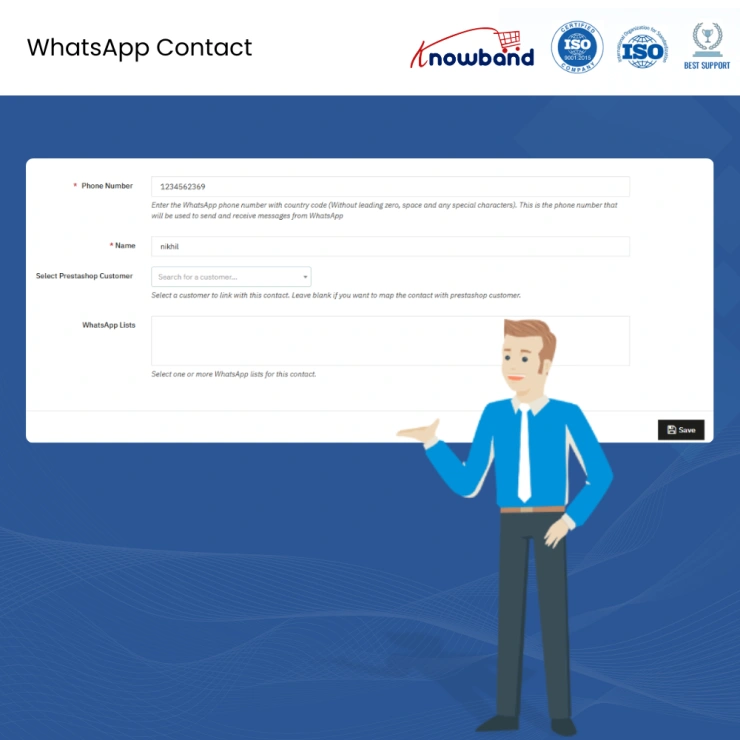
 Watch Video

Running a PrestaShop store and managing customer WhatsApp messages from a personal phone number is a support operation held together with hope. Conversations get missed, replies depend on whoever picks up first, nothing is logged inside PrestaShop, and the moment a second agent needs to step in, the entire context of what was said is gone. The PrestaShop WhatsApp CRM Addon moves every customer conversation off personal devices and into your PrestaShop admin panel, where messages are assigned, logged, and handled by the right person every time.
Store admins can send automated WhatsApp notifications the moment an order is placed or updated, reply to incoming customer messages directly from the backend, assign conversations to specific agents, and share images, videos, and documents without switching to a separate app or platform. Everything runs through the official Meta WhatsApp Cloud API and stays fully compatible with PrestaShop 1.7.x through 9.x.x.
The second a customer completes checkout on your store, the PrestaShop WhatsApp Order Notification Module sends an automatic WhatsApp confirmation straight to their number. No manual trigger, no delay, no customer left wondering if their order actually went through. For stores processing dozens to hundreds of orders daily, this single automation removes the most repeated support conversation your team was having before this module existed.
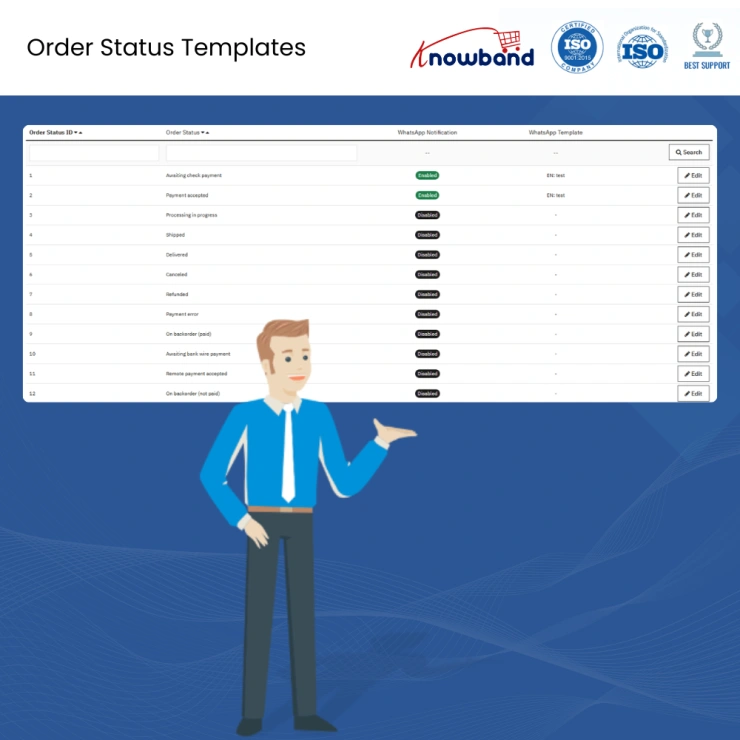
Every time an order moves from Processing to Shipped, Shipped to Delivered, or gets marked Cancelled inside your PrestaShop back office, the PrestaShop WhatsApp Order Notification Module fires a real-time WhatsApp alert to the customer automatically. Your customer finds out on WhatsApp the same way they find out about a message from a friend. Stores that made this switch from email-only notifications saw a measurable drop in inbound order status queries within days, not months.
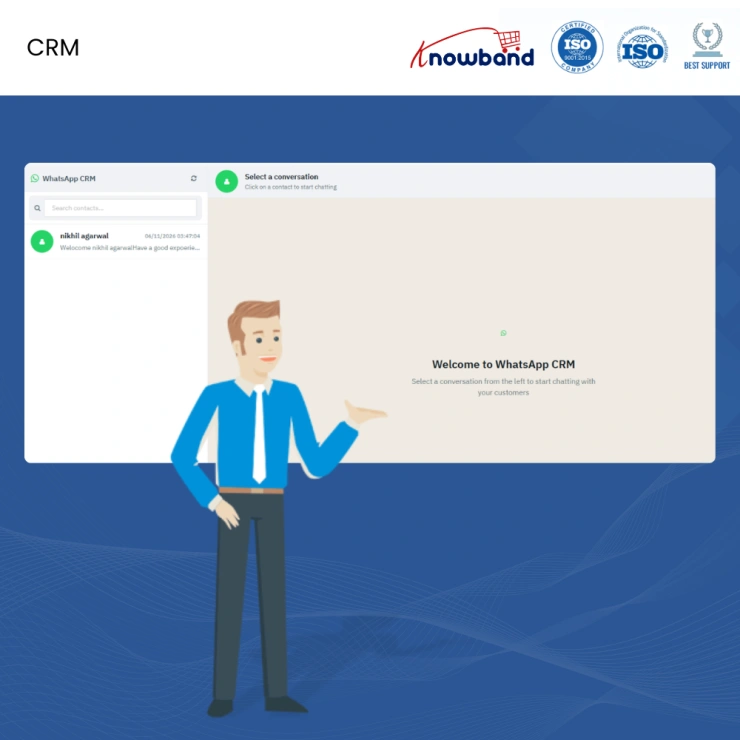
The PrestaShop WhatsApp Live Chat Addon turns your PrestaShop backend into a fully functional WhatsApp inbox. When a customer sends a message to your store number, it appears inside the admin panel. Your agent reads it, types a reply, and sends it back to the customer on WhatsApp without touching a phone or opening WhatsApp Web. Every message is timestamped, every conversation is logged against the customer record, and every agent knows exactly what was said before they joined the thread.
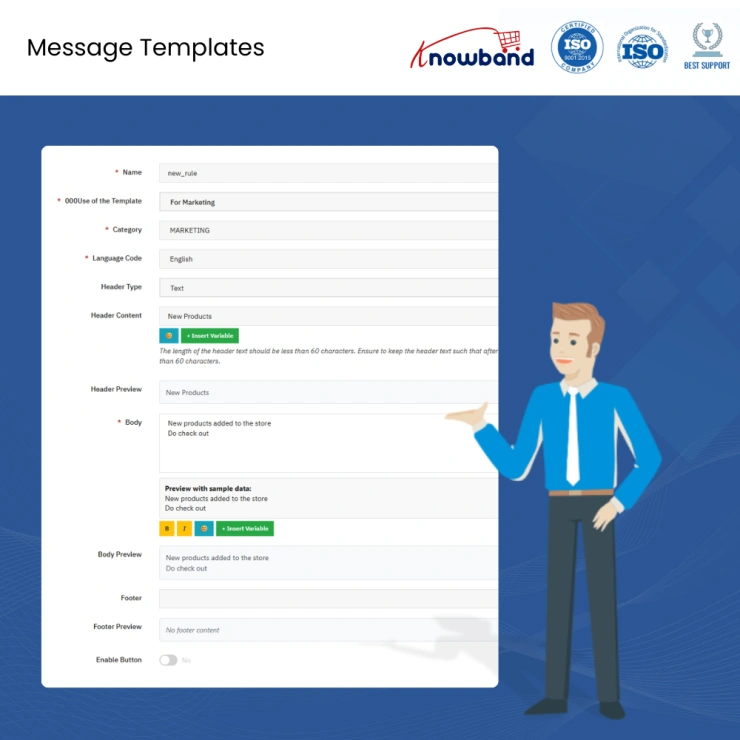
The PrestaShop WhatsApp Message Automation Addon supports both Meta-approved message templates and fully custom messages written by your agents. Templates handle outbound notifications like order confirmations, shipping alerts, and return instructions, where WhatsApp requires pre-approved formats for store-initiated messages. Custom messages are available within any active customer conversation window, giving your agents the flexibility to write naturally and respond personally rather than being locked into a predefined script for every interaction.
Your support team can send images, videos, audio files, and PDFs directly from your PrestaShop admin through the PrestaShop WhatsApp CRM Addon. In practice this means sending a product photo when a customer is unsure about color or size, a PDF invoice when they need it for business records, a return label during a refund process, or a short instructional video when a customer needs help with installation or setup. All of it goes from your admin directly into the customer's WhatsApp chat with no external file sharing tool required.
Every customer contact connected through the PrestaShop WhatsApp Customer Support Module is stored and accessible from inside your admin panel. You can view the complete message history for any customer, see their previous orders alongside their conversation timeline, and pull up the full record of every interaction without searching through a phone or scrolling through a group thread. For repeat customers and high-value accounts, this contact view makes every follow-up faster and more informed than starting from scratch.
The PrestaShop WhatsApp Helpdesk Module lets you add multiple support agents, assign incoming WhatsApp conversations to specific team members, and give supervisors full visibility across every active thread. One agent handles returns, another covers pre-sale queries, a third manages order complaints. Each person works their own assigned queue. No conversation gets double-replied because two agents both thought the other one was handling it, and no message sits unanswered because everyone assumed someone else picked it up.
The most common customer support query in ecommerce is some version of "where is my order." The PrestaShop WhatsApp Order Notification Module handles that question automatically at every stage of the order journey, from placement through delivery. Your agents get their time back for conversations that actually require a human, rather than spending half the day confirming order statuses that the module already communicated.
When customer conversations happen on personal phones, the history walks out the door with the person who handled them. With the PrestaShop WhatsApp Chat Integration Module, every message is inside PrestaShop. An agent going on leave hands over a customer thread with the full context intact. A supervisor covering a shift sees exactly what was promised and what is still open. The conversation belongs to the store, not the device.
A customer sitting on a product page with a question about sizing, availability, or delivery time will not wait for an email reply. They will either find the answer somewhere else or move on. The PrestaShop WhatsApp Live Chat Addon lets your team respond to those queries through WhatsApp from inside the admin, fast enough to keep the conversation open while the customer is still considering the purchase. That response speed is what separates a completed order from an abandoned cart.
For PrestaShop stores with customers in India, the UAE, Saudi Arabia, Indonesia, the Philippines, Brazil, and Nigeria, WhatsApp is where your customers actually read messages. Email open rates for ecommerce notifications in these markets average below 25 percent. WhatsApp messages from a known business number get opened at rates that make that comparison difficult to defend. The PrestaShop WhatsApp CRM Addon puts your order updates and support replies into the channel your customers are already checking throughout the day.
The PrestaShop WhatsApp Customer Support Module supports multilingual message templates including right-to-left languages like Arabic and Urdu. Stores selling into the Gulf region, South Asia, or Southeast Asia can configure notifications and replies in the language each customer uses, which directly affects whether the message gets read and acted on or ignored. Language-matched communication is not a courtesy feature in these markets, it is a commercial one.
Before this module, a typical support workflow meant checking orders in PrestaShop, switching to WhatsApp Web or a phone to reply to messages, going back to PrestaShop to update the order, and then trying to remember what was said to whom and when. The PrestaShop WhatsApp Helpdesk Module ends that cycle. Orders, messages, contacts, and agent assignments all live in the same admin panel your team is already using every day.
A floating WhatsApp button on your storefront is not a customer communication system. It is a shortcut to a personal phone number with no structure, no record, and no scalability. The PrestaShop WhatsApp CRM Addon gives your store a proper WhatsApp operation, one where notifications go out automatically, conversations are managed by the right agents, every message is logged inside PrestaShop, and your customers in any market receive timely, language-appropriate communication through the channel they actually use.
Compatible with PrestaShop 1.7.x through 9.x.x and built on the official Meta WhatsApp Cloud API, this module installs without modifying any core files and works alongside your existing email notification setup from day one.
| Detail | Specification |
|---|---|
| Compatible Versions | PrestaShop 1.7.x to 9.x.x |
| WhatsApp API | Official Meta WhatsApp Cloud API |
| Message Types | Text, Image, Video, Audio, PDF and Documents |
| Agent Seats | Multiple agents are supported and configurable |
| Language Support | Multilingual, including Arabic RTL |
|
||||
The moment a customer places an order, the PrestaShop WhatsApp CRM Addon fires a WhatsApp confirmation to their number straight away. No admin needs to trigger it, no cron job runs on a delay, and no customer is left waiting to find out if their order actually went through. For stores handling 50 to 500 orders a day, this removes the single most repetitive support conversation your team was having, "I placed an order but got nothing, did it go through?"
Every time you move an order from Processing to Shipped, or from Shipped to Delivered inside your PrestaShop back office, the PrestaShop WhatsApp Order Notification Module by Knowband pushes a WhatsApp message to the customer automatically. You do not write the message, you do not click send, and your customer does not need to log into your store to check. They get it on WhatsApp the same way they get a message from a friend. Stores that switched to this from email-only notifications report a sharp drop in "where is my order" tickets within the first week.
With the PrestaShop WhatsApp Chat Integration Module, your entire support team reads and replies to customer WhatsApp messages directly from the PrestaShop admin panel. Nobody needs a phone in hand, nobody needs to be logged into WhatsApp Web, and no conversation gets lost because it was handled on someone's personal device. When a customer messages your store number, it shows up in the admin inbox. Your agent types a reply, hits send, and the customer gets it on WhatsApp. The whole conversation is stored against that customer's record, so the next agent picking up the thread knows exactly what was said.
Images, videos, PDFs, and audio files all go through the Knowband’s PrestaShop WhatsApp CRM Addon without issue. In practice this means your team can send a product photo when a customer is unsure about color or size, a PDF invoice when they need it for business records, a return label when processing a refund, or a short video if they need assembly or usage instructions. All of it goes from your PrestaShop admin directly into the customer's WhatsApp chat. No third-party file sharing tool, no email chain, no link to an external download page.
A WhatsApp button on your storefront opens a chat with a phone number. That is where the similarity ends. The PrestaShop WhatsApp Live Chat Addon is a managed inbox inside your admin panel where every customer conversation is logged, assigned, and tracked. With a basic button, your customer messages a number that probably rings on someone's personal phone, the reply depends on who picks it up, and once that conversation is over it is gone. With this addon, every message is in the system, every reply is recorded, every agent has a defined set of conversations they own, and your support operation has structure rather than improvisation.
Inside the PrestaShop WhatsApp Helpdesk Module, you add each agent as a user and assign incoming conversations to them directly. One agent handles returns, another handles pre-sale queries, a third covers order complaints, each person sees their own queue and nothing else. No two agents reply to the same customer by accident. No conversation sits unanswered because everyone assumed someone else picked it up. For stores that grew past the point where one person can handle all customer communication on a single phone, this is the feature that makes team-based WhatsApp support actually workable.
The PrestaShop WhatsApp Business API Module uses the official Meta WhatsApp Cloud API, and yes, outbound messages your store initiates outside of an active customer conversation must use Meta-approved templates. This is a WhatsApp policy requirement, not a module limitation. For order confirmations and status updates, your templates get approved through Meta once and then fire automatically every time. For replies within an active conversation, meaning within 24 hours of a customer message, your agents can write and send completely free-form custom messages. The module handles both flows from the same admin interface.
The PrestaShop WhatsApp Message Automation Addon runs on PrestaShop 1.7.x through 9.x.x. If your store is still on 1.7 and a full platform upgrade is not on the near-term plan, this module installs and works without forcing that decision. If you are already on 8.x or 9.x, you are covered there too. The messaging layer itself runs through Meta's WhatsApp Cloud API, which Meta maintains independently, so the notification infrastructure stays current regardless of which PrestaShop version your store happens to be running.
The PrestaShop WhatsApp Customer Support Module supports multilingual messaging, including right-to-left languages like Arabic and Urdu. You set up your message templates in the languages your customers actually use, and the module sends the correct version based on the customer's language setting in your store. For stores selling into the Gulf region, South Asia, or Southeast Asia, markets where WhatsApp has some of its highest usage rates globally and where customers expect to be communicated with in their own language, this is not a nice-to-have feature, it directly affects whether customers engage with the messages or ignore them.
In markets like India, the UAE, Saudi Arabia, Indonesia, and the Philippines, WhatsApp is the primary way people communicate day-to-day, not email. An order confirmation that lands in a customer's WhatsApp gets read within minutes. The same message in an email inbox competes with newsletters, promotions, and other store notifications that most customers have trained themselves to ignore or filter. The PrestaShop WhatsApp CRM Addon puts your order updates, shipping alerts, and support replies into the same app where your customers are already active every day. For stores with a significant portion of their customer base in these regions, the difference in open rates and response rates between WhatsApp and email is not marginal, it is substantial enough to change how you think about customer communication entirely.
 Sale
Sale
Having mobile apps for your site can increase your sales and customer ...
$199.99 $249.99
Sale
Enhance your PrestaShop store with VideoMate – The AI Video Creator ...
$55.99 $69.99
Sale
Automate the content generation and translations on your Prestashop eC...
$55.99 $69.99
Sale
Enhance your online store with the Product Sticker and Label Addon. En...
$31.99 $39.99


