
Your shopping cart is empty!


-740x740.webp "Prestashop Point of Sale (POS) Addon")
-740x740.webp "Prestashop Point of Sale (POS) Addon")
PrestaShop Point of Sale (POS) Module connects your online ecommerce store with physical retail outlets, allowing you to manage sales, stocks, products, customers, orders, and inventory of the outlets from a centralized POS panel. POS helps merchants to synchronize their online and offline operations and efficiently to manage multiple POS outlets from one prestashop admin POS panel . Highlighted Key features of POS
 Watch Video

If you sell online and in person, you have probably felt the friction of running two separate systems that don't communicate to each other. Knowband’s Prestashop Point of Sale Module closes that gap. It's a PrestaShop Multi-Outlet Point of Sale (POS) which integrates into your existing back office. POS keeps the catalogue, customer records, and stocks synchronised with the online website and offline physical stores.
Instead of implementing or using a separate system, the PrestaShop POS Module provides your team with a specialised cashiers' interface within PrestaShop. This means that your cashiers or staff will be able to look up products, offer discounts, accept payments, print receipts, and provide customers with their purchases from one module.
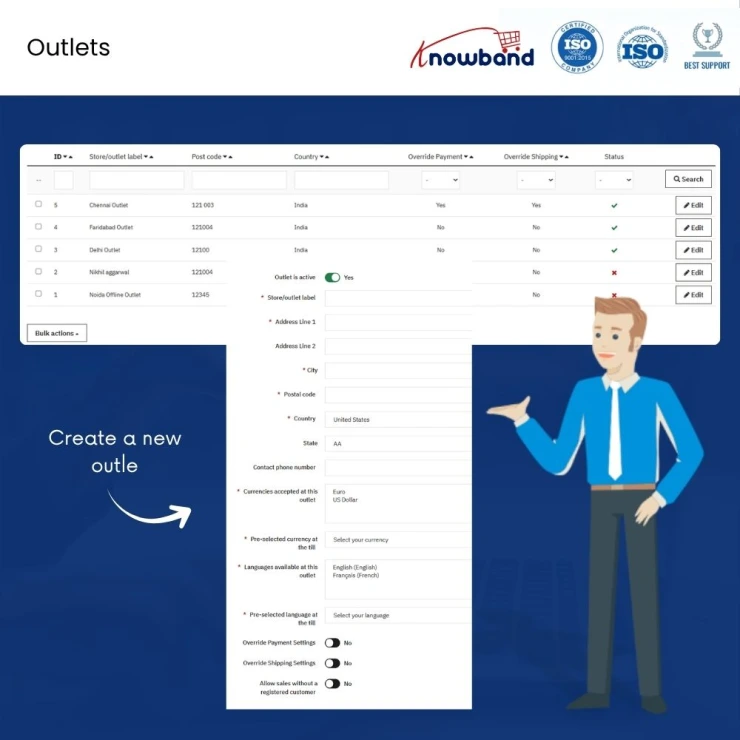
This PrestaShop Multi-Outlet Point of Sale (POS) transforms PrestaShop into a functioning point of sale system. Every physical store location, whether it is a shop floor, kiosk, or market stall, operates as an outlet in itself, which has its own inventory, payment, and delivery policies, and sales record. All the while, behind the scenes, the data is being sent to the same instance of PrestaShop.
The PrestaShop POS module is developed for retailers who already run PrestaShop online and now want the same platform to handle walk-in sales, whether that's a single shop counter or a small chain with several outlets.
| 1 |
Multi-Outlet Management:
Admins can manage multiple stores or outlets separately within the panel, such as a main store, a local retail shop, a showroom, or a temporary sales outlet. Stock is kept separate too. Selling a product at one outlet doesn't touch the stock allocated to another. |
| 2 |
The POS Sales Panel:
Cashiers log into a POS panel that's separate from the normal PrestaShop customer-facing site. From there, they can search for products by name, barcode, EAN, ISBN, UPC, or SKU, whichever combination of fields you've enabled or browse by category when a customer isn't sure exactly what they want. |
| 3 |
Customer Management:
This module includes practical PrestaShop POS customer management rather than a simplified guest-only flow. Cashiers can create a new customer account mid-sale, with the same validation rules PrestaShop itself uses for addresses and passwords, or search for an existing customer in seconds to update the address, etc. |
| 4 |
Inventory and Stock Allocation:
Using the PrestaShop Point of Sale Addon, your stock/quantity will be the same on the website as well as in the offline store. When you allocate stock to an outlet, the same quantity is reflected in your online store, helping you maintain accurate inventory and avoid overselling without manually updating stock in different systems. This functions like an inventory sync module for PrestaShop, keeping outlet and web stock aligned without a separate manual reconciliation step. Product variants are fully supported, and combination products are flagged in search results so cashiers know to pick the right size or color before adding to cart. New products can be set to auto-assign to every outlet, or you can hand-pick which outlet carries which items. |
| 5 |
Discounts, Shipping, and Payment:
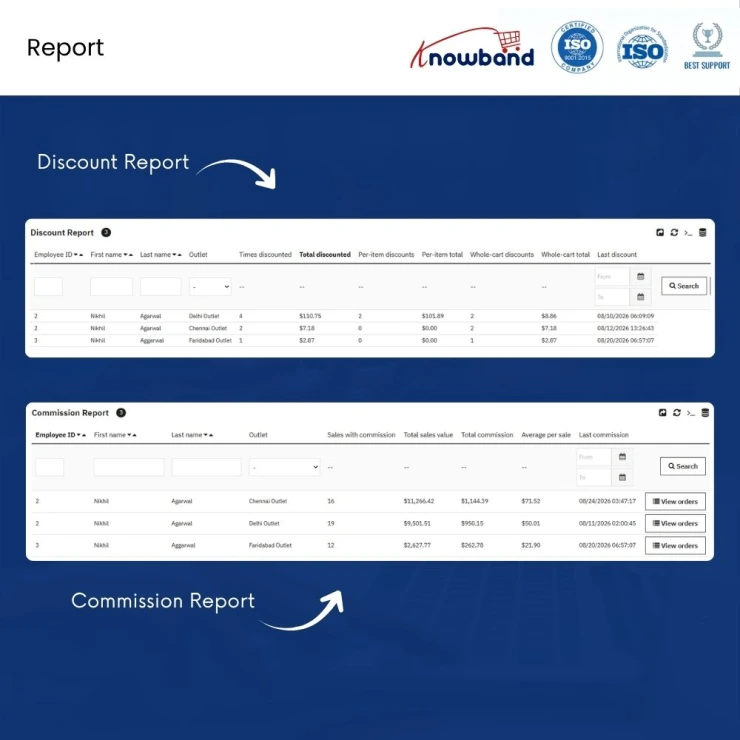
Discounts can be applied at the item level or across the whole cart, and admins can cap how far cashiers are allowed to go as a percentage or a fixed amount so a generous cashier can't quietly erode margin. Every discount is logged by who applied it and where, which feeds directly into the reporting side of the module. Multiple carts can also be managed at once. Shipping is optional per outlet. If it's enabled, customers can choose from whichever carriers you've made available, with real cost estimates calculated from the cart and delivery address. |
| 6 |
Commission and Sales Agent Management:
Automatic commission tracking handled through PrestaShop sales agent management. Store admins can set a commission percentage once, and it's calculated on the order total the moment a sale is completed; no manual entry required. Commission is credited to whichever salesperson is tied to the sale, which matters in outlets where the cashier and the salesperson aren't always the same person. |
| 7 |
Returns and Refunds:
Returns are handled from the same panel cashiers already use for sales, which keeps the workflow contained instead of forcing staff into a separate admin process. A return references the original order and lets staff specify exactly which items and quantities are coming back. Every return is recorded, which gives you a return and refund POS trail you can pull up later for auditing or dispute resolution. |
| 8 |
Receipts:
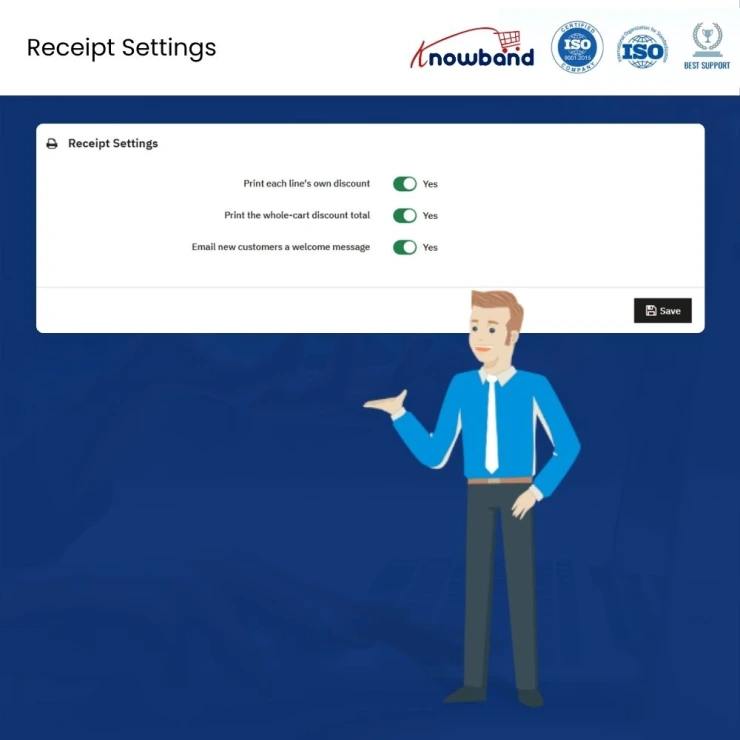
Receipts are generated as HTML and printed through the browser's own print function; there's no separate driver to install. That makes it a straightforward setup for PrestaShop POS with receipt printing on standard hardware: if the browser can print, the receipt prints. You can configure whether item-level and cart-level discounts show up on the printed copy, and whether new customers get a welcome email when their account is created. |
| 9 |
Reporting and Dashboard:
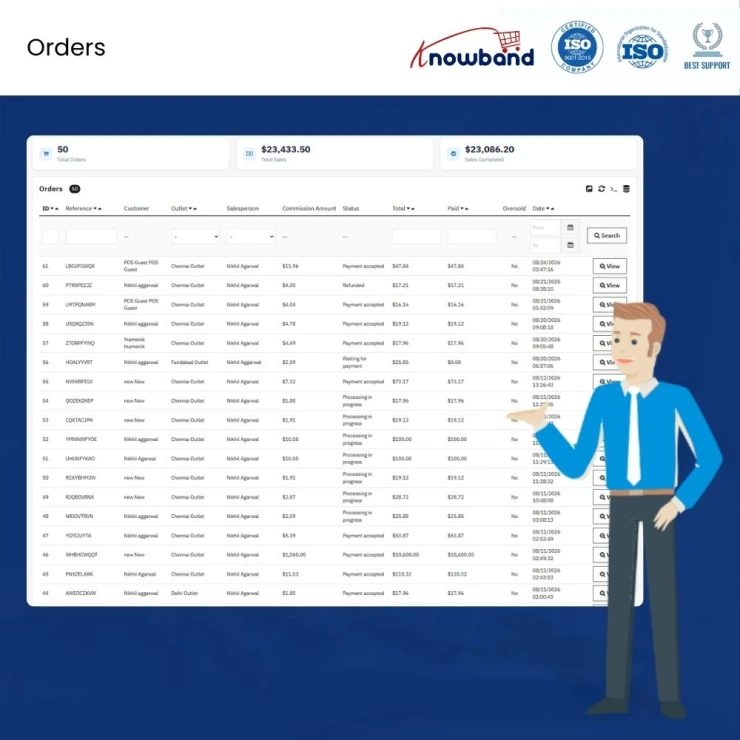
The admin dashboard works as a genuine sales dashboard module for PrestaShop, pulling widgets together for a real-time view of POS activity across outlets. Beyond the dashboard, there are dedicated reports for POS orders (kept separate from web orders), discounts (broken down by cashier and outlet), and commissions (broken down by salesperson and outlet). Every report can be filtered by employee, outlet, and date range, and exported to CSV or Excel when you need the numbers outside the back office. |
| 10 |
Offline Mode:
If your internet connection drops in the middle of a sale, the PrestaShop POS doesn't stop working. Orders get saved locally on the device and sync back to your store automatically once you're online again. As an offline order module for PrestaShop, this is aimed squarely at physical stores where a flaky connection shouldn't mean turning customers away. |
| 11 |
Installable as an App:
Prestashop Point of Sale works as a PWA, so it can be added to a device's home screen and run full-screen like a native app, useful on a tablet or dedicated POS terminal where you don't want staff navigating a browser chrome during a sale. |
| 12 |
Admin Configuration at a Glance:
Prestashop Point of Sale installs include tabs like Dashboard, General Settings (with Products, Customer, Payment, and Shipping sub-tabs), Outlets, Agents, Orders, a Discount Report, a Commission Report, and Receipt Settings. Each outlet can override global payment and shipping settings individually, which is what lets a downtown kiosk run differently from your main store without needing a second installation. |
| 1 |
Manage Multiple Outlets from One Place:
Manage all your stores, retail outlets, showrooms, and all other locations from one PrestaShop back office. That is why it is called PrestaShop multi-store POS, as all the locations have their own inventory, payment methods, and shipping policies, and therefore one location cannot affect another. |
| 2 |
Keep Online and In-Store Inventory in Sync:
Your website and physical outlets pull from the same stock pool, not two separate ones. That's the core idea behind this PrestaShop inventory sync module. Sell a product in-store, and it's automatically deducted from what's available online too, so you're not manually reconciling numbers at the end of the day. |
| 3 |
Speed Up In-Store Checkout:
Cashiers get a dedicated POS sales panel to search products, add items to the cart, apply discounts, and take payment, all from one screen. Product search works by name, barcode, SKU, EAN, ISBN, or UPC, which is what makes this a working PrestaShop barcode scanner module as well, not just a checkout screen. |
| 4 |
Sell Even When the Internet Goes Down:
This is a genuine PrestaShop offline order module. Sales don't stop just because the connection does. Orders are queued locally on the device and sync automatically once you're back online, with checks in place to stop the same order from being created twice. |
| 5 |
Make Customer Management Easier:
Create a new customer account mid-sale or look up a returning one in seconds. This is PrestaShop POS customer management done properly. Every purchase stays tied to that customer's history, whether they bought online or walked in the door. |
| 6 |
Control Discounts and Sales Commissions:
Set caps on how much a cashier can discount, and let commissions calculate automatically for each sale. This covers PrestaShop sales agent management end to end. Commission is credited to the right salesperson without anyone entering numbers by hand. |
| 7 |
Simplify Returns and Refunds:
Returns are handled from the same panel used for sales, referencing the original order directly. This gives you a proper PrestaShop return and refund POS trail. Every return is logged and easy to pull up later. |
| 8 |
Get Clearer Sales Insights:
This comes with a built-in PrestaShop sales dashboard plugin that will display live POS operations, with different reports being created for orders, discount rates, and commissions. This can be filtered according to store, staff member, or date range and exported into CSV/Excel formats as needed. |
| 9 |
Use POS on Different Devices:
Run it through a browser, or install it as a PWA for a full-screen setup on tablets and dedicated terminals. Combined with browser-based printing, this makes it straightforward to use PrestaShop POS with receipt printing on standard hardware. No separate driver needed. |
Knowband, a leading name as an eCommerce development company, provides Prestashop plugin development services to enhance the functionality of your eCommerce stores. For providing Prestashop plugin development, we have hired experienced Prestashop developers who work with full dedication to offer Prestashop development and support services.
If there is a feature you want on your Prestashop store, chances are that a Prestashop plugin will allow you to do it. If you don't find any such plugin, you can always contact us for your custom plugin development requirements.
PrestaShop's core platform is built for online selling. The PrestaShop Point of Sale module by Knowband is used to add a point-of-sale panel, letting the same store handle in-person transactions alongside web orders. Already used by 100+ store owners.
Yes, with a Prestashop POS Module installed. It adds a cashier panel, outlet management, and stock allocation so your existing PrestaShop catalogue and customer base can serve a physical counter as well as your website.
Within the Knowband’s POS panel, it will work. PrestaShop Point of Sale Module queues orders locally when the connection drops and syncs them automatically once it's back, with safeguards in place to prevent the same order from being created twice during that sync.
Product search can match against a barcode field, along with name, SKU, EAN, ISBN, or UPC. Standard barcode scanners that act as keyboard input will work, since the PrestaShop POS Module reads the scanned code rather than requiring a third-party-specific scanner driver.
That depends on what you need, but if multi-outlet management, commission tracking, and detailed sales/discount reporting matter to you, Knowband’s Prestashop Point of Sale covers all three in one module rather than requiring separate add-ons.
Each outlet has its own stock, payment settings, shipping rules, and guest checkout mode, all managed from the same admin. Using Knowband’s Prestashop Point of sale, you can manage the physical stores.
It records the payment status and order total for each sale and calculates commission on that total, but splitting a single transaction across two different payment methods isn't a documented feature of this module.
The return process is carried out using the same POS panel where the purchase is made, based on the previous order and allowing the user to choose the products and quantity being returned.
The PrestaShop POS module developed by Knowband functions through the browser as well as it can be installed as a PWA so that you can pin it to the home screen and run it in full-screen mode.
Yes, this is one of the primary purposes of developing the module.
After installing PrestaShop Multi-Outlet Point of Sale (POS), you will typically create your outlets first (each with its own settings). Then you will assign employees to the outlets they should be able to sell from, configure product search fields and payment/shipping defaults in General Settings, and then staff can start selling from the Prestashop POS panel.
Using the POS Module for PrestaShop, your stock can stay accurate. When quantity is allocated to an outlet, it's deducted from the same stock pool your website sells from. Therefore, consistent number rather than two inventories that can drift apart.
Employees are linked to outlets through Outlet tabs employee-to-outlet mapping, and the Agents tab shows which employee has access to which location useful for confirming access before a new hire's first shift.
 Sale
Sale
Having mobile apps for your site can increase your sales and customer ...
$199.99 $249.99
Sale
Check SEO and readability analysis on your PrestaShop ecommerce store ...
$55.99 $69.99
Sale
Secure your PrestaShop store with 12 protections in one Prestashop Sec...
$39.20 $49.00
Sale
SocialAI Pro is the Prestashop AI Social Media Post Generator develope...
$55.20 $69.00


