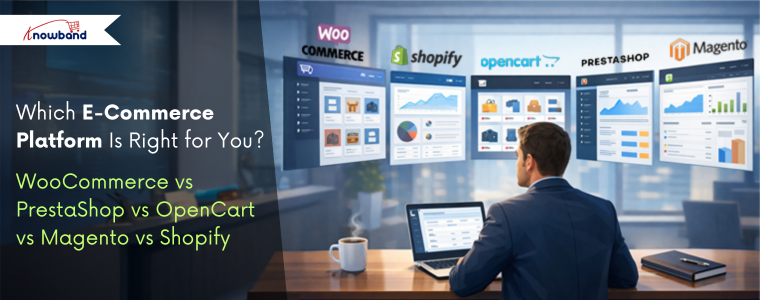
WooCommerce vs PrestaShop vs OpenCart vs Magento vs Shopify

Choosing the right platform is one of the most important decisions when you are starting an online store. With so many options available, it can become tiring to decide which platform best fits your business needs.  If you are looking best platform to start an online store, then you are at right place. Each platform offers different benefits and flaws in terms of usability, scalability, cost, and features. We at Knowband already manage these stores as we provide the service for these platforms. This will help you in choosing the right platform for your store.

This article provides a practical comparison of five popular e-commerce platforms, WooCommerce, PrestaShop, OpenCart, Magento, and Shopify, based on key factors such as ease of use, performance, customisation, scalability, and overall cost. You will also learn the e-commerce platform pros and cons. 

Additionally, understanding these helps your business select open source ecommerce platforms that aligns with your business goals.

Key Factors to Consider When Choosing an E-Commerce Platform

Before comparing platforms, as a store owner, you need to understand the core factors that will play a crucial role.:

  • Ease of Use: If you are technical or non-technical, you first need it to be simple to set up and manage products, your entire catalogue and orders.
  • Customisation & Flexibility: Platform should have the ability to modify design and functionality according to your business needs.
  • Performance & Speed: Additionally, there is a major factor that is how well the platform handles traffic and large catalogues
  • Scalability: Also, scalability is the factor your platform can grow with the business
  • Cost: Cost is one of the most important factors as it should be affordable not too expensive.

WooCommerce: Ideal for WordPress-Based Stores

WooCommerce is one of the most used e-commerce platforms and works as a plugin for WordPress. Furthermore, its popularity makes it unique due to its simplicity and flexibility, especially for businesses already familiar with WordPress.

Key Feature  of the WooCommerce

  • Easy to use, especially for WordPress users
  • Massive plugins 
  • Strong SEO capabilities
  • Highly recommended for content-driven stores and blogs

Limitations of WooCommerce

  • Performance can be reduced with large catalogues without optimization
  • Requires paid plugins for advanced features like wishlist 
  • Heavily dependent on hosting quality

Knowband recommends it as the best e-commerce platform for small businesses, medium-sized businesses, bloggers, and entrepreneurs looking for an easy way into online selling.

PrestaShop: Feature-Rich and International-Friendly

PrestaShop is an open-source platform designed specifically for e-commerce. This is the best e-commerce platform for startups. Moreover, it is particularly popular in Europe and offers strong built-in functionality. Furthermore, unlike wordpress it offers the basic functionalities, wishlist, abandoned cart, designs and many more.

Key Highlights of Prestashop

  • Support for multiple currencies and languages
  • Support many advanced taxes and shipping options
  • Strong back-office dashboard
  • Handles large catalogues efficiently

Limitations of the Prestashop

  • Requires moderate technical knowledge
  • Paid modules can increase costs
  • Smaller extension marketplace than WooCommerce

We recommend it to international sellers and businesses that need advanced e-commerce features without heavy reliance on plugins.

Prestashop Plugins

Explore all the plugins that will make your prestashop store more professional


Install Now

OpenCart: Lightweight and Performance-Focused

OpenCart is known for its simplicity and speed.  Additionally, it provides essential e-commerce features without unnecessary complexity. This OpenCart platform also supports built-in tools for coupons, discounts, and special prices like prestashop

Strengths of the Opencart

  • Lightweight and fast
  • Simple admin interface
  • Built-in multi-store functionality
  • Low hosting requirements

Drawback of the Opencart Platform

  • Smaller extension ecosystem
  • Limited advanced features
  • Smaller community compared to competitors

Knowband recommends it to small businesses with straightforward needs and limited budgets that prioritize performance.

Opencart Extension

Give the advanced features to your Opencart store Using Popular Extensions


Install Now

Magento: Enterprise-Level Power

Magento is what the big players use when they need a serious, robust, enterprise-grade solution. Here, Big player refers to the major enterprises and retailers that have a large volume of products through their stores. This Magento Platform is best ecommerce platform for large businesses.

Key Highlights of Magento:

  • Magento scales to handle millions of products and transactions
  • Inventory and customer management tools 
  • Customisation is easy in Magento
  • Built to handle large product catalogues 

The Downsides of Magento are:

  • Learning Magento is a bit difficult for store owners
  • Professional developers are required
  • Hosting and keeping it running will cost you high money

Magento Plugins

Let Knowband Manage Your Magento Plugins, while you only work on selling.


Contact Us Now

Shopify: Everything is handled by them

Shopify takes a totally different approach than other platforms. They handles everything for you unlike others. It’s fully hosted, which means they deal with the technical things while you focus on selling

Key Features of the Shopify

  • You can easily have a store there
  • Shopify handles the hosting, security, and performance. The store owner only focuses on selling.
  • Customer support is highly active
  • A variety of plugins on the app store when you need extra features
  • Perfect for dropshipping or selling across multiple channels (social media, in-person, etc.)

The Downsides:

  • Monthly fees that add up over time
  • Transaction fees on certain plans (unless you use Shopify Payments)
  • Less control over the backend compared to platforms you host yourself

Shopify Custom Development

Let Knowband handle your Shopify store seamlessly, so you can concentrate on scaling your store and brand.
Contact Us Now

Pricing Plans of all the Platforms: WooCommerce, Prestashop, Opencart, Magento and Shopify

Platform Initial Cost Hosting Cost Theme & Extension Cost Development & Maintenance Overall Cost Suitability
WooCommerce Free (WordPress plugin) $5–$30/month (shared to managed hosting) Free to $200+ (plugins & themes) Low to medium, increases with customization Best for small to medium businesses
PrestaShop Free (open-source) $10–$40/month $50–$500 (modules & themes) Medium, often requires developer support Suitable for growing businesses
OpenCart Free (open-source) $5–$25/month $20–$300 (extensions & themes) Low to medium, limited for complex needs Ideal for small businesses
Magento Open Source Free (software only) $50–$200+/month (cloud or dedicated hosting) $100–$1,000+ (extensions & themes) High due to complexity Best for large or fast-growing stores
Magento Commerce (Adobe) Paid license Included or enterprise-level hosting Often custom-built Very high (enterprise development) Enterprise-level businesses
Shopify Monthly subscription Included $0–$350 (themes) + paid apps Low, fully managed platform Best for beginners & fast launches


The conclusion is that there’s no magic “best platform” that works for everyone. It really comes down to what you need for your specific situation.

WooCommerce is fine when you want flexibility, and you’re already comfortable with WordPress. PrestaShop has built-in features that international sellers actually need. OpenCart keeps things simple and fast. Magento gives enterprise-level businesses the scalability they require. And Shopify just makes everything easy if you want a managed solution.

Your decision should come down factors about cost, your technical skill and your business size. Moreover, you can also switch platforms eventually as your business evolves. 

About Knowband

Knowband is a sub-company of Velocity Software Solutions Pvt. Ltd., a leading technology company specialising in e-commerce development and digital solutions. Knowband provides a wide range of ready-to-use plugins, extensions, and custom development services for popular eCommerce platforms like prestashop, WooCommerce, Opencart, Shopify and Magento.

With a strong focus on innovation and performance, Knowband helps online businesses enhance functionality, improve user experience, and increase conversions.

Win Back Lost Shoppers: Top 5 Knowband’s PrestaShop Plugins Every Merchant Needs!

In the competitive realm of eCommerce, every visitor counts, and losing a potential customer can be a significant setback. If a customer visits your store, there can be a thousand reasons that prevent him from making the orders. Either, it could be out-of-stock products, internet connection issues, or there are other reasons possible too.

Thus, it becomes crucial to win back such potential customers by following different strategies, turning them into potential buyers.

Furthermore, in the following article, we have the most innovative solutions that can make it possible for merchants not only to attract but also win back those who might have left without making a purchase.

Developed by Knowband, one of the leading names in the industry, these plugins are designed to enhance customer engagement and retention. Here are the top 5 PrestaShop plugins every merchant needs to re-engage lost shoppers.


1. Back in Stock Notifications:

Nothing disappoints a customer more than finding their desired product out of stock. Following the same, the PrestaShop Back in Stock Notifications plugin is a game-changer in this scenario. The module allows customers to subscribe to an alert and receive a notification when their desired product is back in stock.
This not only improves the user experience but also increases the chances of converting a lost sale into a successful transaction.

2. Abandoned Cart Notifications:

Cart abandonment is a prevalent issue in online shopping, with numerous shoppers leaving their carts due to various reasons. Not only does it impact the overall sales but also disappoints the store admin.

Addressing the cart abandonment issue, the PrestaShop Abandoned Cart Notifications addon addresses this problem by sending gentle reminders to customers about their unfinished purchases. Moreover, the Prestashop admin gets the option to modify the email discount at their fingertips. This nudge can significantly increase the likelihood of customers returning to complete their transactions, thereby boosting sales.

3. Spin and Win/Entry-Exit Pop-Up:

Engaging customers from the moment they land on your site is crucial. The Spin and Win/Entry-Exit Pop-Up addon offers an interactive way to capture the attention of visitors. Moreover, this plugin displays a fun, game-like pop-up where customers can spin a wheel to win discounts or offers.
Therefore, it’s an excellent tool for capturing email addresses and reducing bounce rates, making it easier to win back customers who might be on the fence.

4. PrestaShop Exit Pop-Up:

The PrestaShop Exit Pop-Up Plugin is specifically designed to target users attempting to leave the site. By displaying a compelling message or offer at the crucial moment they decide to exit, this plugin can effectively persuade them to reconsider their decision. Whether it’s a special discount, a reminder of what’s in their cart, or an exclusive offer, this plugin can significantly reduce exit rates and increase customer retention.

5. Return Manager:

A smooth return process is essential for customer satisfaction and retention. Not only does it help customers to get better services but also maintains healthy business customer relationships.
Therefore, the PrestaShop Return Manager plugin simplifies the management of return requests, making it hassle-free for both the merchant and the customer. By facilitating an easy return process, this plugin helps maintain a positive relationship with customers, encouraging them to shop with confidence and return in the future.

Conclusion!

In the fast-paced world of eCommerce, staying ahead means continuously finding ways to engage and retain customers. The top 5 PrestaShop plugins developed by Knowband, including Back in Stock Notifications, Abandoned Cart Notifications, Spin and Win, Exit Pop-Up, and Return Manager, are essential tools for any merchant looking to win back lost shoppers. By implementing these plugins, merchants can enhance the shopping experience, increase customer satisfaction, and ultimately, boost their sales and profitability.


10 Essential Features Your E-commerce Website Should Have!

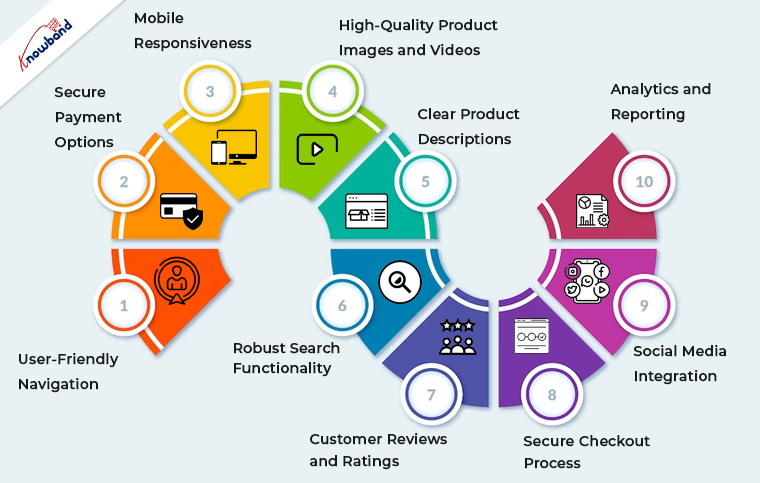
In today’s highly competitive eCommerce landscape, having a well-designed and feature-rich website is essential for success. Whether you’re using OpenCart, PrestaShop, WooCommerce, Magento 2, or any other eCommerce platform. Certain features are crucial to provide a seamless shopping experience for your customers.

Following the same, in this article, we’ll explore the ten essential features your eCommerce website should have to drive sales, enhance user satisfaction, and stay ahead in the game.


1. User-Friendly Navigation of Mobile App Builder:

Smooth and intuitive navigation is the foundation of any successful eCommerce website and Mobile App for Opencart, Woocommerce, Magento, and Prestashop. Thus, you can implement clear and logical menus, filters, and search functionality to help users find products effortlessly. Furthermore, you should always ensure that your website is responsive, catering to both desktop and mobile users.

2. Secure Payment Options:

Online shoppers demand secure payment options. The reason behind the same is that modern customers prefer security and safety while completing payments.
Thus, you can integrate reputable payment gateways, such as PayPal, Stripe, or Square, to instill trust and offer various payment methods, including credit cards, digital wallets, and bank transfers.

3. Mobile Responsiveness:

The number of mobile users is way more than the number of desktop ones. Therefore, mobile commerce is on the rise, and your website must be optimized for mobile devices.
Furthermore, a responsive design ensures that your site looks and functions seamlessly on smartphones and tablets. 

4. High-Quality Product Images and Videos:

Visual appeal is paramount in eCommerce. Use high-resolution images and, when possible, product videos to showcase your offerings from multiple angles. 

5. Clear Product Descriptions:

Accurate and detailed product descriptions are crucial for transparency and SEO. Include essential information, such as product specifications, sizes, colors, and any relevant details that aid customers in making purchase decisions.

6. Robust Search Functionality:

Search is one of the most important features of an eCommerce website. Thus, you can implement a powerful search feature with filters to help users narrow down their product choices quickly. This feature is particularly important for stores with extensive inventories.

7. Customer Reviews and Ratings:

Customer feedback builds trust. Furthermore, positive reviews can sway potential buyers, while constructive criticism helps you improve your offerings.

8. Secure Checkout Process:

Streamline the checkout process to minimize cart abandonment. Ensure a secure and hassle-free experience by integrating SSL certificates and providing multiple shipping and payment options.

9. Social Media Integration:

Leverage the power of social media by integrating sharing buttons and showcasing your social profiles. This facilitates user engagement and allows customers to share their favorite products with their networks.

10. Analytics and Reporting:

Collect and analyze data about your website’s performance and customer behavior.
Moreover, tools like Google Analytics provide insights into traffic, conversion rates, and user demographics. Thus, you can use these insights to refine your marketing strategies and improve your site continually.

Why OpenCart, PrestaShop, WooCommerce, and Magento 2?


These essential features apply to eCommerce websites built on various platforms, including OpenCart, PrestaShop, WooCommerce, and Magento 2. Here’s how they relate to each platform:

OpenCart: 

OpenCart is known for its user-friendly interface, making it easy to implement essential features like navigation, product descriptions, and secure payment options.

PrestaShop: 

PrestaShop offers robust out-of-the-box features, making it an excellent choice for responsive design, powerful search functionality, and analytics integration.

WooCommerce: 

As a WordPress plugin, WooCommerce combines seamlessly with WordPress themes, making it ideal for integrating high-quality images, videos, and social media elements.

Magento 2: 

Magento 2 is a versatile platform that excels in secure payment options, customer reviews, and ratings. Its advanced analytics and reporting capabilities are also top-notch.


Wrapping Up!

In conclusion, having these ten essential features on your eCommerce website, regardless of the platform you choose, is critical for attracting and retaining customers. Your website’s design, functionality, and security are all key factors in building trust and driving sales. Evaluate your current website against these criteria and consider implementing any missing features to create a compelling shopping experience for your customers. Remember, a well-optimized eCommerce website is a valuable asset in today’s digital marketplace.

Ensure that you regularly update and maintain your site to meet evolving customer expectations and industry trends. By doing so, you’ll be well on your way to eCommerce success, regardless of the platform you use.

Top 6 Must-Have Plugins for PrestaShop eCommerce Stores!

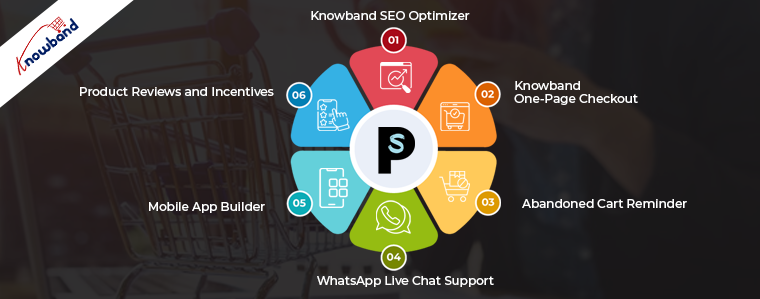
PrestaShop is a powerful and versatile eCommerce platform that empowers thousands of online businesses worldwide. To truly harness its potential and create a successful online store, it’s essential to utilize the right plugins. These add-ons can enhance your store’s functionality, improve user experience, and boost sales. In this article, we’ll explore the top 10 must-have plugins for PrestaShop eCommerce stores, with a special focus on Knowband plugins. As a trusted name in the eCommerce industry, Knowband has developed a range of plugins that are designed to seamlessly integrate with PrestaShop, offering innovative solutions to address common eCommerce challenges and elevate your online store’s performance.


1. Knowband SEO Optimizer:

Search engine optimization (SEO) is critical for online visibility. The PrestaShop SEO Booster plugin by Knowband can help optimize your store’s meta titles, descriptions, and URLs, improving your website’s ranking in search engine results.

2. Knowband One-Page Checkout:

Simplify the checkout process with a one-page checkout plugin. It reduces cart abandonment rates and makes it easier for customers to complete their purchases. Knowband’s One-Page Checkout is a game-changer.

3. Product Reviews and Incentives:

Build trust and credibility with product reviews and ratings. This plugin encourages customers to leave feedback and helps others make informed purchase decisions. Trust Knowband to enhance your store’s reputation.

4. Abandoned Cart Reminder:

Recover lost sales by sending automated reminders to customers who abandoned their shopping carts. The Abandoned Cart Reminder plugin by Knowband can significantly increase your conversion rate.

5. Mobile App Builder:

Mobile Apps are the most convenient ways to attract new customers. Not only do the apps work as an additional selling channel but also help in identifying new leads.

Furthermore, you can also check out Knowband’s no-code Android and iOS Mobile app builder addon for creating no-code Android and iOS Apps for your store.

6. WhatsApp Live Chat Support:

Offer real-time customer support with the WhatsApp live chat plugin. It’s a convenient way to answer customer questions, address concerns, and improve overall satisfaction.

Wrapping Up!

Choosing the right combination of these Knowband plugins can transform your PrestaShop eCommerce store into a competitive and customer-focused platform. Remember that the key is to tailor your plugin selection to your specific business needs and goals. Whether it’s improving SEO, streamlining checkout, or enhancing security, Knowband’s vibrant plugin ecosystem has you covered.

Investing in these essential PrestaShop plugins from Knowband will not only make your store more efficient and user-friendly but also give you a significant advantage in the competitive world of eCommerce. So, take the time to evaluate your needs, explore these Knowband plugins, and watch your PrestaShop store thrive.

How To Benefit Your Online Store from Emotional Marketing and Content?

To get your audience to notice, remember, share, and make a purchase, your marketing campaigns should largely appeal to their emotions. To have a response from customers, emotional marketing usually appeals to a single emotion. Emotions such as happiness, sadness, anger, or fear are usable for marketing. Emotional marketing focuses on psychological triggers that influence users’ feelings. It also aids in their retention of a brand or product and inspires them to take action. Any action that suggests a closer relationship with a brand, such as a click, purchase, visit, or phone call, can be the action that is in need.

Why Does Emotional Marketing Works?

Emotional Marketing Has Great First Impression

It is a very common thing to ask what is more impressive if a person blandly talks with you or if there is your involvement in the discussion. If you are having involvement then you will feel a connection and you might get emotionally attached to the discussion.

As for emotional marketing consider a situation. Which advertisement would impress you more if you had to choose between the two? One that merely discusses products or the one that made you laugh, cry, or excite you? The answer is clear as most of the public will reside with the second option only.

After some time if we ask about the products then the products which were having an emotional connection pop into the minds of users. The reason for this is simply because the first impression made by the products from emotional marketing is stronger.

Emotional Marketing Motivates Users to Take Action

Emotional marketing is an efficient method for triggering one or two purchases. Additionally, emotions also stimulate other actions that might help your business and brand to expand.

If a customer is happy, they will likely spread the word about your brand, which raises your brand recognition. Our ability to empathize and connect with others increases due to sadness. Moreover, this increases our capacity for giving and connecting with the product or campaign. Eventually, it boosts our client base. So different emotions play different roles in eCommerce. Additionally, before using the essence of these emotions you should have a clear picture.

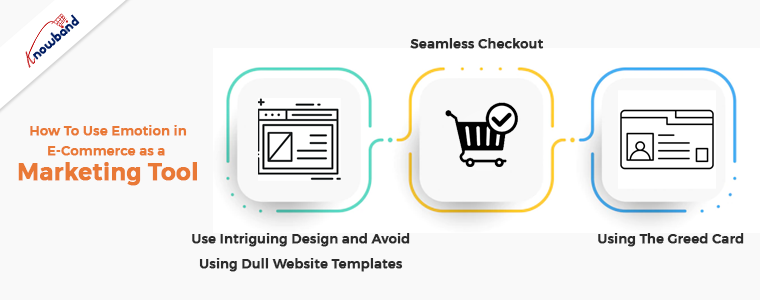
How To Use Emotion in E-Commerce as a Marketing Tool?

It’s time to talk about how this strategy can work for you now that we’ve established why emotion has a lot to offer e-commerce.

Use Intriguing Design and Avoid Using Dull Website Templates

Even while your website may be quite functional and useful, it might not effectively communicate your brand’s distinctive personality and gets an emotional response from visitors. The design of the website plays a vital role in connecting emotionally to the visitors. Where does the customer’s search for value end when pricing is the single factor separating your website from another?

In a similar way, how can your website encourage customers to connect with your business? By making them feel like their uniqueness is of value increasing their customer base is possible. Design and emotion are inherently linked. So make sure to infuse your brand’s personality into your website design to elicit a far stronger emotional response.

Seamless Checkout

To avoid customers’ emotionally driven purchases transitioning to rational ones, make the checkout process free of any hindrances. This is possible by using our one-page checkout module which allows customers to complete the purchase within a minute. This is possible by making the checkout process simple to grasp, visually appealing, and with a clear end goal that is within easy reach.

Using The Greed Card

Greed is a common word that is usable in persuasive writing. Using terms in a language like “free of charge,” “buy one, get one free,” or “free delivery” is pretty powerful. With our Prestashop plugins, it is possible to provide gifts, free shipping, and discount offer to the customers.

Purchase intent increases when there is a chance to receive a substantial discount or a gift in exchange for a purchase. In the website content for delivery and returns, you can emphasize the word “free” a lot. Customers are also informed via emails from the online business about sales that are “today only,” “only for you,” or “just for the product you liked”. These kinds of words create a sense that lures the visitors for conversion.

In the End

Here we are discussing the various methods we can use on eCommerce websites to promote sales. Also, you can connect with us in case you have any issues or concerns related to our modules. Kindly connect with us at support@knowband.com if you have any business-specific custom developments. We can assist you with the customization of the module if you need to add or remove any features to the module. Also, we can help you with the development of a new module as per your requirements. Moreover, if there are any issues with your website then also we can help you with it.

Essential PrestaShop Addons to Install on Your Website in 2022

Prestashop is the greatest e-commerce platform for running self-hosted, open-source e-stores. With the help of various PrestaShop addons, the website operates smoothly. There are currently 65 different languages accessible on Prestashop, and it is useful for many stores all over the world. Starting an online store requires some effort. With the Prestashop addons, features, and characteristics, it becomes easier.

Using Prestashop, a business strategy is possible to incorporate themes and add-on features. The online store setup grows leaps and bounds by integrating Prestashop plugins into their website. The user interface for Prestashop’s store is sturdy and responsive, and it is simple to use. Also, it offers all its features without charging anything.

Some Must-Have Prestashop Addons for Online Stores:

One Page Checkout:

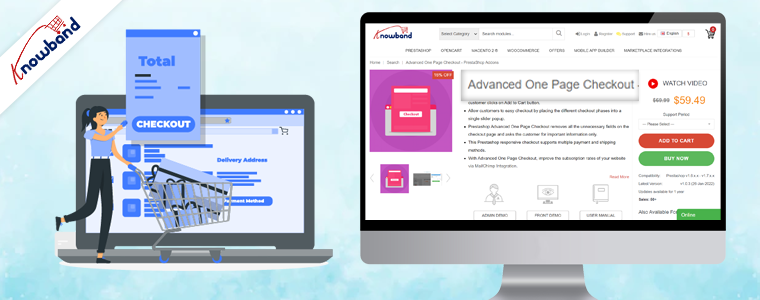
The Prestashop single-page checkout module for checkout makes purchasing simple and fast for customers. So, when the checkout page is clean and simple, the customer will move through the payment in one go. The one-page checkout Prestashop addon aids in cart abandonment reduction. The customers do not want the long-drawn-out process for checkout. With this add-on, the checkout process time reduces. The single page checkout plugin is useful for increasing conversions. Furthermore, the Prestashop addon for checkout supports many payment methods. One page checkout supports compatibility with mobile devices and enhances checkout funnels.

Abandoned Cart:

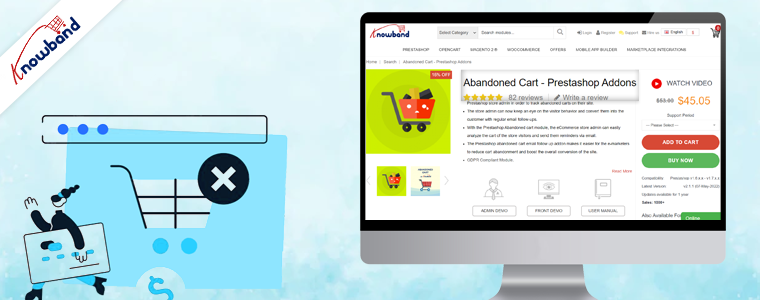
The Prestashop abandoned cart reminder addon is useful for tracking abandoned carts on the website. The customers receive email follow-ups after they abandon the cart. The Prestashop Cart Abandoned addon increases the conversion of the online store. The customer’s requirements analysis using the features of this Prestashop plugin is possible. This information is useful for marketing campaigns and also when sending discount emails for follow-up. The email follow-up addon helps in reducing cart abandonment and increasing overall conversion.

SEO Optimizer:

The Prestashop plugin SEO Optimizer is useful as the default URLs change to SEO-friendly URLs when using this addon. When the URL is SEO-friendly, then the ranking on Google will also improve. This makes the URL optimizing module one of the must-have Prestashop plugins for online stores in 2022. The auto-generated numbers and IDs erasure is possible with this Prestashop addon to make the URL SEO-friendly. The SEO optimizer addon Prestashop is mobile responsive and multi-store compatible.

Mobile App Builder:

The Prestashop mobile app builder is useful for developing a mobile app for the online store without any coding background. People are moving to purchase most of their products online, so having mobile apps for your business is necessary. The store owner can design the layout of the app all by themselves using this Prestashop addon. The created mobile apps have various login options such as fingerprint, mobile number, social login, etc. Having an app for your business increases the growth percentage of the business.

Google Shopping:

Before visiting any website, the customer searches for the required products on Google first. The Prestashop Google Shopping plugin helps in listing your products on Google. The products listed on Google have a higher probability of customers noticing them. The Google Shopping Feed addon is useful to sync products and let them map entire categories on Google. This addon is useful for product listing and is multistore compatible. The Google Shopping Connector plugin improves the visibility of the products and improves SEO. The Prestashop module for listing products on google boosts sales by bringing traffic to the store and improving sales.

Gift Card Manager:

The Prestashop Gift card plugin help with gifting on various occasions like birthdays and Halloween. Integrating this gift card system module will bring in traffic as gift cards are on trend these days and a go-to idea for gifting. The gift voucher that customers receive is customizable. The gift card Prestashop addon sends vouchers through the mail and can also be given as a physical gift. This addon is helpful in brand promotion and acquiring new customers. The gift card’s partial use is possible, and also the usage of gift codes is traceable. This Prestashop gift card manager helps to increase sales as well as gain more customers.

Back in Stock:

Customers use the Prestashop Back in Stock module to learn whether the desired products are back in stock. Hence, customers can subscribe to receive updates on the availability of desired products if they are not currently in stock. Those who subscribe using this Prestashop stock alert addon will get an email about the product’s stock status. Customers provide their name and email address when subscribing to the product. This will be useful for marketing initiatives for marketing campaigns. Obtaining customer information using the prestashop product stock notification addon is possible. It is possible by integrating this addon with Klaviyo, Sendinblue, and Mailchimp. In the backend of this product subscription module, products in the subscription list are visible. Custom fields, order sorting in the notification box, and V3 Recaptcha are some of the other appealing features.

In the End

The Prestashop addons mentioned above are some of the top modules which will boost the sales and conversion of the online store. These PrestaShop addons are the basic requirements of any online website. We are here to assist to inform you about these Prestashop plugins and will assist you if you need to have them. Not only we sought to achieve great reviews from the customers but on top of that, we believe in delivering more than they desire. Also, we provide custom development also depending on the customer’s need. If you have any custom requirements or business ideas or have an interest in any of the above add-ons, then kindly contact us at support@knowband.com.

PrestaShop Starter Pack: Must-Have PrestaShop Modules To Start Your Store

If you have just built your eCommerce website on the PrestaShop platform, you would be looking around for some PrestaShop plugins that you should integrate on your website as a beginner. Your search ends here.

In this article, I have put forward some of the basic yet effective PrestaShop modules to start with. We also call this the PrestaShop starter pack. Check them out.

1. One Page Checkout

PrestaShop One Page Checkout converts the default multi-step checkout process of your PrestaShop based website into a One Page Checkout. It aims to improve the checkout experience of your customers besides boosting your conversions by encouraging a quick and hassle-free checkout.

The module provides Guest Checkout, Facebook, Google and PayPal Login, option to customize checkout fields, multiple shipping services and payment methods support, layout customization, and much more. You can also display a free shipping banner on the top of the checkout section that helps to increase the average order value. It is a GRPR compatible module.

One Page Checkout has been downloaded 5000+ times on the official addon store and more than 2500+ times on our Knowband store.

2. Abandoned Cart

PrestaShop Abandoned Cart addon lets you track the abandoned carts on your website and provides you with the opportunity to convert those users into customers. The module aims to recover lost sales and helps you reduce the cart abandonment rate on your website.

Talking about some of its key features, it lets you create an abandoned cart alert; you need to specify the duration after which the cart is automatically assumed to be abandoned and a reminder email is sent to the user. The email functionality can be customized from the back-end configurations.

It also offers different types of discount email templates through which you can persuade the abandoned cart users to complete their purchase by providing a discount code inside the email.

3. Spin and Win

PrestaShop Spin and Win adds a Gamification element to your website in the form of a Spin and Win popup. The module focuses on certain aspects like increasing user engagement, reducing website’s bounce rate, boosting the average site time but most importantly, it is an email subscription popup that helps you grow your email list and scale-up your conversions.

With the help of this module, you can customize the look and feel of the popup and the text on it. Besides, you can configure the popup display settings like the display frequency, when to show, where to show, on which pages to show the popup, etc. It also provides you with the option to customize the popup slices as per the way you want.

4. Affiliate and Referral Program

PrestaShop Affiliate and Referral Program addon is an exciting way to boost your brand awareness and acquire new customers. The module allows users to register as an affiliate on your website, after approval of which they can earn rewards/incentives upon referring the website to others.

The user can share his/her referral code with others which they can use during the sign-up process. They can also share a direct referral link to sign-up and also share the link directly on their social media platforms or on someone’s email address.

The referral is considered successful if a new user has registered or made a purchase; depending on the configurations set from the back-end. Upon successful referral, the rewards are provided to the affiliate which can be claimed in the form of a discount voucher or the affiliate customer can raise a payout request.

5. SEO Optimizer

PrestaShop SEO Optimizer also referred to as URL redirect or URL cleaner module helps you convert the URLs of your website into SEO-friendly URLs. You can rewrite duplicate URLs and perform three types of redirect; 301 redirect, 302 redirect and 303 redirect. The module helps you improve the performance of your website on the search engine.

It’s a multi-lingual module, is SSL compatible, and also has multi-store compatibility.

6. SEO Wizard

PrestaShop SEO Wizard addon helps you manage the SEO of your web pages. The module automatically updates interlink and metadata on your website after the cron is executed from the back-end. The optimization is offered for four different web pages that include Product pages, Category pages, CMS pages and Manufacturer pages.

For any kind of assistance or query, reach out to us at support@knowband.com and our support team will reach out to you to the earliest.

You May Also Like:

10 Must-have Addons to Optimize Prestashop Product Pages

6 Must-Have Social Media Addons For Your PrestaShop Store

Top 10 PrestaShop addons to boost your Holiday sales

Prestashop Product Update Notification Addon – User Manual

Introduction:

There are times when the store visitors land up on the website looking for a product, but leaves the website because the product are not in stock .They find the same on some other stores and you lose a conversion. You’ll never know why the visitors left your site without purchasing anything. In order to find the problem and rectify the issue, you must enhance customer’s engagement with your site, so that, you can get them back if they are leaving your store for this reason.

This Prestashop Product Update Notification Addon by Knowband offers two types of benefits just in single subscription to the customers, i.e.

  1. Stock Alert Notification (Once the selected product back in stock.)
  2. Price Update Notification (When there is change in the price.)

The Knowband’s Prestashop Product Updated Notification Module is GDPR compliant.

Steps For Installation of Prestashop Product Update Notification Addon

1. Folder structure of the Product Update plugin folder.

2. Copy the whole folder named as product update into your modules folder of the root directory of your PrestaShop store through FTP.

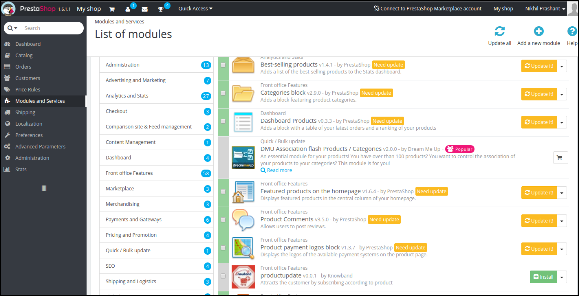
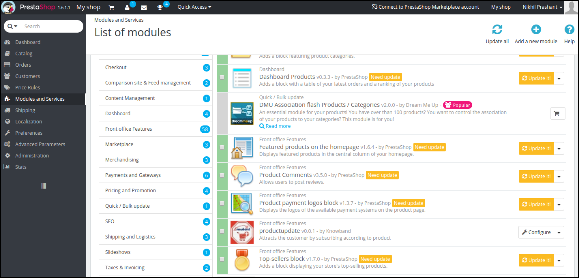
3. You will be able find the product update plug-in ready to be installed in the Modules in your PrestaShop store as shown below.

4. Click on the Install link to install the Prestashop plugin.

Admin Module

Here store owner can change the various settings of this Prestashop plugin according to requirements, which will be reflected on front end as well as in admin panel.

To install this plug-in, please follow the following steps:

1. Add all whole plugin folder to the modules folder into the root directory of the PrestaShop Store.

2. After adding plug-in files, the system will list the plug-in on module page.

3. Click on install/uninstall according to need.

4. Another way is, you can zip the whole folder and then click on Add New Module link displaying on top right corner of module listing page as shown in below screen:

5. After installing this Prestashop module, Configure link will be displayed instead of Install link as shown in below screen:

6. Now, your Prestashop out of stock subscription module is ready to use and click on Configure link to configure module.

Admin Interface

After installing this Prestashop notification addon, the admin will get following interfaces:

  1. General Settings
  2. Request for Notification Email Settings
  3. Notification Email Setting
  4. Analysis

General Settings

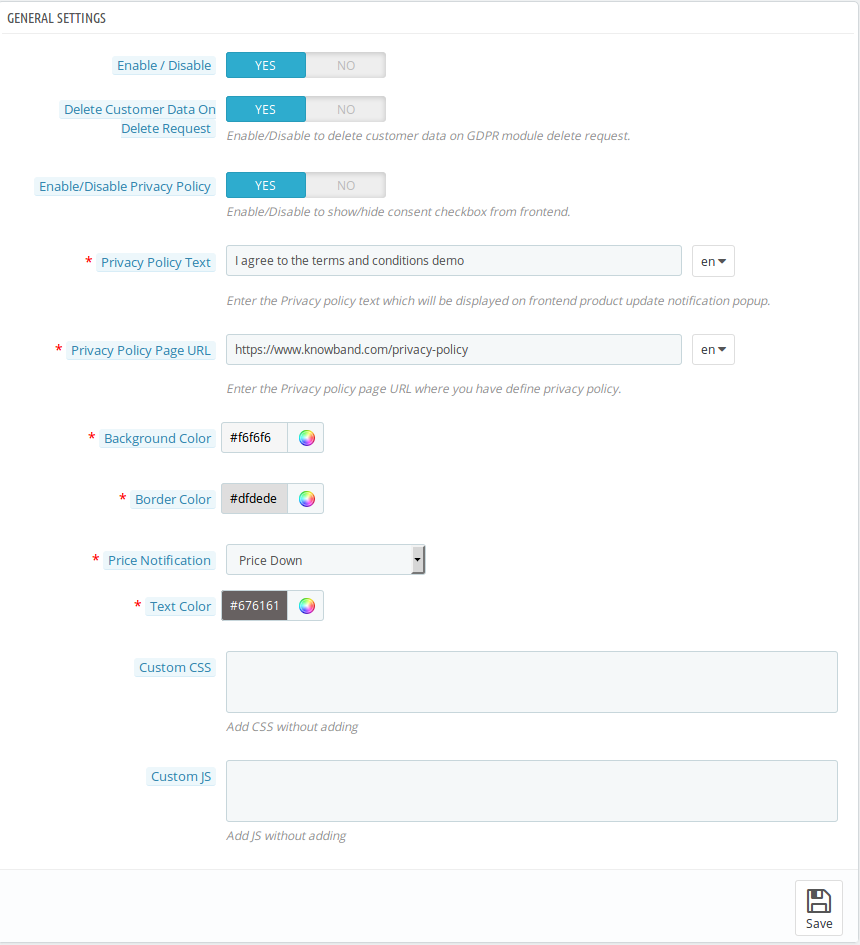
When you click on configure button, system will open general setting field by default. This field has following options:

Initially fields in above form will be already filled with their default values.

  • Enable/Disable: Initially, this Prestashop out of stock notification addon by Knowband is set to NO option. You must need to set this to YES in order to get the benefits of the addon.
  • Delete Customer Data on Delete Request: Enabling this functionality will enable the option for the customers to request for personal data deletion.
  • Enable/Disable Privacy Policy: The Prestashop product update notification module allows the admin to display or hide the privacy policy at front end.
  • Privacy Policy Text: This field of the Prestashop product update module allows the admin to set the desired privacy policy text. The privacy policy text can be edited whenever needed.
  • Privacy Policy URL: The admin can link the privacy policy to the desired choice of URL. The URL can also changed whenever required.
  • Background Color: This field of Prestashop product update notification addon is filled with some default value at initial level. Admin can change the background color of the subscription box by selecting a color from the color picker which will be reflected at the front end.
  • Border Color: In this field, the admin can change the border color of the subscription box according to his preference.
  • Price Notification: This field of the product update notifcation Prestashop provides the admin to select the type of price level to notify subscribers. The admin can either select Price Down, Price Up or Both type of price level.
  • Text Color: The respective Prestashop plugin even allows the admin to customize the text-color of the subscription box as per his choice.
  • Custom CSS & JS: Both of these option allows to the admin to change the look and feel of this Prestashop in stock notification addon by Knowband.

Request for Notification Email Settings:

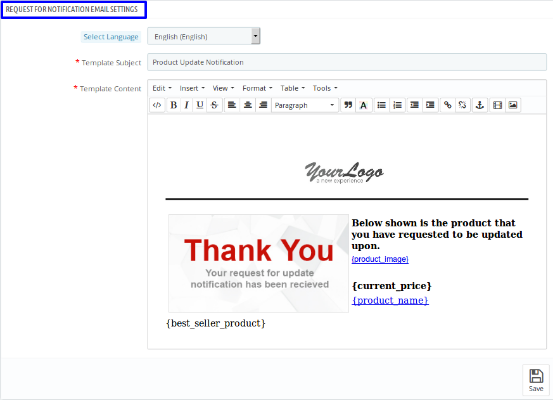
Once you select the language, following fields will be shown:

  • Select Language: In this field of Prestashop product update addon, the admin can select from four of the languages, i.e. English, French, Spanish & Italian.
  • Template Subject: Here, the admin can enter the text of his choice as subject. By default, the subject of the email is Product Update Notification.
  • Template Content: This is the body of the email that user receives after subscription. The admin can modify the text as per his preferences.

Notification Email Settings

The admin can manage the following two things under this category of Prestashop out of stock subscription module by Knowband:

  • Product Quantity Update Notification
  • Product Price Update Notification

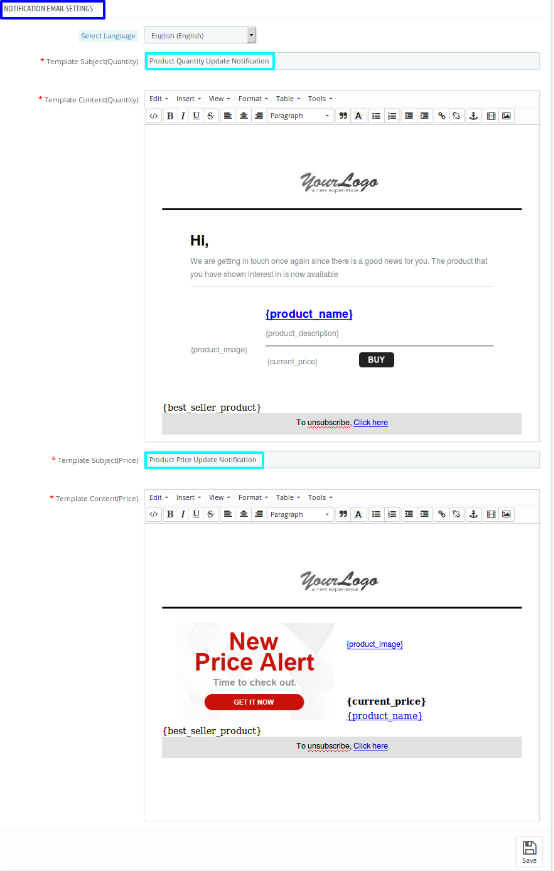
Once you select the language of your choice, you’ll be able to see following settings:a.

  • Product Quantity Update Notification: Product Quantity Update Notification is the template subject of the email. This is for the Out of Stock products. When the product, for which, customer has subscribed will be in stock then this email will be sent to the subscribers automatically. The admin can change the template subject and template content as per his choice.
  • Product Price Update Notification: This is the second part of the Notification Email Setting have Product Price Update Notification as template subject. This is for when there is change in the product price according to your setting that you have saved in General Setting under “Price Notification” field. Here, also, the admin can change the template subject and template content as per his choice.

Analysis:

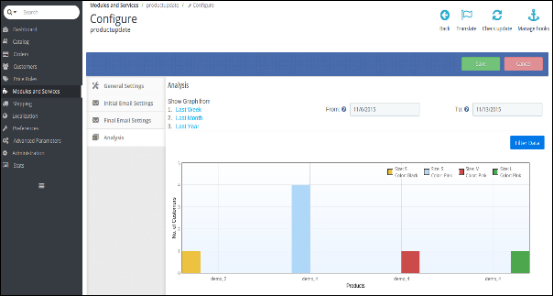
In analysis section of this Prestashop product update notification addon, the admin can see the overall report of subscribed product and customers in the form of graph and in the form of detailed list as well. When you select a date range, the graph will be displayed the top 10 products.

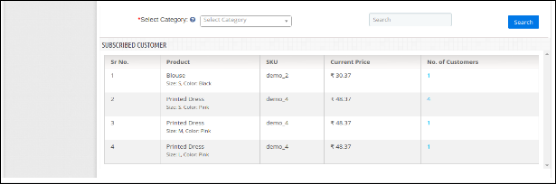
With the help of selected category and search element, the admin can see all the details about subscribed products along with the number of customer subscribed. For more details of the subscribed customer, admin will just need to click on the “number of customer”. By doing so, he can see the details about the subscribed customer in the pop-up menu.

Front End Module:

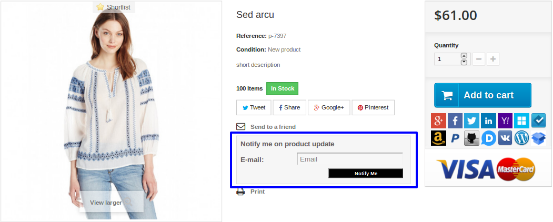
Once you enable this Knowband Prestashop notification addon at the back end, user will see the subscription box at the product page. The box contains a input field to enter the email id and a Notify Me button, through which, the customer will be subscribed to the respective product.

When a customer enters the email id and clicks to the button notify me the initial email will be sent to the entered email address and the message showing subscribed.

There will be a case when the entered email for subscription and the respective already exist, in that case the subscriber will be updated and the updated email will be sent again to the email.

Module Link: https://www.knowband.com/prestashop-product-update-notification

Admin Demo: https://ps.knowband.com/demo1/16/admin1/index.php?controller=AdminLogin&token=aea1bb3fb1bab860c86c4db00ce5949e&redirect=AdminModules&demo_lang=en

Front Demo: https://ps.knowband.com/demo1/16/en/evening-dresses/38-sed-arcu.html

Watch Video tutorial here: https://www.youtube.com/watch?v=iMotpb_UMgQ

Buy the product from addon store

Feel free to contact us at support@knowband.com for any query or custom change request as per your business requirement.

PrestaShop Product Quantity Update – User Manual

Introduction of PrestaShop Product Quantity Update Addon:

This PrestaShop Product Quantity Update by Scanner module is basically developed for the Prestashop eCommerce site owners to let them update their product quantity on the site without any hassle. It provides an option to update the product quantities without going to the product listings on the back end. A separate interface is provided at the back end which allows the product quantity update based on the:

  1. UPC Number
  2. Reference Number
  3. EAN Number

Steps for Installation:

To install this Prestashop product quantity addon by Knowband, please follow the following steps:

1. Add add-on folder to the modules folder on your system.

2. After adding this Prestashop addon folder, the system will list the add-on on module page under front office feature category as given below:

3. Click ‘Install’ to install this Prestashop Admin Tool Addon.

Admin Account Interfaces

These interfaces will be accessible only by the admin in his modules section.

Menu Location:

An Admin can access the interface of this Prestashop module by navigating to the following address:

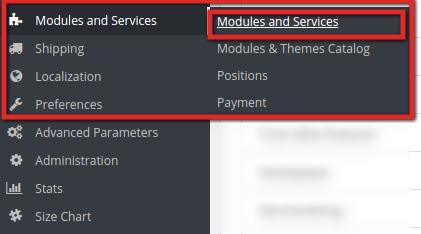
1. Navigate to Modules and Services >> Modules and Services

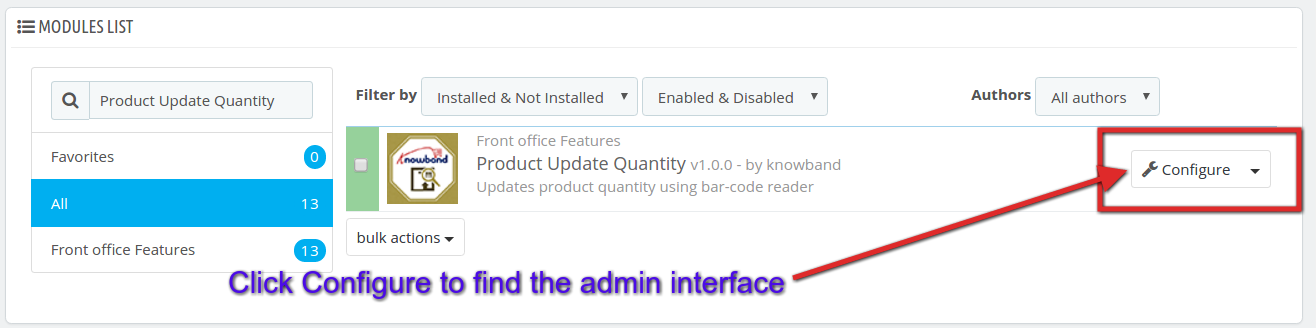
2. The list of Prestashop modules installed on your site will open. Now search for Product Update Quantity in the search box, you will find the following interface. In the following interface click on the Configure button:

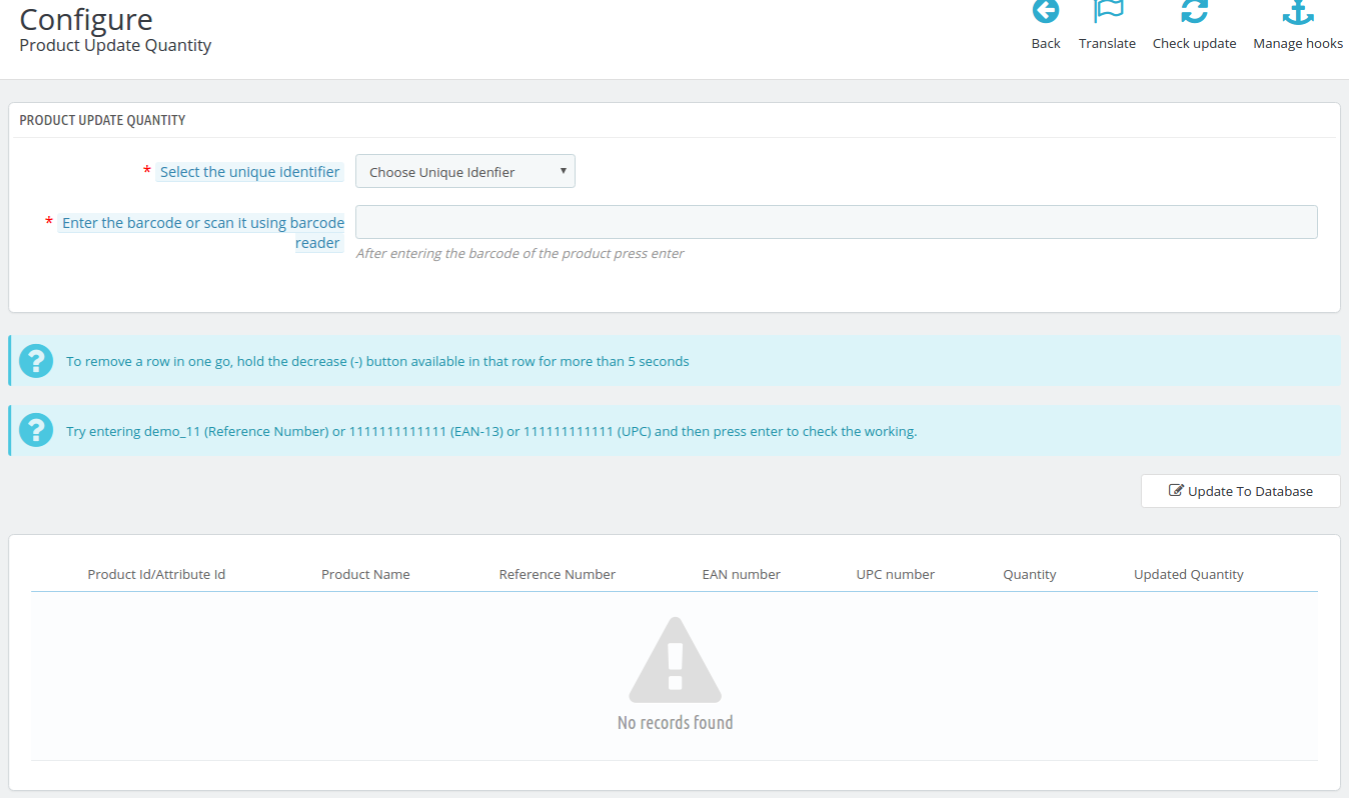
Admin Configuration Panel:

The Admin configuration interface of this Prestashop Quantity update addon by Knowband looks like this:

Update the Product Quantity based on UPC Number:

To update the product quantity based on UPC Number, follow the following steps:

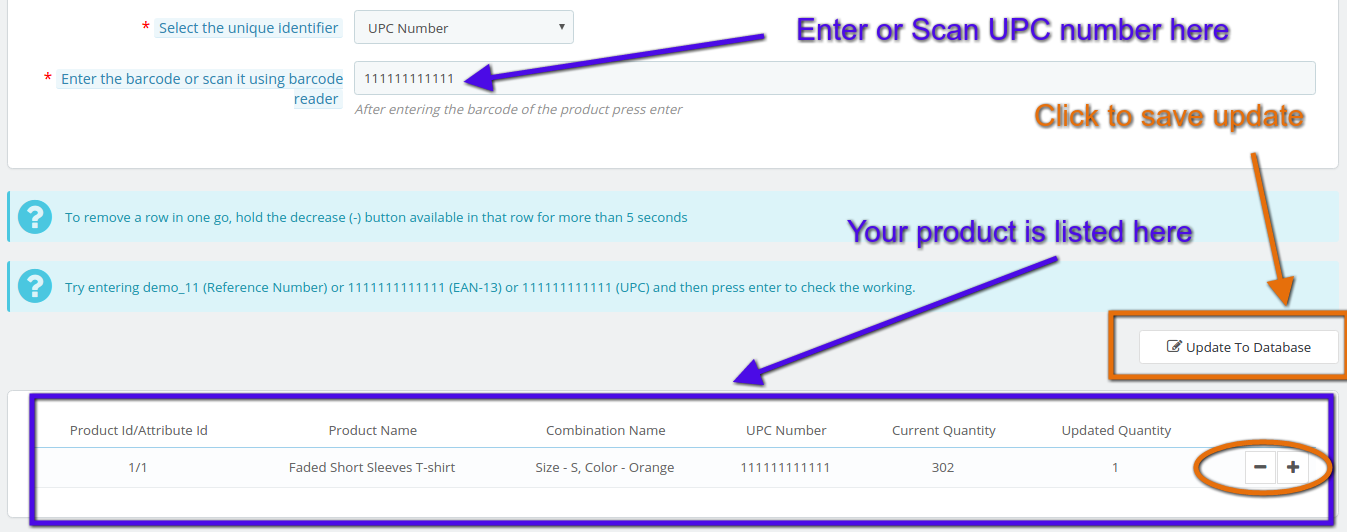
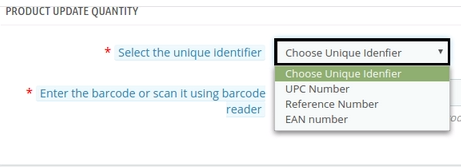
1. Select UPC Number from the drop-down list in ‘Select Unique Identifier’ menu option.

2. Scan the UPC number of the product ( you can even enter the UPC number manually in the text filed to entering the bar-code or scan it using the bar-code reader).

3. Your product will be listed below in the interface as shown in this screen shot:

4. You can re-scan the UPC number of the other products in the list to add a quantity or you can also increase or decrease the quantity by clicking + or – as shown in the screen shot above.

5. After you update the desired quantity of the products it will shown in Updated Quantity that how many new products you have added in the list for this particular UPC number. Click on ‘Update To Database’ to save your product quantity update for the particular UPC number.

6. Similarly, you can perform the Product Quantity update based on EAN number or Reference Number too. Just don’t forget to select the items from the drop-down list according to your need.

Module Link: https://www.knowband.com/prestashop-product-quantity-update

Admin Demo: https://ps.knowband.com/demo1/16/admin1/index.php?controller=AdminLogin&token=aea1bb3fb1bab860c86c4db00ce5949e&redirect=AdminModules&demo_lang=en

Watch Video tutorial here: https://www.youtube.com/watch?v=GSdsowwt1JU

Feel free to contact us at support@knowband.com for any query or custom change request as per your business requirement.