W jaki sposób sprzedawca może zoptymalizować swoją obecność na rynku Walmart?

Walmart jest jedną z największych korporacji detalicznych. Liczby nie kłamią, a dane statystyczne z tego rynku zdecydowanie oferują pozytywny klimat dla e-sprzedawców. Internetowy detalista zagłębił się w prawie wszystkie segmenty pod słońcem. Będąc jednym z największych i najwyższych punktów sprzedaży detalicznej, platforma umożliwia nawet małym sprzedawcom i sprzedawcom zwiększenie zasięgu działalności.

Walmart ma sklepy 11,000 + na całym świecie. Tak więc, jeśli chcesz rozszerzyć swoją działalność na arenie międzynarodowej, to jest to miejsce dla Ciebie. globalna sprzedaż netto firmy wyniosła około X XUM miliarda USD. O ile w roku obrotowym 2018 dochody wzrosły do ​​500.3 miliarda.

Oczekuje się, że liczby te będą jeszcze większe w nadchodzących latach. Dlatego integracja sklepów eCommerce z Walmart.com jest koniecznością dla sprzedawców internetowych. Czy chcesz zintegrować swój sklep internetowy z rynkiem? Czy dowiadujesz się o technicznych aspektach związanych z tym samym? Już nie musisz się martwić. Rozszerzenie integracji Walmart może pomóc właścicielom e-commerce zintegrować swój sklep internetowy z Walmart.com.

Mimo że rynek oferuje e-sprzedawcom możliwość łatwego rozszerzenia zasięgu działalności, ma również pewne wady. Trudna konkurencja może wyleczyć nerwy w dążeniu do wyróżnienia się. Zwiększenie swojej obecności na popularnym

W jaki sposób sprzedawcy zewnętrzni mogą zoptymalizować swoją obecność na walmart.com?

Oto kilka sposobów, dzięki którym możesz zoptymalizować swoją obecność na zatłoczonym rynku. Czytaj dalej, aby dowiedzieć się więcej.

Obraz jest wart tysiąca słów

Ponieważ cały proces zakupu online nie zapewnia klientowi wyglądu i stylu produktu, ma sens praca nad grafiką wizualną. Celem wyróżnienia się jest zmotywowanie klientów do wyboru produktu względem konkurencji ". Właśnie wtedy pojawia się visual merchandising.

Uporządkuj swoje produkty, aby zmaksymalizować ich widoczność. Ułatw klientom dostęp do nich. Białe tło z rynku Walmart stanowią bardzo zgrabny i profesjonalny interfejs dla sprzedawców, aby zoptymalizować wyświetlacz.

Integrator rynku Walmart zapewnia obrazy o wysokiej rozdzielczości i wymiar 3 produktów.

Szczegółowy Opis

Najlepszym sposobem wyróżnienia się z tłumu, jeśli chodzi o zakupy online, jest dostarczenie klientom właściwych informacji. Jednym ze sposobów osiągnięcia tego poprzez szczegółowe opisy produktów.

Klienci mają tendencję do szukania nazwy produktu. W związku z tym wskazane jest, aby sprzedawcy sprzedawali tytuły produktu elegancko. Rynek Walmart pozwala na użycie maksymalnie 200 znaków w tytule produktu, więc wykorzystaj go w pełni. Kluczowymi atrybutami tytułu są: marka, nazwa przedmiotu, styl, kolor, materiał i inne.

Specyfikacja produktu jest koniecznością. Uwzględnij wszystkie informacje, których szukają klienci.

Uwzględnij słowa kluczowe, długie słowa kluczowe i wyszukiwane hasła na stronie produktu. Ułatwi to wyższą pozycję produktów w SERP Google.

Skup się na budowaniu relacji z klientami

Jest to coś, czego potrzebuje e-kupiec uczyć się od sklepu stacjonarnego. Zaangażuj swoich klientów i zwiększ wartość poprzez rozwój emocjonalnego związku. Podobnie jak każda inna firma lub marka, relacja z klientem jest kluczowym aspektem zapewniającym lojalność klientów. Niezależnie od tego, czy są jednorazowymi kupującymi, czy długoletnimi kupującymi, utrzymywanie relacji z klientami może pomóc Ci przetrwać w konkurencyjnym scenariuszu. Zapewnienie klientom płynnej transakcji online jest kluczowe. Oferuj przejrzyste zasady zwrotu / zwrotu pieniędzy. Rozwiązuj skutecznie swoje problemy i problemy. Skorzystaj z ich opinii, a praca nad negatywnymi opiniami może sprawić, że poczują się docenieni.

Idealna kategoryzacja

Stwórz dobre wrażenia zakupowe dla swoich klientów. Kategoryzacja produktów może pomóc im w znalezieniu pożądanego produktu. Zachowaj podobne produkty na tym samym wykazie, aby kupujący mogli wyświetlać wszystkie możliwe produkty bez konieczności dużo nawigacji. To ułatwia proces zakupu i prowadzi do wyższego współczynnika konwersji. Integrator Walmart Marketplace zapewnia ponad 24 różne kategorie. Umieść produkty w odpowiedniej kategorii, aby opisać atrybuty produktu. Staraj się unikać wybierania "innej kategorii". Im więcej atrybutów podasz, tym wyższy będzie ranking produktu na stronie wyszukiwania produktu.

Jest to trudna sprawa, ponieważ kategorie sklepu internetowego i rynku mogą się różnić. Jednak ręczna integracja nie jest tak trudna. Ponadto w przypadku witryny e-commerce opartej na CMS, takiej jak Prestashop, Magento, OpenCart i inne, dostępne są wtyczki, które mogą zautomatyzować cały proces. Mapowanie kategorii odbywa się po kliknięciu kilku przycisków na zapleczu rozszerzenia, co ułatwia wylistowanie produktów w odpowiedniej kategorii.

Eksperymentuj z ekwipunkiem

Nie trzymaj się konwencjonalnych sposobów sprzedaży. Eksperymentuj z asortymentem, który oferujesz na rynku Walmart. Kluczem do sukcesu na zatłoczonym rynku, takim jak Walmart, są duże ilości i niskie ceny. Atrakcyjnie zapakowane tanie przedmioty mogą pomóc Ci przyciągnąć uwagę docelowych odbiorców. Od czasu do czasu wprowadzaj nowe produkty. Śledź zachowania klientów, aby zobaczyć, jak szybko sprzedają. Zarządzaj starymi stosami. Spróbuj i sprawdź obszar bólów klientów. Inwentaryzacja oparta na okazjach może pomóc w znalezieniu odpowiedniego rozwiązania, którego szukają.

BuyBox
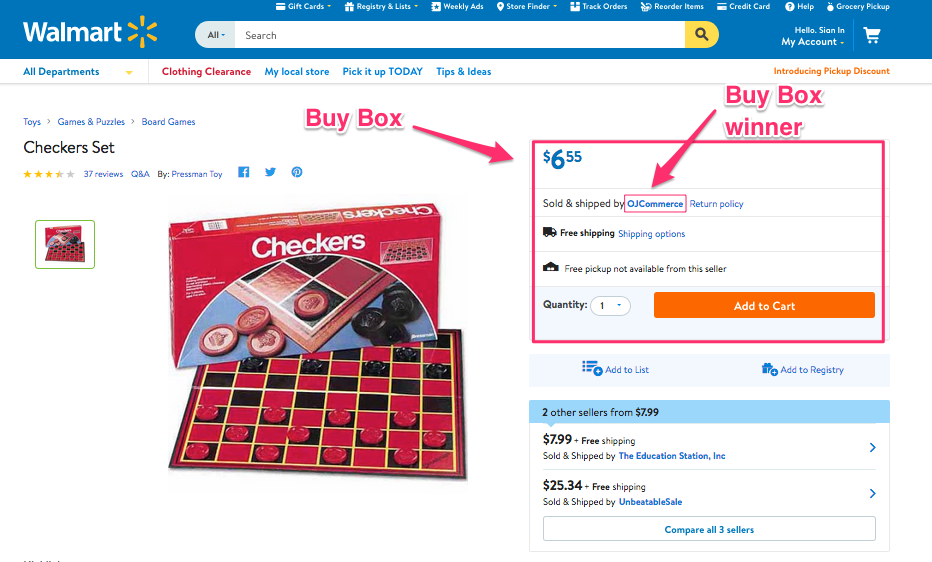
Walmart dostarczył opcję Buy Box, w której sprzedający mogą z łatwością konkurować o cenę swojego produktu z innym sprzedawcą. Produkty konkurujące ze sobą powinny być wymienione w tej samej kategorii. Produkt, który wygra Kupno, pojawi się na górze listy szukanych przedmiotów. To zwiększa widoczność produktów i ostatecznie zwiększa szanse na konwersję. Z Prestashop Dodatek do integracji Walmart, wygrywając BuyBox jest teraz tort-spacer dla właścicieli sklepów eCommerce opartych na Prestashop. Wtyczka oferuje pełny raport BuyBox dla sprzedawców, który umożliwia łatwe śledzenie. Mogą porównać ceny i zmienić produkt z poziomu interfejsu administratora. Podobny, Integrator Magento Walmart i Magento 2 Złącze Walmart może pełnić tę samą funkcję dla poszczególnych platform.

Tablica wyników sprzedawcy

Karta Wyników Sprzedawcy w Centrum Sprzedawcy Walmart śledzi wydajność konta danego dostawcy. Ten wynik jest oparty na metodzie spełnienia i możliwościach dostawców. Utrzymuj swoją tablicę wyników i dostosuj oferowane usługi zgodnie z wynikiem.

Reklamy Walmart

Rynek Walmart oferuje nawet pośrednikom trzecim możliwość sprzedaży swoich produktów na Walmart bez nawet ich wymieniania. Właściciele marek mają możliwość bezpośredniej współpracy z Walmart w zakresie reklamy. Rynek Walmart to kolejny sposób na zwiększenie widoczności produktu. Sekcja Produkty sponsorowane znajduje się po lewej stronie stron wyników wyszukiwania. Za każdym razem, gdy użytkownik wprowadza słowo kluczowe w pasku wyszukiwania, reklamy generowane przez te same słowa kluczowe stają się dostępne w sekcji "Produkty sponsorowane". Kliknięcie tych reklam spowoduje przekierowanie użytkowników sklepu z witryny Walmart.com na witrynę innej firmy.

Ostatnie słowa

Nawet jeśli pomijasz gigantów handlu elektronicznego, takich jak Amazon, eBay i inne, rynki takie jak Walmart i Jet.com oferuje wiele atrybutów które są niezbędne dla e-kupców. Wszystko, co musisz zrobić, to sprawdzić zachowanie klienta i skoordynować merchandising w celu znalezienia przewagi konkurencyjnej.

Prace związane z integracją z rynkiem stały się łatwe, ponieważ Knowband oferuje różne intuicyjne rozwiązania integratorzy rynku lubić Integrator eBay, Integrator Etsy i inni wraz z Integrator Walmart. Znajdź odpowiednie rozwiązanie dla swojego biznesu eCommerce i w pełni wykorzystaj globalny zasięg któregokolwiek z popularnych rynków internetowych.
Come può un venditore ottimizzare la sua presenza su Walmart Marketplace?

Walmart è una delle più grandi società di vendita al dettaglio. I numeri non mentono e le cifre statistiche con questo mercato offrono sicuramente una vibrazione positiva agli e-vendor. Il rivenditore online ha esplorato quasi tutti i segmenti sotto il sole. Essendo uno dei maggiori e più alti rivenditori al dettaglio, la piattaforma offre l'opportunità anche ai piccoli venditori e venditori di espandere la propria attività.

Walmart ha negozi 11,000 + in tutto il mondo. Quindi, se stai cercando di espandere la tua attività a livello internazionale, allora questa è una destinazione unica per te. le vendite nette globali dell'azienda ammontavano a circa $ 481.32 miliardi. Mentre per l'anno fiscale 2018, le entrate sono aumentate fino a $ 500.3 miliardi.

Si prevede che queste cifre diventeranno ancora più grandi nei prossimi anni. Quindi, l'integrazione degli store eCommerce con Walmart.com è un must per i venditori online. Stai cercando di integrare il tuo negozio online con il mercato? Sei intimato dagli aspetti tecnici coinvolti nella stessa? Non devi più preoccuparti. L'estensione di integrazione di Walmart può aiutare i proprietari di e-commerce a integrare il loro negozio web con Walmart.com.

Anche se il mercato offre una facile opportunità per gli e-sellers di espandere la propria attività, presenta anche alcuni inconvenienti. La dura competizione potrebbe richiedere un tributo al tuo coraggio nella ricerca di distinguerti. Potenzia la tua presenza sul popolare

In che modo i venditori di terze parti possono ottimizzare la loro presenza su walmart.com?

Ecco alcuni dei modi in cui puoi ottimizzare la tua presenza sul mercato pieno di jam. Continua a leggere per saperne di più.

Un'immagine vale più di mille parole

Poiché l'intero processo di acquisto online non fornisce alcun aspetto e aspetto del prodotto al cliente, ha senso lavorare sulla grafica visiva. Lo scopo principale di distinguersi è motivare i clienti a scegliere il prodotto rispetto ai concorrenti. È qui che entra in gioco il merchandising visivo.

Organizza i tuoi prodotti per massimizzare la loro visibilità. Rendi più facile l'accesso ai tuoi clienti. Gli sfondi bianchi del mercato Walmart offrono un'interfaccia molto accurata e professionale per i venditori per ottimizzare il display.

L'integratore di mercato Walmart fornisce immagini ad alta risoluzione e la vista dimensionale 3 dei prodotti.

Descrizione dettagliata

Il modo migliore per distinguersi dalla massa quando si tratta di fare shopping online è fornire ai clienti le giuste informazioni. Uno dei modi per raggiungerlo attraverso descrizioni dettagliate dei prodotti.

I clienti tendono a cercare il nome del prodotto. Quindi, è consigliabile che i venditori curino il titolo del prodotto in modo intelligente. Il marketplace di Walmart ti consente di utilizzare fino a 200 caratteri nel titolo di un prodotto, quindi, sfruttalo al meglio. Gli attributi chiave del titolo includono Brand, Nome oggetto, Stile, Colore, Materiale e altri.

Le specifiche del prodotto sono obbligatorie. Includi tutte le informazioni che i clienti stanno cercando.

Includere le parole chiave, le parole chiave long-tail e le query di ricerca nella pagina del prodotto. Ciò renderà più facile per i prodotti posizionarsi più in alto nella SERP di Google.

Concentrarsi sulla costruzione di relazioni con i clienti

Questo è qualcosa che l'e-merchant ha bisogno imparare dal negozio di mattoni e malta. Coinvolgi i tuoi clienti e aggiunge valore sviluppando una connessione emotiva. Proprio come qualsiasi altra azienda o marchio, la relazione con il cliente è l'aspetto chiave per garantire la fedeltà dei clienti. Sia che si tratti di acquirenti occasionali o di acquirenti di lunga data, il mantenimento delle relazioni con i clienti può aiutarti a sopravvivere nello scenario competitivo. Fornire ai clienti una transazione online senza soluzione di continuità è la chiave. Offrire politiche trasparenti di restituzione / rimborso. Risolvi efficacemente i loro problemi e i problemi. Prendi il loro feedback e lavorando sulle recensioni negative puoi farli sentire apprezzati.

Categorizzazione perfetta

Crea una buona esperienza di acquisto per i tuoi clienti. La categorizzazione dei prodotti può aiutarli a trovare il prodotto desiderato. Mantieni i prodotti simili nello stesso elenco, in modo che gli acquirenti possano visualizzare tutti i possibili prodotti senza navigare molto. Questo facilita il processo di acquisto e porta a un più alto tasso di conversione. L'integratore di Walmart Marketplace offre diverse categorie 24. Inserisci i tuoi prodotti nella categoria giusta per descrivere gli attributi del prodotto. Cerca di evitare di selezionare "Altre categorie". Più attributi fornisci, più alto sarà il tuo prodotto verrà classificato in una pagina di ricerca di un prodotto.

Questo può sembrare un problema complicato poiché le categorie del negozio online e del marketplace potrebbero essere diverse. Tuttavia, l'integrazione manuale non è così complicata. Inoltre, per il sito di eCommerce basato su CMS come Prestashop, Magento, OpenCart e altri, sono disponibili plugin in grado di automatizzare l'intero processo. La mappatura delle categorie viene eseguita semplicemente facendo clic su alcuni pulsanti del back-end dell'estensione che rende più semplice elencare i prodotti nella categoria pertinente.

Sperimenta con l'inventario

Non attenersi ai metodi convenzionali di vendita. Continua a sperimentare con il mix di prodotti che offri sul mercato Walmart. La chiave del successo in un mercato affollato come Walmart è l'alto volume e i prezzi bassi. Gli articoli a basso costo e confezionati in modo attraente possono aiutarti a catturare l'attenzione del pubblico di destinazione. Continua a introdurre nuovi oggetti ogni tanto. Tieni traccia del comportamento del cliente per vedere quanto velocemente vendono. Gestisci la pila di quelli vecchi in modo efficiente. Prova e scopri l'area del dolore dei clienti. L'inventario basato sull'occasione può aiutarti a fornire la soluzione appropriata che stanno cercando.

BuyBox

Walmart ha fornito un'opzione di Buy Box in cui i venditori possono facilmente competere per il prezzo del loro prodotto con un altro venditore. I prodotti in competizione tra loro dovrebbero essere elencati nella stessa categoria. Il prodotto che vince la casella di acquisto verrà elencato nella parte superiore dell'elenco di elementi ricercati. Ciò aumenta la visibilità dei prodotti e in definitiva aumenta le possibilità di conversione. Con Addon di Prestashop Walmart Integration, vincere l'BuyBox è ora una passeggiata per i proprietari dei negozi eCommerce basati su Prestashop. Il plug-in offre un rapporto BuyBox completo ai venditori che consente un facile monitoraggio. Possono confrontare i prezzi e riprendere il prodotto dall'interfaccia di amministrazione stessa. Simile, Integratore Magento Walmart e Connettore Magento 2 Walmart può servire la stessa funzione per le rispettive piattaforme.

Quadro di valutazione del venditore

La Scorecard del venditore nel Walmart Seller Center tiene traccia delle prestazioni dell'account di un determinato fornitore. Questo punteggio si basa sul metodo di adempimento e sulle capacità dei venditori. Mantieni il tuo tabellone e regola i servizi che offri secondo il punteggio.

Pubblicità Walmart

Il mercato Walmart offre persino un mezzo ai venditori di terze parti per vendere i loro prodotti su Walmart senza nemmeno elencarli. I proprietari del marchio hanno la possibilità di lavorare direttamente con Walmart per la pubblicità. Il mercato Walmart è un altro mezzo per migliorare la visibilità del prodotto. La sezione Prodotti sponsorizzati è presente sul lato sinistro delle pagine dei risultati di ricerca. Ogni volta che l'utente inserisce una parola chiave nella barra di ricerca, gli annunci attivati ​​da quelle stesse parole chiave diventano idonei a comparire nella sezione "Prodotti sponsorizzati" designata. Cliccando su questi annunci reindirizzerà i visitatori del negozio da Walmart.com a un sito di terze parti.

Parole finali

Anche se lasci da parte i giganti dell'e-commerce come Amazon, eBay e altri, mercati come Walmart e Jet.com offre molti attributi questo lo rende un must per gli e-merchant. Tutto quello che devi fare è controllare il comportamento del cliente e curare il merchandising per trovare il vantaggio competitivo.

Il lavoro di integrazione del marketplace è diventato senza sforzo, ora che Knowband offre i vari intuitivi integratori di mercato piace integratore di eBay, Integratore Etsy e altri insieme al Integratore Walmart. Trova la soluzione adatta al tuo business eCommerce e sfrutta appieno la portata globale di uno di questi popolari mercati online.

Wie kann ein Anbieter seine Präsenz auf dem Walmart Marketplace optimieren?

Walmart ist eines der größten Einzelhandelsunternehmen. Zahlen lügen nicht und die statistischen Zahlen mit diesem Marktplatz bieten definitiv eine positive Stimmung für die E-Vendoren. Der Online-Händler hat sich in fast alle Segmente unter der Sonne eingearbeitet. Als einer der größten und erfolgreichsten Einzelhändler bietet die Plattform auch kleinen Anbietern und Verkäufern die Möglichkeit, ihre Geschäftsreichweite zu erweitern.

Walmart hat 11,000 + Stores weltweit. Wenn Sie also Ihr Geschäft international ausweiten möchten, dann ist dies ein One-Stop-Ziel für Sie. Der weltweite Nettoumsatz des Unternehmens betrug ungefähr $ 481.32 Milliarden. Während für das Geschäftsjahr 2018 der Umsatz auf $ 500.3 Milliarden angestiegen ist.

Diese Zahlen werden in den kommenden Jahren voraussichtlich noch größer werden. Daher ist die Integration der E-Commerce-Shops mit Walmart.com ein Muss für die Online-Anbieter. Möchten Sie Ihren Online-Shop in den Marktplatz integrieren? Sind Sie durch die technischen Details angedeutet? Du brauchst dich nicht mehr zu sorgen. Walmart Integration Extension kann die eCommerce-Besitzer helfen, ihren Web-Shop mit Walmart.com zu integrieren.

Obwohl der Marktplatz den E-Sellern eine einfache Möglichkeit bietet, ihre Geschäftsreichweite zu erweitern, hat sie auch einige Nachteile. Der harte Wettbewerb kann Ihre Nerven in Anspruch nehmen, um aufzufallen. Erhöhen Sie Ihre Präsenz auf dem beliebten

Wie können die Third-Party-Verkäufer ihre Präsenz auf walmart.com optimieren?

Hier sind einige der Möglichkeiten, wie Sie Ihre Präsenz auf dem überfüllten Marktplatz optimieren können. Lesen Sie weiter, um mehr zu erfahren.

Ein Bild sagt mehr als tausend Worte

Da der gesamte Prozess des Online-Kaufs dem Kunden kein Look and Feel des Produkts bietet, ist es sinnvoll, an den visuellen Grafiken zu arbeiten. Der ganze Zweck des Herausragens besteht darin, die Kunden zu motivieren, Ihr Produkt gegenüber dem Wettbewerb zu wählen. Dann kommt Visual Merchandising ins Spiel.

Organisieren Sie Ihre Produkte, um ihre Sichtbarkeit zu maximieren. Erleichtern Sie Ihren Kunden den Zugriff darauf. Die weißen Hintergründe von Walmart Marktplatz bieten eine sehr saubere und professionelle Schnittstelle für die Verkäufer, um das Display zu optimieren.

Walmart Marketplace Integrator bietet hochauflösende Bilder und die 3-dimensionale Ansicht der Produkte.

Detaillierte Beschreibung

Der beste Weg, sich von der Masse abzuheben, wenn es um Online-Shopping geht, ist, den Kunden die richtigen Informationen zur Verfügung zu stellen. Eine Möglichkeit, dies durch detaillierte Produktbeschreibungen zu erreichen.

Die Kunden suchen nach dem Produktnamen. Daher ist es ratsam, dass die Verkäufer den Produkttitel intelligent kuratieren. Der Walmart-Marktplatz ermöglicht es Ihnen, bis zu 200-Zeichen in einem Produkttitel zu verwenden, um das Beste daraus zu machen. Die Schlüsselattribute des Titels sind Marke, Artikelname, Stil, Farbe, Material und andere.

Die Produktspezifikation ist ein Muss. Fügen Sie alle Informationen hinzu, nach denen die Kunden suchen.

Fügen Sie die Keywords, Long-Tail-Keywords und Suchanfragen auf der Produktseite hinzu. Dies wird es den Produkten erleichtern, einen höheren Rang in Google SERP einzunehmen.

Konzentrieren Sie sich auf den Aufbau von Kundenbeziehungen

Das braucht der E-Merchant lerne aus dem Ladengeschäft. Engagieren Sie Ihre Kunden und steigern Sie den Wert, indem Sie eine emotionale Verbindung aufbauen. Wie bei jedem anderen Unternehmen oder jeder Marke ist die Kundenbeziehung der Schlüsselaspekt für die Kundenbindung. Unabhängig davon, ob es sich um einmalige Einkäufer oder Langzeitkäufer handelt, die Pflege von Kundenbeziehungen kann Ihnen dabei helfen, im Wettbewerb zu überleben. Den Kunden eine nahtlose Online-Transaktion zu bieten, ist der Schlüssel. Bieten Sie transparente Rückgabe- / Rückerstattungsrichtlinien an. Lösen Sie ihre Probleme und die Probleme effektiv. Nehmen Sie ihr Feedback und arbeiten an den negativen Bewertungen können sie sich geschätzt fühlen.

Perfekte Kategorisierung

Schaffen Sie eine gute Kauferfahrung für Ihre Kunden. Produktkategorisierung kann ihnen helfen, das gewünschte Produkt zu finden. Halten Sie die ähnlichen Produkte auf der gleichen Liste, so dass die Käufer alle möglichen Produkte anzeigen können, ohne viel zu navigieren. Dies erleichtert den Kaufprozess und führt zu einer höheren Conversion-Rate. Walmart Marketplace Integrator bietet über 24 verschiedene Kategorien. Platzieren Sie Ihre Produkte in der richtigen Kategorie, um die Produktattribute zu beschreiben. Vermeiden Sie die Auswahl der Kategorie "Andere". Je mehr Attribute Sie bereitstellen, desto höher wird Ihr Produkt auf einer Produktsuchseite eingestuft.

Dies ist eine knifflige Angelegenheit, da sich die Kategorien des Online-Shops und des Marktplatzes unterscheiden können. Die manuelle Integration ist jedoch nicht so schwierig. Für die CMS-basierte E-Commerce-Seite wie Prestashop, Magento, OpenCart und andere gibt es außerdem Plugins, die den gesamten Prozess automatisieren. Die Kategoriezuordnung erfolgt durch einfaches Klicken auf einige Schaltflächen aus dem Backend der Erweiterung, wodurch das Auflisten der Produkte in der entsprechenden Kategorie erleichtert wird.

Experimentiere mit dem Inventar

Halten Sie sich nicht an die herkömmlichen Verkaufsmethoden. Experimentieren Sie mit dem Produktmix, den Sie auf dem Walmart-Marktplatz anbieten. Der Schlüssel zum Erfolg in einem überfüllten Markt wie Walmart ist hohes Volumen und niedrige Preise. Attraktiv verpackte Low-Cost-Artikel können Ihnen helfen, die Aufmerksamkeit der Zielgruppe zu gewinnen. Führen Sie ab und zu neue Artikel ein. Verfolgen Sie das Kundenverhalten, um zu sehen, wie schnell sie verkaufen. Verwalten Sie den Stapel der alten effizient. Versuchen Sie, den Schmerzbereich der Kunden herauszufinden. Das anlassbasierte Inventar kann Ihnen dabei helfen, die passende Lösung bereitzustellen, nach der Sie suchen.

BuyBox

Walmart bot eine Option von Buy Box an, wo die Verkäufer leicht mit einem anderen Verkäufer um ihren Produktpreis konkurrieren können. Die miteinander konkurrierenden Produkte sollten in derselben Kategorie aufgeführt sein. Das Produkt, das die Kaufbox gewinnt, wird oben in der Liste der gesuchten Artikel aufgeführt. Dies erhöht die Sichtbarkeit der Produkte und erhöht letztendlich die Chancen der Konvertierung. Mit Prestashop Walmart Integration AddonDas Gewinnen der BuyBox ist jetzt ein Kuchenspaziergang für die Prestashop-basierten E-Commerce-Ladenbesitzer. Das Plugin bietet den Verkäufern einen vollständigen BuyBox-Bericht, der ein einfaches Tracking ermöglicht. Sie können die Preise vergleichen und das Produkt über das Admin-Interface selbst neu bewerten. Ähnlich, Magento Walmart Integrator und Magento 2 Walmart-Anschluss kann für die jeweiligen Plattformen die gleiche Funktion erfüllen.

Anzeiger des Verkäufers

Die Seller Scorecard im Walmart Seller Center verfolgt die Kontoleistung eines bestimmten Anbieters. Diese Bewertung basiert auf der Erfüllungsmethode und den Fähigkeiten der Anbieter. Pflegen Sie Ihre Anzeigetafel und passen Sie die von Ihnen angebotenen Dienste entsprechend der Punktzahl an.

Walmart Anzeigen

Der Walmart-Marktplatz bietet den Drittverkäufern sogar ein Medium, um ihre Produkte auf Walmart zu verkaufen, ohne sie sogar aufzulisten. Die Markeninhaber haben die Möglichkeit, direkt mit Walmart für Werbung zu arbeiten. Der Walmart-Marktplatz ist ein weiteres Mittel, um die Sichtbarkeit des Produkts zu verbessern. Der Bereich Gesponserte Produkte befindet sich auf der linken Seite der Suchergebnisseiten. Immer wenn der Nutzer ein Keyword in die Suchleiste eingibt, können Anzeigen, die von diesen Keywords ausgelöst werden, im Bereich "Gesponserte Produkte" erscheinen. Wenn Sie auf diese Anzeigen klicken, werden die Shop-Besucher von Walmart.com auf eine Website von Drittanbietern weitergeleitet.

Schlussworte

Selbst wenn Sie die eCommerce-Giganten wie Amazon, eBay und andere beiseite lassen, Märkte wie Walmart und Jet.com bietet viele Attribute Das macht es zu einem Muss für die E-Händler. Alles, was Sie tun müssen, ist, das Kundenverhalten zu überprüfen und das Merchandising zu kuratieren, um den Wettbewerbsvorteil zu finden.

Die Arbeit der Marktintegration ist müheloser geworden, jetzt, da Knowband die verschiedenen intuitiven anbietet Marktplatz-Integratoren mögen eBay-Integrator, Etsy Integrator und andere zusammen mit dem Walmart Integrator. Finden Sie die passende Lösung für Ihr E-Commerce-Geschäft und nutzen Sie die globale Reichweite eines dieser beliebten Online-Marktplätze.

Comment un fournisseur peut-il optimiser sa présence sur Walmart Marketplace?

Walmart est l'une des plus grandes entreprises de vente au détail. Les chiffres ne mentent pas et les chiffres statistiques de ce marché offrent une atmosphère positive aux vendeurs en ligne. Le détaillant en ligne a exploré presque tous les segments sous le soleil. Étant l’un des plus gros distributeurs et des plus gros distributeurs, la plate-forme offre aux petits vendeurs et aux vendeurs la possibilité d’étendre leur activité.

Walmart a des magasins 11,000 + dans le monde entier. Donc, si vous cherchez à développer votre activité à l'international, il s'agit d'une destination unique pour vous. les ventes nettes mondiales de la société ont atteint environ $ 481.32 milliards. Alors que pour l’exercice 2018, le chiffre d’affaires a atteint un milliard de dollars.

Ces chiffres devraient encore augmenter dans les années à venir. Par conséquent, l'intégration des magasins de commerce électronique avec Walmart.com est indispensable pour les fournisseurs en ligne. Cherchez-vous à intégrer votre boutique en ligne au marché? Êtes-vous informé par les aspects techniques impliqués dans le même? Vous n'avez plus besoin de vous inquiéter. L'extension d'intégration Walmart peut aider les propriétaires de commerce électronique à intégrer leur boutique en ligne à Walmart.com.

Même si le marché offre aux vendeurs en ligne une opportunité simple d’étendre leur champ d’activité, cela présente également des inconvénients. La rude concurrence pourrait nuire à votre nerf dans la quête de vous démarquer. Renforcer votre présence sur le populaire

Comment les vendeurs tiers peuvent-ils optimiser leur présence sur walmart.com?

Voici certaines des façons dont vous pouvez optimiser votre présence sur le marché bondé. Lisez la suite pour en savoir plus.

Une image vaut mille mots

Étant donné que l’ensemble du processus d’achat en ligne ne fournit aucun aspect du produit au client, il est logique de travailler sur les graphiques visuels. Le but principal de se démarquer est de motiver les clients à choisir votre produit par rapport aux concurrents. C'est à ce moment que le merchandising visuel entre en jeu.

Organisez vos produits pour maximiser leur visibilité. Facilitez l'accès à vos clients. Les fonds blancs du marché Walmart offrent une interface très soignée et professionnelle aux vendeurs pour optimiser l'affichage.

Walmart marketplace intégrateur fournit des images haute résolution et la vue dimensionnelle 3 des produits.

Description détaillée

La meilleure façon de se démarquer en matière de shopping en ligne est de fournir aux clients les bonnes informations. Une des façons d'y parvenir grâce à des descriptions de produits détaillées.

Les clients ont tendance à rechercher le nom du produit. Par conséquent, il est conseillé aux vendeurs de gérer le titre du produit intelligemment. Walmart marketplace vous permet d'utiliser jusqu'à 200 dans un titre de produit, alors profitez-en au maximum. Les attributs clés du titre incluent la marque, le nom de l'article, le style, la couleur, le matériel et autres.

La spécification du produit est un must. Inclure toutes les informations que les clients recherchent.

Incluez les mots-clés, les mots-clés longue queue et les requêtes de recherche dans la page du produit. Cela facilitera le classement des produits dans le SERP de Google.

Focus sur la construction de la relation client

C'est quelque chose dont l'e-commerçant a besoin apprendre du magasin de briques et de mortier. Engagez vos clients et ajoutez de la valeur en développant un lien émotionnel. À l'instar de toute autre entreprise ou marque, la relation client est l'élément clé pour fidéliser les clients. Qu'il s'agisse d'acheteurs ponctuels ou d'acheteurs de longue date, le maintien de relations avec les clients peut vous aider à survivre dans le scénario concurrentiel. Fournir aux clients une transaction en ligne transparente est la clé. Offre des politiques de retour / remboursement transparentes. Résoudre leurs problèmes et les problèmes efficacement. Prendre leurs commentaires et travailler sur les critiques négatives peuvent les faire se sentir valorisés.

Catégorisation parfaite

Créez une bonne expérience d'achat pour vos clients. La catégorisation des produits peut les aider à trouver le produit souhaité. Conservez les produits similaires sur la même liste, afin que les acheteurs puissent voir tous les produits possibles sans trop naviguer. Cela facilite le processus d'achat et conduit à un taux de conversion plus élevé. L'intégrateur Walmart Marketplace fournit plus de catégories différentes 24. Placez vos produits dans la bonne catégorie pour décrire les attributs du produit. Essayez d'éviter de sélectionner la catégorie «Autre». Plus vous fournissez d'attributs, plus votre produit sera classé sur une page de recherche de produits.

Cela semble une affaire délicate car les catégories de la boutique en ligne et du marché peuvent différer. Cependant, l'intégration manuelle n'est pas si compliquée. De plus, pour le site de commerce électronique basé sur le CMS, comme Prestashop, Magento, OpenCart et d’autres, il existe des plug-ins disponibles pour automatiser tout le processus. Le mappage des catégories se fait simplement en cliquant sur quelques boutons du back-end de l'extension, ce qui facilite la liste des produits dans la catégorie concernée.

Expérimenter avec l'inventaire

Ne vous en tenez pas aux moyens classiques de vente. Continuez à expérimenter la gamme de produits que vous proposez sur le marché Walmart. La clé du succès dans un marché bondé comme Walmart est le volume élevé et les bas prix. Des articles à faible coût et emballés de manière attrayante peuvent vous aider à attirer l'attention du public cible. Continuez à présenter de nouveaux articles de temps en temps. Suivre le comportement du client pour voir à quelle vitesse il vend. Gérez efficacement la pile des anciens. Essayez de trouver la zone de douleur des clients. L'inventaire basé sur les occasions peut vous aider à trouver la solution appropriée qu'ils recherchent.

BuyBox

Walmart a fourni une option de Buy Box où les vendeurs peuvent facilement concurrencer leur vendeur pour obtenir le prix de leurs produits. Les produits en concurrence les uns avec les autres doivent figurer dans la même catégorie. Le produit qui remporte la boîte d'achat apparaîtra en haut de la liste des articles recherchés. Cela augmente la visibilité des produits et augmente les chances de conversion. Avec Addon d'intégration Prestashop Walmart, gagner le BuyBox est maintenant une étape importante pour les propriétaires de magasins de commerce électronique basés sur Prestashop. Le plugin offre un rapport complet BuyBox aux vendeurs, ce qui facilite le suivi. Ils peuvent comparer les prix et réévaluer le produit à partir de l'interface d'administration elle-même. Similaire, Intégrateur Magento Walmart et Connecteur Magento 2 Walmart peut servir la même fonction pour les plates-formes respectives.

Tableau d'affichage du vendeur

La fiche d'évaluation du vendeur dans le centre de vente Walmart suit les performances du compte d'un fournisseur particulier. Ce score est basé sur la méthode d'exécution et les capacités des fournisseurs. Maintenez votre tableau de bord et ajustez les services que vous proposez selon le score.

Publicités Walmart

Walmart marketplace offre même un moyen aux vendeurs tiers de vendre leurs produits sur Walmart sans même les énumérer. Les propriétaires de marques ont la possibilité de travailler directement avec Walmart pour la publicité. Le marché Walmart est un autre moyen d'améliorer la visibilité du produit. La section Produits sponsorisés est présentée dans la partie gauche des pages de résultats de recherche. Chaque fois que l'utilisateur entre un mot clé dans la barre de recherche, les annonces déclenchées par ces mêmes mots clés peuvent apparaître dans la section désignée "Produits sponsorisés". En cliquant sur ces annonces, vous redirigez les visiteurs de Walmart.com vers un site tiers.

Mots finis

Même si vous laissez de côté les géants du commerce électronique comme Amazon, eBay et autres, des marchés comme Walmart et Jet.com offre de nombreux attributs cela en fait un must pour les e-commerçants. Tout ce que vous avez à faire est de vérifier le comportement du client et de gérer le merchandising afin de trouver l’avantage concurrentiel.

Le travail d’intégration sur le marché est devenu sans effort, maintenant que Knowband propose les différentes intégrateurs de marché comme Intégrateur eBay, Intégrateur Etsy et d'autres avec le Intégrateur Walmart. Trouvez la solution adaptée à votre activité de commerce électronique et tirez pleinement parti de la portée mondiale de ces marchés en ligne populaires.

Step by Step tutorial to test and create eCommerce mobile app for your web-store!

With a change in the eCommerce business scenario, the revenue of online stores has also been affected. Mobile optimization has become quite an essential requirement for eCommerce website sites nowadays. From conversion rate optimization to search engine optimization, no expert will tell you that targeting mobile customers is not beneficial. In fact, you will remain in a disadvantage against your rivals by not considering mobile customers in your marketing plan. In this write-up, I am going to tell you the easiest way to own a pair of native mobile apps. Earlier, you either required to learn the coding/programming or hire a professional to create eCommerce Mobile App. But, now all you need to go for automated solutions and launch fully synced eCommerce apps for your business.

KnowBand has brought one such solution with Mobile App Builder plugin. This is a readymade solution to provide you native Android/iOS apps for your store. It is designed in such a way that all the functionalities of the app can be controlled from the backend panel without making any code changes. The eCommerce Mobile App Creator is available for following CMS platforms:

PrestaShop Mobile App Builder
OpenCart Mobile App Builder
Magento Mobile App Builder
Magento 2 Mobile App Builder
WooCommerce Mobile App Builder

How to create eCommerce mobile app in a few steps?

In order to utilize the services of Mobile App Builder extension, you need to follow the following steps:

Step 1: Purchase the Module

Visit the above links as per your eCommerce website platform. Purchase the module and install the zip file on your store. Once installed you get the complete admin panel access to control the app. Open it and enable the respective Mobile App Builder.

Step 2: Share your App Specifications

After purchasing the module, you will receive an email having a small questionnaire that you need to fill and respond back. In the questionnaire, you will be asked to share some information regarding your app. Based on which, the development team will develop and customize the app.

Step 3: Publish APK/IPA on App Stores

After the development is complete, the team will share the APK file of the app with you. Now, you need to publish this APK on Google Play to make your App available to your customers. You can publish the app by yourself, or it can also be done by Knowband for a small fee.

That’s all with the process to create your own mobile app with KnowBand. You can even test your store on our demo app before going for the actual module purchase. Let’s find out how?

How to test your store on our demo Mobile App for free?

In case you want to see how your mobile app would look like, there are free versions of the Mobile App builder that you can try. The free version of the Mobile App Builder lets you see how your eCommerce store will look and work on the App. You need to implement the following steps that are mentioned below for having a free demo:

Step 1: Visit any of the links below according to your eCommerce platform:

Android Mobile App Builder Free – Prestashop Addon
Android Mobile App Builder Free – OpenCart Extension
Android Mobile App Builder Free – Magento Extension
Android Mobile App Builder Free – Magento 2 Extension
Android Mobile App Builder Free – WooCommerce Extension

Step 2: Download, install and enable the free mobile app builder extension on your store.

Step 3: Next, install the respective demo Mobile app on your Android/iOS testing phone from the Play Store/App Store as per your choice:

PrestaShop Mobile App – Android & iOS
OpenCart Mobile App –   Android & iOS
Magento Mobile App –    Android & iOS
Magento 2 Mobile App – Android & iOS
WooCommerce Mobile App – Android & iOS

Step 4: Open the App and enter your store URL in the field.  Make sure you enter the full store URL of your store i.e. https://www.example.com/

Step 5: You have successfully completed the initial setup of the demo app. Now you can experience your store as a mobile app and test it as you want.

That’s all! Now, analyze your app functionalities. You can even find the detailed testing process from here.

Why own a pair of native eCommerce mobile app?

In addition to having a mobile responsive site, mobile apps have come up as a more advanced way to target mobile users. No doubt you still need a mobile site to come in the good eyes of Google and your mobile customers. But, all of your rival sites know this too, and that’s why they have already started the mobile optimization for their stores. So, what else do you need to have an upper hand against your competitors? A mobile app for sure. Let’s take a look at some of the major benefits of tapping into mobile commerce:

1. Improved Usability for online shoppers-

Downloading and installing the app is a one-time process. After that, your customers can visit your store anytime in just a single click. This ease of visiting your store improves the interactivity of the customers with your business and ensures a 24X7 availability. The exclusive mobile app interface makes navigation through your store quite easy, quick, and interactive. Furthermore, mobile apps can be presented as per your will. You can design the home screen and highlight popular products of your store as well.

2. Leverage built-in Smart Phone features-

The Android and iOS platforms provide a number of built-in features on smartphones. Mobile apps can adapt to these built-in features and leverage them for providing a more engaging user experience to the customers. For example, you can use the GPS location tracking to present the location-based shopping experience to your customers. You can leverage microphone to provide voice-based app search for faster-searching experience.

3. Users always prefer mobile apps over the mobile site-

Apps make the shopping experience faster, interactive, more secure, and reliable. Users don’t have to remember an URL or log in each time they visit the store. Sites having both mobile apps and mobile sites receive more qualified traffic on the mobile app than on the mobile sites.

4. Mobile app push notifications is a boon-

You don’t have to depend only on email marketing for communicating with your customers. Through mobile apps push notifications, you can always and instantly send messages to your users that too in a more personalized way. You can’t integrate push notifications to boost sales if you don’t have an app. Push notifications are more hardware features that are based on GPS, secure connection and some API and it’s not available for websites.

5. Brand loyalty will enhance user engagement-

Nothing can be more useful for putting your products and brand in the center of attraction than a mobile app. Apps are the shortest route to your business available for 24X7. Just a single click on the app icon and customer is on your business center. Mobile apps are useful tools for creating a more loyal section of customers who love online shopping anytime from anywhere. Showcasing your brand logo on the mobile app leave your professionalism on the shoppers.

Over To You

So, this is how you can get a mobile app for your eCommerce store without doing much of the complex tasks. KnowBand’s Mobile app builder is the easiest way to get a native Android/iOS app for your store. Moreover, I have also explained how you can try a free demo of the app to experience your store as a mobile app. Leverage this useful service and get your app developed today by the expert eCommerce and mobile app developers.

You Might Also Like:

Opencart Option SKU Manager plugin – User Manual

Introduction

Opencart do not assign unique SKU to each option of a product. For example, if one product has multiple options (sizes & color), then you cannot update the inventory of each option directly. You have to enter/scan product SKU, then select one option from option list. To remove this option selection step, we have developed a module (Opencart Option SKU Manager) to assign unique SKU to each option of product. After installing this module, you can directly enter/scan the SKU of option of SKU and update the quantity.

Functionality and working

How to install plugin

Follow the steps explained below to install the module.

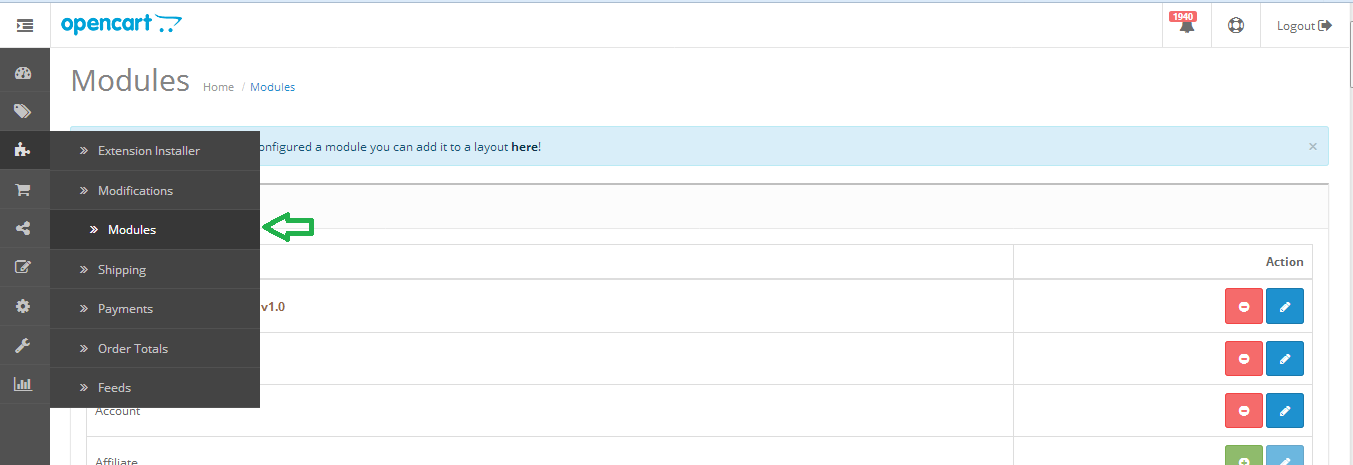
Step 1: Open the modules list from menu as shown below.

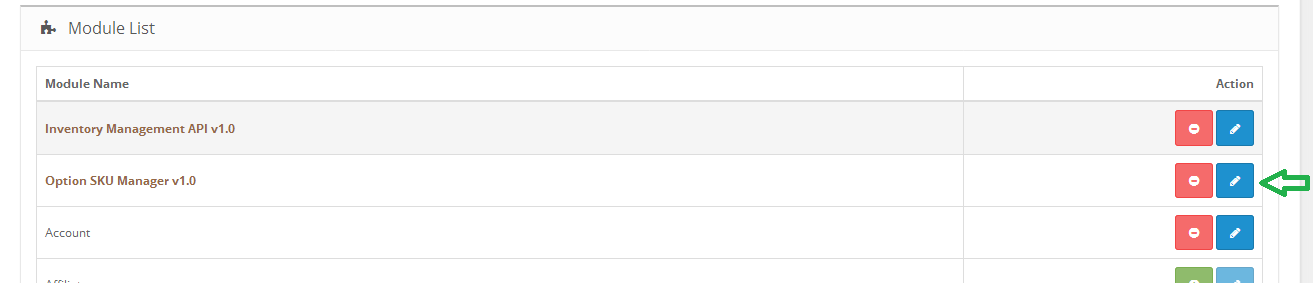
Step 2: Click on install button against “Option SKU Manager ” plugin as shown below. Plugin will be installed successfully and read to use.

How to enable plugin

Step 1: Click on edit button against “Option SKU Manager ” plugin as shown below.

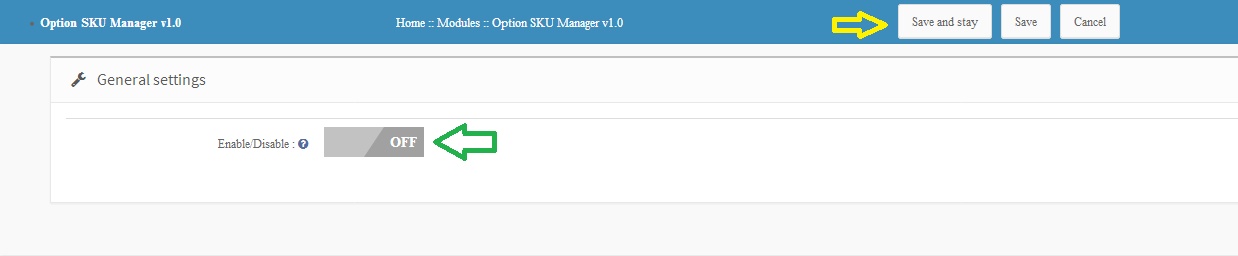
Step 2: Enable the module and click on either “Save and Stay” or “Save” button. Module will be successfully enabled.

How to assign unique SKU to variations

Once you have installed and enabled the module, you can assign unique SKU to each product variations. Follow the steps below to assign unique SKU.

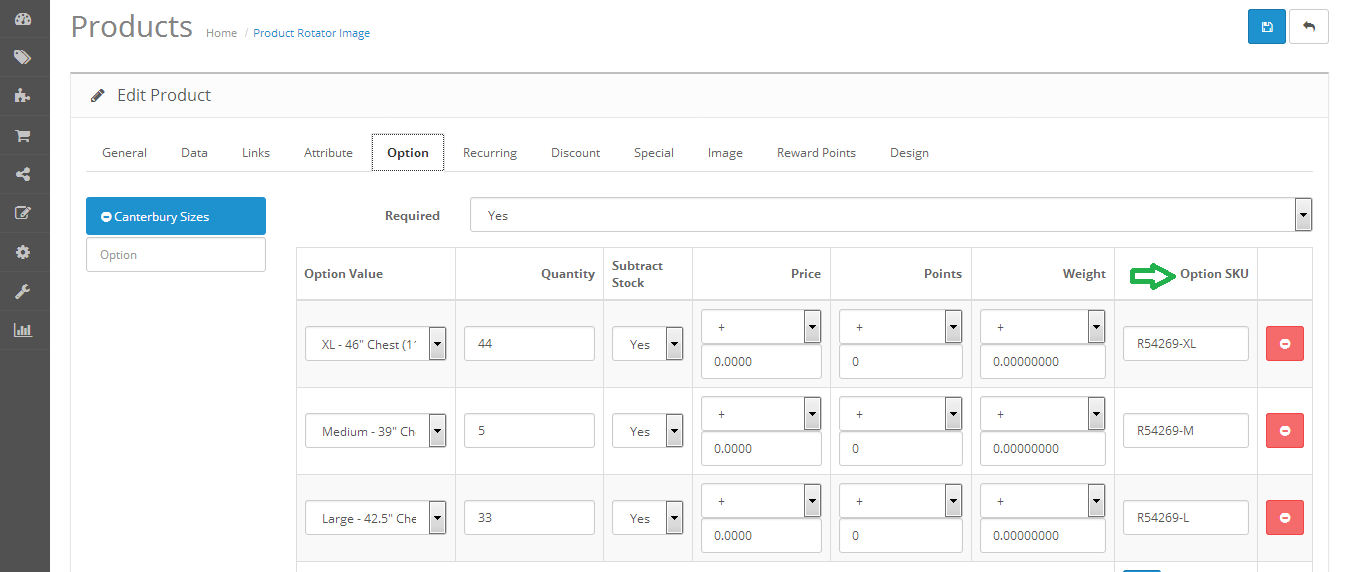
Step 1: Edit any product and click on options tab. Enter unique SKU for each variations and save the product.


How we eliminated 3 crucial design drawbacks of a One-Page Checkout in our extension?

Updated on 31-Jan-2018 

One page checkout has been in the debate for a very long time now. The whole idea of simplified checkout revolves around the optimizing the shopping experience of the store visitor. The shopping site will lead to conversions only when the customers are able to complete their transaction effortlessly.

How can one page checkout optimize your site?

The online shoppers prefer to make purchases only if the web store offers easy to approach and with minimal efforts. Here are some of the ways in which the this feature can optimize the shopping site and enhance the user experience.

  • Most of the e-marketers advocate the incorporation of a single-page checkout as it is an easier approach for the customers to complete their transactions. The online shoppers prefer going with the idea of single page checkout as it reduces the time consumed in reloading the web pages.
  • The idea of using super page checkout is more convincing than the traditional idea where the customers have to be jumped from page to page filling out all the details. The e-sellers can help the customer complete their transaction with minimal effort. Even though the number of fields remains almost the same, the shoppers can view the length of the form left to be filled. This provides them a psychological motivation to complete the transaction.

There are dozens of articles on the topics like “Should you choose a one-page checkout?” “Pros and Cons of One Page Checkout” and so one. Most of these articles effectively address the drawbacks, but it seems like we have been promoting these drawbacks like they are there forever and cannot be taken down anyhow.

Let’s face the truth, every new introduction has some cons for sure. Gradually, with the development and research, these cons fade away for sure.

In this blog, I am going to address 3 such cons of a one-page checkout which we eliminated from our Magento one page checkout extension and also the PrestaShop One page checkout module. Most of these cons were never there in our checkout extension, as we took care of them while in the development and testing phase itself.

One page checkout fixed drawbacks

1. So much of details on a single page? It will be congested

Most of the checkout pages, when introduced in the past, had this problem. It was really a massive task to adjust everything from a multi-page checkout on a single page.

The most problematic challenge was to fit all those checkout elements on a single page and it should provide a full view of the whole checkout page as well. Moreover, all the checkout elements like login, delivery address form, billing address form, payment options, shipping options, and cart review should not overlap with each other, and neither they should overlap on themselves.  A lot of HTML, CSS, JavaScript, and Ajax were needed to be handled to keep the design all fine with the default as well as the third party Magento themes. But we intended to keep them as lesser as possible for faster page loading.

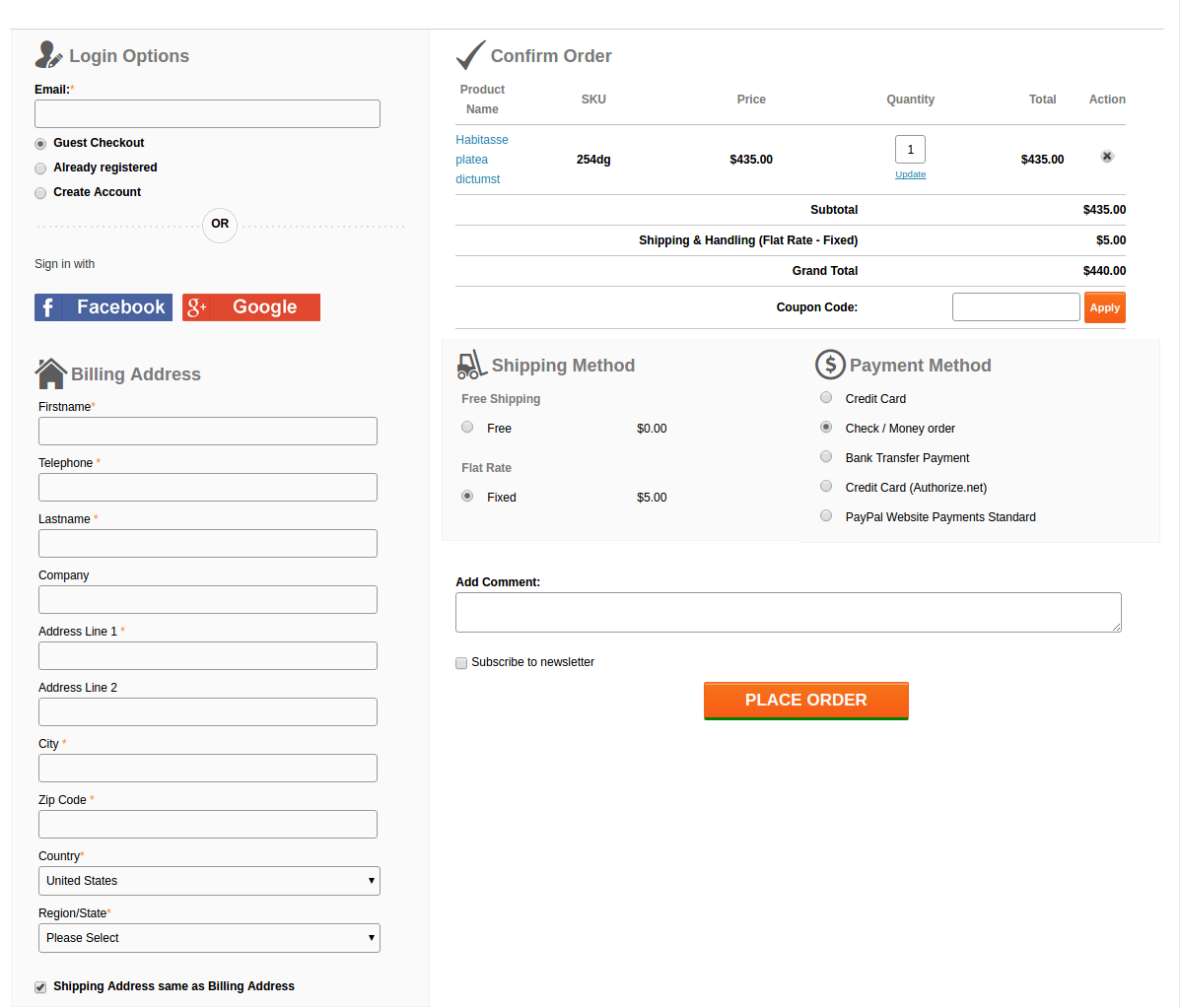
This is what we came up with:

A lot of HTML, CSS, JS, and Ajax were tweaked by our designers to fit all the elements neatly and clearly on a single page and also to keep the page loading time optimal. Moreover, thanks to our designers, after all these, there was sufficient space left to add the Social login option using Facebook and Google+ on our checkout page.

2. The form on the page are congested with no white-spaces and proper label usage

While designing the forms, the main aspects that we were looking for were:

  • Keeping the forms compact
  • All the necessary fields should be there
  • Fields should have proper white-spaces
  • Labels should not confuse the users
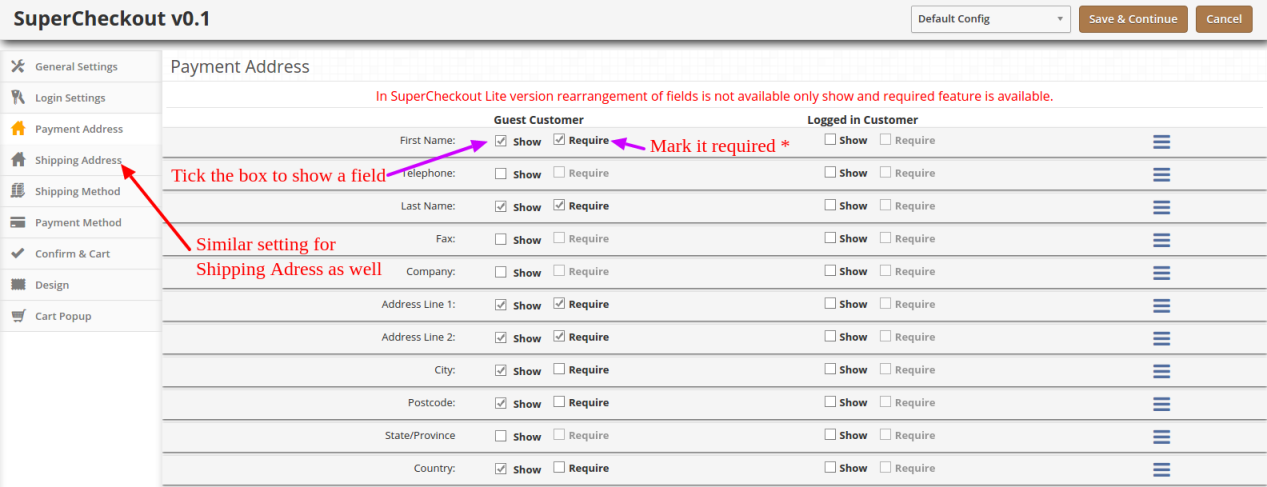
  • Admin should be able to choose which form field he wants to show on the page to customers.

Labels

Labels were coming out as a major concern here. If we would keep the labels by the side of the respective fields, the horizontal length of the form would give a very less space for the other sections on the page.

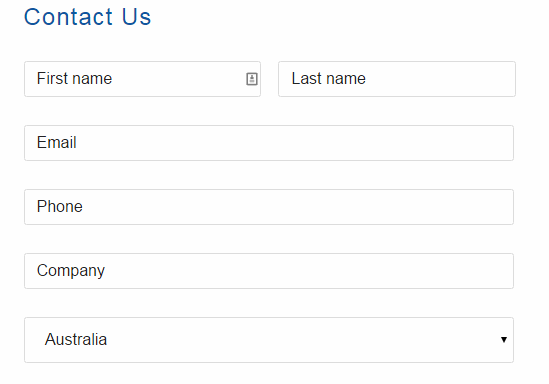
We also thought about a form design where we would skip the labels and use Placeholders in place of them. Something like this:

But, there was a problem in that. For considerably long forms like Billing and Address forms, if customer once filled the detail, and the later stage if he would want to re-check them, he would get confused about what actually are these details. Since the placeholder vanishes away as you type in, and there is no label as well, there always remains a confusion if my details are right or wrong.

We didn’t want your customers to get into such confusion and forget the main goal of making a purchase, that’s why we drop the idea. Otherwise, it could have saved a lot of space as well.

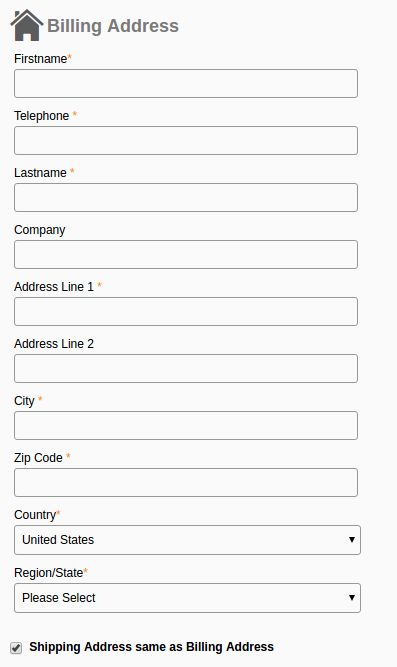
Finally, we decided to not to compromise with the user experience anyhow and we adopted the label placement above the fields as shown in this image:

It saved the horizontal space that we needed for other elements and also helped in one another feature which has been discussed below.

The necessary fields

After dealing with the label placement, the last thing in the forms that gave us a nightmare was to include every necessary field in the form. Problem is, the term necessary is quite relative here. A form field which is necessary for one store owner might be of no use to the other.

For example, the VAT number, and Company Name is a necessary field of a store owner who has a B2B selling business. All of your European business clients would also need this field for making the purchases on your store. On the other hand, a store owner who directly sells to the individual consumers would have no use of the fields like VAT Number and Company Name.

How we handled it?

It was a time to open our checkout extension a bit and give the store owners some easy yet crucial development access. We add a feature in our module, using which the admin can easily enable, disable, add, and delete a field from the checkout form. That too, without editing the code. All this can be done from the backend itself.

So, if any of the fields is not usable for a store owner, he can simply hide it with a simple click and save. No need to go through the complex Magento or PrestaShop codes to do this now.

3. Frequent page reload on cart update

Those multi-page checkouts have a dedicated page for editing the shopping carts. It was a challenge for us to include the shopping cart on the checkout page. Customers would frequently update the cart by increasing or decreasing the product counts, removing a product from the cart and so one.

All these requests required a page reload to update all the checkout details and information according to the latest cart status. If a product has been removed from the cart, we needed to update the total cost, cart product quantity, shipping methods and so on with it.

It would have become so irritating for the customers if the checkout page would reload every now and then. This challenge is faced by every one-page checkout development. However, we managed to fix it with the Ajax based shopping cart and form update request.

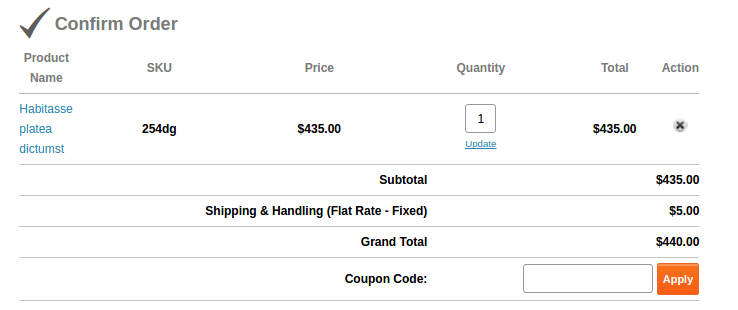
Now, with Ajax shopping cart and updates, if a customer changes anything in the cart, all the dependent details would get automatically updated without reloading the whole checkout page. Even the customer can apply a coupon code to the cart and page would validate the coupon without being reloaded.

This is how we solved these issues in our checkout extension. You can have a free demo to experience all these features of the extension. Free Demo one page checkout Magento and PrestaShop and OpenCart.

This functionality can be added to a Prestashop site with the help of Prestashop one page super checkout addon. The same extensions are available for Magento, Opencart and other eCommerce platforms as well. Whether you go for the Prestashop addon, Magento extension or OpenCart plugin, it enables the customers to complete their transaction and make the product purchase on the same page. It is one of the best features for reducing the exit rate at the checkout page. The customers are annoyed if they are redirected to lengthy checkout process in order to complete the purchasing. Thus, one-page checkout makes sure that the customers can complete the purchase by filing up all the necessary details in one single page and provides the customers with an easy approach to complete the purchase.

You Might Also Like:

OpenCart Mailigen Integrator – User Manual

Opencart Mailigen Integrator

Opencart Mailigen Integrator is an open-cart plug-in that allows you to automatically synchronize email addresses of customers of your store with your Mailigen account. This plugin will synchronize the emails of users even if they opt out of subscribing to the newsletter. Opencart Mailigen Integrator will provide multiple settings to store owners like synchronizing the customer email as soon as the user enters it in an email field. Opencart Mailigen Integrator can also be configured to synchronize emails from third party email fields on the store.

User Manual

This User Manual will guide you through the Admin Module/Store Front settings and various features of the this Opencart Mailigen Integrator.

Admin Panel

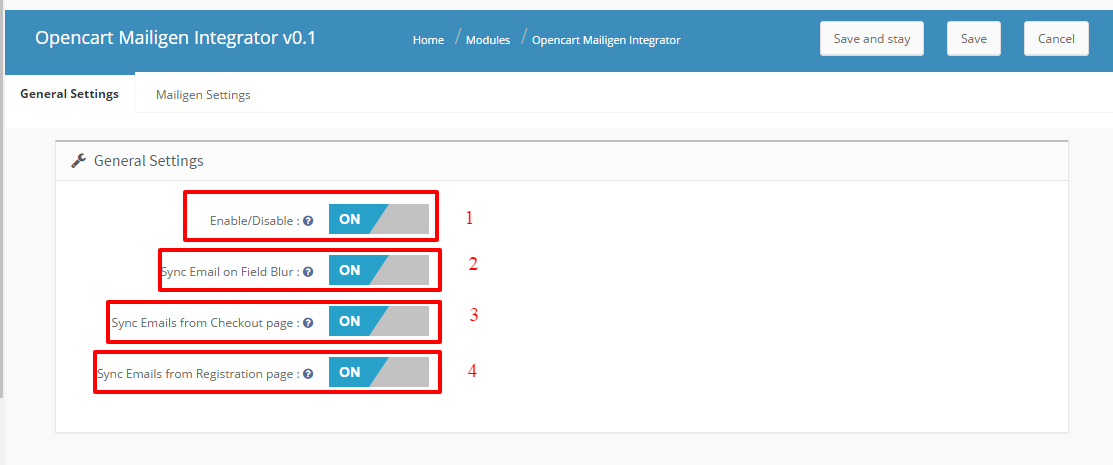
The admin panel have 2 tabs for configuring this plugin, as listed below:

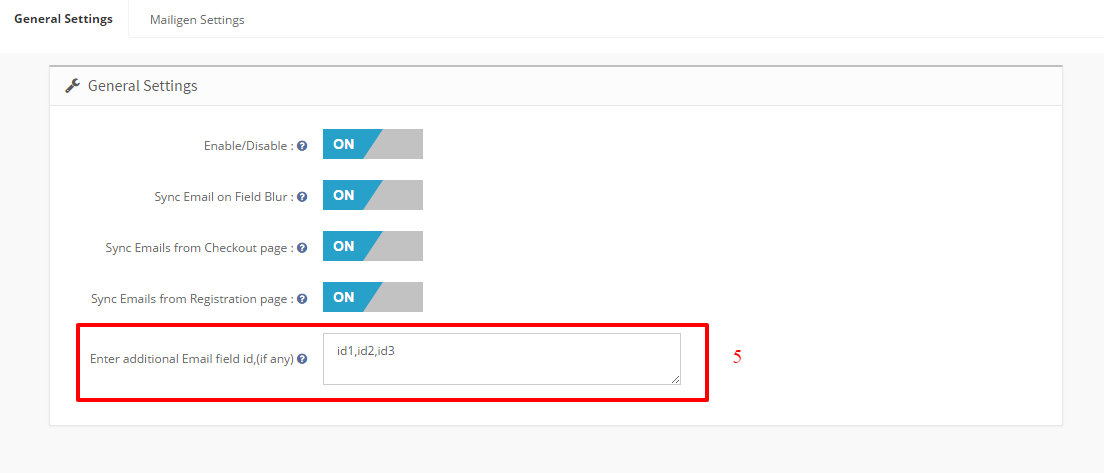
  • General Settings
  • Mailigen Settings

General Settings

General Settings tab have following options:

  • Enable/Disable : In this General setting’s tab of Admin panel , Admin will have the option to Enable/ Disable the plugin. This is the global enable switch. On switching this on, the entire module is switched on and similarly switched off on turning it off.


  • Synchronize Email on Blur From Input Field : This option when enabled , module will synchronize the email id on the javascript blur event of email field irrespective of the fact if the user have submitted the form or an error occurred in form submission.
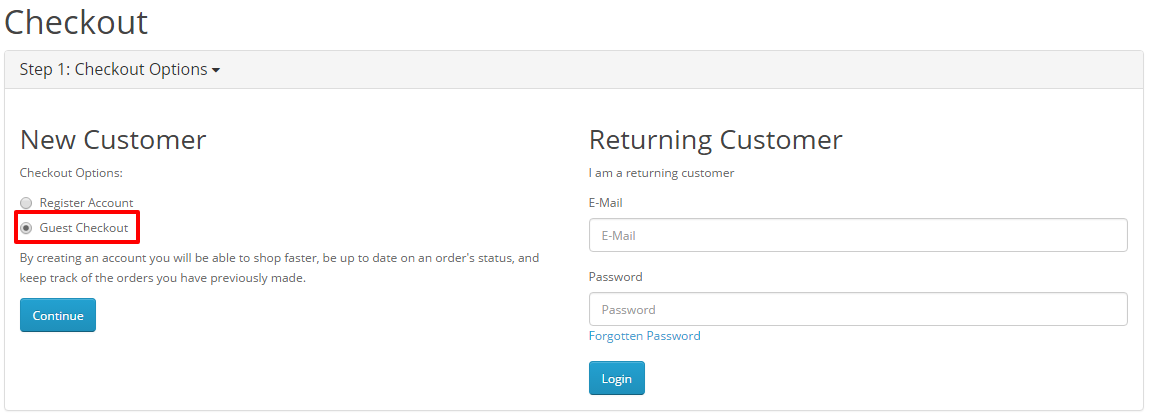
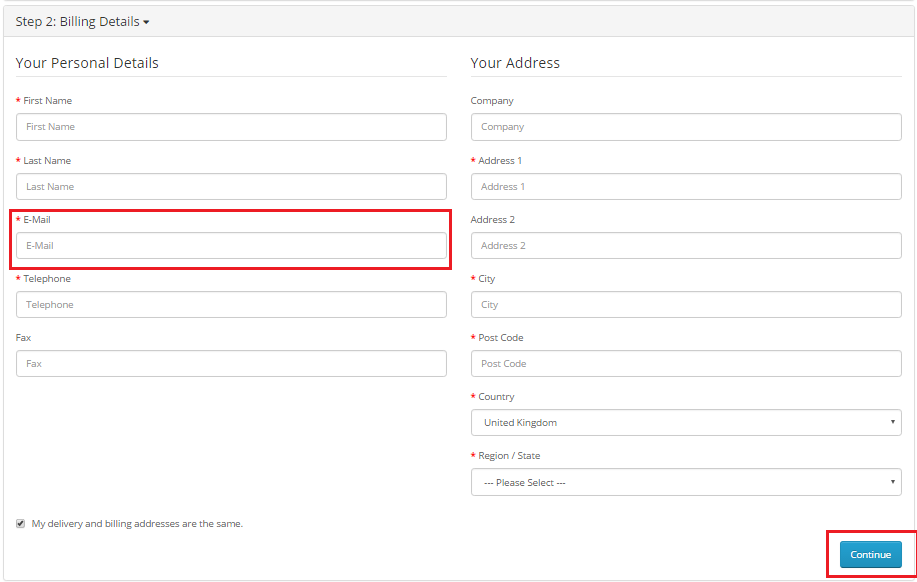
  • Synchronize Email from Checkout page : This option when enabled , module will synchronize the email field values from the checkout page when user fills ‘billing Details’ and click ‘Continue’. Email id will be synchronized even if customers choose not to subscribe to the newsletter.
  • Synchronize Email from Registration page : This option when enabled , module will synchronize the email field values from the Registration page. Email id will be synchronized even if customers choose not to subscribe to the newsletter
  • Third-party Selectors : This option features a text area that will be hidden and for developer purpose only. This input will be used to synchronize emails from the fields with the given selectors. This option is to synchronize emails from the non-default email fields. This text area will be used to collect comma-separated selectors of the email fields that the user wants to synchronize emails from. The purpose of this field is to enable admin to make module compatible with other newsletter forms which are coming because of theme or third party module.

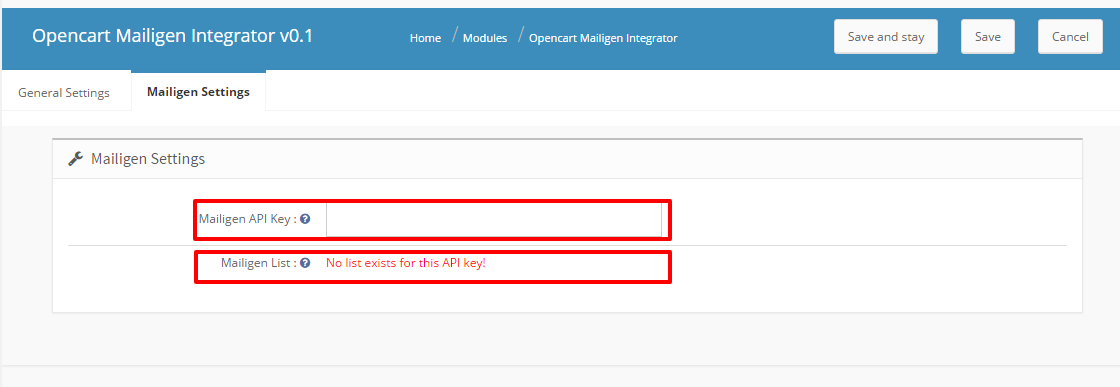
Mailigen Settings

The Mailigen Settings tab will  provide users the interface to provide their Mailigen account credentials so that API connection can be made.

  1. Mailigen API Key : Mailigen API key is the key that the user created on his Mailigen account at www.mailigen.com. This API key will be used to connect to the Mailigen API.
  2. Mailigen Lists : Mailigen lists are those lists that the user has created in his Mailigen account at www.mailigen.com . Mailigen Lists will be available only when a valid Mailigen API key  is provided.

NOTE : If the Mailigen Setting fields > Mailigen API key field is empty then no lists will be shown , but an error message will be shown instead saying ‘No lists available for these credentials’.

Front End

Newsletter Subscription

Whether the customer opts for the newsletter subscription or he do not , In both the cases customer is automatically added to the lists configured in admin panel when clicked on continue.

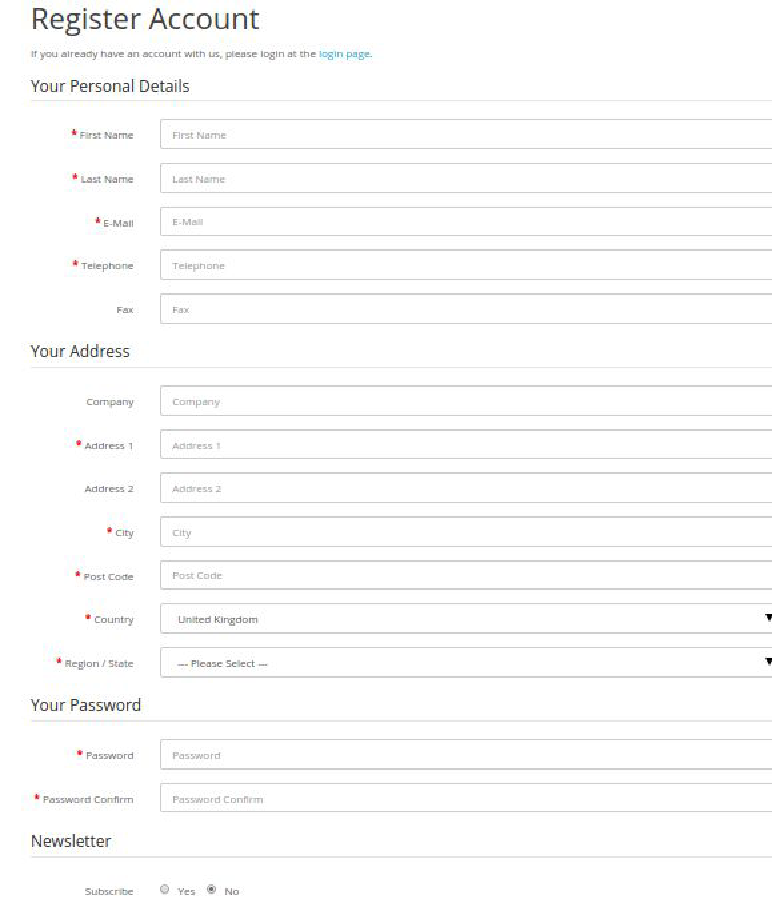
Registration Page

if the ‘Add module on  Registration Page’ setting is enabled in Admin panel, Then customer will also be added to the configured lists on registration page whether or not he/she chooses the option to subscribe to newsletter.

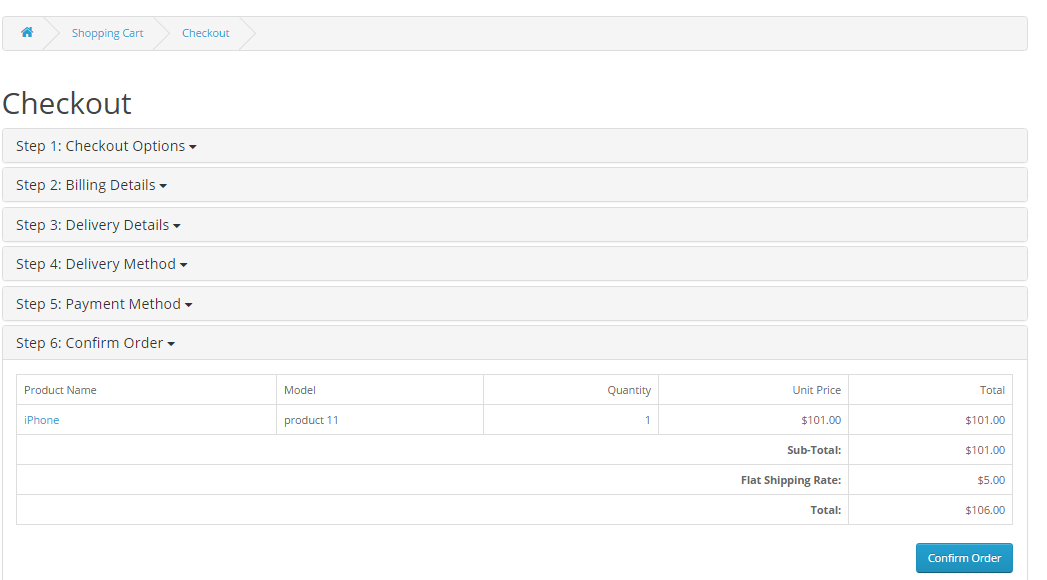
Checkout Page

If the ‘Sync Email from checkout page’ is enabled in admin panel,  then on the Checkout page , customer’s email address will be synchronized to the configuration lists , neglecting the fact if the user is logged on in or a guest user.

For logged in customers :

For the logged in customers , If the ‘Sync from Checkout page’ is enabled in admin panel, then on the checkout page, Customer’s email address will be synchronized to the mailigen  configuration lists as soon as the customer ‘Confirm’ the ‘ Billing Details ‘.

For Guest Users:

For Guest users (users that are not logged in ) , if the ‘Sync Email from checkout page’ and ‘Sync Email on Field Blur’ is enabled in admin panel, then on the Checkout page , customer’s email address will be synchronized to the mailigen configuration lists as soon as the user fills his email address in email field of ‘ Billing Details ‘.

If the ‘Sync Email on Field Blur ‘ is disabled in admin panel, then the entered email will be sent to the configuration lists when the user click on ‘continue’ at the ‘Billing Details’ section of the checkout page.

For Users Registering on Checkout Page

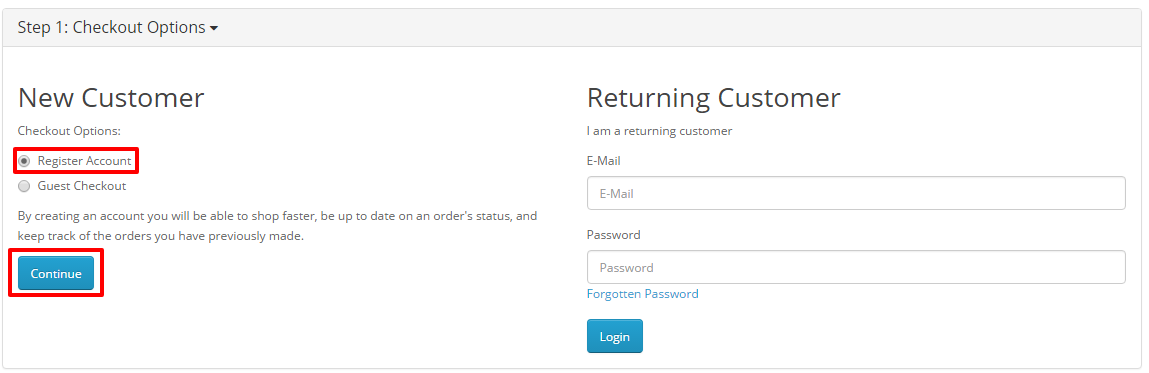
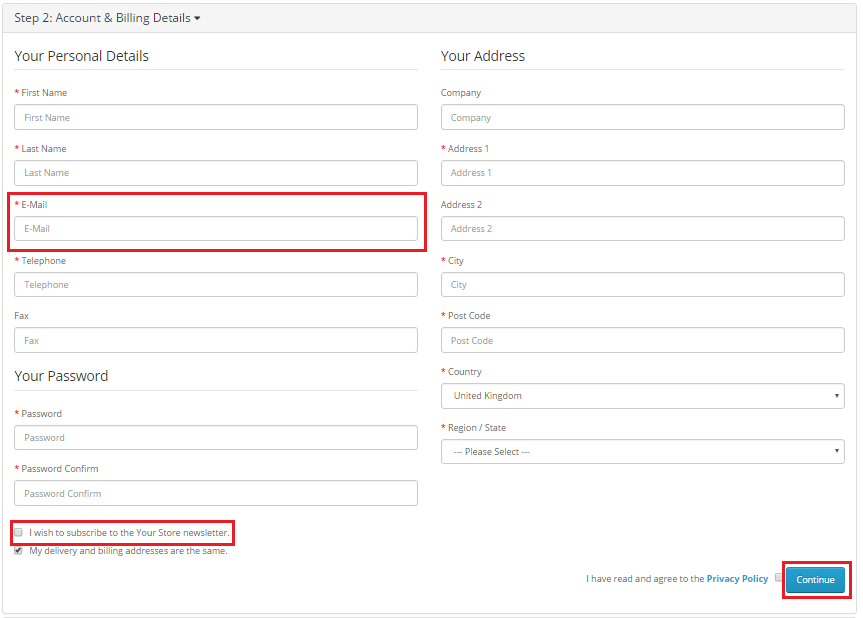
For Guest users (users that are not logged in ) and who want to register , if the ‘Sync Email from checkout page’ and ‘Sync Email on Field Blur’ is enabled in admin panel,  then on the Checkout page , customer’s email address will be synchronized to the mailigen configuration lists as soon as the user fills his email address in email field of ‘ Account & Billing Details ‘.

If the ‘Sync Email on Field Blur ‘ is disabled in admin panel, then the entered email will be sent to the configuration lists when the user click on ‘ Register ‘ at the ‘Account & Billing Details’ section of the checkout page. The email will be sent to the configuration list of mailigen account irrespective of the choices the user made about the subscription to the newsletter.

Installation Manual

  • Download the Opencart Mailigen Integrator package.
  • Unzip the package, and open the /upload folder  and upload the contents of upload folder  via FTP manager (like Filezilla or WinSCP – download here: https://filezilla-project.org/). Folder structure for opencart Mailigen Integrator plugin is shown in the image below:
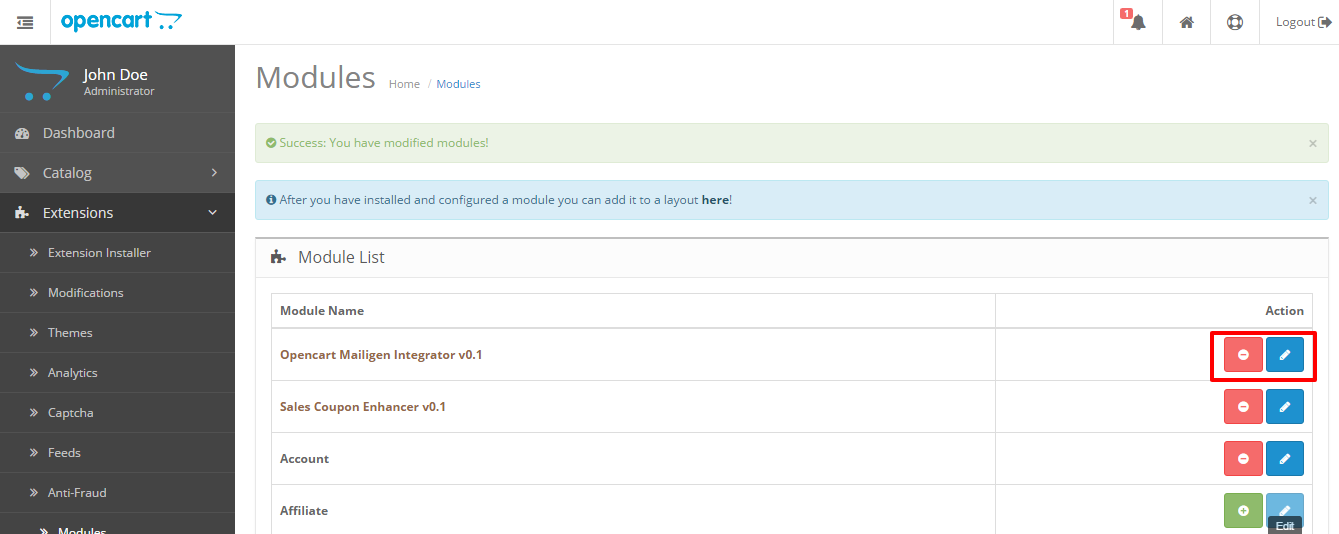
  • You will be able find the Opencart Mailigen Integrator module that is ready to be installed in the “Modules List” in your Opencart store as shown below.

  • Click on the Install link to install. Once the module is installed properly the ‘’ link will be converted to ” and the ” button will be enabled.

Related Stories:

Quais são os méritos e deméritos do uso de uma plataforma OpenCart?

OpenCart é uma das plataformas de comércio eletrônico que ganhou imensa popularidade e atenção, o que explica seu futuro brilhante nos próximos anos. Embora, lojas de comércio eletrônico têm inúmeras opções para escolher, mas fazer a escolha certa irá definir o seu negócio on-line na direção certa. Você pode não considerá-lo como uma parte importante em um cenário de negócios de comércio eletrônico, mas uma decisão errada em relação à plataforma de comércio eletrônico pode causar uma grave injustiça à sua loja em termos de engajamento do cliente, taxas de conversão e vendas de produtos.

Se você não conseguir chegar a uma conclusão adequada em relação à seleção da plataforma OpenCart para sites de comércio eletrônico, será necessário analisar os prós e contras dessa plataforma de comércio eletrônico amplamente utilizada. Aqui estão alguns dos méritos e deméritos desta plataforma OpenCart que é explicada da seguinte forma:

Méritos do OpenCart

A plataforma é de código aberto e gratuita

A plataforma OpenCart é uma plataforma de código aberto, o que significa que pode ser facilmente modificada e personalizada de acordo com os requisitos do seu negócio. Os donos de lojas podem aproveitar os maravilhosos recursos e funcionalidades desta plataforma de comércio eletrônico sem gastar um único centavo, pois está disponível gratuitamente.

Consiste em uma enorme comunidade ativa de desenvolvedores OpenCart

Ter um problema em uma plataforma de comércio eletrônico é uma rotina simples, mas muitas vezes se torna um desafio se esse problema continuar sem solução. Graças à enorme comunidade experiente de desenvolvedores e programadores OpenCart que podem fornecer suporte técnico aos usuários do OpenCart ininterruptamente.

Não Técnico

Loja

A plataforma tem uma vasta biblioteca de temas e módulos

Esta plataforma de e-commerce tem uma vasta gama de temas e módulos OpenCart que têm o potencial de melhorar o desempenho de qualquer loja online. Além dos módulos embutidos, os usuários também podem aproveitar a incrível terceira parte Módulos OpenCart da loja Knowband, que é embalado com vários recursos e funcionalidades.

Gerenciamento de várias lojas em um único painel

A compatibilidade entre várias lojas é uma das maiores vantagens do OpenCart. Ter e gerenciar várias lojas pode ser muito complicado e demorado. No entanto, há momentos em que ter mais de uma loja se torna inevitável. O OpenCart permite que você construa várias lojas de comércio eletrônico e gerencie-as a partir de uma única interface. Você pode avaliar seus pedidos atuais, rastrear seus clientes, vendas, etc. Tudo isso acontece na mesma seção do site.

Excelente para iniciantes, pequenas e médias empresas de eCommerce

A plataforma OpenCart é um pacote de comércio eletrônico repleto de recursos que oferece serviços fáceis de gerenciamento de lojas para seus clientes de comércio eletrônico. Se você é um iniciante em e-commerce, tem pequenas e médias lojas de comércio eletrônico, esta plataforma OpenCart é definitivamente a escolha certa para o seu negócio online.

Deméritos do uso do OpenCart

Fazendo personalização e alterações no OpenCart é difícil

Na verdade, é muito difícil fazer as alterações desejadas em uma plataforma OpenCart devido à ausência de um sistema de eventos efetivo. De fato, os eventos acabam de ser incorporados ao Versão OpenCart 2.0 e estão apenas na fase de desenvolvimento inicial. O vQmod é outra alternativa para executar as mudanças necessárias em uma plataforma OpenCart, mas geralmente cria um problema nos arquivos principais. Essa tarefa crítica precisa apenas da assistência de um especialista efetivo do OpenCart.

Não é ideal para suportar clientes multilíngües

A plataforma OpenCart não se destina a clientes multilingues, devido ao problema que é causado nas interpretações. Com esse recurso, torna-se extremamente difícil segmentar clientes multilíngues. Se você está tendo uma loja de comércio eletrônico que tem clientes em todo o mundo com diferentes idiomas, você precisa descobrir qualquer outra alternativa além desta plataforma OpenCart.

Não otimizado para SEO

OpenCart tem milhas para ir quando se trata de SEO. Sendo este um dos aspectos mais importantes para o sucesso da loja de comércio eletrônico, pode levar a algum impacto negativo a longo prazo. Como por especialistas, há

Devido a todos os méritos discutidos acima, não será errado afirmar que o OpenCart continua sendo uma das soluções de e-commerce mais populares.

Extensões OpenCart que podem impulsionar a funcionalidade da sua loja

Dê uma olhada em alguns desses plug-ins escolhidos a dedo que melhorarão a interface do usuário e o UX do seu site OpenCart.

Spin e Vitória do OpenCart

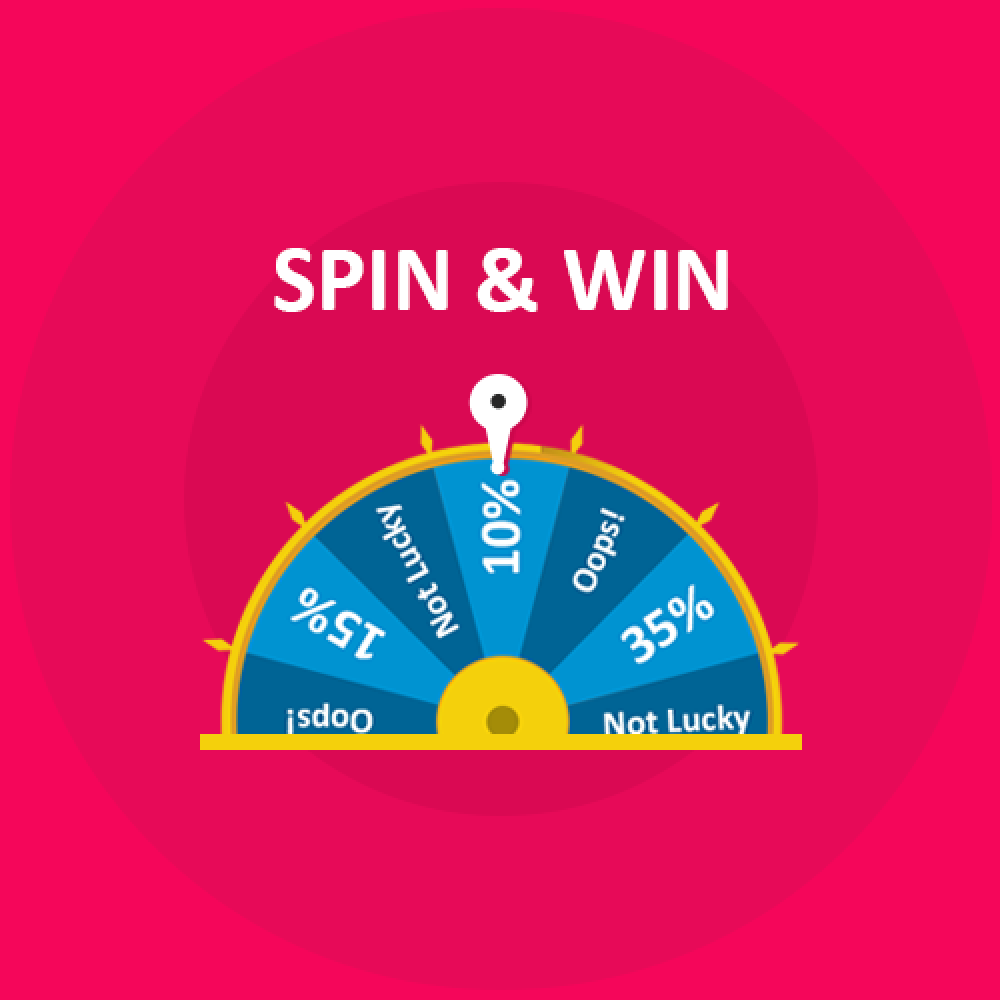
Com tantas opções on-line para escolher, você torna a interface do seu site atraente o suficiente para manter seus clientes viciados. Extensão OpenCart Spin and Win?incorporates a gamified spin the wheel interface in the front-end of the site. This roulette-type popup can be placed anywhere on the site and can even be used as an exit popup. The alluring approach is one of the ways to curb the exit-intent of the customers and compel them to spend some more time on your site. So, if you are looking to earn some credits for the look and feel of your site straight-away, this is the smartest solution for you.

OpenCart Social Loginizer


A partir do momento em que os clientes entram no site até o momento do check-out, a experiência de compra tem que ser perfeita. OpenCart social O plugin do loginizer é uma dessas opções que pode incorporar as opções de login social em seu site. Os compradores on-line não são fãs de longos processos de registro. As opções de login rápido tornam a inscrição uma questão de momento.

OpenCart Search More extension


Passando para as páginas das categorias, tornar a navegação no site mais fácil para os visitantes da loja é outro fator importante. OpenCart Search More plugin torna a navegação mais fácil. Os clientes podem visualizar os produtos sugeridos logo após digitarem várias letras na caixa de pesquisa. Com navegação fácil, você pode aumentar sem esforço o engajamento do usuário e o tempo da sessão.

Vídeo do produto OpenCart


As páginas de produtos são onde o lance de vendas real é oferecido. Por isso, deve ser prontamente projetado para oferecer a melhor informação possível ao cliente. Plugin de vídeo do produto OpenCart permite que o administrador exiba o vídeo do produto e outros vídeos relacionados na página da web sem fazer alterações no código do site. Forneça a sensação real do produto aos clientes e aumente as chances de conversões.

OpenCart One Click Checkout (Compre Agora)


OpenCart One Click Checkout (Compre Agora) O plugin adiciona um botão "Comprar agora" na página de produtos. Os clientes podem fazer o checkout com um único produto sem remover os produtos salvos no carrinho clicando neste botão. O checkout livre de problemas desencadeia a decisão de compra instantânea dos clientes.

Incentivo à Revisão do OpenCart


As revisões e classificações das páginas do produto são outro fator importante para motivar os clientes a fazer o pedido. Com a ajuda de Extensão de incentivo do OpenCart Review, o administrador da loja pode oferecer incentivos aos clientes em troca de suas resenhas. Essa é uma das maneiras de aumentar o número de resenhas na página do produto. Melhore a classificação dos produtos e motive cada vez mais visitantes à página de checkout.

Extensão de finalização de uma página do OpenCart


Um processo de checkout complicado pode aumentar a taxa de abandono do seu site. Simplifique o processo de checkout de seu site com Plugin de checkout de uma página do OpenCart. O checkout de página única incorporada pela extensão também oferece opções de login social e login de convidados. Assim, esta é uma das formas de otimizar o funil de conversão do seu site.

Alerta de preço do OpenCart


Um produto de alto preço não deve significar um cliente perdido. Motivar os visitantes da loja a retornar ao site que abandonou o carrinho devido ao custo do produto com Extensão de Alerta de Preço do OpenCart. A extensão OpenCart permite que os visitantes da loja assinem um alerta sempre que houver uma alteração no produto. O administrador da loja pode enviar lembretes sobre a alteração no preço do produto. Com a abordagem automatizada, você pode motivar os clientes a retornar e fazer o pedido do produto que eles deixaram.

OpenCart Mobile App Builder


Atualmente, os clientes preferem usar aplicativos móveis nos sites de compras. É hora de os donos de lojas darem um passo à frente e ficarem a par das tendências e avanços tecnológicos. Extensões do OpenCart Android / iOS Mobile App Builder pode ajudá-lo a criar uma loja móvel totalmente funcional com apenas alguns cliques de botão. Os donos de lojas OpenCart agora podem ir para dispositivos móveis e tocar em uma base de audiência maior com grande facilidade.

Plug-in do mercado de vários fornecedores OpenCart

Se você já possui uma loja de e-commerce baseada no OpenCart, pode até ter um mercado como o eBay, o Etsy e outros. Não há alterações de código necessárias para isso. Extensão do mercado do OpenCart pode ativar o recurso de vários vendedores em seu site sem fazer alterações no código básico do site. Juntamente com a atualização do site em um mercado, o módulo de mercado de vários vendedores do OpenCart torna o gerenciamento ainda mais fácil. Os vendedores de terceiros e seus produtos, bem como as vendas, podem ser rastreados e gerenciados a partir de uma única interface. Não apenas isso, até mesmo os fornecedores têm uma opção fácil de gerenciar sua loja no próprio painel. O perfil, o produto e o gerenciamento de vendas são feitos a partir de uma única interface. Em troca do espaço alugado, o administrador da loja pode cobrar comissão dos vendedores. Esta comissão é fixada com um clique no botão. O valor fixo ou percentual é automaticamente deduzido da receita dos fornecedores. É importante ter uma visão clara de todas as possibilidades e limitações de uma plataforma de comércio eletrônico, para que você não precise se arrepender depois. Não faça estimativas loucas ao selecionar uma plataforma de e-commerce para sua loja virtual, mas analise essa plataforma de e-commerce para a decisão certa. Entenda o atual cenário de negócios de comércio eletrônico e aproveite essa plataforma OpenCart sem pensar duas vezes.

Isso também lhe interessaria: