Why Marketplace is in trend?

Właściciel sklepu musi poszukać wszystkich dostępnych możliwości i korzyści oferowanych przez nich przed wykonaniem jakiegokolwiek ruchu. Administrator nie jest łatwy do podjęcia decyzji, gdzie wymienić produkty. Rynek jest główną opcją, jeśli chodzi o handel online. Od dnia rynek Pojawiła się koncepcja, która rozpowszechniła szum wśród właścicieli eCommerce. Wiele korzyści, którym towarzyszy Marketplace, zachęcają właścicieli sklepów do przejścia na Marketplace z jednego sklepu dostawcy. Nie możemy ignorować wzrostu branży eCommerce, której świadkiem jest w ostatnich latach. Etsy, eBay itp. są dobrze znanym przykładem udanego rynku. Online Marketplace pomaga dostawcy w zwiększeniu ruchu, zarabianiu na różnorodności i wzniesieniu biznesu na nowy poziom.Model rynku jest obecnie przyjmowany przez wiele krajów. Główne funkcje realizowane przez Marketplace to to, że spełnia wymagania wszystkich użytkowników i zwiększa liczbę docelowych odbiorców.

Jakie są komponenty modelu Marketplace?

Elementy struktury Marketplace, które odgrywają ważną rolę w sukcesie Twojej firmy, to:

1. Włączenie natury

Model rynkowy umożliwia wielu sprzedawcom łatwe rejestrowanie ich sklepu. Sprzedawcy muszą przestrzegać prostej procedury wystawiania swoich produktów na Marketplace. Wielu dostawców prosi o swoją stronę profilu w Marketplace. Sprzedawcy mogą dodawać szczegóły swojego profilu i zarządzać swoimi produktami za pomocą tego interfejsu strony profilu.

2. Opinie i recenzje

W Marketplace klienci muszą skontaktować się bezpośrednio ze sprzedawcami, aby uzyskać wszelkie opinie i sugestie. Rynek wielu dostawców pozwala klientom przesyłać cenne opinie za pomocą ich konta lub identyfikatora e-mail.

3. Funkcja łatwego wyszukiwania

W pełni funkcjonalny rynek pozwala klientom wyszukiwać pożądane produkty w sposób bezproblemowy. Usprawnij procedurę wyszukiwania, zwiększając szanse na konwersję.

4. Zarządzanie cenami

Rynek obejmuje dużą liczbę sprzedawców, którzy sprzedają swoje produkty. Wyższa jest szansa, że ​​dany produkt będzie dostępny w innej cenie na Rynku. Skuteczny rynek pomoże sprzedawcom w utrzymaniu ceny produktu wraz z funkcjami. Ponadto administrator rynku generuje wysoką prowizję poprzez sprzedaż towarów od zewnętrznych dostawców.

5. Idealny

The

W jaki sposób Rynek wielu dostawców może być korzystny dla administratora?

Oto niektóre z czynników, które z pewnością pomogą ci zrozumieć znaczenie Rynek wielu dostawców Platformy w szczegółach i pomogą w wyborze najlepszego rozwiązania dla Twojej firmy:

1. Rozszerzenie w każdym aspekcie:

Dwa ważne systemy wsparcia Marketplace to sprzedający i klienci. Giełda zalewa klientów dzięki produktom reklamowym wielu sprzedawców detalicznych na tej samej platformie. Firma Marketplace zwiększa zasięg docelowych odbiorców i zwiększa sprzedaż. Większy wybór towarów oferowanych na giełdzie zwiększa prawdopodobieństwo, że odwiedzający zamienią się w lojalnych klientów. To naprawdę ważne, aby przyciągnąć użytkowników do swojego produktu i przekonwertować ich na potencjalnych nabywców. Sprzedaż za pośrednictwem witryny zapewnia swobodę wyświetlania produktów zgodnie z własnym wyborem, ale zasięg produktu ogranicza się tylko do ograniczonych klientów.

2. Penetracja rynku:
Marketplace pomaga zwiększyć zasięg sklepu i zarabiać w różnych regionach, zapewniając wczesną wysyłkę do klientów. Sprzedawcy różnych lokalizacji integrują się, by sprzedawać swoje produkty lub usługi w Marketplace. Usługi mogą być świadczone klientom w możliwie najkrótszym czasie, ponieważ sprzedający mogą z łatwością zaspokoić swoje wcześniejsze potrzeby związane z przesyłką.

3. Zarządzanie kosztami:

Głównymi korzyściami, jakie oferuje administratorowi poprzez budowanie swojego Rynku, jest to, że Rynek odbiera odpowiedzialność za zarządzanie zapasami, aktualizację produktu i stopniowanie SKU. Koszty potrzebne do zarządzania zapasami zmniejszają się, nawet nie zakłócając działalności.

4. Wydajność:

W przeciwieństwie do pojedynczej jednostki biznesowej, rynek obejmuje podział obowiązków i pracy. Marketplace zapewnia płynne i szybkie usługi w efektywny sposób. Dzięki Multi sprzedawcy Marketplace, usługi pakowania i wysyłki mogą być oferowane klientom w szybki sposób.

5. Satysfakcja konsumenta:

Marketplace oferuje klientom szeroką gamę opcji do wyboru. Główną intencją budowania Rynku jest integracja wielu sprzedawców wraz z ich różnorodnymi usługami pod jednym dachem. Zapewnienie klientom możliwości wyboru szerokiej gamy produktów i zaspokojenia ich potrzeb zwiększa współczynnik konwersji w sklepach.

6. Zwiększenie gospodarki:

Zapewniając takie korzyści, jedyną rzeczą, którą model rynkowy robi w milczeniu, jest jego wkład w gospodarkę. Poprzez sprowadzanie różnych dostawców i wspólne uruchamianie, daje to impuls do bazy ekonomicznej. Zwłaszcza w krajach rozwijających się, gdzie duża część rynku jest przechwytywana przez start-upy, budowa Rynku nie tylko zwiększy sprzedaż, ale zwiększy przychody.

7. Zwiększona retencja klientów:

Rynek oferuje towary i usługi wielu dostawców klientom na tej samej platformie. Marketplace umożliwia administratorowi zidentyfikowanie ich klientów, buduj relacje z nimi i przynosi nowych klientów z podobnymi wyborami i preferencjami. Klienci otrzymują szeroką gamę produktów do wyboru, podczas gdy sprzedający mają dostęp do większego grona odbiorców. Z drugiej strony strona internetowa handlu elektronicznego ma różne korzyści pod względem redukcji kosztów, zadowolenia klientów, zwiększonego współczynnika konwersji i prowizji ze strony sprzedawców.

8. Bez bólu Zarządzanie czystymi zapasami

Teraz

Zobacz, jak działa Marketplace?

?
Wnioski:

Właściciele sklepów zawsze szukają wzrostu i rozwoju swojej działalności. Wzajemne korzyści, zarządzanie kosztami, zwiększony ruch, zwiększone współczynniki konwersji i integracyjny charakter modelu budują sytuację, w której win-win dla administratora. Na rynku dostępne jest różne oprogramowanie, które może bezproblemowo zbudować Twój Rynek. Rozszerzenia do budowania Rynku dla wielu dostawców są dostępne dla PrestaShop, Magento, Magento 2 i OpenCart sklepy. Nie ma wątpliwości, że Marketplace może poprawić wydajność i współczynnik konwersji Twojego sklepu e-commerce. Ale nie czekaj na cud, który przyspieszy rozwój Twojej firmy, zamiast tego przejdź do Marketplace i zostań właścicielem Marketplace, jak Etsy i eBay. Aby uzyskać więcej informacji, skontaktuj się z support@Knowband.com

Powiązane historie:


Why Marketplace is in trend?

O dono da loja precisa procurar todas as possibilidades e benefícios oferecidos por eles antes de fazer qualquer movimento. Não é uma tarefa fácil para o administrador decidir onde listar os produtos. O mercado é as principais opções quando se trata de negociação on-line. Desde o dia, Mercado conceito foi lançado, espalhou um burburinho entre os proprietários do eCommerce. Vários benefícios acompanhados pelo Marketplace consigo mesmo atraem os donos das lojas a mudar para Marketplace de uma única loja de fornecedores. Não podemos ignorar o crescimento que a indústria do comércio eletrônico testemunhou nos últimos anos. A oportunidade de crescimento e sucesso que o modelo do Marketplace pode trazer não pode ser ignorada. Etsy, eBay etc são o exemplo bem conhecido de um mercado de sucesso. O Online Marketplace ajuda um fornecedor a melhorar seu tráfego, ganhar múltiplos benefícios e levar o negócio a novos patamares.Modelo de mercado está sendo adotado por muitos países atualmente. As principais funções executadas pelo Marketplace são que ele atende aos requisitos de todos os usuários e aumentará o alcance do público-alvo.

Quais são os componentes do modelo do Marketplace?

Os componentes da estrutura do Marketplace que desempenham um papel importante no sucesso do seu negócio são:

1. Natureza inclusiva

Um modelo de mercado permite que vários fornecedores registrem facilmente sua loja. Os vendedores precisam seguir um procedimento simples para listar seus produtos no Marketplace. Muitos fornecedores solicitam sua página de perfil no Marketplace. Os vendedores podem adicionar seus detalhes de perfil e gerenciar seus produtos usando essa interface de página de perfil.

2. Feedback e comentários

No Marketplace, os clientes precisam entrar em contato diretamente com os vendedores para obter feedback e sugestões. O mercado de vários fornecedores permite que os clientes enviem seus valiosos comentários usando sua conta ou ID de e-mail.

3. Recurso de pesquisa fácil

Um mercado cheio de recursos permite que os clientes pesquisem os produtos desejados de maneira livre de problemas. Suavize o procedimento de pesquisa mais alto será as chances de conversões.

4. Gestão de Preços

O mercado envolve um grande número de vendedores para vender seus produtos. Maior é a chance de um determinado produto estar disponível a um preço diferente no Marketplace. Assim, um Marketplace eficaz ajudará os vendedores a manter o preço do produto junto com os recursos. Além disso, o administrador do Marketplace estará gerando uma alta quantidade de comissão vendendo as mercadorias de fornecedores terceirizados.

5. Perfeito

o

Como o mercado de múltiplos fornecedores beneficia o administrador?

Aqui estão alguns dos fatores que certamente irão ajudá-lo a entender a importância de Mercado de vários fornecedores plataformas em detalhes e ajudará a decidir a melhor escolha para o seu negócio:

1. Expansão em todos os aspectos:

Dois importantes sistemas de suporte do Marketplace são os vendedores e clientes. O Marketplace inunda os clientes com os serviços de anúncios de itens dos vários varejistas na mesma plataforma. O MarketMark aumenta o alcance do público-alvo e impulsiona as vendas. Mais a escolha de mercadorias oferecidas no mercado melhor será a probabilidade de os visitantes se transformam em clientes fiéis.É realmente importante atrair visitantes para o seu produto e convertê-los em potenciais compradores. A venda por meio de seu website oferece a liberdade de exibir produtos de acordo com sua escolha, mas o alcance de seu produto se limita apenas a clientes limitados.

2. Penetração no mercado:

O Marketplace ajuda você a expandir o alcance de sua loja e ganhar de várias regiões, fornecendo remessa antecipada para os clientes. Vendedores de diferentes locais se integram para vender seus itens ou serviços no Marketplace. Os serviços podem ser fornecidos aos clientes no menor tempo possível, pois os vendedores podem facilmente satisfazer suas necessidades de remessa antecipada.

3. Gestão de Custos:

Os principais benefícios oferecidos ao administrador ao criar o Marketplace são que o Marketplace elimina a responsabilidade do gerenciamento de inventário, atualização do produto e gradação de SKU. As despesas exigidas no gerenciamento dos estoques são reduzidas sem mesmo atrapalhar os negócios.

4. Eficiência:

Ao contrário da unidade de negócios única, o Marketplace envolve a divisão de responsabilidades e mão de obra. O Marketplace oferece um serviço rápido e suave de maneira eficiente. Com o mercado de múltiplos fornecedores, os serviços de embalagem e expedição podem ser oferecidos aos clientes de forma rápida.

5. Satisfação do cliente:

O Marketplace oferece aos clientes uma ampla gama de opções para escolher. A principal intenção por trás da construção do Marketplace é a integração de vários vendedores, juntamente com seus diversos serviços sob o mesmo teto. Proporcionar aos clientes a escolha de selecionar a ampla gama de mercadorias e satisfazer suas necessidades aumenta a taxa de conversão das lojas.

6. Impulsione a economia:

Ao fornecer esses benefícios, a única coisa que o modelo de mercado faz silenciosamente é sua contribuição para a economia. Ao trazer vários fornecedores e começar juntos, ele dá um impulso à base da economia. Especialmente nos países em desenvolvimento, onde uma grande parte do mercado é capturada pelas start-ups, a construção de um Marketplace não só aumentará a venda, mas elevará a receita.

7. Maior retenção de clientes:

O Marketplace oferece produtos e serviços de vários fornecedores para os clientes na mesma plataforma. O Marketplace permite que o administrador identifique clientes, construir relacionamentos com eles e traz novos clientes com escolhas e preferências semelhantes. Os clientes obtêm uma ampla gama de produtos para escolher a forma, enquanto os vendedores têm acesso a uma faixa maior de público. O site de comércio eletrônico, por outro lado, desfruta de vários benefícios em termos de redução de custos, satisfação do cliente, maior taxa de conversão e comissões dos vendedores.

8. Sem dor de gerenciamento de inventário puro

Agora

Veja como funciona o Marketplace?

?

Conclusão:

Os proprietários de lojas estão sempre buscando crescimento e expansão de seus negócios. Os benefícios mútuos, o gerenciamento de custos, o tráfego aprimorado, as taxas de conversão aumentadas e a natureza inclusiva do modelo cria uma situação vantajosa para o administrador. Vários softwares estão disponíveis no mercado que podem construir o seu Marketplace de uma maneira livre de problemas. Extensões para a criação de um mercado de vários fornecedores estão disponíveis para PrestaShop, Magento, Magento 2 e OpenCart lojas. Não há dúvidas de que o Marketplace pode melhorar o desempenho e as taxas de conversão de sua loja de comércio eletrônico. Mas não espere que um milagre aconteça para impulsionar o crescimento do seu negócio, em vez disso mude para o Marketplace e seja o dono de um Marketplace como o Etsy e o eBay. Para mais informações, entre em contato com support@Knowband.com

Histórias relacionadas:


Tips to design beautiful eCommerce Mobile Apps!

E-commerce Mobile Apps and their growth:

Developing your own eCommerce mobile app has its own perks that too on a very high scale. We all are into online shopping nowadays. No one wants to struggle with going market, search products and then come back holding a bunch of bags. Instead, we all go for the online product purchase for our own comfort. Actually, the reason behind this is why to waste our energy when there is a better option to purchase products?

That’s exactly what modern shoppers think. Being an eCommerce merchant you can use this approach to improve the sales for your store. But, along with selling products online, what if there is another way which can get you far more benefits.

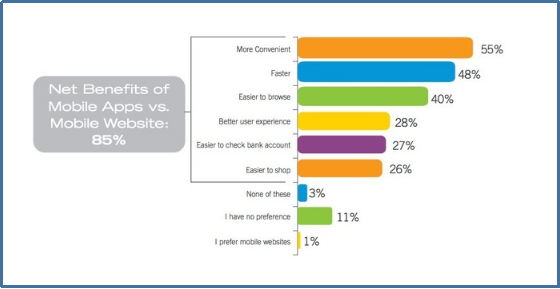
Yeah, that’s right! I am talking about eCommerce mobile apps. We all know that the mobile app industry has seen a huge growth in the past decade. Today, almost every major field needs mobile apps and so is the eCommerce industry. As per a marketing report, 85% of smartphone users prefer mobile apps over mobile websites. This percentage is more than enough to boost the sales and conversion for your store.

So, if you are an online store owner and quite serious about increasing visibility and revenue of your store, you must consider the option of eCommerce mobile app for PrestaShop, OpenCart, Magento, Magento 2, WooCommerce, Shopify platforms. Further, let’s dig up in this article how can you design the perfect eCommerce app of your own?

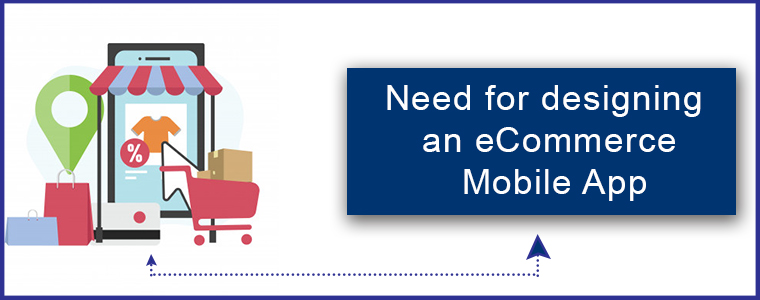
Need for designing an eCommerce Mobile App:

As they say, the first impression is the last impression. Your eCommerce mobile app voice out your brand among the worldwide mobile audience. Crafting a beautiful and flawless mobile app will definitely portray your professionalism and lure mobile shoppers. So, apart from incorporating other technicalities in eCommerce mobile app development, designing also holds a major spot which shouldn’t be ignored in any case.

Although it seems like all the shopping apps are a look alike, but trust me they aren’t. There are many such factors which if used properly would provide an impressive app to the front end shoppers.

Considerable factors for eCommerce Mobile App Design:

Here are a few major aspects to be kept in mind while designing an eCommerce mobile app of your own:

1. Clutter-free User Interface

The user interface is the soul of a mobile app. While designing the app UI you should keep a check on the screen-size support and effectiveness of the design. These two factors are responsible for making the app interface interactive and responsive.

You must make sure that your app doesn’t get affected by multiple screen sizes of various devices. As far as screen sizes are concerned, either manage the content on the app or create the one which supports multiple screen sizes.

Also, your app interface should be crafted as such it doesn’t create an issue for the user’s while creating an order. Many apps have loads of attributes which makes it tough for the users to select the right product and place the order. Thus, your well designed mobile apps could easily relight the user experience of your store.

2. Home Screen Personalization

The home screen of your app is the first thing which an online shopper experience on entering the app. Try to keep it simple and clutter-free along with highlighting the top products. There must be a proper search functionality on the home screen for the new visitors.

Your eCommerce mobile app should also have the functionality to offer flash sale or time-based sale on the home screen. So, try to optimize the app screen as per various events and occasions without making it messy.

3. Simple Sign-up and Checkout Screen

Users never prefer a multi-page sign-up or login option in the shopping apps. Instead of testing their patience the better approach is to offer them an easy and quick login process. Social media login(Google and Facebook) along with OTP and Fingerprint authentication are few such sign-up options which let the users access the app in a few taps.

Same goes for the checkout page, it shouldn’t be lengthy and multi-screen at all. Your app checkout screen should be that easy to use which compel the users to submit the order. So, once you have thought of developing an eCommerce mobile app you must be sure about keeping both these screens seamless.

4. Better Product Visuals

All the products must be displayed in a nice and effective manner. The product image quality must be up to mark and always have a prominent ‘Add To Cart’ button. You can also decide the navigation of this button by either redirecting users to the shopping cart screen or keep them on the product page for additional browsing.

The product images should load instantly even in an average broadband network. Often it happens that the users leave the app because images take time to load and they lose their patience.

5. Rich Color Schemes

Your app color choice says it all. Try to choose the color which suits your business. While choosing the right colors make sure it doesn’t affect the product visibility at all. Don’t forget that your prime requirement is to highlight the products on the app.

Moreover, you must not opt for very vibrant colors in the apps and try to maintain the right contrast between the theme and background color of your app.

6. Thumb-Friendly Zone

Your mobile app users could be both left and right-handed. Incorporating a thumb-friendly zone on the app screen wouldn’t harm anyone. Instead, it eases the app usability for both sorts of users.

Your eCommerce mobile apps should use this feature in such a way that all the important tasks related to product purchase must lie in this zone. It also helps in enhancing the conversion rate of your store.

7. Proper Filters and Sorts

Product filters are very important for an eCommerce shopping app as they help the users to find the right product from the huge catalog. The filter options in the app should be both broad and specific based on price, size etc. Product sorting is also an important factor which enhances the shopping experience. Whenever any shopper wants to view the lowest price products on your app, he/she can easily opt for the low to high sort option.

8. Simplified Menu Bar

Keeping your menu bar simple and to the point would definitely impact the user’s purchase decision. The right categorization displayed under the menu section allows the users to get along with the complete product catalog easily.

Over to you

Till now, you must be aware that mobile apps are the inevitable need of your eCommerce business. Designing your app beautiful and user-oriented would definitely benefit your eCommerce business. So, it is better to analyze and choose such eCommerce mobile app solution for your online website which provides a tailored and effortless shopping experience to the users. Keep all the above-listed points in your mind while app designing and hopefully it would shine out as a star for your store.

Read some more articles related to mobile app designing:

10 essential tips to create icons for your mobile app.
How to create right splash screen for your app?
The Mobile App Effect in eCommerce industry during Holiday Season


How to build an eCommerce Mobile App?

Mobile Commerce and its growth:

We all can witness the impact of digitization in this tech-centric world. Along with all the major sections, the eCommerce industry has witnessed tremendous growth and advancements in the past few years. Earlier the shoppers were only limited to the websites for product purchase. But, as the majority of online sellers took their website business to the mobile platform, the mobile shopping app is a kind of necessity rather than just a luxury.

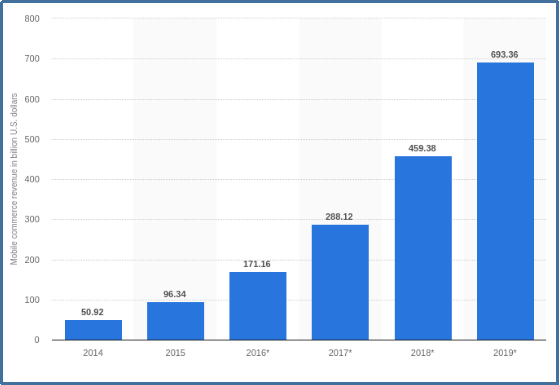
First of all, let’s narrow down the exact difference between eCommerce and m-commerce. Mobile commerce is selling products on various handheld devices while eCommerce is selling products through online websites. Many marketing experts are quoting that worldwide mCommerce is about to reach around $693B by the end of 2019.

Mobile Apps are a kind of inevitable need nowadays with the constant increase in mobile users on daily basis. The shoppers want everything at their fingertips to which they can easily reach. But, the need for eCommerce mobile apps often get ignored by online merchants and ultimately faces a huge loss.

How eCommerce mobile apps came out as a trend?

Creating a mobile app for your eCommerce website isn’t just limited to code one. You need to make sure that the app should be matching exactly with your website in terms of both look and functionality. Instead of providing some simple programmable apps to your users, think of a better approach and offer them one with all the help and assistance.

Who doesn’t want to opt for such eCommerce apps which can boost their website revenue? Mobile apps enhance the reach of your regional online business among the worldwide audience. They take your business to every corner of the world where you ever want to reach physically. But, you must be sure about the kind of mobile app which is being offered to your users. Let’s begin with a few basic questions which you should ask for your app:

1. Is your mobile app capable of targeting the right audience?
2. Does your mobile app support the products you sell?
3. How can you manage the inventory with the apps?
4. Can your app expand your business on a global scale?
5. Is your app interface enough seamless and appealing?
6. Is product purchase simple for the shoppers?
7. Can you manage the app functionalities on your own?
8. Can you optimize the home screen UI as per various occasions?
Last but not least,
9. How will you manage the app and store simultaneously at the same time?

These are some basic queries which should be considered before going for coding or non-coding way to create an eCommerce mobile app. There are various other aspects to be analyzed as well while creating eCommerce mobile app.

Key essentials for flawless mobile app creation:

1.  User Experience:

Your app design should be user-centric. All the features and functionalities of your eCommerce mobile app should be crystal clear for mobile shoppers. Try to use the right color selection and correct usage of other designing elements to lure the user’s attention just with the perfect designed app. Often it happens that the mobile app visitors access the app because of the awesome designs and end up as a potential user.

Moreover, you should try to keep a brand touch in your apps. Your app portrays your business to the users so, try to keep it as effective as it can. The app screens should be crafted nicely and the transactions between them must be smooth. Display your store logo on the app and promote your brand as well along with the store products.

2. Audience Analysis

Being an eCommerce store owner you must analyze your target audience. This research has its own significance as it lets you make the decision based on user’s likes, dislikes, purchase behavior etc. It will help you in providing the exact mobile app which your user needs.

Your marketing strategies actually rely on this core aspect of eCommerce business. In this age of sternest competition, you don’t afford to make any error as it can make you lose loads of conversions and leads. Keeping your app features as per the audience taste and preference will definitely be a silver bullet for your business.

3. Track Competition

List down your competition who have already gone mobile or looking forward to doing so. Analyze their move and check what makes them a better choice for the users than you. Research their best features and benefits and try to make up the most out of this analysis.

4. Right Technology

Choosing the right technology for your app is the prime requirement for eCommerce mobile app development. Your app must be updated with all the latest advancements and should work without any flaw. Try to opt for the native eCommerce mobile apps in order to provide sustainability. Similarly, you also need to decide whether you want to develop an Android app or an iOS app or both as per your targeted audience.

These were some of the core aspects of understanding and analysis before actually going for app development. Now let’s take a look at some of the must-have features of your eCommerce Mobile App.

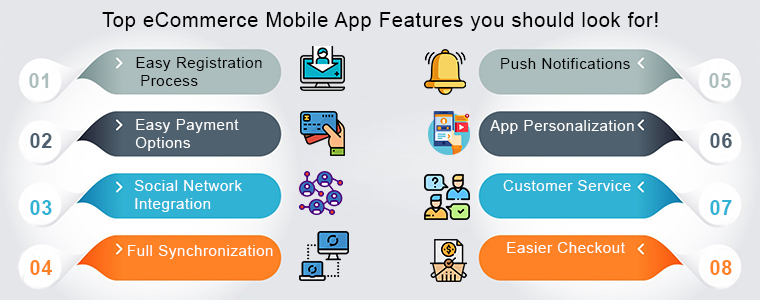
Top eCommerce Mobile App Features you should look for!

1. Easy Registration Process

In this paced day to day lives no one wants to fumble with the lengthy login forms when it comes to access your app. Many eCommerce store owners ignore this fact and eventually it doesn’t end well. You must not make this mistake and incorporate quick login options in your app in the first place.

Moreover, there must be at least 2-3 login options in your apps including social media networks. Providing one or two tap login option in your app could not only motivate them to open the app and browse the store but also boost sale for your business.

2. Easy Payment Options

Let’s take an instance that a user has visited your app and added products in its cart. But, when he/she tried to make the payment there weren’t enough payment options. This will surely make the user leave without successful product purchase.

You should be serious about providing multiple reliable and user-favorite payment options in your app. With Amazon Pay, PayPal, COD, Braintree, Stripe etc. you can easily push your users to make the purchase.

3. Social Network Integration

No one can deny the power of social media. If you are running a business, social media could be a game changer for you if used properly. Your eCommerce mobile app also needs social integration in order to popularize it.

Right from one-tap login to social sharing of products, the mobile apps will spread your word of mouth among potential buyers. So, you must connect the basic social networks in your app for improved benefits.

4. Full Synchronization

Being an eCommerce store owner managing both apps and the store simultaneously could be hectic for you. So, why not connect both with each other? Offer 100% synchronization between your store and the mobile apps and speed-up your inventory management process.

Once the apps and your online website are in synchronization, all the updates made on the website are automatically get reflected on the mobile apps. This halves your workload and saves plenty of time to focus on the competition and improve sales.

5. Push Notifications

Your app is the major communication source between you and the buyer if it has the right tool. Push notifications are the perfect marketing tool for an eCommerce mobile app. Sending personalized notifications to the app users would increase the app engagement. Notifying the users regarding discounts, sales, offers, and other store-related details would definitely enhance your eCommerce store sales.

6. App Personalization

All the top eCommerce mobile apps offer the best shopping experience to the app users. You should opt for the eCommerce mobile app solution which allows you to personalize the home screen on your own.

Your app’s home screen is responsible for the first impression on the users. So, you must make sure it certainly meets the user’s expectation. This will even help the store admin to drive more sales to your store. There is various automated eCommerce mobile app solution for PrestaShop, OpenCart, Magento, Magento 2, WooCommerce and others that allow you to present the desired layout in your apps. You can even read various tips to design beautiful eCommerce mobile apps.

7. Customer Service

Customer satisfaction is an important aspect which shouldn’t be ignored at any cost. While shopping online through your app there is a chance that user might be in doubt regarding the purchase. So, there must be reliable contact options in your app. This will not only let your users directly contact you regarding any query or problem but also brings their loyalty to your store.

8. Easier Checkout

The simpler is your checkout screen, more are the chances of a successful purchase. Easy checkout screen often motivates the users not to abandon the cart without making payment.

Wrap Up

This tour of developing eCommerce mobile app would have hopefully cleared that the mobile apps are better than online websites. So go ahead, do all your research and analysis and choose the right eCommerce mobile app development solution.

Looks good? Find some more articles on how these mobile apps can benefit your eCommerce business:

How eCommerce mobile apps can boost your small business?
Reasons why eCommerce business needs a mobile app?

Dropshipping – Future of eCommerce

eCommerce is one of the biggest industries in the world today. Due to its hassle-free usage, many retailers preferred to go online for any business purposes. However, if you are a start-up business owner, it’s difficult for you to invest a huge amount of revenue in the initial phase. As the latest trends of customers keep changing, keeping a huge stock of products could lead to loss of revenues at a high scale.

The latest trend which has taken over the eCommerce industry is dropshipping. This is the most reliable way to overcome the loss of efforts and revenues. Many store owners converted their business to dropshipping business which helped them to improve their overall business growth.

But before we go in detail, let us know the exact meaning of dropshipping:

Drop Shipping is a retail method in which sellers don’t keep products in stock. Instead, sellers come into a partnership with a supplier that stocks its own inventory. Seller transfers customer orders and shipment details to them, and the suppliers ship the order directly to the customer.

This latest trend is a blessing for small business owners who can’t invest much in the initial stage of their startup. Many people wonder how actually dropshipping could be profitable because there are many ways to dropship. Well, there are some ways that work while some don’t.

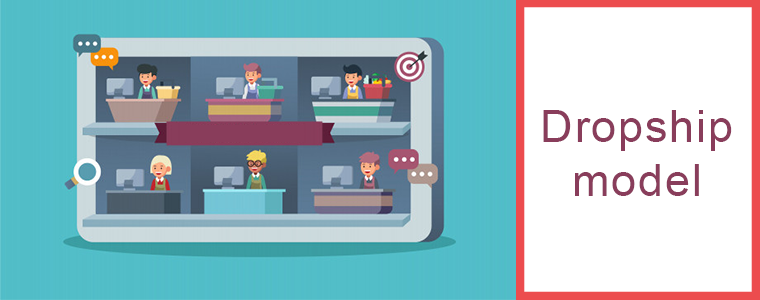
The Dropship Model:

The Dropshipping Model consists of 4 steps:

Step 1: Seller lists the supplier’s products on your store for customers to buy.

Step 2: The customer purchases something from the seller’s eCommerce store.

Step 3: Seller orders that same exact item that the customer paid for from your supplier.

Step 4: Seller drop shipping supplier ships this item directly to your customer. So, the customer receives the item that they’ve ordered from seller’s website.

Customer’s experience is utmost for a successful eCommerce business and for that it’s really important to choose a right supplier who supplies genuine products to otherwise, customers would not be happy by your product and this would lead to the downfall of your website.

Benefits of Dropshipping in Business:

1. Unlimited Inventory:

The first and utmost benefit of dropshipping is having unlimited virtual stock. Without investing a single penny, you own huge stock of products provided by the supplier. This helps retailers and suppliers to combat inventory distortion and save their revenues from investing in inventory.

2. Increase the lifetime value of customers:

You have the ability to add more and new trending products consistently for your customers. It helps you to keep your existing customers engaged on your website as they would be eager to see some new items acquired by you. It also attracts new visitors who can turn into potential customers. This all can be done without doing any advance investments.

3. No Handling Returns:

Another benefit of dropshipping is not handling any return requests. Sellers don’t even have to deal with the email for return request. If a customer returns an item, it is directly shipped back to the supplier, and according to their policy, they will either ship the replaced product or will give a refund for the product to the customers.

4. Minimize Risk:

In dropshipping, there is no need to invest money for acquiring the whole inventory at a time. This strategy helps to save the revenue of seller if their eCommerce business does not pan out due to any reason. The only money a seller will lose will be the money he paid to get his website started.

The seller’s business will resist to loss of revenue if the taste and trend of a customer change because there is no such thing as excess inventory owned by a seller which clearly minimises the risk of loss of revenues.

5. Lowers cost of products:

Sellers can launch new products at low costs because they are free of any pre-advancements and can be sold at their real cost. This strategy attracts more customers and results in high sales.

The rate of damaged goods during shipment becomes considerably lower when using dropshipping because it reduces the number of times that the product has to change hands.

6. Provides Practicality:

In dropshipping business, there is no need for a storage facility or retail location. You can sell your items just by the website only. Dropshipping helps the seller to offer a wider variety of products which were not possible if he had to buy and store all of the items at his physical store. This practically provides sellers to sell more in less revenue. The seller can also sell products which cannot be stored for a long time like perishable products, food items, medicines, etc.

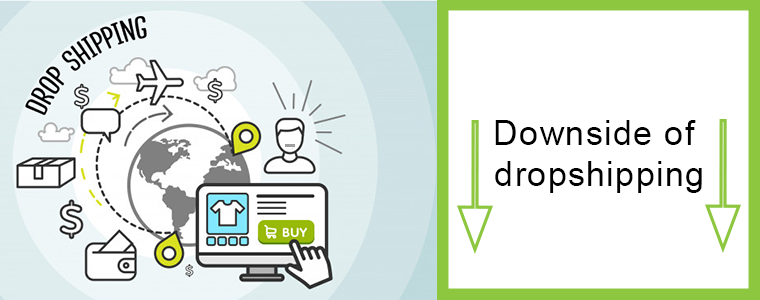
The Downside of Dropshipping:

While there are millions of buyers and sellers who have had positive experiences with drop shipping strategy, even without even realising it. However, sellers don’t actually have the inventory they’re selling on the premises, this can lead to some major drop shipping problems.

Some of them are:

  • Sellers are making sales on a virtual inventory as it is not actually available with them.
  • Delivery times are longer than they would be if the seller had their own inventory and logistics.
  • Customers get interacted with companies from whom they did not purchase directly at the time of return and exchange processes.
  • All of these problems can be avoided by drop shipping sellers that work diligently to provide a great customer experience, but there are huge tendencies that can quickly turn shopper experiences bad if sellers don’t energetically work to prevent them.

And last but not the least, there are many conscientious sellers out there, so be ready to get sloppy or cut corners.

Conclusion:

Although the above-mentioned benefits would motivate you to set up a dropshipping business in this competitive industry, the most important factor for an online business is good sales and traffic on the website. Whether you are going for normal business or a dropshipping business, it’s important to convert your website traffic into profitable leads. Customer experience plays a major role in impacting your website sales. Try to keep a check on the genuinity of the products shipped by your supplier to the customers.

It’s important to sell yourself and your online business to the users with your marketing knowledge and strategies and customer service. But it’s also advisable to follow up regularly after the first conversation.

Integrate your eCommerce store with the Marketplaces like Etsy, eBay, Walmart and others in just a few simple steps. KnowBand offers Marketplace Integrators for various CMS platforms like PrestaShop, OpenCart, Magento and Shopify which allows you to present your products among larger audience and encourage the brand awareness as well.

Find out our more articles here:


How to create SEO friendly URLs in Opencart 2.x ?

Introduction

This document will give an idea about how to create SEO Friendly URLs in Opencart (version 2.x). Also will explain how to customize the Opencart function to create SEO URLs other than default pages (product page, category page etc.).

This document will also explain how to 301 redirect URLs from old URL to new URL and URLs deleted.

The main purpose of this document is to learn about creating SEO Friendly URLs in Opencart (version 2.x) and URL redirections to maintain our SEO ranking on Google.

SEO Friendly URLs are well-crafted URLs which provide both humans and search engines with an easy-to-understand indication of what the destination page will be about.

Default Step in Opencart to Enable SEO URL

In Opencart there are setting which we have to manage from the admin panel to activate SEO Friendly URLs.

Following are the steps to enable:

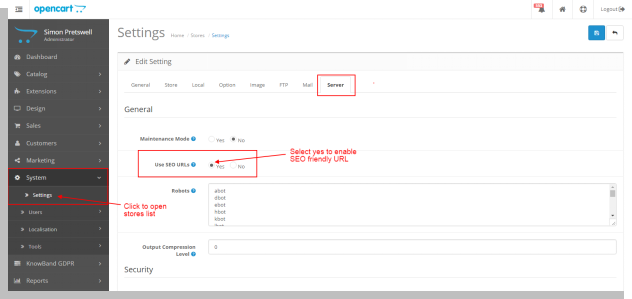
  • Open admin panel. Go to System > Setting. Then click on the edit button corresponding to the store from the store listing page.
  • In the edit system setting page open the ‘Server’ tab.
  • In the server, the tab selects the ‘Yes’ radio button corresponding to ‘Use SEO URL’ and then clicks on the save button.

By doing this admin will be able to use SEO URLs.

Recommended Read: Top 10 Opencart Extensions to Boost Customer Experience

Pages in Opencart have the option to add SEO Friendly URLs

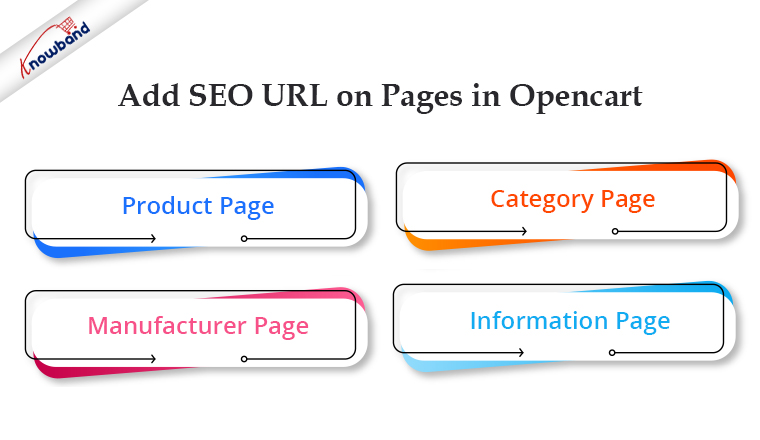
In Opencart there is a default option to create SEO-friendly URLs for the following page:

  • Product page
  • Category page
  • Manufacturer page
  • Information page

For all these above pages there is an option on their respective edit page to enter SEO URL.

Recommended Read: Top 10 Features to Consider While Creating a Marketplace on the OpenCart Platform

Product Page

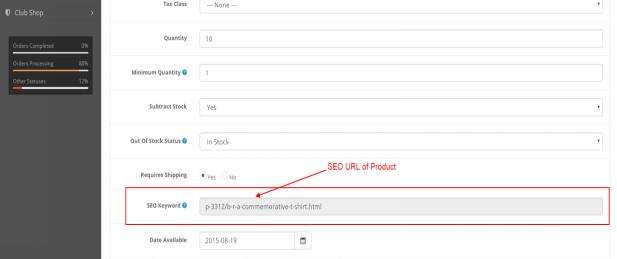
To save the SEO URL of any product page go to Catalog > Products in the admin panel. Click on the edit button corresponding to the product name.
In the edit product page click on the ‘Data’ tab. In the Data tab, there is an option for ‘SEO Keyword’. Enter the SEO URL of the product and then save.
Refer below screen:

Category Page

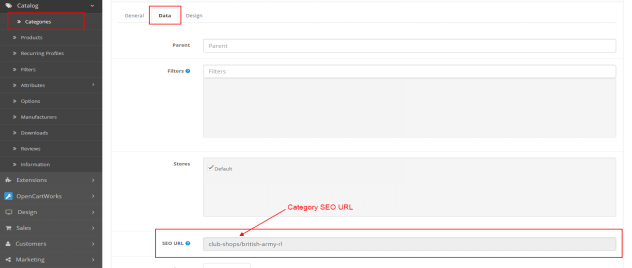
To save the SEO URL of any category page go to Catalog > Categories in the admin panel. Click on the edit button corresponding to the category.
In the edit category page click on the ‘Data’ tab. In the Data tab, there is an option for ‘SEO URL”. Enter SEO URL of category and then save.
Refer below screen:

Manufacturer Page

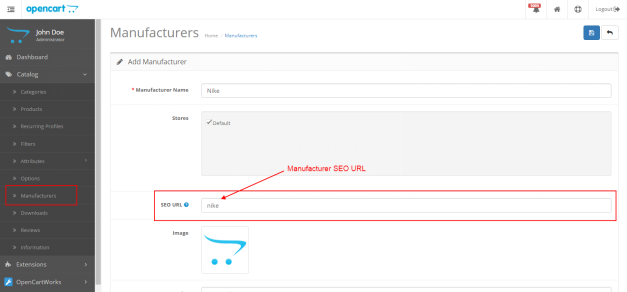
To save the SEO URL of any manufacturer page go to Catalog > Manufacturers in the admin panel. Click on the edit button corresponding to the manufacturer.
On the edit manufacturer page, there is an option for ‘SEO URL”. Enter the SEO URL of the manufacturer and then save.

Refer below screen:

Recommended Read: What are the merits and demerits of using an OpenCart platform?

Information Page

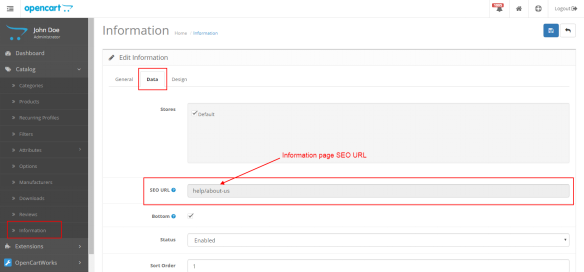
To save the SEO URL of any information page go to Catalog > Information in the admin panel. Click on the edit button corresponding to the information page.

On the edit, the information page clicks on the ‘Data’ tab. In the Data tab, there is an option for ‘SEO URL”. Enter the SEO URL of the information page and then save.

Refer below screen:

Note: Admin can also save SEO URL while adding a new product, category, manufacturer and information page.

If the admin wants to create an SEO URL for any custom pages then he/she has to make changes accordingly (explained below in the same document).

Technical Flow for URLs

In Opencart (version 2.x) when the user hit any URL (SEO or non-SEO) it calls the controller file seo_url.php located at catalogue/controller/startup. This file is called to find the SEO URL.

Note: The SEO URL of each page is stored in the ‘url_alias’ table in the database.

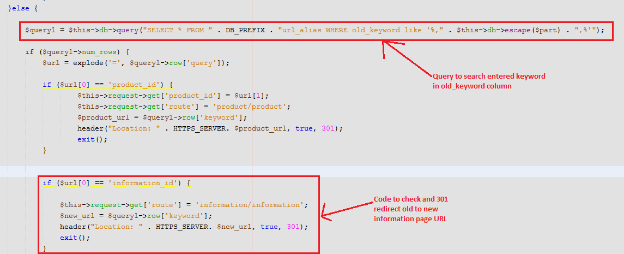
If the customer hit any non-SEO URL then it calls the seo_url.php file. In this file, there is code which searches the SEO URL of the Non-SEO URL in the ‘keyword’ column of the url_alias table corresponding to the ‘query’ column

url_alias Table in the Database

url_alias table is used to save SEO URLs of all pages. There are the following 3 columns in the table by default:

  • url_alias_id: Primary key of the table.
  • Query: contains the id of different pages like product_id, category_id, and other pages.
  • Keyword: contains SEO URL keyword of the corresponding page

SEO URL creation for other than default pages

If the admin has created landing pages and wants to serve an SEO URL for the page. For this first have to make an entry of the page in the url_alias table.

Example 1:
If the admin has created the ‘Sports’ landing page then he has to make an entry in the url_alias table as:

  • In query column: sport_id=1
  • In  keyword column: sports

Admin also has to make changes in controller file seo_url.php for sport_id.  Admin has to add a condition for sport_id same as product_id and category_id.

Now if admin enter URL “host/index.php?route=product/landing_page&sport_id=1” then code will search seo keyword in url_alias table corresponding to sport_id=1 and then serve URL ‘host/sports’.

Example 2:

In this example, we will create an SEO URL for the blog page.

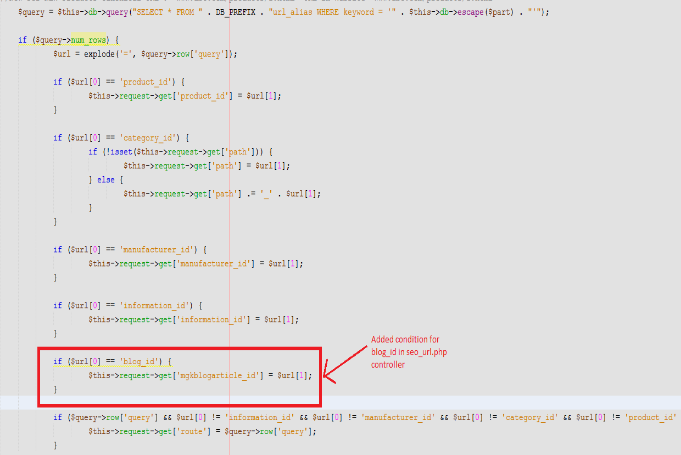
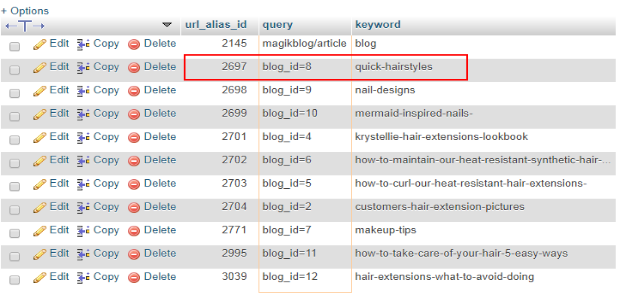
For this we have to add a condition in the controller file and make an entry in the url_alias table corresponding to blog_id:

Refer below screenshot seo_url.php file:

Recommended Read: How can you change the currency format in an OpenCart platform?

Screenshot of url_alias table

URL Redirections in Opencart

In Opencart if the admin wants to create new SEO URLs and wants 301 (permanent redirection) or 302 (temporary redirection) redirect on a new URL then the admin has to make the following changes in the controller file and url_alias table.

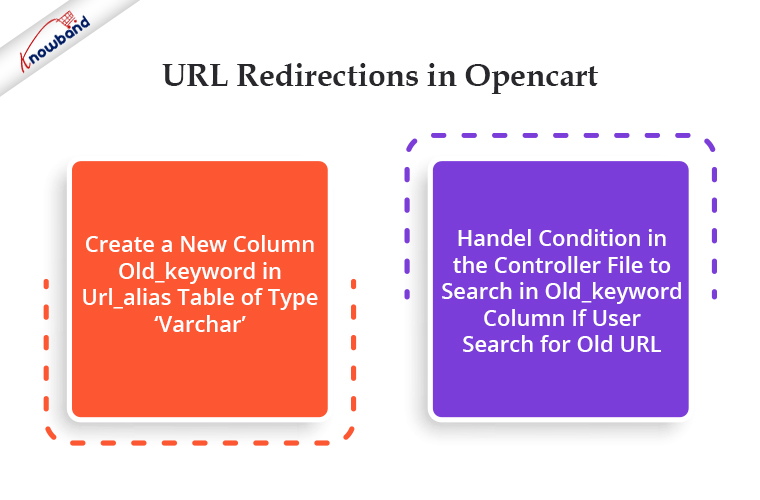
  1. Create a new column old_keyword in url_alias table of type ‘varchar’.
  2. Handel condition in the controller file to search in old_keyword column if user search for old URL.

Example: To redirect from the old URL of the ‘termes and conditions’ page to the new URL.
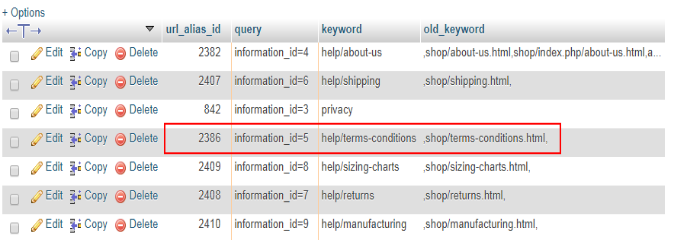
If the admin wants to redirect any information page from the old URL to the new then he has to make an entry in the url_alias table. Refer to the below screenshot:

Here

  • the old keyword is: shop/terms-conditions.html
  • new keyword: help/terms-conditions

Controller file changes: In seo_url.php controller admin has to handle conditions if enter URL did not found in the keyword column.
The first system will search entered URL in the keyword column. If not found then will search in the old_keyword column. If found then will redirect to the corresponding new URL.
Please refer to the below screenshot:

URL Redirections in Opencart for Deleted Pages

If the admin wants to redirect the URL of deleted categories, products or any other pages on the home page then he can make changes in the controller file accordingly.

Example: Here we will 301 redirect URLs of deleted categories

Steps to redirect URL of deleted categories:

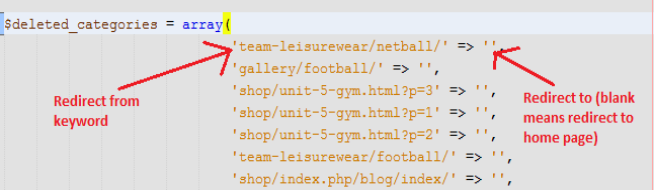
  • Create a file and define an array with the key as deleted category URL and value as URL to which admin wants to redirect. Refer to the below screenshot for creating an array of deleted categories.

    Note: Here we have defined blank value because we want to redirect deleted categories URLs to the home page

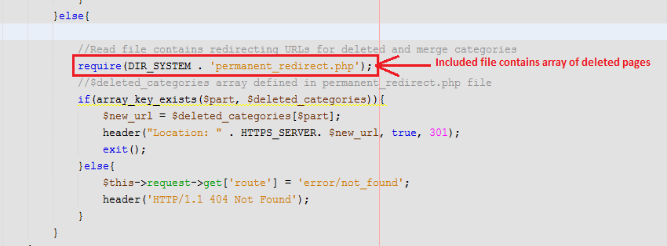
  • Add a condition in the seo_url.php controller to redirect from deleted category URL to the new URL.

In this code first, we have included a file containing URLs of deleted categories and then checked if the entered URL is in the defined array or not. If yes then redirected to a new URL else redirected to the not found page.

In the End:

A variety of OpenCart modules and extensions, both free and paid, are available from Knowband to boost your store’s operation. To know in detail about the OpenCart platforms, modules available or any functionality related to the platform feel free to drop us an email at support@Knowband.com.

Magento Countdown Sales Timer Extension – User Manual

1.0 Introduction

Do you know an effective way to drive sales and engagements for the website? The instant process to boost conversions is to provide compelling reasons to BUY NOW for your visitors. Sales Countdown Timer campaigns seamlessly convert your hesitant buyers into leads for your store. Magento Countdown Sales Timer Extension from Knowband helps e-merchants in convincing their visitors by displaying a Countdown Timer bar on the frontend. Finding the countdown timers, customers will either act fast or will miss the deal forever.
This Countdown Timer extension for Magento is a multi-purpose module offering flexible settings to catch the attention of the customers via attractive sales countdown timers. Being a store owner, you can create unlimited custom looking timers for your store and can display them as per some fixed schedules. Magento Countdown Sales Timer extension not just stimulates purchase levels but also offers an intuitive way to promote products and categories of the store. Hence, Sales Countdown Timer Bar for Magento is an advanced promotion tool to run occasional sales, timed discount deals, boost new arrivals and launches on the store.

1.1 Striking Features of Sales Countdown Extension for Magento

Installing and configuring Magento Countdown Sales Timer extension doesn’t involve any technicalities nor it includes any source code modifications. The in-built features of this Magento module can be effortlessly modified without any assistance. The various features offered by countdown timer campaigns module have been listed below:

  • Magento Countdown Sales Timer extension is a quick and easy way to add real-time sale countdown timers to create urgency among store visitors.
  • This Sales Countdown Timer Bar for Magento is designed to match up with your store theme and requirements.
  • Magento sale countdown module lets you set up and schedules sales campaign between two fixed dates and time.
  • Create any number of countdown timers for different store products and categories without any coding efforts.
  • Magento Countdown Timer extension allows admin to set the desired name, description for each countdown timer.
  • The Countdown Timer extension for Magento allows e-merchants to set the unique priority order for each of the reminders.
  • Admin can show a customized button on the Sales Countdown Timer Bar for Magento website. They can set a link on that timer button as per their site requirements.
  • Magento Countdown Timer supports compatibility with multiple languages and site themes.
  • With Magento sale countdown module, admin can display a custom countdown timer expiration message on the frontend. This information is useful for the visitors to know that the prevailing deal or offer has been expired.
  • Using color picker tool, store merchants can also set appealing colors and predefined themes for Sales Countdown Timer Bar for Magento site.

1.2 Magento Countdown Sales Timer Benefits to Customer

  • With Magento Countdown Timer, customers are updated with the trending rush alerts and active campaigns on the store.
  • Magento sale countdown module features a landing page link which redirects the customer to the main page containing new launches or promotional offers.

1.3 Technology for Development

Language: PHP
Frame Work: Magento

2.0 Installation Guide

The store admin can follow these simple steps for installing the Magento Countdown Sales Timer extension:

1. First of all download the extension package from the Knowband store.
2. You will get a zipped file containing the source code and user manual. Unzip the package on the root folder of your Magento setup via FTP manager (like Filezilla or WinSCP – download here: https://filezilla-project.org/). You’ll find the files and folders as shown in the image below:

The extension is now installed and ready for use. Now the store admin can now use and configure the Sales Countdown Timer Bar for Magento.

3.0 Admin Interface of Sale Countdown Magento Extension

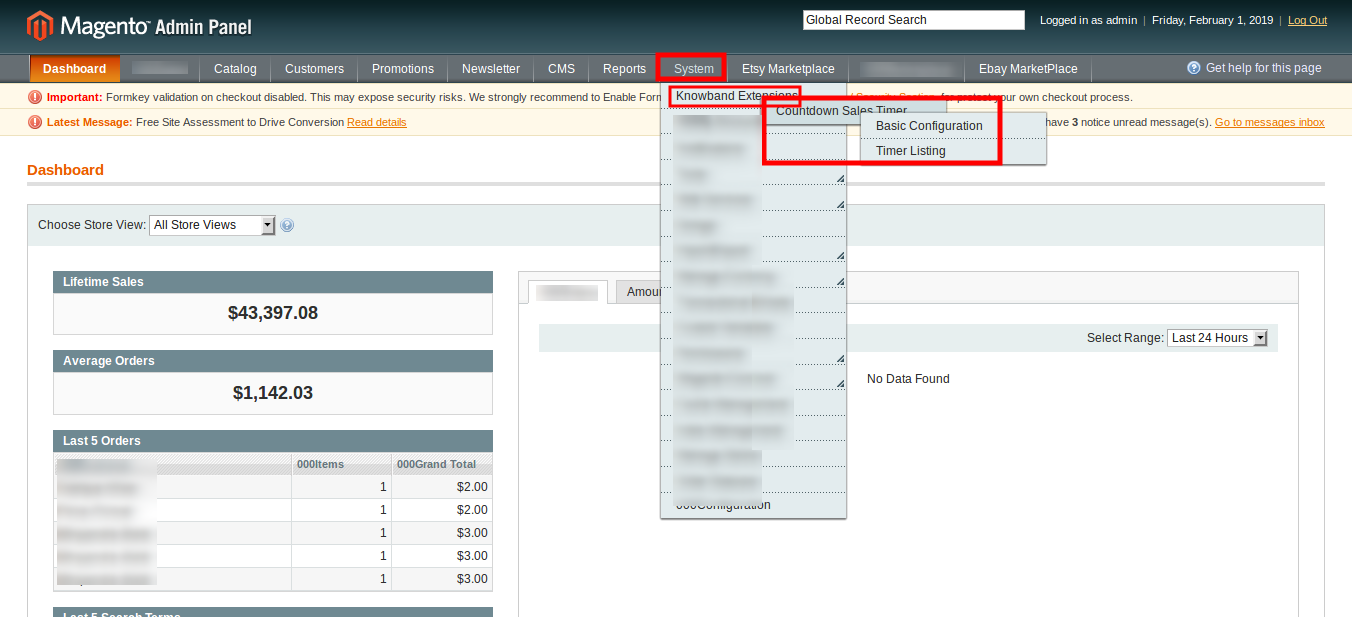
Once after you have successfully installed Magento Countdown Sales Timer extension from Knowband Store, you can now easily configure its different settings and make it ready for your Magento website. To configure the various settings of this module. Open the admin panel, go to System > Knowband Extensions > Countdown Sales Timer

The complete settings of this Countdown Timer extension for Magento is divided into two parts:

1. Basic Configuration
2. Timer Listing

Basic Configuration

The admin interface showing the basic configuration settings of this Magento module is as given below.

1. Enable the Extension: The functionality of Magento Countdown Sales Timer extension can be enabled or disabled using the provided toggle switch.
2. Include jQuery: Admin can include the jQuery library on the store’s front if the library was not present on the client store.

Timer Listing

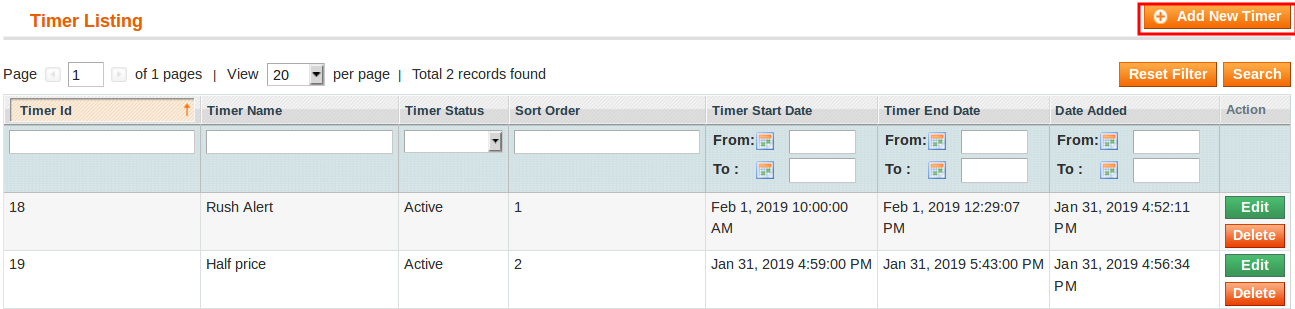
The admin interface of Magento Countdown Timer consist of a list of timer records along with filter option. The settings for each of the existing timer can be separately deleted or configured.

Add New Timer: Use this option if the admin wants to create a new coundown reminder for their store. To modify the settings for any existing reminder, click on Edit button corresponding to a particlar reminder record. The configuration settings for a particular countdown reminder is divided into three major sections as:

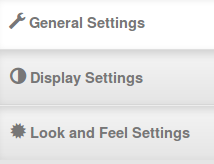
1. General Settings
2. Display Settings
3. Look and Feel Settings

Each Tab under Timer Settings of Magento Countdown Timer module has been discussed below.

3.1 General Settings

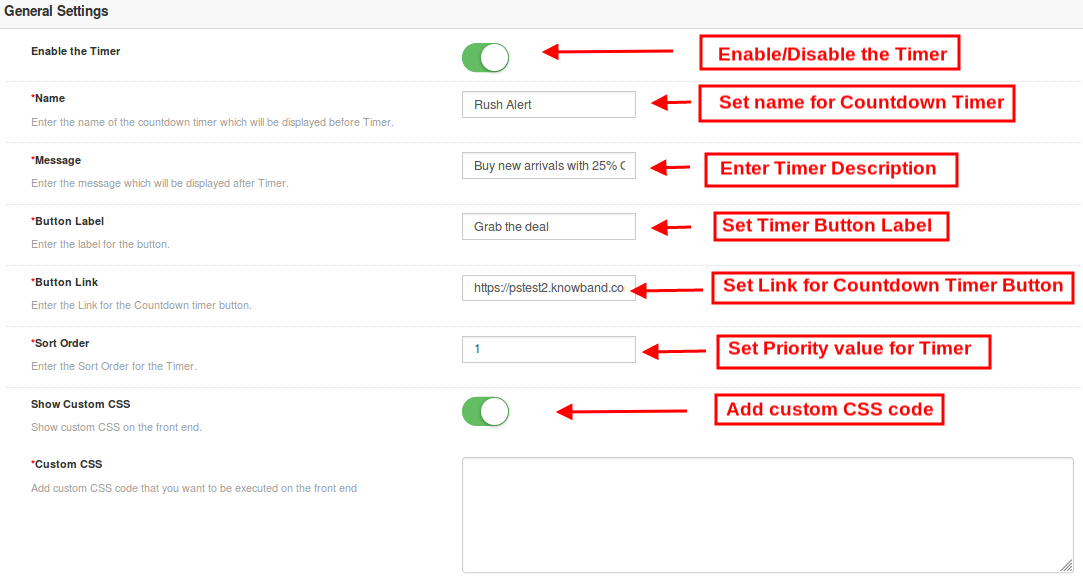
On clicking on the General Settings tab, you will see the following options as given below:

Initially the above fields are set to their default values.

1. Enable the Timer: Admin can enable or disable a selected timer using this toggle switch.
2. Name: Set a custom name for the countdown timer which will be displayed before Timer.
3. Message: Set a desired message which will be displayed after Timer.
4. Button Label: Admin can set a custom label for the button on countdown timer block.
5. Button Link: Admin can set a desired URL on button click. When the user clicks the button, they are redirected to this specific link.
6. Sort Order: Admin can set the sort order or priority value for each of the reminders created for the Magento site. Remember, this priority value should be unique.
7.Show Custom CSS: Admin can add custom CSS code to enhance the frontend functionality of the website.

After this, click on the “Save” button shown at the top right corner of admin panel to save the module settings.

3.2 Display Settings

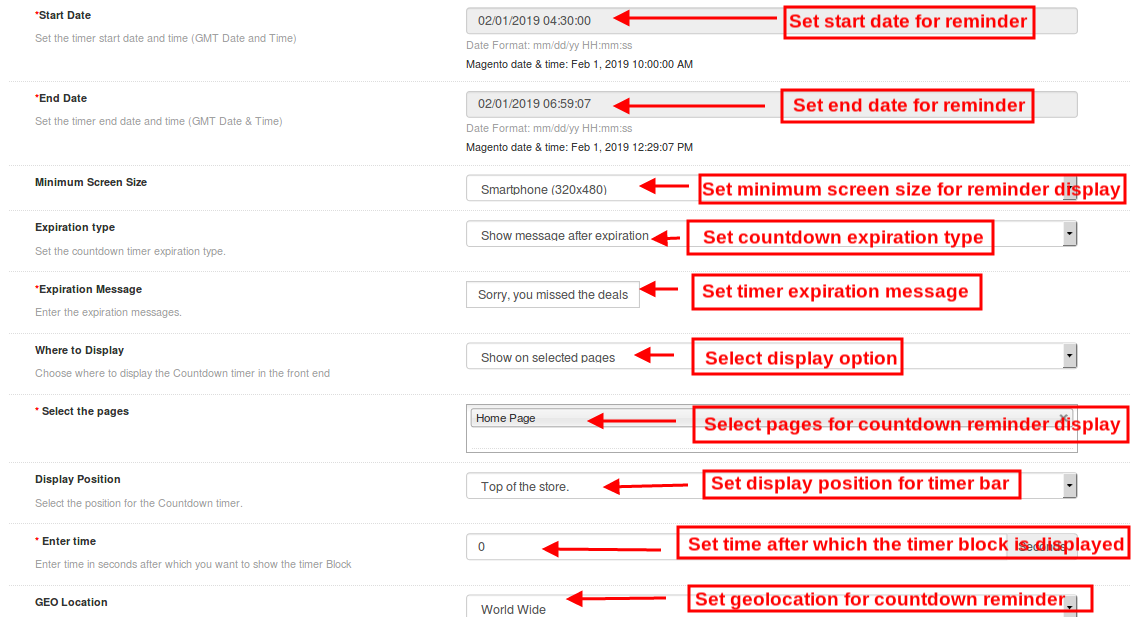
The display settings of this Magento module control where and how the Magento Countdown Timer will be displayed to the visitors. The various configuration options under this section include:

1. Start Date: Admin can set a start date and time(GMT date and time) for the counterdown timer.
2. End Date: Similarly, they can set a end date and time for the counterdown timer.
3. Minimum Screen Size: Admin can select a particular display configuration using this option.
4. Expiration Type: This option allows you to set the countdown timer expiration type.
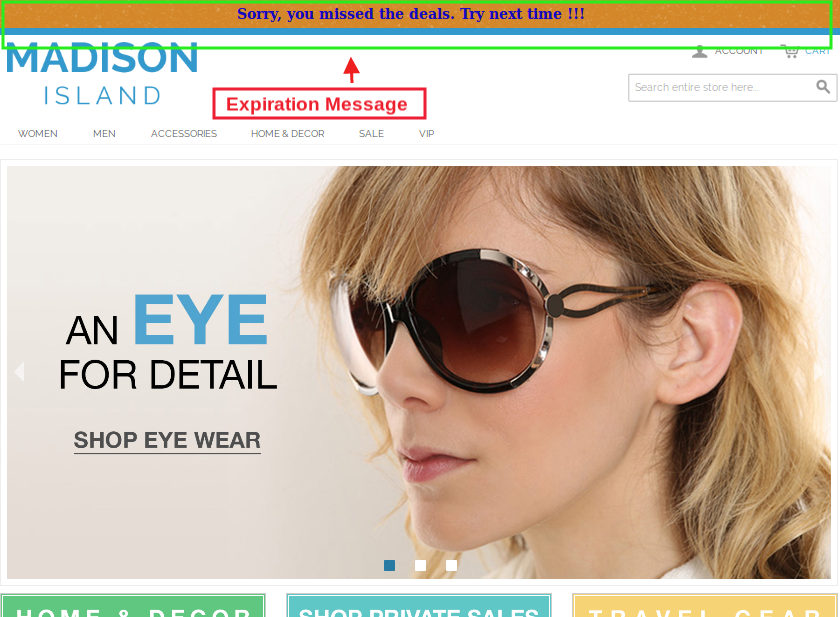
5. Expiration Message: If the expiration type has been selected as Auto then no message is displayed after the deal expires. But if you have selected Show Message option, then set a custom expiration message in this field.
6. Where to Display: Admin can choose where they want to display the countdown timer block on their website.
7. Select Pages: If the admin wants to display the timer block on selected pages, then they can select the pages here.
8. Display Position: Site admin can fix the display position for the countdown timer block over the website. The three display options include:

Top of the store

Fixed to top of window

Bottom of the store

9. Enter Time: Admin can enter time (in seconds)after which they want to show the timer Block on the frontend. Set 0 if you want to display it immediately to the visitors.
10. Geolocation: This option lets you select the geolocation for the display of sales timer block.

After this, click on the “Save” button shown at the top right corner of admin panel to save the module settings.

3.3 Look and Feel Settings

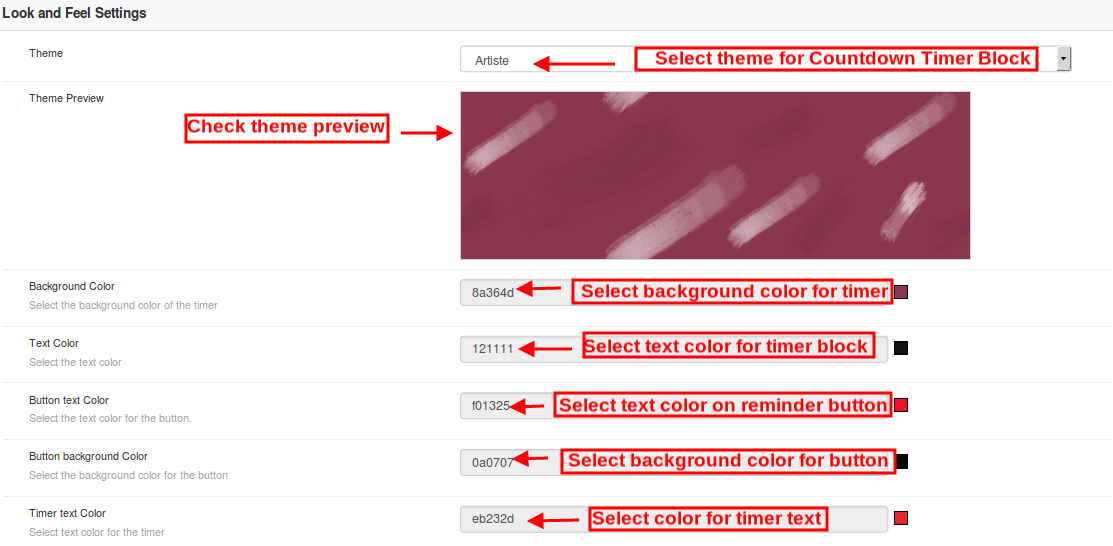
The look and feel settings of countdown magento extension control the frontend appearance of the countdown timer block. The various configuration options offered are:

1. Theme: Admin can set a particular theme for the sales timer block from the themes offered by countdown timer campaigns module.
2. Theme Preview: This option allows the admin to preview the theme before the apply the changes to their website.
3. Background Color: Using this option admin can set the background color for the sales countdown timer block.
4. Text Color: The font color of the text shown on countdown timer block can be set using this option.
5. Button text Color: Admin can change the text color on the timer button.
6. Button background color: Admin can set a desired background color for the timer button.
7. Timer Text color: Select text color for the timer text shown in sales countdown block.

After this, click on the “Save” button shown at the top right corner of admin panel to save the module settings.

4.0 Front Interface of Magento Countdown Sales Timer extension

After you have successfully configured the settings of magento sale countdown module, you can see Sales Countdown Timer Bar for Magento store in accordance with the selected priority values and time schedule.

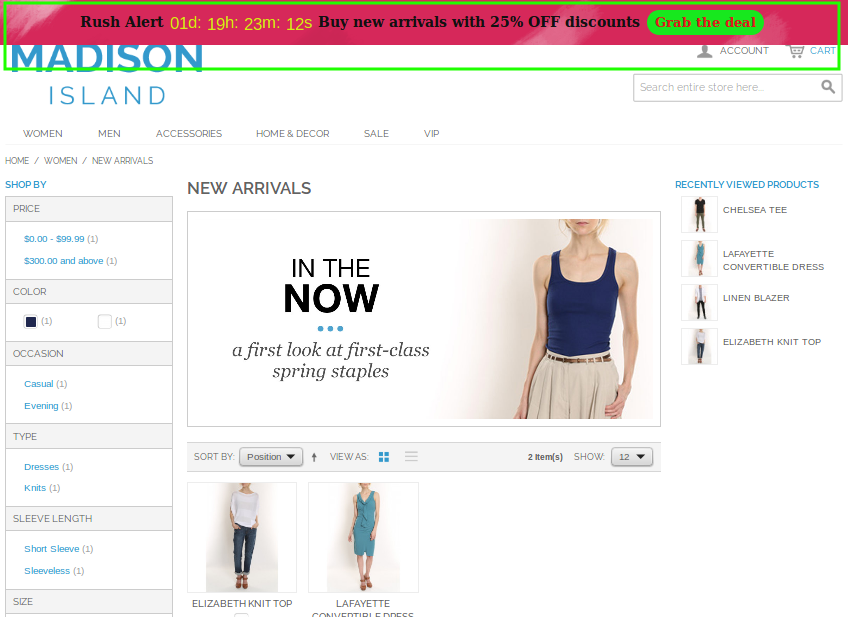
Sales Countdown Timer on Category Page


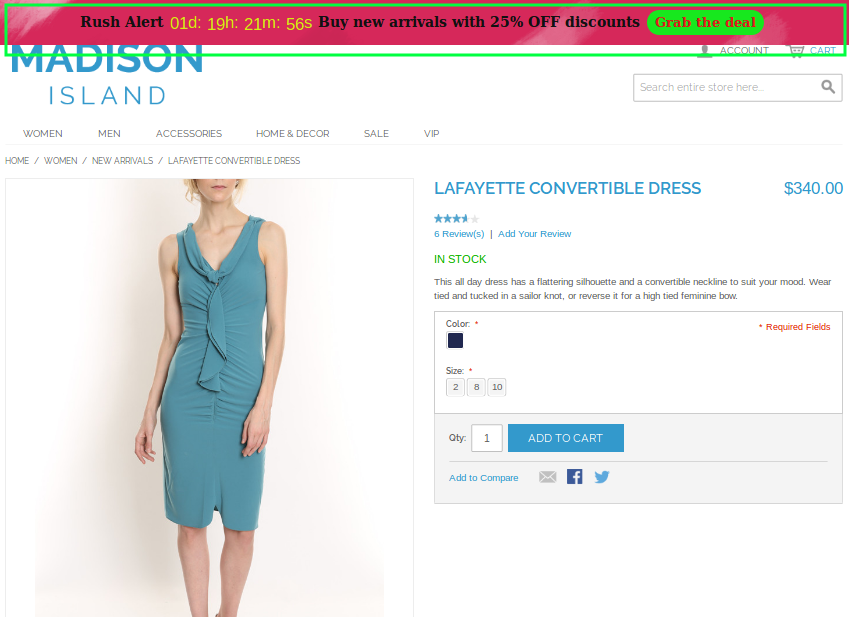
Sales Countdown Timer on Product Page


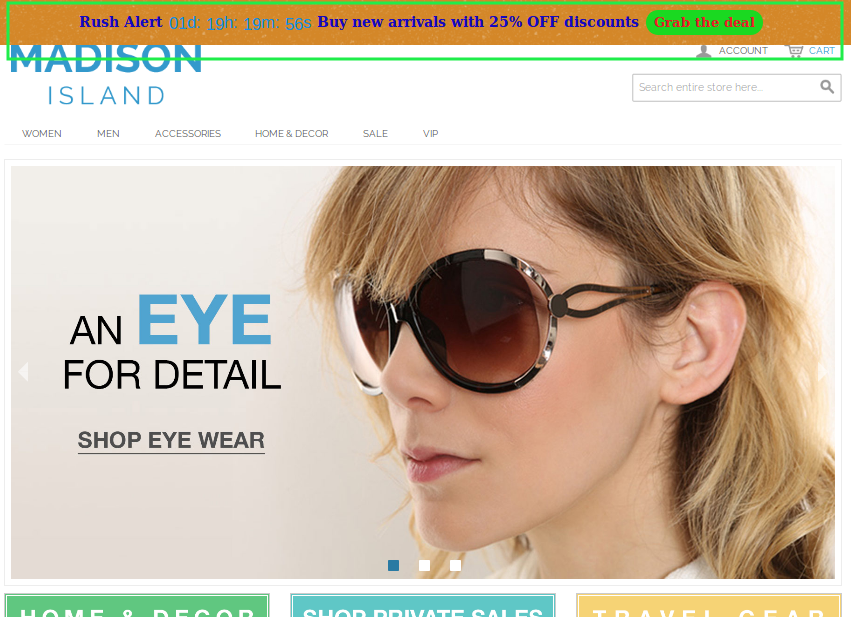
Sales Countdown Timer on Home Page


Expiration Message after the Sale Ends

Implementing Reactions Functionality Like Facebook using PHP, jQuery and HTML

Introduction

Reactions are more expressive as compared to the simple like and dislike buttons. Using reactions the user can easily express their thought because emoticons are basically a way to show the emotions. On the other hand if we use like and dislike button then the user can not show the exact emotion. Using emoticons we can make our site more expressive for the user.

Objectives of the blog

In this blog, you will find an easy and quick way to implement the Reactions functionality. After going through the blog, you will be able to create a reaction system for your website same as Facebook’s Like button.

Working

There will be one Like button and rest of the Reaction buttons. On focus the Like button, the Reaction buttons will be displayed. JQuery will be used to handle the taps on the reaction buttons. On tapping reaction button, an Ajax request is sent on like.php page. The logic to save/update data on database can be written on the handler page.

On tapping the reaction text again, the reaction is undone and this time we are sending Ajax on undo_like.php page.

All the functionality to show/hide the reaction buttons and animation is added through JavaScript and CSS.

Creating the HTML Structure

Before working on the logic, we will have to create the layout. HTML for the layout is following –

<!DOCTYPE html>
<html>
<head>
<title>Facebook Reactions</title>
<meta name="description" content="Facebook Like Reaction System" />
<!-- bootstrap css -->
<link rel="stylesheet" href="https://maxcdn.bootstrapcdn.com/font-awesome/4.3.0/css/font-awesome.min.css">
<link rel="stylesheet" type="text/css" href="css/style.css" />
<!-- Css for reaction system -->
<link rel="stylesheet" type="text/css" href="css/reaction.css" />

<script type="text/javascript" src="js/jquery.min.js"></script>
<!-- jQuery for Reaction system -->
<script type="text/javascript" src="js/reaction.js"></script>
</head>
<body>
<div class="container">
<div class="header">
<h1>Facebook Reactions</h1>
</div>
<div class="main">
<!-- Reaction system start -->
<div class="reaction-container"><!-- container div for reaction system -->
<span class="reaction-btn"> <!-- Default like button -->
<span class="reaction-btn-emo like-btn-default"></span> <!-- Default like button emotion-->
<span class="reaction-btn-text">Like</span> <!-- Default like button text,(Like, wow, sad..) default:Like  -->
<ul class="emojies-box"> <!-- Reaction buttons container-->
<li class="emoji emo-like" data-reaction="Like"></li>
<li class="emoji emo-love" data-reaction="Love"></li>
<li class="emoji emo-haha" data-reaction="HaHa"></li>
<li class="emoji emo-wow" data-reaction="Wow"></li>
<li class="emoji emo-sad" data-reaction="Sad"></li>
<li class="emoji emo-angry" data-reaction="Angry"></li>
</ul>
</span>
<div class="like-stat"> <!-- Like statistic container-->
<span class="like-emo"> <!-- like emotions container -->
<span class="like-btn-like"></span> <!-- given emotions like, wow, sad (default:Like) -->
</span>
<span class="like-details">Knowband and 10k others</span>
</div>
</div>
<!-- Reaction system end -->
</div>
</div>
</body>
</html>

Adding Style

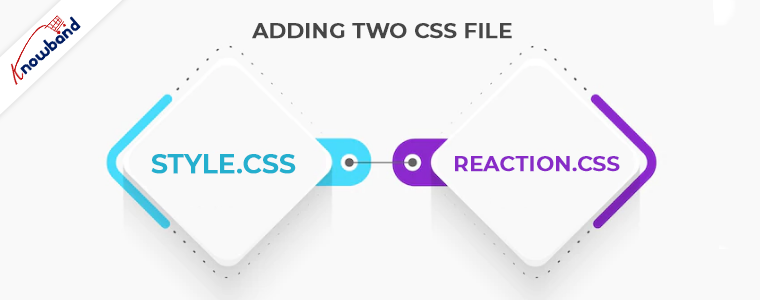
We are using two CSS files (style.css and reaction.css) to add styling in the page.

Note:  You can find the CSS files in the complete project build.

Adding Functionality

Once our layout is ready, we can work on the functionalities.

First we will be handling the taps on the Like and Reaction buttons. For that, we will be using jQuery and we will be adding the click events. The code to add the click events is given below –

// Adding the click event as soon as the document is ready
$(document).ready(function () {
// Adding the click event on reaction button by using the class name
$(".emoji").on("click", function () {   // like click
// Here we will be writing the code, which will run on tapping the reaction button
});
});

On focus of the reaction button, we will be sending the Ajax request on php page. The Ajax request is given below –

// Sending Ajax request in handler page (like.php) to perform the database operations
$.ajax({
type: "POST",
url: "php/like.php",
data: "",
success: function (response) {
// This code runs after the Ajax is successful
}
})

Then we will have to create a handler page. This can be a simple php file.

Note: User can perform database changes in the handler file according to the requirement.

Whatever is returned/printed in that file is returned to the Ajax request and we can update layout accordingly. Here we have added the code to update the layout to show the currently saved reaction. The full code of the reaction.js file is following –

$(document).ready(function () {
$(".emoji").on("click", function () {
// Here we are getting the reaction which is tapped by using the data-reaction attribute defined in main page
var data_reaction = $(this).attr("data-reaction");
// Sending Ajax request in handler page to perform the database operations
$.ajax({
type: "POST",
url: "php/like.php",
data: "data_reaction=" + data_reaction,
success: function (response) {
// This code will run after the Ajax is successful
$(".like-details").html("You, Knowband and 10k others");
$(".reaction-btn-emo").removeClass().addClass('reaction-btn-emo').addClass('like-btn-' + data_reaction.toLowerCase());
$(".reaction-btn-text").text(data_reaction).removeClass().addClass('reaction-btn-text').addClass('reaction-btn-text-' + data_reaction.toLowerCase()).addClass("active");

if (data_reaction == "Like")
$(".like-emo").html('<span class="like-btn-like"></span>');
else
$(".like-emo").html('<span class="like-btn-like"></span><span class="like-btn-' + data_reaction.toLowerCase() + '"></span>');
}
})
});

$(".reaction-btn-text").on("click", function () { // undo like click
if ($(this).hasClass("active")) {
// Sending Ajax request in handler page to perform the database operations
$.ajax({
type: "POST",
url: "php/undo_like.php",
data: "",
success: function (response) {
// Handle when the Ajax is successful
$(".reaction-btn-text").text("Like").removeClass().addClass('reaction-btn-text');
$(".reaction-btn-emo").removeClass().addClass('reaction-btn-emo').addClass("like-btn-default");
$(".like-emo").html('<span class="like-btn-like"></span>');
$(".like-details").html("Knowband and 1k others");
}
})
}
})
});

Summary

You can download the full project from the following location –

Click here to download the complete project

In this tutorial we have not covered the database connection and operations as the database logic can be different as per your needs. With the help of this project, you can easily implement the reactions functionality same as Facebook in your webpage.

If you face any issues, drop us an email at support@knowband.com. We also provide plugins for Prestashop, Opencart, Magento and Magento 2. All sorts of customization is also done by us on your store.

Take a look at one of our top selling modules:

Prestashop One page Supercheckout by Knowband is a must have tool for any eCommerce store as it helps you streamline the checkout process, increase your conversion rate and reduce the abandoned carts. Know more here:


How to Create Multiple Thumbnails While Uploading Image?

Objectives of the blog

After reading this blog we will be able to create multiple thumbnails while uploading an image. In this blog we can learn how to resize the image size using code.

Let’s know about the thumbnails

Thumbnails are the reduced-size versions of pictures or videos. Thumbnails are created from the original image by reducing their dimension and size. By creating thumbnails we can represent a large sized image by a small size image. The website such as online ecommerce stores use thumbnail images instead of large images to reduce the loading time of their web page which also make the site faster.

To understand the working of the thumbnails technically we will make a simple program. The requirement has been shared below:

Requirement

Let’s understand the requirement first.

Let’s say we have a website named as Knowband which sells the modules for the e-commerce platform like Magento, Prestashop, Opencart etc. It shows so many images on the listing page of Knowband modules. The original images are of large size so it directly increases the loading time of the listing page so to reduce the loading time of the page Knowband site uses thumbnail images on the listing page.

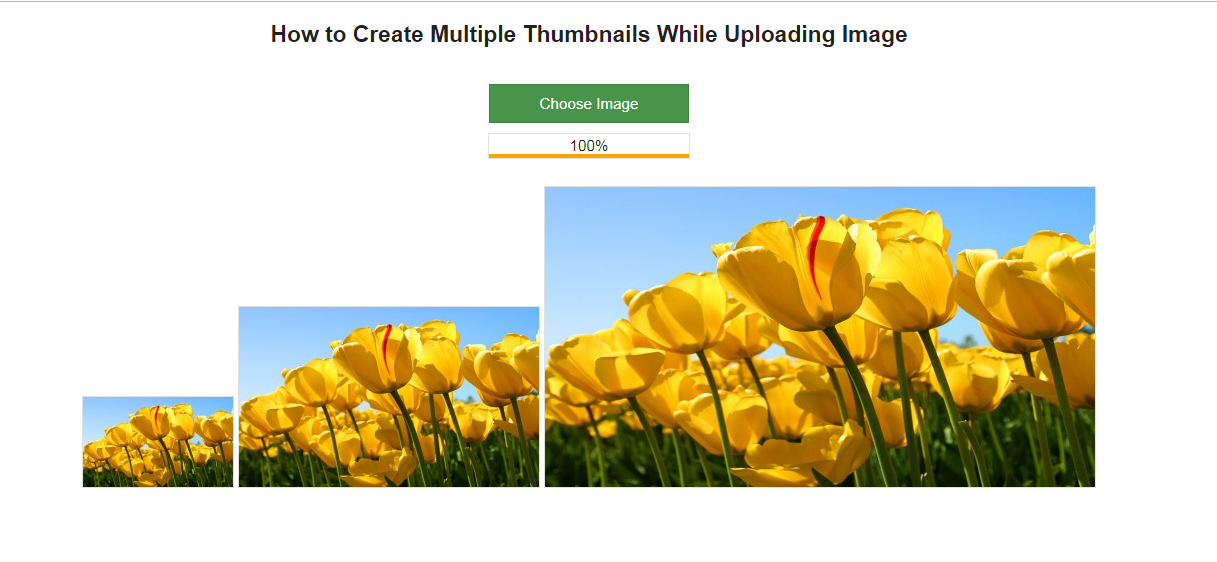
In this blog, we can learn how to create multiple thumbnails of an image. Let’s consider an example, where we will create three thumbnails as shown in the image given below:

Function to create the Thumbnail

Let’s understand the main functionality or code which is actually responsible for creating the thumbnails.

A function is given below which is responsible for creating the thumbnail. Let understand the function how it actually worked.

Below function have 4 parameters

The code of creating multiple thumbnails while uploading an image is given below:

  • $source_path: This contains the path of the original image.
  • $target_path: This contains the path of the thumbnail which will be created.
  • $file_type: This contains the image extension e.g. jpg, png etc.
  • $thumb_width: It is the width of the required thumbnail image.
  • $thumb_height: It is the height of the required thumbnail image.

This function simply fetches the image from the source file and after validating the image it creates the thumbnail of given width and height. So to create the ‘n’ number thumbnails we have to call this function ‘n’ number of times with the required width and height of the thumbnail. This function will return TRUE if thumbnail created successfully else it will return FALSE.

function create_thumbnail($source_path, $target_path, $file_type, $thumb_width, $thumb_height) {
//Checking the file type.
    if ($file_type == 'jpeg' || $file_type == 'jpg') {
        $source = imagecreatefromjpeg($source_path);
    } else if ($file_type == 'png') {
        $source = imagecreatefrompng($source_path);
    } else if ($file_type == 'gif') {
        $source = imagecreatefromgif($source_path);
    }
 
    // get the width of the original image
    $width = imagesx($source);
 
    // get the height of the original image
    $height = imagesy($source);
 
    // Create a black image of thumb image size
    $thumb_image = imagecreatetruecolor($thumb_width, $thumb_height);
 
    // It copy and resize part of an original image and resampled in thumb image to create a reduced size image of the original image
    imagecopyresampled($thumb_image, $source, 0, 0, 0, 0, $thumb_width, $thumb_height, $width, $height);
 
    // creates a JPEG file from the given image and save it in the targeted folder.
    if (imagejpeg($thumb_image, $target_path, 90)) {
        // destroy the images to free the memory associate with them
        imagedestroy($thumb_image);
        imagedestroy($source);
        return TRUE;
    } else {
        return FALSE;
    }
}

Click here to download the complete project.

Summary

After reading this document you can try the same code on your system. After doing the same you can easily know how the thumbnails works.

eCommerce Website or Marketplace? Where to sell on?

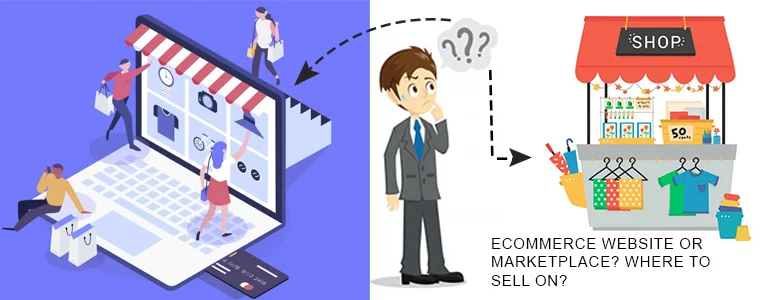
If you are a newbie in the eCommerce industry, making the choice where to list your products isn’t an easy task. You have to look for all the available possibilities and benefits offered by them before making any move. Online trading basically helps a vendor to reach out among chunk of customers easily and take their business to new heights.E-commerce websites and the marketplaces are the two prime  options  when it comes to online trading. Both of them are followed with their own pros and cons.

Marketplace Vs eCommerce Websites

First of all, lets narrow down how these two exactly differ from each other. Marketplace is a third party website which provides a
platform to many third party retailers to sell their products online. Example: Amazon, eBay, Flipkart, Etsy etc. The vendors can join the marketplace and start selling their products online. On the other hand eCommerce website is an independently owned  store of a seller
where customers can buy products of a particular brand directly from its native website. These websites are self owned by the merchants and can be easily built using various eCommerce platforms like Shopify, PrestaShop, Magento, WooCommerce etc.

Both of these options comes with advantages and disadvantages and this is what makes difficult for a seller to make the right choice. Here are some of the factors which will surely help you to understand the difference between both the platforms in detail and help them in deciding the best choice for their business:

1. Building Brand Image:

There’s no doubt in saying that creating your own website gives you full control on your brand’s image. You can easily present your product according to your own choice without any hassle. But, anyone who is a seller on marketplace would have the limited options therefore, he/she will be unable to affect the brand in any way possible. The presentation factors like layout, font, colour etc are standardised by the marketplace due to which often it happens that the product pages are not appealing and attractive for the users. Marketplaces also forbid sellers for mentioning their company name in any way. That is a loss too.

Creating a great brand image is immensely important when it comes to sell online. No matter on which platform you are using for the same. Having your own website provides you the authority to create a product page on your own choice. It lets you create the experience you want for your customers. You can also encourage your brand personality by reflecting your professionalism in your website design.

2. Traffic and Leads:

Building your brand image is not just enough in an online business. Making good sales is crucially important as well.
If you are an eCommerce store owner, you can implement various strategies and tactics to promote your brand name. Right from optimising your website rank till creating a social networking campaign, you can go for anything which suits you. However, there is a possibility that all these strategies can take a lot of time and efforts with no assurity of successful results.

On the other hand Marketplaces are well-established and highly trusted website than self-owned web-stores. Selling on a Marketplace could be an advantage for this factor as it’s easy for customers to reach out your products. According to statista.com, 197 million users visited Amazon’s websites per month. The huge popularity of Marketplace for online shopping automatically provides you the accessibility to million of customers  without spending any money on marketing.

3. Effortless start:

Seller need not to worry about the features like domain name, hosting name etc. All these features and mechanism are already well established in the Marketplace. Moreover sellers need not to look for the marketing platforms in order to promote their products.

4. Customer Experience:

If your product has been purchased on a Marketplace, the customer experience is totally associated with Marketplace and not with the seller. Although the product belongs to the seller but, still the user-experience belongs to the Marketplace.

If you are an eCommerce site owner then the customer experience with the product directly belongs to your website. Seller has the full authority to control and customise all the factors associated with the product review and enhance the user shopping experience. But, they need to do it on their own.

5. Expand your Reach:

It’s really important to attract visitors towards your product and convert them into potential buyers. Selling through your website provides you the freedom to display products as per your choice but the your product reach is confined to limited customers only. Sellers would be missing out millions of leads across border which clearly results in limited sales.

Whereas, Marketplace helps you to expand your business worldwide with minimal efforts. Seller is able to access millions of customers globally without making any advanced investments. You can even make a good cross border sales and boost up their overall business growth too.

6. Wide payment options:

Wide payment methods offered by the Marketplace offers an hassle free checkout experience to the customers. Payment options often influences the shopping decision of the customers. Availability of Multiple payment methods tempts the sellers to get enrolled in the Marketplace.

Conclusion:

Well, it’s good for a seller to own an eComemrce website but selling through marketplace won’t hurt your sales either. Many online merchants sell on both marketplaces and their own website to expand customer reach and brand recognition. However, the best place to sell online totally depends on the product type and category of your store. So, regardless of the platform you choose to sell on, it’s important to be aware about the latest trend going on in the eCommerce industry and implement it for massive sales and growth of your business.

Now you can easily list down your products on marketplaces like Etsy, eBay, Walmart and others in just a few simple steps. KnowBand offers Marketplace Integrators for various CMS platforms like PrestaShop, OpenCart, Magento and Shopify which allows you to present your products among larger audience and encourage the brand recognition as well.

As today’s generation rely on their handheld devices for any online purpose. It’s really important for a vendor to reach the customer’s devices to ensure higher sales and growth. Knowband offers Advanced Magento Marketplace mobile Extension to build a fully-functional marketplace and a mobile app at same time for your store.

Find out our more articles here:

Why you should start selling on a Marketplace?
Why you should integrate your eCommerce store with a Marketplace?