OpenCart Product Video – User Manual

1.0 Introduction

OpenCart product video extension by Knowband offers an easy interface to display the videos on the product page of the website. The product videos and their configuration options can be easily managed from the admin interface of the OpenCart product video module.

1.1 Admin Benefits offered by OpenCart Product Video Module:

  • OpenCart product page video extension is easy to install, understand and use.
  • The OpenCart product video tab module supports the videos of different platforms, namely, YouTube, Vimeo and Daily Motion.
  • OpenCart product video plugin allows the admin to set a default video for the various products of the website. It will be shown on the product pages in which the video display option is enabled.
  • The admin can manually enter the video URLs in the product details manually. These video display can be easily enabled/disabled from the back-end of the OpenCart Vimeo Video extension.
  • The OpenCart Daily Motion video plugin allows the store admin to change the various display options of the videos.

Features:

  • The Opencart product video extension is very easy to install and configure.
  • The Opencart adding video module is very easy to activate.
  • The eCommerce store admin can set a default video.
  • The Opencart YouTube extension allows to show/hide display controls in YouTube, DailyMotion videos.
  • With the help of Opencart Vimeo extension, you can auto-play videos.
  • You can show video frame border in Vimeo, DailyMotion videos.
  • You can enable/disable end screen option in DailyMotion Videos.
  • Show/hide video information of Dailymotion videos.
  • You can add videos just by inserting its link.
  • You can show default videos or specific videos on the particular product.
  • The Opencart Dailymotion extension offers a user-friendly interface.
  • The Opencart product video upload module offers a hassle-free implementation.
  • There is no need to change codes for implementation.

2.0 Installation

Purchase the OpenCart Product Video extension from the Knowband store. You’ll get following files:

1. The zipped File that contains the source code of the OpenCart Product Video module.

2. User Manual of OpenCart Product Video plugin.

Follow the steps below in order to install the OpenCart Product Video plugin in OpenCart store:

1. Unzip the zipped. You’ll get the folders as shown in the image below:


2. Copy all the files and folders of the zip file in the Root Directory of OpenCart setup via FTP manager.
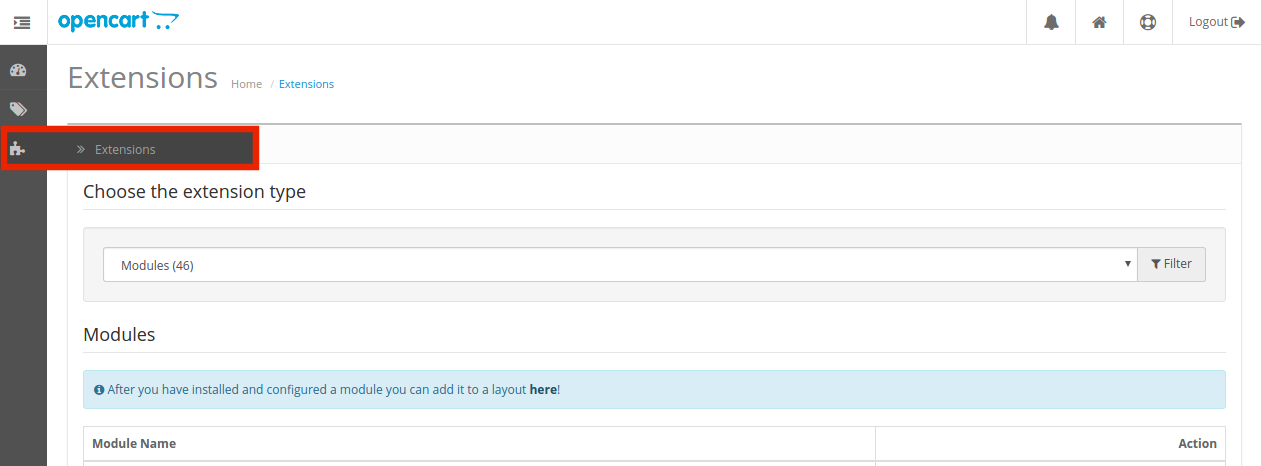
3. The OpenCart Product Video Upload extension is now installed and is ready to use. Go to Admin -> Main Menu -> Extensions as shown in the image below:

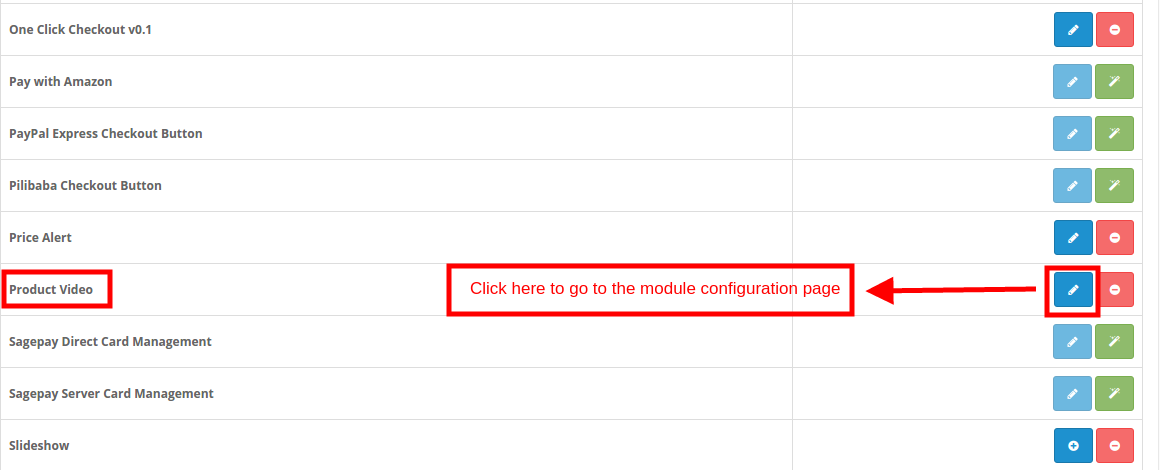
4. You’ll get the list of the OpenCart plugins that are installed in your store. Select Product Video from the list of the modules and click on the Edit button.

3.0 How to Upload Videos on the Product Page?

The store admin can either display a default image on the all the product pages or can upload the products individually on the different items.

In order to add the product videos, follow the steps mentioned below:

Go to the Product tab of the Main Menu as shown in the image below:
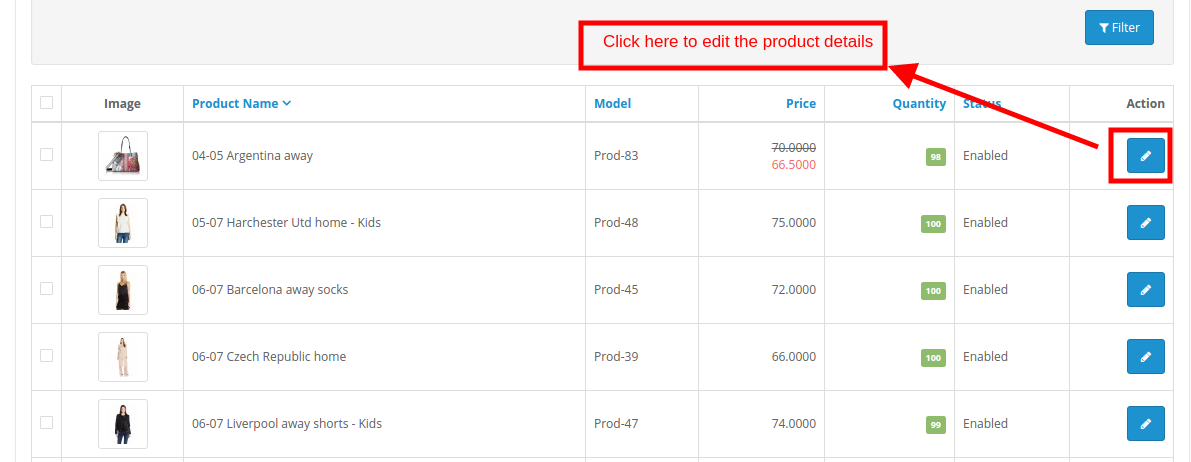
This will redirect you to the product catalog page.

Select any one product and click on the Edit link.

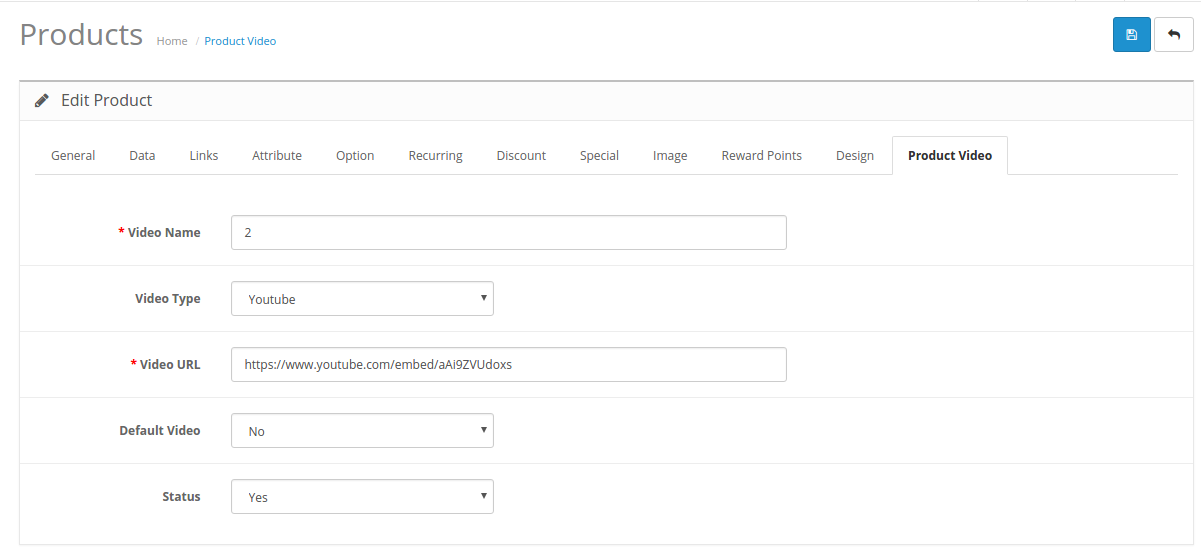
In the Edit product details interface, click in the ‘Product Video’ tab. Fill the fields as mentioned below:

  1. Video Name: Enter the name of the video to be displayed on the product page.
  2. Video Type: Select the video type. OpenCart product video extension can display YouTube, Vimeo as well as Daily Motion videos.
  3. Video URL: Enter the URL of the video.
  4. Default Video: If enabled, the default video specified in the admin interface of the OpenCart Product Video plugin will be displayed in the front-end. In order to display any video other than the default one select ‘No’.
  5. Status: Select Yes in order to display the video on the product page.

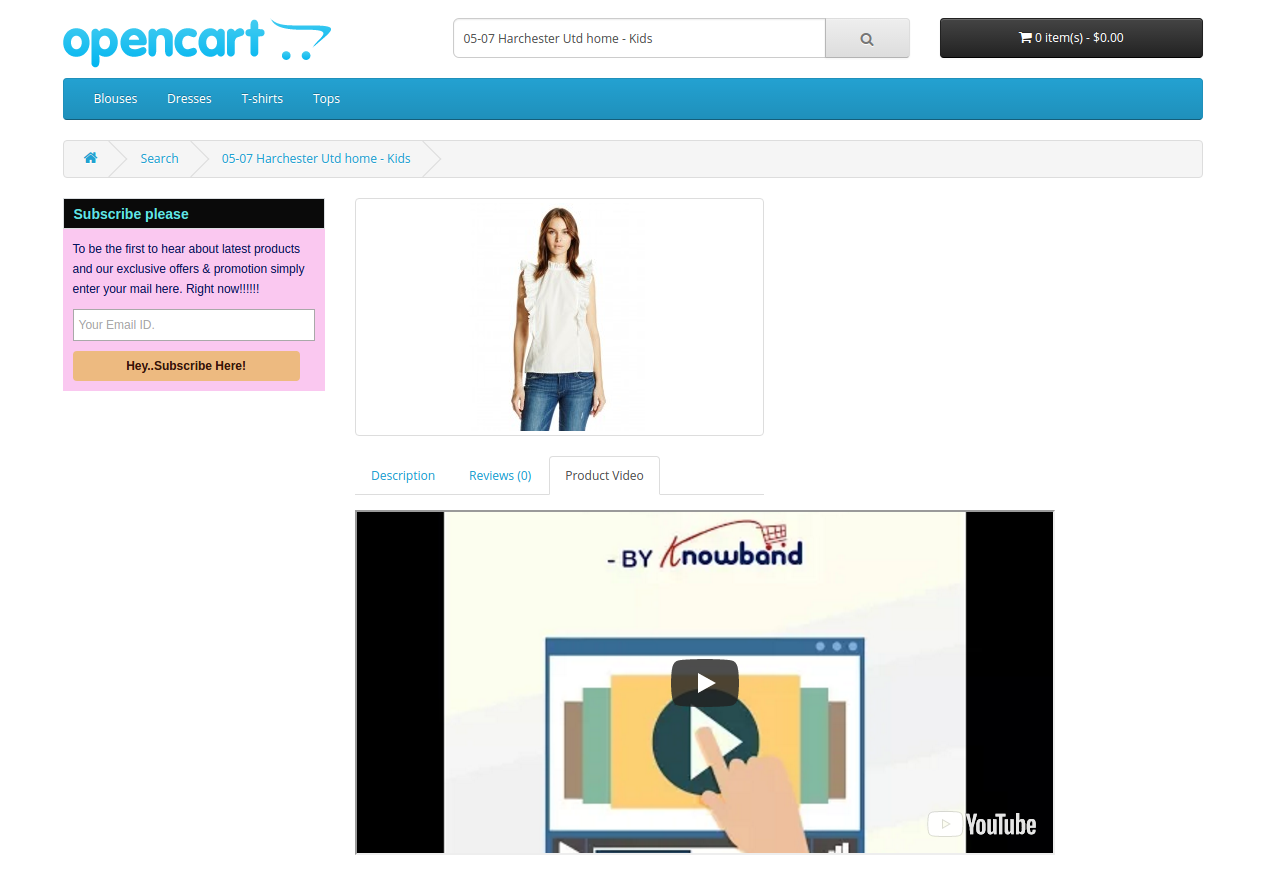
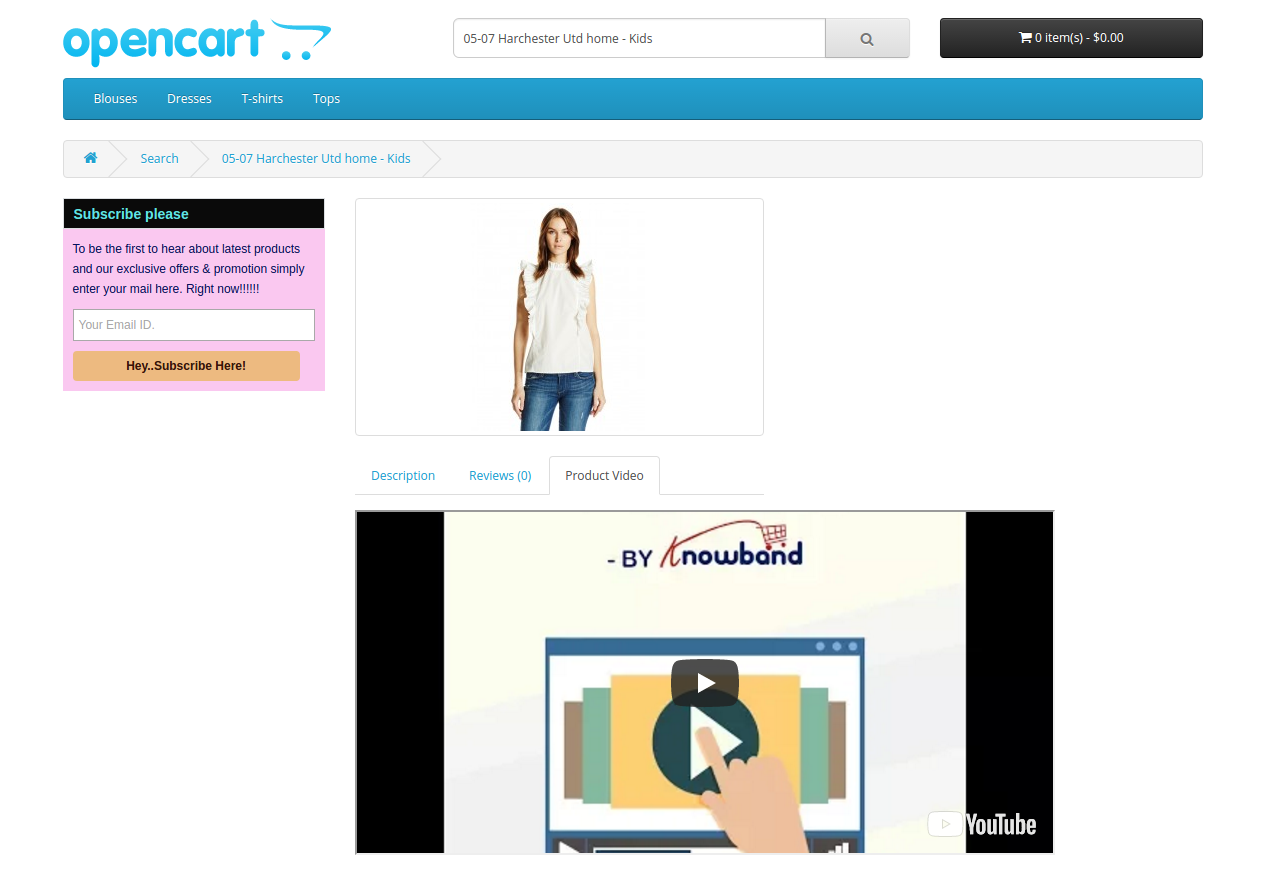
The video selected will be displayed in the front-end as shown in the image below:

4.0 Admin Interface

The admin panel of OpenCart product video extension offers four tabs. They are:

  • General setting
  • YouTube Setting
  • Vimeo Setting
  • Daily Motion Setting 

The various configuration options offered by OpenCart product video tab plugin are discussed in detail below.

4.1 General Settings

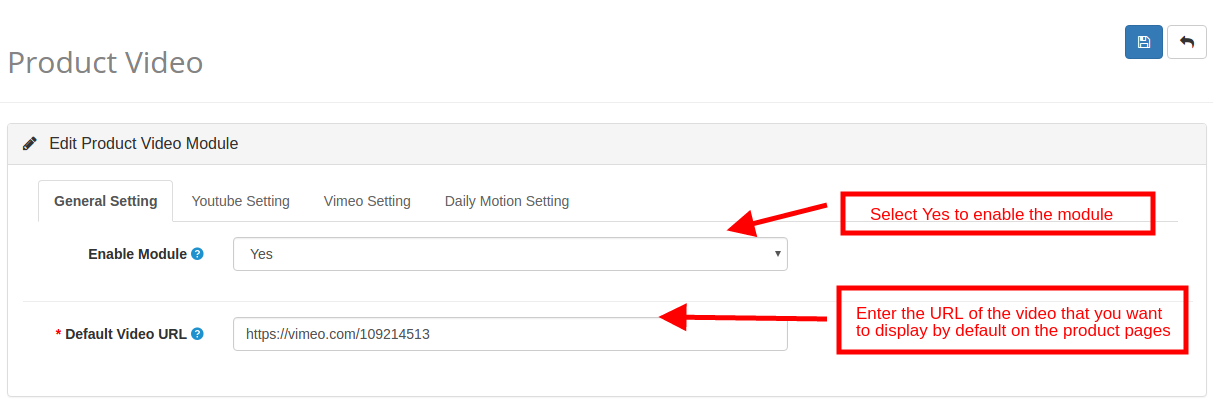
  1. Enable Module: Select ‘Yes’ to enable the OpenCart Product YouTube Video module.
  2. Default Video URL: Enter URL of the video that you want to set as default. In case, the video status of the product is enabled and the admin has not entered any specific video, then, the default video will be displayed in the front-end.

4.2 YouTube Settings

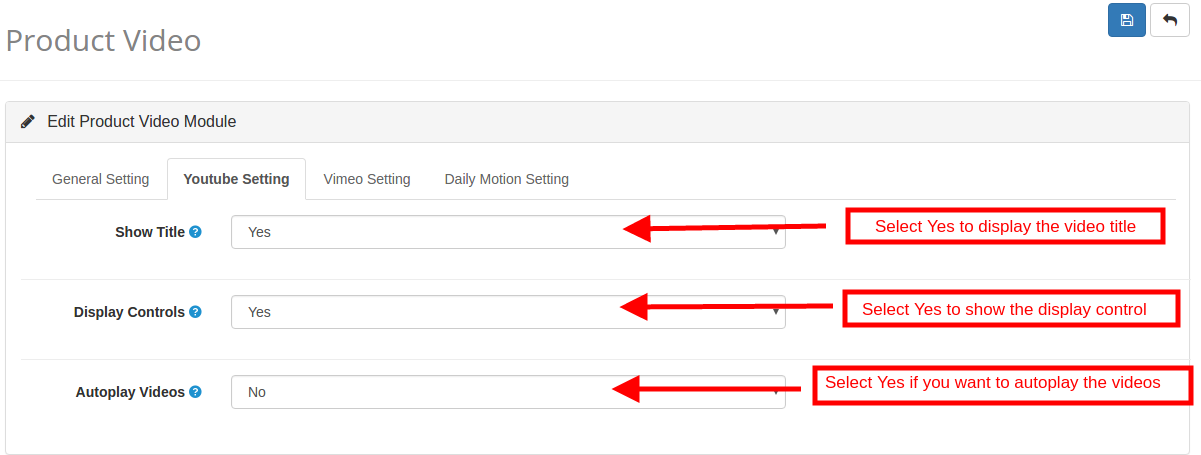
The Setting for the YouTube video can be changed from this tab of the OpenCart YouTube Video plugin.

  1. Show Title: The ‘Title’ refers to the name of the video. Enable this option to display the title on the video.
  2. Display Control: The Display Control refers to the control options of the videos. If disabled, the control options will not be displayed in the front-end.
  3. Auto-play Video: Enable this option to autoplay the videos in the front-end.

4.3 Vimeo Settings

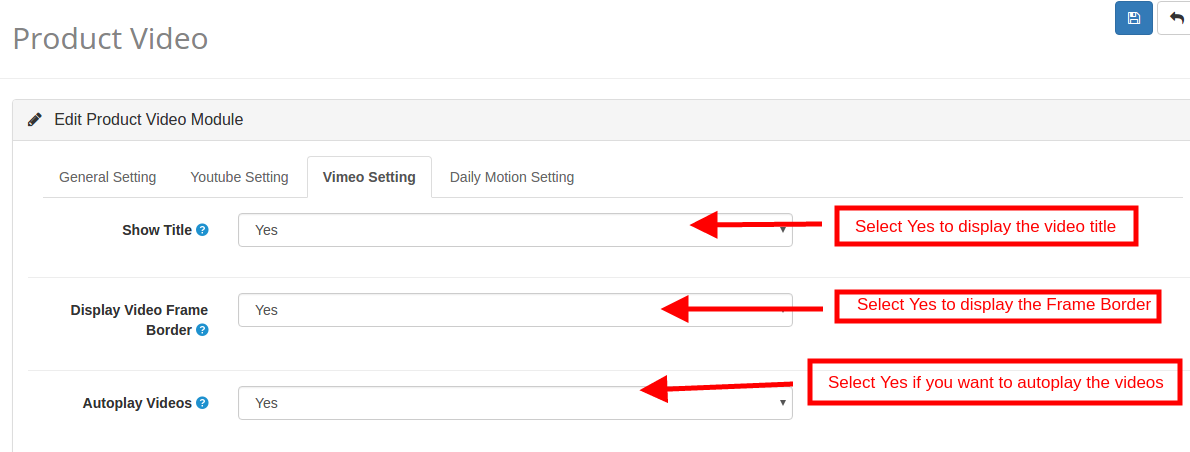
The configuration options of the Vimeo videos can be managed and changed from this tab of the OpenCart Vimeo Video plugin.

  1. Show Title: Enable this option to display the title or name of the video.
  2. Display Video Frame Border: Enable this option to show the frame border of the video in the front-end.
  3. Auto-play Video: Enable this option to autoplay the videos in the front-end.

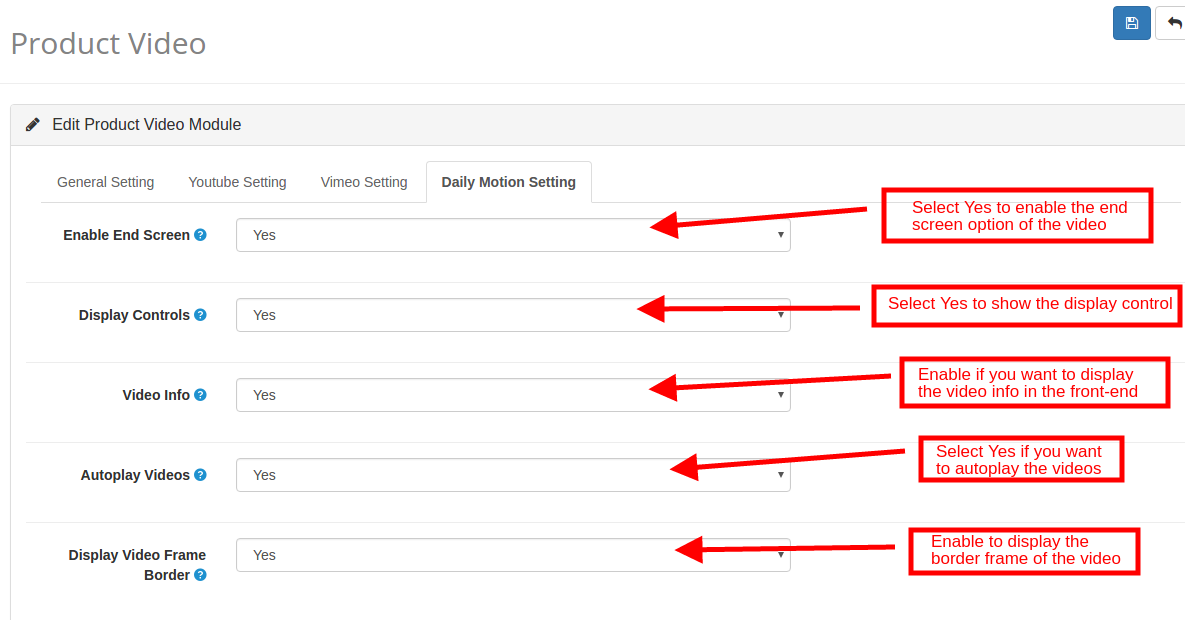
4.4 Daily Motion Settings

The store admin can manage and change the settings of the Daily Motion videos from this tab of the OpenCart Daily Motion Video plugin.

  1. Enable End Screen: Enable this option to display the end screen option.
  2. Display Controls: Enable to show the display control option of the video on the front-end.
  3. Video Info: If enabled, the video information will be displayed along with the videos.
  4. Auto-play Videos: If Yes is selected, then, the videos will autoplayed.
  5. Display Video Frame Border: If enabled, the border frame will be displayed.

5.0 Website UI

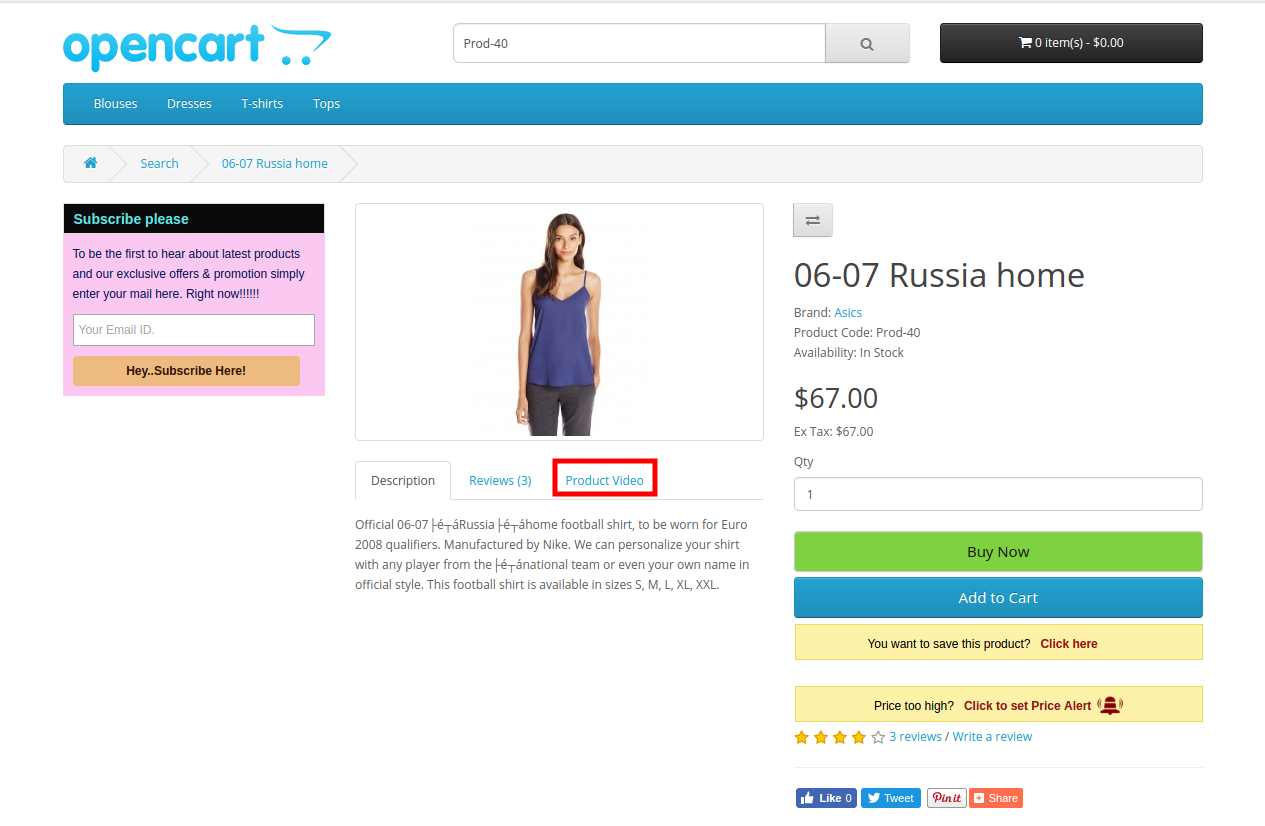
The product pages of the website will show a video tab once the OpenCart product video extension and videos are enabled as shown in the image below.


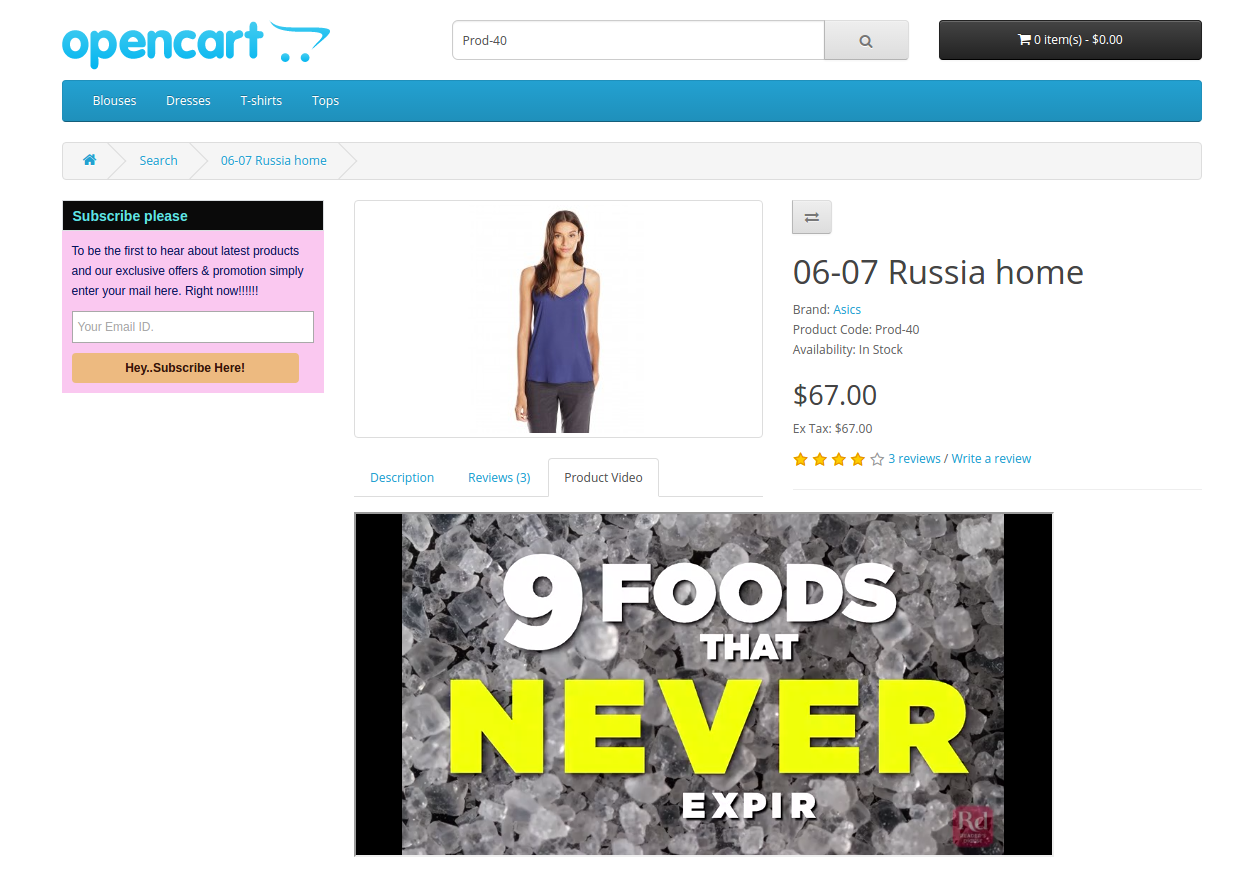
The specified videos will be shown as below:

For more details please visit:

Module Link: https://www.knowband.com/opencart-product-video

Admin Demo Link:

https://opencartdemo.knowband.com/2.3/demo1/admin/index.php?route=extension/module/productvideo&token=87BS8XxNNrFbZrKEbC6aLk0npL5z5new

Front Demo: https://opencartdemo.knowband.com/2.3/demo1/

User Manual: https://www.knowband.com/blog/user-manual/opencart-product-video/

Please contact us at support@knowband.com for any query or custom change request as per your business requirement.

How to remove unwanted fields from OpenCart 2.x checkout page?

OpenCart 2.x checkout page asks the customers to fill up several details and address information during the checkout process. However, sometimes, to simplify the checkout process, we wish to remove some fields from the checkout page that we think are not important to us. As these fields might be unnecessarily making the checkout complex and lengthy. So, in this article, I will discuss how to remove unwanted fields from the OpenCart2.x checkout page. Moreover, I’ll use the OpenCart version 2.x to explain how can you remove such fields from the Guest and registered checkout process.

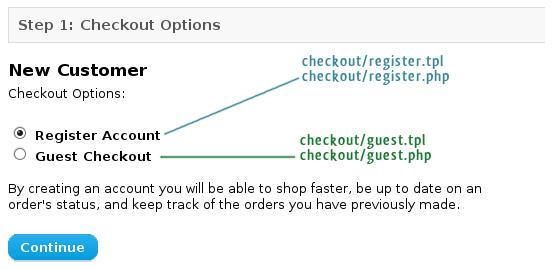
OpenCart uses two template files to show and control the fields on checkout

As an example, I will remove the “Fax” field from the guest checkout and Register Account. Also, you can use the same approach to remove any other field too.

The codes for input field in checkout are handled by two main OpenCart templates:

catalog/view/theme/themeXXX/template/checkout/register.tpl – for Register Account

catalog/view/theme/themeXXX/template/checkout/guest.tpl – for Guest Checkout

PS: I would suggest you not edit these files directly. First, take a backup of the original files first by copying these files from your web server or wherever they are located. Next, keep them with you so that you can always revert in case of any mistake. Then, take another copy of these same files and perform the editing on these files, later replacing them with the original files on the site after editing.

Recommended Read: OpenCart Checkout Extensions to Drive Sales and Conversions for your store

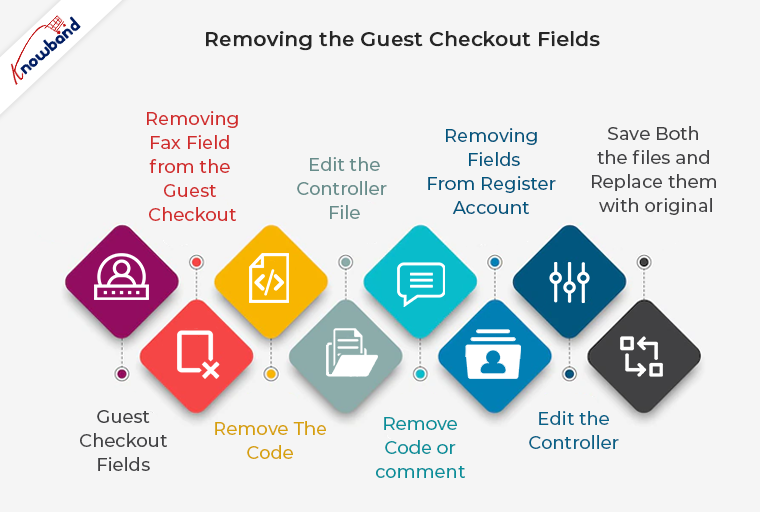
Removing the Guest checkout fields

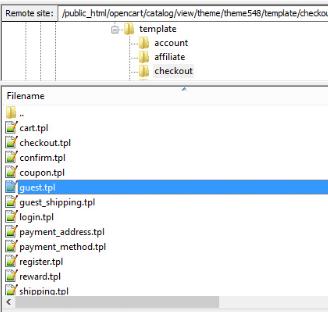
1. We will start with editing the Guest Checkout fields. So, the first step you need to follow here is to navigate to the following file directory and open the file:

catalog/view/theme/themeXXX/template/checkout/guest.tpl 

Open guest.the file

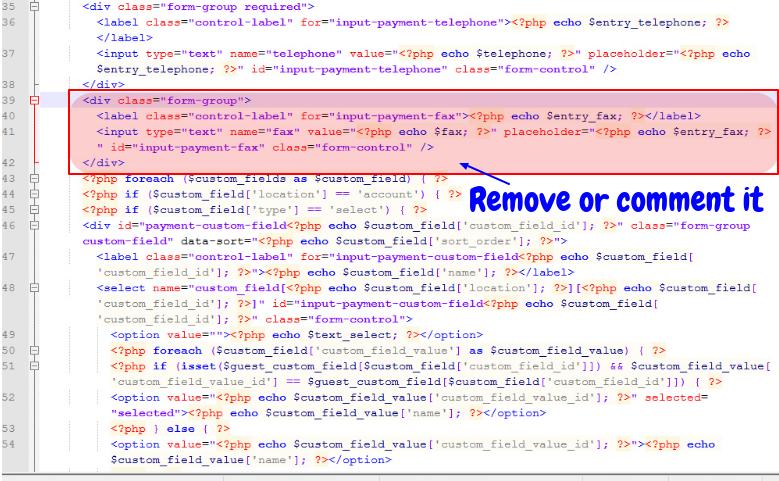
2. We are removing the Fax field from the guest checkout here. So, find the following lines of code in the file you have just opened:


3. Remove this code from the file or you can also just comment on it to disable the code.

Remove or comment on the code in the guest.the file

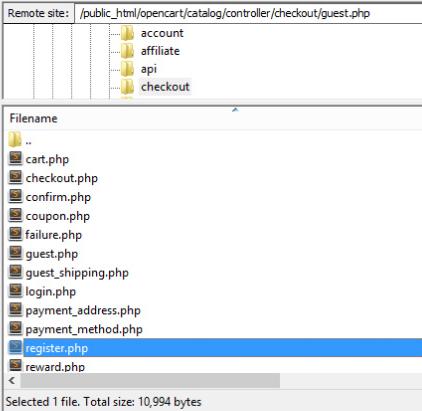
4. Next, we need to edit the controller file to make sure this removal will not show any “Undefined index” later. So, navigate to the following file directory and open the file to edit the controller:
catalog/controller/checkout/guest.php

Recommended Read: What to look out for in an engaging OpenCart checkout extension?

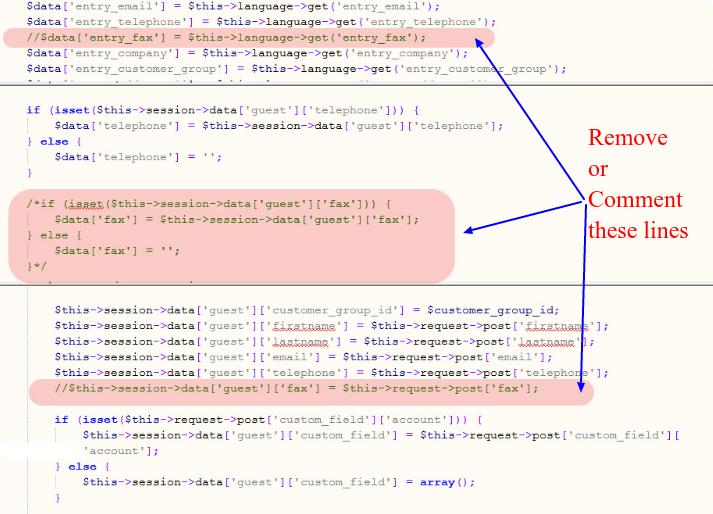
5. Look for the following lines of code in the files you have just opened:

$data['entry_fax'] = $this->language->get('entry_fax');
if (isset($this->session->data['guest']['fax'])) {
            $data['fax'] = $this->session->data['guest']['fax'];
            } else {
            $data['fax'] = '';
        }
$this->session->data['guest']['fax'] = $this->request->post['fax'];

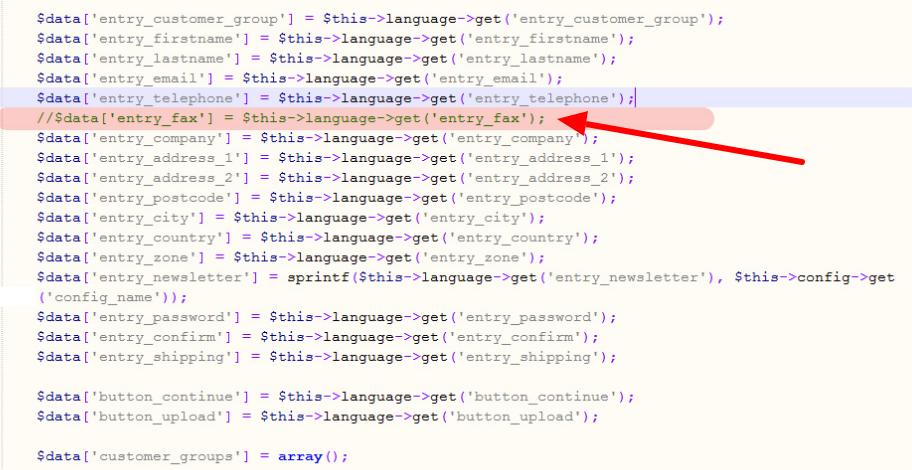
6. Remove the codes or you can just comment on them too.

Remove or comment on the codes in the guest.php file

7. Save both the files and replace them with the original files on the site.

Removing Fields from Register Account form

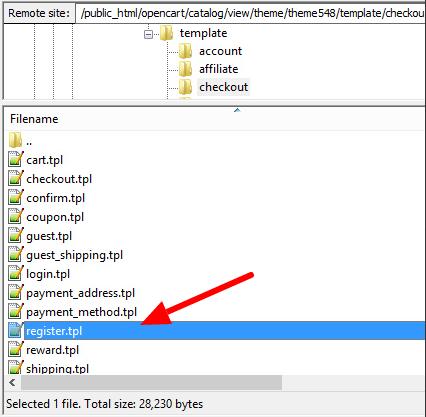
8. To remove the Fax field, open the following file :

catalog/view/theme/themeXXX/template/checkout/register.tpl

Open the register.the file

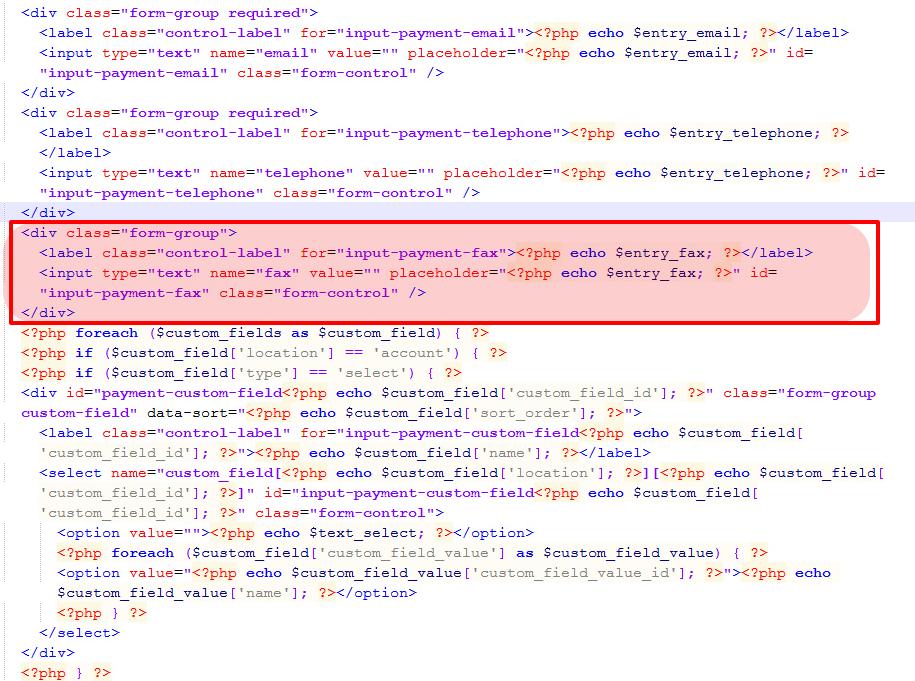
9. Find and remove the following lines of code in the file you have just opened


Remove or comment on the code in the register.the file

10. Next, we need to edit the following controller to make sure no “Undefined index” error is shown in the later part.

catalog/controller/checkout/register.php

Open register.php file

11. Find the following line of code and remove it. You can also comment on it instead.

Remove or comment the code in the register.php file

12. Save both the files now, and replace them with original files on the site.

So, this is how you can remove a field like “Fax” from both the Guest checkout and Account Register form. Moreover, you can follow a similar approach to remove any kind of field from the OpenCart checkout. Also, just do not forget to keep the backup of the original files before you edit them.

Recommended Read: Provide a Relaxing Online Shopping Experience to your Customers with this Opencart One Page Checkout Extension

Alternate solution

Editing the core files is not a recommended way to perform the changes on your OpenCart 2.x site. Some of us might suggest the use of vQmod or OCMOD to reduce the risk, but these methods are too complicated for website owners with no or less technical knowledge.

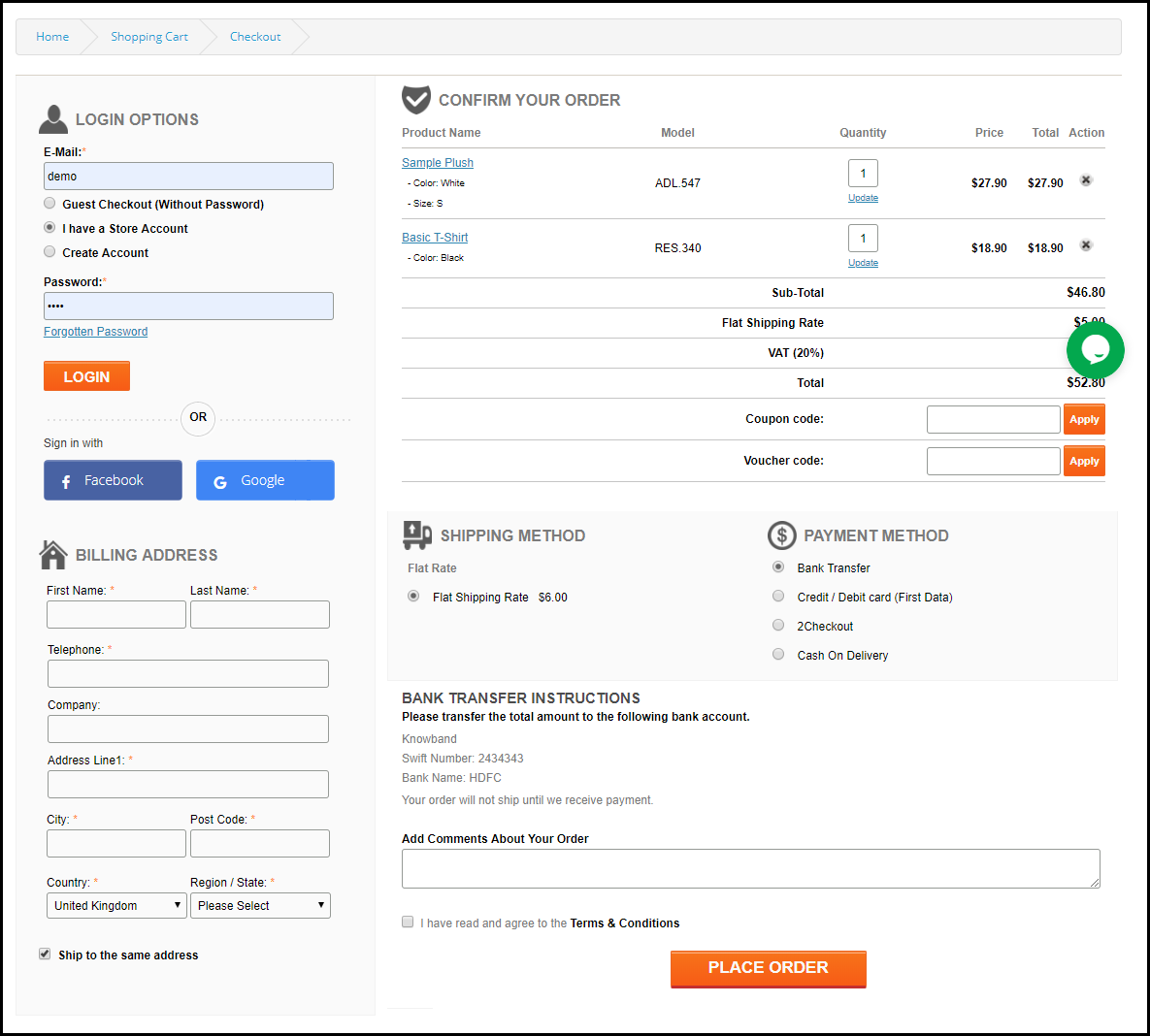
As an alternate solution, you can choose to switch to our OpenCart One Page checkout extension which is even compatible with OpenCart 2.x. It is a one-page checkout extension that removes the unnecessary elements from OpenCart 2.x and has loads of features to make your checkout conversion friendly.

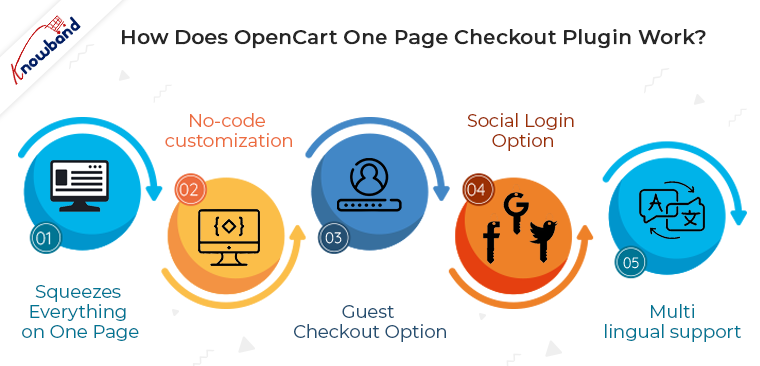
How does the OpenCart One Page Checkout plugin work?

The One Page checkout extension for OpenCart replaces the multi-step checkout option with a single-page checkout. Since without getting you into the fuzzy the code changes it incorporates all the features that an optimized checkout page is expected to have. So, all you need to do is to install the OpenCart v2.x One Page Checkout module in your store. Moreover, the configuration changes are done at a few button clicks from the back-end and the changes will be reflected in the front end of your site.

Listed below are some of how the OpenCart Single Page checkout can help you remove unwanted elements:

Squeezes everything on one page

Instead of going with multiple checkout steps, the OpenCart One Page Checkout extension squeezes all the processes on a single page. With the reduction in the number of web pages, the code of the site becomes simpler.

No-code customization

You can “Hide” or “Display” any of the fields from the checkout page by simply changing the settings from the extension’s backend configuration. Plus you can change the orders of fields by just dragging and dropping. Along with this, the OpenCart one-page checkout module for versions 2.x and 1.x offers an additional comment section that can be removed at a button click if required.

Most of the store owners do not have the technical knowledge to code and make field configurations. This Opencart module brings great ease to them in setting up the checkout page layout as they require for their site. The number of fields and their position over the checkout page is fully customizable from the back office.

Guest checkout option

Without making any code changes, the OpenCart One Page Checkout module for v2.x enables the guest checkout option on the site. Not just this, you need not make any code changes as mentioned above if want to remove the guest checkout at any point. This can be done just by toggling a single button from the back-end of the OpenCart single-page checkout plugin.

You can even register those customers who do guest checkout at your store. Additionally, you can allow your customers to set their passwords while performing guest checkout.

Recommended Read: Plugins that can be a Good Combo Offer for One Page Checkout for OpenCart Stores

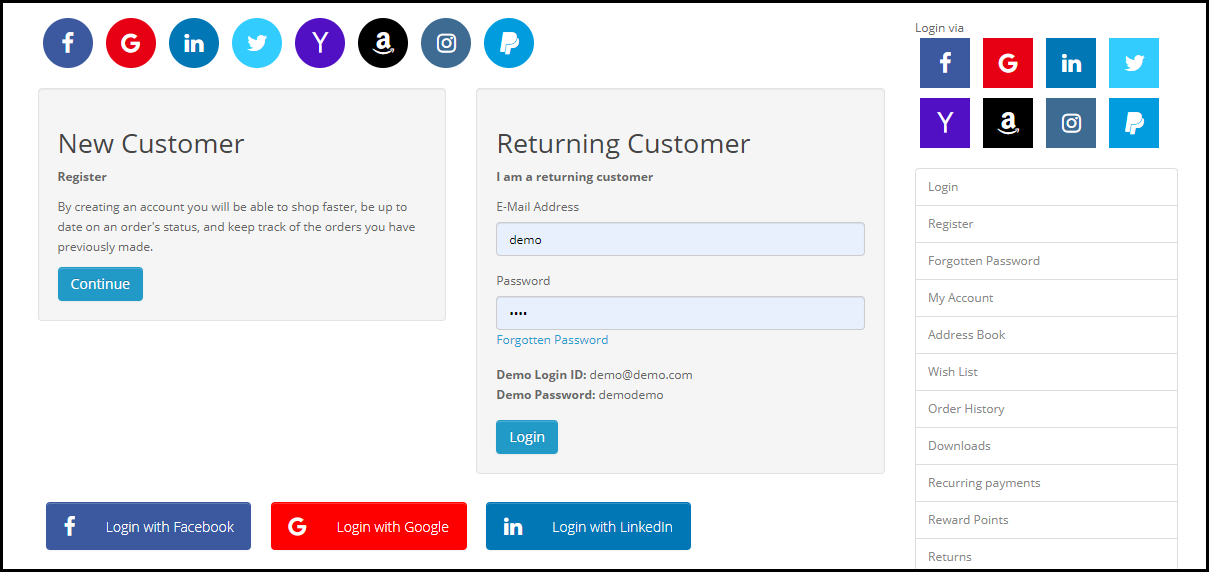
Social login option

You need not integrate the social signup options via coding. The OpenCart One Page checkout plugin comes with built-in social login options. You get Facebook and Google login options. All you need to do is to obtain the API details and share them in the back-end of the OpenCart plugin.

Multi-lingual support

If the site contents are displayed in multiple languages for different locations, then, some extra coding is required to be done. The OpenCart One Page checkout extension eases out this aspect for you. The extension offers multi-lingual support and the admin can upload the contents of the sites in as many languages as they wish. The respective contents are uploaded in one go without getting you indulged in any site changes.

Set Default Options

Most of the websites provide customers with the default option of “Login” considering that the user already has their account on the store. Likewise, you can also mark default options out from “Register”, “Login” or “Guest”.

Customizable Fields

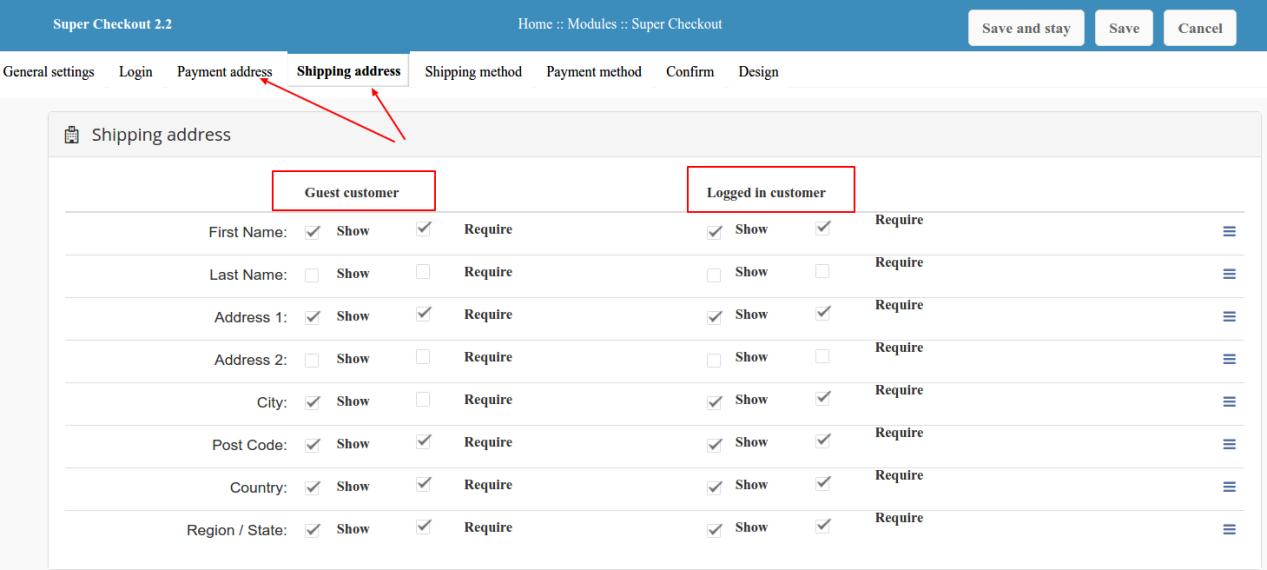
The fields provided to the customer on the shipping and payment page are fully customizable from the backend panel.

Recommended Read: OpenCart One Page Checkout to Deliver a Perfect Online Shopping Experience

Concluding Words

In the customer-centric environment, a flawless user experience is key to staying ahead of the competition. One of the ways to do so is to keep everything precise and as combat as possible. So, this is when a single-step checkout process can help you out without getting you into the complication of code optimization. To increase the profitability of their business, every store owner wants to give their customers a simple and quick shopping experience.

Since the Page Checkout module lessens the clients’ additional work. Hence, Checkout became the focal point of this procedure. So, One Page Checkout Addon is a remedy for this problem as a result. In addition to OpenCart One Page Checkout Extension, Knowband offers a One Page Checkout Module for other platforms like PrestaShop and Magento 2. Thus, it enables the store admin to finish the checkout process on a single page, lowering the rate of cart abandonment.

Why are Sales Reports so Important – How to get an OpenCart Sales Report?

When it comes to ensuring the success of an eCommerce business, you need to count on the analytics and sales report. These are effective metrics that help you make more informed decisions. Even if we take the sales report in particular, it is not just a count of the volume of product you sold from your site over time. There are many other positives of the same. It helps you spot pitfalls, trends and ensure you that you are going on the right track.

In order to thrive in the eCommerce industry, you need to keep track of these analytic report and quick informed decisions. With the business matrix at your fingertip, you will be sound enough to figure out where you are going wrong and where you are going on the right track. This is where the sales report can help you. Basically, a sales report shows the real face of your online business where you come to know if your business is increasing or declining. An effective sales analysis helps you analyze and comprehend how to turn data insights into successful business strategies.

If you are an OpenCart eCommerce store owner, then, this blog can be of special help to you. I’ll run you through the basic need for keeping track of the analytical reports and the ways by which you can get the sales report of your OpenCart store. Read on to know.

How can managers use the OpenCart sales report?

Whenever of the financial year, the business managers can break down the patterns in the sales report to locate the best strategy. Managers ordinarily utilize the sales reports to recognize the market patterns and best chances to expand the business volume. For instance, you may find that a client in the history has demonstrated an expanded sales amid certain times. This information can be utilized by you or your sales managers to request extra business during the pinnacle times. So, if your OpenCart site is capable of generating a detailed sales report whenever required, you are going in the right direction.

1. Sales report tells you if you are doing it right

Your OpenCart sales report will show your website’s actual sales for a specific period- daily, weekly, monthly, quarterly, yearly or for any time frame that you feel significant. You can also generate a report for specific divisions of your websites such as product sales, coupon conversions, total revenue, missed orders, discounts etc. Thus, you can utilize these generated reports (actual) and compare them with your projected sales. It will make sure if you are moving in the right direction or you need to check your course of action.

2. New vs old sales scenario

Sales reports can help to compare the new vs old data.

Generation of the current sales report is not enough. Your OpenCart sales report would be more effective if it includes the well-versed comparison between the old and new sales data. An Open cart sales report can include the percentage of revenue coming from different customer groups, and this breakdown will be useful for you to know if you are retaining the business. This new vs old analysis will also be effective in measuring the efficacy of your new, and current advertising, offers, customer targeting strategies and conversion optimization.

3. Current relevance of a product on your site

One of the patterns that your OpenCart sales report can uncover is whether there is an issue with the product demand. A long haul decrease in sales of an item may show a few issues. It could be the competition that is eroding market share, or different items sold being sold on your site might do likewise. A long haul decay implies that it’s an ideal time for quit offering that item. At times, it could likewise be uncovered that clients’ needs are evolving. A single OpenCart sales report can do wonders for you and can spare your from conceivable debacles on the off chance that you use the information appropriately.

4. Shopping Behaviour of the Customers

Along with the sales volume, a deeper insight into the report can help you understand customer behavior. You should be monitoring how they interact with your products and what they like/dislike. By tracking the sales report, you can effortlessly see which product is grabbing the attention of the customers and which one is not. You can, hence, check what’s wrong with the products that are not selling. Additionally, you can even amp the marketing strategies of the popular products.

5. Sale trend with respect to the location

Just tracking the sales is not enough. Your analysis should be location-based. The sales report can provide you a better insight into the purchase behavior of the customers based on their location. This is one of the ways to figure out the demographics of your prospective customers base. In addition to this, you can find out where exactly this audience base is located. This way you know the taste and preferences of the people of that particular location. This can ultimately help you in maintaining a balance between customer retention and acquisition.

How can you implement proper OpenCart sales reporting on your site?

There are a number of tools that can help you retrieve the detailed sales report of your store. Integrating Google Analytics is one of the ways. However, for OpenCart store owners, Knowband has an easier and budget-friendly solution. The OpenCart Birds Eye View Report plugin can be installed on your website that will uncover all the above secrets for you. The admin can have an access to a detailed reporting system results of which can be seen on the OpenCart dashboard itself. Using this OpenCart sales reporting plugin, you can generate and compare yearly, monthly, weekly, and daily reports. The graphical and tabular representation offered by the OpenCart plugin allows you to compare the old vs new data very effectively at a glance.

Finally,

We have seen that how a single sales report analysis can do wonders for your online business. Wouldn’t it be a bad choice to ignore the importance of an efficient OpenCart sales reporting system?

Related Stories:

How to use an OpenCart Mailigen integrator to earn an email list?

E-mail marketing is an essential part of any business optimization strategy today. Whether you do it in a planned way or just some random emails to your potential customers, emails are used by a majority of the businesses to reach out the customers. Consider it a product update, new update, or just a greeting message, emails are used by the businesses to expose their offerings to the customers. As compared to any other marketing medium emails are the oldest among the active mediums and they intend to be there for a long time.

So, why not leverage this useful marketing tool for your eCommerce business on OpenCart platform too.

How can you leverage the email marketing for your OpenCart website?

What is Mailigen?

Mailigen is a very popular email marketing platform that supports a repository of huge email database to be stored and utilize the email list to send bulk emails to those email ids stored. It provides various options to organize the email campaigns and prepare the group of email ids that will receive the emails from your side from time to time. The automatic email scheduling in one such popular feature of Mailigen.

Mailigen and OpenCart

For most of the eCommerce platforms do not consist on inbuilt medium to manage email marketing campaigns. That is why business owners on platforms (like OpenCart) depend on email marketing agents (like Mailigen) to provide that medium. Now, that we know the basics of how Mailigen could be useful for your OpenCart store, let’s see how can you actually leverage this email marketing tool on your OpenCart store.

The OpenCart Mailigen integrator extension can be used to synchronize your store’s email database to your Mailigen account. Since you have a tool (Mailigen) that can easily organize the email campaigns for your marketing, you just need the email data of your customers whom you have to send the marketing emails. The best thing about OpenCart Mailigen integrator extension is it can capture the emails of your customers from the OpenCart store and sync them to your Mailigen account so that you can use them for your marketing campaign.

How OpenCart Mailigen integrator captures the email ids?

Every eCommerce website possesses certain forms that it uses to collect information of the customers on different occasions. These occasions could be the account registration form, Newsletter subscription form, or most important-the checkout form. In all these forms, customers have to enter their email ids in the respective email fields.

This is the time when the OpenCart Mailigen integrator extension comes in the picture. The OpenCart Mailigen integrator extension captures the email address as soon as the customer comes out from email id field in any of these forms. The captured email id with the help of this OpenCasrt Mailigen integrator extension is then synced with the Mailigen account. Thus, building a database of email ids from your own OpenCart store.

Benefits of using OpenCart Mailigen integrator extension

  • The OpenCart Mailigen integrator extension capture email ids of your customers from your own OpenCart store.
  • Since email ids are from your own website, they are more relevant to your business and have high chances of conversion.
  • You have to just update your Mailigen account and API details and you can start capturing the email ids with this OpenCart Mailigen integrator extension.
  • The OpenCart Mailigen integrator extension syncs the OpenCart store with your Mailigen account automatically.
  • You can enable or disable automatic capture anytime.

5 facts about OpenCart Abandoned Cart Module

A research says that out of every 10 eCommerce customers, 7 of them abandon a cart for different reasons. It means those 70% percentage of lost sales were certain to get converted but for some reason(s) they could not. OpenCart websites too are not spared from this evil and each day a large number of customers abandon these sites.

There are ways using which OpenCart websites can minimize the possibilities of getting abandoned. However, none of the ways can guarantee that they can prevent all the cent percent carts from getting abandoned. That is why the OpenCart abandoned module was introduced to the picture to deal with those carts which get abandoned despite all the efforts to prevent them.

Let’s see some facts about the OpenCart Abandoned Cart Module, and understand how it works to minimize the losses occurred due to shopping cart abandonments.

Facts about OpenCart abandoned Cart Module:

  • OpenCart abandoned Cart Module uses the order id generated by the OpenCart during Checkout Process to capture the carts: The OpenCart platform generates an Order id for all the orders right at the checkout process itself. This order id used by the OpenCart abandoned Cart Module to uniquely identify the carts and capture them with the cart information. The cart information consists of details of the products like product name, Product quantity, date added etc. This information is used by the customers to restore a cart in just one click without manually re-adding the products back in the cart.
  • OpenCart abandoned Cart Module uses the time limit mentioned in the module configuration to identify an abandoned cart: The OpenCart abandoned Cart Module can capture each and every cart – abandoned or not. However, we are only concerned about the abandoned carts that are left orphaned by the customers. So, there is an option in the OpenCart abandoned Cart Module Configuration where the admin can mention a time limit after which a cart will be considered as abandoned. This option is used by the module to identify an abandoned cart from all the carts captured by the module.
  • OpenCart abandoned Cart Module sends manual/automatic serial reminders to the abandoned customers on their email ids: The module is capable of capturing all the carts on your OpenCart site. However, an abandoned cart reminder to the customers can only be sent on their email id- that’s logical! So the abandoned carts where customers have provided an email id are selected to send the serial reminders. These reminders can be sent either manually by the admin to each customer, or he can just curb this burden by setting a cron to send automatic serial email reminders. Admin can set different email templates for each message to be sent to the customers.
  • OpenCart abandoned Cart Module sends email reminders with or without offers: As already mentioned in the former point that admin can send email reminders using different emails templates already stored in the modules database. There are two types of email templates that can be sent to the customers here. One is a general reminder mail to just remind the customer about his abandoned cart.
Serial reminders without offers can also be wise option for start

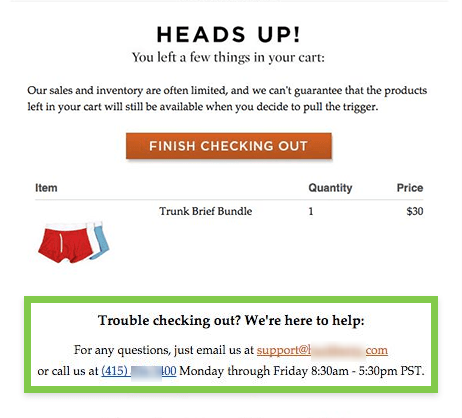
Other is a reminder with some offers to lure back the customer. For example, the reminder mail in the screenshot below says that the customer can grab an offer of 25 % discount if he completes the purchase.

Abandoned cart serial reminders with offers and deals
  • OpenCart abandoned Cart Module allows the customers to recover the abandoned cart in just one click: Despite all your offers and discounts in the serial reminders, some customers might feel lazy to come back because they have to add back the products again in the cart and then start the checkout process again. This OpenCart recover abandoned Cart Module eliminates this hurdle by allowing the customers to directly go to the checkout page with all the products in the cart already restored. This is done by clicking on a CTA button that is provided in each reminder email. The customer will recover all the products in just one click and can directly checkout without even a need to log in again.

Finally,

the OpenCart abandoned Cart Module is a perfect OpenCart recover abandoned Cart tool if used wisely. That is, you must additionally follow the best practices for writing an abandoned cart email so that it ensures the success of your emails. The success of OpenCart recover abandoned Cart is totally dependent on the success of your emails. The tool provides you a hassle free way to connect with your lost customers who can still be earned back with a proper recovery approach.

This Would Also Interest You:

Score boosted conversions with OpenCart Shopping Cart optimization using Ajax technology

Shopping Cart in digital shopping environment has the same purpose like the physical shopping cart that you use in supermarket. A shopping cart in both the environments is used to arrange the to be purchased items in one location and then taking it to the checkout counter.

While the purpose is same, but the way of presentation in both the environments is quite different from one another. In physical shopping carts, you keep the things not that arranged as you might see in a digital shopping cart. Let’s take an example of the OpenCart platform where shopping carts are used to show a review of the whole cart to the customers. OpenCart possesses a well-defined default shopping cart, but there are certain things which make it lag behind the new standards of shopping cart extensions.

I am indicating to the Ajax based shopping carts or so-called Ajax cart extensions. With the growing competition in the eCommerce market, a default shopping cart extension might not provide you the best user experience. Let’s take a look at these lags and know how can you eliminate them using an OpenCart Ajax Cart extension.

1. Coupon and vouchers remain in disadvantage in default shopping carts-

The default shopping cart cannot provide the users with an option to add coupons and vouchers. Instead, they provide the options to add coupons and vouchers on either the product pages or the checkout page.

For a proper competitive conversion optimization, the facility to add coupons and vouchers on the shopping cart pages would be an upper hand for the site. Users visit the shopping cart pages to review their cart and know the total value of their purchase. There are certain chances that customers might find the purchase is out of their budget. To convert such customers you might offer the customers to apply a discount coupon and see the reduced cart cost.

The above activity can also be done in the default environment where the checkout page would be used to apply the coupons, but no one can say that the customer would even reach to the checkout page for sure.

What can you do?

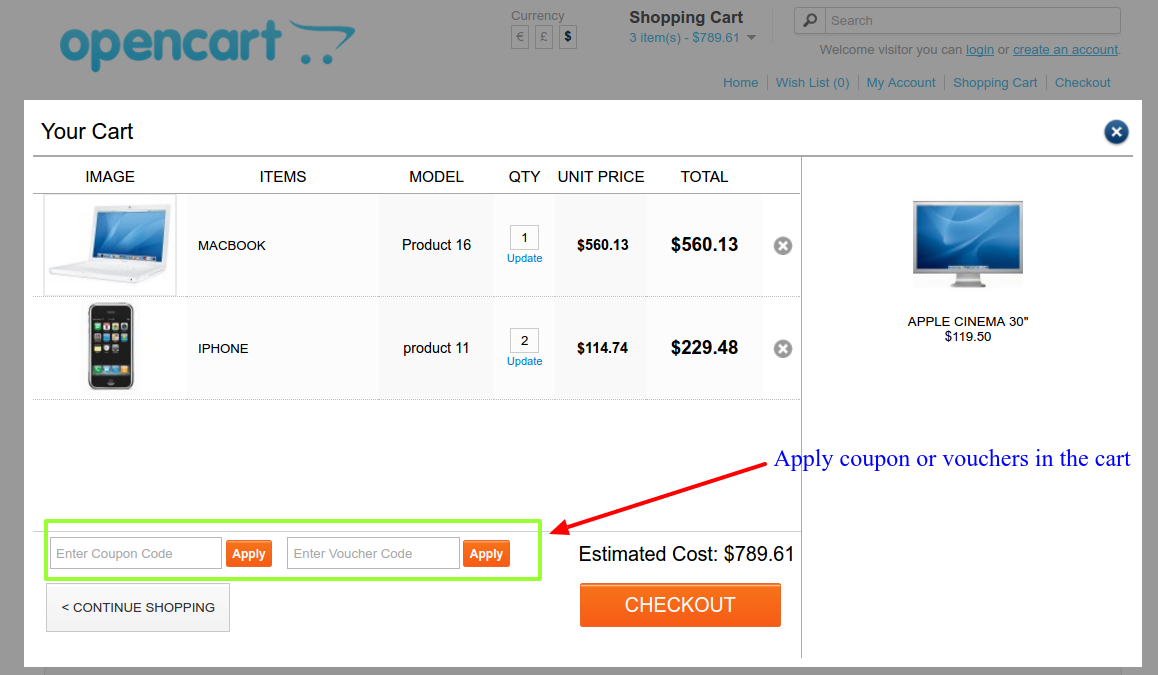
So it’s wise to utilize your cart itself, allowing customers to apply coupons from the very beginning. OpenCart Ajax cart can help you in this regard as these Ajax based shopping carts allow the shopper to apply and redeem the coupons from the cart window itself. Thus helping you secure some serious advantages against your rivals using the default shopping cart.

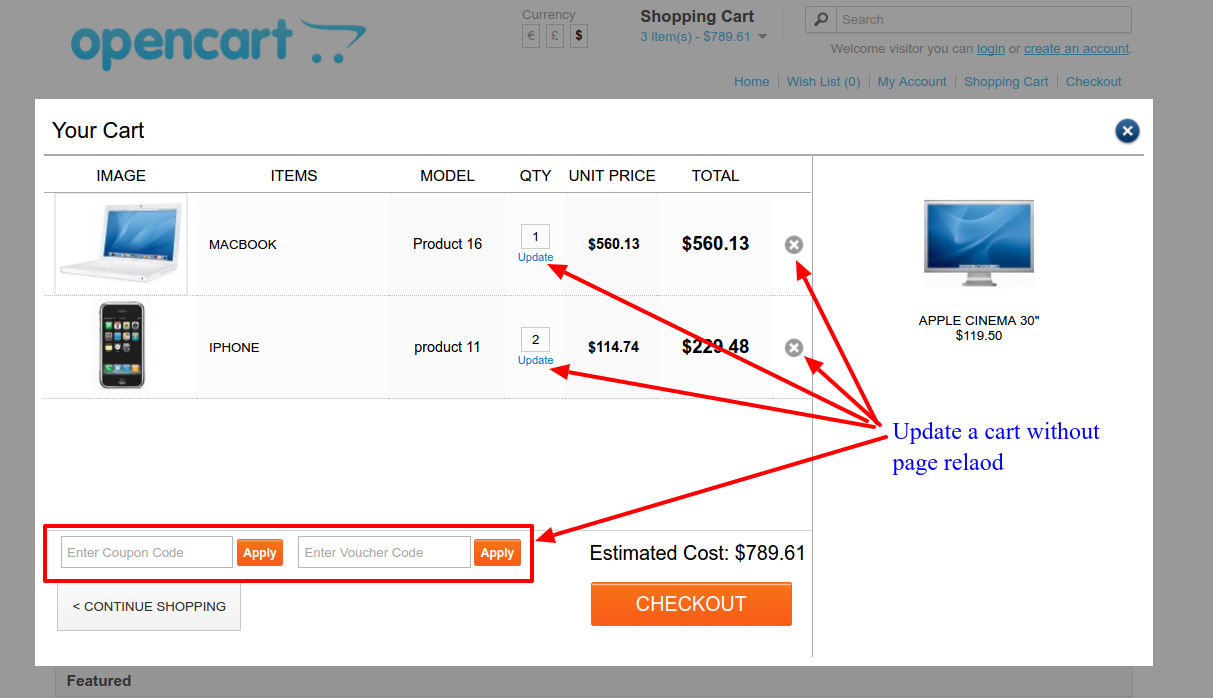
OpenCart Ajax cart extension’s option to redeem a coupon or vouchers

The Ajax cart can also be used to show the applicable coupon codes in the cart pop up itself to make it easier for customers to redeem them instantly.

2. Updating a product quantity is a time taking process in default shopping carts-

Whenever you want to remove a product from the cart, or add a new product to the cart, or update the quantity of a product in the cart, you have to face a page reload. The page gets reloaded for any minor to major update in the cart.

The frequent page reloading not only becomes heavy on your server but also frustrate the shoppers. It is one of the major reasons for why users abandon a shopping website. No shopper desires to wait for the pages to get reload that frequently. The user experience is completely degraded in these situations. For somehow if they complete a purchase, they do not seem to encouraged to shop with you again. At least your site won’t be the first preference because of its downgraded user experience.

What can you do?

The Ajax-based shopping carts like the OpenCart Ajax cart extension, allow the shoppers to update the products in the cart without reloading the page. In fact, the OpenCart Ajax Cart is not a page at all. The whole cart is presented as an Ajax based popup which shows a complete cart information with many other additional features for better user experience.

  • You can remove a product from the cart without page reload
  • You can add a product to the cart without a page reload
  • You can add a coupon to the cart without a page reload
  • You can update the quantity of a product without a page reload.
OpenCart Ajax Cart popup allows the shopper to update the cart without page reload

Finally,

There are certain benefits of the Ajax based shopping carts extensions which are missed in the generic shopping carts. It’s a time when 2017 has come and brought a new level of competition in the eCommerce market. In order to survive yet another year with your eCommerce business, it is wise to adopt the extensions like OpenCart Ajax cart. It will surely add some more to the list of your competitive advantages against your rival eCommerce sites.

This Would Also Interest You:

What to look out for an engaging OpenCart checkout extension?

OpenCart store owners are facing the most difficult situation with the product sales continuously diminishing and the customer engagement is waning out from their site. It is definitely a critical situation which if not tackled properly can hurt your conversion rates and sales in a big way. You are fighting a tough battle of conversions among your business rivals and a simplified checkout process can be a great help in this regard.

Being an OpenCart site owner, you need to have a checkout process that can effortlessly grab the instant customer attention for higher product sales and conversion rates. In case, you are not fortunate with the one, it is time to utilize the OpenCart one page checkout extension for your store. Here are the few salient features that need to be a part of an engaging checkout extension for an OpenCart store.

Easy plugin management through Admin panel

It is important to have an OpenCart checkout extension that can be quickly managed through the back end of the admin panel. You need to hire the OpenCart plugin development services that can provide plugin customization in a seamless manner. This is certainly a crucial requirement as you need to make changes based on your business requirements and customer expectations. Always choose a checkout extension for your OpenCart store that offers easy plugin control and management facility.

Offers social login facility for customers

Use social login facility on your site for optimizing customer engagement.

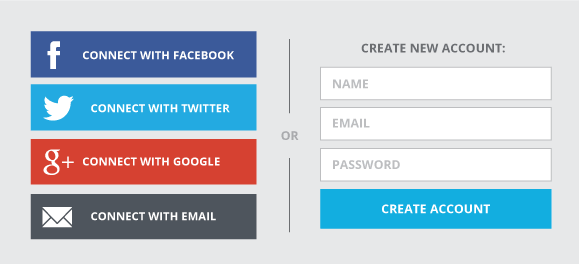
Customers while making an online purchase are usually stuck at the registration process on the checkout page and often leaves the site in the middle without performing the required activities. If your registration process is taking too much of time, it is important to involve the social login facility on your OpenCart store with the help of a social login extension. It would be a great functionality in an OpenCart quick checkout extension to include social login facility through multiple social media sites.

Works across wide range of devices

Include a checkout extension that can work across multiple devices and screen types.

The checkout process on an OpenCart site is hampered by the use of various devices by customers for making an online purchase. This is due to the fact that the checkout facility provided by multiple devices is not similar which affects the conversion rates and sales to a great extent. You need to ensure that the OpenCart one page checkout extension which is selected by you has a mobile responsive web design or not. This feature will make sure that the functionality of your checkout extension can be effortlessly accessed and utilized on multiple devices and screen types. This can be a great help for your OpenCart store for boosting its sales and conversions.

Should provide product information and image in cart details

Every online shopper should get easy access to the product information and image with the help of an interactive shopping cart facility. You need to have an OpenCart checkout extension that can offer an easy way to get detailed product information and image in your cart for a quick product purchase. There are various ajax based cart extension for OpenCart store owners that can simplify the online purchasing process to a great extent.

Provides multiple payment and shipping options

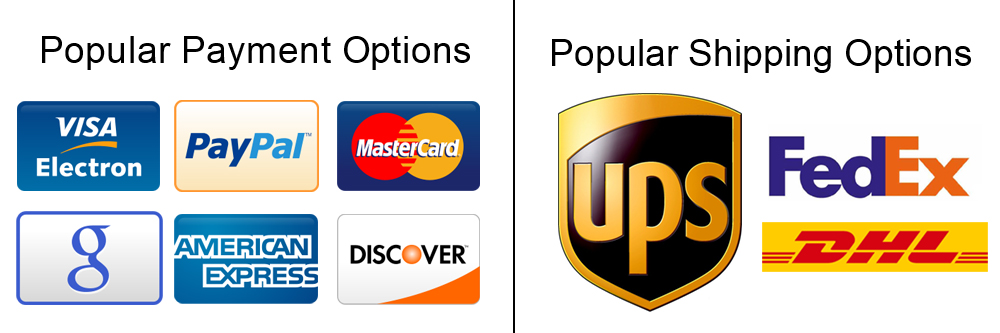
Multiple shipping and payment options boost the conversion rates and sales of a store.

One of the prime reasons for increasing shopping cart abandonments on an online store is the absence of multiple shipping and payment options. Don’t force your customers to make an online purchase through the restricted payment and shipping methods only but provide more options through the use of OpenCart extensions. The presence of multiple payment and shipping options on an OpenCart store increases its chances of conversions and product sales considerably.

Quick tips

If you are going to invest your time, money and efforts on an OpenCart quick checkout extension, don’t forget to consider these crucial points. Remember checkout process on your site is the real doorway to product sales and conversion rates, so better watch it. If your selected OpenCart checkout extension fulfills all the above-mentioned criteria, it can surely earn you more conversions and sales among your business rivals.

This Would Also Interest You: