It would not be hyperbolic to say that the “Present human generation is driven by the smart phones and tablets” that have become an indispensable part of our day- to- day lives. It is not just a medium of communication but is now playing multiple roles of business promotion and shopping. Due to the widespread use of smartphones and tablets, more and more people are now doing online shopping through these devices. Due to this sudden change in the consumer purchasing behavior, mobile apps development have become the business necessity that has been driving conversions and sales around the world. If you don’t have a productive mobile app for your online store, you can lag behind your rivals. Here are the few reasons that can help you achieve a mind blowing mobile app for your eCommerce store.
1. They are loved by online shoppers-
Mobile phones are actively used by people all around the world. With their increased use, people are now using mobile phones to browse a particular eCommerce site and are interacting through mobile devices instead of desktops and laptops. Considering this changing consumer pattern, you need to have an amazing mobile apps that can help your mobile users to shop freely on your eCommerce store. Always remember the fact that consumers are browsing an eCommerce site with the basic intent of making a product purchase, so design your mobile app accordingly.
2. Mobile apps make payment process much easier-
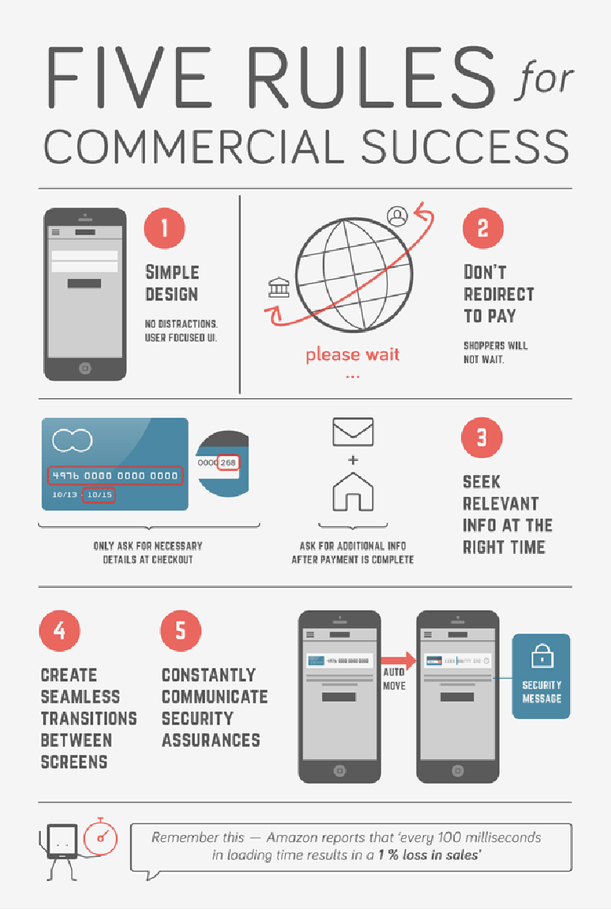
Every online shopper is looking to make a quick product purchase but this experience is often hindered by the complicated and time consuming payment process. To simplify this crucial task, you need to design your mobile app in such a way that it can integrate the popular payment methods for a seamless checkout purpose. Your mobile app could remember the payment entries for a user and can help him/her for a faster checkout experience and conversion rates.
3. Mobile apps provide the facility of push notifications-
With the help of mobile apps, store owners can provide a streamlined and personalized user experience for its Android or iPhone users. By integrating your push notifications with various eCommerce extensions, you can provide location based push notifications or alerts to your customers regarding various special offers. Through these push notifications, store owners can inform their customers about various events of their eCommerce stores for better customer engagement and product sales.
4. They offer a more controlled user experience to customers-
Due to the limited screen size and navigation capability, mobile app developers need to provide an amazing app that can optimize the shopping experience for various online shoppers. Based on the targeted mobile platforms, you can get your mobile apps designed in such a way that can provide a mind blowing user experience to your customers based on a particular mobile platform such as Android, iOS, RIM and such others.
5. Owners can utilize the built- in features of mobile phones for their business use-
Every basic mobile phone is equipped with various in- built features like location tracker, camera, microphone and such other components that can be utilized for improving the shopping experience of your mobile users. If your app can make best possible use of these features, you can be successful in grabbing maximum customer attention for better conversion rates and sales.
6. They help in improving your social presence and brand identity-
Mobile apps can do wonders for your social presence and reputation among your business rivals to boost your growth chances. You can utilize the plugin development services of companies like Knowband that can provide feature packed eCommerce extensions for integrating social media platforms with your app. Once, your customer can seamlessly access his/her social accounts through your app, social engagement and reputation of your eCommerce store will certainly thrive properly for optimum business results.
It is definitely the high time to design a mind blowing feature packed mobile app for your eCommerce store for achieving higher conversion rates and sales. If you are still not serious in this aspect, you will surely face the severe consequences of the changing business winds that can ruin your business fortunes. Always remember that “A small app can change the face of your entire business and can act as the growth engine” inspite of the cut throat competitive business environment.
In this busy lifestyle, nothing comes as a fresh breath of relief if you can get your desired goods and products at your doorstep without any need to roam here and there for making a purchase. It will actually be a divine feeling and thank God, it is actually possible due to the emergence of numerous online marketplaces and eCommerce stores around the world. Gone are the hard days when customers have to go to each and every shop to purchase a particular product and had to handle multiple shopping bags simultaneously. This eCommerce segment is acting as the “new found love” for shopaholics as it has made shopping a much simplified task than before. The success stories of eCommerce companies like Amazon, eBay, Alibaba, Flipkart, Snapdeal and such others have shown that there is a huge business potential in this business segment.
With the changing consumer preferences and business opportunity, numerous foreign investors are pouring their dollars (FDI) in various eCommerce companies for making a quick fortune. Among the global markets, India has emerged as the favorite destination source for eCommerce business given its huge market demand and the economic stability amid global slow down. In a further push in this area, the government of India through guidelines issued by the Department of Industrial Policy and Promotion (DIPP) on 29th March, 2016 has allowed 100 percent foreign direct investment (FDI) in eCommerce marketplace model through automatic route. With this big announcement, the cent percent allowed FDI is applicable for B2B (business- to- business) transactions under the automatic route and is exempted for the inventory based model of eCommerce.
Before we scrutinize much about this latest development, Online marketplace model as per the official statement of concerned ministry refers to “An information technology platform by an eCommerce entity which acts as a facilitator between buyer and seller on a digital and electronic network”. Similarly, an inventory based eCommerce model means “An eCommerce activity where eCommerce entity owns the inventory of goods and services and sells their product/services directly”.
Now, as per the changed norms, it will be much easier for foreign investors to put their money in this eCommerce business segment but there has been a sense of alertness among various eCommerce companies due to the limitation of cap of 25% for the vendors that are selling their products on eCommerce marketplace stores. Further, this sector has attracted maximum FDI in the previous year of 2015 and remains a key promising business segment in the many more years to come. With the growth in online marketplaces, there is a generation of around 20 million jobs in the country by year 2020 as per the estimate of Gurcharan Das, an eminent author, commentator and former CEO of Procter & Gamble India. Apart from this, this sector is expected to see a growth of around $19 billion in sales with an involved seller community of 1.3 million in the same time period. Considering these crucial statistical figures, you need to think seriously about venturing into this business area.
This is definitely the “Now or Never” kind of business scenario and you would not like to miss this business opportunity with the current changing market scenario. It is the most opportune moment for you to enter into this eCommerce business segment by availing the exceptional eCommerce marketplace development services of a reputed company. If you are not having any idea about one, we will recommend you to avail the unmatched services of Knowband which specializes in the eCommerce plugin development services. With our feature packed eCommerce marketplace module, you can effortlessly turn your eCommerce store into an online marketplace for grabbing the most in this present changing business scenario. Get in touch with us and we will ensure that you are prepared enough to make your mark in this promising business segment with the support of our exceptional workforce, global business exposure and technical know how.
There are numerous eCommerce sites but not everyone is making significant gains in terms of product sales, site traffic and conversion rates. You may have wondered that why there is a huge disparity as some of the eCommerce stores like Amazon, eBay, Alibaba, Flipkart and such others are making billions of dollars while others are struggling hard to make sales and post profits. There is definitely something which they might be lacking or may not be doing correctly for making their presence felt in the international business scenario. Let us throw some light on these 5 site elements that can be a major “turn off” for your targeted customers and are affecting your sales activity drastically.
1. Absence of a logical and appealing headline-
Headlines are the first element that grabs the immediate attention of your targeted customers, so they needs to be eye catchy and engaging. If your heading seems interesting to your targeted customers, it will surely grab their attention and will help in boosting your eCommerce conversion rates significantly. You need to understand that “What starts well is what ends well”, so don’t take headings as lightly.
2. Inappropriate product margins-
Business entities are working with the sole intention of grabbing maximum sales and profit margins in order to stay active in this crucial competitive environment. Make a detailed analysis of your operating cost and other related expenses for pricing your product effectively for getting significant profit margins. If you can’t price your product effectively, you can’t win this decisive battle of conversion rates and product sales among your targeted customers. Moreover, there are eCommerce extensions like Magento Scratch Coupon, Magento Master Deal, PrestaShop Price Alert, OpenCart Make an Offer, OpenCart Review Incentive, OpenCart Push Cart Promotion, OpenCart Deal Timer and others from Knowband store that can help in improving your product sales, profit margins and conversion rates.
3. You are applying everything at the top of your page-
Your home page is not your “experimentation ground” where you can apply different site elements for testing their effectiveness among your site visitors. You need to include only relevant elements on the top part of your home page for getting instant customer attention. Based on the importance of your site elements, you need to decide whether your site elements needs to be above or below the fold for making maximum conversions and seamless site navigation. Further, there are PrestaShop addons like PrestaShop Custom CSS and JS, PrestaShop Maintenance page customizer and others that can help in effective organization and maintenance of your eCommerce store.
4. Presence of multiple options-
It is rightly said that “Too many cooks spoil the broth”, similarly availability of multiple options affects the decision making process to a great extent. Include only popular and relevant options in fields like shipping services, payment options and delivery time and other such factors in order to attract your customers and not distract them. It has been shown by several case studies and analytical reports that too much options are one of the prime reasons for low conversions and sales as they don’t allow visitors to take the required actions.
5. You are neglecting appealing product images and videos-
Simple plain texts are not appealing for everyone and there are numerous people who want more in the form of appealing images and informative videos. Store owners can drive huge sales and traffic if they are using eye catchy images and videos that are optimized and does not slow down the performance of your store. Apart from this, you can take the help of an effective eCommerce module development services that can help in improving the worth and appeal of your site content through numerous wonderful plugins.
It doesn’t matter whether you are a novice or experienced player in this eCommerce business segment, all these site elements can definitely affect your eCommerce business fortunes to a great extent. For making a strong impact in your business segment, you need to make drastic improvements in the following areas at the earnest level.
Knowband’s Prestashop page visitor count display addon allows the store admin to showcase the number of store visitors viewing a particular page. Other customers and admin can also view the count of page viewers. A display box with “Currently X number of people are looking at this page” message shows on the front end. This functionality improves customers confidence and trust on the website as well as products also.This is one of the best Prestashop modules offered by Knowband.
The Prestashop module helps the PrestaShop eCommerce store admin to increase the popularity of the products and website. You can customize the module as per the requirements.
Features:
Prestashop visitor counter module is easy to install and configure.
Page viewer plugin offers simple and hassle-free implementation.
No technical knowledge is required.
Prestashop counter addon is highly customizable.
Admin can easily enable/disable the module just by a button toggle.
Admin can set look and feel by editing background color and border color for the display box.
Page view counter allows admin to auto-hide the message box.
Admin can set the hidden time after which the display box will be invisible.
Website hit counter extension allows to add custom CSS code for customization.
The PrestaShop Page Viewers Counter allows admin to set the time span for showing viewer’s count on pages.
Admin can select the position to show the message box.
Admin can set the number of visitors to a particular page.
Website visitor tracker addon is fully compatible with all Prestashop themes.
Visitor hit counter module is multi-store compatible.
To install this addon, please follow the following steps:
1. Add addon folder under modules folder of your system.
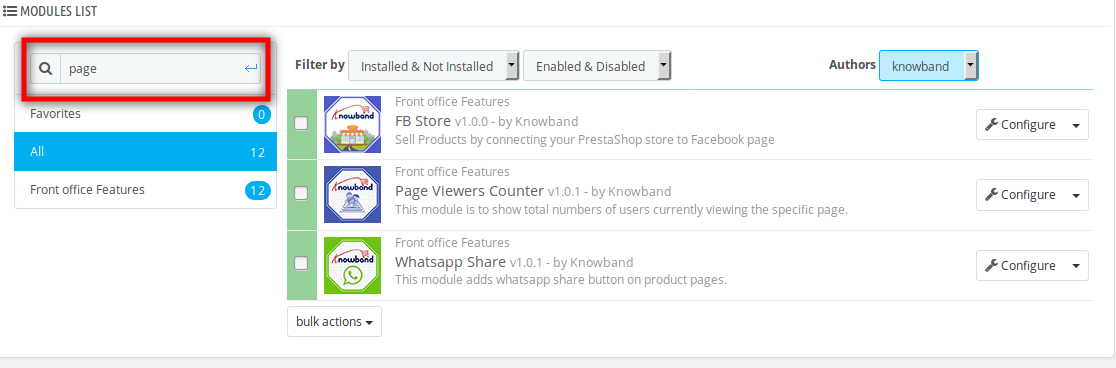
2. After adding this addon folder, system will list the addon on module page under front office featurecategory as given below:
3. Click on install to install the plugin
Admin Interface
Following features will be provided to the admin :
1. General Settings
2. Home Page Settings
3. Category Page Settings
4. Product Page Settings
General Settings
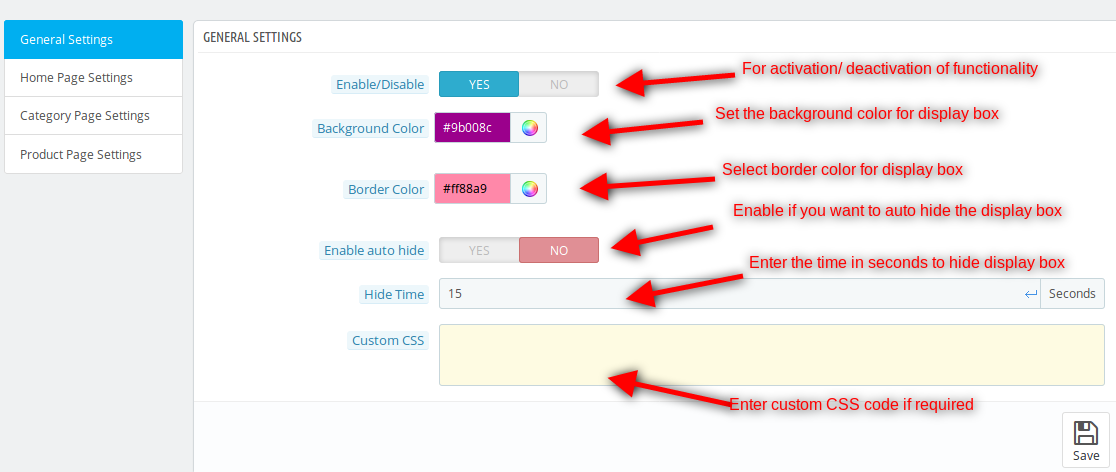
After clicking on configure link of Page Viewer addon on module listing page, the system will open general settings tabs by default as shown in the screen below:
Fields listed will be filled with some default values:
1.Enable/Disable: Initially, this will be OFF. The user can enable/disable addon functionality by turning this ON/OFF.
2.Background Color: Background color for the display box at the front end can be changed by picking a color from color picker.
3. Border Color: Border color to display on the border of display box can be selected here.
4. Enable Auto Hide: The display box will appear on the page as soon as the page loads after enabling the display area and will automatically hide after 10 seconds, admin can specify the auto-hide time period.
5. Custom CSS: Admin can change the CSS of the display box by adding custom CSS in the text area.
Home Page Settings
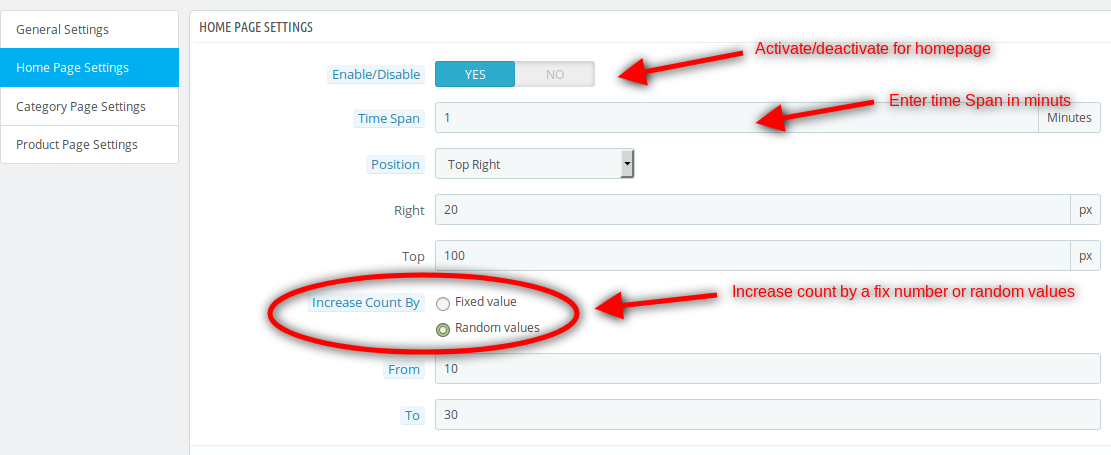
In this tab, change the settings for Homepage, the enable/disable option will be available there.
1. Enable/Disable: Can enable/disable according to the need whether to display on the homepage or not, by default it will be disabled.
2. Time Span: The time difference in minutes, the time corresponding to which viewers will be displayed on the homepage. The default value will be 1 minute.
3. Position: The position where users will see the display box in the page, admin will have the option to change the position by adding padding (right, left, top, and bottom) according to the selected position.
4. Increase Count By: The default value on which the total visitors will be added. Two options will be provided:
Fixed value: The fixed value on which viewer will be added. The default value will be 0.
Random Value: The range of random value will be set here, the default value will be 0.
5. Count Viewers on Homepage: The no. of viewers on the home page at the current time will be displayed. Admin can use the refresh button to view the current viewers.
Category Page Settings
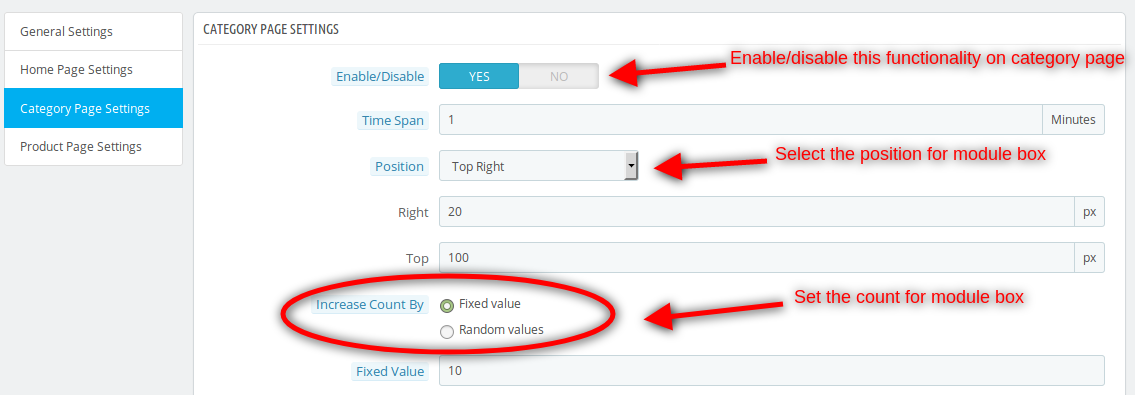
In this tab, change the settings for Category page, the enable/disable option will be available there:
1. Enable/Disable: Can enable/disable according to need whether to display on a Category page or not, by default it will be disabled.
2. Time Span: The time difference in minutes, the time corresponding to which viewers will be displayed on the category page. The default value will be 1 minute.
3. Position: The position where users will see the display box on the page, admin will have the option to change the position by adding padding (right, left, top, or bottom) according to the selected position.
4. Increase count By: The default value after which the total visitors will be counted, two options will be provided:
Fixed value: The fixed value on which viewer will be added. The default value will be 0.
Random Value: The range of random value will be set here, the default value will be 0.
5. Count Viewers on Category page: The number of viewers on the Category page at the current time will be displayed corresponding to the selected category from the select box.
Product Page Settings
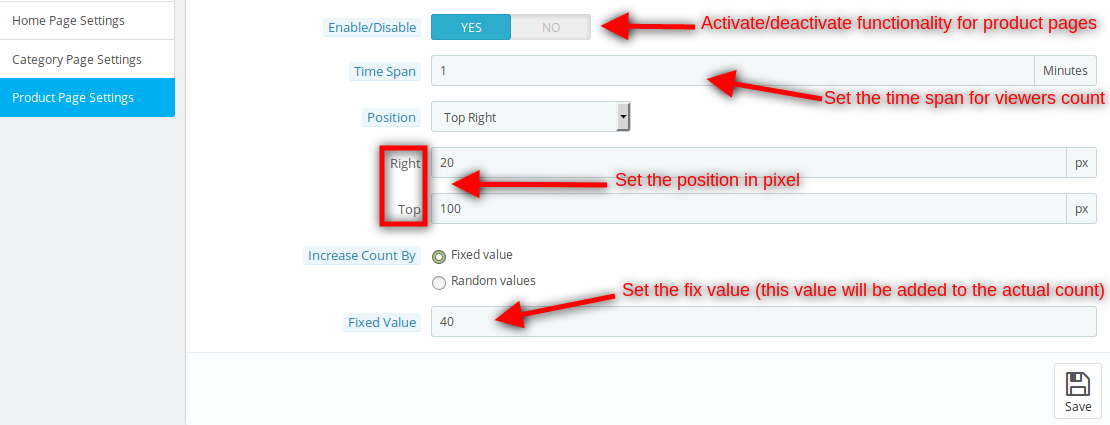
In this tab, change the settings for Product page, the enable/disable option will be available.
1. Enable/Disable: Can enable/disable according to need whether to display on the Product page or not, by default it will be disabled.
2. Time Span: The time difference in minutes, the time corresponding to which viewers will be displayed on the homepage. The default value will be 1 minute.
3. Position: The position where users will see the display box in the page, admin will have the option to change the position by adding padding (right, left, top, or bottom) according to the selected position.
4. Increase count By: The default value after which the total visitors will be counted, two options will be provided:
Fixed value: The fixed value on which viewer will be added. The default value will be 0.
Random Value: The range of random value will be set here, the default value will be 0.
5. Count Viewers on the Product page: The number of viewers on the Product page at the current time will be displayed corresponding to the selected product from the select box.
Front End Module
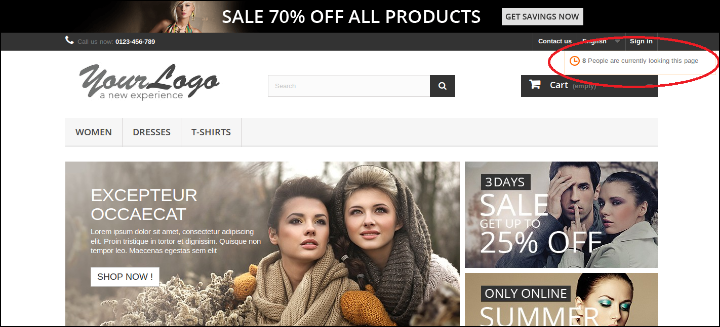
After enabling the PrestaShop page viewers counter plugin, the front-end user will see a display box at home page, product page, category page according to admin requirements.
The Display box at the front-end appears as follows:
Recommendations
Refresh home page of your store every time you enable/disable plugin. If the plugin is not working after installation, then please check permissions on modules folder. The folder should be writable. Please make the folder permission to 755.
The growing expectations and the cut throat competition in the online business environment has pushed the bar to a much greater level for various eCommerce businesses. In order to match up to these expectations, it is important to make transition towards a more effective eCommerce platform that can fulfill your all business aspirations. As, it is said “Look before you leap”, similarly before ensuring the movement towards any eCommerce platform, it is important to consider all the pros and cons for avoiding the major implications later on. Take a look at the various scenarios that can make a crucial impact in this direction.
In order to keep your customers hooked to your site, it is important to provide an unmatched user experience. To achieve the same, you need to improve website navigation, website loading time, search facilities, landing page and other such components for grabbing the instant customer attention and product sales. Analyze if the eCommerce platform which you are thinking for making the transition fulfills all the above mentioned criteria in the best possible manner.
2. Support for mobile devices-
Mobile devices are increasing day by day and so are their role in the eCommerce business. More number of people are now doing online shopping through various mobile devices like smart phones and tablets which explains their importance in the online business environment. There should not be any considerable difference in the user experience of your customers that are surfing the site on desktop or laptops and the one that are surfing the site on various mobile devices. For accomplishing this crucial task, the eCommerce platform selected by you should be capable to support all the mobile based devices effectively in order to boost your product sales, site traffic, conversion rates and customer engagement.
3. Scope for added functionality due to changing market conditions and business scenario-
Your eCommerce platform needs to be flexible enough for including new functionality and plugins for improving the productivity and usability of your online store. There are various important eCommerce plugins from Knowband and other plugin development company for making the various crucial website tasks much faster and in a seamless manner. Further, it may arise that store owners may need to add Magento extensions, PrestaShop modules, OpenCart extensions or any other platform based plugins for improving the overall functionality of their website which will be possible only if the eCommerce platform on which the site is built can accommodate new plugins and functionality without any hiccups.
4. Can contribute towards your eCommerce performance indicators-
Every online store is doing business with the aim of achieving any of these eCommerce key performance indicators like conversion rates, site traffic, increased clicks, more number of online registrations and other such metrics. Your chosen platform should have added functionality and features that can effortlessly contribute towards achieving these key performance indicators.
5. Cost of installing and maintaining that platform-
There are various business entities that are having a weak financial condition and can’t afford to spend a large amount of money in installing and maintaining an eCommerce platform for long term business growth and expansion. Before selecting a new platform, make sure that it is not burning a major hole into your pocket for installation, maintenance and configuration purposes in order to minimize the operating cost of your business.
6. Effective time of installation and functioning of the platform-
Always choose an eCommerce platform that require minimum amount of time for its installation for ensuring a faster and seamless functioning of your online store. If your selected eCommerce platform is taking several months for ramping up its infrastructure, your business is sure to suffer in a big way.
Once, you have have gone through all these checkpoints carefully, there are less chances of making any mistakes while selecting the appropriate eCommerce platform for your online business entity. It will further save your time, money and business opportunities from getting being wasted.
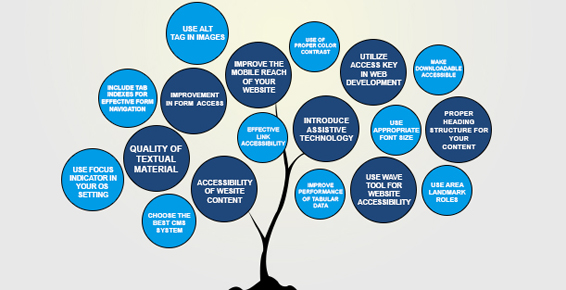
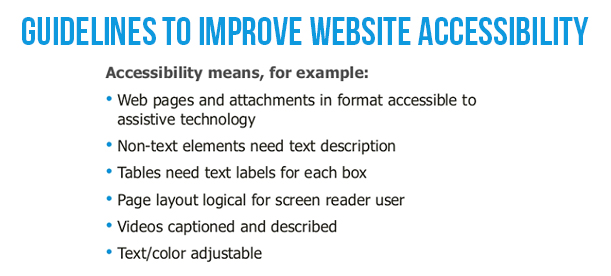
Having an eCommerce website with a pathetic accessibility to its targeted customers is like having a good looking car which does not have a performing engine. Nobody would like to visit a website that takes too much time to load properly and often frustrates a user. If you want to improve the fortunes of your business entity, you need to work towards enhancing your website accessibility for brilliant conversion rates and product sales. With the support of an effective eCommerce website design, seamless site navigation, faster checkout process, impressive website loading time and performance, you can easily achieve the remarkable success in terms of site traffic, conversion rates, customer engagement and product sales. Here is a detailed account of what all ingredients are required for a mind blowing website accessibility.
1. Improve the reach and quality of textual material-
Any website without an impressive and engaging content or text is simply useless. Moreover, the recent Google algorithms like Panda, Hummingbird and others have time and again proved the superiority of the content for generating the required site traffic and conversion rates. Remember to pay adequate attention towards the content as well as graphics or images for increasing the readership of your written content. Take a look at the various ways by which you can accomplish this crucial task seamlessly.
Use high quality optimized images for increasing the worth and appeal of your written content. Further, use effective image alt tag along with the caption and description for improving the SEO friendliness of your content.
Offer high quality short videos with your content (Product Video) for making content more appealing and worth while.
Make use of an effective alternative audio content that does not affect the overall performance and loading time of your website.
Utilize the services of a plain text transcript or RSS feed for making site content available to large number of visitors.
Include a closed caption for optimizing the video experience of your targeted customers.
2. Employ ways to read content for your targeted customers-
There are numerous people who may not be able to read your site content properly due to visual impairment, small font size or illegible font type of your written text. For ensuring a seamless site accessibility to these type of customers, it is mandatory to have an audio version of your page and site content. This recorded audio file can conveniently convey the written message of your website and its internal pages to your targeted customers. Apart from this, there are various screen reader softwares like Microsoft Narrator, JAWS from Freedom Scientific, VoiceOver for Mac systems, Orca (open source) for Unix based Systems, NVDA (open source), Dolphin Supernova by Dolphin and various such others.
3. Take required steps to improve your site navigation (especially forms)-
What good is of a website if it does not allow visitors to navigate through it in a seamless manner? It would be a sheer wastage of your time, money and efforts if navigating around your website is a challenging task. There can be numerous factors on your site that can act as a major stumbling block in the seamless navigation of your website. You need to give special attention to these particular site elements like registration forms, checkout page, images, videos, links and other such areas for ensuring the effortless navigation of your website.
Among them, forms are said to have a drastic effect on the website performance and navigation. You need to eliminate unnecessary fields, illogical labels and other such factors so that visitors can fill out your site forms without any hiccup. Moreover, you need to avoid time bound restrictions and use correct headings for your content on your website for facilitating a faster navigation. For increasing the accessibility of your site forms, you need to perform the following steps.
Use a well positioned and descriptive label with each field in your form.
For establishing an effective relationship between the label text and form field, you can either use a <label> tag or an <ARIA> property.
Ensure that the tab order of your form is at proper synchronization with the order of the form fields.
For similar or related fields in a form, you can group them together using the fieldsets. Take for example, fields like “Street Name/Localityâ€, “Village/City†and “State/Province†can be combined together under a single field of “Correspondence addressâ€.
Inform users about mandatory fields in your form through the help of asterisks symbol (*). Apart from this, you can make desired fields mandatory by using the ARIA property. Use ARIA required=â€true†for mandatory form fields and ARIA required=â€false†if the field is optional in nature.
Provide customer information regarding successful submission of their form or any submission related errors. Show errors on the relevant place and position on your form for increasing the chances of faster error resolution that can help in the quick form submission.
Avoid the use of CAPTCHA codes for form validation due to their inaccessibility and performance issues. There are other alternatives like Sweet Captcha, PlayThru, NuCaptcha, client side JavaScript checkboxes and such others that can be used for validating form data. For understanding more about making your forms spam free, you can check out this link.
4. Select the color that is in resonance with your site content, images, backgrounds and other such elements-
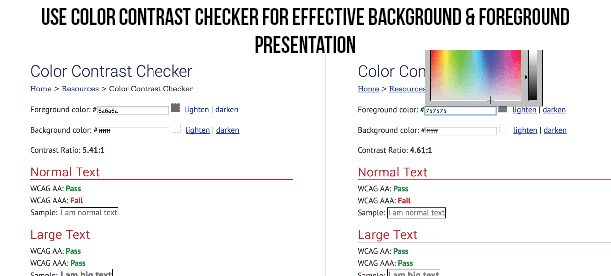
For ensuring the effective readability of your website, it is important to choose the appropriate color for your background and foreground elements. Remember, to use a contrasting color for your text and its background for better accessibility of your website. Beware of using similar colors for both the text and background of your website like using the black text color along with violet, brown or any other dark color will affect the usability of your website to a great extent. The normal contrast ratio while using the color for your background and foreground elements should be around 7:1 but even a contrast ratio of 4.5:1 will also do justice to the visibility of your content and will ensure effective accessibility of your concerned website. You can check the color combination with the help of a/b testing and heatmap tools. By these tools you will be able to know more effective areas and less effective areas and make the required changes on the website.
5. Ensure the proper font size of your content-
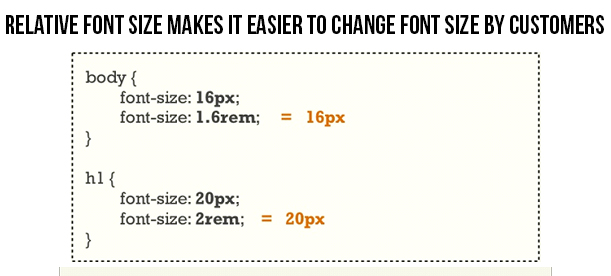
It would be practically immature and naive to expect your readers to have an exceptional eye sight of 6/6 so that they can effortlessly read the small font size content on your website. Don’t make your customers to struggle too much while reading your website content. For facilitating a seamless accessibility to your website content, you need to use relative font sizes that are expressed in terms of percentages or ems rather than using absolute font sizes which are expressed in terms of points or pixels. Due to this above practice, it is practically much easier for the users to make desired changes in the font sizes as per their requirements and eye sight. So, it is the need of the hour to focus on the font size also and not just on improving the visual appeal of your website.
6. Role of Assistive technology in the website accessibility-
Assistive technology also known as Adaptive technology (AT) is actually a blessing for the people with various types of disabilities linked to visual, speech, cognitive, motor or other such physical and mental disorders for accessing the various areas of a website effortlessly that use precise mouse movement, positioning or clicks. The technology stands for a group of assistive, adaptive and rehabilitative devices that are aimed for people with different disabilities along with the process that is involved in locating, selecting and utilizing these devices. This technology has provided a great sense of freedom to all disabled people through the help of various enhancements that have changed the way by which these people used to interact with various digital devices.
Various devices like screen readers, braille system, screen magnification software, speech recognition software, switch access and other such have done a tremendous job in providing a seamless website accessibility to people with various types of disabilities. For more information about different types of assistive technologies that are acting as guiding light for disabled people, all you need to do is just follow this simple link.
7. Improve the performance and nature of your links-
For directing more number of people on the desired location of your links, make sure that your links are having a proper label and color for indicating your targeted customers about them. Use a more contextual based text than those simple phrases like “click hereâ€, “read moreâ€, “know more†and other such statements that can prompt your targeted customers to click on a particular link. Further, choose the right color for your link for getting higher customer attention and link accessibility.
8. Use HTML for improving the accessibility of your tabular data-
Make it a point to use only HTML for data tables instead of using the images. This approach will be extremely useful for the visitors that are using the assistive technologies for accessing the table content. Moreover, try to include proper column headers for improving the accessibility of your table content. It is also advised not to use tabular format for the page layout or structure as it causes problem in the effective accessing of the content.
For making your data tables more accessible to your users, you need to mark up your table header cells effectively. Apart from this, you need to use the scope attribute value for the associated column header or row header of your table. If you want to improve the accessibility of your “date†field in your table, you need to change <td>Date</td> to <th scope=”col”>Date</th> in your coding part. Further, in order to inform users about your data table, you need to include a relevant description or table caption through the use of <caption> tag. For example,
<table>
<caption>Class Schedule</caption>
<tr>….
9. Check the accessibility of your page through the use of WAVE-
Web Accessibility Evaluation Tool (WAVE) is a remarkable tool that can help web developers in improving the accessibility of their website. This website evaluation tool provides crucial insight and feedback about the accessibility of your page by entering the URL of your web page on the Wave tool home page. If you have any doubts, queries and concerns about this website evaluation tool, do check out this helpful link, https://wave.webaim.org/help. Moreover, first time users that are not familiar with this pioneering website accessibility and evaluation tool can take the help of this link for getting required knowledge about checking the accessibility of their website. Other tools besides WAVE that can be the guiding light for improving your site accessibility are CynthiaSays, Tenon and much more.
10. Work towards making your downloadable content accessible to your targeted customers-
It would be in the interest of your website if you can take the required steps in making your downloadable content on your site like terms and conditions documentation, product use manual, product category specification or any other such document accessible to your interested users. Don’t make them to roam here and there in search of required softwares for accessing a particular document but do ensure to make your downloadable content accessible through common available software. Always use a comma separated or tab delimited files, PDF files and other such formats that do not need any licensed proprietary softwares from the concerned vendor. For making your content accessible through the PDF format, you need to follow the various guidelines that are mentioned in this crucial link, https://webstandards.sonoma-county.org/content.aspx?sid=1014&id=1123.
11. Utilize the services of ARIA landmarks-
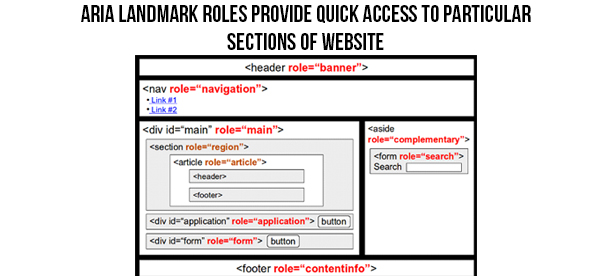
Thanks to the introduction of the new Accessible Rich Internet Applications (ARIA), a specification of the World Wide Web Consortium (W3C) which is a global web governing body, web applications can now be easily interacted and shared through keyboard. You can easily make your site more keyboard navigation friendly through the use of ARIA landmark roles. All, you need to do is just add an HTML attribute for any of the landmark roles, say for example role=â€navigationâ€, role=â€main†or role=â€search†for directing user to the particular section of the page through a single keystroke. Let us check this HTML code that can add the appropriate landmark role attribute on the “main†and “search†section of a website.
<div id=”maincontent” role=”main”>
<form action=”search.php” role=”search”>
12. Learn to use the services of Learning Management Systems (LMS) and Content Management Systems for enhancing accessibility of your website-
For improving the accessibility of your eCommerce website, you need to avail the services of an effective eCommerce platforms that consist of numerous features. Apart from this, you can take the services of various Content Management Systems like WordPress, Joomla, Drupal and others for providing easy access to numerous themes, templates, eCommerce plugins and other such options. Plugins are seen to provide an advanced level of accessibility, performance and usability to a website for improving the overall performance of a website.
However, make sure that you are availing the expertise of an exceptional plugin design and development services like Knowband that has years of experience in this area. Some of the superb plugins provided by it are as follows:
OpenCart– Here are some of the OpenCart Extensions that can help in enhancing the productivity of your OpenCart store to a great extent. They are OpenCart Ajax Cart+, OpenCart One Page Supercheckout Pro, OpenCart Social Loginizer, OpenCart Price Alert and such others.
PrestaShop– If you are having a PrestaShop store, these are some of the PrestaShop Addons that can be the game changer for your online store and can improve the accessibility and performance of your website. Take a look at these plugins which are PrestaShop Abandoned Cart, PrestaShop Return Manager, PrestaShop One Page Supercheckout and many others.
13. Improve the reach of your website on various mobile based devices-
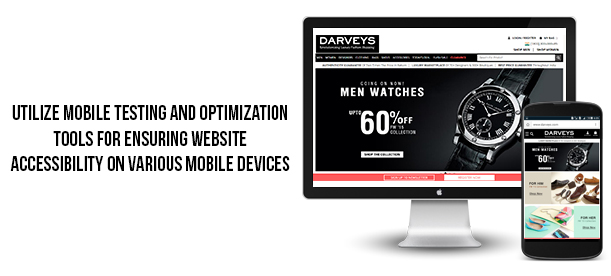
Due to the constant increase in the number of mobile customers, it is the sole responsibility of every online business entity to make its website accessible to various available mobile devices. Use various tools like Mobile Usability, mobile friendly test, PageSpeed Insights, Pingdom website speed test and other mobile SEO tools for improving the performance of your mobile website. If you want to know more about how to improve your mobile SEO results, do visit this informative link. Further, use of the content delivery network (CDN) services along with the webp image format for Google Chrome browser can make a significant effect on the accessibility of your website on various mobile based devices.
14. Make use of proper alt text for images-
Although, it is said that “An image can say a thousand words itself†but these images need the support of Alt text for helping user understand the proper intent or message behind these images. Moreover, these alt text becomes much more useful while using an informative images like infographics. It is to be noted that the message which is to be conveyed with a particular image needs to be used in the alt text of that image. Similarly, if the concerned image consists of some text, that particular text should also be included in the alt text. Make sure the images that are used as links are provided with appropriate alt text so that screen reader can read the associated message of your image rather than reading the file name of your image. Here is the sample code about how an alt attribute can be used in an image for improving its appeal and understanding among the targeted customers.
<img src=”webaimlogo.jpg” alt=”WebAIM – Web Accessibility In Mind”>
However, you can leave the alt text empty for your images if the image is purely used for fancy decoration purposes as it will take the focus of your customers away from the concerned image.
15. Initiate steps to make your website more accessible through keyboard-
There are numerous users that like to navigate a particular website through the use of keyboard shortcut keys or Access keys. These Access keys are HTML elements that are not effectively used during website development process for ensuring a seamless access to certain sections of the website through keyboard. In order to use the services of Access keys, you need to follow these steps.
– Press Function key (Alt in case of Windows and Ctrl if the system is a Mac) along with the specific letter or number key that is associated with a particular section of the website.
Further, programmers can effortlessly add the functionality of Access keys on their website by adding a simple HTML code into the navigation anchor tag of their concerned site. The sample code is as shown below.
<a href=”index.html” accesskey=”1″>Home</a>
However, what limits the usage of Access keys on a global level is that there is no universal set of assigned keys that can be used for implementing the functionality of Access keys on a website. Apart from this, there is no such mechanism by which users can be informed about the keyboard keys that are used as Access keys for navigating around a site. But, there are certain countries like UK where concerned authority has recommended a set of Access keys that can be assigned for a seamless website navigation through keyboard. Here is a list of those Access keys.
S – Skip navigation
1 – Home Page
2 – News/Updates
3 – Site Map
4 – Search
5 – Frequently Asked Questions (F.A.Q)
6 – Help
7 – Complaints Procedure
8 – Terms and Conditions
9 – Feedback Form
10 – Access Key Information
16. Include headings correctly for organizing your content structure-
For a seamless access to your site content, make use of the heading structure. Use HTML heading tags like <h1>, <h2>, <h3> and others at appropriate place in your content for the effective organization of your content and for better readability. Follow the correct order of your headings and keep presentation away from the heading structure through the use of CSS. Some of the guidelines that needs to be followed while creating a new CSS class for your content are as follows.
Always use <h1> tag for the main title of the page. Keep <h1> heading tag reserved for the title of the website and other individual pages.
Include headings for the proper indication and organization of your content structure.
Follow a proper order while using the headlines and never jump from <h1> to <h3> heading tag directly as it gives a sense of feeling to readers that some particular content is missing in the middle.
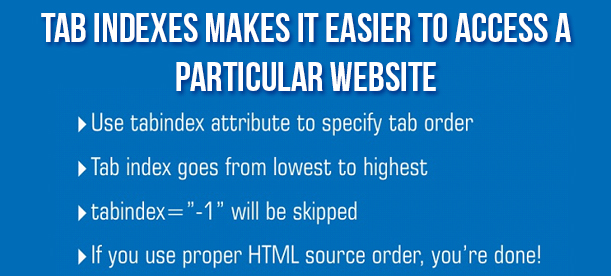
17. Make use of tab indexes for the seamless navigation around your website-
For determing the proper order of navigation around form fields through the use of tab key, it is important to utilize the tab indexes. This feature plays a key role while navigating around the forms on a site. However, if your page design is equipped with proper logical order and a strong hierarchy due to the presence of headings and sub headings, there is not much to worry about this tab index.
As, forms consist of numerous small elements like checkboxes and radio buttons which needs precise mouse positioning and click by humans, performing the same would be difficult for a person with motor disability. In situations like this, life of these people can be in much relief if a proper tab indexing is performed on the form which can enable user to interact with each and every form element through simple keyboard strokes.
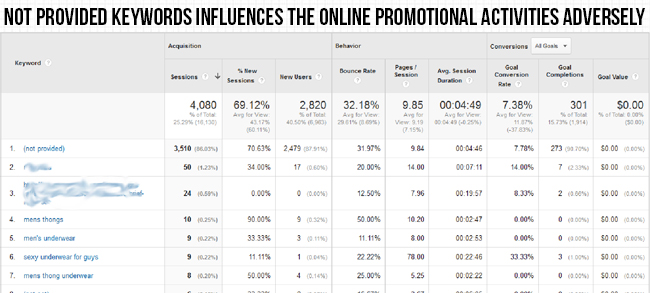
“Ignorance is a sin” and it will not be a hyperbole when it comes to the “not provided” keywords while analyzing the data of Google Analytics tool. This is a matter of serious concern for all the Web marketers and analysts as without a clear insight about your online traffic particularly about “not provided” keywords, you can’t expect to improve your conversion rates and product sales.
“Not provided” keywords are those organic keywords that are used by an online user on a search engine to arrive at your website. These keywords that drive customers towards your website are collectively grouped under the “not provided” keywords and are not passed onto your targeted website. This was done by the Google on the pretext of protecting the user privacy but in reality it was a smart strategy to push more people towards paid keyword targeting, PPC ads and other such paid advertising mediums. Around 85% of the keywords used on Google for accessing a particular website comes into the category of “not provided” keywords when seen through the report of Google Analytics tool.
Classification of the online traffic
To drive traffic towards your site, two types of keyword referral campaigns are utilized by online businesses. They can be classified as organic keywords and paid keywords. Let us brief you about the two.
Organic keywords- These are the keywords that are used by your targeted customers to land at your particular website by clicking on one of the organic search results of various search engines like Google, Yahoo, Bing and others.
Paid keywords- These consists of various PPC ads, social media ads and other such paid mediums that has brought customers on your particular website. Although, businesses have to pay a particular fixed amount for this type of customer acquisition strategy but this is a very reliable method in terms of getting high traffic for your site.
Google Analytics is a smarter way to get valuable insight about incoming traffic on your site. It provides complete detailed information about the nature of the incoming traffic, source of the incoming traffic whether organic or paid, device used by customers while surfing and other such crucial data. As per a recent change by Google on 8th January, 2015, there have been a slight change in the representation of the “organic keywords” on Google Analytics tool. For getting access to the organic keywords option in your Google Analytics tool, perform the following steps.
– Click on the ‘Acquisitions’ tab on the screen of your Google Analytics tool.
– Now, click on the ‘Campaigns’ tab located at the bottom of ‘Acquisitions’ tab.
– Under the ‘Campaigns’ tab, you will find the option ‘Organic Keywords’ there.
Hiding of “not provided” keywords by Google
On 18th October, 2011, a major announcement was made by the Google that from onwards, the search terms used for landing at a particular site would not be passed on to that destination website. Instead, all these visits would now be clubbed together in the form of “not provided” keywords which is represented as “np”. All this was done to protect the privacy of the online searcher as they would not like their search terms to be passed onto the destination site. Due to this change, all the “keywords” used by the online customers to land at a particular website is now grouped together under the “not provided” category. This change has caused much ambiguity among numerous SEO professionals as they are not getting any clear idea about the keywords that are being increasingly used by their targeted customers to arrive at their particular website. Further, it has made the task of content marketing a little harder and has affected the website rankings and online popularity of a business.
Effect of the hummingbird update on SEO
Hummingbird algorithm of Google was launched in August, 2013 and it changed the entire face of the SEO industry. It is a complete new algorithm that consists of more than 200 factors that can make a tremendous impact on the website rankings and search engine results. This algorithm was created with a focus towards the mobile devices and for making the SEO results more mobile friendly. Due to the addition of “conversational search”, the focus of SEO has changed from the use of individual keywords to more towards the meaning or semantic context of a particular search phrase. The algorithm works on the principle of “understanding meaning behind the search phrases rather than just the words in the phrases”. Hummingbird is a blessing for the SEO professionals who use the white hat SEO approaches by following all the Google guidelines and regulations and can invite severe penalties for the black hat SEO that use illegitimate stuffing of the keywords to cheat search engine crawlers.
As long as you are blessed with the services of good content publishers and writers, you don’t need a reason to panic as the SEO focus has changed from the keyword stuffing to semantic meaning of your written content. Moreover, it is working towards making the search results more effective for voice based searching. Some of the various features introduced by this Hummingbird algorithm are:
Use of the long tailed keywords for the search results.
Focus towards the semantic based content instead of plain keyword stuffed content.
Introduction of the knowledge graph feature for providing brief information about a topic without even clicking the search results.
Giving more emphasis on the attractive images, videos and visual elements in your content for increasing its semantic appeal.
Making use of natural language processing and artificial intelligence feature.
Changes occurred in the Google Analytics tool
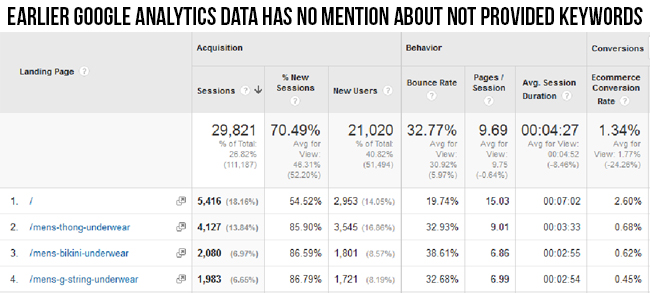
In order to get the effective insight about the arriving site traffic on your website, you need to keep track on the analytical activity of your website by clicking on the landing page option of your Google Analytics tool. Let us understand this with the image given below.
According to the above image, SEO professionals were earlier clueless about the impact of “not provided” keywords on the different landing pages of their website. There was no mention of “not provided” keywords anywhere on the different pages of the website. The SEO team was earlier unable to decipher the complete analytical data regarding the incoming site traffic on their website. Due to this, it was difficult for them to target particular high ranking Google keywords as there was no information about “not provided” keywords on the landing page tab of the Google Analytics tool.
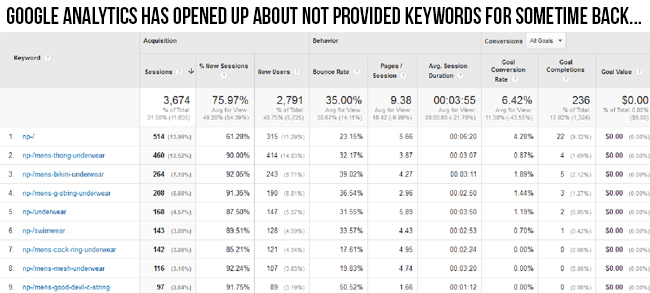
In the image shown above, it has been observed that since 20th November, 2015, Google has started providing information about “not provided” keywords in the form of “np”. Due to this relaxation, it is now easier for the content marketing and SEO team to target high converting keywords for their website in order to generate more traffic and conversion rates. One can easily see the traffic statistics that has generated out of the “not provided” keywords (np) on various pages of their website and it has opened new doors of keyword targeting and content marketing.
So, stay tuned with us and get constant updates regarding “not provided” keywords for improving the performance and website rankings of your online business.
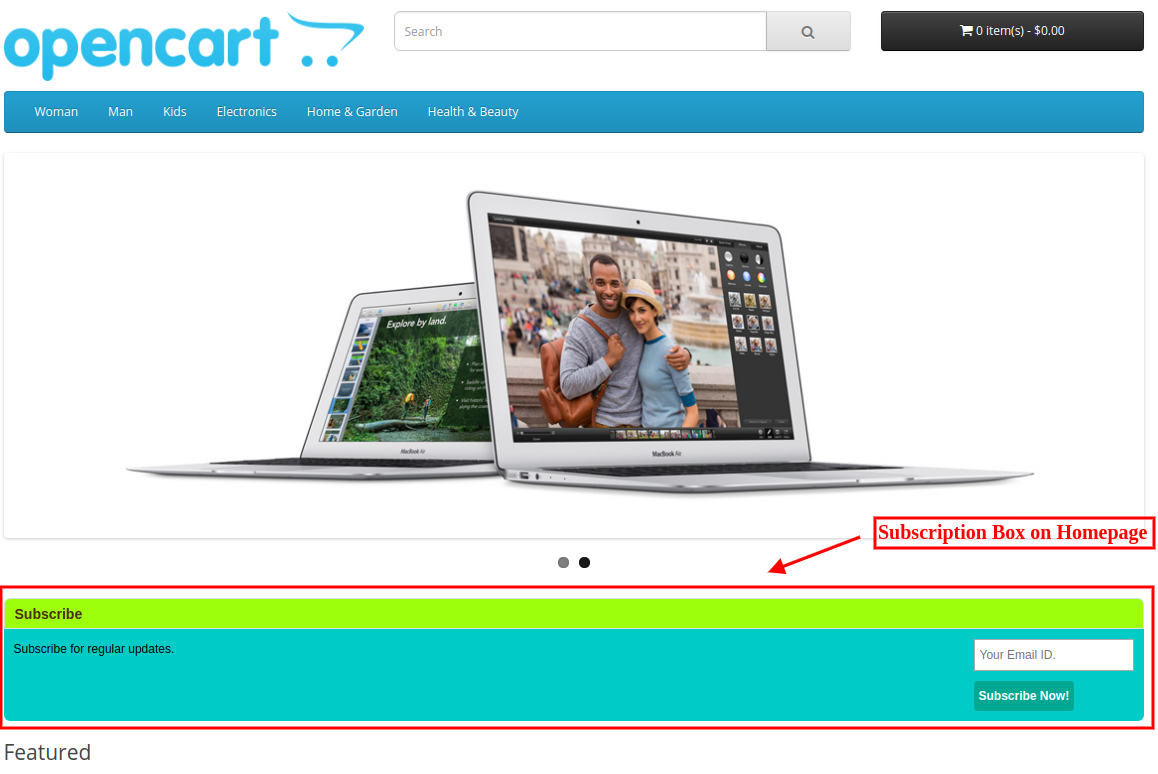
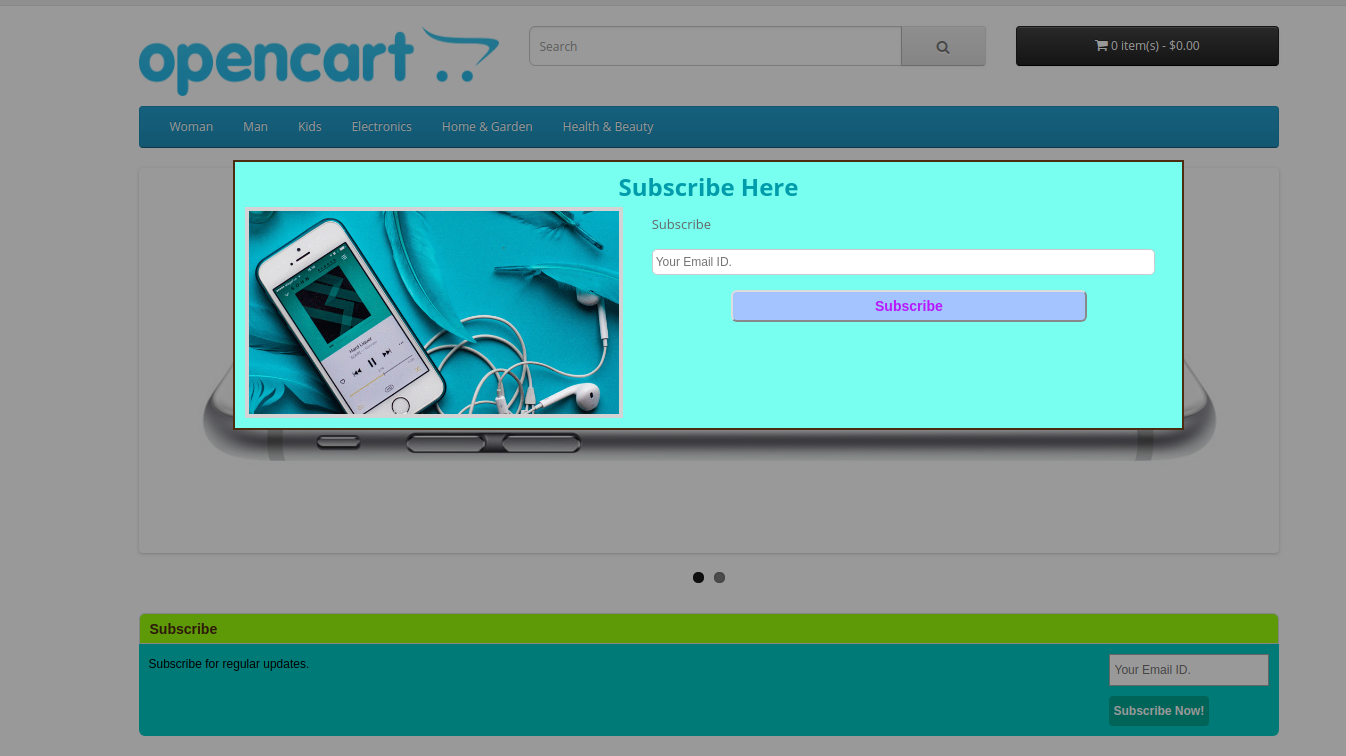
Now the Opencart store merchant can easily get new subscribers for sending newsletters. Opencart Auto Subscribe extension allows the Opencart store admin to add a “subscription form” on the home page of the eCommerce store. This OpenCart Auto Subscribe extension helps the store merchant to design an attractive subscription form, so that, the visitors coming to the website get registered by submitting the required information on it. With a pop-up window, OpenCart email subscription popup allows the Opencart eCommerce store owner to collect the email address of website visitors. The Newsletter Subscribe Extension for OpenCart can automatically subscribe the online store visitors on registration or checkout. This way, the online merchant can get more email id details for sending the newsletter.
The online merchant can show subscription box on website pages and display attractive subscription popup on the website homepage. The online store visitors can enter their email id details and easily subscribe to the website. The Newsletter Subscribe Extension for OpenCart forwards email id details to admin’s MailChimp and Constant Contact account at the same time when users enter their details. The Email Subscriber module for OpenCart is mobile responsive, multi-lingual compatible and offers smooth functioning.
1.1 Features Offered by OpenCart email newsletter addon
The online merchant can subscribe online users automatically while registration, checkout or normally by showing subscription form.
The OpenCart product subscription module allows admin to show subscription box on website pages and subscription popup on the homepage.
The eCommerce store merchant can set the look and feel of subscription box/popup by setting its heading, description and color.
The OpenCart email newsletter addon allows setting the position for showing subscription box and show multiple subscription boxes on the same page by setting sort order.
The OpenCart product subscription module allows the store merchant to set gap for showing subscription popup next time to the same user.
The online store merchant can show a success message after subscription and admin can set the size of subscription popup.
Email Subscriber module for OpenCart allows sending a mail to the subscribers after subscription.
The store merchant can configure MailChimp and Constant Contact settings from the admin interface of the Newsletter Subscription Module.
The OpenCart email newsletter addon is multi-lingual compatible and mobile responsive.
There is no need to change even a single line of codes from the admin interface while using MailChimp Newsletter Subscription module.
Auto Subscribe integration extension helps store admin to gain email subscribers.
Opencart eCommerce store owner can collect mail id from users without any difficulty.
The online customers can get regularly updated the information of the store.
2.0 Auto Subscribe integration Installation Steps
Purchase OpenCart Auto Subscribe extension from the Knowband website.
First, you will get a source code file of the open cart Auto Subscribe extension in zipped file format.
User Manual of this OpenCart Auto Subscribe extension.
Follow below-mentioned steps in order to install OpenCart Auto Subscribe extension:
1. Unzip the received zip file. You will get the folders as shown in the following image:
2. Copy all the folders of the zip file in the Root Directory of OpenCart setup via FTP manager.
So, OpenCart OpenCart Auto Subscribe module is now successfully installed and ready to use at your store.
Now go to the admin menu and click on the extensions and thereby click on configure button next to OpenCart Twitter Login extension.
3.0 Admin Interface
After successful installation, you can configure the OpenCart product subscription module as described in this user manual. There are multiple Configuration tabs as shown below:
Subscriber Box Settings
Popup Setting
Email Setting
Mail Chimp
Constant Contact
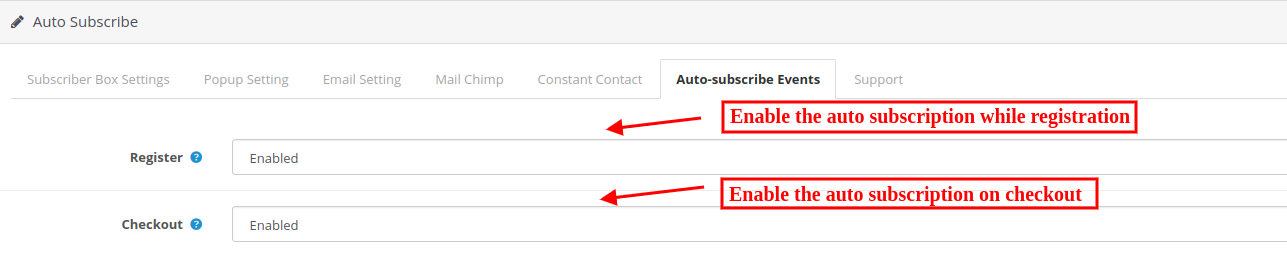
Auto Subscribe Events
3.1 Subscriber Box Settings
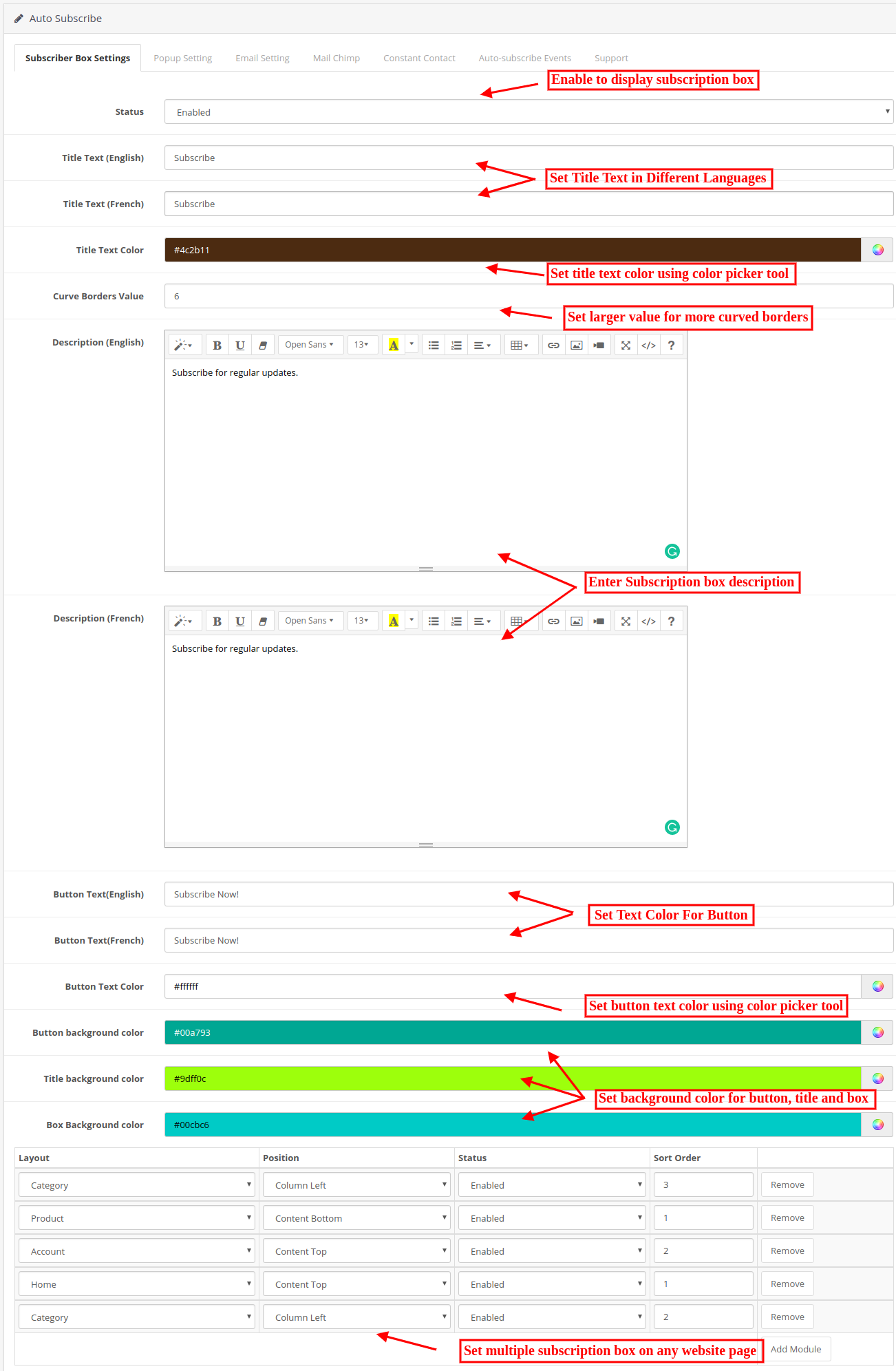
Opencart admin can customize the subscription box to be displayed in the Opencart eCommerce store front by using the following settings option available.
Status: Enable the functionality for showing subscription box on wbesite pages.
Title Text: Enter the title of the subscription box in different languages.
Title Text Color: Select the title text color using color picker tool.
Curve Borders Value: The Opencart store admin can enter the radius of curve borders. This value will be applied to the four corners of the subscription box on front. Higher the value will result more curves.
Description: Enter the text for describing to visitors, the advantages of subscribing to your store. Admin can enter description in different languages.
Button text: Enter the button text here in different languages.
Button text color: Choose button background color using color picker tool.
Button Background Color: Select a color for the background of the button on subscription box.
Title Background Color: Set title background color here.
Box Background color: Choose a background color for the subscription box.
Add Module: Admin can select different pages and set the position of showing subscription box on it. Admin can disable any module if he wants to disable it. Admin can also show multiple subscription boxes on the same website page by selecting its sort order. Any module can be removed from the admin interface of OpenCart MailChimp extension anytime as per the requirement.
3.2 Pop up Settings tab
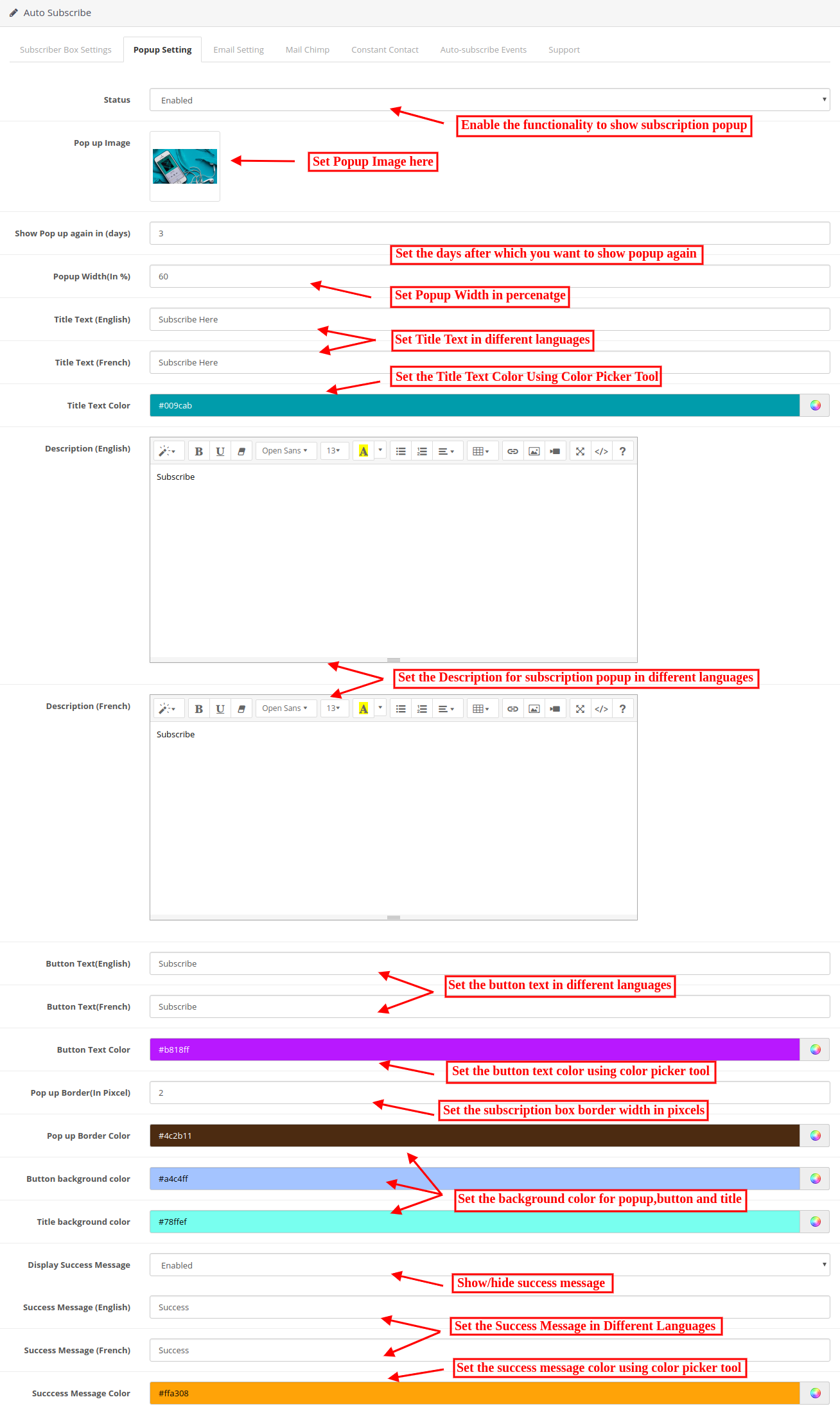
The OpenCart MailChimp Integration allows store admin to customize the pop-up box for showing on website homepage using the following setting option available.
Status: Enable or disable the pop-up display on the homepage. One cannot view subscription pop up on the front until this is enabled.
Pop up Image: Select the image for showing with subscription popup.
Show pop up again in (days): You can choose the duration (in days) for which the subscription popup will appear in the front-end. If you want the pop-up to appear only once in a lifetime, type in a number, say 999. If you want it to appear every time a user lands on the home page, type the value 0.
Pop-Up Width: Enter the value in percentage for setting popup width. Higher value will show larger width.
Title Text: Enter the popup title text in different languages.
Title Text Color: Select the title text color using color picker tool.
Description: Enter popup description in multiple languages for describing the store visitors the need of subscribing the store.
Button Text: Enter the button text in multiple languages.
Popup Text color: Set the popup text color using color picker tool.
Pop Up Border: Set the width of pop up border from the admin interface of OpenCart MailChimp Integration module.
Popup Border Color: Set the color of this border using color picker tool.
Button background color: Change the background color of your button as per the website theme.
Title background color: MailChimp Newsletter Subscription module allows setting the background color of the pop-up title.
Display Success Message: Enable to show success message after successful subscription.
Success Message: Set the message which you want to dispaly on website after successful subscription. You can enter success message in multiple languages.
Success Message Color: Choose the desired color for the success message using color picker tool.
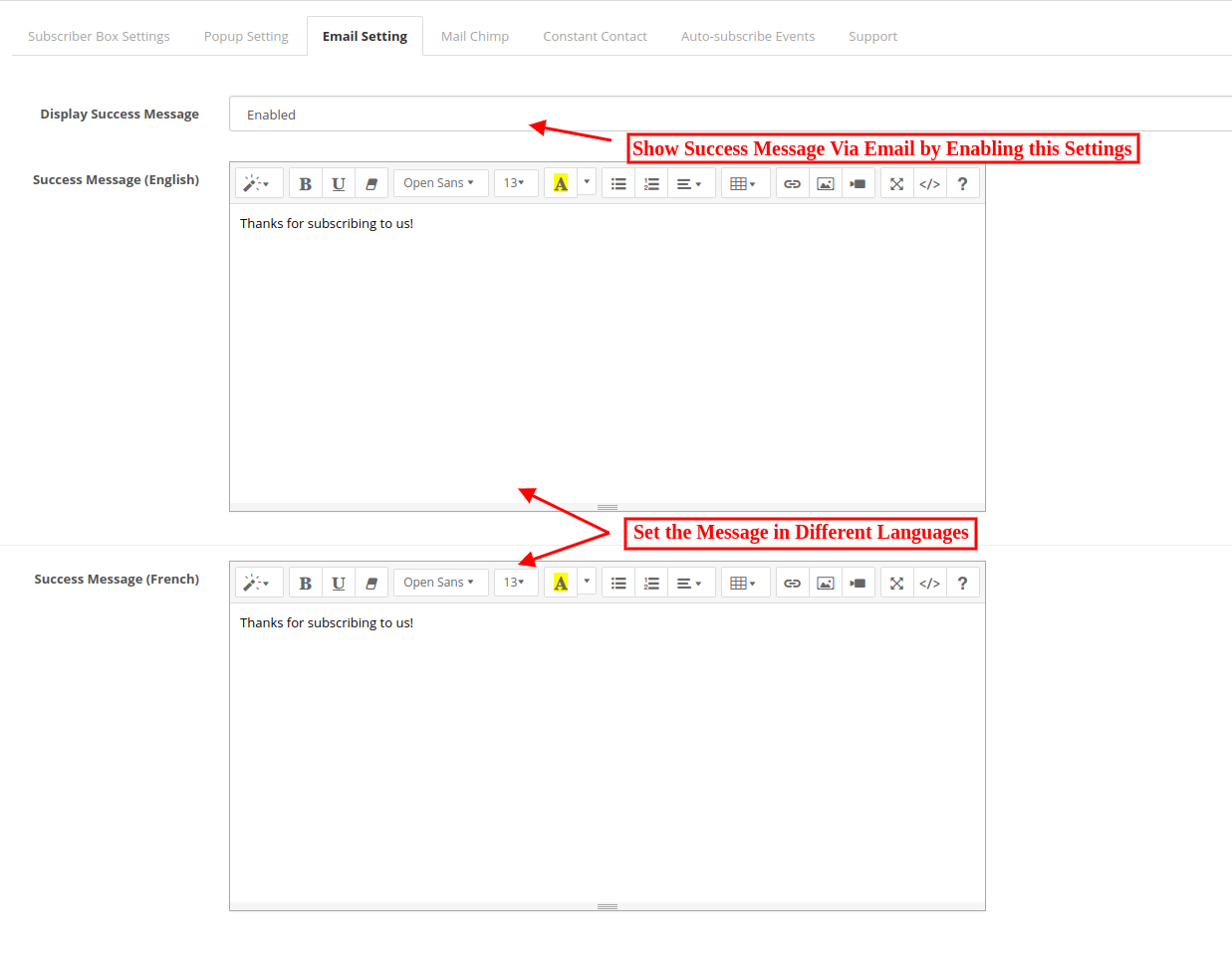
3.3 Email Settings
Admin can show an email to the subscribers.
Display Success Message: Admin can Enable/Disable mail sending after subscription.
Success Message: Opencart store admin can set the mail content. This mail will be sent on subscription. In case of no content, the default mail will be sent to the customer.
3.4 MailChimp Tab
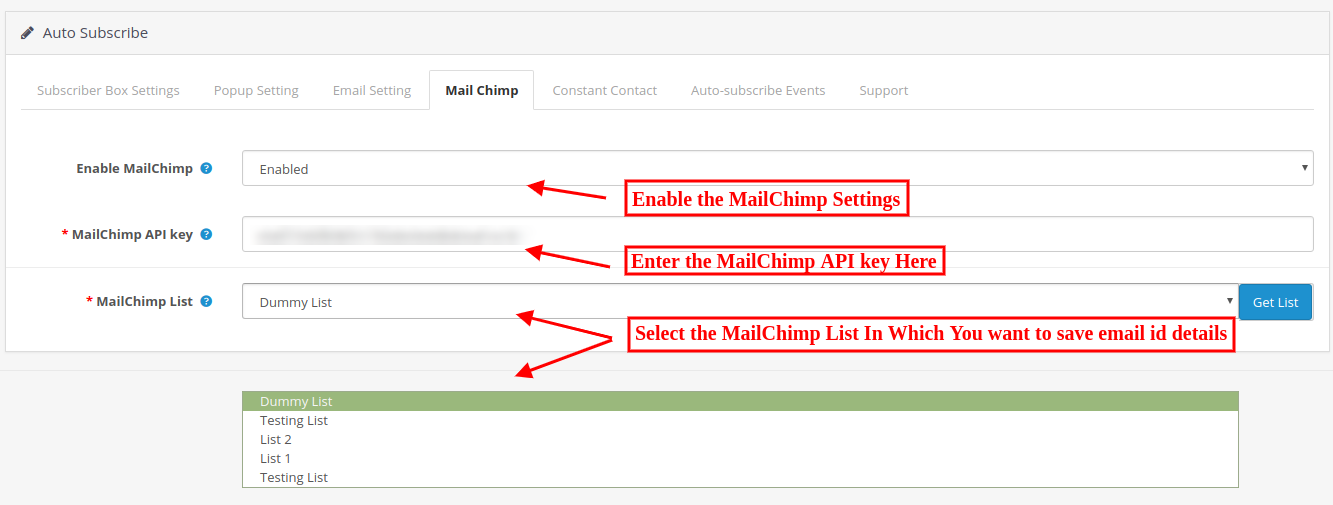
In this tab, OpenCart store admin can choose from the lists in his/her MailChimp account where emails should be added.
Initially, a message will be displayed like No list exists for this API key!
Enable MailChimp: Enable or Disable MailChimp from the admin interface of OpenCart product subscription module.
MailChimp API key: Enter the API key to fetch lists from your account.
MailChimp List: Choose from the lists displayed here. On the selected list, the email id details will be transferred.
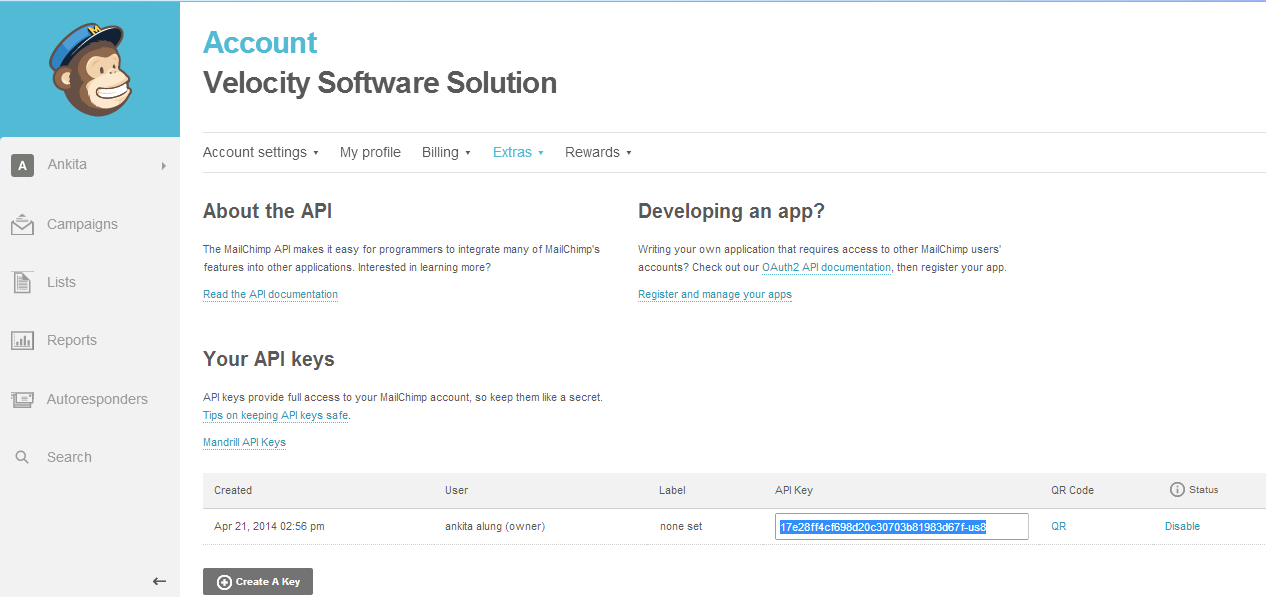
3.4.1 Steps to generate Mailchimp API key
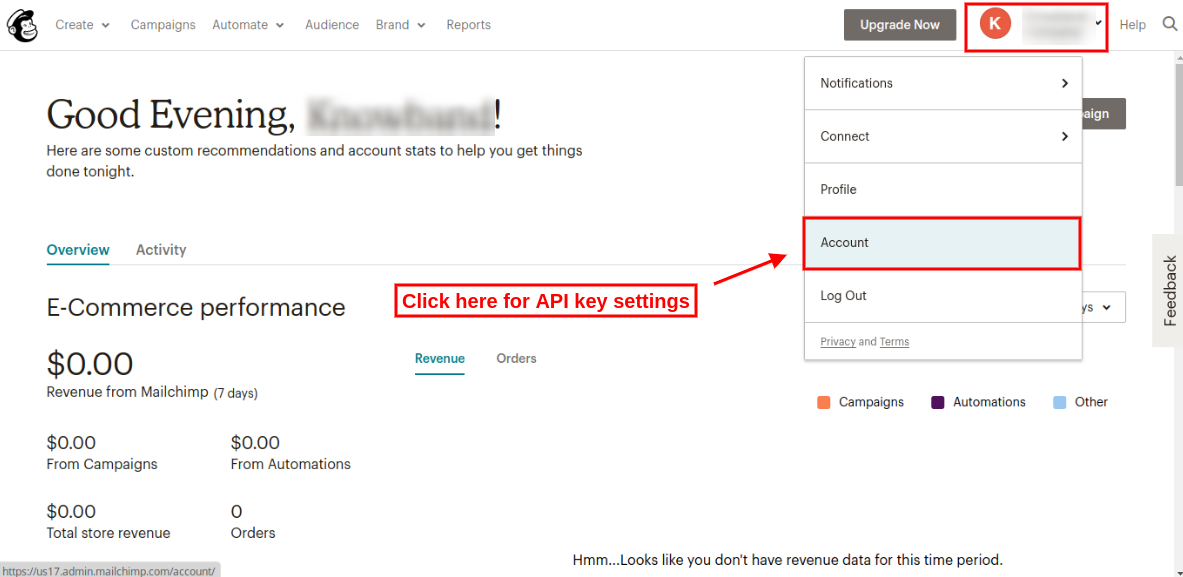
Step 1: Click on https://www.mailchimp.com and first of all create a user account in MailChimp, if you don’t have a MailChimp account. Once you create an account, log in to it.
Step 2: On the upper right corner of the dashboard, there will be a drop-down. Select the “Account” option from the list and click on that option.
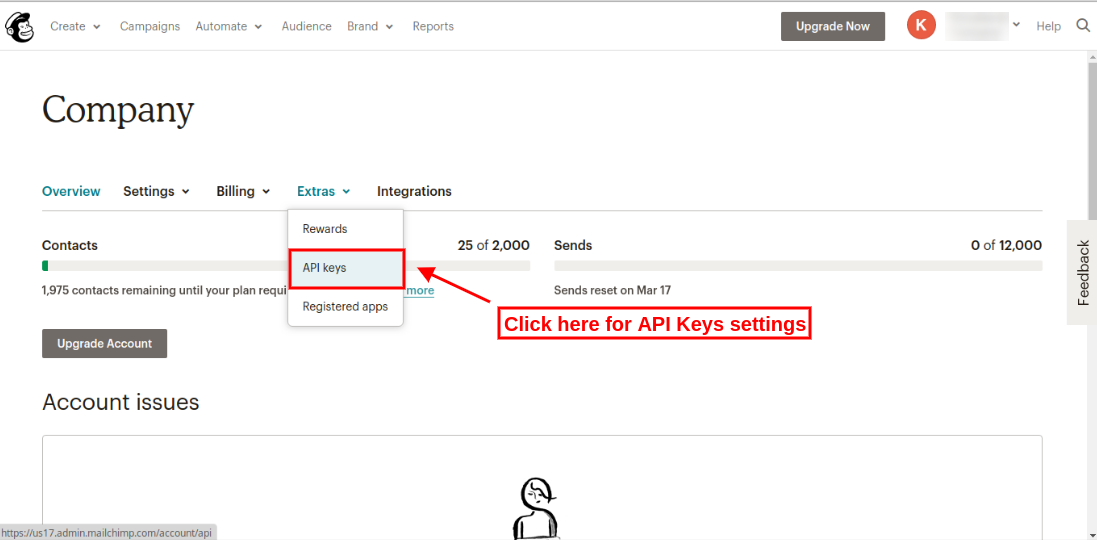
Step 3: After clicking on the “Account” section, there will be some sub-menus. Select the “Extras” submenu. There will be some options, select “API keys” from these options as shown below:
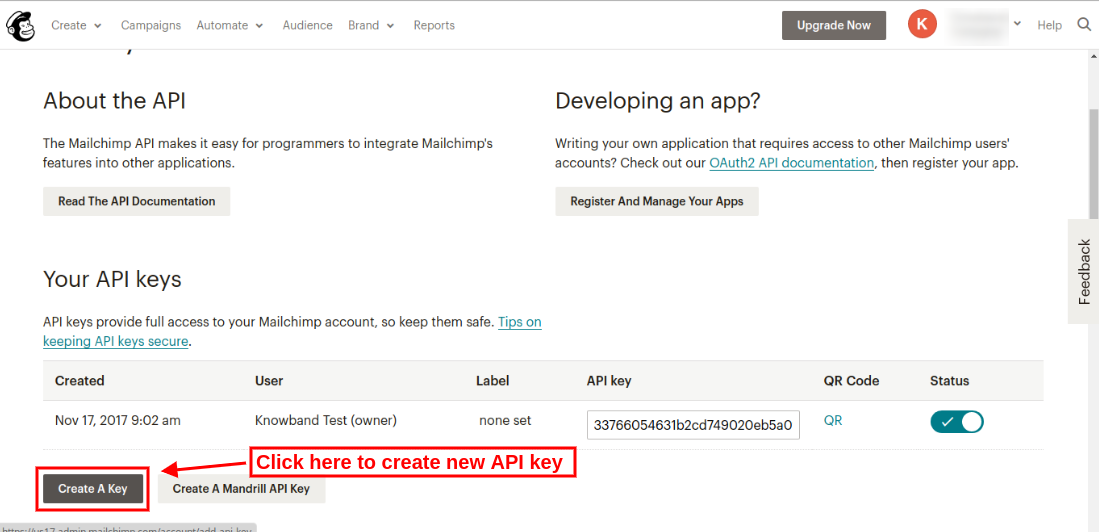
Step 4: On API keys page, click “Create a key” and generate a new API key.
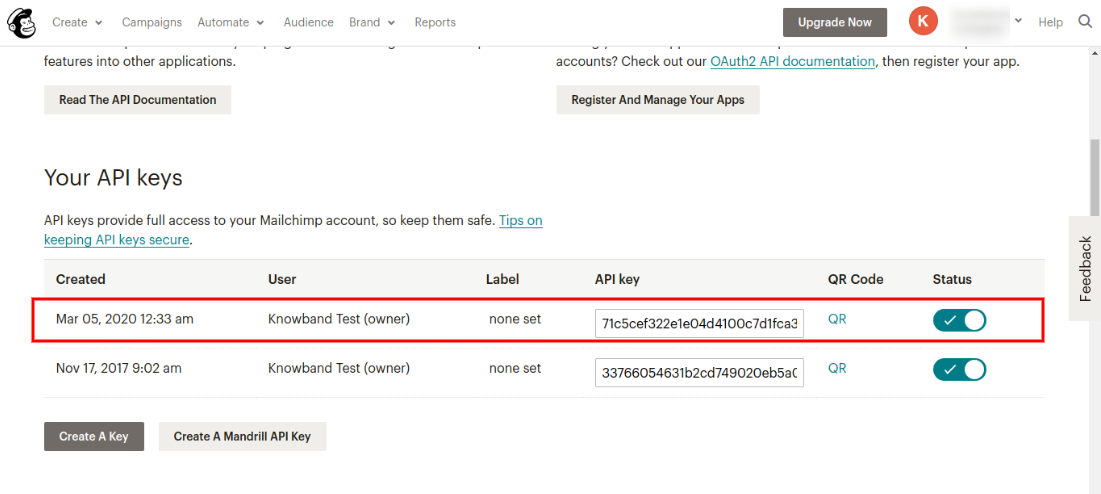
After clicking on Create a Key button, the user can view the newly created API key as shown below:
To create MailChimp Audience
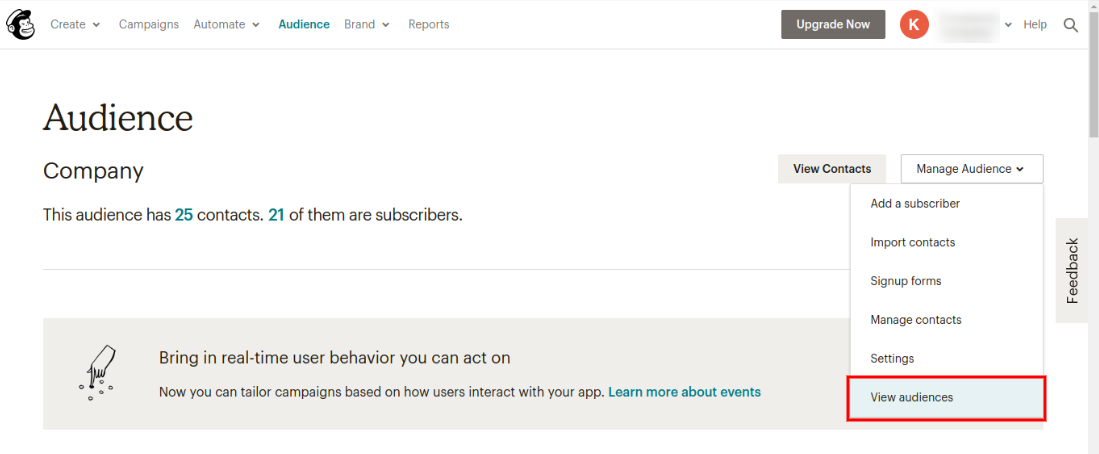
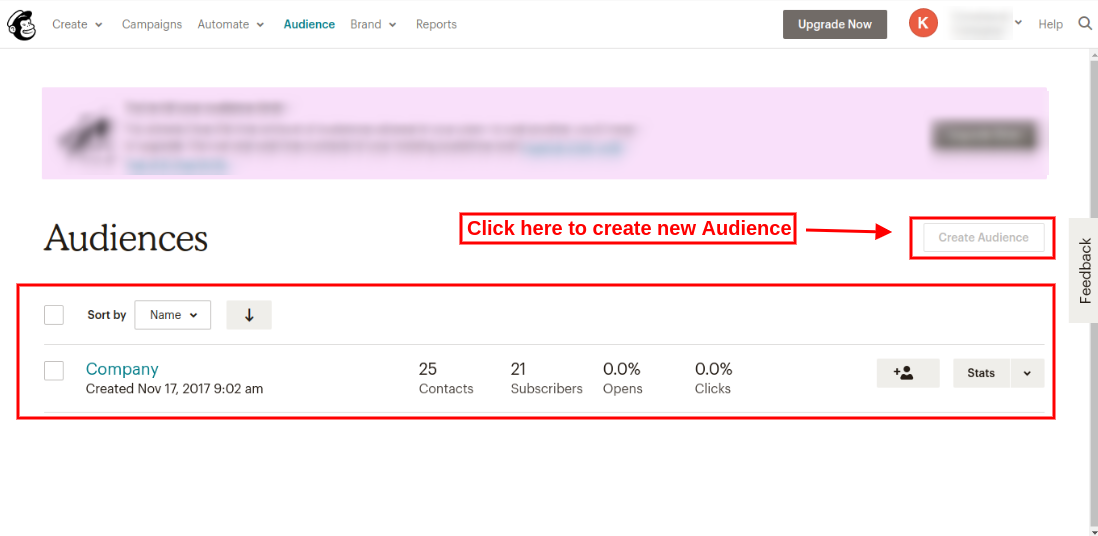
Step 5: Click on the “Audience” tab in the upper menu for rreating new audience. Admin will be redirected to a new page where he/she can view previously created audiences and also create a new audience. The screen is given below:
Step 6: On clicking “view audiences” option, admin can view previously created audiences as shown below:
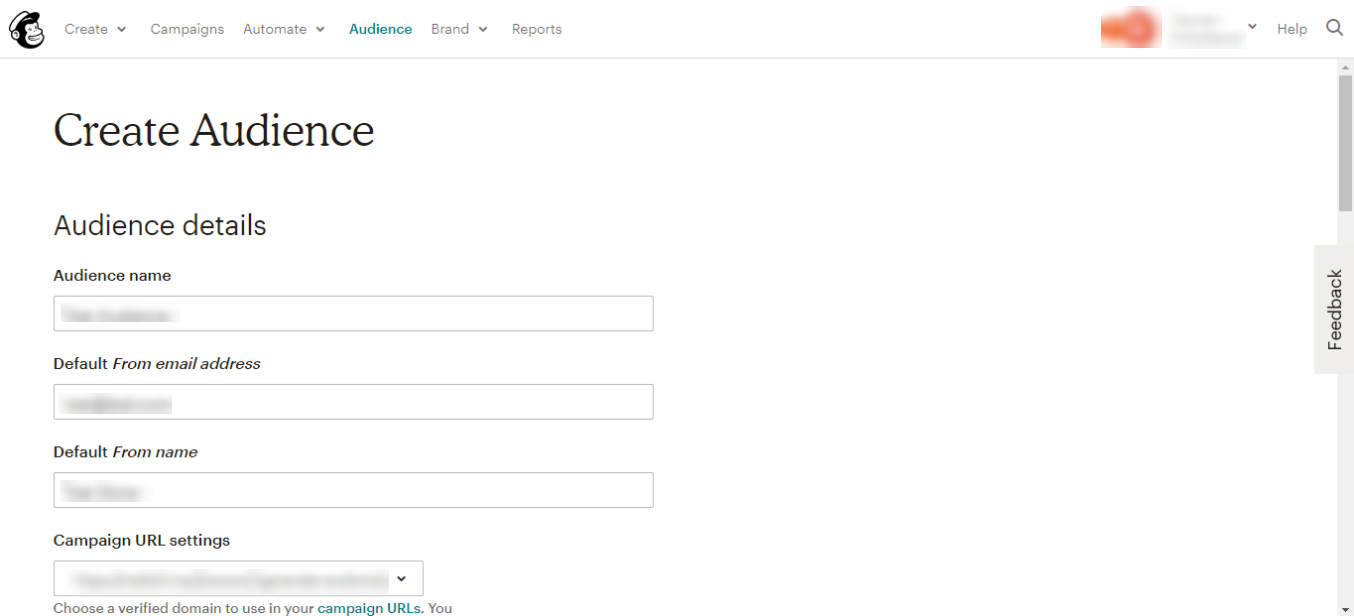
Admin needs to upgrade his/her account for adding more audiences. In the free account, admin can create a single audience only. Admin can upgrade account and then click on “Create Audience” option as shown below:
After clicking on “Create audience” option, admin needs to fill the required information:
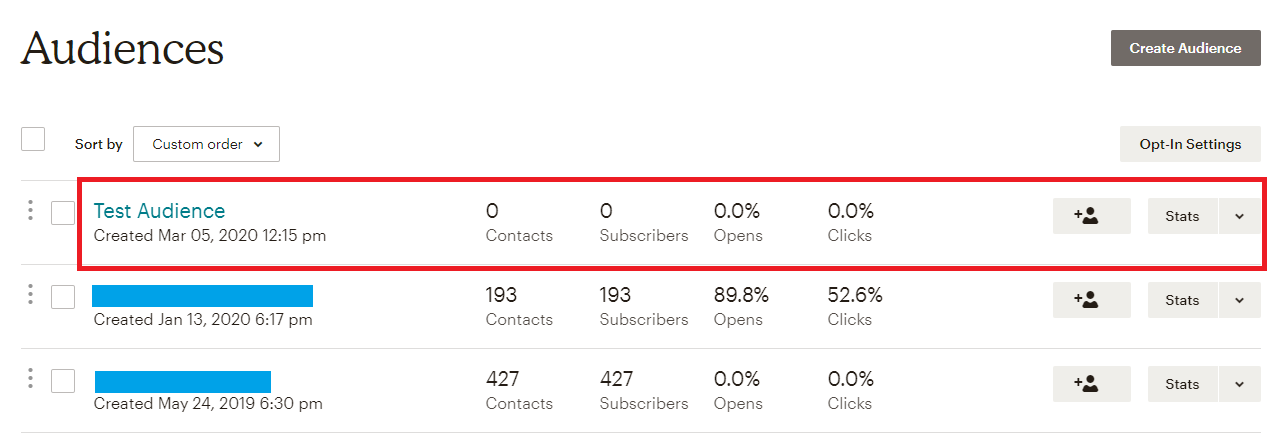
After saving all the details, the admin needs to save it. This way, admin can create new audience ash shown below:
3.5 Constant Contact Tab
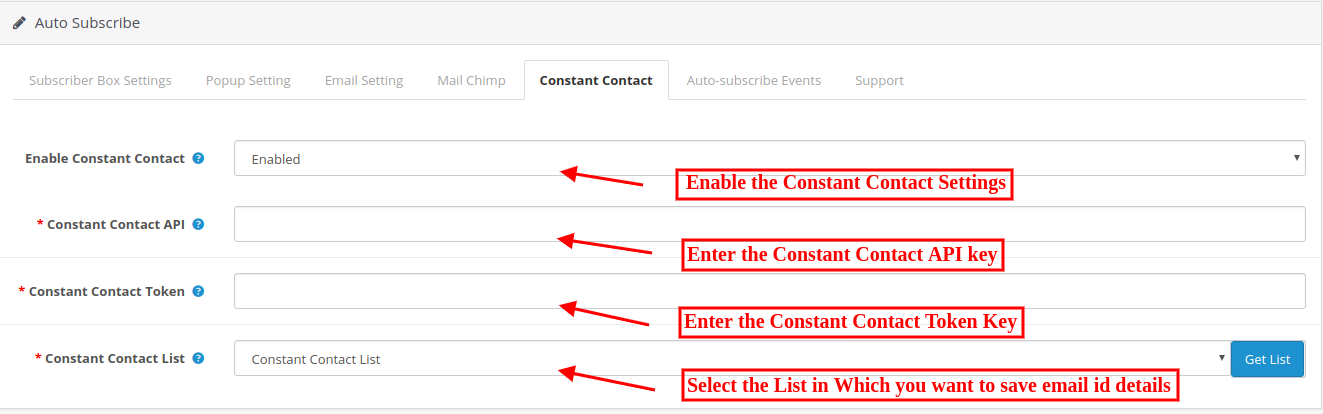
In this tab, admin can choose from the lists in his/her Constant Contact account where email id details should be added. Initially, a message will be displayed like No list exists for the combination of Key and Token provided above!
Enable Constant Contact: Enable if you want to save email id details in constant contact account.
Constant Contact API key: The Opencart store admin needs to enter API key. As soon as admin enters the key and clicks on the text box, the request is sent and lists (if any) are fetched and displayed in a drop-down box.
Constant Contact Access Token: The Opencart store admin needs to enter access token along with API Key. As soon as admin enters the token and clicks outside the text box, the request is sent and lists (if any) are fetched and displayed in a drop-down box.
Constant Contact List: Choose from the lists displayed here.
3.6 Auto Subscribe Events
Auto-subscribe events are the events on which the users can be subscribed to the configured lists in admin automatically. On such events, the user will not be notified of being added to the subscription lists you have chosen in admin but they will receive the email for the same if you have turned on the option to send emails (in subscriber box settings tab) on subscription.
Register: Turn on Register, if you want a user to be automatically added to your list on successful registration.
Checkout: Turn on Checkout, if you want a user to be automatically added to your list on successful checkout.
4.0 Requirements
1. Php version 5.3 or greater
To access the API of constant contact, one must use the PHP version equal or higher than 5.3. Unless your server is running the required PHP version, you will not be able to successfully install this plugin.
2. MailChimp
Before using this module, you must have a valid account with MailChimp and one or more lists created in it. Note that, you must also have the access right to alter your email subscribers list. You will need to provide these for this module to work.
API Key: You can obtain your API key from your MailChimp dashboard, or you can create one if you don’t have one already.
3. Constant Contact
You need to have a valid account with constant contact and one or more lists created into it. Note that, you must also have the access right to alter your email subscribers list. You will need to provide these for this module to work.
API Key: You get an API key from constant contact via email as soon as you register your application.
Access Token: In addition to API key, you also needed an access token to grant permission to access API.
Note that, this plug-in works for constant contact API version 2 since version 1 is deprecated and will soon be discontinued.
5.0 Website Front-end Interface
The online store visitors can view the subscription box on the website pages. On the front end, users will have the option to subscribe themselves by clicking on subscribe button. The module will look like the following screen. The visitor can type in email id and click on subscribe button to add itself to the lists configured. A success or an error message will be displayed to notify the user.
On the user’s end, pop up will appear something like this screen below, depending upon your chosen display settings.
If one chooses an image to be displayed on pop up from admin settings, a pop up like shown above will appear. Admin can also choose to show a pop up without any image, by not choosing any image in the admin panel.
After Successful subscription, the online users can view the success message.
Today, we have come up with 5 wonderful ways that will surely encourage your products to sell on eCommerce marketplace. So, just follow these to maximize online exposure of your brand.
1. Use Product Data Of High Quality
Using accurate and descriptive product descriptions is key to make your brand popular. Try providing complete, keyword-rich product descriptions. Besides, avoid using product descriptions used by the manufacturer as it may cause spamming.
Use product images of high quality so that it provides a clear view to customers. While selling at an eCommerce store, you need to ensure that your products are upgraded with large and real images of better quality. Larger images are known to increase sales up to 9%, therefore image size and quality are two crucial elements that need to be taken special care of. Secondly, try using images designed of your own to make your products stand unique and real in front of your customers.
Last but not the least, try implementing product videos if you really want your visitors to convert. Video marketing, not only allows your products to sell more and more but also improves brand exposure and online reputation.
2. Categorize Products in Marketplace
Product categorization allows your products to get displayed in the right category, thereby making search easy and simple for consumers.
Always pick up those categories and sub-categories which are a perfect match for your products. Remember, if your products are placed in the wrong category, you may end up losing revenue. Placing products in the wrong category fails to expand your product search on Google and other search engines.
Product reviews have a major role in engaging customers and promoting trust for your brand. Internet Retailer says that eCommerce conversion rates can go high by 14-76% on adding product reviews. This is one good way to promote and advertise your products, thereby leaving a positive effect on people visiting your eCommerce store.
Product ratings and reviews help users in making informed purchasing decisions and improving the shopping experience of consumers as well.
The advantages of user reviews from an SEO point of view are also quite obvious. Product reviews are a great way to increase visitor traffic. By allowing your customers to write reviews about individual products, you will unknowingly optimize those pages for a whole host of long-tailed keywords. This in turn would help gain online visibility for your products in search results.
4. Customer Service
Customer loyalty matters a lot when it comes to selling on online marketplaces. If customers have a positive experience with your product, they will definitely try exploring more new products and recommendations. Secondly, loyal customers are the key to help expand your business. If customers love your brand, they will speak about it to their friends as well. This will help in driving more customers for your business.
Loyal customers won’t ever hesitate to provide honest feedback about your services. Many eCommerce businesses have started online loyalty programs to allow customers to share and spread their feedback to improve and innovate upon the quality of their products and services.
5. Product Listings
Having accurate and precise listings on all store items is one of the key components to increasing sales on an eCommerce marketplace.
Benefits-
Product listings include complete product information which helps shoppers in making informed buying decisions, thereby leading to increased sales and revenue
Product listings gives your brand a broader reach within your audience
It helps you evaluate product performance based on sold items, number of product views, product clicks, and so on.
In a nutshell, if you want to sell on Amazon, eBay or any other marketplace, following these standardized ways would definitely help. Keeping these points in mind, you will get a fair idea of the do’s and do not’s of selling on the marketplace.
So stay ahead with these smart strategies and you will be on your way to sell on an eCommerce marketplace.