Cart abandonment is a significant issue that eCommerce businesses face today. According to various studies, the average cart abandonment rate across different industries hovers around 70%. Moreover, this means that seven of every ten potential customers leave without completing their purchase. Now, there can be a lot of reasons that might be impacting your business directly or indirectly by playing a part in cart abandonment.
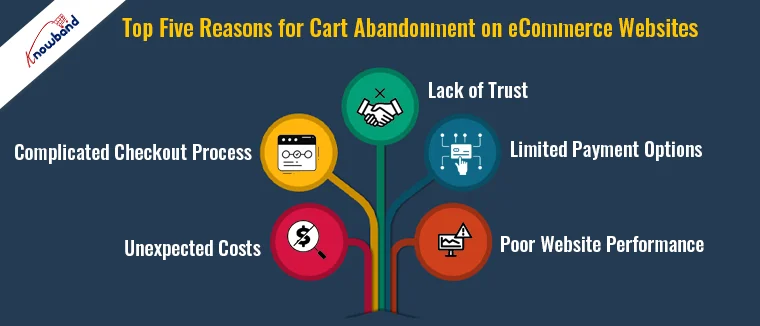
Thus, understanding the reasons behind this can help businesses implement strategies to reduce these rates and increase conversions. Here are the top five reasons for cart abandonment on eCommerce websites.
1. Unexpected Costs:
One of the primary reasons customers abandon their carts is unexpected costs. These include high shipping fees, taxes, and other additional charges not disclosed upfront. Thus, when customers see a final price that is significantly higher than what they initially expected, it often leads to abandonment.
Solution: To avoid such situations, the store admin should be transparent about all costs from the beginning. Therefore, you can display shipping fees, taxes, and any other charges on the product page itself. Furthermore, offering free shipping or flat-rate shipping can also significantly reduce cart abandonment rates.
2. Complicated Checkout Process:
A complicated or lengthy checkout process can frustrate customers and lead to abandonment. If customers are required to fill out multiple forms, create an account, or navigate through several pages, they are more likely to abandon their cart.
Solution: Simplify the checkout process. Implement a one-page checkout system and offer guest checkout options. Furthermore, at Knowband we provide the One Page Supercheckout extension for Opencart and Prestashop platforms that allows the store admin to provide the customers will a single form to complete the checkout process.
3. Lack of Trust:
Trust is crucial in eCommerce. Therefore, if customers feel that their personal or payment information might not be secure, they will hesitate to complete their purchase. This is especially true for new or lesser-known websites.
Solution: You can address this kind of concern by displaying trust signals prominently on your site. These can include SSL certificates, trust badges, customer reviews, and clear return policies. A well-designed and professional-looking website can also help build trust.
4. Limited Payment Options:
Offering limited payment options can be a significant barrier for customers who prefer using specific payment methods. If their preferred method is not available, they might abandon their cart.
Solution: As an eCommerce store admin, you should always provide a variety of payment options on your eCommerce store.
In addition to credit and debit cards, consider offering PayPal, Apple Pay, Google Wallet, and other popular payment methods. Furthermore, this flexibility can cater to a broader range of customers and reduce cart abandonment.
5. Poor Website Performance:
A slow-loading website or frequent crashes can deter customers from completing their purchases. In today’s fast-paced world, customers expect quick and seamless online experiences. If your website fails to deliver, they will likely abandon their cart and look for alternatives.
Solution: Optimize your website for speed and performance. Regularly test your site to ensure it loads quickly and functions smoothly on all devices. Implementing a content delivery network (CDN) and optimizing images can also help improve site speed.
Prestashop Abandoned cart addon
Discover how Knowband’s Prestashop Abandoned Cart addon helps recover lost sales by targeting abandoned carts effectively.
At Knowband, we understand eCommerce businesses’ challenges with cart abandonment. That’s why we offer powerful solutions designed to help you recover lost sales and enhance the customer experience.
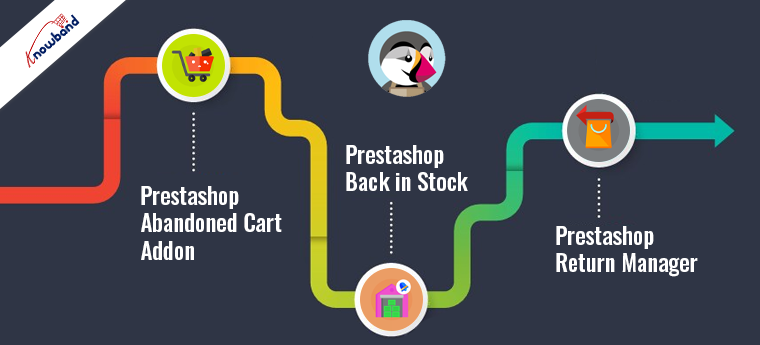
1. Prestashop Abandoned Cart Addon:
Our Prestashop Abandoned Cart Addon helps you tackle cart abandonment effectively. This tool allows you to track abandoned carts and send automated follow-up emails to remind customers about their incomplete purchases. Thus, by offering personalized discounts and engaging reminders, you can encourage customers to return and complete their transactions.
2. Prestashop Back in Stock:
Never miss out on potential sales with our Prestashop Back in Stock Addon. This tool notifies customers when out-of-stock products are available again. Moreover, by capturing customer interest and keeping them informed, you can reduce the chances of losing sales due to stock issues.
3. Prestashop Return Manager:
Enhance customer satisfaction and build trust with our Prestashop Return Manager Addon. Furthermore, this comprehensive solution simplifies the return process for your customers, making it easier for them to return products if needed. Thus, a hassle-free return policy can significantly reduce cart abandonment rates by giving customers the confidence to make a purchase.
Conclusion!
Reducing cart abandonment is essential for maximizing conversions and driving growth in your eCommerce business. By addressing the common reasons behind cart abandonment, such as unexpected costs, complicated checkout processes, lack of trust, limited payment options, and poor website performance, you can create a smoother shopping experience for your customers.
Notify customers when products are back in stock, and your PrestaShop revenue will increase quickly. Use the PrestaShop Back in Stock module to start recapturing missing revenue. Send notifications to consumers as soon as the products return to stock. It takes just 5 minutes to set up.
PrestaShop Back-in-Stock – Unique Approach to Capture Lost Sales
Back-in-stock alerts are a perfect way for PrestaShop stores to boost sales. Don’t miss out on sales because the products are out of stock. Increase your sales with web push notifications for back-in-stock products. You can send an initial email when a customer subscribes for a back-in-stock alert, low-stock alerts, and a final notification email with the Back-in-stock message.
We’ve all discovered things that were out of stock but we don’t go back to the store to see if it’s still there. Why do you expect your customers to do it? Influence them using emails and send push notifications to bring them back to your online store. You will get more sales and observe a boost in conversion rate.
Adding an email opt-in to your subscriber list will help you grow your list
The majority of low stock and back-in-stock warning forms only obtain the customer’s email address to inform them when a product returns to stock. Take advantage of the fact that they’re paying attention by asking them to join your email list at the same time. Sellers who use this strategy see a large improvement in their email subscriber list size, which leads to increased sales.
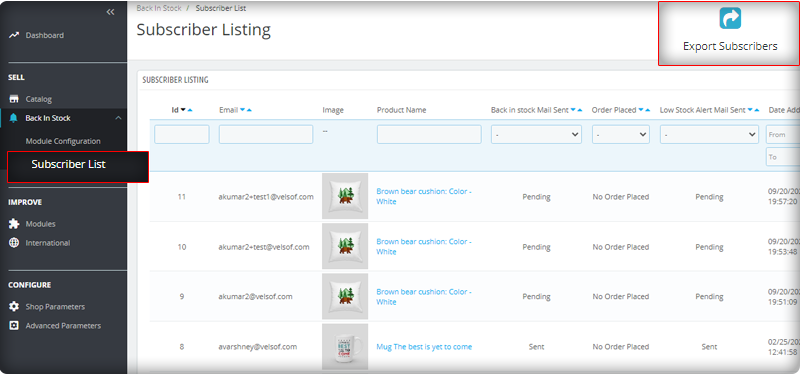
You can observe the subscriber listing on the admin panel at the left menu where all the installed modules are listed.
V3 Google reCaptcha is integrated with PrestaShop Back in Stock module to keep away the spammers and bots.
Add Custom Field in the Back in stock Subscription Box
Collecting information from customers to send personalized emails will be easier. PrestaShop Back in stock addon provides an option to add custom fields in the subscription box. You can now add text, radio option, and other custom fields to gather more details about the customers.
Send automated emails for Low-stock and Back-in-stock
The PrestaShop Back-in-stock Module is a tool for email marketing. Customers usually receive hundreds of promotional emails and most of them are ignored but an email with a catchy subject line has more chances of getting opened. The module allows sellers to send a customized email with tailored text and subject lines. Along with an initial welcome email, you can send low-stock alerts to the subscribers and notify them about the restocked products.
Add related products to email template and cross-sell
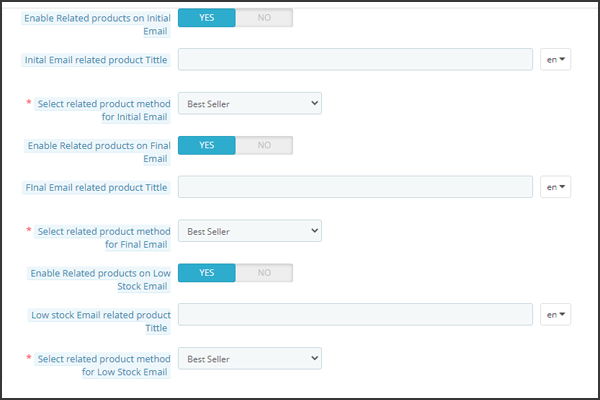
Heard the phrase ‘killing two birds from one stone, the module works the same way. It lets you send back in stock alerts as well as has an option to send related products. A seller can add details like bestsellers, products of the same category, specific products, etc. If a seller opts for the Specific products option, then he will have to specify the products in the respective tab as shown in the image below.
Send alerts via your email provider like Mailchimp
It is critical that you build your brand, and one way to do so is to ensure that the emails you send are sent from your domain. You’ll be able to use a variety of features to boost the success of your back in stock campaigns if you use an advanced eCommerce email provider like Mailchimp, Klavio, or Sendinblue. And, the PrestaShop back-in-stock module allows you to do so.
Real-time Analytics for PrestaShop
View a full report on customers who have subscribed to web push alerts for back-in-stock products. To increase sales, identify the most successful items, maximize inventory, and run promotional campaigns.
The new version has UTM Parameters
The UTM parameters are short text codes, you insert into URLs (or links) to monitor the success of a webpage or a campaign. Built-in analytics are available on social media sites. These allow you to track key metrics such as likes, shares, and website clicks. You can add UTM parameters to the PrestaShop Back in stock module and take advantage.
To wrap up: The Back-in-Stock emails are one-of-a-kind alerts as they create curiosity, influence the buying motives, and increase the chances of sales. If you are not sending alerts like low-stock or back-in-stock to your customers, you are making a huge mistake. Get your ‘Back-in-stock’ module today to grab your lost sales.
For eCommerce website development, module requirements, or mobile app development for your online store, KnowBand has experts and ready-made tools. Visit us at www.knowband.com or drop a message at support@knowband.com.
From the home page of the site to the checkout page, every component of the conversion funnel contributes to the overall conversions of the eCommerce site. If each component is considered individually, probably the product page happens to be the most important one. This is where the actual sales pitch is presented to potential customers. No matter how much effort you put into the promotion of your site, it is the product page where the deal is closed.
Why is a product page important for online businesses?
The product page is where a majority of the consumers decide to make a purchase. Most eCommerce merchants focus on optimizing their checkout page. I agree, a checkout page holds more value for store owners but to bring customers to the checkout page, there needs to be a solid product page that compels a customer to go further. E-commerce giants across the world have realized the fact that it’s not just the end-product that matters. The overall experience around the product contributes to the purchase intention of the shoppers. A good product page is where the real magic of conversion happens.
If you own a Prestashop store, here are the 10 product page modules to optimize the PrestaShop store. Ready to grab a few more conversions? Read on.
1. Prestashop Product tab Addon
The real purchase process starts from the product page. Hence, you need to design it, so that, they stand out. The page layout and the way the contents are organized should be appealing. Use the Prestashop Product Tab module to add new information tabs on the product page. The admin can display product text, product images, or videos on the webpage. You can increase customer engagement with the proper use of video features. This is one way to make the most of limited space by providing as much detail as possible about the goods.
2. Prestashop Product Video Addon
One of the drawbacks of online shopping is the inability to touch, feel or hold the product to examine it properly. and the product images are not enough. To minimize the product-related concerns of customers, you can try adding videos to your product pages. Nowadays, customers prefer to watch videos for a better understanding.
Prestashop Product Video module allows you to include the videos on product pages without making any sort of code changes. You can add the product videos on the product pages from various platforms like Vimeo, YouTube, and Dailymotion. This helps customers make better decisions regarding their purchases.
3. Prestashop Product Size Chart Addon
Next in the list of Product page modules to optimize the PrestaShop store is the Size Chart. Let’s see why it is important. A majority of the e-commerce returns take place due to incorrect product size. Customers become indecisive about their purchase when they are not able to figure out the perfect size fit for them. The bottom line can be reduced by providing correct size guides.
You can boost customer confidence in placing orders online and reduce the returns just by creating a comprehensive size chart with Prestashop Product Size Chart extension. This allows your customers to get the apt size and avoid unpleasant surprises for them later. Not just the clothes or shes but products like furniture, sleeping bags, and fishing rods all require a size chart. Add this to your store to reduce product returns.
4. Prestashop Product Review Reminder and Incentives Addon
Product Reviews create a sense of trust among users. Research by Spiegel Research Center says that the purchase chances of a product with a minimum of 5 reviews 270% higher than the product with no reviews. Reviews and ratings can be best used in various marketing tactics like welcome email, abandoned cart notifications, etc.
So, why not use this idea to trigger some purchase intentions? Prestashop Product Review Reminder and Incentives Plugin can encourage existing customers to drop their feedback and review for the products to get a reward. This is one of the ways to boost the review and ratings of your product pages. You can now amp up the acquisition rate of your site.
5. Prestashop Back in Stock Addon
A sold-out item doesn’t have to mean you lose a customer. Loyal customers wait patiently for the product to get back in stock. Now compel your store visitors to return back to the store by sending them a reminder, once the product is back in stock. The Prestashop Back in Stock extension allows the customers to subscribe for a notification whenever the product of their choice is in stock. It displays a customized pop-up on the product page with an email subscription tab.
6. Prestashop Sales Count Addon
Along with interactive reviews and testimonials, the sales count of a particular product also motivates the customer to opt for that item. Word of mouth can trigger instant purchase decisions of store visitors. And when you have an online store, displaying a total number of sales is easier. Prestashop Sales Count extension displays the total count of the product purchase. These sales pitches are aimed at creating a shopping experience where the customers feel that they are opting for the right product.
7. Prestashop Price Alert Addon
Another way to bring back customers is with price alerts. Fluctuation in the product price is quite common in online stores. Customers keep looking for the price drop, especially while thinking to purchase an expensive item. Keeping a regular check can be difficult and customers can still miss out on the price drop.
The Prestashop Extension has a user interface that is both simple and feature-rich, allowing customers to quickly set up price alerts for future reference. The Prestashop Price Alert plugin allows the customers to subscribe for the notification when the price of a particular product reduces to a certain limit. This is one of the ways to motivate the return of the visitors who left because of the price hike.
8. Prestashop Automatic Related Products Addon
In the competitive scenario, motivating the customers to the product page is quite a challenging task. Hence, once the visitor browses the product, it is the responsibility of the marketers to make full use of it. Use the Prestashop Automatic Related Products module to display the related items on the web page automatically. You can boost the upsell and cross-sell with the least hassle.
Customer personalization is the new way of treating your customers that increases customer satisfaction. For instance, when a customer shops on an online cake shop, the seller requires details like delivery time, pin code, and customized message.
With Prestashop Advance Product Attribute/Field, the seller can add custom fields on the product page of the site to collect more information from the customer. The store owners can now offer a better service.
10. Prestashop Product Availability Check by Zipcode
The last module in the list of Product Page is for checking the product availability. Non-availability of products at a particular location can increase the cart abandonment rate of your site. Provide an option to your customers to check the availability of the item just by entering the zip code. Prestashop Product Availability Check by Zipcode extension is one of the ways to incorporate this functionality in the product pages of your e-commerce store.
Conclusion
If you’re getting enough website traffic, but the conversions are not satisfactory, it may be high time to take serious action for product page optimization. Add the above-mentioned product page features on your site and create a well-rounded shopping experience that the visitors can’t help rave about.
For PrestaShop Module assistance, drop an email at support@knowband.com or visit the KnowBand store and find out the solution to your eCommerce issues.
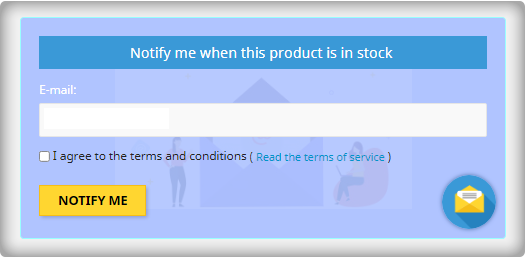
The online merchant can now use Knowband’s Prestashop back in stock notification module which allows the online users to subscribe for the favourite out of stock products. This Prestashop Out of Stock Subscription addon sends a notification to the subscribed customers when the products come in stock again. The Prestashop store merchant can show a notify block on the out of stock product pages. Store owners can also customize the looks and feel of the notification box. The online users can share the email id where they want to receive the Instock email alerts and click on the “Notify me” button.
The online users can view the list of subscribed products and also remove any product from the subscribed product’s list. This Prestashop product stock notification extension also provides an option to send low stock alert notification to the subscribers. The online merchant can send the low stock alert email notification after the specific quantity which can be set from the admin interface.
The Knowband’s Prestashop Back in Stock Module is GDPR compliant. The Prestashop product stock notification addon is integrated with Mailchimp, Klaviyo, SendInBlue email integrator. The store merchant can also view the list of subscribed customers along with the product name. The subscribers can be removed from the subscriber list. Admin can also download the subscriber’s list in CSV format.
1.1 Salient Features offered by Prestashop back in stock notification Addon
The online merchant can use this Prestashop product stock notification addon for sending email notifications of product back in stock to those users who subscribed for the same.
The Prestashop product stock notification addon offers GDPR compliance.
Admin can enable privacy policy settings and apply the related configurations from the admin interface of this Prestashop back in the stock addon.
In the updated version of this Prestashop back in stock notification Module, the online users have an option to view the subscribed products list. They can also remove any product from this list if they wish to do so.
The online merchant can also send low stock alert notifications to the subscribers for the subscribed products.
Prestashop product stock notification addon allows adjusting the color of the notification box using the color picker tool.
Admin can also enter the custom CSS and JS code for the advanced look and feel management.
The online merchant can integrate Mailchimp, Klaviyo, SendInBlue email integrator for creating a list of customers for email marketing activities in the future.
The store admin can view a list of highly demanded products from the analysis section.
The Prestashop back in stock notification Addon shows a list of all the subscribers and the e-merchant can also remove any subscriber from the list
Provides an option to add custom fields on the back in the stock window/notification box.
Collect information like name, region, address, etc from the subscribers. It has a text field, radio button, select option, etc for adding the custom fields.
You can also set priority for the fields to organize them in proper order.
Admin can set the order for the added custom fields.
PrestaShop Back in stock is provided with V3 ReCaptcha settings for bot and spam protection
The prestaShop owner can download the subscriber list in CSV format from the backend of Back In Stock Alerts Module.
The Prestashop back in the stock plugin is mobile responsive, compatible with all the Prestashop themes and is also SSL compatible.
The Prestashop back in stock notification Module offers multi-store and multi-lingual support.
Prestashop Instock Notifierallows store owners to share subscribed products, in stock, and low stock updates via em Store owners can easily customize the subject and body of the emails.
1.2 Technology for Development
Language: PHP
FrameWork: PrestaShop
2.0 Installation Guide
First of all, purchase the Prestashop back in stock notification
Addon and follow the below steps:
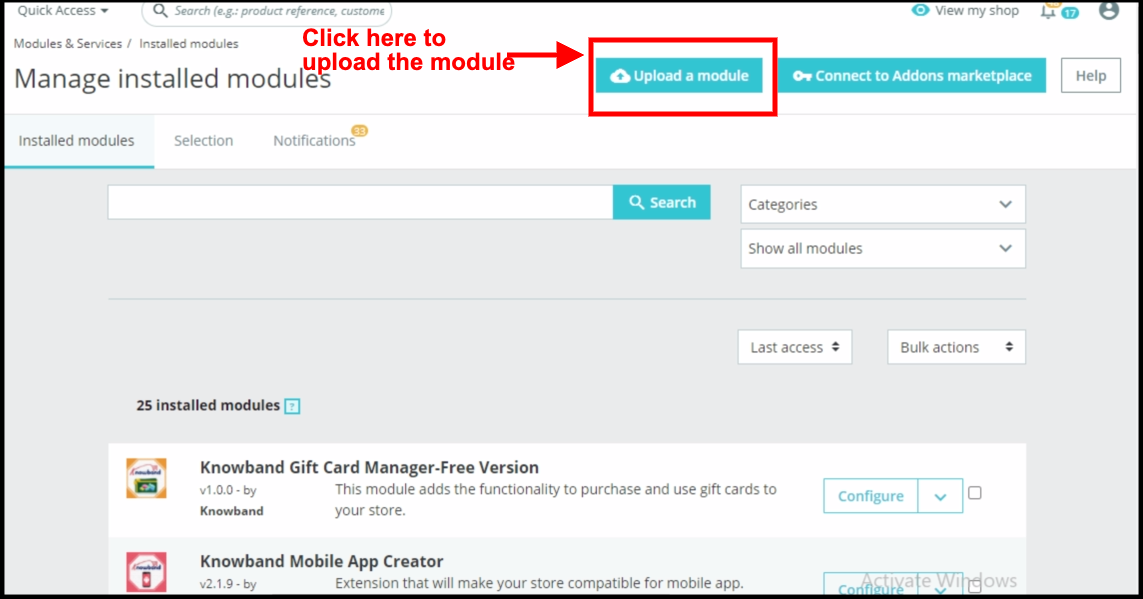
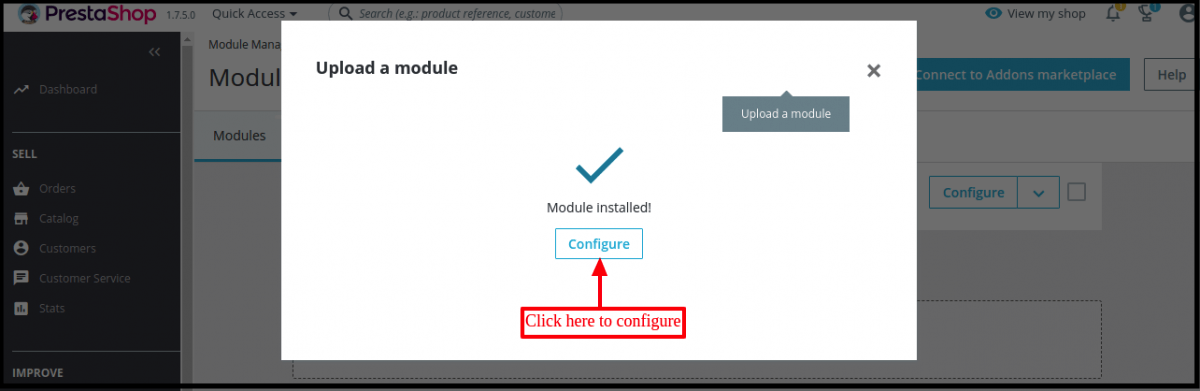
From the backend of the store, go to the Module Manager and click on “Upload a module”.
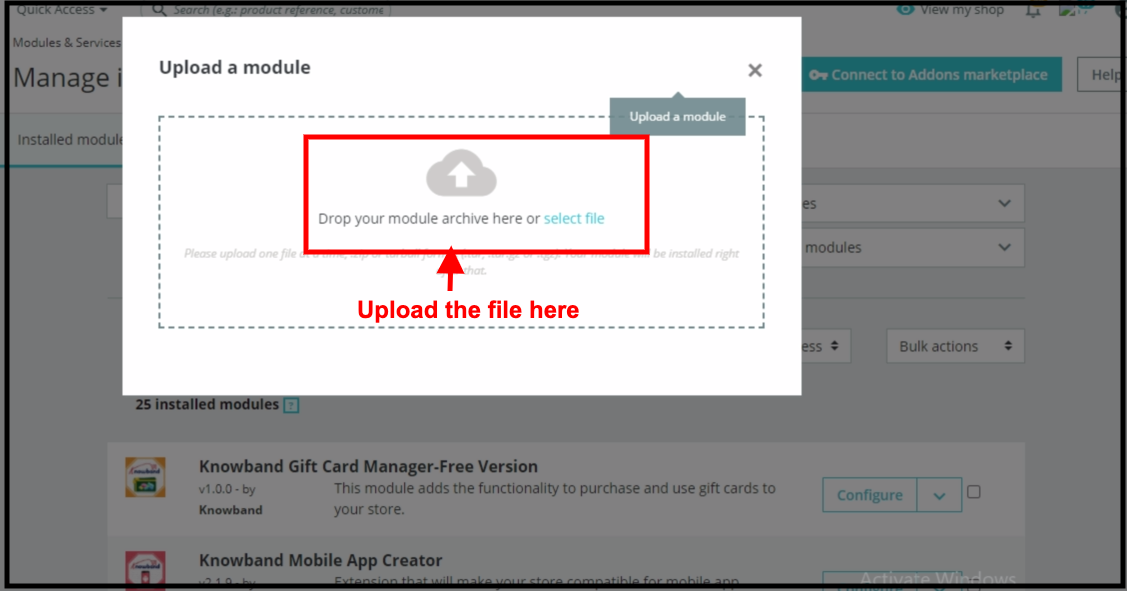
Upload the file from the system or drag and drop your module file here in the next tab.
Once the installation process is completed, “Module installed” notifications will get displayed.
After the installation process, you will get access to the admin interface of the module by clicking on the “Configure” button. Click on the configure button and your module is ready to use.
3.0 Admin Interface
After installing Prestashop back in stock notification plugin into the store, the Prestashop plugin will provide Module Configuration and Subscribers list.
Admin will get these configuration options:
General Settings
Initial Email Settings
Final Email Settings
Low Stock Email Settings
Email Marketing Settings
Analysis
V3 Recaptcha Settings
Add Custom Fields
Subscription List
Each interface of this Prestashop back in stock is explained below.
3.1 General Settings
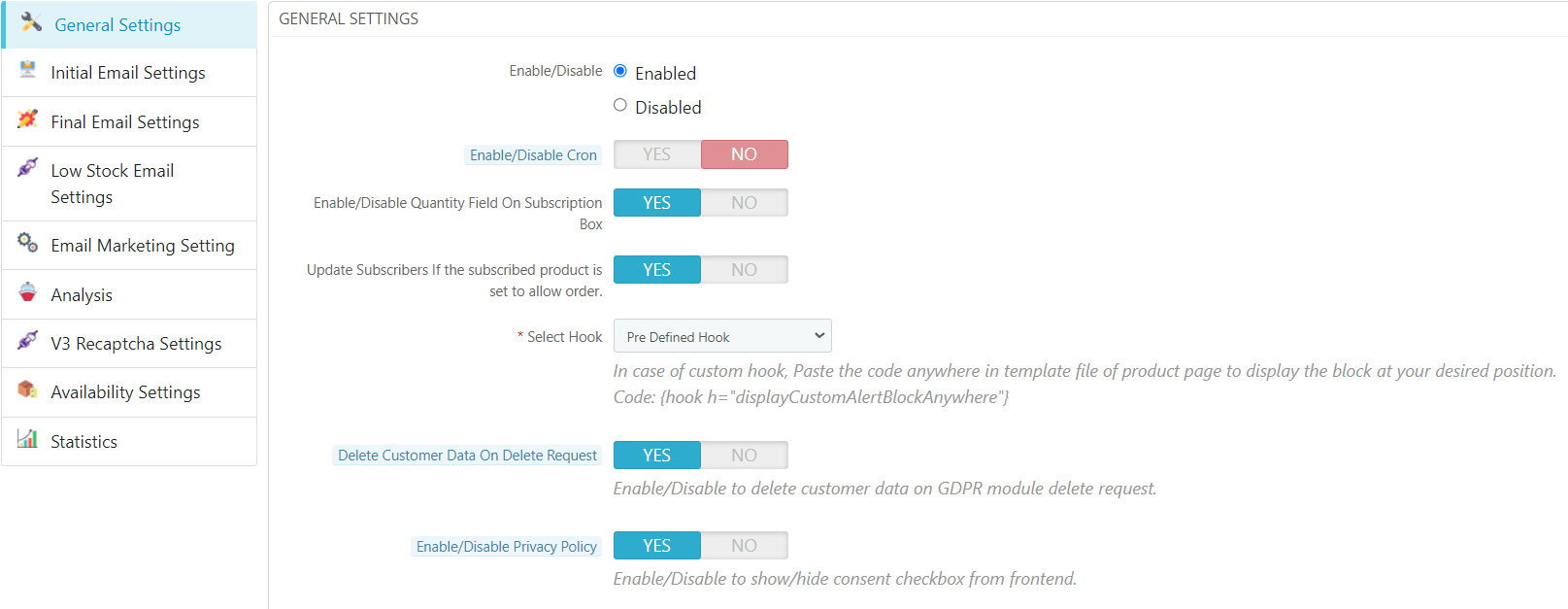
On clicking on configure link on Prestashop stock alert module listing page, the system will open general settings tabs of this Prestashop plugin by default. Initially, fields of this Prestashop product stock notification addon in the above form will be already filled with their default values.
Enable/Disable: Initially, this field of Prestashop back in the stock module by Knowband will be “OFF”. Admin can enable/disable the PrestaShop plugin by turning ON/OFF in this setting.
Enable/Disable Cron: When this field is enabled the admin needs to hit the settled cron and the mail will be sent to respective subscribers.
Enable/Disable Quantity Field On Subscription Box: When this field is enabled the users are allowed to enter the quantity of their respective product from the field that will be displayed in the subscriber form.
Update Subscribers If the subscribed product is set to allow order: When this functionality is enabled then the customers who have subscribed to the product will receive the back-in-stock mail when the product is set to allow order.
Delete Customer Data on Delete Request: Enabling this functionality will delete the customer data on GDPR module delete request.
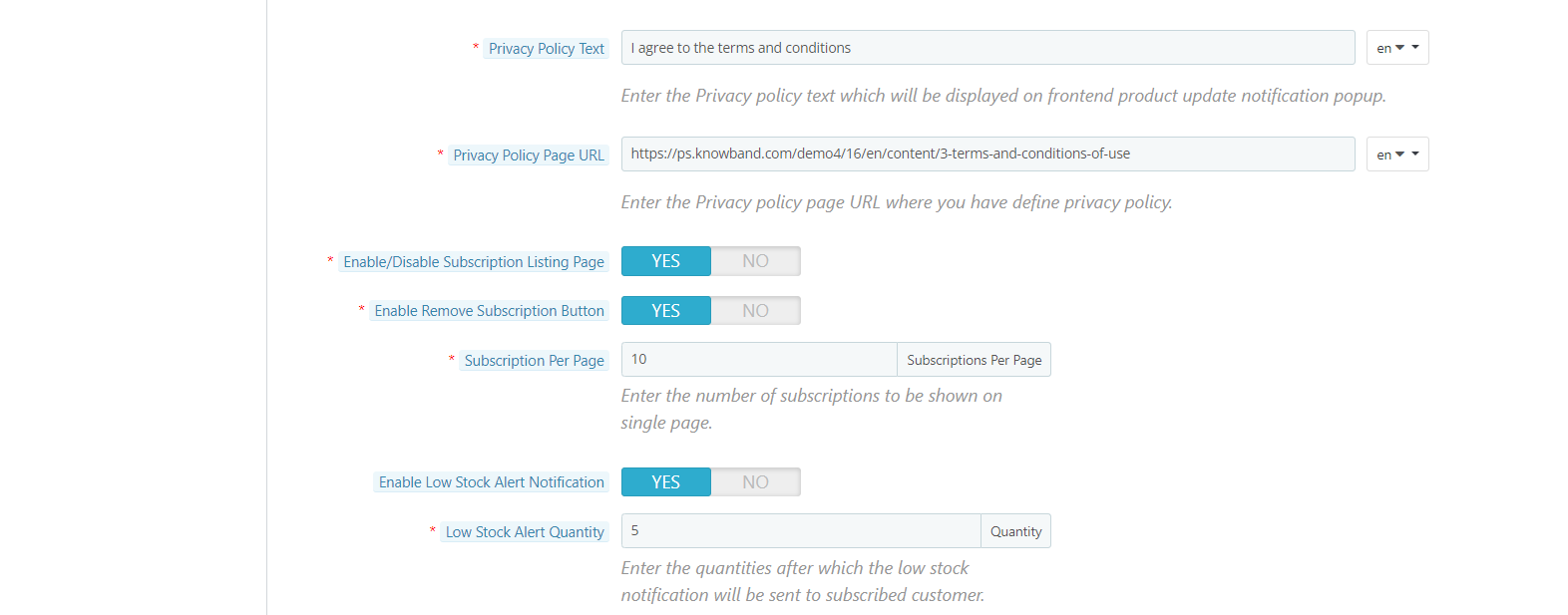
Privacy Policy: Enable this toggle button to display the privacy policy option at the front end. The Privacy Policy will be shown at Notify Me block.
Privacy Policy Text: The admin can enter the desired text for a privacy policy. The text can be changed whenever needed.
Privacy Policy Page URL: The admin can easily set his choice of URL to the privacy policy.
Enable/disable Subscription listing page: The online merchant can enable this option for showing a list of subscribed products on the website front-end interface.
Enable Remove Subscription button: By enabling this option, the online merchant can show a remove button that can be used for removing any product from the subscription list.
Subscription per page: Select the number of products that you want to show per page.
Enable Low Stock Alert Notification: Enable this option for sending a low stock alert notification for the users.
Low Stock Alert Quantity: Enter the quantity after which you want to alert the subscribers.
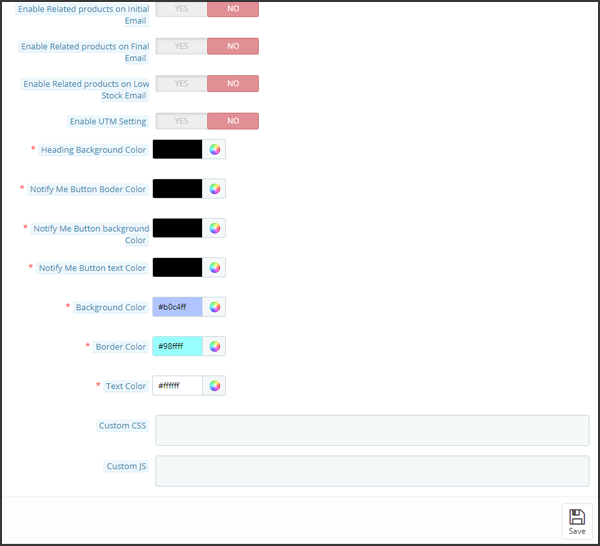
Show Related Products in initial, final and low stock email
Enable Related Products in Initial email: It allows admin to add related products in the initial email. You can add a title to the related products and choose what kind of products you want to show.
Enable Related Products in Final email: It allows admin to add related products in the final email alert of Back in Stock. You can add a title to the related products in the final email and choose what kind of products you want to show.
Enable Related products in Low stock email: Users can add related products in the low stock email alert. You can add a title to the related products in the final email and choose what kind of products you want to show.
Enable UTM Setting: By enabling UTM settings, you can add UTM source, UTM medium, and UTM campaign links
Heading Background color: Change the background color of the heading for the notification box
Notify me button border-color: Edit the button border color here
Notify me button background color: The button background color can be selected here
Notify me button text color: Change the text color of the button from here.
Background Color: Initially, this field of Prestashop stock alert module will be filled with some default value. Admin can change the background color of the subscription box by picking the color from the color picker that will be reflected on the front end of the Prestashop product stock notification addon.
Border Color: Using this option of the Prestashop back in stock notification plugin, the admin can set the border color of the subscribed box using the color picker.
Text Color: This field of Prestashop back in stock module allows the admin to change the text color of the notify box.
Custom CSS: This option of the Prestashop stock alert module allows the admin to write there own CSS as per requirement and will be reflected in the front end of this Prestashop plugin.
Custom JS: This field of Prestashop product stock notification addon allows the admin to write there own JavaScript as required.
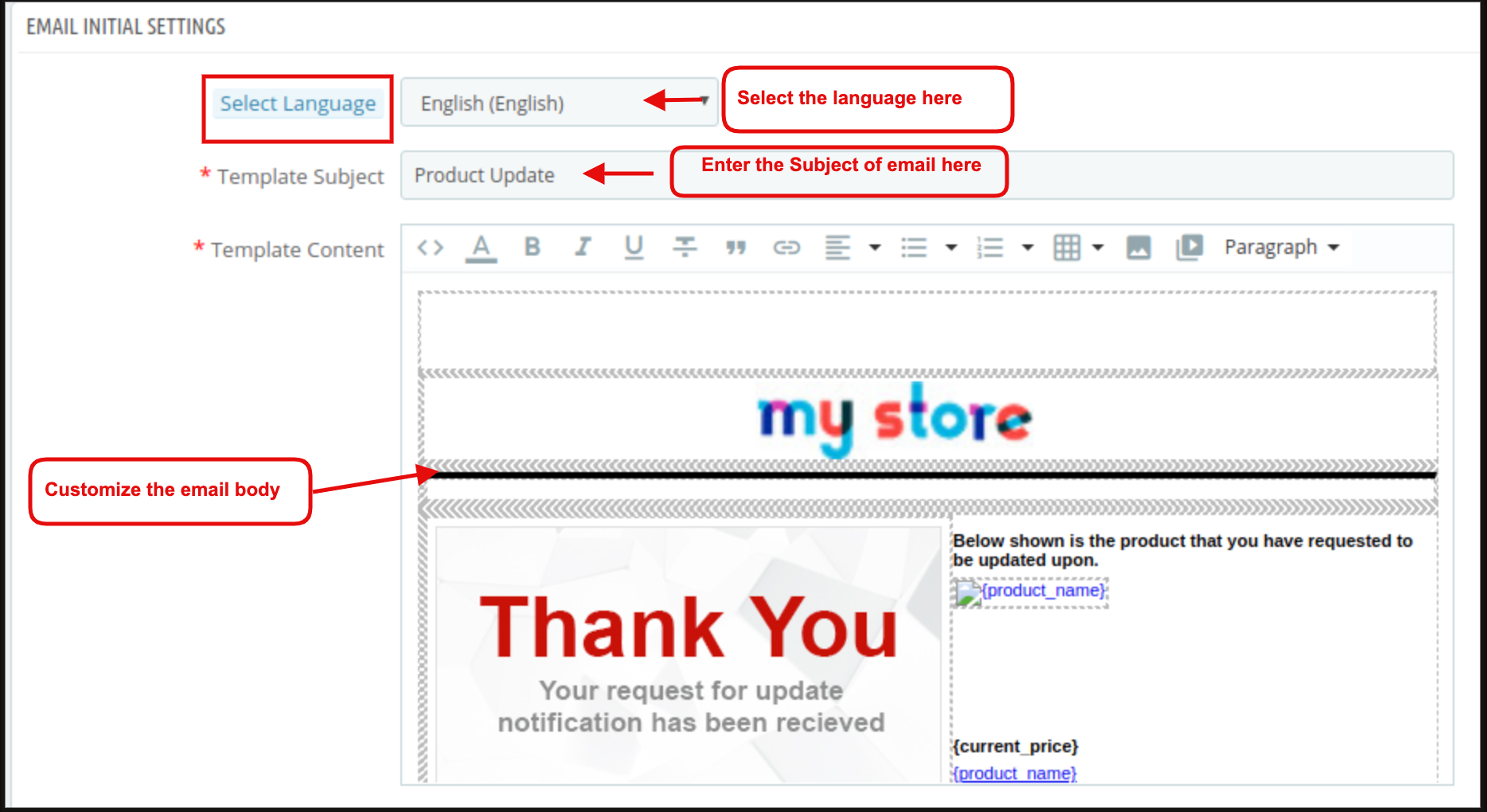
3.2 Initial Email Settings
In this tab of the Prestashop product stock notification addon by Knowband, the admin can edit the email template of this Prestashop Out of Stock Subscription module. Admin can change the subject and main body of the mail corresponding to the particular language enabled or selected. The initial mail will be sent to the customer when the customer subscribes to a particular product.
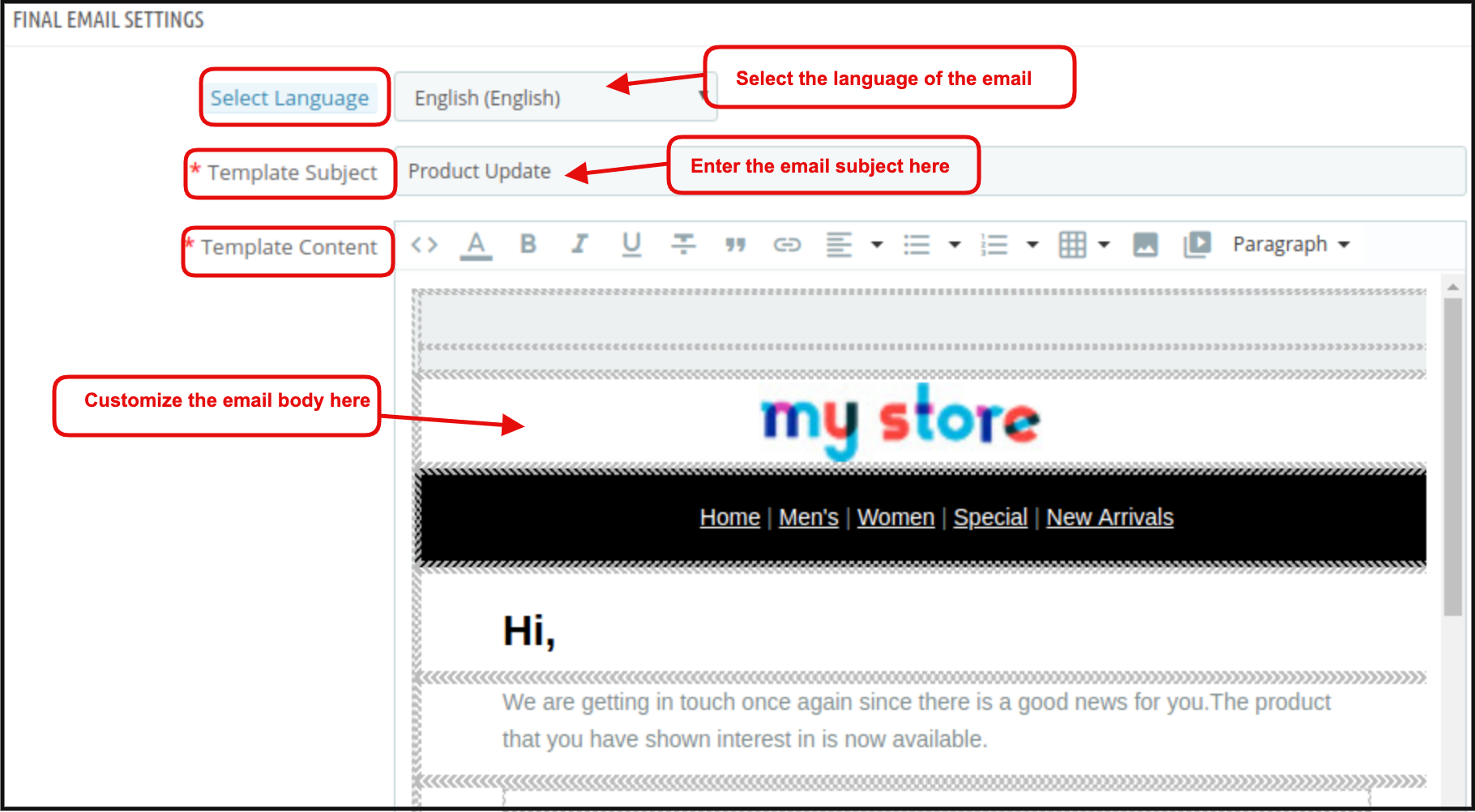
3.3 Final Email Settings
In this tab of the Prestashop reminder email module, the admin can edit the final email template to send to the customer when the product quantity of the product will be updated/ Instock. Admin can start customizing the email template after selecting the language corresponding to which admin wants to edit the template.
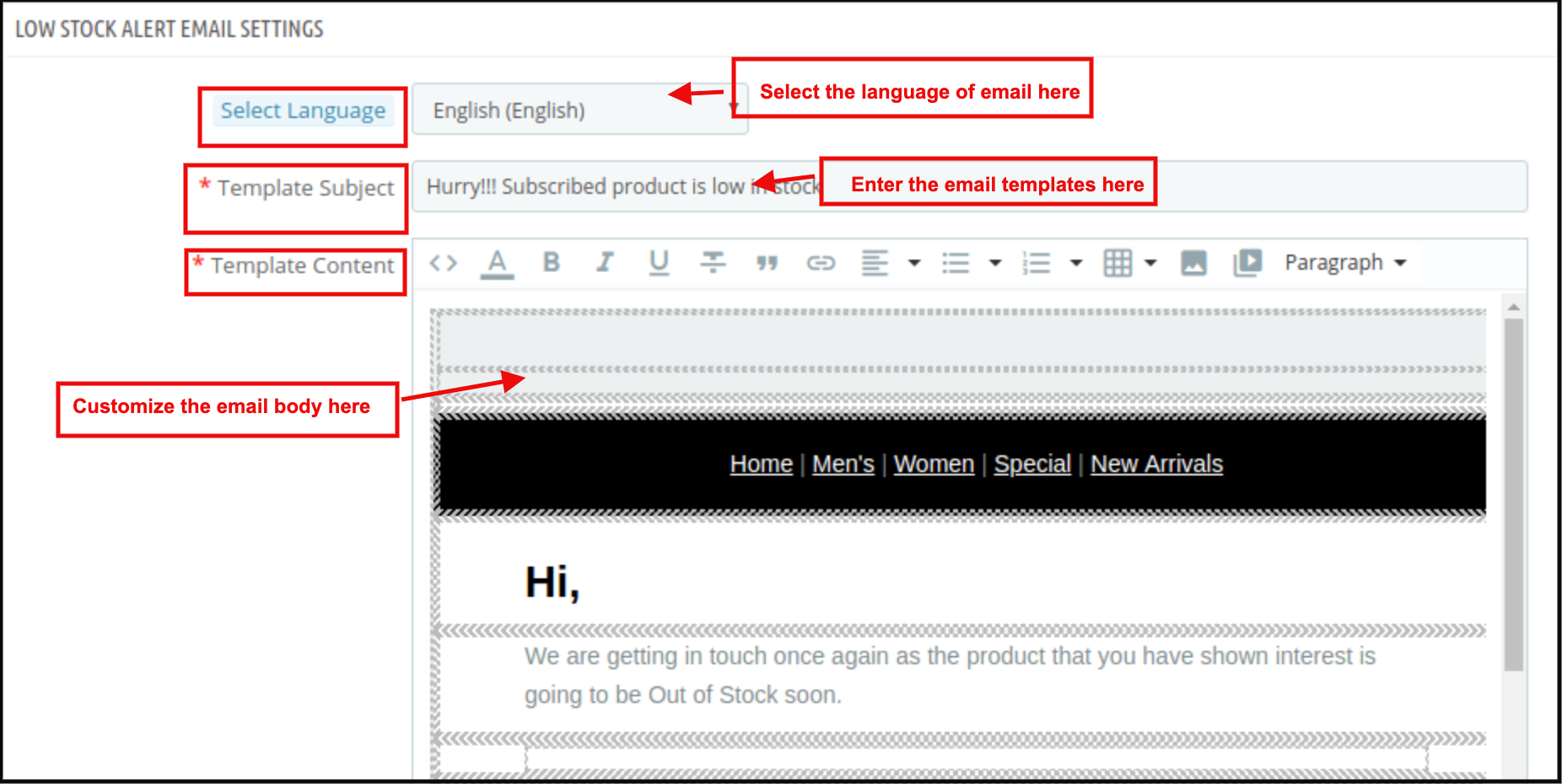
3.4 Low Stock Email Settings
In this tab, an email template is available which can be further edited for sending a low stock email notification to the subscribers. The online merchant can select the language, enter the email subject line and edit the main content. Store admin can make changes in the subject and body of the mail anytime from the backend.
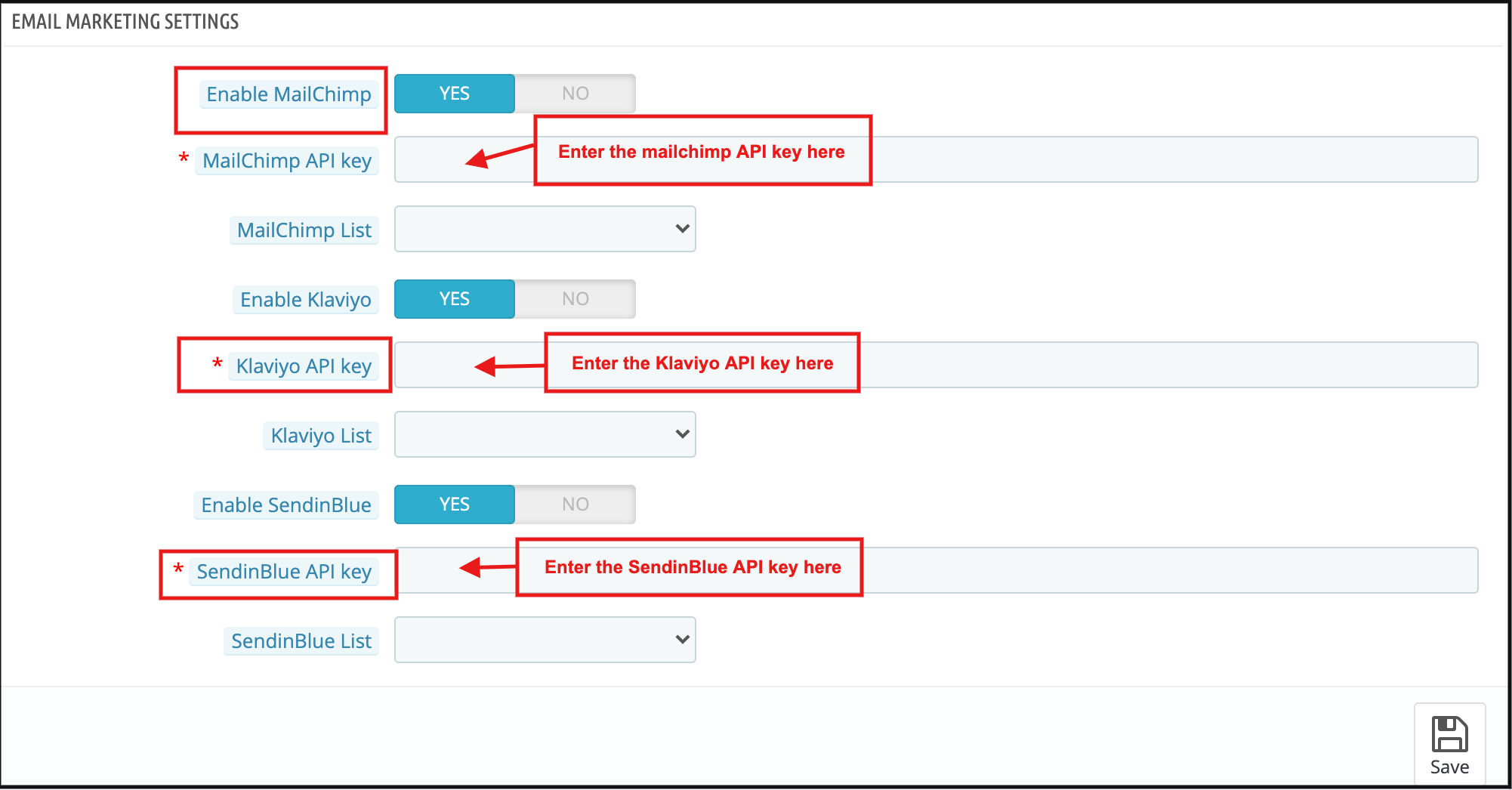
3.5 Email Marketing Settings
Admin can integrate various email integrators like MailChimp, Klaviyo and SendinBlue. Admin just needs to enter the API key for these email integrator sites and select the list in which they want to save the email id details.
3.6 Analysis
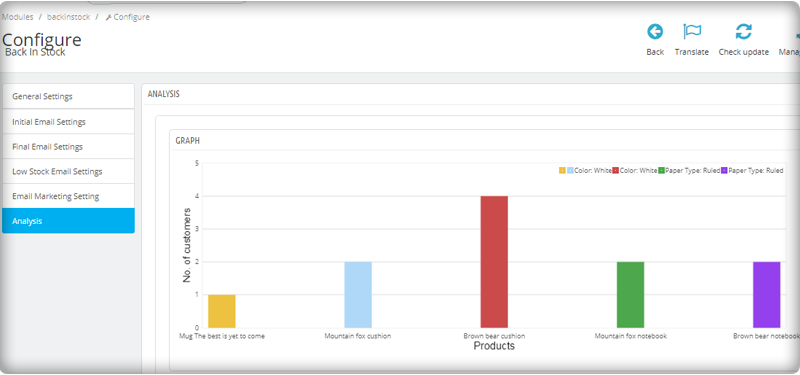
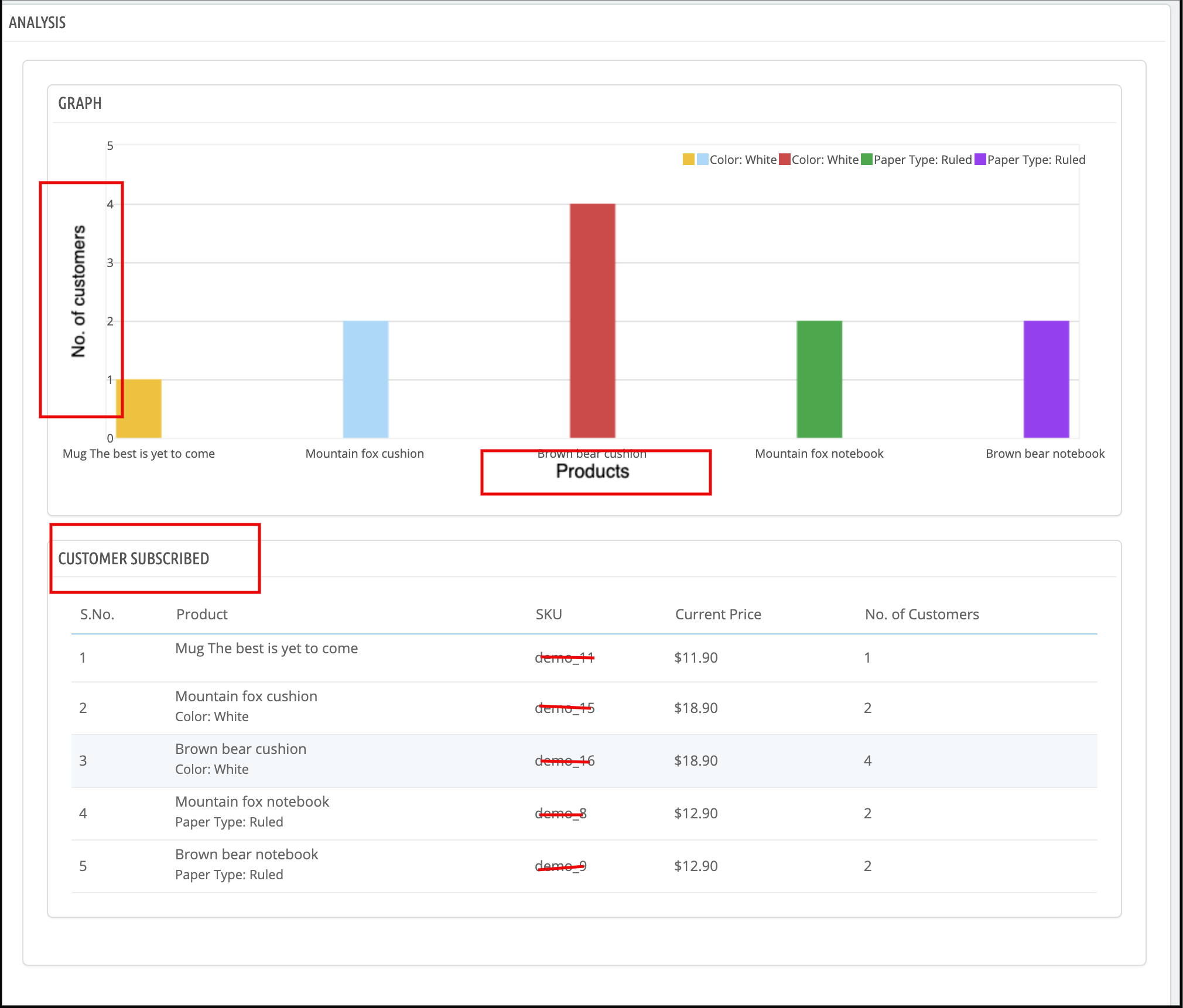
The complete analysis of the subscribed customers can be done in the form of a graph and the form of the detailed list. The graph will be displayed for the top 10 products at the back end of the Prestashop reminder email module.
According to the search elements and categories selected the list of the subscribed product will be displayed with some customers subscribed.
3.7 Subscriber List
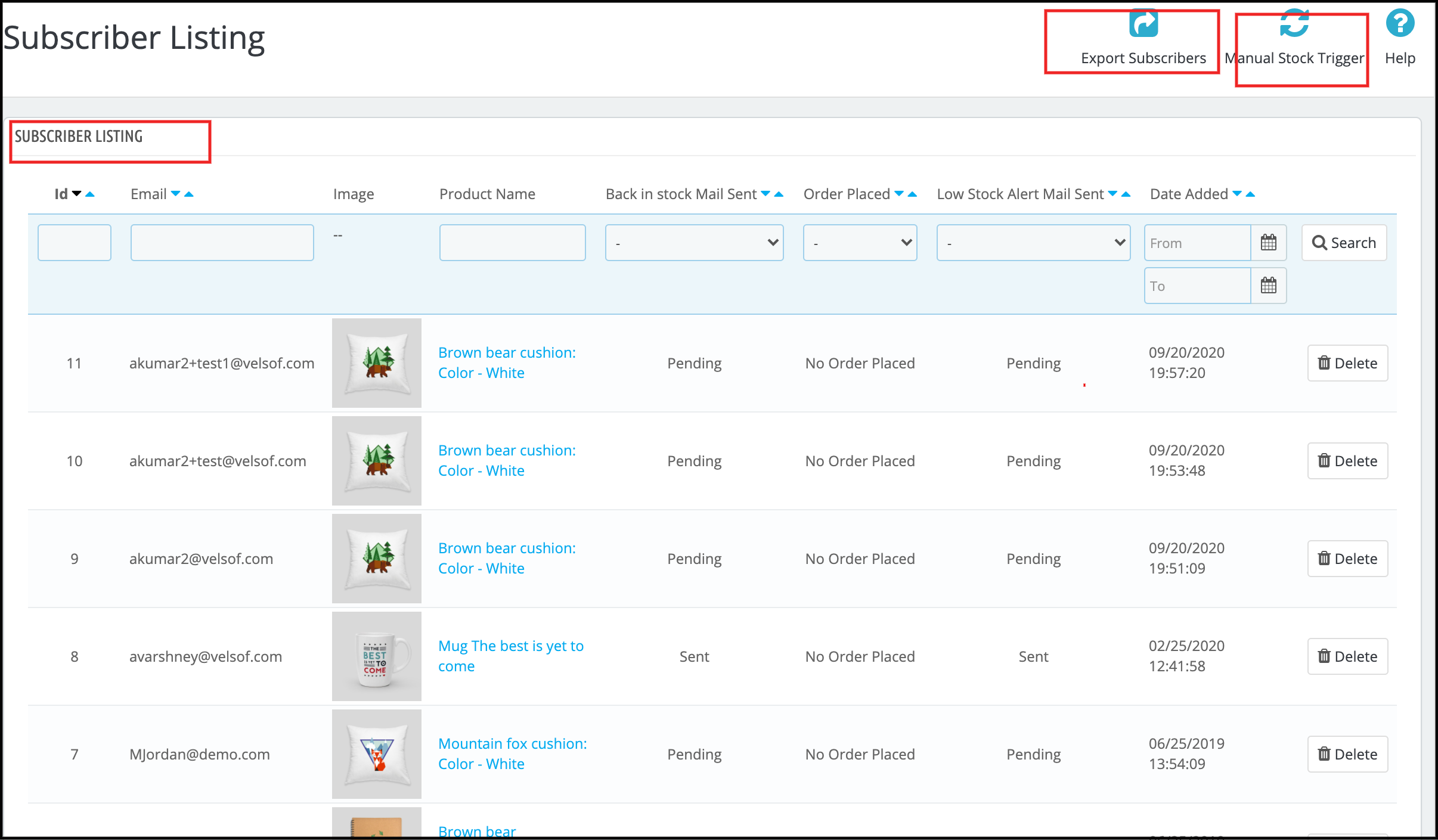
The online merchant can view a list of all the subscribers. The online merchant can view the email id of the subscribers, product details, and email status. Admin can also view if the customer placed an order for that product or not. An online merchant can also download the overall list of subscribers in CSV file format.
You can also check the subscriber list from the left menu of the dashboard.
3.7 V3 Recaptcha Settings
Admin can add the V3 Google reCaptcha from this setting.
Enable: Toggle to enable or disable the Google reCaptcha on your PrestaShop store with Back in stock notification box
V3 Site Key: Admin can enter V3 site key
V3 Secret Key: Enter V3 secret key
3.8 Add Custom Field
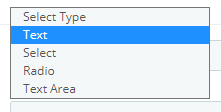
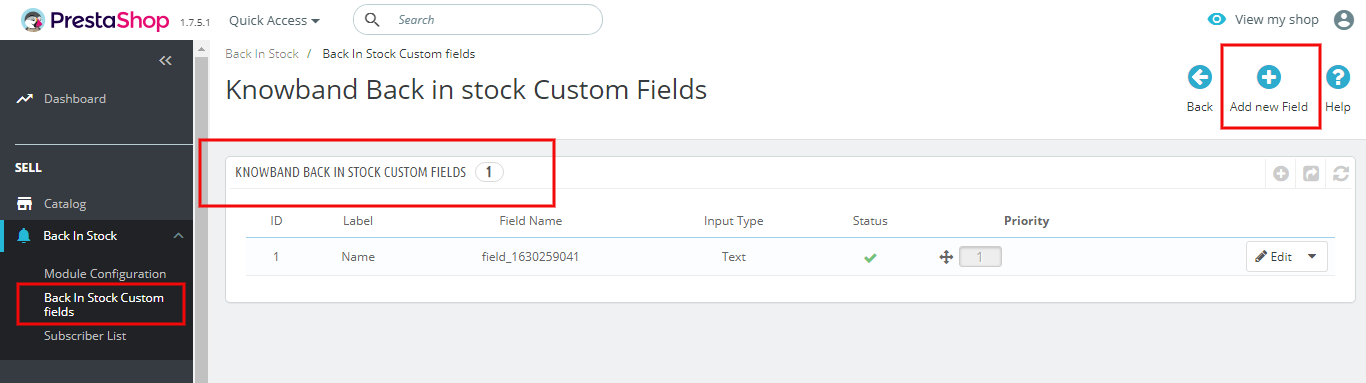
You can add new custom fields and set their priorities from this setting. It allows you to add fields like text, radio, select, etc. Every type of field requires some additional configuration and after making the changes, save the settings and enable it if you want to activate it on your Back-in-Stock subscription box.
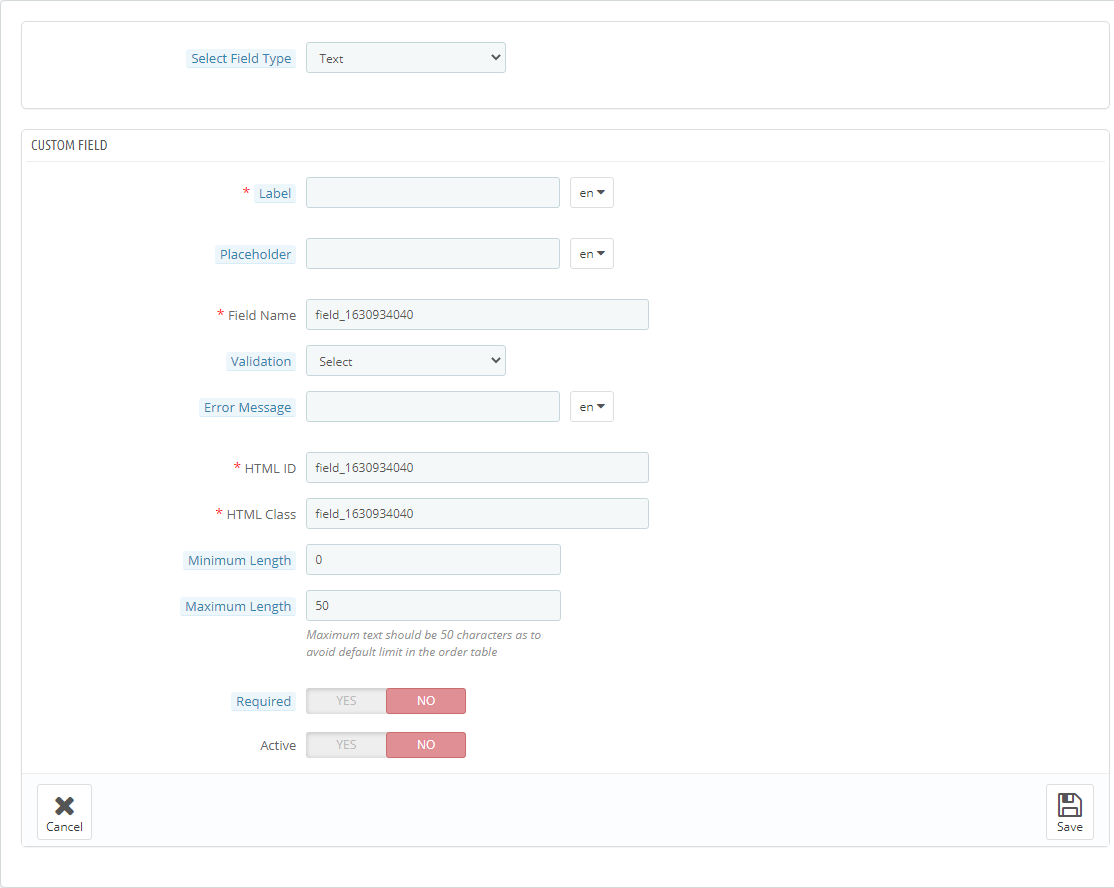
You can click on the Add New button to create new custom fields. Once you click on the Add New button, you will be redirected to a new window where you have to select the field type.
For text:
Add text, message, or other custom fields from this menu.
4.0 Front-end Interface
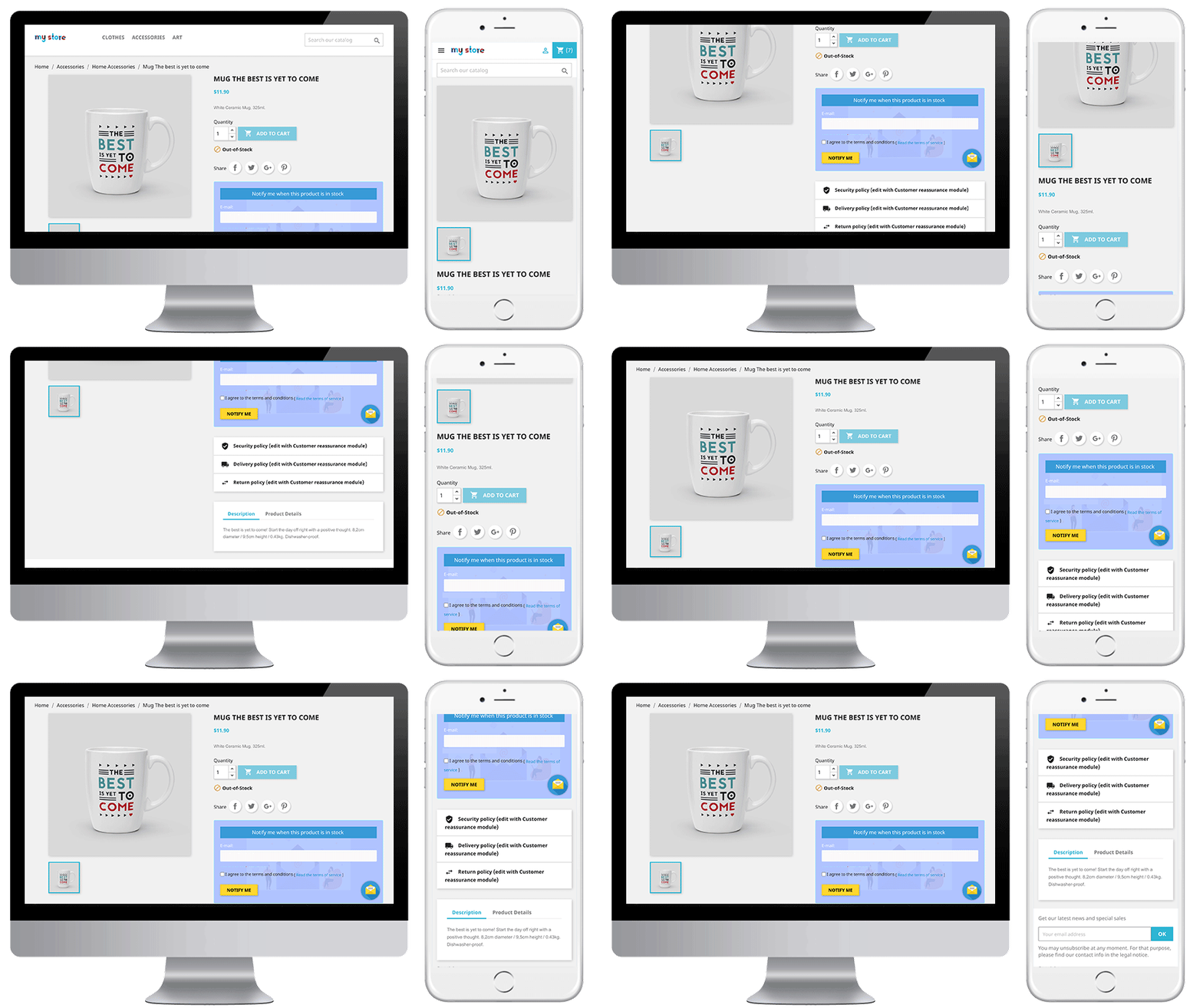
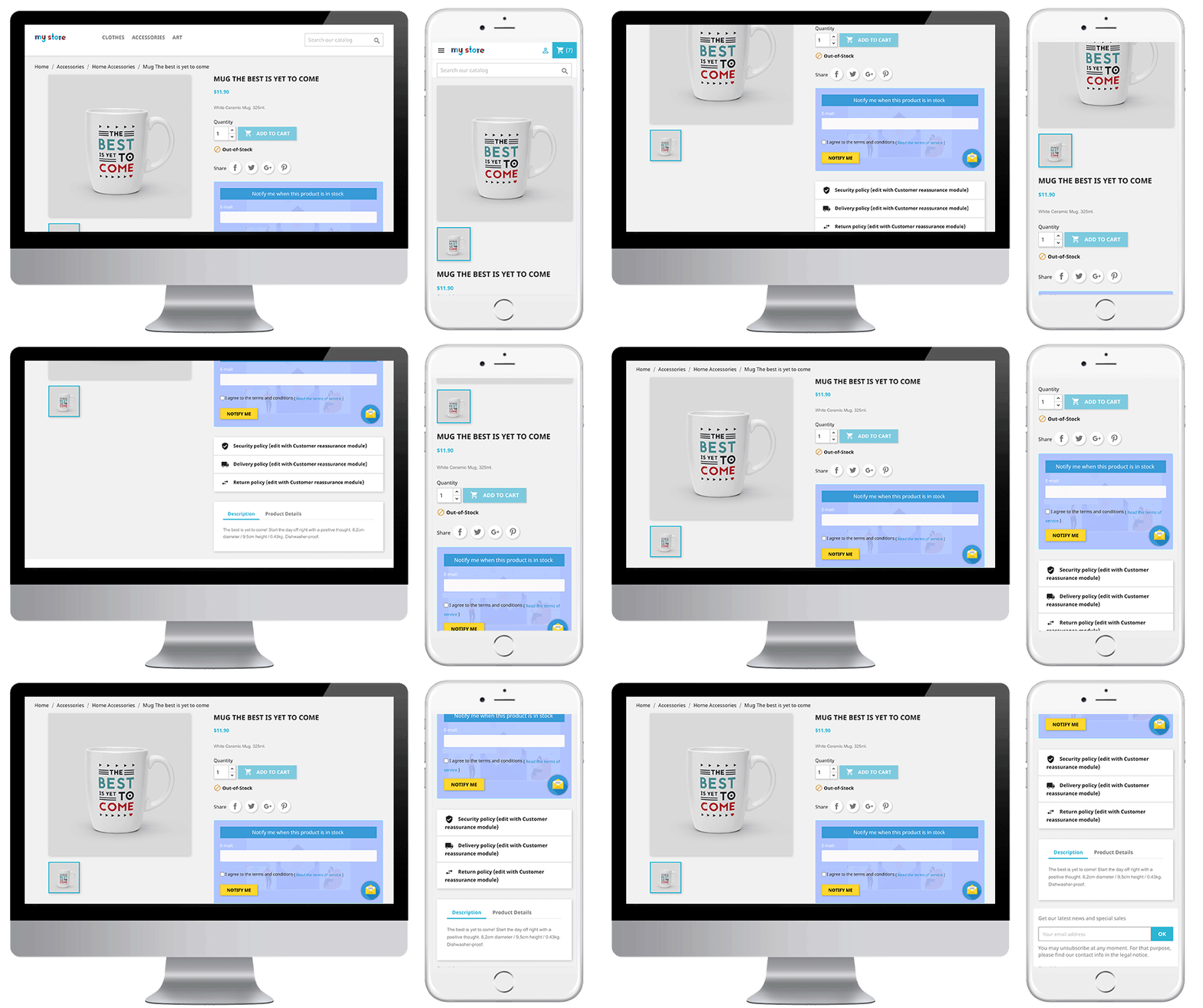
The online users can view an out-of-stock product notification box on the product pages and they can share email id for notification. The subscription block of the Prestashop reminder email module would appear as follows:
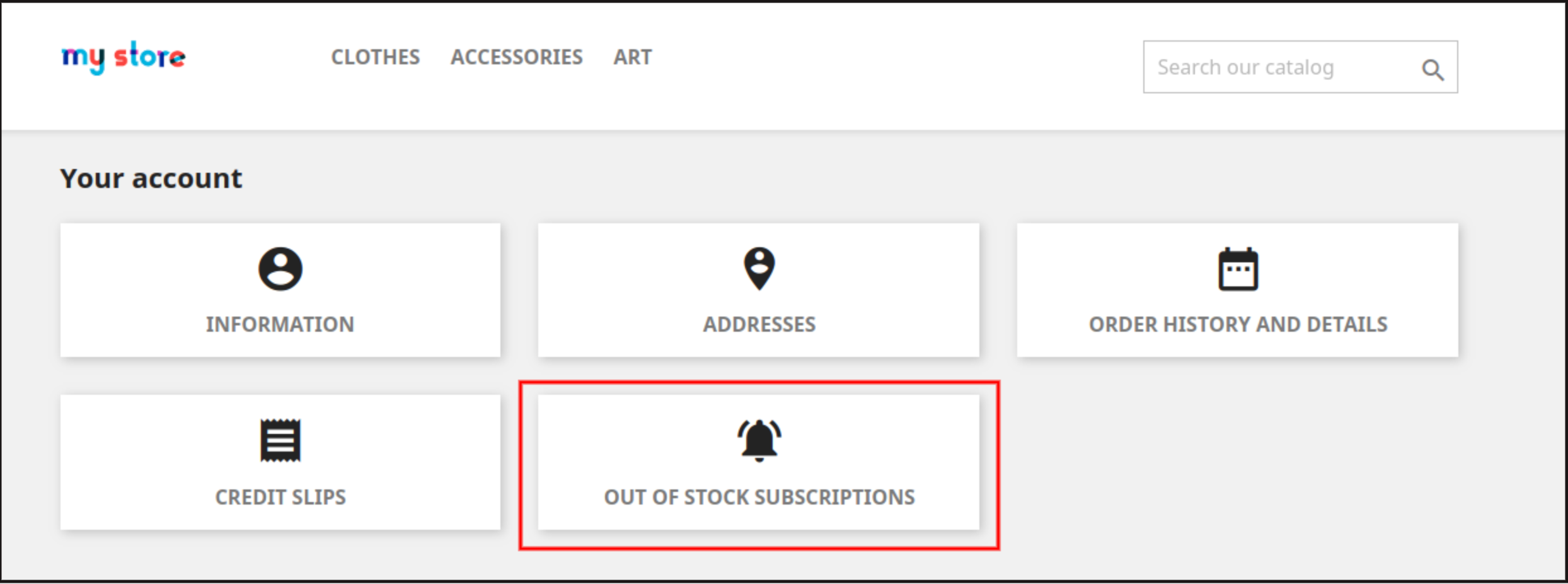
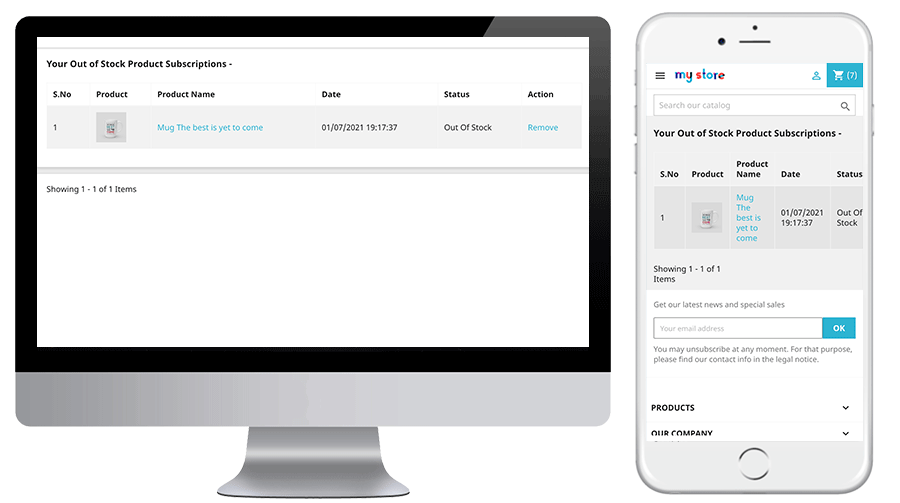
The online users can also view the subscription list from the account menu. They need to click on “Out of stock Subscription” as shown below:
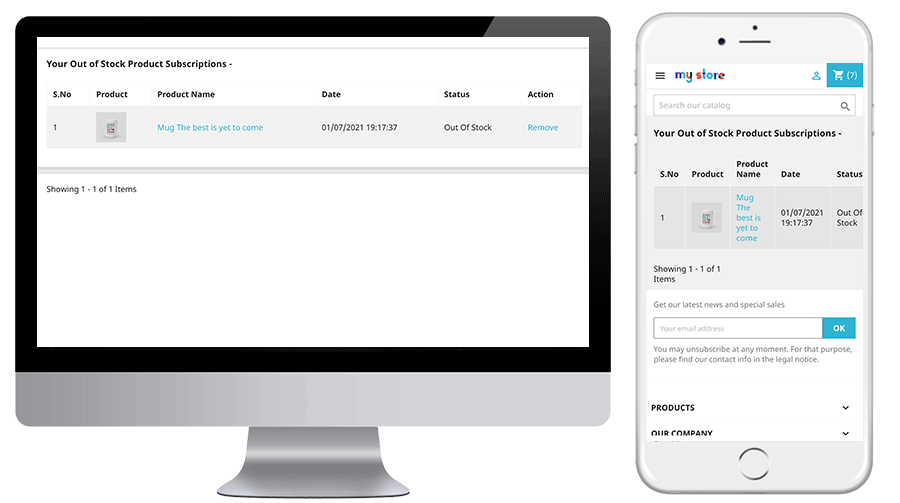
After clicking on the “Out of stock Subscription” option, they can view the list of all subscribed products and they can also remove any product from the list by clicking on the “Remove” button.
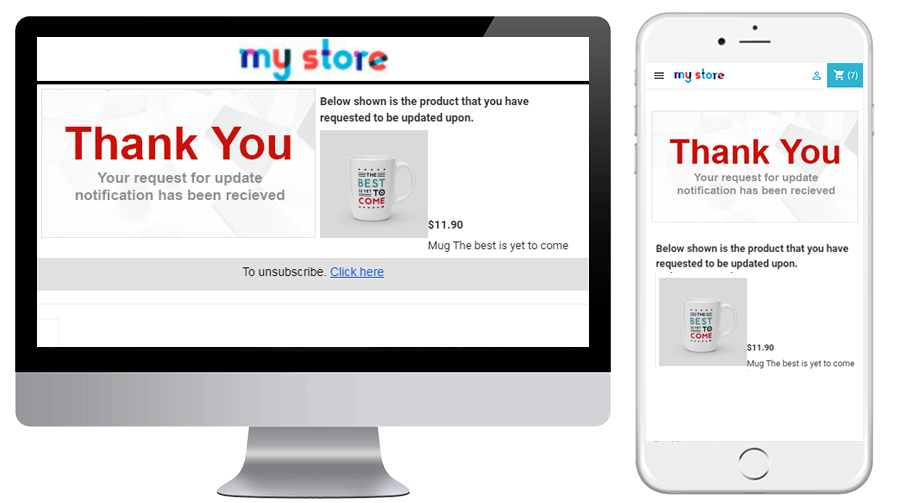
When the customer enters the email id and clicks to the button notify me the initial mail is sent to the entered email address and the message showing subscribed.
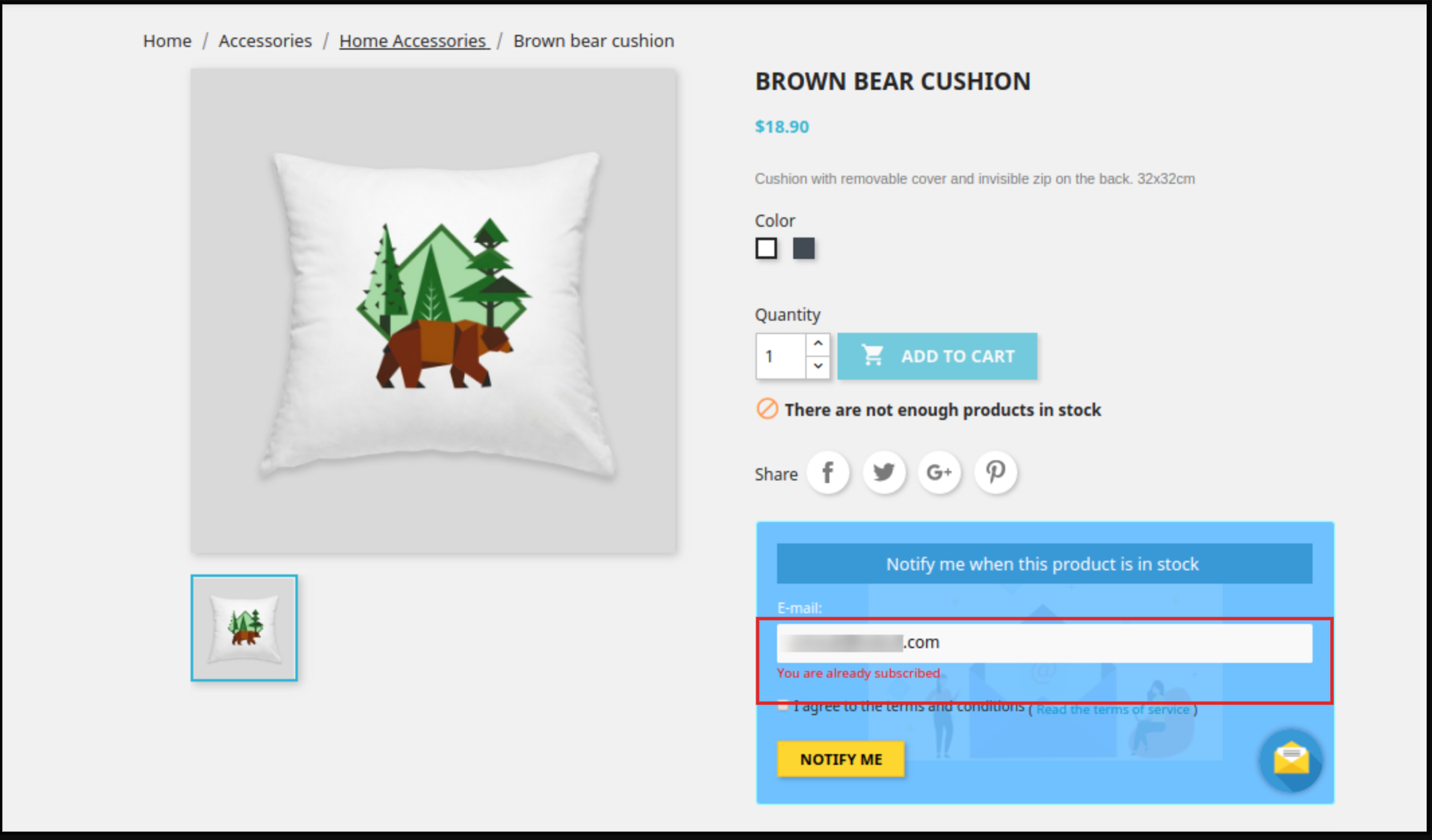
Prestashop Back in stock module will prevent the customer from subscribing the same product twice. It will display “already subscribed” message on the front end of the store.
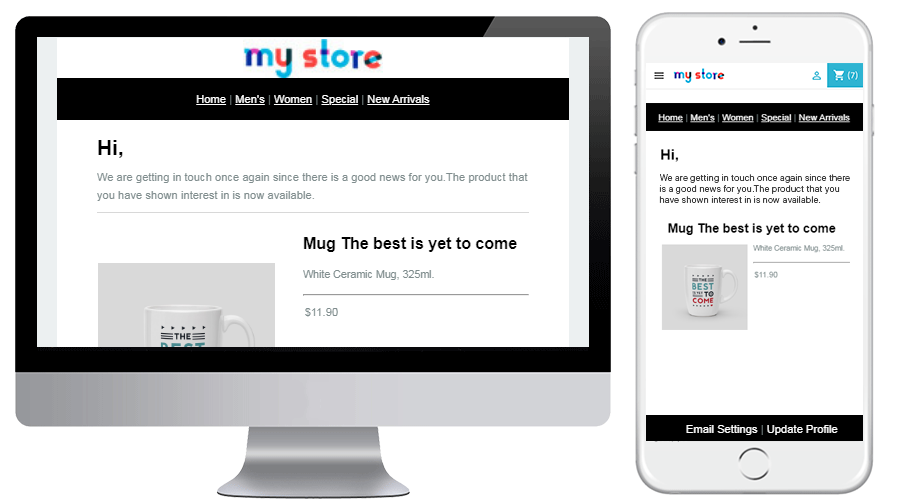
The online users can get an email notification when the product is available in stock.
They can also view a low stock alert email for the subscribed product in case of running stocks. The subscribed product status can also be checked from the Out of stock notification tab.
Engage your customers even when their product is out of stock. Quickly allow your customers to subscribe for back in stock alerts right from the product page. Don’t let them miss their favourite product deals on your store. This automatic notification is easy to install and configure on your Prestashop store. Purchase this module from addon store