With major festivals comes great sale opportunities. Ones at the doorstep this year are Easter & Good Friday. Online shoppers are already showing excitement for holiday season sales. If you are running an eCommerce business, then utilize PrestaShop website customization to give a boost in sales & revenue. No matter what products are being offered on the website, holiday sale strategies can be utilized to make the most of the outcome.
In this article, we will be covering various tips on the customization of the PrestaShop website to be motivated to achieve results in the Easter sale. Be sure to go through the entire article until the end to know the best possible approaches in the year 2020.
#1. Catchy Web/Push Notifications:
It is a must to make your customers aware of the Easter/Good Friday offers and benefits they would receive. So, make sure to send web notifications & push notifications to your existing customers before & during the sale. Lure the users by notifying them about your special coupons and vouchers with limited-time offers. Rather than using simple text notifications, send themed graphical notifications to compel them for successful purchases.
The store owner can easily create, automate & send such notifications to your existing customers from the backend of your PrestaShop site. In case, if you own a PrestaShop Mobile App, you can send in-app push notifications to app users.
Are you thinking of building a PrestaShop Mobile App for the online website? Try the PrestaShop Mobile App Builder module.
#2. Easter Theme Home Page:
The home-page is the face of a website, Hence, it must reflect all the relevant information that is not only useful for the visitors but also beneficial for the business. Keeping that in consideration, customize the home-page images aka display hooks & action hooks according to the Easter/Good Friday theme.
On the images, use action hooks where you want to add hyperlinks to specific categories/ products. For simply displaying an image (without any hyperlinks) on the home-page, use display hooks. These hooks can be placed anywhere on the homepage including the footer.
#3. Run A Mini Easter Contest:
Use interactive & gamified interfaces such as ‘Spin & Win Discount Wheel’ or any lottery for sale. Rather than having just a regular banner or button, use the CTAs in the form of a contest & games so that it not only boosts your sales but also increases customers’ interest & engagement.
#4. Labels Or Ribbons On Special Products:
Attach labels such as “Easter Special”, “Limited Time Offer”, “New Arrival”, etc. on the selected set of products. Adding such labels increase the CTRs & purchase of those products. Label products according to online shopper needs.
#5. Customize Filters:
If you sell products that are directly relevant for Easter, like candies, then update filter of that category to have easter relevant options. For example- Candies category could have filters of ‘New Arrivals’, ’ Easter Candies’, ‘Popularity’, ‘Flavors’, ‘Brands’, ‘Customer Ratings’, etc. Likewise, for various other categories as well, similar approaches can be adapted to make it easier for your customers to reach their desired products.
Conclusion:
All these additions on the PrestaShop website are just a few instances of how your holiday season sale approach can be optimized. Based on business type & client’s requirements, you can make many other sorts of PrestaShop website customizations as well. Just make sure they are implemented wisely and by only professionals. They not only make shopping convenient for users but also help in growing sales numbers.
Got any customization required for the PrestaShop store? Visit KnowBand or drop us an email at support@knowband.com.
Gift cards are purchased in huge numbers and not only during the holiday season but throughout the year. They are convenient and can be gifted to anyone having an email address. If you are also looking to add a gift card section on your website and provide your customers with the option of purchasing gift cards and gifting it to their loved ones, Magento 2 Gift Card Manager is all you need.
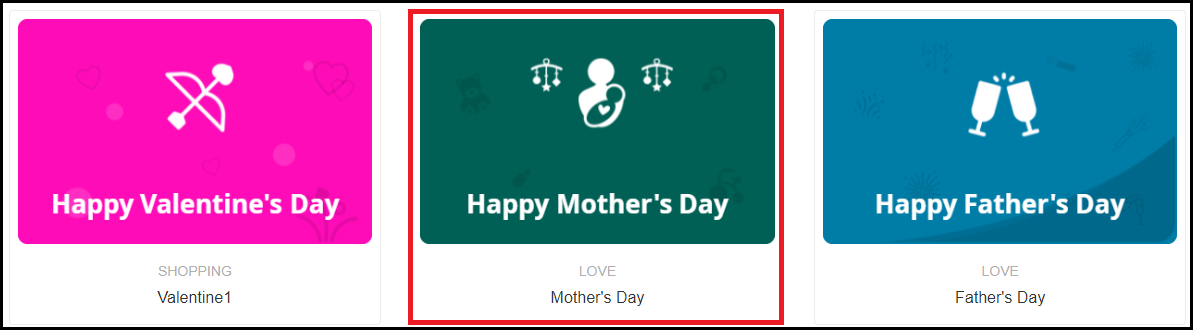
With Mother’s Day coming up in a few days, it is the best time to get this module and provide your customers with the option to purchase Mother’s Day Gift Cards and gift it to their lovely mother.
Overview
1. Eye-catching gift card section
2. Gift cards for multiple occasions
3. Customize gift card templates
4. Create gift cards of different price models
5. Place gift card link on multiple places
6. Gift cards delivery via email or at the physical address
Features Description
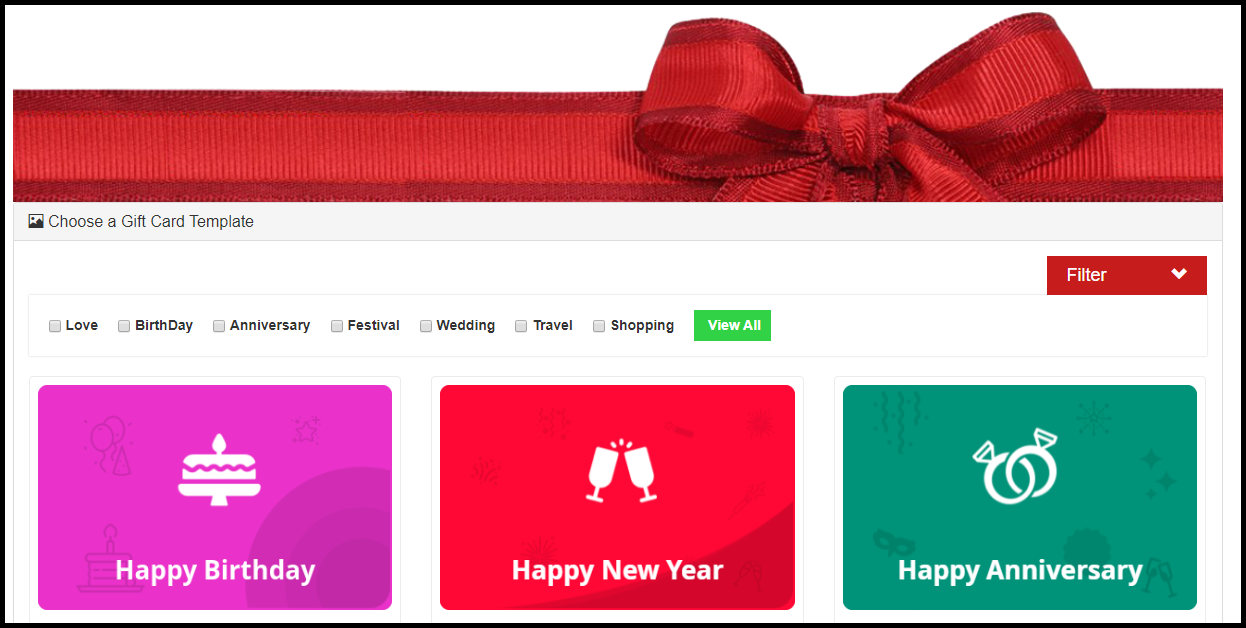
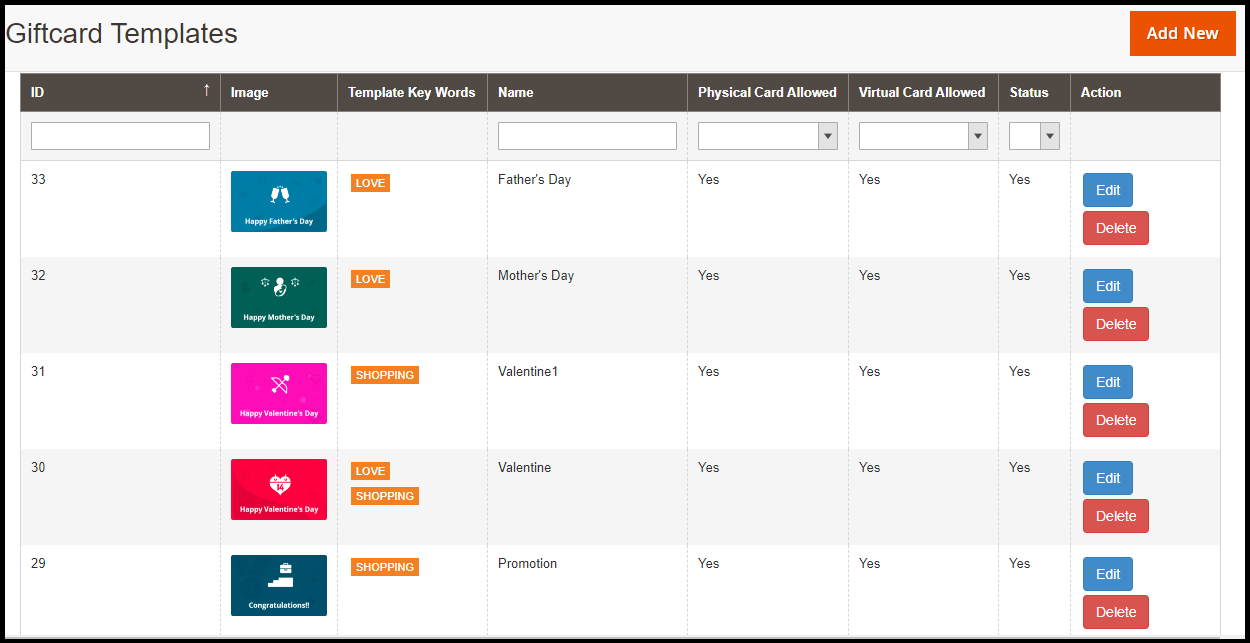
1. The Magento 2 Gift Card module offers pre-existing multiple gift card templates for various occasions such as Mother’s Day, Father’s Day, Valentine’s Day, Easter, Halloween, Christmas, New Year, etc.
You can customize these gift card templates, delete them and add new ones as well. While adding a new gift card template, you can specify whether it should be allowed to send physically, virtually (by email) or both.
2. With Magento 2 Gift voucher extension, you can also specify a category to your gift cards so that it becomes easy for the customers to filter them on the gift card page.
3. The gift cards can be set for different prices so that customers can purchase a gift card according to their budget. For the gift card having a fixed value, you can define its quantity and validity.
4. For gift cards that need to be sent physically, you can enable free shipping on them if you want.
5. Magento 2 Gift card extension lets you place the gift card link on many places on your website such as the Header and the Footer.
6. You can set a prefix for your Gift Cards to boost brand awareness.
7. You can define a minimum delivery gap of the gift cards. Put simply, the number of days specified would be the minimum days it would take for the gift card to reach the customer.
8. The Magento 2 Gift Certificate module lets you customize the email templates that would be sent to the recipient and the sender. The email subject and inside content can be modified accordingly.
9. The Gift card can also be downloaded in the form of the PDF.
10. You can track the Gift card orders with the help of Magento 2 Gift Card Manager module that provides you with the recipient’s email address, sending date of the gift card and the gift card status.
11. Customers can also add a message along with the Gift card.
The COVID-19 pandemic is a serious disease the world is facing right now. Because of this pandemic, businesses all over the world are facing serious challenges to deliver their services to their customers all over the world. Most of the countries are facing a lockdown situation by which the businesses are facing difficulty in shipping and delivering their products.
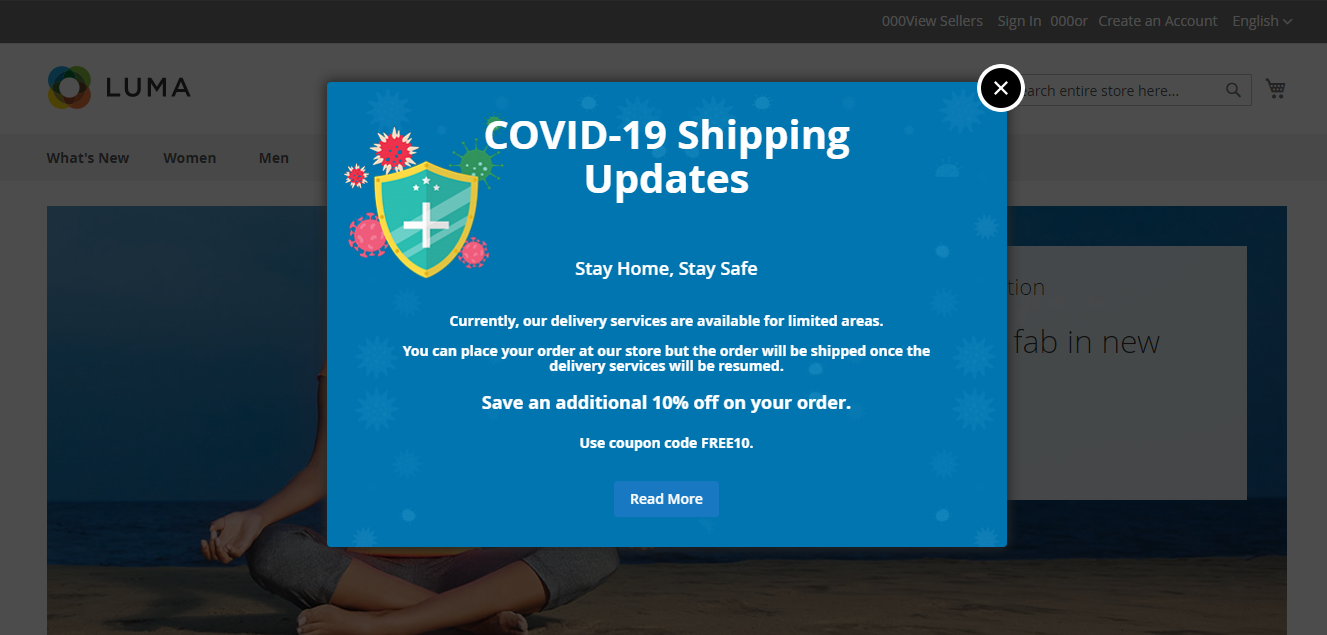
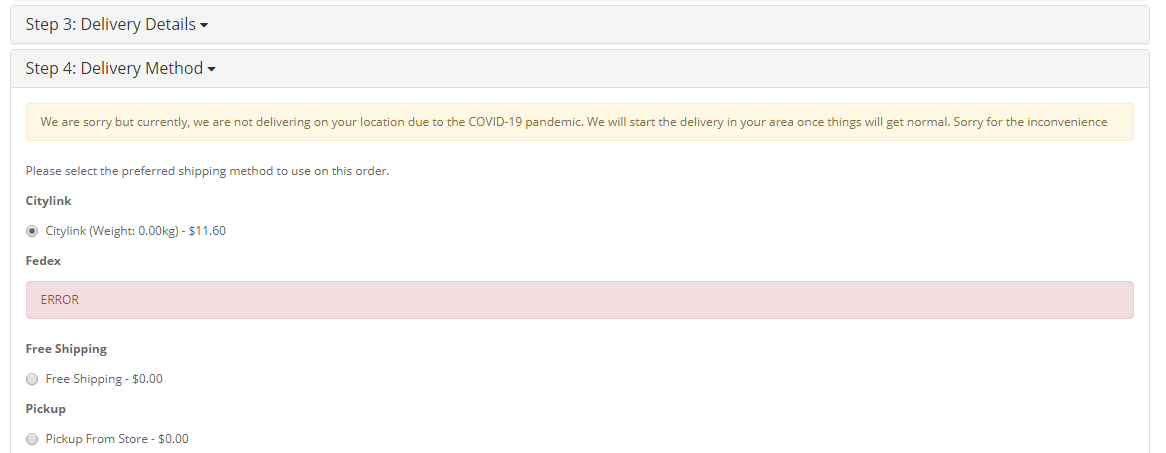
Knowband offers Free OpenCart COVID-19 Information Popup extension by which you can educate your customers about your current status of Shipping and Delivery Services. With this Popup extension, you can also restrict your shipping services to certain countries where you are not delivering due to COVID-19. You can display an error message to your customers about the unavailability of your shipping and delivery services in their country due to the Corona Virus pandemic. The extension is easy to use, install and configures and offers a user-friendly interface. You can easily customize the look and feel of the extension from the back-end.
Features of Free COVID19 Information Popup extension:
Easy Installation and Configuration: The Free COVID-19 Information Popup extension is super easy to install and configure. You don’t need any advanced coding knowledge.
Allow Shipping Services to Selected Countries: With this extension, you can easily select the countries where you are currently shipping and delivering your products.
Easy Look and Feel Customization: The extension is very easy to customize. From the back end of the extension, you can upload or replace the background banner of the popup, the text and its color in the popup. You can even offer special deals and discount with the respective coupon code in the Popup.
Predefined Popup Template: The Free COVID-19 Information Popup extension offers Predefined Text, banner and Popup Template. The text in this template can be easily customizable.
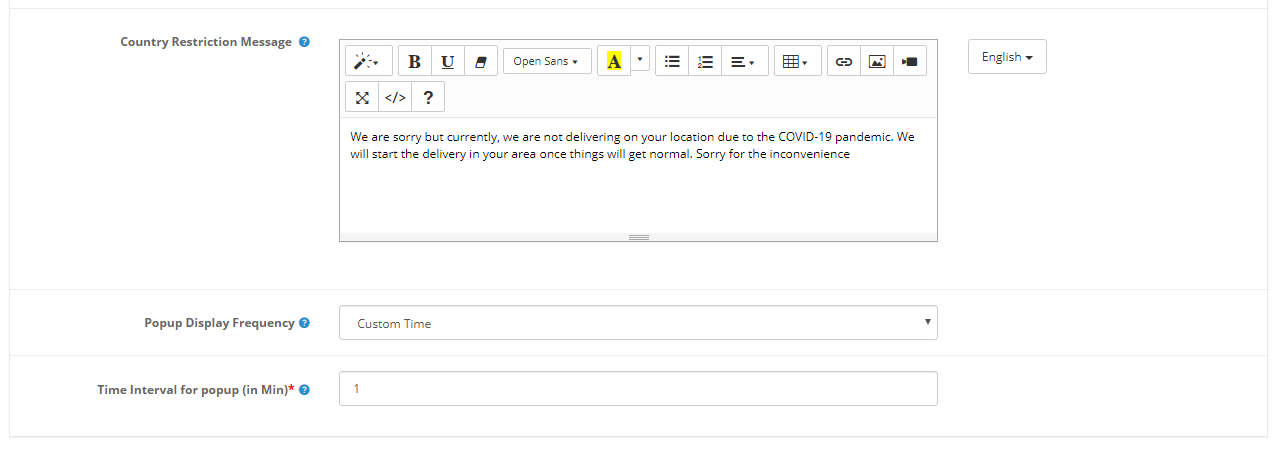
Display Country Restriction Message: The Free COVID-19 Information Popup extension allows you to restrict the shipment of your products to those countries where you are unable to deliver due to the Corona Virus pandemic. With this extension, you can display and configure the Country Restriction message which will be displayed if the customer enters non-delivery country in the delivery address at the checkout page.
Set Popup Display Frequency: The store admin can set the frequency to display the COVID-19 Information Popup from the back end. The admin can set the frequency to One hour per visit, One day per visit, One week per visit, One month per visit.
Enable or Disable the Extension: You can easily enable or disable the extension from the back end.
Merchant Benefits of Free COVID – 19 Information Popup:
With this extension, the store admin can inform the customers about the shipping and delivery services.
The e-merchant can also educate the customers about the protective measures they can take to protect themselves from the Corona Virus.
With this extension, the e-merchant can restrict the customers to place orders for the countries he is unable to provide the shipping service.
The store owner can also highlight the special deals on the Popup.
Customer Benefits of COVID – 19 Information Popup:
With the help of this extension, the customers get to know about the current status of the shipping and delivery services of the store.
The Popup educates the customers about the protective measures for the COVID-19 virus.
2.0 Installation:
Once you download Free COVID-19 Information Popup extension, you will receive the following files on your registered email address:
Source code of COVID-19 Information Popup extension in zipped file format.
User Manual of COVID-19 Information Popup extension.
Now in order to install this COVID-19 Information Popup extension on your online shop, follow the given steps:
Unzip the zip file. You will get the folders as shown in the image below
Copy all the folders of the zip file in the Root Directory of OpenCart setup via FTP manager.
Now in the admin panel, click on Extensions in left side menu. Then click on Extension Installer ( Home->extension).
Now, Upload the covid19_popup.ocmod.xml. A success message is shown once the file is uploaded.
After file is uploaded go to Home->Modification
You will find a file with name COVID-19 Popup (this means your ocmod has been installed successfully). Click on the corresponding “+” icon to enable it. The green icon turns into red as shown below.
Finally, click on the refresh button (This is mandatory).
Finally, the COVID-19 Information Popup extension is successfully installed and ready to use at your store. Go to the admin menu and click on the Extensions and then on Modules. Click the configure button next to Knowband Knowband COVID19 Information & Shipping Availability Checker.
3.0 Admin Interface:
After installing the COVID-19 Information Popup extension, the admin can configure the extension from the ‘Knowband’ tab. The admin panel includes the following categories:
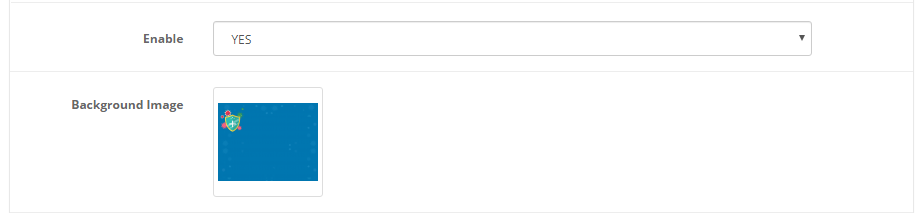
Enable/disable the Extension: This tab allows the store admin to enable or disable the extension in a single click.
Background Image: From this tab, you can upload or replace the background image of the COVID-19 Information Popup.
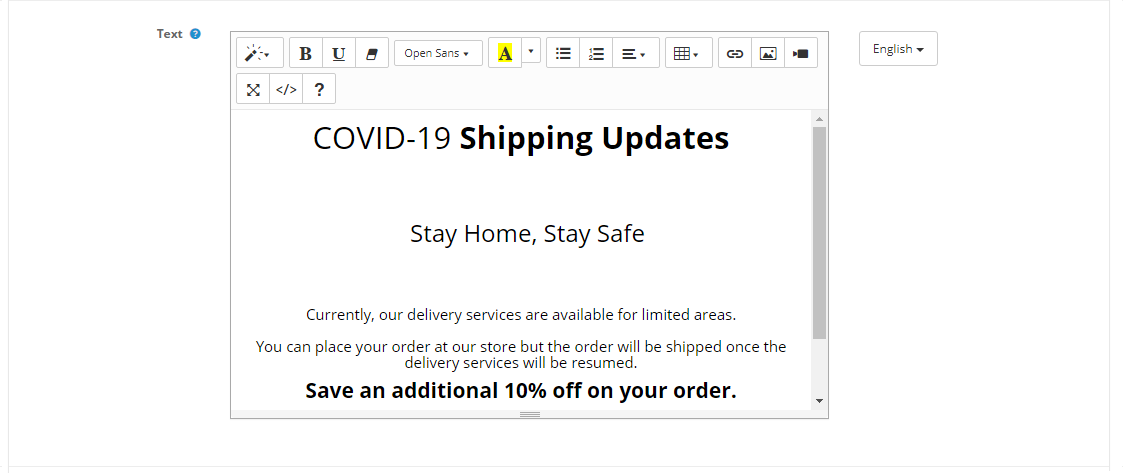
Text: From this tab, you can customize the text displayed at the popup. The predefined template is quite easy to customize without any coding efforts. You can display your special deals and discounts also from this template.
Text Color: This tab allows you to customize the text color.
Select Country: You can select the countries where you want to provide your shipping services. If you want to select multiple countries, you can do it by selecting countries with ‘Ctrl’ button. If the country is not selected in this tab, the customer will not be able to place order for that particular country.
Country Restriction Message: This tab allows you to add and customize the Country Restriction Message to be displayed at the Checkout page.
Front-end:
Time Interval for Popup (in Min): From this tab, you can set the gap interval to display the Popup again on the website.
One of the reasons for shopping cart abandonment is the unavailability of multiple payment options on the checkout page.
Until a few years ago, a majority of eCommerce businesses were limited to having Credit Cards and Debit Cards as their payment options. But ever since the introduction of digital wallets, things have changed quite a lot. PayPal is one of the popular e-wallets that brands have adopted and now it is being followed by Google Pay as well.
Now, brands are trying to integrate as many popular payment options as they can on their website so that such a situation does not arise where online shoppers feel that they are left with no option except to abandon the purchase at the last minute.
Today, if you are not providing multiple payment options to your customers, you may lose out on huge conversions and you simply would not want to see the visitors leave when they are on the final step of their checkout.
How would you feel if you are on the verge of making the product payment but do not find your desired payment option? A bit disappointed, right? The disappointment can be extreme if you are committed to buying that product.
Conversely, you would be happy if you find the payment method that you were looking for or find the only source of payment that you can use to pay among the listed payment modes. This is normal consumer behaviour.
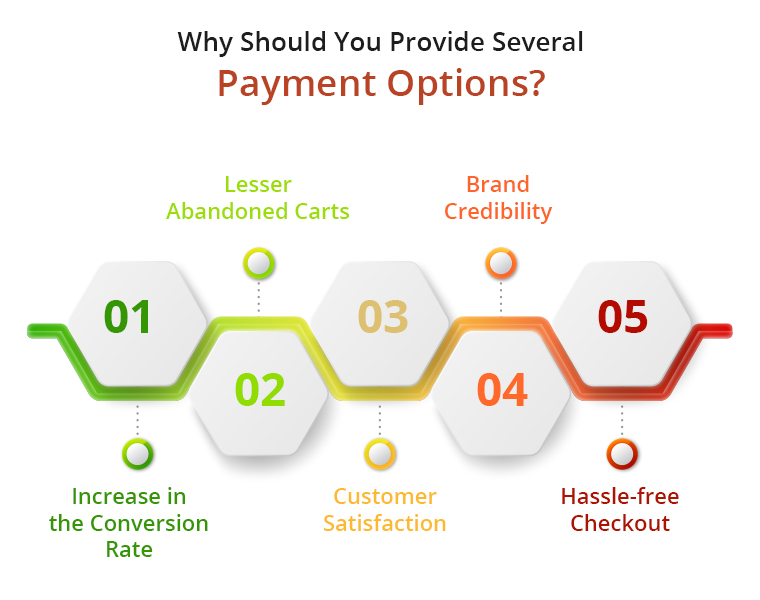
To be very specific, offering multiple payment options has the following pros-
1. Increase in the Conversion Rate
2. Lesser Abandoned Carts
3. Customer Satisfaction
4. Brand Credibility
5. Hassle-free Checkout
If you do not offer them enough payment options, not only it would lead to cart abandonment but you will lose those potential customers to your competitors. So one of the effective ways to reduce cart abandonment and increase your conversions is by adding more payment options.
What you as a business need to understand is that people have their preferences set for the payment method they want to use, and those they are most comfortable with. And different people have different preferences. So the onus is on you to meet your customers’ choice. Moreover, people find it tiring to enter their card details every time they shop and are also a bit concerned too when sharing their card details online. If you are hell-bent on using limited payment options, you are indirectly making those prospects change their purchase mind.
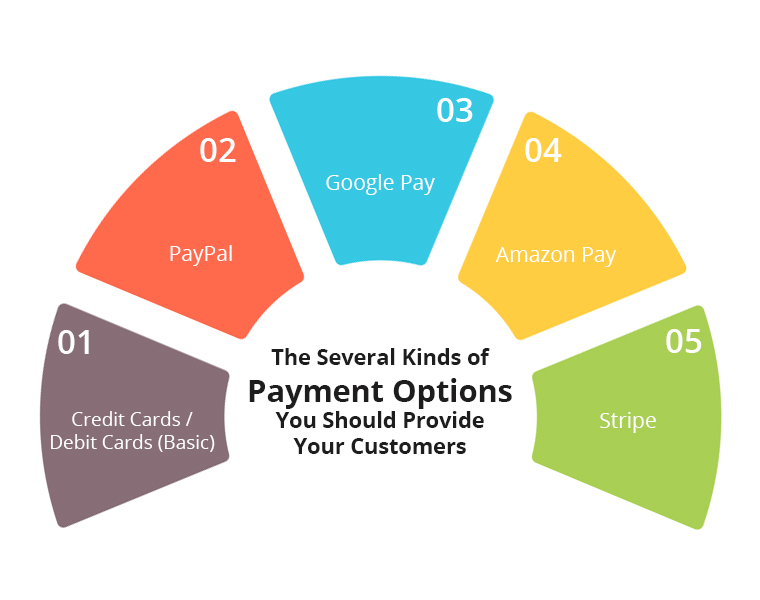
Types of Payment Options that you should provide to your Customers
1. Credit Cards / Debit Cards (Basic)
The most common form of online payment that you would witness on every eCommerce website is Credit and Debit Cards. It requires users to share their details like Card number, Card validity, and CVV. And then a One-Time Verification Password (OTP) is sent to the user on his/her mobile number, upon confirmation of which the payment is made.
To avoid customers from filling in their details again when they come to shop in your store next time, you should provide them with the option to save their card details so that they do not waste their time putting the same set of details again.
2. PayPal
PayPal is amongst the most widely used payment methods. Today, it has over 305 million users worldwide. It will be okay not to have PayPal if your business region does not have a lot of PayPal users. But if it is set up globally, there should not be even a question as to why you should not include PayPal in your payment modes.
Let customers check out with PayPal and see a significant change in your conversion rate.
3. Google Pay
Launched in August 2018, Google Pay has already gained millions of users within a short span of time. And today, it competes for head to head with the other online payment modes. The Brand name itself is enough to gain the trust of the users and besides, it offers a seamless way to check out.
Adding to that, Google Pay rewards merchants as well as customers with some exciting cashback on transactions, making it one of the major reasons for its high use. Hence, you should definitely consider integrating Google Pay on your website.
4. Amazon Pay
Amazon is amongst the leading eCommerce brands globally and they have its own payment portal called Amazon Pay. Having Amazon Pay as a payment option on your payment page makes it easy for Amazon users to check out. Most of your customers would already be Amazon customers. This is another payment method that you should give a thought to unless you are trying to compete with Amazon.
5. Stripe
Stripe also makes it to our list of online payment options that you should offer to your customers. This online payment processing platform provides a convenient way to accept online payments. Over 100 thousand businesses are registered with Stripe.
Some of the other payment platforms that you can include are-
American Express
2Checkout
Braintree
QuickPay
First Data
Choose the payment options depending upon your business and the business region. What people prefer more in your targeted region should be your priority.
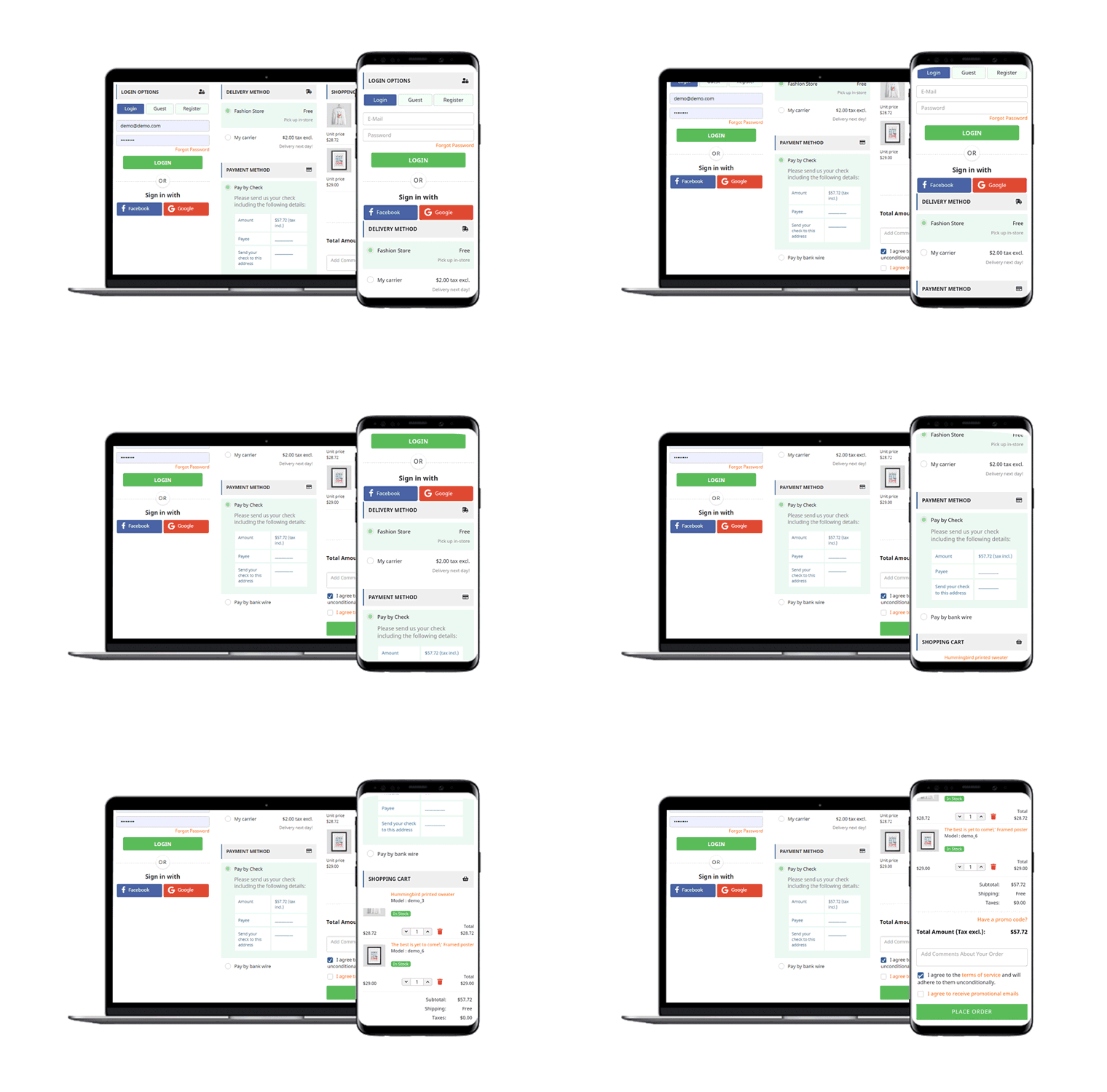
Knowband offers amazing One Page Checkout plugins for online store owners. One Page SuperCheckout addon is available for PrestaShop, OpenCart and Magento 2 platforms.
One Page Checkout module focuses on streamlining your customer’s checkout process with checkout page optimization. A retailer can eliminate pointless fields from his checkout page and show all of the content of the checkout process on a single page. On the checkout registration form, the admin can add Custom Profiles such as Business, Individual, Client, etc. One Page Checkout extension reduces Customers’ additional work. It enables them to finish the checkout process on one page, which lowers the rate of abandoned carts.
Offering multiple payment options can scale up your conversion by a significant margin and improve customer satisfaction. The more options you provide, the more comfortable users will feel during checkout.
For a quick and user-friendly checkout that supports multiple payment options, try out our One Page Checkout module. It supports multiple payment methods such as PayPal, Stripe, Sage Pay, First Data, Mobilpay, 2Checkout, PayU, Braintree, Ogone, Pago Facil, QuickPay, Paysera, etc.
Having a website truly in line with the objectives of the business is what most online store owners want. For that, PrestaShop website customization plays a huge role. For eCommerce websites on PrestaShop, modifications & customizations are necessary to optimally run the website. Although PrestaShop, by default, has almost every possible feature, it still allows unlimited types of customizations in design & functionalities.
Making use of such an open-source platform can prove to be rewarding for businesses in terms of increasing revenue & building a better brand reputation. Hence, this article aims to elaborate on some of such PrestaShop website customizations and why they are necessary for eCommerce businesses. Below are the factors proving why the customizations are a necessity:
1. Improvements In UI & UX:
Making modifications in a PrestaShop site or App helps improve the User Interface & User Experience. For instance, customizing a navigation bar/ menu & making it a sticky menu with all the relevant links can make the navigation process simpler for the site visitors. Many more elements on the website can be customized to make the website more convenient for usage.
2. Additional Functionalities:
Adding customizations is not limited to just adding graphical & aesthetic edits. Many additional functionalities like chatbots, gamified subscriptions, social login & sharing can be introduced into a PrestaShop website. Having such a well-optimized eCommerce website usually gets better responses & reviews from its customers leading to a better online reputation.
3. Payment Gateways:
Based on the needs, an eCommerce business on PrestaShop can set up many different kinds of payment options. Not every potential customer could be using a conventional mode of payment. So, it is good to have multiple options to improve the shopping experience for the users.
4. Checkout Processes:
The lengthy process for checkout can be simplified by introducing simple one page checkout customization. Make your checkout pages having some pre-filled data from the previous purchases. Alternatively, an address book can be added to the user’s account details area. Hence, during checkout, the user will have to simply choose an address from the list, instead of manually typing the entire address.
5. Homepage Customization:
The homepage is the face of a website & it must briefly reflect the contents & objective of the entire website. That’s the reason why most eCommerce giants keep changing the look of their homepage from time to time. Taking the example of an apparels’ e-store, for instance, they keep upgrading their homepage according to the seasonal new arrivals & sale for example- fall collection, spring collection, end-of-season sale, black Friday sale, etc.. This helps the site visitors to be aware of the latest trends & products available on that e-store.
Tip: Utilize the action hooks to set links on the homepage’s images to redirect your customers to relevant products or categories.
6. Footer Customization:
Footer is an element that can mostly be accessed from any page of a website. A majority of the shoppers have the tendency to go bottom in search of useful links. So, be sure to have all the useful information on your website footer. Some of the common links are ‘My Account’ / Sign-In options, sitemap, list of main categories, privacy policy page link, website certification logos, payment options, customer support link, etc.
7. Chat Support Option:
To keep up with all the issues/queries reported of online shoppers & get them resolved using simpler & effective mediums, integrate chat support on your website. You may choose from any of the popular platforms like Whatsapp, Zopim, & others. More & more netizens are preferring to initially communicate with a business using chatbots before actually making the purchase. So, keeping up with the trend, add a suitable chat channel on your website.
Ending Comments:
A lot more is possible with such customized functionalities. It’s up to businesses to utilize the necessary features & make their website more user-friendly, functional & sales-driving than it used to be. For the above discussed or any other sort of customization functionalities, drop us a message us at support@knowband.com or visit KnowBand.
PrestaShop Marketplace Addon offers store admin the opportunity to increase the reach of their store to the users and provides a variety of products and services to customers.
The PrestaShop Marketplace addon can convert your eCommerce site into a fully functional marketplace. The store admin can easily handle the inventories, orders, products and shipping methods at the Marketplace from the back interface of the PrestaShop Multi-vendor Marketplace Addon.
The PrestaShop marketplace store admin can charge a commission to the merchants on the products they sell. Sellers will get the opportunity to promote their brand and serve the users of Marketplace in return for the commission they are paying to the store admin.
Prestashop Marketplace Addon is one of the best addons and it has more than 1000+downloads in our Prestashop Addon Store.
How to Convert Your Prestashop Store into A fully functional Marketplace:
Follow the following steps to convert your Prestashop store into a Marketplace:
Then after purchasing and downloading, unzip the addon in the modules directory of your Prestashop store.
After that you are able to find the Prestashop Marketplace addon, which is, ready to be installed in the Modules List in your PrestaShop store.
Click on the Install link to install. Once the Prestashop Marketplace addon is installed properly the Install button will be converted to Configure.
Other Compatible Modules:
1. Order Return Manager:
Managing customer return requests is not an easy task. The Return Manager system plays a vital role in an eCommerce store to help customers with their returns and provide them with a quick resolution.
Don’t worry anymore! ThePrestashop Return Manager Addon allows you to easily handle the return requests on your website..The Prestashop return manager addon provides customers with a number of return choices such as Refund, Replacement and Store Credits.
As we all know that after finding the desired product, the customer wants to know whether the product is available in their region or not.
By using this Prestashop Availability Check by Zipcode Addon, the customer can check the availability of their product in a given location using its Zipcode. This Prestashop zip code validator will make the work easy for the customers as they will get the option to check the product availability right on the product page and not when they enter their address on the checkout page.
Product reviews are a common way to build much-needed trust amongst online shoppers. The eCommerce store admins can now give compelling reasons to their customers to provide their reviews and rating.
With the help of Prestashop Review Reminder and Incentive addon, the e-sellers can now send email reminders to their customers asking them to share their feedback on the recent deals and purchases. The customer gets profitable discounts in return for the reviews. Thus, it creates a win-win situation for both the customers as well as the sellers.
CSV import/export addon enables the functionality of Prestashop Marketplace sellers to list their products using CSV. Sellers can also add different combinations for products via CSV. If any updation required they can export the products choosing a category or their status and after them, import them again.
This addon is a Prestashop Marketplace Addon. As we all know, discounts affect the sales of any product in an e-commerce store. And every vendor on marketplace needs that, he will offer some discount or offers on his items so that his sales increase.
So, This addon will offer an interface and functionality to sellers from where each seller can give some offers and deals on his products on Prestashop Marketplace.
This module of Prestashop is used to let the vendor of a selected store generate their invoice. Sellers can add their shop name and logo on the invoice generated and can change the invoice prefix as well which is appended in the invoice number.
Sometimes, the customer has a query regarding the product or the seller before purchasing the same and wants to resolve his query by doing a conversation with the seller as well as keep the records of all previous conversations with the seller in one place.
So, keeping this in mind, this addon will offer features to customers through which customers can ask queries to sellers and sellers can reply to customer queries.
This addon is basically for the sellers to let them know that their product stock is decreasing. In this addon, the seller can adjust a specific quantity of the products and if any of his products got below this range then the seller will get an alert mail regarding the decreasing quantity of the product.
The Marketplace store admin can create seller badges which can be obtained by sellers by passing certain parameters. Customers are able to view the seller badges once they visit the seller profile page or product page of a particular seller.
This module is designed for the sellers to allow them to inform their customers that they will not be available to sell for a specific time period. In this addon, the seller can set a particular time interval during which he will not available on the marketplace.
A notification is sent to the customers when a seller goes on vacation and a similar notification is sent once he/she is back from vacation. All these operations are done using the cron instructions.
Buying and renting services have currently become a common scenario of online markets. Users commonly prefer rental products and therefore shop owners have found their way in the rental business.
Prestashop Booking and Rental System addon by Knowband helps the merchants to add an online booking system on their PrestaShop website.. Yes, Prestashop Booking System is one of the best addons to create a dynamic booking system for your online shop giving an alternative to set your pricing, maintain a calendar, appointment orders very effectively from the back interface.
Using the booking system, online users can easily create time-date based bookings and appointments for various services.
With the help of Prestashop Mobile App Builder, users can transform their online business into a mobile app. It converts your entire website into a featured Mobile App & permits you to sell products on mobile app along with the traditional website. The functionality & working of the app is similar to the website & work flawlessly on both Android & iPhone devices.
Our PrestaShop Mobile App Builder is the pre-configured framework designed and developed by experts to create a pair of native eCommerce apps. The apps are capable of taking all your store products to the user’s fingertips & boost sales &profits. So, if you are a PrestaShop store owner & looking for a full-fledged mobile app, this is the best addon for you.
So, these are the list of compatible modules of the Prestashop Marketplace Module which helps to customize it to a more advanced level. If you want to convert your Prestashop Store in Marketplace then you also try these modules with Prestashop Marketplace to make it more customized and functional.
In the past decade, there have been witnesses a shift of online retailers from conventional methods to eCommerce domains. Out of those, having its eCommerce website has been & will continue to be a prominent method. But, designing an online website can be a bit complicated for nontechnical e-merchants. Other than that, a well designed and featured store increase user engagement and bring sales.
PrestaShop, one of the popular eCommerce platforms, makes it easy for e-store owners to not only have their functional website showcasing brand but also an eCommerce app. If you wish to design your PrestaShop store but you aren’t an eCommerce web designer, then this article is for you. This write-up aims to make the non-designers aware of some of the essential features that must be considered while designing a PrestaShop website. Take a look at them:
#1. PrestaShop Theme Design:
Although you can choose any pre-designed theme for your PrestaShop site, be sure to go for a responsive one. Also, you may need to make any theme changes in the future. Hence, the theme should be compatible enough to handle any edits that could be needed in the future.
#2. Infinite Scrolling:
Aid your visitors from manually scrolling by adding ‘infinite scrolling’ on your PrestaShop website. Having this feature on your e-store makes it easy for your e-shoppers to navigate without the complexity of pagination. It improves the user experience of the store. Check out the pre-developed Infinite Scroll plugin.
👉Explore the Module with Our Video Guide
#3. Labels & Batches:
Add labels & batches on products while designing your PrestaShop website. For instance, ‘Best Seller’, ‘Special Offer’ etc. These not only highlight products but also encourage visitors to purchase them.
#4. Search Bar:
Make the navigation easier for users by adding a search bar, preferably on the sticky navigation menu, that allows them to search for any product in your e-store.
#5. Sorting & Filtering:
Add options for sorting & filtering that are relevant for your products under each category. For instance, the apparels category could have filters of ‘new arrivals’, ‘size’, ‘color’, ‘fit’, etc. whereas the grocery category could have filters like ‘organic’, ‘vegan’, etc.
#6. Social Login & Sharing Channel:
Make the user onboarding simpler by adding social sign-up & login options. Also, have social sharing links on product pages & other pages on your site.
#7. Checkouts & Payments:
Most eCommerce websites have one-page checkout with multiple entries at a single screen. This makes the checkout and order submission quick. Make your checkout process as seamless as it could.
Add all preferred payment options keeping in consideration your audiences. Keep payment gateways secure & procedure simple for better user experience.
#8. Design For Better Retention & Loyalty:
To have your pre-existing customers returning to your site for shopping is an achievement. It means that your customers were satisfied with their initial purchase & are willing to spend more. This collectively improves user retention & loyalty. So, a well sought out design must be chosen on mostly all the elements of your site design.
#9. Design CTAs:
Add relevant CTA sources like buttons, banners, etc. CTAs can also be in the form of an opt-in popup for enrollment into a lottery, any offer or even newsletter subscription, etc.
Also, pay focus on their placement as you can showcase the upcoming sale banners, vouchers, coupons, referral programs, & loyalty programs, etc. Having a great design & strategy for your Call-To-Action sources can help your customers get better deals & it also helps the e-store owners in bagging more profits.
#10. Responsive Design:
Last but not least. Whatever new elements you plan to design & add on your PrestaShop store, make sure they function on the mobile devices’ browsers too. For that, you must have a responsive design. This approach ensures improved user experience on all devices.
Wrap Up
PrestaShop is comparatively an easy-to-use eCommerce Solution even for non-designers. Being an open-source platform, it allows unlimited modifications. Such PrestaShop Store Design can not only make your website design stand out but also help to improve user experience, add more functionality which can then boost your sales & revenue. Drop us a message at support@knowband.com or visit KnowBand for all sorts of designing and customization needs.
Creating a PrestaShop website with your choice of theme is just the beginning of your business idea. To make it available for the front-end online shoppers & stand out from fellow competitors, you must add some additional modifications. These enhancements/additions are to make your e-store uniquely tailored to serve your customers in a better way.
No matter what modifications we make & what marketing strategy we follow, it is always worthy to have certain PrestaShop store customizations that can boost your sales & optimize your conversion rates. In this write-up, we will be seeing many such ways for the growth of the online eCommerce business.
#1. Home-Page Customization:
Use in-built features offered by PrestaShop eCommerce platforms to add relevant banners & attract more customers by showcasing new offers, discounts. Utilize action & display hooks to showcase products along with engaging graphics to lure your customers. Home-page is the face of a website so customize it according to the customer-centric approach. Also, keep your footer content relevant & useful for customers because the same is visible on multiple pages.
#2. Seamless Navigation:
Keep the user navigation efforts to be minimum & efficient. Set navigation bar as a sticky menu on both desktop & mobile website. Out of all categories on websites, make sure that the user doesn’t need to make more than 4 to 5 clicks to reach their choice of sub-categories or products.
#3. Language Support For Cross Border Business:
If you target internationally, make sure to serve your customers in their preferred languages. You can set it based on the location of your visitor or can manually let your customers set their choice of language while initial onboarding.
#4. Allow Personalized Recommendations:
You can instantly improve customer satisfaction, user experience & hence boost your sales by simply introducing personalization. These personalizations can also be made holistic by implementing them in ‘on-site’ browsing, personalized triggered emails, web/ push notifications, loyalty programs, advertisements. Some examples of triggered emails are welcome emails, abandoned cart emails, wishlist products’ price-drop emails, reactivation emails sent after inactivity, etc.
#5. Add A Chatbot:
More & more netizens are starting to prefer communicating to a company via chatbots. These chatbots could be a static one or even dynamic. Many chatbots can be easily automated to serve customers in a personalized way. You can also add live chat options or timed automated responses. Now, social messenger platforms are also offering static chatbots like Facebook messenger icon.
#6. Display Complementary Products:
Whenever a customer visits any product page, you can also recommend him/her with other products that are complementary to the initially visited product. This can be done for any category of products for instance, for apparels category, it can be made in the form of a lookbook.
#7. Pre-Fill The Checkout Entries:
Allow users to save the addresses. Use that data to prefill the checkout options. Similarly, payment preferences can also be pre-filled. Such options aid the checkout procedures & improve the overall customer experience.
#8. Loyalty Programs:
Treat your frequent shoppers with extra discounts like loyalty credit points, special coupons, etc. Having loyal & frequently returning shoppers are the best kind of customers an eCommerce business can have. They are usually also responsible for referring their friends to your shopping site/app. So, it’s good to offer them loyalty credits & awards to encourage them to shop more.
#9. Custom PrestaShop Module Development:
A lot of customizations can be made via simply using the pre-existing Prestashop modules. Such as ‘Returns Manager’ Module, ‘Spin & Win Discount Wheel’ Module, Lookbook Module, etc. The best thing about PrestaShop is being an open-source platform, any kind of module can be custom developed according to any kind of business needs.
#10. Mobile-Friendly Design:
Whichever thing you design in your PrestaShop website, make sure to make it responsive. This means that those designs should appear properly aligned on mobile devices & should be visually appealing with all its functionalities intact.
#11. Marketplace Integrations:
You can integrate other platforms on your PrestaShop site. Some examples are Amazon Integrations, Etsy Integration, etc. KnowBand offers various marketplace integrators for eCommerce. Check all of them from here.
Be sure to test all your customizations for quality assurance & debug wherever necessary. If you require any sort of PrestaShop Customization or any module on your site, feel free to speak to us at support@knowband.com.
When a customer places an order, the estimated delivery time is usually 3-4 days. Since they are not sure about the exact arrival date and time, they have to adjust their other plans accordingly. Because of this, many times, customers miss out on the order pick up when it arrives.
Besides, there are times when customers want the order to get delivered at a certain time, mostly seen in the cases of birthday gifts.
In such cases, if you can provide customers with the option to choose a fixed date and time for the order delivery, they will rejoice. OpenCart Preferred Delivery Time module does exactly that.
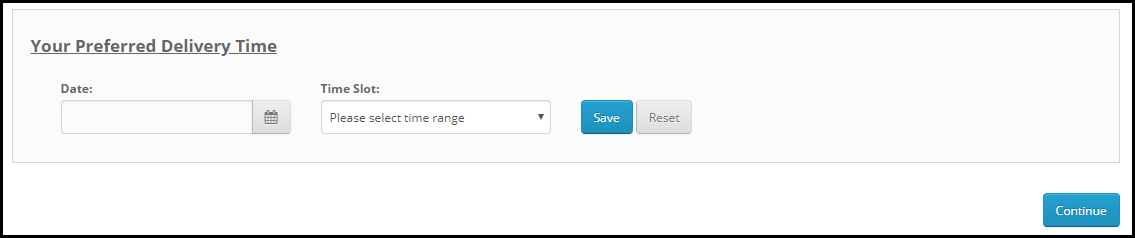
OpenCart Preferred Delivery Date and Time extension allows customers to choose a date and a time slot on the checkout page as per their desire so that they could get the item on their specified day.
Overview
1. Allow customers to select the desired delivery date and time
2. Set a minimum delivery gap between the order placement date and preferred delivery date
3. Define the delivery time interval [Start time and End time]
4. Set up multiple delivery slots
5. Specify non-delivery days
6. Customers can update the delivery date and time even after placing the order
Detailed Description
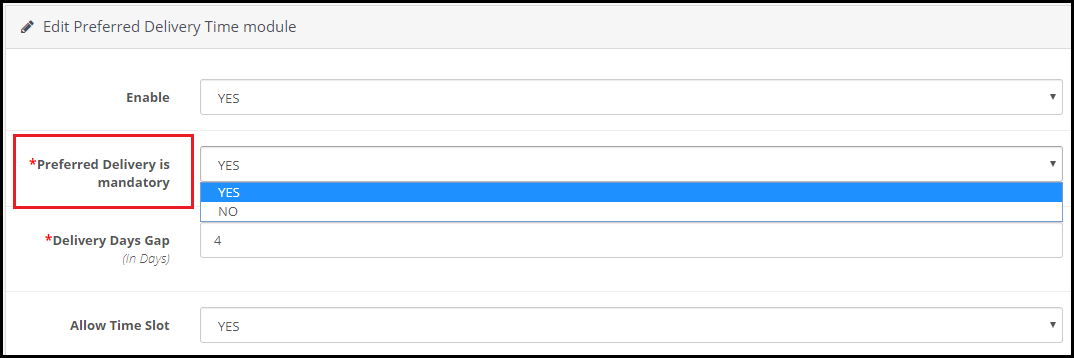
1. On the checkout page (delivery method), the user is asked to pick his/her desired date and time slot for the order delivery. This can also be made optional hence allowing shoppers to follow the standard delivery procedure if they do not wish to choose a preferred delivery date and time. In the module configurations, admin can choose “Yes or No” for the “Preferred delivery day is mandatory” option.
2. OpenCart Preferred Delivery Date Extension lets you define the time interval within which the order delivery will take place. For example, it can be from 9 am to 5 pm or 10 am to 6 pm.
3. OpenCart Preferred Delivery Time slot Extension lets you set up multiple time slots by specifying the time slot range. For example, if the delivery happens between 9 am to 6 pm in a day is and the time slot range is 2 hours, then a customer would be provided with time slots like 9 to 11, 11 to 1, 1 to 3 and so on.
4. In such cases where time slots do not adjust well with the delivery timing, for example, let’s say the delivery time is between 10 to 3 and time slot defined is 2 hours, then 10 to 12, 12 to 2 would be too. But then we would be left with only 1 hour right? How does that get fit into this?
Well, inside the configuration, there’s an option that says “Allow incomplete time range.” Enabling it would display that remaining 1-hour slot in the time slot else it would not be displayed if disabled.
5. You can define a minimum delivery gap for a customer to pick the desired delivery date and time. For example, if the order is placed on 1stth of April and the delivery gap defined by the admin is 4 days, then the customers would be allowed to pick the desired date and time for or after the 4th of April.
6. You can also specify the maximum delivery period. For example, if the defined period is 30 days, then the shopper would have to pick a date and time from 30 days of the order placement date.
7. OpenCart Preferred Delivery Date and Time Extension lets you specify the days on which delivery won’t take place.
8. With the help of this module, you can also allow your customers to update their delivery date and time even after they have placed their order. You can also set the time limit (in hours) within which the changes can be made.
9. You can specify the order status on which change in the delivery date and time would be applicable.
10. OpenCart Preferred Delivery Date and Time extension also lets you notify customers regarding any info if they update their delivery date.
2. Gain customer loyalty by delivering the product on the desired date and time.
3. Easy to install and configure.
Tutorial: Watch the Video Guide of Opencart Preferred Delivery
To help you set up and use the Opencart Preferred Delivery Time Extension, we’ve created a detailed YouTube tutorial. The video walks you through the installation process, configuration options, and step-by-step instructions to manage preferred delivery dates and times effectively.
Watch the tutorial here:
For any kind of assistance with this module, you can contact us at support@knowband.com
Instead of a fixed shipping cost, you can now charge customers for shipping location-wise, which means the shipping cost will fluctuate as per the location or zip code specified by the customer. PrestaShop shipping rates by zip code module helps you manage the shipping price for different zones.
Besides, it enhances the user experience on the checkout page.
Overview
1. The shipping cost is automatically calculated based on the zip code.
2. Set different shipping price for different zones and countries
3. Define a specific zip code or a range of zip code and charge shipping accordingly
4. Add multiple zones
5. Add multiple zip codes through CSV upload.
Description
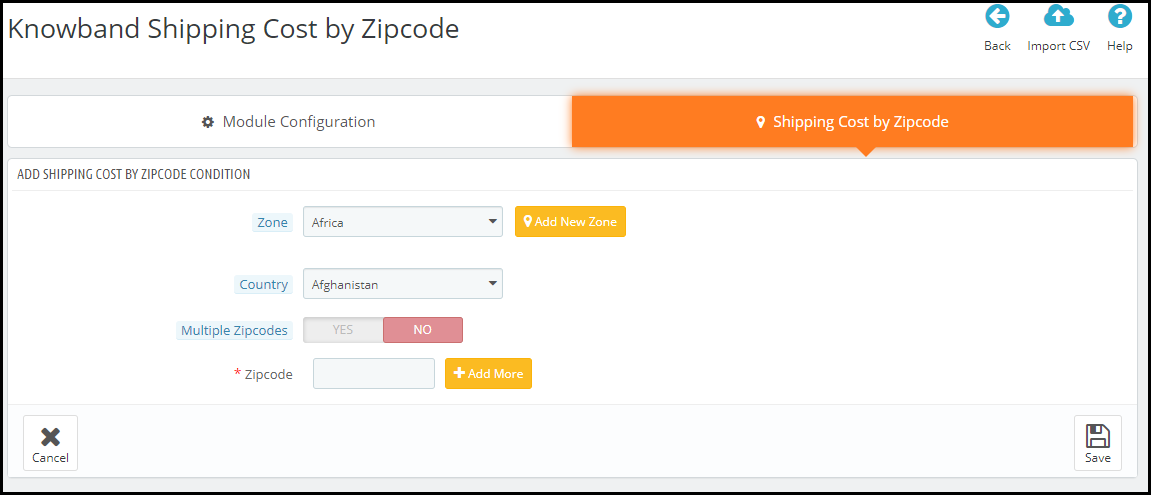
PrestaShop Shipping cost by zip code addon allows you to add multiple zones from the back-end configurations. Simply click on the Add new condition button to add a new zone.
After that, you can specify the zone which you want to add and choose the country accordingly. If you cannot find the zone from the drop-down list, you can add it manually by clicking on Add new zone.
Moving further, you can specify a particular zip code for a different shipping price or you can specify a range of zip codes that will follow the same shipping price. It is because a particular region has different zip codes. So you can set a range and have a fixed shipping price for all the areas lying in that range.
To add multiple zip codes through a CSV file, you can do that by clicking on the Import CSV option.
With the help of the PrestaShop Shipping cost calculator, you can adjust the shipping price as per your defined zones from your back-end office; under the shipping section.
Over to You
PrestaShop Shipping Calculator module is easy to install and configure with no requirement of any technical knowledge. You can enable or disable within a single click. The module also offers multi-lingual support and is compatible with the latest PrestaShop version
For any assistance, reach out to us at support@knowband.com