Benefits of Having Live Chat Option on Your eCommerce Website

“This write-up primarily covers the benefits of offering live chat support option to your customers. Alongside, I have also discussed the importance of having outstanding customer service and the different types of customer services that online businesses offer.”

Customers support is the backbone of a business. If it breaks, the business will collapse. Any eCommerce business that has made it to the top today, its excellent customer service is amongst those key factors that led to their rise and popularity in the market.

The importance of customer service can be understood by the fact that 90% of the Americans consider customer service a strong point to decide whether they want to do business with a company or not, reports American Express. The same source reports that consumers are willing to spend 17% more on a company that offers outstanding customer service.

Another report by the HubSpot Research says that 93% of customers are likely to make repeat purchases with companies that offer excellent customer service.

Different Types of Customer Service

Online businesses provide customers with multiple options to get their queries revolved. Some of the common and widely used customer service options offered by eCommerce businesses to address customers’ concerns are-

1. Email Support

From a small scale business to large scale business, all provide email support. It is the most basic form of customer support that you will find not only on eCommerce websites but traditional retail businesses also have their official email address where customers can send their query.

2. Call Support

Most of the businesses have a customer support number through which users can call the customer service representatives and get the resolutions for their concerns over the call.

When choosing between email and call support, customers usually opt for the latter as it is the best way to make the representative understand your query as well as your emotions. Moreover, it’s faster to express a problem verbally than writing it in long paragraphs in an email. Customers do not have that much time and patience.

3. Live Chat Support

If there is anything that customers are more likely to prefer over email and call, it is the live chat support option, the reason being, it allows them to communicate with the customer support staff in real-time. Besides, the communication over live chat is quick and provides a friendly feeling.

Today, it has become an integral part of a successful eCommerce website.

4. Social Media Support

Social media is not just an entertainment platform anymore, it has become a medium for customers to get their queries resolved. The reason why people raise their query on social media is social media platforms like Facebook and Twitter have a huge user count. So if any customer points out a mistake committed by a brand or if they are unsatisfied with something, they are quick to take out their frustration in the comment section or by tweeting about it.

That is why many businesses have hired social media executives specifically to track customer queries on social media platforms.

5. FAQ Pages

You may or may not call this exactly a customer support option, but the truth is, FAQ pages are very helpful in solving your website visitors’ queries. FAQ pages contain some of the obvious and expected questions (along with the answers) that can arise in a user’s mind. Thus, they are created so that the doubts which a user wants to clear over the call or email or live chat are cleared beforehand, on the FAQ page.

Benefits of offering Live Chat Support

Among all the customer support options, live chat currently beats the rest and is the demand of customers today. The first thing that the website visitors look for when they have any query is the live chat option. You would have also noticed that a live chat popup appears as soon as you navigate to some pages. This is to limit a visitor’s efforts in searching for the chat option and hence it prompts automatically after some time.

In many eCommerce websites, you will generally find the live chat option visible all the time at the extreme bottom right of the screen.

Let’s now take a look at the benefits of having the live chat support option on your website and how useful can it be for your business.

1. Cost-Effective

Live chat is comparatively less expensive than having telephone support. Data collected by Forrester Research shows that live chat is around 17 to 30% cheaper than a phone call.

Another reason for this is that you can talk to multiple customers at a time which, in the case of a phone call, is not possible. Phone support allows addressing only one customer at a time.

2. Increases Conversions

The best thing about implementing a live chat option on your website is that it can boost up your conversions. When customers are on the checkout page, they can get stuck in some step and may require some help with it.

With the live chat option, your prospects can get a quick resolution to their query and complete the purchase right at that moment. This could, otherwise, led to cart abandonment.

Studies suggest that live chat can 3x more conversions.

3. Live Chat is Convenient

On one hand, where you would be required to explain everything on a single email or reach out to the customer care executive via call, live chat, on the other hand, is time-saving and can be initiated quickly with a single “Hi”.

Moreover, live chat encourages multi-tasking means customers can do some other work while they wait for the chat support representative to reply.

4. Improves Customer Loyalty

A report suggests that around 73% of the customers are loyal to a brand because of the friendly customer service representatives. It is also one of the major reasons for their liking towards that part.

There is nothing better than a happy and satisfied customer. If you help customers with the exact resolution they need, their loyalty towards your brand will increase automatically. Customers feel appreciated when you understand their query and are quick to address their concerns.

Related: 8 Ways to Build Customer Trust and Loyalty

5. Competitive Edge

The concept of live chat is still new to many businesses. You would not find the live chat option on every second website. 3/10 eCommerce websites would be providing the live chat option to their customers.

So, live chat gives you a competitive advantage and provides you with an opportunity to be ahead of your competitors and excel at a better rate than them. Use this to your benefit. Offer a live chat experience to your customers and focus their shift from your competitors towards your brand.

6. Live Chat Encourages Friendly Communication

Live chat feels like you are talking to a friend, and hence it creates a friendly environment. Emails or calls seem a bit professional, and there is a bit of seriousness involved.

With customers being familiar with chatting on WhatsApp and Facebook Messenger, the live chat option gives a similar feel. You can even use emojis to develop a friendly feeling.

Final Thoughts

Setting up a live chat support option on your eCommerce website will not only make a quick and convenient medium to address the concerns of your customers but will also give you an edge over your competitors.

I have compiled a list of some of the best live chat support software. The list includes Olark, SnapEngage, tawk.to, Chatra, PureChat, Userlike and Zendesk. Choose your desired software and start offering the live chat option.

Are you satisfied with the information that has been provided in this write-up? If you enjoyed reading the benefits of live chat, do drop a comment below.


5 Key Elements for a Perfect eCommerce UI Design

User Interface or the UI is an important aspect in the eCommerce space. It speaks about the design and performance of your website and has a major role to play in attracting more visitors and improving user experience.

What is the User Interface? Which things contribute to a perfect eCommerce UI design? What are eCommerce UI best practices? How do I improve the UI of my website? If you have these sorts of questions running through your mind, I will try to make sure that you have a clear answer to them by the time you reach the end of this post.

What is eCommerce UI?

In simple terms, the User Interface, denoted by UI, is the visual appearance of a website or the mobile app.  It illustrates how the information is displayed to the users and how they interact with it.

The process of creating interfaces to enhance usability is what we call as eCommerce UI design. And this is what the eCommerce UI designers do. They keep the focus on the looks and style and ensure that the user experience (UX) is not compromised.

UI and UX are correlated. As I said, the primary purpose of a great UI is to improve the user experience so better the UI, better the UX.

When it comes to eCommerce UI, it’s all about providing visitors with a user-friendly layout, intuitive navigation bar, optimized product pages and checkout page, or whatever it may require to offer them a pleasant online shopping experience.

eCommerce UI Best Practices

The design of your web pages is an invaluable asset to improve your website’s performance and has a significant impact on eCommerce conversions. An appealing UI design is the first step towards achieving higher sales.

I mean you cannot turn a user into a customer straight away. No user will purchase in the very first time he or she enters your website. Initially, the UI will play the part and it will be the first thing that will draw their attention. How your website behaves, how easy it is to navigate, how efficient it is, these things will decide their interest towards your website or brand.

When the UI gets better, customer satisfaction highly increases. Let’s take a look at the 5 key elements that will help you achieve a perfect eCommerce UI design.

1. Site Navigation

The first thing to consider when you are thinking of a better user interface is to offer easy navigation throughout your website. No matter at which page the user is present, there should not be any hindrance while browsing through different web pages. He/she should be able to reach the desired page without any hassle. The menu bar should function properly will all the options well organized.

Besides, you should have a clean and appealing navigation bar with your important categories and an easy to spot search bar. Include sub-categories in the drop-down list and they should be displayed automatically as soon as the cursor hovers over the category.

2. Informative Home Page

The home page of a website is probably the most looked area for an eCommerce UI designer. It is the first thing that will be displayed to the users when they land on your website. This can either create curiosity about your brand or make them bounce off instantly.

Your home page should immediately highlight what your brand is about. It should highlight the services that you provide, business goals, your brand partners, testimonials, link to social media channels, your best sellers, etc.

3. Make Your Product Pages Stand Out

A well-designed product page highly attracts users. If it looks amazing, it will not only remove uncertainties regarding the product but will create higher chances of the user making a purchase.

How to improve the UI of your product pages?

First of all, it should not be cluttered. Secondly, you should enable the pinch-in and pinch-out functionality to zoom in and zoom out the product images, respectively. Alongside, you should add product videos, banners, size chart and a product reviews section. Displaying product images in carousel mode is also an ideal option.

4. Call-To-Action

E-commerce websites have different call-to-action button at different web pages, for example, “Add to Cart” on the product page, “Buy Now” or “Place Order” on the checkout page. The CTAs should be persuasive. They should encourage users to take action. The font and the color of the CTA button matter a lot from the user interface point of view.

5. User-Friendly Checkout

The checkout page is arguably the most important page on an eCommerce website. If this isn’t designed well, this will hamper the checkout experience of the users and will eventually lead to cart abandonment.

Try making the checkout process as simplified as you can. Reduce the number of steps. You can also go for One Page Checkout.

Final Thoughts

A great UI design not only ensures a good user experience but also reduces the bounce rate to a significant level. People spend more time on your website, they interact more with your products which ultimately builds customer loyalty.

What are your thoughts on a perfect eCommerce UI design?

Magento 2 Loyalty Points | Reward Points Extension

Magento 2 Loyalty Points is a loyalty program extension that lets you reward users with some loyalty points on successful signups and order placement (if they match the conditions defined). The loyalty points can be used as a discount voucher by the customers on their next purchase.

Overview

1. Offer Loyalty points on sign-up

2. Loyalty points on purchases

3. Loyalty points on various product and cart factors

4. Add points manually or through CSV upload

5. Set up loyalty points expiry

6. Exclusive rewards on birthdays

7. Track loyalty points history of customers

8. Customize loyalty points related emails

9. Notify users about loyalty points expiration

10. Specify the minimum points required for redemption

Description

1. Magento 2 Loyalty Points extension offers exciting rewards to users in the form of loyalty points.

2. Magento 2 Reward Points extension provides you with the option to offer loyalty points only if the user follows your defined conditions or say the loyalty points rule.

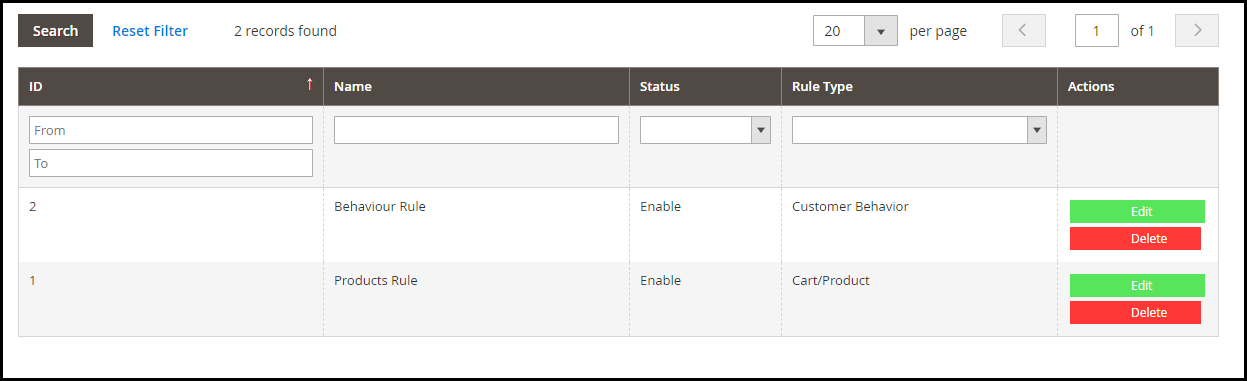
Loyalty points rules are classified into two parts- Behaviour Rule and Product/Cart Rule.

As per the first rule, the points will be distributed when a user does a successful registration on your website or places his/her first order. The latter involves loyalty points offering on a number of factors such as when a user chooses a shipping service or the payment method for which loyalty points exist or shops above the amount set from the back end.

3. You can specify the value of 1 loyalty point.

4. Magento loyalty program extension also lets you provide loyalty points to customers on their birthdays to make their day more special and gain their loyalty towards your brand.

5. You can specify the minimum points a customer needs to have to redeem them and generate a voucher.

6. You can set the validity of the generated voucher.

7. Magento 2 Loyalty Points extension allows you to reward loyalty points to some specific customers. You can either add the points manually or through CSV upload.

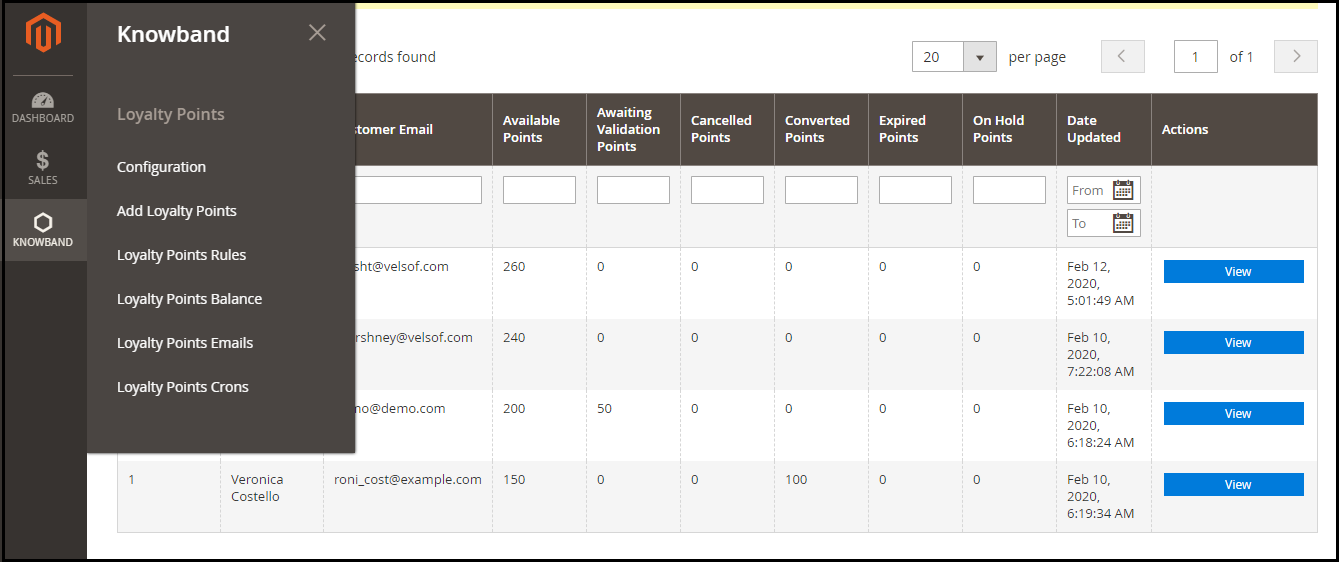
8. You can track the loyalty points acquired by the customer under “Loyalty Points Balance”. This displays the complete history of the loyalty points earned by the user along with some other related information.

From here, the admin can update loyalty points for some specific users.

9. Magento 2 Loyalty Points extension offers pre-existing email templates that can be customized the way you want.

10. The module has cron functionality that allows you to run cron for certain tasks such as sending loyalty points to customers on their birthday.

11. You can also specify the customer groups for which you want to offer loyalty points. There are three customer groups basically- General, Wholesaler, Retailer.

Benefits of Magento 2 Loyalty Points Extension

1. Improve Customer Retention

2. Increase user sign-ups on your website

3. Acquire new customers

4. Ensure repeat purchases and boost your sales

5. Build Customer loyalty

For any queries or assistance with this module, you can reach out to us at support@knowband.com

Related:

Benefits of Customer Loyalty Programs for your Online Business

Why Trust Badges are Important for your eCommerce Website?

“Among the elements that build trust in an eCommerce website, trust badges probably top the list.”

The eCommerce market has vastly expanded over a decade or so. But with more and more people shifting towards online shopping, security concerns have also been raised.

Anything that is put online cannot be trusted easily as the Internet is full of the hoax. And especially if you are a new brand which only a very few people have heard of, people are bound to have trust issues.

It is obvious for customers to be worried about sharing their card details online. And this is why placing trust badges on your website is important to address the security concerns.

In this write-up, we will be discussing the role of trust badges on your website; why they are important and how to use them. We will further discuss the types of trust badges that you can consider using on your eCommerce website.

What are Trust Badges?

Trust badges also referred to as trust seals, are logos that confirm your website’s authenticity. They ensure that visitors feel safe to share their information and can comfortably put their trust on your website and need not worry about their personal details getting stolen.

17% of the Abandoned Carts take place due to payment-related concerns.

A study by the Baymard Institute suggests that around 17% of the abandoned carts occur because people did not trust the site with their credit card information.

This certainly cannot be overlooked if you want to reduce cart abandonment and increase the conversion rate on your website, and trust seals can prove to be beneficial in this matter.

Impact of Trust Badges

Do trust badges help in improving conversions or increasing your sales? Well yes, they do. Buyers are more likely to purchase from a website on which they can place their trust.

Econsultancy/Toluna conducted a survey asking people about the factors that make them trust a website and 48% of the people said that trust badges are the primary factor to decide whether a website is trustworthy or not, followed by the website look and the brand popularity.

This makes it clear that websites that display trust logos are far more trustworthy than the ones without it.

Different Types of Trust Badges

Trust seals come in different forms. Let’s take a look at the different kinds of trust badges you can implement on your website, primarily on the checkout page, to build customer trust.

1. Website Security

When we talk about website security, we mean adding an SSL certificate to your website. Visitors find it tough to trust a website that is not SSL enabled. If you land on such websites, on the left of the URL, you will see something written as “Not secure” clicking on which you will see a message that says “Your connection to this site is not secure”.

This concerns visitors and they doubt the website’s reliability, however, if you add a security layer, they would be more comfortable in browsing your website.

So by getting an SSL certificate and having the related trust badge, you assure customers that their information is secured and any transmission of data remains totally private.

2. Payment Security Trust Badges

When buyers are on the checkout page and on the verge of making a payment, they hesitate to enter their card details. By displaying them the trust logos related to the payment options that you are providing, you can eliminate that insecurity and make them confident to go for the purchase.

In this case, trust badges like Visa MasterCard, PayPal verified work very well.

3. Anti-Virus Trust Badges

Trust seals like Norton Secured, McAfee Secure are highly popular. The former is something that you will witness on a majority of eCommerce websites.

This ensures that your website prevents malicious activities and removes malware.

Popular Trust Badges

There are multiple trust badges available, however, only a few have a major impact on customers when it comes to website security. So you need to choose the ones which your customers are most familiar with.

Trust badges that would work the best for you are-

Norton Secured (Powered by VeriSign)

McAfee Secure

PayPal Verified, Visa and MasterCard

TRUSTe

Final Thoughts

If you are not displaying a trust seal on your website, you are missing out on the opportunity to scale-up your conversions. Your prospects or potential customers might drop the purchase idea if they do not see trust badges on your website.

Where to place trust badges? Well, mostly trust badges are placed on the checkout page as that is the most important page to convert a visitor into a customer. You do not want to distract your customers due to security thoughts right? And that is why the checkout page is the ideal page to display trust seals.

Do whatever it takes to win customers’ trust. Once you have won their trust, they will never hesitate about anything.

You May Also Like:

Benefits of Having Multiple Payment Options on the Checkout Page

One Page Checkout vs Multi-Page Checkout

All you need to know about PrestaShop Advanced One Page Checkout

If your checkout page is not optimized, you are probably going to face a lot of abandoned carts, and this can severely affect your conversions.

What’s needed? An uncluttered, simplified and a user-friendly checkout! If you are a PrestaShop store merchant looking for the same, PrestaShop Advanced One Page Checkout will most likely put an end to your search.

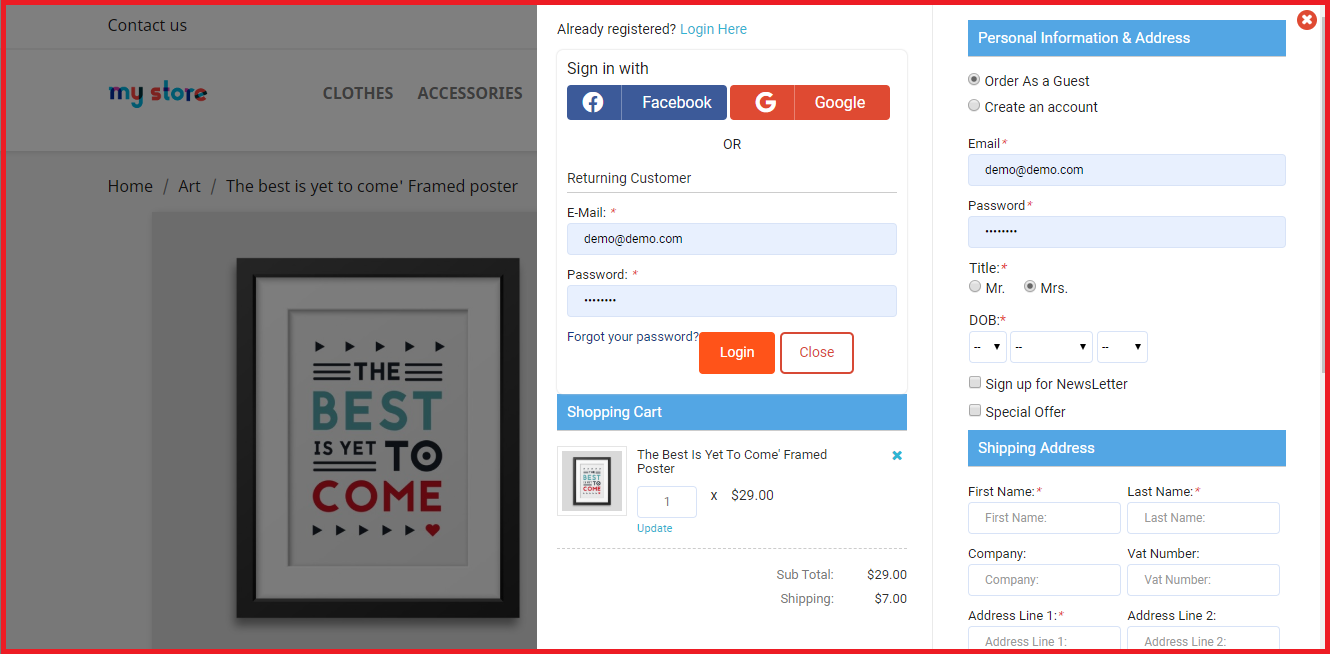
PrestaShop Smart One Page Checkout replaces the default checkout of your website with a responsive checkout popup. Unlike the usual One Page Checkout where all the checkout fields are visible on a single page, the advanced checkout creates a checkout popup where the fields remain on the same page (under the same URL) but are split into a number of steps.

Overview

1. Responsive Ajax-based Checkout popup

2. Guest Checkout and Social Login

3. Arrange Checkout fields through Drag and Drop functionality

4. Hide unnecessary fields from the checkout page

5. Mark Important fields as Mandatory

6. Auto-fill address functionality

7. Support for multiple payment methods and shipping services

8. Custom checkout fields

9. Cart customization available

10. GDPR compatible

Description

1. PrestaShop Advanced One Page Checkout is a responsive Ajax-based checkout popup that loads all the checkout steps on a single page. You would be presented with the next fields step by step but all will be under a single URL. So do not confuse this with a multi-page checkout.

2. PrestaShop Smart Checkout module offers Guest Checkout and Social login functionality to encourage quick checkout. Visitors can register as a guest if they do not want to create an account on your website.

Social login allows customers to log in/sign-up through their Google or Facebook account. If you want to provide more social login options, consider our PrestaShop Social Loginizer module.

3. The module provides you with the option to arrange checkout fields in an order of your choice through Drag and Drop functionality. Choose a field, drag and drop it to the desired position.

4. With PrestaShop Fast Checkout addon, you can decide which fields you want to keep mandatory and which as optional. You can also select fields that you do not want to display on the checkout page. The settings can be modified separately for both Guest and Registered users.

5. PrestaShop Simplified Checkout addon provides the auto-detect country and auto-fill address functionality, which helps users to fill their address information in a quick span. Besides, it offers Inline Validation that verifies whether the entered inputs are correct or not.

6. PrestaShop Advanced One Page Checkout addon provides support for multiple shipping services and payment methods. Using the “Ship2Pay” feature, you can choose which payment methods should be applicable on a particular shipping type.

7. With the help of the PrestaShop Single Page Checkout, you can add more fields on your checkout page.

8. The responsive checkout popup module also lets you customize the cart settings. You can select which options you want to display on the cart page.

9. This quick checkout module offers email synchronization into MailChimp, SendinBlue, and Klaviyo account. Well, you can ask users to subscribe to your newsletters on the checkout page and if they tick-mark that field, their information will be sent to the respective accounts.

10. PrestaShop Advanced One Page Checkout is GDPR compatible. Some other features that it provides are the test mode functionality; to check the module functionality, enabling this checkout for selected IP addresses, and option to customize the “Place order” button. It also offers multi-lingual support and has multi-store compatibility.

Benefits of PrestaShop Advanced One Page Checkout

1. User-friendly Checkout

2. Encourage Quick Checkout

3. Increase email subscription and grow your email list

4. Reduce cart abandonment rate

5. Boost Conversions

For any kind of assistance, reach out to us at support@knowband.com

You May Also Like:

One Page Checkout vs Multi-Page Checkout

11 Checkout Page Optimization Practices to Increase Conversions

Reduce Checkout Friction with Magento 2 One Page Checkout

Everything You Need to Know About OpenCart Exit Pop up Extension

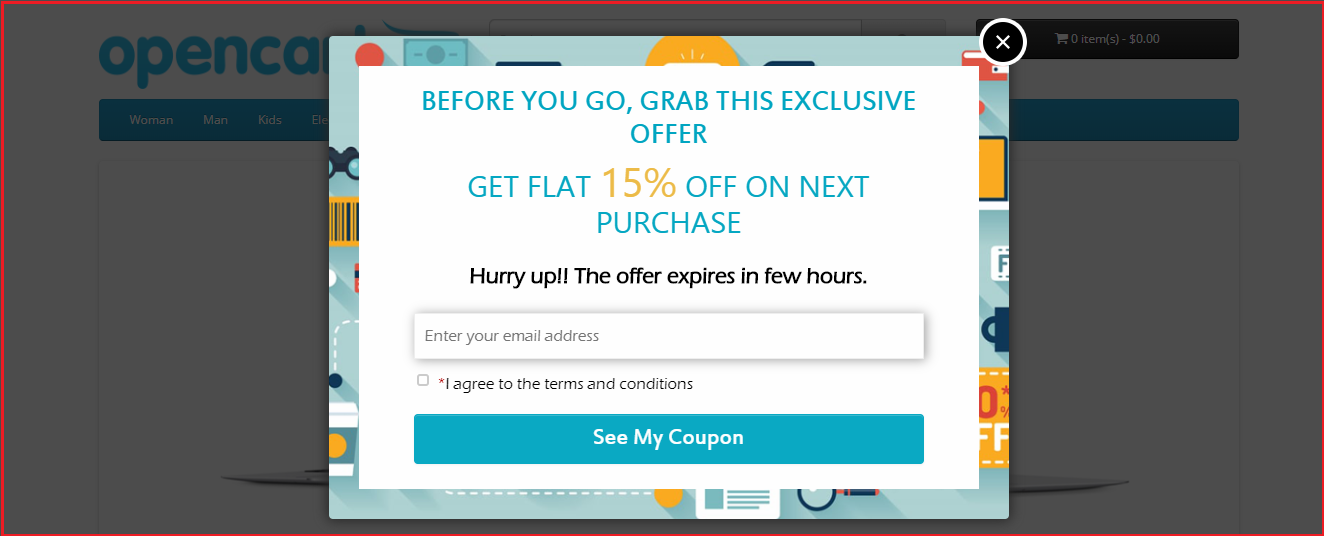
OpenCart Exit Pop up also known as OpenCart Exit Intent Pop up is a powerful extension that helps you draw visitors’ attention when they are about to leave your website.

A pop up appears promptly as soon as it is noticed that the visitor is trying to take an exit. The extension provides you with an opportunity to stop your visitors at the very last moment from leaving your website. It is up to you how you make the best use of the pop up to make visitors stay on your website.

Overview

1. Works as both Entry and Exit Pop up

2. Design Popup | Adjust the look and feel

3. Multiple Popup themes

4. Customize the Popup Display Settings

5. Set up discount coupon value

6. Email Recheck

7. Email Synchronization through MailChimp and Constant Contact

8. Multi-lingual Support

Description

1. OpenCart Exit Intent Pop up offers pre-existing appealing popup themes. You can choose the desired one from the drop-down list.

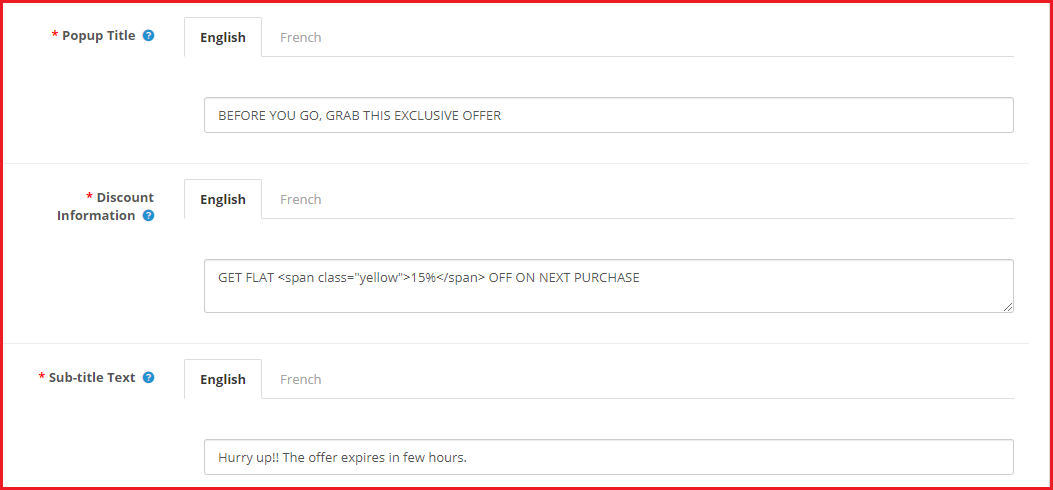
2. OpenCart Exit Pop up allows admin to modify the popup content according to the goals they want to achieve through that popup. The extension offers three sections to specify the popup content.

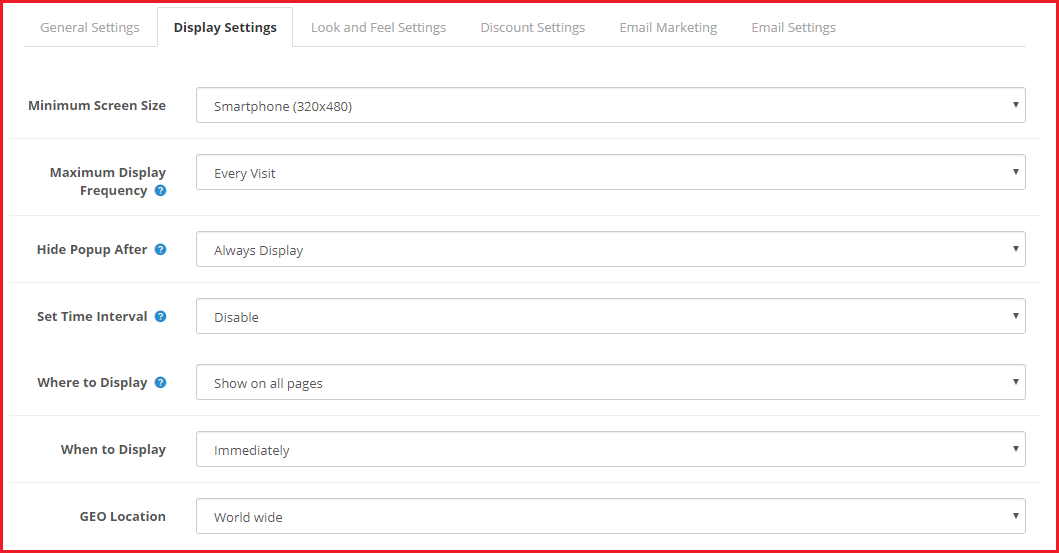
OpenCart Exit Popup comes up with various options to configure the popup display settings.

3. The extension lets you specify the minimum screen size on which the popup will be displayed.

4. You can set the display frequency of the popup which can be: on every visit, one visit per hour, one visit per day, one visit per week or one visit per month.

5. You can set a duration (in seconds) after which the popup disappears automatically. The duration can be 10 seconds, 20 seconds, 30 seconds or 40 seconds.

6. The exit pop up extension also lets you enable the popup functionality for a certain time period only. For example, if you are running any campaign or providing a limited time offer and want to promote it through the popup, you can set the start and end date of the exit popup accordingly.

7. With OpenCart Exit Popup Email Subscription extension, you can select the pages where you want to display or where you do not want to display the popup.

8. OpenCart Exit-Intent Pop up extension also provides you with the option to display the pop up immediately, after a few seconds, after a visitor has scrolled down to some percentage or when the user is trying to exit.

9. You can also limit the popup display for selected countries. You can either show to visitors coming from worldwide or select the countries where you want to display or hide the popup.

10. OpenCart Exit Pop up extension has the email recheck functionality which, if enabled, would not allow a user to claim the coupon code twice. It simply means that a single email address cannot be used again.

11. You can set the pop-up display interval (in days). The defined period will be the number of days after which the pop up will be displayed to the same user again.

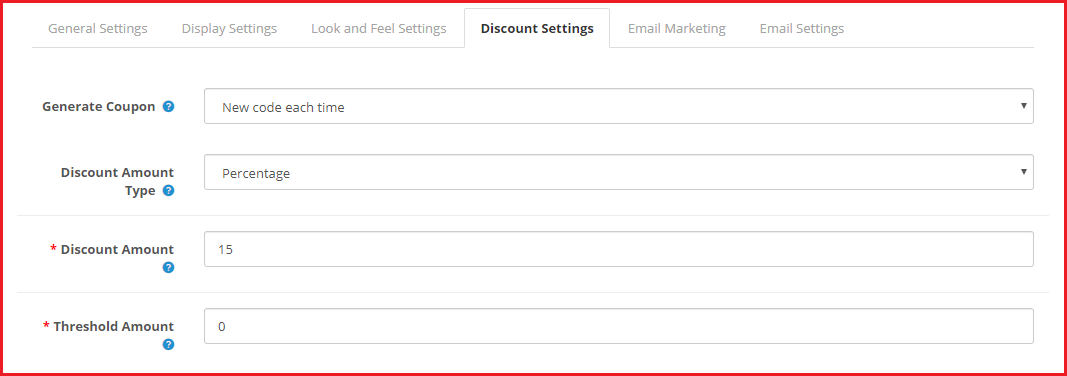
12. You can set the popup functionality to either generate a fixed coupon code or generate a new coupon code every time.

13. The coupon code can be set to provide a flat discount value or a percentage discount. You can also set a threshold cart amount to redeem the coupon code at the checkout.

14. OpenCart Exit Popup also offers MailChimp and Constant Contact Integrator, enabling which the email address of the visitor would be captured in the respective amount.

15. With OpenCart Exit-intent Popup, the admin can customize the email that would be sent to the user when they submit their email address. You can also test the email to check how it will deliver to the users.

16. The extension also displays the coupon statistics in the form of line graphs. The email address of the user, coupon code and the status of the coupon code is displayed inside the statistics section.

17. The module provides multi-lingual support.

Benefits of OpenCart Exit Pop up Extension

1. Make a last-minute effort to convince users to stay on your website.

2. Increase email subscriptions and grow your email list

3. Encourage users to purchase by providing them with a coupon code and boost your conversions

4. Reduce the bounce rate of your website.

5. Reduce shopping cart abandonment

For any queries or assistance, you can contact us at support@knowband.com

You May Also Like:

Exit Popup: What is it? How it works? Example, Best Practices and Benefits

8 Email Popup Best Practices to Grow Email List and Boost Conversions

Trigger Impulse Buying with PrestaShop Exit Popup Addon

How to Get Customer Feedback?

One thing that helps you in becoming better every day in your business is Customer Feedback.

Customer is the king they say and it is indeed very true. They are the ones who can take your business to the peak or bring it down drastically.

Be it any business, they aim to provide the best of services to their customers. If your customers are not satisfied with you, it will not help you in the long run. And this is where customer feedback plays a crucial role.

Customer feedback is important to know what your customers think about your products or services. How has been their experience on your website? Are they happy with your services or not? Is there something that they would like to get changed or anything that’s troubling them on your website? You should always welcome your customers’ opinions and suggestions.

When you get honest feedback and look at things from a customer’s point of view, you can identify what’s lacking in your business and which are the areas that you can improve on, in a better way.

So how do you get customer feedback? How do you encourage customers to share their views about your brand or products?

In this write-up, I have shared a few tips to get customer feedback.

6 ways to ask for Customer Feedback

There are many ways to collect customer feedback. However, I have filtered out a few from my list that I find to be the most useful.

1. Collect Feedback on the Order Confirmation Page

Your order confirmation page or the thank you page is one of the best sources to know about your customer’s shopping experience and can provide you with some invaluable customer feedback.

Ask them if they faced any difficulty while navigating on your website or any particular page that hampered their experience. Was it easy to find what they were looking for? These sorts of questions are beneficial to improve your website’s performance.

You can ask such questions in the form of multiple-choice questions that let customers select the quality of service they experienced on your website. Customers usually do not wait even for a second on the order confirmation page. So try to get the feedback in a simple and clear way.

Besides, you can also place a comment box on this page to allow customers to leave any other suggestions.

2. Live Chat Support

Another way to collect customer feedback is through live chat support. If you provide a live chat support option on your website, it would be easy for you to know what sort of issues or challenges your customers are facing.

Moreover, the live chat option is accessible and provides customers with an easy way to communicate with your support team and get their concerns addressed right away. It also tends to make your customers stay for a longer duration on your website since the response from the support is mostly instantaneous.

Many businesses are offering live chat support through WhatsApp as well.

After you have finished addressing their concerns, you should ask for your personal feedback as well, like if you were able to resolve their queries or are they satisfied with your help. Although this seems to be very obvious, it’s a good practice to follow.

3. Be Active on Social Media

Today, customers find social media a better option to contact a business than email or any other form. And when customers are disappointed or frustrated over a matter, they tweet about it or leave negative comments on your Facebook or Instagram posts.

This is why it is important that your social media team gives a prompt response to customer queries. Whether they tweet, leave a comment or DM you personally, try to be as quick as possible in providing a solution.

Criticism or I would say constructive criticism is sometimes very helpful to understand the flaws in your business or services.

Engage with your customers. Reply to their comments/queries or tweets and most importantly, be very polite while dealing with their issues. Social listening highly matters in an eCommerce business.

4. Exit Popup

Though an Exit Popup is majorly used to entice customers with some attractive offers at the last minute, they can be used to collect customer feedback as well.

Exit Popups are popups that appear when a user tries to exit your website. By having an exit-intent popup, you can ask customers for some suggestions to improve while they try to leave. It can prove to be a useful tool to know the opinion of your visitors, primarily the new ones.

Make sure that the popup does not appear if a user is trying to exit within a very few seconds. Let them spend some time on your website. Let them go through some of the pages so that they get an idea about your brand. Then you can ask them for their opinion like if they felt anything missing while browsing your website or how helpful it is as far as the user experience is concerned.

5. Obtain Customer Feedback through Surveys

You would have often received survey emails from brands or seen it on social media. Surveys are an important asset when it comes to getting customer feedback.

Create a survey form and send the survey link to your loyal and existing customers on their email address. Since a survey can be a long-form, you need to be very impactful with your choice of words when you are asking a customer to fill the survey. Make them feel that their feedback matters a lot in the success of your business.

You should run surveys on social media platforms as well. To make people participate in the survey, you can reward them with an offer or anything that persuades them to fill the survey form. Survey forms give you detailed feedback.

Alongside surveys, you should conduct polls at regular intervals to identify which particular elements on your website your users find to be the most and least helpful.

6. Create a Forum

Having a forum on your website helps your customers to discuss and share their queries or concerns and ask the forum community for a solution. Basically, it forms a community where a person can raise any kind of question and the other members can answer if they know it.

You can take a look at your online forum and see what kind of discussions your audience is having or if there is an issue that has arisen lately that you are unaware of.

Final Thoughts

Some of the other ways to collect customer feedback are calling your customers at regular intervals. Though this can be a challenging task for large eCommerce businesses but can be very helpful for those businesses that are on a small scale.

You can reach out to customers when they abandon their cart and ask them what went wrong during their purchase.

When you receive positive feedback from your customers, it gives you a push to make the experience of your customers even better than before. And do not get upset with negative feedback. Negative reviews are more helpful as they provide you with every minute detail that you can work upon to improve the customer experience.

I hope you liked this information on how to get customer feedback. Feel free to add any further points in the comments below. What are your strategies to collect customer feedback?
Now List your products on Google Shopping for free

Google is making an important update to its Google Shopping platform by letting any business owner that sells products online can list their inventory for free. Generally, an e-commerce business owners would need to pay for ad placement on Google Shopping. 
But Google now says it will now let anyone who operates a website or handles a store on a marketplace platform list without paying. Google still plans to charge businesses for top placement as promoted listings.

This update will help the vendors to connect with the customers in a better way, as has been claimed by Google. The update will be visible in the US at first and then will expand worldwide as the year unfolds. 

Existing users can list their full inventories in the event they were only paying to promote some items on the platform. New customers can now apply to place listings for free through Google’s Merchant Center.

As part of the update, Google also partnering with PayPal to help bring more vendors onto the platform more faster by letting them link their existing accounts for accepting online payments.

Google is also working with some e-commerce inventory management companies like Shopify to make sure the companies that operate mostly through their own websites can quickly shift to selling on Google Shopping.

Golden chance to get ahead of the game:

This update presents retail businesses a big opportunity to get ahead of the game.

Retailers can list all their products and drive more visibility to their stores. Of course, given the challenges we are facing today, these organic shopping listings will give benefit to many smaller companies and make their items more visible as more number of people browse online.

It’s very important to remember that Shopping listings support physical retail stores as well as online e-commerce marketplaces.

Also Read:

How to sell on Google Shopping?

How to Retain Your Customers amid the Coronavirus Outbreak?

Due to COVID-19 global pandemic, businesses have been hit hard, and the revenue has dropped significantly.People are reluctant to stay at home. Except for buying some essentials like grocery items and medicines, they are avoiding every other stuff as much as they can.No one can be put at fault for this (well, of course from where it originated). Brands and their customers, both are helpless currently, and its difficult to see any good signs until we are able to bring the situation under control.

5 Tips to Retain Customers amid the COVID-19 pandemic

One of the biggest challenges online businesses are facing nowadays is to retain their existing clients or customers. And it is also true everyone is going through a difficult period in this crisis. Some of the effective ways to retain your clients or customers and keep them reassured.

1. Communicate with your customers frequently

In the current phase, communication matters a lot. The lockdown has started taking a toll on people. The feeling of anxiety and restlessness has got better of them. The best way to calm their nerves is by communicating with them periodically and reminding them that we are all in this together. Be it through email or social media, do whatever it takes to remove the communication gap. Keep in touch.

2. Keep them informed of the changes in your business

The COVID-19 outbreak would might have forced you to come up with some unfortunate changes in your business. Unfortunate or whatever, it is important that your customers are informed about the smallest of things happening around the brand of which they have been a loyal customer for long.

  • What sorts of actions you are taking or if you made any changes to your policies, keep them updated.
  • Many eCommerce businesses are currently facing issues with shipping and delivery and they are not even accepting orders. Customers need to be aware of that. Inform them when they can expect their order to get delivered.

Related: How COVID-19 has affected Online Shopping Behaviour and eCommerce Sales?

3. Create Helpful Content

While your customers stay at home and finding something productive to do during quarantine, it is the best time to drop quality content in their inbox.

  • Come up with some creative ideas. Writing blog posts or articles are one of the best ways to engage with your customers and retain them.
  • Express your views on this global pandemic.
  • If you took some initiatives for the betterment of this world or helped the government in some way or planned something for your customers, write quality content about it and send it to your customers.

4. Offer a discount/Give away some freebies

Discounts are always enticing. But you may be wondering how that can be helpful at a time when customers are not even placing orders.

  • Well, what you can do is run an offer or set a coupon code through which customers will get an instant discount on their purchase. You can get the payment in advance and promise to deliver as soon as the situation is normal and delivery is resumed.
  • This is basically for businesses that offer physical delivery. For businesses that deal with selling and buying of goods online, you can cut-down your product or service charges and provide them at a slightly lesser cost.
  • If you have a gift card section on your website, you can drop down the gift card charges a bit and encourage them to shop. Tell your customers that they can redeem the gift card once the lockdown is over.

Talking about us, we have also made some of our modules free of cost for our customers/eCommerce merchants, as a token of support.

5. Be active on Social Media

Social media has become a platform for brands to engage or communicate with their audience. Social media sites like Facebook and Instagram are the most popular among youth, and it’s very much possible that 90% of your customer base has an account on those platforms.

In this lockdown period, your customers are probably spending most of their time on social media. This is the best time to engage with your customers or page followers. Be active on your social media pages and post valuable and intriguing content periodically. How about hosting a Facebook or Instagram live?

Related: Social Media Marketing for eCommerce: Strategies and Best Practices

Final Thoughts

Do not overthink about retaining customers. Customers also know that every business is going through a difficult phase. They will certainly be back when we get rid of this COVID-19 pandemic. Just give your best shot and do everything possible from your end to reassure your customers.

Also Read:

7 Effective Strategies to Improve Customer Retention

Advantages of eCommerce over Traditional Retail

How to set up your Online Grocery Business with Store Pick-up Facility?

How easy is it to design Home-Page of PrestaShop Mobile App?

With the growing use of mobile apps, more businesses are willing to make extra efforts to stand out from their competitors. For eCommerce businesses, having a mobile app with regularly updating home-page design helps them to keep their customers engaged in a profitable way. Every time, a new offer/ new-arrival/ sale/ etc. is put up on their shopping app, making the customers aware of it can naturally boost their sales. This can be done by optimizing the home-page design as well (apart from push notifications & other campaigns) in PrestaShop Mobile App.

To make the home-page designing & re-editing easier for business owners, KnowBand offers eCommerce Mobile App Builder extensions. It not only helps eCommerce businesses with building their eCommerce Mobile Apps without a hassle & but also offers feature-rich backend & frontend for the benefit of businesses as well as app users. This article will shed light on how to use the PrestaShop Mobile App Creator Module to create, design & edit the home-page layouts.

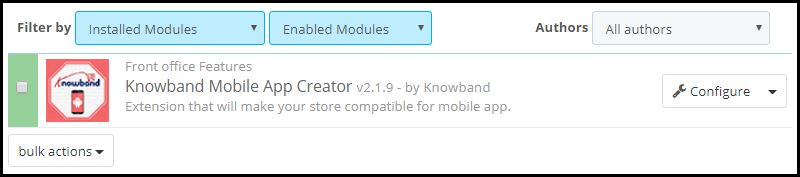
Once the PrestaShop Mobile App Builder module, by KnowBand, is installed on your PrestaShop website backend, the home-page of the app can be easily customized anytime from the backend of this module.

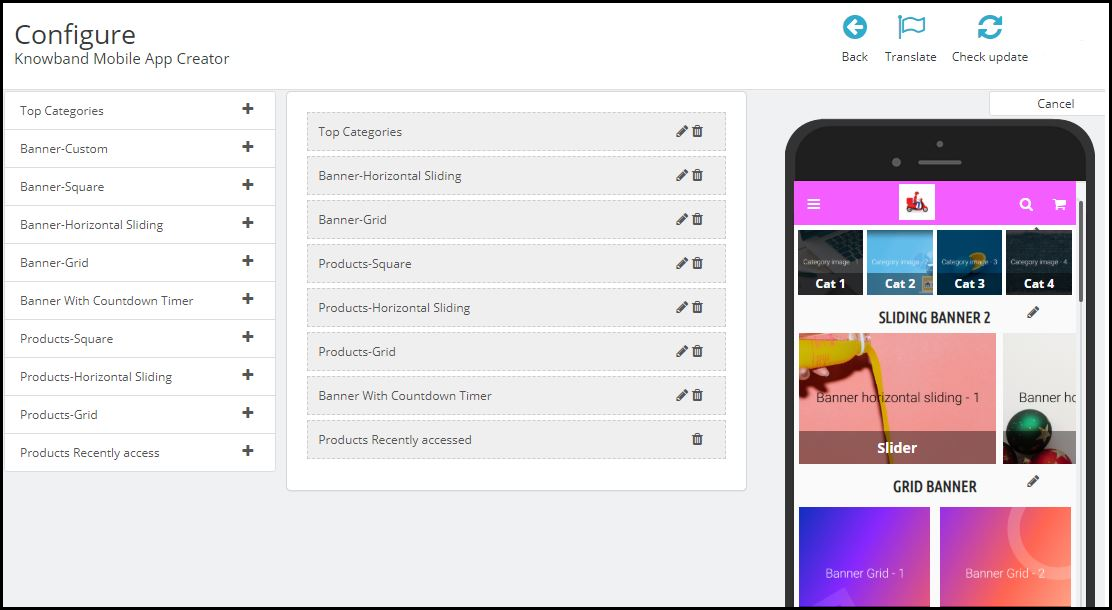
On clicking ‘configure’ on this app maker module, you are presented with various editing options.

-Select ‘Home-Page Layout’ from the side menu.

-To create a new layout, click the ‘add new layout’ button. You can also re-edit the existing layouts. Also, you can pre-design multiple layouts & keep any one of them active on your Mobile App (from the general settings on the side menu).

-While designing or editing your app home-page layout, you can use a maximum of 20 components out of the complete list of different components shown in the side menu on the left. Hence, you can also use a single component multiple times in your layout

-Upon adding these components, you can edit each one of them & organize them using the drag & drop feature.

The best thing is that all the edits that you make, instantly reflect on the demo app screen within the home-page customization tab itself.

Components To Design Your PrestaShop Home-Page Layout:

1. Top Categories:

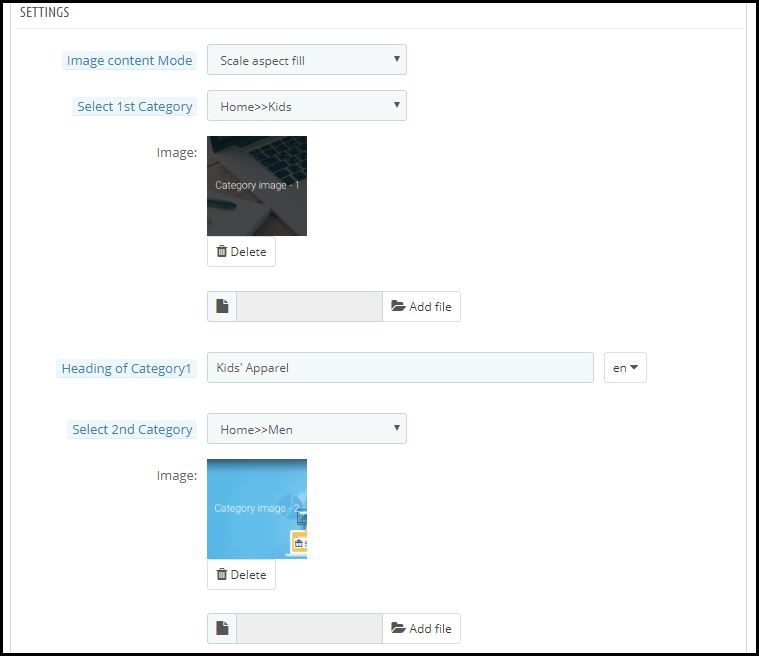
In a slider form, you can display small image icons with redirect links to relevant categories on your eStore. You can add a total of 8 of such categories in a single ‘top category’ component.

2. Square, Grid & Horizontal-Sliding Banners:


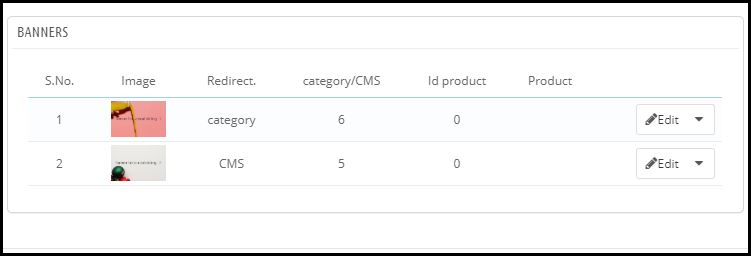
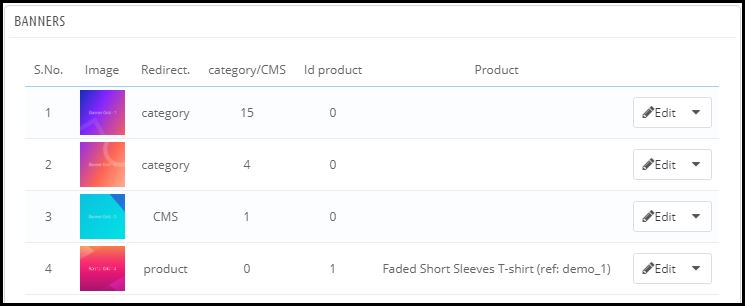
For all these 3 banner types, you can choose the redirect options among category pages, product pages, home-page & even any of the CMS pages. Add single or multiple elements under such banners according to your needs.

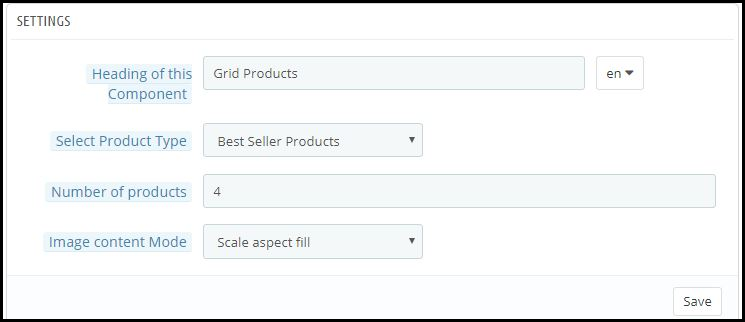
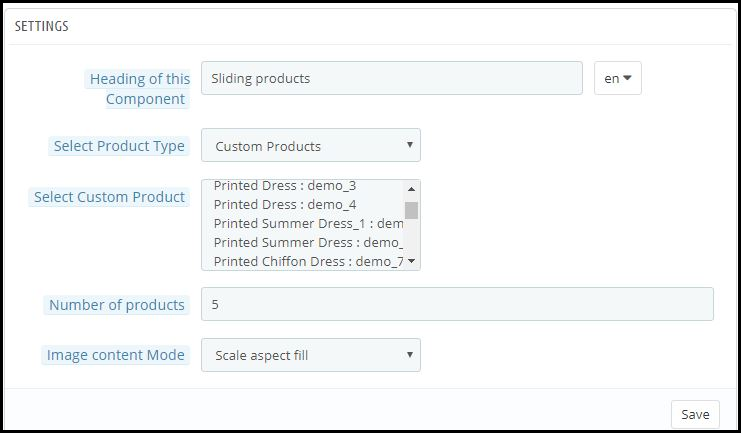
3. Square, Grid & Horizontal-Sliding Products:

With these 3 components, you can display singular products redirecting the app user straight to the specific product page. Because this PrestaShop App Builder Module also lets you set featured product listings. You can choose among following options to display the products:

● Best Seller Products
● New Arrivals
● Featured Products
● Special Products
● Products from a category
● Custom Products

4. Recently Accessed Products:

Including this component anywhere on the layout simply creates a horizontal slider for products displaying only the products that an app user has recently viewed. It is ideal to add this component only once in a home-page layout.

5. Countdown-Timer Banner:

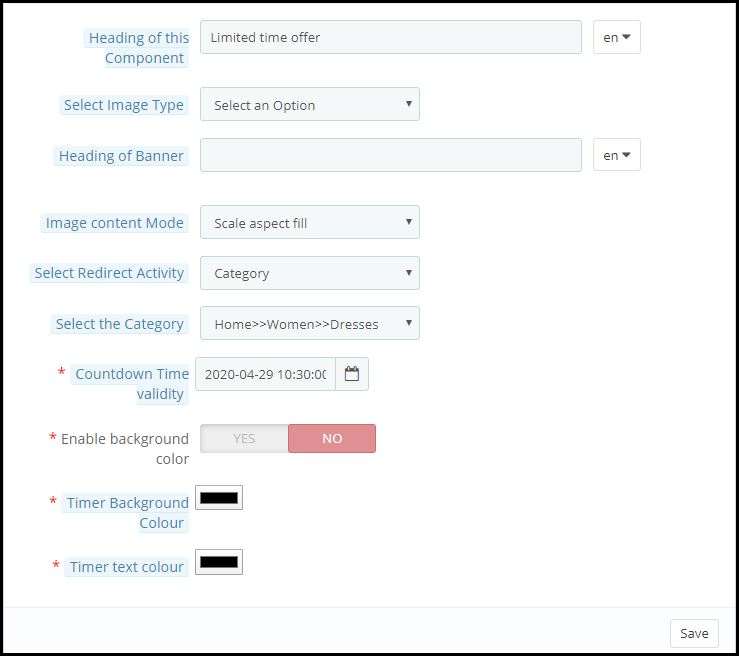
This banner has an in-built countdown timer with all the necessary settings to make it your own. You can use it to inform your app users about an offer that is ending in a specified time. Having the timer running helps to engage the customers & to make successful purchases until the clock is running. Refer to the screenshot below for its settings.

Apart from all the edits, you can make to design your PrestaShop App’s home-page, there is one more useful thing that’s present all the time on your app’s screen. It is the tab bar.

Tab Bar-Designing:

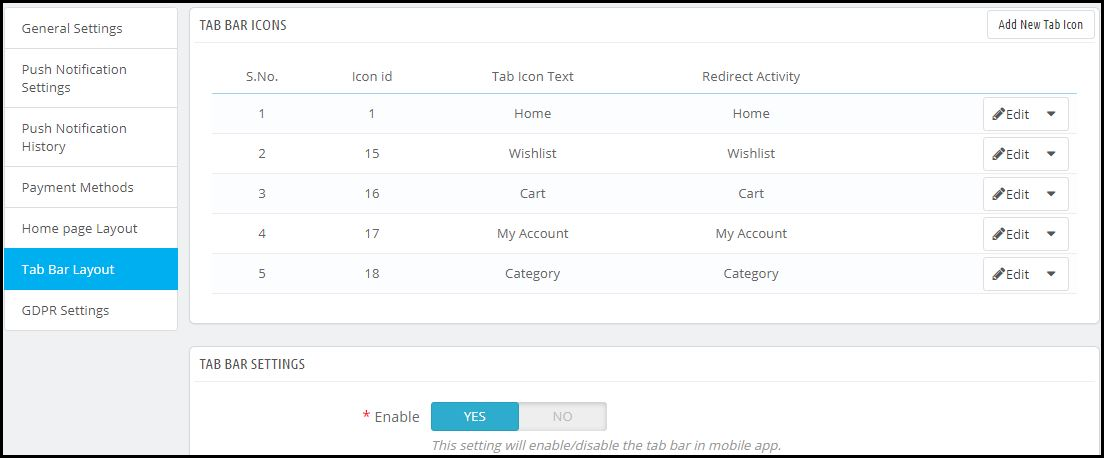
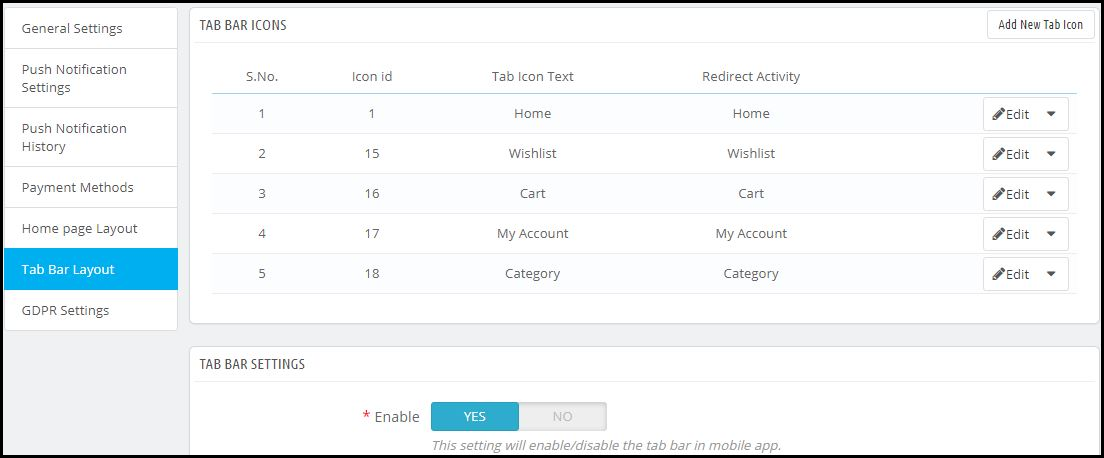
From the side menu of the PrestaShop Mobile App Maker module backend, you can also design the tab-bar. This design remains common for all the home-page layouts. Add 3 to 5 elements in your tab-bar with necessary links to make your PrestaShop App look more professional & user friendly.


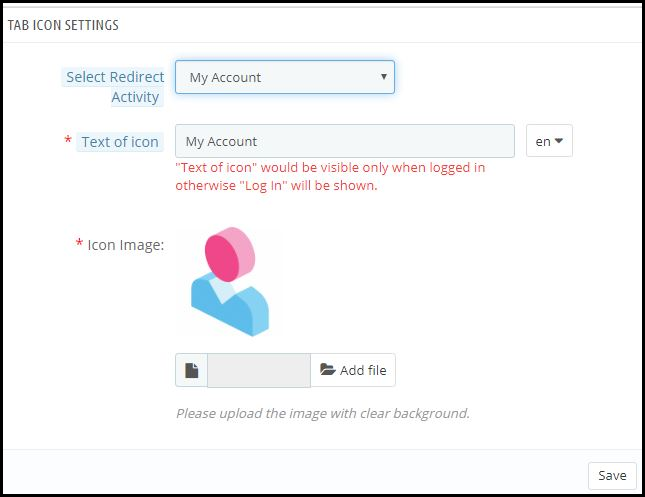
Here is how the ‘My Account’ tab-bar setting looks like:


By now, you must have gotten an idea of how user-friendly it is to create, design & edit the home-page layout of a PrestaShop Mobile app using the PrestaShop Mobile App Maker module.

From time-to-time, eCommerce apps do have to change their home-page layout to complement different offers, seasonal sales, new arrivals & whatnot. Hence, to make it easier yet effective for the eStore owners, our experts at KnowBand have developed this PrestaShop Mobile App Maker Module. Those who wish to test out this module before purchasing can even try out its free version.

Some of our beautifully designed client app:

A) Body Organics App:

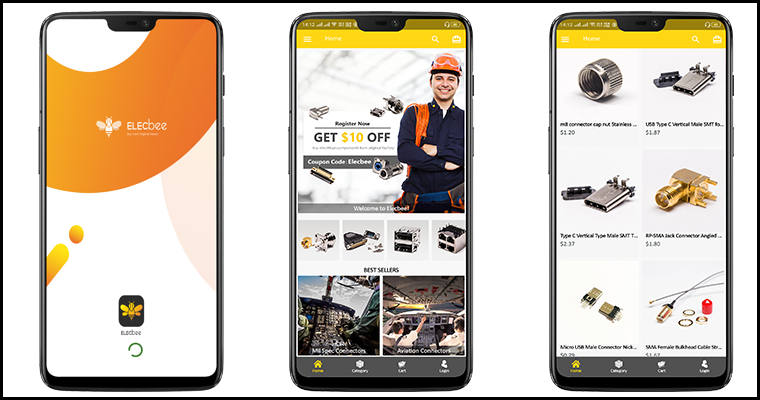
B) Elecbee App:

C) ChirulliShop App:

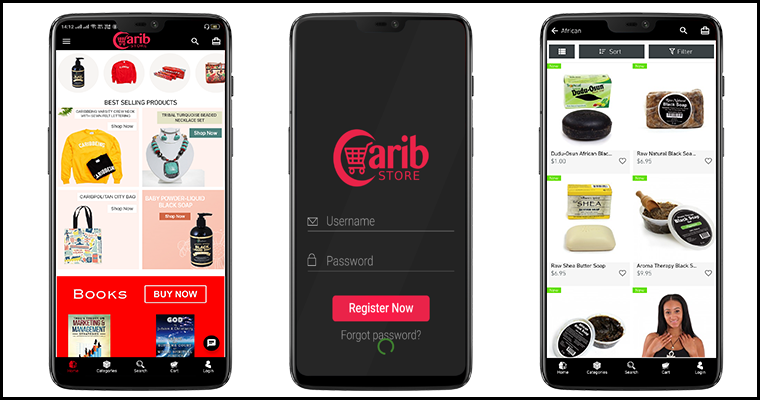
D) Caribstore App: 

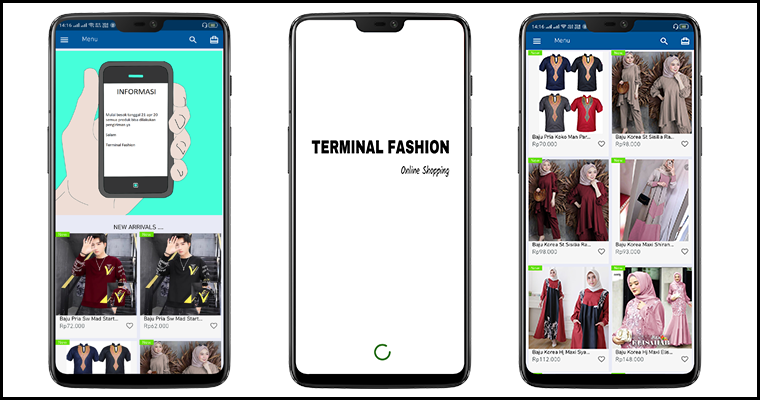
E) Terminal Fashion App:

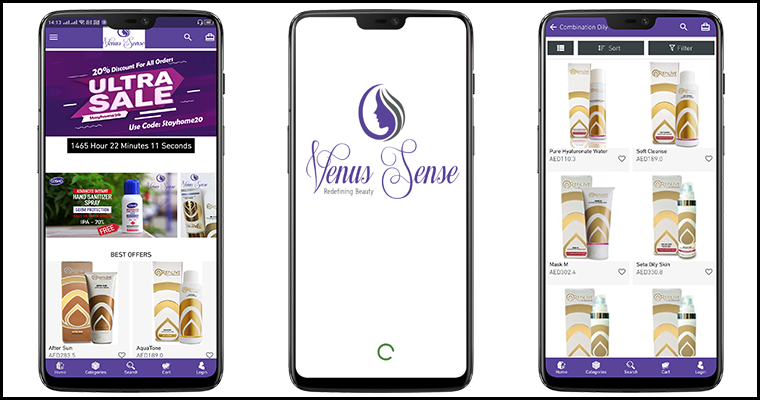
F) VenusSense App:

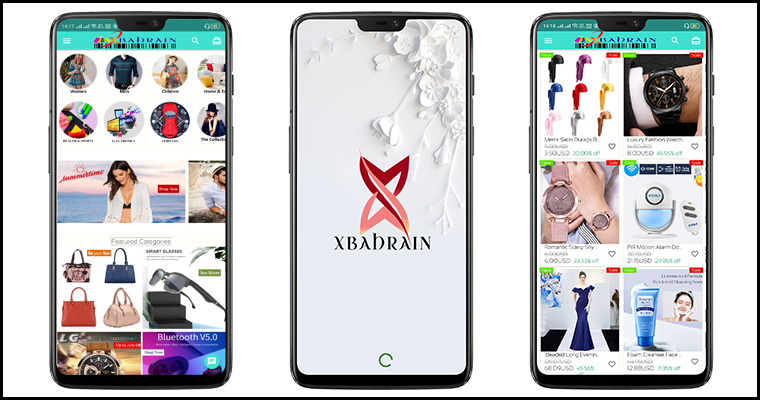
G) Xbahrain App:

If you still have any queries related to this, feel free to email us at support@knowband.com. We would be more than happy to assist you.

Also Read: 

How easy is it to send personalized Push Notifications in PrestaShop Mobile App?