List of Other Modules Compatible with Prestashop Multi vendor Marketplace Addon

Prestashop Multi-vendor Marketplace addon is an effective way to transform your PrestaShop eCommerce store into a fully functional marketplace. 

 PrestaShop Marketplace Addon offers store admin the opportunity to increase the reach of their store to the users and provides a variety of products and services to customers. 

 The PrestaShop Marketplace addon can convert your eCommerce site into a fully functional marketplace. The store admin can easily handle the inventories, orders, products and shipping methods at the Marketplace from the back interface of the PrestaShop Multi-vendor Marketplace Addon. 

 The PrestaShop marketplace store admin can charge a commission to the merchants on the products they sell. Sellers will get the opportunity to promote their brand and serve the users of Marketplace in return for the commission they are paying to the store admin.

Prestashop Marketplace Addon is one of the best addons and it has more than 1000+downloads in our Prestashop Addon Store.

How to Convert Your Prestashop Store into A fully functional Marketplace:

Follow the following steps to convert your Prestashop store into a Marketplace:

  1. First of all you need to purchase the Prestashop Multi-vendor Marketplace add-on from Knowband.
  2. Then after purchasing and downloading, unzip the addon in the modules directory of your Prestashop store.
  3. After that you are able to find the Prestashop Marketplace addon, which is, ready to be installed in the Modules List in your PrestaShop store.
  4. Click on the Install link to install. Once the Prestashop Marketplace addon is installed properly the Install button will be converted to Configure. 

Other Compatible Modules:

1. Order Return Manager:

 Managing customer return requests is not an easy task. The Return Manager system plays a vital role in an eCommerce store to help customers with their returns and provide them with a quick resolution. 

 Don’t worry anymore! The Prestashop Return Manager Addon allows you to easily handle the return requests on your website..The Prestashop return manager addon provides customers with a number of return choices such as Refund, Replacement and Store Credits. 

 Get to know more from here.

2.Product Availability Check By Zipcode:

As we all know that after finding the desired product, the customer wants to know whether the product is available in their region or not.

By using this Prestashop Availability Check by Zipcode Addon, the customer can check the availability of their product in a given location using its Zipcode. This Prestashop zip code validator will make the work easy for the customers as they will get the option to check the product availability right on the product page and not when they enter their address on the checkout page.

Get to know more from here.

3. Review Reminder and Incentive:

 Product reviews are a common way to build much-needed trust amongst online shoppers. The eCommerce store admins can now give compelling reasons to their customers to provide their reviews and rating. 

With the help of Prestashop Review Reminder and Incentive addon, the e-sellers can now send email reminders to their customers asking them to share their feedback on the recent deals and purchases. The customer gets profitable discounts in return for the reviews. Thus, it creates a win-win situation for both the customers as well as the sellers. 

Get to know more from here.

4. Marketplace CSV import/export addon:

CSV import/export addon enables the functionality of Prestashop Marketplace sellers to list their products using CSV. Sellers can also add different combinations for products via CSV. If any updation required they can export the products choosing a category or their status and after them, import them again.

Get to know more from here.

5. Marketplace Deal Manager:

This addon is a Prestashop Marketplace Addon. As we all know, discounts affect the sales of any product in an e-commerce store. And every vendor on marketplace needs that, he will offer some discount or offers on his items so that his sales increase.

So, This addon will offer an interface and functionality to sellers from where each seller can give some offers and deals on his products on Prestashop Marketplace.

Get to know more from here.

6. Marketplace Seller Invoice:

This module of Prestashop is used to let the vendor of a selected store generate their invoice. Sellers can add their shop name and logo on the invoice generated and can change the invoice prefix as well which is appended in the invoice number.

Get to know more from here.

7. Marketplace Customer-Seller Ticket Addon:

Sometimes, the customer has a query regarding the product or the seller before purchasing the same and wants to resolve his query by doing a conversation with the seller as well as keep the records of all previous conversations with the seller in one place.

So, keeping this in mind, this addon will offer features to customers through which customers can ask queries to sellers and sellers can reply to customer queries.

Get to know more from here.

8. Marketplace Low Stock Alert:

This addon is basically for the sellers to let them know that their product stock is decreasing. In this addon, the seller can adjust a specific quantity of the products and if any of his products got below this range then the seller will get an alert mail regarding the decreasing quantity of the product.

Get to know more from here.

9. Marketplace Seller Badge:

The Marketplace store admin can create seller badges which can be obtained by sellers by passing certain parameters. Customers are able to view the seller badges once they visit the seller profile page or product page of a particular seller. 

Get to know more from here.

10. Marketplace Sellers Vacation Mode:

This module is designed for the sellers to allow them to inform their customers that they will not be available to sell for a specific time period. In this addon, the seller can set a particular time interval during which he will not available on the marketplace. 

A notification is sent to the customers when a seller goes on vacation and a similar notification is sent once he/she is back from vacation. All these operations are done using the cron instructions.

Get to know more from here.

11. Booking and Rental System:

Buying and renting services have currently become a common scenario of online markets. Users commonly prefer rental products and therefore shop owners have found their way in the rental business. 

Prestashop Booking and Rental System addon by Knowband helps the merchants to add an online booking system on their PrestaShop website.. Yes, Prestashop Booking System is one of the best addons to create a dynamic booking system for your online shop giving an alternative to set your pricing, maintain a calendar, appointment orders very effectively from the back interface. 

Using the booking system, online users can easily create time-date based bookings and appointments for various services.

Get to know more from here.

12. Mobile App Builder:

 With the help of Prestashop Mobile App Builder, users can transform their online business into a mobile app. It converts your entire website into a featured Mobile App & permits you to sell products on mobile app along with the traditional website. The functionality & working of the app is similar to the website & work flawlessly on both Android & iPhone devices.

Our PrestaShop Mobile App Builder is the pre-configured framework designed and developed by experts to create a pair of native eCommerce apps. The apps are capable of taking all your store products to the user’s fingertips & boost sales &profits. So, if you are a PrestaShop store owner & looking for a full-fledged mobile app, this is the best addon for you.

Get to know more from here.

 So, these are the list of compatible modules of the Prestashop Marketplace Module which helps to customize it to a more advanced level. If you want to convert your Prestashop Store in Marketplace then you also try these modules with Prestashop Marketplace to make it more customized and functional.

 

PrestaShop Shipping Cost by Zip Code Addon

PrestaShop Shipping cost by zip code addon adjusts the shipping fee as per the postal code entered by the customer in the address fields on the checkout page.

Instead of a fixed shipping cost, you can now charge customers for shipping location-wise, which means the shipping cost will fluctuate as per the location or zip code specified by the customer. PrestaShop shipping rates by zip code module helps you manage the shipping price for different zones.

Besides, it enhances the user experience on the checkout page.

Overview

1. The shipping cost is automatically calculated based on the zip code.

2. Set different shipping price for different zones and countries

3. Define a specific zip code or a range of zip code and charge shipping accordingly

4. Add multiple zones

5. Add multiple zip codes through CSV upload.

Description

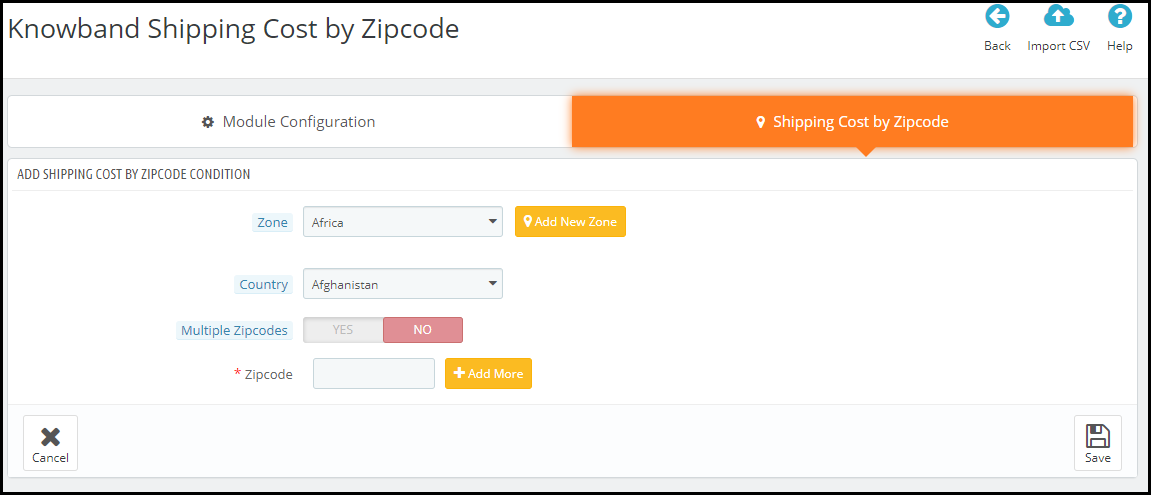
PrestaShop Shipping cost by zip code addon allows you to add multiple zones from the back-end configurations. Simply click on the Add new condition button to add a new zone.

After that, you can specify the zone which you want to add and choose the country accordingly. If you cannot find the zone from the drop-down list, you can add it manually by clicking on Add new zone.

Moving further, you can specify a particular zip code for a different shipping price or you can specify a range of zip codes that will follow the same shipping price. It is because a particular region has different zip codes. So you can set a range and have a fixed shipping price for all the areas lying in that range.

To add multiple zip codes through a CSV file, you can do that by clicking on the Import CSV option.

With the help of the PrestaShop Shipping cost calculator, you can adjust the shipping price as per your defined zones from your back-end office; under the shipping section.

Over to You

PrestaShop Shipping Calculator module is easy to install and configure with no requirement of any technical knowledge. You can enable or disable within a single click. The module also offers multi-lingual support and is compatible with the latest PrestaShop version

For any assistance, reach out to us at support@knowband.com

PrestaShop Preferred Delivery Time Addon

PrestaShop Preferred Delivery Time addon lets customers choose their desired delivery date and time on the checkout page.

When a customer places an order, they get an estimated delivery time like 2-3 days. Neither there is surety about the arrival date nor the timing. We just assume and hope for the order to deliver within the expected time.

Due to this, many times, customers are not able to pick up their orders due to their non-availability at the time of delivery.

Let’s talk about a different scenario. Sometimes, customers want to receive the order at a specific time, like on occasions like the birthday of their loved ones, so that they could gift them at the perfect time arrives.

In such cases, providing customers with the option to choose a specific date and time slot for the order delivery becomes highly important. And this is exactly what the PrestaShop Preferred Delivery Time module does.

PrestaShop Preferred Delivery Date and Time module allows customers to choose a date and a time slot as per their desire so that they could get the item on their specified time.

Overview

1. Let customers select the desired delivery date and time

2. Set a minimum delivery gap between the order placement date and preferred delivery date

3. Define the delivery time interval [Start time and End time]

4. Split up the time in multiple slots by defining a fixed time range for a particular slot.

5. Specify non-delivery days

6. Option to update delivery date and time even after placing an order

Detailed Description

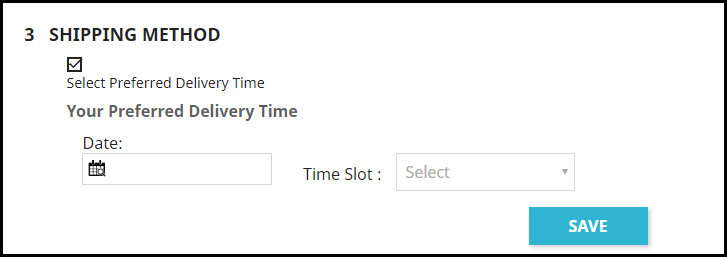
1. In the shipping section, the user is asked to pick his/her desired date and time slot for the order delivery. This can also be made optional hence allowing shoppers to follow the standard delivery procedure if they do not wish to choose a preferred delivery date and time.

This can be configured by enabling or disabling the “Allow to select preferred delivery.” Keeping it enabled will make the process mandatory. Disabling the option will make it mandatory for a customer to choose a date and time slot.

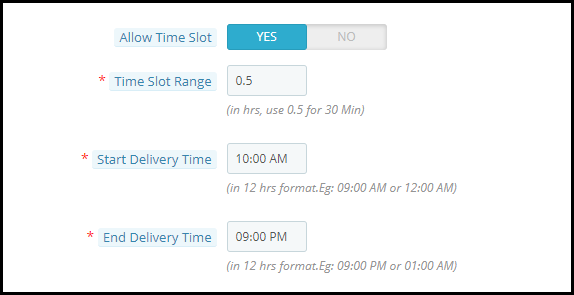
2. PrestaShop Preferred Delivery Date addon lets you define the time interval within which you deliver the orders. For example, it can be from 9 am to 6 pm or 10 am to 5 pm.

3. PrestaShop Preferred Delivery Time slot addon lets you split the time interval into multiple time slots. You just have to define a time slot range. For example, if the delivery happens in between 9 am to 6 pm in a day is and the time slot range is 1 hour, then a customer would be provided with time slots like 9 to 10, 10 to 11, 11 to 13 and so on till 5 to 6.

4. In such cases where time slots do not adjust well with the delivery timing, for example, let’s say the delivery time is between 10 to 3 and time slot defined is 2 hours, then 12 to 12 would be fine, 12 to 2 would be too. But then we would be left with only 1 hour right? How does that get fit into this?

Well, inside the configuration, there’s an option that says “Allow incomplete time range.” Enabling it would display that remaining 1-hour slot in the time slot else it would not be displayed if disabled.

5. You can define a minimum delivery gap for a customer to pick the desired delivery date and time. For example, if the order is placed on the 26th of March and the delivery gap defined by the admin is 4 days, then the customers would be allowed to pick the desired date and time for or after the 30th of March.

6. You can also set the maximum delivery period. For example, if the defined period is 30 days, then the shopper would have to pick a date and time from 30 days of the order placement date.

7. PrestaShop Preferred Delivery Date and Time addon lets you specify the non-delivery days.

8. With the help of the PrestaShop Preferred Delivery time slot module, you can also allow your customers to update their delivery date and time even after they have placed their order.

9. Notify customers about the preferred delivery date and time slot in the order confirmation mail as well.

Benefits

1 Enhance the customer shopping experience.

2. Improve customer loyalty by delivering the product on the desired date and time.

3. By providing customers with the option to pick up a desired date and time slot, you can ask customers to pay a small charge for this facility, if possible.

For any kind of assistance with this module, you can contact us at support@knowband.com

PrestaShop Product Availability Check by Zip Code Addon (Buy Now for Free)

“PrestaShop Product Availability Check by Zip Code, also referred to as PrestaShop Zip Code Validator or PrestaShop Zip Code Verification addon allows your store visitors to check whether the product they are thinking to purchase is available for delivery at their location or not. All they need to do is enter their area Zip Code.”

The module aims to enhance the customer shopping experience. It adds a zip code validator on the product pages and asks visitors to provide their zip code, upon entering which they are informed about the product availability.

Note: Currently, you can get this module for free. Related information and the download link is given at the end of the article.

Overview

1. Product Availability check through zip code

2. Display delivery period and date as per the specified zip code

3. Disable Add to Cart Functionality for non-available products

4. Disable zip code verification on selected products

5. Add zip codes manually or through CSV upload

6. Specify the delivery period for a particular zone

7. Map products with zones

Description

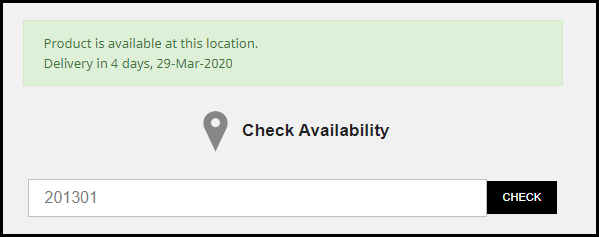
1. PrestaShop Zip code Validator addon adds a product availability check tab on your product pages. Customers would be required to enter their area zip code before adding the item to their cart and heading towards the checkout page.

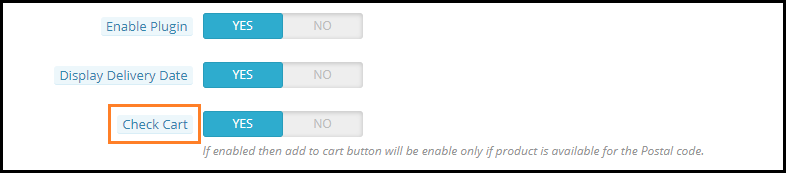
2. The Zip code verification module contains a “Check Cart” option enabling which the “add to cart” button functionality will not work if the product is not available for the specified zip code.

3. If the product is available in the specified area zip code, PrestaShop Product Zip code addon displays the delivery period along with the delivery date.

4. No need to enter zip code every time on a different product page. Once entered, the availability of every product will be shown on that basis.

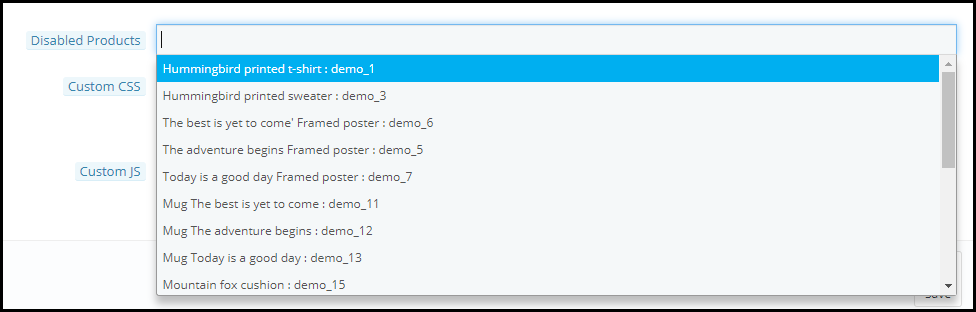
5. PrestaShop Product Availability addon lets you disable the zip code verification functionality for some specific products. You can choose the products for which you do not want the display the zip code check tab on the product pages.

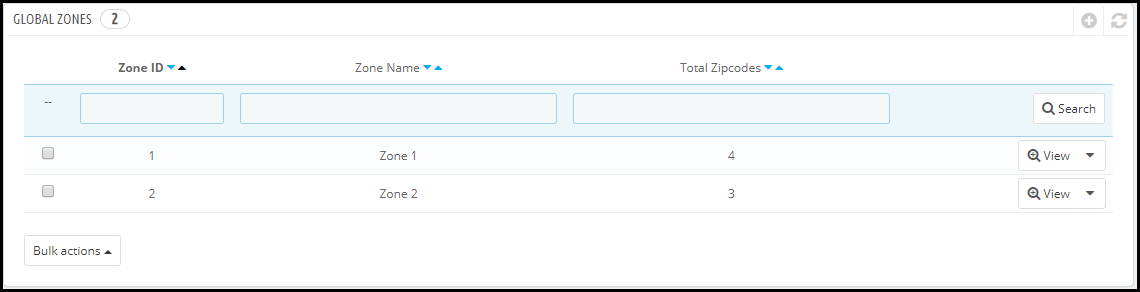
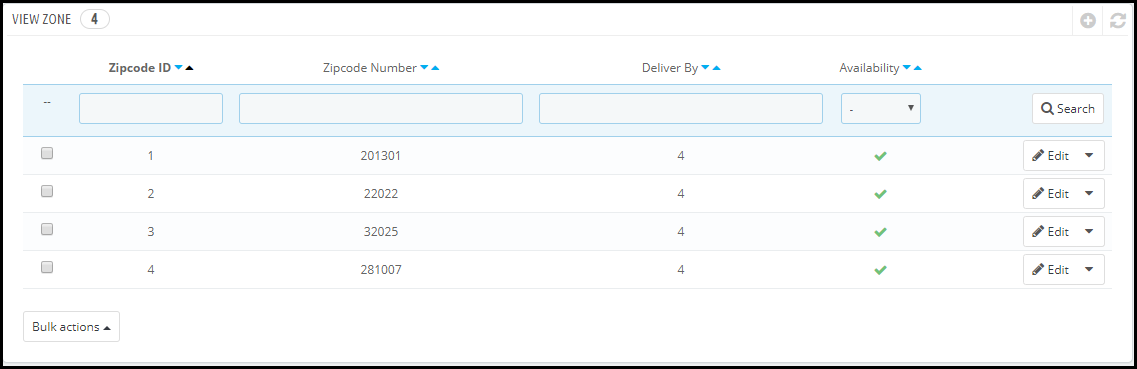
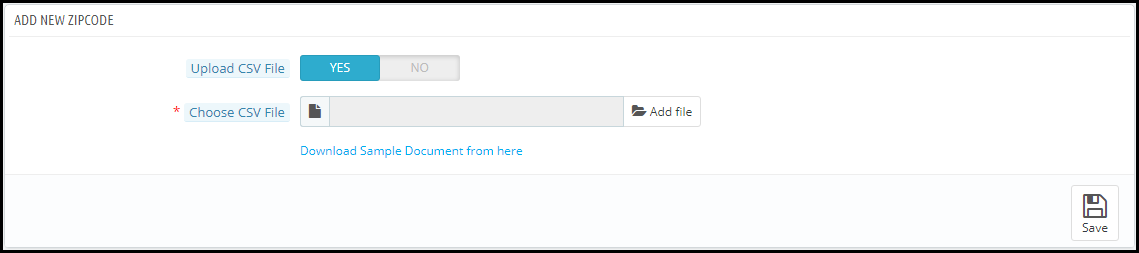
6. With the help of PrestaShop Zipcode Validator addon, you can add multiple zones from the back end. For each zone, you can specify the zip codes and for each zip code, you can define the delivery period. The zip codes can be added either manually or by uploading a CSV file.

7. You can also map products according to zones. Put simply, you can specify which products would be available for delivery in a particular zone.

8. PrestaShop Zip code verification module is easy to install and configure.

9. Multi-store compatible, provides multi-lingual support and is compatible with all PrestaShop themes.

10. You can make additional changes in the PrestaShop Product Availability Check by Zipcode addon through Custom CSS and Custom JS.

Benefits of PrestaShop Zip Code Validator

1. Improve the shopping experience of your customers.

2. Easy managing products delivery.

3. Customers are notified right on the check out about the product availability rather than the checkout, hence making it time-saving.

Special note: The module costs around $30 with free 3 months support but as of now, following the corona outbreak in the entire world, we have currently made it free for our customers. During these hard times, we are making sure that we do best for our customers in whatever way possible.

Due to the Corona Virus pandemic which has created a lot of trouble in the delivery scenario, we decided to make this module free to help online businesses. Letting customers know about the product availability in their location would surely be of some great help not only for you but your customers as well.

Download the module from here- PrestaShop Product Availability Check by Zipcode

If you have any query regarding this, you can reach out to us at support@knowband.com

PrestaShop Facebook Store Addon

“PrestaShop Facebook store, also known as PrestaShop Facebook shop addon or PrestaShop social shop addon is amongst the best PrestaShop social media modules. It lets you set up a shop on your Facebook business page.”

The Facebook audience is huge. People of every age group are present on the largest social media platform that has over 2.4 billion monthly active users. It is the most targeted social media network by brands as it provides them with the opportunity to reach out to a large target audience.

Moreover, people spend a lot of time on Facebook and this is the reason why Brands have linked their Facebook page to their eCommerce website and opened a Facebook shop, i.e. to allow people to shop from that medium too.

If you are a PrestaShop website owner looking to open a Facebook shop, PrestaShop Facebook store addon will help you do that effortlessly. All you require is the Facebook App ID.

Note: This module requires a minimum of 2K likes on your Facebook page to work. Besides, your website must be SSL-enabled. If your website does not have an SSL certificate, the module would not work because Facebook does not allow linking to a non-SSL website.

Overview

1. Easy to set up your Facebook store without any requirement of technical knowledge.

2. Track performance of your Facebook shop by connecting Google Analytics.

3. Adjust the look and feel of your Facebook shop.

4. Display your bestsellers, featured products, new arrivals, etc.

Features of PrestaShop Facebook store addon [Detailed]-

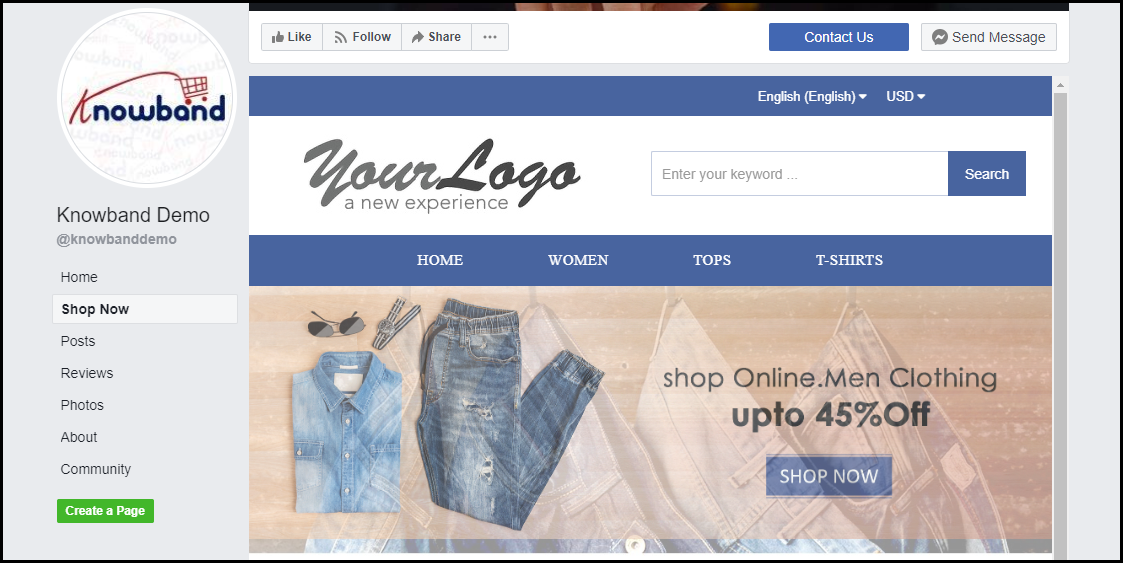
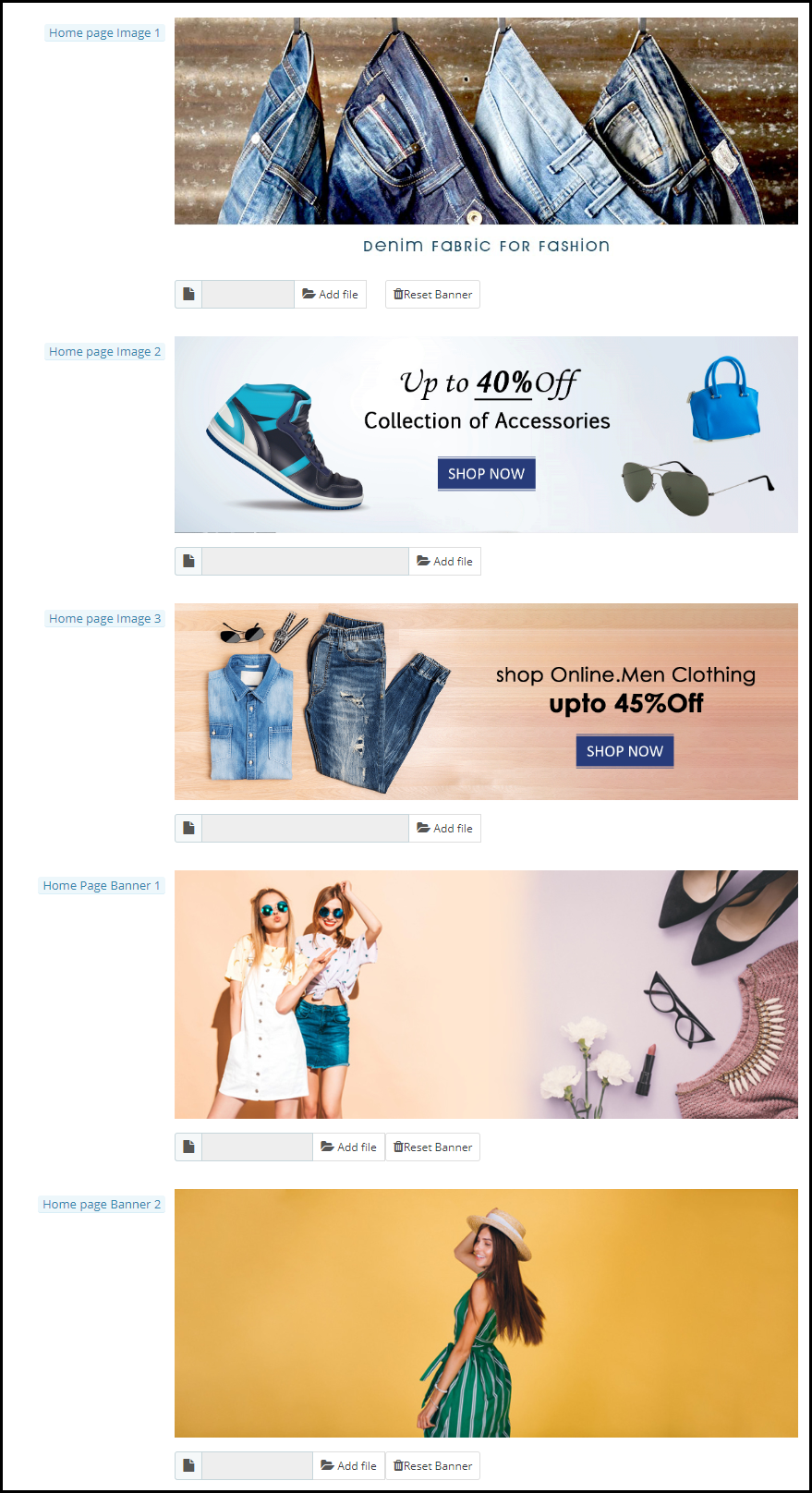
1. You can set up some attractive home page images to draw user attention. The images are displayed automatically. You can upload a maximum of three home page images.

Besides, you can set up home page banners as well to make your Facebook store more attractive. You can upload a maximum of two home page banners.

2. PrestaShop Facebook shop addon lets you customize the menu bar of your Facebook shop. The back-end of the module displays a list of categories that are set up on your website. You can then decide what category you want to put in the menu bar of your Facebook store.

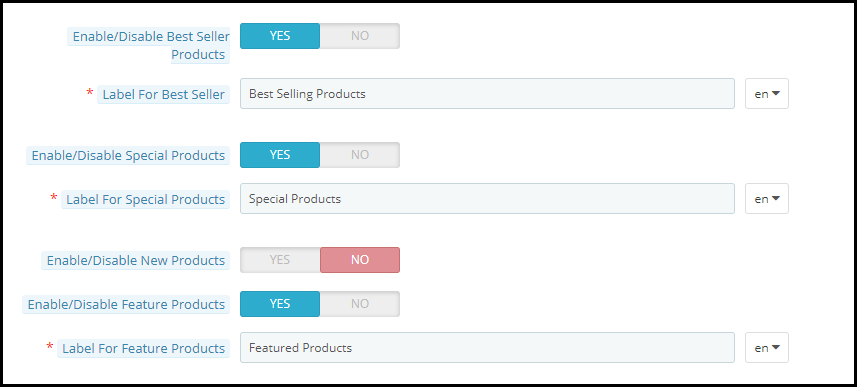
3. With PrestaShop Social shop addon, you can display featured products, bestsellers, new arrivals, special products, etc. You can specify the products that you want to show on your social shop.

You can also specify the maximum number of featured products that you want to display.

4. Connect Google Analytics by entering your analytics ID and track the performance (conversion and sales) of your Facebook shop.

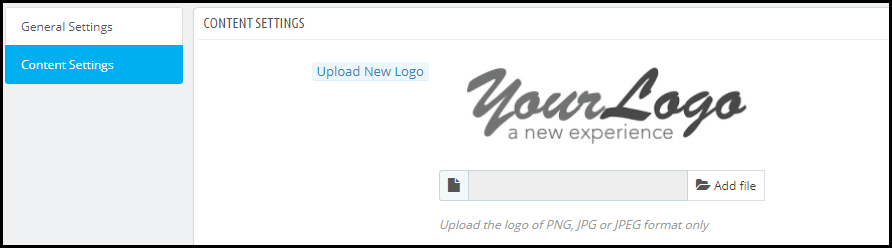
5. PrestaShop Facebook store addon helps you set up your Brand logo on your Facebook shop.

6. You can also adjust the theme colour of your Facebook shop.

7. PrestaShop Facebook store addon lets you set up the footer content for your store.

Benefits of PrestaShop Facebook shop addon

1. Boost your website traffic

2. Increase the conversion rate on your website

3. Promote your Facebook shop in front of a huge Facebook audience

4. Enhance the shopping experience of your Facebook followers

Over to You

PrestaShop Facebook store addon provides multi-lingual support and has multi-store compatibility. If you want to achieve high sales from the Facebook platform, having a Facebook shop is a must.

If you need any assistance with this module, you can contact us for help at support@knowband.com

PrestaShop Gift Card Manager to Sell Gift Vouchers

“Set up a gift card section on your PrestaShop website effortlessly to provide the online gift cards facility to your store visitors with PrestaShop Gift Card module.”

The demand for gift cards has increased over the years and it has become a go-to option for people whenever they want to gift something to their close ones. It is difficult to come up with a gift idea that everyone likes. People are too busy to explore and buy something and if the recipient doesn’t like that gift, the efforts and time will go in vain.

Thus, gift certificates have become the most effortless and easy gifting option. You can now easily add Gift Vouchers as a product on your Prestashop store using Knowband’s PrestaShop Gift Voucher Module.

On occasions like Father’s Day, Mother’s Day, and on the holiday season when we have Halloween, Black Friday, Christmas, etc, Gift Cards are sold in huge numbers.

The holiday season is approaching and it is the best opportunity for you to start selling personalized gift cards in your store. With our Gift Card module, it becomes easy to put up different types of gift cards on your website.

Create Gift Cards to sell on PrestaShop Store

How do PrestaShop Digital Gift Card works?

  1. Place gift card Product link on multiple places
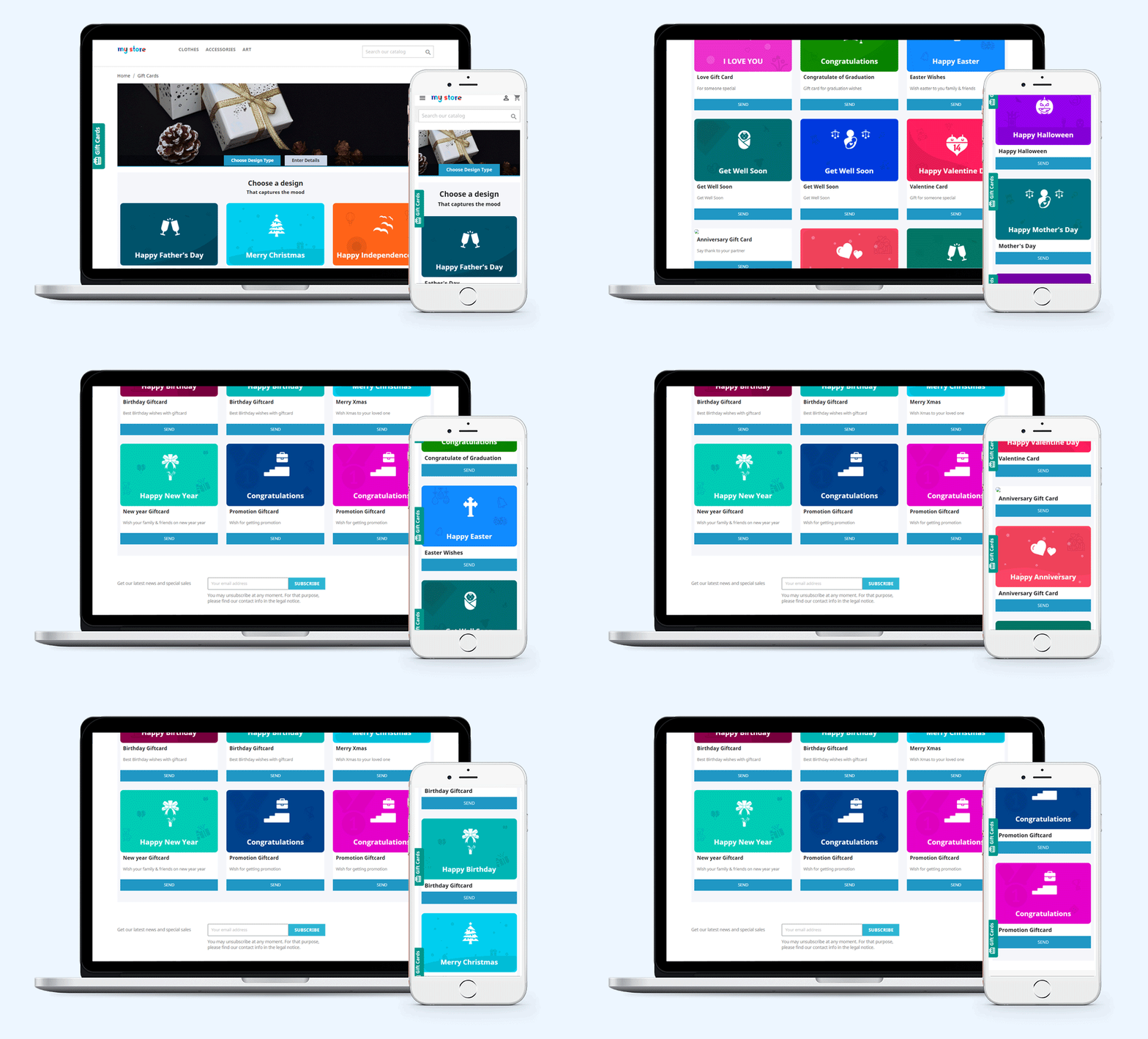
  2. Pre-existing customizable gift card templates for the Birthday Gift Voucher, multiple festivals, etc.
  3. Allow Print or email customized Photo Gift Cards
  4. Set up multi-priced gift certificates
  5. Set gift cards validity
  6. Allow gift cards purchase in multiple currencies
  7. Allow partial usage of gift cards
  8. Customize Gift card emails to send a gift certificate
  9. Track your gift card orders
  10. Multi-lingual, multi-store, and GDPR compatible

Benefits of Selling Gift Cards on your PrestaShop Store

A gift card is not just an easy-to-buy alternative gifting option but it gives you more than that.

  1. Boost your sales and revenue

This module is responsible for increasing sales and revenue as many indecisive shoppers get a chance to buy a product that does not require much effort. Customers can add the Gift Card product to the cart, customize and buy.

  1. Grow Brand Awareness

Moreover, it adds value to your brand identity. Word of mouth plays a crucial role to increase brand awareness. Every gift card contains a prefix and the Gift Card templates can have the logo and brand name on them.

  1. Acquire New Customers

By selling Gift Card on the PrestaShop store, you attract several customers who were not really your direct visitors. The Gift Card buyer will give the card to a friend or a family member and eventually, they will shop from your store to claim that.

  1. Advance sales

The gift cards also generate advance revenue as the customer buys them in advance for a specific amount and later the recipient will buy products from the store by using the digital card.

Features of PrestaShop Gift Card Addon [Detailed]-

  1. Create Gift Card

  • Default Gift Card Templates:

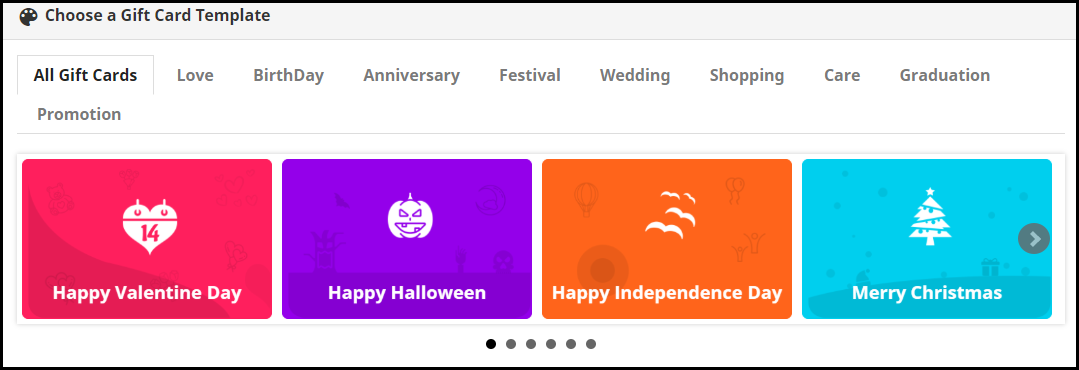
PrestaShop Gift Card Manager offers gift vouchers for multiple occasions like Birthdays, anniversaries, Halloween, New Year, Mother’s Day, Father’s Day, Valentine’s Day, etc. These gift card templates can be easily customized. Besides, you can add new gift cards if you want.

  • Customized Photo Gift Cards

The customer can add a picture to their gift card and give it a personal touch. This unique way of printing digital gift cards with custom images attracts more new shoppers to your store as personalization is a major branding factor these days.

  1. Advanced Admin Control

  • Add Gift Card Link to Multiple Places

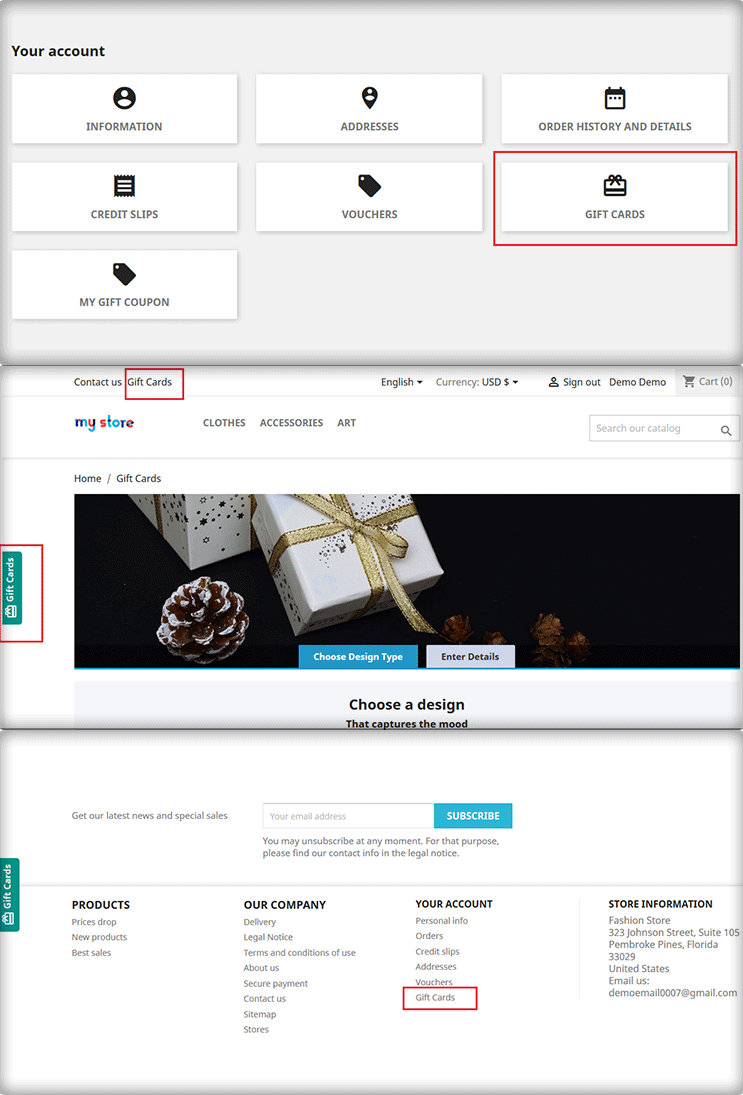
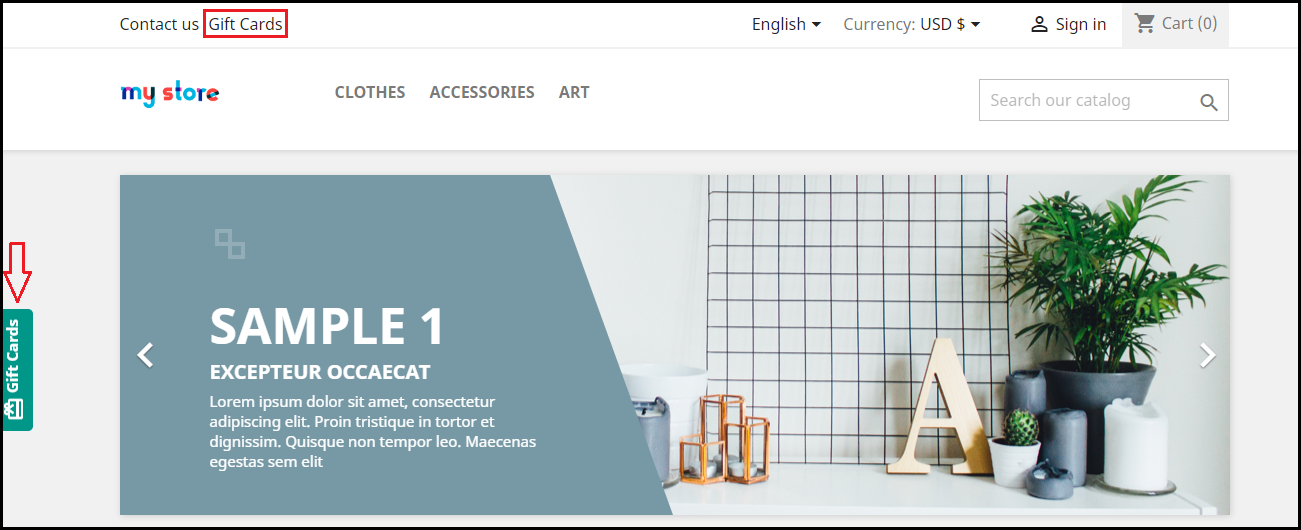
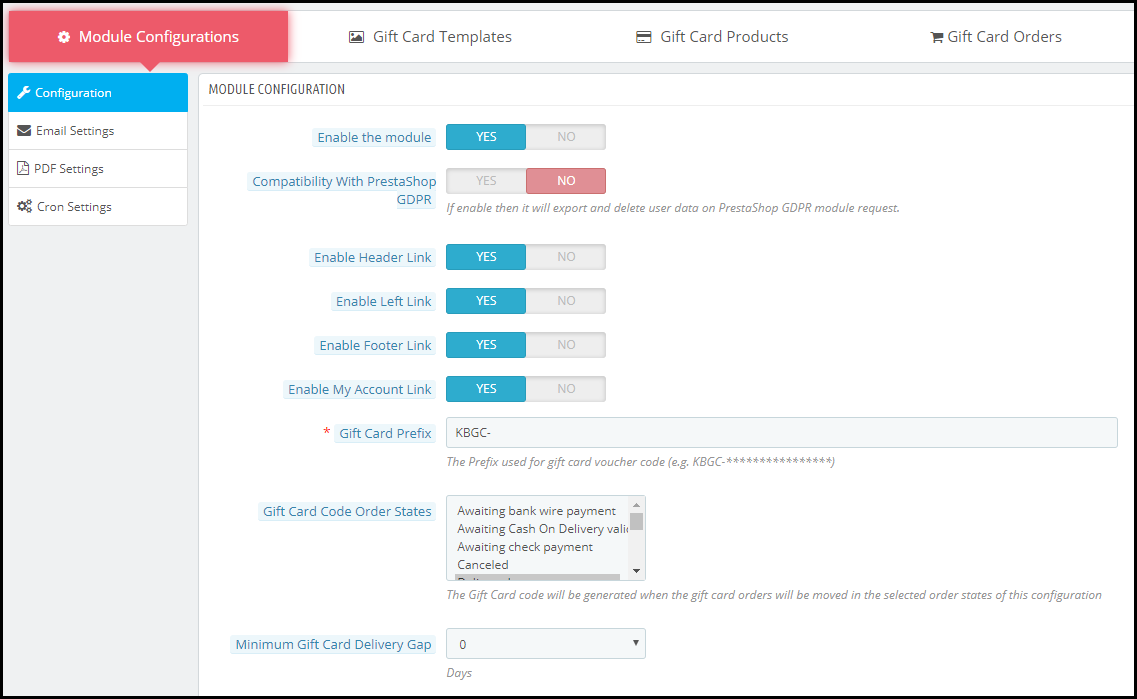
PrestaShop KnowBand Gift card plugin lets you display the gift card link in multiple places to highlight your gift card section in front of your store visitors. It can be placed on the header, footer, my account section, and on the center-left of the screen.

  • Gift Card Delivery Settings

Set a date to deliver. You can define a minimum delivery gap for the PrestaShop gift certificate to reach the recipient or a date to send an email including the gift card details

  • Type of delivery

For a particular gift type, you can choose whether it should be allowed for physical delivery and virtual delivery. If a card is virtual then there is no point in charging a shipping fee. Hence, the seller can decide the shipping charges for the type of delivery.

  1. Flexible Pricing Scheme

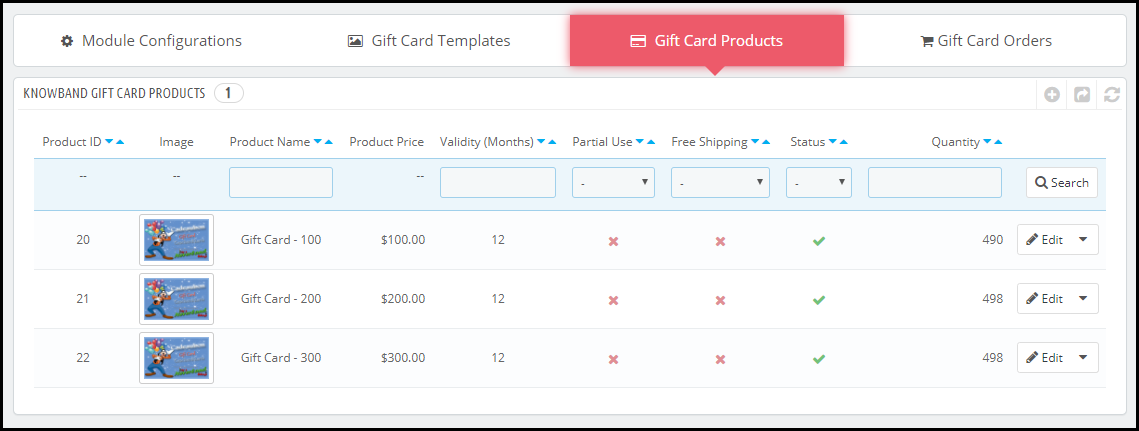
PrestaShop Gift Card Manager Addon lets you set up multi-range gift cards on your website so that customers can choose a gift card as per their budget.

For a gift card of a specific value, you can define its quantity, make it available for multiple currencies, set the gift card validity, and allow free shipping and partial usage.

  1. Unique Branding Techniques

Set up a prefix for your Gift cards that does your Brand promotion. To create a unique card template, it provides options like adding a name, category, keyword, etc. You can make your own templates by using an image with the logo and brand name.

  1. How to Generate Gift Card Code?

With this PrestaShop premium gift card, you can specify the order status. It can be the payment status like awaiting payment, awaiting COD, Canceled, delivered, etc.  For the gift card voucher code generation, the seller will have to define ar specific order status.

  1. Notify with Email Alerts and PDF

PrestaShop Gift voucher module lets you customize the emails that would be delivered to the sender and the receiver. Customers can download the Gift card in PDF format.

  1. Categorize the Gift Cards

You can define categories for gift cards and put the relevant ones under them. For example, gift cards related to Christmas, New Year, and Cyber Monday can be put under the “Holiday Gift Cards” category and say if you have multiple gift cards for Birthdays, all of them can be displayed under the “Birthday Gift Cards” category. This makes it easy and quick for a customer to choose the desired gift card.

  1. Track your gift card orders easily

Tracking the orders and keeping their record is a great business practice. The section comprising of gift certificate orders displays the order reference, recipient’s email address, sending date, and the gift card status.

  1. PrestaShop Gift Card Module Compatibility

PrestaShop Gift Card Module is multi-store compatible, has multi-lingual support, and also provides GDPR compatibility. It is also compatible with every PrestaShop version from 1.6 to 1.7.

Finally, The holiday season is approaching and it is the best opportunity for you to start selling personalized gift cards in your store. With our Gift Card module, it becomes easy to put up different types of gift cards on your website.

For any assistance or query regarding this module, reach out to us at support@knowband.com

You may also like:

Why Digital Gift Cards are Important to your eCommerce Business?

Get more Holiday sales by setting up a Gift Card section on your store

Give Some Holiday Season Flair to an Ecommerce Website Design

Offer Birthday Coupons to Your PrestaShop Customers And Win their Loyalty

Everything you need to know about PrestaShop GDPR Addon

“PrestaShop GDPR addon helps EU business comply with the GDPR law and avoid any kind of troubles in the future. It adds a GDPR tab on the front end of your website and allows your customers to raise a request regarding data access, modification or deletion, any time.”

GDPR stands for General Data Protection Regulation. It is a law implemented for European countries on 25th May 2018 to enhance the data privacy of the people.

Every online business was enforced to comply with this law and it gave EU citizens better control over their private information. Any business failing to follow the GDPR law would be charged a heavy penalty.

With this law, people would be able to check what information does a website have about them and they would be able to modify the details they want to share with a business.

Realizing the extreme importance of GDPR in the EU countries, Knowband comes up with the GDPR- Rights of the Individual addon.

What does PrestaShop GDPR addon offers?

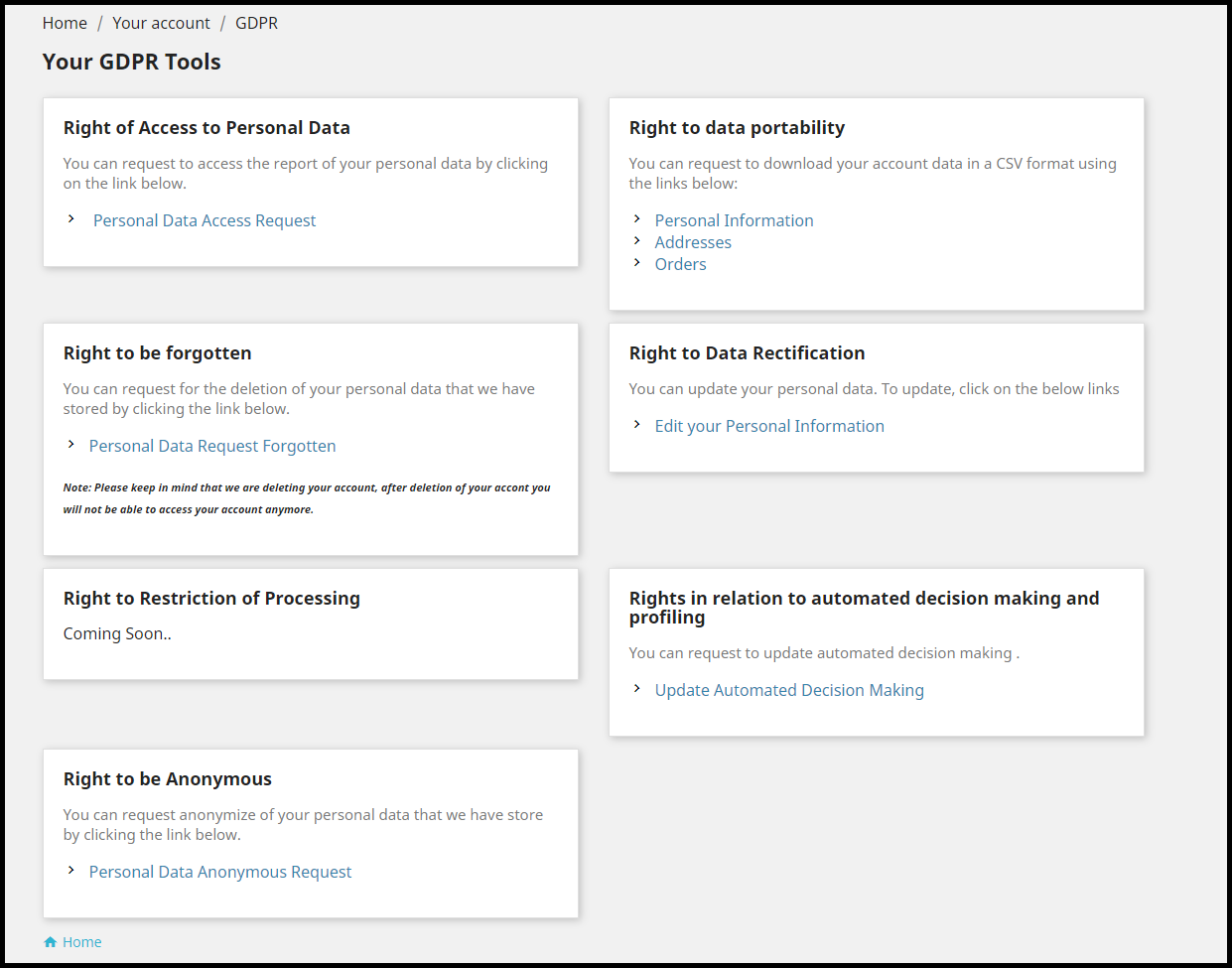
Once installed, the PrestaShop GDPR module places a GDPR tab on the header that has the following options:

1. Right of Access to Personal Data

2. Right to Data Portability

3. Right to be forgotten

4. Right to Data Rectification

5. Rights in relation to automated decision making and profiling

6. Right to be Anonymous

7. Right to Restriction of Processing (Coming soon)

Let’s try to get insights into each option-

1. Right of Access to Personal Data

Through this option, the customer can raise a request to the merchant to get access to their personal data, by submitting their email address.

The user receives the confirmation email. Once confirmed, the report is sent to the user.

From the backend of the module, you can check the requests of the users who have raised the data access request, under the GDPR Personal Data Request tab.

2. Right to Data Portability

Through this option, the customer can download his/her data in a CV format. This tab consists of three options named as-

Personal Information

Addresses

Orders

The customer needs to head over to the desired option and they will get the option to download your data, after confirming the email address.

The requests can be seen under the GDPR Data Portability tab in the backend of the module.

3. Right to be forgotten

This option allows customers to permanently delete their account details from the website.

Once performed, the user details would be removed from the store and they would be required to create a new account if they wish to come back to the store.

The account deletion requests can be seen under Data Forgot Request tab.

4. Right to Data Rectification

This option allows customers to rectify their existing information captured by the brand. It allows editing personal information, address and the option to update the password.

The merchant can check the rectification requests under GDPR Rectification Request.

5. Rights in relation to automated decision making and profiling

Through this option, consumers can check which services have they been automatically subscribed to. Upon request, the consumers have the option to choose only those automation services which they would want to receive.

6. Right to be Anonymous

If a customer does not want to share his original email address with the brand and want to remain anonymous, they can opt for this option.

Upon submitting this request, the existing email address of the user will be replaced by a system-generated email address. These requests can be looked under the GDPR Anonymous Request tab.

7. The Right to Restriction of Processing

This option is not available to use as of now but would soon be reflected in the module.

Let’s now come to some general settings of the PrestaShop GDPR addon.

General settings

1. Specify the number of requests a customer can raise in a single day.

2. You can mention the time after which the user account will be deleted permanently.

3. You can customize the cookies consent bar.

4. You can enable or disable any option at any time.

5. Customize the user consent option as per your requirements from the User Consent tab.

6. Restrict GDPR to some specific countries or specific IPs only.

7. You can customize the email templates and adjust the cron functionality.

There are many more options available in this module. Check out the PrestaShop GDPR addon to know its complete features and benefits.

For any assistance regarding this addon, kindly contact us at support@knowband.com

PrestaShop Voice Search and Typing

“Incorporate a voice search block in the search bar of your website with PrestaShop Voice Search and Typing addon. The PrestaShop Voice Recognition system adds a microphone in your search box, using which your visitors and customers can perform a voice search.”

PrestaShop Voice Search makes use of voice recognition technology. It catches the user’s voice and presents the results matching the voice command.

Features of PrestaShop Voice Search and Typing module

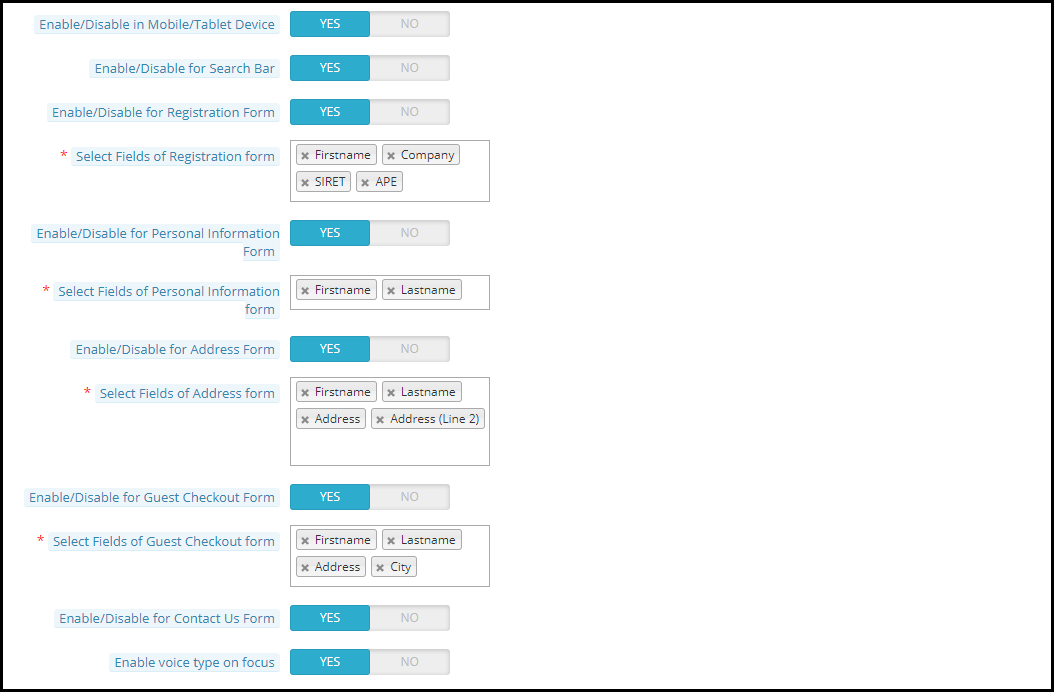
1. PrestaShop Voice Search addon lets you enable the voice search functionality on the search bar. It places a microphone beside the magnifying glass.

2. PrestaShop Voice Recognition system lets you enable the voice search functionality on the registration form. New visitors can make a successful registration just by giving the voice commands.

You can select the fields for which you want to provide the voice search option, for example, first name, last name, etc.

3. PrestaShop Voice Search and Typing addon lets you enable the voice search functionality on the customer’s personal information tab. Customers can make adjustments to their information by giving the voice input.

You can specify the fields for which you want to provide the voice search option.

4. PrestaShop Voice Recognition lets you enable the voice search functionality on the Guest Checkout form. You can select the fields for which you want to provide the voice search option.

This makes it even quicker for guest users to checkout.

5. PrestaShop Voice Search lets you enable the voice search functionality on the Address form. You can specify the fields for which you want to provide the voice search option.

6. The addon lets you enable the voice search functionality on the Contact Us form.

7. This PrestaShop module lets you enable the voice search functionality on mobile, tablets and desktops.

8. Visitors/Customers can give a voice command even without clicking on the microphone. For this to function, they need to enable the “voice type on focus” option.

Benefits of PrestaShop Voice Search and Typing

1. PrestaShop Voice Search and Auto Typing addon enhances the online shopping experience of your customers.

2. The module provides easy search functionality and improves the search experience.

3. PrestaShop Voice Recognition addon is time-saving. It minimizes the effort required to make a search or fill the information.

4. No need to type. Just give a voice command and the text will be typed automatically.

5. The module nearly follows a hands-free approach and delivers results quickly.

6. PrestaShop Voice Search enhances the user experience.

7. The addon ensures a quick checkout.

Check out the PrestaShop Voice Search and Typing addon today.

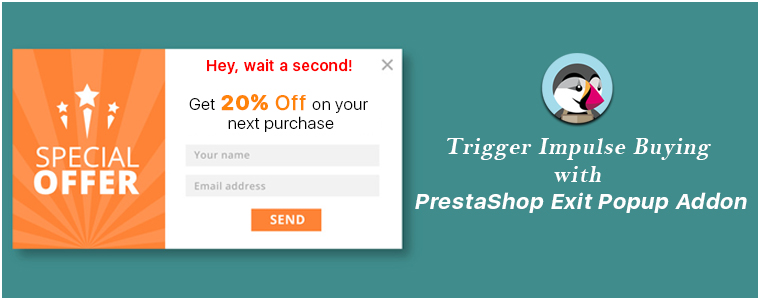
Trigger Impulse Buying with PrestaShop Exit Popup Addon

“Grab customer attention and trigger impulse purchase when the user decides to leave your store, with PrestaShop Exit Popup addon.”

Popups are amazing as far as they are not hampering the user experience or disturbing the user flow. This is where Exit popups have been effective as they tend to appear only when a user shows the intent to take an exit from your website.

We, at KnowBand, understand the value of user experience in the eCommerce industry and also the merchants’ zeal to gain more conversions. This is what led us to develop an Exit popup that could maintain the user experience and allow merchants with an opportunity to get more conversions.

If you own an eCommerce website on the PrestaShop platform and looking for such addon, PrestaShop Exit Popup is exactly what you need.

PrestaShop Exit Popup addon

PrestaShop Exit Popup addon displays an interactive popup to your site visitors as soon as it detects the user’s intention to leave your website; by tracking the mouse movement. It helps you make one final attempt to stop the user from leaving your store by grabbing their attention through some exclusive offers.

Note: PrestaShop Exit-Intent Popup can also be used as an Entry Popup.

Why you should have the PrestaShop Exit-Intent Popup?

PrestaShop Exit Popup is a feature-packed addon that provides PrestaShop merchants with some effective tactics to draw customer attention towards your store offers and persuade them to make a purchase.

Let’s have a look at the features of the PrestaShop Exit Intent Popup.

1. Make perfect adjustments for the Popup appearance

PrestaShop Exit Popup lets you perform plenty of customizations to deliver the popup effectively to your visitors and customers.

Specify when you want to display the popup

The addon provides you with 3 options to set the time for the popup appearance. You can choose to display the popup

– as soon as the visitor enters your store

– after a user has spent certain time on your store (you can mention the time after which you want to display the popup)

– the user has scrolled down to a certain limit (you can mention the scroll percentage)

– after the user has visited a few pages on your website(you can mention the minimum number of page visits to show the popup)

Specify the pages on which you want to display the popup

You can choose to display the popup either on all pages or show/hide it for some selected pages.

Choose who you want to display the exit popup

Admin has the choice to show the popup to all visitors, new visitors or returning visitors.

Set a display frequency of the popup

Merchants can set the popup display frequency for every visit, one visit per hour, one visit per day, one visit per week or one visit per month.

Restrict popup appearance for users of some specific regions

You can choose to display the popup either to worldwide visitors or disable it for users of some specific countries.

Select a minimum screen size for the popup display

Admin can define a minimum screen resolution below which the popup will not be displayed to the user.

Hide popup automatically after a certain time

PrestaShop Exit Popup addon provides you with the option to make the popup disappear automatically after a few seconds.

2. Personalize the look and feel of the Popup

PrestaShop Exit-Intent popup comes up with pre-existing themes to design your popup. You can give it an attractive CTA, adjust the look with various colour customization options, etc.

3. Customize your offers

Select what you want to offer through the exit pop-up to your visitors- whether a free delivery, a gift, or some discount on the purchase.

4. Mailchimp, Klaviyo and SendinBlue Integrator

Every time a user provides his/her data while collecting the offer, their data would be sent directly over to your Mailchimp, Klaviyo and SendinBlue account, whichever you are using for the Email marketing purpose.

5. Customize your Emails

You can personalize the email content that would be sent to the users as soon as they provide their email address in the popup.

6. Graphical and Pie chart analysis

PrestaShop Exit Popup module shows the graphical comparison of the total generated coupons and used and unused coupons.

You can track where your users are coming from, which device they are using whether it is a mobile or desktop, etc.

7. Compatibility and Support

PrestaShop Exit-Intent Popup is GDPR compatible, multi-store compatible and Mobile, Tablet and Desktop Responsive.

PrestaShop Email subscription Popup addon provides many other features like setting up the coupon expiry duration, email verification during checkout to confirm whether the coupon code is used by the same user who generated it at first place or not, etc.

Benefits of PrestaShop Exit Intent Popup:

1. Trigger impulse buying at the last moment

2. Obtain customer data efficiently for your email marketing campaigns

3. Boost your conversions

4. Encourage purchases through exclusive offers and discounts

5. Increase your average site time

The Bottom Line

Conventional popups are not effective anymore. They have become an annoyance for the users and if prompted repeatedly, can compel them to never visit your store again. With PrestaShop Exit Popup, you get one of the best ways to grow your subscribers list and increase your eCommerce conversions.

If you have any concern regarding this module, you can reach out to us at support@knowband.com and our team would be happy to assist you with your queries.