E-Commerce Mobile App Development & Custom Enhancements

We all have experienced & acknowledged the shift of eCommerce biggies from websites to mobile apps. Utilizing the functionalities of the smartphones & tablets, eCommerce Mobile Apps provide more personalization, user engagement & hence help in the improvement of your business services. With smartphones being the most commonly & widely used device for all purposes, the rise of Mobile Commerce is quite obvious.

With eCommerce Mobile App Development, you can build a new app or you could even modify an existing eCommerce app. Adding custom enhancements not only helps to make your app stand out from the competitors but also improves brand recognition. Whether your requirements fall under the former or latter category, under a team of expert App Development & Quality Assurance team, you can rest assured that your eCommerce Mobile App gives you & your customers the best experience.

At KnowBand, we equip businesses with eCommerce Mobile Apps laced with the latest features that are not only convenient to use for customers but also for the eStore merchants & vendors.

Factors from Customers’ Point of View:

1.Omni-Channel Presence:

For customers to be able to access the mobile app on all the operating systems & devices, prefer to keep your eCommerce App completely omnichannel by making it compatible with both Android & iOS for smartphones as well as tablets.

2. Customer-Centric UI (User Interface):

To make it easier for customers to navigate through & browse your app in order to make faster purchases, having a customer-focused design is a must-have for all kinds of businesses these days.

3. Enhanced Layered Navigation:

Add layered navigation with multiple sort & filter options according to each of the product categories on your App. This further enhances the user experience.

4. Language & Currency Support:

Based on your business needs, equip your app with support for multiple languages & currencies. Also, consider the support for RTL scripts like Arabic, Persian, Hebrew, etc.

5. Offline Mode Accessibility:

Unlike websites, Mobile Apps can be equipped with offline mode accessibility through which app users can access the app even with slow or no internet. Hence, they can access previously loaded pages, cart, wishlist, my-account pages, etc.

6. Product Search via Image:

Add the Image Search feature in your eCommerce Mobile App so that the app users can easily search for a product on your store using a reference image either taken via their device’s camera or via selected images in their photo gallery.

7. Voice Search:

This feature allows the app users to search for products on your eStore using voice commands.

8. Payment Methods:

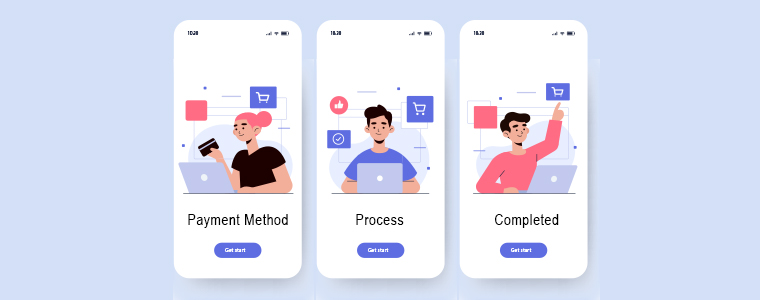
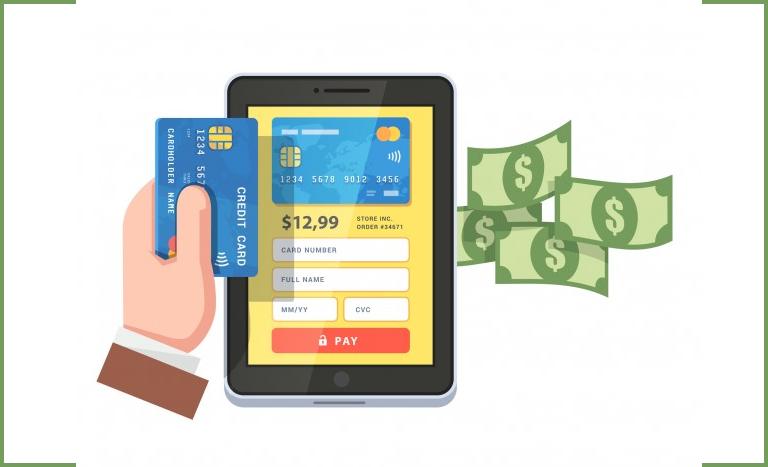
Add options for multiple payment methods & be sure to have the security at par.

9. Optimized Checkouts:

Lengthy checkouts can increase the cart abandonment rate & frustrate the customers. To aid that, optimize the checkout process by having a quick yet secure one-page checkout & by prefilling some entries from the previous purchases, like delivery address, phone number, etc.

10. Order Tracking:

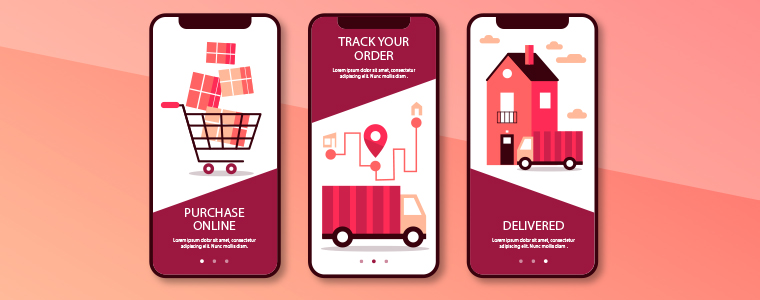
Add order tracking features in your app. Allowing your customers to track order improves customer satisfaction & also makes it easier for the support team to resolve any delivery related issues if any arises.

11. Push Notifications:

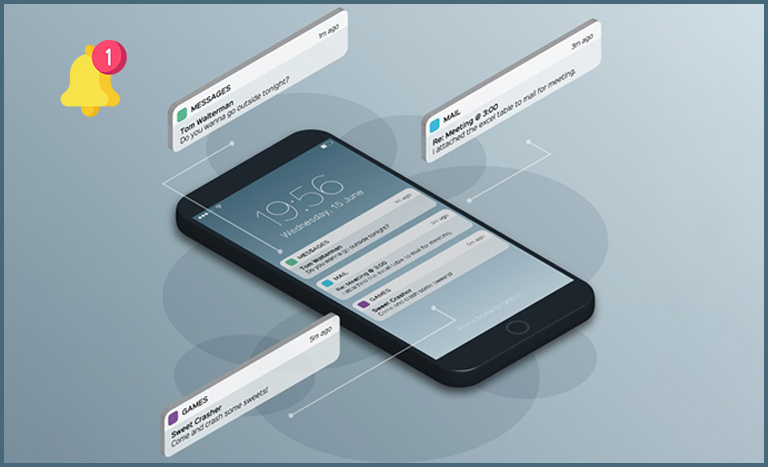
Push Notifications drive more sales by improving user engagement & retention. They also provide effortless personalization using automated notifications. Some of the common usages of Push Notifications are for birthday wishes, abandoned cart reminders, price drop notifications, upcoming sale reminders, etc.

12. Chat Support & Chatbot Integrations:

Allow your customers to reach out to your support team at any time of the day. Adding chatbot fulfills that need & also is a preferred mode of communication by the app users. Chatbots can even be automated with AI to reduce a load of your chat support team from manually handling every query.

13. Load Speed Optimization:

Having an app that takes too long to load its pages & content, is not ideal for the fast-paced users. So, make sure to optimize the loading time so that your eCommerce Mobile App runs smoothly.

Factors From Admins’ Reference:

1. Choice of eCommerce Solution:

If you are willing to build a new eCommerce App, then choose the right solution to build your app. Some of the common platforms are PrestaShop, Magento, OpenCart, WooCommerce, Shopify, etc.

2. Custom App Theme Development:

If required, businesses can opt to develop a custom-designed theme that’s unique to their app. This allows more personalization of the app & improves brand recognition.

3. Security:

Have all the useful encryptions & relevant certificates to keep your eCommerce Mobile App secure to every last bit. Having security on platforms that use online payment is a must.

4. Admin Panel:

The backend/admin panel of an eCommerce must be convenient to use even for the admins/ vendors/ merchants. Make sure that your eCommerce Mobile App Development team equips your business with such a dashboard.

5. Branding:

Choosing the theme design from pre-existing templates can limit some of your design needs according to your business. You could either opt for getting your own custom theme designed or you could make heavy customizations in an existing theme. For both the route, the result is a personalized theme that is unique to your business & helps in improving your brand recognition.

6. Quick HomePage Editing:

The homepage is something that eCommerce businesses need to change from time to time. Hence, admins must have a quick editor especially for customizing the homepage. Also, the editing panels must be user friendly & less time-consuming.

7. Live Synchronization:

Businesses with both an eCommerce website as well as a mobile app must have both their platforms synchronized. In such cases, it is likely that both your app and website use the same database. This ensures Automatic Inventory Management & both the platforms remain synchronized in real-time with each other. Therefore, changes made on one instantly reflect on the other.

8. Testing & Quality Assurance:

Rigorous testing must be done before the app is launched on the app stores. Accordingly, faults must be debugged for quality assurance.

9. Multi-Vendor Marketplace:

If your business model demands so, then your app must support multivendor marketplace configuration.

10. ASO (App Search Optimization):

Just like SEO is for improving the search engine rank of websites, apps can also be made to stand out on the app stores by following the ASO. Have the ASO features in your from the beginning itself. It helps to increase the visibility of your eCommerce Mobile App on Play Store / App Store.

11. Analytics & CRM Integration:

Mobile Apps help businesses to get deeper insights into their app users. To fully utilize that, integrate an analytics tool like Google Search Console/ Analytics. Similarly, choose a CRM that serves your business needs. They ease the decision making a task for the eStore owners & admins & helps make smarter marketing strategies.

12. Add-ons & Plugin Integration:

Add more functionalities in your eCommerce Mobile App using plugins/ add-ons. Under an expert app development team, you could even develop your own custom plugin to suit your exact business needs.

13. Scope For Unlimited Customizations:

Most businesses end up going customizations in the future to keep up with the ever-changing trends. So, make sure that your eCommerce Mobile App can undergo desired customizations. Keeping the mobile app updated with the latest trends is a crucial factor while eCommerce Mobile App Development.
If you are looking for custom eCommerce mobile app development and give a boost in sales and revenue of your business. Drop us a message at support@knowband.com.

At KnowBand, we also offer ready-to-go native Mobile App Builder for following eCommerce platforms:
PrestaShop Mobile App Builder

OpenCart Mobile App Builder

Magento Mobile App Builder

Magento 2 Mobile App Builder

WooCommerce Mobile App Builder

Reasons To Develop eCommerce Mobile App For Online Websites in 2020

It’s 2020 now, & mCommerce has already marked its lead in almost every aspect eCommerce and retail industry. If you are associated with an eCommerce business that still doesn’t have your eCommerce Mobile Application, then there is a possibility that your might be missing out numerous sale and growth opportunities.

Just having an eCommerce app isn’t enough, you must keep it optimized & well-tailored according to your unique business needs. To stand out from the competitors & to serve the customers better to make more profits, modified eCommerce apps play a huge role. Here are some of such factors that you must consider while developing or customizing a shopping app for eCommerce. Get to know these and keep a match with the trends.

Customer-Centric Approach:

1. User-friendly Interface:

Having a complicated front interface can scare off a few visitors from the app. Hence, the easier an app is to operate, the more positive engagement it gets from the app users. To complement that, keep the UI & UX at par. The best option is to go for the DIY editor customizable home screen. The benefit with that is the store admin can design the home screen as per their choice and business requirements.

2. Simplified Onboarding Process:

Whenever a new user onboards the app, add interactive instructions & graphics to guide the user with the basic functionalities of your app. Also, to make the signup & login easier, integrate social logins like Facebook, Google, etc. You can also use the fingerprint scanning feature of the smartphone devices to add one more option for login, i.e. fingerprint authentication.

3. Layered Navigation:

If your business has products with different categories, make sure to add proper sorting & filtering options. Also, while adding links for categories & subcategories on the navigation menu, make sure that the user doesn’t need to make more than 4 to 5 clicks to reach their choice of subcategory. Easier it is to find products on the app, more are the chances of purchase.

4. Multi-lingual & Multi-Currency Support:

If you serve non-English speaking customers as well, equip your app with all the relevant languages. You may or may not need to include RTL scripts as well as the Arabic language. Similarly, for different countries, you must configure your app to support payment in multiple currencies. The integrated languages in the eCommerce apps can be regional as well.

5. Offline Mode Accessibility:

The best thing about mobile apps (when compared to websites) is that apps can be configured to function even with no internet connection. Although app users can’t browse & load newer pages can access their cart, wishlist, my-account page & recently loaded products & categories.

6. Advanced Search Options:

Equip your eCommerce mobile apps with advanced product search features like ‘image search’, ‘voice search’ & ‘bar code search’. Using such features, the app users can easily search for products on the eCommerce app using a reference image or via giving voice commands or even via the image of a barcode.

7. One-Page Checkout:

The checkout page can be optimized by placing only the necessary entries on a single page. Also, some of the entries can be optimized to have pre-filled data from the previous purchases, like shipping address, phone number, etc.

8. Order Tracking:

Allow your customers to track their orders by adding order tracking features in your eCommerce app. It not only makes it easier for customers but also eases the task for customers to resolve any delivery related issues (in case any arises).

9. Multiple Payment Methods:

Make sure that all the payment methods on your eCommerce website are functional on your eCommerce mobile app as well. You can also introduce mobile-friendly payment options like eWallet integrations like PayTm, PayPal, Google Pay, etc.

10. Chatbot & Chat Support:

Provide improved customer support by integrating static or dynamic chatbots in your app. Especially the dynamic chatbots have a lot of scope with AI automation & can serve the customers with accurate automated response 24/7.

11. Security:

Above all, security is one of the most important factors in an eCommerce Mobile App. The shopping apps for eCommerce must have secure payment gateways. The overall app must be secure because of personal data of users being stored like addresses, phone numbers & payment details like card numbers, etc.

Admin-Friendly Approach:

1. Convenient Admin Panel:

Whichever platform your eCommerce Mobile App Development suggests you opt for, make sure that the admin panel is user-friendly for admins & vendors to use. Because eCommerce mobile apps always need to be re-designed every now & then, a simplified yet feature-rich backend is a must.

2. Push Notifications:

Set up the firebase in a way that you can send an unlimited number of Push Notifications to your App Users. You must also be able to easily create, automate & send those notifications conveniently from the backend.

3. ASO Integrated Features:

Building a spectacular eCommerce pays off well if it gets more visibility on the app stores. Hence, from the beginning itself, you must add necessary App Search Optimization elements in your app to make it rank better on the app stores.

4. Scope For Future Customizations:

With the technology & consumer trends being regularly evolving, your Mobile App is sure to require customizations in the future. Hence, while building an eCommerce Mobile App make sure that your app can undergo heavy customizations of any kind in the future. Certain third-party plugins & extensions can also prove to be useful for certain modifications.

5. Live Synchronization:

Have both your eCommerce app as well as the website to be synchronized in real-time. This way all the changes made on one reflects on the other & keeps the inventory management automatic.

6. Multivendor Marketplace:

If your business model requires multivendor configuration, then your Mobile App must have all the necessary features & elements to run smoothly on such a configuration.

7. Audience Insights:

Integrate analytic tools with your eCommerce app so that you can get deeper insights into your app users. This also helps your team to make smarter marketing decisions & to add customizations according to users’ needs.

Ending Comments:

We, at KnowBand, make sure that your eCommerce website & mobile app serve both store admin and online shoppers in the best way possible. If you require any assistance in custom eCommerce Mobile App Development, feel free to reach out to us at support@knowband.com.

In case you have a running eCommerce store on any of the following platforms, launch a pair of native shopping apps with ready-to-go plugins:

PrestaShop Mobile App Builder

OpenCart Mobile App Builder

Magento Mobile App Builder

Magento 2 Mobile App Builder

WooCommerce Mobile App Builder

Tips To Boost User Engagement with eCommerce Mobile Apps

Often while online shopping, we all end up praising a few applications whereas uninstalling some of them. There might be various factors behind the satisfaction but, next-level creativity to serve users better is one of the primes. Worldwide mobile shoppers prefer to choose that eCommerce mobile app only with whom they feel comfortable and reliable.

That’s where user engagement comes into the picture for a shopping app. Be it credits awarded for shopping or money cashback, the mobile apps have all such necessary tactics to improve user connectivity & brand reputation.

Further, most eCommerce stores have already acknowledged that user engagement via the Mobile App channel is much better when compared to their website. This might make you wonder about the ways to achieve it for your eCommerce Mobile App? Well, this article covers all such tips and tricks. Just give it a read and you’ll get to know all the secrets.

TIP: User On-Boarding & Welcoming

The majority of newbie mobile app users either come to know about the app via website or directly from app store. In both cases, they expect to have a friendly & un-complicated first impression of the app. Hence, to improve the user onboarding, you can have:

1. Social Logins/ Signups:

It makes easier for the users to register/sign-in to your shopping app. The cluttered login process might annoy customers. The most common and better approach is to offer various social login options like Facebook, Google, etc. Also, various modern apps come up with inbuilt Fingerprint & Phone No (OTP) login.

2. Quick Tutorials For New App:

A simple 3-5 step tutorial screens help to guide new users about the basic functionalities of the apps. Though everyone is aware of the basic shopping app working, yet the tutorials will do no harm.  Instead, they will save precious time for users.

3. Welcome E-mails & Messages:

During signup in an eCommerce mobile app, you can set up an automated sending of welcome E-mail & SMS. This might sound like very common but have been proven to be much helpful in gaining users’ trust and reliability.

TIP: User-friendly Navigation:

The tab bar, navigation menu & other countless features in an app must be made to function in accordance with the dimensions & features of smartphones/tablets.

1. Sticky Menu:

In mobile devices, the toggle menu on the navigation bar should be a ‘sticky menu’ so that the user needn’t scroll all the way to the top in order to access the menu.

2. Product List & Grid View:

As per their preferences, mobile shoppers get to choose either a list view or grid view to browse products. Both of them should offer a more precise & detailed view of the products.

3. Browse Products Horizontally:

It’s a common style for shopping apps to have vertical swiping in order to browse products. Along with that, an additional feature can also be added offering left & right swipes. It further enhances the user experience & engagement especially for the millennials who are fond of quick & seamless browsing.

TIP: Personalization Of Apps:

As per various survey reports, millennials are frustrated with the irrelevant emails & notifications being shared with them. They, being a major percentage of e-shoppers, must be served with personalized newsletters & notifications.

1. Push Notifications:

Push notifications on the mobile devices are quite an efficient tool to drive sales for your store. The personalized notifications have proved to boost user retention & conversion rates by 3 times when compared to email campaigns & web notifications. Using your creative and design skills, leading users to a successful purchase is more facile.

2. Newsletter Subscriptions:

Out of all categories available on shopping websites/apps, users may want to opt-in for selective newsletters. For example, the female app audience on a clothing e-store may want to follow up with the newsletters of only the ‘Women Apparels’ section. Hence, to have better user engagement, such personalized opt-in newsletters popup forms must be configured on a Shopping App.

3. Multi-Lingual & Multi-Currency Support:

For personalization of the app & catering to international customers in a better way, multiple languages & currencies should be available in the apps. For Arabic, Persian & similar languages that follow right to the left pattern (RTL), should be made compatible as well.

TIP: Simpler Product Search:

1. Layered Navigation (Filter & Sort):

Easy navigation has always been a prime requirement for eCommerce apps. With filtering and sorting of products, it is just a matter of moments for users to find their desired product. This feature improves user-experience by narrowing down the time spent on successful purchases.

2. Wishlist:

Wishlist functionality aids customers with shortlisting the favorite products that they are willing to buy. Certainly, this saves the user time by displaying the bookmarked products on a single screen.

3. Social Sharing Of Products:

The users get to share eCommerce mobile app products on social media channels like Facebook, Google, etc. This way, the existing users can lure the potential audience available on various social networks.

TIP: Offers/ Discounts & Banners:

1. Flash Sale (Time Based):

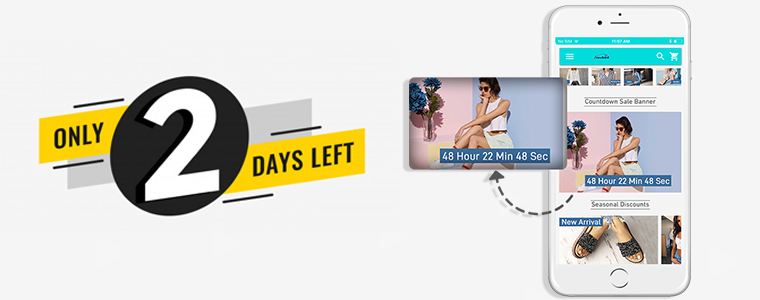
Most shopping websites & apps use the strategy to create an urgency for online product purchases. This has been already proven quite helpful for online retail biggies. Offer timer-based countdown sale on your app & encourage customers to buy products as soon as possible. With the limitation, online shoppers tend to purchase more quickly.

2. Discount Vouchers & Coupons:

Discounts are everyone’s favorite and play a huge role in increasing sales. All such vouchers & coupons running on your website should work seamlessly in your eCommerce mobile app as well.

3. Gamified Email Subscription:

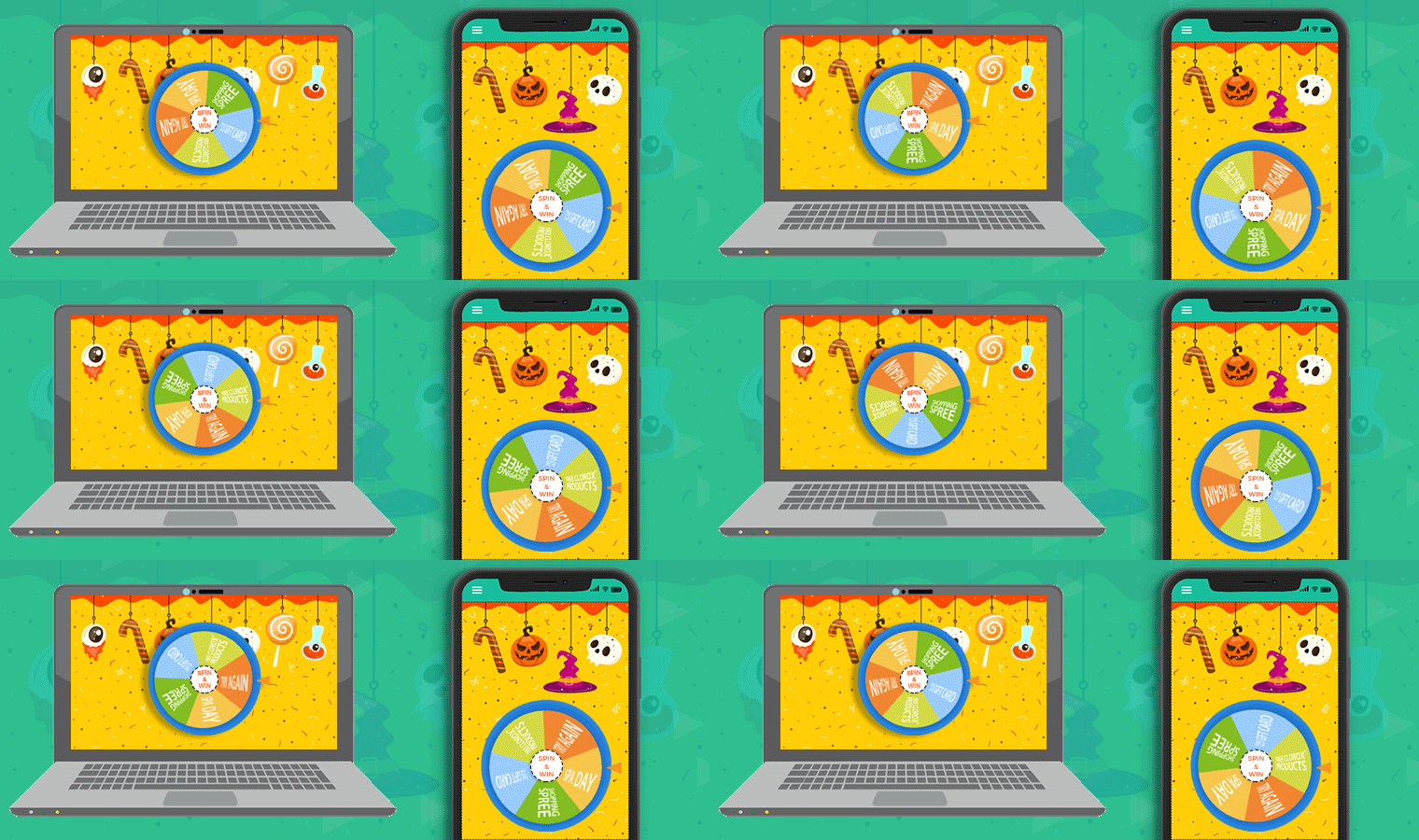
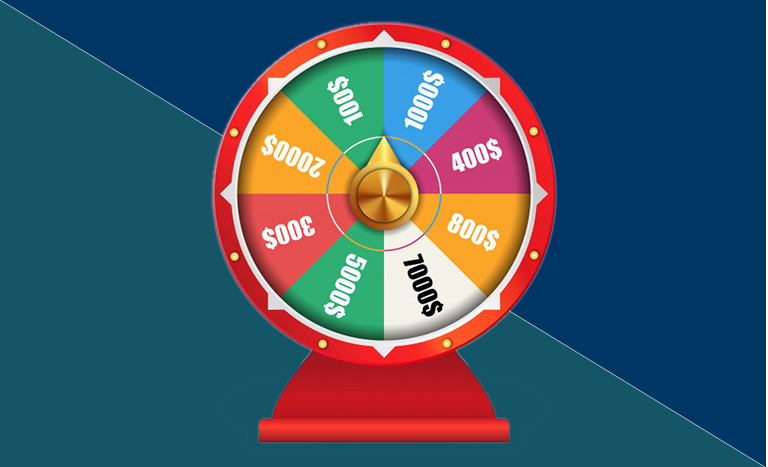
You would have observed a gamified ‘Spin & Win’ wheel-like interface on some eCommerce websites. The user who spins its digital wheel wins a discount mentioned in the pie. Some sections may even state ‘try your luck next time’. Whether the user gets a desirable discount or not, either way, he/she ends up submitting E-mail address. The outcome here is solely beneficial for remarketing purposes. The users also get an interactive interface to gain offers.

TIP: Feedback, Loyalty & Reward Points:

1. Feedback:

Often, we all receive in-app feedback popups that ask-

  • ‘How would you rate us out of 5 stars?’
  • ‘From a scale of 1 to 10, how likely will you recommend us to your friends?’

Such surveys help the e-business to be aware of their weak areas are opens the doors to improvisation and improvement. It also ensures to serve customers in a better way.

2. Customer Loyalty:

You can award frequent shoppers with loyalty cards that can be used as a discount coupon while next purchase. Improving customer loyalty in your eCommerce mobile app can be a direct boon for your sales.

3. Reward Points:

On each online purchase, an eCommerce mobile app rewards its customers with some points. Upon accumulating such points & reaching a limit of say 1000 points, customers receive major cashback & offers. This encourages customers to shop more from the app.

4. Referral Points:

You can provide a unique referral code to each of your app users. When the user encourages another newbie user for signup using his/her referral code, you can award the former one with relevant reward points.

TIP: Live Chat For Instant Support:

1. Social Chat Options:

Your mCommerce shopping app with inbuilt chat support will allow users to communicate in case of any issue. For instance, WhatsApp & Zopim (Zendesk) chat in the mobile app is more likely for customers to get the required assistance.

2. ChatBots:

Many applications also have a chatbot integrated with them. It further offers more opportunities to even set automated messages for certain types of pre-defined user queries.

TIP: Checkout & Payments:

1. Favorable Payment & Shipping:

We all prefer our favorite payment method when it comes to making online transactions. That too in online shopping, the users tend to leave products in the cart without successful purchases in case of unavailable payment options.  The store admin should keep in mind to add all necessary shipping & payment methods on the eCommerce shopping app. This can be a prime measure to reduce the rate of cart abandonment.

2. Handy Checkout Process:

Ask only the necessary details on the checkout screen. The one-page checkout in eCommerce mobile apps requires only essential order related entries before leading to the payment screen. This way, the user even gets to review the complete order before the final purchase.  Having a single screen checkout aids the users from backing out of lengthy form fillings. It engages better with the users & helps in achieving high conversion rates.

3. Order Tracking:

The order tracking feature in mobile apps must allow the customers to be aware of the whereabouts of the placed orders. The mobile shoppers can keep an eye on the delivery of the previous purchase items. Keeping a potent tracking option will also motivate users to prefer your app again & make more purchases to increase revenue.

Summing Up:

For eCommerce Shopping Apps, these are some of the trendy ways to engage more users in an organic way. It not only improves the sales but also builds a good brand reputation. These days, most of the shopping apps are built using a readymade tool like eCommerce Mobile App Builder. It handles the complexities and burden of e-store owners for the creation and management of shopping applications. Having listed all the prominent mobile app user engagement tips, I hope you find this article helpful.

Check out Mobile App Builder for various eCommerce platforms: 

PrestaShop Mobile App Builder

OpenCart Mobile App Builder

Magento Mobile App Builder

Magento 2 Mobile App Builder

WooCommerce Mobile App Builder

List of Other Modules Compatible with PrestaShop Mobile App Builder

Going by the name, PrestaShop Mobile App Builder is a readymade tool to convert your online eCommerce store into mobile apps. The plugin offers a chance for all PrestaShop store merchants to switch their website business on mobiles.

Every eCommerce business is somewhere in the struggle to improve their online presence among the surrounding competition. Having a mobile commerce application can simply help in targeting the huge audience & boost sales.

Creating Native Apps With This Extension

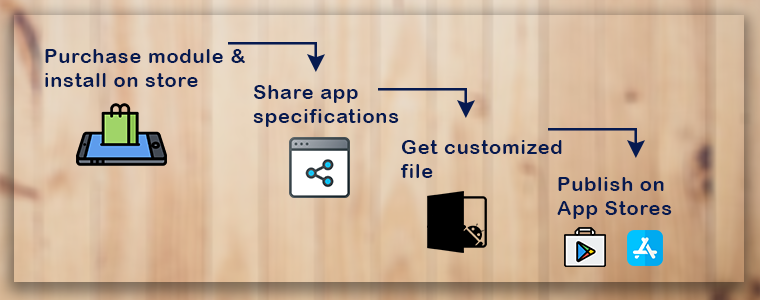
You will be amazed to know that PrestaShop Mobile App Maker is completely code-free. If you’re not a coder or more of a technical person, this is the perfect solution. The PrestaShop Mobile App extension allows anyone with a running PrestaShop website to own a pair of native apps. All you need to follow these 3 steps:

Step 1: Purchase the PrestaShop Mobile App Builder extension from KnowBand.

Step 2: Fill pre-requisite app details.

Step 3: Review apps & get them published on app stores.

Easy, right? Free of cost initial support & one-time payment with this plugin are cherry on the cake.

Other Compatible Modules

Every online business has a different set of audiences with separate requirements. This thought has been well kept in mind while designing the PrestaShop Mobile App Creator. The result of this is the module comes with endless possibilities of customization and integration. All you need is to just ask & our developers will make that work in apps.

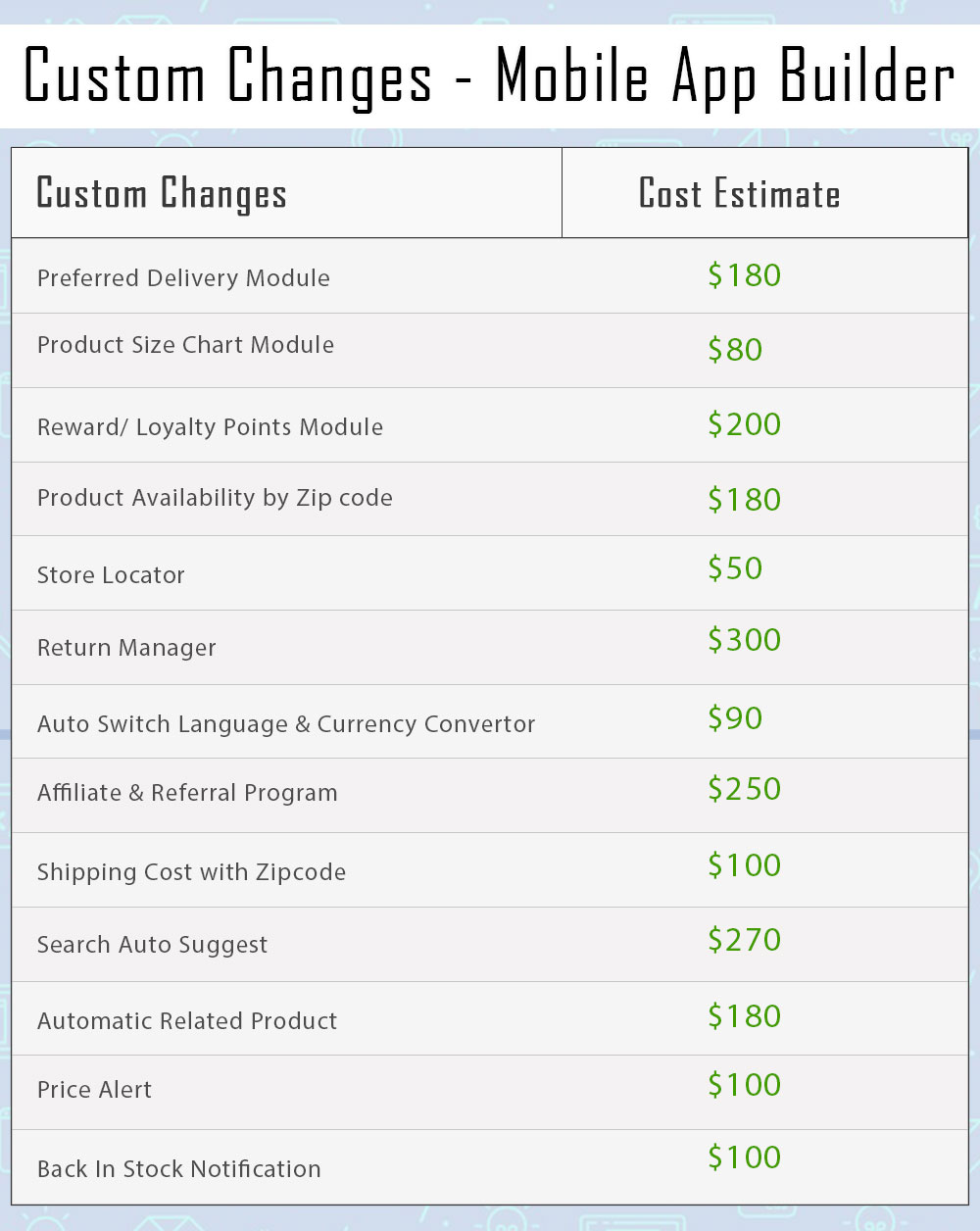
Note: All sorts of custom changes are subject to additional costs based on the involved time & efforts. Although, the prices will be kept as reasonable and fair as possible.

Here is the list of a few modules which can be made compatible with PrestaShop Mobile App-

1. Product Size Chart

When it comes to purchasing a clothing item, online shoppers often have doubts regarding product size. They are not sure which size would be a perfect fit for them. This eventually leads to customers placing a return request later because of the size issue.

Let finding the appropriate size product not be a problem anymore for your visitors. The Product Size module adds a “View Size Chart” section on your product pages, with the help of which shoppers can check the measurements of a product for every size type. This ensures that your customers do not face trouble with the product size.

Get to know more from here.

Rough Cost Estimation: $80

2. Return Manager

One of the major concerns for eCommerce businesses is product returns. They cannot be eradicated, however, if managed well, can be reduced by a significant margin. Manage your returns without any hassle with the Return Manage module.

The module offers three types of return choices to your customers: Store Credits, Refund and Replacement. You can set up the return policies, set up the return terms and conditions, track your returns and do much more. The module not only helps you reduce your eCommerce return rate but also improves customer retention.

Get to know more from here.

Rough Cost Estimation: $300

3. Automatic Related Products

E-commerce businesses benefit a lot from cross-selling. It is one of the effective strategies implemented by them to increase their store sales. If you run an online business, you should follow it too.

Encourage cross-selling on your website with Related Products module. The module lets you display top-visited products, best sellers, new products and products based on a user’s history. You can customize the display position and filter the products to be displayed as per keywords and attributes.

Get to know more from here.

Rough Cost Estimation: $180

4. Preferred Delivery Time

Many times customers demand the product to be delivered at a specific date and time. Allow this facility to your customers with Preferred Delivery Time module.

The module lets you define a minimum delivery gap to allow customers to choose the preferred date and time. You can specify the time slots, the time cycle for delivery, and also exclude days on which the delivery won’t take place.

Get to know more from here.

Rough Cost Estimation: $180

5. Loyalty Points

A majority of online businesses run loyalty programs today. Loyalty Points module aims to improve customer retention on your website and also builds customer loyalty. It lets you provide loyalty points to your customers on some certain tasks like when they have shopped for more than the specified amount, when they have chosen a specific payment or shipping method, when a user successfully registers, or when a user places an order, etc.

Get to know more from here.

Rough Cost Estimation: $200

6. Product Availability Check by Zip Code

Let customers check right on the product page whether the product they desire to purchase is available for delivery at their location or not.

The module adds a Zip Code verification check on your product pages, using which the visitors can enter their area zip code and verify whether the item is eligible for delivery for the specified Zip Code.

Get to know more from here.

Rough Cost Estimation: $180

7. Store Locator

The store locator module encourages the self pick up facility on your website. Many a time, a product reaches the shipping centre on time but takes too long for the delivery. In such cases where customers want the product to reach them as soon as possible, they can choose for a self pick up.

The module lets you add your store addresses from the back-end which are available to the customers on the checkout page. They can filter the stores as per the distance and choose the nearby store accordingly.

Get to know more from here.

Rough Cost Estimation: $50

8. Auto Switch Language and Currency

If your business is set up internationally or you are planning to do so, the Auto Switch Language and Currency module is a must-have module for you.

The Auto Switch Language and Currency module change the language and currency as per the visitor’s location. It tracks the IP address of the visitors and automatically converts the website content into the native language.

The module helps you expand your business on a global level and makes it easy for outsiders to shop from your website.

Get to know more from here.

Rough Cost Estimation: $90

9. Affiliate and Referral Program

Affiliate and Referral Marketing has helped brands gain a lot of new customers and sales. What’s exciting about these programs is that they create a win-win situation for both the customer and the brand. The affiliate brings you customers and you offer them some incentives in return.

With Affiliate and Referral Program module, you can start a similar program on your store. The module allows users to register as an affiliate on your website. Once successfully registered, they can start referring your website to others and earn some exciting incentives for a successful referral. The affiliate can share the referral code, share a direct link, share the link via email, share the link on social media or share the voucher code with other people.

Get to know more from here.

Rough Cost Estimation: $250

10. Shipping Cost by Zip Code

This module lets you charge different shipping prices for different zones. The admin can specify the shipping price for different countries from the back-end. When a shopper enters the zip code in the address fields, he or she will be charged the shipping cost as per defined by the merchant.

Get to know more from here.

Rough Cost Estimation: $100

11. Search Auto-Suggest

The Search Auto Suggest module enhances the search functionality of your website. With the help of this module, you can display the product price right in the search suggestions (in the drop-down list) and also the product category under which the product falls.

You can customize the search bar and also track the searches performed by the user. You can also limit the number of products to be shown on the search results and also specify the minimum letters that need to be entered for the search system to work.

Get to know more from here.

Rough Cost Estimation: $270

12. Price Alert

Many times it happens that customers drop the purchase idea because they feel the product price is too high. Now with Price Alert module, the customers can specify the desired price for that product on the product page and get price alert over their email whenever there is a reduction in the product price as per what they wanted.

Get to know more from here.

Rough Cost Estimation: $100

13. Back in stock Notification

Online shoppers often get disappointed when they visit a website to purchase a product but find it out of stock. And they have to keep checking back multiple times to check its availability. Reduce this hassle with Back in stock notification module.

The module allows shoppers to subscribe to the product availability alert. Hence, if subscribed, the user will be immediately alerted about the product availability that it is back in stock so that they do not miss out on the purchase.

Get to know more from here.

Rough Cost Estimation: $100

Summary of Custom Changes

Any confusion? Discuss with us on support@knowband.com

How eCommerce Mobile Apps enhance Customer Loyalty?

The revolution in the mobile app space has created a significant buzz in our lives. Almost every sector has been digitized with the impact of mobile apps & the eCommerce industry isn’t an exception to this. After online commerce, mobile commerce has changed the perception of how users shop products these days. Various research & studies are confirming the fact that users prefer eCommerce mobile app & are more loyal to that as compared to desktop websites. The simple factor behind it is that the users get all relevant product information at their fingertips.

Mobile commerce & customer loyalty go hand-in-hand. When it comes to bonding of your online store with worldwide users, mobile apps are the best solution. Those days are gone when marketing through websites was enough to bring potential users to your store. Currently, mobile apps are the bridge between your business & the user. Technically, an app takes your store straight to user’s pockets, compel them to browse & purchase products.

Here, I am discussing a few points which will hopefully clear the value of launching mobile shopping apps. Read them:

#1 Keep users updated about latest happenings

In online shopping, the users are always keen to get the best products at reasonable prices. If you can adapt this strategy, it will make a huge impact on your sales. At times, the users keep on spending their valuable time in searching best offers. Don’t let them struggle. Try to keep them fully notified & updated about the best deals on your store along with upcoming sale or offers. You can even let specific users pre-sales offer before it’s available in general.

Marketing store deals & offers is much easier with a handy push notification tool. It not only builds your brand reputation but also notifies users about the offers even when they are not using the app. The personalized push notifications will deliver the right information to the users & compel them for instant purchase.

Also Read:

#2 Personalize App Home Screen for better Experience:

The home screen has its importance for a shopping app as the basis interaction begins here only. Try to highlight daily deals, best offers, new arrivals, seasonal discounts, etc. with attractive banners & graphics. This will compel the users to browse the selected product grouping & has the high chances of successful purchase as well. The store admin can even go for Flash Sale or Timer sale to create the necessary spark.

More you personalize the app, more it gets able to connect with users. The users even feel more valued with the availability and ease of everything required. Keep other screens of your app simple & intuitive offering better user experience gaining customer loyalty in return.

Also Read:

#3 Offer Discount Coupons & Rewards to boost sales

Coupons had been a strengthening factor in increasing the conversion rate of your online store. That too for the long past back. It will also work with mobile apps. Make sure the coupons running on your website also work on mobile apps & allow users to avail the valid discount. It will even reduce the rate of cart abandonment.

Everyone around us loves to get a price drop or something extra while shopping products. You can use your mobile app to build the right strategy for that. Offer reward points for their previous purchases or let them earn points by app referral system. It will also invite other users to your app & will maintain a sense of excitement about the purchase.

Also Read:

#4 Provide 24*7 User Support to gain trust

Customer interaction is a must for an online business. Often, the users need some sort of confirmation or having doubts before making payment. We should have a relevant medium to curb out their queries. Mobile Apps are the best suited for this job. They allow the users to directly contact you with inbuilt WhatsApp or Zopim chat options.

The prompt response to their queries will make them satisfied & increase customer engagement as well. Moreover, it brings you the best chance to improve user retention & gain loyalty. This is also one of the leading factors behind satisfactory feedback for your products.

Also Read:

#5 Strengthen your positive brand image

The mobile apps improve the visibility & reach of your online store & thus strengthen your brand presence worldwide. Nowadays all the leading eCommerce giants are majorly accessed through their mobile apps. That big is the scope of mobile apps in today’s market branding.

Your app icon in the user’s devices, brand logo in apps makes sure that whenever users browse the mobile, your app will notify them about the brand. Keeping all your online store details readily available for users, the mobile apps form a positive image for your brand improving user retention & loyalty.

Also Read:

Conclusion:

With the above-discussed points, it must have been clear that mobile Commerce app can be a potential source of engagement & loyalty for your eCommerce business. It connects well with the right audience & hits where it should. Thus, to build strong user-base with increased revenues, creating an eCommerce mobile app should be your very next move.

The “Mobile App Effect” In eCommerce Industry during Holiday Season

Hey all eCommerce store owners, the holiday season is about to begin and what are your plans? This is the time for more conversions & sale opportunities for your business”. Right? According to the previous reports, last year in US holiday season sale surpasses 1 trillion mark for the very first time. This wasn’t just from the online store, but mobile apps were also the leading pillar behind this growth.

So, what’s your game plan for this holiday season sale? Make sure tapping into mobile space is in the list. Why? Let’s find out in detail.

Effects of Holiday Season

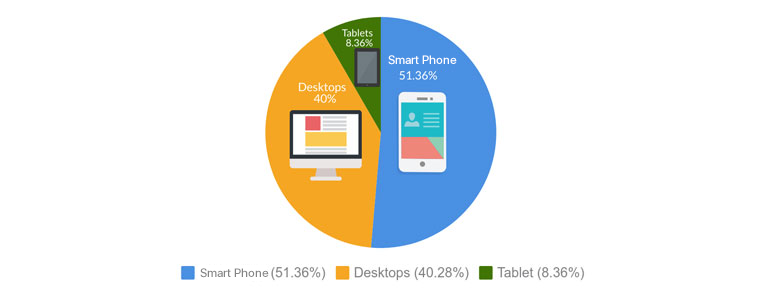
According to studies, the number of users visited by mobile device is 51% where desktops users were only 40% worldwide. Smartphones handled half of the traffic during holiday season. As mobile website represented 51% of internet traffic where desktops generate 40% of internet traffic and tablets represent only 8.3 %.


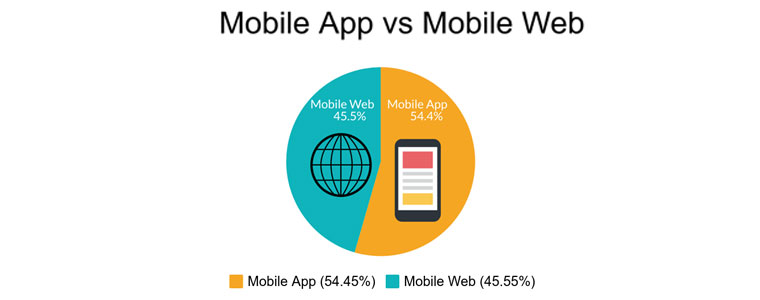
Well, if you look into the usage of mobile apps versus website, mobile apps are always one step ahead of websites. Online shoppers prefer mobile apps rather than websites.
As you can see mobile app completely dominated the market and this is the main reason behind mobile app started take over on desktops and tablets.

Mobile Impact on Holiday Season

Black Friday:

The sales on Black Friday jumped 23.6%, where more than $2 billion of the revenue came from smartphones in U.S.. The mobile device showed the increment of 8.5%.

Cyber Monday:

Cyber Monday was the most awaited and biggest sales day of the year with revenue of $7.9 billion in U.S., an increment of 19.3 %. Almost half of visit came from mobile devices during holiday season sales and this number is persistently growing year-by-year.

These numbers clearly indicate the impact of mobile apps during holiday season. Smartphones becoming more popular and an important part of this holiday season. After seeing this impact many marketers predicted this would be the best year for online retailers.

1. Mobile Apps installation during Holiday Season

According to reports, In this holiday season the number of mobile app install increased as compared to an average day of any month. Because people looking forward to get their hands on year best offers & deal.

The reason behind this huge growth of app installation is offers and deals offered by eCommerce store provider. Also,

2. Traffic on Mobile App During Holiday Season

In 2017, 68% of traffic came from only mobile apps as compared to desktops worldwide. Mobile apps are the new channel which gives a boost to traffic on these days. The graph of time spent on mobile device is also going on upward direction.

According to business experts, On Christmas Eve the number of visits by mobile apps were nearly 72%. This was not just with Christmas but also Cyber Monday, On Thanksgiving day, mobile traffic increases 158 percent compared to a normal week. Many expert says that, In this holiday season mobile app going to dominate both traffic and conversions and set a new milestone.

According to source, in 2019 the number of users who use mobile payments to pay for the purchase in U.S. Stores will reach 150 million people. This is almost the country’s half population.

3. Transactions of Mobile During Holiday Season Sale

This growth is not just in mobile traffic area but also it changes the mobile transactions numbers. Almost 40% of eCommerce purchases during the 2018 holiday season were made by mobile devices. On Black Friday, there is a 300% increase in completed transaction says by a report. Nearly 40% of all purchases made by smartphones during 2018 holiday season sale.
Around 80% of Americans are online shoppers in which more than half of them have made their transaction via mobile devices.
A report says that the number of transactions were more during these days as compared to normal days.

Result : After going through all this research, we can definitely
say that Mobile apps are clear winner here. Final comparison between mobile app vs mobile websites:


Growth of your business during holiday season

You will see a huge growth in the holiday season in mobile app industry. From spending time on mobile apps to transaction, the numbers are increasing and its not slowing down. This is the most awaited time period in eCommerce industry for both users & merchants.

How can you make the most of it? Simple, go mobile! And it’s so easy beyond your imagination. You can get it done in just a few days without technical knowledge. Knowband offers a module to build mobile app for your eCommerce store in just a few clicks for the following platforms:
PrestaShop Mobile App Builder
OpenCart Mobile App Builder
Magento Mobile App Builder
Magento 2 Mobile App Builder
WooCommerce Mobile App Builder

Major benefits of eCommerce mobile app builder:

1. Boost Engagement

Most awaited season for online shoppers is holiday season. In this time, user engagement reach to its peak and this data is increasing year-over-year with very huge margin. Well if we are talking about user engagement, then its unfair to not mention the name of push notifications.

Turning point: Push notification is one of the best tool to boost your user engagement during holiday season sale. These push messages works like a source which bring more users to your store. Push notifications claims higher open-rate as compared to email. Knowband offers unlimited push notifications in their mobile app.
Also, by offering free shipping and flash sale you can create an urgency in your user’s mind and encourage them to shop instant from your store.

2. Increase Sale

From last few years, the number of sales of every store changing in this time period. No doubt mobile app has a big hand in this huge shift which continuously changing the number of sales. The more you spend in attaining user’s attention the more you will get benefit of it which result in increasing the sales number of your store.
During this environment a lot of transactions occurring. Adapting this new advancement in technology can gives you the opportunity to get a piece of this revenue.

But, the question arises how?

Related Links:
How to boost downloads of your eCommerce Mobile App
Top 10 eCommerce Mobile App of 2019
Tips to design beautiful eCommerce Mobile Apps

Game Changer Move

Spin and win:

Well, don’t worry we got you this time. KnowBand provides you an opportunity to get a piece of this revenue in your bucket-list by offering Spin and Win module for this holiday season. You can display a Spin-wheel pop-up to your user’s in this holiday season. This module is specially designed for these kinds of occasions. So, whether it’s a Halloween or Christmas Eve you can present special themes for every occasion.

Spin and Win extension is available for following platforms:
PrestaShop Spin and Win extension
OpenCart Spin and Win extension
Magento Spin and Win extension
Magento 2 Spin and Win extension

Flash Sale:

Flash sale is also one of the essential ways to boost the sales during the holiday season because it creates an urgency in user’s mind to get their hands on the special offer. This urgency can make them to go for purchase. In short Flash sale can be a game-changer for your business in this holiday season.

All Types of Coupons & Vouchers Support:

Your store sales will automatically increase if they get multiple coupons & vouchers while shopping. So, this holiday season provides multiple coupons & vouchers to your user’s and get ready to witness the highest revenue of your store.

Conclusion

Retailers should now focus on mobile apps because they are constantly changing the numbers every year. Also, they have to be prepared for huge peaks during these holiday season. This is the high time to stand out your business different from crowds. So, are you ready for this Holiday Season?

How to boost downloads of your eCommerce Mobile App?

Successfully launched an eCommerce Mobile App & start selling products on shopping apps along with the website. Now, what’s next?

Getting your native Android & iOS shopping app to overcrowded Google Play Store & Apple App Store is just the beginning in the world of mobile commerce. There is much more beyond from here. Being an eCommerce merchant, now two options left for you. One is to wait & let the users discover about your app on their own and the other one is to do something about it & promote the app in the right manner. The later one can be a game-changer for you.

Nowadays, the majority of developers are facing the problem of fewer downloads, after the app is published on App stores. The eCommerce industry itself has huge competition and is growing with each passing day. To get expected downloads will require some efforts & understanding from you. Before getting into that detailing first, let’s discuss how marketing exactly works in the world of mobile apps.

You probably would be aware of the term ASO (App Store Optimization) which is responsible for ranking/position of your app in app stores. App stores have their own ranking criteria which are quite similar to search engine rankings algorithms. Let’s know more about ASO:

#1 App Store Optimization

ASO works like SEO. It handles the ranking of apps in app store search results. This fact is quite obvious that the better ranking of your app will rise both visits & downloads. Developers should optimize the right keywords for the app to make it rank higher in search results. Here are some checklist points for this technique:

1. App Title:

The name of a mobile app plays a vital role in its success. You should go for some catchy yet descriptive title without missing the core value of the brand. Always remember that the name will have an everlasting impression on users. Before finalizing the app name, you should always have a look at the name of your competitor apps. And, the keyword with the highest search volume should be used in the app name.

Apple App Store provides 255 characters to write a title. Whereas, Google Play Store has lowered title limit to 30 char & allows putting keywords in the description instead of the name.

2. Keywords/Tags:
Choose the right keyword for your app & use them in the tags/keywords field of app listing. Apple store allows 100 char limit to insert keywords while the Google Play store allows to add them the long description of 4000 characters.

Just like SEO, keywords will only be beneficial if they are well-suited & match your business domain. So, do proper keyword research & analysis & sneak into some competitor as well if required. It would not harm.

Also, there should be a check on keyword performance as well. If they aren’t able to give downloads after some time, it’s a signal to update them.

2. App Description:

The description for the app plays the same role as a landing page for a website. Description could be a compelling factor for the user reading it to end up with app installation. Both Google Play & Apple App store offers 4000 char description to put them wherever you like.

You should write the description with the thought-process that user isn’t aware of the app at all. For an eCommerce store, the app would have no download charges yet users hesitate to download it for free, why? That’s where your description plays its role to impact their decision.

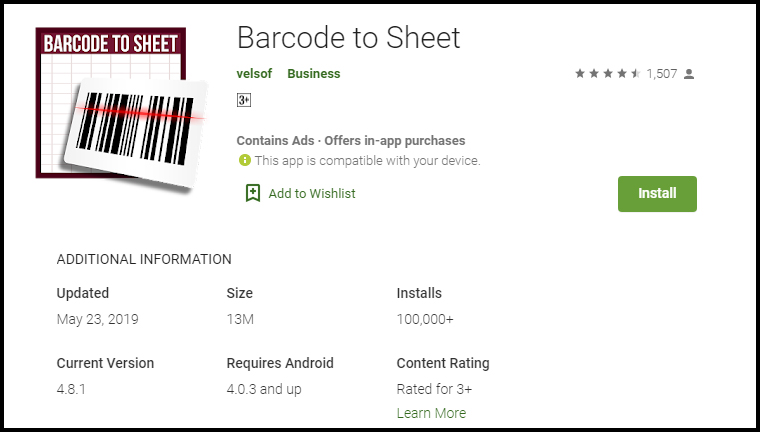
Try to list down all the features & benefits with proper keywords to make the most out of it. For the visual part, make sure the screenshots are appealing and have relevant information. For instance, take a look at how clear & self-explanatory screenshots are of Barcode To Sheet mobile app. The interactive app preview video gives complete info in just 2 minutes.

4. App Downloads:

You should always keep a track of the downloads of your app. It should always keep increasing. The more downloads you will get the higher ranking you will get. Even, the app store also shows the visitors ranking of the tops app In their respective category which majorly depends on the app downloads.

Somehow, if your app is lacking downloads in the initial launch phase, you can even try some third-party promotion to get a rise. The downloads depict the authenticity of your app & help in ranking as well.

5. App Ratings & Reviews:

Being in the retail industry, you would be aware of the potential of ratings & reviews. That works for your app as well. Keep your user reviews positive & ratings higher for better ranking.

Launching a beta version of your app is a way to make sure that it is user-friendly & match expectations. You can even get happy & satisfied reviews from the beginning. In order to simplify this task, try to get fully genuine & real reviews.

Also Read:
The Mobile App Effect in eCommerce Industry during Holiday Season
Tips to create app icon for your eCommerce app

#2 Google Search Optimization:

Yes, Google search it is. You can use it to rank the app in Google searches & get it installed in the user’s devices. The process is quite simple, you just need to optimize app listing page & link it to your website.

1. Interlink Store & Apps:

There should be a proper interlinking between store & app listings. Keep the brand name in app title & description which should have a back-link to your website.

Also, highlight app links on your website homepage for better usability & increased downloads.

2. Allow App Indexing:

Indexing signals Google Bot to crawl the content of a specific web-page. Make sure that indexing is allowed for your app listing page as well.

This will let crawlers go through app description & keywords which will ultimately help in Google ranking of apps. You should even keep an eye on the content of app web-page & update it from time to time.

Actually indexing of application is slightly different from the web-pages. Along with app description, the content available on app screens can also be brought to crawling with deep linking app indexing & firebase app indexing.

3. QR code for App Install:

Display compressed QR codes on your website & let users land straightly to app download option on scanning. This not only improves usability, but also it is a future trend which could affect rankings in coming time.

These QR codes on the home page of the website will grab the user’s attention & straightly lead them to apps for better browsing & hassle-free purchase. Click here to create a low-density QR code.

#3 App Promotion on Social Platforms

As far as eCommerce mobile apps are concerned, social media networks are an effective channel for promotion. You can increase the visibility of your app & get potential no of downloads from there.

Majorly there are two ways to do that. One is to promote the app through your social business profiles on Facebook, Twitter, Instagram, etc. Another one is to run Facebook ads for your app.

Also Read: Social media strategies to take your business next level.

#3 App Analytics

Often it happens that developers focus is just on the download numbers. It’s good, but there should be a check on the user’s behavior & app performance as well. Your app will be uninstalled from user’s devices whenever they face any sort of abnormal behavior.

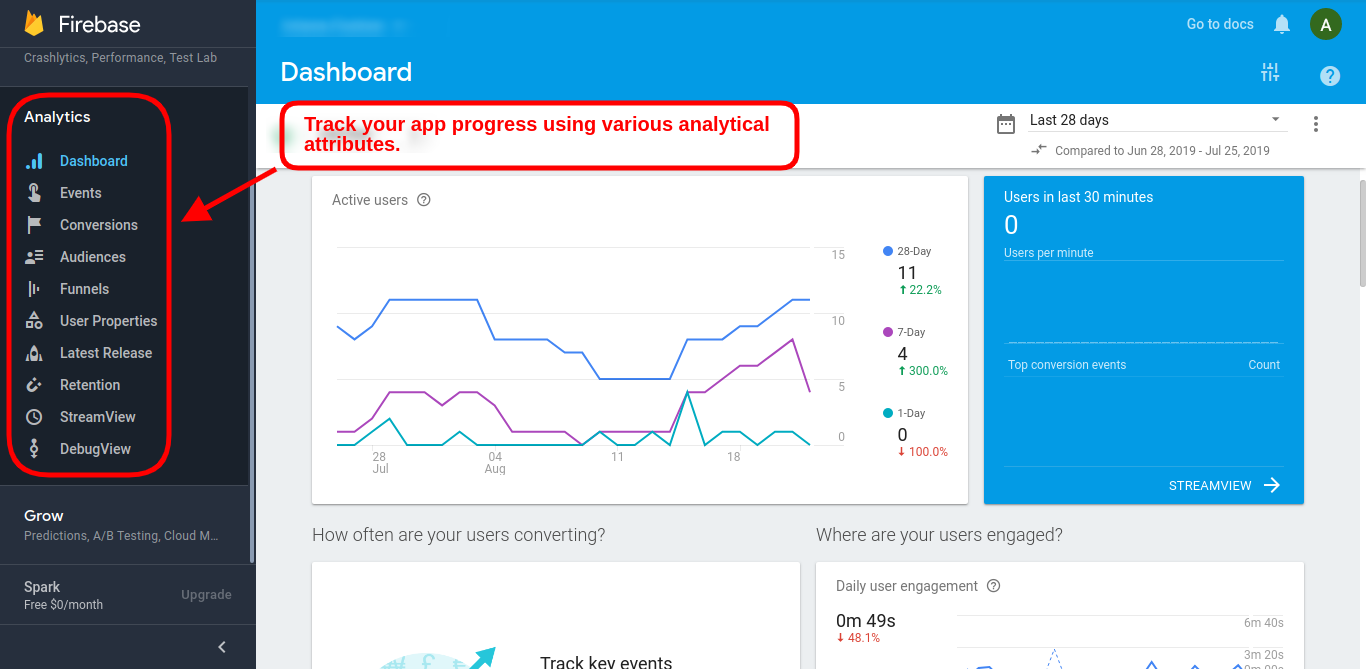
You can use Google’s Firebase Analytics to learn more about user’s demands in real-time & plan on how to deliver them accordingly.

Similarly, the Apple store has also its analytics tool with App Analytics which also used to measure performance & set new goals. The Google Firebase tracking can also be added in Google Analytics in order to keep a check on app performance & growth.

#4 Press Releases for App Launch

Before launching an eCommerce Mobile App for the online store, you should release a press release on different digital media networks as an announcement. This campaign will voice out about future app presence & get initial downloads in beta version as well.

The developers can even go to influencers & reviewers to get genuine feedback/review for their apps. The reviews get published on multiple websites which grabs user attention with a quality back-link to your app listing web-page. This approach has worked for various leading names when it comes to increasing downloads.

A pre-launch campaign can gain exposure for your app. Pre-announcement about ongoing app development & will be available soon is the best thing to do instead of just waiting for launch day. A blog post about development updates maybe even published for better interaction with users. It will help in building eagerness in users regarding your app.

For all the eCommerce merchants out there, if you haven’t taken your store to the mobile platform & start generating heavy leads, here is the most advanced & automated Mobile App Builder plugin available for all major platforms. Check them out:

PrestaShop Mobile App Builder
OpenCart Mobile App Builder
Magento Mobile App Builder
Magento 2 Mobile App Builder
WooCommerce Mobile App Builder

Final Comments:

The answer to successful app downloads lies in the preliminary strategies we choose. The above-discussed tips will be a booster for your app downloads, but you can also opt for any other technique as well if it works for you. In the wide eCommerce industry, multiple domains have a variable audience, so there isn’t any foolproof way to get numbers. But, yeah these points have worked for a majority of developers in the past & would hopefully bring recognition & downloads for your app as well.

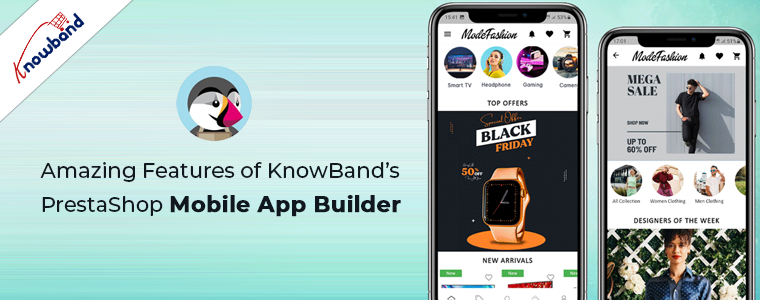
Amazing Features of KnowBand’s PrestaShop Mobile App Builder

Want to create apps for your PrestaShop website? We got a complete no-code App Builder for you!

There were times when PrestaShop Mobile Apps were only for big brands or flourished ones. E-commerce newbies & startups used to rely on their website only. But, time has changed now. Every PrestaShop website owner is looking forward to own mobile apps irrespective of their size. The Mobile Apps are playing a vital role in strengthening the brand & building a loyal customer base with minimal efforts. Every store owner is looking to grab this opportunity & grow their business on another level.

KnowBand, in this concern, has brought an automated solution with PrestaShop Mobile App Builder. It is a readymade framework designed to build native Android & iOS apps for your PrestaShop website without coding. The PrestaShop Mobile Apps are connected with your website in real-time. Moreover, the module provides complete backend panel control into your hands & thus you can manage the app functionalities with ease. Now let’s take a glance at some of the outstanding & sale-boosting features of PrestaShop Mobile App Builder:

1. Easy Installation:

Our PrestaShop Mobile App Builder is very easy to install & configure. All you need to do is to upload the zip file on your website & configure the backend panel from there.

2. Completely Native Mobile Apps

The performance of your PrestaShop Mobile App among worldwide mobile shoppers matters a lot as it would be a deciding factor for them to purchase or not. We all want shopping apps to be smooth & fast. The PrestaShop Mobile App Builder offers 100% native Android & iOS app which ensures hassle-free performance on all sorts of user’s devices.

Furthermore, the apps are built with the most advanced mobile app development technology Flutter, which ensures advanced compatibility and smooth user experience for the customers.

3. Customizable Home Screen Layout

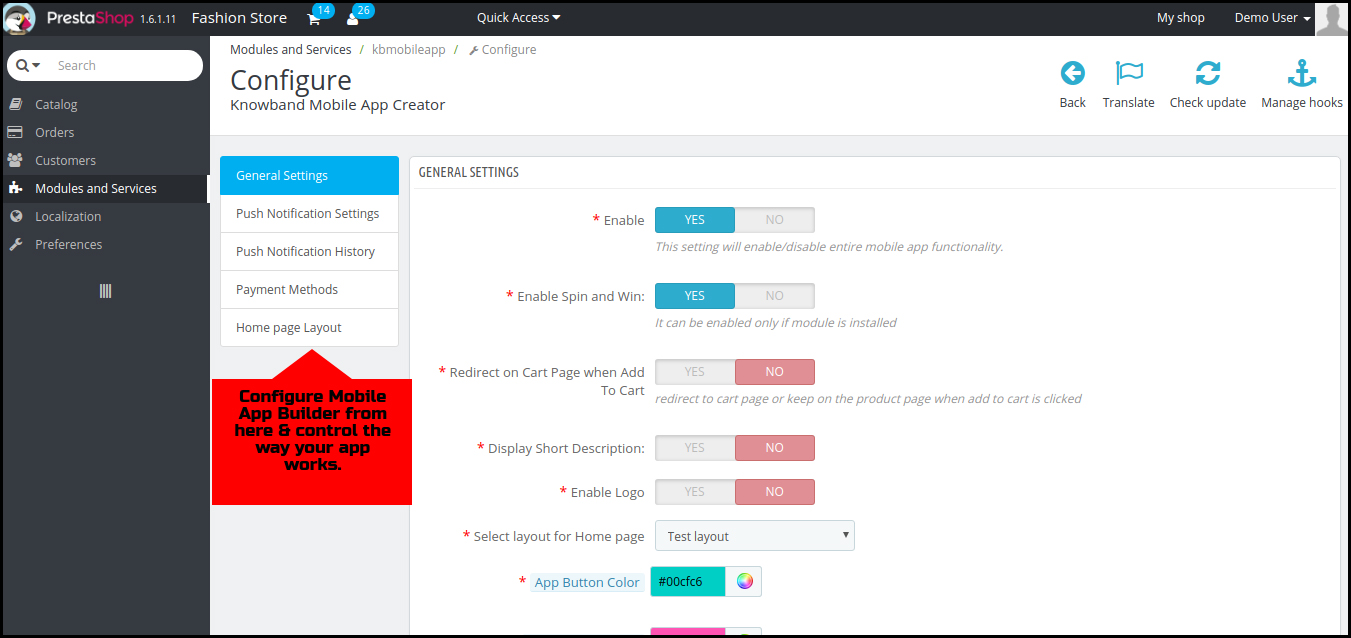
The PrestaShop Mobile App Maker offers a dynamic home screen whose layout can be customized & configured from backend. The store admin can create & save multiple themes & festive based layouts in the backend. The positioning of various elements can be altered with just drag & drop feature.

4. Alluring Color & Font Options

Match your app colors & font styles with the website from backend panel of PrestaShop Mobile App Maker. Our Module allows you to choose theme color, background color, button color & button text color for your app.

5. Compatible with All Handheld Devices

Our PrestaShop Mobile App Creator provides error-prone & fully tested apps which run perfectly on all sorts of Android & iOS smartphone as well as tablets.

6. 100% Website & App Synchronization

Your PrestaShop Mobile Apps will be fully connected with your website & thus any change you make on the store will be reflected on the Mobile App in real-time.

7. Multi-lingual & RTL Support

The Mobile App Builder offers both multi-lingual & RTL writing support in the Android & iOS apps. The e-merchants can easily enhance the scope of their business worldwide.

8. Instant Login Options

The PrestaShop Mobile App Creator offers easy & quick options for user sign-in & registration. The mobile shoppers can login using Google, Facebook, Phone Number & Fingerprint verification. Moreover, the iOS App users can log in using Face ID which makes the login process hassle-free and simpler than ever.

9. Simplified Checkout

Few relevant details on a single screen of PrestaShop Mobile App Maker make the order submission easier for the users.

10. Shipping Methods Support

The PrestaShop Mobile App Supports all sorts of website shipping methods. This makes the trade between seller & buyer completely effortless.

11. All Product Type Support

The mobile apps for PrestaShop eCommerce website support all types of products on the Mobile Apps like single, bundled, grouped, configurable & virtual (downloadable) products.

12. Unlimited Push Notifications

Sending push notifications to your app users about deals/offers/discounts would definitely grab their immediate attention & close more sales for your store. The PrestaShop Mobile App Maker offers the option to send push notifications on the apps from module backend. The store admin can send following sorts of notifications on the Apps:

Automated Order Creation Notification
Automated Order Status Update Notification
Automated Abandoned Cart Notification
Custom personalized Notification

Moreover, the users can check all the previous notifications in the newly added notification tab in the app. This will make sure your customers are up-to-date concerning all the offers and informational notifications.

13. 24*7 Chat Options

Keep your users close to you with the WhatsApp chat option in your PrestaShop Mobile Apps. The users can directly contact you regarding any query/concern & get assistance 24*7.

14. Mobile Coupons & Vouchers Support

The PrestaShop Mobile App Maker offers support to all sorts of website coupons & vouchers on mobile apps as well. The amazing deals & discounted price would definitely keep the app users engaged & even compel them to re-visit app for more purchases.

15. Website Payment Experience on Mobile App

Offer the website payment experience on your PrestaShop Mobile App as well. The PrestaShop Mobile App Maker supports all sorts of website payment options on the mobile app.

16. New Payment Method Integration

The PrestaShop eCommerce Mobile App Creator comes with the flexibility to add new payment methods in the apps. All sorts of native payments can be integrated over a fair amount of fee.

17. Real-time Order Tracking

The Mobile Apps with PrestaShop Mobile App Creator offers effective real-time order tracking options. The updated status of previous order delivery gets updated in real time.

18. White Label Apps

The PrestaShop Mobile App Builder for Android & iOS allows the store owners to display the website logo on the header of the apps. This will make your app branded & popularize the same among worldwide mobile shoppers.

19. Social Sharing

The products from the app can be shared on multiple social networks by the users. It will grow the social reach of your store & lure potential leads.

20. Gamified E-Mail Subscription Pop-Up

Offer a gamified e-mail subscription pop-up on the mobile apps with an interactive spin-wheel interface. You need to install KnowBand’s PrestaShop Spin & Win module on your website.

21. Layered Navigation

The PrestaShop eCommerce Mobile App Maker makes the product search easier with multiple filters & sort options. The users wouldn’t face any issue while searching the right product.

22. Login-Sign up Pop-up:

The mobile apps encourage the customer to complete the login process in the app. The users can login via the login/sign-up pop-up available on the home screen of the app.
Furthermore, this not only ensure easy login process for the customers but also helps the E-merchants to get the customers’ emails for marketing purposes.

👉Explore the Module with Our Video Guide

PrestaShop Mobile App Builder Installation – Using FTP Details

If you are a PrestaShop website owner & module installation is hectic for you. Here’s is the simple & easy way to do the installation using your PrestaShop FTP details. Read the article for complete information.

Step 1: Get PrestaShop Mobile App Builder

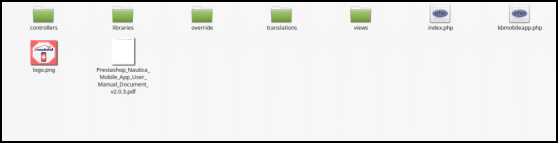
Purchase PrestaShop Mobile App Builder module from KnowBand store. You would get a zipped file containing the source code of the module. Unzip the file. You would get a file named “kbmobileapp”.

This folder contains the complete source code of the PrestaShop Mobile App Builder module as shown in the snapshot below:

Step 2: Move Source Code into Website Directory

Copy “kbmobileapp” folder into your store “modules” directory on the path – Root Directory/modules/.

Step 3: Install the Module

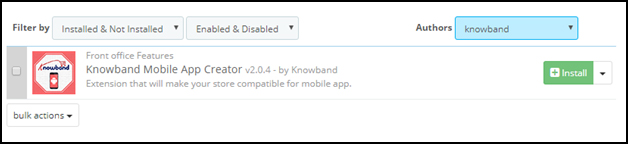
Now, the Prestashop mobile app builder addon is ready to be installed on your store and you can find that in Store Admin -> Modules and Services. It would be shown as below –

Step 4: Configure Module

Clicking on the “Install” button would display a confirmation pop-up. Tap “Proceed with the installation” & your module is installed successfully. Click configure & start using the backend of PrestaShop Mobile App Builder.

Thus, using your FTP details, you can install the module on your PrestaShop website with facile. Now, you can start using PrestaShop Mobile App Maker module. Hope this document proves helpful to you.

So, What’s Next?

You have purchased the PrestaShop Mobile App Builder module & install the same on your website with the above-discussed process. Now, share the app requirements & specifications with our pre-requisites form & we would build & provide your apps in 1-2 days.

Proved helpful? There is another way as well to install the module. Have a look at the same:

PrestaShop Mobile App Builder Installation – Using Admin Details

PrestaShop Mobile App Builder Installation – Using Admin Credentials

This tutorial is intended with KnowBand’s PrestaShop Mobile App Builder installation on your website. All the e-merchants having their website on PrestaShop v1.6 & v1.7.

Well, installation of KnowBand’s PrestaShop Mobile App Builder on your PrestaShop website is just a matter of a few simple steps. Using your website back office admin details, you can install the module in a few minutes. Move on with the steps listed below:

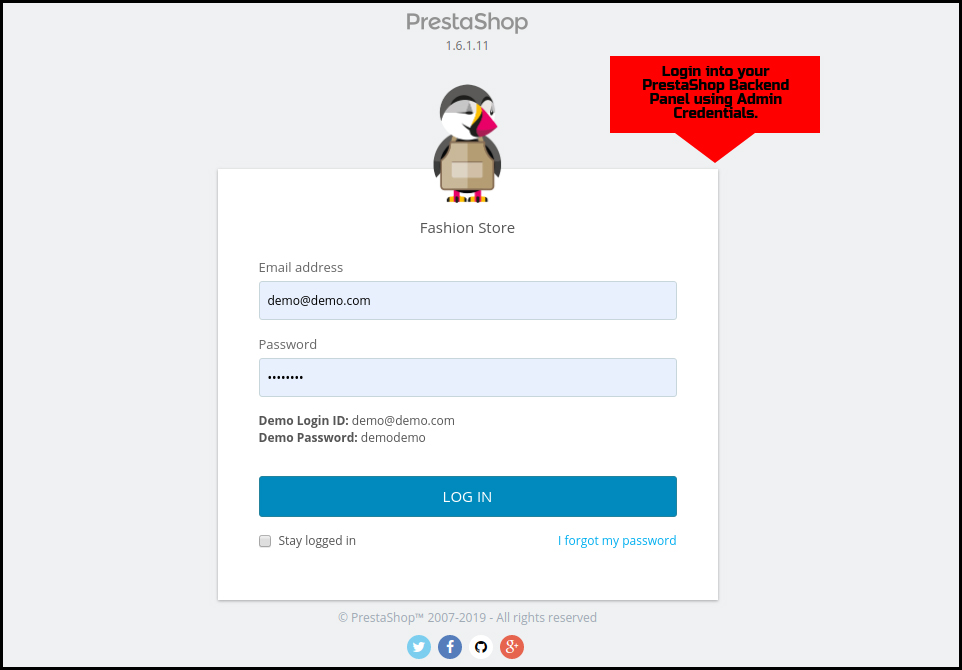
Step 1: Login Using Backend Details

Login to your PrestaShop website backend panel using your login details.

Step 2: Add Source Code on your Website

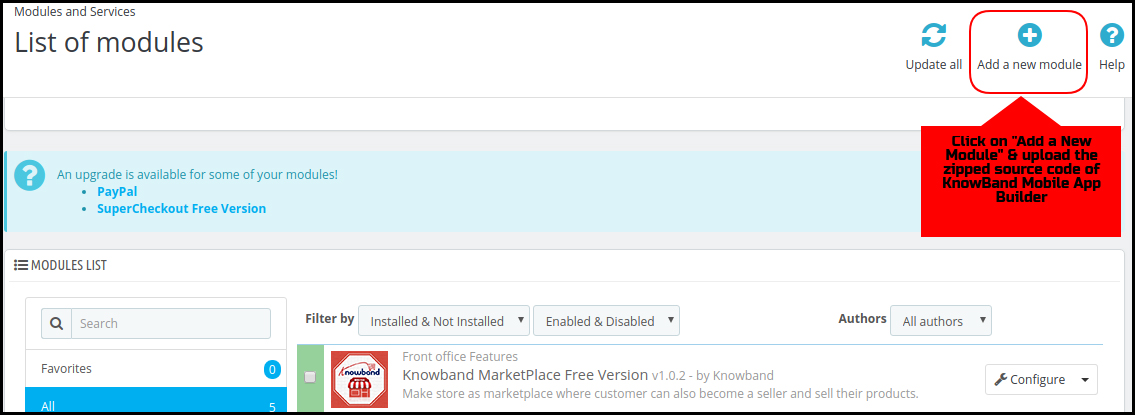
On the top-right corner, there is an option to “Add New Module”. Click & install the zipped source code of PrestaShop Mobile App Builder. You will get the required zip file once the module is purchased.

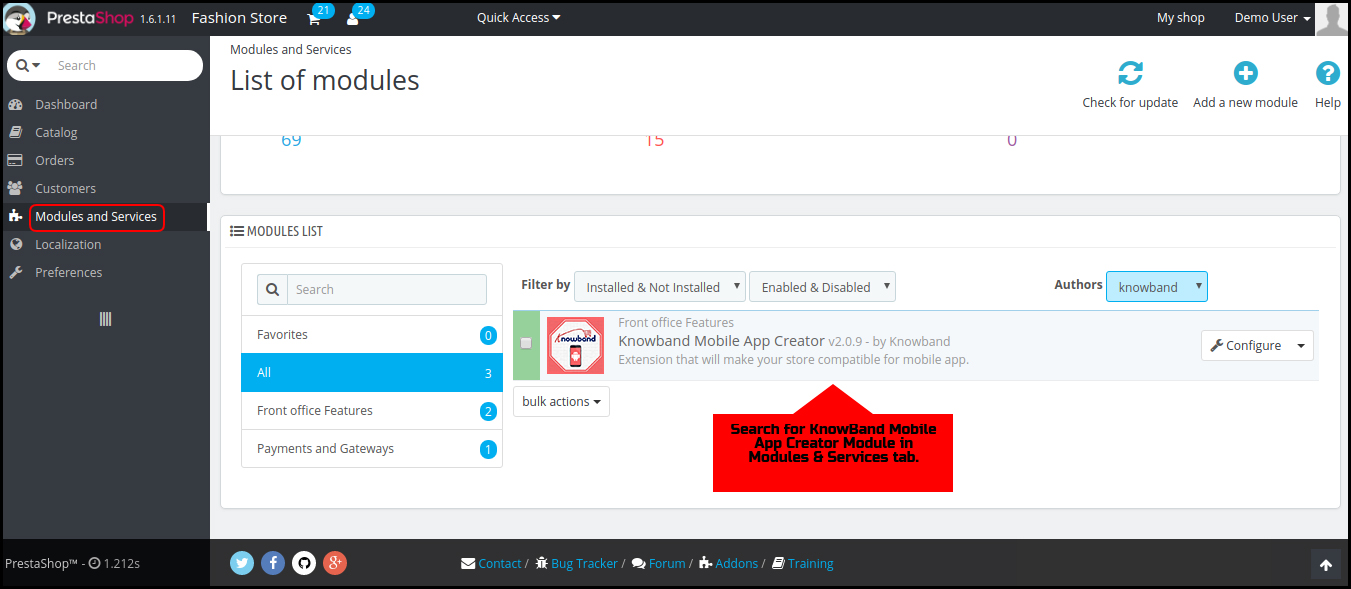
Step 3: Search for the Installed Module

Go to Modules & Services tab and search for KnowBand Mobile App Creator module.

Step 4: Configure the Module

Click “Configure” & next screen would be of KnowBand Mobile App Builder.

That’s it! You have successfully installed the PrestaShop Mobile App Builder plugin on your store & ready to configure the same. Hope, this tutorial proves helpful to you.

Done! What’s Next?

Once you have successfully installed the PrestaShop Mobile App Builder plugin on your website, we would share a pre-requisites form with you. This form would gather all the specifications & requirements of your app for a better understanding of our developers. That’s it! Now, sit back & relax. We would get back to you with your app.

Liked Article? You can opt for module installation using PrestaShop website FTP details. Here is the link to the same:

PrestaShop Mobile App Builder Installation – Using FTP Details