4 Benefits that Highlight the Importance of Product Videos in eCommerce

Visuals play a decisive part in eCommerce conversions. Since customers cannot examine a product physically in online stores, it is only visuals they can put their trust into.

Online shoppers build an imagination inside their heads by seeing the product images or product videos, and on that basis, they decide to make the purchase. Visuals create the first impression.

To provide customers with the best online shopping experience, brands capture the product from every possible angle to ensure that there does not remain any doubt in the shopper’s mind about whether to go for the purchase or not.

But today, product images are just not enough. They have become too mainstream. Many brands have started adding product videos to their eCommerce website to make online shoppers feel more satisfied with the product’s look and quality before they purchase it.

What is a Product Video?

A product video is the product description in the form of a video, through which brands try to educate customers about the product, its quality, features, benefits, etc.

Why are Product Videos Important to your Online business?
A product video helps prospects get a better understanding of the product. This is a video marketing strategy that Brands leverage to minimize the doubts about the product in a shopper’s mind.

Let’s discuss in brief the benefits of product videos and understand their importance in eCommerce.

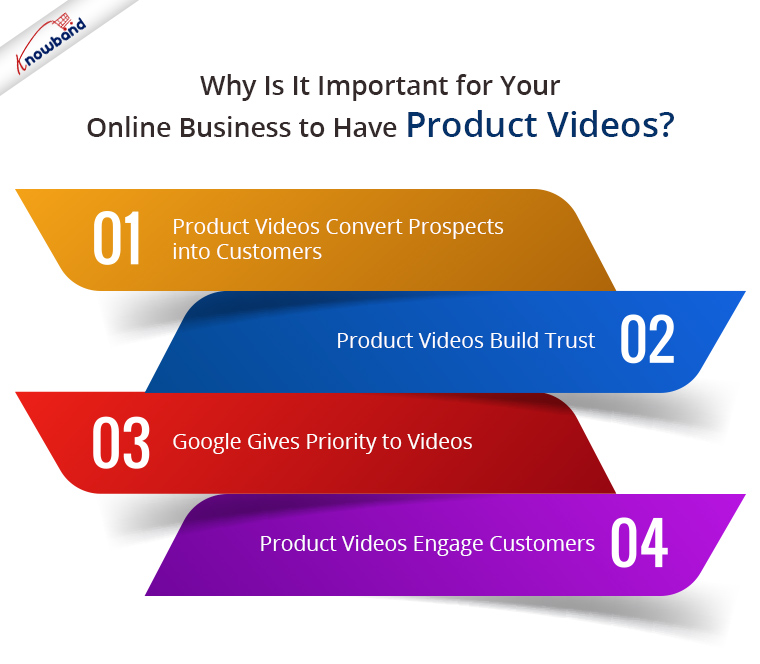
1. Product Videos convert Prospects into Customers

The importance of product videos can be felt by the fact that 92% of the shoppers say that visuals influence their buying decision and around 64% of the users are likely to purchase after watching the product video. (Source: RenderForest)

Well, this is because a product video brings a realistic feel. It minimizes the uncertainty about the product. Prospects imagine themselves at the other end and feel as if they are examining the product physically. This builds up the level of customer satisfaction and increases the chances of a prospect turning into a customer.

2. Product Videos Build Trust

Online shoppers are highly concerned about product quality when making a purchase online. They are unsure whether the product would match their expectations or not.

Product video eliminates their doubts and builds trust regarding product quality. Shoppers, hence, feel more comfortable purchasing after watching the video.

It also builds credibility for the brand. People realize that the company is authoritative and not deceitful.

The more you gain their trust, the more sales you get.

3. Google gives priority to Videos

Google tries to display videos for a majority of searches. So if you have embedded a product video from YouTube to your website and it contains an appropriate SEO-friendly title, description, keyword, website link, etc, there are very high chances that you would end up in Google’s Video section.

I am not talking about the separate video section. It will display there but here I meant the general “All” tab. Google suggests video even if the user has not visited the video section.

Marketers who use video receive 41% more traffic from the search results.

4. Product Videos Engage Customers

One of the major benefits of product videos is that they capture more user engagement. Going through the product description, and reading the entire information can sometimes be a tedious task for the customers. Not only it is tiring, but it is also time-consuming.

Product videos provide the same information crisply and clearly and grab more user engagement. Moreover, people are more likely to pay more attention to videos than images or texts.

Let’s now shift our focus from the benefits of product videos to product video best practices.

Product Video Best Practices

Let’s find out how you can utilize product videos to the best.

1. Explain the Need

Tell your customers how they would get benefited from purchasing that product. Apart from the features, introducing the benefits to the customers makes a good product video and makes the purchase easy.

2. Keep the Video Short

Do not stretch the video duration to 4-5 minutes. A perfect product video should not exceed more than a minute. And you should be able to convey the message clearly within that 1 minute.

A short video tends to capture higher engagement than a lengthy video.

3. Put up a Video on the Landing page and/or Home Page

As per the research, including a video on the landing page can boost conversions by 40%, and more than 20% when used on a Home Page.

This would be great if you are planning to promote a product, basically newly launched arrivals.

4. Share it on your Social Media Pages

Your product videos can create a buzz among your social media followers. For example, if you are launching a new product, creating awareness about it through a product video can be very beneficial to your business, in terms of brand awareness as well as product visibility.

You can also create an ad plan and display it to your target audience to get more potential customers.

The Bottom Line
Adding videos to your eCommerce website can provide a significant boost to your business. It will grab higher engagement, higher average site time, higher sales and most importantly, it will help you win your customers’ trust.

A product video is a compelling way to lead a prospect towards a purchase. Though it would require spending a few bucks, in fact, more, it will deliver positive results.

Set your budget and prepare your videos accordingly. Prepare a list of the products for which you would be creating videos and then proceed further. Add videos to your website without any hassle using Knowband’s Product Video module. The module makes it a very simple task to embed videos on your website on several pages. Check out-
PrestaShop Product Video Addon

Magento 2 Product Video Extension

OpenCart Product Video Extension

The greatest strategy to encourage customers to go to the checkout page is to optimise the product page of the website. The Product Tab Module provides a quick way to add new tabs to the website’s product pages all at once. When a user is just one step away from placing an order, the straightforward and comprehensive plugin may easily maximise their experience. By giving customers a way to receive more information, the module ensures that visitors never receive material that they don’t want. The store administrator can display relevant videos for the product or any other text message they want to share with the customers by using the product Page extension.

I hope this article made you understand the importance of product videos. If you have any points to make regarding the benefits of product videos, feel free to add them in the comments below.

7 Benefits of Video Marketing for your eCommerce Business

In the rapidly evolving eCommerce world, videos play a significant role, be it about a brand advertisement or precise product description.

If you want to stand out in the commerce market, you need to be a step ahead of your competitors. While they follow the mainstream marketing strategies, you can leverage the power of video marketing to make your product or brand popular among shopaholics.

What is Video Marketing?

Video Marketing is a marketing strategy used by businesses to market/promote their brand, products or services through a video form.

Though video marketing has been the trend for quite a while now, many eCommerce businesses do not pay much attention to it or say overlook its benefits.

Benefits of Video Marketing

In this write-up, I have explained why you need to adopt the video marketing idea in your online business. Let’s find out.

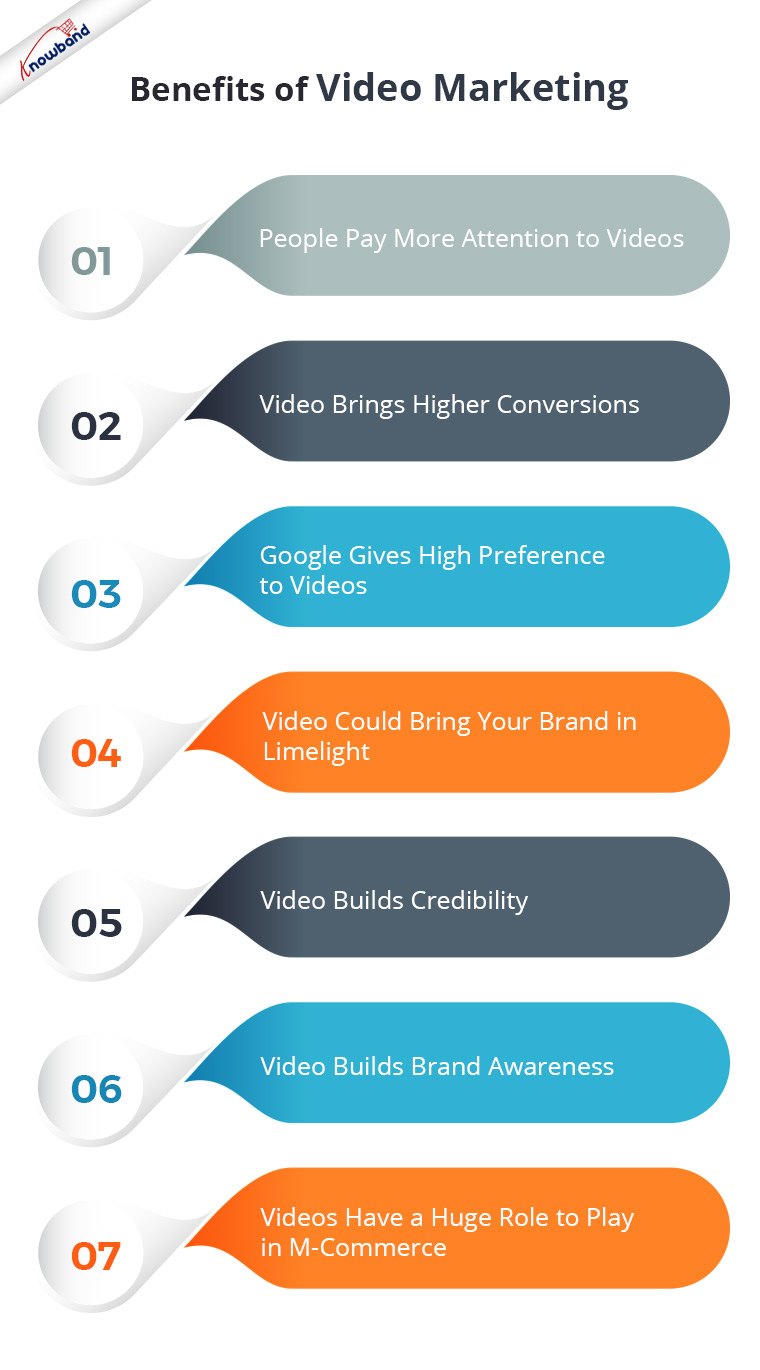
1. People Pay More Attention to Videos

People are more inclined to watch videos than read texts. With too much content being posted daily on the Internet or social media, people avoid reading long pieces of information. They find it boring and time-consuming.

Wouldn’t that be great if they could get the entire information through a few minutes video? I mean, I would be glad if someone could sum up the entire story in a short clip rather than asking me to go through heavy written content.

Videos capture more attention than text or images, and this marks one of the primary benefits of video marketing.

2. Video Brings Higher Conversions

A great thing about videos is that they build a sense of trust inside people. There are higher chances of a prospect turning into a customer if your product pages contain videos for a brief description of the product.

As per the stats collected by RenderForest, 70% of marketers feel that video converts better than any other medium. Also, explanatory videos increase the conversion rate by 20%.

The inability of customers to touch and examine a product makes the role of visuals highly important in a customer’s buying decision. Though high-quality images also do this job to an extent, videos give a more realistic feel.

Therefore, it is suggested to have an explanatory video for most of your products. Want to easily add videos to your product pages? Try out the Product Video module by Knowband.

PrestaShop Product Video Addon

OpenCart Product Video Extension

You could try adding videos to your landing page or in the banner section. Introducing your brand to your visitors through a video could leave an excellent impression.

3. Google gives High Preference to Videos

Even Google understands that suggesting videos to people on the search results page can be more beneficial to them regarding their search query.

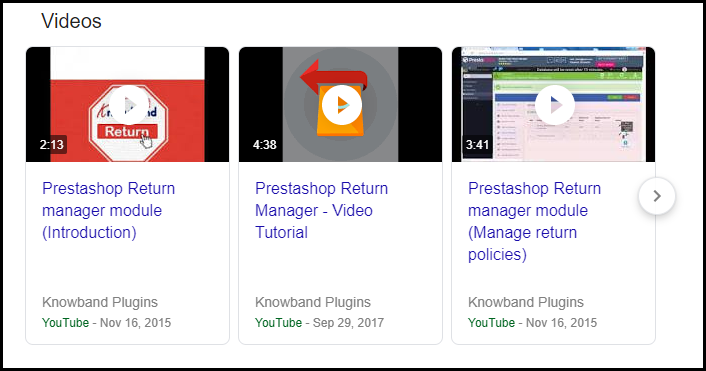
You would surely come across a separate videos section on the SERP if it matches your search query. Let me help you a bit more.

I searched for PrestaShop Return Manager and the search engine displayed a video section right below the first result.

Imagine the wide organic reach it will receive if the keyword has high competition.

Put your videos on YouTube. Optimize them for SEO by giving them an SEO-friendly title and description, and then embed them on your website.

Google owns YouTube. If it decides to put your video on the search results page, you can get higher traffic, more views and more leads.

4. Video Could Bring Your Brand into the Limelight

Last year, HP released an amazing video for their Diwali marketing campaign, which swiftly caught the attention of the netizens and went viral all over social media. It connected people emotionally and got huge shares. People heaped praises on HP for such a wonderful message they spread through their video.

This is the potential of video marketing. It can make your brand popular overnight and put it in limelight. This is one of the huge benefits of video marketing.

But this would need a creative mind, out-of-the-box thinking and a message that could connect people. If you tick all this perfectly, you can leave the rest to the audience. They will do the needful for you.

5. Video Builds Credibility

Though, as already mentioned videos help develop trust among customers, video marketing is an effective way to build brand credibility.

People do not put their trust in a brand easily. Several online hoaxes taking place daily and the availability of too many eCommerce businesses have made people think twice before believing in a brand.

Videos ensure that your target audience is briefed clearly about your brand. You can have a video about your company, your work culture, and your vision. This will surely assure customers that you are an authorized brand and not any fake agency.

6. Video Builds Brand Awareness

Adding to the benefits of video marketing in eCommerce is it helps to build brand awareness. Through videos, you can educate your customers about your products, brand, offers and whatnot. It is the simplest way to catch your visitors’ eyes.

Also, if you can pay for advertising on YouTube, it would give a huge boost to your brand. A billion videos are watched on YouTube every single day. Imagine the popularity of your brand, when a video displays your Brand Ad.

7. Videos Have a Huge Role to Play in M-Commerce

More than half of the consumers watch videos through their mobile devices. And do you know mobile makes up to 40% of the global watch time on YouTube? Ever since the rise in smartphone users, engagement towards video has grown significantly.

Mobile users are more likely to watch videos than desktop users. This means higher mobile traffic and higher mobile sales.

Consumers feel more attached to videos when watching via mobile than on the desktop. So, utilize the power of video marketing and grow your eCommerce revenue.

The Bottom Line

Video Marketing is not limited to a few benefits. It has tons of pros and hardly any cons. Video Marketing is here to stay for long now. It provides you with several opportunities to globalize your brand.

I hope these 7 benefits of video marketing helped you understand why video is the need for businesses today. If you liked this information or have something to add to this piece of content, feel free to leave a comment below.

8 Ways to Build Customer Trust and Loyalty

“This article is divided into two parts- Customer Trust and Customer Loyalty.”

You want to acquire new customers, and putting every effort to make them a part of your eCommerce journey. You got visitors on your website but you are still not getting satisfactory results.

What could be the reason? Well, there could be some flaws in your website. But for a new user, the trust factor is the most important. New visitors do not put their trust in an online business easily considering the hoax and the fraud activities that take place over the Internet daily.

And why would they? It is the first time that they are interacting with your brand. You need to earn their trust, establish a connection with them so that they get familiar with your brand.

While it is not an arduous task to create your brand visibility and attract customers to your website, thanks to the social media platforms, the challenge lies in converting new visitors into customers.

And trust is the crucial factor that turns a visitor into a customer. Yes, there are other important elements such as the Website UX, Checkout Page, etc. But those are secondary. Customer trust is primary.

There are plenty of thoughts that go through a visitor’s mind when he first visits your website. Only after they find your site to reliable and trustworthy, they think of making a purchase.

Customer trust and loyalty go hand-in-hand. Once you build the trust, customer loyalty follows. So first, you need to win their trust. Later, you can think of some other factors to make them loyal to your brand.

But the point here is how do you actually build customer trust, in the first place? Well, this is what we will be discussing today.

We will first start with building customer trust followed by customer loyalty.

How to Build Customer Trust?

1. Focus on Your Site Security

First things first. Visitors need to feel secure when they land on your website. They would bounce off straightaway if they sense your website has security issues, let alone purchasing.

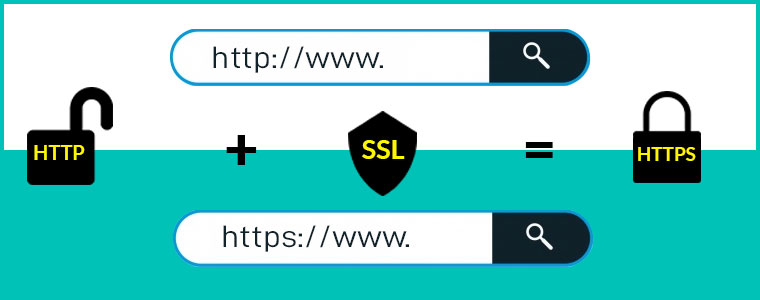
For this matter, you need to make your website SSL certified. An SSL certificate adds a security layer to your website and is an important element to build customer trust.

2. Display Security Badges at Checkout

Online transaction frauds have reached a new level nowadays. As a result, people have become way too sensitive to share their bank related information online.

Win customer trust by displaying payment security badges at the checkout. Security signs like Norton Secured, McAfee Secure or displaying supported credit card logos or a security lock develop a sense of trust inside visitors and they feel much more comfortable while making a payment.

3. Go Social

Maintaining your social presence is highly important today if you want to build customer trust. Social media is not just a marketing platform that helps you with brand visibility but it is a place where you can have a friendly connection with your followers and build credibility.

People get to know you as a brand and you build that trust factor in them.

How would you do that?

Be active, and start posting actively. Engage with your audience, be a part of their conversation, reply to their queries, post your inside stories, tell them about your journey. These sorts of things will help you win customers and keep them for life.

Related: Social Media Marketing for eCommerce: Strategies and Best Practices

4. Enhance Your Customer Support

Another customer trust winning method is to enhance your customer support.

A visitor/customer may have n number of queries. It could be related to your website, products, or any other issue for which they want a resolution.

It is your sole responsibility to solve their queries and provide them with satisfactory customer service. For that, do not limit your customer support to just emails, or calls. Add a live chat support option too. Moreover, as I said, be active on social media. A majority of customers prefer social media platforms to raise their queries.

It could be a tweet or a DM. Whatever it is, make sure to help them with their concerns as soon as possible. Your customers would appreciate you for showing a quick response to their concerns.

If you keep these 4 things in your mind, your visitors would surely find your website trustworthy. Let’s now take a look at how to build customer loyalty.

4 Ways to Build Customer Loyalty

To build loyalty with customers, you need to focus on a few important things-

1. Deliver What You Say

Customer loyalty lies in delivering what you promise. Many times, customers do not receive products the way it looked on the product page and sometimes, there are some missing features. This leads to disappointment among the customers and they feel being cheated.

Let’s not make fake promises. Deliver them the quality they expected or the item which they actually thought was worth purchasing. If you fail to deliver what you say, that will probably the last time you will see that customer on your website.

The same goes for your delivery time and return policies. The product should get delivered within the time mentioned. A delay in delivery can irk your customers. And it should be followed by a clear return policy. It shouldn’t be like that you have promised easy returns but the customer is facing a hard time in placing a return.

These things are important if you want to gain customer loyalty.

Related-

8 Simple Tips to Reduce Product Returns in eCommerce

5 Ways to Manage eCommerce Returns

2. Be Open to Customer Reviews

If you have not added a review section on your website just because you are afraid of some negative comments, you are never going to win the complete trust of visitors.

People have grown smart. Before buying a product from a new website, they do research on the company’s background and look out for reviews to check if it is genuine or not or see what people have to say about the Brand.

More than half of the job is done if shoppers find your Brand reliable enough to shop, then comes the product review part which helps a prospect in his/her buying decision. Reviews play a huge role here.

Be transparent about the reviews. Openly accept people’s opinions about your brand or product. There will be some good reviews and some bad reviews for sure but it will present a sign of honesty in front of your customers.

Respond to your reviews. Understand what went wrong with your customers that led to a negative remark. You should always be ready for constructive criticism.

Related: Why Product Reviews are Important in eCommerce?

3. Offer Loyalty Points on Every Purchase

Having a loyalty program for your business is one of the best ways to build customer loyalty, and it improves customer retention, simultaneously.

When you reward customers with loyalty points on a successful purchase, you basically invite them to shop from your brand again in the future. It ensures repeat purchases and keeps you ahead of your competitors who are not having any loyalty program at all.

Loyalty Programs build a personal connect between the brand and the customer and increase customer loyalty.

4. Value Your Customers

Never forget to thank or appreciate your customers. Showing a bit of gratitude not only helps you win customer trust but also develops customer loyalty.

Here’s what you can do. When a customer places an order, thank him/her for showing the trust in your brand and choosing to shop with you. Or if they have something to suggest or left a review, be it positive or negative, accept it gladly and appreciate them for leaving feedback.

Ask them if your products or services lived up to their expectations. Apologize if they faced a delay or an inconvenience with something. This shows your professionalism. It is important to value your customers to build a healthy customer relationship.

The Bottom Line

Building Customer Trust and Loyalty is not something that you can earn overnight. It will take time but your efforts to winning customer trust and loyalty would surely reflect results.

Treat your customers well. Make them feel special and most importantly, avoid using click baits to drive traffic to your website.

What are your strategies for building customer trust and loyalty?

8 Best Christmas Marketing Ideas for Online Businesses

After a busy 5-day holiday period comprising of Thanksgiving, Black Friday and Cyber Monday, follows Christmas, which is also one of the most popular occasions rejoiced by shopaholics as well as the e-retailers.

The last week of the year holds immense potential to add huge revenue to your online business. Adding a fact to this statement, the previous year Christmas retail sales captured approximately $719.17 billion in the United States, as per Statista.

In this article, I have put forward 8 Best Christmas Marketing Ideas that you can look to adapt to your online business for a successful Christmas campaign.

1. Add a Christmas Touch to Your Brand

Your Brand appearance should go hand-in-hand with the holiday mood. When one holiday approaches a close, you need to develop the curiosity for the next one. Let the customers’ mood be on the same track. Do not let the holiday feel fade away.

Start by customizing the colour of your website to something red and white. Go for Christmas hats, bells, lights, Christmas trees next. Every time a visitor lands on your website, it should give them a joyous Christmas feel and add a spark to the shopping mood.

Get your website cover banner ready to catch the Christmas holiday spirit. It should immediately grab visitors’ attention. Display your Christmas deals on the banner to make your visitors aware about the Christmas sales.

Christmas Marketing would be tasteless if you do not restyle your social media accounts. Set a Christmas theme for your social media pages by having a Christmas-personalized profile picture and cover picture.

These are some of the basic Christmas marketing ideas.

2. Introduce Christmas Gift Cards If You Do Not Have It Yet

Digital Gift Cards or e-gift cards are the shoppers’ primary gift choice during the holiday season and add a huge sum to your revenue, simply because they are convenient, easy to purchase and time-saving.

People are found scratching their heads when it comes to choosing gifts as they are surrounded by multiple gift ideas. And there is always the uncertainty about the receiver liking the gift.

Gifting one or two persons can still be managed but when the numbers are high, digital gift cards tend to be the best option, and this is why Christmas themed Gift cards would be one of the best Christmas marketing ideas.

No more wastage of time in searching for tons of gifts. Get a gift card for your loved ones and deliver it to their email address within no time. Recipients are also delighted to receive gift cards as they can buy whatever they want of their own choice. This is the reason why most of the e-retailers have added a Gift Card section on their store/website.

Believe me, Gift cards prove to be extremely beneficial in boosting your sales. If you do not have a Gift Card section yet, add it today.

Knowband offers the Gift Card Manager module for PrestaShop, OpenCart, Magento and Magento 2.

3. Leverage Web Push Notifications

Well and good, if you are having a mobile app for your business and using app push notifications to reach out to your customers. In case you don’t, Web Push Notifications would make up for an ideal Christmas marketing idea.

Web Push Notifications allow you to interact with your subscribers in real-time even if they are not present at your website. They help you keep your customers updated about the trends and promotions on your website.

Ask your users to subscribe to your Christmas updates to receive enticing offers regarding the Christmas sale.

Web Push Notifications module, by Knowband, lets you use the communication power to announce a flash sale, product price alert, product availability alert, etc. The module is available for PrestaShop, Magento and Magento 2.

Give a read to:

Web Push Notifications: 5 Best Practices to Boost eCommerce Conversions

6 Major Benefits of using Web Push Notifications in eCommerce

4. Create a Christmas-Themed Video

Adding to the list of Christmas marketing ideas would be creating a Christmas-themed video.

If it fits your budget, prepare a video to boost your brand awareness. Make sure it is not overly promotional else people would likely skip it. Keep it short, creative, engaging and a bit entertaining.

Post the video on social media platforms and promote it using social media ads. If users like your content, your video could go viral overnight and you cannot even imagine the limelight it will create about your business.

Your followers count would catch up the speed of a bullet train. You would start getting higher engagement. To put it simply, it will heavily endorse your brand without even a brand ambassador.

But it is not that easy. Creating such a video requires time, efforts and out-of-the-box thinking. If you want to capture people’s attention, you need to do something worth it.

5. Start Sending Christmas Specific Emails

Your subscribers may not pay much attention to your emails rest of the year but they will surely try not to miss any of the mail notifications during the holiday season because they know it is that time where they can expect some exciting offers from Brands.

Use this to your advantage. Start sending out emails to your customers at regular intervals but do not be too frequent. Develop the interest slowly inside the customer and avoid being promotional every time. You need to make your customers feel how they can get benefited from your Christmas offerings.

Find the perfect time when most of your subscribers are active to open the emails. Create a catchy subject line that triggers the user to browse the inside content. Do not shout just Sales, Sales and Sales!

6. Offer Gift Packages

People would spend huge bucks during the Christmas sale and offering gift packages would be an effective Christmas marketing idea.

Encourage people to spend more by offering them product bundles. Not only it increases your average order value but also helps in selling out those items which are otherwise purchased rarely by the customers.

For example- You can offer 3 pair of shoes with different colours at a slightly lesser combo price than their individual cost. Now even if the prospect is not much impressed with 1 colour, he would probably show the desire to purchase as he would be getting it in a bundle with 3 different colours. The prospect would have not purchased it, in particular.

7. Run a Christmas Themed User-Generated Content Campaign

How about asking people to share their Santa stories? Or asking them to share a picture wearing a Santa Claus dress or clicking a picture with the Christmas tree? And then gifting them something special for this effort. Sounds a great Christmas marketing idea?

Well, it is. User-generated content campaigns make a great way to spread the word about your brand. In fact, it is one of the best forms of word-of-mouth marketing.

Apart from this, you can also start a campaign where you ask your customers to post a picture of what they shopped from your store on the Christmas sale. Tell them to use a specific hashtag and tag your brand. In return, you could provide them with an exclusive offer or some gift vouchers to the winners.

8. Be Active on Your Social Media Pages

There is no marketing strategy today that does not involve social media, same goes for the Christmas marketing.

Social media has become a vital platform for Brands to boost their brand visibility, acquire new customers and drive more conversions. But it doesn’t occur by just uploading posts. You need to develop a friendliness with your audience and it would develop only by regularly interacting and engaging with them.

Try to create a fun-filled Christmas atmosphere around your audience. Persuade them to like, react or comment to your posts. Again, avoid posting promotional stuff every time. Reply to your followers’ comments, solve their queries.  The more the engagement, the higher the reach.

Also, do not post the same set of posts on every platform. A few can be okay but copy-pasting every post would probably bore your customers. Have different posts for different platforms like Facebook, Instagram, and Twitter.

The Bottom Line

That’s it! I found these 8 Christmas marketing ideas to be most fruitful for online businesses, though not every point mentioned above would be suitable for all business types.

Christmas is going to arrive soon. Make the festival count and while you prepare for the Christmas marketing, do not forget to keep these ideas for New Year as well, which would take place right after a week.

If you have some other Christmas marketing ideas or strategies, feel free to add in the comment below.

Generate QR Code Using PHP

QR code is a type of two dimensional barcode which is abbreviated from Quick Response Code . It is an optical label which contains information about the item. It is simply attached to the item. It contains black squares which are arranged in a squares grid with white background.

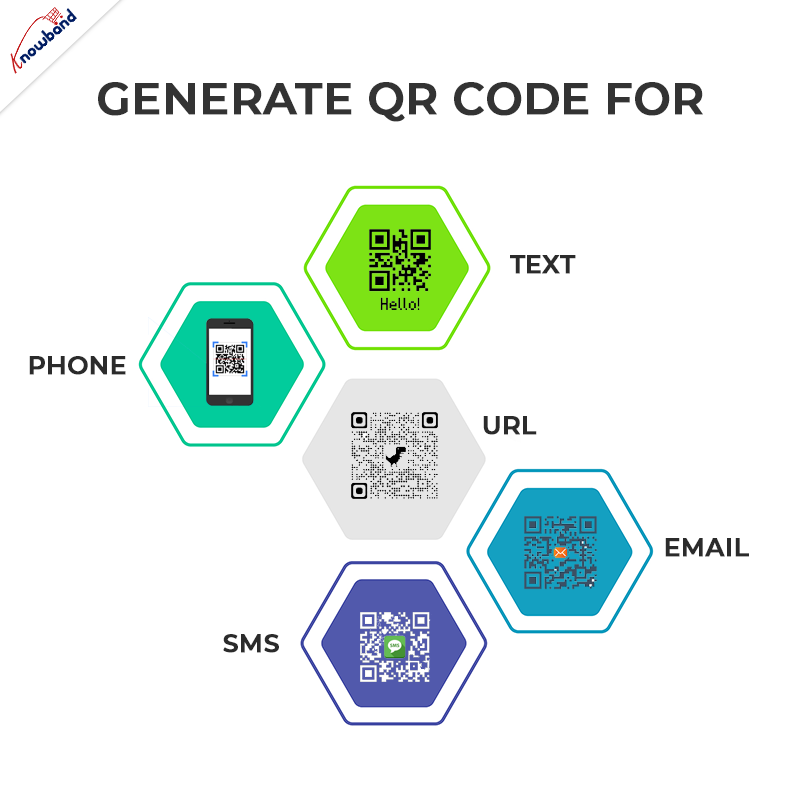
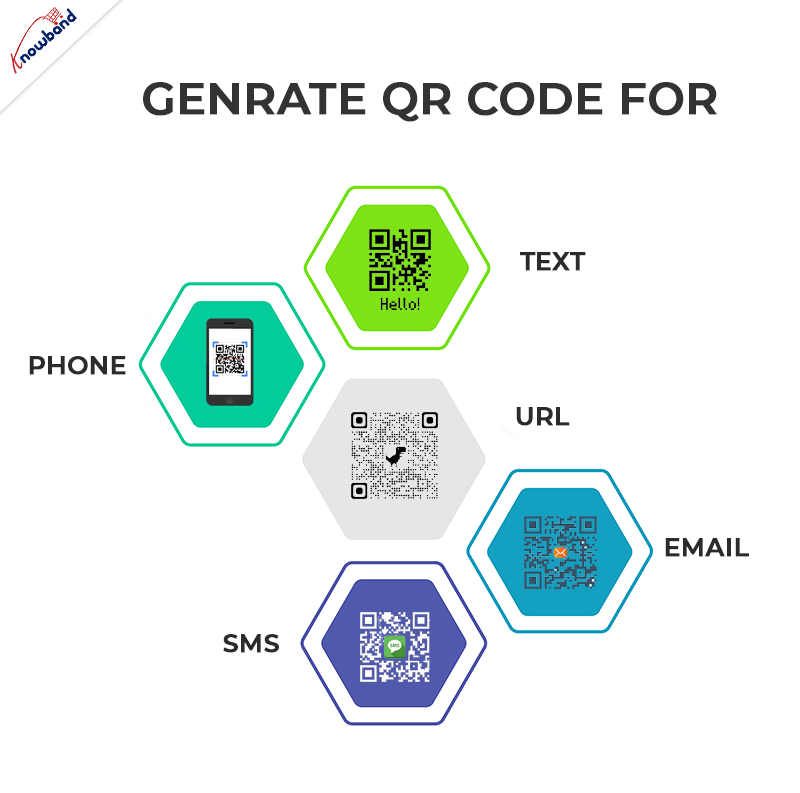
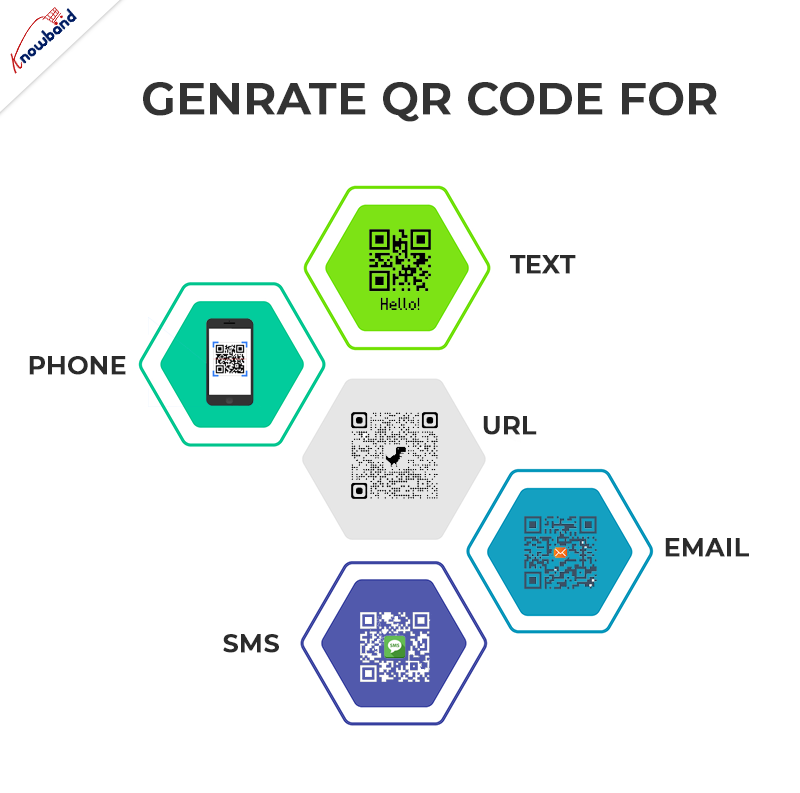
In this blog we will learn how to generate QR code using PHP step by step. With the help of simple PHP script you can generate QR code for Text, Phone, URL, Email and SMS.

In this project you need to create two files:

  1. qrcode.php
  2. index.php

STEP 1: Define class QrCode in qrcode.php:

1. Create a class QrCode. In this class, we will define the URL for GOOGLE CHART API and functions to generate the QR code for Text, Phone, URL, Email and SMS.

<span style="vertical-align: inherit;"><span style="vertical-align: inherit;">class QrCode {</span></span>
<span style="vertical-align: inherit;"><span style="vertical-align: inherit;">
}</span></span>

STEP 2: Define URL of Google chart API in QrCode Class:

1. We create variables to store the URL of Google chart API and data which is used to create the QR code.

<span style="vertical-align: inherit;"><span style="vertical-align: inherit;">class QrCode {</span></span><span style="vertical-align: inherit;"><span style="vertical-align: inherit;">
//URL OF GOOGLE CHART API</span></span><span style="vertical-align: inherit;"><span style="vertical-align: inherit;">
private $apiUrl = 'https://chart.apis.google.com/chart';</span></span><span style="vertical-align: inherit;"><span style="vertical-align: inherit;">
// DATA TO CREATE QR CODE</span></span><span style="vertical-align: inherit;"><span style="vertical-align: inherit;">
private $data;</span></span><span style="vertical-align: inherit;"><span style="vertical-align: inherit;">
}</span></span>

STEP 3: Define Functions to generate QR code of different types in QrCode Class:

We have the following types and functions for the same in which we can generate the QR Code:

1.URL

<span style="vertical-align: inherit;"><span style="vertical-align: inherit;">// Function which is used to generate the URL type of QR Code.</span></span><span style="vertical-align: inherit;"><span style="vertical-align: inherit;">
public function URL($url = null) {</span></span><span style="vertical-align: inherit;"><span style="vertical-align: inherit;">
$this-&gt;data = preg_match("#^https?\:\/\/#", $url) ? </span><span style="vertical-align: inherit;">$url : "https://{$url}";</span></span><span style="vertical-align: inherit;"><span style="vertical-align: inherit;">
}</span></span>

2.Text

<span style="vertical-align: inherit;"><span style="vertical-align: inherit;">// Function which is used to generate the TEXT type of QR Code.</span></span><span style="vertical-align: inherit;"><span style="vertical-align: inherit;">
public function TEXT($text) {</span></span><span style="vertical-align: inherit;"><span style="vertical-align: inherit;">
$this-&gt;data = $text;</span></span><span style="vertical-align: inherit;"><span style="vertical-align: inherit;">
}</span></span>

3. EMAIL

<span style="vertical-align: inherit;"><span style="vertical-align: inherit;">// Function which is used to generate the EMAIL type of QR Code.</span></span><span style="vertical-align: inherit;"><span style="vertical-align: inherit;">
public function EMAIL($email = null, $subject = null, $message = null) {</span></span><span style="vertical-align: inherit;"><span style="vertical-align: inherit;">
$this-&gt;data = "MATMSG:TO:{$email};SUB:{$subject};BODY:{$message};;";</span></span><span style="vertical-align: inherit;"><span style="vertical-align: inherit;">
}</span></span>

4.PHONE

<span style="vertical-align: inherit;"><span style="vertical-align: inherit;">// Function which is used to generate the PHONE type of QR Code.</span></span><span style="vertical-align: inherit;"><span style="vertical-align: inherit;">
public function PHONE($phone) {</span></span><span style="vertical-align: inherit;"><span style="vertical-align: inherit;">
$this-&gt;data = "TEL:{$phone}";</span></span><span style="vertical-align: inherit;"><span style="vertical-align: inherit;">
}</span></span>

5.SMS

<span style="vertical-align: inherit;"><span style="vertical-align: inherit;">// Function which is used to generate the SMS type of QR Code.</span></span><span style="vertical-align: inherit;"><span style="vertical-align: inherit;">
public function SMS($phone = null, $msg = null) {</span></span><span style="vertical-align: inherit;"><span style="vertical-align: inherit;">
$this-&gt;data = "SMSTO:{$phone}:{$msg}";</span></span><span style="vertical-align: inherit;"><span style="vertical-align: inherit;">
}</span></span>

6. CONTACT

Prestashop AI Chatbot Addon

Create and launch a perfect AI Chatbot created using PHP for prestashop store.


Try the Demo

<span style="vertical-align: inherit;"><span style="vertical-align: inherit;">// Function which is used to generate the CONTACT type of QR Code.</span></span><span style="vertical-align: inherit;"><span style="vertical-align: inherit;">
public function CONTACT($name = null, $address = null, $phone = null, $email = null) {</span></span><span style="vertical-align: inherit;"><span style="vertical-align: inherit;">
$this-&gt;data = "MECARD:N:{$name};ADR:{$address};TEL:{$phone};EMAIL:{$email};;";</span></span><span style="vertical-align: inherit;"><span style="vertical-align: inherit;">
}</span></span>

STEP 4: Define Functions to save the QR Code image in QrCode Class:

<span style="vertical-align: inherit;"><span style="vertical-align: inherit;">//Function which is used to save the qrcode image file.</span></span><span style="vertical-align: inherit;"><span style="vertical-align: inherit;">
public function QRCODE($size = 400, $filename = null) {</span></span><span style="vertical-align: inherit;"><span style="vertical-align: inherit;">
$ch = curl_init();</span></span><span style="vertical-align: inherit;"><span style="vertical-align: inherit;">
curl_setopt($ch, CURLOPT_URL, $this-&gt;apiUrl);</span></span><span style="vertical-align: inherit;"><span style="vertical-align: inherit;">
curl_setopt($ch, CURLOPT_POST, true);</span></span><span style="vertical-align: inherit;"><span style="vertical-align: inherit;">
curl_setopt($ch, CURLOPT_POSTFIELDS, "chs={$size}x{$size}&amp;cht=qr&amp;chl=" . urlencode($this-&gt;data));</span></span><span style="vertical-align: inherit;"><span style="vertical-align: inherit;">
curl_setopt($ch, CURLOPT_RETURNTRANSFER, true);</span></span><span style="vertical-align: inherit;"><span style="vertical-align: inherit;">
curl_setopt($ch, CURLOPT_HEADER, false);</span></span><span style="vertical-align: inherit;"><span style="vertical-align: inherit;">
curl_setopt($ch, CURLOPT_TIMEOUT, 30);</span></span><span style="vertical-align: inherit;"><span style="vertical-align: inherit;">
$img = curl_exec($ch);</span></span><span style="vertical-align: inherit;"><span style="vertical-align: inherit;">
curl_close($ch);</span></span><span style="vertical-align: inherit;"><span style="vertical-align: inherit;">
if ($img) {</span></span><span style="vertical-align: inherit;"><span style="vertical-align: inherit;">
if ($filename) {</span></span><span style="vertical-align: inherit;"><span style="vertical-align: inherit;">
if (!preg_match("#\.png$#i", $filename)) {</span></span><span style="vertical-align: inherit;"><span style="vertical-align: inherit;">
$filename .= ".png";</span></span><span style="vertical-align: inherit;"><span style="vertical-align: inherit;">
}</span></span><span style="vertical-align: inherit;"><span style="vertical-align: inherit;">
return file_put_contents($filename, $img);</span></span><span style="vertical-align: inherit;"><span style="vertical-align: inherit;">
} else {</span></span><span style="vertical-align: inherit;"><span style="vertical-align: inherit;">
header("Content-type: image/png");</span></span><span style="vertical-align: inherit;"><span style="vertical-align: inherit;">
print $img;</span></span><span style="vertical-align: inherit;"><span style="vertical-align: inherit;">
return true;</span></span><span style="vertical-align: inherit;"><span style="vertical-align: inherit;">
}</span></span><span style="vertical-align: inherit;"><span style="vertical-align: inherit;">
return false;</span></span><span style="vertical-align: inherit;"><span style="vertical-align: inherit;">
}</span></span>

STEP 5: Create a new file index.php.

1. In this file we call the function to generate the QR Code of different types which we defined in qrcode.php.

2. To generate the Text QR code you need to call the TEXT function in your index.php file.

<span style="vertical-align: inherit;"><span style="vertical-align: inherit;">&lt;?php</span></span><span style="vertical-align: inherit;"><span style="vertical-align: inherit;">
// Include qrcode.php file.</span></span><span style="vertical-align: inherit;"><span style="vertical-align: inherit;">
include "qrcode.php";</span></span><span style="vertical-align: inherit;"><span style="vertical-align: inherit;">
// Create objects</span></span><span style="vertical-align: inherit;"><span style="vertical-align: inherit;">
$qc = new QRCODE();</span></span><span style="vertical-align: inherit;"><span style="vertical-align: inherit;">
// Create Text Code</span></span><span style="vertical-align: inherit;"><span style="vertical-align: inherit;">
$qc-&gt;TEXT("Knowband");</span></span><span style="vertical-align: inherit;"><span style="vertical-align: inherit;">
// Save QR Code</span></span><span style="vertical-align: inherit;"><span style="vertical-align: inherit;">
$qc-&gt;QRCODE(400,"Knowband_text.png");</span></span><span style="vertical-align: inherit;"><span style="vertical-align: inherit;">
?&gt;</span></span>

3. To generate the URL QR code you need to call the URL function in your index.php file.

<span style="vertical-align: inherit;"><span style="vertical-align: inherit;">&lt;?php</span></span><span style="vertical-align: inherit;"><span style="vertical-align: inherit;">
// Include qrcode.php file.</span></span><span style="vertical-align: inherit;"><span style="vertical-align: inherit;">
include "qrcode.php";</span></span><span style="vertical-align: inherit;"><span style="vertical-align: inherit;">
// Create objects</span></span><span style="vertical-align: inherit;"><span style="vertical-align: inherit;">
$qc = new QRCODE();</span></span><span style="vertical-align: inherit;"><span style="vertical-align: inherit;">
// Create URL Code</span></span><span style="vertical-align: inherit;"><span style="vertical-align: inherit;">
$qc-&gt;URL("Knowband.com");</span></span><span style="vertical-align: inherit;"><span style="vertical-align: inherit;">
// Save QR Code</span></span><span style="vertical-align: inherit;"><span style="vertical-align: inherit;">
$qc-&gt;QRCODE(400,"Knowband_url.png");</span></span><span style="vertical-align: inherit;"><span style="vertical-align: inherit;">
?&gt;</span></span>

4. To generate the EMAIL QR code you need to call the EMAIL function in your index.php file.

<span style="vertical-align: inherit;"><span style="vertical-align: inherit;">&lt;?php</span></span><span style="vertical-align: inherit;"><span style="vertical-align: inherit;">
// Include qrcode.php file.</span></span><span style="vertical-align: inherit;"><span style="vertical-align: inherit;">
include "qrcode.php";</span></span><span style="vertical-align: inherit;"><span style="vertical-align: inherit;">
// Create objects</span></span><span style="vertical-align: inherit;"><span style="vertical-align: inherit;">
$qc = new QRCODE();</span></span><span style="vertical-align: inherit;"><span style="vertical-align: inherit;">
// Create EMAIL Code</span></span><span style="vertical-align: inherit;"><span style="vertical-align: inherit;">
$qc-&gt;EMAIL("Knowband@test.com","Subject","Message");</span></span><span style="vertical-align: inherit;"><span style="vertical-align: inherit;">
// Save QR Code</span></span><span style="vertical-align: inherit;"><span style="vertical-align: inherit;">
$qc-&gt;QRCODE(400,"Knowband_email.png");</span></span><span style="vertical-align: inherit;"><span style="vertical-align: inherit;">
?&gt;</span></span>

5. To generate the PHONE QR code you need to call the PHONE function in your index.php file.

<span style="vertical-align: inherit;"><span style="vertical-align: inherit;">&lt;?php</span></span><span style="vertical-align: inherit;"><span style="vertical-align: inherit;">
// Include qrcode.php file.</span></span><span style="vertical-align: inherit;"><span style="vertical-align: inherit;">
include "qrcode.php";</span></span><span style="vertical-align: inherit;"><span style="vertical-align: inherit;">
// Create objects</span></span><span style="vertical-align: inherit;"><span style="vertical-align: inherit;">
$qc = new QRCODE();</span></span><span style="vertical-align: inherit;"><span style="vertical-align: inherit;">
// Create PHONE Code</span></span><span style="vertical-align: inherit;"><span style="vertical-align: inherit;">
$qc-&gt;PHONE("1234567890");</span></span><span style="vertical-align: inherit;"><span style="vertical-align: inherit;">
// Save QR Code</span></span><span style="vertical-align: inherit;"><span style="vertical-align: inherit;">
$qc-&gt;QRCODE(400,"Knowband_phone.png");</span></span><span style="vertical-align: inherit;"><span style="vertical-align: inherit;">
?&gt;</span></span>

6. To generate the SMS QR code you need to call the SMS function in your index.php file.

<span style="vertical-align: inherit;"><span style="vertical-align: inherit;">&lt;?php</span></span><span style="vertical-align: inherit;"><span style="vertical-align: inherit;">
// Include qrcode.php file.</span></span><span style="vertical-align: inherit;"><span style="vertical-align: inherit;">
include "qrcode.php";</span></span><span style="vertical-align: inherit;"><span style="vertical-align: inherit;">
// Create objects</span></span><span style="vertical-align: inherit;"><span style="vertical-align: inherit;">
$qc = new QRCODE();</span></span><span style="vertical-align: inherit;"><span style="vertical-align: inherit;">
// Create SMS Code</span></span><span style="vertical-align: inherit;"><span style="vertical-align: inherit;">
$qc-&gt;SMS("1234567890");</span></span><span style="vertical-align: inherit;"><span style="vertical-align: inherit;">
// Save QR Code</span></span><span style="vertical-align: inherit;"><span style="vertical-align: inherit;">
$qc-&gt;QRCODE(400,"Knowband_sms.png");</span></span><span style="vertical-align: inherit;"><span style="vertical-align: inherit;">
?&gt;</span></span>

7. To generate the CONTACT QR code you need to call the CONTACT function in your index.php file.

<span style="vertical-align: inherit;"><span style="vertical-align: inherit;">&lt;?php</span></span><span style="vertical-align: inherit;"><span style="vertical-align: inherit;">
// Include qrcode.php file.</span></span><span style="vertical-align: inherit;"><span style="vertical-align: inherit;">
include "qrcode.php";</span></span><span style="vertical-align: inherit;"><span style="vertical-align: inherit;">
// Create objects</span></span><span style="vertical-align: inherit;"><span style="vertical-align: inherit;">
$qc = new QRCODE();</span></span><span style="vertical-align: inherit;"><span style="vertical-align: inherit;">
// Create CONTACT Code</span></span><span style="vertical-align: inherit;"><span style="vertical-align: inherit;">
$qc-&gt;CONTACT("knowband","Address","1234567890","knowband@test.com");</span></span><span style="vertical-align: inherit;"><span style="vertical-align: inherit;">
// Save QR Code</span></span><span style="vertical-align: inherit;"><span style="vertical-align: inherit;">
$qc-&gt;QRCODE(400,"Knowband_contact.png");</span></span><span style="vertical-align: inherit;"><span style="vertical-align: inherit;">
?&gt;</span></span>

STEP 6: Run script file (index.php) in your environment:

If all goes well then the filename will be named “knowband_text.png” and other which you want downloaded and saved in your computer.

NOTE: You can generate only 1 type of QR Code at a time.

Click here to download the complete code.

With 13+ years of excellence in information technology, we provide web and app development technologies on various frameworks. You can also explore a wide range of Prestashop, Opencart, WooCommerce, Shopify, and Magento 2 ready-to-use eCommerce extensions.

In case you have queries/suggestions, you can reach out to our technical support portal at our email address support@knowband.com.

Take a look at our bestseller module One Page Supercheckout for Prestashop here:

Prestashop One Page Checkout Addon

The Prestashop One Page Checkout by Knowband simplifies the checkout process, enhancing user experience and boosting conversions for your online store.

VISIT HERE

For more information of Prestashop One Page Checkout module, visit: https://www.prestacheckout.com/


7 Major Benefits of using Web Push Notifications in eCommerce

Web Push Notifications is a powerful and effective marketing tool adopted by online businesses to reach out to and interact with their audience, keep them updated about any important information, announcing sales and offers, and eventually driving more eCommerce conversions.

Email Marketing has lost its charm. SMS Marketing is almost dead. Push Notification has now taken over. If you use online shopping apps, you would be very well aware of how they try to interact with you through push notifications.

As per AdWeek, push notifications capture almost double “open and click-through rates” as compared to email. The trend of App Push Notifications is now being followed by Web Push Notifications.

What exactly are Web Push Notifications?

Web Push Notifications or Browser Push Notifications, also known as website push notifications, are messages or notifications that are delivered to the subscriber’s device in real-time. The notifications are sent even if the subscriber is not present at your website.

This is an entirely permission-based engagement where you initially ask your visitors whether they would like to receive notifications from your website/brand or not. Only after the visitor approves, he or she turns into your subscriber and you are ready to send them notifications and make them a part of your eCommerce journey.

How Web Push Notifications are different from App Push Notifications?

Website Push Notifications work very similar to Mobile App push notifications with an only difference that app push notifications work only for mobile devices (mobile apps) and tablets while web push notifications function on all devices including desktop.

Why Web Push Notifications are Important?

Web Push Notifications, if put in use wisely, can add immense value to your eCommerce business. In this article, we will discuss the 7 major benefits of using Web Push Notifications and understand why they are an important marketing aspect.

1. High Opt-in Rate

Unlike Pop-ups that demand users email address to send them newsletters or promotional offers, browser push notifications avoid asking for any customer-related information. All it requires is one single click to begin the process. And this is the reason why they have higher opt-in rate than emails.

In fact, the opt-out rate as well in browser push notifications is very minimal.

It also makes it easy for those visitors who hesitate to share their personal details online. This is often seen with new/first time visitors.

2. Real-time Quick Delivery

Web Push Notifications create instant communication with your subscribed audience. Any message or update gets delivered to the subscribers as soon as the information is initiated to be sent from the back-end. This gives you a high real-time reach.

So when you are planning to announce a flash sale, website push notifications can prove to be beneficial in that case.

3. Higher Engagement

Unlike Email or SMS where the URL to redirect the user to the desired location is mentioned inside the content, Web Push Notifications requires just one tap to take the user to the specified URL.

If you can entice your audience with your notification headline, you would surely receive higher engagement. Create triggering notifications that grab user attention and avoid using any click-bait headline.

4. Increase your Website traffic

One of the major benefits of Web Push Notifications is that it gives you a traffic boost. It works best if the message contains something worth the user attention. If it is tempting, you will witness a significant rise in website traffic. If you are running a limited-time sale, Browser Push Notifications can bring high real-time traffic.

5. Turn Visitors into Subscribers and Subscribers into Customers

Web Push Notifications prove to be one of the best ways to bring your subscribers into your store and encourage them to shop. It is the quickest way to grab user attention, unlike emails which sometimes can be skipped or left unopened.

It can be said that visitors who opt to receive notifications like you as a brand. They are impressed with your products or services and this is why they do not want to miss any future update from your end. These prospects will show more potential to purchase as compared to the other users.

6. Increase Conversions

You can ask users to subscribe to specific product-related notifications and notify them later if there is any update. For example, if the product that the user is looking for is out of stock or if they feel the product price is too high, you can ask them to subscribe for the alerts when the product is available again or when the price drops down, respectively.

The subscribers will be notified as soon as the changes reflect in the website regarding the product. Notification related to the fall in the product price or the product back-in-stock creates higher chances of conversion.

So basically you can retarget the users and persuade them to purchase the product which they desired earlier.

Read: Web Push Notifications: 5 Best Practices to Boost eCommerce Conversions

7. You don’t need a Mobile App

With web push notifications, you do not need a mobile app to reach out to your subscribers. Moreover, building a mobile app can cost you huge bucks so this cuts down your cost to have a mobile app and provides you with a similar way to communicate with your audience like App push notifications.

The Bottom Line

Web Browser Push Notification is undoubtedly an effective marketing communication channel and what sets this apart from other marketing methods is that it is not restricted to marketing and promotional purpose only. It can be used to deliver useful information, abandoned cart alerts, order status updates, product back-in-stock alerts, etc.

Looking for a module that provides you with all these features? Check out our Web Push Notification module, which is available for PrestaShop, Magento and Magento 2.

PrestaShop Web Push Notification

Magento Web Push Notification

Magento 2 Web Push Notification

Not only it will provide you with certain types of browser push notifications, but you would be able to customize the notifications as per your choice.

For website push notifications to deliver fruitful results, you need to optimize them so that they are able to bring the desired results. Do not send anything that users feel likely to skip. Too many notifications can lessen the impact. It should be something valuable.

Use tempting headlines (not click-bait), be up to the point, use short texts, and be very specific about the delivery time. You would not want the notifications to deliver at an inappropriate time, right? You would be having subscribers all around the world, and sending notifications to all at a similar time would not do anything good.

Leverage the power of Web Push Notifications and boost your brand visibility in the eCommerce space. It would be even better if you personalize the content. Adding a personal touch to the message gives a special feeling to the users.

Hope you enjoyed reading the benefits of using Web Push Notifications in eCommerce.

Black Friday Cyber Monday (BFCM) Marketing Ideas and Strategies to scale-up your Holiday Sales

The five-day period consisting of Thanksgiving, followed by Black Friday and Cyber Monday is the busiest period for online shoppers and brings in humongous sales for the eCommerce retailers. The busy shopping hours are drawing closer and it is high time to start preparing for BFCM 2020 marketing strategies at the earliest to boost your sales.

First, let’s have a look at a few stats collected by Forbes in this holiday period in 2018.

Thanksgiving captured $4.2 billion in online sales which was nearly 19% growth as compared to its previous year.

Black Friday hit a $7.4billion revenue mark in 2019 in the U.S. which was approximately 6.2 billion in 2018.

Cyber Monday was the highest-selling day, achieving $9.4billion in online sales.

The holiday eCommerce sales recorded an advance 3.4% haul during the five-day period from Thanksgiving to Cyber Monday

That makes it a rough figure of $21 billion in total for all the three holidays combined. With these sky-touching numbers, there does not even raise a question as to why you shouldn’t shift your complete focus towards planning out for these holidays. Here are a few Thanksgiving and BFCM 2020 marketing strategies and ideas to scale-up your revenue.

1. Make the best use of the Home Page

The first in the list of BFCM marketing ideas would be to customize your homepage.

If you receive a significant amount of traffic on your website on a daily basis, it would be wise to catch the user’s attention with a theme-based homepage. Well, even if the traffic volume is low, you should be focused on designing your website’s home page for the Black Friday Cyber Monday Marketing.

For example, you can set a totally dark background on Black Friday with a “Black Friday” text to catch the holiday spirit.

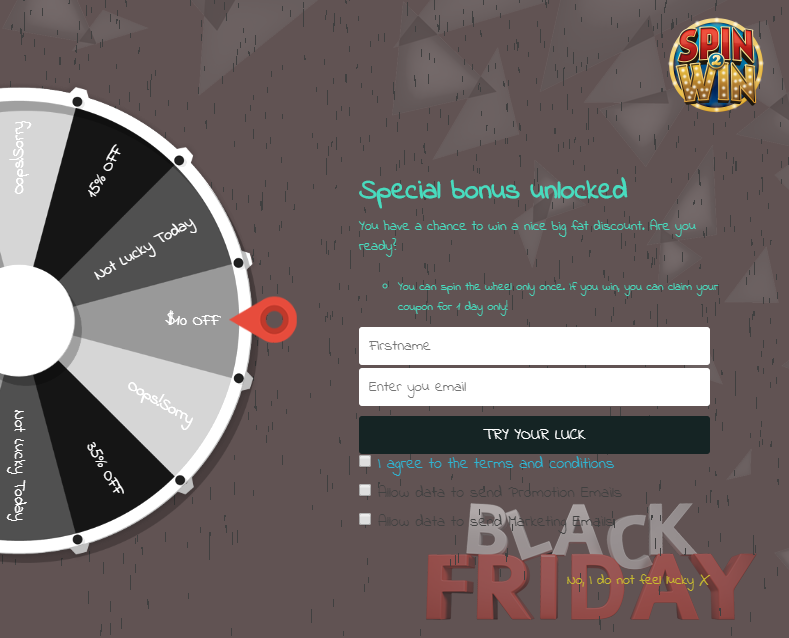
Or if you have a spin and win popup, you can customize it for different occasions. A similar approach can be followed for Thanksgiving and Cyber Monday.

You can highlight the coupon code and feed it into a user’s mind as soon as they enter your store. The time-saving approach avoids the need to search for the offers section.

2. Do the makeover of your Ecommerce store

The time is now! Give your store a makeover before the eCommerce biggest holiday season sale. Planning for Black Friday, Cyber Monday and the ensuing holiday season is overwhelming to drive your business’s main sales in the fourth quarter as well as the rest of the year.

To make it look attractive and engaging, add some decorative elements to your store. Give it a festive look and get ready for the largest holiday season sales.

You can change the look and feel of the store by adding some colors to it,

Wondering how to do this? If you have your store on the PrestaShop platform then Website Decoration Effects can be added to it. To entice your customers, you can show a discount coupon strip on the website pages. It will be effective if you can put some efforts into mobile creative and user experience design.

3. Offer Buy Online In-Store Pickup (BOPIS)

You must be thinking why I am adding the BOPIS model in the top marketing strategies for Black Friday and Cyber Monday Sales. Here are some numbers from the previous year that highlights 43% growth in BOPIS service providing retailers. If you have a physical store as well as a digital platform then offering BOPIS (buy online, pickup in-store) this year will add new value to your store.

With more competition among retailers than ever, shoppers increasingly looked for full convenience and time saving and BOPIS is the one you can fire with.

Refer to this article if you want to get ready for offering BOPIS services to your customers before the freakiest five-day festive sales.

4. Utilize the Social Media platforms

User engagement on social media networks like Facebook, Instagram, and Twitter is at a peak during the holiday season. And there is a flood of posts by Brands to make their audience/followers aware of the enticing offers.

Social media marketing strategy for Thanksgiving and BCFM needs to be planned way in advance as these holidays come one after another. So you need to take quick action.

To start with the least, you can replace your existing brand profile picture and cover image with a holiday-specific image. Thereafter, you can schedule your posts for a suitable time, mostly when the reach is higher. And you can also take the help of Social media advertising to make your posts reach out to a larger number of audiences.

Most importantly, do not forget to use hashtags. Hashtags might not be effective on Facebook but can give you a huge boost on other social media channels like Instagram and Twitter.

Add some reels and allow people to explore your feeds on Instagram.

5. Shout out to your customers via Email

Adding to the list of Black Friday Cyber Monday strategies is sending an email blast to your subscribers and making them aware of your offers for Thanksgiving, Black Friday, and Cyber Monday. Or you can segment your customers and target them separately.

Though email marketing, today, is not as effective as it used to be, it is still one of the best practices to perform during the holiday season.

To make sure your emails deliver useful results, try not to follow the conventional approach.

What to do?

Come up with a catchy subject line. When the notification pops up on your user’s mobile or desktop, it should be tempting enough for them to open it and read the inside content.

Secondly, if you have a specific coupon code, highlight it in your email content. Last but not least, set your timing right. Schedule your emails for the time when your users are highly active.

6. Create Urgency by setting up a Countdown Timer

Customers generally like to compare the product’s price with your competitors’. They wait for the prices to drop, and then buy from the one offered at the lowest price.

Let customers not feel that they can claim the offer at any time during the day. Create a sense of urgency by displaying a countdown timer on your product pages so that the customers fear missing out on the sale. This provides you with an excellent opportunity to close the sale at that very moment.

You can also display a countdown timer at the homepage revealing the commencement of the holiday seasonal sale so that customers are very well informed when the sale is going to start. This should be included in your emails too.

7. Introduce Gift Cards

If you can leverage your customers to buy for themselves, it is ideal but even better if you can inspire them to buy for their friends and family as well. The only thing that online shoppers look for during busy shopping days is Gift Cards. Digital Gift Cards have eased the load of searching for a perfect gift.

Now, when people have a shortage of time to purchase gifts, they opt for the Gift Card option. This is why gift cards can be a sales booster for your online business.

Designing a theme-based gift card for Thanksgiving, Black Friday and Cyber Monday would make up an ideal way to allow your customers to purchase a gift card and keep the holiday feel. This makes it one of the effective BFCM marketing ideas.

Not having a Gift Card section but want to add it to your website? Turn to Knowband’s Gift Card Manager.

Read: Why Digital Gift Cards are important to your Business?

8. Run a User-generated Content Campaign

A few days prior to this 5-day holiday period, you can announce a user-generated content campaign and ask users to participate in it using specific hashtags related to your brand and obviously the coming event.

For example, for the occasion of Black Friday, you can ask users to share what they purchase along with their experience with your brand, using your brand name and the product name in the hashtag. You can announce some gift vouchers for some lucky winners.

This way, not only you will encourage people to purchase but also grow your brand awareness. This type of marketing beats even paid to advertise.

9. Launch a Referral Program

A Referral program is a great form of word-of-mouth marketing, where you reward people for recommending your Brand/product(s) to others. It is an efficient and cost-effective way to acquire new customers and boost your sales.

You can run a limited-time referral program where you reward both the referrer and the referent when the latter makes a successful registration or makes a purchase. You can shout out this news on your social media pages as well.

Want to start a similar program? Check out

PrestaShop Affiliate and Referral Program

Magento Affiliate and Referral Program

Magento 2 Affiliate and Referral Program

10. Exclusive Offers For Loyal Customers

Make your loyal customers feel special by introducing exclusive offers for them. Or you can reward them with loyalty points and encourage them to return to your store and purchase. It enhances brand loyalty.

Loyal customers are your regular shoppers and they deserve to be treated special.

Knowband offers the Loyalty points module for PrestaShop, OpenCart, and Magento where you can reward not only the existing customers but also provide new customers with loyalty points when they register. Check out

PrestaShop Loyalty Points

OpenCart Loyalty Points

Magento Loyalty Points

Final word

You can adopt a few more ideas like Upselling and Cross-selling, triggering abandoned cart emails with a discount offer, etc. Preparing for the biggest online shopping week of the year can be daunting, but this holiday e-commerce season marketing guide will make it as smooth as possible. Utilize these thanksgiving and BFCM marketing ideas and strategies to the fullest. Do not leave this once in a year opportunity to skyrocket your sales.

All the best for the Holiday season!

Have something to ask? Do let me know in the comments below.

This may Interest You:

Be Ready with these eCommerce store Modules for 2020 Holiday Season Sales

Uplift Holiday Season Sale by Persuasive Marketing with Magento 2 extensions

Best Instagram Hashtags to Use This Holiday Season

How to delete Products from the Fyndiq marketplace

Objective of the blog:

This blog will enable you to understand the way of deleting the products from the Fyndiq marketplace using seller central account.
Steps to delete Products using Seller-Central

1. Open the Fyndiq seller central login page (Login Page URL- https://fyndiq.se/merchant/login).

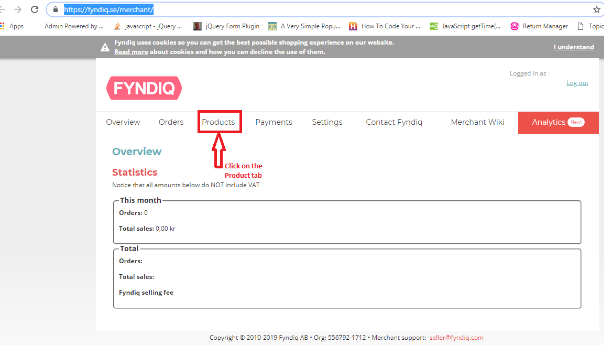
2. Click on the Products tab of the home page as shown below:

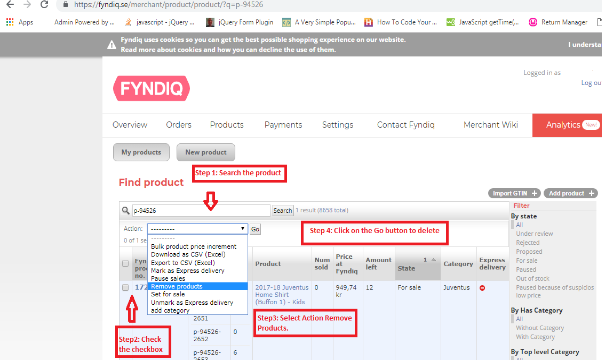
3. In the product page, you need to follow the following steps to delete the product from the Fyndiq marketplace.

  1. Search the product by using the product name/SKU.
  2. Tick the checkbox of the products which you need to delete.
  3. Select the “Remove products” option from the “Action” dropdown.
  4. Click on the “Go” button to delete the product.

These above steps are shown in the image below:


Summary

This blog will enable you to understand the way of deleting the products from the Fyndiq marketplace using seller central.

Why you should sell on Etsy Marketplace? : mCommerce presence of Etsy

Etsy is a unique marketplace that mainly deals in the online trading of handmade crafts and vintage items which includes jewelry, toys, sports items, etc. It is a platform where sellers can make money out of their art and creativity and can earn a huge chunk of profits. Selling on Etsy Marketplace is still a dream for many sellers so to know the process of selling on Etsy, you can have a look at how to sell on Etsy Marketplace.

mCommerce popularity of Etsy:

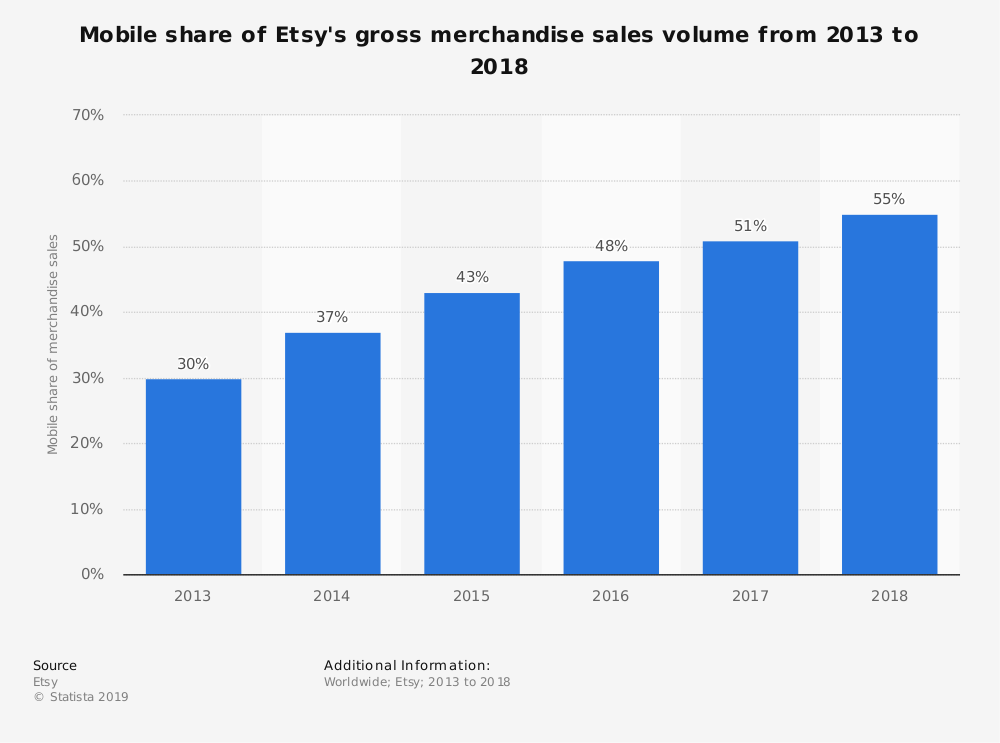
The usage of mobile apps is continuously increasing day by day. Etsy has a great mobile app that works efficiently and is been used by many customers worldwide. In 2018, 55% of the company’s gross merchandise sales were generated through mobile devices. Therefore, it’s the mobile app is offering good sales and profits.

However, the increased usage of mobile apps does not assure you of massive sales and profits. For that, it’s important to rank your products high on the Etsy search results. Sellers need to be patient and should implement the best practices to achieve their goals. However, if you’re concerned more about the product ranking on search results, you can have a look on “How to increase the sales of the Etsy Shop, It contains strategies to skyrocket your product ranking on Etsy and acquire more customer attention which will compel them to go for instant purchase.

Benefits of selling on Etsy Marketplace:

Earlier, there was no way for small vendors to sell their hand made products among huge no. of audience. These craftsmen used to sell their products in fairs, open markets, or under consignment. However, the introduction of Etsy Marketplace helped these small merchants to sell their products online as it is a quick, moderate, and easy way to access millions of customers worldwide resulting in good profits. It enabled sellers to set up their brand shop with all the facilities provided without any advanced investments. Being an eCommerce store owner for any CMS platforms like PrestaShop, Magento, Shopify, and OpenCart, they can sell on Etsy and leverage the following benefits.

Benefits are listed as follows:

1. Personalize your store:

The chance to personalize your storefront is given by fewer Marketplaces only like Etsy. Etsy gives sellers a golden opportunity which enables merchants to list their products accordingly, put the brand logo, and create personalized taglines and product-related policies. This will help sellers to enhance their brand image and become popular among customers which in result will provide immense sales.

2. Attract to a huge audience:

As we already got to know above that Etsy has 39.5 million active buyers. Undoubtedly, sellers have high chances to make good sales and profits as customers testimonials are showing their love towards Etsy. Also, it automatically provides sellers the accessibility to millions of customers all over the world. This enables them to increase their cross border sales too.

3. Customer Engagement:

It is another flexibility offered by Etsy to its third-party sellers. Etsy allows their sellers to:

  • Leave their social media handles,
  • Offer discounts and coupons on their products,
  • Collect emails to send reminder notifications.

These strategies help in engaging the targeted audience and also put sellers in charge of their product listings. On the other hand, it increases customer engagement on Etsy Marketplace which can compel customers to go for instant purchase.

4. Low cost of Startup:

As Etsy Marketplace has all things set up in one place, the retailer has to hardly make any investments other than some few expenses. Thus, the minimal cost is involved in selling on a Marketplace as a comparison to selling on your eCommerce website. Etsy will only charge:

Monthly Subscription Fee for selling on their platform and, listing fee or commission which is a standard amount for every product they listed on the Marketplace’s catalog.

5. Increased Brand visibility of your store:

If you are a newcomer in the eCommerce industry and trying your best to mark your presence on customers, Etsy Marketplace will help you to enhance your brand visibility and gain customer’s trust which will directly compel customers to go for instant purchase and this will result in increased sales and revenues.

6. Marketplace’s Powerful and supportive community:

Etsy makes you feel like family which indirectly brings you immense sales. Etsy has its forums and teams which always remain connected to the sellers and help in every possible way. This helps in building up the confidence of sellers which in total makes the whole Etsy Marketplace strong.

Finally,

Selling on Etsy is the least complex way to ensure good sales and revenues. Selling on Etsy Marketplace is not an easy goal to achieve so luckily if sellers get a chance to sell on Etsy, then the above-mentioned benefits will help them to ensure good profits. Regardless of the marketplace, you choose to sell on, it’s important to be aware of the latest trend going on in the eCommerce industry and implement it for a profitable business in the future.

Selling on Etsy Marketplace was not that easy before. KnowBand offers Etsy Integrators for various CMS platforms like PrestaShop, Magento, Shopify, and OpenCart, which allows sellers to integrate their eCommerce store with Etsy Marketplace via API integrator. With its seamless technology, sellers can easily present their products among the larger audiences and encourage brand awareness as well.

Find more related articles here:

  1. How to Sell on Etsy Marketplace?
  2. How to Launch a Marketplace like Etsy and eBay?
  3. How to rank your products up in Etsy search results?
  4. How to add or update the shipping profile in Etsy Marketplace?
  5. How to add production partners and connect with listing in Etsy Marketplace?
  6. How to add or activate/deactivate a product in Etsy Marketplace?

Magento Affiliate and Referral Program- Grow Brand Awareness and Acquire New Customers

“Magento Affiliate and Referral program extension incorporates an Affiliate Account section on your Magento store and allows users to register as an affiliate and earn incentives for every successful referral. The incentives or commission are provided for new user registration, order placement or both.”

Affiliate and Referral Programs are excellent marketing strategies for any brand. It involves less cost and provides significant value in return. You would have often seen brands running a “Refer and Earn” program or YouTubers mentioning their affiliate link on the video description. That is what we call the Referral and Affiliate Marketing respectively.

Magento Affiliate and Referral Program extension

Knowband presents the Affiliate and Referral program extension for Magento that helps Magento store owners build brand awareness and increase their user base efficiently.

Features of Magento Affiliate and Referral Program extension

1. Multiple types of referral

Magento Affiliate and Referral Program extension lets the affiliate partners invite new users to your store through various means. The affiliate partners can bring in new customers by sharing with them a referral code or a referral link.

They can also provide a voucher to the referent which the latter can use while making a purchase. In addition to this, affiliate partners can share the referral link on various social media platforms like Twitter, Facebook, Pinterest, right from their affiliate account.

2. Set the referral rate for the affiliates

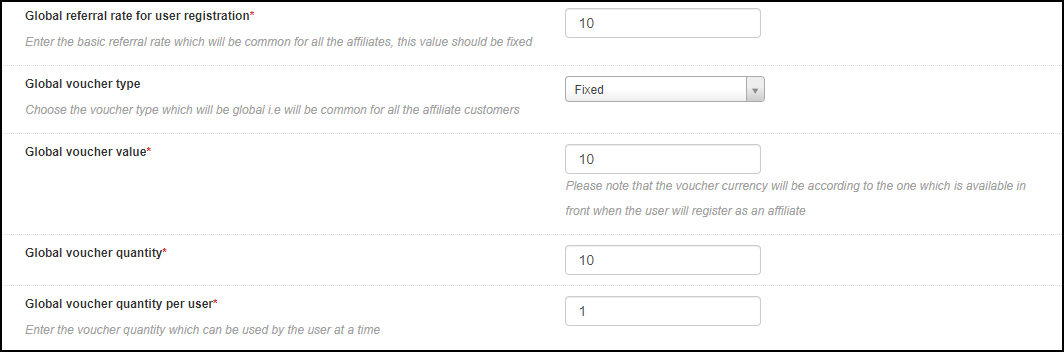
Magento store admin can define a global referral rate for the affiliate partners for the user registration and the order placement.

3. Personalize commission for each affiliate

Though the Magento Affiliate and Referral Program extension allows the store admin to set a fixed global referral rate for the affiliate partners, they can personalize it for every different affiliate.

4. Assign your affiliates with a voucher on their registration as an affiliate

Magento Affiliate Program extension allows merchants to assign a voucher to the affiliates on their successful registration. The store admin can set the voucher value and offer it in the form of a fixed discount or on a percentage basis.

There is also the option to define the overall voucher quantity and voucher limit per user.

5. Set a period for your referral program

Magento Referral Program extension provides the option to run the referral program for a limited time. If you define a time period, the referral code won’t work after the specified period.

6. Get insights into registered affiliates

You can check the details of the registered affiliates under “Affiliate Customers.”

7. Get insights into referred customers

“Referral Listing” displays the data of the customers who have registered through the affiliate’s link.

8. Check incentives earned by the affiliates

Magento Referral program allows store admin to view the incentives earned by the affiliate partners under the “Commission History” tab.

9. Check payout requests raised by affiliates

Magento Affiliate and Referral Program extension lets the affiliate partner get their payout/commission in the form of a voucher or cash.

The affiliate customer needs to raise a request from his/her account to withdraw the earned commission, which will then be reflected under “Payout Requests.”

Benefits of Magento Affiliate and Referral Program extension

1. Magento Affiliate and Referral extension helps you acquire new customers. With more user sign-ups, you will get more leads which will be beneficial for your email marketing campaigns.

2. Magento Affiliate and Referral Program increases brand awareness since it follows word of mouth marketing.

3. You can drive more conversions and hence more sales when the referent makes a purchase using the voucher code.

4. You can maximize your sales by putting minimum efforts.

5. Offering exciting incentives to the affiliates can encourage them to bring you more customers.

6. Magento Affiliate and Referral Program is a boon for your advertisement cost.

Check out the admin demo and the front demo of the Magento Affiliate and Referral Program extension. If you have any concern regarding this module, you can mail us at support@knowband.com and our team will resolve your query to the earliest.

Also read: How Affiliate and Referral program helps online businesses?

You can also check out this module for PrestaShop and Magento 2:

PrestaShop Affiliate and Referral Program

Magento 2 Affiliate and Referral Program