Are you among the OpenCart sellers who are facing a lot of cart abandonment? It is difficult to avoid shopping cart abandonment when customers have a variety of products available online.
The mood of the people is very unpredictable and it is difficult to keep them engaged in an online store for a long time.
If visitors don’t find the desired product or service on a site, they will not think twice about leaving a site.
This gives rise to shopping cart abandonments that can create a severe impact on the business fortunes of your OpenCart store.
Although, there is no guarantee to avoid abandoned carts on an online store you can take the help of the OpenCart Abandoned Cart module from the Knowband store for minimizing the effect of this problem.
Here are the various features and functionalities of OpenCart Abandoned Cart Extension that can be a great help for your online store.
Provides Freedom to store admin
The module offers a wide range of functionality to store admin such as, check abandoned carts, customization in an email template, view information about abandoned orders, number of orders, setting the delay time of reminder emails, and other such activities. With a wide range of features for site admin, it will not be much difficult to improve sales and conversions on your site.
Investigate User Behavior
With the OpenCart Abandoned Cart extension, you can keep track of your abandoned carts, better understand your customers’ buying preferences and needs, and present them with a useful solution.
Increase the number of conversions
You can potentially enhance conversions on your site by lowering the high cart abandonment rate with the OpenCart Abandoned Cart addon.
Customer Feedback of OpenCart Abandoned Cart Extension
Fantastic Analytical View
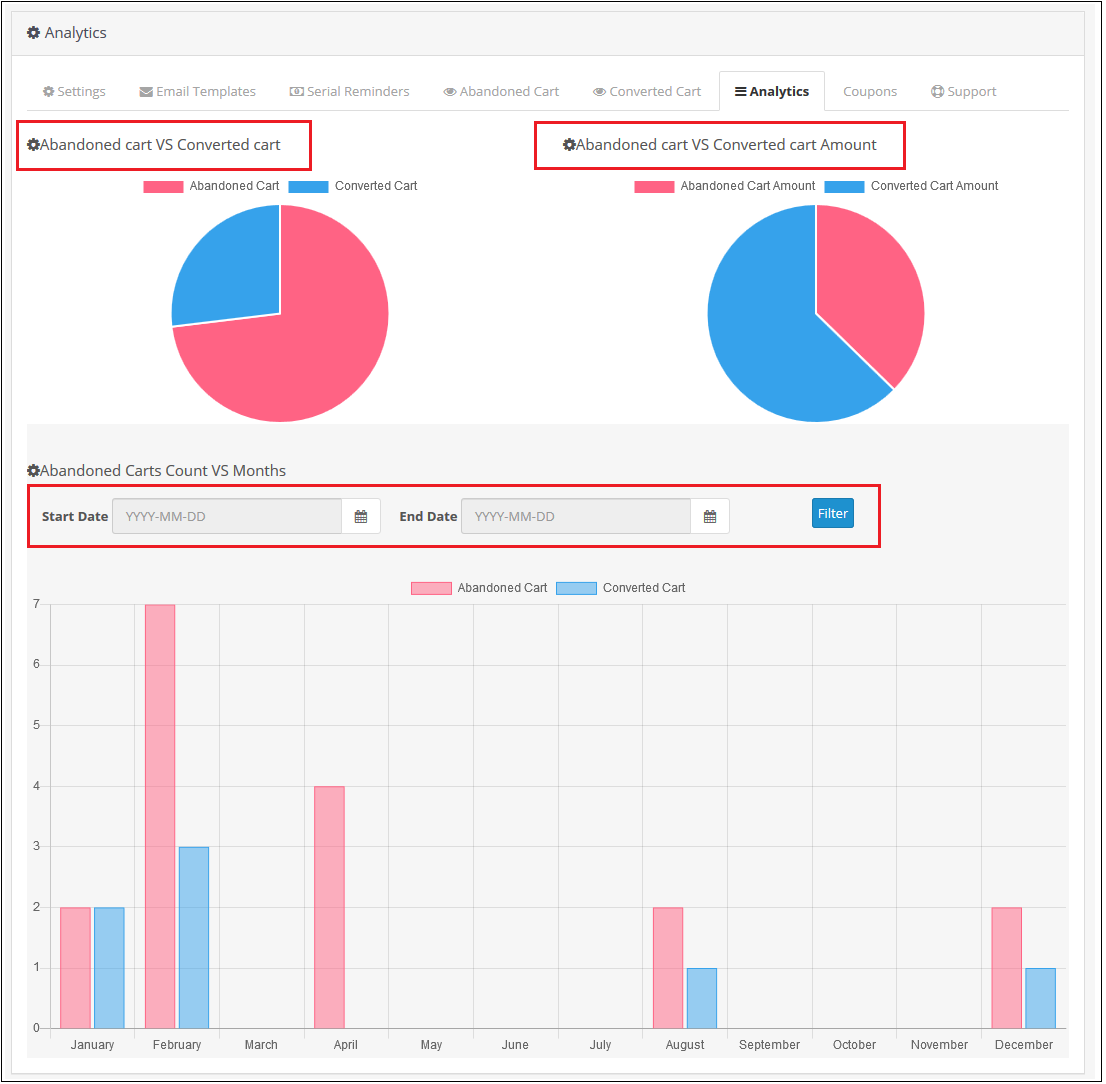
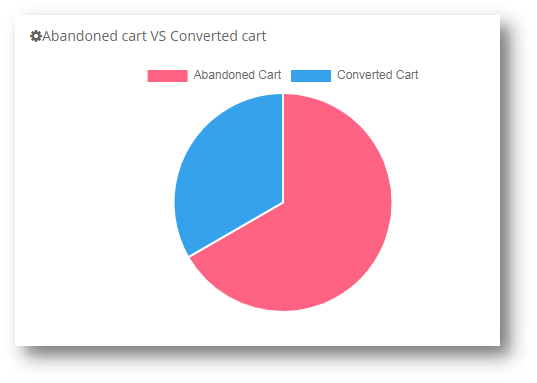
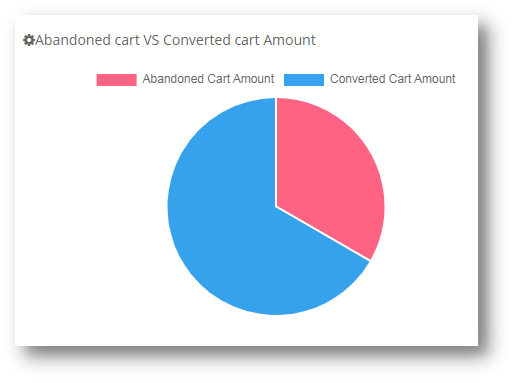
Abandoned Cart vs Converted Cart and Abandoned Cart Amount vs Converted Cart Amount are two comparisons provided by the OpenCart Abandoned Cart plugin in the form of pie charts.
It also shows a bar graph of abandoned and converted carts throughout the year. You can also exclude data from a certain time period.
Increase the efficiency of reminder emails through custom settings
Sending Reminder emails is easy with ready-made templates
For informing customers about their pending orders, you need to send them reminder emails at a regular time interval. With OpenCart Abandoned Cart Extension, it is easy to do customization in your email templates as desired.
This helps you in grabbing maximum customer attention and to recover sales quickly. Store admin can easily add various variables like customer name, product information, discount, and other related offers into their reminder emails to improve their overall impact.
Set the time limit for marking the cart as abandoned
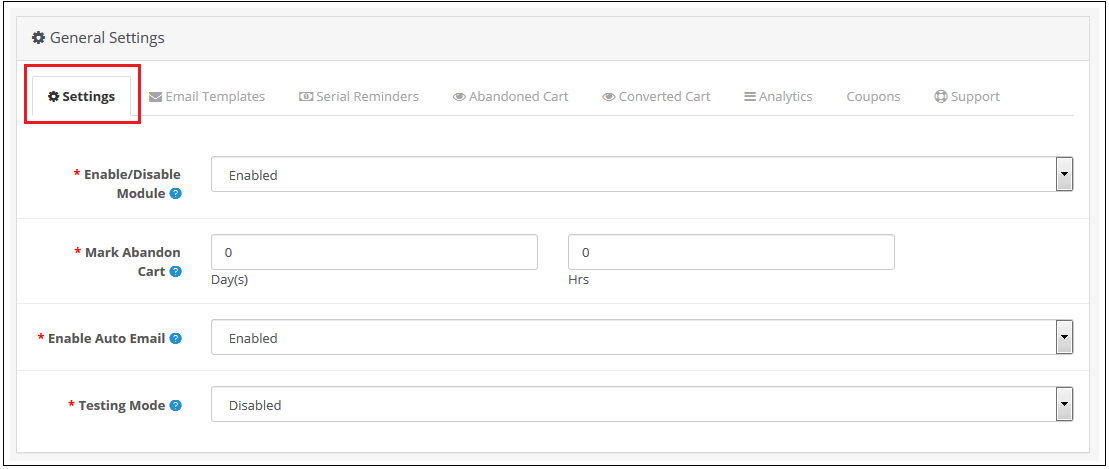
You can define a time interval after which the cart is automatically designated as abandoned using the OpenCart abandoned cart reminder plugin. Hours or days could be chosen as the duration.
Email Follow-Ups on Autopilot
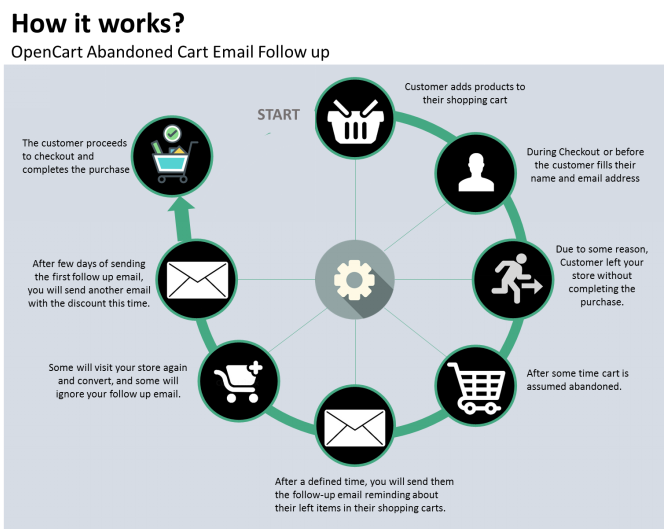
The OpenCart Abandoned Cart email follow-up extension allows you to automatically send reminder emails after a certain amount of time has passed.
Send discounted and Non-discounted emails
You can create discounted and non-discounted emails with the OpenCart Abandoned Cart Serial Reminder addon. The first email is a generic reminder, whereas the second includes a promotional code to entice the consumer to make a purchase.
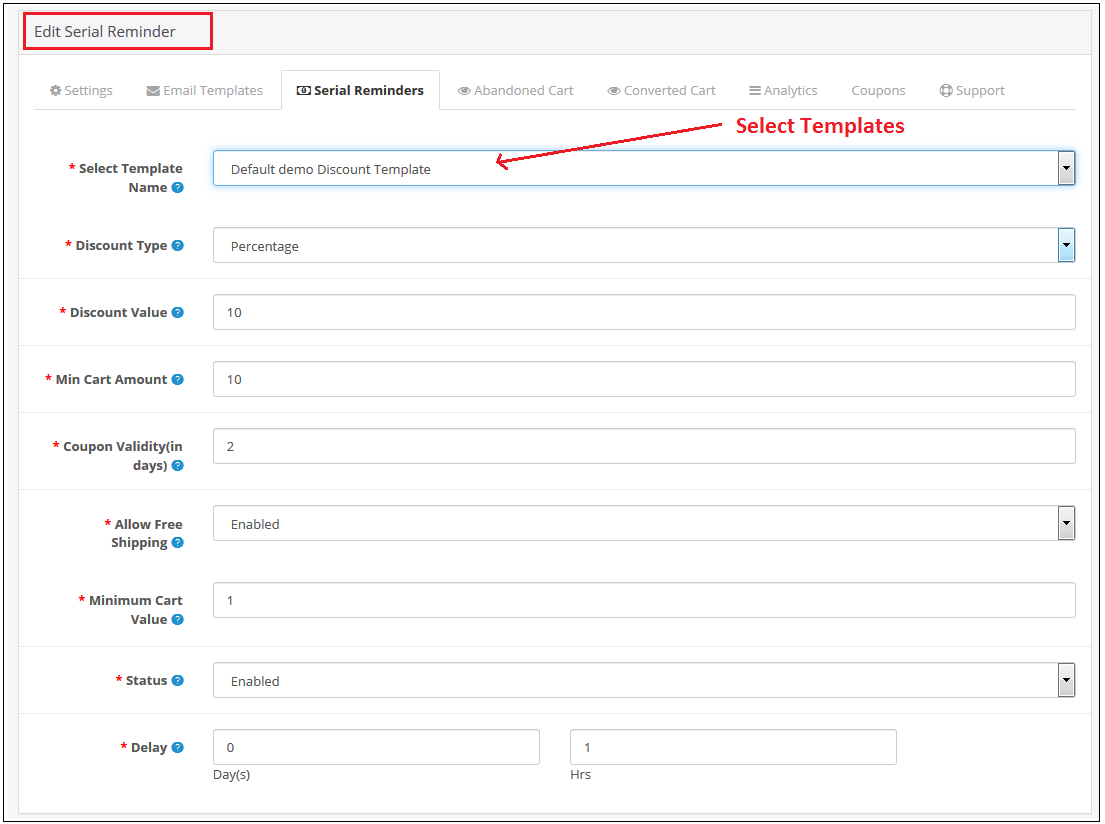
The discounted email includes all of the non-discounted email choices. In addition, you can select the discount type (fixed or %), the coupon value, the coupon validity, and the free shipping option.
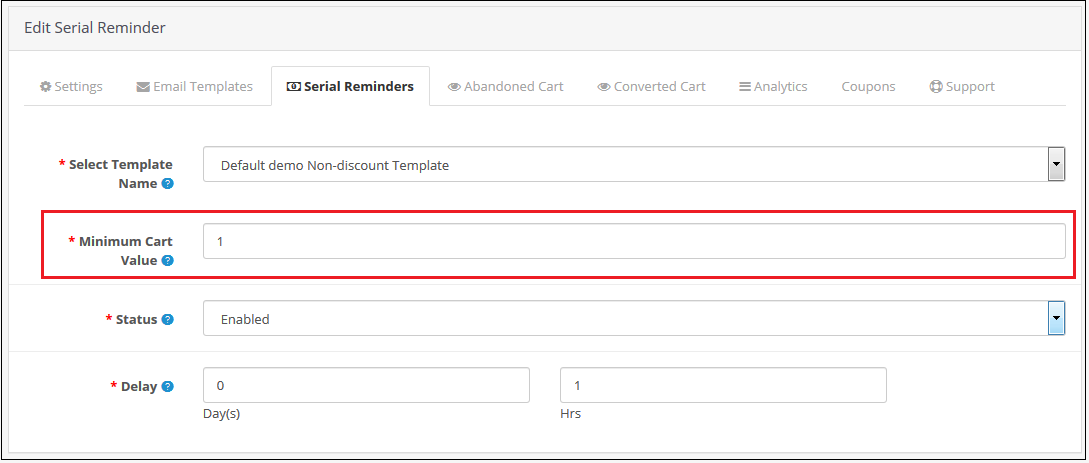
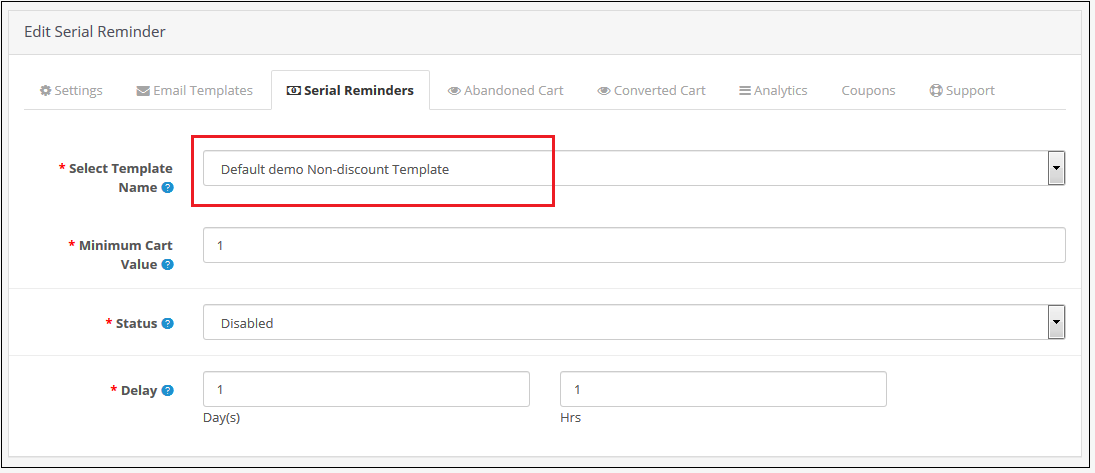
Set the minimum cart value as well as the delay time.
You can select the minimum cart value required to send a specific email type. Also, you can fix a delay time after which the emails will be sent automatically to abandoned carters. This is the best extension to send reminder emails to your customers.
Customers get quick access to abandoned shopping carts in a single click
To recover abandoned carts on a store quickly, you can divert abandoned customers towards their shopping cart with a single click. To do that, the module provides you the freedom to send email alerts with the cart link. Moreover, they don’t have to add products into their shopping carts from scratch which saves a lot of their time and effort.
Keeps a track of the abandoned carts on your site
Tracking abandoned carts on your OpenCart store is now much easy with the help of this OpenCart Abandoned cart module. It can provide important information such as the number of abandoned carts/orders, order numbers. Also, number of abandoned carts that have been converted, and other such details can help in minimizing the shopping cart abandonments on a site.
This module can ensure gold mine of information that can play a critical role in the recovery of abandoned carts.
Wrapping-up
It is now much easy to reduce abandoned carts on an eCommerce site due to the presence of this feature-loaded module for OpenCart stores. Don’t just wait and watch to reduce abandoned carts on your site but take the right steps with the help of this OpenCart Abandoned Cart extension. You have to take the final call by purchasing this OpenCart module from the Knowband store as things won’t fix for themselves.
For better conversion on your eCommerce store, click here.
If you want to know how you can improve customer engagement during holidays, click here.
As a shopper, you’ve probably abandoned plenty of carts yourself. As a retailer, you often wish that more people would actually complete a purchase instead of leaving their carts behind. But can you do anything about eCommerce cart abandonment, and win back some of those lost sales?
You certainly can, but there are a lot of different areas to navigate and improve.
What is cart abandonment?
Cart abandonment is when an online shopper adds at least one product to their cart and then exits without making a purchase. Abandonment rates are staggeringly high — demonstrating the huge revenue opportunity to win back these shoppers and make a sale.
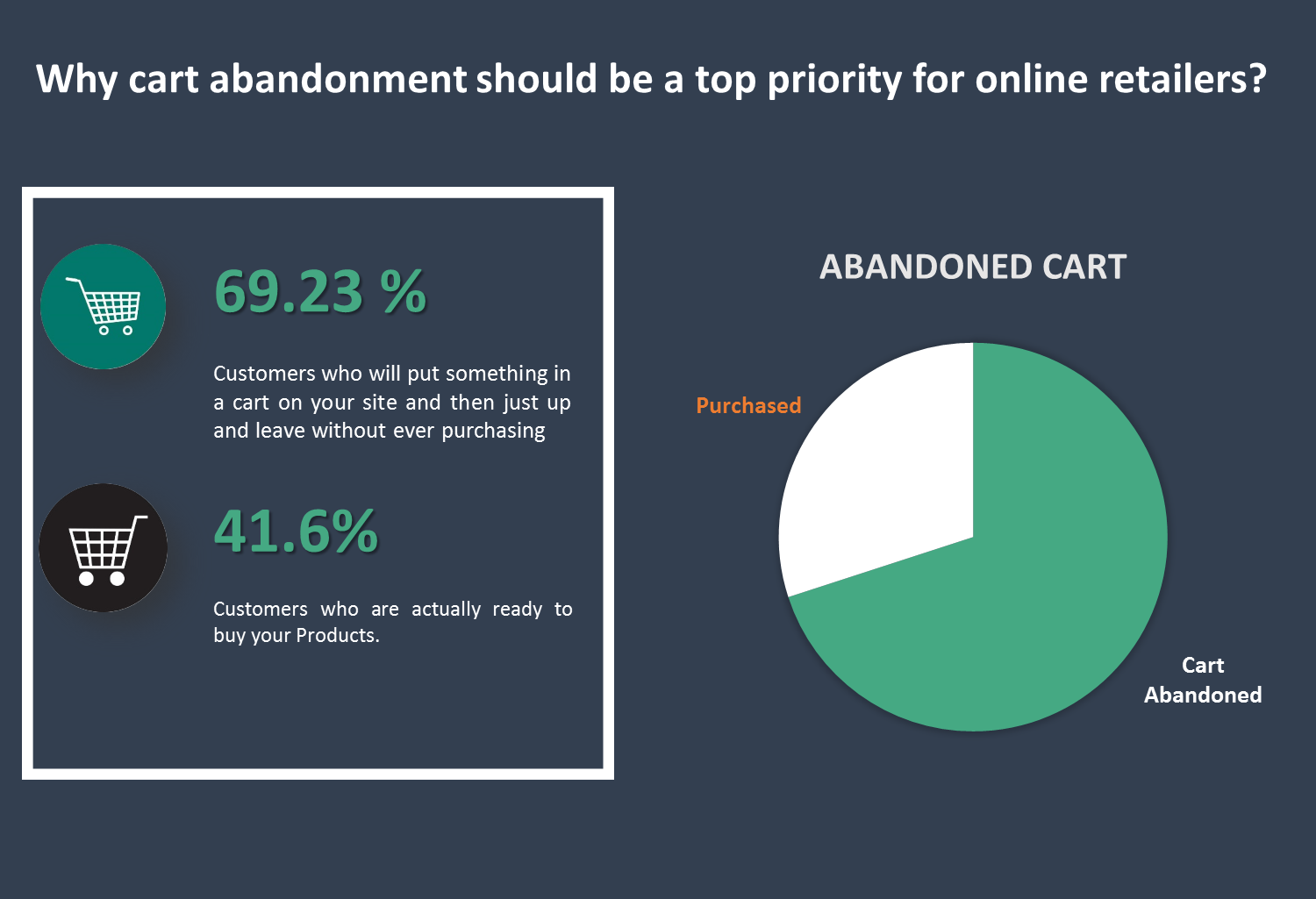
Why cart abandonment should be a top priority for online retailers? 69.23% –– that’s the average percentage of the customers who will put something in a cart on your site and then just up and leave without ever purchasing. 58.6% –– that’s the percentage of people who say they’ve abandoned a cart within the last 3 months because “I was just browsing / not ready to but”. These people likely won’t ever even initiate your checkout flow.
But for the 41.6% of other abandoned carts, many people will begin your checkout flow. Why does this matter? Because when a customer begins the checkout flow, they must first enter their email. And, when you have their email, you can trigger an abandoned cart series to bring that customer back and earn their sale.
To convert the abandoned cart into purchases is a difficult task and requires a lot of efforts.
Here by Opencart Abandoned cart module we simplify this process for you. This module allows the Admin to view all the abandoned carts and take actions accordingly. Admin can create their own e-mail template, be it a discounted e-mail or non-discounted e-mail and send it to the customer automatically through this module.
Salient Features of the OpenCart Abandoned Cart extension:
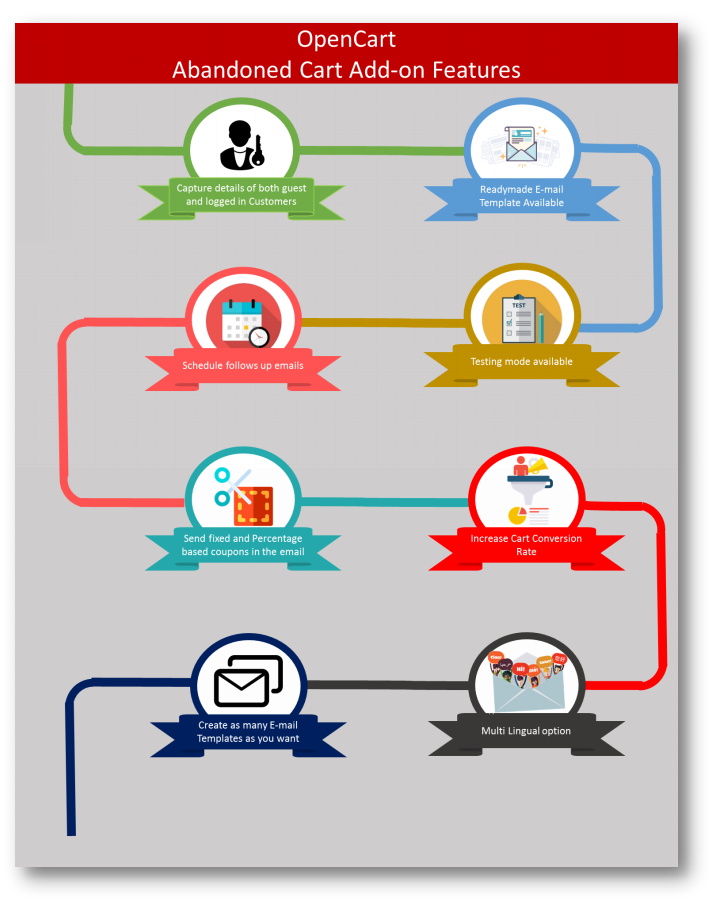
The extension analyzes the behavior of the online shoppers and tracks and marks the abandoned carts on the online store.
With the extension, the store admin can modify the follow-up email templates and can make as many new templates as he wants from the admin interface.
The extension offers discounted and non-discounted email templates. The admin can highlight an attractive discount and a coupon code in the email to convince buyers to purchase the products.
The store admin has to set a time-delay after which the extension automatically sends the follow-up email to the customers. The store admin doesn’t have to send the reminder emails manually.
The e-merchant can check and see all the captured abandoned carts and the converted carts through sending emails in the back-end of the extension.
With the awesome Analytics tab, the store owner can compare the total abandoned carts with the total converted carts and can make new strategies to increase the converted carts.
The extension offers a Test mode option by which the store admin can test and review the reminder emails by sending them to a given test email address.
The extension is mobile responsive and offers multi-language support.
The e-merchant can also view and check all the coupons which are generated by the extension. The admin can check how many coupons have been used by the customers and how many are still unused.
2.0 Installation Guide
Before starting the installation process, you have to buy the Abandoned Cart Serial Reminders by the Knowband store. Once purchased, you will receive the following files on your registered email.
Source code of Opencart Abandoned cart extension in zipped file format.
User Manual of Opencart Abandoned cart extension.
Now in order to install this on your online shop, follow the given steps:
Step 1: Unzip the zip file. You will get the folders as shown in the image below
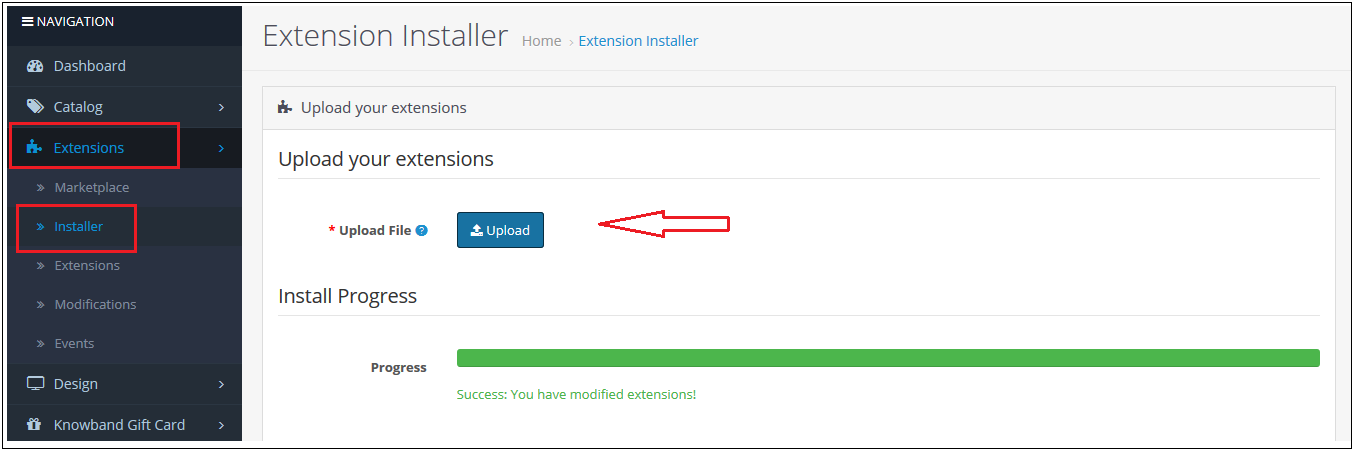
Step 2: Go to Extensions and then Installer. From here, you can upload the “kbabandoned_cart.ocmod” file and install the extension.
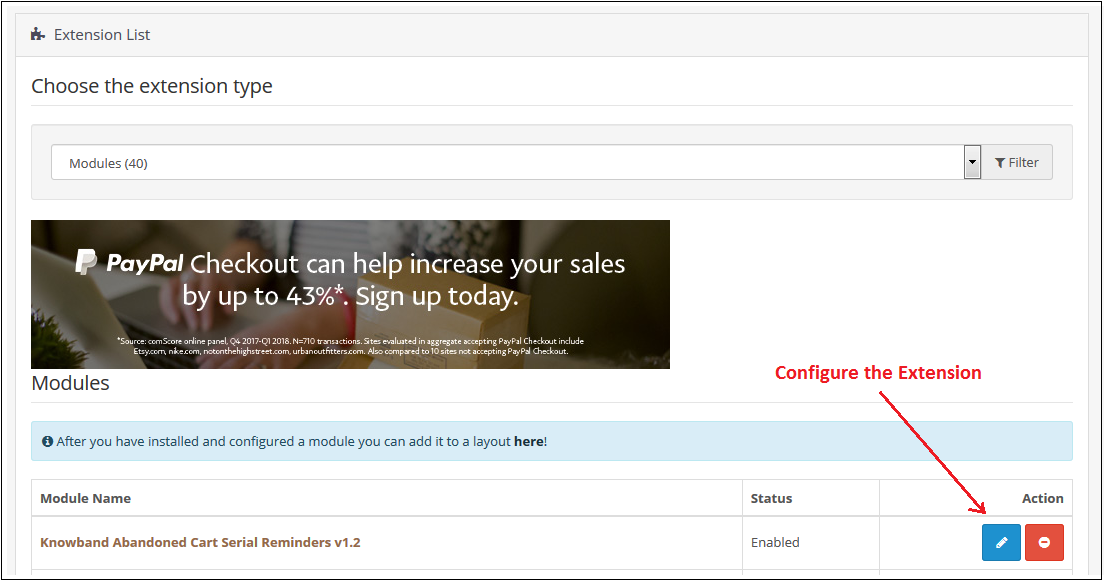
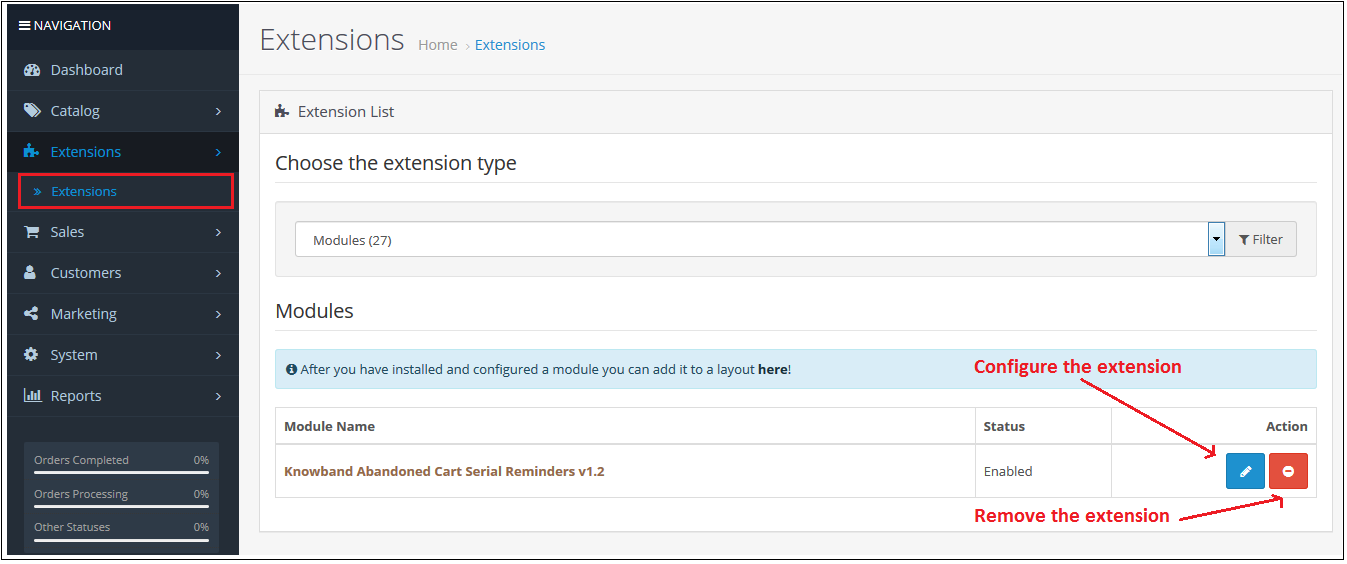
So Opencart Abandoned cart Module, is now successfully installed and is ready to use at your store. Go to the admin menu and click on the extensions. Choose the Extension Type as Modules. You will find a list of modules. Select the Knowband Abandoned Cart Serial Reminders.
3.0 Useful Cron Instructions
3.1 Reasons/Cases when the email is not sent to the customers
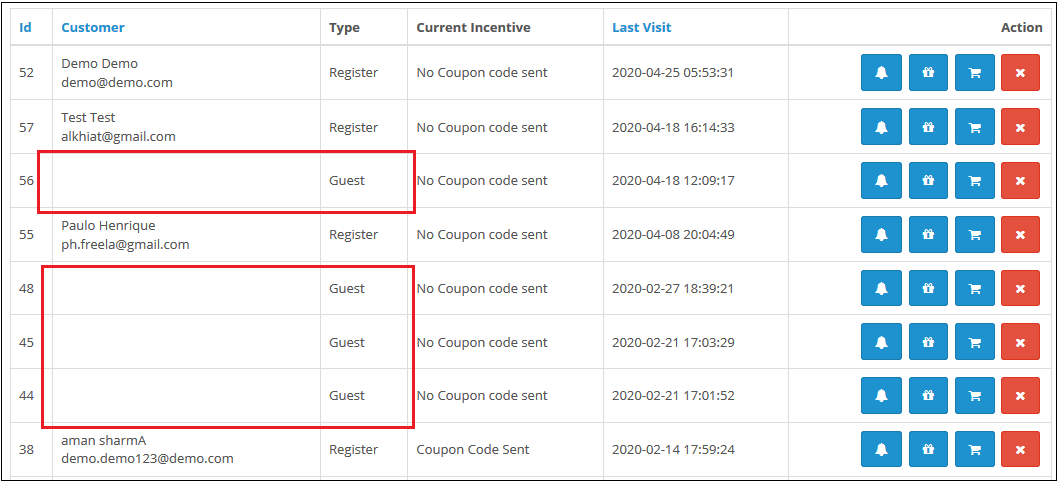
A. Email Id is not available (Guest customer)
B. If the cart does not satisfy the condition of serial reminders
If the minimum cart value is greater than the abandoned cart value. For example, the minimum cart amount is $50 and the abandoned cart amount is $45. It will not send a reminder in this case.
If the delay is set to one day, so the reminders will not be sent to the customers whose carts are abandoned for less than a day. C. If you have not setup the Cron properly or if the Cron is not working.
3.2 Types of Crons
There are two types of cron that run every hour.
1. Cron to update the Abandoned cart: This cron runs every hour.
For example, suppose if the cron runs at 11:05, 12:05…..and so on and you have set “Mark Abandoned Cart” as 1 hour. When cron runs at 11:05 it will add all the abandoned cart created between 9:05 to 10:05. If you have set “Mark Abandoned Cart” as 0 hours then it will add all the abandoned cart created between 10:05 to 11:05.
2. Cron to send a reminder email: This cron also runs after every hour.
For example, suppose the cron runs at 11:11, 12:11…..and so on and you have set the Reminder for 1 day and ‘Mark Abandoned Cart’ as 1 Hour. When cron runs at 11:11 then the emails will be sent to all the abandoned carts between 9:11 to 10:11 of the previous day. If you have set Reminder for 2 days and ‘Mark Abandoned Cart’ as 0 hour then the emails will be sent to all the abandoned cart between 10:11 to 11:11 of the day before yesterday.
3.3 Procedure to configure CRON job
3.3.1 What is a cron?
A cron is a service that allows a user to automatically execute a script at a specific time.
For example, you can set a particular PHP script to be automatically executed every day at midnight.
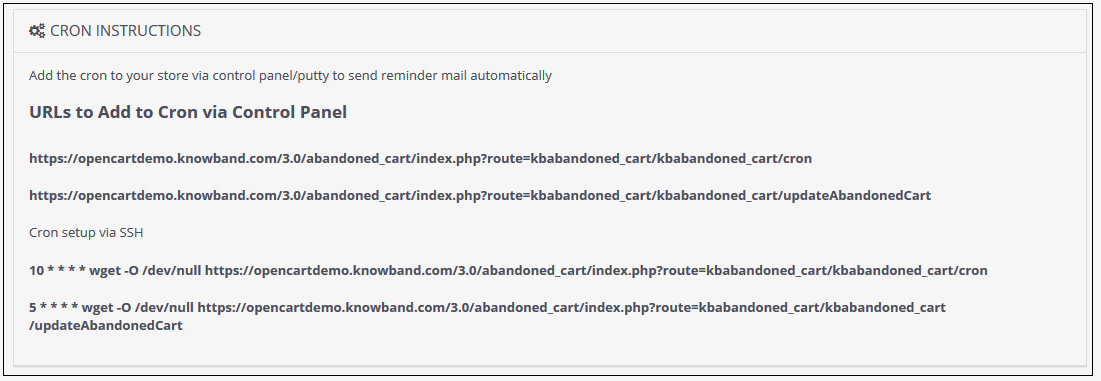
Add the cron to your store via control panel/putty to send reminder mail automatically Example URLs to Add the Cron via Control Panel
4.0 Admin Interface of OpenCart Abandoned cart extension
To configure the Abandoned cart email follow-up extension for OpenCart, Navigate the settings in the following order:
Admin Panel > Extensions >Modules> Abandoned Cart Serial Reminders
The Admin Interface of OpenCart Abandoned cart recovery email extension includes the following main settings:
General Settings
E-mail Templates
Serial Reminders
View Abandoned Cart
View Converted Cart
Analytics
Coupons
Support
4.0.1 General Settings
Through this setting of OpenCart Abandoned Cart Serial Reminder, you can enable/disable the whole module by just one click. The screen will look like as shown below:
4.0.2 E-mail Templates
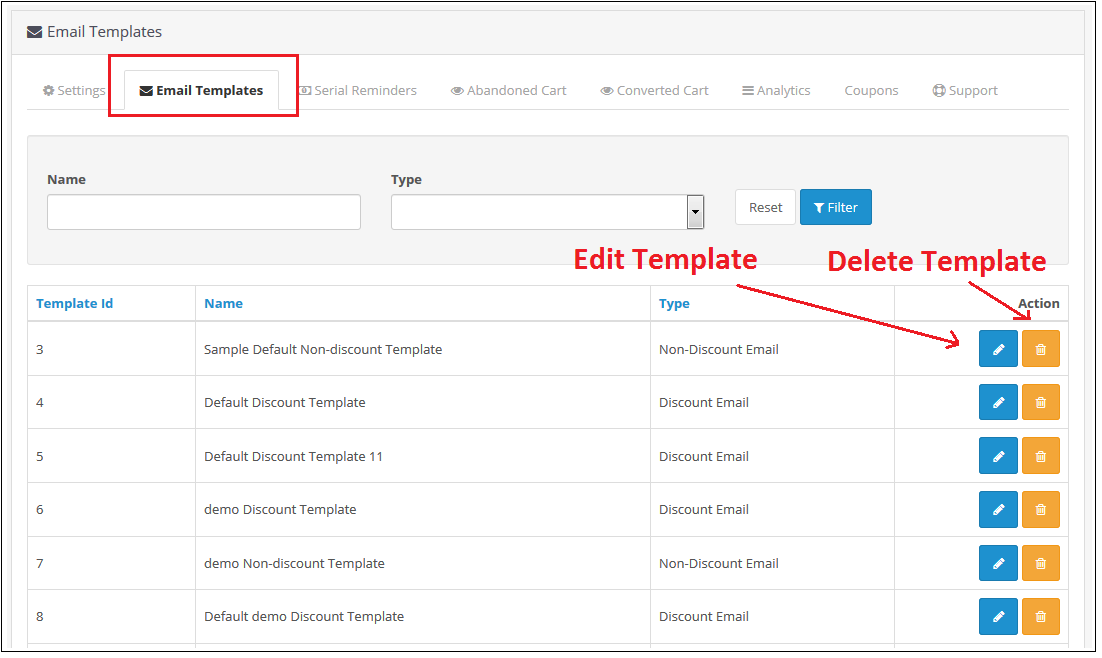
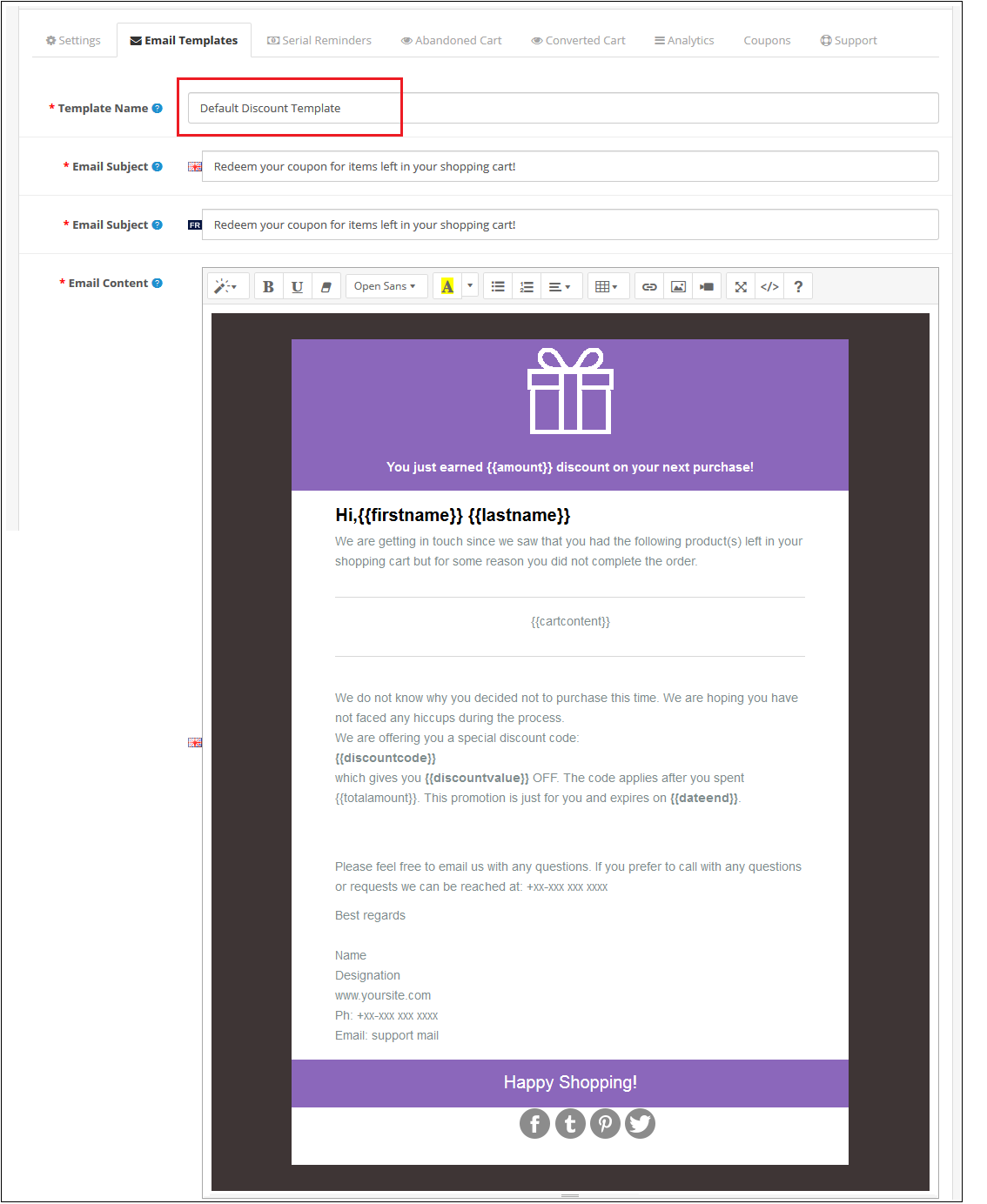
Through this setting of OpenCart Abandoned Cart Serial Reminder, you can add an e-mail Template in the module which will be used when you sent an e-mail reminder to your customers. The screen will look like as shown below:
Edit an E-mail Template: You can Edit an existing E-mail Template using the Edit option. The screens for Editing E-mail Template will be same as Adding an E-mail Template. The only difference will be that Edit will have the fields already filled. Delete an E-mail Template: You can delete an E-mail Template by clicking on the ‘Trash’ Icon. A pop up will show up asking for the Confirmation. You can click yes and the E-mail Template will be deleted. Add an E-mail Template: You can add an E-mail Template by Clicking on the option provided on the Top of the Page. The following screen will show up:
4.0.3 Serial Reminders
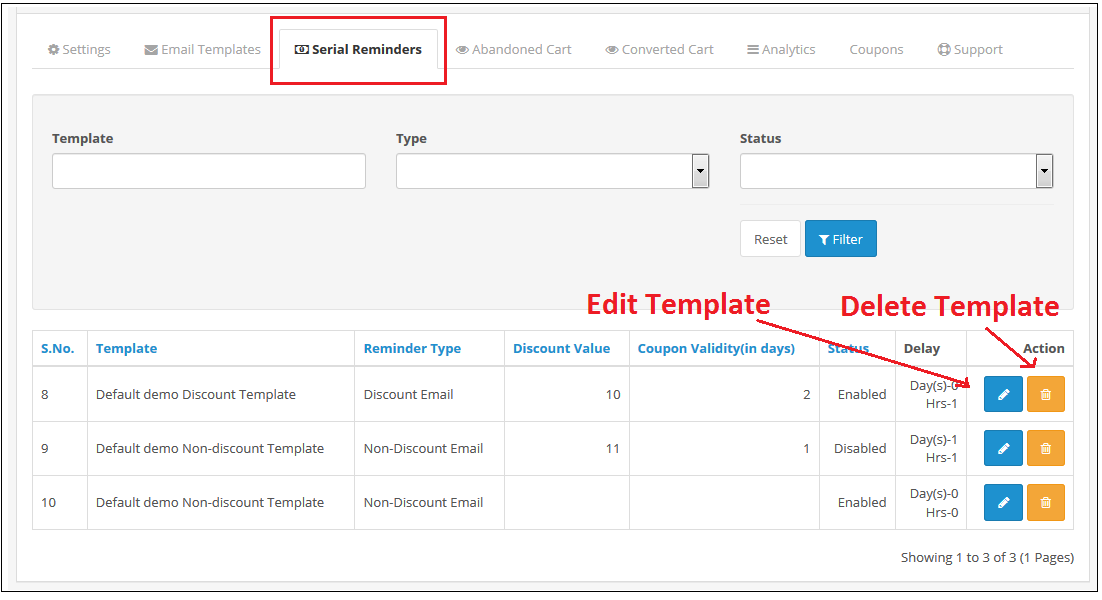
This setting of OpenCart Abandoned Cart Serial Reminder allows you to send e-mail reminders to your customers after a specific time (which will be set by you) of their Cart Abandonment.
The screen will look like as shown below:
Edit a Serial Reminder: You can Edit an existing Serial Reminder using the Edit option. The screens for Editing Serial Reminder will be same as Adding a Serial Reminder. The only difference will be that Edit will have the fields already filled. Delete a Serial Reminder: You can delete a Serial Reminder by clicking on the ‘Trash’ Icon. A pop up will show up asking for the Confirmation. You can click yes and the Serial Reminder will be deleted. Add a Serial Reminder: You can add a Serial Reminder by Clicking on the option provided on the Top of the Page. The following screen will show up if the E-mail Type is Discount:
The following screen will show up to Add a Serial Reminder in Opencart Abandoned cart email follow-up extension if the E-mail Template type is Non-Discount:
4.0.4 Abandoned Cart
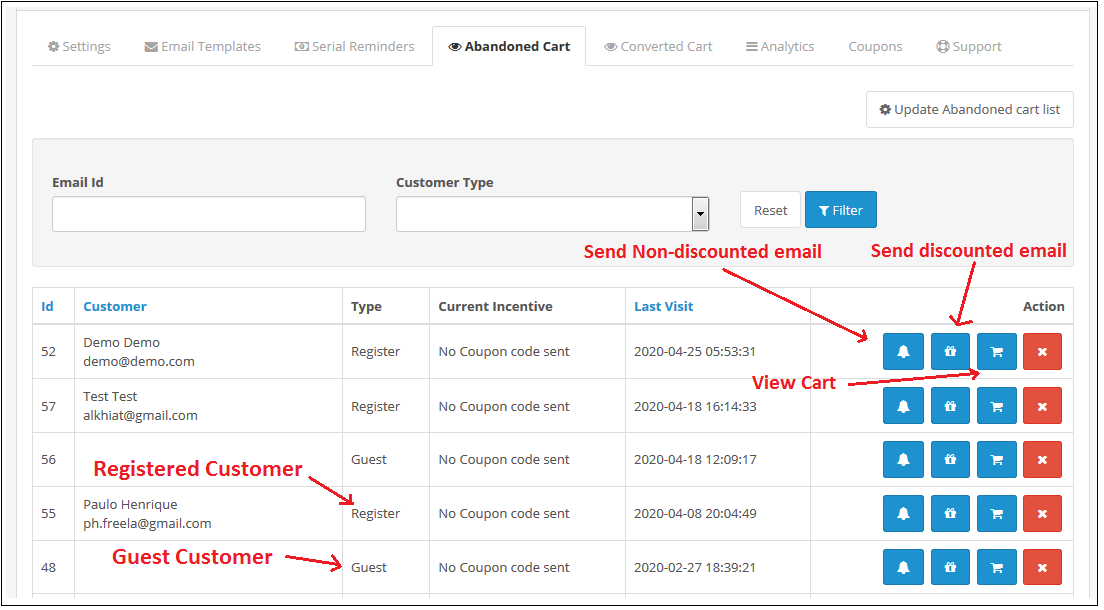
Through this setting of OpenCart Abandoned cart recovery email extension, you can send e-mails to the customers who have left their cart abandoned. You can view the list of all the abandoned cart customers in this setting and send them Discounted/ Non-Discounted E-mails. The screen will look like as shown below:
Update Abandoned Cart: This button is given at the Top of the Settings. You can click on this button to run Cron and the number of Products in abandoned cart will be shown to you. This number will be the updated number since you last updated the Abandoned Cart List.
After clicking on the Button you need to refresh the Page and the updated list will be shown to you.
Send Non-Discounted E-mail: When you will click on the bell Icon, then a pop up will show on the screen from where you can send a Non-Discounted e-mail to the customer. This e-mail will act as a reminder to the customer reminding them of the products they have left in their cart. The following screen will show up when you will click on the Icon:
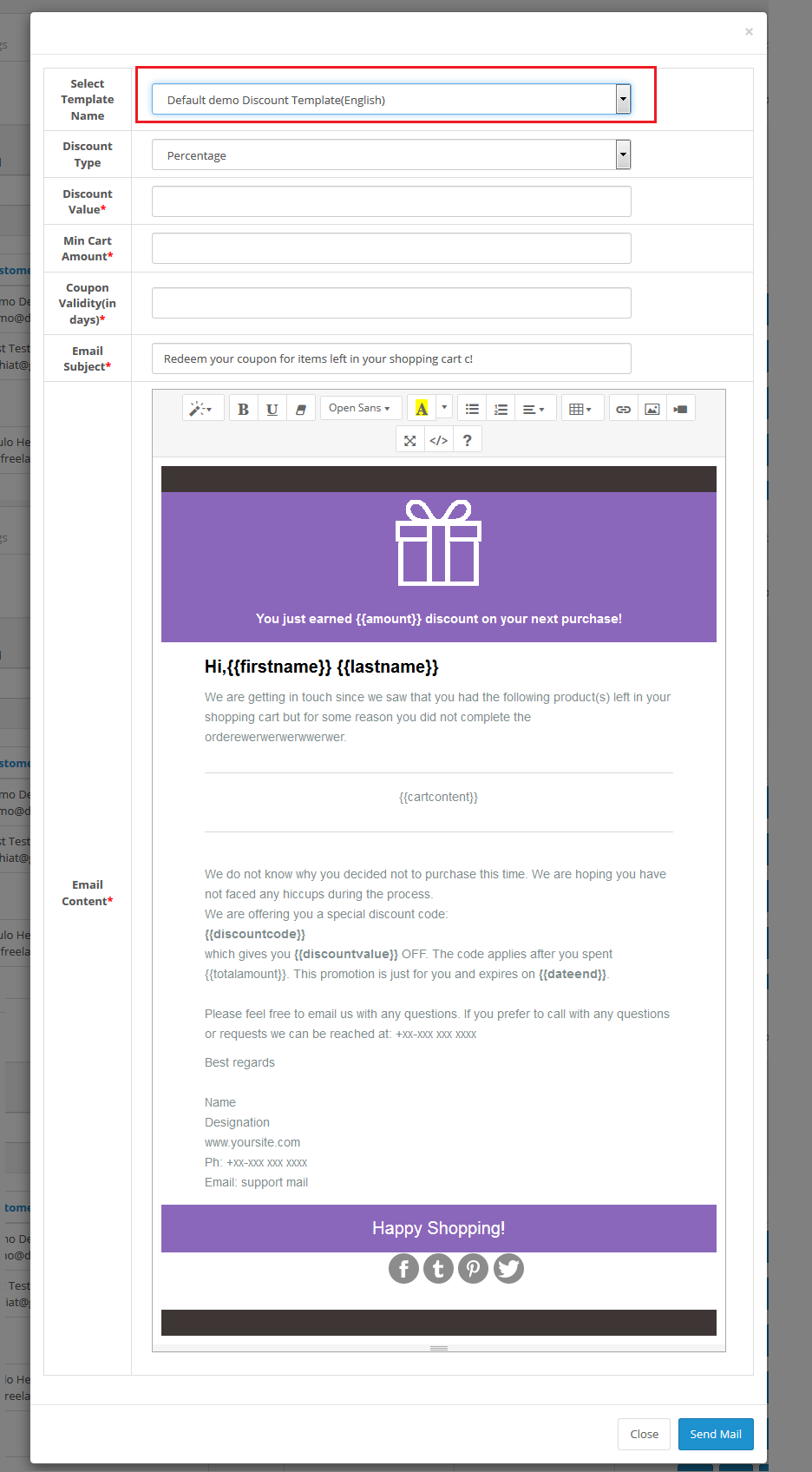
Send Discounted E-mail: When you will click on the Gift Icon, then a pop up will show on the screen from where you can send a Discounted e-mail to the customer. The following screen will show up when you will click on the Icon:
View Customer’s Cart: When you will click on the cart Icon of OC Abandoned Cart Serial Reminder, then a pop up will show on the screen from where you can view the products in the customer’s Cart. The following screen will show up when you will click on the Icon:
Delete an Abandoned Cart: You can delete an Abandoned Cart by clicking on the ‘Cross’ Icon. A pop up will show up asking for the Confirmation. You can click yes and the Abandoned Cart will be deleted.
4.0.5 Converted Carts
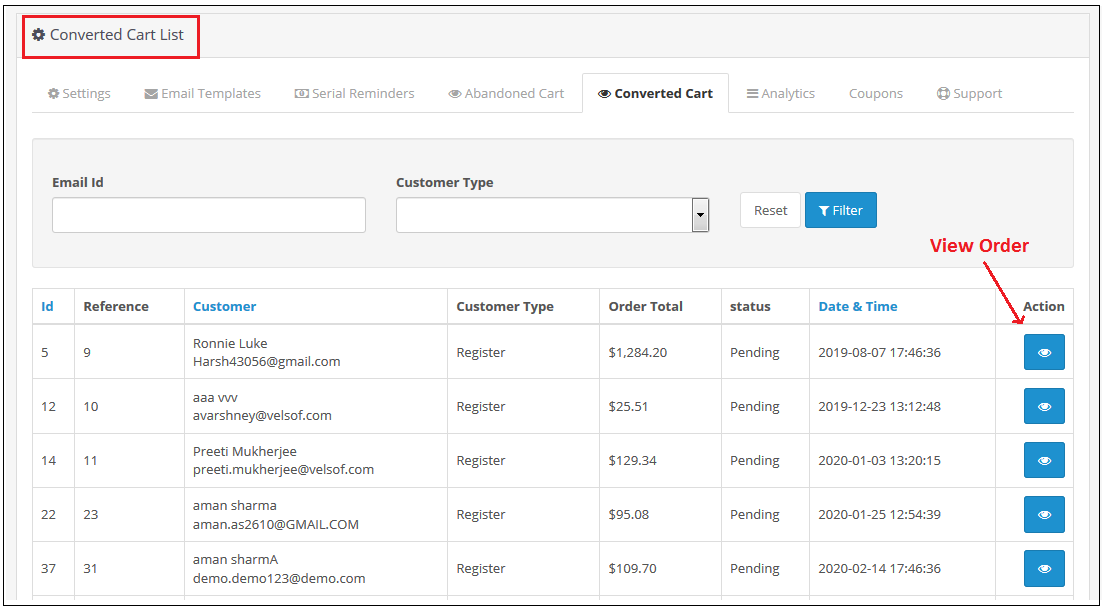
The Converted Cart tab of Opencart Cart Abandoned extension by Knowband, enlists all converted orders for registered customers or we can say that the abandoned carts for whom order has been placed after the reminder mail are sent. The screen will look like as shown below:
You can also view the details of the order that is placed using the abandoned cart by clicking on the “Action Button” in front of the desired converted cart.
4.0.6 Analytics
Analytics setting of OpenCart Abandoned cart recovery email extension will show the graphical representation of comparison for Abandoned Vs Converted Cart. Through this setting, you will not have to calculate anything, you can view the comparison in easy graphical format. The following graphs will be show to you:
Number of Abandoned Cart Vs Converted Carts:
Abandoned Cart Amount Vs Converted Cart Amount:
Abandoned Cart Count Vs Converted Cart Count Monthwise:
4.0.7 Coupons
Through this setting of Opencart Abandoned cart email follow-up extension, you can view the list of all the coupons which are sent to the customers in the E-mail.
You can filter out the Coupons on the basis of Used and Unused. The screen will look like as shown below:
4.0.8 Support
In case of any issue, drop an email to support@knowband.com OR click here to raise the ticket.
Tutorial: Watch the Video Guide
To help you set up and use the Opencart Abandoned Cart Extension, we have prepared a detailed tutorial video. This video walks you through the installation, configuration, and usage of the extension step by step.
Sometimes, the customers may browse the store, add a product to the cart, but at the time of check out, they may cancel the transaction and leave the purchase incomplete. This is known as Cart Abandonment.
Shopping cart abandonment is one of the most important concerns for e-commerce retailers. There can be ample reasons for cart abandonment. Though it is impossible to figure out the exact reason, one can try to analyze the behaviour of the abandoned cart users and work upon it to reduce the cart abandonment rate.
Before finding out ways to reduce cart abandonment, it is important to look for the reasons leading to it. In this article, I have listed out the top 5 eCommerce mistakes that lead to shopping cart abandonment.
1. Hidden charges
Generally, the customers are unaware of the hidden charges incorporated by the seller in the products. The hidden charges may include the shipping cost, transaction fees, etc. The introduction of these charges at the transaction page kills the purchasing mood and results in the abandoned carts. Therefore, the seller must be clear about all the charges that are applicable in the product, so that the customer may make up his mind prior to the purchase.
2. Mandatory sign-ups
There is nothing more frustrating than a mandatory sign-up process on the checkout page. People are ready to abandon the cart to avoid filling up a registration form.
Customers want to check out easily. Adding a barrier in the checkout process will only lessen the chances of conversion. To avoid compulsory registrations, come up with a Guest Checkout or provide a social login facility so that the consumers can get rid of form filling without their flow getting disturbed.
3. Tedious Checkout
The checkout page of an e-commerce store is a crucial step towards the purchase journey of a customer. If optimized, it can boost your conversions otherwise you can face a heavy drop-down in the conversion rate.
Try to simplify your checkout page. Have clarity. I would suggest adding a one page checkout facility on your store so that the checkout process becomes convenient for customers.
With the introduction of multiple payment gateways, customers expect to make a payment with their desired payment option, yet many e-commerce stores are stuck with a few payment options only. When customers do not find the desired payment mode, they take an exit from the store and look for the product in some other stores.
Why would you let that happen when a person is all set to make a purchase? Provide multiple payment options so that customers can choose their preferred payment option. Also, do not forget to add the e-wallet facility.
5. Less offers
The primary reason why people prefer to shop online is to get heavy discounts and the offers that the customers can avail on a number of products. The major factor contributing to the growth of the online market is choice availability and the offers that customer receives on a daily basis via Email, or pop-ups. Therefore, most of the time a customer expects to receive some kind of discounts on their purchase. In case, the seller fails to provide them with offers, the customer readily abandons the cart and exit the store.
To persuade your customers with some attractive offers, you can look to add the Spin and Win or the Exit popup on your e-commerce store.
Final word
Want to reduce the cart abandonment rate? Check out Knowband’s
The Abandoned Cart module gives a detailed analysis of the abandoned cart users and allows e-retailers to reach out to those users to persuade them to complete the purchase.
Online businesses come across numerous tools or plugins to optimize their store and improve sales. If you run a store on the OpenCart platform, this article will help you in taking your store sales to the next level. In this article, we will brief you about the 3 must have OpenCart extensions for increasing sales on your OpenCart store.
Any business, be it offline or online, requires sales to survive in the competitive e-commerce market. To grow as a brand, e-retailers look for various ways to increase sales on the digital commerce platform. There are a number of factors that merchants look after to boost up sales, for example, reducing cart abandonment and e-commerce returns, improving user experience, etc. OpenCart extension.
Check out the 3 must have OpenCart extensions for your OpenCart store:
1. OpenCart One Page Checkout
OpenCart One Page Checkout extension is designed to reduce the number of steps in the standard multi-step checkout process. This OpenCart extension puts together all the checkout steps in one single page and makes the checkout flow convenient for the online shoppers.
Important Features of OpenCart One page checkout
Guest checkout- Store visitors can check out from your store as a guest, hence no need to follow the mandatory sign-up process.
Social login- Allow your users to log in or sign-up on your store with the help of social login. This avoids the manual process of filling out the account registration form.
Multiple layouts to customize the look of your checkout page.
Responsive Design- Works on all devices including smartphone, tablet, desktop and laptop
Easy to use– OpenCart one-page checkout is easy to integrate and fully compatible with your OpenCart store
Supports multiple shipping and payment method– OpenCart Advance checkout extension supports multiple payment modes (Credit Card, Debit Card, COD, Bank transfer, etc) and shipping services (FedEx, USPS, etc.)
Benefits for customers
Customers can log in via their social network profiles like Facebook and Google+
Opencart Abandoned Cart extension allows you to send emails to those customers who abandon their carts, thereby allowing you to recover sales. This works as a reminder to make a user complete his/her purchase. Add restore links, promotions, discount coupons in abandoned cart emails to motivate customers to come back and finish the incomplete purchase.
Features of OpenCart Abandoned Cart extension
Set a time period after which the cart is assumed to be abandoned.
Send reminder emails to your store visitors who abandon their carts by creating appealing personalized emails featured with coupon codes, discounts and a link to the product page. This helps you in increasing the number of returned customers and encourages sales on your website.
Select the type of discount that you want to provide to abandoned cart users, for example, some flat discount or some percentage off in the product amount.
Convert abandoned carts into sales by a single-click recovery feature with this OpenCart extension. Consumers can review the entire content of their cart with just a single click. It removes the hassle to add items to the bag again from scratch.
View complete details regarding the abandoned cart users under “View Abandoned Cart.”
Check how many of the abandoned cart users got converted under the “View Conversion rate”.
OpenCart Abandoned Cart extension provide amazing analytics view to compare your abandoned carts and converted carts
Benefits of OpenCart Abandoned Cart extension
Increase user engagement on your site by offering discounts and coupons in your abandoned cart mails.
Reduce cart abandonment rate by sending follow up email automatically within the minutes of abandoned carts
Increase successful orders by sending a reminder of pending orders, cancelled orders, closed orders, etc.
3. OpenCart Social Loginizer
The OpenCart Social Loginizer extension provides you the functionality to enable the social login facility on your OpenCart store to enhance the user experience, acquire customers and increase sales. The functionalities of this extension allow your customers to log in or sign-up to your site using Facebook or Google+ social networks.
Features of OpenCart Social login
Increase conversions by simplifying the registration process
Get rid of long and complicated forms by allowing users to sign up with their existing social networking account.
Gather rich and real-time demographic details about your customers without requiring them to fill out any lengthy form. By asking users to sign up with social logins, you will be able to increase user sign-ups, utilize their social data to personalize your email marketing campaigns and increase sales.
Eliminates the issues of forgotten usernames and passwords
Failing to provide a social login option to your visitors might make them reluctant to leave your store if in case they forget their password, but now with the social login option, consumers get rid of remembering passwords.
Conclusion
For capturing more sales on your OpenCart store, make sure to keep a strict check on the possibilities that could hinder your sales. Figure out the points that you can work upon, and most importantly, keep the user experience your topmost priority. Always remember to have those features which people wish for their convenience. If consumers are not converting into customers, figure out ways to convert them. Installing the above OpenCart extensions will surely help you increase your store sales.