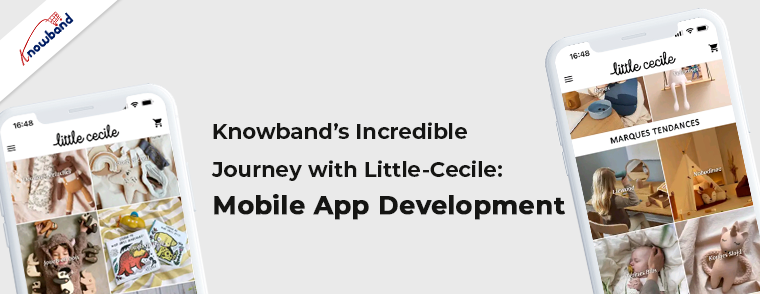
Knowband’s Incredible Journey with Little-Cecile: Mobile App Development!!

Starting an eCommerce-based online business requires a unique blend of dreams and dedication. In the modern era, where technology reigns supreme, over 50% of total shopping activities take place on the Internet. It is within this boundless digital landscape that countless success stories have unfolded. Showcasing the power of entrepreneurial spirit and the triumph of unwavering determination.

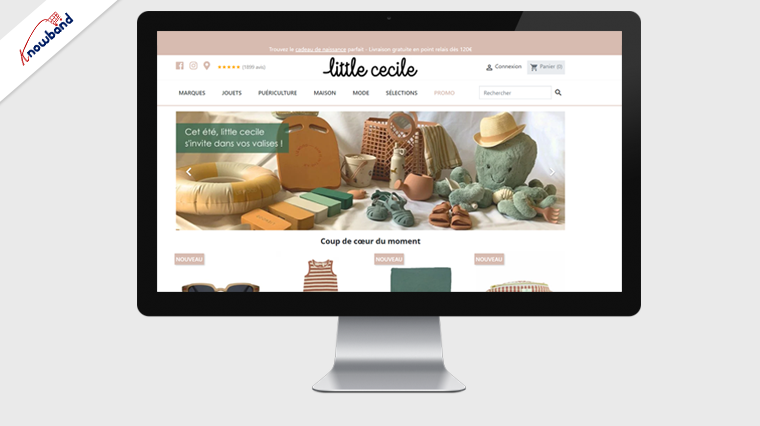
Supporting the tradition, we have also got an incredible story of Paris’s Kids Emporium. Little Cecile is one of the trendiest kids’ fashion emporiums where you can find all needs and desires of children. Offering a wide range of products and services tailored to their age groups and interests.
About Little-Cecile!!

Behind little Cecile hides Cécile, a mother of 4 children and a passionate pharmacist. Her curated inventory is a treasure trove for young children, carefully selecting each designer and brand. With a belief that children are the most precious, and deserving of the best. The Little Cecile’s collection combines essential brands, personalized objects, and limited editions.
Every item exudes sweetness, imagination, and uniqueness. Little Cecile’s realm is a place where parents discover extraordinary treasures, knowing they have been chosen with love. Childhood is celebrated as a time of wonder, and every child deserves items that inspire and nurture their dreams.
Along with Offline stores situated in Lille, Paris, the little-Cecile offers a wide range of products via an eCommerce website.

Little-Cecile Android and iOS Mobile Apps:

Little-Cecile provides a personalized eCommerce shop and mobile apps for their valued customers. Their Little-Cecile Mobile App, built with Knowband Mobile App Builder, offers a plethora of fantastic features. It guarantees a seamless user experience for both Android and iOS users. The Little-Cecile team also extends exciting offers exclusively to mobile app users, aiming to enhance their business-customer relationships.


The Little-Cecile online shop is based on Prestashop eCommerce platforms which enables vast opportunities for the seller community. Developed with Prestashop Mobile App Maker by Knowband, the app comes with tons of customizations along with all the default features offered by Knowband Mobile App Builder.
Along with various richly loaded features, the mobile apps ensure the best usability for the customers down to the last details.
Knowband’s custom Flutter App development teams achieved one of the most recent milestones by delivering one of the masterpieces within the dedicated timelines.

Prestashop Mobile App Builder:

Mobile App Maker for Prestashop is a complete no-code solution for creating rich featured Android and iOS Mobile Apps for Prestashop eCommerce stores. The plugin comes with a single-time payment and lifetime usability. This means you will not have to renew your support or subscription annually or monthly to keep your apps working.


Moreover, the dedicated technical staff at Knowband takes care of every aspect from module installation to making your apps live on the store. Ensure peace of mind for the beloved Prestashop seller community.
Furthermore, the apps developed with Prestashop mobile app builder comes with tons of features such as Apple login, Fingerprint login, real-time inventory synchronization, all type of payment and shipping methods support, etc. Moreover, we are also open to all sorts of customizations and additional requirements at very reasonable prices.

Wrapping Up!!

Businesses like Little-Cecile does a great job of empowering the will of taking a further step ahead in the eCommerce community. These kinds of stories not only enhance the enthusiasm amongst online sellers but also lead the way to success. 
At Knowband, along with the Prestashop, you can also find the Mobile App Builders and PWA for other eCommerce platforms like WooCommerce, Magento, Magento 2, and OpenCart.
Moreover, in case of all your queries or concerns, you can also drop us a mail at support@knowband.com.

👉Explore the Module with Our Video Guide


OpenCart Migration: Upgrading and Transferring Your Store to OpenCart

OpenCart is an open-source e-commerce platform that allows businesses to create an online store and sell products or services. Not only Opencart is one of the most popular eCommerce platforms but also it provides a quite simple interface to eCommerce merchants. Furthermore, the sellers can add as many features as they want to the Opencart online shop by using OpenCart Extensions. Moreover, it is possible without having literally zero coding knowledge.

Not only the Opencart plugins are easily available but they also save a lot of money to the sellers. For the same reason, more and more eCommerce sellers are migrating their online shops to the OpenCart platform.

Thus, if you’re currently using a different e-commerce platform and want to switch to OpenCart, or if you want to upgrade your current version of OpenCart. Then, you need to perform a migration. It can be a challenging process, but with careful planning and execution, you can migrate your store successfully. Or, you can also feel free to reach out to us for OpenCart migration.

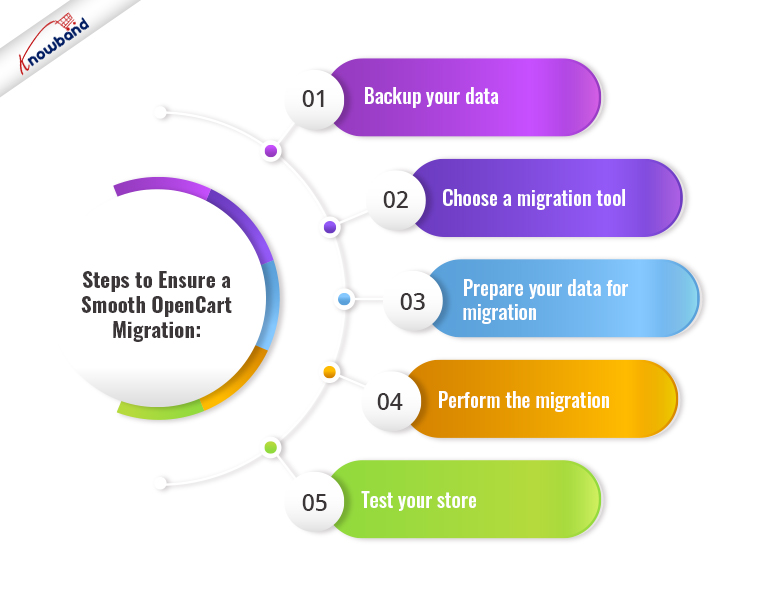
Steps to Ensure a Smooth OpenCart Migration:

Backup your Data

Before you begin the migration process, make sure you back up all your store data, including products, orders, customers, and configurations. This is essential because if anything goes wrong during the migration, you’ll have a backup of your data to restore from. There are several backup plugins available in OpenCart that can help you automate the backup process.

Choose a Migration Tool

To perform a migration, you’ll need to use a migration tool. There are several migration tools available, both free and paid, that can help you migrate your data from your current e-commerce platform to OpenCart. Make sure you choose a tool that supports your current platform and has a good track record of successful migrations.

Prepare your Data for Migration

Before you begin the migration process, you’ll need to prepare your data for migration. This includes cleaning up your data, removing any unnecessary data, and ensuring that your data is compatible with OpenCart. For example, you can remove spam customers from your customer list.
This step is crucial because if your data isn’t properly prepared, it could cause errors during the migration process.

Perform the Migration

Once you’ve backed up your data, chosen a migration tool, and prepared your data for migration, you’re ready to perform the migration. The migration process will vary depending on the tool you’re using. In general, you’ll need to follow the instructions provided by the tool to transfer your data from your current platform to OpenCart.

Test your Store

After the migration is complete, you need to test your store thoroughly to ensure everything is working correctly. This includes testing your store’s functionality, design, and performance. You may also need to make some tweaks to your store to ensure it’s optimized for OpenCart.

Upgrading OpenCart: For the Existing Users!

Opencart has recently launched the latest version 4.0.0. According to the platform, the new version comes with a lot of performance enhancements along with new features.
Thus, if you’re already using OpenCart and want to upgrade to a newer version, the process is relatively straightforward.

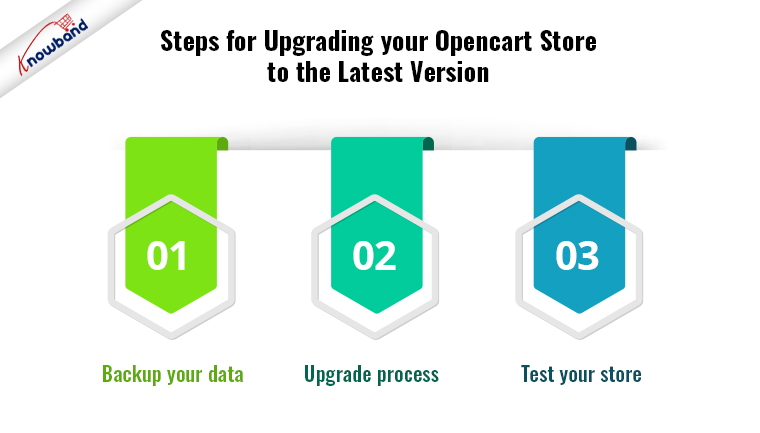
Steps for Upgrading your Opencart Store to the Latest Version

Backup your Data

Backing up the old data is the most important part of doing any changes on your website. The same applies to the OpenCart upgrade. It ensures that you have a backup of your data in case anything goes wrong during the upgrade process.

After having the back-up ready the next step is checking the compatibility. Before you upgrade, you need to check that your current store is compatible with the new version of OpenCart. Check the system requirements and ensure that any third-party extensions or plugins you’re using are compatible with the new version.
However, you can also check out Knowband’s Opencart Extensions which are perfectly tailored for the latest OpenCart versions and are compatible with all the Opencart themes.

Upgrade Process

Once you’ve backed up your data and ensured compatibility, you’re ready to upgrade. The upgrade process will vary depending on the version you’re upgrading from and to, but in general, you’ll need to follow the instructions provided by OpenCart to upgrade your store.

Test your Store

For the final touch, after the upgrade is complete, you need to test your store thoroughly to ensure everything is working correctly. This includes testing your store’s functionality, design, and performance. You may also need to make some tweaks to your store to ensure it’s optimized for the new version of OpenCart. 

Conclusion!!

Migrating or upgrading your store to OpenCart can be a challenging process, but it’s essential to ensure that your store remains up-to-date and optimized for your customers. However, it is required to have a good knowledge of PHP coding concepts before proceeding to upgrade or migrate to OpenCart. Whether you’re migrating from a different e-commerce platform or upgrading your current version, you can feel free to find us at our email address support@knowband.com for any sort of assistance.

Multi-Vendor Marketplace – Frequently Asked Questions

The multi-vendor marketplace business model in contrast to the conventional eCommerce approach is very profitable for both the owners and the end customers. Moreover, making an online marketplace website efficient is more difficult than simply having one. A multi-vendor marketplace is an online store where customers can purchase goods from several vendors.

Many people choose to use online marketplaces since there must be a wider variety of goods from numerous sellers. Sellers who are in charge of the inventory, pricing, product details, and shipping provider of a variety of products. Using the Multi-Seller Marketplace Extension is a quick and simple way to turn your eCommerce company into an online market comparable to eCommerce giants. Also, the suppliers can manage each of their things with the help of a specific vendor site and dashboard thanks to this expansion.

The online marketplace plugin also offers bulk product submission using CSV files and enhanced tracking codes for shipping on each order. Furthermore, the administrators must approve the use of the vendors’ customized profiles before they use them on their product websites. Any provider is free to impose restrictions on shipping costs and methods or to present the customer with a range of choices. Additionally, simple tracking and control of invoicing are in need to plan monthly vendor payments.

FAQs For Multi-Vendor Marketplace

Q1. What Is the Difference Between a Multi-Vendor and a Single Vendor?

In a single-vendor marketplace, a single seller sells their goods to various buyers. Moreover, such standalone establishments often don’t offer a wide variety of goods or services. A marketplace where numerous vendors come together to offer their goods is a multi-seller eCommerce site. Similar to single-vendor marketplaces, customers can purchase goods from various brands or merchants. In contrast to single-vendor stores, where there are only two parties present in commercial transactions, multi-vendor marketplaces involve three parties. The three parties namely are the website administrator (owner), the vendor, and the customer.

Q2. What Are the Special Features of Multi-Seller Software?

Determining the essential characteristics your business model demands from the marketplace is the first step in choosing the ideal marketplace software for your enterprise. One thing to keep in mind is that the multi-vendor marketplace features should be able to suit the many situations of an admin-vendor and vendor-customer relationship system. Moreover, there can be a multitude of distinct business needs and platform capabilities to meet them.

Q3. What Distinguishes Multi-Vendor Solutions from a Standard Website?

Multi-vendor marketplaces are eCommerce software solutions. It is a general solution that covers both single-seller shopping cart software and multi-seller eCommerce platforms. A single-seller eCommerce platform differs from a multi-vendor platform because its design is for launching on a traditional online store with just the shop owner as the sole seller.

Q4. What Are the Different Types of Marketplaces?

Based on a variety of business concepts, there are numerous different sorts of online marketplaces. On the basis of the usage of marketplaces, they are present in different groups:

Horizontal and Vertical E-Marketplaces

Vertical Marketplaces give companies access at every level of a certain industry sector, such as the automobile, chemical, construction, or textile industries. Although, using a vertical e-marketplace for your industry sector to buy or sell will help you operate more efficiently while lowering your expenses, inventory, and procurement cycle time.

A horizontal e-marketplace links buyers and sellers from various markets or industries. A horizontal e-marketplace is to buy indirect goods like stationery or office supplies.

Unaffiliated Online Market

A business-to-business online marketplace known as an independent e-marketplace is often run by a third party and accessible to buyers and sellers in a certain sector. Furthermore, you can access classified advertisements, requests for proposals, or bids in your area of the economy by signing up on an independent e-marketplace. Usually, participation will involve paying in some way.

E-Marketplace Focusing on Suppliers and Buyers

This market, which is sometimes referred to as supplier oriented, had its establishment and is established by several suppliers who want to create a successful sales channel online for a big audience of buyers. Also, the given good or services are often searchable.

To create a productive buying environment, a group of buyers often manages a buyer-oriented online marketplace. Furthermore, if you’re looking to buy something, taking part in this kind of electronic marketplace can help you save money on administrative expenses and get the greatest deal from suppliers. As a supplier, you can promote your catalog to a pool of potential clients by using a buyer-oriented online marketplace.

Q5. Can I Incorporate Many Payment Options?

You can incorporate ‘n’ different payment options. However, we automatically offer you both Paypal and bank wire as payment options. Additional fees will apply if you add more payment options.

Q6. What Essential Qualities Must Your Online Marketplace Have?

Some qualities are necessary for the effective management of multi-seller online commerce. This supports efficient business operations and ensures the satisfaction of your suppliers and clients.

  1. What you require is a versatile backend and front end for managing vendors and customers with ease.
  2. Supportive vendor management for product uploads, inventory management, and shipment distribution.
  3. Compatibility with smartphones, tablets, etc.

Wrapping it Up

In this article, we have been discussing some of the questions which are helpful before deciding to have this Multi-Vendor Marketplace plugin for your online shop. Kindly let us know if you want to know more about this module at support@knowband.com. We can also provide assistance with the change of certain functionality or for adding a new feature in the modules. Moreover, we also provide assistance with custom developments which is specific to the online business. 

Common Problems Every eCommerce Business Faces

Every online business faces up and down before on the success journey. Thus, since day one, it becomes quite a task for eCommerce shop admins to secure a place in the market. Moreover, due to the high competition rate and a huge number of merchants. Some common problems come with the journey while starting an eCommerce business.

In the following article, we have tried to narrow down some common problems along with the solutions to help our eCommerce merchant community. But before starting with the same, let’s talk about the reasons that cause these problems.

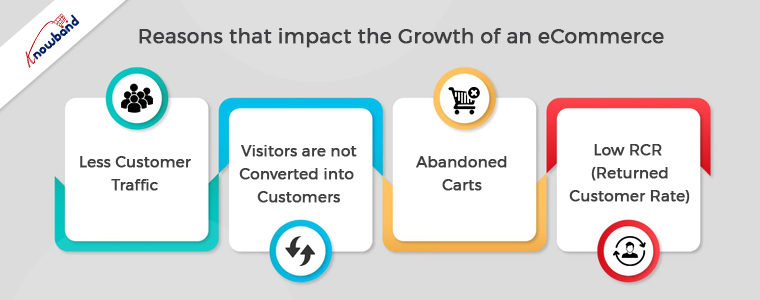
Reasons that Impact the Growth of an eCommerce

If we talk about the reasons that become obstacles in the way of online businesses, there are a lot. Either a business can face dizzy growth because of SEO, website experience, or anything else. But the major cause that prevents customers from ordering from your eCommerce shop is market competition.

Nowadays, almost every offline business is taking its online start. For the same reason, now customers have a wide variety of online websites to choose products from.

Additionally, you risk having your eCommerce firm get caught up in the rat race for the same reason. Thus, let’s start with some of the common problems and solutions that can help your business to stand out from the market competition and grow.

Less Customer Traffic:

One of the primary issues that prevent sales is having fewer visitors than you had expected to your internet business. Now there can be various reasons behind the same. Either you don’t have a good search engine ranking or you don’t use enough platforms to advertise your company.

Thus, for getting more customers on the website, you can boost the SEO of your eCommerce store. Along with the same, if you are looking for another worthy organic way, you can also take advantage of social media marketing.

Moreover, if you are willing to spend some dollars, you can also use paid marketing.

Furthermore, if you are a PrestaShop online seller, the Affiliate and Referral Addon by Knowband is one of the best ways to get more customers with the help of existing ones.

Visitors are not Converted into Customers:

The second problem that almost every online business faces are that the visitors come to the website but do not proceed to order. It might happen because either your eCommerce website is not able to impress the visitors or you are having a lengthy process.

Thus, for defending the following cause, you can enhance your PrestaShop or eCommerce store’s website experience with Knowband Plugins. For example, you can show a gamified Spin and Win pop-up to your store visitors on the home page.

Moreover, you can surprisingly enhance the checkout experience on your PrestaShop store by providing all the checkout essentials on a single page.

Thus, it is a must to offer a relevant and rich website experience to visitors. 

Abandoned Carts:

When a customer adds something to the cart and leaves the website before confirming the order, the term is called cart abandonment. Moreover, cart abandonment is one of the reasons that reduce sales drastically.

Customers must be given follow-up reminders in order to solve the following issue. At Knowband, we offer Abandoned Cart Reminder Plugin for the OpenCart and PrestaShop eCommerce platforms.

Apart from it, if you have already launched your Android and iOS Mobile Apps, you can also take aid from the push notifications to engage your customers.

Low RCR (Returned Customer Rate):

Sometimes, customers order from a website for the first time and do not proceed with more orders. This is one of the problems that impact sales drastically. Thus, turning single-time customers into regular ones is as important as getting new customers.

For the same eCommerce merchants use various tactics to attract existing customers. Moreover, other major players like Amazon and Flipkart offer loyalty points to customers based on their purchases. Loyalty points not only attract customers to purchase again but also motivate them to check the website regularly for exciting offers.

Thus, if you are OpenCart, PrestaShop, or Magento 2 store admin, you can also have a look at the Loyalty Points Extension offered by Knowband.

In the End,

Although starting an online business is a bit hard nut to crack but only if you are not planning effectively. Moreover, with the help of sounding strategies and work one can easily manage to list his eCommerce business in the market. Thus, in the following article, we have tried to cover some of the common problems along with the solutions.

In case you are having queries or suggestions, please feel free to find us at support@knowband.com.

WooCommerce Vs PrestaShop: Head-to-Head Comparison

Selling online starts with a well-maintained online store. Moreover, various customizable eCommerce solutions are offering a wide number of options to sellers. Not only retailers can choose from eCommerce platforms but also can evaluate them based on their pros and cons.

Likewise, in the following article, we are going to compare two of the most popular eCommerce platforms head by head. WooCommerce and PrestaShop are undoubtedly two of the major players in the eCommerce industry. When PrestaShop is the most popular eCommerce platform in Europe. On the other hand, WooCommerce is the most famous plugin of WordPress and has more than 5 million active downloads.

Today, we are going to compare both WooCommerce and PrestaShop from various points of view. So, hold on with us for finding the best option for you for starting your online shop.

PrestaShop:

PrestaShop is a well-known eCommerce platform. The major merchant base of the platform is Europe based. Not only the sellers can launch a no-code eCommerce website with the help of PrestaShop but also, PrestaShop fits will all sorts of hosting services. On top of that PrestaShop offers custom templates for the shop design that allows the sellers to build their desired eCommerce shop without any hassles.

Furthermore, in case you are familiar with the basics of PHP, you will surely find PrestaShop as convenient as you want it to be.

The only drawback admins report is that PrestaShop support sometimes shows delays in the issue-resolving process. Yet, PrestaShop has a huge fan base that attracts more and more sellers to start their online businesses with PrestaShop.

On the other hand, with significant 12+years of experience, Knowband offers its dedicated support to the PrestaShop seller community. In case you want to set up your online shop using PrestaShop and are not sure about the steps, you can always find us at suppport@knowband.com.

WooCommerce:

If you are familiar with WordPress, you surely have heard about WordPress. WordPress is considered one of the easiest solutions for launching websites. Whereas, WooCommerce is one of WordPress’s top-listed plugins. Not only WooCommerce allows online sellers to turn their website into an eCommerce store but also takes care of order management.

For the same reason, WooCommerce is extremely popular and has 5 million+ active downloads to date.

In comparison to PrestaShop, WooCommerce offers more options to the seller community to modify their shop. Not only you can upload CMS using WooCommerce but also turn your website into an order-ready online shop.

In terms of hosting services, like PrestaShop, WooCommerce is also a ready-to-compatible platform. Moreover, if you are a WordPress user, you can get your hands on WooCommerce at very reasonable prices.

WooCommerce vs PrestaShop: Detailed Comparison

Customizations:

If are looking for a better customization option between WooCommerce and PrestaShop, both stand equally. You can find a wide number of ready-to-use extensions for both WooCommerce and PrestaShop.

Likewise, Knowband offers various add-ons for both eCommerce platforms. In case you are not much likely to the coding skills, you will find the plugins sound for you.

On the other hand, if you are aware of basic PHP, PrestaShop has a more friendly interface for coders than WooCommerce. Also, there is no limit to customizations. You can set up your online shop in the way you want.

Installation:

The installation process for both PrestaShop and WooCommerce is simple and does not take much time. One simply visits the official PrestaShop and WooCommerce websites to check various plans for their online business. From the aspect of the installation process, installing WooCommerce is comparatively easy than PrestaShop. While if you do not have any prior experience in installing software on hosting, it might take some effort.

As per our recommendations, it is always good to take a bit help of from professionals while installing the eCommerce platforms on your server. Or in case you know the basics of PHP, things are going to get much easier for you.

Pricing:

For both PrestaShop and WooCommerce, at first, you will need a hosting service. It is always good to go for a relevant domain name and hosting provider. Also, in your to-do list, you should give preferences to a fast and authentic hosting service provider. Whereas, while installing PrestaShop you are just going to require a hosting server and domain name. On the other hand, if you are willing to launch your eCommerce shop using WooCommerce, you will require a website based on WordPress.

When it comes to customizations, PrestaShop add-ons are a bit expensive compared to WooCommerce plugins. Moreover, if you have a planned budget, you can use free plugins offered by Knowband also.

Performance and Scalability:

It might not be fair to compare both of the platforms on a performance-based. The reason is page and website loading speeds mostly depend on the hosting server. This means you should not worry about the performance of either of the eCommerce platform.

The other thing that matters when it comes to performance is the PHP version you are using for your web store. Reports show that PHP version updates add a significant boost to your store performance.

From the scalability perspective, both WooCommerce and PrestaShop can handle orders in high numbers. Moreover, if you want to list hundreds of thousands of products online. You will find both of the platforms reliable.

Final Words:

Picking anyone from both is a difficult one. Both PrestaShop and WooCommerce have their Pros and Cons. On the other hand, some find PrestaShop more sounding and some still give preferences to WooCommerce.

In the end, both are equally similar and do the same task, it is totally up to you to finalize your choice. In case you face any issues while setting up your online shop. Or if you are looking for custom development on eCommerce stores, find our dedicated team at support@knowband.com.

Related Post:

Which Platform to Choose Between Magento 2 and WooCommerce


How to Read the File in PHP Language?

Objective

After reading this blog, you will be able to read files in PHP language. In the blog, you will get enough information about different ways used in PHP to read a file.

Let’s Learn About the File Reading Method in the PHP

PHP provides various type of methods to read the file as follow:

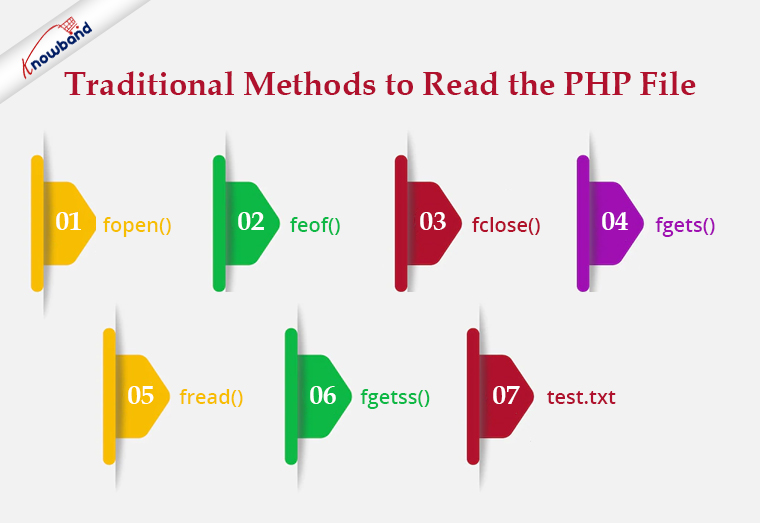
Traditional Methods

In this type of method to read a file, we have to follow 3 steps.

  1. Open the file.
  2. Read the file.
  3. Close the file.

Let’s see some traditional methods:

Recommended Read: Export PHP data to the .xls file

fopen():

To read a file we need to open a file using fopen(). In fopen(), we have to pass to 2 parameters i.e. first is the file path and the next one is filed open mode. To read a file we will use “r” as file open mode, “r” denotes “read mode”.

$file = fopen("test.txt", "r") or die("Unable to open file!");

feof()

This method checks whether you have already read to the end of the file. This returns true till the last line of the file gets read and once we cross the last line it returns false. We use this method in a loop to read a file from the first line to the last line.


$file = fopen("test.txt", "r") or die("Unable to open file!");

while(!feof($file)) {

//your processing

}

fclose()

We use this method to close a file after reading the file. After closing a file we will no longer be able to read that file.

$file = fopen("test.txt", "r") or die("Unable to open file!");

while(!feof($file)) {

//your processing

}

fclose($file);

fgets()

We use this method to read a file line by line. It collects a single line of data from your file and returns it as a string. And from there either you can print the line or you can process the same as per your requirement.

<?php

$file = fopen("test.txt", "r") or die("Unable to open file!");

while(!feof($file)) {

echo fgets($file) . "<br>";

}

fclose($file);

?>

<strong>Recommended Read:</strong><a href="https://www.knowband.com/blog/tips/generate-qr-code-using-php/">Generate QR Code Using PHP</a>

fread()

We use this method if we want to read a file in a limited size. We have to pass a size limit in bytes in this method and then this method read the file up to a given size limit and ignores the rest part of the file.

If we want to read a file up to4,096 bytes (4 KB), we will write the code as –

$file = fopen("test.txt", "r") or die("Unable to open file!");

$data = fread($file, 4096);

Note: No matter what number you specify, fread will not read more than 8,192 bytes (8 KB). Assuming that the file is no bigger than 8 KB, the code below should read the entire file into a string.

<?php

$file = fopen("test.txt", "r") or die("Unable to open file!");

$data = fread($file, filesize("test.txt"));

fclose($file);

?>

fgetss()

This function is similar to the fgets() functionbut strips away any HTML or PHP tags it finds, leaving only plain text.

Code:

<?php

$file_handle = fopen("test.txt”, "r");

while (!feof($file_handle)) {

echo fgetss($file_handle);

}

fclose($file_handle);

?>

test.txt

<html>

<head>

<title></title>

</head>

<body>

<div class="editor-content" style="text-align: left">

<p>Knowband is one of the leading name as an e-commerce plugin development and marketing firm.</p>

<p> </p>

<p>Our team of highly skilled and experienced IT professionals.</p>

</div>

</body>

</html>

Output:

Knowband is one of the leading names of an e-commerce plugin development and marketing firm. Our team of highly skilled and experienced IT professionals.

Recommended Read: How to Integrate Google reCAPTCHA with PHP?

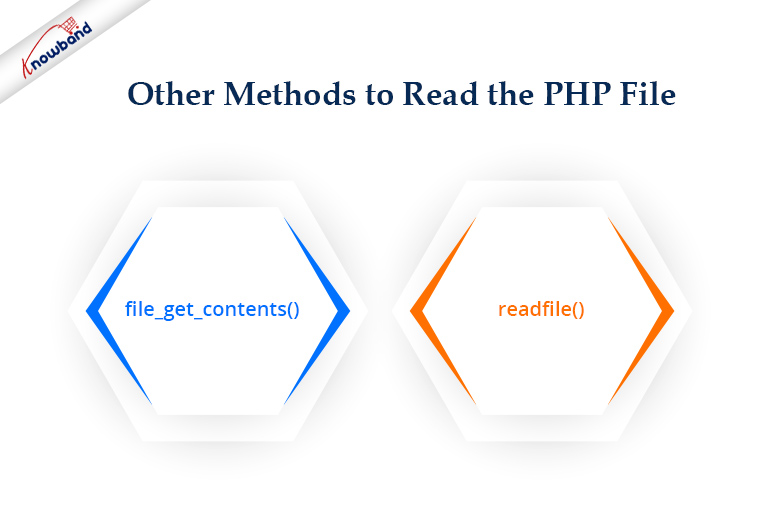
Other Methods

PHP also provides various other methods for file handling that we can use for different purposes.

file_get_contents()

This method can be used to collect all the data from a file as a string. For example, how can we collect all the data from our webpage? You have seen the fgets() example using a loop. But how we you make this more straightforward? We can easily do the same with the file_get_contents(). We do not need to open or close a file to read. On failure, file_get_contents() will return false.

<?php

$file= file_get_contents("https://www.knowband.com/");

echo $file;

?>

readfile()

The readfile function dumps the entire contents of a file or Web page to the default output buffer. By default, this command prints an error message if it fails. To avoid this behavior we use @readfile()

Let’s see the difference between readfile&& @readfile.

Let’s try to open the wrong file by readfile:

<?php

$file= readfile("wrong_test.txt");

if(!$file){

echo 'File not found.';

} else{

echo $file;

}

?>

Output

( ! ) Warning: readfile(wrong_test.txt): failed to open stream: No such file or directory
Call Stack

File not found.

Now replace readfile with @readfile and we will get the output as:

File not found.

Recommended Read:  Auto Loading in PHP

Good Practice!

If we are a programmer then we should always keep in mind our code can handle the error or condition. There might be a chance the file that we are going to read was moved from the path or permission for the file has been changed and hence you are unable to get the content. So good practice says before reading a file we should check if the file exists and the file has read permission.

<?php

$file = "test.txt";

if (file_exists($file) && is_readable($file)) {

$f = fopen($file, "r");

# Processing

fclose($f);

}

?>

Summary

If have any PHP eCommerce application like PrestaShop, OpenCart, Magneto, etc. you can use the codes to reading the file as per your requirements.

For all aspects related to eCommerce, we also offer custom development. Additionally, the top modules for Prestashop, Opencart, Magento, and Magento 2 are also available. A few of the top modules that Knowband offers are One Page SuperCheckout, Multi-Vendor Marketplace, Mobile App Builder, Spin and Win Module, Abandonded Cart and so on.  If you have any questions, contact us at support@knowband.com.

Best eCommerce platforms for starting a multi-vendor marketplace

The eCommerce world has started shifting its base towards the multi-vendor model in the past few years. Being mutually beneficial and inclusive in nature, it not only caters to the demand of sellers, but also brings delight to the customers by providing a wide range to choose from.  The best thing is most of these platforms are open-source and you don’t have to pay a penny for using them to build your eCommerce site.

A ready-made eCommerce site, what could be better than this?-a ready-made marketplace site, perhaps?

As a result, the developers around the globe have come up with various solutions that allow the inventory model website owners to convert their site to a multi-vendor marketplace.

Top eCommerce platforms that can be easily used for developing a marketplace by a simple module installation.

1. Magento

With currently more than 251,287 live eCommerce stores running on the Magento platform, it is one of the top-most eCommerce platforms worldwide. With almost 25% of the total market share of eCommerce platforms, Magento is a popular brand that powers many other top brands like Burger King, Huawei, Pepe Jeans & Liverpool F.C etc.

Despite Magento poses a number of suitable features built-in for B2B eCommerce, it cannot be used as a multi-vendor platform in its default form.Fortunately, because of high-end flexibility and massive scalability, Magento can be introduced to the multi-vendor features by installing the Marketplace extension.

The Magento Multi-vendor marketplace extension is a custom solution developed by certified Magento developers. By simply installing this extension you can convert your existing inventory based Magento store to a ready-made marketplace site. It introduces some new features to the Magento platform which facilitate the operation of a marketplace site. These extra features include the:

  • Management for seller account registration
  • Management for seller account approval and declination
  • Management for different shops by different sellers
  • Management for Product upload by sellers
  • Management for Seller product approval or declination
  • Management for Marketplace Commissions, and much more.

2. PrestaShop

PrestaShop is one of the top eCommerce platforms in European nations, which is also getting popular across the globe these days. If you are a PrestaShop store owner, and thinking about owning a Marketplace site, you are on the right path. With the extraordinary flexibility and superb community support PrestaShop is always the best choice for developing a marketplace site. Like Magento, PrestaShop does not support the multi-vendor feature by default. However, with the highly active PrestaShop community, nothing is impossible on this platform. The PrestaShop Marketplace Module developed by the expert community developers makes the conversion of a PrestaShop store into a marketplace site so easy. You just need to spare a minute to install the Marketplace module on your store, and bingo, you own a marketplace site now.

Here is the detailed account of some excellent functionalities that are offered by this PrestaShop module:

  • Provides better control over seller accounts
  • Authority to accept/reject the seller’s request
  • Manages the commission rates for the multiple vendors
  • Ability to restrict product categories for multiple sellers
  • Easy management of the seller’s account on front

 3. WooCommerce

WooCommerce is definitely the solution for all the business minds around who are planning to have their own marketplace. WooCommerce, however, is a plugin that converts a WordPress powered site into an eCommerce store. While this platform has powers over 4,00,000+ sites, WooCommerce is ideal for creating a multi-vendor site as well.

Here are some of the key features this platforms that can take your business to new heights:

  • It has reduced the cost of inventory management. Thus, managing the digital and physical stock becomes effortless.
  • The CMS platform comes with a bundle of payment methods like COD, PayPal, BACS, and others.
  • The multiple shipping methods enables you to manage the logistics with greater ease.
  • You can run complex marketing strategies with this intuitive interface. Moreover, WooCommerce can even be used to sell affiliate products.
  • Other than this, it supports all types of products, simple, bundled, virtual, configurable, and others. Your third-party sellers can effortlessly list their products on your sites.

In the quest of choosing the best CMS platform for creating a multi-vendor marketplace, WooCommerce is definitely a prominent name for you. However, Magento and WooCommerce are having a cut-throat competition in the egg-and-spoon race. If you are over the edge in picking up one, then, here are some points that can help you out in making a decision.

  • WooCommerce is user-friendly and easy-to-use. For a non-techie who is planning to make it big in the eCommerce industry, WooCommerce can definitely be a solution. On the other hand, Magento requires advanced coding skills. Managing the store might become difficult without delving into code changes.
  • Magento allows you to operate multiple stores from a single back-end. However, WooCommerce doesn’t offer the multi-store functionality.
  • Magento is specifically designed for eCommerce, so, it is ideal for large enterprises. While WooCommerce is perfect for all size of the organization. Hence, in the long run, Magento definitely has an edge over the other platforms.

4. OpenCart

Opencart is another open-source CMS platform that may do wonders for you while creating a standard online marketplace. OpenCart offers a feature-rich interface along with powerful catalog functionality. OpenCart offers an enormous range of plugins to optimize the UI and UX of your site.

  • The user-friendly and easy-to-use interface makes OpenCart the best CMS platform for creating a marketplace, especially, for the store owners who do not have much technical knowledge.
  • Additionally, upgrading the OpenCart store into an online marketplace with the OpenCart marketplace plugin is effortless as well.
  • The vendors get an easy way of registering as a seller of the site and manage their profile. They can list the products from the dashboard and track/manage the inventory at a single button-click.
  • The store admin can manage every single seller and their products from the back-end of the OpenCart multi-vendor marketplace extension.
  • The ease of tracking is coupled with effective commission management. The admin can fix the commission to be charged to the sellers. The amount fixed will be automatically deducted from the total earning of the sellers.

5. Magento 2

  • Online business is growing every day so to match it more efficient and structured platforms are required.
  • Magento 2, the upgraded version, is a suitable platform for both medium and large-sized eCommerce stores.
  • It can work well with both HHVM and PHP7 that make eCommerce user friendly.
  • Magento 2 offers a more seamless and effortless user experience as the catalog and web pages open more quickly.
  • Moreover, Magento 2 offers more flexibility and adaptability to meet all types of customers requirements.
  • Magento 2 offers more flexibility in terms of secure checkout procedure.
  • Customers can easily log out in guest mode without being concerned about passwords.
  • With Magento 2, videos can be added on the main page just by adding the video link, title, and a short description.

Final Words

The choice of the CMS platforms should depend on your business requirement. No matter what you choose, make sure that the multi-vendor marketplace extensions makes the management and tracking effortless for you.

Liked This? You’ll Like These Too