Six Types of eCommerce Customers and How to Satisfy Them: Pro Tips

Online shopping is increasing, and customers who are enamoured with eCommerce sites spend countless hours researching the goods they want. There are some very popular quotes which make shopping, therapy, cardio or a hobby. It makes evident just how fixated people can be. There are many different types of eCommerce customers, therefore business owners need to keep each one not just entertained but also motivated to make purchases.

Some eCommerce customers like exploring before buying and some have a focused approach with a to-buy list which makes them good customers. But, being a retailer or eCommerce store owner, you cannot rely on one type of customer. Every shopper is different and they follow a certain pattern of buying with different priorities. Being a retailer, you must have gone to a lot of stores or manufacturers before choosing the item for sale. You also have a pattern which makes you a type of customer. I’m going to talk about some distinct categories of consumers that store owners frequently deal with and offer some expert advice on how to handle various types of eCommerce customers in your business to increase conversions.
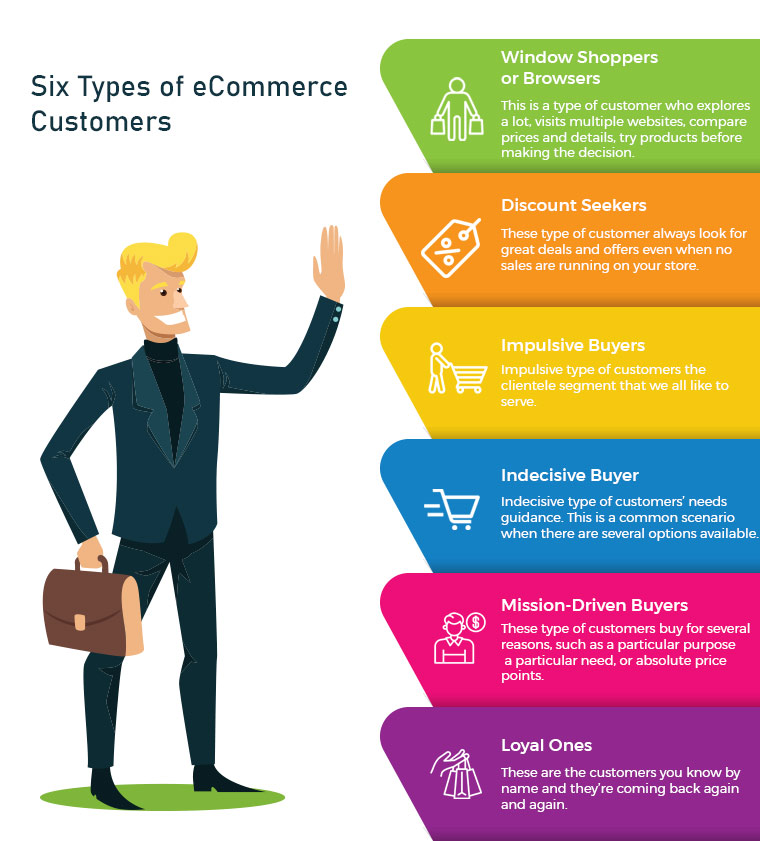
1. Window Shoppers or Browsers

The number one on the list is servers or browsers. This is a type of customer who explores a lot, visits multiple websites, compares prices and details, try products before making a decision. They add products to their cart but never intended to shop from them. Yes, there are many such buyers and you may call them a pain. Can you do something about it? Yes, I guess. There can be ways to attract such visitors and encourage them to buy products from your store.

Greet them well:

If you are a retailer, you must remember to greet them well. Even if they are not asking for any assistance you can provide them one. eCommerce store owners can add any entry or exit popup such as Better Thank you Page module to their store for greeting these types of customers.

Entry or Exit Popup:

Some of the easiest ways to engage your consumers are by the use of innovative methods. The customer’s attention must be drawn to the digital interface and manner of presentation. The gamified interface of Spin and Win Pop-up attracts shoppers to your store. This is a 3-in-one pop-up which is used as an entry pop-up, exit pop up or an email subscription pop-up.

Don’t ignore the browsers, they can become your loyal eCommerce customers if treated right.

2. Discount Seekers

These types of eCommerce Customers respond well to pushy sale tactics. They always look for great deals and offers even when no sales are running in your store. For attracting such buyers you should focus on highlighting what they will save on that particular deal.

Host Clearance or Flash Sales:

These discount seekers can give you huge sales if provided with flat discounts. Clearance sales can be a good option. The products that have been stocked in your store for months can be sold out, and customers looking for discounts will benefit from it.These sales can be a key contributor to your cash flow which will make room for the new products by removing the older ones.

Scratch Card:

You can provide your customers with Scratch Cards while having a purchase. Customers will be attracted to the alluring coupons which can save their deal a lot.

Free Shipping:

Free shipping encourages customers to buy more from your store. A fixed amount of purchase is to be made by the shopper to get free delivery.

Recommended Read: How to Win Customers with Discounts and Boost Sales? 

3. Impulsive Buyers

Impulsive types of customers are the clientele segment that we all like to serve. Nothing is more exciting than helping the impulse shopper to respond favourably to your recommendations. Impulse shoppers, also known as emotional shoppers, make unplanned purchases based on items that are currently appealing to them. Online shopping is a popular example of pulse or emotional buying. They look for products which attract them and you can do that by showing related products or by offering personalisation.

Show Related Products:

If you are dealing with an impulse buyer then make this chance an opportunity. Because they shop when they like it without giving a second thought. Show them what’s new in the store and let them feel, that they will be out of the race if they don’t own it. This can be done with modules like related products.

4. Indecisive Buyer

This is a common scenario when there are several options available. For instance, search for a floral top and the results will blow your mind. hundreds of products will start appearing in various stores. Deciding one will be difficult. Indecisive type of customers needs guidance. Ask them questions and give honest advice. A flexible return policy can also help them with their shopping.

Ask Questions:

Shop owners can help them decide what they want. Provide them with chat support or in-store assistance for choosing the right product. This effort can turn them into loyal eCommerce Customers.

Product Custom Field:

You can add a product custom field with the product description. You can add a field with related questions which can help you understand the need of the buyer. Advance Product Feld extension can be a good fit to improve UX.

Return Manager:

An indecisive customer will be encouraged if he/she knows that the product can be returned if they don’t like it. The Return Manager is a good module to add to your eCommerce store.

5. Mission-Driven Buyers

These can be called researchers or need-based customers. These customers buy for several reasons, such as a particular purpose, a particular need, or absolute price points. As difficult as it can be to please these individuals, they may still become regular customers if they are well taken care of. Provided with a good customer experience which is not available online or on other retailers stores can turn them into loyal customers.

Offer buy-online, Pick Up In-Store:

These types of buyers do not have much time to spend in window shopping or i-store shopping. They can make the purchase online and pick up the product from the store. Implement this new pick-up and drop option in your store to attract mission-driven buyers.

Cross-Selling:

Retailers can help the need-based customer with cross-selling techniques. You can place bread in related products while they are buying milk or a mobile cover if they are purchasing a mobile. The Automatic Related Product module can help you show relevant products on various pages such as the product page, the home page, the shopping cart page, etc.

Recommended Read: How to Cross-sell and Upsell?

6. Loyal Ones
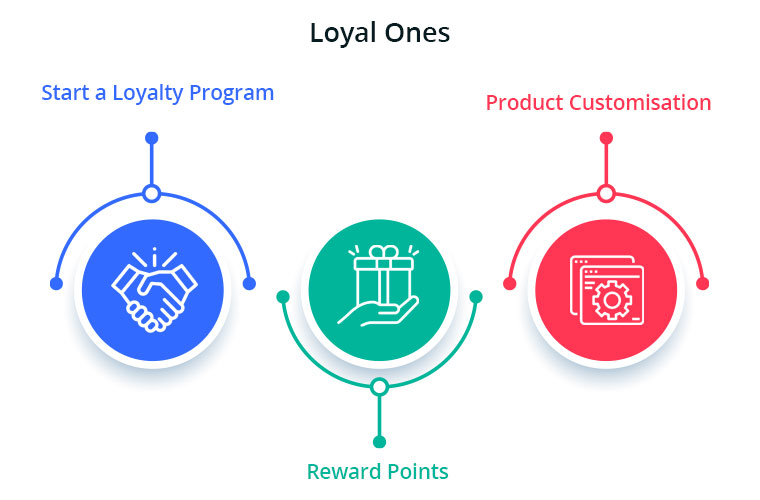
These are the customers you know by name and they’re coming back again and again. Loyal eCommerce Customers already know and enjoy your shop, so now you need to keep them happy. Offer customisation and personalised experience and never lose them to others. The best ones are difficult to find and it is your responsibility to give them your best services. You can give them reward points or loyalty points on every purchase. These types of customers are the best marketers for your store as the more they shop, the more will be the word of mouth communication.

Start a Loyalty Program:

Choose a module or plugin for your eCommerce Store to give loyalty points to your loyal ones. This will motivate these types of buyers to shop again and again from your store. During checkout, the loyalty points can be redeemed for a discount.

Reward points:
You can also give them reward points on various purchases like first purchase, on a fixed amount order, on particular products etc.  The reward points encourage the buyer to make more purchases. It helps the admin boost customer engagement and creates loyal customers.

Product Customisation:

Product customisation and personalisation can turn your sales to the next level. this is one of the most accepted trends. Help them get a personalised product of their taste. The best module for giving a customisation experience is Product Designer/Customization which can provide several choices to you and shoppers.

Recommended Read: Giving Customer Personalisation Experience can Boost Your Sales

Final Tip:

Using this understanding to help turn deals, desires, needs-based and even casual customers into loyal ones will help the business expand. At the same time, ensuring that your loyal customers have a good experience every time they visit your store would only boost your bottom-line income.

Manage Order Returns and Order Cancellation with PrestaShop RMA Module

It is often observed that customers want to return or cancel their orders. Managing orders and fulfilling customer’s demands isn’t an easy task. Considering consumer rights in the EU, every eCommerce platform needs an easy return manager to maintain the records and meeting customer’s needs.  EU has a policy that a consumer can request a return or refund for a faulty product within 14 days after purchase. As an eCommerce owner, it may sound tedious and time taking.

Don’t worry! PrestaShop Return Manager Addon takes care of all the functions required to cancel or order returns. With additional features described below, this new version gives a user-friendly experience to eCommerce store owners and customers.

What’s New in PrestaShop Return Manager Addon?

Customer retention is a merchant’s need and this can be achieved with customer satisfaction. PrestaShop Return Manager module comes with an easy cancel request format with multiple return and cancellation methods for a customer.

1.          Decide when to start calculating Policy time

Imagine a situation when the product is delivered after the expiry of the return date. What impression this will create on your customer? Sometimes the return date expires if the product delivery is delayed, to resolve this issue, the addon now provides a drop-down menu for selecting a product status after which the return policy time will be calculated.

2.         Quick Access of Return Listing from Dashboard

You don’t have to find the module from a long list of installed modules in the admin panel, instead, you can configure the PrestaShop Return Manager Addon from the left menu of the admin panel.

Additionally, a new option to access all the return listing counts has been added on top of the admin panel. All the return listings like order returns, canceled orders, etc can be seen in one place.

3.         Custom features for email templates

In the updated version of Return Manager, the admin is provided with an option in the admin panel to add a custom text for each Return Status and created a placeholder that can be used in the Return Status Email templates. The updated version provides an option in the admin panel to ‘send a Test Email’.

4.         Search and Filter all the Listing Tabs

With the latest version, the store manager can easily sort and filter the listing tabs on the basis of date, customer ID, Return ID, Customer Name, etc. This makes the task easier for the admin.

Features that enhance admin’s power

5.     Allows Partial or complete order replacement

The online store administrator can now allow online customers to pick items from their orders for replacement. Online customers can even request for returning the whole order if they want to do so. They can now choose all the products from the list. This increases the usability rate.

6.     Admin can add Custom Field

This updated version of PrestaShop Return Manager Addon allows an online merchant to create custom fields. Online store owners can build several custom fields from the PrestaShop Refund Order Addon admin interface. The store owner may set custom field block names, apply validations, and also set default values (if required). Admin can make any field as required. Admin can set a default value and validation type.

Why choose PrestaShop RMA over other Order Return Module?

The RMA plays a vital role in the eCommerce store. The Customer sometimes raises the request for the product return, refund, and replacement. To improve customer retention and usability the online merchant needs a flawless RMA interface. Other eCommerce like the Magento Return Manager plugin does not come with these new features.  This rejuvenated tool provides both a user-friendly experience and customer satisfaction.

1.     Increased Customer Conversion Rate

Easy refund and return policy builds trust and makes the customer believe in the merchant. This eventually increases the word-of-mouth publicity of the website and brings more traffic to the site. From this, you can expect a good conversion rate. This one small change will catapult your conversion rate and this way you can keep the complaints zero.

2.     Customer Satisfaction

The front-end easy ‘return’ option lets them believe if they are not completely satisfied with their purchase, they may return it or replace it. This assurance lets your visitor believe in your product policy and allows them to shop more. The easy email template functionality sends an email to both parties which enhances your business relationship. A happy customer always comes back to you without any pause.

Benefits of PrestaShop Return Manager for the merchants:

  • PrestaShop Order Return Manager Addon makes it easy to handle the returns of customers.
  • PrestaShop RMA easy return module boosts customer loyalty.
  • The possibility of receiving “Store Credits” for a faulty product helps to improve consumer retention.
  • The product issues can be fixed by knowing the return reasons.
  • With the aid of the PrestaShop Consumer Return Manager, you will find out the exact problem in the product by providing customers with the option of uploading the picture of the faulty product.
  • Email template makes you craft a mail for your customer at every return stage.
  • With RMA quick return addon, by adding custom fields you can collect more information from the customer.

Benefits of PrestaShop RMA return module for the customers:

  • A ‘Return’ button allows the existing customer or guest customer to return or cancel the placed order completely or partially.
  • PrestaShop Order Return Manager provides an easy cancel request format with credit, refund, and replacement options
  • Customers can upload an image of a faulty product highlighting the defect.
  • An email with custom text will be sent to the customer at every stage for their order cancellation or return request.
  • PrestaShop Order Return Manager allows customers to select a nearby store address for shipping the damaged product.
  • Customers can return partial or whole orders by easy select option.
  • Customers will have the option to cancel the order for a short period. The customers need to go to the My Account >> Return Manager section to cancel the order.

Other useful features of order return or cancellation addon

Easy Return Request Option

There are some other features that make this addon more convenient and user-oriented. It helps you identify the return reasons for customers and lets you raise a return request on behalf of your customer. Thanks to a quick and effective cancellation method, customers are more likely to go back to your platform.

Crafted Email-Templates

Well-designed email Templates emerged as an attractive feature. This pre-formatted email template option gives the admin a hassle-free experience at the backend and directly sends an email to both the parties as soon as the query is raised and updates the customer at every stage of their request. There are 14 different email templates as per the requirements. It is a timesaver for both merchants and customers.

Managing Return Requests at one place

Managing an eCommerce store with fewer efforts is like a cherry on the cake and this amazing addon does that. It helps you manage all the return requests in one place. You can find pending return lists, active return lists, and canceled return lists on the admin panel as well as on the dashboard. This information is also available to export in .csv format in case you want the compiled data.

Compatible with GDPR Module

PrestaShop Return Manager is compliant with GDPR. When you are using the Knowband GDPR module, both the customer and the administrator will be able to access the information of the return request. Besides, the Customer can request the admin to remove personal data from their shop.

Final Words

PrestaShop Return Manager addon is an interesting and helpful tool for the eCommerce store owner to manage the return and cancel the request at the backend.  A hassle-free return policy attracts buyers and gains the customer’s trust.

For more information or to shop the PrestaShop Return Manager for your PrestaShop store, you can visit Knowband store or reach out to us at support@knowband.com. Return Manager Extension is also available for Magento and Magento 2 stores.

You May Like To Read:

5 ways to Manage eCommerce Returns

8 Simple Tips to Reduce Product Returns in eCommerce

Compel the Customer to Return to your Store with Back in Stock Module

12 Ways to Reduce Shopping Cart Abandonment

9 Checkout Conversion Killers Driving Your Buyers Away

Why is it Important to attract Potential Customers?

Getting thousands of visitors to your site but missing on the leads! It’s a common scenario but to get potential customers, you should influence the target market with better strategies. Your target audience will depend upon the services you provide. The targeted market could be B2B or B2C concerning the service.

How to analyze quality traffic?

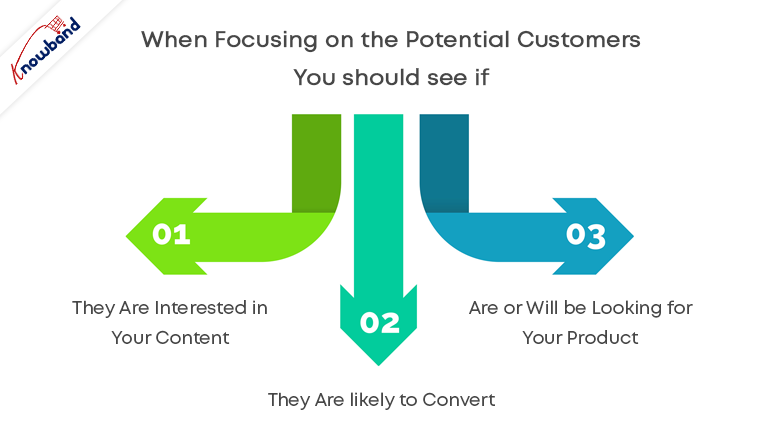
Among thousands of visitors, how many are the leads and take your services? If you are getting a good number of conversions then there is nothing to worry about. If this is not the case then you have to start targeting quality traffic. You must consider the fact that the quantity does not define the quality. Understanding your audience and making them talk about your services can be achieved with quantity but, for quality, your target should be based on buyer persona. When focusing on the potential customers you should see if:

  1. They are interested in your content
  2. They are likely to convert
  3. Are or will be looking for your product

A potential customer is all that you need when you are running a business.

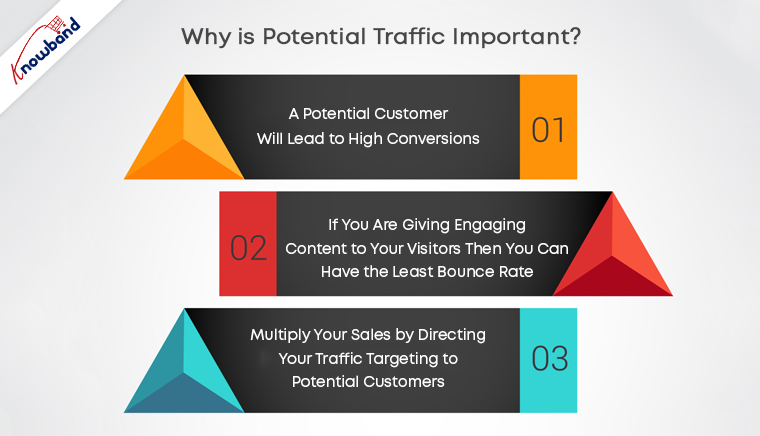
Why is potential traffic important?

Think about it! You are a protein bar manufacturer and you are running promotional campaigns without any filters. This might bring visitors to your site but are they actually going to buy your product? For a protein bar, you should have a B2B target audience as the customer can be of any profession and may differ from a buyer persona.

Let us take another example, you run an eCommerce website selling women’s cosmetics and hair products. Who will be your target audience? Women are more likely to spend on cosmetics. It would be profitable only if women are the target audience.

A potential customer will lead to high conversions. Bring targeted traffic to your site and boost your sales.

If you are giving engaging content to your visitors then you can have the least bounce rate. Many visitors leave the page as soon as they land it.

Multiply your sales by directing your traffic targeting to potential customers.

How to get potential customers?

Now you understand the quality audience traits and the importance of potential customers. Now you must be wondering, how to do that? There can be multiple ways to target audiences, like focusing on customer satisfaction and customer quality service. Best way to approach the quality audience is

  • You can conduct target customer research for the product and services you provide. Compile all your pre-existing data and customer information and start looking into the opportunities with target marketing. Collect more information like their professions, interests to use them in marketing.
  • Analyze the market to know the competition. When you are into a business be ready with your armor and sword to fight a war against your competitors. Here the armor will be your product service and sword will be a marketing strategy.

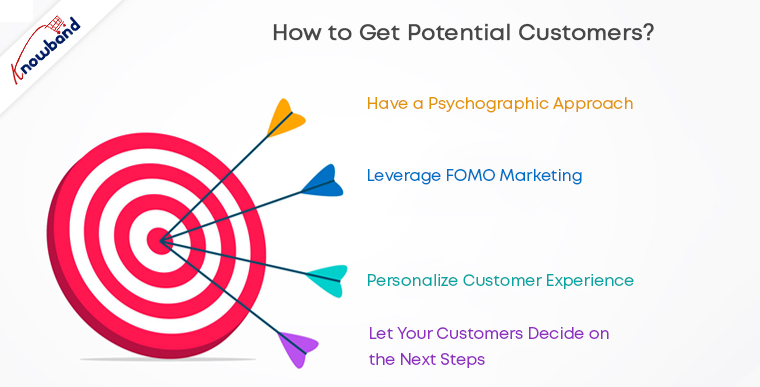
No customers are similar. There can be different ways to attract potential customers which can give high conversions. To get good retention and customer conversion you can target potential customers adopting multiple approaches.

  • Have a psychographic approach: Tell them why your product or service is good for them. You should know the details like buyer’s habits, interests, lifestyle, values, and opinions which can be used in your planning for marketing strategy.
  • Leverage FOMO marketing: You can make your target audience feel they might fall behind if they are not using your product or services. This is one of the easiest ways to boost sales.
  • Personalize customer experience: Attract them by giving personalized customer experience.
  • Prove that your products are better than those offered by competitors: Sometimes you have to play dirty to achieve your goals. Sell your idea as if there is no better option available.
  • Let your customers decide on the next steps: Your work is to guide them but not making them walk. Show the quality and advantages and let them decide on the next step.

Bottom line

Targeted marketing can lead to potential customers and not just visitors. Focus on providing customer quality services and improved customer experience. Make sure your product or service shows up when customers are looking for it. A planned marketing strategy can bring quantity as well as quality to your store.

Knowband can help you with this thanks to a wide range of modules offered for Prestashop, Opencart, Magento, and Magento 2.

Check our gamified popup module to turn potential customers into buyers:


Giving Customers a Personalized Shopping Experience can Boost Online Sales

When exploring your Instagram or Facebook, you always see feeds that are of interest.  Google’s discover feed also shows you the content which you like and would like to spend time on.  Naturally, this makes you feel exclusive, and you spend more time without keeping the time track. 

Can you give the same experience to your customers while shopping? Ecommerce brands like Myntra or Amazon try to target their inactive leads with personalized email marketing. Giving your customer a personalized shopping experience in this competitive environment could be the right plan to survive in a long race.

Understand the shopping journey of buyers with data and use it well for customer experience personalization. With that, customers who get exclusive treatment will do word-of-mouth marketing.

As an eCommerce store owner, you might have given thought to this. But, you may struggle with How to do it? 

Know your customer personally

When you are spending a lot of time and money on focused target marketing, you just don’t need a customer who will make a one-time purchase but your business demands a loyal one. For target marketing, you can consider gathering demographic and psychographic details from a customer. The demographic information can be collected from registration forms but for psychographic information you need more data. To get the details like the interests, values, profession, and lifestyle, you can add custom fields to your registration page.

Proving your customer with loyalty points or rewards at every step of the form filling process will encourage them to fill it. This way, you can get more relevant information for future marketing and product personalization.

You can always ask for:

  •         Their first name 
  •         Birthday  
  •         products they’re interested in
  •         A preferred channel of communication

Some might like receiving emails but in a limited number while other millennials prefer receiving an SMS just after the purchase is made. It is good to ask the preferred channel of communication for targeted marketing. You can even ask for their interests and genre if a person is buying a book from your store.

A large number of people have no issues if a company spoof into the customer’s information which can provide them with a wow experience. From a report, it has been found that 76% of customers expect companies to understand their demands and requirements. So, people like getting a personalized experience, and it is now a trend that can be followed by an eCommerce store owner to compete with others in the market. Personalization can lead to impulsive buying.

Better to communicate with your customers

Remind your customers about the products they liked to buy or visited but did not make the purchase. You can send a push notification for back-in-stock products. You can ask them to look into their wishlist to reduce the abandoned cart.

It has been found that 95% of millennials do shopping while doing other things. Most of them shopped while watching TV or chatting with a friend. Half of the people bought when they are bored with waiting for someone, and some do it when they are traveling.

It is crucial to choose the right means of communication for interacting with your customer. The selection of a communication channel should be based on the data you have collected. Customers often receive promotional emails and notifications which grab their attention and make them shop more.

Putting efforts in the right direction can help you boost conversion rates and customer retention. Millennials prefer texting overcall. You can use a chat app to provide a solution to their queries. This will be a great deal to give them more customer experience personalization.

Effective use of data for persona

You have the data in your system and what a waste if you are not using it well. Your system knows your customer better than you do.

  •         Have you ever been in a situation when you called a person with the wrong name? This happened to me once, and I never want that to happen again. It instantly loses trust in a relationship. Send emails or greet them in-store by calling their name. This builds up an interactive connection between you and your customer.
  •         You can take the help of segment email marketing by categorizing your customers according to their psychographic data
  •         You can enhance the customer experience by offering them products related to their last purchase. A study says, 44% of the customers intended to buy from the same brand or company after getting a personalized shopping experience.
  •         Understand the need of your customer as per their geographic location. Implement geolocation-based marketing strategies. Add a store locator to your website. In-store shopping is still a trend in millennials.

PrestaShop modules you should not miss on

Do you know that you can enhance the personalized customer experience by adding extensions to it?

It is challenging to keep your customers at a checkout page or the product page when they are doing two things at a time. You must have some striking, captivating website features which will keep them attentive and focused on their purchase. Why not with personalized features that you can add with these modules?

Collect more information

With PrestaShop Custom Registration Fields, the owner of the PrestaShop store will collect information about the customer by adding custom fields to the registration form of the website. Additional Order Forms/Field Manager addon for PrestaShop is another module that can help you gather more information. Custom fields on the order form can be generated with this PrestaShop Additional Order Forms Manager without making any adjustments to the code on the web page.

How to use it?

You can ask your customer to fill up the details which can be optional. You can add this field to the registration form. This way you can collect information about birthdays, anniversaries, or any of the interests which can help you promote your products. You can send a personalized message on their birthday with a greeting or any discount coupon. Store owners can use additional information to develop their services and eventually make more profit from their company.

Celebrate birthdays or anniversaries

You can give discount vouchers or coupons to your customers on their Birthday. Birthday Coupon -PrestaShop addon is a module that can inspire your customers to shop from your store on their birthdays.

How to use it?

You can send an email with a personalized message on their special day. This email will include the birthday coupon or discount voucher. The voucher sent through the mail will be valid for a limited time. The addon comes with multiple default templates. You can use it for various occasions.

Make them loyal customers

It is a dream for brands to have loyal customers. From research, it is found that about 30% of people like to buy the same brand and around 40% choose the same brand if they are offering personalized products.  For customer retention and conversions, you can give loyalty points or reward points to your customers.

The PrestaShop Reward Points addon incorporates the reward points feature into your PrestaShop store and allows the admin to offer the rewards point to online shoppers every time they purchase items. 

How to use it?

Store owners can give reward points to the customer after every purchase they do. This comes with a set of terms and conditions. The module helps the admin to add multiple rules for redeeming those points. Customers can redeem those points at some point of purchase which will keep them engaged in your store.

Another extension that can help you with customer retention and customer conversion is PrestaShop Loyalty Point Module.

How to use it?

There are some rules like Cart Rule, Product Rule, and Behaviour rule for loyalty points. Store owners can offer loyalty points on a specific cart amount, product quantity, based on the payment method, particular product or category, shipping services, etc. It can be given to new customers while placing their first order.

Display recently viewed items

Automatic Related Products addon for the PrestaShop store can help you show the relevant products to your customers. This feature can be added to multiple pages of your eCommerce store.

How to use it?

The feature will show related products to your customers, and this will motivate them to see more and more on your eCommerce store. If they are not satisfied with the one product, they can see more until they get the one.

Add more product details

Admin can add n number of details for a product with Advance Product Attribute/Field – PrestaShop Addon. This module allows you to show descriptive information about the product. 


How to Use it?

It has a simple configuration, and the admin can ask customers to provide more information about the product. If they like the product or not? If they need any modifications?  By collecting additional customer details, the sellers can better represent them. As a result, online shoppers will have the same user experience with this PrestaShop Additional Field Module on the Product tab.

Attractive email subscription module

Spin And Win – Entry, Exit, and Email Subscription Popup by PrestaShop have a gamified interactive look. It attracts the buyer’s attention and allows them to win offers like discount coupons or free shipping. This is one of the best sellers of PrestaShop and a fantastic module to collect the email addresses of your customer.

 How to use it?

You can Get Personal in Email Marketing and send personalized Emails using the information which is provided by the customers. The emails should be sent based on customer behavior. You can go for a personal recommendation to offer a personalized customer experience to your customer. Try to re-engage your leads with promotional messages or pop-up notifications. Email marketing is a free and reliable option to give a customer personalization experience to users.

Greet your customer

Greetings are most valuable when you are building a relationship. Customer-trader relationship is most important when it comes to business. You can use a Better thank you page module for your PrestaShop store.


How to use it?

Add a Better thank you page module to your PrestaShop store and use it to show a pop-up when the customer is leaving your store or after the successful purchase. Also, you can add customized banners or discount coupons for their next purchase. This way, it can help you boost customer retention and make your customer satisfied.

Final thoughts

Increase your sale by providing a personalized shopping experience to your customers. In this era of millennials, Personalisation is the only way to attract a loyal customer base to your store. Create Special Campaigns Based on user behavior and make them feel unique. They don’t like to be treated as a number but an individual. So, It’s time to boost your sales with a customer experience by providing personalization. 

Recommended Reads:

How to Simplify the Online Shopping Experience of Customers?

Give Best Infinite/Endless Scrolling Experience to Your eCommerce Customers

How to Get Customer Feedback?

One thing that helps you in becoming better every day in your business is Customer Feedback.

Customer is the king they say and it is indeed very true. They are the ones who can take your business to the peak or bring it down drastically.

Be it any business, they aim to provide the best of services to their customers. If your customers are not satisfied with you, it will not help you in the long run. And this is where customer feedback plays a crucial role.

Customer feedback is important to know what your customers think about your products or services. How has been their experience on your website? Are they happy with your services or not? Is there something that they would like to get changed or anything that’s troubling them on your website? You should always welcome your customers’ opinions and suggestions.

When you get honest feedback and look at things from a customer’s point of view, you can identify what’s lacking in your business and which are the areas that you can improve on, in a better way.

So how do you get customer feedback? How do you encourage customers to share their views about your brand or products?

In this write-up, I have shared a few tips to get customer feedback.

6 ways to ask for Customer Feedback

There are many ways to collect customer feedback. However, I have filtered out a few from my list that I find to be the most useful.

1. Collect Feedback on the Order Confirmation Page

Your order confirmation page or the thank you page is one of the best sources to know about your customer’s shopping experience and can provide you with some invaluable customer feedback.

Ask them if they faced any difficulty while navigating on your website or any particular page that hampered their experience. Was it easy to find what they were looking for? These sorts of questions are beneficial to improve your website’s performance.

You can ask such questions in the form of multiple-choice questions that let customers select the quality of service they experienced on your website. Customers usually do not wait even for a second on the order confirmation page. So try to get the feedback in a simple and clear way.

Besides, you can also place a comment box on this page to allow customers to leave any other suggestions.

2. Live Chat Support

Another way to collect customer feedback is through live chat support. If you provide a live chat support option on your website, it would be easy for you to know what sort of issues or challenges your customers are facing.

Moreover, the live chat option is accessible and provides customers with an easy way to communicate with your support team and get their concerns addressed right away. It also tends to make your customers stay for a longer duration on your website since the response from the support is mostly instantaneous.

Many businesses are offering live chat support through WhatsApp as well.

After you have finished addressing their concerns, you should ask for your personal feedback as well, like if you were able to resolve their queries or are they satisfied with your help. Although this seems to be very obvious, it’s a good practice to follow.

3. Be Active on Social Media

Today, customers find social media a better option to contact a business than email or any other form. And when customers are disappointed or frustrated over a matter, they tweet about it or leave negative comments on your Facebook or Instagram posts.

This is why it is important that your social media team gives a prompt response to customer queries. Whether they tweet, leave a comment or DM you personally, try to be as quick as possible in providing a solution.

Criticism or I would say constructive criticism is sometimes very helpful to understand the flaws in your business or services.

Engage with your customers. Reply to their comments/queries or tweets and most importantly, be very polite while dealing with their issues. Social listening highly matters in an eCommerce business.

4. Exit Popup

Though an Exit Popup is majorly used to entice customers with some attractive offers at the last minute, they can be used to collect customer feedback as well.

Exit Popups are popups that appear when a user tries to exit your website. By having an exit-intent popup, you can ask customers for some suggestions to improve while they try to leave. It can prove to be a useful tool to know the opinion of your visitors, primarily the new ones.

Make sure that the popup does not appear if a user is trying to exit within a very few seconds. Let them spend some time on your website. Let them go through some of the pages so that they get an idea about your brand. Then you can ask them for their opinion like if they felt anything missing while browsing your website or how helpful it is as far as the user experience is concerned.

5. Obtain Customer Feedback through Surveys

You would have often received survey emails from brands or seen it on social media. Surveys are an important asset when it comes to getting customer feedback.

Create a survey form and send the survey link to your loyal and existing customers on their email address. Since a survey can be a long-form, you need to be very impactful with your choice of words when you are asking a customer to fill the survey. Make them feel that their feedback matters a lot in the success of your business.

You should run surveys on social media platforms as well. To make people participate in the survey, you can reward them with an offer or anything that persuades them to fill the survey form. Survey forms give you detailed feedback.

Alongside surveys, you should conduct polls at regular intervals to identify which particular elements on your website your users find to be the most and least helpful.

6. Create a Forum

Having a forum on your website helps your customers to discuss and share their queries or concerns and ask the forum community for a solution. Basically, it forms a community where a person can raise any kind of question and the other members can answer if they know it.

You can take a look at your online forum and see what kind of discussions your audience is having or if there is an issue that has arisen lately that you are unaware of.

Final Thoughts

Some of the other ways to collect customer feedback are calling your customers at regular intervals. Though this can be a challenging task for large eCommerce businesses but can be very helpful for those businesses that are on a small scale.

You can reach out to customers when they abandon their cart and ask them what went wrong during their purchase.

When you receive positive feedback from your customers, it gives you a push to make the experience of your customers even better than before. And do not get upset with negative feedback. Negative reviews are more helpful as they provide you with every minute detail that you can work upon to improve the customer experience.

I hope you liked this information on how to get customer feedback. Feel free to add any further points in the comments below. What are your strategies to collect customer feedback?