9 Underrated OpenCart Extensions To Look Out For

When we go through OpenCart forum, we come across many such questions where merchants put forward their requirements which we feel can be fulfilled by the extensions which aren’t popular or which they are not aware of.

Popular extensions are always on demand while other extensions get unnoticed. In this write-up, I will be covering those useful but highly underrated extensions that can be fruitful for the OpenCart merchants.

1. Preferred Delivery Time

OpenCart Preferred Delivery Time extension allows customers to pick a desired date and time slot for their order delivery. Many times, it happens that customers want to receive the product on a fixed date and time slot; majorly when they want to gift someone or when they do not want to miss on the product due to their unavailability. With this module, you can encourage users to choose the preferred delivery date and time as per their convenience and availability.

From the back-end configurations, you can adjust the time-slots, specify the non-delivery days and also allow consumers to update the delivery date and time even after they have placed the order.

2. Advanced One Page Checkout

If you do not want your customers to go through a multi-step checkout process and want to offer a short and seamless checkout experience, OpenCart Advanced One Page Checkout is the extension you need.

The extension adds a responsive one page checkout popup on your website and allows customers to switch between the checkout fields without requiring to load multiple pages or getting the URL changed. It offers guest checkout, social login, option to customize checkout fields, etc. and encourages a quick checkout.

3. Store Locator and Pickup

OpenCart Store Locator and Pickup extension encourages the in-store pickup facility and allows your customers to self-pickup the items from your stores at their desired date and time slot. They can locate the nearby stores and choose the pickup date and time accordingly.

You can add (manually or through CSV upload) multiple stores, adjust the pick-up timings and perform various other tasks from the back-end.

4. Spam Blocker

On the forum, many OpenCart merchants complain about receiving spam traffic on their website. This can be avoided by OpenCart Spam Blocker.

OpenCart Blocker lets you restrict bots coming to your website from various IP addresses. You can specify those IP addresses and block them. Similarly, you can prevent spammers from different countries or User agents (Mozilla, Chrome, etc).

In case if you block a genuine customer, they can raise an unblock request which you can check from the back-end. The extension helps you keep your website safe and secure with real users.

5. Free Shipping Manager
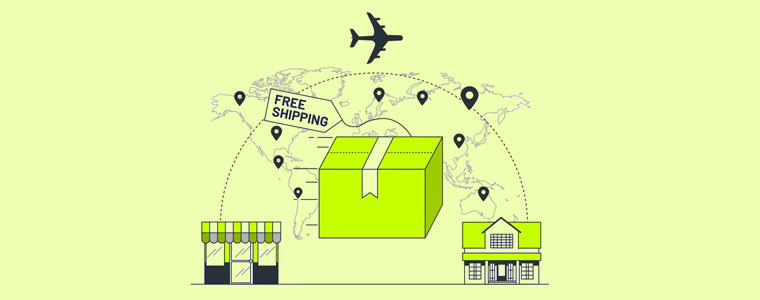
Consumers crave free shipping. They get delighted if they do not have to pay the shipping price but offering free shipping isn’t easy especially for small and mid-scale companies.

With OpenCart Free Shipping Manager, you can create certain free shipping rules, such as Free shipping on a certain amount and certain weight. You can specify the amount and weight of the order which needs to be matched for a customer to get free shipping on his/her order. You can also specify countries which will be restricted from the free shipping rules.

The extension helps in increasing the average order value on your store.

6. Private Shop

OpenCart Private Shop extension allows merchants to make their shop or store private. They can restrict access to their store and let only selected customers or wholesale members explore it.

You can privatize the entire store or restrict access to some specific pages only. Users are required to sign-up initially and only after the admin’s approval from the back-end, they will be able to access the store.

7. Product Availability Check by Zipcode

OpenCart Zipcode Validator extension adds a “Check Availability” tab on your product pages, using which shoppers can check whether the product is available for delivery at their location or not by specifying their area zip code.

This saves a customer’s time as they do not need to head to the checkout page, put their address and then confirm whether it is eligible for delivery or not at your location. A customer cannot proceed to the checkout page without checking the product availability.

8. PDF Invoice

OpenCart PDF Invoice extension allows merchants to send customers their order’s invoice in the PDF format in the order confirmation email. They can also download it from their order history.

The extension comes with multiple options to customize the invoice.

9. Cash on Delivery with Fee

OpenCart Cash on Delivery with Fee extension lets you charge some additional fee to your customers on their COD order. It is helpful for those shoppers who do not want to share their card details with the website and are ready to pay some additional amount for cash-on-delivery mode. You can charge customers with a fixed or percentage-based fee.

For any queries or assistance regarding these OpenCart extensions, kindly contact us at support@knowband.com

Various Key Performance Indicators (KPIs) in eCommerce

Key Performance Indicators or KPIs are used to measure the progress of an intended result or you can they measure a business’ performance based on the objectives and target. Evaluating KPIs helps companies identify the progress towards marketing, sales, and many other things.

Difference between Metric and KPI

KPIs tell you how effective you are at achieving your objectives whereas metric track the status of a process. Put simply, KPIs reflect the result while the metric reflects the process.

Let’s understand the various key performance indicators in eCommerce. In this article, I have specified key performance metrics for Sales, Marketing (including email marketing) and Facebook Marketing.

Key Performance Indicators for Sales

Sales KPIs measure how your business is doing in terms of conversions and revenue. It includes:

1. Sales

E-retailers can monitor the total sales by hour, day, week, month, or year.

2. Average Order Value

Also called average order size or average purchase value, it tells you how much a customer spends on a single order.

3. Average Profit Margin

This KPI helps sales team evaluate the profit margin over a period of time across products and services.

4. Conversion Rate

It is the rate at which conversions are happening on your website. It can be assessed by dividing the total number of visitors to total conversions.

5. Customer Lifetime Value

This KPI tells you how much a customer is expected to spend on your products or services over their lifetime. This requires strengthening the relationship with customers and building customer loyalty.

6. Retention and Churn Rate

The retention rate tells you the percentage of customers you have retained over a period while the churn rate is the percentage of customers leaving your brand over a period.

7. Cart Abandonment Rate

This KPI tells how many users are adding the product to the cart but not purchasing it. A high cart abandonment rate can have many reasons including an intricate checkout.

8. Product Affinity

It tells you about the products that are purchased together, helping you improve your cross-selling strategies.

9. Customer Acquisition Cost

This KPI tells you how much amount you are spending on acquiring a new customer.

10. Gross Profit

This is calculated by subtracting the total cost of goods sold from total sales.

Key Performance Indicators for Marketing

1. Website Traffic

It refers to the total number of users visiting your website.

2. Average Time on Site

It provides data on the time spent by a visitor on your website and web pages.

3. Bounce Rate

It is the percentage of visitors who exit from your website after viewing only one page. Higher bounce rate is an indication that your homepage is not appealing enough to generate curiosity in the visitors to explore further web pages.

4. Average Session Duration

It tells you the average time a user spends on your website on a single visit.

5. Traffic Source

The traffic source tells you where most of your visitors are coming from, for example, Google (organic), social media, paid ads, etc.

6. Email Open Rate

It tells you the percentage of your email subscribers who open your email. If you have a low email open rate, you can try to improve it by testing different subject lines, removing inactive subscribers, or even sending emails at a different time.

7. Email Click-Through Rate

This marketing KPI tells you how many subscribers are clicking on the inside link after opening your email. This is important because if they are not clicking on the link, you won’t be able to drive them to your website.

8. Unsubscribe Rate

It tells you the percentage of subscribers who unsubscribed to your emails.

9. Social Media Engagement

It provides you insights on how your followers are interacting with your brand on social media.

10. Clicks

This KPI tells you the total number of clicks on the link and can be measured for website, social media, email, ads, etc.

Key Performance Indicators for Facebook Marketing

1. Audience Profile

It provides you with insights on your Facebook followers. You can know which gender is more attracted to your brand, which age group most of your followers belong to, which location does most of your followers belong to, etc. This helps you analyze your target audience.

2. Growth

This KPI tells you how quickly your brand is growing over Facebook.

3. Reach

It tells you how many people have seen your post or Ad on the platform.

4. Engagement

Engagement tells you how often people are interacting with your brand. Low engagement is a sign of boring content.

5. Leads

It tells how many users filled out your lead form be it through paid ads or organic reach.

6. Conversions

This KPI tells you how many leads got converted.

7. Response Rate

It tells you how quickly you are responding to your messages. Facebook shows the response time for pages.

There are many performance indicators in eCommerce. Once you have set your objectives and selected KPIs, monitoring them will become your daily routine.

How To Repair A Suspect Database In MSSQL

The database may occasionally be marked as SUSPECT when you connect to a SQL Server instance. You won’t be able to connect to the database to read and write data in this situation. The procedures you must follow to restore your database that has been marked as SUSPECT are discussed in the article.

Reasons of this error

Here are some following causes due to we have to face the suspected database error.

  1. Restart or shut down the Database without shutting down the SharePoint server.
  2. The database could have become corrupted.
  3. There is not enough space available for the SQL Server to recover the database during startup.
  4. The database cannot be opened due to inaccessible files or insufficient memory or disk space.
  5. The database files are being held by the operating systems, third-party backup software etc.
  6. There was an unexpected SQL Server Shutdown, power failure, or hardware failure.

Resolutions

Here are a few steps to resolve this issue. First, make sure you have Microsoft SQL Server Management Studio in your system.

1.   First, open your Microsoft SQL Server Management Studio and fill in your database credentials to connect to your database.

2.   Then right-click on your suspected DB and click on the New Query button to write a query.

3.  After that run the below commands one by one Here you need to replace [YourDatabase] with the name of your database Name.

a. Reset the database status to clear any error flags.

EXEC sp_resetstatus [YourDatabase];

This command resets the status of the specified database. If a database is marked as “suspect” or in a similar state, this command can clear that status. It’s the first step to attempt to bring the database back online.

b. Put the database into a state where it can be safely checked and repaired (emergency mode).

ALTER DATABASE [YourDatabase] SET EMERGENCY

This command sets the database to emergency mode. Emergency mode is a special state used for troubleshooting. In this mode:

  • The database is set to read-only.
  • Only members of the sysadmin role can access the database.
  • It’s used when the database is severely damaged and cannot be accessed normally.

c. Check for any issues in the database.

  DBCC checkdb([YourDatabase])

This command runs the DBCC CHECKDB utility, which checks the physical and logical integrity of the entire database. It identifies any corruption or issues within the database.

d. Ensure no other users are connected to interfere with the repair process (single-user mode).

  ALTER DATABASE [YourDatabase] SET SINGLE_USER WITH ROLLBACK IMMEDIATE

This command sets the database to single-user mode with immediate rollback. This means:

  • Only one user can access the database at a time.
  • Any other connections to the database are terminated immediately.
  • It’s necessary to prevent other users from interfering with the repair process.

e. Repair the database, accepting that some data might be lost to fix the issues.

  DBCC CheckDB ([YourDatabase], REPAIR_ALLOW_DATA_LOSS)

This command runs the DBCC CHECKDB utility again, but this time with the REPAIR_ALLOW_DATA_LOSS option. This option attempts to repair any detected corruption, but it can result in data loss because it may delete or modify corrupted data to make the database functional again.

f. Return the database to normal operation (multi-user mode).

 ALTER DATABASE [YourDatabase] SET MULTI_USER

This command sets the database back to multi-user mode, which allows multiple users to connect and use the database as normal.

4. After Execute the script refreshes the database.

For any queries, you can reach us at support@knowband.com. Knowband provides best-in-class solutions for everything eCommerce. We also offer custom development of all sorts like Plugins and Mobile apps for Prestashop, and Opencart. Magento and Magento 2. Click here to know more.

Knowband Mobile App Builder

Get the mobile app created for your store in a few hours with the Knowband Mobile App Builder Module.

KNOW MORE

Recommendations for you:

We highly recommend our No Code Mobile App solution to all eCommerce store owners. Know more:


How to use UDL File for check the database connectivity

What is UDL file

UDF file is a simple test file which we use for check database connectivity.

Create UDL File

Here are some steps to create a UDF file.

  1. First, create a test with (.txt) extension.
  2. Then open your file explorer click on view tab and checkmark the “File Name Extensions” option.
  3. Now right-click on your test file and click on rename and replace the (.txt) extension with (.udl).
  4. Now udl file has successfully created.

How to use UDL File

First, open your udl file and then fill your database details on the file and click on test connection. If connection is successful then your database connection is stable.

Checklist to Create an Attractive Home Page for your eCommerce Website

Your homepage is the interaction point for web visitors. Not only it introduces your brand to the users but also marks the beginning of their journey on the website. Put simply, it navigates your visitors and customers to different places (web pages) on your website.

As we say “First impression is the last impression,” it perfectly suits in case of a homepage. If your homepage doesn’t leave a good impression on the very first time a user lands on your website, it is very unlikely they will proceed further. They will bounce off straight away and may never return.

Whether the purpose of your home page is to capture email subscribers, get conversions or sell products, it should leave a strong first impression.

What are the ways to design an appealing homepage? Well, there are multiple ways to do it and different eCommerce websites have different ideas. However, there are some important tips to consider when designing your homepage.

Before you design your Homepage-

A particular homepage might do exceptionally well for one business while it may fall flat for another.  So before you make up your mind of designing the homepage, ask yourself a few questions.

What call-to-action do I want visitors to take?

How many steps does it require?

How much information do they need to provide before they could move towards the next step?

How simplified can it be made?

Can some steps be eliminated?

Make your primary goals and work accordingly.

On average, a visitor spends nearly 10-20 seconds on a webpage. Considering this, the duration can be further reduced if your homepage fails to impress web visitors.

What this tells is you only have a few seconds to leave a positive impact on visitors about your brand. The navigational flow should be clear enough to encourage users to explore other areas of your eCommerce website.

Although you would want your potential customers to stick around, decision avoidance should be prevented. Decision avoidance is the tendency of humans when they fail or take too long to make a decision. This could lead to visitors bouncing off from your website or hitting the back button.

Let’s now take a look at some tips that could prove helpful in designing your ideal homepage.

1. Purpose-Driven Content

Your homepage should straight away speak about your niche, products or services when users land on your website. Before they begin scrolling, the primary purpose should be served right in front of them.

If you are providing a service, there should be a complete focus on it along with how users can get facilitated by it. The homepage content should persuade visitors to take action and this is why a compelling call-to-action should be placed on the homepage for that matter.

Displaying such content also confirms users that they are in the right place as the information served to them helps them identify what they are looking for.

2. Easy Navigation

One of the most important things to look at while designing your homepage is the navigation bar. It should be as straightforward as possible consisting of only important navigation links. The fewer the better as too many navigation options can clutter the homepage and hamper the user experience. An ideal navigation bar should not have more than seven links.

You should also look to create sub-navigation parts (displays in drop-down menu) if your website has too much content. This narrows down the navigation path for users and helps them reach the desired page quicker.

It is also recommended to add a search box or simply a magnifying glass to the navigation bar. Some websites also have the Contact Us and About Us page at the navigation bar but it will look better only if you are displaying only a few options else it is ideal to put them at the footer.

3. Eye-Catching Visuals

Images are an integral part of a homepage. They catch user attention more than anything. If visuals aren’t appealing, other things would hardly matter.

Make sure to pay a lot of attention to the visuals while designing your homepage. They should immediately reflect the purpose and as you would know, “A picture is worth a thousand words.”

What visuals should you incorporate on your homepage? You can try using Images with text overlay, slideshows, image carousels, or you can add a video too if you want. Images should be attractive and should match with your website’s overall design.

4. Shopping Cart

Adding the cart section on your homepage which is visible throughout the website makes a good homepage design. You can find this on many eCommerce websites. Even the eCommerce giant Amazon has a shopping cart on their home page and can be accessed from any web page.

Displaying the number of items in the cart keeps reminding customers that they have an incomplete purchase, and encourages them to checkout.

5. Testimonials

Highlighting testimonials is among the best practices to design a homepage. They are powerful and make your brand look trustworthy. The curiosity to explore your website and do business with you increases when visitors find out how satisfied your clients or customers have been with your offerings or services.

Make your home page more appealing with Instagram Shop Gallery

Instagram Shop Gallery not only enhances your homepage but also provides you with an opportunity to boost your sales. The module creates an Insta Gallery section on your homepage and also places the page link on the header navigation.

Using this module, you can fetch photos from Instagram using specific hashtags and tag your products on it, making it similar to Instagram shoppable posts. Instagram Shop Gallery module is available for PrestaShop, OpenCart, Magento and Magento 2.

Final Thoughts

Simplifying your homepage and keeping it attractive at the same time is what attracts visitors the most. And this should not only be focused on the desktop. A majority of the website traffic comes from mobile devices today. So make sure your homepage looks as appealing on a mobile as it looks on a desktop.

That’s it in my checklist of designing a homepage for an eCommerce website.

6 Reasons Why Your Business Needs A Strong Social Presence

Gen X, Millennials, or Gen Z, you will find people of all three generations on social media platforms like Facebook, Instagram, Twitter, etc. And I guess I won’t be wrong to say that your target audience also falls under the age group of these generations.

Facebook and Instagram have over 2.6 billion and 1 billion monthly active users, respectively, making them two of the largest social media sites. With such a vast majority of people connected to social media, there remains no question as to why your business requires a social presence. Moreover, marketing on social channels has grown rapidly over the past couple of years.

Besides the numbers, let’s take a look at the six important reasons that highlight why your business needs a strong social presence.

1. Builds Brand Awareness

Whether you have just started your online business or it is booming already, it’s a wise idea to mark its presence on social media platforms. Not only it increases brand recognition but also helps you build your community on popular social networks.

Social media is a perfect place to showcase the audience what your brand is about and allows you to connect with your audience on a personal level.

2. Humanizes Brand

The ultimate goal of any business is to drive traffic to their website and get sales. This seems valid from a business perspective but it’s important to know that human nature draws us towards things that are relatable; to which we could connect.

Social media bridges that gap. Having a social presence provides you with the opportunity to create a friendly atmosphere where people feel familiar and interact with your brand like it’s a part of their day-to-day life.

People like to engage, and when they notice that you are trying to build communication instead of being promotional every time, it further increases their liking towards your brand and this is what can make it stand out from your competitors.

3. Targeted Advertising

One of the best things that social media brings to the table is targeted advertising. Unlike traditional advertising where you cannot narrow down your audience, having a social presence provides you with the opportunity to reach out to the desired audience.

You can break the audience by their gender, age group, location, interests, etc. This ensures that your ad is getting delivered to the relevant audience which also improves your cost-per-click rate. Thanks to tools like Google Analytics and Social Native which has the capability to track social activities, it makes easy to analyze our target audience.

4. Competitive Edge

While you are here thinking why your business needs a strong social presence, your competitors present on social media are already eating away your potential customers. They are putting their time, money, and everything to get the customers on their side.

Having a social media presence gives you a competitive edge and with your social media marketing strategies and activities, you can outperform your competitors and turn the tables.

5. Capture Leads and Boost Sales

Marketers consider social media a powerful tool to generate leads. It is immensely used worldwide. If you are not utilizing those platforms, you are missing out on an opportunity to acquire leads and scale-up your sales.

Social media giant Facebook lets you open your shop on the platform. With a Facebook store, you can allow the audience to browse your store products even without being present on your website.

6. Real-Time Information

Social media is not just limited to entertainment or marketing purpose. In fact, it’s becoming a source of information for people. Any changes or updates made by a Brand are mostly confirmed by their social media pages.

You can also interact with your audience by bringing them the news, offers, sales or any other information related to your business.

Final Thoughts

If you do not mark your social presence now, you will be deprived of so many benefits which your competitors are already enjoying. The world is evolving, so should you!

Understanding OpenCart Image Search Extension

What do we do when we want to buy a product online? We open an eCommerce website, type the product’s name in the search bar, add the desired product to the cart, and checkout. It’s way too simple, right?

But let’s say you are browsing Instagram and saw a cool outfit on your feed. You liked it in the very first look and feel the desire to have the same outfit. How will you search for it?

It will be very difficult to find the exact outfit. This is where the Image search option helps, and if you have a store on the OpenCart platform and want to provide your users with the option to conduct image search and get related results, OpenCart Image Search extension is all you need.

OpenCart Image Search

The extension adds the image search functionality on your website with the help of which consumers can upload an image and check if the similar product is available on your store. The extension uses machine learning to recognize the image and presents relevant results in front of the customer.

Description

1. Incorporates an image upload option right next to the search bar, allowing users to perform an image search. The extension detects the image and accordingly the products that match the image are displayed to the customers.

2. The extension also adds a “Search Visually Same Product” tab on your product pages right below the “Add to Cart” button. This is helpful when customers want to explore different variants or designs of the product. This setting can be disabled.

3. There is also the option to set the “threshold percentage” which indicates the accuracy of the product. Higher the accuracy, better the results! You can add the range between 50-100. It is recommended to keep the threshold percentage to 95 for best results.

4. OpenCart Image Search module displays the total number of images on the website, and how many out of them are mapped, unmapped and need to be synced. You can also know the reason behind the unmapped images. Newly added images are automatically synced.

Benefits

1. OpenCart Image Search extension improves the search functionality of your website.

2. The extension enhances user experience.

3. It makes online shopping more convenient as shoppers can look for a similar product by uploading the product image.

4. An easy way to search the desired product.

5. Saves customers’ time and efforts.

6. Easy to install and configure without requiring any technical knowledge.

For any assistance regarding the module, contact us at support@knowband.com

All You Need To Know About PrestaShop Private Shop Addon

PrestaShop is one of the best eCommerce platforms offering great flexibility and opportunities for selling all types of products and services.

PrestaShop Private Shop module is focused around B2B online businesses, allowing wholesalers to make their store/shop private. With the help of this module, they can restrict access to their store and let only selected customers or wholesale members explore it.

Unlike B2C online stores that are easier to manage, B2B is a bit complex. But with PrestaShop Private Shop addon, you would not find it difficult to manage your wholesale online store.

Benefits of PrestaShop Private Shop addon

The benefits of creating a private store are-

1. You can allow only selected buyers to access your store

2. You can privatize the complete store for regular visitors or give access to some specific pages

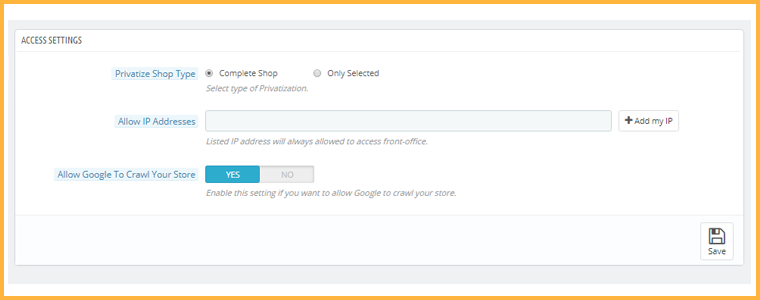
3. Access to specific IP addresses only

4. Easy to install and configure

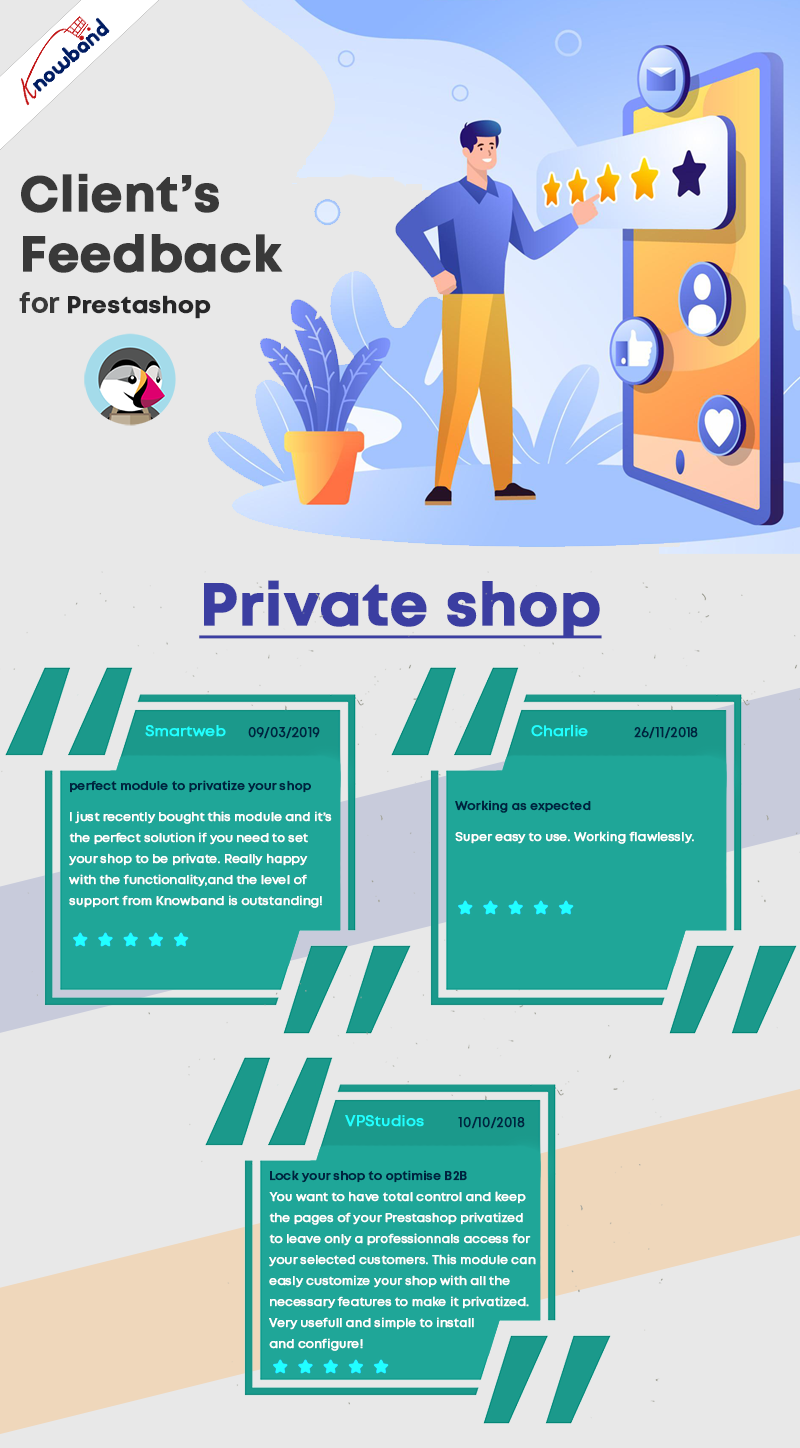
Before jumping to the module features, here are some reviews:

What does the Private Shop module offer?

Talking about the configurations and features of this module,

1. It provides you with the option to make your entire store private. No one will be able to access it without logging in. Initially, users will have to create an account to access the front office. Once approved by you from the back-end, they will be able to log in and explore your store products.

2. If not privatizing the complete store, you can permit users to access only a few pages, categories, or products on your website. From the back-end configurations, you can specify the products and categories that you want to keep private and also select the web pages which will be accessible only to private customers and not others.

3. PrestaShop Private Shop addon also lets you allow specific IP addresses to visit your wholesale online store.

4. Customers who signed up on your store will be put under “Private Customers.” From there, you can view the list and approve/deny a customer’s request. You can disable the approval setting if you want.

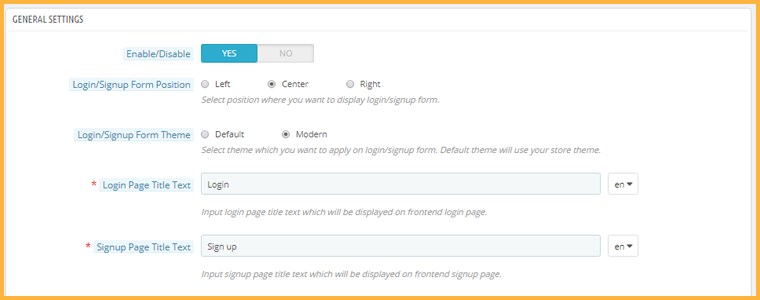
5. You can adjust the look and feel of the signup page. You get the option to adjust the position of the sign-up form, choose the desired theme and make some other customizations. For a better appearance, the admin can also add the company logo to it.

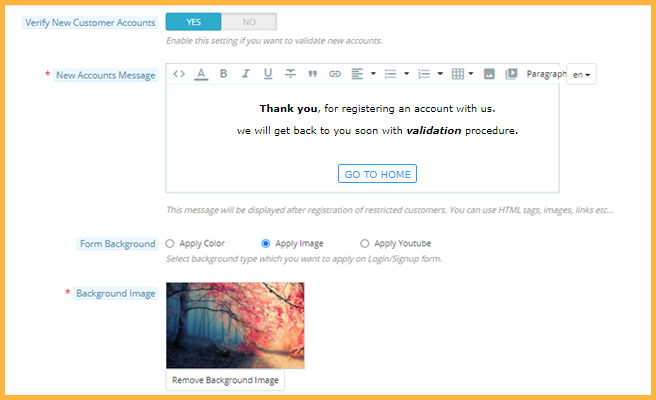
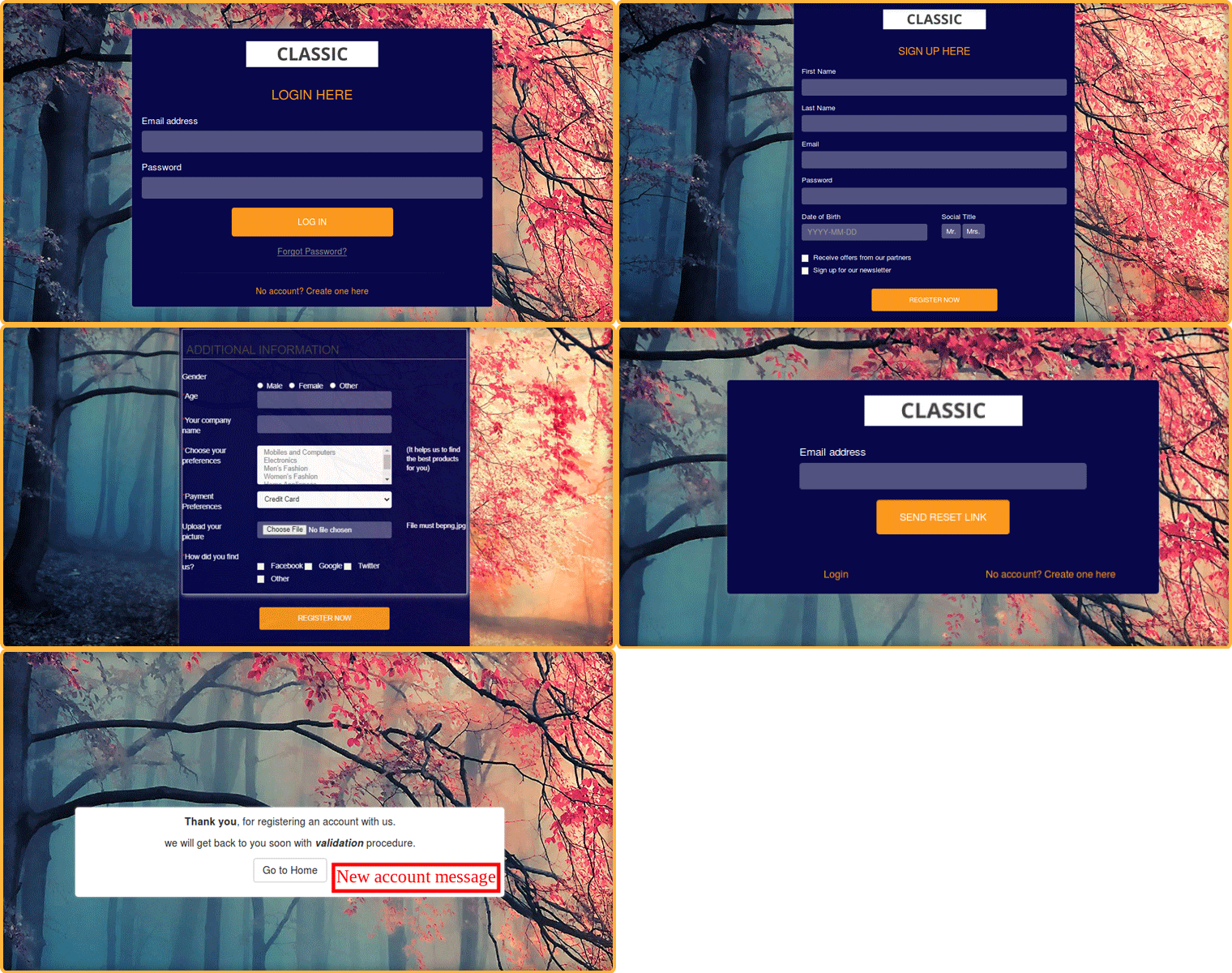
6. You can give your storefront an attractive look. The create Account page can be customized. Store admin can add a background image for the form. There is an amazing option for adding a YouTube video in the background.

7. You can adjust the look and feel of the signup page. You get the option to adjust the position of the sign-up form, choose the desired theme and make some other customizations.

Front end view of PrestaShop private Shop:

8. Every newly registered customer will receive a custom message. The owner of PrestaShop Private Shop can enable new account verification and send a message with HTML tags, images, links, etc.

9. You can also enable or disable the functionality to allow Google to crawl your store. If you wish to keep it private, your store content will be hidden from the search engine.

For any kind of query or assistance, reach out to us at support@knowband.com