How can a vendor optimize his presence on Walmart Marketplace?

Walmart is one of the largest retail corporations. Numbers don’t lie and the statistical figures with this marketplace definitely offer a positive vibe to the e-vendors. The online retailer has delved into almost all the segments under the sun. Being one of the biggest and the highest grossing-retailer, the platform provides an opportunity to even the small vendors and sellers to expand their business reach.

Walmart has 11,000+ stores worldwide. So, if you are looking to expand your business internationally, then, this is one-stop-destination for you. In the year 2017, the company’s global net sales amassed approximately $ 481.32 billion. While for the fiscal year 2018, the revenue has shot up to $500.3 billion.

These figures are expected to get even bigger in the coming years. Hence, integrating the eCommerce stores with Walmart.com is a must for the online vendors. Are you looking to integrate your online store with the marketplace? Are you intimated by the technicalities involved in the same? You need not worry anymore. Walmart integration extension can help the eCommerce owners integrate their web store with Walmart.com.

Although, Walmart Marketplace offers an easy opportunity for the e-sellers to expand their business reach, getting a shelf on Walmart is not an easy goal to achieve. While there are many advantages of becoming a seller on Walmart, it comes with some drawbacks as well. The tough competition might take a toll on your nerve in the quest of standing out. Boosting your presence on the popular marketplace is the most difficult task to be achieved So, the question arises, how to stay ahead of the competition at Walmart marketplace?

How can the Third-party Sellers Optimise their Presence at Walmart.com?

No one is aware of Walmart’s search algorithm, but still, there are some points a seller could consider to optimize their presence on the same. Here are some of the ways by which you can optimize your presence at the jam-packed marketplace. Read on to know more.

 An image is a worth a thousand word
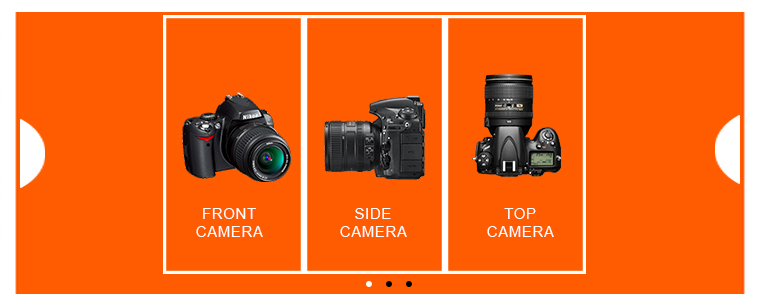
Since the entire process of buying online does not provide any look and feel of the product to the customer, it makes sense to work on the visual graphics. The whole purpose of standing out is to motivate the customers to choose your product over the competitors’. This is when visual merchandising comes into play. Product images are crucial as buyers can see the product and can satisfy themselves. Sellers can provide multiple images with different angles of the product as it creates Customer’s trust and they can go for instant purchase.

Organize your products to maximize their visibility. Make it easy for your customers to access them. The white backgrounds of the Walmart marketplace provide a very neat and professional interface for the sellers to optimize the display.

Walmart Marketplace integrator provides high-resolution images and a 3-dimensional view of the products.

Detailed Description

The best way to stand apart from the crowd when it comes to shopping online is to provide the customers with the right information. One of the ways to achieve it through detailed product descriptions. Detailed description lets customers know about the product in detail so that they can clear their doubts or queries regarding the same. This helps in increasing the trust of consumers resulting in good leads.

The customers tend to search for the product name. Hence, it is advisable for the sellers to curate the product title smartly. Walmart marketplace allows you to use up to 200 characters in a product title, so, make the most of it. The key attributes of the title include Brand, Item Name, Style, Colour, Material, and others.

The product specification is a must. Include every information that the customers are looking for.

Include the keywords, long-tail keywords and search queries in the product page. This will make it easier for the products to rank higher in Google’s SERP.

Focus on building customer relationship

This is something that the e-merchant needs to learn from the brick-and-mortar store. Engage your customers and adds value by developing an emotional connection. Just like any other company or brand, the customer relationship is the key aspect to ensure customer loyalty. Whether they’re one-time shoppers or longtime buyers, maintaining relationships with clients can help you survive in the competitive scenario. Providing customers with a seamless online transaction is the key. Offer transparent return/refund policies. Solve their issues and the problems effectively. Take their feedback and working on negative reviews can make them feel valued.

Perfect categorization

Create a good buying experience for your customers. Product categorization can help them find the desired product. Keep similar products on the same listing, so that, the buyers can view all the possible products without navigating much. This eases out the buying process and leads to a higher conversion rate. Walmart Marketplace integrator provides over 24 different categories. Place your products in the right category to describe the product attributes. Try to avoid selecting the ‘Other category’. The more attributes you supply, the higher your product will be ranked on a product search page.

This sounds a tricky affair since the categories of the online store and the marketplace might differ. However, manual integration is not that tricky. Additionally, for the CMS-based eCommerce site like Prestashop, Magento, OpenCart and others, there are plugins available that can just automate the entire process. The category mapping is done just by clicking a few buttons from the back-end of the extension which makes it easier to list the products in the relevant category.

Experiment with the inventory

Do not stick to the conventional means of selling. Keep experimenting with the product mix that you are offering in the Walmart marketplace. The key to success in a crowded marketplace like Walmart is high volume and low prices. Attractively packaged low-cost items can help you grab the attention of the target audience. Keep introducing new items every now and then. Track the customer behavior to see how quickly they sell. Manage the stack of the old ones efficiently. Walmart Seller Center offers easy tracking options. Try and find out the pain area of the customers. The occasion based inventory can help you provide the apt solution that they are looking for.

With the change in demand for customers on a regular basis, it’s very difficult to invest in inventories at a high scale. Instead, sellers can switch to the dropshipping business in which sellers own a virtual inventory without investing even a single penny.

BuyBox
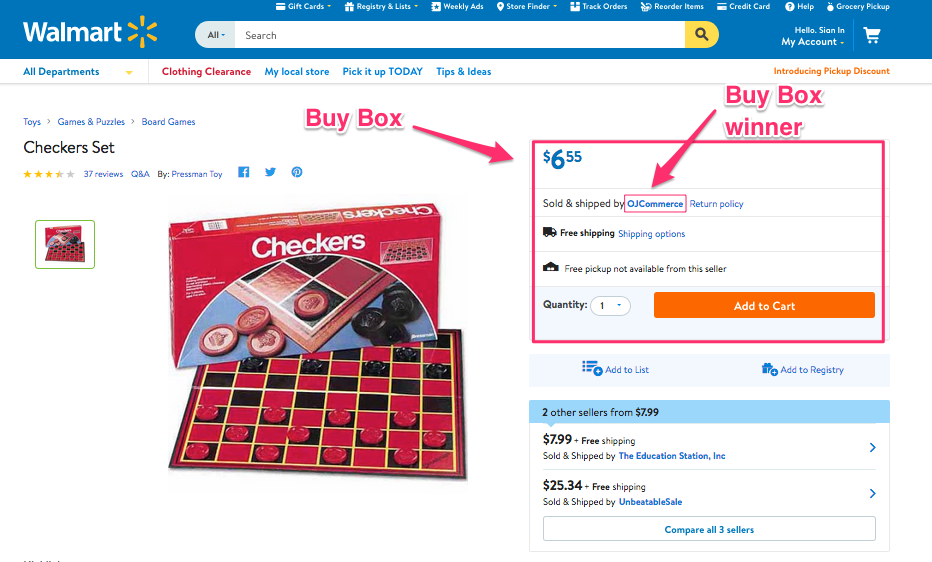
Walmart provided an option of Buy Box where the sellers can easily compete for their product price with another seller. The products competing with one another should be listed in the same category. The product that wins the Buy Box will be listed at the top of the searched item list. This boosts the visibility of the products and ultimately increases the chances of conversion.

With Walmart Integration Extensions, winning the BuyBox is now a cake-walk for the eCommerce store owners. The plugin offers a complete BuyBox report to the sellers which enable easy tracking and is available for CMS platforms like PrestaShop, Magento, Magento 2, OpenCart and Shopify. They can compare the prices and reprice the product from the admin interface itself.

Seller’s scoreboard

The Seller Scorecard in the Walmart Seller Center tracks the account performance of a particular vendor. This score is based on the fulfillment method and the capabilities of the vendors. Maintain your scoreboard and adjust the services you offer as per the score.

Walmart Advertisements

Walmart marketplace even offers a medium to the third party sellers to sell their products on Walmart without even listing them. The brand owners have an option to work directly with Walmart for advertising. The Walmart marketplace is another means to enhance the visibility of the product. The Sponsored Products section is featured on the left-hand side of the search results pages. Whenever the user enters a keyword in the search bar, ads triggered by those same keywords become eligible to appear in the designated “Sponsored products” section. Clicking on these ads will redirect the store visitors away from Walmart.com to a third party site.

Final words

Even if you leave aside the eCommerce giants like Amazon, eBay and others, marketplaces like Walmart and Jet.com offer many attributes that make it a must for the e-merchants. All you need to do is to check out the customer behavior and curate the merchandising in order to find a competitive advantage. In order to stay abreast to the developments and pitfalls, you need to keep a check on the Walmart Seller Center.

The work of marketplace integration has become effortless, now that Knowband is offering the various intuitive marketplace integrators like eBay integrator, Etsy integrator, and others along with the Walmart integrator. Find a suitable solution for your eCommerce business and make full use of the global reach of any of these popular online marketplaces.

Find out more articles here:

  1. How to sell on Walmart Canada?
  2. Dropshipping – Future of eCommerce
  3. 8 tips to drive more customers on a Marketplace
  4. 9 tips to help you sell more on Walmart Marketplace

¿Cómo puede un vendedor optimizar su presencia en Walmart Marketplace?

Walmart es una de las corporaciones minoristas más grandes. Los números no mienten y las estadísticas con este mercado definitivamente ofrecen una vibra positiva a los vendedores electrónicos. El minorista en línea ha profundizado en casi todos los segmentos bajo el sol. Al ser uno de los minoristas más grandes y más taquilleros, la plataforma brinda la oportunidad de igualar a los pequeños vendedores y vendedores para expandir su alcance comercial.

Walmart tiene tiendas 11,000 + en todo el mundo. Entonces, si está buscando expandir su negocio internacionalmente, entonces, este es un destino único para usted. las ventas netas globales de la compañía acumularon aproximadamente $ 481.32 billones. Mientras que para el año fiscal 2018, los ingresos se dispararon hasta $ 500.3 mil millones.

Se espera que estas cifras sean aún mayores en los próximos años. Por lo tanto, la integración de las tiendas de comercio electrónico con Walmart.com es una necesidad para los vendedores en línea. ¿Está buscando integrar su tienda en línea con el mercado? ¿Está insinuado por los tecnicismos involucrados en el mismo? No necesitas preocuparte más. La extensión de integración de Walmart puede ayudar a los propietarios de eCommerce a integrar su tienda web con Walmart.com.

Aunque el mercado ofrece una oportunidad sencilla para que los vendedores electrónicos amplíen su alcance comercial, también presenta algunos inconvenientes. La dura competencia puede afectar tu valor en la búsqueda de destacar. Impulsando tu presencia en el popular

¿Cómo pueden los vendedores de terceros optimizar su presencia en walmart.com?

Estas son algunas de las formas en que puede optimizar su presencia en el abarrotado mercado. Siga leyendo para saber más.

Una imagen vale más que mil palabras

Dado que todo el proceso de compra en línea no proporciona ninguna apariencia del producto al cliente, tiene sentido trabajar en los gráficos visuales. El objetivo de destacar es motivar a los clientes a elegir su producto por encima de los competidores. Esto es cuando la comercialización visual entra en juego.

Organice sus productos para maximizar su visibilidad. Facilite el acceso de sus clientes. Los fondos blancos del mercado de Walmart proporcionan una interfaz muy cuidada y profesional para que los vendedores optimicen la pantalla.

El integrador del mercado Walmart proporciona imágenes de alta resolución y la vista dimensional 3 de los productos.

Descripción detallada

La mejor manera de diferenciarse de la multitud en lo que respecta a las compras en línea es brindar a los clientes la información correcta. Una de las formas de lograrlo a través de descripciones detalladas de productos.

Los clientes tienden a buscar el nombre del producto. Por lo tanto, es aconsejable que los vendedores controlen inteligentemente el título del producto. El mercado de Walmart le permite usar hasta caracteres 200 en un título de producto, así que, aproveche al máximo. Los atributos clave del título incluyen Marca, Nombre del artículo, Estilo, Color, Material y otros.

La especificación del producto es imprescindible. Incluya toda la información que los clientes están buscando.

Incluya las palabras clave, palabras clave de larga cola y consultas de búsqueda en la página del producto. Esto hará que sea más fácil que los productos tengan una clasificación más alta en el SERP de Google.

Centrarse en construir una relación con el cliente

Esto es algo que el e-comerciante necesita aprender de la tienda de ladrillo y mortero. Involucre a sus clientes y agrega valor mediante el desarrollo de una conexión emocional. Al igual que cualquier otra compañía o marca, la relación con el cliente es el aspecto clave para garantizar la lealtad del cliente. Ya sean compradores únicos o compradores a largo plazo, mantener relaciones con los clientes puede ayudarlo a sobrevivir en el escenario competitivo. Proporcionar a los clientes una transacción en línea sin problemas es la clave. Ofrezca políticas transparentes de devolución / reembolso. Resuelva sus problemas y los problemas de manera efectiva. Tome sus comentarios y trabajar en las críticas negativas puede hacer que se sientan valorados.

Categorización perfecta

Crea una buena experiencia de compra para tus clientes. La categorización de productos puede ayudarlos a encontrar el producto deseado. Mantenga los productos similares en la misma lista, de modo que los compradores puedan ver todos los productos posibles sin tener que navegar mucho. Esto facilita el proceso de compra y conduce a una mayor tasa de conversión. El integrador de Walmart Marketplace ofrece más de 24 diferentes categorías. Coloque sus productos en la categoría correcta para describir los atributos del producto. Intenta evitar seleccionar la 'Otra categoría'. Cuantos más atributos proporcione, mayor será el ranking de su producto en la página de búsqueda de un producto.

Esto suena complicado ya que las categorías de la tienda en línea y el mercado pueden diferir. Sin embargo, la integración manual no es tan complicada. Además, para el sitio de comercio electrónico basado en CMS como Prestashop, Magento, OpenCart y otros, hay complementos disponibles que pueden automatizar todo el proceso. El mapeo de categoría se realiza simplemente haciendo clic en algunos botones del extremo posterior de la extensión, lo que hace que sea más fácil enumerar los productos en la categoría correspondiente.

Experimente con el inventario

No se adhiera a los medios convencionales de venta. Siga experimentando con la combinación de productos que está ofreciendo en el mercado de Walmart. La clave del éxito en un mercado abarrotado como Walmart es el alto volumen y los precios bajos. Los artículos atractivos de bajo costo pueden ayudarlo a captar la atención del público objetivo. Sigue presentando nuevos artículos de vez en cuando. Haga un seguimiento del comportamiento del cliente para ver qué tan rápido se venden. Administre la pila de los antiguos de manera eficiente. Pruebe y descubra el área del dolor de los clientes. El inventario basado en la ocasión puede ayudarlo a proporcionar la solución apta que está buscando.

BuyBox

Walmart proporcionó una opción de Buy Box donde los vendedores pueden competir fácilmente por el precio de su producto con otro vendedor. Los productos que compiten entre sí deben enumerarse en la misma categoría. El producto que gana el cuadro de compra se mostrará en la parte superior de la lista de elementos buscados. Esto aumenta la visibilidad de los productos y, en última instancia, aumenta las posibilidades de conversión. Con Complemento de integración de Prestashop Walmart, ganar el BuyBox ahora es una caminata para los propietarios de la tienda de comercio electrónico basada en Prestashop. El complemento ofrece un informe completo de BuyBox a los vendedores que permite un seguimiento sencillo. Pueden comparar los precios y cambiar el precio del producto desde la interfaz de administración. Similar, Integrador de Magento Walmart y Conector Magento 2 Walmart puede servir la misma función para las plataformas respectivas.

Marcador del vendedor

La Tarjeta de puntuación del vendedor en el Centro de vendedores de Walmart rastrea el rendimiento de la cuenta de un vendedor en particular. Este puntaje se basa en el método de cumplimiento y las capacidades de los proveedores. Mantenga su marcador y ajuste los servicios que ofrece según el puntaje.

Anuncios de Walmart

El mercado de Walmart incluso ofrece un medio a los vendedores de terceros para vender sus productos en Walmart sin siquiera enumerarlos. Los propietarios de las marcas tienen la opción de trabajar directamente con Walmart para publicitar. El mercado de Walmart es otro medio para mejorar la visibilidad del producto. La sección de Productos patrocinados se muestra en el lado izquierdo de las páginas de resultados de búsqueda. Cada vez que el usuario ingresa una palabra clave en la barra de búsqueda, los anuncios activados por esas mismas palabras clave son elegibles para aparecer en la sección designada de "Productos patrocinados". Al hacer clic en estos anuncios se redireccionará a los visitantes de la tienda de Walmart.com a un sitio de terceros.

Ultimas palabras

Incluso si deja de lado los gigantes del comercio electrónico como Amazon, eBay y otros, los mercados como Walmart y Jet.com ofrece muchos atributos que lo hacen imprescindible para los e-comerciantes. Todo lo que necesita hacer es verificar el comportamiento del cliente y seleccionar el merchandising para encontrar la ventaja competitiva.

El trabajo de la integración en el mercado se ha vuelto sencillo, ahora que Knowband ofrece los diversos servicios intuitivos. integradores de mercado como el integrador de eBay, Integrador Etsy y otros junto con el Integrador de Walmart. Encuentre la solución adecuada para su negocio de eCommerce y aproveche al máximo el alcance global de cualquiera de estos populares mercados en línea.

Comment un fournisseur peut-il optimiser sa présence sur Walmart Marketplace?

Walmart est l'une des plus grandes entreprises de vente au détail. Les chiffres ne mentent pas et les chiffres statistiques de ce marché offrent une atmosphère positive aux vendeurs en ligne. Le détaillant en ligne a exploré presque tous les segments sous le soleil. Étant l’un des plus gros distributeurs et des plus gros distributeurs, la plate-forme offre aux petits vendeurs et aux vendeurs la possibilité d’étendre leur activité.

Walmart a des magasins 11,000 + dans le monde entier. Donc, si vous cherchez à développer votre activité à l'international, il s'agit d'une destination unique pour vous. les ventes nettes mondiales de la société ont atteint environ $ 481.32 milliards. Alors que pour l’exercice 2018, le chiffre d’affaires a atteint un milliard de dollars.

Ces chiffres devraient encore augmenter dans les années à venir. Par conséquent, l'intégration des magasins de commerce électronique avec Walmart.com est indispensable pour les fournisseurs en ligne. Cherchez-vous à intégrer votre boutique en ligne au marché? Êtes-vous informé par les aspects techniques impliqués dans le même? Vous n'avez plus besoin de vous inquiéter. L'extension d'intégration Walmart peut aider les propriétaires de commerce électronique à intégrer leur boutique en ligne à Walmart.com.

Même si le marché offre aux vendeurs en ligne une opportunité simple d’étendre leur champ d’activité, cela présente également des inconvénients. La rude concurrence pourrait nuire à votre nerf dans la quête de vous démarquer. Renforcer votre présence sur le populaire

Comment les vendeurs tiers peuvent-ils optimiser leur présence sur walmart.com?

Voici certaines des façons dont vous pouvez optimiser votre présence sur le marché bondé. Lisez la suite pour en savoir plus.

Une image vaut mille mots

Étant donné que l’ensemble du processus d’achat en ligne ne fournit aucun aspect du produit au client, il est logique de travailler sur les graphiques visuels. Le but principal de se démarquer est de motiver les clients à choisir votre produit par rapport aux concurrents. C'est à ce moment que le merchandising visuel entre en jeu.

Organisez vos produits pour maximiser leur visibilité. Facilitez l'accès à vos clients. Les fonds blancs du marché Walmart offrent une interface très soignée et professionnelle aux vendeurs pour optimiser l'affichage.

Walmart marketplace intégrateur fournit des images haute résolution et la vue dimensionnelle 3 des produits.

Description détaillée

La meilleure façon de se démarquer en matière de shopping en ligne est de fournir aux clients les bonnes informations. Une des façons d'y parvenir grâce à des descriptions de produits détaillées.

Les clients ont tendance à rechercher le nom du produit. Par conséquent, il est conseillé aux vendeurs de gérer le titre du produit intelligemment. Walmart marketplace vous permet d'utiliser jusqu'à 200 dans un titre de produit, alors profitez-en au maximum. Les attributs clés du titre incluent la marque, le nom de l'article, le style, la couleur, le matériel et autres.

La spécification du produit est un must. Inclure toutes les informations que les clients recherchent.

Incluez les mots-clés, les mots-clés longue queue et les requêtes de recherche dans la page du produit. Cela facilitera le classement des produits dans le SERP de Google.

Focus sur la construction de la relation client

C'est quelque chose dont l'e-commerçant a besoin apprendre du magasin de briques et de mortier. Engagez vos clients et ajoutez de la valeur en développant un lien émotionnel. À l'instar de toute autre entreprise ou marque, la relation client est l'élément clé pour fidéliser les clients. Qu'il s'agisse d'acheteurs ponctuels ou d'acheteurs de longue date, le maintien de relations avec les clients peut vous aider à survivre dans le scénario concurrentiel. Fournir aux clients une transaction en ligne transparente est la clé. Offre des politiques de retour / remboursement transparentes. Résoudre leurs problèmes et les problèmes efficacement. Prendre leurs commentaires et travailler sur les critiques négatives peuvent les faire se sentir valorisés.

Catégorisation parfaite

Créez une bonne expérience d'achat pour vos clients. La catégorisation des produits peut les aider à trouver le produit souhaité. Conservez les produits similaires sur la même liste, afin que les acheteurs puissent voir tous les produits possibles sans trop naviguer. Cela facilite le processus d'achat et conduit à un taux de conversion plus élevé. L'intégrateur Walmart Marketplace fournit plus de catégories différentes 24. Placez vos produits dans la bonne catégorie pour décrire les attributs du produit. Essayez d'éviter de sélectionner la catégorie «Autre». Plus vous fournissez d'attributs, plus votre produit sera classé sur une page de recherche de produits.
Cela semble une affaire délicate car les catégories de la boutique en ligne et du marché peuvent différer. Cependant, l'intégration manuelle n'est pas si compliquée. De plus, pour le site de commerce électronique basé sur le CMS, comme Prestashop, Magento, OpenCart et d’autres, il existe des plug-ins disponibles pour automatiser tout le processus. Le mappage des catégories se fait simplement en cliquant sur quelques boutons du back-end de l'extension, ce qui facilite la liste des produits dans la catégorie concernée.

Expérimenter avec l'inventaire

Ne vous en tenez pas aux moyens classiques de vente. Continuez à expérimenter la gamme de produits que vous proposez sur le marché Walmart. La clé du succès dans un marché bondé comme Walmart est le volume élevé et les bas prix. Des articles à faible coût et emballés de manière attrayante peuvent vous aider à attirer l'attention du public cible. Continuez à présenter de nouveaux articles de temps en temps. Suivre le comportement du client pour voir à quelle vitesse il vend. Gérez efficacement la pile des anciens. Essayez de trouver la zone de douleur des clients. L'inventaire basé sur les occasions peut vous aider à trouver la solution appropriée qu'ils recherchent.

BuyBox

Walmart a fourni une option de Buy Box où les vendeurs peuvent facilement concurrencer leur vendeur pour obtenir le prix de leurs produits. Les produits en concurrence les uns avec les autres doivent figurer dans la même catégorie. Le produit qui remporte la boîte d'achat apparaîtra en haut de la liste des articles recherchés. Cela augmente la visibilité des produits et augmente les chances de conversion. Avec Addon d'intégration Prestashop Walmart, gagner le BuyBox est maintenant une étape importante pour les propriétaires de magasins de commerce électronique basés sur Prestashop. Le plugin offre un rapport complet BuyBox aux vendeurs, ce qui facilite le suivi. Ils peuvent comparer les prix et réévaluer le produit à partir de l'interface d'administration elle-même. Similaire, Intégrateur Magento Walmart et Connecteur Magento 2 Walmart peut servir la même fonction pour les plates-formes respectives.

Tableau d'affichage du vendeur

La fiche d'évaluation du vendeur dans le centre de vente Walmart suit les performances du compte d'un fournisseur particulier. Ce score est basé sur la méthode d'exécution et les capacités des fournisseurs. Maintenez votre tableau de bord et ajustez les services que vous proposez selon le score.

Publicités Walmart

Walmart marketplace offre même un moyen aux vendeurs tiers de vendre leurs produits sur Walmart sans même les énumérer. Les propriétaires de marques ont la possibilité de travailler directement avec Walmart pour la publicité. Le marché Walmart est un autre moyen d'améliorer la visibilité du produit. La section Produits sponsorisés est présentée dans la partie gauche des pages de résultats de recherche. Chaque fois que l'utilisateur entre un mot clé dans la barre de recherche, les annonces déclenchées par ces mêmes mots clés peuvent apparaître dans la section désignée "Produits sponsorisés". En cliquant sur ces annonces, vous redirigez les visiteurs de Walmart.com vers un site tiers.

Mots finis

Même si vous laissez de côté les géants du commerce électronique comme Amazon, eBay et autres, des marchés comme Walmart et Jet.com offre de nombreux attributs cela en fait un must pour les e-commerçants. Tout ce que vous avez à faire est de vérifier le comportement du client et de gérer le merchandising afin de trouver l’avantage concurrentiel.

Le travail d’intégration sur le marché est devenu sans effort, maintenant que Knowband propose les différentes intégrateurs de marché comme Intégrateur eBay, Intégrateur Etsy et d'autres avec le Intégrateur Walmart. Trouvez la solution adaptée à votre activité de commerce électronique et tirez pleinement parti de la portée mondiale de ces marchés en ligne populaires.

Wie kann ein Anbieter seine Präsenz auf dem Walmart Marketplace optimieren?
Walmart ist eines der größten Einzelhandelsunternehmen. Zahlen lügen nicht und die statistischen Zahlen mit diesem Marktplatz bieten definitiv eine positive Stimmung für die E-Vendoren. Der Online-Händler hat sich in fast alle Segmente unter der Sonne eingearbeitet. Als einer der größten und erfolgreichsten Einzelhändler bietet die Plattform auch kleinen Anbietern und Verkäufern die Möglichkeit, ihre Geschäftsreichweite zu erweitern.

Walmart hat 11,000 + Stores weltweit. Wenn Sie also Ihr Geschäft international ausweiten möchten, dann ist dies ein One-Stop-Ziel für Sie. Der weltweite Nettoumsatz des Unternehmens betrug ungefähr $ 481.32 Milliarden. Während für das Geschäftsjahr 2018 der Umsatz auf $ 500.3 Milliarden angestiegen ist.

Diese Zahlen werden in den kommenden Jahren voraussichtlich noch größer werden. Daher ist die Integration der E-Commerce-Shops mit Walmart.com ein Muss für die Online-Anbieter. Möchten Sie Ihren Online-Shop in den Marktplatz integrieren? Sind Sie durch die technischen Details angedeutet? Du brauchst dich nicht mehr zu sorgen. Walmart Integration Extension kann die eCommerce-Besitzer helfen, ihren Web-Shop mit Walmart.com zu integrieren.

Obwohl der Marktplatz den E-Sellern eine einfache Möglichkeit bietet, ihre Geschäftsreichweite zu erweitern, hat sie auch einige Nachteile. Der harte Wettbewerb kann Ihre Nerven in Anspruch nehmen, um aufzufallen. Erhöhen Sie Ihre Präsenz auf dem beliebten

Wie können die Third-Party-Verkäufer ihre Präsenz auf walmart.com optimieren?

Hier sind einige der Möglichkeiten, wie Sie Ihre Präsenz auf dem überfüllten Marktplatz optimieren können. Lesen Sie weiter, um mehr zu erfahren.

Ein Bild sagt mehr als tausend Worte

Da der gesamte Prozess des Online-Kaufs dem Kunden kein Look and Feel des Produkts bietet, ist es sinnvoll, an den visuellen Grafiken zu arbeiten. Der ganze Zweck des Herausragens besteht darin, die Kunden zu motivieren, Ihr Produkt gegenüber dem Wettbewerb zu wählen. Dann kommt Visual Merchandising ins Spiel.

Organisieren Sie Ihre Produkte, um ihre Sichtbarkeit zu maximieren. Erleichtern Sie Ihren Kunden den Zugriff darauf. Die weißen Hintergründe von Walmart Marktplatz bieten eine sehr saubere und professionelle Schnittstelle für die Verkäufer, um das Display zu optimieren.

Walmart Marketplace Integrator bietet hochauflösende Bilder und die 3-dimensionale Ansicht der Produkte.

Detaillierte Beschreibung

Der beste Weg, sich von der Masse abzuheben, wenn es um Online-Shopping geht, ist, den Kunden die richtigen Informationen zur Verfügung zu stellen. Eine Möglichkeit, dies durch detaillierte Produktbeschreibungen zu erreichen.

Die Kunden suchen nach dem Produktnamen. Daher ist es ratsam, dass die Verkäufer den Produkttitel intelligent kuratieren. Der Walmart-Marktplatz ermöglicht es Ihnen, bis zu 200-Zeichen in einem Produkttitel zu verwenden, um das Beste daraus zu machen. Die Schlüsselattribute des Titels sind Marke, Artikelname, Stil, Farbe, Material und andere.

Die Produktspezifikation ist ein Muss. Fügen Sie alle Informationen hinzu, nach denen die Kunden suchen.

Fügen Sie die Keywords, Long-Tail-Keywords und Suchanfragen auf der Produktseite hinzu. Dies wird es den Produkten erleichtern, einen höheren Rang in Google SERP einzunehmen.

Konzentrieren Sie sich auf den Aufbau von Kundenbeziehungen

Das braucht der E-Merchant lerne aus dem Ladengeschäft. Engagieren Sie Ihre Kunden und steigern Sie den Wert, indem Sie eine emotionale Verbindung aufbauen. Wie bei jedem anderen Unternehmen oder jeder Marke ist die Kundenbeziehung der Schlüsselaspekt für die Kundenbindung. Unabhängig davon, ob es sich um einmalige Einkäufer oder Langzeitkäufer handelt, die Pflege von Kundenbeziehungen kann Ihnen dabei helfen, im Wettbewerb zu überleben. Den Kunden eine nahtlose Online-Transaktion zu bieten, ist der Schlüssel. Bieten Sie transparente Rückgabe- / Rückerstattungsrichtlinien an. Lösen Sie ihre Probleme und die Probleme effektiv. Nehmen Sie ihr Feedback und arbeiten an den negativen Bewertungen können sie sich geschätzt fühlen.

Perfekte Kategorisierung

Schaffen Sie eine gute Kauferfahrung für Ihre Kunden. Produktkategorisierung kann ihnen helfen, das gewünschte Produkt zu finden. Halten Sie die ähnlichen Produkte auf der gleichen Liste, so dass die Käufer alle möglichen Produkte anzeigen können, ohne viel zu navigieren. Dies erleichtert den Kaufprozess und führt zu einer höheren Conversion-Rate. Walmart Marketplace Integrator bietet über 24 verschiedene Kategorien. Platzieren Sie Ihre Produkte in der richtigen Kategorie, um die Produktattribute zu beschreiben. Vermeiden Sie die Auswahl der Kategorie "Andere". Je mehr Attribute Sie bereitstellen, desto höher wird Ihr Produkt auf einer Produktsuchseite eingestuft.
Dies ist eine knifflige Angelegenheit, da sich die Kategorien des Online-Shops und des Marktplatzes unterscheiden können. Die manuelle Integration ist jedoch nicht so schwierig. Für die CMS-basierte E-Commerce-Seite wie Prestashop, Magento, OpenCart und andere gibt es außerdem Plugins, die den gesamten Prozess automatisieren. Die Kategoriezuordnung erfolgt durch einfaches Klicken auf einige Schaltflächen aus dem Backend der Erweiterung, wodurch das Auflisten der Produkte in der entsprechenden Kategorie erleichtert wird.

Experimentiere mit dem Inventar

Halten Sie sich nicht an die herkömmlichen Verkaufsmethoden. Experimentieren Sie mit dem Produktmix, den Sie auf dem Walmart-Marktplatz anbieten. Der Schlüssel zum Erfolg in einem überfüllten Markt wie Walmart ist hohes Volumen und niedrige Preise. Attraktiv verpackte Low-Cost-Artikel können Ihnen helfen, die Aufmerksamkeit der Zielgruppe zu gewinnen. Führen Sie ab und zu neue Artikel ein. Verfolgen Sie das Kundenverhalten, um zu sehen, wie schnell sie verkaufen. Verwalten Sie den Stapel der alten effizient. Versuchen Sie, den Schmerzbereich der Kunden herauszufinden. Das anlassbasierte Inventar kann Ihnen dabei helfen, die passende Lösung bereitzustellen, nach der Sie suchen.

BuyBox

Walmart bot eine Option von Buy Box an, wo die Verkäufer leicht mit einem anderen Verkäufer um ihren Produktpreis konkurrieren können. Die miteinander konkurrierenden Produkte sollten in derselben Kategorie aufgeführt sein. Das Produkt, das die Kaufbox gewinnt, wird oben in der Liste der gesuchten Artikel aufgeführt. Dies erhöht die Sichtbarkeit der Produkte und erhöht letztendlich die Chancen der Konvertierung. Mit Prestashop Walmart Integration AddonDas Gewinnen der BuyBox ist jetzt ein Kuchenspaziergang für die Prestashop-basierten E-Commerce-Ladenbesitzer. Das Plugin bietet den Verkäufern einen vollständigen BuyBox-Bericht, der ein einfaches Tracking ermöglicht. Sie können die Preise vergleichen und das Produkt über das Admin-Interface selbst neu bewerten. Ähnlich, Magento Walmart Integrator und Magento 2 Walmart-Anschluss kann für die jeweiligen Plattformen die gleiche Funktion erfüllen.

Anzeiger des Verkäufers

Die Seller Scorecard im Walmart Seller Center verfolgt die Kontoleistung eines bestimmten Anbieters. Diese Bewertung basiert auf der Erfüllungsmethode und den Fähigkeiten der Anbieter. Pflegen Sie Ihre Anzeigetafel und passen Sie die von Ihnen angebotenen Dienste entsprechend der Punktzahl an.

Walmart Anzeigen

Der Walmart-Marktplatz bietet den Drittverkäufern sogar ein Medium, um ihre Produkte auf Walmart zu verkaufen, ohne sie sogar aufzulisten. Die Markeninhaber haben die Möglichkeit, direkt mit Walmart für Werbung zu arbeiten. Der Walmart-Marktplatz ist ein weiteres Mittel, um die Sichtbarkeit des Produkts zu verbessern. Der Bereich Gesponserte Produkte befindet sich auf der linken Seite der Suchergebnisseiten. Immer wenn der Nutzer ein Keyword in die Suchleiste eingibt, können Anzeigen, die von diesen Keywords ausgelöst werden, im Bereich "Gesponserte Produkte" erscheinen. Wenn Sie auf diese Anzeigen klicken, werden die Shop-Besucher von Walmart.com auf eine Website von Drittanbietern weitergeleitet.

Schlussworte

Selbst wenn Sie die eCommerce-Giganten wie Amazon, eBay und andere beiseite lassen, Märkte wie Walmart und Jet.com bietet viele Attribute Das macht es zu einem Muss für die E-Händler. Alles, was Sie tun müssen, ist, das Kundenverhalten zu überprüfen und das Merchandising zu kuratieren, um den Wettbewerbsvorteil zu finden.

Die Arbeit der Marktintegration ist müheloser geworden, jetzt, da Knowband die verschiedenen intuitiven anbietet Marktplatz-Integratoren mögen eBay-Integrator, Etsy Integrator und andere zusammen mit dem Walmart Integrator. Finden Sie die passende Lösung für Ihr E-Commerce-Geschäft und nutzen Sie die globale Reichweite eines dieser beliebten Online-Marktplätze.

Come può un venditore ottimizzare la sua presenza su Walmart Marketplace?

Walmart è una delle più grandi società di vendita al dettaglio. I numeri non mentono e le cifre statistiche con questo mercato offrono sicuramente una vibrazione positiva agli e-vendor. Il rivenditore online ha esplorato quasi tutti i segmenti sotto il sole. Essendo uno dei maggiori e più alti rivenditori al dettaglio, la piattaforma offre l'opportunità anche ai piccoli venditori e venditori di espandere la propria attività.

Walmart ha negozi 11,000 + in tutto il mondo. Quindi, se stai cercando di espandere la tua attività a livello internazionale, allora questa è una destinazione unica per te. le vendite nette globali dell'azienda ammontavano a circa $ 481.32 miliardi. Mentre per l'anno fiscale 2018, le entrate sono aumentate fino a $ 500.3 miliardi.

Si prevede che queste cifre diventeranno ancora più grandi nei prossimi anni. Quindi, l'integrazione degli store eCommerce con Walmart.com è un must per i venditori online. Stai cercando di integrare il tuo negozio online con il mercato? Sei intimato dagli aspetti tecnici coinvolti nella stessa? Non devi più preoccuparti. L'estensione di integrazione di Walmart può aiutare i proprietari di e-commerce a integrare il loro negozio web con Walmart.com.

Anche se il mercato offre una facile opportunità per gli e-sellers di espandere la propria attività, presenta anche alcuni inconvenienti. La dura competizione potrebbe richiedere un tributo al tuo coraggio nella ricerca di distinguerti. Potenzia la tua presenza sul popolare

In che modo i venditori di terze parti possono ottimizzare la loro presenza su walmart.com?

Ecco alcuni dei modi in cui puoi ottimizzare la tua presenza sul mercato pieno di jam. Continua a leggere per saperne di più.

Un'immagine vale più di mille parole

Poiché l'intero processo di acquisto online non fornisce alcun aspetto e aspetto del prodotto al cliente, ha senso lavorare sulla grafica visiva. Lo scopo principale di distinguersi è motivare i clienti a scegliere il prodotto rispetto ai concorrenti. È qui che entra in gioco il merchandising visivo.

Organizza i tuoi prodotti per massimizzare la loro visibilità. Rendi più facile l'accesso ai tuoi clienti. Gli sfondi bianchi del mercato Walmart offrono un'interfaccia molto accurata e professionale per i venditori per ottimizzare il display.

L'integratore di mercato Walmart fornisce immagini ad alta risoluzione e la vista dimensionale 3 dei prodotti.

Descrizione dettagliata

Il modo migliore per distinguersi dalla massa quando si tratta di fare shopping online è fornire ai clienti le giuste informazioni. Uno dei modi per raggiungerlo attraverso descrizioni dettagliate dei prodotti.

I clienti tendono a cercare il nome del prodotto. Quindi, è consigliabile che i venditori curino il titolo del prodotto in modo intelligente. Il marketplace di Walmart ti consente di utilizzare fino a 200 caratteri nel titolo di un prodotto, quindi, sfruttalo al meglio. Gli attributi chiave del titolo includono Brand, Nome oggetto, Stile, Colore, Materiale e altri.

Le specifiche del prodotto sono obbligatorie. Includi tutte le informazioni che i clienti stanno cercando.

Includere le parole chiave, le parole chiave long-tail e le query di ricerca nella pagina del prodotto. Ciò renderà più facile per i prodotti posizionarsi più in alto nella SERP di Google.

Concentrarsi sulla costruzione di relazioni con i clienti

Questo è qualcosa che l'e-merchant ha bisogno imparare dal negozio di mattoni e malta. Coinvolgi i tuoi clienti e aggiunge valore sviluppando una connessione emotiva. Proprio come qualsiasi altra azienda o marchio, la relazione con il cliente è l'aspetto chiave per garantire la fedeltà dei clienti. Sia che si tratti di acquirenti occasionali o di acquirenti di lunga data, il mantenimento delle relazioni con i clienti può aiutarti a sopravvivere nello scenario competitivo. Fornire ai clienti una transazione online senza soluzione di continuità è la chiave. Offrire politiche trasparenti di restituzione / rimborso. Risolvi efficacemente i loro problemi e i problemi. Prendi il loro feedback e lavorando sulle recensioni negative puoi farli sentire apprezzati.

Categorizzazione perfetta

Crea una buona esperienza di acquisto per i tuoi clienti. La categorizzazione dei prodotti può aiutarli a trovare il prodotto desiderato. Mantieni i prodotti simili nello stesso elenco, in modo che gli acquirenti possano visualizzare tutti i possibili prodotti senza navigare molto. Questo facilita il processo di acquisto e porta a un più alto tasso di conversione. L'integratore di Walmart Marketplace offre diverse categorie 24. Inserisci i tuoi prodotti nella categoria giusta per descrivere gli attributi del prodotto. Cerca di evitare di selezionare "Altre categorie". Più attributi fornisci, più alto sarà il tuo prodotto verrà classificato in una pagina di ricerca di un prodotto.
Questo può sembrare un problema complicato poiché le categorie del negozio online e del marketplace potrebbero essere diverse. Tuttavia, l'integrazione manuale non è così complicata. Inoltre, per il sito di eCommerce basato su CMS come Prestashop, Magento, OpenCart e altri, sono disponibili plugin in grado di automatizzare l'intero processo. La mappatura delle categorie viene eseguita semplicemente facendo clic su alcuni pulsanti del back-end dell'estensione che rende più semplice elencare i prodotti nella categoria pertinente.

Sperimenta con l'inventario

Non attenersi ai metodi convenzionali di vendita. Continua a sperimentare con il mix di prodotti che offri sul mercato Walmart. La chiave del successo in un mercato affollato come Walmart è l'alto volume e i prezzi bassi. Gli articoli a basso costo e confezionati in modo attraente possono aiutarti a catturare l'attenzione del pubblico di destinazione. Continua a introdurre nuovi oggetti ogni tanto. Tieni traccia del comportamento del cliente per vedere quanto velocemente vendono. Gestisci la pila di quelli vecchi in modo efficiente. Prova e scopri l'area del dolore dei clienti. L'inventario basato sull'occasione può aiutarti a fornire la soluzione appropriata che stanno cercando.

BuyBox

Walmart ha fornito un'opzione di Buy Box in cui i venditori possono facilmente competere per il prezzo del loro prodotto con un altro venditore. I prodotti in competizione tra loro dovrebbero essere elencati nella stessa categoria. Il prodotto che vince la casella di acquisto verrà elencato nella parte superiore dell'elenco di elementi ricercati. Ciò aumenta la visibilità dei prodotti e in definitiva aumenta le possibilità di conversione. Con Addon di Prestashop Walmart Integration, vincere l'BuyBox è ora una passeggiata per i proprietari dei negozi eCommerce basati su Prestashop. Il plug-in offre un rapporto BuyBox completo ai venditori che consente un facile monitoraggio. Possono confrontare i prezzi e riprendere il prodotto dall'interfaccia di amministrazione stessa. Simile, Integratore Magento Walmart e Connettore Magento 2 Walmart può servire la stessa funzione per le rispettive piattaforme.

Quadro di valutazione del venditore

La Scorecard del venditore nel Walmart Seller Center tiene traccia delle prestazioni dell'account di un determinato fornitore. Questo punteggio si basa sul metodo di adempimento e sulle capacità dei venditori. Mantieni il tuo tabellone e regola i servizi che offri secondo il punteggio.

Pubblicità Walmart

Il mercato Walmart offre persino un mezzo ai venditori di terze parti per vendere i loro prodotti su Walmart senza nemmeno elencarli. I proprietari del marchio hanno la possibilità di lavorare direttamente con Walmart per la pubblicità. Il mercato Walmart è un altro mezzo per migliorare la visibilità del prodotto. La sezione Prodotti sponsorizzati è presente sul lato sinistro delle pagine dei risultati di ricerca. Ogni volta che l'utente inserisce una parola chiave nella barra di ricerca, gli annunci attivati ​​da quelle stesse parole chiave diventano idonei a comparire nella sezione "Prodotti sponsorizzati" designata. Cliccando su questi annunci reindirizzerà i visitatori del negozio da Walmart.com a un sito di terze parti.

Parole finali

Anche se lasci da parte i giganti dell'e-commerce come Amazon, eBay e altri, mercati come Walmart e Jet.com offre molti attributi questo lo rende un must per gli e-merchant. Tutto quello che devi fare è controllare il comportamento del cliente e curare il merchandising per trovare il vantaggio competitivo.

Il lavoro di integrazione del marketplace è diventato senza sforzo, ora che Knowband offre i vari intuitivi integratori di mercato piace integratore di eBay, Integratore Etsy e altri insieme al Integratore Walmart. Trova la soluzione adatta al tuo business eCommerce e sfrutta appieno la portata globale di uno di questi popolari mercati online.

W jaki sposób sprzedawca może zoptymalizować swoją obecność na rynku Walmart?

Walmart jest jedną z największych korporacji detalicznych. Liczby nie kłamią, a dane statystyczne z tego rynku zdecydowanie oferują pozytywny klimat dla e-sprzedawców. Internetowy detalista zagłębił się w prawie wszystkie segmenty pod słońcem. Będąc jednym z największych i najwyższych punktów sprzedaży detalicznej, platforma umożliwia nawet małym sprzedawcom i sprzedawcom zwiększenie zasięgu działalności.

Walmart ma sklepy 11,000 + na całym świecie. Tak więc, jeśli chcesz rozszerzyć swoją działalność na arenie międzynarodowej, to jest to miejsce dla Ciebie. globalna sprzedaż netto firmy wyniosła około X XUM miliarda USD. O ile w roku obrotowym 2018 dochody wzrosły do ​​500.3 miliarda.

Oczekuje się, że liczby te będą jeszcze większe w nadchodzących latach. Dlatego integracja sklepów eCommerce z Walmart.com jest koniecznością dla sprzedawców internetowych. Czy chcesz zintegrować swój sklep internetowy z rynkiem? Czy dowiadujesz się o technicznych aspektach związanych z tym samym? Już nie musisz się martwić. Rozszerzenie integracji Walmart może pomóc właścicielom e-commerce zintegrować swój sklep internetowy z Walmart.com.

Mimo że rynek oferuje e-sprzedawcom możliwość łatwego rozszerzenia zasięgu działalności, ma również pewne wady. Trudna konkurencja może wyleczyć nerwy w dążeniu do wyróżnienia się. Zwiększenie swojej obecności na popularnym

W jaki sposób sprzedawcy zewnętrzni mogą zoptymalizować swoją obecność na walmart.com?

Oto kilka sposobów, dzięki którym możesz zoptymalizować swoją obecność na zatłoczonym rynku. Czytaj dalej, aby dowiedzieć się więcej.

Obraz jest wart tysiąca słów

Ponieważ cały proces zakupu online nie zapewnia klientowi wyglądu i stylu produktu, ma sens praca nad grafiką wizualną. Celem wyróżnienia się jest zmotywowanie klientów do wyboru produktu względem konkurencji ". Właśnie wtedy pojawia się visual merchandising.

Uporządkuj swoje produkty, aby zmaksymalizować ich widoczność. Ułatw klientom dostęp do nich. Białe tło z rynku Walmart stanowią bardzo zgrabny i profesjonalny interfejs dla sprzedawców, aby zoptymalizować wyświetlacz.

Integrator rynku Walmart zapewnia obrazy o wysokiej rozdzielczości i wymiar 3 produktów.

Szczegółowy Opis

Najlepszym sposobem wyróżnienia się z tłumu, jeśli chodzi o zakupy online, jest dostarczenie klientom właściwych informacji. Jednym ze sposobów osiągnięcia tego poprzez szczegółowe opisy produktów.

Klienci mają tendencję do szukania nazwy produktu. W związku z tym wskazane jest, aby sprzedawcy sprzedawali tytuły produktu elegancko. Rynek Walmart pozwala na użycie maksymalnie 200 znaków w tytule produktu, więc wykorzystaj go w pełni. Kluczowymi atrybutami tytułu są: marka, nazwa przedmiotu, styl, kolor, materiał i inne.

Specyfikacja produktu jest koniecznością. Uwzględnij wszystkie informacje, których szukają klienci.

Uwzględnij słowa kluczowe, długie słowa kluczowe i wyszukiwane hasła na stronie produktu. Ułatwi to wyższą pozycję produktów w SERP Google.

Skup się na budowaniu relacji z klientami

Jest to coś, czego potrzebuje e-kupiec uczyć się od sklepu stacjonarnego. Zaangażuj swoich klientów i zwiększ wartość poprzez rozwój emocjonalnego związku. Podobnie jak każda inna firma lub marka, relacja z klientem jest kluczowym aspektem zapewniającym lojalność klientów. Niezależnie od tego, czy są jednorazowymi kupującymi, czy długoletnimi kupującymi, utrzymywanie relacji z klientami może pomóc Ci przetrwać w konkurencyjnym scenariuszu. Zapewnienie klientom płynnej transakcji online jest kluczowe. Oferuj przejrzyste zasady zwrotu / zwrotu pieniędzy. Rozwiązuj skutecznie swoje problemy i problemy. Skorzystaj z ich opinii, a praca nad negatywnymi opiniami może sprawić, że poczują się docenieni.

Idealna kategoryzacja

Stwórz dobre wrażenia zakupowe dla swoich klientów. Kategoryzacja produktów może pomóc im w znalezieniu pożądanego produktu. Zachowaj podobne produkty na tym samym wykazie, aby kupujący mogli wyświetlać wszystkie możliwe produkty bez konieczności dużo nawigacji. To ułatwia proces zakupu i prowadzi do wyższego współczynnika konwersji. Integrator Walmart Marketplace zapewnia ponad 24 różne kategorie. Umieść produkty w odpowiedniej kategorii, aby opisać atrybuty produktu. Staraj się unikać wybierania "innej kategorii". Im więcej atrybutów podasz, tym wyższy będzie ranking produktu na stronie wyszukiwania produktu.
Jest to trudna sprawa, ponieważ kategorie sklepu internetowego i rynku mogą się różnić. Jednak ręczna integracja nie jest tak trudna. Ponadto w przypadku witryny e-commerce opartej na CMS, takiej jak Prestashop, Magento, OpenCart i inne, dostępne są wtyczki, które mogą zautomatyzować cały proces. Mapowanie kategorii odbywa się po kliknięciu kilku przycisków na zapleczu rozszerzenia, co ułatwia wylistowanie produktów w odpowiedniej kategorii.

Eksperymentuj z ekwipunkiem

Nie trzymaj się konwencjonalnych sposobów sprzedaży. Eksperymentuj z asortymentem, który oferujesz na rynku Walmart. Kluczem do sukcesu na zatłoczonym rynku, takim jak Walmart, są duże ilości i niskie ceny. Atrakcyjnie zapakowane tanie przedmioty mogą pomóc Ci przyciągnąć uwagę docelowych odbiorców. Od czasu do czasu wprowadzaj nowe produkty. Śledź zachowania klientów, aby zobaczyć, jak szybko sprzedają. Zarządzaj starymi stosami. Spróbuj i sprawdź obszar bólów klientów. Inwentaryzacja oparta na okazjach może pomóc w znalezieniu odpowiedniego rozwiązania, którego szukają.

BuyBox

Walmart dostarczył opcję Buy Box, w której sprzedający mogą z łatwością konkurować o cenę swojego produktu z innym sprzedawcą. Produkty konkurujące ze sobą powinny być wymienione w tej samej kategorii. Produkt, który wygra Kupno, pojawi się na górze listy szukanych przedmiotów. To zwiększa widoczność produktów i ostatecznie zwiększa szanse na konwersję. Z Prestashop Dodatek do integracji Walmart, wygrywając BuyBox jest teraz tort-spacer dla właścicieli sklepów eCommerce opartych na Prestashop. Wtyczka oferuje pełny raport BuyBox dla sprzedawców, który umożliwia łatwe śledzenie. Mogą porównać ceny i zmienić produkt z poziomu interfejsu administratora. Podobny, Integrator Magento Walmart i Magento 2 Złącze Walmart może pełnić tę samą funkcję dla poszczególnych platform.

Tablica wyników sprzedawcy

Karta Wyników Sprzedawcy w Centrum Sprzedawcy Walmart śledzi wydajność konta danego dostawcy. Ten wynik jest oparty na metodzie spełnienia i możliwościach dostawców. Utrzymuj swoją tablicę wyników i dostosuj oferowane usługi zgodnie z wynikiem.

Reklamy Walmart

Rynek Walmart oferuje nawet pośrednikom trzecim możliwość sprzedaży swoich produktów na Walmart bez nawet ich wymieniania. Właściciele marek mają możliwość bezpośredniej współpracy z Walmart w zakresie reklamy. Rynek Walmart to kolejny sposób na zwiększenie widoczności produktu. Sekcja Produkty sponsorowane znajduje się po lewej stronie stron wyników wyszukiwania. Za każdym razem, gdy użytkownik wprowadza słowo kluczowe w pasku wyszukiwania, reklamy generowane przez te same słowa kluczowe stają się dostępne w sekcji "Produkty sponsorowane". Kliknięcie tych reklam spowoduje przekierowanie użytkowników sklepu z witryny Walmart.com na witrynę innej firmy.

Ostatnie słowa

Nawet jeśli pomijasz gigantów handlu elektronicznego, takich jak Amazon, eBay i inne, rynki takie jak Walmart i Jet.com oferuje wiele atrybutów które są niezbędne dla e-kupców. Wszystko, co musisz zrobić, to sprawdzić zachowanie klienta i skoordynować merchandising w celu znalezienia przewagi konkurencyjnej.

Prace związane z integracją z rynkiem stały się łatwe, ponieważ Knowband oferuje różne intuicyjne rozwiązania integratorzy rynku lubić Integrator eBay, Integrator Etsy i inni wraz z Integrator Walmart. Znajdź odpowiednie rozwiązanie dla swojego biznesu eCommerce i w pełni wykorzystaj globalny zasięg któregokolwiek z popularnych rynków internetowych.

Como um fornecedor pode otimizar sua presença no Walmart Marketplace?

O Walmart é uma das maiores empresas de varejo. Os números não mentem e os números estatísticos com este mercado definitivamente oferecem uma vibração positiva para os e-vendedores. O varejista on-line mergulhou em quase todos os segmentos sob o sol. Sendo uma das maiores e maiores varejistas de arrecadação, a plataforma oferece uma oportunidade para até mesmo os pequenos vendedores e vendedores expandirem seu alcance comercial.

O Walmart tem lojas 11,000 + em todo o mundo. Então, se você está olhando para expandir seus negócios internacionalmente, então, este é um destino único para você. as vendas líquidas globais da empresa acumularam aproximadamente US $ 481.32 bilhões. Enquanto para o ano fiscal 2018, a receita subiu para US $ 500.3 bilhões.

Espera-se que esses números aumentem ainda mais nos próximos anos. Assim, a integração das lojas de comércio eletrônico com o Walmart.com é uma obrigação para os fornecedores on-line. Você está procurando integrar sua loja online ao mercado? Você está intimado pelos aspectos técnicos envolvidos no mesmo? Você não precisa se preocupar mais. A extensão de integração do Walmart pode ajudar os proprietários de comércio eletrônico a integrar sua loja virtual ao Walmart.com.

Embora o mercado ofereça uma oportunidade fácil para os e-sellers expandirem seu alcance comercial, ele também apresenta alguns inconvenientes. A dura competição pode prejudicar sua coragem na busca de se destacar. Impulsionando sua presença no popular

Como os vendedores de terceiros podem otimizar sua presença no walmart.com?

Aqui estão algumas maneiras pelas quais você pode otimizar sua presença no mercado lotado. Leia para saber mais.

Uma imagem vale mais que mil palavras

Como todo o processo de compra on-line não oferece nenhuma aparência do produto para o cliente, faz sentido trabalhar nos gráficos visuais. Todo o propósito de se destacar é motivar os clientes a escolherem seu produto em detrimento dos concorrentes. É quando o merchandising visual entra em cena.

Organize seus produtos para maximizar sua visibilidade. Facilite o acesso dos clientes a eles. Os fundos brancos do mercado Walmart fornecem uma interface muito elegante e profissional para os vendedores otimizarem a exibição.

O integrador do mercado Walmart fornece imagens de alta resolução e a visão dimensional 3 dos produtos.

Descrição Detalhada

A melhor maneira de se destacar da multidão quando se trata de fazer compras on-line é fornecer aos clientes as informações certas. Uma das maneiras de alcançá-lo através de descrições detalhadas de produtos.

Os clientes tendem a procurar o nome do produto. Por isso, é aconselhável que os vendedores façam a curadoria do título do produto com inteligência. O mercado do Walmart permite que você use até caracteres 200 em um título de produto, então aproveite ao máximo. Os principais atributos do título incluem Marca, Nome do item, Estilo, Cor, Material e outros.

A especificação do produto é obrigatória. Inclua todas as informações que os clientes estão procurando.

Inclua as palavras-chave, palavras-chave de cauda longa e consultas de pesquisa na página do produto. Isso facilitará a classificação dos produtos na SERP do Google.

Foco na construção de relacionamento com o cliente

Isso é algo que o e-comerciante precisa aprenda com a loja de tijolo e argamassa. Envolva seus clientes e agregue valor desenvolvendo uma conexão emocional. Assim como qualquer outra empresa ou marca, o relacionamento com o cliente é o aspecto chave para garantir a fidelidade do cliente. Quer sejam compradores ocasionais ou compradores de longa data, manter relações com os clientes pode ajudá-lo a sobreviver no cenário competitivo. Fornecer aos clientes uma transação on-line perfeita é a chave. Ofereça políticas transparentes de devolução / reembolso. Resolva seus problemas e os problemas de forma eficaz. Tome o seu feedback e trabalhando nas avaliações negativas pode fazê-los sentir-se valorizados.

Categorização perfeita

Crie uma boa experiência de compra para seus clientes. A categorização de produtos pode ajudá-los a encontrar o produto desejado. Mantenha os produtos semelhantes na mesma listagem, para que os compradores possam ver todos os produtos possíveis sem navegar muito. Isso facilita o processo de compra e leva a uma taxa de conversão mais alta. O integrador do Walmart Marketplace oferece mais de 24 categorias diferentes. Coloque seus produtos na categoria correta para descrever os atributos do produto. Tente evitar a seleção da "Outra categoria". Quanto mais atributos você fornecer, maior será o produto classificado em uma página de pesquisa de produtos.
Isso soa complicado porque as categorias da loja online e do mercado podem ser diferentes. No entanto, a integração manual não é tão complicada. Além disso, para o site de comércio eletrônico baseado em CMS, como Prestashop, Magento, OpenCart e outros, existem plugins disponíveis que podem automatizar todo o processo. O mapeamento de categoria é feito apenas clicando em alguns botões do back-end da extensão, o que facilita a listagem dos produtos na categoria relevante.

Experimente com o inventário

Não se atenha aos meios convencionais de venda. Continue experimentando o mix de produtos que você oferece no mercado do Walmart. A chave para o sucesso em um mercado lotado como o Walmart é o alto volume e os preços baixos. Itens de baixo custo empacotados atraentes podem ajudá-lo a atrair a atenção do público-alvo. Continue apresentando novos itens de vez em quando. Acompanhe o comportamento do cliente para ver a rapidez com que eles vendem. Gerencie a pilha dos antigos de forma eficiente. Experimente e descubra a área de dor dos clientes. O inventário baseado em ocasiões pode ajudá-lo a fornecer a solução adequada que eles estão procurando.

BuyBox

O Walmart forneceu uma opção de Buy Box, onde os vendedores podem facilmente competir pelo preço do produto com outro vendedor. Os produtos concorrentes entre si devem ser listados na mesma categoria. O produto que ganhar o Buy Box será listado no topo da lista de itens pesquisados. Isso aumenta a visibilidade dos produtos e, em última análise, aumenta as chances de conversão. Com Complemento de Integração Prestashop WalmartVencer a BuyBox é agora uma caminhada de bolo para os proprietários de lojas de comércio eletrônico baseados em Prestashop. O plugin oferece um relatório completo da BuyBox para os vendedores que permitem o fácil rastreamento. Eles podem comparar os preços e reprogramar o produto a partir da própria interface do administrador. Semelhante, Integrador Magento Walmart de Conector Magmart 2 Walmart pode servir a mesma função para as respectivas plataformas.

Painel de avaliação do vendedor

O cartão de pontuação do vendedor no centro do vendedor do Walmart rastreia o desempenho da conta de um determinado fornecedor. Essa pontuação é baseada no método de atendimento e nos recursos dos fornecedores. Mantenha seu placar e ajuste os serviços que você oferece de acordo com a pontuação.

Anúncios do Walmart

O mercado Walmart oferece até um meio para os vendedores terceirizados venderem seus produtos no Walmart sem precisar listá-los. Os proprietários da marca têm a opção de trabalhar diretamente com o Walmart para publicidade. O mercado Walmart é outro meio para aumentar a visibilidade do produto. A seção Produtos patrocinados é exibida no lado esquerdo das páginas de resultados de pesquisa. Sempre que o usuário insere uma palavra-chave na barra de pesquisa, os anúncios acionados por essas mesmas palavras-chave tornam-se qualificados para aparecer na seção "Produtos patrocinados" designada. Clicar nesses anúncios redirecionará os visitantes da loja do Walmart.com para um site de terceiros.

Palavras finais

Mesmo que você deixe de lado os gigantes do eCommerce, como Amazon, eBay e outros, os marketplaces como Walmart e Jet.com oferece muitos atributos que tornam uma obrigação para os comerciantes eletrônicos. Tudo o que você precisa fazer é verificar o comportamento do cliente e selecionar o merchandising para encontrar a vantagem competitiva.

O trabalho de integração do mercado tornou-se sem esforço, agora que a Knowband está oferecendo os vários recursos intuitivos. integradores de mercado como integrador do eBay, Integrador Etsy e outros junto com o Integrador do Walmart. Encontre a solução adequada para o seu negócio de comércio eletrônico e aproveite ao máximo o alcance global de qualquer um desses populares mercados on-line.

Should You Sell on Jet.com? 5 Attributes that make it a must

A marketplace model is nothing, but an arrangement in which the eCommerce sites allow the various e-vendors and customers to interact on the same platform. In lieu of their usage of the platform, the vendors pay a certain amount of commission to the marketplace admin. With so many companies operating online, it is a bit difficult for the small vendors to survive in the eCommerce ecosystem. This is when the multi vendor marketplace can help them find their audience base. While Amazon, eBay, Walmart and others have already made their mark in the industry, there are a number of other marketplaces as well. Jet.com is one such platform that has made it’s way and secured a position in the same.
With the increasing prominence of this trading model, it is essential to understand, what exactly is jet marketplace all about and why is this new shift in the market inevitable.

Jet.com – Story so far

Image Source: Jet.com

Jet was initially a members-only shopping club. Unlike Amazon and eBay, Jet would not take a commission from the seller. Instead, a certain portion of the profit earned by the vendor would be passed on to the members as savings. Operating as a multi-vendor marketplace, Jet now takes a variable amount as the commission fee that goes directly to the shopper in the form of savings. This reduces the prices of the products and makes sure that the customers keep pouring despite the presence so many online shops. As per a survey conducted by Amazon, 48% of million-dollar sellers want sell on Jet.com.

The saving model makes it economical for the customers to shop and opens up a whole new opportunities. Moreover, the increasing popularity has increased the chances of the products of Jet.com ranking at the top of Google Shopping results.

Why should you sell on Jet.com?

The above-mentioned facts are enough to motivate an e-merchant to list his products on the jet marketplace. In addition to this, here are some of the attributes that can make the reasons clear for the vendors.

Cost effective platform for increasing your reach

Once a member-only Jet marketplace reduced its membership fee. It is comparatively less expensive than the other online multi vendor marketplaces. It doesn’t charge any sign-up fees, monthly fees, or listing fees. The commission is about 15% of the profit earned with a few exceptions, but it won’t charge anything until the sales start rolling in. The only amount that the vendors have to pay is the commissions on the items fulfilled. Even on the customer side, Jet cuts costs when someone orders multiple items from a single seller. The benefits offered to the customers add more opportunity to the sellers for a successful transaction. All these cost-effective hacks make it one of the best platforms, especially for the small and medium enterprises, to kick-start their transactions online.

Sell just about anything

Jet doesn’t have as many categories as Amazon and eBay. Still, it allows the vendors to sell just about any product. Right from the basic household items to the fashion products, the marketplace supports them all. Some of the marketplaces like Walmart.com have very strict policies. Thus, it becomes difficult for the sellers to delve into these platforms. With simple policies and easy management, jet marketplace platform has been a massive blessing for newer and smaller sellers.

Less competition and more sale

The popular platforms definitely provide a huge opportunity for the vendors to boost their revenue. But with big opportunity comes competition. Jet.com has not been in the industry for long. Hence, the competition here is blissfully low. It won’t be wrong to state that it still has a long way to go before it matches the level of eCommerce giants. Hence, it is the ideal time for the vendors to invest their effort in this market and create a strong position. In fact, with the loss-leader pricing strategy that the marketplace follows, it is comparatively difficult for the seller who deals in high-end brands.

Tremendous growth rate

It might come as surprise for some, but the growth rate of Jet marketplace is 280 times faster than Amazon. This growth is a wake-up call for all the sellers around. In addition, here are some of the other factors that can attract more sellers to the marketplace.

In the first year of it’s inception, the marketplace saw a customer growth of 3,502%. This is virtually unheard of for any business so far.
Jet has a repeat buyer rate of 23%. Thus, if you are looking for customer loyalty, then, this is the ideal platform.
The average cart value of each product on Jet marketplaceis $1.5 while for Amazon it is 1.1.

Easy integration

The time when the technicalities involved in the marketplace integration was intimidating is long gone. Jet marketplace integration is a matter of moment now, especially for the CMS platforms. You can find Prestashop Jet integrator, Jet Magento integration extension, OpenCart Jet connector plugin and other modules for the various platforms like Shopify, WooCommerce and others. All you need to do is to install the same in your store and follow a few simple synchronization steps. The automated approach is easy to understand and use. The sellers can focus on the trading aspect even without any technical assistance. Along with this, product listing, shipping and order management can be handled from the admin interface of the module. Thus, it makes it easier for the vendors to do their business.

Concluding words

Jet marketplace is new and not as popular as the other marketplaces. However, if the statistical figures are considered this poses a great potential for the vendors. The competitive prices and the diversity have done it’s best in attracting the customers which is all the retailers require to carry on their business. However, setting proper expectations for the desired impact on the business is critical. Like any startup, Jet is prone to the initial pains and insecurities. The pros and cons of the platform cannot be ignored, but the future for the vendors on the Jet marketplace is for sure bright.

Prestashop Birthday Coupon – User Manual

1.0 Introduction

The Prestashop Birthday coupon addon allows the store merchant to send the discount vouchers and free gifts to the customer on their birthdays. Prestashop Birthday Gift Addon is an effortless way to please your customers and boost your sales at the same time. The module makes sure that the eCommerce store owner never misses a chance of create a special connection with their customers. You can propose your promotions in many forms such as Discount percentage, amount or even free gifts.

Easy to use, this Prestashop addon allows you to send automatic wishes coupled with the incentives to the customers. The admin can even apply country-wise and category-wise restriction to the offers.

1.1. Benefits of Merchant

  • Prestashop Birthday Present module allows the admin to configuration the module easily.
  • Prestashop Birthday Coupon addon enables the Prestashop store admin to set the terms and conditions for the discount/presents offered to the customers on their birthdays.
  • Prestashop Birthday gift module allows the admin to change the Coupon prefix or coupon code name in different languages as per the requirement.
  • This prestashop addons generate the automatic coupon each time and send the email to their customer.
  • This PrestaShop Birthday voucher extension enable Prestashop owners to set the minimum cart value required to avail the discount offered.
  • This PrestaShop Birthday coupon addon allows the store owners to enable the partial use discount amount.
  • This Prestashop Birthday Coupon module faciliates the online merchant to choose the occasion for sending the present, i.e., Customer birthday or on completing a year of account creation.
  • It Allows the personalisation of the emails being sent to the customers.
  • Admin can enable/disable the tax option for minimum cart value.
  • This Prestashop Birthday Discount addon allows admin to enable/disable the free shipping option.
  • This Prestashop Birthday Coupon extension faciliates the admin to select an offer type i.e. Percent, Amount & send a free gift.
  • This Prestashop extension allows admin to set the no of days before the Birthday when you want to send the email.
  • This Prestashop Birthday coupon extension allows admin to customize the email template and coupon code email.
  • This Prestashop Birthday gift addon enable admin to add country restriction.
  • Admin can select category restriction.
  • This Prestashop Birthday gift module gives access to admin to view the graphical representation to check the list of the coupon generated as well as the status of the coupons.

1.2 Benefits of Customer

  • Customer feels special when they receive the coupon on their birthday and change the mindset to the next shopping.
  • This Prestashop Birthday gift addon can send free gift or discount coupons to the customer on their birhday,
  • Customer can use the coupon easily to the next purcharse.

2.0 Installation

After the purchase the Prestashop Birthday Coupon Addon from the store and you will get following files as listed below

1. Zipped file containing the source code of the module

2. User Manual

Follow the following steps to install the addon in the Prestashop store:

  • Unzip the zipped file. It would contain files and folders as shown below –

  • Copy all the files and folders of the unzipped folder into your store “Modules” directory on the path – Root Directory/modules/.
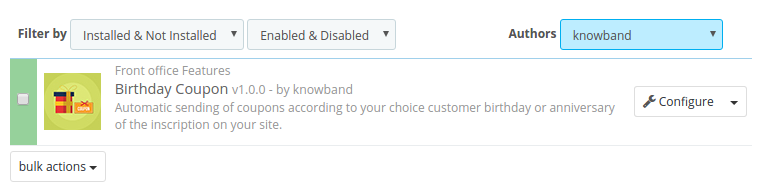
  • Now module is ready to be installed in your store and you can find it in Store Admin -> Modules and Services.

In case, you are not able to find module in admin modules list, please try searching module with following details –

Keyword – Birthday Coupon

Authhor – knowband

Category – Front office

Filter By – Installed & Not Installed / Enabled & Disabled

  • Click on “Install” button to install the module. It would show a pop-up for your confirmation. Click on “Proceed with the installation” option. This step will install the module and show notification – “Module(s) installed successfully”. Once the installation is complete, the admin can configure the module.

3.0 How to configure module ?

Once the prestashop addon is configurable, the Store Owner can setup or configure this module through the admin Panel of the store. There are following sections available to configure this module –

  • Go to Store the admin -> Modules and Services
  • Find “Birthday Coupon” and click “configure” button given corresponding to the module i.e. shown below-

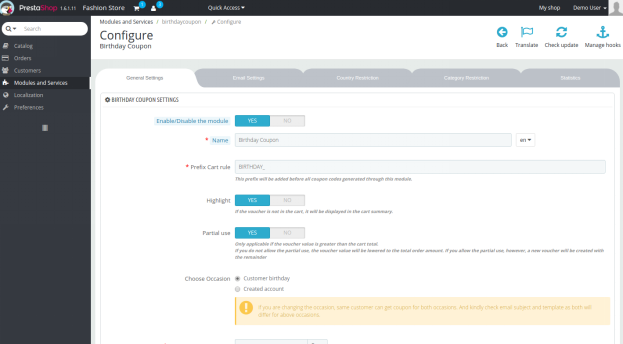
  • After clicking on the “configure” button, you will see a window like the one mentioned below-

4.0 Admin Interface

After installing the Prestashop birthday copon addon into the Prestashop store, the online merchant can easily manage and control the birthday wishes and coupons being offered to the customers. The store owner can make the basic changes in the coupons, email triggers and can even set restrictions on the offers. The various configuration options are mentioned below:

  • General Settings
  • Email Settings
  • Country Restrictions
  • Category Restrictions
  • Statistics

Each section of Prestashop Birthday Gift Addon is discuss them in details:

4.1 General Settings

In this section admin can manage the set the coupn code prefix, coupn code validity and musch more. The various configuration options in this section are discussed below:

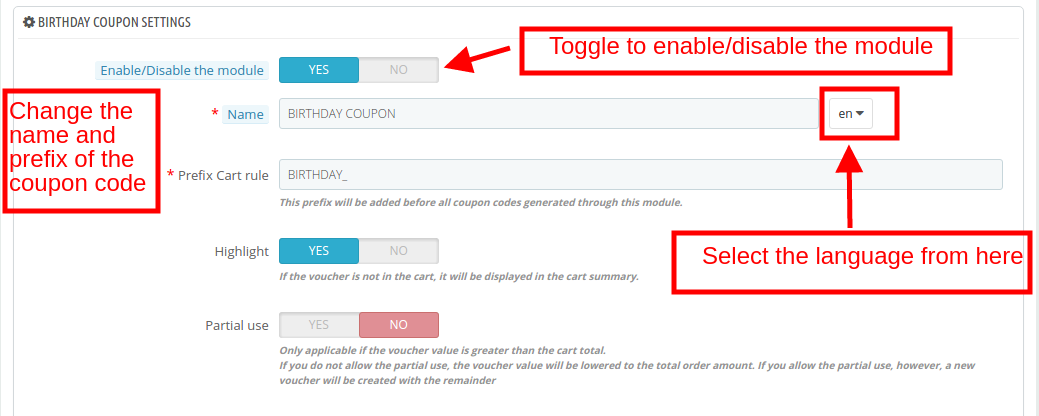
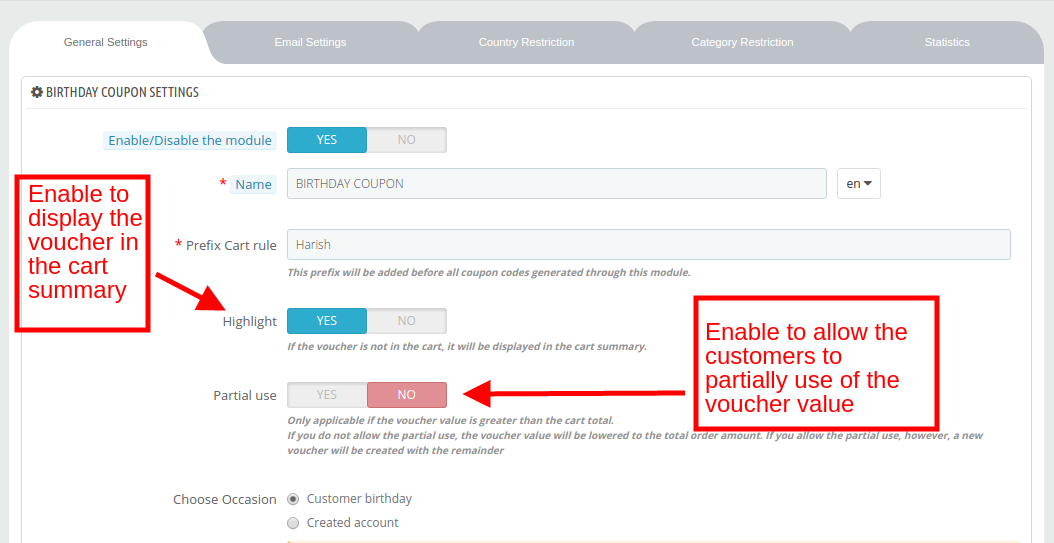
Enable/Disable: The Prestashop Birthday Vouchers Addon can be enabled/disabled from this section.

Name: Admin can enter the name of the coupon code in the desired language. The module supports multiple languages.

Prefix Cart Rule: This is the prefix that will be added before every coupon code generated by the module. Store owner can change this prefix according to the need.

Highlight: The Prestashop Birthday Coupon Addon enable this functionality to display the voucher amount in the cart summary. It will be displayed if the voucher is shown in the cart.

Partial Use: If this feature is enabled, then, the customer gets an option to use the voucher amount partially. In case of partial use, a new voucher will be created with the remaining amount.

Choose Occasion: The Prestashop Birthday Vouchers Extension allows admin to wishes along with the voucher are sent on two different occasions, that is, the Birthday of the customer or on completion of a year of account creation. The admin can select any one occasion from this selection.

Coupon Validity: In this section admin can set the expiry duration (in days) of the coupon code.

Minimum Amount: Set the minimum order amount. The coupon will be applicable only if the order value is above this fixed amount.

Select Minimum Amount Currency: Select the currency from the drop-down list of the minimum amount value.

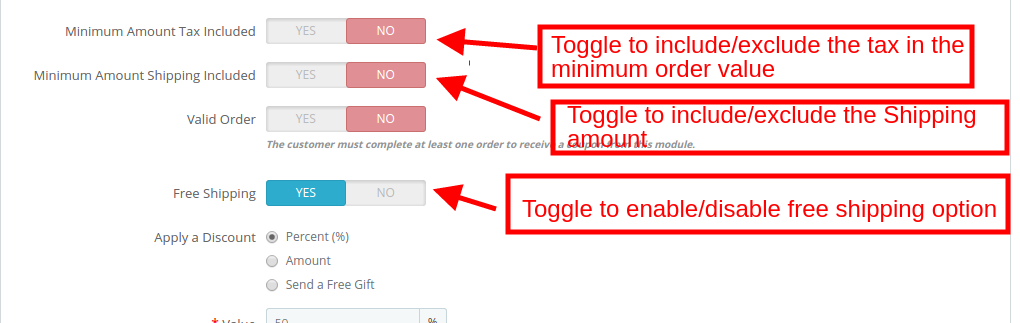
Minimum Amount Tax Included: If the button is enabled, the minimum order amount will consider the tax. Otherwise the tax will be excluded while considering the minimum order amount.

Minimum Amount Shipping Included: If the button is enabled, the minimum order amount will include the shipping amount. Otherwise, the shipping amount will not be considered in the minimum order limit.

Valid Order: This validates the eligibility of the customers for availing the offers. If it is enabled, then, the customer must have completed at least one order in order to get the incentive.

Apply a Discount: This Prestashop Birthday Coupon Addon allows admin can offer an incentive to the customers in three form.

  • Percent Discount: In this section admin can set the percentage value.

  • Amount: In case of a fixed amount, enter the value and then select the currency in which you want to offer the discount. You can even include/exclude tax from the discount value by toggling the button shown below.

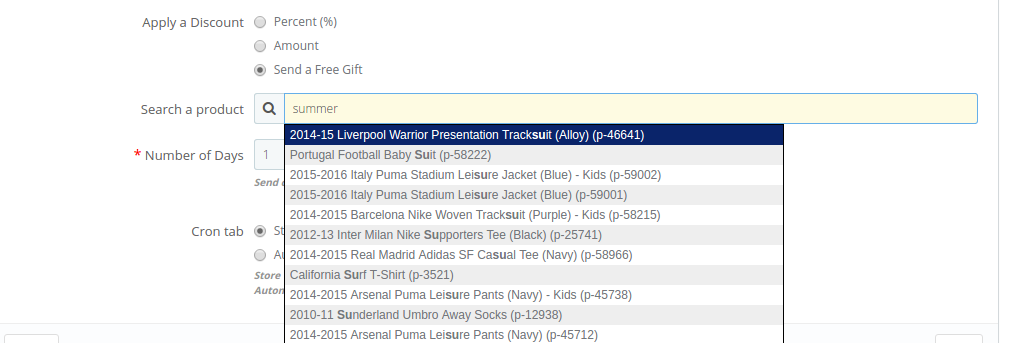
  • Send a Free Gift: The admin can even gift a product for free to the customer. You can search the product as shown in the image below:

Number of Days: In this section the Prestashop Birthday Coupon Addon set the number of days before the Birthday when you want to send the email trigger.

Cron Tab: There are two cron settings offered to the store owners.

  1. Store Visit: Cron will be executed every time someone visits your site.
  2. Automatically: The cron functionality will be executed through the cron tab.

4.2 Email Settings

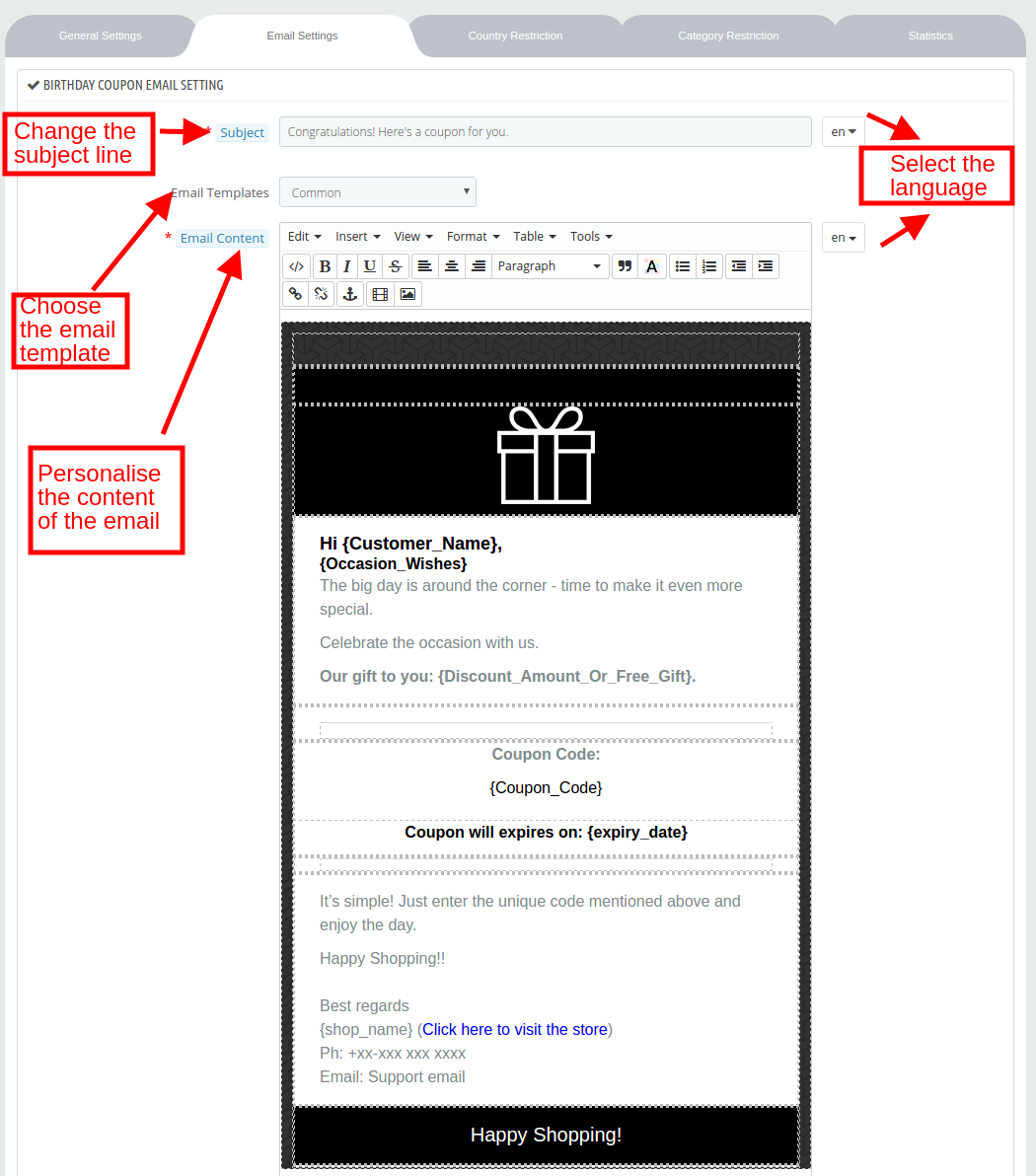
In the email setting tab the Prestashop Birthday gift Addon enable the store admin to change the subject line and content of wishes to be sent via email. It offers the multiple email template that admin can choose according to the need. Below shown the image-

4.3 Country Restriction

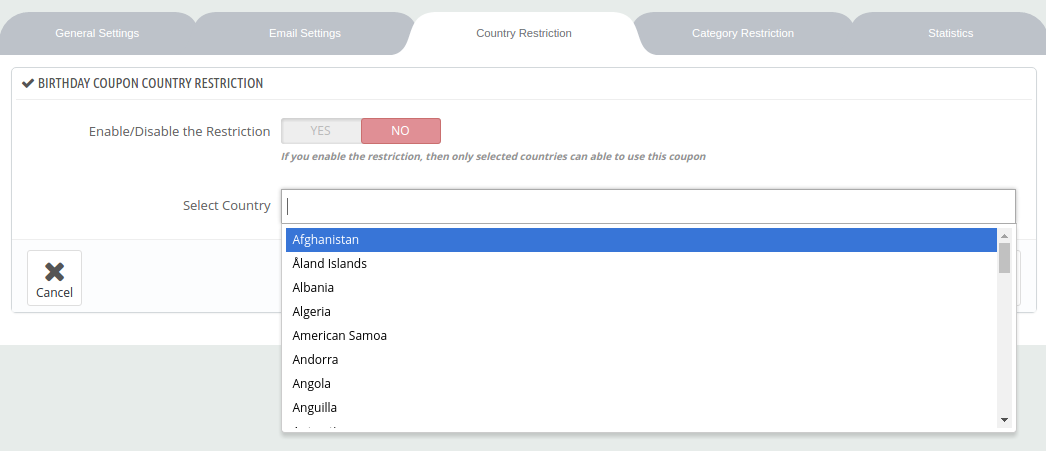
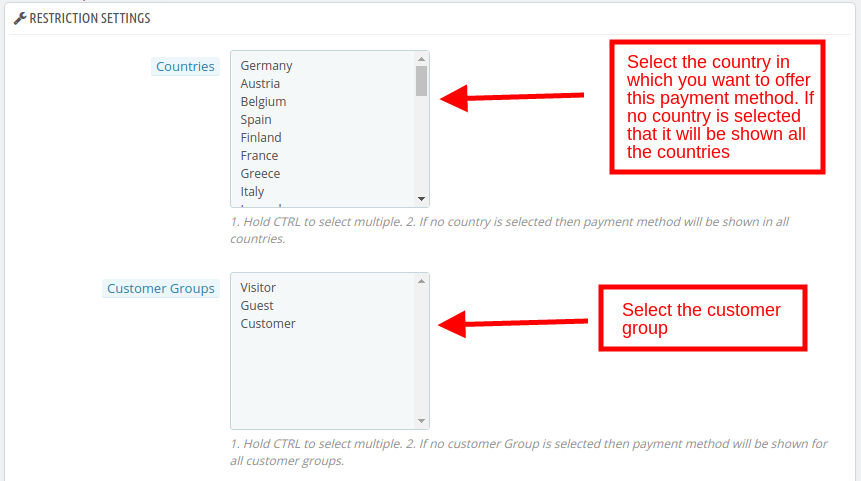
In this section the Prestashop Birthday Coupon Addon allows admin to admin can add country-wise restrictions in the offers. Enable the buttonas shown below and select the country from the list. The offer will now be applicable for the selected countries only.

4.4 Category Restriction

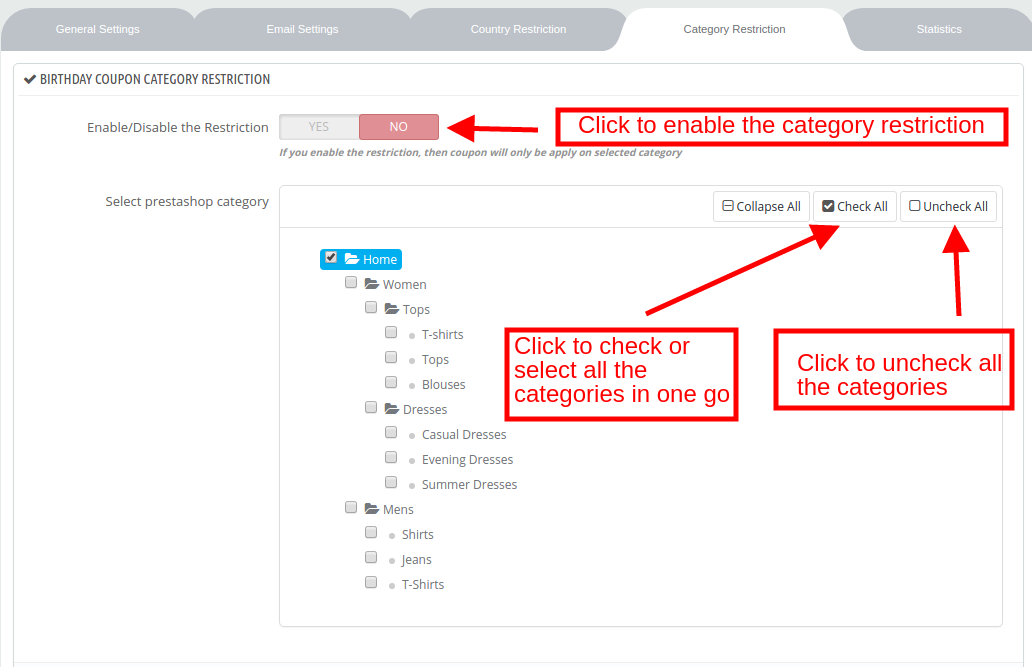
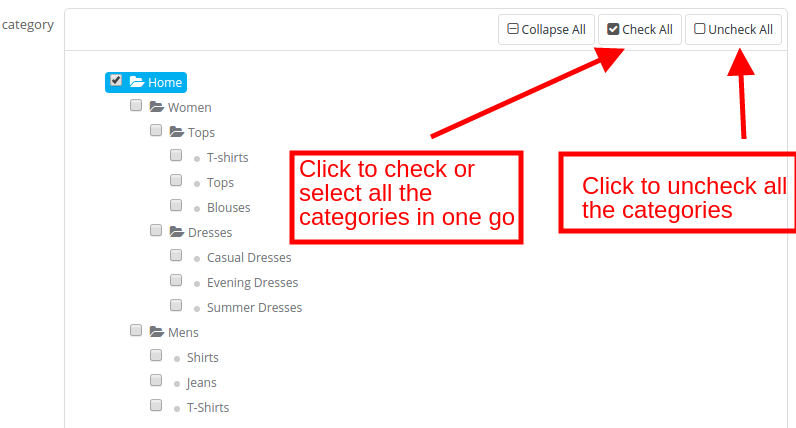
The coupon code offered to the customer will be applicable to all the categories available in the site if no category restriction is applied. In order to apply the restriction, enable the button shown below. Expand the category and check the desired categories. The coupon will apply only to the selected categories.

4.5 Statistics

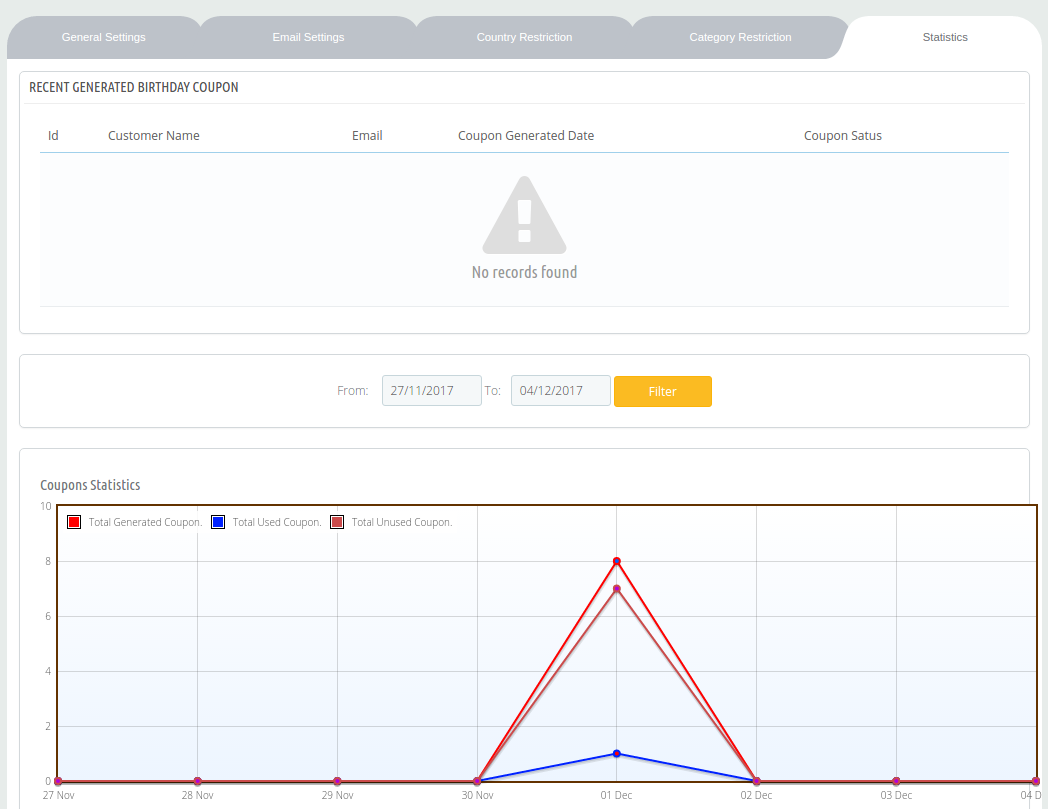
The store admin can find the entire list of the coupon generated as well as the status of the coupons in the Statistic tab of the module. The report is generated in both tabular and graphical format.

Now you can try Prestashop Birthday Coupon Addon for on your Prestashop website.

Module Link: https://www.knowband.com/prestashop-birthday-coupon
Video Link: https://www.youtube.com/watch?v=w6m_F2eWNjk
Admin Demo Link: https://psm.knowband.com/birthdaycoupon/16/admin1/index.php?controller=AdminModules&token=2a1dbe1666dd87fb270314503584878b

Front Demo Link: https://psm.knowband.com/birthdaycoupon/16/en/?live_configurator_token=f89c3f7451305b5b0afa65f60de941c5&id_employee=2&id_shop=1

Addon Store Link: https://addons.prestashop.com/en/promotions-gifts/29903-knowband-birthday-coupon.html

Please contact us at support@knowband.com for any query or custom change request as per your business requirement.

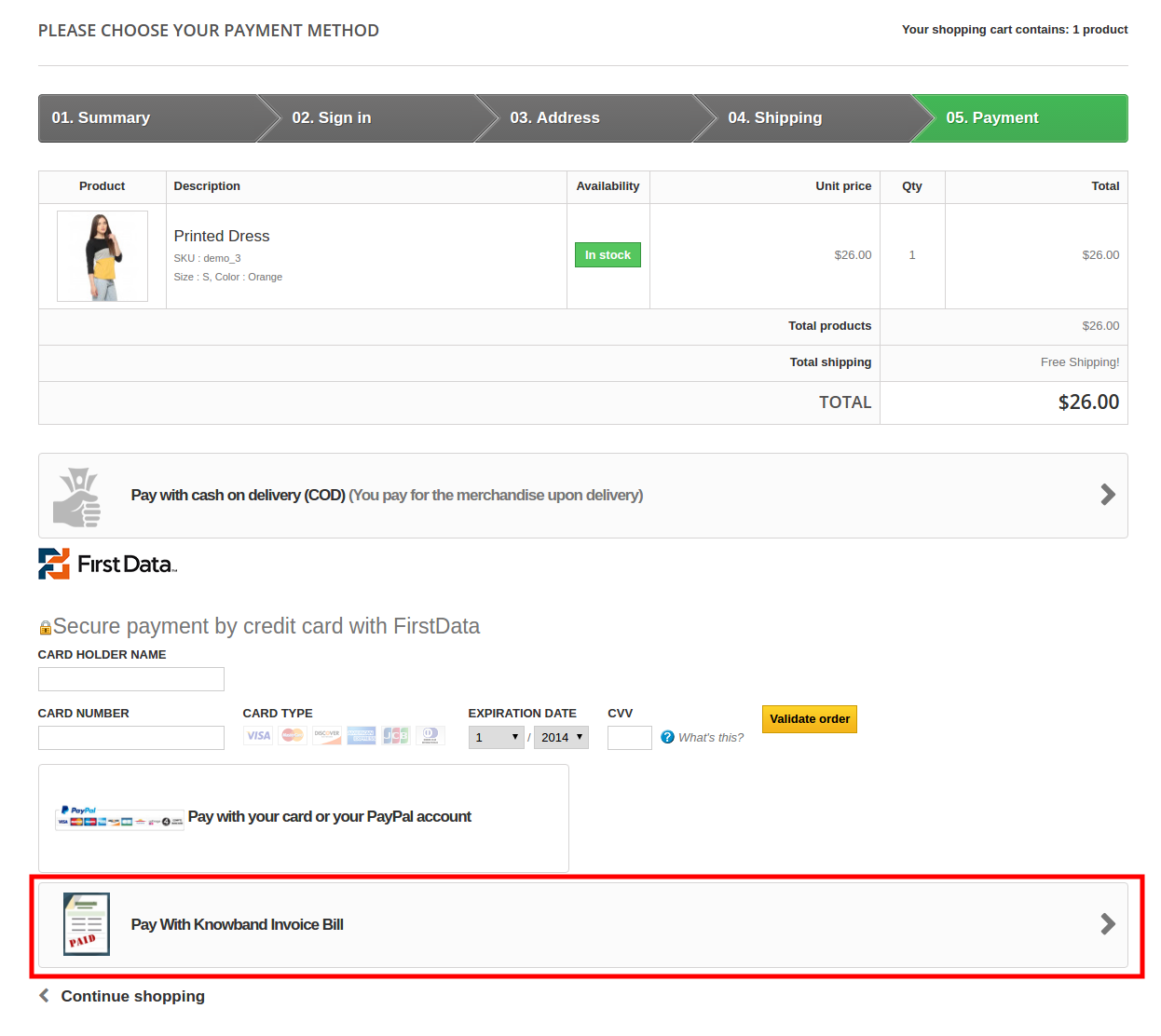
Prestashop Invoice Bill Payment Module – User Manual

1.0 Introduction

Prestashop Invoice Bill Payment module by Knowband allows the eCommerce store owners to provide the option of payment by invoice to their customers. The Prestashop Invoice Payment method is very popular especially in countries like Germany and others. Even with the technological advancement, the online shoppers prefer opting for the safe payment method.

With Prestashop Invoice Bill method, the customers can pay for their order in easy installments. You can now offer a safe shopping experience to the customers. The Prestashop module allows the admin to set the terms and conditions of the Invoice with Partial Payment method from the back-end of the admin interface. The easy management and configuration options, the store admin can keep a track on the payment with minimal hassle. The merchants can even send automatic reminders to the customers for the bill payment.

1.1. Project Objectives

The project objectives are listed below:

1. The configuration and customization of the Prestashop Invoice Bill Payment module.

2. The ways to fix the terms and conditions of the invoice bill payment method.

3. The configuration of the email reminder for the bill payment to be sent to the customers.

4. Tracking of the orders that have opted for the payment with invoice method.

2.0 Installation

Purchase the Prestashop addon from the store. You will receive the following files:

1. zipped file with source code of the module

2. User Manual

Follow the following steps to install the Prestashop extension by Knowband:

  • Unzip the zipped file. It would contain files and folders as shown below –

3. Copy all the files and folders of unzipped folder into your store “modules” directory on the path – Root Directory/modules/.

4. Now the Prestashop module is ready to be installed in your store and you can find that in Store Admin -> Modules and Services.

In case, you are not able to find module in admin modules list, please try searching this Prestashop module with following details –

Keyword – Invoice Bill Payment

Category – Payments and Gateways

Filter By – Installed & Not Installed / Enabled & Disabled

  1. Click on “Install” button to install this Prestashop module. It would show a pop-up for your confirmation. Click on “Proceed with the installation” option. This step will install the Prestashop Addon and show notification – “Module(s) installed successfully”.
  2. The module is now installed and is ready for configuration.

3.0 Admin Interface

3.1 How to configure the module?

The Prestashop Invoice Payment method module can be configured in a few simple steps. The invoice bill payment getting tab offers a number of options. They are:

  • General Settings
  • Order Status Settings
  • Enable Payment Settings
  • Restriction Settings
  • Reminder Settings

3.1.1 General Settings

Enable/Disable: Toggle the button to enable/disable the Prestashop Invoice Payment reminder module from the Prestashop store.

Payment Information: This field of Invoice with Partial Payment allows the admin to enter the payment information here. This information will be displayed in the front-end. The information can be entered in multiple languages.

3.1.2 Order Status Settings

The various options available in this tab of Prestashop Invoice Bill module are mentioned below:

Initial Order Status: The initial order status when the order is placed can be changed from here.

Reminder Order Status: When the due date of the invoice payment exceeds, an email reminder is sent to the customers. The reminder order status will be changed from this field of the Invoice with Partial Payment.

Cancel Order Status: In case, the transaction is still pending by the customer, then, the order status to be displayed can be selected from this option of Prestashop Invoice Bill Payment module.

No Email Send order Status: No email reminder will be sent to the customers with the order status selected in this section.

3.1.3 Enable Payment Settings

The various terms and conditions along with the criteria for enabling this Prestashop Invoice Payment method module can be fixed here.

Days: It specifies the minimum number of days after the order is placed when the customer must pay.

Minimum Order Amount: Enter minimum order amount for the Invoice with Partial Payment module to be activated.

Total Paid and Unpaid Order: The minimum paid orders and maximum unpaid orders of the customers is entered. The customer who fulfills this criteria will be allowed to opt for this Prestashop Invoice Bill Payment method.

Maximum Unpaid Amount: The admin can fix the maximum unpaid amount that he wants to allow in a particular order.

3.1.4 Email Settings

The Prestashop Invoice Payment reminder offers the admin to send reminders to the customer for the bill payment. The email can be personalized from the back-end as shown in the image below:

3.1.5 Restriction Settings

The admin can add restrictions to the invoice payment options. That is, the e-merchants can restrict the payment method for a particular country, category, customer group, carrier options as well as manufacturer or supplier. The various restriction options offered by this Invoice with Partial Payment module is as mentioned below:

Countries: By default, the Prestashop Invoice Payment reminder will be applicable in all the countries where the eCommerce store is operating. If the admin wants to restrict to some countries from availing the Prestashop Invoice Payment method, then, he can select the names from the list. The invoice payment method will then be applicable in the selected countries only.

Customer Group: The admin can provide this Invoice with Partial Payment method the New Visitors, Guest or Registered Customers. The customer group can be selected from the list shown below.

Categories: The admin can select the categories in which he wants to provide this Invoice with Partial Payment option.

Carrier, Manufacturer, Supplier: The Prestashop Invoice Bill Payment method will be applicable to all the carrier options, manufacturer and supplier.

3.2 How to Create/Edit the Reminder Settings?

The Prestashop Invoice Payment reminder offers the admin to create N number of reminder profiles. The existing reminder profiles can be edited as well.

3.2.1 Edit the Reminder Settings

The existing profiles can be edited by simply clicking on the ‘Edit’ as shown below. The reminder profiles can be activated or deactivated as shown in the image.

3.2.2 Create New Reminder Profile

In order to create new reminder profile, click on the ‘+’ sign in the top right portion of the interface as shown in the image.

You’ll be redirected to the profile creation page.

Send Email: This field of Invoice with Partial Payment allows the admin to enable the reminder profile.

Email Delay Count: Enter the number of days after the expiry of the payment due date when you want to send the reminder.

3.3 How to track the orders that opted for invoice bill payment method?

The order received opting for the Prestashop Invoice Payment method can be viewed in the Order tab of the admin interface.

3.4 Website UI

Once the Invoice with Partial Payment module is installed in the Prestashop store, the Invoice Bill Payment Method will be displayed on the checkout page as shown below.

Click here for Admin Demo & Front Demo of Prestashop Invoice Bill Payment Addon by Knowband.