Benachrichtigen Sie Kunden, wenn Produkte wieder auf Lager sind, und Ihr PrestaShop-Umsatz wird schnell steigen. Nutzen Sie den PrestaShop Back-in-Stock Modul um mit der Rückgewinnung fehlender Einnahmen zu beginnen. Senden Sie Benachrichtigungen an Verbraucher, sobald die Produkte wieder auf Lager sind. Die Einrichtung dauert nur 5 Minuten.
PrestaShop Back-in-Stock Add-on – einzigartiger Ansatz zur Erfassung entgangener Verkäufe
Benachrichtigungen über Lagerbestände sind eine perfekte Möglichkeit für PrestaShop-Geschäfte, den Verkauf anzukurbeln. Verpassen Sie keine Verkäufe, da die Produkte nicht vorrätig sind. Steigern Sie Ihren Umsatz mit Web-Push-Benachrichtigungen für wieder auf Lager befindliche Produkte. Sie können eine erste E-Mail wenn ein Kunde eine Lagerbestandswarnung abonniert, Warnungen bei niedrigem Lagerbestand, und eine letzte Benachrichtigungs-E-Mail mit dem Nachricht wieder auf Lager. Wir alle haben Dinge entdeckt, die nicht vorrätig waren, aber wir gehen nicht zurück in den Laden, um zu sehen, ob es noch da ist. Warum erwarten Sie, dass Ihre Kunden dies tun? Beeinflussen Sie sie mit E-Mails und senden Sie Push-Benachrichtigungen, um sie wieder in Ihren Online-Shop zu bringen. Sie erhalten mehr Umsatz und beobachten ein Steigerung der Conversion-Rate.
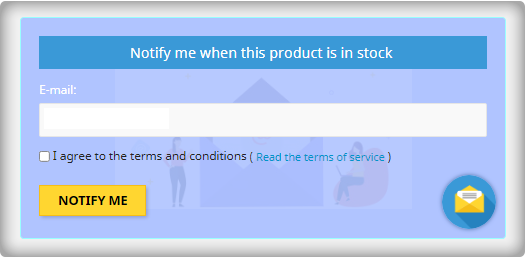
Wenn Sie Ihrer Abonnentenliste eine E-Mail-Anmeldung hinzufügen, können Sie Ihre Liste erweitern
Die meisten Formulare zur Warnung vor Lagerrückständen erhalten nur die E-Mail-Adresse des Kunden, um ihn zu informieren, wenn ein Produkt wieder auf Lager ist. Nutzen Sie die Tatsache, dass sie aufmerksam sind, indem Sie sie bitten, sich gleichzeitig Ihrer E-Mail-Liste anzuschließen. Verkäufer, die diese Strategie anwenden, sehen eine große Verbesserung ihrer E-Mail-Abonnentenliste Größe, was zu mehr Umsatz führt.
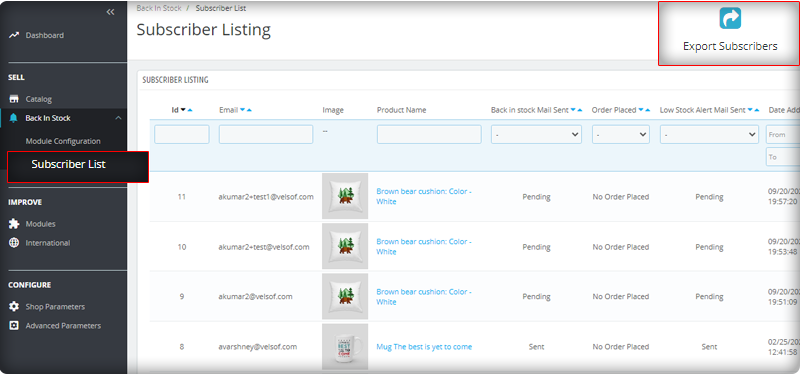
Sie können die Abonnentenliste im Admin-Panel im linken Menü beobachten, in der alle installierten Module aufgelistet sind.
Senden Sie automatisierte E-Mails für Low-Stock und Back-in-Stock
Das PrestaShop Back-in-Stock-Modul ist ein Werkzeug für E-Mail Marketing. Kunden erhalten normalerweise Hunderte von Werbe-E-Mails und die meisten von ihnen werden ignoriert, aber eine E-Mail mit einem einprägsamen Betreff hat mehr Chancen, geöffnet zu werden. Das Modul ermöglicht es Verkäufern, eine benutzerdefinierte E-Mail mit angepasstem Text und Betreffzeilen zu senden. Zusammen mit einer Initiale Willkommens-Mail, können Sie den Abonnenten Warnmeldungen über niedrige Lagerbestände senden und sie über die aufgefüllten Produkte informieren.
Fügen Sie verwandte Produkte zur E-Mail-Vorlage hinzu und verkaufen Sie Cross-Selling
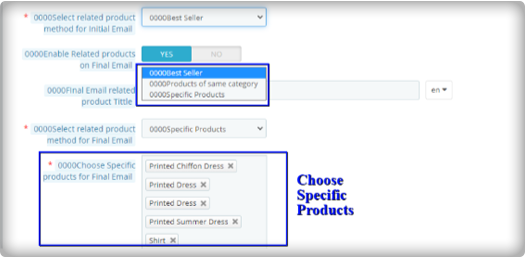
Ich habe den Satz gehört, zwei Fliegen mit einer Klappe zu schlagen, das Modul funktioniert genauso. Sie können damit Benachrichtigungen über Lagerbestände zurücksenden und haben die Möglichkeit, verwandte Produkte zu senden. Ein Verkäufer kann Details wie Bestseller, Produkte derselben Kategorie, bestimmte Produkte usw. hinzufügen. Wenn sich ein Verkäufer für die Option Bestimmte Produkte entscheidet, muss er die Produkte in der entsprechenden Registerkarte angeben, wie in der Abbildung unten gezeigt.
Senden Sie Benachrichtigungen über Ihren E-Mail-Anbieter wie Mailchimp
Es ist wichtig, dass Sie Ihre Marke aufbauen. Eine Möglichkeit, dies zu tun, besteht darin, sicherzustellen, dass die von Ihnen gesendeten E-Mails von Ihrer Domain gesendet werden. Sie können eine Vielzahl von Funktionen nutzen, um den Erfolg Ihrer Back-in-Stock-Kampagnen zu steigern, wenn Sie einen fortschrittlichen E-Commerce-E-Mail-Anbieter wie . verwenden Mailchimp, Klavio oder Sendinblue. Und das PrestaShop-Back-in-Stock-Modul ermöglicht Ihnen dies.
Echtzeit-Analyse für PrestaShop
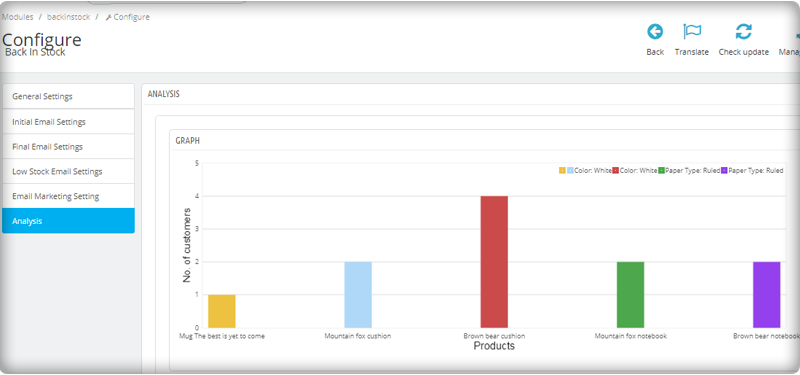
Sehen Sie sich einen vollständigen Bericht über Kunden an, die Web-Push-Benachrichtigungen für wieder auf Lager befindliche Produkte abonniert haben. Um den Umsatz zu steigern, identifizieren Sie die erfolgreichsten Artikel, maximieren Sie den Lagerbestand und führen Sie Werbekampagnen durch.
Die neue Version hat UTM-Parameter
Die UTM-Parameter sind kurze Textcodes, die Sie in URLs (oder Links) einfügen, um den Erfolg einer Webseite oder einer Kampagne zu überwachen. Integrierte Analysen sind auf Social-Media-Sites verfügbar. Damit können Sie wichtige Kennzahlen wie Likes, Shares und Website-Klicks verfolgen. Sie können dem PrestaShop UTM-Parameter hinzufügen Zurück im Lagermodul und nutzen.
Einwickeln: Die Back-in-Stock-E-Mails sind einzigartige Benachrichtigungen, da sie Neugier wecken, die Kaufmotive beeinflussen und die Verkaufschancen erhöhen. Wenn Sie Ihren Kunden keine Warnmeldungen wie niedrige Lagerbestände oder Lagerbestände senden, machen Sie einen großen Fehler. Bekomm dein Modul ‘Back-in-Stock’ heute, um Ihre entgangenen Verkäufe zu erfassen. Für die Entwicklung von E-Commerce-Websites, Modulanforderungen oder die Entwicklung mobiler Apps für Ihren Online-Shop verfügt KnowBand über Experten und vorgefertigte Tools. Besuch uns in www.knowband.com oder schreiben Sie eine Nachricht an support@knowband.com.
Strategien zur Kundenbindung ermöglichen es Ihnen, mehr Vorteile aus Ihrem aktuellen Kundenstamm zu ziehen. Für jedes E-Commerce-Unternehmen ist die Gewinnung neuer Kunden ein oberstes Ziel, und die Beibehaltung bestehender Kunden bildet eine Grundlage für den langfristigen Erfolg. Sie haben vielleicht immer wieder gehört, dass es hektischer ist, einen neuen Kunden zu gewinnen, als den bestehenden Kunden zu einem Wiederholungskauf zu bewegen. Sie möchten sicherstellen, dass die Kunden, für deren Gewinnung Sie so hart gearbeitet haben, bei Ihnen bleiben, ein besseres Kundenerlebnis haben und tendenziell Wert aus Ihren Waren ziehen. Die treuen Kunden, die einen Wiederholungskauf tätigen, sind eine treibende Kraft für jedes Unternehmen. In diesem Beitrag stellen wir Ihnen unsere fünf bewährten Kundenbindungsmodule für den PrestaShop-Shop vor, mit denen Sie vorteilhafte Beziehungen zu Ihren Kunden pflegen und deren Loyalität fördern können. Schauen wir uns an, wie es weitergeht.
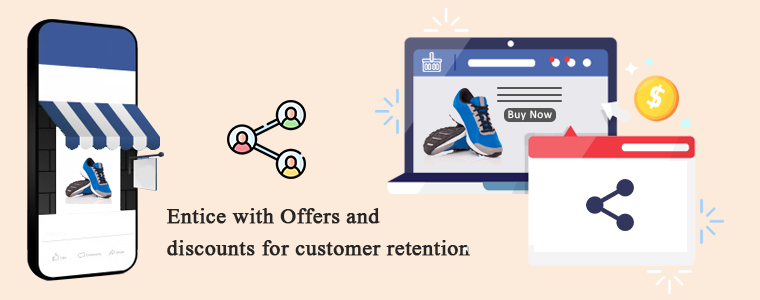
1. Locke mit Angeboten und Rabatten zur Kundenbindung
Um einen potenziellen Kunden anzulocken, sind Rabatte und Verkäufe die aufregendsten Strategien. Fügen Sie in Ihrem PrestaShop-Shop hinzu das Facebook Share and Win Modul Dadurch kann der Kunde das Produkt auf dem Facebook-Konto teilen. Im Gegenzug erhält er einen Rabattcoupon, der bei wiederholten Einkäufen eingelöst werden kann. Du kannst auch Führen Sie einen Flash-Verkauf durch in Ihrem E-Commerce-Shop, um die Kundenbindung zu erhöhen. Verkäufe können jede Art von Kunden anziehen, da die Leute es lieben, ihre Lieblingssachen zu günstigen Preisen zu erhalten.
2. Die Implementierung eines Treueprogramms kann die Kundenbindung erhöhen
Eine weitere bewährte Strategie zur Steigerung der Kundenbindung ist die Einführung eines Treueprogramms in Ihrem Online-Shop. Das Treuepunktmodul und Belohnungspunktmodul sollen den Kunden bei jedem Einkauf eine Belohnung bieten. Diese Punkte können beim nächsten Einkauf im PrestaShop-Geschäft gemäß den vom Geschäft festgelegten Regeln verwendet werden.
3. Kundenzufriedenheit ist der Schlüssel zur Kundenbindung
Wenn Sie möchten, dass Kunden wieder bei Ihnen einkaufen, geben Sie ihnen die Kundenzufriedenheit, die sie verdienen. Die Reise beginnt auf der Homepage und endet, wenn der Kunde das erwartete Qualitätsprodukt erhält. Manchmal passt das Produkt nicht gut oder der Kunde mag es nicht und möchte es zurückgeben. Ist Ihr Geschäft bereit, die Situation bei Rücksendungen zu verwalten? Wenn nicht, installieren Sie die PrestaShop Return Manager Modul zu Ihrem Geschäft, das Ihnen helfen kann, die Stornierung und Rückgabe von Bestellungen mühelos zu erledigen. Das ist es nicht. Wenn Ihr Kunde eine Anfrage stellen oder Hilfe benötigen muss, ist ein gutes Kundensupport-System wichtig. Es gibt verschiedene Möglichkeiten, wie Sie Ihrem E-Commerce-Shop Kundensupport anbieten können. Zur Verfügung stellen Chat-Support mit Deskoid-Helpdesk, E-Mail-Support, Live-Chat, Anrufsupport usw.
4. Personalisierungselement hinzufügen
Haben Sie den Begriff personalisierte Erfahrung gehört? Dies ist der neue Trend im Geschäft. Behandeln Sie Ihre Kunden als Individuum und kümmern Sie sich um ihre Erfahrung, da jeder Kunde einen einzigartigen Geschmack hat. Kundenbindung kann erreicht werden, wenn Sie wissen, wie Sie Ihre potenziellen Leads behandeln. Sie können auf Anfrage maßgeschneiderte Produkte wie individuell bedruckte Kaffeetassen, T-Shirts, Wanduhren oder alles verkaufen, was die Leute mit neuen kundenspezifischen Designs kaufen möchten. Das PrestaShop Produktdesigner / Customizer Mit diesem Modul können Kunden den gewünschten Text, Bilder und QR-Code eines Produkts hinzufügen. Beginnen Sie noch heute damit und steigern Sie Ihren Umsatz auf das nächste Level.
5. Abonnements anbieten:
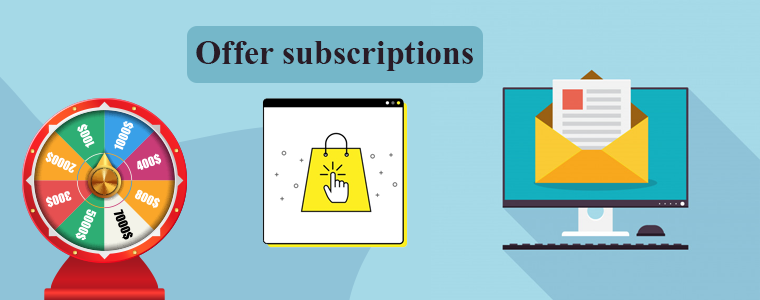
Ermutigen Sie Kunden mit einer E-Mail, einen Wiederholungskauf zu tätigen. Dazu können Sie anstelle des langweiligen Abonnement-Popups ein gamifiziertes E-Mail-Abonnementmodul in Ihrem Geschäft hinzufügen. Der Spaß und spielerisches Glücksrad drehen und gewinnen Sie erhalten mehr Abonnenten und können Ihren neuen Abonnenten einige Rabatte und Gutscheine anbieten. E-Mail-Marketing kann verwendet werden, um Ihren aktuellen Kunden zu folgen. Sie können die Details verlassener Einkaufswagen mit ihnen teilen, das Feedback nach dem Kauf einholen und von Zeit zu Zeit Aktualisierungen aus dem Geschäft teilen. PreisalarmAlle neuen Lagerdetails können Ihnen mehr Kundenbindung bieten und Ihren Gesamtumsatz steigern.
Letzte Worte: Wenn Sie nach dem Verkauf noch nicht an bestehende Kunden verkauft haben, ist jetzt ein guter Zeitpunkt, um einen kohärenten Kundenbindungsplan zu entwickeln. Um Ihren Umsatz und Ihre Kundenbindung zu steigern, müssen Sie sich um jeden Kunden kümmern, der Ihr Geschäft besucht. Bieten Sie Angebote, Rabatte und Treuepunkte an und ermutigen Sie sie, Ihren Newsletter zu abonnieren. Machen Sie sich mit den Kundenrichtlinien klar und vergessen Sie nicht, Kundensupportkanäle bereitzustellen, um die Kundenzufriedenheit zu gewährleisten.
AI ist die am schnellsten wachsende Technologiebranche. Vor kurzem hat Mailchimp einige bemerkenswerte Funktionen und Updates hinzugefügt, um die Customer Journey mit einigen intelligenten Lösungen intelligenter zu gestalten. Sie zitierten diese Pressemitteilung mit dem Slogan "Wenn Sie große Ziele haben, haben wir große Updates". Es sind Millionen von Unternehmen registriert und Kundendaten in Milliardenhöhe sind auf Mailchimp verfügbar. Um die intelligente Lösung zu erstellen, verwendete Mailchimp alle verfügbaren Daten. Das neue Update
App Redesign:
Das Mailchimp-Entwicklungsteam hat die Anwendung mit allen neuen Entwicklererfahrungen mit nativen Client-Bibliotheken und mobilen SDKs neu gestaltet. Die Mailchimp-APIs?can manage audience data, send campaigns, activate event-based messages, and more. The global infrastructure of Mailchimp can be utilised to send fast, personalised transactional emails, high deliverability rates, and scalable analytics through API or SMTP.
Kreativassistent:
Mailchimp nutzte AI, um das Beste zu geben Personalisierungserfahrung an die Kunden. Es erstellt Assets für das Design automatisch mit bereits vorhandenen Designs und ändert sie gemäß dem Befehl. Stellen Sie sich ein Bild mit einer Beschriftung vor, die Sie zuvor entworfen haben, und jetzt möchten Sie denselben Inhalt für andere Anwendungen mit unterschiedlichem Layout verwenden. Mit Mailchimp können Sie mit nur wenigen Klicks ein neues Design erstellen.
Builder für visuelle Automatisierung:
Das Hauptaugenmerk beim Aufbau dieser intelligenten Lösung lag auf der Improvisation der Customer Journey. Es hilft Benutzern mit den nächstbesten Ratschlägen zum Handeln, indem es Empfehlungen zur Verbesserung der Kampagnenleistung gibt. Durch die Personalisierung von Produktempfehlungen kann das Geschäft gesteigert und der Umsatz gesteigert werden. Benutzer können jederzeit E-Mails mit Auto-Trigger-Funktion senden. Mailchimp sendet gezielte Kampagnen an zukünftige Leads. Die neue Version schlägt einige eingängige Slogans und Betreffzeilen für das E-Mail-Marketing vor. Es umfasst Echtzeit-Eingaben zur Wortanzahl, Anzahl der Zeichen, Interpunktion und Verwendung von Emoticons.
Aufbau Ihrer Online-Präsenz:
Mit Mailchimp können kleine Unternehmen online präsent sein. Seit die Pandemie die Wirtschaft getroffen hat, wurden viele Fragen aufgeworfen, und dies zwang Mailchimp, Funktionen mit einem KI-gesteuerten Ansatz zu erstellen. Sie haben Domain-Kaufoptionen zum Hinzufügen zum E-Mail-Marketing integriert. Ein weiteres Tool, das in Kürze veröffentlicht wird, ist ein Website-Builder-Tool, für das überhaupt keine Codierung erforderlich ist Mailchimp neueste Version. Benutzer können Kaufschaltflächen und vieles mehr integrieren, um ihren stationären Betrieb auf die Online-Plattform zu bringen.
Neue Tools zur Personalisierung des Marketings für den E-Commerce:
Mailchimp und E-Commerce: Mailchimp verfügt über Daten aller möglichen Kunden, sodass sie die Lösung entwickelt haben, die für ein wachsendes Publikum verwendet werden kann, wenn Sie Ihren E-Commerce-Shop mit Mailchimp verbinden.
Mobile Zielseiten– Die Integration mobiler Apps ist ein weiteres wichtiges Tool, das dem Mailchimp AI-Update hinzugefügt wurde. Jetzt können Benutzer weitere neue Kontakte hinzufügen oder neue aus dem Adressbuch hochladen.
Führen Sie Umfragen mit Popup-Formularen aus. Es verfügt über auffällige Popup-Formulare für Umfragen, um mehr Besucher zum Sammeln von Informationen anzulocken, die zur Verbesserung des Kundenerlebnisses durch personalisiertes Marketing verwendet werden können.
Steigern Sie Ihr Publikum mit E-Commerce-Integration. G-Suite Add-On mit Googles Business-Software und technischen E-Mail-Adressen.
Meinung des Autors
Mailchimp ist die leistungsstärkste Marketingplattform, die 2001 gegründet wurde. Es sind zwei Jahrzehnte vergangen und sie blüht immer noch. Mit diesen neuen Lösungen und Software-Upgrades können viele kleine Unternehmen intelligent arbeiten. E-Commerce kann von Tools mit kreativer Intelligenz profitieren, einem Visual Automation Builder mit einer neu gestalteten App, die Unternehmen dabei unterstützt, neben ihren Ambitionen zu expandieren. Mal sehen, welche magische Mailchimp AI-Integration sich in den kommenden Jahren auf den E-Commerce auswirkt.
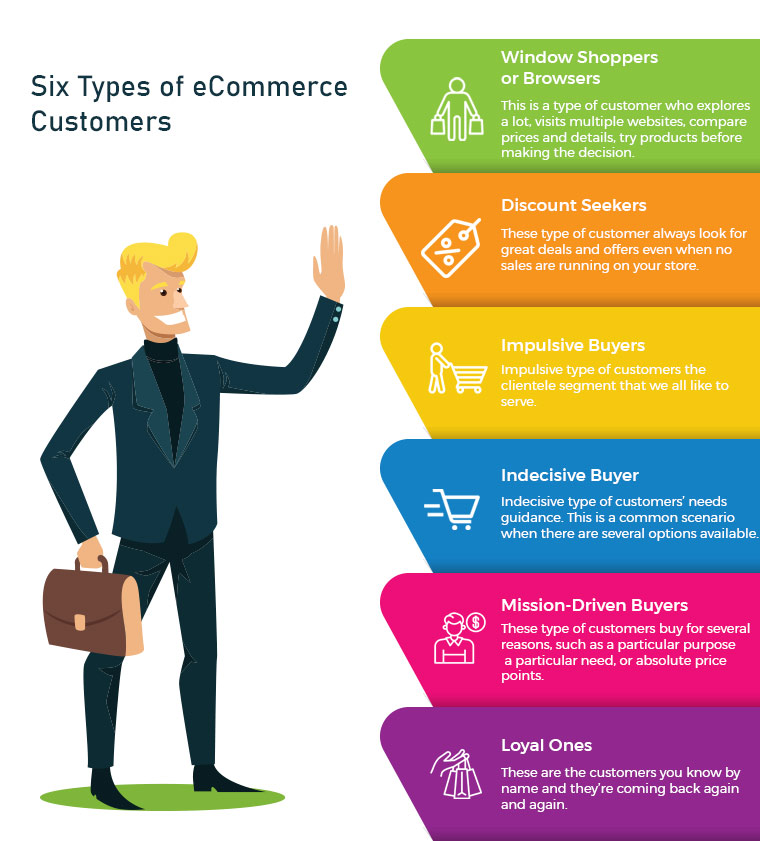
Online shopping is increasing, and customers who are enamoured with eCommerce sites spend countless hours researching the goods they want. There are some very popular quotes which make shopping, therapy, cardio or a hobby. It makes evident just how fixated people can be. There are many different types of eCommerce customers, therefore business owners need to keep each one not just entertained but also motivated to make purchases.
Some eCommerce customers like exploring before buying and some have a focused approach with a to-buy list which makes them good customers. But, being a retailer or eCommerce store owner, you cannot rely on one type of customer. Every shopper is different and they follow a certain pattern of buying with different priorities. Being a retailer, you must have gone to a lot of stores or manufacturers before choosing the item for sale. You also have a pattern which makes you a type of customer. I’m going to talk about some distinct categories of consumers that store owners frequently deal with and offer some expert advice on how to handle various types of eCommerce customers in your business to increase conversions.
1. Window Shoppers or Browsers
The number one on the list is servers or browsers. This is a type of customer who explores a lot, visits multiple websites, compares prices and details, try products before making a decision. They add products to their cart but never intended to shop from them. Yes, there are many such buyers and you may call them a pain. Can you do something about it? Yes, I guess. There can be ways to attract such visitors and encourage them to buy products from your store.
Greet them well:
If you are a retailer, you must remember to greet them well. Even if they are not asking for any assistance you can provide them one. eCommerce store owners can add any entry or exit popup such as Better Thank you Page module to their store for greeting these types of customers.
Entry or Exit Popup:
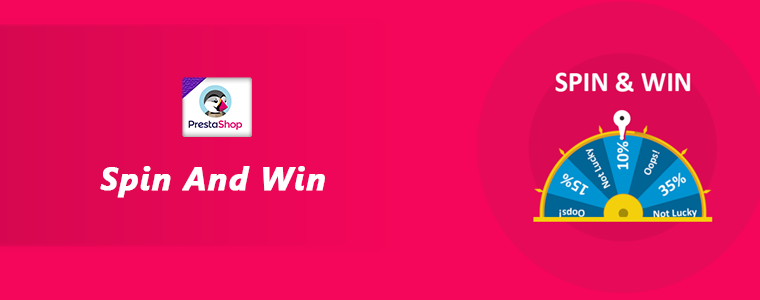
Some of the easiest ways to engage your consumers are by the use of innovative methods. The customer’s attention must be drawn to the digital interface and manner of presentation. The gamified interface of Spin and Win Pop-up attracts shoppers to your store. This is a 3-in-one pop-up which is used as an entry pop-up, exit pop up or an email subscription pop-up.
Don’t ignore the browsers, they can become your loyal eCommerce customers if treated right.
2. Discount Seekers
These types of eCommerce Customers respond well to pushy sale tactics. They always look for great deals and offers even when no sales are running in your store. For attracting such buyers you should focus on highlighting what they will save on that particular deal.
Host Clearance or Flash Sales:
These discount seekers can give you huge sales if provided with flat discounts. Clearance sales can be a good option. The products that have been stocked in your store for months can be sold out, and customers looking for discounts will benefit from it.These sales can be a key contributor to your cash flow which will make room for the new products by removing the older ones.
Scratch Card:
You can provide your customers with Scratch Cards while having a purchase. Customers will be attracted to the alluring coupons which can save their deal a lot.
Free Shipping:
Free shipping encourages customers to buy more from your store. A fixed amount of purchase is to be made by the shopper to get free delivery.
Impulsive types of customers are the clientele segment that we all like to serve. Nothing is more exciting than helping the impulse shopper to respond favourably to your recommendations. Impulse shoppers, also known as emotional shoppers, make unplanned purchases based on items that are currently appealing to them. Online shopping is a popular example of pulse or emotional buying. They look for products which attract them and you can do that by showing related products or by offering personalisation.
Show Related Products:
If you are dealing with an impulse buyer then make this chance an opportunity. Because they shop when they like it without giving a second thought. Show them what’s new in the store and let them feel, that they will be out of the race if they don’t own it. This can be done with modules like related products.
4. Indecisive Buyer
This is a common scenario when there are several options available. For instance, search for a floral top and the results will blow your mind. hundreds of products will start appearing in various stores. Deciding one will be difficult. Indecisive type of customers needs guidance. Ask them questions and give honest advice. A flexible return policy can also help them with their shopping.
Ask Questions:
Shop owners can help them decide what they want. Provide them with chat support or in-store assistance for choosing the right product. This effort can turn them into loyal eCommerce Customers.
Product Custom Field:
You can add a product custom field with the product description. You can add a field with related questions which can help you understand the need of the buyer. Advance Product Feld extension can be a good fit to improve UX.
Return Manager:
An indecisive customer will be encouraged if he/she knows that the product can be returned if they don’t like it. The Return Manager is a good module to add to your eCommerce store.
5. Mission-Driven Buyers
These can be called researchers or need-based customers. These customers buy for several reasons, such as a particular purpose, a particular need, or absolute price points. As difficult as it can be to please these individuals, they may still become regular customers if they are well taken care of. Provided with a good customer experience which is not available online or on other retailers stores can turn them into loyal customers.
Offer buy-online, Pick Up In-Store:
These types of buyers do not have much time to spend in window shopping or i-store shopping. They can make the purchase online and pick up the product from the store. Implement this new pick-up and drop option in your store to attract mission-driven buyers.
Cross-Selling:
Retailers can help the need-based customer with cross-selling techniques. You can place bread in related products while they are buying milk or a mobile cover if they are purchasing a mobile. The Automatic Related Product module can help you show relevant products on various pages such as the product page, the home page, the shopping cart page, etc.
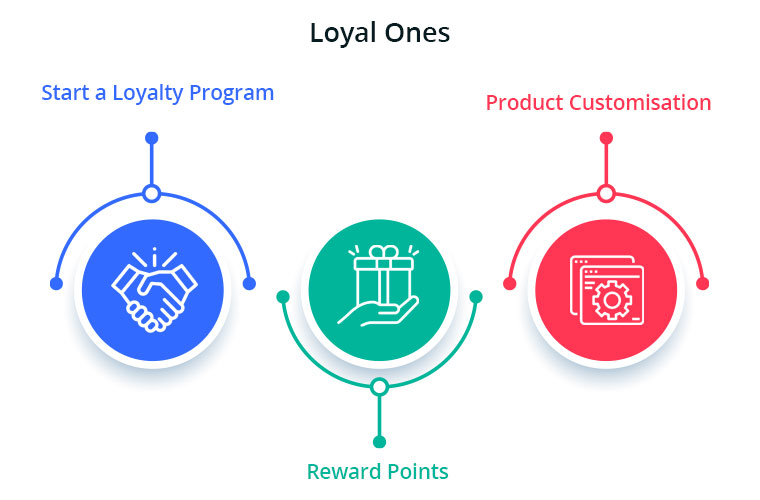
These are the customers you know by name and they’re coming back again and again. Loyal eCommerce Customers already know and enjoy your shop, so now you need to keep them happy. Offer customisation and personalised experience and never lose them to others. The best ones are difficult to find and it is your responsibility to give them your best services. You can give them reward points or loyalty points on every purchase. These types of customers are the best marketers for your store as the more they shop, the more will be the word of mouth communication.
Start a Loyalty Program:
Choose a module or plugin for your eCommerce Store to give loyalty points to your loyal ones. This will motivate these types of buyers to shop again and again from your store. During checkout, the loyalty points can be redeemed for a discount.
Reward points:
You can also give them reward points on various purchases like first purchase, on a fixed amount order, on particular products etc. The reward points encourage the buyer to make more purchases. It helps the admin boost customer engagement and creates loyal customers.
Product Customisation:
Product customisation and personalisation can turn your sales to the next level. this is one of the most accepted trends. Help them get a personalised product of their taste. The best module for giving a customisation experience is Product Designer/Customization which can provide several choices to you and shoppers.
Using this understanding to help turn deals, desires, needs-based and even casual customers into loyal ones will help the business expand. At the same time, ensuring that your loyal customers have a good experience every time they visit your store would only boost your bottom-line income.
It is often observed that customers want to return or cancel their orders. Managing orders and fulfilling customer’s demands isn’t an easy task. Considering consumer rights in the EU, every eCommerce platform needs an easy return manager to maintain the records and meeting customer’s needs. EU has a policy that a consumer can request a return or refund for a faulty product within 14 days after purchase. As an eCommerce owner, it may sound tedious and time taking.
Don’t worry! PrestaShop Return Manager Addon takes care of all the functions required to cancel or order returns. With additional features described below, this new version gives a user-friendly experience to eCommerce store owners and customers.
What’s New in PrestaShop Return Manager Addon?
Customer retention is a merchant’s need and this can be achieved with customer satisfaction. PrestaShop Return Manager module comes with an easy cancel request format with multiple return and cancellation methods for a customer.
1. Decide when to start calculating Policy time
Imagine a situation when the product is delivered after the expiry of the return date. What impression this will create on your customer? Sometimes the return date expires if the product delivery is delayed, to resolve this issue, the addon now provides a drop-down menu for selecting a product status after which the return policy time will be calculated.
2. Quick Access of Return Listing from Dashboard
You don’t have to find the module from a long list of installed modules in the admin panel, instead, you can configure the PrestaShop Return Manager Addon from the left menu of the admin panel.
Additionally, a new option to access all the return listing counts has been added on top of the admin panel. All the return listings like order returns, canceled orders, etc can be seen in one place.
3. Custom features for email templates
In the updated version of Return Manager, the admin is provided with an option in the admin panel to add a custom text for each Return Status and created a placeholder that can be used in the Return Status Email templates. The updated version provides an option in the admin panel to ‘send a Test Email’.
4. Search and Filter all the Listing Tabs
With the latest version, the store manager can easily sort and filter the listing tabs on the basis of date, customer ID, Return ID, Customer Name, etc. This makes the task easier for the admin.
Features that enhance admin’s power
5. Allows Partial or complete order replacement
The online store administrator can now allow online customers to pick items from their orders for replacement. Online customers can even request for returning the whole order if they want to do so. They can now choose all the products from the list. This increases the usability rate.
6. Admin can add Custom Field
This updated version of PrestaShop Return Manager Addon allows an online merchant to create custom fields. Online store owners can build several custom fields from the PrestaShop Refund Order Addon admin interface. The store owner may set custom field block names, apply validations, and also set default values (if required). Admin can make any field as required. Admin can set a default value and validation type.
Why choose PrestaShop RMA over other Order Return Module?
The RMA plays a vital role in the eCommerce store. The Customer sometimes raises the request for the product return, refund, and replacement. To improve customer retention and usability the online merchant needs a flawless RMA interface. Other eCommerce like the Magento Return Manager plugin does not come with these new features. This rejuvenated tool provides both a user-friendly experience and customer satisfaction.
1. Increased Customer Conversion Rate
Easy refund and return policy builds trust and makes the customer believe in the merchant. This eventually increases the word-of-mouth publicity of the website and brings more traffic to the site. From this, you can expect a good conversion rate. This one small change will catapult your conversion rate and this way you can keep the complaints zero.
2. Customer Satisfaction
The front-end easy ‘return’ option lets them believe if they are not completely satisfied with their purchase, they may return it or replace it. This assurance lets your visitor believe in your product policy and allows them to shop more. The easy email template functionality sends an email to both parties which enhances your business relationship. A happy customer always comes back to you without any pause.
Benefits of PrestaShop Return Manager for the merchants:
PrestaShop Order Return Manager Addon makes it easy to handle the returns of customers.
The possibility of receiving “Store Credits” for a faulty product helps to improve consumer retention.
The product issues can be fixed by knowing the return reasons.
With the aid of the PrestaShop Consumer Return Manager, you will find out the exact problem in the product by providing customers with the option of uploading the picture of the faulty product.
Email template makes you craft a mail for your customer at every return stage.
With RMA quick return addon, by adding custom fields you can collect more information from the customer.
Benefits of PrestaShop RMA return module for the customers:
A ‘Return’ button allows the existing customer or guest customer to return or cancel the placed order completely or partially.
PrestaShop Order Return Manager provides an easy cancel request format with credit, refund, and replacement options
Customers can upload an image of a faulty product highlighting the defect.
An email with custom text will be sent to the customer at every stage for their order cancellation or return request.
PrestaShop Order Return Manager allows customers to select a nearby store address for shipping the damaged product.
Customers can return partial or whole orders by easy select option.
Customers will have the option to cancel the order for a short period. The customers need to go to the My Account >> Return Manager section to cancel the order.
Other useful features of order return or cancellation addon
Easy Return Request Option
There are some other features that make this addon more convenient and user-oriented. It helps you identify the return reasons for customers and lets you raise a return request on behalf of your customer. Thanks to a quick and effective cancellation method, customers are more likely to go back to your platform.
Crafted Email-Templates
Well-designed email Templates emerged as an attractive feature. This pre-formatted email template option gives the admin a hassle-free experience at the backend and directly sends an email to both the parties as soon as the query is raised and updates the customer at every stage of their request. There are 14 different email templates as per the requirements. It is a timesaver for both merchants and customers.
Managing Return Requests at one place
Managing an eCommerce store with fewer efforts is like a cherry on the cake and this amazing addon does that. It helps you manage all the return requests in one place. You can find pending return lists, active return lists, and canceled return lists on the admin panel as well as on the dashboard. This information is also available to export in .csv format in case you want the compiled data.
Compatible with GDPR Module
PrestaShop Return Manager is compliant with GDPR. When you are using the Knowband GDPR module, both the customer and the administrator will be able to access the information of the return request. Besides, the Customer can request the admin to remove personal data from their shop.
Final Words
PrestaShop Return Manager addon is an interesting and helpful tool for the eCommerce store owner to manage the return and cancel the request at the backend. A hassle-free return policy attracts buyers and gains the customer’s trust.
For more information or to shop the PrestaShop Return Manager for your PrestaShop store, you can visit Knowband store or reach out to us at support@knowband.com. Return Manager Extension is also available for Magento and Magento 2 stores.
When exploring your Instagram or Facebook, you always see feeds that are of interest. Google’s discover feed also shows you the content which you like and would like to spend time on. Naturally, this makes you feel exclusive, and you spend more time without keeping the time track.
Can you give the same experience to your customers while shopping? Ecommerce brands like Myntra or Amazon try to target their inactive leads with personalized email marketing. Giving your customer a personalized shopping experience in this competitive environment could be the right plan to survive in a long race.
Understand the shopping journey of buyers with data and use it well for customer experience personalization. With that, customers who get exclusive treatment will do word-of-mouth marketing.
As an eCommerce store owner, you might have given thought to this. But, you may struggle with How to do it?
Know your customer personally
When you are spending a lot of time and money on focused target marketing, you just don’t need a customer who will make a one-time purchase but your business demands a loyal one. For target marketing, you can consider gathering demographic and psychographic details from a customer. The demographic information can be collected from registration forms but for psychographic information you need more data. To get the details like the interests, values, profession, and lifestyle, you can add custom fields to your registration page.
Proving your customer with loyalty points or rewards at every step of the form filling process will encourage them to fill it. This way, you can get more relevant information for future marketing and product personalization.
You can always ask for:
Their first name
Birthday
products they’re interested in
A preferred channel of communication
Some might like receiving emails but in a limited number while other millennials prefer receiving an SMS just after the purchase is made. It is good to ask the preferred channel of communication for targeted marketing. You can even ask for their interests and genre if a person is buying a book from your store.
A large number of people have no issues if a company spoof into the customer’s information which can provide them with a wow experience. From a report, it has been found that 76% of customers expect companies to understand their demands and requirements. So, people like getting a personalized experience, and it is now a trend that can be followed by an eCommerce store owner to compete with others in the market. Personalization can lead to impulsive buying.
Better to communicate with your customers
Remind your customers about the products they liked to buy or visited but did not make the purchase. You can send a push notification for back-in-stock products. You can ask them to look into their wishlist to reduce the abandoned cart.
It is crucial to choose the right means of communication for interacting with your customer. The selection of a communication channel should be based on the data you have collected. Customers often receive promotional emails and notifications which grab their attention and make them shop more.
Putting efforts in the right direction can help you boost conversion rates and customer retention. Millennials prefer texting overcall. You can use a chat app to provide a solution to their queries. This will be a great deal to give them more customer experience personalization.
Effective use of data for persona
You have the data in your system and what a waste if you are not using it well. Your system knows your customer better than you do.
Have you ever been in a situation when you called a person with the wrong name? This happened to me once, and I never want that to happen again. It instantly loses trust in a relationship. Send emails or greet them in-store by calling their name. This builds up an interactive connection between you and your customer.
You can take the help of segment email marketing by categorizing your customers according to their psychographic data
Understand the need of your customer as per their geographic location. Implement geolocation-based marketing strategies. Add a store locator to your website. In-store shopping is still a trend in millennials.
PrestaShop modules you should not miss on
Do you know that you can enhance the personalized customer experience by adding extensions to it?
It is challenging to keep your customers at a checkout page or the product page when they are doing two things at a time. You must have some striking, captivating website features which will keep them attentive and focused on their purchase. Why not with personalized features that you can add with these modules?
Collect more information
With PrestaShop Custom Registration Fields, the owner of the PrestaShop store will collect information about the customer by adding custom fields to the registration form of the website. Additional Order Forms/Field Manager addon for PrestaShop is another module that can help you gather more information. Custom fields on the order form can be generated with this PrestaShop Additional Order Forms Manager without making any adjustments to the code on the web page.
How to use it?
You can ask your customer to fill up the details which can be optional. You can add this field to the registration form. This way you can collect information about birthdays, anniversaries, or any of the interests which can help you promote your products. You can send a personalized message on their birthday with a greeting or any discount coupon. Store owners can use additional information to develop their services and eventually make more profit from their company.
Celebrate birthdays or anniversaries
You can give discount vouchers or coupons to your customers on their Birthday. Birthday Coupon -PrestaShop addon is a module that can inspire your customers to shop from your store on their birthdays.
How to use it?
You can send an email with a personalized message on their special day. This email will include the birthday coupon or discount voucher. The voucher sent through the mail will be valid for a limited time. The addon comes with multiple default templates. You can use it for various occasions.
Make them loyal customers
It is a dream for brands to have loyal customers. From research, it is found that about 30% of people like to buy the same brand and around 40% choose the same brand if they are offering personalized products. For customer retention and conversions, you can give loyalty points or reward points to your customers.
The PrestaShop Reward Points addon incorporates the reward points feature into your PrestaShop store and allows the admin to offer the rewards point to online shoppers every time they purchase items.
How to use it?
Store owners can give reward points to the customer after every purchase they do. This comes with a set of terms and conditions. The module helps the admin to add multiple rules for redeeming those points. Customers can redeem those points at some point of purchase which will keep them engaged in your store.
There are some rules like Cart Rule, Product Rule, and Behaviour rule for loyalty points. Store owners can offer loyalty points on a specific cart amount, product quantity, based on the payment method, particular product or category, shipping services, etc. It can be given to new customers while placing their first order.
Display recently viewed items
Automatic Related Products addon for the PrestaShop store can help you show the relevant products to your customers. This feature can be added to multiple pages of your eCommerce store.
How to use it?
The feature will show related products to your customers, and this will motivate them to see more and more on your eCommerce store. If they are not satisfied with the one product, they can see more until they get the one.
It has a simple configuration, and the admin can ask customers to provide more information about the product. If they like the product or not? If they need any modifications? By collecting additional customer details, the sellers can better represent them. As a result, online shoppers will have the same user experience with this PrestaShop Additional Field Module on the Product tab.
Attractive email subscription module
Spin And Win – Entry, Exit, and Email Subscription Popup by PrestaShop have a gamified interactive look. It attracts the buyer’s attention and allows them to win offers like discount coupons or free shipping. This is one of the best sellers of PrestaShop and a fantastic module to collect the email addresses of your customer.
How to use it?
You can Get Personal in Email Marketing and send personalized Emails using the information which is provided by the customers. The emails should be sent based on customer behavior. You can go for a personal recommendation to offer a personalized customer experience to your customer. Try to re-engage your leads with promotional messages or pop-up notifications. Email marketing is a free and reliable option to give a customer personalization experience to users.
Greet your customer
Greetings are most valuable when you are building a relationship. Customer-trader relationship is most important when it comes to business. You can use a Better thank you page module for your PrestaShop store.
How to use it?
Add a Better thank you page module to your PrestaShop store and use it to show a pop-up when the customer is leaving your store or after the successful purchase. Also, you can add customized banners or discount coupons for their next purchase. This way, it can help you boost customer retention and make your customer satisfied.
Final thoughts
Increase your sale by providing a personalized shopping experience to your customers. In this era of millennials, Personalisation is the only way to attract a loyal customer base to your store. Create Special Campaigns Based on user behavior and make them feel unique. They don’t like to be treated as a number but an individual. So, It’s time to boost your sales with a customer experience by providing personalization.