Following his passion for writing, Manish has been providing value to his readers through his write-ups. He predominantly writes for the e-commerce industry. Apart from writing, Manish's love for cricket is unmatchable. He is an ardent cricket fan.
“OpenCart SEO Redirect extension is a simple yet effective module that helps you perform different kinds of redirects on your website and maintains your website’s performance on the search engine.”
Changed the URL of a web page and want to redirect it to the new page instead of displaying a 404 error to your website visitors? Or want to have plain, simple SEO-friendly URLs for complexed URLs? We have got you covered. If you have an OpenCart website and want to make these changes, OpenCart SEO Redirect Extension is all you need.
Features of OpenCart SEO Redirect Extension
Let’s take a look at what features does the OpenCart SEO Redirect Extension offers.
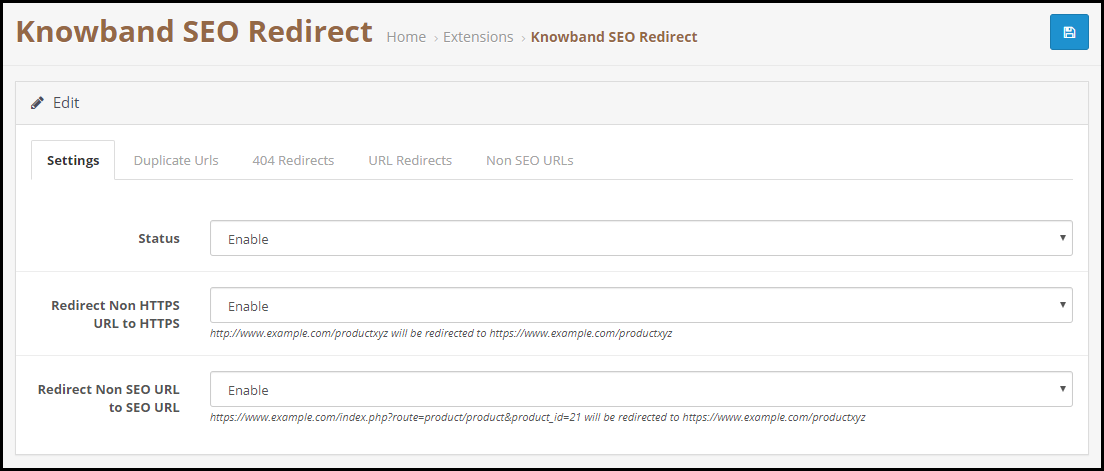
1. Redirect HTTP URL into HTTPs URL
OpenCart URL Redirect module allows you to convert Non-SSL certified web pages into SSL-Certified web pages. Hence, if you have added an SSL certificate to your OpenCart website and want to update the HTTP version into HTTPs, OpenCart SEO Redirect extension will let you do that comfortably.
2. Track and Rewrite Duplicate URLs
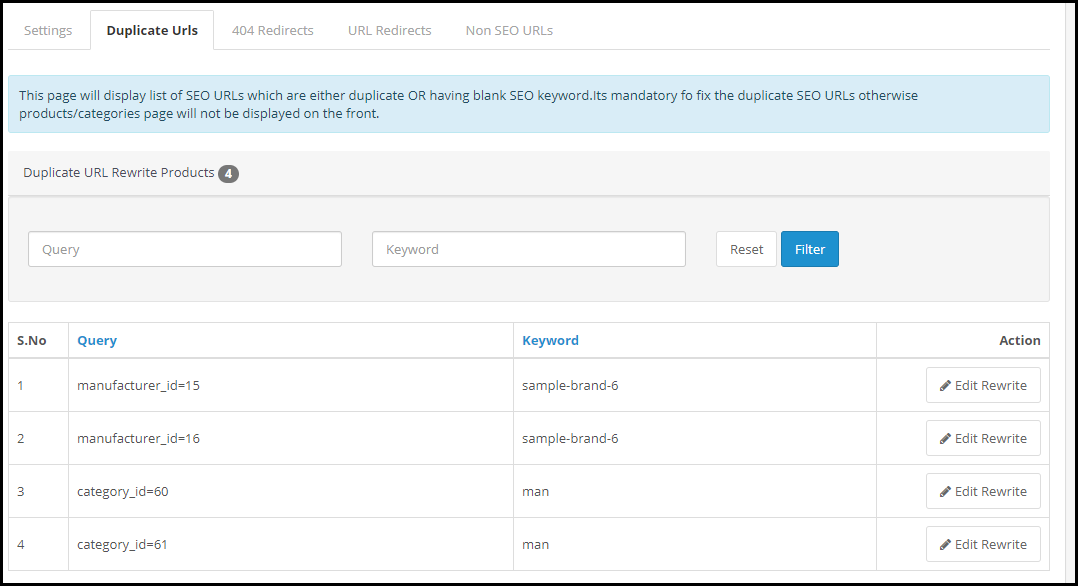
The OpenCart URL cleaner extension displays a list of possible duplicate URLs under the “Duplicate URLs” tab.
It displays the different URL queries associated with the same keyword. You can rewrite a particular URL, modify its keyword and set an SEO-friendly URL and redirect the visitors on the updated URL for that specific query.
3. Perform 404 Redirects
OpenCart SEO Redirect extension helps you perform 404 redirects. Under the 404 Redirects tab are the fetched URLs that are showing a 404 error. It also displays the fetched count of that particular URL.
To redirect a web visitor from those URLs to new URLs, simplify specify the new URL and the URL type. There are three types of redirects that you can perform-
301 Redirect- Moving a URL to a new URL permanently
302 Redirect- Moving a URL to a new URL temporarily
303 Redirect- GET method used to retrieve information
4. Track Non-SEO URLs
OpenCart SEO Redirect module displays a list of the Non-SEO URLs added by the admin, under the “Non-SEO URLs” tab and helps you convert them into SEO-friendly URLs. You can specify the path where you want to redirect a visitor if he or she clicks on its Non-SEO friendly path.
Benefits of OpenCart SEO Redirect Extension-
1. Keep Visitors Engaged
Leading visitors to broken or 404 pages can severely affect your website’s SEO and you may face a higher bounce rate and a decrease in website traffic. These problems get eliminated with OpenCart SEO Redirect Extension.
2. Remove Old URLs
By performing an SEO Redirect, you notify the search engine bot that the old URL has moved to a new path. Hence, it removes the previous existing URL and replaces it with the new one. Web visitors will then see a new URL indexed on the search engine.
If you need assistance with this OpenCart extension, contact us at support@knowband.com
You go to McDonald’s or Burger King. You ask for a Burger but they ask you back in a very polite way “Sir/Mam, would you like to have some fries or coke with it?” This is Cross-selling.
Let’s say you agree to this combo meal which has one burger, regular fries and a small coke. But they ask you whether you would like to have medium or large fries or a large coke. This is Upselling.
A simple definition for these two terms would be-
Cross-selling: It is a practice where you encourage a customer to purchase products related to the one they are already purchasing. These related products are those that add value to the current purchase.
Another example of cross-selling would be buying a screen protector and mobile case along with the smartphone.
Upselling: It is a practice that involves encouraging a customer to purchase a better version of the product they have decided to purchase.
You would have often received suggestions to upgrade your existing plan when buying a subscription for a service. This is another example of Upselling.
Difference between Cross-selling and Upselling
Put simply, the difference between Cross-selling and Upselling is that Cross-selling is making customers purchase products that would seem complementary with the existing product while Upselling is making customers purchase a higher-end product, a product that is slightly expensive than the original one.
Talking about their similarity, both Cross-selling and Upselling intend to bring in more sales and hence more revenue, and at the same time, leaving customers satisfied.
In eCommerce, these strategies are implemented by brands or businesses on the product page so that the prospect can have a look around on the products that could match their purchase before they head towards the checkout page.
E-commerce giants like Amazon and Flipkart encourage Upselling and Cross-selling on their website by using the terms like “Frequently bought together”, “Similar Products”, or “Customers who viewed this item also viewed”.
Cross-selling and Upselling: Best Practices and Strategies
Let’s try to understand how to make the best use of the Cross-selling and Upselling strategy.
1. Make Sure Products are Highly Relevant
For your Upselling and Cross-selling tactics to deliver positive results, the recommended products must sync well with the product the user is purchasing. If they are not relevant, there would not be any added or expensive purchase. Instead, you will be more likely to turn off the customer.
Knowing what would fit with what product is the foundation of a successful Upselling and Cross-selling strategy.
2. Make it Easy to Add Related Items
Simply displaying similar products would not make an effective cross-selling strategy. Let’s say the consumer wants to purchase related products. Now he or she will need to add each item separately to the cart. This, being a time-consuming process, can often be avoided by the user, thinking they would buy it any other day.
How about making the user purchase related products comfortably, right when they click on the “Buy Now” button?
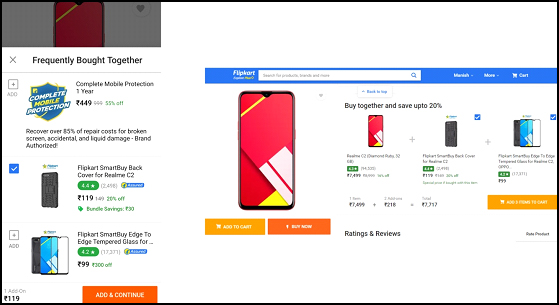
I like the way Flipkart uses its cross-selling strategy. They simply display a “Buy together and save upto” right next to the product and “Frequently Related Products” popup (on mobile devices) that slides up from the bottom and allows shoppers to add the related items right from that place, hence eliminating the extra efforts required to put otherwise.
3. Offer a Bundle Package
Following the second point, the more convenient approach would be to offer a bundle package of the product and its associated products. And the bundle should be comparatively at a lesser price than the total price of the individual products combined. It creates higher chances of a sale.
Benefits of Cross-selling and Upselling
Let’s take a look at what benefits do Cross-selling and Upselling provide.
1. Increased Sales and Revenue
Since cross-selling encourages customers to purchase similar items, it leads to an increase in the sales count and hence boosts your revenue.
This strategy often helps businesses sell those products which otherwise are gone unnoticed or purchased very rarely.
2. Increased Average Order Value
With both Cross-selling and Upselling pushing customers to spend more than the actual amount, this ultimately leads to an increase in the average order value.
3. Increased Customer Engagement
Customers tend to spend more time interacting with the products on your website when you display the related or better version of the products. They engage more, thus generating higher user engagement.
4. Customer Satisfaction
Upselling and Cross-selling help potential customers in their purchase decision by recommending them products which could go well with their purchase or get even better. This leaves customers highly satisfied after the purchase, hence enhancing the customer experience.
Want to enable Cross-selling and Upselling on your eCommerce website? Try out our Automatic Related Products module.
Automatic Related Products Module by KnowBand
The Related Products module by Knowband helps you perform Cross-selling and Upselling on your eCommerce website. This lets you display best sellers, new arrivals, top visited products and products based on a user’s history, on the Home Page, Product Page, Category Page, Cart Page, etc.
You can specify a limit to the number of products to be displayed and also select the display position. The module is available for PrestaShop and OpenCart. Check out
If you liked this information on Cross-selling and Upselling, do leave a comment below. And if you need any kind of assistance with the Related Products module, you can reach out to us at support@knowband.com
Product reviews are arguably the most useful way to eliminate shoppers’ concerns regarding a product. A majority of the people are influenced by product reviews in their purchase.
No matter whether you are a popular brand or just started out, product reviews do play a crucial role in your eCommerce business as far as credibility is concerned. Credibility is one of the key elements that decide the success of your brand in the long run.
Merchants often overlook the importance of product reviews. The major focus remains on designing the site look and optimizing the checkout page but nothing really matters if you are not getting good reviews on your products.
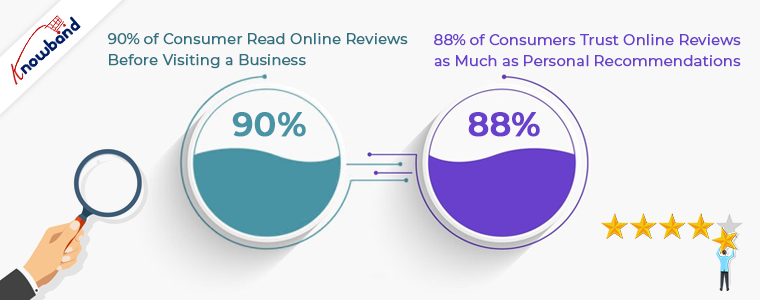
The importance of product reviews can be understood by the fact that 90% of the consumers read online reviews before making a purchase and 88% of the consumers will be prompted to take an action after reading positive reviews. (Stats collected from Invesp)
What is Product Review?
Product reviews are the opinions or feedbacks of customers for a particular product. Many online businesses put up a review section on their website to allow customers to rate and review the product they purchased.
A product review helps other users get a clear idea of the product before purchasing it. They can read the reviews and make their mind clear, and decide whether the product is worth purchasing or not.
If you have not added a product review section on your eCommerce website, only because of fearing negative reviews, you are losing out on a huge number of potential customers.
Importance of Product Reviews
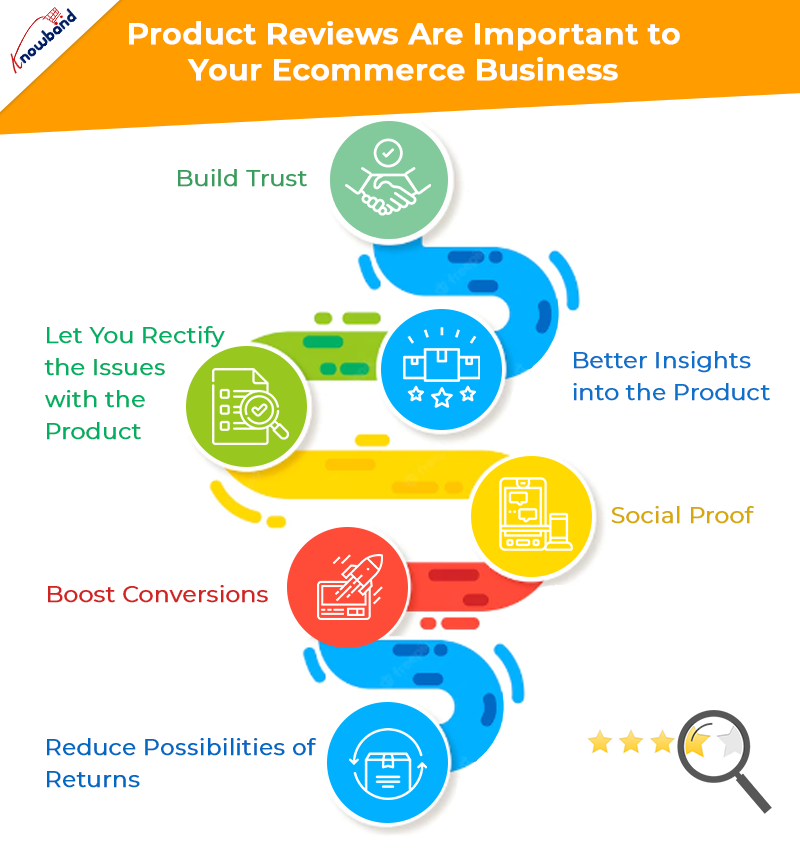
In this write-up, I have provided 6 reasons why product reviews are important to your eCommerce business. Let’s have a look.
1. Product Reviews build Trust
When a user lands on your website with the intention of making a purchase, the first thing that they look for is reviews.
A product having good reviews would surely be able to help the prospect in his/her buying decision. They would likely put their trust in your products as well as your Brand.
Amazon displays average ratings for products based on customers’ feedbacks, right on the top of the product page, and at the bottom are the customer’s reviews. Whenever a prospect visits the product page, they are straight away displayed the product ratings along with the number of people who rated that product.
2. Product Reviews provide better insights into the product
Hearing from people’s past purchase experience helps the prospects identify whether the product has earlier matched customer’s expectations or not.
I mean, Brands will obviously try to highlight every feature of the product in the best way possible, but it is the customers who will give honest feedback on the product.
When a customer leaves a review for the product, he is helping others understand what they can expect from the product, how is it performing, what are its flaws, what are its pros and much more.
3. Product Reviews let you rectify the issues with the product
If a majority of customers are pointing out the same problem in the product, it is for you to take the onus of rectifying the defect so that the issue gets resolved. Yes, there are possibilities of a damaged or defective item reaching the customer but it happens with a few customers only.
If the problem is major, you need to look into it and get it fixed as soon as possible. Put simply, customer reviews help you find the loopholes in the product and provide you with an opportunity to improvise on those areas.
4. Product Reviews work as Social proof
One of the major benefits of product reviews is they can do wonders to your Brand. You would have often seen brands highlighting what their customers have to say about their products or services. These are what we call as testimonials and they make a significant impact on a prospect’s purchase.
Display testimonials through your social media pages and on the home page of your website. It is one of the best ways to promote your brand that can attract a large number of potential customers to your website and also leave an excellent impression when a visitor lands on your website.
5. Product Reviews boost Conversions
If you delivering up to your customer’s expectations, product reviews are going to play a huge role in your conversions. People would openly do the marketing for you by leaving positive reviews. And even a single positive review can lead to an increase in the conversion rate.
Yes, there will be a few negative reviews as well but till the time they have a low count, you do not need to worry much. Each and every customer cannot be satisfied. If the product has the quality and people have given positive remarks to it, more and more people will be encouraged to buy that product.
6. Product Reviews reduce possibilities of Returns
If you do not display product reviews, how are online shoppers going to decide the product quality? They would not be confident enough to make a purchase. Moreover, they will have doubts regarding product quality.
Let’s understand it this way. You have a product but provide no customer reviews. Now users can only hope that the product does not turn out to be defective or has a low-quality. It is very much possible that they receive a genuine product but if in case they don’t, they will be left with no choice except placing a return request.
Now let’s figure out how this could have been sorted with product reviews. A product having good ratings and reviews would likely face fewer returns, simply because most of the customers are satisfied with it, whereas on the other hand, if negative reviews are dominating positing ones, it simply means that most people have faced some kind of issue with it. And hence people would not even go for the purchase, in the first place.
Customer is the king. They are the ones who can either take your business to new heights or bring it down drastically. Their feedback is highly important as it will only be their experience that will decide how good your product is.
And there is no shame in having negative reviews. They are people’s honest opinions which you give a reality check. And it also shows that you welcome whatever a user has to say with open arms.
Since there is not any technology yet that could let users examine a product online, the importance of product reviews becomes supreme.
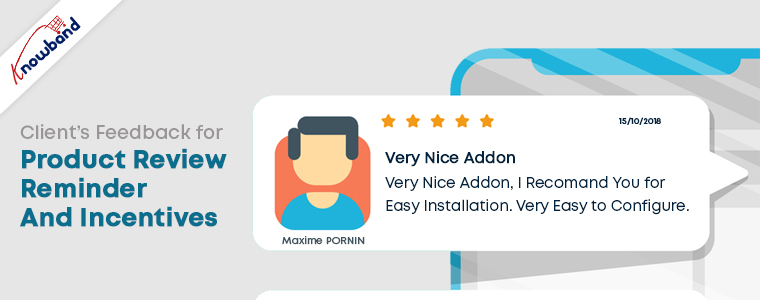
Make reviews more fun with Review Reminder and Incentives module.
With the Review Reminder and Incentives module, you can offer your customers rewards for every successful review posted. You can set the timing for the review reminders to be sent over email, customize those emails, set the incentive value and much more.
Every review posted will be first submitted for approval. Only after you approve, the end customer receives the rewards. Sounds exciting, doesn’t it?
If you would like to add something to this content, feel free to leave a comment below. Or if you need any assistance, you can contact us at support@knowband.com
If you landed into this page to know about social login best practices, I am assuming that you are very well aware of the term social login.
A simple definition of social login would be- “A method to encourage quick signup and save users’ time.”
You would have often witnessed the social login option on several websites. Almost every eCommerce Brand has incorporated this option on its website today.
Businesses do understand the benefits of social login, but one should also know to make the best use of this option. This is what I would be covering today.
In this write-up, I have presented 5 social login best practices to make it more effective. Let’s begin.
1. Use Popular Social Networks
The primary social login best practice would be to implement the widely used social networks.
You would mostly see the Google and Facebook option in the name of social login, and it makes sense too. People can sign-in using their Gmail account, and I do not even need to introduce you to the popularity of Facebook. These are the default options.
But people are now actively using other social networks as well, for example, Instagram, Twitter, LinkedIn, etc. And I feel people are spending more time on Instagram nowadays rather than Facebook.
Consider using these options as well, especially Instagram. This would give visitors enough choices to choose their preferred login option.
2. Choose the Right Format
Another social login best practice would be to use the appropriate size of the social login button.
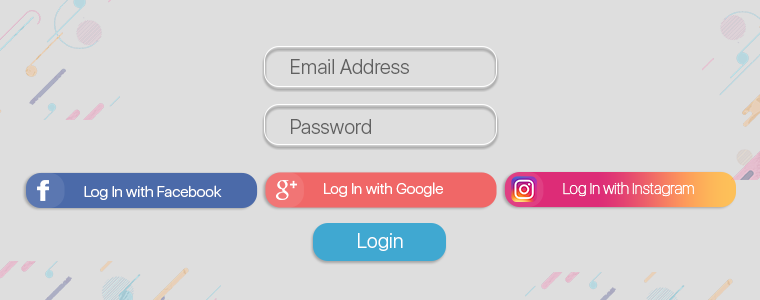
You can use a large rectangular button that says Login with Facebook, Login with Google or Login with Instagram, or you could use a small circular button with the logo of the social network on it.
It is totally up to you what format you choose. Just make sure it goes well with your sign-up form. If the form is already filled up with too many inputs, avoid using the large button. The small circular buttons would make the perfect fit in this case.
3. Choose the Right Position
The position of the social login block is crucial to bring more clicks and more user signups. Even before that, what’s important is to check where your login and signup button is placed currently.
If it is not visible on the first look, the social login would not make much impact. So the first thing to perform is to make it clearly and easily visible.
Then comes the next part, i.e. positioning the social login buttons perfectly. Make sure each login option has enough space from the other and they catch the visitors’ eyes at once.
The sign-up page should not look cluttered. It should be presented neatly. This gets more user engagement.
4. Place it on Multiple Pages
Adding to the list of social login best practices is putting the social login facility on a number of pages and not just at any particular page.
For best results, place social login on the login page, registration page and checkout page. If it doesn’t appear at the checkout page, it can hamper the checkout experience abruptly. You would surely not like to see that happen.
Some social login plugins do ask for the netizens’ permission while they try to log in using a social network whereas some collect the information straightaway. The latter is not the best practice.
Though when the user clicks on the social login button, it means he or she wants to use that platform to sign-up, asking for the user’s permission is ideally considered more professional.
6. Avoid Possibilities of Duplicate Accounts
When users pay a visit to your website after a long time, they usually forget how they registered on your website initially. This puts users in confusion and they find it tough to deal with.
Let’s understand this with an example. A Facebook account can be created even without an email. So if a user has registered on your website using his/her Facebook credentials, and the next time he tries to sign-up via Google or any other means, this would create two accounts of the same person.
Inform users that they have been registered already with whichever network they used for the first time. If they preferred Facebook initially, tell them that they already have an account using Facebook login.
Encourage them to continue with the same login option.
It’s time to implement Social Login on your Website
If you want to add the social login options on your website, try our Social Loginizer module. This module provides you with a variety of social network options. Select your preferred ones and get set go.
You can check out the plugins from the Knowband store for your eCommerce platform.
If you found this information on social login best practices useful, do leave a comment below.
“PrestaShop Mobile Login is a module that enables the OTP verification system on your website for user login and sign-up.”
People experience password fatigue on a daily basis. Whenever they land on any new website and sign-up, one more password gets added into the list.
And trying to remember each and every password is too tough a task. People would shuffle up passwords in their mind and then scratch their heads recalling the correct one.
This often compels users to take an exit from the website, or even if they try resetting it, it is a time-consuming process. This is where Mobile Login makes things easier for your visitors.
PrestaShop Mobile Login
PrestaShop Mobile Login allows your customers to log in to their account on your website using their mobile number. To make things more secure, you can integrate an OTP verification process. Users just simply need to verify the number through an OTP. Once verified, they will be allowed to access their account.
Today, most of the online transactions are taking place through mobile devices. As per Statista, M-commerce sales are expected to consume 70% of the total eCommerce sales on a global level. Mobile login, offered by Knowband ensures that the user experience is highly maintained and mobile users do not find any sort of difficulty while registering or signing up on a website.
Features of PrestaShop Mobile Login
Let’s take a look at the features/configurations of the PrestaShop Mobile Login module.
1. Specify the minimum and maximum length of contact number
The PrestaShop Login by Mobile number module lets you set the minimum and maximum length of the mobile number. The country code is excluded from the limit.
The contact field displays an error if the limit is not reached or if it is exceeded.
2. Customize your Registration form
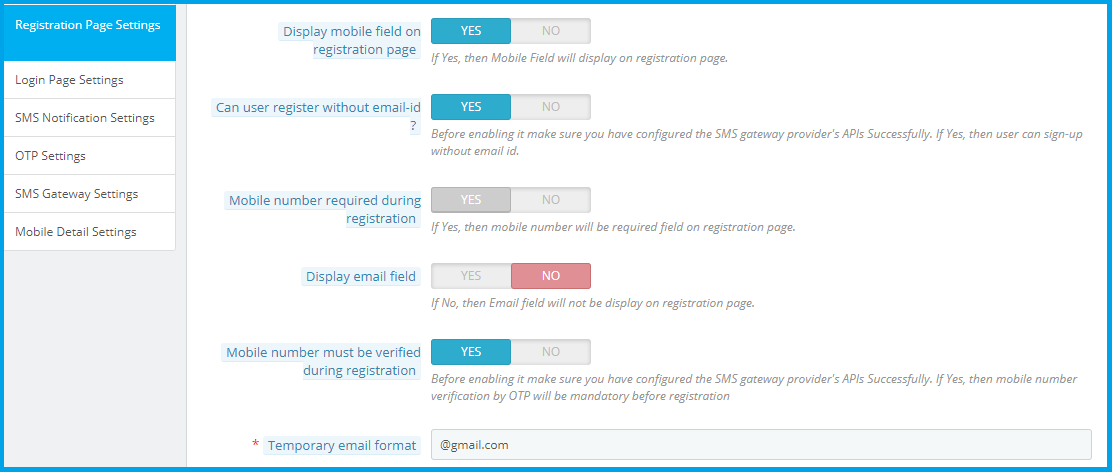
PrestaShop Mobile Login module lets you customize your registration fields. You can display mobile field on the registration page, allow users to register without an email address, make mobile number verification compulsory, generate a temporary email address for the users who did not provide an email address, etc.
If mobile number verification is turned on, then no user would be able to register without verifying the One Time Password (OTP). This is why this module is also called as PrestaShop Login by OTP module or simply PrestaShop OTP verification module.
You can also opt to hide the email field from the registration page.
3. Customize your Login form
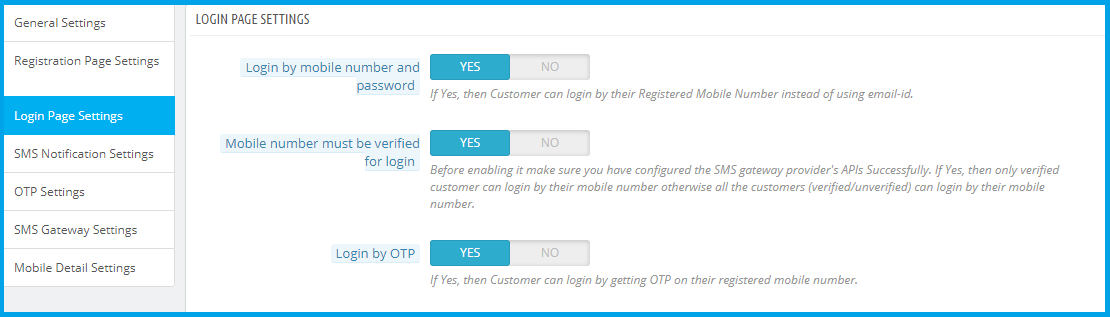
The Login form allows customers to log in through two means:
– Login through mobile number and password: Customers can sign-in with their mobile number and password without any verification.
– Login through OTP: Customers can log in by verifying the OTP sent to their contact number.
4. Password reset through OTP verification or Email
If a user has forgotten his/her password, which is likely possible, the PrestaShop Mobile Login module provides those users to reset their password either by verifying their mobile number or getting a reset password link over their email.
5. Send a message on User Registration and change of Order status
You can land a text in your user’s inbox once they register and you can also inform them via text when their order status is changed.
The SMS can be personalized for both.
6. Modify OTP settings
– Specify the OTP length: It should be more than 2 digits and less than 20.
– Customize the text to be sent along with OTP
– Specify the OTP expiration time
– Specify when the “Re-send OTP” button should appear
– Limit the OTP requests
– Set a block duration for invalid OTP requests once it reaches the limit
7. Select your preferred SMS Gateway provider
PrestaShop Mobile Login module offers three SMG Gateway providers, namely Twilio, SendinBlue, and PrestaSMS. Choose as per your requirements.
Note: In case you are planning to integrate any other SMS Gateway Provider, feel free to contact our support team to check if the integration is possible or not.
8. Personalize your texts as per the Order Status
PrestaShop Mobile Login module gives you the option to personalize your texts as per the order status. Just head over to the “Mobile Detail Settings” tab and make the required changes.
Benefits offered by PrestaShop Mobile Login
PrestaShop OTP Login module offers the following benefits-
1. Login made Easy
Since customers can simply log in using their mobile number, there is no need to remember the password. Well and good if they remember, but even if they don’t, there is nothing to worry about.
2. Secure Verification
The OTP verification system makes registration/login more secure and you get more valid data and verified customers. Fake registrations are eliminated.
3. Enhanced User Experience
With just the requirement of the mobile number to log in, the PrestaShop Mobile Login module enhances the user experience to a great extent.
If you have any queries and need some assistance with this module, you can contact us at support@knowband.com
An email list is of paramount importance for any online business. It contains useful data or customer information that businesses use to market their brand, products and services, or provide some kind of valuable information to their subscribed audience.
Having an email list helps brands reach out to their subscribers and persuade them to take some action. It could be about making them download an ebook or read a blog post, or it could be an announcement of the upcoming sale.
The more people you have in your email list, the more profitable it is for your business. Brands use various tactics to capture the email address of the users. In this article, I have presented 5 ways to build and grow your email list.
But before I begin, let’s try to understand why you require building an email list.
Over the years, emails have proved to be one of the best marketing mediums. Though the impact has slightly diminished with the introduction of social media, email marketing still holds high significance among marketers.
Moreover, it is a globally used marketing strategy and is still a powerful communication channel that can bring you high conversions.
According to some stats collected by Hubspot, 93% of the B2B marketers leverage emails to deliver content and more than 59% of the marketers say email is their biggest ROI source.
Considering the benefits that email bring to your eCommerce business, let’s now shift our focus on how to grow an email list.
1. Use Lead Magnets
A lead magnet is an incentive that businesses offer to prospects in exchange for their contact information such as name and email address. It comes in the form of an email popup and makes it one of the best techniques to grow your email list.
Lead magnets usually contain irresistible offers, and consist of compelling elements to make users drop their email address and grab those offers.
For a lead magnet to deliver the best results, make sure it is adding value or providing some kind of benefits to your visitors. No visitor will turn into your subscriber if they are not getting benefited from it.
2. Grow your Email list using Engaging Popups
Email Popups have more or less been an annoyance for netizens. They disturb the user flow and hinder the user experience.
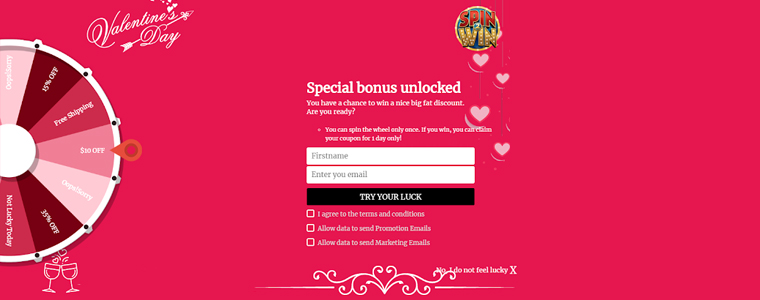
But popups like Spin and Win have been widely used by online businesses. In fact, the very famous Digital Marketer Neil Patel also used to have the Spin and Win popup on his website.
The reason why this kind of popup is helpful in building your email list is that it adds fun to your approach to collecting email addresses.
You can incorporate this on the home page of your website and ask users to spin the wheel to earn some amazing deals and offers. It not only helps you grow your email list but also increases user engagement.
Apart from this, you can make use of Exit Popups. They have been effective in capturing the email address of the visitors as they tend to appear only when the user is trying to exit.
Knowband also offers Scratch Coupon module, a strategy to capture email leads, which you can use to draw visitors’ attention and develop curiosity inside them.
3. Include Intriguing CTAs on your Blog Posts
Another efficacious way to grow email list is by adding intriguing CTAs to your blog posts.
For whatever purpose the CTA is designed for, whether is a PDF download link or a link to the lead magnet, make sure it is relevant to the content.
For example, if I have prepared a guide to reduce cart abandonment and I am showing the CTA related to it on a blog post that discusses social media, it would not make any sense.
However, if that CTA is attached to a blog related to cart abandonment, it would show effective results as it matches with the content. CTAs work well if they go with the content flow. That way, you do not interrupt the reader’s flow.
Some other useful tips for a performing CTA would be to make it short and catchy. It should evoke interest in the users immediately, and drive them to make an extra push.
4, Ask Visitors to Subscribe to your Newsletters
Newsletter subscription is still considered helpful in building your email list.
At the end of your blog posts, you can ask readers to subscribe to your newsletters and get updates on the latest contents, offers or any important information.
You can also ask for it via a popup but it should not appear instantly. Give some time to the readers to go through your content and then ask for their permission.
A successful mantra to collecting email addresses for newsletters is to write quality and evergreen content. It is the only thing that decides the interest of the users towards receiving newsletters.
The more quality you have in your content, the more people will be inclined towards your business.
5. Build Email List through Social Media
You simply cannot overlook social media if you want to build your email list. It is a platform that can increase your email subscriber’s list rapidly.
To acquire more email leads, choose the platform that suits your niche. For example, Facebook and Instagram can be ideal for B2C businesses whereas B2B businesses would pay more focus on LinkedIn and Twitter.
So what would be the ideal way to collect email addresses?
Add the sign-up button on your Facebook Business page, host contests and giveaways, provide freebies that require users to enter their email address and promote the same lead magnet on your social media pages.
Most of your future subscribers are waiting there to be a part of your email list. If you are not using it, you are missing out on a huge opportunity to multiply your subscribers count.
It is important to know what people think about your Brand. Their opinions could make an impact in your business’ success.
When visitors are about to leave your website, introduce a popup that asks them for their feedback. Ask them if they have any suggestion, complaint or any comment that they want to make so that you could improve.
Make them feel that their opinion matters a lot to you and you would be obliged to receive their remark. The feedback form should have the option of name, email address and comment, that’s it.
The Bottom Line
There are tons of other ways to build and grow your email list apart from these 6 major techniques, some of which are-
Adding testimonials to your website- This builds a visitor’s trust on your brand and they are more likely to get connected to you.
Using Gated content- This restricts the full content view and displays only a small chunk. Users need to enter their email address to get full access.
You can also try using lightbox and sidebar popups, add a floating bar or place an offer strip on the header or footer.
Look out for these strategies to build your email list and see your subscribers count climb up. Just a piece of advice- once you add them to your list, make sure that you do not spam them. You do not want them to hit the unsubscribe button, right?
“OpenCart CCPA Extension helps California businesses comply with the CCPA law without following any arduous approach. The extension makes it easy to set up the California Consumer Privacy Act conditions on the front end of your website.”
What is CCPA?
CCPA stands for California Consumer Privacy Act. Passed on June 2018, by the California State Legislature, the law will be effective for businesses from January 1, 2020.
The businesses falling under this law would be those who have gross annual revenue of more than $25 million, have personal data of more than 50,000 consumers and earn half of the total annual revenue by selling consumer’s personal information.
It is implemented to give consumers better control over their data and to avoid breaching of personal information.
The law gives consumers
Right to Access- Have a check on the information that the company has collected about them.
Right to Deletion- Ask companies to delete their personal information.
Right to Equality- Not to be discriminated against consumers for denying any product or services to the consumers or charging a different price.
Right to be Informed- know what kind of data is getting shared and why is it getting shared and to whom.
Right to Opt-out- Deny companies to share the personal data to any third party.
OpenCart CCPA Extension
Understanding the urge of businesses to comply with the CCPA law and avoid any penalty, OpenCart has introduced the CCPA Extension. OpenCart CCPA extension simply adds a “Do not sell my data” tab at the front end header.
The tab consists of the following 5 options-
1. Right of Access to Personal Data
2. Right to Data Portability
3. Right to be forgotten
4. Right to Data Rectification
5. Right to User Consent
Let us have an in-depth analysis of each-
1. Right of Access to Personal Data
Through this option, consumers can ask a business to share the personal details that they have collected over time.
All a consumer needs to do is provide his/her email address and submit a request. Once submitted, a confirmation email will be sent to the consumer. Upon confirmation, they will receive their personal data over their email address.
It will display the entire information the business has captured about the consumer.
2. Right to Data Portability
This option allows consumers to download their personal data in a CSV format. They can download their personal information, address details and order details.
They just need to submit a request to the merchant.
3. Right to be forgotten
This right allows consumers to permanently delete their entire information from the website. A consumer just needs to request for his/her account deletion by providing his email address.
Upon confirmation, all the associated data of the consumer will be removed from the system and they will no longer be able to access their account, however, they can create a new account using the same email address.
4. Right to Data Rectification
This option allows consumers to rectify their existing information on the website. It includes updating personal information, address and password.
Put simply, a consumer can modify their personal information easily.
5. Right to User Consent
The last option that we have is “Right to User Consent.” Under this option, you can ask for the consumers’ consent regarding sharing of their personal data with the third-party websites or selling it for the monetization purpose.
As per the CCPA law, consumer aged between 13 to 16 has the right to opt-in for allowing sharing of their personal data and consumers below 13 need a guardian authority.
Get the OpenCart CCPA Extension today. If you need any assistance regarding this extension, you can raise a ticket at support@knowband.com
The 1st day of the year 2020 will mark the arrival of new privacy law for the people and online businesses of California. The law is named as California Consumer Privacy Act, or CCPA, also denoted as CaCPA, sometimes.
The CCPA bill was passed by the California State Legislature on June 18, 2018, and will turn into an Act following January 1, 2020.
What is CCPA?
The California Consumer Privacy Act deals with the privacy of the people residing in the California state of the United States. The CCPA compliance will enforce businesses to allow consumers to get insights into their personal information being captured by them.
Companies would be required to share what data they have collected of a consumer, and modify or delete it on a consumer’s request.
It’s a great initiative to keep consumers’ privacy within a boundary and maintaining transparency. This will also have a positive effect on the brand-customer relationship since consumers will have more control over their personal data.
Today, there is a heavy breach of data all over the world. Data is getting stolen and sold to companies that even have no relevance with that audience.
California legislators realizing the importance of respecting consumer’s privacy and keeping it confidential introduced CCPA which was the demand of the hour.
CCPA Consumer Rights
Let’s take a look at the consumer rights that fall under the CCPA law-
1. Right to Access Personal Data
Consumers will be able to track what information do the businesses have about them. They can request the business to disclose the information they have collected.
2. Right to Deletion of Data
Consumers will have the option to approach a business and ask them to eradicate their entire details from their business panel. This will lead to the permanent removal of the customer data.
3. Right to be Informed about the Data collection
This gives consumers the right to ask what kind of information is being collected by the businesses, whom it is getting shared with or why it is getting shared.
4. Right to Opt-out
Consumers have the right to say no to the distribution of their personal data to any third party company.
There is also the right to opt-in for the minors, which says that any consumer aged between 13 to 16 can permit businesses to sell their information. Consumer below the age of 13 will require authority through a guardian.
5. Right to Non-discrimination
CCPA highly forbids businesses from discriminating against the consumers. It prohibits-
Discrimination denying goods or services to the consumer
Discrimination for charging a different price than the original price of the goods and services
Discrimination on the level of quality
In short, consumers have the right to equality or say equal prices and services.
Who does CCPA apply to?
CCPA applies to businesses that have-
An annual turnover of more than $25 million
Data of more than 50,000 consumers
Earn more than half of the annual revenue selling consumer’s personal information
To comply with the law, businesses need to add the options on their website that matches with the above-mentioned consumer rights. Feeling the necessity, KnowBand has come up with the CCPA module to help businesses go in accordance with the CCPA law.
CCPA Module by Knowband
The CCPA module by Knowband adds a CCPA tab on the front end of your website. Customers can visit that section and raise a request regarding any information falling under the rights in the CCPA law.
This module is currently available for PrestaShop and OpenCart merchants. Check out-
It’s high time to re-structure your privacy policy. Companies failing to comply with the CCPA law can be charged with a heavy penalty of up to $7500 depending on the level of breach.
For any query or assistance, reach out to us at support@knowband.com
“PrestaShop GDPR addon helps EU business comply with the GDPR law and avoid any kind of troubles in the future. It adds a GDPR tab on the front end of your website and allows your customers to raise a request regarding data access, modification or deletion, any time.”
GDPR stands for General Data Protection Regulation. It is a law implemented for European countries on 25th May 2018 to enhance the data privacy of the people.
Every online business was enforced to comply with this law and it gave EU citizens better control over their private information. Any business failing to follow the GDPR law would be charged a heavy penalty.
With this law, people would be able to check what information does a website have about them and they would be able to modify the details they want to share with a business.
Realizing the extreme importance of GDPR in the EU countries, Knowband comes up with the GDPR- Rights of the Individual addon.
What does PrestaShop GDPR addon offers?
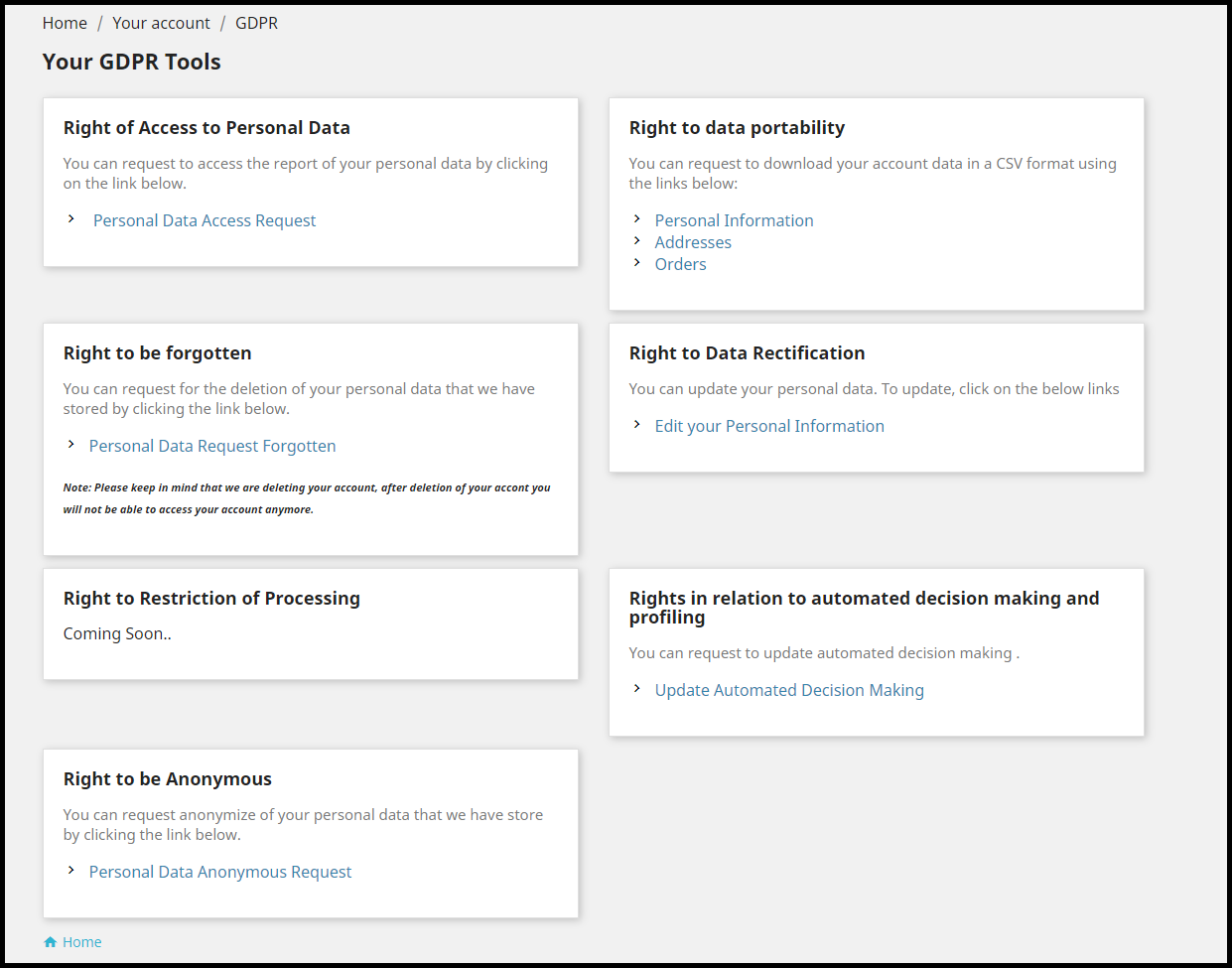
Once installed, the PrestaShop GDPR module places a GDPR tab on the header that has the following options:
1. Right of Access to Personal Data
2. Right to Data Portability
3. Right to be forgotten
4. Right to Data Rectification
5. Rights in relation to automated decision making and profiling
6. Right to be Anonymous
7. Right to Restriction of Processing (Coming soon)
Let’s try to get insights into each option-
1. Right of Access to Personal Data
Through this option, the customer can raise a request to the merchant to get access to their personal data, by submitting their email address.
The user receives the confirmation email. Once confirmed, the report is sent to the user.
From the backend of the module, you can check the requests of the users who have raised the data access request, under the GDPR Personal Data Request tab.
2. Right to Data Portability
Through this option, the customer can download his/her data in a CV format. This tab consists of three options named as-
Personal Information
Addresses
Orders
The customer needs to head over to the desired option and they will get the option to download your data, after confirming the email address.
The requests can be seen under the GDPR Data Portability tab in the backend of the module.
3. Right to be forgotten
This option allows customers to permanently delete their account details from the website.
Once performed, the user details would be removed from the store and they would be required to create a new account if they wish to come back to the store.
The account deletion requests can be seen under Data Forgot Request tab.
4. Right to Data Rectification
This option allows customers to rectify their existing information captured by the brand. It allows editing personal information, address and the option to update the password.
The merchant can check the rectification requests under GDPR Rectification Request.
5. Rights in relation to automated decision making and profiling
Through this option, consumers can check which services have they been automatically subscribed to. Upon request, the consumers have the option to choose only those automation services which they would want to receive.
6. Right to be Anonymous
If a customer does not want to share his original email address with the brand and want to remain anonymous, they can opt for this option.
Upon submitting this request, the existing email address of the user will be replaced by a system-generated email address. These requests can be looked under the GDPR Anonymous Request tab.
7. The Right to Restriction of Processing
This option is not available to use as of now but would soon be reflected in the module.
Let’s now come to some general settings of the PrestaShop GDPR addon.
General settings
1. Specify the number of requests a customer can raise in a single day.
2. You can mention the time after which the user account will be deleted permanently.
3. You can customize the cookies consent bar.
4. You can enable or disable any option at any time.
5. Customize the user consent option as per your requirements from the User Consent tab.
6. Restrict GDPR to some specific countries or specific IPs only.
7. You can customize the email templates and adjust the cron functionality.
There are many more options available in this module. Check out the PrestaShop GDPR addon to know its complete features and benefits.
For any assistance regarding this addon, kindly contact us at support@knowband.com
User Engagement is an important aspect in the eCommerce space. Failing to engage users on your website results in a high bounce rate and eventually losing out on potential customers.
Brands try to implement multiple strategies to increase user engagement. But before we delve into the user engagement strategies, let’s try to understand what it is and why is it important.
What is User Engagement?
In simple terms, User Engagement, or Customer Engagement is the interaction, or say the behaviour of users towards your website, product or services. It can be measured by certain activities such as clicks, downloads, shares, etc.
To be precise, customer engagement and user engagement are generally considered the same but there is a slight difference between both.
Customer engagement is the interaction of customers, people who buy from your brand and have much more knowledge than random or anonymous visitors to which we term as users, and hence the term user engagement.
A customer is always a user but a user cannot always be a customer. Highly engaged users are an asset for any business as they keep coming back to the website. And the more time they spend on your website, the more likely they are to turn into your regular or loyal customers.
Why is User Engagement Important?
User engagement has a key role to play in the success of your products or services. If users are spending time on your website or on the mobile app, it means it is providing them with some value and they are liking you as a brand. For example, let’s say you have a blog. You are getting good hits. People are coming to your blog, reading the information that you have put, leaving comments, checking out the products that you have enlisted in your blog content. What is it? This is all user engagement.
Highly engaged users are good brand advocates. They will not only purchase themselves but would recommend your brand or its products to others as well.
User Engagement Metrics
The definition of user engagement varies from business to business. Depending on the niche, businesses measure user engagement through certain factors.
For example, for a blogging website, the bounce rate and the average time spent by a user would reflect user engagement. For online streaming platforms like Netflix and Hotstar, user engagement would be determined by how much time people spend on watching. E-commerce websites would track how often users are interacting with the products or adding the items to the cart.
How to Increase User Engagement?
There are certain ways to increase user engagement. In this article, I have put up 5 best strategies to increase customer engagement.
1. Cut-down the Page Load Time
The primary thing to do to increase user engagement is reducing the page load speed. I mean, there is no point of talking about increasing user engagement if your website takes too much time to load.
A study says that users bounce off from the websites that take more than 3 seconds to load. Your website design, products, offerings, none of it really matters if your website does not load quickly.
Eliminate unnecessary and clunky elements that are causing slow loading. You can download a few plugins that will help you improve your page load speed.
One of the few plugins that I would recommend is the Accelerated Mobile Pages plugin. The AMP module increases the page load speed in mobile devices, thus reducing the bounce rate and the page load time.
You do not want your users to cringe when they enter your website, right? Your motive is to engage users.
So, it is important that your web pages are well set up and do not look cluttered. If you want users to take some action, you need to make them comfortable first.
Who would not want to spend a little time browsing through a website that looks pleasing?
Pay most attention at your home page. It is the interaction point of your website. Fill it with elements that leave a strong impression and encourage users to take action.
If it is packed with some exciting information, users will interact more and you will surely witness higher user engagement.
3. Easy Navigation
Before you aim to increase user engagement, make sure you have optimized your website for great user experience. User engagement is directly proportional to the user experience.
And one of the best ways to increase customer engagement is by having a simplified and attractive navigation bar. There must be enough space between the tabs, proper listing of categories and sub-categories. In short, it should appear professional.
Knowband’s Navigation Bar
Also, have an easy to spot search bar. It should be eye-catchy so that if a user visits your website to make a search, the search bar is instantly spotted.
M-commerce has already gone past eCommerce and it is going to be a dominating factor in the upcoming years as well.
The count of smartphone users has increased too. So, it is to be kept in mind that your website is equally optimized for mobile devices as it is for desktop. To put it simply, it should be responsive.
A non-responsive eCommerce site will look bulky and unorganized in mobile phones and might compel users to take an exit. This can have a severe effect on the bounce rate.
Thus, having a mobile-friendly eCommerce website is necessary to increase user engagement.
5. Encourage Cross-selling and Up-selling
It is always a good idea to display related or even better versions of your product. Browse Amazon or Flipkart, they have a separate section that says “Similar products” or “Frequently bought together”.
You can follow the same approach on your website too. Up-selling and Cross-selling are some effective ways to engage users.
I am putting forward a list of tools that will help you increase user engagement.
1. Increase User Engagement with “Spin and Win”
One of the best ways to engage users on your website is by incorporating a Spin and Win popup on your website. Today, it has been adopted by many eCommerce brands.
It adds a Gamification element to your website and engages users in a fun activity, persuading them to spin the wheel to win some exciting offers.
Not only it works as a user engagement tool but also helps you grow your email list comfortably and boosts your conversions.
2. Place a Scratch Card on the Header with “Scratch Coupon” Module
The Scratch Coupon module integrates an unscratched coupon on the top of your website and makes it an amazing technique to draw user attention.
Curious to see what’s behind the scratch card, users scrape the coupon. The coupon contains your website deals and offers which the user can avail after scratching it.
This proves to be an effective way to increase user engagement.
3. Test with “Infinite Scroll”
You can give a thought about implementing Infinite Scroll on your website. The Infinite Scroll module converts the pagination process into continuous scrolling.
Users do not need to click on the next page to visit it. With Infinite Scroll, the next page content is automatically fetched and displayed within the same page, as the user scrolls down.
But this user engagement tool does not fit with every eCommerce business. So, before you decide to opt for the Infinite scroll, check whether it would suit with your business niche or not.
With Web Push Notifications module, you can reach out to your subscribers even when they are not present at your website. You can use this tool to send abandoned cart notifications, stock alert notifications, price alert notifications, flash sale notifications, etc.
The Bottom Line
For a successful conversion, or taking users onboard, user engagement has a significant role to play.
User engagement will automatically increase if you focus on improving the user experience and manage to reduce the bounce rate.
Apply the above-mentioned user engagement strategies, try out the user engagement tools and see if they have helped you achieve desired results.
For any doubt regarding the modules, you can contact us at support@knowband.com