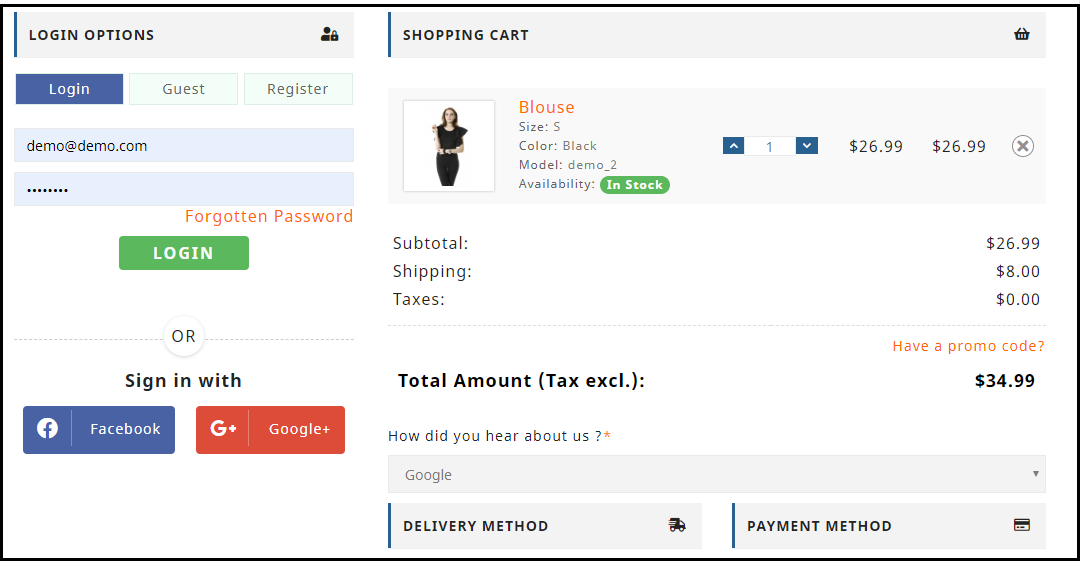
How to set up your Online Grocery Business with Store Pick-up Facility?

The COVID-19 pandemic has created a frightening situation worldwide. Businesses are experiencing a heavy downfall and the global economy has dipped due to the current crisis.

While the countries remain in lockdown with almost everything being shut, stores providing essential items such as Grocery and Pharmacy are still available so that people can fulfill their basic needs.

This is the time when Grocery retail store owners can take their business online and give it a huge boost. Besides, you can set up the store pick up facility on your website using the Store Locator and Pick up module and manage your orders efficiently.

How does Online Store Pick-up module help?

The module lets you add your retail stores on your website and allows customers to safely pick up their order at their desired time. This will help you avoid a massive crowd near the stores and would save customers a lot of time.
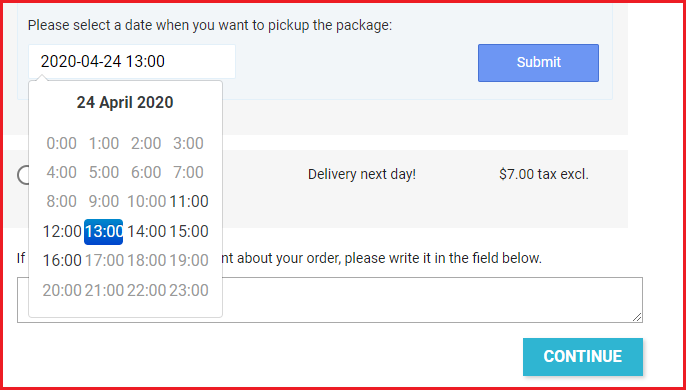
You can configure the pick-up timing, upload your stores through CSV and do much more. More details are mentioned at the end of this blog post.

The grocery business is currently the most benefited in eCommerce amid the Coronavirus outbreak. Due to intense demand, many physical grocery stores have moved towards the online platform. If you are also looking to make a shift and set up an online grocery store, this write-up is specifically for you.

Did you know the online shopping grocery sales hit nearly $29 billion in the United States in 2019? And it is expected to reach the $60 billion mark by 2023, says Statista.

How to create your Online Grocery Store?

To start an online grocery business, follow the below-mentioned steps.

1. Register your Business

The first thing to do when you are thinking to set up your business online is to register a business name. Think of a catchy brand name. Purchase a domain with that name along with the hosting plan. Afterwards, you need to choose the desired eCommerce platform where you want to set up your grocery store, for example, PrestaShop, Magento, OpenCart, Shopify, etc.

You need to register your business legally to avoid troubles since you would be involved in buying and selling of goods.

2. Customize Your Website

You can customize the website design as per your taste and preference. Starting from scratch, you can choose the desired theme, font, add banners, etc.

Moving further, you can create the navigation bar highlighting the product categories and subcategories, and other important links.

You will have the option to customize a product page, cart page, checkout page, etc. Put simply, you will have all the options to design the website your way.

3. Add Products

Once you have the platform ready, you can start adding your products or to be specific, your grocery items. Set a category for them, specify the price, description, use images or whatever necessary.

Ensure you are using high-quality product images so that your product pages leave a great impression and speak about the product quality.

4. Set up Payment Methods

Now comes the main part of an eCommerce website, i.e. setting up your payment methods. Just like you receive cash in physical retail, you will need a payment portal from where the user can pay the amount.

Different eCommerce platforms help you connect with different payment options.

5. Shipping and Delivery Settings

Once the payment options are linked, the next thing is about shipping and delivery of the products.

Just like the payment options, you will also find different kind of shipping options on different eCommerce platforms.

Specify the shipping zones where you can ship the products. Choose the type of shipping options that you want to provide to your customers such as Free Shipping, Flat Rate, Store Pickup, etc. You will also need to pick your courier partners to deliver your products.

That’s it. Your online grocery store is ready.

BUT! Before you start selling,

–  Study your Target Audience

Determining your target audience is the first step towards starting an online business. You should be very specific about the age group you want to target along with the gender type, location, occupation, marital status, and income level.

Besides, you should conduct market research, understand your existing competitors and prepare your marketing strategies.

Though an online grocery business would not require narrowing your audience as everyone requires grocery stuff, having a defined audience helps you reach out to relevant and potential customers.

– Optimize your Website for SEO

There’s no point of going online if people cannot discover you. That is why SEO is important. Hire SEO experts to make your website visible in front of your target audience. Once your site is SEO-optimized, you will start receiving organic traffic after some time.

How to set up your Online Grocery Store using PrestaShop?

PrestaShop is amongst the best open-source eCommerce platforms and has an intuitive interface. Today, there are more than 270,000 stores worldwide that are powered by PrestaShop.

Why PrestaShop?

PrestaShop provides you with many rich features. First of all, it is a free and open-source platform and is easy to use. Secondly, it lets you add custom features to your website such as special offers, free shipping, discount mode, etc. Thirdly, it supports multiple payment gateways such as First Data, PayPal, and Amazon Pay.

Read more about PrestaShop here.

Now, if you are thinking to have your online grocery store on the PrestaShop platform, follow the below steps.

Step-1: Get a domain name and a web hosting server.

Step-2: Install PrestaShop and add your domain

Once you have successfully installed PrestaShop, you will be presented with default PrestaShop back-end configurations which you can modify as per your requirements. First, disable your shop.

Step-3: Delete the pre-existing products.

Step-4: Customize your website by adding your brand name, logo, pages, social media links, menu bar, etc.

Step-5: Configure your Payment Methods and Shipments

Step-6: Choose your theme and PrestaShop modules

Step- 7: Add your Products

Step-8: Activate your shop by enabling Shop option

For a detailed guide, click here.

Once your online grocery store is set-up, you are ready to go. But since in the current ongoing scenario, delivering products is becoming very challenging, you can encourage the online grocery pick up facility on your website. This is possible with the PrestaShop Store Locator and Pickup module.

PrestaShop Store Locator and Pickup

The module lets you map your stores on your website and provides buyers with the option to choose the “pickup from store” facility. They can choose their nearby store; specify the pickup date and time, and then pick up the item at their convenience.
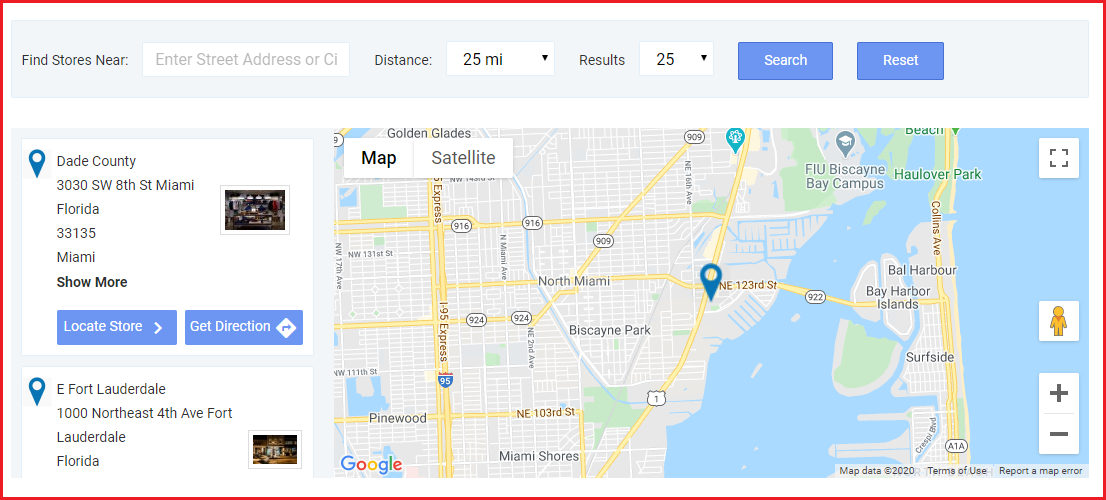
So, like for your grocery business, you can list the stores from where people can get the essential grocery items. They can select the items and choose the date and time at which they want to pick up their items.

Benefits

1. Customers do not need to spend hours standing outside the store to collect their order.

2. Safe pickup since there would not be many gatherings around the shop.

3. Pick up at a convenient time.

4. Customers can find the stores by specifying the location or filter stores by distance; to find the nearest stores.

5. Reduces shipping and delivery cost

6. Minimum interaction involved

Set your Online Grocery Business Today!

By now, you would have probably made up your mind of taking your grocery business online. Want to start your grocery website? Request a quote from here or you can reach out to us with your queries and requirements at support@knowband.com

Knowband is amongst the leading eCommerce solution providers. We provide eCommerce development services for multiple eCommerce platforms like PrestaShop, OpenCart, Magento, Magento 2, and Shopify.

Knowband is also a leading mobile commerce solution provider. We provide mobile app development services for multiple platforms. The PrestaShop Store Locator and Pickup module is also compatible with our Mobile App Builder, letting you allow your customers to shop from your grocery mobile app.


Top 10 PrestaShop addons to boost your Holiday sales

The holiday season is coming close. It is that time of the year when e-retailers look for every single opportunity to attract customers to their store and maximize sales.

The holiday season alone captures sales equivalent to the sales during the rest of the year. According to NRF, holiday sales for 2021 are expected to rise by around 4% as compared to 2020.

If you are a PrestaShop store merchant, here are the top 10 PrestaShop addons that you should implement in your store, to boost your holiday sales.

1. PrestaShop Spin and Win

The first one in our list of PrestaShop holiday modules is the PrestaShop Spin and Win.

Grab customer attention and enhance customer engagement on your website by adding a gamified interface to it.

Knowband’s Spin and Win addon for PrestaShop is one of the best PrestaShop addons to increase customer engagement and your email list. It provides your visitors with a gamifying experience when they visit your store, by displaying them a Spin and Win wheel popup.

PrestaShop Spin and Win addon allows you to design your popup as per the occasion. Give a festive look to your website and provide the festival feel to your visitors. With the help of PrestaShop Spin and Win addon, you can set your popup theme for Halloween, Christmas, New Year, etc.

The more attractive your popup will look, the more engagement it will create. Let visitors spin the wheel and earn some exciting offers. The holiday season is the perfect time to lure visitors with some discounts and offers and convert them into potential buyers.

2. PrestaShop Gift Card Manager

This holiday season, when customers will be too busy shopping, make their task easy and save their time by offering them the Gift Card option.

PrestaShop Gift Card Manager allows you to create multiple gift card templates for multiple occasions. It also comes with pre-existing gift card templates for Easter, Halloween, Christmas, etc. You can give a festive look to your gift cards to catch the holiday spirit and boost your holiday sales.

Let customers spread the love through your gift cards. Gift cards will not only increase your holiday sales but also make the best way to increase your brand awareness.

Read:

Why Digital Gift Cards are important to your business?

Get more Holiday sales by setting up a Gift Card section on your store

3. PrestaShop One Page Checkout

Let a lengthy and a complicated checkout not be a barrier in your conversions during the peak holiday hours. Replace the conventional multi-step checkout with a single page checkout.

PrestaShop One Page Checkout puts all the checkout fields on a single page and provides your customers with a smooth and hassle-free checkout. To simplify your checkout process, it offers Guest Checkout, Social Login (through Facebook, Google and PayPal) and supports all major payment methods and shipping services. There are tons of other customizations which a merchant can make to make the checkout process convenient.

4. PrestaShop Mobile App Builder

Our another high rated module in the list of PrestaShop holiday addons is PrestaShop Mobile App Builder.

Mobile Apps have taken the user experience to a whole new level. Today, a majority of customers prefer having a mobile app as it is far more convenient than browsing a website. With that being said, launching a mobile app for your brand will not only increase customer engagement but also boost your revenue to a great extent.

Transform your PrestaShop website into a native Android and iOS mobile app with the help of PrestaShop Mobile App Builder and provide your customers with an enhanced online shopping experience.

Features like Real-time synchronization, Unlimited Push Notification, Fingerprint Login, Zopim and WhatsApp Chat support, etc. make the PrestaShop Mobile App Builder highly exciting.

To know more, read: This Holiday Season, launch Spin-wheel integrated PrestaShop Mobile App to boost sales

5. PrestaShop Return Manager

With mass orders, also increases the order returns and the delay in the product return can irk customers.

So, speed up your return process and manage your eCommerce returns conveniently with PrestaShop Return Manager addon. Apart from the usual Refund and Replacement process, it provides your customers with the option to opt for the “Store Credits” which they can receive for the product amount. It ensures customer loyalty as well as customer retention since the customer would surely be visiting your store again in the future to utilise the credits.

6. PrestaShop Loyalty Points

Adding to the list of our PrestaShop holiday modules is PrestaShop Loyalty Points.

Make the journey of your new customer as well as the existing customers exciting by rewarding them some loyalty points every time they make a purchase on your store. This is a perfect idea to acquire new customers and ensure repeat purchases, especially during the holiday season.

Knowband’s Loyalty Points addon for PrestaShop focuses on customer retention and customer acquisition, at the same time. You can reward loyalty points to a new visitor when they sign-up on your store, and turn him/her into your loyal customer within no time. The points can be used as a discount voucher.

If you offer loyalty points for every purchase that a customer makes on your store, you can generate huge holiday sales.

Read: Benefits of a Loyalty Program for your online business

7. PrestaShop Abandoned Cart

One of the most helpful PrestaShop modules for this holiday season would be PrestaShop Abandoned Cart.

Brands witness a high number of abandoned carts during the holiday season. Those numbers can cost you a huge loss in the revenue. Though you cannot put a stop to cart abandonment, you can surely recover some lost sales and even a slight recovery in the cart abandonment rate can add to a huge amount in the total revenue.

PrestaShop Abandoned Cart addon allows you to track and chase the abandoned cart users and helps you recover the lost sales by sending regular follow-up emails.

This PrestaShop module reduces the cart abandonment rate, ultimately resulting in increased conversions.

8. PrestaShop Affiliate and Referral Program

Referral programs can be a big boost to your e-commerce sales. While the holiday season is approaching, you can start a referral program and provide exciting incentives to users when they refer your brand to his/her friends, family or relatives and the latter makes a successful purchase.

You can run such a referral program on your store with the help of PrestaShop Affiliate and Referral Program addon. A customer can register as an affiliate on your store, share your website link with his other people and earn vouchers or cash when the referent successfully registers or makes a purchase.

9. PrestaShop Store Locator and Pickup

Another PrestaShop holiday season module to look out for is the PrestaShop Store Locator and Pickup.

The product delivery takes too long during the holiday season, making customers run out of patience. Because of bulk orders, it becomes difficult for the shipping providers to ship every product in a quick span.

Customers, too, know this very well. In such cases, PrestaShop Store Locator and Pickup addon manages things quite conveniently.

If you have your stores located in multiple locations, you can display them at the front end of your website and allow customers to select their nearby store so that they do not have to wait too long for the product to get delivered. Customers can reach out to the nearby store and pick up their item.

10. PrestaShop Booking and Rental system

Have a renting business? Now manage everything online with PrestaShop Booking and Rental system addon.

During occasions like Halloween or Christmas, people look to buy costumes on rent. There is a heavy demand for it. Hence, if you run such business, you can provide people with theme-based costumes or dresses on rent and boost your holiday sales.

You still have time to get everything set before the holiday season starts. Try out these 10 PrestaShop addons and capture huge sales in the coming holiday season.

This might also interest you:

Knowband’s list of modules to look out for this Holiday season

10 Halloween Marketing Ideas to Uplift your Sales this October

6 must-have social media addons for your PrestaShop store

5 Quickfire Prestashop Addons that can Boost your Conversions

10 Must-have Addons to Optimize Prestashop Product Pages