What Is Bounce Rate? How to Improve it Quickly?

The only goal of any business is to bring new customers and increase sales with the old ones but some visitors do not make it to the endpoint and leave without buying. In eCommerce, it is called the bounce rate. You might be getting enough clicks but no conversions and many website elements can be responsible for bounce rate.

Imagine a person wants to climb a mountain and planned an 11km long trek but he can’t go because the trek dates aren’t matching his holiday dates and he canceled the plan. The same can happen when a customer visits your website and does not find the product they want to buy.

Simply quoting, if a customer visits your website with an intention but he does not complete the action is termed as bounce rate. Let me give you another example, your website sells cosmetics and the customer requires a product that is organic and chemical-free but you fail to provide such a product because of poor categorization. He will immediately leave the site and may not come back.

If you don’t want your customers to bounce back, you need to provide engaging content, strong and powerful search bar.

Why does the user bounce?

A rising bounce rate is an obvious indication that there are off-putting elements or underlying problems that you need to fix on your web. A bounce is caused by a variety of causes and circumstances.

Although there may be several explanations for the elevated e-commerce bounce rates, a list of the common ones is below:

  1. Page didn’t meet expectations: Visitors didn’t find the data or the product in the appropriate manner that they were looking for.
  2. Long loading time: It takes more time for the page to load.
  3. Poor UI and content management: If the user interface of the website is bad and the content isn’t well managed.
  4. Poor navigation and UX: The landing page’s UI is complicated and difficult to understand by the end-user.
  5. The lack of ‘Call to Action’: For customers, poor navigation will increase the bounce rate.

How to reduce bounce rate?

Firstly, you need to optimize the reason behind the bounce rate on your website, and once you do that you can take necessary actions. Sometimes, the bounce rate can cause you so much revenue which is dangerous for your business. Here are some pro tips that can help you reduce the bounce rate on your website:

1.     Do not use unwanted Pop-ups

Unless it is necessary, do not use pop-ups on the entry page. Try pushing it on the exit page or after the user completes the action. A cause of the bounce rate can be a pop-up window that annoys the visitor. If necessary, you can add a gamified element to the entry page for an email subscription or any discount offer. Spin and win

2.     Translate your site for global users

A multilingual website demonstrates the potential for increased sales. Any language that you add to your website has the potential to increase your sales dramatically. In addition to targeting the local market, it would also draw Internet users from other countries by creating a multilingual website. A multilingual website can reduce the bounce rate for international traffic from 80% to 40%.

3.     Improve Page Loading speed
Getting fast page load time can also improve the crawl rate of your website. The quicker it is possible to load pages, the more Google will index pages at one time. High page speed may also increase the crawl requirement of your website. Many users bounce because of high page loading time. Hence, it is pivotal to reduce page loading time.

4.     Invest in UI and make it attractive and engaging

To improve the bounce rate the better UI and engaging content can be helpful. A successful design inculcates trust and makes it intuitive to navigate. People don’t spend a lot of time on places that they don’t like or find hard to navigate. Make it simple by getting a nice template to start with for your visitors. There’s a great list of pretty customizable themes available on the web for various platforms.

5.     Optimize the landing page and product page

The process of optimizing elements on a website to improve conversions is Landing Page Optimization. Optimization of the landing page is a subset of optimization of conversion rate and involves using methods such as A/B testing to enhance the conversion targets of a given landing page. This will improve the bounce rate several times than any other method.

The next possible strategy to improve the bounce rate is by optimizing the product page. You can include social proofs like review and ratings, clear call to action buttons, product videos, and high-quality images to the product page.

6.     Reduce checkout friction

Checkout friction is the major cause of cart abandonment and a higher bounce rate. It is important to remove frictions from your checkout page to decrease shopping cart abandonment, generate sales, newsletter subscribers, and to improve conversions. Adding multiple payment methods, shipping choices, make unnecessary fields optional, and offering social login and guest checkout can help.

You can use the One Page Checkout Module to overcome these issues. Read this to reduce the checkout page friction which can help you in reducing bounce rate.

7.     Make your website mobile responsive
Mobile visitors have far less patience than desktop visitors. To provide mobile users with a better user experience, ensure that your website has a responsive design. Also, the user base of smartphone users is more than desktop users.

8.     Add Personalisation Element

By presenting the data, personalization can help to enhance conversions. To support a specific product, following a centered strategy that is personalized to their behavior and liking would certainly help them in a successful transaction. The conversion and bounce rate are inversely proportional. If the conversion increases it will automatically diminish the bounce rate.

Final Words:

eCommerce Conversion: One of the easiest ways of improving your bounce rate is to boost your conversions. Someone who converts is automatic will not bounce. This guide will teach you how to use A / B testing to get more conversions on your website and other methods.

Minimize the bounce rate of a website: A very in-depth look at the bounce rate, including ways of using Google Analytics to correct a high bounce rate.

Reduce Cart abandonment: This is again a healthier way to reduce the bounce rate and these pro tips will help you reduce abandoned carts on your web store.

For, eCommerce related projects, contact our team at support@knowband.com or drop a reply here in the comment section.

6 Simple Ways to Reduce Shipping Cost

The trends in the business industry change every day hence no businesses have attained perfection. It is okay if sales are dropping on a day and the bounce rate has increased but it becomes a snag if you cannot do something about it. Sometimes the increase in bounce rate for eCommerce is due to shipping charges. Is there any way we can reduce shipping cost? Yes, We can!

If increasing rates isn’t in the cards, and you want to cut down the cost then these pro tips can help you potentially reduce shipping cost. Optimize your products on the eCommerce store and practice these methods to make your product affordable for you and your customer.

1. Change your packaging material

The packaging material is a major factor that affects the shipping cost but by changing the material a merchant could save a lot. Shipping charges depend upon the size and weight of the material you are using for packaging. You can always go for a small-sized box made with a lighter material to reduce shipping cost. Alternatively, you can switch to a poly mailer or a padded bubble wrapped poly bag and avoid the extra cost.

2. Take help of regional carriers

By decreasing the shipping distance with the help of regional distributors an eCommerce store owner can save some pennies. A bulk order can be shipped to one place for a particular zone or region.

An app like ‘Product Availability Check by Zipcode’ can be used by the store owners while uploading the product. The admin can map zones with zip codes for different geographic locations.

To reduce the shipping cost bulk orders can be sent to the regional distributor who will ship the product to its right destination

3. Waive off the shipping cost with in-store pickup

In recent days, to avoid the shipping time delay and to get the product by the earliest customer started opting for the in-store pickup option. This feature benefits both the merchant and the customer. It increases impulse buy opportunities, fewer returns, and cut down the shipping cost for the merchant. Consumers get the benefit of click and collect too by saving the extra cost which is meant to be spent on shipping and they can collect the order as per their convenience. This is a win-win option for both parties.

4. Merchant can do liaising with the supplier

Liaising with the supplier will reduce shipping cost for the merchant. The owner can ask for lower delivery fees with this. The extra transportation cost will be reducing it to nearly half the price and this is most applicable to high-value products. Always try to negotiate with your suppliers to get good deals.

5. Cut down the cost by taking prepaid shipping services

Various third-party carriers offer prepaid shipping services where they provide good deals and discounts. Prepaid shipping will get you up to 20% off shipping costs simply by buying a range of shipping labels in advance. You don’t need to add them to a package before an actual order needs to go out. This not only saves time but also costs.

It only works if you regularly ship orders of the same weight and measurements or if you know the same details and scale.

6. Hybrid orders can save money

Hybrid shipping providers pick up your orders and then partner with other carriers, to move the parcels to a sort facility or post office site, where they are delivered to a local area for the last mile delivery. In certain cases, this can reduce delivery costs by as much as 50%. The biggest drawback to hybrid systems is that they have a restrictive weight, volume, and size strategy. Delivery times can also be longer than using normal shipping options with the same carriers.

Final Words: Some of the main factors that decide the performance of your online company are the degree to which you reduce costs. These amazing ways will lower pricing. If not closely controlled, shipping costs can escalate rapidly. And by the end of the fiscal year, you’ll find that they’ve put a huge dent in your profit margin.

Knowband provides some tools to help you with shipping issues like the COD plugin and free shipping addon. These can help you with a better shipping experience and increase customer conversions.

You may like to read:

7 Useful Tips for a User-Friendly Checkout

You would have often visited malls for shopping purpose. What did you look for after picking up your items? I am sure your eyes would have been searching for a short checkout line so that you could make a quick checkout.

Let me tell you my case, I went to a store a few days back, picked up some stuff and when it was time to go to the billing counter, I noticed the line was too long. I waited for a few minutes initially but couldn’t keep the patience for long. I left my items there and took an exit from the store.

In e-commerce, this is what we call as Cart Abandonment and a lengthy checkout process is one of the primary reasons for it. This is exactly what happened in my case too. When I realized the checkout would take a lot of time, I dropped the purchase idea.

This is why a simplified and a user-friendly checkout holds very high importance in the eCommerce space. When users find a checkout process lengthy or time-consuming, they abandon their cart and look for better alternatives.

Getting shoppers to your eCommerce store is not difficult, engaging them till the final payment process without disturbing the user experience, is. The checkout page is the most important part of this whole engagement game.

Through this article, I will enlighten you on how to optimize the checkout process and create a user-friendly checkout.

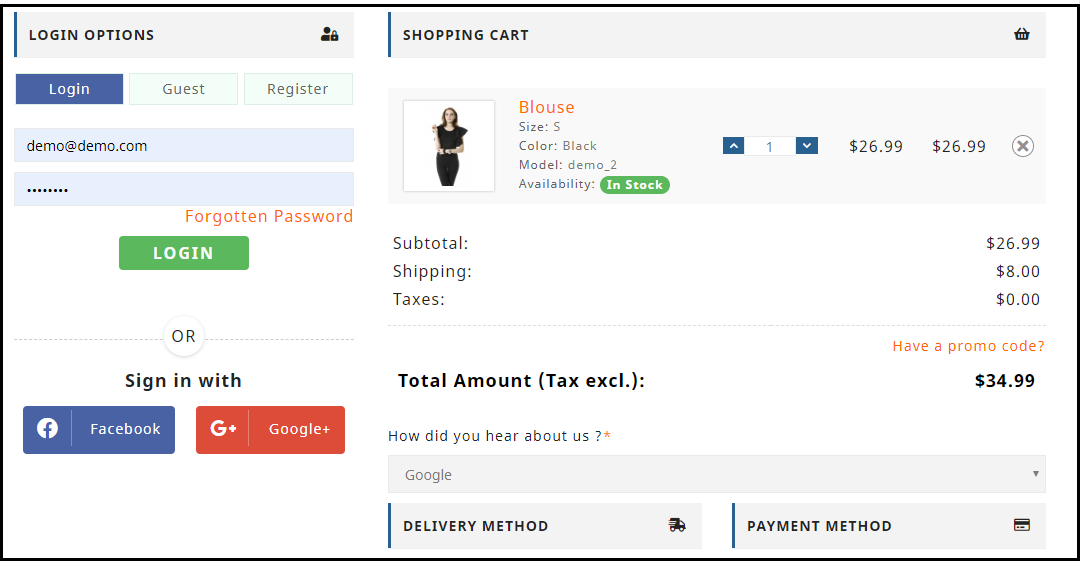
1. Make Account Registration Optional or at least Offer Social Login

Avoiding compulsory account creation is the primary step towards a user-friendly checkout. Do not compel users to signup when they look almost set to make the payment. Making registration process compulsory at the checkout page mostly results in cart abandonment, which causes high conversion loss.

Let the mandatory sign up process not be a hurdle in a successful conversion. Offer Guest checkout or introduce a Social Login option on the checkout page. This would help users in a quick checkout without hampering the checkout experience.

Read: 10 Benefits of Social Login in eCommerce

2. Allow Customers to Easily Update the cart

In many of the eCommerce websites, there is no option to update the product quantity right from the checkout page. Hence, if a customer wants to increase or decrease the product quantity, it leaves them with no choice except discarding their current checkout process, going back to the product page, updating the quantity and filling out the entire details again. This spoils the user experience.

So, make sure that you include the option to update the product quantity on the checkout page. Also, ensure that the back button takes the user to the previous page rather than discarding all their information.

3. Add a One Page Checkout

A one-page checkout also called as a single page checkout is also one of the important elements of a user-friendly checkout. Instead of asking users to navigate through multiple steps to fill the checkout form, make it a single step checkout process. It improves user experience, reduces the chances of cart abandonment and eventually leads to increased conversions.

Read: One Page Checkout vs Multi Page Checkout: Which is better and why?

Look out for Knowband’s One Page Checkout for PrestaShop, OpenCart One Page Checkout, Magento One Page Checkout, Magento 2 One Page Checkout.

Our One Page Checkout module incorporates all the checkout fields on a single page and helps merchants to allow a quick checkout facility to their customers. The module offers Guest Checkout, Social Login, Multiple Layout Designs, etc. Most importantly, it supports nearly all the major payment methods and shipping services.

4. Display the errors up-front

Mistakes happen very often while filling out the checkout fields and customers are not aware of it until they hit the submit button. They have to submit again and again until the entered inputs are found to be correct. This can be extremely frustrating and become a major barrier in a user-friendly checkout.

Use Inline Validation to counter this hurdle. It identified the inputs in real-time and displays whether the provided details are correct or not when the user switches from one field to another.

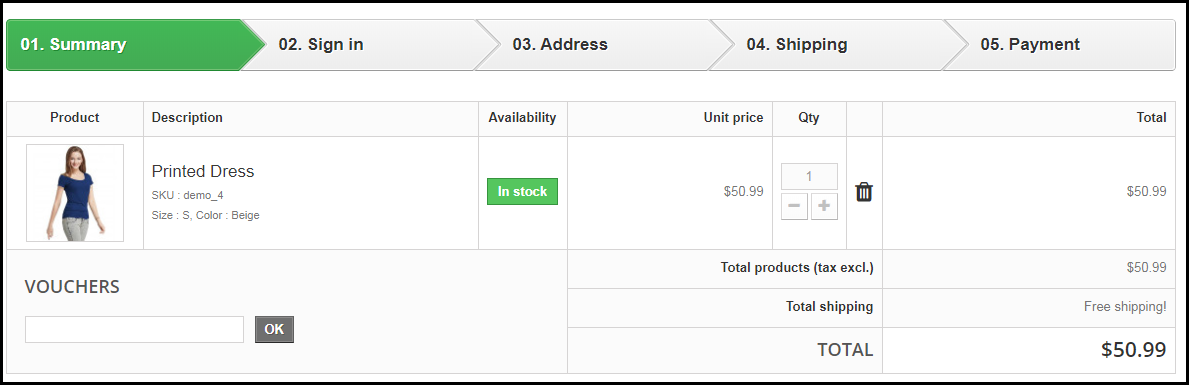
5. Display Checkout Progress

Use a progress bar to indicate at which step the customer is present and how many more steps does he or she need to go through before finally placing their order. It is always a good idea to keep visitors updated about their checkout progress.

Many a time, shoppers leave the purchase incomplete because they get tired of filling out the information when they are not aware of the checkout progress. So, give them a clear idea up-front of the number of steps that are needed to make through the checkout.

6. Provide Real-time Customer Support

Customers can have a lot of queries while they are on the checkout page, especially the new visitors. You never know what’s going through a customer’s mind during the purchase.

To assist them with their queries or help them with any trouble they are facing, provide them with real-time support. Adding a live chat option or customer support number would do a great job.

7. Thank Your Customers for Shopping with Your Brand

Leave a “Thank You” note for your customers as soon as they place their order along with the “Order Successful” message, obviously. This is a good sign to appreciate or thank your customers for showing trust in your brand. It improves customer loyalty.

Knowband provides “Better Thank You Page” module that converts a normal order success page into an effective marketing strategy. With the help of this module, the admin can encourage repeat purchases and improve customer retention by offering discounts to their customers for future purchase. It also encourages cross-selling.

Checkout PrestaShop Better Thank You Page, OpenCart Better Thank You Page, Magento Better Thank You Page

That’s all for a user-friendly checkout.

The Bottom Line

The journey from adding the product to the cart to the payment page needs to be smooth and convenient. Having a user-friendly checkout not only ensures more conversions but also keeps you ahead of your competitors. All that a customer craves for is a smooth checkout experience, provide them that.

If you find the above information helpful or have anything to add for a user-friendly checkout, do let me know in the comments below.

Moreover, you can visit our Knowband store and look for a number of checkout modules to help you with an optimized checkout process.

Related Stories:

Top 10 Checkout Page Optimization Practices to Increase Conversions

7 Crucial Tips for a Smooth Checkout Process

8 Checkout Page Mistakes that may be Killing your Conversions

5 eCommerce Mistakes that lead to Cart Abandonment

8 Awesome eCommerce checkout examples