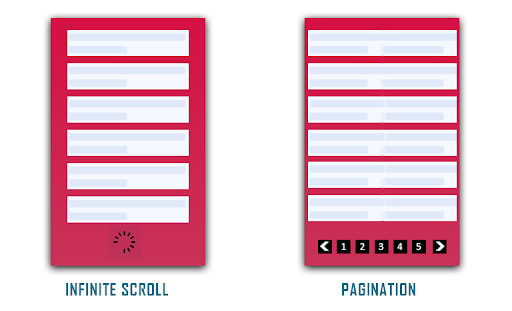
Pagination vs Infinite Scrolling

Pagination or Infinite Scrolling, which would be better? This thought has struck website owners many times and they still get stuck in a dilemma when it comes to choosing between any one of the UX patterns for their website.

In this article, I will share deep insights into both these processes and help you choose the better one for your website. Before we delve into the Infinite Scroll vs Pagination debate, let’s try to understand both.

What is Pagination?

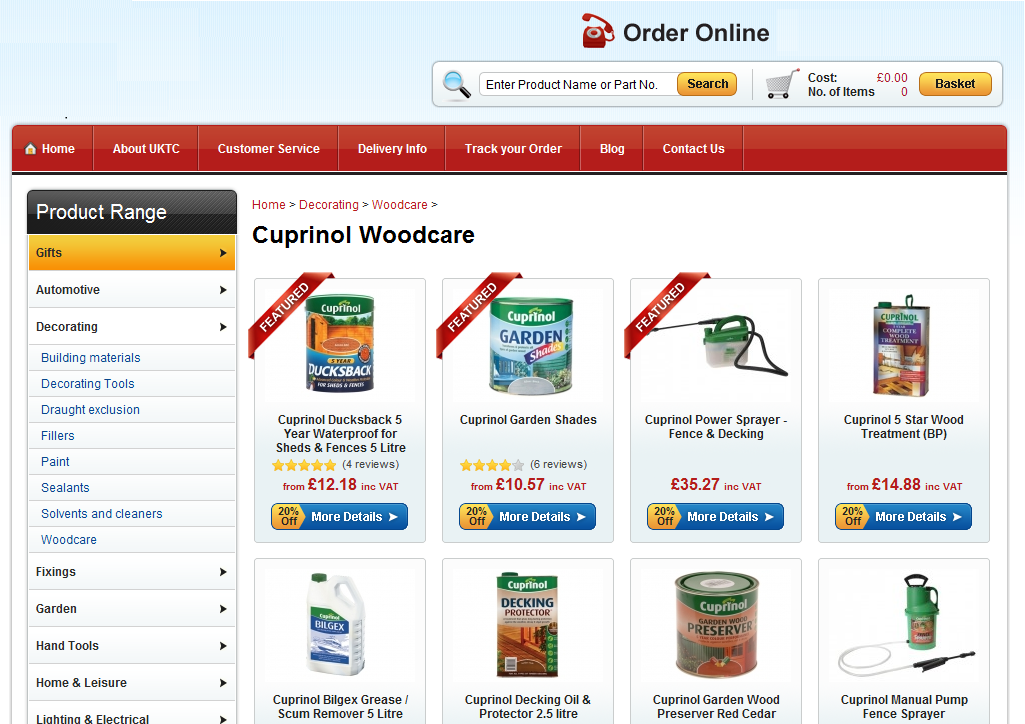
Pagination is the process of breaking large content into smaller chunks. It divides your website content into discrete pages and forms a  sequential numbering at the end of a page.
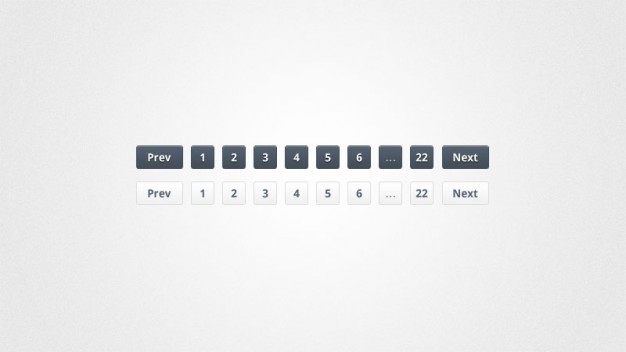
A common example of Pagination is the Google search result. Every time you search for something on Google, it displays n number of results that are divided into several pages.

Pros of Pagination

Talking about the benefits of Pagination, here are some of them.

Better Conversions

“Conversion” is the major factor that has kept online businesses sticking to the Pagination process. Pagination proves to be extremely helpful for users who have entered your website with a purchasing mindset rather than just browsing through the content.

Better Control

With Pagination, you can reach the footer of the website or the top section conveniently, therefore, providing better control to browse the content.

Easy tracking and bookmarking

Pagination makes it easy to track how much content has been consumed. Consider Google search results or Amazon, for example, if you have gone through some pages already, you do not need to go through them again. You can directly jump to a specific page and also bookmark it for later use.

Cons of Pagination

Talking about the cons of Pagination-

Breaks the flow

Pagination obstructs seamless browsing. It breaks the flow of a visitor by asking him/her to navigate to the next page to browse further and disturbs the user experience.

More clicks and loading time

Users get tired after clicking on the “next’ button or switching between pages multiple times. Not only it is tiring but users also get irked by the page loading process.

What is Infinite Scrolling?
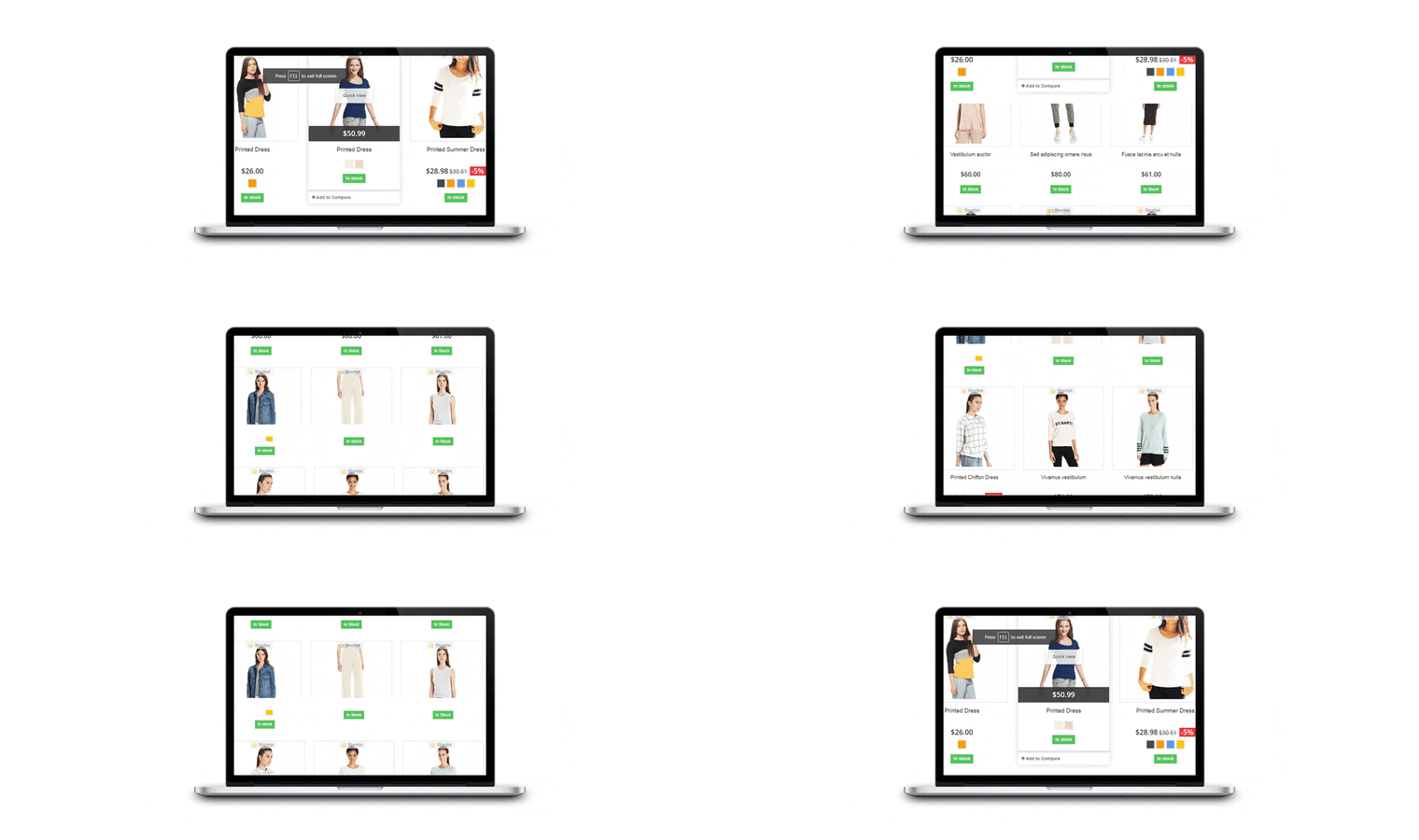
Infinite scrolling or continuous scrolling is a single-page scrolling that goes on endlessly with no certain finish line. It loads the overall content on a single page and offers a continuous flow of browsing. With Infinite Scrolling, the next page content or say the next set of products are loaded automatically within the same page as the user scrolls down. It is also known as Progressive loading and endless scrolling.

Social media sites like Facebook and Instagram are some of the best examples of Infinite scrolling.
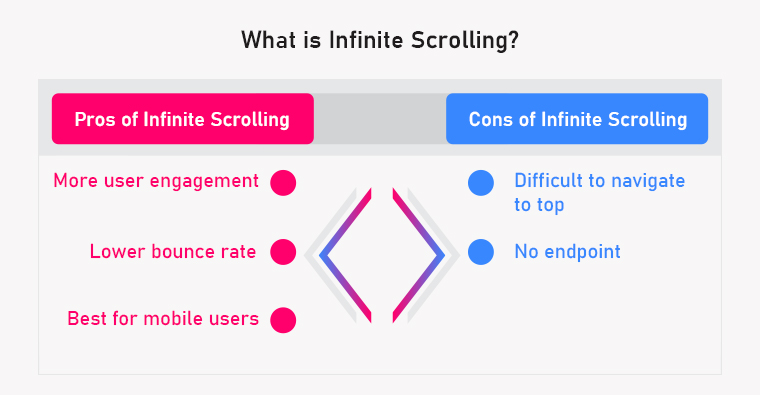
Pros of Infinite scrolling

Talking about the benefits of Infinite Scrolling, here are some of them.

More User Engagement

The primary purpose of Infinite Scrolling is to engage users and make them stay longer on the website and it does that job perfectly. It is adopted by those website owners who have content exploration as their primary focus. It also makes browsing fun.

Infinite scrolling keeps the user flow and engages your audience towards your content, hence creating more user engagement.

Recommended Read: Infinite Scroll Optimization: You enrol while they scroll

Lower Bounce Rate

With more user engagement, the average time spent by a user on your website, increases, which eventually reduces the bounce rate.

Best for mobile users

Infinite scrolling provides an amazing browsing experience to mobile users, especially on the mobile app. Since most of the website traffic today is generated through mobile, Infinite scroll makes the best fit for your business as it is more intuitive and user-friendly.

 

Recommended Read: How can Infinite Scroll benefit your eCommerce site?

Cons of Infinite scrolling

Difficult to navigate to top

When users keep scrolling down, they usually dig so deep that navigating to the top becomes a daunting task.

Also, users cannot bookmark a page in Infinite Scrolling. They will have to consume the entire content again when visiting for the next time.

No endpoint

Continuous scrolling makes a user feel bored after a point and compels them to take an exit.

In addition to that, a user looking for the footer section on your website can find continuous scrolling quite frustrating as it becomes challenging to reach the endpoint of the page.

Pagination vs Infinite Scrolling: The Final Call

Since you have understood both Pagination and Infinite Scrolling now along with their pros and cons, it is time to decide which one can be a better option for your website/store.
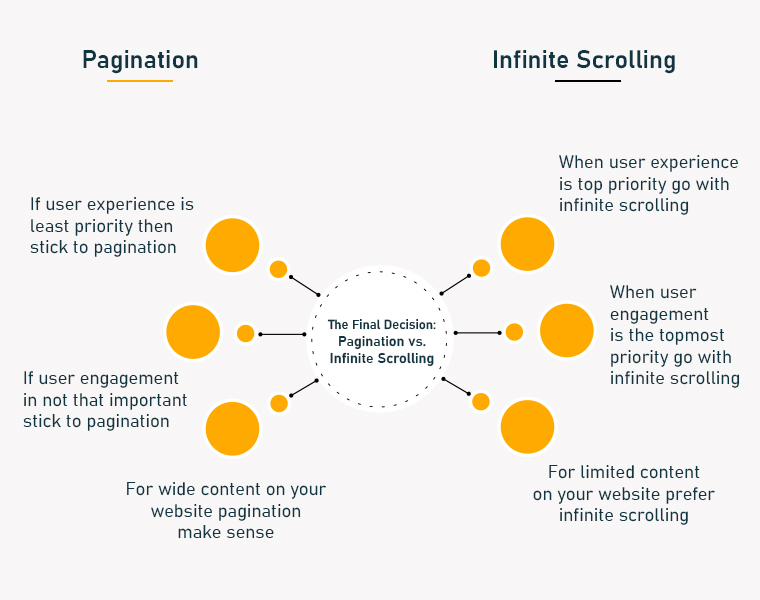
When to use Infinite Scrolling and When to use Pagination?

Considering all the factors, here is my take on Paging vs Progressive loading:

1. If the user experience and user engagement are your topmost priority, go with Infinite Scrolling else stick to Pagination.

2. If you have limited content on your website that a user can reach the endpoint after a certain time, prefer Infinite Scrolling. Pagination would make sense if you have wide content.

In the end, it is your call depending on your business and requirements. Both Paginare effective in producing quality results. Keep doing A/B testing at regular intervals and figure out the most effective one.

If you are thinking to implement the Infinite Scroll feature on your website, check out our Infinite Scroll module.

Infinite Scroll module by KnowBand

The Infinite Scroll module by Knowband is a feature-packed plugin that generates automatic loading on the product listing page. It provides easy navigation through the product catalogue.

The infinite Scroll module is a modern replacement for Pagination System and offers seamless browsing.

Features of Infinite Scroll
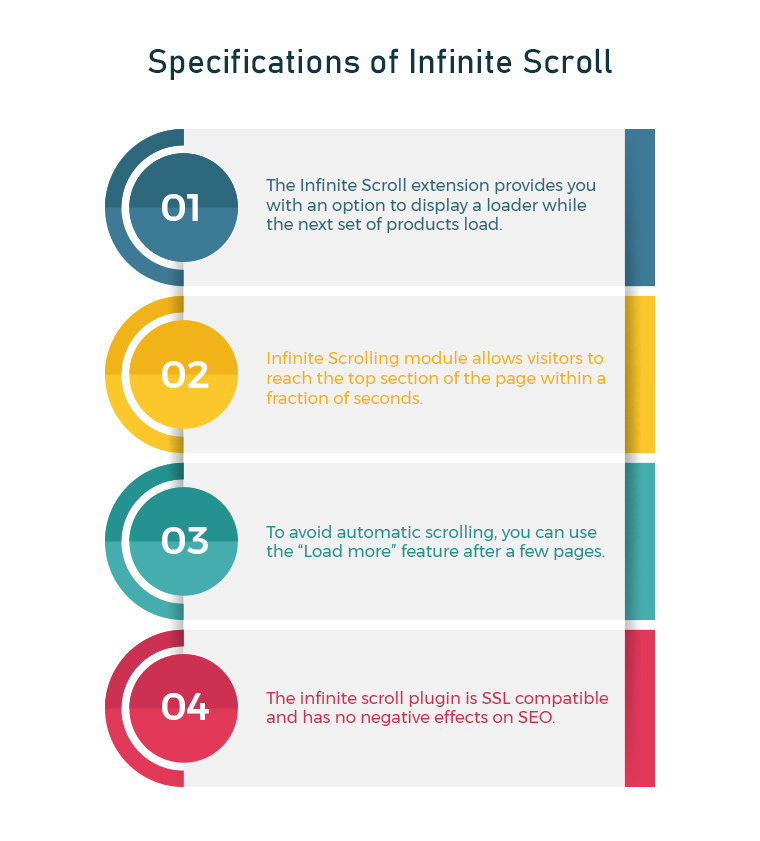
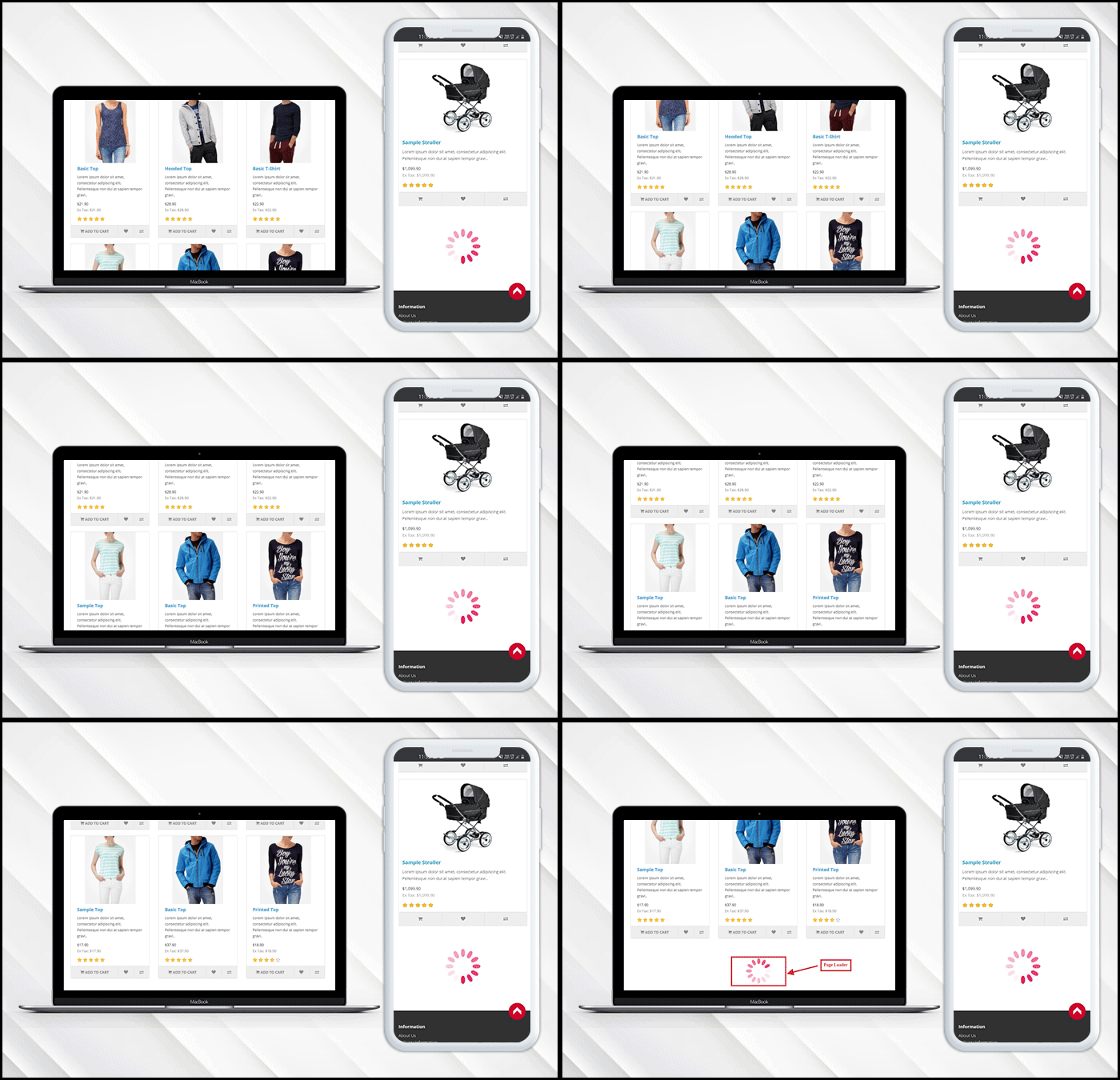
1. The Infinite Scroll extension provides you with an option to display a loader while the next set of products load. The loading animation keeps the interest of the users while they wait for the page to load. It tends to keep users on the website which probably would not happen in the case of Pagination where users have to keep loading pages manually.

2. Infinite Scrolling module consists of a “Go to top” button that allows visitors to reach the top section of the page within a fraction of seconds.
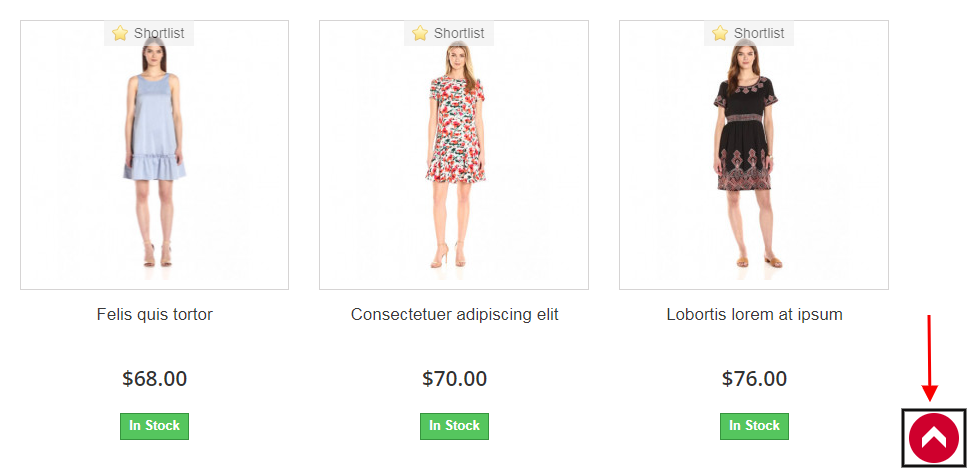

One of the cons of Infinite Scrolling that we discussed above was it is difficult to navigate to the top of the page. The “Go to top” button in the Infinite Scroll module eliminates this problem.

3. To avoid automatic scrolling, you can use the “Load more” feature after a few pages. This is helpful for users who do not want to witness continuous scrolling for a longer duration.
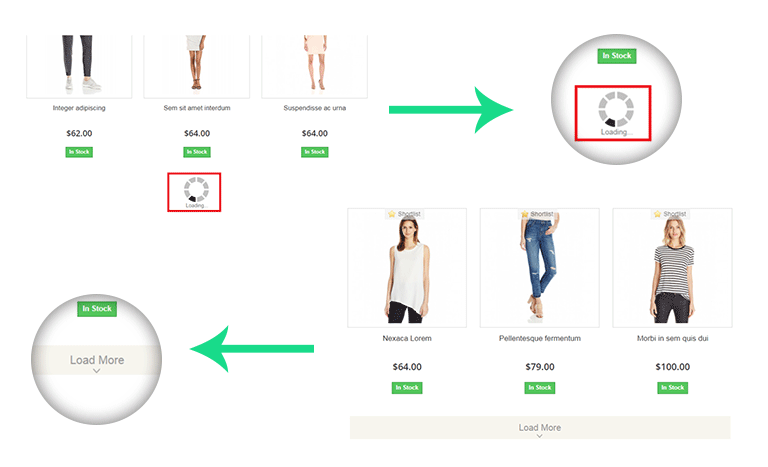
4. You can also create a message box at the end of your product results which confirms to your visitor that the results have ended.

5. Infinite scroll plugin doesn’t affect your SEO and is SSL compatible

Knowband offers the Infinite Scroll modules for Prestashop, Magento, Magento 2 and OpenCart.
Final Words:

Businesses are always seeking methods to improve the customer experience. Online firms have been compelled to develop innovative concepts as a result of the intense rivalry in the e-commerce market. One of the finest strategies for that is click reduction. It is effective in lowering bounce rates, increasing average site time and user engagement, and vastly improving user experience. For any assistance in these modules, you can reach out to us at support@knowband.com

Related and Popular Posts:

One Page Checkout vs Multi-Page Checkout: Which is better and why?

10 Benefits of Social Login in eCommerce

Top 10 Checkout Page Optimization Practices to Increase Conversions

OpenCart Infinite Scroll Extension – User Manual

1.0 Introduction

OpenCart Infinite scroll extension provides seamless navigation over multiple pages and a hassle-free shopping experience to online users. It slows down pagination as it is one of the biggest obstacles in working on any website. OpenCart infinite scroll enables websites to remove this hurdle by providing single-click access with the least inconvenience to the users.

Generally, customers have to browse multiple pages in search of the desired product on the website. However, this could lead to loss of time and even interest of customers too. OpenCart infinite scroll extension is the modern advancement to slow down pagination and provides seamless navigation of all the products on a single page. With the help of the dropdown scrolling module, customers can load the products of the next page on the current one just by scrolling down the page.

OpenCart Infinite scroll extension enables automatic loading of pages without even scrolling down the page. It also helps to easily navigate through the product catalog. As all the products are available on a single page, customers need not to move from one page to another for the product.

1.1 Striking Features of Infinite Scroll Extension for OpenCart

The OpenCart Infinite Scroll Extension provides you multiple features that are fully customizable and easy to configure from the backend interface without requiring any coding knowledge. The various striking features of the OpenCart Infinite Scroll Extension have been listed below:

  • The OpenCart fast scroll module enables automatic page loads and search results without scrolling down the page.
    With the help of the OpenCart quick scroll module, customers can navigate to the next page of product listing without reloading the next page.
  • The OpenCart infinite scrolling plugin offers compatibility with SEO friendly URLs.
  • The OpenCart dropdown scrolling module gives a ‘Load More’ feature to pause infinite scroll after a definite interval of pages.
  • This page interval for load more feature can be set from the backend of the Infinite Scroll module.
  • Store admin can test the working of the Opencart infinite scroll module by enabling the sandbox setting and enter the specific IP address.
  • The admin interface of the OpenCart plugin is extremely easy to use and requires no use of coding knowledge to implement.
  • This OpenCart Infinite Scroll module offers a ‘Go to Top’ link feature to reach that start point of any product listing page.
  • OpenCart list view module provides SSL compatibility.
  • This OpenCart Infinite Scroll displays a loader while loading the next page products on the same page. This loader can be configured and disabled if required from the back-end interface.
  • Store admin can change the background and text color of the end page message and go to the top link.
  • The OpenCart Infinite Scroll Module allows the admin to show a custom message to the customers after all the product listings have been loaded on the front.
  • Admin can choose to display the product listings in grid or list view format via OpenCart quick Scroll module.
  • This Infinite Scroll extension for OpenCart gives an option to include CSS and JS code from the back-office. Using the custom CSS and JS store admin can change the look and feel of the Opencart infinite scroll module.
  • The OpenCart infinite scroll module offers compatibility with all the OpenCart themes, so the admin can configure the look and feel of the infinite scroll as per their site theme.
  • The OpenCart fast scroll module offers multi-store compatibility.
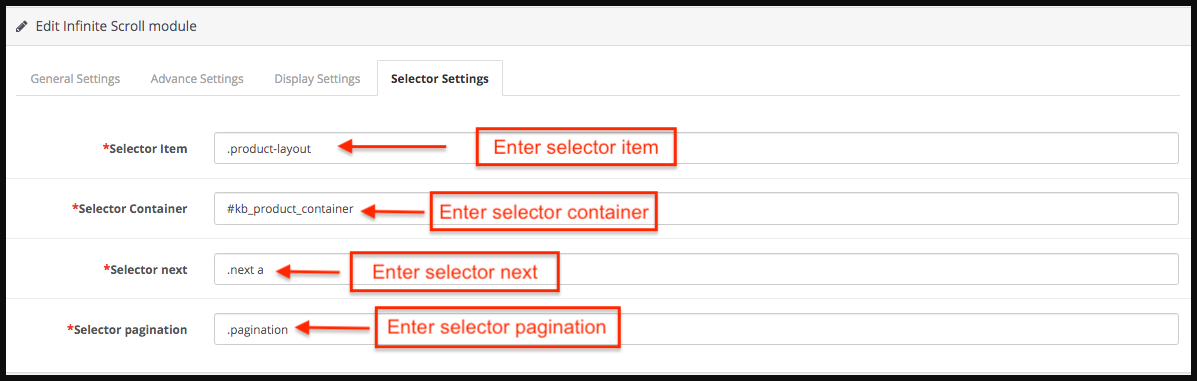
  • The Opencart infinite scroll module offers the store admin to set the selector settings of the module like selector pagination, selector container, etc.
  • The functionality of the OpenCart quick scroll module doesn’t conflict with any other installed modules of the store.
  • The Opencart infinite scroll module is mobile responsive.

1.2 Technology for Development

Language: PHP
Framework: OpenCart

2.0 Installation Guide

To install this OpenCart Infinite scroll Module, please follow the following steps:
Purchase the OpenCart Infinite scroll Extension from the Knowband store. You’ll get following files:

  • Zipped File containing the source code of the OpenCart Infinite Scroll module.
  • User Manual of OpenCart Infinite Scroll plugin.

Follow the steps below in order to install the OpenCart Infinite Scroll Extension in OpenCart store:

1.Unzip the zipped. You’ll get the folders as shown in the image below:

2.Copy all the files and folders of the zip file in the Root Directory of OpenCart setup via FTP manager.

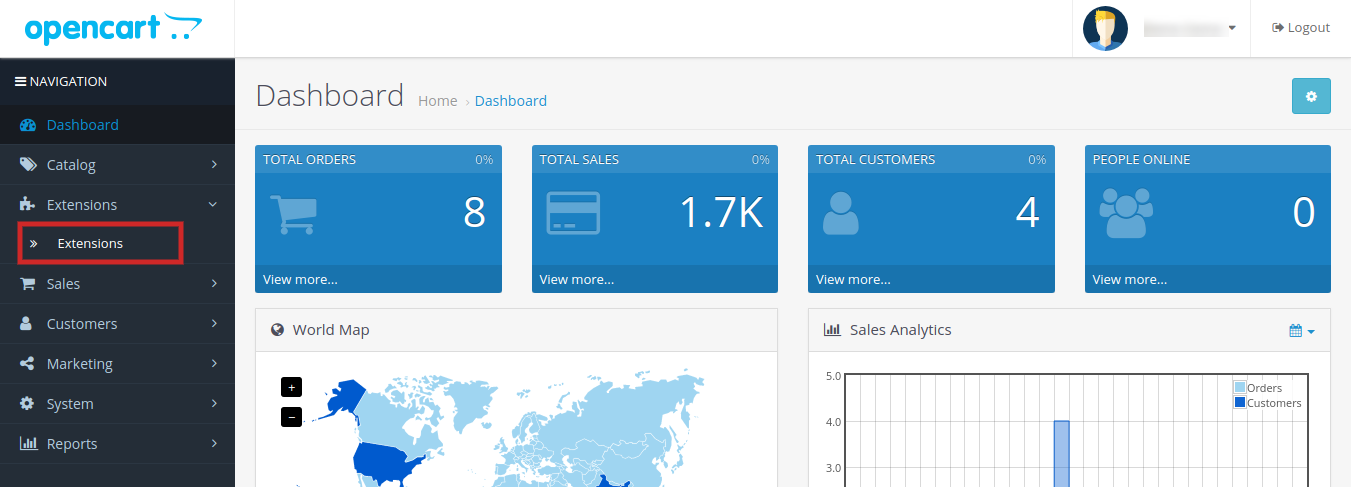
3.The OpenCart Infinite Scroll module is now installed and is ready to use. Go to Admin -> Main Menu -> Extensions as shown in the image below:

4.Select Infinite Scroll from the list of the modules and click on the Edit button as shown in the image below:

3.0 Admin Interface of OpenCart Infinite Scroll Extension

OpenCart Infinite Scroll extension offers easy customization option to the store admin. The various configuration options are discussed in detail below:

3.1 General Settings

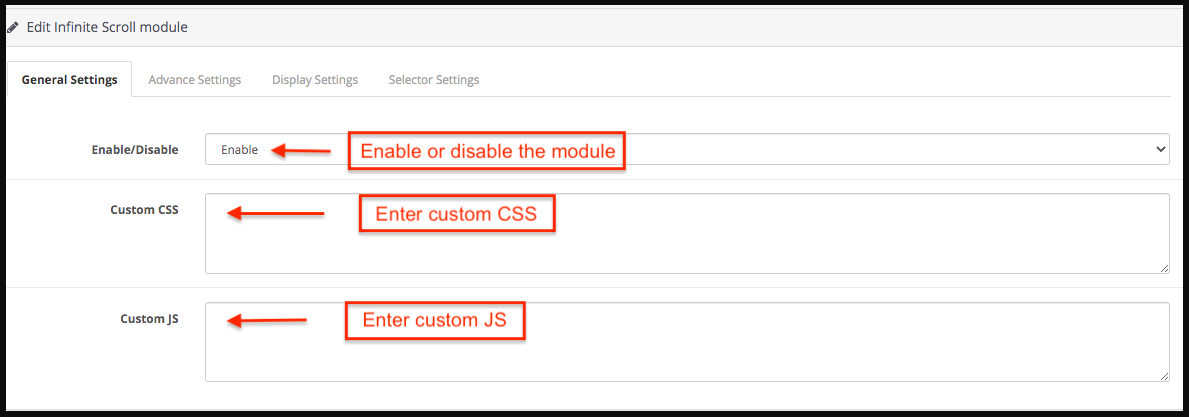
Under this tab the store admin can find the basic settings of the module and configure the module.

  1. Enable/Disable: Enable or disable the Opencart infinite scroll module in a single button click.
  2. Custom JS: Enter custom JS accordingly.
  3. Custom CSS: Store admin can enter custom CSS to change the look and feel of the Opencart infinite scroll module.

3.2 Advance Settings

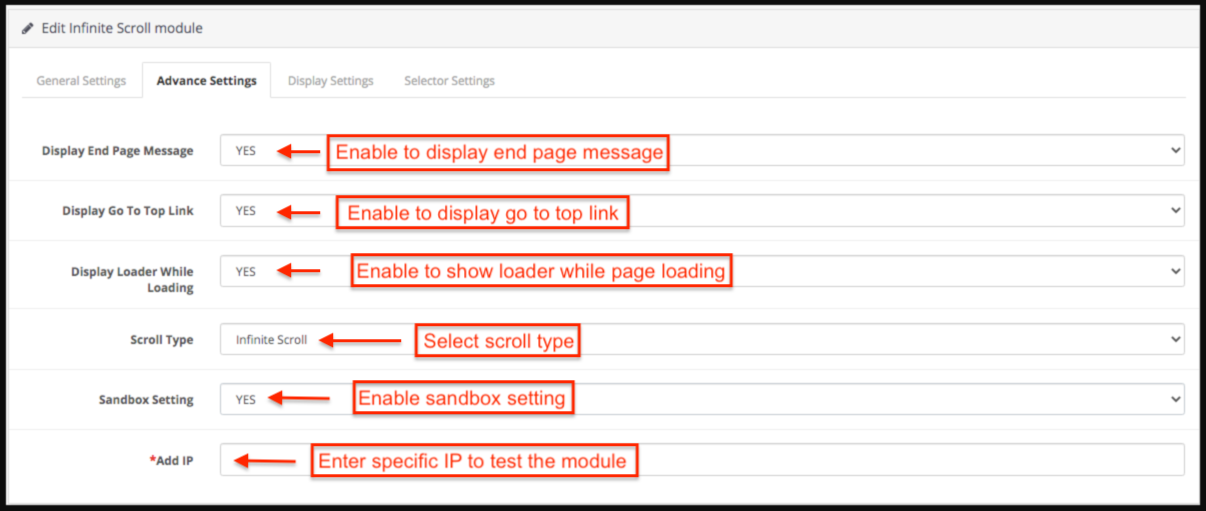
From this tab the store admin can set the advance settings of the Opencart infinite scroll module.

  1. Display End Page Message: Select Yes to display the end page message. If the store admin enables this then an end page message appears at the ending of the products.
  2. Display Go To Top Link: Select Yes to display Go to Top link. If store admin enables this then a go-to top link appears when the customer scrolls the page.
  3. Display Loader While Loading: Select Yes to display loader while loading.
  4. Scroll Type: Select infinite scroll from the drop-down list to select scroll type.
  5. Show load more link after pages: If store admin selects the scroll type as load more products link then store admin has to enter the number of pages after which load more link appears.
  6. Sandbox Setting: Select Yes or No from the drop-down list for the Sandbox setting.
  7. Add IP: Store admin can add the specific IP address to test the working of the Opencart infinite scroll module.

3.3 Display Settings

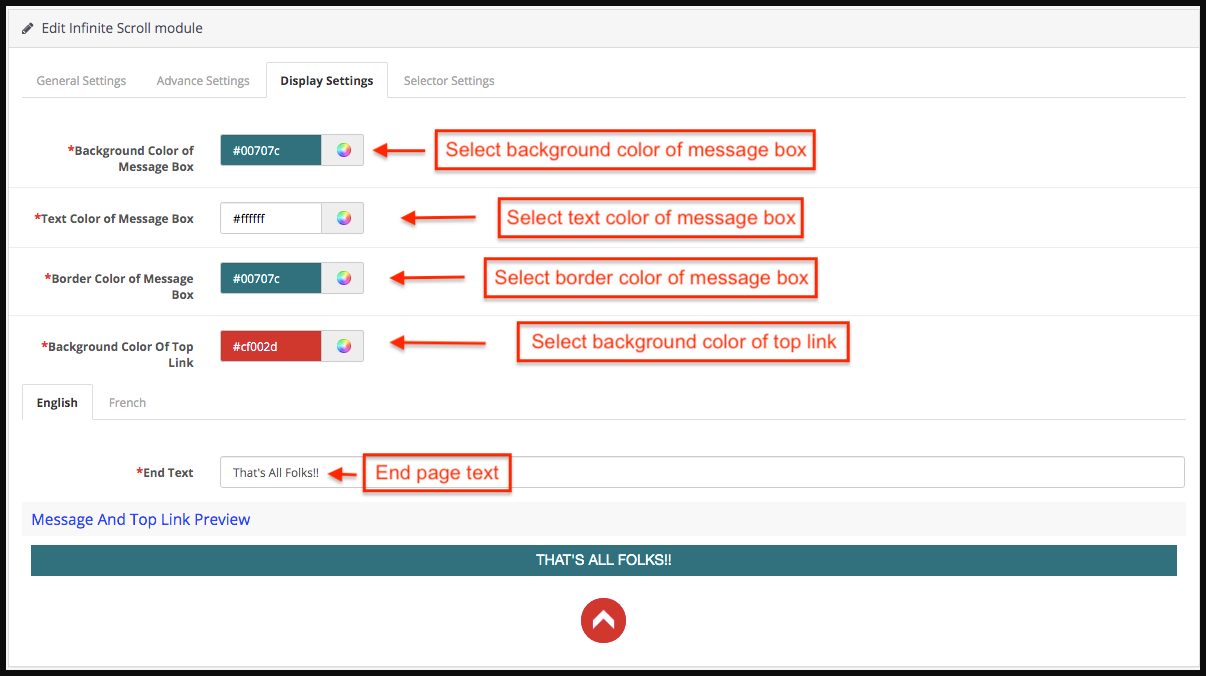
Following are the settings listed under this tab:

  1. Background Color of Message Box: Select the background color of the message box.
  2. Text Color of Message Box: Select the Text-color of the message box.
  3. Border Color of Message Box: Select the border color of the message box.
  4. Background Color Of Top Link: Select the background color of top link.
  5. End Text: Enter the end text in either English or French language.
  6. Message and Top link preview: Store admin can the seethe preview of the end page message and go to the top link.

3.4 Selector Settings:

From this tab the store admin can set the selector details of the Opencart infinite scroll module. Please do not edit these settings if you are not fully sure about it as modification in these settings may lead to improper working of the module.

  1. Selector Item: Enter the selector item.
  2. Selector Container: Enter the selector container.
  3. Selector next: Enter the selector next.
  4. Selector pagination: Enter the selector pagination.

4.0 Front End of the OpenCart Infinite Scroll Module

When the OpenCart list view module by Knowband is enabled from the admin panel then on every product listing page pagination of the products would not appear. The customer will be able to view all the products just by scrolling down on the page and if the display go to top link is enabled then the link will appear on the bottom right of the page to scroll the customer back to the top of the page. When all the pages are loaded a message appears in the bottom which states that all the pages are loaded now.

Go to top link and End page message:

5.0 Tutorial: Watch the Video Guide

To help you set up and use the Knowband OpenCart Infinite Scroll extension, we have created a comprehensive YouTube tutorial. This step-by-step video guide walks you through the installation process, configuration options, and how to enable automatic product loading on your store for a smooth, seamless shopping experience.

5 Features that Highly Influence the Customer’s Decision in Making Purchase

One of the biggest aspects of eCommerce that sums up their success rate is the way they influence the customers. The entire process of taking the visitors from the landing page to the checkout page is all about user engagement. In order to be more productive with the shopping site, various other areas must be covered apart from the product quality and service assurance. The customers has now moved on from the traditional form of making a purchase to online purchases. Therefore, it becomes quite important for the eCommerce store owners to present the sites in best way and try to reach out to the customer.

In order to get better understanding of the customer’s decision of making a purchase, we can discuss some of the points that can help the stores to get better conversions.

1. Product placement

It is quite important for the web stores to know the fact that the buyers are not going to make a purchase on the products which are dig deep in the store. The chances of making a purchase on the product that is available in the 6 page of a particular product are quite low as compared to the same product that has been presented in the page 1. Thus, the placement of the product plays a very crucial role in determining the behavior of the customers and making a better sales to them. the customer wouldn’t like to spend their time in searching for the product and digging deep into the website. Moreover, refreshing the web page every time may even be time consuming. This is when the infinite scroll can help you out. There are module available for adding such functionality in the websites. For instance, Prestashop infinite scroll, Magento infinite scroll and others. Showcasing the products in the single page can make the visitors delve into the site in a better way.

👉Explore the Module with Our Video Guide

2. Easy purchase options

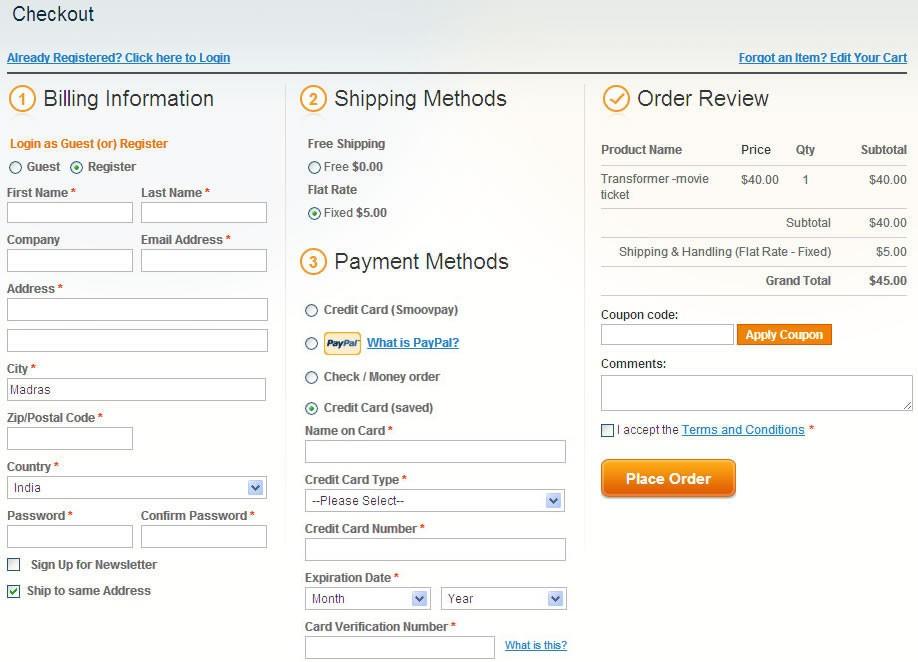
Why bother to make a purchase from your store when the online transaction is easier on other sites? This question must be taken into consideration by the store owners when trying to provide the customers with better services. The customers always look for some kind of assistance when it comes to making a purchase as most of the stores provide the product from the same brand. In this regard, the shopping site can provide the customers with assistance when it comes to different aspects. One of the way to provide customers with easy purchase option could be by providing the one page checkout option. There are extensions available for the various eCommerce platforms such as Magento one page checkout module or Prestashop one page supercheckout. It saves the customers a lot of time and saves the extra efforts they need to put in order to complete the purchase.

3. Marketing campaigns

Keeping the customers informed about your offerings is the best way to aid the purchase decision of the customers. Advertisement play an important role in influencing the visitor’s decision to make a purchase. The eCommerce stores must always try to keep the customers informed about the various activities going in the web store. It helps in creating an awareness among the users and also helps in attracting a better crowd to the store. To commence a successful marketing campaign the online stores must first do a research and try to figure out the various concerns of the potential buyers and then target the audience. The increasing trend of promoting the products through blogs and post is also catching attention. The eCommerce store can use this strategy to improve the product understanding among the customers and encourage them to make a purchase.

4. Better branding of the products

The most common customer behavior that has been observed is the pattern in choosing a product. Majority of the customers prefer to make a purchase on the product that is directly related to a bigger brand or a self-established brand. Creating a brand image of not just the site, but even of the products being catered is must. This not only entrusts the customers that they are receiving a quality product, but also ensure the trust elements in the product.

5. Solve their queries

The availability of a chat support system in a website highly motivates the visitors to make a purchase. As, the visitors look onto the web store than the chances may arise where the users may find some complications with the products or their understanding is not developed. In that case if the online store provides them with the required assistance than the chances of making sales are improved. In other case, the users can use this feature to get their other doubts cleared. The customers like to get a response on their queries as soon as possible. If they are provided with the immediate response than they may be influenced to make a purchase from the store else the website is more likely to lose a potential buyer which could have been a paid customer otherwise.

Over to You

The customer behavior is highly complex and to completely figure out the best ways to tackle the customer decision, one needs to dig deep. The general points which are experienced as common traits that are shown by the visitors can be worked on by the online stores. The web stores can make use of additional addons to gain better conversions from the visitors.

Liked This? You’ll Like These Too:

How to Optimize the Product Page Content for Better User Engagement?

The distribution of contents in a web store is directly responsible for visitor engagement on the website. This is one way of providing the customer a better understanding about the products and services that is being offered by the eCommerce store. This won’t be wrong to say that a poorly optimize product page may result in loss of interest of the customer to inquire more about the product and go for its purchase. Thus, it is highly recommended to have a properly structured web page as per the need and requirement of the customer.

The optimization of a product may include various features from the selection of color theme to presentation of the products. Therefore, special attention needs to be taken in this regards. Most of the time, there are certain aspects in the product page that skips the attention of the designers which may ultimately cost some revenue. Moreover, it may even create several communication gap between the seller and the customers. The gap can result in the loss of the customer of the web store. However, if the contents of the landing pages are structured wisely, then, it can surely lure the customers to the checkout page.

Listed below are some of the features that should be included in the product page to optimize it to a very large extent.

1.  Inclusion of review and ratings

The customers wouldn’t want to bind themselves to make purchase if they are sure about the quality. Mostly the online shoppers rely on the reviews and ratings of the product before making their purchase decision. Therefore, the product page must provide the customer’s testimonial and feedback.

2.  Easy navigation

The navigation along the product page must be made smooth and easy. The customer would like to browse the web store more, if they are given the liability of checking out the web store in a proper manner. The usage of Infinite scroll can help the customer to browse all the products in a single page. The customer don’t have to put efforts in surfing through new page for every time they want to look for more options. The infinite scroll saves both time and efforts for the customers. In the same manner the customers must also be provided with the option to return to the homepage or their cart with a single click. The infinite scroll proves to be an easy approach if the customer has already purchases sufficient products and want to leave the web store. The web store must try the infinite scroll module to prove assistance to the customers at every possible way.

4.  Products video

One of the missing feature that most of the product page face are the Product videos. Most of the time, the product page is provided with only the page of the product. It surely helps the customers in relating them with the product but doesn’t completely satisfy their minds. Therefore, a better approach would include incorporating the product video to the product page. It gives a better insight of the product to the customer’s and they can have clear thoughts about buying the product. The addition of the product Video on the product age can be done easily by using the Magento Product video module. The module automatically attaches the video of the products to their respective pages in easy steps. It helps in making better sales by providing better glimpse of the product to the customers. Hence, the growth in the number of effective conversions are increased significantly.

5.  Alluring CTAs

The process of intriguing the purchase decision of a the web store visitor is quite troublesome. Now, the seller must come to their aid by providing to help them make up their mind. One of the best approach to make it possible is by providing the customers with the proper call-to-action. Adding coupon codes on the websites can motivate them to complete the transaction. At the same time, the buttons such as ‘Buy Now’, ‘Add to Cart’, and other such trigger should be placed properly in such a way that should instantly grab the attention of the customer.

Over to You

The optimization of the product page is the immediate need of every web store. Most of the web store keep a timely update of their product page in order to meet the requirements of the customers. It has become a basic necessity of the customers to be provided with various features in order to have a better shopping experience. Thus, the web store must optimize their product page to boost their conversions.

For more Information About Magento Product Video Module visit here:-

Module Link: https://www.knowband.com/magento-product-video

User Manual Link: https://www.knowband.com/blog/user-manual/magento-user-manual/magento-product-video-extension/

Infinite Scroll Optimization: You Enroll while they Scroll

In the past couple of years, there has been a significant increase in the number of eCommerce stores. On one hand, this has opened multiple options for the online shoppers to shop from, while on the other hand, this tremendous rise has made it quite challenging for the e-retailers to keep their customers stick to their store. The competitive market has led the eCommerce merchants to come up with some unique ideas on their store at regular intervals to ensure that their visitors enjoy a smooth experience and remain loyal. One such idea adopted by the e-merchants is the use of Infinite Scroll, also known as an endless scroll.

Great user experience is essential to ensure customer acquisition as well as customer retention. To make sure that users enjoy a hassle-free browsing experience, Knowband comes up with the Infinite Scroll module for Prestashop, OpenCart, Magento and Magneto 2 store owners.

The Infinite Scroll module eliminates the traditional pagination system from your eCommerce store and optimizes your site to load the next page products automatically within the same page. It helps customers browse your store products easily without the need to navigate to the next page manually. The infinite scroll module saves a lot of time and effort of your customers.

Why do we prefer the Infinite Scroll module?

Infinite Scroll module has proved to be very effective in increasing the conversion rate. How? Check out the points mentioned below.

Efficient

With the help of the Infinite Scroll module, merchants can now provide an easy browsing experience to their customers. Because of continuous loading, customers can now browse all the products of a particular category on a single page. Since a user needs to put minimum efforts to browse content, this makes infinite scroll an efficient module as it saves time that otherwise would have been wasted while switching multiple pages. Along with this feature, the customers are provided with a “Go to top” link button, clicking on which they would be able to navigate to the top of the page with just a button click.

Engaging

The availability of Infinite Scrolling has proved to be very engaging for the customers, which has helped store owners in keeping high the customer engagement rate on their store The potential buyers now need not skip from page to page in order to browse their desired product. The option to view all the products under a single page makes an infinite scroll module more convincing and provides an interactive interface to the store. With easy automatic scrolling, e-retailers have found a significant increase in the average time spent by the customer on their eCommerce store.

Effective

The infinite scroll module has turned out to be very effective as far as the conversions are concerned. Most of the time, when customers don’t find the product matching their expectations after scrolling a number of pages, it certainly kills their interest to browse further. Who knows if they had got the perfect fit on the next page? But since they stopped after a point, they couldn’t be converted into potential buyers. This causes an effect on your sales. Hence, with the introduction of the infinite scroll module, it becomes quite easy for the customers to keep looking for the products without skipping to another page. It doesn’t break their flow and keeps the chances of conversions very high.

Emerging

The infinite scroll module has given a new definition to product browsing. The concept has emerged and started to catch the attention of merchants as well as the customers. A majority of the customers now seek for the Infinite Scrolling feature on different eCommerce stores. It won’t be wrong to say that, “Infinite scroll is the new cool” for the e-commerce industry. Most of the web stores have already opted for this feature. If your store is lagging behind, you are seriously missing out on a great opportunity to scale-up your conversion funnel.

Evident

Serving customers with better features and functionality to provide them an amazing user experience is the necessity of every store owner today. The infinite scroll module is one of the features that have evidently proved to be a boon for the eCommerce merchants. This not just ensures better conversion rates but also promises to keep your customers stays intact with your web store for future purchases.

If you run your e-commerce store on Prestashop, OpenCart, Magento or Magneto 2, do try this module today. Check out: Infinite Scroll addon for Prestashop, Infinite Scroll extension for OpenCart, Magento Infinite Scroll extension, Magento 2 Infinite Scroll extension.

Conclusion

The tough competition in the e-commerce market has enforced the online businesses to come up with creative ideas to stand out in the market. Businesses are keen on looking for ways to improvise user experience, and reducing clicks is one of the best practices for that matter. If you found this article helpful, do drop a comment in the comment section below.

👉Explore the Module with Our Video Guide

Do give a read:

Pagination vs Infinite Scrolling: Which is better and why?

How can Infinite Scroll benefit your eCommerce Site?

How can Infinite Scroll benefit your eCommerce Site?

With the availability of multiple eCommerce stores, online shoppers have a number of options to choose from. But what leads to the decision making of the shoppers when it comes to choosing the best store among all? Can you guess?

It’s the User Interface. Apart from UI, it is the UX. Your website appearance is the first impression of your eCommerce store on your visitors. If it doesn’t look pleasing, you won’t be able to make your visitors stay on your store. A good user interface is followed by good user experience. If your UI is impressive but you are failing to provide a comfortable browsing experience to your visitors, you are probably not going to see them back on your store.

So, in order to provide customers with a smooth and pleasant experience, enhancing the user interface as well as the user experience is a must. Bridging the gap between the user experience and user interface is highly important for the success of an eCommerce store. E-commerce merchants use different tools and features on their web stores to make it more interactive and engaging. One such method to enhance the UI and UX of an eCommerce website is the Infinite scrolling.

Infinite scrolling, also referred to as Endless scrolling, eliminates the pagination process from your store by bringing the automatic and continuous loading. As a user scrolls downs the page, the product list continues to populate. As a result, users do not require to click on the next page to browse further.

The Infinite Scroll module by Knowband helps the eCommerce merchants get rid of the conventional pagination system. It adds an automatical scroll on the product listing page and enables the user to easily navigate through your store products, on a single page. If you run an e-commerce store on Prestashop, OpenCart, Magento or Magento 2, you can avail the benefits of this Infinite Scroll module. Try them out:

Infinite Scroll addon for Prestashop

OpenCart Infinite Scroll extension

Infinite Scroll extension for Magento

Infinite Scroll extension for Magento 2

Are you still sitting on the fence of whether to implement this infinite scroll feature on your store or not? Here are some of the compelling reasons that would help you make up your mind.

Infinite scroll is time-saving

As an e-retailer, your primary focus should be to maintain the user flow when they are present in your store. A pagination process can disturb the user flow and create frustration when users go through a number of pages. Infinite Scrolling, on the other hand, makes the browsing interesting and time-saving.

Infinite scrolling offers Easy browsing

One of the main advantages of infinite scrolling is that it makes browsing easy. With the automatic loading of products, the customers just need to scroll to find their desired product. But continuous scrolling, sometimes, can make a user dig so deep that it will be difficult to reach to the top of the page again. For this matter, the Infinite Scroll module contains a “Go to top” button to make a user easily navigate to the top section of the page.

Infinite Scrolling increases session duration

To be very true, users get bored and tired after browsing a number of pages. They do not even look further to see more results and take an exit from your store. This isn’t the case with Infinite Scrolling. When products are displayed continuously on a single page to the users, they browse more products and spend more time on your store, which helps in increasing the average time spent by a user on your site.

Infinite Scroll offers fast browsing

Customers prefer fast loading. They just hate to wait for the pages to load. Clicking on the next page several times and waiting for the page to load every time can irk your visitors. Infinite Scrolling overcomes this issue and keeps adding the next page content automatically. Users find this way more convenient.

Amazing for touchscreen devices

Touchscreen mobile devices are heavily dominating keypad devices over the last few years. Today, almost every user owns a touchscreen mobile phone. This is why Infinite Scrolling is considered to be the ideal way and preferred over pagination by e-commerce merchants. It gets so simple to just use a thumb to navigate to different pages. Facebook is a prime example.

Infinite Scrolling creates more user engagement

When the content gets loaded quickly, it makes a user stay longer on the page, hence increases customer engagement. Because of the continuous appearance of products, users find themselves interacting in your store for a longer period.

Conclusion

Customers love the Infinite Scrolling feature. It enhances their user experience and keeps them engaged in your store. I guess this is enough for you to make this feature available on your e-commerce store. Check out the Infinite Scroll modules and let me know the results that you obtain afterward.

Liked this article? You will like these too:

Pagination vs Infinite Scrolling

Infinite Scroll Optimization: You enroll while they Scroll